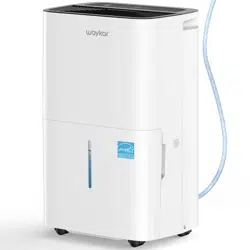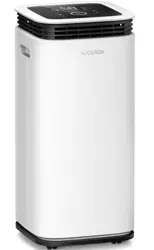

Home Dehumidifier
Please read this manual carefully
before using the product
YDZ-120
USER MANUAL
www.waykar.com


Thank you for purchasing our dehumidifier.
Waykar has been committed to developing powerful and easy-to-use products
to bring more convenience to your life. We highly recommend you to keep this
user manual for future reference in case of unexpected problems.
Waykar dehumidifier reduce the room humidity efficiently, creating a more
healthy and comfortable environment for you and your family.
Please read this user manual carefully to ensure proper use of the dehumidifier.
This dehumidifier is perfect for reducing humidity in family bedrooms,
bathrooms, basements, offices, storage rooms and more.
If there are any problems of the product, please contact Waykar Customer
Service at with your Purchase Order ID. We’ll help you support@waykar.com
solve the problems as soon as possible.
FOR CUSTOMERS
REQUESTING CUSTOMER SERVICE
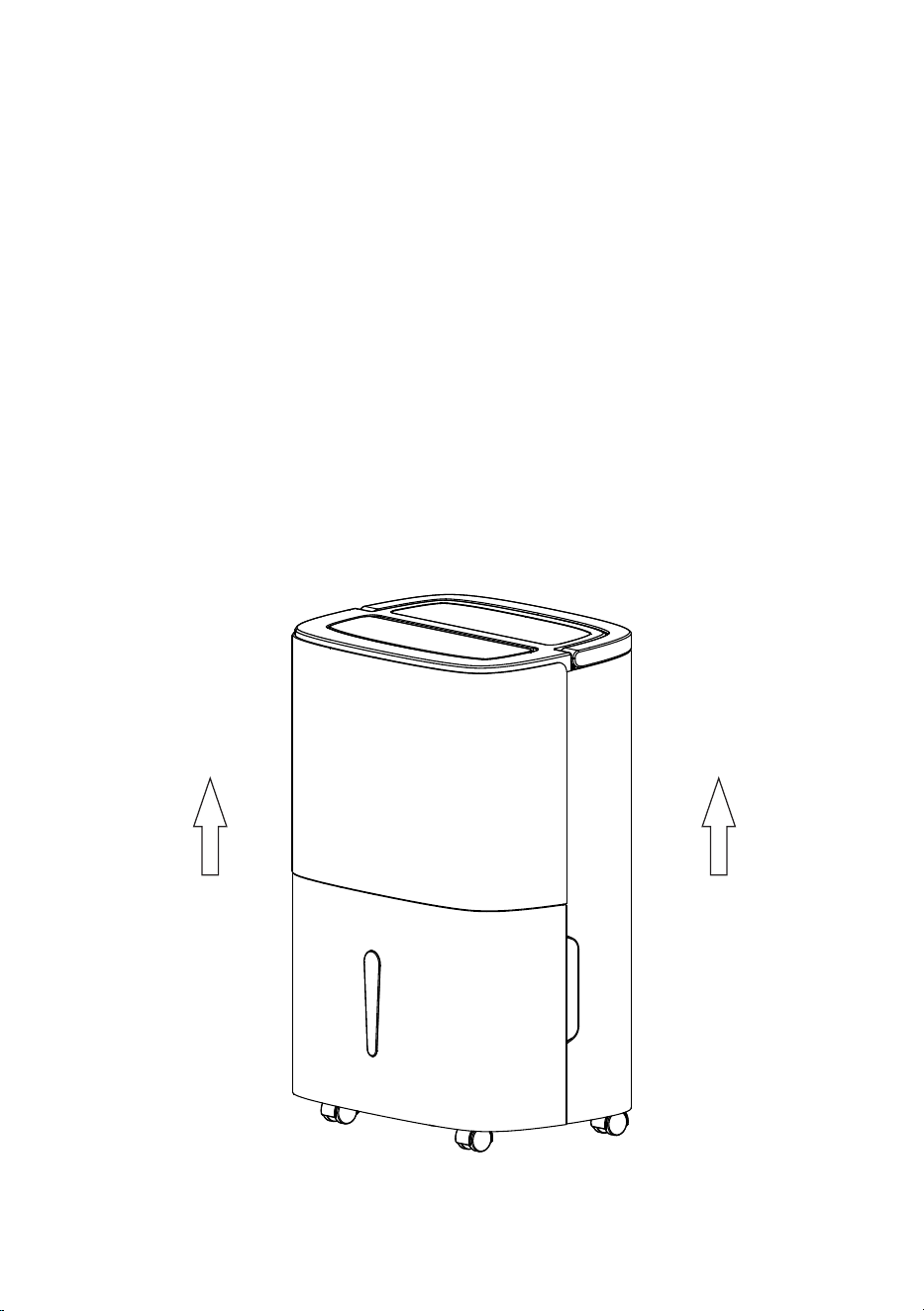
To protect the product from any internal damages, please keep the
product in the upright position throughout its journey.
Please take out the product and leave it standing in the upright
position for before plugging it in. 24 HOURS
BEFORE FIRST USE:

TABLE OF CONTENTS
PRODUCT DRAWINGS .........................................................03
SAFETY PRECAUTIONS.......................................................01
TROUBLESHOOTING ...........................................................10
DRAINAGE ................................................................................06
SPECIFICATIONS ...................................................................13
MAINTENANCE & CLEANING ..........................................09
WARRANTY & CONTACT US ..............................................15
OPERATION INSTRUCTIONS ...........................................04
IMPORTANT SAFETY INSTRUCTIONS ........................02
Q&A..............................................................................................12
SPECIAL NOTES.....................................................................14

● In order to prevent accidents, please do not use this dehumidifier if wires or other
connections are damaged.
● Install this dehumidifier in smooth place to reduce vibration and noise.
● Do not place this dehumidifier in water or other liquids.
● This appliance can be used by children aged from 8 years and above and persons with
reduced physical, sensory or mental capabilities or lack of experience and knowledge
if they have been given supervision or instruction concerning use of the appliance in a
safe way and understand the hazards involved. Children shall not play with the
appliance.cleaning and user maintenance shall not be made by children without
supervision.
● Please use at the specified voltage.
● Please do not place heavy objects on this dehumidifier.
● Please empty water tank to prevent overflow and spill before restarting this
dehumidifier.
● Please do not place waste rods and hard objects into the dehumidifier in case that error
and damage occur.
● If the supply cord is damaged, it must be replaced by the manufacturer, its service
agent or similarly qualified persons in order to avoid a hazard.
● When this dehumidifier is not used for long time, please unplug the electric cord.
● Power supply of the Dehumidifier shall comply with the safety regulations where it is
used and ensure reliable grounding.
● When stop, reset or clean this dehumidifier, please cut off the power.
● This dehumidifier can only be used indoor, please do not use for other purposes.
● Please do not incline in case that the spilled water damages this dehumidifier.
Requirements
For your safety, please read the following contents carefully before using this
dehumidifier.
IMPORTANT NOTICE FOR FIRST USE:
SAFETY PRECAUTIONS
- 01 -
● Please do not place this dehumidifier close to heating devices (flame or heaters,
etc.).
● Do not scratch appearance of this dehumidifier with sharp matters.
● Do not clean this dehumidifier with water, please wipe it with subhumid soft
cloth.
● Please do not turn on or turn off this dehumidifier by plugging in or pulling out
the plug.
● Please do not incline this dehumidifier over 45°or place this dehumidifier upside
down.
● Do not splash oil or water into this dehumidifier.
● Do not wipe this dehumidifier with chemical solvents such as benzene, gasoline
and alcohol, etc. If this dehumidifier is indeed dirty, please wipe with neutral
detergent.
● Do not use insecticide spray or other flammable substances in the vicinity of this
dehumidifier.
IMPORTANT SAFETY INSTRUCTIONS
Prohibition
- 02 -
● During running please do not open doors and windows as much as possible since
this can save energy resources.
● Please drain the water from water tank before running.
Installation
● When big noise is found during
operation of this dehumidifierIt is
recommended inserting pads or
damping rubber sheets, etc. below this
dehumidifier, this can reduce vibration
and noise, and can also reduce sinking
of wood floor or carpet.
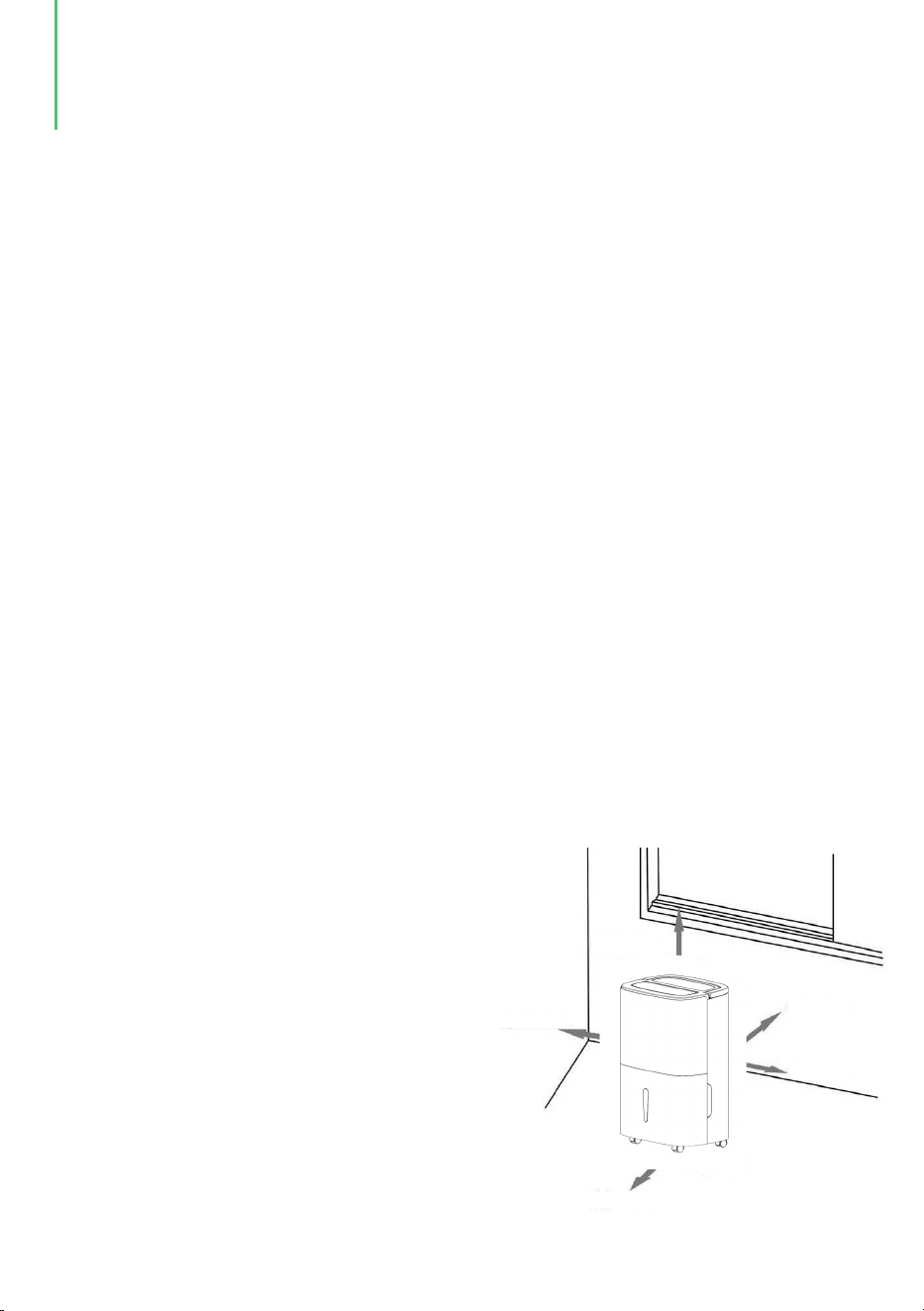
● When the dehumidifier is installed, a
certain space must be reserved around
this dehumidifier, the minimum
distance above is 20in, and the
minimum distance above is 20in, and
the minimum distance in front/rear and
left/right is 8in as required, as shown
in figure below.
Min. 8in
Min. 8in
Min. 8in
Min. 8in
Min. 20in
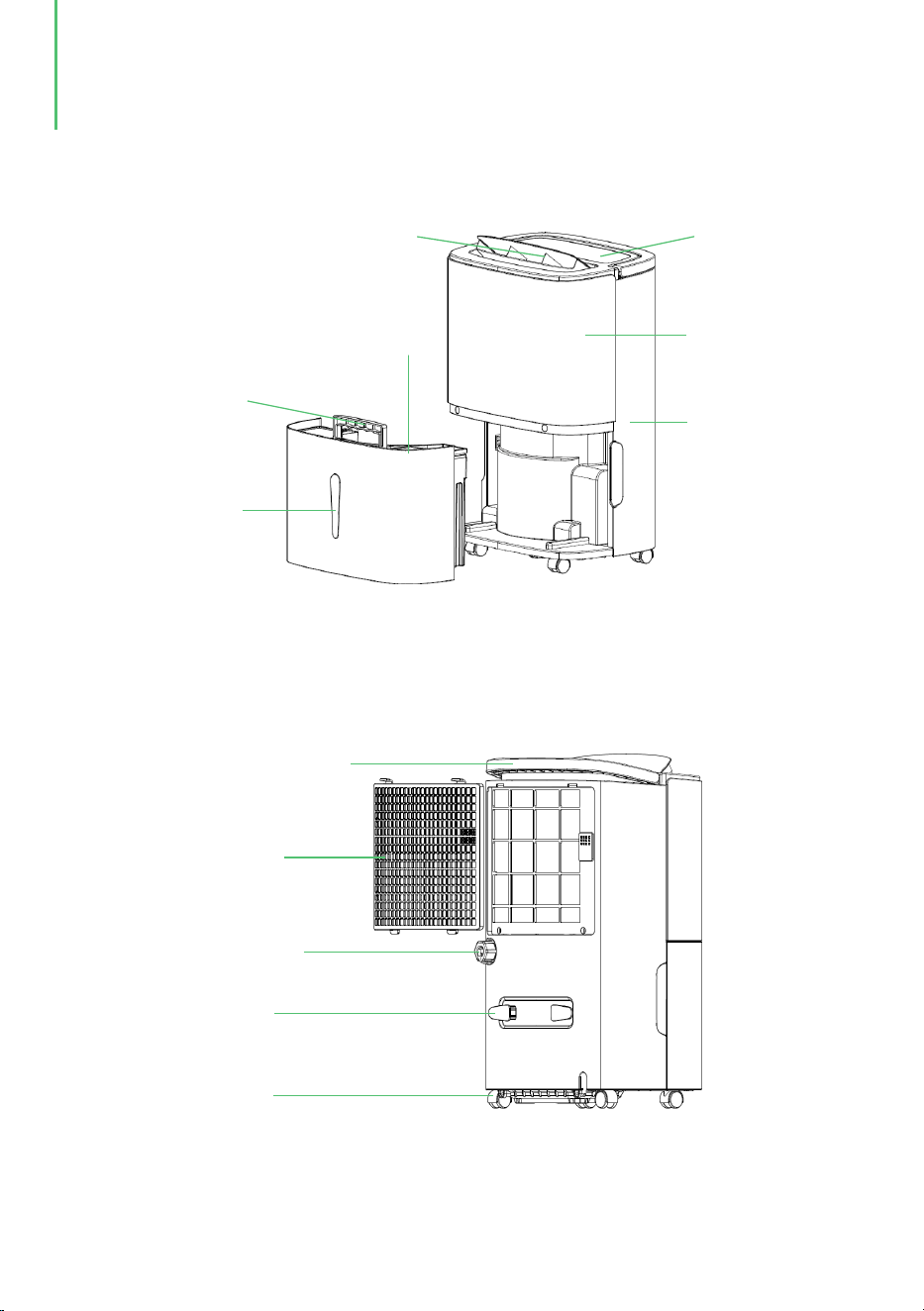
Wind blade
Control panel
Front cover
Back cover
Water tank cover
Water tank handle
Water tank
Handel
Filter frame
Drain
Wrapping post
Wheel
PRODUCT DRAWINGS
- 03 -
(Back side)
(Front side)
OPERATION INSTRUCTIONS
- 04 -
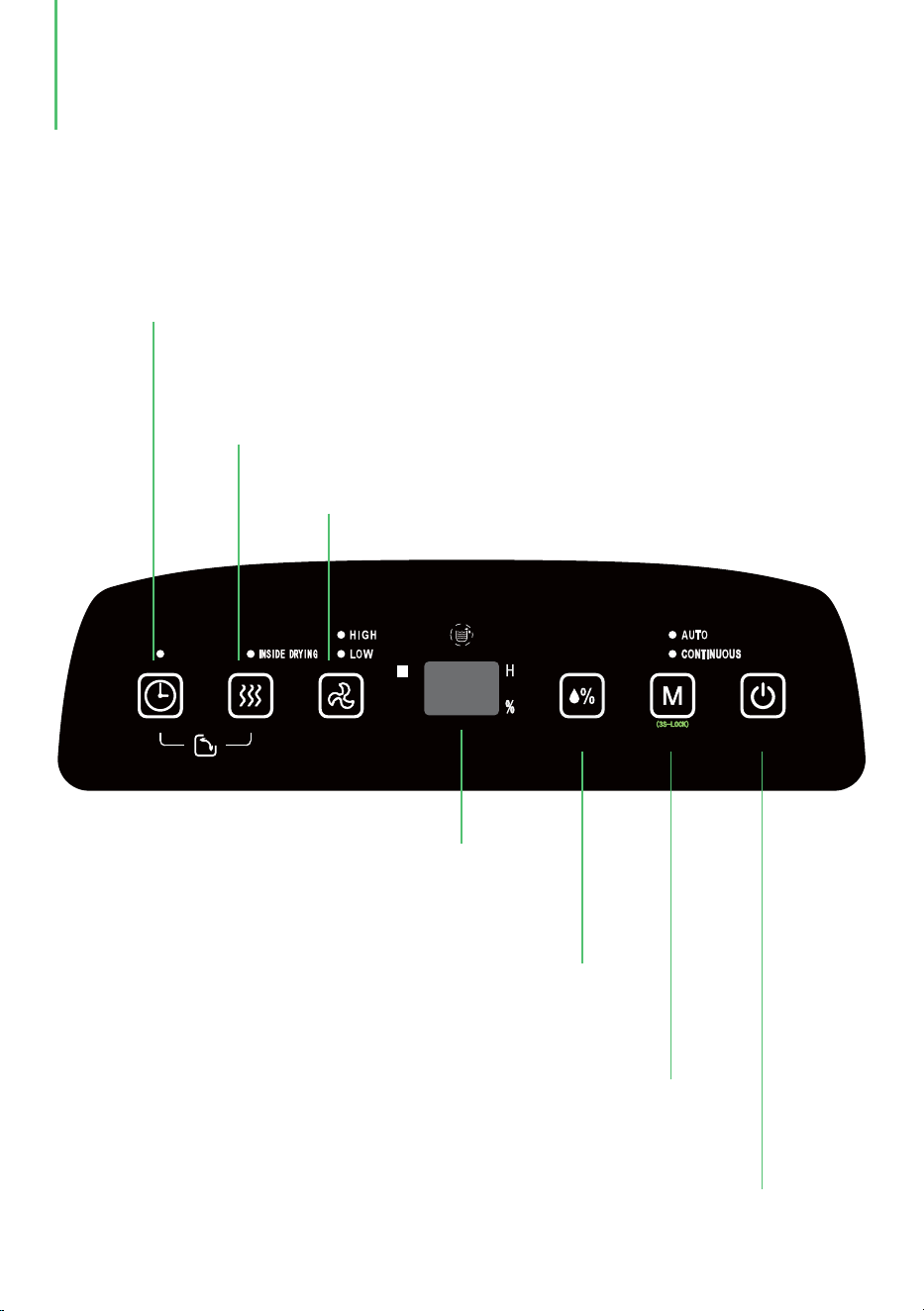
Timer 24h timer setup, press this key to set on/off time of the dehumidifier, and the setting
range is 1-24h. If you need to cancel timer setup, press twice continuously after confirmation
of setting time.
Dry key in dehumidifier Press this key to start drying procedure in the
dehumidifier, this can prevent mold inside the dehumidifier due to damp. The whole
drying procedure needs approximate 1h. Press this key again to cancel the drying
function in the dehumidifier, and to recover to running state before starting drying.
Air speed: In AUTO or CONTINUOUS mode, HIGH and
LOW can be circularly selected.
LCD Display Three LCD-Display Modes: Auto,
Continuous and Drying. Please set a target humidity
when the mode is Auto, then the machine will
automatically adjust the humidity.
Humidity setting Once this key is pressed, the humidity is
displayed circularly in the range 30%-80%,with 5% increment,
and the humidity setting is only valid in AUTO mode.
Mode During startup or timer startup press this key to select AUTO,
CONTINUOUS and DRYING modes, etc., and the indicator lamp corresponding
to the selected mode is on. Long press (3 seconds) the Mode button to activate
the Child Lock. Repeat the process to turn the Child Lock off.
On/off key Press this key to turn on or turn off the dehumidifier
Control Panel

Operating methods
OPERATION INSTRUCTIONS
- 05 -
Timer off
Timer on
● When the dehumidifier is in standby state, the method of setting time by the
[Timer key] is the same as timer off. The set time is confirmed if the Timer key
does not act anymore within 5s after the setting is completed, . In timer on state
the key lamp on the [Timer key] is always on, and the set time will be displayed
on the control panel.
AUTO mode
● Select AUTO dehumidification, if the room humidity is higher than the set
humidity or is between +5% or -5% of the set humidity , the compressor will start
and the fan will run at the set speed. If the room humidity is lower than the set
humidity by -5%, then the compressor will stop but the fan will run at the set
speed. The default set humidity value is 50%.
● When the dehumidifier is running, press the [Timer key] to adjust time from 1h to
24h, and press the key once to increase the setting time by 1h. When the setting
time exceeds 24h, the figure will be returned to 1 to start cycle.The Timer key can
also be long pressed, and the time will be increased and changed circularly. When
the setting time expires, the dehumidifier will be turned off automatically. The
set time is confirmed if the [Timer key] does not act anymore within 5s after
completing the setting.The key lamp on the [Timer key] is always on in timer off
state.
1. The dehumidifier will start at HIGH air speed and release air continuously for
30min;
2. The dehumidifier will turns to run at LOW air speed and last for 20min;
DRYING function in dehumidifier
● Press the [Drying key] in dehumidifier to start drying in the dehumidifier, and the
whole drying procedure needs approximate 1h :
● Select CONTINUOUS dehumidification, no matter what the relative humidity in
the room is, the compressor will start, the fan will run at high speed , and the air
speed can be regulated via the air speed key.
CONTINUOUS mode
How to stop:
● Press the Timer button and the Drying button at the same time to start or end the
Air-swing function.
2. Press the [Power key] to stop drying in dehumidifier and recover to the standby
state.
1. Press the key again to cancel drying in dehumidifier, and recover to the running
state before start of drying.
Air-swing function
● When the water tank is full of water, the full water icon on LCD will flash (the
compressor and fan will stop running), the BUZZER will sound for 10 times to
remind the user till water is drained.
1. Water tank
Drainage
DRAINAGE
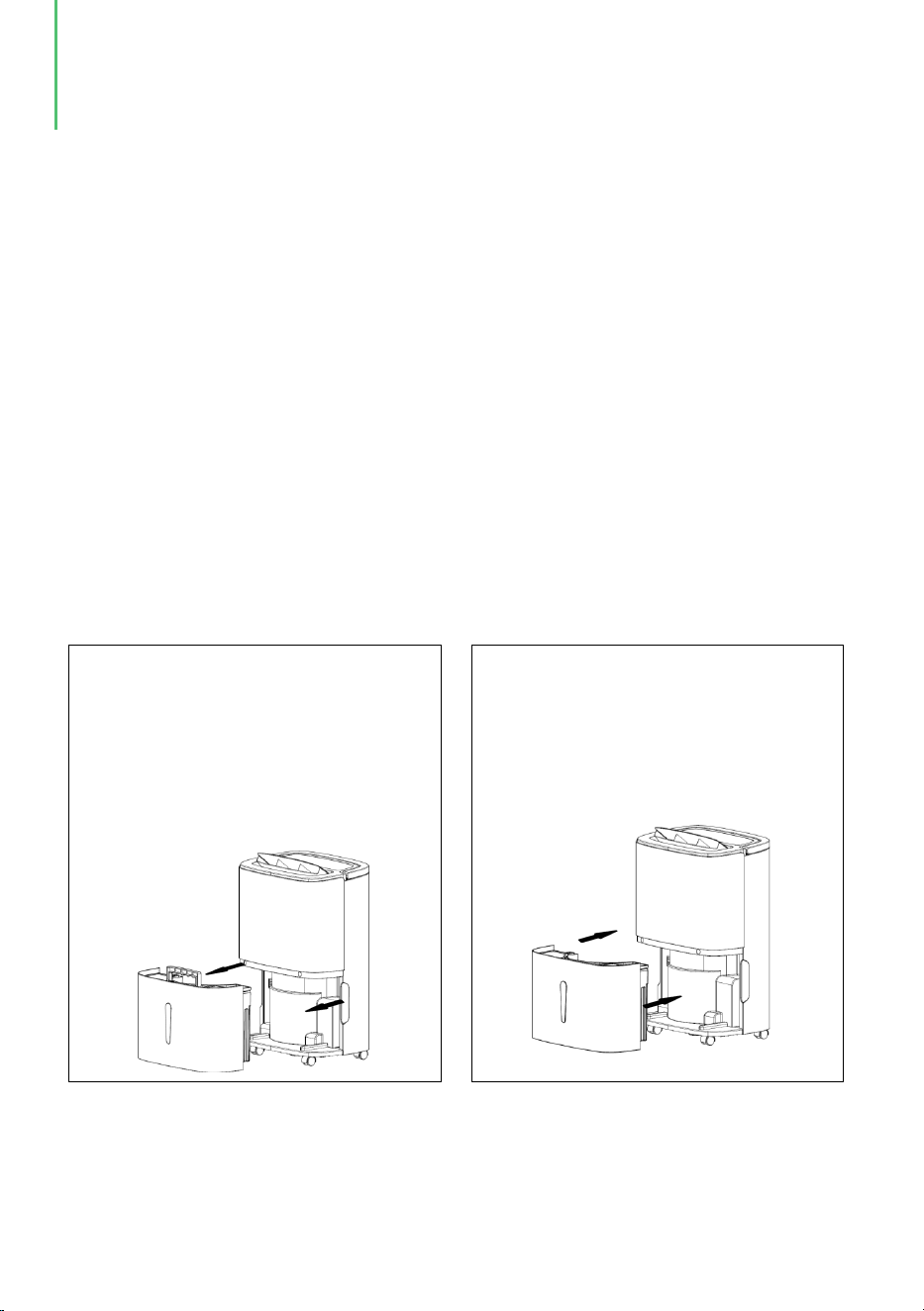
● Place both hands respectively at the
side of the back cover side of the
depression, gently remove the water
tank and open the tank cover on the
right side of the body, then pour the
water from the gap between water
tank and the cover.
● Close the tank cover,and rotating
water tank handle down,then put
the water tank gently and put it
back inthe right place to restart
dehumidifier.
Attention: Please empty the water tank if it is full of water. Before putting the water
tank into the dehumidifier, please confirm whether the floater rotates flexibly or
not, and then push it in position with both hands.
- 06 -
Drainage method
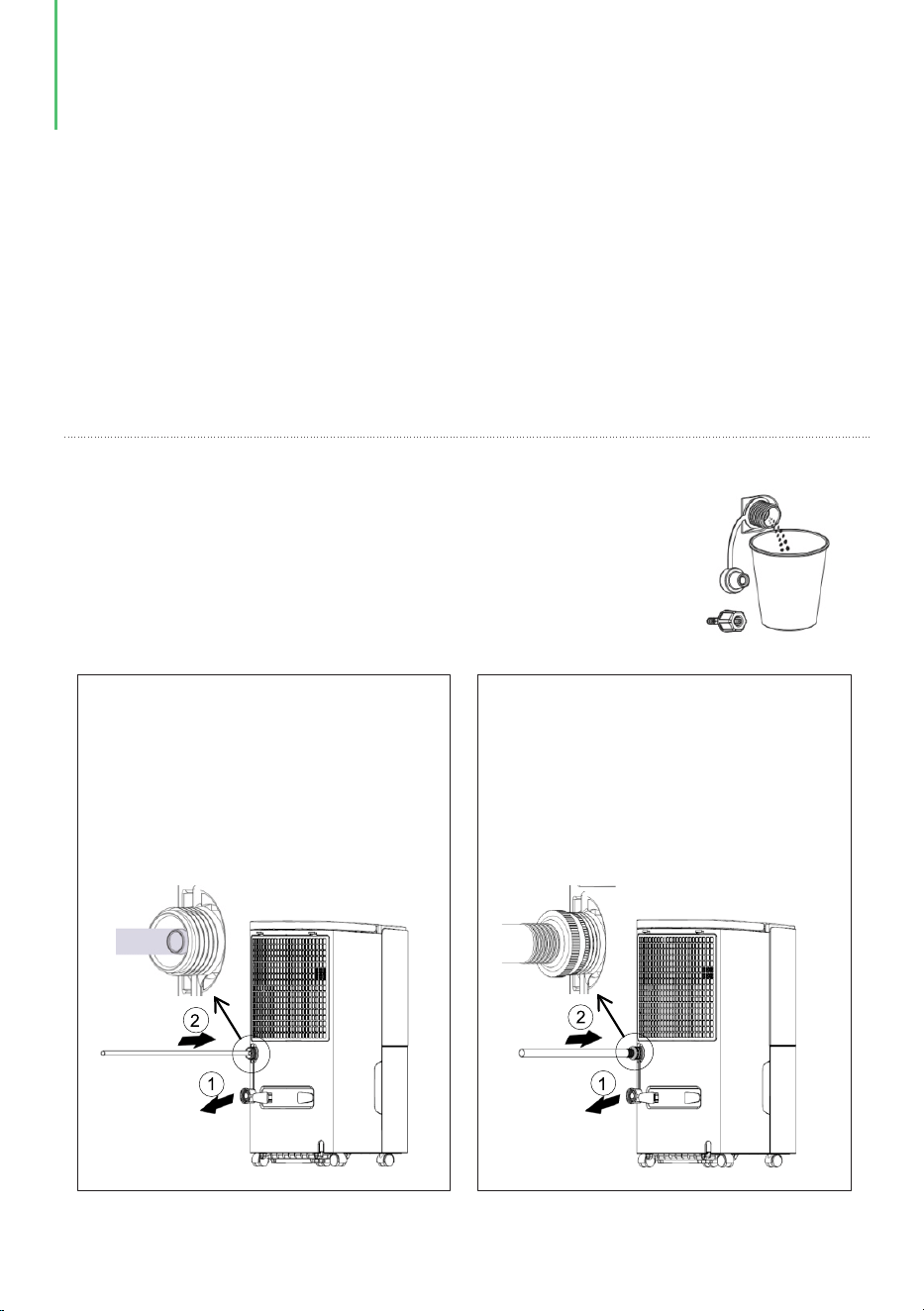
a. Connect a drainage pipe ( with outer diameter 13mm on the back of this
dehumidifier.
● If you do not want to drain water in the water tank frequently, you can connect a
drainage pipe:
1/
16
b. Find a garden hose with standard thread, with 1 in (1.0625 in or 26.98mm)
outer diameter and 11.5TPI pitch.
Note:
● If won’t use it for a long time, take down the water cover and
clean the dehumidifier.
● Before take down the water cover, use a cup to hold water to
avoid wet the floor.
● Connect the pipe with 13mm
diameter.
● Find the position of water outlet,
take down water cover, pull down
the water plug.
● Find the position of water outlet,
take down watercover, pull down
the water plug.
● Connect the garden pipe.
- 07 -
(a) (b)
DRAINAGE
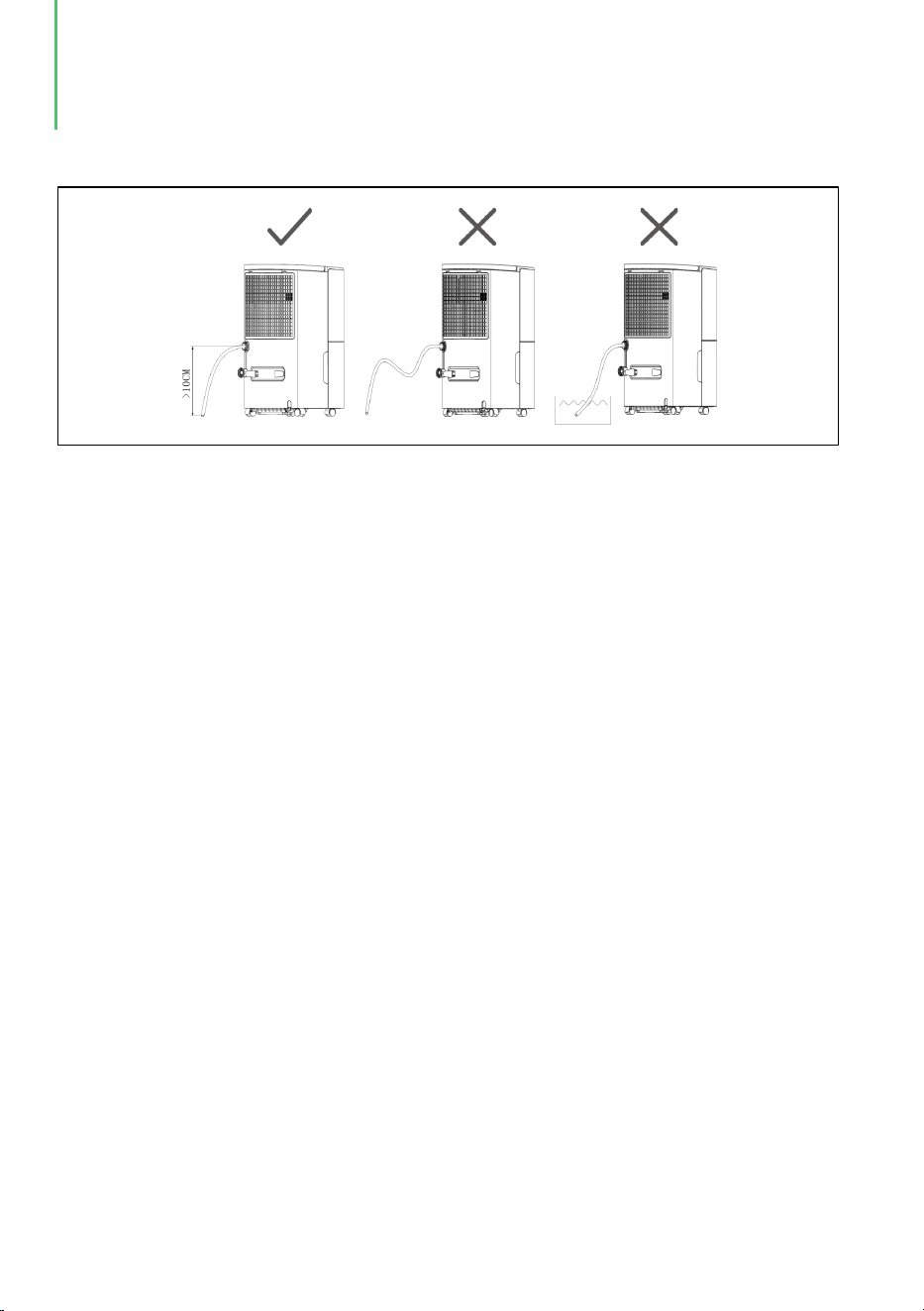
● The drainage pipe shall not be longer 2.36in, and the end of drainage pipe
should be lower than the outlet for at least 3.94in to keep the pipe smooth,
otherwise there will be leakage.
Note :
DRAINAGE
- 08 -
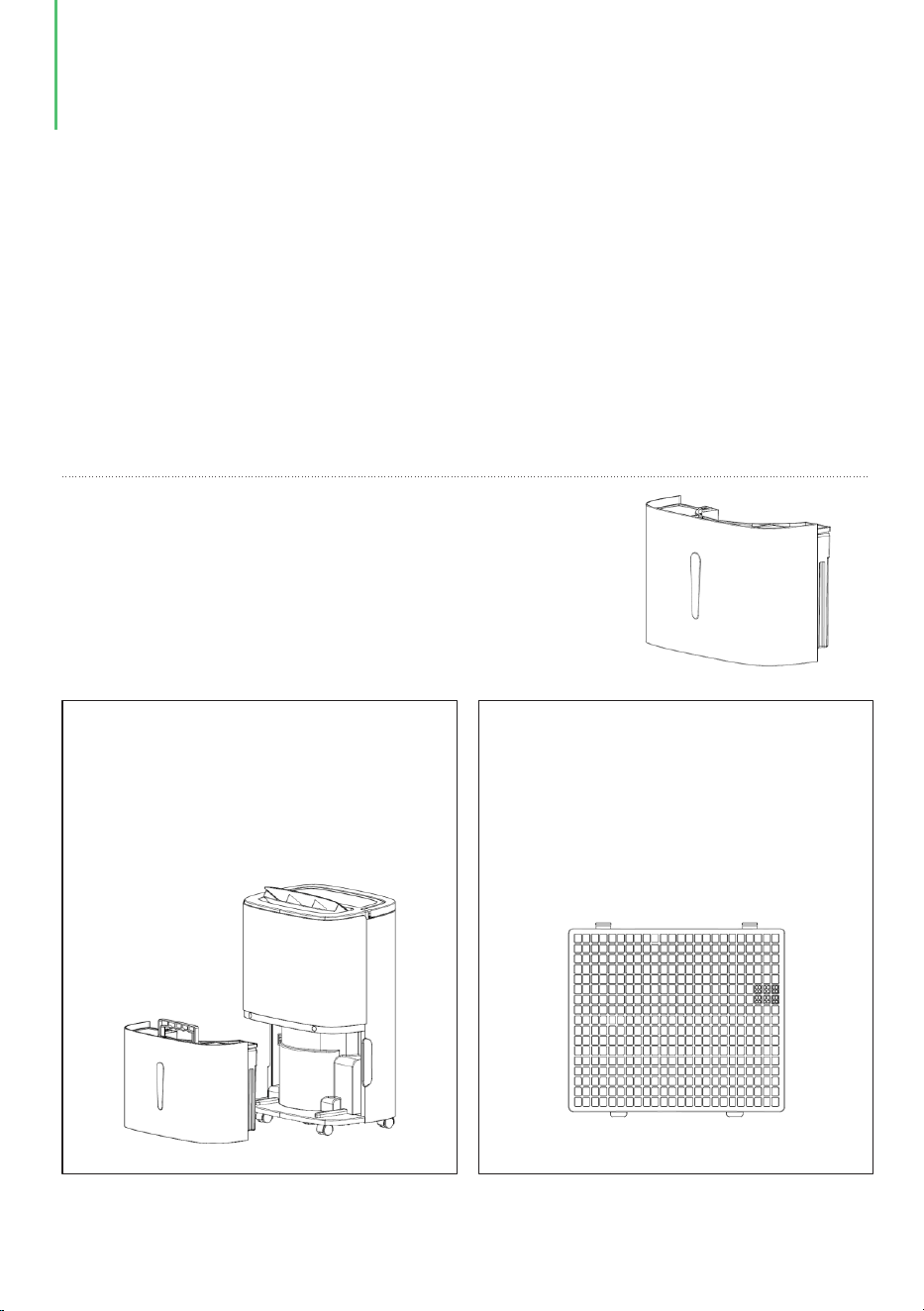
● Wipe the surface of the
dehumidifier slightly with wet
cloth, and do not use detergent or
abrasive in case the plastic
surface is damaged.
● Clean the filter and the frame at
lease once per two weeks simply
with cold or warm water, do not
use chemical solvents or hot
water.
Maintenance
Precautions:
● Please do not clean the dehumidifier body with chemical solvents such as
alcohol, gasoline and benzene, etc.
● If the dehumidifier is not used for long time, please disconnect power supply.
● Please disconnect power supply before maintenance or repair to prevent
electric shock.
● Please clean the water tank and its cover with soft
cloth dipped incold or warm water at regular time to
prevent mould inside the dehumidifier.
MAINTENANCE & CLEANING
- 09 -

TROUBLESHOOTING
If the following problems occur to the dehumidifier, the following solutions can be
adopted.
The dehumidifier
does not run
The dehumidification
function is not
effective
Is the water tank full of
water ? (the water tank is
full of water or is placed at
incorrect position)
The ambient temperature is
lower than 5℃ or higher
than 32℃
Does power plug fall ?
Is the room temperature or
humidity too low ?
Are the air outlet and inlet
blocked ?
Air is not blown out Is the air strainer blocked ?
Insert power plug into
socket.
Drain water from the
watertank, and then install
the water tank again.
Normal phenomenon
In dry season the
dehumidification ability
will reduce.
Clean up the objects
blocking the air outlet
and inlet.
Clean the air strainer
according to the above
method.
Noise is abnormal
during operation
Is the dehumidifier placed
improperly so that it is
inclined or unstable ?
Please place the
dehumidifier in smooth
place.
Is the air strainer blocked ?
Clean the air strainer
according to the above
method.
There is “tittering” sound
The flowing sound of
refrigerant, which is a
normal phenomenon.
Symptoms
Possible Causes Solutions
- 10 -

Connection of drainage
pipe becomes loose
Drainage system is
blocked
Fasten drainage pipe.
Remove obstacles and
straighten out water pipe.
The ambient temperature
is low, and it is in the state
waiting for defrost.
It is a normal phenomenon,
and the dehumidifier has
the automatic defrosting
function.
Water leaks
Frosting occurs
Symptoms
Possible Causes Solutions
Symptoms
Solutions
FL
The water tank is full
E1
The coil sensor detects anomaly
E2
The room temperature sensor detects anomaly
P1
The unit is in the defrosting state, normal
CL
The unit is in the internal drying state,normal
LC
Child lock funtcion starts
TROUBLESHOOTING
- 11 -

● This dehumidifier may be full of water or water tank is not installed properly,
drain the water in water tank, or re-install water tank in correct way.
Q: Why the dehumidifier cannot run or stop running suddenly?
The ambient temperature for operation of the dehumidifier is 5 - 32 ℃, and the
relative humidity is 30%-80%. The optimal temperature for use is 16-32℃.
● At the moment the dehumidifier may be in the “dehumidification mode”, the
ambient temperature is lower or higher (dehumidification cannot be performed
when the ambient temperature is <5℃ or >32℃).
Q: Why is hot air blown out from air supply outlet ?
● This dehumidifier extracts the air in the room, and the dehumidification unit
cools the air, the temperature decreases below the condensation point, the air
condenses into water drops, which falls into water tank finally, and the
dehumidified air is heated by the temperature returning unit. This can reduce
energy consumption and also accelerate dehumidification, therefore, hot air is
blown out, it is not considered defective.
Q&A
- 12 -
● In winter temperature is low and air is dry. In comparison with summer, the
dehumidification ability of the dehumidifier decreases remarkably, it is not
considered defective.
Q: Why is less water stored in water tank of the dehumidifier in winter?

SPECIFICATIONS
This product can expose you to chemicals including Styrene and its compounds,
which are known to the State of California to cause cancer and birth defects or other
reproductive harm. For more information, please visit: www.P65Warning.ca.gov.
WARNING
- 13 -
MODEL
POWER SOURCE
MOTOR COMPRESSOR+RLA/LRA)
REFRIGERANT
MAXIMUM ALLOWABLE PRESSURE
HIGH PRESSURE
LOW PRESSURE
INPUT POWER (65°F, 60%RH)
INPUT CURRENT (65°F, 60%RH)
IEF ( F, 60%RH)65°
MOTOR FLA
MOISTURE REMOVAL (80 ℉, 60%RH)
MOISTURE REMOVAL (86 ℉, 80%RH)
YDZ-120
115V~ 60Hz
30 PINTS (14.2 L/DAY)
50 PINTS (23.6 L/DAY)
80 PINTS (37.8 L/DAY)
360W
3.3A
1.8 L/kWh
0.5 A
2.9A / 18.7A
R32/130g
5.8 MPa
4.0 MPa
0.5MPa
HIGHEST MOISTURE REMOVAL
120 PINTS (56.8 L/DAY)
MOISTURE REMOVAL (65 ℉, 60%RH)
- 14 -

210 Henson Road Bldg A, Blacksburg, SC 29702 USA
- 15 -