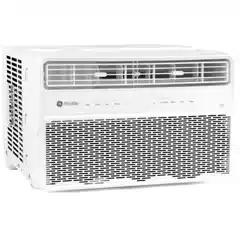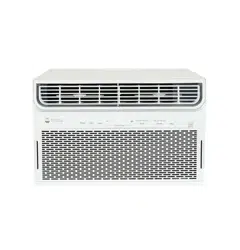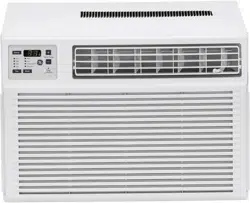
Write the model and serial
numbers here:
Model # _________________
Serial # _________________
You can find the rating label on the
side of the air conditioner.
GE is a trademark of the General Electric Company. Manufactured under trademark license.
AIR CONDITIONER
ROOM
49-5000874 Rev. 1 01-24
SAFETY INFORMATION .........3
OPERATING INSTRUCTIONS ....5
CARE AND CLEANING ...........7
INSTALLATION INSTRUCTIONS ..8
TROUBLESHOOTING TIPS ......13
WIFI SETUP ......................15
LIMITED WARRANTY ...........17
CONSUMER SUPPORT ..........18
PWDV08
PWDV10
PWDV12
PWDV14
OWNER’S MANUAL &
INSTALLATION
INSTRUCTIONS
ENGLISH/ESPAÑOL
Before you begin
Record the GE module number and
password for wifi setup. To locate this
information, see page 15.
GE Module Number #____________
Password #____________________

2 49-5000874 Rev. 1
THANK YOU FOR MAKING GE APPLIANCES A PART OF YOUR HOME.
Whether you grew up with GE Appliances, or this is your first, we’re happy to have you in the family.
We take pride in the craftsmanship, innovation and design that goes into every GE Appliances
product, and we think you will too. Among other things, registration of your appliance ensures that we
can deliver important product information and warranty details when you need them.
Register your GE appliance now online. Helpful websites and phone numbers are available in the
Consumer Support section of this Owner’s Manual. You may also mail in the pre-printed registration
card included in the packing material.
49-5000874 Rev. 1 3
IMPORTANT SAFETY INFORMATION
READ ALL INSTRUCTIONS BEFORE USING THE APPLIANCE
SAFETY INFORMATION
READ AND SAVE THESE INSTRUCTIONS
WARNING
For your safety, the information in this manual must be followed to minimize the risk of
fire, electric shock or personal injury.
Ŷ8VHWKLVDSSOLDQFHRQO\IRULWVLQWHQGHGSXUSRVHDV
described in this Owner’s Manual.
ŶThis air conditioner must be properly installed in
accordance with the Installation Instructions before it is
used.
ŶNever unplug your air conditioner by pulling on the
power cord. Always grip plug firmly and pull straight
out from the receptacle.
ŶReplace immediately all electric service cords that
have become frayed or otherwise damaged. A
damaged power supply cord must be replaced with a
new power supply cord obtained from the manufacturer
and not repaired. Do not use a cord that shows cracks
or abrasion damage along its length or at either the
plug or connector end.
ŶTurn the unit OFF and unplug your air conditioner
before cleaning.
ŶFor your safety…do not store or use combustible
materials, gasoline or other flammable vapors or
liquids in the vicinity of this or any other appliance.
ŶIf the receptacle does not match the plug, the
receptacle must be changed out by a qualified
electrician.
ŶGEAppliances does not support any servicing of
sealed system components (i.e. refrigerant containing
parts) in the air conditioner.
ŶService of all other components may ONLY be
completed by a qualified technician.
Ŷ'RQRWXVHPHDQVWRDFFHOHUDWHWKHGHIURVWLQJSURFHVV
or to clean, other than those recommended by the
manufacturer.
ŶThe appliance shall be stored in a room without
continuously operating ignition sources (for example:
open flames, an operating gas appliance or an
operating electric heater.
ŶDo not pierce or burn refrigerant tubing. Be aware that
refrigerants may not contain an odor.
ŶKeep ventilation openings clear of obstruction.
ŶWhen handling, installing, and operating the appliance,
care should be taken to avoid damage to the
refrigerant tubing.
ŶDo not drill holes in the unit.
ŶMaintenance, cleaning, and service should only be
performed by technicians properly trained and qualified
in the use of flammable refrigerants.
ŶGEAppliances does not support any servicing of
sealed system components (i.e. refrigerant containing
parts) in the air conditioner.
ŶDispose of air conditioner in accordance with Federal
and Local Regulations. Flammable refrigerants require
special disposal procedures. Contact your local
authorities for the environmentally safe disposal of your
air conditioner.
WARNING
Risk of Fire or Explosion. This unit contains flammable refrigerant.
Additional safety precautions must be followed.
CAUTION
ŶThis appliance is not intended for use by persons
(including children) with reduced physical, sensory
or mental capabilities, or lack of experience and
knowledge, unless they have been given supervision
or instruction concerning use of the appliance by a
person responsible for their safety.
ŶChildren should be supervised to ensure that they do
not play with the appliance.
ŶThe appliance shall be installed in accordance with
national wiring regulations.
A2L
4 49-5000874 Rev. 1
SAFETY INFORMATION
IMPORTANT SAFETY INFORMATION
READ ALL INSTRUCTIONS BEFORE USING THE APPLIANCE
READ AND SAVE THESE INSTRUCTIONS
WARNING
USE OF EXTENSION CORDS
RISK OF FIRE. Could cause serious injury or death.
Ŷ'2127XVHDQH[WHQVLRQFRUGZLWKWKLV:LQGRZ$LU
Conditioner.
Ŷ'2127XVHVXUJHSURWHFWRUVRUPXOWLRXWOHWDGDSWRUV
with this Window Air Conditioner.
HOW TO CONNECT ELECTRICITY
Do not, under any circumstances, cut or remove the third
(ground) prong from the power cord. For personal safety,
this appliance must be properly grounded.
DO NOT use an adapter plug with this appliance.
The power cord of this appliance is equipped with a
3-prong (grounding) plug which mates with a standard
3-prong (grounding) wall outlet to minimize the possibility
of electric shock hazard from this appliance.
Power cord includes a current interrupter device. A test
and reset button is provided on the plug case. The device
should be tested on a periodic basis by first pressing the
TEST
button and then the RESET button while plugged
into the outlet. If the TEST button does not trip or if the
RESET button will not stay engaged, discontinue use of the
air conditioner and contact a qualified service technician.
Have the wall outlet and circuit checked by a qualified
electrician to make sure the outlet is properly grounded.
Where a 2-prong wall outlet is encountered, it is your
personal responsibility and obligation to have it replaced
with a properly grounded 3-prong wall outlet.
The air conditioner should always be plugged into its
own individual electrical outlet which has a voltage rating
that matches the rating plate.
This provides the best performance and also prevents
overloading house wiring circuits which could cause a
fire hazard from overheated wires.
See the Installation Instructions, Electrical
Requirements section for specific electrical connection
requirements.
49-5000874 Rev. 1 5
Controls
Features and appearance will vary.
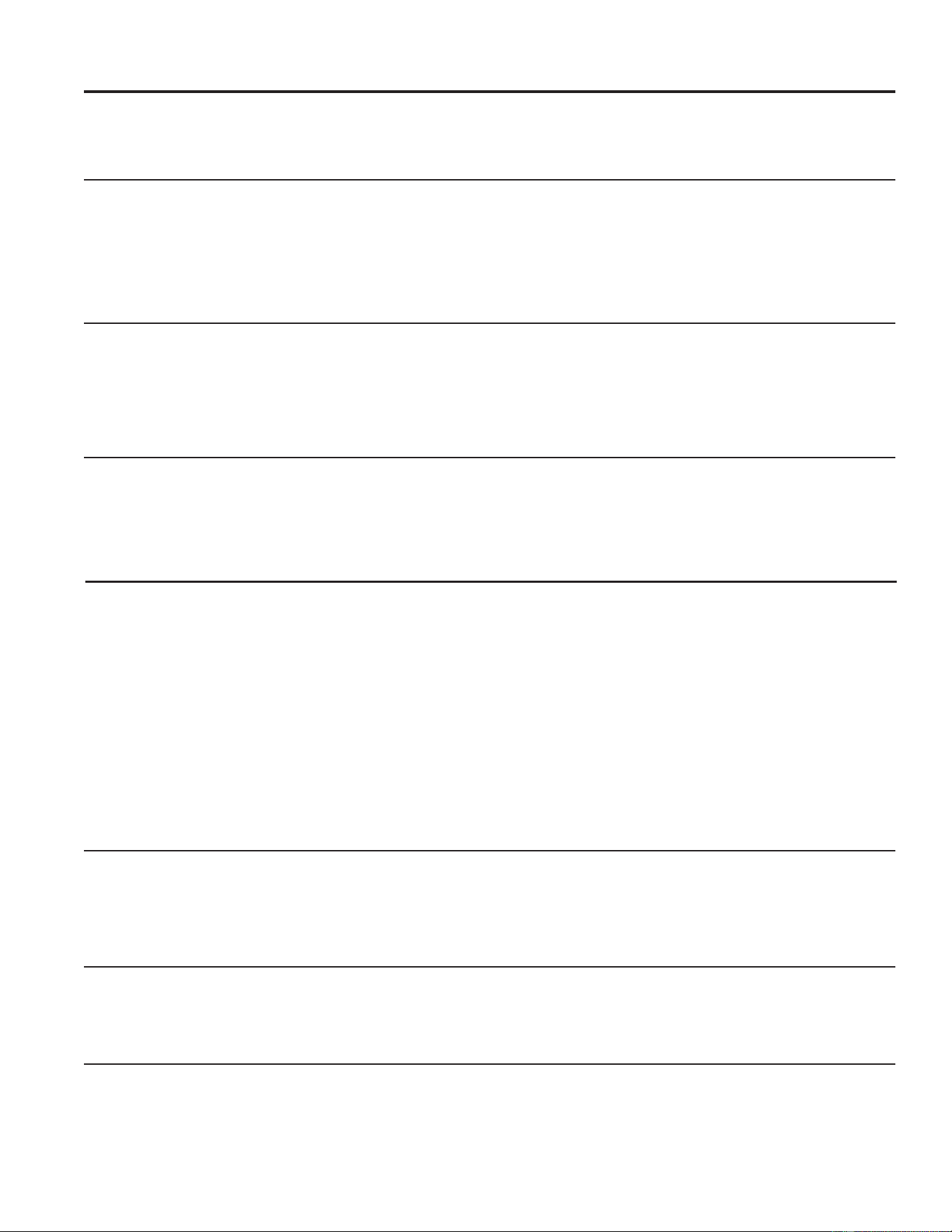
Lights beside the touch pads on the air conditioner control panel indicate the
selected settings.
Remote Control
Air Conditioner Controls
1. Power Pad
Turns air conditioner on and off. When turned on,
the display will show the Set temperature.
2. Display
Shows the Set temperature while setting the
temperature in Auto, Cool and Dry modes. Shows
the ambient temperature in Fan mode.
3. Temp and Timer Increase + /Decrease - Pads
8VHWRVHWWHPSHUDWXUHRUWLPHU7HPSHUDWXUHFDQ
be set in Auto, Cool, and Dry mode.
4. Mode Pad
8VHWRVHWWKHDLUFRQGLWLRQHUWR Auto, Cool, Dry or
Fan mode.
5. Fan Speed Pad
In Cool or Fan2QO\PRGH8VHWRVHWWKHIDQ
speed to Auto, High, Med or Low on the unit.
In Dry mode: Fan speed defaults to Auto and
cannot be changed.
6. Timer Pad
Timer ON—When the air conditioner is off, it can
be set to automatically come on in 0.5 to 24 hours
at its previous mode and fan settings.
Timer OFF—When the air conditioner is on, it can
be set to automatically turn off in 0.5 to 24 hours.
How to set:
Press the Timer pad. Each touch of the Increase
+ / Decrease – pads will change the time by 0.5
hour increments, up to 10 hours, then at 1 hour
increments up to 24 hours.
To review the remaining time on the Timer, press
the Timer SDG8VHWKH Increase + / Decrease –
pads to set a new time if desired.
To cancel the timer, press Decrease – pad until
the set time is 0.0 .
7. Filter Reset Pad
This feature automatically notifies you that the air
filter must be cleaned. The indicator light will come
on after 250 hours of operation. Clean the air filter
(refer to page 7), place it back in the front panel,
and press the Filter Reset pad. The light will go off.
8. WiFi Connect Pad
Enables connection of the air conditioner to the
home WiFi. Download SmartHQ App for details at:
GEAppliances.com/connect.
9. Quiet Pad
This feature runs the unit at the lowest fan speed
possible to ensure the quietest mode of operation.
10. Eco Pad
This feature controls the fan and compressor to the
reduce the energy usage of the unit.
USING THE AIR CONDITIONER: Controls
Solid light indicates WiFi connected
Blinking light indicates connecting
See Appliance Communication section in this manual
1
2
4 5
76
8 3 9
10
1
4
5
6
3
10
9
6 49-5000874 Rev. 1
Using the Air Conditioner
Do Not Operate in Freezing Outdoor Conditions
This cool-only air conditioner was not designed for
freezing outdoor conditions.
It must not be used when the outdoor temperature is
below freezing (32°F).
Control Panel Lights On/Off Feature
This air conditioner has a control panel lights on/off
feature where its lights will turn off when there is no
activity with the controls for over one minute. To wake up
the controls, press any pad on the controls and the lights
will come on to show the previous settings.
To turn this feature off, press LED button on remote
control, the unit will beep to signal the successful toggle
of the feature on and off.
USING THE AIR CONDITIONER
Remote Control
ŶTo ensure proper operation, aim the remote control at
the signal receiver on the air conditioner.
ŶThe remote control signal has a range of up to 20 feet.
ŶMake sure nothing is between the air conditioner and
the remote control that could block the signal.
ŶMake sure batteries are fresh and installed correctly as
indicated on the remote control.
Cool Mode
8VHWKH&RROPRGHDWLow, Med, High or Auto fan
VSHHGIRUFRROLQJ8VHWKHTemperature Increase + /
Decrease - pads to set the desired temperature between
60°F and 86°F in 1°F increments.
An electronic thermostat is used to maintain the room
temperature. The compressor will cycle on and off and
also change operating speeds to keep the room at
the set level of comfort. Set the thermostat at a lower
number and the indoor air will become cooler. Set the
thermostat at a higher number and the indoor air will
become warmer.
NOTE: If the air conditioner is off and is then turned on
while set to a Cool setting or if turned from a fan setting
to a Cool setting, it may take approximately 3 minutes
for the compressor to start and cooling to begin.
Cooling Descriptions
For Normal Cooling—Select the Cool mode and
High or Med fan with a middle set temperature.
For Maximum Cooling—Select the Cool mode
and High fan with a lower set temperature.
For Quieter and Nighttime Cooling—Select the
Cool mode and Low fan with a middle set temperature.
Eco Pad
Controls the fan and compressor.
ON—The fan will cycle on and off with the compressor.
This may result in wider variations of room temperature.
NOTE: the fan may continue to run for a short time or
may pulse intermittently after the compressor cycles off
to sample the room air. OFF—The fan runs all the time,
while the compressor cycles on and off.
Fan Only Mode
8VHWKH)DQ2QO\0RGHDW$XWR/RZ0HGRU+LJK
fan speed to provide air circulation and filtering without
cooling. Since fan-only settings do not provide cooling,
a Set temperature cannot be entered. The room
temperature will appear in the display.
Auto Fan Mode
Set to Auto for the fan speed to automatically set to the
speed needed to provide optimum comfort settings with
the set temperature.
If the room needs more cooling, the fan speed will
automatically increase. If the room needs less cooling, the
fan speed will automatically decrease.
Control Panel Sound On/Off Feature
This air conditioner has a control panel sounds on/off
feature where the sounds that occur when a button on
the user interface is touched can be turned on or off.
This feature is turned on by default, meaning that the
air conditioner will make a sound when any button is
pressed on the user interface. To turn this feature off so
as to make the button presses silent, press and hold the
Filter button on the user interface for 5 seconds. The air
conditioner will beep to signal the successful toggle of
this feature on and off.

49-5000874 Rev. 1 7
Using the Air Conditioner
Care and Cleaning
Grille and Case
Turn the air conditioner off and remove the plug from the
wall outlet before cleaning.
To clean, use water and a mild detergent. Do not use
bleach or abrasives.
Outdoor Coils
The coils on the outdoor side of the air conditioner should
be checked regularly. If they are clogged with dirt or soot,
they may be professionally cleaned.
USING THE AIR CONDITIONER/CARE AND CLEANING
Air Filter
The air filter behind the front grille should be checked and
cleaned at least every 30 days or more often if necessary.
To remove:
Open the inlet grille by pulling downward on the tabs at
the top upper corners of the inlet grille until the grille is in
a 45º position. Remove the filter.
Clean the filter with warm, soapy water. Rinse and let the
filter dry before replacing it. Do not clean the filter in a
dishwasher.
CAUTION
DO NOT operate the air conditioner
without a filter because dirt and lint will clog it and reduce
performance.
How to Insert the Battery in the Remote Control
1. Non-rechargeable batteries are not to be recharged.
2. Do not mix different types of batteries such as
alkaline, carbon-zinc, or rechargable batteries.
3. Do not mix old and new batteries.
4. Batteries are to be inserted with the correct polarity.
Exhausted batteries are to be removed from the
product.
NOTES:
Ŷ8VH³$$$´YROWDONDOLQHEDWWHULHV
Ŷ'2127',6326(2)%$77(5,(6,1),5(
BATTERIES MAY EXPLODE OR LEAK.
Ŷ'RQRWVZDOORZ
Air Direction
Dry Mode
8VHWKHOHYHUVWRDGMXVWWKHDLUGLUHFWLRQOHIWRUULJKW
7LOWWKHORXYHUEDQNWRDGMXVWXSDQGGRZQ
8VHWKH'U\PRGHWRUHGXFHWKHKXPLGLW\RIWKHDLULQWKH
room. In Dry mode, only Auto fan speed is available and
runs the unit at a lower fan speed.
8 49-5000874 Rev. 1
Installation Instructions
BEFORE YOU BEGIN
Read these instructions completely and
carefully.
•
IMPORTANT – Save these
instructions for local inspector’s use.
•
IMPORTANT – Observe all
governing codes and ordinances.
• Note to Installer – Be sure to leave these
instructions with the Consumer.
• Note to Consumer – Keep these instructions for
future reference.
• Skill level – Installation of this appliance requires
basic mechanical skills.
• Completion time – Approximately 1 hour
• We recommend that two people install
this product.
• Proper installation is the responsibility
of the installer.
• Product failure due to improper installation is not
covered under the Warranty.
<RX0867XVHDOOVXSSOLHGSDUWVDQGXVHSURSHU
installation procedures as described in these
instructions when installing this air conditioner.
Questions? Visit our Website at: GEAppliances.com
ELECTRICAL REQUIREMENTS
These models require a 115/120-volt AC,
60-Hz grounded outlet protected with a
15-amp time-delay fuse or circuit breaker.
The 3-prong grounding plug minimizes the
possibility of electric shock hazard. If the wall outlet
you plan to
use is only a 2-prong outlet, it is your
responsibility
to have it replaced with a properly
grounded 3-prong wall outlet.
CAUTION
Do not, under any circumstances, cut or remove the
third (ground) prong from the power cord.
Do not change the plug on the power cord of this air
conditioner.
Aluminum house wiring may present special
problems—consult a qualified electrician.
Power cord includes a current interrupter device. A
test and reset button is provided on the plug case.
The device should be tested on a periodic basis
by first pressing the TEST button and then the
RESET button while plugged into the outlet. If the
TEST button does not trip or if the RESET button
will not stay engaged, discontinue use of the air
conditioner and contact a qualified service technician.
ELECTRICAL
REQUIREMENTS (cont)
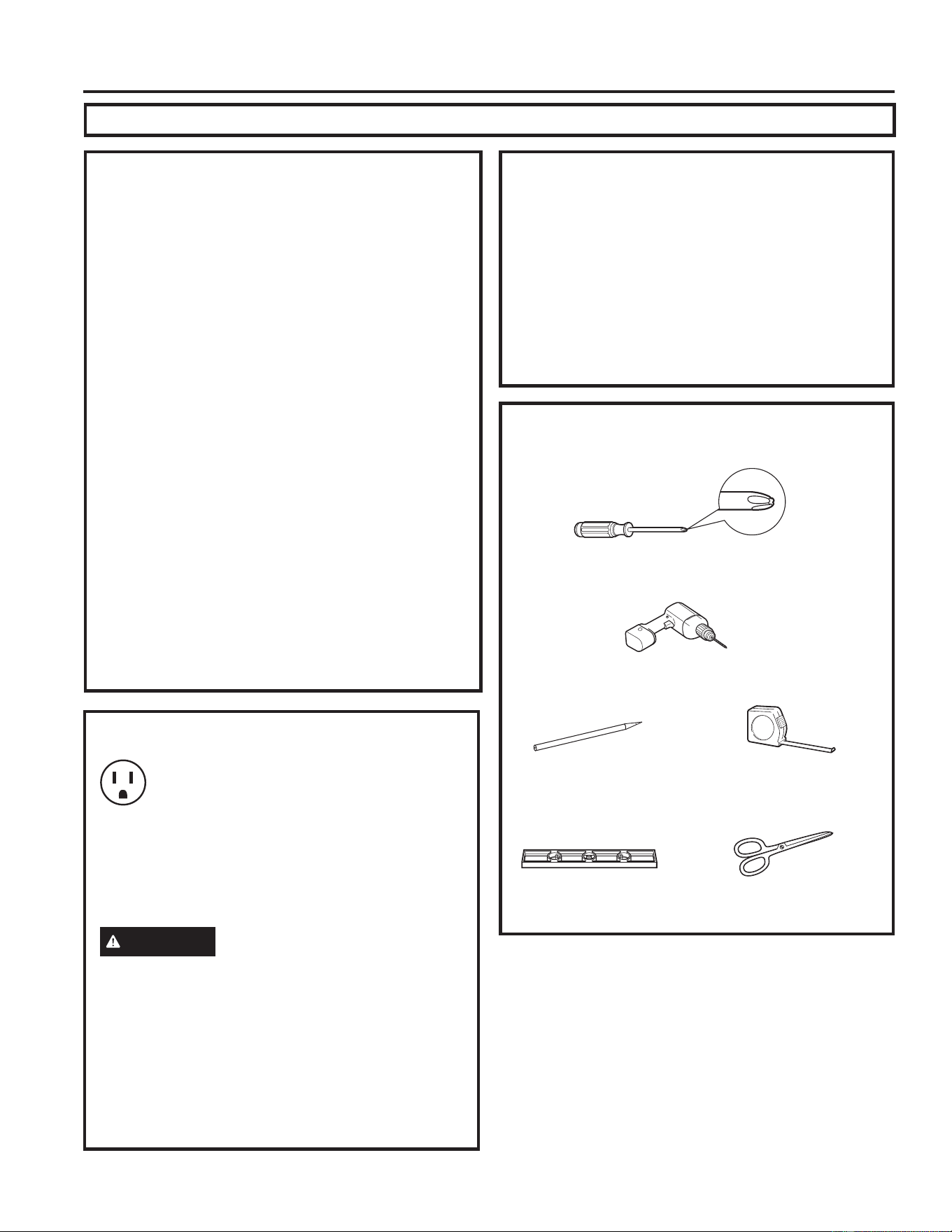
TOOLS YOU WILL NEED
Phillips head screwdriver
Ruler or tape measurePencil
Level
Scissors or knife
'ULOODQG´GULOOELW
INSTALLATION INSTRUCTIONS
49-5000874 Rev. 1 9
INSTALLATION INSTRUCTIONS
Installation Instructions
Side Curtain
Frame
Foam top window
gasket (2)
Top mounting rail
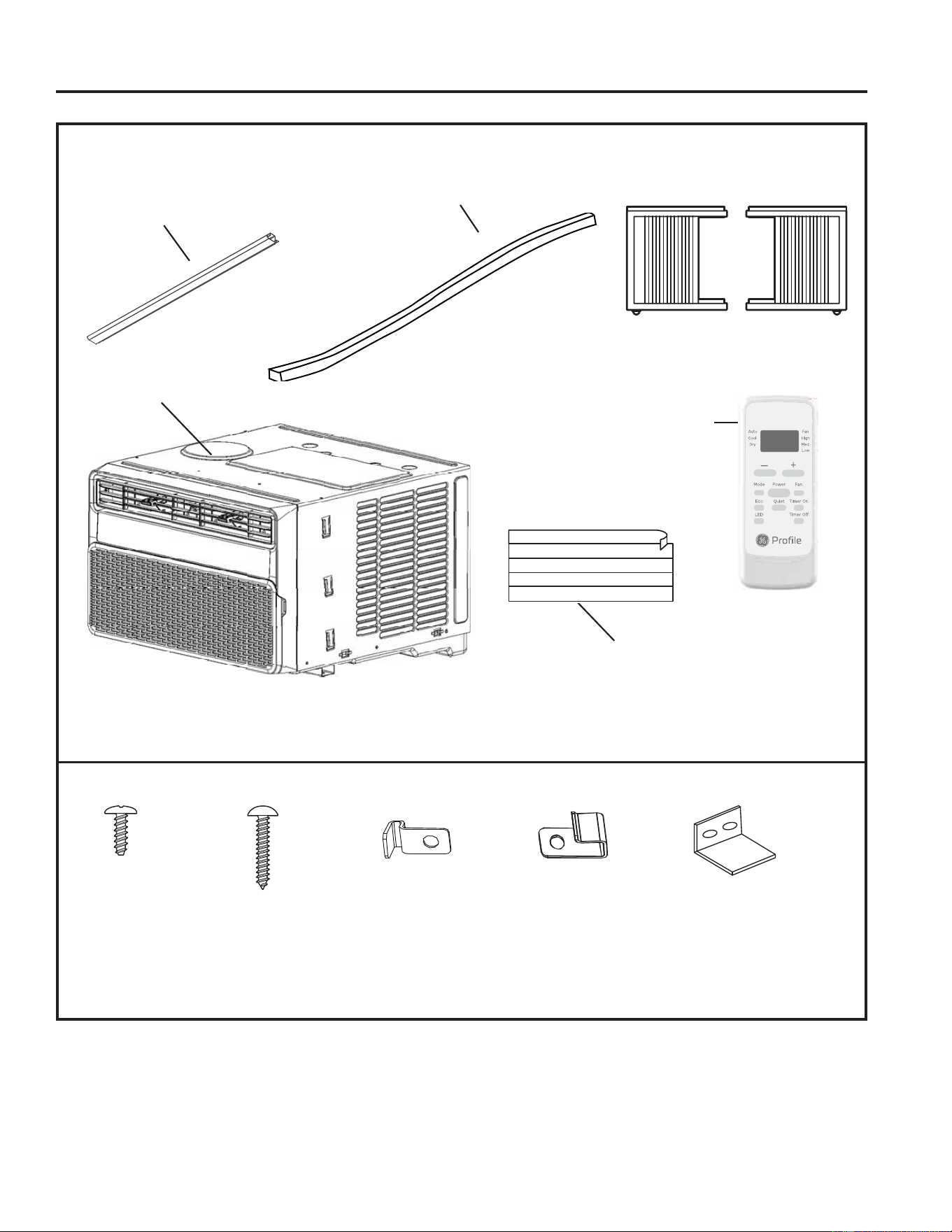
PARTS INCLUDED
(Appearance may vary)
Foam Insert
Air
conditioner
Remote
Control
Type A (4)
´VFUHZV
Type B (7)
´VFUHZV
Frame lock (2)
For wooden windows
Window lock (1)Frame Lock (2)
For Vinyl-Clad windows
(on some models)
10 49-5000874 Rev. 1
Installation Instructions
3.
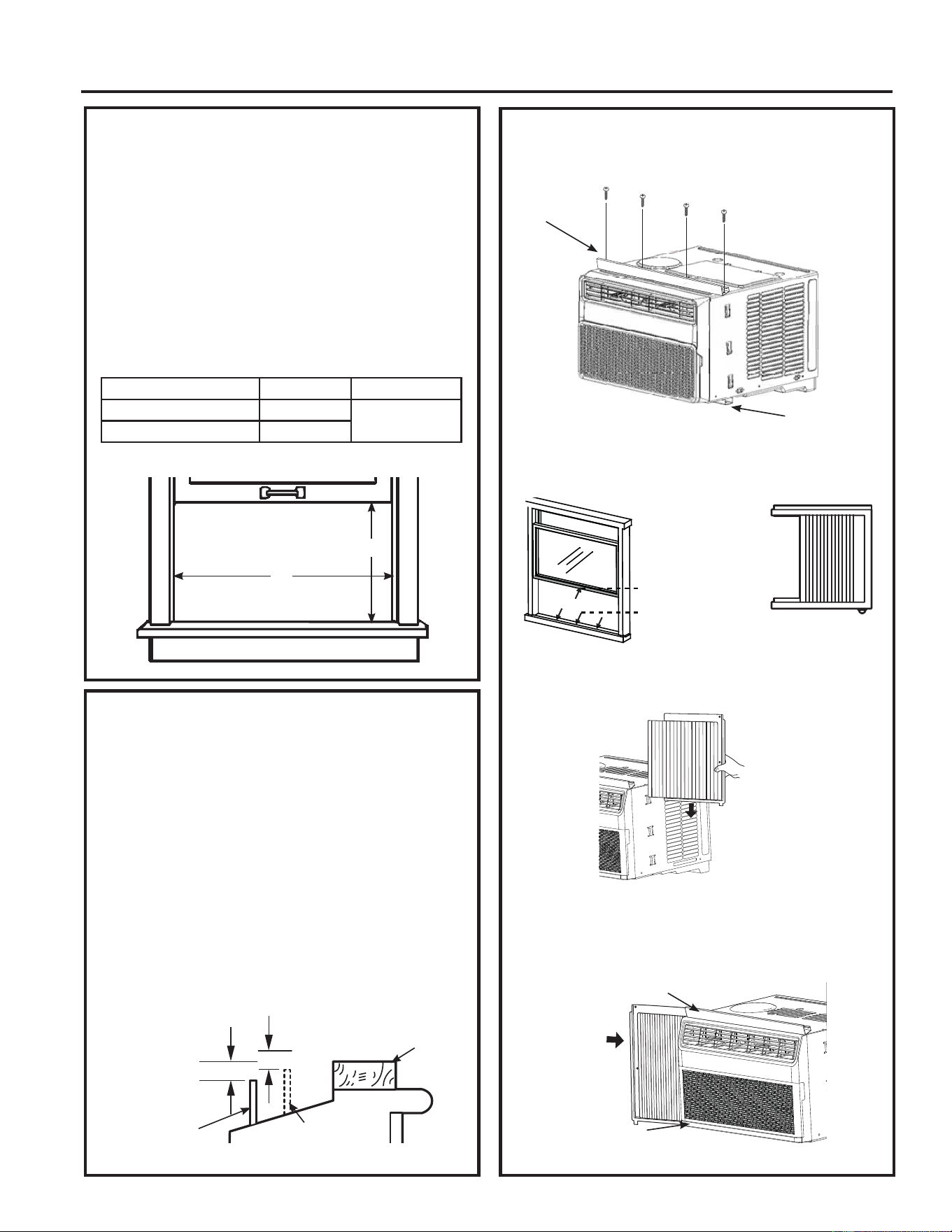
PREPARE THE AIR CONDITIONER
A. ,QVWDOOWKH7RS5DLORQWKH$&ZLWK´
screws from the outside of the case.
B. Apply the weather seals provided to the bottom,
top and sides of the window to the seal around
the perimeter of the air conditioner.
C. Slide the side curtain panels into the side panel
rails.
D. Slide left and right side curtain frames into top
and bottom rails.
1. WINDOW REQUIREMENTS
• These instructions are for a standard
double-hung window. You will need to modify
them for other types of windows.
• The air conditioner can be installed without the
side curtain panels if needed to fit in a narrow
window. See the window opening dimensions.
• All supporting parts must be secured to firm
wood, masonry or metal.
• The electrical outlet must be within reach of
the power cord.
• Follow the dimensions in the table and
illustration for your model.
2. STORM WINDOW REQUIREMENTS
A storm window frame will not allow the air
conditioner to tilt toward the outside, and will
NHHSLWIURPGUDLQLQJSURSHUO\7RDGMXVWIRUWKLV
attach a piece of wood to the sill.
WOOD PIECES
WIDTH: 2Ǝ
LENGTH: Long enough to fit inside the window
frame.
THICKNESS: To determine the thickness, place
DSLHFHRIZRRGRQWKHVLOOWRPDNHLWƎKLJKHU
than the top of the storm window frame or the
vinyl frame.
Attach securely with nails or screws provided by
the installer.
A
(With side curtain panels)
B
ƎKLJKHU
than storm
window
frame
Storm window
frame
Wood
Sill
ƎKLJKHU
than vinyl frame
(on some windows)
Vinyl frame
Models A B
PWDV08 ´PLQ
´´
PWDV10/12/14 ´PLQ
Cut and apply
weather strip to
front and bottom
edge of window
frame.
Cut and apply
weather strip to
back edge of
the window sill.
Cut and apply a weather
strip to side of the curtain
frame (one on each side).
INSTALLATION INSTRUCTIONS
Top mounting
rail
Bottom
mounting rail
Top rail
Bottom rail
49-5000874 Rev. 1 11
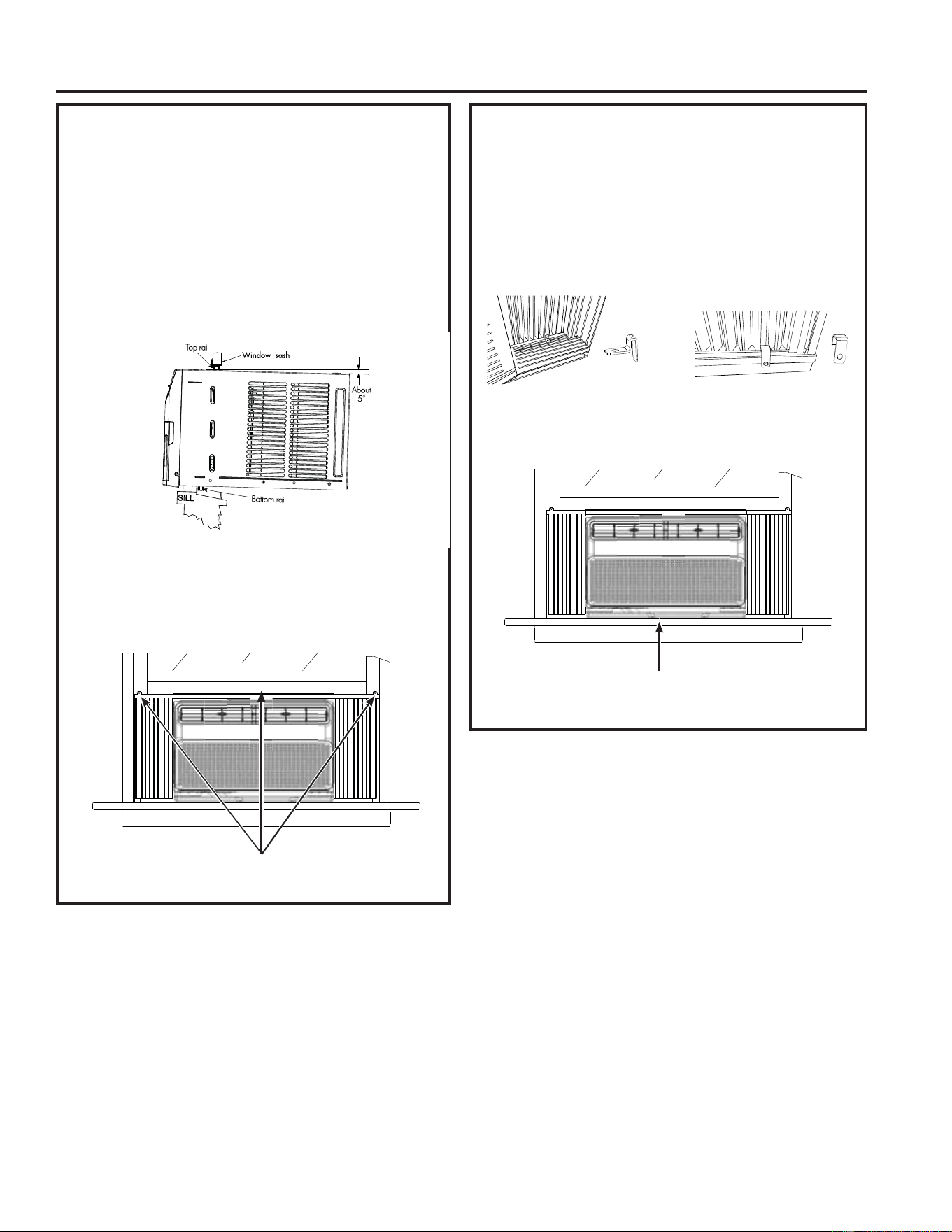
5. SECURE AIR CONDITIONER
A. )RUZRRGHQZLQGRZVGULYHDò´ORFNLQJVFUHZ
through the A frame lock into the window sash.
1RWH8VHWKHGULOODQG´GULOOELWWRGULOOSLORW
holes.
B. )RU9LQ\O&ODGZLQGRZVGULYHDò´ORFNLQJVFUHZ
through the B frame lock and into the window
VDVK8VHWKHGULOODQG´GULOOELWWRGULOOSLORW
holes.
C. Repeat the side bracket installation on the left
side.
Installation Instructions
4. INSTALL THE AIR CONDITIONER
IN THE WINDOW
A. Mark the center of the window. Set the air
conditioner in the window so that is it centered.
Place the air conditioner so that front edge of
the bottom mounting rail is against the back
edge of the sill.
B. Bring the window down so that the front edge of
the top mounting is in front of the window. Make
sure that the air conditioner is level or tilting
slightly to the outside.
C. Extend the curtain panels until they fill the
window. Mark the location of the holes in each
FRUQHU8VHWKHGULOODQG´GULOOELWWRGULOOSLORW
KROHV8VH´ORFNLQJVFUHZVWRVHFXUHWKH
side panels and top rail in place.
´ORFNLQJVFUHZV
Weather seals
INSTALLATION INSTRUCTIONS
For wooden windows For vinyl-clad windows

12 49-5000874 Rev. 1
Installation Instructions
6. INSTALL WINDOW LOCK
BRACKET AND FOAM TOP
WINDOW GASKET
8VH´VFUHZWRLQVWDOOWKHZLQGRZORFNEUDFNHW
on top of the bottom window.
A.
CAUTION
To prevent broken glass or damage to windows,
on vinyl or other similarly constructed windows,
attach the window locking bracket to the window
VLGHMDPEZLWKRQH7\SH%VFUHZ
B. Cut the foam top window gasket to the window
width.
C. Stuff the foam between the glass and the
window to prevent air and insects from getting
into the room.
NOTE: If the gasket supplied does not fit your
window, obtain appropriate material locally to
provide a proper installation seal.
INSTALLATION INSTRUCTIONS
Wood
Vinyl

49-5000874 Rev. 1 13
Troubleshooting Tips... Before you call for service
Save time and money! Review the charts on the following pages first and you may not need to call for service.
Problem Possible Cause What To Do
Air conditioner does not
start.
The unit is unplugged. Make sure the air conditioner plug is pushed completely
into the outlet.
The fuse is blown/circuit breaker
is tripped.
Check the house fuse/circuit breaker box and replace
the fuse or reset the breaker.
Power Failure. The unit will automatically restart in the setting last
used after the power is restored.
There is a protective time delay (approximately
3 minutes) to prevent tripping of the compressor
overload. For this reason, the unit may not start normal
cooling for 3 minutes after it is turned back on.
The current interrupter device is
tripped.
Press RESET button located on the power cord plug.
If the RESET button will not stay engaged, discontinue
use of the air conditioner and contact a qualified
service technician.
Air conditioner does not
cool as it should.
Indoor airflow is restricted. Make sure there are not curtains, blinds or furniture
blocking the front of the air conditioner.
The temp control may not be set
properly.
Turn the temperature control to a higher number.
The air filter is dirty. Clean the filter at least every 30 days. See Care and
Cleaning section.
The room may have been hot. When the air conditioner is first turned on, you need to
allow time for the room to cool down.
Cold air is escaping. Check for open furnace registers and cold air returns.
Cooling coils have iced up. 6HH³$LUFRQGLWLRQHUIUHH]LQJXS´EHORZ
Air conditioner freezing up Ice blocks the air flow and stops
the air conditioner from cooling
the room.
Set the mode control to High Fan or High Cool with the
temperature setting as high as it can be set.
Water drips outside Hot, humid weather. This is normal.
Water drips inside The air conditioner is not tilted to
the outside.
For proper disposal, make sure the air conditioner
slants slightly from the case front to the rear.
Water collects in base pan Moisture removed from air and
drain into base pan.
This is normal for a short period in areas with little
humidity; normal for a longer period in very humid
areas.
TROUBLESHOOTING TIPS

14 49-5000874 Rev. 1
TROUBLESHOOTING TIPS
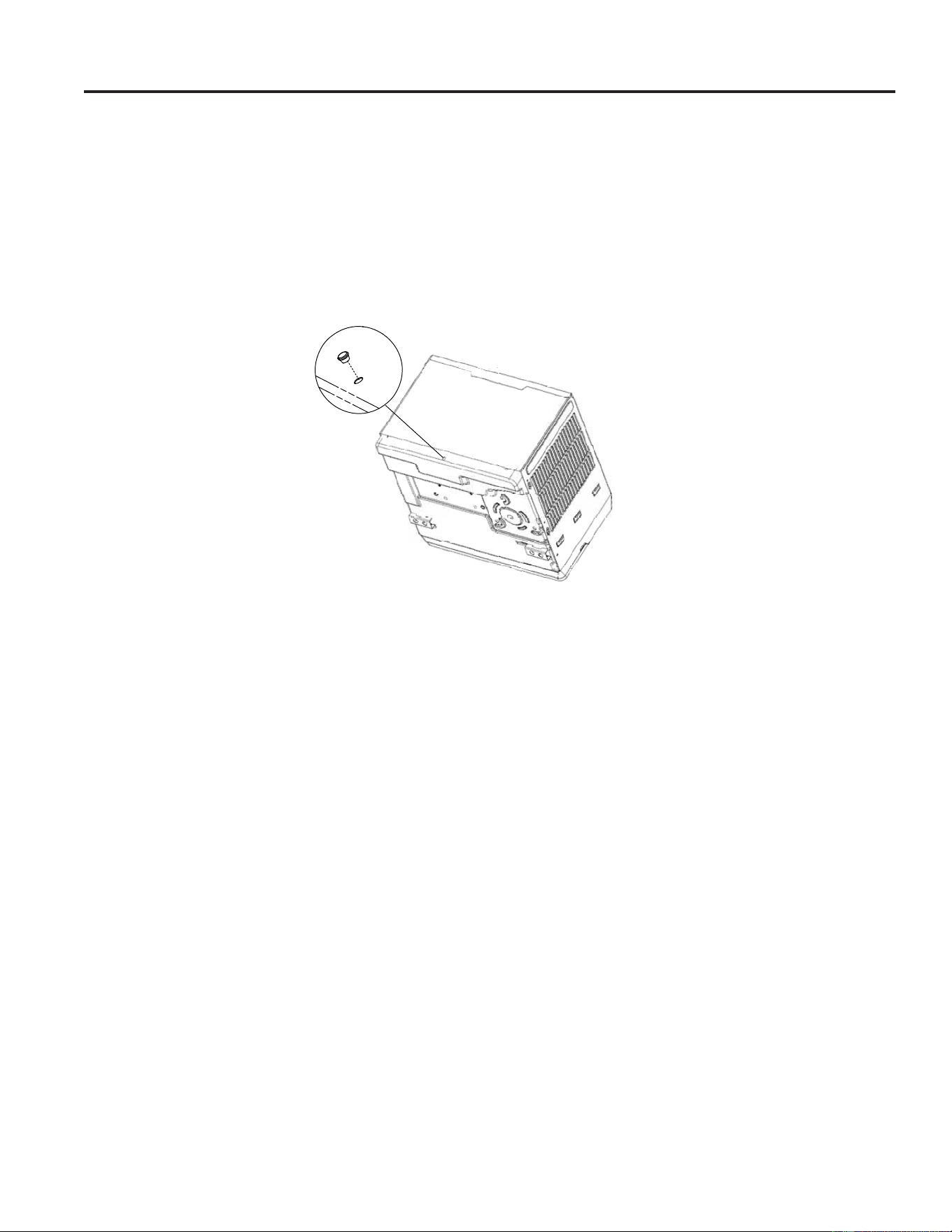
Ŷ<RXPD\KHDUDSLQJLQJQRLVHFDXVHGE\ZDWHUEHLQJSLFNHGXSDQGWKURZQDJDLQVWWKHFRQGHQVHURQUDLQ\GD\V
or when the humidity is high. This design feature helps remove moisture and improve efficiency.
Ŷ<RXPD\KHDUWKHWKHUPRVWDWFOLFNZKHQWKHFRPSUHVVRUF\FOHVRQDQGRII
Ŷ:DWHUZLOOFROOHFWLQWKHEDVHSDQGXULQJKLJKKXPLGLW\RURQUDLQ\GD\V7KHZDWHUPD\RYHUIORZDQGGULSIURPWKH
outdoor sideof the unit.
Ŷ7KHIDQPD\UXQHYHQZKHQWKHFRPSUHVVRUGRHVQRW
Ŷ:DWHUGURSOHWVEHLQJWKURZQDJDLQVWWKHRXWVLGHFRLOVFDQPDNHDSLQJLQJQRLVH7KLVKHOSVFRROWKHFRQGHQVHU
You can reduce this noise by removing the subbase water plug.
To ensure maximum efficiency it is recommended to check to ensure the rubber drain plug is properly inserted.
This plug may be removed during operation to minimize water in the back of the unit; however, removing it will
lower the efficiency of your unit.
NOTE: Do not drill hole in the base pan.
Subbase Water Plug
Normal Operating Sounds
49-5000874 Rev. 1 15
WIFI SETUP
WiFi Setup
GE Appliances SmartHQ (for customers in the United States)
Your AC is GE Appliances SmartHQ Enabled.
Please visit GEAppliances.com/connect to learn more about
connected appliance features, and to learn what connected appliance apps will work with your smart phone.
WiFi Connectivity:
For assistance with the appliance or the appliance network connectivity, please call 1-800-220-6899.
All connected appliance data is held in strict accordance with the GE Appliances Connected Data Privacy Policy.
Visit geappliances.com/privacy/privacy_policy_connected to view this policy.
WiFi Module: FCC ID ZKJ-WCATA008 and IC 10229A-WCATA008
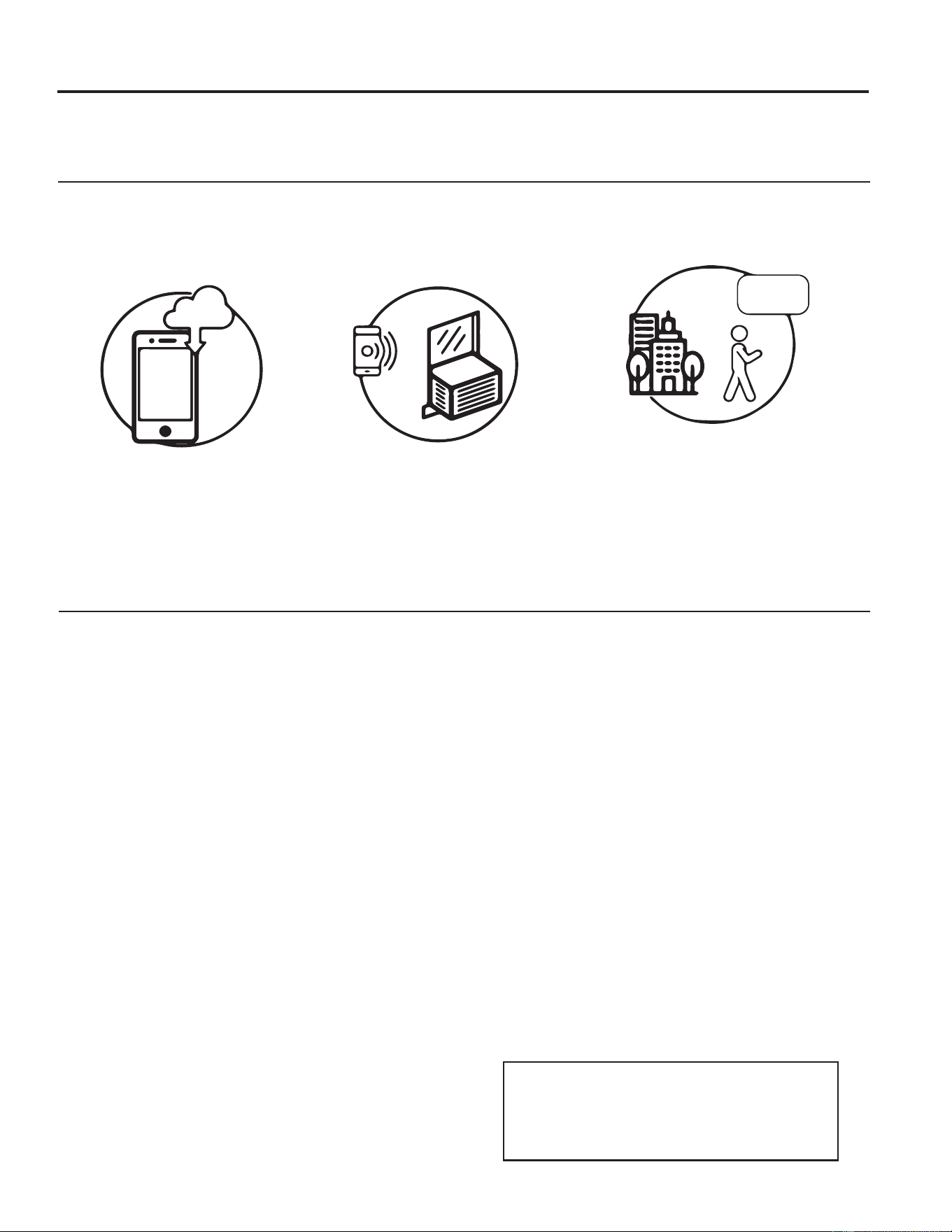
How it Works
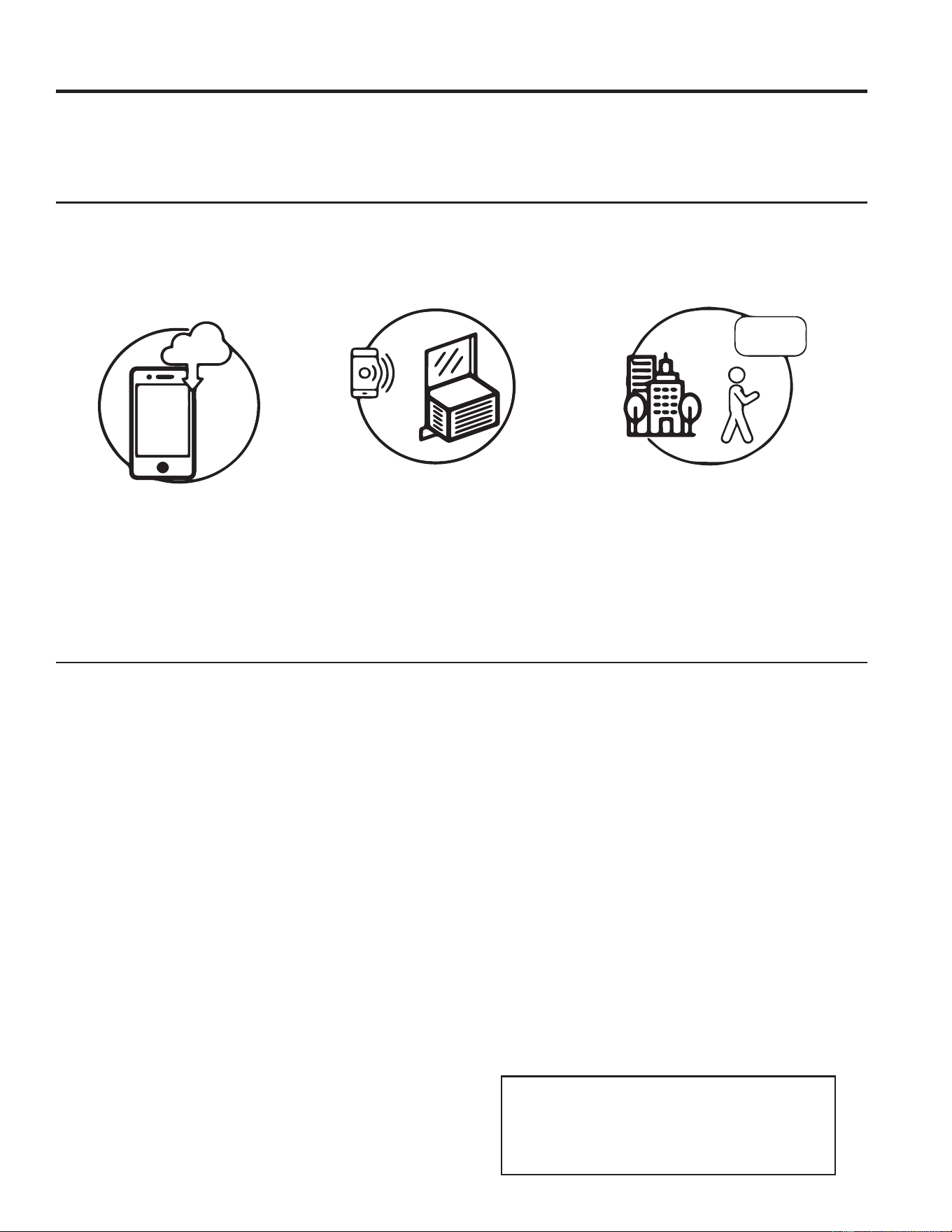
Download the GE Appliances App
8VHWKHDSSWRFRQQHFWWR\RXUURRP
air conditioner.
Once connected, use the app to
DGMXVWWKHDLUFRQGLWLRQHUDVGHVLUHG
CHANGE TEMP
TO 65
Questions about SmartHQ
Get answers you need about setting up WiFi appliances and connecting to your home network in our support articles.
Visit products.geappliances.com/appliance/gea-support-search-content to view wifi connect room air conditioner
support articles.
REGULATORY INFORMATION
FCC/IC Compliance Statement:
This device complies with Part 15 of the FCC Rules.
2SHUDWLRQLVVXEMHFWWRWKHIROORZLQJWZRFRQGLWLRQV
1. This device may not cause harmful interference.
2. This device must accept any interference received,
including interference that may cause undesired
operation.
This equipment has been tested and found to comply
with the limits for a Class B digital device, pursuant to
Part 15 of the FCC Rules. These limits are designed
to provide reasonable protection against harmful
interference in a residential installation. This equipment
generates uses and can radiate radio frequency energy
and, if not installed and used in accordance with the
instructions, may cause harmful interference to radio
communications. However, there is no guarantee that
interference will not occur in a particular installation. If
this equipment does cause harmful interference to radio
or television reception, which can be determined by
turning the equipment off and on, the user is encouraged
to try to correct the interference by one or more of the
following measures:
• Reorient or relocate the receiving antenna.
• Increase the separation between the equipment and
receiver.
• Connect the equipment into an outlet on a circuit
different from that to which the receiver is connected.
• Consult the dealer or an experienced radio/television
technician for help.
Labelling: Changes or modifications to this unit not
expressly approved by the manufacturer could void the
user’s authority to operate the equipment.
*Select Models Only
8QLTXH,GHQWLILHUGE, RG51G7(2)/CEU1)
5HVSRQVLEOH3DUW\±86&RQWDFW,QIRUPDWLRQ
General Manager, Customer Relations, GE Appliances,
Appliance Park, Louisville, KY 40225
1-800-626-2005
16 49-5000874 Rev. 1
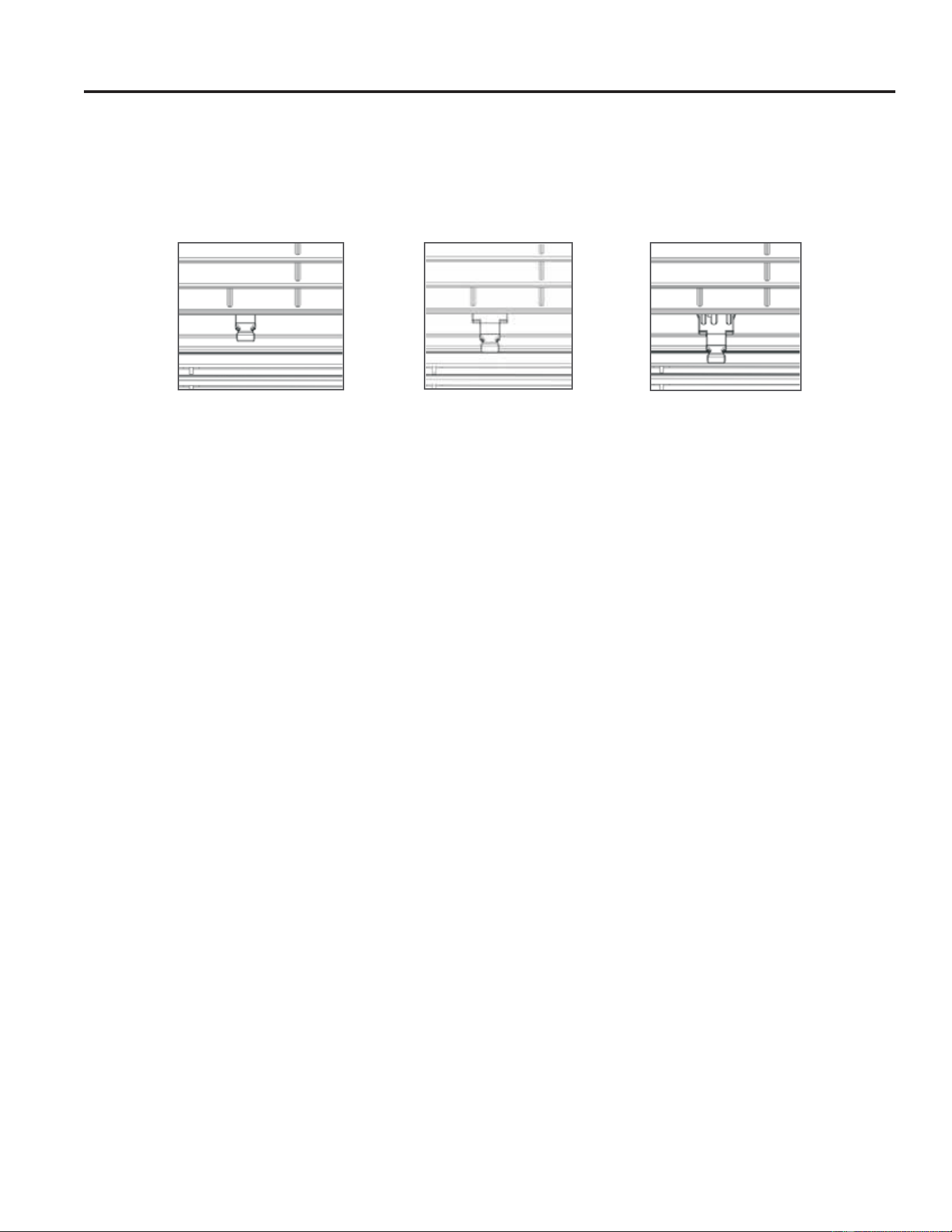
Fresh Air Intake (12k and 14k only)
The Fresh Air Vent allows the air conditioner to:
1. Recirculate inside air - Vent Closed (See Fig. A)
2. Draw fresh air into the room- Vent Open (see Fig. B)
3. Exhaust air from the room - Exhaust Open (see Fig. C)
Fig. A (CLOSED)
Fig. B (FRESH AIR) Fig. C (VENT)
49-5000874 Rev. 1 17
LIMITED WARRANTY
GE Appliances Air Conditioner Limited Warranty
EXCLUSION OF IMPLIED WARRANTIES - Your sole and exclusive remedy is product repair as provided in this
Limited Warranty. Any implied warranties, including the implied warranties of merchantability or fitness for a
particular purpose, are limited to one year or the shortest period allowed by law.
This limited warranty is extended to the original purchaser and any succeeding owner for products purchased for
KRPHXVHZLWKLQWKH86$,IWKHSURGXFWLVORFDWHGLQDQDUHDZKHUHVHUYLFHE\D*($SSOLDQFHV$XWKRUL]HG6HUYLFHU
is not available, you may be responsible for a trip charge or you may be required to bring the product to an
Authorized
GE Appliances Service location for service. In Alaska, the limited warranty excludes the cost of shipping or service
calls to your home.
Some states do not allow the exclusion or limitation of incidental or consequential damages. This limited warranty
gives you specific legal rights, and you may also have other rights which vary from state to state. To know what your
legal rights are, consult your local or state consumer affairs office or your state’s Attorney General.
Warrantor:
GE Appliances, a Haier company
Louisville, KY 40225
Ŷ&XVWRPHULQVWUXFWLRQ7KLVRZQHU¶VPDQXDOSURYLGHV
information regarding operating instructions and user
controls.
Ŷ,PSURSHULQVWDOODWLRQ,I\RXKDYHDQLQVWDOODWLRQ
problem, or if the air conditioner is of improper
capacity, contact your dealer or installer. You
are responsible for providing adequate electrical
connecting facilities.
Ŷ)DLOXUHRIWKHSURGXFWUHVXOWLQJIURPPRGLILFDWLRQV
to the product or due to unreasonable use including
failure to provide reasonable and necessary
maintenane.
Ŷ5HSODFHPHQWRIKRXVHIXVHVRUUHVHWWLQJRIFLUFXLW
breakers.
Ŷ)DLOXUHGXHWRFRUURVLRQRQPRGHOVQRWFRUURVLRQ
protected.
Ŷ'DPDJHWRWKHSURGXFWFDXVHGE\LPSURSHUSRZHU
supply voltage, accident, fire, floods or acts of God.
Ŷ,QFLGHQWDORUFRQVHTXHQWLDOGDPDJHFDXVHGE\
possible defects with this air conditioner.
Ŷ'DPDJHFDXVHGDIWHUGHOLYHU\
What Will Not Cover:
For The Period Of: Will Replace:
One Year
From the date of the
original purchase
Replacement, repair, or refund of the original retail price for any product which fails
due to a defect in materials or workmanship. If the unit is exchanged, the replacement
unit is warranted for the remainder of your product’s original one-year warranty period.
GE Appliances will, at its sole discretion, replace the product with a product of the same
or comparable functionality and quality or refund the original retail price.
ŶProperly pack your unit. We recommend using the
original carton and packing materials.
ŶReturn the product to the retail location where it was
purchased.
ŶInclude in the package a copy of the sales receipt
or other evidence of date of original purchase. Also
print your name and address and a description of the
defect.
In Order to Make a Warranty Claim During Your Retailer’s Allowable Return Period:
Ŷ Locate your sales receipt and make note of the model and serial number.
Ŷ Call 866-907-1655 to initiate a warranty claim.
Ŷ You will be asked to provide your name, address, receipt information, model and serial number.
Ŷ Warranty claims may require electronic or mailed-in evidence of purchase.
In Order to Make a Warranty Claim During the Remainder of the One-Year Warranty:
Staple your receipt here. Proof of the original purchase
date is needed to obtain service under the warranty.

18 49-5000874 Rev. 1
Printed in China
Consumer Support
CONSUMER SUPPORT
GE Appliances Website
Have a question or need assistance with your appliance? Try the GE Appliances Website 24 hours a day, any day
of the year! You can also shop for more great GE Appliances products and take advantage of all our on-line support
services designed for your convenience. GEAppliances.com
Register Your Appliance
Register your new appliance on-line at your convenience! Timely product registration will allow for enhanced
communication and prompt service under the terms of your warranty, should the need arise. You may also mail in
the pre-printed registration card included in the packing material. GEAppliances.com/register
Parts and Accessories
Individuals qualified to service their own appliances can have parts or accessories sent directly to their homes
(VISA, MasterCard and Discover cards are accepted). Order on-line today 24 hours every day.
GEApplianceparts.com or by phone at 877.959.8688 during normal business hours.
Instructions contained in this manual cover procedures to be performed by any user. Other servicing
generally should be referred to qualified service personnel. Caution must be exercised, since improper
servicing may cause unsafe operation.
Contact Us
If you are not satisfied with the service you receive from GE Appliances, contact us on our Website with all the
details including your phone number, or write to:
General Manager, Customer Relations | GE Appliances, Appliance Park | Louisville, KY 40225
GEAppliances.com/ge/service-and-support/contact.htm
ACCONDICIONADORES DE AIRE
PARA SALA
INFORMACIÓN DE SEGURIDAD ...3
INSTRUCCIONES
DE OPERACIÓN ...................5
CUIDADO Y LIMPIEZA .............7
INSTRUCCIONES
DE INSTALACIÓN
..................8
CONSEJOS PARA LA SOLUCIÓN
DE PROBLEMAS ..................13
CONFIGURACIÓN WIFI .........15
GARANTÍA LIMITADA ..........17
SOPORTE AL CLIENTE ...........18
GE es una marca registrada de General Electric Company. Fabricado bajo licencia de marca.
Escriba los números de modelo y de
serie aquí:
Nº de Modelo ____________
Nº de Serie ______________
Estos números se encuentran en una
etiqueta al costado del acondicionador
de aire.
49-5000874 Rev. 1 01-24
PWDV08
PWDV10
PWDV12
PWDV14
MANUAL DEL
PROPIETARIO Y
INSTRUCCIONES
DE INSTALACIÓN
Antes de comenzar
Registre el número de módulo de GE
Appliances y su contraseña para la
configuración del wifi. Para ubicar esta
información, consulte la página 15.
# módulo de GE Appliances ___________
# de Contraseña:_____________________
2 49-5000874 Rev. 1
GRACIAS POR HACER QUE GE APPLIANCES SEA PARTE DE SU HOGAR.
Ya sea que haya crecido usando GE Appliances, o que ésta es su primera vez, nos complace
tenerlo en la familia.
Sentimos orgullo por el nivel de arte, innovación y diseño de cada uno de los electrodomésticos de
GE Appliances, y creemos que usted también. Entre otras cosas, el registro de su electrodoméstico
asegura que podamos entregarle información importante del producto y detalles de la garantía
cuando los necesite.
Registre su electrodoméstico GE ahora a través de Internet. Sitios Web y números telefónicos útiles
están disponibles en la sección de Soporte para el Consumidor de este Manual del Propietario.
También puede enviar una carta en la tarjeta de inscripción preimpresa que se incluye con
el material embalado.
49-5000874 Rev. 1 3
LEA Y GUARDE ESTAS INSTRUCCIONES
INFORMACIÓN IMPORTANTE DE SEGURIDAD
LEA TODAS LAS INSTRUCCIONES ANTES DE USAR
INFORMACIÓN DE SEGURIDAD
Para su seguridad, siga las instrucciones de este manual a fin de minimizar riesgos de
incendio, descargas eléctricas o heridas personales.
Ŷ8VHHVWHHOHFWURGRPpVWLFRVyORSDUDVXSURSyVLWRRULJLQDO
como se describe en el Manual del Propietario.
Ŷ(VWHDFRQGLFLRQDGRUGHDLUHVHGHEHLQVWDODUGHIRUPD
apropiada de acuerdo con las Instrucciones de Instalación
antes de ser usado.
Ŷ1XQFDGHVHQFKXIHVXDFRQGLFLRQDGRUGHDLUHHPSXMDQGR
el cable de corriente. Siempre tome su enchufe de manera
firme y empuje el mismo hacia afuera del receptáculo.
Ŷ5HHPSODFHGHLQPHGLDWRWRGRVORVFDEOHVGHOVHUYLFLR
GHHOHFWULFLGDGSHODGRVRFRQFXDOTXLHUWLSRGHGDxR8Q
cable del servicio de corriente que esté dañado deberá ser
reemplazado por uno nuevo provisto por el fabricante, y
QRGHEHUiVHUUHSDUDGR1RXVHXQFDEOHFRQFRUWDGXUDVR
abrasión sobre su extensión o en cualquiera de sus enchufes
o extremos.
Ŷ&RORTXHODXQLGDGHQ2))$SDJDGR\GHVHQFKXIHHO
acondicionador de aire antes de usar el mismo.
Ŷ3DUDVXVHJXULGDGQRDFXPXOHQLXVHPDWHULDOHV
combustibles, gasolina u otros vapores o líquidos inflamables
cerca de éste u otro electrodoméstico.
Ŷ6LHOUHFHSWiFXORQRFRLQFLGHFRQHOHQFKXIHHOFDPELRGHO
mismo deberá ser realizado por un electricista calificado.
Ŷ*($SSOLDQFHVQREULQGDQLQJ~QVHUYLFLRWpFQLFRGH
FRPSRQHQWHVGHOVLVWHPDVHOODGRHVGHFLUSLH]DVTXH
FRQWHQJDQUHIULJHUDQWHGHODFRQGLFLRQDGRUGHDLUH
Ŷ(OVHUYLFLRWpFQLFRGHOUHVWRGHORVFRPSRQHQWHV6Ï/2SRGUi
ser completado por un técnico calificado.
ADVERTENCIA
Ŷ$ILQGHDFHOHUDUHOSURFHVRGHGHVFRQJHODFLyQRSDUD
limpiar, no use ningún método que no sea el recomendado
por el fabricante.
Ŷ(VWHHOHFWURGRPpVWLFRGHEHUiVHUJXDUGDGRHQXQDVDOD
GRQGHQRKD\DIXHQWHVGHHQFHQGLGRFRQWLQXDVSRUHMHPSOR
llamas abiertas, un electrodoméstico que funcione a gas o un
FDOHIDFWRUTXHIXQFLRQHDHOHFWULFLGDG
Ŷ1RSHUIRUHQLTXHPHHOWXERUHIULJHUDQWH7HQJDSUHVHQWH
que los refrigerantes no deben tener olor.
Ŷ0DQWHQJDODVDEHUWXUDVGHODYHQWLODFLyQOLEUHVGH
obstrucciones.
Ŷ$OPRYHULQVWDODU\RSHUDUHOHOHFWURGRPpVWLFRVHGHEHUi
tener cuidado para evitar dañar la tubería del refrigerante.
Ŷ1RUHDOLFHSHUIRUDFLRQHVHQODXQLGDG
Ŷ(OPDQWHQLPLHQWRODOLPSLH]D\HOVHUYLFLRWpFQLFRVyOR
deberán ser realizados por técnicos adecuadamente
entrenados y calificados en el uso de refrigerantes
inflamables.
Ŷ*($SSOLDQFHVQREULQGDQLQJ~QVHUYLFLRWpFQLFRGH
FRPSRQHQWHVGHOVLVWHPDVHOODGRHVGHFLUSLH]DVTXH
FRQWHQJDQUHIULJHUDQWHGHODFRQGLFLRQDGRUGHDLUH
Ŷ'HVFDUWHHOHOHFWURGRPpVWLFRGHDFXHUGRFRQODV
5HJXODFLRQHV)HGHUDOHV\/RFDOHV/RVUHIULJHUDQWHV
inflamables requieren procedimientos de descarte
específicos. A fin de descartar su acondicionador de aire
de forma ambientalmente segura, comuníquese con las
autoridades locales.
Riesgo de Incendio o Explosión. Esta unidad contiene refrigerante
inflamable. Se deben seguir las precauciones adicionales de seguridad.
ADVERTENCIA
CAUTION
Ŷ(VWHHOHFWURGRPpVWLFRQRGHEHUiVHUXVDGRSRU
SHUVRQDVLQFOX\HQGRQLxRVFRQFDSDFLGDGHVItVLFDV
sensoriales o mentales reducidas o con falta de
experiencia y conocimiento, a menos que cuenten
con supervisión o instrucción con relación al uso
de este electrodoméstico por parte de una persona
responsable de su seguridad.
Ŷ6HGHEHUiVXSHUYLVDUDORVQLxRVDILQGHDVHJXUDU
que no se juegue con el electrodoméstico.
Ŷ(OHOHFWURGRPpVWLFRGHEHUiVHULQVWDODGRGHDFXHUGR
con las regulaciones de cableado nacionales.
A2L
4 49-5000874 Rev. 1
LEA Y GUARDE ESTAS INSTRUCCIONES
INFORMACIÓN IMPORTANTE DE SEGURIDAD
LEA TODAS LAS INSTRUCCIONES ANTES DE USAR
USO DE PROLONGADORES
RIESGO DE INCENDIO. Podría ocasionar lesiones graves
o la muerte.
Ŷ12XVHXQSURORQJDGRUFRQHVWH$FRQGLFLRQDGRUGH$LUHGH
Ventana.
Ŷ12XVHSURWHFWRUHVFRQWUDSLFRVGHFRUULHQWHQL
adaptadores para múltiples tomacorrientes con este
Acondicionador de Aire de Ventana.
CÓMO CONECTAR LA ELECTRICIDAD
1XQFDEDMRQLQJXQDFLUFXQVWDQFLDFRUWHRHOLPLQHHOWHUFHUFDEOH
WLHUUDGHOFDEOHGHFRUULHQWH3DUDVXVHJXULGDGSHUVRQDOHVWH
electrodoméstico debe estar adecuadamente conectado a tierra.
NO use un enchufe adaptador con este electrodoméstico.
El cable de corriente de este electrodoméstico contiene un
HQFKXIHGHFDEOHVFRQH[LyQDWLHUUDTXHVHFRQHFWDDXQ
WRPDFRUULHQWHGHSDUHGHVWiQGDUGHFDEOHVFRQH[LyQD
WLHUUDSDUDPLQLPL]DUODSRVLELOLGDGGHULHVJRVGHGHVFDUJDV
eléctricas por parte del mismo.
El cable de corriente incluye un interruptor de corriente. Se brinda
un botón de evaluación y reinicio en la caja del enchufe. El
dispositivo deberá ser evaluado en forma periódica, presionando
primero el botón TEST(YDOXDU\OXHJRRESET5HLQLFLR
mientras se encuentre enchufado al tomacorriente. Si el botón
TEST (YDOXDUQRVHDFWLYDRHOERWyQRESET5HLQLFLRQR
permanece en su posición, deje de usar el acondicionador de
aire y comuníquese con un técnico calificado del servicio.
Contrate a un electricista calificado para que controle el
tomacorriente y el circuito eléctrico para asegurar que el
enchufe esté correctamente conectado a tierra.
En caso de contar con un tomacorriente de pared de 2
cables, es su responsabilidad y obligación reemplazarlo
por un tomacorriente de pared de 3 cables correctamente
conectado a tierra.
El acondicionador de aire debería estar siempre conectado a
un enchufe específico con un índice de voltaje equivalente al
que figura en su etiqueta de características técnicas.
Esto garantiza el mejor funcionamiento y además previene la
sobrecarga de los circuitos del hogar, lo cual podría ocasionar
riesgos de incendio debido al recalentamiento de cables.
Para conocer los requisitos específicos de la conexión
eléctrica, consulte las Instruccione
s de Instalación,
Requisitos Eléctricos.
ADVERTENCIA
INFORMACIÓN DE SEGURIDAD
49-5000874 Rev. 1 5
Controles
/DVIXQFLRQHV\ODDSDULHQFLDSRGUiQYDULDU
/DVOXFHVDOODGRGHODVWHFODVWiFWLOHVGHOSDQHOGHFRQWUROGHO
acondicionador de aire indican las configuraciones seleccionadas.
Control Remoto
1. Tecla de Power (Encendido)
Apaga y prende el acondicionador de aire. Al
HQFHQGHUVHODSDQWDOODPRVWUDUiODWHPSHUDWXUD'HILQLGD
2. Pantalla
Muestra la temperatura Configurada mientras configura la
WHPSHUDWXUDHQORVPRGRV$XWR$XWRPiWLFR&RRO)UtR
\'U\6HFR0XHVWUDODWHPSHUDWXUDGHODPELHQWHHQHO
PRGR)DQ9HQWLODGRU
3. Teclas Increase + / Decrease – (Incremento
+ / Reducción –) de Temperatura y
Temporizador
8VHODVPLVPDVSDUDFRQILJXUDUODWHPSHUDWXUDRHO
WHPSRUL]DGRU/DWHPSHUDWXUDVHSXHGHFRQILJXUDUHQORV
PRGRV$XWR$XWRPiWLFR&RRO)UtR\'U\6HFR
4. Tecla de Mode (Modo)
8VDGRSDUDDMXVWDUHODFRQGLFLRQDGRUGHDLUHDOPRGR
Auto, Cool, Dry or Fan.
5. Teclas de Fan Speed (Velocidad del
ventilador)
(QORVPRGRV&RRO)UtRR)DQ9HQWLODGRU8VHORV
mismos para configurar la velocidad del ventilador en
$XWR$XWRPiWLFR+LJK$OWR0HG0HGLRR/RZ%DMR
en la unidad.
(QHOPRGR'U\6HFR/DYHORFLGDGGHOYHQWLODGRU
IXQFLRQDSRURPLVLyQHQ$XWR$XWRPiWLFR\QRSXHGH
ser modificada.
6. Timer Pad
Timer ON—Cuando el acondicionador de aire se
encuentre apagado, se podrá configurar para que se
encienda automáticamente en un período de entre 0.5
y 24 horas en el modo y configuraciones del ventilador
previas.
Timer OFF—Cuando el acondicionador de aire
se encuentre encendido, se podrá configurar
automáticamente para que se apague en un período de
entre 0.5 y 24 horas.
Cómo configurar:
3UHVLRQHODWHFOD7LPHU7HPSRUL]DGRU&DGDYH]TXHVH
SUHVLRQHQODVWHFODV,QFUHDVH'HFUHDVH±,QFUHPHQWDU
5HGXFLU±VHFDPELDUiHOWLHPSRSRULQFUHPHQWRVGH
0.5 horas, hasta 10 horas, y luego por incrementos de 1
hora hasta las 24 horas.
Para revisar el tiempo restante del temporizador de
UHWUDVRSUHVLRQHODWHFOD7LPHU7HPSRUL]DGRU8VHODV
WHFODV,QFUHDVH'HFUHDVH±,QFUHPHQWDU5HGXFLU
para configurar un nuevo tiempo, si se desea.
3DUDFDQFHODUHOWHPSRUL]DGRUSUHVLRQHODWHFOD'HFUHDVH
5HGXFLUKDVWDTXHHOWLHPSRGHFRQILJXUDFLyQHVWpHQ
0.0 .
7. Tecla de Reinicio del Filtro
Esta función automática le notifica que el filtro de aire
GHEHVHUOLPSLDGR/DOX]LQGLFDGRUDVHHQFHQGHUiOXHJR
GHKRUDVGHIXQFLRQDPLHQWR/LPSLHHOILOWURGHDLUH
FRQVXOWHODSiJLQDYXHOYDDFRORFDUORHQHOSDQHO
frontal, y presione la tecla Filter Reset5HLQLFLRGHO
)LOWUR/DOX]VHDSDJDUi
8. WiFI Connect
WiFi Connect le permite la conexión del acondicionador
GHDLUHDO:L)LGHOKRJDU'HVFDUJXHORVGHWDOOHVGHOD
SmartHQ
Aplicación en
GEAppliances.com/connect.
9. Tecla Quiet (Silencioso)
Esta función hace que la unidad funcione en la velocidad
de ventilación más lenta posible, para asegurar el modo
de funcionamiento más silencioso.
10. Tecla Eco (Ecológico)
Esta función controla el ventilador y el compresor para
reducir el uso de energía de la unidad.
USO DEL ACONDICIONADOR DE AIRE: Controles
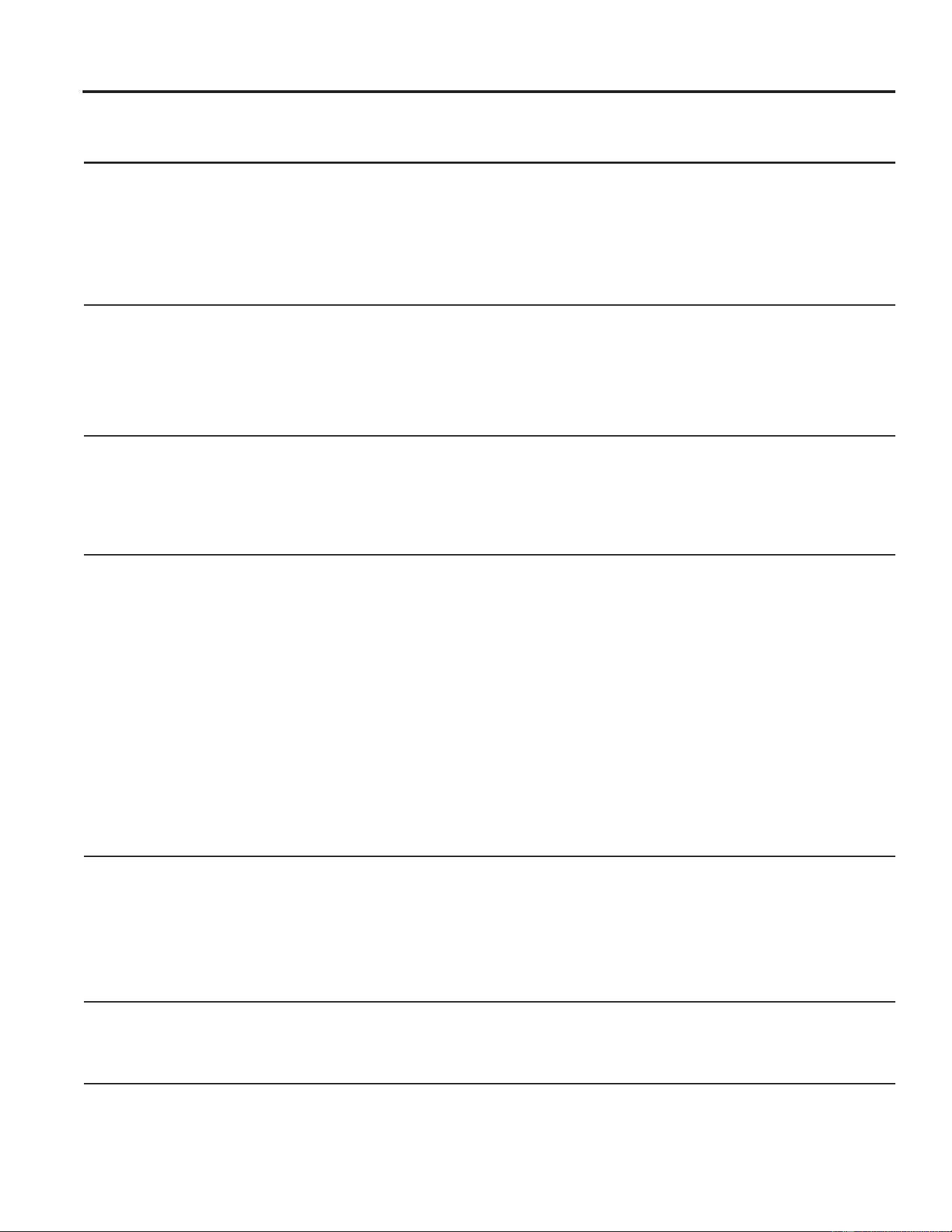
Controles del Acondicionador de Aire
1
2
4 5
76
8 3 9
10
1
4
5
6
3
10
9
6 49-5000874 Rev. 1
Uso del Acondicionador de Aire
No Utilizar con Condiciones Climáticas Exteriores de Congelación
Este acondicionador de aire sólo frío no fue diseñado para uso
con condiciones climáticas exteriores de temperatura helada.
1RGHEHUiVHUXVDGRFRQFRQGLFLRQHVFOLPiWLFDVH[WHULRUHVGH
temperatura helada.
Función de Luces Encendidas/ Apagadas del Panel de Control
Este acondicionador de aire cuenta con una función de luces
encendidas/ apagadas en el panel de control, donde dichas
luces se apagarán cuando no haya actividad en los controles
por más de un minuto. Para reactivar los controles, presione
cualquier tecla de los mismos y las luces se iluminarán para
mostrar las configuraciones previas.
3DUDDSDJDUHVWDIXQFLyQSUHVLRQHHOERWyQ/('GHOFRQWURO
remoto; la unidad emitirá un pitido para señalizar la alternancia
exitosa del encendido y apagado de la función.
USO DEL ACONDICIONADOR DE AIRE
Control Remoto
Ŷ3DUDDVHJXUDUXQXVRDSURSLDGRDSXQWHHOFRQWUROUHPRWRDO
receptor de señal del acondicionador de aire.
Ŷ/DVHxDOGHOFRQWUROUHPRWRFXHQWDFRQXQDOFDQFHGHKDVWD
20 pies.
Ŷ$VHJ~UHVHGHTXHQRKD\DREVWUXFFLRQHVHQWUHHO
acondicionador de aire y el control remoto que pudieran
bloquear la señal.
Ŷ$VHJ~UHVHGHTXHODVSLODVVHDQQXHYDV\TXHHVWpQLQVWDODGDV
correctamente, como se indica en el control remoto.
Modo Cool (Frío)
8VHHOPRGRCool (Frío) a Low (Bajo), Med (Medio),
High (Alto) o Auto Fan Speed (Velocidad de ventilador
automática) SDUDHQIULDU8VHODVWHFODVGHTemperature
(Temperatura) Aumento + / Reducción - para ajustar a la
temperatura deseada entre 60ºF y 86ºF en incrementos de
1ºF.
Se usa un termostato electrónico para mantener la temperatura
ambiente. El compresor se encenderá y apagará cíclicamente
y también cambiará las velocidades de funcionamiento para
mantener la habitación en el nivel de comodidad establecido.
Ajuste el termostato a un número menor y el aire interno se
enfriará más. Si lo ajusta a un número mayor, la temperatura
del aire interno se calentará más.
NOTA: Si el acondicionador de aire está apagado y luego
se enciende mientras se ajusta en la configuración Cool
)UtRRVLVHSDVDGHXQDFRQILJXUDFLyQGHYHQWLODFLyQDXQD
FRQILJXUDFLyQGH&RRO)UtRHVSRVLEOHTXHDOFRPSUHVRUOH
tome aproximadamente 3 minutos comenzar y que comience
la refrigeración.
Descripciones de enfriamiento
Para enfriamiento normal—Seleccione el modo Cool (Frío) y
ventilador High (Alto) o Med (Medio) con una temperatura de
ajuste media.
Para enfriamiento máximo—Seleccione el modo Cool (Frío)
y ventilador High (Alto) con una temperatura de ajuste menor.
Para enfriamiento silencioso y enfriamiento nocturno—
Seleccione el modo Cool (Frío) y ventilador Low (Bajo) con
una temperatura de ajuste media.
Tecla Eco (Ecológico)
Controla el ventilador y el compresor
ON (ENCENDIDO)—El ventilador hará un ciclo de
encendido y apagado con el compresor. Este resulta en
variaciones mayores en la temperatura de la habitación.
NOTA: es posible que el ventilador continúe funcionando
durante un período de tiempo corto o que titile de forma
intermitente cuando el compresor finalice su ciclo para
probar el aire de la sala.
OFF (APAGADO)—El ventilador funciona todo el
tiempo, mientras que el compresor pasa por los ciclos de
encendido y apagado.
Modo de Fan Only (Solo ventilador)
8VH)DQ2QO\0RGHHQODYHORFLGDGGHYHQWLODGRU$XWR/RZ
0HGR+LJKDILQGHEULQGDUXQDFLUFXODFLyQGHDLUH\ILOWUDGR
VLQHQIULDPLHQWR'HELGRDTXHODVFRQILJXUDFLRQHVGHVyOR
ventilador no brindan enfriamiento, no se podrá ingresar
XQDWHPSHUDWXUDFRQILJXUDGD/DWHPSHUDWXUDGHODPELHQWH
aparecerá en la pantalla.
Velocidad Automática del Ventilador
Configure en Auto (Automática) para que la velocidad del
ventilador se configure de forma automática en la velocidad
necesaria para brindar ajustes de confort óptimos con la
temperatura configurada.
Si se necesita más frío en la habitación, la velocidad del
ventilador se incrementará de forma automática. Si se necesita
más frío en la habitación, la velocidad del ventilador se
reducirá de forma automática.
Función de Sonido Activado/ Desactivado del Panel de Control
Este acondicionador de aire cuenta con una función de
sonidos activados/ desactivados en el panel de control el
cual se puede usar para ambas funciones al presionar un
botón de la interface de usuario. Esta función se activa por
omisión, lo cual significa que el acondicionador de aire emitirá
un sonido cuando se presione cualquier botón de la interface
de usuario. Para desactivar esta función a fin de silenciar los
botones al ser presionados, mantenga presionado el botón
)LOWHU)LOWURGHODLQWHUIDFHGHXVXDULRGXUDQWHVHJXQGRV(O
acondicionador de aire emitirá un pitido para señalizar que la
función fue activada o desactivada con éxito

49-5000874 Rev. 1
Uso del Acondicionador de Aire
Dirección del Aire
8VHODSDODQFDSDUDDMXVWDUODGLUHFFLyQGHODLUHKDFLDOD
izquierda o derecha. Incline la rejilla para hacer ajustes hacia
arriba o abajo.
Cuidado y limpieza
Parrilla y Caja
Apague el acondicionador de aire y retire el enchufe del
tomacorriente antes de limpiar.
3DUDOLPSLDUXVHDJXD\XQGHWHUJHQWHVXDYH1RXVH
blanqueadores ni abrasivos.
Filtro de Aire
El filtro de aire que se encuentra detrás de la rejilla frontal se
debe revisar y limpiar por lo menos cada 30 días o con una
frecuencia mayor, si fuera necesario.
Para retirar:
Abra la rejilla de entrada empujando hacia abajo las lengüetas
en las esquinas superiores de la rejilla de entrada, hasta que
la rejilla se encuentre en una posición de 45º. Retire el filtro.
/LPSLHHOILOWURFRQDJXDFDOLHQWH\MDEyQ(QMXDJXH\GHMH
VHFDUHOILOWURDQWHVGHVXUHHPSOD]R1ROLPSLHHOILOWURHQXQ
lavavajillas.
PRECAUCIÓN
12XWLOLFHHODFRQGLFLRQDGRUGH
aire sin un filtro, ya que la suciedad y las pelusas producirán
atascamientos y reducirán su funcionamiento.
Bobinas Exteriores
/DVERELQDVGHOODGRH[WHULRUGHODFRQGLFLRQDGRUGHDLUH
se deberán controlar de forma regular. Si se encuentran
atascadas con tierra u hollín, deberán ser limpiadas por un
profesional.
USO DEL ACONDICIONADOR DE AIRE / CUIDADO Y LIMPIEZA
Modo Dry (Seco)
8VHHOPRGR'U\6HFRSDUDUHGXFLUODKXPHGDGGHO
DLUHHQODVDOD(QHOPRGR'U\6HFRVyORHVWDUi
disponible la velocidad automática del ventilador y hará
que la unidad funcione con una velocidad de ventilación
más baja.
Cómo insertar la batería en el control remoto
1RVHUiSRVLEOHUHFDUJDUODVEDWHUtDVQRUHFDUJDEOHV
1RXVHDOPLVPRWLHPSRGLIHUHQWHVWLSRVGHEDWHUtDVWDOHV
FRPRDOFDOLQDVGHFDUERQR]LQFREDWHUtDVUHFDUJDEOHV
1RXVHEDWHUtDVYLHMDV\QXHYDVDOPLVPRWLHPSR
/DVEDWHUtDVVHGHEHUiQLQVHUWDUHQODSRVLFLyQFRQOD
SRODULGDGFRUUHFWD/DVEDWHUtDVJDVWDGDVVHGHEHUiQUHWLUDU
del producto.
NOTAS:
Ŷ8VHEDWHUtDVDOFDOLQDV³$$$´YROWLRV
Ŷ12'(6&$57(/$6%$7(5Ë$6$552-$1'2/$6
0,60$6$/)8(*2/$6%$7(5Ë$632'5È1(;3/27$5
2*(1(5$53e5','$6
Ŷ1RODVWUDJXH
8 49-5000874 Rev. 1
Instrucciones de instalación
ANTES DE INICIAR
Lea estas instrucciones completa y
cuidadosamente.
•
IMPORTANTE – Guarde estas
instrucciones para uso del inspector local.
•
IMPORTANTE – 2EVHUYHWRGRVORV
códigos y órdenes de ley.
• Nota al instalador ±$VHJ~UHVHGHGHMDUHVWDV
instrucciones con el consumidor.
• Nota al consumidor ±&RQVHUYHHVWDVLQVWUXFFLRQHV
para referencia futura.
• Nivel de destreza±/DLQVWDODFLyQGHHVWHDSDUDWR
requiere de destrezas mecánicas básicas.
• Tiempo de ejecución – Aprox. 1 hora
• Recomendamos dos personas para la instalación de
este producto.
/DLQVWDODFLyQDSURSLDGDHVODUHVSRQVDELOLGDGGHO
instalador.
/DIDOODGHOSURGXFWRGHELGRDXQDLQVWDODFLyQ
inadecuada no está cubierta por la garantía.
&XDQGRLQVWDOHHVWHDFRQGLFLRQDGRUGHDLUH'(%(XVDU
todas las piezas suministradas y usar procedimientos
adecuados de instalación.
¿Preguntas? Visite nuestra página en la red en: GEAppliances.com
El cable de alimentación incluye un dispositivo para
interrupción de corriente. Se incluye un botón de prueba
y de reinicio en el dispositivo. El dispositivo debe ponerse
DSUXHEDSHULyGLFDPHQWHSULPHURVHSUHVLRQDHOERWyQ
de TEST SUXHED\OXHJRRESET UHLQLFLRPLHQWUDVVH
encuentra enchufado al tomacorriente. Si el botón TEST
no se dispara o si el botón RESET no queda enganchado,
deje de utilizar el acondicionador de aire y comuníquese
con un técnico calificado.
REQUISITOS ELÉCTRICOS(CONT)
HERRAMIENTAS QUE
NECESITARÁ
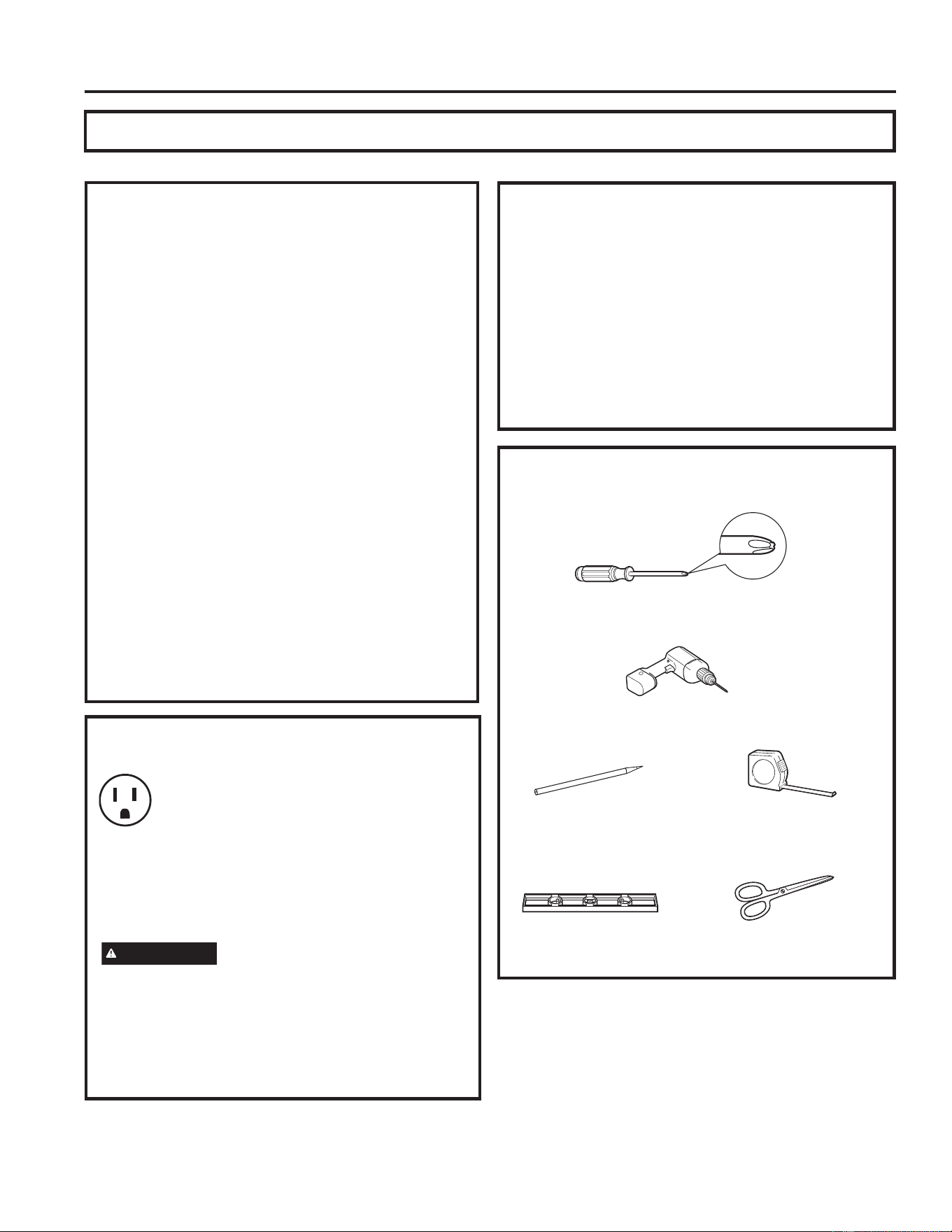
8QGHVWRUQLOODGRUGHHVWUHOOD
8QDUHJODRFLQWDPpWULFD/iSL]
1LYHO
Tijeras o cuchilla
7DODGUR\EURFDGH´
INSTRUCCIONES DE INSTALACIÓN
REQUISITOS ELÉCTRICOS
Estos modelos requieren salidas conectadas a
WLHUUDGHYROWLRV&$+]SURWHJLGDV
con un fusible de retardo de tiempo de 15
amperios o un disyuntor.
El enchufe de tres púas con conexión a tierra minimiza la
posibilidad de descargas eléctricas. Si el tomacorriente
de la pared que usted planea usar solamente tiene 2
tomas, es su responsabilidad hacer que un técnico lo
reemplace por uno de tres tomas con conexión a tierra.
PRECAUCIÓN
%DMRQLQJXQDFLUFXQVWDQFLDFRUWHRUHPXHYDODWHUFHUD
S~DFRQH[LyQDWLHUUDGHOFDEOHHOpFWULFR
1RFDPELHHOHQFKXIHHQHOFDEOHHOpFWULFRGHHVWH
acondicionador de aire.
/RVFDEOHVFDVHURVGHDOXPLQLRSRGUtDQSUHVHQWDU
problemas especiales. Consulte a un técnico electricista
calificado.
problems—consult a qualified electrician.
49-5000874 Rev. 1 9
INSTRUCCIONES DE INSTALACIÓN
Instrucciones de instalación
-XQWDGHJRPDHVSXPD
de la parte superior de
ODYHQWDQD
Riel de montaje superior
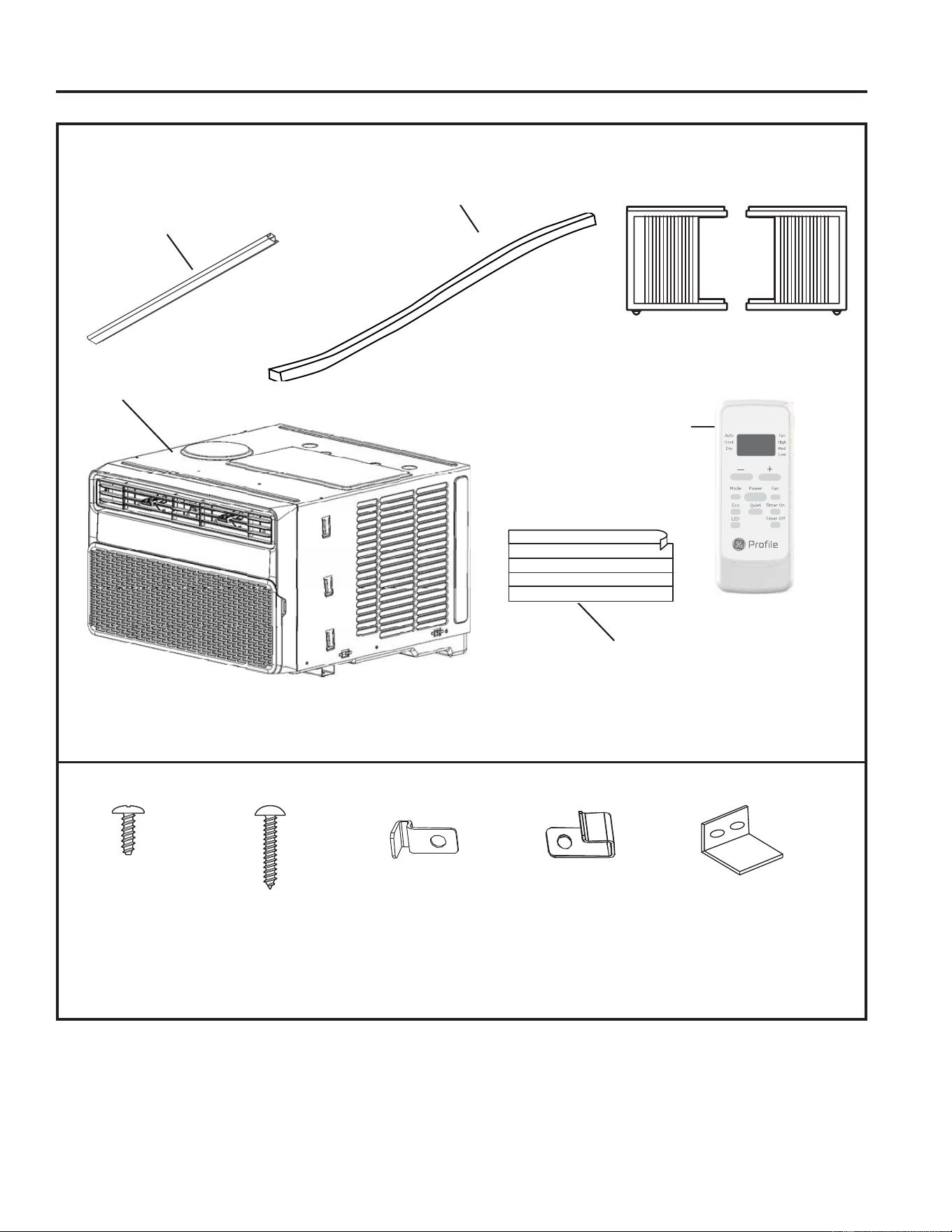
PARTES INCLUIDAS
(La apariencia puede variar)
Marcos de la
&RUWLQD/DWHUDO
Acondicionador
de aire
Control
Remoto
Foam Insert
Tornillos de
´7LSR$
7RUQLOORVGH´
7LSR%
%ORTXHRGHOPDUFR
SDUDYHQWDQDVGH
madera
3DVDGRUJLUDWRULR%ORTXHRGHOPDUFR
SDUDYHQWDQDVFRQ
revestimiento de vinilo
HQDOJXQRVPRGHORV
10 49-5000874 Rev. 1
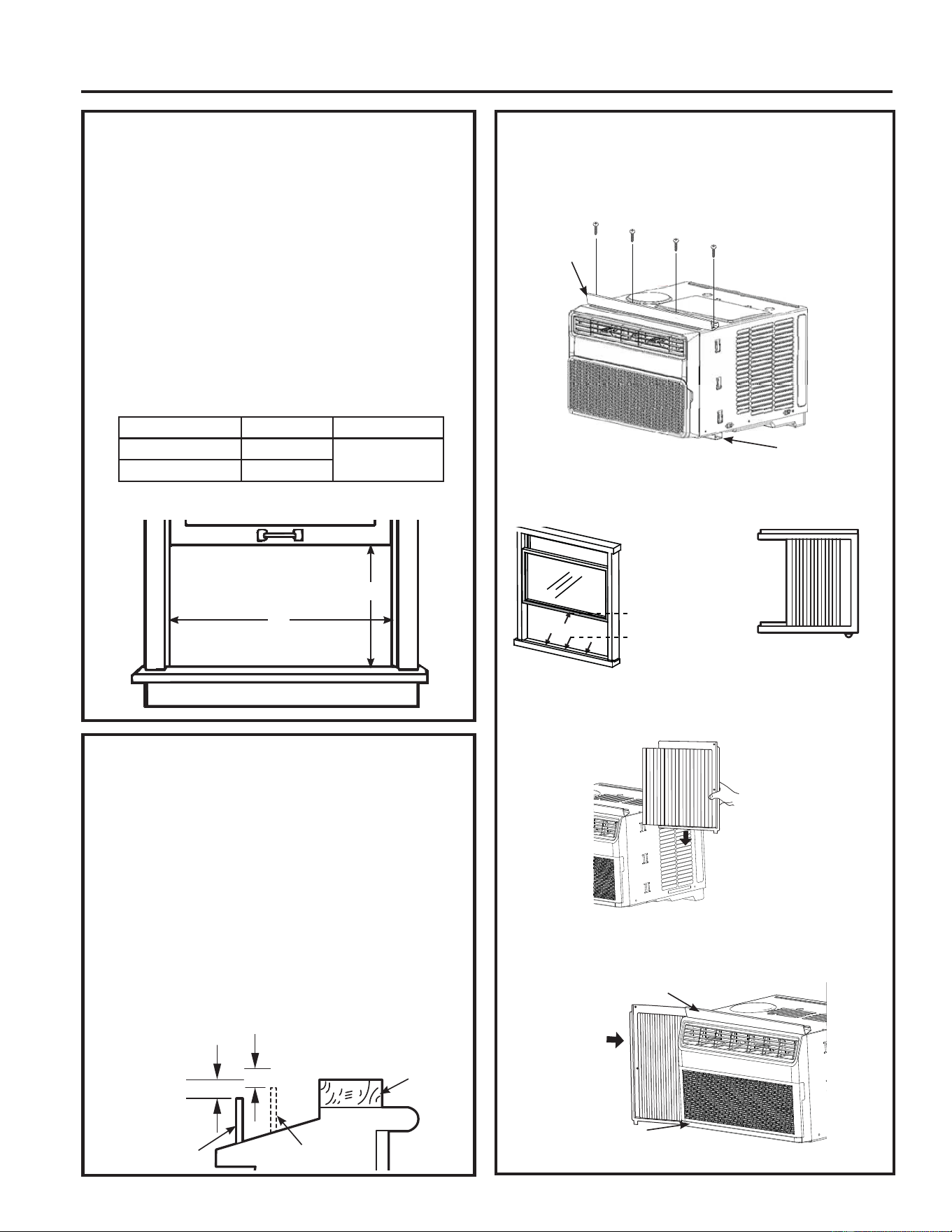
3. PREPARE EL ACONDICIONADOR
DE AIRE
A. Instale el Riel Superior del acondicionador de aire con los
WRUQLOORVGH´GHVGHODSDUWHH[WHULRUGHODFDMD
B. Aplique los selladores de protección climática provistos a
la parte inferior, superior y laterales de la ventana, a fin de
sellar el perímetro del acondicionador de aire.
C.'HVOLFHORVSDQHOHVGHODFRUWLQDODWHUDOHQORVULHOHVGHO
panel lateral.
D. 'HVOLFHORVPDUFRVGHODVFRUWLQDVODWHUDOHVL]TXLHUGD\
derecha en el riel de montaje superior e inferior.
Instrucciones de instalación
1. REQUISITOS PARA LA
VENTANA
• Estas instrucciones son para una ventana estándar
GHGRVSOLHJXHV8VWHGQHFHVLWDUiPRGLILFDUHO
proceso para otros tipos de ventanas.
• El acondicionador de aire puede instalarse sin los
paneles de acordeón para ajustarse a una ventana
más estrecha. Ver las dimensiones de la abertura
de la ventana.
• Todas las partes de apoyo deben quedar
totalmente aseguradas a algún metal, mampostería
o a la madera.
• El tomacorriente eléctrico debe estar al alcance del
cable eléctrico del acondicionador de aire.
• Siga las dimensiones de la tabla y la ilustración
según su modelo.
2. REQUISITOS DE UNA VENTANA
DE TORMENTAS
8QPDUFRGHYHQWDQDGHWRUPHQWDVQRSHUPLWLUiTXH
el acondicionador de aire se incline hacia el exterior
y evitará que drene apropiadamente. Para solucionar
este problema, adhiera un pedazo de madera a el
umbral.
PEDAZOS DE MADERA
$1&+2Ǝ
LONGITUD: /RVXILFLHQWHPHQWHODUJRFRPRSDUD
ajustar en el interior del marco de la ventana.
GRUESO: Para determinar el grueso, coloque un
SHGD]RGHPDGHUDHQHOXPEUDOSDUDKDFHUODƎ
más alta que la parte superior del marco de la
ventana de tormentas o del marco vinilo.
Péguelo firmemente con clavos o con tornillos
proporcionados por el instalador.
A
FRQSDQHOHVGHDFRUGHyQ
B
Recorte y aplique
la tira de protección
climática al extremo
frontal e inferior del
marco de la ventana.
Recorte y aplique
la tira de protección
climática al extremo
inferior del alféizar
de la ventana.
Recorte y aplique la tira de
protección climática al lateral del
PDUFRGHODFRUWLQDXQDDFDGD
ODGR
ƎPiVDOWR
que el marco
de ventana de
tormentas
Marco de
ventana de
tormentas
8PEUDO
ƎPDVDOWRTXHHOPDUFR
YLQLORHQDOJXQDVYHQWDQDV
Marco vinilo
Madera
INSTRUCCIONES DE INSTALACIÓN
Models A B
3:'9 ´PLQ
´´
3:'9 ´PLQ
Riel de
montaje
superior
Riel de montaje
inferior
Riel superior
Riel inferior

49-5000874 Rev. 1 11
INSTRUCCIONES DE INSTALACIÓN
Instrucciones de instalación
5. ASEGURE EL
ACONDICIONADOR DE AIRE
A. Afloje el tornillo del lado derecho del acondicionador
de aire, cerca de la parte inferior.
B.'HVOLFHHOVRSRUWHODWHUDOVREUHHOWRUQLOORGHPRGR
que el soporte esté descansando sobre el alféizar de
la ventana. Ajuste el tornillo.
C. Repita la instalación del soporte lateral en el lateral
izquierdo.
4. I NSTALE EL ACONDICIONADOR
DE AIRE EN LA VENTANA
A. Marque el centro de la ventana. Coloque el
acondicionador de aire en la ventana de modo que
se encuentre centrado. Coloque el acondicionador de
aire de modo que el extremo frontal del riel de montaje
inferior se encuentre contra el extremo trasero del
alféizar.
B.%DMHODYHQWDQDGHPRGRTXHHOH[WUHPRIURQWDOGHO
montaje superior se encuentre delante de la ventana.
Asegúrese de que el acondicionador de aire esté
nivelado o apenas inclinado hacia el exterior.
C. Extienda los paneles de la cortina hasta que llenen
la ventana. Marque la ubicación de los agujeros en
FDGDHVTXLQD8VHHOWDODGUR\XQDEURFDGH´SDUD
WDODGUDUDJXMHURVSLORWR8VHWRUQLOORVGHEORTXHRGH
ò´SDUDDVHJXUDUORVSDQHOHVODWHUDOHV\HOULHOVXSHULRU
sobre sus posiciones.
Riel superior
Marco de la ventana
Aproximadamente
5°
Riel inferior
Alféizar
WRUQLOORGHEORTXHRGHò´
Para ventanas de madera
Para ventanas con
revestimiento de vinilo
Selladores de
Protección Climática

12 49-5000874 Rev. 1
Instrucciones de instalación
6. INSTALE EL SOPORTE DE
LA TRABA DE LA VENTANA
Y LA JUNTA SUPERIOR DE
GOMAESPUMA DE LA VENTANA
8VHXQWRUQLOOR´SDUDLQVWDODUHOVRSRUWHGH
bloqueo arriba de la parte inferior de la ventana.
A.
PRECAUCIÓN
Para evitar la rotura de vidrios o daños sobre las
ventanas, sobre vinilo o ventanas construidas de
manera similar, adjunte el soporte de bloqueo de
la ventana a la jamba lateral de la ventana con un
WRUQLOOR´
B. Corte la junta de gomaespuma superior de la
ventana del mismo ancho que la ventana.
C. Coloque la gomaespuma entre el vidrio y la ventana
para evitar el ingreso de aire e insectos a la
habitación.
NOTA: Si la junta provista no se ajusta a su
ventana, obtenga el material apropiado en forma
local para contar con un sellado correcto en la
instalación.
INSTRUCCIONES DE INSTALACIÓN
Madera
Vinilo
49-5000874 Rev. 1 13
Consejos para la Solución de Problemas... Antes de solicitar el servicio técnico
¡Ahorre tiempo y dinero! Primero revise los cuadros que aparecen en las siguientes páginas y es posible que no
necesite solicitar reparaciones.
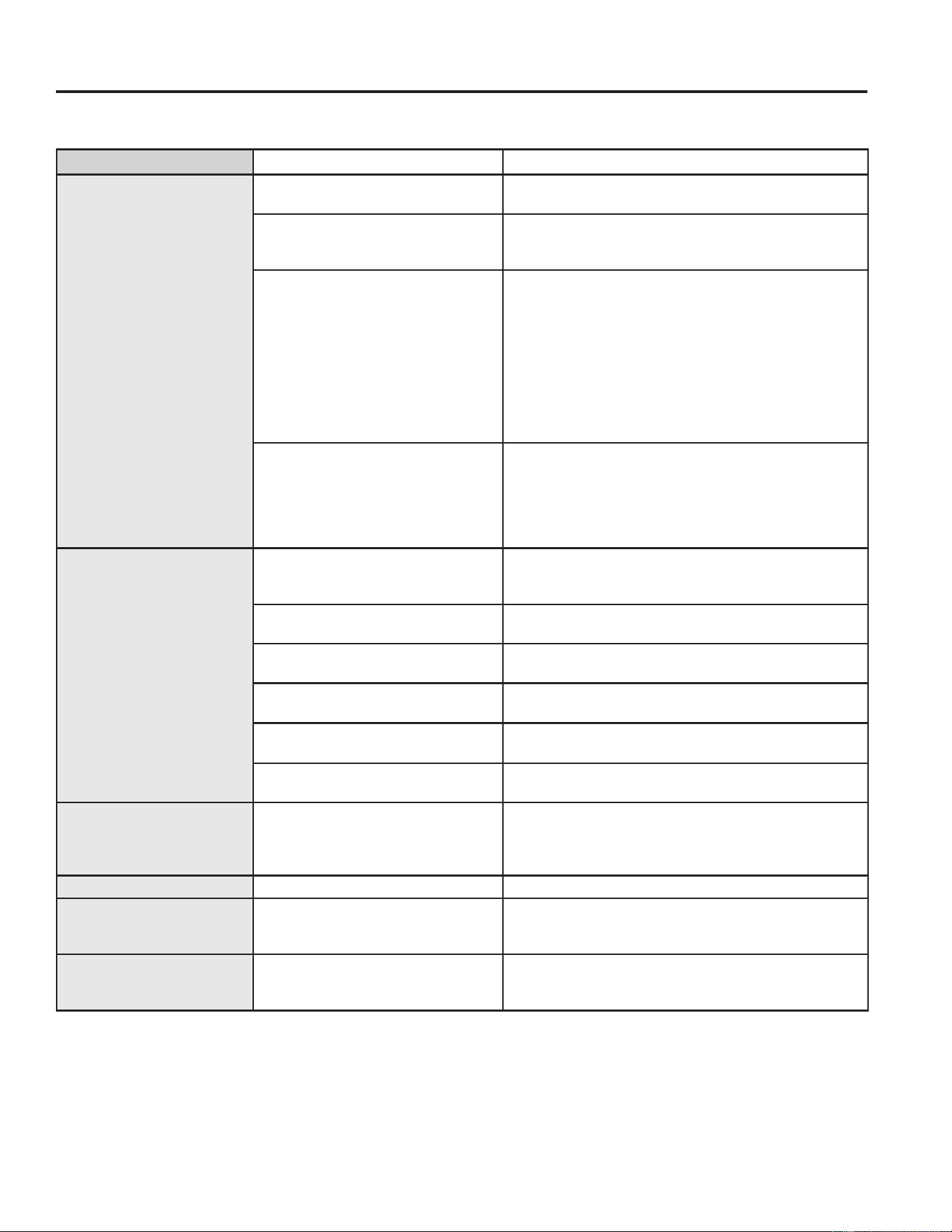
Problema Causas posibles Qué hacer
El acondicionador de aire
no enciende
El acondicionador de aire está
desconectado.
Cerciórese de que el acondicionador de aire está
enchufado totalmente en el tomacorriente.
El fusible se disparó/ el
cortacircuitos se disparó.
Inspeccione los fusibles / caja de interruptores de
la casa y reemplace cualquier fusible o reajuste el
interruptor.
Interrupción en el suministro
eléctrico.
/DXQLGDGVHUHLQLFLDUiDXWRPiWLFDPHQWHFRQOD
configuración utilizada por última vez luego de
reestablecer la electricidad.
([LVWHXQUHWUDVRGHWLHPSRSRUSURWHFFLyQGH
DSUR[LPDGDPHQWHPLQXWRVSDUDHYLWDUOD
desconexión por sobrecarga del compresor.Por esta
razón, es posible que la unidad no comience a enfriar
de forma normal hasta transcurridos 3 minutos desde
que volvió a encenderse.
El dispositivo de interrupción de
corriente se ha activado.
Presione el botón RESET ubicado en el cable de
alimentación.
Si el botón RESET no se mantiene en su lugar, no
utilice más el acondicionador de aire y comuníquese
con un técnico calificado.
El acondicionador de aire
no enfría como debería
El flujo de aire está restringido. Cerciórese de que no existe ninguna cortina, persiana
o mueble bloqueando el frente del acondicionador de
aire.
El control de temperatura no está
ajustado apropiadamente.
En los modelos con botones, gire la temperatura a un
número mayor.
El filtro de aire está sucio. /LPSLHHOILOWURFDGDGtDVSRUORPHQRV9HUOD
sección de Cuidado y limpieza.
La habitación podría haber estado
caliente.
Cuando el acondicionador de aire se enciende, usted
necesita darle tiempo para que enfrié la habitación.
El aire frío se está escapando. Cerciórese de que los registros de la calefacción no
están abiertos y se encuentran retornando el aire frío.
Las bobinas de enfriamiento se
congelaron.
9HU³$FRQGLFLRQDGRUGHDLUHFRQJHOiQGRVH´PiV
adelante.
El acondicionador de aire
se está congelando
El hielo bloquea el flujo de aire
hacia el acondicionador de
aire evitando que se enfríe la
habitación.
&RQILJXUHHOFRQWUROGHPRGRHQ+LJK)DQ9HQWLODGRU
$OWRR+LJK&RRO)UtR$OWRFRQODFRQILJXUDFLyQ
de temperatura en el nivel más alto que pueda ser
configurada.
Hay agua goteando afuera Tiempo húmedo y caliente. Esto es normal.
Hay agua goteando en el
interior de la habitación
El acondicionador de aire no está
inclinado hacia afuera.
Para drenar el agua apropiadamente, cercíorese
de que el acondicionador de aire está inclinado
ligeramente desde el frente hacia atrás.
Se acumula agua en la
bandeja
La humedad removida del aire y
se drena hasta la bandeja.
Esto es normal por un corto período en áreas con
poca humedad; normal por un período de tiempo más
postergado en áreas más húmedas.
CONSEJOS PARA LA SOLUCIÓN DE PROBLEMAS
14 49-5000874 Rev. 1
CONSEJOS PARA LA SOLUCIÓN DE PROBLEMAS
Ŷ4XL]iVHVFXFKHXQVRQLGRPHWiOLFRFDXVDGRSRUHODJXDWRPDGD\WLUDGDFRQWUDHOFRQGHQVDGRUHQORVGtDV
lluviosos o cuando la humedad es alta. Esta característica de diseño ayuda a remover la humedad y mejora la
eficiencia.
Ŷ4XL]iVHVFXFKHTXHHOWHUPRVWDWRKDFHFOLFFXDQGRHOFRPSUHVRUKDFHFLFORHQWUHHQFHQGLGR\DSDJDGR
Ŷ(ODJXDVHDFXPXODHQODEDQGHMDGXUDQWHGtDVOOXYLRVRVRFRQPXFKDKXPHGDG(ODJXDSRGUtDGHUUDPDUVH\
gotear desde el lado externo de
la unidad.
Ŷ(OYHQWLODGRUSRGUtDIXQFLRQDUDXQVLHOFRPSUHVRUQRORKDFH
Ŷ/DVJRWLWDVGHDJXDTXHFDHQFRQWUDODVERELQDVH[WHUQDVSXHGHQKDFHUXQUXLGRGH³SLQJ´(VWRD\XGDDHQIULDU
HOFRQGHQVDGRU3XHGHUHGXFLUHVWHUXLGRUHWLUDQGRHOHQFKXIHGHDJXDGHODVXEEDVH
Para asegurar la máxima eficiencia, se recomienda verificar que el tapón de drenaje de goma esté correctamente
insertado. Este tapón se puede quitar durante la operación para minimizar el agua en la parte posterior de la
unidad; sin embargo, quitarlo reducirá la eficiencia de su unidad.
NOTA: 1RKDJDXQDJXMHURHQODROODGHODEDVH
Enchufe de Agua de la
6XEEDVH
Solucionar Problemas
49-5000874 Rev. 1 15
CONFIGURACIÓN WIFI
Configuración WiFi
GE Appliances SmartHQ
(Para clientes en Estados Unidos)
6XDFRQGLFLRQDGRUGHDLUHFXHQWDFRQ*(6PDUW+4+DELOLWDGR3DUDDSUHQGHUPiVVREUHODVIXQFLRQHVGHOHOHFWURGRPpVWLFR
conectado, y para saber qué aplicaciones de electrodomésticos conectados funcionarán con su teléfono inteligente, visite
GEAppliances.com/connect
Conectividad WiFi:
Para solicitar asistencia con relación al electrodoméstico o la conectividad de red del electrodoméstico,
comuníquese al 1-800-220-6899.
/RVGDWRVGHWRGRVORVHOHFWURGRPpVWLFRVFRQHFWDGRVVRQJXDUGDGRVHQHVWULFWRFXPSOLPLHQWRFRQOD3ROtWLFDGH
3ULYDFLGDGGH'DWRVGH&RQH[LyQGH*($SSOLDQFHV3DUDDFFHGHUDHVWDSROtWLFD
visite geappliances.com/privacy/privacy_policy_connected.
WiFi Module: FCC ID ZKJ-WCATA008 and IC 10229A-WCATA008
Cómo Funciona
'HVFDUJXHOD$SOLFDFLyQGH*(
Appliances
8VHODDSOLFDFLyQSDUDFRQHFWDUVX
acondicionador de aire para sala.
8QDYH]FRQHFWDGRXVHODDSOLFDFLyQ
para ajustar el acondicionador de
aire según lo desee.
CHANGE TEMP
TO 65
Preguntas acerca de SmartHQ
Acceda a respuestas necesarias sobre la configuración de electrodomésticos con WiFi y la conexión a su red
hogareña a través de nuestros artículos de soporte.
3DUDDFFHGHUDORVDUWtFXORVGHVRSRUWHODFRQH[LyQZLILGHODFRQGLFLRQDGRUGHDLUHSDUDVDODYLVLWHSURGXFWV
JHDSSOLDQFHVFRPDSSOLDQFHJHDVXSSRUWVHDUFKFRQWHQW
INFORMACIÓN REGULATORIA
Declaración de Cumplimiento con FCC/IC:
1. Este dispositivo no podrá causar interferencias perjudiciales.
2. Este dispositivo debe aceptar cualquier interferencia
recibida, incluidas las interferencias que puedan provocar un
funcionamiento no deseado.
Este equipo fue probado y cumple con los límites establecidos
SDUDXQGLVSRVLWLYRGLJLWDOGHFODVH%VHJ~QODSDUWHGH
OD1RUPDWLYDGHOD)&&(VWRVOtPLWHVIXHURQGLVHxDGRVSDUD
brindar una protección razonable contra interferencias nocivas
en una instalación residencial. Este equipo genera, usa y
puede emitir energía de radiofrecuencia y, si no se instala
y utiliza de acuerdo con las instrucciones, puede ocasionar
interferencias perjudiciales sobre las comunicaciones
radiales. Sin embargo, no se garantiza que no se presenten
interferencias en una instalación en particular. Si este equipo
provoca interferencias perjudiciales para la recepción de radio
o televisión, lo que puede comprobar encendiendo y apagando
el equipo, se aconseja al usuario que intente corregir la
LQWHUIHUHQFLDDWUDYpVGHXQDRPiVGHODVVLJXLHQWHVPHGLGDV
• Reoriente o reubique la antena receptora.
• Aumente la separación entre el equipo y el receptor.
• Conecte el equipo a un tomacorriente de un circuito diferente
al tomacorriente al cual se encuentra conectado el receptor.
• Para solicitar ayuda, consulte al comerciante minorista o a un
técnico experimentado de radio/ televisión.
Etiqueta: /DVPRGLILFDFLRQHVVREUHHVWDXQLGDGQRDSUREDGDV
expresamente por parte del fabricante podrían anular la
autoridad del usuario para utilizar el equipo.
*Modelos Selectos Únicamente
,GHQWLILFDGRU~QLFRGE, RG51G7(2)/CEU1
3DUWHUHVSRQVDEOHLQIRUPDFLyQGHFRQWDFWRHQ((88
General Manager, Customer Relations, GE Appliances,
$SSOLDQFH3DUN/RXLVYLOOH.<

16 49-5000874 Rev. 1
Entrada de Aire Fresco (solo 12k y 14k)
/D9HQWLODFLyQGH$LUH)UHVFRSHUPLWHTXHHODFRQGLFLRQDGRUGHDLUH
1. +DJDUHFLUFXODUHODLUHLQWHULRU±9HQWLODFLyQ&HUUDGD&RQVXOWHOD)LJ$
2. ,QWURGXFLUDLUHIUHVFRHQODVDOD±9HQWLODFLyQ$ELHUWDFRQVXOWHOD)LJ%
3. 9HQWLODUDLUHKDFLDDIXHUDGHODVDOD±6DOLGD$ELHUWDFRQVXOWHOD)LJ&
Fig. A &(55$'$
Fig. B$,5()5(6&2 Fig. C9(17,/$&,Ï1
49-5000874 Rev. 1
GARANTÍA LIMITADA
Garantía Limitada del Acondicionador de Aire GE Appliances
EXCLUSIÓN DE GARANTÍAS IMPLÍCITAS—Su única y exclusiva alternativa es la reparación del producto,
como se indica en la Garantía Limitada. Las garantías implícitas, incluyendo garantías implícitas de
comerciabilidad o conveniencia sobre un propósito particular, se limitan a un año o al período más corto
permitido por la ley.
Esta garantía limitada se extiende al comprador original y a cualquier dueño subsiguiente de productos comprados
SDUDXVRKRJDUHxRGHQWURGH((886LHOSURGXFWRHVWiHQXQiUHDGRQGHQRVHHQFXHQWUDGLVSRQLEOHXQ3URYHHGRU
Autorizado del Servicio Técnico de GE Appliances, usted será responsable por el costo de un viaje o se podrá
requerir que traiga el producto a una ubicación del Servicio Técnico de GE Appliances Autorizado para recibir el
servicio. En Alaska, la garantía limitada excluye el costo de envío o llamadas del servicio técnico a su hogar.
Algunos estados no permiten la exclusión o limitación de daños fortuitos o consecuentes. Esta garantía limitada le
da derechos legales específicos y es posible que tenga otros derechos legales que varían entre un estado y otro. Para
conocer cuáles son sus derechos legales, consulte a la oficina de asuntos del consumidor local o estatal o al Fiscal de
su estado.
Garante:
GE Appliances, a Haier company
Louisville, KY 40225
Ŷ,QVWUXFFLyQDOFOLHQWH(VWHPDQXDOGHOSURSLHWDULR
brinda información relacionada con instrucciones de
funcionamiento y controles del usuario.
Ŷ,QVWDODFLyQLQDGHFXDGD6LWLHQHXQSUREOHPDGH
instalación o el acondicionador de aire no posee
la capacidad adecuada, contacte a su vendedor
minorista o instalador. Usted es responsable de
brindar instalaciones de conexión eléctrica adecuadas.
Ŷ)DOODGHOSURGXFWRFRPRUHVXOWDGRGHPRGLILFDFLRQHV
sobre el mismo o debido a un uso irrazonable,
incluyendo la falta de mantenimiento razonable o
necesario.
Ŷ5HHPSOD]RGHIXVLEOHVGHOKRJDURUHLQLFLRGH
disyuntores.
Ŷ)DOODVFRPRFRQVHFXHQFLDGHFRUURVLyQHQPRGHORV
sin protección contra ésta.
Ŷ'DxRVRFDVLRQDGRVVREUHHOSURGXFWRSRUQLYHO
de suministro de voltaje inadecuado, accidente,
incendio, inundaciones o catástrofes naturales.
Ŷ'DxRVFRQVHFXHQWHVRLQFLGHQWDOHVFDXVDGRVSRU
posibles defectos del acondicionador de aire.
Ŷ'DxRFDXVDGRGHVSXpVGHODHQWUHJD
Qué No Será Cubierto:
Por el Período de: Reemplazaremos:
8Q$xR
'HVGHODIHFKDGHOD
compra original
Reemplazo, reparación o reembolso del costo minorista original de cualquier producto
que falle debido a un defecto en los materiales o la fabricación. Si la unidad es cambiada,
la unidad de reemplazo posee garantía por el resto del período de la garantía original
de un año sobre su producto. GE Appliances reemplazará, a su exclusivo criterio, el
producto por otro de la misma o de una funcionalidad y calidad comparable o hará un
reembolso por el precio minorista original.
Ŷ
Embale la unidad correctamente. Le recomendamos
usar la caja de cartón y los materiales de embalaje
originales.
Ŷ(QWUHJXHHOSURGXFWRHQODXELFDFLyQGHOYHQGHGRU
minorista donde fue adquirido.
Ŷ Incluya en el paquete una copia del receptor de la
venta u otro comprobante de la fecha de compra
original. También escriba su nombre y domicilio y
una descripción del defecto.
Para hacer un reclamo de garantía durante el período de devolución permitido de su minorista:
Ŷ Ubique su recibo de venta original y haga una nota de su modelo y número de serie.
Ŷ Llame al 866-907-1655 para iniciar una reclamación de garantía.
Ŷ Se solicitará su nombre, domicilio, información del recibo, y números de modelo y serie.
Ŷ Las reclamaciones de garantía podrán requerir una prueba de compra enviada de forma electrónica o por correo.
A Fin de Realizar un Reclamo sobre la Garantía Durante el Resto de la Garantía de un Año:
Abroche su recibo aquí. Para acceder al servicio técnico de acuerdo con
la garantía deberá contar con la prueba de la fecha original de compra.

18 49-5000874 Rev. 1
Soporte para el Consumidor
SOPORTE PARA EL CONSUMIDOR
Sitio Web de GE Appliances
¢'HVHDUHDOL]DUXQDFRQVXOWDRQHFHVLWDD\XGDFRQVXHOHFWURGRPpVWLFR"£,QWHQWHDWUDYpVGHO6LWLR:HEGH*($SSOLDQFHVODV
KRUDVGHOGtDFXDOTXLHUGtDGHODxR8VWHGWDPELpQSXHGHFRPSUDUPiVHOHFWURGRPpVWLFRVPDUDYLOORVRVGH*($SSOLDQFHV\
aprovechar todos nuestros servicios de soporte a través de Internet, diseñados para su conveniencia.
GEAppliances.com
Registre su Electrodoméstico
£5HJLVWUHVXHOHFWURGRPpVWLFRQXHYRDWUDYpVGH,QWHUQHWVHJ~QVXFRQYHQLHQFLD8QUHJLVWURSXQWXDOGHVXSURGXFWRSHUPLWLUi
una mejor comunicación y un servicio más puntual de acuerdo con los términos de su garantía, en caso de surgir la necesidad.
También puede enviar una carta en la tarjeta de inscripción preimpresa que se incluye con el material embalado.
GEAppliances.com/register
Piezas y Accesorios
Aquellos individuos calificados para realizar el servicio técnico de sus propios electrodomésticos podrán solicitar el envío de
SLH]DVRDFFHVRULRVGLUHFWDPHQWHDVXVKRJDUHVVHDFHSWDQODVWDUMHWDV9,6$0DVWHU&DUG\'LVFRYHU2UGHQHKR\DWUDYpVGH
Internet durante las 24 horas, todos los días. GEApplianceparts.comRGHIRUPDWHOHIyQLFDDOGXUDQWHHOKRUDULR
de atención comercial.
Las instrucciones que figuran en este manual cubren los procedimientos que serán realizados por cualquier usuario.
Otros servicios técnicos generalmente deben ser derivados a personal calificado del servicio. Se deberá tener cuidado,
ya que una reparación indebida podrá hacer que el funcionamiento no sea seguro.
Contáctenos
Si no se encuentra satisfecho con el servicio que recibió de GE Appliances, comuníquese con nosotros a través de nuestro sitio
:HEFRQWRGRVORVGHWDOOHVLQFOX\HQGRVXQ~PHURWHOHIyQLFRRHVFULEDD
*HQHUDO0DQDJHU&XVWRPHU5HODWLRQV_*($SSOLDQFHV$SSOLDQFH3DUN_/RXLVYLOOH.<
GEAppliances.com/ge/service-and-support/contact.htm
Printed in China