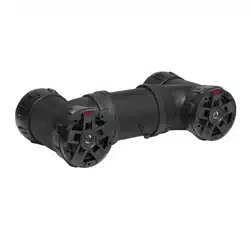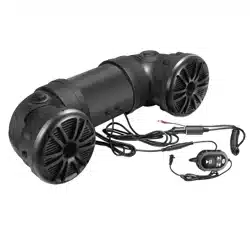

BLUETOOTH
®
ENABLED
ALL-TERRAI N SOU ND SYSTEM
ATV25B
USER MANUAL
FEATURING 6.5” MARINE GRADE SPEAKERS
AND 1” SOFT DOME TWEETERS
with BUILT-IN HIGH POWERED INTERNAL AMPLIFIER
QUICK START GUIDE
NOW WITH
SIMPLE PAIR

THIS PACKAGE CONTAINS
1-ATV25BAllTerrainSpeakerSystem
1- Bluetooth Multi-Function Controller
1- Handlebar Mounting Kit
1- Quick Connect Power Extension Adaptor
2- Nylon Mounting Straps and Nylon Zip Ties
1- User Manual Quick Start Guide / Poster
1- Warranty Card
USER MANUAL
QUICK START GUIDE
Thank you for purchasing this
ATV25B All Terrain Sound System
Please read through these instructions carefully so you will know how to
operate your model properly.
Afteryouhave�nishedreadingtheinstructions,keepthisdocumentina
safe place for future reference.
INFORMATION TO THE USER
T
he Bluetooth® word mark and logos are registered trademarks owned by
Bluetooth SIG, Inc. and any use of such marks is under license.
Other trademarks and trade names are those of their respective owners.

FCC COMPLIANCE STATEMENT
This device complies with part 15 of the FCC Rules. Operation is subject to the
following two conditions:
(1) this device may not cause interference, and
(2) this device must accept any interference, including interference that may cause
undesired operation of this device.
This transmitter must not be co-located or operated in conjunction with any other
antenna or transmitter. The Bluetooth antenna cannot be removed (or replaced) by
user. This equipment complies with FCC/ IC radiation exposure limits set forth for
an uncontrolled environment and meets the FCC radio frequency (RF) Exposure
Guidelines and RSS-102 of the IC radio frequency (RF) Exposure rules. This
equipment has very low levels of RF energy that it deemed to comply without
maximum permissive exposure evaluation (MPE). But it is desirable that it should
be installed and operated keeping the radiator at least 20 cm or more away from
person’s body (excluding extremities: hands, wrists, feet and ankles). Alteration
ormodi�cationscarriedoutwithoutappropriateauthorizationmayinvalidatethe
user’s right to operate the equipment.
NOTE: This equipment has been tested and found to comply with the limits for
a Class B digital device, pursuant to Part 15 of the FCC Rules. These limits
are designed to provide reasonable protection against harmful interference in a
residential installation. This equipment generates, uses and can radiate radio fre-
quency energy and, if not installed and used in accordance with the instructions,
may cause harmful interference to radio communications. However, there is no
guarantee that interference will not occur in a particular installation. If this equip-
ment does cause harmful interference to radio or television reception, which can
be determined by turning the equipment off and on, the user is encouraged to try
to correct the interference by one or more of the following measures:
□Relocateorreorientthereceivingantenna.
□Increasetheseparationbetweentheequipmentandreceiver.
□Connecttheequipmentintoanoutletonacircuitdifferentfromthattowhichthe
receiver is connected.
□Consultthedealeroranexperiencedradio/TVtechnicianforhelp.
INFORMATION TO THE USER
CAUTION!!
ADJUSTMENT OR ALTERATIONS OF THIS DEVICE MAY RESULT
IN HAZARDOUS RADIATION EXPOSURE.

BEFORE YOU START
IMPORTANT SAFETY PRECAUTIONS
■Donotoperatemobileequipmentwhiledrivingamotorizedvehicle–safedrivingand
safety consideration of others should always be your highest priority.
■Intheeventyoushouldnoticesmoke,strangenoisesorodorfromthisproduct,orany
other abnormal signs, immediately turn off the power and consult your dealer or the nearest
authorized
BOSS AUDIO Service Center. Using this product in this condition may result in
permanent damage to the system.
■Setyourvolumecontrolatalowsetting,thenslowlyincreasethesounduntilyoucan
hear it comfortably without distortion, or ear discomfort.
■
BE SURE TO OBSERVE THE FOLLOWING GUIDELINES:
-Donotturnupthevolumesohighthatyoucan’thearwhat’saroundyou.
-Usecautionortemporarilydiscontinueuseinpotentiallyhazardoussituations.
INSTALLATION PRECAUTIONS
WARNING - Always consult a professional installer
■Donotattempttoinstallorservicethisproductbyyourself.Installationorservicingofthis
product by persons without professional training and experience in electronic equipment
andmotorizedvehicleaccessoriesmaybedangerousandcouldexposeyoutotheriskof
electricshock,injuryorotherhazards
■Referanyrepairstoaquali�ed
BOSS AUDIO SYSTEMS Service Center
■The
ATV25B can be powered from a vehicles cigarette lighter / auxiliary power port, or
hard wired directly to the battery through an optional relay / accessory switch
■Whenwiringdirectlytothevehiclesbattery,besuretodisconnectthebatteriesnegative
terminal wire before starting any wiring procedures, it is suggested that an
optional fuse and fuse holder (not included) with minimum rating of 20 Amps be in line with
the positive battery terminal
■Thegroundcablelengthshouldnotexceed18-inches(Seewiringdiagram)
■The
ATV25B has a weather resistant design, it should not be submerged in or
under water under any circumstances
■Useonlytheinstallationpartsprovidedwiththe
ATV25B
CAUTION!! Using other mounting methods may void this warranty
GETTING TO KNOW YOUR
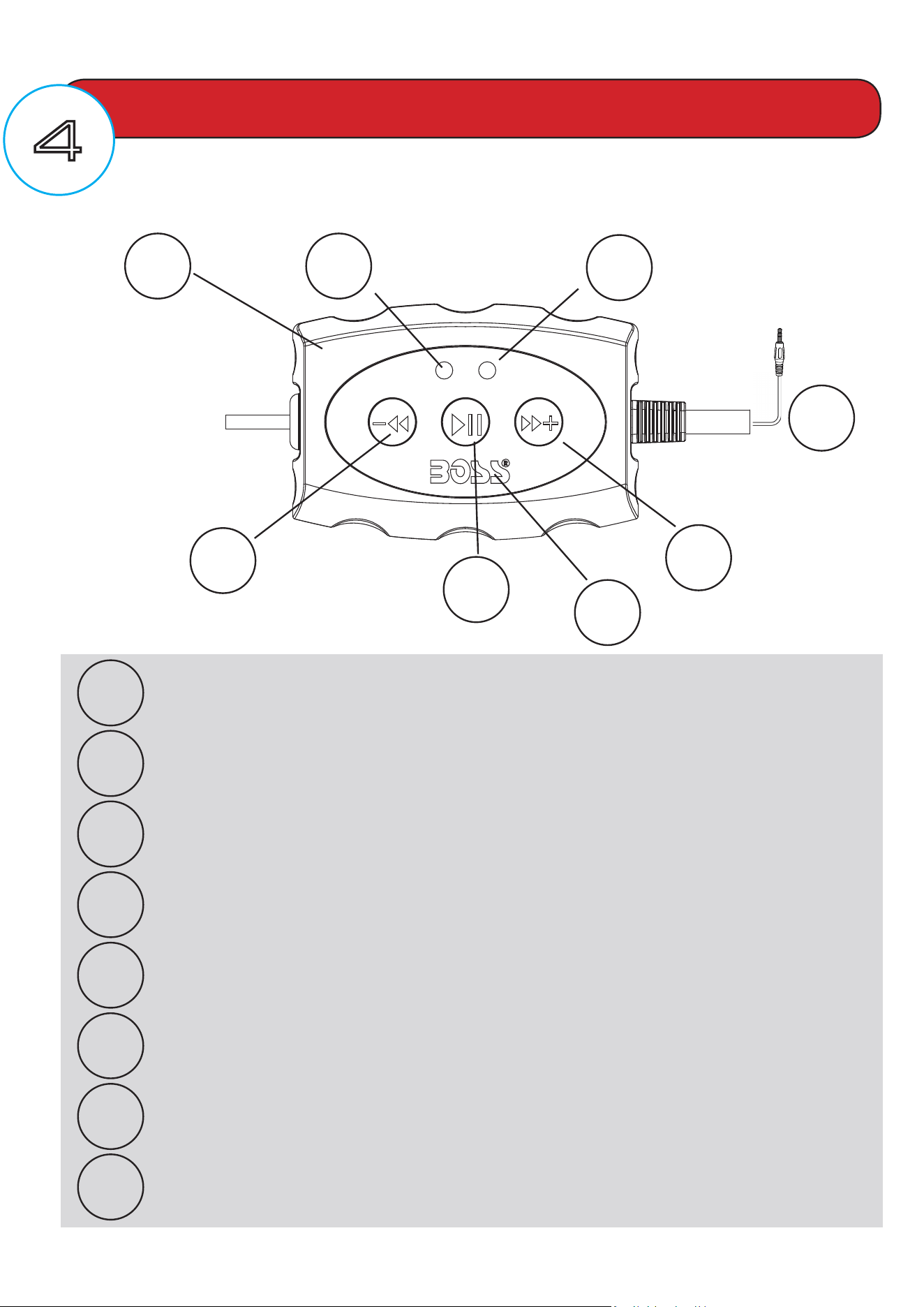
ATV 25B MULT IFUN CT ION CONTROLLER (M FC)
GETTING STARTED
1
2
3
4
5
6
7
8
5
6
7
4
2
3
1
MFC - MULTIFUNCTION CONTROLLER
BLUETOOTH INDICATOR LED - BLUE COLOR
POWER INDICATOR LED - RED COLOR
3.5mm AUX-INPUT
PREVIOUS TRACK / Press and hold for VOL -
PLAY/PAUSE / Press and hold for POWER ON
NEXT TRACK / Press and hold for VOL +
NFC SIMPLE PAIR LOCATION
8
PAIRING & DISCOVERING A NEW BLUETOOTH CONNECTION
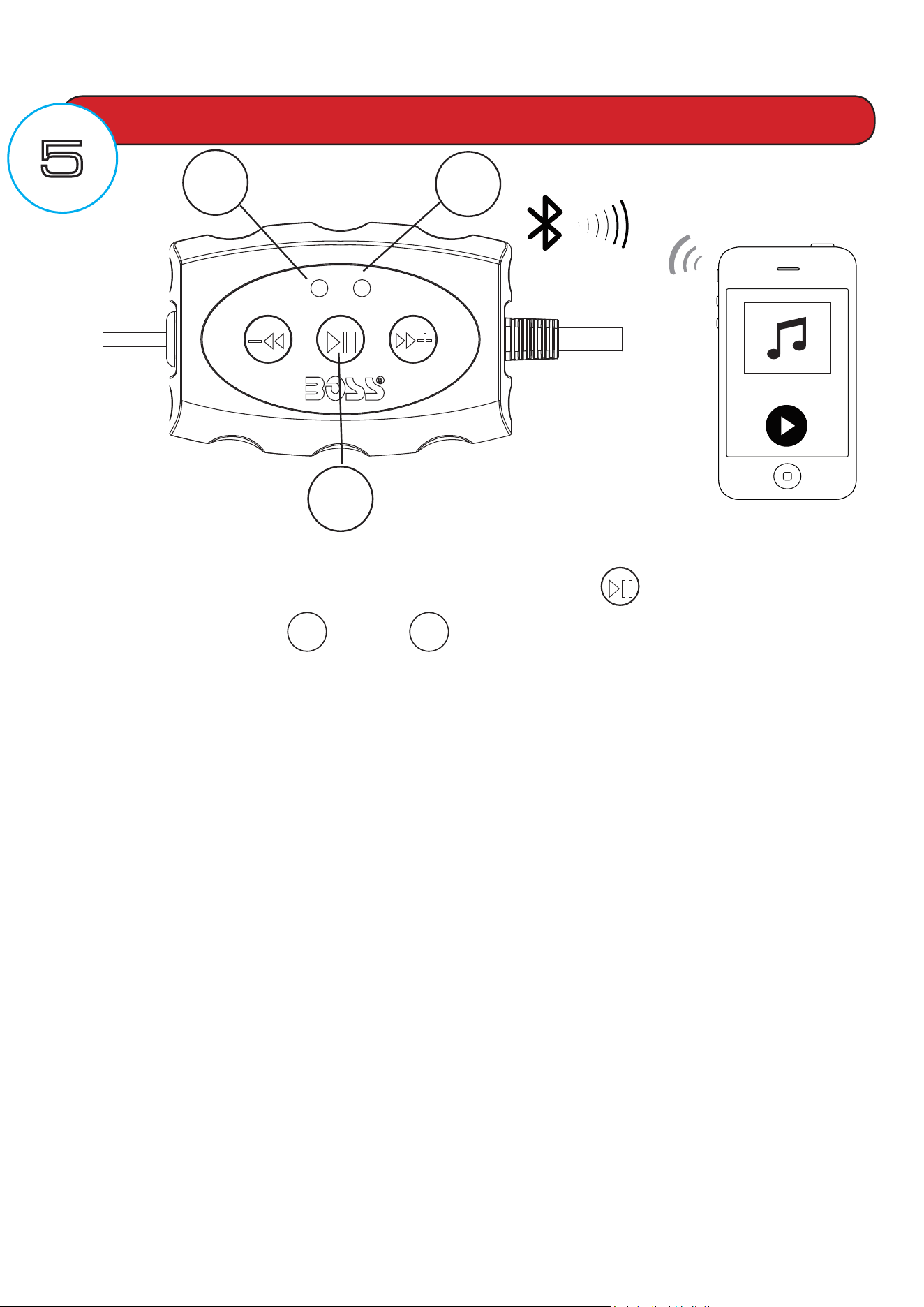
1) Power on the ATV25B by pressing and holding down the Play/Pause multifunction
button for 3 seconds, the
2
blue and
3
redLEDswillstarttoalternatelyash,signalling
thattheATV25BisnowreadyforBluetoothpairing.
NOTE: You have 2 minutes before you must restart this procedure over again.
2) Now that the ATV25B is in pairing mode:
ANDROID users:
a. Go into the Settings Menu of your device
b. Enter the Bluetooth Menu
c. TURN ON Bluetooth and press SCAN
d. “BOSS AUDIO” will now be displayed under AVAILABLE DEVICES
e. If prompted, enter passcode: “0000”
iOS users:
a. Go into the Settings Menu of your iOS device
b. Enter the Bluetooth Menu
c. TURN ON Bluetooth
d. “BOSS AUDIO” will now be displayed
e. If prompted, enter passcode: “0000”
3) If the ATV25B is not seen, repeat the above steps to refresh the “Device List”
4) When the connection is successful, you are now ready to stream music from your favorite
media player to the ATV25B
BLUETOOTH OPERATION
6
2
3
To avoid battery exhaustion, be sure to occasionally run the vehicles
engine while using this product. Using this product without running the
engine can drain the
battery.
BLUETOOTH / NFC OPERATION
RECONNECTION
1) Power on the ATV25B and your last paired device Bluetooth.
2) The unit will now automatically reconnect
3) If your device was previously paired with the ATV25B, but it wasn’t the last paired
device:
a. Ensure no other devices are currently paired
b. Enter the Bluetooth Menu on your device being paired
c. “BOSS AUDIO” will display under AVAILABLE DEVICES
d. Choose the “BOSS AUDIO” to reconnect
4) If the device is out of range from the ATV25B, it will disconnect automatically:
a. To reconnect once device is back in range, press the Play/Pause
button once
b. The ATV25B will now reconnect to the device
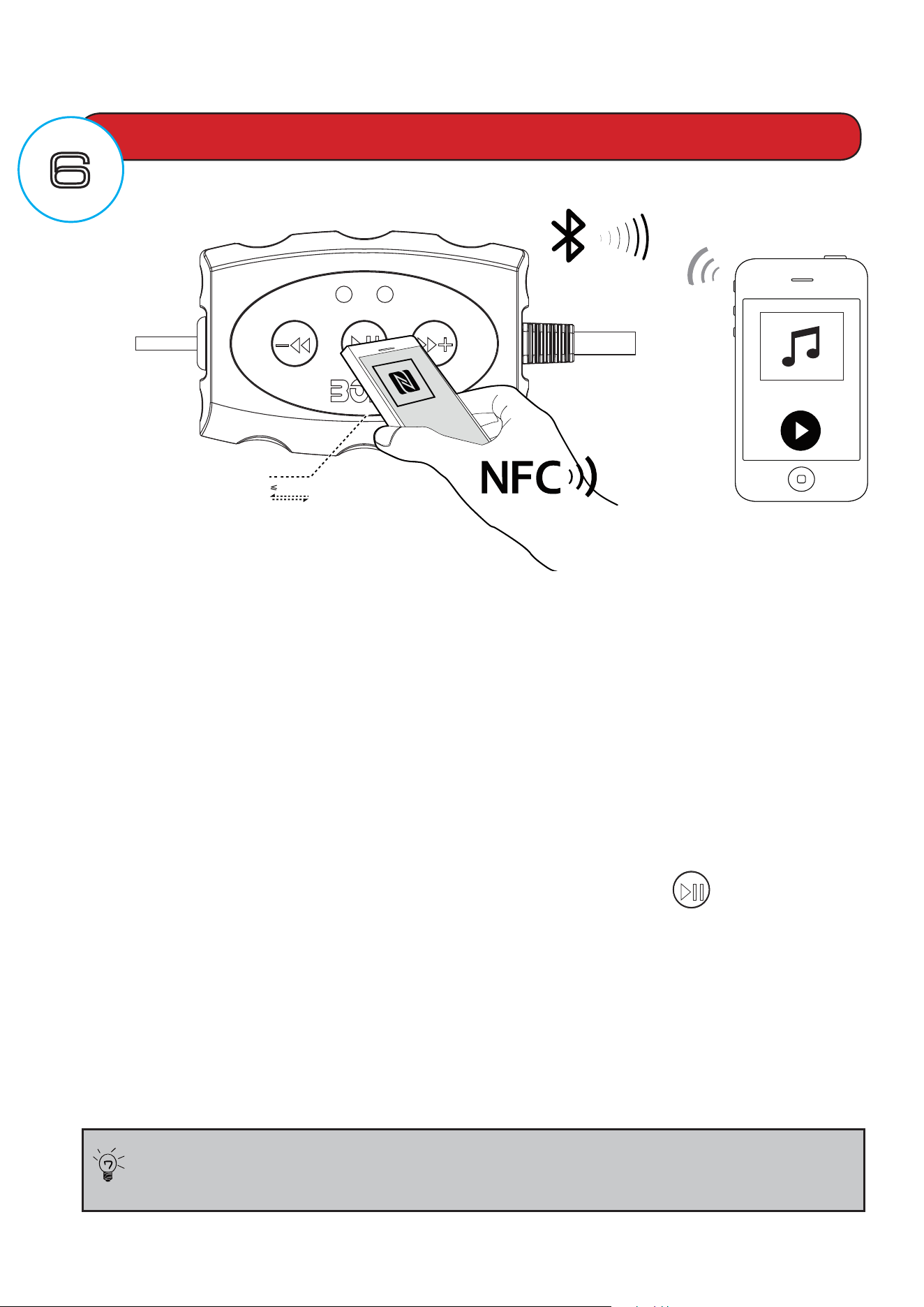
NFC SIMPLE PAIR
NFC enabled devices tap within 1/2” of the BOSS
logo,youwillhearacon�rmationtone,
your device will now automatically be paired without any further procedures, some NFC
devices will require several attempts to successfully pair
Tips:
2 cm
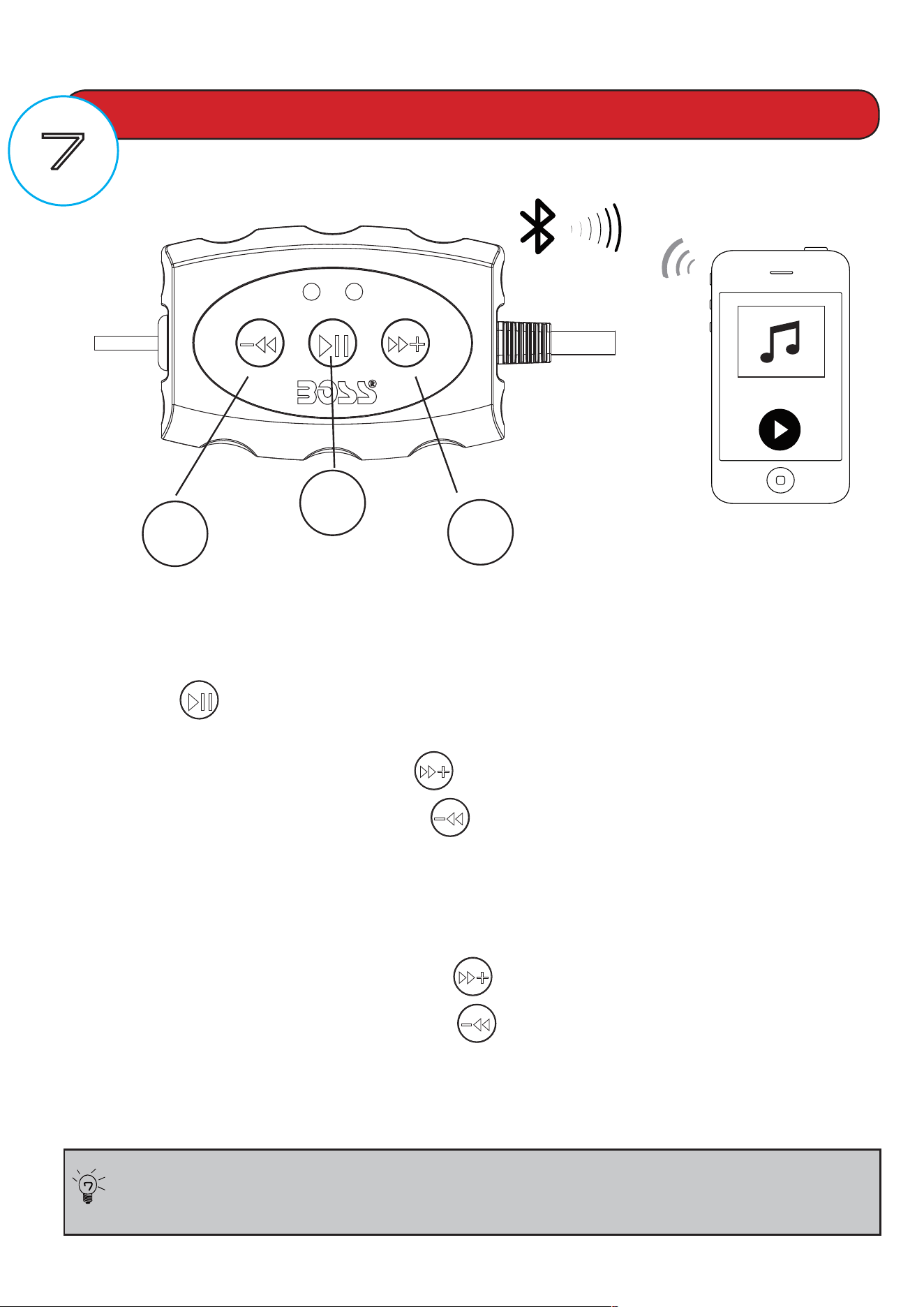
MULTIFUNCTION CONTROLLER BLUETOOTH OPERATION
1) Press the PLAY/PAUSE once to start playing music or press the PLAY button from
your device touch screen
2) To skip songs or advance, press the NEXT TRACK button
3) To select the previous song, press the PREVIOUS TRACK button
VOLUME CONTROL
4) To raise the volume Press and Hold the VOL + button 2 ~ 3 seconds
5) To lower the volume Press and Hold
the VOL - button 2 ~ 3 seconds
STREAMING MUSIC
Make sure your device Bluetooth volume is set at 75% level before
stowing in to the carry pouch
Tips:
6
5
7
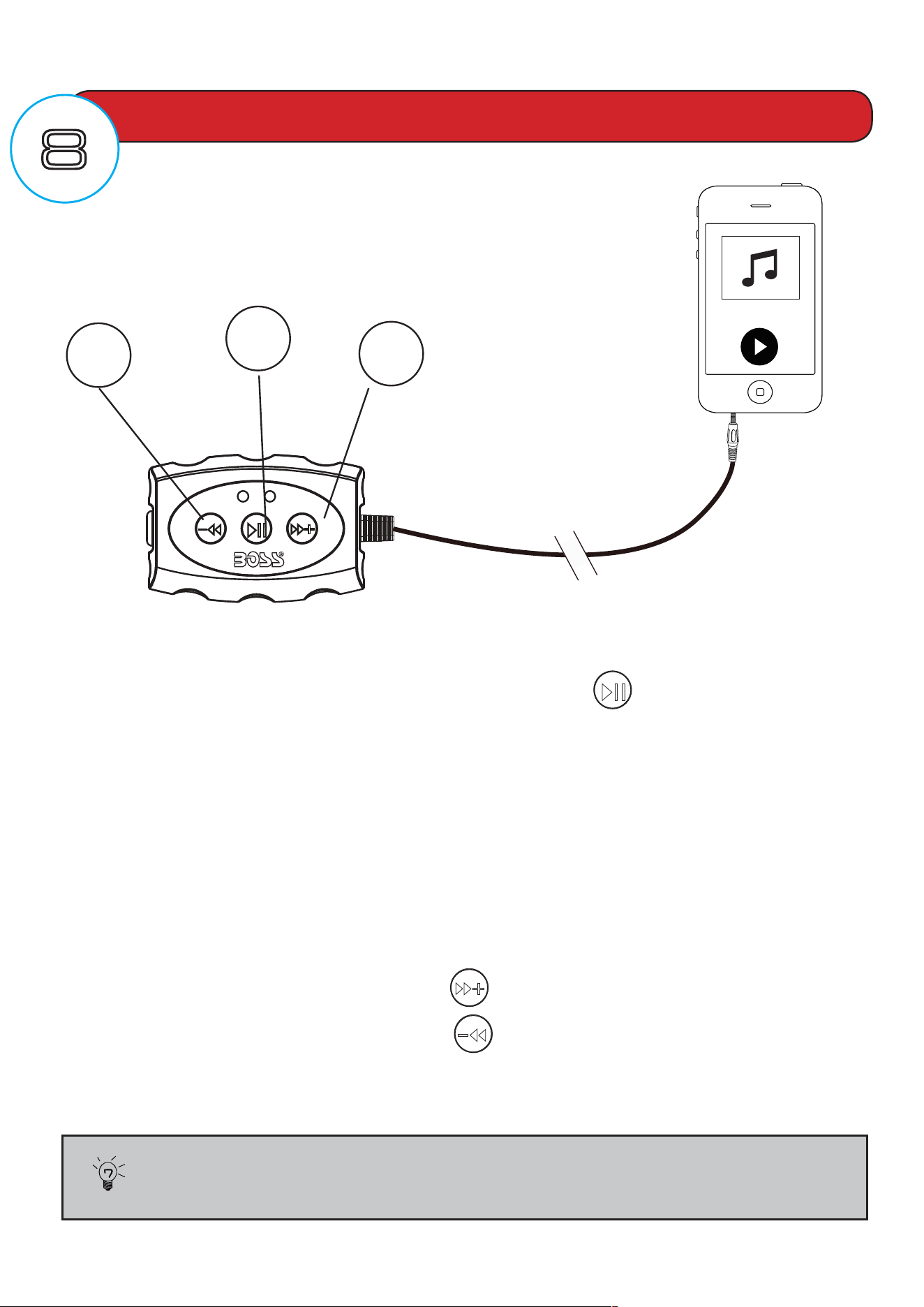
MULTIFUNCTION CONTROLLER AUX-IN OPERATION
1) Power on the ATV25B by pressing and holding down the PLAY/PAUSE
multifunction button for 3 seconds
2)Disconnectanypaired
Bluetooth device by turning off Bluetooth in your devices
Settings Menu
3) Connect the integrated 3.5mm AUX-IN cable located on right side of the MFC to your
devices headphone jack
4)RoutethewirebacktoATV25B,strapandsecureyourdeviceinthesuppliedsoftcarry
pouch
VOLUME CONTROL
5) To raise the volume Press and Hold the VOL + button 2 ~ 3 seconds
6) To lower the volume Press and Hold the VOL - button 2 ~ 3 seconds
AUX-INPUT
Make sure your device headphone volume is set at 75% level before
stowing in to the carry pouch
ATV25B can play audio from any device
that has a 3.5mm headphone audio jack.
YOUR DEVICE
5
7
6
Tips:
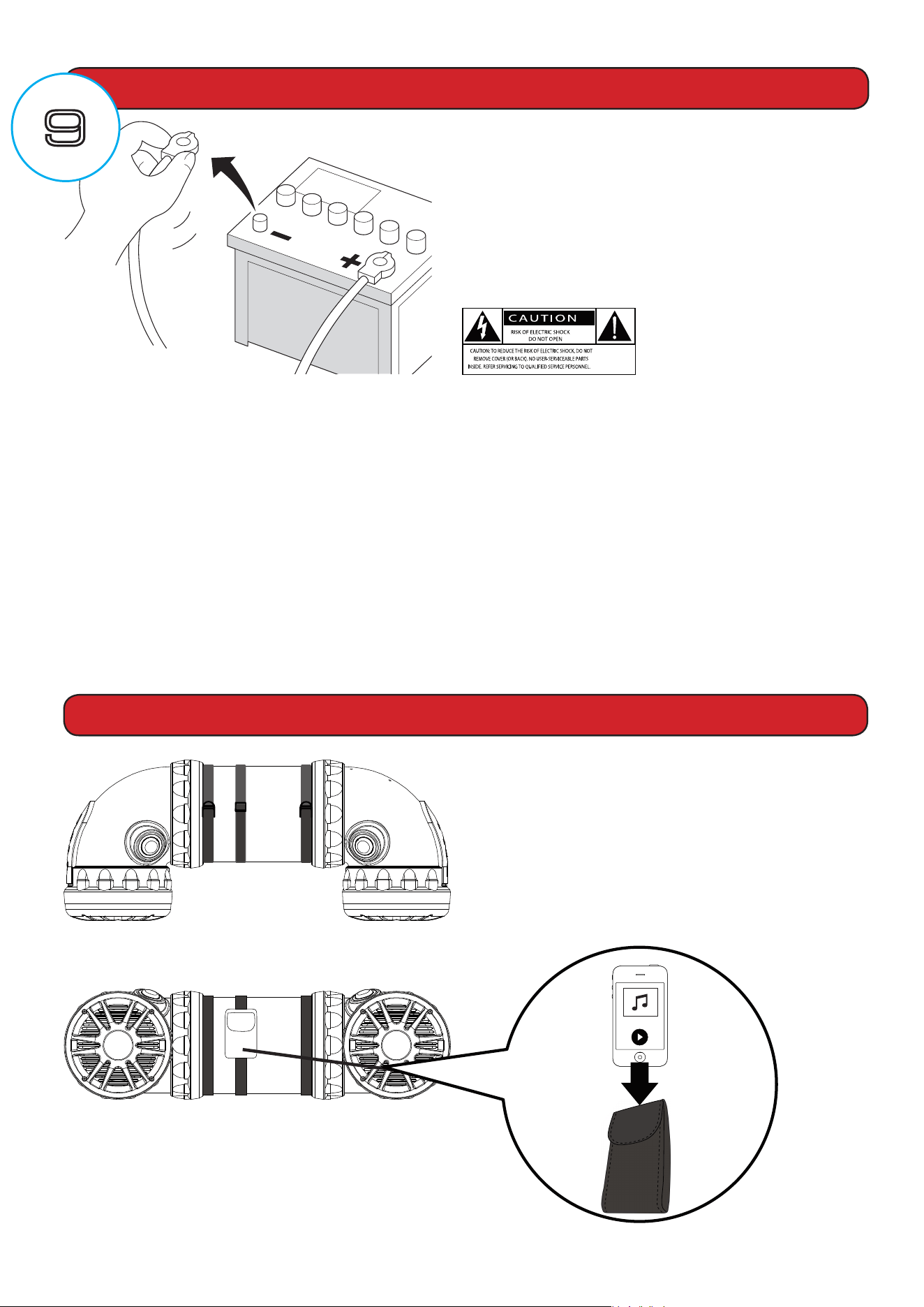
BEFORE INSTALLING THIS PRODUCT
Whenreplacingthefuse,besuretoonlyuseafuseoftheratingspeci�edon
this product. To avoid short-circuiting, cover any disconnected leads with insulating
tape. It is especially important to insulate any unused wires, which if left uncovered
may cause a short circuit. When connecting other devices to this product, refer to
the manual for the product to be connected. The black cable is ground, make sure
toconnectthegroundwire�rst.Ensurethatthegroundwireisproperlyconnected
to metal parts of the vehicles body frame or direct to the battery if your vehicle
does not have a grounded chassis frame The ground wire of this units power amp
and a second powered system must be connected to the frame separately with
different screws. If the screw for the ground wire loosens or falls out, it could result
in�reormalfunction.
To avoid potential shorts in the electrical
system,besuretodisconnectthe(–)bat-
tery cable before installation. Use this unit
witha12-Voltbatteryandnegative
grounding only. Failure to do so may result
ina�reormalfunction.
SPEAKER MOUNTING SUGGESTIONS
CAUTION!! Mounting straps should be
double checked to be sure they are tight
and secure before each use of the
vehicle. The carry pouch is designed to
keep your device safe from debris, make
sure to close the pouch cover securely
before using vehicle.
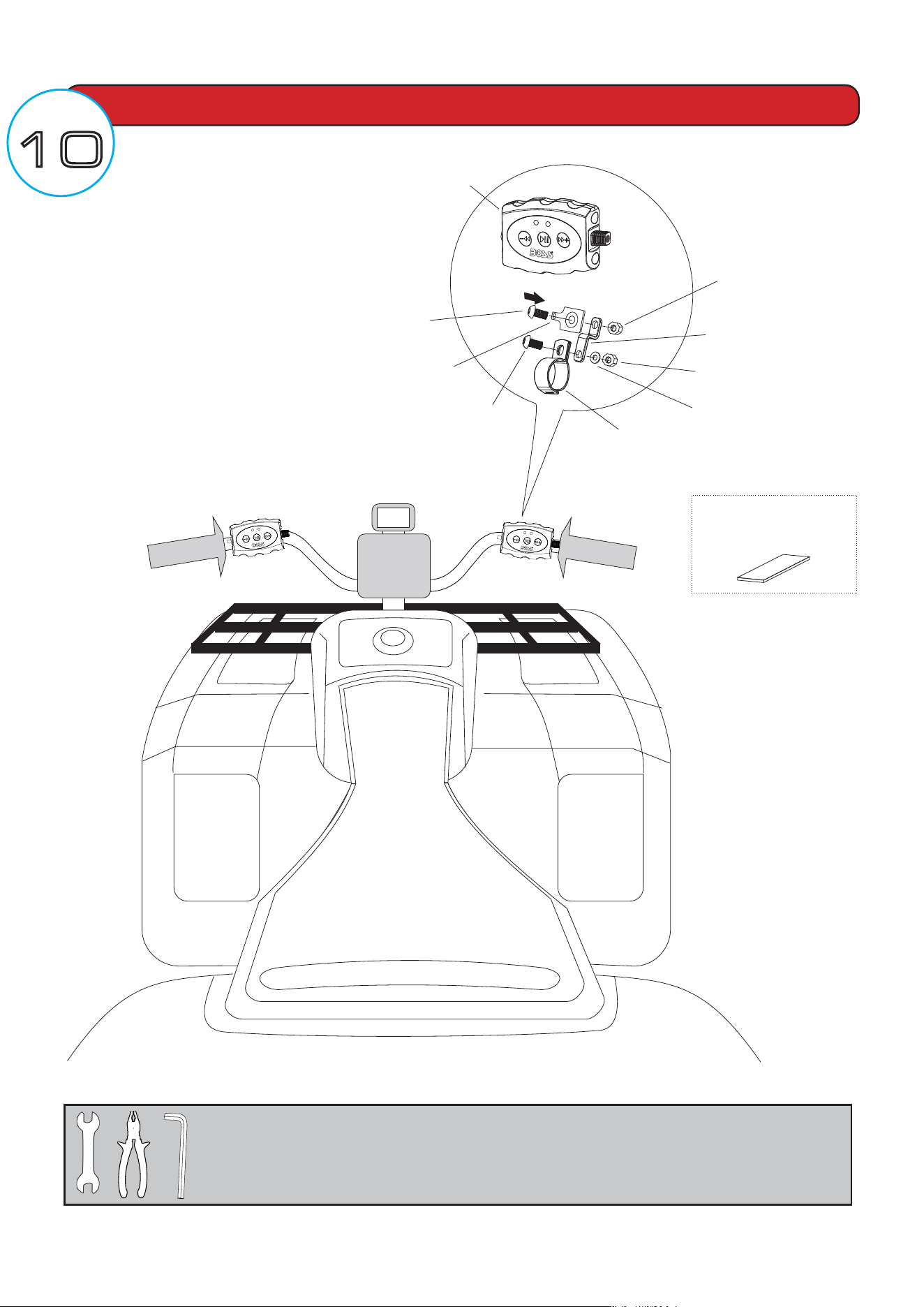
MULTI-FUNCTION CONTROLLER MOUNTING
LEFT or RIGHT
FOR ILLUSTRATION PURPOSES
YOUR VEHICLE MAY VARY
FOR ILLUSTRATION PURPOSES
YOUR VEHICLE MAY VARY
RUBBER
SHIM
INSERT
WASHER
LOCK NUT
ALLEN HEAD
BOLT
LOCK NUT
ALLEN HEAD
BOLT
MULTI-FUNCTION
CONTROLLER
UNIT
SNAP
BRACKET
Z-BRACKET
HANDLEBAR
CLAMP
TOOLSNEEDED:
- 12mm Socket, Wrench or Pliers
- 6mm Allen Wrench
BLUETOOTH
•Version:3.0w/EDR
•A2DP
•Range:33ft(10m)
SPEAKERS
•Dimensions:6.5”/165.1mm
•Impedance:4Ω
•Magnet:11oz
•ConeType:PPCARBON
•TweeterSize:1”PEISOFTDOME
AMPLIFIER
•MaximumOutputPower:450Watts
•Inputimpedance:10kΩ
•FrequencyResponse:45Hz-25kHz
SPECIFICATIONS
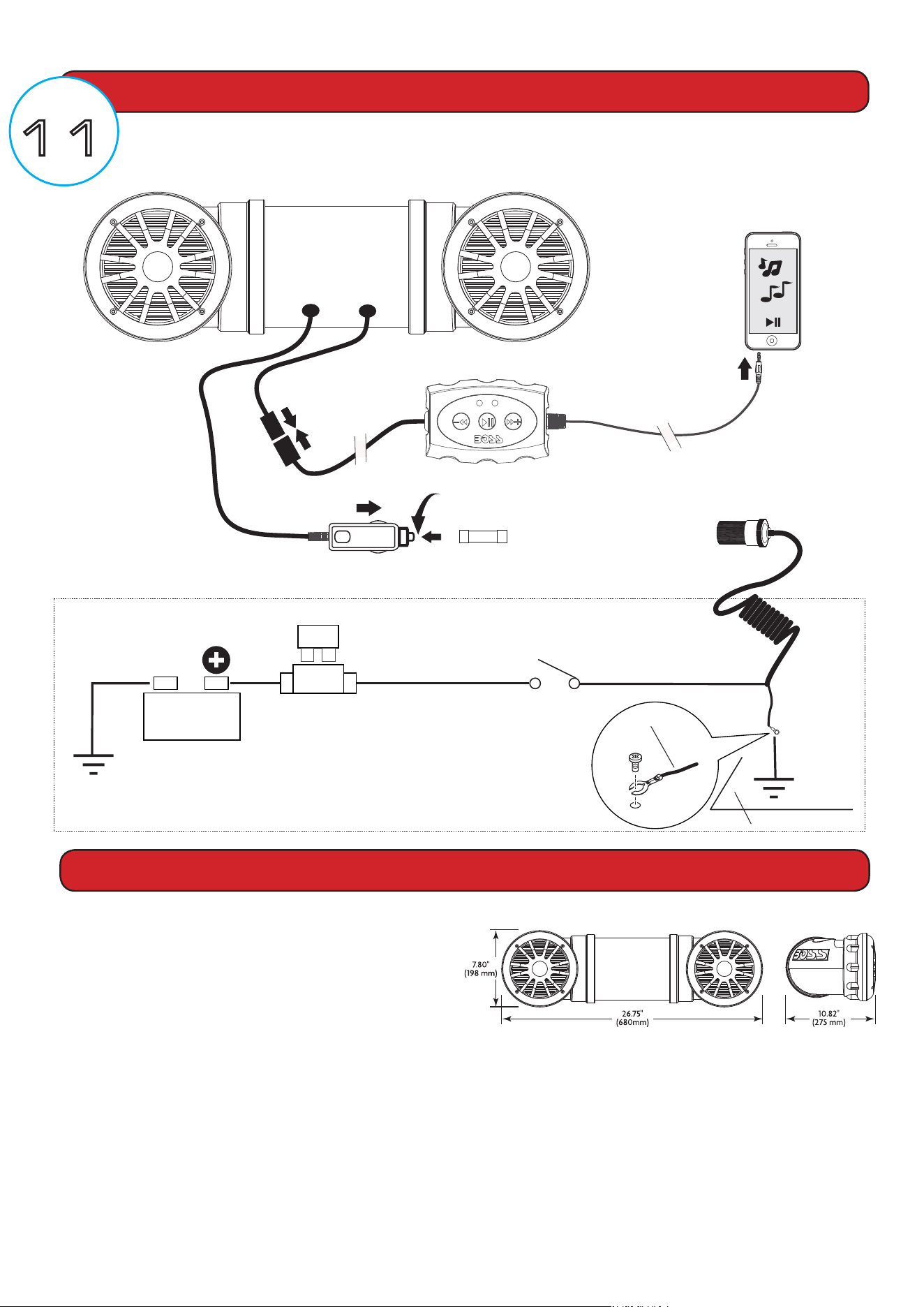
WIRE DIAGRAM
15A
Fuse and fuse holder
(not included)
Chassis
ground
point
BATTERY
Mini-DIN
Connector
Fuse is located inside the power adaptor
Turn counter clockwise to open
Replace with 10A AGC Fuse type only
INSERT
Normally open switch
(not included)
INSERT
OPTIONAL DIRECT BATTERY WIRING CIRCUIT
RED
BLACK
Chassis
ground
point
QUICK RELEASE
POWER ADAPTOR
(INCLUDED)
MFC
POWER ADAPTOR
10A
Ground wire
Metal frame
Recommended 12 ~ 14ga Wire
(not included)
Align arrows
GENERAL
•OperationalPower:12VDC
(10-16Vallowable)
•MAXCurrentDraw:8.7A
•ReplacementFuse:10AAGCTYPE
•Color:Black
•Weight:15lbs/6.8Kg
•DimensionscmWxHxD:68.0x19.8x27.5
•DimensionsInchesWxHxD:26.77x7.95x10.83
SPECIFICATIONS SUBJECT TO CHANGE WITHOUT NOTICE

ATV25B
USER MANUAL
BLU ETOOTH
®
ENABLED | ALL-TERRAIN SOUN D SYSTEM
PRINTED IN CHINA
VER:1.02 EN
iPod / iPhone are trademarks of Apple Inc. registered in the U.S. and other
countries.
BOSS Audio Systems is not affiliated with Apple Inc.
1014
BOSS Audio Systems
3451LunarCourt•Oxnard,CA93030
www.bossaudio.com
|800.999.1236
Tech Support: www.bossaudio.com/support
All rights reserved. No part of this publication may be reproduced, distributed, or transmitted in any form or by
any means, including photocopying, recording, or other electronic or mechanical methods, without the prior writ-
ten permission of AVA Enterprises Inc.
Copyright © 2014 AVA Enterprises Inc.