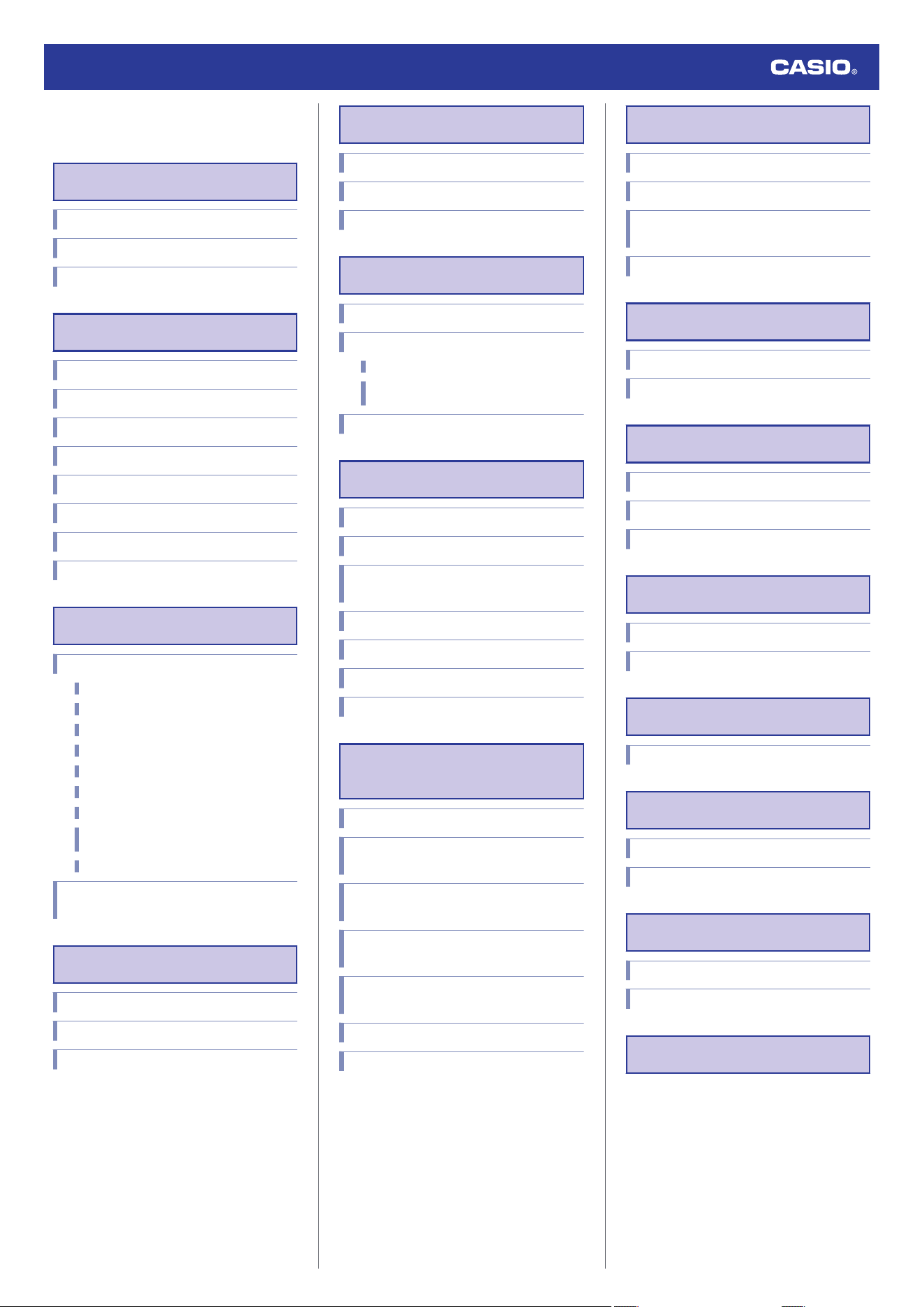
Contents
Precautions
Operating Precautions
User Maintenance
Battery
Before Getting Started...
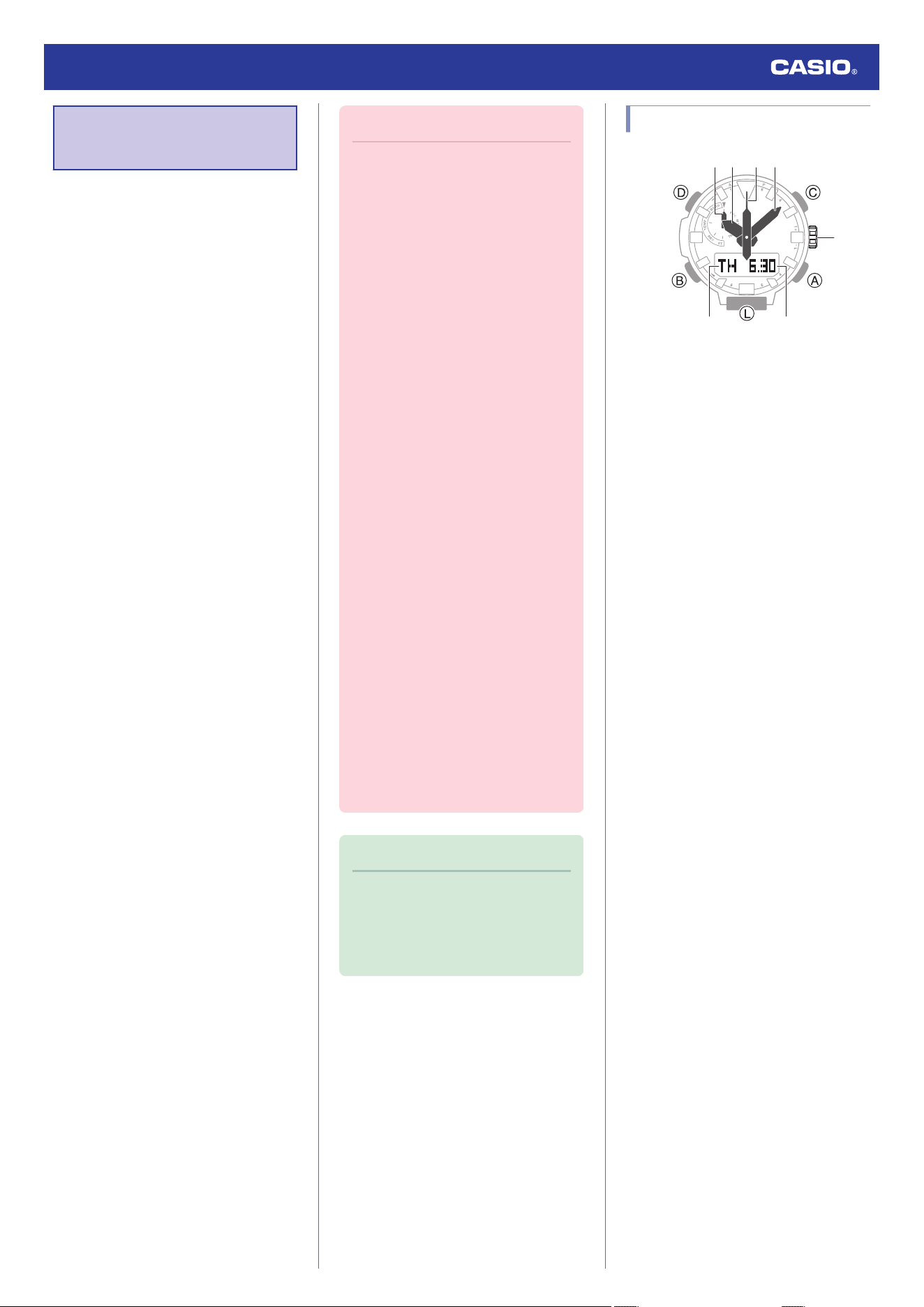
General Guide
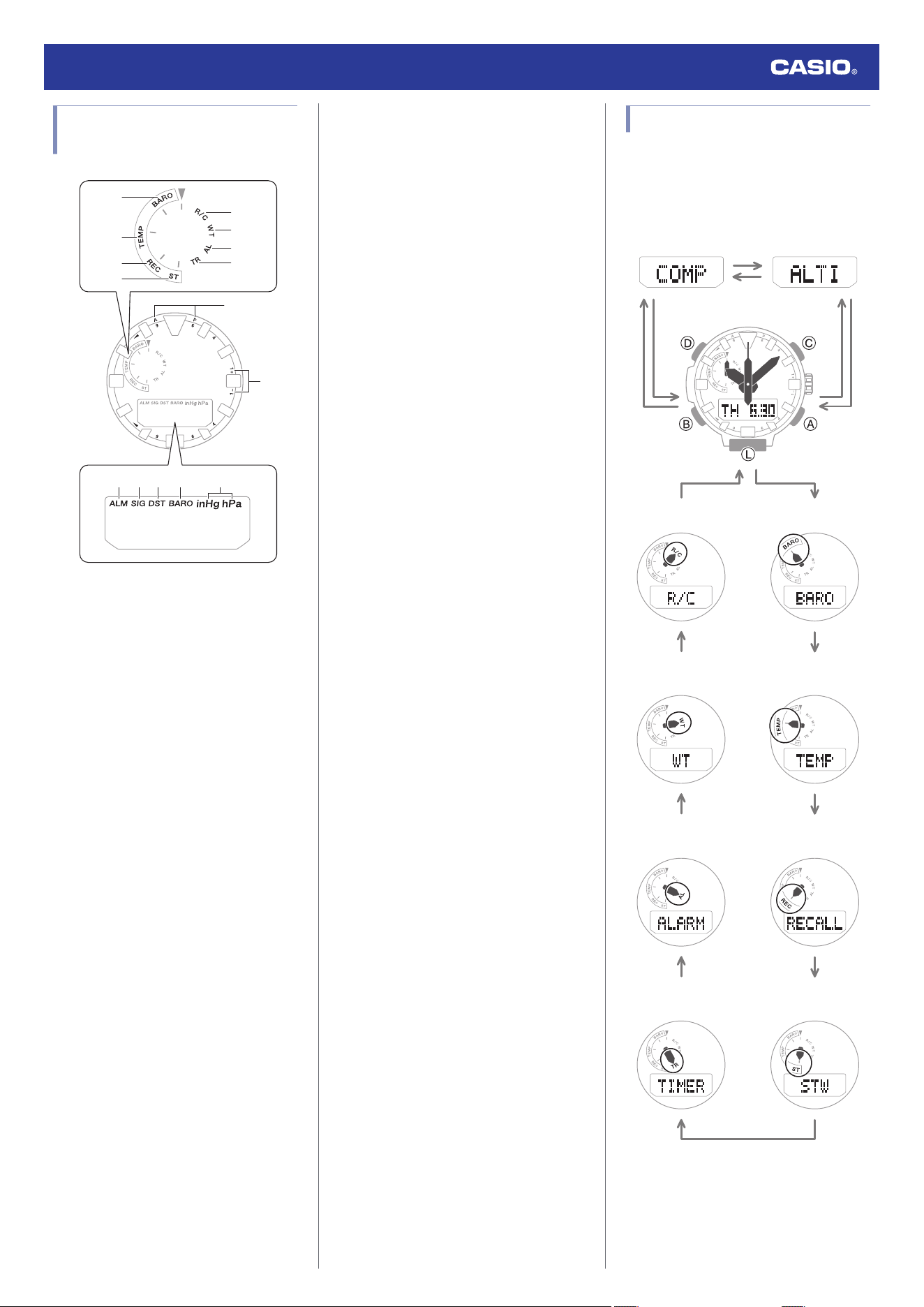
Watch Face and Display Indicators
Navigating Between Modes
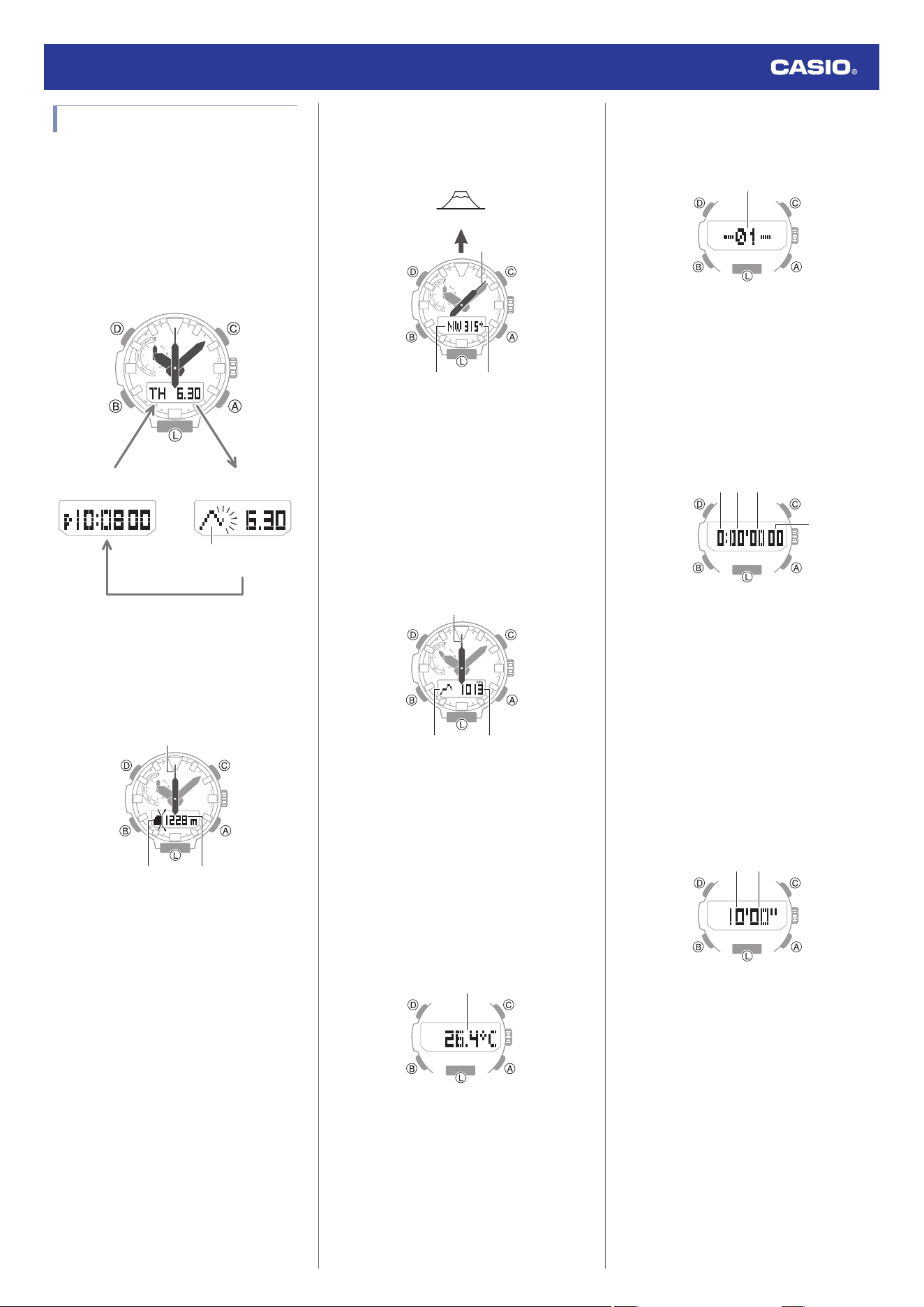
Mode Overview
Using the Crown
Shifting the Hands
Charging
Viewing the Face in the Dark
Time Adjustment
Time Adjustment Using a Time Signal
Overview
Appropriate Signal Reception Location
Time Signal Reception Ranges
Auto Time Calibration Signal Receive
Enabling and disabling Auto Receive
Manual Time Calibration Signal Receive
Receive Level Indicator
Checking the Last Time Adjustment
Result
Signal Reception Precautions
Using Watch Operations to Adjust the Time
Setting
World Time
Checking World Time
Specifying a World Time City
Swapping Your Home Time and World Time
Alarm
Configuring Alarm Settings
Configuring the Hourly Time Signal Setting
Turning Off an Alarm or the Hourly Time Signal
Digital Compass
Taking a Compass Reading
Calibrating Compass Readings
Calibrating Compass Readings
Setting Up for True North Readings
(Magnetic Declination Calibration)
Digital Compass Reading Precautions
Altitude Measurement
Checking the Current Altitude
Calibrating Altitude Readings (Offset)
Checking the Altitude Differential from a
Reference Point
Setting the Auto Measurement Interval
Recording Altitude Readings
Specifying the Altitude Measurement Unit
Altitude Reading Precautions
Barometric Pressure
Measurement
Checking the Current Barometric Pressure
Checking Changes in Barometric Pressure
Over Time
Checking the Change in Barometric Pressure
between Two Readings
Sudden Barometric Pressure Change
Indications
Calibrating Barometric Pressure Readings
(Offset)
Specifying the Barometric Pressure Unit
Barometric Pressure Reading Precautions
Temperature Measurement
Checking the Current Temperature
Calibrating Temperature Readings (Offset)
Specifying the Temperature Measurement
Unit
Temperature Reading Precautions
Viewing Altitude Records
Viewing Recorded Data
Deleting Data
Stopwatch
Measuring Elapsed Time
Measuring a Split Time
Timing the First and Second Place Finishers
Timer
Setting a Start Time
Using the Timer
Hand Alignment Adjustment
Adjusting Hand Alignment
Other Settings
Enabling the Button Operation Tone
Configuring Power Saving Function Settings
Other Information
City Table
Specifications
Troubleshooting
Watch Operation Guide 5673
1
MA2310-ED
OPUM-F
© 2021 CASIO COMPUTER CO., LTD.
Precautions
Operating Precautions
●
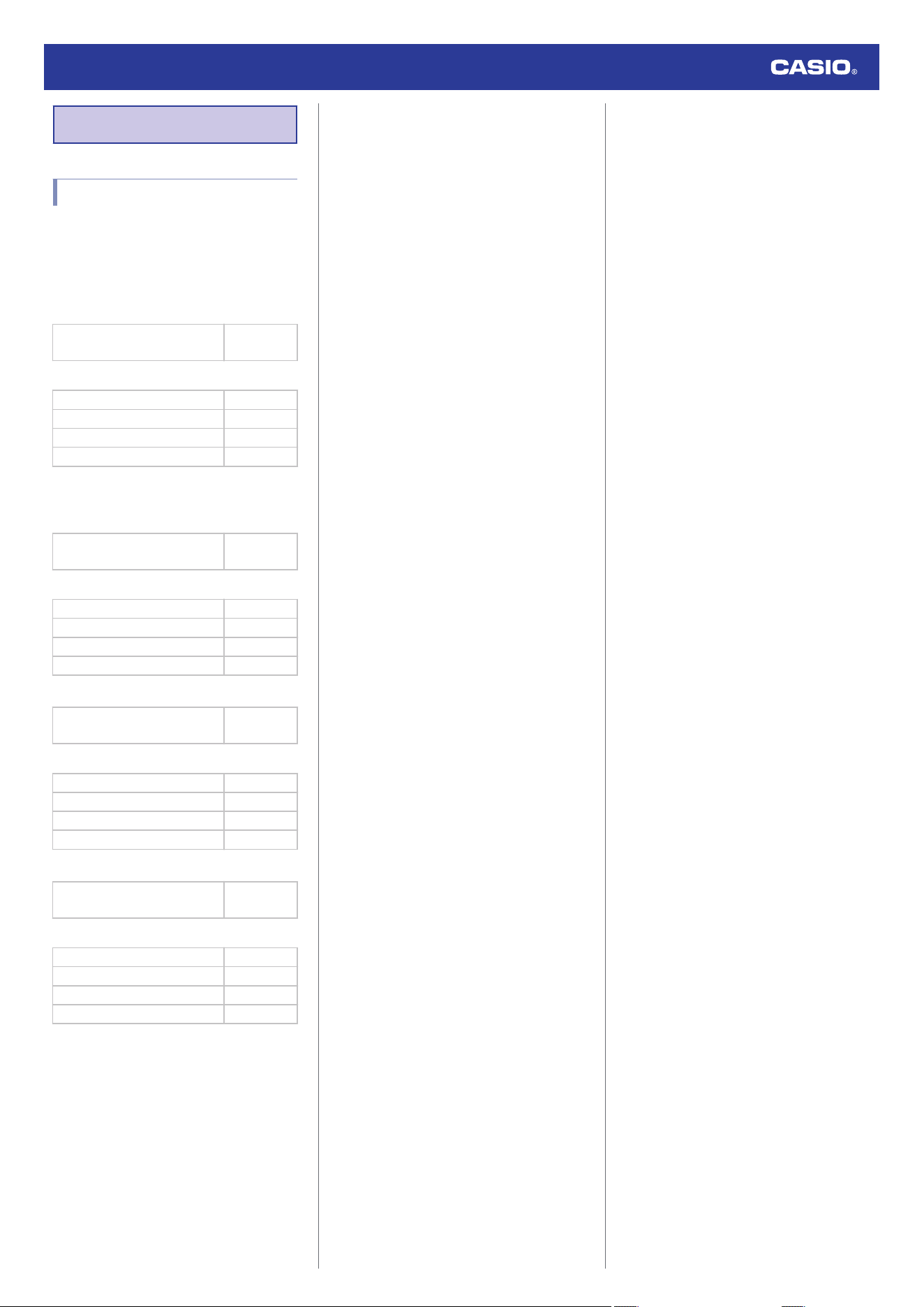
Water Resistance
●
The information below applies to watches
with WATER RESIST or WATER
RESISTANT marked on the back cover.
Water Resistance Under Daily Use
Marking on watch front or on
back cover
No BAR
mark
Example of Daily Use
Hand washing, rain Yes
Water-related work, swimming No
Windsurfing No
Skin diving No
Enhanced Water Resistance Under Daily
Use
5 Atmospheres
Marking on watch front or on
back cover
5BAR
Example of Daily Use
Hand washing, rain Yes
Water-related work, swimming Yes
Windsurfing No
Skin diving No
10 Atmospheres
Marking on watch front or on
back cover
10BAR
Example of Daily Use
Hand washing, rain Yes
Water-related work, swimming Yes
Windsurfing Yes
Skin diving Yes
20 Atmospheres
Marking on watch front or on
back cover
20BAR
Example of Daily Use
Hand washing, rain Yes
Water-related work, swimming Yes
Windsurfing Yes
Skin diving Yes
●
Do not use your watch for scuba diving or
other types of diving that requires air tanks.
●
Watches that do not have WATER RESIST
or WATER RESISTANT marked on the
back cover are not protected against the
effects of sweat. Avoid using such a watch
under conditions where it will be exposed to
large amounts of sweat or moisture, or to
direct splashing with water.
●
Even if a watch is water resistant, note the
usage precautions described below. Such
types of use reduce water resistance
performance and can cause fogging of the
glass.
ー
Do not operate the crown or buttons while
your watch is submersed in water or wet.
ー
Avoid wearing your watch while in the
bath.
ー
Do not wear your watch while in a heated
swimming pool, sauna, or any other high
temperature/high humidity environment.
ー
Do not wear your watch while washing
your hands or face, while doing
housework, or while performing any other
task that involves soaps or detergents.
●
After submersion in seawater, use plain
water to rinse all salt and dirt from your
watch.
●
To maintain water resistance, have the
gaskets of your watch replaced periodically
(about once every two or three years).
●
A trained technician will inspect your watch
for proper water resistance whenever you
have its battery replaced. Battery
replacement requires the use of special
tools. Always request battery replacement
from your original retailer or from an
authorized CASIO service center.
●
Some water-resistant watches come with
fashionable leather bands. Avoid
swimming, washing, or any other activity
that causes direct exposure of a leather
band to water.
●
The inside surface of the watch glass may
fog when the watch is exposed to a sudden
drop in temperature. No problem is
indicated if the fogging clears up relatively
quickly. Sudden and extreme temperature
changes (such as coming into an air
conditioned room in the summer and
standing close to an air conditioner outlet,
or leaving a heated room in the winter and
allowing your watch to come into contact
with snow) can cause it to take longer for
glass fogging to clear up. If glass fogging
does not clear up or if you notice moisture
inside of the glass, immediately stop using
your watch and take it to your original
retailer or to an authorized CASIO service
center.
●
Your water-resistant watch has been tested
in accordance with International
Organization for Standardization
regulations.
●
Band
●
Tightening the band too tightly can cause
you to sweat and make it difficult for air to
pass under the band, which can lead to skin
irritation. Do not fasten the band too tightly.
There should be enough room between the
band and your wrist so you can insert your
finger.
●
Deterioration, rust, and other conditions can
cause the band to break or come off of your
watch, which in turn can cause band pins to
fly out of position or to fall out. This creates
the risk of your watch falling from your wrist
and becoming lost, and also creates the risk
of personal injury. Always take good care of
your band and keep it clean.
●
Immediately stop using a band if you even
notice any of the following: loss of band
flexibility, band cracks, band discoloration,
band looseness, band connecting pin flying
or falling out, or any other abnormality. Take
your watch to your original retailer or to a
CASIO service center for inspection and
repair (for which you will be charged) or to
have the band replaced (for which you will
be charged).
Watch Operation Guide 5673
2
●
Temperature
●
Never leave your watch on the dashboard
of a car, near a heater, or in any other
location that is subject to very high
temperatures. Do not leave your watch
where it will be exposed to very low
temperatures. Temperature extremes can
cause your watch to lose or gain time, to
stop, or otherwise malfunction.
●
Leaving your watch in an area hotter than
+60 °C (140 °F) for long periods can lead to
problems with its LCD. The LCD may
become difficult to read at temperatures
lower than 0 °C (32 °F) and greater than
+40 °C (104 °F).
●
Impact
●
Your watch is designed to withstand impact
incurred during normal daily use and during
light activity such as playing catch, tennis,
etc. Dropping your watch or otherwise
subjecting it to strong impact, however, can
lead to malfunction. Note that watches with
shock-resistant designs (G‑SHOCK,
BABY‑G, G‑MS) can be worn while
operating a chain saw or engaging in other
activities that generate strong vibration, or
while engaging in strenuous sports
activities (motocross, etc.)
●
Magnetism
●
The hands of analog and combination
(analog-digital) watches are moved by a
motor that uses magnetic force. When such
a watch is close to a device (audio
speakers, magnetic necklace, cell phone,
etc.) that emits strong magnetism, the
magnetism can cause timekeeping to slow
down, speed up, or stop, resulting in the
incorrect time being displayed.
●
Timekeeping accuracy may be affected if
the watch itself becomes magnetized. Also,
very strong magnetism (from medical
equipment, etc.) should be avoided
because it can cause malfunction of your
watch and damage to electronic
components.
●
Electrostatic Charge
●
Exposure to very strong electrostatic
charge can cause your watch to display the
wrong time. Very strong electrostatic
charge even can damage electronic
components.
●
Electrostatic charge can cause the display
to go blank momentarily or cause a rainbow
effect on the display.
●
Chemicals
●
Do not allow your watch to come into
contact with thinner, gasoline, solvents,
oils, or fats, or with any cleaners, adhesives,
paints, medicines, or cosmetics that contain
such ingredients. Doing so can cause
discoloration of or damage to the resin
case, resin band, leather, and other parts.
●
Storage
●
If you do not plan to use your watch for a
long time, thoroughly wipe it free of all dirt,
sweat, and moisture, and store it in a cool,
dry place.
●
Resin Components
●
Allowing your watch to remain in contact
with other items or storing it together with
other items for long periods while it is wet
can cause color on resin components to
transfer to the other items, or the color of the
other items to transfer to the resin
components of your watch. Be sure to dry
off your watch thoroughly before storing it
and make sure it is not in contact with other
items.
●
Leaving your watch where it is exposed to
direct sunlight (ultraviolet rays) for long
periods or failure to clean dirt from your
watch for long periods can cause it to
become discolored.
●
Friction caused by certain conditions
(strong external force, sustained rubbing,
impact, etc.) can cause discoloration of
painted components.
●
If there are printed figures on the band,
strong rubbing of the printed area can cause
discoloration.
●
Leaving your watch wet for long periods can
cause fluorescent color to fade. Wipe the
watch dry as soon as possible after it
becomes wet.
●
Semi-transparent resin parts can become
discolored due to sweat and dirt, and if
exposed to high temperatures and humidity
for long periods.
●
Daily use and long-term storage of your
watch can lead to deterioration, breaking, or
bending of resin components. The extent of
such damage depends on usage conditions
and storage conditions.
●
Leather Band
●
Allowing your watch to remain in contact
with other items or storing it together with
other items for long periods while it is wet
can cause the color of the leather band to
transfer to the other items or the color of the
other items to transfer to the leather band.
Be sure to dry off your watch thoroughly with
a soft cloth before storing it and make sure
it is not in contact with other items.
●
Leaving a leather band where it is exposed
to direct sunlight (ultraviolet rays) for long
periods or failure to clean dirt from a leather
band for long periods can cause it to
become discolored.
CAUTION:
Exposing a leather band to rubbing or dirt
can cause color transfer and discoloration.
●
Metal Components
●
Failure to clean dirt from metal components
can lead to formation of rust, even if
components are stainless steel or plated. If
metal components exposed to sweat or
water, wipe thoroughly with a soft,
absorbent cloth and then place the watch in
a well-ventilated location to dry.
●
Use a soft toothbrush or similar tool to scrub
the metal with a weak solution of water and
a mild neutral detergent, or with soapy
water. Next, rinse with water to remove all
remaining detergent and then wipe dry with
a soft absorbent cloth. When washing metal
components, wrap the watch case with
kitchen plastic wrap so it does not come into
contact with the detergent or soap.
Watch Operation Guide 5673
3
●
Bacteria and Odor Resistant Band
●
The bacteria and odor resistant band
protects against odor generated by the
formation of bacteria from sweat, which
ensures comfort and hygiene. In order to
ensure maximum bacteria and odor
resistance, keep the band clean. Use an
absorbent soft cloth to thoroughly wipe the
band clean of dirt, sweat, and moisture. A
bacteria and odor resistant band
suppresses the formation of organisms and
bacteria. It does not protect against rash
due to allergic reaction, etc.
●
Liquid Crystal Display
●
Display figures may be difficult to read when
viewed from an angle.
●
Watch with Data Memory
●
Allowing the battery to go dead, replacing
the battery, or having your watch repaired
can cause all data in watch memory to be
lost. Note that CASIO Computer Co., Ltd.
assumes no responsibility for any damages
or losses caused by data lost due to
malfunction or repair of your watch,
replacement of the battery, etc. Be sure to
keep separate written copies of all
important data.
●
Watch Sensors
●
A watch sensor is a precision instrument.
Never try to take it apart. Never try to insert
any objects into the openings of a sensor,
and take care to ensure that dirt, dust, or
other foreign matter does not get into it.
After using your watch where it has been
immersed in saltwater, rinse it thoroughly
with fresh water.
Note that CASIO Computer Co., Ltd.
assumes no responsibility for any
damage or loss suffered by you or any
third party arising through the use of your
watch or its malfunction.
User Maintenance
●
Caring for Your Watch
Remember that you wear your watch next to
your skin, just like a piece of clothing. To
ensure your watch performs at the level for
which it is designed, keep it clean by
frequently wiping with a soft cloth to keep your
watch and band free of dirt, sweat, water and
other foreign matter.
●
Whenever your watch is exposed to sea
water or mud, rinse it off with clean fresh
water.
●
For a metal band or a resin band with metal
parts, use a soft toothbrush or similar tool to
scrub the band with a weak solution of water
and a mild neutral detergent, or with soapy
water. Next, rinse with water to remove all
remaining detergent and then wipe dry with
a soft absorbent cloth. When washing the
band, wrap the watch case with kitchen
plastic wrap so it does not come into contact
with the detergent or soap.
●
For a resin band, wash with water and then
wipe dry with a soft cloth. Note that
sometimes a smudge like pattern may
appear on the surface of a resin band. This
will not have any effect on your skin or
clothing. Wipe with a cloth to remove the
smudge pattern.
●
Clean water and sweat from a leather band
by wiping with a soft cloth.
●
Not operating a watch crown, buttons, or
rotary bezel could lead to later problems
with their operation. Periodically rotate the
crown and rotary bezel, and press buttons
to maintain proper operation.
●
Dangers of Poor Watch Care
Rust
●
Though the metal steel used for your watch
is highly rust-resistant, rust can form if your
watch is not cleaned after it becomes dirty.
ー
Dirt on your watch can make it impossible
for oxygen to come into contact with the
metal, which can lead to breakdown of
the oxidization layer on the metal surface
and the formation of rust.
●
Rust can cause sharp areas on metal
components and can cause band pins to fly
out of position or to fall out. If you ever notice
any abnormality immediately stop using
your watch and take it to your original
retailer or to an authorized CASIO service
center.
●
Even if the surface of the metal appears
clean, sweat and rust in crevasses can soil
the sleeves of clothing, cause skin irritation,
and even interfere with watch performance.
Premature Wear
●
Leaving sweat or water on a resin band or
bezel, or storing your watch an area subject
to high moisture can lead to premature
wear, cuts, and breaks.
Skin Irritation
●
Individuals with sensitive skin or in poor
physical condition may experience skin
irritation when wearing a watch. Such
individuals should keep their leather band
or resin band particularly clean. Should you
ever experience a rash or other skin
irritation, immediately remove your watch
and contact a skin care professional.
Battery
●
The special rechargeable battery used by
your watch is not intended to be removed or
replaced by you. Use of a rechargeable
battery other than the special one specified
for your watch can damage your watch.
●
The rechargeable (secondary) battery is
charged when the solar panel is exposed to
light, so it does not require regular
replacement as the primary battery
requires. Note, however, that long use or
operating conditions can cause the
capacity or charging efficiency of the
rechargeable battery to deteriorate. If you
feel that the amount of operation provided
by charging is too short, contact your
original retailer or CASIO service center.
Watch Operation Guide 5673
4
Before Getting
Started...
This section provides an overview of the watch
and introduces convenient ways it can be
used.
●
Watch Features
●
Solar Charging
Sunlight and artificial light generate
electricity for watch operation as it charges.
●
Time Signal Reception
The watch receives a radio signal
containing time information and uses it to
keep its time setting accurate.
●
World Time
You can display the current time in any one
of 29 cities around the globe, as well as for
UTC (Coordinated Universal Time).
●
Alarm
An alarm sounds whenever a time specified
by you is reached.
●
Digital Compass
You can use the Compass Mode to
determine the direction of north, and to
check your bearing to a destination.
●
Altitude Measurement
You can use this function to take an altitude
reading at your current location.
You can record the altitude, along with the
date and time of the measurement.
You can also measure the altitude
differential between two points.
●
Barometric Pressure Measurement
You can display the current barometric
pressure tendency, which helps you be on
the alert for noteworthy pressure changes.
●
Temperature Measurement
The watch can be used to take current air
temperature readings.
●
Viewing Altitude Records
You can view or delete records of altitude
measurements.
●
Stopwatch
You can use the stopwatch to measure up
to 24 hours of elapsed time in units of 1/100
of a second.
●
Timer
Countdown from a start time specified by
you. An alarm sounds when the countdown
reaches zero.
Important!
●
This watch is not a special-purpose
measuring instrument. Measurement
function readings are intended for
general reference only.
●
Whenever using the Digital Compass
of this watch for serious trekking,
mountain climbing, or other activities,
be sure to always take along another
compass to confirm readings. If the
readings produced by the Digital
Compass of this watch are different
from those of the other compass,
perform 2-point calibration of the
Digital Compass to ensure better
accuracy.
ー
Compass readings and calibration
will not be possible if the watch is in
the vicinity of a permanent magnet
(magnetic accessory, etc.), metal
objects, high-voltage wires, aerial
wires, or electrical household
appliances (TV, computer,
cellphone, etc.)
l
Digital Compass
●
The watch’s altimeter function
calculates and displays relative
altitude based on barometric pressure
readings produced by its pressure
sensor. Because of this, altitude
values displayed by the watch may be
different from your actual elevation
and/or sea level elevation indicated for
the area where you are located.
Regular calibration in accordance with
the local altitude (elevation)
indications is recommended.
l
Altitude Measurement
Note
●
The illustrations included in this
operation guide have been created to
facilitate explanation. An illustration
may differ somewhat from the item it
represents.
General Guide
④
⑤⑥
②①
⑦
③
A Mode hand
B Hour hand
C Second hand
D Minute hand
E Day of the week
F Month, day
G Crown
A button
Pressing this button in the Timekeeping Mode
enters the Altimeter Mode.
B button
Each press cycles between watch modes.
In any mode, hold down this button for at least
two seconds to return to the Timekeeping
Mode.
C button
Pressing this button in the Timekeeping Mode
enters the Compass Mode.
D button
Pressing this button in the Timekeeping Mode
cycles between displays.
L button
Press to turn on illumination.
Watch Operation Guide 5673
5
Watch Face and Display
Indicators
⑪⑫ ⑭⑬⑮
⑩
⑨
①
②
③
④
⑤
⑥
⑦
⑧
A In the Barometer Mode, the mode hand
points to [BARO].
B In the Thermometer Mode, the mode hand
points to [TEMP].
C In the Altitude Record Recall Mode, the
mode hand points to [REC].
D In the Stopwatch Mode, the mode hand
points to [ST].
E In the Receive Mode, the mode hand
points to [R/C].
F In the World Time Mode, the mode hand
points to [WT].
G In the Alarm Mode, the mode hand points
to [AL].
H In the Timer Mode, the mode hand points
to [TR].
I During 12-hour timekeeping, the second
hand points to [A] for a.m. times and [P] for
p.m. times
J The second hand indicates altitude/
barometric pressure differential.
K Displayed when an alarm is turned on.
L Appears when the hourly time signal is on.
M Displayed when the indicated time is
summer time.
N Displayed while barometric pressure
change indication is enabled.
O Shows the barometric pressure
measurement unit.
Navigating Between Modes
Your watch has the modes shown below.
●
To return to the Timekeeping Mode from
any other mode, hold down (B) for at least
two seconds.
BB
BCBA
C
A
B
B
B
B
B
B
B
Altimeter Mode
Receive Mode
Timekeeping Mode
Barometer Mode
Thermometer Mode
World Time Mode
Altitude Record Recall
Mode
Alarm Mode
Stopwatch Mode
Timer Mode
Compass Mode
Use the buttons in the illustration above to
navigate between modes.
Watch Operation Guide 5673
6
Mode Overview
●
Timekeeping Mode
In this mode, the digital display shows the
current day of the week, month, and day.
You can also use (D) to scroll display contents
through the items below.
●
Barometric pressure graph, month, day
●
Hour, minute, second
DD
Day of the week, month, day
Barometric pressure
graph, month, day
Hour, minute, second
Barometric pressure graph
D
●
Altimeter Mode
Use this mode to take an altitude reading for
your current location.
l
Altitude Measurement
③②
①
Remeasure
Display screen
navigation
A Altitude differential/current time seconds
B Altitude graph
C Altitude
●
Compass Mode
Use this mode to take direction and bearing
angle readings.
l
Digital Compass
③②
①
Remeasure
Objective
A North indication
B Bearing at 12 o’clock
C Bearing angle at 12 o’clock
●
Barometer Mode
Use this mode to take barometric pressure
readings at your current location.
l
Barometric Pressure Measurement
③②
①
Remeasure
Display screen
navigation
A Barometric pressure differential/current
time seconds
B Barometric pressure graph
C Barometric pressure
●
Thermometer Mode
Use this mode to take temperature readings
at your current location.
l
Temperature Measurement
①
Remeasure
A Temperature
●
Altitude Record Recall Mode
Use this mode to view altitude records.
l
Viewing Altitude Records
①
Data search
Data search
A Number of the record displayed last time
the Altitude Record Recall Mode was
used
●
Stopwatch Mode
Use this mode to measure elapsed time.
l
Stopwatch
① ② ③
④
Start/Stop
Split/reset
A Stopwatch hours
B Stopwatch minutes
C Stopwatch seconds
D Stopwatch: 1/100 second
●
Timer Mode
Use this mode to countdown from a desired
start time.
l
Timer
① ②
Start/Stop
Reset
A Timer minutes
B Timer seconds
Watch Operation Guide 5673
7
●
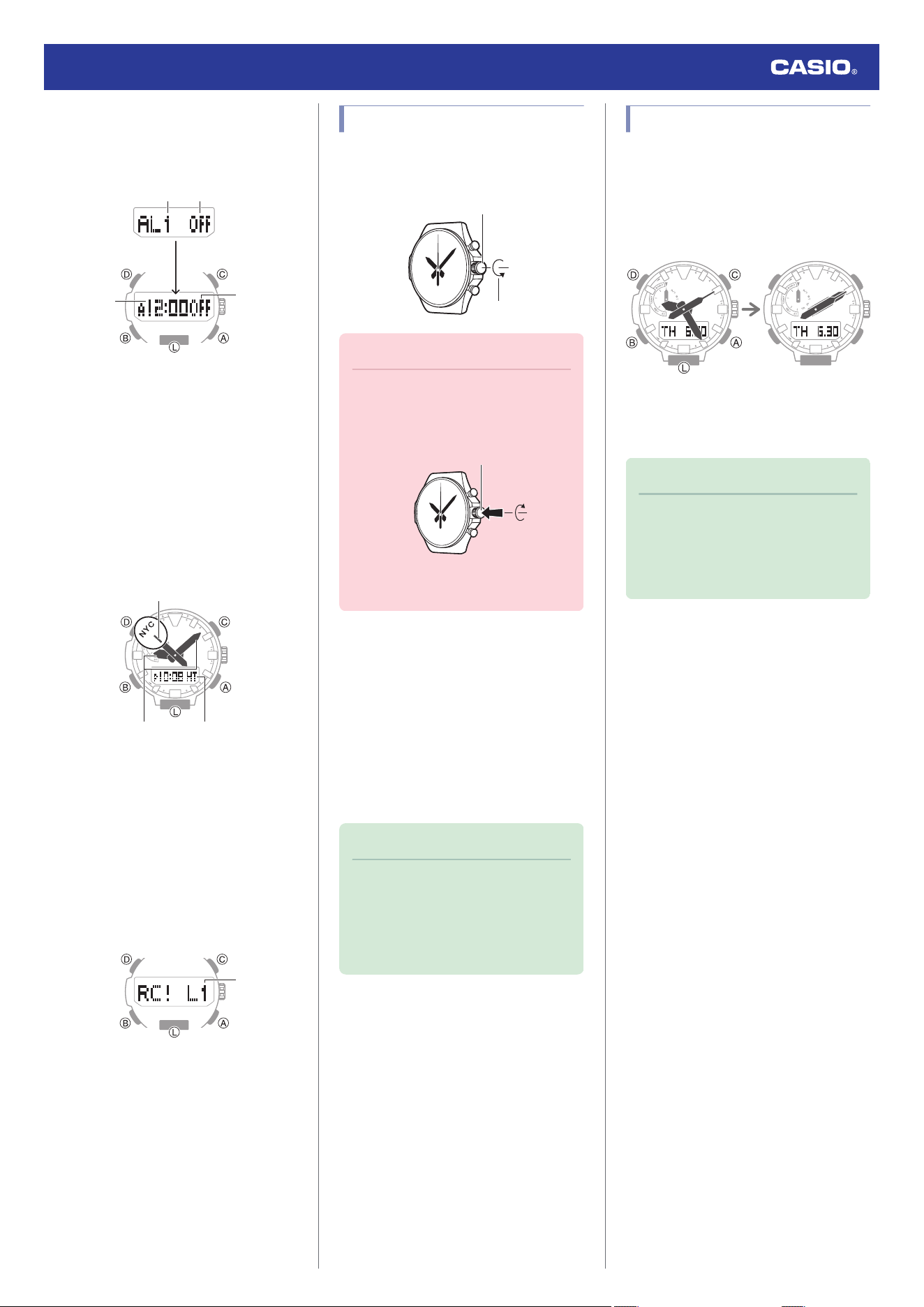
Alarm Mode
The watch will beep when an alarm time is
reached.
l
Alarm
②
③
①
②
Select alarm/
hourly time signal
Select alarm/
hourly time signal
On/off
A Alarm number
B Alarm or hourly time signal status (on/off)
C Alarm hour/minute
●
World Time Mode
You can view the current time in 29 cities and
UTC (Coordinated Universal Time) time.
l
World Time
①
②③
Show current city
A City Codes (World Time Codes)
B World Time City current time
C Home City time
●
Receive Mode
With this mode, you can receive a time signal
manually.
l
Time Adjustment Using a Time Signal
①
A Receive level indicator
Using the Crown
The watch’s crown is a screw-in (screw lock)
type. To use the crown, you first need to rotate
it towards you (leftwards) to loosen it.
Loosen
Crown
Important!
●
To prevent loss of water resistance
and/or damage due to impact, be sure
to screw the crown in by rotating it
away from you as you push it in.
Screw in
●
When pushing the crown back in, take
care not to apply too much force.
●
Fast Forward/Fast Reverse
After pulling out the crown, rotating it quickly
in succession in either direction will start a fast
forward or fast reverse operation. While a fast
forward operation is in progress, quickly
rotating the crown in succession again will
increase the speed even further.
●
Stopping Fast Forward/Fast Reverse
Rotate the crown in the direction opposite that
of the ongoing operation or press any button.
Note
●
If you do not perform any operation for
about two minutes after pulling out the
crown, crown operations will
automatically become disabled. If that
happens, push the crown back in and
then pull it out again.
Shifting the Hands
Hand shift moves the hands out of the way for
easy viewing of display information.
1. While holding down (L), press (B).
This will shift the analog hands to allow
easy viewing of display information.
2. To return the hands to their normal
timekeeping positions, press (A), (B), (C),
or (D).
Note
●
If you leave the watch with its hands
shifted and do not perform any
operation for about ten seconds, the
hands resume normal timekeeping
automatically.
Watch Operation Guide 5673
8
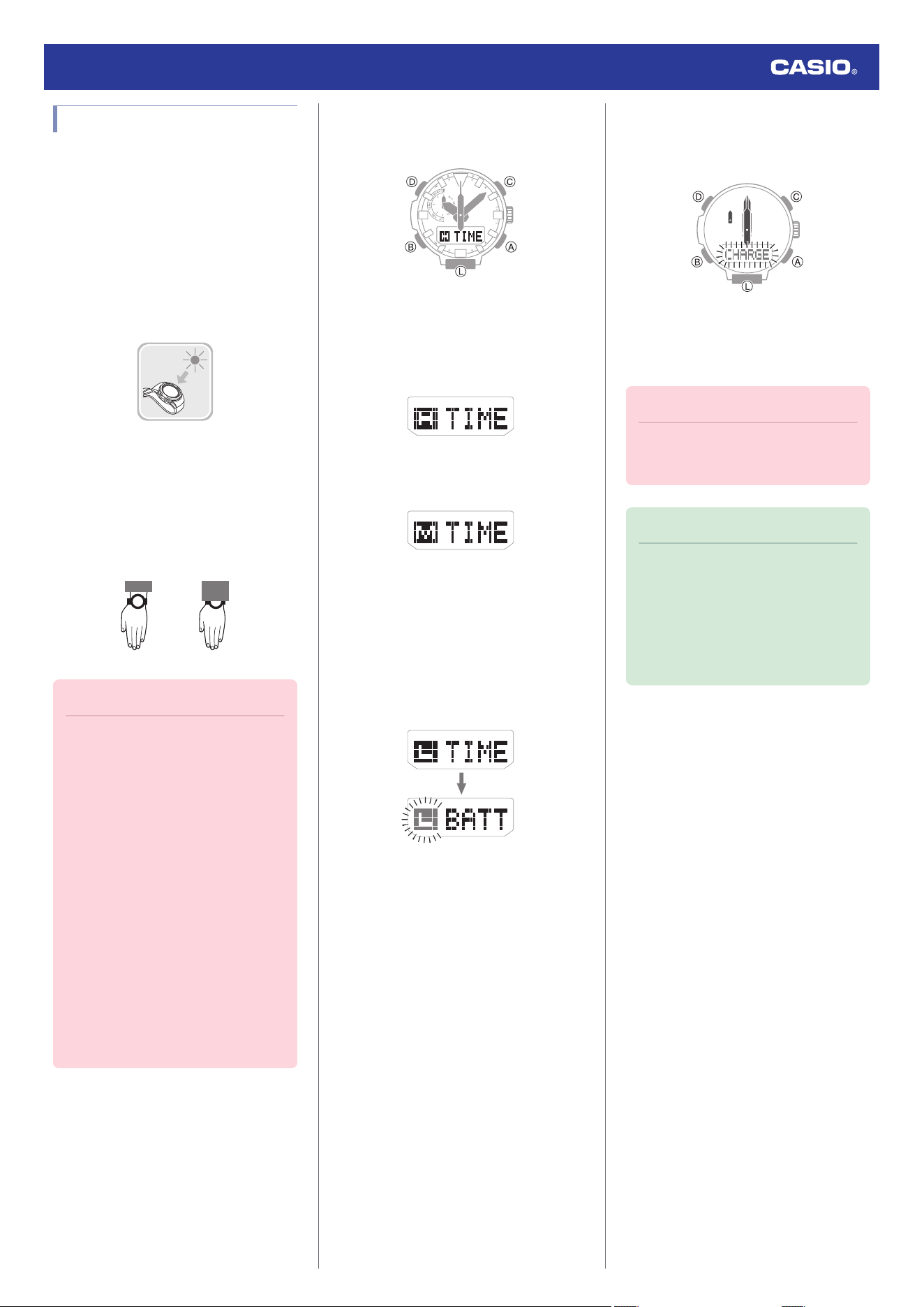
Charging
This watch runs on power supplied from a
rechargeable (secondary) battery that is
charged by a solar panel. The solar panel is
integrated into the face of the watch, and
power is generated whenever the face is
exposed to light.
●
Charging the Watch
When you are not wearing the watch, put it in
a location where it is exposed to bright light.
While you are wearing the watch, make sure
that its face (solar panel) is not blocked from
light by the sleeve of your clothing. Power
generation efficiency is reduced even when
the face of the watch is blocked only partially.
NOYES
Important!
●
Depending on light intensity and local
conditions, the watch may become hot
to the touch when exposed to light for
charging. Take care to avoid burn
injury after charging. Also, avoid
charging the watch under high-
temperature conditions like the ones
described below.
ー
On the dashboard of a vehicle
parked in the sun
ー
Near an incandescent light bulb or
other source of heat
ー
Under direct sunlight or in other hot
areas for long periods
●
The display panel may become black
(or white, depending on the LCD type)
under very high temperatures. This is
temporary, and the display will return
to normal at lower temperatures.
●
Checking the Charge Level
A display indicator shows the watch’s charge
level when you enter the Timekeeping Mode.
●
The display will show charge levels 4 and 5,
even if the watch is not in the Timekeeping
Mode.
Charge Level 1: Good
All functions enabled.
Charge Level 2: Good
All functions enabled.
Charge Level 3: Low
The functions below are disabled. Also, the
second hand jumps at two-second intervals.
●
Time signal reception
●
Compass, altitude, barometric pressure,
temperature measurements
●
Face illumination
●
Sounds (alarms, etc.)
One second later
Charge Level 4: Low
Battery charge is lower than Level 3, and all
functions are disabled. Also, all hands are
stopped.
Charge Level 5: Dead
All hands are stopped and digital displays are
blank. Memory data is lost, and watch settings
are returned to their initial factory defaults.
Important!
●
Should the battery go low or go dead,
expose the face (solar panel) to light as
soon as possible.
Note
●
If [RECOVER] is flashing on the
display, it means that all functions are
disabled due to momentary battery
power consumption.
●
Exposing the watch face to light after
the battery goes dead causes the
[CHARGE] indicator to appear. This
indicates charging has started.
Watch Operation Guide 5673
9
●
Charging Time Guidelines
The table below shows guidelines for
approximate charging times.
Charging Times Required for 1 Day of
Operation
Light Level (Lux)
Approximate
Charging Time
50,000 8 minutes
10,000 30 minutes
5,000 48 minutes
500 8 hours
Charge Recovery Times
●
Sunny day, outdoors (50,000 lux)
Dead battery
n
Medium
charge
3 hours
Medium charge
n
High
charge
22 hours
High charge
n
Full charge
6 hours
●
Sunny day, near a window (10,000 lux)
Dead battery
n
Medium
charge
7 hours
Medium charge
n
High
charge
84 hours
High charge
n
Full charge
23 hours
●
Overcast day, near a window (5,000 lux)
Dead battery
n
Medium
charge
10 hours
Medium charge
n
High
charge
136 hours
High charge
n
Full charge
37 hours
●
Indoor fluorescent lighting (500 lux)
Dead battery
n
Medium
charge
119 hours
Medium charge
n
High
charge
-
High charge
n
Full charge
-
Note
●
Actual charging time depends on the
charging environment, watch settings,
and other factors.
●
Power Saving Function
Leaving the watch in a dark location for about
one hour between the hours of 10 p.m. and 6
a.m. will cause the display to go blank, and the
watch to enter Level 1 power saving. If the
watch is left in this condition for six or seven
days, the watch will enter Level 2 power
saving.
Power Saving Level 1 :
The second hand stops at 12 o’clock and the
digital display goes blank to save power.
Power Saving Level 2 :
All hands stop and the digital display goes
blank to save power. All functions are
disabled.
Recovering from Power Saving Operation
Use one of the operations below to exit power
saving.
●
Press any button.
●
Move the watch to a bright location.
●
Trigger auto light by angling the watch
towards your face.
Note
●
The watch will not enter power saving
in the cases below.
ー
While in the Stopwatch Mode
ー
While in the Timer Mode
ー
While the barometric pressure
change indicator is displayed
●
You can enable or disable Power
Saving.
l
Configuring Power Saving
Function Settings
●
Note that the watch also may enter
power saving if its face is blocked from
light by your sleeve while you are
wearing it.
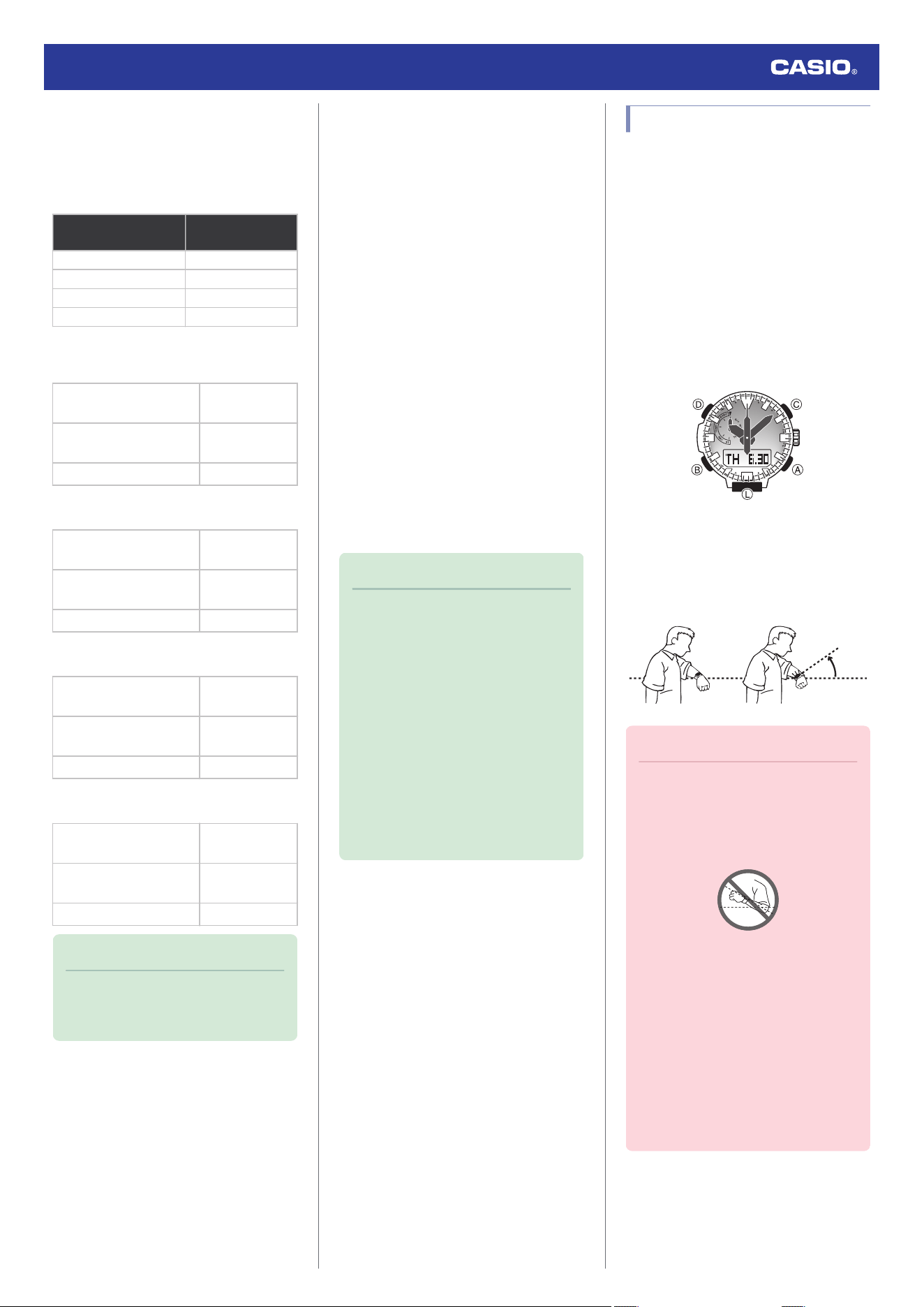
Viewing the Face in the Dark
The face of the watch can be illuminated for
viewing in the dark.
●
To illuminate the face manually
Pressing (L) turns on illumination.
●
Illumination turns off automatically if an
alarm starts to sound or if you perform a
crown operation.
●
Illumination does not turn on while a signal
receive operation or a hand movement
operation is in progress. Also, illumination
may not turn on while a sensor is taking a
reading.
●
To illuminate the face when Auto Light
is enabled
If Auto Light is enabled, face illumination will
turn on automatically whenever the watch is
positioned at an angle of 40 degrees or more.
40
degrees
or more
Important!
●
Auto Light may not operate properly
when the watch is at a horizontal angle
of 15 degrees or greater from
horizontal as shown in the illustration
below.
●
Electro-static charge or magnetism
can interfere with proper auto light
operation. If this happens, try lowering
your arm and then angle it towards
your face again.
●
When moving the watch you may note
a slight rattling sound. This is due to
operation of the auto light switch,
which determines the current
orientation of the watch. It does not
indicate malfunction.
Watch Operation Guide 5673
10
Note
●
Auto Light is disabled when any one of
the conditions below exists.
ー
Alarm, timer alert, or other beeper
sounding
ー
Hand movement operation is in
progress
ー
Watch in the Compass Mode
ー
While a time signal receive
operation is in progress
●
Configuring the Auto Light Setting
You can enable or disable Auto Light as
required.
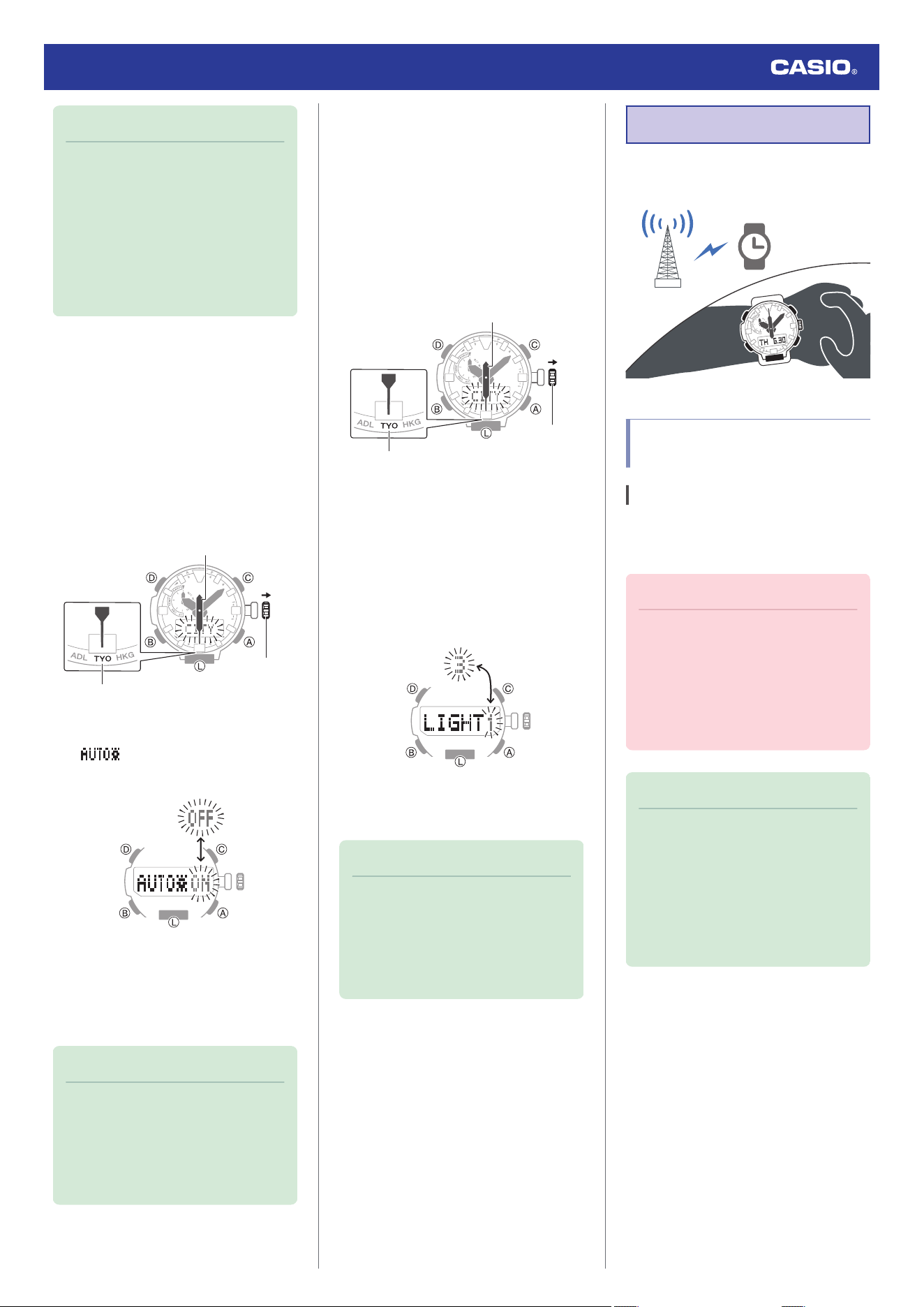
1. Enter the Timekeeping Mode.
l
Navigating Between Modes
2. Pull out the crown.
This causes [CITY] to flash on the display
and the second hand to move to the
current Home City.
Crown
Home City
Second hand
3. Press (B) three times.
[ ] appears on the display with
[ON] or [OFF] flashing.
4. Rotate the crown to enable or disable the
Auto Light.
5. Push the crown back in to complete the
setting operation.
Note
●
If you do not perform any operation for
about two minutes after pulling out the
crown, crown operations will
automatically become disabled. If that
happens, push the crown back in and
then pull it out again.
●
Specifying the Illumination Duration
You can select either 1.5 seconds or three
seconds as the illumination duration.
1. Enter the Timekeeping Mode.
l
Navigating Between Modes
2. Pull out the crown.
This causes [CITY] to flash on the display
and the second hand to move to the
current Home City.
Crown
Home City
Second hand
3. Press (B) four times.
[LIGHT] appears on the display with [1] or
[3] flashing.
4. Rotate the crown to select an illumination
duration.
[1]: 1.5-second illumination
[3]: 3-second illumination
5. Push the crown back in to complete the
setting operation.
Note
●
If you do not perform any operation for
about two minutes after pulling out the
crown, crown operations will
automatically become disabled. If that
happens, push the crown back in and
then pull it out again.
Time Adjustment
Your watch can receive time calibration
signals and adjust its date and time setting.
Time Adjustment Using a
Time Signal
Overview
The watch’s time and day settings can be
configured in accordance with a received time
calibration signal.
Important!
●
In order to make it possible for the
current time setting to be adjusted
correctly based on time calibration
signal reception, you need to specify
the area where you are using the
watch.
l
Setting a Home City
Note
●
Areas where time signal reception is
supported are limited. When you are
using the watch in an area where time
calibration signal reception is not
possible, adjust time and day settings
manually.
l
Using Watch Operations to Adjust
the Time Setting
Watch Operation Guide 5673
11
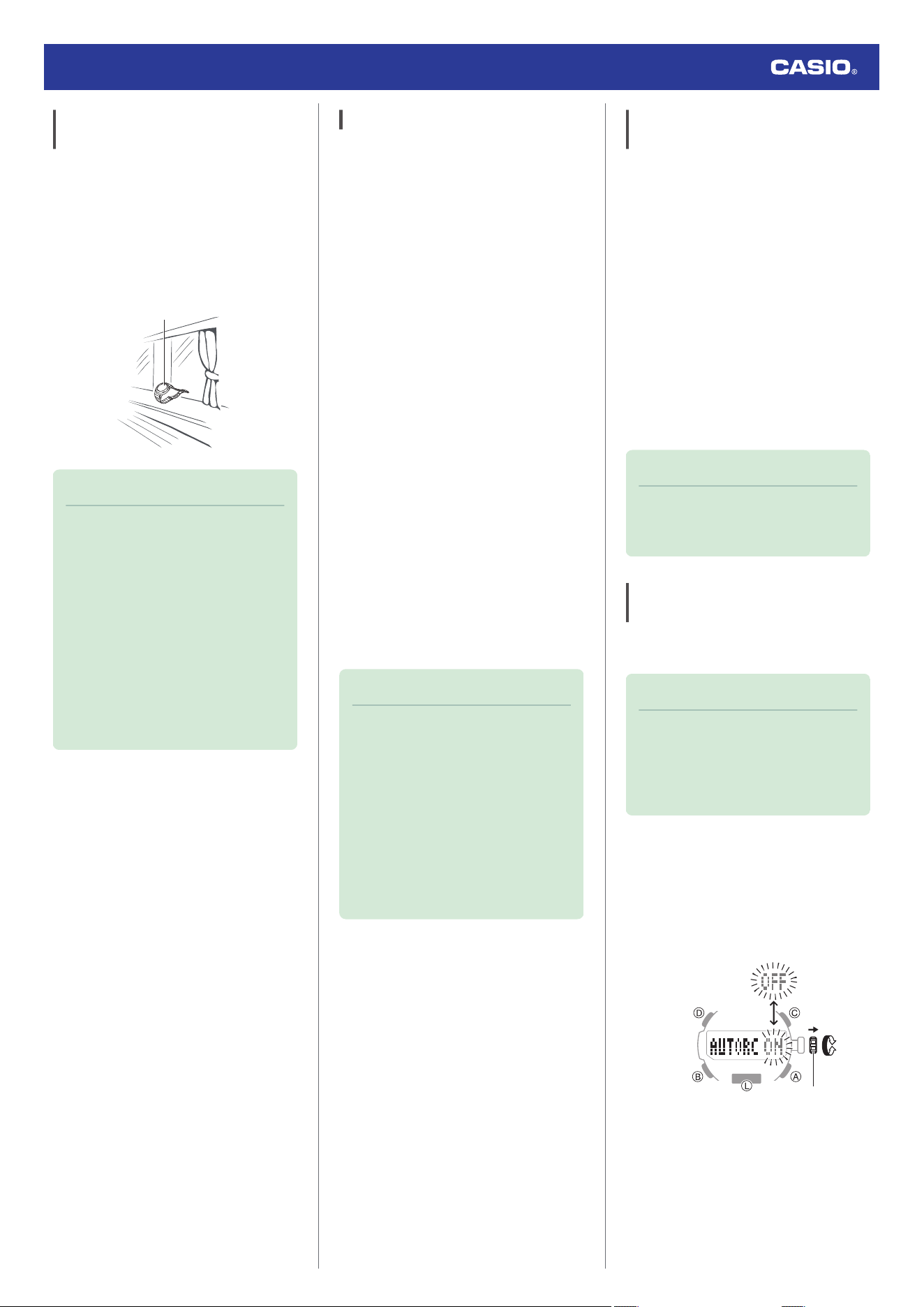
Appropriate Signal Reception
Location
A time calibration signal can be received while
the watch is near a window.
●
Position the watch so its 12 o’clock side is
facing the window.
●
Keep metal objects away from the watch.
●
Do not move the watch.
●
Do not perform any operation on the watch.
12 o'clock
Note
●
You may experience time calibration
signal reception problems in the areas
described below.
ー
Among or near buildings
ー
While riding in a vehicle
ー
Near household appliances, office
machines, mobile phones, etc.
ー
On a construction site, in an airport,
or any other location where radio
wave interference occurs
ー
Near high-voltage lines
ー
In mountainous areas or behind a
mountain
Time Signal Reception Ranges
●
Japan (JJY)
The Japan time signal radio stations are
located on Mt. Otakadoya in Fukushima and
Mt. Hagane in Fukuoka/Saga.
The reception range of the Japanese time
signals is approximately 1,000 km from each
transmission station.
●
China (BPC)
The China time signal radio station is located
in Shangqiu, Henan Province, China.
The reception range of the Chinese time
signal is approximately 1,500 km from the
transmission station.
●
United States (WWVB)
The United States time signal radio station is
located in Fort Collins, Colorado.
The reception range of the U.S. time signal is
approximately 3,000 km from the transmission
station.
●
U.K. (MSF)/Germany (DCF77)
The U.K. time signal radio station is located in
Anthorn, Cumbria.
The German time signal radio station is
located in Mainflingen, southeast of Frankfurt.
The reception range of the U.K. and German
time signals is approximately 1,500 km from
each transmission station.
Note
●
Even if you are within the normal
reception range of a time calibration
signal, reception may be made
impossible by the following factors:
geographic contours, weather, the
season, the time of day, wireless
noise.
●
A time calibration signal cannot be
received while the city selected as your
Home City is one that does not support
signal reception.
Auto Time Calibration Signal
Receive
An automatic time calibration signal receive
operation is performed and the time and day
settings are adjusted between midnight and
5:00 a.m. Once a signal receive operation is
successful, no more auto receive operations
are performed that day.
1. Place the watch near a window or some
other location appropriate for signal
reception.
●
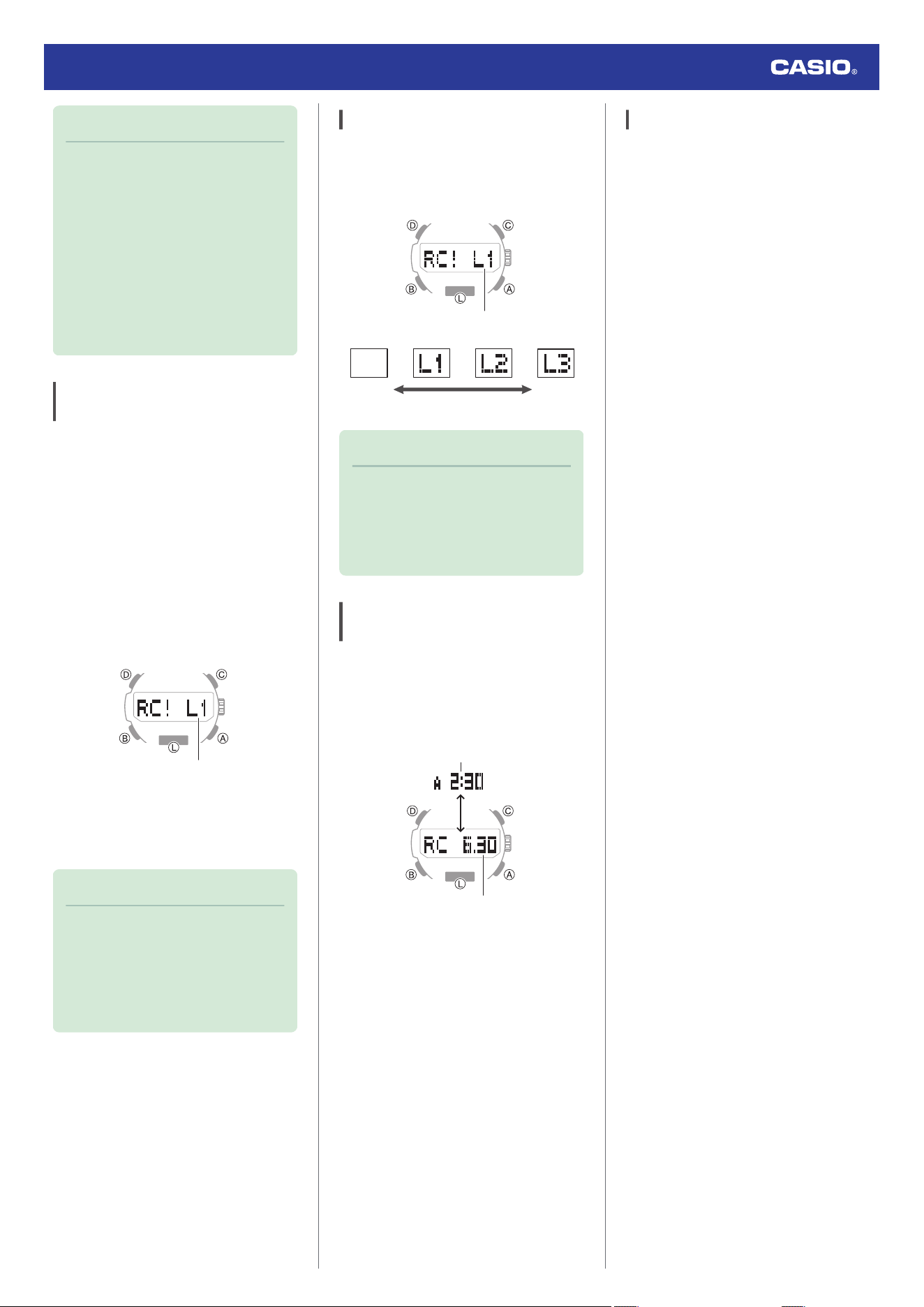
[RC !] is shown on the display while time
signal reception is in progress.
●
When a receive operation is successful,
the watch adjusts its current time and
day settings automatically, and then
returns to the Timekeeping Mode.
Note
●
Reception takes anywhere from about
two minutes to about 10 minutes. It can
take as long as 20 minutes.
Enabling and disabling Auto
Receive
You can stop auto receive by disabling the
Auto Receive setting.
Note
●
While the Home City setting is one
where time signal reception is
possible, you can enable or disable
auto receive as required.
l
Time Signal Reception Ranges
1. Enter the Receive Mode.
l
Navigating Between Modes
2. Pull out the crown.
[AUTORC] appears on the display with
[ON] or [OFF] flashing.
Crown
3. Rotate the crown to enable or disable Auto
Receive.
4. Push the crown back in to complete the
setting operation.
Watch Operation Guide 5673
12
Note
●
If you do not perform any operation for
about three minutes while performing
the Auto Receive on/off operation, the
watch automatically returns to the
Timekeeping Mode.
●
If you do not perform any operation for
about two minutes after pulling out the
crown, crown operations will
automatically become disabled. If that
happens, push the crown back in and
then pull it out again.
Manual Time Calibration Signal
Receive
1. Place the watch near a window or some
other location appropriate for time signal
reception.
2. Enter the Receive Mode.
l
Navigating Between Modes
3. Hold down (A) for at least two seconds
until [RC !] appears on the display.
This indicates that the receive operation
has started. After the receive operation is
complete, the watch’s time and day
settings will be adjusted accordingly.
Receive level indicator
●
The level indicator shows the signal
level ([L1], [L2], [L3]) while a receive
operation is in progress.
l
Receive Level Indicator
Note
●
The receive operation takes anywhere
from about two minutes to about 10
minutes. It can take as long as 20
minutes.
●
Time calibration signal reception is
better at night than during the day.
Receive Level Indicator
While a receive operation is in progress, its
current status is indicated on the display as
shown below. Use the level indicator to find a
location where signal reception is stable.
Receive level indicator
Stable
Unstable
Note
●
It takes about 10 seconds for time
signal reception conditions to stabilize.
●
Reception conditions are affected by
weather, the time of day, the
surrounding environment, etc.
Checking the Last Time Adjustment
Result
1. Enter the Receive Mode.
l
Navigating Between Modes
This displays the date and time of the last
successful receive operation.
Last receive date
Last receive time
Signal Reception Precautions
●
When the watch is unable to adjust its time
in accordance with a calibration signal for
some reason, average timekeeping
accuracy is within ±15 seconds per month.
●
Note that an internal decoding process the
watch performs after it receives a signal
may cause the time setting to be slightly off
(by less than one second).
●
Time calibration signal reception is not
possible under the conditions described
below.
ー
While battery power is low
ー
In any mode besides the Timekeeping
Mode
ー
When the watch is at Level 2 power
saving
ー
While a compass reading, barometric
pressure measurement, temperature
measurement, or altitude measurement
operation is in progress
ー
While the barometric pressure change
indication is enabled
ー
While a timer countdown operation is in
progress
ー
While the Home City area setting is one
where time signal reception is not
possible
ー
While the watch is outside the time signal
reception range
●
When the receive operation is successful,
the time and/or day settings will be adjusted
automatically. Summer time will not be
applied correctly in the case described
below.
ー
When the summer time start date and
time, end date and time, or other rules are
changed by authorities
●
As of January 2021, China does not
observe summer time. If China starts to
observe summer time in the future, the time
displayed by the watch for China may not be
correct.
Watch Operation Guide 5673
13
Using Watch Operations to
Adjust the Time Setting
If, for some reason, you cannot use time signal
reception to adjust the current time setting,
you can adjust date, time, and Home City
settings manually using watch button
operations.
●
Setting a Home City
Use the procedure in this section to select a
city to use as your Home City. If you are in an
area that observes summer time, you can also
enable or disable summer time.
1. Enter the Timekeeping Mode.
l
Navigating Between Modes
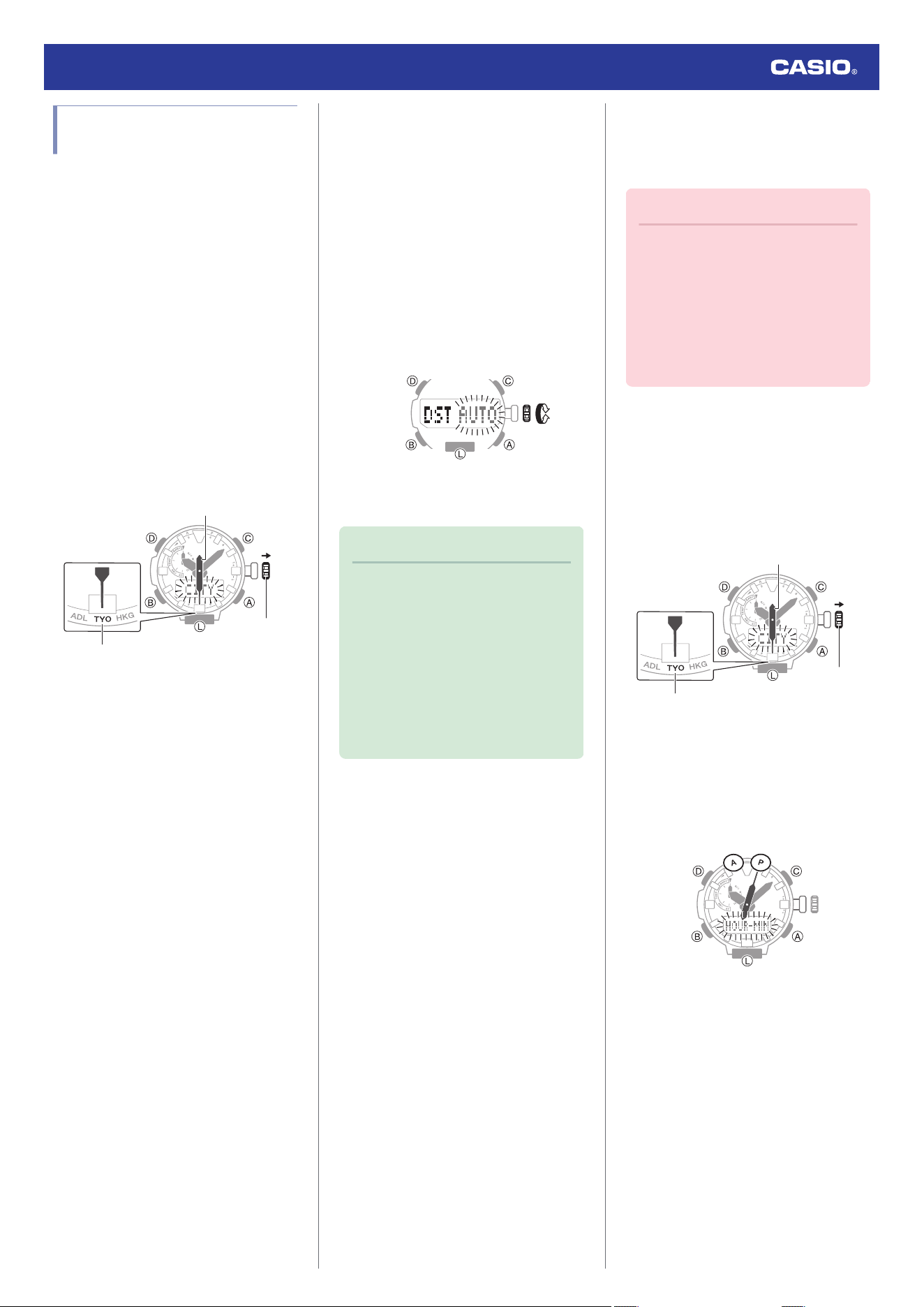
2. Pull out the crown.
This causes [CITY] to flash on the display
and the second hand to move to the
current Home City.
Crown
Home City
Second hand
3. Rotate the crown to move the second
hand to the city code of the city you want
to set as your Home City.
●
For information about city codes, refer
to the information below.
l
City Table
4. Press (B).
5. Rotate the crown to select a summer time
setting.
Rotating the crown cycles through the
setting items shown below.
●
[AUTO]
The watch switches between standard
time and summer time automatically.
●
[OFF]
The watch always indicates standard
time.
●
[ON]
The watch always indicates summer
time.
6. Push the crown back in to complete the
setting operation.
Note
●
If you do not perform any operation for
about two minutes after pulling out the
crown, crown operations will
automatically become disabled. If that
happens, push the crown back in and
then pull it out again.
●
The [AUTO] summer time setting is
valid when the watch’s Home City is in
an area where a time signal can be
received.
●
Setting the Time/Date
You can use the procedure below to adjust the
time and date settings when using the watch
where signal reception is not possible.
Important!
●
If you are using the watch in an area
where signal receive operations are
possible, time and date settings using
the time signal is recommended.
●
Configure the Home City setting before
changing the current time and date
settings.
l
Setting a Home City
1. Enter the Timekeeping Mode.
l
Navigating Between Modes
2. Pull out the crown.
This causes [CITY] to flash on the display
and the second hand to move to the
current Home City.
Crown
Home City
Second hand
3. Press (D).
This causes [HOUR-MIN] to flash on the
display.
●
You can see if a time is a.m. ([A]) or p.m.
([P]) by checking the second hand
position.
4. Rotate the crown to change the minute
setting.
Watch Operation Guide 5673
14
5. Press (B).
This causes [HOUR] to flash on the
display.
6. Rotate the crown to change the hour
setting.
7. Press (B).
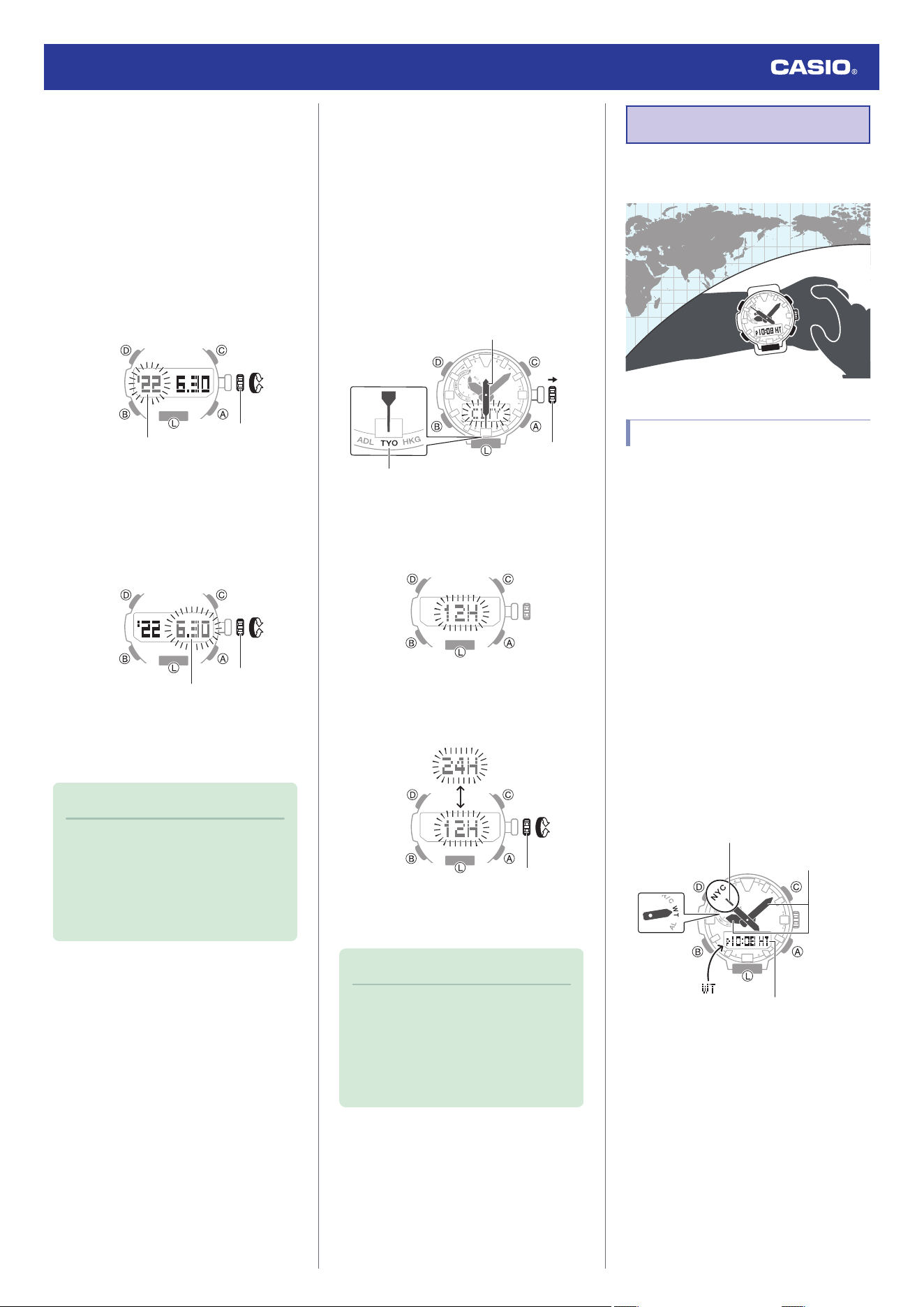
This causes the current year setting to
flash on the display.
8. Rotate the crown to change the year
setting.
Crown
Ye a r
9. Press (B).
This causes the month and day to flash on
the display.
10. Rotate the crown to change the month and
day setting.
Crown
Month, day
11. On a time signal at the top of a minute,
push the crown back in to complete the
setting operation.
Note
●
If you do not perform any operation for
about two minutes after pulling out the
crown, crown operations will
automatically become disabled. If that
happens, push the crown back in and
then pull it out again.
●
Switching between 12-hour and 24-
hour Timekeeping
You can specify either 12-hour format or 24-
hour format for the time display.
1. Enter the Timekeeping Mode.
l
Navigating Between Modes
2. Pull out the crown.
This causes [CITY] to flash on the display
and the second hand to move to the
current Home City.
Crown
Home City
Second hand
3. Press (B) five times.
This causes [12H] or [24H] to flash on the
display.
4. Rotate the crown to select [12H] (12-hour
timekeeping) or [24H] (24-hour
timekeeping).
Crown
5. Push the crown back in to complete the
setting operation.
Note
●
If you do not perform any operation for
about two minutes after pulling out the
crown, crown operations will
automatically become disabled. If that
happens, push the crown back in and
then pull it out again.
World Time
You can view the current time in 29 cities and
UTC (Coordinated Universal Time) time.
Checking World Time
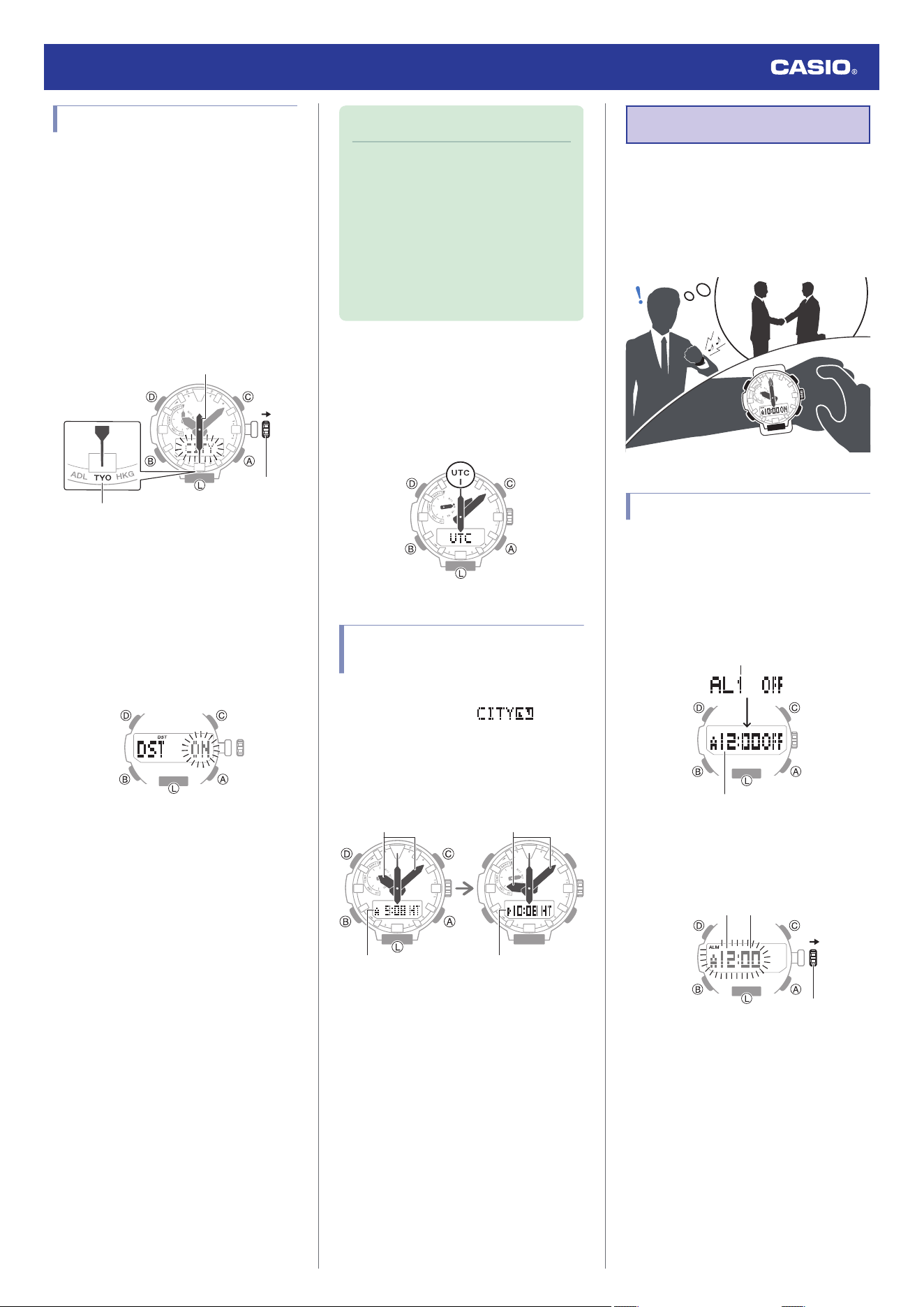
1. Enter the World Time Mode.
l
Navigating Between Modes
This displays [WT] for about one second.
Next, the hour and minute hands indicate
the current time in your World Time City.
At this time the second hand points to the
city code of your World Time City.
●
The digital display shows the current
time in your Home City.
●
To check whether the current time in
your World Time City is a.m. or p.m.,
press (A). This will cause the second
hand to move to [A] (a.m.) or [P] (p.m.).
After three seconds, the second hand
goes back to indicating the seconds.
●
To cause the second hand to move to
the currently selected city, press (D).
After three seconds, the second hand
goes back to indicating the seconds.
Home Time
City Codes (World Time Codes)
World Time
Watch Operation Guide 5673
15
Specifying a World Time City
Use the procedure in this section to select a
World Time city. If you are in an area that
observes summer time, you can also enable
or disable summer time.
1. Enter the World Time Mode.
l
Navigating Between Modes
2. Pull out the crown.
This causes [CITY] to flash on the display
and the second hand to move to the
current Home City.
Crown
Home City
Second hand
3. Rotate the crown to move the second
hand to the city code of the city you want
to specify as your World Time City.
This displays the current time in the city
you select.
4. Press (B).
This causes [ON] or [OFF] to flash on the
display.
5. Rotate the crown to select a summer time
setting.
●
[OFF]
The watch always indicates standard
time.
●
[ON]
The watch always indicates summer
time.
6. Push the crown back in to complete the
setting operation.
Note
●
If you do not perform any operation for
about two minutes after pulling out the
crown, crown operations will
automatically become disabled. If that
happens, push the crown back in and
then pull it out again.
●
While [UTC] is selected as the city, you
will not be able to change or check the
summer time setting.
●
Specifying UTC (Coordinated Universal
Time) as Your World Time City
To set UTC (Coordinated Universal Time) as
your World Time City, enter the World Time
Mode and then hold down (A) for at least three
seconds.
Swapping Your Home Time
and World Time
In the World Time mode, hold down (D) for at
least three seconds until [ ] flashes,
and your Home City time swaps places with
your World Time.
After swappingBefore swapping
World Time
Home Time
World TimeHome Time
Alarm
The watch will beep when an alarm time is
reached. You can set up to five different
alarms. The hourly time signal causes the
watch to beep every hour on the hour.
●
The beeper will not sound if battery power
is low.
Configuring Alarm Settings
1. Enter the Alarm Mode.
l
Navigating Between Modes
2. Use (A) and (C) to display the number
([AL1] to [AL5]) of the alarm whose
settings you want to change.
Alarm number
Alarm time
3. Pull out the crown.
This causes the hours and minutes digits
to flash.
Crown
Hours Minutes
4. Rotate the crown to change the minute
setting.
●
The hour digit changes in sync with the
minute digit change.
Watch Operation Guide 5673
16
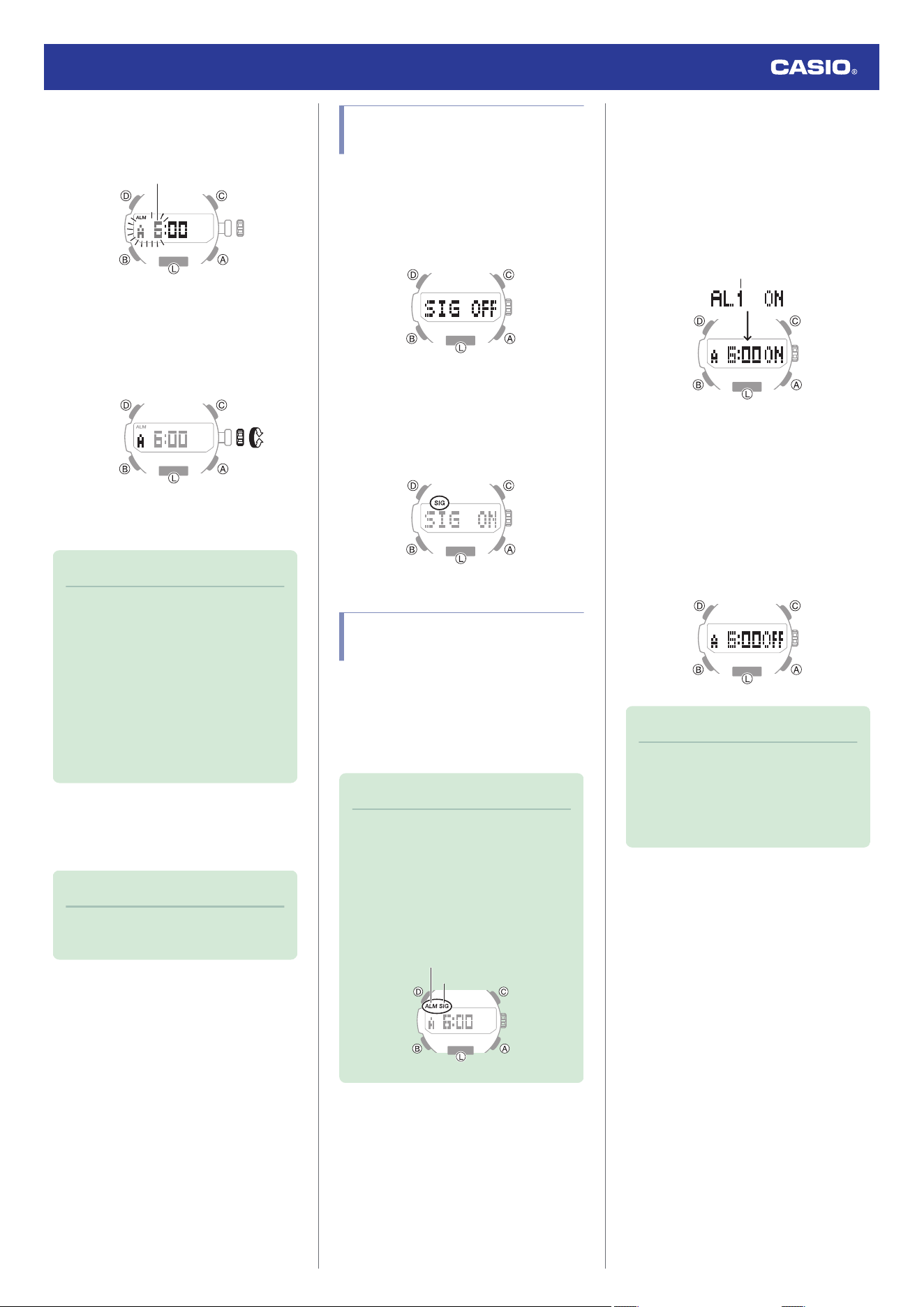
5. Press (B).
This causes the hours digits to flash.
Hours
6. Rotate the crown to change the hour
setting.
●
If you are using 12-hour timekeeping,
the time setting is indicated as [A] (a.m.)
or [P] (p.m.).
7. Push the crown back in to complete the
setting operation.
Note
●
If you do not perform any operation for
about three minutes while in the Alarm
mode, the watch automatically returns
to the Timekeeping Mode.
●
If you do not perform any operation for
about two minutes after pulling out the
crown, crown operations will
automatically become disabled. If that
happens, push the crown back in and
then pull it out again.
●
To stop the alarm
To stop the alarm after it starts to sound when
an alarm time is reached, press any button.
Note
●
A beeper sounds for 10 seconds when
an alarm time is reached.
Configuring the Hourly Time
Signal Setting
1. Enter the Alarm Mode.
l
Navigating Between Modes
2. Press (A) or (C) to display the hourly time
signal screen ([SIG]).
3. Press (D) to toggle the hourly time signal
between enabled and disabled.
●
[SIG] (hourly time signal) is shown on
the display while the hourly time signal
is enabled.
Turning Off an Alarm or the
Hourly Time Signal
To stop an alarm or the hourly time signal from
sounding, perform the steps below to turn it
off.
●
To have an alarm or hourly time signal
sound again, turn it back on.
Note
●
Indicators are displayed while any of
the alarms or the hourly time signal is
turned on.
●
The applicable indicators are not
displayed while all of the alarms are
turned off and/or the hourly time signal
is turned off.
Alarm
Hourly time signal
1. Enter the Alarm Mode.
l
Navigating Between Modes
2. Use (A) and (C) to scroll through alarm
numbers ([AL1] to [AL5]) and the hourly
time signal ([SIG]) screens until the one
whose setting you want to change is
displayed.
Alarm number or hourly time signal
3. Press (D) to turn off the displayed alarm or
the hourly time signal.
●
Each press of (D) toggles between ON
and OFF.
●
Turning off all alarms causes [ALM]
(alarm) to disappear from the display,
while disabling the hourly time signal
causes [SIG] (hourly time signal) to
disappear from the display.
Note
●
If [ALM] (alarm) is still displayed, it
means that another alarm is still turned
on. To turn off all of the alarms, repeat
steps 2 and 3 until the [ALM] (alarm)
indicator is no longer displayed.
Watch Operation Guide 5673
17
Digital Compass
You can use the Compass Mode to determine
the direction of north, and to check your
bearing to a destination.
Important!
●
Check the information at the link below
to find out how to ensure correct
readings.
l
Calibrating Compass Readings
l
Digital Compass Reading
Precautions
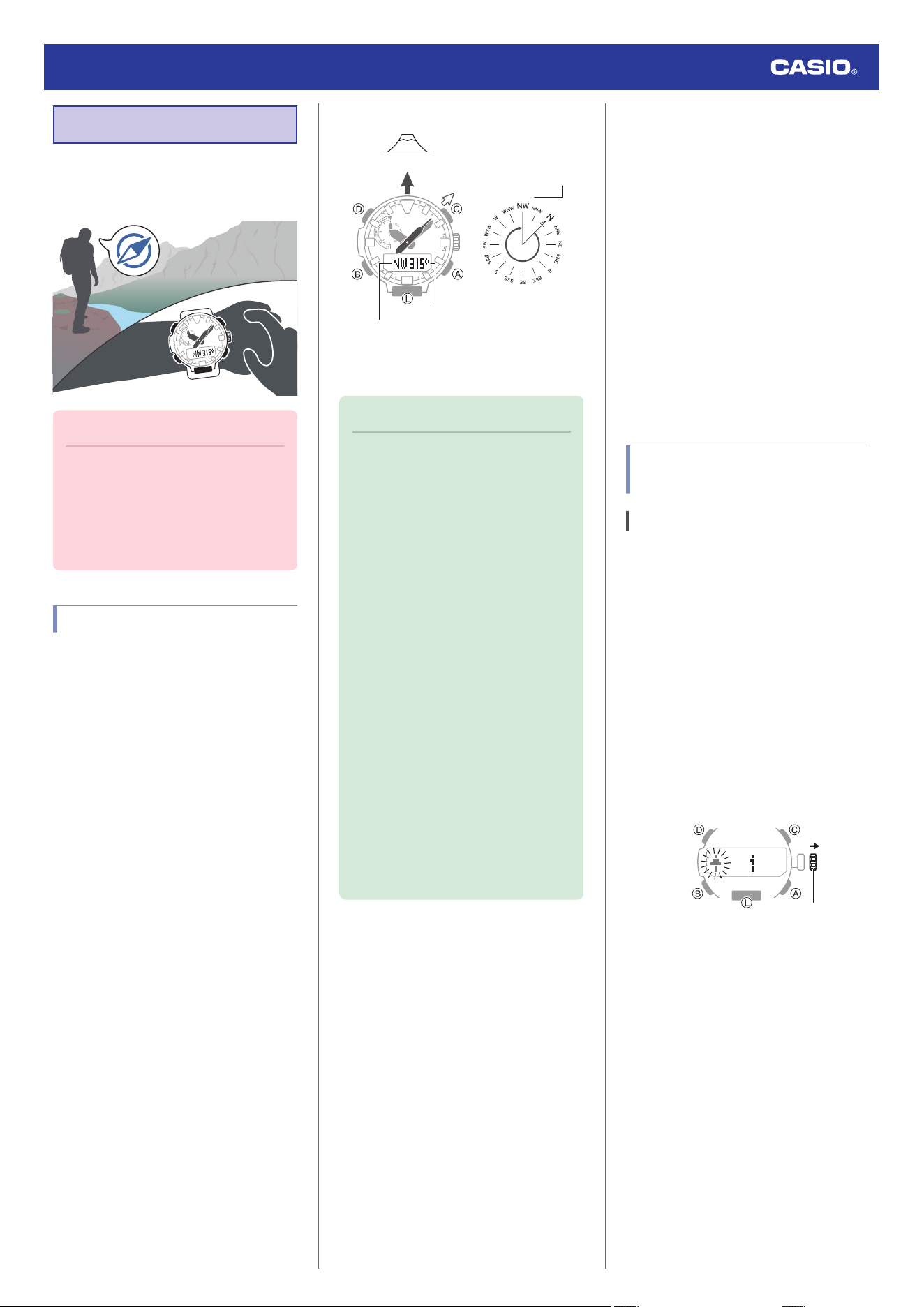
Taking a Compass Reading
1. Enter the Compass Mode.
l
Navigating Between Modes
●
This operation can also be performed in
the Timekeeping Mode or Altimeter
Mode.
2. Point 12 o’clock of the watch in the
direction of your objective.
3. While keeping the watch horizontal, press
(C).
This displays [COMP] and starts digital
compass readings.
●
The second hand points North. The
digital display shows one of 16 literal
direction indications or the bearing
angle.
●
To retrigger the compass operation,
press (C).
Interpreting Bearing Readings
315°
0°
Bearing angle
Bearing angle to objective
Bearing to objective
North
Objective
Directions: N (North), E (East), W (West), S
(South)
Note
●
Normally the compass indicates
magnetic north. You can also
configure settings to indicate true
north.
l
Setting Up for True North
Readings (Magnetic Declination
Calibration)
l
Magnetic North and True North
●
After the initial reading is displayed, the
watch will continue to take readings
about every second for about the next
60 seconds. The watch will return to
the Timekeeping Mode automatically
about 60 seconds after you press (C).
●
Auto Light will not illuminate the face
while a compass operation is in
progress.
●
If an alarm or other beeper sounds, or
if you turn on illumination by pressing
(L) while a compass operation is in
progress, the compass operation will
be suspended momentarily. The
compass operation will resume when
the beeper stops or illumination turns
off.
●
Aligning a Map with Actual
Surroundings (Setting a Map)
Setting a map means to align the map so the
directions indicated on it are aligned with the
actual directions of your location. Once you
set a map, you can more easily get a grasp of
the relationship between map markings and
actual geographic contours. To set a map with
this watch, align north on the map with the
north indication of the watch. Once you set the
map, you can compare your bearing on the
map with your surroundings, which will help
you determine your current location and
destination.
●
Note that map reading skills and experience
are required to determine your current
location and destination on a map.
Calibrating Compass
Readings
Calibrating Compass Readings
Perform 2-point calibration whenever you
notice the watch’s compass readings are
different from those of another compass, or
before setting out on a climb or trek.
●
Note that accurate compass readings
and/or calibration will not be possible in an
area where strong magnetism is present.
l
Digital Compass Reading Precautions
2-Point Calibration
1. Enter the Compass Mode.
l
Navigating Between Modes
2. Pull out the crown.
This displays [
o
1].
Crown
Watch Operation Guide 5673
18
3. While keeping the watch horizontal, press
(C).
This starts calibration of the first point,
which causes [
o
WAIT] to appear on the
display. When calibration is successful,
indicators appear on the display in the
following sequence: [OK]
n
[Turn 180°]
n
[
p
2].
4. Rotate the watch 180 degrees, taking care
to be as exact as possible.
5. Press (C).
●
This starts calibration of the second
point, which causes [
p
WAIT] to appear
on the display.
●
When calibration is successful, [OK]
appears on the display and the watch
returns to the Digital Compass screen.
6. Push the crown back in to complete the
calibration operation.
Note
●
If you do not perform any operation for
about two minutes after pulling out the
crown, crown operations will
automatically become disabled. If that
happens, push the crown back in and
then pull it out again.
●
[ERR] will appear if calibration fails for
some reason. If this happens, restart
the above procedure from step 2.
Setting Up for True North Readings
(Magnetic Declination Calibration)
If you want the watch to indicate true north
instead of magnetic north, you need to specify
your current location’s magnetic declination
direction (east or west) and declination angle.
l
Magnetic North and True North
●
The magnetic declination angle value can
be set in 1° (degree) units only. Use a value
that is closest to the angle you want to set.
Example: For an angle of 7.4°, set 7°.
Example: For an angle of 7°40’ (7 degrees,
40 minutes), set 8°.
Note
●
Magnetic declination angles (east or
west) and angle degree values for
specific locations can be found on
geographic maps, mountain climbing
maps, and other maps that include
contour lines.
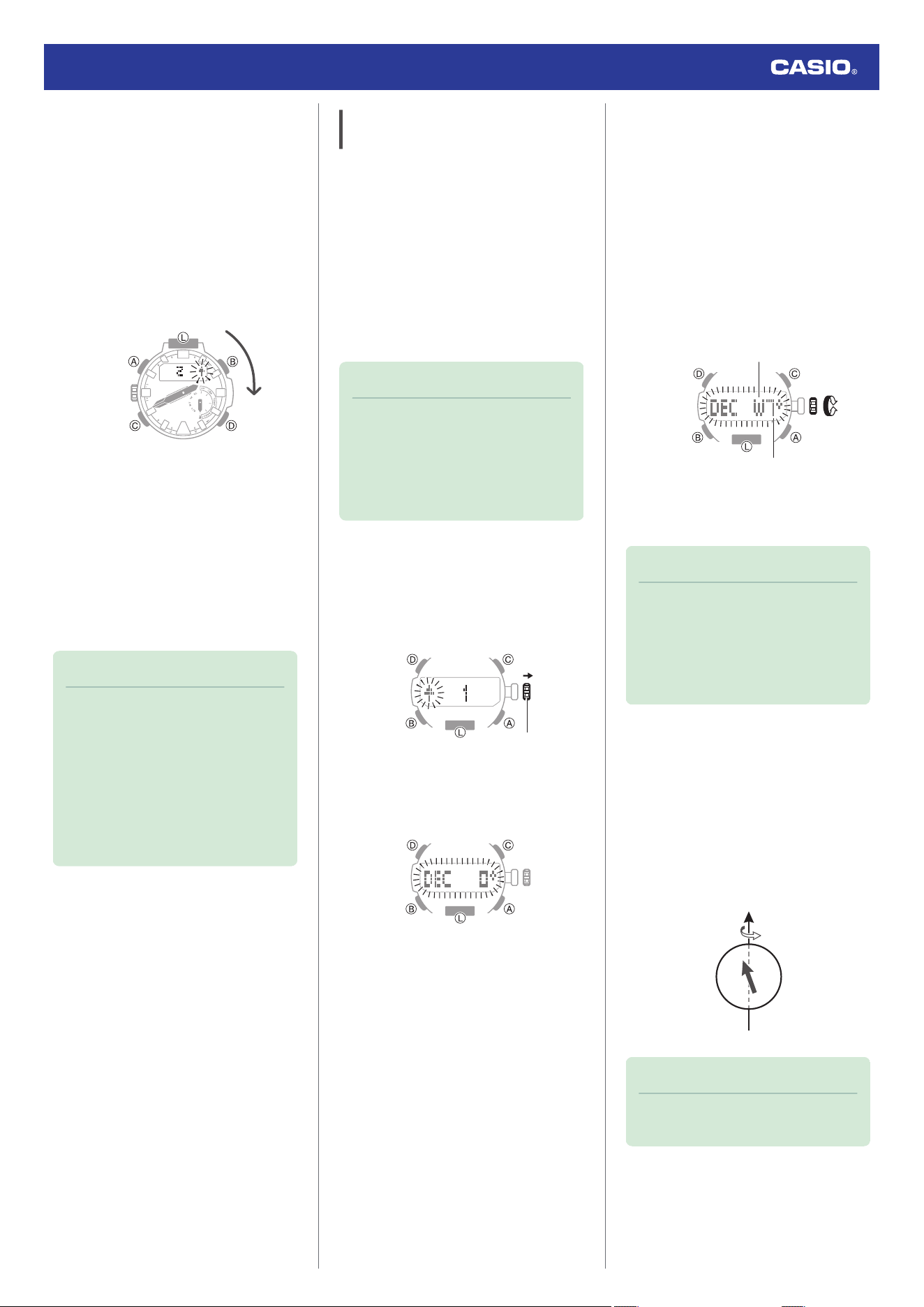
1. Enter the Compass Mode.
l
Navigating Between Modes
2. Pull out the crown.
This displays [
o
1].
Crown
3. Press (B).
This displays [DEC] and the current
magnetic declination setting.
4. Rotate the crown to select a magnetic
declination direction and angle settings as
desired.
Setting range: 90° west to 90° east
[OFF]: Magnetic north
[E]: East declination (Magnetic north is
east of true north.)
[W]: West declination (Magnetic north is
west of true north.)
●
To return the setting to [OFF], press (A)
and (C) at the same time.
+
−
Magnetic declination angle
Magnetic declination direction
5. Push the crown back in to complete the
setting operation.
Note
●
If you do not perform any operation for
about two minutes after pulling out the
crown, crown operations will
automatically become disabled. If that
happens, push the crown back in and
then pull it out again.
●
Magnetic North and True North
There are actually two types of north:
magnetic north and true north.
Magnetic north: North indicated by the needle
of a compass
True north: Direction to the North Pole
As shown in the illustration below, magnetic
north and true north are not the same.
Earth
Magnetic north
True north
Note
●
The north indicated on commercially
available maps is normally true north.
Watch Operation Guide 5673
19
Digital Compass Reading
Precautions
Location During Use
Taking readings near sources of strong
magnetism can cause reading error. Keep the
watch away from the following types of items.
Permanent magnets (magnetic accessories,
etc.), metal objects, high-voltage wires, aerial
wires, electrical household appliances (TVs,
computers, cellphones, etc.)
●
Note that correct direction readings are not
possible indoors, especially inside of
reinforced concrete structures.
●
Accurate direction readings are not
possible on electric trains, on boats, on
aircraft, etc.
Storage Location
Exposure of the watch to magnetism can
affect the accuracy of digital compass
readings. Keep the watch away from the types
of items below.
Permanent magnets (magnetic accessories,
etc.), metal objects, electrical household
appliances (TVs, computers, cellphones, etc.)
Altitude
Measurement
The watch takes altitude readings and
displays results based on air pressure
measurements taken by a built-in pressure
sensor.
Important!
●
The altitude readings displayed by the
watch are relative values that are
calculated based on barometric
pressure measured by the watch’s
pressure sensor. This means that
barometric pressure changes due to
weather can cause altitude readings
taken at the same location to be
different. Also note that the value
displayed by the watch may be
different from the actual elevation and/
or sea level elevation indicated for the
area where you are located. When
using the watch’s altimeter while
mountain climbing, it is recommended
that you regularly calibrate its readings
in accordance with local altitude
(elevation) indications.
l
Calibrating Altitude Readings
(Offset)
●
Check the information at the link below
to find out about how to minimize
differences between readings
produced by the watch, and values
provided by local altitude (elevation)
indications.
l
Calibrating Altitude Readings
(Offset)
l
Altitude Reading Precautions
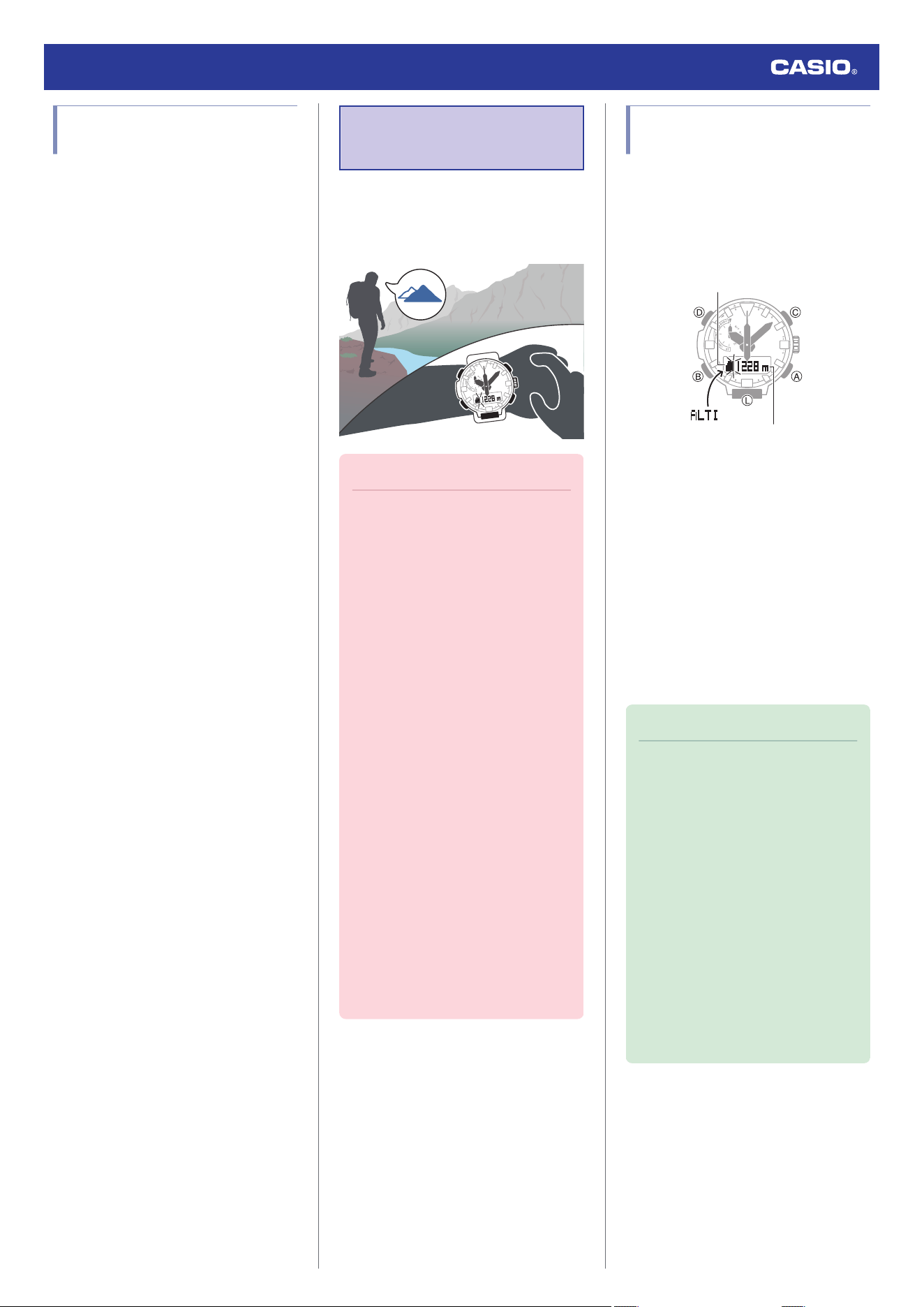
Checking the Current
Altitude
1. Enter the Altimeter Mode.
l
Navigating Between Modes
Entering the Altimeter Mode will start
altitude measurement and display the
altitude at your current location.
Altitude
Altitude graph
●
The watch takes altitude readings every
second for about the first three minutes.
After that, it takes readings according to
the watch’s auto measurement interval
setting.
●
Check the information at the link below
to find out how to configure the auto
measurement interval.
l
Setting the Auto Measurement
Interval
●
To retrigger measurement, press (A).
●
To return to the Timekeeping Mode,
press (B).
Note
●
When you enter the Altitude Mode, the
second hand indicates either
timekeeping seconds, or the
differential between altitude
measurements (whichever was
indicated the last time you were in the
Altitude Mode). You can toggle
between the two second hand
functions by pressing (D).
●
Measurement range: -700 to 10,000
meters (-2,300 to 32,800 feet)
(Measurement unit: 1 meter (5 feet))
Note that calibrating altitude readings
will cause a change in the
measurement range.
●
[- - -] will appear for the measured value
if it is outside the allowable range.
Watch Operation Guide 5673
20
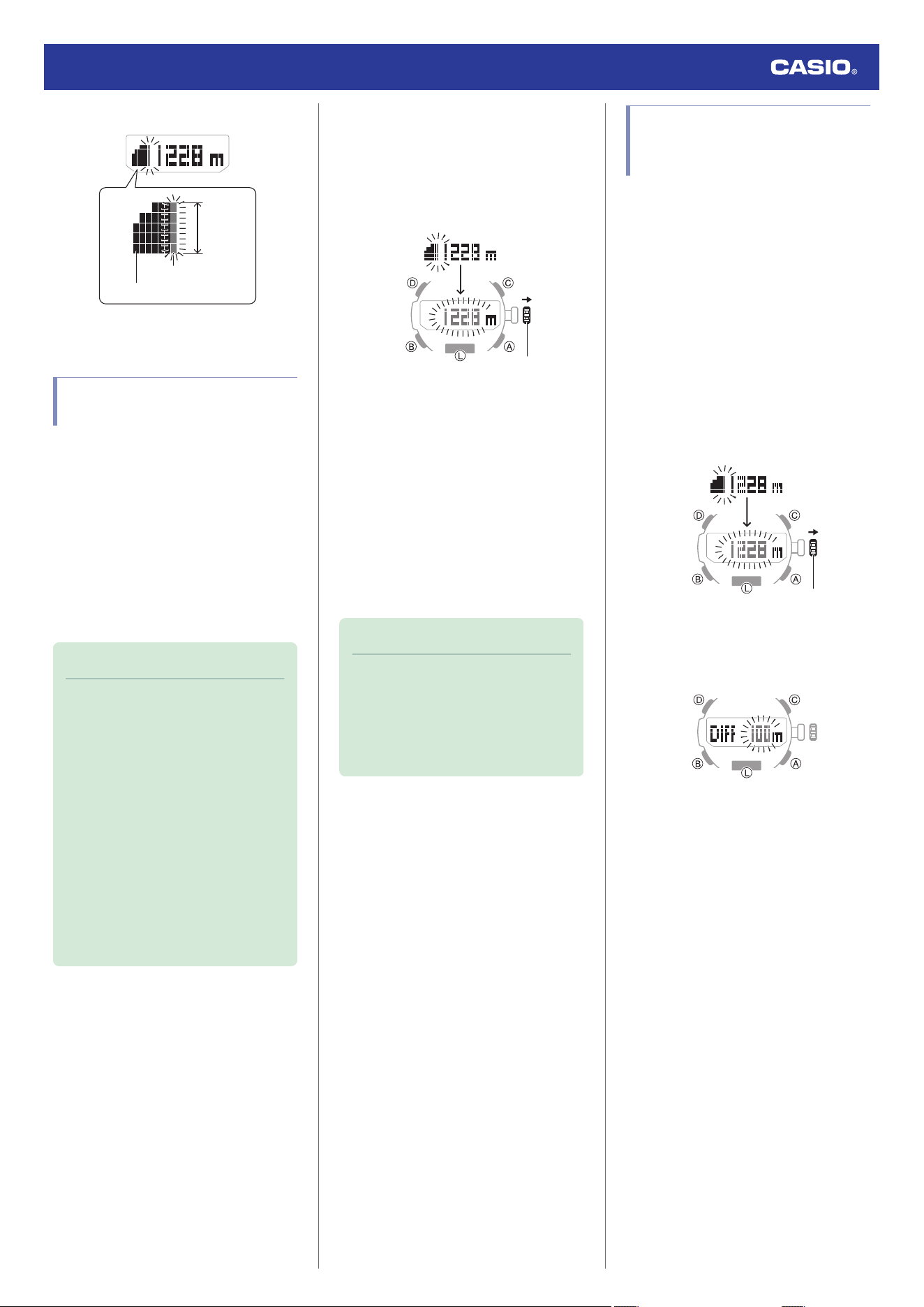
Interpreting Altitude Graph Contents
50m*
6 readings ago
Current reading
*
1 square (
v
) is 10 m.
Calibrating Altitude
Readings (Offset)
To minimize the difference between locally
indicated and measured values, you should
update the reference altitude value (offset)
before setting off and during treks or any other
activities where you take altitude readings.
Also, you can ensure accurate measurements
by checking a map local altitude indications or
some other source for your current location’s
altitude, and regularly calibrating watch
readings with the latest information while
mountain climbing.
Note
●
You can find out the altitude at your
current location from signs, maps, on
the Internet, etc.
●
Differences between actual altitude
and watch readings can be caused by
the factors below.
ー
Changes in barometric pressure
ー
Changes in temperature caused by
variations in barometric pressure
and by elevation
●
Though altitude readings can be taken
without calibration, doing so may
produce readings that are very
different from indications by altitude
markers, etc.
1. Enter the Altimeter Mode.
l
Navigating Between Modes
2. Pull out the crown.
This displays the current altitude and
enters the Altitude Offset Mode.
Crown
3. Rotate the crown to calibrate the
displayed value to that of a local altitude
(elevation) marker.
Setting range: -3,000 to 10,000 meters (or
-9,840 to 32,800 feet)
Setting unit: 1 meter (or 5 feet)
●
To return the altitude setting to its initial
factory default, press (A) and (C) at the
same time.
4. Push the crown back in to complete the
setting operation.
Note
●
If you do not perform any operation for
about two minutes after pulling out the
crown, crown operations will
automatically become disabled. If that
happens, push the crown back in and
then pull it out again.
Checking the Altitude
Differential from a Reference
Point
After you set a reference altitude, the second
hand of the watch will indicate the difference
between your current altitude and the
reference altitude. This makes it easy to
measure the altitude difference between two
points while climbing or trekking.
●
Setting the Altitude Differential
Measurement Range
1. Enter the Altimeter Mode.
l
Navigating Between Modes
2. Pull out the crown.
This displays the altitude for your current
location.
Crown
3. Press (B) twice.
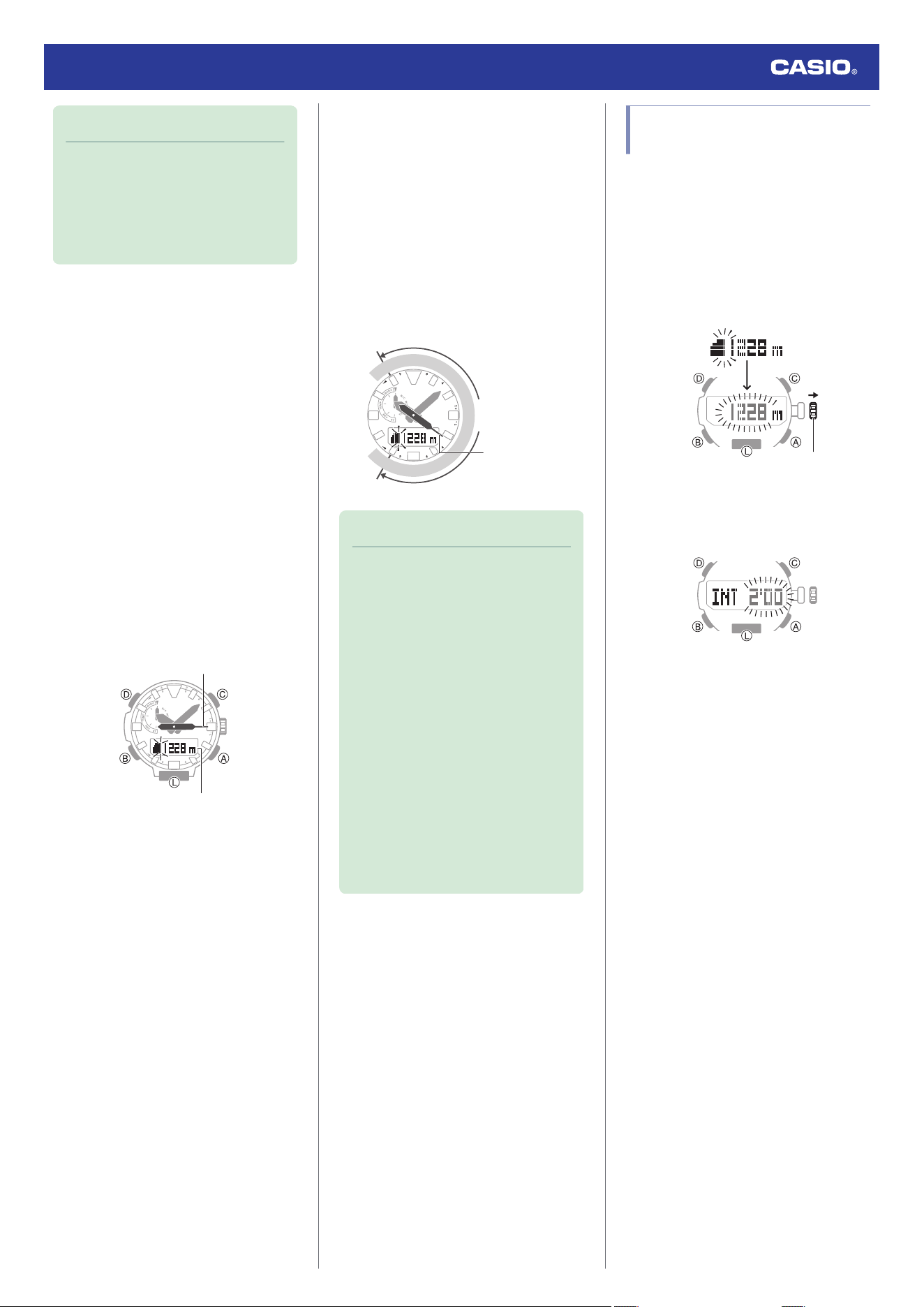
This displays the altitude differential
measurement range.
4. Rotate the crown to select either [100m] or
[1000m].
[100m]: ±100 meters (±328 feet) in 5-
meter (16-foot) units
[1000m]: ±1000 meters (±3280 feet) in
50-meter (164-foot) units
5. Push the crown back in to complete the
setting operation.
Watch Operation Guide 5673
21
Note
●
If you do not perform any operation for
about two minutes after pulling out the
crown, crown operations will
automatically become disabled. If that
happens, push the crown back in and
then pull it out again.
●
Measuring Altitude
1. Use the contour lines on your map to
determine the altitude differential between
your current location and your destination.
2. Take an altitude reading of your current
location.
l
Checking the Current Altitude
3. Hold down (D) for at least two seconds to
set your current location’s altitude as the
reference altitude.
This displays [DIFF RESET]
n
[RESET]
and then your current altitude.
●
The second hand (Altitude Differential
Indicator) will indicate the difference
between the reference altitude and the
current altitude reading. At this time the
second hand should indicate ±0 m (±0
feet).
Current location altitude
Altitude differential indicator
4. While comparing the difference between
the altitude you found on the map and the
altitude differential indicated by the
watch’s second hand, advance towards
your destination.
●
When the altitude differential you found
on the map is the same as that indicated
by the second hand, it means you are
close to your destination.
Example: Altitude differential of -30 m (-98
feet) (-300 m (-984 feet))
100 50
0
−50
−100
Altitude differential
indicator
Unit: m
Range: ±100 m (1000 m)
(±328 feet (3280 feet))
Note
●
You can toggle between the two
second hand functions by pressing
(D).
l
Checking the Current Altitude
●
The second hand points to
r
(over) if
the current altitude differential is
greater than the setting value, or
s
(under) if it is lower than the setting
value.
If either of these is indicated while
using the ±100 m (328 feet)
measurement range, change the
range setting to ±1000 m (3280 feet).
●
The second hand will move to 9 o’clock
if a reading is outside the allowable
altitude measurement range (-700 m to
10,000 m (-2,300 to 32,800 feet)), or if
a reading error occurs.
Setting the Auto
Measurement Interval
You can select an auto measurement interval
of either five seconds or two minutes.
1. Enter the Altimeter Mode.
l
Navigating Between Modes
2. Pull out the crown.
This displays the altitude for your current
location.
Crown
3. Press (B).
This causes the auto measurement
interval to appear on the display.
4. Rotate the crown to select [0’05] or [2’00]
as the auto measurement interval.
[0’05]: Readings taken every second for
the first three minutes, and then every five
seconds for about the next one hour.
[2’00]: Readings taken every second for
the first three minutes, and then every two
minutes for about the next 12 hours.
5. Push the crown back in to complete the
setting operation.
Watch Operation Guide 5673
22
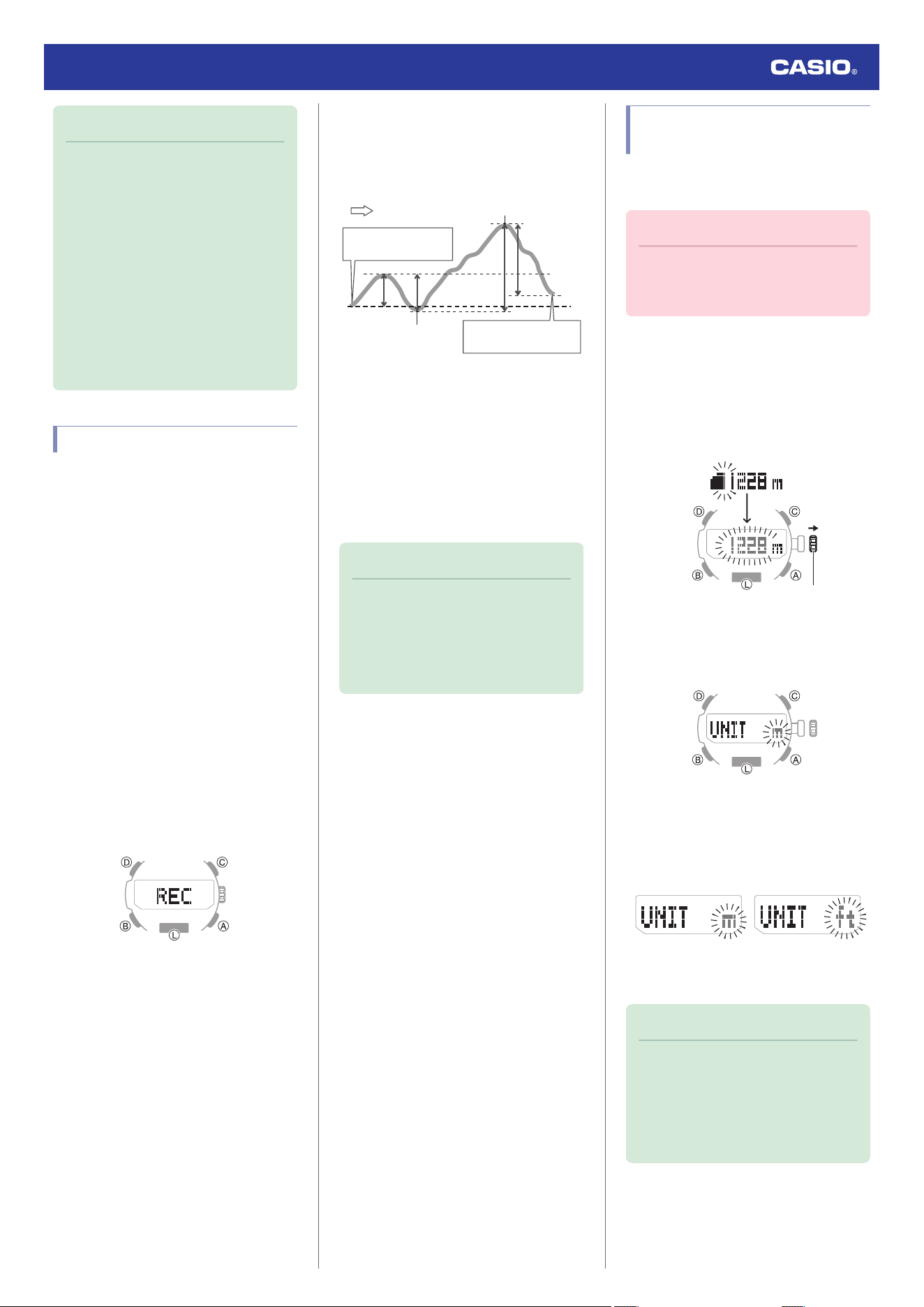
Note
●
If you do not perform any operation for
about two minutes after pulling out the
crown, crown operations will
automatically become disabled. If that
happens, push the crown back in and
then pull it out again.
●
The watch will automatically return to
the Timekeeping Mode if you do not
perform any operation in the Altimeter
Mode for about one hour while [0’05] is
selected as the measurement interval
or about 12 hours while [2’00] is
selected.
Recording Altitude Readings
Use the procedure below to record altitude
measurements manually. Auto
measurements are also recorded
automatically.
●
Use the Altitude Record Recall Mode to
view or delete records.
l
Viewing Altitude Records
●
Recording Altitude Data Manually
1. Enter the Altimeter Mode.
l
Navigating Between Modes
2. Hold down (A) for at least two seconds
until [REC] stops flashing on the display.
This records the current altitude, date,
and time.
●
There is enough memory to hold up to
30 altitude records.
●
Recording altitude data when there are
already 30 records in memory
automatically deletes the oldest record
to make room for the new one.
●
Auto Altitude Data Recording
The altitude data described below is recorded
automatically while the watch is in the
Altimeter Mode. One record each is
maintained in memory for each of these items.
A
B
CD
F
E
End point
Start point
High Altitude (MAX):
E
Low Altitude (MIN):
F
Cumulative Ascent (ASC):
A
+
C
*
Cumulative Descent (DSC):
B
+
D
*
* Cumulative ascent and cumulative descent
values are updated whenever there is a
difference of at least ±15 m (±49 feet) from
one reading to the next.
Note
●
Auto recording ends when you exit the
Altimeter Mode. Re-entering the
Altimeter Mode restarts recording of
cumulative values from where it was
stopped when you last exited the
Altimeter Mode.
Specifying the Altitude
Measurement Unit
You can select either meters (m) or feet (ft) as
the Altimeter Mode display unit.
Important!
●
When Tokyo (TYO) is set as the Home
City, the altitude unit is fixed as meters
(m) and cannot be changed.
1. Enter the Altimeter Mode.
l
Navigating Between Modes
2. Pull out the crown.
This displays the current altitude and
enters the Altitude Offset Mode.
Crown
3. Press (B) three times.
This causes [UNIT] to appear, with [m] or
[ft] flashing.
4. Rotate the crown to select an altitude unit.
[m]: Meters
[ft]: Feet
FeetMeters
5. Push the crown back in to complete the
setting operation.
Note
●
If you do not perform any operation for
about two minutes after pulling out the
crown, crown operations will
automatically become disabled. If that
happens, push the crown back in and
then pull it out again.
Watch Operation Guide 5673
23
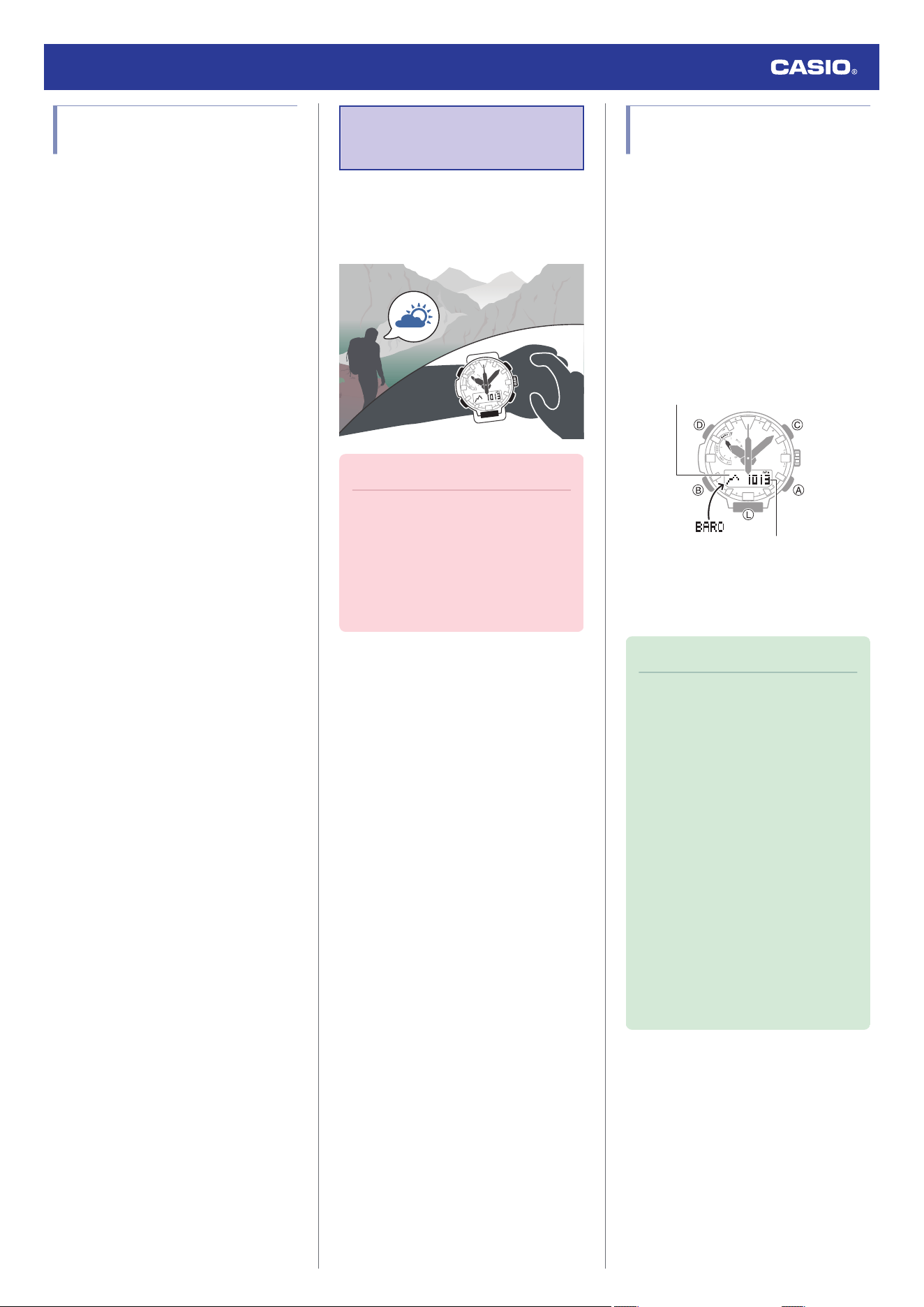
Altitude Reading
Precautions
Effects of Temperature
When taking altitude readings, take the steps
below to keep the watch at as stable a
temperature as possible. Changes in
temperature can affect altitude readings.
●
Take readings with the watch on your wrist.
●
Take readings in an area where
temperature is stable.
Altitude Readings
●
Do not use this watch while skydiving, hang
gliding, paragliding, gyrocopter flying, glider
flying, or engaged in other activities where
altitude changes suddenly.
●
Altitude readings produced by this watch
are not intended for special-purpose or
industrial level use.
●
In an aircraft, the watch measures the in-
cabin pressurized air pressure, so readings
will not match altitudes announced by the
crew.
Altitude Readings (Relative Altitude)
This watch uses International Standard
Atmosphere (ISA) relative altitude data
defined by the International Civil Aviation
Organization (ICAO). Barometric pressure
generally becomes lower as altitude
increases.
Correct measurement may not be possible
under the conditions below.
●
During unstable atmospheric conditions
●
During sudden temperature changes
●
After the watch has been subjected to
strong impact
Barometric Pressure
Measurement
You can use the Barometer Mode to take a
reading of the barometric pressure at your
current location, and to track reading changes
and trends.
Important!
●
Check the information at the link below
to find out how to ensure correct
readings.
l
Calibrating Barometric Pressure
Readings (Offset)
l
Barometric Pressure Reading
Precautions
Checking the Current
Barometric Pressure
1. Enter the Barometer Mode.
l
Navigating Between Modes
Entering the Barometer Mode starts
measurement, and displays the
barometric pressure at your current
location and a barometric pressure graph.
●
After you enter the Barometer Mode,
the watch takes readings about every
five seconds for three minutes. After
that, a measurement is taken about
every two minutes.
Barometric pressure
Barometric pressure graph
●
To retrigger measurement, press (A).
●
To return to the Timekeeping Mode,
hold down (B) for at least two seconds.
Note
●
When you enter the Barometer Mode,
the second hand indicates either
timekeeping seconds, or the
differential between barometer
measurements (whichever was
indicated the last time you were in the
Barometer Mode).
You can toggle between the two
second hand functions by pressing
(D).
●
The watch will automatically return to
the Timekeeping Mode from the
Barometer mode if you do not perform
any operation for about one hour.
●
The measurement range is 260 hPa to
1,100 hPa (7.65 inHg to 32.45 inHg) (1
hPa (0.05 inHg) units). [- - -] will appear
for the measured value if it is outside
the allowable range.
Watch Operation Guide 5673
24
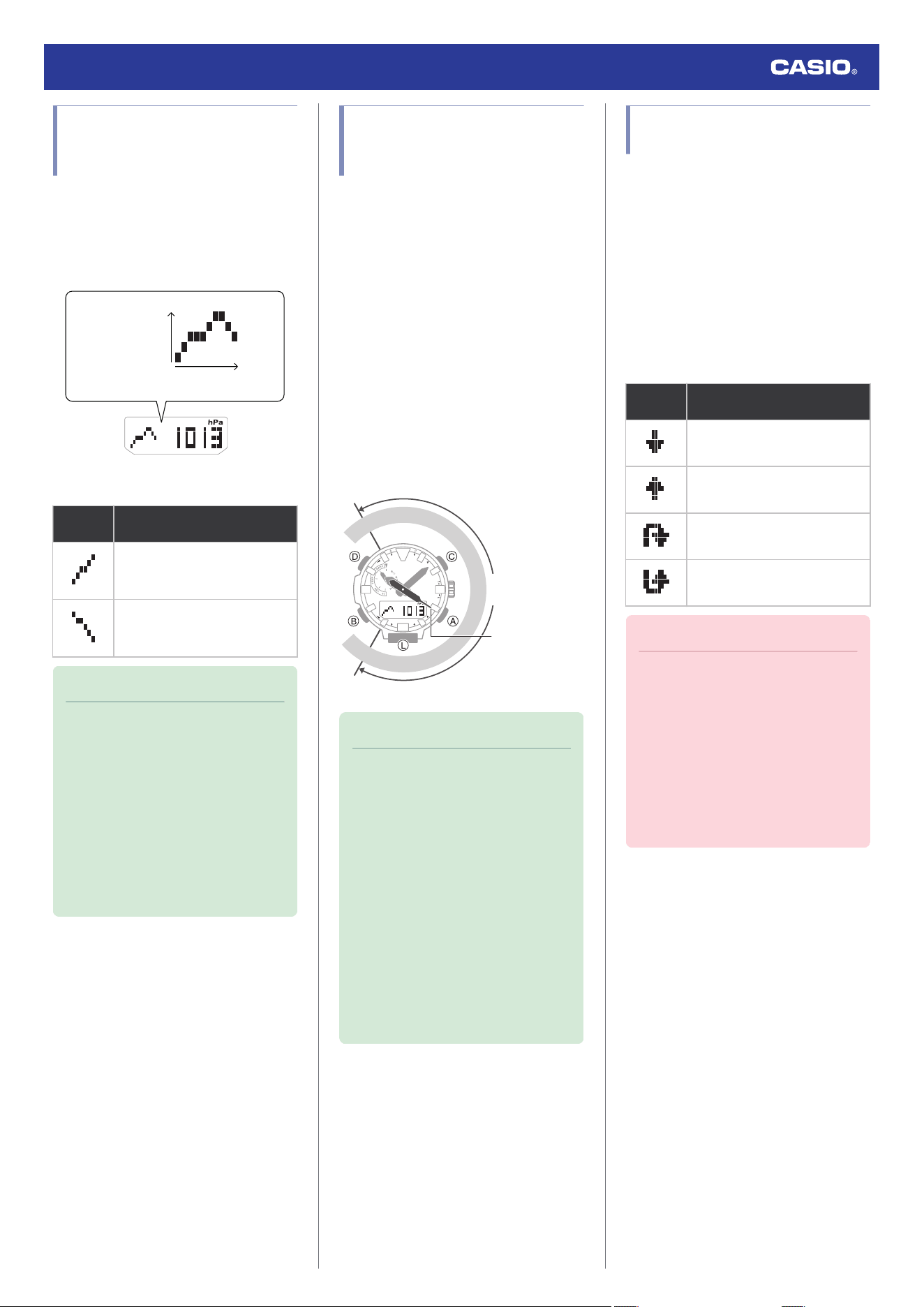
Checking Changes in
Barometric Pressure Over
Time
The watch displays a graph of 20 hours of
barometric pressure readings taken every two
hours. The square (
v
) at the far right of the
graph indicates the latest barometric pressure
reading.
Barometric pressure
(1 hPa per division)
Time
(2 hours per division)
●
Predicting Upcoming Weather
A trend
like this:
Means this:
Rising barometric pressure,
which indicates that upcoming
weather probably will be fair.
Falling barometric pressure,
which indicates that upcoming
weather probably will be bad.
Note
●
Large changes in barometric pressure
and/or temperature can cause past
data readings to be plotted outside of
the visible area of the graph. Though
plots are not visible, the data is still
maintained in watch memory.
●
The barometric pressure graph is not
displayed while Barometric Pressure
Change Indications are displayed.
l
Sudden Barometric Pressure
Change Indications
Checking the Change in
Barometric Pressure
between Two Readings
When you perform the procedure below in the
Barometer Mode, the second hand indicates
the difference between the current barometric
pressure measurement and the last auto
measurement value (taken at two-hour
intervals).
1. Enter the Barometer Mode.
l
Navigating Between Modes
2. Press (D).
The second hand indicates the
barometric pressure differential (Pressure
Differential Indicator).
Example: Barometric pressure differential
of -3 hPa (approximately -0.09 inHg)
10 5
0
−5
−10
Pressure
Differential Indicator
Range: ±10 hPa
(1 hPa units)
Unit: hPa
Note
●
You can toggle between the two
second hand functions by pressing
(D).
l
Checking the Current Barometric
Pressure
●
The second hand points to
r
(over) if
the current barometric pressure
differential is greater than +10 hPa (0.3
inHg), or
s
(under) if it is less than -10
hPa (-0.3 inHg).
●
A reading that is outside the allowable
measurement range of 260 hPa to
1,100 hPa (7.65 inHg to 32.45 inHg),
or any measurement error will cause
the second hand to move to 9 o’clock.
Sudden Barometric Pressure
Change Indications
Whenever the watch detects a significant
change in air pressure readings (due to
sudden ascent or descent, or to the passage
of a low pressure or high pressure area), it will
beep to let you know. An arrow will also flash
on the display at this time if the watch is in the
Barometer Mode, or if it is in the Timekeeping
Mode with the barometric pressure graph
displayed. The arrow that appears shows the
direction of the pressure change. These alerts
are called “Barometric Pressure Change
Indications”.
This
indicator:
Means this:
Sudden drop in pressure
Sudden rise in pressure
Sustained rise in pressure,
shifting to a fall
Sustained fall in pressure, shifting
to a rise
Important!
●
To ensure correct barometric pressure
change indicator operation, enable it in
a location where the altitude is
constant (such as a lodge, camp area,
or on the ocean).
●
A change in altitude causes a change
in air pressure. Because of this, correct
readings are impossible. Do not take
readings while ascending or
descending a mountain, etc.
Watch Operation Guide 5673
25
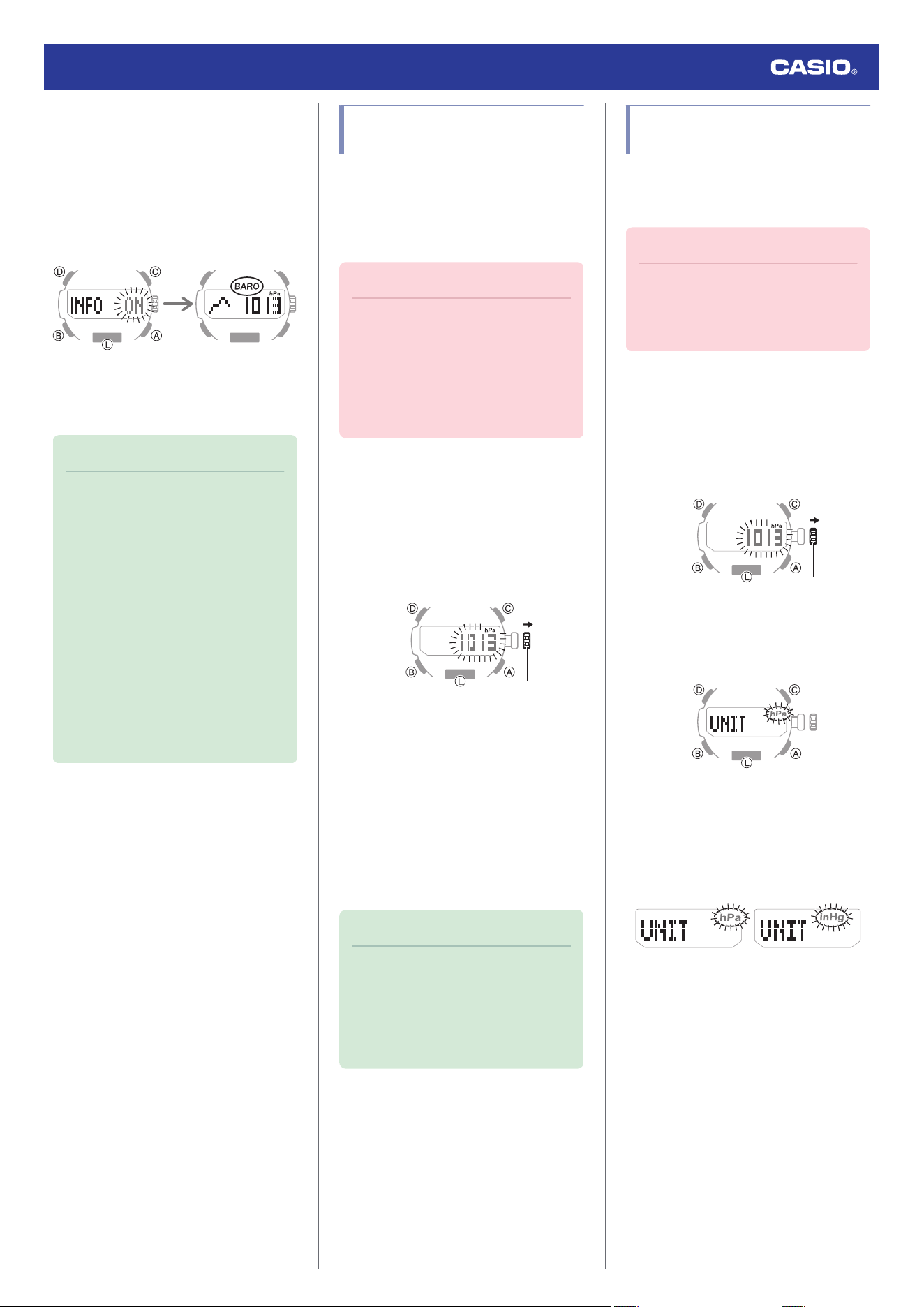
1. Enter the Barometer Mode.
l
Navigating Between Modes
2. Hold down (D) for at least two seconds.
If this turns on barometric pressure
change indication, [INFO ON] will stop
flashing and then the [BARO] indicator will
appear on the display.
3. To disable barometric pressure change
indication, hold down (D) again for at least
two seconds.
Note
●
If Barometric Pressure Change
Indications are on, barometric
pressure readings are taken every two
minutes even while the watch is not in
the Barometer Mode.
●
The Barometric Pressure Change
Indication becomes disabled
automatically 24 hours after it is
enabled.
●
You will not be able to turn on
barometric pressure change indication
if the watch’s battery level is low.
●
Low battery power will also cause
barometric pressure change indication
to turn off automatically.
Calibrating Barometric
Pressure Readings (Offset)
The watch’s pressure sensor is adjusted at the
factory and normally does not require
calibration. However, you can calibrate the
displayed value if you notice major errors in
readings.
Important!
●
The watch will not be able to produce
correct barometric pressure readings if
you make a mistake during the
calibration procedure. Check to make
sure that the value you use for
calibration produces correct pressure
readings.
1. Enter the Barometer Mode.
l
Navigating Between Modes
2. Pull out the crown.
This displays the current barometric
pressure and enters the Barometric
Pressure Offset Mode.
Crown
3. Rotate the crown to change the value.
Setting range: 260 to 1,100 hPa (or 7.65
inHg to 32.45 inHg)
Setting unit: 1 hPa (or 0.05 inHg)
●
To return the barometric pressure
setting to its initial factory default, press
(A) and (C) at the same time.
4. Push the crown back in to complete the
setting operation.
Note
●
If you do not perform any operation for
about two minutes after pulling out the
crown, crown operations will
automatically become disabled. If that
happens, push the crown back in and
then pull it out again.
Specifying the Barometric
Pressure Unit
You can specify either hectopascals (hPa) or
inches of mercury (inHg) as the display unit for
barometric pressure values.
Important!
●
When Tokyo (TYO) is the Home City,
the barometric pressure unit is fixed as
hectopascals (hPa) and cannot be
changed.
1. Enter the Barometer Mode.
l
Navigating Between Modes
2. Pull out the crown.
This displays the current barometric
pressure.
Crown
3. Press (B).
This causes [UNIT] to appear, with [hPa]
or [inHg] flashing.
4. Rotate the crown to select a barometric
pressure unit.
[hPa]: Hectopascals
[inHg]: Inches of mercury
Inches of mercuryHectopascals
5. Push the crown back in to complete the
setting operation.
Watch Operation Guide 5673
26
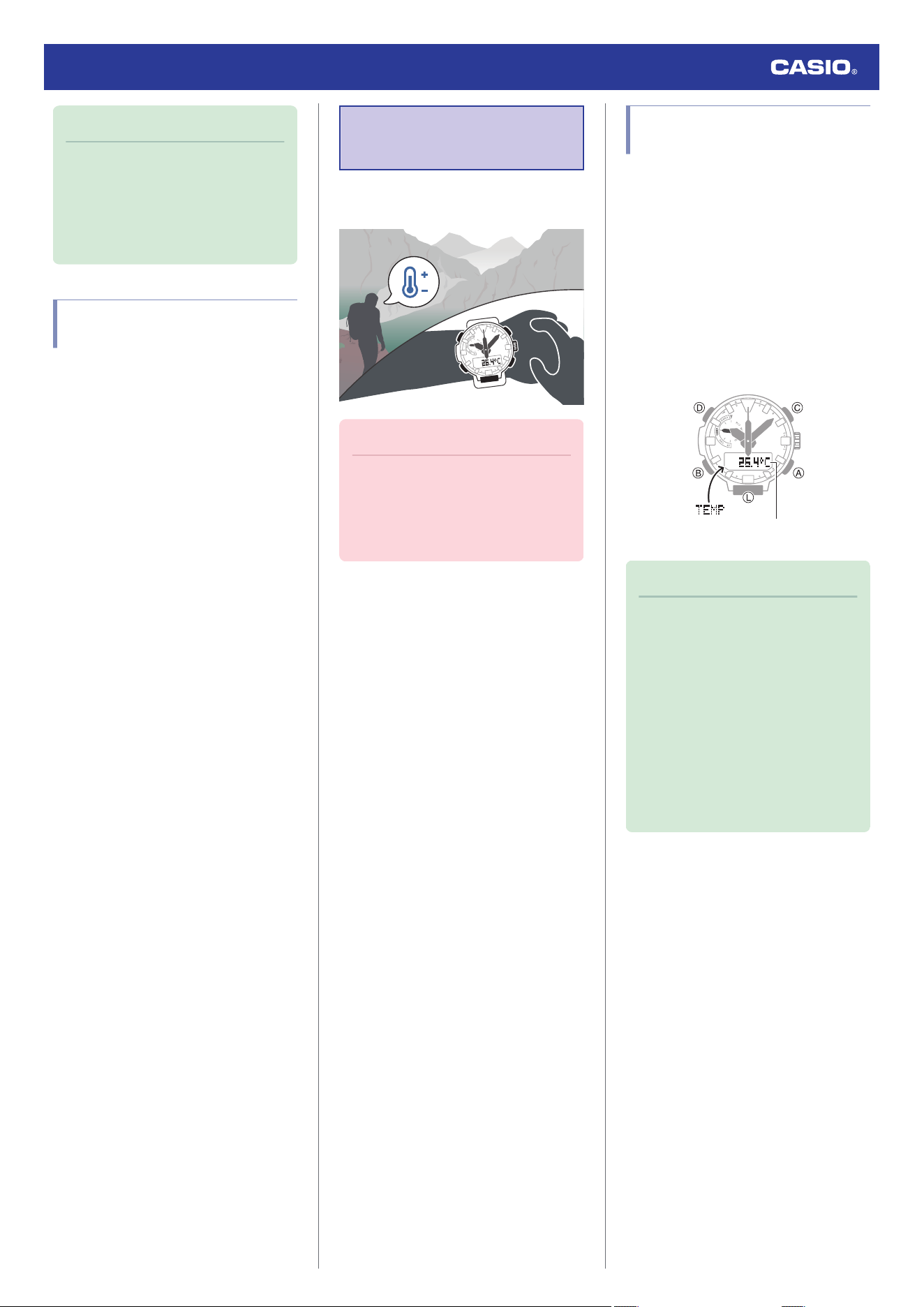
Note
●
If you do not perform any operation for
about two minutes after pulling out the
crown, crown operations will
automatically become disabled. If that
happens, push the crown back in and
then pull it out again.
Barometric Pressure
Reading Precautions
●
The barometric pressure graph produced
by this watch can be used to obtain an idea
of upcoming weather conditions. However,
this watch should not be used in place of
precision instruments required for official
weather prediction and reporting.
●
Pressure sensor readings can be affected
by sudden changes in temperature.
Because of this, there may be some error in
the readings produced by the watch.
Temperature
Measurement
The watch can be used to take current air
temperature readings.
Important!
●
Check the information at the link below
to find out how to ensure correct
readings.
l
Temperature Reading
Precautions
Checking the Current
Temperature
1. Enter the Thermometer Mode.
l
Navigating Between Modes
Entering the Thermometer Mode will start
temperature measurement and display
the result.
●
After you enter the Thermometer Mode,
the watch takes readings about every
five seconds for three minutes. After
that, a measurement is taken about
every two minutes.
●
To retrigger measurement, press (A).
Temperature
Note
●
The watch will automatically return to
the Timekeeping Mode if you do not
perform any operation in the
Thermometer Mode for about one
hour.
●
The measuring range is -10.0 °C to
60.0 °C (14.0 °F to 140.0 °F) (0.1 °C
(0.2 °F) units). [- - .-] will appear for the
measured value if it is outside the
allowable range.
●
To return to the Timekeeping Mode,
hold down (B) for at least two seconds.
Watch Operation Guide 5673
27
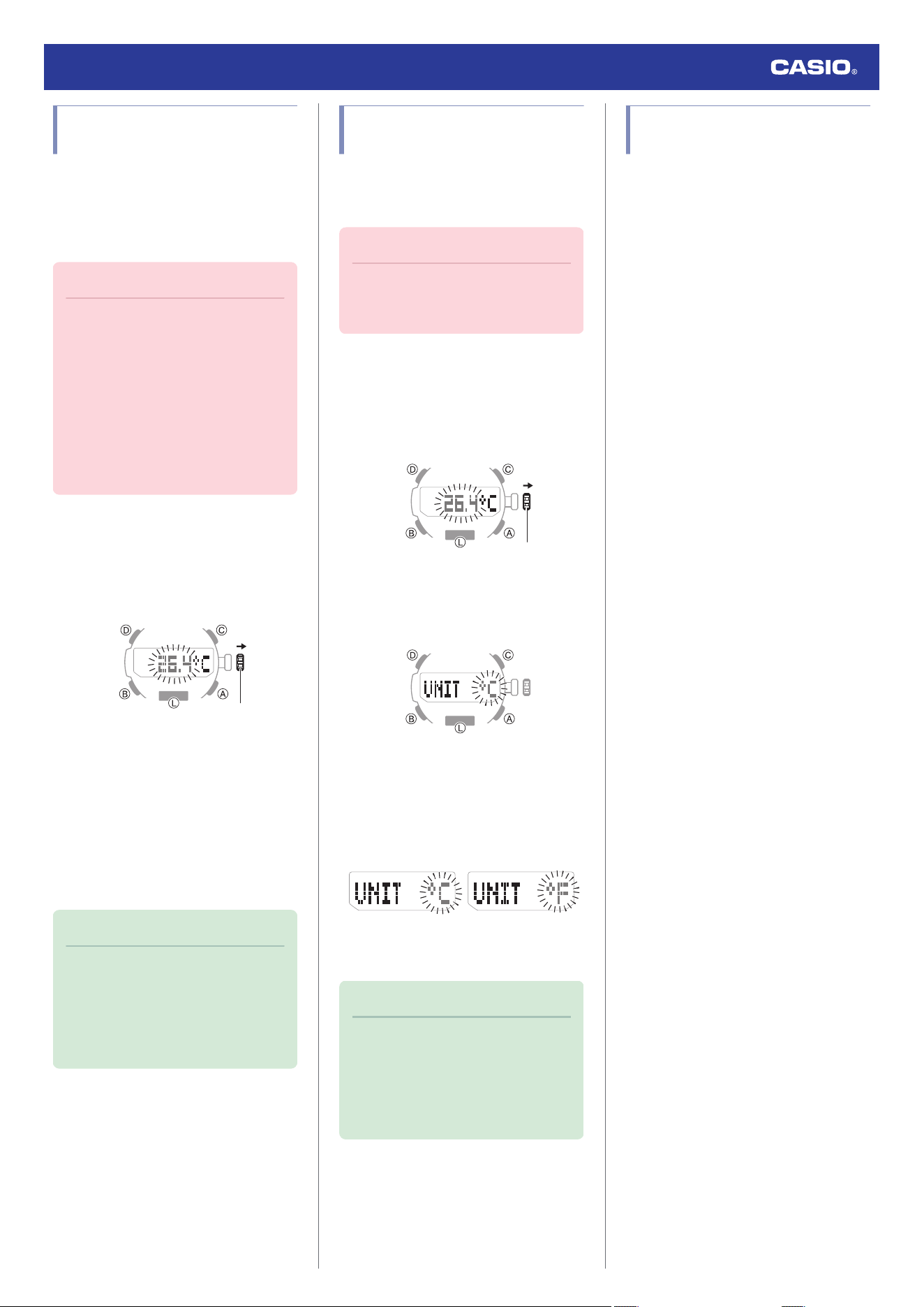
Calibrating Temperature
Readings (Offset)
The watch’s temperature sensor is adjusted at
the factory and normally does not require
calibration. However, you can calibrate the
displayed value if you notice major errors in
readings.
Important!
●
Check to make sure that the value you
use for calibration produces correct
temperature readings.
●
Before calibrating the temperature
reading, remove the watch from your
wrist and leave it in the area where you
plan to measure temperature for about
20 or 30 minutes to allow the case
temperature to become the same as
the air temperature.
1. Enter the Thermometer Mode.
l
Navigating Between Modes
2. Pull out the crown.
This displays the current temperature.
Crown
3. Rotate the crown to calibrate the
temperature value.
Calibration unit: 0.1 °C (0.2 °F)
●
To return the barometric pressure
setting to its initial factory default, press
(A) and (C) at the same time.
4. Push the crown back in to complete the
setting operation.
Note
●
If you do not perform any operation for
about two minutes after pulling out the
crown, crown operations will
automatically become disabled. If that
happens, push the crown back in and
then pull it out again.
Specifying the Temperature
Measurement Unit
You can select either Celsius (°C) or
Fahrenheit (°F) as the temperature display
unit.
Important!
●
When Tokyo (TYO) is the Home City,
the temperature unit is fixed as Celsius
(°C) and cannot be changed.
1. Enter the Thermometer Mode.
l
Navigating Between Modes
2. Pull out the crown.
This displays the current temperature.
Crown
3. Press (B).
This causes [UNIT] to appear, with [°C] or
[°F] flashing.
4. Rotate the crown to select a temperature
unit.
[°C]: Celsius
[°F]: Fahrenheit
FahrenheitCelsius
5. Push the crown back in to complete the
setting operation.
Note
●
If you do not perform any operation for
about two minutes after pulling out the
crown, crown operations will
automatically become disabled. If that
happens, push the crown back in and
then pull it out again.
Temperature Reading
Precautions
Body temperature, direct sunlight, and
humidity all have an effect on temperature
readings. To help ensure more accurate
temperature readings, remove the watch from
your wrist, wipe it dry of any moisture, and
place it in a well-ventilated location not
exposed to direct sunlight. You should be able
to take temperature readings after about 20 to
30 minutes.
Watch Operation Guide 5673
28
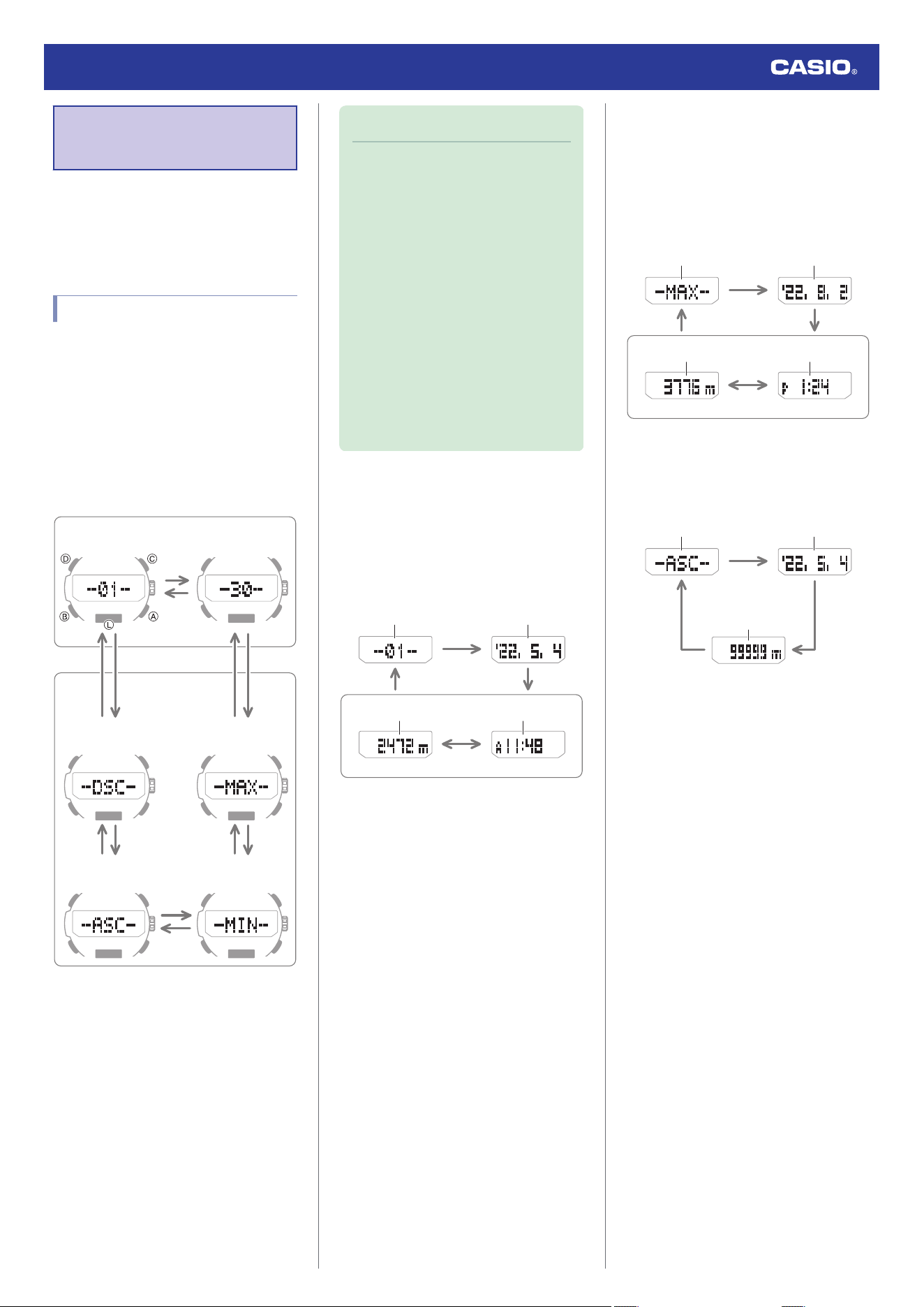
Viewing Altitude
Records
You can use the Altitude Record Recall Mode
to view manually recorded and auto recorded
data.
l
Recording Altitude Readings
Viewing Recorded Data
1. Enter the Altitude Record Recall Mode.
l
Navigating Between Modes
This displays a record of data recorded in
the Altimeter Mode.
2. Use (A) and (C) to display the data you
want to view.
●
Holding down (A) or (C) scrolls at high
speed.
ACCA
ACCA
A
C
C*
A*
Total Descent
Total Ascent Low Altitude
High Altitude
Auto Recorded Data
Manually Recorded Data
* Each press of a button scrolls to the top
screen of the next manually recorded
data record, numbered from 1 ([-01-]) to
a maximum of 30 ([-30-]).
Note
●
If there is no data left in memory due to
a data delete operation, error, or some
other reason, [- - - -] or [0] will appear
on the display.
●
If the cumulative ascent (ASC) or
cumulative descent (DSC) value
exceeds 99,999 m (327,995 feet), it
will revert to 0 and continue from there.
●
Pressing (D) returns to the top screen
(record number, DSC, ASC, MAX, or
MIN) of the data that you are viewing.
●
If you do not perform any operation for
about three minutes while in the
Altitude Record Recall Mode, the
watch automatically returns to the
Timekeeping Mode.
●
Manually Recorded Data
After displaying the top screen of a manually
recorded data record (01 through 30), the
record’s data screens appear in sequence as
shown below.
Example: Manually recorded Record 01
D
2 seconds
2 seconds
1 second
Altitude Time
Recording dateRecord number
●
Auto Recorded Data
After displaying an auto recorded data record,
you can navigate between the record’s data
screens as shown below.
High altitude and low altitude
Example: High altitude
D
2 seconds
2 seconds
1 second
Altitude Time
Recording dateData type
Cumulative ascent and cumulative
descent
Example: Cumulative ascent
1 second
Date when
accumulation started.
Data type
Cumulative altitude
D
2 seconds
Watch Operation Guide 5673
29
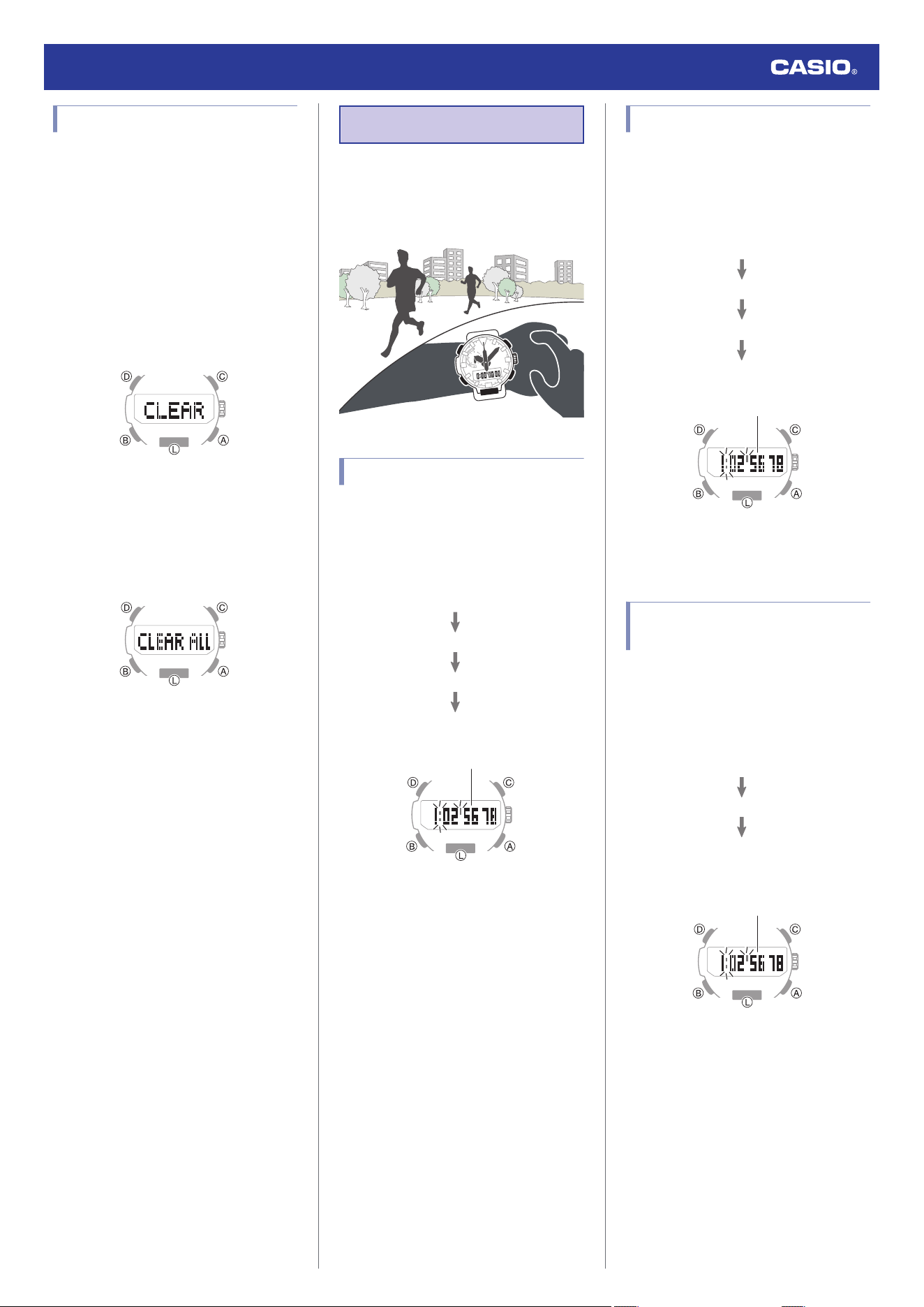
Deleting Data
●
Deleting a Particular Record
1. Enter the Altitude Record Recall Mode.
l
Navigating Between Modes
2. Use the (A) and (C) buttons to scroll
through the top screens of the records and
display the one you want to delete .
3. Hold down the (D) for at least two
seconds. Release the button as soon as
[CLEAR] stops flashing.
This deletes the record you selected.
●
Note that holding down (D) for more
than five seconds will delete all data.
●
Deleting All Records
Hold down (D) for at least five seconds until
[CLEAR ALL] stops flashing. This indicates
that all data was deleted.
Stopwatch
The Stopwatch Mode lets you measure
elapsed time up to 24 hours in 1/100 of a
second units.
It can also measure split times.
Measuring Elapsed Time
1. Enter the Stopwatch Mode.
l
Navigating Between Modes
2. Use the operations below to measure
elapsed time.
A
A
A
A
Stop
Resume
Stop
Start
Hours, minutes, seconds, 1/100 seconds
3. Press (C) to reset the measurement time
to all zeros.
Measuring a Split Time
1. Enter the Stopwatch Mode.
l
Navigating Between Modes
2. Use the operations below to measure
elapsed time.
A
C
C
A
Stop
Split release
Split
Start
Hours, minutes, seconds, 1/100 seconds
3. Press (C) to reset the measurement time
to all zeros.
Timing the First and Second
Place Finishers
1. Enter the Stopwatch Mode.
l
Navigating Between Modes
2. Use the operations below to measure
elapsed time.
A
C
A
2nd Finisher*
1st Finisher*
Start
* Displays the time of the first finisher.
Hours, minutes, seconds, 1/100 seconds
3. Press (C) to display the time of the second
place finisher.
4. Press (C) to reset the measurement time
to all zeros.
Watch Operation Guide 5673
30
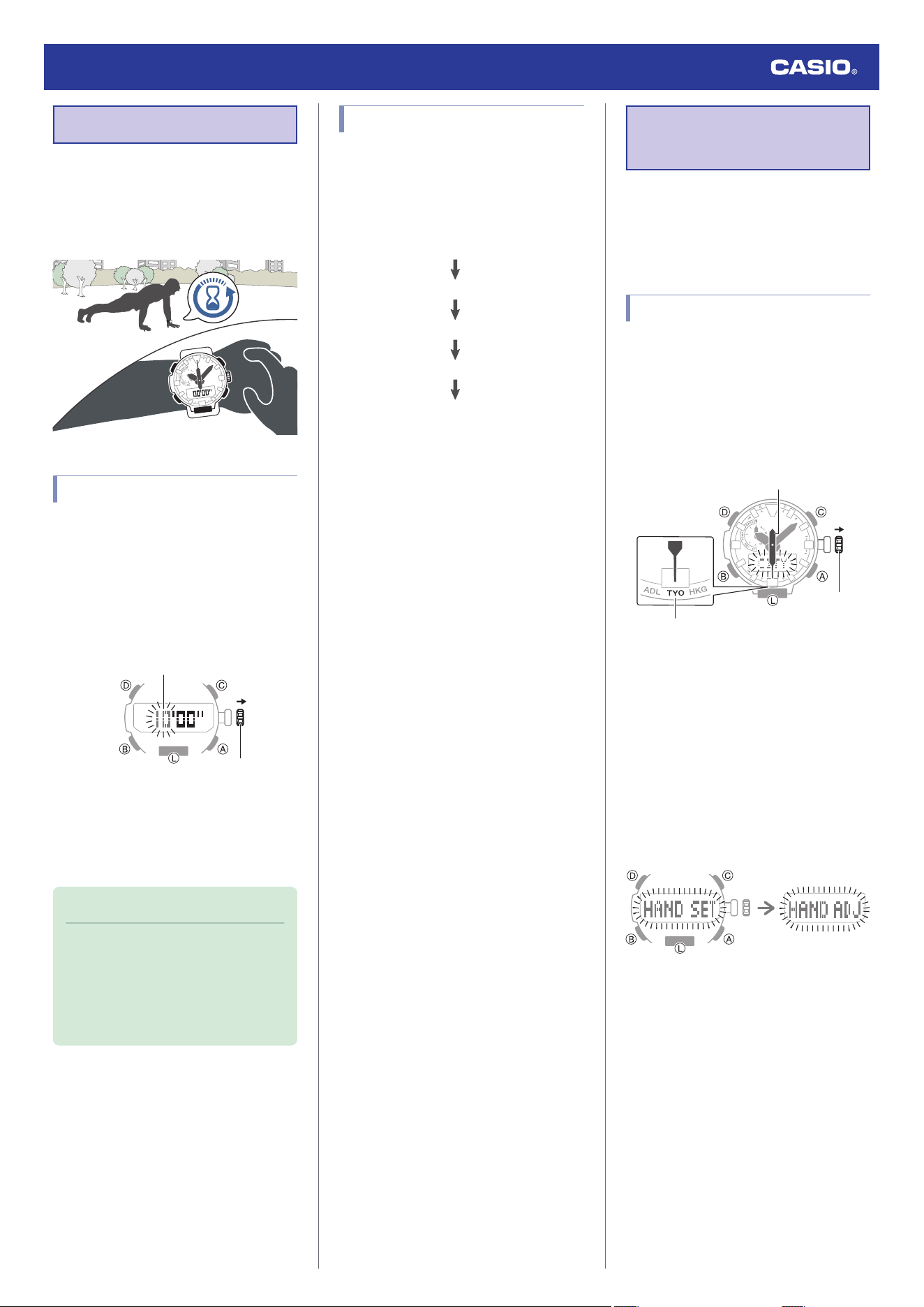
Timer
The timer counts down from a start time
specified by you. A beeper sounds when the
end of the countdown is reached.
●
The beeper will not sound if battery power
is low.
Setting a Start Time
The start time can be set in 1-minute units up
to 60 minutes.
1. Enter the Timer Mode.
l
Navigating Between Modes
2. Pull out the crown.
This causes the minutes digits to flash.
Crown
Minutes
3. Rotate the crown to change the timer start
time minutes.
4. Push the crown back in to complete the
setting operation.
Note
●
If you do not perform any operation for
about two minutes after pulling out the
crown, crown operations will
automatically become disabled. If that
happens, push the crown back in and
then pull it out again.
Using the Timer
1. Enter the Timer Mode.
l
Navigating Between Modes
2. Use the operations below to perform a
timer operation.
A
A
A
(Time up)
Resume
Pause
(Countdown starts)
Start
●
A beeper will sound for 10 seconds to
let you know when the end of a
countdown is reached.
●
You can reset a paused countdown to
its start time, by pressing (C).
3. Press any button to stop the tone.
Hand Alignment
Adjustment
Strong magnetism or impact can cause the
time indicated by the analog hands to become
different from the time on the display. If this
happens, adjust hand alignment.
Adjusting Hand Alignment
1. Enter the Timekeeping Mode.
l
Navigating Between Modes
2. Pull out the crown.
This causes [CITY] to flash on the display
and the second hand to move to the
current Home City.
Crown
Home City
Second hand
3. Hold down (A) for at least five seconds.
Release the button when [HAND ADJ]
starts to flash.
This indicates that hand alignment
adjustment has started.
●
[HAND SET] will flash first on the
display about 0.5 seconds after you
hold down the (A) button. Keep the
button depressed until [HAND ADJ]
flashes on the display.
After five seconds
After 0.5 seconds
4. After all the hands move to 12 o’clock,
push the crown back in.
This returns the hands to normal
timekeeping.
Watch Operation Guide 5673
31
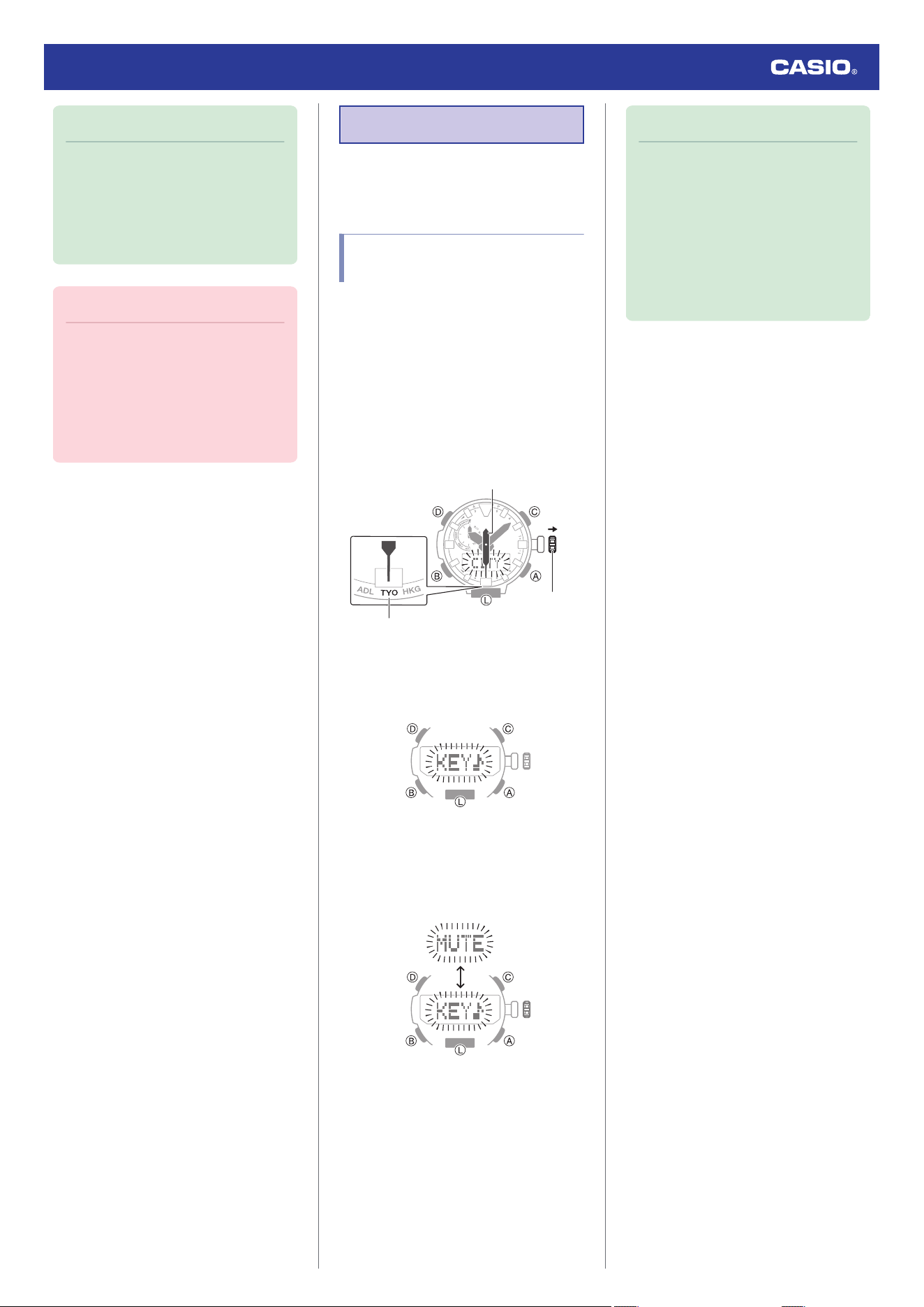
Note
●
If you do not perform any operation for
about two minutes after pulling out the
crown, crown operations will
automatically become disabled. If that
happens, push the crown back in and
then pull it out again.
Important!
●
After hand position adjustment is
complete, check to make sure that the
proper time is being indicated in the
Timekeeping Mode by the hands and
on the display. If the hands are
misaligned, perform steps 2 through 4
again.
Other Settings
This section explains other watch settings you
can configure.
Enabling the Button
Operation Tone
Use the procedure below to enable or disable
the tone that sounds when you press a button.
1. Enter the Timekeeping Mode.
l
Navigating Between Modes
2. Pull out the crown.
This causes [CITY] to flash on the display
and the second hand to move to the
current Home City.
Crown
Home City
Second hand
3. Press (B) twice.
This causes [KEY♪] or [MUTE] to flash on
the display.
4. Rotate the crown to select either [KEY♪]
or [MUTE].
[KEY♪]: Operation tone enabled.
[MUTE]: Operation tone muted.
5. Push the crown back in to complete the
setting operation.
Note
●
If you do not perform any operation for
about two minutes after pulling out the
crown, crown operations will
automatically become disabled. If that
happens, push the crown back in and
then pull it out again.
●
Note that alarm and timer tones will still
sound even while the operation tone is
muted.
Watch Operation Guide 5673
32
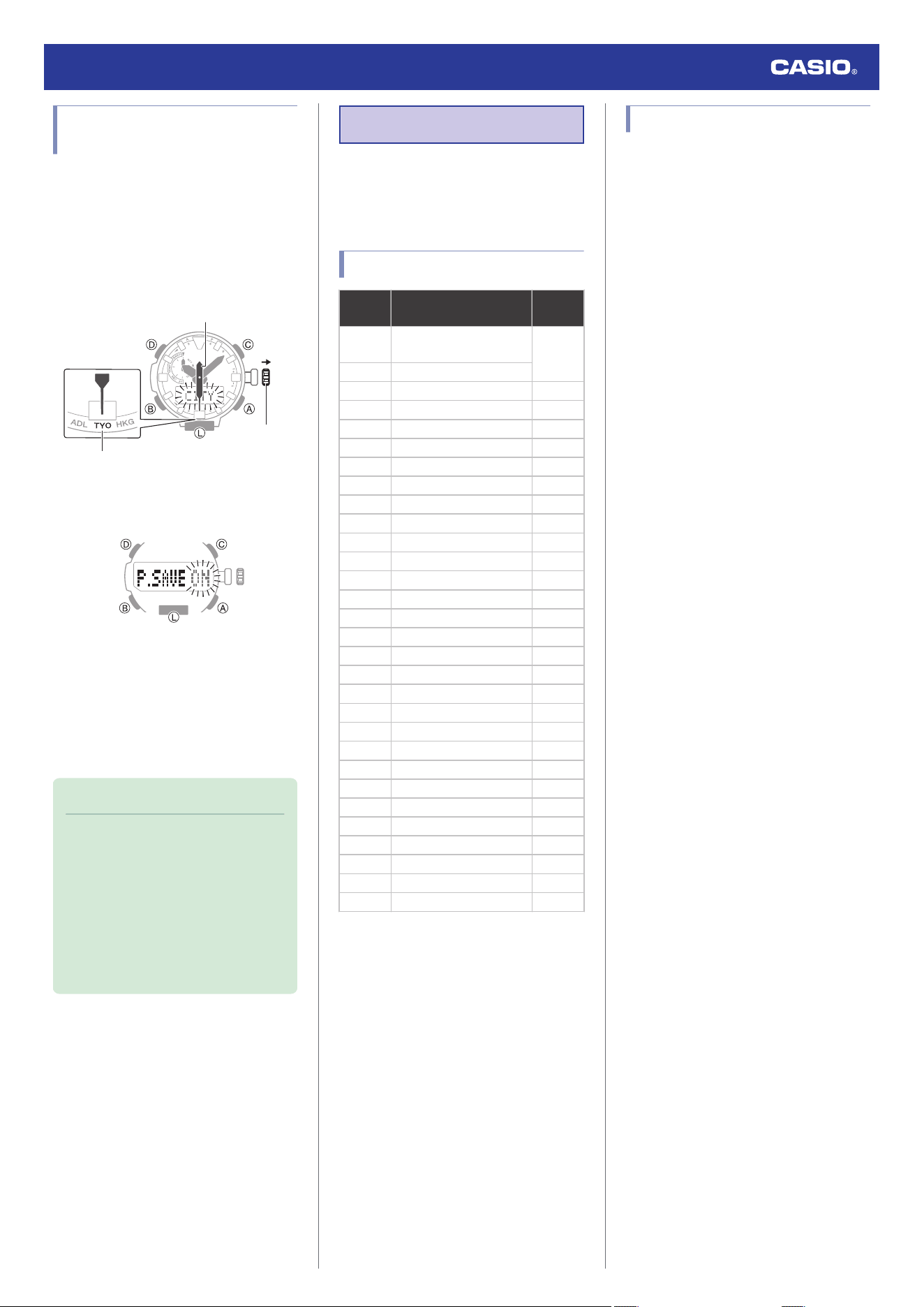
Configuring Power Saving
Function Settings
1. Enter the Timekeeping Mode.
l
Navigating Between Modes
2. Pull out the crown.
This causes [CITY] to flash on the display
and the second hand to move to the
current Home City.
Crown
Home City
Second hand
3. Press (B) six times.
This displays [P.SAVE].
4. Rotate the crown to turn the setting on or
off.
[ON]: Power Saving enabled.
[OFF]: Power Saving disabled.
5. Push the crown back in to complete the
setting operation.
Note
●
If you do not perform any operation for
about two minutes after pulling out the
crown, crown operations will
automatically become disabled. If that
happens, push the crown back in and
then pull it out again.
●
For details about Power Saving, refer
to the information below.
l
Power Saving Function
Other Information
This section provides non-operational
information you also need to know. Refer to
this information as required.
City Table
City
code
City Name
Time
Zone
UTC
Coordinated Universal
Time
0
LON* London
PAR* Paris +1
ATH* Athens +2
JED Jeddah +3
THR Tehran +3.5
DXB Dubai +4
KBL Kabul +4.5
KHI Karachi +5
DEL Delhi +5.5
KTM Kathmandu +5.75
DAC Dhaka +6
RGN Yangon +6.5
BKK Bangkok +7
HKG* Hong Kong +8
TYO* Tokyo +9
ADL Adelaide +9.5
SYD Sydney +10
NOU Noumea +11
WLG Wellington +12
PPG Pago Pago -11
HNL* Honolulu -10
ANC* Anchorage -9
LAX* Los Angeles -8
DEN* Denver -7
CHI* Chicago -6
NYC* New York -5
YHZ Halifax -4
RIO Rio de Janeiro -3
RAI Praia -1
* Cities where time calibration signal
reception is possible.
●
The information in the above table is current
as of January 2021.
●
Time zones may change and UTC
differentials may become different from
those shown in the table above.
Specifications
Accuracy :
±15 seconds per month average when time
adjustment using signal reception is not
possible.
Basic Functions :
Analog
Hour, minute (moves every 10 seconds),
second
Digital
Hour, minute, second, month, day, day of
the week
Barometric pressure graph
a.m. (A)/p.m. (P)/24-hour timekeeping
Full Auto Calendar (2000 to 2099)
Signal Receive Functions :
Auto receive, manual receive
Last receive date and time display
Auto summer time switching
Auto transmitter selection (for JJY, MSF/
DCF77)
Receivable call signs:
JJY (40 kHz/60 kHz), WWVB (60 kHz), MSF
(60 kHz), DCF77 (77.5 kHz), BPC (68.5
kHz)
Auto Receive enable/disable
Digital Compass :
Measurement range: 0° to 359°
Measurement Units: LCD: 1°, Analog: 6°
Continuous Bearing Measurement (1
minute)
North Indication Hand
Compass calibration (2-point calibration,
magnetic declination angle)
Altimeter (relative altitude) :
Measuring range: -700 to 10,000 m (or
-2,300 to 32,800 ft.)
Display range: -3,000 to 10,000 m (or -9,840
to 32,800 ft.)
(Altitude calibration can be used to display
any 10,700 m within the range above.)
Measuring unit: 1 m (or 5 ft.)
Auto measurement interval (2 minutes, 5
seconds)
Altitude calibration
Altitude graph
Altitude differential measurement (-100 to
+100 m/-1,000 to +1,000 m (or -325 to +325
ft./-3,280 to +3,280 ft.))
Altitude Memory
Manually Recorded Data
One-press recording of altitude, date
(year, month, day), and time. Up to 30
records.
Auto Record Data
One record of high altitude, low
altitude, cumulative ascent, cumulative
descent
Watch Operation Guide 5673
33
Barometer :
Measurement range: 260 to 1,100 hPa (or
7.65 to 32.45 inHg)
Display range: 260 to 1,100 hPa (or 7.65 to
32.45 inHg)
Measurement unit: 1 hPa (or 0.05 inHg)
Barometric pressure adjustment
Barometric pressure graph
Barometric pressure differential indicator
Barometric pressure change indications
Temperature :
Measuring range: -10.0 to 60.0 °C (or 14.0
to 140.0 °F)
Display range: -10.0 to 60.0 °C (or 14.0 to
140.0 °F)
Measuring unit: 0.1 °C (or 0.2 °F)
Temperature Correction
Sensor Accuracy :
Direction sensor
Measurement accuracy: Within ±10°
(Guaranteed accuracy temperature
range: 10 °C to 40 °C (50 °F to 104 °F))
Bearing hand indication: Within ±2
gradations
Pressure sensor
Measurement accuracy: Within ±3 hPa
(0.1 inHg)
(Altimeter measurement accuracy:
Within ±75 m (246 ft.))
●
Guaranteed accuracy temperature
range: -10 °C to 40 °C (14 °F to 104 °F)
●
Strong impact or prolonged exposure to
temperature extremes may negatively
affect accuracy.
Temperature Sensor
Measurement accuracy: Within ±2 °C
(3.6 °F)
(Guaranteed accuracy temperature
range: -10 °C to 60 °C (14 °F to 140 °F))
Stopwatch :
Measuring unit: 1/100 second
Measuring range:
23 hours, 59 minutes, 59.99 seconds (24
hours)
Measurement Functions:
Elapsed time, cumulative time, split
times, 1st and 2nd place finisher times
Timer :
Setting unit: 1 minute
Measuring range: 60 minutes
Countdown unit: 1 second
Time up alert duration: 10 seconds
Alarm :
Time alarms
Number of alarms: 5
Setting units: Hours, minutes
Alarm tone duration: 10 seconds
Hourly time signal: Beep every hour on the
hour
World Time :
Current time in 29 cities (29 time zones),
and UTC (Coordinated Universal Time)
time
Summer time
City swapping
One-touch UTC display
Other :
Double LED light: LED light for dial and LED
backlight for LCD (with Full Auto Light,
Super Illuminator, afterglow, afterglow
duration setting (1.5 seconds, 3 seconds));
alarm testing; automatic hand position
correction; power saving; charge level
(battery) indicator; operation tone enable/
disable; hand shift
Power Supply :
Solar panel and one rechargeable battery
Battery operating time: Approximately 6
months
Conditions:
Illumination: 1.5 seconds/day
Beeper: 10 seconds/day
Digital Compass Operations: 20 times/
month
Mountain climbing: Once/month
(Altitude readings: Approximately 1
hour; Barometric pressure change
indication measurements:
Approximately 24 hours)
Barometric Pressure Graph:
Measurement every 2 hours
Time signal reception: 4 minutes/day
Display: 18 hours/day
Specifications are subject to change without
notice.
Troubleshooting
Signal Reception (Time
Calibration Signal)
Q1
The watch cannot perform a receive
operation.
Is the watch’s battery charged?
Signal reception is not possible while
battery power is low. Keep the watch
exposed to light until it recharges
sufficiently.
l
Charging
Is the watch in the Timekeeping Mode?
Time signal receive is performed only
while the watch is in the Timekeeping
Mode. Return to the Timekeeping Mode.
l
Navigating Between Modes
Is your Home City setting correct for your
location?
The watch will not indicate the correct time
if the Home City setting is wrong. Change
your Home City setting so it correctly
reflects your location.
l
Setting a Home City
After checking the above, the watch still
cannot perform a receive operation.
Time calibration signal reception is not
possible under the conditions described
below.
●
When watch is at Level 2 power saving
●
When the crown is pulled out
●
Timer countdown operation in progress
If successful reception is not possible for
some reason, you can adjust the time and
day settings manually.
Watch Operation Guide 5673
34
Q2
The signal receive operation always
fails.
Is the watch in a location that is appropriate
for signal reception?
Check your surroundings and move the
watch to a location where signal reception
is better.
l
Appropriate Signal Reception Location
Did you avoid touching the watch while the
receive operation was in progress?
Minimize movement of the watch and do
not perform any watch operation while a
receive operation is in progress.
Is there an alarm configured to sound
during the same period that the signal
receive operation is performed?
Receive stops if an alarm operation starts
while it is being performed. Disable the
alarm.
l
Turning Off an Alarm or the Hourly
Time Signal
Is the signal transmitter in your area
transmitting a signal?
The transmitter of the time calibration may
not be transmitting a signal.
Try again later.
Q3
Signal reception should have been
successful, but the watch’s time and/
or day is wrong.
Is the indicated time off by one hour or by
30 minutes?
The watch may be using the wrong time
offset. Specify the area you want to use as
your Home City.
l
Setting a Home City
Is the indicated hour and/or minute wrong?
The hour hand and/or minute hand may
be out of alignment. Perform the
procedure under “Hand Alignment
Adjustment” to auto adjust hour and
minute hand alignment.
l
Hand Alignment Adjustment
After checking the above, the time and/or
day settings is still wrong.
Adjust time and day settings manually.
l
Using Watch Operations to Adjust the
Time Setting
Altitude Measurement
Q1
Readings produce different results at
the same location.
Watch readings are different from
altitude information available from
other sources.
Correct altitude readings are not
possible.
Relative altitude is calculated based on
changes in barometric pressure measured by
the watch’s pressure sensor. This means that
barometric pressure changes can cause
readings taken at the same location to be
different. Also note that the value displayed by
the watch may be different from the actual
elevation and/or sea level elevation indicated
for the area where you are located. When
using the watch’s altimeter while mountain
climbing, it is recommended that you regularly
calibrate its readings in accordance with local
altitude (elevation) indications.
l
Calibrating Altitude Readings (Offset)
Q2
Following a relative altitude reading,
the watch’s second hand points to 9
o’clock.
The second hand will move to 9 o’clock if a
reading is outside the allowable altitude
measurement range (-700 m to 10,000 m
(-2,300 to 32,800 feet)). If [ERR] is displayed,
there may be a problem with the sensor.
l
Checking the Altitude Differential from a
Reference Point
Q3
[ERR] appears during measurement.
There may be a problem with the sensor. Try
taking another measurement.
If [ERR] keeps appearing after multiple
measurement attempts, contact a CASIO
service center or your original retailer.
Digital Compass
Q1
The entire display is flashing.
Abnormal magnetism has been detected.
Move away from any potential source of
strong magnetism and try taking a reading
again.
l
Digital Compass Reading Precautions
●
If the display flashes again, it could mean
that the watch itself has become
magnetized. Move away from any potential
source of strong magnetism, perform 2-
point calibration, and then try taking a
reading again.
l
Calibrating Compass Readings
Q2
[ERR] appears during measurement.
There is a problem with the sensor or there
may be a source strong magnetic force
nearby. Move away from any potential source
of strong magnetism and try taking a reading
again. If [ERR] keeps appearing after multiple
measurement attempts, contact a CASIO
service center or your original retailer.
l
Digital Compass Reading Precautions
Q3
[ERR] appears following 2-point
calibration.
[ERR] on the display could indicate a sensor
problem.
●
If [ERR] disappears after about one second,
try performing 2-point calibration again.
●
If [ERR] keeps appearing after multiple
attempts, contact a CASIO service center or
your original retailer.
Q4
Direction information indicated by the
watch is different from that indicated
by a backup compass.
Move away from any potential source of
strong magnetism, perform 2-point
calibration, and then try taking a reading
again.
l
Calibrating Compass Readings
l
Digital Compass Reading Precautions
Q5
Readings at the same location
produce different results.
Cannot take readings indoors.
Move away from any potential source of
strong magnetism and try taking a reading
again.
l
Digital Compass Reading Precautions
Watch Operation Guide 5673
35
Barometric Pressure
Measurement
Q1
Following a relative barometric
pressure reading, the watch’s
second hand points to 9 o’clock.
The second hand will move to 9 o’clock if a
reading is outside the allowable barometric
pressure measurement range (260 hPa to
1,100 hPa (7.65 inHg to 32.45 inHg)). If [ERR]
appears on the display, there may be a
problem with the sensor.
l
Checking the Change in Barometric
Pressure between Two Readings
Q2
[ERR] appears during measurement.
There may be a problem with the sensor. Try
taking another measurement. If [ERR] keeps
appearing after multiple measurement
attempts, contact a CASIO service center or
your original retailer.
Temperature Measurement
Q1
[ERR] appears during measurement.
There may be a problem with the sensor. Try
taking another measurement. If [ERR] keeps
appearing after multiple measurement
attempts, contact a CASIO service center or
your original retailer.
World Time
Q1
The time for a World Time City is not
correct.
The summer time setting (standard time/
summer time) may be wrong.
l
Specifying a World Time City
Alarm
Q1
The alarm does not sound.
Is the watch’s battery charged?
Keep the watch exposed to light until it
recharges sufficiently.
l
Charging
The crown is pulled out.
The alarm will not sound while the crown
is pulled out. Push the crown back in to its
normal position.
Is the alarm enabled?
Enable the alarm.
l
Configuring Alarm Settings
Hand Movement and Watch
Screen Indications
Q1
I don’t know what mode the watch is
in.
You can determine the current mode by
checking the watch display. Use (B) to
navigate between modes.
l
Navigating Between Modes
Q2
The second hand is jumping at two-
second intervals.
Battery power is low. Keep the watch exposed
to light until it recharges sufficiently.
l
Charging
Q3
All hands are stopped and buttons do
not work.
The battery is dead. Keep the watch exposed
to light until it recharges sufficiently.
l
Charging
Q4
The hands suddenly start moving at
high speed.
This is due to the reason (or one of the
reasons) below, and does not indicate
malfunction. Simply wait until normal hand
movement resumes.
●
The watch is recovering from a power
saving state.
l
Power Saving Function
●
A time calibration signal is being received
and the time setting is being adjusted.
l
Time Adjustment Using a Time Signal
Q5
Hands are stopped and buttons do
not work.
The watch is in the charge recovery mode.
Wait until the recovery process is complete
(for about 15 minutes). The watch will recover
more quickly if you place it in a brightly lit
location.
Q6
Why is the current time indicated by
the watch is off by a certain amount
of time (nine hours, three hours and
15 minutes, etc.)?
The city setting is not correct. Select the
correct setting.
l
Setting a Home City
Q7
The current time indicated by the
watch is off by one hour or 30
minutes.
The summer time setting may not be correct.
Select the correct setting.
l
Setting a Home City
Q8
The time indicated by the hands is
different from the displayed time.
Strong magnetism or impact can cause the
hands to go out of alignment. Adjust hand
alignment.
l
Hand Alignment Adjustment
Crown Operations
Q1
Nothing happens when I rotate the
crown.
If you do not perform any operation for about
two minutes after pulling out the crown
(approximately 30 minutes in the case of hand
and day indicator alignment), crown
operations will automatically become
disabled. Push the crown back in to its normal
position and then pull it out again to re-enable
crown operations.
l
Using the Crown
Watch Operation Guide 5673
36
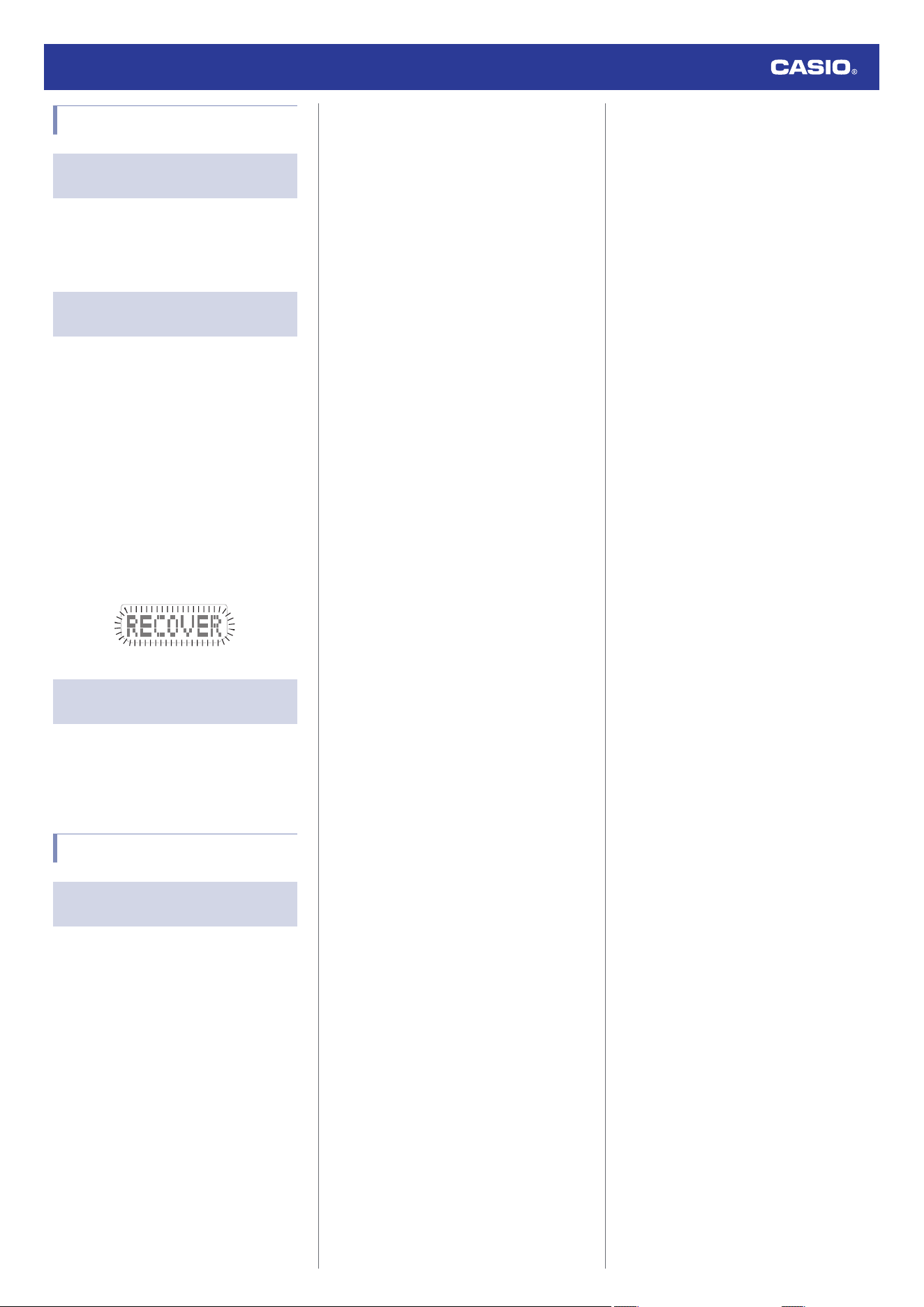
Charging
Q1
The watch does not work even
though it is exposed to light.
The watch stops operating whenever the
battery goes dead. Keep the watch exposed
to light until it recharges sufficiently.
l
Checking the Charge Level
Q2
[RECOVER] is flashing on the
display.
The watch is in the charge recovery mode.
Wait until the recovery process is complete
(about 15 minutes). The watch will recover
more quickly if you place it in a brightly lit
location.
●
If a sensor measurement operation,
illumination and/or other power-intensive
functions are used within a short period of
time, the charging capacity of the battery
drops and causes the watch to go into a
charge recovery mode. Function availability
is temporarily limited, but functionality
returns after the battery recovers.
l
Checking the Charge Level
Q3
[CHARGE] is flashing on the digital
display.
The charge level of the watch is extremely low.
Immediately expose the watch to light to
charge it.
l
Checking the Charge Level
Other
Q1
I can’t find the information I need
here.
Visit the website below.
https://world.casio.com/support/
Watch Operation Guide 5673
37

