
1122

- 1 -
Thank you for choosing our product!
Please read the instructions carefully so you will know how to operate your
product properly.
If there are any technical questions, please contact:
Customer care: (805) 751-4853 & Live chat
Online support: www.bossaudio.com/support
IMPORTANT
Please enter below the Serial No. which is located on the exterior of the product.
Retain this information for future reference.
Model No.
Serial No.
Date of Purchase

- 2 -
Table of Contents
Introduction .........................................................................................................................................................2
Package Contents ..............................................................................................................................................2
Important ............................................................................................................................................................3
Panel Controls and Features ..............................................................................................................................4
Subwoofer Setup Procedure ..............................................................................................................................5
Protection Mode .................................................................................................................................................6
Placement ...........................................................................................................................................................6
Wiring .................................................................................................................................................................6
Low-Level Input Wiring .................................................................................................................................7
High-Level Input Wiring ................................................................................................................................7
Power Connection ........................................................................................................................................8
Remote Subwoofer Control Connection........................................................................................................9
Troubleshooting ..................................................................................................................................................9
Specications ...................................................................................................................................................11
Introduction
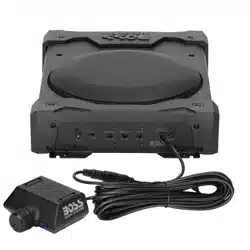
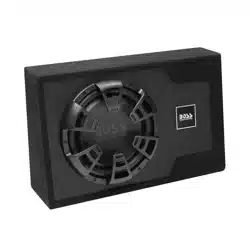
The B12ES is designed as a subwoofer with a built-in amplier integrated into the enclosure. This compact
design provides more placement possibilities.
This product has a low pass lter, bass boost control, phase control and input gain control. These allow you to
adjust sound effects to suit personal need.
The B12ES offers you two wiring alternatives for audio signal input (low and high level inputs). It can also auto-
sense high level input to power on automatically, without the need to connect the remote wire to the remote
terminal on this product.
Package Contents
When rst unpacking your new amplied subwoofer, please check that the package contains each of the items
listed below. If something is missing, contact the store where you purchased the product.
• 1 x B12ES amplied subwoofer
• 1 x High level input wire harness
• 1 x Remote subwoofer control
• 1 x Remote subwoofer control cable
• 2 x Screws (for remote subwoofer control mounting)
• User manual and warranty card

- 3 -
Important
Read and understand all instructions before you use your product. If you do not follow the instructions
in this manual, we are not responsible for any resulting personal injury or damage to property. This
will also void the warranty.
Important Safety Precautions
• Do not open or attempt to repair this product yourself. Dangerous high voltages are present which may
result in electric shock.
• To avoid risk of electronic shock or damage to the product, do not permit the product to become damp or
wet from water or other liquids. If this does occur, immediately unplug the power wires and send the product
to your local dealer or service center as soon as possible.
• Be sure to observe the following guidelines:
- Do not increase speaker volume so high that you cannot hear what is around you.
- Use caution or temporarily discontinue use in potentially hazardous situations.
• Do not make any adjustment on the product when driving or in other situations where distractions can be
hazardous. Responsible and safe driving is your primary responsibility when operating a vehicle.
• Start volume at a low setting then gradually increase the volume until you can hear it comfortably, without
sound distortion or ear discomfort.
• In the event of smoke, strange noise or odor emitted from the product or any other abnormal operational
signs appearing on the product, disconnect the product from the power supply. Discontinue use and contact
your dealer or our technical support. Using the product in this condition may result in permanent damage
to the system.
• Servicing must only be carried out by a technician. Contact our technical support for any service question.
Installation Precautions
• WARNING: Always consult a professional installer.
• Installation must be performed by a professional. Contact our technical support for any installation question.
• Always wire the product to the power source (battery) through a fuse to prevent a short circuit and re.
• Before installation, disconnect the negative terminal of the vehicle battery to prevent damage to the product,
re, and/or possible injury.
• Observe the safety and operating instructions of the devices which are connected to the product.
• Important! Replace the faulty fuse with the same type and rating. Using a different fuse type or fuse rating
may result in damage to the product or vehicle, or cause a re.
• Do not use any aggressive cleaning agents. Clean the product with a dry, ber-free cloth.
Environmental Care
Do not throw away the product with normal household waste at the end of its life. Follow your local laws if/when
disposing of electronic products. By doing this, you help preserve the environment.
- 4 -
Panel Controls and Features
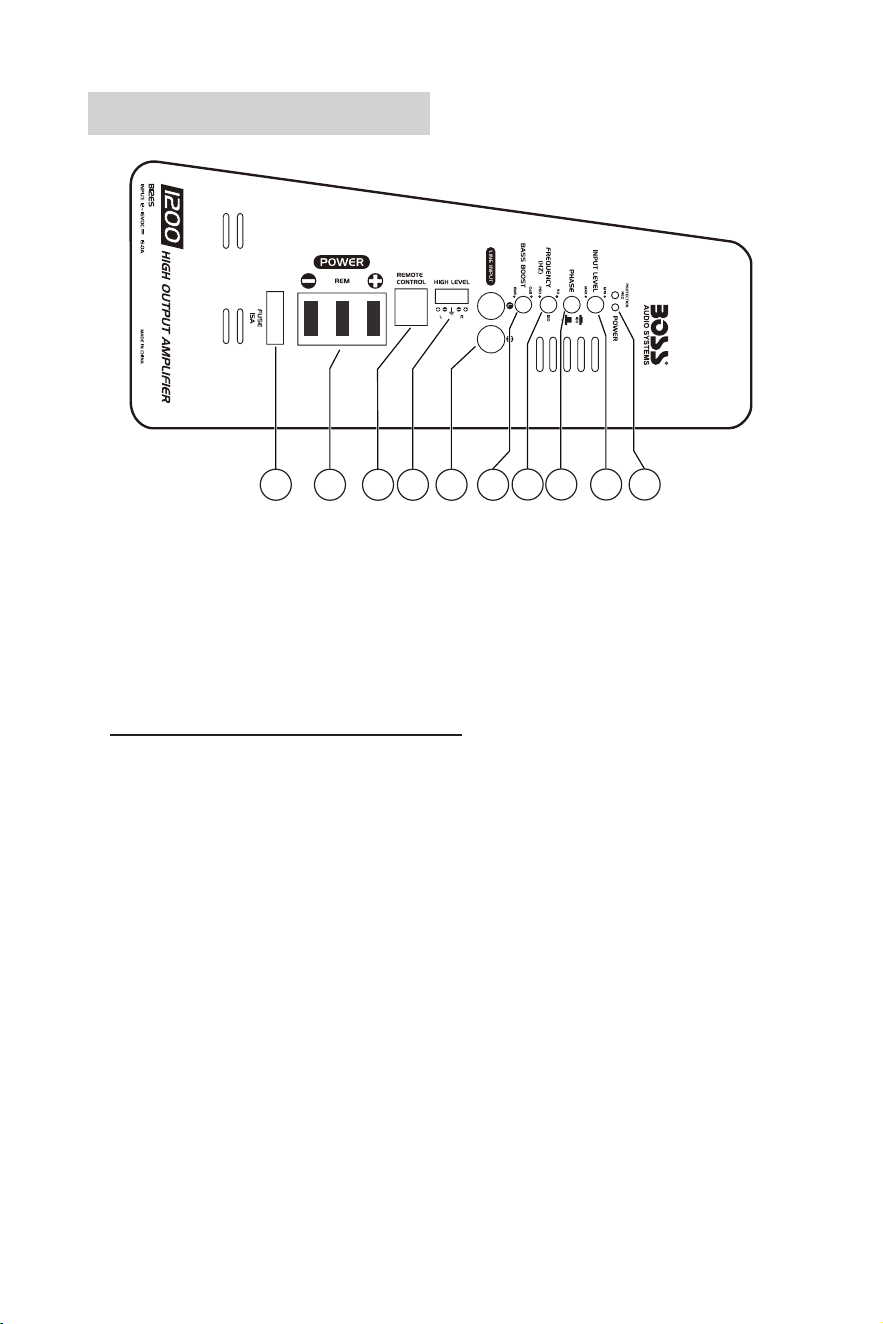
1234
5678910
1. Status Indicators
Green LED: the subwoofer is powered on and operational.
Red LED: the subwoofer is in protection mode and not operational. This problem is caused by input
overload, short circuit or extremely high temperature.
2. Input Gain Control
Adjust the input level of this subwoofer in order to match the output level from your source unit (head unit).
Important! Do not adjust the input level to maximum unless your input level requires it.
Follow the steps below to set your input level correctly.
a. On this subwoofer, turn the input gain control to minimum.
b. On your source unit, turn the volume to about 3/4 full level.
c. Slowly turn up the input gain control until you hear a small amount of distortion. Then turn down the gain
control until the distortion is completely gone. Leave the gain control at this setting.
3. Phase Control
Press to improve bass response (no or little bass sound) caused by time alignment problem in the audio
system. This problem usually results from having this subwoofer at a different distance from the listener
than the other speakers in the audio system.
4. Low Pass Filter (LPF)
Use this control to dene the frequency range you want the subwoofer to receive. The subwoofer will only
receive the frequencies below the one you set to reproduce sound.
Tip: If the other speakers of your audio systems are weak on the mid frequencies, set the LPF control
relatively high. If the midrange is well covered by the other speakers of your audio system, set the LPF
control relatively low to only receive lower frequency signal.
5. Bass Boost Control
Use this control to increase sound output level of the bass frequencies.

- 5 -
6. Low-Level Input (RCA Input)
Connect to the RCA outputs on your head unit. For best audio performance, low-level input is recommended
to input audio signal to this subwoofer if RCA outputs are present on your head unit or signal processor.
7. High-Level Input (Speaker Level Input)
Connect to the speaker wires on your head unit. If your head unit does not have RCA outputs, use the
speaker wires on the head unit for audio signal input from your head unit.
8. Remote Subwoofer Control Port
Connect to the supplied remote subwoofer level control. Use the remote control to independently adjust the
volume level of the subwoofer.
9. Power Terminals
: Connect to the closest point on the chassis of your vehicle.
REM: Connect to the remote output wire of your head unit for power on/off control on this subwoofer. No
need to make the remote connection if you use high-level input connection. High-level input connection auto
detects DC voltage to activate on/off control.
: Connect to the positive terminal of the 12V vehicle battery.
10. Fuse Holder
Insert a 15A blade type fuse (ATO) to provide protection of the circuitry. Do not use a fuse with a different
rating. Never replace the fuse with a wire or coin.
Subwoofer Setup Procedure
1. Secure this subwoofer in your vehicle. See the section “Placement” on page 6.
2. Disconnect the negative terminal of the vehicle battery to prevent a short circuit.
3. Establish audio signal input (low-level or high-level inputs). See the section “Low Level Input Wiring” or
“High Level Input Wiring” on page 7.
4. Make power connection on this subwoofer. See the section “ Power Connection” on page 8.
5. Recheck all connections to ensure correct and secure power/signal inputs.
6. Set the input gain control (INPUT LEVEL) to the minimum position.
7. Reconnect the negative battery terminal.
8. Turn on your source unit, then this subwoofer automatically turns on.
9. Set the source unit volume to about 3/4 full level, then adjust this subwoofer’s input gain control (INPUT
LEVEL) to just below the level of distortion.
10. Fine tune the various controls on this subwoofer to obtain best results.
Important notes on input level control
• The input gain control (INPUT LEVEL) is designed only to adjust the input level of the subwoofer in order to
match the output level of your source unit. It is not a volume control!
• Never adjust the input level to maximum unless your input level requires it.
• Failure to notice these instructions will result in an input overload to the subwoofer and excessive audio
distortion. It can also trigger protection mode, or may cause damage to the subwoofer or your speakers.
- 6 -
Protection Mode
When protection mode triggers, the red LED on the subwoofer turns on and the subwoofer shuts down.
One of the following reasons can trigger protection mode: input overload, short circuit and extremely high
temperature.
When the red LED turns on, take the following measures.
• Check the audio system carefully to determine what has caused the protection mode to trigger.
• Reset the subwoofer. Turn off the subwoofer (by turning off the head unit or other audio source which feeds
the subwoofer) and turn it on again.
• If the shutdown was due to either an input overload or a short circuit, correct the conditions which cause the
overload or short circuit then turn on the subwoofer again.
Placement
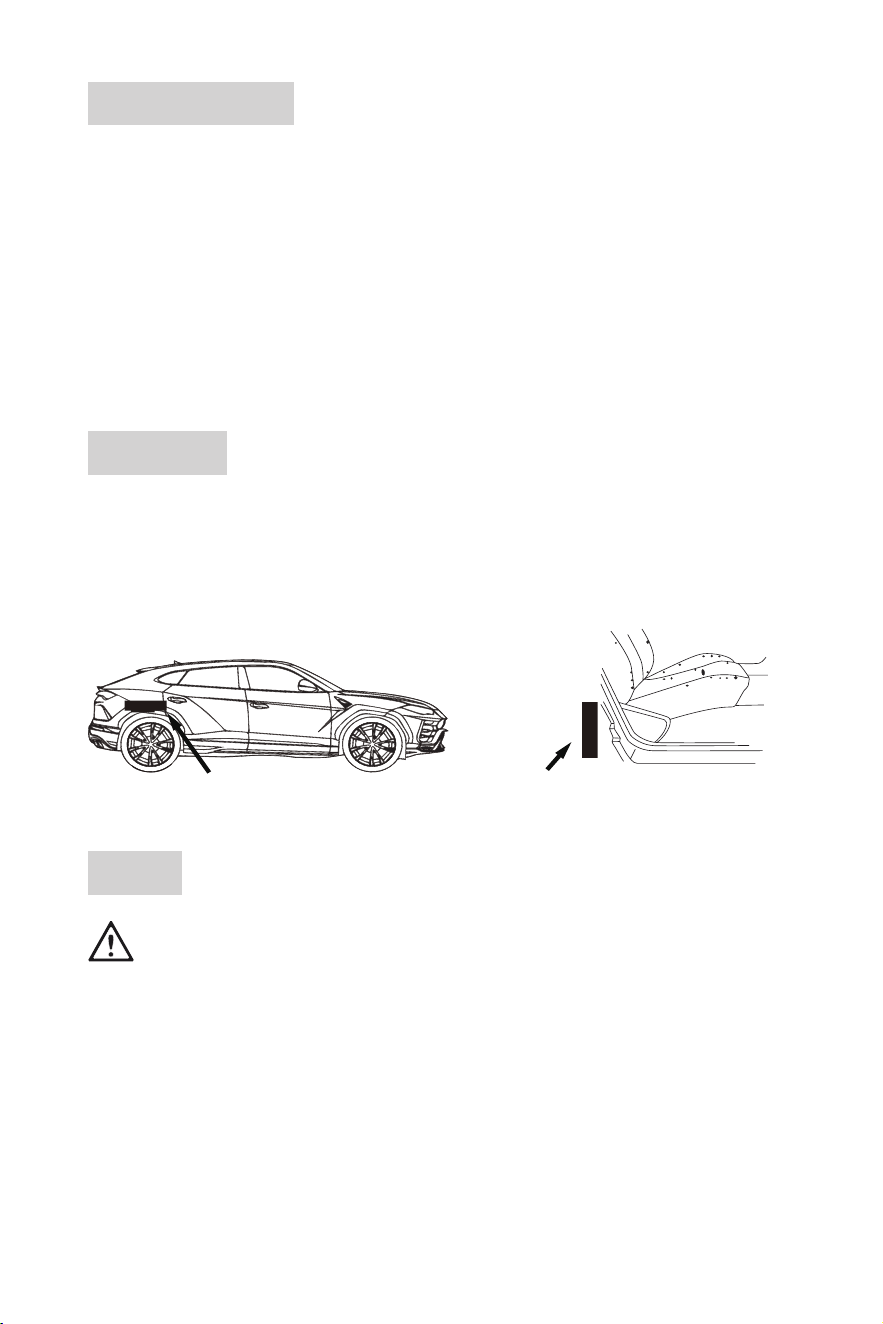
• Find a suitable location in the vehicle to place the subwoofer. A common location is in the trunk of a car or
behind the seat of a truck, as shown below.
• Make sure there is sufcient air circulation around the subwoofer.
• Place the subwoofer in the location away from moisture, and where connection cables are not pinched or
damaged by sharp objects.
En el maletero Detrás del asiento
Wiring
See the section “Installation Precautions” on page 3.
For safety, disconnect the negative terminal of the vehicle battery prior to wiring.
Use only high quality wires for reliable installation to minimize signal or power loss.
Make sure wires are not squeezed or damaged by sharp edges. Use rubber bushings for
penetrations.
Make sure all the cables are securely connected and bare wires are properly insulated.
Reconnect the negative terminal of the vehicle only when all wire connections are correctly and
securely made.
- 7 -
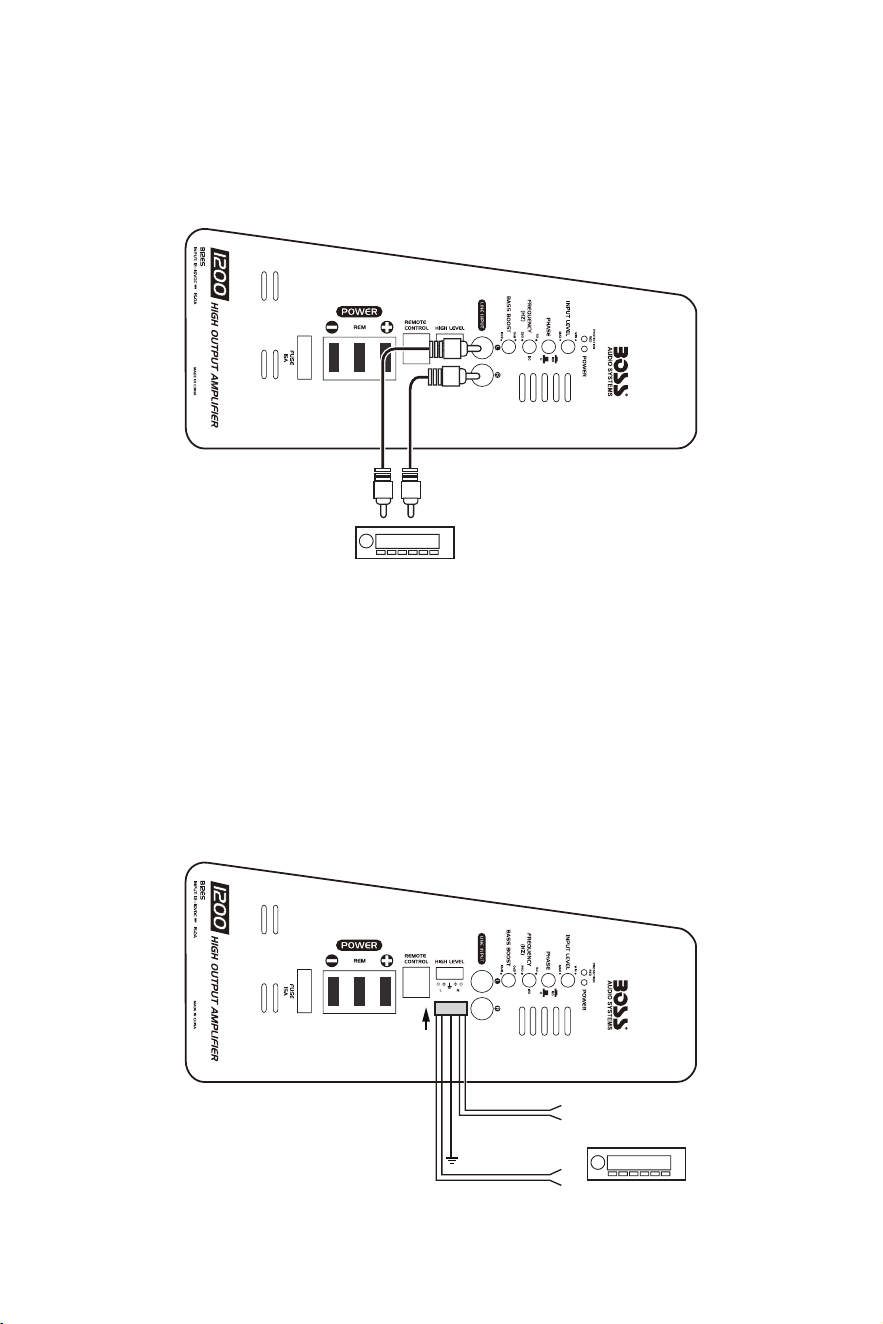
Low-Level Input Wiring
The subwoofer offers you two wiring alternatives for audio signal input from your source unit (head unit). Low-
level input wiring is preferred for waudio input. It provides an exceptional clean sound from the source unit.
Important! Do not connect both the high-level and low-level inputs from your source unit to the subwoofer at
the same time.
LR
To the RCA audio outputs
of your head unit
• Using RCA cables (not included), connect two RCA jacks (LINE INPUT L/R) on the subwoofer to the RCA
audio outputs on your head unit. Make sure the left and right channels are correctly matched.
• To reduce the possibility of noise entering the signal chain, use high-quality, well insulated RCA cables. Run
the RCA cables away from large cable loops, electric fan and power cables.
High-Level Input Wiring
The subwoofer offers you two wiring alternatives for audio signal input from your source unit (head unit). Use
high-level input wiring for audio input from the source unit only when RCA audio outputs are not present on
the source unit.
Important! Do not connect both the high-level and low-level inputs from your source unit to the subwoofer at
the same time.
To the speaker wire
s
of your head unit
Green
Purple
*
*
Purple/Black
R+
R-
L+
L-
Green/Black
To metal frame
of your vehicle
Black
- 8 -
• Using the supplied high-level input wire harness, fasten the black wire to the metal frame of your vehicle
(for signal noise prevention), and connect the other four colored wires to speaker output wires of your head
unit. Make sure to observe speaker polarity.
• Make sure the speaker wires are securely connected and properly insulated. Run the wires under the
vehicle mats for wire protection.
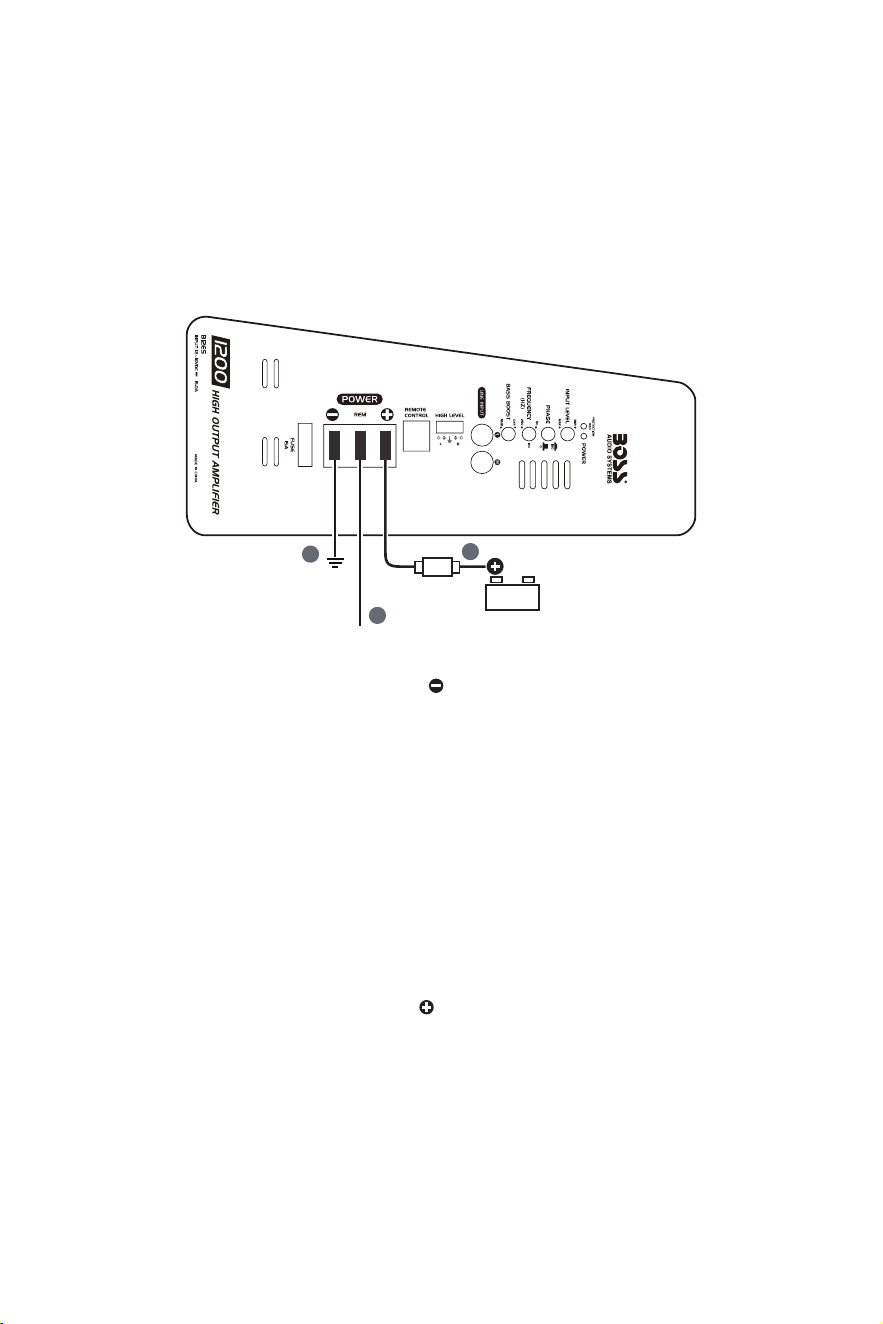
Power Connection
Important! The power wire must be connected to the battery through a fuse (not included).
To the remote output wire
of your head unit
To metal frame
of your vehicle
1
2
Fuse
(not included)
12V
Battery
3
1. Using an 8 gauge (or heavier) wire, connect the terminal on the subwoofer to the metal frame of your
vehicle. Keep the ground wire less than 39” (100 cm) in length.
Scrape away any paint, rust or dirt from the ground point to provide a clean contact. Fasten the ground wire
on the ground point with a screw or bolt.
2. Using a 16 gauge (or heavier) wire, connect the REM terminal on the subwoofer to the remote output wire
of your head unit.
The REM terminal connection is used for power control. The subwoofer automatically turns on or off every
time the connected head unit is turned on or off.
If high-level input connection is made, you do not need to make the REM terminal connection. High-level
input connection auto detects DC voltage to activate on/off control.
If your head unit does not have the remote output wire, connect the REM terminal on the subwoofer to the
ignition switch wire of your vehicle for power on/off control. In this case, make sure your head unit is also
turned on or off with the operation of the ignition switch to avoid noise occurrence.
3. Using an 8 gauge (or heavier) wire, connect the terminal on the subwoofer to the positive terminal of the
12V vehicle battery through a correct fuse (not included). Keep the fuse within 18” (45 cm) of the vehicle
battery. It is important to connect the power supply through a fuse for protection of short circuits.
- 9 -
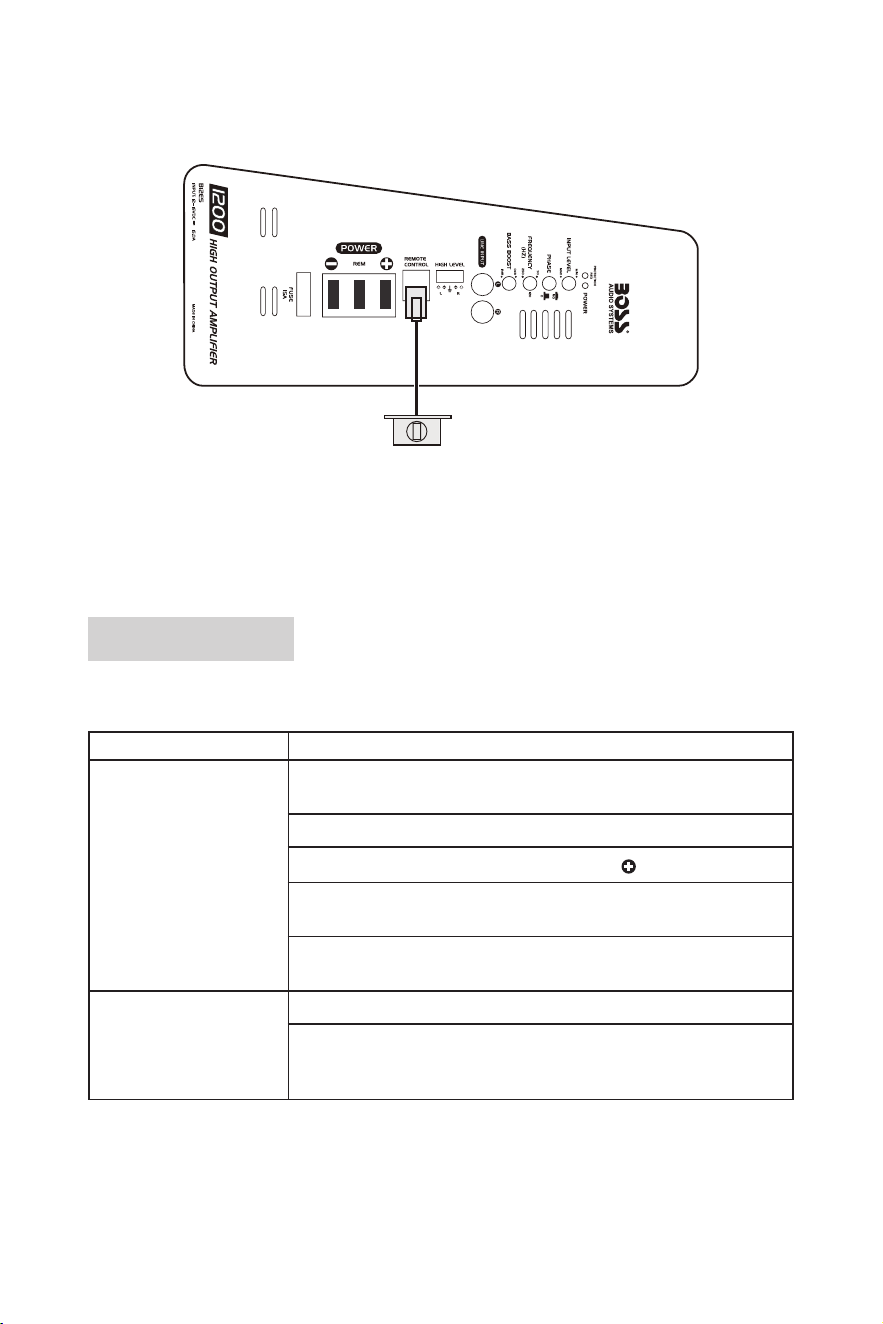
Remote Subwoofer Control Connection
Use the supplied remote subwoofer control to independently adjust the volume level output of the subwoofer.
Remote subwoofer control
• Using the supplied remote subwoofer control cable, connect the remote subwoofer control to the REMOTE
CONTROL on the subwoofer.
• We recommend to position the remote subwoofer control under the dash or in a similar location where using
it will not distract the driver. Fasten the remote subwoofer control using two supplied screws.
Troubleshooting
If you have problems using this product, check the following points before you request service. If you still have
a problem, contact our technical support.
Problem Solution
No power/Green LED not
lighting up
Check that the subwoofer is properly grounded (e.g. a clean contact point
on the vehicle chassis and the secure ground connection).
Check all fuses. Replace faulty one with the same type and rating.
Check that there is sufcient battery power on the terminal.
Check that there is sufcient voltage on the REM terminal when low-level
input connection is made.
If the red LED illuminates, this indicates that the subwoofer in protection
mode. Power off the subwoofer briey, then power it on again.
Protection/Red LED lighting
up
Turn down volume on your source unit to prevent overdriving.
Reset the subwoofer by turning it off and on again (see the section
“Protection Mode” on page 6 for more details). If the red LED still lights up,
the subwoofer is faulty and needs servicing.

- 10 -
Problem Solution
No sound Check that audio input connection is correctly and securely made.
If using low-level input connection, check the RCA cables are correctly and
securely plugged.
If using high-level input connection, check connection with the speaker wires
of your head unit.
Low output Adjust the remote subwoofer control to increase sound level.
Input gain level is too low. Reset the input level control.
Check the frequency pass lter setting.
Distorted audio Check that the input gain control is set to match the output level of your
source unit. Always try to set the input gain level as low as possible.
Check for short circuits on the speaker wires.
Check if the amplier of your source unit is defective.
Audio noise Keep the power cables away from the RCA cables.
Keep the RCA cables away from other electrical cables in the vehicle.
Check that the black ground wire from the high level input wire harness is
properly connected to the metal frame of the vehicle when using high-level
input connection.
Poor quality RCA cables can pick up radiated noise. Use only the best
quality RCA cables.
Check that a negative speaker wire is not touching the vehicle chassis.
Check that your source unit is properly grounded.
Check if noise originates in your source unit.
Subwoofer getting very hot Check that the minimum speaker impedance for the subwoofer is correct.
Check that there is good air circulation around the subwofoer. In some
applications, it may be necessary to add an external cooling fan.

- 11 -
Specications
Audio
Output power ............................................... up to 1200W
Driver size .................................................... 12”
Speaker impedance ..................................... 4Ω
Total harmonic distortion (THD) ................... <0.1%
Frequency response .................................... 40Hz - 250Hz
Signal-to-noise ratio ..................................... 90dB
Input sensitivity ............................................ 0.2V - 6V (low level/RCA); 1V - 10V (high level)
Low pass lter (LPF) .................................... 50Hz - 250Hz
Bass boost ................................................... 0 to +12dB
Phase control ............................................... switchable between 0° and 180°
General
Power supply ............................................... 12 - 16VDC
Current consumption ................................... 12A maximum
Fuse ............................................................. ATO type, 15A
PWM MOSFET power supply ...................... yes
Protection circuitry ....................................... yes (overload, short circuit, and thermal protection)
Remote turn-on/turn-off ............................... yes
Input gain control ......................................... yes, variable
LED indicators ............................................. green - power on; red - protection
Enclosure material ....................................... MDF (Medium Density Fiberboard)
Weight ......................................................... 25.6 lbs/ 11.6 kg
Dimensions (W x D x H) .............................. 24” x 15”x 7” (610 x 381 x 178 mm)
Specications are subject to change without notice.
1122

1122