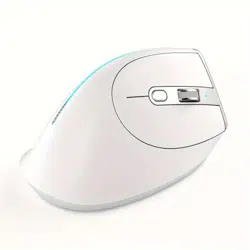

F-36
Wireless Programmable Mouse
【
Instructions
】
Master Electronic Technology Co., Ltd. in Shenzhen. All rights reserved.
ZELOTES is a trademark of Master Electronic Technology Co., Ltd.
All other trademarks are properties of their respective owners.
Package Contents (attachment)
Mouse x1 Receiver x1 Instructions x1 Charging cable x1
Compatibility
With Receiver
Windows
®
11 or later / Windows
®
10/Windows
®
8,Windows
®
7
macOS 10.10 or later
Chrome OS
TM
linux Kernel 2.6
Bluetooth
®
low energy technology
Windows
®
11 or later / Windows
®
10/Windows
®
8
macOS 10.10 or later
Chrome OS
TM
,Android
TM
5.0 or later
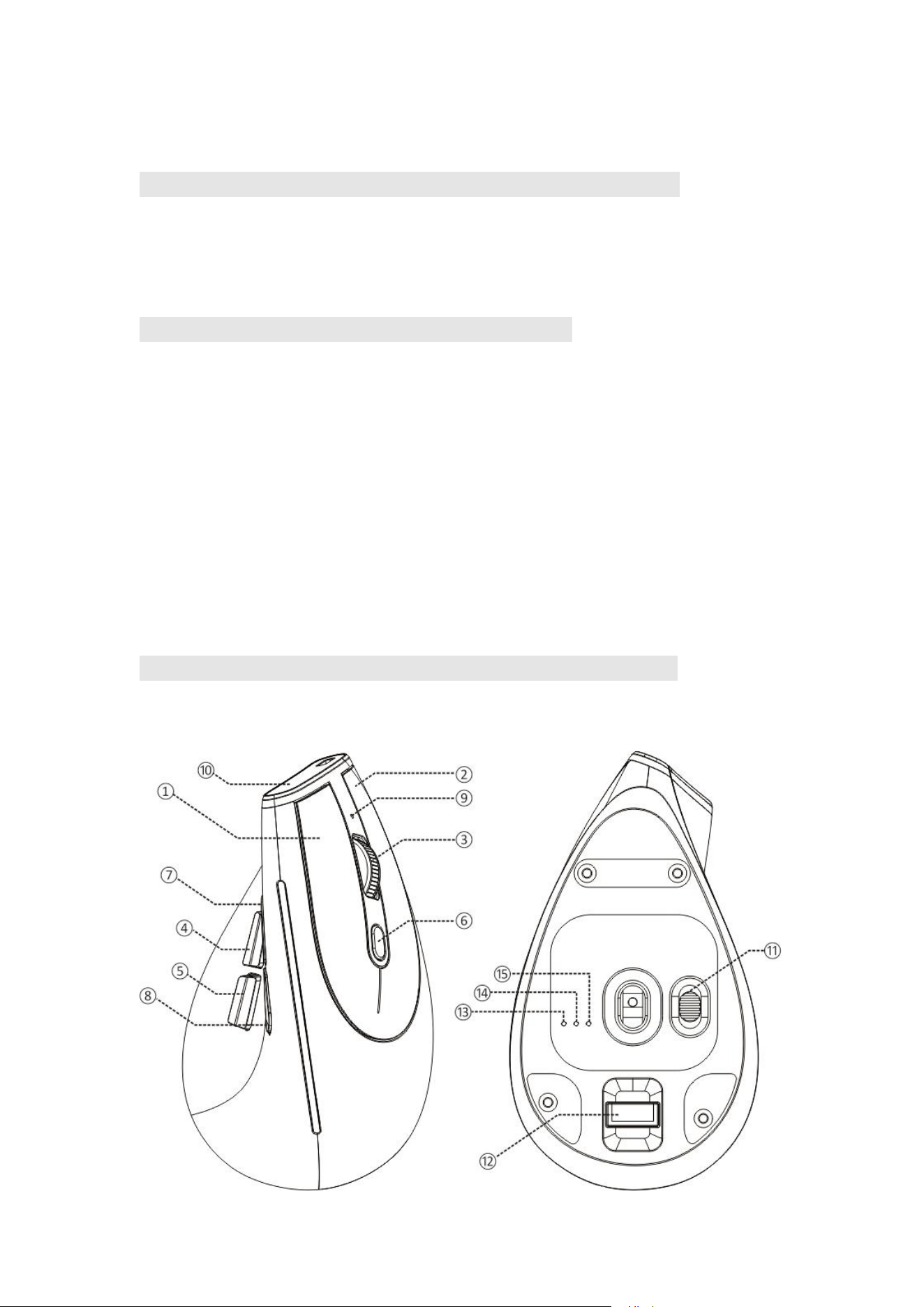
Product Structure Diagram
(English)
Notes on the functions of components
●①Left button ②Right button ③Middle button
④Forward button ⑤Backward button ⑥DPI cycle
⑦bluetooth key ⑧Switching the lighting mode
⑨Low pressure and DPI indicator light ⑩Indicator light for charging
⑪Power on/off ⑫Receptor ⑬Indicator light for 2.4GHz
⑭Indicator light for Bluetooth 1 ⑮Indicator light for Bluetooth 2
Specifications
Number of Buttons: 8
Tracking System: Optical
Frequency: 2402.85MHZ-2480.85MHz
Effective Distance: >10m
Operating Voltage/Current: 3.7 V 10 mA
Button Durability: 3 million times
Wheel Durability: 1.2 million times
Product Dimensions: 124*70*67mm
Product Weight:105 ± 5 g
DPI: 800-1200-1600-2400-4800DPI
2.4 GHz Report Rate: 125 -500Hz
Bluetooth Report Rate: 90-133Hz
【
Bluetooth Mode
】
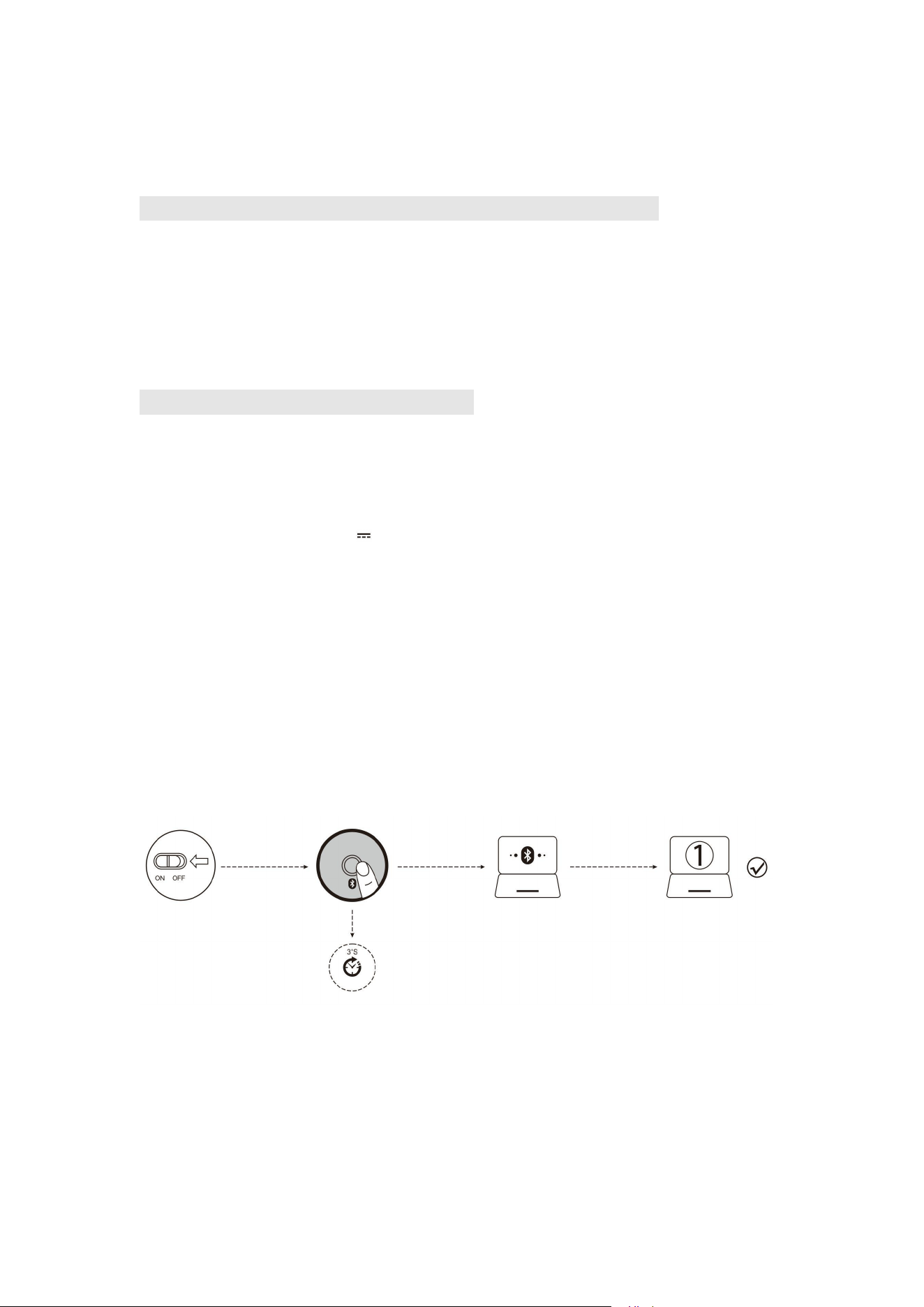
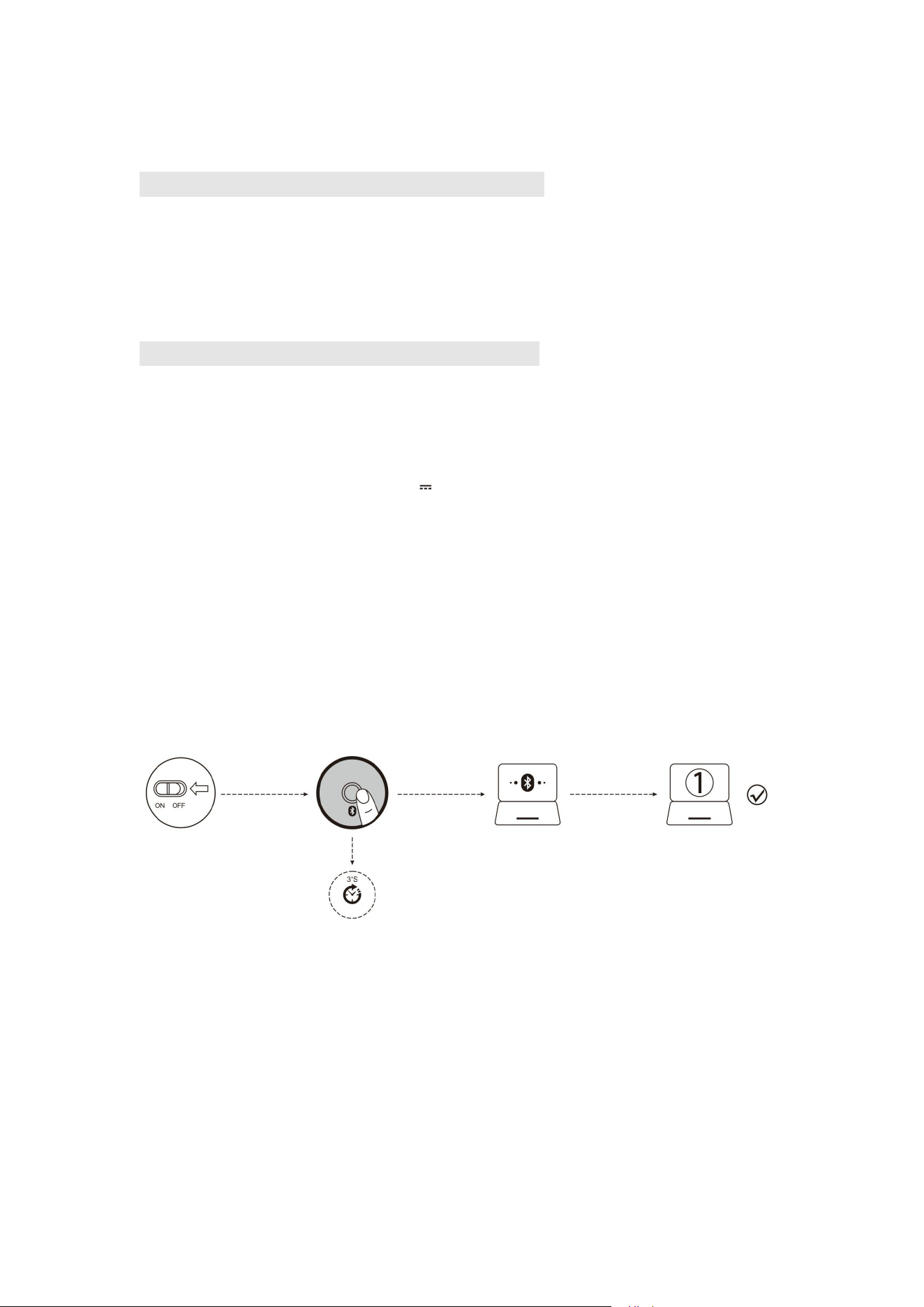
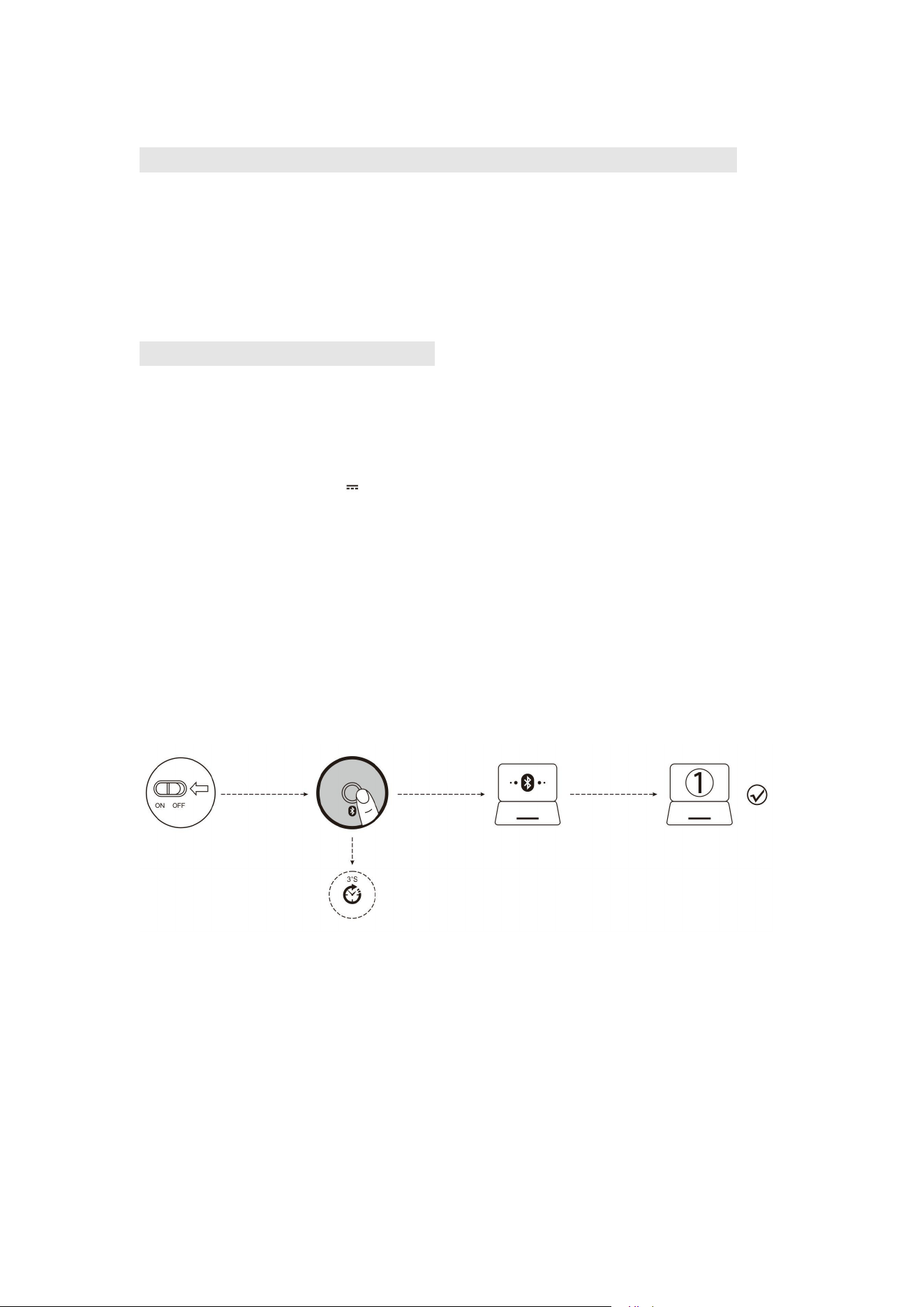
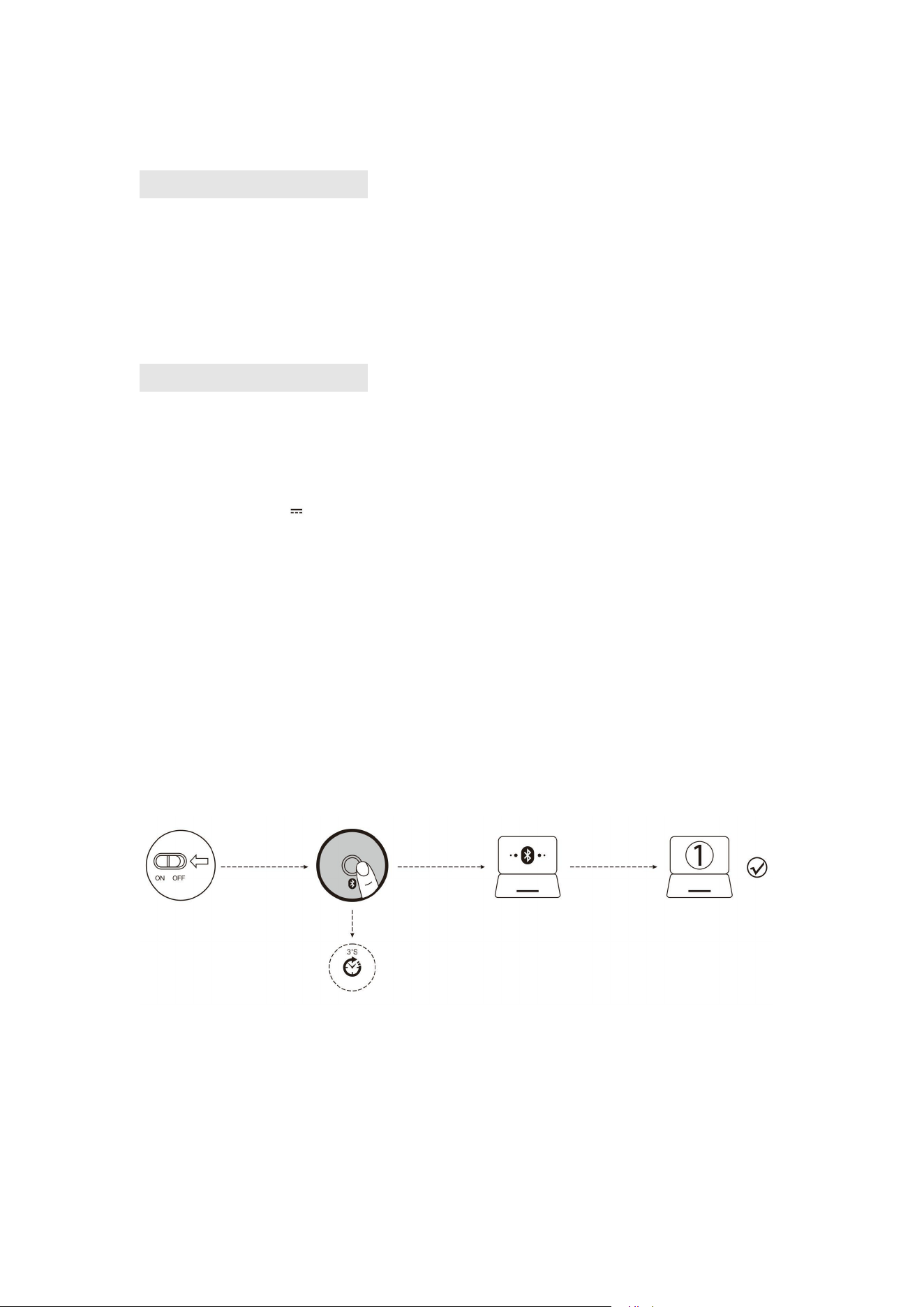
A. Pair Your First Device.
1. Turn on the power switch.
2. Press and hold the Bluetooth button for 3 seconds or more. The blue light flashes rapidly, and
the mouse will enter Discoverable mode for 2 minutes.
3. Compete Bluetooth pairing on your device:
Windows 7 and 8:
(1) Click Start, then select Control Panel > Add Devices.
(2) Select BT 3.0 Mouse or BT 5.0 Mouse in the list, then click Next.
Windows 10:
(1) Click Start, then select Settings > Device > Bluetooth.
(2) Select BT 3.0 Mouse or BT 5.0 Mouse in the list, then click Pair.
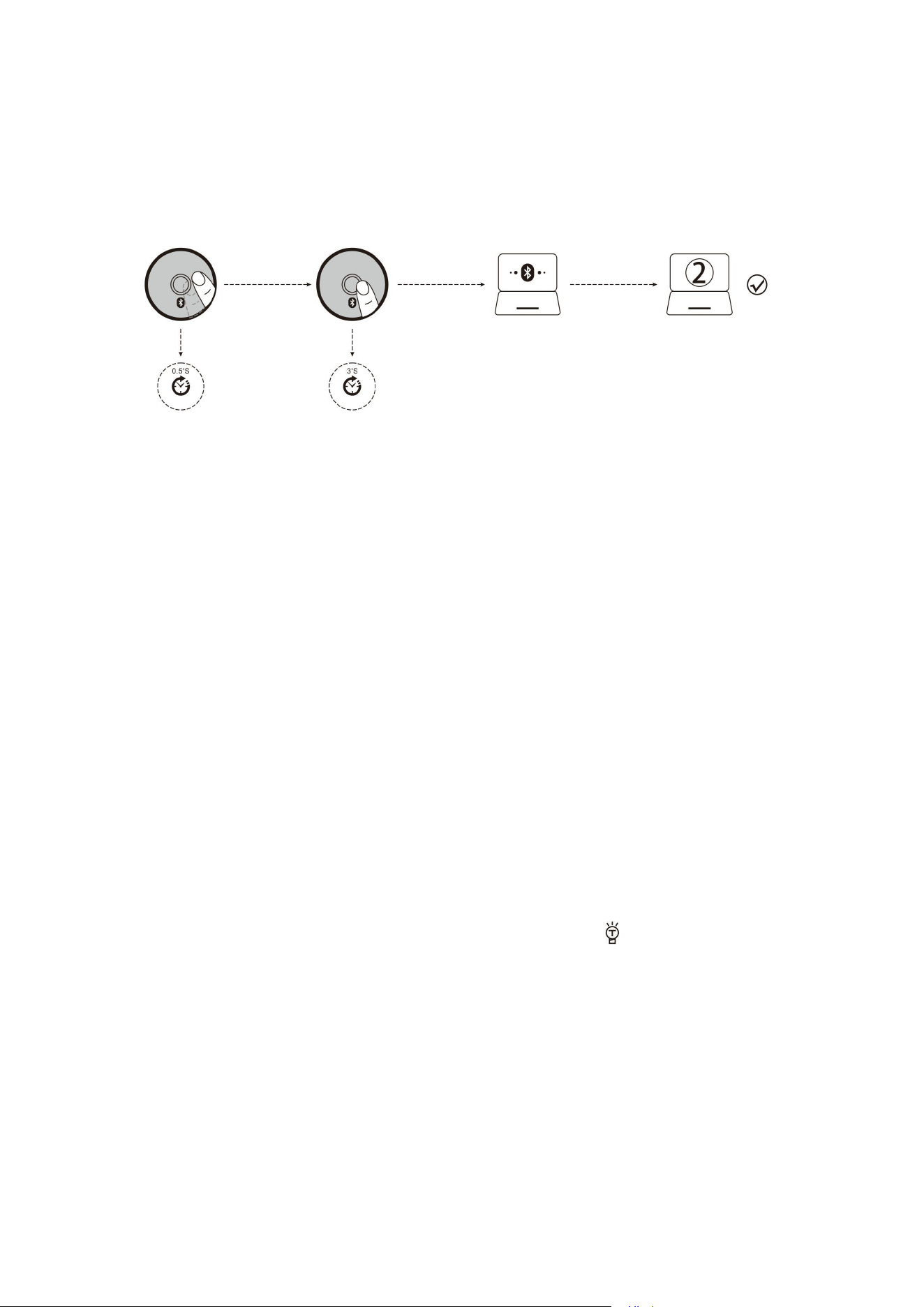
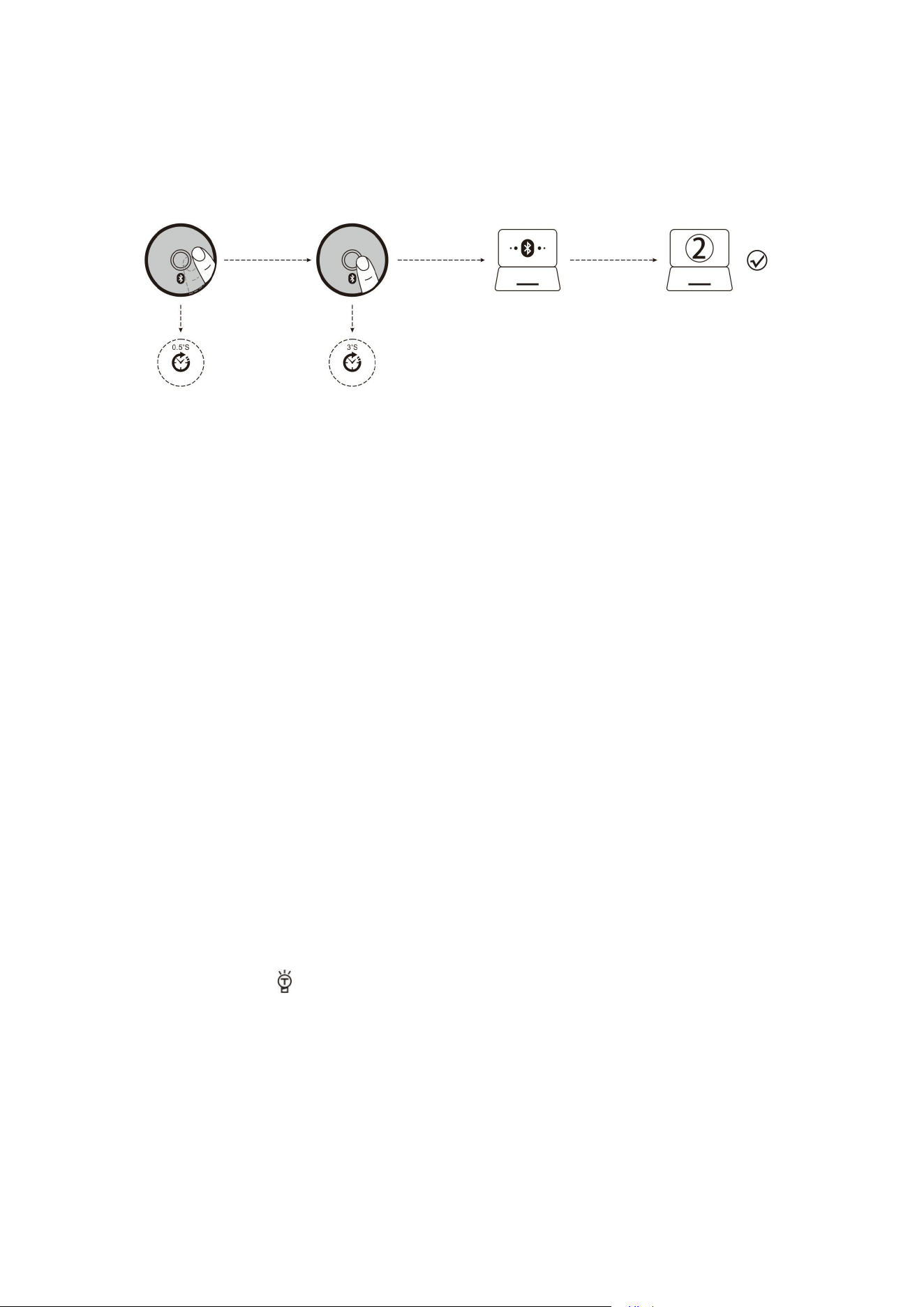
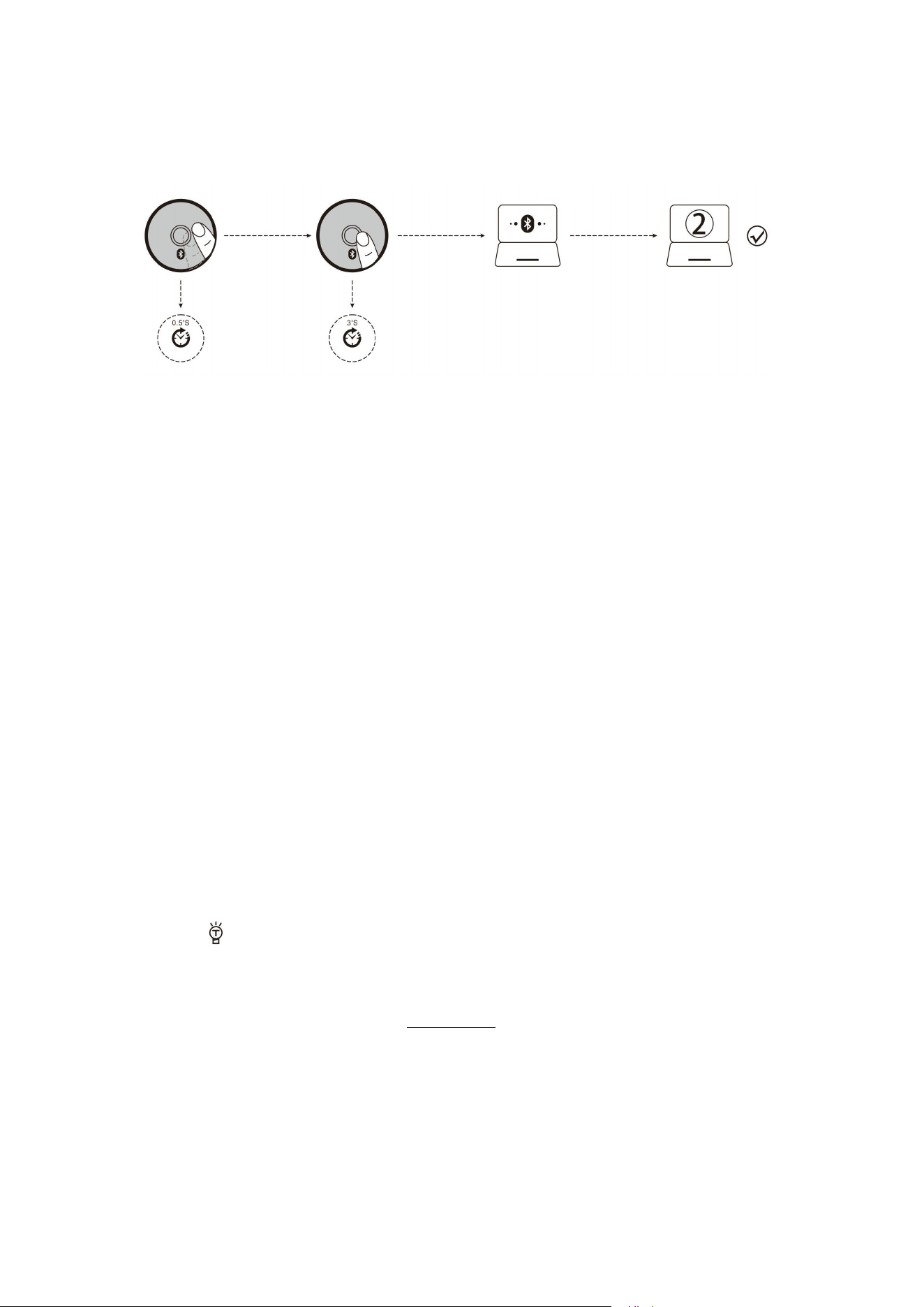
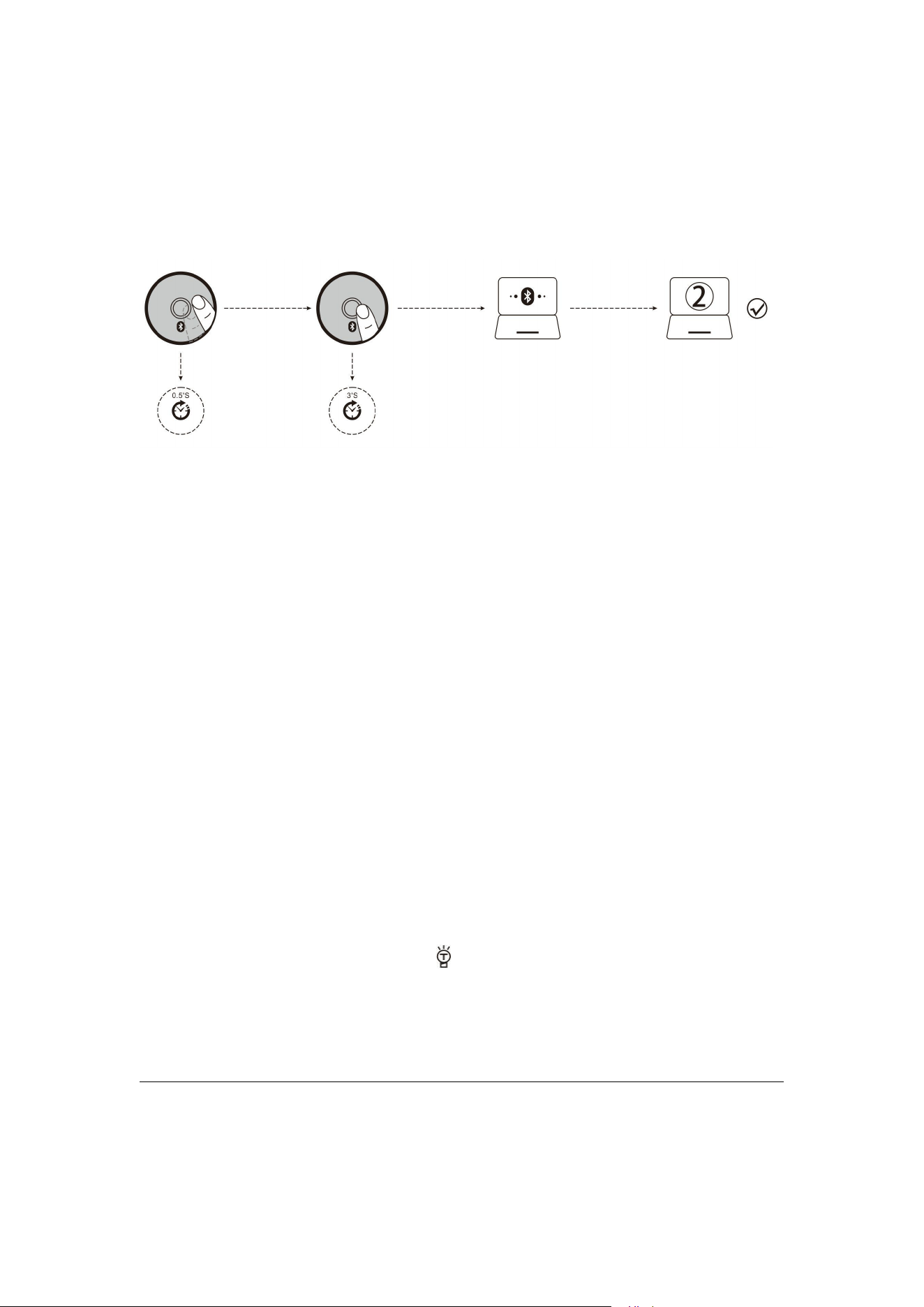
B. Pair Your Second Device.
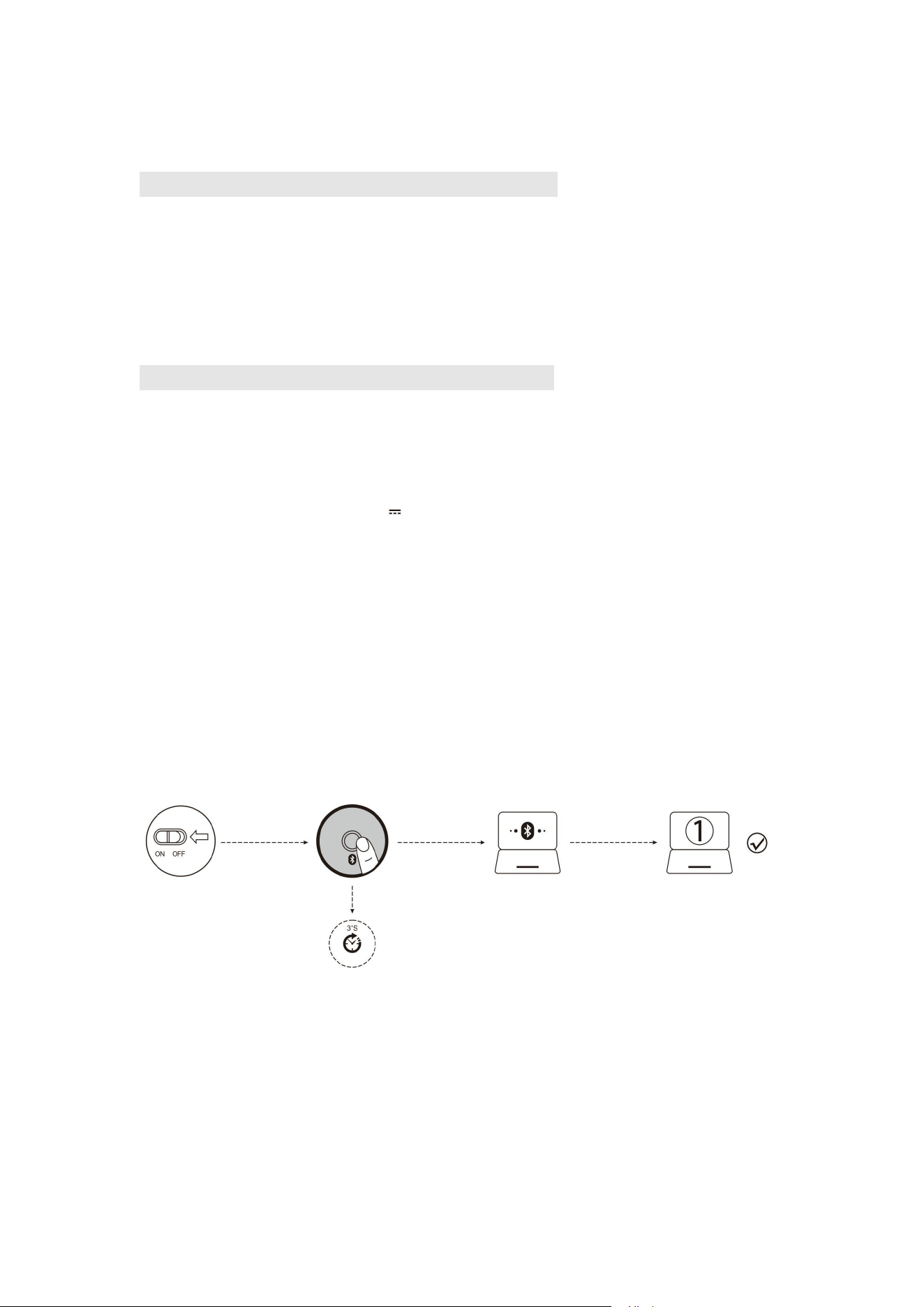
1. Short press the Bluetooth button to switch channel.
2. Follow Steps 2 and 3 in “Pair Your First Device” to complete pairing.
3. Switch between devices.
Short press the Bluetooth button to switch between up to 3 paired devices (Up to 2 devices via
Bluetooth and 1 device via the 2.4 GHz receiver).
Hints on charging:
During charging, the blue LOGO light on the front end goes on; when the battery is fully charged,
the blue light goes off.
Hints on low battery:
When the mouse is on low battery and is being used, the blue light at the scroll sparkles rapidly
every other second.
Hints on DPI:
Press Button 6, the blue light at the scroll sparkles, sparkling once for DPI Level 1, twice for DPI
Level 2, and so on in a similar fashion.
What If the Mouse Does Not Respond?
1.Please charge the mouse with USB cable.
2.Please try to replace the receiver with an USB interface.
3.Make sure the power switch on the bottom of the mouse is “on”or at position.
4.Try to restart the computer.
5.If it is still unsuccessful, please email to E-mail: it@zelotes.cn for technical assistance.
Trademark number: No.013426986
The device conforms to Part 15 of the FCC Rules. Operation is subject to the following two
conditions: (1) The device may not cause harmful interference, and (2) the device must accept any
interference received, including interference that may cause undesired operation.
Precautions:
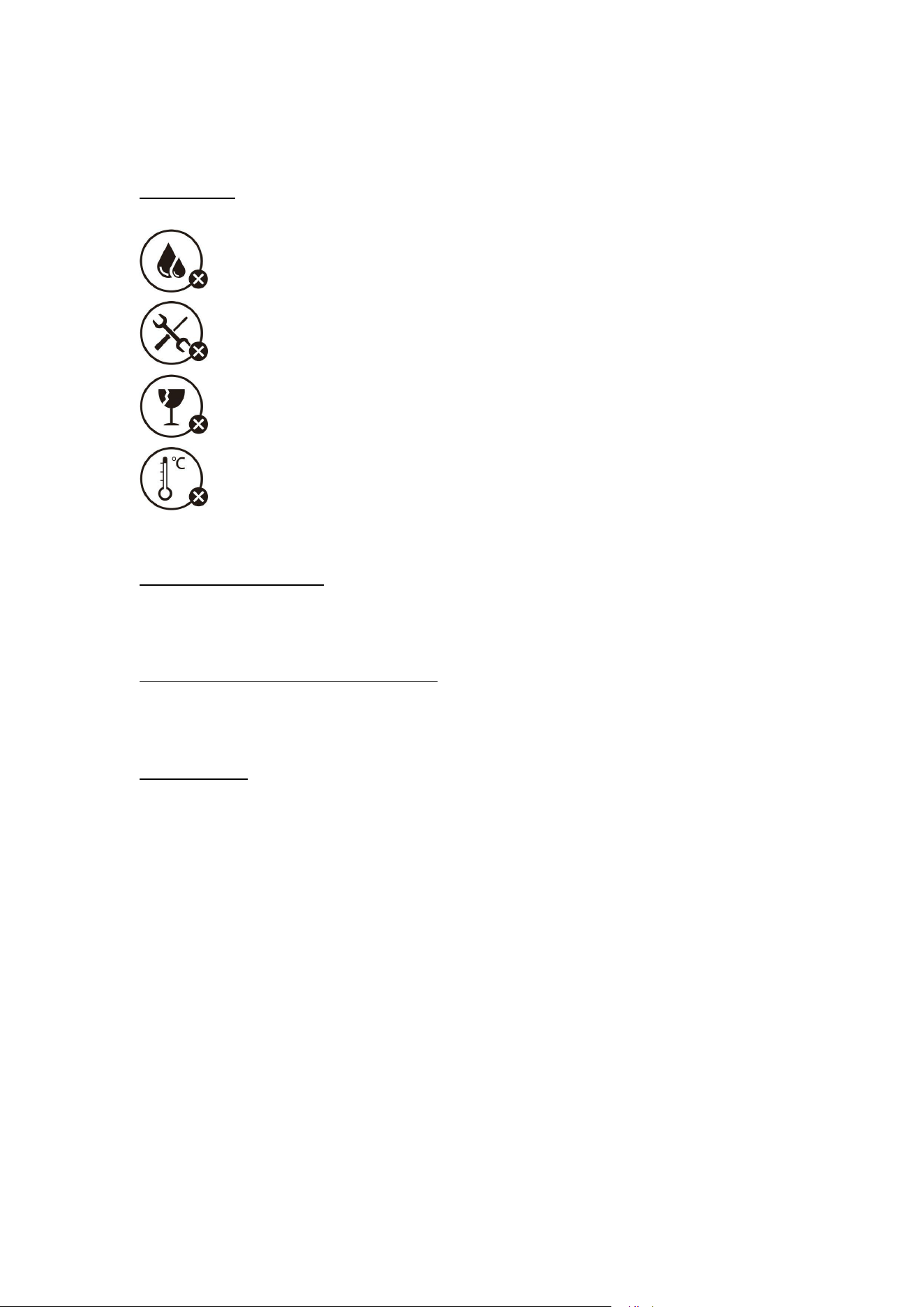
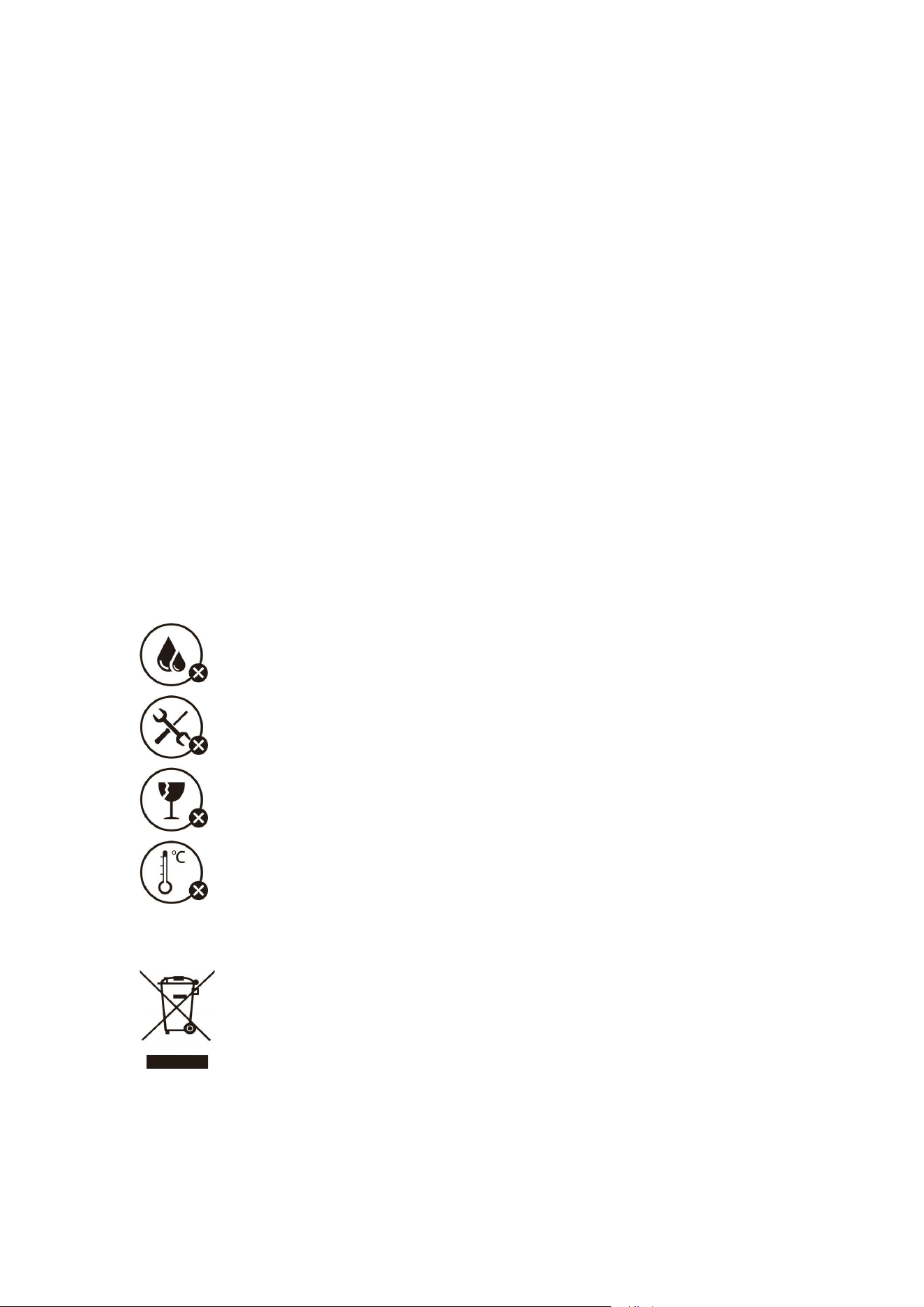
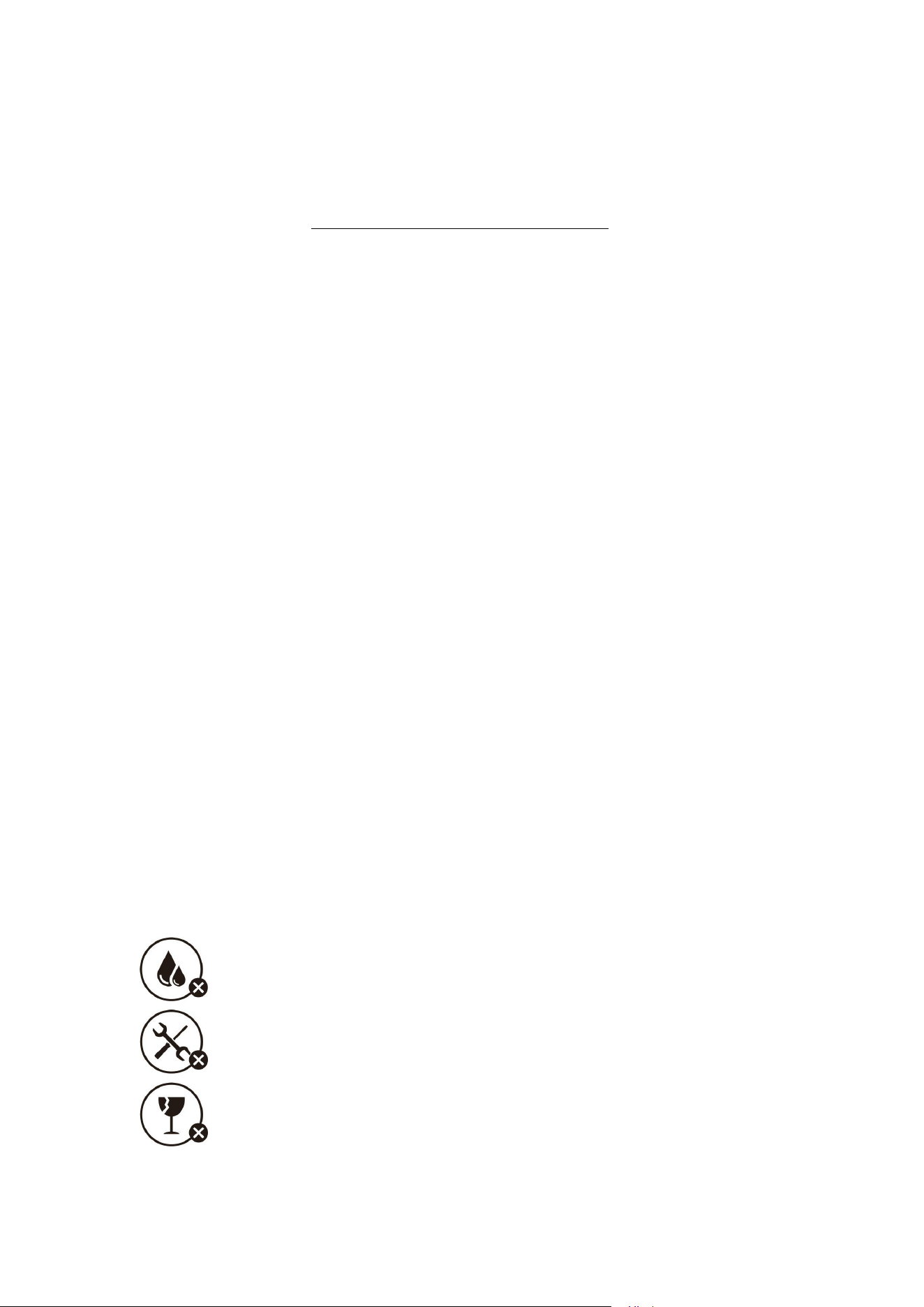
Do not expose it to liquid
Do not disassemble it
Avoid dropping it
Avoid extremely high or low temperature
Declaration of Conformity
The product conforms to EC standards for radio interference. Here, Master Electronic Technology
Co., Ltd. in Shenzhen announces that F-36 radio equipment conforms to the Directive 2014/53/EU.
The full text of the EU Declaration of Compliance can be found on:
http://www.zelotes.cn/en/InfoPages_106.html
Maximum Output Power: OdBm.
Frequency Range: 2.4g band (2402.85MHz-2480.85MHz)
FCC Statement
1. This device complies with Part 15 of the FCC Rules. Operation is subject to the following two
conditions:
(1) The device may not cause harmful interference.
(2) The device must accept any interference received, including that may cause undesired
operation.
2. Changes or modifications to this unit not expressly approved by the party responsible for
compliance could void the user’s authority to operate the equipment.
Note: This equipment has been tested and found to comply with the limits for a Class B
digital device, pursuant to Part 15 of the FCC Rules. These limits are designed to provide
reasonable protection against harmful interference in a residential installation.
This equipment generates, uses, and can radiate radio frequency energy and, if not installed and
used in accordance with the instructions, may cause harmful interference to radio communications.
However, there is no guarantee that interference will not occur in a particular installation. If this
equipment does cause harmful interference to radio or television reception, which can be
determined by turning the equipment off and on, the user is encouraged to try to correct the
interference by one or more of the following measures:
●Reorient or relocate the receiving antenna
●Increase distance between the equipment and receiver.
● Plug the equipment into a socket on a circuit different from that to which the receiver is
connected.
●Consult your distributor or an experienced radio/TV technician for help.
Model: F-36 or FCC ID: 2AIRKF-35
The symbol means the product should not be disposed of with household waste but be brought to
an appropriate collection point to enable recycling. According to local regulations, do not dispose
of the product or rechargeable battery with normal household waste. Appropriate disposal of used
products and rechargeable batteries helps to prevent negative impacts on the environment and
human health.
Customer Service
Limited warranty for 18 months
Lifelong technical support
(Note: Illustrations referenced in this manual are for function description purpose only. Please
refer to the actual product when purchasing!)
For more information on the functions, please go to the official website and download the drivers
for programming: Http://www.zelotes.cn)
(
Français
)
Fonction d’éléments
● ①Bouton Gauche ②Bouton Droit ③Bouton Central ④Bouton Avance
⑤Bouton Retour ⑥Cycle PPP ⑦clé bluetooth
⑧Commutation de mode de lumière ⑨Voyant de Basse tension & PPP
⑩Voyant de charge ⑪Interrupteur d'alimentation ⑫Récepteur
⑬Voyant 2,4GHz ⑭Voyant Bluetooth 1 ⑮ Voyant Bluetooth 2
Paramètres et specifications
Nombre de boutons: 8
Système de suivi: optique
Fréquence : 2402.85MHZ-2480.85MHz
Distance valable : >10m
Tension / courant de fonctionnement: 3.7V 10mA
Durée de vie des boutons: 3 millions fois de clic
Durée de vie des molettes: 1,2 million rotations
Taille du produit: 124*70*67mm
Poids du produit: 105 ± 5 g
Résolution: 800-1200-1600-2400-4800DPI
Taux de scrutation 2.4GHz: 125 -500Hz
Taux de scrutation de Bluetooth : 90-133Hz
【
Mode Bluetooth
】
A. Accoupler à votre premier appareil.
1. Activez la souris.
2. Appuyez sur le bouton « Bluetooth » et maintenez-le pendant plus de 3 secondes. Le voyant
bleu clignote rapidement et la souris est interrogeable dans les 2 minutes.
3. Réalisez l’accouplement de Bluetooth sur votre appareil comme suit :
Windows 7 et 8 :
(1) Cliquez sur « Démarrer » et sélectionnez « Panneau de configuration » > « Ajouter un appareil
».
(2) Sélectionnez « BT 3.0 Mouse » ou « BT 5.0 Mouse » dans la liste, cliquez sur « Suivant ».
Windows 10 :
(1) Cliquez sur « Démarrer », sélectionnez successivement « Paramètres » > « Appareil » > «
Bluetooth ».
(2) Sélectionnez « BT 3.0 Mouse » ou « BT 5.0 Mouse » dans la liste, cliquez sur « Accoupler ».
B. Accoupler à votre deuxième appareil
1. Appuyez brièvement sur le bouton « Bluetooth » pour changer de canal de communication.
2. Terminez la connexion en suivant les étapes 1 et 2 de la section « Accoupler à votre premier
appareil »
3. Commuter l'appareil.
Appuyez brièvement sur le bouton « Bluetooth », vous pouvez commuter entre 3 appareils
accouplées au maximum (2 appareils connectés via Bluetooth, 1 appareil via un récepteur 2,4
GHz).
Indication de charge :
Lors de la charge, le voyant du LOGO avant s'allume en bleu, ce voyant bleu s’éteint une fois le
produit est complètement chargé.
Indication de batterie faible :
Lorsque vous utilisez la souris, le voyant bleu de la molette clignote rapidement toutes les 1
secondes.
Indication de résolution :
Appuyez sur le bouton 6, le voyant bleu de la molette clignote une fois lorsque le PPP est réglé à
niveau 1, deux fois lorsque le PPP est réglé à niveau 2, et ainsi de suite.
Comment faire si la souris ne marche pas ?
1.Veuillez utiliser le câble pour charger la souris.
2.Veuillez changer à une interface de USB pour le récepteur et puis réssayer.
3.Assurez vous que l'interrupteur d'alimentation au fond de la souris s’est mis en position de
marche et de l'icône .
4.Redémarrez votre ordinateur pour essayer.
5.Si l'opération ci-dessus ne fonctionne pas, veuillez envoyer un e-mail à E-mail: [email protected]
demander une assistance technique.
Numéro de marque:No.013426986
Déclaration de Conformité
Par la présente, Shenzhen Master Electronic Technology Co., Ltd, déclare que le présent produit
conforme aux exigences en matière d'interférences radio de la Communauté Européenne, que
l'équipement radio F-36 en conformité avec la Directive 2014/53/EU. Le texte intégral de la
Déclaration de Conformité EU est disponible sur le site Internet suivant :
http://www.zelotes.cn/en/InfoPages_106.html
Puissance de sortie maximale : OdBm
Bandes de fréquences : bande 2,4 G (2402,85 MHz-2480,85 MHz)
Déclaration :
(1) Le présent appareil ne doit pas provoquer d'interférences nuisibles.
(2) Le présent appareil doit accepter toute interférence reçue, y compris les interférences pouvant
provoquer un fonctionnement indésirable.
(3) Les changements ou modifications non expressément approuvés par la partie responsable de la
conformité pourraient annuler le droit d'usage de l'utilisateur sur cet équipement.
Cet appareil génère, utilise et peut émettre de l'énergie de fréquence radio. S'il n'est pas installé et
utilisé conformément aux instructions, il peut causer des interférences nuisibles aux
communications radio. Cependant, rien ne garantit que des interférences ne se produiront pas dans
une installation particulière. Si l’appareil provoque des perturbations gênantes dans les réceptions
radio ou télévision, et que ces interférences peuvent être déterminées en éteignant ou en allumant
l'appareil, nous vous invitons à essayer de corriger les interférences en effectuant au moins l’une
ou plusieurs opérations suivantes :
●Réorientez ou déplacez l’antenne de réception.
●Éloignez l’appareil du récepteur.
●Branchez l’appareil sur une prise différente de celle du récepteur, sur un circuit distinct.
● Demandez l’assistance d’un distributeur ou d’un technicien expérimenté en matière de
radiofréquences.
Consignes de sécurité
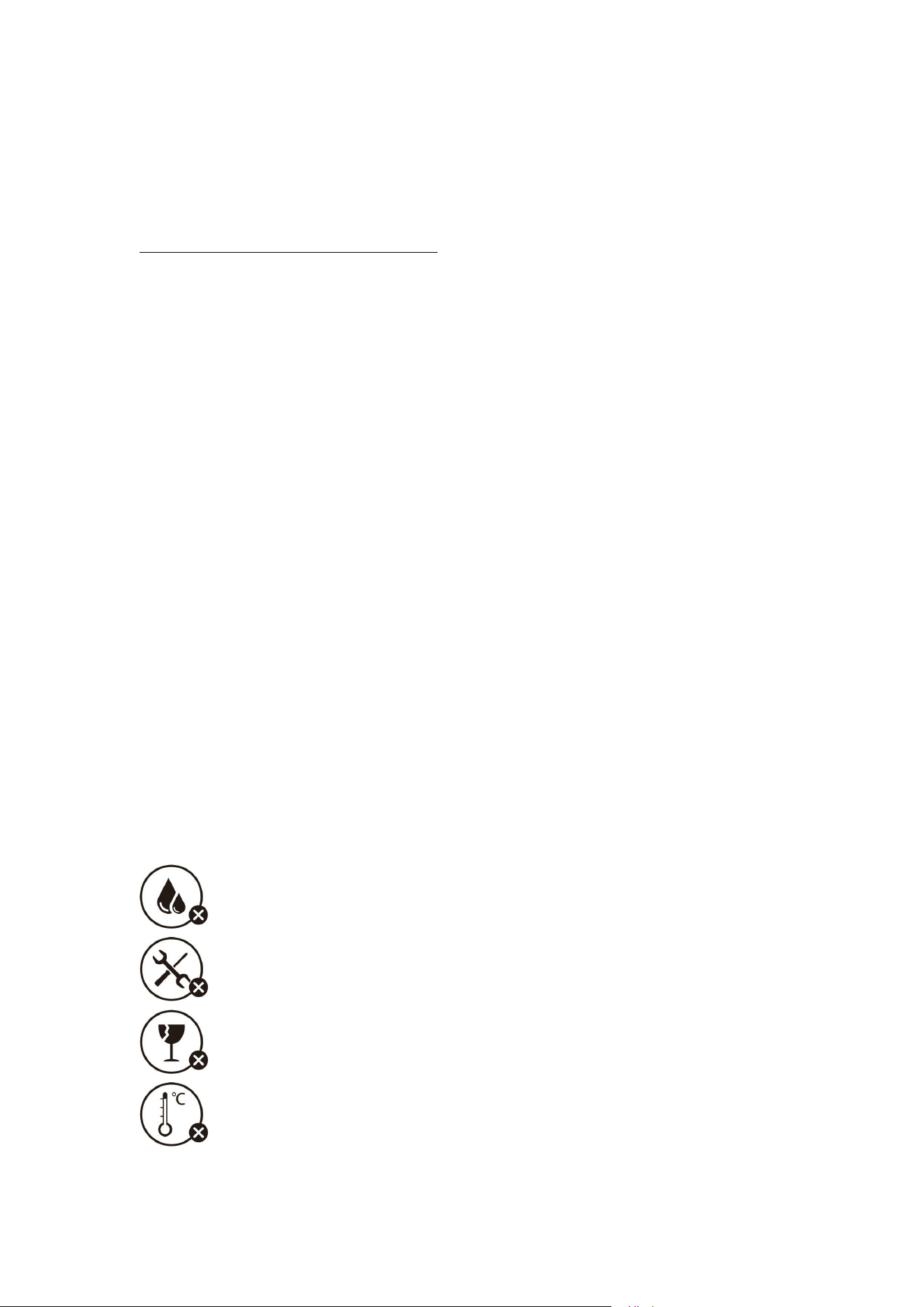
Ne l’exposez pas au liquide.
Ne le désassemblez pas.
Éviter de le tomber.
Évitez les températures extrêmement élevées ou basses.

Ce symbole signifie que le produit ne doit pas être jeté avec les déchets ménagers, mais doit être
déposé dans un centre de collecte approprié pour recyclage. Respectez la réglementation locale et
ne jetez pas ce produit et les batteries rechargeables avec les ordures ménagères. La mise au rebut
correcte de vos anciens appareils et des batteries rechargeables aide à préserver l'environnement et
la santé.
Service Clients
Garantie limitée de 18 mois
Support technique dure toute la vie
(Remarque : Les images figurant dans ce manuel sont uniquement utilisées pour décrire les
fonctions, veuillez vous référer au produit réel lors d’achat. Pour plus d’informations sur les
fonctions, veuillez visiter le site officiel pour télécharger le pilote de programmation :
Http://www.zelotes.cn !).
(en español)
Descripción de la función del componente
① Botón izquierdo ② Botón derecho ③ Botón central
④ Botón de avance ⑤ Botón de retroceso ⑥ Ciclo de DPI
⑦ Botón Bluetooth ⑧ Cambio de modo de luz ⑨ Bajo voltaje e Indicador de DPI
⑩ Indicador de carga ⑪ Interruptor de encendido ⑫ Receptor
⑬ Indicador de 2,4 GHz ⑭ Indicador de Bluetooth “1”
⑮ Indicador de Bluetooth “2”
Especificación
Número de botones: 8 botones
Sistema de control de tracción: óptico
Frecuencia: 2402,85 MHz-2480,85 MHz
Distancia efectiva:
>
10 m
Voltaje/corriente de trabajo: 3,7V 10 mA
Vida de botones: aprox. 3 millones de veces
Vida de rueda: aprox. 1,2 millones de rpm
Dimensión del producto: 124*70*67 mm
Peso del producto: 105±5 g
Resolución: 800-1200-1600-2400-4800 DPI
Retorno de 2,4 GHz: 125-500Hz
Retorno de Bluetooth: 90-133Hz
【
Modo Bluetooth
】
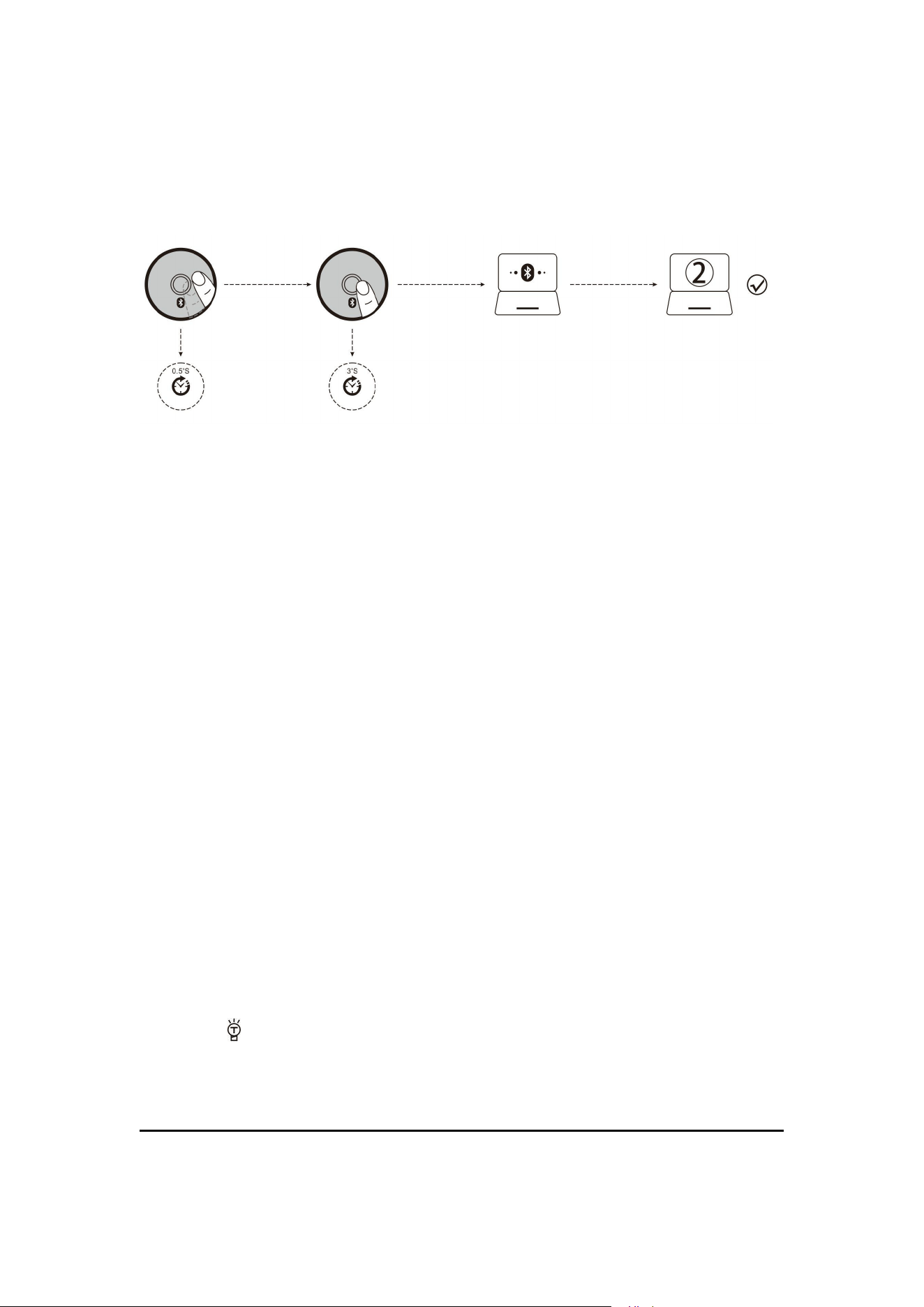
A. Empareje su primer dispositivo.
1. Encienda el interruptor de encendido del ratón.
2. Mantenga pulsado el botón Bluetooth durante más de 3 segundos, la luz azul
parpadea rápidamente, el ratón se encuentra en estado de ser buscado dentro de 2
minutos.
3. Complete el emparejamiento Bluetooth en su dispositivo:
Windows 7 y 8:
(1) Haga clic en
“
Comenzar
”
, elija
“
Panel de control
” > “
Añadir dispositivo
”
.
(2) Elija “BT 3.0 Mouse” o “BT 5.0 Mouse” de la lista, haga clic en “Siguiente paso”.
Windows 10:
(1) Haga clic en
“
Comenzar
”
, elija sucesivamente
“
Ajustes
” > “
Dispositivos
”
> “
Bluetooth
”
.
(2) Elija “BT 3.0 Mouse” o “BT 5.0 Mouse” de la lista, haga clic en “Emparejar”.
B. Empareje su segundo dispositivo.
1.Pulsa brevemente el botón Bluetooth para cambiar de canal.
2. Siga los pasos 2 y 3 de "Empareje su primer dispositivo" para completar la
conexión.
3. Cambie de dispositivo.
Pulsa brevemente el botón Bluetooth para alternar entre hasta 3 dispositivos
emparejados (hasta 2 dispositivos por Bluetooth, 1 dispositivo por receptor de 2,4
GHz).
Indicación de carga:
Durante el proceso de carga, el logotipo frontal se ilumina en azul y, cuando está
completamente cargado, la luz azul se apaga.
Indicación de baja batería:
Al usar el ratón, la luz azul en la rueda de desplazamiento parpadeará rápidamente
cada 1 segundo.
Indicación de resolución:
Pulse el botón No. 6 y la luz azul de la rueda de desplazamiento parpadeará, el primer
nivel de DPI parpadeará una vez, el segundo nivel de DPI parpadeará dos veces y así
sucesivamente.
¿
Qué debo hacer si el ratón no responde?
1. Utilice el cable de datos para cargar el ratón.
2. Reemplace el receptor con otro puerto USB e intente.
3. Asegúrese de que el interruptor de encendido en la parte inferior del ratón esté en la posición de
encendido o .
4. Intente reiniciar el ordenador.
5. Si la operación anterior no tiene éxito, envíe un correo electrónico a: it@zelotes.cn para obtener
asistencia técnica.
(Nota: los patrones citados en este manual son solo para la descripción de la función, compre en
especie).

(
Português
)
Descrição de funções de componentes
①Tecla esquerda ②Tecla direita ③Tecla média ④Tecla de avanço
⑤Tecla para trás ⑥Circulação DPI ⑦Tecla de Bluetooth
⑧Alternação do modo de luzes ⑨Indicador de baixa tensão e DPI
⑩Indicador de carregamento ⑪Interruptor de fonte de alimentação
⑫Receptor ⑬Indicador de 2,4GHz ⑭Indicador de Bluetooth “1”
⑮Indicador de Bluetooth “2”
Parâmetros de especificação
Número de teclas: 8 teclas
Sistema de localização: óptico
Frequência: 2402,85MHz-2480,85MHz
Distância efetiva: >10m
Tensão/corrente de trabalho: 3,7V 10mA
Vida útil de tecla: ≈ 3 milhões de vezes
Vida útil do rolo: ≈ 1,2 milhão de revoluções
Tamanho do produto: 124 * 70* 67mm
Peso do produto: 105 ± 5 gramas
Resolução: 800-1200-1600-2400-4800DPI
Taxa de retorno de 2,4GHz: 125 -500Hz
Taxa de retorno Bluetooth: 90-133Hz
O que fazer se o rato não responder?
1.Por favor, carregue o mouse com um cabo de dados.
2.Por favor, tente o receptor em outra interface USB.
3.Certifique-se de que o interruptor de fonte de alimentação na parte inferior do mouse está sendo
movido para a posição ligada ou .
4.Tente reiniciar o computador.
5.Se a operação acima não for bem-sucedida, por favor, envie um e-mail para: it@zelotes.cn para
solicitar assistência técnica.
Modo Bluetooth
A.Emparelhar o seu primeiro dispositivo.
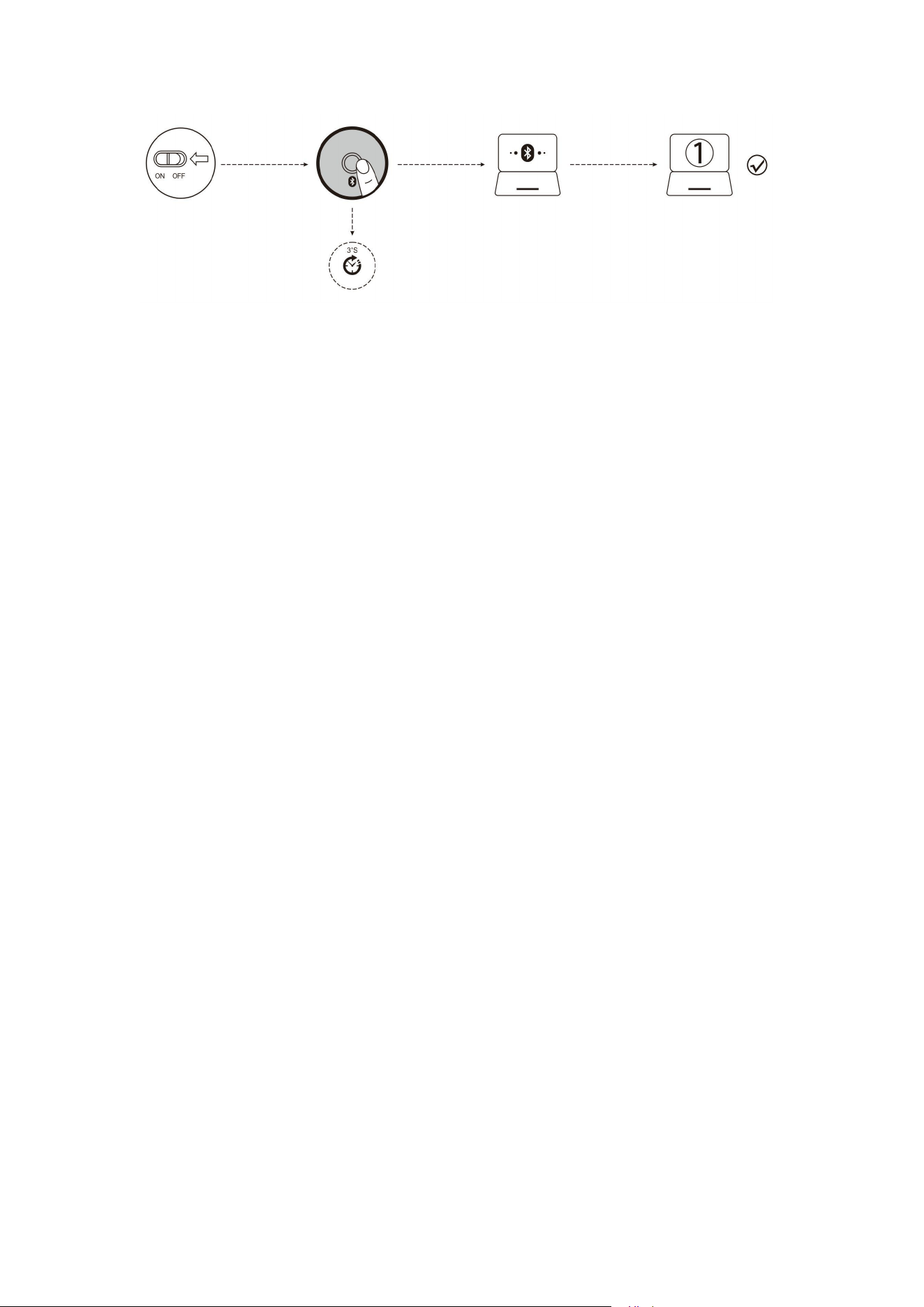
1.Ligue o interruptor da fonte de alimentação do mouse.
2.Pressione e segure a tecla Bluetooth por mais de 3 segundos, a luz azul piscará rapidamente e o
mouse será pesquisável dentro de 2 minutos.
3.Conclua o emparelhamento Bluetooth no seu dispositivo:
Windows 7 e 8:
(1) Clique em Iniciar, selecione Painel de Controle> Adicionar Dispositivo.
(2)Selecione "BT 3.0 Mouse" ou "BT 5.0 Mouse" na lista.
Windows 10:
(1) Selecione Iniciar, em seguida, selecione Configurações>Dispositivo>Bluetooth.
(2)Selecione "BT 3.0 Mouse" ou "BT 5.0 Mouse" na lista.
4.Alterne o equipamento.
Pressione rapidamente a tecla Bluetooth para poder alternar entre até 3 dispositivos emparelhados
(conecte 2 dispositivo através de Bluetooth e conecte 1 dispositivo através de um receptor de 2,4
GHz).
Aviso de carregamento:
Ao carregar, o LOGO no terminal frontal acende a luz azul, e a luz azul será desligada quando está
totalmente carregado.
Aviso de baixa energia:
Quando você utiliza o mouse, a luz azul no rolo piscará rapidamente uma vez a cada 1 segundo.
Aviso de resolução:
Pressione a tecla 6, a luz azul no rolo piscará, DPI pisca uma vez na primeira marcha, DPI pisca
duas vezes na segunda marcha e assim por diante.
Número da marca:No.013426986
Declaração de conformidade de CE
Este produto cumpre os requisitos de interferência de rádio da Comunidade Europeia. Por aqui, a
Shenzhen Master Electronic Technology Co., Ltd. anuncia que o equipamento de rádio F-36
cumpre a Diretiva No. 2014/53/EU. O texto integral da Declaração de Conformidade da UE pode
ser obtido no seguinte endereço da Internet: http://www.zelotes.cn/en/InfoPages_106.html
Potência máxima de saída: OdBm.
Faixa de frequência: Banda de 2,4g (2402,85MHz-2480,85MHz)
Declaração:
(1)Este dispositivo não deve causar interferências prejudiciais.
( 2) Este dispositivo deve aceitar qualquer interferência recebida, incluindo interferência que
possa causar operação insatisfatória.
(3)Alterações ou modificações não aprovadas explicitamente pela parte de execução responsável
podem resultar em que o usuário não tenha permissão de operar o equipamento.
Esse tipo de dispositivo gera utilização e pode irradiar energia de radiofrequência e, se não for
instalado e utilizado conforme indicado, pode causar interferências prejudiciais às comunicações
de rádio. No entanto, não há garantia de que não ocorra interferência durante uma determinada
instalação. Se o dispositivo realmente causar interferências prejudiciais à recepção de rádio ou
televisão, e tal interferência puder ser determinada desligando ou ligando o dispositivo, então os
usuários são incentivados a tentar corrigir interferências através de uma ou mais das seguintes
medidas:
● Posicionar novamente a antena receptora.
● Aumentar a distância entre o dispositivo e o receptor.
● Conectar o dispositivo a uma tomada num circuito diferente daquele ao qual o receptor está
conectado.
● Consultar um revendedor ou técnico de rádio/televisão experiente para obter assistência.
Precauções:
Não expor a líquidos
Não desmontar
Evitar quedas
Evitar temperaturas altas ou baixas extremas
Este símbolo significa que o produto não pode ser descartado como lixo doméstico e deve ser
enviado para uma instalação de reciclagem adequada para reciclagem. Siga os regulamentos locais
e não descarte produtos, baterias recarregáveis junto com resíduos domésticos normais. O descarte
adequado de produtos usados e baterias recarregáveis pode ajudar a evitar impactos negativos

sobre o meio ambiente e a saúde humana.
Atendimento ao cliente
Garantia limitada de 18 meses
Suporte técnico vitalício
(Nota: Os padrões citados neste manual são apenas para fins de descrição de funções.
Por favor, consulte o item real ao comprar o produto!Para mais funções, por favor,
navegue no site oficial para baixar o driver de programação Http://www.zelotes.cn!)
(Deutsch)
Funktionsbeschreibung der Komponenten
●①Linke Taste ②Rechte Taste ③Mittlere Taste ④Vorwärtstaste
⑤Rückwärtstaste ⑥DPI-Zyklus ⑦Bluetooth-Schlüssel ⑧Lichtmodusschalter
⑨Niederspannungs- und DPI-Anzeige ⑩Ladeanzeige
⑪Ein/Ausschalttaste ⑫Empfänger ⑬2,4GHz Anzeige
⑭Bluetooth-Anzeige „1“ ⑮Bluetooth-Anzeige „2“
Spezifikationen
Anzahl der Tasten: 8
Tracking-System: Optik
Frequenz: 2402.85MHZ-2480.85MHz
Reichweite:> 10m
Arbeitsspannung / -strom: 3.7V 10mA
Lebensdauer der Tasten: 3 Millionen Male
Lebensdauer der Mausrad: 1,2 Millionen Umdrehungen
Produktgröße: 124*70*67mm
Produktgewicht:105 ± 5 Gramm
Auflösung: 800-1200-1600-2400-4800DPI
2,4 GHz-Antwortquote: 125 -500Hz
Bluetooth- Antwortquote: 90-133Hz
【
Bluetooth-Modus
】
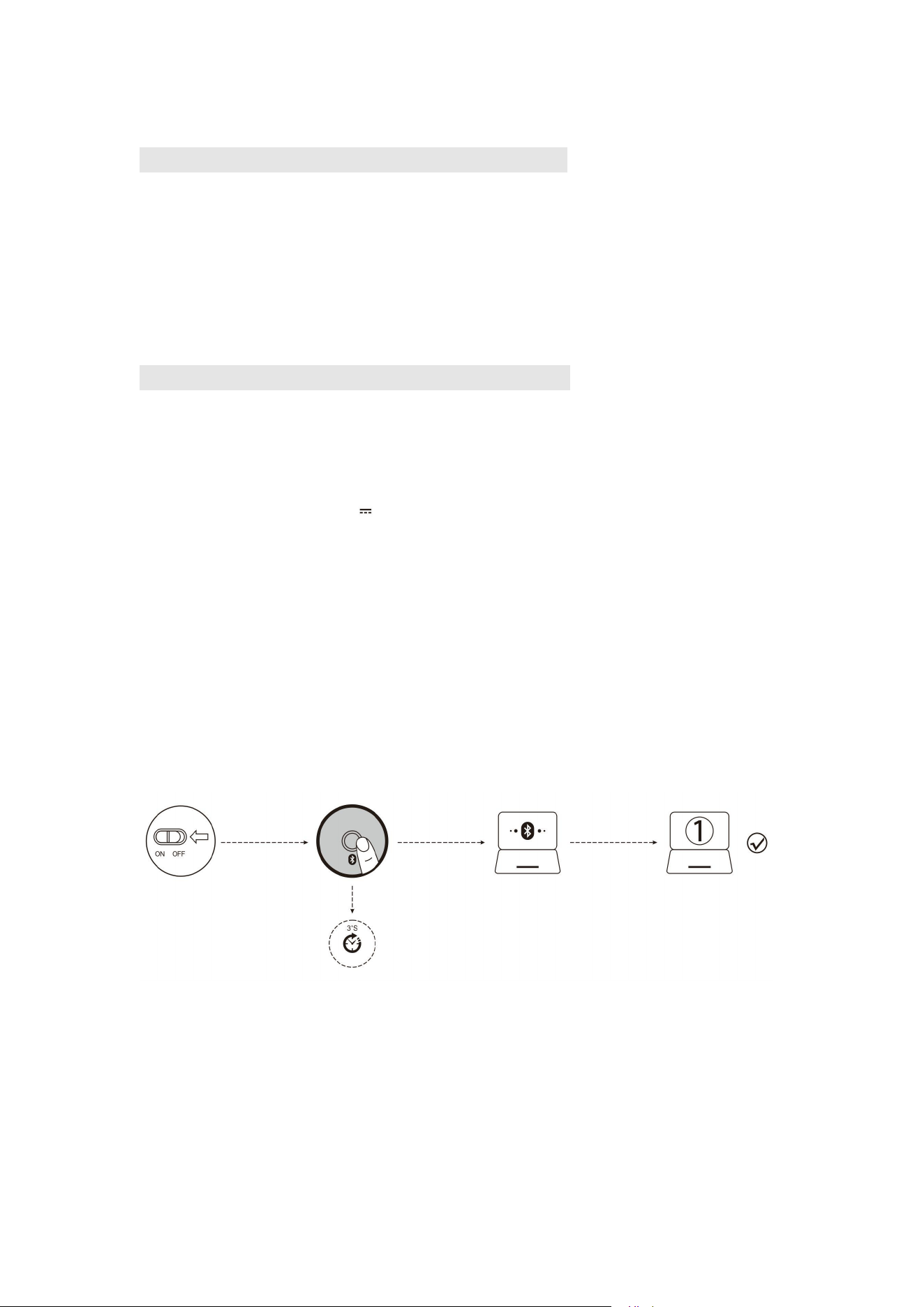
A. Mit Ihrem ersten Gerät paaren.
1. Schalten Sie den Netzschalter der Maus ein.
2. Drücken Sie die Bluetooth-Taste länger als 3 Sekunden und das blaue Licht blinkt jetzt schnell.
Die Maus ist innerhalb von 2 Minuten zu finden.
3.Machen Sie auf Ihrem Gerät die Blueteeth-Paarung:
Windows 7 und 8:
1) Klicken Sie auf „Start“ und wählen Sie „Systemsteuerung“ "> „Gerät hinzufügen“
2) Wählen Sie in der Liste „BT 3,0 Mouse“ oder „BT 5,0 Mouse“ und klicken Sie auf „Weiter“.
Windows 10:
1) Wählen Sie „Start“ und dann „Einstellungen“> „Gerät"“> „Bluetooth“.
2) Wählen Sie „BT 3,0 Mouse“ oder „BT 5,0 Mouse“ in der Liste aus und klicken Sie auf
„Paarung“.
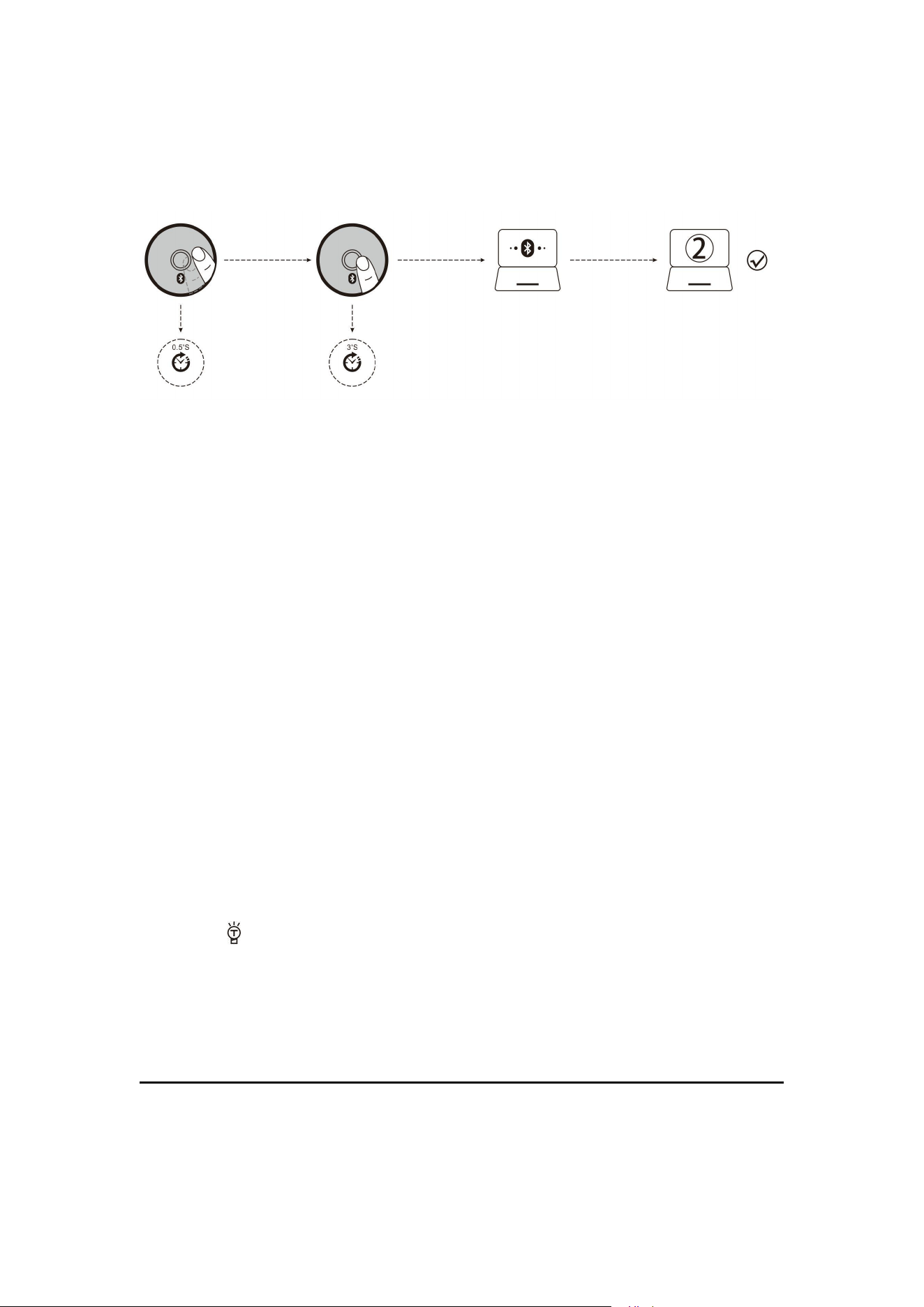
B. Mit Ihrem zwieten Gerät paaren.
1. Drücken Sie kurz die Bluetooth-Taste, um die Kanäle zu wechseln.
2. Befolgen Sie die Schritte 2 und 3 unter „Mit Ihrem ersten Gerät paaren.“, um den Anschluss
herzustellen.
3. Umschaltung der Geräte.
Drücken Sie die Bluetooth-Taste kurz, um zwischen bis zu 3 gepaarten Geräte umzuschalten
(bis zu 2 Geräte über Bluetooth und 1 Gerät über einen 2,4-GHz-Empfänger).
Anzeige des Ladestatus:
Während des Ladevorgangs leuchtet das LOGO auf der Vorderseite dunkelblau, nach vollständiger
Aufladung erlischt das Dunkelblaulicht.
Anzeige des niedrigen Batteriestatus:
Wenn Sie die Maus benutzen, blinkt das Blaulicht am Scrollrad alle 1 Sekunde schnell.
Anzeige der Auflösung:
Drücken Sie die Taste 6 und das Blaulicht am Scrollrad blinkt, bei DPI-Stufe 1 blinkt einmal, bei
DPI-Stufe 2 blinkt zweimal und so weiter.
Was macht man, wenn die Maus nicht reagiert?
1.Bitte laden Sie die Maus mit dem Datenkabel.
2.Tauschen Sie bitte den USB-Anschluss im Empfänger mal um.
3.Sichern Sie bitte, dass die Taste zum Ein- und Ausschalten unten auf der Maus bereits an oder an
die Stelle gestellt worden ist.
4.Starten Sie den Computer erneut.
5.Wenn alle Versuche fehlgeschlagen wären, wenden Sie sich bitte an den Kundenservice für
technische Unterstützung mit der Email: it@zelotes.cn.
Markennummer: No.013426986
Konformitätserklärung
Der kabellose Maus entspricht Anforderungen der EU-Funkanlagenrichtlinie. Hiermit erklärt
Shenzhen Master Electronic Technology Co., Ltd, dass der F-36-Maus mit der Richtlinie
2014/53/EU übereinstimmt. Der vollständige Text der EU-Konformitätserklärung ist abrufbar
unter folgender Webseite: http://www.zelotes.cn/en/InfoPages_106.html
Maximale Ausgangsleistung: OdBm.
Frequenzbereich: 2.4g
Flugfunk (2402.85MHz - 2480.85MHz)
Erklärung:
(1) Diese Maus darf keine schädlichen Störungen verursachen.
(2) Diese Maus muss alle empfangenen Interferenzen akzeptieren, einschließlich Interferenzen,
die einen unerwünschten Betrieb verursachen können.
2. Änderungen oder Modifikationen, die nicht von der für Nachkomme der Verpflichtungen
Verantwortlichen genehmigt wurden, könnten dazu führen, dass der Benutzer kein Recht hat, den
Maus zu betreiben.
Diese Maus verwendet und strahlt möglicherweise Hochfrequenzenergie ab, die schädliche
Störungen des Funkverkehrs verursachen kann, wenn sie nicht in Übereinstimmung mit den
Anweisungen installiert und verwendet wird. Es kann jedoch nicht garantiert werden, dass bei
einer bestimmten Installation keine Störungen auftreten. Wenn die Maus den Radio- oder
Fernsehempfang stört und diese Störung durch Aus- und Einschalten der Maus festgestellt
werden kann, sollte der Benutzer versuchen, die Störung zu beheben durch eine oder mehrere der
folgenden Maßnahmen:
●Neuausrichtung der Empfangsantenne.
●Vergrößerung des Abstands zwischen der Maus und dem Empfänger.
● Anschluss der Maus an eine Steckdose in einem anderen Stromkreis als dem, an den der
Empfänger angeschlossen ist.
●Wenden Sie sich an den Händler oder einen erfahrenen Radio-/Fernsehtechniker, um Hilfe zu
erhalten.
Hinweise:
die Maus nicht mit Flüssigkeiten in Berührung bringen.
die Maus nicht demontieren.
das Fallenlassen der Maus vermeiden
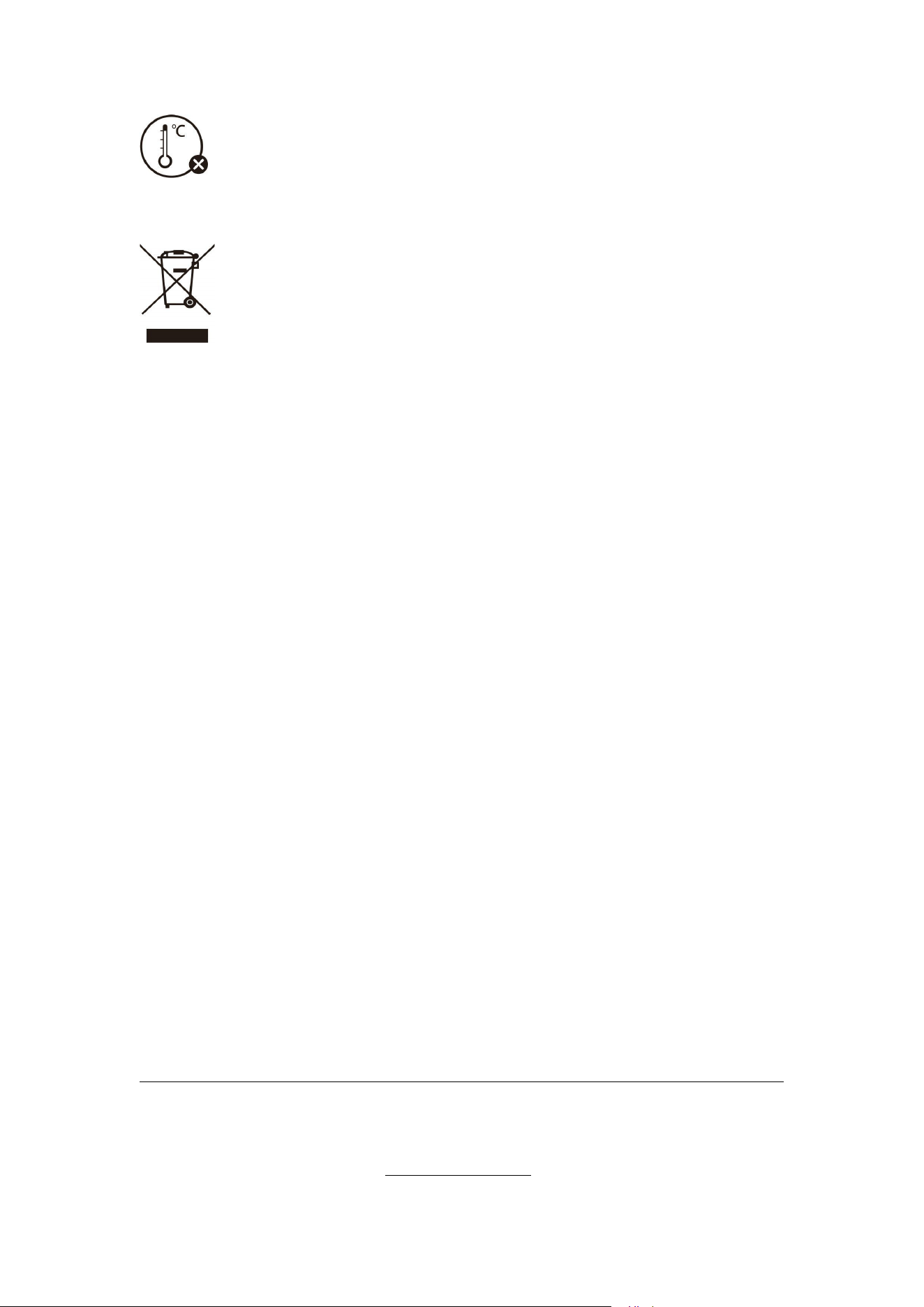
die Maus vor extremer Hitze oder Kälte schützen.
Dieses Zeichen bedeutet, dass die Maus nicht als Hausmüll entsorgt werden darf, sondern einer
geeigneten Recyclinganlage zugeführt werden muss. Beachten Sie bitte die örtlichen Vorschriften
und entsorgen Sie Mäuse und wiederaufladbare Batterien mit dem normalen Müll nicht. Die
ordnungsgemäße Entsorgung von Altprodukten und wiederaufladbaren Batterien trägt dazu bei,
negative Auswirkungen auf die Umwelt und die menschliche Gesundheit zu vermeiden.
Kundenservice
Garantie für 18 Monate
Lebenslange technische Unterstützung
(Hinweis: Das in diesem Handbuch verwendete Muster ist nur für Funktionserklärung verwendet.
Bitte beziehen Sie sich beim Kauf auf das tatsächliche Produkt!)
(Für weitere Infos über die Funktionen klicken Sie bitte die offizielle Webseite, um den
Programmiertreiber herunterzuladen: Http://www.zelotes.cn!)
(
Italiano
)
Descrizione delle funzioni dei componenti
①Pulsante sinistro ②Pulsante destro ③Pulsante centrale
④Tasto Avanti ⑤Tasto Indietro ⑥Ciclo DPI
⑦Tasto Bluetooth ⑧Interruttore modalità di luce
⑨ Indicatore di bassa tensione e DPI
⑩Indicatore di carica ⑪Interruttore di alimentazione ⑫Ricevitore
⑬Indicatore a 2,4 GHz ⑭Indicatore Bluetooth "1" ⑮Indicatore Bluetooth "2"
Specifiche
Numero di tasti: 8
Sistema di tracciamento: ottico
Frequenza: 2402,85 MHz-2480,85 MHz
Distanza effettiva: >10 m
Tensione/corrente di lavoro: 3,7V 10mA
Durata del pulsante: ≈3 milioni di volte
Durata del rullo: ≈ 1,2 milioni di giri
Dimensioni del prodotto: 124*70*67 mm
Peso del prodotto: 105±5g
Risoluzione: 800-1200-1600-2400-4800DPI
Frequenza di ritorno a 2,4 GHz: 125 -500 Hz
Frequenza di ritorno Bluetooth: 90-133 Hz
【
Modalità Bluetooth
】
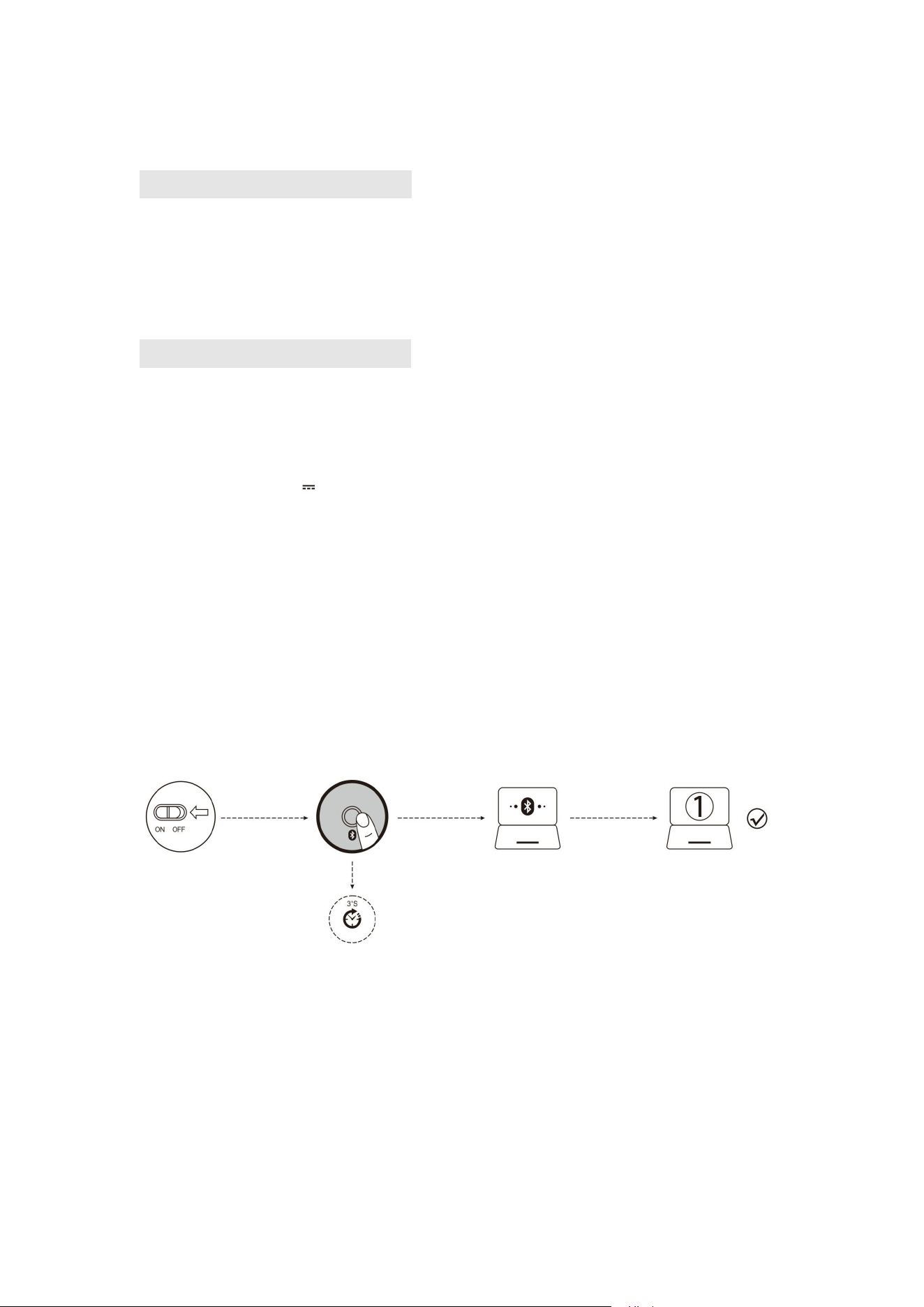
A. Associa il tuo primo dispositivo.
1. Accendi l'interruttore di alimentazione del mouse.
2. Tieni premuto il pulsante Bluetooth per più di 3 secondi, in seguito la luce blu lampeggia
rapidamente e il mouse sarà in uno stato ricercabile entro 2 minuti.
3. Completa l'associazione Bluetooth sul tuo dispositivo:
Windows 7 e 8:
(1) Fai clic su "Avvio", seleziona "Pannello di controllo" > "Aggiungi dispositivo".
(2) Seleziona "BT 3.0 Mouse" o "BT 5.0 Mouse" nell'elenco e fai clic su "Avanti".
Windows 10:
(1) Seleziona "Avvio", in seguito seleziona "Impostazioni" > "Dispositivi" > "Bluetooth".
(2) Seleziona "BT 3.0 Mouse" o "BT 5.0 Mouse" nell'elenco e fai clic su "Associa".
B. Associa il tuo secondo dispositivo.
1. Premi brevemente il pulsante Bluetooth per cambiare il canale.
2. Segui i passaggi 2, 3 di "Associa il tuo primo dispositivo" per completare la connessione.
3. Cambia il dispositivo.
Premi brevemente il pulsante Bluetooth per scorrere fino a 3 dispositivi accoppiati (collega fino a
2 dispositivi tramite Bluetooth e 1 dispositivo tramite il ricevitore a 2,4 GHz).
Promemoria per la ricarica:
Durante la ricarica, il LOGO anteriore si illumina di luce blu e, quando è completamente carico, la
luce blu si spegne.
Promemoria per la batteria scarica:
Quando si utilizza il mouse, la luce blu sul rullo lampeggerà in modo rapido ogni 1 secondo.
Promemoria per la risoluzione:
Premi il pulsante n.6, la luce blu sul rullo di scorrimento lampeggia, lampeggia una volta per il
primo DPI, lampeggia due volte per il secondo DPI e così via.
Cosa devo fare se il mouse non risponde?
1. Utilizza il cavo dati per caricare il mouse.
2. Prova a sostituire con un’altra interfaccia USB per il ricevitore.
3. Assicurati che l'interruttore di alimentazione nella parte inferiore del mouse sia stato acceso o in
posizione di .
4. Prova a riavviare il computer.
5. Se l'operazione di cui sopra non funziona, invia un'e-mail all'indirizzo e-mail: [email protected] per
richiedere l’assistenza tecnica.
(Nota: le figure citate in questo manuale sono solo a scopo di descrizione della funzione, fai
riferimento al prodotto reale per motivo di acquistare il prodotto!
Per le ulteriori funzioni, visita il sito Web ufficiale e scarica il driver di programmazione
Http://www.zelotes.cn! )
(日本語)
製品機能の説明
●①左ボタン ②右ボタン ③ホイールボタン ④進むボタン
⑤戻るボタン ⑥DPI 切替 ⑦ブルートゥースキー ⑧LED 切替スイッチ
⑨低圧・DPI インジケーター ⑩充電インジケーター ⑪電源スイッチ
⑫レシーバー ⑬2.4GHz インジケーター
⑭Bluetooth「1」インジケーター ⑮Bluetooth「2」インジケーター
スペック
ボタン数:8
トラクションシステム:光学
周波数:2402.85MHZ-2480.85MHz
有効距離:>10m
出力電圧・電流:3.7V 10mA
ボタン使用寿命:300 万回
ローラー使用寿命:120 万周
製品寸法:124*70*67mm
製品の重量:105±5g
解像度:800-1200-1600-2400-4800DPI
2.4GHz ポーリング率:125 -500Hz
Bluetooth ポーリング率:90-133Hz
【
Bluetooth
モード】
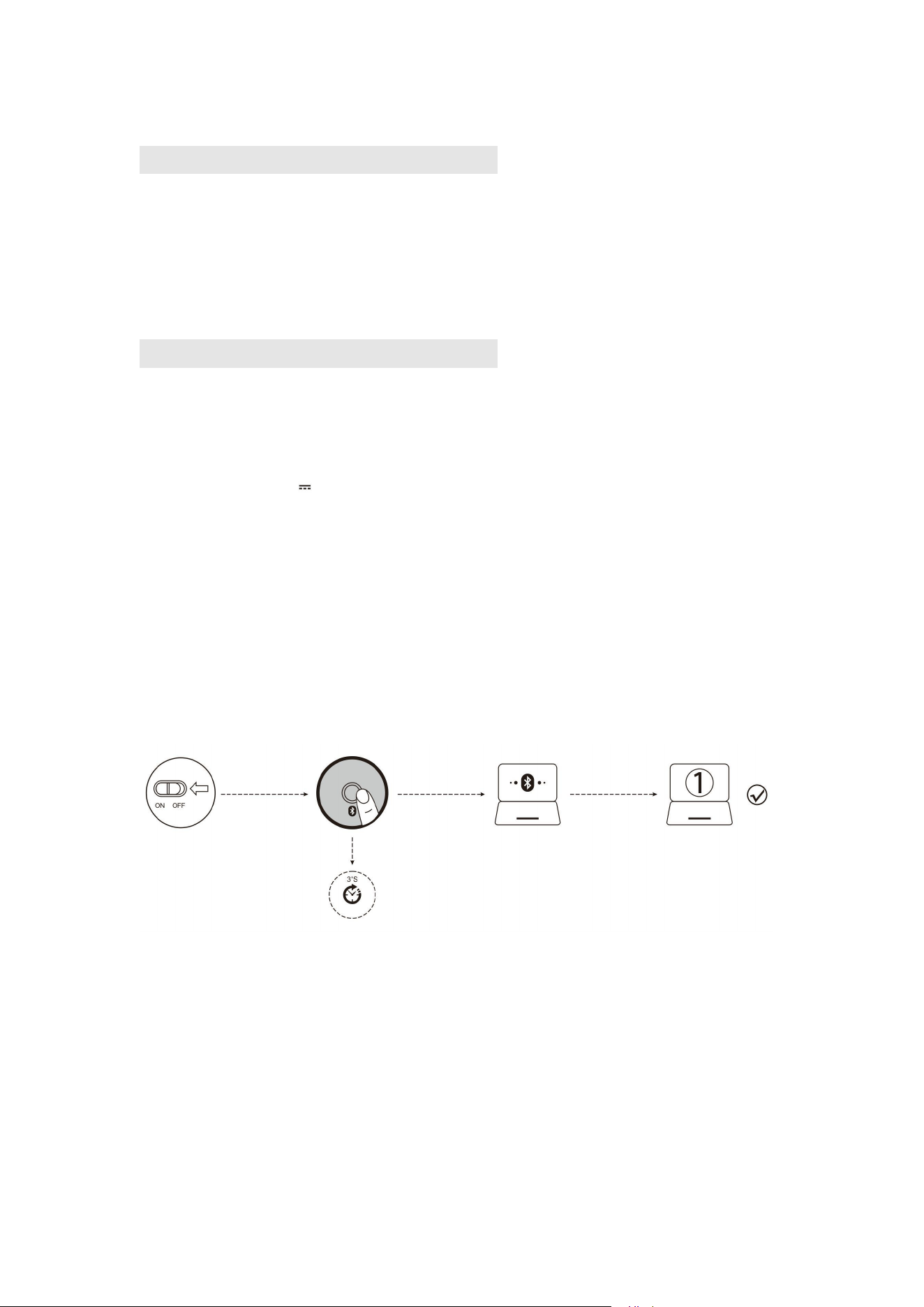
A.
最初のデバイスをペアリング
1、マウスの電源をオンにします。
2、Bluetooth ボタンを 3 秒以上長押しし、青色ランプが速やかに点滅し、2 分間内にマウ
スを検索することができます。デバイスで Bluetooth のペアリングをします。
Windows 7 和 8 の場合:
(1)「スタート」をクリックし、「コントロールパネル」→「デバイス追加」をクリック
します。
(2)リストの中の「BT 3.0 Mouse」あるいは「BT 5.0 Mouse」を選択し、「次へ」をクリ
ックします。
Windows 10 の場合:
(1)「スタート」をクリックし、「設定」→「デバイス」→「Bluetooth」をクリックしま
す。
(2)リストの中の「BT 3.0 Mouse」あるいは「BT 5.0 Mouse」を選択し、「ペアリング」
をクリックします。
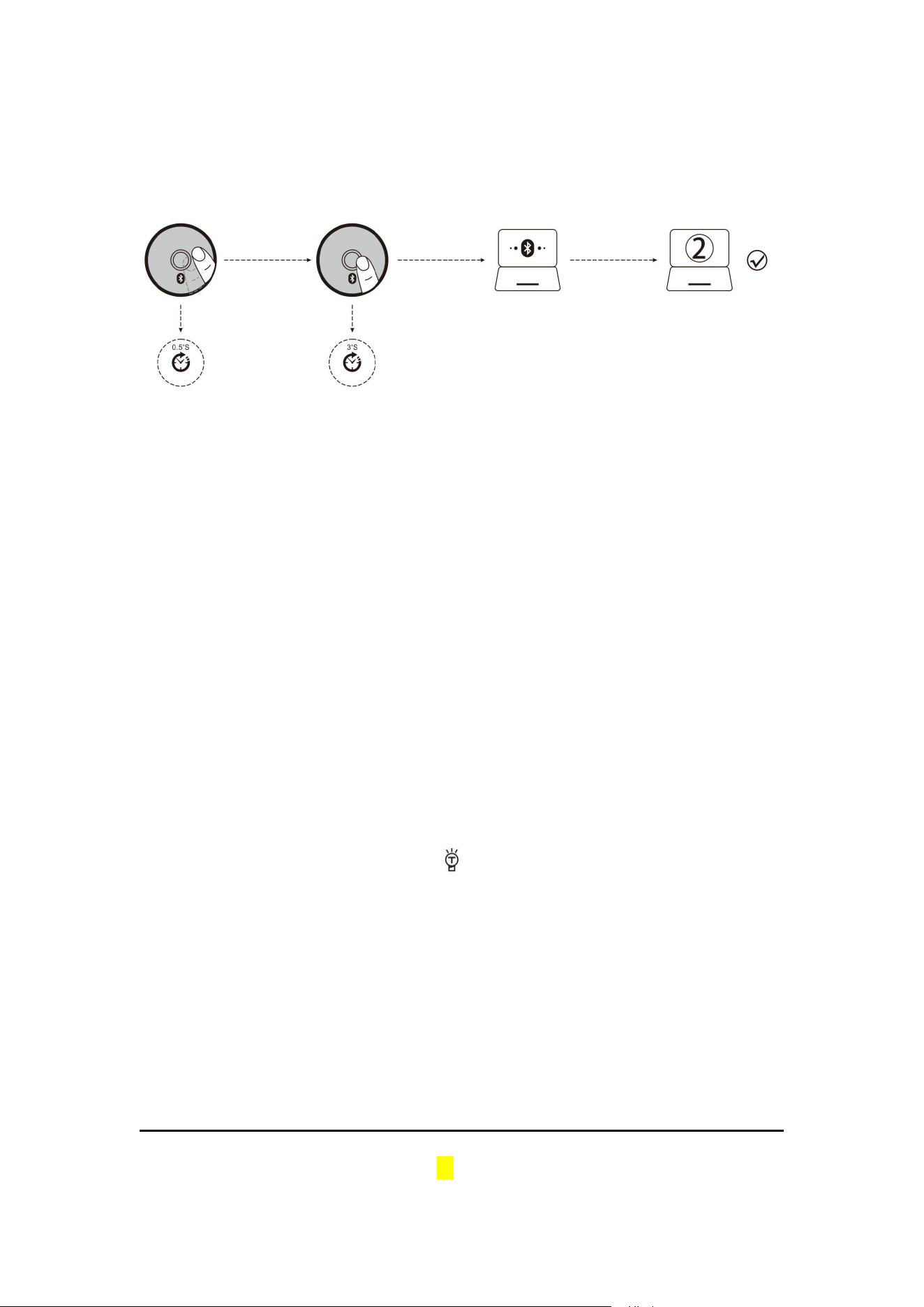
B.
2台目のデバイスをペアリング
1、Bluetooth ボタンを押してチャネルを切り替えます。
2、「最初のデバイスをペアリング」のステップ 2 とステップ 3 に従って接続します。
3、デバイスの切り替え
Bluetooth ボタンを押し、最大ペアリングした 3 台のデバイスを切り替えることがで
きます(Bluetooth によるペアリングするデバイスが最大 2 台、2.4GHz 受信機によるペア
リングするデバイスが 1 台)。
充電表示:
充電するとき、前の LOGO は青く点灯し、フル充電になると、消灯します。
電池残量表示:
マウスを使うとき、ホイールボタン近くの青いインジケーターが 1 秒おきに素早く点滅し
ます。
分解能表示:
ボタン 6 を押すと、ホイールボタン近くの青いインジケーターが点滅します。DPI レベル
1 では1回点滅し、DPI レベル 2 では 2 回点滅し、このように点滅回数が増していきます。
マウスは動かなくなってどうしますか?
1. マウスの充電は充電ケーブルを使って行ってください。
2. レシーバを他の USB 端子に接続してみて下さい。
3.マウスの裏にある電源スイッチが on か の位置になっているかをご確認下さい。
4.コンピューターの再起動をお試し下さい。
5.上記の方法で問題が解決されない場合、it@zelotes.cn までご連絡下さい。技術サポート
をご提供します。
(本マニュアルに使用されるアイコンなどは、機能を説明する用途で、実物と違うことが
ありますのでご了承ください。)
より多くの機能の詳細について、公式サイト Http://www.zelotes.cn にアクセスしてプロ
グラムファイルをダウンロードしてください!)
(中文)
组件功能说明
●①左键 ②右键 ③中键
④前进键 ⑤后退键 ⑥DPI 循环
⑦蓝牙键 ⑧灯光模式切换 ⑨低压与 DPI 指示灯
⑩充电指示灯 ⑪电源开关 ⑫接收器
⑬2.4GHz 指示灯 ⑭蓝牙“1”指示灯 ⑮蓝牙“2”指示灯
规格参数
按键数:8 键
循迹系统:光学
频率:2402.85MHZ-2480.85MHz
有效距离:>10m
工作电压/电流:3.7V 10mA
按键寿命:≈300 万次
滚轮寿命:≈120 万转
产品尺寸:124*70*67mm
产品重量:105±5 克
解析度:800-1200-1600-2400-4800DPI
2.4GHz 回报率:125 -500Hz
蓝牙回报率:90-133Hz
【蓝牙模式】
A.
配对您的第一个设备。
1.打开鼠标电源开关。
2.长按蓝牙键 3 秒以上,蓝灯快闪,鼠标在 2 分钟内将处于可被搜索状态。
3.在您的设备上完成蓝牙配对:
Windows 7 和 8:
(1)点击“开始”,选择“控制面板”>“添加设备”。
(2)选择列表中的“BT 3.0 Mouse”或“BT 5.0 Mouse”,点击“下一步”。
Windows 10:
(1)选择“开始”,依次选择“设置”>“设备”>“蓝牙”。
(2)选择列表中的“BT 3.0 Mouse”或“BT 5.0 Mouse”,点击“配对”。
B.
配对您的第二个设备。
1.短按蓝牙键切换信道。
2.按照“配对您的第一个设备”的步骤 2、3 完成连接。
3.切换设备。
短按蓝牙键,可在最多 3 台配对设备之间循环切换(通过蓝牙最多连接 2 台设备,通过 2.4GHz
接收器连接 1 台设备)。
充电提示:
充电时,前端 LOGO 亮兰灯,充满电兰灯熄灭。
低电提示:
当你使用鼠标时,滚轮处的兰灯会每隔 1 秒快速闪烁 1 次。
解析度提示:
按下 6 号键,滚轮处兰灯闪烁,一档 DPI 闪一下,二档 DPI 闪二下,以此类推。
鼠标无反应怎么办
?
1.请用数据线对鼠标进行充电。
2.请把接收器更换一个 USB 接口试一下。
3.确保鼠标底部的电源开关已经打到 on 或 位置。
4.重新启动电脑试试。
5.如果以上操作不成功,请邮件至 E-mail:it@zelotes.cn 申请技术帮助。
(注:本手册所引用的图案仅做为功能说明用途,购买产品请参照实物!)
更多功能,请浏览官网下载编程驱动 Http://www.zelotes.cn!)
(한국인)
부품 기능에 대한 설명
①왼쪽 버튼 ②오른쪽 버튼 ③중간 버튼
④앞으로 가기 버튼 ⑤뒤로 가기 버튼 ⑥DPI 순환
⑦블루투스 버튼 ⑧조명 모드 전환 ⑨저압 및 DPI 지시등
⑩충전 지시등 ⑪전원 스위치 ⑫수신기
⑬2.4GHz 지시등 ⑭블루투스 ‘1’지시등 ⑮블루투스 ‘2’지시등
파라미터
버튼수: 8 개
추적 시스템: 광학
주파수: 2402.85MHZ-2480.85MHz
유효거리: >10m
동작 전압/전류:3.7V 10mA
버튼 수명:300 만회
휠 수명:120 만번
제품 사이즈:124*70*67mm
제품 중량:105±5g
해상도: 800-1200-1600-2400-4800DPI
2.4GHz 수익률:125 -500Hz
블루투스 수익률:90-133Hz
【
블루투스 모드
】
A. 첫번째 설비를 매칭해 주십시오.
1. 마우스 전원 스위치를 켜 주십시오.
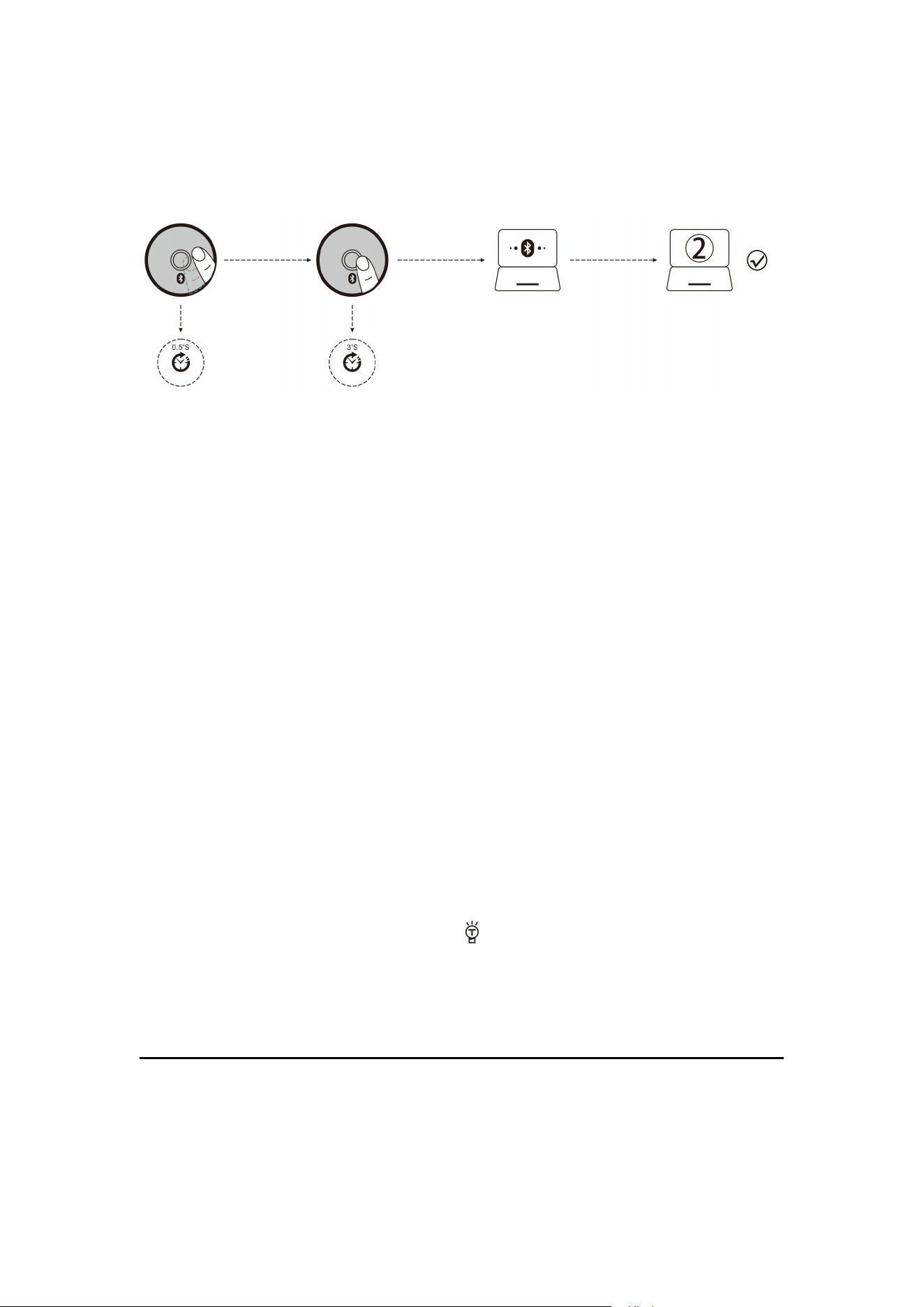
2.블루투스 버튼을 3 초 이상 길게 눌러서 블루 지시등이 빠르게 반짝입니다. 마우스
는 2 분 내 검색이 가능한 상태가 됩니다.
3.설비에 블루투스 매칭이 완성된 것입니다.
Windows 7 和 8:
(1)‘시작’ 버튼을 클릭해서 ‘제어센터’ >‘설비 추가’를 선택해 주십시오.
(2)리스트에서 ‘BT 3.0 Mouse’ 나 ‘BT 5.0 Mouse’를 선택하고 ‘다음에’를 클릭해 주십
시오.
Windows 10:
(1)‘시작’ 버튼을 클릭해서 ‘설정’ >‘설비’ >‘블루투스’를 선택해 주십시오.
(2)리스트에서 ‘BT 3.0 Mouse’ 나 ‘BT 5.0 Mouse’를 선택하고 ‘매칭’을 클릭해 주십시
오.
B. 두번째 설비를 매칭해 주십시오.
1.블루투스 버튼을 짧게 눌러서 채널이 전환됩니다.
2.상기 ‘첫번째 설비를 매칭해 주십시오. ’라는 방법의 두번째와 세번째 스텝을 의하여
연결해 주십시오.
3.설비를 전환해 주십시오.
블루투스 버튼을 짧게 눌러서 최대 3 개의 설비 간의 순환 전환이 가능합니다. (블루투
스로 최대 2 개의 설비에 연결이 가능하며 2.4GHz 수신기로 1 개의 설비에 연결이 가
능함).
충전 알림:
충전 시 앞에 있는 LOGO 는 블루 지시등이 켜지며 완충 후 블루 지시등이 꺼지게 됩
니다.
배터리 부족 알림:
마우스 사용 시 휠의 지시등이 1 초마다 1 번 빠르게 반짝이는 것입니다.
해상도 알림:
6 번 버튼을 눌러서 휠의 지시등이 반짝입니다. 1 단계 DPI 같은 경우 한 번 반짝이며
2 단계 DPI 같은 경우 한 번 반짝입니다. 다른 단계는 상기와 같이 유추해 보면 됩니
다.
마우스 기능 동작이 안 될 때 처리 방법
1.케이블로 마우스에 충전해 주십시오.
2.수신기에 다른 USB 포트로 해 보십시오.
3.마우스 밑에 있는 전원 스위치를 on 이나 위치로 이동해 주십시오.
4.컴퓨터 재부팅을 해 보십시오.
5.상기 조작을 하셔도 문제 해결이 안 되면 기술적 지원을 받기 위하여 아래 이메일
주소(it@zelotes.cn)로 메일을 보내 주십시오.
(주의: 본 매뉴얼에 사용된 이미지는 기능 설명의 용도로만 하며 제품 구매 시 실물
을 참조하시기 바랍니다!
더 많은 기능을 알고 싶다면 공식 홈페이지(Http://www.zelotes.cn)에 가서 프로그램을
다운로드 받아 주십시오!)
( Русский )

Описание функции компонента
①Левая кнопка ② Правая кнопка ③Средняя кнопка
④Кнопка вперед ⑤Кнопка назад ⑥Цикл DPI
⑦ Кнопка Bluetooth ⑧Переключение режимов освещения
⑨Индикаторы низкого напряжения и DPI ⑩Индикатор зарядки
⑪Выключатель питания ⑫Приёмник ⑬Индикатор 2,4 ГГц
⑭Индикатор Bluetooth "1" ⑮Индикатор Bluetooth "2"
Технические характеристики
Количество кнопок: 8 кнопок
Тяговая система: оптическая
Частота: 2402,85 МГц - 2480,85 МГц
Эффективное расстояние: >10 м
Рабочее напряжение/ток: 3,7 В 10 мА
Срок службы кнопок: ≈ 3миллионов циклов
Срок службы колесика: ≈ 1,2 млн. оборотов
Размер продукта: 124*70*67 мм
Вес продукта: 105±5 г
Разрешение: 800-1200-1600-2400-4800DPI
2,4 ГГц частота возврата: 125 -500Гц
Частота возврата Bluetooth: 90-133Гц
Что делать, если моя мышь не реагирует?
1. Для зарядки мыши используйте кабель для передачи данных.
2. Пожалуйста, замените приемник на USB-порт и попробуйте.
3. Убедитесь, что выключатель питания на нижней части мыши переключен в положение
"on" или .
4. Попробуйте перезапустить компьютер.
и запросите техническую помощь.
Режим Bluetooth
A. Выполните соединение с первым устройством.
1 . Включите выключатель питания мыши.
2. При нажатии и удержании кнопки Bluetooth более 3 секунд, синий индикатор начнет
быстро мигать, а мышь будет находиться в состоянии поиска в течение 2 минут.
3. Завершите сопряжение Bluetooth на устройстве:
Windows 7 и 8:
(1) Нажмите "Старт", выберите "Панель управления" > "Добавить устройства".
(2) Выберите "BT 3.0 Mouse" или "BT 5.0 Mouse" из спискаи нажмите "Далее".
Windows 10:
(1) Выберите "Старт", затем "Настройки" > "Устройства" > "Bluetooth" по порядку.
(2) Выберите "BT 3.0 Mouse" или "BT 5.0 Mouse" из спискаи нажмите "Далее".
4. переключить оборудование.
Короткое нажатие на кнопку Bluetooth для циклического переключения между 3
сопряженными устройствами (2 устройство через Bluetooth, 1 устройство через приемник
2,4 ГГц).
Напоминание для зарядки:
При зарядке передний LOGO загорается синим светом, а при полной зарядке синий свет
гаснет.
Напоминание о низком заряде батареи:
Когда вы используете мышь, синий индикатор на колесе будет быстро мигать раз в 1
секунду.
Совет по разрешению:
Нажмите кнопку 6, синий индикатор на колесе прокрутки мигает, первый DPI мигает один
раз, второй DPI мигает дважды, и так далее.
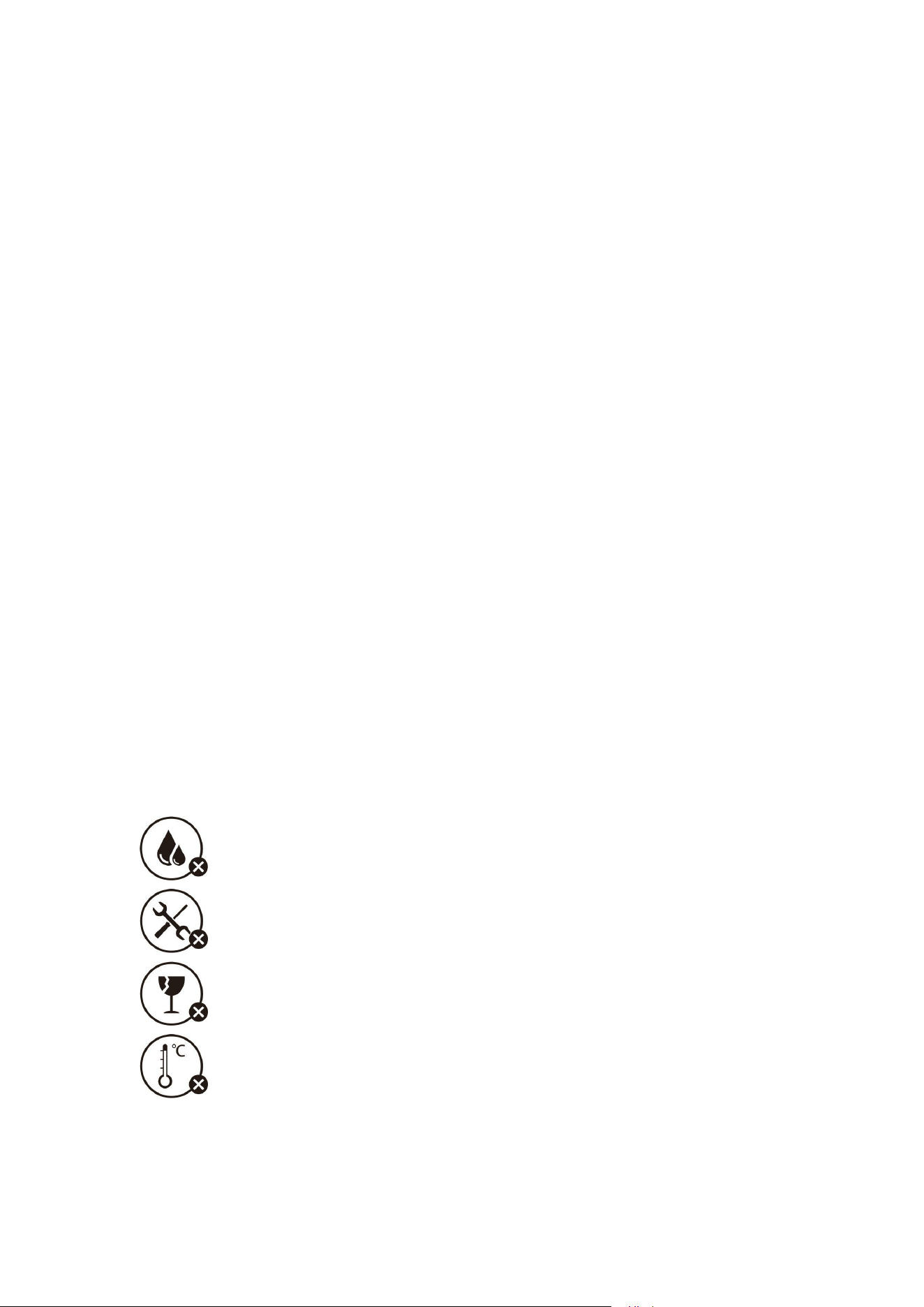
Осторожно:
Не подвергайте воздействию жидкостей
Не разбирайте
Избегать падений
Избегайте экстремально высоких или низких температур

Этот символ означает, что изделие нельзя выбрасывать как бытовой мусор, его следует
отнести на соответствующее переработку для восстановления. Соблюдайте местные
правила и не выбрасывайте изделия и аккумуляторные батареи вместе с обычными
бытовыми отходами. Правильная утилизация старых изделий и аккумуляторных батарей
помогает предотвратить негативное воздействие на окружающую среду и здоровье
человека.
Service Clients
Garantie limitée de 18 mois
Support technique dure toute la vie
(Примечание: Образцы, приведенные в этой брошюре, предназначены только
для функциональной иллюстрации, пожалуйста, обращайтесь к реальному
продукту для покупки!Для получения дополнительных возможностей,
пожалуйста, посетите официальный сайт для загрузки драйвера
программирования Http://www.zelotes.cn).