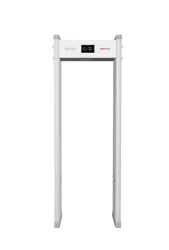

Walk-Through Metal Detector
User Manual

1
Legal Information
About this Manual
The Manual includes instructions for using and managing the Product. Pictures, charts, images and all other
information hereinafter are for description and explanation only. The information contained in the Manual is
subject to change, without notice, due to firmware updates or other reasons. Please find the latest version of this
Manual at the Hikvision website (https://www.hikvision.com/).
Please use this Manual with the guidance and assistance of professionals trained in supporting the Product.
Trademarks
and other Hikvision's trademarks and logos are the properties of Hikvision in
various jurisdictions.
Other trademarks and logos mentioned are the properties of their respective owners.
Disclaimer
TO THE MAXIMUM EXTENT PERMITTED BY APPLICABLE LAW, THIS MANUAL AND THE PRODUCT DESCRIBED, WITH
ITS HARDWARE, SOFTWARE AND FIRMWARE, ARE PROVIDED “AS IS” AND “WITH ALL FAULTS AND ERRORS”.
HIKVISION MAKES NO WARRANTIES, EXPRESS OR IMPLIED, INCLUDING WITHOUT LIMITATION, MERCHANTABILITY,
SATISFACTORY QUALITY, OR FITNESS FOR A PARTICULAR PURPOSE. THE USE OF THE PRODUCT BY YOU IS AT YOUR
OWN RISK. IN NO EVENT WILL HIKVISION BE LIABLE TO YOU FOR ANY SPECIAL, CONSEQUENTIAL, INCIDENTAL, OR
INDIRECT DAMAGES, INCLUDING, AMONG OTHERS, DAMAGES FOR LOSS OF BUSINESS PROFITS, BUSINESS
INTERRUPTION, OR LOSS OF DATA, CORRUPTION OF SYSTEMS, OR LOSS OF DOCUMENTATION, WHETHER BASED
ON BREACH OF CONTRACT, TORT (INCLUDING NEGLIGENCE), PRODUCT LIABILITY, OR OTHERWISE, IN
CONNECTION WITH THE USE OF THE PRODUCT, EVEN IF HIKVISION HAS BEEN ADVISED OF THE POSSIBILITY OF
SUCH DAMAGES OR LOSS.
YOU ACKNOWLEDGE THAT THE NATURE OF INTERNET PROVIDES FOR INHERENT SECURITY RISKS, AND HIKVISION
SHALL NOT TAKE ANY RESPONSIBILITIES FOR ABNORMAL OPERATION, PRIVACY LEAKAGE OR OTHER DAMAGES
RESULTING FROM CYBER-ATTACK, HACKER ATTACK, VIRUS INSPECTION, OR OTHER INTERNET SECURITY RISKS;
HOWEVER, HIKVISION WILL PROVIDE TIMELY TECHNICAL SUPPORT IF REQUIRED.
YOU AGREE TO USE THIS PRODUCT IN COMPLIANCE WITH ALL APPLICABLE LAWS, AND YOU ARE SOLELY
RESPONSIBLE FOR ENSURING THAT YOUR USE CONFORMS TO THE APPLICABLE LAW. ESPECIALLY, YOU ARE
RESPONSIBLE, FOR USING THIS PRODUCT IN A MANNER THAT DOES NOT INFRINGE ON THE RIGHTS OF THIRD
PARTIES, INCLUDING WITHOUT LIMITATION, RIGHTS OF PUBLICITY, INTELLECTUAL PROPERTY RIGHTS, OR DATA
PROTECTION AND OTHER PRIVACY RIGHTS. YOU SHALL NOT USE THIS PRODUCT FOR ANY PROHIBITED END-USES,
INCLUDING THE DEVELOPMENT OR PRODUCTION OF WEAPONS OF MASS DESTRUCTION, THE DEVELOPMENT OR
PRODUCTION OF CHEMICAL OR BIOLOGICAL WEAPONS, ANY ACTIVITIES IN THE CONTEXT RELATED TO ANY
NUCLEAR EXPLOSIVE OR UNSAFE NUCLEAR FUEL-CYCLE, OR IN SUPPORT OF HUMAN RIGHTS ABUSES.
IN THE EVENT OF ANY CONFLICTS BETWEEN THIS MANUAL AND THE APPLICABLE LAW, THE LATER PREVAILS.

2
Regulatory Information
FCC Information
Please take attention that changes or modification not expressly approved by the party responsible for compliance
could void the user’s authority to operate the equipment.
FCC compliance: This equipment has been tested and found to comply with the limits for a Class A digital device,
pursuant to part 15 of the FCC Rules. These limits are designed to provide reasonable protection against harmful
interference when the equipment is operated in a commercial environment. This equipment generates, uses, and
can radiate radio frequency energy and, if not installed and used in accordance with the instruction manual, may
cause harmful interference to radio communications. Operation of this equipment in a residential area is likely to
cause harmful interference in which case the user will be required to correct the interference at his own expense.
FCC Conditions
This device complies with part 15 of the FCC Rules. Operation is subject to the following two conditions:
1. This device may not cause harmful interference.
2. This device must accept any interference received, including interference that may cause undesired operation.
EU Conformity Statement
This product and - if applicable - the supplied accessories too are marked with "CE" and comply
therefore with the applicable harmonized European standards listed under the EMC Directive
2014/30/EU, the LVD Directive 2014/35/EU, the RoHS Directive 2011/65/EU.
2012/19/EU (WEEE directive): Products marked with this symbol cannot be disposed of as unsorted
municipal waste in the European Union. For proper recycling, return this product to your local supplier
upon the purchase of equivalent new equipment, or dispose of it at designated collection points. For
more information see: www.recyclethis.info
2006/66/EC (battery directive): This product contains a battery that cannot be disposed of as unsorted
municipal waste in the European Union. See the product documentation for specific battery
information. The battery is marked with this symbol, which may include lettering to indicate cadmium
(Cd), lead (Pb), or mercury (Hg). For proper recycling, return the battery to your supplier or to a designated
collection point. For more information see: www.recyclethis.info
BATTERY WARNING
1. Do not ingest battery, Chemical Burn Hazard
2. Keep new and used batteries away from the children.
3. If the battery compartment does not close securetyly, stop using the product and keep it away from
children.
4. This product contains a coin / button cell battery. If the coin / button cell battery is swallowed, it can cause
severe internal burns in just 2 hours and lead to death.
5. If you think batteries might have been swallowed or placed inside any part of the body, seek immediate
medical attention.
BATTERY CAUTION
1. Risk of fire or explosion if the battery is replaced by an incorrect type.
2. Improper replacement of the battery with an incorrect type may defeat a safeguard (for example, in the

3
case of some lithium battery types).
3. Do not dispose of the battery into fire or a hot oven, or mechanically crush or cut the battery, which may
result in an explosion.
4. Do not leave the battery in an extremely high temperature surrounding environment, which may result in an
explosion or the leakage of flammable liquid or gas.
5. Do not subject the battery to extremely low air pressure, which may result in an explosion or the leakage of
flammable liquid or gas.
6. Dispose of used batteries according to the instructions
7. The equipment is not suitable for use in locations where children are likely to be present.
INSTALLATION CAUTION
1. The additional force shall be equal to three times the weight of the equipment but not less than 50N. The
equipment and its associated mounting means shall remain secure during the installation. After the
installation, the equipment, including any associated mounting plate, shall not be damaged.
2. This equipment is not suitable for use in locations where children are likely to be present.
4
Symbol Conventions
The symbols that may be found in this document are defined as follows.
Symbol
Description
Danger
Indicates a hazardous situation which, if not avoided, will or could result in death
or serious injury.
Caution
Indicates a potentially hazardous situation which, if not avoided, could result in
equipment damage, data loss, performance degradation, or unexpected results.
Note
Provides additional information to emphasize or supplement important points
of the main text.

5
Safety Instruction
These instructions are intended to ensure that user can use the product correctly to avoid danger or property loss.
Laws and Regulations
● Use of the product must be in strict compliance with the local electrical safety regulations.
Transportation
● Keep the device in original or similar packaging while transporting it.
● Keep all wrappers after unpacking them for future use. In case of any failure occurred, you need to return the
device to the factory with the original wrapper. Transportation without the original wrapper may result in
damage on the device and the company shall not take any responsibilities.
● Do not drop the product or subject it to physical shock. Keep the device away from magnetic interference.
Power Supply
● Input voltage should meet the Limited Power Source according to the IEC61010-1 standard. Please refer to
technical specifications for detailed information.
● Make sure the plug is properly connected to the power socket.
● DO NOT connect multiple devices to one power adapter, to avoid over-heating or fire hazards caused by
overload.
Battery
● Improper use or replacement of the battery may result in explosion hazard. Replace with the same or equivalent
type only. Dispose of used batteries in conformance with the instructions provided by the battery manufacturer.
● The built-in battery cannot be dismantled. Please contact the manufacture for repair if necessary.
● For long-term storage of the battery, make sure it is fully charged every half year to ensure the battery quality.
Otherwise, damage may occur.
Maintenance
● If the product does not work properly, please contact your dealer or the nearest service center. We shall not
assume any responsibility for problems caused by unauthorized repair or maintenance.
● A few device components (e.g., electrolytic capacitor) require regular replacement. The average lifespan varies,
so periodic checking is recommended. Contact your dealer for details.
● Wipe the device gently with a clean cloth and a small quantity of ethanol, if necessary.
● If the equipment is used in a manner not specified by the manufacturer, the protection provided by the device
may be impaired.
Using Environment
● Make sure the running environment meets the requirement of the device. The operating temperature shall be
-20°C to 55°C, and the operating humidity shall be 10%-95%, no condensing.
● DO NOT expose the device to high electromagnetic radiation or dusty environments.
● DO NOT aim the lens at the sun or any other bright light.
Emergency
● If smoke, odor, or noise arises from the device, immediately turn off the power, unplug the power cable, and
contact the service center.

6
Manufacture Address
No.555 Qianmo Road, Binjiang District, Hangzhou 310052, China
Hangzhou Hikvision Digital Technology Co.,Ltd

7
Contents
Chapter 1 Overview .................................................................................................................... 8
Product Description ................................................................................................................ 8
Key Features ............................................................................................................................ 9
Chapter 2 Installation ............................................................................................................... 10
Installation Environment ....................................................................................................... 10
2.1.1 Fixed Metal Object ...................................................................................................... 10
2.1.2 Ground Vibration......................................................................................................... 10
2.1.3 Moving Metal Object .................................................................................................. 10
2.1.4 Radiated Electronic Interference ................................................................................ 11
2.1.5 Conducting Electronic Interference ............................................................................ 11
Multiple Device Working Side by Side .................................................................................. 12
Before Working Device Setting ............................................................................................. 12
Installation and Wiring .......................................................................................................... 12
Chapter 3 Local Configuration ................................................................................................... 15
Function Description ............................................................................................................. 15
Control Panel Settings ........................................................................................................... 16
Remote Control Instruction................................................................................................... 17
Activation Instructions .......................................................................................................... 17
Chapter 4 Network Settings ...................................................................................................... 18
Appendix ................................................................................................................................. 19
FAQ ....................................................................................................................................... 19
Common Material Emissivity Reference .............................................................................. 20
Detection Sensitivity for Guns .............................................................................................. 21
Dimension ............................................................................................................................ 23
Detection Program ............................................................................................................... 24
Specification ......................................................................................................................... 25
8
Chapter 1 Overview
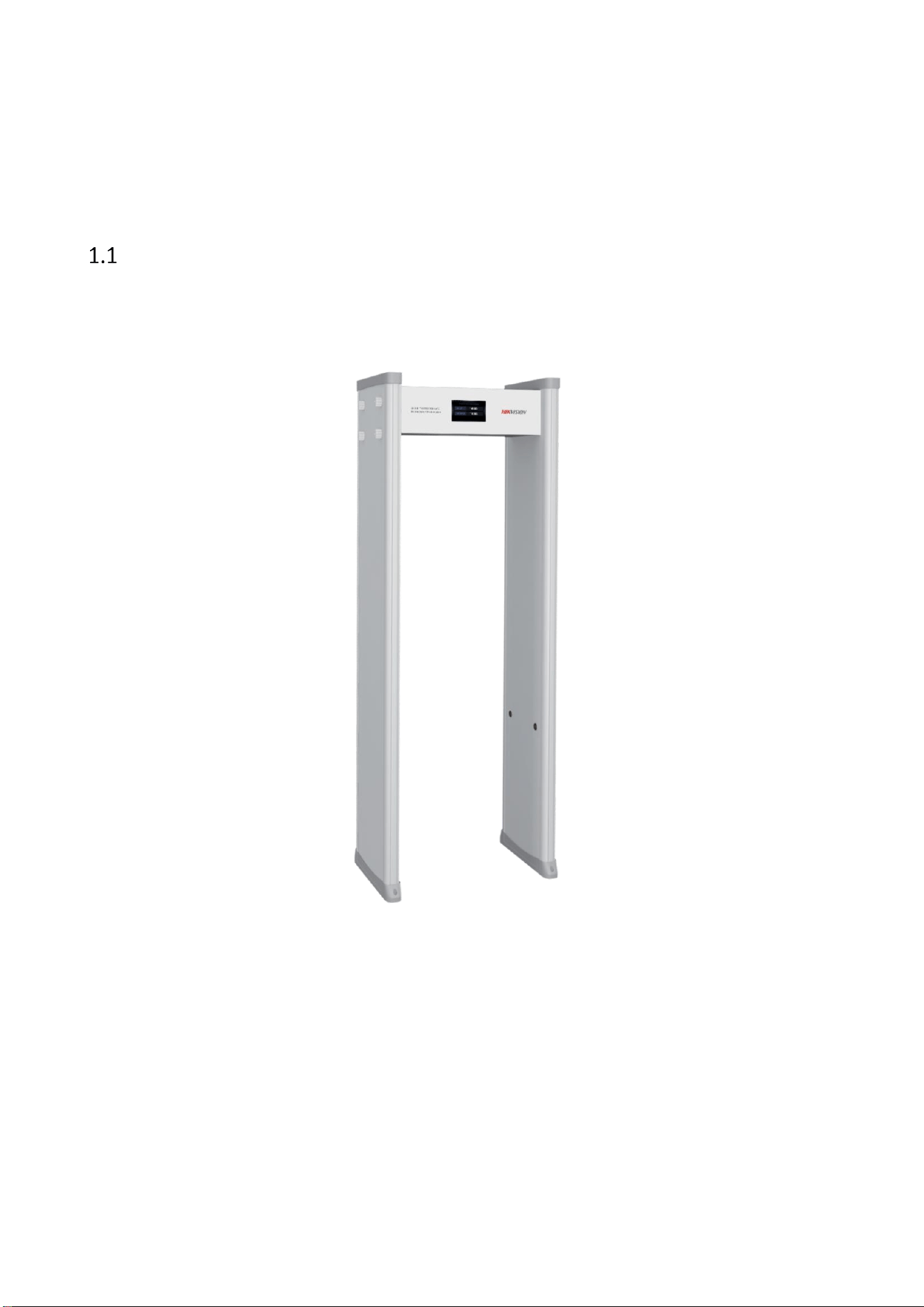
Product Description
This smart security door is a walk-through metal detector which has high sensitivity and strong anti-interference
ability. It can detect metals from people who pass through the gate, which can effectively check illegal items. It
supports networking functions to meet the platform management needs in different scenarios. It can be used in
public security organs, prisons, governments, transportation hubs, enterprise parks, office buildings, schools,
hospitals, cultural and expo scenic spots, large-scale security activities, etc.

9
Key Features
Networking function: the device can connect to a single machine, and parameters can be configured via web
client;
Metal detection: 1 yuan coin-sized metal can be detected, effectively checking illegal items;
Ultra-low detection height: metal objects more than 3 cm above the ground will trigger alarm when they enter
the detection area;
Power-on self-test function: self test the system when power on, and test results will be displayed;
LCD color screen display: display the menu, the number of people who passed through, number of metal
alarm and other information.
Multi-zone alarm function: when multiple metals in different positions of the human body pass through the
security gate, they will trigger alarm at the same time, and positions of multiple metals can be indicated.
Modular component design: convenient and quick to transport and maintain.
10
Chapter 2 Installation
Installation Environment
In order to ensure the optimal operation of the detector and the maximum flow of people, the following important
factors are taken into account to minimize the impacts made by different interference sources.
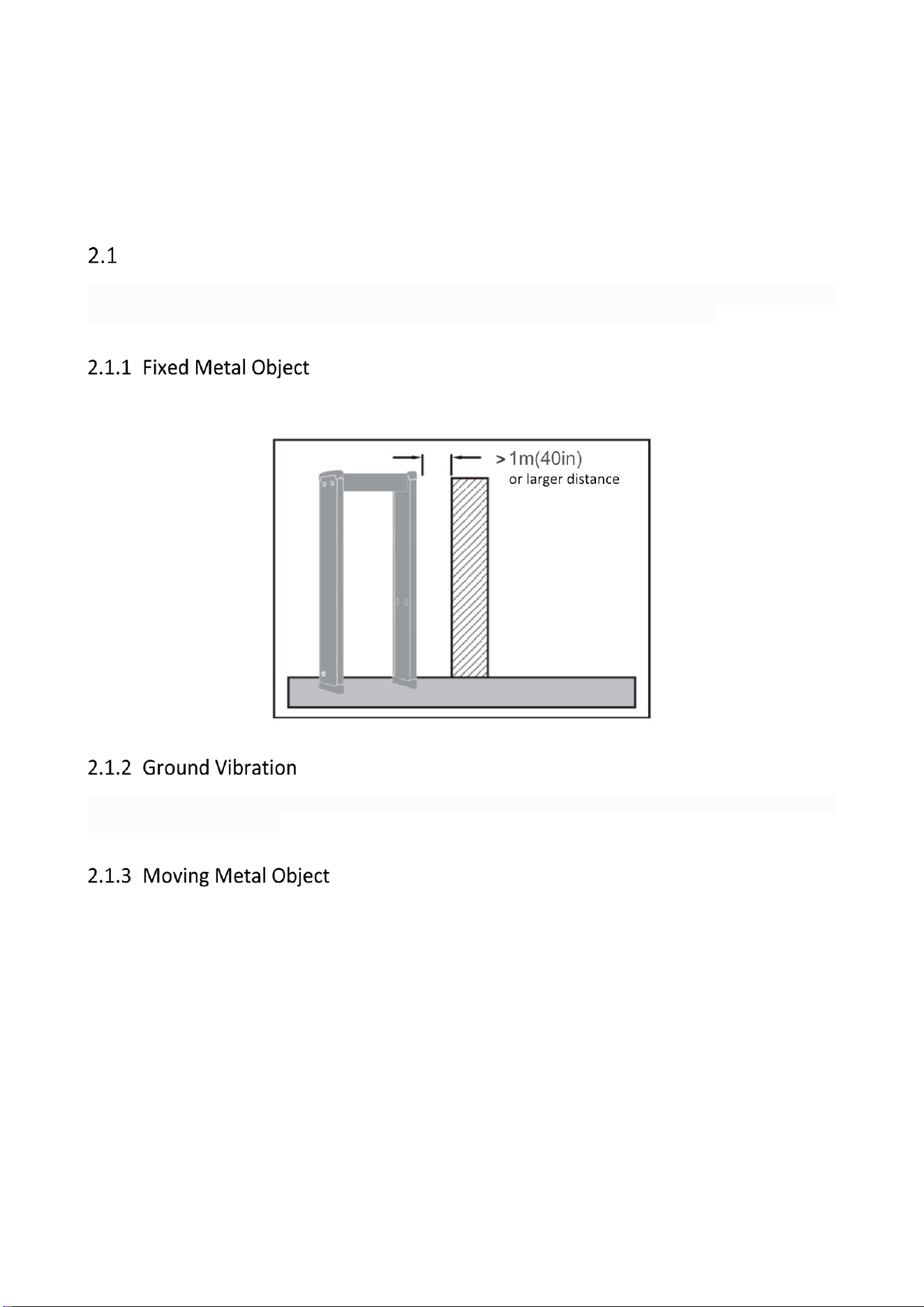
Large fixed or immovable metal objects should be at least 1m (40in) away from the detector (to detect large metal
objects). This has less impact on the sensitivity, but may make the detector more susceptible to vibration.
The ground should be flat, with strong support, to prevent vibration, especially when there are vibration metal
structures under the ground.
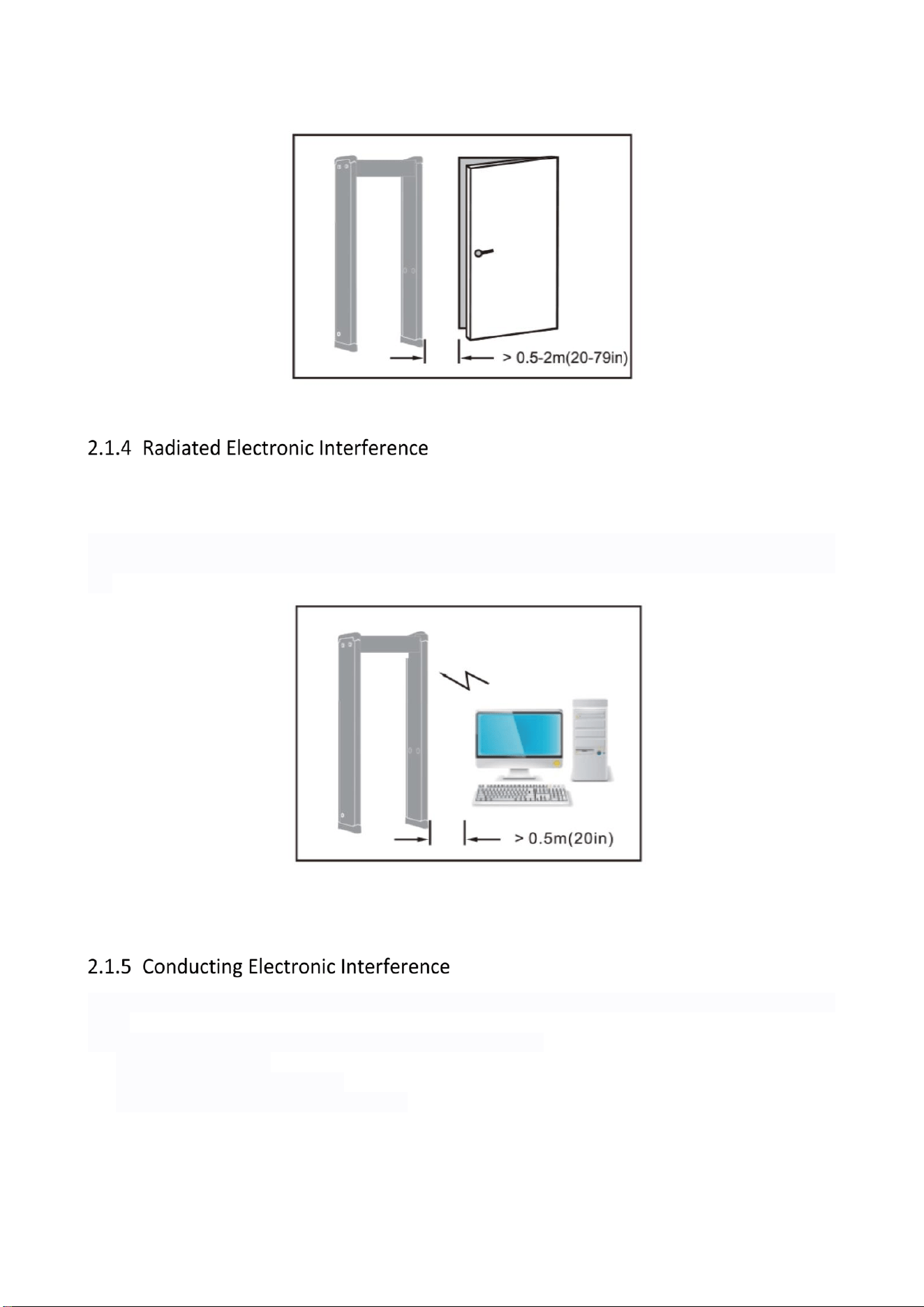
The large metal objects moving outside the detector shall be kept at least at a distance of 0.5-2m (20-79in) from
the detector to avoid false alarm. According to the size of the metal object, the distance between the required
moving metal object and the detector may different.
11
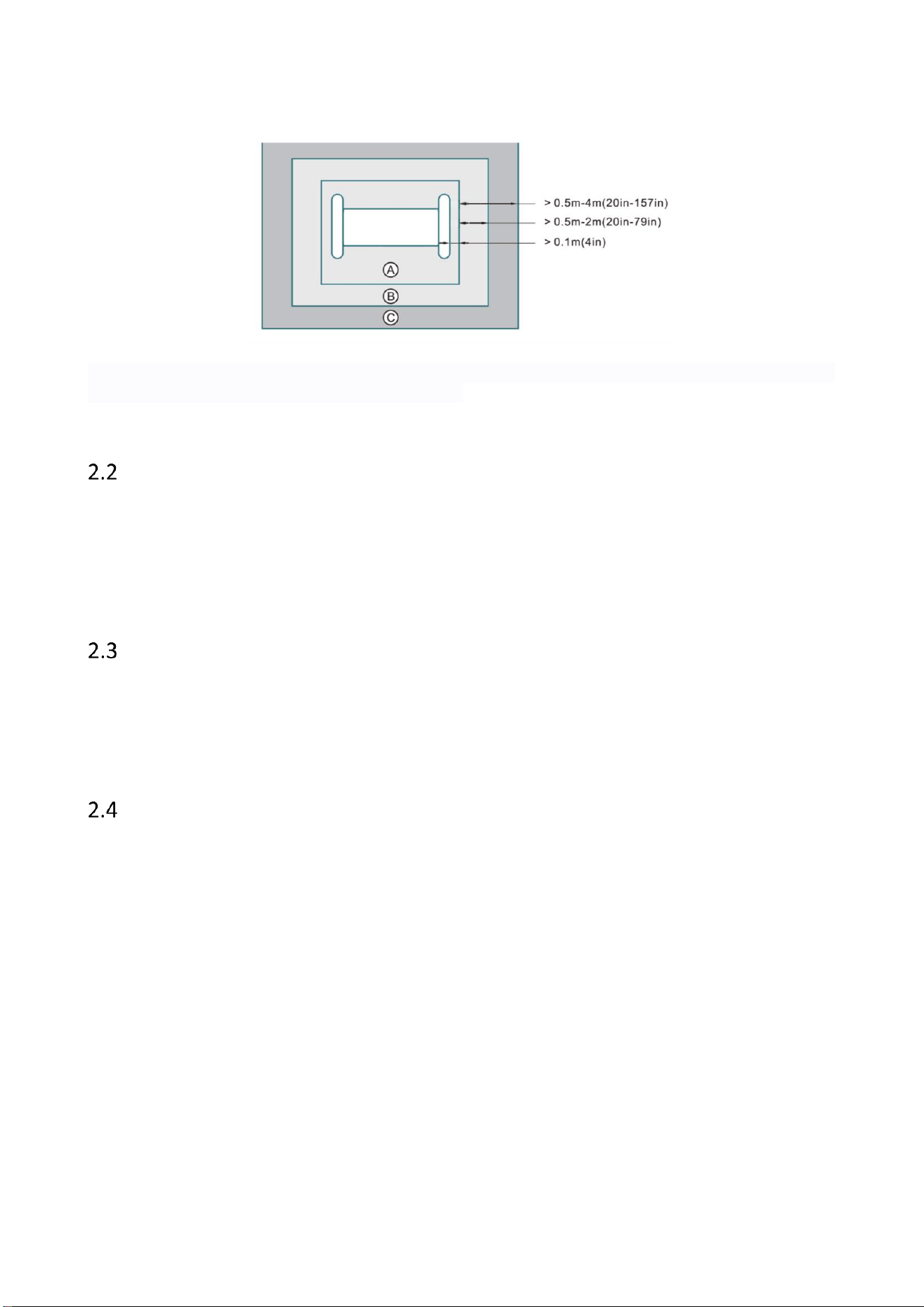
The distance between the electronic interference source and the receiving coil should be maximum. The
recommended minimum distance is 0.5-4m (20-157in). However, the actual distance should vary according to the
specific situation.
The interference may be caused by electronic control panel, radio equipment and computer, image display, high-
power motor and transformer, AC wire, transistor control circuit, flash fluorescent lamp, ARC welding equipment,
etc.
Connecting the power cable to a circuit that is not connected with other large load equipment may cause voltage
shock.
The recommended min. distance away from the interference source:
A. With fixed metal object
B. No moving metal object is allowed
C. No electronic interference source is allowed
12
Note: Make the Receiving Coil (RX) away from the interference source. Make sure the interference level displayed
on the environment inspection indicator is less than 2.
Multiple Device Working Side by Side
Side-by-side operation refers to the operation of two or more detectors in close proximity to each other. With
side-by-side operation, the detector may interfere with each other. The level of interference depends on the
distance between the detectors and their operating frequency and sensitivity.
The detector has different working frequency selection, which can decrease the effect of interference of other
gates. The operating frequency of each detector should be different.
Before Working Device Setting
Select the smallest metal item to be detected. Choose one person to carry the item and pass through the security
gate(Make sure the person doesn’t take any other extra metal items). Adjust the alarm threshold to meet the
detection requirements. (Note: the factory detection standard is one-yuan coin passing horizontally, and the
detection alarm triggered.)
Installation and Wiring
1. Check if the package is completed and then open the package box.
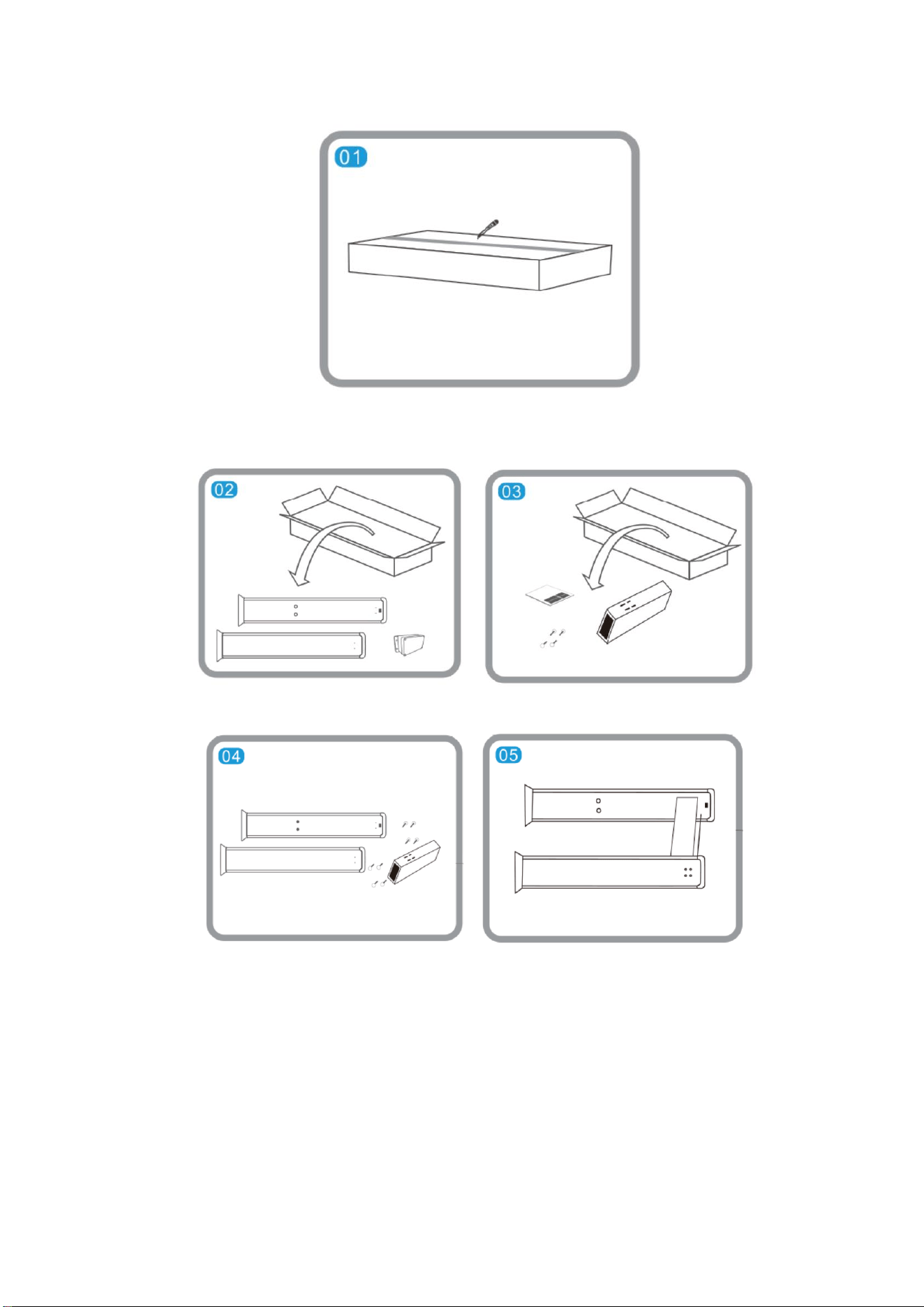
13
2. Take out the device and accessories.
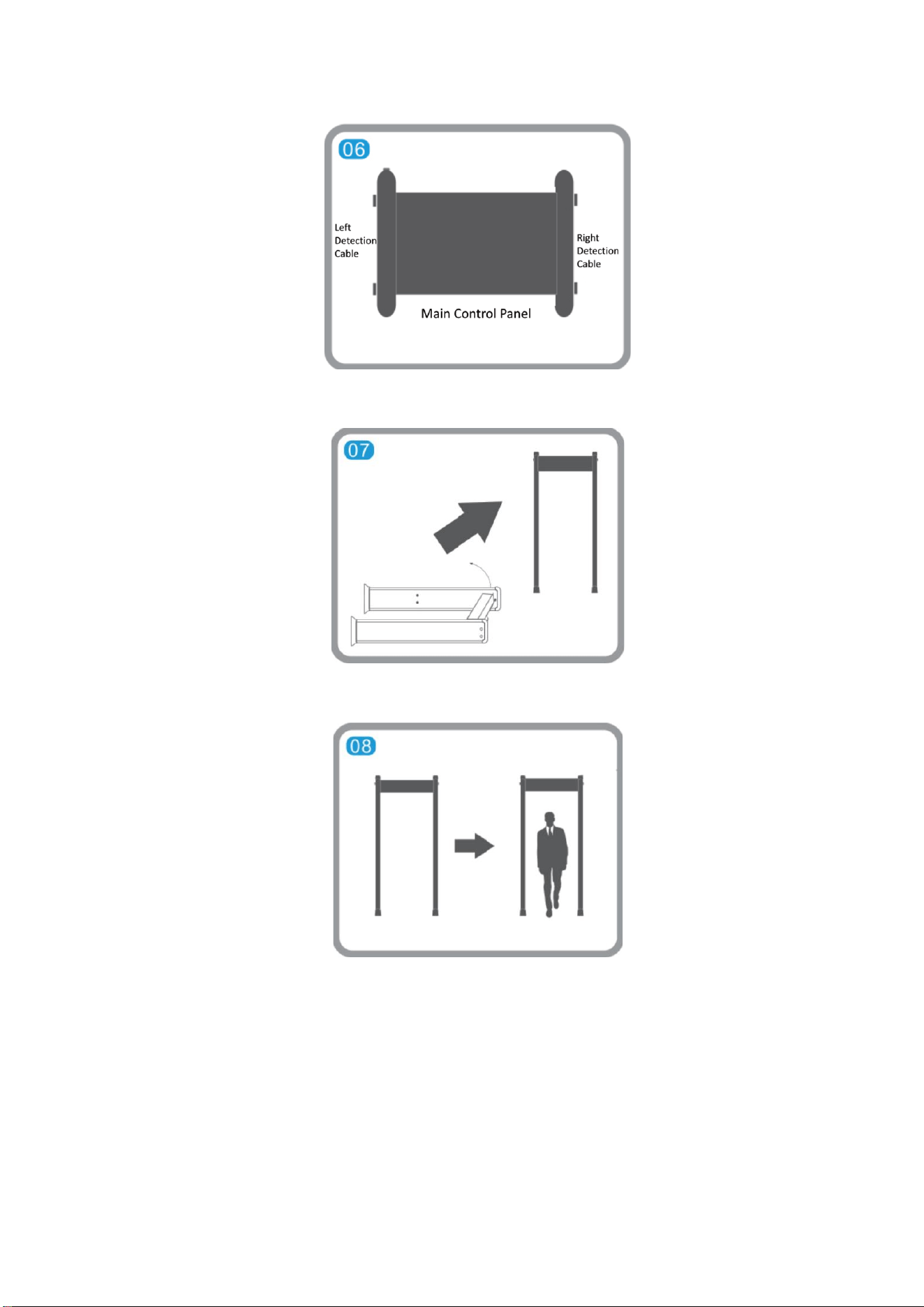
3. Install the door planks, screws, and main control panel. Tighten the screws to fix all the components.
4. Connect the 2 detection cables, 1 power cord and 1 network cable.
14
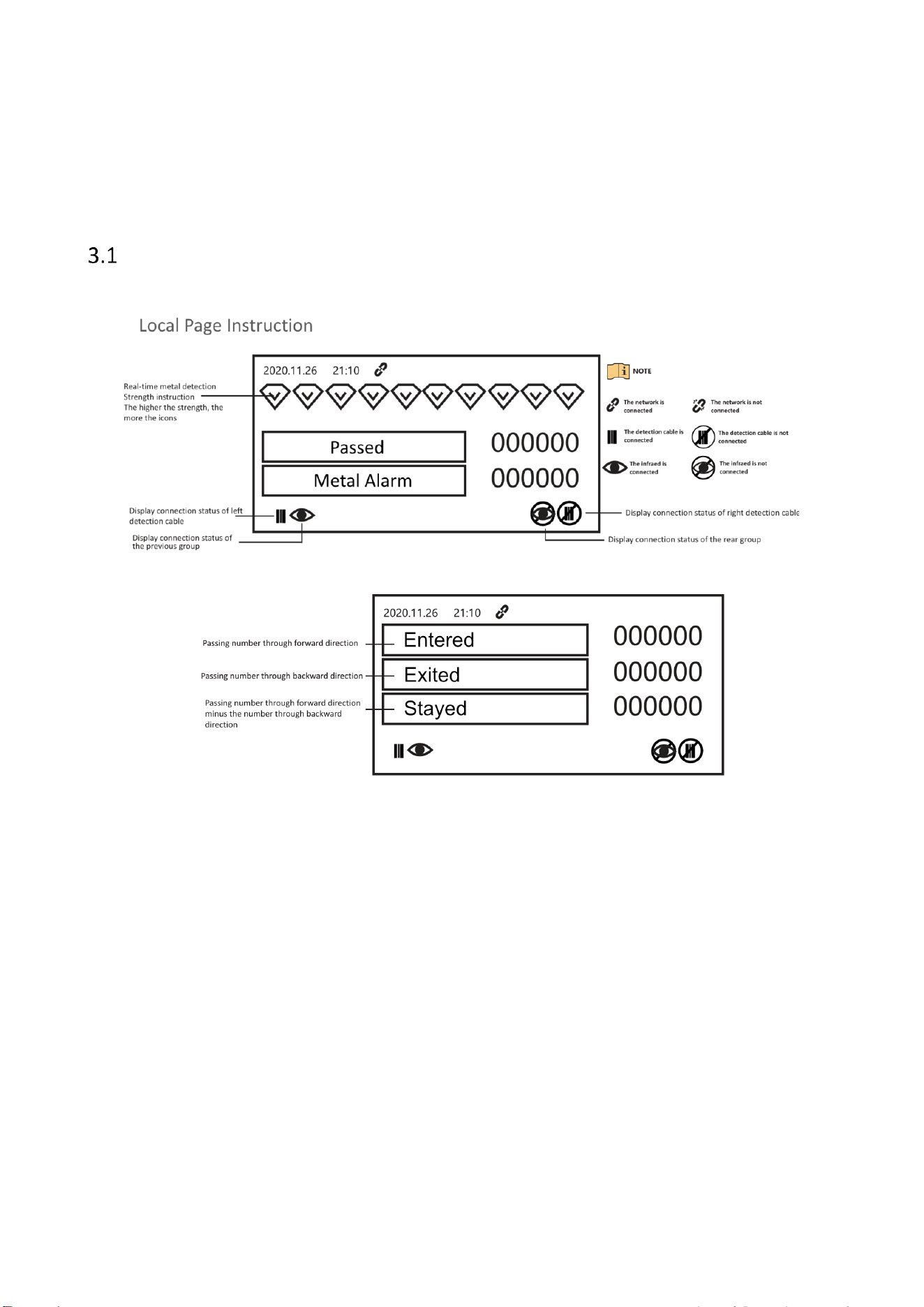
5. Upend the device.
6. Connect the power supply to the device and turn on the power switch to start the device.
15
Chapter 3 Local Configuration
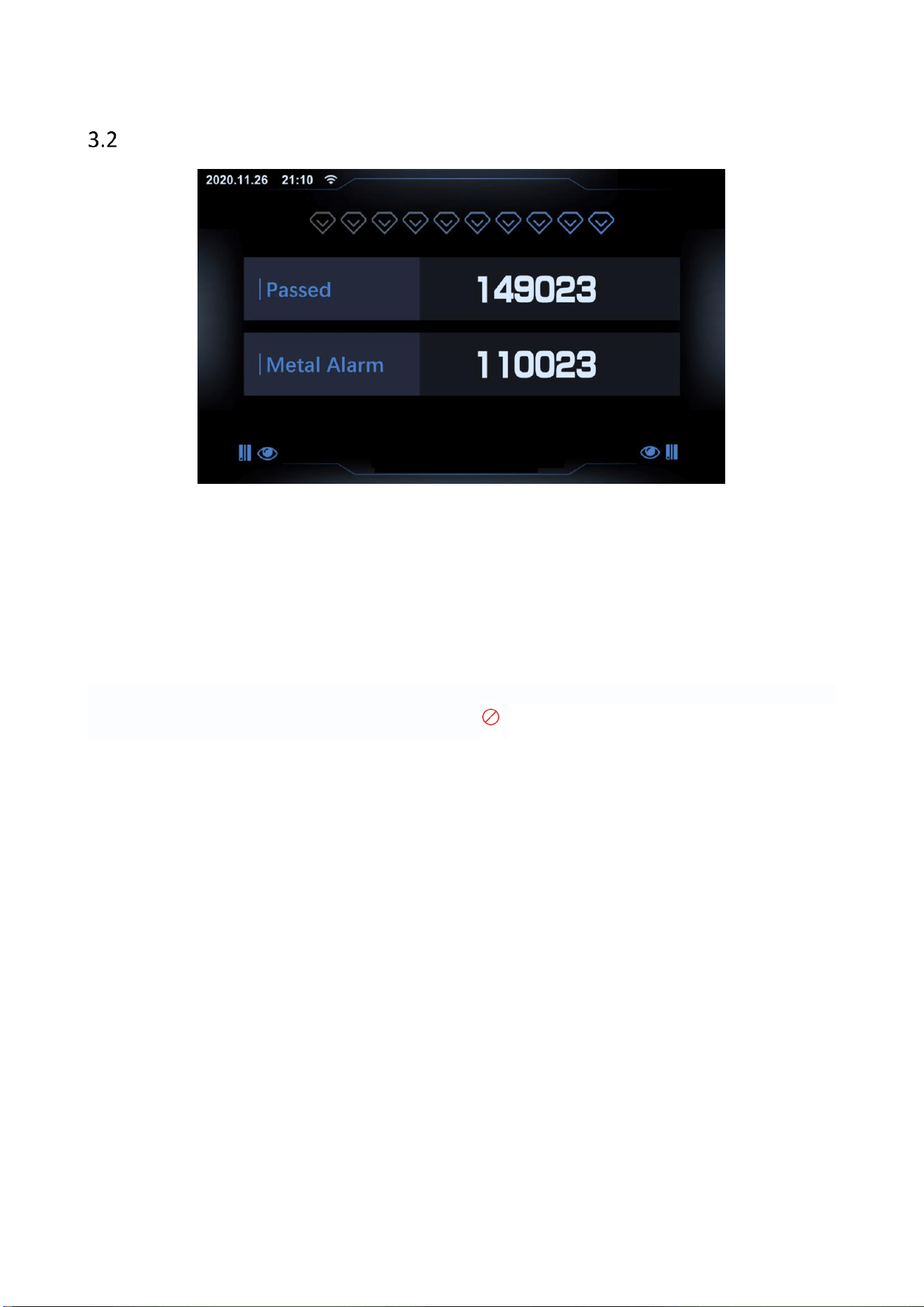
Function Description
16
Control Panel Settings
Starting up
Connect the power supply and press the power button. The device will start and enter the system self-test program.
At the same time, the column lights in each area will be on at this time.
Input Password
When using the security gate for the first time, customers need to activate the device and set the password by
themselves.
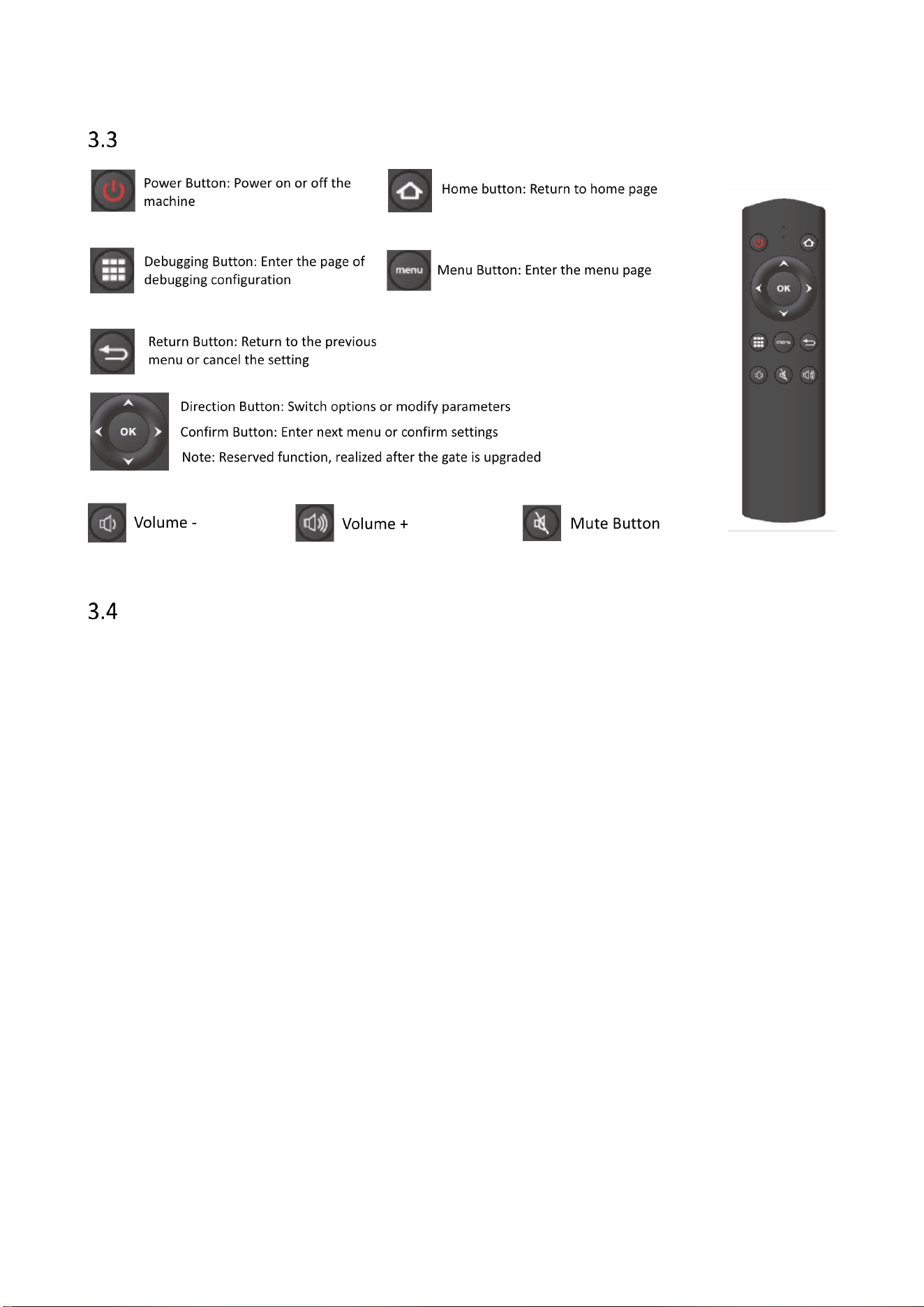
Equipment Self-test
The current infrared and door status will be displayed on the left and right corners of the device UI. If the fault
occurs, the corresponding position will display an icon like .
17
Remote Control Instruction
Activation Instructions
After powering on, you need to activate the device. You can activate the device via SADP tool or web client.
Activate Device via SADP Tool
1. Connect the device and the PC with a network cable.
2. Install and run the SADP tool.
3. Check the device status from the device list, and select an inactive device.
4. Create a password in the password field, and confirm the password.
5. Set network parameters.
Activate Device via Web Client
1. Connect the device and the PC with a network cable.
2. Enter the device IP address in the web browser.
3. Enter the account of admin and create a password in the pop-up window.
We highly recommend you create a strong password of your own choosing (using 8-16 characters, including at
least two kinds of following categories: upper case letters, lower case letters, numbers, and special characters) in
order to increase the security of your product. We also recommend you reset your password regularly, especially
in the high security system, resetting the password monthly or weekly can better protect your product.

18
Chapter 4 Network Settings
After the power is on and the device is connected to the network, enter the IP address, activate the device and
enter the page of network settings.
1
Alarm threshold: the lower the value, the higher the ability of metal detection.
2
Working frequency: set the working frequency of the coil. When there are multiple devices working
side by side, make sure the frequency between each gate is different.
3
Automatic frequency setting: set the function of automatic frequency. After enabling, the gate will
choose the frequency to configure automatically.
4
Alarm tone: set the sound effect of the alarm.
5
Alarm volume: set the volume of the alarm.
6
Alarm duration: set the length of the alarm.
7
Detection area: set the detection area of the gate.
8
Quick scene: after enabling, the gate will set sensitivity based on quick scenario system.
9
Pass direction: set the pass direction of the gate. The side without LCD screen will be taken as the
forward direction by default.
10
Automatic clearing: configure whether to clear the count automatically after powering on.
11
Intrusion alarm: configure whether to enable intrusion alarm. After enabling, if the metal enters the
gate before the detection process is finished, the intrusion alarm will be triggered.
12
Casting Metal Mode: configure whether to enable casting metal detection, which is to link with
infrared for metal detection.
13
Random alarm: configure whether to enable random alarm. After enabling, if there is no alarm after
multiple people passing, a random alarm will be triggered when next person passes.
14
Alarm output: configure metal alarm linking alarm output, which can be linked with peripheral
devices such as turnstile.

19
Appendix
No.
Symptom
Description
Possible Reason
Solution
Tool
1
Unable to
Boot
The device
cannot be
normally
started after
installation
1. Check whether the power button is
on and whether the button indicator
light is on.
2. Check whether the power cord is
damaged, broken, bad contact, etc.,
and whether the power supply of the
main chassis is normal.
1. Replace
digital
board
2. Check
power
supply
circuit
Manual
operation
2
Screen off
The LCD screen
is off
Check whether the power button is
on and whether the connecting wire
of the connecting panel of the main
board is properly plugged.
Replace
cable, display,
and digital
board.
Manual
operation
3
No people
counting
The number of
people
displayed as
0001 or 0000.
Repeatedly pass through, and the
number of people passing through
does not change.
Replace the
infrared
component
Manual
operation
4
False Alarm
The alarm is
triggered when
there is no
people walk
through
1. Check whether the environment
around the detector affects. Change
the frequency.
2. Whether the number of people
passed automatically changed.
3. Adjust the alarm threshold
4. Check whether there is any large
metal within 1 m nearby. If there is,
please stay away.
1. Replace the
infrared
component
2. Adjust the
sensitivity
value
Manual
operation
5
Omitting
alarm
No alarm when
walk through
the detector
with metal
1. Adjust the alarm threshold
2. Check whether there is any large
metal within 1 m nearby. If there is,
please stay away.
Adjust the
alarm
threshold
Manual
operation
20
Material
Emissivity
Human Skin
0.98
Printed Curcuit Board
0.91
Concrete
0.95
Ceramic
0.92
Rubber
0.95
Paint
0.93
Wood
0.85
Pitch
0.96
Brick
0.95
Sand
0.90
Soil
0.92
Cloth
0.98
Hard Paperboard
0.90
White Paper
0.90
Water
0.96
21
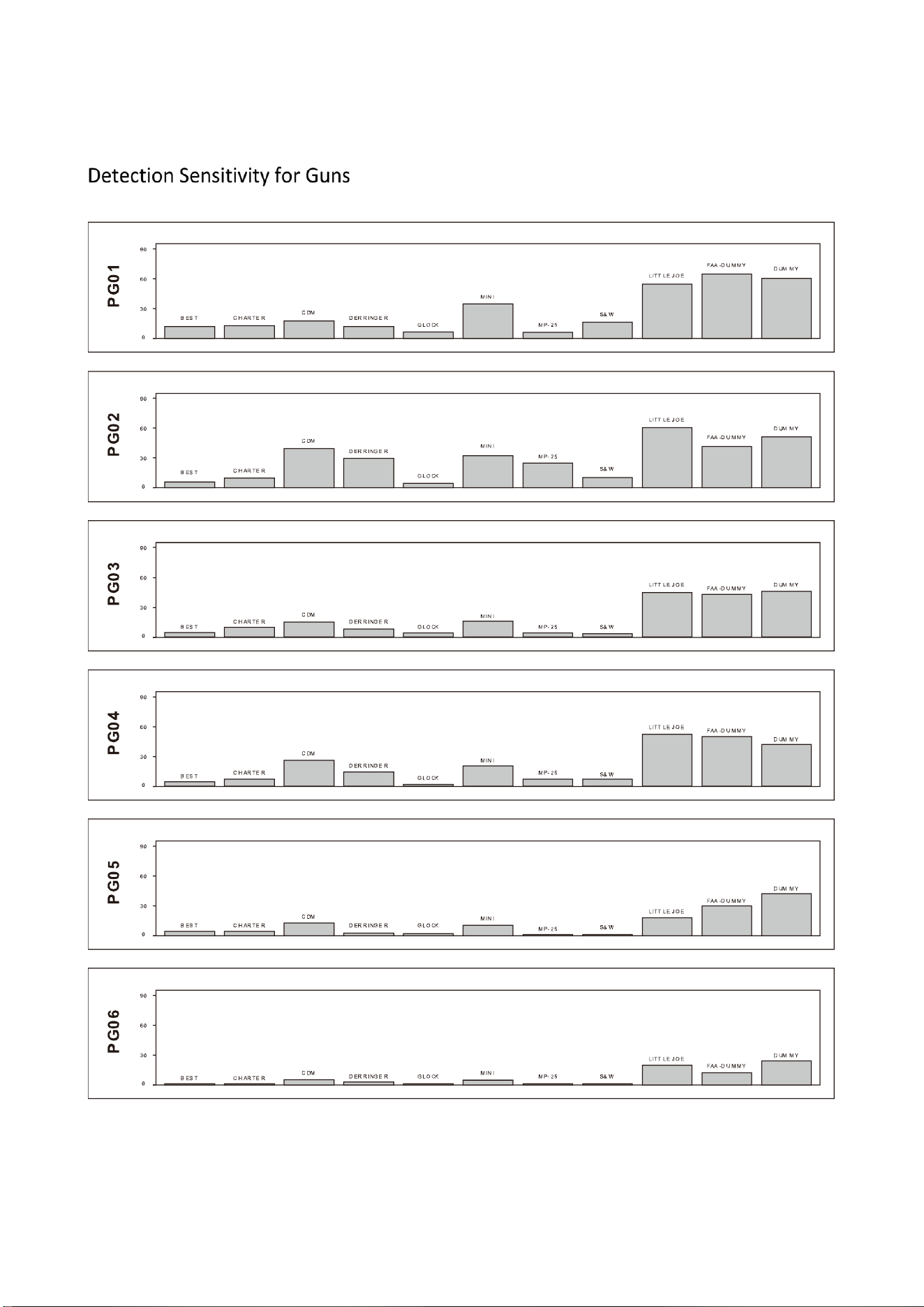
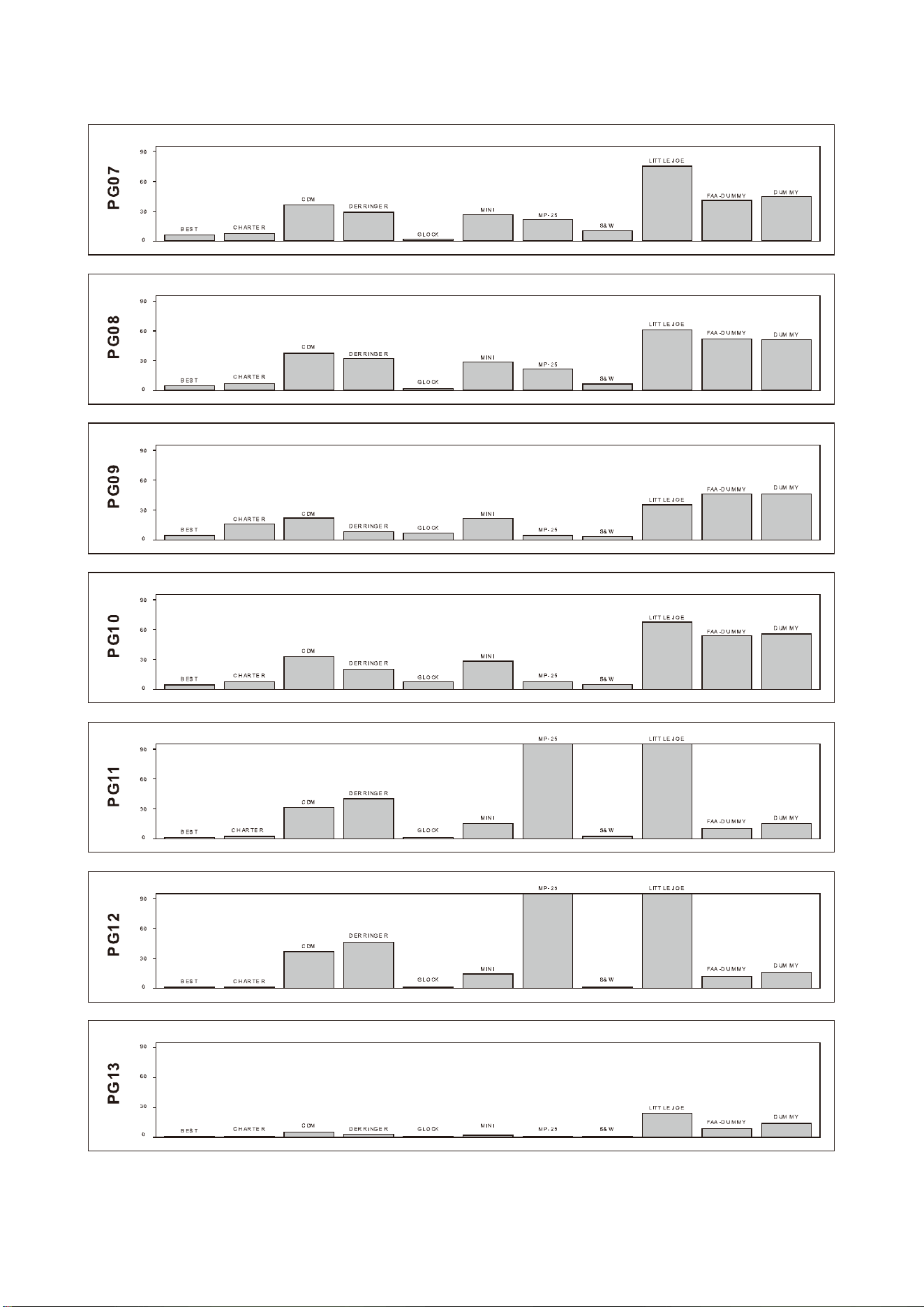
The smaller the histogram, the lower the sensitivity level required.
22
23
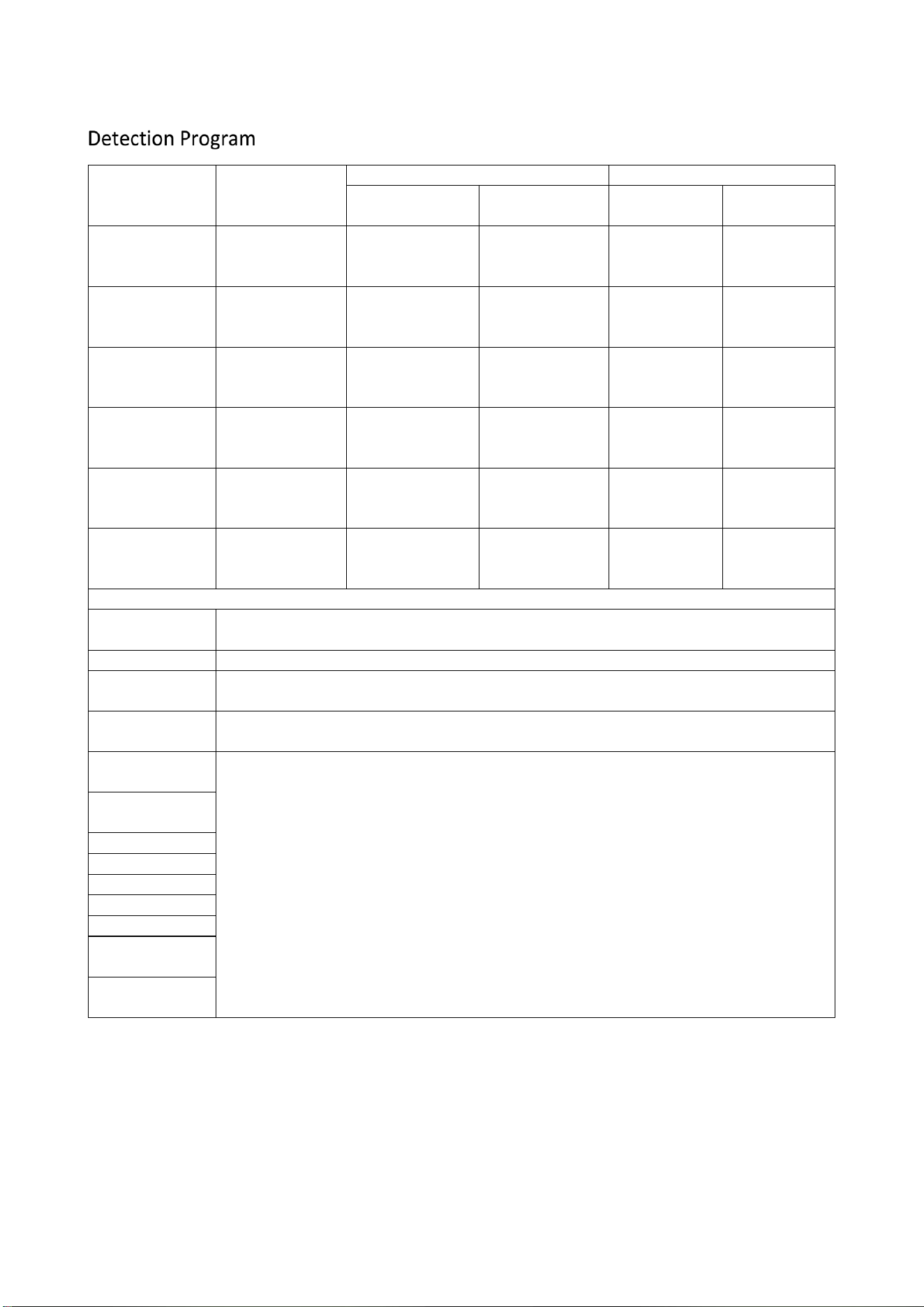
24
Detection
Program
Description
Performance
Distinguishability
High Pass
Optimizing
Detection
High
Low
PRG 01 USA
PRG 02 USA HD
U.S. airport
security
requirements
x
x
x
x
PRG 03 CAN
PRG 04 CAN HD
Canadian airport
security
requirements
x
x
x
x
PRG 05 GER
PRG 06 GER HD
German airport
security
requirements
x
x
x
x
PRG 07 UK
PRG 08 UK HD
The UK airport
security
requirements
x
x
x
x
PRG 09 USG
PRG 10 USG HD
U.S. government
security
requirements
x
x
x
x
PRG 11 SCA
PRG 12 SCA HD
Scandinavian
airport security
requirements
x
x
x
x
Material Sensitivity Program
PRG 13
STANDARD
General detection program
PRG 21 PB-LEAD
Sensitivity to lead (as opposed to iron)
PRG 22 MU-
METAL
Maximum sensitivity for mu-metal
PRG 23
ALLMETAL
High sensitivity to all metals
PRG 24 FE >>>>
AL
Sensitivity: Iron > aluminum
The procedures from 24 to 32 are compared with 40 mm iron and aluminum tubes.
Sensitivity: Iron < aluminum
PRG 25 FE >>>
AL
PRG 26 FE >> AL
PRG 27 FE > AL
PRG 28 FE = AL
PRG 29 FE < AL
PRG 30 FE << AL
PRG 31 FE <<<
AL
PRG 32 FE <<<<
AL
25
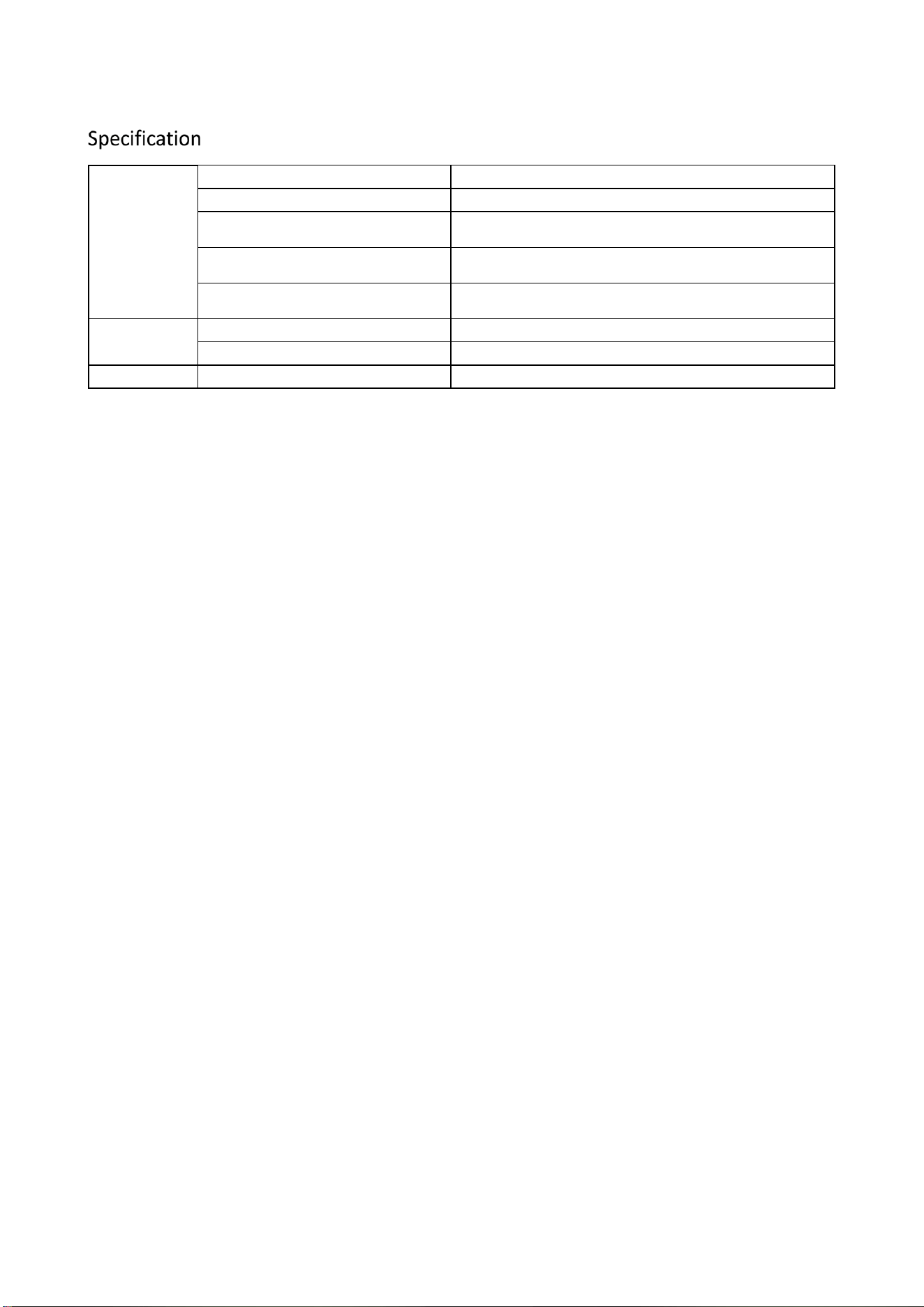
General
Power supply
AC 100 V~240 V
Consumption
< 25 W
Operation temperature and humidity
-20°C to 55°C, 10% to 95%, RH
Testing object
Illegal items, including smart phones and metals
Current frequency
50 Hz~60 Hz
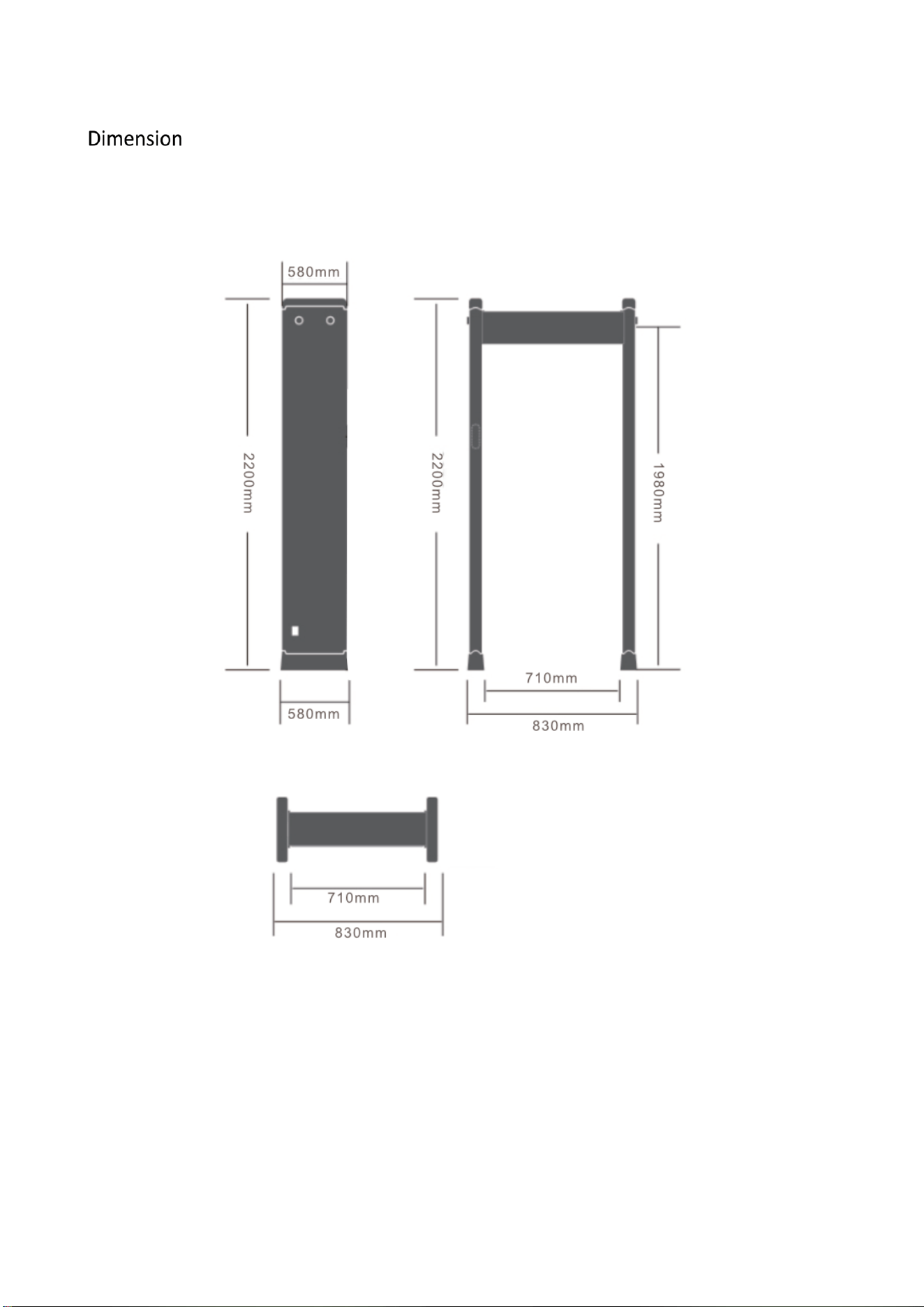
Dimension
Detector dimension
2200 mm x 830 mm x 580 mm (H x W x D)
Channel dimension
1980 mm x 710 mm x 580 mm (H x W x D)
Weight
Net weight
< 60 Kg