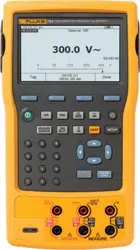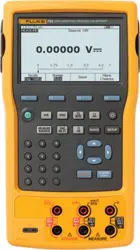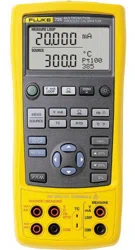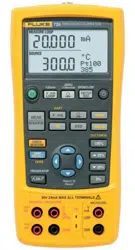

725Ex
Multifunction Process Calibrator
Users Manual
January 2005 Rev. 3, 5/18
© 2005-2018 Fluke Corporation, All rights reserved. Specifications are subject to change without notice.
All product names are trademarks of their respective companies.
1.888.610.7664 sales@GlobalTestSupply.com
Fluke-Direct.com

LIMITED WARRANTY AND LIMITATION OF LIABILITY
Each Fluke product is warranted to be free from defects in material and workmanship under normal use and service. The warranty period is
three years and begins on the date of shipment. Parts, product repairs, and services are warranted for 90 days. This warranty extends only
to the original buyer or end-user customer of a Fluke authorized reseller, and does not apply to fuses, disposable batteries, or to any product
which, in Fluke's opinion, has been misused, altered, neglected, contaminated, or damaged by accident or abnormal conditions of operation
or handling. Fluke warrants that software will operate substantially in accordance with its functional specifications for 90 days and that it has
been properly recorded on non-defective media. Fluke does not warrant that software will be error free or operate without interruption.
Fluke authorized resellers shall extend this warranty on new and unused products to end-user customers only but have no authority to ex-
tend a greater or different warranty on behalf of Fluke. Warranty support is available only if product is purchased through a Fluke authorized
sales outlet or Buyer has paid the applicable international price. Fluke reserves the right to invoice Buyer for importation costs of re-
pair/replacement parts when product purchased in one country is submitted for repair in another country.
Fluke's warranty obligation is limited, at Fluke's option, to refund of the purchase price, free of charge repair, or replacement of a defective
product which is returned to a Fluke authorized service center within the warranty period.
To obtain warranty service, contact your nearest Fluke authorized service center to obtain return authorization information, then send the
product to that service center, with a description of the difficulty, postage and insurance prepaid (FOB Destination). Fluke assumes no risk
for damage in transit. Following warranty repair, the product will be returned to Buyer, transportation prepaid (FOB Destination). If Fluke
determines that failure was caused by neglect, misuse, contamination, alteration, accident, or abnormal condition of operation or handling,
including overvoltage failures caused by use outside the product’s specified rating, or normal wear and tear of mechanical components,
Fluke will provide an estimate of repair costs and obtain authorization before commencing the work. Following repair, the product will be
returned to the Buyer transportation prepaid and the Buyer will be billed for the repair and return transportation charges (FOB Shipping
Point).
THIS WARRANTY IS BUYER'S SOLE AND EXCLUSIVE REMEDY AND IS IN LIEU OF ALL OTHER WARRANTIES, EXPRESS OR IM-
PLIED, INCLUDING BUT NOT LIMITED TO ANY IMPLIED WARRANTY OF MERCHANTABILITY OR FITNESS FOR A PARTICULAR
PURPOSE. FLUKE SHALL NOT BE LIABLE FOR ANY SPECIAL, INDIRECT, INCIDENTAL, OR CONSEQUENTIAL DAMAGES OR
LOSSES, INCLUDING LOSS OF DATA, ARISING FROM ANY CAUSE OR THEORY.
Since some countries or states do not allow limitation of the term of an implied warranty, or exclusion or limitation of incidental or conse-
quential damages, the limitations and exclusions of this warranty may not apply to every buyer. If any provision of this Warranty is held inva-
lid or unenforceable by a court or other decision-maker of competent jurisdiction, such holding will not affect the validity or enforceability of
any other provision.
11/99
1.888.610.7664 sales@GlobalTestSupply.com
Fluke-Direct.com

i
Table of Contents
Title Page
Introduction .................................................................................................................... 1
Contact Fluke ................................................................................................................. 1
Standard Equipment ....................................................................................................... 3
Safety Information .......................................................................................................... 3
Ex Hazardous Areas ...................................................................................................... 3
Faults and Damage ................................................................................................... 9
Faults and Damage ................................................................................................... 9
Safety Regulations .................................................................................................... 9
Certification Information ............................................................................................. 10
Getting Acquainted with the Calibrator ........................................................................... 10
Input and Output Terminals ....................................................................................... 10
Keys .......................................................................................................................... 12
Display ....................................................................................................................... 15
Getting Started ............................................................................................................... 16
Shut Down Mode ............................................................................................................ 16
Contrast Adjustment ....................................................................................................... 18
Using Measure Mode ..................................................................................................... 19
Measuring Electrical Parameters (Upper Display) ..................................................... 19
1.888.610.7664 sales@GlobalTestSupply.com
Fluke-Direct.com

725Ex
Users Manual
iv
Current Measurement with Loop Power .................................................................... 19
Measuring Electrical Parameters (Lower Display) .................................................... 21
Measuring Temperature ............................................................................................ 22
Using Thermocouples .......................................................................................... 22
Using Resistance-Temperature Detectors (RTDs) ............................................... 25
Measuring Pressure .................................................................................................. 28
Zeroing with Absolute Pressure Modules .................................................................. 29
Using Source Mode ....................................................................................................... 31
Sourcing 4 to 20 mA .................................................................................................. 31
Simulating a 4- to 20-mA Transmitter ........................................................................ 31
Sourcing Other Electrical Parameters ....................................................................... 31
Simulating Thermocouples ........................................................................................ 34
Simulating RTDs ....................................................................................................... 34
Source Pressure Mode ............................................................................................. 37
Setting 0 % and 100 % Output Parameters ................................................................... 39
Stepping and Ramping the Output ................................................................................. 39
Manually Stepping the mA Output ............................................................................ 39
Auto Ramping the Output .......................................................................................... 40
Storing and Recalling Setups ......................................................................................... 40
Calibrating a Transmitter ................................................................................................ 41
Calibrating a Pressure Transmitter ................................................................................ 43
Calibrating an I/P Device ............................................................................................... 45
Switch Test .................................................................................................................... 47
Testing an Output Device .............................................................................................. 48
Replacing the Batteries .................................................................................................. 49
Approved Batteries ........................................................................................................ 50
Maintenance .................................................................................................................. 50
Cleaning the Calibrator ............................................................................................. 50
1.888.610.7664 sales@GlobalTestSupply.com
Fluke-Direct.com

Contents
(continued)
iii
Service Center Calibration or Repair ......................................................................... 51
Replacement Parts .................................................................................................... 51
Accessories .................................................................................................................... 53
Specifications ................................................................................................................. 55
DC Voltage Measurement ......................................................................................... 55
DC Voltage Source .................................................................................................... 55
Millivolt Measurement and Source* ........................................................................... 55
DC mA Measurement and Source ............................................................................. 56
Ohms Measurement .................................................................................................. 56
Ohms Source ............................................................................................................. 56
Frequency Measurement ........................................................................................... 56
Frequency Source ..................................................................................................... 57
Temperature, Thermocouples ................................................................................... 57
Loop Power Supply ................................................................................................... 57
RTD Excitation (simulation) ....................................................................................... 58
Temperature, RTD Ranges, and Accuracies ............................................................. 58
Pressure Measurement ............................................................................................. 59
General Specifications ............................................................................................... 59
1.888.610.7664 sales@GlobalTestSupply.com
Fluke-Direct.com

1
Multifunction Process Calibrator
Introduction
WWarning
Read "Safety Information" before using the
Calibrator.
The Fluke 725Ex Multifunction Process Calibrator
(hereafter referred to as “the Calibrator”) is a handheld,
battery-operated instrument that measures and sources
electrical and physical parameters. For a summary of
source and measurement functions, see Table 1.
In addition to the functions in Table 1, the Calibrator has
the following features and functions:
• A split-screen display - The upper display allows the
user to measure volts, current, and pressure only.
The lower display allows the user to measure and
source volts, current, pressure, resistance
temperature detectors, thermocouples, frequency,
and ohms.
• Calibrates a transmitter using the split-screen.
• A thermocouple (TC) input/output terminal and
internal isothermal block with automatic reference
junction temperature compensation.
• Stores and recalls setups.
• Manual stepping and automatic stepping and
ramping.
1.888.610.7664 sales@GlobalTestSupply.com
Fluke-Direct.com
725Ex
Users Manual
2
Table 1. Summary of Source and Measure Functions
Function Measure Source
dc V 0 V dc to 30 V dc 0 V dc to 10 V dc
dc mA 0 to 24 mA dc 0 to 24 mA
Frequency 1 CPM to 10 kHz 1 CPM to 10 kHz
Resistance
0 Ω to 3200 Ω 15 Ω to 3200 Ω
Thermocouple Types E, J, K, T, B, R, S, L, U, N, mV, XK, BP
RTD
(Resistance-
Temperature Detector)
Ni120
Pt100 Ω (385)
Pt100 Ω (3926)
Pt100 Ω (3916)
Pt200 Ω (385)
Pt500 Ω (385)
Pt1000 Ω (385)
Pressure Fluke 750PEx series modules ranging from
10 inH2O to 3000 psi
Fluke 750PEx series modules ranging from
10 inH2O to 3000 psi using an external
pressure source (hand pump).
Other functions Loop-Power Supply, Step, Ramp, Memory, Dual Display
1.888.610.7664 sales@GlobalTestSupply.com
Fluke-Direct.com

Mulitfunction Process Calibrator
Standard Equipment
3
Standard Equipment
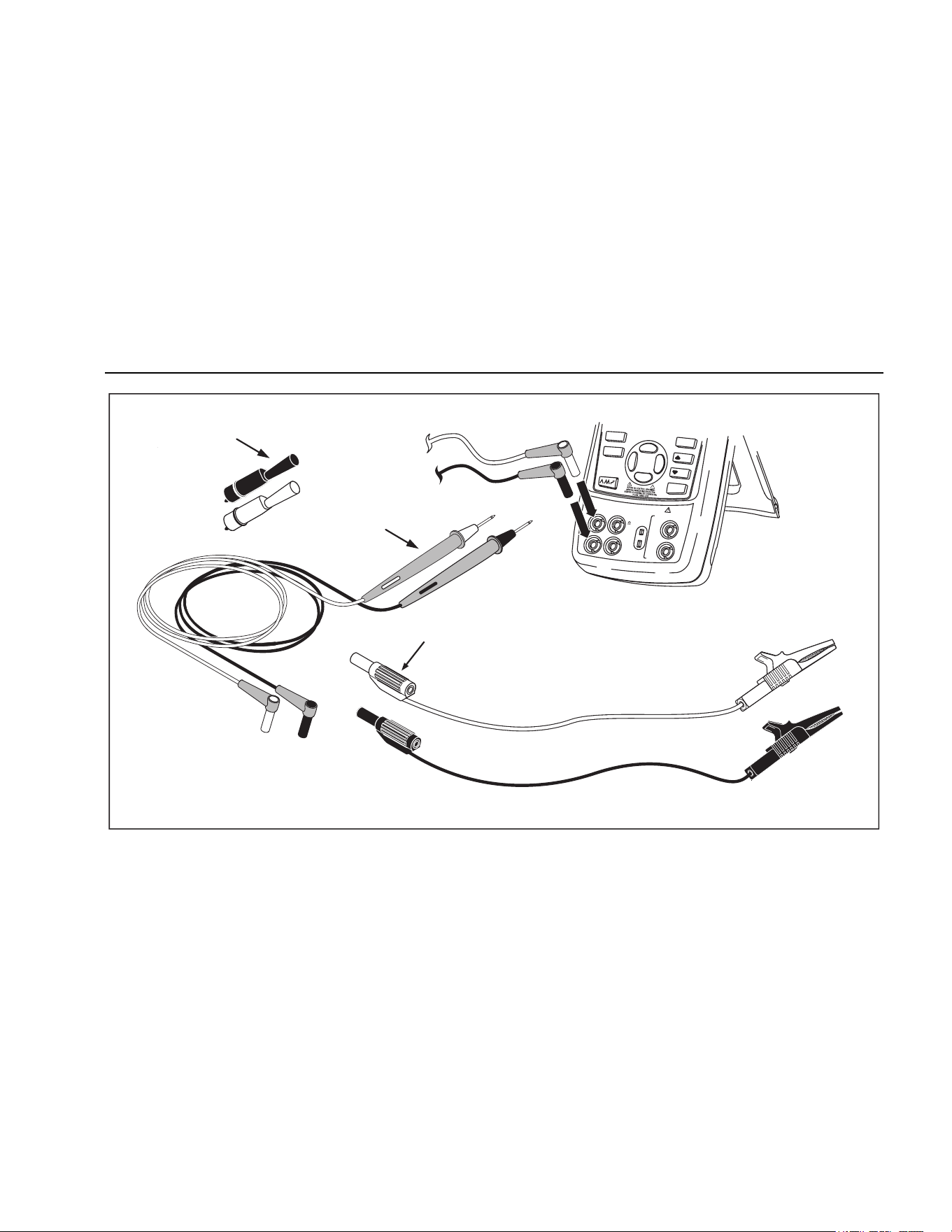
The items listed below and shown in Figure 1 are included
with the Calibrator. If the Calibrator is damaged or
something is missing, contact the place of purchase
immediately. To order replacement parts, see
Replacement Parts in Table 9.
• TL75 test leads with caps (one set)
• Alligator clips (one set)
• Stackable alligator clip test leads (one set)
• Fluke 725Ex CCD
• Fluke 725Ex Safety Information
• 4 AA Batteries (installed)
• Hex Key, 5/64 in., short arm
Safety Information
A Warning statement identifies conditions and actions that
pose a hazard(s) to the user. A Caution statement
identifies conditions and actions that may damage the
Calibrator or the equipment under test.
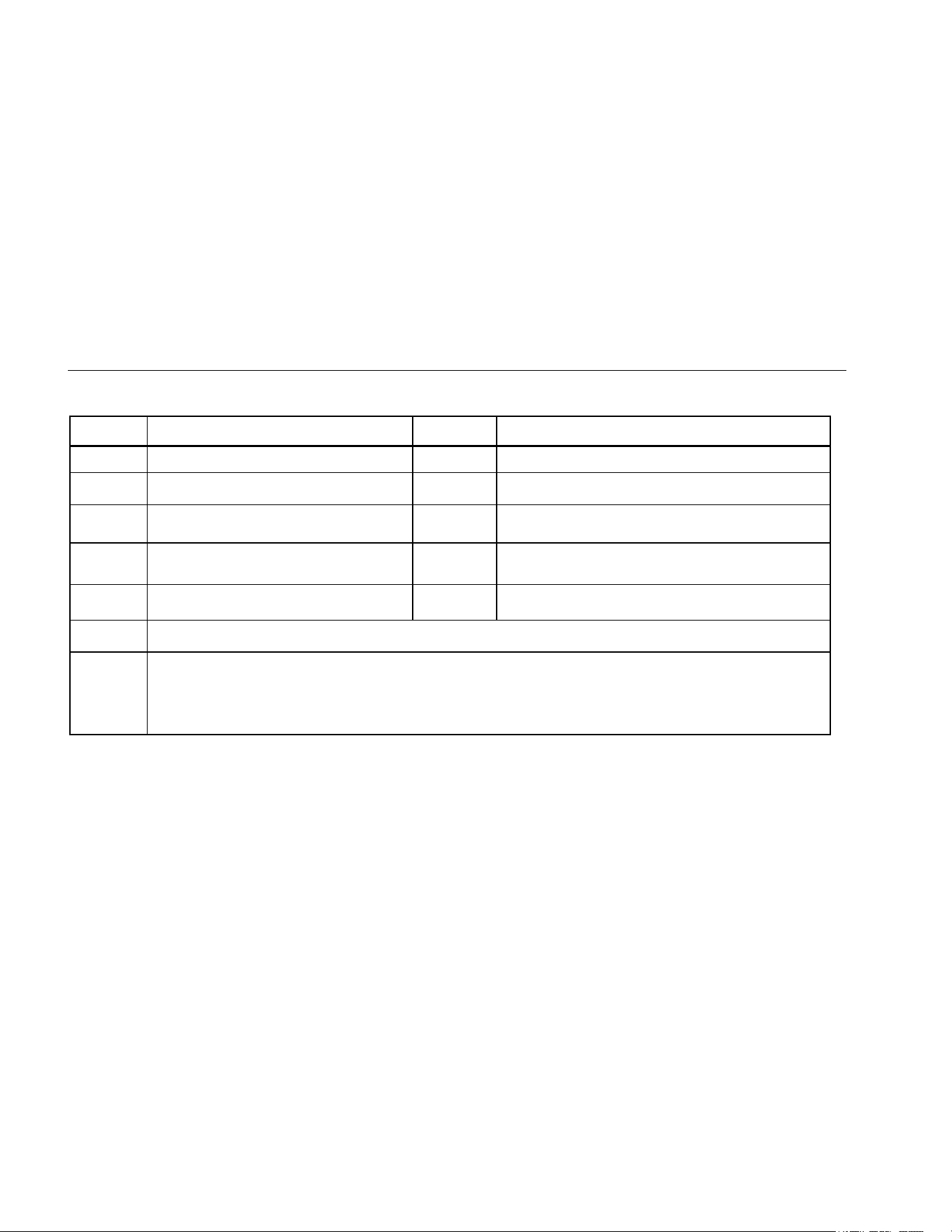
Symbols used on the Calibrator and in this manual, are
explained in Table 2.
Ex Hazardous Areas
The Model 725Ex Calibrator has been designed for use in
Ex Hazardous Areas. These are areas where potentially
flammable or explosive vapors may occur. These areas
are referred to as hazardous (classified) locations in the
United States (NFPA 70 Article 500), as Hazardous
Locations in Canada (CSA C22.1 Section 18), and as
Explosive Gas Atmospheres by most of the rest of the
world. The Model 725Ex calibrator is designed as
intrinsically safe. This means that connecting the 725Ex
calibrator to equipment that is used within intrinsically safe
circuits will not cause an ignition capable arc as long as
the entity parameters are suitably matched.
The Calibrator has two sets of parameters. The Vmax and
Imax parameters show the maximum voltage and
maximum current that may be connected to the Model
725Ex terminals without compromising the intrinsic safety.
The voltage and current will generally come from intrinsic
safety barriers that provide power to the field equipment
such as transmitters and positioners (I/P devices). These
barriers are identified with a maximum open circuit voltage
parameter (Voc) and a maximum short circuit current
parameter (Isc). The matching criterion requires that Voc
of the barrier not exceed 30 V and Isc not exceed 100 mA.
The Calibrator will itself be a source of voltage and
current. Each set of terminals has a Voc and an Isc rating
as shown on the Calibrator CCD. When connecting
1.888.610.7664 sales@GlobalTestSupply.com
Fluke-Direct.com

725Ex
Users Manual
4
terminals to other equipment, the Vmax and Imax ratings
on the other equipment must exceed the Voc and Isc
ratings for the terminals connected to on the 725Ex
calibrator.
In addition to matching voltage and current entity
parameters, it is also necessary to verify that capacitance
and inductance has not been exceeded. Again, the
Calibrator CCD identifies the maximum capacitance (Ca)
and maximum inductance (La) that is permitted based
either on the intrinsic safety barrier ratings or on the
Calibrator ratings for the specific terminals used. As an
example, the Calibrator CCD explains that the capacitance
of each unit connected in the circuit (Ci) plus the
capacitance of the cable in the circuit must not exceed the
maximum allowed capacitance (Ca). Use a similar
approach for inductance in the intrinsically safe circuit.
When connecting the Calibrator into a powered circuit, that
is, when the circuit is powered by an intrinsic safety
barrier, then the maximum circuit voltage used for the
entity parameter evaluation will be the higher of either the
Calibrator Voc or of the barrier Voc. The maximum current
will be the sum of the Calibrator Isc and the barrier Isc. In
this case, the maximum allowed inductance (La) will be
reduced. This value will have to be determined using the
ignition curves found in standards such as CSA C22.2 No.
157 or UL 913.
For additional information about Ex Hazardous Areas,
refer to ANSI/ISA-12.01.01-2013 Definitions and
Information Pertaining to Electrical Instruments in
Hazardous (Classified) Locations and to ANSI/ISA-
RP12.06.01-2003 Recommended Practice for Wiring
Methods for Hazardous (Classified) Locations
Instrumentation Part 1: Intrinsic Safety.
1.888.610.7664 sales@GlobalTestSupply.com
Fluke-Direct.com

Mulitfunction Process Calibrator
Ex Hazardous Areas
5
W Warning
To prevent fire, explosion, or personal injury:
• Use the Calibrator only as described in this User Manual and the Fluke 725Ex CCD (Concept Control
Drawing) or the protection provided by the Calibrator may be impaired.
• Inspect the Calibrator before use. Do not use it if it appears damaged.
• Check the test leads for continuity, damaged insulation, or exposed metal. Replace damaged test leads.
• When using probes, keep fingers behind the finger guards on the probes.
• Never apply more than 30.0 V between the input terminals, or between any terminal and earth ground.
• Applying more than 30.0 V to the input terminals invalidates the Calibrator’s Ex Approval and may
result in permanent damage to the Calibrator so it can no longer be used.
• Use the proper terminals, mode, and range for the measuring or sourcing application.
• To prevent damage to the device under test, be sure the Calibrator is in the correct mode before
connecting the test leads.
• Never open the Calibrator case. Opening the case invalidates the Calibrator’s Ex Approval.
• Make sure the battery door is closed and latched before entering an Ex hazardous area or using the
Calibrator. See “Ex Hazardous Areas”.
• Remove the Calibrator from the Ex-hazardous area before opening the battery door. See “Ex Hazardous
Areas”.
• Remove test leads from the Calibrator before opening the battery door.
• When servicing the Calibrator, use only specified replacement parts. Do not open the Calibrator case.
Opening the case invalidates the Calibrator’s Ex Approval.
• Do not allow water inside the case.
• Do not operate the Calibrator around explosive dust.
• When using a pressure module, make sure the process pressure line is shut off and depressurized
before connecting it or disconnecting it from the pressure module.
• Use four properly installed AA batteries to power the Calibrator.
• Use only the batteries listed in Table 8.
1.888.610.7664 sales@GlobalTestSupply.com
Fluke-Direct.com

725Ex
Users Manual
6
• Disconnect test leads from the circuit under test before changing to another measure or source
function.
• When measuring the pressure of toxic or flammable gases, care must be taken to minimize the
possibility of leakage. Confirm that all pressure connections are properly sealed.
• Do not use in a damp or wet environment.
WCaution
To avoid possible damage to Calibrator or to equipment under test:
• Disconnect the power and discharge all high-voltage capacitors before testing resistance or continuity.
• Use the proper jacks, function, and range for the measurement or sourcing application.
• The MEASURE/SOURCE terminals on the Calibrator are sensitive to Electro-static discharge (ESD) at
levels above ±2 kV. The Calibrator can experience temporary loss of measurement or source
functionality. This can require you to restore product function, or cause permanent damage to the
Calibrator. Usually, a disruptive ESD event occurs only when you connect the test leads to the circuits
being measured or if you have a large static charge and touch the Calibrator terminals. The most
common cause of ESD is a user that carries the Calibrator across a carpet, or other similar triboelectric
activity, before they connect to the circuit being measured.
1.888.610.7664 sales@GlobalTestSupply.com
Fluke-Direct.com
Mulitfunction Process Calibrator
Ex Hazardous Areas
7
100%
25%
25%
RECA LL
STO RE
SETU P
0%
Stackable
Test Leads
TL75
Test Lead Set
A
C7
2
A
lli
g
at or Clips
V
mA
MEASURE
SOURCE / MEASURE
30V 24mA MAX ALL TERMINALS
4W
3W
V
Hz
RTD
mA
+
mA
-
TC
COM
COM
LOOP
AC175
Alligator Clips
aly01f.eps
Figure 1. Standard Equipment
1.888.610.7664 sales@GlobalTestSupply.com
Fluke-Direct.com
725Ex
Users Manual
8
Table 2. Symbols
Symbol Meaning Symbol Meaning
W
WARNING. RISK OF DANGER.
Consult user documentation.
+
Power ON/OFF
T
Double insulated
Earth ground
f
Pressure
Battery
)
Certified by CSA Group to North American safety
standards.
Direct current
Conforms to relevant Australian Safety and EMC
standards.
Conforms to relevant South Korean EMC Standards.
~
This product complies with the WEEE Directive marking requirements. The affixed label indicates that you
must not discard this electrical/electronic product in domestic household waste. Product Category: With
reference to the equipment types in the WEEE Directive Annex I, this product is classed as category 9
"Monitoring and Control Instrumentation" product. Do not dispose of this product as unsorted municipal
waste.
1.888.610.7664 sales@GlobalTestSupply.com
Fluke-Direct.com

Mulitfunction Process Calibrator
Ex Hazardous Areas
9
Faults and Damage
Applying a voltage greater than 30 V to the input of the
Calibrator invalidates its Ex Approval and may impair its
safe operation in an Ex-hazardous area. See “Ex
Hazardous Areas”.
If there is any reason to suspect that the safe operation of
the Calibrator has been affected, it must be immediately
withdrawn from use, and precautionary measures must be
taken to prevent any further use of the Calibrator in an
Ex-hazardous area. See Ex Hazardous Areas.
Fully observe all instructions, warnings, and cautions
contained in this manual. In case of doubt due to
translation and/or printing errors, refer to the original
English users manual.
The safety features and integrity of the Calibrator may be
compromised by any of the following:
• External damage to the case
• Internal damage to the Calibrator
• Exposure to excessive loads
• Incorrect storage of the Calibrator
• Damage sustained in transit
• Certification markings are illegible
• Functioning errors occur
• Permitted limitations are exceeded
• Functioning errors or obvious measurement
inaccuracies occur which prevent further
measurement by the Calibrator
• Opening the case
Safety Regulations
The use of the Calibrator meets the requirements of the
regulations providing that the user observes and applies
the requirements as stated in the regulations and that
improper and incorrect use of the Calibrator is avoided.
• Use must be restricted to the specified application
parameters.
• Do not open the Calibrator.
• Do not remove or install the batteries within the
Ex-hazardous area. See “Ex Hazardous Areas”.
• Do not carry additional batteries within the
Ex-hazardous area. See “Ex Hazardous Areas”.
• Use only type tested batteries. The use of any other
batteries will invalidate the Ex-certification and
present a safety risk.
• Do not use the Calibrator in any circuit where the
voltage or transients may exceed 30 V.
• Only use the Calibrator in circuits with compatible
entity parameters. When the calibrator is used in an
Ex hazardous area, unless the area is known to be
safe, do not connect to any circuits that exceed the
entity parameters defined on Fluke 725Ex CCD
Control Drawing. See Ex Hazardous Areas.
1.888.610.7664 sales@GlobalTestSupply.com
Fluke-Direct.com
725Ex
Users Manual
10
Certification Information
• ) Class I Div. 1 Groups B, C, and D
Class I Zone 0 AEx/Ex ia IIB 171 °C
• Ta = -10 °C… +55 °C
• Manufactured by Fluke Corporation
6920 Seaway Blvd.
Everett, WA 98203, USA
Getting Acquainted with the Calibrator
Input and Output Terminals
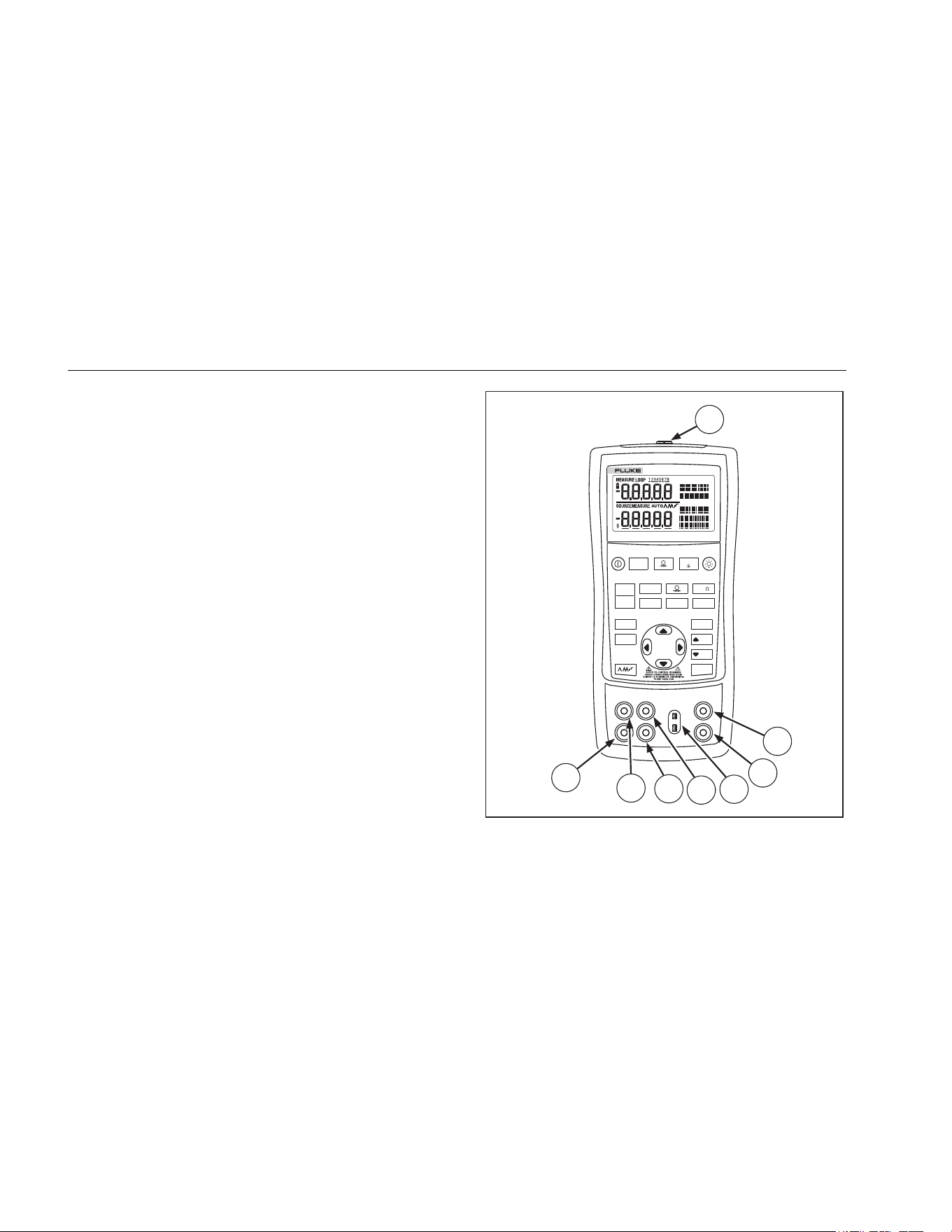
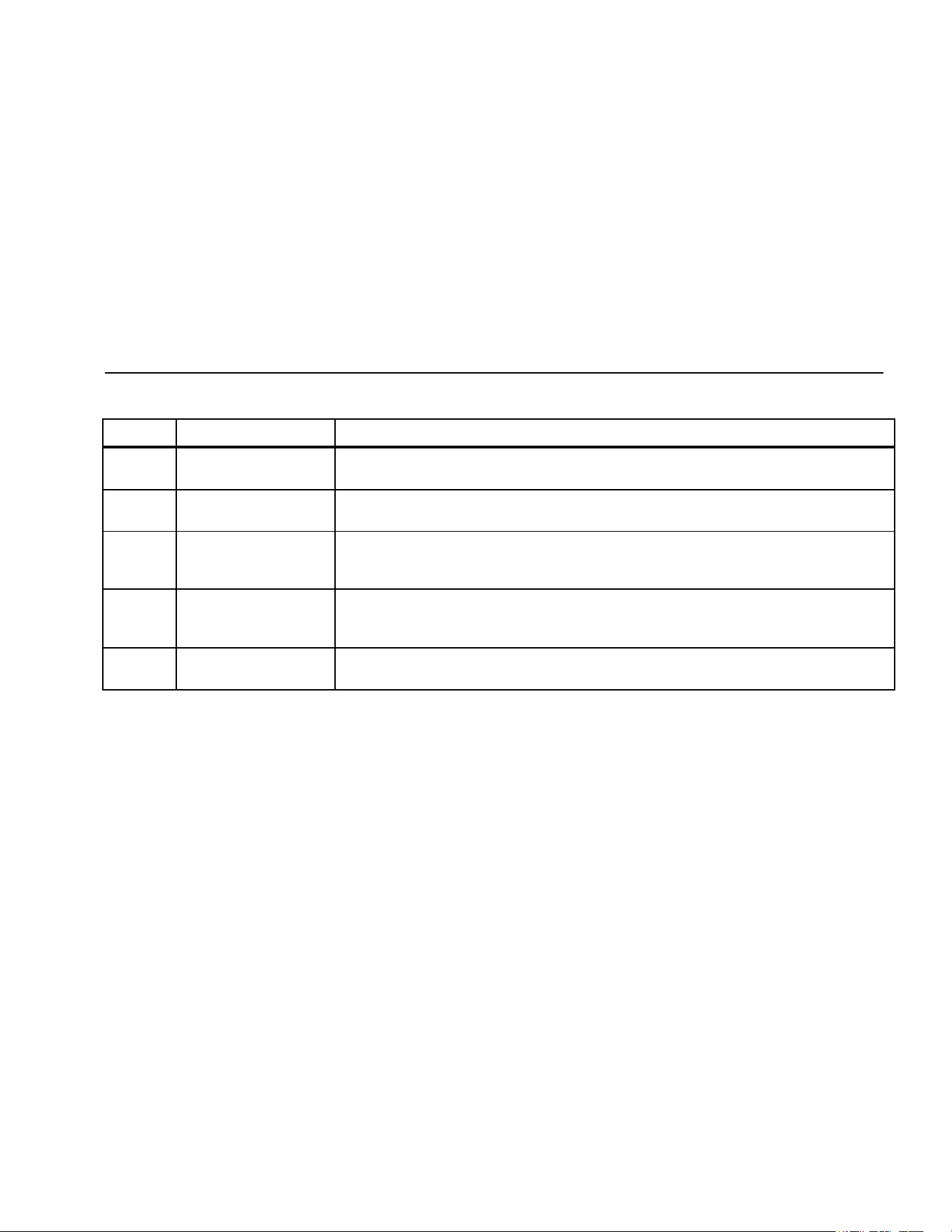
Figure 2 shows the Calibrator input and output terminals.
Table 3 explains their use.
V mA
LOO P
V mA
TC RTD
°
C
°
F
Hz
100%
25%
25%
RECALL
ZERO
MEAS
SOURCE
STORE
SETUP
0%
MULTIFUNCTION
PROCESS CALIBRATOR
725Ex
8
7
6
5
4
3
2
1
aly05f.eps
Figure 2. Input/Output Terminals and Connectors
1.888.610.7664 sales@GlobalTestSupply.com
Fluke-Direct.com
Mulitfunction Process Calibrator
Getting Acquainted with the Calibrator
11
Table 3. Input/Output Terminals and Connectors
No Name Description
Pressure module
connector
Connects the Calibrator to a pressure module.
, MEASURE V, mA
terminals
Input terminals for measuring voltage, current, and supplying loop power.
TC input/output Terminal for measuring or simulating thermocouples. This terminal accepts a miniature
polarized thermocouple plug with flat, inline blades spaced 7.9 mm (0.312 in) center to
center.
, SOURCE/ MEASURE
V, RTD, Hz, Ω
terminals
Terminals for sourcing or measuring voltage, resistance, frequency, and RTDs.
, SOURCE/ MEASURE
mA terminals, 3W, 4W
Terminals for sourcing and measuring current, and performing 3W and 4W RTD
measurements.
1.888.610.7664 sales@GlobalTestSupply.com
Fluke-Direct.com
725Ex
Users Manual
12
Keys
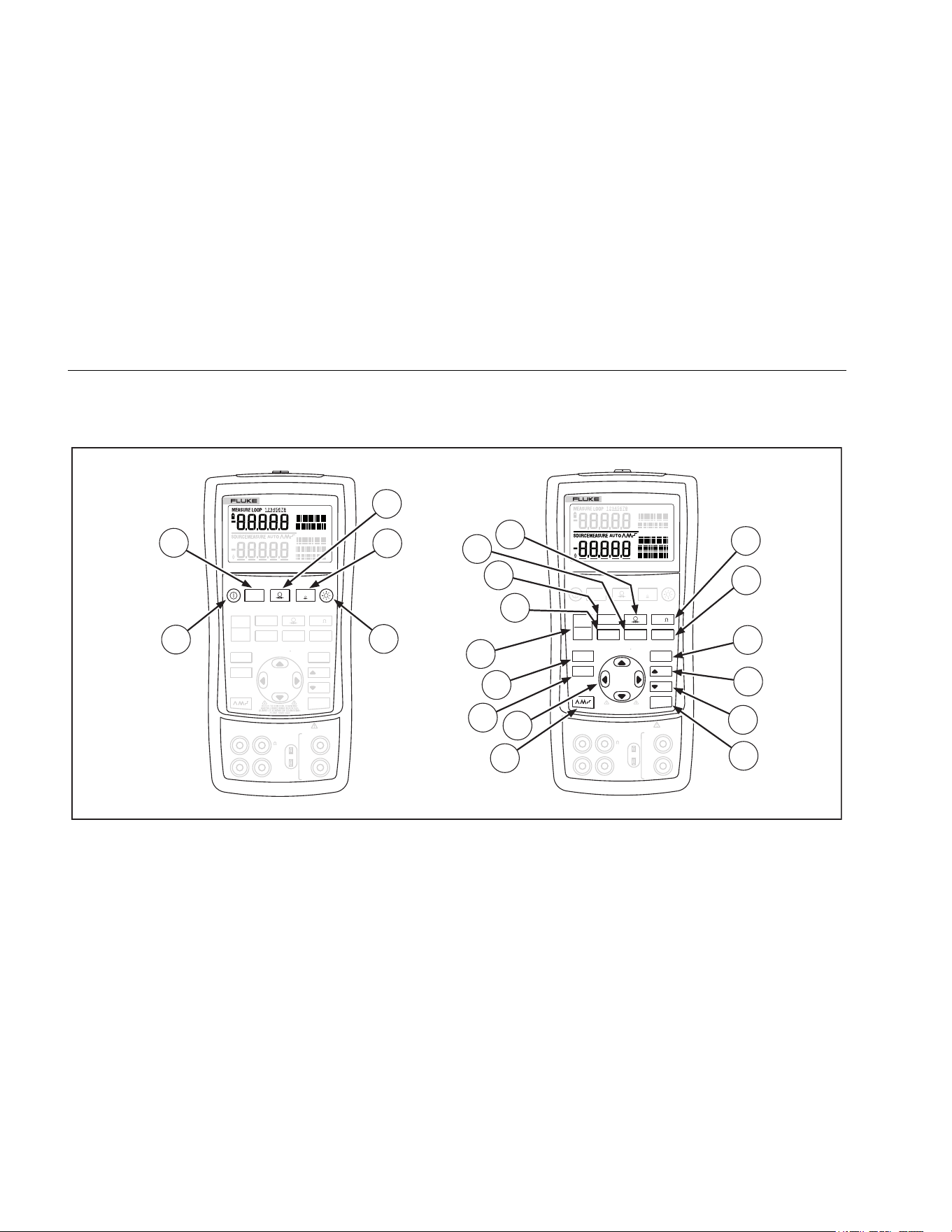
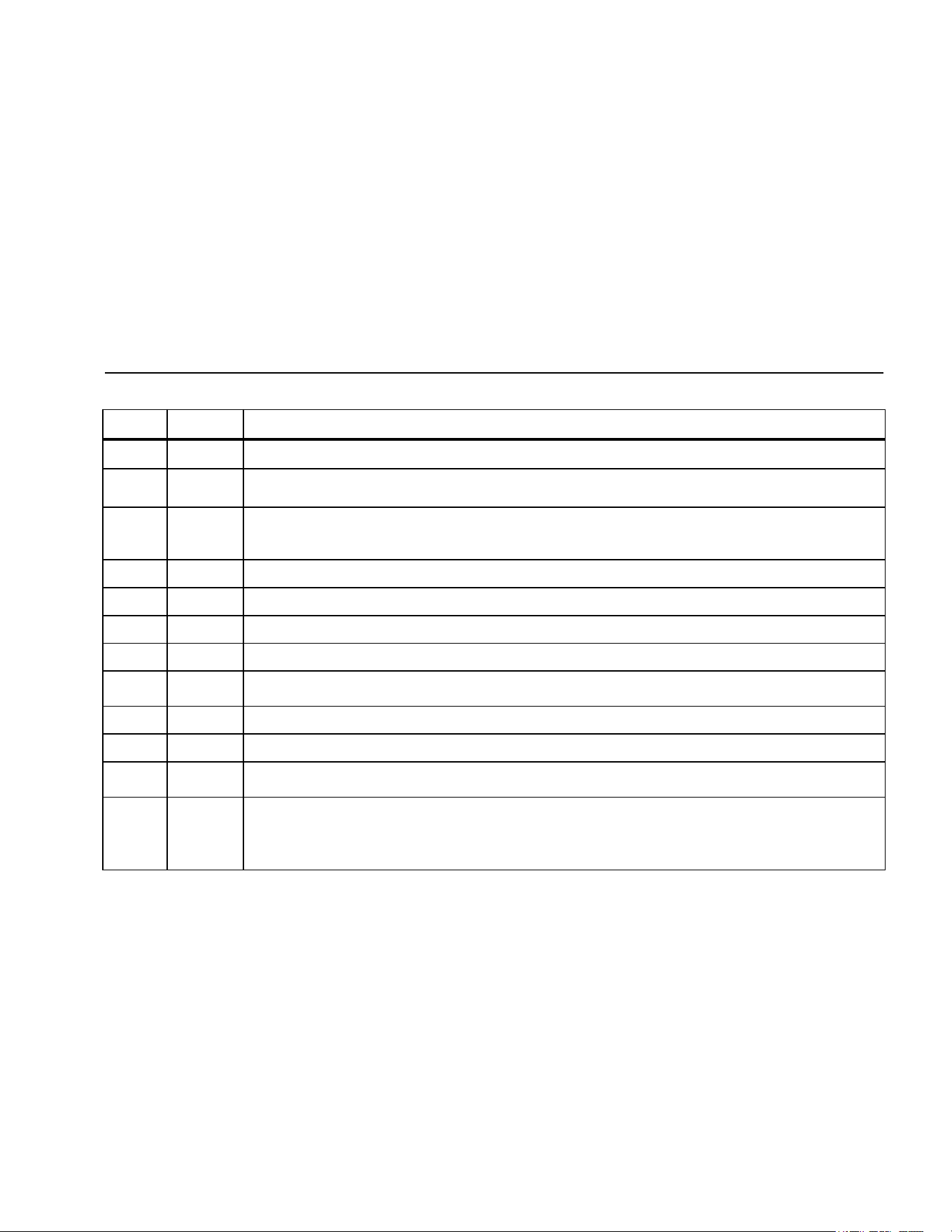
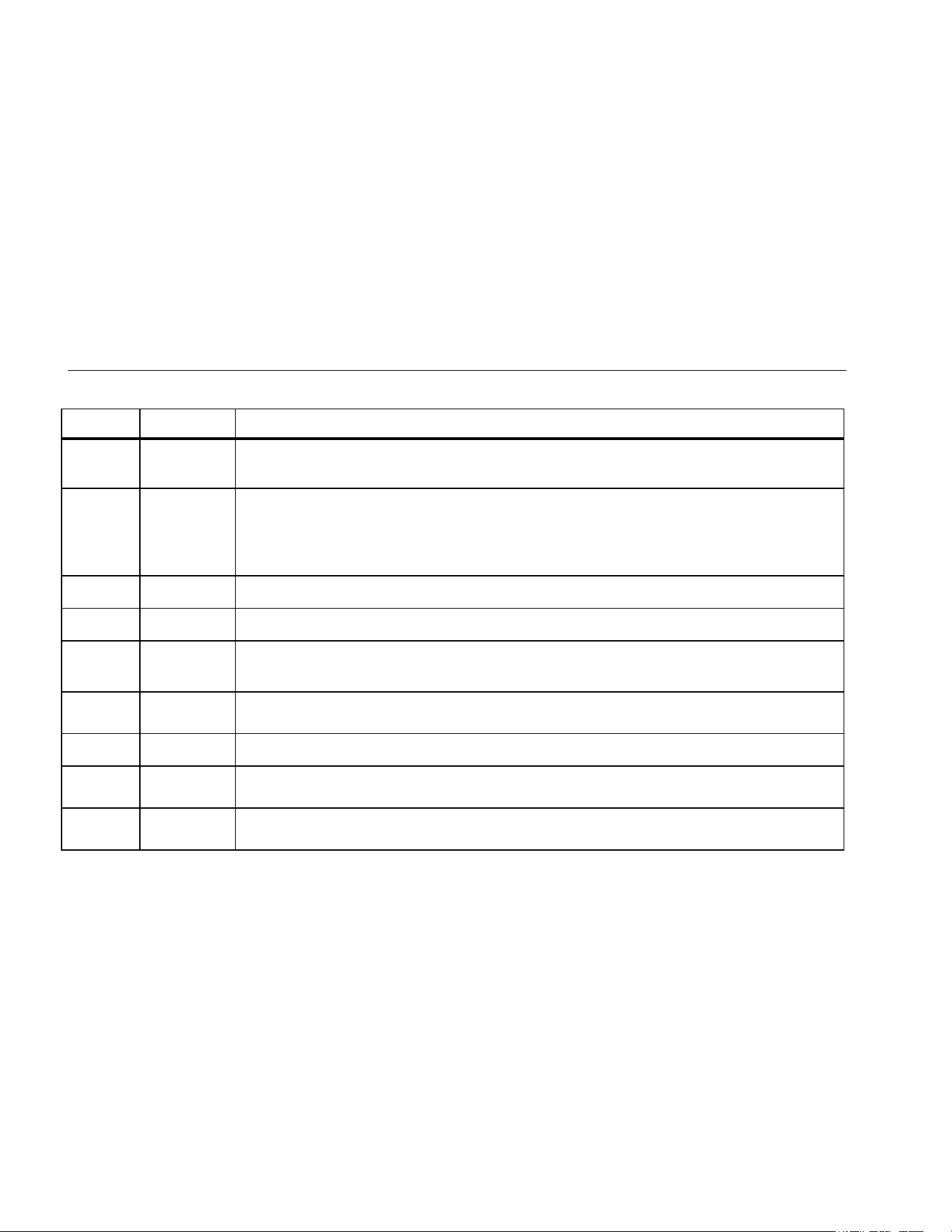
Figure 3 shows the Calibrator keys and Table 4 explains
their use.
V mA
LOO P
V mA
TC RTD
°
C
°
F
Hz
100%
25%
25%
RECALL
ZERO
MEAS
SOURCE
STORE
SETUP
0%
MULTIFUNCTION
PROCESS CALIBRATOR
725Ex
V mA
LOO P
V mA
TC RTD
°
C
°
F
Hz
100%
25%
25%
RECALL
ZERO
MEAS
SOURCE
STORE
SETUP
0%
MULTIFUNCTION
PROCESS CALIBRATOR
725Ex
1
8
9
10
2
3
4
6
7
5
12
11
13
14
15
16
17
18
19
20
V
mA
MEASURE
SOURCE / MEASURE
30V MAX ALL TERMINALS
4W
3W
V
Hz
RTD
mA
+
mA
-
TC
COM COM
LOOP
V
mA
MEASURE
SOURCE / MEASURE
30V MAX ALL TERMINALS
4W
3W
V
Hz
RTD
mA
+
mA
-
TC
COM COM
LOOP
REFER TO CONTROL DRAWING:
ANSCHLUSSSCHEMA BEACHTEN:
SUIVRE LE SCHÉMA DE CONNEXION:
FLUKE 725Ex CCD
13
aly41f.eps
Figure 3. Keys
1.888.610.7664 sales@GlobalTestSupply.com
Fluke-Direct.com
Mulitfunction Process Calibrator
Getting Acquainted with the Calibrator
13
Table 4. Key Functions
No. Key Description
Turns the power on and off.
Selects voltage, mA, or loop power measurement functions in the upper display.
Clears the switch test. See “Switch Test”.
Selects the pressure measurement function in the upper display. Repeated pushes cycle through the different
pressure units.
Use for pressure switch test. See “Switch Test”.
Zeros the pressure module reading. This applies to both upper and lower displays.
Turns backlight on and off.
Toggles between frequency and ohms measurement and sourcing functions.
Toggles between Centigrade and Fahrenheit when in TC or RTD functions.
Recalls a source value from memory corresponding to 100 % of span and sets it as the source value. Press and
hold to store the source value as the 100 % value.
Increments output by 25 % of span.
Decrements output by 25 % of span.
Recalls a source value from memory corresponding to 0 % of span and sets it as the source value. Press and hold
to store the source value as the 0 % value.
Cycles through :
Slow repeating 0 % - 100 % - 0 % ramp
Fast repeating 0 % - 100 % - 0 % ramp
Repeating 0 % - 100 % - 0 % ramp in 25 % steps
1.888.610.7664 sales@GlobalTestSupply.com
Fluke-Direct.com
725Ex
Users Manual
14
Table 4. Key Functions (cont.)
No. Key Description
+
+
Disables Shut Down Mode
Enables Shut Down Mode
Increases or decreases the source level.
Cycles through the 2-, 3-, and 4-wire selections.
Moves through the memory locations of calibrator setups.
In Contrast Adjustment mode; up-darkens contrast, down-lightens contrast.
Retrieves a previous calibrator setup from a memory location.
Saves the Calibrator setup. Saves Contrast Adjust setup.
Cycles the Calibrator through MEASURE and SOURCE modes in the lower display.
Selects the TC (thermocouple) measurement and sourcing function in the lower display.
Repeated pushes cycle through the thermocouple types.
Toggles between voltage, mA sourcing, or mA simulate functions in the lower display.
Selects RTD (resistance temperature detector) measurement and sourcing function in lower
display. Repeated pushes cycle through the RTD types.
Selects the pressure measurement and sourcing function. Repeated pushes cycle through the
different pressure units.
1.888.610.7664 sales@GlobalTestSupply.com
Fluke-Direct.com
Mulitfunction Process Calibrator
Getting Acquainted with the Calibrator
15
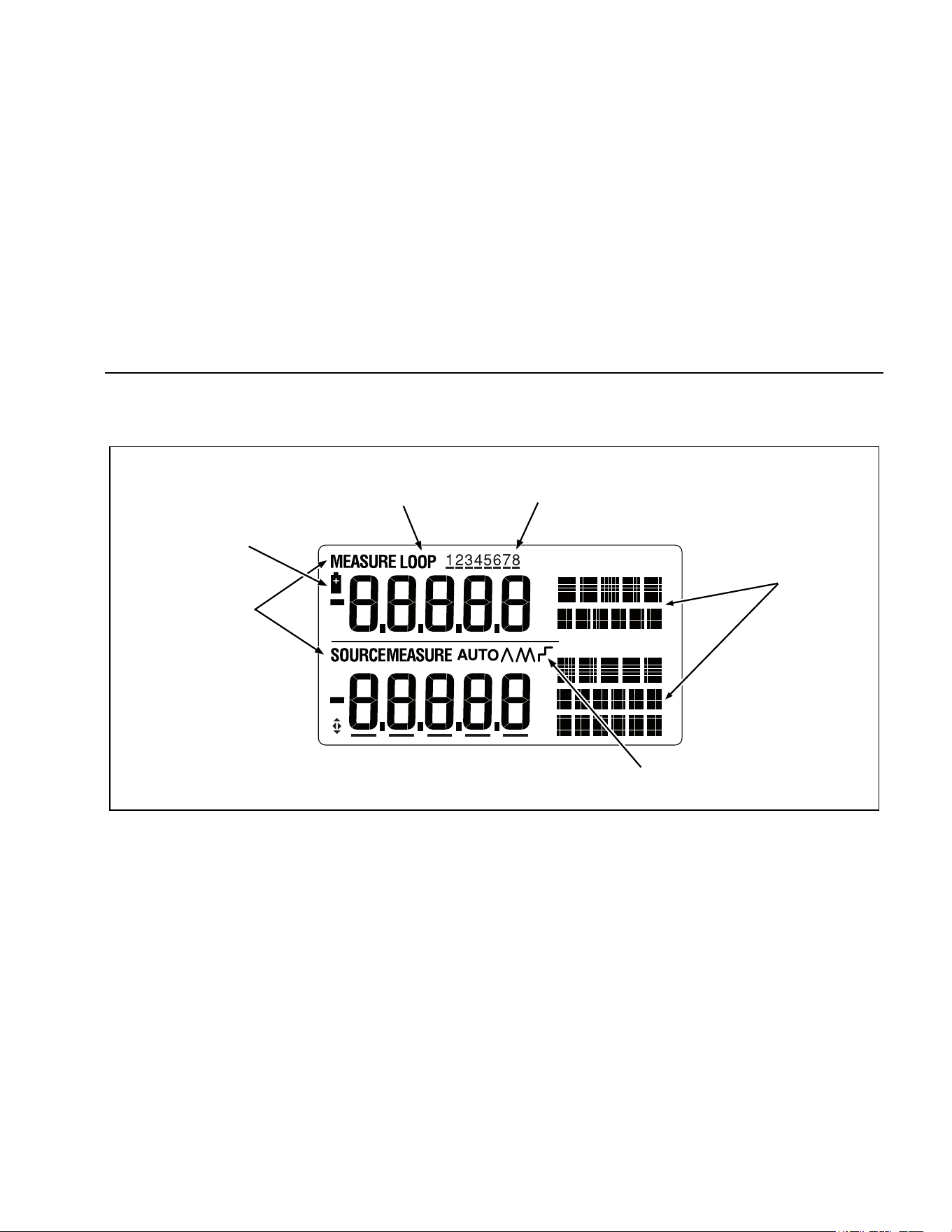
Display
Figure 4 shows the elements of the display.
Low Battery
Symbol
Loop
Annunciator
Memory Locations
for Calibrator Setups
Units
Display
Auto
Ramp
Mode
Indicator
sh07f.eps
Figure 4. Elements of a Typical Display
1.888.610.7664 sales@GlobalTestSupply.com
Fluke-Direct.com

725Ex
Users Manual
16
Getting Started
This section introduces some basic operations of the
Calibrator.
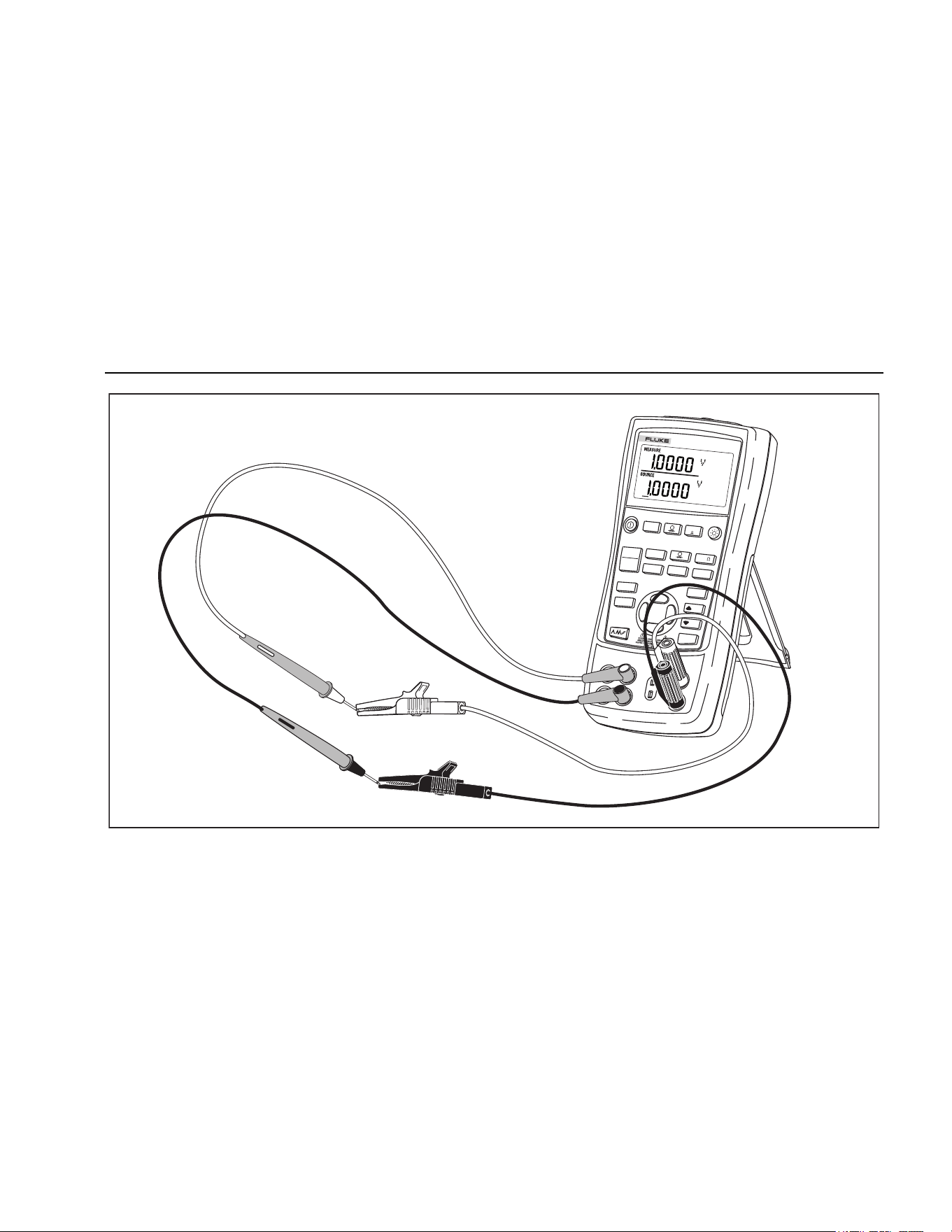
Proceed as follows to perform a voltage-to-voltage test:
1. Connect the Calibrator’s voltage output to its voltage
input as shown in Figure 5.
2. Press
to turn on the Calibrator. Press to
select dc voltage (upper display).
3. If necessary, press for SOURCE mode (lower
display). The Calibrator is still measuring dc voltage;
the active measurements are visible in the upper
display.
4. Press to select dc voltage sourcing.
5. Press
and to select a digit to change. Press
to select 1 V for the output value. Press and hold
to enter 1 V as the 0 % value.
6. Press
to increase the output to 5 V. Press and
hold to enter 5 V as the 100 % value.
7. Press
and to step between 0 % and
100 % in 25 % step increments.
Shut Down Mode
The calibrator comes with the Shut Down mode enabled
for a time duration set to 30 minutes (displayed for about
1 second when the calibrator is initially turned on). When
the Shut Down mode is enabled, the calibrator will
automatically shut down after the time duration has
elapsed from the time the last key was pressed. To
disable the Shut Down mode, press and
simultaneously. To enable the mode, press and
simultaneously. To adjust the time duration, press and
simultaneously, then press and/or to adjust the
time between 1 minute and 30 minutes.
1.888.610.7664 sales@GlobalTestSupply.com
Fluke-Direct.com
Mulitfunction Process Calibrator
Shut Down Mode
17
V mA
LOOP
V mA
TC
RTD
°
C
°
F
Hz
100%
25%
25%
RECALL
ZERO
MEAS
SOURCE
STORE
SETUP
0%
MULTIFUNCTION
PROCESS CALIBRATOR
725Ex
aly39f.eps
Figure 5. Voltage-to-Voltage Test
1.888.610.7664 sales@GlobalTestSupply.com
Fluke-Direct.com
725Ex
Users Manual
18
Contrast Adjustment
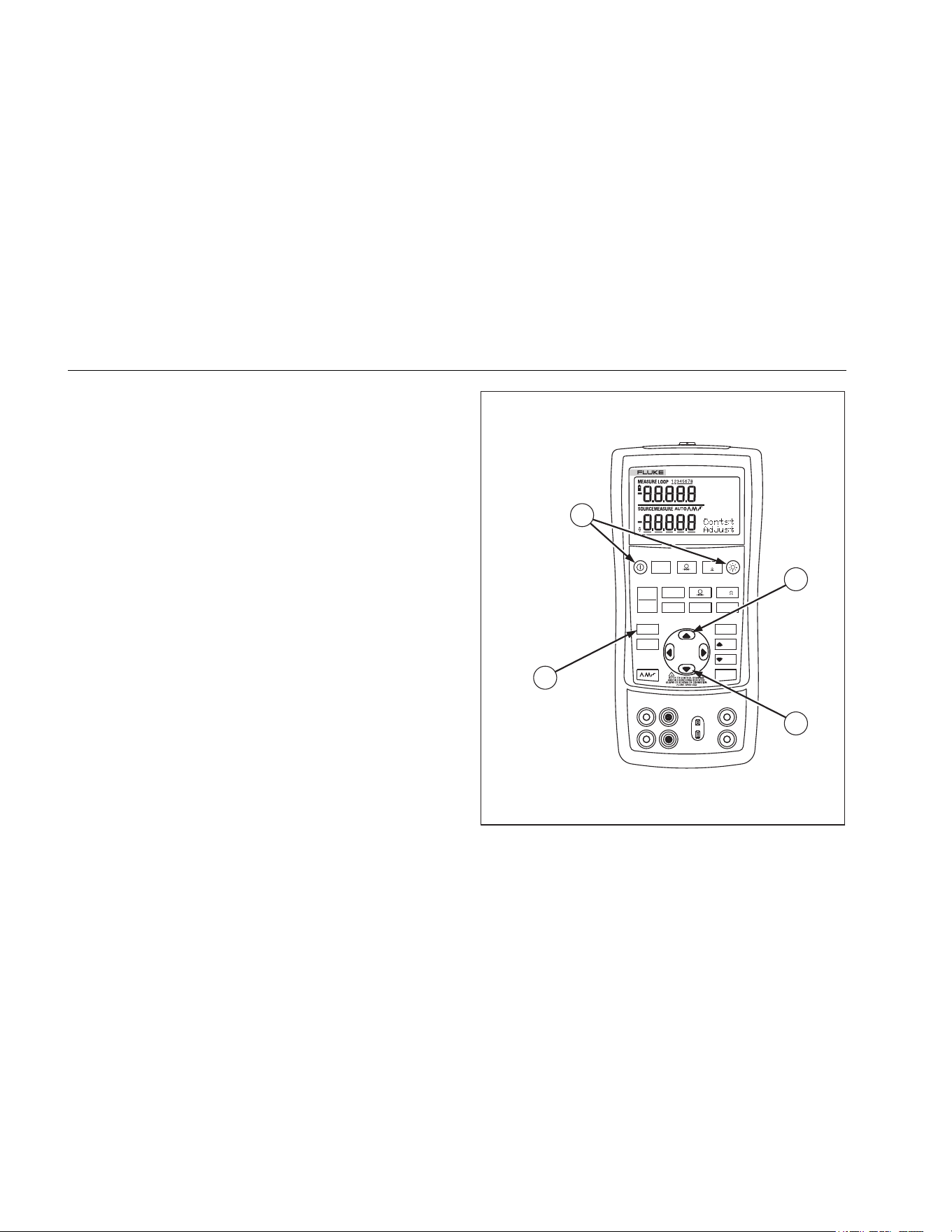
To adjust the contrast, proceed as follows:
1. Press and until Contst Adjust is displayed as
shown in Figure 6.
2. Press and hold to darken contrast.
3. Press and hold to lighten contrast.
4. Press to save the contrast level.
V mA
LOO P
V mA
TC RTD
°
C
°
F
Hz
100%
25%
25%
RECALL
ZERO
MEAS
SOURCE
STORE
SETUP
0%
725Ex
1
4
2
3
MULTIFUNCTION
PROCESS CALIBRATOR
sh06f.eps
Figure 6. Adjusting the Contrast
1.888.610.7664 sales@GlobalTestSupply.com
Fluke-Direct.com
Mulitfunction Process Calibrator
Using Measure Mode
19
Using Measure Mode
Measuring Electrical Parameters (Upper Display)
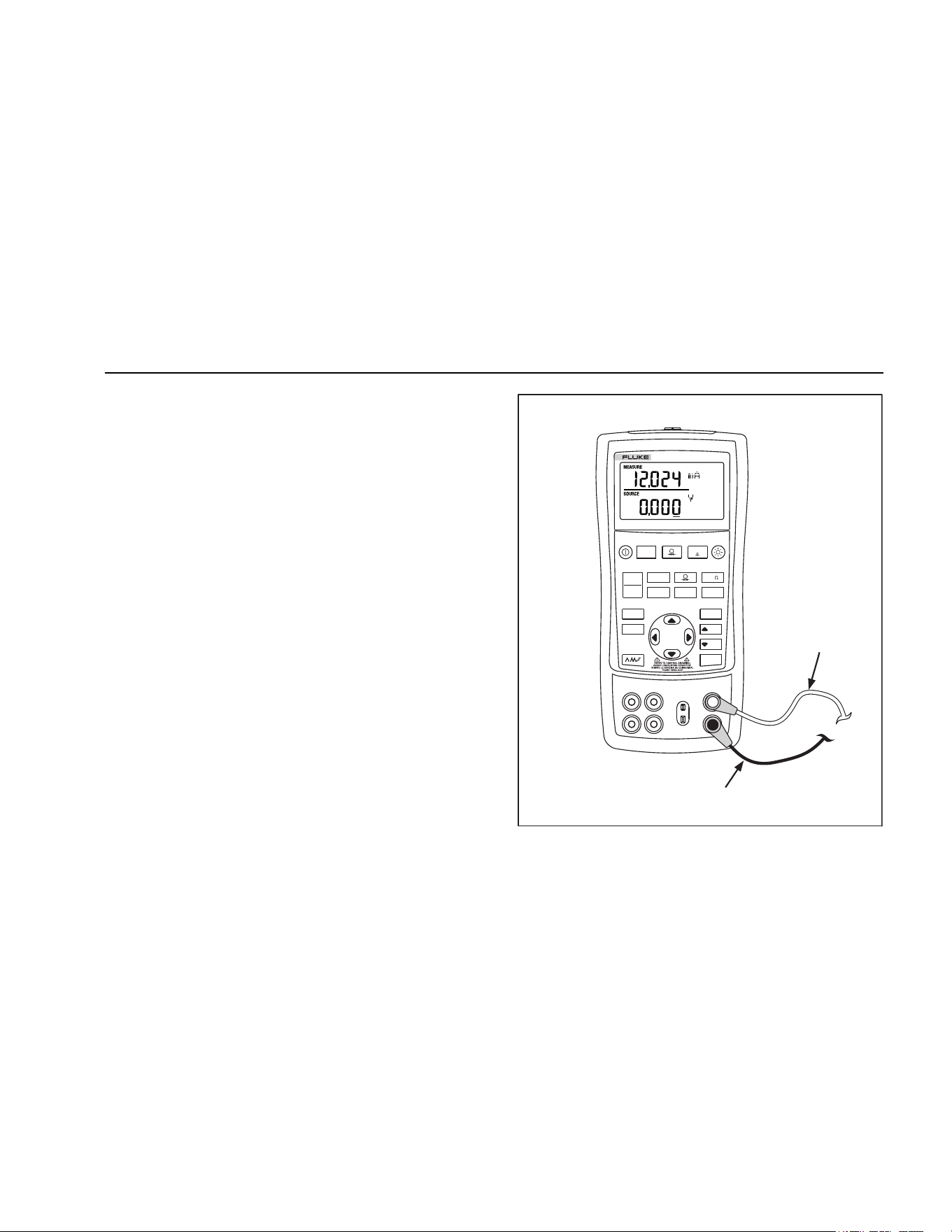
To measure the current or voltage output of a transmitter,
or to measure the output of a pressure instrument, use the
upper display and proceed as follows:
1. Press
to select volts or current. LOOP should
not be on.
2. Connect the leads as shown in Figure 7.
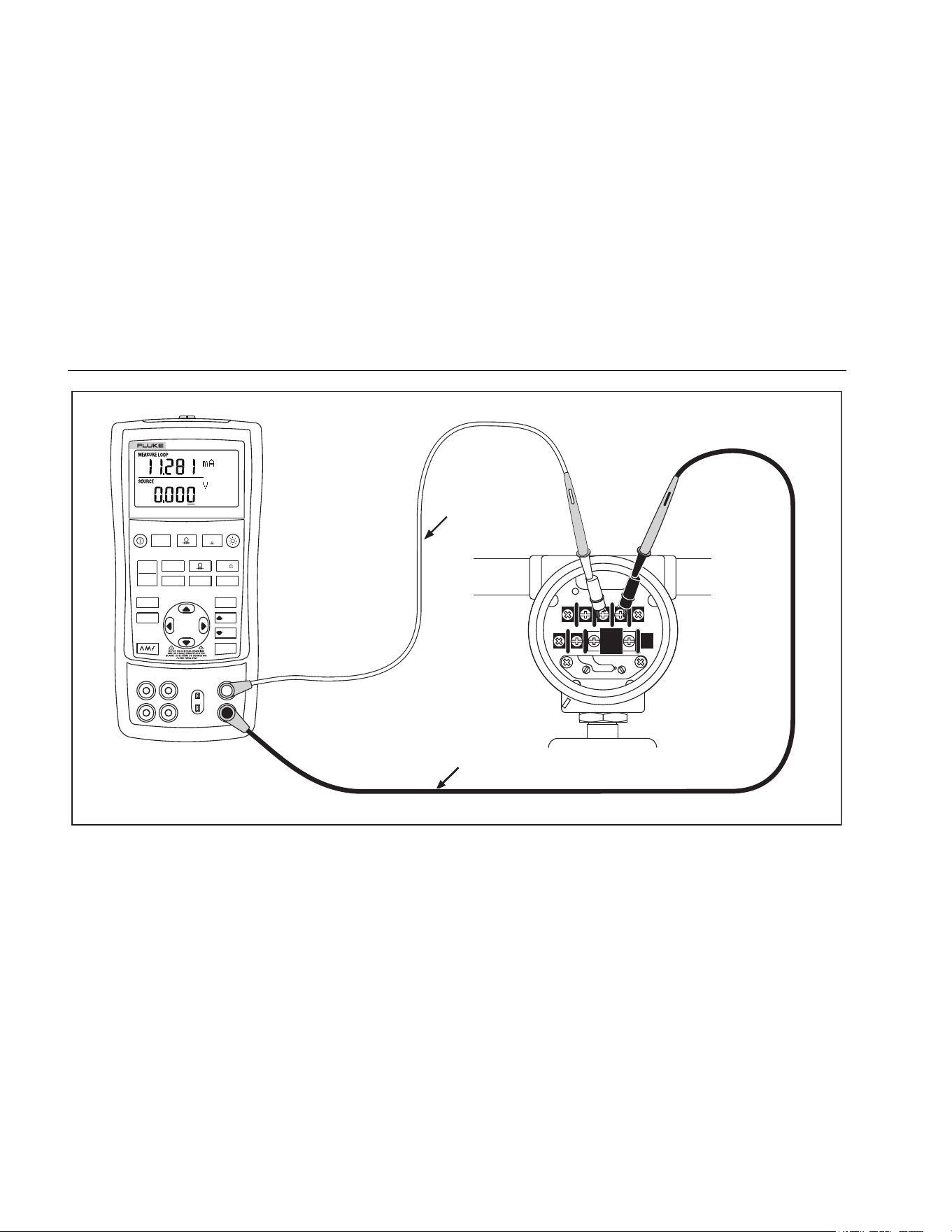
Current Measurement with Loop Power
The loop power function activates a 12-V supply in series
with the current measuring circuit, allowing the user to test
a transmitter when it is disconnected from plant wiring. To
measure current with loop power, proceed as follows:
1. Connect the Calibrator to the transmitter current loop
terminals as shown in Figure 8.
2. Press while the Calibrator is in current
measurement mode. LOOP appears and an internal
12-V loop supply turns on.
V mA
LOOP
V mA
TC RTD
°
C
°
F
Hz
100%
25%
25%
RECALL
ZERO
MEAS
SOURCE
STORE
SETUP
0%
MULTIFUNCTION
PROCESS CALIBRATOR
725Ex
Black
Red
aly42f.eps
Figure 7. Measuring Voltage and Current Output
1.888.610.7664 sales@GlobalTestSupply.com
Fluke-Direct.com
725Ex
Users Manual
20
Re d
TEST DC PWR
+–+–
–+
Black
V mA
LOO P
V mA
TC R TD
°
C
°
F
Hz
100%
25%
25%
RECALL
ZERO
MEAS
SOU RCE
STO RE
SETU P
0%
MULTIFUNCTION
PROCESS CALI BRATOR
725Ex
aly18f.eps
Figure 8. Connections for Supplying Loop Power
1.888.610.7664 sales@GlobalTestSupply.com
Fluke-Direct.com
Mulitfunction Process Calibrator
Using Measure Mode
21
Measuring Electrical Parameters (Lower Display)
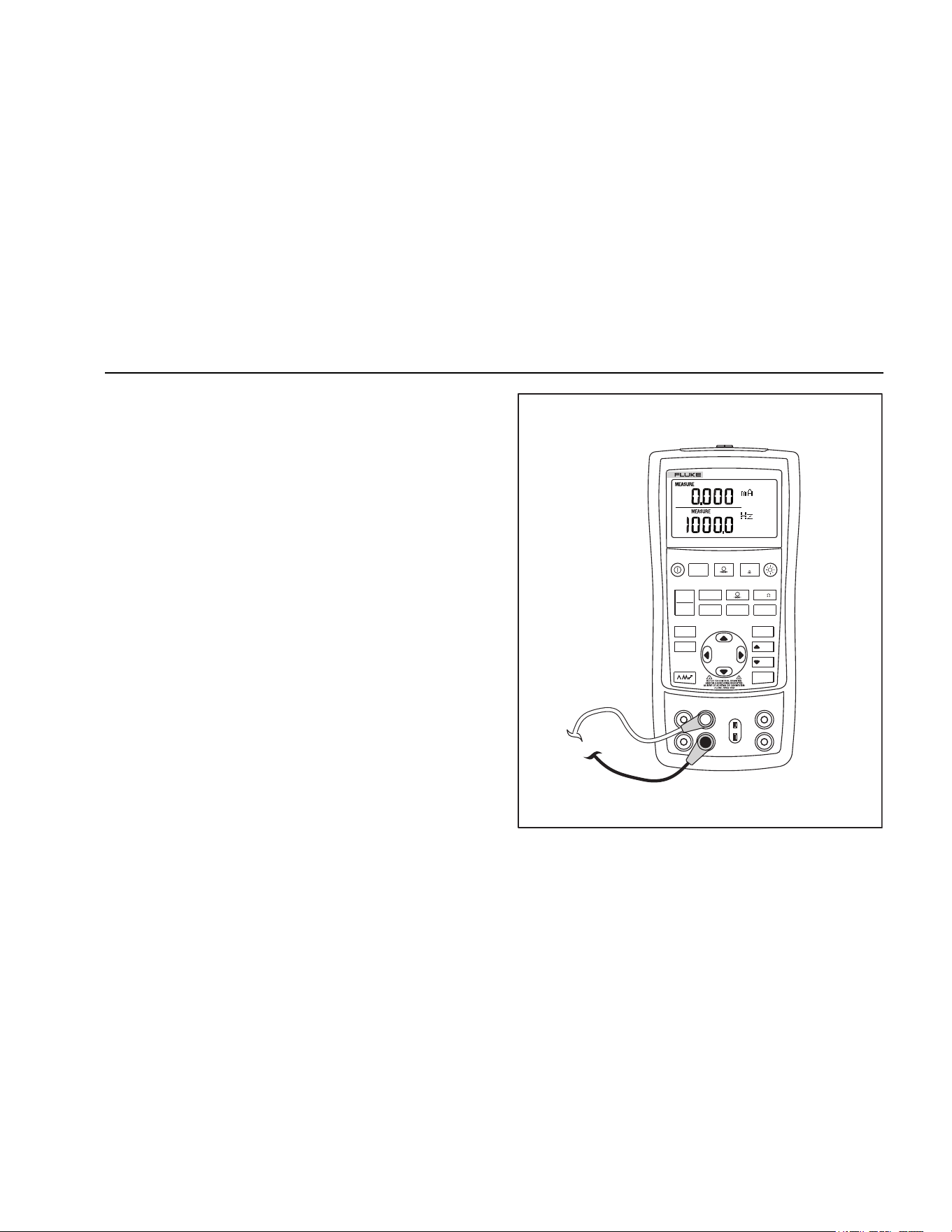
To measure the electrical parameters using the lower
display, proceed as follows:
1. Connect the Calibrator as shown in Figure 9.
2. If necessary, press
for MEASURE mode (lower
display).
3. Press for dc voltage or current, or for
frequency or resistance.
V mA
LOO P
V mA
TC RTD
°
C
°
F
Hz
100%
25%
25%
RECALL
ZERO
MEAS
SOURCE
STORE
SETUP
0%
MULTIFUNCTION
PROCESS CALIBRATOR
725Ex
aly43f.eps
Figure 9. Measuring Electrical Parameters
1.888.610.7664 sales@GlobalTestSupply.com
Fluke-Direct.com

725Ex
Users Manual
22
Measuring Temperature
Using Thermocouples
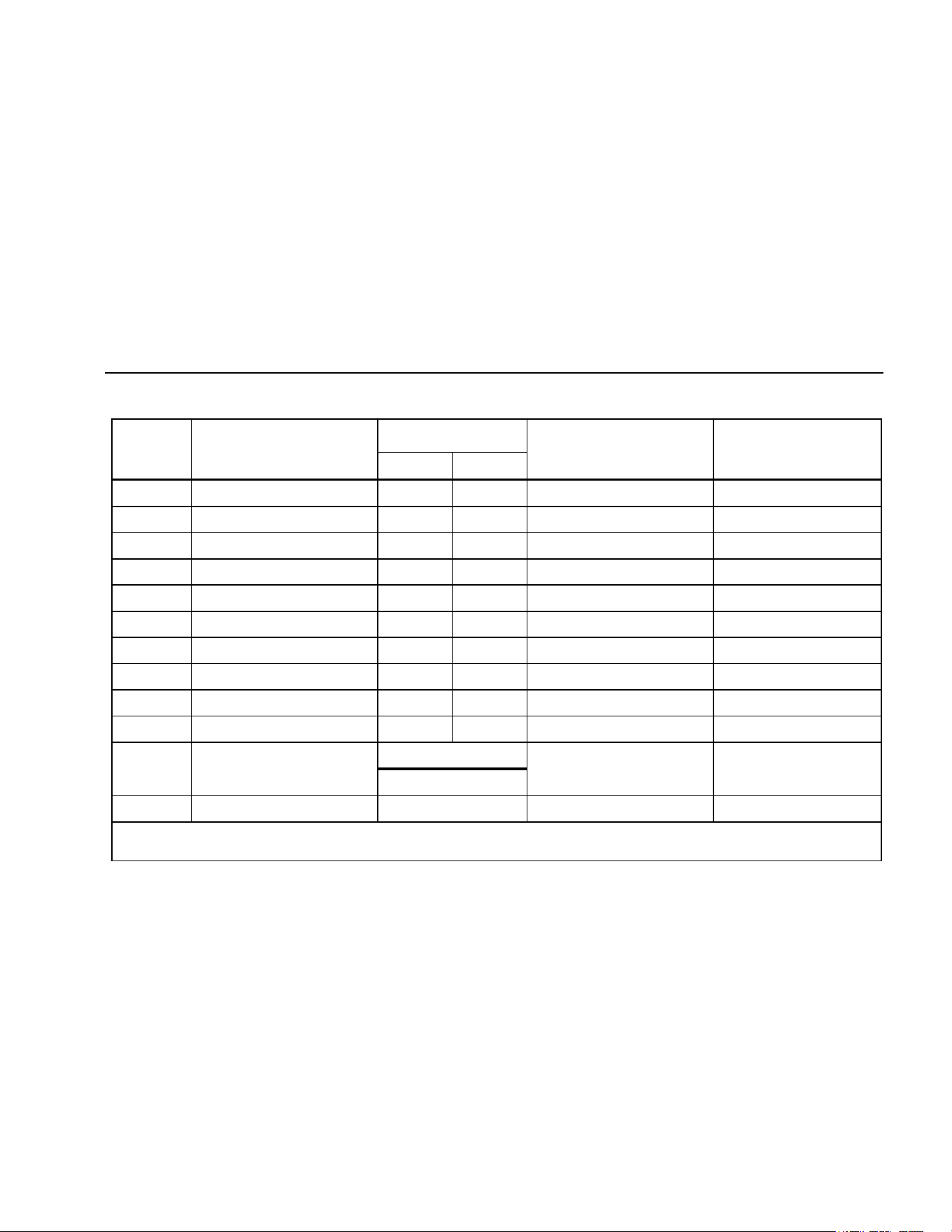
The Calibrator supports twelve standard thermocouples,
including types E, N, J, K, T, B, R, S, L, XK, BP, and U.
Table 5 summarizes the ranges and characteristics of the
supported thermocouples.
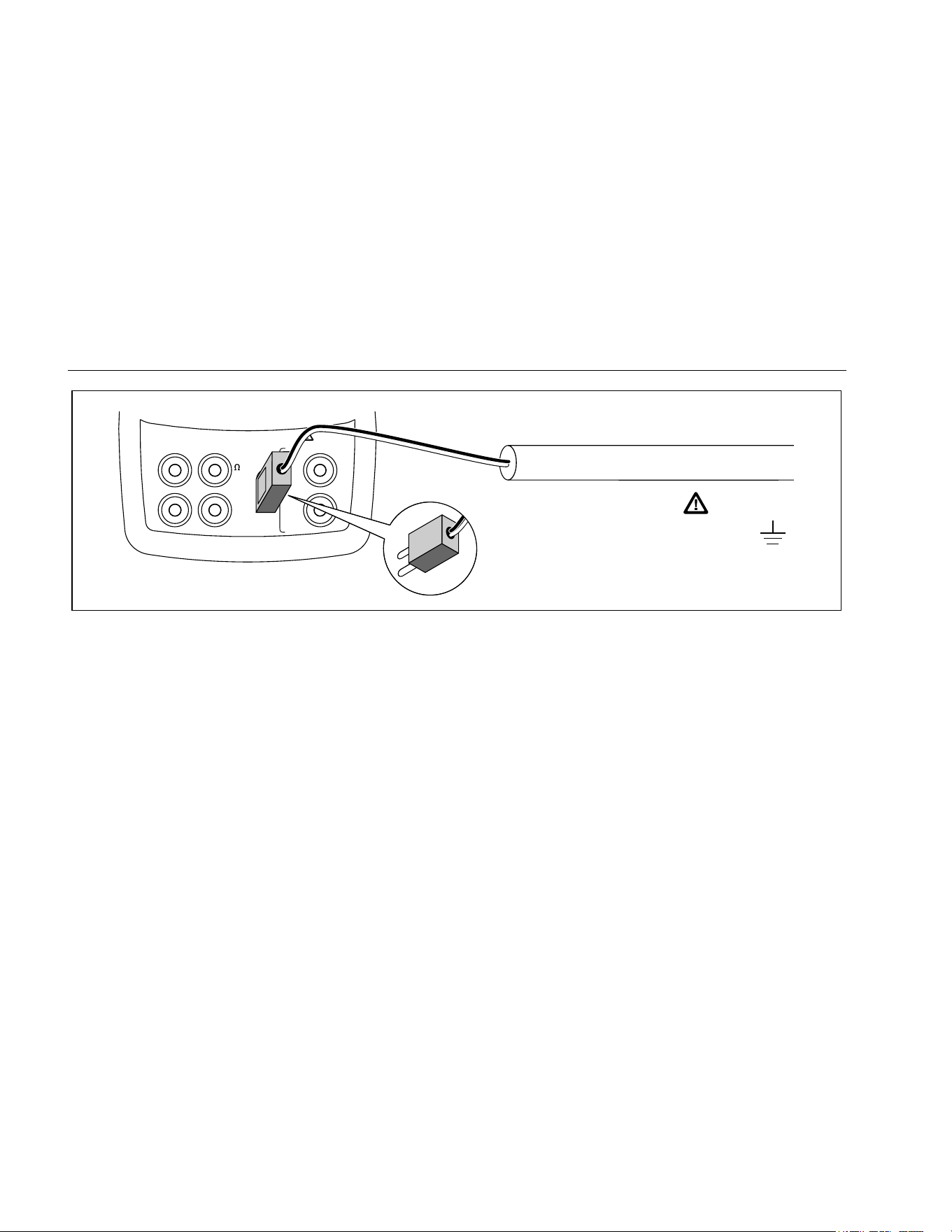
To measure temperature using a thermocouple, proceed
as follows:
1. Attach the thermocouple leads to the appropriate TC
miniplug, then to the TC input/output as shown in
Figure 10.
WCaution
One thermocouple pin is wider than the other. To
avoid possible damage to Calibrator or to
equipment under test do not try to force a
miniplug in the wrong polarization.
Note
If the Calibrator and the thermocouple plug are at
different temperatures, wait one minute or more
for the connector temperature to stabilize after
plugging the miniplug into the TC input/output.
2. If necessary, press
for MEASURE mode.
3. Press for the TC display. Continue pressing this
key to select the desired thermocouple type.
If necessary, toggle between °C or °F temperature
units by pressing .
1.888.610.7664 sales@GlobalTestSupply.com
Fluke-Direct.com
Mulitfunction Process Calibrator
Using Measure Mode
23
Table 5. Thermocouple Types Accepted
Type Positive Lead Material
Positive Lead (H)
Color
Negative Lead
Material
Specified Range
(°C)
ANSI* IEC**
E
Chromel Purple Violet Constantan
-200 to 950
N
Ni-Cr-Si Orange Pink Ni-Si-Mg
-200 to 1300
J
Iron White Black Constantan
-200 to 1200
K
Chromel Yellow Green Alumel
-200 to 1370
T
Copper Blue Brown Constantan
-200 to 400
B
Platinum (30 % Rhodium) Gray Platinum (6 % Rhodium)
600 to 1800
R
Platinum (13 % Rhodium) Black Orange Platinum
-20 to 1750
S
Platinum (10 % Rhodium) Black Orange Platinum
-20 to 1750
L
Iron Constantan
-200 to 900
U
Copper Constantan
-200 to 400
XK 90.5 % Ni + 9.5 % Cr
GOST
56 % Cu + 44 % Ni -200 to 800
Violet or Black
BP
95 % W + 5 % Re
Red or Pink 80 % W + 20 % Re
0 to 2500
*American National Standards Institute (ANSI) device negative lead (L) is always red.
**International Electrotechnical Commission (IEC) device negative lead (L) is always white.
1.888.610.7664 sales@GlobalTestSupply.com
Fluke-Direct.com
725Ex
Users Manual
24
V
mA
MEASURE
SOURCE / MEASURE
30V 24mA MAX ALL TERMINALS
4W
3W
V
Hz
RTD
mA
+
mA
-
TC
COM COM
LOOP
Process Temperature
Warning
30 V maximum to
TC
TC Miniplug
aly12f.eps
Figure 10. Measuring Temperature with a Thermocouple
1.888.610.7664 sales@GlobalTestSupply.com
Fluke-Direct.com

Mulitfunction Process Calibrator
Using Measure Mode
25
Using Resistance-Temperature Detectors (RTDs)
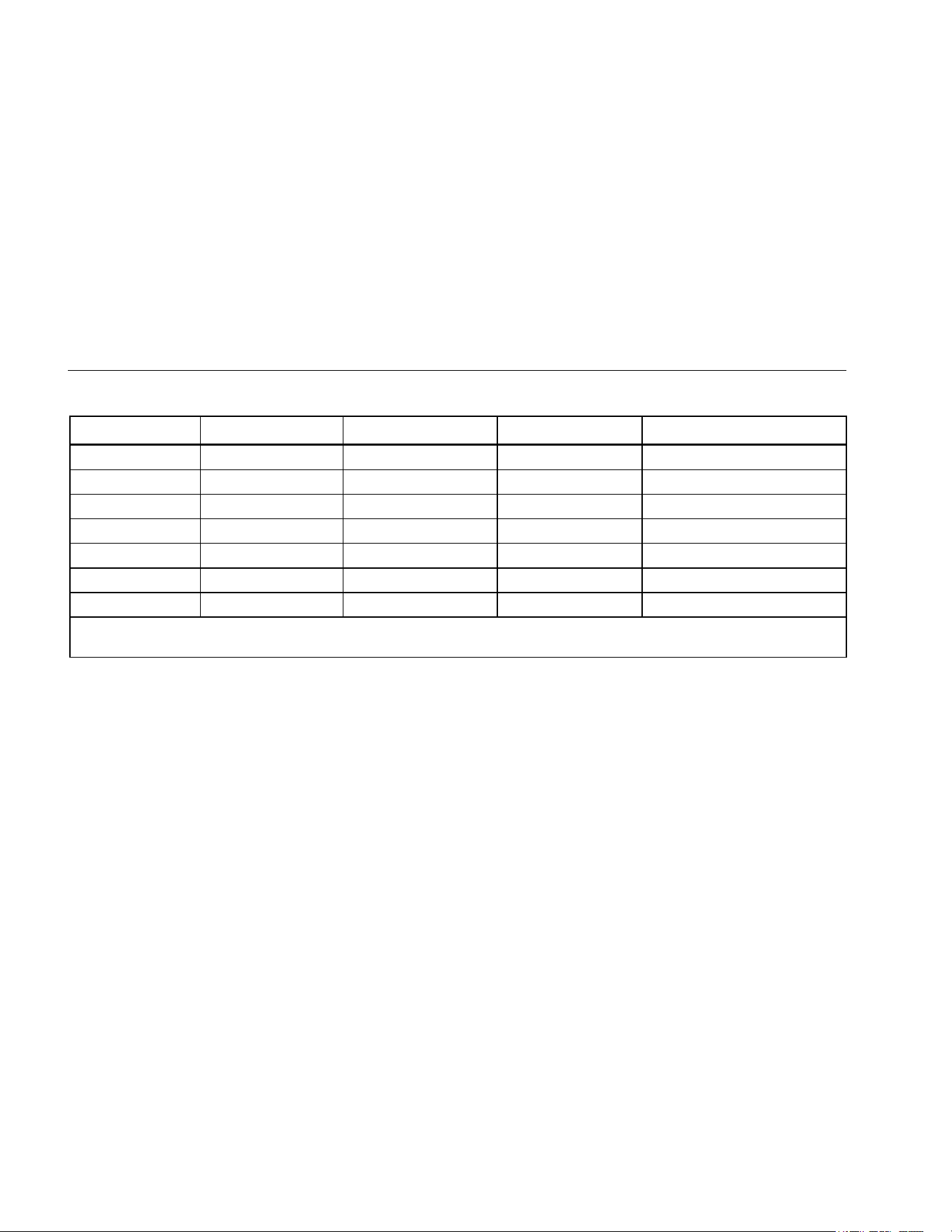
The Calibrator accepts RTD types shown in Table 6. RTDs
are characterized by their resistance at 0 °C (32 °F), which
is called the “ice point” or R
0
. The most common R
0
is
100 Ω. The Calibrator accepts RTD measurement inputs
in two-, three-, or four-wire connections, with the three-wire
connection the most common. A four-wire configuration
provides the highest measurement precision, and two-wire
provides the lowest measurement precision.
To measure temperature using an RTD input, proceed as
follows:
If necessary, press for MEASURE mode.
1. Press
for the RTD display. If desired, continue
pressing this key to select the desired RTD type.
2. Press
or to select a 2-, 3-, or 4- wire
connection.
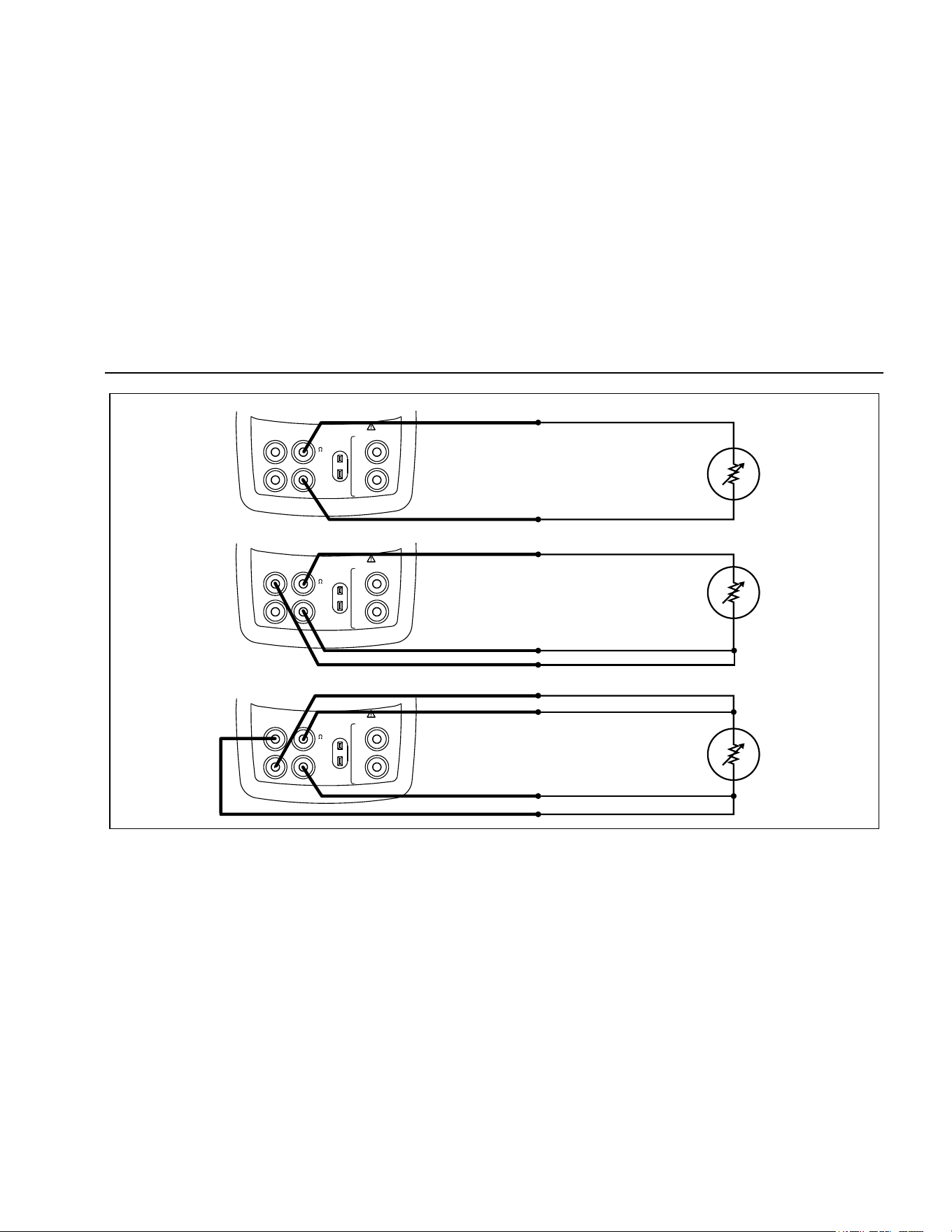
3. Attach the RTD to input terminals as shown in
Figure 11.
4. If necessary, toggle between °C or °F temperature
units by pressing
.
1.888.610.7664 sales@GlobalTestSupply.com
Fluke-Direct.com
725Ex
Users Manual
26
Table 6. RTD Types Accepted
RTD Type Ice Point (R
0
) Material
α
Range (°C)
Pt100 (3926)
100 Ω
Platinum
0.003926 Ω/°C
-200 to 630
Pt100 (385)
100 Ω
Platinum
0.00385 Ω/°C
-200 to 800
Ni120 (672)
120 Ω
Nickel
0.00672 Ω/°C
-80 to 260
Pt200 (385)
200 Ω
Platinum
0.00385 Ω/°C
-200 to 630
Pt500 (385)
500 Ω
Platinum
0.00385 Ω/°C
-200 to 630
Pt1000 (385)
1000 Ω
Platinum
0.00385 Ω/°C
-200 to 630
Pt100 (3916)
100 Ω
Platinum
0.003916 Ω/°C
-200 to 630
The IEC standard RTD and the most commonly used RTD in U.S. industrial applications is the Pt100 (385),
α = 0.00385 Ω/°C.
1.888.610.7664 sales@GlobalTestSupply.com
Fluke-Direct.com
Mulitfunction Process Calibrator
Using Measure Mode
27
RTD
RTD
RTD
2W
3W
4W
V
mA
MEASURE
SOURCE / MEASURE
30V 24mA MAX ALL TERMINALS
4W
3W
V
Hz
RTD
mA
+
mA
-
TC
COM COM
LOOP
V
mA
MEASURE
SOURCE / MEASURE
30V 24mA MAX ALL TERMINALS
4W
3W
V
Hz
RTD
mA
+
mA
-
TC
COM COM
LOOP
V
mA
MEASURE
SOURCE / MEASURE
30V 24mA MAX ALL TERMINALS
4W
3W
V
Hz
RTD
mA
+
mA
-
TC
COM COM
LOOP
Resistance to
be measured
Resistance to
be measured
Resistance to
be measured
aly15f.eps
Figure 11. Measuring Temperature with an RTD, Measuring 2-, 3-, and 4-Wire Resistance
1.888.610.7664 sales@GlobalTestSupply.com
Fluke-Direct.com
725Ex
Users Manual
28
Measuring Pressure
Many ranges and types of pressure modules are available
from Fluke. See “Accessories” near the back of this
manual. Before using a pressure module, read its
instruction sheet. The modules vary in use, media, and
accuracy.
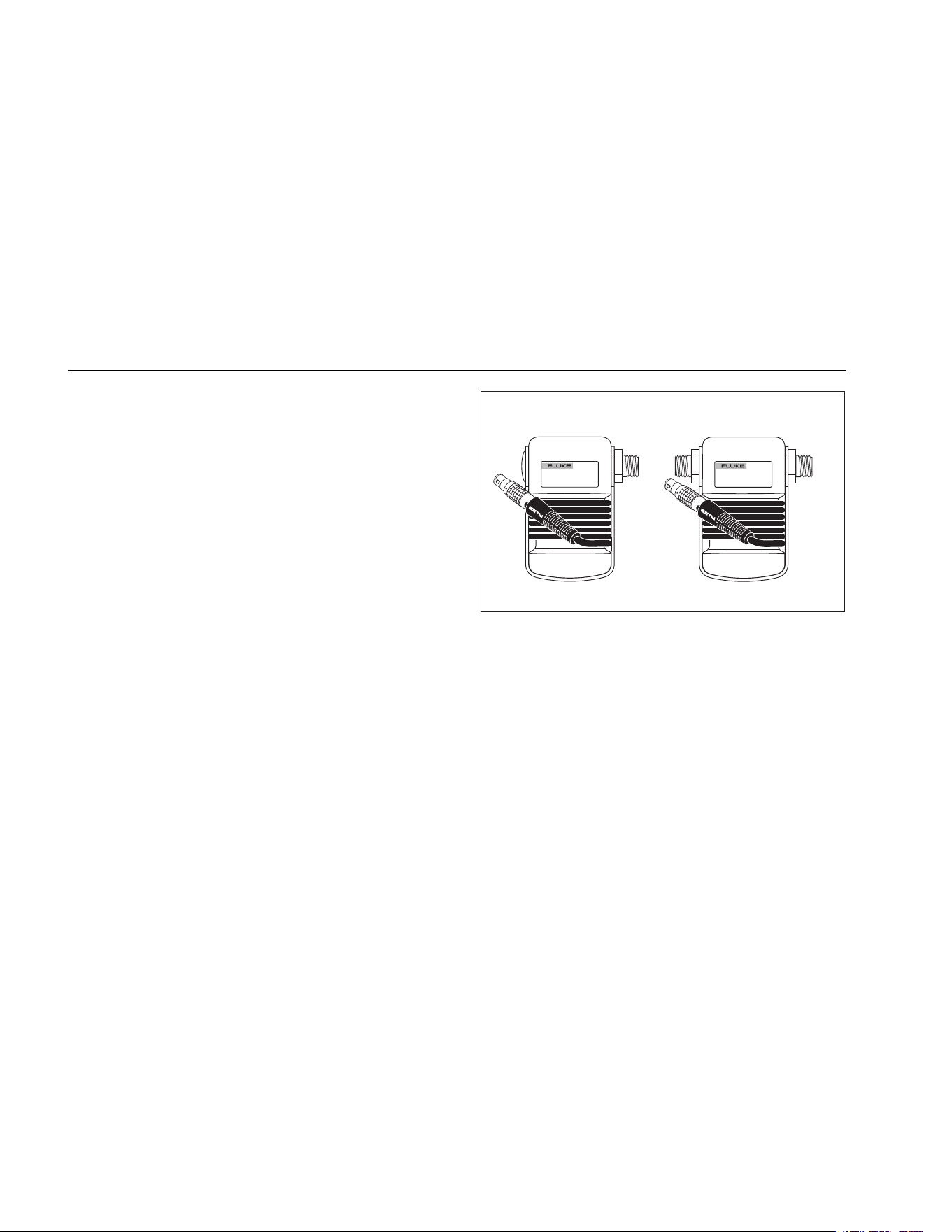
Figure 12 shows the Gage and Differential modules.
Differential modules also work in gage mode by leaving
the low fitting open to atmosphere.
To measure pressure, attach the appropriate pressure
module for the process pressure to be tested
Proceed as follows to measure pressure:
W Warning
To prevent fire, explosion, or personal injury:
• Use only Fluke pressure modules.
• To avoid a violent release of pressure in a
pressurized system, shut off the valve and
slowly bleed off the pressure before attaching
the pressure module to the pressure line.
Differential
HighLow
Gage
aly11f.eps
Figure 12. Gage and Differential Pressure Modules
WCaution
• To avoid mechanically damaging the pressure
module, never apply more than 10 lb-ft
(13.5 Nm) of torque between the pressure
module fittings, or between the fittings and
the body of the module. Always apply
appropriate torque between the pressure
module fitting and connecting fittings or
adapters.
• To avoid damaging the pressure module from
overpressure, never apply pressure above the
rated maximum printed on the pressure
module.
1.888.610.7664 sales@GlobalTestSupply.com
Fluke-Direct.com

Mulitfunction Process Calibrator
Using Measure Mode
29
• To avoid damaging the pressure module from
corrosion, use it only with specified materials.
Refer to the printing on the pressure module
or the pressure module instruction sheet for
the acceptable material compatibility.
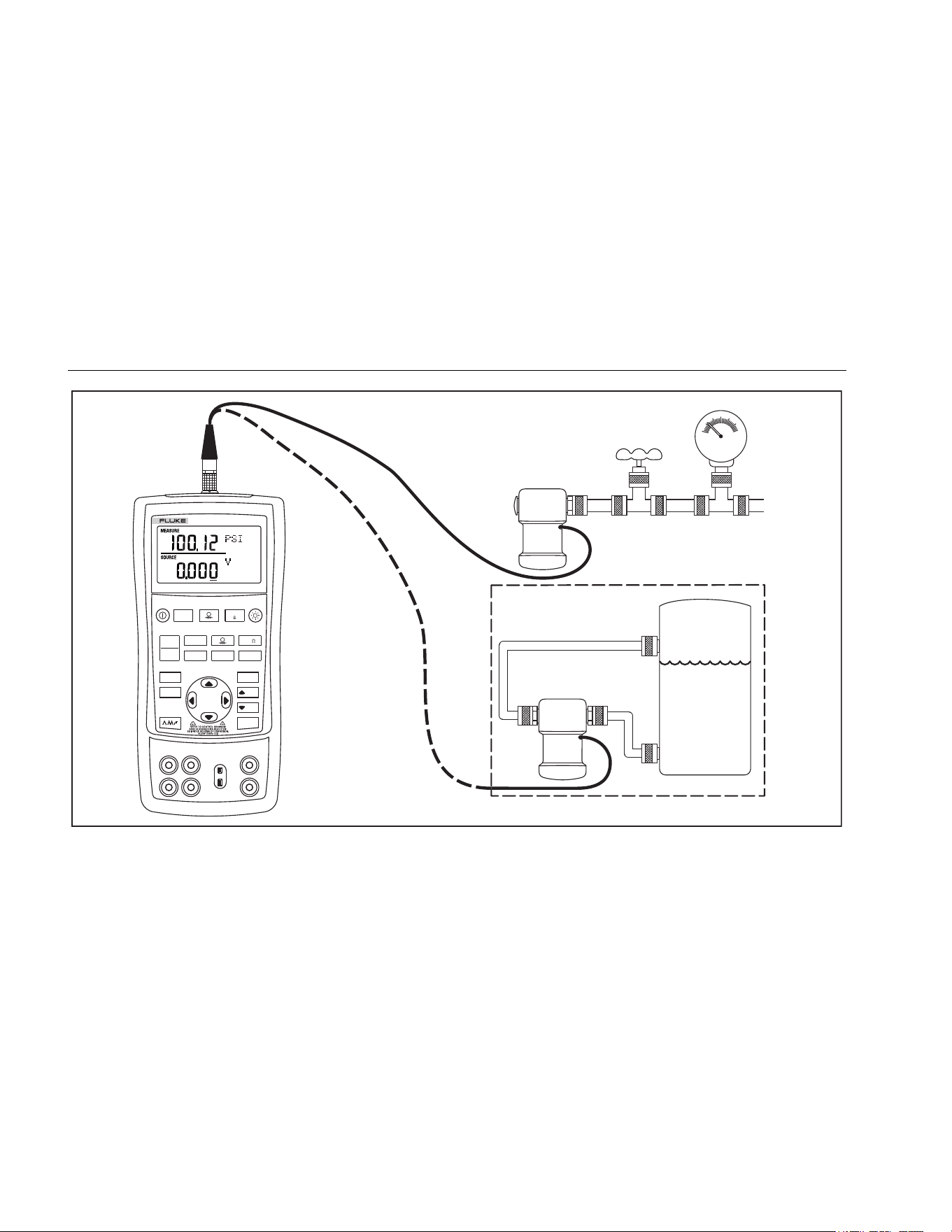
1. Connect a pressure module to the Calibrator as
shown in Figure 13. The threads on the pressure
modules accept standard ¼ NPT pipe fittings. Use the
supplied ¼ NPT to ¼ ISO adapter if necessary.
2. Press
. The Calibrator automatically senses
which pressure module is attached and sets its range
accordingly.
3. Zero the pressure module as described in the
module’s instruction sheet. Modules vary in zeroing
procedures depending on module type, but all require
pressing
.
If desired, continue pressing
to change pressure
display units to psi, mmHg, inHg, cmH
2
O@4 °C,
cmH
2
O@20 °C, inH
2
O@4 °C, inH
2
O@20 °C,
inH
2
O@60 °F, mbar, bar, kg/cm
2
, or kPa.
Zeroing with Absolute Pressure Modules
To zero, adjust the Calibrator to read a known pressure.
This can be barometric pressure, if it is accurately known.
An accurate pressure standard can also apply a pressure
within range for any absolute pressure module. To adjust
the Calibrator reading, proceed as follows:
1. Press , REF Adjust will appear to the right of the
pressure reading.
2. Use to increase or to decrease the Calibrator
reading to equal the reference pressure.
3. Press again to exit zeroing procedure.
The Calibrator stores and automatically reuses the zero
offset correction for one absolute pressure module so that
the module is not rezeroed every time it is used.
1.888.610.7664 sales@GlobalTestSupply.com
Fluke-Direct.com
725Ex
Users Manual
30
Differential
Module
Tank
HL
Isolation
Valve
Gage
Module
V mA
LOO P
V mA
TC RTD
°
C
°
F
Hz
100%
25%
25%
RECALL
ZERO
MEAS
SOURCE
STORE
SETUP
0%
MULTIFUNCTION
PROCESS CALIBRATOR
725Ex
aly37f.eps
Figure 13. Connections for Measuring Pressure
1.888.610.7664 sales@GlobalTestSupply.com
Fluke-Direct.com

Mulitfunction Process Calibrator
Using Source Mode
31
Using Source Mode
In SOURCE mode, the Calibrator generates calibrated
signals for testing and calibrating process instruments;
supplies voltages, currents, frequencies, and resistances;
simulates the electrical output of RTD and thermocouple
temperature sensors; and measures gas pressure from
an external source, creating a calibrated pressure source.
Sourcing 4 to 20 mA
To select the current sourcing mode, proceed as follows:
1. Connect the test leads in the mA terminals (left
column).
2. If necessary, press
for SOURCE mode.
3. Press for current and enter the desired current
by pressing and keys. Press and to select
a different digit to change.
Simulating a 4- to 20-mA Transmitter
Simulate is a special mode of operation in which the
Calibrator is connected into a loop in place of a
transmitter and supplies a known, settable test current.
Proceed as follows:
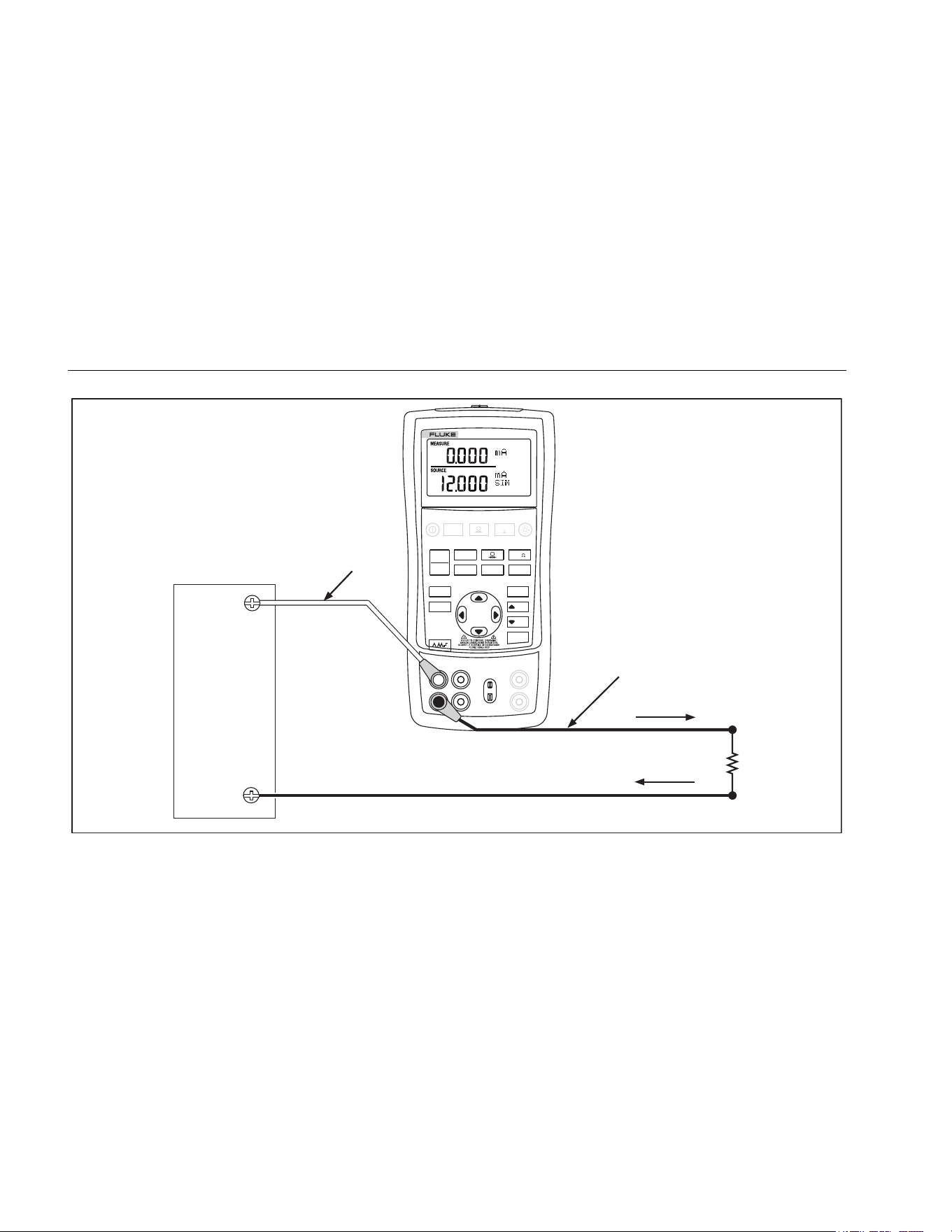
Connect the 12-V-loop-power source as shown in
Figure 14.
1. If necessary, press
for SOURCE mode.
2. Press until both mA and SIM display.
3. Enter the desired current by pressing
and
keys.
Sourcing Other Electrical Parameters
Volts, ohms, and frequency are also sourced and shown
in the lower display.
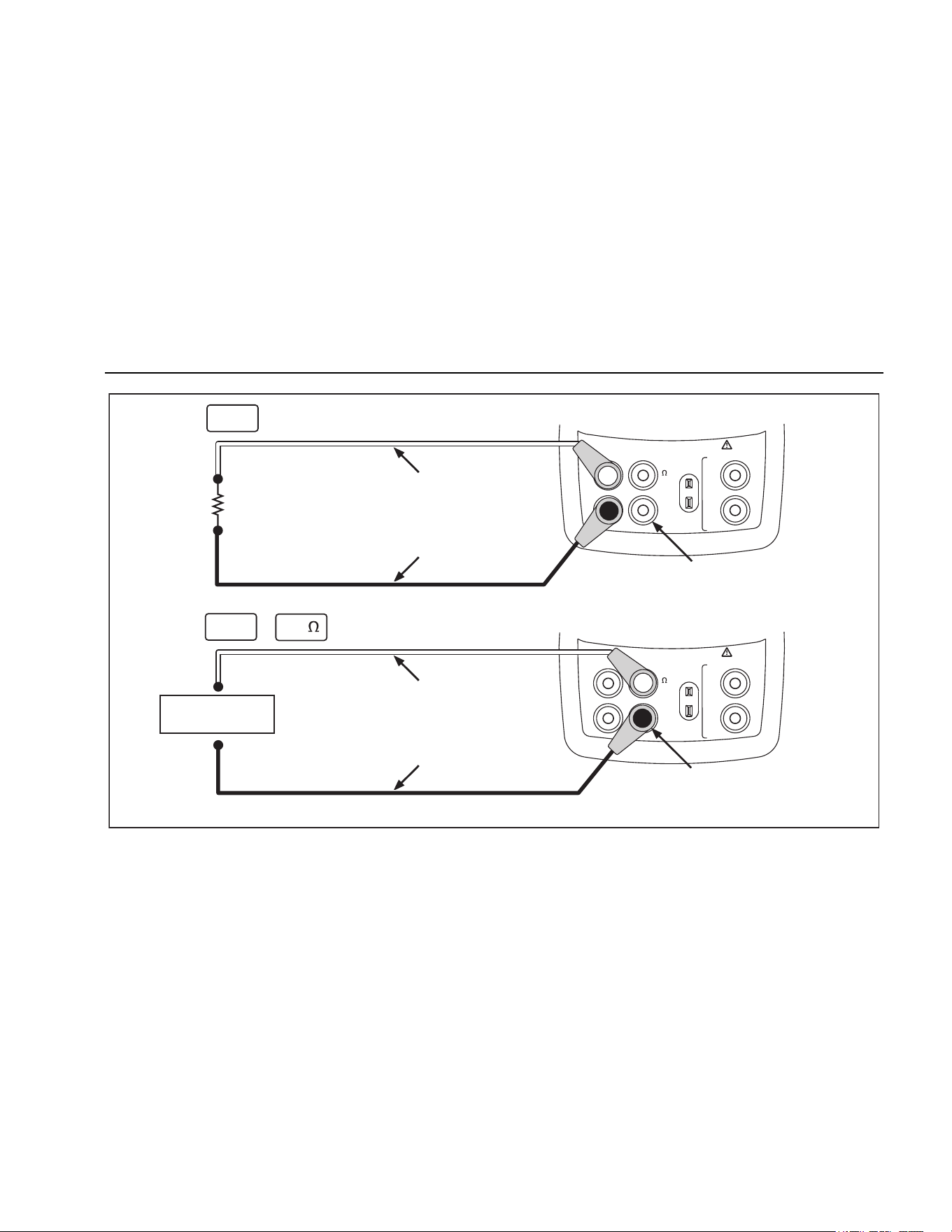
To select an electrical sourcing function, proceed as
follows:
1. Connect the test leads as shown in Figure 15,
depending on the source function.
2. If necessary, press
for SOURCE mode.
3. Press for dc voltage, or for frequency or
resistance.
4. Enter the desired output value by pressing
and
keys. Press and to select a different digit to
change.
1.888.610.7664 sales@GlobalTestSupply.com
Fluke-Direct.com
725Ex
Users Manual
32
Loop
Power
Supply
Readout or
Controller
Black
Red
+
–
V mA
LOO P
V mA
TC RTD
°
C
°
F
Hz
100%
25%
25%
RECALL
ZERO
MEAS
SOURCE
STORE
SETUP
0%
MULTIFUNCTION
PROCESS CALIBRATOR
725Ex
Refer to Fluke 725Ex CCD Control Drawing when using in an Ex hazardous area.
aly17f.eps
Figure 14. Connections for Simulating a 4 to 20- mA Transmitter in a non-Ex hazardous Area
1.888.610.7664 sales@GlobalTestSupply.com
Fluke-Direct.com
Mulitfunction Process Calibrator
Using Source Mode
33
V
mA
MEASURE
SOURCE / MEASURE
30V 24mA MAX ALL TERMINALS
4W
3W
V
Hz
RTD
mA
+
mA
-
TC
COM COM
LOOP
V
mA
MEASURE
SOURCE / MEASURE
30V 24mA MAX ALL TERMINALS
4W
3W
V
Hz
RTD
mA
+
mA
-
TC
COM COM
LOOP
Red
Black
+
–
+
–
Red
Black
Common
Common
V
mA
Hz
+ mA
Device Under Test
Refer to Fluke 725Ex CCD Control Drawing when using in an Ex hazardous area.
aly16f.eps
Figure 15. Electrical Sourcing Connections
1.888.610.7664 sales@GlobalTestSupply.com
Fluke-Direct.com

725Ex
Users Manual
34
Simulating Thermocouples
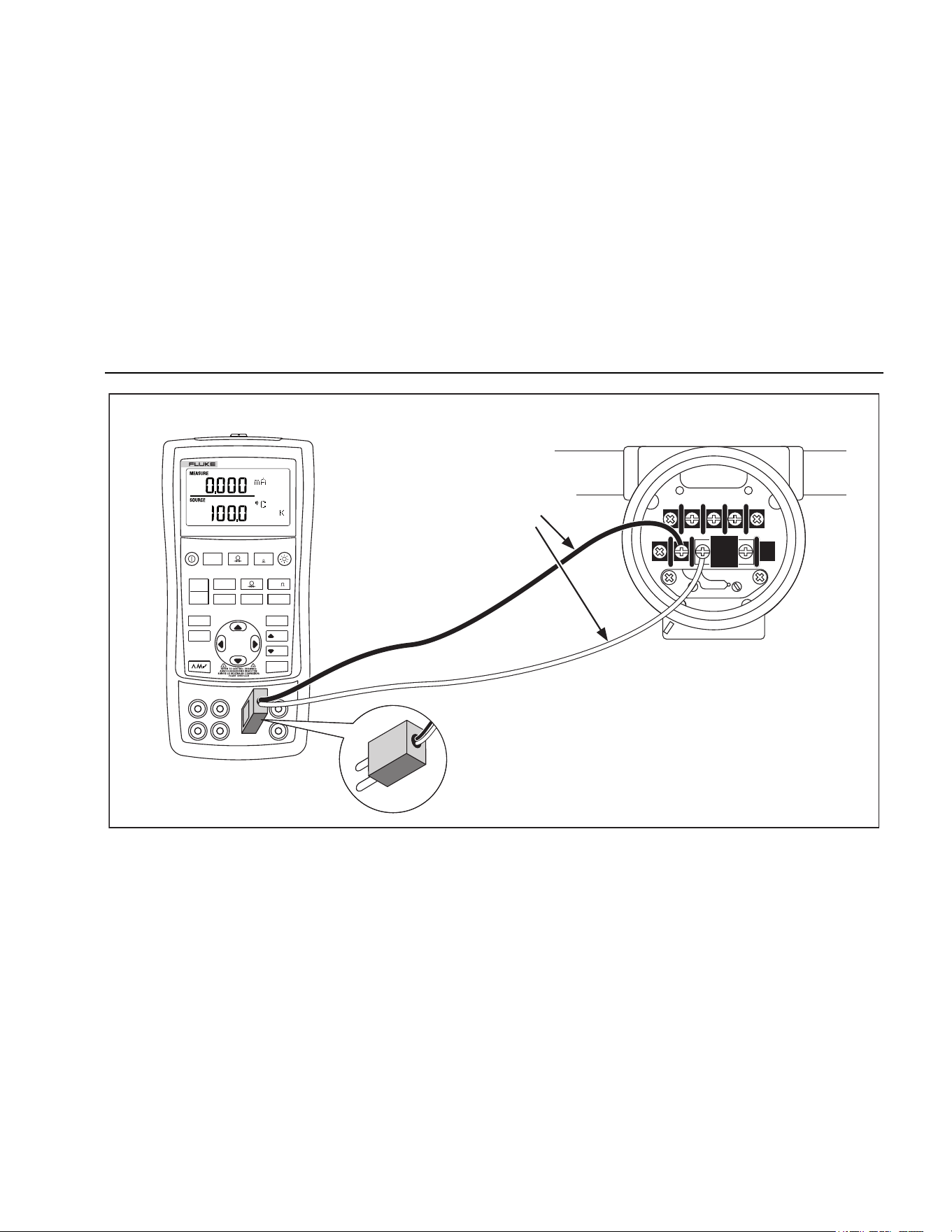
Connect the Calibrator TC input/output to the instrument
under test with thermocouple wire and the appropriate
thermocouple mini-connector (polarized thermocouple plug
with flat, inline blades spaced 7.9 mm [0.312 in] center to
center).
WCaution
One pin is wider than the other. Do not try to force
a miniplug in the wrong polarization.
Figure 16 shows this connection. Proceed as follows to
simulate a thermocouple:
1. Attach the thermocouple leads to the appropriate TC
miniplug, then to the TC input/output as shown in
Figure 16.
2. If necessary, press
for SOURCE mode.
3. Press for the TC display. If desired, continue
pressing this key to select the desired thermocouple
type.
4. Enter the desired temperature by pressing
and
keys. Press and to select a different digit to edit.
Simulating RTDs
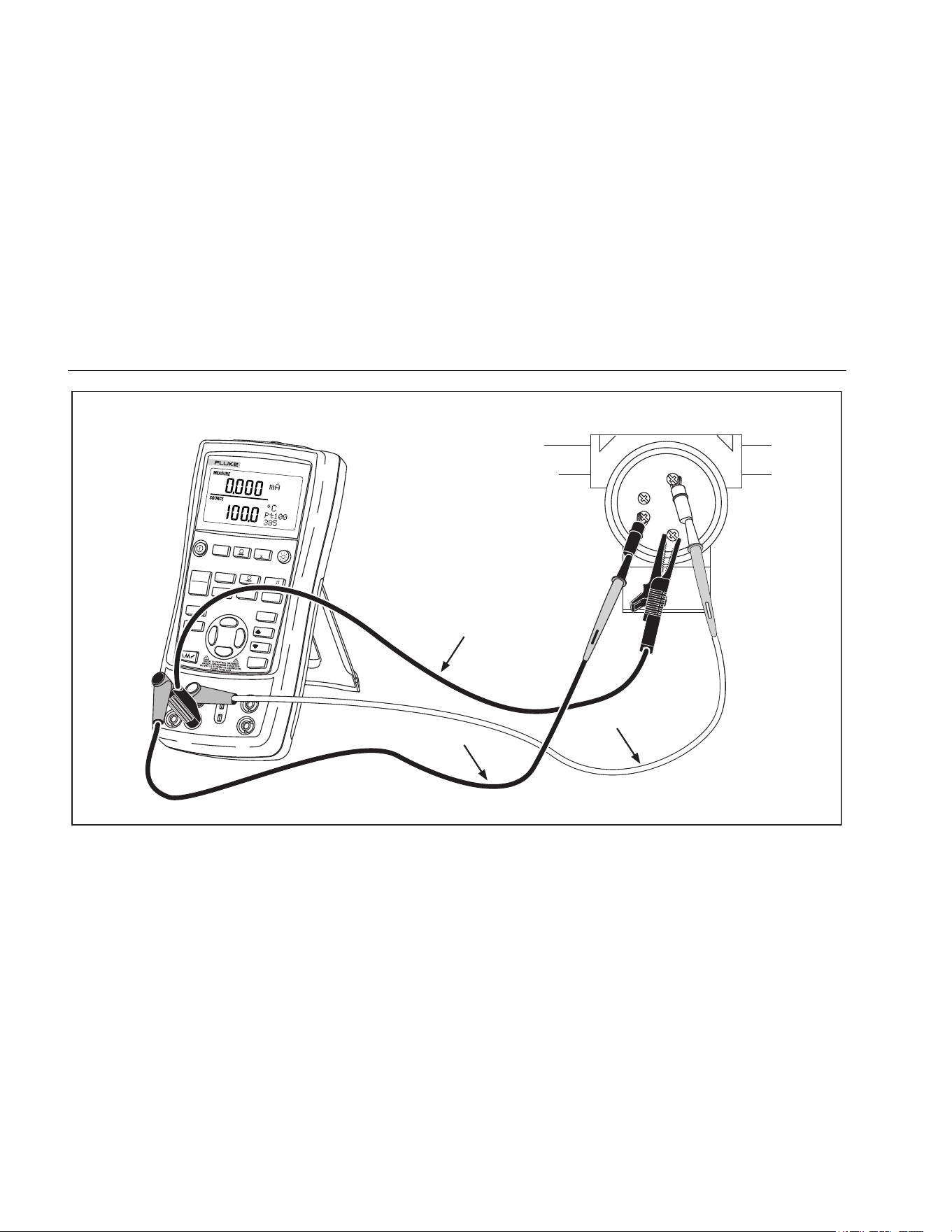
Connect the Calibrator to the instrument under test as
shown in Figure 17. Proceed as follows to simulate an
RTD:
1. If necessary, press
for SOURCE mode.
2. Press for the RTD display.
Note
Use the 3W and 4W terminals for measurement
only, not for simulation. The Calibrator simulates
a 2-wire RTD at its front panel. To connect to a 3-
wire or 4-wire transmitter, use the stacking cables
to provide the extra wires. See Figure 17.
3. Enter the desired temperature by pressing
and
keys. Press and to select a different digit to edit.
1.888.610.7664 sales@GlobalTestSupply.com
Fluke-Direct.com
Mulitfunction Process Calibrator
Using Source Mode
35
TEST DC PWR
++
–
–
+
Color depends
on type of TC
V mA
LOO P
V mA
TC RTD
°
C
°
F
Hz
100%
25%
25%
RECALL
ZERO
MEAS
SOURCE
STORE
SETUP
0%
MULTIFUNCTION
PROCESS CALIBRATOR
725Ex
TC
TC Miniplug
Refer to Fluke 725Ex CCD Control Drawing when using in an Ex hazardous area.
aly20f.eps
Figure 16. Connections for Simulating a Thermocouple
1.888.610.7664 sales@GlobalTestSupply.com
Fluke-Direct.com
725Ex
Users Manual
36
V mA
LOOP
V mA
TC
RTD
°
C
°
F
Hz
100%
25%
25%
RECALL
ZERO
MEAS
SOURCE
STORE
SETUP
0%
MULTIFUNCTION
PROCESS CALIBRATOR
725Ex
Black
Sensor Terminals
Black
Red
1
2
3
4
Refer to Fluke 725Ex CCD Control Drawing when using in an Ex hazardous area.
aly40f.eps
Figure 17. Connections for Simulating 3-Wire RTD
1.888.610.7664 sales@GlobalTestSupply.com
Fluke-Direct.com

Mulitfunction Process Calibrator
Using Source Mode
37
Source Pressure Mode
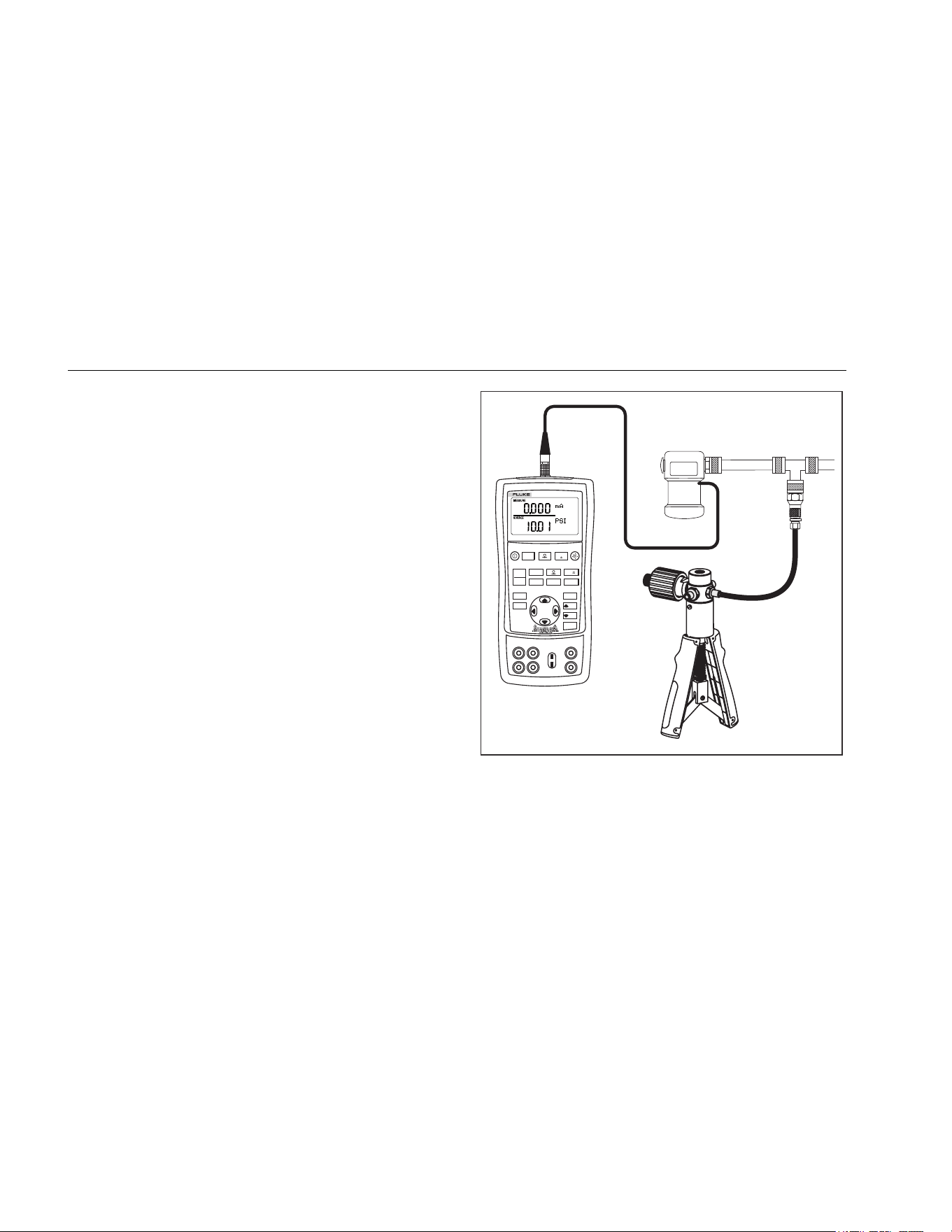
The Calibrator can be used to monitor the pressure
supplied by a pump or other sources, and will display the
pressure in the SOURCE field. Figure 18 shows how to
connect a pump to a Fluke pressure module which makes
it a calibrated source.
Attach the appropriate pressure module for the process
pressure to be tested.
Proceed as follows to source pressure:
WWarning
To prevent fire, explosion, or personal injury:
• Use only Fluke pressure modules.
• To avoid a violent release of pressure in a
pressurized system, shut off the valve and
slowly bleed off the pressure before attaching
the pressure module to the pressure line.
WCaution
• To avoid mechanically damaging the pressure
module, never apply more than 10 lb-ft
(13.5 Nm) of torque between the pressure
module fittings, or between the fittings and
the body of the module. Always apply
appropriate torque between the pressure
module fitting and connecting fittings or
adapters.
• To avoid damaging the pressure module from
overpressure, never apply pressure above the
rated maximum printed on the pressure
module.
• To avoid damaging the pressure module from
corrosion, use it only with specified materials.
Refer to the printing on the pressure module
or the pressure module instruction sheet for
the acceptable material compatibility.
1.888.610.7664 sales@GlobalTestSupply.com
Fluke-Direct.com
725Ex
Users Manual
38
Connect a pressure module to the Calibrator as shown in
Figure 18. The threads on the pressure modules accept
standard ¼ NPT pipe fittings. Use the supplied ¼ NPT to
¼ ISO adapter if necessary.
1. Press
(lower display). The Calibrator
automatically senses which pressure module is
attached and sets its range accordingly.
2. Zero the pressure module as described in the
module’s Instruction Sheet. Modules vary in zeroing
procedures depending on module type.
3. Pressurize the pressure line with the pressure source
to the desired level as shown on the display.
If desired, continue pressing to change pressure
display units to psi, mmHg, inHg, cmH
2
O@4 °C,
cmH
2
O@20 °C, inH
2
O@4 °C, inH
2
O@20 °C,
inH
2
O@60 °F, mbar, bar, kg/cm
2
, or kPa.
Hand Pump
Pressure
Module
V mA
LOOP
V mA
TC RTD
°
C
°
F
Hz
100%
25%
25%
RECALL
ZERO
MEAS
SOURCE
STORE
SETUP
0%
MULTIFUNCTION
PROCESS CALIBRATOR
725Ex
aly19f.eps
Figure 18. Connections for Sourcing Pressure
1.888.610.7664 sales@GlobalTestSupply.com
Fluke-Direct.com

Mulitfunction Process Calibrator
Setting 0 % and 100 % Output Parameters
39
Setting 0 % and 100 % Output
Parameters
For current output, the Calibrator assumes that 0 %
corresponds to 4 mA and 100 % corresponds to 20 mA.
For other output parameters, the 0 % and 100 % points
must be set before use of the step and ramp functions.
Proceed as follows:
1. If necessary, press
for SOURCE mode.
2. Select the desired source function and use the arrow
keys to enter the value. Our example is temperature
source using 100 °C and 300 °C values for source.
3. Enter 100 °C and press and hold
to store the
value.
4. Enter in 300 °C and press and hold
to store the
value.
This setting may now be used for the following:
• Manually stepping an output with 25 % increments.
• Jump between the 0 % and 100 % span points by
momentarily pushing
or .
Stepping and Ramping the Output
Two features are available for adjusting the value of
source functions.
• Stepping the output manually with the and
keys, or in automatic mode.
• Ramping the output.
Stepping and ramping apply to all functions except
pressure, which requires use of an external pressure
source.
Manually Stepping the mA Output
To manually step current output, do the following:
• Use or to step the current up or down in
25 % steps.
• Touch momentarily either
to go to 0 %, or to
go to 100 %.
1.888.610.7664 sales@GlobalTestSupply.com
Fluke-Direct.com

725Ex
Users Manual
40
Auto Ramping the Output
Auto ramping gives the ability to continuously apply a
varying stimulus from the Calibrator to a transmitter, while
your hands remain free to test the response of the
transmitter.
When is pressed, the Calibrator produces a
continuously repeating 0 % - 100 % - 0 % ramp in a choice
of three ramp waveforms:
0 % - 100 % - 0 % 40-second smooth ramp
0 % - 100 % - 0 % 15-second smooth ramp
0 % - 100 % - 0 % Stair-step ramp in 25 % steps,
pausing 5 seconds at each step. Steps are listed in Table
7.
To exit ramping, press any button.
Table 7. mA Step Values
Step 4 to 20 m
A
0 %
4.000
25 %
8.000
50 %
12.000
75 %
16.000
100 %
20.000
Storing and Recalling Setups
Store up to eight settings in a nonvolatile memory and
recall the settings for later use. A low battery condition or a
battery change does not jeopardize the stored settings.
Proceed as follows:
1. After creating a calibrator setup, press
. In the
display, the memory locations appear.
2. Press
or to select locations one through eight. An
underscore appears below the selected memory
location.
3. Press
until the memory number disappears then
reappears. The setup is stored.
To recall setups, proceed as follows.
1. Press
. The memory locations appear on the
display.
2. Press
or to select the appropriate location and
press
.
1.888.610.7664 sales@GlobalTestSupply.com
Fluke-Direct.com

Mulitfunction Process Calibrator
Calibrating a Transmitter
41
Calibrating a Transmitter
Use the measurement (upper display) and source (lower
display) modes to calibrate a transmitter. This section
applies to all but pressure transmitters. The following
example shows how to calibrate a temperature transmitter.
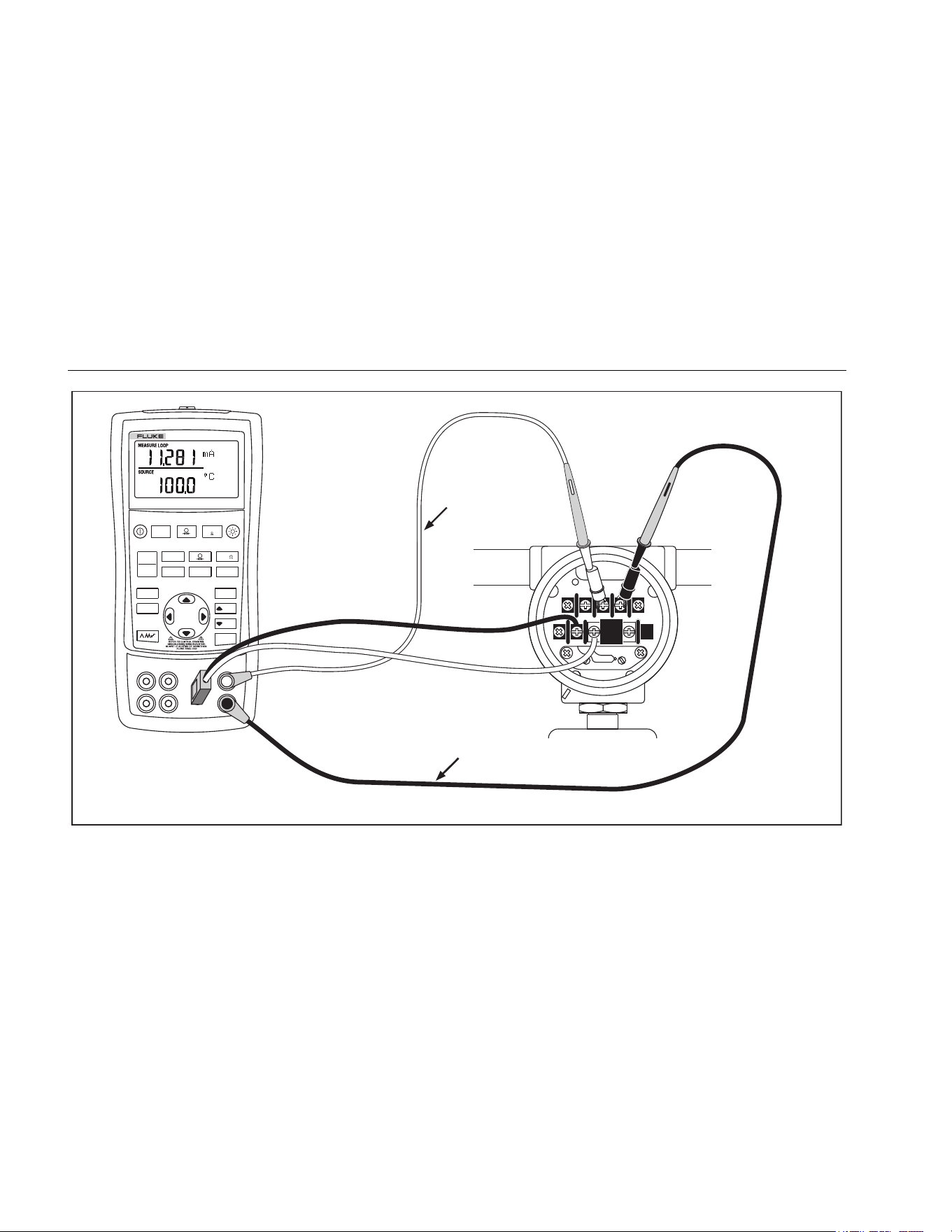
Connect the Calibrator to the instrument under test as
shown in Figure 19. Proceed as follows to calibrate a
transmitter
1. Press
for current (upper display). If required,
press
again to activate loop power.
2. Press
(lower display). If desired, continue
pressing this key to select the desired thermocouple
type.
3. If necessary, press for SOURCE mode.
4. Set the zero and span parameters by pressing
and
keys. Enter these parameters by pressing and
holding and . For more information on
setting parameters, see “Setting 0 % and 100 %”
earlier in this manual.
5. Press
or to select the appropriate location
6. Perform test checks at 0-25-50-75-100 % points by
pressing
or . Adjust the transmitter as
necessary.
1.888.610.7664 sales@GlobalTestSupply.com
Fluke-Direct.com
725Ex
Users Manual
42
Red
TEST DC PWR
+
–
+
–
–
+
Black
V mA
LOO P
V mA
TC RTD
°
C
°
F
Hz
100%
25%
25%
RECALL
ZERO
MEAS
SOURCE
STORE
SETUP
0%
MULTIFUNCTION
PROCESS CALIBRATOR
725Ex
Refer to Fluke 725Ex CCD Control Drawing when using in an Ex hazardous area.
aly44f.eps
Figure 19. Calibrating a Thermocouple Transmitter
1.888.610.7664 sales@GlobalTestSupply.com
Fluke-Direct.com

Mulitfunction Process Calibrator
Calibrating a Pressure Transmitter
43
Calibrating a Pressure Transmitter
The following example shows how to calibrate a pressure
transmitter.
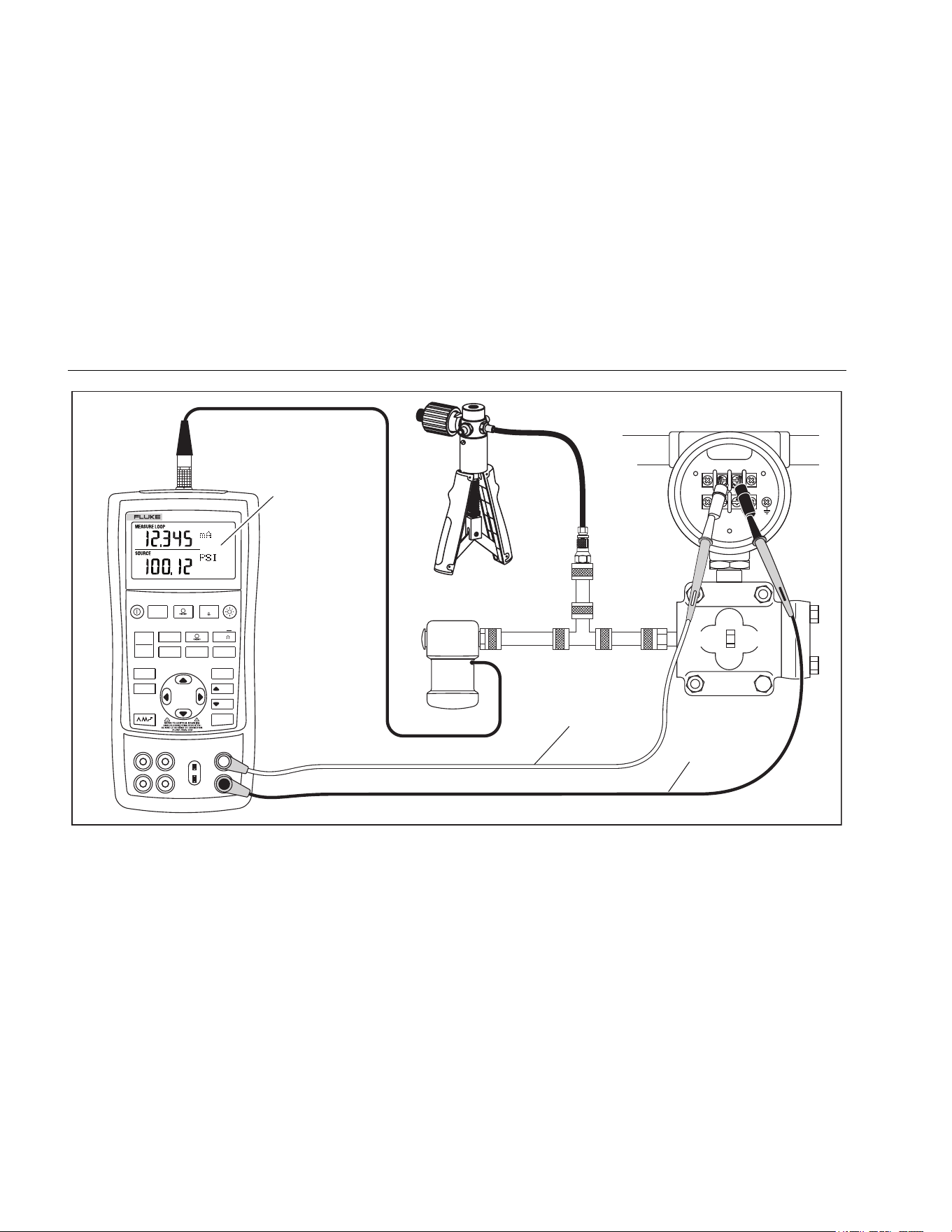
Connect the Calibrator to the instrument under test as
shown in Figure 20. Proceed as follows:
1. Press
for current (upper display). If required,
press
again to activate loop power.
2. Press
(lower display).
3. If necessary, press for SOURCE mode.
4. Zero the pressure module.
5. Perform checks at 0 % and 100 % of span and adjust
the transmitter as necessary.
1.888.610.7664 sales@GlobalTestSupply.com
Fluke-Direct.com
725Ex
Users Manual
44
SIGNAL
TEST
+
–
Red
Black
Measure mA
Source Pressure
12 V Loop Power
Enabled
MULTIFUNCTION
PROCESS CALIBRATOR
725Ex
V mA
LOO P
V mA
TC RTD
°
C
°
F
Hz
100%
25%
25%
RECALL
ZERO
MEAS
SOURCE
STORE
SETUP
0%
Refer to Fluke 725Ex CCD Control Drawing when using in an Ex hazardous area.
Hand Pump
Pressure
Module
aly34f.eps
Figure 20. Calibrating a Pressure-to-Current (P/I) Transmitter
1.888.610.7664 sales@GlobalTestSupply.com
Fluke-Direct.com

Mulitfunction Process Calibrator
Calibrating an I/P Device
45
Calibrating an I/P Device
The following test allows calibration of a device that
controls pressure. Proceed as follows:
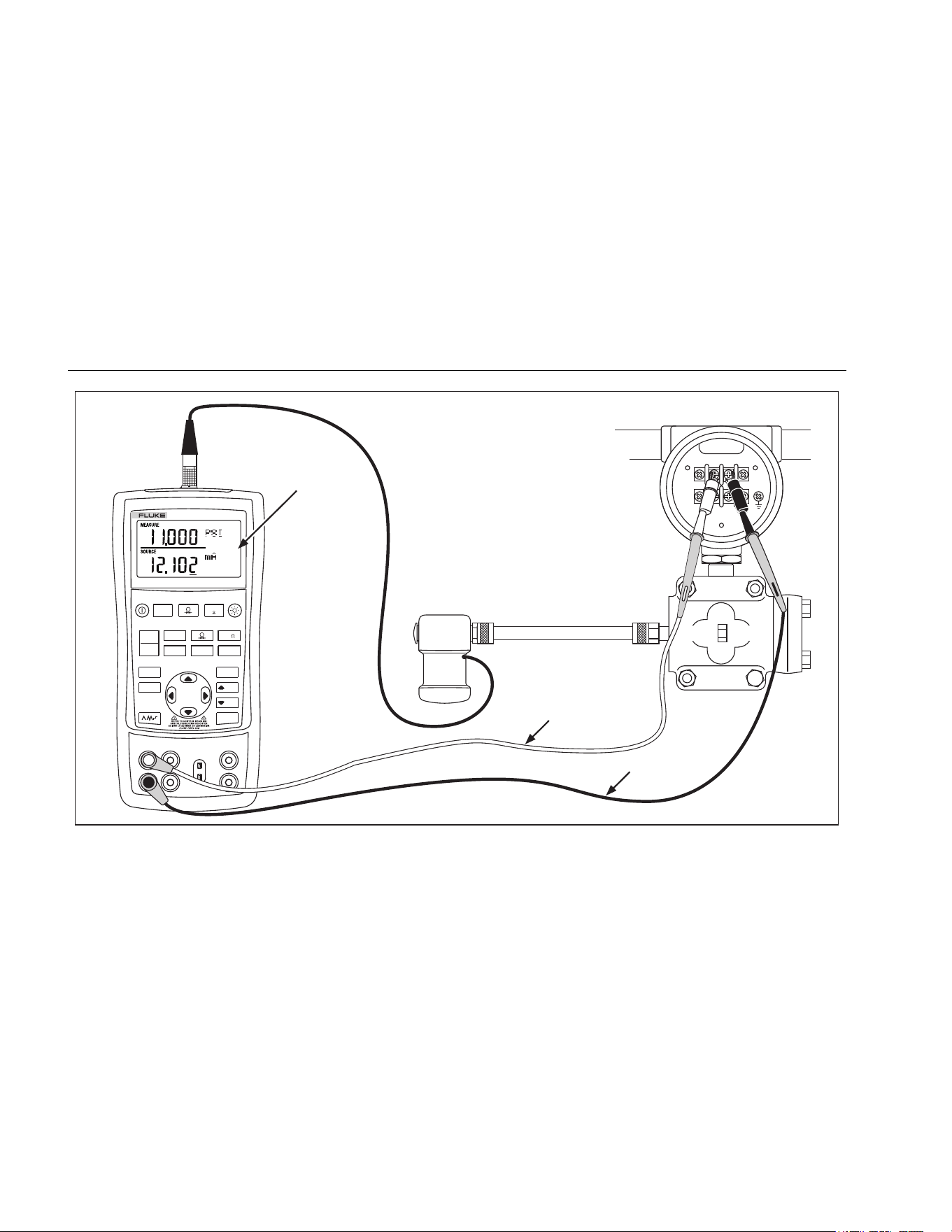
1. Connect the test leads to the instrument under test as
shown in Figure 21. The connections simulate a
current-to-pressure transmitter and measures the
corresponding output pressure.
2. Press (upper display).
3. Press
for sourcing current (lower display).
4. If necessary, press for SOURCE mode.
5. Enter the desired current by pressing and
keys. Press and to select different digits.
1.888.610.7664 sales@GlobalTestSupply.com
Fluke-Direct.com
725Ex
Users Manual
46
SIGNAL
TEST
+
–
Pressure
Module
Red
Black
Measure
Pressure
Source mA
V mA
LOO P
V mA
TC RTD
°
C
°
F
Hz
100%
25%
25%
RECALL
ZERO
MEAS
SOURCE
STORE
SETUP
0%
MULTIFUNCTION
PROCESS CALIBRATOR
725Ex
Refer to Fluke 725Ex CCD Control Drawing when using in an Ex hazardous area.
aly28f.eps
Figure 21. Calibrating a Current-to-Pressure (I/P) Transmitter
1.888.610.7664 sales@GlobalTestSupply.com
Fluke-Direct.com

Mulitfunction Process Calibrator
Switch Test
47
Switch Test
To perform a switch test, follow these steps:
Note
This example used a normally closed switch.
The procedure is the same for an open switch
but the display reads OPEN instead of CLOSE.
1. Connect the Calibrator mA and COM terminals to the
switch using the pressure switch terminals and
connect the pump from the Calibrator to the pressure
switch. The polarity of the terminals does not matter.
2. Make sure the vent on the pump is open and zero the
Calibrator if necessary. Close the vent after zeroing
the Calibrator.
3. Press and hold the upper display button for
three seconds to enter switch test mode. The upper
main display indicates the applied pressure, CLOSE
will be displayed to the right of the pressure reading
to indicate closed contacts
4. Apply pressure with the pump slowly until the switch
opens.
Note
Pressure the device slowly to ensure accurate
readings. Run the test several times to confirm
repeatability.
5. OPEN displays once the switch is open. Bleed the
pump slowly until the pressure switch closes.
RECALL appears on the display.
6. Press to read the pressure values for when the
switch opened, for when it closed, and for the
deadband.
7. Hold for three seconds to exit the switch test or
press to clear the switch test and rerun the test.
1.888.610.7664 sales@GlobalTestSupply.com
Fluke-Direct.com
725Ex
Users Manual
48
Testing an Output Device
Use the source functions to test and calibrate actuators,
recording, and indicating devices. Proceed as follows:
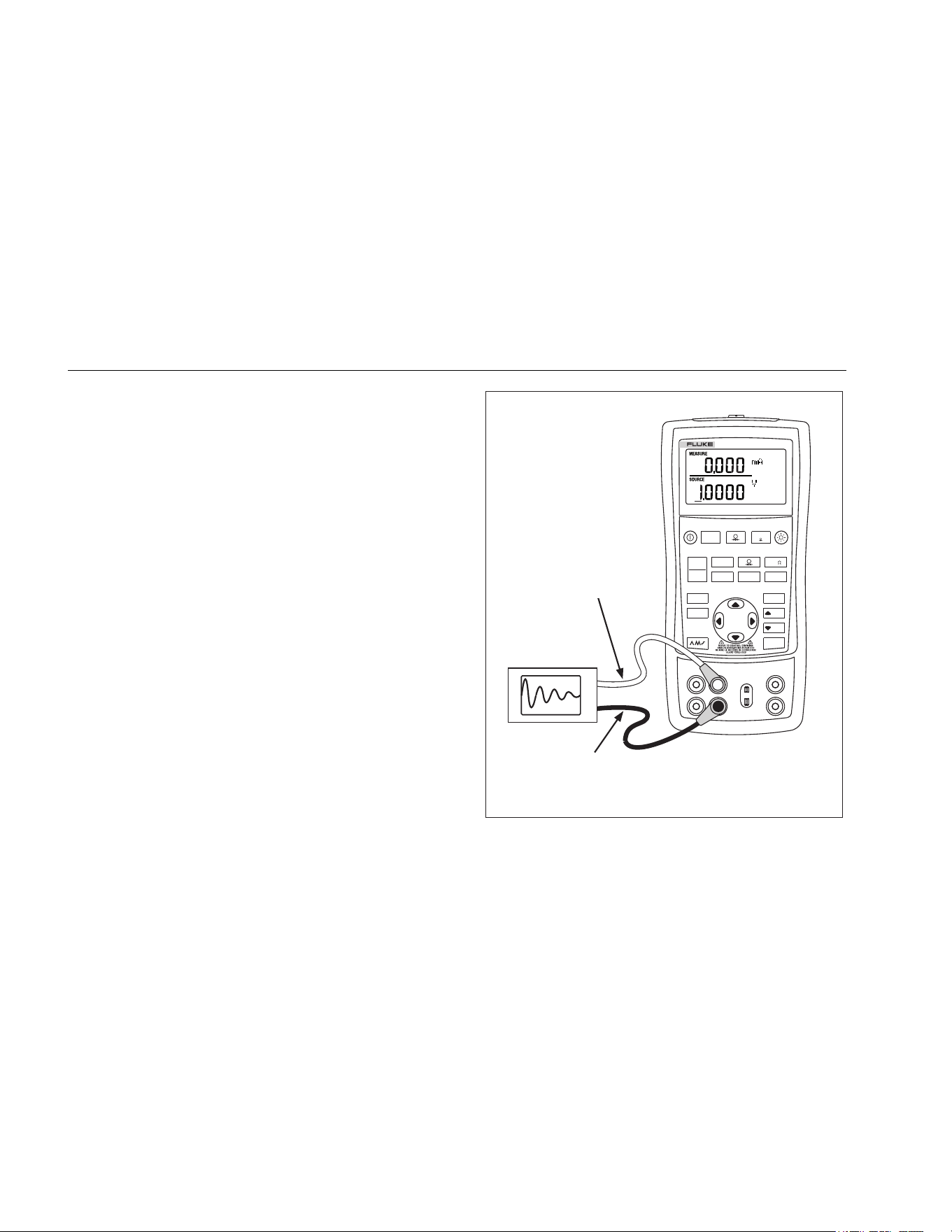
1. Connect the test leads to the instrument under test
as shown in Figure 22.
2. Press for current or dc voltage, or for
frequency or resistance (lower display).
3. If necessary, press for SOURCE mode.
V mA
LOO P
V mA
TC RTD
°
C
°
F
Hz
100%
25%
25%
RECALL
ZERO
MEAS
SOURCE
STORE
SETUP
0%
MULTIFUNCTION
PROCESS CALIBRATOR
725Ex
Black
Red
0 to 1 V dc
Input
Refer to Fluke 725Ex CCD Control Drawing
when using in an Ex hazardous area.
aly25f.eps
Figure 22. Calibrating a Chart Recorder
1.888.610.7664 sales@GlobalTestSupply.com
Fluke-Direct.com
Mulitfunction Process Calibrator
Replacing the Batteries
49
Replacing the Batteries
WWarning
To prevent fire, explosion, or personal injury:
• Remove the Calibrator from the Ex-
hazardous area before opening the battery
door. See Ex Hazardous Areas.
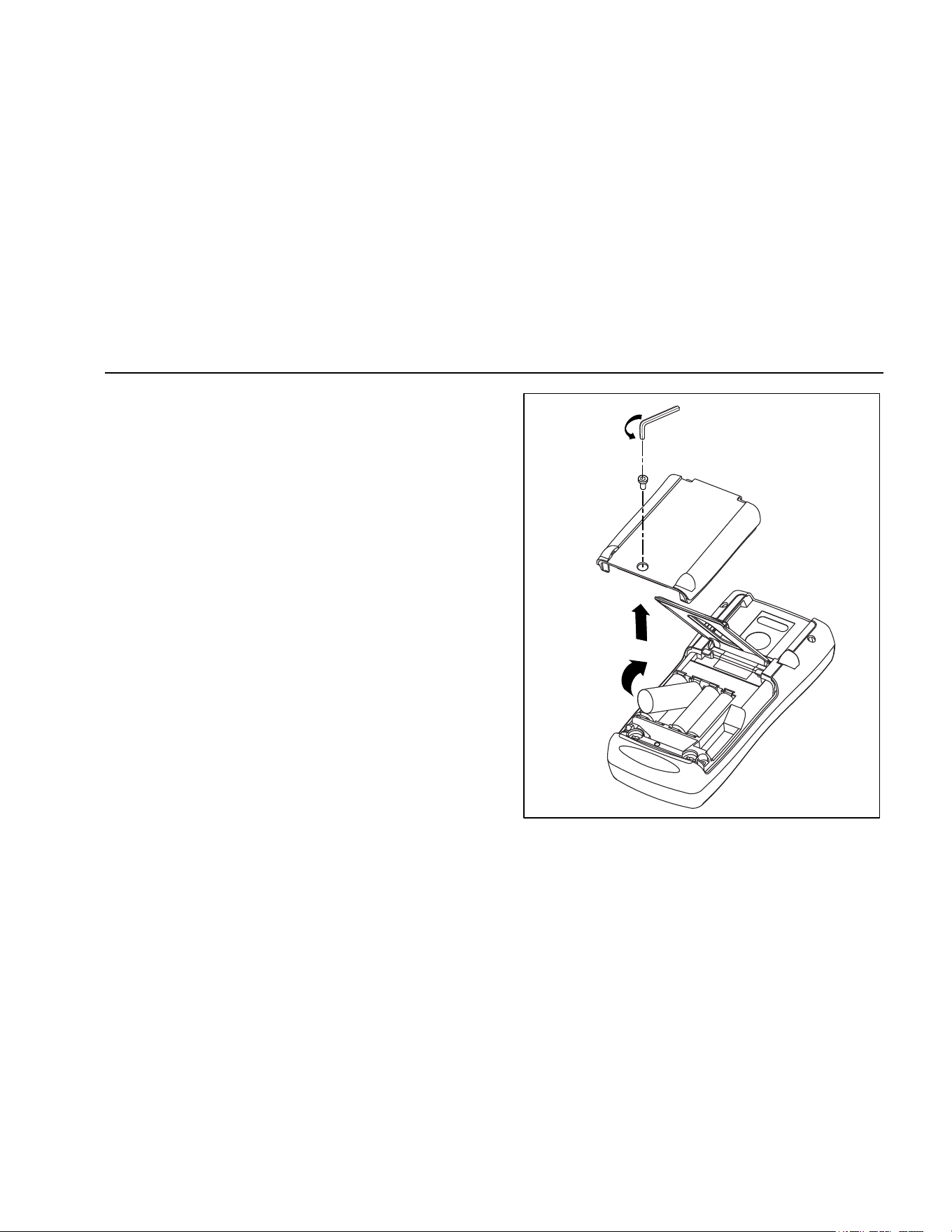
Figure 23 shows how to replace the batteries.
Hex Key
sh38f.eps
Figure 23. Replacing the Batteries
1.888.610.7664 sales@GlobalTestSupply.com
Fluke-Direct.com

725Ex
Users Manual
50
Approved Batteries
Table 8. Approved Batteries
Battery Manufacture
r
(All Batteries Alkaline- AA 1.5 V)
Type
Duracell MN1500
Eveready (Energizer) E91
Maintenance
Cleaning the Calibrator
W Warning
To avoid personal injury or damage to the
Calibrator, use only the specified replacement
parts and do not allow water into the case.
W Caution
To avoid damaging the plastic lens and case, do
not use solvents or abrasive cleansers.
Clean the Calibrator and pressure modules with a soft
cloth dampened with water or water and mild soap.
1.888.610.7664 sales@GlobalTestSupply.com
Fluke-Direct.com

Mulitfunction Process Calibrator
Maintenance
51
Service Center Calibration or Repair
Calibration, repairs, or servicing must be performed only
by qualified service personnel. If the Calibrator fails,
check the batteries first, and replace them if needed.
Verify that the Calibrator is being operated in accordance
with the instructions in this manual. If the Calibrator is
faulty, send a description of the failure with the Calibrator.
Pressure modules do not need to accompany the
Calibrator unless the module is faulty also. Be sure to
pack the Calibrator securely, using the original shipping
container if it is available. Send the equipment postage
paid and insured, to the nearest Service Center. Fluke
assumes no responsibility for damage in transit.
The Fluke 725Ex Calibrator covered by the warranty will
be promptly repaired or replaced (at Fluke’s option) and
returned to you at no charge. See the back of the title
page for warranty terms. If the warranty period has
expired or the operating limits are exceeded, the
Calibrator will be repaired and returned for a fixed fee. If
the Calibrator or pressure module is not covered under
the warranty terms, contact an authorized service center
for a price quote for repair.
To locate an authorized service center or order
replacement parts, refer to “Contacting Fluke” at the
beginning of the manual.
Replacement Parts
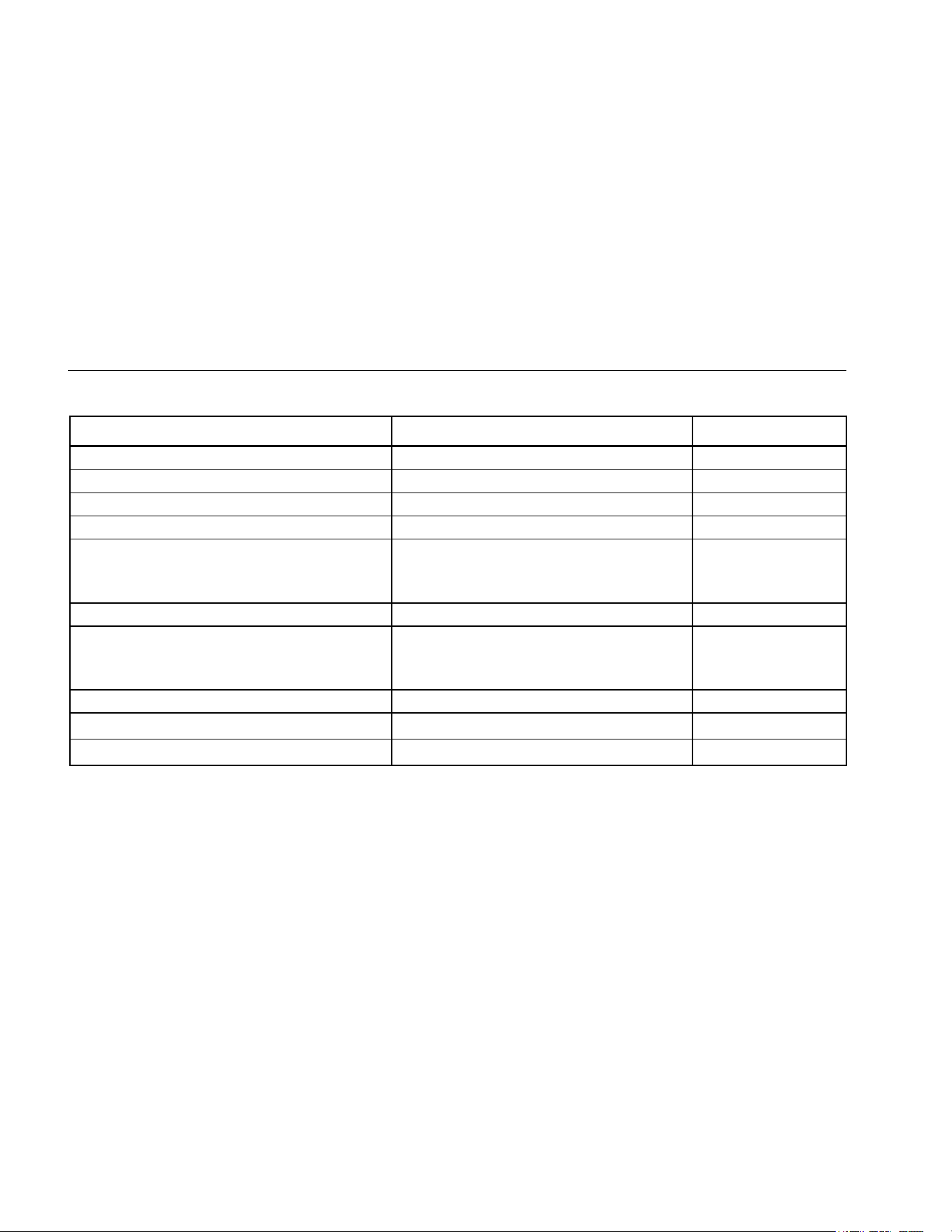
Table 9 lists the part number of each replaceable part.
1.888.610.7664 sales@GlobalTestSupply.com
Fluke-Direct.com
725Ex
Users Manual
52
Table 9. Replacement Parts
Description PN Qty.
AA alkaline batteries See “Table 8. Approved Batteries”
4
Battery door 2097832
1
Accessory mount 2151981
1
Tilt stand 2097826
1
TL75 series test set
Cap, Black
Cap, Red
855742
3986568
3995524
1
1
1
Fluke – 7XX Test Lead Set 3397308
1
AC175
Alligator clip, red
Alligator clip, black
4239092
4239050
1
1
Input Decal 690948
1
Fluke 725Ex Control Drawing
4926220
1
Fluke 725Ex Safety Information
2151996
1
1.888.610.7664 sales@GlobalTestSupply.com
Fluke-Direct.com
Mulitfunction Process Calibrator
Accessories
53
Accessories
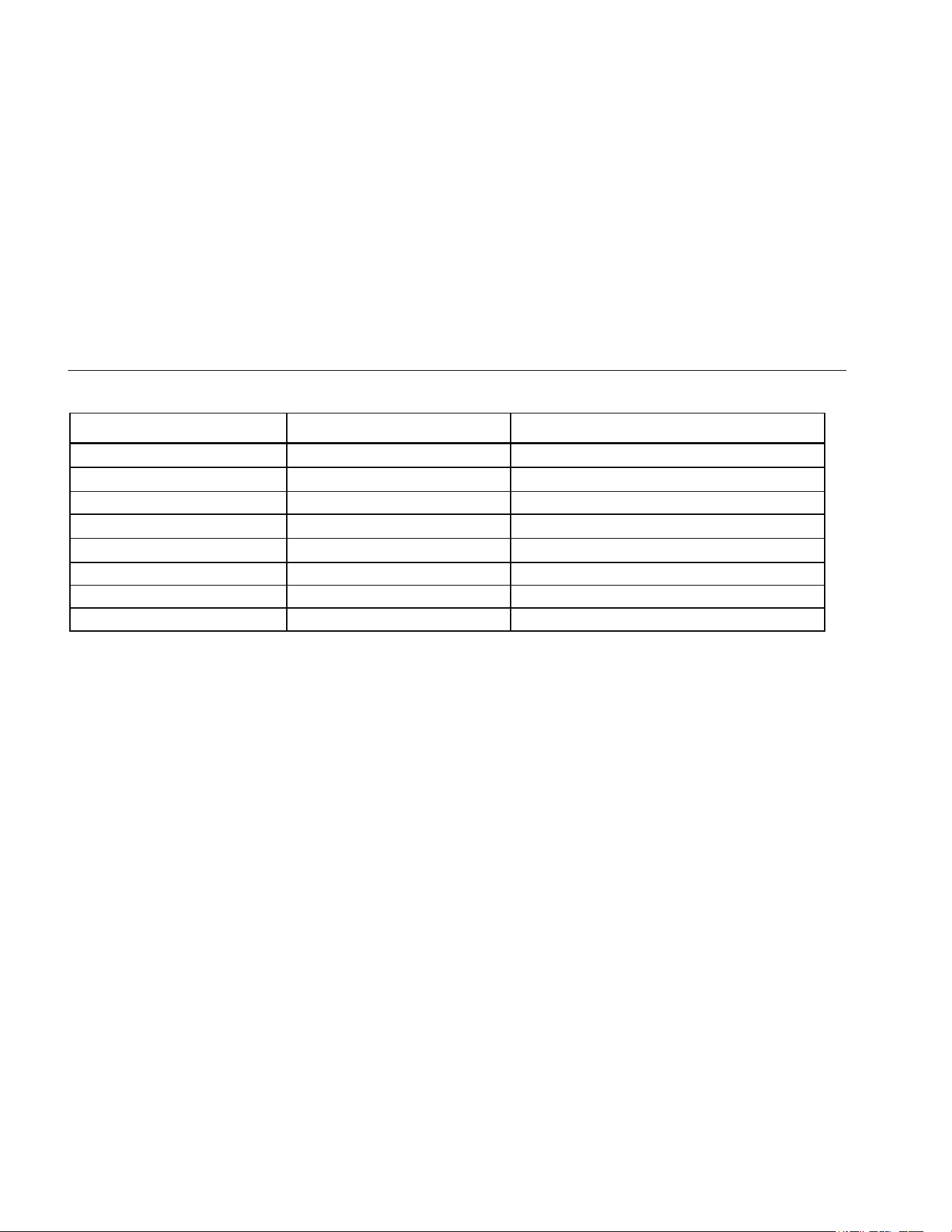
For more information about these accessories and their
prices, contact a Fluke representative. Pressure Modules
and Fluke model numbers (see Table 10) are listed
below. (Differential models also operate in gage mode.)
Contact a Fluke representative about new pressure
modules not listed here.
• 700HTP-2 0 to 10,000 PSI Pump
• 700PTP-1 -11.6 to 600 PSI Pump
• 700TC1 and 700TC2 Thermocouple Mini-plug Kits
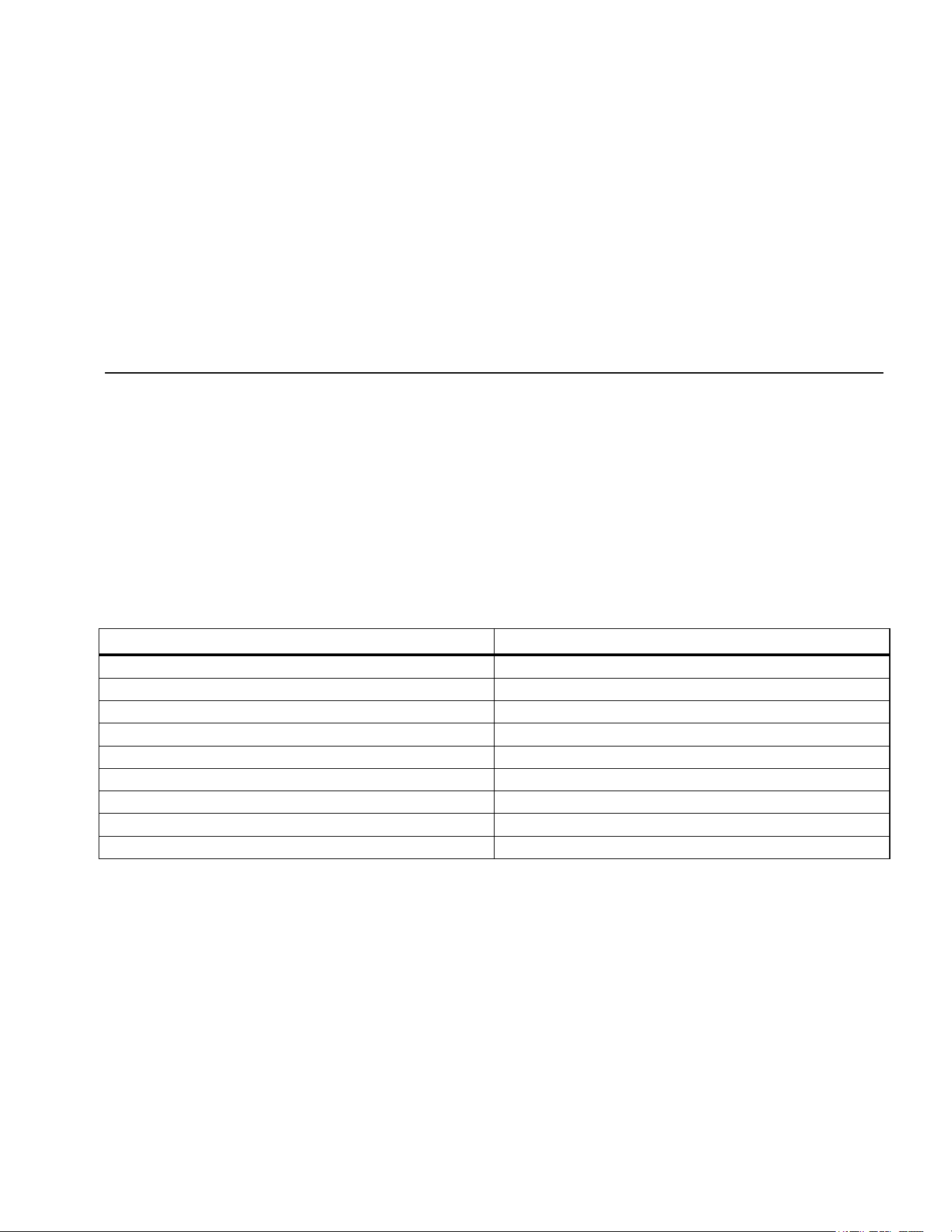
External Fluke Pressure Module Compatibility
The output of Fluke 750PEx pressure modules can cause
the 5 digit display of the Calibrator to overflow, or else
produce values that are too low to be read if inappropriate
units are selected. This is prevented by displaying OL on
the display per Table 10.
Table 10. Fluke Pressure Module Compatibility
Pressure Unit Module Compatibility
psi Available on all pressure ranges
inH20 All ranges through 3000 psi
cmH20 All ranges through 1000 psi
bar 15 psi and above
mbar All ranges through 1000 psi
kPa Available on all pressure ranges
inHg Available on all pressure ranges
mmHg All ranges through 1000 psi
kg/cm
2
15 psi and above
1.888.610.7664 sales@GlobalTestSupply.com
Fluke-Direct.com
725Ex
Users Manual
54
Table 11. Pressure Modules
Fluke Model Number Range Type and Media
Fluke-750P01Ex 0 inH20 to 10 inH20 differential, Low: dry High: dry
Fluke-750P24Ex 0 psi to 15 psi differential, Low: dry High: wet
Fluke-750P05Ex 0 psi to 30 psi gage, wet
Fluke-750P06Ex 0 psi to 100 psi gage, wet
Fluke-750P09Ex 0 psi to 1500 psi gage, wet
Fluke-750P27Ex 0 psi to 300 psi gage, wet
Fluke-750P29Ex 0 psi to 3000 psi gage, wet
Fluke-750PA4Ex 0 psi to 15 psi absolute, Low: dry High: wet
1.888.610.7664 sales@GlobalTestSupply.com
Fluke-Direct.com
Multifunction Process Calibrator
Specifications
55
Specifications
All specifications apply from +18 °C to +28 °C unless
stated otherwise. All specifications assume a 5-minute
warmup period.
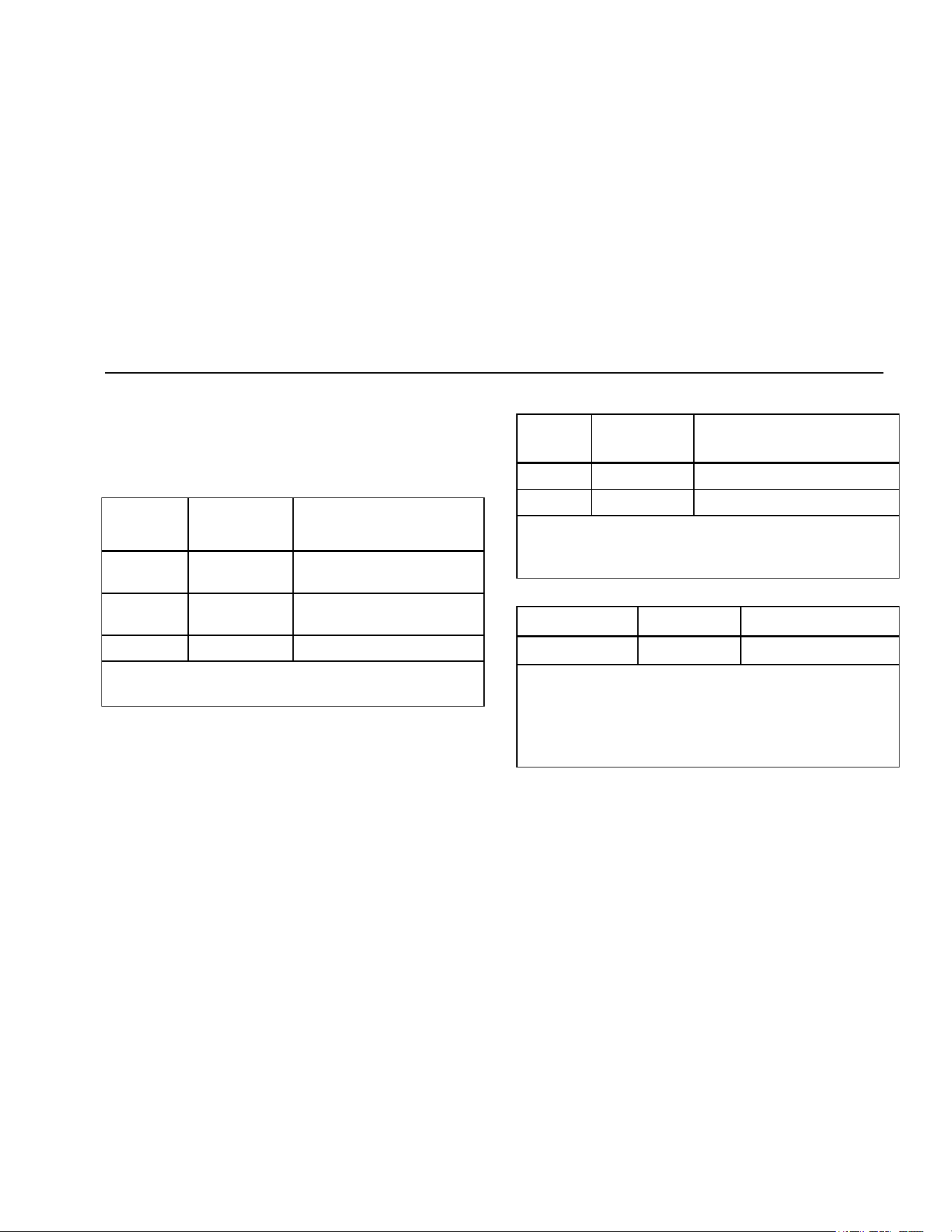
DC Voltage Measurement
Range Resolution
Accuracy,
(% of Reading + Counts)
30 V (upper
display)
0.001 V 0.02 % + 2
10 V (lower
display)
0.001 V 0.02 % + 2
90 mV 0.01 mV 0.02 % + 2
Temperature coefficient -10 °C to 18 °C, +28 °C to 55 °C:
±0.005 % of range per °C
DC Voltage Source
Range Resolution
Accuracy,
(% of Reading + Counts)
100 mV 0.01 mV 0.02 % + 2
10 V 0.001 V 0.02 % + 2
Temperature coefficient -10 °C to 18 °C, +28 °C to 55 °C:
±0.005 % of range per °C
Maximum load: 1 mA
Millivolt Measurement and Source*
Range Resolution Accuracy
-10 mV to 75 mV 0.01 mV
±(0.025 % + 1 count)
Maximum input voltage: 30 V
Temperature coefficient -10 °C to 18 °C, +28 °C to 55 °C:
±0.005 % of range per °C
*Select this function by pressing . The signal is
available at the thermocouple miniplug connector.
1.888.610.7664 sales@GlobalTestSupply.com
Fluke-Direct.com
725Ex
Users Manual
56
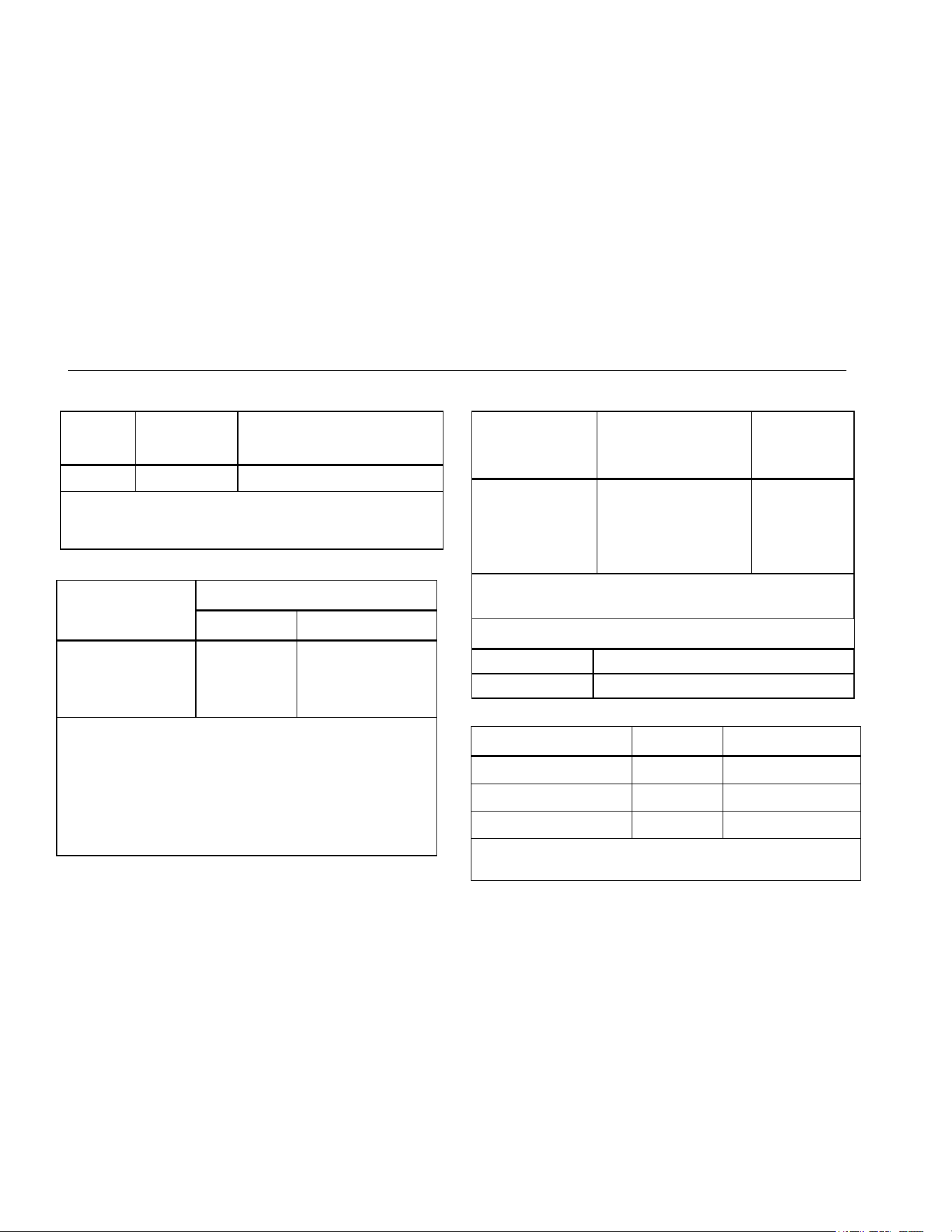
DC mA Measurement and Source
Range Resolution
Accuracy,
(% of Reading + Counts)
24 mA 0.001 mA 0.02 % + 2
Temperature coefficient -10 °C to 18 °C, +28 °C to
55 °C: ±0.005 % of range per °C
Drive capability: 250 Ω at 20 mA
Ohms Measurement
Ohms Range
Accuracy ± Ω*
4-Wire 2- and 3-Wire
0 Ω to 400 Ω
0.1 0.15
400 Ω to 1.5 kΩ
0.5 1.0
1.5 kΩ to 3.2 kΩ
1 1.5
Temperature coefficient -10 °C to 18 °C, +28 °C to
55 °C: ±0.005 % of range per °C
Excitation Current: 0.2 mA
Maximum input voltage: 30 V
* 2-wire: Does not include lead resistance.
3-wire: Assumes matched leads with a total resistance not
exceeding 100 Ω.
Ohms Source
Ohms Range
Excitation Current
from Measurement
Device
Accuracy
± Ω
15 Ω to 400 Ω
0.15 mA to 0.5 mA 0.15
15 Ω to 400 Ω
0.5 mA to 2 mA 0.1
400 Ω to 1.5 kΩ
0.05 mA to 0.8 mA 0.5
1.5 kΩ to 3.2 kΩ
0.05 mA to 0.4 mA 1
Temperature coefficient -10 °C to 18 °C, +28 °C to
55 °C: ± 0.005 % of resistance range per °C
Resolution
15 Ω to 400 Ω 0.1 Ω
400 Ω to 3.2 kΩ 1 Ω
Frequency Measurement
Range Resolution Accuracy
2.0 CPM to 1000.0 CPM 0.1 CPM
± (0.05 % + 1 count)
1 Hz to 1000 Hz 1.0 Hz
± (0.05 % + 1 count)
1.0 kHz to 10.0 kHz 0.1 kHz
± (0.05 % + 1 count)
Sensitivity: 1 V peak-to-peak minimum
Waveform: squarewave
1.888.610.7664 sales@GlobalTestSupply.com
Fluke-Direct.com
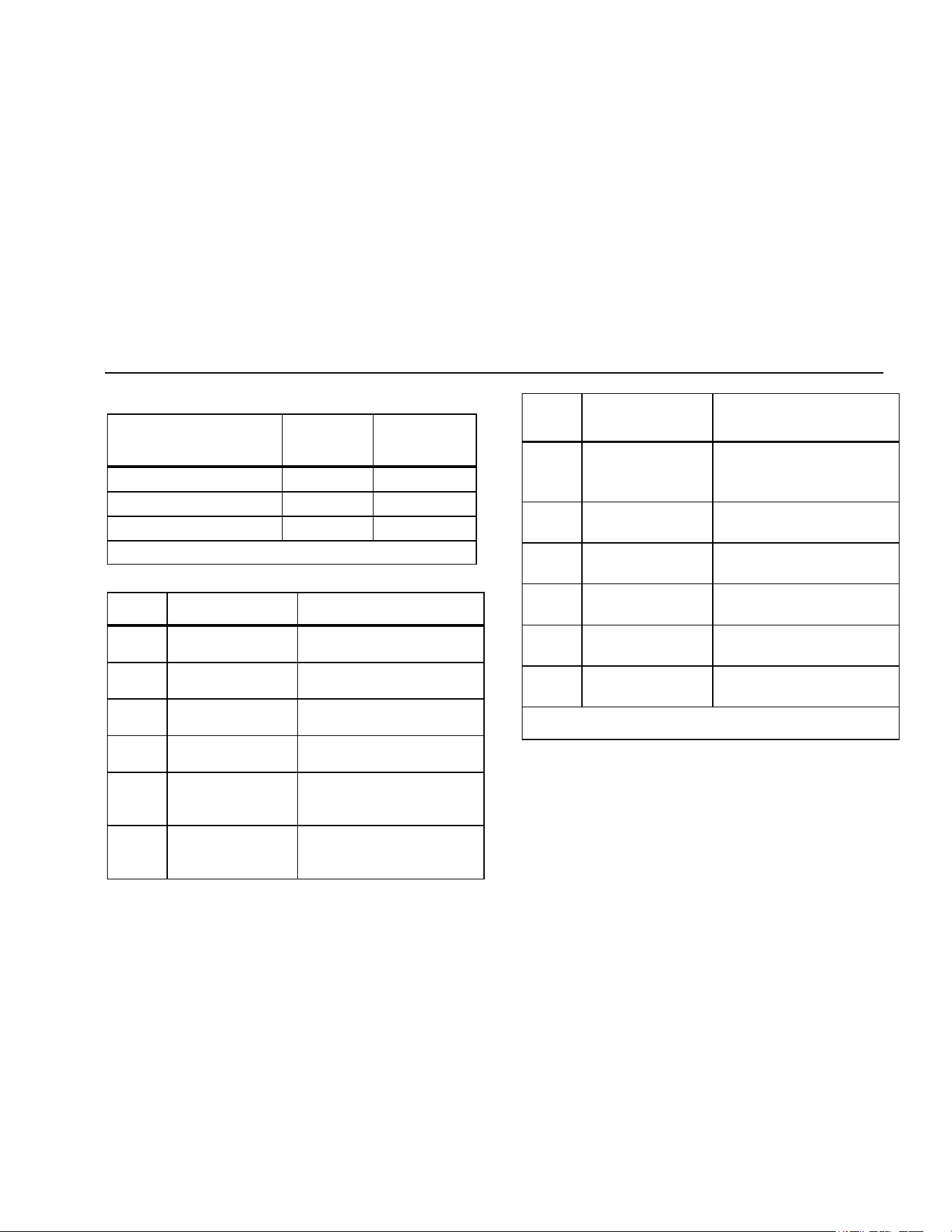
Multifunction Process Calibrator
Specifications
57
Frequency Source
Range Resolution
Accuracy
(% of output
frequency)
2.0 CPM to 1000.0 CPM 0.1 CPM
±0.05 %
1 Hz to 1000 Hz 1 Hz
±0.05 %
1.0 kHz to 10.0 kHz 0.1 kHz
±0.25 %
Waveform: 5 V p-p squarewave, -0.1 V offset
Temperature, Thermocouples
Type Range
Measure and Source
Accuracies
J
-200 °C to 0 °C
0 °C to 1200 °C
1.0 °C
0.7 °C
K
-200 °C to 0 °C
0 °C to 1370 °C
1.2 °C
0.8 °C
T
-200 °C to 0 °C
0 °C to 400 °C
1.2 °C
0.8 °C
E
-200 °C to 0 °C
0 °C to 950 °C
0.9 °C
0.7 °C
R
-20 °C to 0 °C
0 °C to 500 °C
500 °C to 1750 °C
2.5 °C
1.8 °C
1.4 °C
S
-20 °C to 0 °C
0 °C to 500 °C
500 °C to 1750 °C
2.5 °C
1.8 °C
1.5 °C
Type Range
Measure and Source
Accuracies
B
600 °C to 800 °C
800 °C to 1000 °C
1000 °C to 1800 °C
2.2 °C
1.8 °C
1.4 °C
L
-200 °C to 0 °C
0 °C to 900 °C
0.85 °C
0.7 °C
U
-200 °C to 0 °C
0 °C to 400 °C
1.1 °C
0.75 °C
N
-200 to 0 °C
0 °C to 1300 °C
1.5 °C
0.9 °C
XK
-200 °C to 100 °C
-100 °C to 800 °C
0.5 °C
0.6 °C
BP
0 °C to 800 °C
800 °C to 2500 °C
1.2 °C
2.5 °C
Resolution:
0.1 °C, 0.1 °F
Loop Power Supply
Voltage: 12 V
Maximum current: 24 mA
Short circuit protected
1.888.610.7664 sales@GlobalTestSupply.com
Fluke-Direct.com
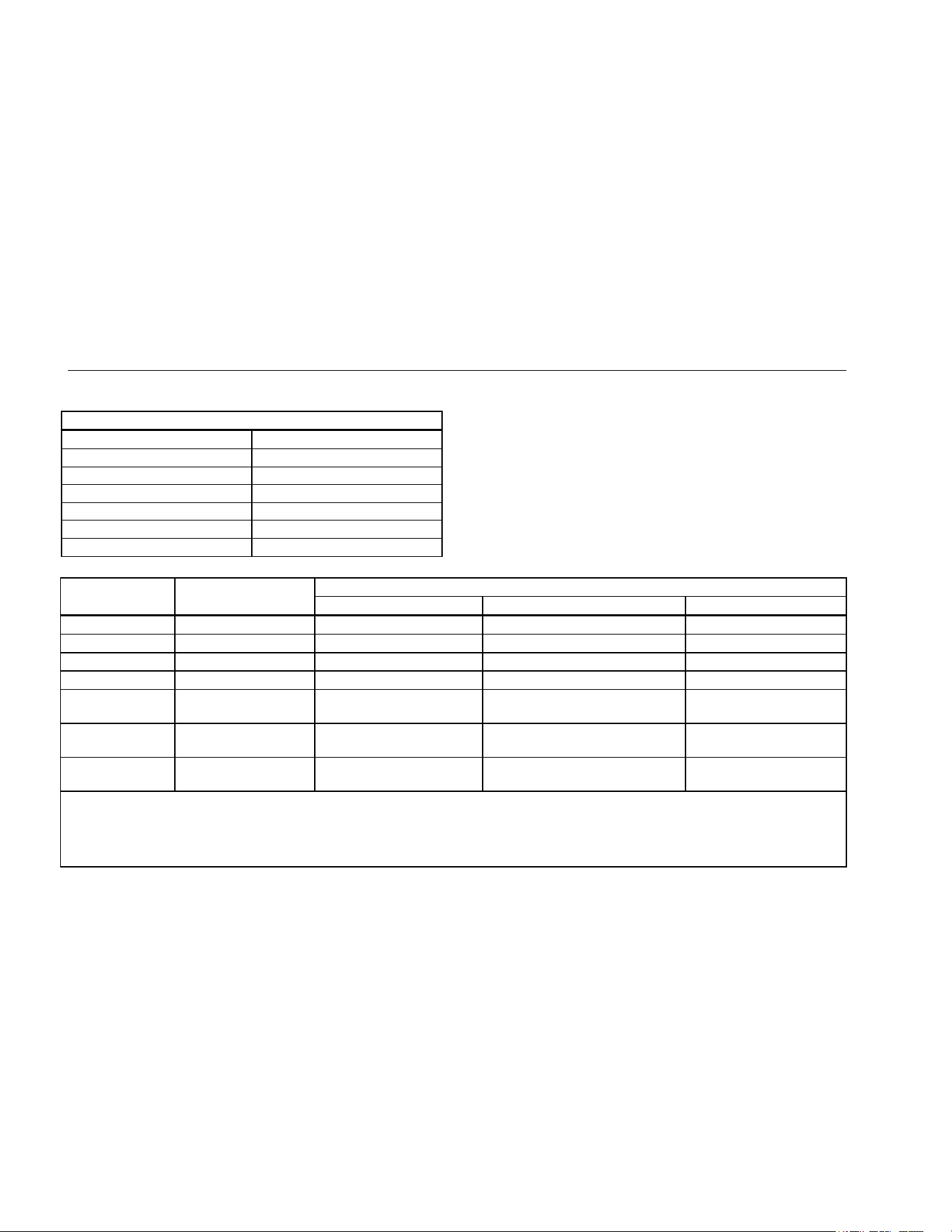
725Ex
Users Manual
58
RTD Excitation (simulation)
Allowable Excitation by RTD type
Ni 120 0.15 mA to 3.0 mA
Pt 100-385 0.15 mA to 3.0 mA
Pt 100-3926 0.15 mA to 3.0 mA
Pt 100-3916 0.15 mA to 3.0 mA
Pt 200-385 0.05 mA to 0.80 mA
Pt 500-385 0.05 mA to 0.80 mA
Pt 1000-385 0.05 mA to 0.40 mA
Temperature, RTD Ranges, and Accuracies
Accuracy
Type Range °C Measure 4-Wire °C Measure 2- and 3-Wire* °C Source °C
Ni120 -80 to 260 0.2 0.3 0.2
Pt100-385 - 200 to 800 0.33 0.5 0.33
Pt100-3926 -200 to 630 0.3 0.5 0.3
Pt100-3916 -200 to 630 0.3 0.5 0.3
Pt200-385 -200 to 250
250 to 630
0.2
0.8
0.3
1.6
0.2
0.8
Pt500-385 -200 to 500
500 to 630
0.3
0.4
0.6
0.9
0.3
0.4
Pt1000-385 -200 to 100
100 to 630
0.2
0.2
0.4
0.5
0.2
0.2
Resolution: 0.1 °C, 0.1 °F
RTD Source: Addresses pulsed transmitters and PLCs with pulses as short as 5 ms.
* 2-wire: Does not include lead resistance.
3-wire: Assumes matched leads with a total resistance not exceeding 100 Ω.
1.888.610.7664 sales@GlobalTestSupply.com
Fluke-Direct.com
Multifunction Process Calibrator
Specifications
59
Pressure Measurement
Range Resolution Accuracy Units
Determined by
pressure module
5 digits Determined by
pressure module
psi, inH2O@4 °C, inH2O@20 °C, inH2O@60 °F, kPa,
cmH2O@4 °C, cmH2O@20 °C, bar, mbar, kg/cm2, mmHg, inHg
General Specifications
Operating temperature
-10 °C to 55 °C
Storage temperature
- 20 °C to 71 °C
Operating altitude
3000 meters above mean sea level
Pollution Degree
2
Relative Humidity
(% RH operating without condensation)
90 % (10 °C to 30 °C)
75 % (30 °C to 40 °C)
45 % (40 °C to 50 °C)
35 % (50 °C to 55 °C)
uncontrolled <10 °C
Vibration
Random, 2 g, 5 Hz to 500 Hz
1.888.610.7664 sales@GlobalTestSupply.com
Fluke-Direct.com

725Ex
Users Manual
60
Electromagnetic compatibility (EMC)
International
IEC 61326-1: Portable
CISPR 11:
Group 1, Class A
Group 1: Equipment has intentionally generated and/or uses conductively-
coupled radio frequency energy that is necessary for the internal function of the
equipment itself.
Class A: Equipment is suitable for use in all establishments other than domestic
and those directly connected to a low-voltage power supply network that supplies
buildings used for domestic purposes. There may be potential difficulties in
ensuring electromagnetic compatibility in other environments due to conducted
and radiated disturbances.
Caution: This equipment is not intended for use in residential environments and
may not provide adequate protection to radio reception in such environments.
Korea (KCC)
Class A Equipment (Industrial Broadcasting & Communication Equipment)
Class A: Equipment meets requirements for industrial electromagnetic wave
equipment and the seller or user should take notice of it. This equipment is
intended for use in business environments and not to be used in homes.
USA (FCC)
47 CFR 15 subpart B. This product is considered an exempt device per clause
15.103.
Power requirements
4 AA alkaline batteries- See “Approved Batteries”
Size
96 mm x 200 mm x 47 mm (3.75 in x 7.9 in x 1.86 in)
Weight
650 gm (1 lb, 7 oz)
Entity Parameters
For Entity Parameters, Refer to Fluke 725Ex CCD, Control Drawing for use in Ex hazardous areas.
1.888.610.7664 sales@GlobalTestSupply.com
Fluke-Direct.com