BLX
Wireless System
Online user guide for Shure BLX wireless system.
Version: 5.1 (2022-C)

Shure Incorporated
2/23
Table of Contents
BLX Wireless System 3
System Components 3
Quick Start Guide 3
Features 5
Front Panel 5
Back Panel 6
BLX1 6
BLX2 7
Single System Set Up 8
Setting Transmitter Group and Channel 9
Group (letter) 9
Channel (number) 9
Multiple System Setup 10
Manually Setting Receiver Group and Channel 10
Group (letter) 10
Channel (number) 10
Locking and Unlocking Controls 10
Transmitter (lock/unlock) 11
Receiver (lock/unlock) 11
Tips to Improve Wireless System Performance 11
Getting Good Sound 11
Correct Microphone Placement 12
Wearing the Headworn Microphone 12
Adjusting Gain 12
BLX1 13
BLX2 13
Batteries 13
Wearing the Bodypack Transmitter 14
Power Off 14
Removing and Installing Identification Caps 15
Troubleshooting 15
Frequency Range and Transmitter Output Level 16
Specifications 17
IMPORTANT SAFETY INSTRUCTIONS 20
Certifications 21
Important Product Information 22
LICENSING INFORMATION 22
Information to the user 22
Australia Warning for Wireless 23
Shure Incorporated
3/23
•
•
•
•
•
•
•
•
•
•
1. 1.
2.
2.
BLX
Wireless System
System Components
Note: Your system comes with a combination of the following components.
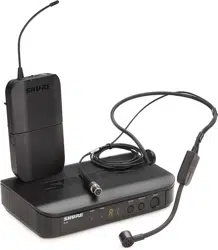
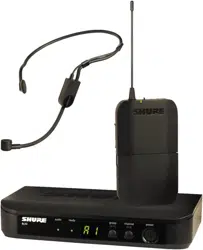
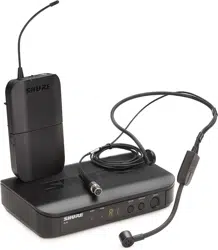
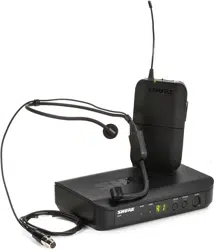
BLX1 Bodypack Transmitter
BLX2 Handheld Transmitter (choice of SM58, BETA58A, or PG58)
BLX4 Wireless Receiver
BLX88 Dual Wireless Receiver
PS24 Power Supply
Lavalier microphone (choice of PG185, WL185 or WL93)
Headworn microphone (choice of PG30, SM31FH or SM35)
MX153 Earset microphone
Instrument microphone (BETA98H/C)
Guitar cable (WA302)
Quick Start Guide
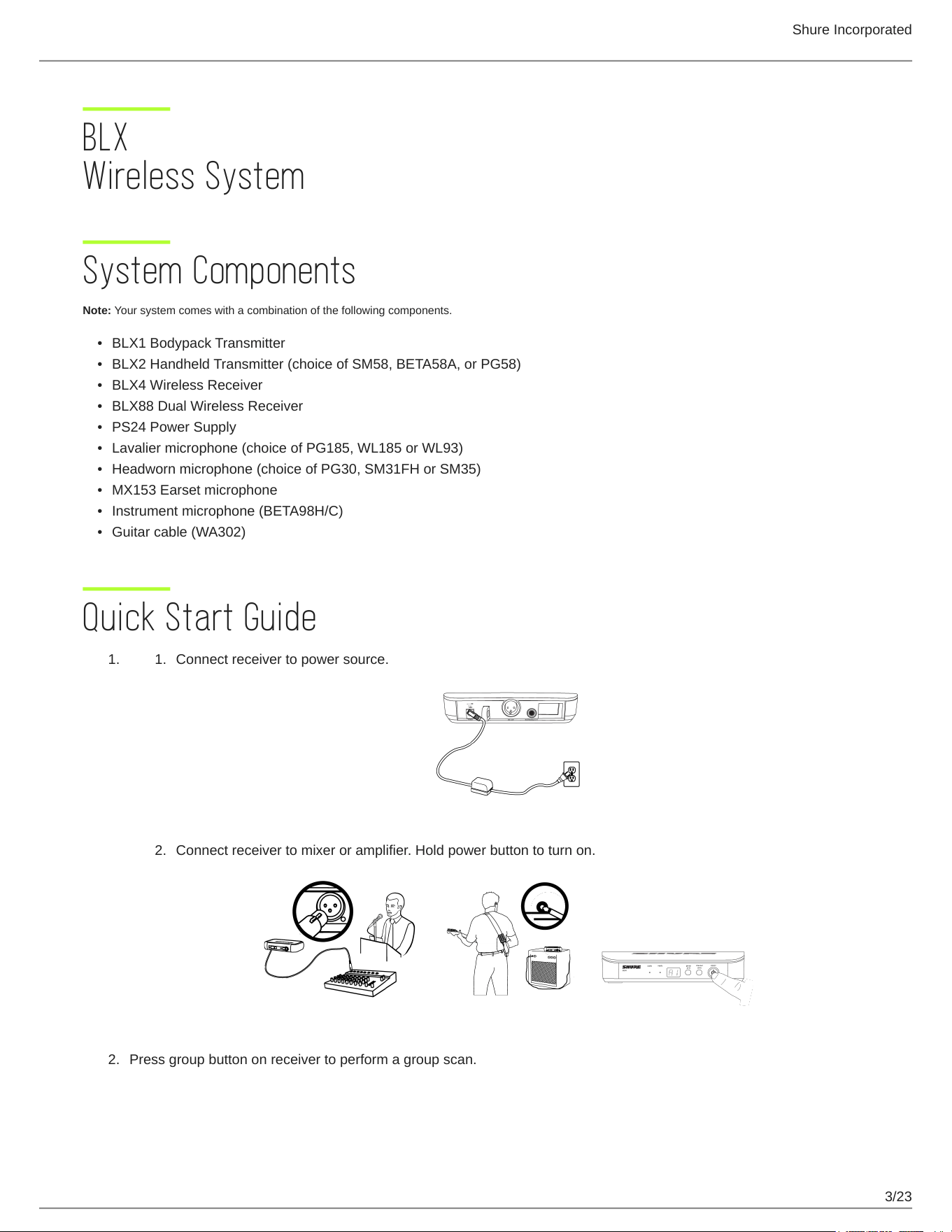
Connect receiver to power source.
Connect receiver to mixer or amplifier. Hold power button to turn on.
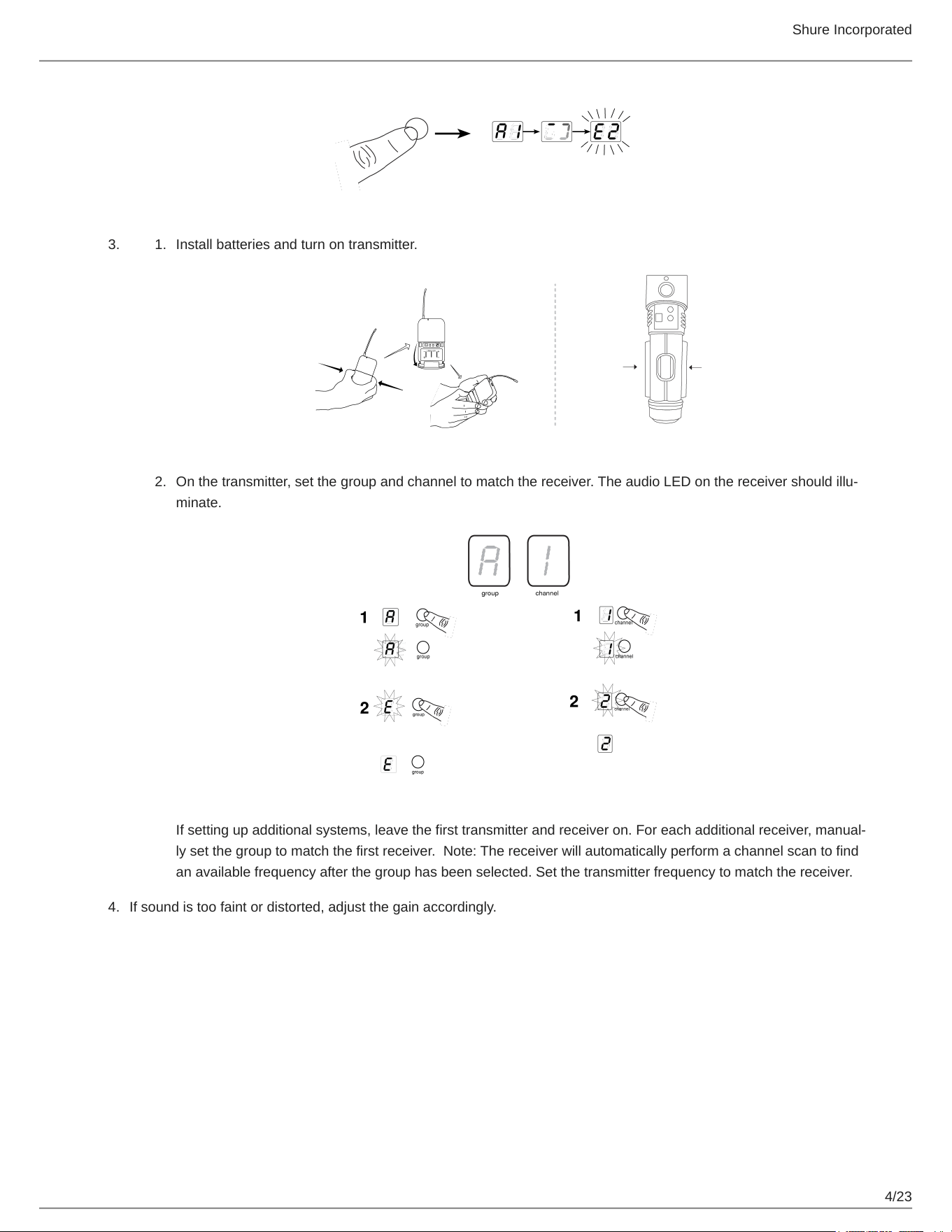
Press group button on receiver to perform a group scan.
Shure Incorporated
4/23
3. 1.
2.
4.
Install batteries and turn on transmitter.
Onthetransmitter,setthegroupandchanneltomatchthereceiver.TheaudioLEDonthereceivershouldillu
minate.
Ifsettingupadditionalsystems,leavethefirsttransmitterandreceiveron.Foreachadditionalreceiver,manual
lysetthegrouptomatchthefirstreceiver.Note:Thereceiverwillautomaticallyperformachannelscantofind
an available frequency after the group has been selected. Set the transmitter frequency to match the receiver.
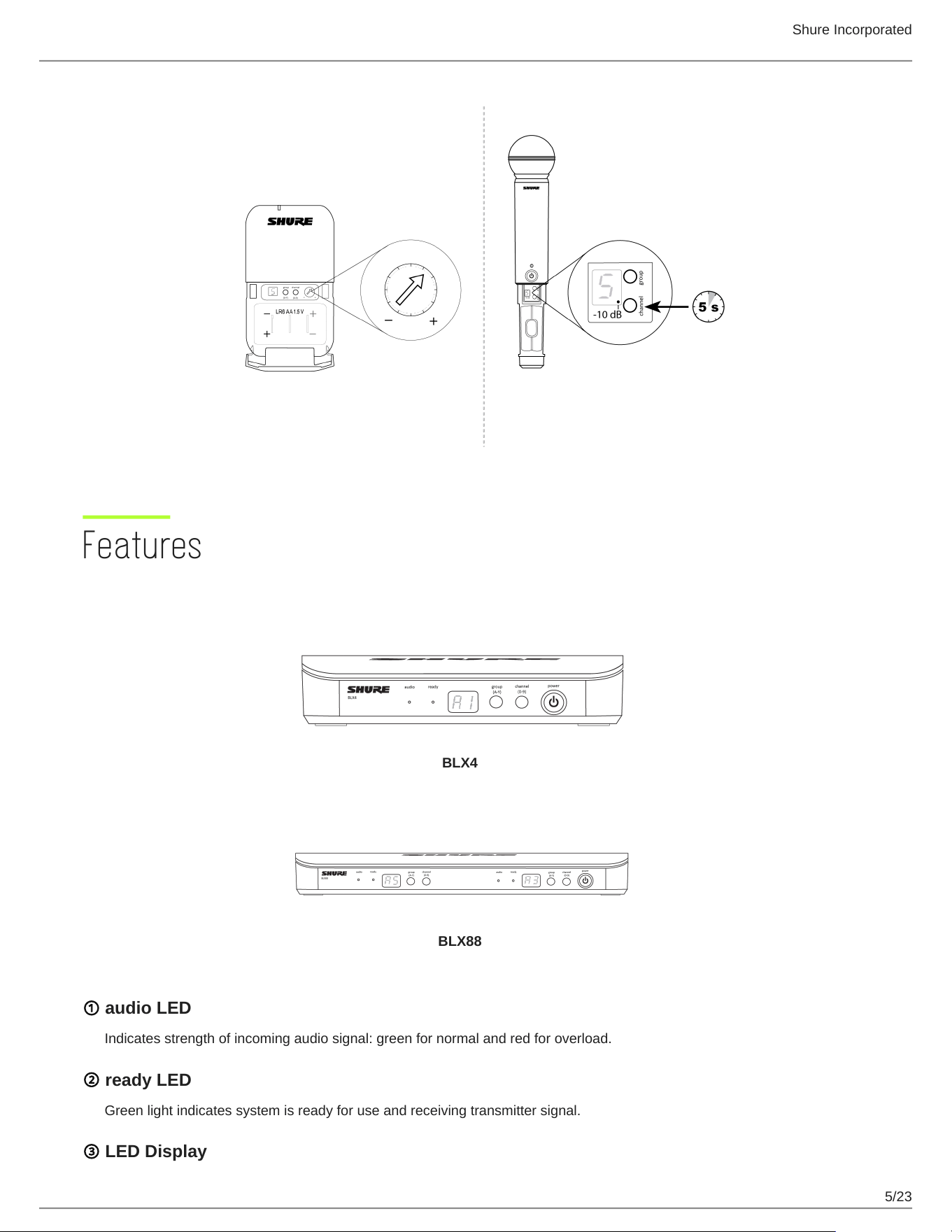
If sound is too faint or distorted, adjust the gain accordingly.
Shure Incorporated
5/23
Features
Front Panel
BLX4
BLX88
① audio LED
Indicates strength of incoming audio signal: green for normal and red for overload.
② ready LED
Green light indicates system is ready for use and receiving transmitter signal.
③ LED Display
Shure Incorporated
6/23
Displays group and channel setting.
④ group and channel Buttons
Scan: Push and release group button to scan for an open group and channel.
Manual: Push and hold group button to select a group. Push channel button to select a channel in the current group.
⑤ power Button
Push and hold to turn power on or off.
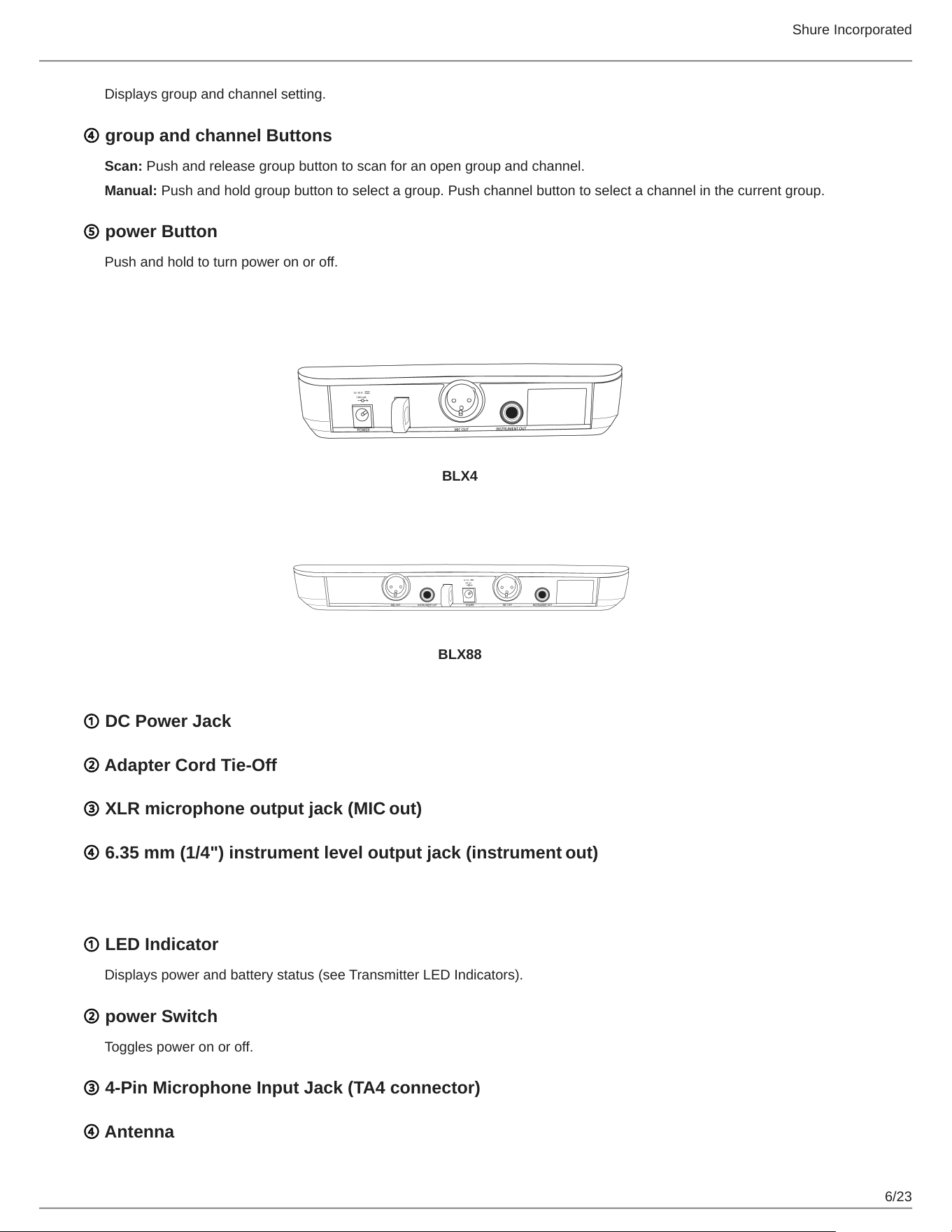
Back Panel
BLX4
BLX88
① DC Power Jack
② Adapter Cord Tie-Off
③ XLR microphone output jack (MIC out)
④ 6.35 mm (1/4") instrument level output jack (instrument out)
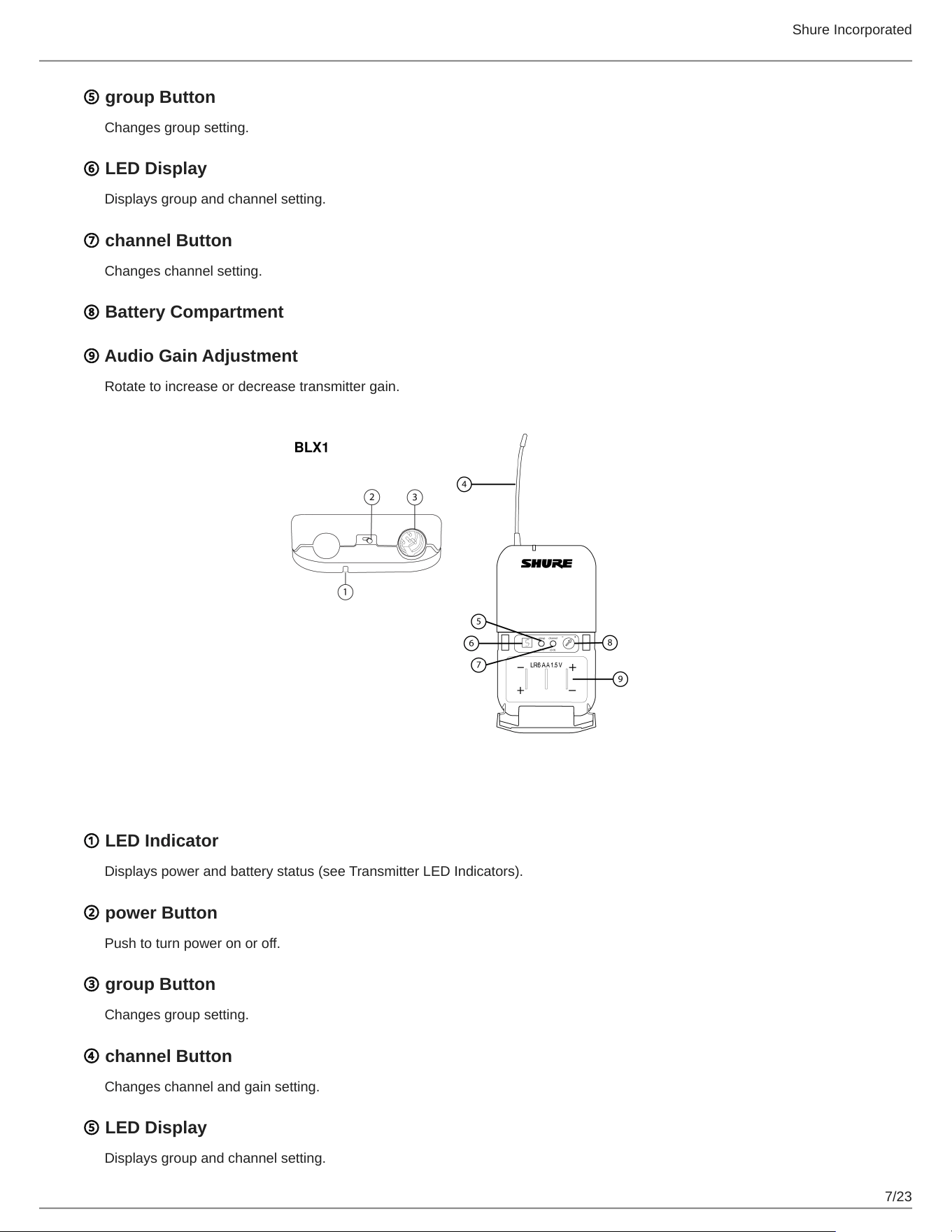
BLX1
① LED Indicator
Displays power and battery status (see Transmitter LED Indicators).
② power Switch
Toggles power on or off.
③ 4-Pin Microphone Input Jack (TA4 connector)
④ Antenna
Shure Incorporated
7/23
⑤ group Button
Changes group setting.
⑥ LED Display
Displays group and channel setting.
⑦ channel Button
Changes channel setting.
⑧ Battery Compartment
⑨ Audio Gain Adjustment
Rotate to increase or decrease transmitter gain.
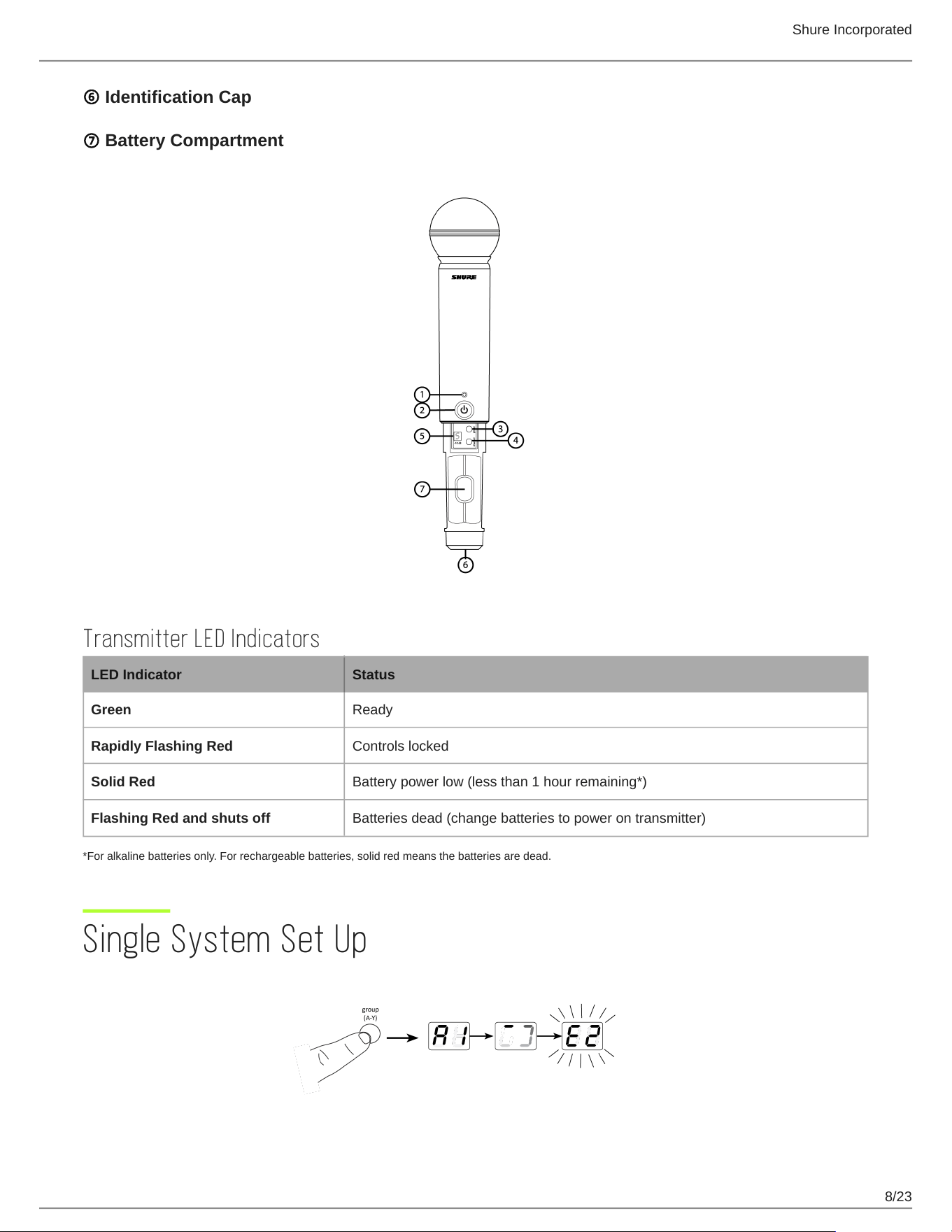
BLX2
① LED Indicator
Displays power and battery status (see Transmitter LED Indicators).
② power Button
Push to turn power on or off.
③ group Button
Changes group setting.
④ channel Button
Changes channel and gain setting.
⑤ LED Display
Displays group and channel setting.
Shure Incorporated
8/23
⑥ Identification Cap
⑦ Battery Compartment
Transmitter LED Indicators
LED Indicator Status
Green Ready
Rapidly Flashing Red Controls locked
Solid Red Battery power low (less than 1 hour remaining*)
Flashing Red and shuts off Batteries dead (change batteries to power on transmitter)
*For alkaline batteries only. For rechargeable batteries, solid red means the batteries are dead.
Single System Set Up
Shure Incorporated
9/23
1.
2.
1.
2.
•
•
Before you begin, turn off all transmitters and turn on any equipment (other microphones or personal monitoring systems) that
could cause interference during the performance.
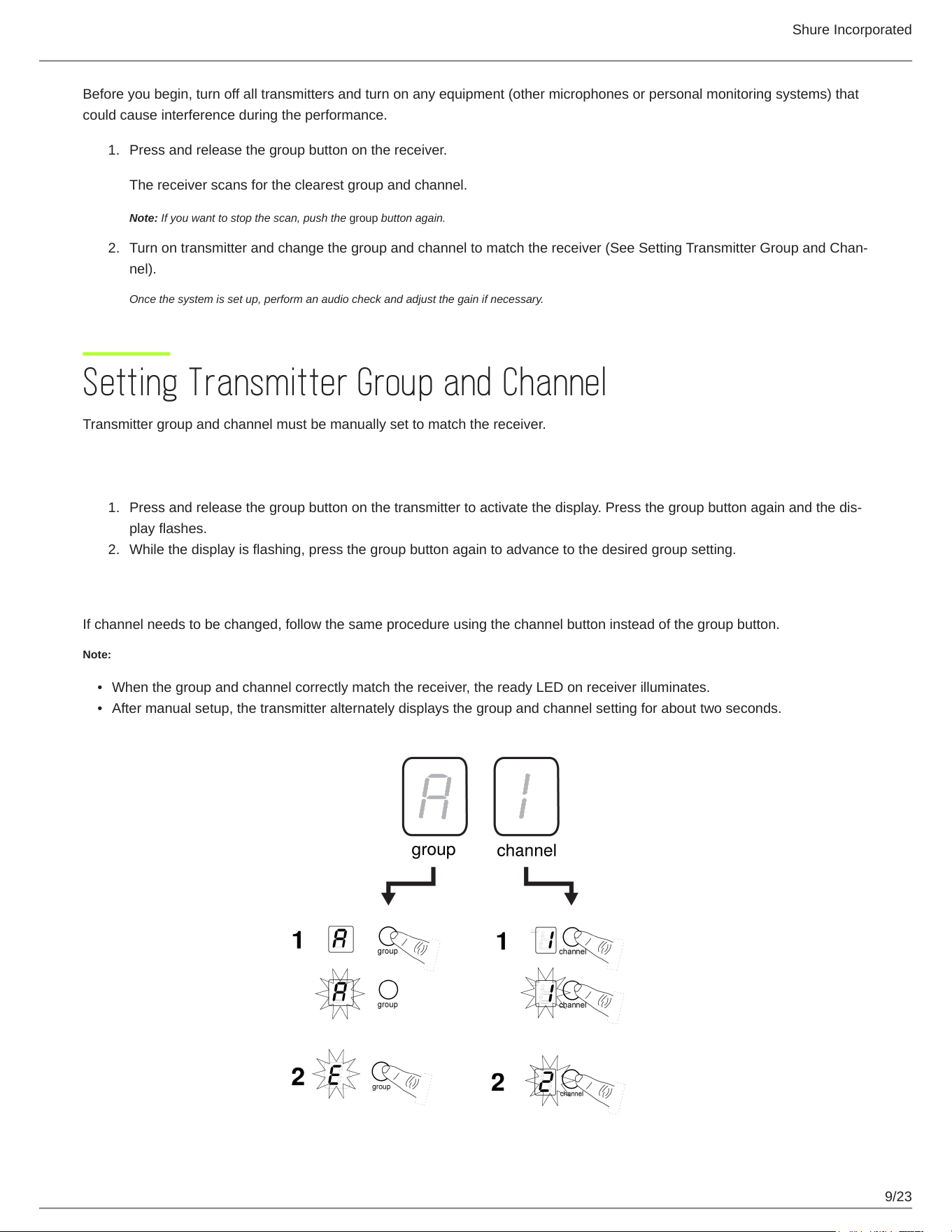
Press and release the group button on the receiver.
The receiver scans for the clearest group and channel.
Note: If you want to stop the scan, push the group button again.
Turn on transmitter and change the group and channel to match the receiver (See SettingTransmitterGroupandChan
nel).
Once the system is set up, perform an audio check and adjust the gain if necessary.
Setting Transmitter Group and Channel
Transmitter group and channel must be manually set to match the receiver.
Group (letter)
Press and release the group button on the transmitter to activate the display. Press the groupbuttonagainandthedis
play flashes.
While the display is flashing, press the group button again to advance to the desired group setting.
Channel (number)
If channel needs to be changed, follow the same procedure using the channel button instead of the group button.
Note:
When the group and channel correctly match the receiver, the ready LED on receiver illuminates.
After manual setup, the transmitter alternately displays the group and channel setting for about two seconds.
Shure Incorporated
10/23
1.
2.
3.
1.
2.
3.
4.
1.
2.
3.
Multiple System Setup
Up to 12 systems can operate simultaneously (band and RF environment dependent).
Important: Set up each system one-at-a-time. Once a receiver and transmitter are tuned to the same group and channel, leave the transmitter powered on.
Otherwise, scans from the other receivers will not detect that channel as occupied. For the BLX88, be sure to setup both transmitters before progressing to the
next receiver.
Turn on any other equipment that could cause interference during the performance so it will be detected during the group and channel scans in the following
steps.
Before you begin system set up, turn all receivers ON and all transmitters OFF.
For the first receiver:
Perform a group scan.
This finds the group with the most clear channels.
Note: For the BLX88, the group scan sets up both receivers at the same time.
Turn on the first transmitter and change the group and channel to match receiver.
Leave the transmitter on and continue with the additional systems.
Note: If the selected group does not contain enough open channels, manually select group "d" when setting up larger systems.
For each additional receiver:
Use manual setup to change the receiver to match the group setting of the first receiver. Recall that each time the
group setting is changed, a channel scan is automatically done.
Turn on the transmitter and change the group and channel to match the receiver.
Leave the transmitter on and continue to the next system.
Once all receivers are set up, perform an audio check on all microphones.
Manually Setting Receiver Group and Channel
The receiver group may need to be changed as part of a multiple system setup.
Group (letter)
Hold the group button on the receiver until the display begins to flash.
While the display is flashing, press the group button again to advance to the next group.
Note: Only the group setting will be displayed during the manual setup.
Once the desired group is reached, release the group button. The receiver automatically performs a channel scan.
Channel (number)
Always use a channel selected by the channel scan. However, if necessary, the channel can be set manually. Follow the same
steps above using the channel button instead of the group button.
Shure Incorporated
11/23
•
•
•
•
•
•
•
•
•
•
•
Locking and Unlocking Controls
Lock system controls to prevent accidental setting changes or power off.
Transmitter (lock/unlock)
Turn the transmitter on. Hold the group button, then press the channel button for approximately 2 seconds. The LED indicator
rapidly flashes red when locked.
Receiver (lock/unlock)
Turn the receiver on. Simultaneously hold the group and channel button. The display flashes rapidly.
When locked, the display flashes rapidly if any key is pressed.
The BLX88 locks on both sides when locked from either side.
Tips to Improve Wireless System Performance
If you encounter interference or dropouts, try the following suggestions:
Choose a different receiver channel
Reposition the receiver so there is nothing obstructing a line of sight to the transmitter (including the audience)
Avoid placing transmitter and receiver where metal or other dense materials may be present
Move the receiver to the top of the equipment rack
Remove nearby sources of wireless interference, such as cell phones, two-way radios, computers, media players, Wi-Fi
devices, and digital signal processors
Charge or replace the transmitter battery
Keep transmitters more than two meters (6 feet) apart
Keep the transmitter and receiver more than 5 meters (16 feet) apart
During sound check, mark trouble spots and ask presenters or performers to avoid those areas
Shure Incorporated
12/23
•
•
•
•
Getting Good Sound
Correct Microphone Placement
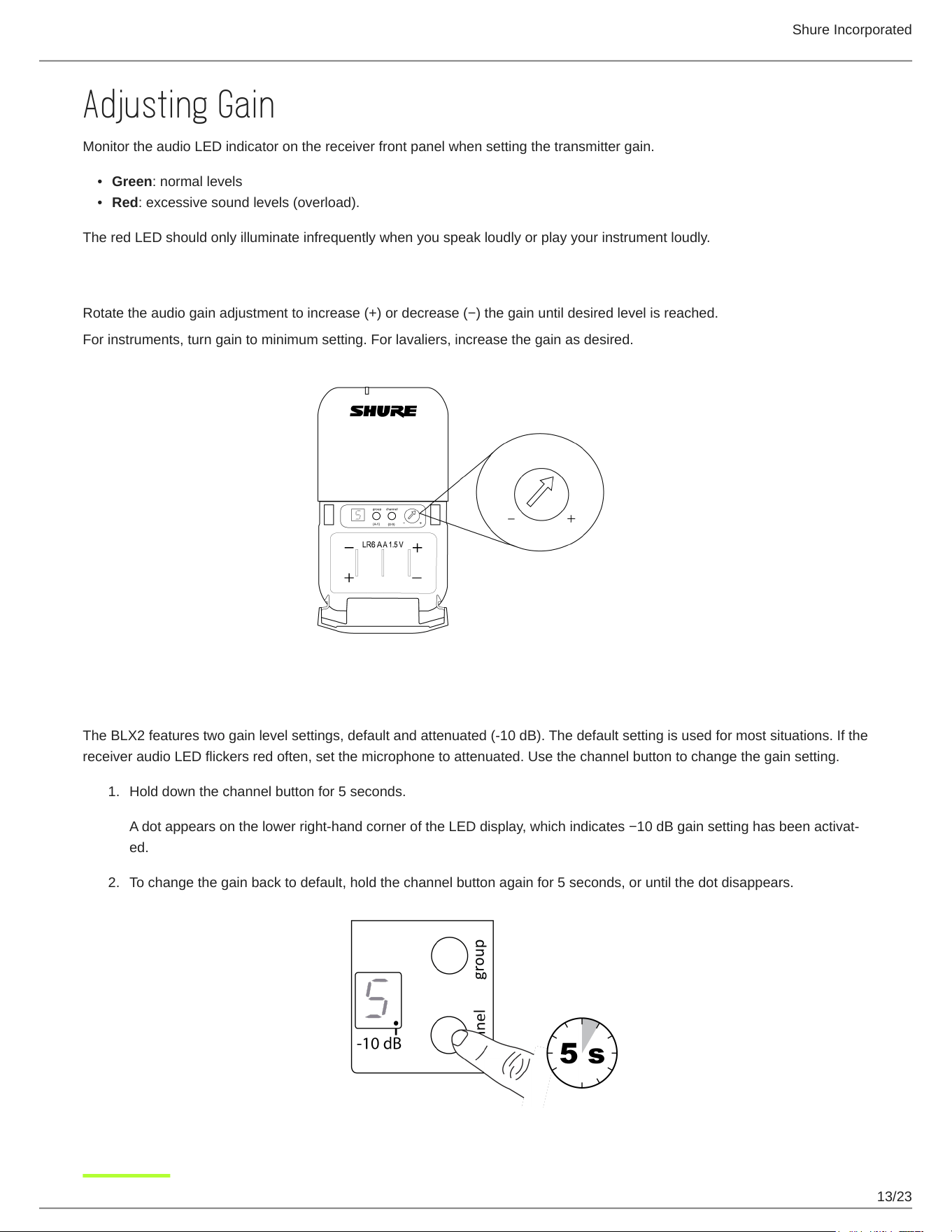
Holdthemicrophonewithin12inchesfromthesoundsource.Forawarmersoundwithincreasedbasspresence,move
the microphone closer.
Do not cover grille with hand.
Wearing the Headworn Microphone
Positiontheheadwornmicrophone13mm(1/2in.)fromthecornerofyourmouth.
Positionlavalierandheadwornmicrophonessothatclothing,jewelry,orotheritemsdonotbumporrubagainstthemicro
phone.
Shure Incorporated
13/23
•
•
1.
2.
Adjusting Gain
Monitor the audio LED indicator on the receiver front panel when setting the transmitter gain.
Green: normal levels
Red: excessive sound levels (overload).
The red LED should only illuminate infrequently when you speak loudly or play your instrument loudly.
BLX1
Rotatetheaudiogainadjustmenttoincrease(+)ordecrease(−)thegainuntildesiredlevelisreached.
For instruments, turn gain to minimum setting. For lavaliers, increase the gain as desired.
BLX2
The BLX2 features two gain level settings, default and attenuated (-10 dB). The default setting is used for most situations. If the
receiver audio LED flickers red often, set the microphone to attenuated. Use the channel button to change the gain setting.
Hold down the channel button for 5 seconds.
AdotappearsonthelowerrighthandcorneroftheLEDdisplay,whichindicates−10dBgainsettinghasbeenactivat
ed.
To change the gain back to default, hold the channel button again for 5 seconds, or until the dot disappears.
Shure Incorporated
14/23
Batteries
Expected life for AA batteries is up to 14 hours (total battery life varies depending upon battery type and manufacturer).
When the LED indicator turns red, it signifies "low battery" with approximately 60 minutes of remaining battery life.
For alkaline batteries only. For rechargeable batteries, solid red means the batteries are dead.
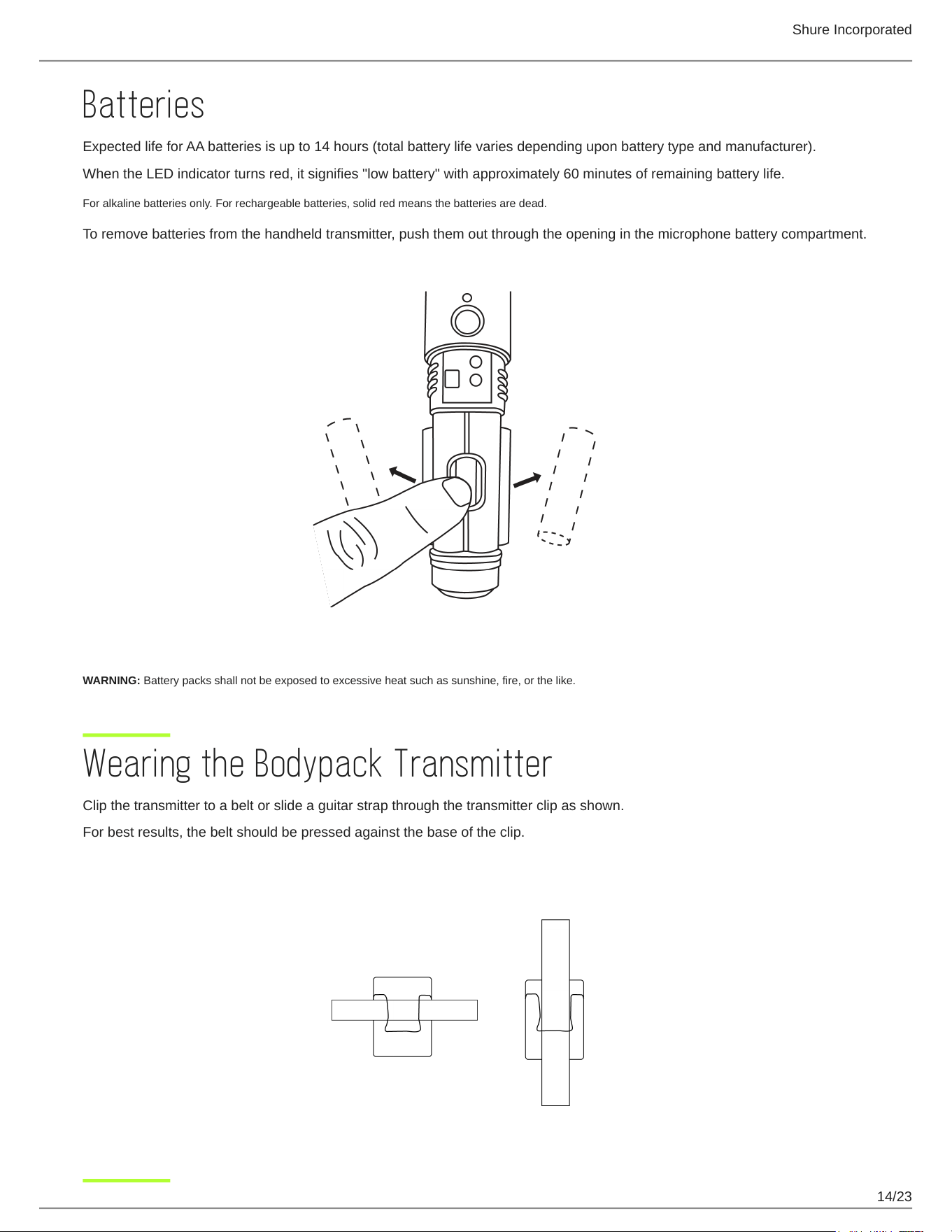
To remove batteries from the handheld transmitter, push them out through the opening in the microphone battery compartment.
WARNING: Battery packs shall not be exposed to excessive heat such as sunshine, fire, or the like.
Wearing the Bodypack Transmitter
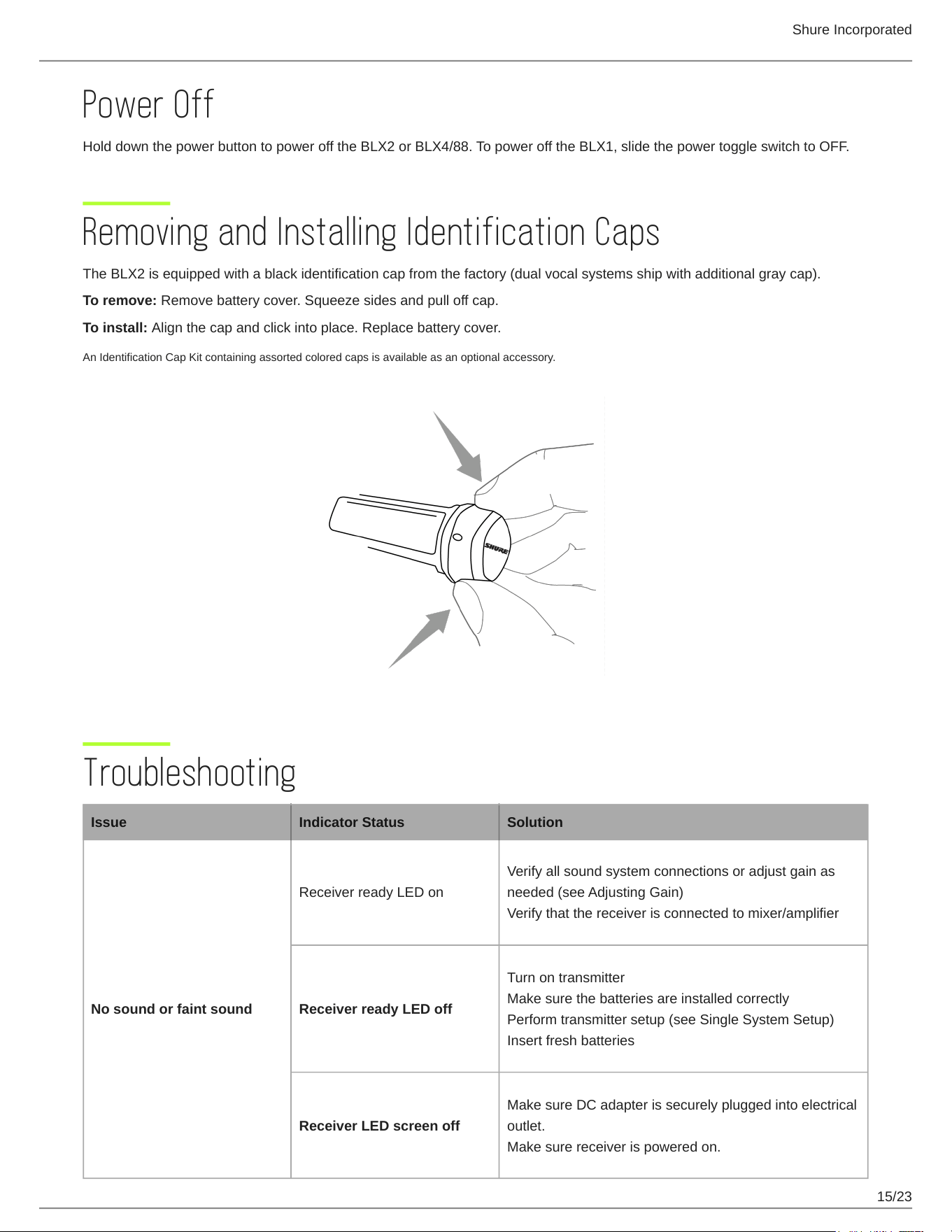
Clip the transmitter to a belt or slide a guitar strap through the transmitter clip as shown.
For best results, the belt should be pressed against the base of the clip.
Shure Incorporated
15/23
Power Off
Hold down the power button to power off the BLX2 or BLX4/88. To power off the BLX1, slide the power toggle switch to OFF.
Removing and Installing Identification Caps
The BLX2 is equipped with a black identification cap from the factory (dual vocal systems ship with additional gray cap).
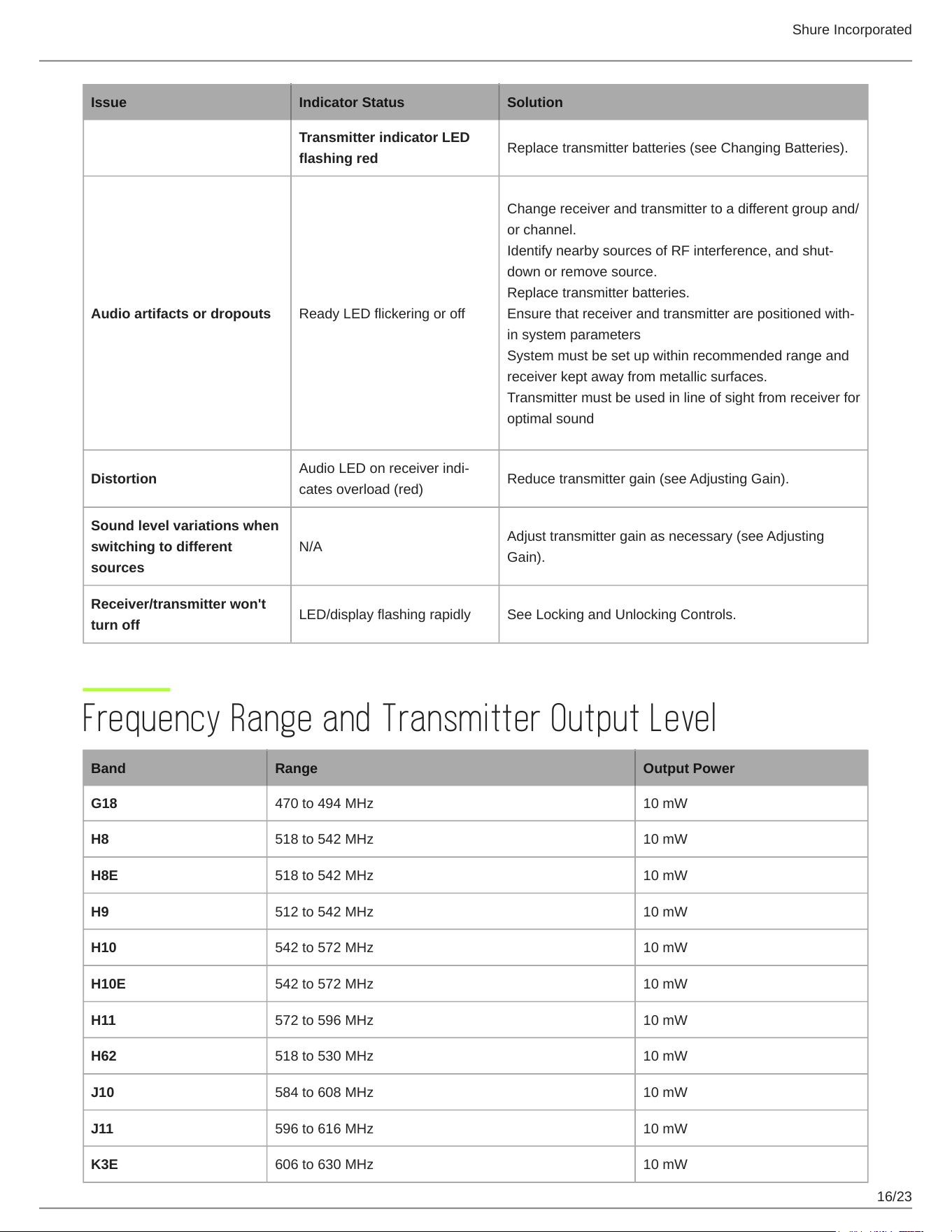
To remove: Remove battery cover. Squeeze sides and pull off cap.
To install: Align the cap and click into place. Replace battery cover.
An Identification Cap Kit containing assorted colored caps is available as an optional accessory.
Troubleshooting
Issue Indicator Status Solution
No sound or faint sound
Receiver ready LED on
Verify all sound system connections or adjust gain as
needed (see Adjusting Gain)
Verify that the receiver is connected to mixer/amplifier
Receiver ready LED off
Turn on transmitter
Make sure the batteries are installed correctly
Perform transmitter setup (see Single System Setup)
Insert fresh batteries
Receiver LED screen off
Make sure DC adapter is securely plugged into electrical
outlet.
Make sure receiver is powered on.
Shure Incorporated
16/23
Issue Indicator Status Solution
Transmitter indicator LED
flashing red
Replace transmitter batteries (see Changing Batteries).
Audio artifacts or dropouts Ready LED flickering or off
Change receiver and transmitter to a different group and/
or channel.
IdentifynearbysourcesofRFinterference,andshut
down or remove source.
Replace transmitter batteries.
Ensurethatreceiverandtransmitterarepositionedwith
in system parameters
System must be set up within recommended range and
receiver kept away from metallic surfaces.
Transmitter must be used in line of sight from receiver for
optimal sound
Distortion
AudioLEDonreceiverindi
cates overload (red)
Reduce transmitter gain (see Adjusting Gain).
Sound level variations when
switching to different
sources
N/A
Adjust transmitter gain as necessary (see Adjusting
Gain).
Receiver/transmitter won't
turn off
LED/display flashing rapidly See Locking and Unlocking Controls.
Frequency Range and Transmitter Output Level
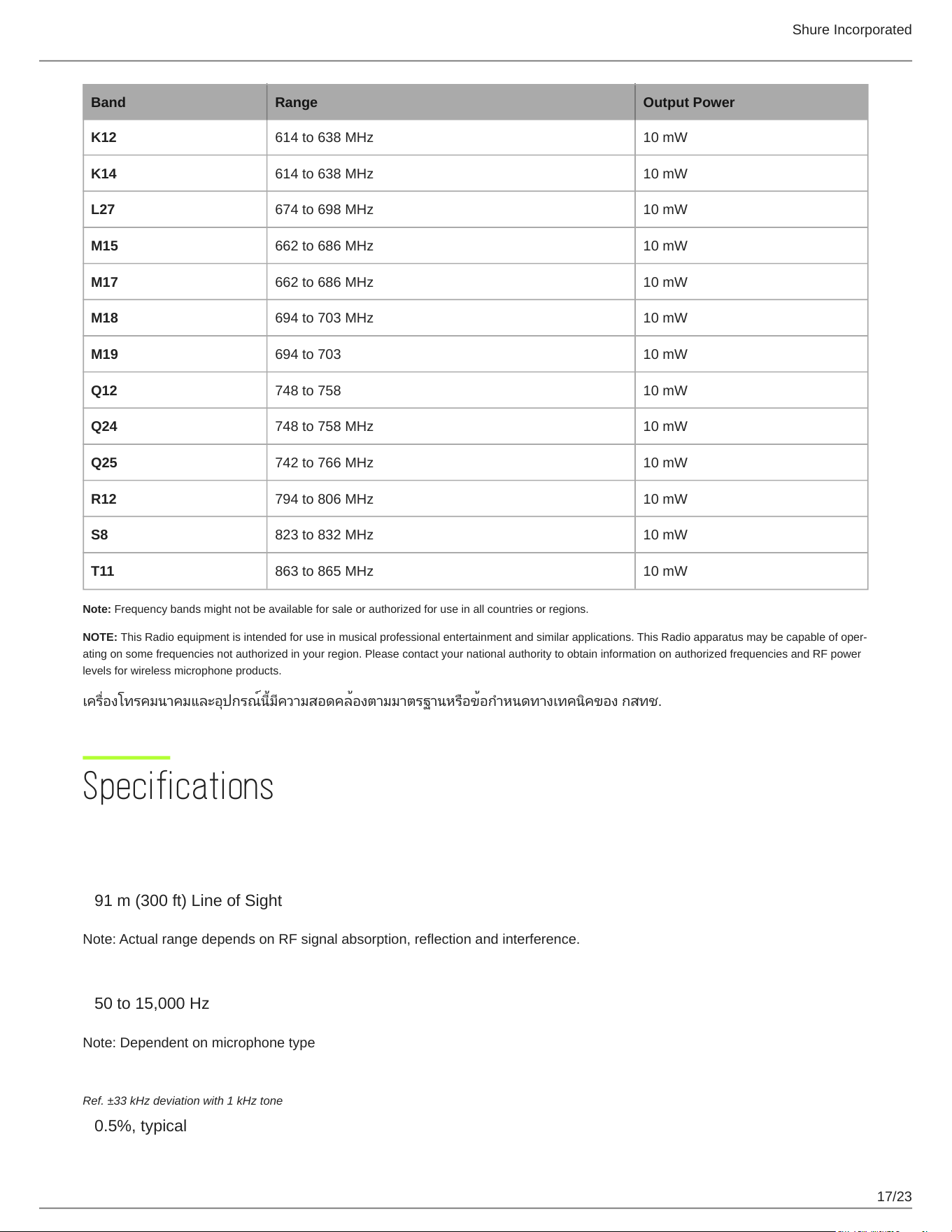
Band Range Output Power
G18 470 to 494 MHz 10 mW
H8 518 to 542 MHz 10 mW
H8E 518 to 542 MHz 10 mW
H9 512 to 542 MHz 10 mW
H10 542 to 572 MHz 10 mW
H10E 542 to 572 MHz 10 mW
H11 572 to 596 MHz 10 mW
H62 518 to 530 MHz 10 mW
J10 584 to 608 MHz 10 mW
J11 596 to 616 MHz 10 mW
K3E 606 to 630 MHz 10 mW
Shure Incorporated
17/23
Band Range Output Power
K12 614 to 638 MHz 10 mW
K14 614 to 638 MHz 10 mW
L27 674 to 698 MHz 10 mW
M15 662 to 686 MHz 10 mW
M17 662 to 686 MHz 10 mW
M18 694 to 703 MHz 10 mW
M19 694 to 703 10 mW
Q12 748 to 758 10 mW
Q24 748 to 758 MHz 10 mW
Q25 742 to 766 MHz 10 mW
R12 794 to 806 MHz 10 mW
S8 823 to 832 MHz 10 mW
T11 863 to 865 MHz 10 mW
Note: Frequency bands might not be available for sale or authorized for use in all countries or regions.
NOTE: ThisRadioequipmentisintendedforuseinmusicalprofessionalentertainmentandsimilarapplications.ThisRadioapparatusmaybecapableofoper
ating on some frequencies not authorized in your region. Please contact your national authority to obtain information on authorized frequencies and RF power
levels for wireless microphone products.
เครื่องโทรคมนาคมและอุปกรณ์นี้มีความสอดคล้องตามมาตรฐานหรือข้อกำหนดทางเทคนิคของ กสทช.
Specifications
System
Working Range
91m(300ft)LineofSight
Note: Actual range depends on RF signal absorption, reflection and interference.
Audio Frequency Response
50to15,000Hz
Note: Dependent on microphone type
Total Harmonic Distortion
Ref. ±33 kHz deviation with 1 kHz tone
0.5%, typical
Shure Incorporated
18/23
Dynamic Range
100dB,Aweighted,typical
Operating Temperature
-18°C (0°F) to 57°C (135°F)
Note: Battery characteristics may limit this range.
Polarity
Positivepressureonmicrophonediaphragm(orpositivevoltageappliedtotipofWA302phoneplug)pro
ducespositivevoltageonpin2(withrespecttopin3oflowimpedanceoutput)andthetipofthehighim
pedance 1/4-inch output.
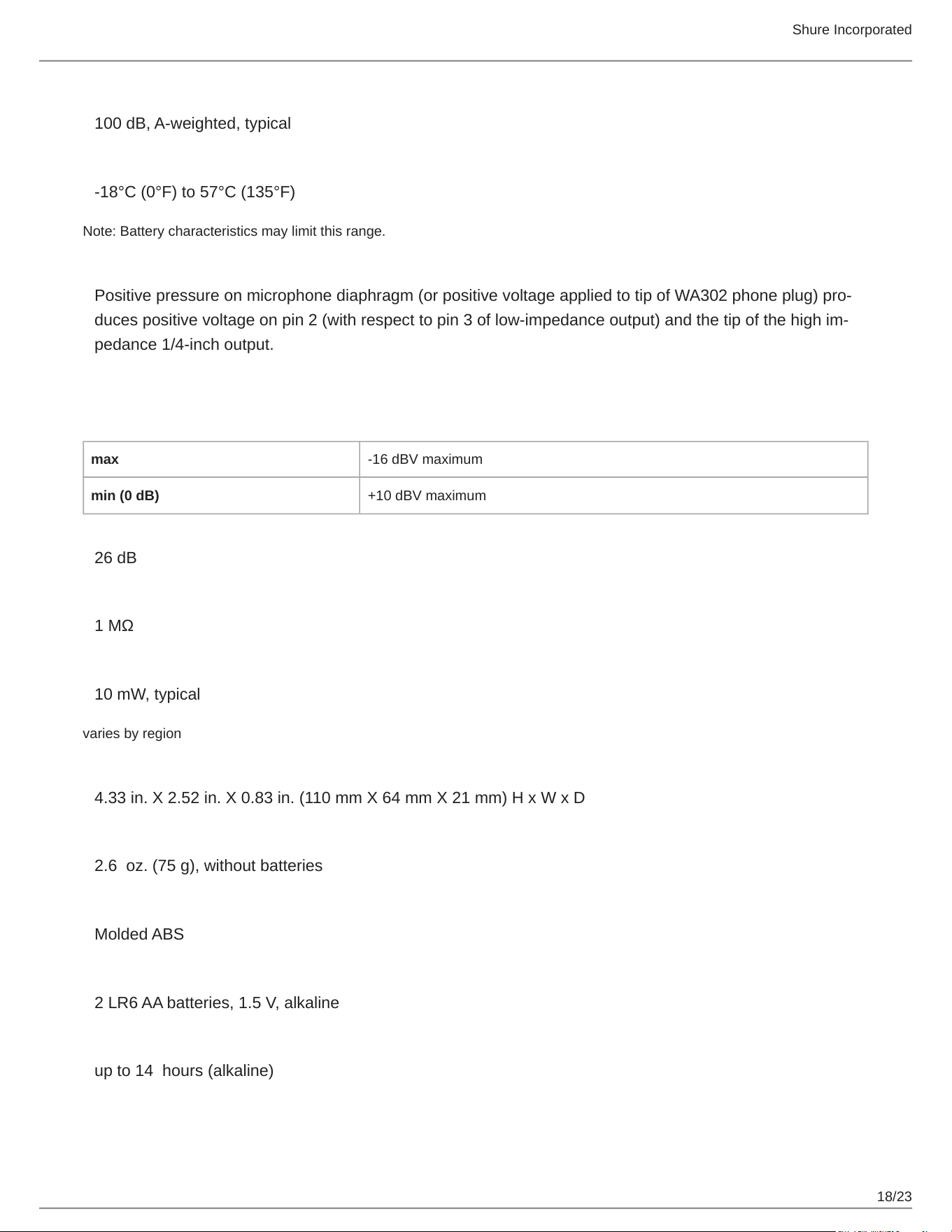
BLX1
Audio Input Level
max 16dBVmaximum
min (0 dB) +10dBVmaximum
Gain Adjustment Range
26dB
Input Impedance
1MΩ
RF Transmitter Output
10mW,typical
varies by region
Dimensions
4.33in.X2.52in.X0.83in.(110mmX64mmX21mm)HxWxD
Weight
2.6oz.(75g),withoutbatteries
Housing
Molded ABS
Power Requirements
2LR6AAbatteries,1.5V,alkaline
Battery Life
upto14hours(alkaline)
Shure Incorporated
19/23
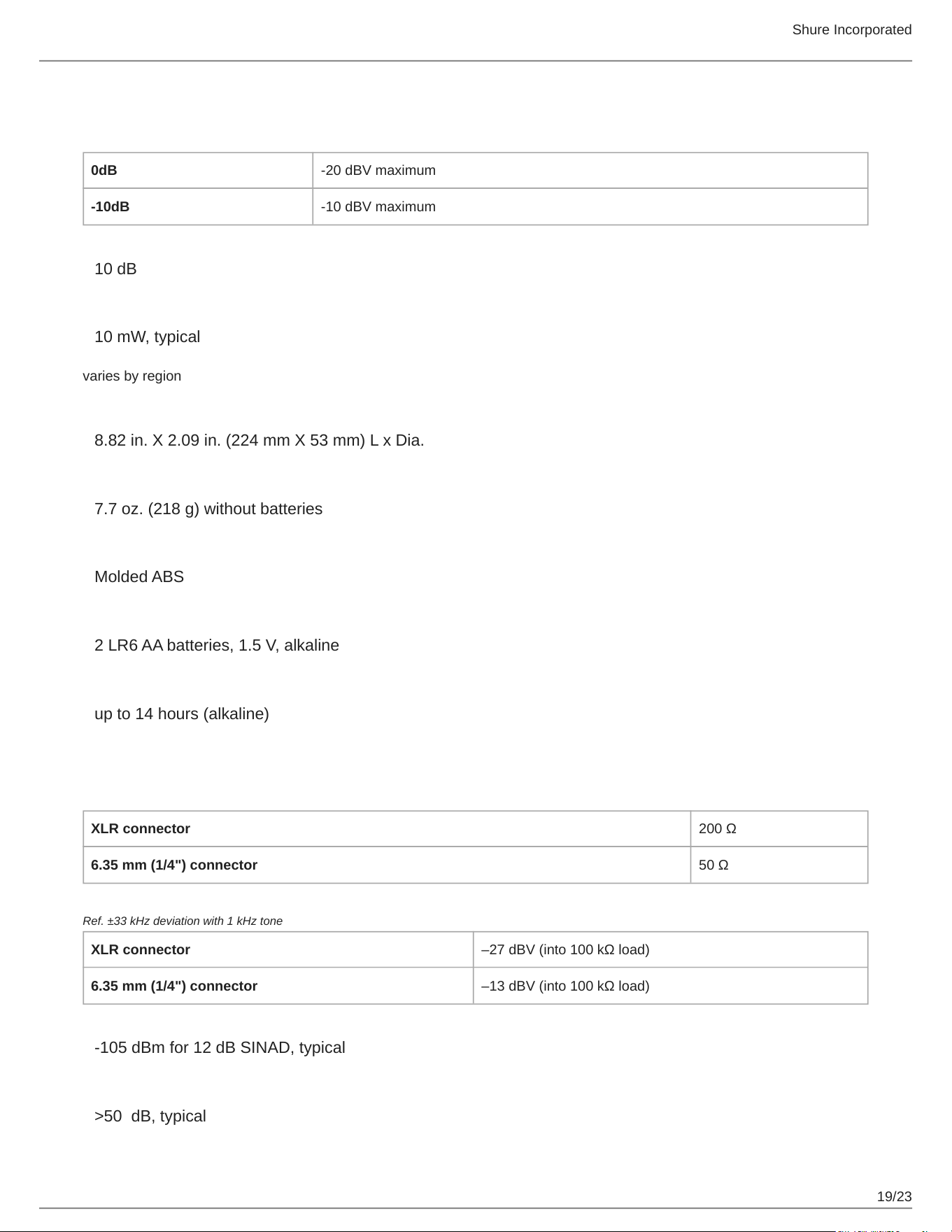
BLX2
Audio Input Level
0dB 20dBVmaximum
-10dB 10dBVmaximum
Gain Adjustment Range
10dB
RF Transmitter Output
10mW,typical
varies by region
Dimensions
8.82in.X2.09in.(224mmX53mm)LxDia.
Weight
7.7oz.(218g)withoutbatteries
Housing
Molded ABS
Power Requirements
2LR6AAbatteries,1.5V,alkaline
Battery Life
upto14hours(alkaline)
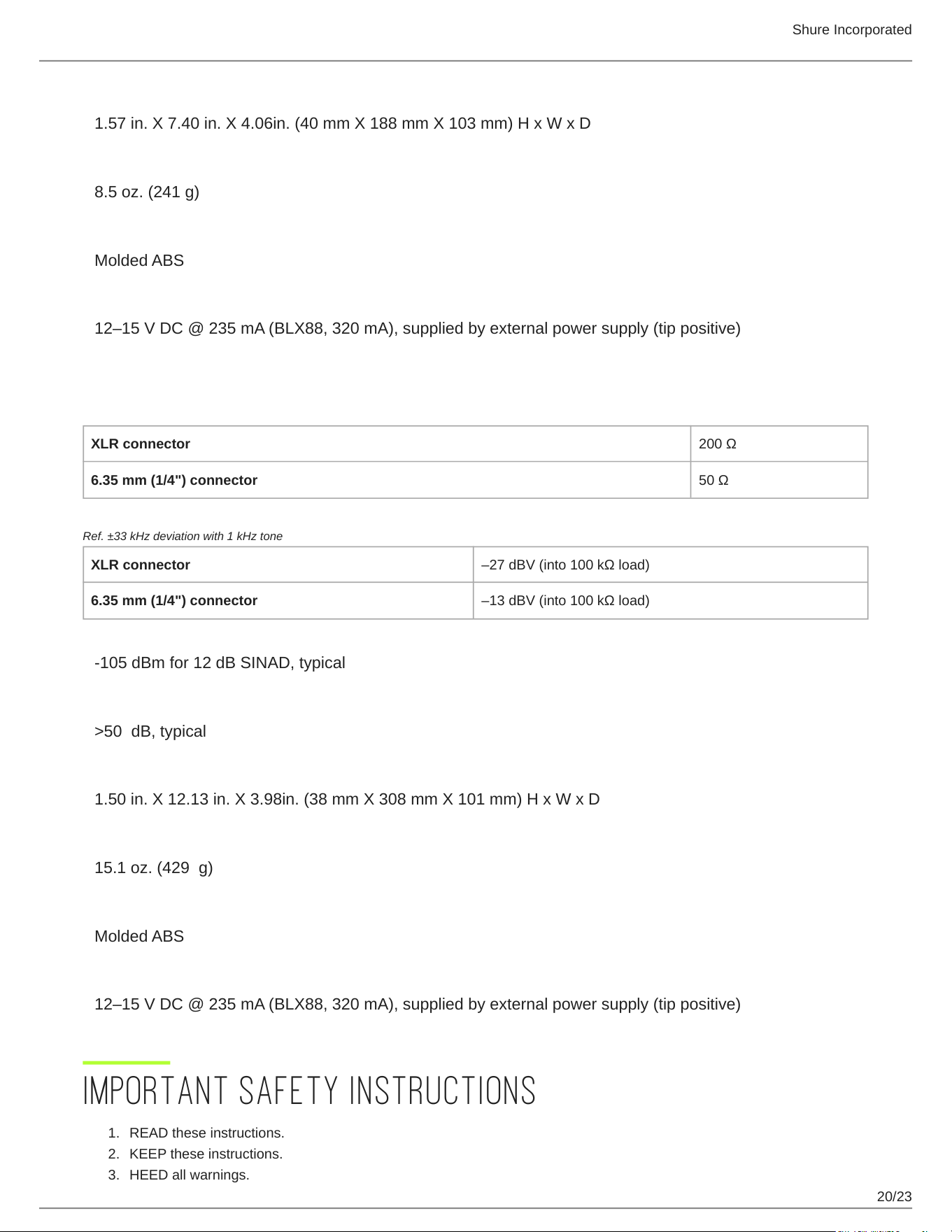
BLX4
Output Impedance
XLR connector 200Ω
6.35 mm (1/4") connector 50Ω
Audio Output Level
Ref. ±33 kHz deviation with 1 kHz tone
XLR connector –27dBV(into100kΩload)
6.35 mm (1/4") connector –13dBV(into100kΩload)
RF Sensitivity
105dBmfor12dBSINAD,typical
Image Rejection
>50dB,typical
Shure Incorporated
20/23
1.
2.
3.
Dimensions
1.57in.X7.40in.X4.06in.(40mmX188mmX103mm)HxWxD
Weight
8.5oz.(241g)
Housing
Molded ABS
Power Requirements
12–15VDC@235mA(BLX88,320mA),suppliedbyexternalpowersupply(tippositive)
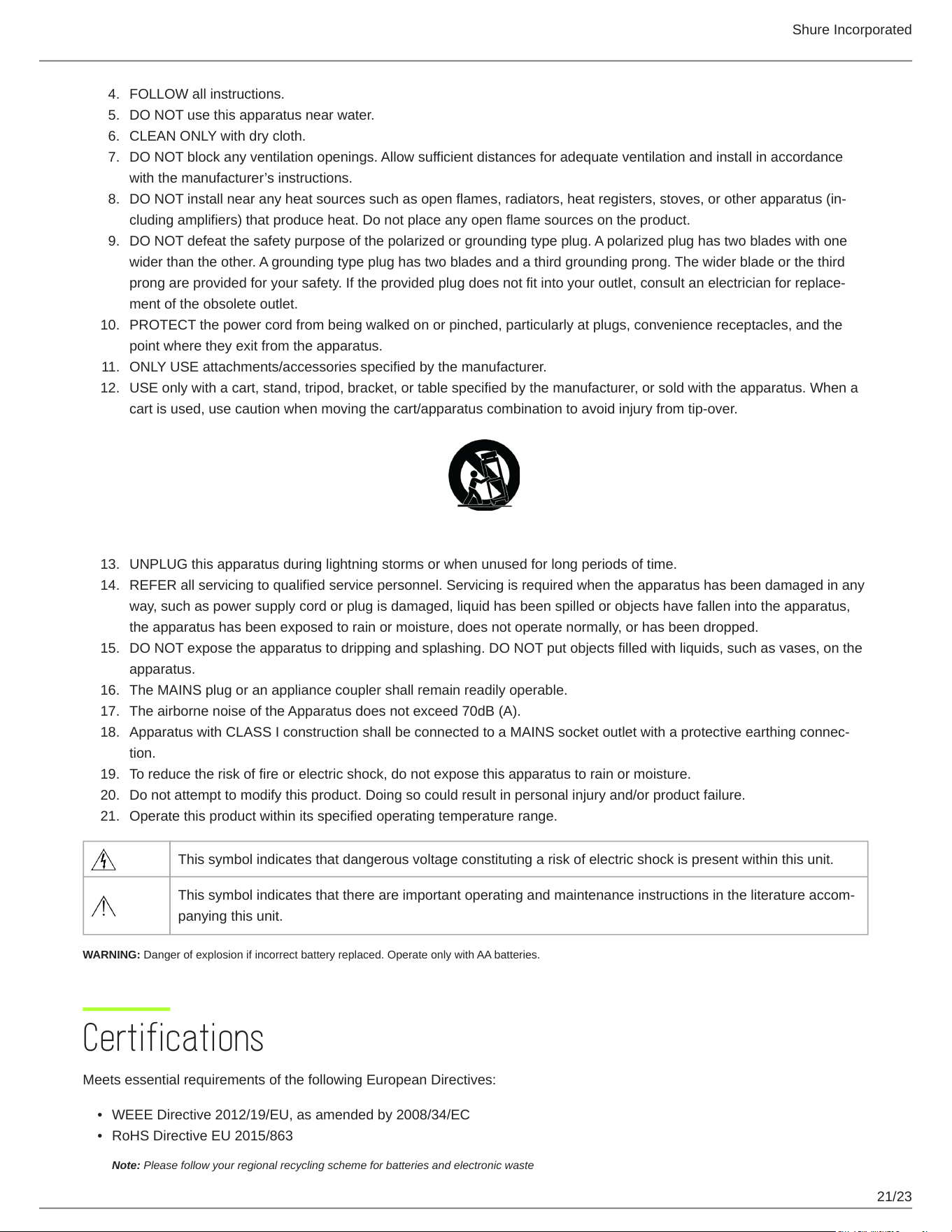
BLX88
Output Impedance
XLR connector 200Ω
6.35 mm (1/4") connector 50Ω
Audio Output Level
Ref. ±33 kHz deviation with 1 kHz tone
XLR connector –27dBV(into100kΩload)
6.35 mm (1/4") connector –13dBV(into100kΩload)
RF Sensitivity
105dBmfor12dBSINAD,typical
Image Rejection
>50dB,typical
Dimensions
1.50in.X12.13in.X3.98in.(38mmX308mmX101mm)HxWxD
Weight
15.1oz.(429g)
Housing
Molded ABS
Power Requirements
12–15VDC@235mA(BLX88,320mA),suppliedbyexternalpowersupply(tippositive)
IMPORTANT SAFETY INSTRUCTIONS
READ these instructions.
KEEP these instructions.
HEED all warnings.
Shure Incorporated
21/23
4.
5.
6.
7.
8.
9.
10.
11.
12.
13.
14.
15.
16.
17.
18.
19.
20.
21.
•
•
FOLLOW all instructions.
DO NOT use this apparatus near water.
CLEAN ONLY with dry cloth.
DO NOT block any ventilation openings. Allow sufficient distances for adequate ventilation and install in accordance
withthemanufacturer’sinstructions.
DONOTinstallnearanyheatsourcessuchasopenflames,radiators,heatregisters,stoves,orotherapparatus(in
cluding amplifiers) that produce heat. Do not place any open flame sources on the product.
DO NOT defeat the safety purpose of the polarized or grounding type plug. A polarized plug has two blades with one
wider than the other. A grounding type plug has two blades and a third grounding prong. The wider blade or the third
prongareprovidedforyoursafety.Iftheprovidedplugdoesnotfitintoyouroutlet,consultanelectricianforreplace
ment of the obsolete outlet.
PROTECT the power cord from being walked on or pinched, particularly at plugs, convenience receptacles, and the
point where they exit from the apparatus.
ONLY USE attachments/accessories specified by the manufacturer.
USE only with a cart, stand, tripod, bracket, or table specified by the manufacturer, or sold with the apparatus. When a
cart is used, use caution when moving the cart/apparatus combination to avoid injury from tip-over.
UNPLUG this apparatus during lightning storms or when unused for long periods of time.
REFER all servicing to qualified service personnel. Servicing is required when the apparatus has been damaged in any
way, such as power supply cord or plug is damaged, liquid has been spilled or objects have fallen into the apparatus,
the apparatus has been exposed to rain or moisture, does not operate normally, or has been dropped.
DO NOT expose the apparatus to dripping and splashing. DO NOT put objects filled with liquids, such as vases, on the
apparatus.
The MAINS plug or an appliance coupler shall remain readily operable.
The airborne noise of the Apparatus does not exceed 70dB (A).
ApparatuswithCLASSIconstructionshallbeconnectedtoaMAINSsocketoutletwithaprotectiveearthingconnec
tion.
To reduce the risk of fire or electric shock, do not expose this apparatus to rain or moisture.
Do not attempt to modify this product. Doing so could result in personal injury and/or product failure.
Operate this product within its specified operating temperature range.
This symbol indicates that dangerous voltage constituting a risk of electric shock is present within this unit.
Thissymbolindicatesthatthereareimportantoperatingandmaintenanceinstructionsintheliteratureaccom
panying this unit.
WARNING: Danger of explosion if incorrect battery replaced. Operate only with AA batteries.
Certifications
Meets essential requirements of the following European Directives:
WEEE Directive 2012/19/EU, as amended by 2008/34/EC
RoHS Directive EU 2015/863
Note: Please follow your regional recycling scheme for batteries and electronic waste
Shure Incorporated
22/23
•
•
•
1.
This product meets the Essential Requirements of all relevant European directives and is eligible for CE marking.
CE Notice: Hereby, Shure Incorporated declares that this product with CE Marking has been determined to be in compliance
with European Union requirements. The full text of the EU declaration of conformity is available at the following site: https://
www.shure.com/en-EU/support/declarations-of-conformity.
Authorized European representative:
Shure Europe GmbH
Department: Global Compliance
Jakob-Dieffenbacher-Str. 12
75031 Eppingen, Germany
Phone: +49-7262-92 49 0
Fax: +49-7262-92 49 11 4
Email: [email protected]
Certified under FCC Part 74.
DD4BLX1A, DD4BLX1B, DD4BLX1C, DD4BLX1D; DD4BLX2A, DD4BLX2B, DD4BLX2C, DD4BLX2D, DD4BLX1W,
DD4BLX1S, DD4BLX2W, DD4BLX2S, DD4BLX1H11, DD4BLX2H11, DD4BLX1J11, DD4BLX2J11
Certified by ISED in Canada under RSS-102 and RSS-210.
616A-BLX1A, 616A-BLX1B, 616A-BLX1C, 616A-BLX1D; 616A-BLX2A, 616A-BLX2B, 616A-BLX2C, 616A-BLX2D, 616A-
BLX1H11, 616A-BLX2H11, 616A-BLX1J11, 616A-BLX2J11
Certified by ISED in Canada under RSS-123 and RSS-102.
616A-BLX1W, 616A-BLX1S, 616A-BLX2W, 616A-BLX2S
Approved under the Declaration of Conformity (DoC) provision of FCC Part 15.
低功率射頻器材技術規範
取得審驗證明之低功率射頻器材,非經核准,公司、商號或使用者均不得擅
自變更頻率、加大功率或變更原設計之特性及功能。低功率射頻器材之使用
不得影響飛航安全及干擾合法通信;經發現有干擾現象時,應立即停用,並
改善至無干擾時方得繼續使用。前述合法通信,指依電信管理法規定作業之
無線電通信。低功率射頻器材須忍受合法通信或工業、科學及醫療用電波輻
射性電機設備之干擾。
Important Product Information
LICENSING INFORMATION
Licensing: A ministerial license to operate this equipment may be required in certain areas. Consult your national authority for
possible requirements. Changes or modifications not expressly approved by Shure Incorporated could void your authority to
operatetheequipment.LicensingofShurewirelessmicrophoneequipmentistheuser’sresponsibility,andlicensabilityde
pendsontheuser’sclassificationandapplication,andontheselectedfrequency.Shurestronglyurgestheusertocontactthe
appropriate telecommunications authority concerning proper licensing, and before choosing and ordering frequencies.
Information to the user
This device complies with part 15 of the FCC Rules. Operation is subject to the following two conditions:
This device may not cause harmful interference.
Shure Incorporated
23/23
2.
•
•
•
•
1.
2.
1.
2.
This device must accept any interference received, including interference that may cause undesired operation.
Note: This equipment has been tested and found to comply with the limits for a Class B digital device, pursuant to part 15 of
theFCCRules.Theselimitsaredesignedtoprovidereasonableprotectionagainstharmfulinterferenceinaresidentialinstalla
tion. This equipment generates uses and can radiate radio frequency energy and, if not installed and used in accordance with
the instructions, may cause harmful interference to radio communications. However, there is no guarantee that interference will
not occur in a particular installation. If this equipment does cause harmful interference to radio or television reception, which
can be determined by turning the equipment off and on, the user is encouraged to try to correct the interference by one or more
of the following measures:
Reorient or relocate the receiving antenna.
Increase the separation between the equipment and the receiver.
Connect the equipment to an outlet on a circuit different from that to which the receiver is connected.
Consult the dealer or an experienced radio/TV technician for help.
Canada Warning for Wireless
Thisdeviceoperatesonanoprotection,nointerferencebasis.Shouldtheuserseektoobtainprotectionfromotherradioser
vicesoperatinginthesameTVbands,aradiolicenceisrequired.Forfurtherdetails,consultInnovation,ScienceandEconom
icDevelopmentCanada’sdocumentClientProceduresCircularCPC2128,VoluntaryLicensingofLicenceExemptLowPow
er Radio Apparatus in the TV Bands.
Ce dispositif fonctionne selon un régime de non‑brouillage et de non‑protection.Sil’utilisateurdevaitchercheràobtenirune
certaineprotectioncontred’autresservicesradiofonctionnantdanslesmêmesbandesdetélévision,unelicenceradioserait
requise. Pour en savoir plus, veuillez consulter la Circulaire des procédures concernant les clients CPC‑2‑1‑28, Délivrance de
licences sur une base volontaire pour les appareils radio de faible puissance exempts de licence et exploités dans les bandes
detélévisiond’Innovation,SciencesetDéveloppementéconomiqueCanada.
Thisdevicecontainslicenceexempttransmitter(s)/receiver(s)thatcomplywithInnovation,ScienceandEconomicDevelop
mentCanada’slicenceexemptRSS(s).Operationissubjecttothefollowingtwoconditions:
This device may not cause interference.
This device must accept any interference, including interference that may cause undesired operation of the device.
L’émetteur/récepteurexemptdelicencecontenudansleprésentappareilestconformeauxCNRd’Innovation,Scienceset
DéveloppementéconomiqueCanadaapplicablesauxappareilsradioexemptsdelicence.L’exploitationestautoriséeauxdeux
conditions suivantes :
L’appareilnedoitpasproduiredebrouillage;
L’appareildoitacceptertoutbrouillageradioélectriquesubi,mêmesilebrouillageestsusceptibled’encompromettrele
fonctionnement.
Industry Canada ICES-003 Compliance Label: CAN ICES-3 (B)/NMB-3(B)
Note:EMCconformancetestingisbasedontheuseofsuppliedandrecommendedcabletypes.TheuseofothercabletypesmaydegradeEMCperfor
mance.
Changes or modifications not expressly approved by the manufacturer could void the user’s authority to operate the
equipment.
Australia Warning for Wireless
This device operates under an ACMA class licence and must comply with all the conditions of that licence including operating
frequencies. Before 31 December 2014, this device will comply if it is operated in the 520-820 MHz frequency band.
WARNING: After 31 December 2014, in order to comply, this device must not be operated in the 694-820 MHz band.