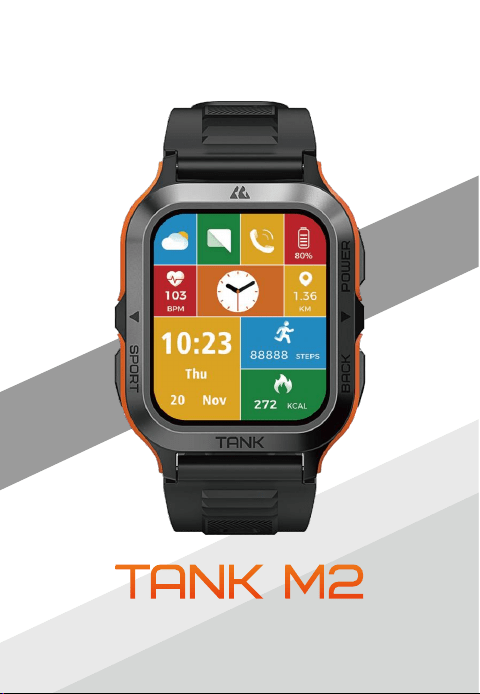
User Manual

Content
1
1. Packing List ....................................................................................... 2
2. About the Smartwatch ....................................................................... 3
3. About Watch Keys ........................................................................... 4
4. Charging Tips .................................................................................... 5
5. Pairing ............................................................................................... 6
6. Audio Settings .................................................................................. 9
7. Settings on Watch Faces .................................................................. 16
8. Settings on Themes ........................................................................ 16
9. Settings on “Sports Modes with Smart Recognition” ...................... 17
10. FAQ ............................................................................................... 19
12. Safety Tips .................................................................................... 19
11. Technical Specifications ................................................................ 19
13. Disclaimer ..................................................................................... 19
English ........................................................................................... 02-19
French ........................................................................................... 20-36
German ......................................................................................... 37-53
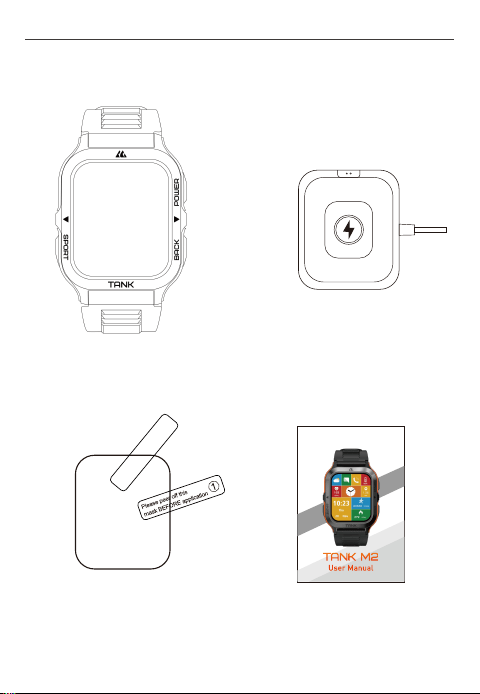
2
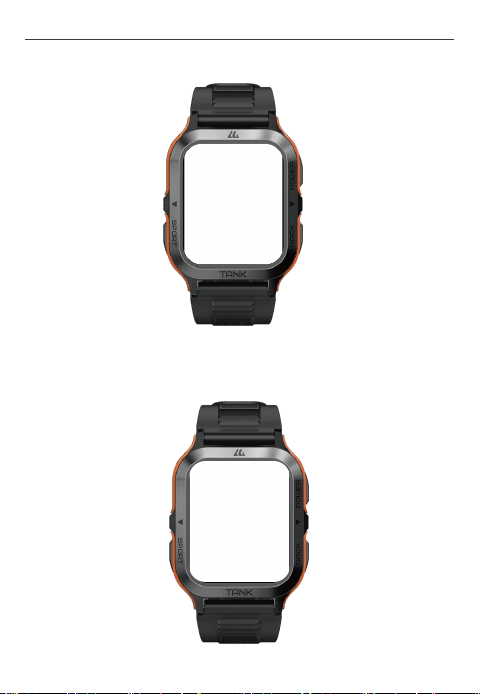
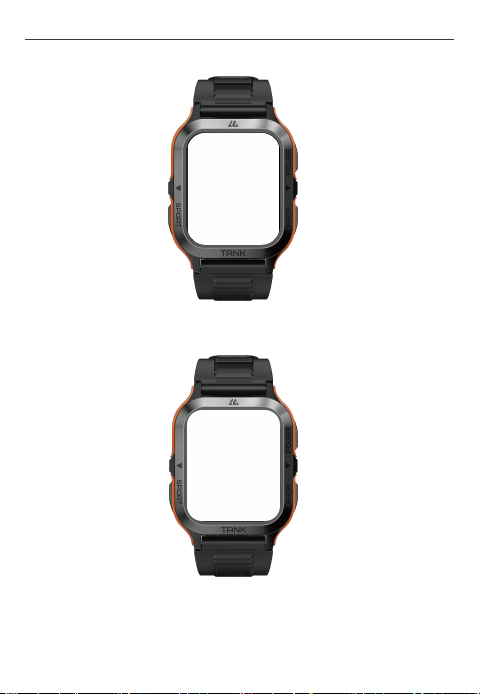
Smartwatch Magnetic Charging Base
Tempered Glass
User Manual
1. Packing List
User Manual - English
3
User Manual - English
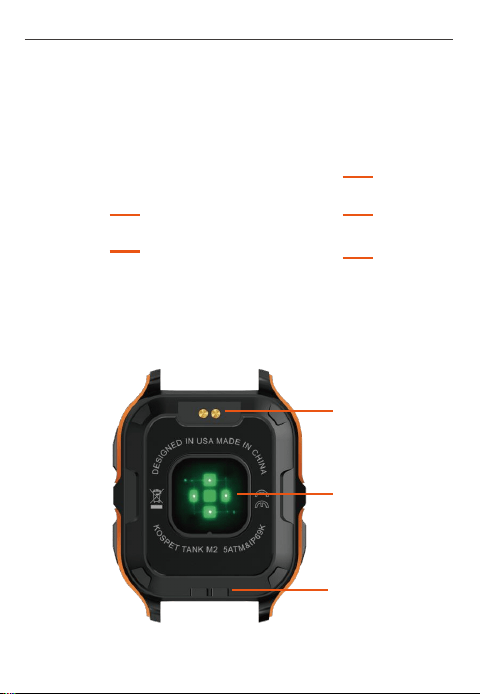
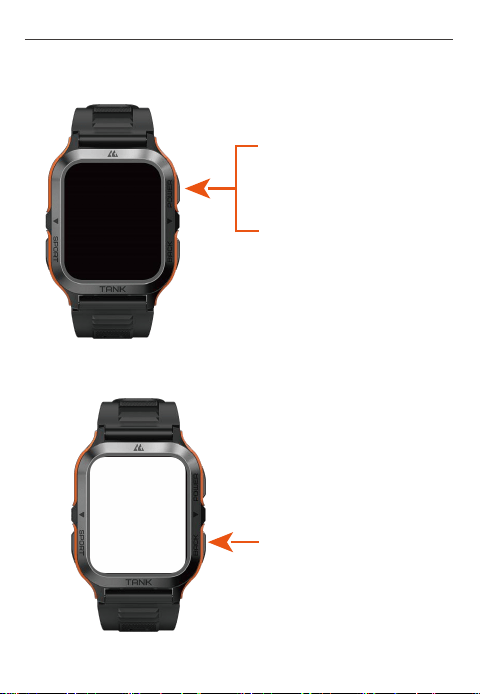
Power Key
Return key
Sports Key
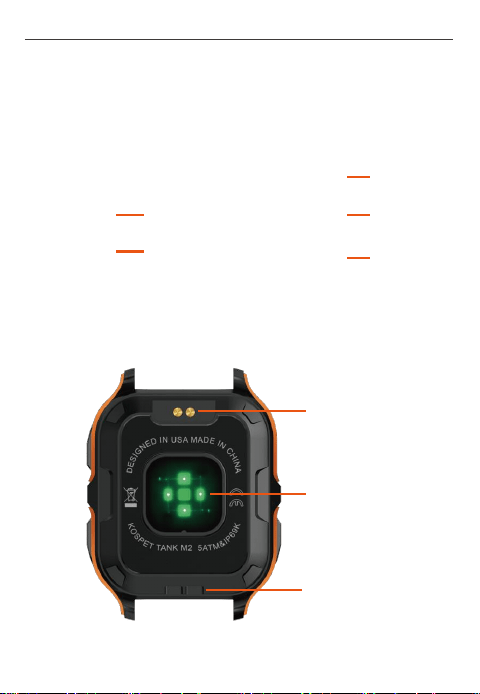
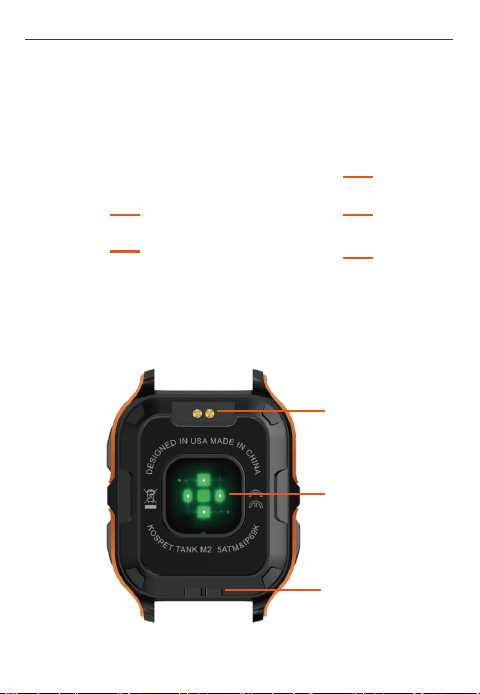
2. About the Smartwatch
Microphone
Air Pressure
Hole
Charging Port
Heart Rate & Blood
Oxygen Sensor
Speaker
4
User Manual - English
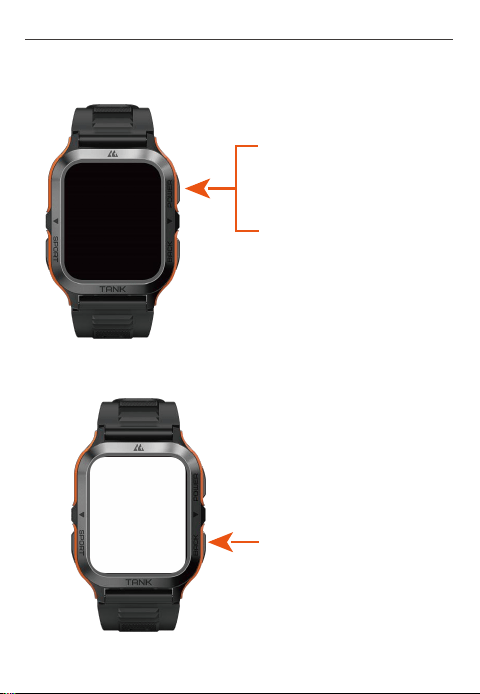
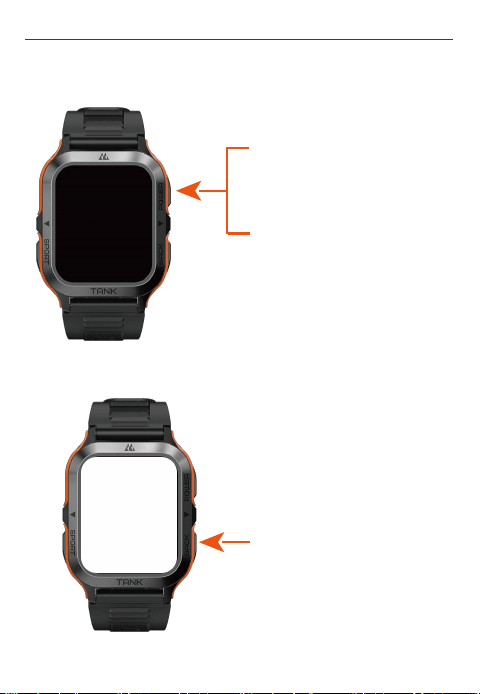
3. About Watch Keys
1)
Power key:
2)
Return key:
Press and hold the power key
for 2 seconds to turn on/off the
watch.
Press the return key once:
Return to the previous menu /
Light up the display / Turn off
the display
Press the power key once:
Light up the display / Turn off
the display
5
User Manual - English
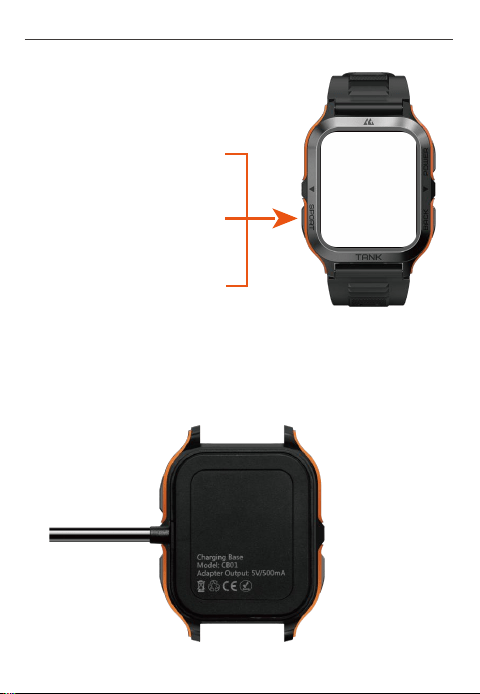
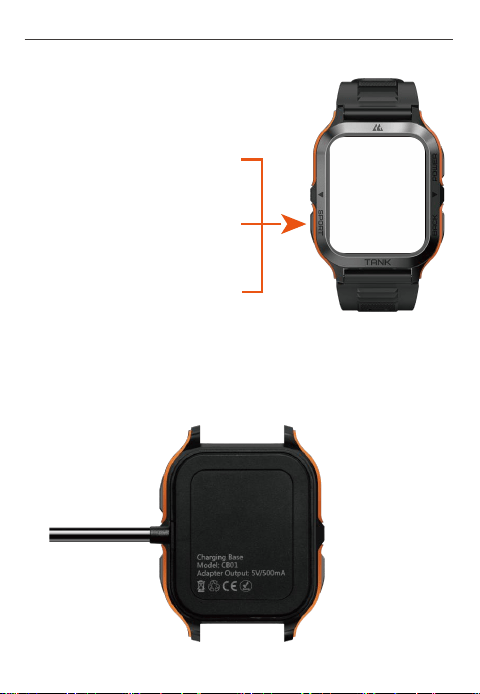
3)
Sports Key:
a. Press the sports key once:
Turn on "Sports Mode"
b. Press the sports key twice:
Turn on "Voice Assistant"
c. Press and hold the sports key
for 2 seconds: Turn on "SOS
Emergency"
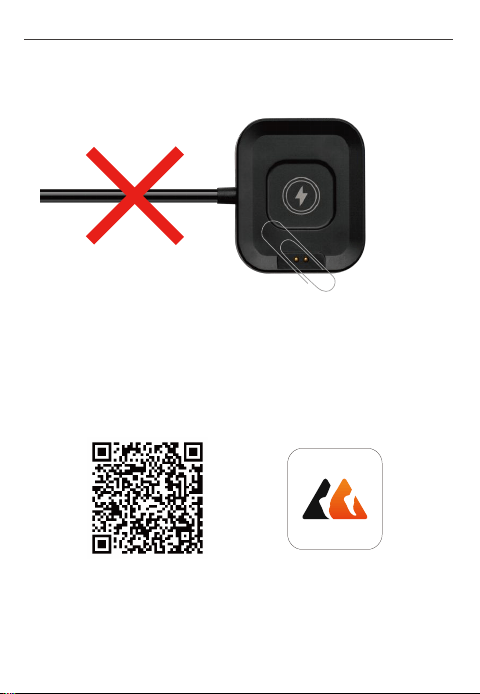
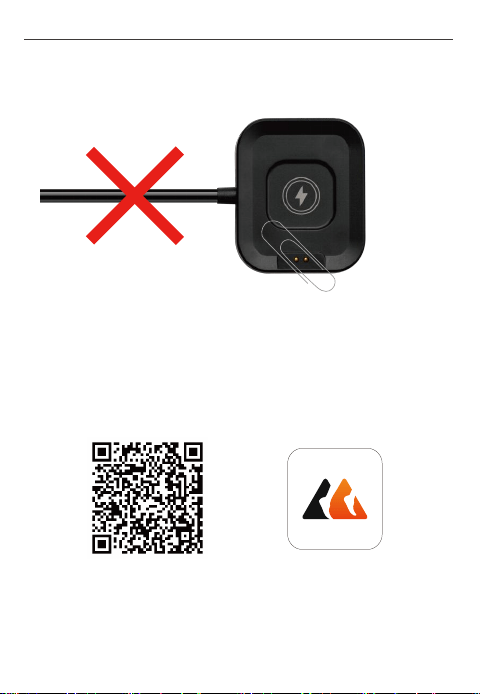
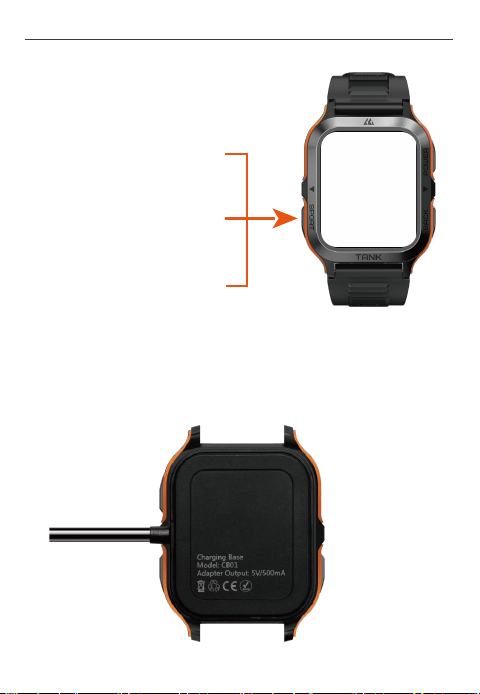
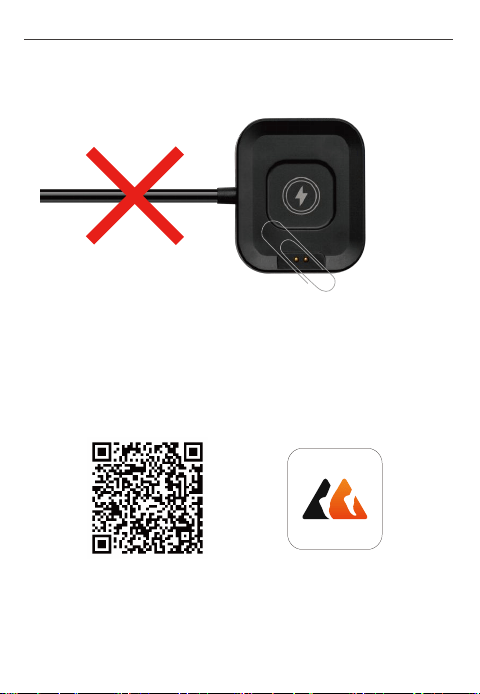
· Please fully charge the watch before using it.
4、Charging Tips
6
User Manual - English
· When the magnetic charging base is working, please keep it away
from any metal conductor to prevent a fire.
5. Pairing
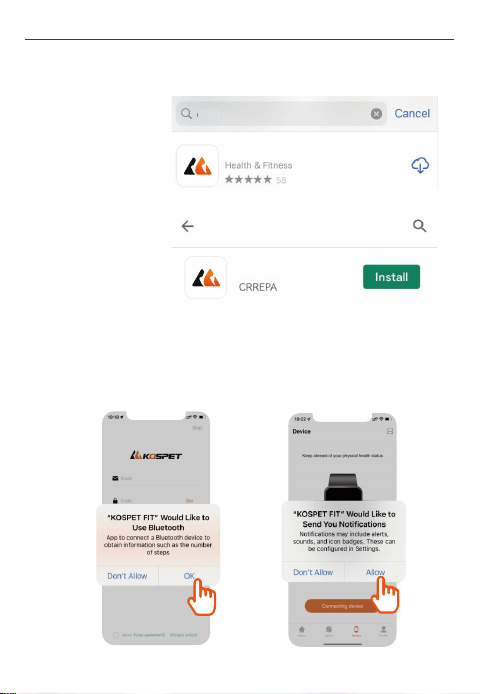
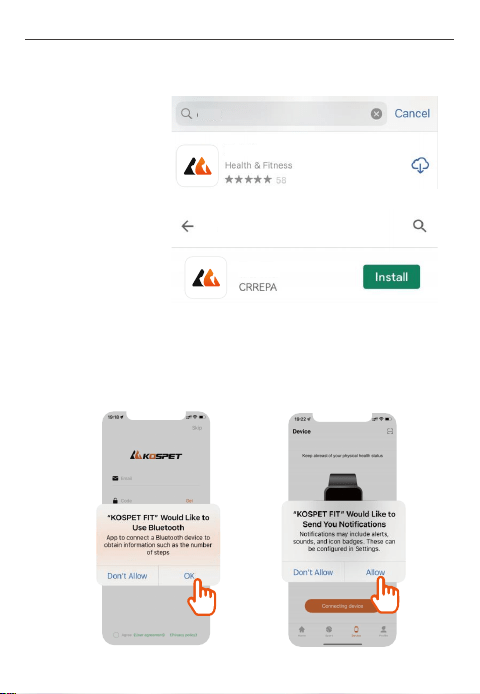
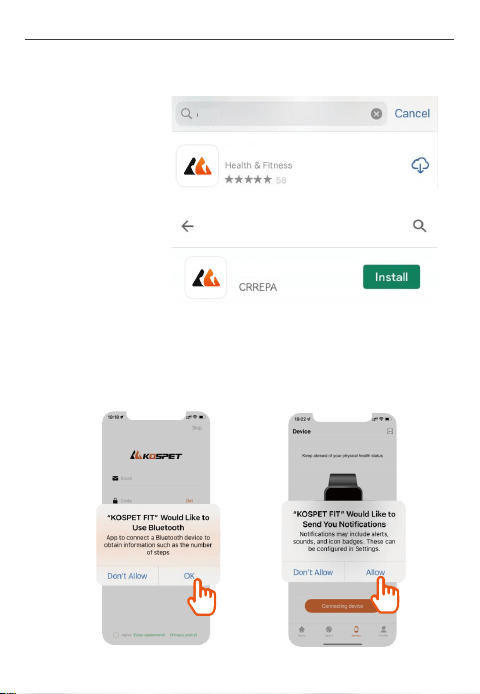
1) Two Alternative Ways to Download the App (KOSPET FIT)
a.
Scan the QR code below to download KOSPET FIT.
App QR code
KOSPET FIT
7
User Manual - English
b.
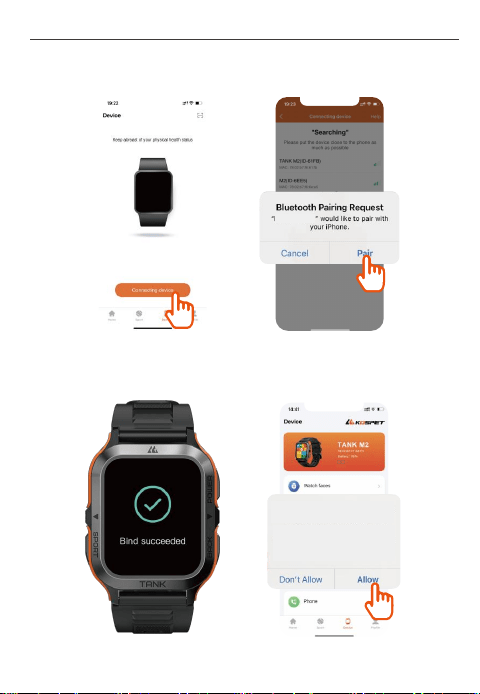
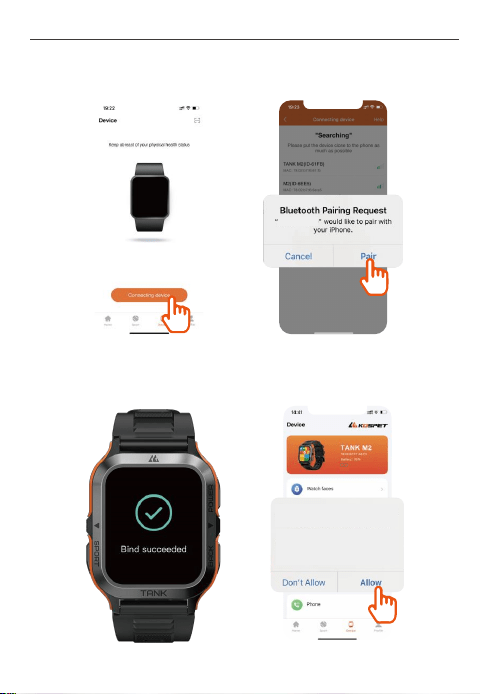
Enter "KOSPET FIT" in App Store or Google Play to download the
App.
Google Play
App Store
KOSPET FIT
KOSPET FIT
KOSPET FIT
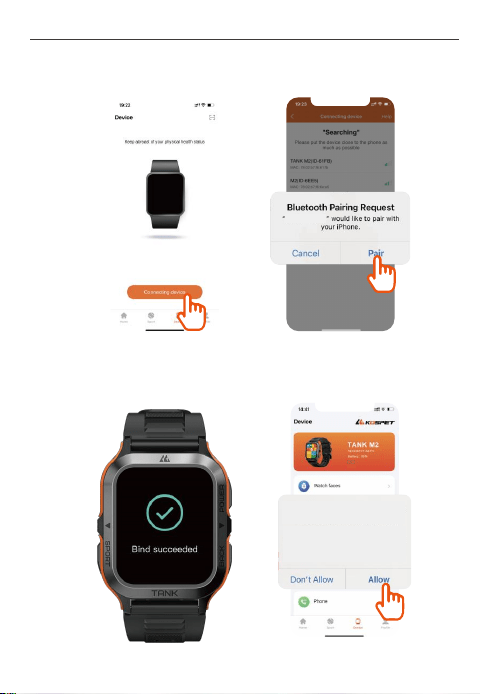
2) Pair as Follows
a.
When first using KOSPET FIT, please allow it to access Bluetooth on
your compatible smartphone, location and grant other necessary
permissions.
8
User Manual - English
a.
When first using KOSPET FIT, please allow it to access Bluetooth on
your compatible smartphone, location and grant other necessary
permissions.
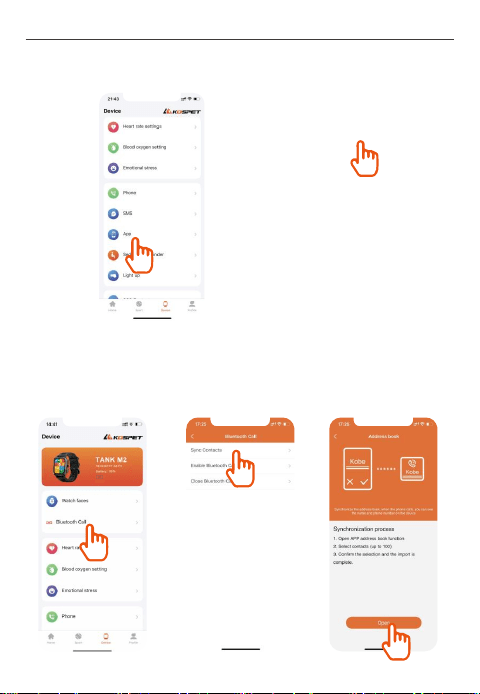
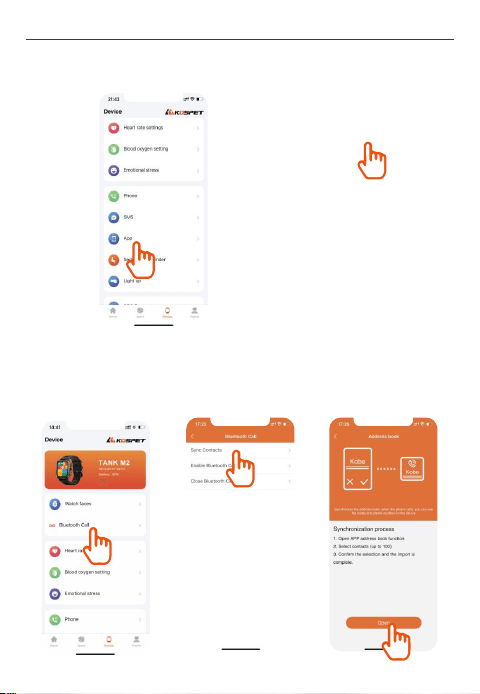
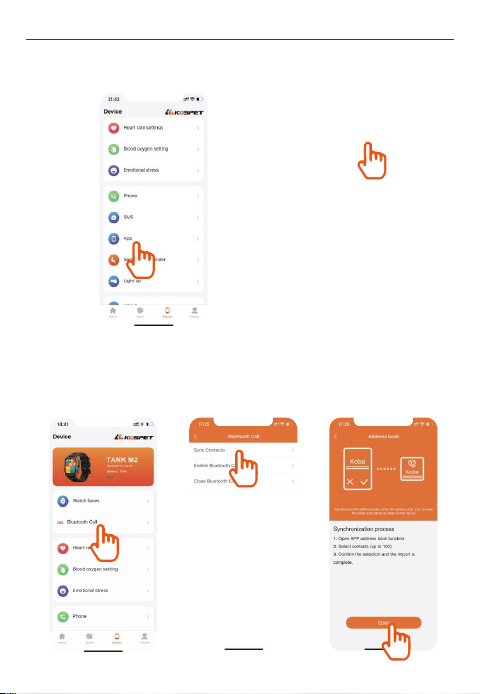
b. Enter "Device" in KOSPET FIT and tap “Connecting device” to find
TANK M2 and tap “Pair”.
c. Allow KOSPET FIT to access notifications of your compatible
smartphone on paring the App with the smartwatch.
TANK M2
Allow TANK M2 to Receive
Your iPhone Notifications?
When connected,all notifications you
receive on your iphone will also be sent
to TANK M2 and may be shown on
its display.
9
User Manual - English
b. Enter "Device" in KOSPET FIT and tap “Connecting device” to find
TANK M2 and tap “Pair”.
d. If necessary, you can set reminders for calls, SMS messages and
applications in KOSPET FIT.
6. Audio Settings
1)
Setting up Bluetooth Calling:
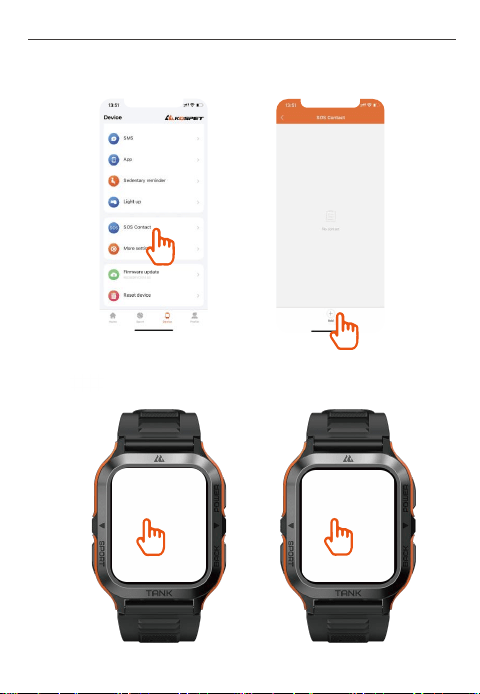
a. Up to 100 contacts on your compatible smartphone can be synced to the
smartwatch via KOSPET FIT.
10
User Manual - English
b. Set up emergency contacts in KOSPET FIT.
c. Tap to enable or disable Bluetooth Calling.
11
User Manual - English
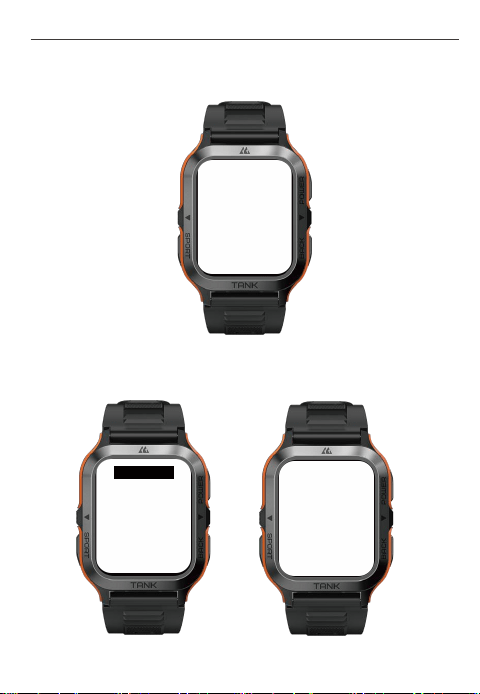
d. Once Bluetooth Calling is enabled, you can receive incoming phone
calls on the watch.
e. Once Bluetooth Calling is enabled, you can also make phone calls
directly on the watch.
15630725941
d. Once Bluetooth Calling is enabled, you can receive incoming phone
calls on the watch.
e. Once Bluetooth Calling is enabled, you can also make phone calls
directly on the watch.
12
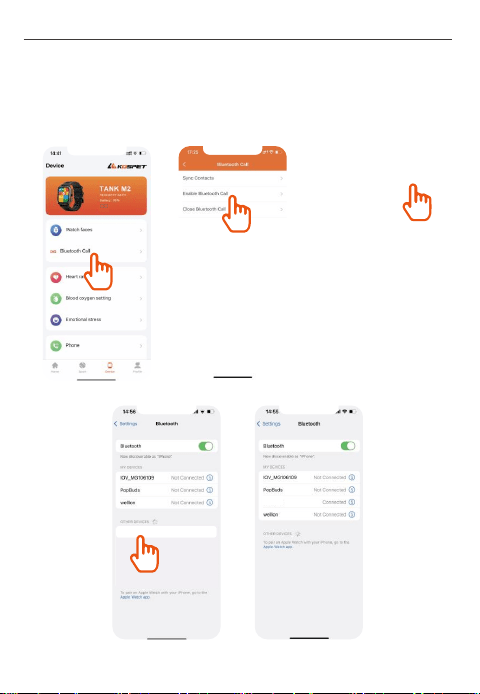
f. For users with smartphone systems of Android or below iOS 15.0,
please connect Bluetooth audio on the smartwatch as follows to enable
Bluetooth Calling.
Steps to Enable Bluetooth Calling on iOS Smartphones:
User Manual - English
TANK M2
TANK M2
78:02:B7:F7:A8:F5
Battery: 69%
78:02:B7:F7:A8:F5
Battery: 69%
13
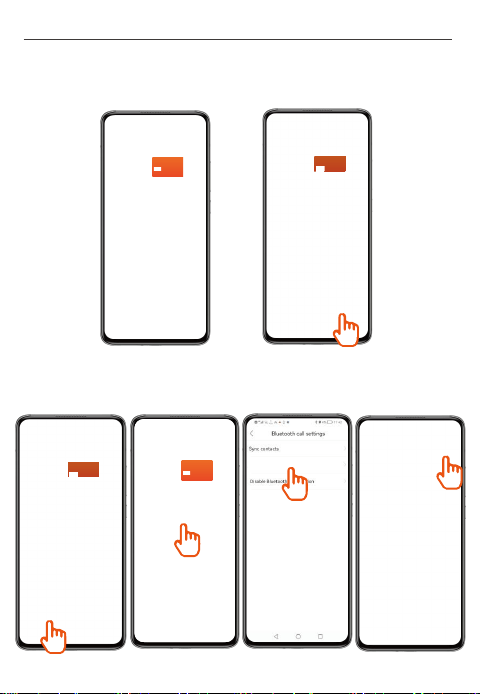
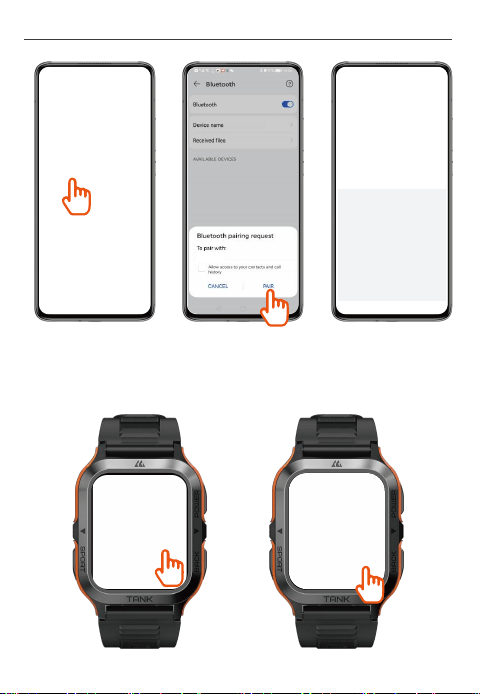
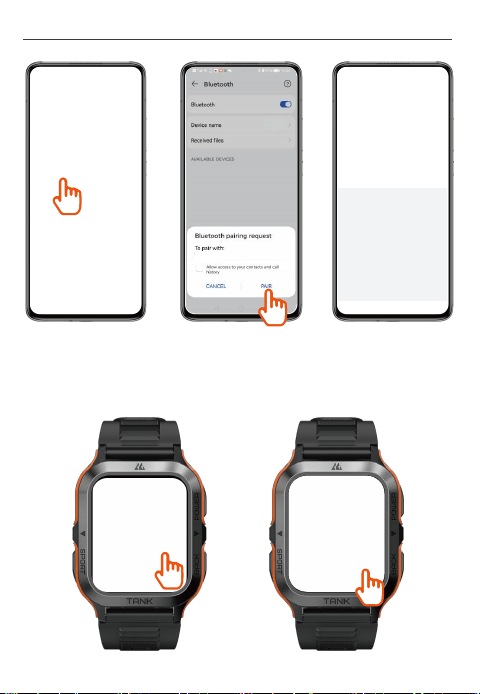
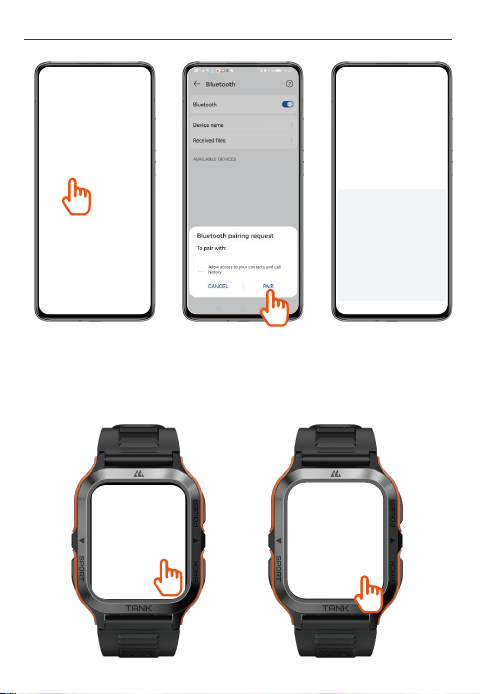
Steps to Enable Bluetooth Calling on Android Smartphones:
Step 1: Once you’ve connected your smartwatch with the App, please tap
“PAIR” in Bluetooth pairing request to enable Bluetooth Calling.
Step 2: Once you’ve connected your smartwatch with the App, please
operate as follows to enable Bluetooth calling if you don’t find the Bluetooth
pairing request or you’ve tapped “CANCEL” by mistake.
User Manual - English
Enable Bluetooth Call
78:02:B7:F7:A8:F5
Battery: 69%
78:02:B7:F7:A8:F5
Battery: 69%
78:02:B7:F7:A8:F5
Battery: 69%
14
User Manual - English
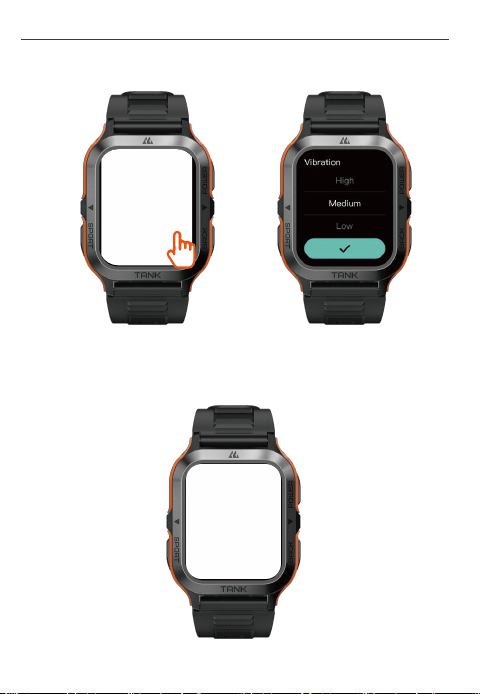
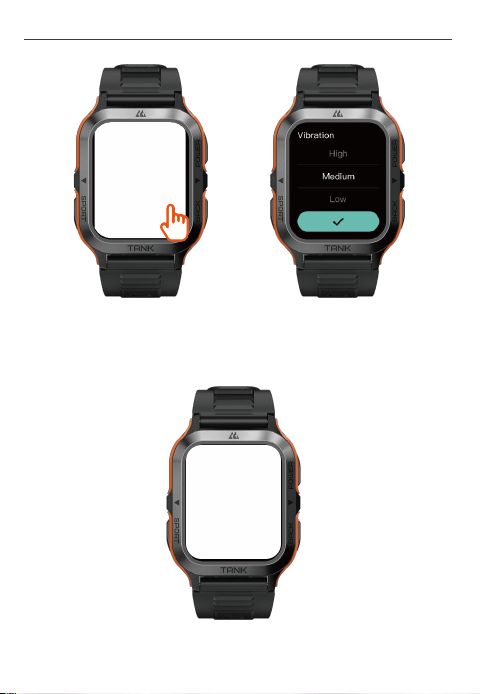
2)
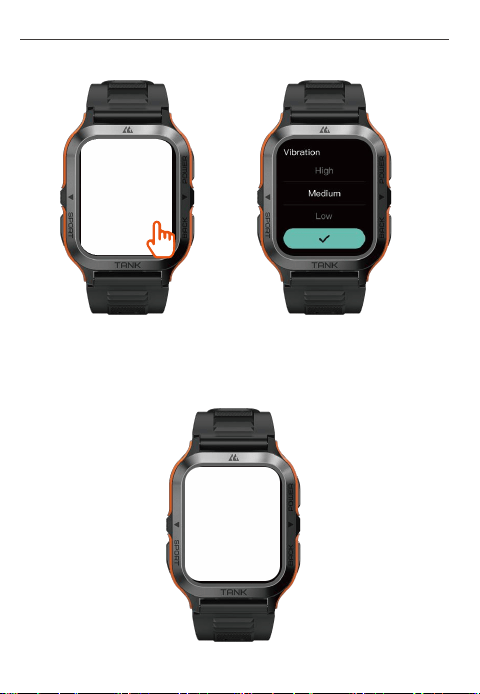
Setting up Multimedia Audio:
a. Enter “Settings → Sound & Vibration” to turn on “Media audio”,which
allows the watch to sync and play audio from your compatible smartphone.
TANK M2
TANK M2
TANK M2
15
User Manual - English
a. Enter “Settings → Sound & Vibration” to turn on “Media audio”,which
allows the watch to sync and play audio from your compatible smartphone.
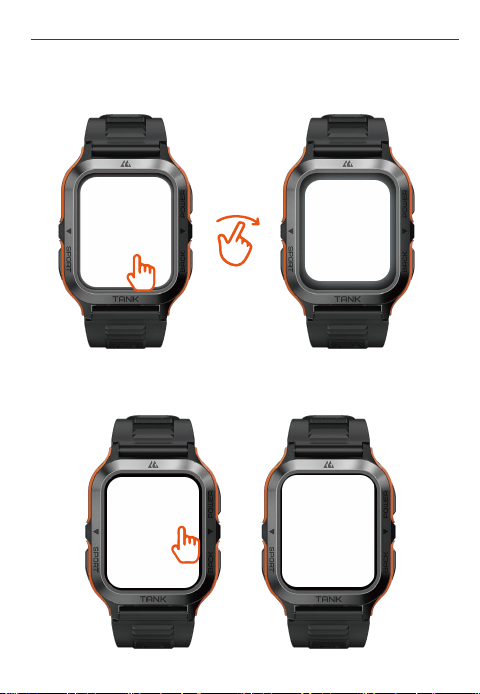
b. Once “Music” is enabled on the watch, it can play music from your
compatible phone.
16
User Manual - English
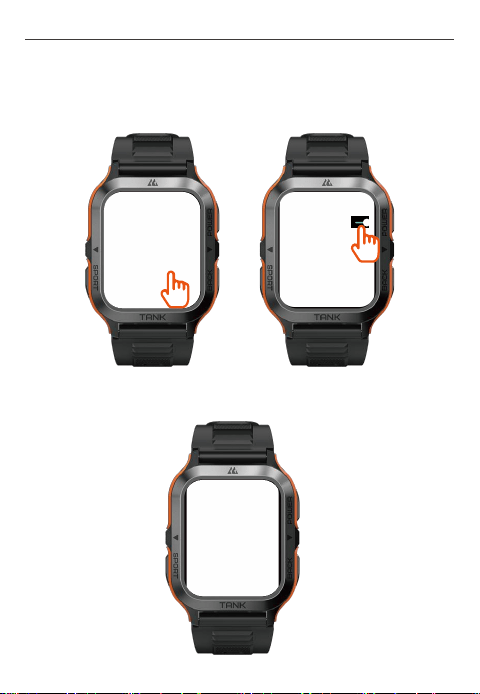
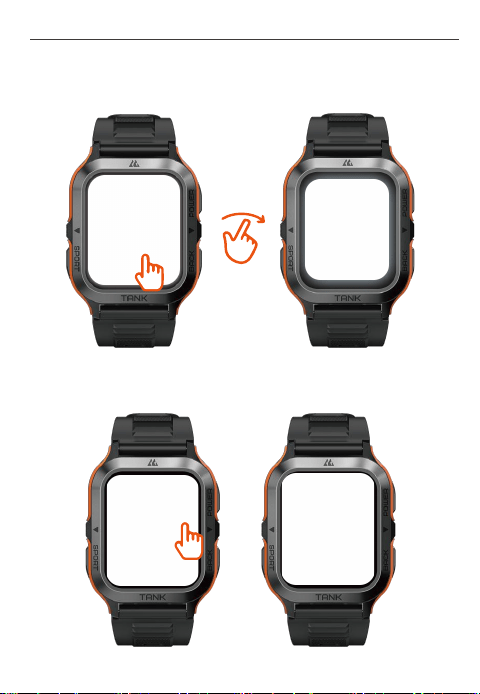
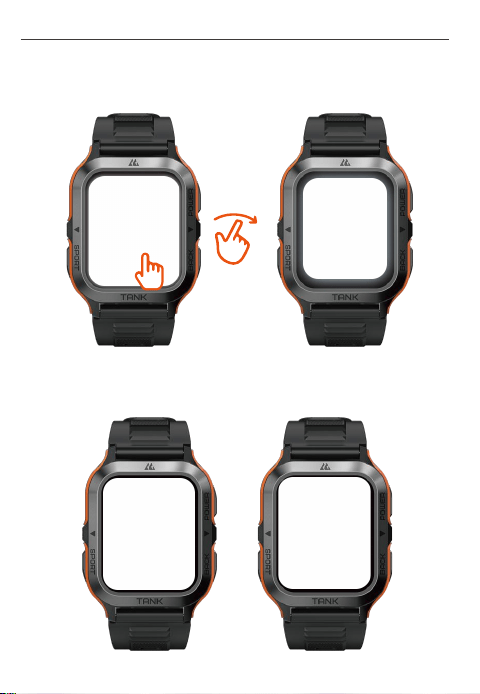
7. Settings on Watch Faces
Press and hold the watch face for 2 seconds, then swipe to quickly switch
between watch faces.
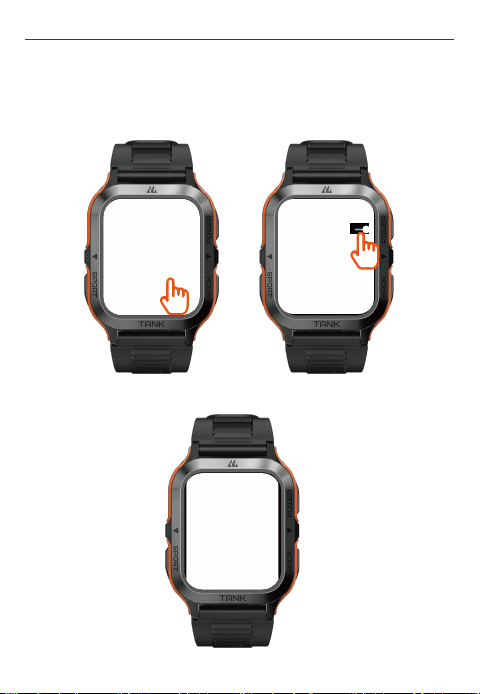
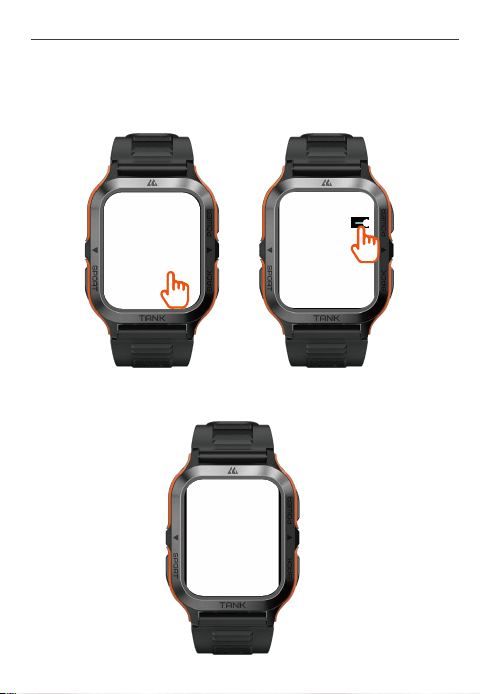
8. Settings on Themes
Tap " " to quickly switch between display styles of the menu.
17
User Manual - English
Enter “Settings → Sport recognition” to enable sports modes with smart
recognition. The watch enables smart recognition of 6 sports -- stationary
state, walking, running, cycling, elliptical and rower.
a. Walking can be activated by a continuous walk for 10 minutes.
9. Settings on “Sports Modes with Smart Recognition”
18
User Manual - English
c. Elliptical and Rower can be activated by continuous exercises for 3
minutes on an elliptical trainer and a rowing machine respectively.
b. Running can be activated by a continuous run for 3 minutes.

19
User Manual - English
Enter KOSPET FIT and select Help to view FAQ.
10. FAQ
12. Safety Tips:
1)Do not expose the watch to extremely high-temperature environments
like scorching sun rays or around high-temperature devices like heaters,
ovens, microwave ovens, or water heaters. High-temperature
environments may cause battery explosions or other safety accidents.
2)The product includes an irremovable pure cobalt battery. Non-profes-
sionals are not allowed to disassemble it in case of a safety accident.
3)This product has passed multiple waterproof tests before launch.
Considering different using habits, its internal parts may experience wear
and tear, which affects its sealing performance. Therefore please wear
and use the smartwatch carefully during swimming and diving, but avoid
wearing it in a sauna room or for a hot shower.
4)Our products do not belong to medical apparatus. The heart rate,
blood pressure and other health data collected by it are only for reference
rather than clinical basis.
13. Disclaimer:
This user manual is published by our company that owns the right of final
interpretation. We may make adjustments to this manual anytime if
necessary. All pictures for describing functions are for reference only.
11. Technical Specifications:
Frequency 2402-2480 MHz
Bluetooth: -1.89 dBm Bluetooth LE: -8.16 dBm
Power (EIRP)
20
User Manual - French
Power Key
Touche retour
Bouton de sport
2. À propos de Smartwatch
Microphone
Orifice de
pression d'air
Port de charge
Capteur de fréquence
cardiaque et d'oxygène
dans le sang
Haut parleur
21
User Manual - French
Touche retour
3. Description des fonctions de la Watch
1)
Touche de mise en marche :
2)
Touche retour:
Appuyez sur la touche de mise
en marche et maintenez-la
enfoncée pendant 2 secondes
pour allumer/éteindre la montre.
Appuyez une fois sur la touche
de mise en marche :Retour au
menu précédent / Allumer
l'écran / Éteindre l'écran.
Appuyez une fois sur la touche
de mise en marche :Retour au
menu précédent / Allumer
l'écran / Éteindre l'écran.
22
User Manual - French
3)
Touche sports :
a. Appuyez une fois sur la
touche sport pour activer le
« mode sport ».
b. Appuyez deux fois sur la
touche sport pour activer
l'« Assistant vocal ».
c. Appuyez sur la touche sport
et maintenez-la enfoncée
pendant 2 secondes pour
activer « SOS Urgence ».
· Veuillez charger complètement la montre avant de l'utiliser.
4、Conseils pour la charge
23
User Manual - French
· Lorsque la base de chargement magnétique fonctionne, veuillez la
tenir éloignée de tout conducteur métallique afin d'éviter tout risque
d'incendie.
5. Jumelage
1) Deux manières de télécharger l'application (KOSPET FIT)
a.
Scannez le code QR ci-dessous pour télécharger KOSPET FIT.
App QR code
KOSPET FIT
24
User Manual - French
b.
Entrez « KOSPET FIT » dans l'App Store ou Google Play pour
télécharger l'application.
Google Play
App Store
KOSPET FIT
KOSPET FIT
KOSPET FIT
2) Jumeler comme suit
a.
Lors de la première utilisation de KOSPET FIT, veuillez l'autoriser à
accéder au Bluetooth de votre smartphone, à la localisation et à
accorder les autres autorisations nécessaires.
25
User Manual - French
b. Entrez dans « Rechercher l'appareil » dans KOSPET FIT pour trouver
TANK T2 et appuyez sur « jumeler ».
c. Autorisez KOSPET FIT à accéder aux notifications de votre
smartphone pour connecter l'application à la smartwatch.
TANK M2
Allow TANK M2 to Receive
Your iPhone Notifications?
When connected,all notifications you
receive on your iphone will also be sent
to TANK M2 and may be shown on
its display.
26
User Manual - French
b. Entrez dans « Rechercher l'appareil » dans KOSPET FIT pour trouver
TANK T2 et appuyez sur « jumeler ».
d. Si nécessaire, vous pouvez définir, dans KOSPET FIT, des rappels
pour les appels, les SMS et les applications.
6. Paramètres audio
1)
Configuration des appels Bluetooth:
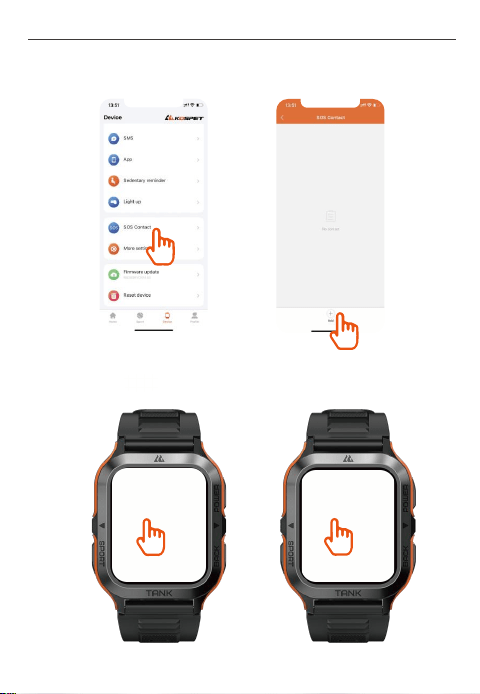
a. Jusqu'à 100 contacts de votre smartphone peuvent être synchronisés
avec la Smartwatch via KOSPET FIT.
27
User Manual - French
b. Créez de contacts d'urgence dans KOSPET FIT.
c. Appuyez sur pour activer ou désactiver les appels Bluetooth.
28
User Manual - French
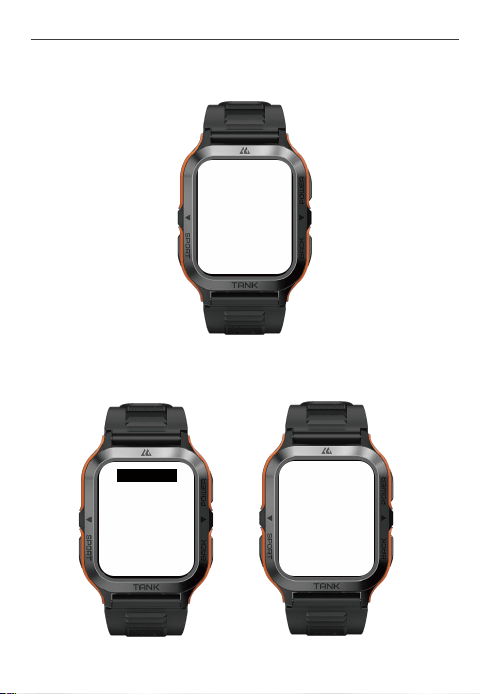
d. Une fois que la fonction d'appel Bluetooth est activée, vous pouvez
recevoir des appels téléphoniques sur la montre.
e. Une fois que la fonction d'appel Bluetooth est activée, vous pouvez
également passer des appels téléphoniques directement sur la montre.
15630725941
d. Une fois que la fonction d'appel Bluetooth est activée, vous pouvez
recevoir des appels téléphoniques sur la montre.
e. Une fois que la fonction d'appel Bluetooth est activée, vous pouvez
également passer des appels téléphoniques directement sur la montre.
29
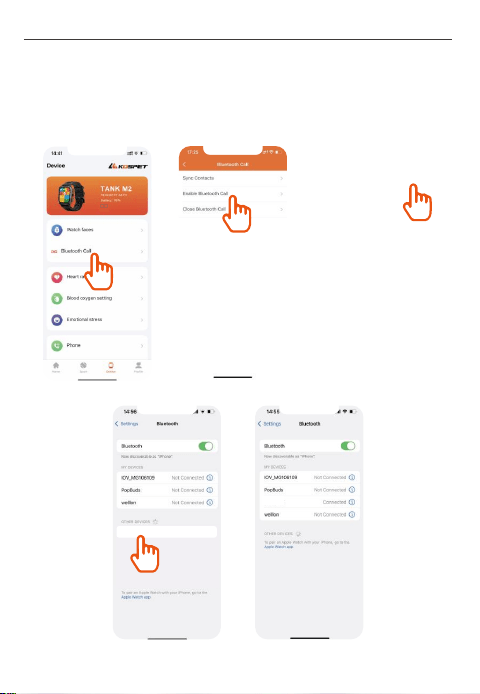
f. Pour les utilisateurs avec smartphone système Android ou iOS inférieur
à 15.0, veuillez svp connecter l'audio Bluetooth sur la smartwatch comme
les instructions suivantes pour activer les appels Bluetooth.
Étapes pour Activer les Appels Bluetooth Sur les Smartphones iOS:
User Manual - French
TANK M2
TANK M2
78:02:B7:F7:A8:F5
Battery: 69%
78:02:B7:F7:A8:F5
Battery: 69%
30
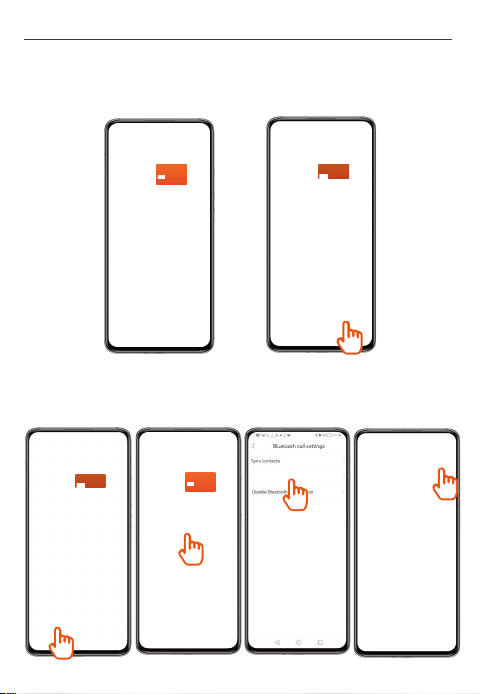
Étapes pour Activer les Appels Bluetooth Sur les Smartphones Android:
Étape 1: Une fois que vous avez connecté votre smartwatch à l'application,
appuyez sur "PAIR" dans la demande d'appairage Bluetooth pour activer
les appels Bluetooth.
Étape 2: Une fois que vous avez connecté votre smartwatch à l'application,
procédez comme suit pour activer les appels Bluetooth si vous ne trouvez
pas la demande d'appairage Bluetooth ou si vous avez appuyé sur
"ANNULER" par erreur.
User Manual - French
Enable Bluetooth Call
78:02:B7:F7:A8:F5
Battery: 69%
78:02:B7:F7:A8:F5
Battery: 69%
31
User Manual - French
2)
Paramètres audio multimédia:
a. Accédez à « Réglage - Son et Vibration » pour activer « Audio du
téléphone », cela permet à la montre de synchroniser et de lire le son de
votre téléphone.
Étape 2: Une fois que vous avez connecté votre smartwatch à l'application,
procédez comme suit pour activer les appels Bluetooth si vous ne trouvez
pas la demande d'appairage Bluetooth ou si vous avez appuyé sur
"ANNULER" par erreur.
TANK M2
TANK M2
TANK M2
√
32
User Manual - French
b. Une fois que la fonction « Musique » est activée sur la montre, celle-ci
peut lire la musique de votre téléphone.
33
User Manual - French
7. Réglage du cadran
Appuyez sur le cadran de la montre et maintenez-le enfoncé pendant 2
secondes pour passer rapidement d'un cadran à l'autre.
8. Réglage des thèmes
Appuyez sur « » pour changer rapidement le style d'affichage du menu.
34
User Manual - French
Entrez dans « réglage → reconnaissance du sport » pour activer les modes
de sport avec reconnaissance intelligente. La montre permet la reconnais-
sance intelligente de 6 sports - marche, course, ellipseur, rameur, cyclisme,
repos.
a. Marcher pendant 10 minutes active le mode Marche.
9. Réglages du «Mode Reconnaissance intelligente des sports»
35
User Manual - French
c. Faire des exercices sur vélo elliptique ou rameur pendant 3 minutes
activent le mode d'exercice correspondant.
b. Courir pendant 3 minutes active le mode Course.
Vous trouverez plus d'informations sur les solutions aux pannes
courantes dans l'Aide de KOSPET FIT.
10. FAQ

36
User Manual - French
11. Spécifications techniques:
12. Principaux conseils de sécurité.
1) N'exposez pas la montre à des environnements extrêmement chaud
ou à proximité d'appareils extrêmement chauds tels que : radiateur, four,
four micro-ondes ou chauffe-eau, qui pourraient faire exploser la batterie
et entraîner des incidents de sécurité.
2)Ce produit comporte une batterie polymère non amovible qui ne doit
pas être démontée par des non-professionnels afin d’éviter tout danger.
3) Ce produit a subi de nombreux tests d'étanchéité en usine. Compte
tenu des différentes habitudes d'utilisation, les pièces internes peuvent
subir une usure pouvant affecter les performances d'étanchéité. Par
conséquent, veuillez porter et utiliser la Smartwatch avec précaution
lorsque vous nagez ou plongez, et éviter de la porter dans les saunas ou
les bains chauds.
4)Nos produits ne sont pas des appareils médicaux. La fréquence
cardiaque, la pression artérielle et les autres données de santé qu'ils
recueillent sont uniquement des données de référence et non des données
cliniques.
13. Clause de non-responsabilité :
Fréquence de
transmission
2402-2480 MHz
Bluetooth: -1.89 dBm Bluetooth LE: -8.16 dBmDu pouvoir (EIRP)
Ce manuel d'utilisation est publié par la société qui détient le droit
d'interprétation finale. La société peut, à tout moment, mettre à jour le
contenu du manuel si nécessaire. Toutes les images décrivant les
fonctions sont fournies à titre indicatif uniquement.
37
User Manual - German
Power-Taste
Zurück-Taste
Sporttaste
2. Über die Smartwatch
Mikrofon
Luft-
druck-Loch
Anschluss zum
Aufladen
Herzfrequenz- und
Blutsauerstoffsensor
Lautsprecher
38
User Manual - German
Herzfrequenz- und
Blutsauerstoffsensor
3. Über Watch Keys
1)
Power-Taste:
2)
Zurück-Taste:
Halten Sie die Power-Taste 2
Sekunden lang gedrückt, um die
Uhr ein- und auszuschalten.
Drücken Sie die Power-Taste
einmal:Rückkehr zum vorherigen
Menü / Aufleuchten des Displays
/ Ausschalten des Displays.
Drücken Sie die Power-Taste
einmal:Rückkehr zum vorherigen
Menü / Aufleuchten des Displays
/ Ausschalten des Displays.
39
User Manual - German
3)
Sporttaste:
a. Drücken Sie die Sporttaste
einmal: Schalten Sie den
„Sportmodus“ ein.
b. Drücken Sie die Sporttaste
zweimal: Schalten Sie den
„Sprachassistenten“ ein.
c. Drücken und halten Sie die
Sporttaste 2 Sekunden lang:
SOS-Notfall" einschalten
· Bitte laden Sie die Uhr vollständig auf, bevor Sie sie benutzen.
4、Tipps zum Aufladen
40
User Manual - German
· Wenn die magnetische Ladestation in Betrieb ist, halten Sie sie bitte
von allen metallischen Leitern fern, um ein Feuer zu vermeiden.
5. Koppeln
1) Zwei alternative Möglichkeiten zum Herunterladen der App
(KOSPET FIT)
a.
Scannen Sie den QR-Code unten, um KOSPET FIT herunterzuladen.
App QR code
KOSPET FIT
41
User Manual - German
a.
Scannen Sie den QR-Code unten, um KOSPET FIT herunterzuladen.
b.
Geben Sie KOSPET FIT im App Store oder bei Google Play ein, um
die App herunterzuladen.
Google Play
App Store
KOSPET FIT
KOSPET FIT
KOSPET FIT
2) So koppeln Sie ihre App
a.
Wenn Sie KOSPET FIT zum ersten Mal verwenden, erlauben Sie bitte
den Zugriff auf Bluetooth auf Ihrem kompatiblen Smartphone, den
Standort und gewähren Sie andere notwendige Berechtigungen.
42
User Manual - German
a.
Wenn Sie KOSPET FIT zum ersten Mal verwenden, erlauben Sie bitte
den Zugriff auf Bluetooth auf Ihrem kompatiblen Smartphone, den
Standort und gewähren Sie andere notwendige Berechtigungen.
b.Geben Sie „Gerät suchen“ in KOSPET FIT ein, um TANK T2 zu finden
und tippen Sie auf „Koppeln“.
c. Erlauben Sie KOSPET FIT den Zugriff auf die Benachrichtigungen
Ihres kompatiblen Smartphones, um die App mit der Smartwatch zu
koppeln.
TANK M2
Allow TANK M2 to Receive
Your iPhone Notifications?
When connected,all notifications you
receive on your iphone will also be sent
to TANK M2 and may be shown on
its display.
43
User Manual - German
b.Geben Sie „Gerät suchen“ in KOSPET FIT ein, um TANK T2 zu finden
und tippen Sie auf „Koppeln“.
d. Wenn nötig, können Sie in KOSPET FIT Erinnerungen für Anrufe,
SMS-Nachrichten und Anwendungen einstellen.
6. Einstellungen
1)
Bluetooth-Anrufe einrichten
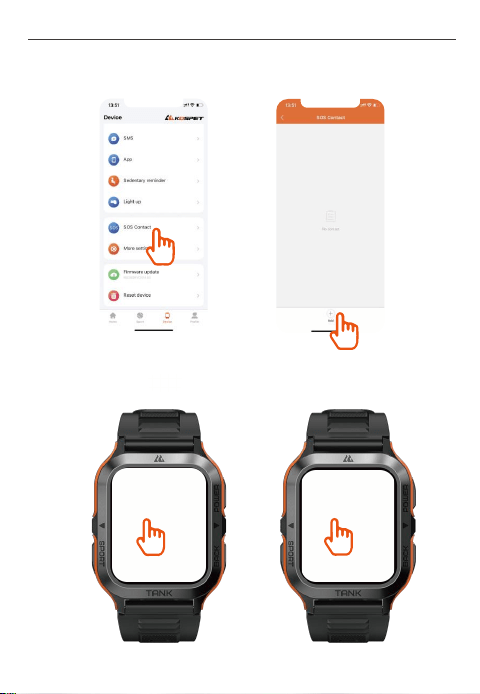
a. Bis zu 100 Kontakte auf Ihrem kompatiblen Smartphone können über
KOSPET FIT mit der Smartwatch synchronisiert werden.
44
User Manual - German
b. Richten Sie Notfallkontakte in KOSPET FIT ein.
c. Tippen Sie auf , um Bluetooth-Anrufe zu aktivieren oder zu
deaktivieren.
45
User Manual - German
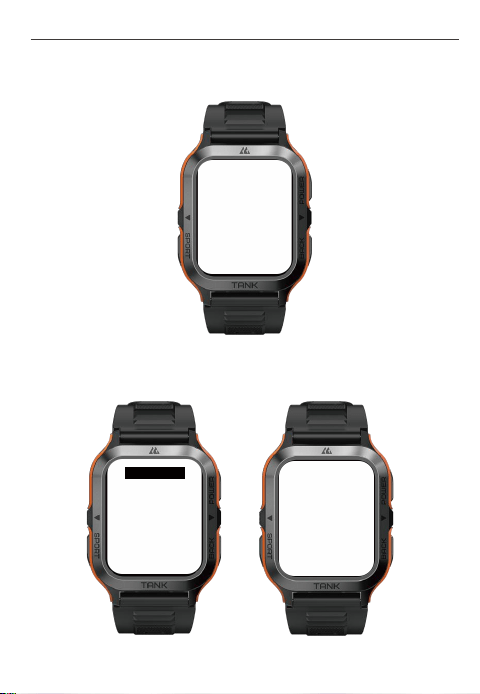
d. Sobald Bluetooth-Anrufe aktiviert ist, können Sie eingehende Anrufe
auf der Uhr empfangen.
e. Sobald Bluetooth-Anrufe aktiviert ist, können Sie auch direkt auf der Uhr
telefonieren.
c. Tippen Sie auf , um Bluetooth-Anrufe zu aktivieren oder zu
deaktivieren.
15630725941
d. Sobald Bluetooth-Anrufe aktiviert ist, können Sie eingehende Anrufe
auf der Uhr empfangen.
e. Sobald Bluetooth-Anrufe aktiviert ist, können Sie auch direkt auf der Uhr
telefonieren.
46
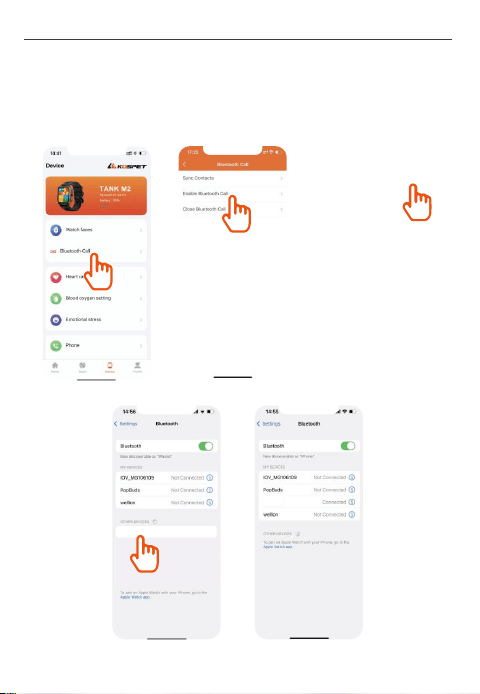
f. For users with smartphone systems of Android or below iOS 15.0,
please connect Bluetooth audio on the smartwatch as follows to enable
Bluetooth Calling.
Steps to Enable Bluetooth Calling on iOS Smartphones:
User Manual - German
TANK M2
TANK M2
78:02:B7:F7:A8:F5
Battery: 69%
78:02:B7:F7:A8:F5
Battery: 69%
47
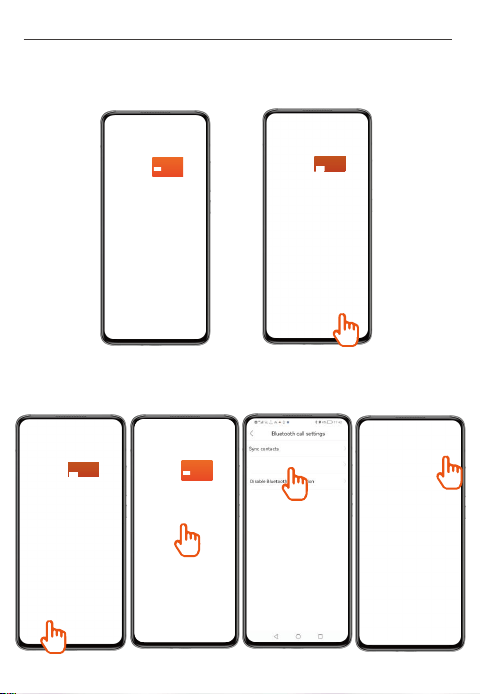
Steps to Enable Bluetooth Calling on Android Smartphones:
Step 1: Once you’ve connected your smartwatch with the App, please tap
“PAIR” in Bluetooth pairing request to enable Bluetooth Calling.
Step 2: Once you’ve connected your smartwatch with the App, please
operate as follows to enable Bluetooth calling if you don’t find the Bluetooth
pairing request or you’ve tapped “CANCEL” by mistake.
User Manual - German
Enable Bluetooth Call
78:02:B7:F7:A8:F5
Battery: 69%
78:02:B7:F7:A8:F5
Battery: 69%
78:02:B7:F7:A8:F5
Battery: 69%
2)
Multimedia-Audio einrichten
a. Gehen Sie zu „Einstellungen-Ton & Vibration“, um „Telefon-Audio“
einzuschalten, damit die Uhr Audio von Ihrem kompatiblen Telefon
synchronisieren und wiedergeben kann.
User Manual - German
48
TANK M2
TANK M2
TANK M2
49
User Manual - German
b. Sobald „Musik“ auf der Uhr aktiviert ist, kann sie Musik von Ihrem
kompatiblen Telefon abspielen.
50
User Manual - German
7. Einstellungen auf den Zifferblättern
Halten Sie das Zifferblatt 2 Sekunden lang gedrückt, um schnell zwischen
den Zifferblättern zu wechseln.
8. Einstellungen zu den Themen
Tippen Sie auf „ “, um schnell zwischen den Anzeigestilen des Menüs
zu wechseln.
51
User Manual - German
Gehen Sie auf „Einstellung → Sporterkennung“, um die Sportmodi mit
intelligenter Erkennung zu aktivieren. Die Uhr ermöglicht die intelligente
Erkennung von 4 Sportarten - Gehen, Laufen, Ellipsentraining und Rudern.
a. Gehen kann durch kontinuierliches Gehen für 10 Minuten aktiviert
werden.
9. Einstellungen zum „Sportmodi mit intelligenter Erkennung“
52
User Manual - German
Gehen Sie auf „Einstellung → Sporterkennung“, um die Sportmodi mit
intelligenter Erkennung zu aktivieren. Die Uhr ermöglicht die intelligente
Erkennung von 4 Sportarten - Gehen, Laufen, Ellipsentraining und Rudern.
c. Ellipsentrainer und Rudergerät können durch kontinuierliche Übungen
von 3 Minuten auf einem Ellipsentrainer bzw. einem Rudergerät aktiviert
werden.
b. Laufen kann durch einen kontinuierlichen Lauf von 3 Minuten aktiviert
werden.

53
User Manual - German
Geben Sie KOSPET FIT ein und wählen Sie Hilfe, um die FAQ anzuzeigen.
10. FAQ
11. Technische Spezifikation:
12. Wichtige Sicherheitsvorkehrungen:
1) Setzen Sie die Uhr keinen extrem hohen Temperaturen aus, wie z.B.
sengenden Sonnenstrahlen oder in der Nähe von Hochtempera-
turgeräten wie Heizungen, Öfen, Mikrowellenherden oder Warmwasser-
bereitern. Umgebungen mit hohen Temperaturen können zu Batterieex-
plosionen oder anderen Sicherheitsunfällen führen.
2)Das Produkt enthält einen nicht herausnehmbaren Lithium-Poly-
mer-Akku. Nichtfachleute dürfen es im Falle eines Sicherheitsunfalls nicht
zerlegen.
3) Dieses Produkt wurde vor seiner Markteinführung mehrfach auf
Wasserdichtigkeit getestet. Aufgrund unterschiedlicher Nutzungs-
gewohnheiten können die inneren Teile verschleißen, was sich auf die
Dichtigkeit auswirkt. Bitte tragen und benutzen Sie die Smartwatch daher
vorsichtig beim Schwimmen und Tauchen, aber vermeiden Sie es, sie in
einer Sauna oder unter einer heißen Dusche zu tragen.
4) Unsere Produkte gehören nicht zu den medizinischen Geräten. Die
Herzfrequenz, der Blutdruck und andere Gesundheitsdaten, die von ihr
erfasst werden, dienen nur als Referenz und nicht als klinische
Grundlage.
13. Haftungsausschluss
Das Benutzerhandbuch wurde vom Unternehmen veröffentlicht und das
Handbuch hat das Recht, endlich zu erklären. Wir behalten uns das
Recht vor, dieses Handbuch jederzeit zu ändern. Alle Bilder für Beschrei-
bungsfunktionen werden als Referenz verwendet.
Sendefrequenz 2402-2480 MHz
Bluetooth: -1.89 dBm Bluetooth LE: -8.16 dBm
Leistung (EIRP)