USER’S MANUAL
WARRANTY Information can be viewed online at
https://www.galaxyaudio.com/support/warranty
THREE YEAR LIMITED WARRANTY
V20190416
1-800-369-7768 www.galaxyaudio.com
Specifications in this manual are subject to change without notice.
© Copyright Galaxy Audio 2019
Printed in China
www.galaxyaudio.com/support/warranty
www.galaxyaudio.com

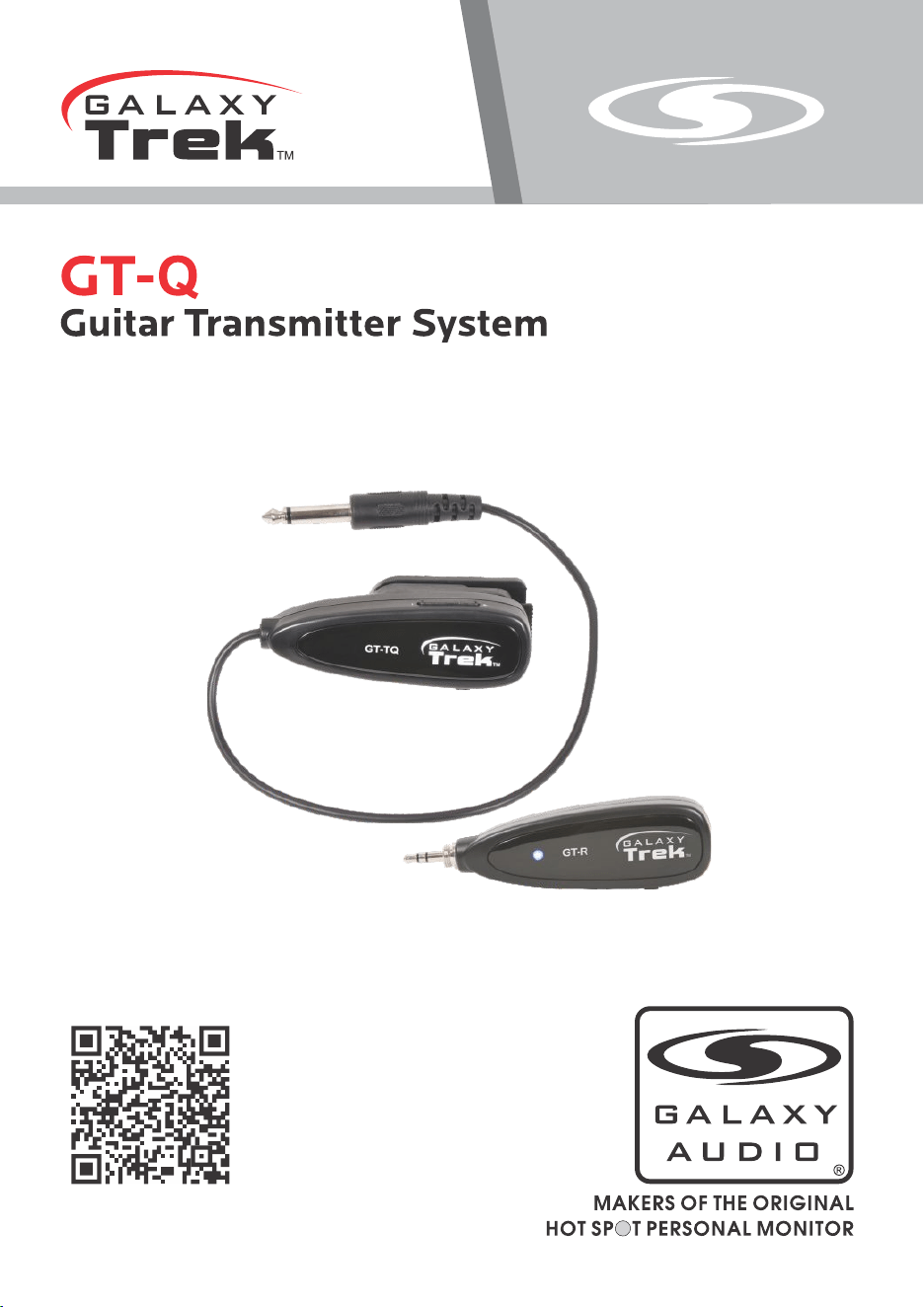
Transmitter
Receiver
Galaxy Trek Guitar Transmitter System GT-Q
GT-Q
Galaxy Trek Guitar Transmitter System GT-Q
1. Put the receiver into the 1/8" (3.5 mm) Mic input of an amplifier, powered speaker, or other
audio device or use the included 1/4" (6.5 mm) adapter for 1/4" inputs. For Apple or Android
phones, use the included phone adapter cables.
2. Attach the included Belt Clip onto the Transmitter.
3. On the Receiver, move the Power switch to On. The LED will begin
flashing.
4. On the Transmitter, move the Power switch to On. The LED will briefly flash until the
Transmitter and Receiver automatically pair. The LED will then remain on.
5. Adjust the volume to a suitable level. It is ready for use.
Caution
The LED will turn red when power is low, and will turn off when
less than 10%. The LED will also turn red when charging.
Store in a dry location away from moisture. Avoid excessive heat.
For repair services, please contact Galaxy Audio. Do not attempt
open or repair it. Doing so will void warranty.
System Specifications:
Frequency Range: 2.4GHz Frequency Hopping
Frequency Response: 20Hz-20KHz
Pairing: Auto-Match
Transmitter:
Audio: 16bit, 44.1KHz
Controls: On-Off Power Switch, Volume Control
Battery: Lithium-Ion Rechargeable
Input: Mini USB Charging
Indicators: Power and Pairing LED
Receiver:
Controls: On-Off Power switch
Battery: Lithium Ion
Input: Mini USB charging
Output: 3.5mm stereo output plug
Indicators: Power and Pairing LED
Included Accessories:
Detachable Belt Clip
Cell Phone Adapter Cables (Red for most Android, Black for most Apple)
1/8 inch to 1/4 inch Adapter
USB Charging Cable
19.7 inch Female to Male Extension Cable

Transmitter
Receiver
Galaxy Trek Guitar Transmitter System GT-Q
GT-Q
Galaxy Trek Guitar Transmitter System GT-Q
1. Put the receiver into the 1/8" (3.5 mm) Mic input of an amplifier, powered speaker, or other
audio device or use the included 1/4" (6.5 mm) adapter for 1/4" inputs. For Apple or Android
phones, use the included phone adapter cables.
2. Attach the included Belt Clip onto the Transmitter.
3. On the Receiver, move the Power switch to On. The LED will begin
flashing.
4. On the Transmitter, move the Power switch to On. The LED will briefly flash until the
Transmitter and Receiver automatically pair. The LED will then remain on.
5. Adjust the volume to a suitable level. It is ready for use.
Caution
The LED will turn red when power is low, and will turn off when
less than 10%. The LED will also turn red when charging.
Store in a dry location away from moisture. Avoid excessive heat.
For repair services, please contact Galaxy Audio. Do not attempt
open or repair it. Doing so will void warranty.
System Specifications:
Frequency Range: 2.4GHz Frequency Hopping
Frequency Response: 20Hz-20KHz
Pairing: Auto-Match
Transmitter:
Audio: 16bit, 44.1KHz
Controls: On-Off Power Switch, Volume Control
Battery: Lithium-Ion Rechargeable
Input: Mini USB Charging
Indicators: Power and Pairing LED
Receiver:
Controls: On-Off Power switch
Battery: Lithium Ion
Input: Mini USB charging
Output: 3.5mm stereo output plug
Indicators: Power and Pairing LED
Included Accessories:
Detachable Belt Clip
Cell Phone Adapter Cables (Red for most Android, Black for most Apple)
1/8 inch to 1/4 inch Adapter
USB Charging Cable
19.7 inch Female to Male Extension Cable

USER’S MANUAL
WARRANTY Information can be viewed online at
https://www.galaxyaudio.com/support/warranty
THREE YEAR LIMITED WARRANTY
V20190416
1-800-369-7768 www.galaxyaudio.com
Specifications in this manual are subject to change without notice.
© Copyright Galaxy Audio 2019
Printed in China
www.galaxyaudio.com/support/warranty
www.galaxyaudio.com