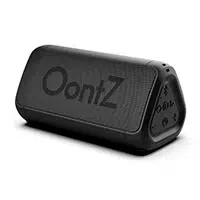
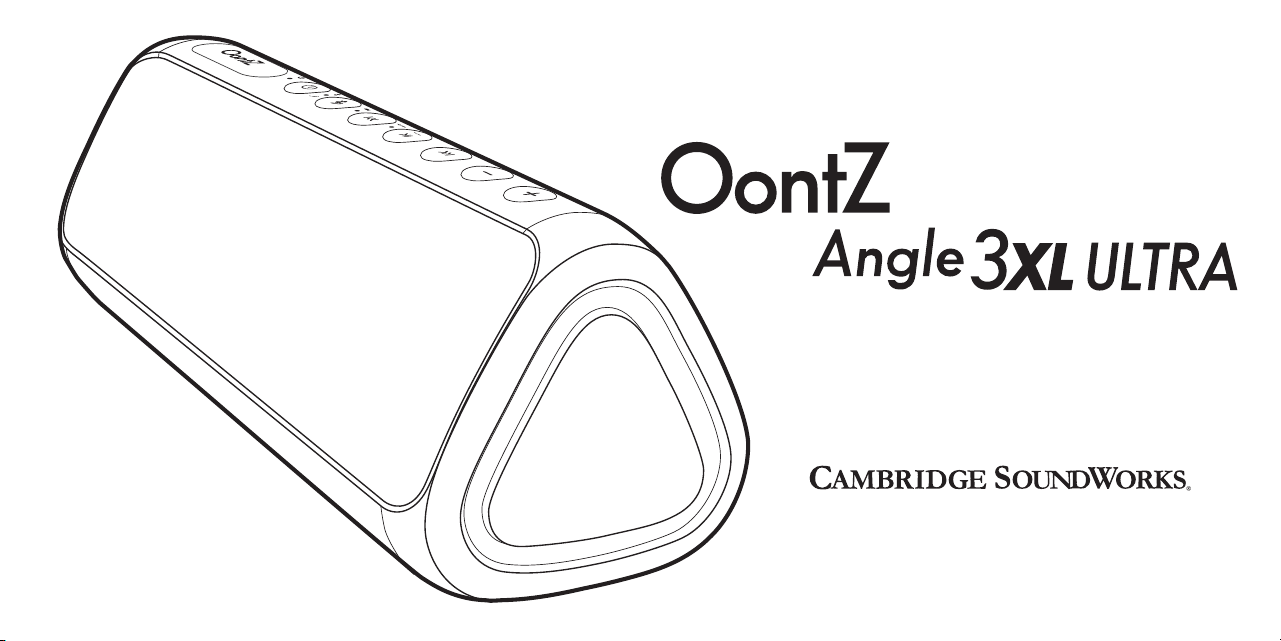
Powerful & Portable Bluetooth Speaker
Designed and Engineered By
TheOontZ.com
Quick Start Guide
Quick Start Guide
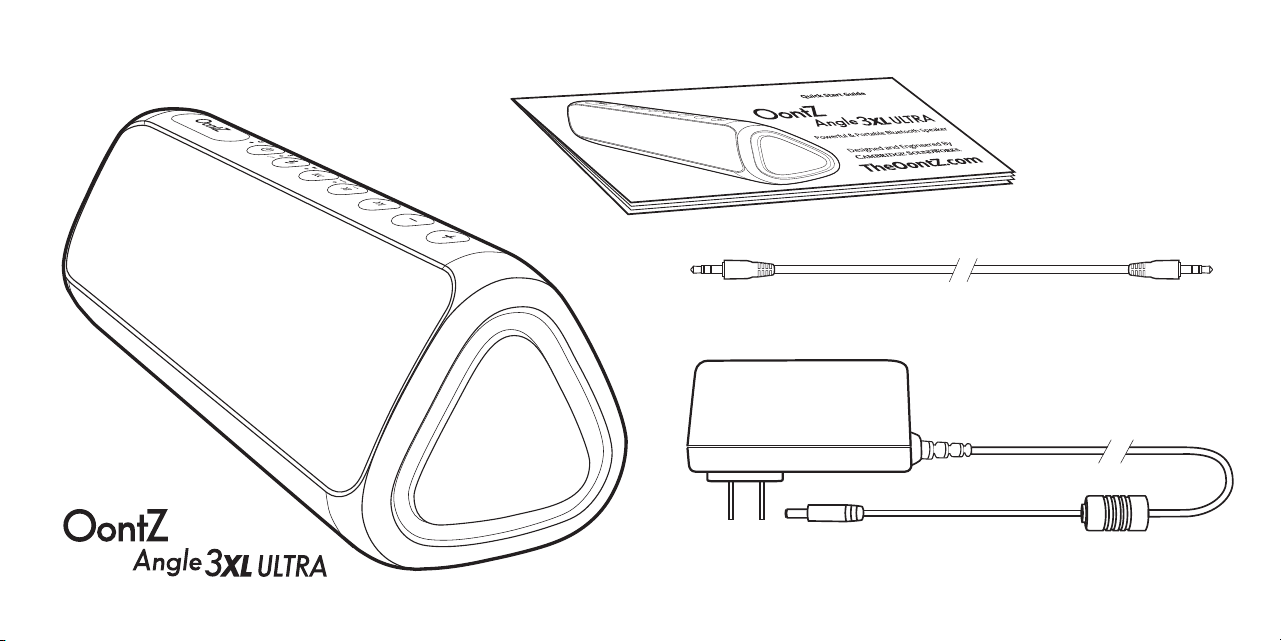
3.5mm Audio Cable
Power Adapter (Dual Voltage)
In the Package

The OontZ Angle 3XL ULTRA
Buttons, Lights, and Connectors
Battery Features and Charging the Battery
Turning On and Off
Pair & Connect with Your Device
To Play with Non-Bluetooth Audio Source Devices Use the 3.5mm Audio Cable
OontZ Wireless Dual Stereo - Connect two OontZ Angle 3XL ULTRA Speakers Together
IPX5 Water Resistant
Wireless Hands Free Personal Speakerphone
Contacting Customer Support & Reset Function
Safety and Precautions
1
2 - 4
5 - 6
7
8 - 11
12
13 - 17
18
19
20
21
Table of Contents
Pages
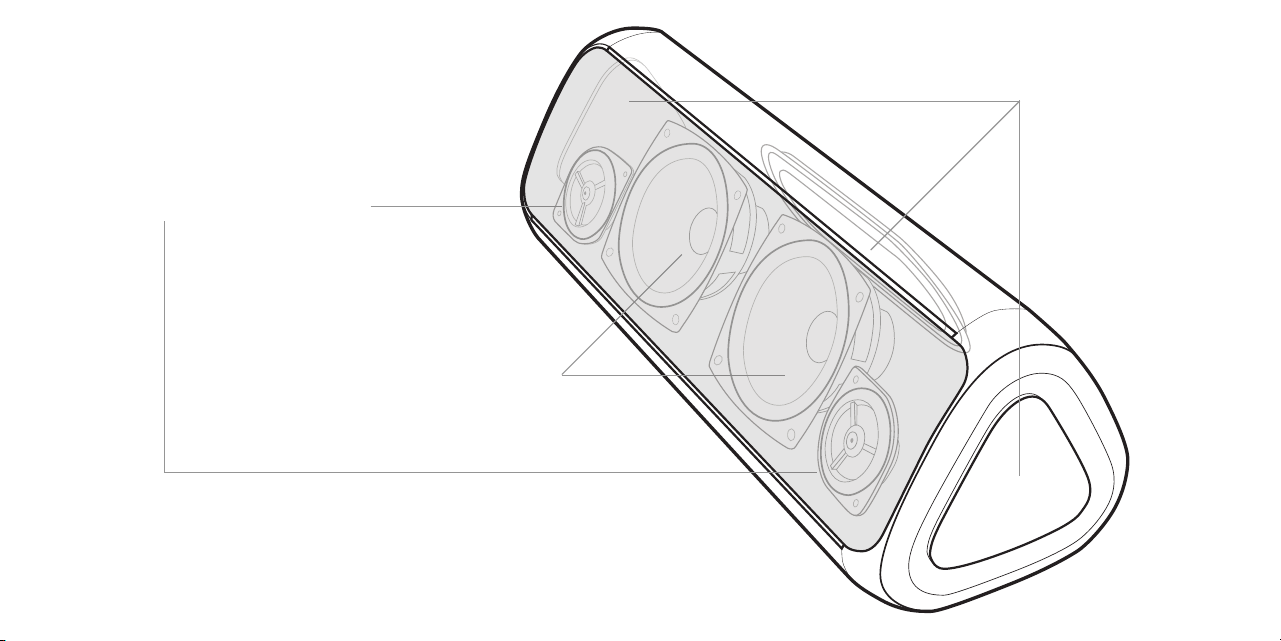
Three Passive
Bass Radiators
Two large precision drivers
Two custom tweeters
The OontZ Angle 3XL ULTRA
Page 1
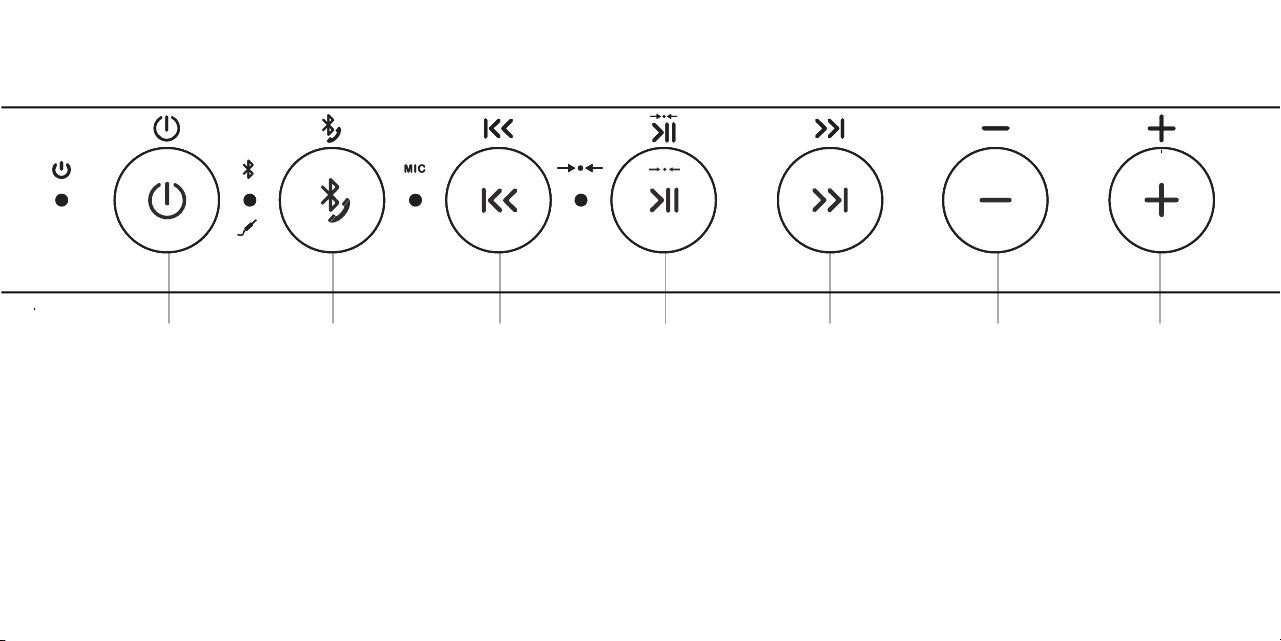
Buttons - Top of Speaker
Play/PauseBluetooth
(Dual Function)
Track Back Track Forward Volume UpVolume Down
- Press and Release
to Pause/Play
- Press and Release to
go to the beginning
of the track
- Press and Release
twice to go to
Previous Track
- Press to
decrease volume
- Press to
increase volume
- Press and Release
to go to next track
Power
Important - The volume control on your device and the speaker work independently of each other.
To play the speaker at the loudest volume, set the volume on your device to maximum and raise the volume on the speaker to maximum.
Important - Some apps may not support track back, track forward, or play/pause
Page 2
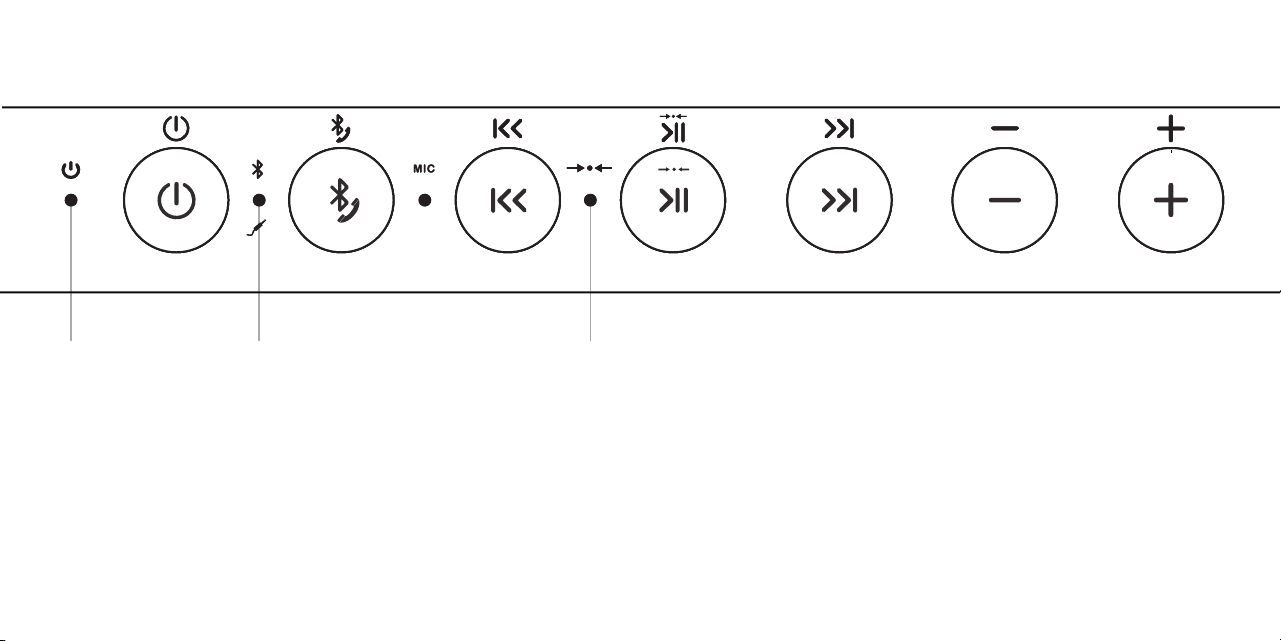
Lights - Top of Speaker
Red Light lit
when charging:
- Slowly flashing Red
battery is charging
- Solid Red
battery is fully charged
Blue Light lit
when speaker is on:
- Flashing Blue
The OontZ Angle 3XL ULTRA is ready
to pair and connect.
- Solid Blue
Your device has connected with the
OontZ Angle 3XL ULTRA and is ready
to play
- Blue Light will turn to Solid Green
when the 3.5mm audio cable is
plugged into the AUX IN Jack
- With a second OontZ Angle 3XL ULTRA speaker (sold separately)
you can wirelessly connect both speakers together to play with
OontZ Wireless Dual Stereo.
- See page 13 to learn about OontZ Wireless Dual Stereo
White Light lit when in
OontZ Wireless Dual Stereo:
Page 3
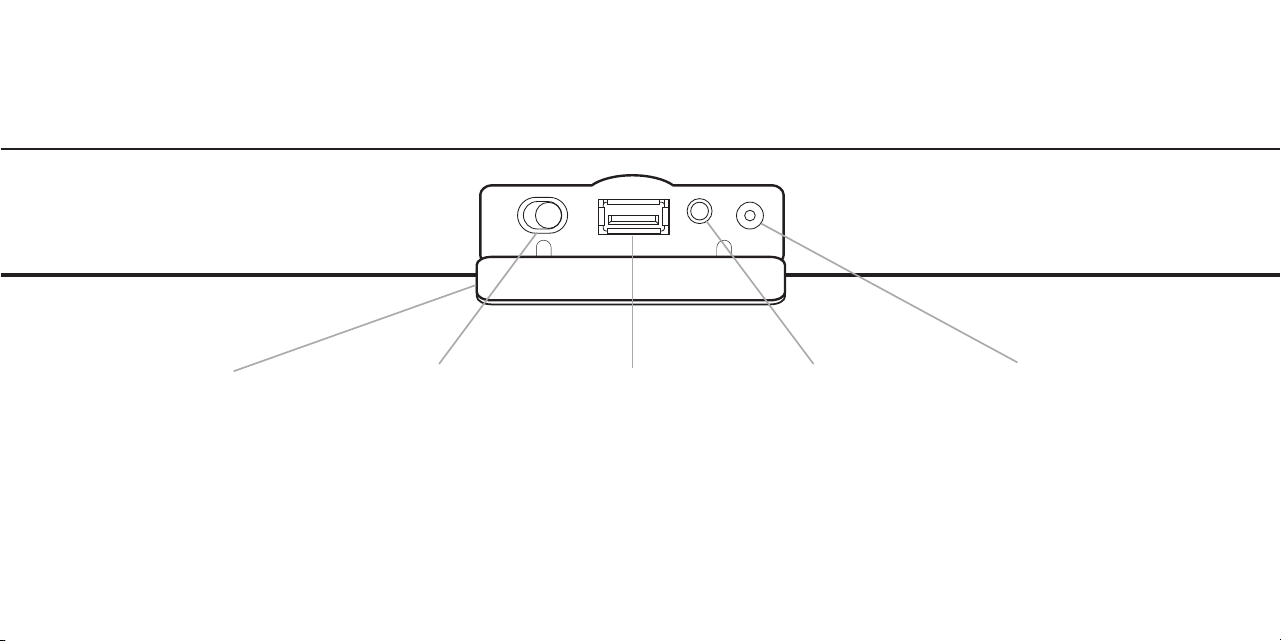
Connectors - Back of Speaker
To connect the Dual
Voltage Power Adapter
Use for keeping your
Smartphone or iPhone
charged while playing.
(5V/1A)
- See page 13 to learn about
OontZ Wireless Dual Stereo
AUX IN JackOontZ Wireless
Dual Stereo Switch
Connector Flap Charging JackUSB Power Bank
- To open pull gently from
the top to access
connectors, it is a snug fit
to provide water
resistance
- To close raise the flap into
position and gently press
into place to seal
Note: The connector flap needs to be closed to keep the speaker water resistant
Page 4

Battery Features
- The rechargeable battery comes with a partial charge
and the speaker is ready to play.
- For maximum playtime, fully charge the battery.
- You can play while charging.
- Replaceable Battery - a replacement battery is
sold separately at TheOontZ.com
Low Charge Remaining
- When the battery charge has less than 15%
remaining the Red Light will begin flashing rapidly.
- The volume will decrease to preserve the
remaining battery charge.
Music Play Time
Up to 8 hours on a full charge, at 2/3 volume. Louder
volumes will reduce the battery play time.
*Exception: when connected to certain devices, including the Amazon
Echo Dot or Amazon Echo, the Power Saving Feature is disabled
and the speaker will remain on until you turn the power off.
Power Saving Feature
- When playing from battery power the OontZ Angle 3XL ULTRA
will turn off after 30 minutes of not playing audio to conserve
the battery charge. *
- With the power adapter connected to the speaker and plugged
into a wall outlet, the OontZ Angle 3XL ULTRA will remain on
until you turn the power off.
- You can continue to keep the speaker plugged into a charging
source even when it is fully charged, keeping the speaker
turned on and available
Page 5
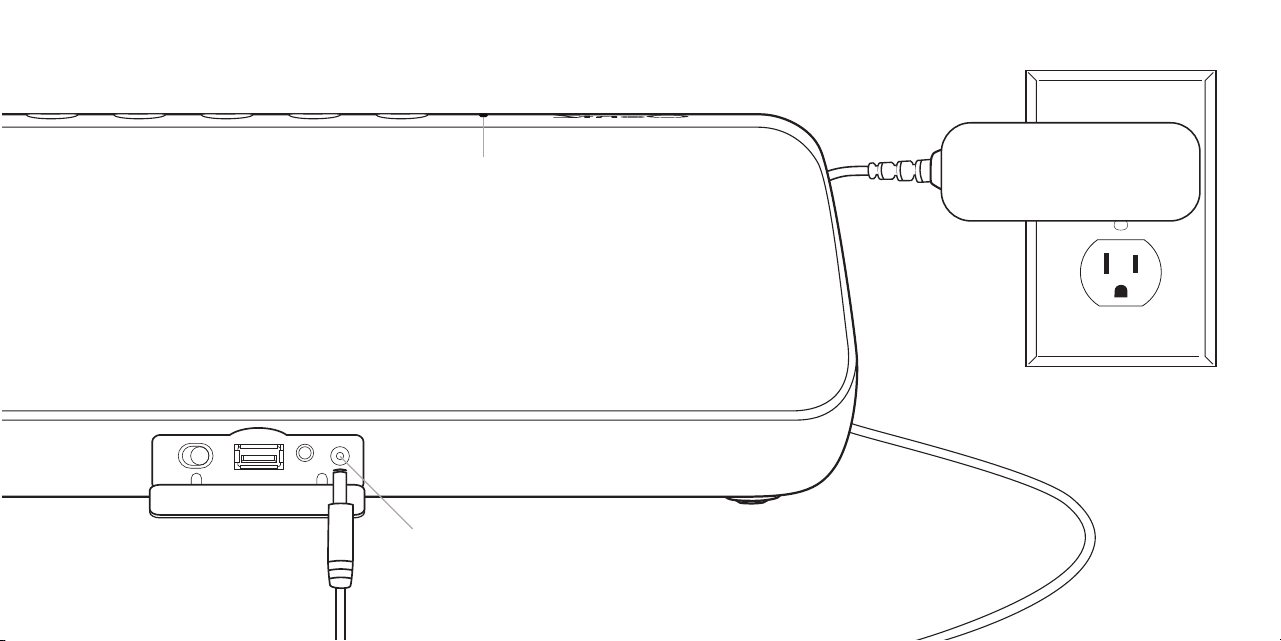
Charging the Battery
Charging Time:
- Up to 4 hours to fully charge a low battery.
To charge the OontZ Angle 3XL
ULTRA battery:
- Plug the connector end of the Power Adapter
into the Charging Jack.
- Plug the Power Adapter into a wall outlet.
- You can play your speaker while charging.
Red Light lit when charging:
- Slowly flashing Red
battery is charging
- Solid Red
battery is fully charged
Charging Jack
Page 6
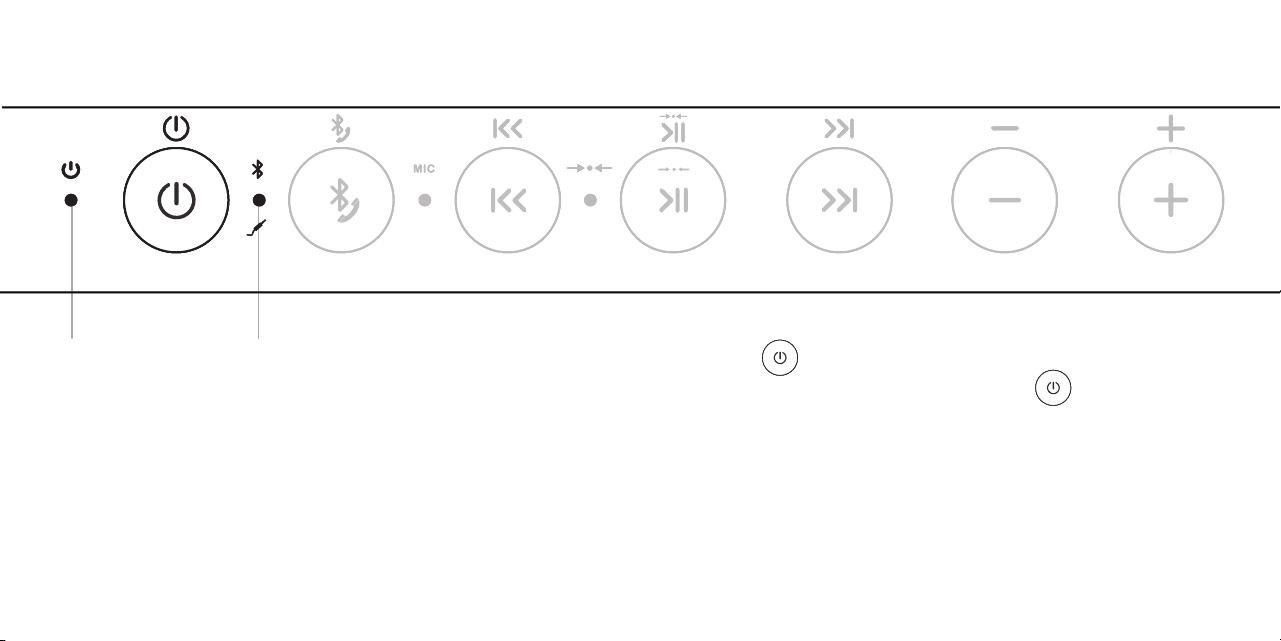
Turning On and Off
Red Light Blue Light
(Will remain lit if the power adapter is plugged in)
Press and Release the Power Button
Turn ON Turn OFF
Red Light will turn on for 1 second
Blue Light will turn on
Blue Light will turn off
- Flashing Blue
The speaker is in pairing mode
- Solid Blue
Your device has connected with the
OontZ Angle 3XL ULTRA and is ready to play
Press and Hold Down the
Power Button for 2 Seconds
Page 7
Pair & Connect with Your Device -- Step 1
- Your device needs to be within 100 unobstructed feet of the OontZ Angle 3XL ULTRA to pair and connect.
If there is an issue when connecting please move your device closer to the speaker, then pair and connect.
- When the charge is too low indicated by a flashing red light on the speaker, your device will not be able to connect with
the speaker, until you plug in the power adapter for charging.
Turn ON your OontZ Angle 3XL ULTRA
Flashing Blue Light
- The OontZ Angle 3XL ULTRA is ready to pair and connect.
Solid Blue Light
- Your device has connected to the OontZ Angle 3XL ULTRA and is ready to play.
- The OontZ Angle 3XL ULTRA allows the last device it was connected with to automatically reconnect with the speaker, each
time you turn the speaker on and that device is within range.*
The OontZ Angle 3XL ULTRA can be connected to one device at a time.
- To pair and connect to a different device, you need to first disconnect the currently paired device.
- To disconnect the current device, press and hold down the Bluetooth button for 3 seconds.
- The Blue Light will begin flashing and the OontZ Angle 3XL ULTRA is ready for the next device to pair and connect.
*Exception: certain devices may not automatically reconnect.
Amazon Echo devices will not automatically reconnect. You will need to say "Alexa, connect my speaker"
Page 8
Pair & Connect with Your Device -- Step 2 --
- Go to Settings > Bluetooth, check Bluetooth is on
- Select 'OontZ_Angle 3XL Uxxx' when it appears under DEVICES
(xxx: 3 characters which are unique to your speaker)
- Your device will connect in a few seconds
- The Blue Light will turn solid blue and there will be
a quiet chime
- You can now play your audio wirelessly to your
OontZ Angle 3XL ULTRA
- Go to Settings > Bluetooth, check Bluetooth is on
- Scan or Search and select 'OontZ_Angle 3XL Uxxx' when it appears under
AVAILABLE DEVICES (xxx: 3 characters which are unique to your speaker)
- Your device will connect in a few seconds
- The Blue Light will turn solid blue and there will be a quiet chime
- You can now play your audio wirelessly to your OontZ Angle 3XL ULTRA
Note: Your Smartphone or Tablet instructions may vary
-- With Your iPhone, iPad, or iPod -- With Your Smartphone, Tablet & Mobile Devices
-- With Your Apple Mac or Windows Laptop/Computer
For the pairing and connecting guide for your Apple Mac or Windows laptop/computer, please visit: TheOontZ.com/pairing
Important - The volume control on your device and the speaker work independently of each other. To play the speaker at the loudest
volume, set the volume on your device to maximum and raise the volume on the speaker to maximum.
Page 9

Pair & Connect with Your Device -- Step 2 --
-- From Your Amazon Echo or Amazon Echo Dot
- Open the Alexa app
- Go to the 'Home' menu by pressing the 3 horizontal lines in the upper left corner next to 'Home'
- Press 'Settings'
- Select your Amazon Echo device under 'Devices' by pressing it
- Press 'Bluetooth'
- Select the 'OontZ_Angle 3XL Uxxx' (xxx: 3 characters unique to your speaker) when it appears in the list of 'Available Speakers'
- After a few seconds Alexa will announce: "Connected to OontZ Angle 3XL Uxxx"
To connect the next time, turn on the OontZ Angle 3XL ULTRA and say "Alexa, connect my speaker" or "Alexa, pair"
To pair and connect with the Amazon Echo or Amazon Echo Dot the first time use the Alexa app.
For other Amazon Alexa devices please refer to their pairing and connecting instructions.
Page 10

Pair & Connect with Your Device -- Step 2 --
-- With Your Amazon Echo or Amazon Echo Dot (continued)
Important Note: When the OontZ Angle 3XL ULTRA is playing from battery power and connected to the Amazon Echo
device, the speaker will remain on and it will not automatically turn off after 30 minutes of not playing audio.
This will use up the battery charge.
We recommend to:
1) Keep the OontZ Angle 3XL ULTRA plugged into the power adapter and the speaker will remain on and available to play
from the Amazon Echo device until you manually turn off the speaker.
- Or -
2) Turn off the OontZ Angle 3XL ULTRA when you are done listening.
- Either turn off the speaker by pressing and holding down the power button for 2 seconds,
- or say "Alexa, disconnect my speaker" and the OontZ Angle 3XL ULTRA will automatically turn off after 30 minutes.
- When you want to connect and play to the speaker again turn on the OontZ Angle 3XL ULTRA and say "Alexa, connect
my speaker" or "Alexa, pair".
For assistance with the Alexa app, contact Amazon's Customer Service.
Open the Alexa app and select Help & Feedback > Email Customer Service
Page 11
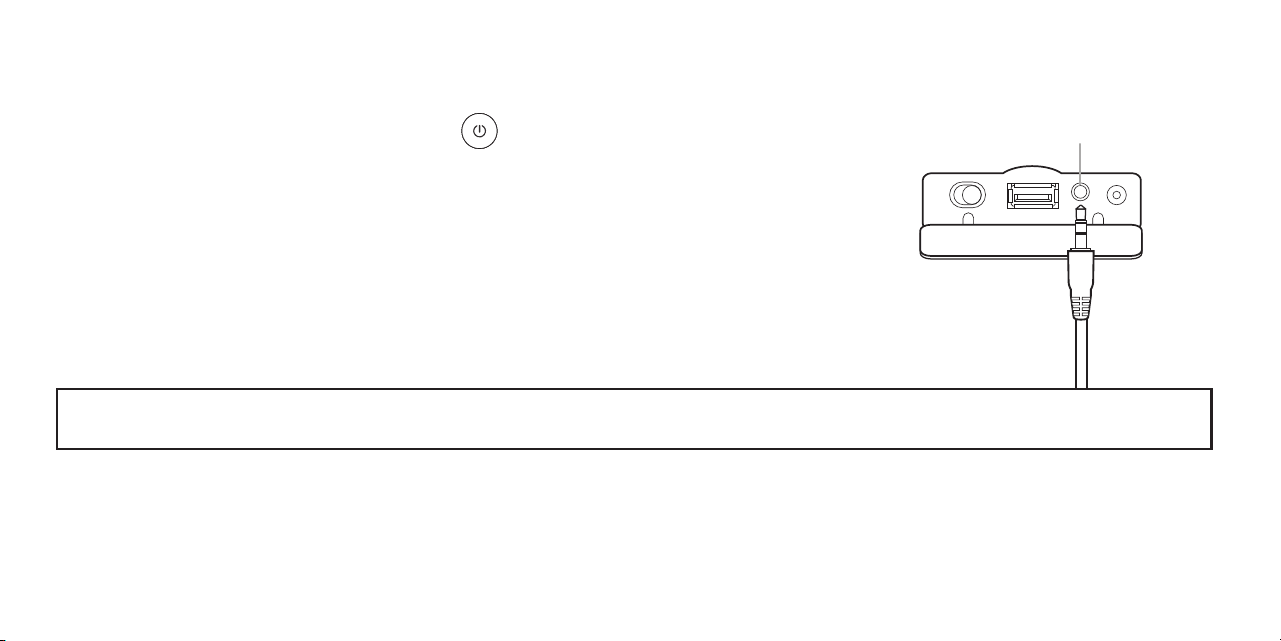
To Play with Non-Bluetooth Audio Source Devices Use the 3.5mm Audio Cable
AUX IN Jack
- Plug one end of the 3.5mm audio cable into the AUX IN Jack on the speaker.
- The Blue Light will turn solid Green and the speaker will say “AUX IN Source”
- Plug the other end of the 3.5mm audio cable into the headphone jack on your device.
- Make sure both ends of the cable are fully inserted
- You are now ready to play.
Important: The Bluetooth on the OontZ Angle 3XL ULTRA is disabled when the 3.5mm audio cable is connected to the speaker.
You need to remove the 3.5mm audio cable from the speaker in order to connect to a Bluetooth device.
- Note: When the rubber flap is open to allow the 3.5mm audio cable to be connected, the speaker is not water resistant.
The rubber flap needs to be closed to keep the speaker water resistant.
Turn ON your OontZ Angle 3XL ULTRA
- Note: The volume control on your device and the speaker work independently of each other. To play the speaker at the loudest
volume, set the volume on your device to maximum and raise the volume on the speaker to maximum.
Page 12
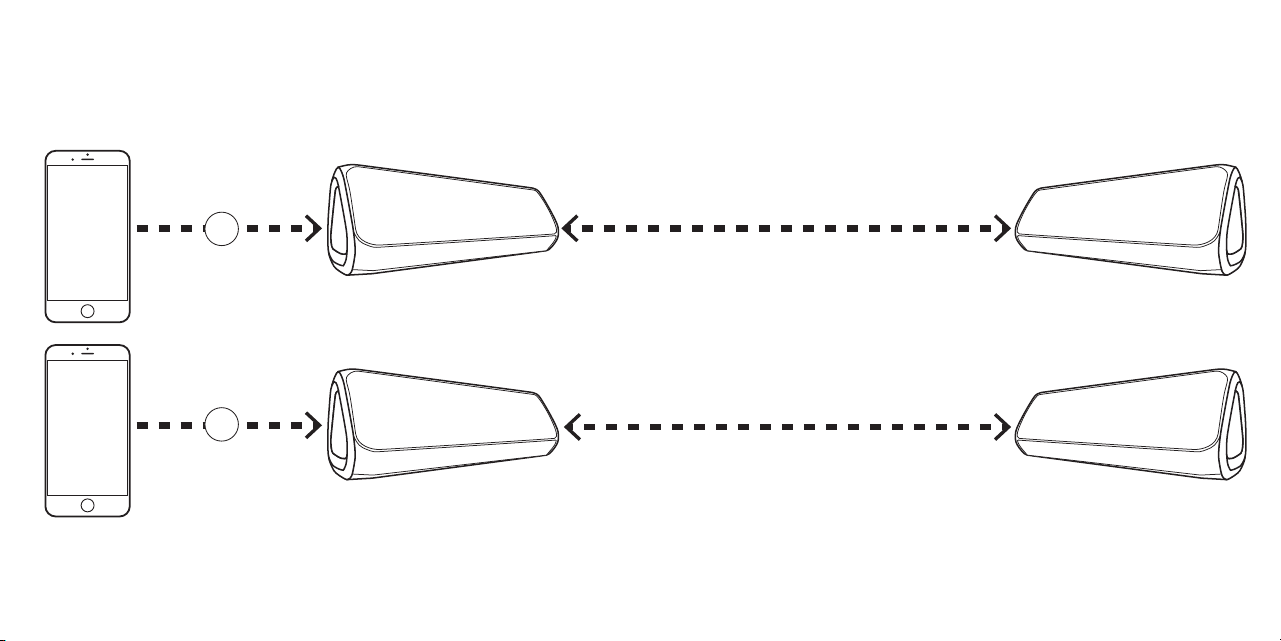
Play your music wirelessly through both speakers up to 100 feet apart
*
*Placing the speakers on the ground or having walls or obstructions between the
speakers will significantly reduce the distance apart the two speakers can play together
Second OontZ Angle 3XL ULTRA sold separately, available at TheOontZ.com
OontZ Wireless Dual Stereo -
Connect two OontZ Angle 3XL ULTRA speakers together
Left Channel - Right Channel
for stereo separation
Left Channel Right Channel
Bluetooth
for playing music
Audio Cable
for playing the
audio from a video
or
Bluetooth
for playing music
Audio Cable
for playing the
audio from a video
or
Dual Stereo
for full stereo in separate areas
Full Stereo Full Stereo
Page 13
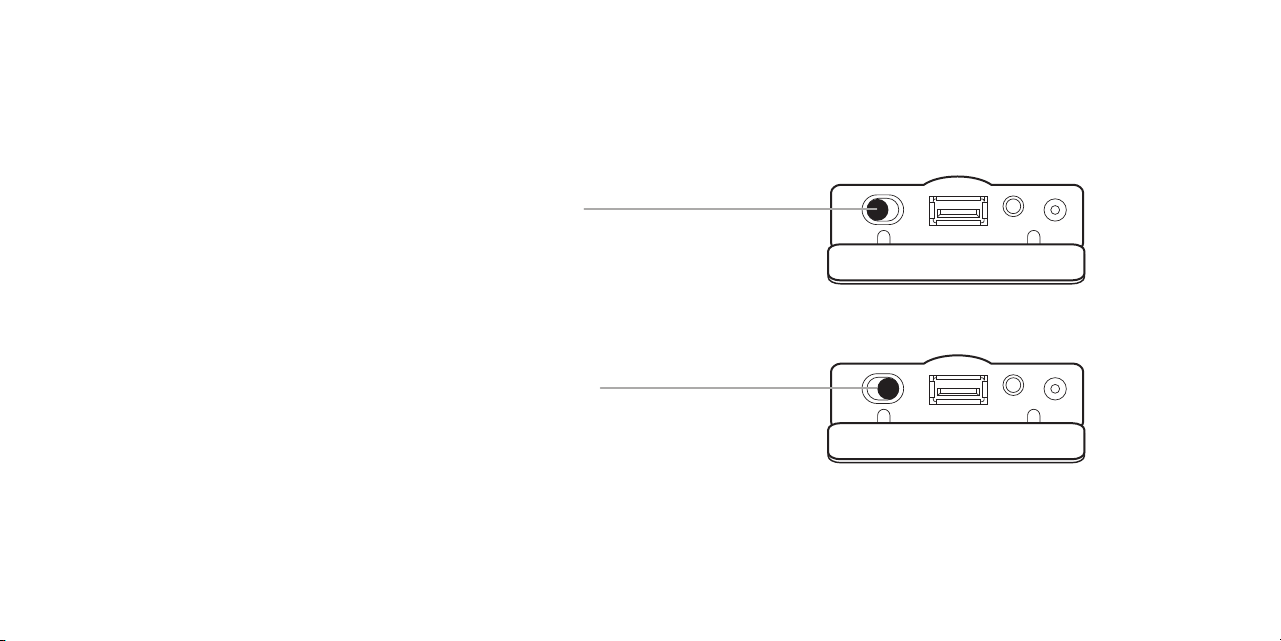
– On both OontZ Angle 3XL ULTRA speakers slide the
OontZ Wireless Dual Stereo switch to the left position.
To set the speakers for Left Channel - Right Channel
For stereo separation when both speakers are in the same area
– On both OontZ Angle 3XL ULTRA speakers slide the
OontZ Wireless Dual Stereo switch to the right position.
– Slide the switch on both speakers, even while playing.
To set the speakers for Dual Stereo
Both speakers will play in full stereo
To switch between Left Channel - Right Channel and Dual Stereo
Setting the OontZ Wireless Dual Stereo Switch on both speakers
Page 14
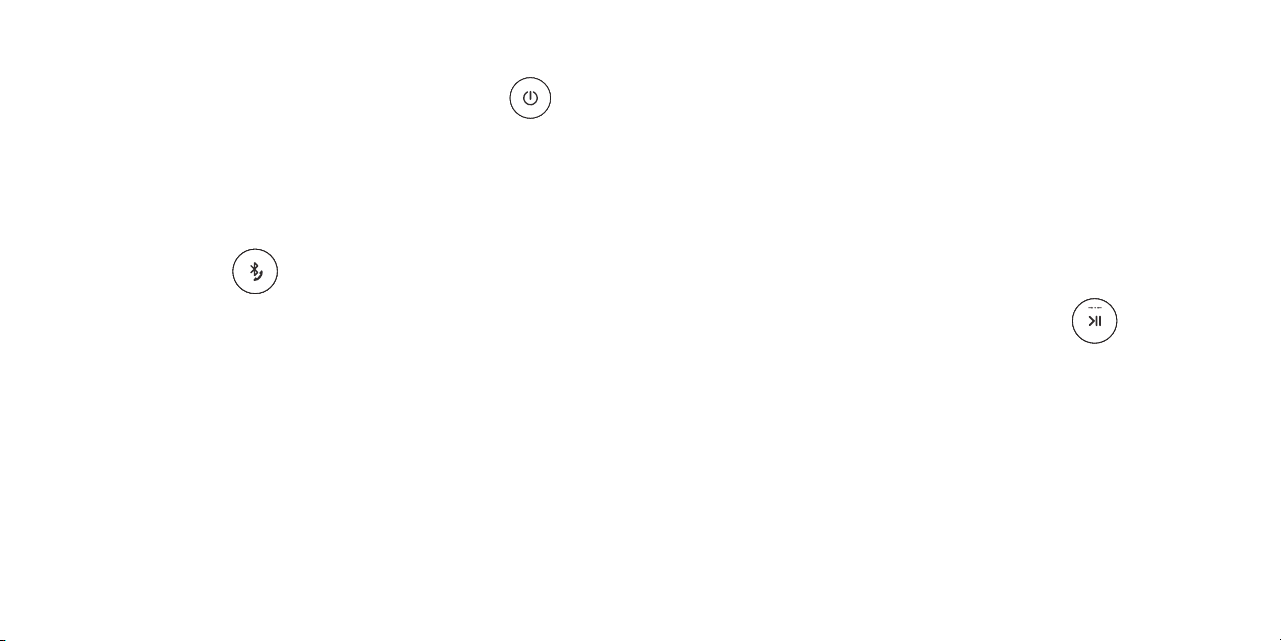
– Turn on both OontZ Angle 3XL ULTRA speakers.
– Pair and Connect one of the speakers with your device. When connected the Blue Light will be lit solid.
This speaker will serve as the Play Control Speaker.
– The second speaker must not be connected to any device, its Blue Light needs to be flashing. If the second speaker has a solid
Blue Light a device is connected to it. You need to disconnect the device from the speaker, by pressing and holding down the
Bluetooth button for 3 seconds until the Blue Light begins flashing.
- On the Play Control Speaker (speaker with solid Blue Light) press and hold down the Play/Pause button
for 5 seconds until the flashing White Light appears and the speaker says “Dual Pairing”
- The Play Control Speaker will then connect to the second speaker. This can take a few seconds
- When the switches are set for Left Channel - Right Channel the Play Control Speaker will say “Left Channel” and the
second speaker will say “Right Channel”
- When the switches are set for Dual Stereo both speakers will say “Dual Stereo”
Connecting two OontZ Angle 3XL ULTRA Speakers together for OontZ Wireless Dual Stereo
Page 15
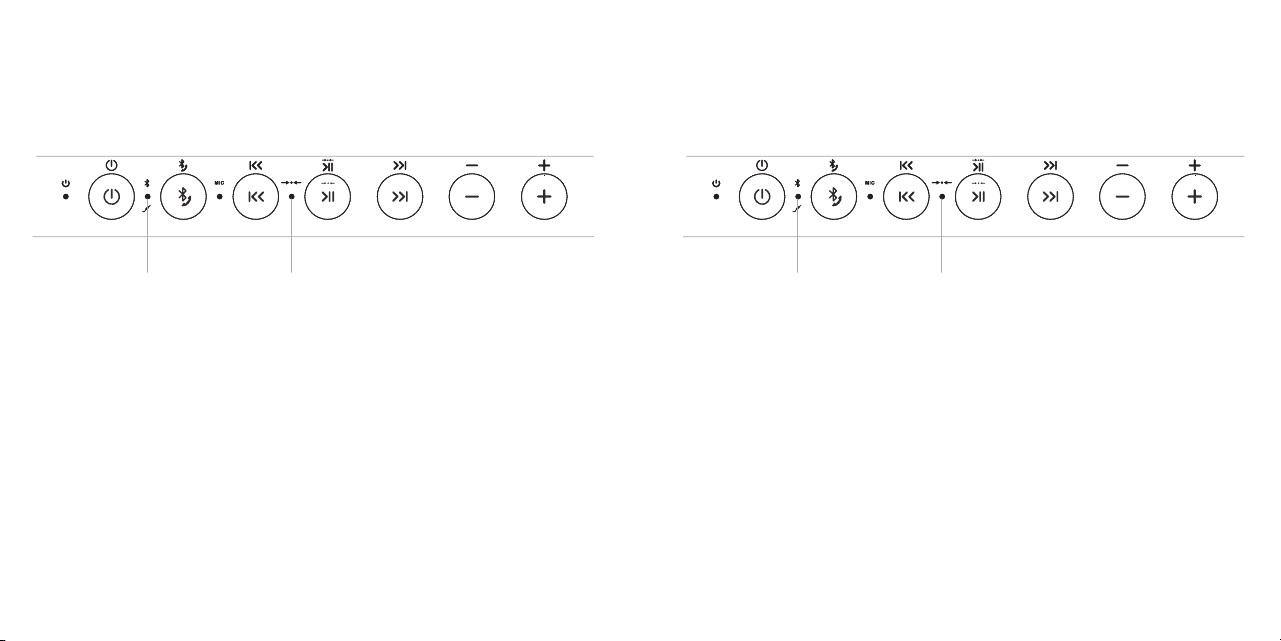
– Use the buttons on the Play Control Speaker for play/pause, track back, track forward, answer
and end phone calls. These controls are disabled on the second speaker when paired together.
– Use the Play Control Speaker for connecting to different audio devices via Bluetooth or AUX IN.
The Bluetooth and AUX IN are disabled on the second speaker when paired together.
– Speakerphone call audio will only play through the Play Control Speaker
Two OontZ Angle 3XL ULTRA Speakers connected for OontZ Wireless Dual Stereo
Play Control Speaker Second Speaker
Blue Light
lit solid
White Light
lit solid
Blue Light
OFF
White Light
lit solid
Page 16

Turning the speakers off
– Turning the Play Control Speaker off will turn both speakers off.
– Turning the second speaker off first will only turn that speaker off and the Play Control Speaker will play as a single speaker.
Turning the speakers back on
– Turn both speakers on and they will automatically try to connect to each other again.
– Turn one of the speakers on and a device can connect with it, and play as a single speaker.
Disconnecting the two speakers from each other
– Turn both speakers on.
– On the Play Control Speaker press and hold down the Play/Pause button for 5 seconds.
The White Lights will turn off and the speakers will be disconnected from each other.
Playing the audio from a video with OontZ Wireless Dual Stereo
– To play the audio from a video or TV with OontZ Wireless Dual Stereo you will need to connect the Play Control Speaker
to your device or TV using the 3.5mm audio cable in order for the audio and video to play in sync. If the Play Control
Speaker is connected over Bluetooth to your device or TV there will be a delay in the audio playback from the video and
they will not play in sync.
OontZ Wireless Dual Stereo - Important Notes
Page 17
IPX5 Water Resistant
No more worries about the rain
or getting splashed
Perfect for taking to the beach or
by the pool
The connector flap needs to be
closed to keep the speaker water
resistant and dustproof
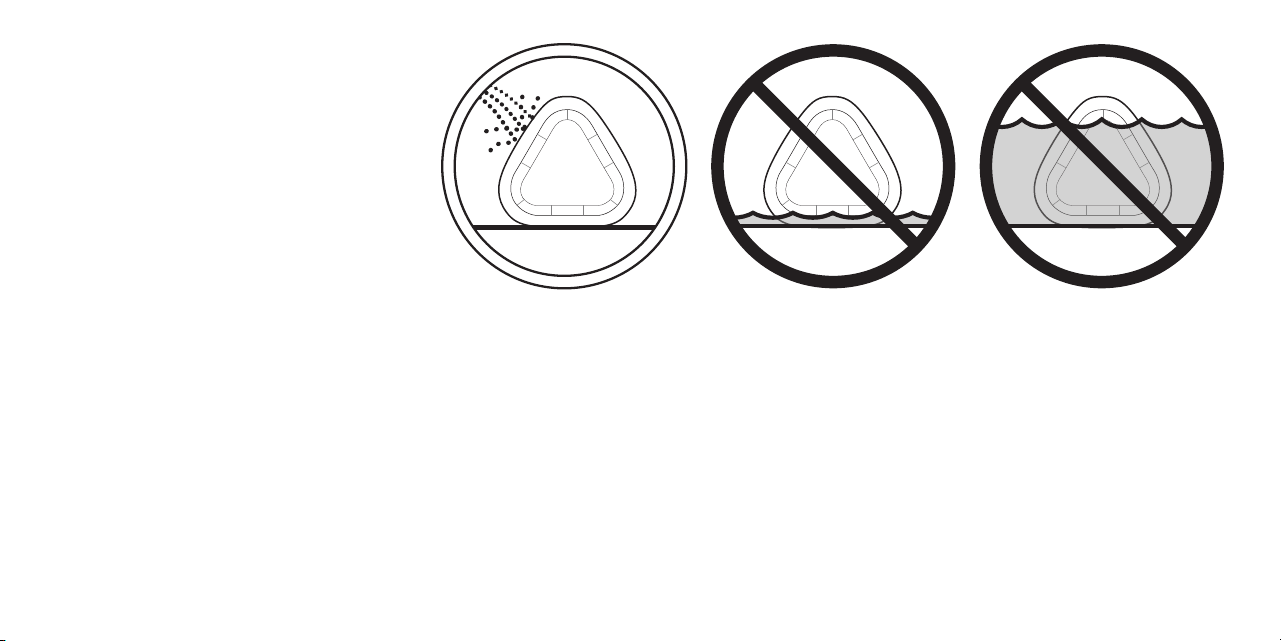
IPX5 rating - The OontZ Angle 3XL ULTRA can resist gentle water spray & splash but cannot be partially or fully submerged
or left in a wet environment for an extended period of time, any of which could cause unrepairable damage to the speaker.
When charging or using the 3.5mm audio cable, please keep the speaker away from water as it can be damaged by water
entering the connectors.
DO NOT allow speaker
to sit in water
DO NOT allow speaker
to submerge fully or
partially in water
Gentle Water Spray
or Splash is okay
Safety Precaution: When the power adapter is connected to the OontZ Angle 3XL ULTRA speaker
and plugged in to a wall outlet, do not use the speaker in the shower, bath, rain or near water, to
prevent risk of electric shock. Always unplug the power adapter from the speaker and wall
outlet before the speaker is placed near or exposed to water or rain.
Page 18
Wireless Hands Free Personal Speakerphone
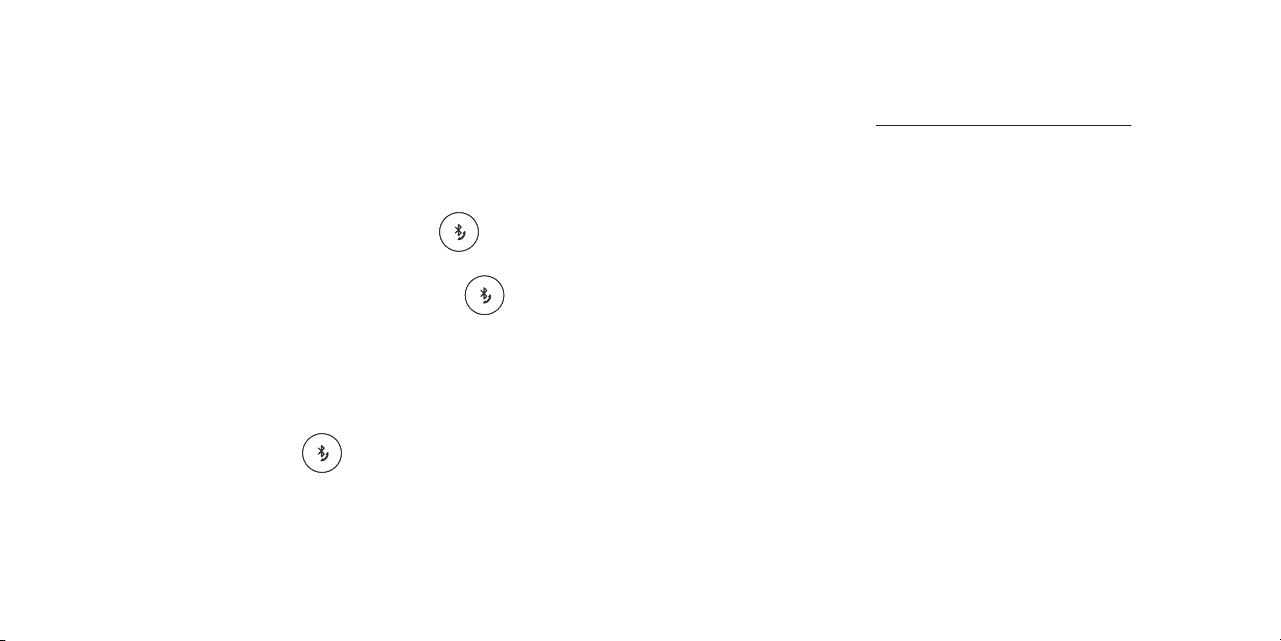
- Press and Hold Down the Bluetooth Button for 2 Seconds
- Please keep the speaker close in front of you so you may be heard clearly by the listener.
- You can use your Smartphone or iPhone to switch between using Hands Free Speakerphone and your phone.
- When two speakers are paired together in OontZ Wireless Dual Stereo, calls will come through the Play Control Speaker only.
Use the Bluetooth button on the Play Control Speaker for the speakerphone functions. For more information on
OontZ Wireless Dual Stereo please see page 13.
The Wireless Hands Free Personal Speakerphone feature works over Bluetooth with Smartphones and iPhones only;
this feature is not supported when connected to other types of devices.
To answer an Incoming Call / To End a Call
- Press and Release the Bluetooth Button
To Reject an Incoming Call
Page 19

Apple, iPhone, iPad, iPod, and Mac are registered trademarks of Apple Inc.; Amazon, Alexa, Amazon Echo and Amazon Echo Dot are registered trademarks of Amazon.com, Inc.
Windows is a registered trademark of Microsoft Corporation; Bluetooth is a registered trademark of Bluetooth SIG, Inc.
Reset Function
To Reset the OontZ Angle 3XL ULTRA follow these steps to
disconnect and then reconnect the replaceable battery:
Step 1 - IMPORTANT : Turn off the OontZ Angle 3XL ULTRA and
unplug the power adapter from the speaker. Also remove the
3.5mm Audio cable, if it is plugged in.
Step 2: Unscrew the battery cover on the bottom of the speaker
using a flat head screwdriver then lift up and remove the cover
Step 3: Gently pull the battery cables up from the battery
compartment until you can see the black plastic connector clamp.
Press down on the clamp and gently pull the two cable ends apart.
Step 4: Wait 15 seconds then reconnect the two cable ends and
the clip will lock them together.
Step 5: Replace and screw in the battery cover.
The speaker has now been reset and you can turn it on.
Please check for updates for your speaker at:
TheOontZ.com/updates
and select the OontZ Angle 3XL ULTRA
For online troubleshooting tips please visit:
TheOontZ.com/troubleshooting
and select the OontZ Angle 3XL ULTRA
Contact us at:
TheOontZ.com/support
and fill in our customer support form
If you have a question about your OontZ Angle 3XL ULTRA
or experience an issue with the speaker, our Customer
Support Team wants to assist you.
Customer Support
Page 20

Safety and Precautions
1.
2.
3.
4.
5.
6.
7.
8.
9.
10.
11.
12.
13.
14.
When the power adapter is connected to the OontZ Angle 3XL ULTRA speaker and plugged in to a wall outlet, never use the speaker in the
shower, bath, rain or near water, to prevent risk of electric shock. Always unplug the power adapter from the speaker and wall outlet
before the speaker is placed near or exposed to water or rain.
Read and follow all instructions – All operating and use instructions should be followed.
Protect the power adapter cord from being pinched, particularly at the connectors.
Unplug the power adapter during lightning storms or when unused for long periods of time.
Unplug the power adapter before opening the replaceable battery cover.
Do not place speaker near any heat sources such as radiators, heat registers, stoves, or other apparatus (including amplifiers) that produce heat.
Refer all servicing to qualified personnel. Servicing is required when the speaker has been damaged in any way. Do NOT use the speaker if it has been damaged in any way.
Do NOT make unauthorized alterations to this speaker.
Use this speaker only with an agency approved power supply which meets local regulatory requirements (e.g., UL, CSA, VDE, CCC) in accordance with the
manufacturer’s specifications.
Do NOT place naked flame sources, such as lighted candles, on or near the speaker.
Do not expose the speaker to excessive heat (e.g. from storage in direct sunlight, fire or the like)
If the battery leaks, do not allow the liquid to come in contact with the skin or eyes. If contact is made, seek medical advice.
Only use the official OontZ Angle 3XL ULTRA replacement battery when replacing the battery for the OontZ Angle 3XL ULTRA
Unplug the power adapter during lightning storms or when unused for long periods of time.
This device complies with Part 15 of the FCC Rules. Operation is subject to the following two conditions:
(1) This device may not cause harmful interference, and (2) this device must accept any interference received, including interference that may cause undesired operation.
NOTE 1: This equipment has been tested and found to comply with the limits for a Class B digital device, pursuant to part 15 of the FCC Rules. These limits are designed to
provide reasonable protection against harmful interference in a residential installation. This equipment generates, uses and can radiate radio frequency energy and, if not
installed and used in accordance with the instructions, may cause harmful interference to radio communications. However, there is no guarantee that interference will not
occur in a particular installation. If this equipment does cause harmful interference to radio or television reception, which can be determined by turning the equipment off
and on, the user is encouraged to try to correct the interference by one or more of the following measures:
- Reorient or relocate the receiving antenna.
- Increase the separation between the equipment and receiver.
- Connect the equipment into an outlet on a circuit different from that to which the receiver is connected.
- Consult the dealer or an experienced radio/TV technician for help.
NOTE 2: Any changes or modifications to this unit not expressly approved by the party responsible for compliance could void the user's authority to operate the equipment.
Page 21