Install Instructions
& User Guide
3URGXFW
LQFK(OHFWULF:DOO2YHQ
):2&966

3
CONTENTS
PRECAUTIONS
. . . . . . . . . . . . . . . . . . . . . . . . . . . . . . . . . . . . . . . . . . . . . . . . . . . . . . . . . . . . . . . 4
IMPORTANT SAFETY INSTRUCTIONS . . . . . . . . . . . . . . . . . . . . . . . . . . . . . . . . . . . . . . . . . . . 5
SPECIFICATIONS. . . . . . . . . . . . . . . . . . . . . . . . . . . . . . . . . . . . . . . . . . . . . . . . . . . . . . . . . . . . . . 7
PARTS AND FEATURES . . . . . . . . . . . . . . . . . . . . . . . . . . . . . . . . . . . . . . . . . . . . . . . . . . . . . . . . 8
INSTALLATION INSTRUCTIONS . . . . . . . . . . . . . . . . . . . . . . . . . . . . . . . . . . . . . . . . . . . . . . . . 9
BEFORE USE . . . . . . . . . . . . . . . . . . . . . . . . . . . . . . . . . . . . . . . . . . . . . . . . . . . . . . . . . . . . . . . . .13
OPERATION INSTRUCTIONS. . . . . . . . . . . . . . . . . . . . . . . . . . . . . . . . . . . . . . . . . . . . . . . . . . 14
CARE AND MAINTENANCE . . . . . . . . . . . . . . . . . . . . . . . . . . . . . . . . . . . . . . . . . . . . . . . . . . . 18
TROUBLESHOOTING. . . . . . . . . . . . . . . . . . . . . . . . . . . . . . . . . . . . . . . . . . . . . . . . . . . . . . . . . 21
LIMITED WARRANTY . . . . . . . . . . . . . . . . . . . . . . . . . . . . . . . . . . . . . . . . . . . . . . . . . . . . . . . . 22

4
PRECAUTIONS
EXPLANATION OF SYMBOLS
WARNING
Hazards or unsafe practices which COULD result in severe personal injury or death.
CAUTION
Hazards or unsafe practices which COULD result in minor personal injury.
WARNING: Read and understand all safety precautions. Failure to follow all instructions described in this user
manual may result in electric shock, fire and/or serious personal injury. The warnings, cautions and instructions
discussed in this user manual cannot cover all possible conditions and situations that may occur.

5
IMPORTANT SAFETY INSTRUCTIONS
WARNING: When properly cared for, your wall oven has been designed to be safe and reliable. Read all
instructions carefully before use. These precautions will reduce the risk of burns, electric shock, fire and injury
to people. When using this kitchen appliance, basic safety precautions must be followed; including those in the
following pages.
PROPER INSTALLATION AND MAINTENANCE
IMPORTANT: Save this manual for the local electrical inspectors use.
•
Have the installer show you the location of the circuit breaker or fuse. Mark it for easy referenc
e.
•
Be sure your appliance is properly installed and grounded by a qualified service personnel. Connect only to
a properly grounded outlet. (Refer to "Installation Instructions" on page 9 for details.)
•
This appliance is intended for normal family household use only. It is not approved for outdoor use. If y
ou
ha
ve any questions, contact the manufacturer.
• DO NOT store or use corrosive chemicals, vapors, flammables or nonfood products in or ne
ar this
applianc
e. It is specifically designed for use when heating or cooking food. The use of corrosiv
e chemicals in
he
ating or cleaning will damage the appliance and could result in injury
.
•
DO NOT operate this appliance if it is not working properly, or if it has been damaged. C
ontact an qualified
service personnel.
•
DO NOT obstruct oven v
ents.
•
DO NOT repair or replace any part of the appliance, unless specifically recommended in this manual. Ref
er
all servicing of this applianc
e to a qualified service personnel.
FIRE SAFETY
• DO NOT use aluminum foil or protective liners to line any part of the appliance, especially the oven
bot
tom. Installing these liners may result in risk of electric shock or fire.
• If materials inside an oven should ignite, keep door closed. Turn off the appliance and disconnect the cir
cuit
a
t the circuit breaker bo
x.
•
Use this appliance only for its intended purpose as described in this manual. For ex
ample, NEVER use the
applianc
e for warming or heating the room. NEVER use the appliance for storag
e.
•
ALWAYS have a working smoke detector near the kit
chen.
•
In the event that personal clothing or hair catches fire, drop and roll immediately to extinguish f
lames.
Smother f
lames from food fires other than grease fir
es with baking soda.
•
Have an appropriate fire extinguisher available, nearby, highly visible and easily accessible near the oven.
WARNING: To reduce the risk of personal injury in the event of a grease fire, observe the following.
•
Smother flames with a close-fitting lid, cookie sheet, or metal tray, then turn off the burner. Exer
cise
caution t
o prevent burns. If the flames do not go out immediately, evacuate and call the fire department.
•
NEVER pick up a flaming pan. You may be burned.
• DO NOT use water on grease fires.
• Smother the fire or flame. Or use dry chemical or foam-type extinguishers.

6
• Use an extinguisher ONLY if:
1) You know you have a Class ABC extinguisher, and you already know how to operate it.
2)
The fire is small and contained in the area where it started.
3) The fire department is being called.
4) You can fight the fire with your back to an exit.
BURN PREVENTION
• DO NOT touch heating elements or interior surfaces of oven. Heating elements may be hot even though they
ar
e dark in color. Interior surfaces of an oven become hot enough to cause burns. During and aft
er use, DO
NO
T touch, or let clothing, potholders, or other flammable materials contact heating elements or int
erior
sur
faces of oven until they have had sufficient time to cool. Other surfaces of the appliance may bec
ome hot
enough t
o cause burns. Among these surfaces are oven vent openings, surfaces near these openings and ove
n
doors.
•
Exercise caution when opening the appliance. Standing to the side, open the door slowly and slightly to
let
hot air and/
or steam escape. Keep your face clear of the opening and make sure there are no childr
en or
pets ne
ar the unit. After the release of hot air and/or steam, proceed with your cooking. K
eep doors shut
unless nec
essary for cooking or cleaning purposes. DO NOT leave open doors unatt
ended.
•
DO NOT heat or warm unopened food containers. Build-up of pressure may cause the container to
burst
and cause injury.
•
ALWAYS place oven racks in desired location while oven is cool. If a rack must be moved while ov
en is hot,
DO NO
T let potholder contact the hea
ting elements.
•
ALWAYS use dry potholders. Moist or damp potholders on hot surfaces may result in burns from stea
m. DO
NO
T let potholder touch hot heating elements. DO NOT use a tow
el or other bulky cloth.
•
Secure all loose garments before beginning. Tie long hair so that it does not hang loose, and DO NOT we
ar
loose fit
ting clothing or hanging garments, such as ties, scarves, jewelry, or dangling sleeves.
CHILD SAFETY
• When children become old enough to use the appliance, it is the legal responsibility of the parents or legal
guar
dians to ensure that they are instructed in safe operation of the appliance by
qualified persons.
•
DO NOT allow anyone to climb, stand, lean, sit, or hang on any part of the appliance, especially a door
,
w
arming drawer or storage drawer. This can damage the appliance, and the unit may tip over, pot
entially
causing se
vere injury
.
• DO NOT allow children to use this appliance unless closely supervised by an adult. Children and pets should
not be left alone or una
ttended in the area where the appliance is in use. They should NEVER be allowed to
play in its vicinity, whether or not the appliance is in use.
• Items of interest to children should NOT be stored in an appliance, in cabinets above an applianc
e or on the
backsplash. Childr
en climbing on an appliance to reach items could be potentially cause serious injury.
SAVE THESE INSTRUCTIONS
FOR FUTURE REFERENCE
7
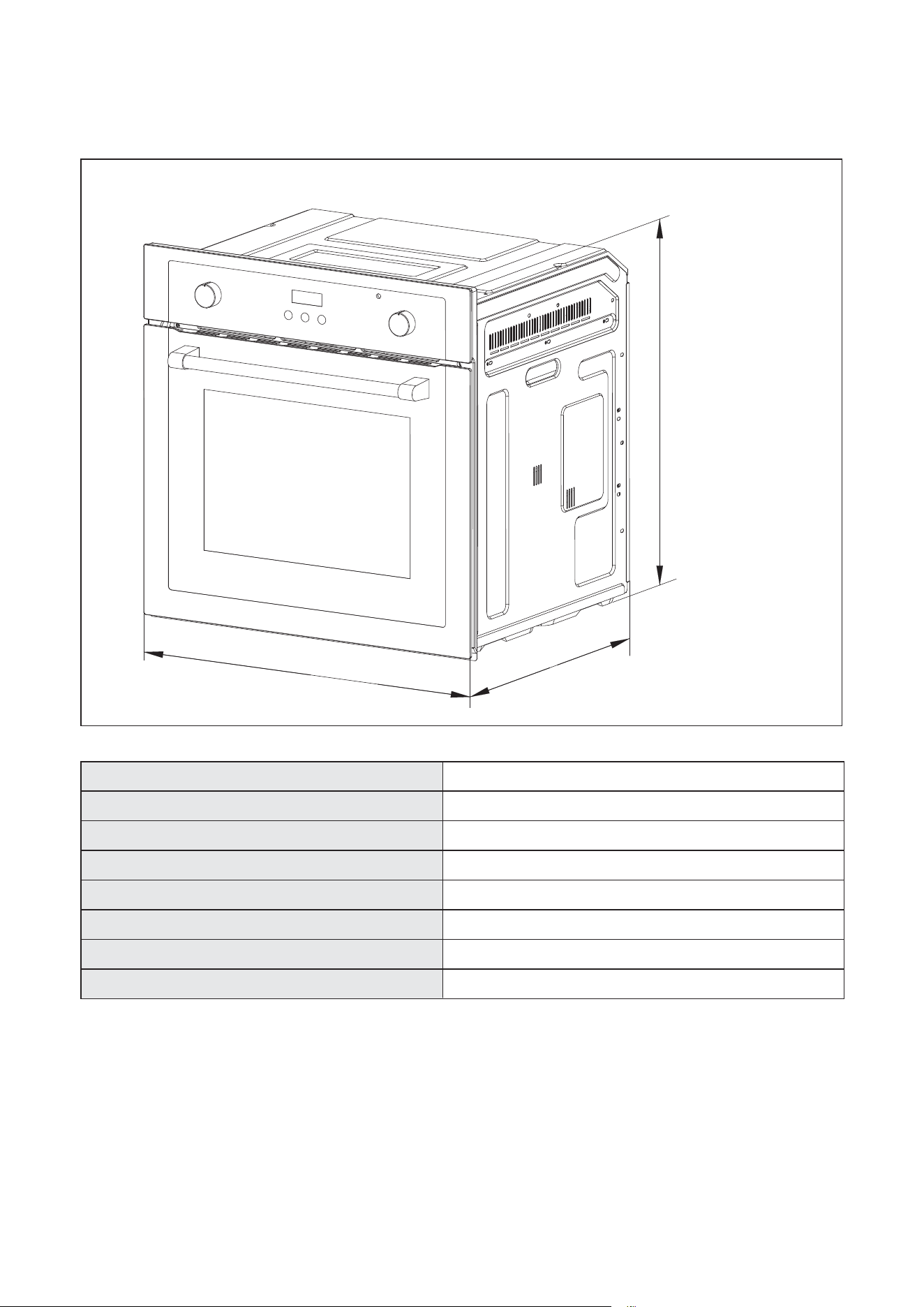
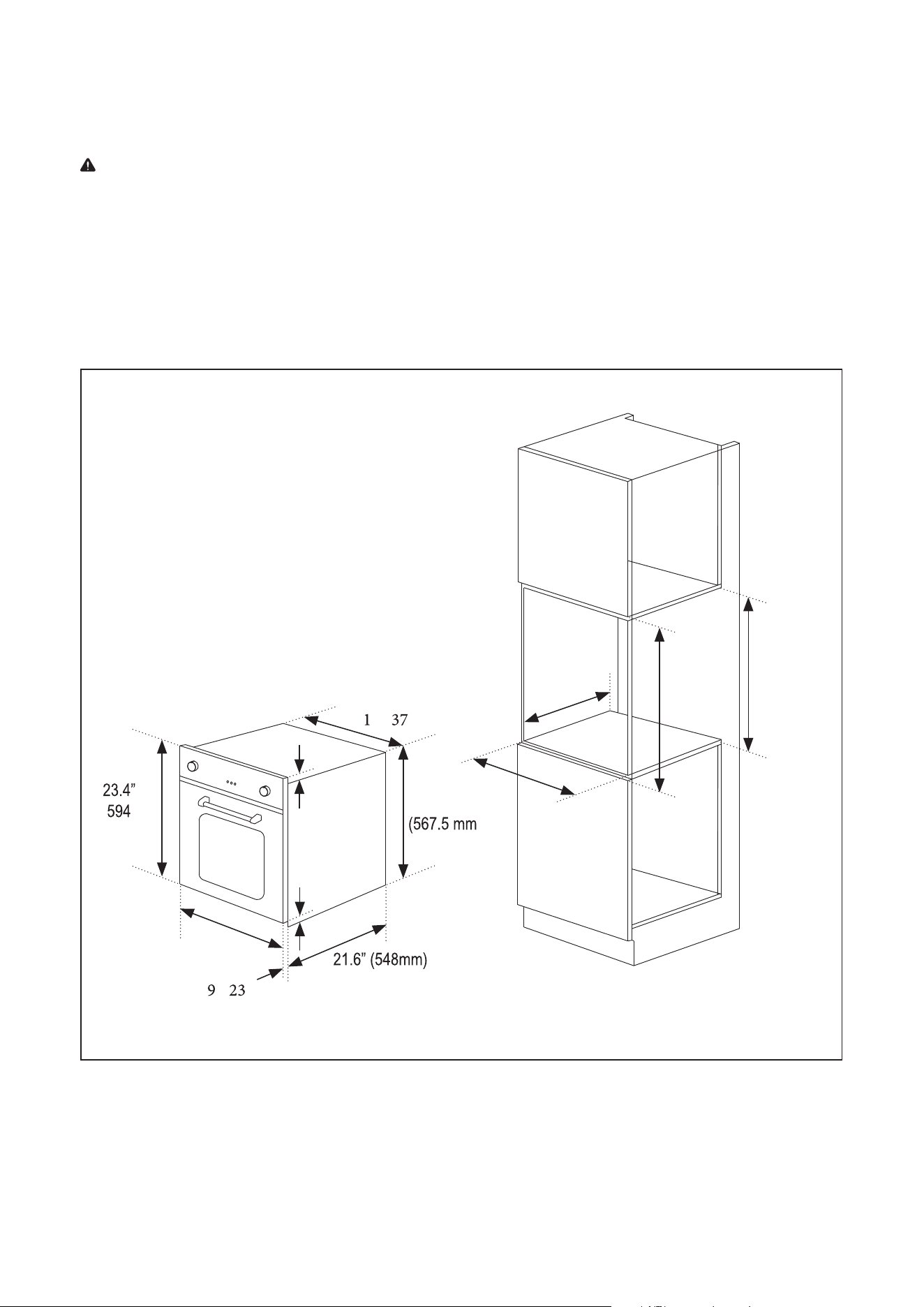
SPECIFICATIONS
Width 23.4” (594 mm)
.” ( mm)
” ( mm)
Height
Depth
Weight
7 lbs. (32 kg)
Power Supply 240 V / 60 Hz
yticapaC elbas U / teN
yticapaC lato T / ssorG
Rated Power 2300 W
Figure 1
2.19 Cu. Ft.
2.47 Cu. Ft.
23.4"(594mm)
23.4"(594mm)
24.1"(612mm)
8
PARTS AND FEATURES
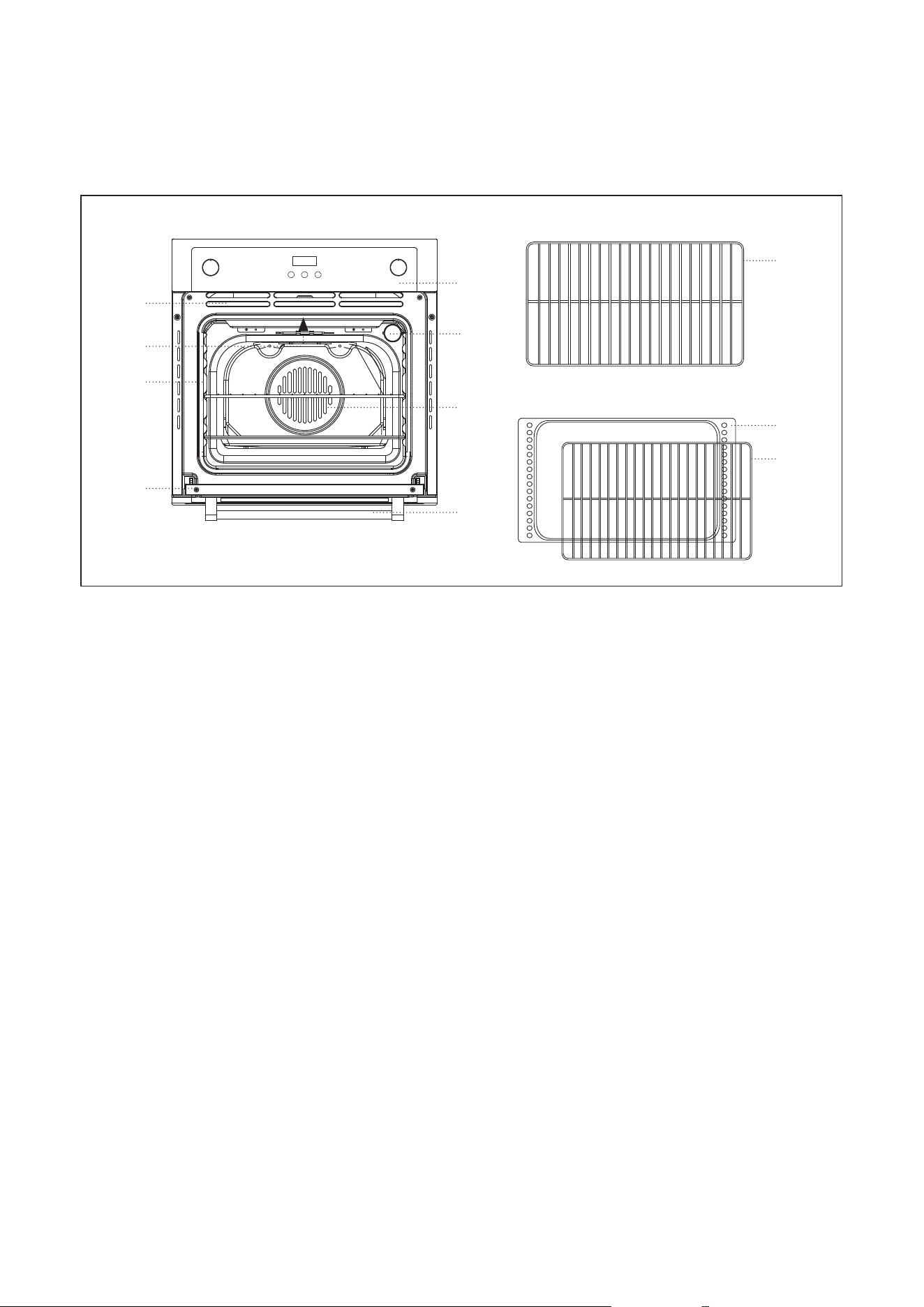
PRODUCT PARTS & ACCESSORIES
Figure 1
a. Control Panel
b. C
ooling Vents
c.
Oven Interior Light
d.
Top Central Heating Element
e.
Rack Po
sition Guide
f
. Convection Fan and Heating Element
g. Ov
en Door
h. Door Handle
i.
Oven Rack (2)
j. Br
oiler Pan
k. Broiler Pan Rack
i
j
k
a
b
c
d
e
f
g
h
9
Figure 2
INSTALLATION INSTRUCTIONS
22.5”
(570 mm)
22.0”
(558 mm)
´
PP
22.5" - 23.0”
(575 mm
- 585 mm)
WARNING: Only a qualified service personnel in compliance with the instructions provided must install the
appliance. The manufacturer declines all responsibility for improper installation, which may harm persons and
animals and damage property.
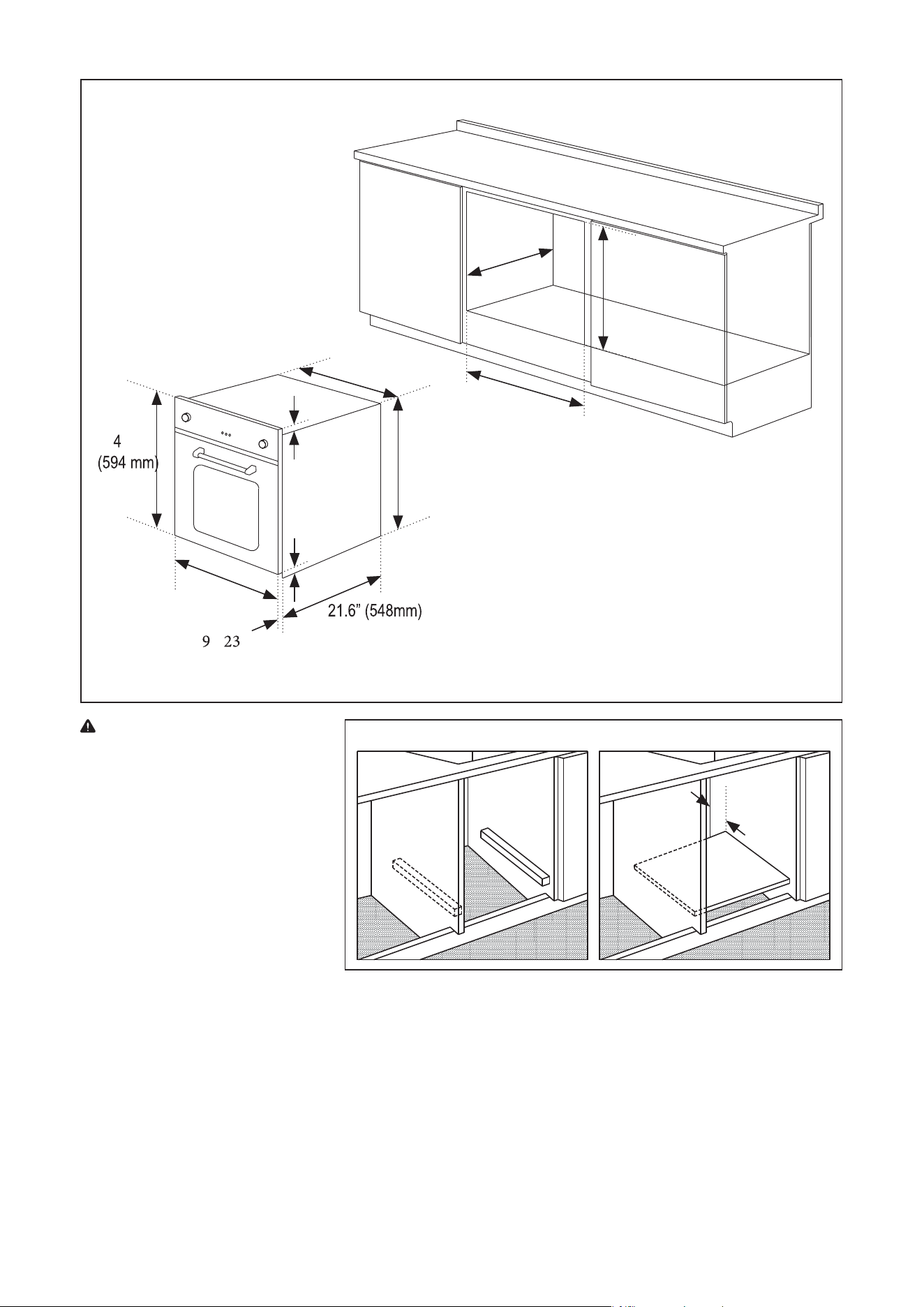
LOCATION REQUIREMENTS
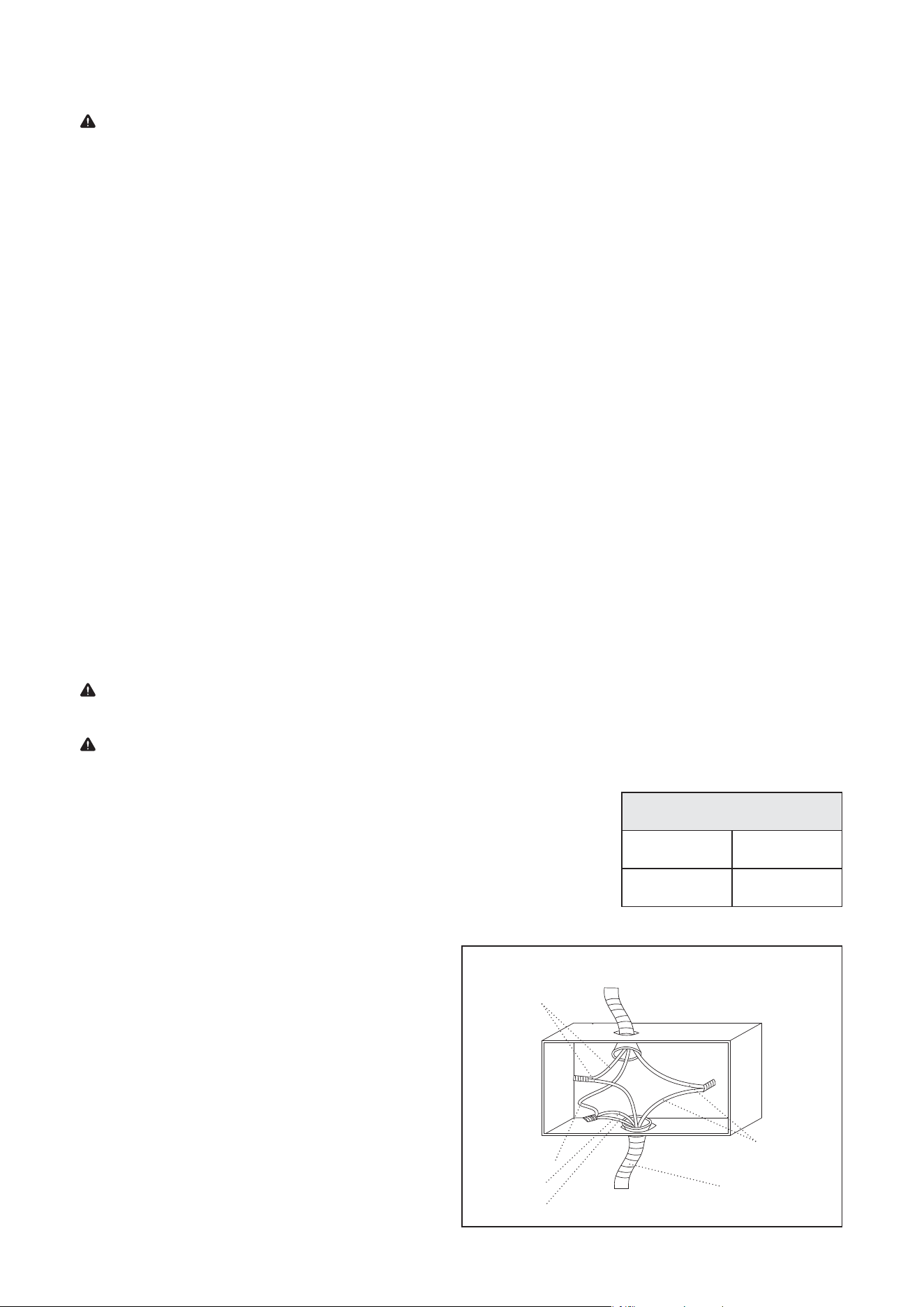
In order to ensure that the built-in appliance functions properly, the cabinet containing it must be appropriate.
The figures below and the next page give the dimensions of the cut-out for installation in a wall cabinet unit or
under the counter. (Refer to Figure 2 and 3.)
Installation in a Wall Cabinet Unit
21. ” (5 mm)
( mm)
1.0”
22.3”
(24 mm)
)
0.4”
(10 mm)
23.4” (594 mm)
0. ” ( mm)
10
23. ”
1.0”
22
.3”
(24 mm)
0.4”
(10 mm)
23.4” (594 mm)
0. ” ( mm)
PP
wNN
Figure 3
22.5”
(570 mm)
22.0”
(558 mm)
22.5" - 23.0”
(575 mm - 585 mm)
IMPORTANT: Installation must be
in compliance with the consumption
declaration. In order to ensure
adequate ventilation, the back panel
of the cabinet unit must be removed.
Installing the oven so that it rests on
two strips of wood is preferable. If
the oven rests on a continuous, flat
surface, there must be an aperture
of at least 1 ¾” x 22” (45 x 560mm).
(Refer to Figure 4.)
Figure 4
1.8”
(45 mm)
• The panels of the adjacent cabinets must be made of heat-resistant material. In particular, cabinets with a
veneer exterior must be assembled with glues which can withstand temperatures of up to 212°F.
• In compliance with current safety standards, contact with the electrical parts of the oven must not be
possible once it has been installed.
• All parts, which ensure the safe operation of the appliance, must be removable only with the aid of a tool.
• To fasten the oven to the cabinet, open the door of the oven and attach it by inserting the 4 wooden screws
into the 4 holes located on the perimeter of the frame.
Installation Under the Counter
11
CIRCUIT REQUIRED
208V, 60Hz 240V,60Hz
12 AMP 15 AMP
This oven is dual rated, designed to be connected to either 208/240V AC,
60Hz, 3-wire, two-phase power supply.
The electrical supply should be 3-wire two-phase AC. Install a suitable conduit
bo
x (not furnished). An appropriately-sized, U-listed conduit connector must
be used to correctly attach the conduit to the junction box.
3-WIRE BRANCH CIRCUIT
Where local codes allow the connection of green
ground wire from the oven to the branch circuit white
neutral wire:
• If local codes permit, connect the green gr
ound
wir
e from the oven and the white neutral wir
e
from the oven to the branch circuit neutral wire
(gr
ay or white colored wire).
• Connect the red and black wires from the ov
en
t
o the corresponding wires in the junction box.
• Refer to Figure 5.
ELECTRICAL REQUIREMENTS
WARNING: Electrical Shock Hazard
•
DO NOT use an extension cord
.
•
Failure to follow these instructions can result in death, fire, or electrical shock.
• Any additions, changes or conversions required in order for this appliance to satisfact
orily meet the
application needs must be made by a qualified service personnel in accordance with the manufacturer’s
instructions and all codes and requirements of the authority having jurisdiction. Failure to follow the
instructions c
ould result in serious injury or property damage. The qualified service personnel perf
orming
this w
ork assumes responsibility for the conv
ersion.
•
This appliance needs to be installed directly to the main (without a plug). To do so, follo
w instructions in
the “Three-Wire Connection” section on page 12. If you wish to install this appliance directly to the main
(without a plug), it must be installed by a qualified service personnel.
• DO NOT operate this appliance using a 2-prong adapter or an extension cord. If a 2-prong wall receptacle
is the only a
vailable outlet, it is the personal responsibility of the consumer to have it replac
ed with a
pr
operly grounded 3-prong or 4-prong wall receptacle installed by a qualified service personnel. Severe
shock or damage to the range may occur if the range is not installed by a qualified servic
e personnel.
• This appliance features a pilotless electric ignition for energy savings and reliability. It operates on a
208-240V
/50-60Hz 12-15 Amp power supply
.
• A separ
ate circuit, protected by a 15 amp time delay fuse or circuit breaker, is requir
ed.
• F
or personal safety, the appliance must be properly gr
ounded.
ELECTRICAL INSTALLATION
WARNING: It is the responsibility and obligation of the consumer to contact a qualified service personnel to
ensure the electrical installation is adequate and conformance with all local codes and ordinances.
IMPORTANT: The power supply to the appliance must be cut off before any adjustments or maintenance work
is done on it. Air duct is supposed to use in ventilation.
Figure 5
Black Wires
Red Wires
Green Wire
Neutral Wire
White Wire
Cable from Oven
Cable from Power Supply
UL Listed Conduit
Connector

12
4-WIRE BRANCH CIRCUIT
• Disconnect ground from neutral at free end of
c
onduit.
• Connect the green ground wire from the ov
en
t
o the bare or green ground wir
e in the juction
bo
x.
• Connect the red and black wires from the ov
en
t
o the corresponding wires in the junction box.
• Connect the white wire from the oven to
the
whit
e neautral wire in the junction box.
Black Wires
Red Wires
Green Wire
White Wire
Cable from Oven
Cable from Power Supply
UL Listed Conduit
Connector
Figure 6

13
BEFORE USE
This multi-function oven combines the advantages of traditional convection ovens with those of the more
modern fan assisted models in a single appliance. It is an extremely versatile appliance that allows you to choose
easily and safely between different cooking modes.
IMPORTANT: The first time you use your appliance, we recommend that set the thermostat to the highest
setting and leave the oven on for about half an hour with nothing in it, with the oven door shut. Then open the
oven door and let the room air in. The odor that is often detected during this initial use is due to the evaporation
of substances used to protect the oven during storage and until it is installed.
IMPORTANT: Place the dripping pan provided on the bottom shelf of the oven to prevent any sauce and/or
grease from dripping onto the bottom of the oven only when grilling food.
•
For all other types of cooking, NEVER use the bottom shelf and NEVER place anything on the bott
om of the
o
ven when it is in operation because this could damage the enamel.
•
ALWAYS place your cookware (dishes, aluminum foil, etc.) on the grid provided with the appliance insert
ed
especially along the oven guides.
14
COOKING MODES
• Oven Light: Turns the oven light on when selected.
• Broil: Best for melting cheese, toasting and browning. For optimal results, use in conjunction with the Br
oil
t
emperature setting.
• Fan Grill: Utilizes a high heat grilling element and fan to circulate hot air throughout the oven. Ideal f
or
c
ooking large cuts of meats so that they are moist inside and crisp on the outside. Use a thermometer to
check the internal temperature. It is recommended to set the temperature no higher than 400°F.
• Convection Cooking: Utilizes the powerful heating element surrounding the fan to evenly distribute heat
throughout the oven. This is great for multi-shelf cooking because the fan ensures each rack is heated.
• Defrost: Circulates air at room temperature to defrost food. For foods such as meat, fish, and bre
ad,
C
onvection Cooking Mode, set between 175°~225°F, can be used to accelerate the Defrosting proc
ess.
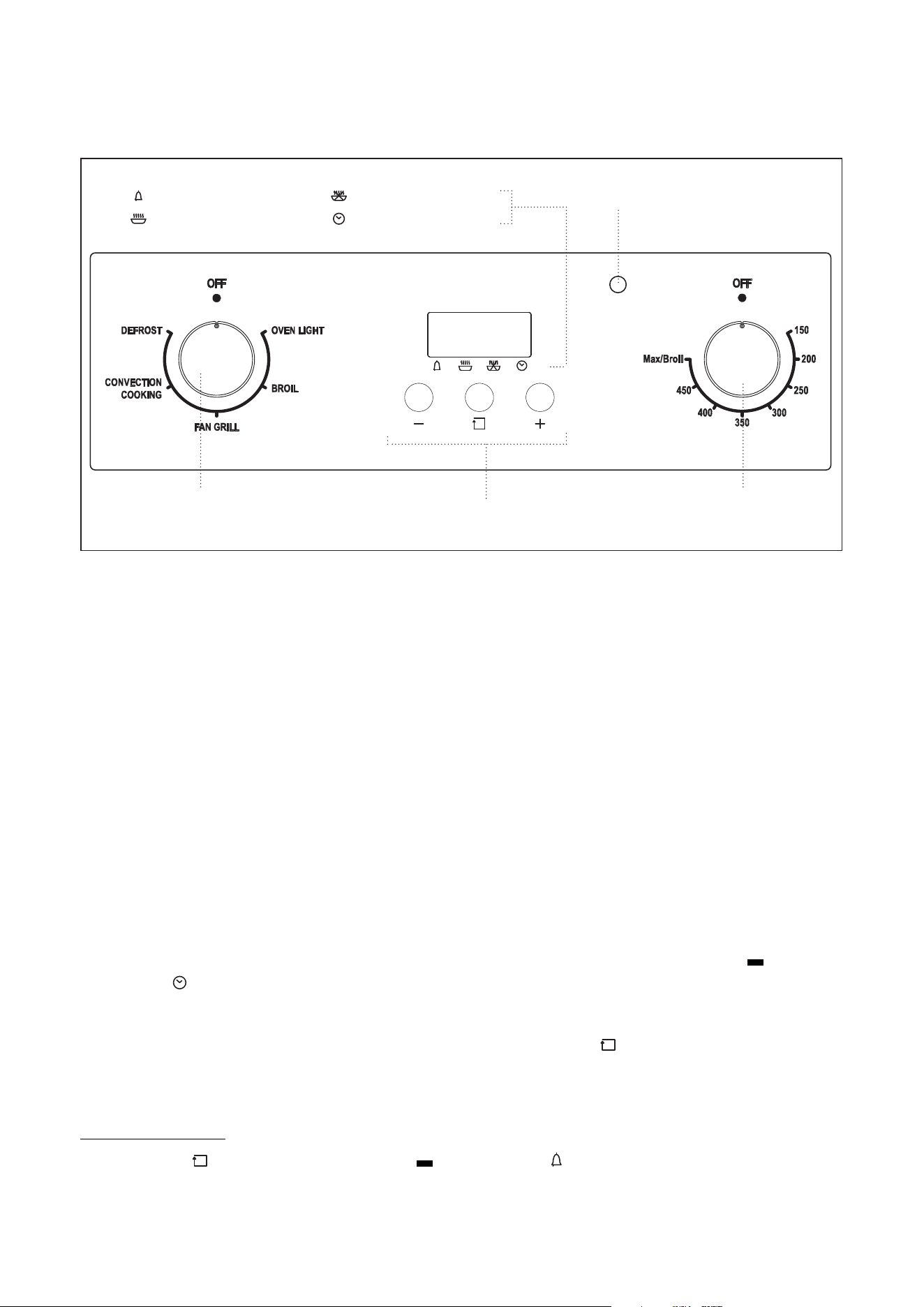
DIGITAL CLOCK
1. Once the oven is connected to electrical power, the clock display will show "12:00" with the " " symbol
abo
ve "
". (Refer to Figure 6.)
2. Press the " + " or " - " button to increase or decrease the number until it reaches the right time.
3.
After 5 seconds the clock will start automatically or you can press the "
" button to make it work.
TIMER
Kitchen Timer Setting
1.
Press the "
" button repeatedly until the " " symbol above " " flashes.
2. Press " + " or " - " button until the time you wish shows on the display. The longest cooking time tha
t can be
set is hours and 59 minutes.
OPERATION INSTRUCTIONS
Figure 6
Timer
Start Cooking Time Set
End Cooking Time Set
Clock
Oven Indicator Light
Cooking Mode Cooking Temperature
Selection Knob
Function Buttons
Selection Knob

15
3. After setting the proper time (hour/minute), the " " symbol above the " " ZLOOVWRS¿DVKLQJ
4. The time countdown begins.
5. When it reaches the set time, the "
" symbol above the " " ¿DVKHVDQGWKHDODUPZLOOULQJ
6. To stop the alarm ringing, press any button.
NOTE: This setting does not control the oven.
IMPORTANT:
•
The setting must be carried out in 5 seconds.
•
If electricity f
ails suddenly, all the set procedure and the proper clock time (hour/minute) will disappear.
• After electrical power is on again, "12:00" and the "
" symbol above " " will show on the display, you
will need t
o set it again.
Full Automatic Timer Setting
1. Press the "
" button repeatedly until the " " symbol above the " " ¿DVKHVDQGSress " + " or " - "
but
ton to set how long oven needs to cook.
2. Press the "
" button repeatedly until the " " symbol above the " " ¿DVKHVDQGSress " + " or " - "
but
ton to set the time for the oven to stop cooking and switch off.
3.
Adjust knobs to select cooking mode and temperature.
4. The
"
" symbols above the " " and " ZLOOVWRS¿DVKLQJ It indicates the cooking timer has been set.
The
cooking will starWDQG¾QLVKDVSHUSrogrammed into the timer.
For example, if the food is required to bake for 45 minutes, and it is supposed to stop at "2:00":
1. Press the "
" button repeatedly until the " " symbol above " " ¿DVKHVDQGset the time of baking to
45 minutes.
2. Press the function button repeatedly until the "
" symbol above " " ¿DVKHGDQGsHWWKH¾QLVKRI
baking at "2:00".
3.
The proper time (hour/minute) and the "
" symbol will show on the display. It indicates the setting of
c
ooking timer has been set.
4.
When the clock shows "1:15", the oven will switch on automatically and cooking will start.
5.
During the cooking time, the "
" s\PEROZLOOVWRS¿DVKLQJ
6.
When the clock shows "2:00", cooking will stop and the oven will switch off automatically
, the alarm will
ring, and the "
" symbol will ¿DVK.
7. To stop the alarm ringing, press any button.
Semi-Automatic Timer Setting
A. Setting Timer for How Long to Cook
1.
Longest time that can be set is 10 hours maximum.
2. Press the "
" button repeatedly until the " " symbol above " " ¿DVKHV. Press " + " or " - " button
and set the timer f
or how long the oven needs to cook.
3.
Adjust knobs to select cooking mode and temperature.
4.
When the full amount of time set has passed, the cooking will stop and the oven will swit
ch off
aut
omatically.
5. The "
" symbol above " " will ¿DVKDQGWKHDODUPZLOOULQJ.
6.
To stop the alarm ringing, press any button.

16
B. Setting timer with the end time of cooking
1. Longest time that can be set is hours and 59 minutes.
2. Press the "
" button repeatedly until the " " symbol above " " flashes. Press " + " or " - " butt
on
and set the time f
or oven to stop cooking.
3.
Immediately adjust knobs to select cooking mode and temperature.
4.
When it reaches the time set, cooking will stop and the oven will switch off automatically.
5. The
"
" symbol above " " flashes, and the alarm will ring.
6.
To stop the alarm ringing, press any button.
NOTE: The set timer procedure could be seen by pressing any function button repeatedly at any time.
NOTE: By adjusting the end time of cooking to the current time, the set timer procedure can be cancelled.
PRACTICAL COOKING ADVICE
Broil
1. Position temperature knob between 150°F and Max/Broil.
2. The top central heating element will come on.
3. The extremely high and direct temperature of the heating element makes it possible to brown the surface
of meats and roasts while locking the juices in to keep them tender
.
4.
The "Broil" mode is also highly recommended for dishes that require a high temperature on the surface lik
e
beef st
eaks, veal, rib steak, filets, and hamburgers.
Fan Grill
1.
Position temperature knob between 150°F and 400°F
.
2. The top central heating element and fan will come on.
3. This combination of features increases the effectiveness of the unidirectional thermal radia
tion of the
he
ating element through forced circulation of the air throughout the ov
en.
4.
This helps prevent food from burning on the surface, allowing the heat to penetrate right into the f
ood.
5.
Excellent results are achieved with kebabs made with meats and vegetables, sausag
es, ribs lamb chops,
chick
en in a spicy sauc
e, quail, and pork chops.
6.
The "Fan Grill" mode is also ideal for cooking fish steaks like swordfish and stuffed cuttlefish.
Convection Cooking
1. Position temperature knob between 150°F and 475°F.
2. The rear heating element and fan will come on, guaranteeing delicate heat distributed unif
ormly
thr
oughout the ov
en.
3.
The "Convection Cooking" mode is also ideal for baking and cooking delicate foods, especially cak
es
tha
t need to rise and for the preparation of certain tartlets on 3 shelves at the same time. Here are a few
examples: cream puffs, sweet and savory biscuits, savory puffs, Swiss rolls and small portions of veg
etables
au gr
atin.
Defrost
1.
Position temperature knob to any temperature.

17
2. The fan in the oven will circulate the air at room temperature around the food.
3. This is recommended for defrosting of any type of food, but in particular for delicate types of f
ood which
do not r
equire heat, such as ice cream cakes, cream or custard desserts, and fruitcak
es.
4.
By using the fan, the defrosting time is approximately halved. In case of meat, fish and bre
ad, it is possible
t
o accelerate the process using the “Convection Cooking” and setting the temperature between 175
°F and
225
°F.
Cooling Ventilation
In order to cool down the exterior of the appliance, this model is equipped with a cooling fan, which comes on
automatically when the oven is hot. When the fan is on, a normal flow of air can be heard exiting between the
oven door and the control panel.
NOTE: When cooking is done, the fan stays on until the oven cools down sufficiently.

18
CARE AND MAINTENANCE
CLEANING
WARNING: To avoid the risk of electric shock, ALWAYS ensure the appliance is turned off and completely cool
before cleaning or doing any sort of maintenance.
CAUTION:
•
To avoid possible burns, use care when cleaning the applianc
e.
•
DO NOT attempt to clean the appliance whenever the oven or burner heads are still hot.
•
To avoid possible burns, DO NOT attempt any of the following cleaning instructions befor
e turning off all of
the sur
face burners and allowing them to cool.
NOTE: ALWAYS follow label instructions on cleaning products.
Control Knobs
• For general cleaning, use hot, soapy water and a cloth.
• For more difficult soils and built-up grease, apply a liquid detergent directly onto the soil. Rinse with a
damp cloth and dry
.
•
DO NOT use steel wool or acidic cleaners on the knobs as they can scratch.
Stainless Steel Exterior
•
Clean stainless steel with hot, soapy water and a dishcloth. Rinse with clean water and a cloth.
•
DO NOT use cleaners with high concentrations of chlorides or chlorines. DO NO
T use harsh scrubbing
cle
aners. Only use kitchen cleaners that are especially made for cleaning stainless steel.
Glass Door Exterior
•
Clean the glass door using non-abrasive products or sponges and dry it with a soft cloth.
•
Use glass cleaner. Apply glass cleaner to soft cloth or sponge, not directly on panel.
Oven Interior
• This appliance DOES NOT have a self-cleaning feature.
•
Use an appropriate cleaning product designed specifically to clean the inside of ovens.
•
The soap should be rinsed away and the interior dried thoroughly
.
•
Avoid using abrasive detergents (for example cleaning powders, etc) and abrasive sponges f
or dishes or
acids (such as lime scale – r
emover, etc) as these could damage the enamel.
• If the grease spots and dirt are particularly tough to remove, use a special product for oven cle
aning,
f
ollowing the instructions provided on the pack
et.
•
NEVER use a steam cleaner for cleaning inside of oven.
• If you use your oven for an extended period of time, condensation may form. Dry it using a soft cloth.
• There is a rubber seal surrounding the oven opening which guarantees its perfe
ct functioning. Check the
c
ondition of this seal on a regular basis. If necessary, clean it and avoid using abrasive products or objects to
do so. If damaged, contact the vendor. It is recommend to avoid using the oven until it has been repaired.
• NEVER line the oven bottom with aluminum foil, as the consequent accumulation of heat c
ould
c
ompromise the cooking and even damage the enamel.
19
NOTE: ALWAYS follow label instructions on cleaning products.
Interior Lower Grill Element
•
To remove the element, support one side with your hand while removing the retainer with the other.
•
When cleaning, make sure not to apply excessive force on the element as it is fragile.
•
Reposition the element and secure the retainer back in place.
• DO NOT use the oven with the grill element hanging down – it must be repositioned after cleaning.
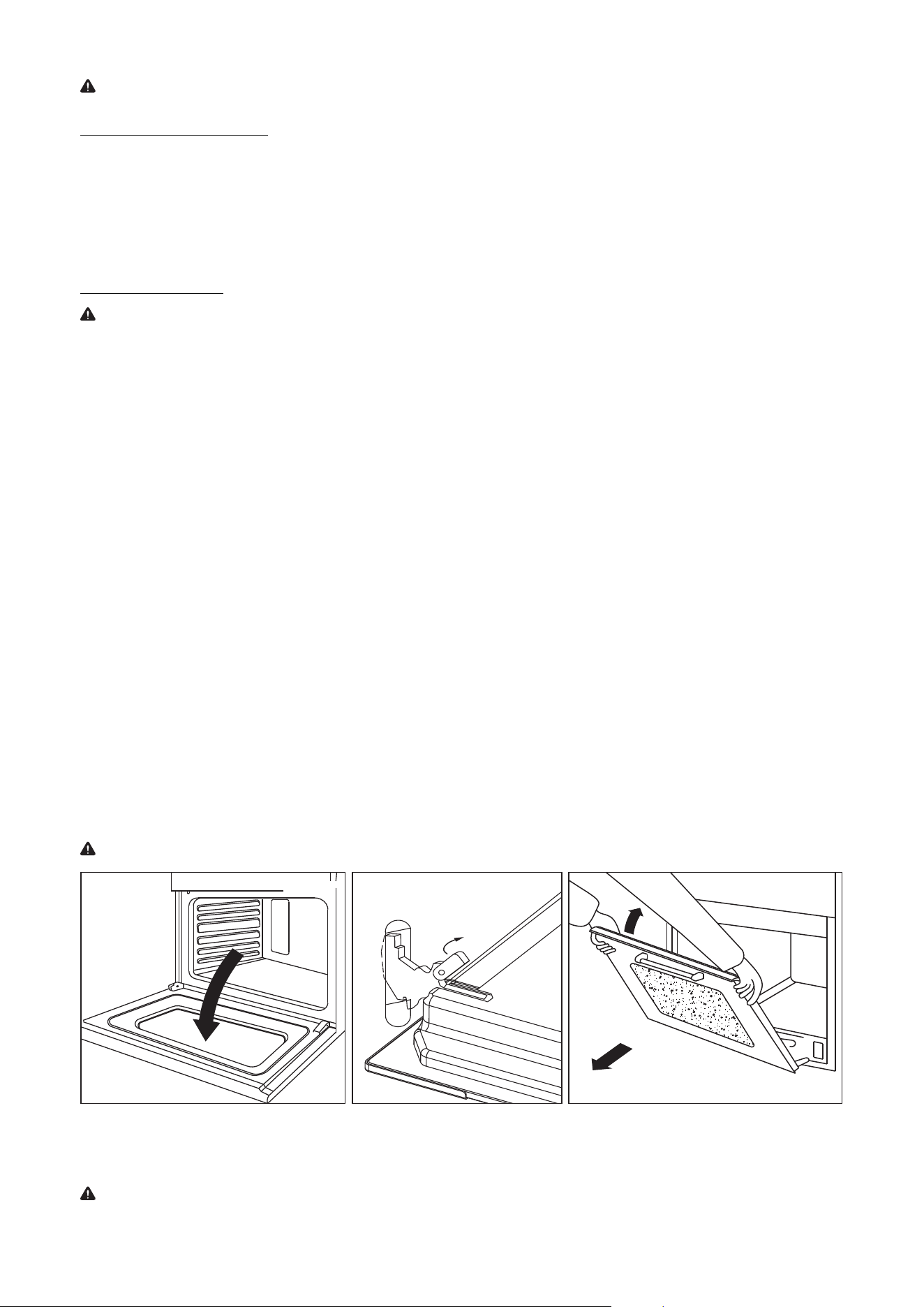
Removing Oven Door
WARNING:
•
Make sure oven is cool and power to the oven has been turned off before removing the door. Failure to
do
so c
ould result in electrical shock or burns.
•
The oven door is heavy and fragile. Use both hands to remove the oven door. The door fr
ont is glass. Handle
car
efully to avoid breaking.
•
Grasp only the sides of the oven door. DO NOT grasp the handle as it may swing in y
our hand and cause
damag
e or injury.
•
Failure to grasp the oven door firmly and properly could result is personal injury or product damage.
•
To avoid injury from hinge bracket snapping closed, be sure that both levers are securely in place befor
e
r
emoving the door. Also, DO NOT force door open or closed. The hinge could be damaged and injury c
ould
r
esult.
Follow these instructions:
1.
Open the door fully. (Refer to Figure 7.)
2. Lift up and push the small levers located on the two hinges all the way back. (Refer to Figure 8.)
3.
While holding the door on each side, shut the door until it touches the levers. Then c
ontinue closing the
door until it is about 4 inches (10cm) fr
om being fully closed.
4.
Pull the door towards you, pulling it out of its seat. Door will gently come away from the oven. (Refer to
Figure 9.)
5.
To replace the door, perform the reverse of the above procedure.
NOTE: If door does not come away from oven easily, DO NOT force it.
Figure 7 Figure 8 Figure 9
REPLACING OVEN INTERIOR LIGHT
WARNING: Electrical Shock Hazard
Failure to follow these instructions can result in death, fire, or electrical shock.
20
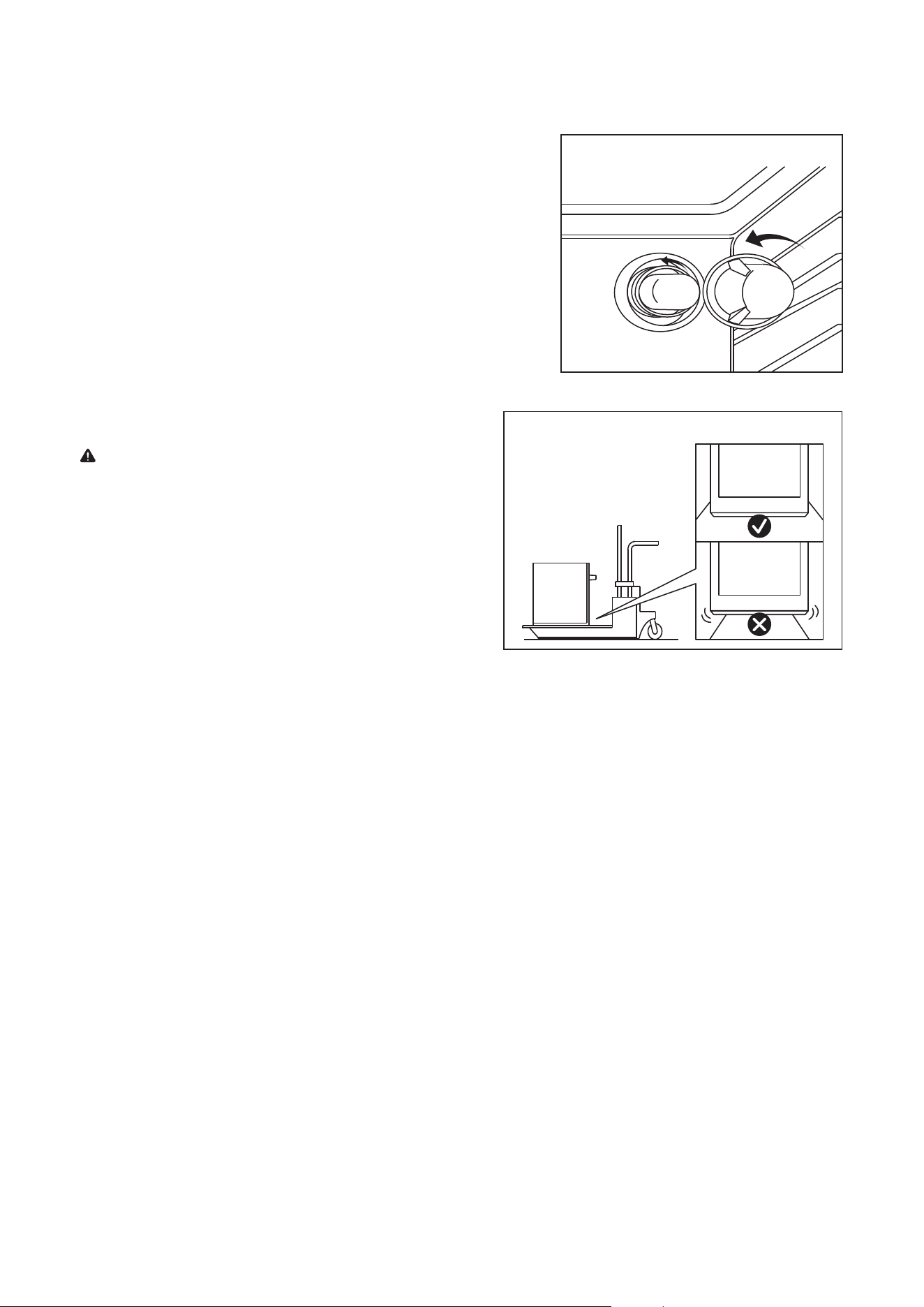
Figure 11
2. Remove the glass cover of the light bulb holder turning
c
ounter-clockwise. (Refer to Figure 10.)
3.
Replace the old light bulb with a new oven-safe light bulb
with
the f
ollowing characteristics:
• Voltage: 208-240V
•
Wattage: 25W
• Type: E14
4.
Put the glass cover back and reconnect the oven to
the main
po
wer supply.
TRANSPORTING
WARNING: Electrical Shock Hazard
Failure to follow these instructions can result in death, fire,
or electrical shock.
1.
Before moving your oven, or performing maintenanc
e,
disc
onnect it from the power supply.
2. To avoid damage to the oven vent, use transpotation
tha
t is wide enough to hold the entire bott
om of the
unit. (Ref
er to Figure 11.)
1. Disconnect the oven from the power supply by means of the omni-polar switch used to connect the
applianc
e to the electrical mains, or unplug the appliance if the plug is accessible.
Figure 10
21
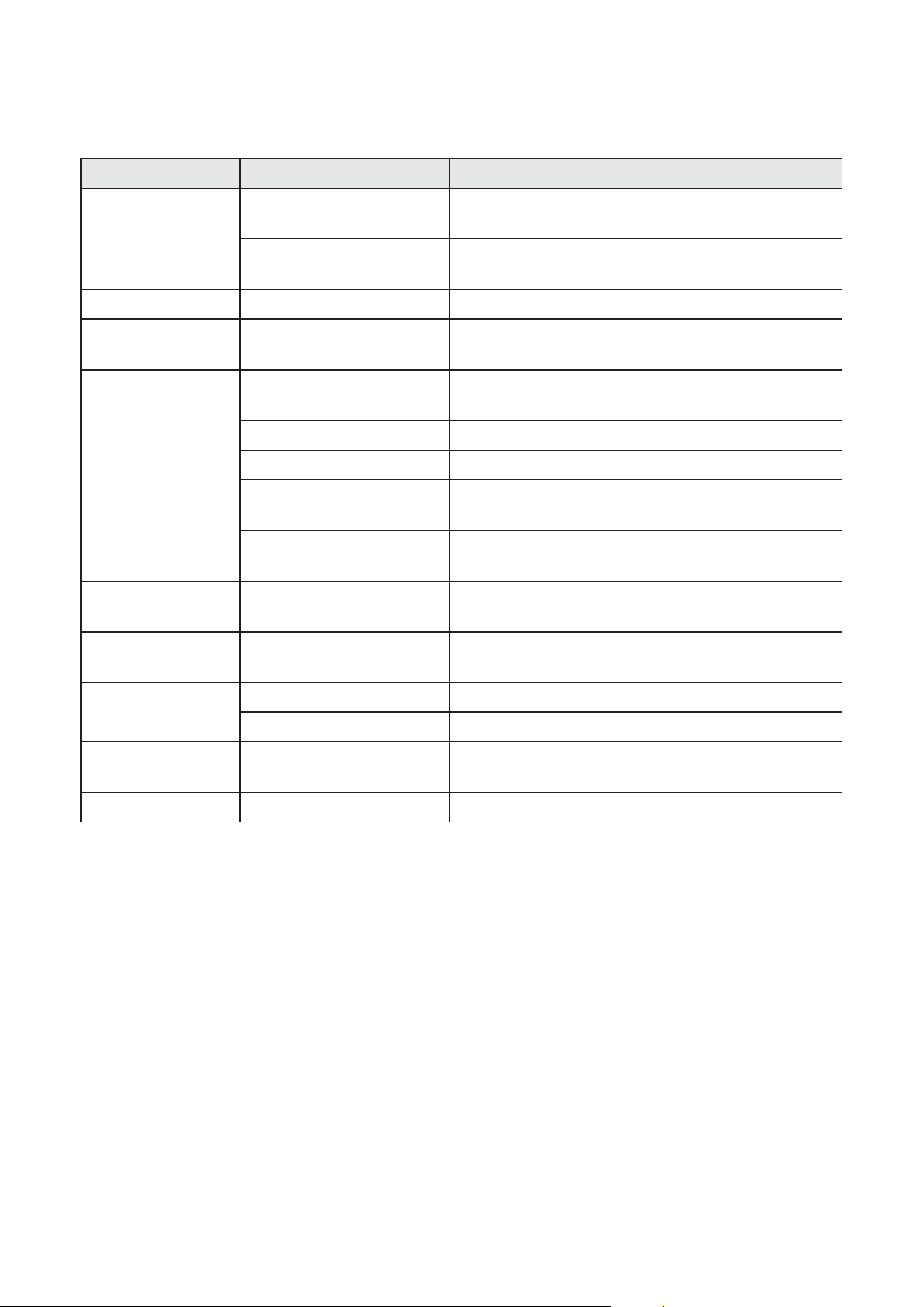
TROUBLESHOOTING
Problem Possible Causes Solutions
Will not operate or
turn on.
No power
Verify that the electrical wires are connected to the mains
properly. Refer to “Electrical Installation” section on page 11.
Household fuse is blown or
circuit breaker is tripped.
Replace the fuse or reset the circuit breaker.
Oven will not operate. Oven controls are set incorrectly. Make sure the oven is on and set on the correct cooking mode.
Cooling fan runs during
baking and broiling.
No problem
It is normal for the fan to automatically run while the oven is
in use and for some time after to cool.
Oven temperature too
high or too low.
Oven was not preheated.
Allow the oven to preheat so it is at the proper temperature
when your food goes in.
Racks are positioned incorrectly. Try changing the rack position.
Batter is not evenly distributed. Check that the batter is level in the pan.
Improper cook time was being
used.
Adjust the cook time.
Oven door was opened while
cooking.
Oven peeking releases oven heat and can result in longer cook
times.
Baked items are too
brown on the bottom.
Oven rack is placed too low. Move rack to a higher position in the oven.
Pie crust edges are
browning early.
Temperature is too hot.
Use aluminum foil to cover the edge of the crust and/or
reduce baking temperature.
Oven light does not
work.
Light bulb is loose or defective. Tighten or replace the bulb.
Switch operating light is broken. Contact a qualified technician.
Oven makes clicking
noise.
No problem
This is the sound of the heating element turning on and off
and is normal.
Display flashes. Power outage or surge Reset the clock. If the oven was in use, reset it.
1870 Bath Avenue, Suite 3 | Brooklyn, NY 11214 | Tel: 718.249.1217 | support@forteappliances.com |
www.forteappliances.com
Your OVEN has been inspected and tested and is warranted subject to following for a period to 12 months from the date of purchase against
defects in workmanship and materials. During this period, we undertake to repair or replace any defective part which was originally defective
in our o
p
inion. This warrant
y
is null and void if the a
pp
liance is used for commercial
p
ur
p
oses.
This warranty is valid only when:
1. This appliance has not been opened or tampered with by any unauthorized person.
2. The appliance is brought to and taken from the retailer at the customer’s cost and risk.
3. The warranty card and Cash Memo duly signed by the authorized retailer are present with the complaint.
4. The appliance has been installed, used and maintained in accordance with the instruction manual.
The warranty does NOT apply for:
1. Damages due to chipping, peeling of coating and denting.
2. Breakage or damage to components made of Bakelite, plastic materials, rubber parts and cord.
3. Normal wear and tear of parts; Normal Product Maintenance and Cleaning
4. Damage resulting from accident, mishandling or negligence on the part of the customer. Liability for consequential loss or damage is
neither accepted nor implied.
5. General rebuilding or refurbishing that is not a legitimate warranty repair. Failures caused by:
6. Unauthorized service.
7. Grease or other material buildup due to improper.
8. Cleaning or maintenance.
9. Accidental or intentional damage.
10. Connection to an improper gas or power supply.
11. Use of improper pans, containers, or accessories that cause damage to the product.
FORTÉ Appliances will not pay for:
1. Service calls to correct the installation of your OVEN, to instruct you how to use your OVEN, to replace house fuses or correct house wiring
or plumbing, to replace light bulbs, or replacement water filters other than as noted above
.
2.
Repairs when your OVEN is used in other than normal, single-family household use.
3. Pickup and delivery. Your OVEN is designed to be repaired in the home.
4. Damage resulting from accident, alteration, misuse, abuse, fire, flood, improper installation, acts of God, or use of products not approved
by FORTÉ Appliances
5. Any food loss due to product failure.
6. Repairs to parts or systems resulting from unauthorized modifications made to the appliance.
7. Replacement parts or repair labor costs for units operated outside the United States or Canada.
8. Travel or transportation expenses for customers who reside in remote areas.
Warranty is void if:
1. Serial plate is defaced.
2. Product is altered by user
3. Product is not installed or used according to manufacturer's instructions
v
G
G~G