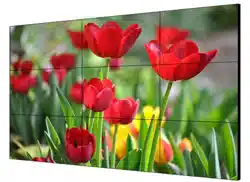

LCD Display
Quick Start Guide
LCD Display Quick Start Guide
i
Legal Information
© 2023 Hangzhou Hikvision Digital Technology Co., Ltd. All rights reserved.
About this Manual
The Manual includes instructions for using and managing the Product. Pictures, charts, images and
all other information hereinafter are for description and explanation only. The information
contained in the Manual is subject to change, without notice, due to firmware updates or other
reasons. Please find the latest version of this Manual at the Hikvision website
(https://www.hikvision.com/).
Please use this Manual with the guidance and assistance of professionals trained in supporting the
Product.
Trademarks
and other Hikvision's trademarks and logos are the properties of
Hikvision in various jurisdictions.
Other trademarks and logos mentioned are the properties of their respective owners.
: The terms HDMI and HDMI High-Definition Multimedia Interface, and the HDMI
Logo are trademarks or registered trademarks of HDMI Licensing Administrator, Inc. in the United
States and other countries.
Disclaimer
TO THE MAXIMUM EXTENT PERMITTED BY APPLICABLE LAW, THIS MANUAL AND THE PRODUCT
DESCRIBED, WITH ITS HARDWARE, SOFTWARE AND FIRMWARE, ARE PROVIDED “AS IS” AND
“WITH ALL FAULTS AND ERRORS”. HIKVISION MAKES NO WARRANTIES, EXPRESS OR IMPLIED,
INCLUDING WITHOUT LIMITATION, MERCHANTABILITY, SATISFACTORY QUALITY, OR FITNESS FOR
A PARTICULAR PURPOSE. THE USE OF THE PRODUCT BY YOU IS AT YOUR OWN RISK. IN NO EVENT
WILL HIKVISION BE LIABLE TO YOU FOR ANY SPECIAL, CONSEQUENTIAL, INCIDENTAL, OR INDIRECT
DAMAGES, INCLUDING, AMONG OTHERS, DAMAGES FOR LOSS OF BUSINESS PROFITS, BUSINESS
INTERRUPTION, OR LOSS OF DATA, CORRUPTION OF SYSTEMS, OR LOSS OF DOCUMENTATION,
WHETHER BASED ON BREACH OF CONTRACT, TORT (INCLUDING NEGLIGENCE), PRODUCT
LIABILITY, OR OTHERWISE, IN CONNECTION WITH THE USE OF THE PRODUCT, EVEN IF HIKVISION
HAS BEEN ADVISED OF THE POSSIBILITY OF SUCH DAMAGES OR LOSS.
YOU ACKNOWLEDGE THAT THE NATURE OF INTERNET PROVIDES FOR INHERENT SECURITY RISKS,
AND HIKVISION SHALL NOT TAKE ANY RESPONSIBILITIES FOR ABNORMAL OPERATION, PRIVACY
LEAKAGE OR OTHER DAMAGES RESULTING FROM CYBER-ATTACK, HACKER ATTACK, VIRUS
INSPECTION, OR OTHER INTERNET SECURITY RISKS; HOWEVER, HIKVISION WILL PROVIDE TIMELY
TECHNICAL SUPPORT IF REQUIRED.
YOU AGREE TO USE THIS PRODUCT IN COMPLIANCE WITH ALL APPLICABLE LAWS, AND YOU ARE
SOLELY RESPONSIBLE FOR ENSURING THAT YOUR USE CONFORMS TO THE APPLICABLE LAW.
ESPECIALLY, YOU ARE RESPONSIBLE, FOR USING THIS PRODUCT IN A MANNER THAT DOES NOT
INFRINGE ON THE RIGHTS OF THIRD PARTIES, INCLUDING WITHOUT LIMITATION, RIGHTS OF

LCD Display Quick Start Guide
ii
PUBLICITY, INTELLECTUAL PROPERTY RIGHTS, OR DATA PROTECTION AND OTHER PRIVACY RIGHTS.
YOU SHALL NOT USE THIS PRODUCT FOR ANY PROHIBITED END-USES, INCLUDING THE
DEVELOPMENT OR PRODUCTION OF WEAPONS OF MASS DESTRUCTION, THE DEVELOPMENT OR
PRODUCTION OF CHEMICAL OR BIOLOGICAL WEAPONS, ANY ACTIVITIES IN THE CONTEXT RELATED
TO ANY NUCLEAR EXPLOSIVE OR UNSAFE NUCLEAR FUEL-CYCLE, OR IN SUPPORT OF HUMAN
RIGHTS ABUSES.
IN THE EVENT OF ANY CONFLICTS BETWEEN THIS MANUAL AND THE APPLICABLE LAW, THE LATER
PREVAILS.
LCD Display Quick Start Guide
iii
Regulatory Information
FCC Information
Please take attention that changes or modification not expressly approved by the party
responsible for compliance could void the user's authority to operate the equipment.
FCC compliance: This equipment has been tested and found to comply with the limits for a Class B
digital device, pursuant to part 15 of the FCC Rules. These limits are designed to provide
reasonable protection against harmful interference in a residential installation. This equipment
generates, uses and can radiate radio frequency energy and, if not installed and used in
accordance with the instructions, may cause harmful interference to radio communications.
However, there is no guarantee that interference will not occur in a particular installation. If this
equipment does cause harmful interference to radio or television reception, which can be
determined by turning the equipment off and on, the user is encouraged to try to correct the
interference by one or more of the following measures:
● Reorient or relocate the receiving antenna.
● Increase the separation between the equipment and receiver.
● Connect the equipment into an outlet on a circuit different from that to which the receiver is
connected.
● Consult the dealer or an experienced radio/TV technician for help.
FCC Conditions
This device complies with part 15 of the FCC Rules. Operation is subject to the following two
conditions:
1. This device may not cause harmful interference.
2. This device must accept any interference received, including interference that may cause
undesired operation.
EU Conformity Statement
This product and - if applicable - the supplied accessories too are marked
with "CE" and comply therefore with the applicable harmonized European
standards listed under the EMC Directive 2014/30/EU, the RoHS Directive
2011/65/EU.
2012/19/EU (WEEE directive): Products marked with this symbol cannot be
disposed of as unsorted municipal waste in the European Union. For proper
recycling, return this product to your local supplier upon the purchase of
equivalent new equipment, or dispose of it at designated collection points.
For more information see: http://www.recyclethis.info.

LCD Display Quick Start Guide
iv
2006/66/EC (battery directive): This product contains a battery that cannot
be disposed of as unsorted municipal waste in the European Union. See the
product documentation for specific battery information. The battery is
marked with this symbol, which may include lettering to indicate cadmium
(Cd), lead (Pb), or mercury (Hg). For proper recycling, return the battery to
your supplier or to a designated collection point. For more information see:
http://www.recyclethis.info.

LCD Display Quick Start Guide
v
Preface
Applicable Models
This manual is applicable to LCD displays.
Symbol Conventions
The symbols that may be found in this document are defined as follows.
Symbol
Description
Danger
Indicates a hazardous situation which, if not avoided, will or could
result in death or serious injury.
Caution
Indicates a potentially hazardous situation which, if not avoided,
could result in equipment damage, data loss, performance
degradation, or unexpected results.
Note
Provides additional information to emphasize or supplement
important points of the main text.
Safety Instructions
Warning
● In the use of the product, you must be in strict compliance with the electrical safety regulations
of the nation and region.
● CAUTION: To reduce the risk of fire, replace only with the same type and rating of fuse.
● The equipment must be connected to an earthed mains socket-outlet.
● An all-pole mains switch shall be incorporated in the electrical installation of the building.
● CAUTION: This equipment is for use only with specified brackets. Use with other (carts, stands,
or carriers) may result in instability causing injury.
● Do not ingest battery. Chemical burn hazard!
● This product contains a coin/button cell battery. If the coin/button cell battery is swallowed, it
can cause severe internal burns in just 2 hours and can lead to death.
● Keep new and used batteries away from children.
● If the battery compartment does not close securely, stop using the product and keep it away
from children.
● If you think batteries might have been swallowed or placed inside any part of the body, seek

LCD Display Quick Start Guide
vi
immediate medical attention.
● CAUTION: Risk of explosion if the battery is replaced by an incorrect type.
● Improper replacement of the battery with an incorrect type may defeat a safeguard (for
example, in the case of some lithium battery types).
● Do not dispose of the battery into fire or a hot oven, or mechanically crush or cut the battery,
which may result in an explosion.
● Do not leave the battery in an extremely high temperature surrounding environment, which
may result in an explosion or the leakage of flammable liquid or gas.
● Do not subject the battery to extremely low air pressure, which may result in an explosion or
the leakage of flammable liquid or gas.
● Dispose of used batteries according to the instructions.
● To reduce the risk of fire or electric shock, please do not expose the device to rain or humid
environment.
● Electric discharge may last for a short period of time after the power is shut down. Please wait
two minutes after the power is shut down before operating the device.
● To avoid the risk of electric shock, please do not operate when the power is on.
● To avoid the risk of fire or electric shock, please do not use overloaded AC power socket or
extend the power cords.
● Inserting objects into vents or openings of the product is forbidden, as there exists high voltage
and current in the product. Inserting objects will lead to electric shock or short circuit of internal
parts. To avoid the risk of fire or electric shock, please keep water or other liquids away from
LCD display, and please do not let objects such as paper clips or pins fall into the LCD display.
Caution
● The LCD display is designed in accordance with international standards. However, improper use
can also lead to electric shock and fire, causing personal injury and property loss. In order to

LCD Display Quick Start Guide
vii
prevent potential hazards, ensure your safety and extend the service life of the product, please
read and comply with the instructions carefully when installing, using and cleaning the product.
● The product instructions must be properly preserved for future reference.
● Install the equipment according to the instructions in this manual.
● To prevent injury, this equipment must be securely attached to the bracket in accordance with
the installation instructions.
● The equipment shall not be exposed to dripping or splashing and that no objects filled with
liquids, such as vases, shall be placed on the equipment.
● Ensure correct wiring of the terminals for connection to an AC mains supply.
● The equipment has been designed, when required, modified for connection to an IT power
distribution system.
● identifies the battery holder itself and identifies the positioning of the cell(s) inside the
battery holder.
● + identifies the positive terminal(s) of equipment which is used with, or generates direct
current. - identifies the negative terminal(s) of equipment which is used with, or generates
direct current.
● No naked flame sources, such as lighted candles, should be placed on the equipment.
● The ventilation should not be impeded by covering the ventilation openings with items, such as
newspapers, table-cloths, curtains, etc. The openings shall never be blocked by placing the
equipment on a bed, sofa, rug or other similar surface.
● Keep a minimum 8 mm distance around the equipment for sufficient ventilation.
● The USB port of the equipment is used for connecting to a mouse, a keyboard, or a USB flash
drive only.
● Keep vertical when moving or using the equipment.
● Please put the device in a ventilated and dry place without strong vibration while working.
● Do not expose the product to humidity, rain, sand, sun or other places with high temperature
for storage and usage.
● Do not use parts recommended by non-manufacturer and inappropriate use of parts can lead to
accidents.
● Please do not plug and unplug the power cord frequently when the power is on.
● Do not use the power cords of other devices. Replace with the power cords with the same
specifications from regular channels only.
● Please lay the power cord correctly to prevent from trampling or placing articles on it.
● Use standard 220 VAC power.
● Power consumption of the device depends on the type of product. When the device is not used
for a long time, please turn off the power and unplug the power cords.
● If any of the following occurs, please unplug the power cords, and contact the service center.
○ The power cord or plug is damaged.
○ Liquid splashes on the product or an object falls into the product.
○ The product is exposed to rain or water.
○ The product is not properly operated according to the user manual. Do not adjust the control
parts beyond the user manual. The inappropriate control of parts which are not described in
the user manual will lead to the damage of the product, and will bring a lot of adjustment
work to the technical personnel.

LCD Display Quick Start Guide
viii
○ The product falls down or damages.
○ The product runs abnormally.
● When replacing the parts of the product, please ensure that maintenance personnel use the
parts designated by the manufacturer or the parts with the same performance as the original
parts, so as to avoid fire, electric shock or other damage caused by the use of unauthorized
parts.
● After completing service or maintenance, maintenance technicians are required to perform
safety checks to ensure stable operation of the product.
● When installing the product on walls or ceilings, ensure that the product is installed in
compliance with the method recommended by the manufacturer.
● Please keep the product away from heat source, including radiators, heaters, stoves and other
heating products.
● Using the product in situations with fatal dangers such as death, injury and serious personal
injury is forbidden.

LCD Display Quick Start Guide
ix
Contents
Chapter 1 Overview.................................................................................................................... 1
1.1 Introduction ........................................................................................................................... 1
1.2 Package Description .............................................................................................................. 1
Chapter 2 Installation ................................................................................................................. 2

LCD Display Quick Start Guide
1
Chapter 1 Overview
1.1 Introduction
The LCD display uses industrial ultra-narrow bezel and direct-lit LED backlighting. It features ultra-
high brightness, uniform brightness, no boundary shadow, long lifespan and so on. The built-in
splicing controller helps realize the self-splicing of screens from the same source signals. The LCD
display has abundant interfaces to receive DVI, VGA, HDMI, and other signal sources, and supports
a variety of control methods.
1.2 Package Description
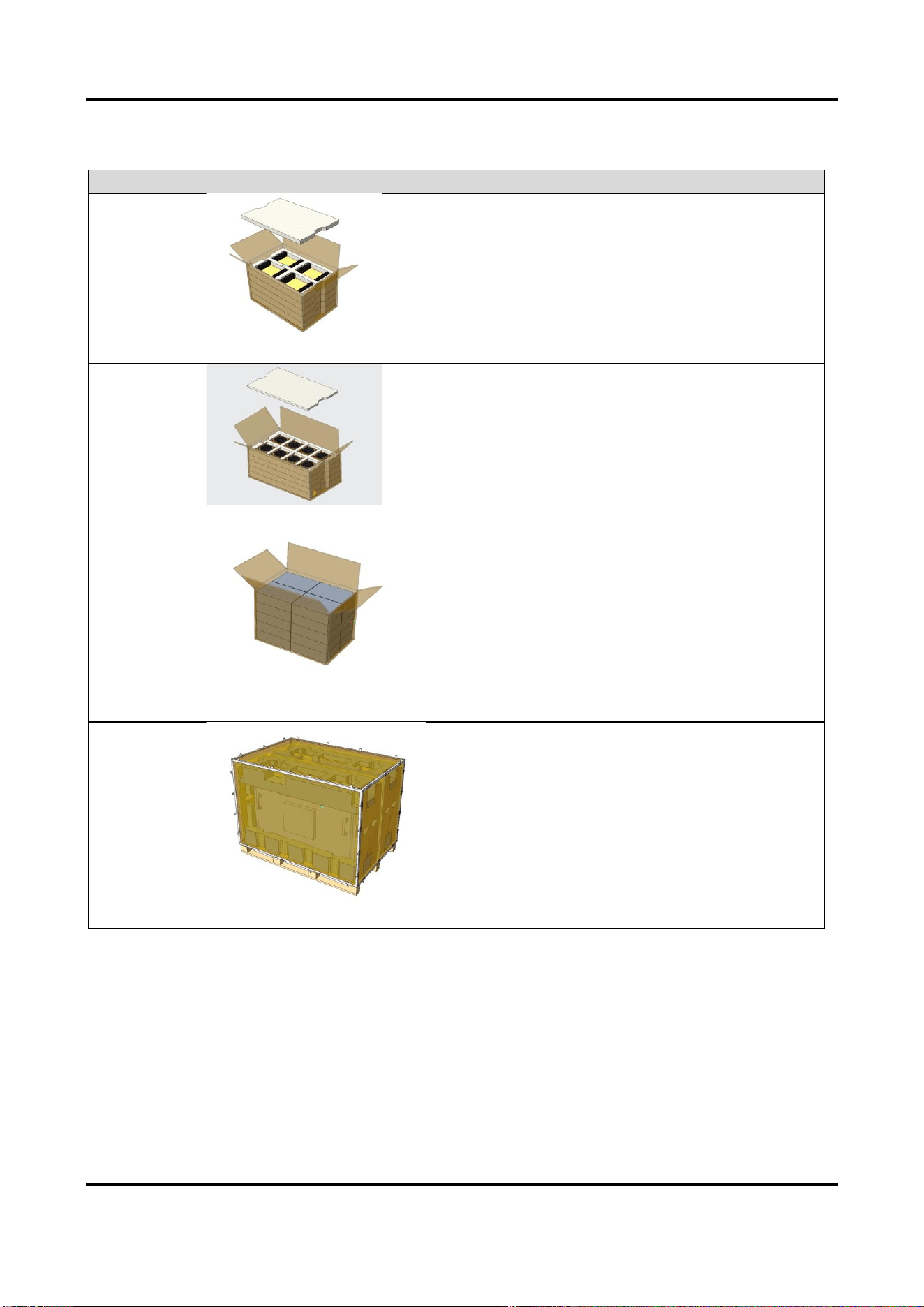
The display is delivered in four packages, as the following table shows.
LCD Display Quick Start Guide
1
Table 1-1 Package Description
Package No.
Description
1
Power supply boards
2
Fans, both equipped with fan covers
3
Accessory boxes, containing the screws used to fix the power supply board and
fans
4
Other parts of the display except those in the above three packages

LCD Display Quick Start Guide
2
Chapter 2 Installation
The device should be installed in an environment where the temperature range is from 5 °C to 35 °C
(41 °F to 95 °F) and the humidity range is from 30% to 75% RH.
Before you start
Before installation, place the device on a clean horizontal desk and avoid any collision or bump.
Steps
1. Take out the items in Package No. 4.
2. Remove the five screws on the maintenance rear cover, and take off the cover. Keep the screws
and the cover.
Figure 2-1 Remove Maintenance Rear Cover
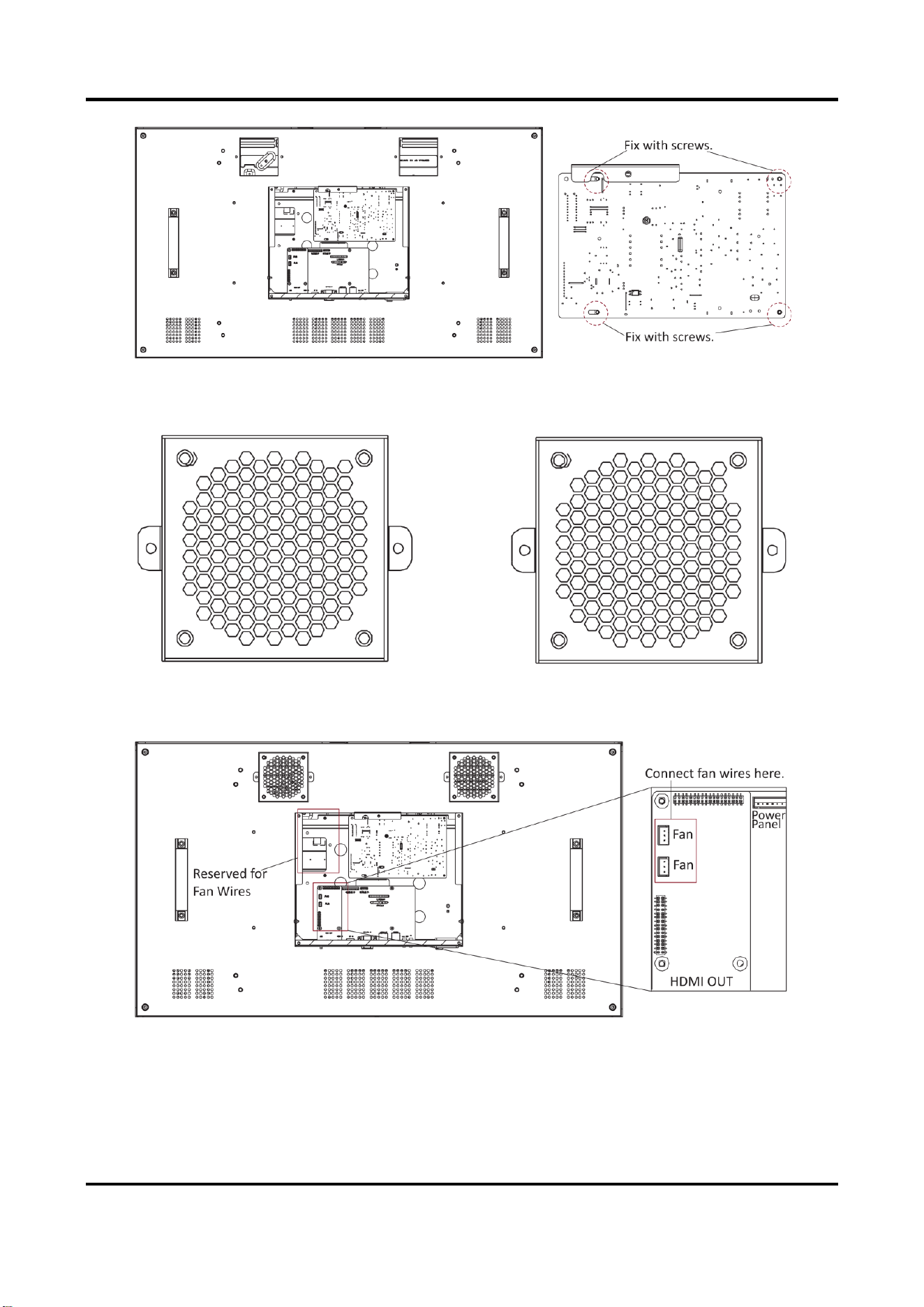
3. Take power supply board out from Package No. 1. Place the power supply board on the position
reserved for it on the display back, and fix it with four M3 × 6 screws.
LCD Display Quick Start Guide
3
Figure 2-2 Fix Power Panel
4. Take the fans out from Package No. 2. Each fan has wires extending from its casing. Keep their
faces with labels upwards and their wires in the lower left corners.
Figure 2-3 Place Fans
5. Pull the fan wires under the sheet metal cover and connect their terminal blocks to the main
board. Fix the remaining wires under the buckles.
Figure 2-4 Connect Fan Wires
6. Fix each fan with two M4 × 8 screws.

LCD Display Quick Start Guide
4
Figure 2-5 Fix Fans
7. Connect the power cord of main board and the other end of backlight cable to the terminal
blocks on the power board respectively. Fix the remaining cables under the buckles.
Figure 2-6 Fix Power Cord and Backlight Cable
8. Fix the maintenance rear cover with the five screws that are removed in the first step, to
complete the installation.

LCD Display Quick Start Guide
5
Figure 2-7 Fix Maintenance Rear Cover
9. Connect the device to a power supply and check the display effect.

UD32056B