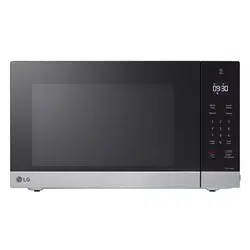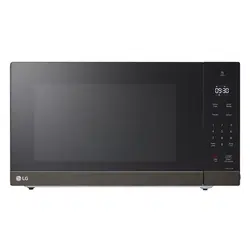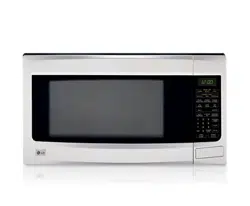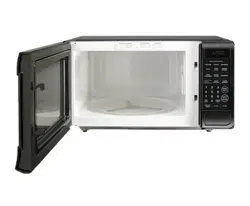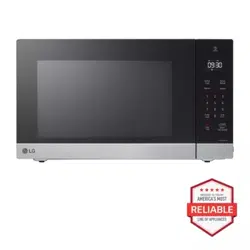
OWNER'S MANUAL
MICROWAVE OVEN
Read this owner's manual thoroughly before operating the
appliance and keep it handy for reference at all times.
ENGLISH
MSER2090* MSER1590*
MFL71664506
Rev.02_022924
www.lg.com
Copyright © 2024 LG Electronics Inc. All Rights Reserved.
Scan to see the online manual.
TABLE OF CONTENTS
2
3 IMPORTANT SAFETY
INSTRUCTIONS
3 READ ALL INSTRUCTIONS BEFORE USE
3WARNING
7 INSTALLATION
7 Product Overview
8 Installation Requirements
10 OPERATION
10 Control Panel
11 Before Use
12 Quick Start and Stop
12 Manual Cooking
12 Cooking Mode
15 Cookware Guide
17 Cooking Guide
19 SMART FUNCTIONS
19 LG ThinQ Application
19 Smart Diagnosis
TM
Feature
20 MAINTENANCE
20 Cleaning
21 TROUBLESHOOTING
21 FAQs
22 Before Calling for Service
23 LIMITED WARRANTY
23 USA
PRECAUTIONS TO AVOID POSSIBLE EXPOSURE TO EXCESSIVE MICROWAVE ENERGY
(a) Do not attempt to operate this oven with the door open since open-door operation can result in harmful
exposure to microwave energy. It is important not to defeat or tamper with the safety interlocks.
(b) Do not place any object between the oven front face and the door or allow soil or cleaner residue to
accumulate on sealing surfaces.
(c) Do not operate the oven if it is damaged. It is particularly important that the oven door close properly and
that there is no damage to the: (1) Door (bent), (2) hinges and latches (broken or loosened), (3) door seals
and sealing surfaces.
(d) The oven should not be adjusted or repaired by anyone except properly qualified service personnel.
3IMPORTANT SAFETY INSTRUCTIONS
ENGLISH
IMPORTANT SAFETY INSTRUCTIONS
READ ALL INSTRUCTIONS BEFORE USE
Safety Messages
Your safety and the safety of others are very important.
We have provided many important safety messages in this manual and on your appliance. Always read and
follow all safety messages.
WARNING
WARNING
• To reduce the risk of explosion, fire, death, electric shock, injury or scalding to persons when using this
product, follow basic precautions, including the following:
Technical Safety
• This appliance is not intended for use by persons (including children) with reduced physical, sensory or
mental capabilities, or lack of experience and knowledge, unless they have been given supervision or
instruction concerning use of the appliance by a person responsible for their safety. Children should be
supervised to ensure that they do not play with the appliance.
• To reduce the risk of burns, electric shock, fire, injury to persons or exposure to excessive microwave
energy when using the microwave oven, read all instructions before using the appliance.
• Children must not be allowed to play with accessories or hang down from the door or any part of the
oven. Doing so can cause serious injury and damage. As with any appliance, close supervision is
necessary when used by children.
• Read and follow the specific PRECAUTIONS TO AVOID POSSIBLE EXPOSURE TO EXCESSIVE
MICROWAVE ENERGY found on page 2.
• This appliance must be grounded. Connect only to properly grounded outlet. See “GROUNDING
INSTRUCTIONS” found on Installation Requirements section.
• Use this appliance only for its intended use as described in the manual. Do not use corrosive chemicals
or vapors in this appliance. This type of oven is specifically designed to heat, cook, or dry food. It is not
designed for industrial or laboratory use.
• To avoid electric shock:
- Do not operate this appliance if it has a damaged cord or plug, if it is not working properly or if it has
been damaged or dropped.
This is the safety alert symbol.
This symbol alerts you to potential hazards that can kill or injure you and others. All safety
messages will follow the safety alert symbol and either the word WARNING or CAUTION.
These words mean:
WARNING
You may be killed or seriously injured if you do not follow instructions.
CAUTION
You may be injured or cause damage to the product if you do not follow instructions.
All safety messages will tell you what the potential hazard is, tell you how to reduce the chance of injury, and
tell you what may happen if the instructions are not followed.

4 IMPORTANT SAFETY INSTRUCTIONS
- Do not immerse cord or plug in water. Keep cord away from heated surfaces.
- Do not let cord hang over edge of table or counter.
• To reduce the risk of fire in the oven cavity:
- Do not overcook food. Carefully attend appliance when paper, plastic, or other combustible materials
are placed inside the oven to facilitate cooking.
- Remove wire twist-ties from paper or plastic bags before placing bag in oven.
- If materials inside the oven ignite, keep oven door closed, turn oven off, and disconnect the power
cord, or shut off power at the fuse or circuit breaker panel.
- Do not use the cavity for storage purposes. Do not leave paper products, cooking utensils, or food in
the cavity when not in use.
• Install or locate this appliance only in accordance with the provided installation instructions.
• Some products such as whole eggs and sealed containers – for example, closed glass jars – are able to
explode and should not be heated in this oven.
• Liquids, such as water, coffee, or tea are able to be overheated beyond the boiling point without
appearing to be boiling. Visible bubbling or boiling when the container is removed from the microwave
oven is not always present.
• THIS COULD RESULT IN VERY HOT LIQUIDS SUDDENLY BOILING OVER WHEN THE CONTAINER IS
DISTURBED OR A SPOON OR OTHER UTENSIL IS INSERTED INTO THE LIQUID.
To reduce the risk of injury to persons:
- Do not overheat the liquid. Stir the liquid both before and halfway through heating it.
- Do not use straight-sided containers with narrow necks. Use extreme care when inserting a spoon or
other utensil into the container.
- After heating, allow the container to stand in the microwave oven for a short time before removing the
container.
• Do not cover or block any openings on the appliance.
• Do not store this appliance outdoors. Do not use this product near water - for example, near a kitchen
sink, in a wet basement, near a swimming pool, or similar locations.
• This appliance should be serviced only by qualified service personnel. Contact the nearest authorized
service facility for examination, repair, or adjustment.
• When cleaning surfaces of door and oven that comes together on closing the door, use only mild,
nonabrasive soaps or detergents applied with a sponge or soft cloth.
Operation
• Do not use this oven for commercial purposes. It is made for household use only.
• Do not run the oven while it is empty.
• If your oven is dropped or damaged, have it thoroughly checked by a qualified service technician before
using it again.
• Take care when the door is opened to avoid injury.
• To avoid improperly cooking some foods:
- Do not heat any type of baby bottle or baby food. Uneven heating may occur and possibly cause
personal injury.
- Do not heat small-necked containers, such as syrup bottles.
- Do not deep-fat fry in the microwave oven.
- Do not attempt home canning in the microwave oven.
• Do not use the oven for the purpose of dehumidification (for example, operating the microwave oven
with wet newspapers, clothes, toys, electric devices, plants, soil, pets or any other living matter inside it).
The oven must only be used for heating or cooking food. The results of misuse can include safety risks
such as fire, burns, or death due to electric shock.

5IMPORTANT SAFETY INSTRUCTIONS
ENGLISH
• The appliance and its accessible parts become hot during use. Care should be taken to avoid touching
heating elements inside the oven. Children must be kept away unless continuously supervised.
• Do not use recycled paper products. They may contain impurities which may cause sparks and/or fires
when used in cooking.
• The door or the outer surface may get hot when the appliance is operating.
• Liquids heated in certain shaped containers (especially cylindrical-shaped containers) may become
overheated. The liquid may splash out with a loud noise during or after heating or when adding
ingredients (instant coffee, etc.), resulting in harm to the oven and possible injury. In all containers, for
best results, stir the liquid several times before heating. Always stir liquid several times between
reheatings.
Maintenance
• If the door or door seals are damaged, the oven must not be operated until it has been repaired by an
authorized service person.
• The oven should be cleaned regularly and any food deposits should be removed. Failure to maintain the
oven in a clean condition could lead to deterioration of the surface that could adversely affect the life of
the appliance and possibly result in a hazardous situation.
• Do not rinse trays and racks by placing them in water immediately after cooking. This may cause
breakage or damage. Improper use could result in damage to the oven.
• Oversized food or oversized metal utensils should not be inserted in a microwave oven as they may
create a fire or risk of electric shock.
• Do not clean with metal scouring pads. Pieces can burn off the pad and touch electrical parts involving a
risk of electric shock.
• Do not store any materials, other than manufacturer’s recommended accessories, in this oven when not
in use.
• Do not cover racks or any other part of the oven with metal foil. This will cause overheating of the oven.
• Do not allow water to spill into the ventilation openings to prevent damage to the internal working parts
of the oven. Doing so may cause a fire or create a risk of electric shock.
Radio/TV/Wireless Equipment Interference
• Operating the microwave oven near equipment-such as a radio, TV, wireless LAN, Bluetooth devices,
medical equipment, or wireless equipment which uses the same frequency, may cause interference. This
interference is not an indication of a defect in the product or its operation. The product is safe to use.
• Do not use medical equipment near the microwave oven, as the interference could affect the medical
equipment’s operation.
• When there is interference, it may be reduced or eliminated by taking the following measures:
- Clean the door and the sealing surfaces of the oven.
- Reorient the receiving antenna of the radio, TV, Bluetooth, or other equipment.
- Relocate the microwave oven in relation to the radio, TV, Bluetooth, or other equipment.
- Move the microwave oven away from the receiver.
- Plug the microwave oven into a different outlet so that the microwave oven and receiver are on
different branch circuits
FEDERAL COMMUNICATIONS COMMISSION RADIO FREQUENCY
INTERFERENCE STATEMENT (U.S.A. ONLY)
• This equipment generates and uses ISM frequency energy and if not installed and used properly, that is
in strict accordance with the manufacturer’s instructions, may cause interference to radio and television
reception. It has been type tested and found to comply with limits for ISM Equipment pursuant to part 18

6 IMPORTANT SAFETY INSTRUCTIONS
SAVE THESE INSTRUCTIONS
FCC Rules, which are designed to provide reasonable protection against such interference in a
residential installation. However, there is no guarantee that interference will not occur in a particular
installation. If this equipment does cause interference to radio or television reception, which can be
determined by turning the equipment off and on, the user is encouraged to try to correct the
interference by one or more of the following:
- Reorient or relocate the receiving antenna of the radio or television.
- Increase the separation between the equipment and receiver.
- Connect the equipment into an outlet on a circuit different from that to which the receiver is
connected.
- Consult the dealer or an experienced radio/TV technician for help.
• The manufacturer is not responsible for any radio or TV interference caused by unauthorized
modification to this equipment. It is the responsibility of the user to correct such interference.
7INSTALLATION
ENGLISH
INSTALLATION
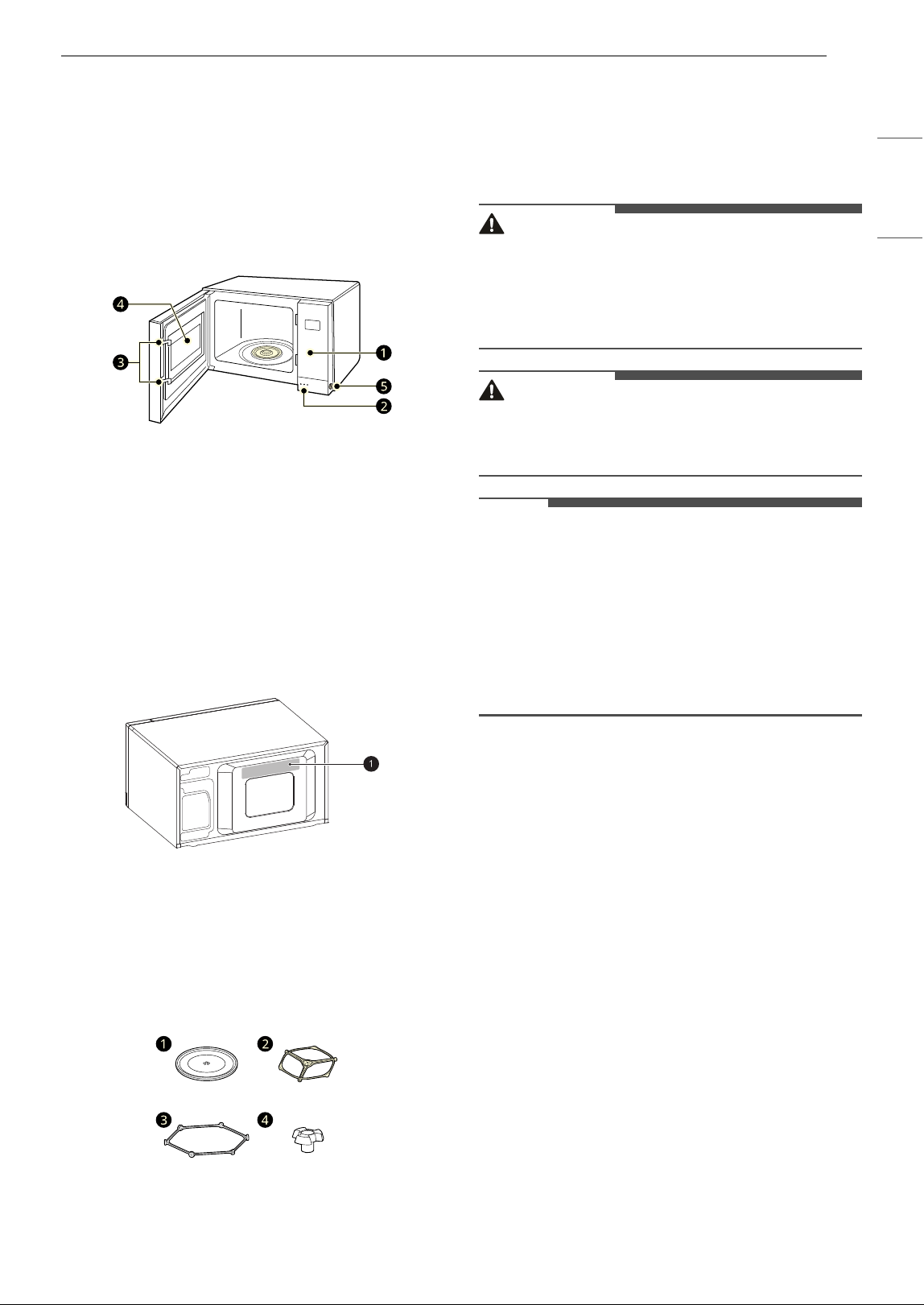
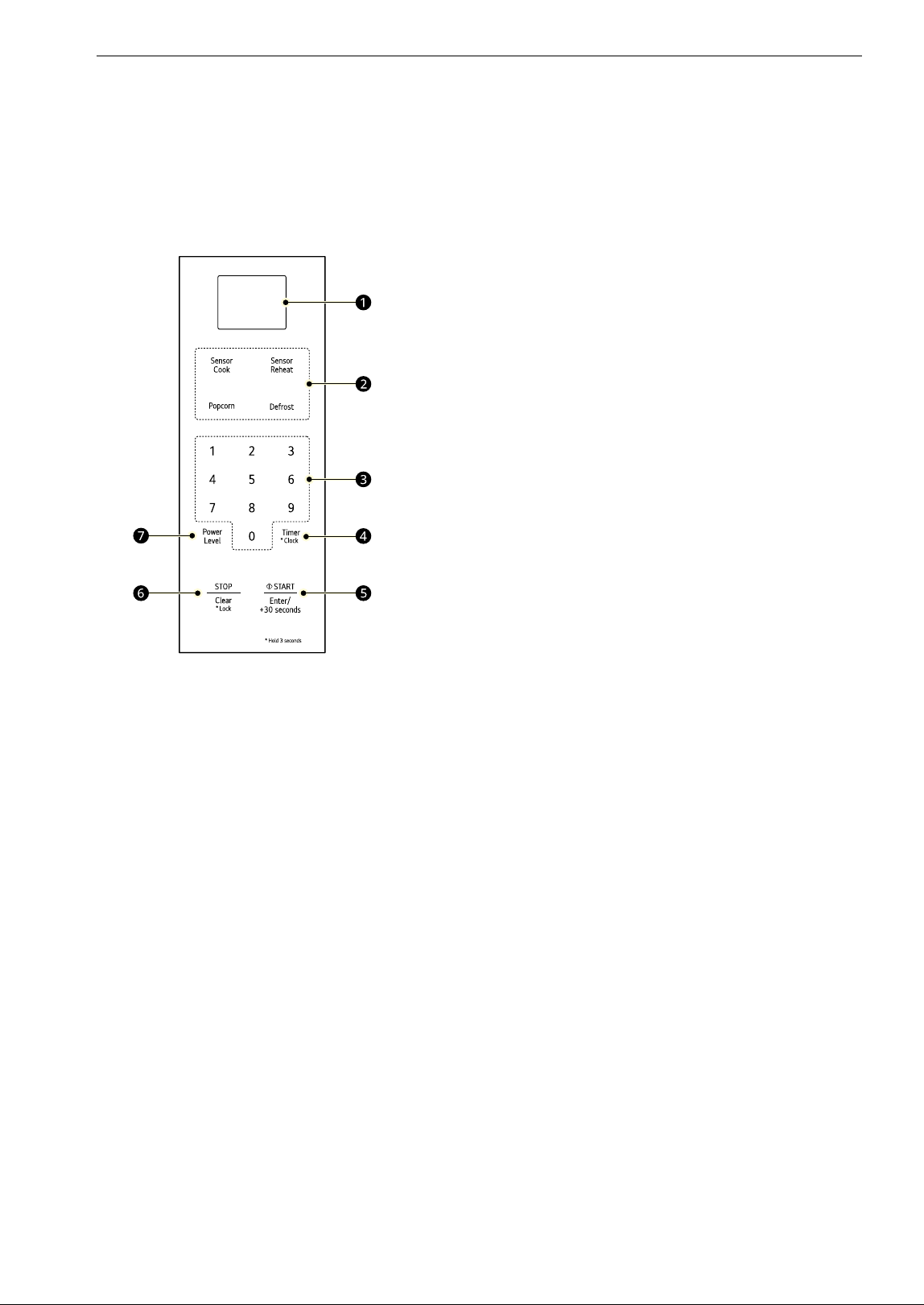
Product Overview
The appearance or components of the appliance
may differ from model to model.
Front View
a Control Panel
b Door Open Button
c Safety Door Lock System
d Window
e Safety Lock Button
Back View
a Location of Model Number
Accessories
Accessories will vary depending on the model
purchased.
a Glass Tray
b Rotating Ring (MSER2090*)
c Rotating Ring (MSER1590*)
d Shaft (MSER1590*)
WARNING
• Do not operate the oven when it is empty or
without the glass tray. It is best to leave a glass
of water in the oven when not in use. The water
will safely absorb all microwave energy, if the
oven is accidentally started.
CAUTION
• To avoid risk of personal injury or property
damage, do not use stoneware, metal cookware,
or metal rimmed cookware in the oven.
NOTE
• This microwave oven is designed for household
use only. It is not recommended for commercial
use.
• Do not cook food for too long. The microwave
oven can be damaged.
• A beep sounds each time you press a key. A
melody signals the end of a timer or a cooking
cycle.
Specifications
MSER2090* Model
• Power Supply: 120 V AC, 60 Hz
• Rated Power Consumption: 1200 W
• Microwave Output: Max. 1200 W
†
• Frequency: 2450 MHz
• Rated Current: 10.0 A
• Dimensions (W x H x D): 23 7/8" x 13 9/16" x 19
13/16" (60.6 x 34.4 x 50.3 cm)
• Oven Cavity Dimensions (W x H x D): 16 11/16"
x 11 1/4" x 18 1/16" (42.4 x 28.6 x 45.9 cm)
• Capacity of Oven Cavity: 2.0 cu.ft. (0.06 m
3
)
† IEC 60705 RATING STANDARD. Specifications
are subject to change without prior notice.
MSER1590* Model
• Power Supply: 120 V AC, 60 Hz
8 INSTALLATION
• Rated Power Consumption: 1250 W
• Microwave Output: Max. 1200 W
†
• Frequency: 2450 MHz
• Rated Current: 10.4 A
• Dimensions (W x H x D): 21 7/16" x 12 1/8" x 16
3/16" (54.4 x 30.8 x 42.7 cm)
• Oven Cavity Dimensions (W x H x D): 15 9/16" x
10 5/16" x 16" (39.5 x 26.2 x 40.6 cm)
• Capacity of Oven Cavity: 1.5 cu.ft. (0.04 m
3
)
† IEC 60705 RATING STANDARD. Specifications
are subject to change without prior notice.
Installation Requirements
Installation Location
Place the microwave oven on a flat surface. Free
airflow around the oven is important. Allow at least
4 inches of clearance around the top, sides, and
back of the oven for proper ventilation.
• Do not place oven above a gas or electric range.
Electrical Requirements
The oven is designed to operate on a Standard 120
V/60 Hz household outlet. Be sure the circuit is at
least 15 A or 20 A and the microwave oven is the
only appliance on the circuit. It is not designed for
50 Hz or any circuit other than a 120 V/60 Hz
circuit. No other electrical appliances or lighting
circuits should be on this line. If in doubt, consult a
licensed electrician.
Voltage Warning
The voltage used at the wall socket must be the
same as specified on the oven name plate located
on the back or on the side of the control panel of
the oven. Using a higher voltage is dangerous and
may result in a fire or other type of accident
causing oven damage. Low voltage will cause slow
cooking. If the microwave oven does not perform
normally in spite of proper voltage, unplug and
reconnect the power cord.
Do Not Block Air Vents
All air vents should be kept clear during cooking. If
air vents are covered during oven operation the
oven may overheat. To prevent damage to the
oven, a sensitive safety device detects overheating
and automatically turns the oven off. The oven
cannot be used until it has cooled sufficiently.
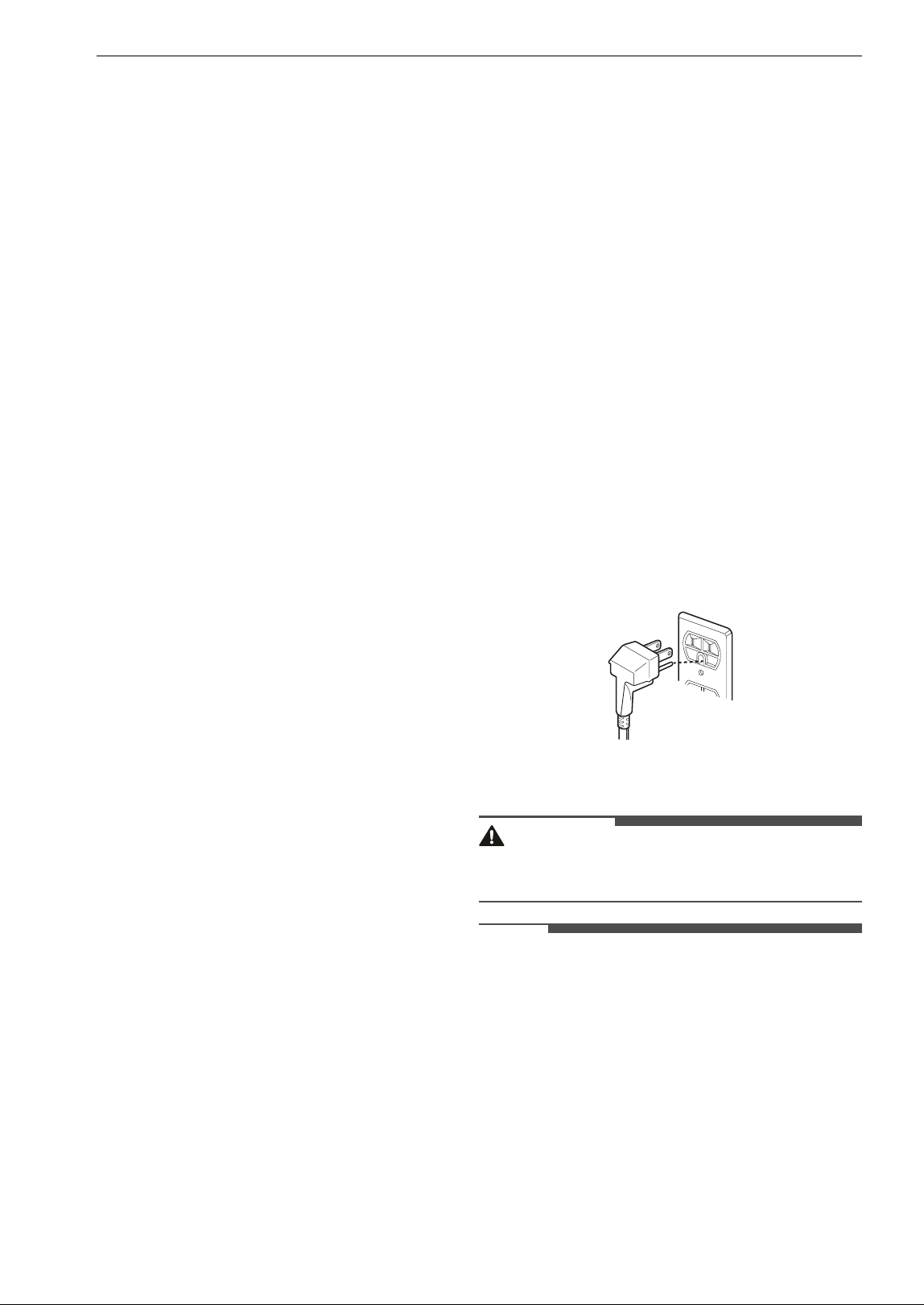
Grounding Instructions
This appliance must be grounded. In the event of
an electrical short circuit, grounding reduces the
risk of electric shock by providing an escape wire
for the electric current. This appliance is equipped
with a cord having a grounding wire with a
grounding plug. The plug must be plugged into an
outlet that is properly installed and grounded.
• Consult a qualified electrician or service person if
the grounding instructions are not completely
understood, or if doubt exists as to whether the
appliance is properly grounded.
- Use of an extension cord is not recommended.
If the power supply cord is too short, have a
qualified electrician or service person install an
outlet near the appliance.
- If it is necessary to use an extension cord, use
only a 3-wire extension cord that has a 3-blade
grounding plug, and a 3-slot socket that will
accept the plug on the appliance. The marked
rating of the extension cord must be equal to
or greater than the electrical rating of the
appliance.
• Ensure proper ground exists before use.
• Keep the electrical power cord dry and do not
pinch or crush it in any way.
WARNING
• Improper use of grounding can result in a risk of
electric shock.
NOTE
• A short power supply cord is provided to reduce
the risks resulting from becoming entangled in
or tripping over a longer cord.
• Longer cord sets or extension cords are available
and may be used if care is exercised in their use.
• If a long cord or extension cord is used, (1) the
marked electrical rating of the cord set or
extension cord must be at least as great as the
electrical rating of the appliance, (2) the
extension cord must be a grounding-type 3-wire
cord, and (3) the longer cord should not be
draped over a counter or table where children
9INSTALLATION
ENGLISH
could pull on it, or located where it could present
a trip hazard.
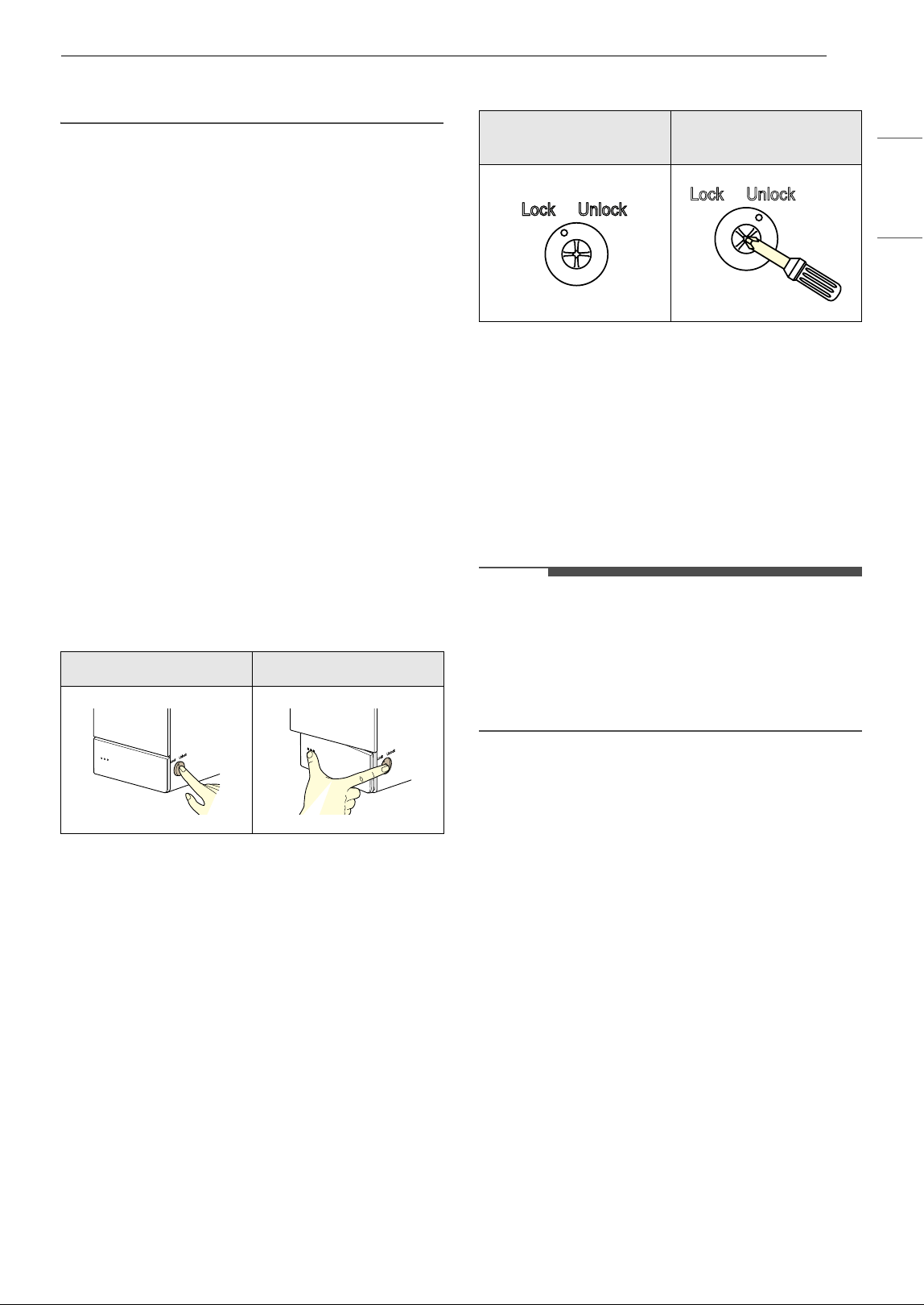
Safety Lock Guide
For safety, this microwave requires a 2-step
process to open the door. This safety door lock
feature reduces the risks to young children by
reducing the likelihood of them handling hot food
and beverage items.
• Hot contents can cause severe burns. Do not
allow children to use the microwave.
• All persons should use caution when removing
hot items from the microwave oven.
When the Safety Lock is enabled, you must
complete the 2-step process each time you open
the door.
If there are no young children in your household,
or disabilities make it difficult for adults to operate
the 2-step door latch, refer to the instructions
below to disable the safety lock feature and
convert the door to a 1-step push button latch.
Opening Door with Safety Lock
Enabled
1 Use one finger to locate and press the safety
lock button on the right side of the door.
2 While pressing the lock button, use your
thumb to press the door latch release button
on the front of the door.
Disabling the Safety Lock
1 Locate the lock button on the side of the
control panel.
2 Using a Phillips screwdriver, gently press the
button in.
3 Rotate the screwdriver clockwise to the
"Unlock" position. Do not over-tighten.
NOTE
• After it's rotated, the button will stay in the
pressed-in "Unlock" position. To return it to the
factory default position, use a Phillips
screwdriver to rotate the lock button
counterclockwise to the "Lock" position. The lock
button will spring back up.
Side Button Front Button
Safety Lock On
(default)
Safety Lock Off
10 OPERATION
OPERATION
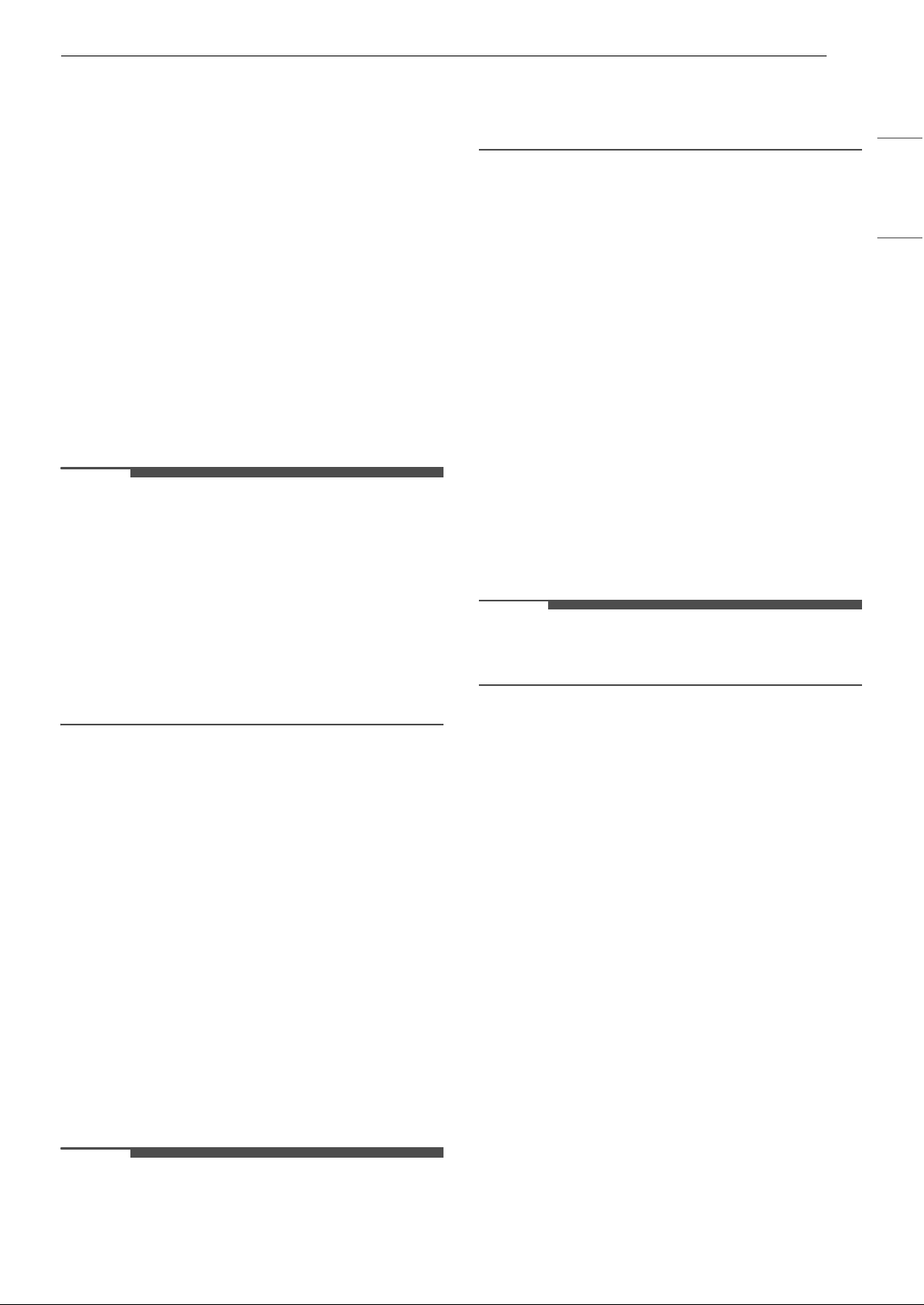
Control Panel
The actual control panel may differ from model to model.
Control Panel Features
a Display
Shows the time of day, cooking time settings,
and selected cooking functions.
b Sensor Operations
Press the buttons to select preprogrammed
cook and defrost settings for popular food
items.
c Number Keys
Press the number keys to set cooking time,
power level, quantity, or weight.
d Timer/Clock
•Press Timer/Clock to use your microwave
oven as a kitchen timer.
•Press and hold Timer/Clock for 3 seconds to
set the time of day.
e START/Enter
•Press START/Enter to start the oven or enter
amounts.
•Press START/Enter to cook at 100% cook
power for 30 seconds.
•Press START/Enter during cooking to
increase cook time by 30 seconds. (Add up to
99 minutes and 59 seconds)
f STOP/Clear/Lock
• Press STOP/Clear to stop the oven or clear all
entries.
• Press and hold STOP/Clear for 3 seconds to
lock the control panel.
g Power Level
Press Power Level to set a cooking power.
11OPERATION
ENGLISH
Before Use
Setting the Clock
When the oven is plugged in for the first time or
when power resumes after a power interruption,
the clock defaults to the 12-hour clock mode and
12H appears in the display. You can set the time of
day or switch to the 24-hour clock mode.
1 Press START/Enter to confirm the 12H clock
display.
• To switch between the 12-hour and 24-hour
clock modes, press Timer/Clock.
2 Press the number keys to set the desired hour
and minutes, and press START/Enter.
NOTE
• To reset the clock, unplug and reconnect the
power cord. Or press and hold Timer/Clock until
12H appears in the display (approximately 3
seconds).
• To keep the time of day from appearing in the
display, press STOP/Clear after plugging in the
oven.
• When the oven is not in use, the display turns off
to save energy, unless the time of day is set to
show in the display.
Child Lock
Use this safety feature to lock the control panel
before cleaning the oven or to prevent children
from unsupervised use of the oven.
Setting Child Lock to ON
1 Press STOP/Clear.
2 Press and hold STOP/Clear until Loc appears
in the display (approximately 3 seconds).
Canceling Child Lock
Press and hold STOP/Clear until Loc disappears in
the display (approximately 3 seconds).
NOTE
• If set, the time of day reappears in the display
after 1 second.
• If the oven is locked, Loc appears in the display
when any key is pressed.
• Unlock the oven to resume normal use.
Kitchen Timer
The Timer function serves as an extra kitchen
timer. It chimes when the set time runs out. It does
not start or stop cooking.
Setting Timer for 3 Minutes
1 Press Timer/Clock.
2 Press the number keys to set the time (3, 0,
and 0), and press START/Enter.
• The oven starts immediately and the time
counts down in the display.
Canceling the Timer
Press Timer/Clock.
NOTE
• When the time is over a melody sounds and End
displays. Press STOP/Clear.
Weight Conversion
Most food weights are given in pounds and
ounces. If using pounds, food weights must be
entered into auto defrost in pounds and tenths of
pounds (decimals). Use the following chart to help
you convert food weights to decimals.
Microwave Power Levels
This microwave oven is equipped with 10 power
levels to give you maximum flexibility and control
over cooking.
• When operating at 100 - 80 % power levels for
prolonged periods, the output power will be
• 1.6 oz. = 0.1 lb
• 3.2 oz. = 0.2 lb
• 4.8 oz. = 0.3 lb
• 6.4 oz. = 0.4 lb
• 8.0 oz. = 0.5 lb (1/2
lb)
• 9.6 oz. = 0.6 lb
• 11.2 oz. = 0.7 lb
• 12.8 oz. = 0.8 lb
• 14.4 oz. = 0.9 lb
• 16.0 oz. = 1.0 lb
12 OPERATION
reduced gradually to help prevent the unit from
electrically overheating.
Quick Start and Stop
Using Quick Start
The Quick Start feature allows you to set 30-
second intervals of High power cooking with each
press of the Start/Enter button.
Cooking for 2 Minutes on High Power
1 Press STOP/Clear.
2 Press START/Enter four times.
• The oven starts immediately and the time
counts down in the display.
•Press START/Enter repeatedly to extend
the cook time by 30 seconds every time the
button is pressed.
Interrupting Cooking
• To stop the oven during a cycle, open the door.
• To restart cooking, close the door and press
START/Enter.
• To stop cooking and clear the remaining cook
time, open the door and press STOP/Clear.
Manual Cooking
Using Manual Cooking
When not using the auto cooking functions, the
cooking time and power level are set manually.
Cooking for 5 Minutes, 30 Seconds at 80%
Power
1 Press STOP/Clear.
2 Press the number keys to set the cook time
(5:30), and press Power Level.
3 Press the number 8 key to select power level
8, and press START/Enter.
• When cooking is complete, a chime sounds
and End appears in the display window. End
remains in the display and the chime
repeats every minute until the door is
opened, or any button is pressed.
NOTE
• If a power level is not selected, the oven defaults
to 100% power.
Cooking Mode
Cook your favorite foods without having to select
cooking times and power levels.
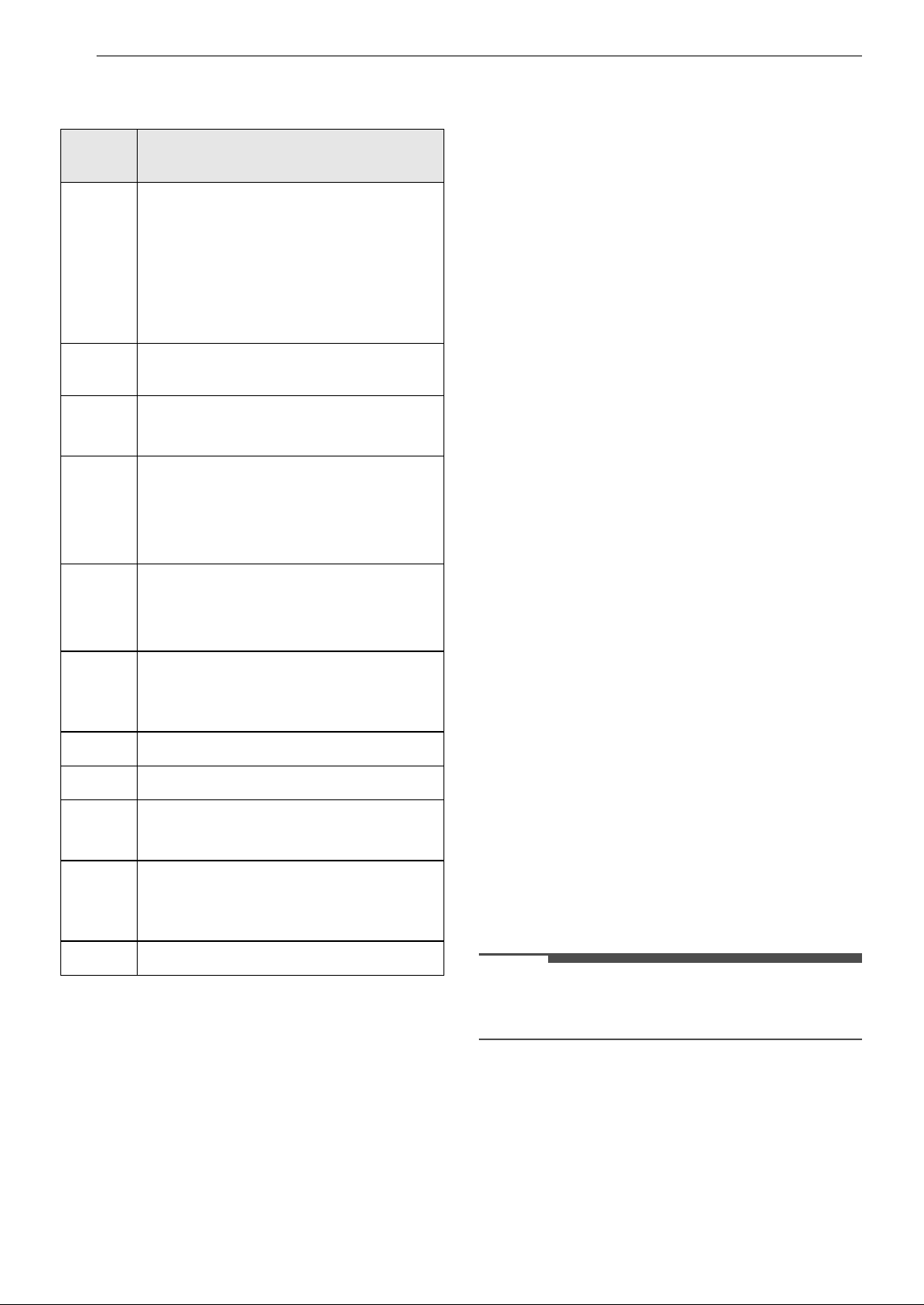
Power
Level
Use
P-HI
(100 %)
• Boiling water.
• Browning ground beef.
• Making candy.
• Cooking whole poultry, poultry
pieces, fish & vegetables.
• Cooking tender cuts of meat.
P-90
(90%)
• Reheating rice, pasta & vegetables.
P-80
(80%)
• Reheating prepared foods quickly.
• Reheating sandwiches.
P-70
• Cooking egg, milk and cheese
dishes.
• Cooking cakes and breads.
• Melting chocolate.
P-60
•Cooking veal.
• Cooking whole fish.
• Cooking puddings and custard.
P-50
• Cooking ham, whole poultry and
lamb.
• Cooking rib roast and sirloin tip.
P-40
• Thawing meat, poultry and seafood.
P-30
• Cooking less tender cuts of meat.
P-20
• Taking chill out of fruit.
• Softening butter.
P-10
• Keeping casseroles and main dishes
warm.
• Softening butter and cream cheese.
P-00
• Standing time.

13OPERATION
ENGLISH
Using the Sensor Functions
This microwave oven has sensor features for
convenient operation of the microwave. Select the
type of food to cook, reheat, or defrost popular
food items automatically using preprogrammed
settings. The sensor system works by detecting
built up steam.
• Make sure the door remains closed.
• Opening the door or pressing the STOP/Clear
button before the steam is detected will stop the
process and the oven.
• Appropriate containers and coverings help
assure good sensor cooking results.
- Always use microwavable containers and
cover them loosely with lids or vented plastic
wrap.
- Never use tight-sealing plastic covers. They
can prevent steam from escaping and cause
food to overcook.
- Match the amount to the size of the container.
- Fill containers at least half full for best results.
- Be sure the outside of the cooking container
and the inside of the microwave oven are dry
before placing food in the oven. Beads of
moisture turning into steam can mislead the
sensor.
Sensor Cook Mode
Sensor Cook allows you to cook some of your
favorite foods without having to select cooking
times and power levels. The oven automatically
adjusts cooking times for many food items.
1 Press STOP/Clear. Press Sensor Cook.
2 Use the number keys or press Sensor Cook to
enter the desired menu code from the Sensor
Cook Menu.
3 Press START/Enter.
Sensor Cook Menu
Refer to the information below to set the desired
code and weight.
1 Bacon (2 - 4 slices)
• Place bacon slices on a microwave bacon rack.
Or use a dinner plate lined with paper towels.
2 Fresh Vegetable (1 - 4 cups)
• Place in a microwaveable bowl or casserole. Add
water and cover with vented plastic wrap.
- 1-2 cups: add 2 tbsp water.
- 3-4 cups: add 4 tbsp water.
• Standing time: 3 minutes
3 Frozen Entree (10 - 40 oz.)
• Remove from outer display package. Slit cover. If
not in microwave-safe container, place on a
microwaveable plate and cover with vented
plastic wrap.
• Standing time: 3 minutes
4 Frozen Vegetable (1 - 4 cups)
• Place in a microwaveable bowl or casserole. Add
water and cover with vented plastic wrap.
- 1-2 cups: add 2 tbsp water.
- 3-4 cups: add 4 tbsp water.
• Standing time: 3 minutes
5 Oatmeal (1 - 2 servings)
• Combine water or milk, salt and oats in large
microwave-safe bowl. Cover with vented plastic
wrap.
- 1 serving: 0.5 cup (40 g) oats, 1 cup (230 g)
water or milk, dash of salt.
- 2 servings: 1 cup (80 g) oats, 1.5 cup (345 g)
water or milk, 1/8 tsp salt.
• Standing time: 3 minutes
6 Potato (1 - 4 ea)
• Pierce skin with a fork and place on paper towel.
Do not cover.
• Standing time: 5 minutes
7 Rice (0.5 - 2 cups, 96 g - 384g)
• Use a large, deep microwave-safe bowl (3 qt./3
L).
• Combine 1 part rice to 2 parts water. Cover with
vented plastic wrap.
• Standing time: 5 - 10 minutes.
Sensor Reheat Mode
This feature reheats single servings of previously
cooked foods or a plate of leftovers.
1 Press STOP/Clear. Press Sensor Reheat.
14 OPERATION
2 Use the number keys or press Sensor Reheat
to enter the desired menu code from the
Sensor Reheat Menu.
3 Press START/Enter.
NOTE
• Do not use recycled paper products in the
microwave oven. They sometimes contain
impurities that cause arcing and sparking.
Sensor Reheat Menu
Refer to the information below to set the desired
code and weight.
1 Beverage (1 - 2 cups, 240 ml per cup)
• Use a mug or microwave-safe cup. Do not cover.
• Stir after reheating. (Be careful! The beverage
will be very hot. Sometimes liquids heated in
cylindrical containers will splash out
unexpectedly when the cup is moved.)
2 Casserole (10 - 20 oz)
• Place food in a bowl or casserole or on a plate.
Cover with vented plastic wrap.
• Standing time: 3 minutes
3 Dinner Plate (1 serving)
• Place food in a bowl or casserole or on a plate.
Cover with vented plastic wrap.
• Standing time: 3 minutes
4 Pie (10 - 20 oz)
• Cut leftover pie into pieces. Place food on a
microwave-safe dish.
5 Pizza (1 - 3 slices)
• Place on paper towel on a microwave safe plate.
• This is a reheat function for leftover pizza. Do not
use to cook pizza.
Popcorn Mode
Prepare microwave popcorn simply and easily, one
bag at a time.
• Sensor Popcorn only uses HI (100%) power.
• The popping time counts down in the display.
• When the cook time ends, a melody sounds and
End appears in the display. The oven turns off
automatically.
• Place one bag only (50 - 100g) of prepackaged
microwave popcorn on a microwave-safe / oven-
safe dish on the turntable. The package should
be at room temperature.
1 Press STOP/Clear.
2 Press Popcorn and press START/Enter.
CAUTION
• Never use a brown paper bag for popping corn
or attempt to pop leftover kernels.
• Do not pop popcorn, except in a microwave-safe
container or commercial packages designed for
microwave ovens.
• Never try to pop popcorn in a paper bag that is
not microwave-approved.
• Overcooking may result in the popcorn being
burnt and smoking badly.
• Do not repop unpopped kernels in the
microwave.
• Do not reuse popcorn bags. Overcooking can
result in an oven fire.
• Listen while corn pops. Stop oven when popping
slows to 2-3 seconds between pops.
• Do not leave microwave unattended while
popping corn.
• Follow directions on bag.
• When popping prepackaged popcorn, place the
bag carefully in the oven so it does not touch the
walls as it rotates. Fold the ends of the bag up
and toward the center of the bag.
• If popcorn bag size is not known, follow
manufacturer’s instructions and do not use this
feature.
• Do not use Popcorn button in combination with
any other feature buttons.
• Do not attempt to reheat or cook any unpopped
kernels.
•Prepare only one bag at a time.
• Do not use popcorn popping devices in
microwave oven with this feature.
Popcorn Menu
Refer to the information below to set the desired
code and weight.
15OPERATION
ENGLISH
Pop Popcorn (3.5 oz.)
• Pop only one package at a time. For best results,
use a fresh bag of popcorn. Place a bag of
prepackaged microwave popcorn on the center
of the glass tray.
Defrost Mode
The oven has 4 preset defrost cycles. The Defrost
Menu shows the suggested defrost cycle for
various foods. This defrost function conveniently
chimes during the cycle to remind you to check,
turn over, separate, or rearrange the food.
1 Press STOP/Clear. Press Defrost.
2 Use the number keys or press Defrost to
enter the desired menu code from the
Defrost Menu, and press START/Enter.
3 Press the number keys to set the weight, and
press START/Enter.
• At the chime, open the oven door and turn
the food over. Remove any food that has
thawed. Return the items which are still
frozen to the oven and press START/Enter
to complete the defrost cycle.
NOTE
• The countdown appears in the display after
START/Enter is pressed. The oven chimes once
during the defrost cycle.
• When using this defrost function, the weight to
be entered is the net weight in pounds and
tenths of pounds (the weight of the food minus
the container).
Defrost Menu
Refer to the information below to set the desired
code and weight.
dEF1 Meat (0.1 - 6.0 lbs)
• Beef: Ground beef, round steak, stew cubes,
tenderloin steak, pot roast, rib roast, rump roast,
chuck roast, hamburger patties
• Lamb: Chops, rolled roast
• Pork: Chops, hot dogs, spareribs, country-style
ribs, rolled roast, sausage
• Veal: Cutlets (1 lb., ½ inch thick)
• Turn food over at beep.
• Standing time: 5-15 minutes
dEF2 Poultry (0.1 - 6.0 lbs)
• Poultry: Whole, cut-up, breast (boneless)
• Cornish Hens: Whole
• Turkey: Breast
• Rinse chicken with tap water before cooking and
let stand for 60 minutes after cooking for better
results.
• Turn food over at beep.
• Standing time: 60 minutes
dEF3 Fish (0.1 - 4.0 lbs)
• Fish: Fillets, whole steaks
• Shellfish: Crab meat, lobster tails, shrimp,
scallops
• Turn food over at beep.
• Standing time: 5-10 minutes
dEF4 Bread (0.1 - 2.0 lbs)
• Sliced bread, buns, baguettes, etc.
• Separate slices and place between paper towels
or on flat plate. Turn food over at beep.
• Standing time: 1-2 minutes
Cookware Guide
Microwave-Safe Cookware
Use microwavable cookware.
• Ovenproof Glass
- Ovenproof glassware that is treated for high
intensity heat so it is heat-resistant is
microwave-safe.
- Use utility dishes, loaf dishes, pie plates, cake
plates, liquid measuring cups, casseroles and
bowls without metal rims.
- Do not use delicate glassware, such as
tumblers or wine glasses, as these might
shatter when heated.
• China
- Use bowls, cups, serving plates, pottery,
stoneware, ceramic, and platters without
metal rims or handles. Many containers made
of these materials are microwave-safe, but test
them before use.
• Plastic
- Plastic Storage Containers: Use plastic
dishes, cups, semi-rigid freezer containers and

16 OPERATION
plastic bags only for short cooking times. Do
not use them when cooking food for long
periods or at high power levels, as the hot food
will eventually warp or melt the plastic.
- Plastic wrap (as a cover): Lay the plastic wrap
loosely over the dish and press it to the sides.
Vent plastic wrap by turning back one edge
slightly to allow excess steam to escape. The
dish should be deep enough so that the plastic
wrap will not touch the food. As the food heats
it may melt the plastic wrap wherever the wrap
touches the food.
- Plastic Cooking Bags: Provided they are
specially made for cooking, cooking bags are
microwave safe. Remember to make a slit in
the bag so that steam can escape. Never use
ordinary plastic bags for cooking in the
microwave oven, as they will melt and rupture.
- Plastic Microwave Cookware: A variety of
shapes and sizes of microwave cookware are
available. You may be able to use items you
already have on hand rather than investing in
new kitchen equipment.
• Paper
- Use paper towels, waxed paper, paper
napkins, and paper plates with no metal rims
or design. Look for the manufacturer’s label
for use in the microwave oven.
- Paper plates and containers are convenient
and safe to use in the microwave oven,
provided that the cooking time is short and the
foods to be cooked are low in fat and
moisture. Paper towels are also very useful for
wrapping foods and for lining baking trays in
which greasy foods such as bacon are cooked.
- Avoid colored paper products as the color may
run. Do not use recycled paper products in the
microwave oven. They may contain impurities
which could cause arcing or fires when used in
the microwave.
• Tableware
- Many containers made of pottery, stoneware
and ceramic are also microwave-safe. If in
doubt consult the manufacturer’s literature or
perform the microwave test.
- Do not put plates with painted decoration in
the oven, as the paint may contain metal and
cause arcing.
Microwave-Unsafe Cookware
• Metal Containers/Metal Decoration
- Never use metal or metal-rimmed cookware in
the microwave oven.
- Microwaves cannot penetrate metal. They will
bounce off any metal object in the oven and
cause arcing, an alarming phenomenon that
resembles lightning.
- Metal shields the food from microwave energy
and produces uneven cooking. Also avoid
metal skewers, thermometers, foil trays,
metal-rimmed or metal-banded dinnerware,
casserole dishes, etc. The metal rim interferes
with normal cooking and may damage the
oven.
• Aluminum Foil
- Avoid large sheets of aluminum foil because
they hinder cooking and may cause harmful
arcing.
- Use small pieces of foil to shield poultry legs
and wings.
- Keep ALL aluminum foil at least 1 inch from
the side walls and door of the oven.
• Wood
- Wood bowls and boards will dry out and may
split or crack when you use them in the
microwave oven.
- Baskets react in the same way.
• Tightly Covered Cookware
- Be sure to leave openings for steam to escape
from covered containers.
- Pierce plastic pouches of vegetables or other
food items before cooking.
- Tightly closed pouches could explode.
• Brown Paper
- Avoid using brown paper bags.
- They absorb too much heat and could burn.
• Flawed or Chipped Cookware
- Any container that is cracked, flawed, or
chipped may break in the oven.
• Metal Twist Ties
- Remove metal twist ties from plastic or paper
bags.
- They become hot and could cause a fire.
Testing Cookware before Use
Most heat resistant and non-metallic cookware is
safe for use in your oven. However, some
cookware may contain materials that are not
suitable for microwave use. Follow the steps below
to find out if cookware can be used in the
microwave.
17OPERATION
ENGLISH
1 Place the container in question and a glass
measuring cup filled with water next to each
other inside the oven.
2 Heat the container and glass measuring cup
for 1 minute at HIGH power.
• If the water heats up but the container
remains cool to the touch, the container is
microwave-safe.
• If the temperature of the water does not
change but the container becomes warm, it
is not safe for use in the microwave oven.
CAUTION
• Some items with high lead or iron content are
not suitable for microwave cooking.
• Cookware should be checked to ensure that it is
suitable for use in the microwave.
• Always be careful when taking cookware out of
the oven. Some dishes absorb heat from the
cooked food and may be hot.
Cooking Guide
Cooking Tips
Carefully monitor the food in the microwave oven
while it is cooking. Directions given in recipes to
elevate, stir, etc., are the minimum steps
recommended. If food is overcooked (dry),
undercooked, or unevenly cooked, make
adjustments before or during cooking to correct
the problem.
• Overcooked or Dry Food
- Sprinkling: Sprinkle low-moisture foods such
as roasts and vegetables with water before
cooking, or cover them to retain moisture.
- Density: Light, porous food such as cakes and
breads cook more quickly than heavy, dense
foods such as roasts and casseroles.
- Shielding: Cover the corners of square dishes
with small strips of aluminum foil to prevent
overcooking. Don’t use too much foil, and
secure the foil to the dish. Foil can cause
arcing if it gets too close to the oven walls
during cooking.
- Bones and Fat: Bones conduct heat, and fat
cooks more quickly than meat. Take care with
bony or fatty cuts of meat.
• Undercooked Food
- Covering: Cover food with a microwave-safe
lid, parchment paper (not waxed paper), or
plastic wrap to trap heat and steam and cook
food more quickly.
- Standing Time: Let food stand for several
minutes after being removed from the oven to
allow it to finish cooking and help flavors blend
and develop.
- Quantity: The more food you place in the
oven, the longer the required cooking time.
- Temperature: Ice-cold ingredients take much
longer to cook than room temperature
ingredients.
• Unevenly Cooked Food
- Stirring: Stir food from the outside toward the
center during cooking, as food at the outside
of the dish heats more quickly.
- Arranging: Turn food over several times
during cooking. The upper portion of thick
foods cooks more quickly than the lower
portion.
- Shaping: Place the thickest portions of foods
like meat, poultry or fish toward the outside of
the cookware to help them cook more evenly.
If possible, shape foods into thin rounds or
rings.
• Foods with Skin, Shell or Membrane
- Skin or Membrane: Pierce the outsides of
foods like potatoes, sausages, or egg whites or
yolks before cooking.
- Shell: Pierce or remove the shells from eggs,
clams, oysters, or other shelled foods before
cooking.
• Defrosting Tips
- Remove fish, shellfish, meat, and poultry from
its original wrapping paper or plastic package.
Otherwise, the wrap close to the foods will
hold steam and heat, which can cause the
outer surface of the foods to be cooked.
- Remove any metal twist ties.
- Always slit or pierce plastic pouches or
packaging.
- Open containers such as cartons before they
are placed in the oven.
- If food is foil wrapped, remove the foil and
place the food in a suitable container.
- The length of defrosting time varies
depending on the shape of the food and on
how solidly the food is frozen.
- As food begins to defrost, separate the food
into pieces so that they can defrost more
easily.
18 OPERATION
- Turn over food during defrosting or standing
time. Separate into pieces and remove food as
required.
- Let food stand after defrosting. Food should
still be somewhat icy in the center when
removed from the oven.
- When using Defrost, the weight to be entered
is the net weight in pounds and tenths of
pounds (the weight of the food minus the
container).
- Slit the skins of frozen foods such as sausage.
- Bend plastic pouches of food to ensure even
defrosting.
- Place food in a shallow container or in a
microwave roasting dish to catch the
drippings.
- Always underestimate defrosting time. Food
should still be somewhat icy in the center
when removed from the oven. If defrosted
food is still frozen solid in the center, return it
to the microwave oven for more defrosting.
- Depending on the shape of the food, some
areas may defrost more quickly than others.
- The shape of the package affects how quickly
food will defrost. Shallow packages will defrost
more quickly than a deep block.
- For best results, shape ground meat into the
form of a doughnut before freezing. When
defrosting, scrape off thawed meat when the
beep sounds and continue defrosting.
- Use small pieces of aluminum foil to shield
parts of food such as chicken wings, leg tips,
fish tails, or areas that start to get warm. Make
sure the foil does not touch the sides, top, or
bottom of the oven. The foil can damage the
oven lining.
Precautions
WARNING
• Do not use your microwave oven to cook eggs in
the shell. Pressure can build up inside the shell,
causing it to burst.
• Never operate the oven when it is empty. Food
or water should always be in the oven during
operation to absorb the microwave energy.
• Place the front surface of the door three inches
or more from the edge of a countertop to avoid
accidental tipping of the microwave oven during
normal use.
• To program the oven, press the center of each
button firmly. When a button is pressed
correctly, a beep sounds and the oven is
activated. Do not press several buttons at once.
• Do not strike the control panel with silverware,
utensils, etc. It may be damaged or broken.
• Always be careful when taking cookware out of
the oven. Some dishes absorb heat from the
cooked food and may be hot. See the Cookware
Guide section for more information.
• To avoid breakage, allow cookware to cool
before rinsing or submerging in water. Always
allow the turntable to cool before removing it
from the oven.
• Do not use the oven to dry newspapers or
clothes. They may catch fire.
• Use thermometers that have been approved for
microwave oven cooking.
• The turntable must always be in place when you
operate the oven.
19SMART FUNCTIONS
ENGLISH
SMART FUNCTIONS
LG ThinQ Application
This feature is only available on models with the c
or
d logo.
The LG ThinQ application allows you to
communicate with the appliance using a
smartphone.
LG ThinQ Application Features
Communicate with the appliance from a
smartphone using the convenient smart features.
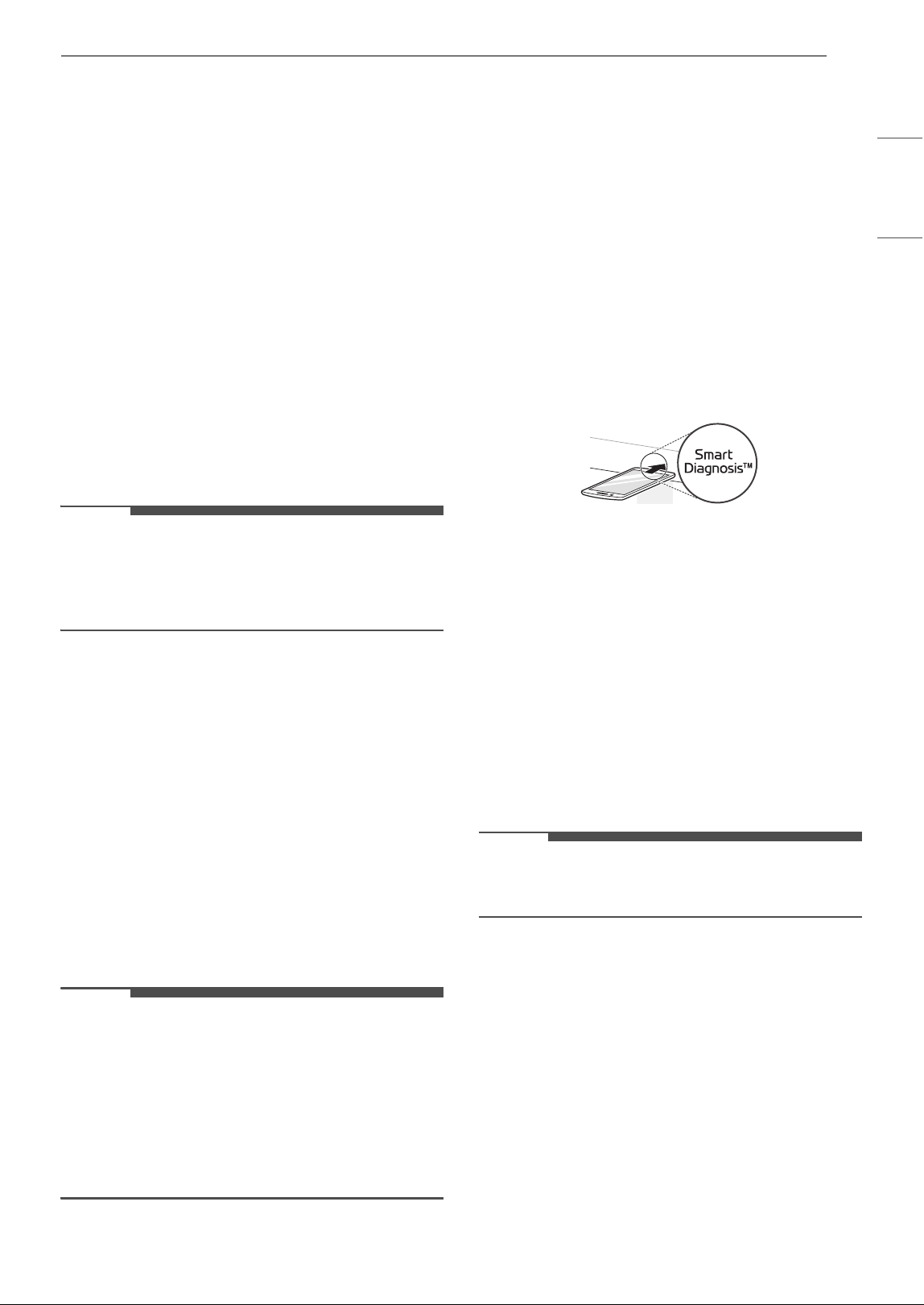
Smart Diagnosis
TM
This function provides useful information for
diagnosing and solving issues with the appliance
based on the pattern of use.
NOTE
• This information is current at the time of
publication. The application is subject to change
for product improvement purposes without
notice to users.
Installing the LG ThinQ Application
Search for the LG ThinQ application from the
Google Play Store or Apple App Store on a
smartphone. Follow instructions to download and
install the application.
Smart Diagnosis
TM
Feature
This feature is only available on models with the c
or d logo.
Use this feature to help you diagnose and solve
problems with your appliance.
NOTE
• For reasons not attributable to LGE’s negligence,
the service may not operate due to external
factors such as, but not limited to, Wi-Fi
unavailability, Wi-Fi disconnection, local app
store policy, or app unavailability.
• The feature may be subject to change without
prior notice and may have a different form
depending on where you are located.
Using Audible Diagnosis to
Diagnose Issues
Follow the instructions below to use the audible
diagnosis method.
• Launch the LG ThinQ application and select the
Smart Diagnosis
TM
feature in the menu. Follow
the instructions for audible diagnosis provided
in the LG ThinQ application.
1 Hold the mouthpiece of your phone over the
Smart Diagnosis
TM
icon. Do not touch any
other buttons.
2 Press and hold the STOP/Clear button for 8
seconds until 5 appears in the display.
3 After you hear three beeps, release the STOP/
Clear button.
4 Keep the phone in place until the tone
transmission has finished. The display will
count down the time. Once the countdown is
over and the tones have stopped, the
diagnosis will be displayed in the application.
NOTE
• For best results, do not move the phone while
the tones are being transmitted.
20 MAINTENANCE
MAINTENANCE
Cleaning
Cleaning the Interior
1 Use a damp cloth to clean the surfaces of the
door and wipe out crumbs between the door
and the frame.
2 Remove greasy spatters with a soapy cloth
and then rinse and dry.
• Wipe spatters immediately with a wet paper
towel, especially after cooking chicken or
bacon.
• If steam accumulates inside or outside of
the oven door, wipe the panels with a soft
cloth.
• For stubborn soil, boil a cup of water in the
oven for 2 to 3 minutes. Steam will soften
the soil. To get rid of odors inside the oven,
boil a cup of water with some lemon juice or
vinegar in it.
• If some induction cleaners containing
abrasives are used, the appearance of the
product may be damaged.
Cleaning the Exterior
1 Clean the outside of the oven with soap and
water.
2 Rinse with clean water and dry with a soft
cloth or paper towel.
• To prevent damage to the internal working
parts of the oven, do not allow water to
seep into the ventilation openings.
• The door and door seals should be kept
clean. Use warm, soapy water to clean.
Rinse off soap residue and dry thoroughly.
• Frequently wipe metal parts with a damp
cloth.
Cleaning the Control Panel
1 Open the door to prevent the oven from
accidentally starting.
2 Wipe with a damp cloth followed immediately
by a dry cloth.
3 Press STOP after cleaning.
Cleaning the Accessories
Wash the glass tray and rotating ring in mild,
sudsy water. For heavily soiled areas, use a mild
cleanser and scouring sponge. Dry completely
before use.
• The glass tray and rotating ring are dishwasher
safe.
NOTE
• Abrasive cleansers, steel wool pads, gritty wash
cloths, some paper towels, and other abrasive
surfaces can damage the control panel and the
interior and exterior oven surfaces.
21TROUBLESHOOTING
ENGLISH
TROUBLESHOOTING
FAQs
Frequently Asked Questions
Q What’s wrong when the oven light will not glow?
A
There may be several reasons why the oven light will not glow. Either the light bulb has blown or the
electric circuit has failed.
Q Does microwave energy pass through the viewing screen in the door?
A No. The holes, or ports, are made to allow light to pass; they do not let microwave energy through.
Q Why does the beep tone sound when a button on the control panel is touched?
A The beep tone sounds to assure that the setting is being properly entered.
Q Will the microwave function be damaged if it operates empty?
A Yes. Never run it empty.
Q Why do eggs sometimes pop?
A
When baking, frying, or poaching eggs, the yolk may pop due to steam build up inside the yolk
membrane. To prevent this, simply pierce the yolk before cooking. Never microwave eggs in the shell.
Q Why is standing time recommended after microwave cooking is over?
A
After microwave cooking is finished, food keeps on cooking during standing time. This standing time
finishes cooking evenly throughout the food. the amount of standing time depends on the density of the
food.
Q Why doesn’t my oven always cook as fast as the cooking guide says?
A
• Check your cooking guide again to make sure you have followed directions correctly, and to see
what might cause variations in cooking time.
• Cooking guide times and heat settings are suggestions, chosen to help prevent overcooking, the
most common problem in getting used to this oven.
• Variations in the size, shape, weight and dimensions of the food require longer cooking time.
• Use your own judgment along with the cooking guide suggestions to test food conditions, just as
you would do with a conventional cooker.
Q
Why does the word ‘cool’ or remaining cooking time appear in the display with fan noise after
microwave cooking is over?
A
After cooking is complete, the fan may operate to cool the oven. The display will show Cool. If you open
the door or press once STOP before the cooking time is complete, the remaining cooking time will show
on the display. This is not a malfunction.
22 TROUBLESHOOTING
Before Calling for Service
Operation
Problem Possible Cause & Solution
Microwave oven
does not start
Power cord is unplugged, door is open, or cooking time has not been set.
• Plug in power cord.
• Close oven door.
• Set cooking time.
Arcing or Sparking Cookware is not microwave safe, or the oven is being operated while it is empty.
• Use microwave-safe utensils. When in doubt, test utensils before use.
• Do not operate oven while it is empty.
Incorrect Time of
Day
Power is interruption.
• Reset the time. See Setting the Clock section to reset time of day.
Unevenly Cooked
Foods
Cookware is not microwave safe, or cook settings were wrong.
• Test cookware to make sure it is microwave safe.
• Do not cook without the glass tray.
• Turn or stir food while cooking.
• Defrost food completely before cooking.
• Use correct cook time and power level.
Overcooked Foods Cooking settings and methods are wrong.
• Change cook time or power level.
Undercooked Foods Cookware is not microwave safe, or cook settings were wrong.
• Test that cookware is microwave safe.
• Defrost food completely before cooking.
• Change cook time or power level.
• Make sure that ventilation ports are not blocked.
Improper Defrosting Cookware is not microwave safe, or cook settings were wrong.
• Test that cookware is microwave safe.
• Change defrost time or weight.
• Turn or stir food during defrost cycle.
23LIMITED WARRANTY
ENGLISH
LIMITED WARRANTY
USA
TERMS AND CONDITIONS
ARBITRATION NOTICE: THIS LIMITED WARRANTY CONTAINS AN ARBITRATION PROVISION THAT
REQUIRES YOU AND LG ELECTRONICS ("LG") TO RESOLVE DISPUTES BY BINDING ARBITRATION
INSTEAD OF IN COURT, UNLESS YOU CHOOSE TO OPT OUT. IN ARBITRATION, CLASS ACTIONS AND
JURY TRIALS ARE NOT PERMITTED. PLEASE SEE THE SECTION TITLED "PROCEDURE FOR RESOLVING
DISPUTES" BELOW.
Should your LG Microwave Oven ("Product") fail due to a defect in materials or workmanship under
normal and proper use, during the warranty period set forth below, LG will, at its option, repair or
replace the Product. This limited warranty is valid only to the original retail purchaser of the
Product ("You") and applies only when purchased lawfully and used within the United States
including U.S. Territories.
• Replacement Products and parts are warranted for the remaining portion of the original warranty period
or ninety (90) days, whichever is greater.
• Replacement Products and parts may be new, reconditioned, refurbished, or otherwise factory
remanufactured.
• Replaced Product or part(s) will be the property of LG.
• Proof of original retail purchase specifying the Product model and date of purchase is required to obtain
warranty service under this limited warranty.
EXCEPT TO THE EXTENT PROHIBITED BY APPLICABLE LAW, ANY IMPLIED WARRANTY OF
MERCHANTABILITY OR FITNESS FOR A PARTICULAR PURPOSE ON THE PRODUCT IS LIMITED IN DURATION
TO THE DURATION OF THE ABOVE LIMITED WARRANTY. UNDER NO CIRCUMSTANCES SHALL LG OR ITS U.S.
DISTRIBUTORS/DEALERS BE LIABLE FOR ANY INDIRECT, INCIDENTAL, CONSEQUENTIAL, SPECIAL, OR
PUNITIVE DAMAGES, INCLUDING, WITHOUT LIMITATION, LOST GOODWILL, LOST REVENUES OR PROFITS,
WORK STOPPAGE, IMPAIRMENT OF OTHER GOODS, COST OF REMOVAL AND REINSTALLATION OF THE
PRODUCT, LOSS OF USE, OR ANY OTHER DAMAGES WHETHER BASED IN CONTRACT, TORT, OR
OTHERWISE. LG'S TOTAL LIABILITY, IF ANY, SHALL NOT EXCEED THE PURCHASE PRICE PAID BY YOU FOR
THE PRODUCT.
SOME STATES DO NOT ALLOW THE EXCLUSION OR LIMITATION OF INCIDENTAL OR CONSEQUENTIAL
DAMAGES OR LIMITATIONS ON HOW LONG AN IMPLIED WARRANTY LASTS, SO THE ABOVE
EXCLUSIONS OR LIMITATIONS MAY NOT APPLY TO YOU. THIS LIMITED WARRANTY GIVES YOU
SPECIFIC LEGAL RIGHTS AND YOU MAY ALSO HAVE OTHER RIGHTS THAT VARY FROM STATE TO STATE.
THIS LIMITED WARRANTY DOES NOT COVER:
• Service trips to deliver, pick up, or install, educate how to operate, correct wiring, or correct
unauthorized repairs.
• Damage or failure of the Product to perform during power failures and interrupted or inadequate
electrical service.
WARRANTY PERIOD
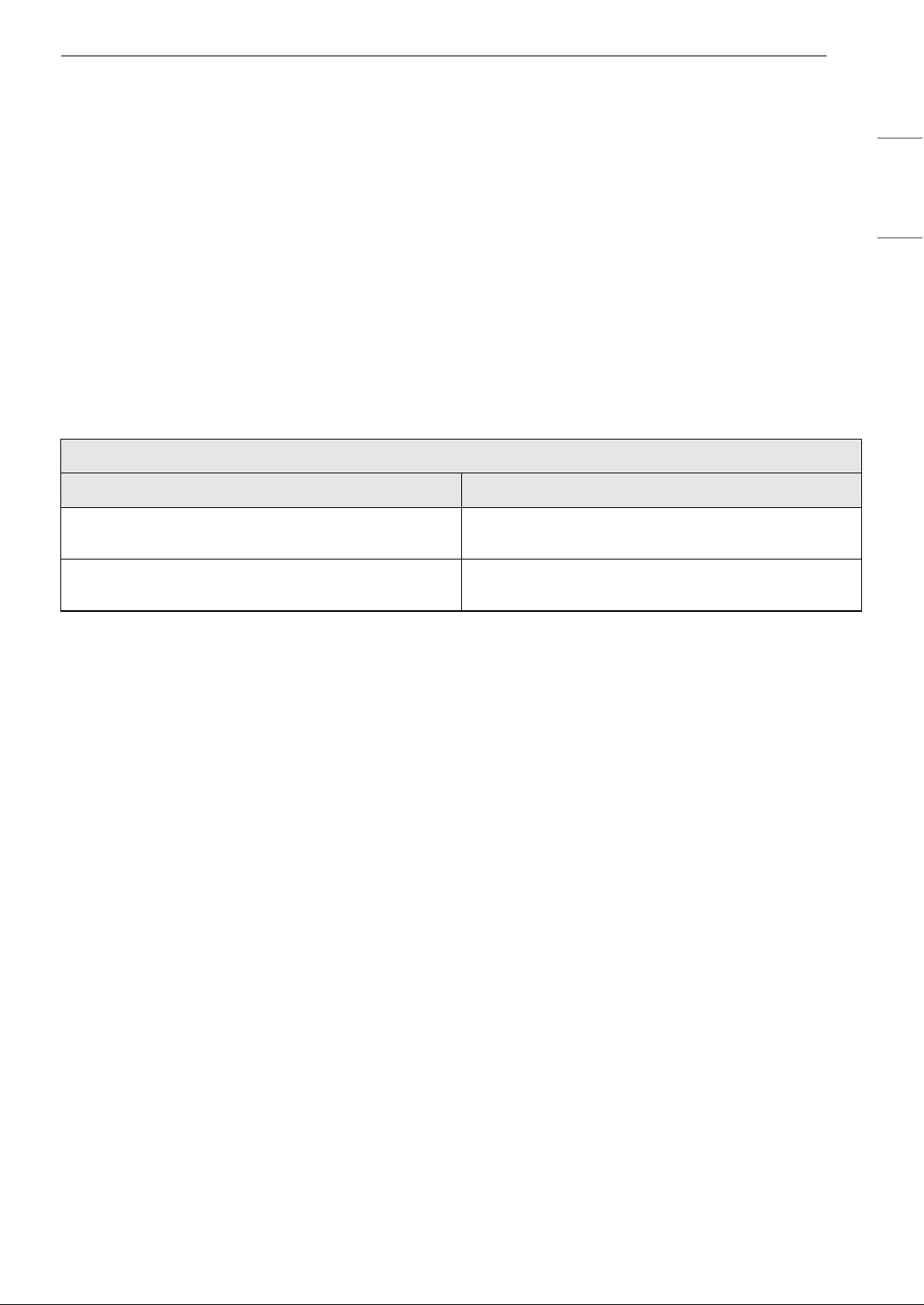
Microwave Oven Magnetron
One (1) year from the date of original retail purchase Ten (10) years from the date of original retail
purchase
Parts and Labor (internal/functional parts only
excluding magnetron)
Parts only (You are responsible for any applicable
labor cost)

24 LIMITED WARRANTY
• Damage or failure of the Product caused by leaky or broken water pipes, frozen water pipes, restricted
drain lines, inadequate or interrupted water supply or inadequate supply of air.
• Damage or failure of the Product resulting from operating the Product in a corrosive atmosphere or
contrary to the Product owner’s manual.
• Damage or failure of the Product caused by accidents, pests and vermin, lightning, wind, fire, floods, acts
of nature, or any other causes beyond the control of LG.
• Damage or failure of the Product caused by unauthorized modification or alteration, or if the Product is
used for other than the intended purpose, or any water leakage where the Product was not properly
installed.
• Damage or failure of the Product caused by incorrect electrical current, voltage, or plumbing codes.
• Damage or failure of the Product caused by transportation, storage, and/or handling, including
scratches, dents, chips, and/or other damage to the finish of the Product, unless such damage is
reported within one (1) week of delivery.
• Damage or failure of the Product resulting from misuse, abuse, improper installation, repair, or
maintenance. Improper repair includes the use of parts not authorized by LG. Improper installation or
maintenance includes installation or maintenance contrary to the Product owner’s manual.
• Damage or failure of the Product caused by the use of parts, components, accessories, consumable
cleaning products, or any other products or services that were not authorized by LG.
• Damage or missing items to any display or open box Product.
• Refurbished Product or any Product sold “As Is”, “Where Is”, “With all Faults”, or similar disclaimer.
• Products with original serial numbers that have been removed, altered, or cannot be readily determined.
• Increases in utility costs and additional utility expenses.
• Any noises associated with normal operation.
• Products used for other than normal and proper household use (e.g., commercial or industrial use) or
contrary to the Product owner’s manual.
• Costs associated with removal and reinstallation of the Product for repairs, or the removal and
reinstallation of the Product if it is installed in an inaccessible location or not installed in accordance with
the Product Owner's manual.
• Accessories, removable components, or consumable parts (e.g. Shelves, door bins, drawers, water/air
filters, racks, light bulbs, batteries, etc., as applicable), except for internal/functional parts covered under
this limited warranty.
The cost of repair or replacement under these excluded circumstances shall be borne by You.
TO OBTAIN WARRANTY SERVICE AND ADDITIONAL INFORMATION
Call 1-800-243-0000 and select the appropriate option from the menu.
Or visit our website at http://www.lg.com
Or by mail: LG Electronics Customer Service P.O. Box 240007 Huntsville, AL 35813 ATTN: CIC
PROCEDURE FOR RESOLVING DISPUTES:
ALL DISPUTES BETWEEN YOU AND LG ARISING OUT OF OR RELATING IN ANY WAY TO THIS LIMITED
WARRANTY OR THE PRODUCT SHALL BE RESOLVED EXCLUSIVELY THROUGH BINDING ARBITRATION,
AND NOT IN A COURT OF GENERAL JURISDICTION. BINDING ARBITRATION MEANS THAT YOU AND LG
ARE EACH WAIVING THE RIGHT TO A JURY TRIAL AND TO BRING OR PARTICIPATE IN A CLASS ACTION.
Definitions. For the purposes of this section, references to "LG" mean LG Electronics U.S.A., Inc., its
parents, subsidiaries and affiliates, and each of their officers, directors, employees, agents, beneficiaries,
predecessors in interest, successors, assigns and suppliers; references to "dispute" or "claim" shall include
any dispute, claim or controversy of any kind whatsoever (whether based in contract, tort, statute,
regulation, ordinance, fraud, misrepresentation or any other legal or equitable theory) arising out of or
relating in any way to the sale, condition or performance of the product or this Limited Warranty.
Notice of Dispute. In the event you intend to commence an arbitration proceeding, you must first notify
LG in writing at least 30 days in advance of initiating the arbitration by sending a letter to LG at LG

25LIMITED WARRANTY
ENGLISH
Electronics, USA, Inc. Attn: Legal Department- Arbitration 111 Sylvan Ave, Englewood Cliffs, NJ 07632. You
and LG agree to engage in good faith discussions in an attempt to amicably resolve your claim. The notice
must provide your name, address, and telephone number; identify the product that is the subject of the
claim; and describe the nature of the claim and the relief being sought. If you and LG are unable to resolve
the dispute within 30 days, either party may proceed to file a claim for arbitration.
Agreement to Binding Arbitration and Class Action Waiver. Upon failure to resolve the dispute during
the 30 day period after sending written notice to LG, you and LG agree to resolve any claims between us
only by binding arbitration on an individual basis, unless you opt out as provided below. Any dispute
between you and LG shall not be combined or consolidated with a dispute involving any other person's or
entity's product or claim. More specifically, without limitation of the foregoing, any dispute between you
and LG shall not under any circumstances proceed as part of a class or representative action. Instead of
arbitration, either party may bring an individual action in small claims court, but that small claims court
action may not be brought on a class or representative basis.
Arbitration Rules and Procedures. To begin arbitration of a claim, either you or LG must make a written
demand for arbitration. The arbitration will be administered by the American Arbitration Association
("AAA") and will be conducted before a single arbitrator under the AAA's Consumer Arbitration Rules that
are in effect at the time the arbitration is initiated (referred to as the "AAA Rules") and under the
procedures set forth in this section. The AAA Rules are available online at www.adr.org/consumer. Send a
copy of your written demand for arbitration, as well as a copy of this provision, to the AAA in the manner
described in the AAA Rules. You must also send a copy of your written demand to LG at LG Electronics,
USA, Inc. Attn: Legal Department- Arbitration 111 Sylvan Avenue, Englewood Cliffs, NJ 07632. If there is a
conflict between the AAA Rules and the rules set forth in this section, the rules set forth in this section will
govern. This arbitration provision is governed by the Federal Arbitration Act. Judgment may be entered on
the arbitrator’s award in any court of competent jurisdiction. All issues are for the arbitrator to decide,
except that issues relating to the scope and enforceability of the arbitration provision and to the
arbitrability of the dispute are for the court to decide. The arbitrator is bound by the terms of this
provision.
Governing Law. The law of the state of your residence shall govern this Limited Warranty and any
disputes between us except to the extent that such law is preempted by or inconsistent with applicable
federal law.
Fees/Costs. You do not need to pay any fee to begin an arbitration. Upon receipt of your written demand
for arbitration, LG will promptly pay all arbitration filing fees to the AAA unless you seek more than $25,000
in damages, in which case the payment of these fees will be governed by the AAA Rules. Except as
otherwise provided for herein, LG will pay all AAA filing, administration and arbitrator fees for any
arbitration initiated in accordance with the AAA Rules and this arbitration provision. If you prevail in the
arbitration, LG will pay your attorneys' fees and expenses as long as they are reasonable, by considering
factors including, but not limited to, the purchase amount and claim amount. Notwithstanding the
foregoing, if applicable law allows for an award of reasonable attorneys' fees and expenses, an arbitrator
can award them to the same extent that a court would. If the arbitrator finds either the substance of your
claim or the relief sought in the demand is frivolous or brought for an improper purpose (as measured by
the standards set forth in Federal Rule of Civil Procedure 11(b)), then the payment of all arbitration fees will
be governed by the AAA Rules. In such a situation, you agree to reimburse LG for all monies previously
disbursed by it that are otherwise your obligation to pay under the AAA Rules. Except as otherwise
provided for, LG waives any rights it may have to seek attorneys' fees and expenses from you if LG prevails
in the arbitration.
Hearings and Location. If your claim is for $25,000 or less, you may choose to have the arbitration
conducted solely on the basis of (1) documents submitted to the arbitrator, (2) through a telephonic
hearing, or (3) by an in-person hearing as established by the AAA Rules. If your claim exceeds $25,000, the
right to a hearing will be determined by the AAA Rules. Any in-person arbitration hearings will be held at a
location within the federal judicial district in which you reside unless we both agree to another location or
we agree to a telephonic arbitration.
Opt Out. You may opt out of this dispute resolution procedure. If you opt out, neither you nor LG can
require the other to participate in an arbitration proceeding. To opt out, you must send notice to LG no
later than 30 calendar days from the date of the first consumer purchaser's purchase of the product by
either: (i) sending an e-mail to [email protected], with the subject line: "Arbitration Opt Out" or (ii) calling 1-
800-980-2973. You must include in the opt out e-mail or provide by telephone: (a) your name and address;
(b) the date on which the product was purchased; (c) the product model name or model number; and (d)

26 LIMITED WARRANTY
the serial number (the serial number can be found (i) on the product; or (ii) online by accessing https://
www.lg.com/us/support/repair-service/schedule-repair continued and clicking on "Find My Model & Serial
Number").
You may only opt out of the dispute resolution procedure in the manner described above (that is, by e-mail
or telephone); no other form of notice will be effective to opt out of this dispute resolution procedure.
Opting out of this dispute resolution procedure will not affect the coverage of the Limited Warranty in any
way, and you will continue to enjoy the full benefits of the Limited Warranty. If you keep this product and
do not opt out, then you accept all terms and conditions of the arbitration provision described above.

27Memo
LG Customer Information Center
Register your product Online!
www.lg.com
For inquiries or comments,
visit www.lg.com or call:
1-800-243-0000
U.S.A.
1-888-542-2623
CANADA