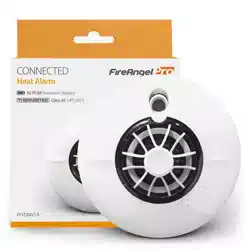
User Manual
Mains Operated Thermoptek Smoke Alarm
Mains Operated Heat Alarm
Mains Operated Thermoptek Smoke Alarm with Wi-Safe 2
Mains Operated Heat Alarm with Wi-Safe 2
ST-230 / HT-230 / WST-230 / WHT-230
Drawing No: GN5562
Revision: 1
Drawn By: D4
Tschaka RM, May 2019
FireAngel Safety Technology Limited. Artwork Information
Ensure that you are printing / manufacturing from the original artwork file and not a preview
CONFIDENTIAL: The information provided in this document is proprietary to FireAngel Safety Technology Limited and
as such should only be used/shared for the exclusive manufacture of those products specified.
Title/Description:
User Manual
Material:
Refer to MS0032
Used On / Used For:
Generic FA Pro heat / smoke
Size:
W - 121mm / H - 129mm
Supplier:
FLEX
Print Colours:
BLACK
Content Quality:
Chris CB
Product Information:
Greg B
Certication marks:
Ian B
APPROVAL:
Messaging: Messaging:
Chris D
TEST YOUR ALARM WEEKLY
2
Email: technicalsupport@fireangeltech.com / Web: www.fireangeltech.com
GN5562R1
ST-230 / WST-230 / HT-230 / WHT-230
19
FireAngel Safety Technology Limited
Vanguard Centre, Sir William Lyons Road, Coventry CV4 7EZ UK
Max RF power: +10dBm
EN 301 489-1
EN 301 489-3
EN 300 220-2
Frequency: 868MHz
With the present declaration, FireAngel Safety Technology Limited confirms that the WST-230 and
WHT-230 conform to the essential requirements and other relevant measures of the 2014/53/EU
Directive. The Declaration of Conformity can be accessed on the website: http://spru.es/WST-230 or
http://spru.es/WHT-230
BS 5446-2:2003
KM 677057
BS EN 14604:2005
KM 676743
Models HT-230 / WHT-2302797-CPR-676744
EN 14604:2005+AC:2008
Smoke Alarm Devices
FSTDOP19001
Models ST-230 / m WST-230

3
Introduction . . . . . . . . . . . . . . 4
Sensor Technology . . . . . . . . . . 5
Application . . . . . . . . . . . . . . 5
Positioning . . . . . . . . . . . . . . 6
Hardwire Installation . . . . . . . . . 7
Hardwire Interconnect . . . . . . . . 8
Wireless Interlink . . . . . . . . . . . 9
Mixed Systems . . . . . . . . . . . . 11
CONTENTS
230 V AC 50 Hz mains powered smoke / heat alarm. Non replaceable 3 V ( ) battery
back-up. CLASS II apparatus. The normal operating temperature range for these products
is -10 °C to 45 °C.
Note: This user manual is also available in large text and other formats.
Please call 0330 094 5830 for further information.
Alarm Test . . . . . . . . . . . . . . .12
Alarm Smart Silence
TM
. . . . . . . .13
Sleep Easy
TM
. . . . . . . . . . . . . .13
Troubleshooting. . . . . . . . . . . .14
Maintenance. . . . . . . . . . . . . .16
Disposal . . . . . . . . . . . . . . . .16
Warranty . . . . . . . . . . . . . . . .16
4
INTRODUCTION
Do not:
• Expose this alarm to moisture, dripping,
splashing, steam or condensation.
• Paint the alarm.
• Install heat alarms in escape routes
instead of smoke alarms.
• Test your alarm with a naked flame.
The test button tests the alarm’s full
functionality.
• Ignore any alarm in the network if
it is sounding, it is warning you of a
potentially hazardous situation.
Make sure you:
• Leave this guide with the end user.
• Connect the alarm as late as possible
in an installation, particularly in new
builds, to avoid contamination.
• Remove the dust cover before applying
power.
• Ensure that after any building work
or after repositioning large items of
furniture (beds, sofas, shelving units
etc.), you carry out an alarm test on all
alarms to ensure they are still working.
• Test your alarm weekly as well as testing
any other interconnected alarms.
• Make sure your alarm is situated in one
of the recommended locations only.
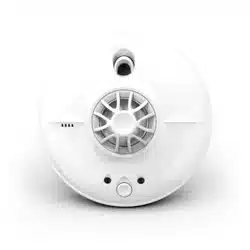
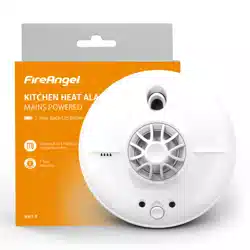
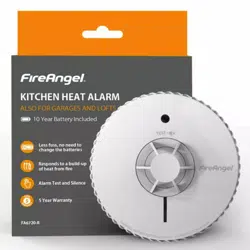
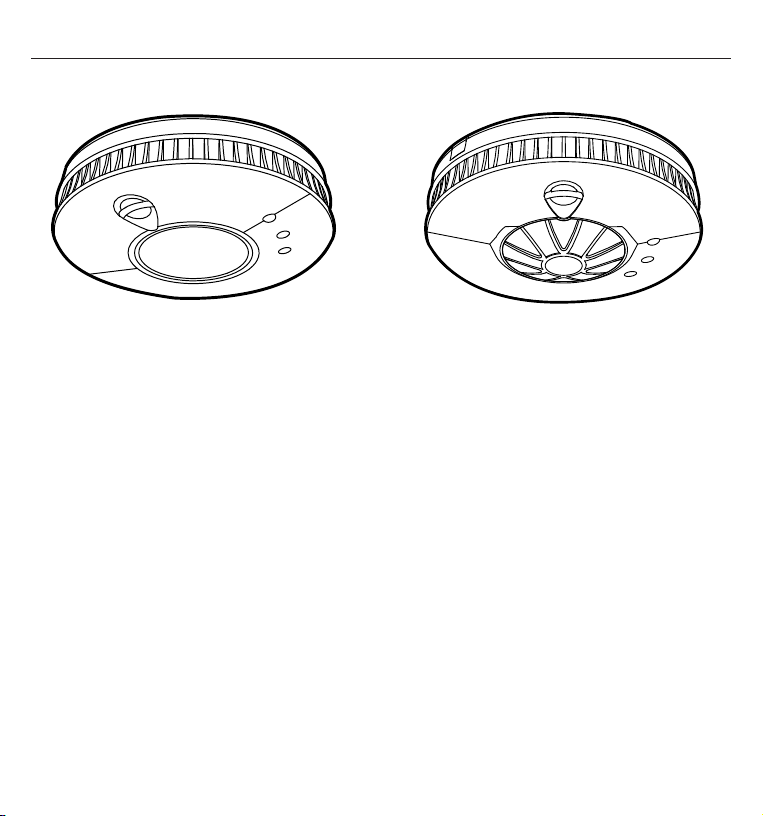
Smoke Alarm ST-230 / WST-230 Heat Alarm HT-230 / WHT-230
Please read this guide in full before using your alarm!
This user guide covers a number of different models. Some of the illustrations will look
different to your particular model.

5
SENSOR TECHNOLOGY
Thermoptek technology combines the very
latest in optical sensing with a thermal
enhancement providing a fast reaction to
both fast flaming and slow smouldering
fires in a single alarm. Thermoptek
technology constantly monitors
for temperature change. If a rate of
temperature rise is detected the sensitivity
of the smoke alarm is increased, providing
a quicker response time to both fire types.
Heat alarms are designed for areas where
dust and fumes may trigger frequent
nuisance alarms in conventional smoke
alarms - ideal for attics, garages and
kitchens. The HT-230 / WHT-230 are fixed
point heat alarms. All alarms are approved
to class A1 and will activate when the
temperature reaches a preset range of
54 °C to 65 °C.
APPLICATION
SYSTEM GRADES AND CATEGORIES
The mains powered FireAngel Pro alarms
with 10 year life are suitable for Grade D1
systems. It is important to determine the
correct alarm system grade and category
for the dwelling prior to installation.
A grade D system is required for:
• New or materially altered dwellings, up
to three storeys with no floor exceeding
200 m
2
.
• Existing dwellings with poor or
inadequate fire protection, up to three
storeys with no floor exceeding 200 m
2
.
• Individual dwelling units of two or more
rooms in Houses in Multiple Occupation
(HMOs) of one or two-storeys, with no
floor exceeding 200 m
2
.
There are three Levels of Detection (LD).
Generally the greater the fire risk the more
comprehensive the system should be.
LD1 = The highest level of protection of all
occupants who might occupy the dwelling
over the lifetime of the fire detection and
fire alarm system. A system installed
throughout the premises, incorporating
detectors in all circulation areas that form
part of the escape routes from the premises,
and in all rooms and areas, other than those
with negligible sources of ignition, such as
toilets, bathrooms and shower rooms.
LD2 = A system incorporating detectors in
all circulation areas that form part of the
escape routes from the premises, and in
all specified rooms or areas that present a
high fire risk to occupants, including any
kitchen and the principal habitable room.
LD3 = A system incorporating detectors in
all circulation areas that form part of the
escape routes from the premises.
Ensure that a Grade D system is adequate
for the dwelling you are installing the
alarms in.
For further information, refer to British
Standard BS5839-6 or contact your local
Fire Brigade or Building Control.
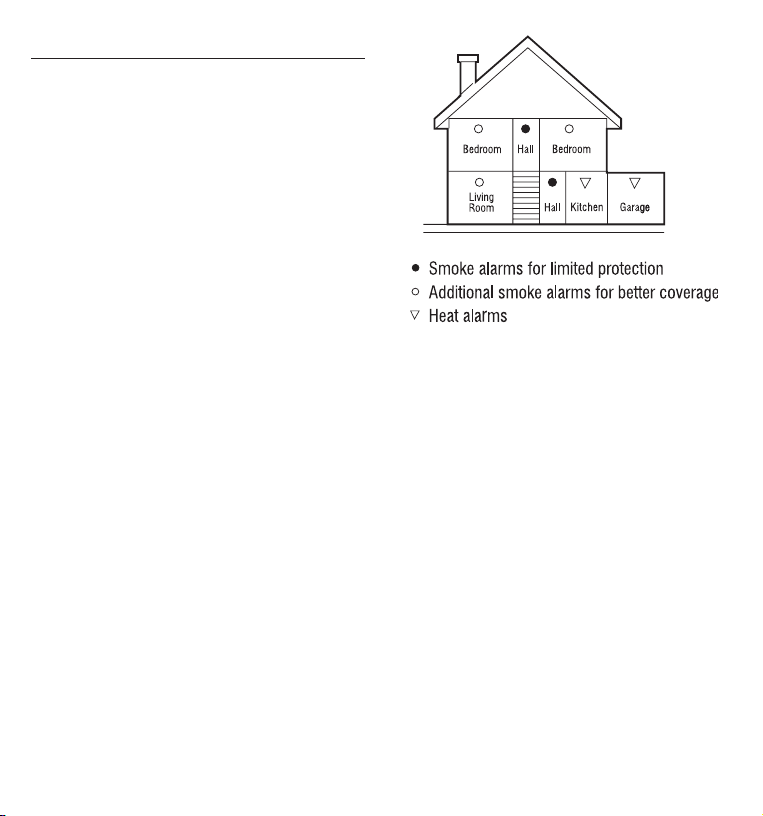
6
POSITIONING
Locations of alarms must be compliant with
either BS 5839: Part 6 or relevant Building
Regulations if in any doubt. This alarm
is not intended for any non-residential,
commercial or industrial application, nor
for any other purpose other than described
in the above. For the best protection, heat
alarms should always be installed as part
of a complete fire protection system that
includes smoke alarms.
Make sure you:
• Install smoke alarms in circulation areas
at a distance no greater than 7.5 m from
the farthest wall, no greater than 7.5 m
from a door to any room in which a fire
might start and no greater than 7.5 m
from the next smoke alarm.
• Where the ceiling of the room is curved
or pointed, your smoke alarm should be
installed no more than 600mm vertically
below the highest point in the room.
• Install heat alarms on the ceiling, ideally
in the centre of the room.
• Install sufficient alarms to compensate
for closed doors and obstacles.
• Install your heat alarm at a distance
no greater than 5.3 m from the farthest
wall, no greater than 5.3 m from a door
to any room in which a fire might start
and no greater than 5.3 m from the next
heat or smoke alarm.
Do not:
• Install the alarms within 1500 mm
(1.5 m) of a fluorescent light fitting and
keep wiring at least 1000 mm (1 m) from
these fittings.
• Install alarms on circuits containing
fluorescent light fittings or dimmer
switches.
• Install alarms within 300 mm (12”) of
light fittings or room corners.
• Install smoke alarms in wall positions
that are less than 100 mm (4”) or
more than 300 mm (12”) away from
the ceiling.
• Locate the Thermoptek smoke alarm
close to bathrooms or showers as it
can be susceptible to nuisance alarms
from steam.
• Install heat alarms on a wall.
7
HARDWIRE
INSTALLATION
The alarm base plate is designed to be
permanently mounted, using it’s own built-
in terminal block to connect it to the mains.
The base plate can be screwed directly to
the ceiling.
WARNING: Wiring should be installed
by a qualified electrician in accordance
with BS7671. We advise you to follow the
new harmonized cable colour coding as
specified in BS7671.
IMPORTANT: The circuit used to power
the alarm must be a 24 hour voltage circuit
that cannot be turned off by a switch.
BS 5839: Part 6 states that: For mains
powered alarms, each with an integral
standby supply (Grade D), the mains
electricity supply should take the form
of either a) an independent circuit at the
dwelling’s main circuit board, in which
case no other electrical equipment should
be connected to this circuit (other than a
dedicated monitoring device installed to
indicate failure of the mains electricity
supply to the alarms); or b) a separately
electrically protected, regularly used local
lighting circuit.
• Ensure a permanent connection to the
fixed wiring of the building is made in a
suitable junction box.
• Remove the terminal block cover.
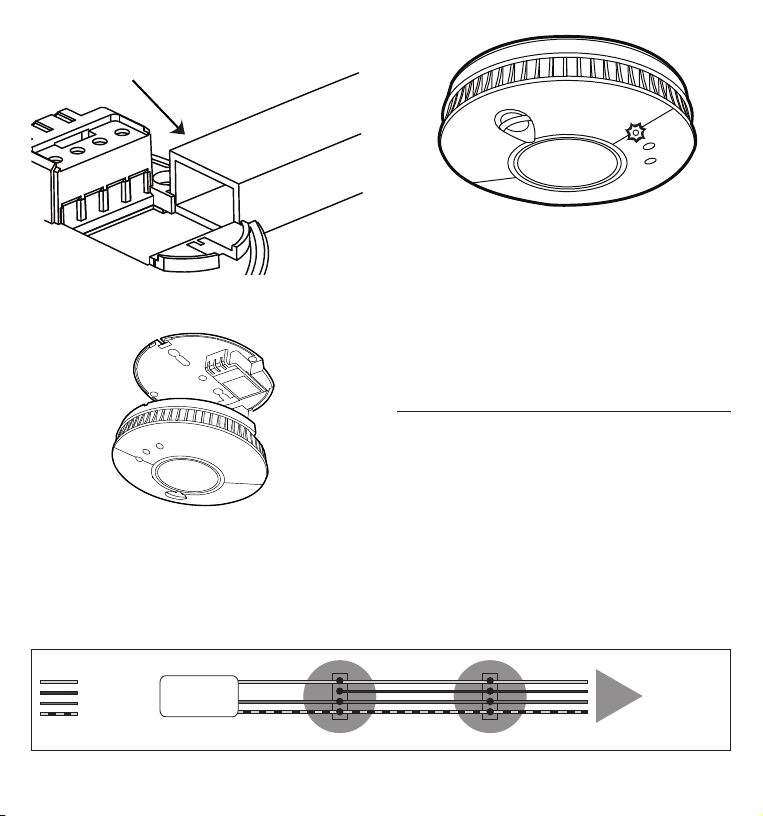
• If trunking is required, snap the break-
out tab away from the base plate prior
to connection.
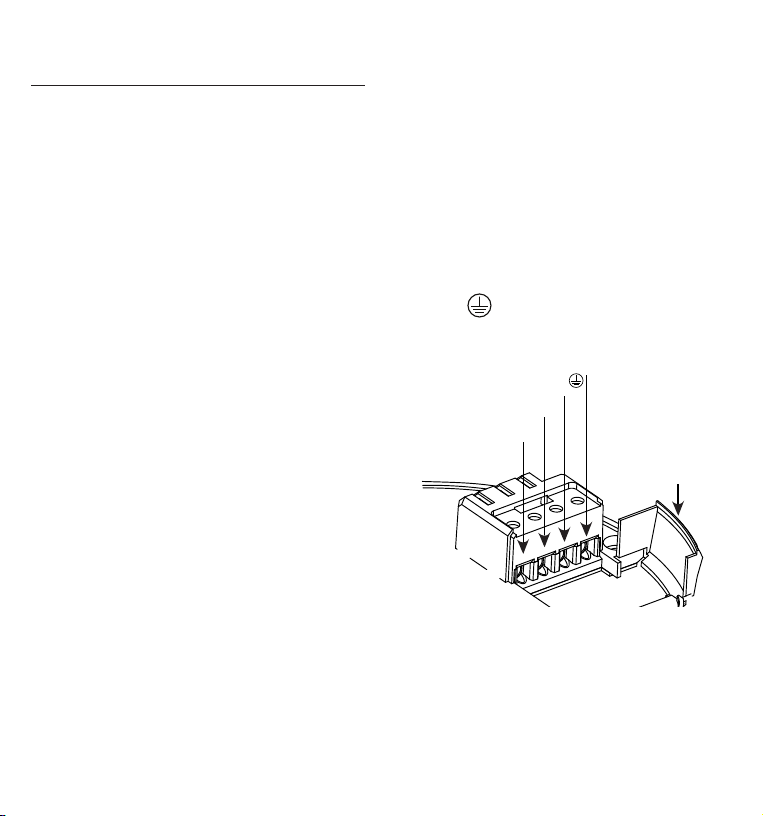
• The wiring must be connected to the
terminal block as follows:
Live (L) - Connect to the Live in the house
wiring.
Neutral (N) - Connect to the Neutral in the
house wiring.
Interconnect (I) - If desired, join the
Interconnect wire between the alarms.
Use the terminal to safely terminate
any copper Earth or green / yellow cable.
Neutral (N)
Interconnect (I)
Live (L)
Earth
Trunking
break-out tab
WARNING: Mixing the Live and Neutral
connections when interconnecting alarms
will damage all the alarms. DO NOT use the
Earth wire for the interconnect connection.
8
Check that the green LED is on and that
the red LED is flashing once approximately
every 45 seconds. The LEDs are located on
the front of the alarm.
HARDWIRE
INTERCONNECT
ST-230 and HT-230
For multiple alarm installations use a ‘three
core and earth’ style cable between all the
alarms to be interconnected. Connect the
interconnect cable between each alarms ‘I’
terminal. The interconnect wire (minimum
0.75
cable) must be treated as Live, it
should be insulated and sheathed.
YT2 trunking
Either feed the wire through the hole in the
base plate or through the YT2 trunking.
Line up the alarm with the base plate
and gently apply pressure until the alarm
clicks into place. Switch on the mains
electricity supply.
Mains 230V AC
Power Supply
WIRING KEY
= Live
= Interconnect
= Neutral
= Earth
To other alarms
if tted
9
Do not:
• Exceed the maximum of 30
interconnected alarms on a network.
• Exceed 250 m of connecting wire
per circuit.
• Connect FireAngel Pro alarms to any
other models produced by another
manufacturer.
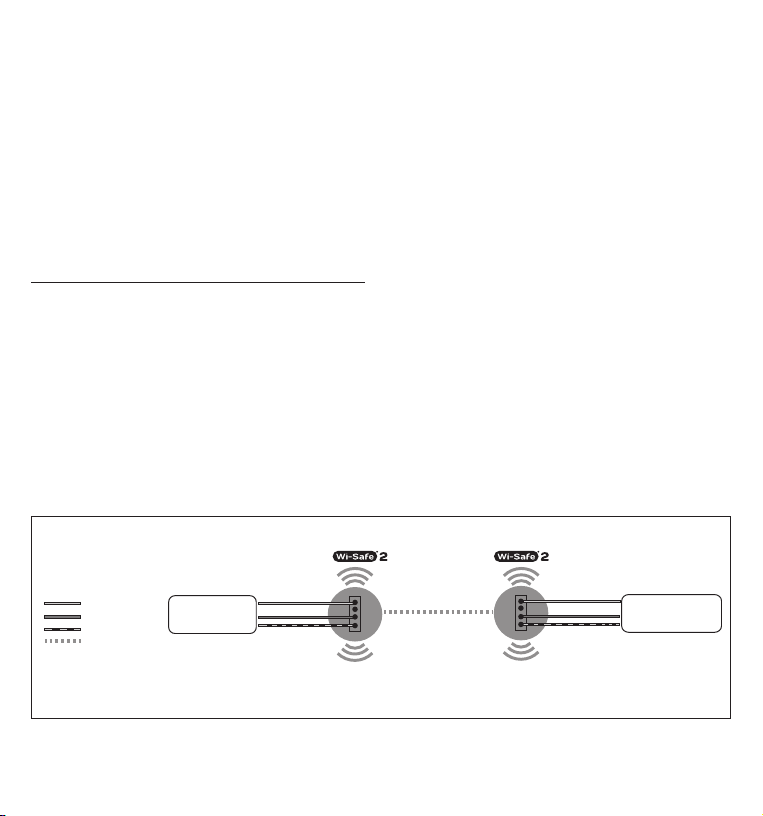
WIRELESS INTERLINK
WST-230 and WHT-230
The WST-230 and WHT-230 are designed
to be wirelessly interlinked with up
to 50 products within the Wi-Safe 2
product range. They are not designed
to communicate with wireless alarms
from other ranges or manufacturers.
These alarms need to be ‘learned-in’ or
interlinked in order to communicate with
each other. If one alarm activates, all other
interlinked alarms will also sound.
Wi-Safe 2 eliminates the need for
interconnecting wires around a property
making future system modifications easy
and cost effective. AC Smoke and Heat
alarms will still need a mains supply
in accordance with BS 5839: Part 6 and
Building Regulations.
IMPORTANT: Obstructions such as steel
reinforcement in concrete could block
or impede the wireless signal. While the
wireless range is over 200 m in clear air /
clear line of sight, the effective range may
be reduced by walls and other obstructions
in the building. It is recommended not to
exceed 35 m as the maximum distance
between alarms in a network.
Do not:
• Exceed the maximum of 50 alarms
interlinked in a network.
• Connect FireAngel Pro alarms to
any models produced by another
manufacturer.
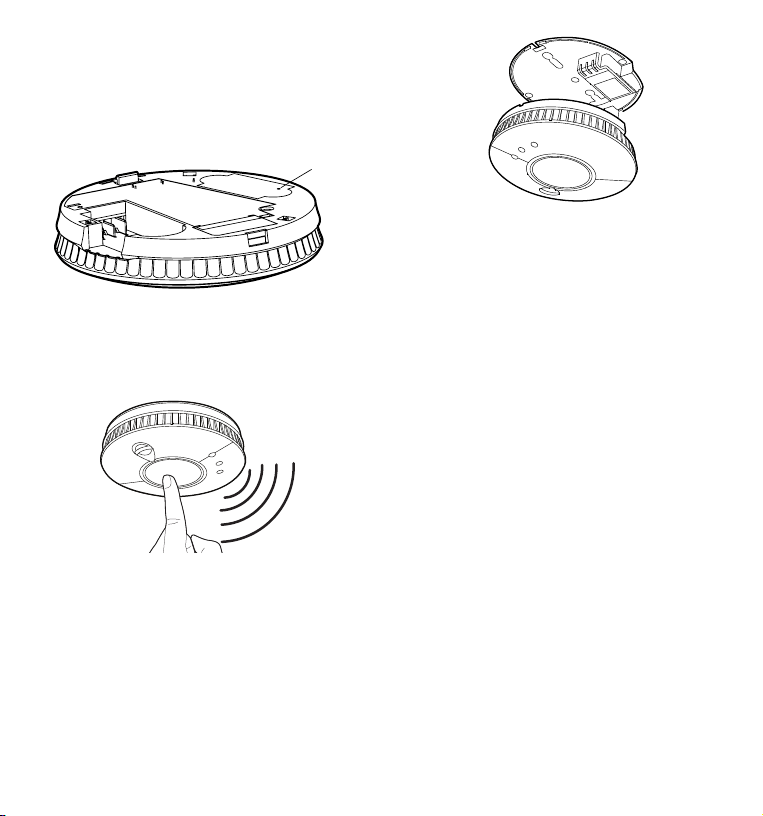
Mains 230V AC
Power Supply
(from upstairs circuit)
WIRING KEY
= Live
= Neutral
= Earth
= Wireless Interlink
Mains 230V AC
Power Supply
(from downstairs circuit)
10
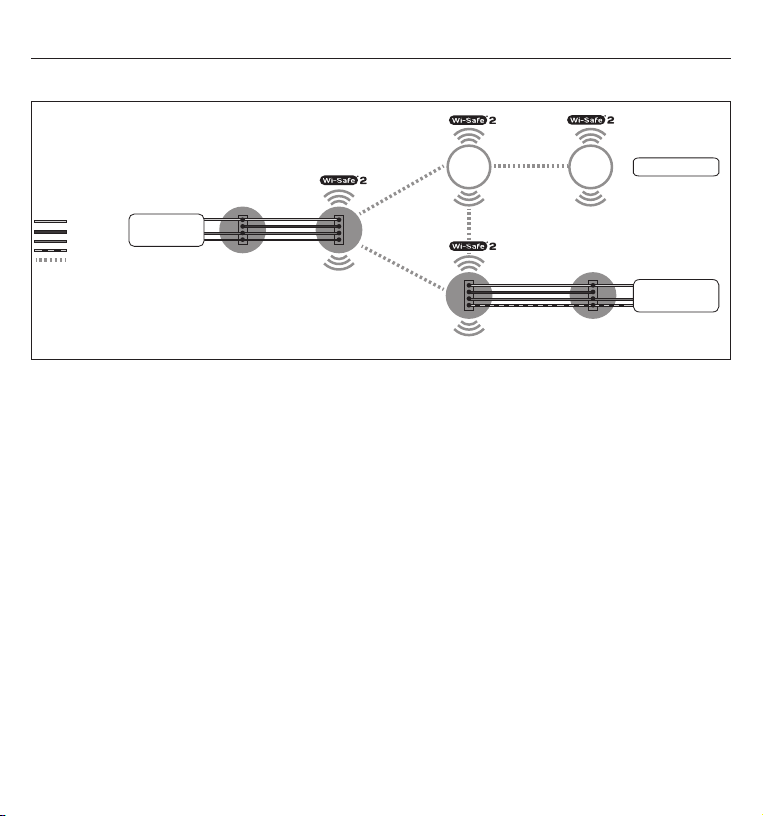
To complete the installation, fit Alarm 2
onto it’s base plate. Additional alarms
should be ‘learned-in’ in the same way.
When ‘learning-in’ additional alarms, any
alarm already in the network, can be used
as ‘Alarm 1’. You do not have to ‘learn-in’
to every alarm in the network.
Unlearning an alarm
Using a ball point pen in the circular ‘learn-in’
hole in the back of the alarm, briefly push and
release and then push and hold the ‘learn-in’
button. The red LED will remain illuminated
during this process. When the red LED goes
out, release the button, it will then flash
twice, followed by three further flashes to
illustrate that the alarm has successfully
been ‘un-learnt’ from the network.
When removing an alarm from any Wi-Safe 2
network it is generally good practice to
“unlearn” every alarm (in the same way as
mentioned above) and rebuild the network
once again by following the “learn-in”
process.
Please note: It is important not to rush
the Wi-Safe 2 system and is also good
practice to allow several minutes after
un-learning the system before rebuilding
the network once again.
How to ‘learn-in’ two wireless alarms
into a network:
Install Alarm 1 as described earlier
(see ‘Hardwire Installation’). Install the
base plate for Alarm 2 in one of the
recommended locations.
Learn button
Using a ballpoint pen briefly push and
release the ‘learn button’ on the back of
Alarm 2. The red LED next to the learn
button will flash briefly then light up for
approximately five seconds.
During these five seconds you need to
briefly press the test button on Alarm 1 to
wirelessly interlink the two alarms. Alarm
1 will give an audible sound consisting of
two cycles of three loud beeps.
The red LED on the wireless module of
Alarm 2 will flash to indicate that it has
been ‘learned-in’ successfully. If the test
button is not pressed quickly enough, the
‘learn-in’ process will fail. If this happens,
repeat the process.
11
MIXED SYSTEMS
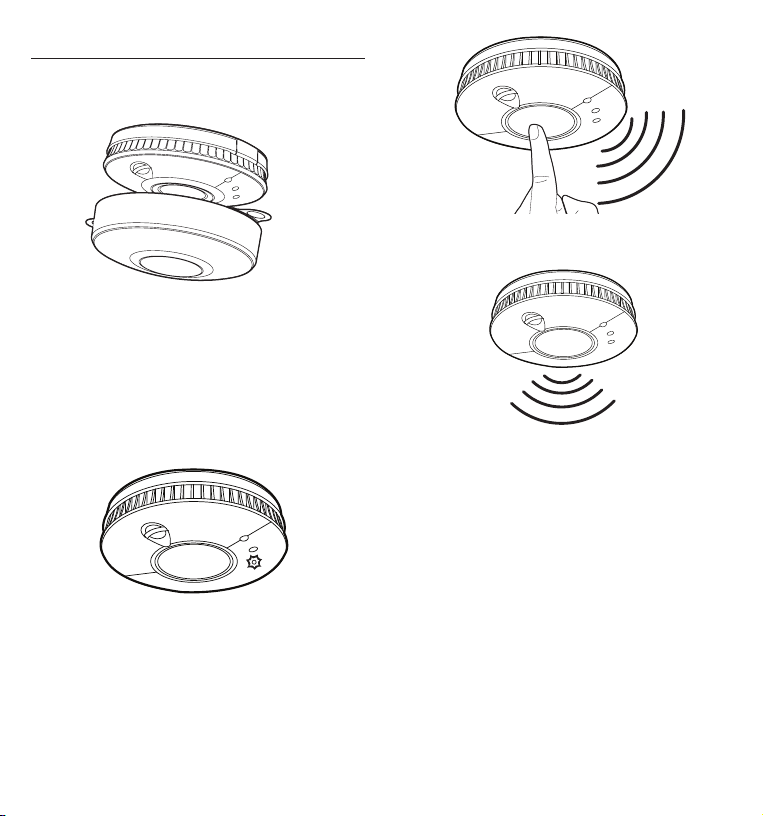
Interconnecting both hardwired and wireless products together in a network:
Mains 230V AC
Power Supply
(from upstairs circuit)
WIRING KEY
= Live
= Interconnect
= Neutral
= Earth
= Wireless Interlink
Mains 230V AC
Power Supply
(from downstairs circuit)
Battery operated alarms
Make sure there is only one wireless connection into each wired network. For
example if you have a hardwired network upstairs and a wireless network downstairs
only one of the hardwired products should be linked into the wireless network, connecting
both systems.
12
ALARM TEST
• Remove the dust cover from each alarm
before use.
Dust cap
• Test the alarms on a weekly basis.
• Keep this guide in a safe place for future
reference.
• Test all alarms after repositioning large
items of furniture to ensure they still
work.
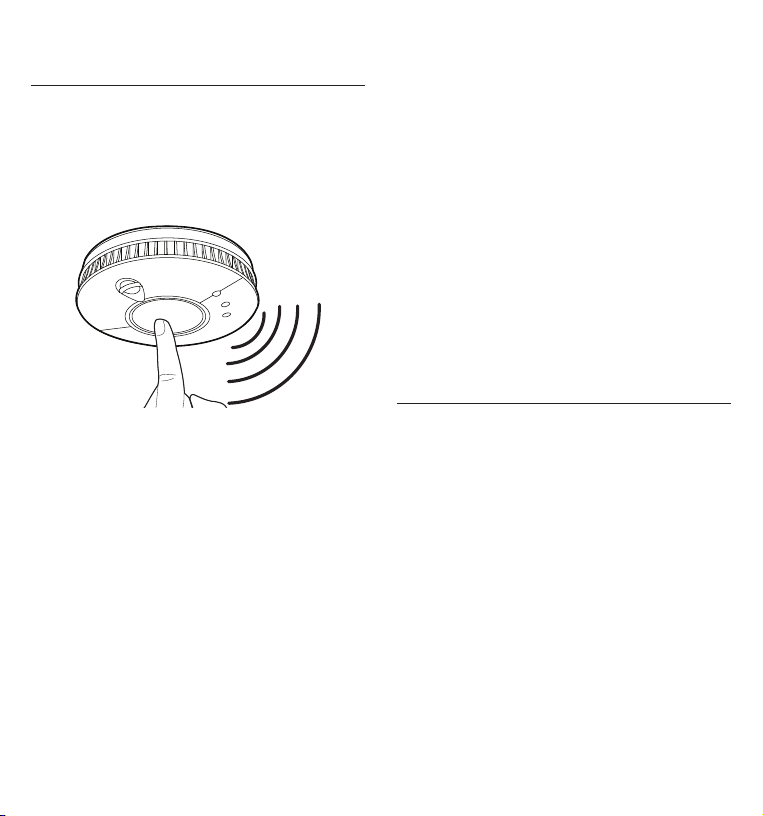
Check the red operating LED flashes once
every 45 seconds in standby mode.
Briefly press the test button in the centre
and release.
An audible alarm consisting of two cycles
of three loud beeps should occur and then
stop automatically. The red LED on the
alarm will flash rapidly during the audible
signal.
13
ALARM SMART
SILENCE™
Your alarm features ‘Smart Silence™’
technology. In the event of a known false
alarm your alarm can be temporarily
silenced by pressing the central test
button. Your alarm will automatically
return to full sensitivity within 10 minutes.
During the reduced sensitivity mode the
red LED on your alarm will continue to flash
more rapidly than normal, approximately
once every 10 seconds. Only use the alarm
silence function after making sure that there
is no fire emergency situation. Do not block
the vents on the alarm or disable the alarm in
any way, as this will remove your protection.
NOTE: If the level of heat / smoke reaching
the alarm is very high the alarm silence will
be overridden and the alarm will continue
to sound.
If there is any question as to the cause
of the alarm, always assume that there
is an actual fire and follow your fire
emergency plans.
If your alarm is interlinked with other
alarms, pressing the test button will
also silence other alarms in the network.
However, any alarm that has sensed
smoke (an instigating alarm) cannot be
remotely silenced. This means that any
alarm that has sensed smoke will continue
to sound allowing you to locate it.
If any instigating alarm in the network
has not been silenced after a short period
(2-4 minutes), all other alarms will start
sounding again to alert you.
WARNING: If any alarm in the network is
sounding, it is warning you of a potentially
hazardous situation. Do not ignore it.
SLEEP EASY™
Low battery warnings often start at night
or when it may be inconvenient to replace
your alarm. You can silence the audible
‘low battery’ chirp for a period of 8 hours by
pressing the test button. After this period
the audible chirp will start again. This
process can be repeated for a maximum
of 10 times. Your alarm will still detect
heat / smoke during this time, however you
must replace your alarm within 30 days,
as it may have insufficient power to warn
you of a real fire situation after this time.
WARNING: Your alarm cannot be silenced
if the chirp is indicating a fault. In this
instance, the unit should be replaced
immediately to ensure protection in the
event of a fire.

14
TROUBLESHOOTING
Problem Solution
Your alarm does not
sound during testing
• Make sure you push the centre of the test button firmly.
• If you are in the process of 'learning-in' the alarm and it does
not test, repeat the process.
• If your alarm still fails to test, contact Technical Support.
The green LED does
not illuminate when the
mains power is on
• Make sure the alarm is correctly located on the base plate.
• Ensure the mains power supply is on.
• Inspect the circuit breaker / fuse in the power circuit to
the alarm.
• Call a qualified electrician to inspect the house wiring
and connection.
The amber LED is
flashing and the alarm
is making a 'chirping'
sound
• If the amber LED is flashing at the same time as the chirp,
this indicates a low battery condition and the alarm should be
replaced as soon as possible.
• If the amber LED is flashing at a different time to the chirp,
this indicates a fault and the alarm should be replaced as
soon as possible.
• If the amber LED is double flashing and the alarm is making
a 'chirping' sound, this indicates that the wireless module
has a low battery condition, or is faulty. The alarm should be
replaced as soon as possible.
Your alarm fails to
successfully learn-in to a
network
• Make sure your alarm is 'unlearned' before trying to learn-in
to a network. Do this by pressing and releasing the learn-in
button located on the back of the alarm, immediately press
and hold the learn-in button, during which the red LED will
remain solid. When the LED goes out, release the button. The
LED will flash twice followed by three quick flashes, indicating
that it has successfully been unlearnt. You can then follow the
learn-in process as described in 'Wireless Interlink'.
• Ensure the whole Wi-Safe 2 network is working correctly by
rebuilding the network. See the ‘Wireless Interlink’ section for
more information.

15
Your alarm chirps
intermittently
• Check the location of your alarm (see ‘Positioning’).
• Check that your alarm is definitely the source of chirping;
make sure the noise isn’t coming from another alarm.
• If the alarm is chirping once approximately every 45 seconds
and the amber LED is flashing around the same time, it
indicates that the battery is low. The unit should be replaced
within 30 days.
• If the alarm is chirping once every 4 hours, it is indicating
that another alarm in the network has entered a low battery
condition. Locate the alarm with the low battery and replace
the alarm as soon as possible and in any event within 30 days.
Other interlinked units
fail to silence when one
unit is silenced
• Interlinked units that have sensed smoke / heat can’t be
silenced remotely. If one or more units remain in alarm, all
other interlinked units will emit their audible warning again
within 4 minutes. Vacate property if there is a fire hazard.
WARNING: Storage in low humidity and certain transportation conditions may cause
electrostatic charges to build up in the alarm system housing. Although harmless this may
increase the length of time that the horn sounds upon test button operation. The condition
may be cleared by wiping the inside and outside of the plastic cover with a damp cloth.
Still have questions? Please contact Technical Support between 9am - 5pm Monday - Friday:
Telephone: 0330 094 5830
E-mail: technicalsupport@fireangeltech.com
Website: www.fireangeltech.com
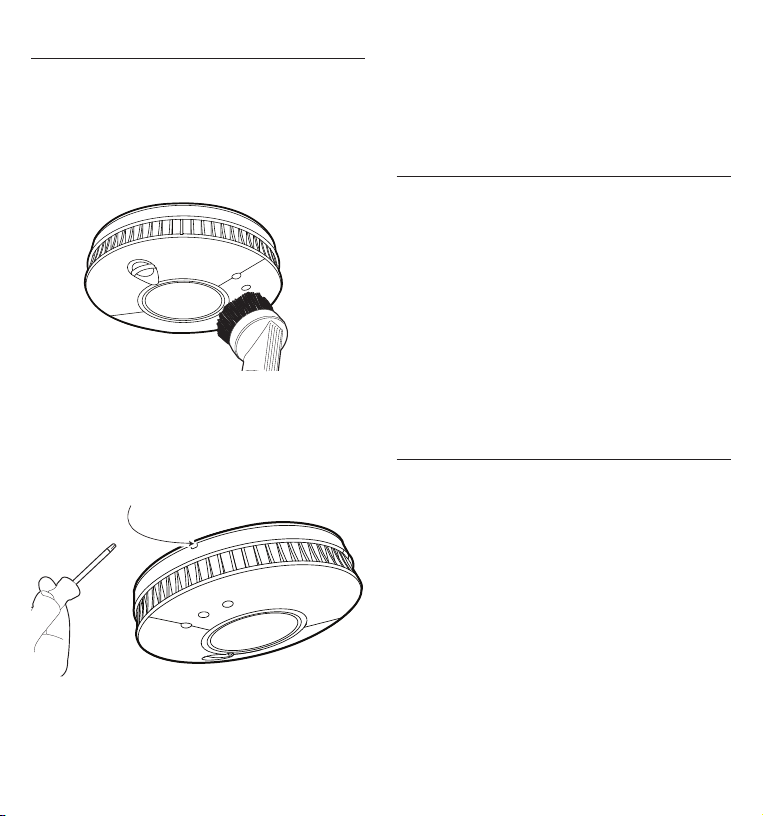
16
Push the screwdriver in and the alarm
should fall free from the base plate. Please
be aware that the alarm will fall as soon as
pressure is applied to the screwdriver, be
prepared to catch it.
DISPOSAL
Waste electrical products should not be disposed
of with your other household waste. The alarm is
ideally suited for disposal within the waste electronic
and electrical equipment (WEEE) recycling scheme.
Please recycle where facilities exist. Check with your
local authority, retailer or contact Technical Support
for recycling/disposal advice as regional variations
apply. Your alarm can be unlearned from a network,
as described in ‘Troubleshooting’. Once it is removed
from its base plate it is automatically disabled and
ready to be disposed of.
WARNING: Do not burn or dispose of in fire.
WARNING: If your alarm is dropped or damaged, as
a precaution, it should be removed from the building.
WARRANTY
FireAngel Safety Technology Limited warrants to the
original purchaser that its enclosed alarm be free
from defects in materials and workmanship under
normal residential use and service for a period of 5
years for the WST-230/WHT-230 and 2 years for the
ST-230/HT-230 - from the date of purchase. Provided
the product is sent back to FireAngel Safety
Technology Limited with proof and date of purchase,
FireAngel Safety Technology Limited hereby warrants
that during the warranty period (5 years for the
WST-230/WHT-230 and 2 years for the ST-230/HT-230)
commencing from the date of purchase, FireAngel
Safety Technology Limited, at its discretion, agrees to
replace the unit free of charge.
The warranty on any replacement ST-230/WST-230/
HT-230/WHT-230 alarm, will last for the remainder of
the period of the original warranty in respect of the
alarm originally purchased – that is from the date of
MAINTENANCE
Your alarms should be cleaned every 3
months, by firstly turning off the mains
electricity supply and then using a
vacuum cleaner fitted with the soft brush
attachment. Switch the power back on
once you have finished.
If you need to remove your alarm from it’s
base plate, turn off the mains electricity
supply, use a small screwdriver and insert
into the hole at the base of the alarm.
Insert screwdriver here

17
original purchase and not from the date of receipt of
the replacement product. FireAngel Safety Technology
Limited reserves the right to offer an alternative
product similar to that being replaced if the original
model is no longer available or in stock. This warranty
applies to the original retail purchaser from the date
of original retail purchase and is not transferable.
Proof of purchase is required. This warranty does
not cover damage resulting from accident, misuse,
disassembly, abuse or lack of reasonable care of the
product, or applications not in accordance with the
user guide. It does not cover events and conditions
outside of FireAngel Safety Technology Limited’s
control, such as Acts of God (fire, severe weather
etc.). It does not apply to retail stores, service centres
or any distributors or agents. FireAngel Safety
Technology Limited will not recognise any changes to
this warranty by third parties.
FireAngel Safety Technology Limited shall not be liable
for any incidental or consequential damages caused
by the breach of any expressed or implied warranty.
Except to the extent prohibited by applicable law, any
implied warranty of merchantability or fitness for a
particular purpose is limited in duration for 5 years
for the WST-230/WHT-230 and 2 years for the ST-230/
HT-230. This warranty does not affect your statutory
rights. Except for death or personal injury, FireAngel
Safety Technology Limited shall not be liable for any
loss of use, damage, cost or expense relating to this
product or for any indirect or consequential loss,
damages or costs incurred by you or any other user
of this product.

18

19

(UK) technicalsupport@fireangeltech.com
(DE) technik@fireangeltech.com
(FR) supporttechnique@fireangeltech.com
(NL) klantenservice@fireangeltech.com
(INT) Internationalsupport@fireangeltech.com