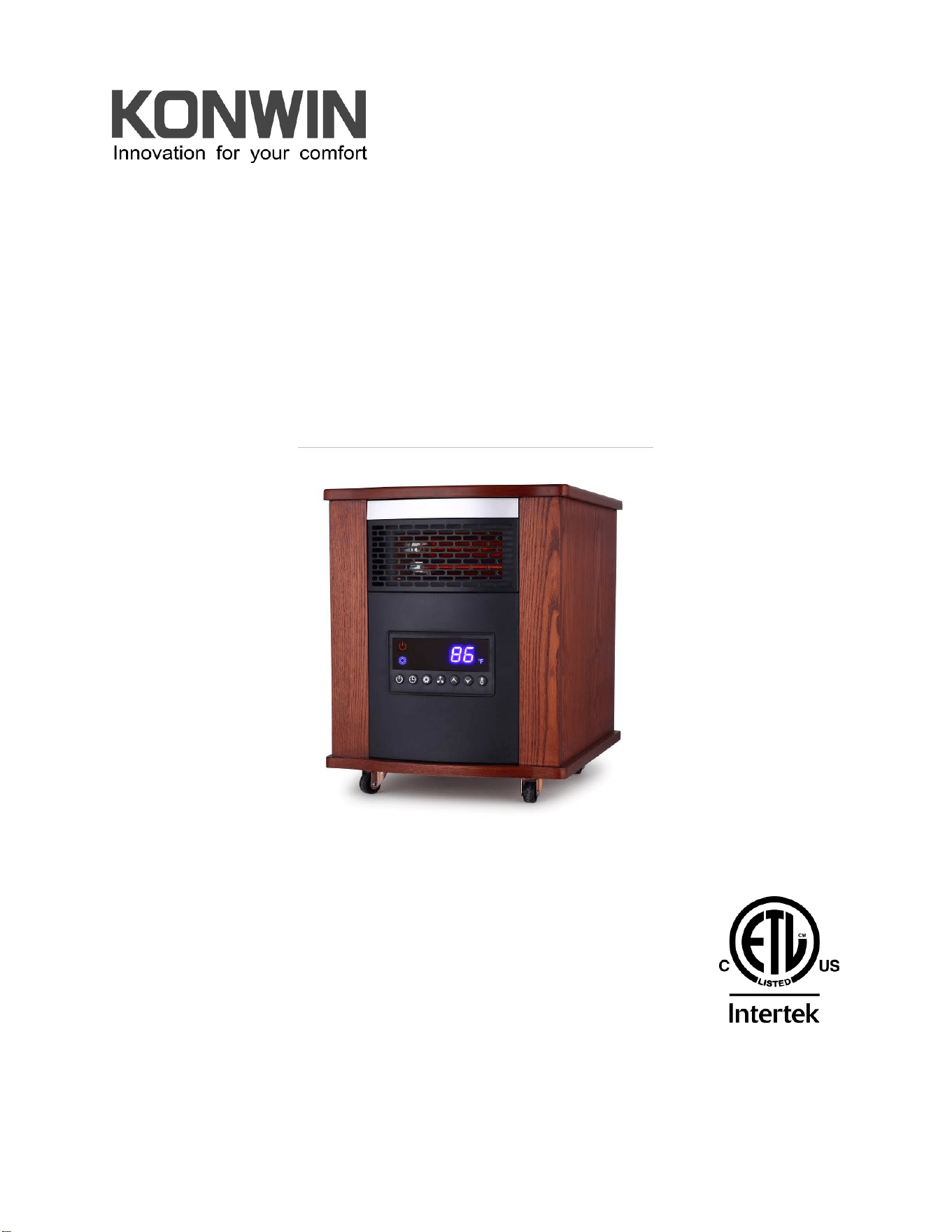
INFRARED ZONE HEATING SYSTEM
OWNER’S MANUAL
Model No. GD9315BCW-A6J
PLEASE SAVE THESE INSTRUCTIONS
WARNING: READ THIS OWNER’S MANUAL CAREFULLY BEFORE USE.

2
Thank you for choosing a Konwin Convection Heater. This owner’s manual will provide
you with valuable information necessary for the proper care and maintenance of your
new product. Please take a few moments to thoroughly read the instructions and
familiarize yourself with all the operational aspects of your new heater.
PLEASE SAVE THESE INSTRUCTIONS
3
IMPORTANT SAFETY INSTRUCTIONS
READ AND UNDERSTAND ALL INSTRUCTIONS, SAFETY
WARNINGS, BEFORE USING THE HEATER
WARNING!
! POTENTIAL FOR ELECTRICAL HAZARD IF NOT ADHERED TO!
When using electrical appliances, basic precautions should always be followed to
reduce the risk of fire, electric shock, and injury to persons, including the following:
1. CAUTION: Risk of Electric Shock. DO NOT open or try to repair the heater
yourself.
2. This heater may get hot when in use. To avoid burns, DO NOT let bare skin
touch hot surfaces. If provided, use handles when moving this heater.
3. Keep combustible materials, such as furniture, pillows, bedding, paper,
clothes, and curtains at least 3 ft from the front of the heater and keep them
away from the sides, top, and rear. DO NOT place towels or other objects on
the heater.
4. Extreme caution is necessary when any heater is used by or near children or
the disabled, or when the heater is left operating and unattended.
5. DO NOT operate any heater with a damaged cord or after the heater
malfunctions, has been dropped or damaged in any manner. Return heater to
authorized service facility for examination, electrical or mechanical adjustment,
or repair.
6. This heater is not intended for use in bathrooms, laundry areas and similar
indoor locations. NEVER locate heater where it may fall into a bathtub or
other water container. To protect against electrical hazards, DO NOT
immerse in water or other liquids.
7. DO NOT touch the control panel or plug with a wet hand.
8. DO NOT run cord under carpeting. DO NOT cover cord with throw rugs,
runners, or similar coverings. Arrange cord away from traffic area and where
it will not be tripped over.
9. DO NOT insert or allow foreign objects to enter any ventilation or exhaust
opening as this may cause an electric shock or fire, or damage the heater.
10. To prevent a possible fire, DO NOT block the air intakes or exhaust in any
manner. DO NOT use on soft surfaces, like a bed, where openings may
become blocked.

4
11. A heater has hot and arcing or sparking parts inside. DO NOT use in areas
where gasoline, paint, explosive and/or flammable liquids are used or stored.
Keep unit away from heated surfaces and open flames.
12. Always plug heaters directly into a wall outlet receptacle. Never use with an
extension cord or relocatable power tap (outlet/power strip).
13. To avoid fire or shock hazard, plug the unit directly into a 120 V AC electrical
outlet.
14. To disconnect heater, turn controls to OFF, then remove plug from outlet. Pull
firmly on the plug, DO NOT unplug by pulling on the cord.
15. Always unplug the unit before moving or cleaning, or whenever the heater is
not in use.
16. Use only for intended household use as described in this manual. Any other
use not recommended by the manufacturer may cause fire, electric shock, or
injury to persons. The use of attachments not recommended or sold by
unauthorized dealers may cause hazards.
17. Always use on a dry, level surface. Use on floor only.
18. DO NOT use outdoors.
19. WARNING: To reduce the risk of fire or electric shock, DO NOT use this unit
with any solid-state speed control device.
20. DO NOT attempt to repair or adjust any electrical or mechanical functions on
this unit. Doing so will void your warranty. The inside of the unit contains no
user serviceable parts. Qualified personnel should perform all servicing only.
21. Connect to properly grounded outlets only.
SAVE THESE INSTRUCTIONS
5
SPECIFICATIONS
Voltage Rating 120 V (60Hz)
Power Consumption 1500W
Unit Size 13.9 in. (W) x 17.2in. (D) x 17.3 in. (H)
Unit Weight 25 lbs
SAFETY FEATURES
Tip-Over Safety Feature
This heater is equipped with a tip-over safety feature. Once the heater is tipped over, an internal
switch will automatically shut the heater off. Once the heater is restored an upright position, the
heater will reset. To continue operation, turn on the heater using the supplied remote control or
the control panel on the heater.
Overheat Safety Feature
This heater is equipped with a overheat safety feature. When the heaters internal components
reach a certain temperature that could cause overheat and possible fire, the heater will
automatically shut off.
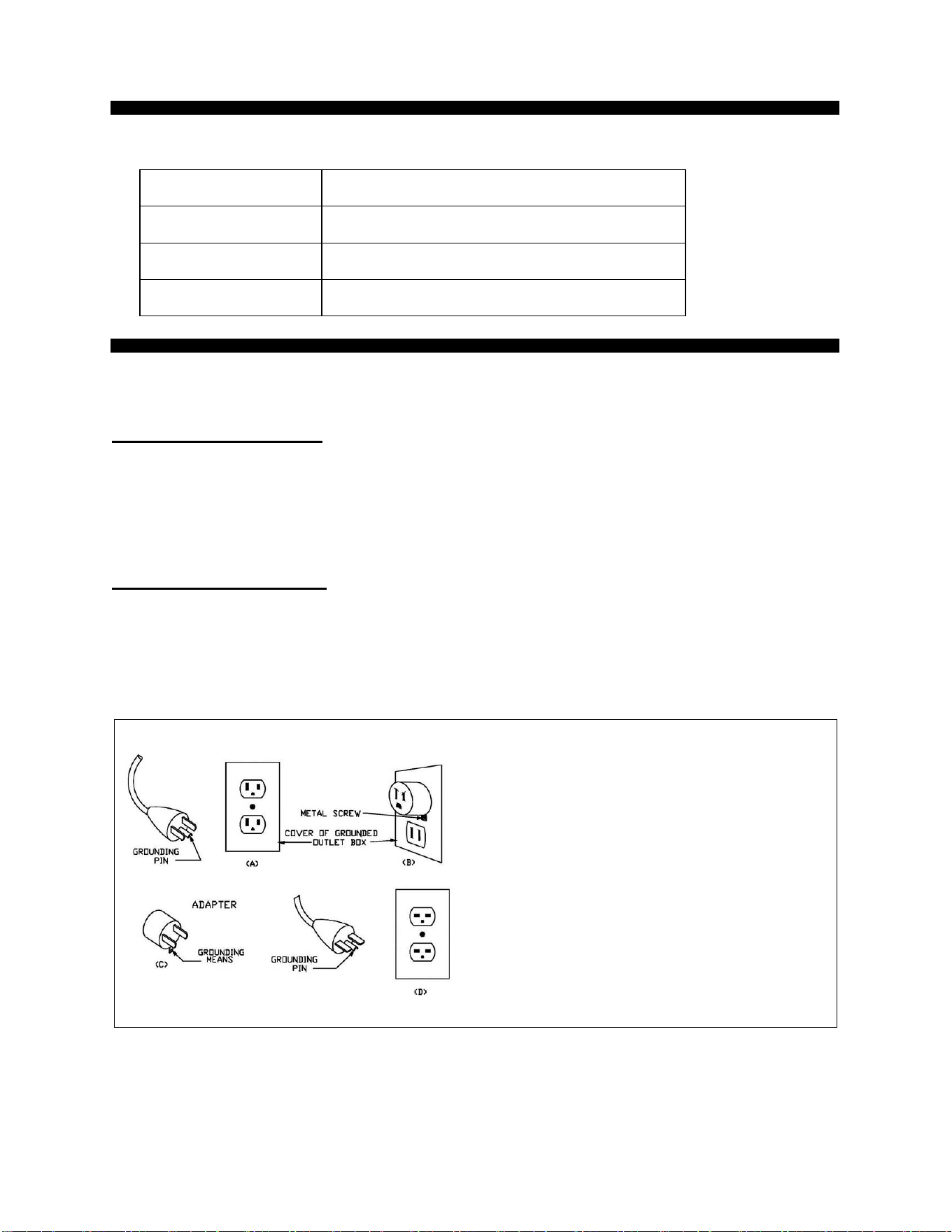
WARNING: This heater has a voltage rating
of 120 volts. The cord has a plug as shown in
A. An adapter as shown in C is available for
connecting three-blade grounding-type plugs to
two-slot receptacles. The grounding lug
extending from the adapter must be connected
to a permanent ground such as a properly
grounded outlet box. The adapter should not be
used if a three-slot grounded receptacle is
available.
DO NOT DEFEAT THE SAFETY PURPOSE
OF THE GROUNDED PLUG.
WARNING: It is normal for the power cord to feel warm to the touch; however, a loose fit
between the outlet and the plug may cause overheating of the plug. If this occurs, try inserting
the plug into a different outlet. Contact a qualified electrician to inspect the original outlet for
damage.
6
IN THE BOX
·INFRARED ZONE HEATING SYSTEM
·REMOTE CONTROL(2 AAA batteries not Included)
·INSTRUCTION BOOKLET
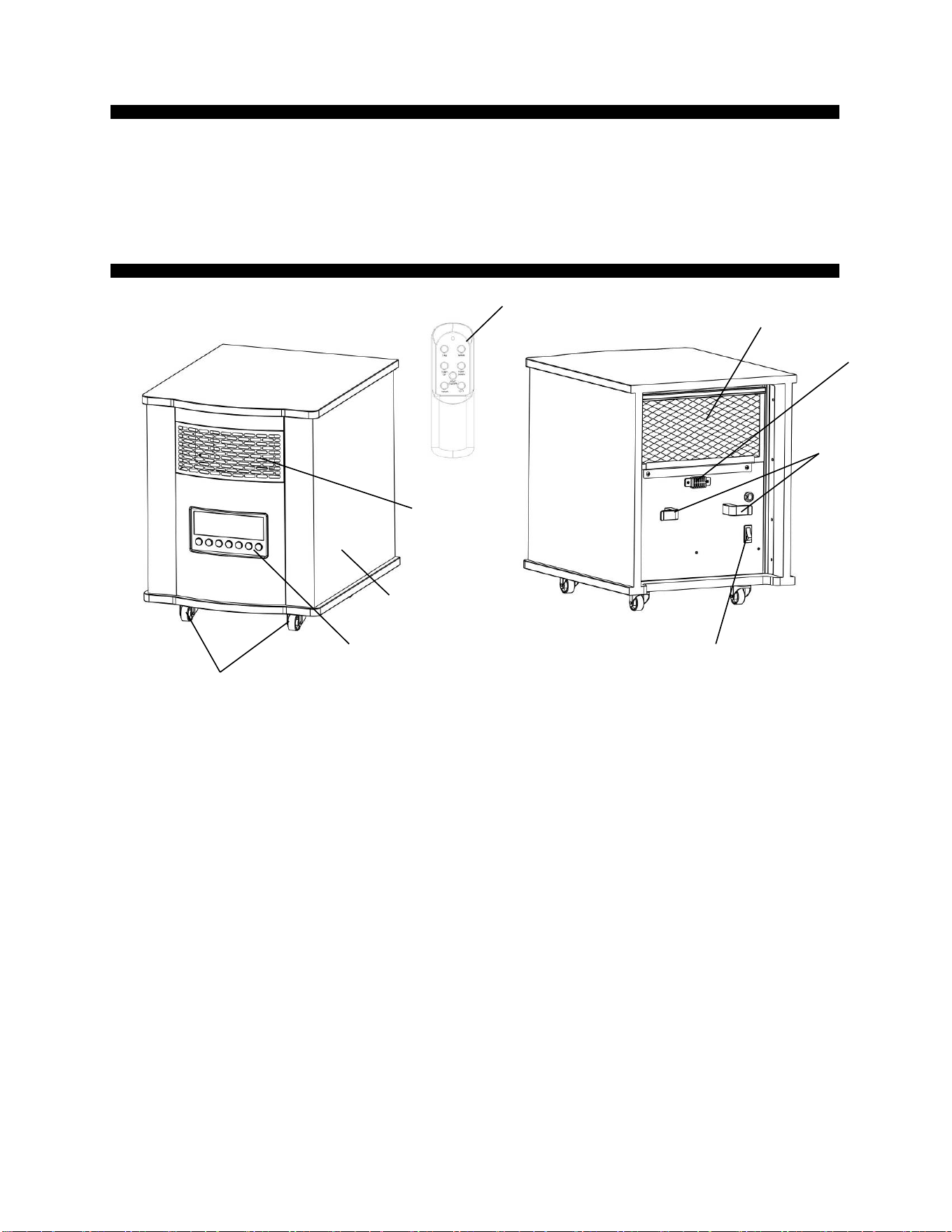
PRODUCT DIAGRAM
Air Outlet
Wooden Cabinet
Control Panel
Wheels
Remote Control
Air Intake
Cord Clamp
Power Switch
Temp Sensor
7
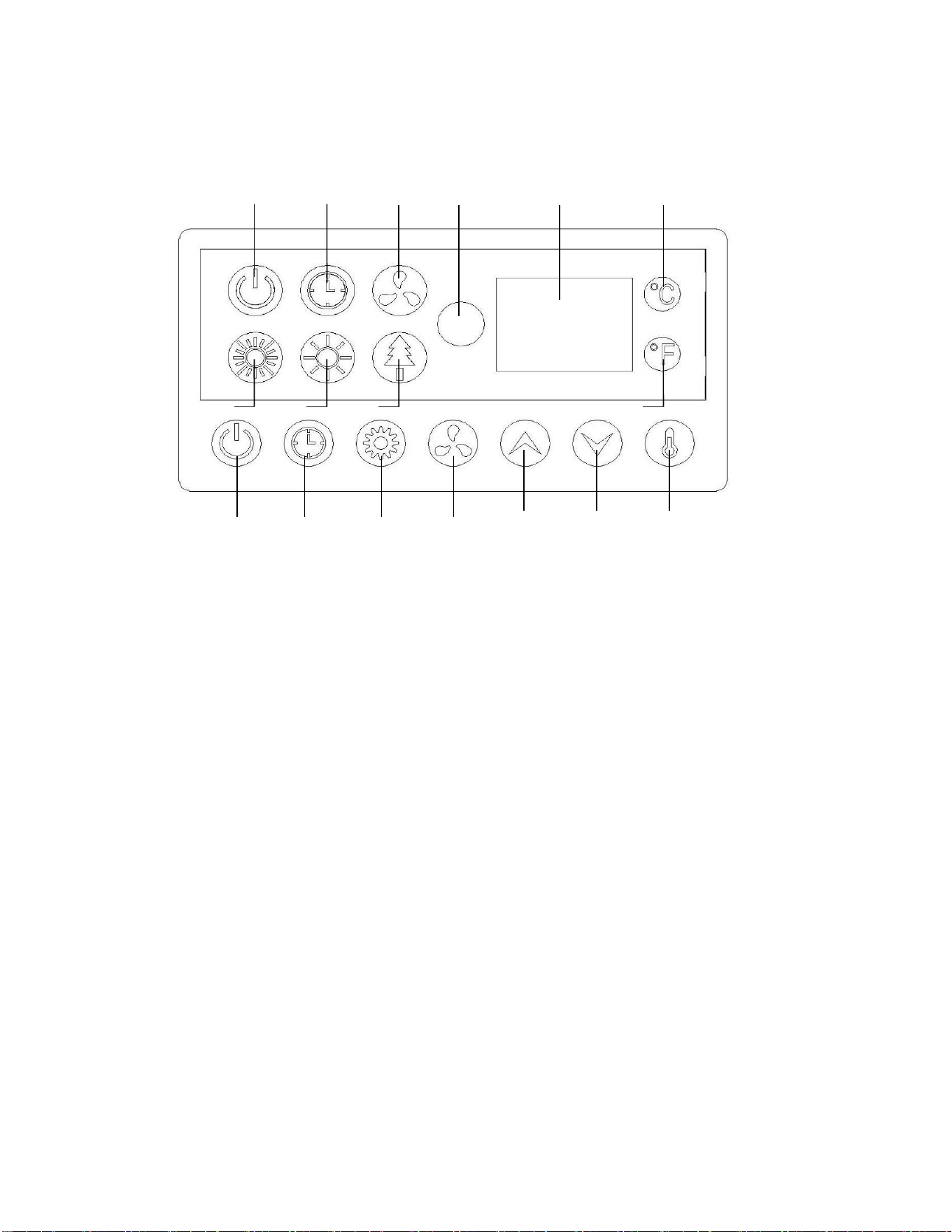
1、Power indication Light:Indicate when the unit connects to power supply.
2、Timer indication light:The light’s on when timer functions.
3、Fan indicator light: The light’s on when cooling fan functions.
4、Signal-receiving window: For receiving remote control signal.
5、Digital display:Indicate set room temperature or time value according to the timer.
6、Celsius indicating light
7、High mode indication light: The light’s on when in high mode.
8、Low mode indication light: The light’s on when in low mode.
9、Energy-saving mode:The light’s on when in energy-saving mode.
10、Fahrenheit indicating light
11、Heat ON/OFF switch button: For heater function on or off setting.
12、Timer button:Used for setting the timer and adjust time value for the timer.
13、Heat mode button:For select heating mode between high, low and ECO.
14、Fan switch button: For cooling fan function on or off setting
15、Temp up button: For setting temp upward.
16、Temp down button: For setting temp downward.
17、℃/℉Button : Button for alternating between Fahrenheit and Celsius.
Control Panel
1
2
3
4
5
6
7
11
12
13
14
15
8
9
10
16
17
8
PREPARATION
Place the heater on a firm, level surface and plug into a grounded 120V 60Hz power outlet. and
turn on the power switch in the rear of the unit. Only operate heater in upright position with
caster wheels attached.
Insert 2 AAA batteries into the remote control before using (Batteries Not Included)
OPERATING INSTRUCTIONS
1、Start and select working mode
Or
Turn the heater on by pressing the HEAT ON/OFF button
on the control panel or by pressing the HEAT ON/OFF
button on the supplied remote control.
Turn the heater off by pressing the HEAT ON/OFF button
on the control panel or by pressing the HEAT ON/OFF
button on the supplied remote control.
Note: Powering off the heater will stop the heating process
only. The fan will continue to blow for approximately 1
minutes to allow for the interior components to cool. The
fan will then turn off automatically.
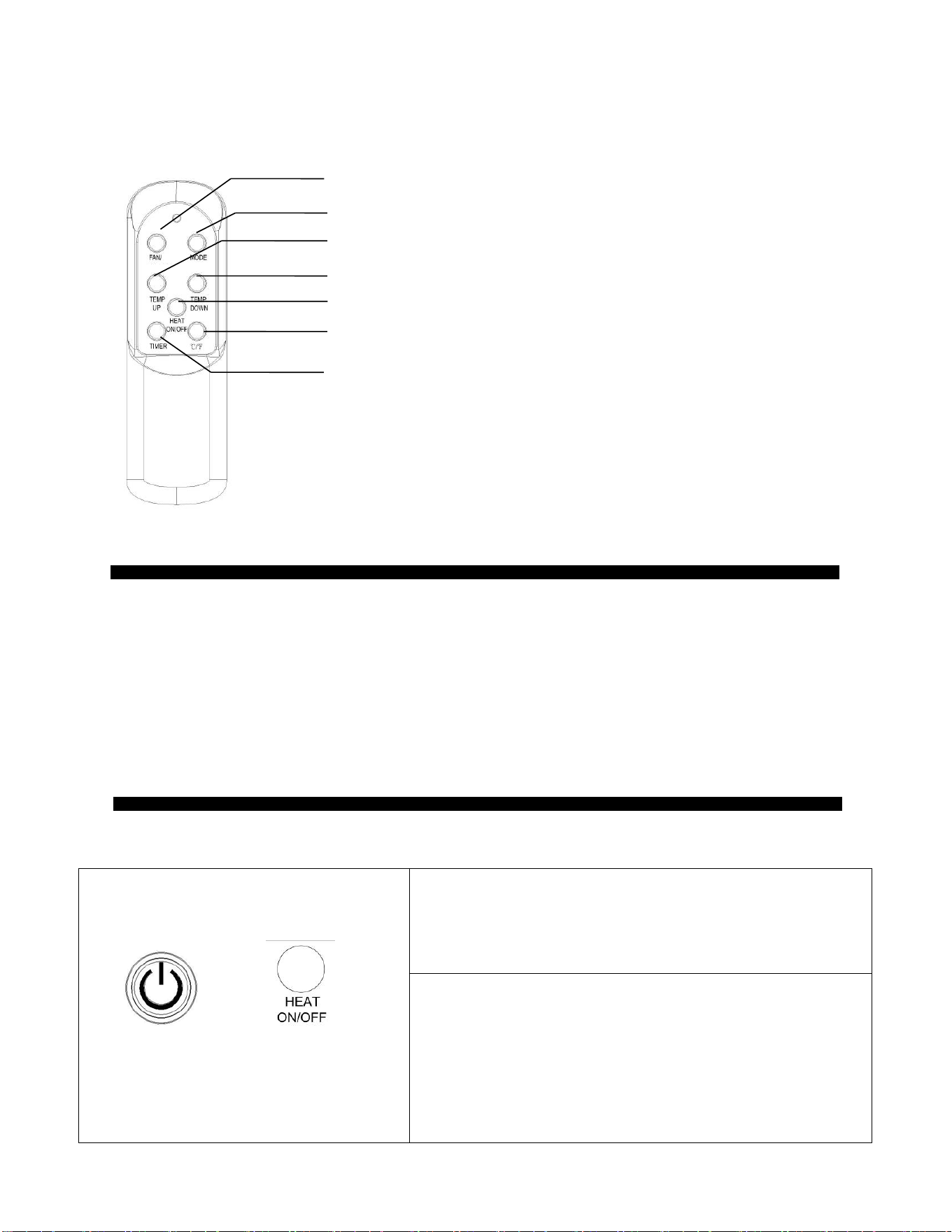
Remote Control
ON/OFF button: Used for power-on or power-off
Mode button: Used for mode selection
Temp up button: To make set temperature rise
Temp down button: To make set temperature decline
Timer button: Used for setting timer and adjust time value of timing
℃/
℉
button : Button for alternating between Fahrenheit and Celsius.
Fan button: For select fan mode.
9
Or
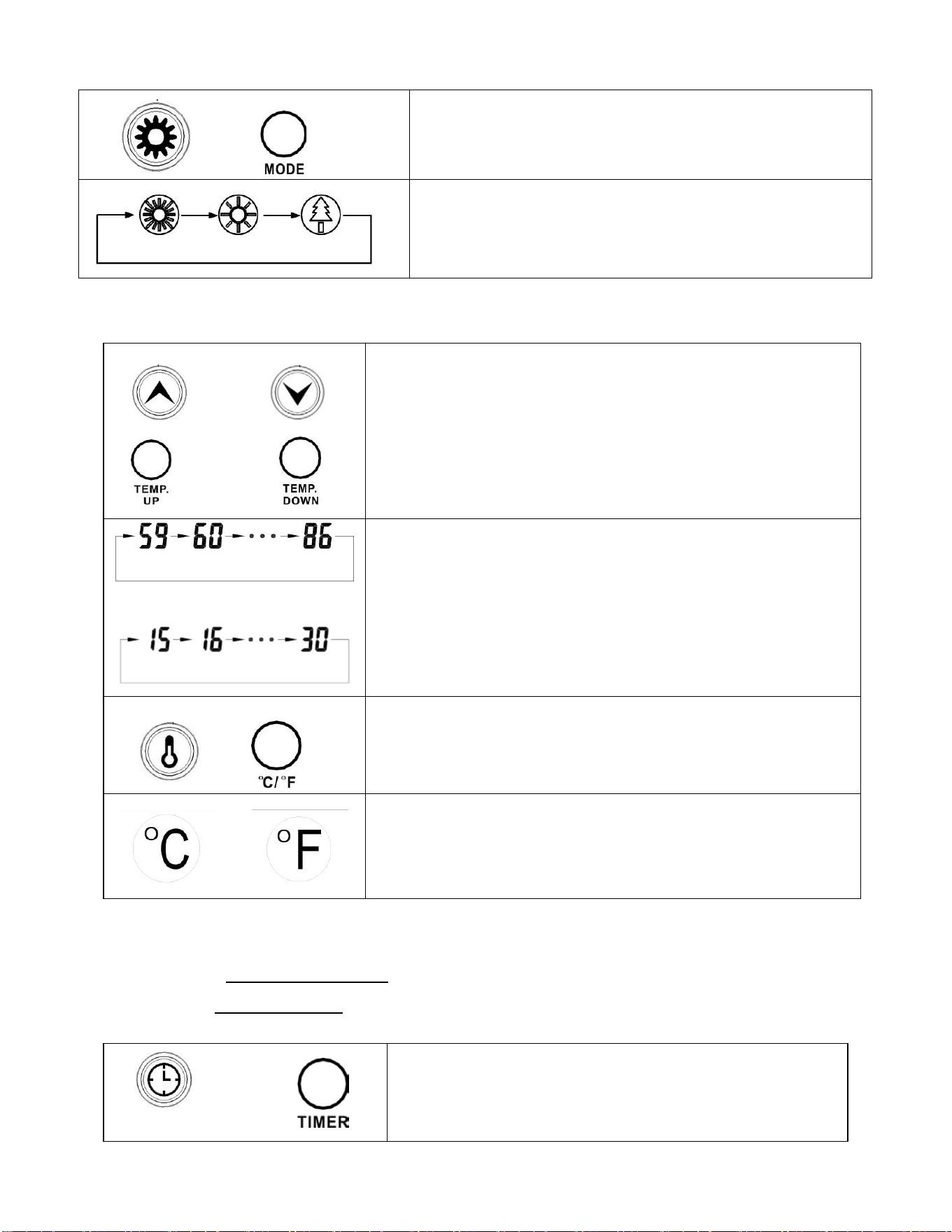
Select a heat Mode.
Press the MODE button to toggle between the three heat
settings.
High Mode uses 1500W; Low Mode uses 1000W. ECO
mode is an Economic Energy Saving Function. When ECO
mode is chosen, the heater will set the temperature
automatically to 68℉ (20℃) under this mode
2
、
Setting Desired Temperature
Or
Or
Adjust the desired temperature by pressing the Up/Down
arrows on the control panel or remote control.
Or
Desired temperature options vary from 59℉ to 86℉, or from
15℃ to 30℃. Once you have chosen the desired temperature,
the heater will remain on until the room temperature increases
to that temperature on the digital display. The heater will cycle
on and off to maintain that desired room temperature.
Or
Press ℃/℉ button to change the display temperature between
Fahrenheit and Celsius.
Or
The Fahrenheit indicator LED will light, when the temperature
is displayed in Fahrenheit.
The Celsius LED will light, when the temperature is displayed
in Celsius.
3
、
Setting the POWER-OFF TIMER Function
Note: The Power-Off-Timer Function will allow for the heater to power OFF after a certain set
time, and can only be set while the heater’s display is in the “On” position.
Or
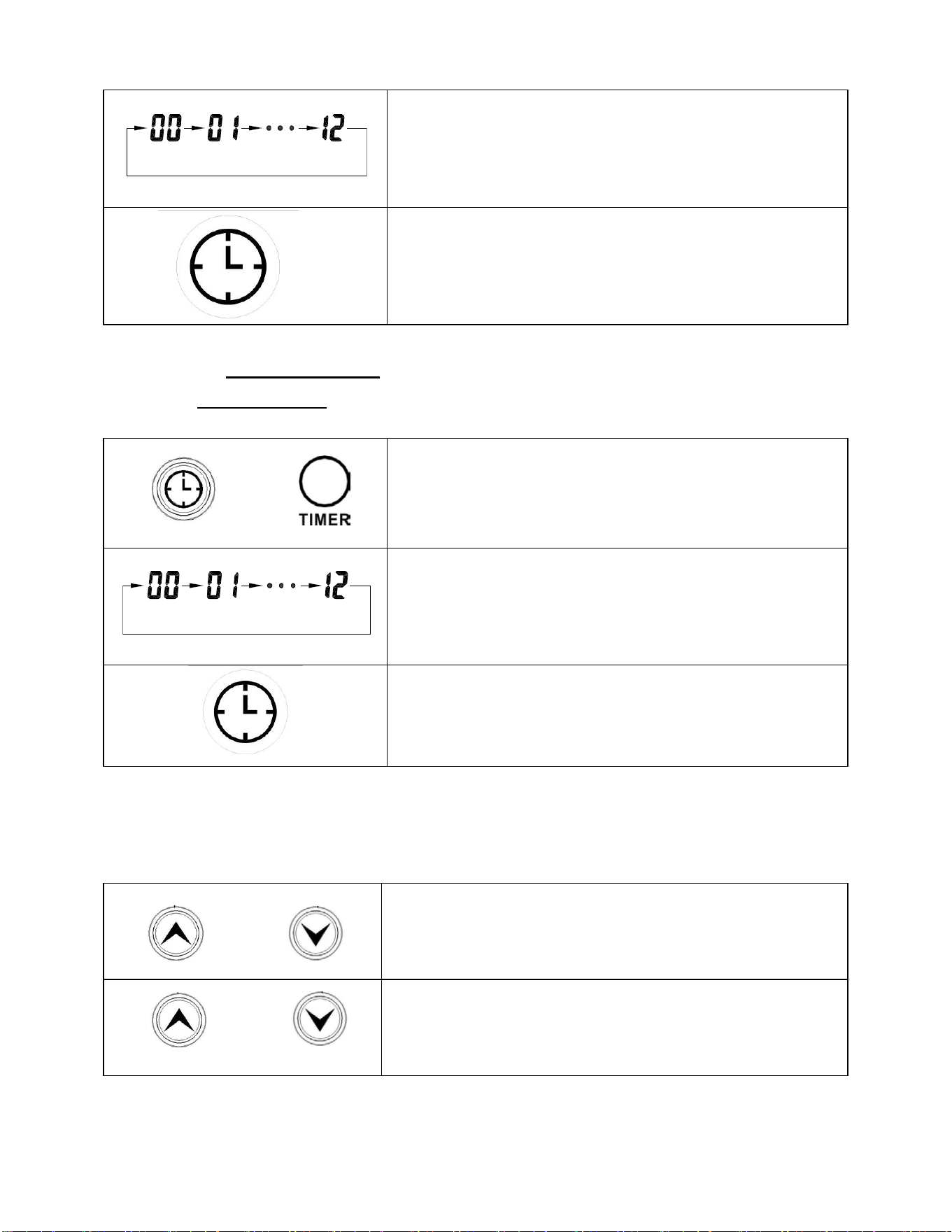
Turn the heater to the “On” position. Press the Timer
button on the heater’s control panel or the remote.
10
The digital display changes from the “temperature” to the
“hours” option for the timer. Continue to press the timer
button to change the number of hours you would like the
heater to run before powering itself off. The hour options
for the timer are from 0 to 12 hrs. (in 1 hr increments).
The selected hour increments will flash for a few seconds,
then revert back to the set desired temperature. The Timer
indicator light will remain lit as long as the Timer is set.
The heater will power OFF when the internal heater clock
counts down the hour increments you set.
4
、
Setting the POWER-ON TIMER Function
Note: The Power-ON-Timer Function will allow for the heater to power ON after a certain set
time, and can only be set while the heater’s display is in the “Off” position.
Or
Turn the heater to the “OFF” position. Press the Timer
button on the heater’s control panel or the remote.
The digital display shows the “hours” option for the timer.
Continue to press the timer button to change the number of
hours you would like the heater’s internal clock to count
down before powering itself on. The hour options for the
timer are from 0 to 12 hrs. (in 1 hr increments).
The Timer indicator light will remain lit as long as the
Timer is set. The heater will power itself ON when the
internal heater clock counts down the hour increments you
set.
5
、
Setting Electro Lock
The Electro Lock can help avoid the heater from being accidentally engaged by children. The
locking mechanism can be set in both the ON and OFF modes.
And
Press Temp Up and Temp Down buttons at the same time
for 3 seconds. Locking is complete when you hear a beep.
When locked, the functions of the control panel and remote
will be locked for use.
And
When you need to unlock it, press Temp Up and Temp
Down buttons at the same time for 3 seconds. You will hear
a beep. The control panel and remote control will become
functional again.
11
6
、
Select fan function mode
Or
Select the fan function mode by turn the “Fan” button on
the heater’s control panel or the remote.
MAINTENANCE
1. Turn off the power switch in the rear of the unit.
2. Unplug the unit and let it cool completely.
3. To keep the heater clean, the outer shell may be cleaned with a soft, damp cloth. You
may use a mild detergent if necessary. After cleaning, dry the unit with a soft cloth.
CAUTION: DO NOT let liquid enter the heater.
4. DO NOT use alcohol, gasoline, abrasive powders, furniture polish, or rough brushes to
clean the heater. This may cause damage or deterioration to the surface of the heater.
5. DO NOT immerse the heater in water.
6. Wait until the unit is completely dry before use.
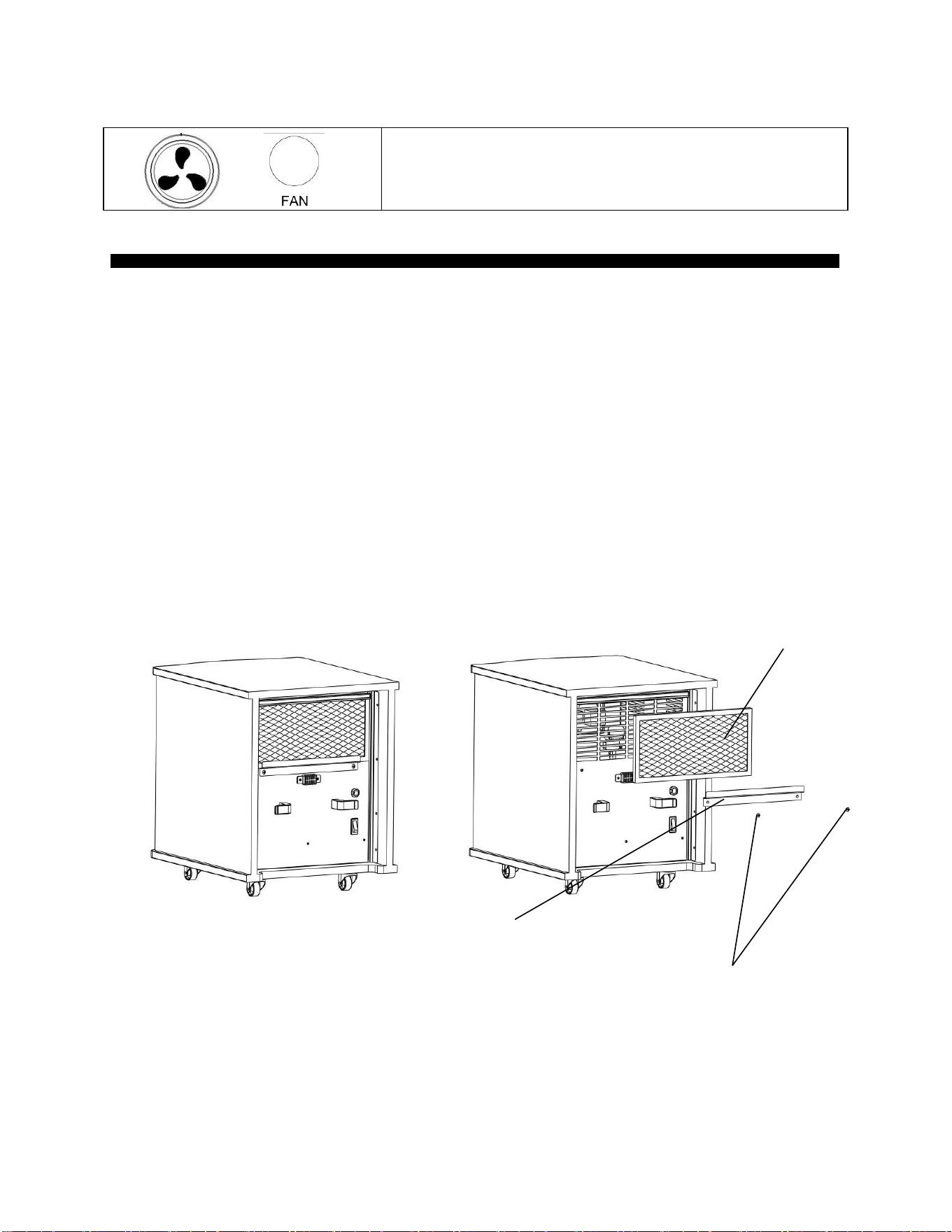
7. Air filter needs cleaning after used 3 months of use. Please take off the filter with the 2
steps in the drawing below. Flush and clean the filter with water, Then, dry it out and re-
assemble.
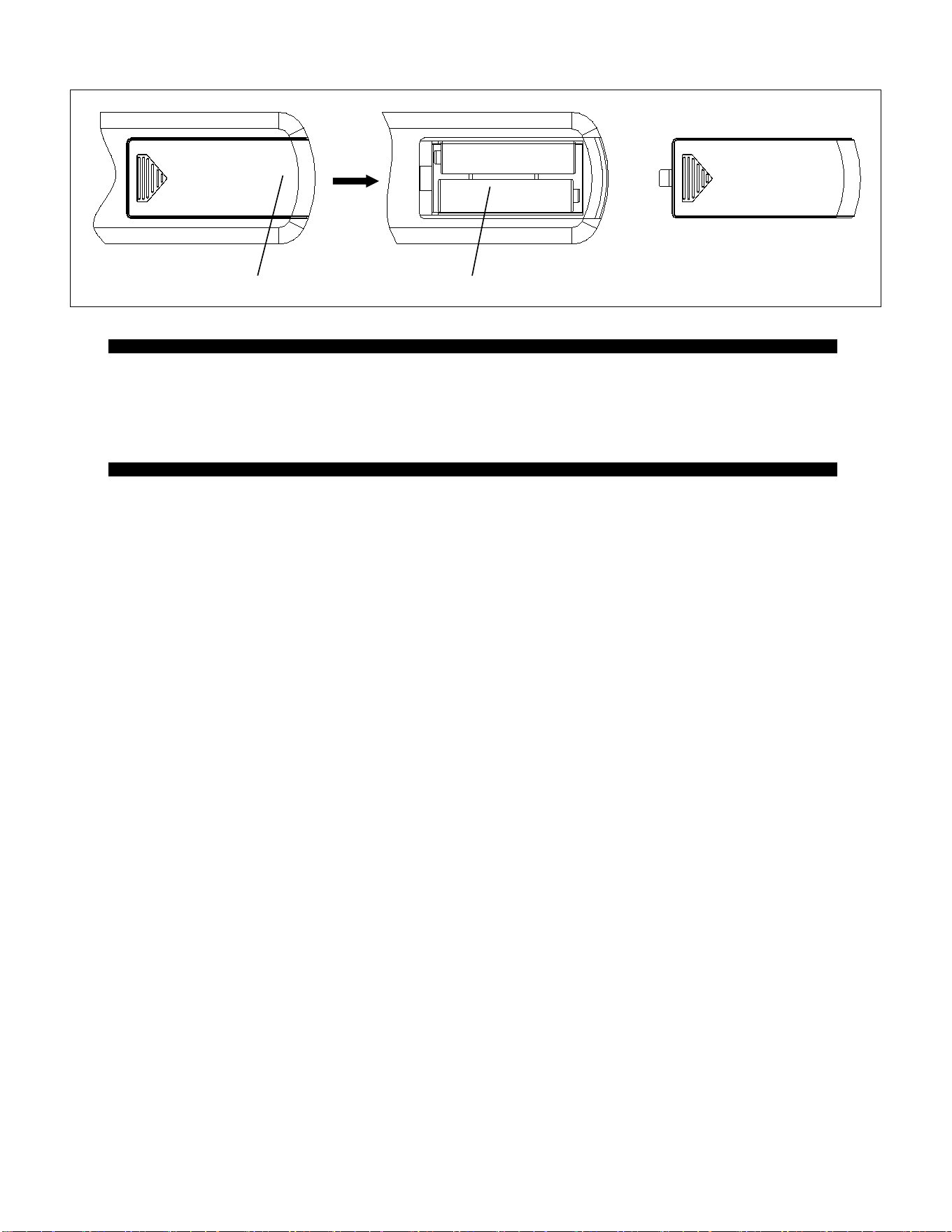
8. If you do not use the heater for a long time, please take out the remote batteries (to prevent
corrosion ) as shown below. Store the remote in a safe place.
3) Remove Air filter
1) Remove bracket screws (2X)
The unit
2) Remove filter bracket
12
STORAGE
Store the heater in a cool, dry location when not in use. To prevent dust and dirt build-up, use the
original packaging to repack the unit.
BASIC TROUBLESHOOTING
If the heater will not operate, please check the following before seeking repair advice:
1. Check if the power cord is plugged into an electrical outlet, if not, plug in.
2. Check if electricity to the main power switch (in the back) is working.
3. Check to see if the battery on the remote is placed correctly, undamaged.
NOTE: For the heater to function properly, the desired temperature on the heater must be
set a few degrees higher than the temperature in the room. If the seems to not be heating,
increase the desired temperature on the heater to engage the heat elements.
PUSH
lid
Battery

13
Limited Manufacturer Warranty
1 Year Limited Warranty: Konwin warrants this heater against defects in materials and
workmanship on functional parts, for a period of one year from the original date of purchase.
Your sales receipt showing the date of purchase of the product is your proof of purchase.
Keep it in a safe place for future reference.
Manufacturer Warranty
All Konwin products are manufactured with the highest quality materials and are warranted to be
free from defects in material and workmanship at the time of purchase. This limited warranty
applies to products manufactured or distributed by the Konwin T brand name, are delivered in the
continental United States, and extends to the original purchaser, or gift recipient. This warranty
becomes valid at the time of purchase and terminates either by the specified time frame listed
above and/or owner transfer (unless otherwise authorized by Konwin, as the manufacturer). Any
extended warranties (warranties that cover above and beyond this manufacturer warranty) that are
sold through a retailer or third party, are not directly correlated with this Konwin limited warranty,
and may be redirected to said retailer or third party for coverage.
The purchaser must present Konwin with proof of purchase documents (including the date of
purchase) if requested. Any evidence of alteration, erasing, or forgery of proof of purchase
documents will be just cause to VOID this limited warranty. Products, in which the serial number
has been defaced or removed, are not eligible for warranty coverage.
14
Customer Service and Support
To Obtain Warranty Support or Advice, Please Complete These Easy Steps:
Contact Konwin PRODUCTS Technical Support
Phone:1-800-644-2032
E-mail: sherma[email protected]
You will need to provide the unit's model number, serial number (located on the
heater’s front panel, rear panel, or on the box), date of purchase, retailer of
purchase, a daytime phone number, and possibly a copy of your receipt.
Be Patient, Clear, and Concise.
Describe the issue and symptoms you have for, and about the product. A certified
Konwin Technical Support agent will give you an evaluation of your issue and your
resolution options. If the answer is not available at that time, you will be referred to the
appropriate channels, or given a call back within 72 hours with an answer or resolution.
If after speaking with Konwin Technical Support, it is determined by one of our agents
that your unit may need to be sent in to us to be evaluated/repaired, our representative
will provide you with a reference number and provide you with details on how to send
in your unit for repair.
GD9315BCW-A6J Rev 1 Printed In China