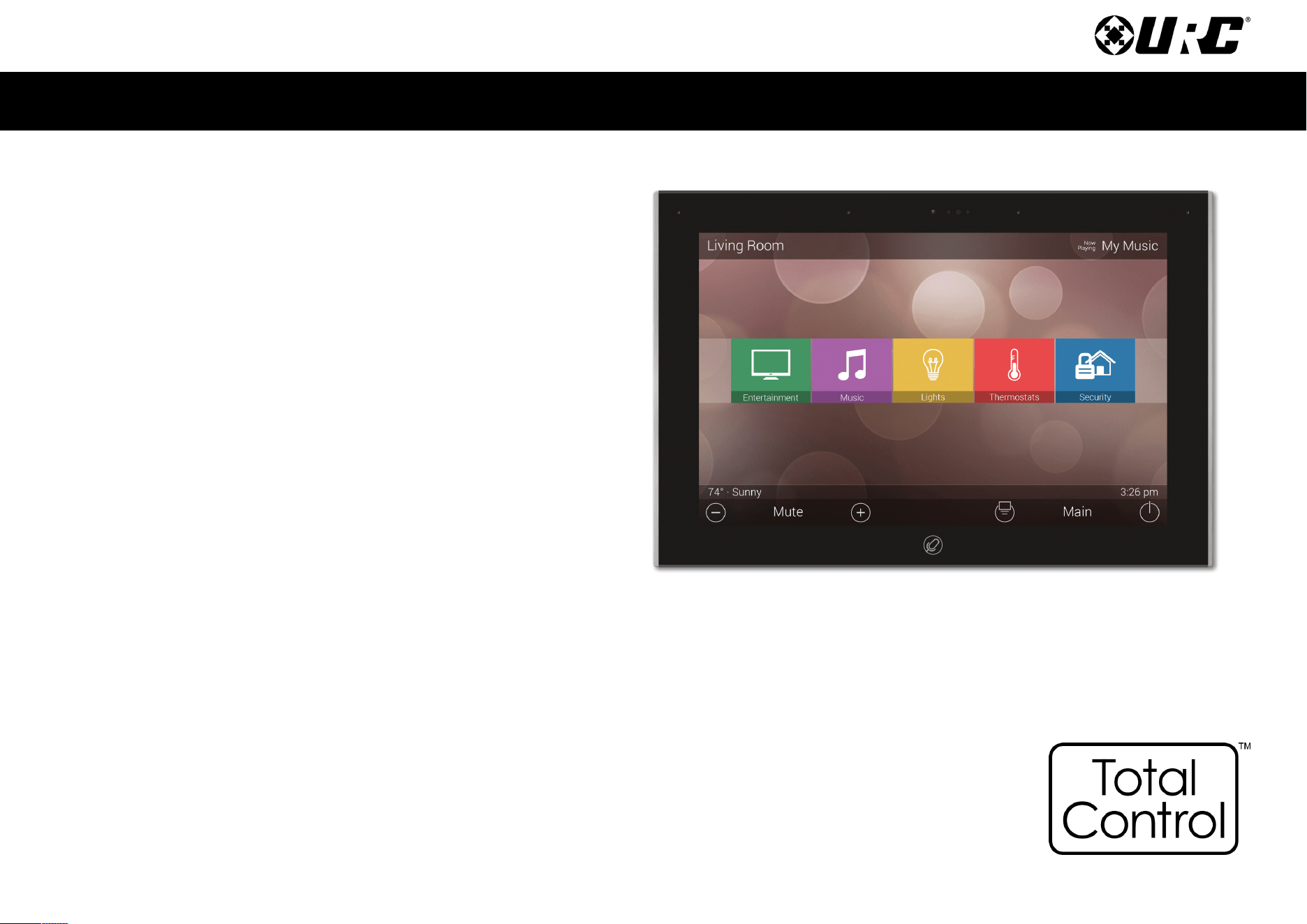
TKP-8600
Owner’s Manual
Total Control
TKP-8600
Owner’s Manual
Total Control
TKP-8600
Owner’s Manual
Rev 1.5
Table of Contents
Introducing the TKP-8600
Thank you for purchasing URC’s TKP-8600 In-Wall Network Keypad. Its easy and
intuitive use helps to simplify your life while adding control of more things than you
thought possible.
Online Support:
Total Control is sold direct only and must installed/program by a certied
custom integrator.
End-User Support:
Visit the URC Home Page for product information, owner’s manuals, and
support contact information.
Contact Support:
Total Control is a URC product sold direct only. For questions or assistance contact
your Custom Installer/Programmer.
My Installer/Programmer
Technical Suppor t
Toll Free: 800-904-0800
Main: 914-835-4484
techsupport@urc-automation.com
H o u r s : 9 : 0 0 a m - 5: 0 0 p m ES T M - F
Features and Benefits......................................................................................................1
Amazon Alexa/Audio-Video Interface................................................................... 1
Proximity Sensor/Flexible Orientation.................................................................. 2
Parts List ............................................................................................................................3
Installation.........................................................................................................................4
The TKP-8600.....................................................................................................................5
Alexa Features..................................................................................................................6
Settings Menu...................................................................................................................7
Sleep Settings............................................................................................................ 8
General........................................................................................................................ 9
Sound/Brightness.................................................................................................... 10
Proximity Sensor ..................................................................................................... 11
System Information ................................................................................................. 12
Network .................................................................................................................... 13
Voice Assistant ........................................................................................................ 14
Alexa Voice Assistant ...................................................................................................15
Login .......................................................................................................................... 15
Logout ........................................................................................................................ 19
Audio Settings.......................................................................................................... 21
Language................................................................................................................... 23
Wake Type ................................................................................................................ 24
Factory Default......................................................................................................... 25
Removing the TKP-8600 from an Amazon Account ..................................................26
Specifications/Limited Warranty Statement.............................................................28
1
Total Control
TKP-8600
Owner’s Manual
Features and Benefits
The TKP-8600 In-Wall Network Keypad is one of URC’s most advanced devices that is
optimized for usage with Total Control.
Enjoy these key features:
Amazon Alexa
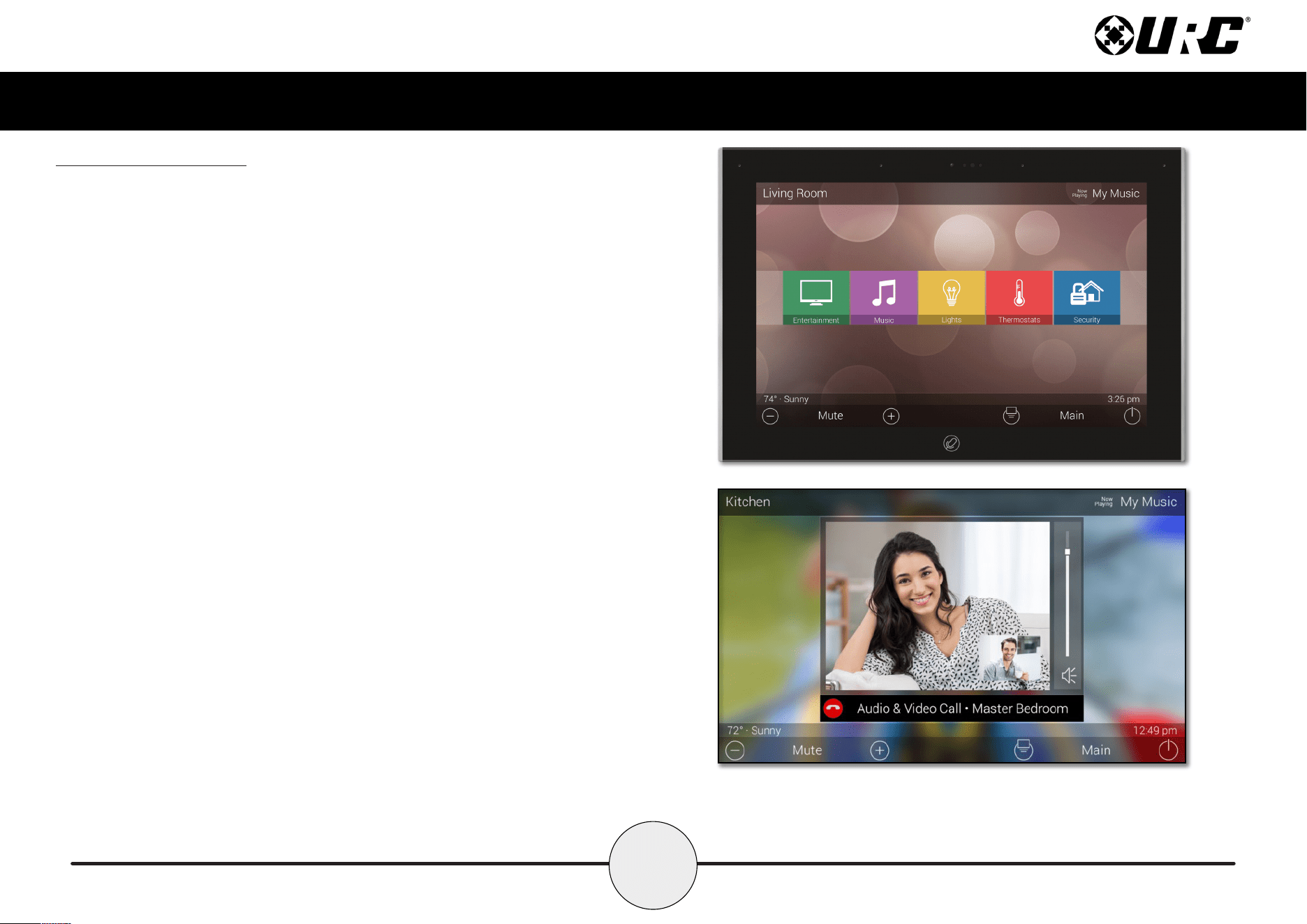
This keypad is capable of integrating with Amazon Alexa devices, bringing voice
control to home automation solutions.
Audio-Video Interface
Communicate with any other URC Intercom-Enabled device in the system with this
feature. The end-user can make Audio-Video, Audio, or Audio Broadcast calls
directly from the TKP-8600.
2
Total Control
TKP-8600
Owner’s Manual
Proximity Sensor
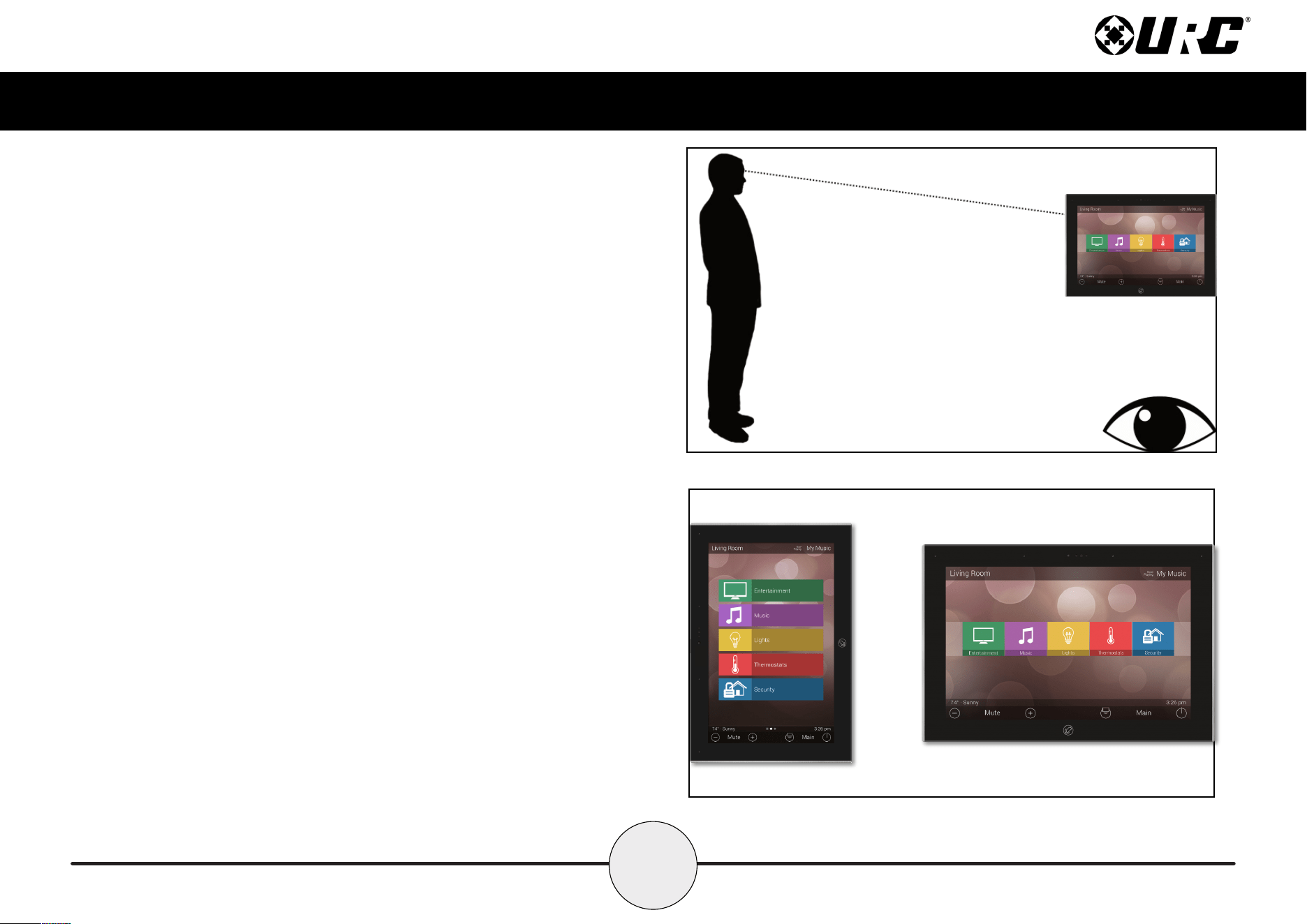
This feature allows the TKP-8600 to spring into action automatically. Utilizing its
proximity sensor, the keypad can detect distances from up to three (3) feet
away. This setting can be adjusted in the device’s Settings menu.
Flexible Orientation
The TKP-8600 offers the ability to display the device in either portrait or
landscape mode making it the perfect keypad for almost any room. This feature
can only be set from within the Total Control software, speak to a custom
home professional prior to installation.
3
Total Control
TKP-8600
Owner’s Manual
Parts List
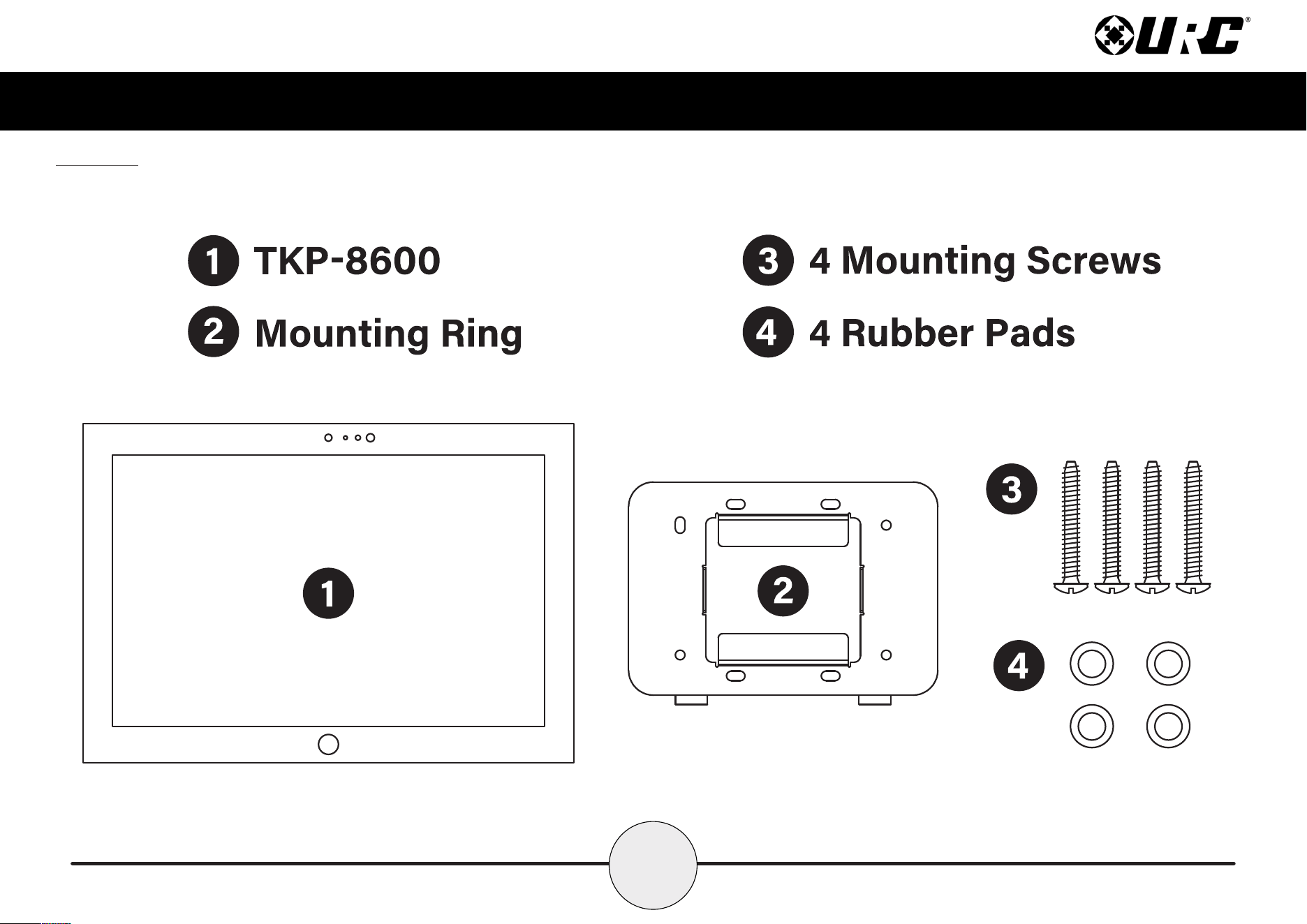
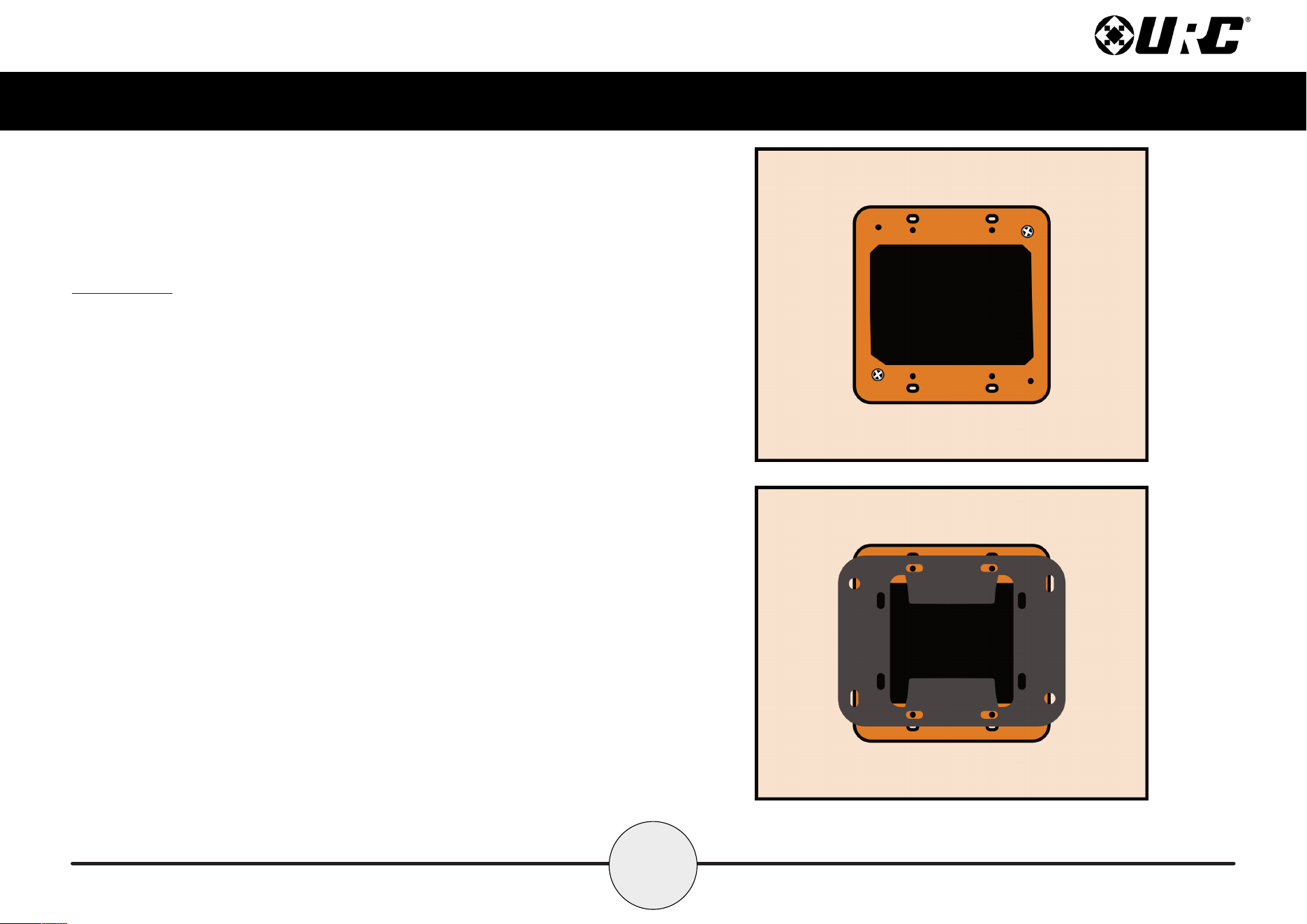
The following is included in the box:
4
Total Control
TKP-8600
Owner’s Manual
Installation
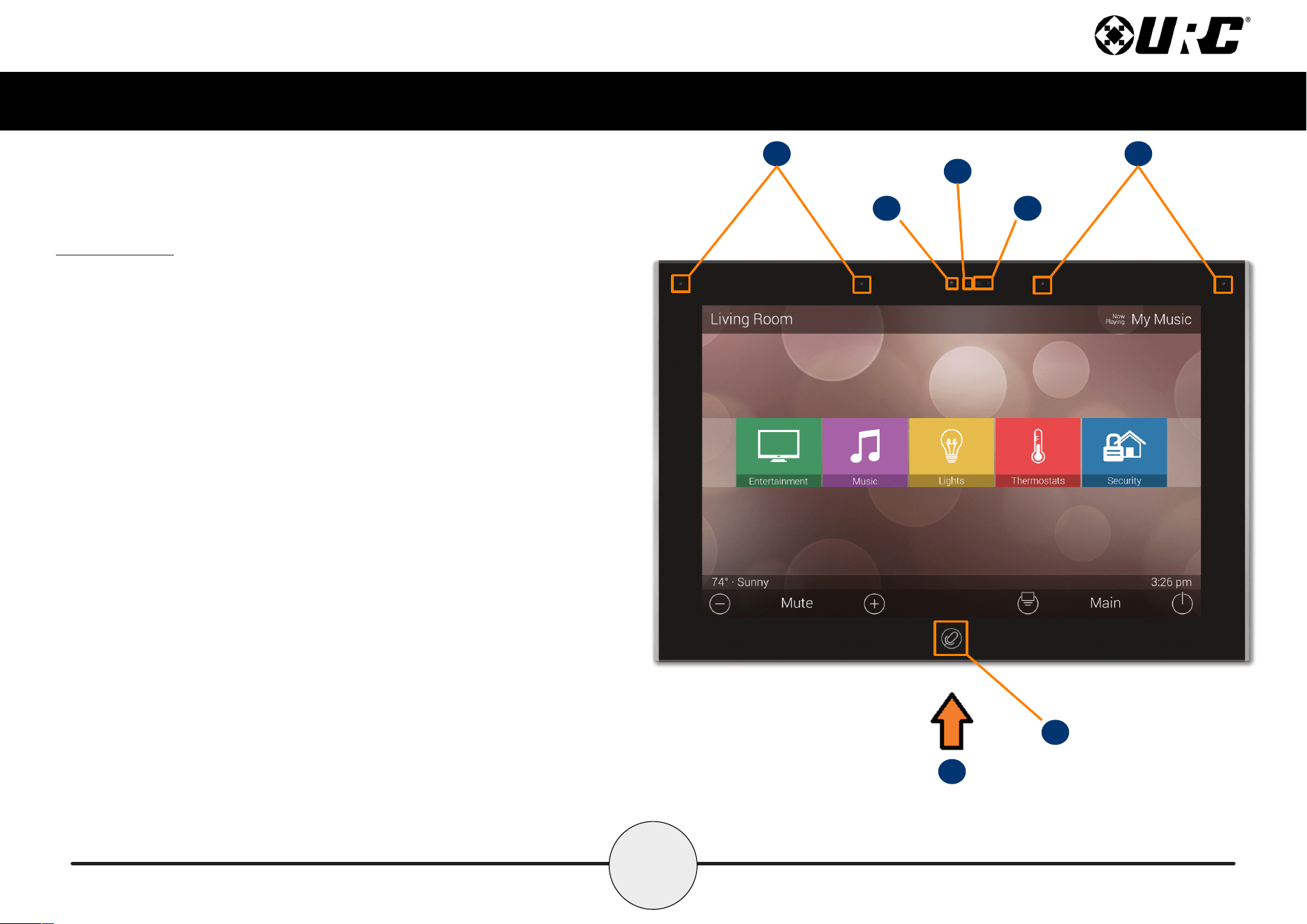
The TKP-8600 fits into any 2-Gang LV Bracket. However, there are certain
aspects of the installation that must be highlighted.
1. Measure the 2-gang bracket and mark the installation area. Using
your preferred cutting tool, cut a hole in the wall that
matches the measurements.
2. Install the 2-gang bracket into the cut out and
securely tighten all the necessary screws.
3. Align the mounting bracket with the appropriate slots on the 2-gang box.
Using the supplied screws, securely tighten the mounting bracket
onto the 2-gang bracket.
4. Connect the POE RJ45 cable and install the TKP-8600 onto the mounting
bracket. The TKP-8600 is equipped with magnets that make the
installation process easier and more secure.
Wall
2-Gang LVBracket
MOUNTINGBRACKET
5
Total Control
TKP-8600
Owner’s Manual
The TKP-8600
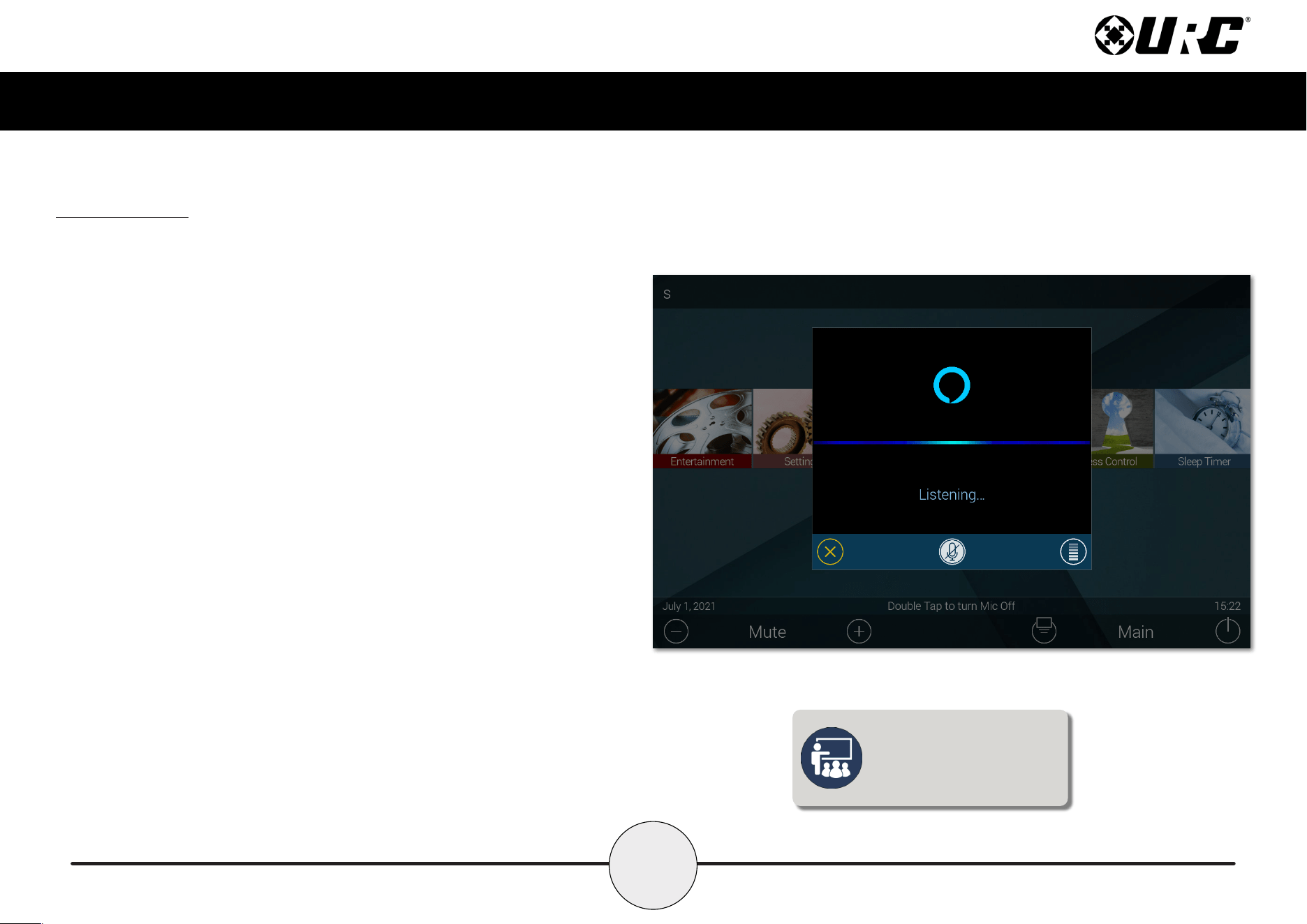
A. Microphone Array: Four (4) microphones are built into the top of the
keypad, allowing for exceptional audio capture when using Alexa or
intercom features.
B. Camera: A single camera is used for all video functions.
C. Camera Light: URC has included a privacy feature for the TKP-8600’s
camera. A small blue light activates when the camera is in use.
D. Proximity Sensors: These dual sensors allow the keypad to sense
users within close proximity to it.
E. Microphone Button: This is used for accessing voice control. Amazon Alexa
can also utilize the “Alexa” wake word for hands free interaction.
F. Reset Button: Along the bottom of the keypad, directly beneath the
microphone button, is the reset button. A single press power cycles the
keypad. Holding the button for twenty (20) seconds Factory Defaults
the keypad.
A
B
C
D
E
F
A
6
Total Control
TKP-8600
Owner’s Manual
Alexa Features
When integrated with Amazon’s Alexa Voice Assistant, an end-user is able to take
advantage of it’s various features and services within their Total Control system.
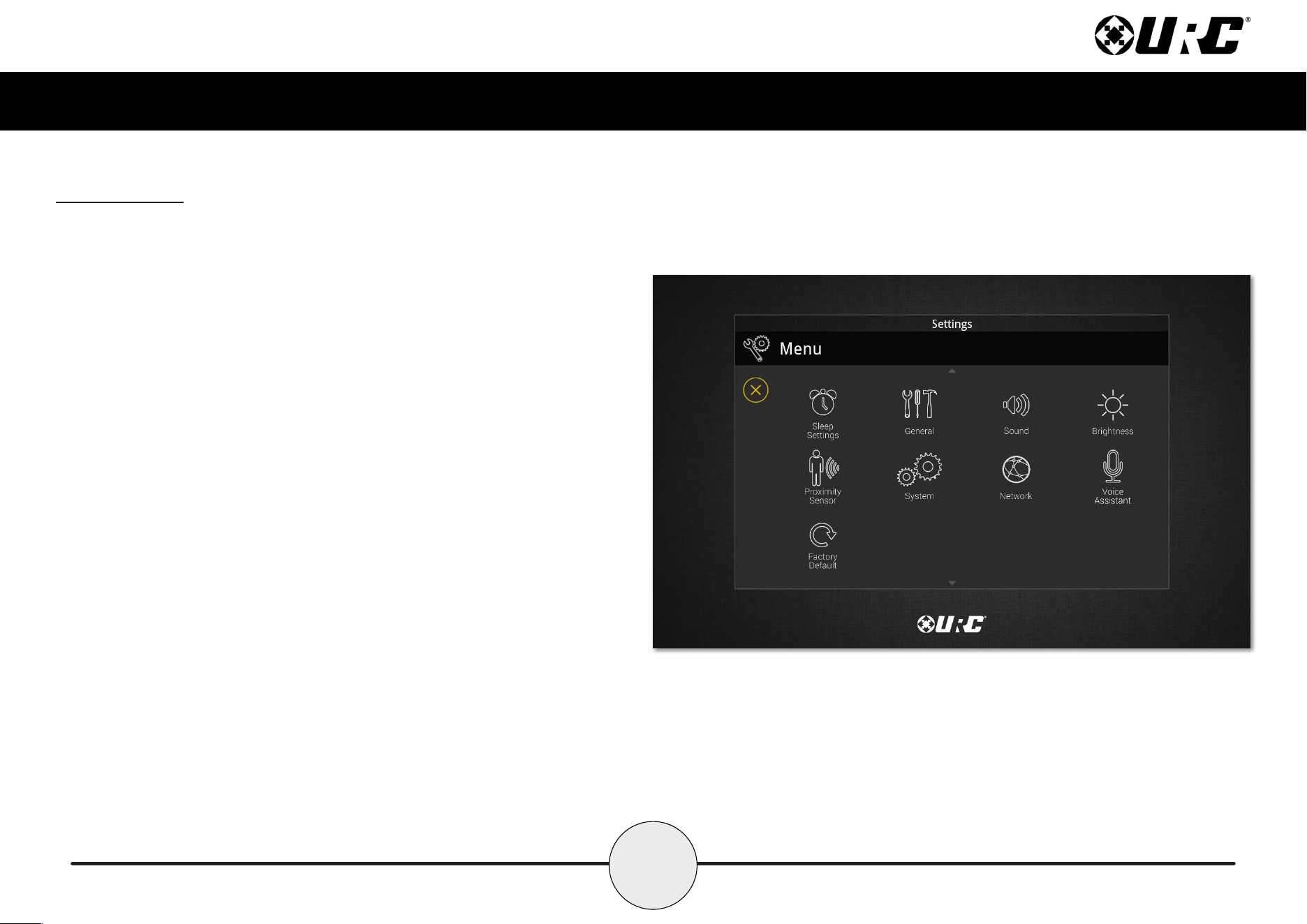
• “Alexa”: Use Alexa’s wake word to speak to Alexa.
• Microphone Button: Press and hold the microphone button on the
TKP-8600 to speak to Alexa. Double-tap the button to turn on or off
the microphone.
• Microphone Button Notification Colors: Alexa notications are reected
on the TKP-8600 through the Microphone Button. It is able to glow several
different colors, informing the user of package deliveries, new deals, and
various other information.
■ Blue: The microphone is enabled.
■ Cyan: Announcements.
■ Purple: Do Not Disturb is enabled.
■ Red: Microphone is off.
■ Yellow: Messages/notications.
The TKP-8600 settings allow the
user to enable or disable the
Alexa wake word or the press
and hold to talk function.
7
Total Control
TKP-8600
Owner’s Manual
Settings Menu
Access the Settings Menu by sliding the Title Bar down and selecting the Settings
button. Most settings do NOT require interaction with the end-user. Changing settings
may cause issues with the Total Control system, only do so when instructed to by
URC Technical Support.
● Sleep Settings: Manage when the LCD screen turns OFF.
● General: Contains all the general settings for the TKP-8600. Allows
from the adjustment of Date, Time, and Temperature Scale.
● Sound: Adjust the volume of the audio feedback when pressing buttons
on the interface.
● Brightness: Allows for the adjustment of the LCD screen’s brightness.
● Proximity Sensor: Allows for the adjustment of the proximity level.
● System: Provides general information such as memory used, current
version, and version details.
● Network: Allows for the setting of a Dynamic or Static IP address for
the TKP-8600 and also gives general info about the network.
● Voice Assistant: Settings for Amazon Alexa.
● Factory Default: Allows the TKP-8600 to be reset to its factory state.
8
Total Control
TKP-8600
Owner’s Manual
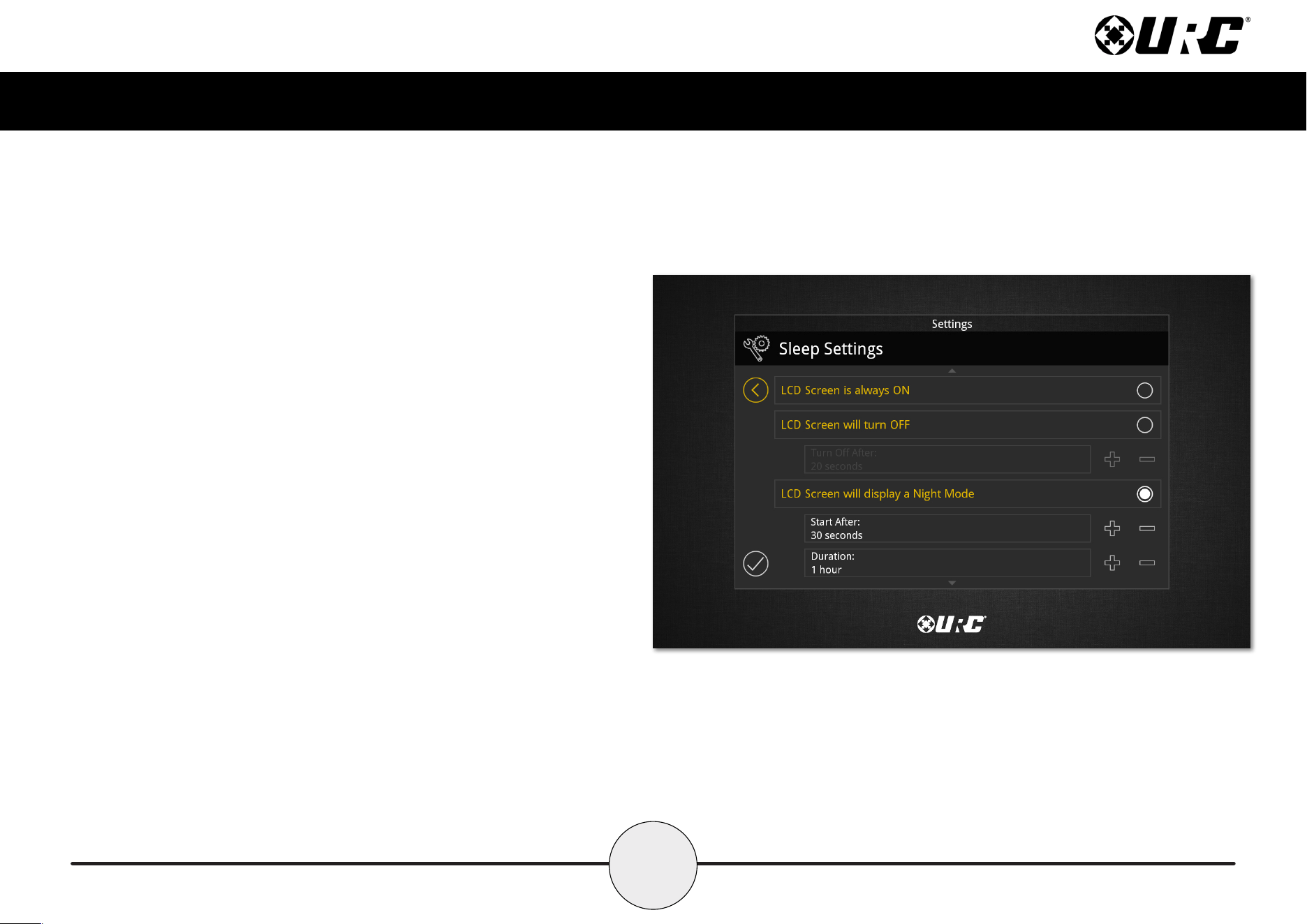
Sleep Settings
Below are the setting choices available in this menu:
1. LCD Screen is Always On: When selected, the TKP-8600’s display
never turns off.
2. LCD Screen will Turn Off: When selected the Turn Off After section
is selectable. Choose from a 20 second, 30 second, or one (1) minute
time out.
3. LCD Screen will Display a Night Mode: When selected the Start
After and Duration option become active.
• Start After: The TKP-8600 times out based on the value entered
here and goes into Night Mode.
• Duration: The TKP-8600 turns off Night Mode after the
value entered here.
9
Total Control
TKP-8600
Owner’s Manual
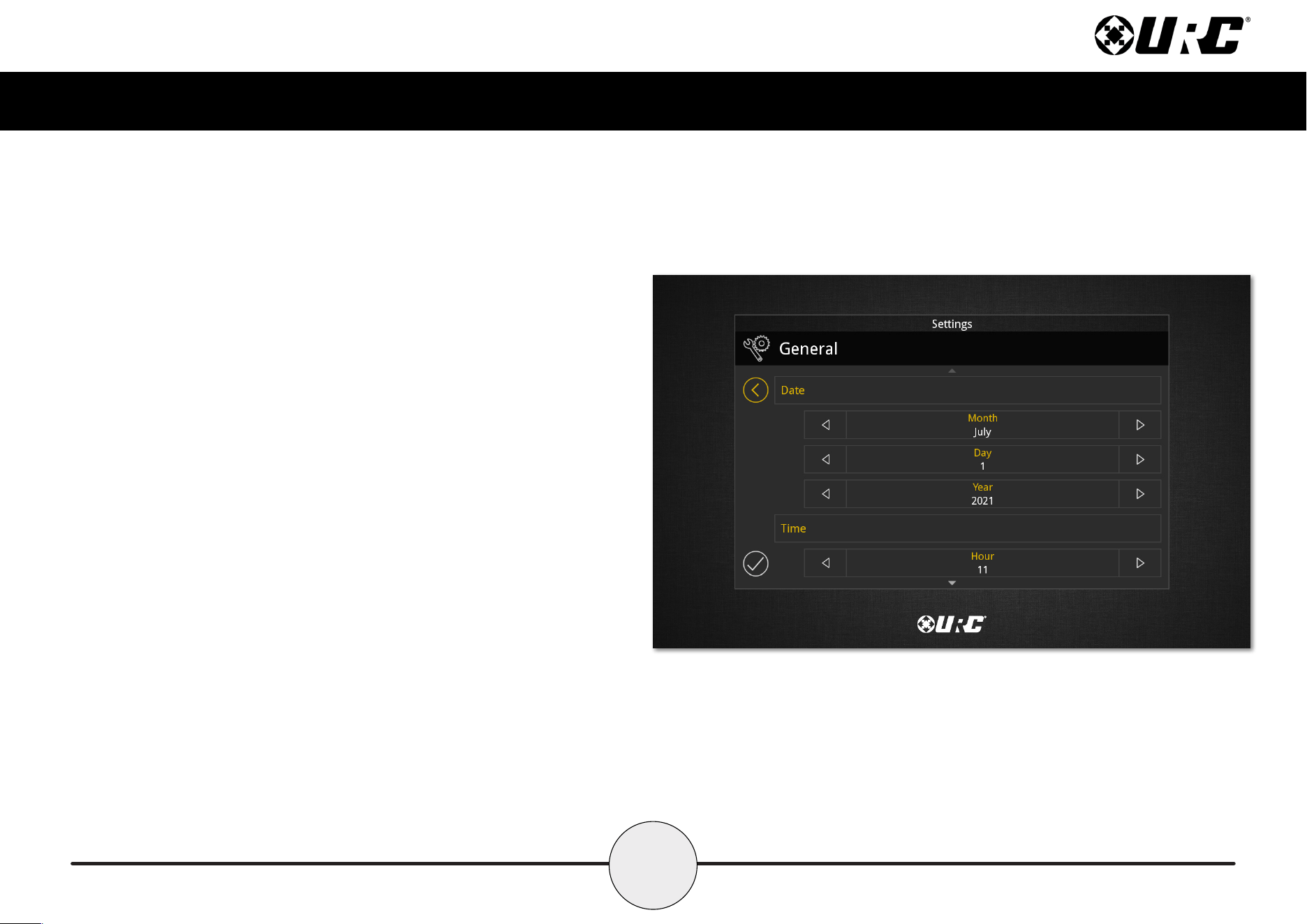
General
Using the left and right arrow keys, enter the values of each category:
1. Date: The following can have its value changed:
• Month
• Day
• Year
2. Time: The following can have its value changed:
• Hour
• Minutes
• Seconds
• AM/PM
• 12 Hour/24 Hour
3. Automatically Adjust Clock for Daylight Savings: Check this box
to have the TKP-8600 automatically adjust for daylight savings.
4. Temperature Scale: Set this either to Fahrenheit or Celsius.
10
Total Control
TKP-8600
Owner’s Manual
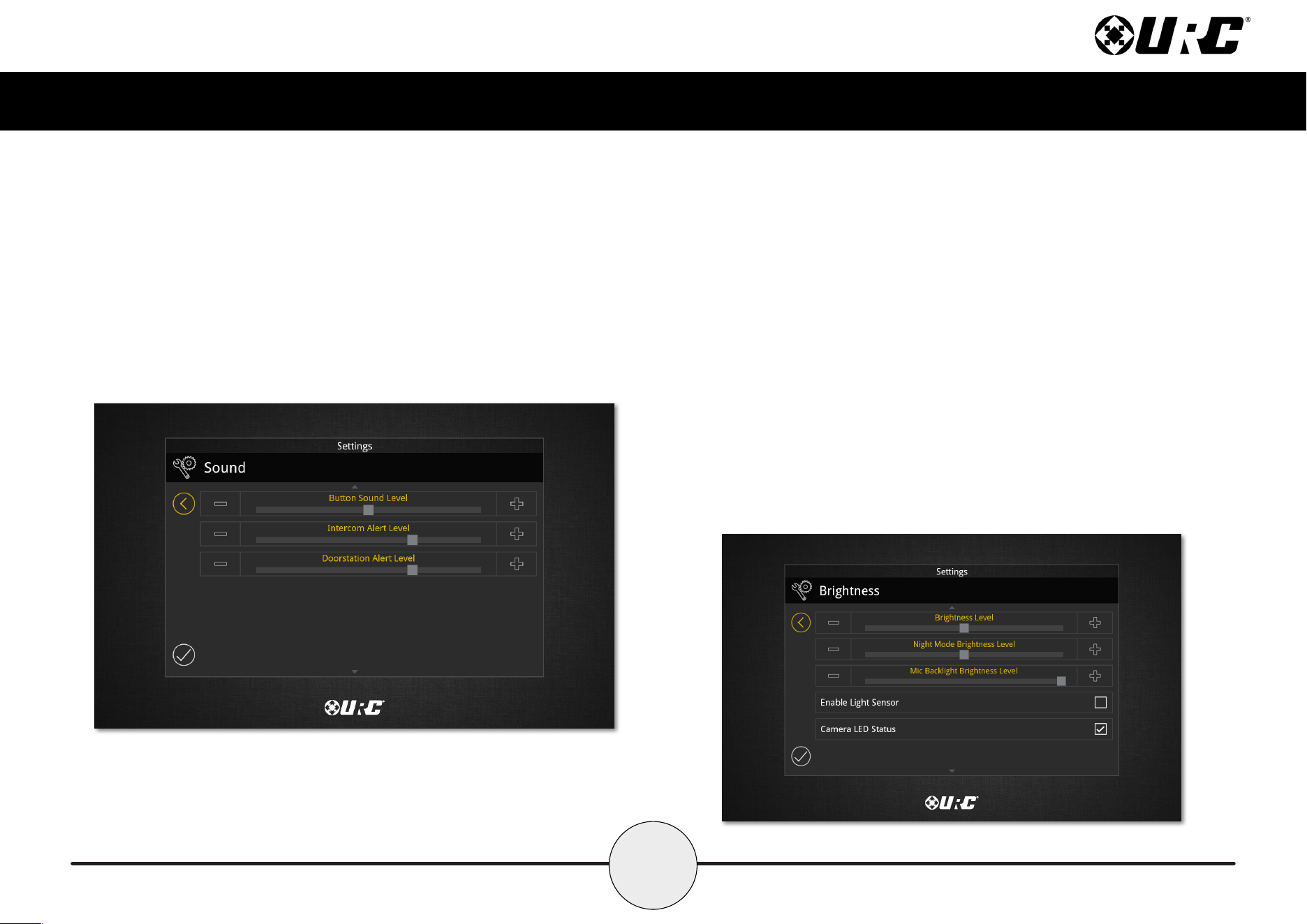
Sound
Press the minus (-) button to lower the TKP-8600’s audio levels or press the plus (+)
button to increase them. Additionally, dragging the slider to the left or right
decreases or increases the audio level.
• Button Sound: Audio level for button feedback when pressed.
• Intercom Alert: Audio level for the incoming call notication.
• Door Station Alert: Audio level for door station notications.
Brightness
Press the minus (-) button to lower the TKP-8600’s display brightness or press the
plus (+) button to increase the brightness. Additionally, dragging the slider to the
right increase the display brightness while dragging it to the left decreases it.
• Brightness Level: How bright the screen is when in use.
• Night Mode Brightness Level: How bright the screen is when in
Night Mode.
• Mic Backlight Brightness Level: How bright the mic button appears.
• Enable Light Sensor: The TKP-8600 is equipped with an ambient
light sensor that can automatically adjust the display brightness.
Check the box to enable this feature.
• Camera LED Status: For the privacy minded user, a notication light may
be enabled to show when the camera is or is not in use on the TKP-8600.
11
Total Control
TKP-8600
Owner’s Manual
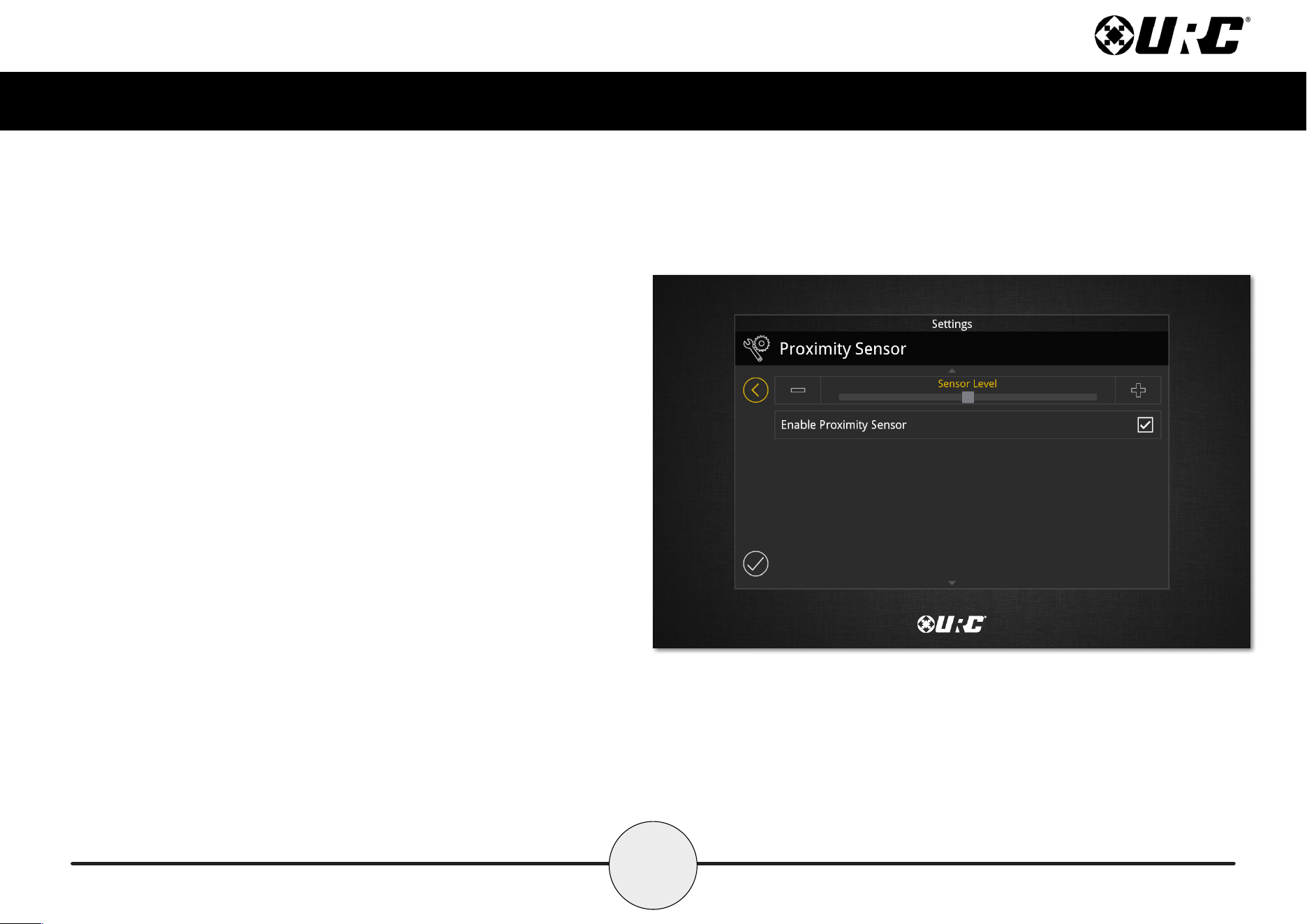
Proximity Sensor
Press the minus (-) button to lower the sensitivity on the TKP-8600’s Proximity
Sensor or press the plus (+) button to increase the sensitivity. Additionally,
dragging the slider to the right increases the sensitivity while dragging it to
the left decreases it. The maximum distance of the proximity sensor is about
three (3) feet.
• Enable Proximity Sensor: By default this check box is enabled.
Uncheck the box to disable the proximity sensor.
12
Total Control
TKP-8600
Owner’s Manual
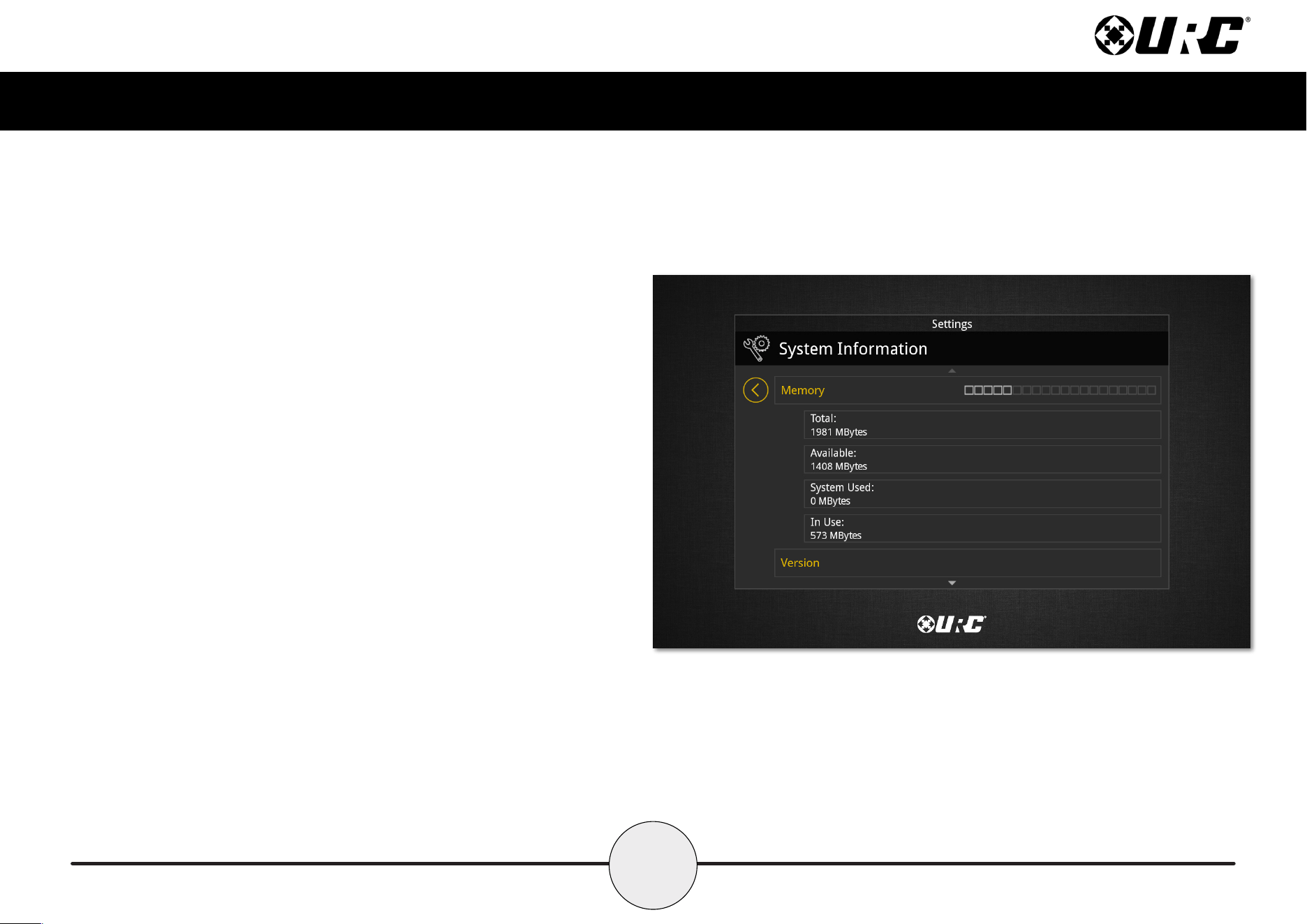
System Information
Although none of the information can be modied, this System Information
page displays important information about the TKP-8600. This information is
only needed by a custom installation professional or URC Technical Support.
13
Total Control
TKP-8600
Owner’s Manual
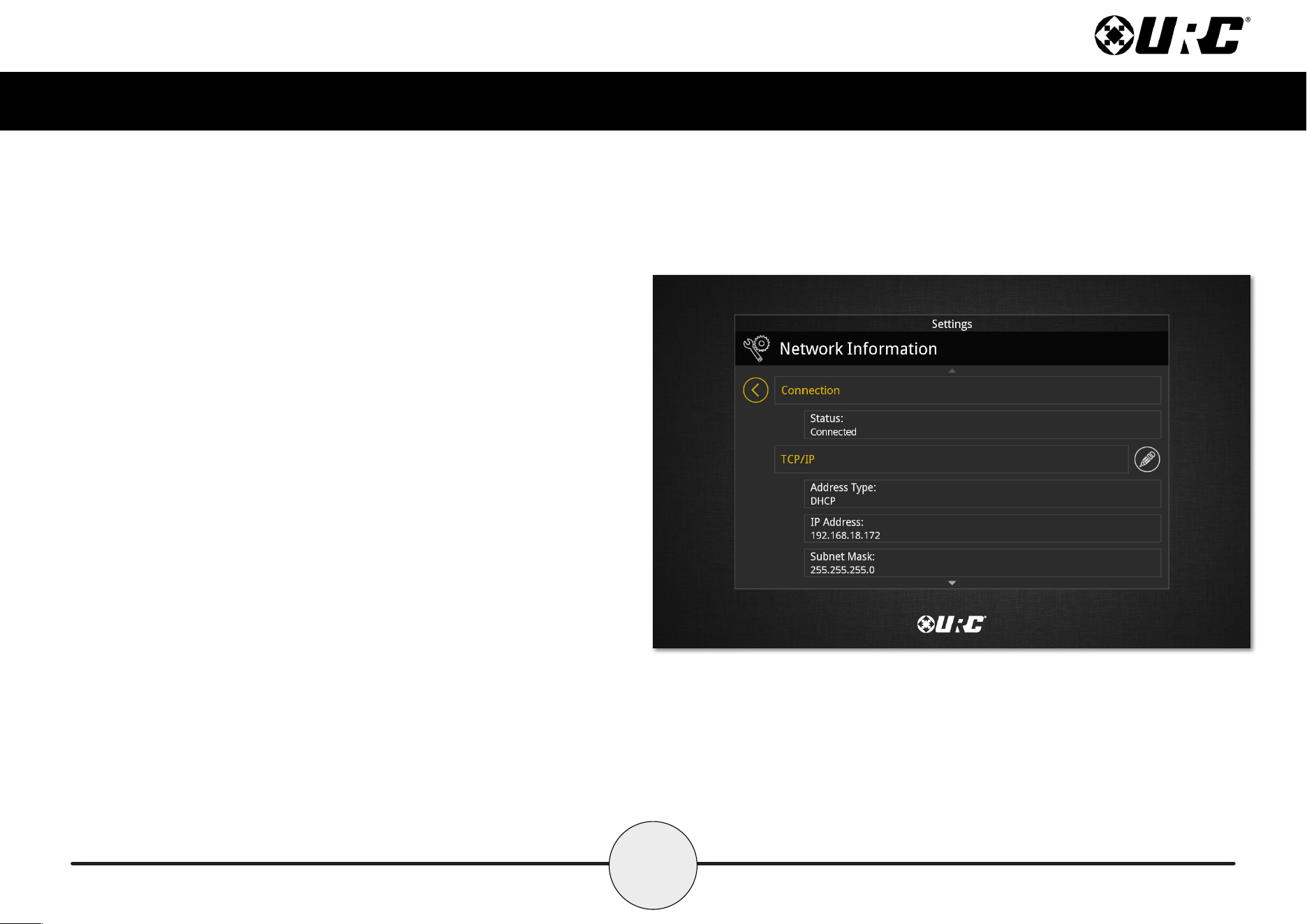
Network
This option displays important information about
the current network.
Caution, these settings should ONLY be changed
by a professional. Entering values without specic
instruction could easily result in the TKP-8600
failing to function correctly.
Here is the information that can be displayed here:
1. Connection: Displays the status of the network connection, connected
or not connected.
2. TCP/IP: Displays information such as Address Type (DHCP or Static),
IP Address, Subnet Mask, Gateway, and DNS.
Select the Edit button to reveal additional options.
• For DHCP select Obtain an IP Address Automatically.
• For Static select Use the Following Address. Fill out the
required network settings.
14
Total Control
TKP-8600
Owner’s Manual
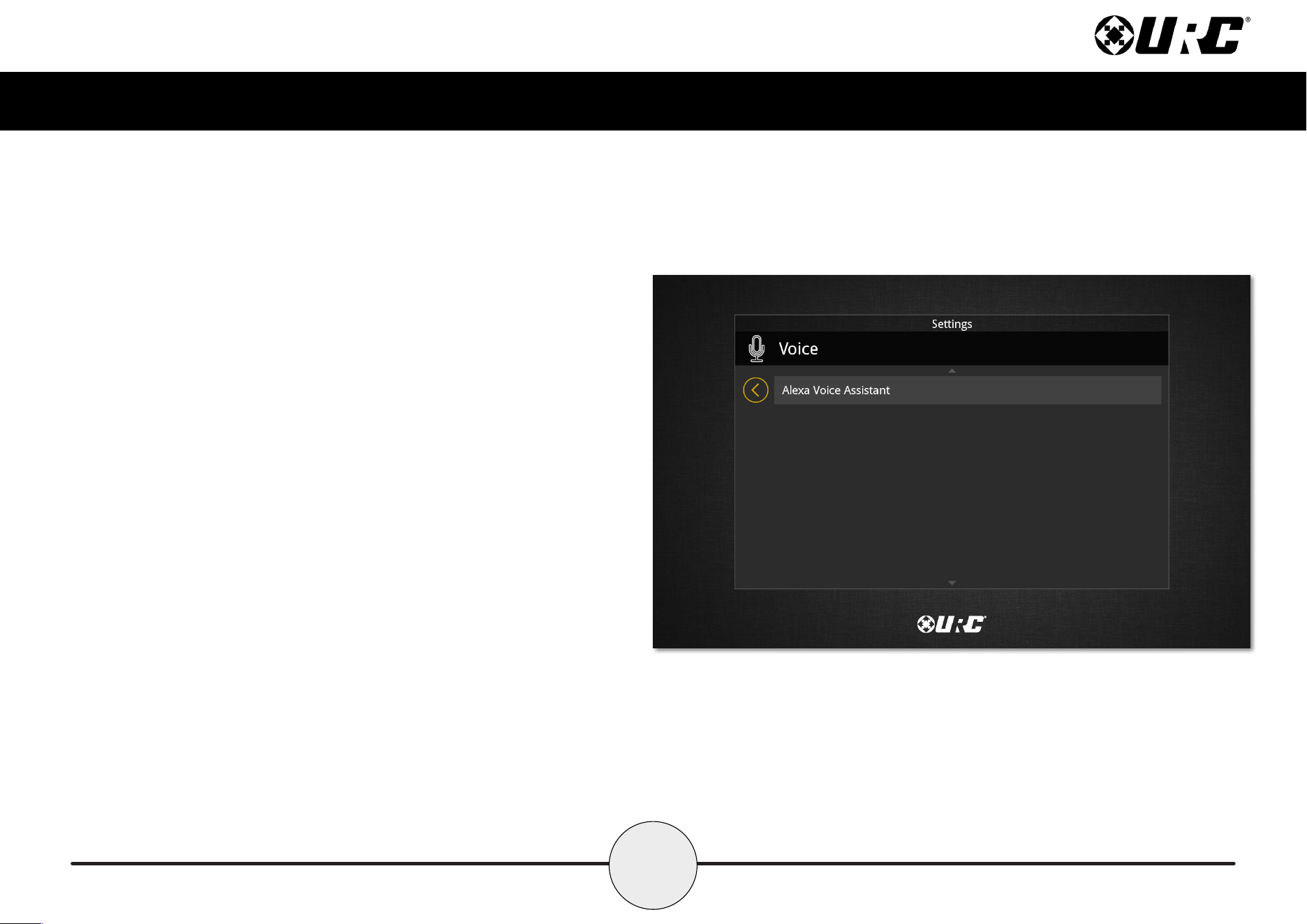
Voice Assistant
The Voice Assistant menu is where Alexa integration settings are located. Select
Alexa Voice Assistant to access the individual settings.
15
Total Control
TKP-8600
Owner’s Manual
Alexa Voice Assistant
This menu allows Alexa to be enabled and disabled. Audio, language, and wake
options are also available to further tailor the user experience. Some options are not
available until Alexa has been enabled.
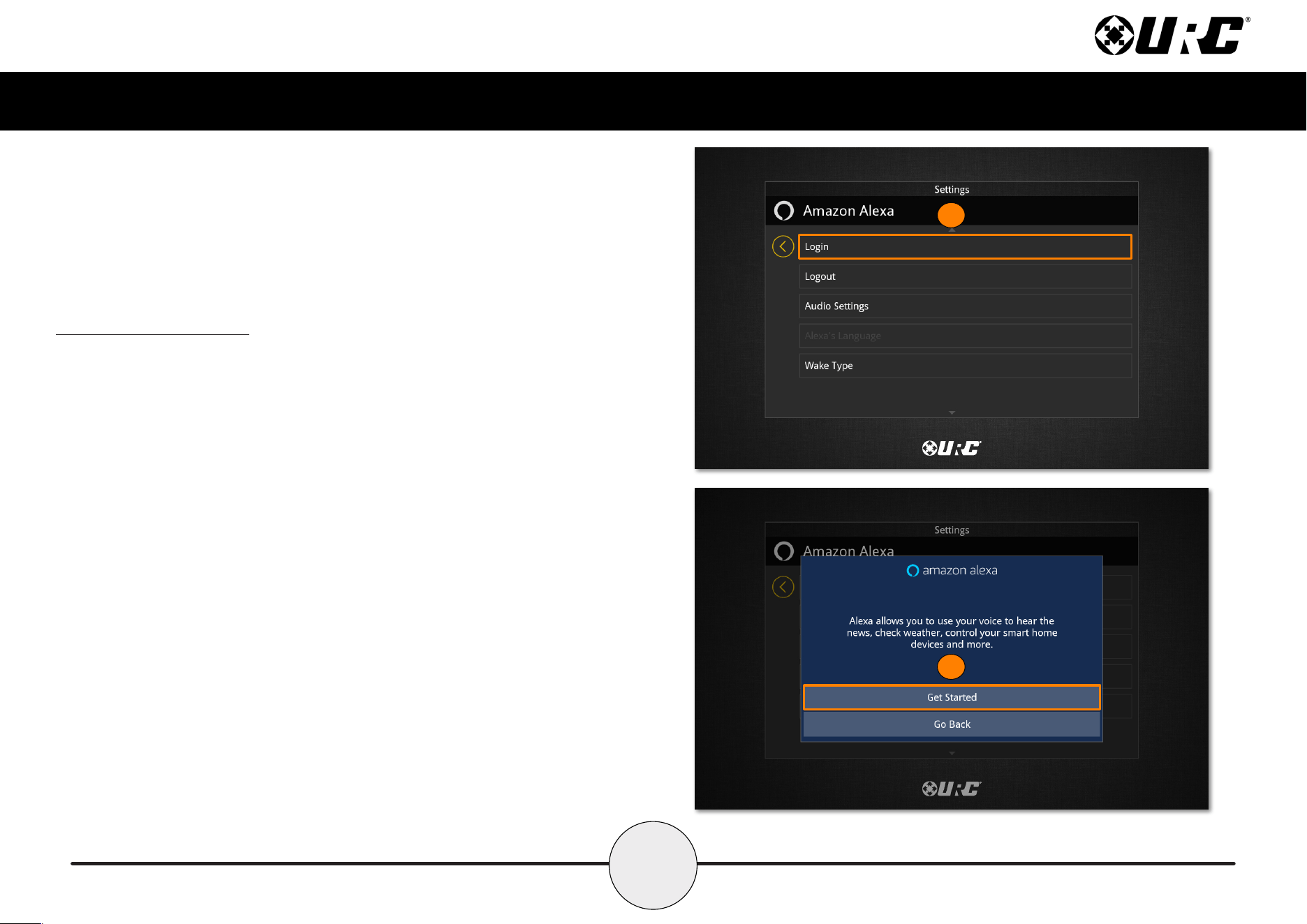
Login
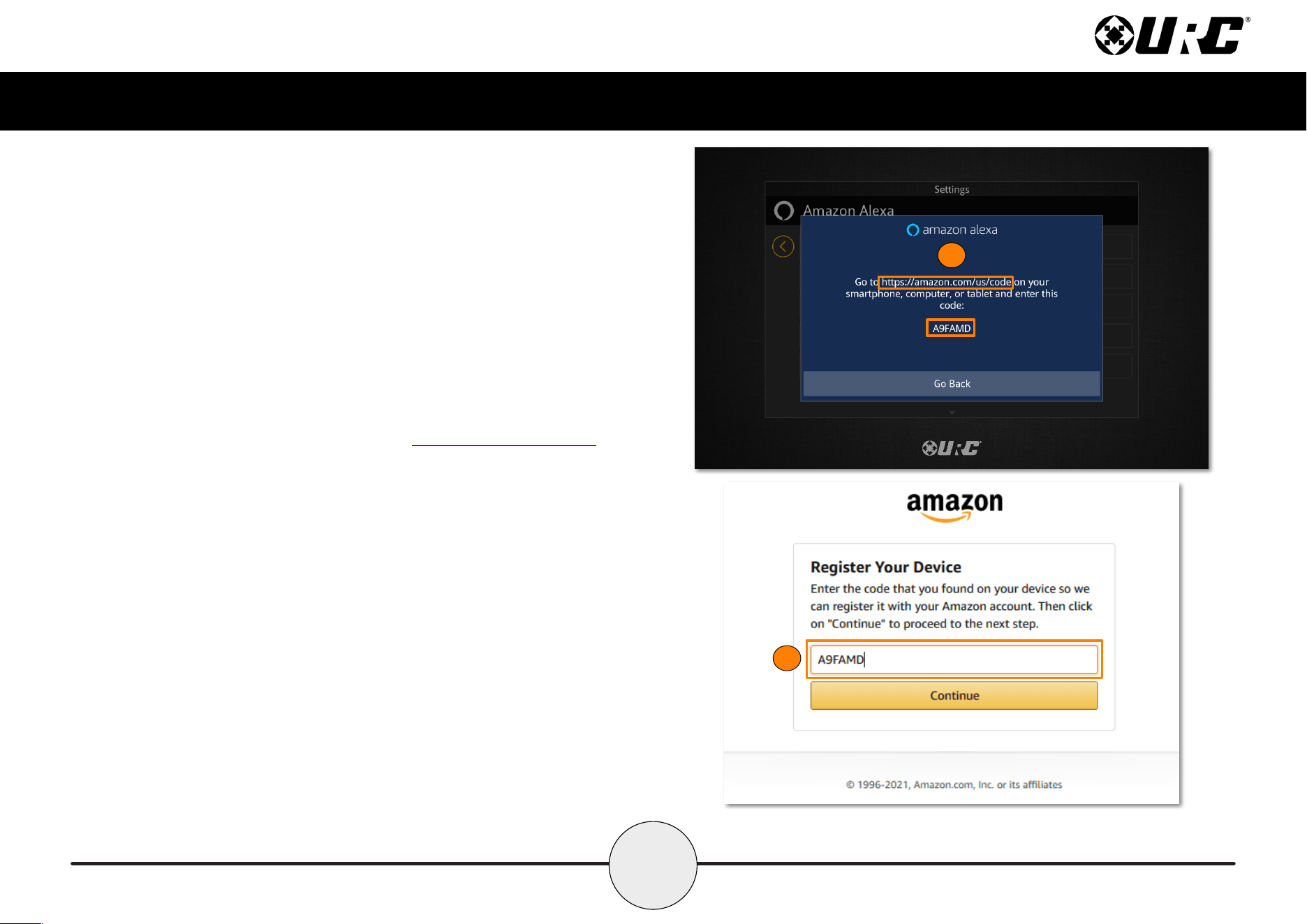
To use Alexa, the TKP-8600 must be added to an Amazon account. This requires
the use of a web browser to complete. Perform the following to enable Alexa:
1. Select Login.
2. A new window appears, explaining the benets of enabling the Alexa Voice
Assistant. Select Get Started.
1
2
17
Total Control
TKP-8600
Owner’s Manual
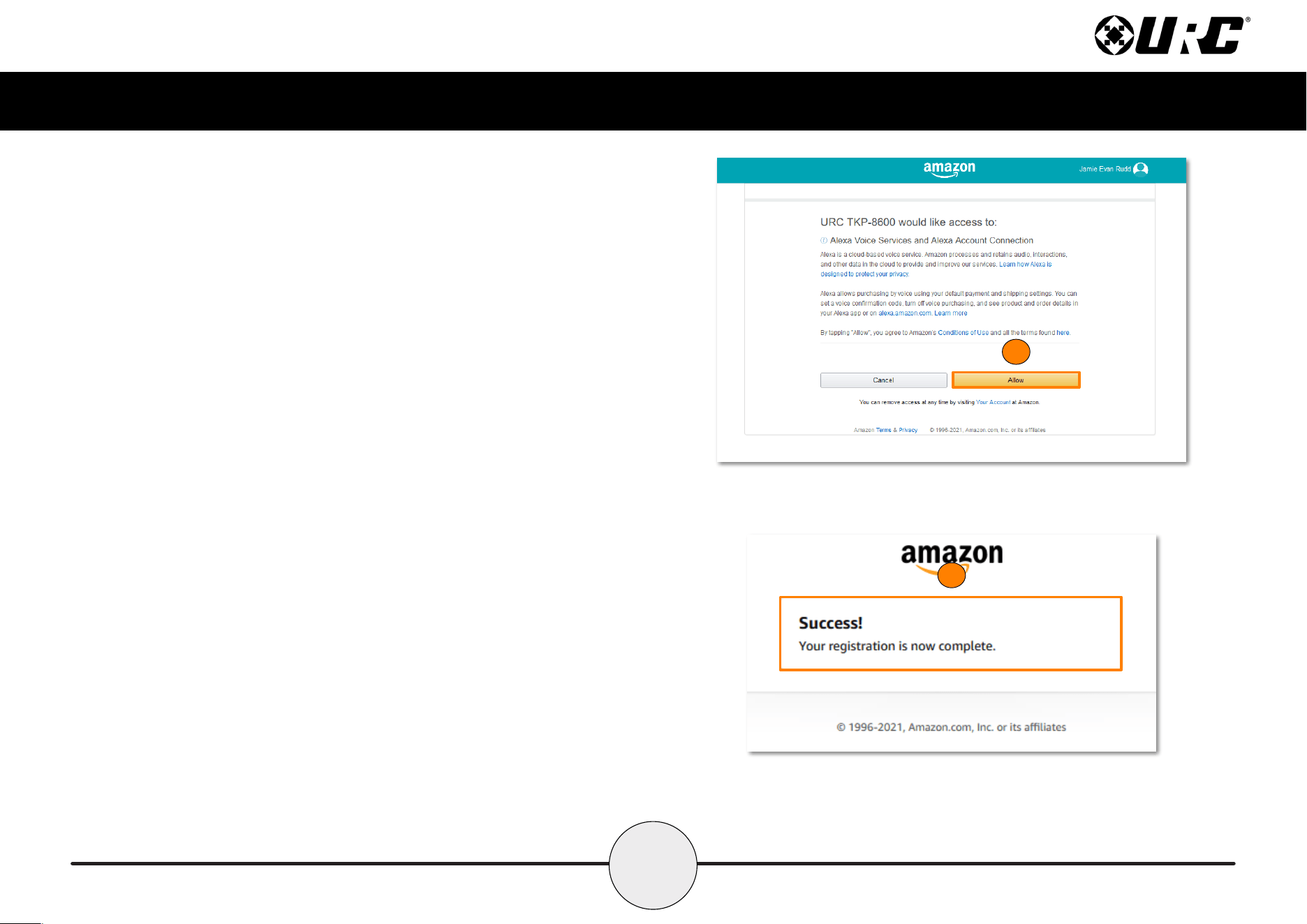
5. A permissions page appears, providing a summary of Alexa’s services.
Select Allow to complete the process.
6. The registration process is now complete. Return to the TKP-8600 to nish
the process.
5
6
18
Total Control
TKP-8600
Owner’s Manual
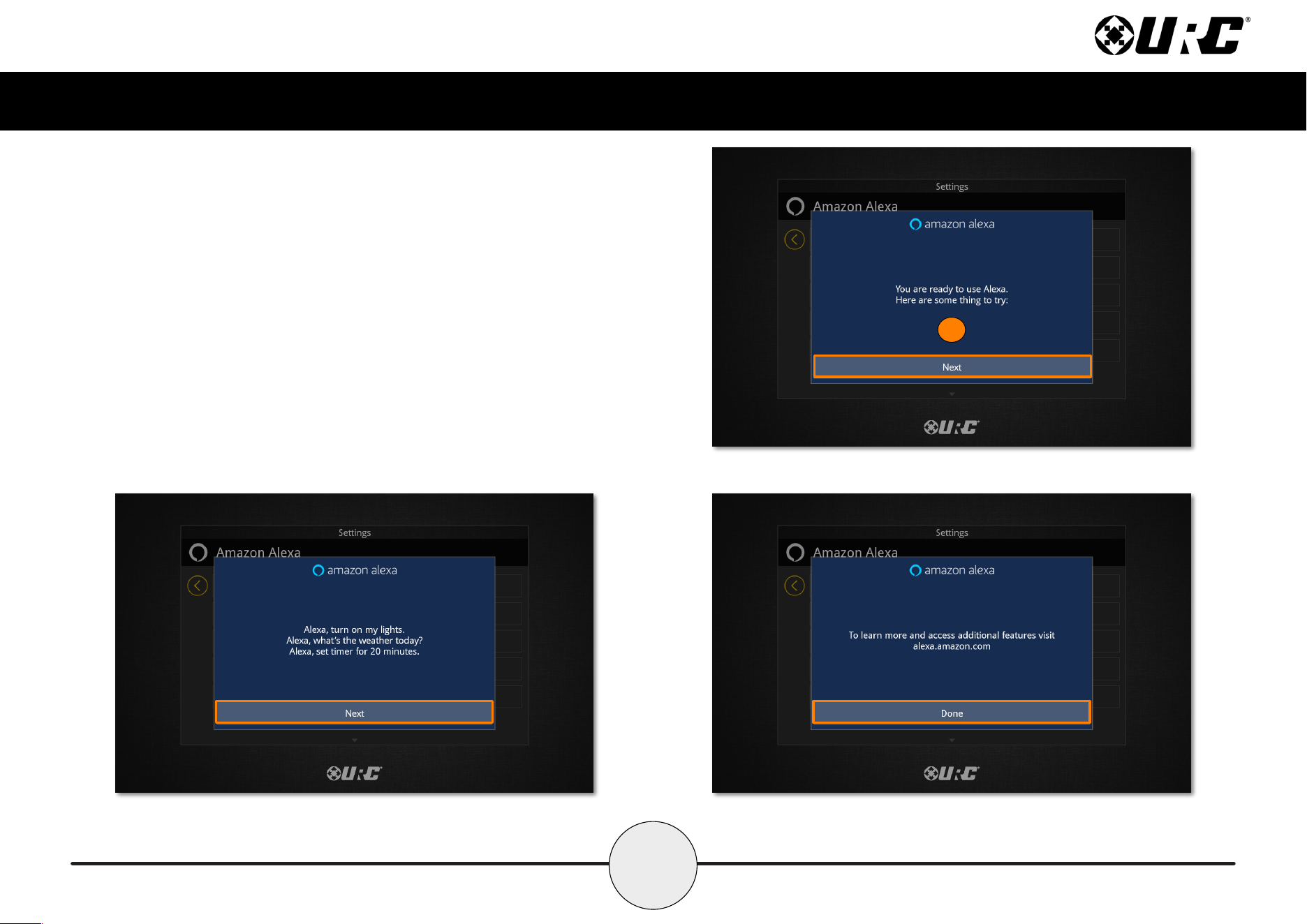
7. Select Next to move through the tip screens. On the third screen, select
Done to complete the login process.
7
19
Total Control
TKP-8600
Owner’s Manual
Logout
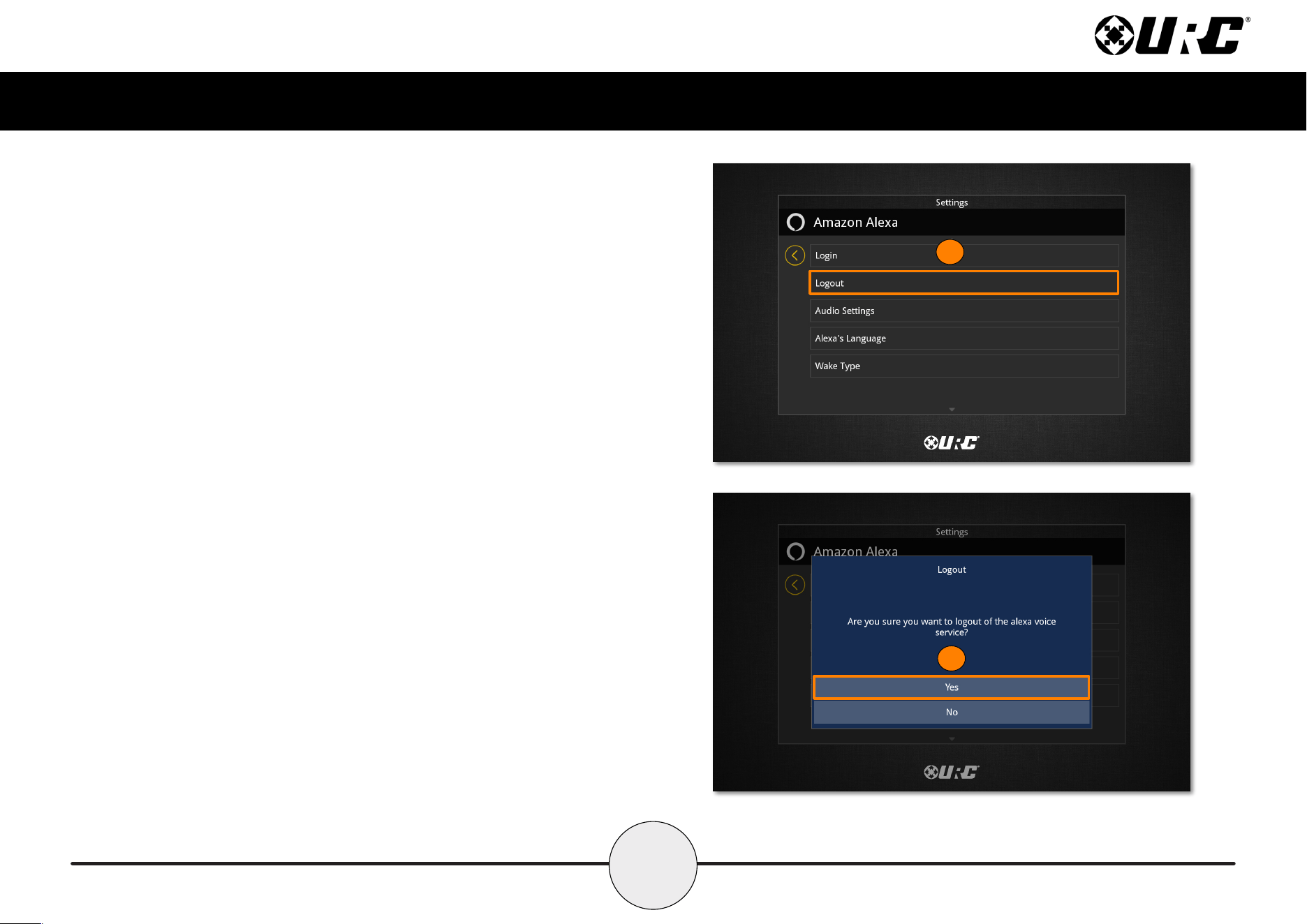
To disable the Alexa Voice Assistant, perform the following:
1. Select Logout.
2. A conrmation window appears. Select Yes to complete the process.
1
2
20
Total Control
TKP-8600
Owner’s Manual
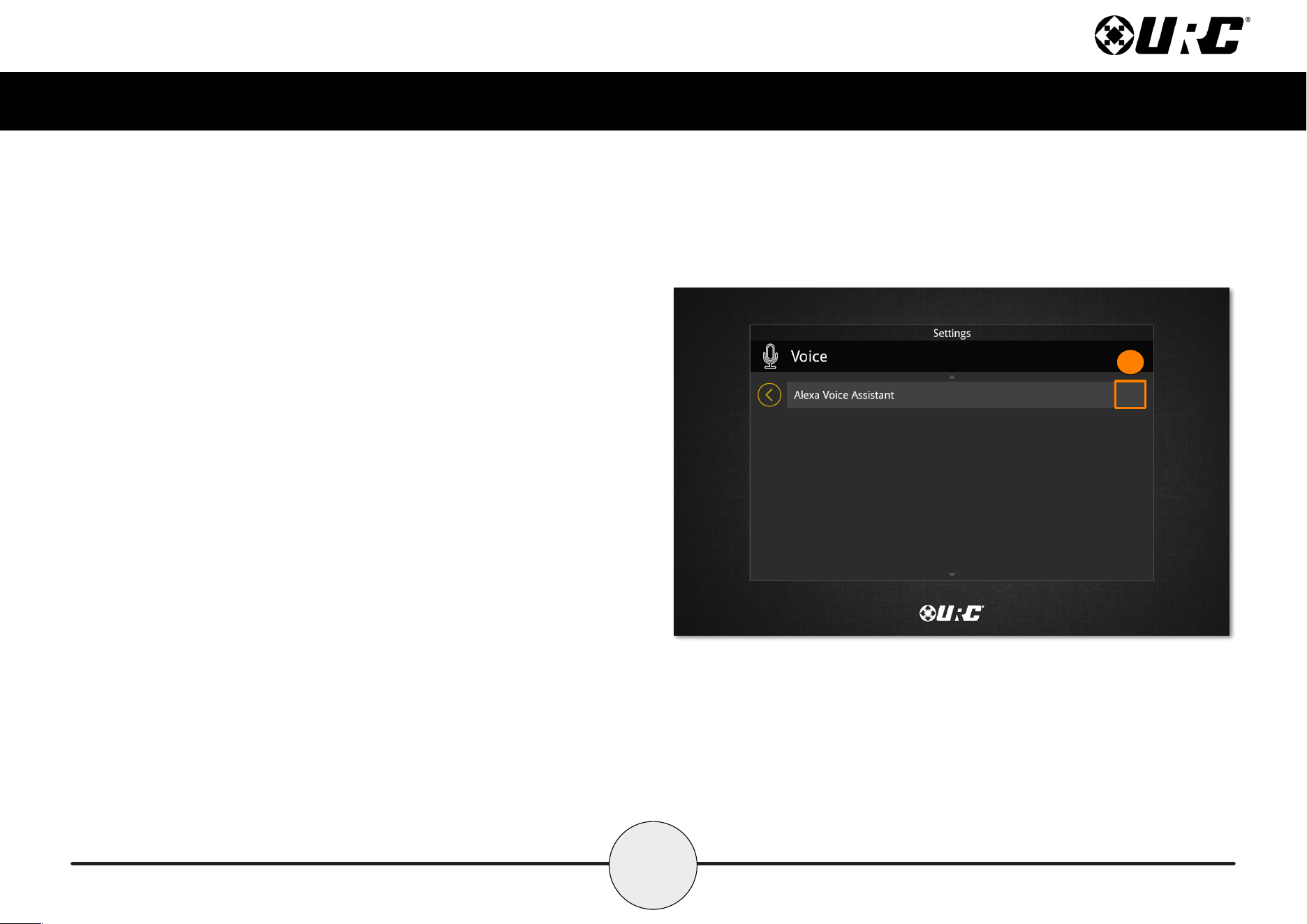
3. The TKP-8600 returns to the Voice Assistant menu. When enabled, a
green icon appears on the right side of the button.
3
21
Total Control
TKP-8600
Owner’s Manual
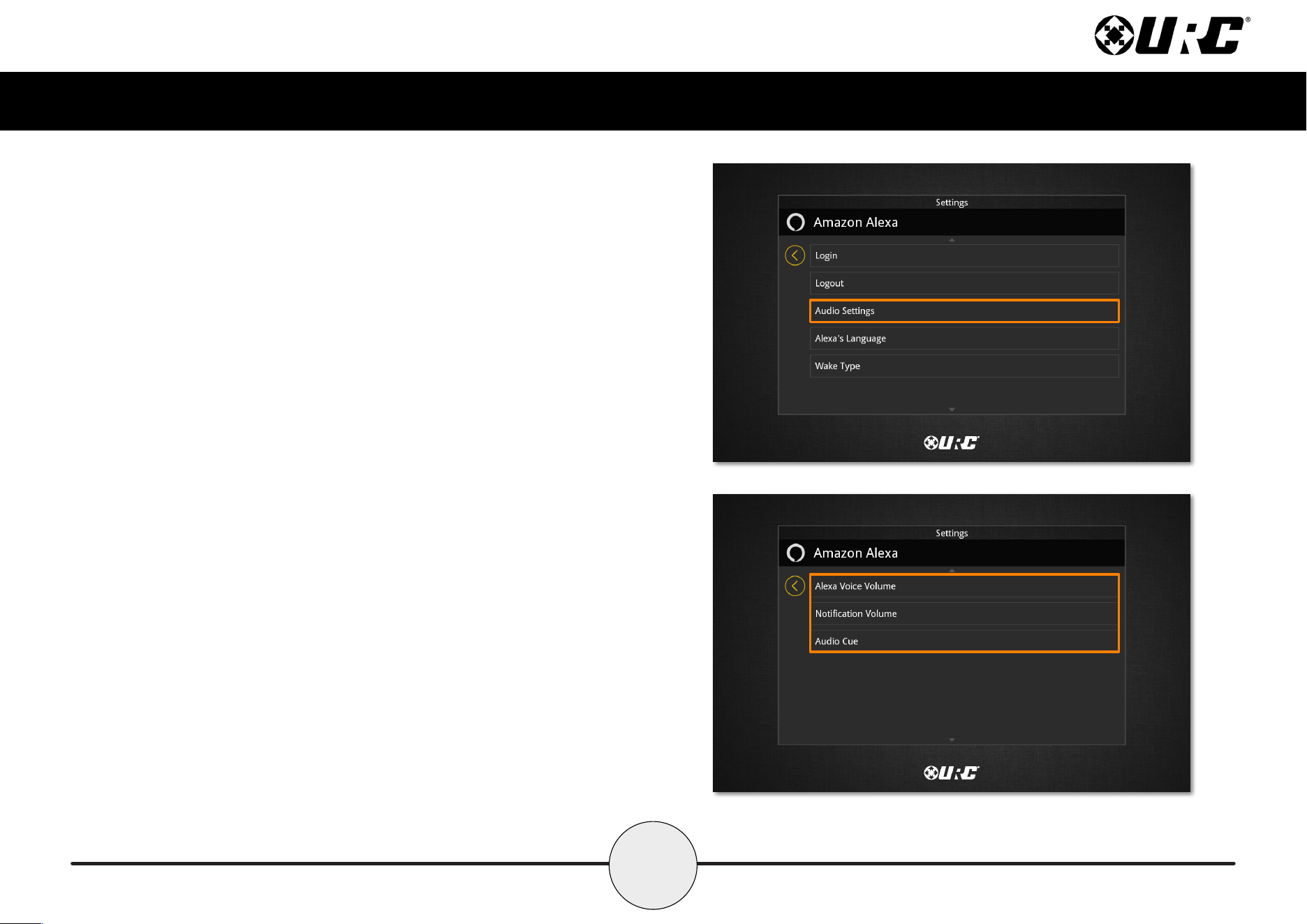
Audio Settings
Select Audio Settings from the menu to congure voice and audio levels for the
Alexa Voice Assistant.
22
Total Control
TKP-8600
Owner’s Manual
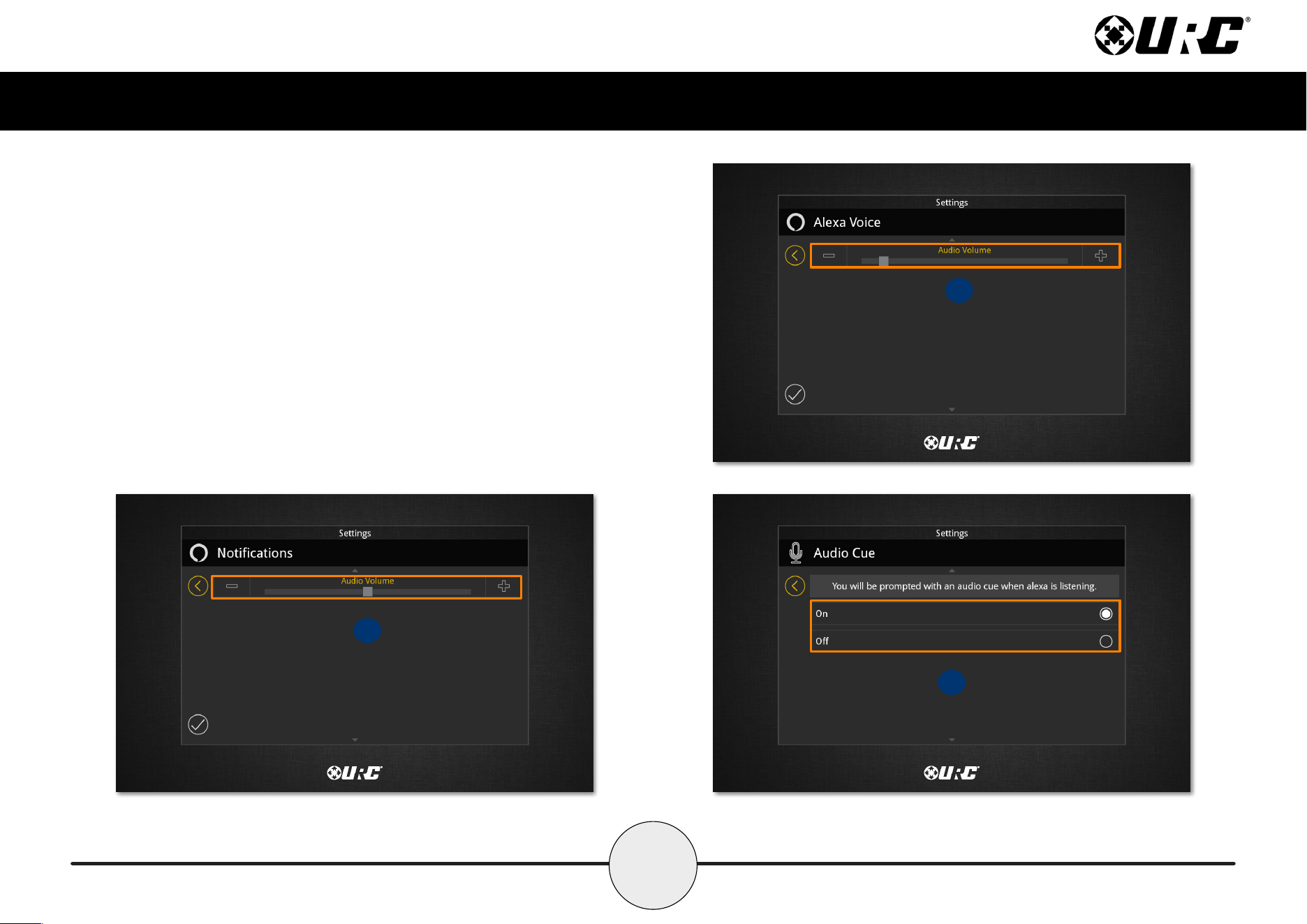
A. Alexa Voice Volume: How soft or loud Alexa will speak when replying.
B. Notification Volume: How soft or loud Notication audio will play.
C. Audio Cue: Enable or disable the audio cue when Alexa is listening.
A
B
C
23
Total Control
TKP-8600
Owner’s Manual
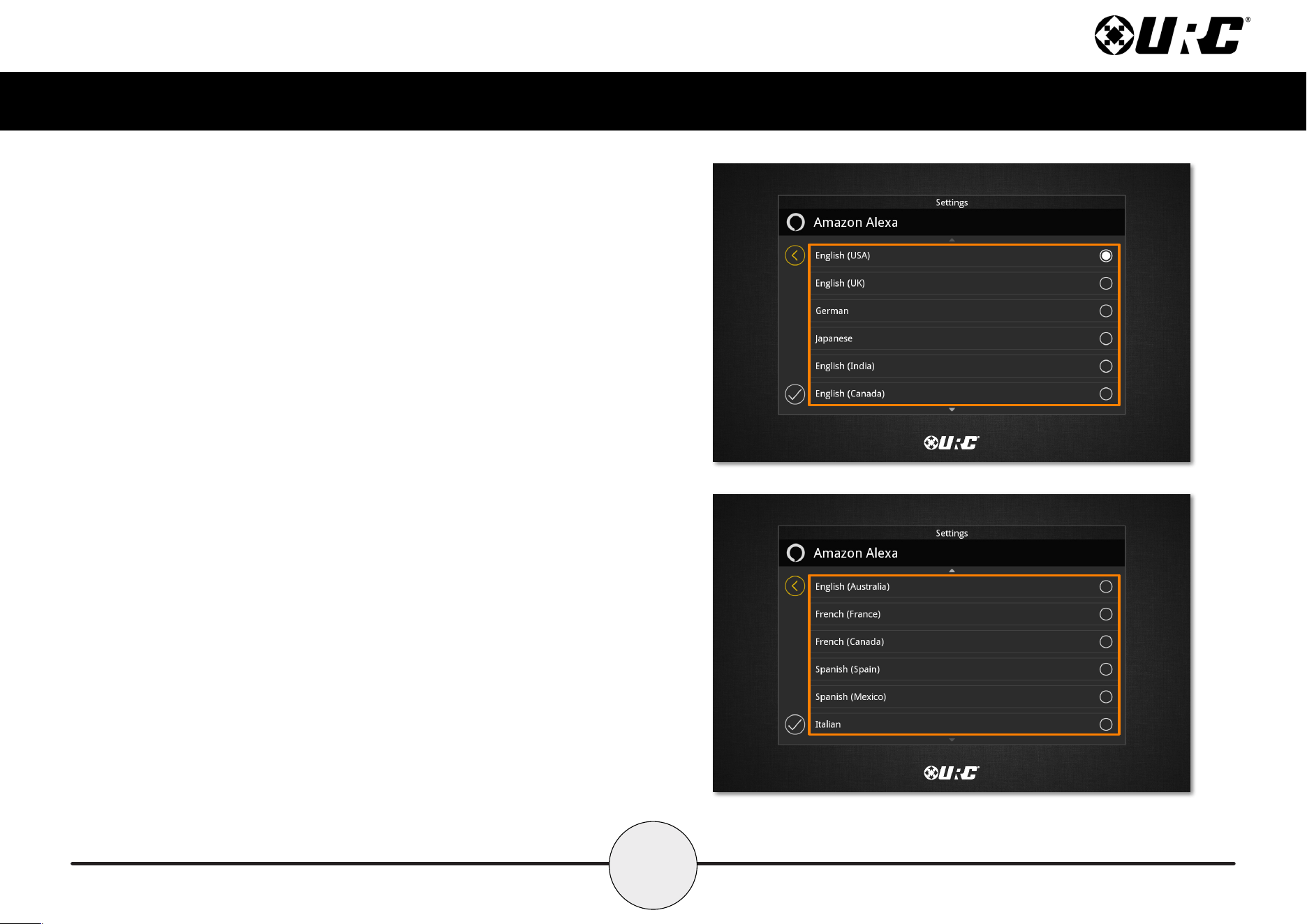
Language
Several languages, along with several variations, are available for selection.
24
Total Control
TKP-8600
Owner’s Manual
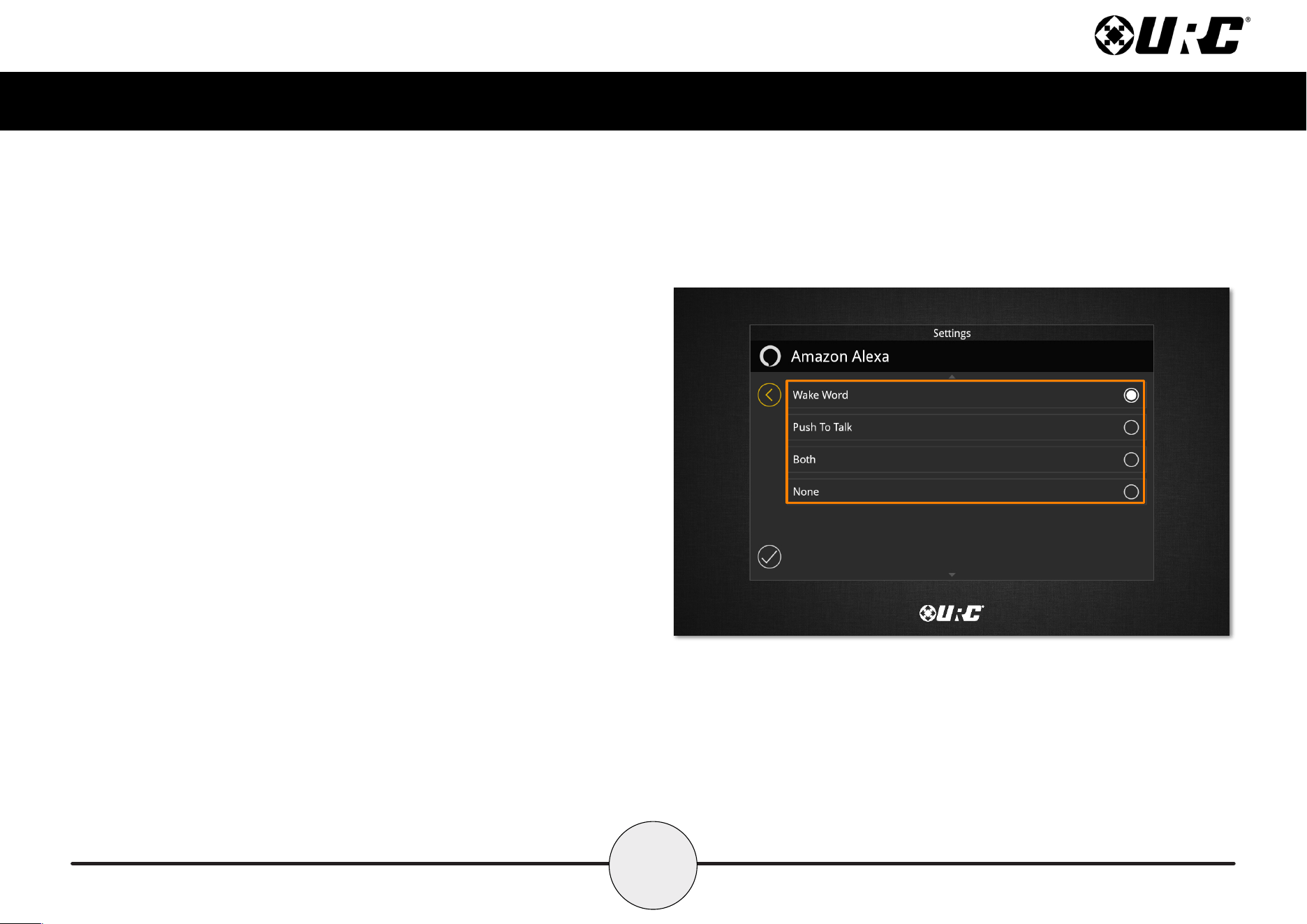
Wake Type
Provides a few options for how Alexa is accessed through the TKP-8600.
• Wake Word: Alexa is activated vocally with her wake word.
• Push To Talk: Alexa is activated with the microphone button.
• Both: Both the wake word and push to talk will activate Alexa.
• None: Neither the wake word or push to talk are enabled.
25
Total Control
TKP-8600
Owner’s Manual
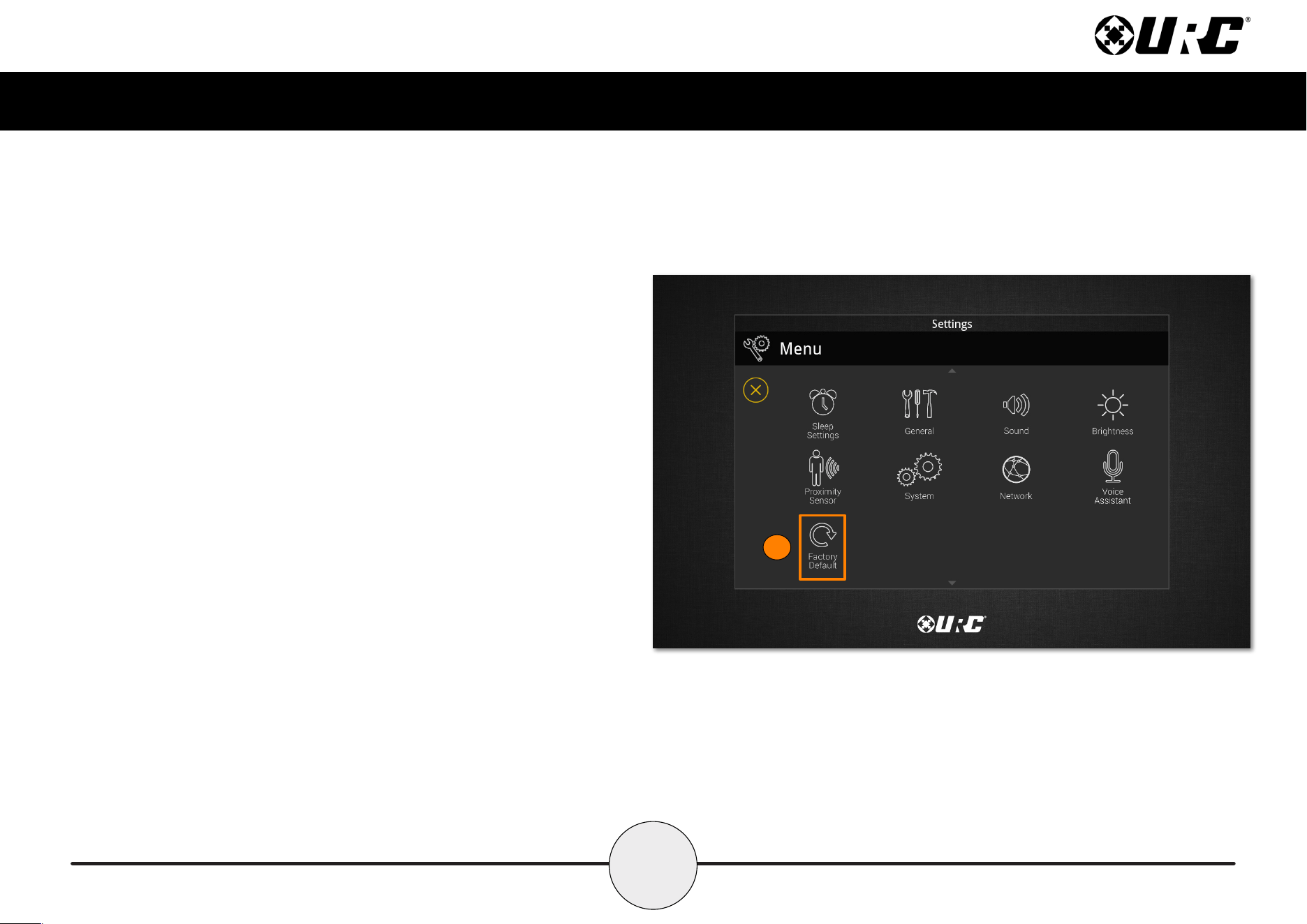
Factory Default
This should only be attempted by a custom install professional that is familiar
with Total Control or under instruction from URC Technical Support. Selecting
this option resets the TKP-8600 to its factory state and does not function until
the device is reprogrammed by a custom install professional.
1. Press and hold the Factory Default button for over ve (5) seconds.
2. A conrmation window appears. Select Yes.
1
26
Total Control
TKP-8600
Owner’s Manual
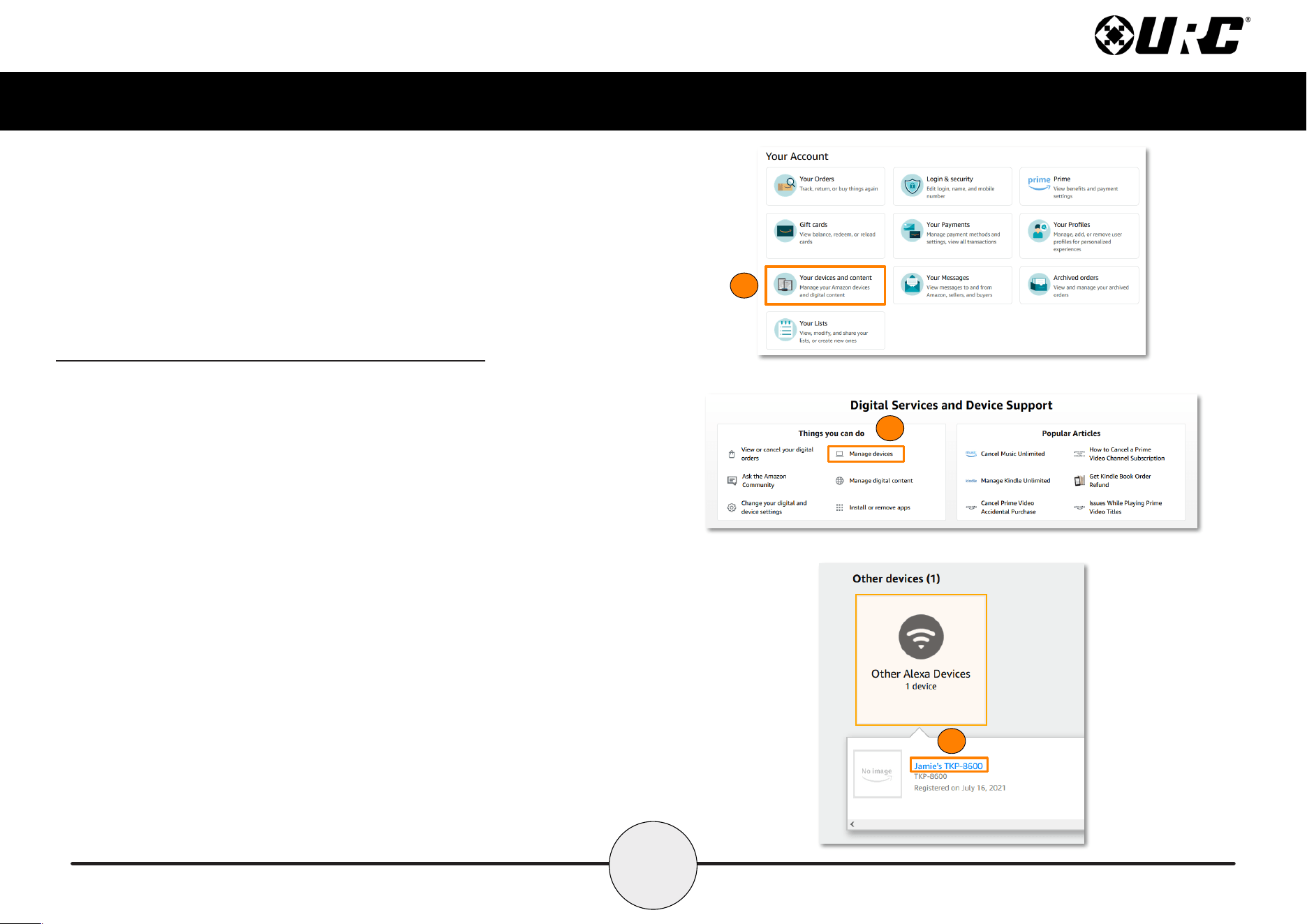
Removing the TKP-8600 from an Amazon Account
Perform the following from the Amazon website to remove a device from an account:
1. From the Your Account page, select “Your devices and content” from the
menu.
2. The Digital Services and Device Support page will list several options.
Select Manage devices.
3. The next page lists out the devices connected to the account. Select Other
devices and then select the TKP-8600.
1
2
3
27
Total Control
TKP-8600
Owner’s Manual
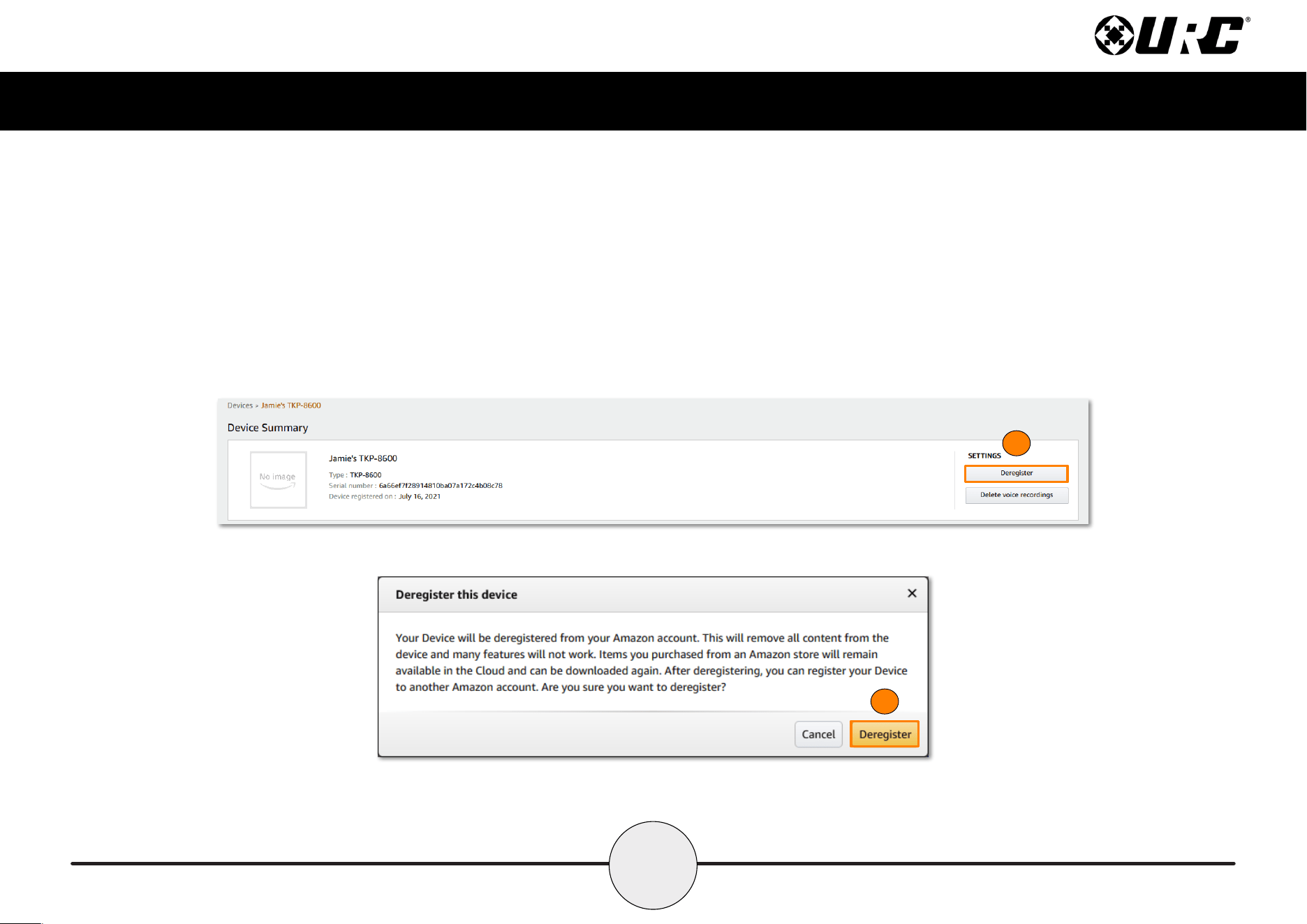
4. On the Device Summary page, select Deregister. Voice recording data may
also be deleted at this time for privacy concerns.
5. Select Deregister again to complete the process.
4
5
28
Total Control
TKP-8600
Owner’s Manual
Specifications
These are the technical specications for the TKP-8600:
Microprocessor: Cortex-A9 QuadPlus
Memory: 8GB eMMC, 2GB RAM
Devices: Supports up to 255 devices
Pages: Supports up to 255 pages on each devices
Macro Capability: Up to 255 steps
Network: One 10/100/1000 Ethernet Port (PoE+)
LCD: 9 Inch (1290 x 800)
Weight: 15.52 oz
Size: 8.14” x 5.91” x 1.04”
Power: Standard PoE Injector or PoE Switch (purchased separately)
Limited Warranty Statement
https://www.urc-automation.com/legal/warranty-statement/
End User Agreement
The terms and conditions of the End User Agreement available at
https://www.urc-automation.com/legal/end-user-agreement/ shall apply.
Federal Communication Commission Interference Statement
This equipment has been tested and found to comply with the limits for a Class B
digital device, pursuant to part 15 of the FCC Rules. These limits are designed to
provide reasonable protection against harmful interference in a residential installation.
This equipment generates, uses and can radiate radio frequency energy and, if not
installed and used in accordance with the instructions, may cause harmful interference
to radio communications. However, there is no guarantee that interference will not
occur in a particular installation. If this equipment does cause harmful interference to
radio or television reception, which can be determined by turning the equipment off
and on, the user is encouraged to try to correct the interference by one more of the
following measures:
• Reorient or relocate the receiving antenna.
• Increase the separation between the equipment and receiver.
• Connect the equipment into an outlet on a circuit different from that to which
the receiver is connected.
• Consult the dealer or an experienced radio/TV technician for help.
29
Total Control
TKP-8600
Owner’s Manual
Regulatory Information to the User
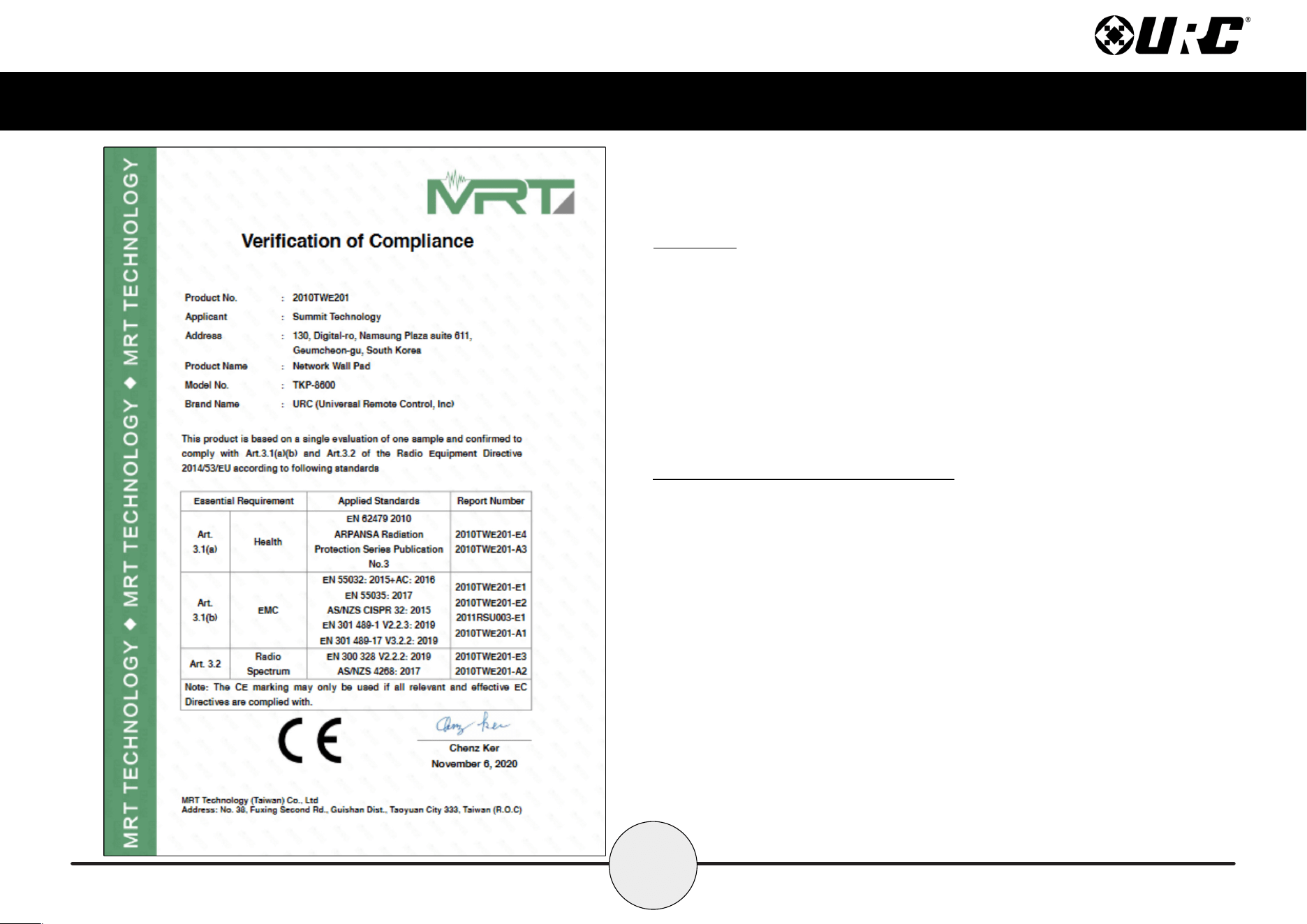
• CE conformity Notice Products with “CE” marking comply EMC Directive
2014/30/EU issued by the commission of the European Community.
1. EMC Directive
• Emission
• Immunity
• Power
• Declaration of Conformity
“Hereby, Universal Remote Control Inc. declares that this TKP-8600 is in compliance
with the Essential requirements.”
Warning!
The manufacturer is not responsible for any Radio or TV interference caused by
unauthorized modications to this equipment.
Changes or modications not expressly approved by the manufacturer could void the
user's authority to operate the equipment.