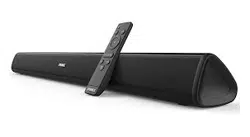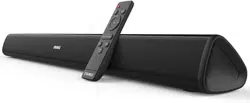

www.evatronic.co
User Guide
Model: ET-SK011
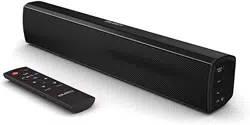
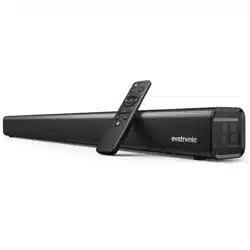
TaoTronics Sound Bar
Rev_1.0
MADE IN CHINA
Manufacturer:
Shenzhen Danya Technology Co.,Ltd.
Address:
Room 3323, Building C, Galaxy World Phase II, Minle Community,
Minzhi Street, Longhua District, Shenzhen, China
E-mail:
support@evatronic.co

CONTENTS
English
Deutsch
日本語
01-06
07-12
13-18
EN
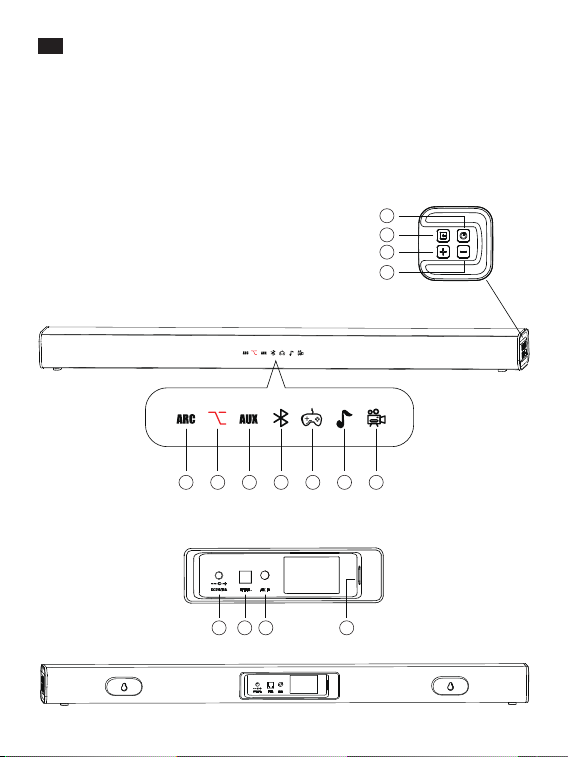
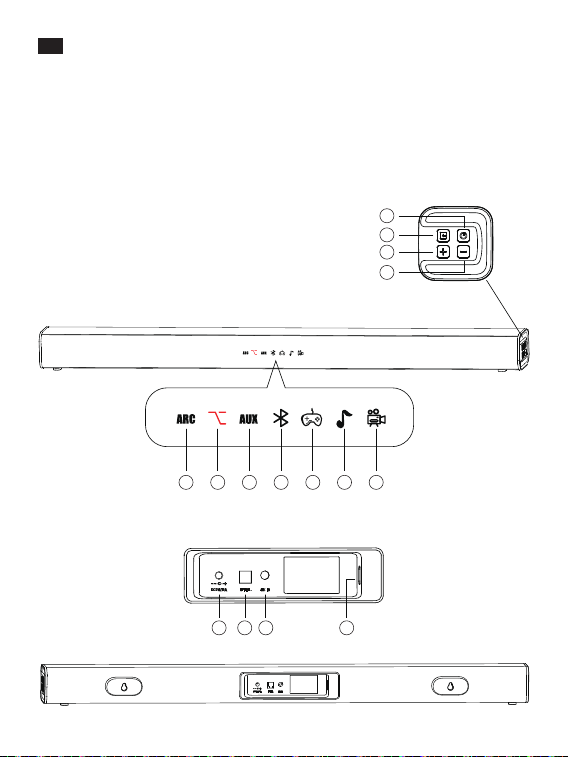
Product Diagram
Top Panel
1. Power Button
2. Mode Selection
3. Volume +
4. Volume -
TIndicators on the Display
5. ARC
6. Optical
7. AUX
8. Bluetooth
9. Games
10. Music
11. Video
Rear Panel
12. Power Input
13. Optical Input
14. AUX Input
15. ARC Input
5
12 13 14 15
6 7 8 9 10 11
1
2
3
4
0201
EN
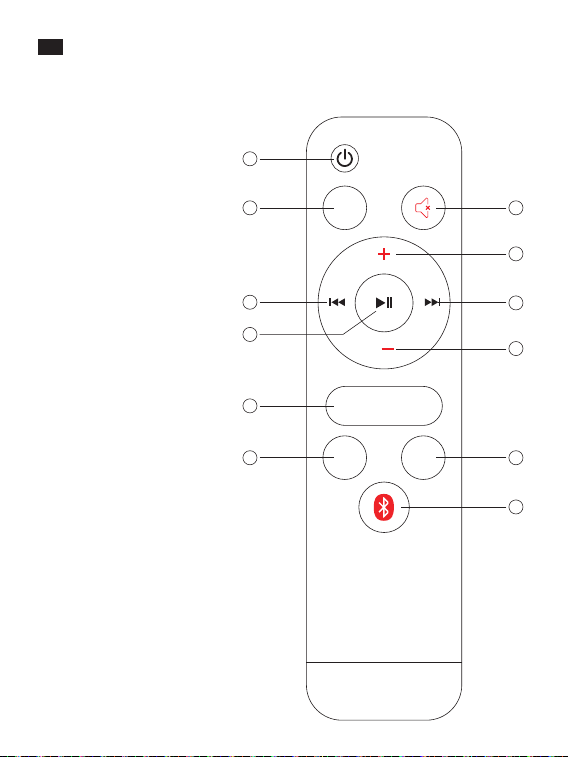
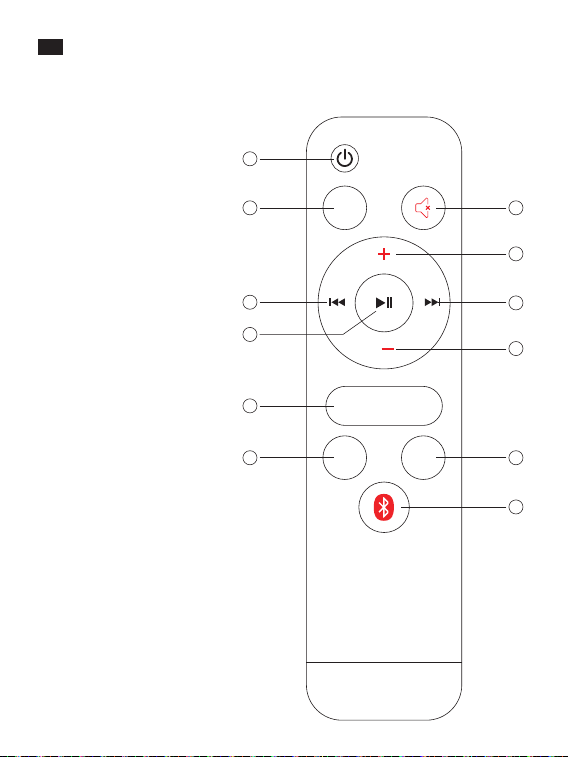
Remote Control
1. Power Button
2. EQ switch
3. Mute
4. Volume +
5. Next Track
6. Volume –
7. Previous Track
8. Play / Pause
9. ARC mode
10. Optical Mode
11. AUX Input
12. Bluetooth Mode
1
2
10
9
8
7
3
4
5
6
11
12
AUXOPT
ARC
EQ
EN
Product Diagram
Top Panel
1. Power Button
2. Mode Selection
3. Volume +
4. Volume -
TIndicators on the Display
5. ARC
6. Optical
7. AUX
8. Bluetooth
9. Games
10. Music
11. Video
Rear Panel
12. Power Input
13. Optical Input
14. AUX Input
15. ARC Input
5
12 13 14 15
6 7 8 9 10 11
1
2
3
4
0201
EN
Remote Control
1. Power Button
2. EQ switch
3. Mute
4. Volume +
5. Next Track
6. Volume –
7. Previous Track
8. Play / Pause
9. ARC mode
10. Optical Mode
11. AUX Input
12. Bluetooth Mode
1
2
10
9
8
7
3
4
5
6
11
12
AUXOPT
ARC
EQ

Warning
1. To reduce the risk of re or electric shock, do not expose this appliance to rain
or moisture.
2. Do not use chemicals or detergents to clean the product. Clean only with a dry
cloth.
3. Do not scrape the surface with sharp objects.
4. Do not block any ventilation openings. Install in accordance with the
manufacturer’s instructions.
5. Keep the sound bar away from extreme heat and humidity, and do not expose
to direct sunlight.
6. Do not install near any heat sources such as radiators, heat registers, stoves, etc.
7. Protect the power cord from being walked on or pinched particularly at plugs,
convenience receptacles, and the point where they exit from the device.
8. Unplug this device during lightning storms or when unused for long periods
of time.
9. To reduce the risk of electric shock, do not remove the cover (or back).
10. No user-serviceable parts are inside. Please refer servicing to qualied service
personnel.
11. Do not drop or knock your sound bar on hard surfaces as it may damage the
interior circuits.
EN
Package Contents
• 1 x Evatronic Sound Bar (ET-SK011)
• 1 x Remote Control
• 1 x RCA to 3.5mm Audio Cable
• 1 x Optical Cable
• 1 x User Guide
• 2 x Wall Mount Screws
• 1 x DC Adaptor
Button Control (Top Panel & Remote Control)
Press the Power Button and the mode indicator
will light up / go o on the display.
Press the Volume + button
Press the Volume - button
When the sound bar is on, press the corresponding mode
button to select the Optical / AUX / ARC/ Bluetooth /
Games / Music / Video mode, and the corresponding
indicator will light up.
The soundbar supports ARC, compatible with all devices
with ARC.
Power On / O
Volume +
Volume -
Mode Selection
Note: To disconnect a Bluetooth device, press and hold the Bluetooth Mode button on
Remote Control for 2-3s, or the Mode Selection button on the sound bar for 5-6s. The
Bluetooth Mode indicator will ash when waiting for a reconnection.
Specications
Power Supply
Power Consumption
S/N
Response Frequency
Working Temperature
Dimensions
Weight
DC 24V 2.5A
50W
≥70dB
60Hz-20KHz
-10°C - 35°C / 14°F-95°F
80 x 6 x 6cm / 31.5 x 2.4 x 2.4in
1765g±5g / 61.6oz
0403

Warning
1. To reduce the risk of re or electric shock, do not expose this appliance to rain
or moisture.
2. Do not use chemicals or detergents to clean the product. Clean only with a dry
cloth.
3. Do not scrape the surface with sharp objects.
4. Do not block any ventilation openings. Install in accordance with the
manufacturer’s instructions.
5. Keep the sound bar away from extreme heat and humidity, and do not expose
to direct sunlight.
6. Do not install near any heat sources such as radiators, heat registers, stoves, etc.
7. Protect the power cord from being walked on or pinched particularly at plugs,
convenience receptacles, and the point where they exit from the device.
8. Unplug this device during lightning storms or when unused for long periods
of time.
9. To reduce the risk of electric shock, do not remove the cover (or back).
10. No user-serviceable parts are inside. Please refer servicing to qualied service
personnel.
11. Do not drop or knock your sound bar on hard surfaces as it may damage the
interior circuits.
EN
Package Contents
• 1 x Evatronic Sound Bar (ET-SK011)
• 1 x Remote Control
• 1 x RCA to 3.5mm Audio Cable
• 1 x Optical Cable
• 1 x User Guide
• 2 x Wall Mount Screws
• 1 x DC Adaptor
Button Control (Top Panel & Remote Control)
Press the Power Button and the mode indicator
will light up / go o on the display.
Press the Volume + button
Press the Volume - button
When the sound bar is on, press the corresponding mode
button to select the Optical / AUX / ARC/ Bluetooth /
Games / Music / Video mode, and the corresponding
indicator will light up.
The soundbar supports ARC, compatible with all devices
with ARC.
Power On / O
Volume +
Volume -
Mode Selection
Note: To disconnect a Bluetooth device, press and hold the Bluetooth Mode button on
Remote Control for 2-3s, or the Mode Selection button on the sound bar for 5-6s. The
Bluetooth Mode indicator will ash when waiting for a reconnection.
Specications
Power Supply
Power Consumption
S/N
Response Frequency
Working Temperature
Dimensions
Weight
DC 24V 2.5A
50W
≥70dB
60Hz-20KHz
-10°C - 35°C / 14°F-95°F
80 x 6 x 6cm / 31.5 x 2.4 x 2.4in
1765g±5g / 61.6oz
0403
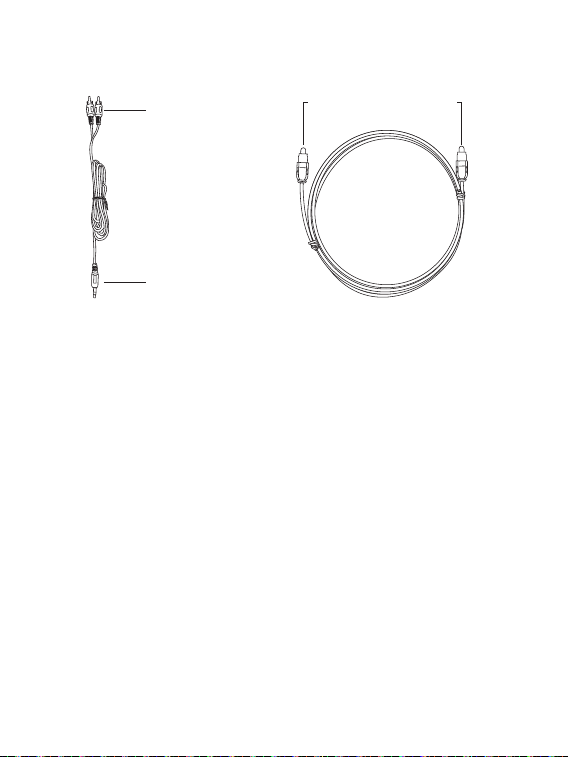
AUX Output
Audio Input
Optical Input / Output
Connections
Cable Connection
Note: Please plug the appropriate cable into the corresponding port to connect the
device, then select the corresponding mode.
Bluetooth® Connection
1. Turn on the sound bar and select the Bluetooth® mode.
2. Activate the Bluetooth® function on your device and search for devices nearby.
3. Find “ET-SK011” in the search results and tap to connect. A beep
will be heard upon a successful connection.
4. The Bluetooth® indicator will turn solid on upon a successful connection.
Note:
• The Bluetooth indicator will keep ashing when the sound bar is pairing.
• Please make sure no other active Bluetooth® devices are within range, and that
the sound bar is within 3ft / 1m away from your device.
• It’s not recommended to pair the sound bar with your TV Bluetooth for it may
cause audio delay.
• Before starting to play via Bluetooth, please lower the volume to a moderate
level.
Troubleshooting
Q: Why is the unit not turning on?
A: Please check and make sure the power cord is correctly connected to a power
source.
Q: Why is there no sound or why is the sound is distorted?
A: Please go over the following:
• Check to make sure the audio cable is correctly connected.
• Turn up the volume slowly.
• Press the Mute button to switch on the sound.
• Press the Play / Pause button.
• Set the audio output mode on your TV (if applicable) accordingly with the
mode setting on the sound bar.
Q: Why do the buttons on the sound bar not work?
A: Switch o the sound bar and unplug. Then connect it to a power supply and
switch it on again.
Q: Why does the remote control not work?
A: Please go over the following:
• Install 2 AAA 1.5A batteries into the remote.
• Replace the current batteries with new ones.
• Make sure the remote control is pointed to the sound bar during use.
• Make sure the remote control is within operating range.
• Switch o the sound bar and disconnect the power. Then reconnect and
power it on, try again.
Q: Why can't I disconnect the device by pressing the Bluetooth Mode button?
A: You need to press and hold the Bluetooth Mode button on Remote Control for
2-3s, or the Mode Selection button on the sound bar for 5-6s to disconnect a
Bluetooth device. The Bluetooth Mode indicator then will ash when waiting
for a reconnection.
The Bluetooth
®
word mark and logos are
registered trademarks owned by the Bluetooth SIG, Inc. and any use of
such marks by Sunvalleytek International Inc. is under license. Other trademarks and
trade names are those of their respective owners.
0605

AUX Output
Audio Input
Optical Input / Output
Connections
Cable Connection
Note: Please plug the appropriate cable into the corresponding port to connect the
device, then select the corresponding mode.
Bluetooth® Connection
1. Turn on the sound bar and select the Bluetooth® mode.
2. Activate the Bluetooth® function on your device and search for devices nearby.
3. Find “ET-SK011” in the search results and tap to connect. A beep
will be heard upon a successful connection.
4. The Bluetooth® indicator will turn solid on upon a successful connection.
Note:
• The Bluetooth indicator will keep ashing when the sound bar is pairing.
• Please make sure no other active Bluetooth® devices are within range, and that
the sound bar is within 3ft / 1m away from your device.
• It’s not recommended to pair the sound bar with your TV Bluetooth for it may
cause audio delay.
• Before starting to play via Bluetooth, please lower the volume to a moderate
level.
Troubleshooting
Q: Why is the unit not turning on?
A: Please check and make sure the power cord is correctly connected to a power
source.
Q: Why is there no sound or why is the sound is distorted?
A: Please go over the following:
• Check to make sure the audio cable is correctly connected.
• Turn up the volume slowly.
• Press the Mute button to switch on the sound.
• Press the Play / Pause button.
• Set the audio output mode on your TV (if applicable) accordingly with the
mode setting on the sound bar.
Q: Why do the buttons on the sound bar not work?
A: Switch o the sound bar and unplug. Then connect it to a power supply and
switch it on again.
Q: Why does the remote control not work?
A: Please go over the following:
• Install 2 AAA 1.5A batteries into the remote.
• Replace the current batteries with new ones.
• Make sure the remote control is pointed to the sound bar during use.
• Make sure the remote control is within operating range.
• Switch o the sound bar and disconnect the power. Then reconnect and
power it on, try again.
Q: Why can't I disconnect the device by pressing the Bluetooth Mode button?
A: You need to press and hold the Bluetooth Mode button on Remote Control for
2-3s, or the Mode Selection button on the sound bar for 5-6s to disconnect a
Bluetooth device. The Bluetooth Mode indicator then will ash when waiting
for a reconnection.
The Bluetooth
®
word mark and logos are
registered trademarks owned by the Bluetooth SIG, Inc. and any use of
such marks by Sunvalleytek International Inc. is under license. Other trademarks and
trade names are those of their respective owners.
0605
DE
Product Diagram
Oberseite
1. Powertaste
2. Moduswahl
3. Lautstärke +
4. Lautstärke -
Anzeigen auf dem Display
5. ARC
6. Optisch
7. AUX
8. Bluetooth
9. Spiele
10. Musik
11. Video
Rückseite
12. HDMI Input
13. Optical Input
14. AUX Input
15. ARC-Eingang
5
12 13 14 15
6 7 8 9 10 11
1
2
3
4
DE
Fernbedienung
0807
1. Power Button
2. EQ-Schalter
3. Stummschalten
4. Volumen +
5. Next Track
6. Volumen–
7. Previous Track
8. Play / Pause
9. ARC-Modus
10. Optischer Modus
11. AUX-Eingang
12. Bluetooth-Modus
1
2
10
9
8
7
3
4
5
6
11
12
AUXOPT
ARC
EQ
DE
Product Diagram
Oberseite
1. Powertaste
2. Moduswahl
3. Lautstärke +
4. Lautstärke -
Anzeigen auf dem Display
5. ARC
6. Optisch
7. AUX
8. Bluetooth
9. Spiele
10. Musik
11. Video
Rückseite
12. HDMI Input
13. Optical Input
14. AUX Input
15. ARC-Eingang
5
12 13 14 15
6 7 8 9 10 11
1
2
3
4
DE
Fernbedienung
0807
1. Power Button
2. EQ-Schalter
3. Stummschalten
4. Volumen +
5. Next Track
6. Volumen–
7. Previous Track
8. Play / Pause
9. ARC-Modus
10. Optischer Modus
11. AUX-Eingang
12. Bluetooth-Modus
1
2
10
9
8
7
3
4
5
6
11
12
AUXOPT
ARC
EQ

尺寸:90*120mm
装订成册
材质:封面128克铜版纸 内页80克书纸
Model:
ET-SK011

尺寸:90*120mm
装订成册
材质:封面128克铜版纸 内页80克书纸
Model:
ET-SK011

Warnung
1. Um das Risiko von Feuer oder Stromschlag zu mindern, sollten Sie dieses Gerät
weder Regen noch Feuchtigkeit aussetzen.
2. Verwenden Sie weder Chemikalien noch Reinigungsmittel, um das Produkt zu
reinigen. Reinigen Sie das Gerät nur mit einem trockenen Tuch.
3. Kratzen Sie nicht mit scharfen Gegenständen über die Oberäche.
4. Blockieren Sie keine Belüftungsönungen. Gemäß der Herstellerhinweise
montieren.
5. Halten Sie die Soundbar von extremer Hitze und Feuchtigkeit fern und setzen
Sie sie keiner direkten Sonneneinstrahlung aus.
6. Nicht in die Nähe von Hitzequellen wie Radiatoren, Heizregistern, Öfen etc.
stellen.
7. Achten Sie darauf, dass niemand auf das Kabel tritt und dass es nicht
gequetscht wird, besonders bei Steckern, Gerätesteckdosen und am Punkt,
wo das Kabel aus dem Gerät herauskommt.
8. Trennen Sie das Gerät bei Gewittern und, wenn Sie es lange Zeit nicht nutzen,
vom Strom.
9. Um Stromschlägen vorzubeugen, sollten Sie das Gehäuse (oder die Rückseite)
nicht abnehmen.
10. Im Inneren benden sich keine vom Benutzer zu wartenden Teile. Bitte
überlassen Sie Wartungsarbeiten qualiziertem Service-Personal.
11. Ihre Soundbar darf nicht auf harte Oberächen fallengelassen oder
geschlagen werden, da dies die Schaltkreise im Inneren beschädigen kann.
DE
Im Lieferumfang enthalten
• 1 x Evatronic Soundbar (ET-SK011)
• 1 x Fernbedienung
• 1 x RCA zu 3.5mm Audiokabel
• 1 x Optisches Kabel
• 1 x Bedienungsanleitung
• 2 x Wandhalterungsschrauben
• 1 x DC-Adapter
Tastensteuerung (Oberseite & Fernbedienung)
Wenn Sie die Powertaste drücken, geht die
Modusanzeige auf dem Display an / aus.
Drücken Sie die Taste Lautstärke +
Drücken Sie die Taste Lautstärke -
Drücken Sie die jeweilige Modustaste, wenn die
Soundbar eingeschaltet ist, um auf den Optischen /
AUX- / ARC- / Bluetooth- / Spiele- / Musik- / Videomodus
zu wechseln. Die entsprechende Anzeige leuchtet dann
auf.
Die Soundbar unterstützt ARC, kompatibel mit allen
Geräten mit ARC.
Ein- / Ausschalten
Lautstärke +
Lautstärke -
Moduswahl
Anmerkung: Um die Verbindung zu einem Bluetooth-Gerät zu trennen, halten Sie die
Bluetooth-Modustaste auf der Fernbedienung 2-3s lang oder die Moduswahl-Taste auf
der Soundbar 5-6s lang gedrückt. Die Bluetooth-Modusanzeige blinkt, wenn das Gerät
auf eine erneute Verbindung wartet.
Spezikationen
Stromversorgung
Stromverbrauch
S/N
Antworthäugkeit
Betriebstemperatur
Maße
Gewicht
DC 24V 2.5A
50W
≥70dB
60Hz-20KHz
-10°C - 35°C / 14°F-95°F
80 x 6 x 6cm / 31.5 x 2.4 x 2.4in
1765g±5g / 61.6oz
1009

Warnung
1. Um das Risiko von Feuer oder Stromschlag zu mindern, sollten Sie dieses Gerät
weder Regen noch Feuchtigkeit aussetzen.
2. Verwenden Sie weder Chemikalien noch Reinigungsmittel, um das Produkt zu
reinigen. Reinigen Sie das Gerät nur mit einem trockenen Tuch.
3. Kratzen Sie nicht mit scharfen Gegenständen über die Oberäche.
4. Blockieren Sie keine Belüftungsönungen. Gemäß der Herstellerhinweise
montieren.
5. Halten Sie die Soundbar von extremer Hitze und Feuchtigkeit fern und setzen
Sie sie keiner direkten Sonneneinstrahlung aus.
6. Nicht in die Nähe von Hitzequellen wie Radiatoren, Heizregistern, Öfen etc.
stellen.
7. Achten Sie darauf, dass niemand auf das Kabel tritt und dass es nicht
gequetscht wird, besonders bei Steckern, Gerätesteckdosen und am Punkt,
wo das Kabel aus dem Gerät herauskommt.
8. Trennen Sie das Gerät bei Gewittern und, wenn Sie es lange Zeit nicht nutzen,
vom Strom.
9. Um Stromschlägen vorzubeugen, sollten Sie das Gehäuse (oder die Rückseite)
nicht abnehmen.
10. Im Inneren benden sich keine vom Benutzer zu wartenden Teile. Bitte
überlassen Sie Wartungsarbeiten qualiziertem Service-Personal.
11. Ihre Soundbar darf nicht auf harte Oberächen fallengelassen oder
geschlagen werden, da dies die Schaltkreise im Inneren beschädigen kann.
DE
Im Lieferumfang enthalten
• 1 x Evatronic Soundbar (ET-SK011)
• 1 x Fernbedienung
• 1 x RCA zu 3.5mm Audiokabel
• 1 x Optisches Kabel
• 1 x Bedienungsanleitung
• 2 x Wandhalterungsschrauben
• 1 x DC-Adapter
Tastensteuerung (Oberseite & Fernbedienung)
Wenn Sie die Powertaste drücken, geht die
Modusanzeige auf dem Display an / aus.
Drücken Sie die Taste Lautstärke +
Drücken Sie die Taste Lautstärke -
Drücken Sie die jeweilige Modustaste, wenn die
Soundbar eingeschaltet ist, um auf den Optischen /
AUX- / ARC- / Bluetooth- / Spiele- / Musik- / Videomodus
zu wechseln. Die entsprechende Anzeige leuchtet dann
auf.
Die Soundbar unterstützt ARC, kompatibel mit allen
Geräten mit ARC.
Ein- / Ausschalten
Lautstärke +
Lautstärke -
Moduswahl
Anmerkung: Um die Verbindung zu einem Bluetooth-Gerät zu trennen, halten Sie die
Bluetooth-Modustaste auf der Fernbedienung 2-3s lang oder die Moduswahl-Taste auf
der Soundbar 5-6s lang gedrückt. Die Bluetooth-Modusanzeige blinkt, wenn das Gerät
auf eine erneute Verbindung wartet.
Spezikationen
Stromversorgung
Stromverbrauch
S/N
Antworthäugkeit
Betriebstemperatur
Maße
Gewicht
DC 24V 2.5A
50W
≥70dB
60Hz-20KHz
-10°C - 35°C / 14°F-95°F
80 x 6 x 6cm / 31.5 x 2.4 x 2.4in
1765g±5g / 61.6oz
1009

www.evatronic.co
User Guide
Model: ET-SK011
TaoTronics Sound Bar
Rev_1.0
MADE IN CHINA
Manufacturer:
Shenzhen Danya Technology Co.,Ltd.
Address:
Room 3323, Building C, Galaxy World Phase II, Minle Community,
Minzhi Street, Longhua District, Shenzhen, China
E-mail: