V12
USER MANUAL
Warning notices: Before using this product, please read this manual carefully and keep it for future reference.
The design and specifications are subject to change without prior notice for product improvement.
Consult with your dealer or manufacturer for details.
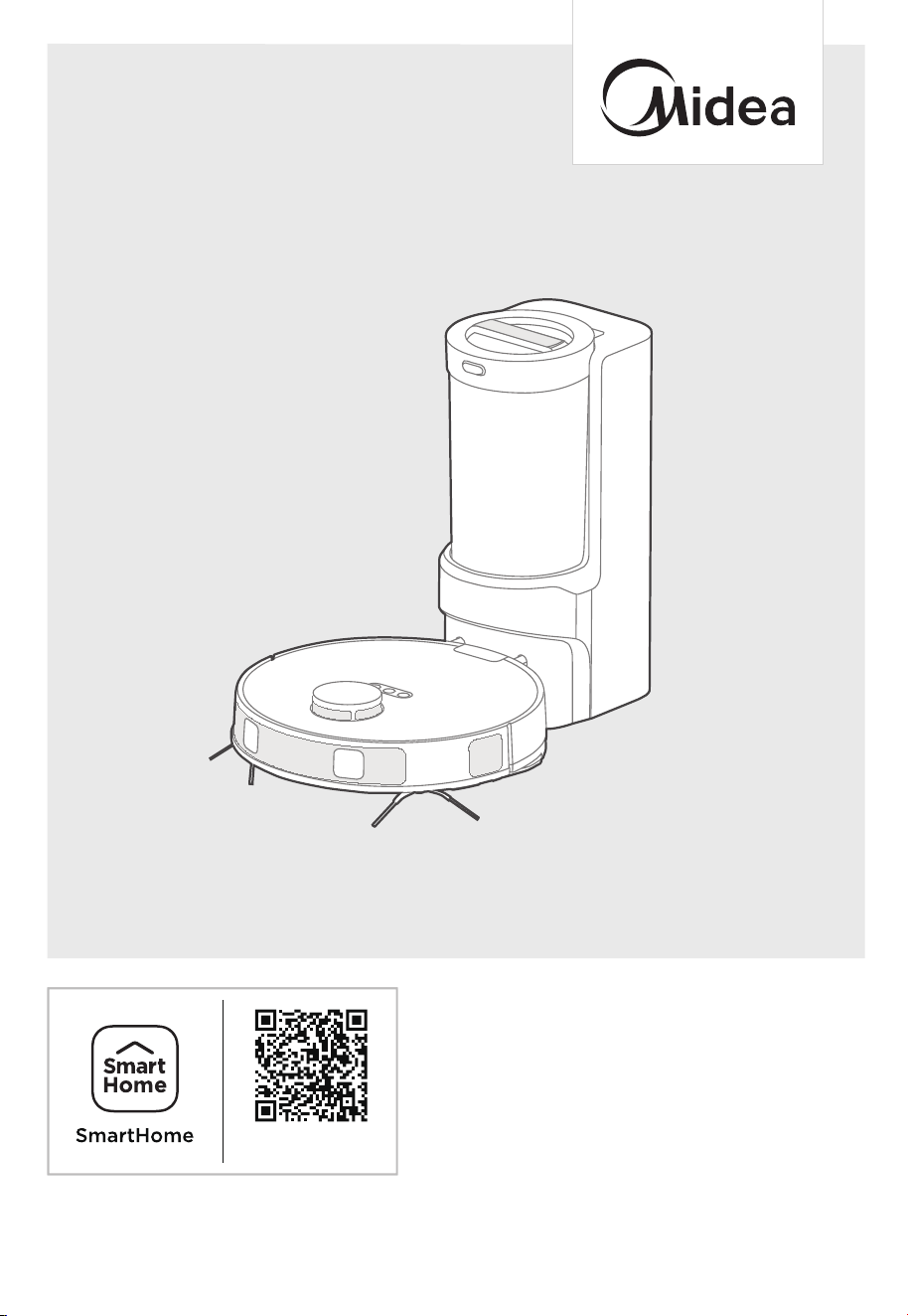
The diagram above is just for reference. Please take the appearance of the actual product as the standard.
Robot Vacuum Cleaner
VCR S10 Plus
USER MANUAL
Warning notices: Before using this product, please read this manual carefully and keep it for future reference.
The design and specifications are subject to change without prior notice for product improvement.
Consult with your dealer or manufacturer for details.
The diagram above is just for reference. Please take the appearance of the actual product as the standard.
Robot Vacuum Cleaner
Download the app
& activate product
Download the app
& activate product

THANK YOU LETTER
Thank you for choosing Midea! Before using your new Midea product, please read
this manual thoroughly to ensure that you know how to operate the features and
functions that your new appliance offers in a safe way.
CONTENTS
SAFETY INSTRUCTIONS
TECHNICAL DATA
IN THE BOX
Components in Package
Introduction to Parts of Robot Vacuum
PREPARATIONS BEFORE USE
01
06
07
07
08
09
Installation of side brushes
Filter installation
Setting up self-emptying base
Charging
Setting Up App and Connecting the Device
Using SmartHome App
09
09
09
10
11
11
GETTING STARTED
Start / Pause / Resume
SPOT Cleaning
Recharge
Self-Emptying Function
Status Indicators of Self-Emptying Base
12
12
12
12
13
13

CONTENTS
MAINTENANCE
Dustbin/Water tank maintenance
Cleaning the mop assembly
Cleaning tools
Roller brushmaintenance (weekly cleaning recommended)
Main wheels cleaning (weekly cleaning recommended)
Side brushes cleaning (weekly cleaning recommended)
How to empty the dust cup
How to clean the cyclone
How to clean the filter
How to clean the dust collection air duct
Sensors and charging contacts cleaning
14
14
14
15
15
16
16
17
17
18
18
18
TRADEMARKS, COPYRIGHTS
AND LEGAL STATEMENT
20
TROUBLESHOOTING 19
DISPOSAL AND RECYCLING 20
DATA PROTECTION NOTICE 21
SAFETY INSTRUCTIONS
Warning for the machine
This appliance can be used by children aged from 8 years and above and
persons with reduced physical, sensory or mental capabilities or lack of
experience and knowledge if they have been given supervision or instruction
concerning use of the appliance in a safe way and understand the hazards
involved.
Children shall not play with the appliance.
Cleaning and user maintenance shall not be made by children without
supervision.
Plug must be removed from the socket-outlet before cleaning or maintaining
If the supply cord is damaged, it must be replaced by the manufacturer, its
service agent or similarly qualified persons in order to avoid a hazard.
WARNING: For the purposes of recharging the battery, only use the detach-
able supply unit provided with this Appliance.
Use only with BS2302 supply unit.
This Appliance contains batteries that are only replaceable by skilled
persons.
Do not bring the smart robot close to heat source, radiation or burning
cigarette butts. It is strictly forbidden to vacuum the following objects:
1) All liquids such as water and solvents;
2) Lime, cement dust and other construction dust and garbage;
3) Heat generating objects, such as unextinguished carbon butts, cigarette
butts;
4) Sharp fragments, such as glass, etc.;
5) Flammable and explosive items, such as gasoline and alcohol products.
Before using, please remove all fragile items from the ground (such as
glasses, lamps, etc.), and items that may be tangled with the side brush,
roller brush and drive wheels(such as wires, curtains and other easily-entan-
gled materials).
Please pay attention to your hair and avoid entanglement on wheels or roller
brushes when using, cleaning and maintaining the robot.
Do not use this product at an altitude of more than 2000m.
1.
2.
3.
4.
5.
6.
7.
8.
9.
01
10.
11.
12.
13.
Correct Disposal of this product.
This marking indicates that this product should not be
disposed of with other household wastes throughout the EU.
To prevent possible harm to the environment or human health
from uncontrolled waste disposal, recycle it responsibly to
promote the sustainable reuse of material resources. To return
your used device, please use the return and collection systems
or contact the retailer where the product was purchased. They
can take this product for environmentally safe recycling.
Warranty Information
The manufacturer provides warranty in accordance with the legislation of the
customer's own country of residence, with a minimum of 1 year (Germany: 2
years), starting from the date on which the Appliance is sold to the end user.
The warranty only covers defects in material or workmanship.
The repairs under warranty may only be carried out by an authorized service
centre. When making a claim under warranty, the original bill of purchase (with
purchase date) must be submitted.The warranty will not Apply in cases of:
- Normal wear and tear
- Incorrect use, e.g. overloading of the Appliance, use of non-Approved
accessories
- Use of force, damage caused by external influences
- Damage caused by non-observance of the user
manual, e.g. connection to an unsuitable mains supply or non-compliance with
the installation instructions
- Partially or completely dismantled Appliances
Wireless network: 2400-2483.5MHz, MAX POWER:20dBm.
BLUETOOTH MAX POWER:10dBm
To satisfy RF exposure requirements, a separation distance of 20 cm or more
should be maintained between the antenna of this device and persons during
device operation. To ensure compliance, operations at closer than this
distance is not recommended.
CLASS 1 LASER PRODUCT
INVISIBLE LASER RADIATION
SAFETY INSTRUCTIONS
02
1.
2.
3.
4.
5.
6.
7.
“IMPORTANT SAFETY INSTRUCTIONS – SAVE THESE INSTRUCTIONS" and
"DANGER – TO REDUCE THE RISK OF FIRE OR ELECTRIC SHOCK, CARE-
FULLY FOLLOW THESE INSTRUCTIONS".
This appliance can be used by children aged from 8 years and above and
persons with reduced physical, sensory or mental capabilities or lack of
experience and knowledge if they have been given supervision or instruction
concerning use of the appliance in a safe way and understand the hazards
involved.
Children shall not play with the appliance.
Cleaning and user maintenance shall not be made by children without
supervision.
Plug must be removed from the socket-outlet before cleaning or maintaining
the Appliance.
If the supply cord is damaged, it must be replaced by the manufacturer, its
service agent or similarly qualified persons in order to avoid a hazard.
Docking base is only Applicable to the product VCR S10 Plus. (Battery pack
type : Li-ion, DC 14.4 V, 5200 mAh)
The Docking base will automatically start charging after Robot Vacuum
Cleaner returned to the base.
Warning: The battery charger (Docking station) is not intended to charge
non-rechargeable batteries.
CAUTION: In order to avoid a hazard due to inadvertent resetting of the
thermal cut-out, this Appliance must not be supplied through an external
switching device, such as a timer, or connected to a circuit that is regularly
Warning for docking station
SAFETY INSTRUCTIONS
03
before removing the battery.
Please note that do not disassemble the battery by yourself.
If you need to replace it, please contact the after-sales service center.
Please dispose of used battery according to local laws and regulations
Do not dismantle, open or shred the battery.
Do not expose batteries to heat or fire. Avoid storage in direct sunlight.
Do not short-circuit a battery.
Do not store batteries haphazardly in a box or drawer where they may
short-circuit each other or be short-circuited by other metal objects.
Do not subject batteries to mechanical shock.
In the event of a leaking, do not allow the liquid to come in contact with
copious amounts of water and seek medical advice.
Do not use any charger other than that specifically provided for use with
the equipment.
Do not use any battery which is not designed for use with the equipment.
Keep batteries out of the reach of children.
Seek medical advice immediately if the battery has been swallowed.
Keep batteries clean and dry.
Do not leave a battery on prolonged charge when not in use.
After extended periods of storage, it may be necessary to charge and
discharge the batteries several times to obtain maximum performance.
The batteries give their best performance when they are operated at
normal room temperature (20 °C ± 5 °C).
Retain the original product literature for future reference.
The battery may be irreversibly damaged if the battery is in low power for
before storage.
1.
2.
3.
4.
5.
6.
7.
8.
9.
10.
11.
12.
13.
14.
15.
16.
17.
18.
19.
20.
21.
Warning for battery
SAFETY INSTRUCTIONS
04
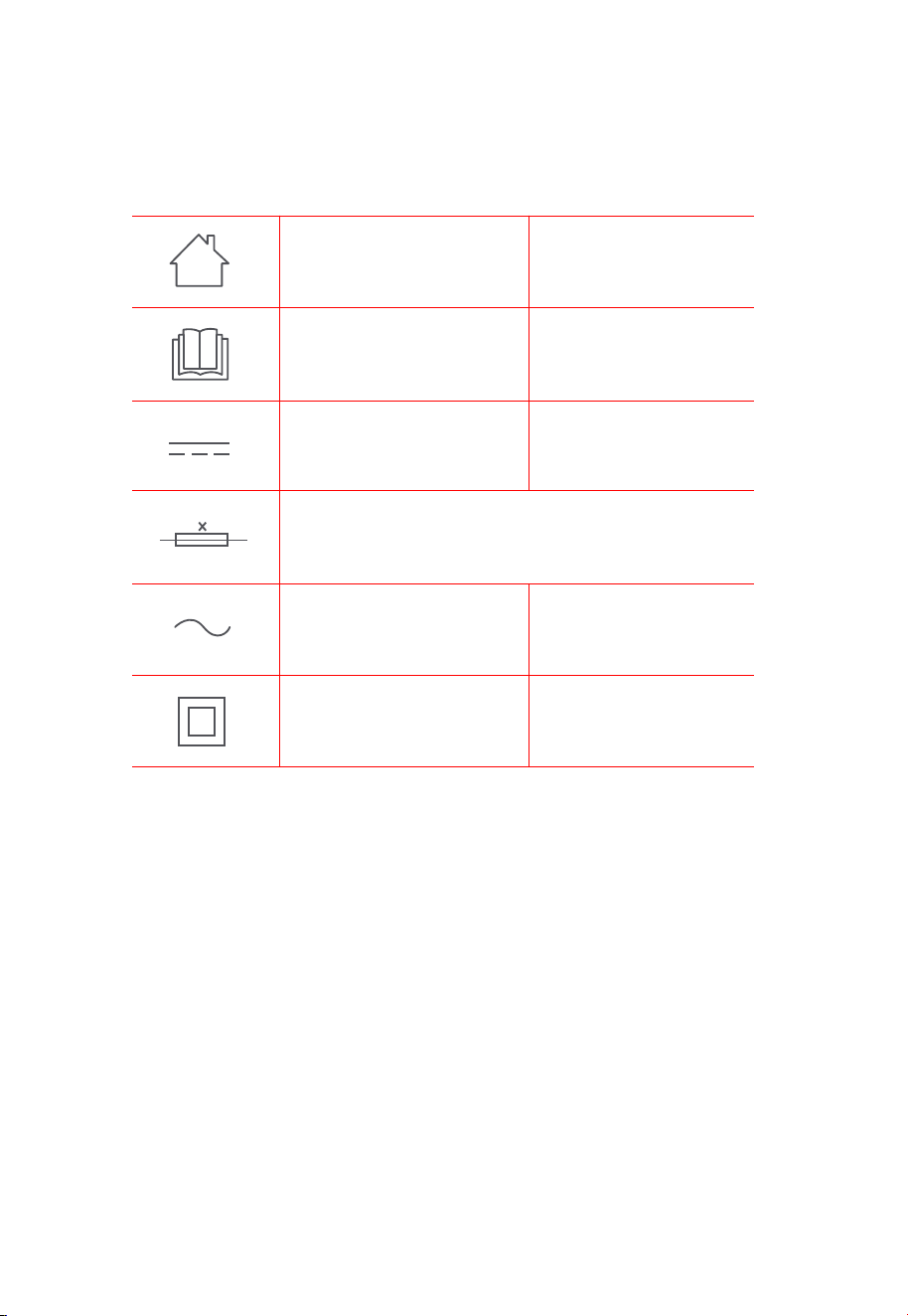
[symbol IEC 60417-5957
( 2004-12 )]
[symbol ISO 7000-0790
( 2004-01 )]
[symbol IEC 60417-5031
( 2002-10 )]
[symbol IEC 60417-5032
( 2002-10 )]
[symbol IEC 60417-5172
( 2003-02 )]
time-lag miniature fuse-link where X is the symbol for the
time/current characteristic as given in IEC 60127
for indoor use only
read operator's manual
direct current
alternating current
class II equipment
SAFETY INSTRUCTIONS
05

TECHNICAL DATA
Product Model: VCR S10 Plus
Host Charging Voltage: 16.7V
Host Rated Voltage: 14.4V
Host Rated Power: 55W
Docking Station Model: BS2302
Docking Station Input: 220-240V~, 50-60Hz, 850W
Docking Station Output: 16.7V , 1A
Battery Model: BP14452C
Battery Rated Voltage: 14.4V
Battery Capacity: 5200mAh 74.88Wh
Charging Limit Voltage: 16.8V
1.
2.
3.
4.
5.
6.
7.
8.
9.
10.
11.
Note: You can also view the instructions on the App.
Midea Robozone Technology Co.,Ltd.
No.39 Caohu Avenue, Xiangcheng Economic
Development Zone, Suzhou, Jiangsu, China
MIDEA HOME APPLIANCES UK LTD
5 New Street Square, London, EC4A 3TW
06
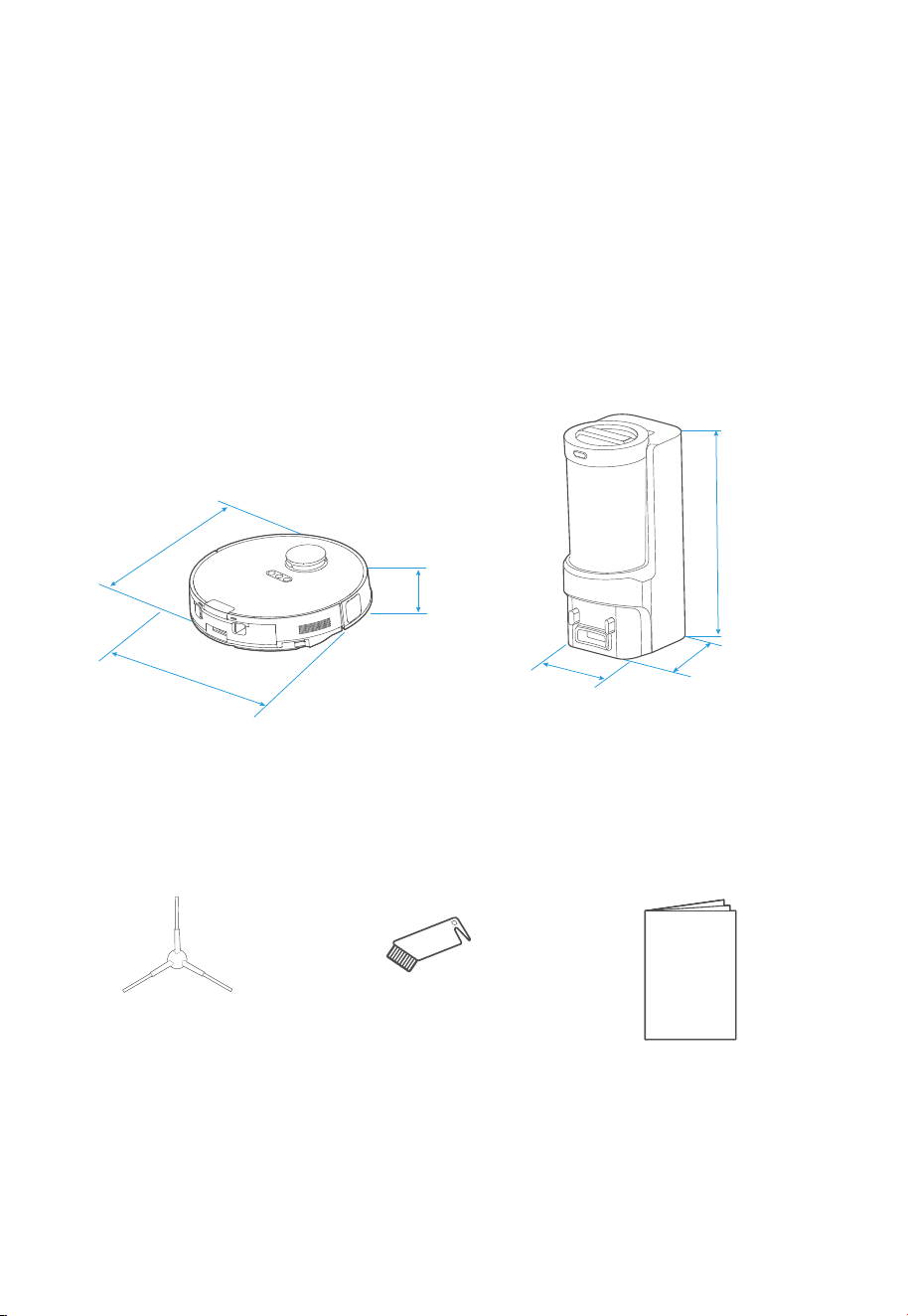
Side Brush x2 Instruction Manual
Cleaning Brush
Instruction
Manual
07
IN THE BOX
Components in Package
350mm
350mm
97mm
Robot Vacuum
244mm
178mm
445mm
Self-Emptying Base
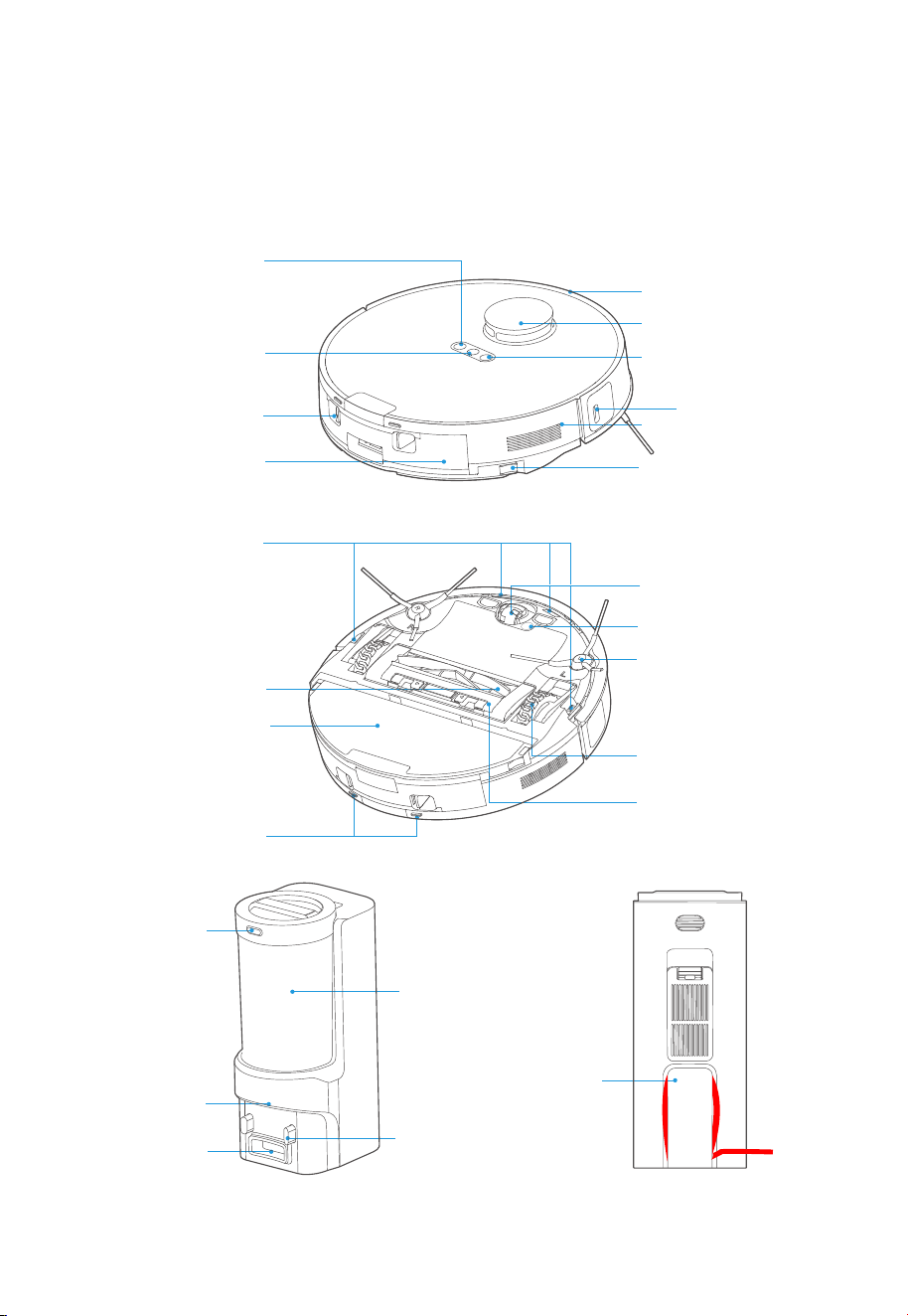
Power Cable
Slot
Dust Cup
Indicator Light
Release Button
Self-empty
Inlet
Charging
Contacts
Carpet Detection
Sensor
Auto-lifting Mop
Assembly
Omni-directional
Wheel
Side Brush
Main Wheel
Cover Plate of
Roller brush
Charging Contacts
Main Brush
Edge Sensor
Power Button
Network / Spot
Cleaning Button
Bumper
LiDAR Sensor
Recharging Button
Dustbin /
Water Tank
Dustbin Release
Button
Release Button of
Auto-lifting Mop
Reset Button
Cliff Sensors
08
IN THE BOX
Introduction to Parts of Robot Vacuum
Notes
Remove excess clutter and cables on the floor before cleaning.
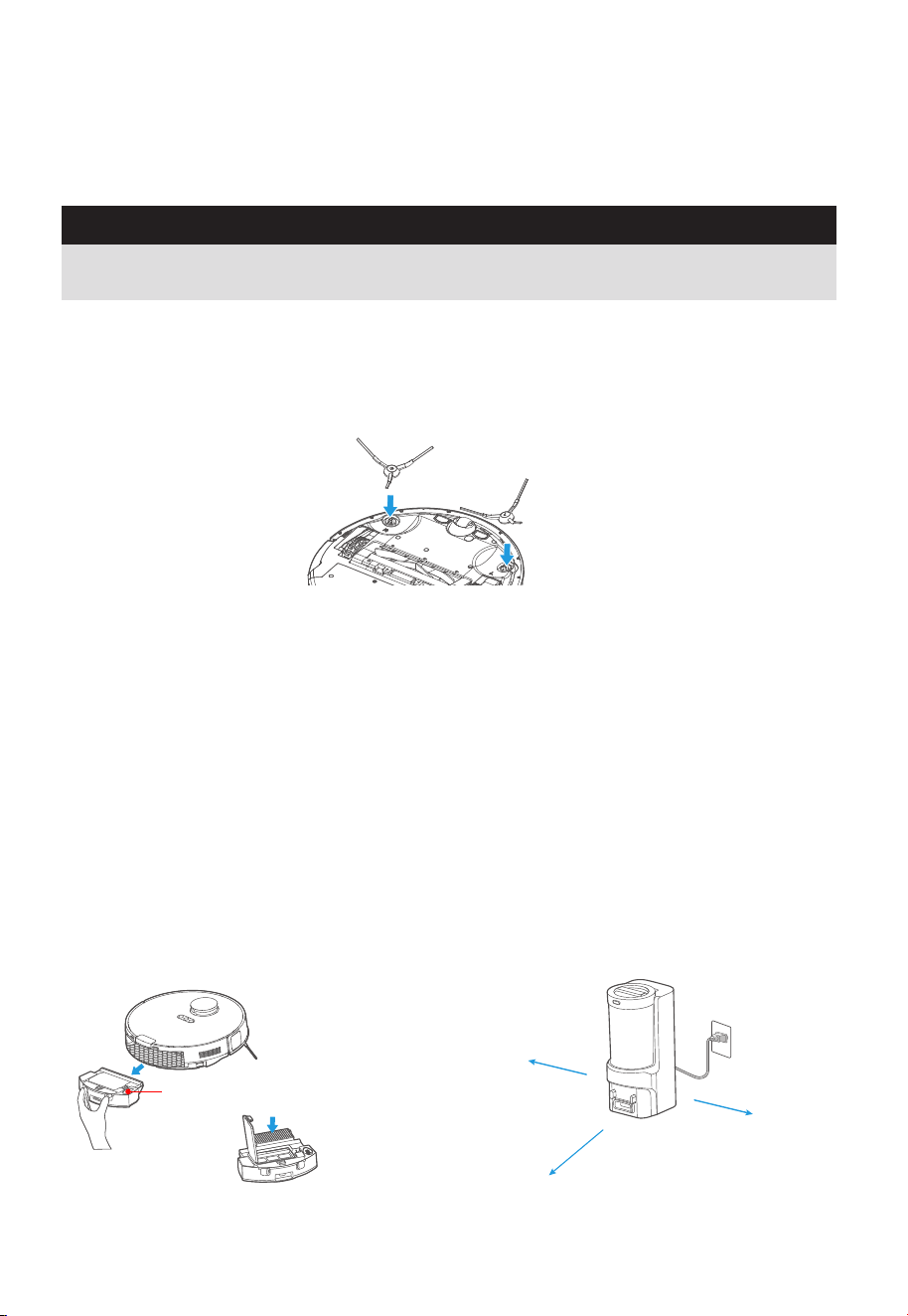
Installation of side brushes
≥ 5 ft (1.5m)
≥ 1.5 ft (0.5m)
≥ 1.5 ft (0.5m)
Water Inlet/Outlet
09
PREPARATIONS BEFORE USE
Turn the main unit over. Attach the side brush to its color-matched post and press down until they
fit into place.
Filter installation
Robot comes with filter installed. Before use,
ensure the filter is securely in place. If not,
remove dustbin from robot, pull up lid of
dustbin and make sure filter is snApped into
place. Ensure dustbin lid and bottom latch are
securely closed and place back dustbin onto
robot.
When using the mopping function, open the
tank lid, fill the water tank with purified cold
water, and securely close the lid.
Please do not add any detergent into the water
tank to prevent potential clog.
Setting up self-emptying base
1. Place the self-emptying base flat against the
wall on a level surface. If there is any
charging base for other robot vacuum
cleaners in the room, please put it away
before use of our self-emptying base to
avoid mismatching.
2. Place the self-emptying base in an area
covered with wireless network signal to
ensure stable network connection of the
robot and proper function of the App. Store
the excess cables into the slot at the back of
the charging base to avoid affecting the
proper function of the robot vacuum.
3. Plug the power plug into a power outlet.
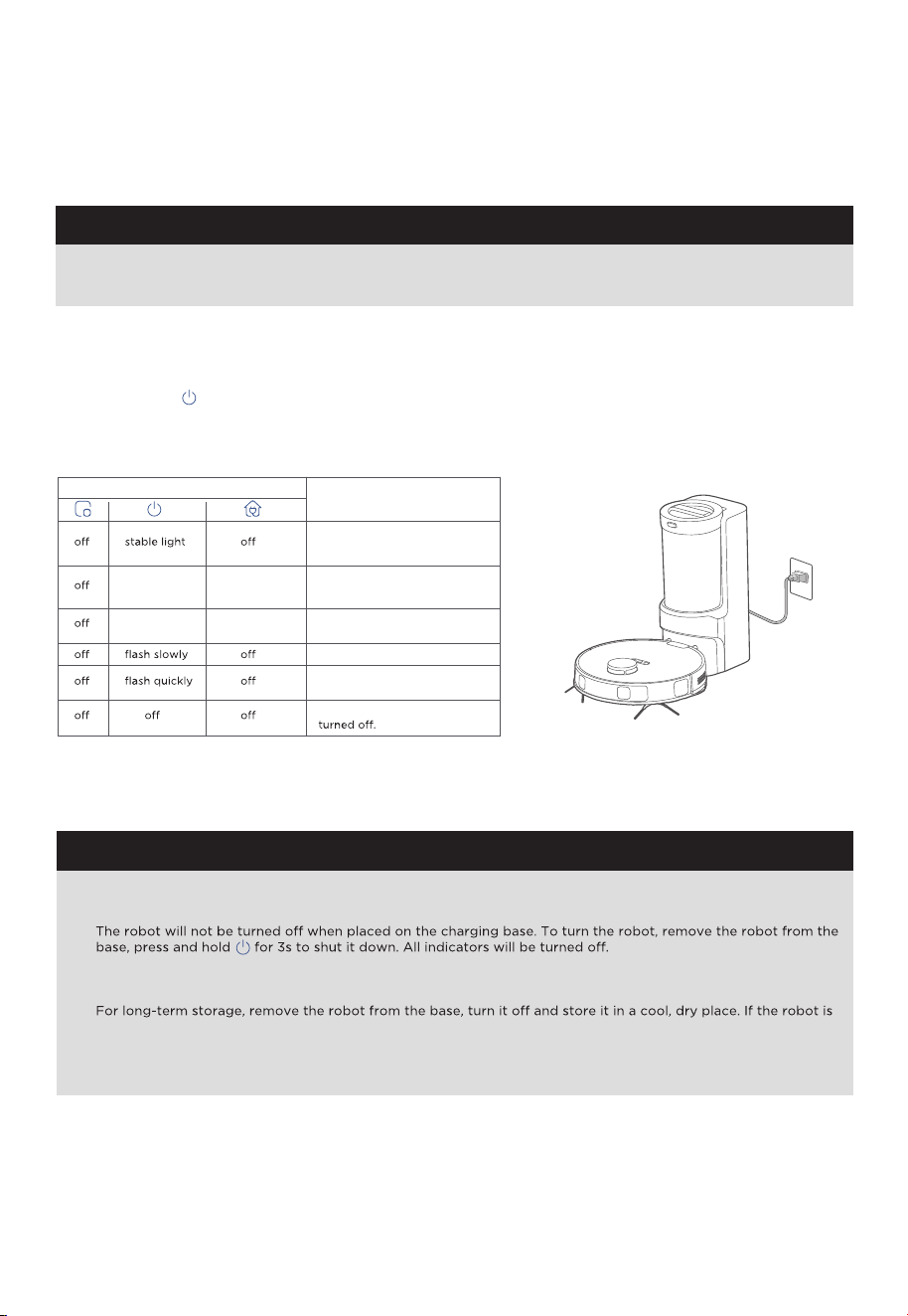
1. Avoid placing the robot and the base under direct sunlight.
2. Be sure to keep the charging area dry.
NOTES
NOTES
When the battery level is too low, the robot cannot be turned on. Please manually put the robot onto the
charging base.
To ensure the optimal performance of the lithium-ion battery, please keep the robot charged.
If you manually put the robot vacuum into the base, ensure that the charging contacts of both the robot and the
base are connected.
not used for more than 3 months, allow it to get charged for at least 12 hours before using. To preserve the
battery lifespan, we suggest you fully charge the battery at least once every six months.
1.
2.
3.
4.
5.
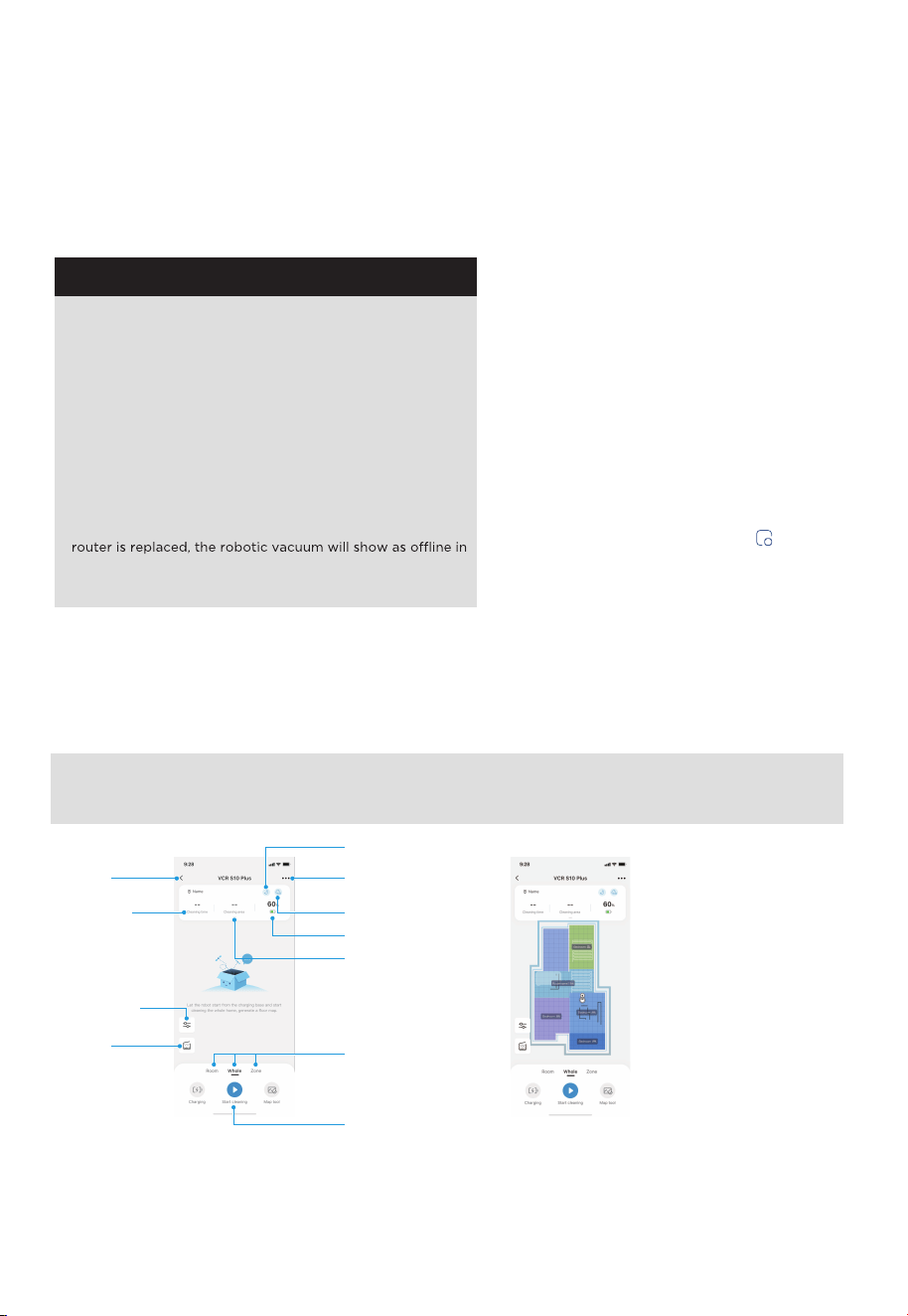
1) Robot is in standby mode, or
2) Cleaning in progress, or
3) Robot is fully charged.
stable light stable light
battery level ≥ 20%, robot has
finished its mission and is going
to recharge
Status
stable light flash quickly
battery level < 20%, robot is
going to recharge
Robot is charging
Error has occurred, see
"Troubleshooting".
Indicator Light
Robot is in sleep mode or
10
PREPARATIONS BEFORE USE
Charging
Press and hold " " for 3 seconds to power on the robot vacuum. After the power indicator turns on,
press the recharging button or manually put the robot back into the self-emptying base for charging,
as shown. We recommend you charge the robot for at least 6 hours before using it for the first time.
PREPARATIONS BEFORE USE
NOTES
The app supports iOS versions 13.0 and above and
Android versions 8.0 and above. The app is not available
for use with tablets.
This model does not support a WEP encrypted router.
The home wireless network name and password must
contain only letters, numbers and standard symbols.
The network accessing configuration of the robotic vacuum
requires a wireless network of 2.4GHz frequency range.
The robotic vacuum must be connected to wireless network
to enable controlling the robotic vacuum using the app.
Once you have set up the app and connected the robotic
vacuum to wireless network, the app can be used to control
the robotic vacuum in the wireless network/2G/3G/4G/5G
network environment.
If your home wireless network password is changed or the
the app; you will need to reconnect the robotic vacuum to
the wireless network following the wireless network
connection instructions.
●
●
●
●
●
●
In the App Store or Google Play, search for
SmartHome, download and install the app.
Open the SmartHome app and complete the
registration process, which includes an email
address confirmation, and once you have
confirmed your email address you can log in
and follow the setup instructions in the app.
Connect your phone to your home wireless
network.
In the app select Add Devices and choose
the device SmartHome app.
Connect your robotic vacuum to your wireless
network. After assembling and powering on the
robotic vacuum, press and hold the " " button
for 3 seconds until a beep is heard.
The network indicator light should start flashing
white. Follow instructions on app for next steps.
1.
2.
3.
4.
5.
Setting Up App and Connecting the Device
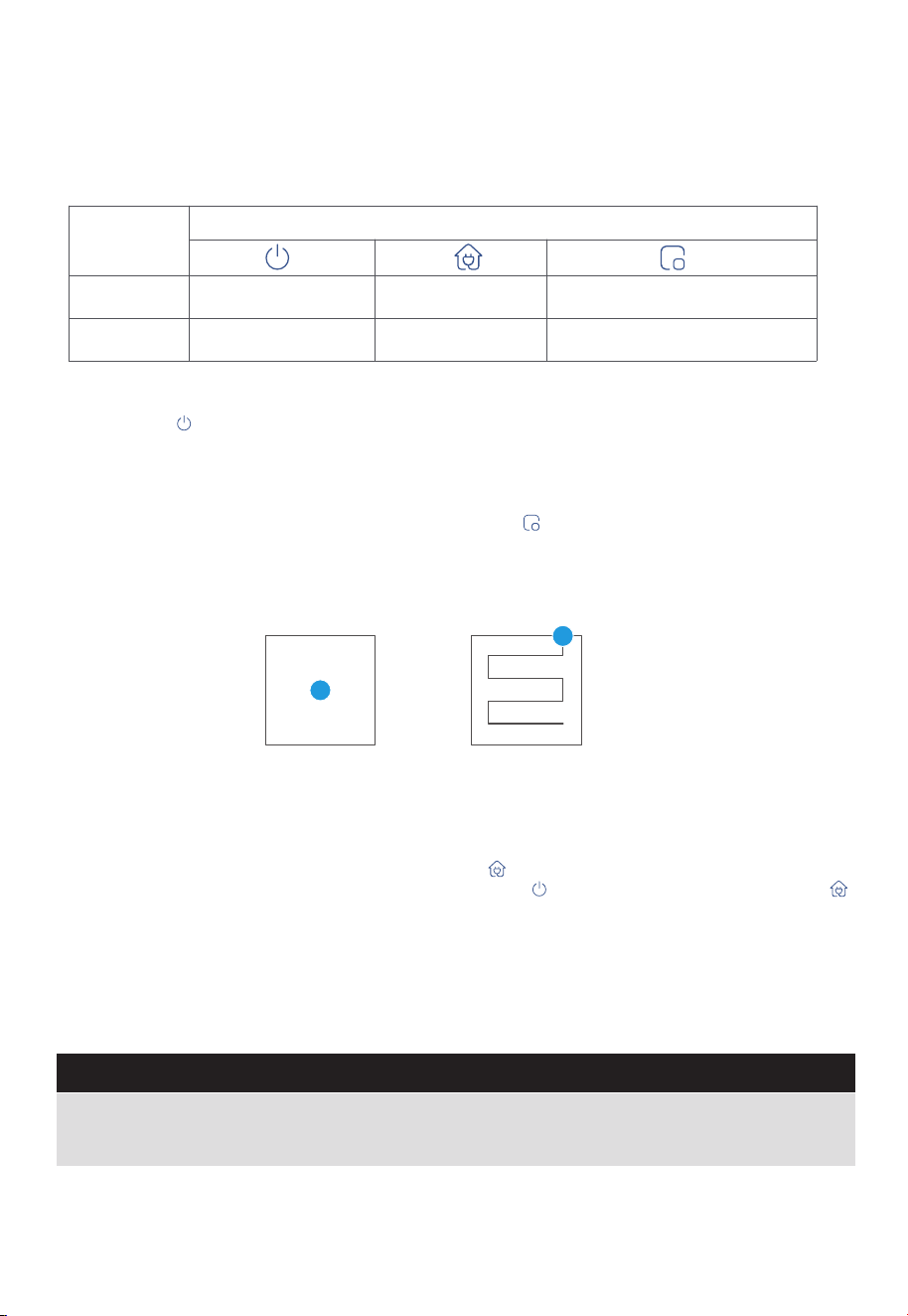
Using SmartHome App
Back to
previous
page
Robotic Vacuum
Do not disturb
Child Lock
settings
Cleaning area
Start cleaning
Battery
Dust
collection
Cleaning
time
Cleaning
mode
NOTE: If the wireless network in your home is unstable, it may cause issues with the operation of the SmartHome App.
The content of the SmartHome App may change when the version is updated. Please refer to the Midea Robotic
Vacuum interface for details. This interface will be upgraded later, this interface is for reference only.
NOTE: When you start clean,
the machine automatically
scans and creates a map.
11
Parameter
adjustment
GETTING STARTED
Start / Pause / Resume
The robot vacuum will enter sleep mode when it is in standby mode for more than 10 minutes. In sleep mode,
press any key to wake up the robot vacuum.
Do not immerse the robot in water. Doing so may damage the equipment, causing short-circuit or current leakage.
1.
2.
NOTES
SPOT Cleaning
1.0m 1.0m
1.0m 1.0m
Operation
Short Press
Start/pause/resume Return to the base Start spot cleaning
Shut down
/
Enter the network pairing state
Press and
hold for 3s
Button
Briefly Press " " to start/pause/resume cleaning or use your App to control.
Recharge
1. When the robot vacuum is in standby mode, press " " and the robot vacuum will start recharging.
2. When the robot vacuum is in cleaning process, pressing " " can stop cleaning, and then press " "
can start recharging.
Under special circumstances (such as power depletion, robot vacuum jamming, etc.), the robot vacuum
may not be able to recharge automatically. Please manually place the robot vacuum back to the
charging base.
12
When the robot vacuum is in standby/pause mode, press " " to start spot cleaning. The robot will
begin to clean an area of one square meter centered on itself. After spot cleaning, the robot will
automatically return to the charging base to recharge.
Note that starting the spot cleaning mode will automatically stop the current cleaning cycle.
GETTING STARTED
13
Self-Emptying Function
After cleaning, the robot will return to the charging base and automatically begin self-emptying.
Press the recharging button (the recharge interval between two times should be longer than 5 minutes) to trigger
self-emptying.
Select manual self-emptying function on the App. Avoid manual self-emptying frequently.
1.
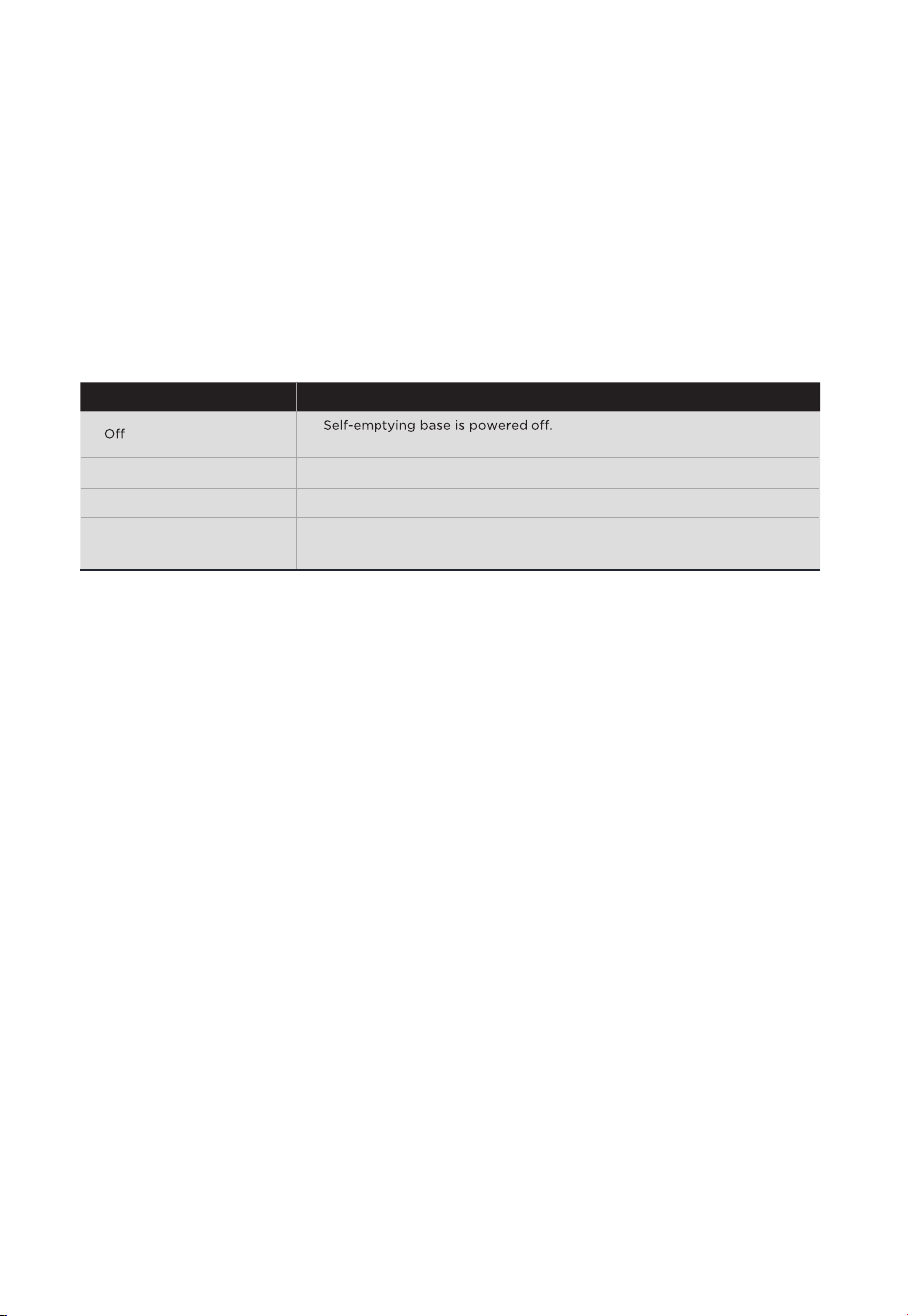
2.
3.
Status Indicators of Self-Emptying Base
White light flashes quickly
Indicator Light Status
Self-emptying base is powered on.
The air duct of the dust cup may be clogged.
Please check and empty the dust cup in time.
Self-emptying is in progress.
Self-emptying base is in sleep mode.
White light stays on
White light flashes slowly
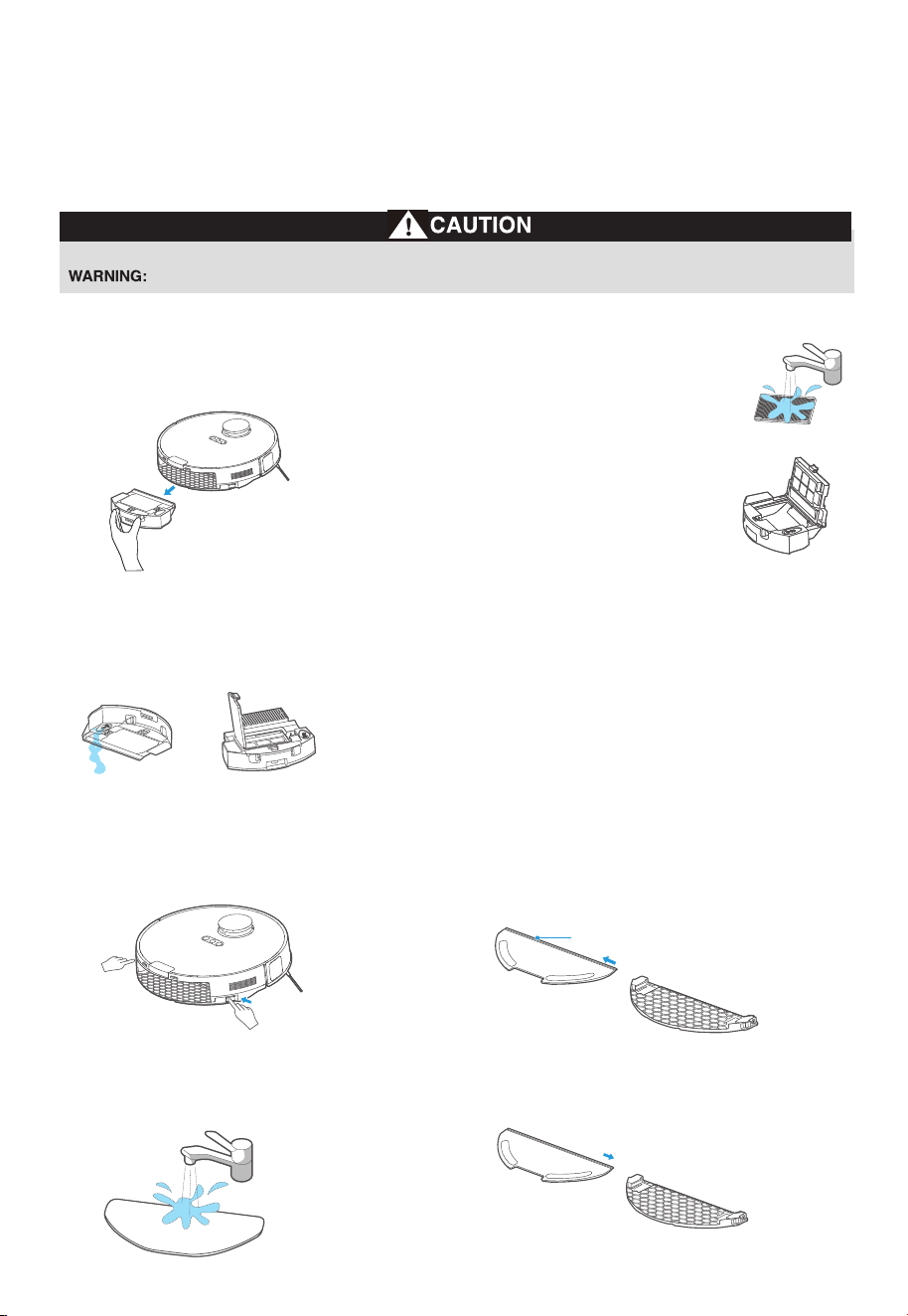
Dustbin/Water tank maintenance (clean as needed)
Take out the dustbin:
Press the dustbin release button
as shown and take out the dustbin.
1.
Remove debris by tApping the
filter against your garbage bin.
You can clean the dustbin, the
filter and filter mesh with water,
but remember to dry them
THOROUGHLY before reinserting
them into the robot (Do not clean
the filter elements with detergents).
3.
Reinsert the dustbin into the robot. It is
recommended to clean the filter elements
every week and replace them every 1-3 months.
4.
Moving parts! Recharge robot vacuum cleaner after each use.
Never operate robot without all filters, filter screen and dustbin in proper position.
Open the lid of the water tank and
clean out the remaining water.
Open the lid of the dustbin and
take out the filter.
2.
Cleaning the mop assembly
Release the mop assembly and clean it.1.
Wash the mopping cloth with water
and dry it.
3.
Place the cleaned mopping cloth
back to the mop holder and re-install
the mop assembly to the robot.
4.Remove the mopping cloth from
the mop holder.
2.
14
MAINTENANCE
Push/Pull Slot
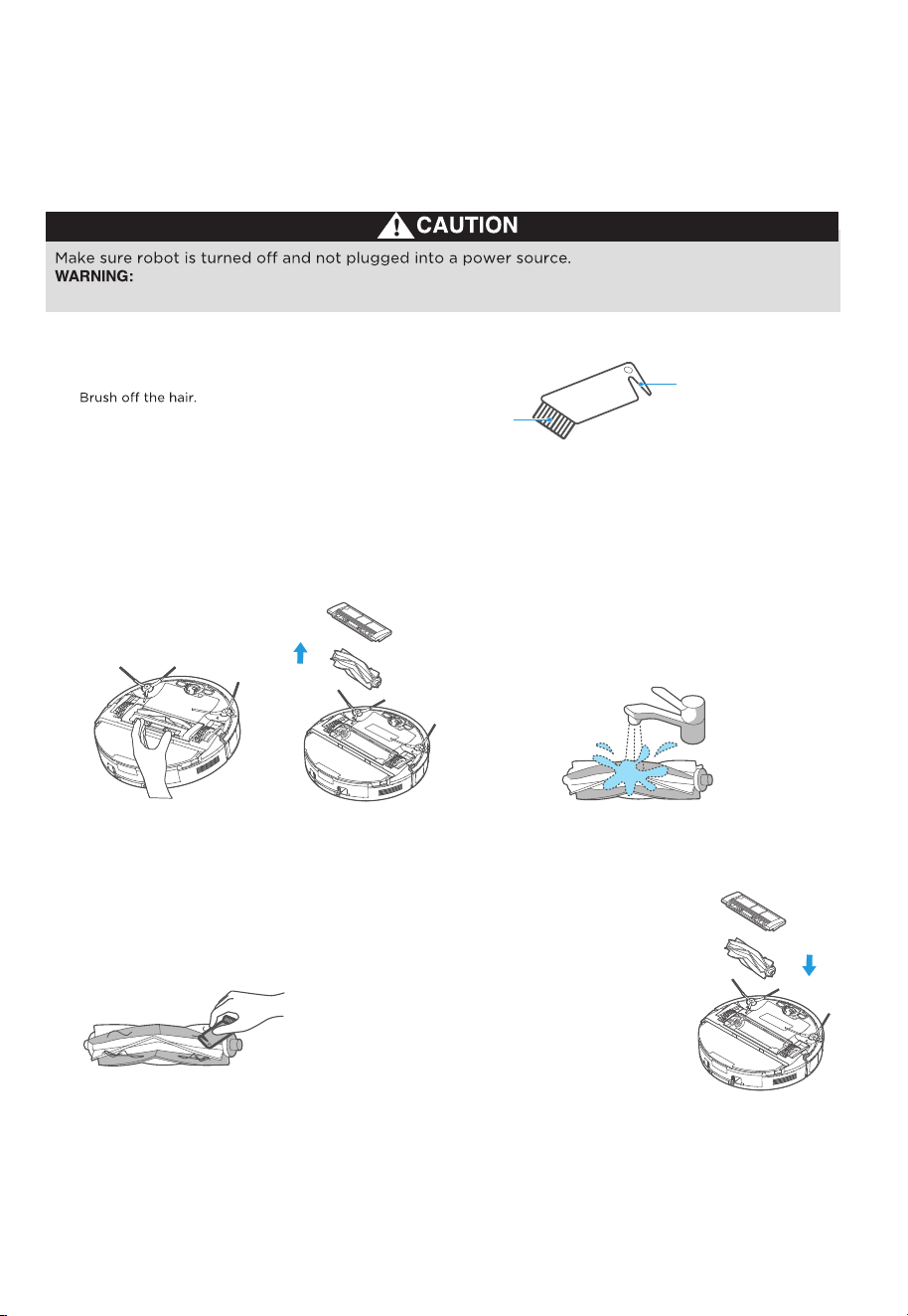
Do not attempt to remove belt.
Cleaning tools
Roller brushmaintenance (weekly cleaning recommended)
Turn the main unit over. Release the
cover plate of the roller brushand
pull it out, and lift the right side of
the roller brushto take it out.
1.
After cleaning, press the end
cover back to the roller brush
body. Install the roller brush
body into the main unit
according to the direction
shown in the figure. It is
recommended to clean the
roller brushevery week and
replace them every 6 months.
4.Clean the roller brushand its
cover plate with the cleaning
brush or a soft cloth.
2.
Wash the roller brushwith water and dry it. 3.
How to use the cleaning brush:
① Cut the hair entangled on the roller brushwith the blade.
②
Brush
Blade
15
MAINTENANCE
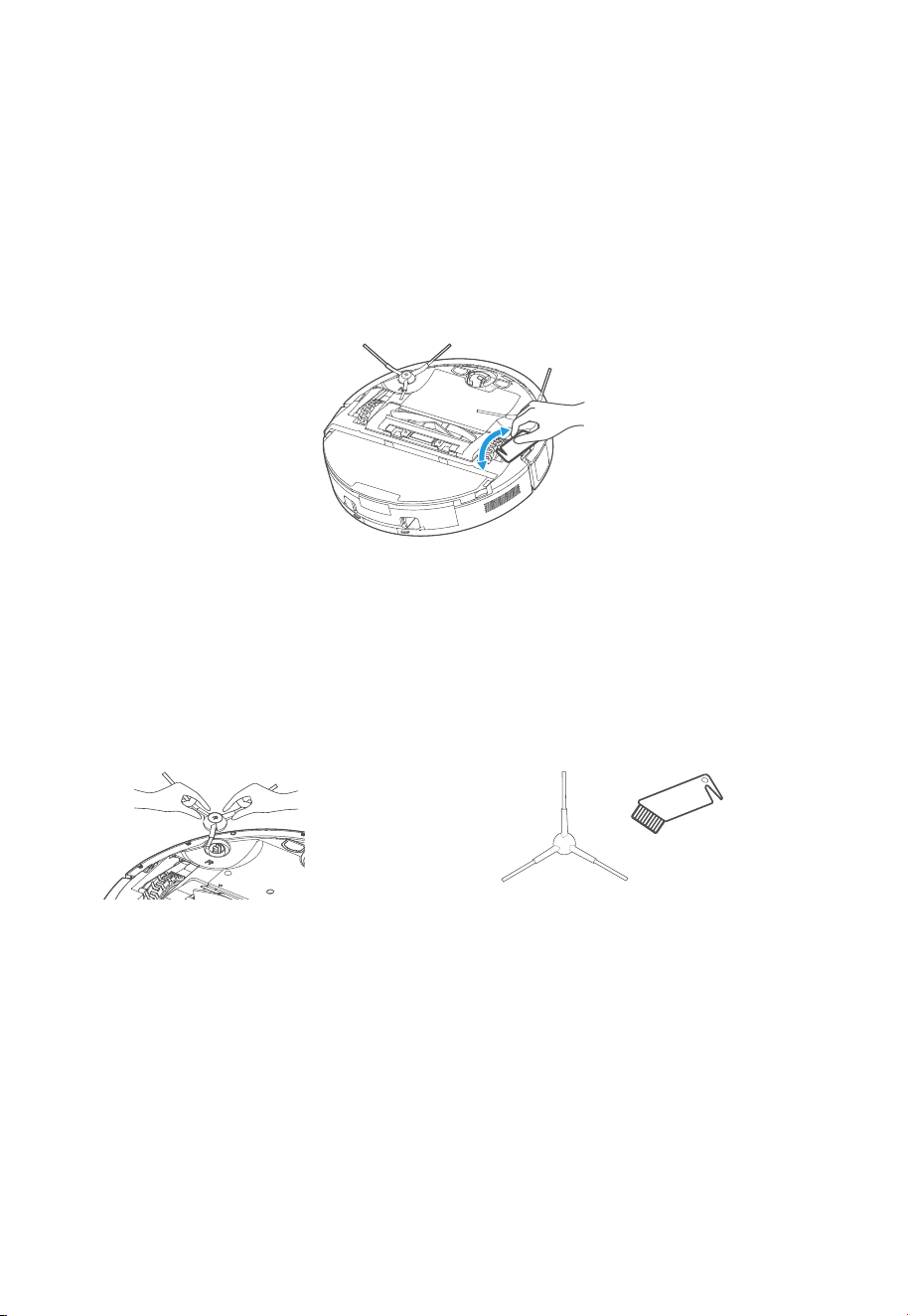
16
MAINTENANCE
Side brushes cleaning (weekly cleaning recommended)
Pull out the side brush.
Remove dust on the side brush.
1. It is recommended to clean the side brush
every week and replace them every 6 months.
2.
Main wheels cleaning (weekly cleaning recommended)
Rotate the main wheels back and forth to remove debris or dust - remove and take out the hair or debris with the
cleaning brush or a soft cloth.
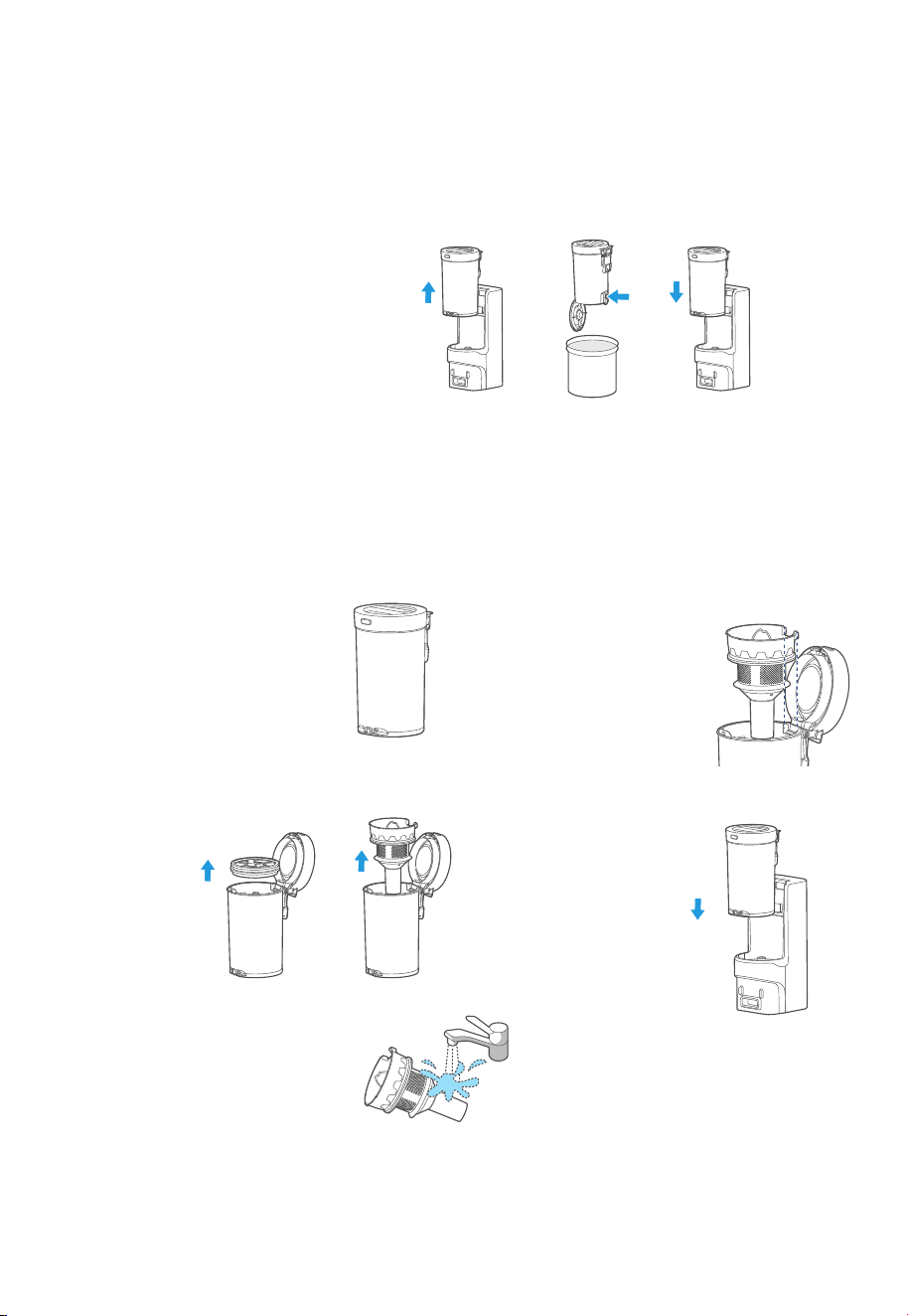
Empty as soon as dirt reaches the MAX
mark. Remove the dust cup by moving it
vertically upwards.
1.
Hold the dust cup over a bin. Press the
lower dust cup release tab and empty
the trash into the bin.
2.
Take out the sponge filter and the
cyclone (use the handle) as shown in
figure.
2.
Close the tab, and place the dust cup straight
down back into the self-emptying base.
3.
How to empty the dust cup
Press the upper release tab to open the
top of the dust cup.
1.
How to clean the cyclone
Rinse the cyclone with clean water and
make sure it is completely dry before
putting it back.
Note: Do not use detergents, polishes or
air fresheners to clean the dust cup and
cyclone to avoid corrosion.
3.
Place the cyclone and sponge filter
back down into their regular positions.
Close the dust cup so it clicks into
place.
4.
Place the dust cup back into the
self-emptying base.
5.
17
MAINTENANCE
1 2 3
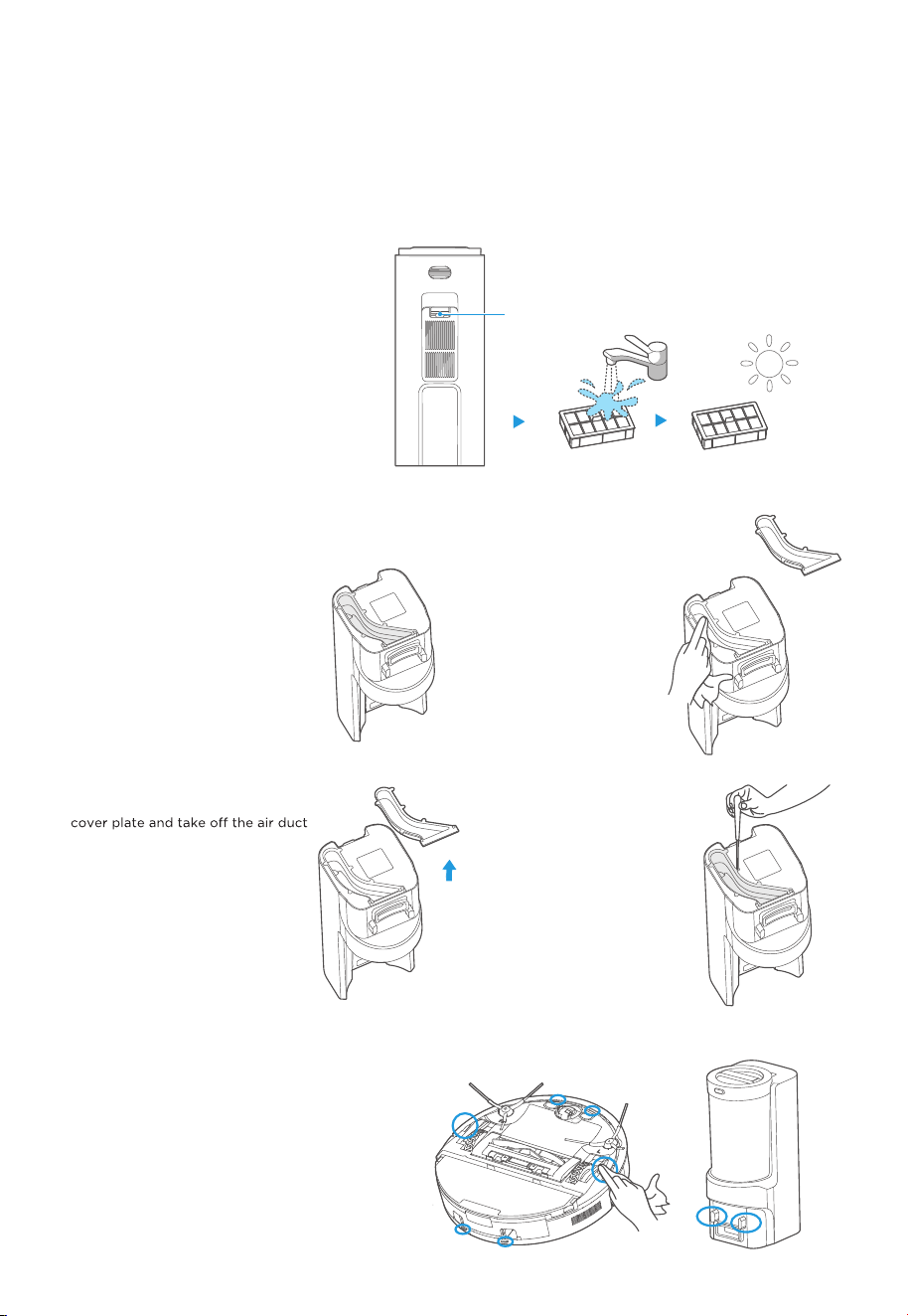
Rinse the filter with clean water until it is
clean. Make sure the filter is completely
dry before putting it back.
2.
Release Button
Press the release tab of the cover of the
filter on the back of the base to remove
the cover.
1.
How to clean the filter
If the air duct has been clogged, use a
screwdriver to unscrew the air duct
cover plate.
2.
Turn the self-emptying base upside
down and check whether the dust
collection air duct has been clogged.
1.
How to clean the dust collection air duct
After cleaning, reinstall the air
duct cover and tighten the air
duct cover.
4.
Clean and wipe the air duct
and air duct cover plate with
a dry cloth.
3.
MAINTENANCE
18
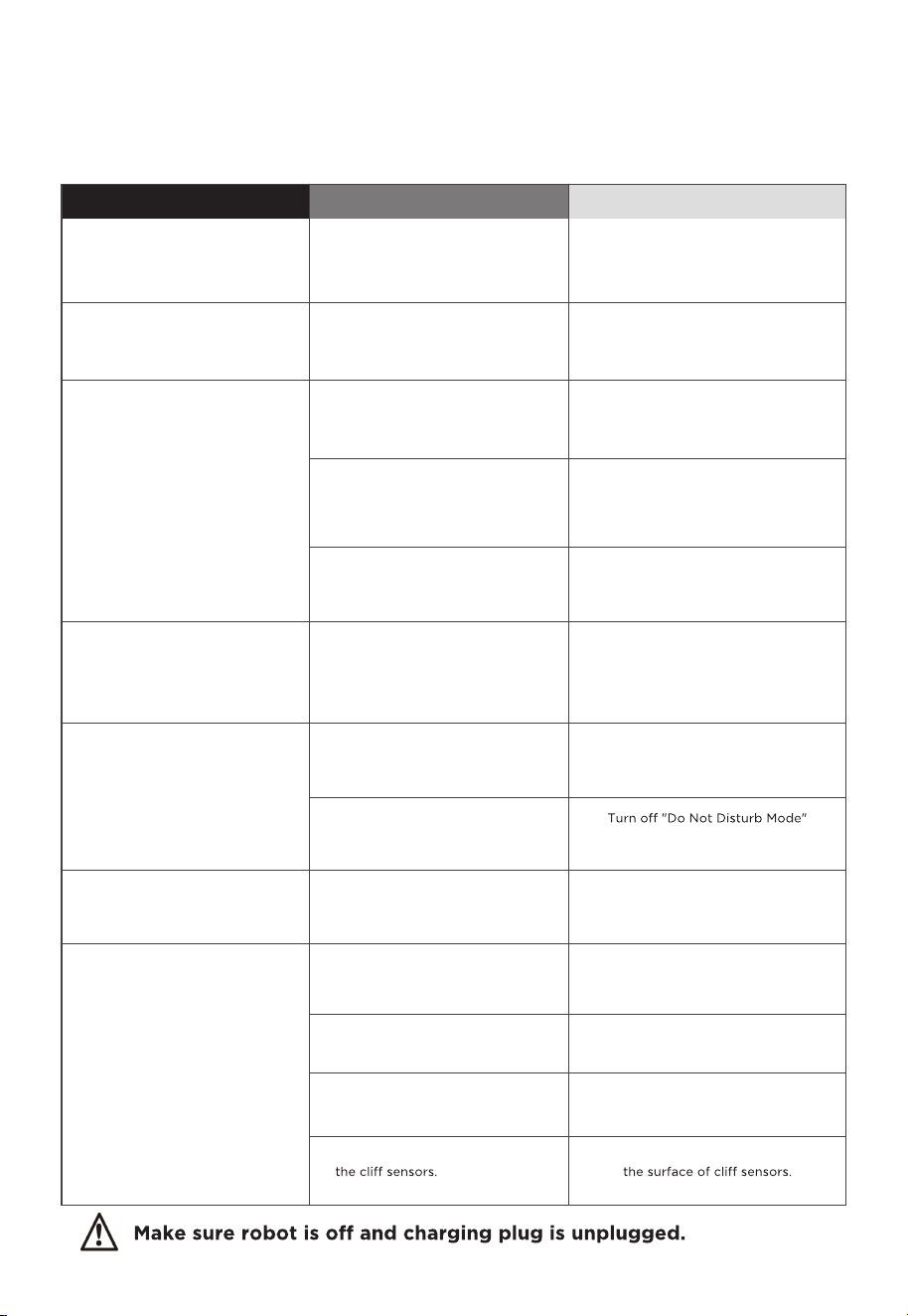
Sensors and charging contacts cleaning
Wipe the sensors on the robot and charging contacts
on both the robot and the base with a dry, soft cloth.
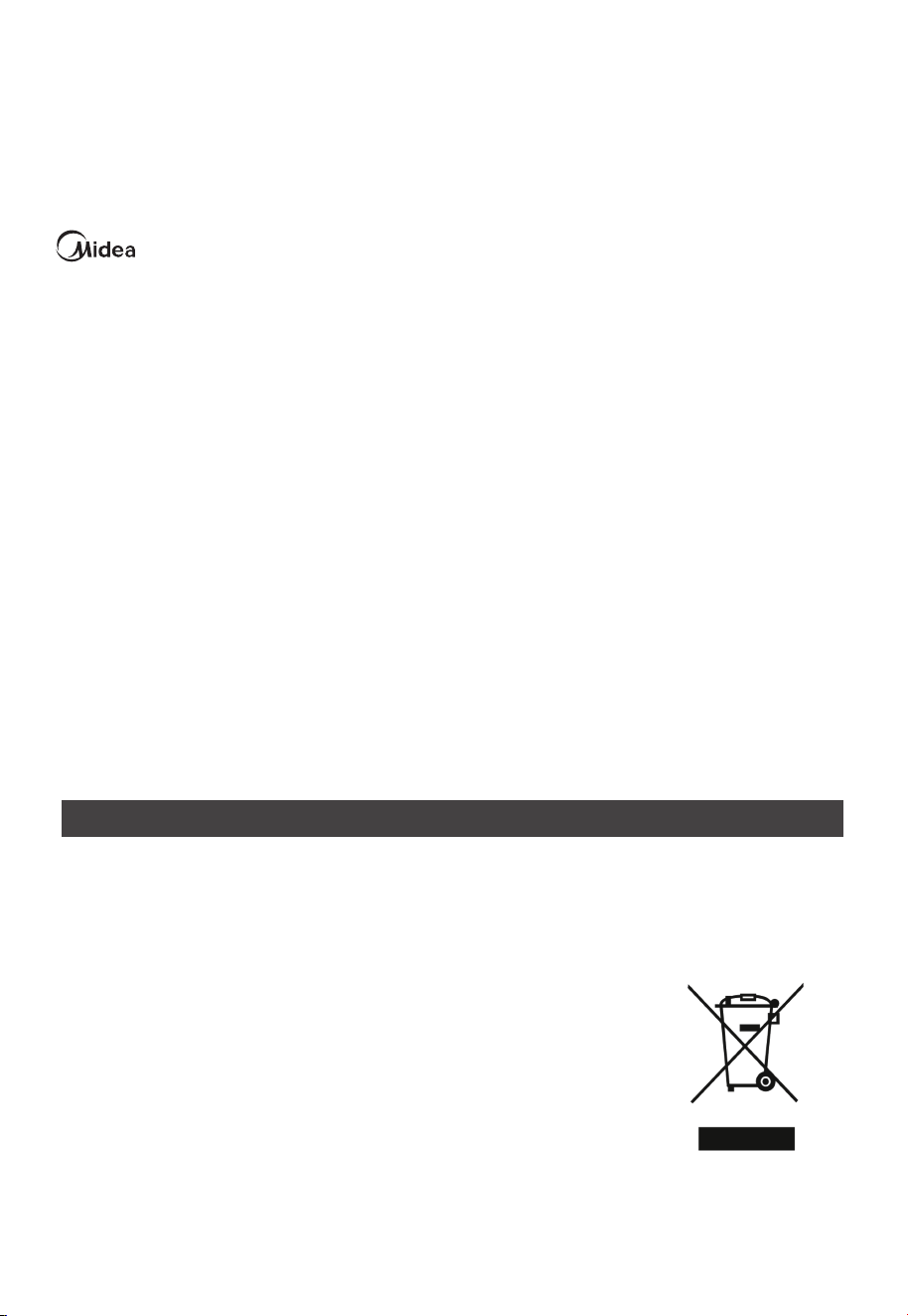
TROUBLESHOOTING
Possible Causes
The robot vacuum is not in
contact with the charging
contacts.
Place the robot vacuum 1m in
front of the self-emptying base
and press the recharging button.
Actions
The self-emptying base is
placed improperly.
Place the self-emptying base on
a level surface that is free of
obstacles.
The robot vacuum is
entangled/stuck by objects
(such as cords) on the floor.
Please put away the scattered
cords and objects on the floor.
The side brush/roller brushis
stuck so that the robot vacuum
cannot move normally.
Remove the objects that caused
the main/side brush to be stuck
and place the robot flat on the
floor and restart.
The robot vacuum is stuck by
obstacles.
Remove the obstacles and
proceed with cleaning, or set
No-go zones in App.
The battery level of the robot
vacuum is running low.
Let the robot vacuum return for
recharging.
Scheduled Appointment has
been cancelled.
Reset Appointment.
The robot vacuum is in Do Not
Disturb Mode.
Left/right wheel is suspended.
Place the robot vacuum flat on
the floor and retry.
The protective cover of
navigation module is stuck.
Gently tap the protective cover
to remove dust.
There is obstacle ahead. Remove the obstacle ahead.
The bumper is stuck.
Gently tap the front bumper to
remove dust.
There is dust accumulated on
Clean the dust accumulated on
The robot vacuum
cannot be recharged
Faults
The robot vacuum
cannot return for
charging
Cleaning process has
not been completed,
but the robot vacuum
returns for charging
Fail to clean as
Appointment
The robot vacuum
does not work
The robot vacuum
moves backward
The robot vacuum is
trapped
or adjust the "Do Not Disturb"
time interval.
19
DISPOSAL AND RECYCLING
Important instructions for environment
Compliance with the WEEE Directive and Disposing of the Waster Product:
This product complies with EU WEEE Directive (2012/19/EU). This product bears a classification
symbol for waster electrical and electronic equipment (WEEE).
This symbol indicates that this product shall not be disposed with other
household wastes at the end of its service life. Used device must be
returned to official collection point for recycling of electrical electronic
devices. To find these collection systems please contact to your local
authorities or retailer where the product was purchased. Each
household performs important role in recovering and recycling of old
appliance. Appropriate disposal of used appliance helps prevent
potential negative consequences for the environment and human
health.
logo, word marks, trade name, trade dress and all versions thereof are valuable assets of
Midea Group and/or its affiliates (“Midea”), to which Midea owns trademarks, copyrights and other
intellectual property rights, and all goodwill derived from using any part of an Midea trademark. Use
of Midea trademark for commercial purposes without the prior written consent of Midea may
constitute trademark
infringement or unfair competition in violation of relevant laws.
This manual is created by Midea and Midea reserves all copyrights thereof. No entity or individual
may use, duplicate, modify, distribute in whole or in part this manual, or bundle or sell with other
products without the prior written consent of Midea.
All the described functions and instructions were up to date at the time of printing this manual.
However, the actual product may vary due to improved functions and designs.
TRADEMARKS, COPYRIGHTS
AND LEGAL STATEMENT
20
21
Compliance with RoHS Directive
The product you have purchased complies with EU RoHS Directive (2011/65/EU). It does not contain
harmful and prohibited materials specified in the Directive.
Package information
Packaging materials of the product are manufactured from recyclable
materials in accordance with our National Environment Regulations. Do
not dispose of the packaging materials together with the domestic or
other wastes. Take them to the packaging material collection points
designated by the local authorities.
DATA PROTECTION NOTICE
For the provision of the services agreed with the customer,
we agree to comply without restriction with all stipulations of applicable data protection law, in line
with agreed countries within which services to the customer will be delivered, as well as, where
applicable, the EU General Data Protection Regulation (GDPR).
Generally, our data processing is to fulfil our obligation under contract with you and for product
safety reasons, to safeguard your rights in connection with warranty and product registration
questions. In some cases, but only if appropriate data protection is ensured, personal data might be
transferred to recipients located outside of the European Economic Area.
Further information are provided on request. You can contact our Data Protection Officer via
[email protected]. To exercise your rights such as right to object your personal date being
processed for direct marketing purposes, please contact us via [email protected]. To find
further information, please follow the QR Code.
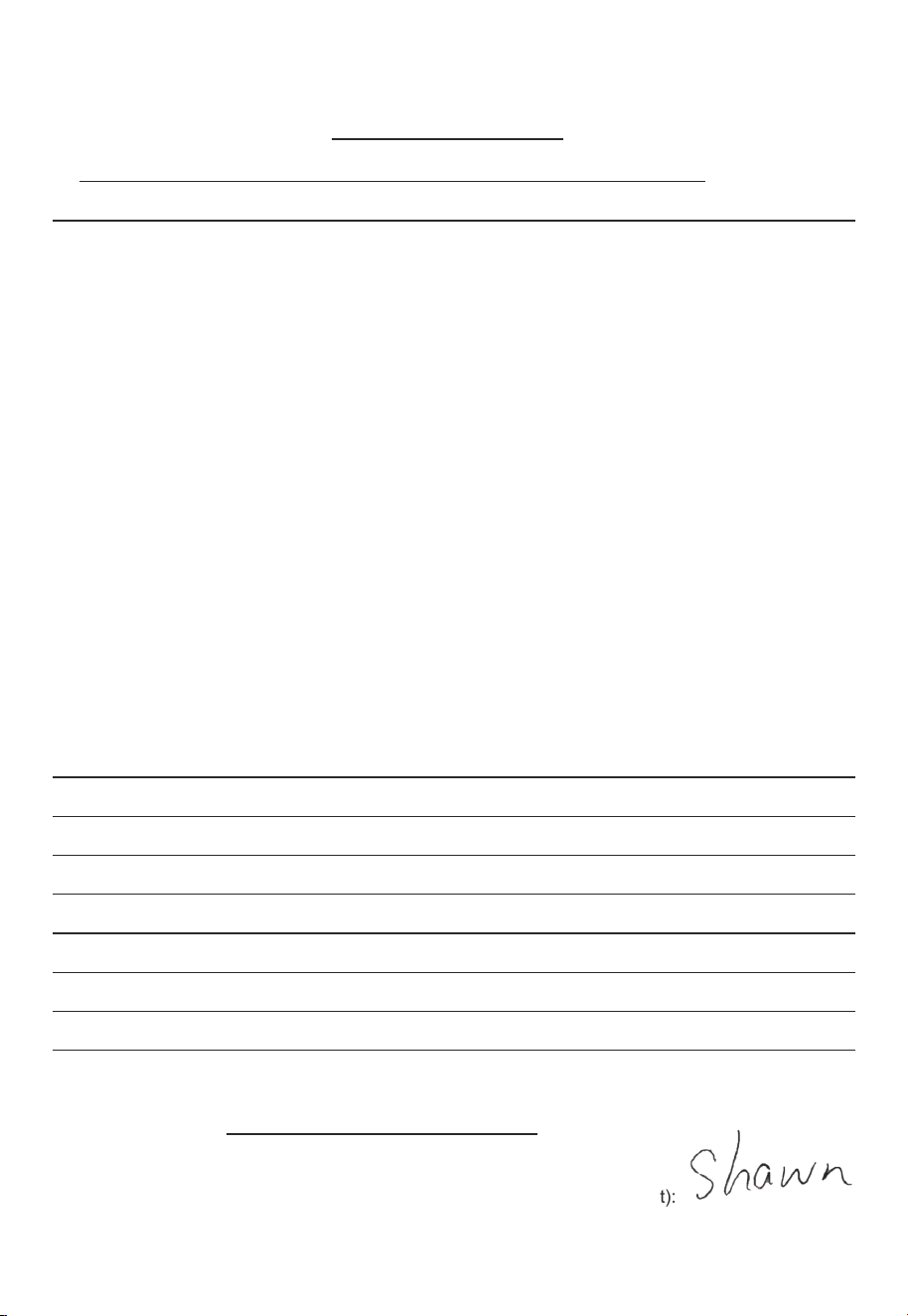
Declaration of Conformity (DoC)
U
nique identification of this DoC: NER E10s-002
W
e Midea Robozone Technology Co.,Ltd.
N
o.39 Caohu Avenue, Xiangcheng Economic Development Zone, Suzhou,
Jiangsu, China
responsibility that the product:
p
roduct name:Robot Vacuum Cleaner
t
rade name:Midea/eureka/Comfee/obode
t
ype or model:NER E10s、VCR S10 Plus
t
o which this declaration relates is in conformity with the essential requirements and other relevant
r
equirements of the Directive:
L
ow Voltage Directive 2014/35/EU
E
lectromagnetic Compatibility Directive 2014/30/EU
R
adio Equipment Directive 2014/53/EC
E
rP Directive 2009/125/EC STR: COMMISSION REGULATION (EU) 2023/826
R
OHS Directive 2011/65/EU
(
EC)No 1907/2006
T
he product is in conformity with the following standards and/or other normative documents:
E
N 60335-2-2:2010+A11:2012+ A1:2013
E
N 60335-1:2012+A11:2014+A13:2017+A1:2019A14:2019+ A2:2019+A15:2021
E
N 62233:2008
E
N 61000-3-3: 2013+ A1:2019+A2:2021 EN IEC 55014-1: 2021
E
N IEC 55014-2: 2021 EN IEC 61000-3-2: 2019+A1:2021
E
N 300 328 V2.2.2 EN 301 489-1 V2.2.3 EN 301 489-17 V3.2.4 EN 62479:2010
E
N 62321-4:2017 EN 62321-5:2013 EN 62321-6:2015 EN 62321-7-1:2015 EN 62321-7-2:2017
E
N 62321-8:2017
S
upplementary information:
T
echnical file held by: Midea Robozone Technology Co.,Ltd .
P
lace and date of issue (of this DoC): CHINA 2024-3-29
S
igned by or for the manufacturer Name (in print):
(
Signature of authopised person) Title:
Certified engineer
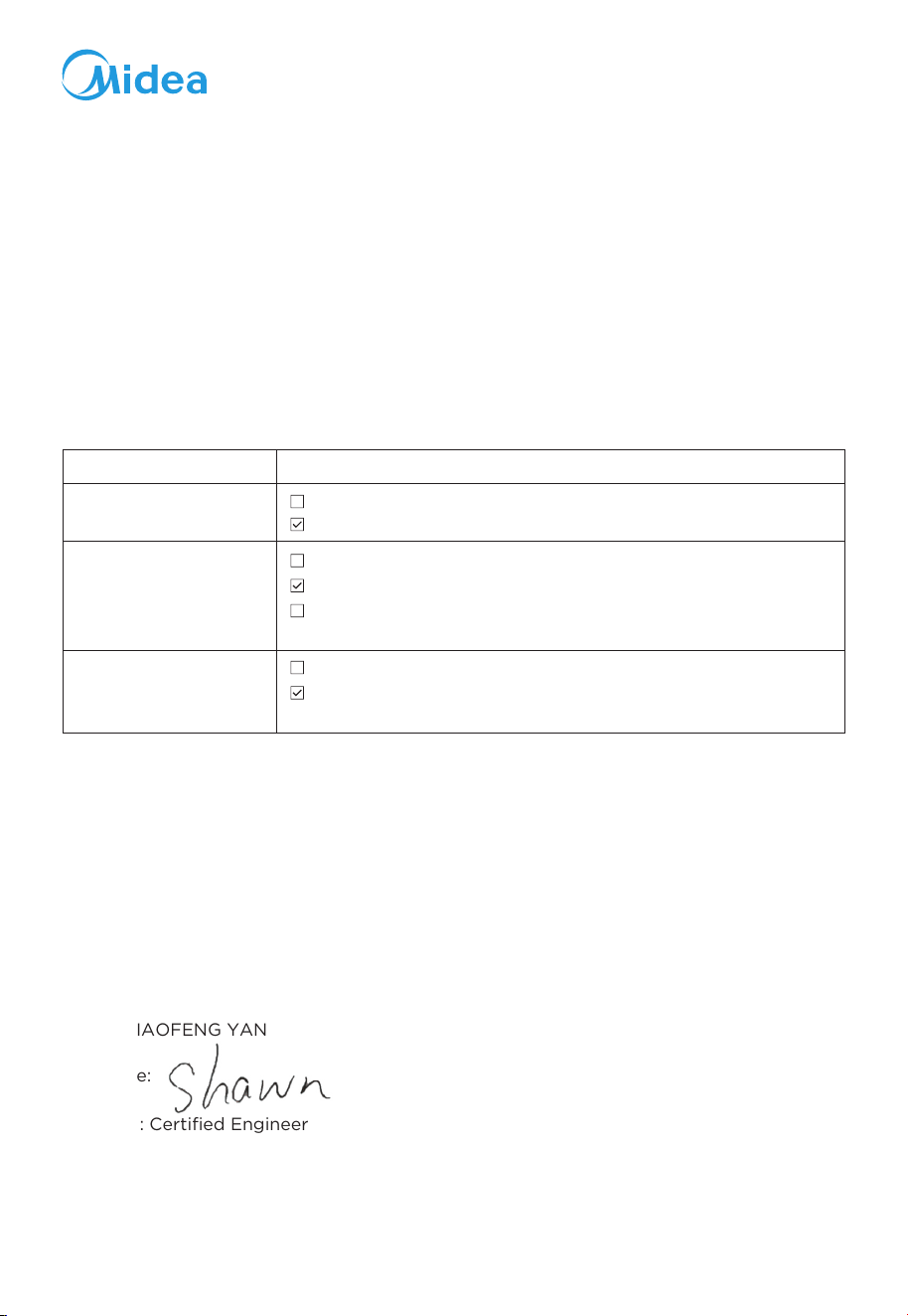
Statement of compliance for UK PSTI
We Midea Robozone Technology Co.,Ltd.
To which this Statement of compliance is presented, meeting the relevant requirements
of 2023 No. 1007 The Product Security and Telecommunications Infrastructure (Security
Requirements for Relevant Connectable Products) Regulations 2023, Schedule 2
Conditions for Deemed Compliance with Security Requirements based on the test
reports and technical documents.
Signed for and
on behalf of:
Midea Robozone Technology Co.,Ltd.
Brand: Midea
Product Name: Robot Vacuum Cleaner
Product Model/type: VCR S10 Plus
Batch/serial no.: See the surface of the product
Support period with end date Period: 3 years End date: 010627
Clause
Requirements/Standards in PSTI we met
Passwords
1(1) to (4) of Schedule 1
The product meets the following requirements of PSTI Schedule 1 or Schedule2:
hereby declare for below product that we meet mandatory below requirements and standards.
1(1) of Schedule 1 and 5.1-1&5.1-2 of ETSI EN 303645 v2.1.1(2020-06)
Information on how to
report security issues
2(1) and 2(3) of Schedule 1 and paragraph 6.2.2&6.2.5&6.5 of
ISO/IEC 29147:2018(2018-10) &2(4) of Schedule 2
Information on minimum
security update periods
2(1) to (3) of Schedule 1
2(1) of Schedule 1 and 5.2-1 of ETSI EN 303645 v2.1.1(2020-06)
3(1)&3(3)&3(5)&3(6) of Schedule 1 and 3(3) to (4) of Schedule
2: 5.3-13 of ETSI EN 303645 v2.1.1(2020-06)
3(1) to (6) of Schedule 1
Address: No.39 Caohu Avenue, Xiangcheng Economic Development Zone, Suzhou,
Jiangsu, China
Name:
XIAOFENG YAN
Signature:
Function:
Certified Engineer
Date of issue: 250424
Place of issue: No.39 Caohu Avenue, Xiangcheng Economic Development Zone, Suzhou,
Jiangsu, China