
1
Thank you for purchasing this marine gauge radio!
Please read the instructions carefully, so you will know how to operate your product
properly. After you have nished reading the instructions, keep this document in a safe
place for future reference.
Table of Contents
Important ........................................................................................................................... 2
Introduction ........................................................................................................................ 3
Package Contents ............................................................................................................. 3
Control Panel ..................................................................................................................... 4
Mounting On Dashboard .................................................................................................. 5
Wiring ................................................................................................................................ 6
Power On/Standby ............................................................................................................ 7
Set Clock ........................................................................................................................... 7
Adjust/Mute Volume ........................................................................................................... 7
Reset The Unit ................................................................................................................... 7
Listen To Radio ..................................................................................................................8
Play Audio Through Bluetooth ........................................................................................... 9
Play Audio From USB ...................................................................................................... 10
Play Audio From AUX ..................................................................................................... 11
Output Audio .................................................................................................................... 11
Change Settings .............................................................................................................. 12
Specications .................................................................................................................. 13
Troubleshooting ............................................................................................................... 15

2
Important
Read and understand all instructions before you use your product. If you do not
follow the instructions in this manual, we are not responsible for injury or damage
resulting from improper handling. This will also void the warranty.
Important safety precautions
• Be sure to observe the following guidelines:
- Do not increase speaker volume so high that you cannot hear what is around you.
- Use caution or temporarily discontinue use in potentially hazardous situations.
• Do not make any adjustment on the product when driving or in other situations
where distractions can be hazardous. Responsible and safe driving is your primary
responsibility when operating a vehicle.
• Start volume at a low setting then gradually increase the volume until you can hear it
comfortably, without sound distortion or ear discomfort.
• In the event of smoke, strange noise or odor emitted from the product or any other
abnormal operational signs appearing on the product, disconnect the product from the
power supply. Discontinue use and contact your dealer or our technical support. Using
the product in this condition may result in permanent damage to the system.
• Servicing must only be carried out by a technician. Contact our technical support for
any service question.
Installation precautions
• WARNING: Always consult a professional installer.
• Installation must be performed by a professional. Contact our technical support for any
installation question.
• Use only installation parts provided with the product.
• Before installation, disconnect the negative terminal of the vehicle battery to prevent
damage to the product, re, and/or possible injury.
• If extending the power cable which connects to the vehicle battery, we recommend to
run the extended cable to the battery through a fuse box (not included) with at least 15A.
• The ground cable should be as short as possible. Connect the ground cable to metal
parts of your vehicle, or to the battery if your vehicle does not have a grounded chassis
frame.
If extending the ground cable to the battery, make sure to use a high quality cable with
proper gauge rating.
3
• Replace the old fuse with the one of the same rating.
• Observe the safety and operating instructions of the devices which are connected to
the product.
Care for your product
• Do not use abrasive cleaning materials on the display or bezel.
• This product is waterproof against splashing water. However, never submerge the
product to water or other liquids.
Care of the environment
Please inform yourself about the local separate collection system for electrical and
electronic products. Do not throw away the product with the normal household waste at the
end of its life, but hand it in at an ofcial collection point or recycling. By doing this, you help
to preserve the environment.
Introduction
The product is designed as a marine gauge radio with a built-in four channel amplier.
Through Bluetooth connection, audio can be streamed from a mobile phone to this product.
Music from an external device (e.g. a USB ash drive, mobile phone or MP3 player) can also
be played on this product via USB port or AUX input jacks.
You can also output audio from this product to an external amplier or powered speakers
via RCA outputs.
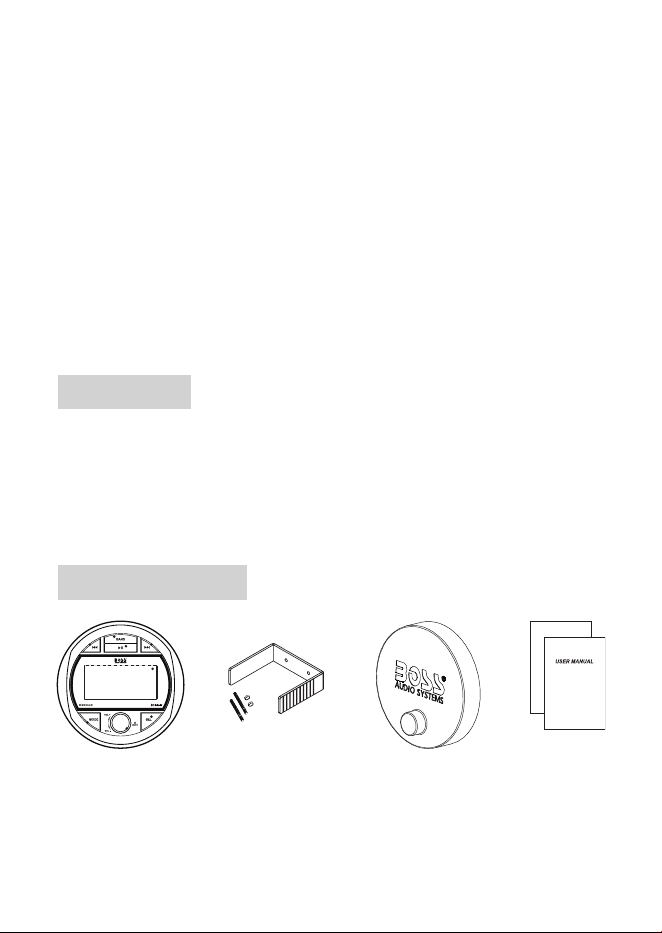
Package Contents
Marine gauge radio
*
Mounting kit
(1x U-bracket, 2x bolt & nut)
Rubber cover
User manual &
warranty card
* The rubber cover is designed to protect the radio’s control panel against the harsh marine
environment, and additionally UV exposure, water ingress and abrasion.
4
Control Panel
1
7
2
4
1
5
6
3
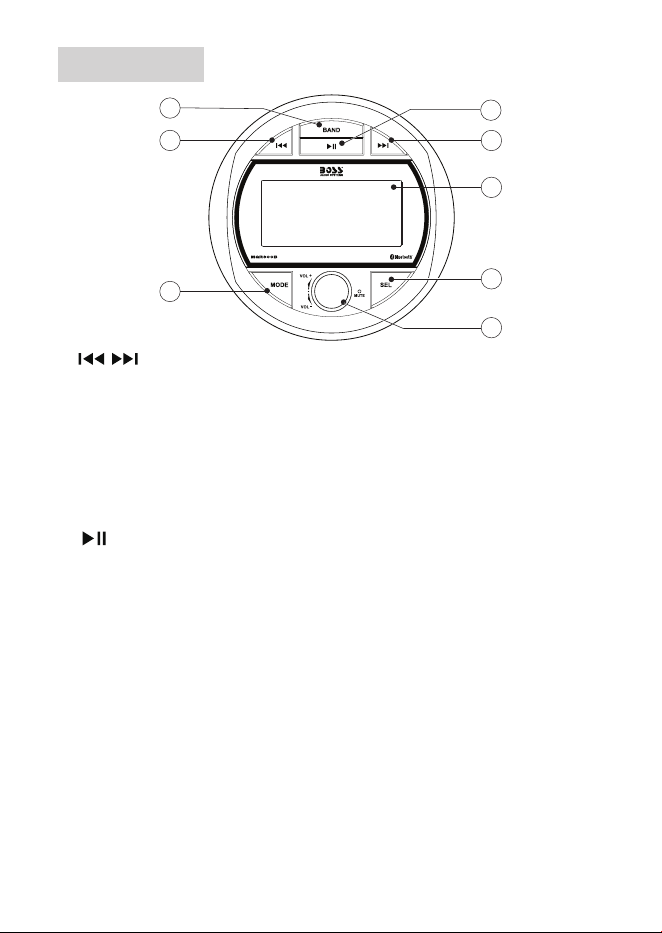
1 /
• In USB/Bluetooth mode, select the previous/next music le; hold down to fast search .
• In radio mode, tune to a radio station; hold down to enter manual tuning mode.
2 BAND
• In USB mode, press to enter music folder or le search mode; hold down to activate
setting of repeat or shufe play mode.
• In radio mode, select a radio band (FM1/FM2/FM3/AM1/AM2); hold down to auto search
and store radio stations in FM or AM bands.
3
• In USB/Bluetooth mode, start, pause or resume play.
• In radio mode, select a preset radio station.
4 LCD display
• Show current status or menu options.
5 SEL
• Navigation menu options, or conrm a selection; hold down to view clock.
6 Function knob
• Press to turn the unit on; press and hold to turn the unit off.
• In power on mode, press to mute or restore volume.
• Rotate to adjust volume.
7 MODE
• Select a source: radio, Bluetooth, AUX In, USB (USB source can only be selected if a
USB ash drive is connected and has playable media).
5
Mounting On Dashboard
See the section “Installation precautions” on page 2.
Use only installation parts provided with the product. Using other mounting
methods may void the warranty.
Before you drill or cut any holes, investigate your vessel’s layout very carefully.
Take special care when you work near the gas tank, fuel lines, hydraulic lines
and electrical wiring.
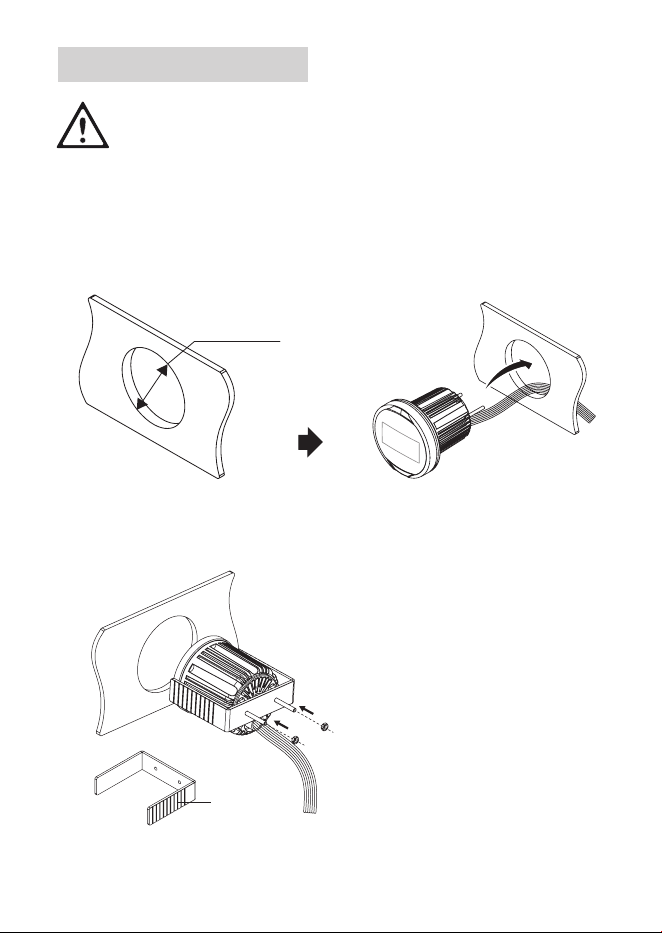
1. Cut a mounting hole (Ф 3.13” / 79.5 mm) in the dashboard.
2. Slip the unit through the mounting hole in the dashboard.
Ø 3.13” / 79.5 mm
3. Fasten the unit to the dashboard with the supplied U-bracket and two bolts and nuts.
If needed, remove one or more break-away tabs on the U-bracket to shorten the bracket
for rm fastening to the dashboard.
Break-away
tabs
6
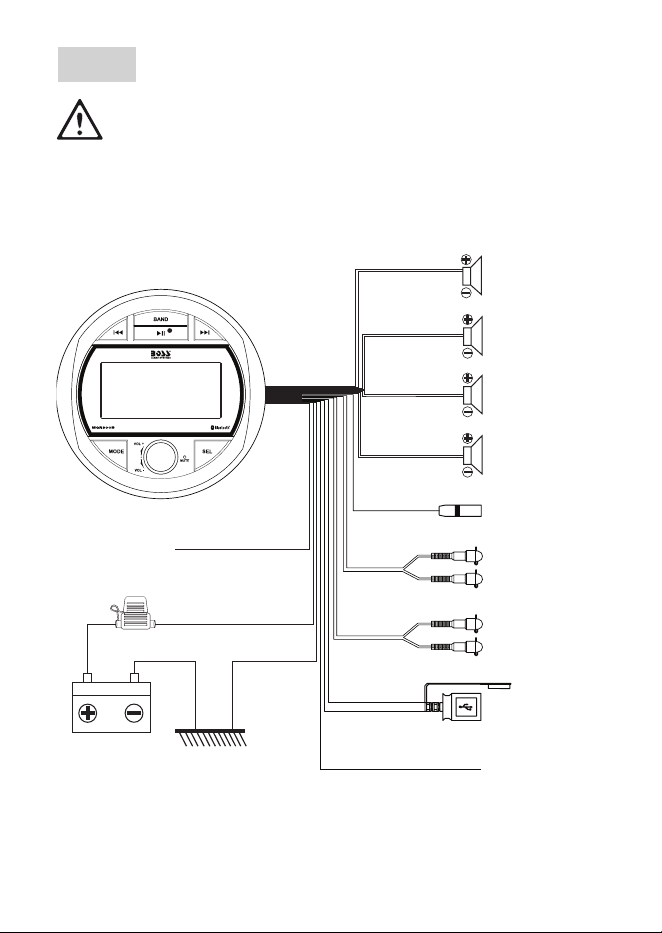
Wiring
See the section “Installation precautions” on page 2.
Disconnect the negative terminal of the vehicle battery prior to wiring.
Connect the unit to a 12V DC battery and negative ground only.
Connect speaker wires to speakers with 4 - 8 Ω .
Never ground or short the speaker wires.
Insulate all bare wires and unconnected wires with electrical tape.
To front left speaker
To front right speaker
To rear left speaker
To rear right speaker
To an audio output on
a playback device
To the power terminal
on an amplifier
Charging port, or to
a USB device for
audio media play
To radio antenna
White
White/Black
Gray
Gray/Black
Green
Green/Black
Violet
Black
Violet/Black
To an audio input on
an amplifier or signal
processor
AUX IN
Gray
Blue
RCA OUT
USB port
Black
Antenna jack
REMOTE OUT
10A fuse
Yellow (Battery wire)
Red (Ignition wire)
Ground wire
Metal part of the vehicle
To the accessory
power switch

7
Power On/Standby
• To switch the unit on, press briey the function knob.
When switched on, the unit switches to the last selected source and the button
backlights are illuminated.
• To switch the unit to standby, press and hold the function knob.
When switched to standby, clock is displayed and the button backlights are off.
Set Clock
1. In power on mode, press SEL repeatedly until the clock option/hour digits is selected.
2. When hour digits ash, rotate the function knob to set the hour.
3. Press the function knob (or SEL) to conrm. Minute digits ash.
4. When minutes ash, rotate the function knob to set the minute.
5. Press the function knob (or SEL) to conrm. 12 or 24 hour format prompts for selection.
6. Rotate the function knob to select 12 or 24 hour format.
7. Press the function knob (or SEL) to conrm. The clock is set.
To view clock
In power on mode, press and hold SEL to display clock. The clock is displayed briey.
Adjust/Mute Volume
• To increase or decrease volume, rotate the function knob.
• To mute volume, press briey the function knob.
Reset The Unit
If the unit fails to operate properly, reset the unit. After resetting, all the settings will be
restored to the default.
1. In power on mode, press and hold MODE for ve seconds to reset the unit.
“RESET” is displayed briey. The unit will switch to standby after resetting.

8
Listen To Radio
You can listen to FM and AM radio, and store the radio stations. The stored radio stations
can be retained if the unit is disconnected from the vehicle battery.
Select a radio band
1. Press MODE repeatedly to select radio. “FM” or “AM” is displayed.
2. Press BAND repeatedly to select FM1, FM2, FM3, AM1 or AM2.
Tune to a radio station
1. Switch the unit to a radio band.
2. Press briey / . The unit automatically tunes to a station with strong reception.
3. Repeat the steps above until your nd your desired station.
To tune to a weak station
1. Press and hold / to enter manual tuning mode. “MANUAL” is displayed briey.
2. Press repeatedly / to adjust radio frequency until you nd optimal reception.
- Manual tuning mode will automatically exit after three seconds of button inactivity.
Then “AUTO” is displayed briey.
Store radio stations automatically
Each radio band (FM1/FM2/FM3/AM1/AM2) can store six radio stations.
1. In radio mode, press BAND to select an FM or AM band.
2. Press and hold BAND for two seconds to search and store stations.
- All FM or AM stations will be searched and stored in FM or AM bands.
Store radio stations manually
Each radio band (FM1/FM2/FM3/AM1/AM2) can store six radio stations.
1. Select a radio band and tune to a radio station.
2. Press and hold for two seconds to activate program mode.
3. When “SAVE P1” is displayed, rotate the function knob to allocate a number (1-6) to this
radio station. Then press the function knob (or SEL) to conrm.
- If there are three seconds of button inactivity, program mode will automatically exit
without programming the radio station.
4. Repeat the steps above to store more radio stations.

9
Select a stored radio station
Each radio band (FM1/FM2/FM3/AM1/AM2) can store six radio stations.
1. Select a radio band.
2. Press briey to select a stored radio station. A preset number is displayed.
Play Audio Through Bluetooth
Pair with a mobile phone
Before you can stream music from your mobile device to the unit, you must pair the unit with
your mobile phone through Bluetooth.
1. Switch the unit to Bluetooth source. Press MODE repeatedly until the display shows “BT
MUSIC”. Then “UNPAIRED” is displayed. This indicates that the unit is not connected to
a mobile device and is currently in pairing mode.
2. On your mobile phone, enable Bluetooth then select “BOSS AUDIO SYSTEMS
MGR300B” to pair the unit with your mobile phone. If prompted for password, input
“0000” on your mobile phone.
- When the unit connects to your mobile phone, is displayed.
- The unit automatically connects to the last paired device each time the two are
powered on. To connect to a second device, you have to disconnect the currently
connected device then repeat the steps above to pair with a second device.
Playback control through Bluetooth
1. When the unit is connected to your mobile phone, play audio les on your mobile device.
Music will be streamed and played through the speakers which are wired to the unit.
- For best sound performance, set the volume of your mobile device to maximum, then
adjust the volume through volume control on the unit.
2. Control playback as follows.
• To pause or resume playback, press .
• To select the previous or next music le, press / .
- During playback, the display scrolls the music title of the le being played.
- If there is an incoming call during play, music play will automatically pause. Music play
will automatically resume after the call ends.

10
Play Audio From USB
This unit can play audio les stored in a USB storage device.
1. Insert a USB storage device to the USB port on the unit.
2. The unit will automatically switch to USB source. Audio les from the USB device will
be played automatically.
- If a USB device is not inserted and has no playable media, USB source will not be
selected.
- During playback, the display scrolls the following information: le name, folder name,
le format, ID3 tag (if available), track number and elapsed track time.
- Press MODE repeatedly to switch between USB source and other sources.
3. Control playback as follows.
• To pause or resume playback, press .
• To select the previous/next music le, press / .
• To search fast backward or forward, press and hold / .
Select play mode
1. During USB play, press and hold BAND to activate play mode setting.
2. Rotate the function knob to select a play mode. The display shows the following play
mode options. Three seconds of button inactivity conrms selection.
• RPT ALL: play all the tracks repeatedly.
• RPT ONE: play the current track repeatedly.
1
is displayed.
• RPT FOLD: play the current music folder repeatedly.
F
is displayed.
• RDM ON: play all the tracks randomly. is displayed.
• RDM OFF: cancel random play mode.
Search by folder
You can select a music folder from a USB storage device and start audio playback from
the selected folder.
1. During USB play, press BAND once. “DIR SCH” is displayed.
2. When “DIR SCH” is displayed, rotate the function knob to select a music folder stored on
the USB device. The display shows a selected folder name accordingly.
3. Three seconds of button inactivity conrms selection. Playback will automatically start
from the rst track in the selected folder.

11
Search by track number
You can select a music le stored in a USB storage device and start playback from the
selected le.
1. During USB play, press BAND two times. The display shows “NUM SCH” briey, then
“NUM xxxx” (“xxxx” indicates a four-digit track number).
2. When “NUM xxxx” is displayed, rotate the function knob to input a digit (0-9) in each
digit position. To input a digit in a digit position, wait three seconds until the digit position
ashes.
For example, to select a track number of seven, the number input should be “0007”. So
do “0027” or “0127”.
3. Press the function knob (or SEL) to conrm. Playback will start from the selected track
number.
Play Audio From AUX
You can play audio from a playback device (e.g. CD/DVD player or VCR) through the
speakers which are wired to the unit.
1. Using an audio cable (not included) with RCA plugs, connect a playback device with two
channel audio outputs to the audio inputs marked “AUX IN” on the unit.
2. Press MODE repeatedly until “AUX IN” is displayed. Start playback on the connected
device and audio will be played through the speakers which are wired to the unit.
Output Audio
You can output audio from the unit to an external amplier or powered speakers.
1. Using an audio cable with RCA plugs (not included), connect the audio outputs marked
“RCA OUT” on the unit to the RCA audio inputs on an amplier or powered speakers.
2. Start play on the unit and audio will be output to the connected device.

12
Change Settings
The unit has menu options for you to change sound settings and other settings.
1. In power on mode, press SEL repeatedly to select a menu option. A selected option is
displayed.
2. When a menu option is selected/displayed, rotate the function knob to adjust values or
settings. Settings will be made if there are three seconds of button inactivity, and display
will return to the normal status.
Sound settings
• BAS: Change output level for bass sound (available only when EQ is set off).
• TRE: Change output level for treble sound (available only when EQ is set off).
• BAL: Adjust left to right speaker output balance.
• FAD: Adjust front to rear speaker output balance.
• EQ: Select a preset sound mode (a preset equalizer setting): EQ1, EQ2, EQ3, EQ4 or
EQ OFF.
• LOUD ON/OFF: Enable or disable loudness function. You can boost output level of low
and high frequencies when loudness is enabled.
• BEEP ON/OFF: Enable or disable beep tone each time you press a button.
• P-VOL: Set a startup volume level. If the volume at the last shutdown is less than the
set startup volume, the volume at the last shutdown will be used when rebooting. If
the volume at the last shutdown is greater than the set startup volume, the set startup
volume will be used when rebooting.
• DX/LOC: Select “DX” when most radio stations in your area are weak. FM stations with
strong and weak signals will be received.
Select “LOC” when most radio stations in your area are strong enough. FM stations only
with strong signals will be received.
• STEREO/MONO: Select “MONO” when the radio signa is weak to improve sound quality
(FM stereo effect will be lost). Select “STEREO” to receive FM stereo broadcast.
Clock setting
See the secton “Set Clock” on page 7 for details.
Other settings
• AREA USA/EUR: Select the region (America or Europe) you are in to receive radio.
• LED ON/OFF: Turn the button blacklights on or off when the unit is switched on.

13
Specications
Audio
Max output power .................................. 60 W x 4CH
Speaker impedance ............................... 4 - 8 Ω
Frequency response .............................. 20 Hz-20 kHz
Signal-to-noise ratio ............................... >65 dB
AUX input sensitivity .............................. 1000 mV
Pre-amp output ...................................... Front, 1.5 V, full range
FM Tuner
Frequency range ................................... 87.5 – 107.9 MHz (USA)
87.5 – 108 MHz (Europe)
Frequency step ...................................... 200 kHz (USA)
50 kHz (Europe)
Usable sensitivity ................................... 4μV (S/N=30dB)
Stereo separation .................................. >25 dB
AM Tuner
Frequency range ................................... 530 – 1710 kHz (USA)
522 – 1620 kHz (Europe)
Frequency step ...................................... 10 kHz (USA)
9 kHz (Europe)
Usable sensitivity ................................... 36 dBμV (S/N=20dB)
Bluetooth
Bluetooth version ................................... 4.2
Bluetooth proles. .................................. A2DP, AVRCP
Bluetooth frequency ............................... 2402 - 2480 MHz
Transmission power............................... <4 dBm
Transmission distance ........................... Up to 33 ft /10 m (line of sight)
14
USB
Compatibility .......................................... Type A, USB 2.0 (High-Speed)
File system ............................................ FAT16, FAT32
Audio playback ...................................... MP3, WMA
USB charging ........................................ 5V DC, 1A (not for mobile device playback)
General
Power supply ......................................... 12V DC
Current consumption ............................. max 10A
Fuse ....................................................... ATO type, 10A
Operation temperature .......................... -4 to 140°F / -20 to 60°C
Storage temperature .............................. -4 to 158°F / -20 to 70°C
Unit weight ............................................. 0.61 kg / 1.34 lbs
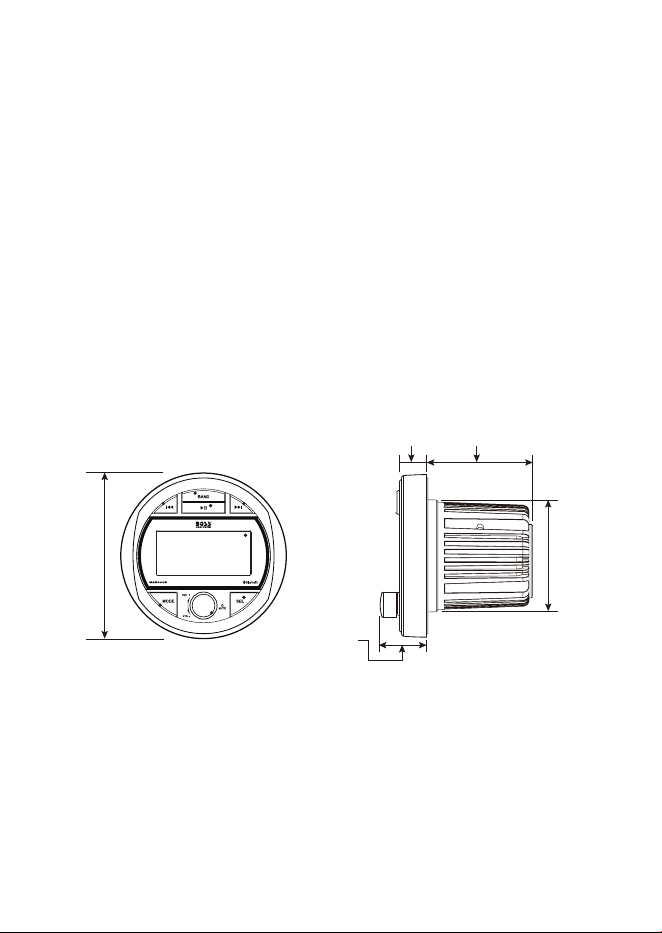
Dimension Drawings
0.75" (19.1 mm) 2.95" (75 mm)
1.29"
(32.8 mm)
Ø 3.13"
(79.5 mm)
Ø 4.53"
(115 mm)
0.75" (19.1 mm) 2.95" (75 mm)
1.29"
(32.8 mm)
Ø 3.13"
(79.5 mm
)
Ø 4.53"
(115 mm)
Specications are subject to change without notice.
15
Troubleshooting
If you have problems using this product, check the following points before you request
service. If you still have a problem, contact our technical support.
Problem Solution
No power The fuse is blown. Replace with a new fuse with the
same type and rating.
The ACC switch of the vehicle is not engaged. Turn
the ACC switch on.
No sound Volume is muted or playback is paused. Adjust
volume or check playback status.
Incorrect source input. Press MODE to select the
correct source.
Poor radio reception Make sure an antenna is connected to the unit.
Fine tune the radio station (see “Tune to a radio
station” on page 8).
Set FM radio to “MONO” and DX” for better radio
reception (see “Change Settings” on page 12).
Cannot connect through
Bluetooth
Bluetooth function on the device is disabled. Enable
the device’s Bluetooth.
Make sure the device is within Bluetooth range.
The unit is already connected with another Bluetooth
device. Disconnect the current Bluetooth connection.
Audio quality from Bluetooth
connection is poor.
Move the device closer to the unit, or remove
obstacles or sources of interference that are
affecting Bluetooth reception
USB device not supported Files are not playable, or the USB device is not
compatible with the unit.
No response Reset the unit (see “Reset The Unit” on page 7).
1021