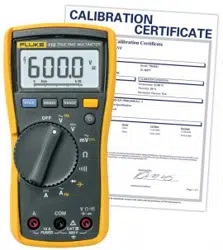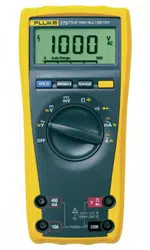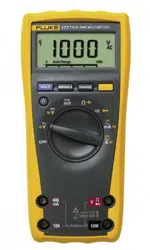

Models 175, 177 & 179
True RMS Multimeters
Users Manual
1.888.610.7664 sales@GlobalTestSupply.com
Fluke-Direct
.com

i
Table of Contents
Title Page
Contacting Fluke...................................................................................................................... 1
"Warning" and "Caution" Statements ...................................................................................... 1
Unsafe Voltage ........................................................................................................................ 1
Test Lead Alert ........................................................................................................................ 1
Battery Saver ("Sleep Mode").................................................................................................. 2
Terminals ................................................................................................................................. 2
Rotary Switch Positions........................................................................................................... 2
Display ..................................................................................................................................... 3
MIN MAX AVG Recording Mode ............................................................................................. 4
Display HOLD and AutoHOLD Modes..................................................................................... 4
YELLOW Button ...................................................................................................................... 4
Display Backlight (Model 177 and 179 Only) .......................................................................... 4
Manual Ranging and Autoranging........................................................................................... 5
Power-Up Options ................................................................................................................... 5
Making Basic Measurements .................................................................................................. 6
Measuring AC and DC Voltage .......................................................................................... 6
Measuring Resistance ........................................................................................................ 6
Measuring Capacitance...................................................................................................... 6
Testing for Continuity.......................................................................................................... 7
Measuring Temperature (Model 179 Only) ........................................................................ 7
Testing Diodes.................................................................................................................... 7
Measuring AC or DC Current ............................................................................................. 8
Understanding AC Zero Input Behavior of True RMS Meters............................................ 8
Measuring Frequency......................................................................................................... 9
Using the Bar Graph ................................................................................................................ 9
Cleaning................................................................................................................................... 10
Testing the Fuses .................................................................................................................... 10
Replacing the Battery and Fuses ............................................................................................ 10
Specifications........................................................................................................................... 11
1.888.610.7664 sales@GlobalTestSupply.com
Fluke-Direct
.com
ii
XW
Warning. Read before using the Meter:
To avoid possible electrical shock or personal injury, follow these guidelines:
⇒ Use the Meter only as specified in this manual or the protection provided by the Meter might be impaired.
⇒ Do not use the Meter or test leads if they appear damaged, or if the Meter is not operating properly. If in doubt, have the
Meter serviced.
⇒ Always use the proper terminals, switch position, and range for measurements.
⇒ Verify the Meter's operation by measuring a known voltage.
⇒ Do not apply more than the rated voltage, as marked on the Meter, between the terminals or between any terminal and earth
ground.
⇒ Use caution with voltages above 30 V ac rms, 42 V ac peak, or 60 V dc. These voltages pose a shock hazard.
⇒ Replace the battery as soon as the low battery indicator (
b ) appears.
⇒ Disconnect circuit power and discharge all high-voltage capacitors before testing resistance, continuity, diodes, or
capacitance.
⇒ Do not use the Meter around explosive gas or vapor.
⇒ When using the test leads, keep your fingers behind the finger guards.
⇒ Remove test leads from the Meter before opening the Meter case or battery door.
Symbols
B
AC (Alternating Current)
I
Fuse
F
DC (Direct Current)
P
Conforms to European Union directives
F
B
DC/AC
$
Canadian Standards Association
J
Earth ground
T
Double insulated
W
Important Information; see manual
!
Underwriters Laboratories, Inc.
Meter in accordance with IEC 61010-1. 54CJ
b
Battery (Low battery when shown on
display.)
;
Conforms to relevant Australian standards
s
Inspected and licensed by TÜV
(Technischer Überwachungs Verein)
Product Services
#
VDE (Verband Deutscher Electroniker)
1.888.610.7664 sales@GlobalTestSupply.com
Fluke-Direct
.com
Models 175, 177 & 179
Users Manual
2
Battery Saver ("Sleep Mode")
The Meter enters the "Sleep mode" and blanks the display if there
is no function change or button press for 20 minutes. To disable
the Sleep mode, hold down the YELLOW button while turning the
Meter on. The Sleep mode is always disabled in the MIN MAX
AVG mode and the AutoHOLD mode.
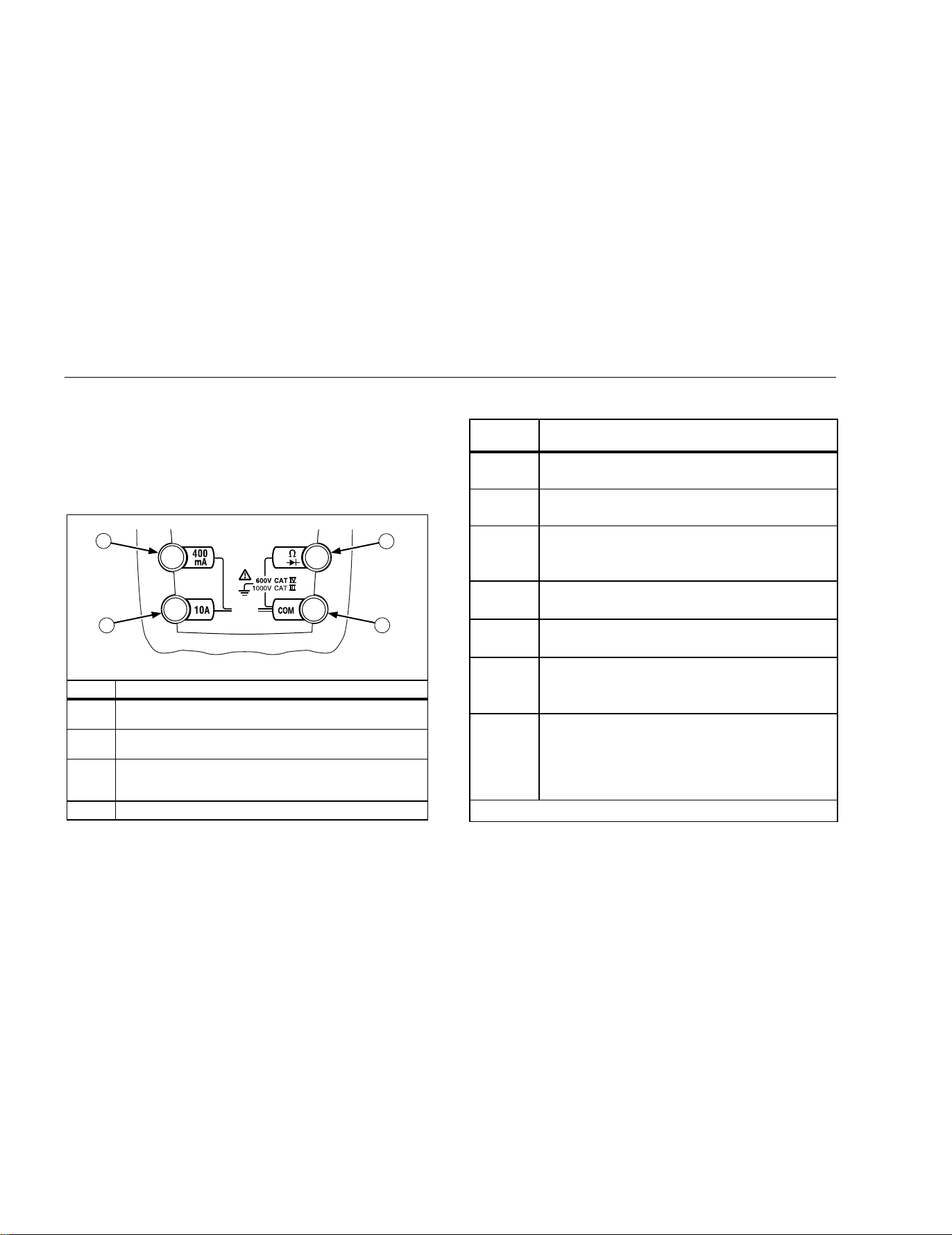
Terminals
.
FUSED
V
1
2
3
4
AIK01F.EPS
Item Description
1
Input terminal for AC and DC milliamp measurements to
400 mA and frequency measurements.
2
Input terminal for AC and DC current measurements to
10 A and frequency measurements.
3
Input terminal for voltage, continuity, resistance, diode,
capacitance, frequency, and temperature (Model 179
only) measurements.
4
Common (return) terminal for all measurements.
Rotary Switch Positions
Switch
Position
Measurement Function
K
Hz
AC voltage from 30.0 mV to 1000 V.
Frequency from 2 Hz to 99.99 kHz.
L
Hz
DC voltage 1 mV to 1000 V.
Frequency from 2 Hz to 99.99 kHz.
m
L
T
DC mV 0.1 mV to 600 mV.
Temperature − 40 °C to + 400 °C
− 40 °F to + 752 °F
e
E
Ohms from 0.1 Ω to 50 MΩ.
Farads from 1 nF to 9999 μF.
R
G
Beeper turns on at <25 Ω and turns off at >250 Ω.
Diode test. Displays OL above 2.4 V.
F
B
mA
AC mA from 3.00 mA to 400 mA
DC mA from 0.01 mA to 400 mA
Hz
Frequency of AC mA 2 Hz to 30 kHz.
F
AC A from 0.300 A to 10 A
BA
DC A from 0.001 A to 10 A
>10.00 display flashes.
>20 A, OL is displayed.
Hz
Frequency of AC A 2 Hz to 30 kHz.
Note: AC voltage and current AC-coupled, true RMS, up to 1 kHz.
1.888.610.7664 sales@GlobalTestSupply.com
Fluke-Direct
.com
True RMS Multimeters
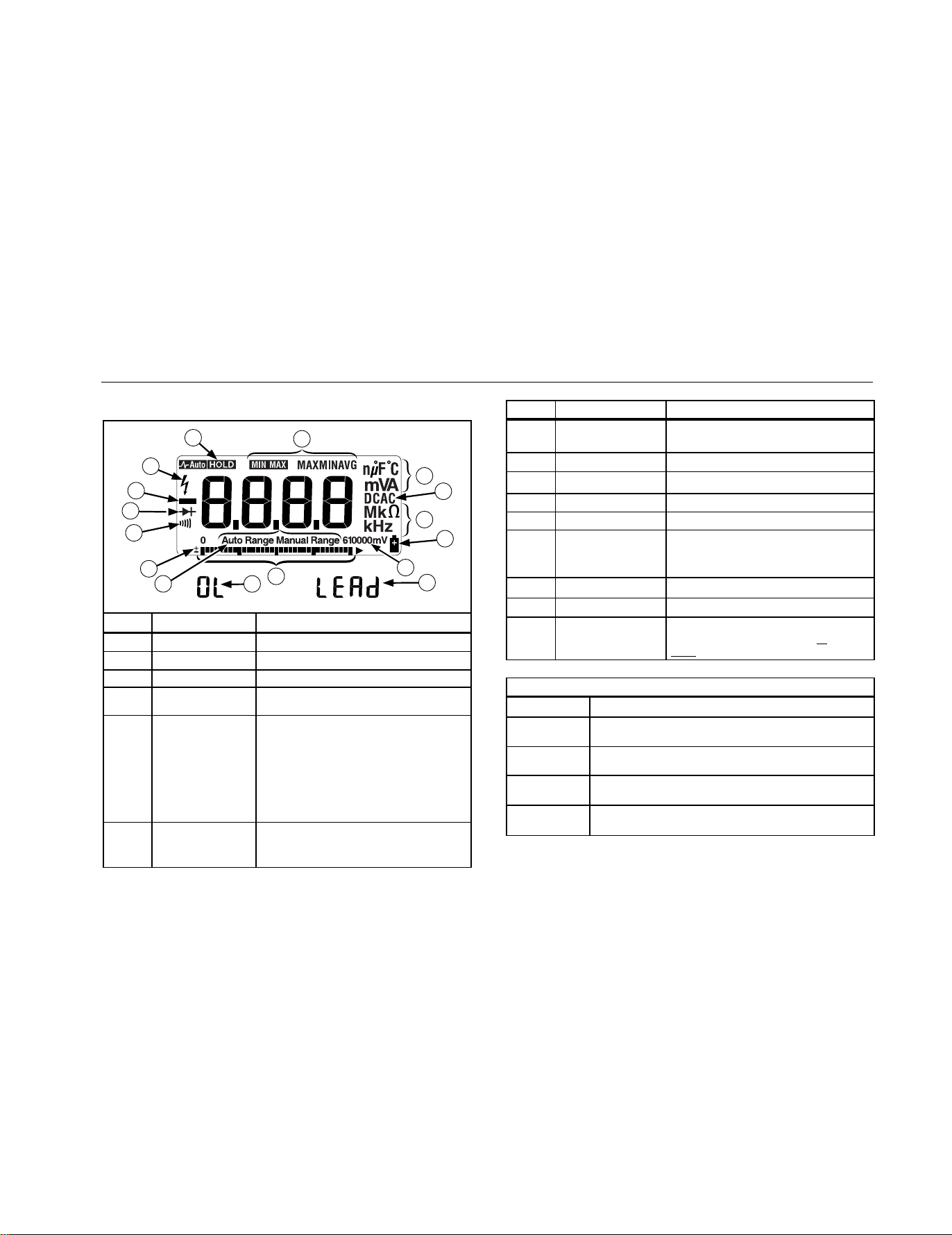
Display
3
Display
.
8
7
7
5
6
4
3
2
1
13
14
15
9
11
12
10
AIK02F.EPS
No. Symbol Meaning
1
s
Continuity test.
2
O
Diode test.
3
K
Negative readings.
4
Y
Unsafe voltage. Voltage ≥ 30 V, or
voltage overload (OL)
5
h
Display HOLD is enabled. Display
freezes present reading.
In MIN MAX AVG mode, MIN MAX
AVG recording is interrupted.
Ah
AutoHOLD is enabled. Display holds
present reading until it detects new
stable input. Then the Meter beeps
and displays new reading.
6
MIN MAX AVG enabled.
MAX, MIN, AVG Maximum, minimum, average or
present reading.
No. Symbol Meaning
7
nμ F, °F, °C
mVA, Mke, kHz
Measurement units.
8
DC, AC
Direct current, alternating current.
9
b
Low battery. Replace battery.
10
610000mV
All possible ranges.
11
Bar graph
Analog display.
12
Auto Range The Meter selects the range with
the best resolution.
Manual Range The user selects the range.
13
±
Bar graph polarity.
14
0L
The input out of range.
15
LEAd
WTest lead alert. Displayed when
the rotary switch is moved to or
from the mA or A position.
Error Messages
bAtt
Replace the battery immediately.
diSC
In the capacitance function, too much electrical
charge is present on the capacitor being tested.
EEPr
Err
Invalid EEPROM data. Have Meter serviced.
CAL
Err
Invalid calibration data. Calibrate Meter.
OPEn
Open thermocouple is detected.
1.888.610.7664 sales@GlobalTestSupply.com
Fluke-Direct
.com

Models 175, 177 & 179
Users Manual
4
MIN MAX AVG Recording Mode
The MIN MAX AVG recording mode captures the minimum and
maximum input values, and calculates a running average of all
readings. When a new high or low is detected, the Meter beeps.
Note
For DC functions, accuracy is the specified accuracy of the
measurement function
±
12 counts for changes longer than
350 ms in duration.
For AC functions, accuracy is the specified accuracy of the
measurement function
±
40 counts for changes longer than
900 ms in duration.
To use MIN MAX AVG recording:
⇒ Make sure that the Meter is in the desired measurement
function and range. (Autoranging is disabled in the MIN MAX
AVG mode.)
⇒ Press MIN MAX to activate MIN MAX AVG mode.
and MAX light, and the highest reading detected
since entering MIN MAX AVG is displayed.
⇒ Press MIN MAX to step through the low (MIN), average
(AVG), and present readings.
⇒ To pause MIN MAX AVG recording without erasing stored
values, press HOLD. h is displayed.
To resume MIN MAX AVG recording, press HOLD again.
h turns off.
⇒ To exit and erase stored readings, press MIN MAX for 1
second or turn the rotary switch.
Display HOLD and AutoHOLD Modes
XW Warning
To avoid electric shock, do not use the Display HOLD or
AutoHOLD mode to determine if a circuit is live.
Unstable or noisy readings will not be captured.
In the Display HOLD mode, the Meter holds the reading on the
display.
In the AutoHOLD mode, the Meter holds the reading on the display
until
it detects a new stable reading. Then the Meter beeps and
displays the new reading.
⇒ Press HOLD to activate Display HOLD. h lights.
⇒ Press HOLD again to activate AutoHOLD. Ah lights.
⇒ Press HOLD again to resume normal operation.
To resume normal operation at any time, press HOLD for 1
second or turn the rotary switch.
YELLOW Button
Press the YELLOW button to select alternate measurement
functions on a rotary switch setting, e.g., to select DC mA, DC A,
Hz, temperature (Model 179 only), capacitance, diode test.
Display Backlight (Model 177 and 179 Only)
Press S to toggle the backlight on and off. The backlight
automatically turns off after 2 minutes.
1.888.610.7664 sales@GlobalTestSupply.com
Fluke-Direct
.com

True RMS Multimeters
Manual Ranging and Autoranging
5
Manual Ranging and Autoranging
The Meter has both Manual range and Autorange modes.
⇒ In the Autorange mode, the Meter selects the range with the
best resolution.
⇒ In the Manual Range mode, you override Autorange and select
the range yourself.
When you turn the Meter on, it defaults to Autorange and Auto
Range is displayed.
1. To enter the Manual Range mode, press RANGE.
Manual Range is displayed.
2. In the Manual Range mode, press RANGE to increment the
range. After the highest range, the Meter wraps to the lowest
range.
Note
You cannot manually change the range in the MIN MAX
AVG, or Display HOLD modes.
If you press RANGE while in MIN MAX AVG
, or Display
HOLD
, the Meter beeps twice, indicating an invalid
operation, and the range does not change.
3. To exit Manual Range, press RANGE for 1 second or turn the
rotary switch.
The Meter returns to Autorange and Auto Range is displayed.
Power-Up Options
To select a Power-Up Option, hold down the button indicated while
turning the Meter from OFF to any switch position.
Power-Up Options are cancelled when the Meter is turned OFF.
Button Power-Up Options
AutoHOLD
H
K
switch position turns on all LCD segments.
L
switch position displays the software version
number.
m
L
switch position displays the model number.
M
Disables beeper. (bEEP)
R
Enables "Smoothing" mode. (S---)
Dampens display fluctuations of rapidly changing
inputs by digital filtering.
B
(YELLOW)
Disables automatic power-down ("Sleep mode").
(PoFF)
Sleep mode is also disabled while the Meter is in a
MIN MAX AVG Recording mode, or the AutoHOLD
mode.
S
Disables automatic 2-minute backlight timeout.
(LoFF) (Model 177 and 179 Only)
1.888.610.7664 sales@GlobalTestSupply.com
Fluke-Direct
.com

Models 175, 177 & 179
Users Manual
6
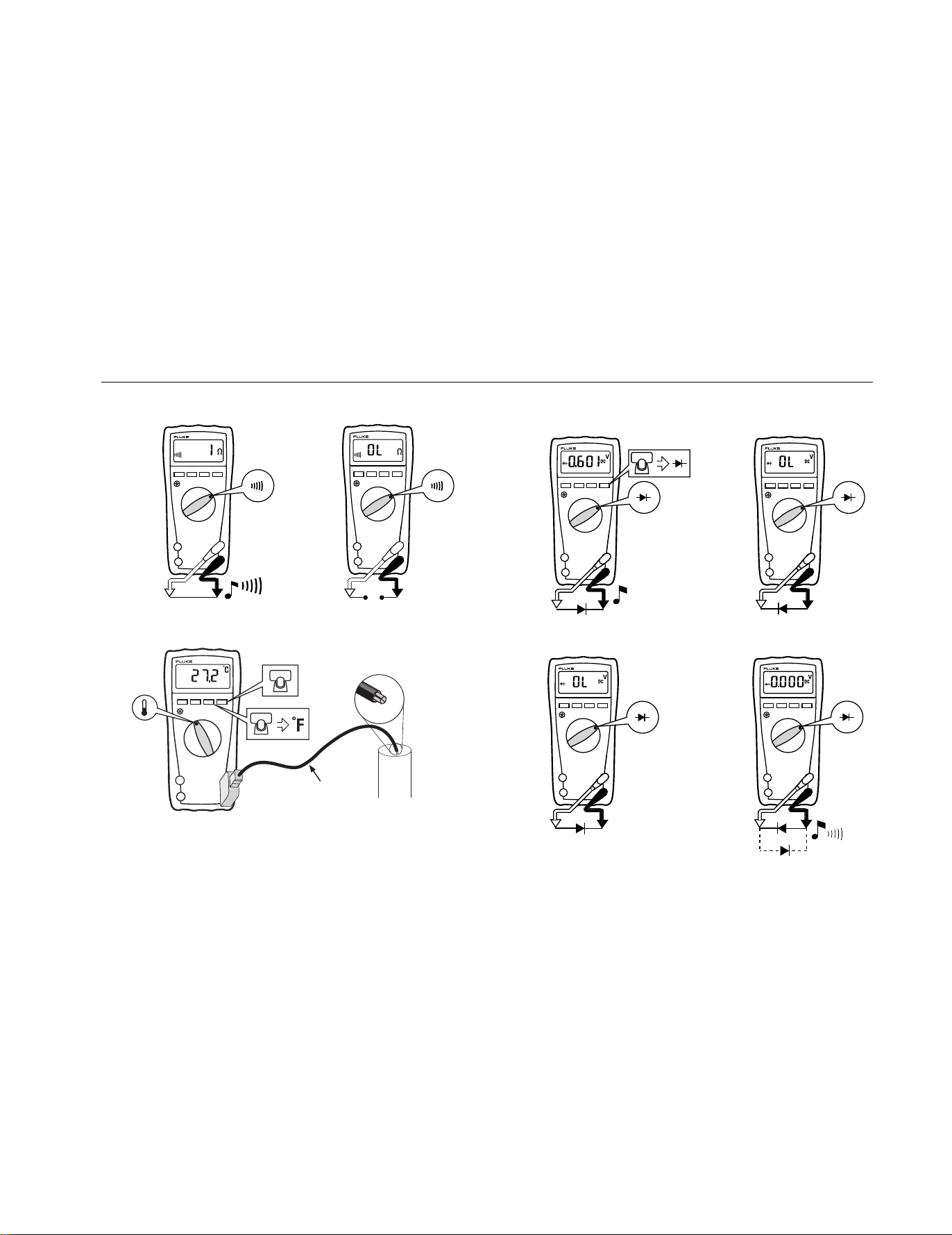
Making Basic Measurements
The figures on the following pages show how to make basic
measurements.
When connecting the test leads to the circuit or device, connect
the common (COM) test lead before connecting the live lead;
when removing the test leads, remove the live lead before
removing the common test lead.
XW Warning
To avoid electric shock, injury, or damage to the Meter,
disconnect circuit power and discharge all high-voltage
capacitors before testing resistance, continuity, diodes,
or capacitance.
Measuring AC and DC Voltage
_
+
_
+
Volts AC
Volts DC
Millivolts DC
V
V
mV
RANGEHOLD
MIN MAX
RANGEHOLD
MIN MAX
RANGEHOLD
MIN MAX
AIK03F.EPS
Measuring Resistance
RANGEHOLD
MIN MAX
AIK04F.EPS
Measuring Capacitance
+
_
+
RANGEHOLD
MIN MAX
AIK05F.EPS
1.888.610.7664 sales@GlobalTestSupply.com
Fluke-Direct
.com
True RMS Multimeters
Making Basic Measurements
7
Testing for Continuity
RANGEHOLD
MIN MAX
RANGEHOLD
MIN MAX
AIK06F.EPS
Measuring Temperature (Model 179 Only)
RANGEHOLD
MIN MAX
80BK-A Integrated
Type K DMM
Temperature Probe
Vent
or
Pipe
RANGE
AIK10F.EPS
XW Warning: Do not connect 80BK-A to live circuits.
Testing Diodes
+
__
Forward Bias
Single Beep
+
Reverse Bias
Good Diode Good Diode
_
+
Shorted
and
Bad Diode
Open
_
CAT
+
Bad Diode
RANGEHOLD
MIN MAX
RANGEHOLD
MIN MAX
RANGEHOLD
MIN MAX
RANGEHOLD
MIN MAX
AIK07F.EPS
1.888.610.7664 sales@GlobalTestSupply.com
Fluke-Direct
.com
Models 175, 177 & 179
Users Manual
8
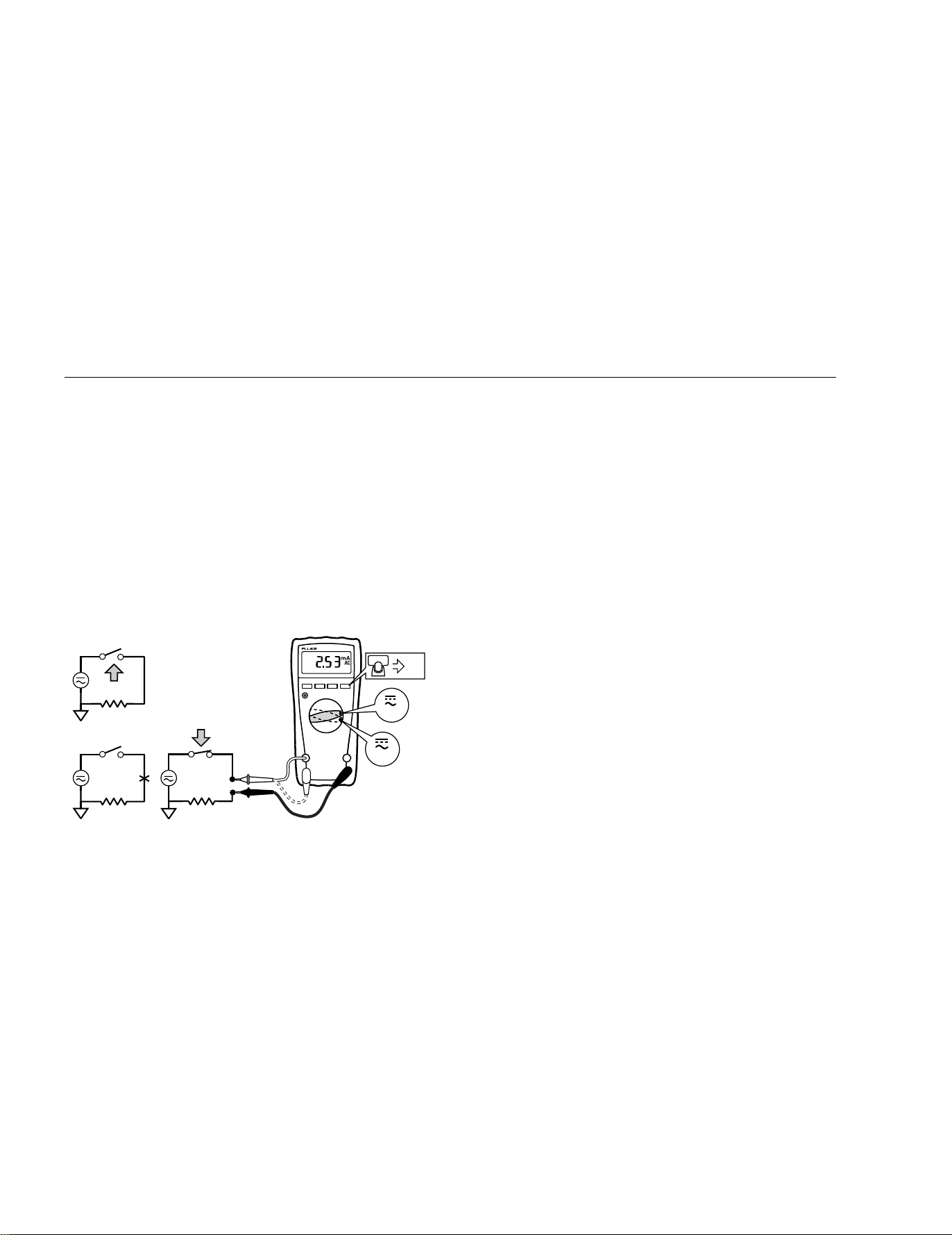
Measuring AC or DC Current
XW Warning
To avoid personal injury or damage to the Meter:
• Never attempt to make an in-circuit current
measurement when the open-circuit potential to earth
is >1000 V.
• Check the Meter's fuses before testing. (See “Testing
the Fuses”.)
• Use the proper terminals, switch position, and range
for your measurement.
• Never place the probes in parallel with a circuit or
component when the leads are plugged into the
current terminals.
Turn power OFF, break circuit, insert Meter in series, turn power
on.
CAT
CAT
+
+
RANGEHOLD
MIN MAX
mA
A
DC
AIK08F.EPS
Understanding AC Zero Input Behavior of True RMS Meters
Unlike averaging meters, which can accurately measure only pure
sinewaves, True RMS meters accurately measure distorted
waveforms. Calculating True RMS converters require a certain
level of input voltage to make a measurement. This is why AC
voltage and current ranges are specified from 5% of range to
100% of range. Non-zero digits that are displayed on a True RMS
meter when the test leads are open or are shorted are normal.
They do not affect the specified AC accuracy above 5% of range.
Unspecified input levels on the lowest ranges are:
• AC voltage: below 5% of 600 mV AC, or 30 mV AC
• AC current: below 5% of 60 mA AC, or 3 mA AC
1.888.610.7664 sales@GlobalTestSupply.com
Fluke-Direct
.com
True RMS Multimeters
Using the Bar Graph
9
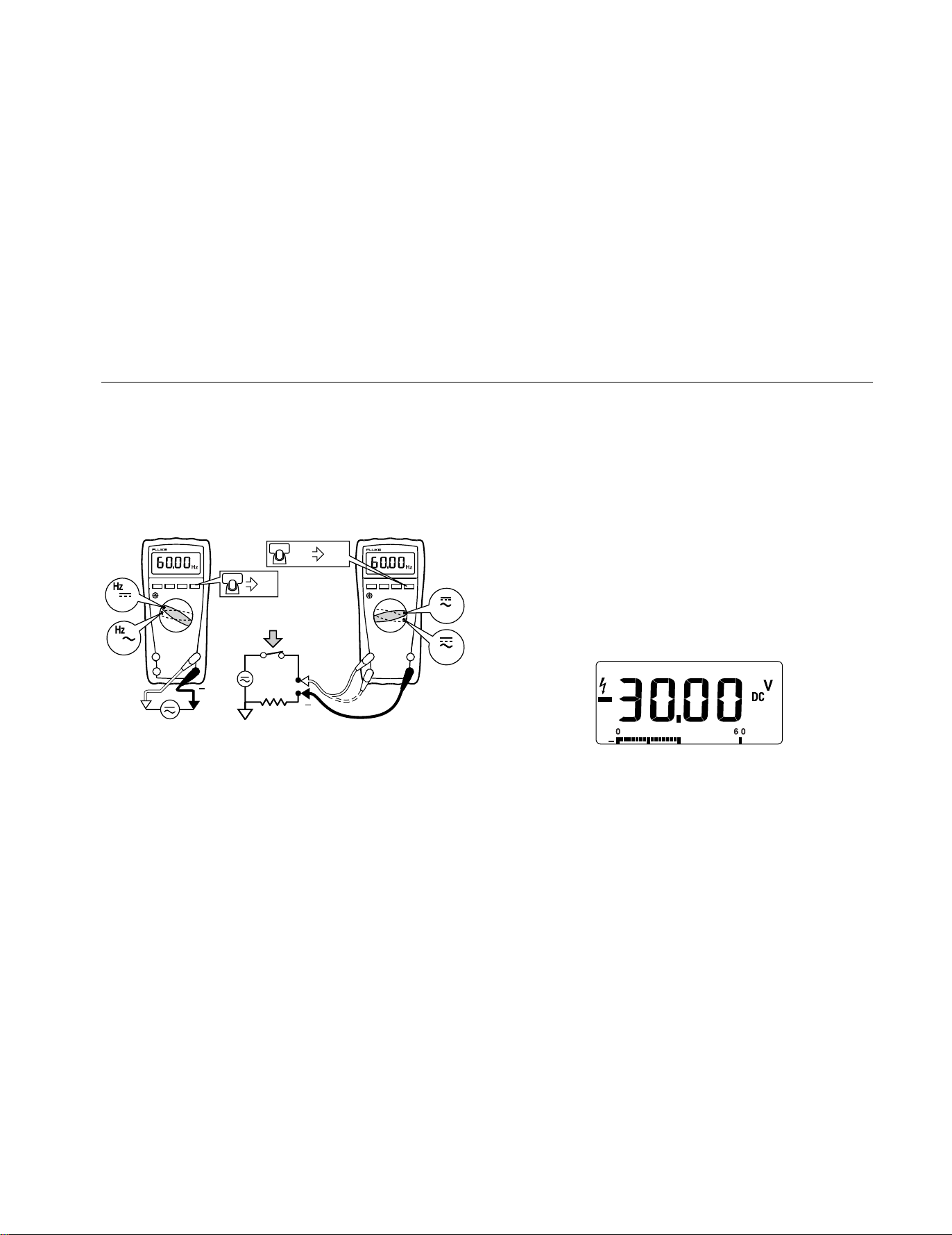
Measuring Frequency
XW Warning
To avoid electrical shock, disregard the bar graph for
frequencies > 1 kHz. If the frequency of the measured
signal is > 1 kHz, the bar graph is unspecified.
The Meter measures the frequency of a signal. The trigger level is
0 V, 0 A AC for all ranges.
+
RANGEHOLD
MIN MAX
Hz
RANGEHOLD
MIN MAX
V
V
AC/DC Voltage Frequency AC Current Frequency
Hzx 2
+
mA
A
AIK09F.EPS
⇒ To exit frequency, press YELLOW button or turn the rotary
switch.
⇒ In frequency, the bar graph shows the AC/DC voltage or AC
current accurately up to 1 kHz.
⇒ Select progressively lower ranges using manual ranging for a
stable reading.
Using the Bar Graph
The bar graph is like the needle on an analog Meter. It has an
overload indicator (>) to the right and a polarity indicator (±) to the
left.
Because the bar graph updates about 40 times per second, which
is 10 times faster than the digital display, the bar graph is useful
for making peak and null adjustments and for observing rapidly
changing inputs.
The bar graph is disabled when measuring capacitance or
temperature. In frequency, the bar graph accurately indicates the
voltage or current up to 1 kHz.
The number of lit segments indicates the measured value and is
relative to the full-scale value of the selected range.
In the 60 V range, for example (see below), the major divisions on
the scale represent 0, 15, 30, 45, and 60 V. An input of −30 V
lights the negative sign and the segments up to the middle of the
scale.
AIK11F.EPS
1.888.610.7664 sales@GlobalTestSupply.com
Fluke-Direct
.com
Models 175, 177 & 179
Users Manual
10
Cleaning
Wipe the case with a damp cloth and mild detergent. Do not use
abrasives or solvents. Dirt or moisture in the terminals can affect
readings.
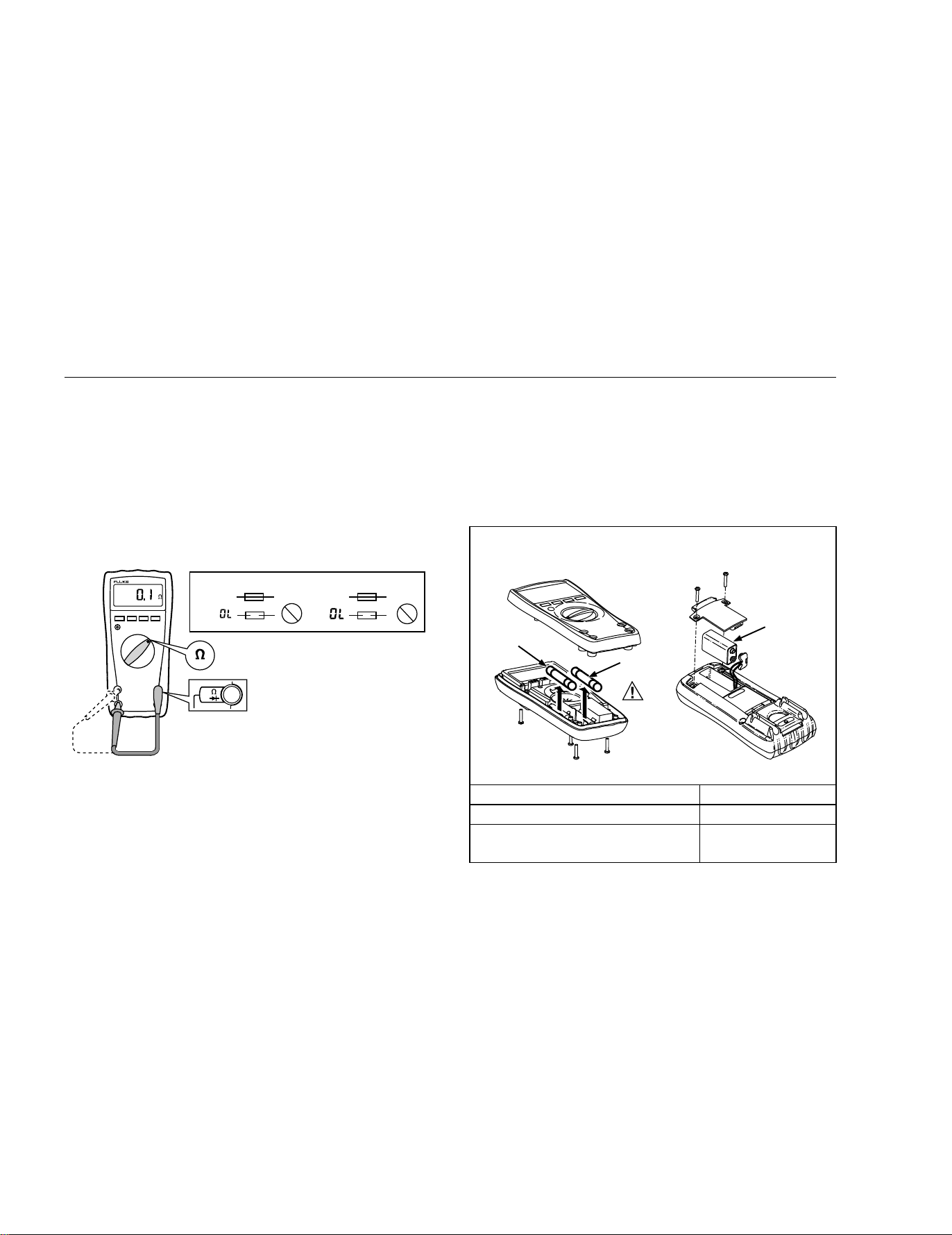
Testing the Fuses
XW Warning
To avoid electrical shock or injury, remove the test leads
and any input signals before replacing the fuse.
Test fuses as shown below.
11 A 440 mA
Ω
<.5
Ω
<12
OKOK
OK
OK
RANGEHOLD
MIN MAX
V
AIK12F.EPS
Replacing the Battery and Fuses
XW Warning
To avoid shock, injury, or damage to the Meter:
• Use ONLY fuses with the amperage, interrupt,
voltage, and speed ratings specified.
• Replace the battery as soon as the low battery
indicator (
b) appears.
I
b
F2
F1
B1
AIK13F.EPS
F1 Fuse, 440 mA, 1000 V, FAST Fluke PN 943121
F2 Fuse, 11 A, 1000 V, FAST Fluke PN 803293
B1 Battery, 9 V Alkaline
NEDA 1604 / 1604A
Fluke PN 614487
1.888.610.7664 sales@GlobalTestSupply.com
Fluke-Direct
.com

True RMS Multimeters
Specifications
11
Specifications
Accuracy is specified for 1 yr after calibration, at operating temperatures of 18 °C to 28 °C, with relative humidity at 0 % to 90 %. Accuracy
specifications take the form of: ± ( [ % of Reading ] + [ Counts ] )
Maximum voltage between any terminal and earth ground: 1000 V DC or AC RMS
Surge Protection: 8 kV peak per IEC 61010
W Fuse for mA inputs:
W Fuse for A input:
440 mA, 1000 V FAST Fuse
11 A, 1000 V FAST Fuse
Display: Digital: 6000 counts, updates 4/sec
Bar Graph: 33 segments;
Updates 40/sec
Frequency: 10,000 counts
Capacitance: 1,000 counts
Altitude: Operating: 2000 m; Storage: 12,000 m
Temperature: Operating: −10 °C to +50 °C;
Storage: −40 °C to +60 °C
Temperature coefficient: 0.1 X (specified accuracy / °C
(< 18 °C or > 28 °C)
Electromagnetic
Compatibility
(EN 61326-1:1997):
In an RF field of 3 V/M, accuracy = specified accuracy except in temperature: specified accuracy ± 5 °C (9 °F)
Relative Humidity: Maximum Noncondensing
90 % to 35 °C
75 % to 40 °C
45 % to 50 °C
Battery Life: Alkaline: 400 hrs typical
Size (H x W x L): 4.3 cm x 9 cm x 18.5 cm
Weight: 420 g
Safety Compliances: ANSI/ISA S82.02.01, CSA C22.2-1010.1, IEC 61010 to 1000 V Measurement Category III, 600 V Measurement
Category IV
Certifications: CSA, TÜV (EN61010), UL, P,
;, VDE
1.888.610.7664 sales@GlobalTestSupply.com
Fluke-Direct
.com
Models 175, 177 & 179
Users Manual
12
Accuracy ±( [ % of Reading ] + [ Counts ] )
Function
Range
1
Resolution
Model 175 Model 177 Model 179
AC Volts
2, 3
600.0 mV
6.000 V
60.00 V
600.0 V
1000 V
0.1 mV
0.001 V
0.01 V
0.1 V
1 V
1.0 % + 3
(45 Hz to 500 Hz)
2.0 % + 3 (500 Hz to 1 kHz)
1.0 % + 3
(45 Hz to 500 Hz)
2.0 % + 3 (500 Hz to 1 kHz)
1.0 % + 3
(45 Hz to 500 Hz)
2.0 % + 3 (500 Hz to 1 kHz)
DC mV 600.0 mV 0.1 mV 0.15 % + 2 0.09 % + 2 0.09 % + 2
DC Volts
6.000 V
60.00 V
600.0 V
0.001 V
0.01 V
0.1 V
0.15 % + 2
0.09 % + 2
0.09 % + 2
1000 V 1 V 0.15 % + 2 0.15 % + 2 0.15 % + 2
Continuity 600 Ω 1 Ω Meter beeps at < 25 Ω, beeper turns off at > 250 Ω; detects opens or shorts of 250 μs or
longer.
Ohms
600.0 Ω
6.000 kΩ
60.00 kΩ
600.0 kΩ
6.000 MΩ
50.00 MΩ
0.1 Ω
0.001 kΩ
0.01 kΩ
0.1 kΩ
0.001 MΩ
0.01 MΩ
0.9 % + 2
0.9 % + 1
0.9 % + 1
0.9 % + 1
0.9 % + 1
1.5 % + 3
0.9 % + 2
0.9 % + 1
0.9 % + 1
0.9 % + 1
0.9 % + 1
1.5 % + 3
0.9 % + 2
0.9 % + 1
0.9 % + 1
0.9 % + 1
0.9 % + 1
1.5 % + 3
Diode test 2.400 V 0.001 V 1 % + 2
Capacitance
1000 nF
10.00 μF
100.0 μF
9999 μF
4
1 nF
0.01 μF
0.1 μF
1 μF
1.2 % + 2
1.2 % + 2
1.2 % + 2
10 % typical
1.2 % + 2
1.2 % + 2
1.2 % + 2
10 % typical
1.2 % + 2
1.2 % + 2
1.2 % + 2
10 % typical
AC Amps
5
(True RMS)
(45 Hz to 1
kHz)
60.00 mA
400.0 mA
6
6.000 A
10.00 A
7
0.01 mA
0.1 mA
0.001 A
0.01 A
1.5 % + 3 1.5 % + 3
1.5 % + 3
1. All AC voltage and AC current ranges are specified from 5 % of range to 100 % of range.
2. Crest factor of ≤ 3 at full scale up to 500 V, decreasing linearly to crest factor ≤ 1.5 at 1000 V.
3. For non-sinusoidal waveforms, add -(2% reading + 2% full scale) typical, for crest factors up to 3.
4. In the 9999 μF range for measurements to 1000 μF, the measurement accuracy is 1.2 % + 2 for all models.
5. Amps input burden voltage (typical): 400 mA input 2 mV/mA, 10 A input 37 mV/A.
6. 400.0 mA accuracy specified up to 600 mA overload.
7. > 10A unspecified.
1.888.610.7664 sales@GlobalTestSupply.com
Fluke-Direct
.com

True RMS Multimeters
Specifications
13
Accuracy ±( [ % of Reading ] + [ Counts ] )
Function
Range
1
Resolution
Model 175 Model 177 Model 179
DC Amps
4
60.00 mA
400.0 mA
6
6.000 A
10.00 A
7
0.01 mA
0.1 mA
0.001 A
0.01 A
1.0 % + 3 1.0 % + 3 1.0 % + 3
Hz
(AC- or DC-
coupled, V or
A
2, 3
input )
99.99 Hz
999.9 Hz
9.999 kHz
99.99 kHz
0.01 Hz
0.1 Hz
0.001 kHz
0.01 kHz
0.1 % + 1 0.1 % + 1 0.1 % + 1
Temperature
-40 °C to +400 °C
-40 °F to +752 °F
0.1 °C
0.1 °F
NA NA
1 % + 10
5
1 % + 18
5
MIN MAX AVG For DC functions, accuracy is the specified accuracy of the measurement function ±12 counts for changes longer than 350 ms in
duration.
For AC functions, accuracy is the specified accuracy of the measurement function ±40 counts for changes longer than 900 ms in
duration.
1. All AC voltage and AC current ranges are specified from 5 % of range to 100 % of range.
2. Frequency is specified from 2 Hz to 99.99 kHz in Volts and from 2 Hz to 30 kHz in Amps.
3. Below 2 Hz, the display shows zero Hz.
4. Amps input burden voltage (typical): 400 mA input 2 mV/A, 10 A input 37 mV/A.
5. Does not include error of the thermocouple probe.
6. 400.0 mA accuracy specified up to 600 mA overload.
7. > 10A unspecified.
1.888.610.7664 sales@GlobalTestSupply.com
Fluke-Direct
.com

Models 175, 177 & 179
Users Manual
14
Function Overload Protection
1
Input Impedance
(Nominal)
Common Mode Rejection Ratio
(1 kΩ Unbalanced)
Normal Mode Rejection
Volts AC 1000 V RMS > 10 MΩ < 100 pF > 60 dB @ DC, 50 Hz or 60 Hz
Volts DC 1000 V RMS > 10 MΩ < 100 pF >120 dB @ DC, 50 Hz or 60 Hz > 60 dB @ 50 Hz or 60 Hz
mV/T
1000 V RMS
2
> 10 MΩ < 100 pF >120 dB @ DC, 50 Hz or 60 Hz > 60 dB @ 50 Hz or 60 Hz
Full Scale Voltage To:
Open Circuit Test
Voltage
600 kΩ 50 MΩ
Short Circuit Current
Ohms/Capacitance 1000 V RMS
2
< 8.0 V DC < 660 mV DC < 4.6 V DC < 1.1 mA
Continuity/Diode
test
1000 V RMS
2
< 8.0 V DC 2.4 V DC < 1.1 mA
1. 10
7
V-Hz maximum.
2. For circuits < 0.3 A short circuit. 660 V for high energy circuits.
Function Overload Protection Overload
mA Fused, 44/100 A, 1000 V FAST Fuse 600 mA overload for 2 minutes maximum, 10
minutes rest minimum
A Fused, 11 A, 1000 V FAST Fuse 20 A overload for 30 seconds maximum, 10
minutes rest minimum
1.888.610.7664 sales@GlobalTestSupply.com
Fluke-Direct
.com