5
YEAR
WARRANTY
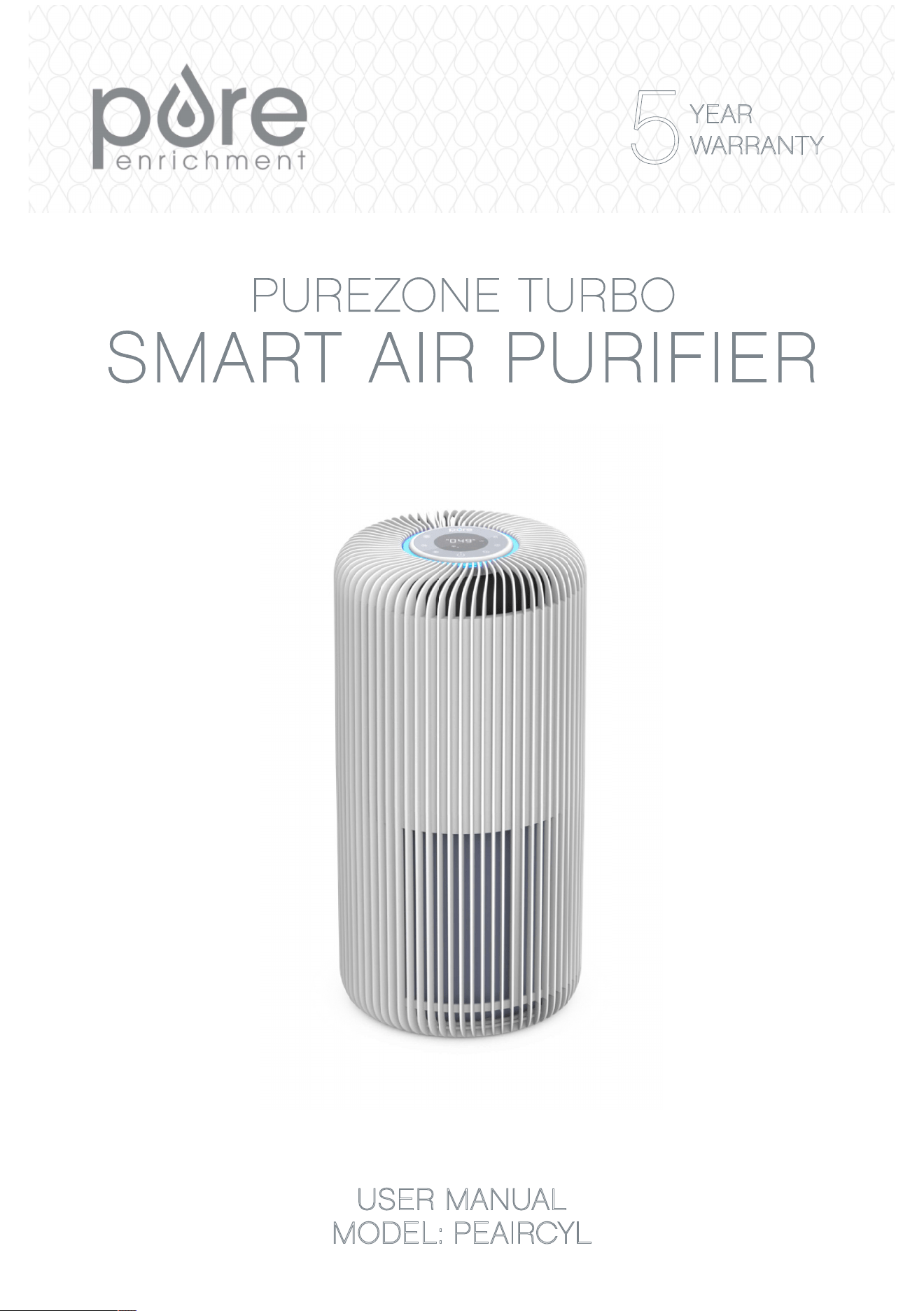
USER MANUAL
MODEL: PEAIRCYL

TABLE OF CONTENTS
WARNINGS AND PRECAUTIONS ……………..…………………................. 3-5
FCC NOTICE ……………....................................…………………................. 6-7
P R OD UC T SP E CI FI CAT I ON S . .… . ……. .… . ……… .. ……. . . .. .. . …. .. 7
INTRODUCTION & PRODUCT FEATURES.……..…..……..………........…... 8
PRODUCT DIAGRAM…....................…………………………………………9
PRE-OPERATING INSTRUCTIONS……………......................……........10
OPERATING INSTRUCTIONS................................……........................... 11-13
PUREENRICHMENT APP SETUP........………….………………………………14
ALEXA/GOOGLE ASSISTANT VOICE COMMANDS…………………………15
FILTER REPLACEMENT……………...............................................………15-16
UV-C BULB REPLACEMENT………………......................................…………16
CLEANING .................................…................................................................ 17
TROUBLESHOOTING .................................…......................................... 17-19
WARRANTY & PRODUCT REGISTRATION….............................................. 19

3
WARNINGS AND PRECAUTIONS
READ THIS ENTIRE INSTRUCTION MANUAL BEFORE
OPERATION. FAILURE TO ADHERE TO THE FOLLOWING
INSTRUCTIONS CAN CAUSE HARM TO YOU OR THE
DEVICE.
Safety precautions should always be used when operating
this or any electrical appliance to decrease the risk of
electrocution,electricshock,injuryorre.DONOTattempt
to service the product in any way except as described in the
“Cleaning&Maintenance”sectionofthismanual.
THIS PRODUCT IS ONLY FOR HOME USE. It should not be used
forcommercialorindustrialpurposes.Useonlyasdescribedinthis
manual,takingcaretoadheretothefollowingwarningsandcautions:
• This product can be used by children aged 8 years or older and
peoplewithreducedphysical,sensory,ormentalcapabilitiesif
they have been given supervision or instruction concerning the
correct use of the product and understand the hazards involved.
Childrenshouldnotbeallowedtoperformcleaninganduser
maintenancewithoutsupervision.
• Beforeuseremovetheplasticbagfromthelter.
• To prevent electrical shock, do not spray the device, plug, or
cordwithliquids.Neversubmergeanypartofthedevicein
water.
• DO NOT drop or insert any object into any openings.
• ThisproductcontainsaUV-Cemitter.Unintendeduseofthe
productordamagetothehousingmayresultintheescapeof
dangerousUV-Cradiation.UV-Cradiationmay,eveninsmall
doses,causeharmtotheeyesandskin.
• Iftheproductisvisiblydamaged,DONOToperate.
• DO NOT run the power cord under carpeting. DO NOT cover it
withthrowrugs,runners,orsimilarcoverings.Arrangethecord
awayfromfoottrafcwhereitwillnotbetrippedover.
• Alwaysturnoffallcontrolsbeforeunpluggingtheairpurier
fromtheoutlet.

4 5
• DONOToperatetheproductinanygreasyenvironment,such
asinthekitchen.Thisproductisnotintendedtolteroilor
greasefromtheair.
• DONOTusetheairpurierinbathroomsorotherhumid
environments.DONOTuseitnearreplacesorinareaswhere
ammableorcombustiblevaporsorproductsmayexist.
• Alwaysunplugthepowercordfromtheelectricaloutletwhen
thepurierisnotinuse,beforecleaning,insertingorremoving
parts,orbeforemovingtoanotherlocation.Todisconnectfrom
theoutlet,griptheplugandpullfromthepowersocket.Never
pull by the cord.
• DONOTruntheairpurierunlessitisfullyassembled.
• This product has a polarized plug (one blade is wider than the
other). To reduce the risk of electric shock, this plug is intended
totinapolarizedoutletonlyoneway.Iftheplugdoesnott
fullyintheoutlet,reversetheplug.Ifitstilldoesnott,contact
anelectrician.DONOTattempttodefeatthissafetyfeature.
• Attemptingtoservicetheairpurierinanywaythatisnot
describedinthisusermanualwillvoidthewarrantyandcould
cause serious personal injury to the user and/or result in
considerabledamagetotheunit.
• Ifthepowercordisdamaged,DONOTusetheproduct.
ContactPureEnrichmentasindicatedonPage7fora
replacment.
• Never use the power cord to pick up, carry, drag, pull, or lift the
airpurier.DONOTpullthecordaroundsharpcornersand
edges.Thiscouldresultininjuryordamagetothecord.
• Usecarewhenoperatingtheairpurierbykeepingallforeign
objects,ngers,bodyparts,hair,looseclothingandjewelry
awayfromopenings.
• Nevertouchtheairpurieroritsplugwhenyourhandsarewet.
• Toreducetheriskofreorelectricshock,DONOTusethisair
purierwithanysolid-statespeedcontroldevices.
• DONOTattempttomodifythisproduct.Useonlythe
attachmentsandaccessoriesrecommendedinthismanual.
WARNINGS AND PRECAUTIONS WARNINGS AND PRECAUTIONS

4 5
WARNINGS AND PRECAUTIONS WARNINGS AND PRECAUTIONS
UV Lamp Notice
UVlightisharmfultobareskinandeyesandcancausetemporary
lossofvision.NeverlookdirectlyattheUVlampwhileitis
illuminated;doingsocouldcauselossofvision!Onlyviewthe
illuminationthroughthewindowatthefrontoftheunit.Toprevent
exposure to the ultraviolet light, unplug the power cord before
performingcleaningandmaintenance.
UV Lamp Disposal
IftheUVlampbreaks,turnofftheairpurier.DONOToperateitwith
abrokenlamp.DONOTuseavacuumtocleanupbreakage.Sweep
debris into a plastic bag and dispose properly. Contact your local
wastemanagementauthorityforinstructionsregardingrecyclingand
theproperdisposalofoldlamp(s).Toorderareplacementlamp,visit
ourwebsiteatpureenrichment.com.
Mercury Notice
TheUVClightcontainsasmallamountofmercury.Forproper
disposalseehttps://www.epa.gov/c/cleaning-broken-c

6 7
FCC NOTICE
Model: PureZone Turbo (PEAIRCYL)
Thisdevicecomplieswithpart15oftheFCCRules.Operation
issubjecttothefollowingtwoconditions:(1)Thisdevicemay
notcauseharmfulinterference,and(2)thisdevicemustaccept
anyinterferencereceived,includinginterferencethatmaycause
undesired operation.
PureEnrichment
2803SYaleSt.
SantaAna,CA92704
pureenrichment.com
The product is protected against unauthorized use. DO NOT
modifyitwithouttheauthorizationofthemanufacturer,ortheuser’s
authority to operate could be voided.
Note:Thisequipmenthasbeentestedandfoundtocomplywiththe
limitsforaClassBdigitaldevice,pursuanttopart15oftheFCC
Rules.Theselimitsaredesignedtoprovidereasonableprotection
againstharmfulinterferenceinaresidentialinstallation.This
equipmentgenerates,usesandcanradiateradiofrequencyenergy
and, if not installed and used in accordance with the instructions,
maycauseharmfulinterferencetoradiocommunications.However,
there is no guarantee that interference will not occur in a particular
installation.Ifthisequipmentdoescauseharmfulinterferenceto
radioortelevisionreception,whichcanbedeterminedbyturningthe
equipmentoffandon,theuserisencouragedtotrytocorrectthe
interferencebyoneormoreofthefollowingmeasures:
• Reorient or relocate the receiving antenna.
• Increasetheseparationbetweentheequipmentandreceiver.
• Connecttheequipmentintoanoutletonacircuitdifferentfrom
that to which the receiver is connected.
• Consult the dealer or an experienced radio/TV technician for
help.

6 7
FCC RADIATION EXPOSURE STATEMENT
ThisequipmentcomplieswithFCCradiationexposurelimitssetforth
foranuncontrolledenvironment.Endusersmustfollowthespecic
operatinginstructionsforsatisfyingRFexposurecompliance.
TomaintaincompliancewithFCCRFexposurecompliance
requirements,pleasefollowoperationinstructionsasdocumented
inthismanual.Thistransmittermustnotbeco-locatedoroperating
inconjunctionwithanyotherantennaortransmitter.Thisequipment
shouldbeinstalledandoperatedwithaminimumdistanceof20cm
betweentheradiatorandyourbody.Theavailabilityofsomespecic
channels and/or operational frequency bands are country dependent
andarermwareprogrammedatthefactorytomatchtheintended
destination.Thermwaresettingisnotaccessiblebytheenduser.
PRODUCT SPECIFICATIONS
Size 11.1"
X
11.1"
X
21.7"
Power 120VAC,60Hz,55W
Coverage Area 434 sq ft
CADR&Airow 280CFM
Noise Level 27-54dB
UV Light 254nm
REPLACEMENT PARTS
Thefollowingpartsmayneedtobereplacedonthisproduct
periodicallyandcanbepurchasedatpureenrichment.com:
• UVLampBulb,ModelNo:PEUVCYL
• TrueHEPAAirFilter,ModelNo:PECYLFIL

8 9
INTRODUCTION
ThankyouforpurchasingPureZoneTurbofromPureEnrichment.
Thispremium5-in-1SmartAirPurierisdesignedtopurifytheair
andcapture99%ofdust,pollen,petdander,smoke,moldspores,
andhouseholdodorssoyoucanbreathemoreeasily.
PRODUCT FEATURES
PureZoneTurboisdesignedwithseveralfeaturesthatmakeitthe
idealsolutionforimprovingtheairqualityinyourhome.
5-stagepuricationprocess
• Stage1:Pre-Filter:Capturesinitialdustandallergenparticles
• Stage2:Antibacterial*Filter:Inhibitsthegrowthofbacteria
• Stage3:TrueHEPAFilter:Capturesdust,pollen,petdander,
moldspores,andotherallergensfromtheair
• Stage4:ActivatedCarbonFilter:Absorbsodorsandharmful
gases
• Stage5:Antimicrobial
†
UV-CLight:Enhancestheeliminationof
airbornegerms
4 speed fan settings:Letyouselectyourdesiredcleaninglevel.
Auto mode:Automaticallyadjustsspeeddependingonairquality.
Level1Low(BLUE):meansairqualityisgood.
Level2Medium(YELLOW):meansairqualityismoderate.
Level3High(ORANGE):meansairislightlypolluted.
Level4Turbo(RED):meansairisheavilypolluted.
Auto timer:Selectbetween1and12hoursinone-hourincrements
toautomaticallypowerofftheunittoconserveenergyandextend
lterlife.
Sleep mode: Turns off all control panel lights (except the Sleep
ModeIndicator)tominimizevisualdistractionwhileyousleep.
Changelterindicator:Alertsyouwhenit'stimetoreplacelter.
*prolongslterlife
†
Staphylococcusalbus,Escherichiacoli,Aspergillusniger,H1N1
independenttesting
8 9
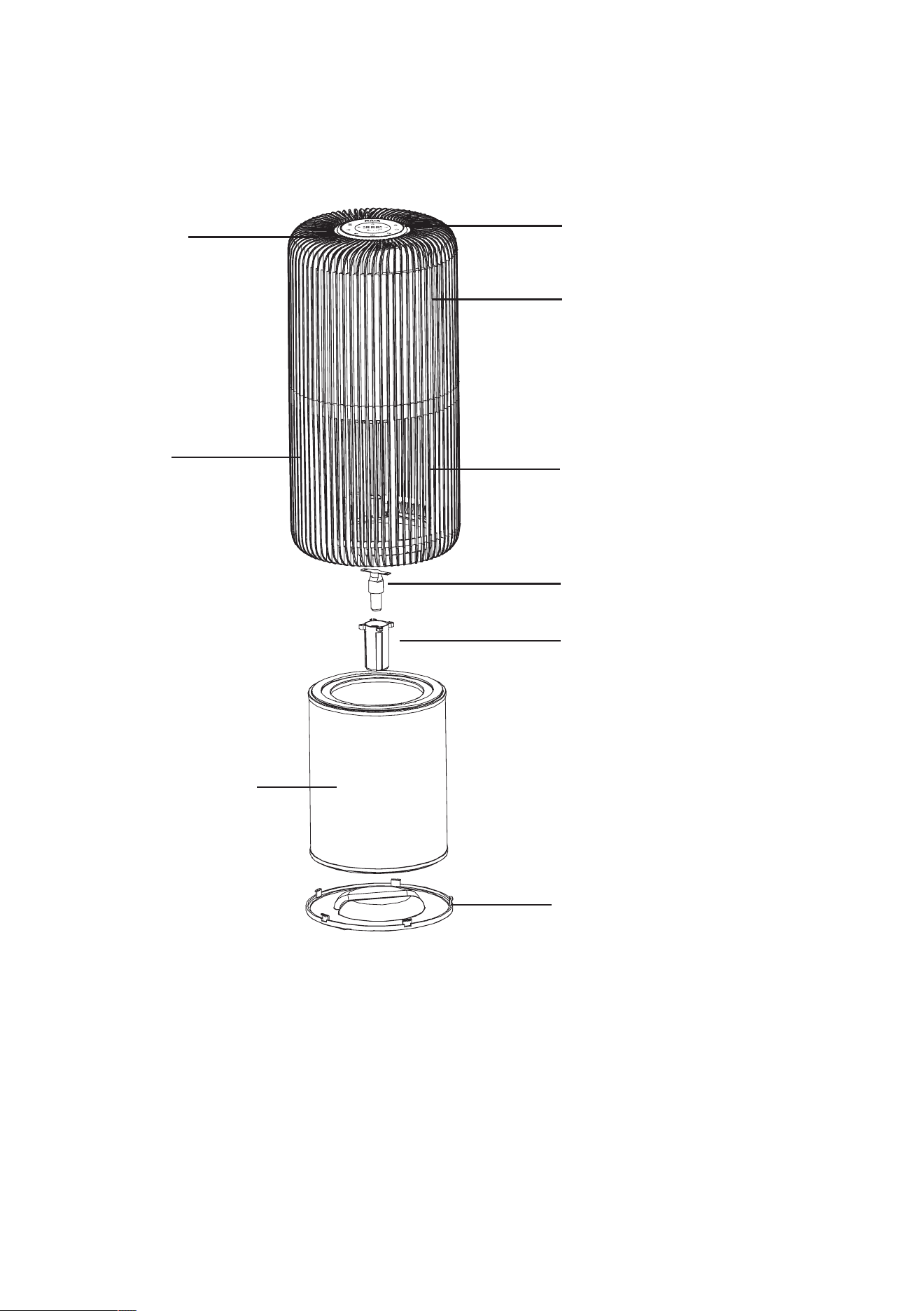
PRODUCT DIAGRAM
*prolongslterlife
Air Outlet
Air Inlet
Control Panel
Top Housing
BottomHousing
UV Bulb
UV Bulb Enclosure
4-in-1 Filter (Pre-
Filter,Antibacterial*
Filter, True HEPA
Filter, Activated
Carbon Filter)
Base
10
PRE-OPERATING INSTRUCTIONS
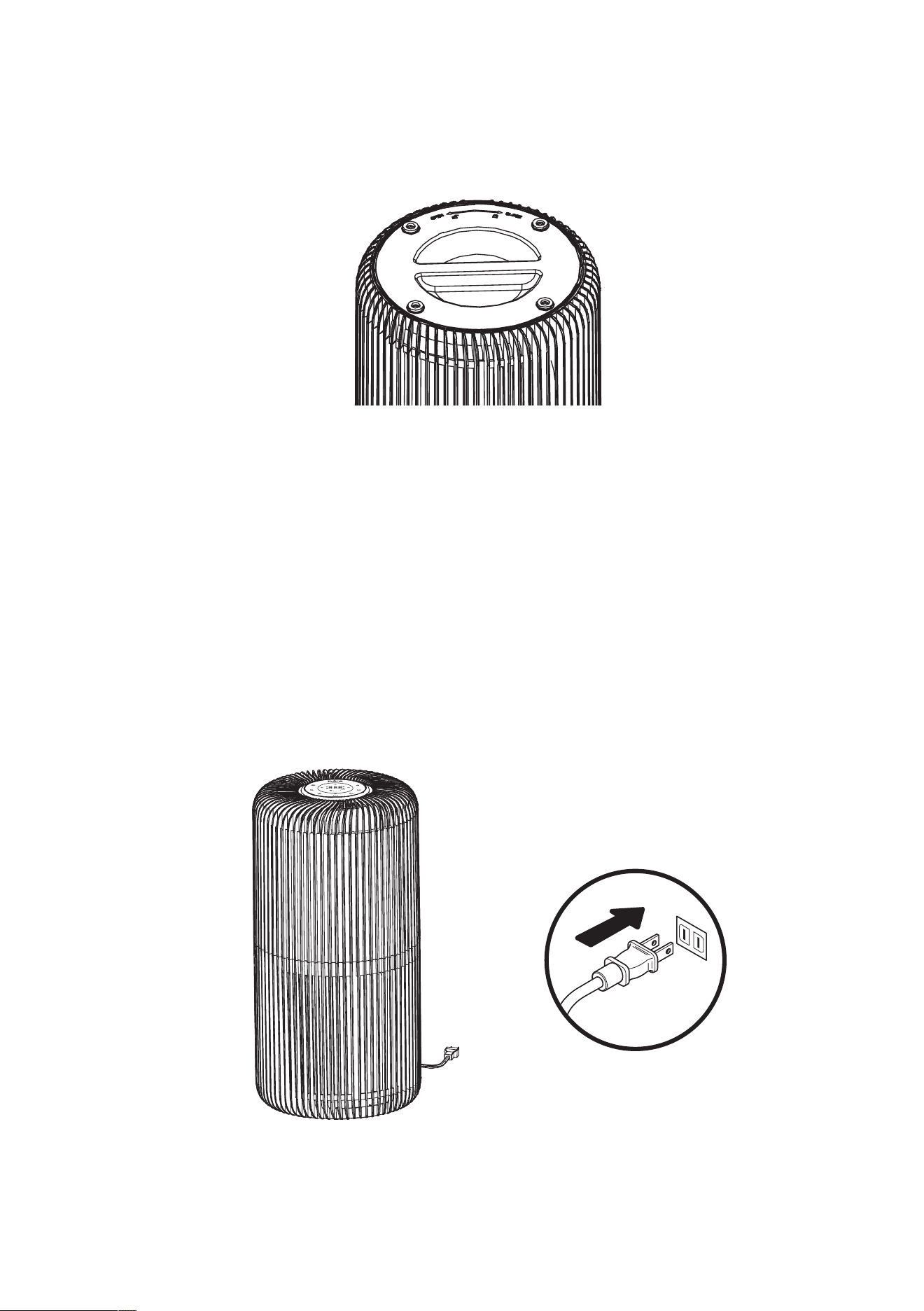
1. Carefullyremovethedevicefromtheboxandplasticbag.
2. Flip the device over, twist the base counter-clockwise and
removeit.
3. Beforeusing,removethelterfromtheplasticpackagingand
placethelterbackintothedevice.
4. Reattach the base and twist it clockwise to lock.
5. Selectarm,level,andatlocationtopositionthedevice.
NOTE: Forproperairow,placethedeviceatleast12"away
fromanywallorfurniture.Makesurenoneoftheventsare
blocked.
6. Plugthedeviceintoa120VACelectricaloutlet.
UV
11
OPERATING INSTRUCTIONS
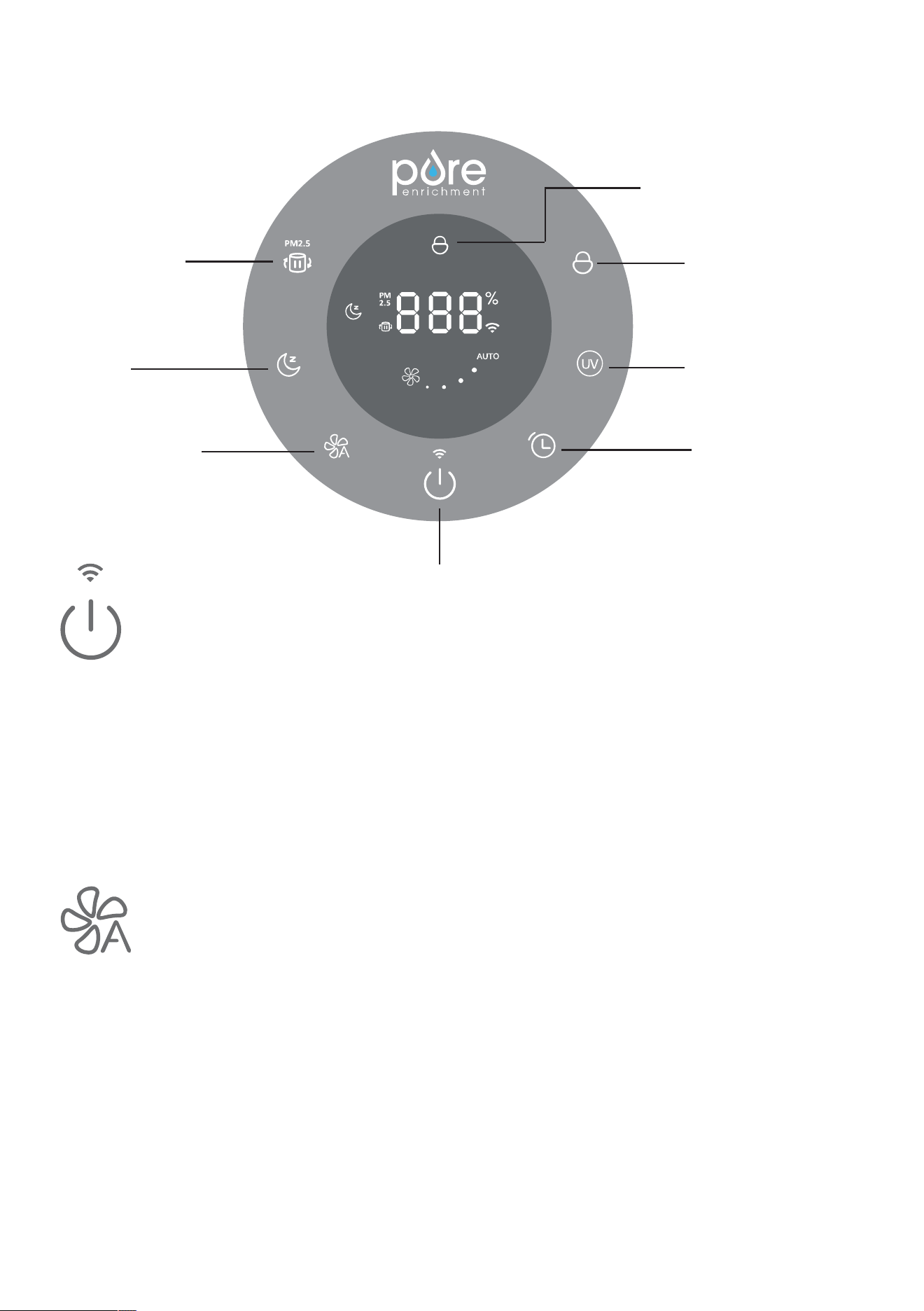
Power & Wi-Fi button:
• Press this button to turn the unit on or off.
• Press and hold this button for 3-5 seconds for Wi-Fi connection.
• TheunitisdesignedwithtwoWi-Ficonnectionmodes:fast
ickeringforAutoConnectionandslowickeringforManual
Connection. The Wi-Fi indicator will turn white solid when
connected.
Speed & Auto button:
Theairpurierhas4speedlevels.Pressthebuttontocyclethrough
the settings and select the fan speed you desire. The current speed
settingwillbeilluminatedontheLEDdisplay.
• Defaultspeedwhenrstturnedon:Level1(Low),Autooff
• 1stpress=Level2(Medium)
• 2ndpress=Level3(High)
• 3rd press = Level 4 (Turbo)
• 4th press = Auto
• 5th press = returns to Level 1 (Low) and starts the cycle over.
Filter Reset & Filter
Life/PM2.5
Sleep
Speed & Auto
Power & Wi-Fi
Timer
UV-C
Child Lock
Air Quality Light
12
OPERATING INSTRUCTIONS (CONT.)
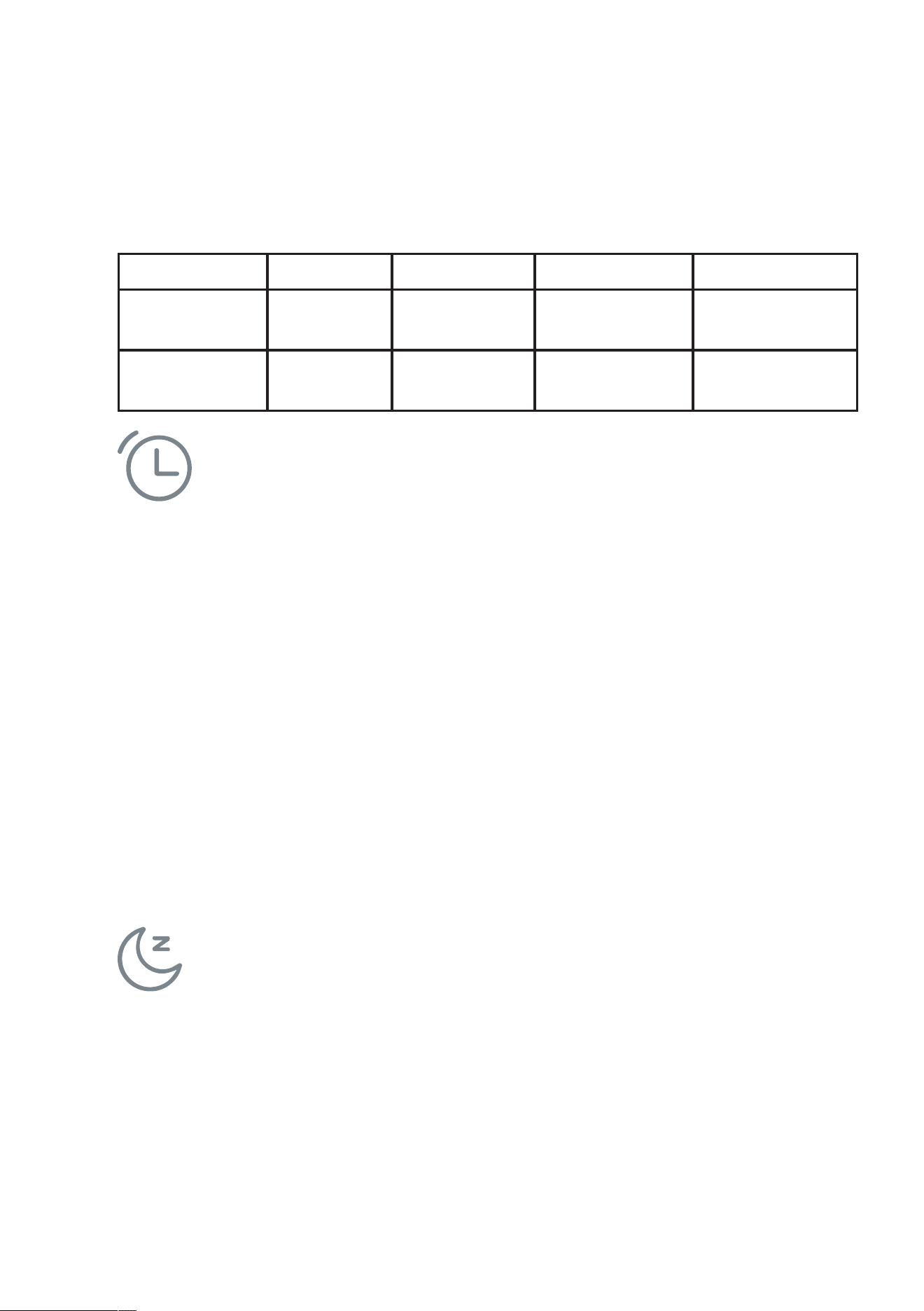
B.)Theairpurierisequippedwithanairsensorthatmonitors
thequalityofyourair.Themonitorwilltesttheairqualityand
automaticallyadjustthefanspeedtoremoveaircontaminants.The
display is equipped with LED lights to notify you of the air quality.
Light Blue Yellow Orange Red
Air Quality Good:
<50ug/m3
Moderate:
50-100ug/m3
Lightlypolluted:
100-150ug/m3
Heavilypolluted:
≥150ug/m3
Speed (Under
Auto Mode)
Level 1
(Low)
Level2
(Medium)
Level 3
(High)
Level 4
Turbo
Timer button:
PresstheTimerbuttontoselectthedesiredoperatingtimeandthe
displaywillshowthetimeset.Remainingperiodoftimerwillbe
displayedbydecrementsof1hour.
1st press = 1H
2ndpress=2H
......
12thpress=12H
13thpress=Displayswitchesbacktothesettingsbeforethetimer
action.
14th press = Returns to 1H and starts the cycle over.
Theunitwillstopwhentheselectedoperatingtimehaselapsed.
NOTE:Pressandholdfor3secondstodeactivatetimer.
Sleep button:
PresstheSleepbuttontoactivateSleepmode.Thesleepiconwill
ashfor5secondsbeforetheunitentersintosleepmode.Sleep
indicator lights up, while all other indicators and the light will be
turnedoffautomatically.Unitwillstayatcurrentsettingschosen.
Toturnoffsleepmode,pressanybutton.
NOTE:Ifthetimerperiodendsundersleepmode,thedevicewillbe
turned off. Press the power button to restart the unit.

13
OPERATING INSTRUCTIONS (CONT.)
UV-C button:
Press the UV-C button to turn on/off the UV-C light.
Filter Reset & Filter Life / PM2.5 Display button:
A.)Whenitistimetoreplacethelter,thelterresetindicatorwill
lightupsolidred.Replacethelter,thenpressandholdthelter
reset button for 3 seconds to reset it. The red light will turn off after
reset.
B.)Ifyouwanttoreplacethelterbeforethelterlifeends,press
andholdthepowerbuttonfor3secondstoresetthelterin
advance.Thelterresetindicatorwillashfor20seconds,during
whichyoucanpressandholdthebuttonagaintoresetthelter.If
you do not press and hold the button again, the indicator will go off
after20seconds.
C.)Unitdefaultstodisplayoflterlifewhenrstusedandthen
memorizesthelastdisplay.Pressthebuttontoswitchbetweenlter
lifedisplayandPM2.5display.
1stpress=continuousdisplayofPM2.5value
2ndpress=continuousdisplayoflterlife
Child Lock button:
Press and hold for 3 seconds to activate/deactivate the Child lock
If any button is pressed when child lock is activated, the icon will
ash3timesasindicatorforlockedstatus.
NOTE: When the device is not in use, turn it off and unplug it. The
devicehasamemoryfunctionthatwillsavetheprevioussettingsof
UV-C, Speed, and Auto before the device is turned off or unplugged.
14
PURE ENRICHMENT APP SETUP
1. DownloadthePureEnrichmentappbysearchingforPure
EnrichmentintheAppStore®(iOSdevices),onGooglePlay
(Android™ devices), or by scanning the following QR code.
2. Turnonyoursmartphone’sWi-FiandBluetoothtoconnect.
3. OpenthePureEnrichmentapp.LogInorSignUp.
4. Followthein-appinstructionstosetupyoursmartairpurier
5. Foradditionalinstructionsonappsetup,visit:
pureenrichment.com/products/purezone-turbo-smart-air-purier
or scan the QR code below.
Connect with Amazon Alexa or Google Assistant
YoucanusethePureEnrichmentapptoconnectyoursmartair
puriertoAmazonAlexaorGoogleAssistant.Pleasefollowthein-
app instructions to set up your voice assistant.
NOTE:YoumustcreateyourownPureEnrichmentaccountto
access voice assistants.
ATTRIBUTIONS
• Google,Android,andGooglePlayaretrademarksofGoogleLLC.
• App Store
®
isatrademarkofAppleInc.
• Wi-FiisaregisteredtrademarkofWi-FiAlliance
®
.
• iOSisaregisteredtrademarkofCiscoSystems,Inc.and/orits
afliatesintheUnitedStatesandcertainothercountries.
• The Bluetooth
®
wordmarkandlogosareregisteredtrademarks
ownedbyBluetoothSIG.Inc.andanyuseofsuchmarksbyPure
Enrichmentisunderlicense.Othertrademarksandtradenames
are those of their respective owners.
15
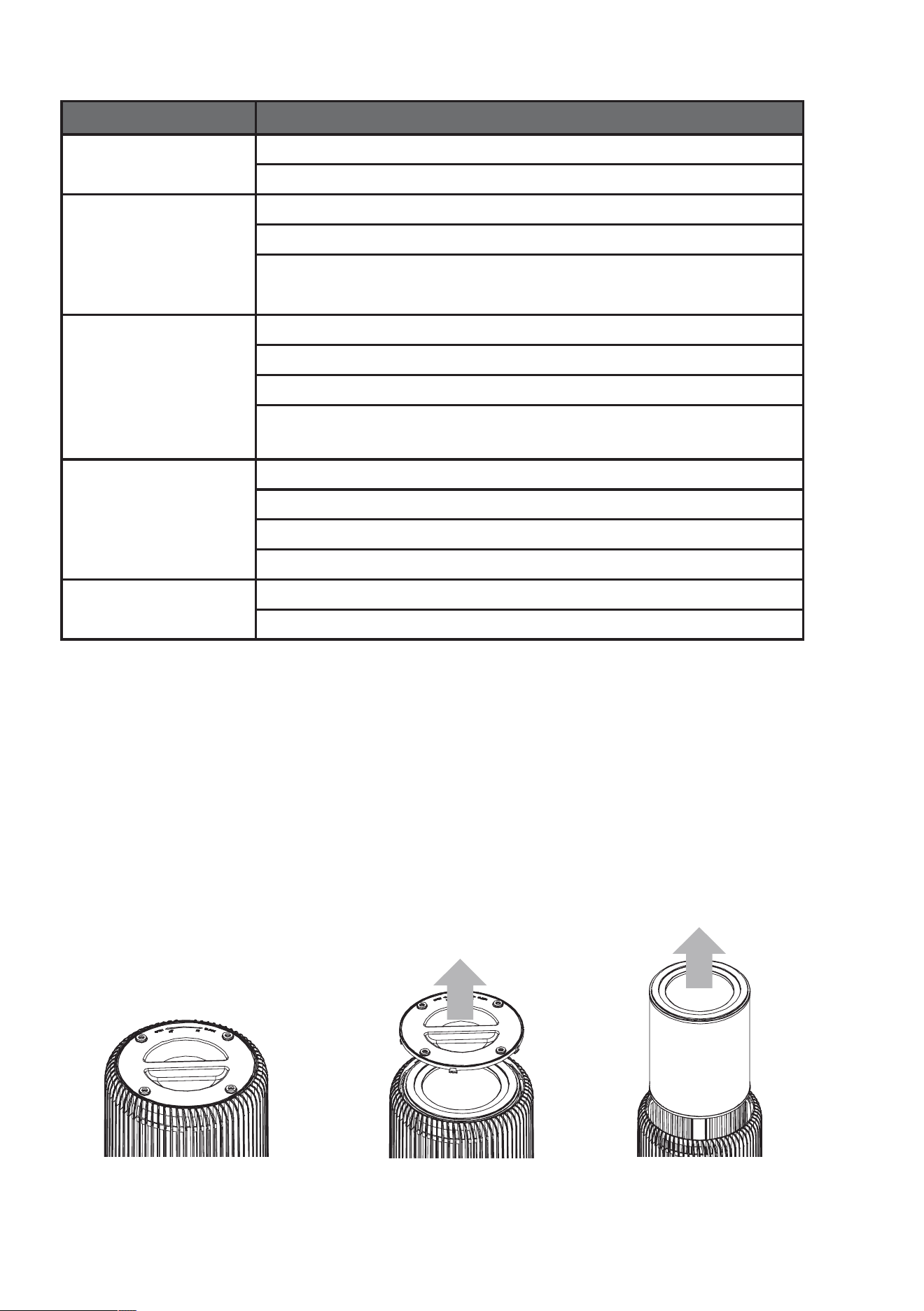
ALEXA/GOOGLE ASSISTANT DEVICE VOICE COMMANDS
Topic Command
Power On/Off Alexa, turn on/off PureZone Turbo.
Hey Google, turn on/off PureZone Turbo.
Mode Settings Alexa,setPureZoneTurbotosleep/auto/manualmode.
Alexa,whatisthemodeonPureZoneTurbo?
HeyGoogle,setmodeonPureZoneTurbotosleep/auto/
manual.
Speed Settings Alexa,whatisthefanspeedonPureZoneTurbo?
Alexa, set PureZone Turbo fan speed to one/two/three/four.
HeyGoogle,whatisthePureZoneTurbospeed?
HeyGoogle,setPureZoneTurbotolevel1/level2/level
3/level 4.
Child lock ON/OFF Alexa, turn on/off child lock on PureZone Turbo.
Alexa,ischildlockonforPureZoneTurbo?
Hey Google, turn on/off child lock on PureZone Turbo.
HeyGoogle,isPureZoneTurbochildlockon?
Ultraviolet ON/OFF Alexa, turn on/off ultraviolet on PureZone Turbo.
Hey Google, turn UV on/off on PureZone Turbo.
FILTER REPLACEMENT
Whenitistimetoreplacethelter,thelterresetindicatorwilllight
up solid red.
NOTE:The4-in-1lterwilllastapproximately6months,depending
onusageandenvironmentconditions.It’simportanttomaintainand
changetheltertocontinuetooptimizetheperformanceoftheair
purier.Topurchasethereplacementlter(Model:PECYLFIL),visit
pureenrichment.com.
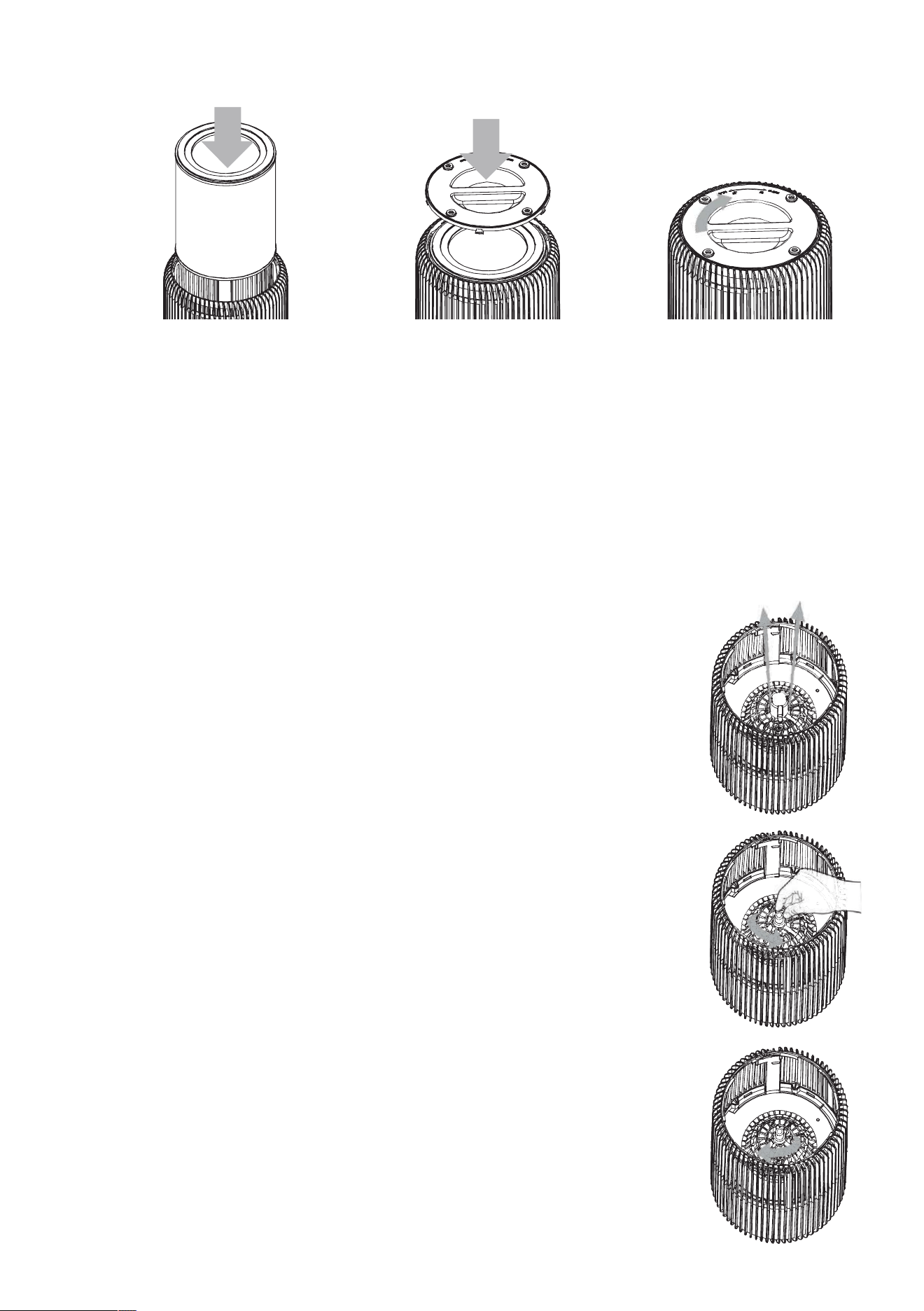
1. Turn off and unplug the device.
2.Fliptheunittoaccessthebase.
5.Removeand
dispose of the used
lter.
4. Lift base off of
the unit.
3.Toopen,placeboththumbs
on opposite sides of handle
and twist counterclockwise
16
FILTER REPLACEMENT (CONT.)
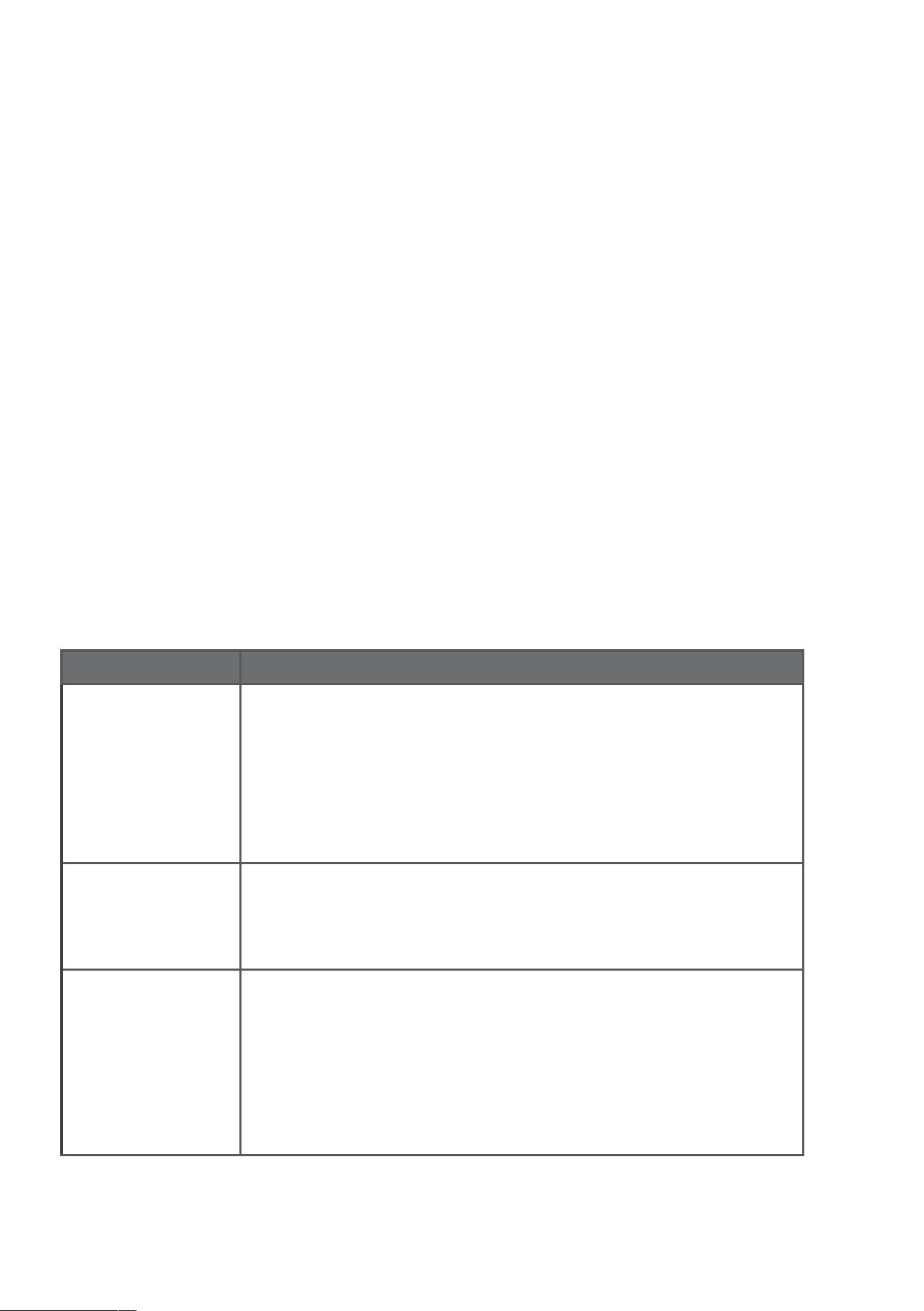
6.Insertnewlter.Secure,thenreturnthebaseandtwistRIGHTto
lock.
7.ResetthelterindicatorbypressingandholdingtheFilterReset
button for 3 seconds.The red indicator light will turn off.
NOTE:Whenthelterexpires,thesystemwillsendnoticationto
remindtheusertoreplacethelter.Whenthelterisnotinstalledor
thebottomcoverisopened,theunitwillshutoffautomatically.
UV-C BULB REPLACEMENT
Replace the bulb according to the directions below.
1. TheUV-Cbulbislocatedinacompartment
inthecenterofthepurier.Toaccess,rst
followtheinstructionstoremovethelter.
2. Afterremovingthelteruseascrewdriverto
removetwoscrewsanddetachtheUVbulb
enclosure.
3. Hold the unit in place with one hand. Locate
the bulb and reach into the cylinder.
4. Turn the bulb in a counter-clockwise direction
(left)toloosenfromthesocket.
5. Take new bulb and screw into unit using a
clockwisemotion.Wipeoffngerprintswitha
dry cloth.
6. Reassemblebyreversingsteps1&2.Turnthe
unit back on.
NOTE: DO NOT look directly at the UV light when
UV-C is turned on.
17
CLEANING & MAINTAINING THE AIR PURIFIER
1. Unplug before cleaning.
2. Wipetheoutsideoftheairpurierwithasoft,drycloth.If
needed,wipethehousingwithadampcloth,thenimmediately
dry.
3. Vacuumtheinsideoftheairpurier.
4. Donotcleanwithabrasivechemicalsorammablecleaning
agents.
CLEANING & MAINTAINING THE FILTER
Theltershouldbecleanedonceamonthtoincreasetheefciency
andextendthelifeofyourlter.Cleantheinsideandoutsideofthe
lterusingasoftbrushorvacuumhosetoremovehair,dust,and
largeparticles.Donotcleanthelterwithwaterorotherliquids.
NOTE:Thelterisnotwashable.DONOTwetthelterwhen
cleaning.
TROUBLESHOOTING
Problem Solution
Unit is not
powering on
ChecktomakesurePureZoneTurboisproperly
plugged in and the electrical outlet is working.
Checkthatthebaseislatchedrmlyinplace.
Checkthatthelterisrmlyinplace.
Decreased air
ow
Checkthatthelterisclean,replaceifnecessary.
Check for any obstructions in the air inlet and
outlet.
Excessive
noise
Checkforandremoveanyforeignobjectsin
contact with the fan.
Theltermaybecloggedandreadyfor
replacement,replaceifnecessary.
Uneven positioning. Reposition on an even surface.
Ifyourproblemisnotresolvedbythesolutionslistedabove,contact
PureEnrichmentforassistancebyemailinghelp@pureenrichment.
com.

18 19
PUREENRICHMENT APP TROUBLESHOOTING
Mysmartairpurierisn'tconnectingtothePureEnrichmentapp.
• MakesureyourphonehasBluetooth®turnedonandisnot
currently connected to another Bluetooth device.During the
setupprocess,youmustbeonasecurenetwork.Conrmthat
the network is working correctly.
• Make sure the Wi-Fi password you entered is correct.
• There should be no spaces at the beginning or end of the
password.
• Test the password by connecting a different electronic device to
the router.
• Ifyou'remanuallytypingintheSSIDandpassword,double
check that both are entered correctly.
• Trymovingyourairpurierclosertotherouter.Yourphone
shouldbeascloseaspossibletoyourairpurier.
• Yourroutermayneedtobeatahigherlocation,awayfrom
obstructions.
• Makesureyourairpurierandrouterareawayfromappliances
(suchasmicrowaveovens,refrigerators,electronicdevices,
etc.) to avoid signal interference.
• Ifyou'reusingaVPN,makesureit'sturnedoffwhilesettingup
yourairpurier.
• Disable portal authentication for your Wi-Fi network. If portal
authenticationisenabled.theairpurierwillnotbeableto
access your Wi-Fi network, and setup will fail.
NOTE:Portalauthenticationmeansthatyouneedtosignintoyour
W-Fi network through a web page before you can use the Internet.
Myairpurierisofine.
• Makesuretheairpurierispluggedinandhaspower,then
refreshthePureEnrichmentmenubyswipingdownonthe
screen.
• Make sure your router is connected to the internet and your
phone's network connection is working.
• DeletetheofineairpurierfromthePureEnrichmentappand
reconguretheairpurierwiththePureEnrichmentapp.

18 19
PUREENRICHMENT APP TROUBLESHOOTING
NOTE: Power outages, internet outages, or changing Wi-Fi routers
maycausetheairpuriertogoofine.
Ifyourproblemisnotresolvedbythesolutionslistedabove,contact
PureEnrichmentforassistancebyemailinghelp@pureenrichment.
com.
WARRANTY
PureZoneTurbocomeswithanindustry-leading5YearWarranty
that begins on the date of purchase.
Thewarrantyappliestotheairpurierandnecessarypartsandlabor
relatingthereto.Thewarrantydoesnotapplytodamageresulting
fromfailuretofollowtheoperatinginstructions,accidents,abuse,
alterations,ordisassemblybyunauthorizedindividuals.
PRODUCT REGISTRATION
To ensure your full warranty, and to receive product updates and
streamlinedcustomersupport,remembertoregisteryourproductat:
pureenrichment.com/productregistration
ARE YOU 100% SATISFIED?
Ifyouhaveproductquestionsorconcerns,don’thesitatetocontact
usdirectlyat:
Email:help@pureenrichment.com
Phone:(657)275-3737
(AvailableMonday-Friday,8am-5pmPST)
PureEnrichmenthasanaward-winningwarranty,exchange,and
customerserviceprogramthatguaranteeshassle-freesolutionsto
anyissueyoumighthavewithin24hours!

SantaAna,CA92704
pureenrichment.com
REV:10.29.21