
User Manual

01-08
16-22
09-15
23-29
30-36
English
Deutsch
Français
Español
Italiano
/ 01
As the leader of audio products, Mpow works passionately
on the innovation of design and technology to create products
with simplicity and usability to all over the world.
Mpow proudly stands behind every product offered. Mpow
has sold more than 12,000,000 headphones and favored by
10,000,000 consumers. Every Mpow product offers a 24-month
buyer’s assurance.
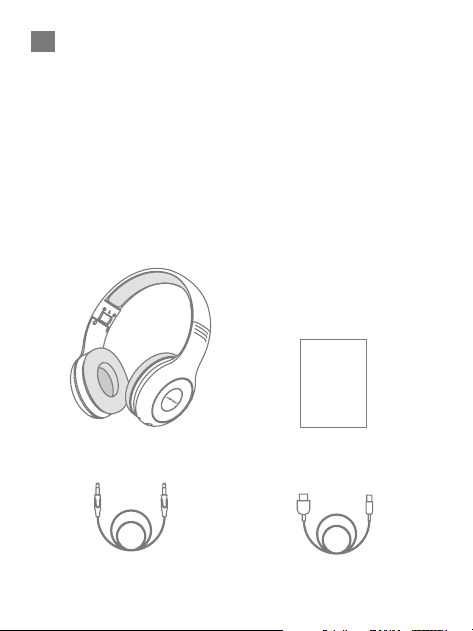
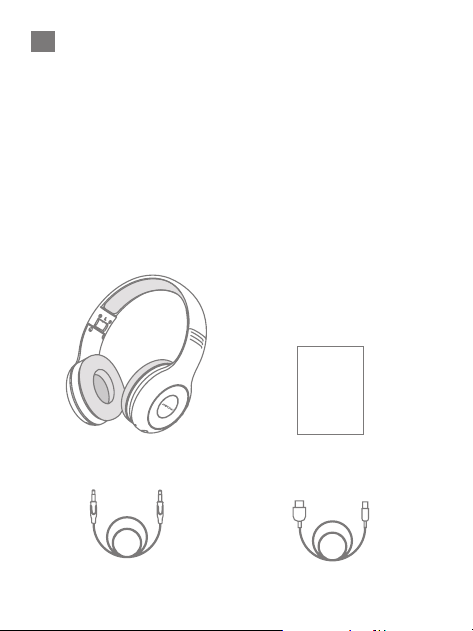
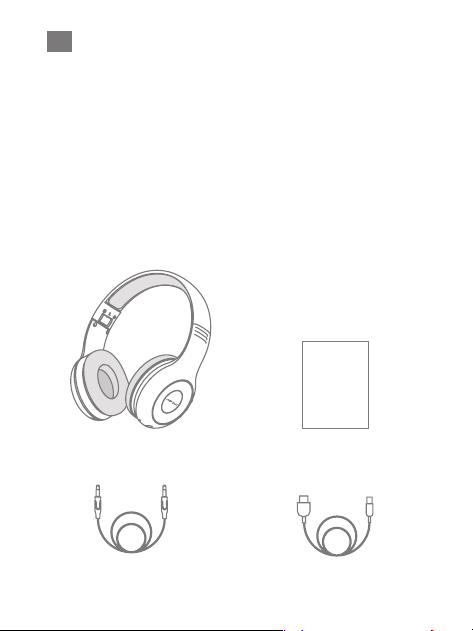
Packages
EN
Wireless headphones ×1
Charging cable ×1 3.5mm audio cable ×1
User manual ×1
/ 02
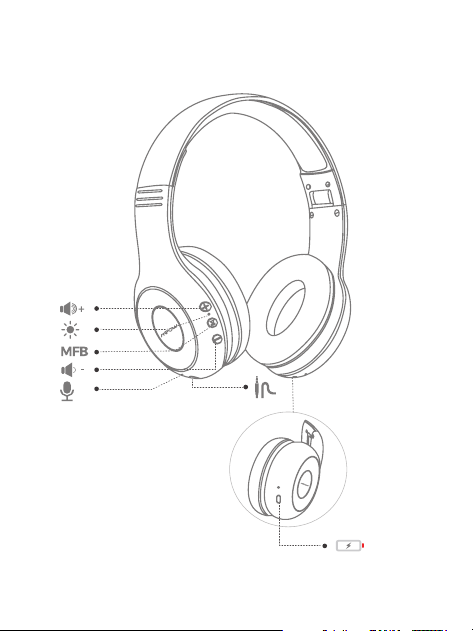
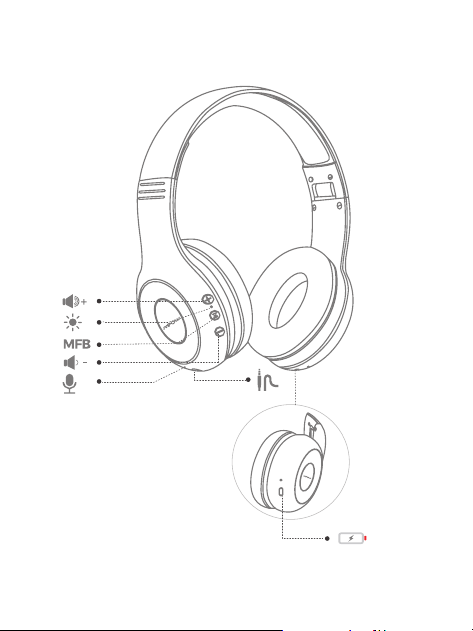
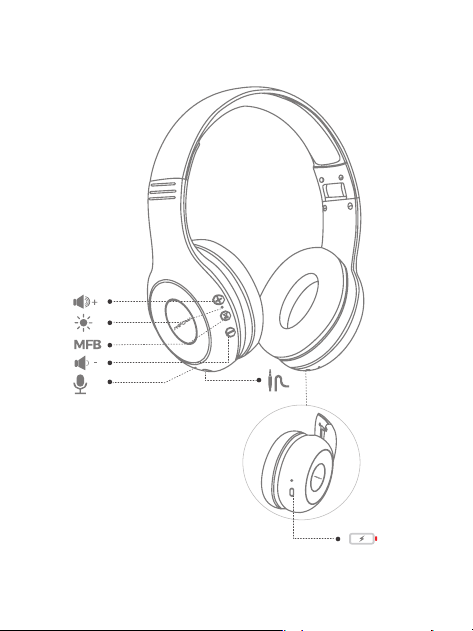
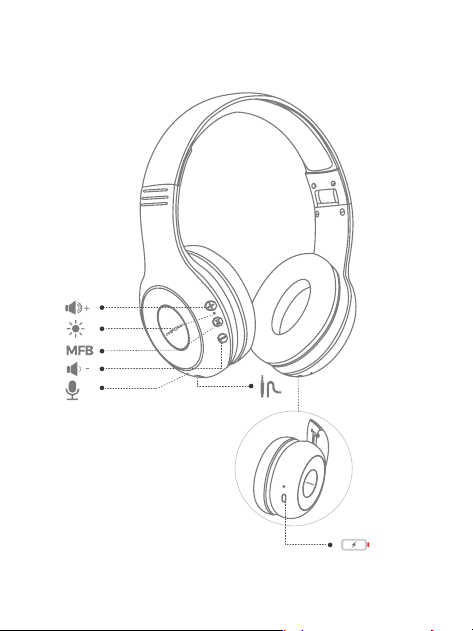
Diagram
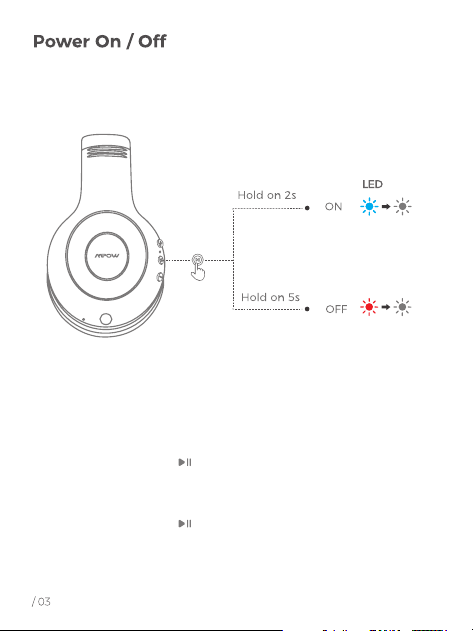
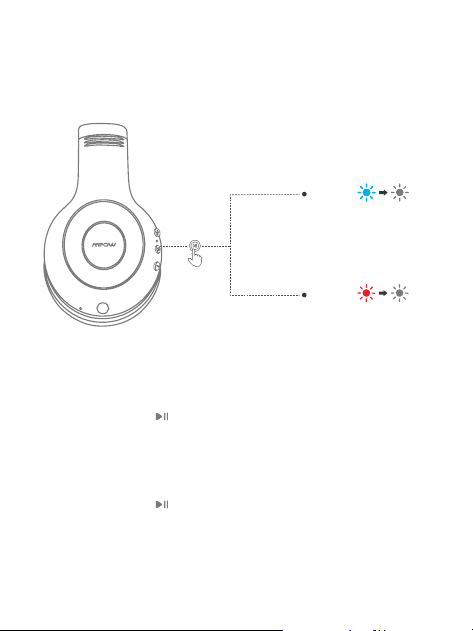
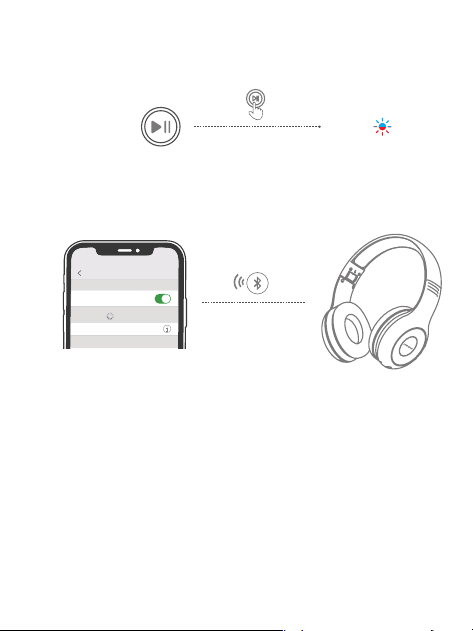
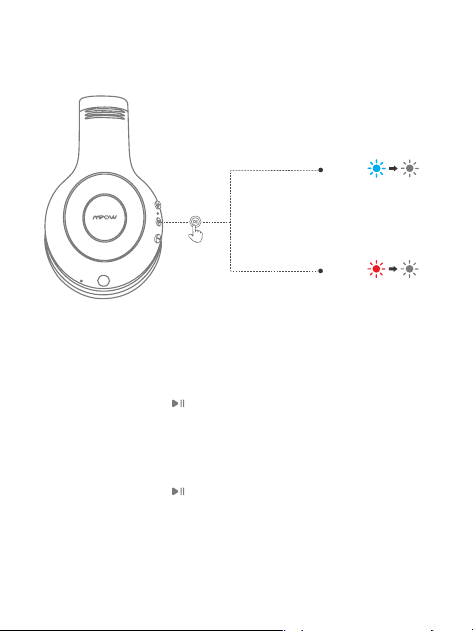
1. Power ON:
Press and hold the “ ” for 2s, the blue light will on and
then goes out, you will hear a voice prompt "power on".
2. Power OFF
Press and hold the “ ” for 5s, the red light will on for
1s and then goes out, you will hear a voice prompt
"power off ".
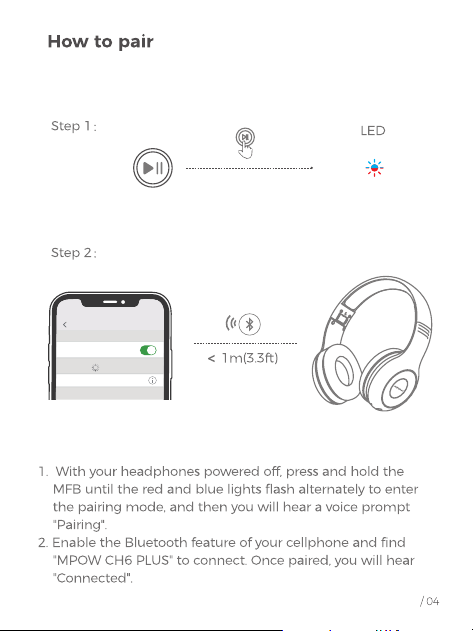
1. Power ON:
Press and hold the “ ” for 2s, the blue light will on and
then goes out, you will hear a voice prompt "power on".
Settings
Bluetooth
Bluetooth
DEVICES
MPOW CH6 PLUS
Connected
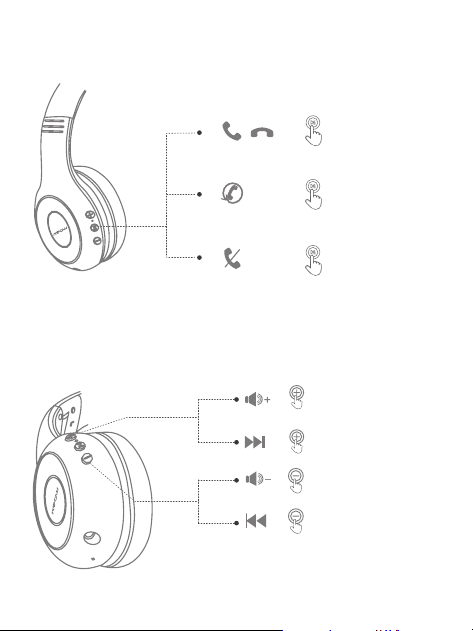
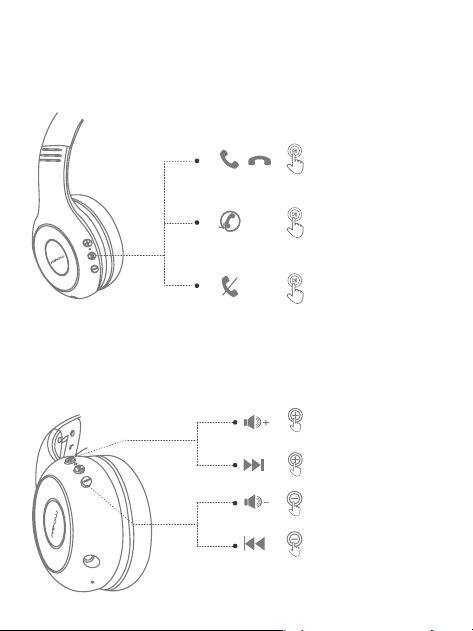
Answer / Hang up / Redial / Reject a call
/ 05
Volume Control / Music Control
Press and hold on 2S
Press and hold on 2S
Click once
Click once
Hold on 2S
Click once
Click twice
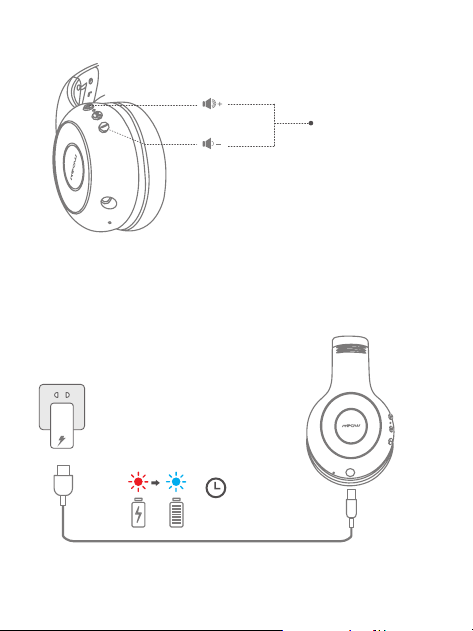
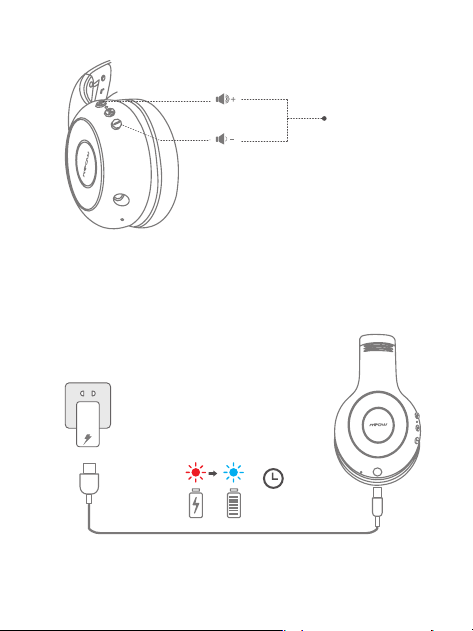
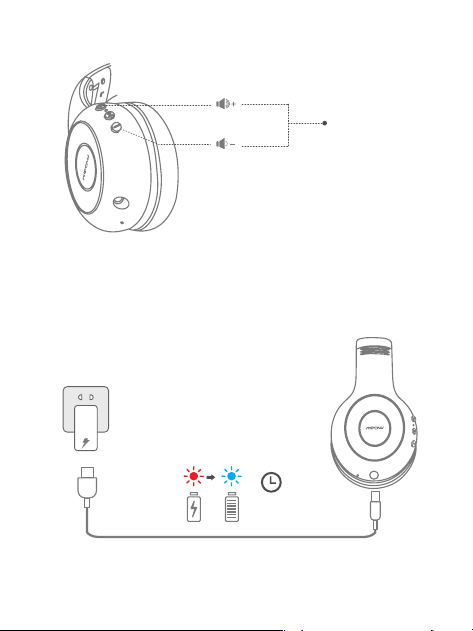
With your headphones powered on,press and hold the “ + ”
and “ - ”buttons simultaneously for 5s,until the red and blue light
flashes 3 times and the headphones will re-enter into paring mode.
Clear Paring Record
1. In charging: red light stays on
2. Full Charge: blue light stays on ( charging for 2 hours)
Charging Indications
2H
/ 06
Hold on 5s
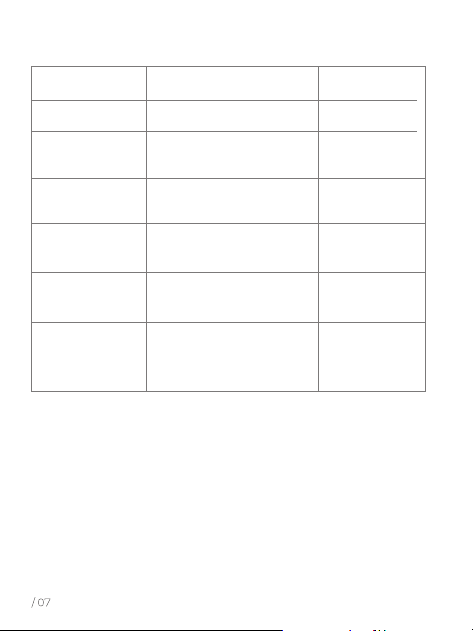
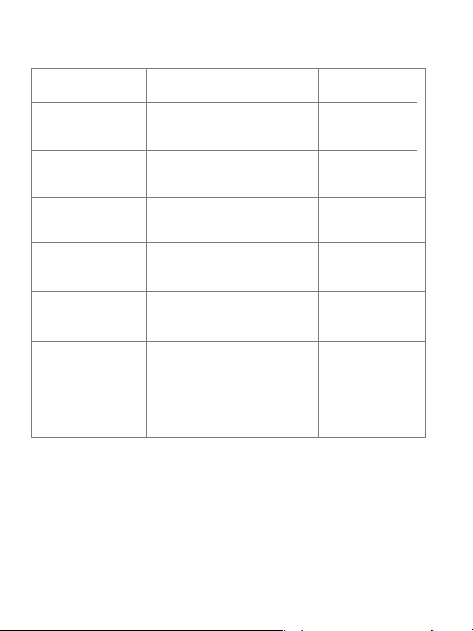
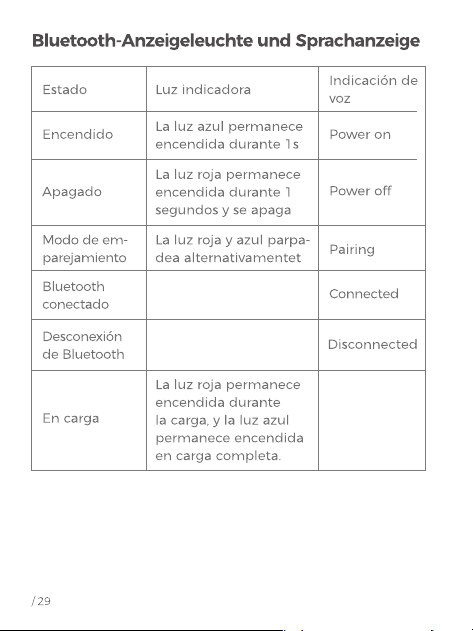
Bluetooth Indicator Light & Voice Indication
Voice
Indication
Power on Power onBlue light stays on for 1s
State Indicator Light
Power off Power off
Red light stays on for 1s
and turns off
Pairing Mode Pairing
Red and blue light
flashes alternatively
Bluetooth
Connected
Connected
Disconnected
Bluetooth
Disconnection
In Charging
Red light stays on in
charging, blue light
stays on in full charge
/ 09
Als Pionier bei Audioprodukten engagiert sich Mpow für
Innovation in Design und Technologie und zielt darauf ab,
einfach zu bedienende Produkte auf der ganzen Welt zu
entwickeln. Wir sind stolz auf jedes Produkt, das wir anbieten.
Mpow hat mehr als 12,000,000 Kopfhörer verkauft und wird
von 10,000,000 Kunden bevorzugt. Jedes Mpow-Produkt wird
die Garantie von 24 Monaten gebietet.
Pakete
DE
Bluetooth Kopfhörer ×1
Ladekabel ×1
Benutzerhandbuch ×1
3.5 mm Audiokabel ×1
/ 10
Diagramm
Einschalten / Ausschalten
/ 11
LED
OFF
ON
Warte 2S
Warte 5s
1. Power ON:
Halten Sie den " " für 2s, das blaue Licht leuchtet und
geht dann aus, Sie hören eine Sprachaufforderung
" power on ".
2. Power OFF:
Halten Sie den " " für 5s, das rote Licht leuchtet für 1s
und dann geht aus, Sie hören eine Sprachansage
" power off ".
/ 12
Lautstärkeschalter
<
1m(3.3ft)
Schritt 2
:
Schritt 1
:
LED
1. Wenn das Headset ausgeschaltet ist, drücken Sie die
MFB-Taste für eine lange Zeit, bis die roten und blauen
Lichter abwechselnd blinken,um in den Kopplungsmodus
zu gelangen, und dann hören Sie eine Sprachaufforderung
"Pairing".
2. Aktivieren Sie die Bluetooth-Funktion Ihres Mobiltelefons
und finden Sie " MPOW CH6 PLUS ", um eine Verbindung
herzustellen. Einmal gekoppelt, hören Sie " Connected "
Settings
Bluetooth
Bluetooth
DEVICES
MPOW CH6 PLUS
Connected
/ 13
Antwort / Auflegen / Wahlwiederholung /
Anruf abweisen
Control de volumen/control de música
Lang drücken Sie 2s
Lang drücken Sie 2s
Lang drücken Sie 2s
Kurz drücken
Kurz drücken
Kurz drücken
Doppelt drücken
/ 14
Halten Sie bei eingeschaltetem Kopfhörer die Tasten “ + ”
und
“ - ”
gleichzeitig 5 Sekunden lang gedrückt, bis das rote
und blaue Licht dreimal blinken und der Kopfhörer wieder
in den Pairing-Modus wechselt.
Clear Paring Record
1. En la carga: la luz roja permanece encendida
2. Carga completa: la luz azul permanece encendida (carga
durante 2 horas)
Indicaciones de carga
2H
Warte 5s
/ 15
Bluetooth-Anzeigeleuchte und Sprachanzeige
Sprachanzeige
Ein Power on
1S Blaues Licht bleibt
für 1s eingeschaltet
Zustand Kontrollleuchte
Ausschalten Power off
Das rote Licht bleibt 1 Sekun-
den lang an und erlischt
Verbindungs-
modus
Pairing
Rotes und blaues Licht
blinken abwechselnd
Bluetooth
verbunden
Connected
Disconnected
Bluetooth-
Verbindung
Aufladung
Das rote Licht bleibt
während des Ladevorgangs
eingeschaltet und das
blaue Licht bleibt voll
aufgeladen.
/ 16
En tant que leader des produits audio, Mpow travaille avec
passion sur l’innovation du design et de la technologie afin
de fabriquer de produits pratiques à utiliser pour tout le monde.
Mpow se tient fièrement derrière chaque produit. Mpow a
vendu plus de 12 000 000 d’écouteurs, favorisés par 10 000
000 de consommateurs. Chaque produit Mpow offre une
garantie de l'acheteur de 24 mois.
Paquets
FR
Casque Bluetooth ×1
Câble de charge ×1 Câble audio 3.5 mm ×1
Manuel utilisateur ×1
/ 17
Diagramme
/ 18
Marche / arrêt
LED
OFF
ON
Tenir 2 secondes
Tenir 5 secondes
1. Activer le casque:
Appuyez sur le " " et maintenez-le enfoncé pendant 2
secondes, le voyant bleu s'allume puis s'éteint, vous
entendrez un message vocal " power off ".
2. Désactiver le casque:
Appuyez sur le " " pendant 5 secondes, le voyant
rouge s’allume pendant 1 seconde puis s’éteint, vous
entendrez un message vocal " power off ".
/ 19
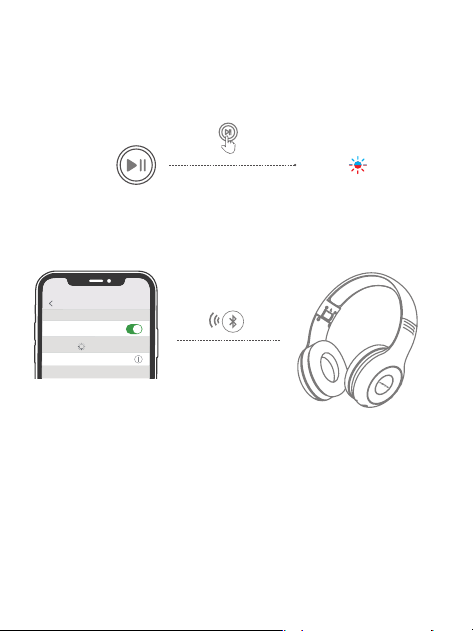
Comment faire pour jumeler
1. En mode désactivé, appuyez sur le bouton MFB jusqu’à
ce que les voyants rouge et bleu clignotent alternativement
pour passer en mode de couplage avec un message vocal
"Paring".
2. Activez la fonction Bluetooth de votre téléphone portable
et recherchez “MPOW CH6 PLUS” pour vous connecter. Une
fois jumelé, vous entendez “ Connected ”.
<
1m(3.3ft)
étape 2:
étape 1:
LED
Settings
Bluetooth
Bluetooth
DEVICES
MPOW CH6 PLUS
Connected
/ 20
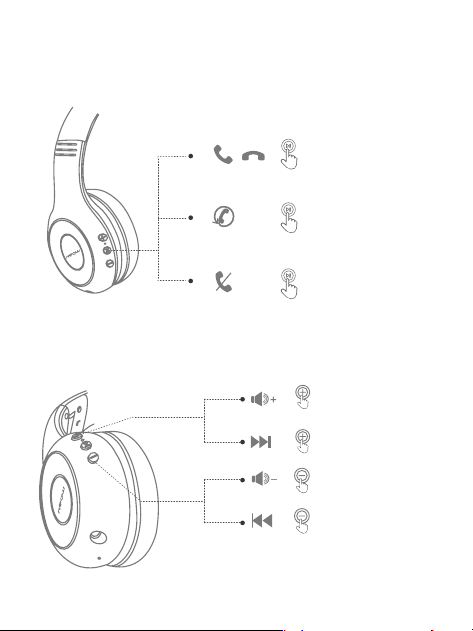
Réponse / Raccrocher / Rappel / Rejeter un
appel
1. En mode désactivé, appuyez sur le bouton MFB jusqu’à
ce que les voyants rouge et bleu clignotent alternativement
pour passer en mode de couplage avec un message vocal
"Paring".
2. Activez la fonction Bluetooth de votre téléphone portable
et recherchez “MPOW CH6 PLUS” pour vous connecter. Une
fois jumelé, vous entendez “ Connected ”.
Volume Control / Music Contrb
Appui long 2s
Appui long 2s
Appui long 2s
Presse courte
Presse courte
Presse courte
Appuyez deux fois sur
/ 21
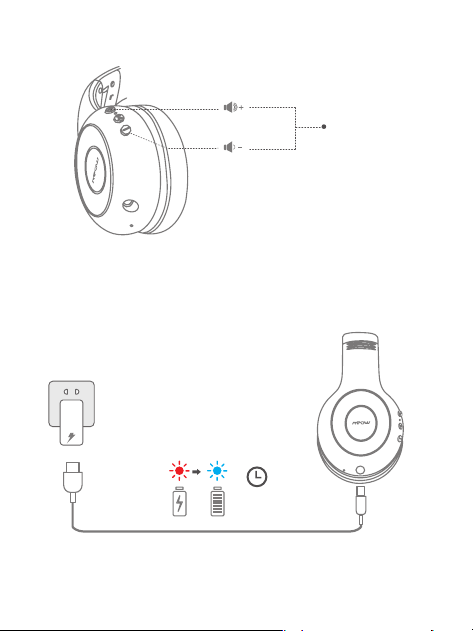
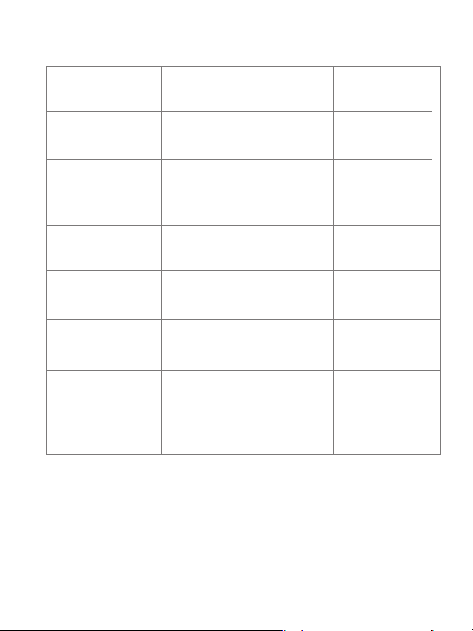
Indications de charge
Lorsque vos écouteurs sont allumés, maintenez
simultanément enfoncés les boutons “ + ” et “ - ” pendant
5 secondes, jusqu'à ce que les voyants rouge et bleu
clignotent 3 fois et que les écouteurs repassent en mode de
couplage.
Effacer les informations de couplage
1. En charge: le voyant rouge reste allumé
2. Charge complète: le voyant bleu reste allumé (charge pen
dant 2 heures)
2H
Tenir 5 secondes
/ 22
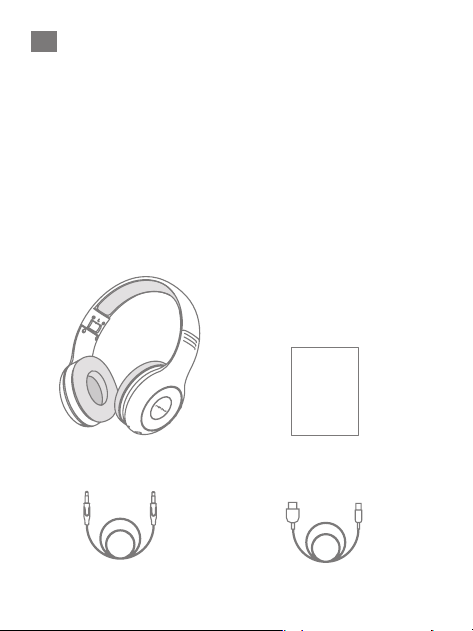
Bluetooth-Anzeigeleuchte und Sprachanzeige
Indication
vocale
Allumer
Power on
La lumière bleue reste
allumée pendant 1s
Etat Voyant
Éteindre
Power off
La lumière rouge reste
allumée pendant 1
secondes et s’éteint
Mode d’appa-
riement
Pairing
La lumière rouge et bleue
clignote alternativement
Bluetooth
connecté
Connected
Disconnected
Déconnexion
Bluetooth
En charge
La lumière rouge reste
allumée pendant la
charge, la lumière bleue
reste allumée
/ 23
Como el líder de productos de audio, Mpow se dedica a la
innovación del diseño y la tecnología para crear productos
con simplicidad y facilidad de uso en todo el mundo.
Mpow se enorgullece de respaldar cada producto ofrecido.
Mpow ha vendido más de 12,000,000 de auriculares y ha sido
favorecido por 10,000,000 de consumidores. Cada producto
Mpow ofrece un seguro de producto de 24 meses para
nuestros clientes.
Paquetes
ES
Auriculares bluetooth ×1
Cable de carga ×1 Cable de audio de 3.5mm ×1
Manual de usuario ×1
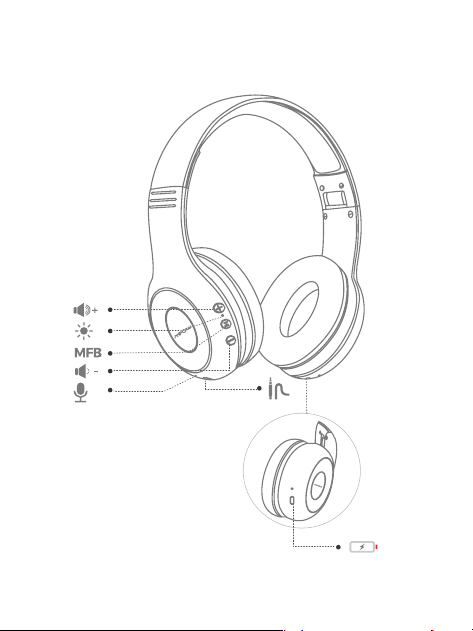
/ 24
Diagrama
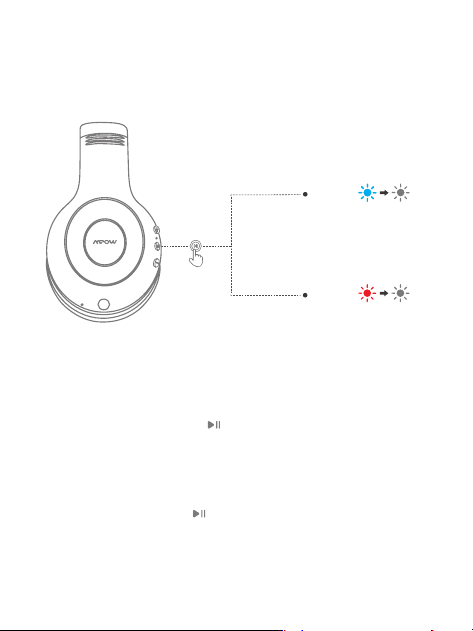
/ 25
Encendido / apagado
LED
OFF
ON
Espera 2s
Espera 5s
1. ENCENDIDO:
Mantenga presionado el " " durante 2 segundos, la luz
azul se encenderá y luego se apagará, escuchará un
mensaje de voz "power on".
2. APAGADO:
Presione y sostenga el " " durante 5 segundos, la luz
roja se encenderá durante 1 segundo y luego se
apagará, escuchará un mensaje de voz de "power off".
/ 26
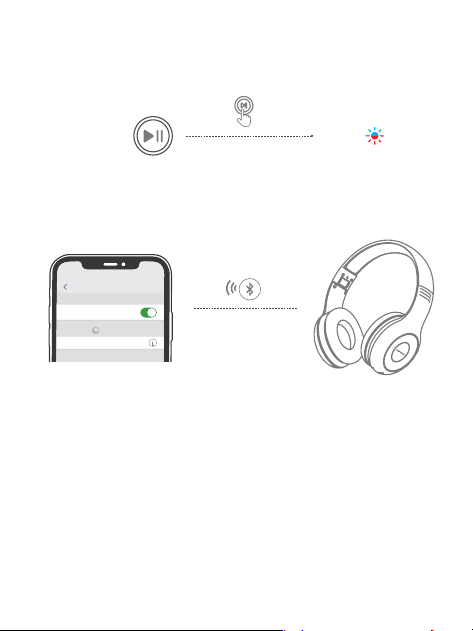
Cómo emparejar
1. Con los auriculares apagados, mantenga presionado el
MFB hasta que las luces roja y azul parpadeen
alternativamente para ingresar al modo de
emparejamiento, y luego escuchará un mensaje de voz
"Pairing".
2. Habilite la función Bluetooth de su móvil y busque
"MPOW CH6 PLUS" para conectarse. Una vez emparejado,
oirá " Connected ".
<
1m(3.3ft)
Paso 2:
Paso 1:
LED
Settings
Bluetooth
Bluetooth
DEVICES
MPOW CH6 PLUS
Connected
/ 27
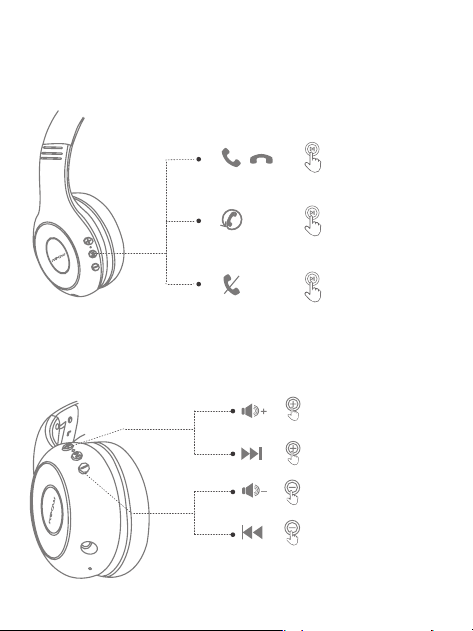
Responder/colgar / Volver a marcar / Rechaz-
ar una llamada
Control de volumen / Música contrb
Pulsación larga 2s
Pulsación larga 2s
Pulsación larga 2s
Pulsación corta
Pulsación corta
Pulsación corta
Pulse dos veces
/ 28
Con los auriculares encendidos, mantenga presionados los
botones “ + ” y “ - ” simultáneamente durante 5 segundos,
hasta que la luz roja y azul parpadee 3 veces y los auricu-
lares vuelvan a entrar en modo de emparejamiento.
Borrar información de emparejamiento
1. En carga: la luz roja permanece encendida
2. Carga completa: la luz azul permanece encendida (carga
durante 2 horas)
Indicaciones de carga
Espera 5s
2H
Pulse dos veces
IT
/ 31
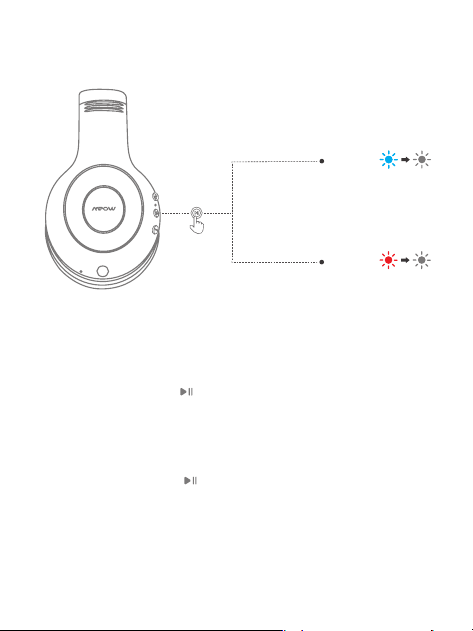
Diagramma
/ 32
Accensione / spegnimento
1. Accensione:
Tenere premuto l' " " per 2 secondi, la luce blu si
accenderà e poi si spegnerà, si sentirà un messaggio
vocale "power on".
2. Spegnimento:
Tenere premuto l' " " per 5 secondi, la luce rossa si
accenderà per 1 secondo e poi si spegnerà, si sentirà un
messaggio vocale " power off ".
LED
OFF
ON
Aspetta 5 secondi
Aspetta 2 secondi
/ 33
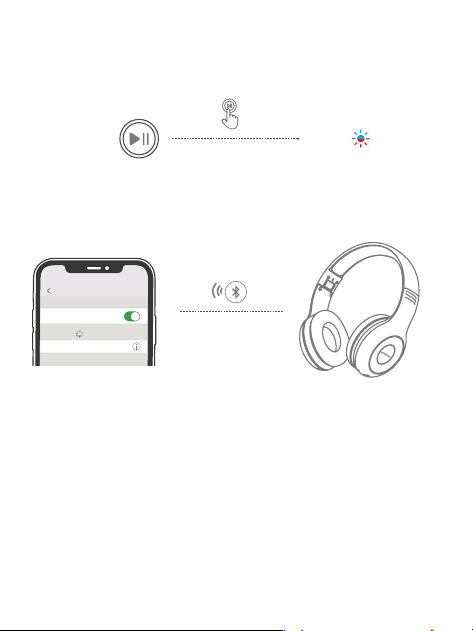
Come accoppiare
1. Con le cue spente, tenere premuto l'MFB fino a quando
le luci rossa e blu lampeggiano alternativamente per
accedere alla modalità di accoppiamento, e poi sentirài
un messaggio vocale "Pairing".
2. Abilita la funzione Bluetooth del tuo cellulare e trova
"MPOW CH6 PLUS" per collegare. Una volta accoppiato,
sentirai " Connected ".
<
1m(3.3ft)
Passo 2:
Passo 1:
LED
Settings
Bluetooth
Bluetooth
DEVICES
MPOW CH6 PLUS
Connected
/ 34
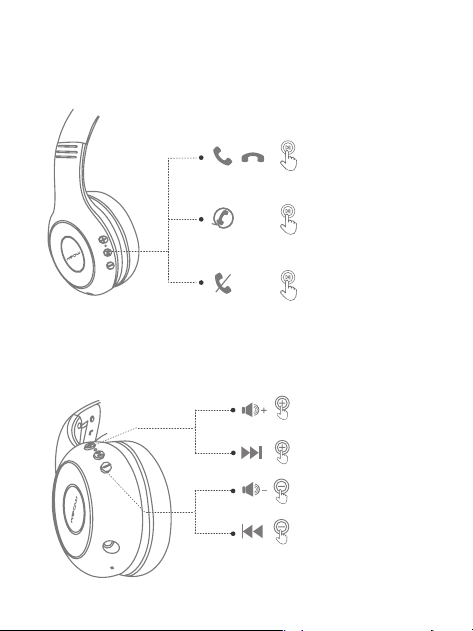
Risposta / Riaggancio / Ricomposizione /
Rifiuta una chiamata
Controllo del volume / controllo musicale
Premi a lungo 2 secondi
Premi a lungo 2 secondi
Premi a lungo 2 secondi
Breve pressione
Breve pressione
Breve pressione
Doppia pressione
/ 35
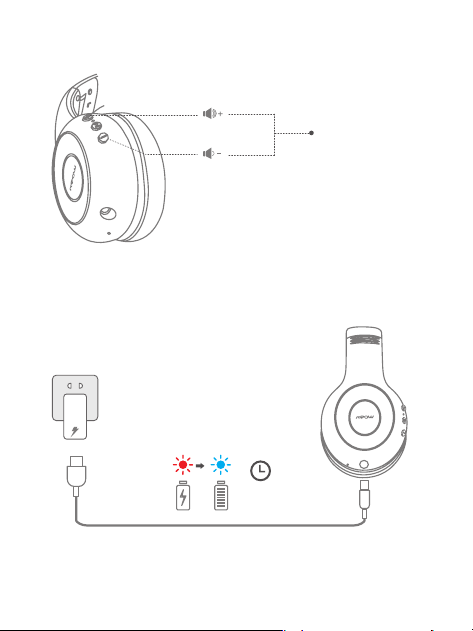
1. In carica: la luce rossa rimane accesa
2. Carica completa: la luce blu rimane accesa (ricarica per 2ore)
Indicazioni di ricarica
Cancella informazioni di associazione
Con le cue accese, tenere premuti contemporaneamente i
pulsanti “ + ” e “ - ” per 5 secondi, fino a quando la luce rossa
e blu lampeggia 3 volte e le cue entreranno nuovamente
in modalità di associazione.
2H
Aspetta 5 secondi
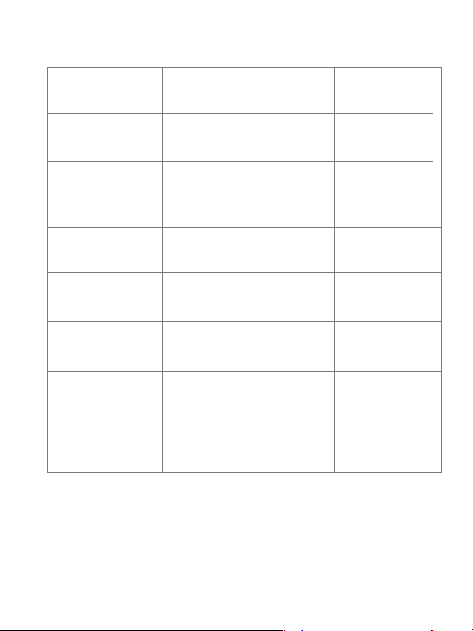
/ 36
Bluetooth-Anzeigeleuchte und Sprachanzeige
Indicazione
vocale
Encendido Power on
La luz azul permanece
encendida durante 1s
Estado Luz indicadora
Apagado
Power off
La luz roja permanece
encendida durante 1
segundos y se apaga
Modo de em-
parejamiento
Pairing
La luz roja y azul parpa-
dea alternativamentet
Bluetooth
conectado
Connected
Disconnected
Desconexión
de Bluetooth
En carga
La luce rossa rimane
accesa durante la
ricarica e la luce blu
rimane accesa a pieno
carico.

www.xmpow.com | support@xmpow.com
Copyright © MPOW Inc. All rights reserved.
MPOW TECHNOLOGY CO., LTD