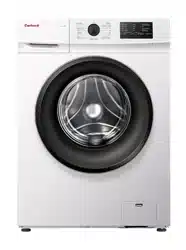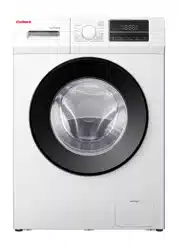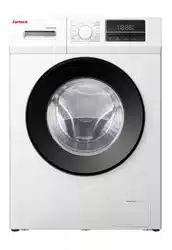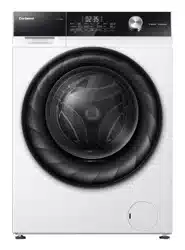
Washing Machine / User Manual
EN
CLAV81422EXC
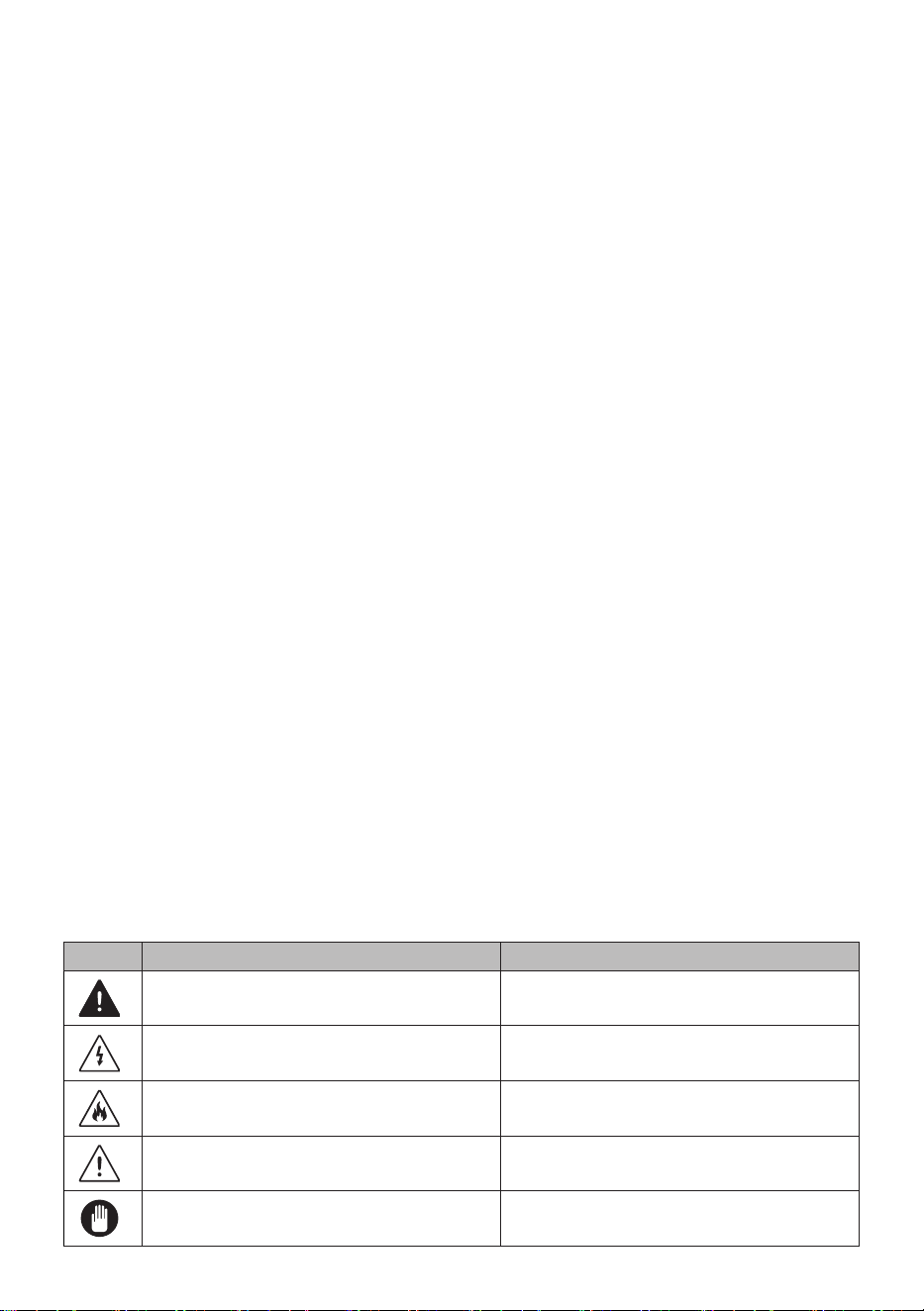
Icon Type Meaning
WARNING Serious injury or death risk
RISK OF ELECTRIC SHOCK Dangerous voltage risk
FIRE Warning; Risk of fire / flammable materials
CAUTION Injury or property damage risk
IMPORTANT / NOTE Operating the system correctly
Thank you for choosing this product.
This User Manual contains important safety information and instructions on the operation
and maintenance of your appliance.
Please take the time to read this User Manual before using your appliance and keep this
book for future reference.

CONTENTS
1. SAFETY INSTRUCTIONS ............................................................................................... .1
1.1 General Safety Warnings ...............................................................................................2
1.2 During Use ....................................................................................................................6
1.3 Packaging and Environment...........................................................................................7
1.4 Savings Information ........................................................................................................8
2. TECHNICAL SPECIFICATIONS ...................................................................................... .9
2.1 General Appearance.......................................................................................................9
2.2 Technical Specifications .................................................................................................9
3. INSTALLATION .............................................................................................................. .10
3.1 Removing the Transit Bolts...........................................................................................10
3.2 Adjusting the Feet / Adjusting Adjustable Stays............................................................10
3.3 Electrical Connection ....................................................................................................10
3.4 Water Inlet Hose Connection ....................................................................................... .11
3.5 Water Discharge Connection ........................................................................................12
4. CONTROL PANEL OVERVIEW ..................................................................................... .12
4.1 Detergent Drawer (*) ....................................................................................................12
4.2 Sections ...................................................................................................................13
4.3 Program Dial.................................................................................................................13
4.4 Electronic Display ........................................................................................................ .13
5. USING YOUR WASHING MACHINE ............................................................................. .14
5.1 Preparing Your Laundry ............................................................................................... .14
5.2 Putting Laundry in the Machine ................................................................................... .14
5.3 Adding Detergent to the Machine .................................................................................15
5.4 Operating Your Machine ...............................................................................................15
5.5 Selecting a Programme ............................................................................................... .15
5.6 Half-Load Detection System .........................................................................................15
5.7 Auxiliary Functions .......................................................................................................16
5.8 Child Lock ...................................................................................................................20
5.9 If you want to pause/cancel a running program or add laundry: .................................20
5.10 Program End ..............................................................................................................21
6. PROGRAMME TABLE ................................................................................................... .22
6.1 Important Informations..................................................................................................25
7. CLEANING AND MAINTENANCE ................................................................................ .26
7.1 Warning ...................................................................................................................26
7.2 Water Inlet Filters .........................................................................................................26
7.3 Pump Filter ...................................................................................................................27
7.4 Detergent Drawer .........................................................................................................27
8. Body / Drum .................................................................................................................. .28
9. TROUBLESHOOTING ................................................................................................... .29
10. AUTOMATIC FAULT WARNINGS AND WHAT TO DO .............................................. .30
1. SAFETY INSTRUCTIONS
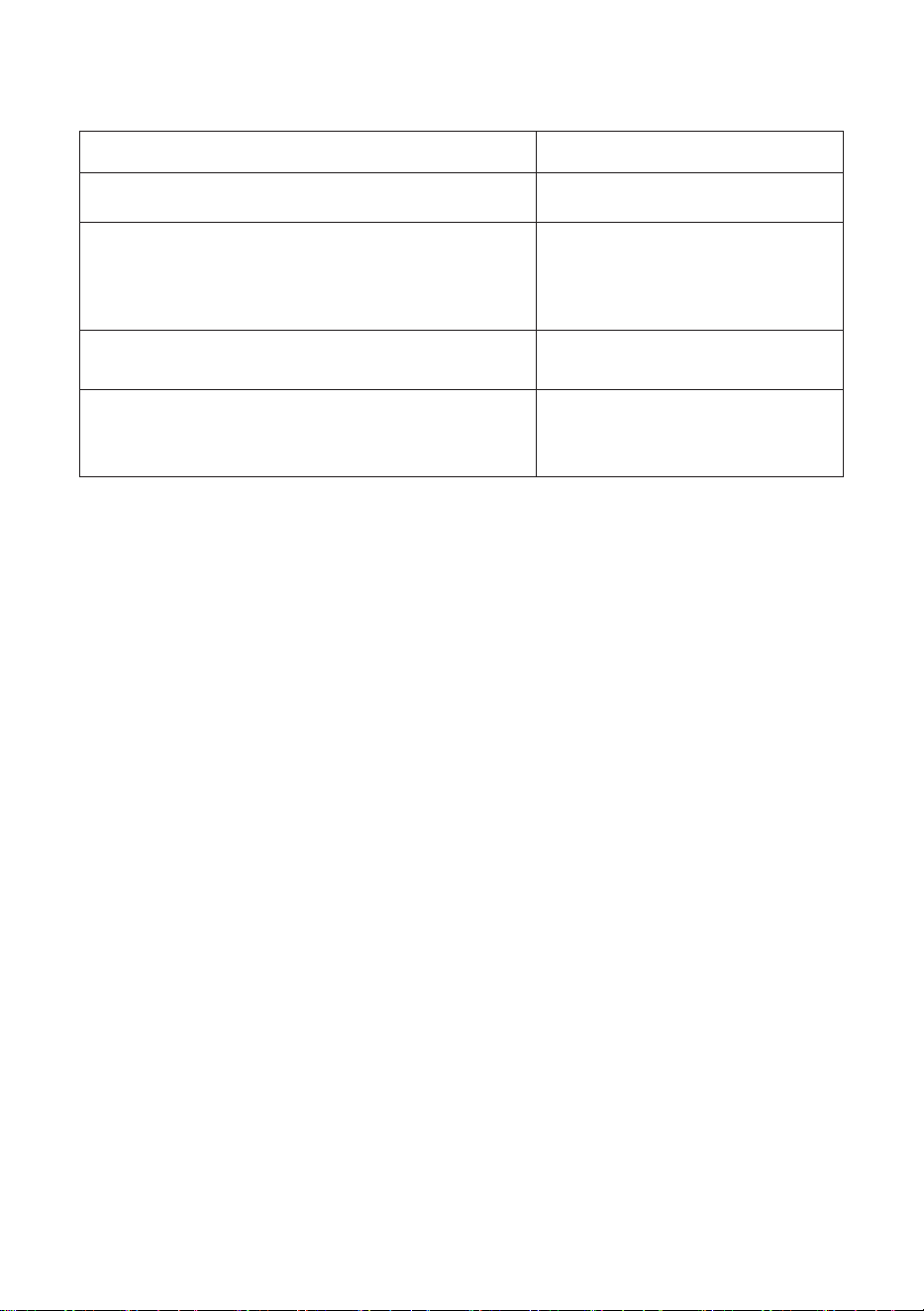
Operating voltage / frequency
(220-240) V~/50Hz
Total current (A) 10
Water pressure (Mpa) Maximum 1 Mpa
/ Minimum 0.
1Mpa
Total power (W)
2100
Maximum washing capacity
(dry laundry) (kg)
8
• Do not install your machine on a carpet or such
grounds that would prevent the ventilation of its
base.
• The appliance is not intended for use by people
(including children) with reduced physical,
sensory or mental capabilities, or lack of
experience and knowledge unless they have been
given supervision or instruction concerning use
of the appliance by a person responsible for their
safety.
• Children of less than 3 years should be kept away
unless continuously supervised.
• Call the nearest authorized service centre for a
replacement if the power cord malfunctions.
• Use only the new water inlet hose coming
with your machine when making water inlet
connections to your machine. Never use old, used
or damaged water inlet hoses.
• Children should not play with the appliance.
Cleaning and user maintenance should not be
made by children without supervision.
EN - 1
NOTE: For a softcopy of this user
manual, please contact the following address:
“washingmachine@standardtest. info”. In your
e-mail, please provide the model name and serial
number (20 digits) which you can find on the
appliance door.
Read this user manual carefully.
Your machine is for domestic use only.
Using it for commercial purposes will cause
your warranty to be cancelled.
This manual has been prepared for more than
one model therefore your appliance may not
have some of the features described within.
For this reason, it is important to pay particular
attention to any figures whilst reading the
operating manual.
1.1 General Safety Warnings
• The necessary ambient temperature for operation
of your Washing Machine is 15-25 °C.
• Where the temperature is below 0 °C, hoses
may split or the electronic card may not operate
correctly.
• Please ensure that garments loaded into your
Washing Machine are free from foreign objects
such as nails, needles, lighters and coins.
• It is recommended that for your first wash,
you select the 90˚ Cotton programme without
laundry and half fill compartment II of the
detergent drawer with a suitable detergent.
• Residue may build up on detergent and softeners
EN - 2
exposed to air for a long period of time. Only
put softener or detergent in the drawer at the
beginning of each wash.
• Unplug your Washing Machine and switch off
the water supply if the Washing Machine is left
unused for a long time. We also recommend that
you leave the door open to prevent build up of
humidity inside the Washing Machine.
• Some water may be left in your Washing Machine
as a result of quality checks during production.
This will not affect the operation of your Washing
Machine.
• The packaging of the machine could be
hazardous to children. Do not allow children to
play with the packaging or small parts from the
Washing Machine.
• Keep the packaging materials in a place where
children cannot reach them, or dispose of them
appropriately.
• Use pre-wash programs only for very dirty
laundry.
Never open the detergent drawer while the
machine is running.
• In the event of a breakdown, unplug the machine
from the mains supply and turn the water supply
off. Do not attempt to carry out any repairs.
Always contact an authorised service agent.
• Do not exceed the maximum load for the washing
programme you have chosen.
Never force the door open when your Washing
Machine is running.
• Washing laundry containing flour may damage
EN - 3
your machine.
• Please follow the manufacturers’ instructions
regarding the use of fabric conditioner or any
similar products that you intend to use in your
Washing Machine.
• Make sure that the door of your Washing Machine
is not restricted and can be opened fully.
Install your machine in a location that can be
fully ventilated and preferably has constant air
circulation.
Read these warnings. Follow the advice given
to protect yourself and others from risks and
fatal injuries.
RISK OF BURNS
Do not touch the drain hose or any discharged
water while your Washing Machine is running. The
high temperatures involved pose a burn risk.
RISK OF DEATH FROM ELECTRICAL
CURRENT
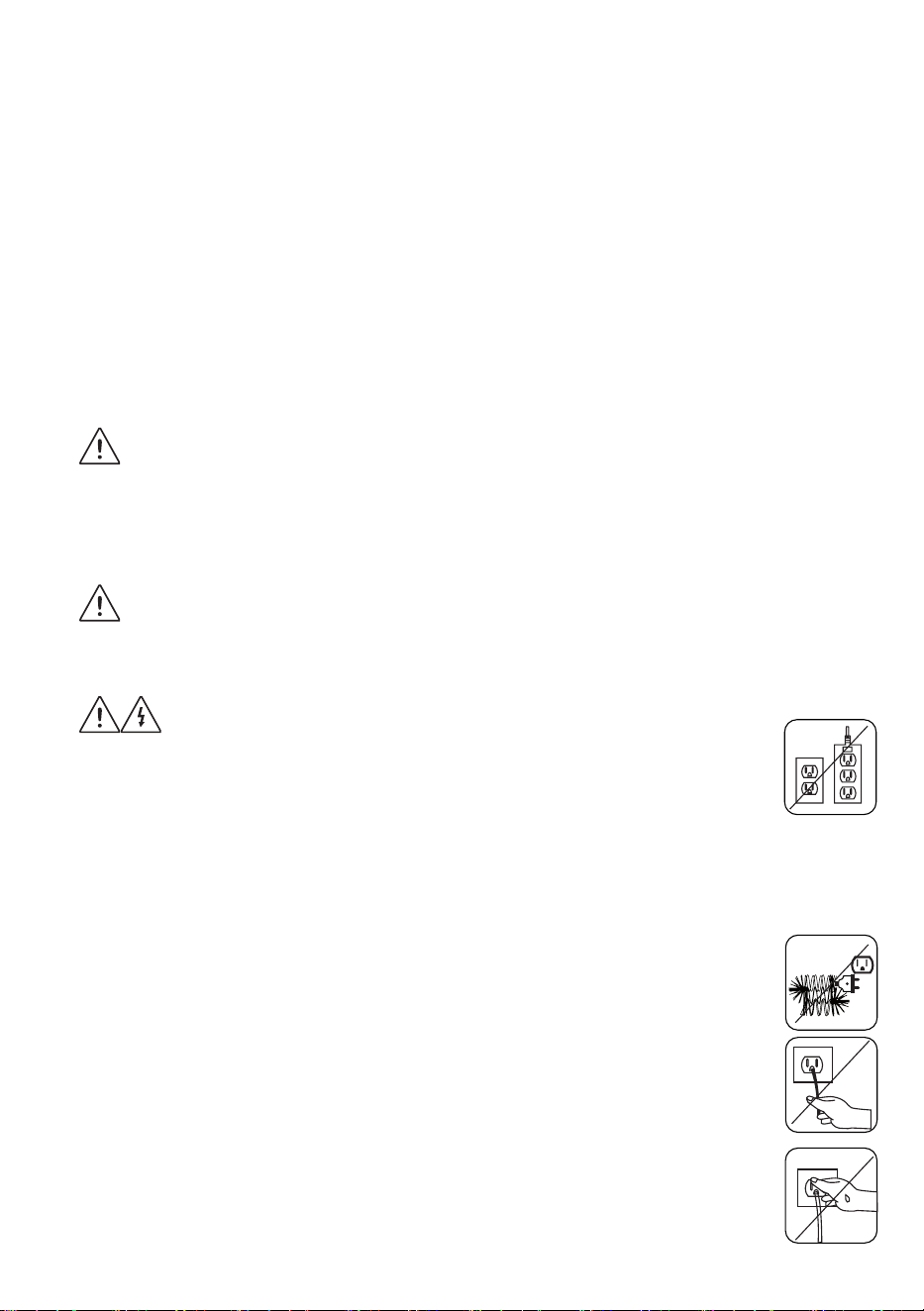
• Do not connect your Washing Machine to the
mains electricity supply using an extension lead.
• Do not insert a damaged plug into a socket.
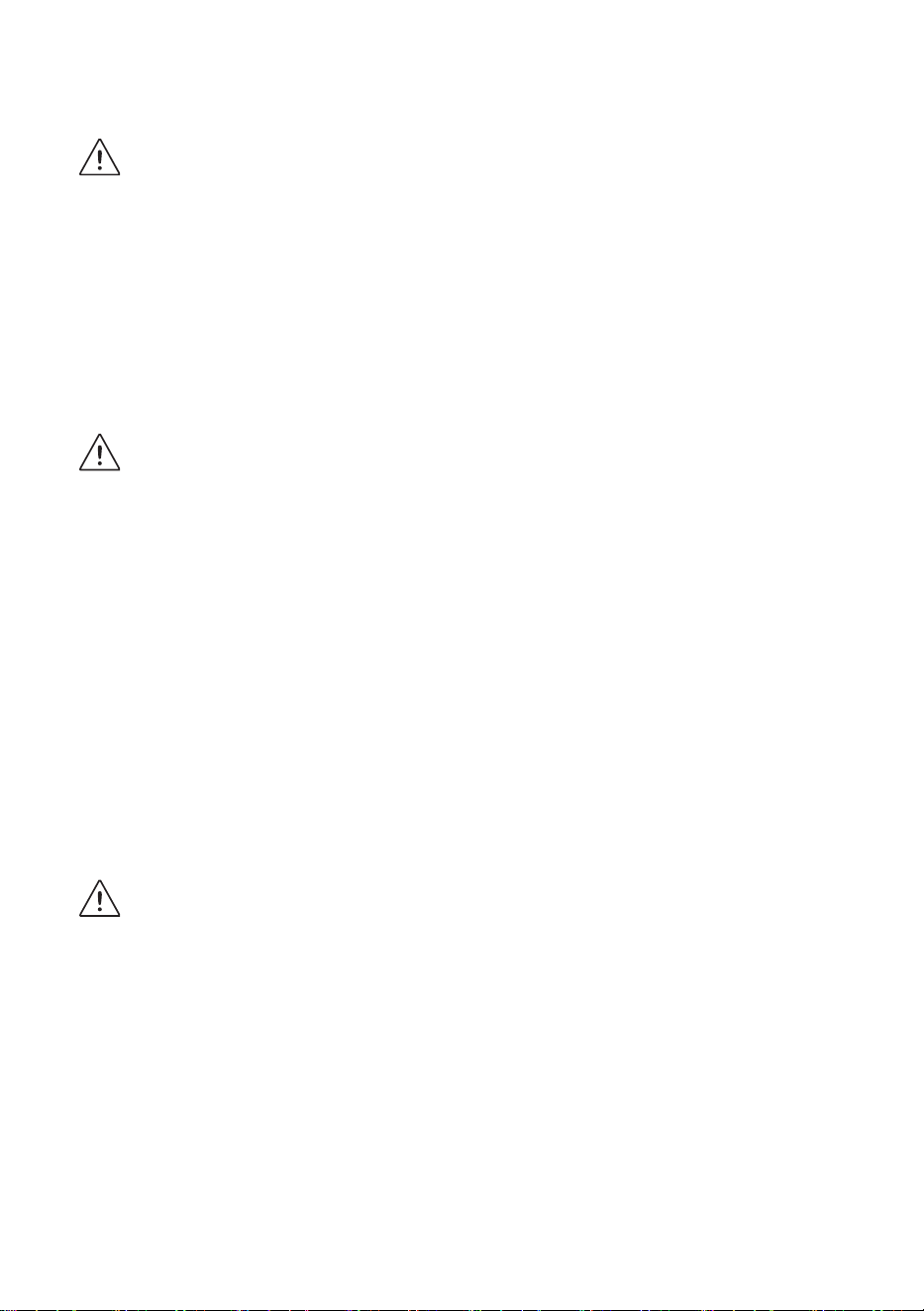
• Never remove the plug from the socket by pulling
the cord. Always hold the plug.
• Never touch the power cord/plug with wet
hands as this could cause a short circuit or
electric shock.
• Do not touch your Washing Machine if your
hands or feet are wet.
• A damaged power cord/plug can cause fire or
give you an electric shock. When damaged
EN - 4
it must be replaced, this should only be done by
qualified personnel.
Risk of flooding
• Check the speed of water flow before placing the
drain hose in a sink.
• Take necessary measures to prevent the hose
from slipping.
• Water flow may dislodge the hose if it is not
properly secured. Make sure the plug in your sink
does not block the plug hole.
Danger of Fire
• Do not store inflammable liquids near your
machine.
• The sulphur content of paint removers may cause
corrosion. Never use paint removing materials in
your machine.
• Never use products that contain solvents in your
machine.
• Please ensure that garments loaded into your
Washing Machine are free from foreign objects
such as nails, needles, lighters and coins.
Risk of fire and explosion
Risk of falling and injury
• Do not climb on your Washing Machine.
• Make sure hoses and cables do not cause a trip
hazard.
• Do not turn your Washing Machine upside down
or on its side.
• Do not lift your Washing Machine using the door
or detergent drawer.
EN - 5
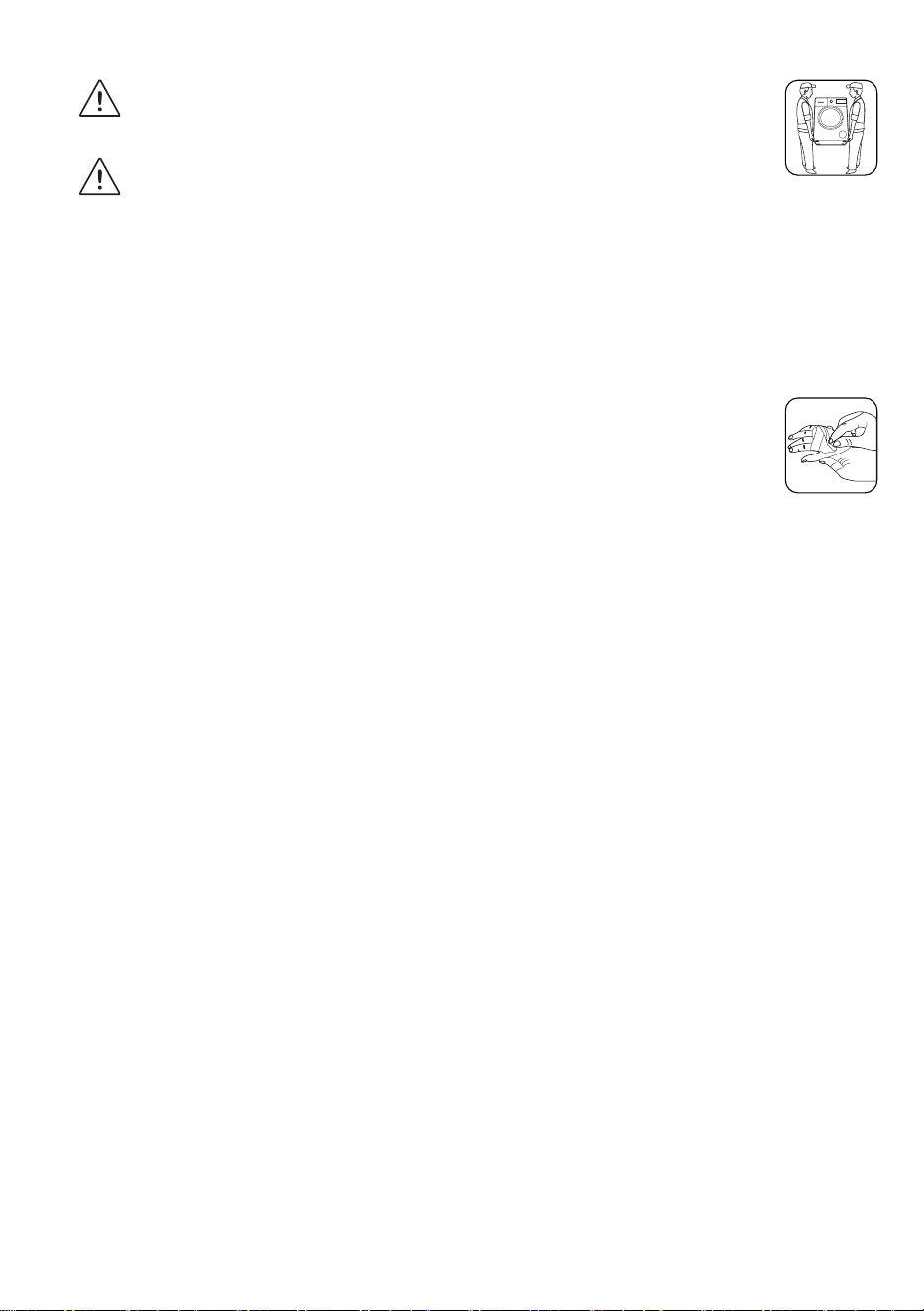
The machine must be carried by at least 2
people.
Child safety
• Do not leave children unattended near the
machine. Children might lock themselves in the
machine resulting in risk of death.
• Do not allow children to touch the glass door
during operation. The surface becomes extremely
hot and may cause damage to skin.
• Keep packaging material away from children.
• Poisoning and irritation may occur if detergent
and cleaning materials are consumed or
come into contact with the skin and eyes. Keep
cleaning materials out of the reach of children.
1.2 During Use
• Keep pets away from your machine.
• Please check the packaging of your machine
before installation and the outer surface of the
machine once the packaging has been removed.
Do not operate the machine if it appears damaged
or if the packaging has been opened.
• Your machine must only be installed by an
authorised service agent. Installation by anyone
other than an authorised agent may cause your
warranty to be void.
• This appliance can be used by children aged
8 years and above and persons with reduced
physical, sensory or mental capabilities or lack
of experience and knowledge if they have been
given supervision or instruction concerning use of
the appliance in a safe way and understand the
EN - 6

hazards involved. Children shall not play with the
appliance. Cleaning and user maintenance shall
not be done by children without supervision.
• Only use your machine for laundry that is labelled
as suitable for washing by the manufacturer.
• Before operating the washing machine,
remove the 4 transit bolts and rubber spacers
from the rear of the machine. If the bolts are
not removed they may cause heavy vibration,
noise and malfunction of the machine and
cause the guarantee to be void.
• Your warranty does not cover damage caused by
external factors such as fire, flooding and other
sources of damage.
• Please do not throw away this user manual; keep
it for future reference and pass it onto the next
owner.
NOTE: Specifications for the machine may vary
depending on the product purchased.
Replacement of drive belt, only by authorized
service.
Only original spare belt must use.
1.3 Packaging and Environment
Removal of packaging materials
Packaging materials protect your machine from any
damage that might occur during transportation. The
packaging materials are environmentally friendly
as they are recyclable. Use of recycled material
reduces raw material consumption and decreases
waste production.
EN - 7

1.4 Savings Information
Some important information to get the most efficient
use out of your machine:
• Do not exceed the maximum load for the washing
programme you have chosen. This will allow your
machine to run in energy saving mode.
• Do not use the pre-wash feature for lightly soiled
laundry. This will help you save on the amount of
electricity and water consumed.
CE Declaration of conformity
We declare that our products meet the applicable European Directives, Decisions and
Regulations and the requirements listed in the standards referenced.
Disposal of your old machine
The symbol of the crossed-out wheeled bin shown on the product or its
packaging means that the device must not be disposed of with other
household waste but requires separate collection. You can dispose of the
device free of charge at your local waste return and collection system.
The addresses can be obtained from your responsible city council or
local government. Alternatively, you can return small waste electrical and
electronic equipment (WEEE) with an edge length of up to 25 cm free of
charge to any retailer with a sales area relating to electrical and electronic equipment
(EEE) of at least 400 m2 or to a food retailer that offers EEE at least several times a
year with a total sales area of 800 m2. Larger WEEE can be returned to a respective
retailer free of charge when buying a new product of the same type. Regarding the
modalities of the collection of WEEE in case of shipment of the newly bought product,
please contact your retailer.
If possible, please remove all batteries and accumulators as well as all removable
lamps before disposing of the device.
Please note that you are responsible for deleting all personal data on the device to be
disposed of.
EN - 8
EN - 9EN - 9
2. TECHNICAL SPECIFICATIONS
123
4
5
6
7
8
9
10
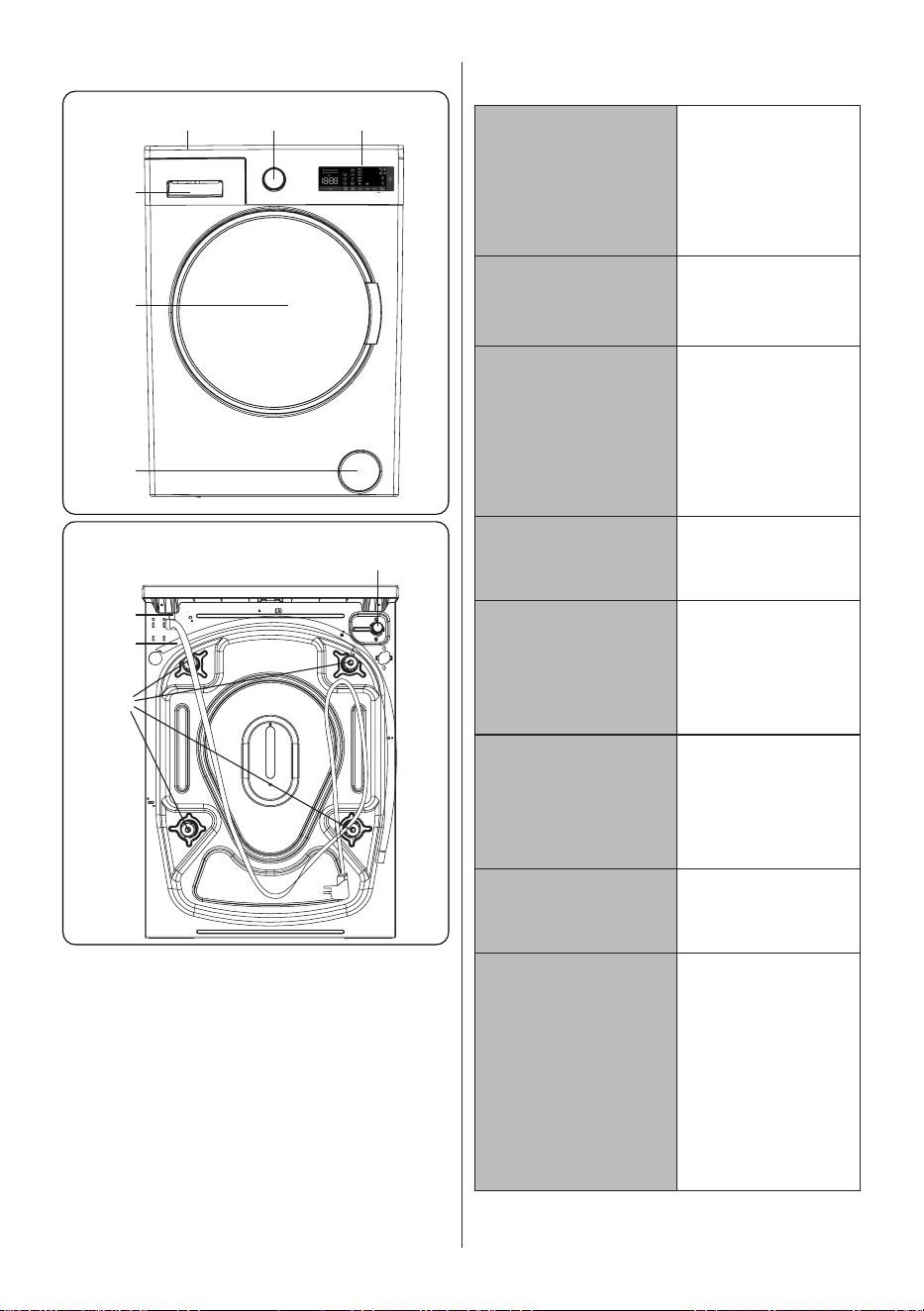
2.1 General Appearance
1. Electronic Display
2. Programme Dial
3. Upper Tray
4. Detergent Drawer
5. Drum
6. Pump Filter Cover
7. Water Inlet Valve
8. Power Cable
9. Discharging Hose
10. Transit Bolts
2.2 Technical Specifications
Operating
voltage /
frequency
(V/Hz)
(220-240)
V~/50Hz
Total current
(A)
10
Water
pressure
(Mpa)
Maximum:
1 Mpa
Minimum :
0.1 Mpa
Total power
(W)
Maximum
dry laundry
capacity (kg)
8
Spinning
revolution
(rev / min)
Programme
number
15
Dimensions
(mm)
Height
Width
Depth
845
597
2100
1400
527
EN - 10EN - 10
3. INSTALLATION
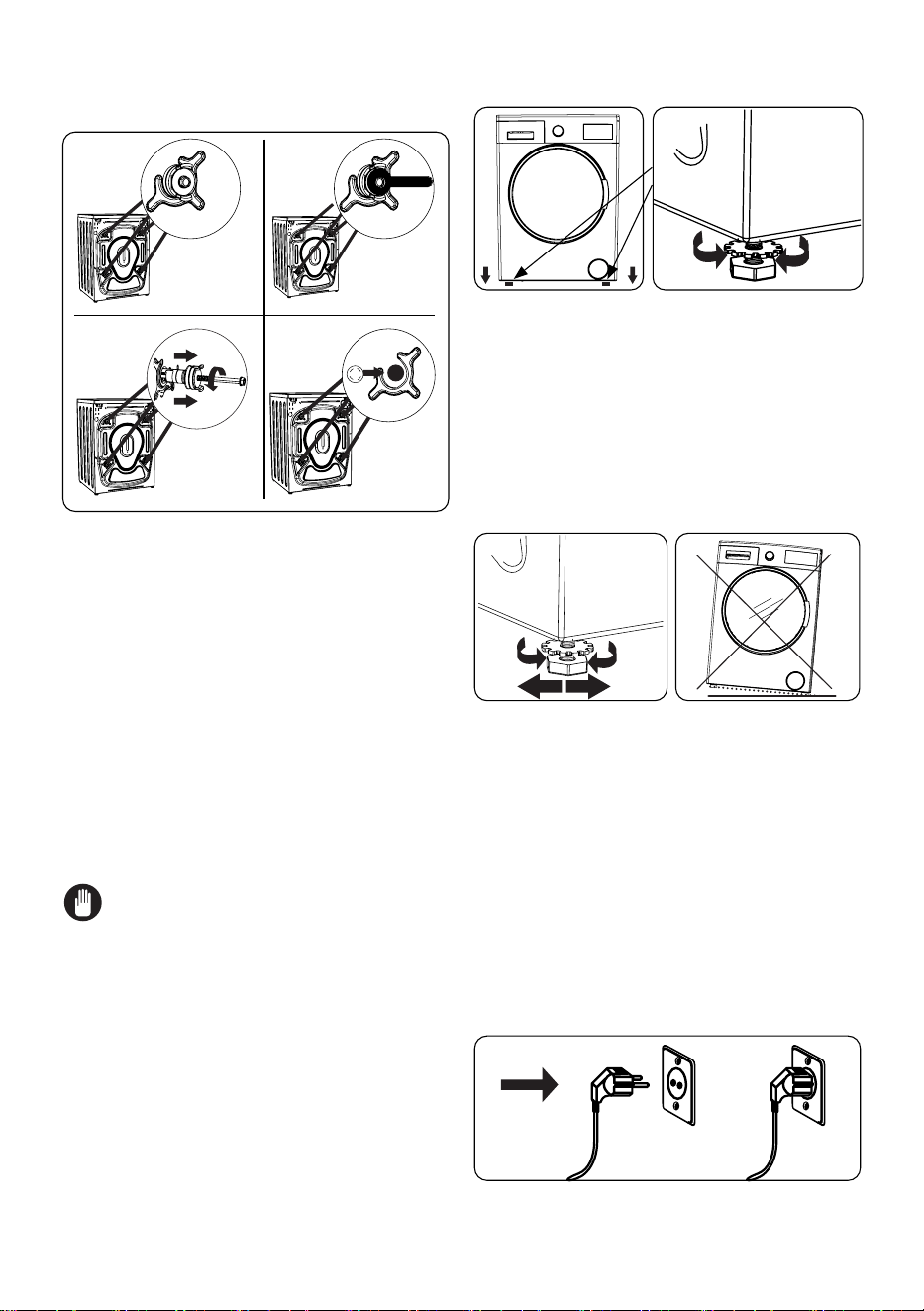
3.1 Removing the Transit Bolts
X X4 4
X4
1
3
2
4
1. Before operating the washing machine,
remove the 4 transit bolts and rubber
spacers from the rear of the machine.
If the bolts are not removed, they
may cause heavy vibration, noise and
malfunction of the machine and void the
warranty.
2. Loosen the transit bolts by turning
them anticlockwise with an appropriate
spanner.
3. Remove the transit bolts with a straight
pull.
4. Fit the plastic blanking caps supplied in
the accessories bag into the gaps left
by the removal of the transit bolts. The
transit bolts should be stored for future
use.
NOTE: Remove the transit bolts
before using the machine for the first time.
Faults occurring due to the machine being
operated with transit bolts fitted are out of
the scope of the warranty.
3.2 Adjusting the Feet /
Adjusting Adjustable Stays
1
1. Do not install your machine on a surface
(such as carpet) that would prevent
ventilation at the base.
• To ensure silent and vibration-free
operation of your machine, install it on a
firm surface.
• You can level your machine using the
adjustable feet.
• Loosen the plastic locking nut.
X4
2 3
2. To increase the height of the machine,
turn the feet clockwise. To decrease
the height of the machine, turn the feet
anticlockwise.
• Once the machine is level, tighten the
locking nuts by turning them clockwise.
3. Never insert cardboard, wood or other
similar materials under the machine to
level it.
• When cleaning the ground on which
the machine is located, take care not to
disturb the level of the machine.
3.3 Electrical Connection
• Your Washing Machine requires a 220-
240V, 50 mains supply.
EN - 11EN - 11
• The mains cord of your washing
machine is equipped with an earthed
plug. This plug should always be
inserted to an earthed socket of 10
amps.
• If you do not have a suitable socket and
fuse conforming with this, please ensure
the work is carried out by a qualified
electrician.
• We do not take responsibility for
damage that occurs due to the use of
ungrounded equipment.
NOTE: Operating your machine
with low voltage will cause the life cycle
of your machine to be reduced and its
performance to be restricted.
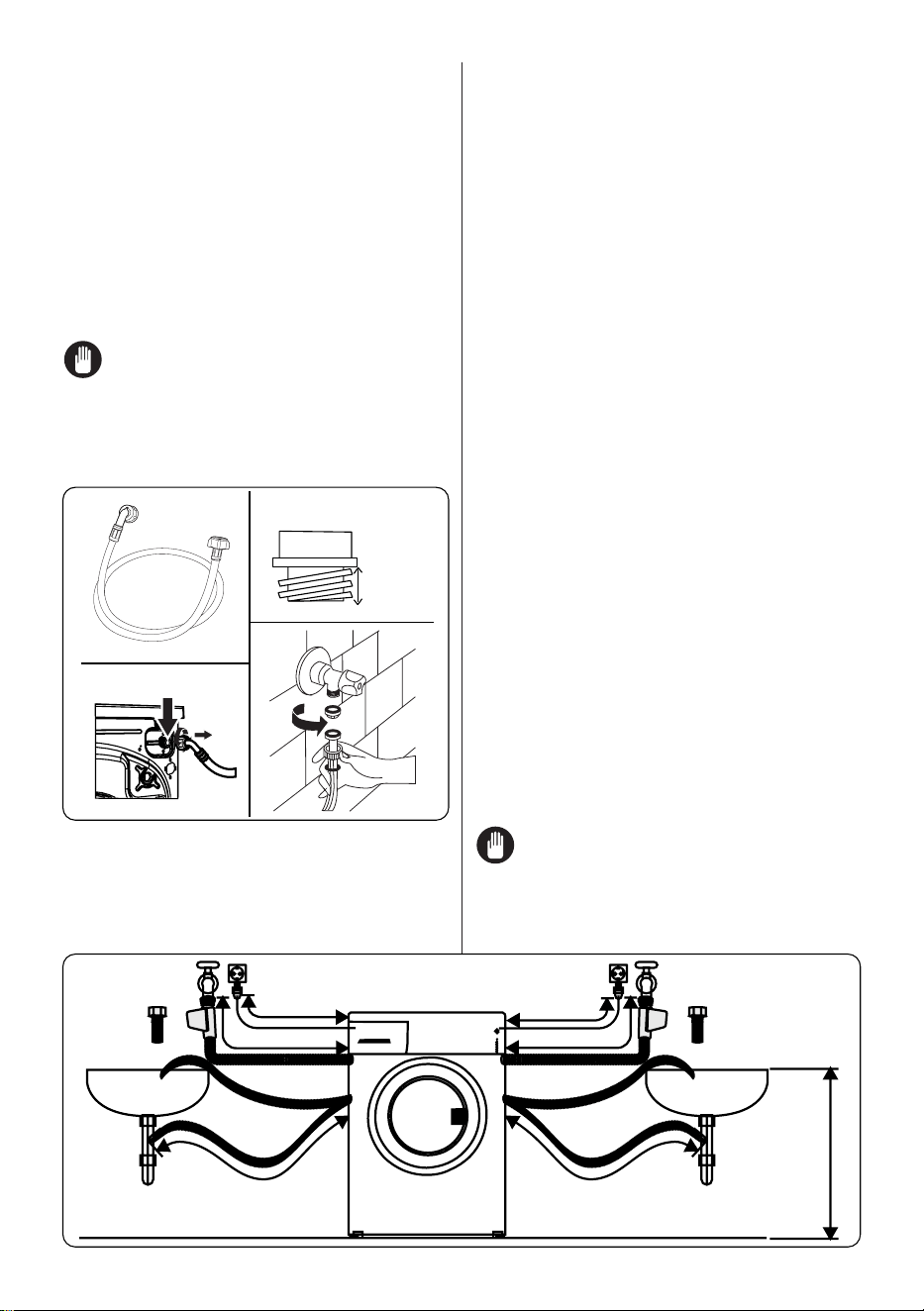
3.4 Water Inlet Hose Connection
3/4”
10 mm
1
3
2
4
1. Your machine may have either a
single water inlet connection (cold)
or double water inlet connection (hot
and cold) depending on the machine
specifications. The white capped hose
should be connected to cold water inlet
and red capped hose to the hot water
inlet (if applicable).
• To prevent water leaks at the joints,
either 1 or 2 nuts (depending on your
machine’s specifications) are supplied
in the packaging with the hose. Fit these
nuts to the end(s) of the water inlet hose
that connect to the water supply.
2. Connect new water inlet hoses to a ¾ ˝,
threaded tap.
• Connect the white capped end of the
water inlet hose to the white water inlet
valve on the rear side of the machine
and the red capped end of the hose to
the red water inlet valve (if applicable).
• Hand tighten the connections. If in any
doubt, consult a qualified plumber.
• Water flow with pressure of 0. 1-1 Mpa
will allow your machine to operate at
optimum efficiency (pressure of 0. 1
Mpa means that more than 8 litres of
water per minute will flow through a fully
opened tap).
3. Once you have made all of the
connections, carefully turn the water
supply on and check for leaks.
4. Ensure that the new water inlet hoses
are not trapped, kinked, twisted, folded
or crushed.
• If your machine has a hot water inlet
connection, the temperature of the hot
water supply should not be higher than
70°C.
NOTE: Your Washing Machine
must only be connected to your water
supply using the supplied new fill hose. Old
hoses must not be reused.
~ 95 cm ~ 140 cm
~ 145 cm ~ 95 cm
0 – max. 100 cm
˜
˜
95 cm
150 cm
EN - 12EN - 12
3.5 Water Discharge Connection
• Connect the water drain hose to a
standpipe or to the outlet elbow of
a household sink, using additional
equipment.
• Never attempt to extend the water drain
hose.
• Do not put the water drain hose from
your machine into a container, bucket or
bathtub.
• Make sure that the water drain hose is
not bent, buckled, crushed or extended.
• The water drain hose must be installed
at a maximum height of 100 cm from the
ground.
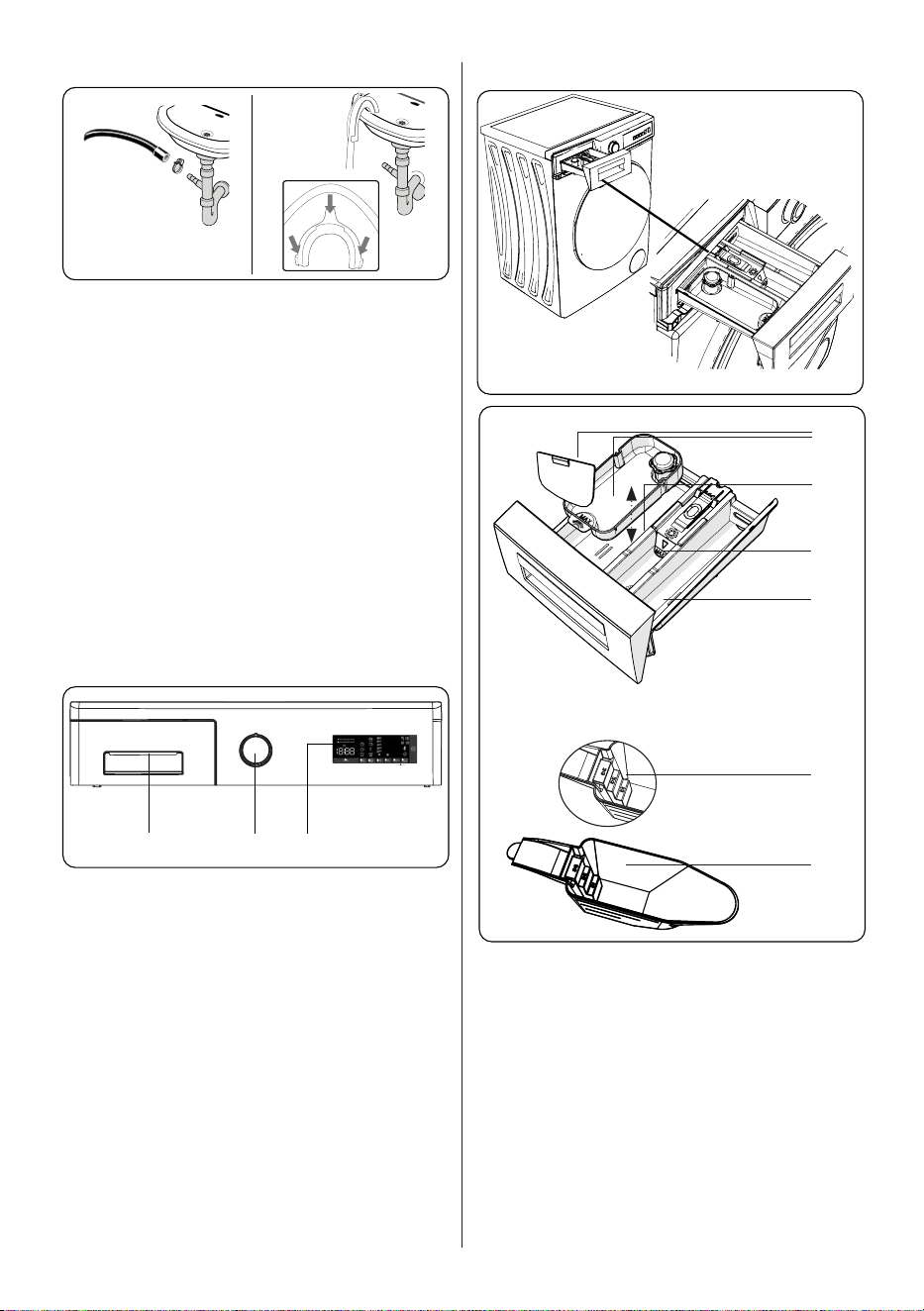
4. CONTROL PANEL OVERVIEW
1 2 3
1. Detergent Drawer
2. Programme Dial
3. Electronic Display
4.1 Detergent Drawer (*)
1
2
3
4
5
6
1. Liquid Detergent Attachments (*)
2. Main Wash Detergent Compartment
3. Softener Compartment
4. Pre-Wash Detergent Compartment
5. Powder Detergent Levels (*)
6. Powder Detergent Scoop (*)
(*) Specifications may vary depending on
the machine purchased.
EN - 13EN - 13
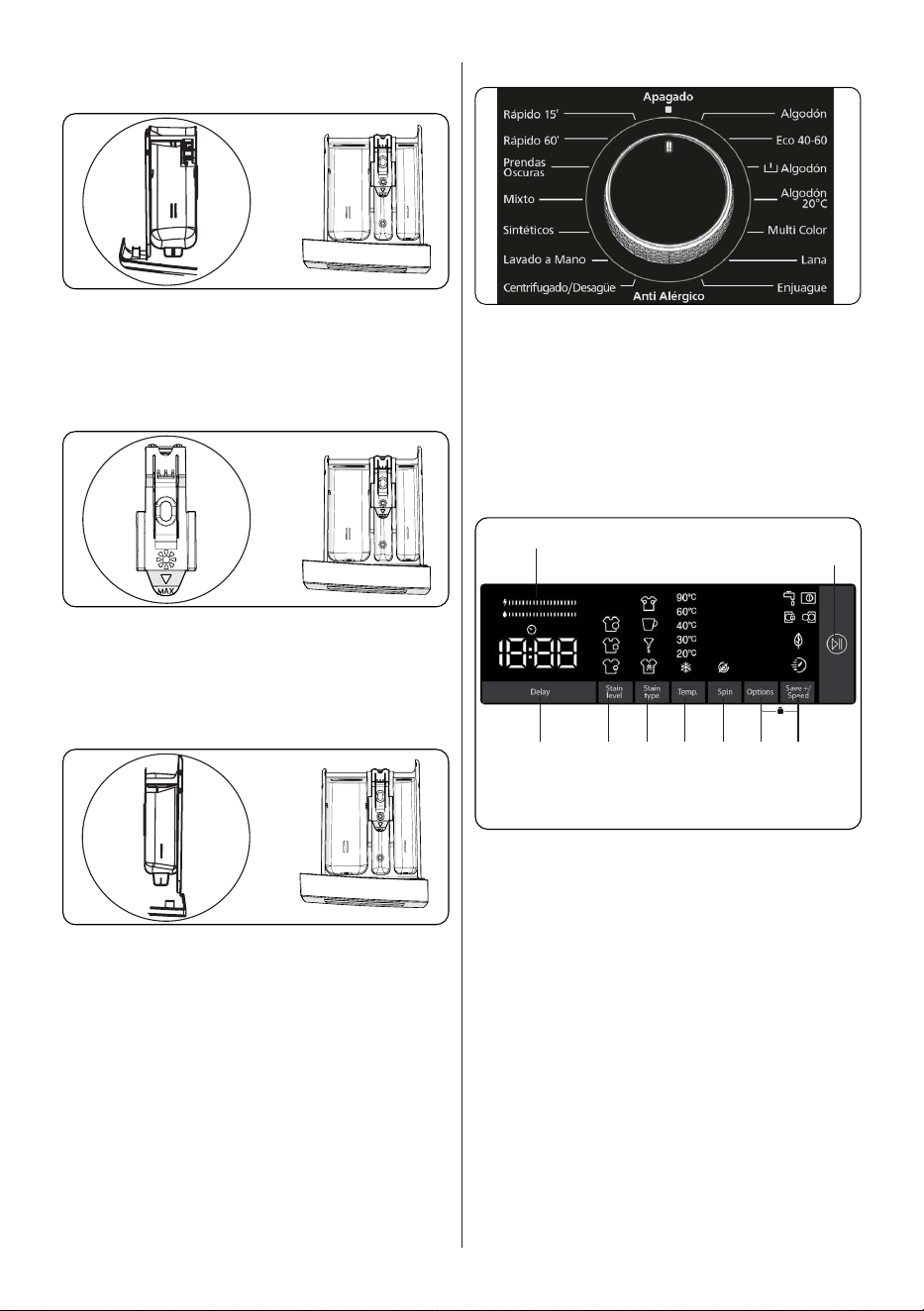
4.2 Sections
Main wash detergent compartment:
This compartment is for liquid or powder
detergents or limescale remover. The fluid
detergent level plate will be supplied inside
your machine. (*)
Fabric conditioner, starch, detergent
compartment:
This compartment is for softeners,
conditioners or starch. Follow the
instructions on the packaging. If softeners
leave residue after use, try diluting them or
using a liquid softener.
Pre-wash detergent compartment:
This compartment should be used only
when the pre-wash feature is selected. We
recommend that the pre-wash feature is
used only for very dirty laundry.
(*) Specifications may vary depending on
the machine purchased.
4.3 Program Dial
• To select the desired programme, turn
the programme dial either clockwise or
anti-clockwise until the marker on the
programme dial points to the chosen
programme.
• Make sure that the programme dial is
set exactly to the programme you want.
4.4 Electronic Display
9
8
21 3 5
4 6
7
1. Delayed start auxiliary function
2. Selecting the level of soiling
3. Stain selection
4. Selecting the washing water
temperature
5. Spin speed selection
6. Options
7. Save+ / Speed (Eco washing, Quick
Wash auxiliary function)
8. Start Pause Button
9. Energy/Water Efficiency Bar
EN - 14EN - 14
5. USING YOUR
WASHING MACHINE
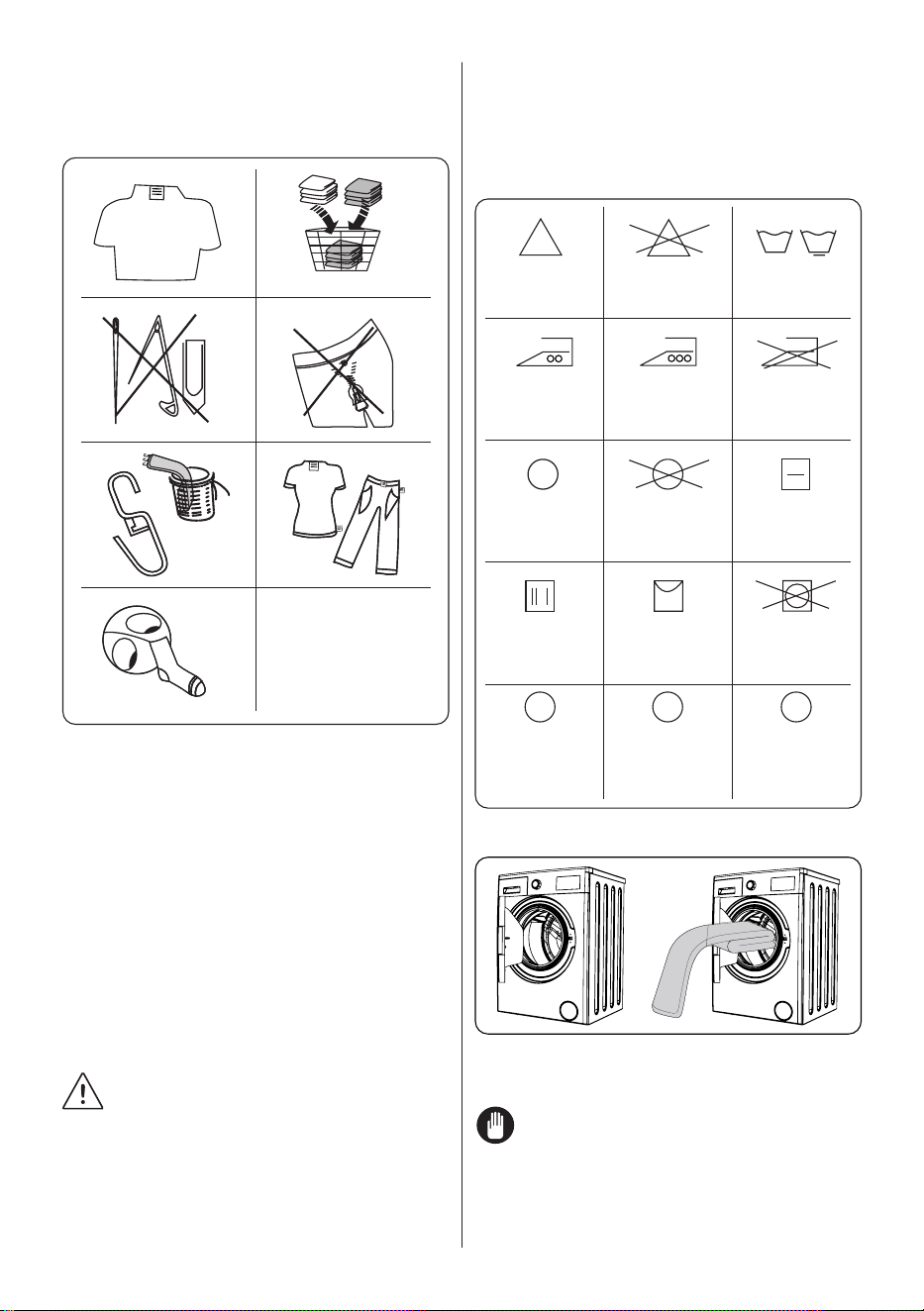
5.1 Preparing Your Laundry
1
3
5
7
2
4
6
D
G
V
D
S
H
D
GV
D
S
1. Follow the instructions given in the care
labels on the clothing.
• Separate your laundry according to type
(cotton, synthetic, sensitive, wool etc.
), washing temperature (cold, 30°, 40°,
60°, 90°) and the degree of dirtiness
(slightly stained, stained, highly stained).
2. Never wash coloured and white laundry
together.
• Dark textiles may contain excess dye
and should be washed separately
several times.
3. Ensure that there are no metallic
materials on your laundry or in the
pockets; if so, remove them.
CAUTION: Any malfunctions
which occur due to foreign materials
damaging your machine are not covered by
the warranty.
4. Close zips and fasten any hooks and
eyes.
5. Remove the metallic or plastic hooks of
curtains or place them in a washing net
or bag.
6. Reverse textiles such as pants,
knitwear, t-shirts and sweat shirts.
7. Wash socks, handkerchiefs and other
small items in a washing net.
Maximum
ironing
temperature
150°C
Can be dry
cleaned
Drip dry
Dry cleaning
in gas oil,
pure alcohol
and R113 is
allowed
Maximum
ironing
temperature
200°C
No dry
cleaning
Hang to dry
Perchloroethylene
R11, R13,
Petroleum
Normal
washing
Do not iron
Dry flat
Do not tumble
dry
Perchlorinetyhlene
R11, R113, Gas
oil
Can be
bleached
Do not bleach
F P A
5.2 Putting Laundry in the Machine
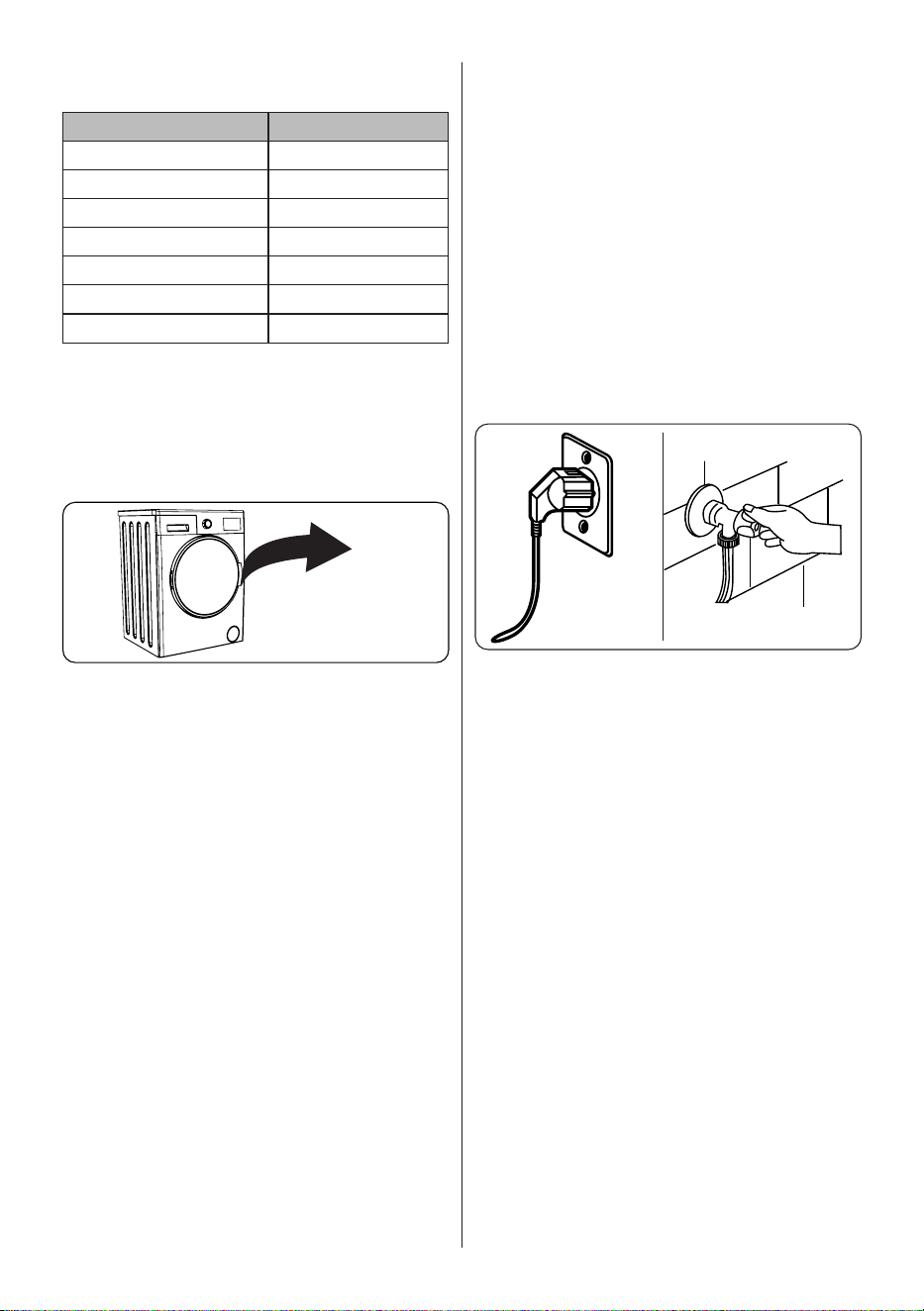
• Open the door of your machine.
• Spread your laundry evenly in the
machine.
NOTE: Take care not to exceed
the maximum load of the drum as this will
give poor wash results and cause creasing.
Refer to the washing programme tables for
information on load capacities.
EN - 15EN - 15
The following table shows approximate
weights of typical laundry items:
LAUNDRY TYPE WEIGHT (gr)
Towel 200
Linen 500
Bathrobe 1200
Quilt cover 700
Pillow slip 200
Underwear 100
Tablecloth 250
• Load each item of laundry separately.
• Check that no items of laundry are
trapped between the rubber seal and
the door.
• Gently push the door until it clicks shut.
click
• Make sure the door is fully closed,
otherwise the programme will not start.
5.3 Adding Detergent to the Machine
The amount of detergent you will need to
put in your machine will depend on the
following criteria:
• If your clothes are only slightly soiled,
do not pre-wash. Put a small amount
of detergent (as specified by the
manufacturer) into compartment II of the
detergent drawer.
• If your clothes are excessively soiled,
select a programme with pre-wash and
put ¼ of the detergent to be used into
compartment I of the detergent drawer
and the rest in compartment II.
• Use detergents produced for automatic
washing machines. Follow the
manufacturer’s instructions on the
amount of detergent to use.
• In areas of hard water, more detergent
will be required.
• The amount of the detergent required
will increase with higher washing loads.
• Put softener in the middle compartment
of the detergent drawer. Do not exceed
the MAX level.
• Thick softeners may cause clogging of
the drawer and should be diluted.
• It is possible to use fluid detergents in
all programmes without a pre-wash. To
do this, slide the fluid detergent level
plate (*) into the guides in compartment
II of the detergent drawer. Use the lines
on the plate as a guide to fill the drawer
to the required level.
(*) Specifications may vary depending on
the machine purchased.
5.4 Operating Your Machine
1 2
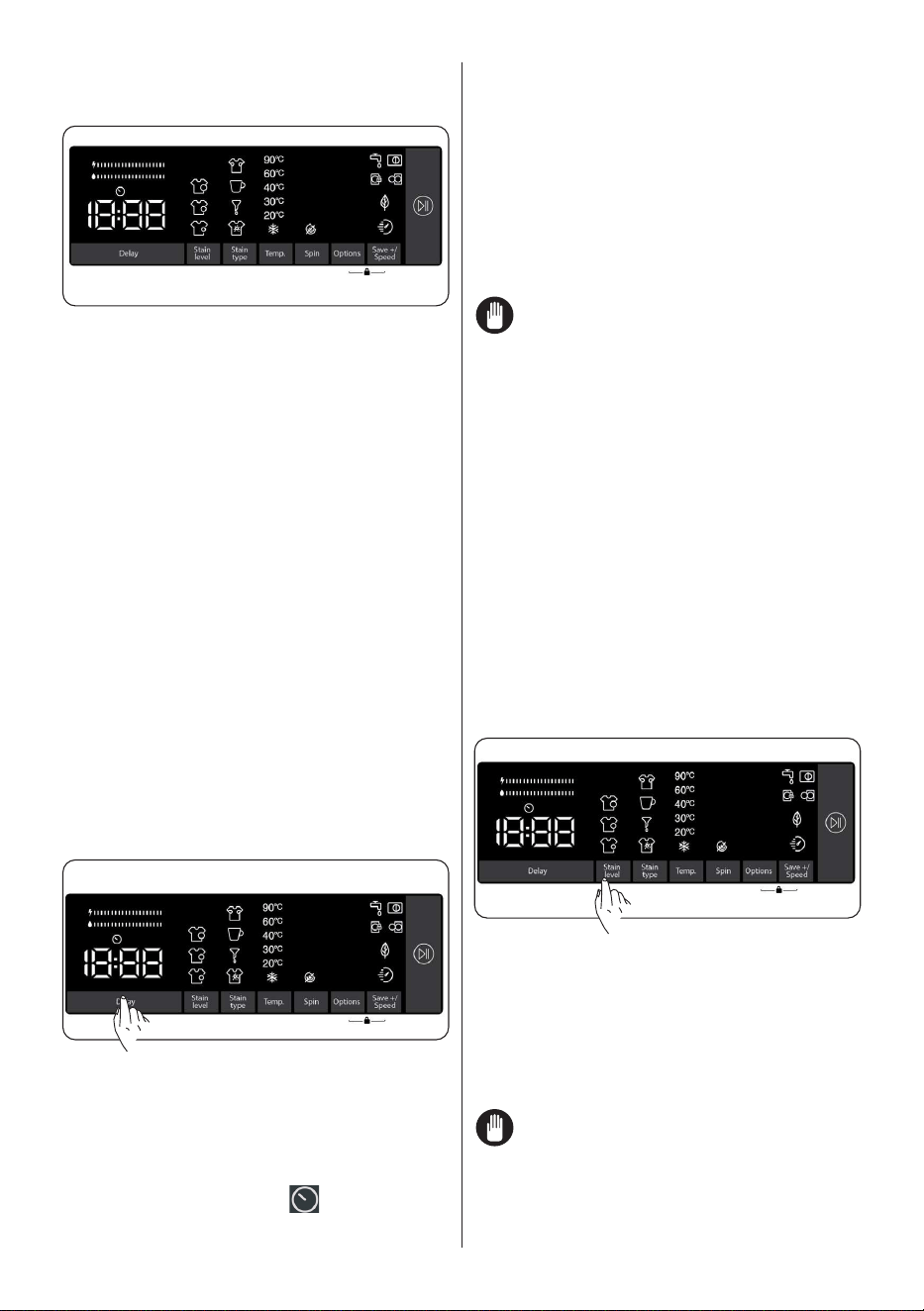
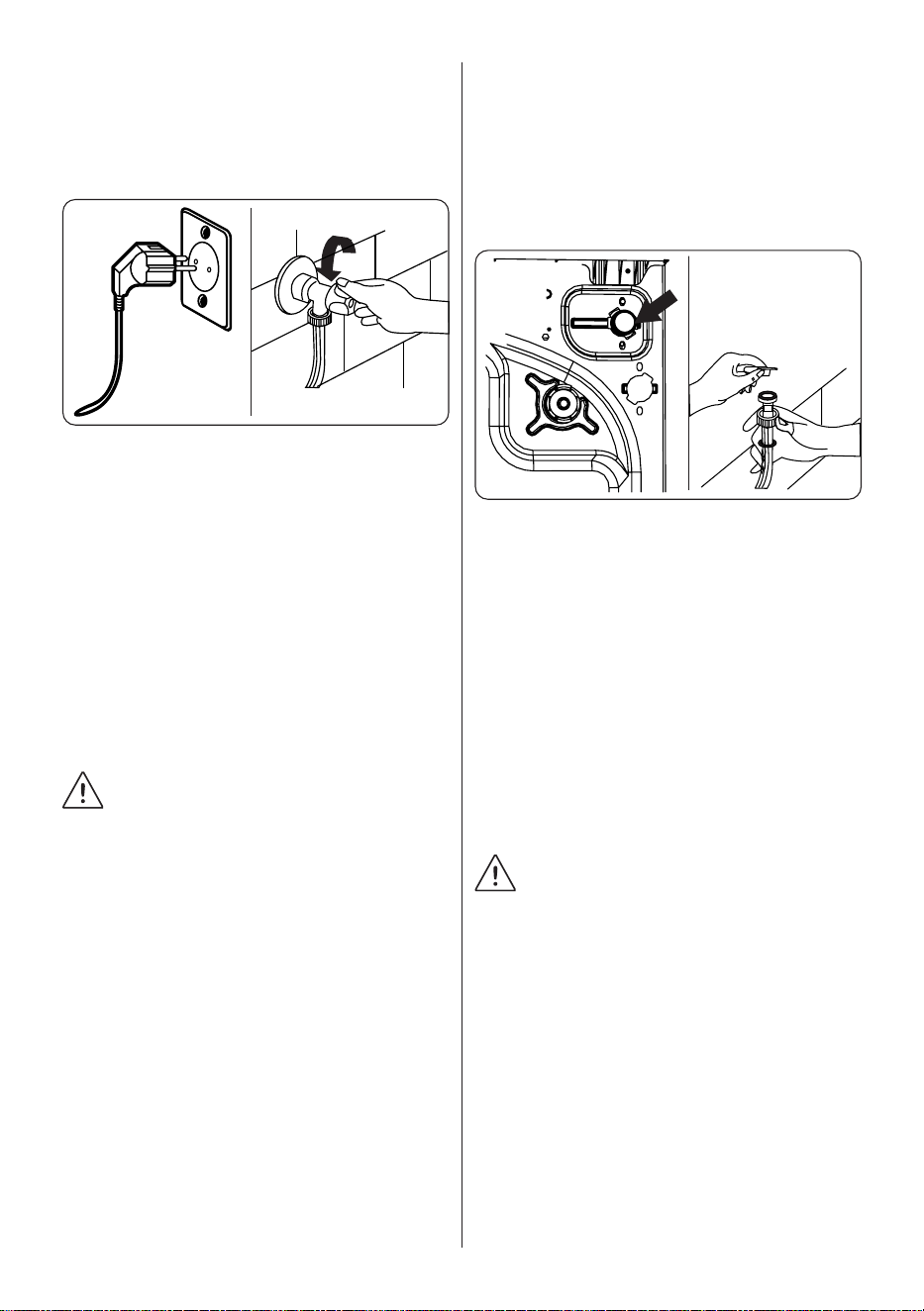
1. Plug your machine in to the mains
supply.
2. Turn on the water supply.
• Open the machine door.
• Evenly spread your laundry in the
machine.
• Gently push the door until it clicks shut.
5.5 Selecting a Programme
Use the programme tables to select the
most appropriate programme for your
laundry.
5.6 Half-Load Detection System
Your machine features a half-load detection
system.
If you put less than half the maximum
load of laundry into your machine it will
automatically set the half-load function,
regardless of the programme you selected.
This means that the selected programme
will take less time to complete and will use
less water and energy.
EN - 16EN - 16
(*) Model Dependant
5.7 Auxiliary Functions
Before starting the program,
you can select auxiliary functions if you
wish so.
• Press the key of the auxiliary function you
want to select.
• If the symbol of the auxiliary function is
continuously on in the electronic display, the
selected auxiliary function will be enabled.
• If the symbol of the auxiliary function
is flashing in the electronic display, the
selected auxiliary function will not be
enabled.
Reason for not enabling the function:
• That auxiliary function might not be
available for the selected washing
program.
• The machine might have passed the
step where that auxiliary function could
be applied.
• The auxiliary function might be
incompatible with another auxiliary
function you have previously selected.
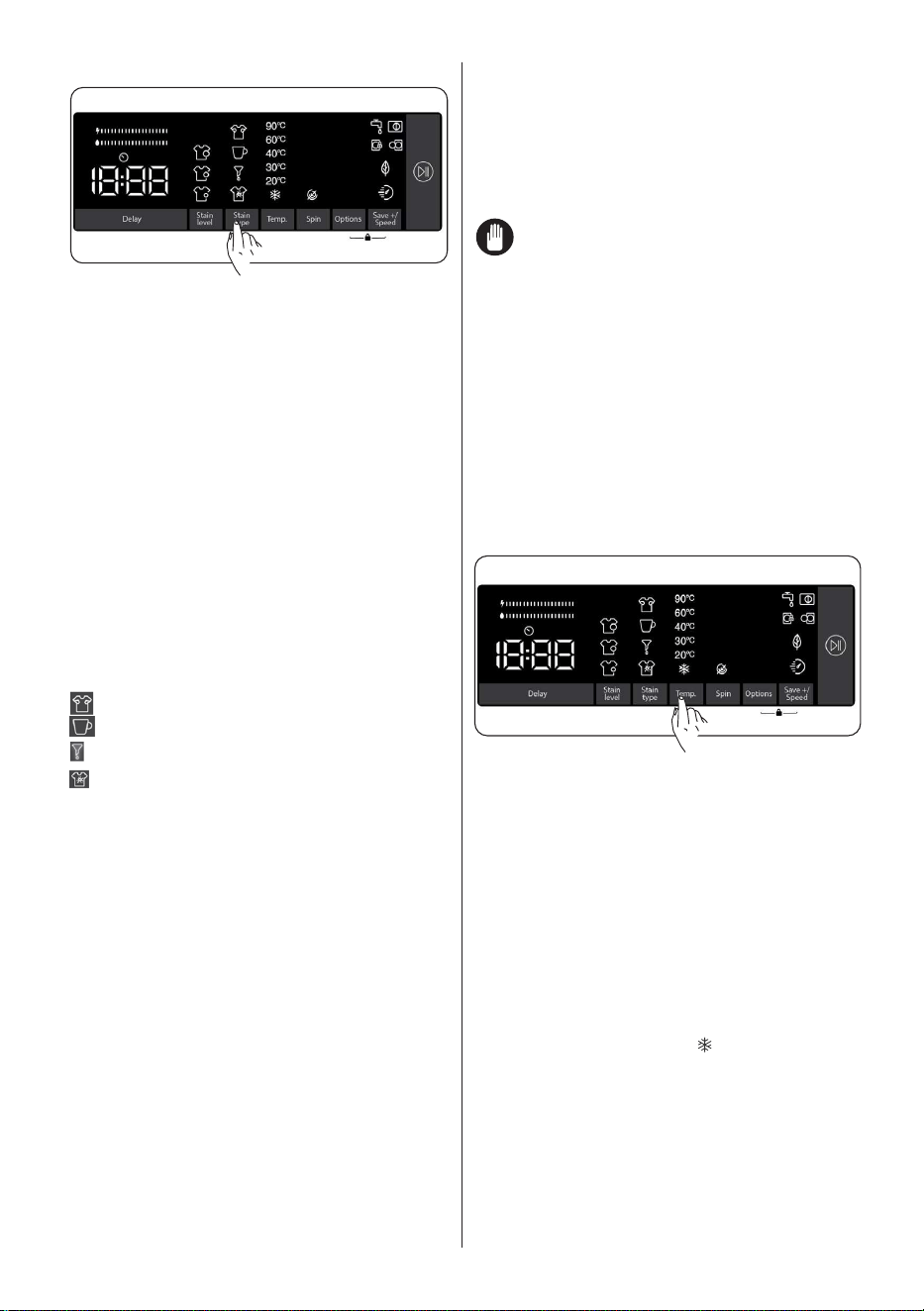
1. Delayed start auxiliary function
You can use this auxiliary function to delay
the start time of the washing cycle for 1 to
23 hours.
To use the delay function:
• Press the delay key once.
• “1h” will be displayed.
will turn on in
the electronic display.
• Press the delay key until you reach the
time after which you want the machine
to start the washing cycle.
• If you have skipped the delay time you
would like to set, you can keep pressing
the delay key until you reach that time
again.
• To use the time delay function, you need
to press the Start/Pause key to start the
machine.
Note: After selecting the delay function,
you can select other functions without
touching the “Start/Pause” key, and then
you can touch the “Start/Pause” key to
enable time delay.
To cancel the delay function:
• If you did not press the Start/Pause key,
keep touching the delay key until the
electronic display shows the duration
of the program you have selected.
Once you see the program time on the
electronic display, this means that the
delay has been cancelled.
• If you have pressed the Start/Pause key
to start the machine, you just need to
touch the delay key once. will go off
on the electronic display, press “Start/
Pause” key to start the washing cycle.
2. Selecting the level of soiling
You can wash your laundries in shorter
or longer durations, at lower or higher
temperatures by selecting a soiling level
depending on the soiling level on your
laundries.
Soiling levels are automatically set in some
programs. You can make changes at your
discretion.
Note: If there are no changes in the
level when you touch the soiling level key, it
means there is no soiling level selection in
the program you have selected.
EN - 17EN - 17
3. Stain selection
You can make use of these auxiliary
functions on washing depending on the
types of stains.
Warning: Do not let the stains on your
laundries to get dry and stuck in order
for the auxiliary function dedicated
for soiling level selection to fully
perform its functions. Clean the solids
beforehand.
Warning: Press on the newly formed
stains on your laundries with a piece
of cloth before starting to wash them in
your product. Do not scrub!
Your washing machine adjusts the
washing temperature, drum rotation, and
number and duration of rinse automatically
according to the type of stain.
For example, the stain removal methods of
your washing machine are as follows:
- Sweat stain
- Coffee stain
- Oil stain
- Mix
Sweat stain: This additional function
will add a cold rinse before the selected
programme. This will soak the laundry with
cold water to clean the sweat stains before
the selected washing programme starts.
Coffee stain: This additional function
will add new washing steps for selected
program. This will prolong the washing
duration and apply a washing algortihm to
remove the stain.
Oil stain: This additional function will
add a cold rinse before the selected
programme and will add new washing
steps for selected program. This will soak
the laundry with the cold water before the
selected washing program and apply a
washing algortihm to clean the oil stain.
Mix: This additional function will add a
warm rinse before the selected programme
and will add new washing steps for
selected washing program. This will soak
the laundry with warm water to soften the
mix stains before the selected washing
programme starts.
For any other stain selection, similar stain
removal solutions are available.
(*) The appliance specifications may vary
depending on the purchased product.
Note: Before starting your machine,
you can switch between stain types. Once
you have started the machine, you cannot
cancel or change the selected stain type.
You can cancel the washing program of
your machine, and select the correct stain
type and restart the program. If the desired
results could not be achieved with the set
stain selection at the end of washing, you
may have selected the wrong type; restart
the washing cycle with the correct stain
selection to remove the stain.
4. Selecting the washing water
temperature
You can use the washing water
temperature setting key to set the
temperature of the washing water for your
laundry.
• When you select a new program,
the selected program’s maximum
temperature will be displayed on the
washing water temperature display.
• You can press the washing water
temperature setting key to decrease
the washing water temperature
gradually between the maximum water
temperature of the selected program
and cold water wash (
).
• If you have skipped the washing
water temperature you wanted to
set, keep pressing the washing water
temperature key to find the desired
temperature again.
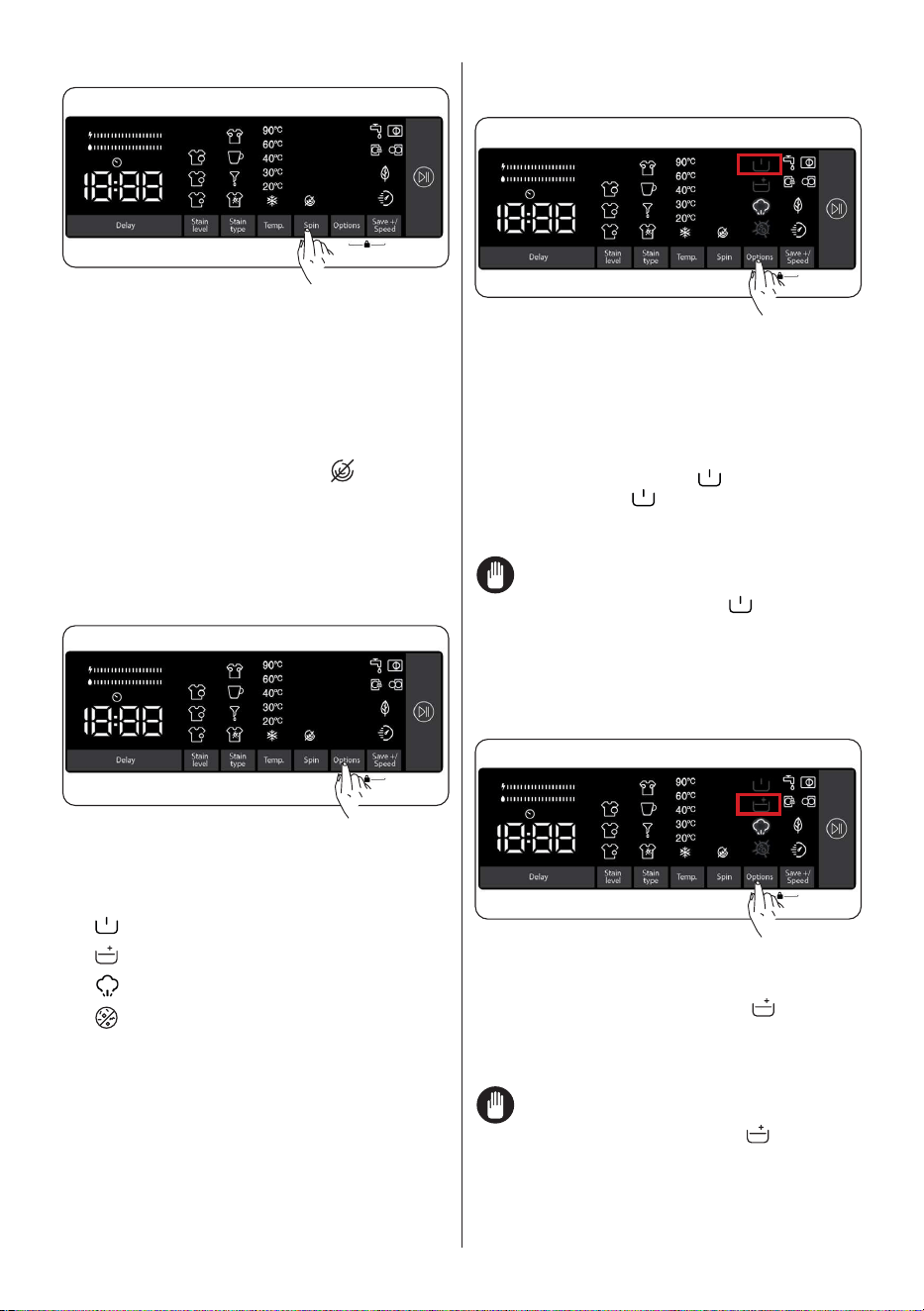
EN - 18EN - 18
5. Spin speed selection
You can use the speed setting key to set
the spin speed for your laundry. When
you select a new program, the selected
program’s maximum spin speed will be
displayed on the spin speed display.
You can press the spin speed setting key to
decrease the spin speed gradually between
the selected program’s maximum spin
speed and the spin cancelled (
) option.
If you have skipped the spin speed you
wanted to set, you can keep pressing the
spin speed key to find the desired speed
again.
6. Auxiliary functions
You can use auxiliary functions to make the
best washing selection for your laundry. To
do this, you can touch the options key on
the display panel to enable the following:
6.1
Prewash auxiliary function
6.2
Extra rinse auxiliary function
6.3
Steam Assist auxiliary function
6.4 Anti-allergy auxiliary function.
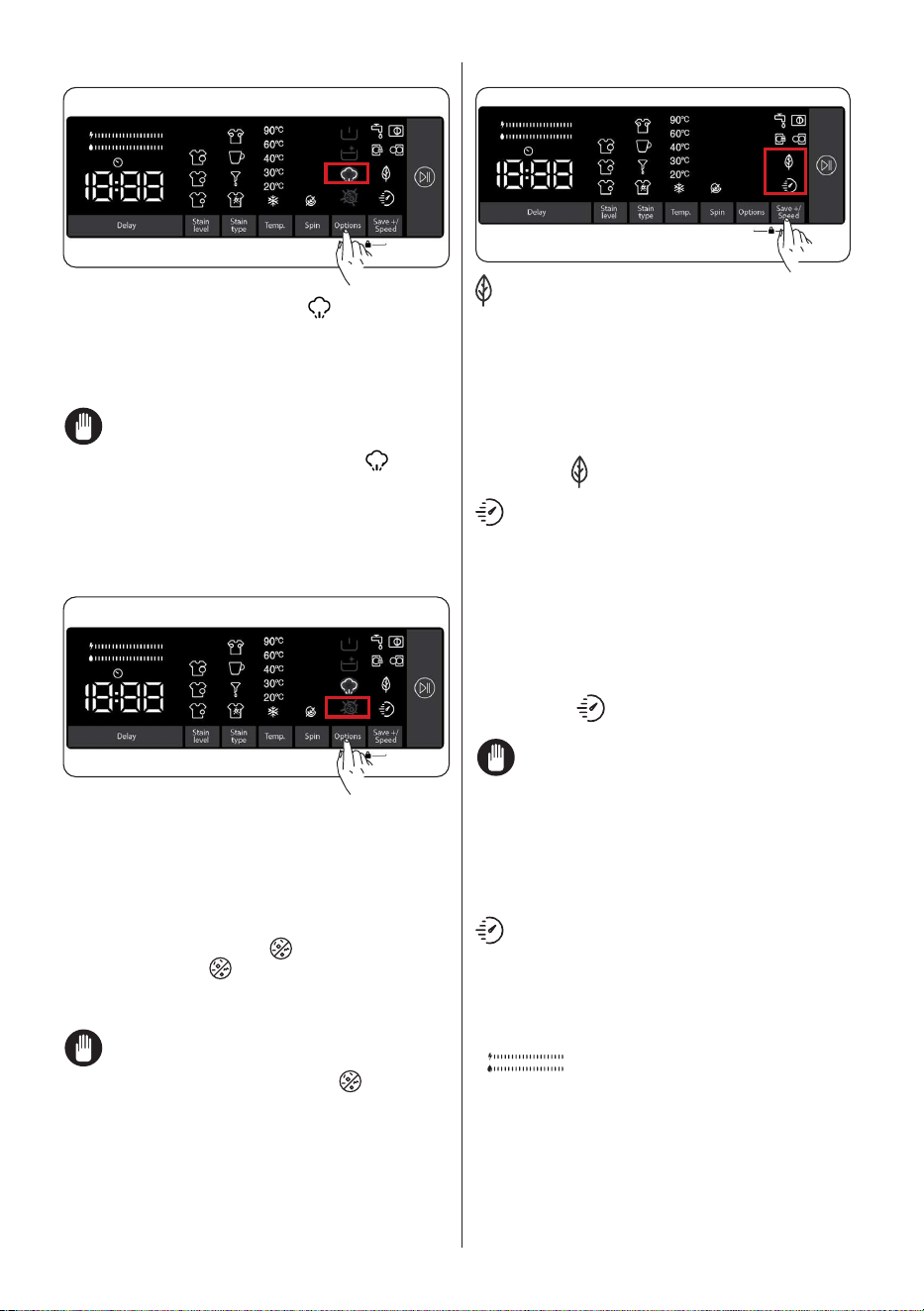
6.1 Prewash auxiliary function
You can use this auxiliary function to
perform pre-wash before the main wash
cycle for your highly soiled laundry. When
you use this function, you need to add
detergent into the prewash dispenser of the
detergent drawer. To enable the prewash
auxiliary function, press the options key
until the prewash symbol turns on. If
the prewash LED is constantly on in the
electronic display, it means that the auxiliary
function is selected.
Note: When you want to select the
prewash auxiliary function, if does not
appear on the display, this means that
this feature is not available in the selected
washing program.
6.2 Extra rinse auxiliary function
You can use this auxiliary function for extra
rinsing on your laundry. To enable the extra
rinse function, keep pressing the options
key until the extra rinse symbol turns
on. If the extra rinse LED is constantly on
in the electronic display, it means that the
auxiliary function is selected.
Note: When you want to select the
extra rinse auxiliary function, if does
not appear on the display, this means that
this feature is not available in the selected
washing program.
EN - 19EN - 19
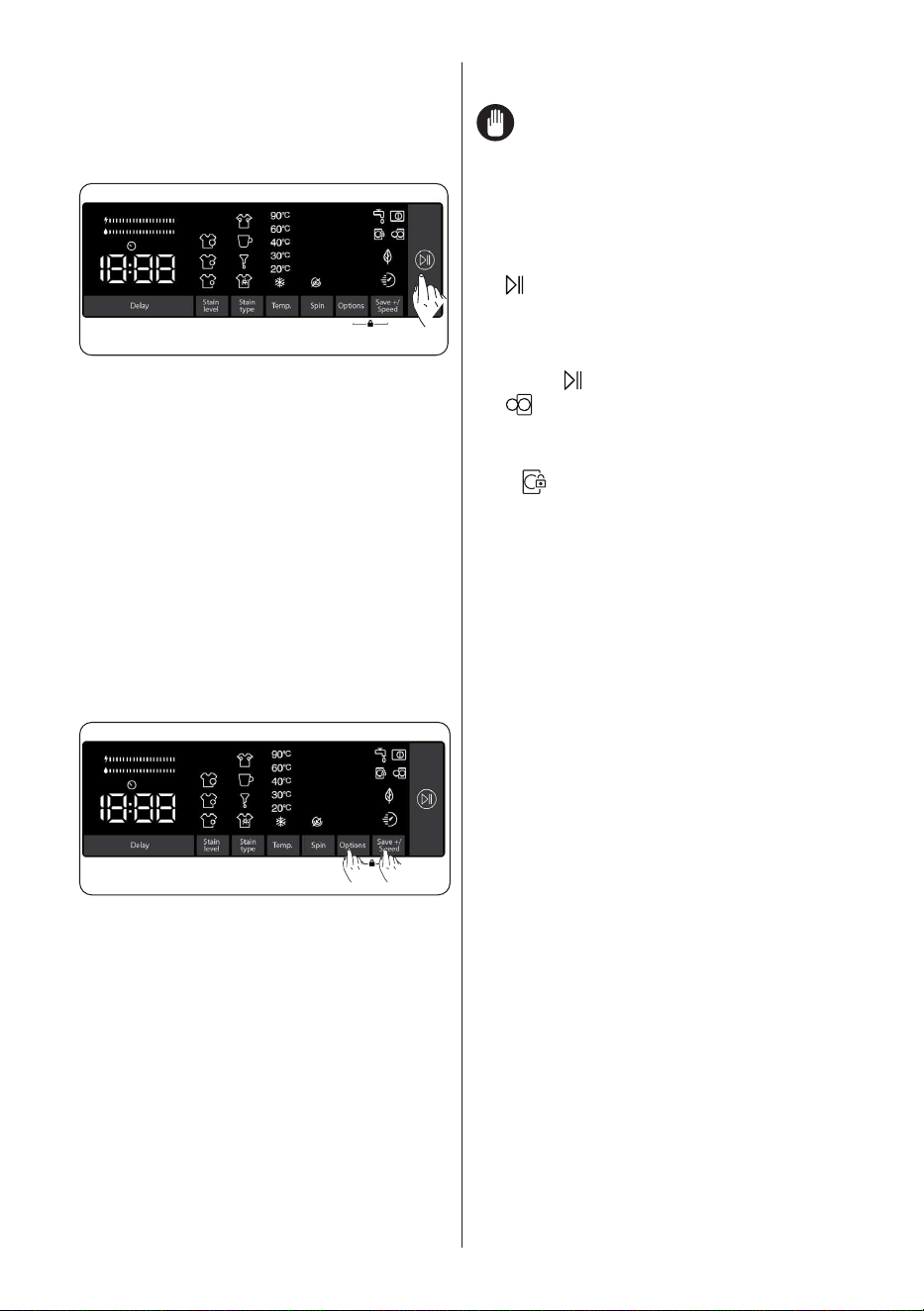
6.3 Steam Assist auxiliary function
Owing to the steam system ironing has
become quick and as easy. The steam used
dream washing penetrates and loosens the
fibres, eliminates creases and leaves our
clothes soft and delicate.
Note: When you want to select the
steam system auxiliary function, if
does
not appear on the display, this means that
this feature is not available in the selected
washing program.
6.4 Anti-allergy auxiliary function
You can use this auxiliary function to add
another rinse cycle for your laundry. Your
machine will use hot water in all rinsing
steps. (It is recommended for sensitive skin
clothing, baby clothes and underclothes).
To enable the anti-allergy auxiliary function,
keep pressing the options key until the anti-
allergy function symbol turns on. If the
anti-allergy LED is constantly on in the
electronic display, it means that the auxiliary
function is selected.
Note: When you want to select the
anti-allergy auxiliary function, if
does
not appear on the display, this means that
this feature is not available in the selected
washing program.
7. Eco/Quick Wash auxiliary function
Eco washing auxiliary function:
If you select this auxiliary function, your
machine will slightly extend the duration
of the washing program. However, it will
use less energy and water for the washing
cycle. To enable this function, you can
touch the Save+ / Speed selection key on
the display panel to turn on the LED light of
the symbol
.
Quick Wash auxiliary function:
If you select this auxiliary function, your
machine will shorten the duration of the
washing program. (It is recommended to
load the machine with half or less than half
of the capacity of the selected washing
program.) To enable this function, you can
touch the Save+ / Speed selection key on
the display panel to turn on the LED light of
the symbol
.
NOTE: If you load the machine with
half or less than half of the laundry capacity
of the selected washing program, the
machine will detect it thanks to the half load
detection system, and this way, it will wash
your laundry with less energy and less
water in a shorter time. When your machine
detects half load, LED light of the symbol
will automatically turn on in the display
panel.
(*) The appliance specifications may vary
depending on the purchased product.
• Energy/Water Efficiency Bar:
“
” is an efficiency indicator
comprising 2 bars. The energy/water
efficiency bar shows the amount of energy
and water consumption. The bigger the bar
is, the more energy or water consumption
you will have. The energy/water efficiency
bar might extend or shorten depending
on the selected program’s duration,
EN - 20EN - 20
temperature setting, spin speed and other
auxiliary functions.
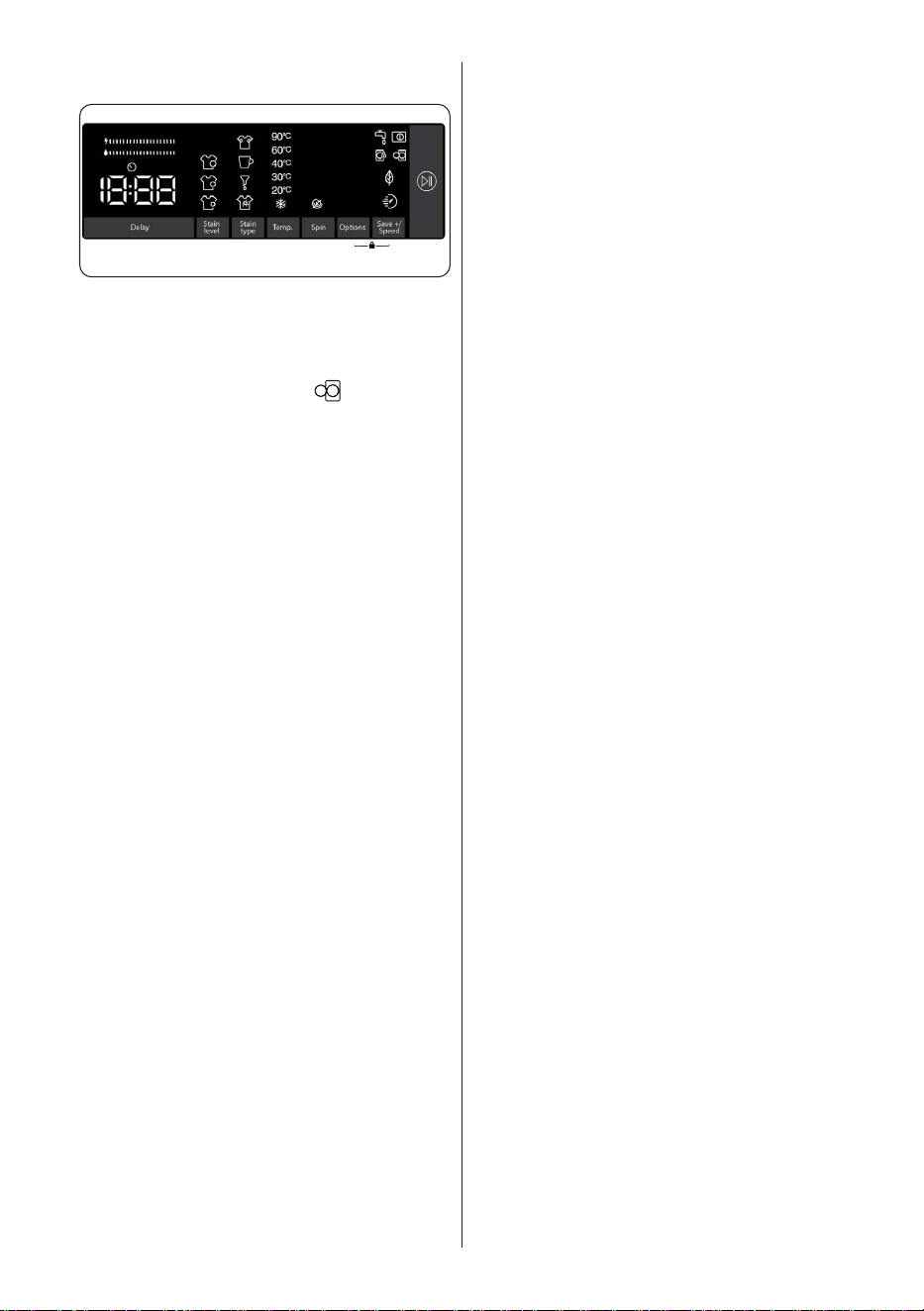
Start/Pause button
By pressing on the Start/Pause button,
you may start the programme you have
selected or suspend a running
programme. If you switch your machine to
the standby mode, the Start/Pause led on
the electronic display will blink.
5.8 Child Lock
The Child Lock function allows you to
lock the buttons so that the wash cycle
you have chosen cannot be changed
unintentionally.
To activate child lock, press and hold
button 6 and 7 simultaneously for at
least 3 seconds. ‘’CL’’ will flash on the
electronic display for 2 seconds when the
child lock is activated.
6 7
If any button is pressed or selected
programme is changed by the programme
dial while the child lock is active, the “CL”
symbol will flash on the electronic display
for 2 seconds.
If the child lock function is active and
a programme is running, when the
programme dial is turned to the “Off”
position and another programme
is selected the previously selected
programme continues from where it was
left.
To deactivate the child lock, press and
hold button 6 and 7 simultaneously for at
least 3 seconds until the “CL” symbol on
the electronic display disappears.
Note: Door remains unlocked in case
when child lock is active and electricity is
cut off
5.9 If you want to pause/cancel a
running program or add laundry:
• symbol key allows you to pause
or restart the selected program. When
you want to add laundry, you can use
this function.
• Touch
symbol button for this. If
is displayed on the screen, you
can open the loading door and add
laundry.
• If
is displayed on the screen, the
step where you can add laundry has
passed.
• If you want to cancel a running
program, turn the program knob to
“CANCEL” position. Your machine
will stop washing process and the
program will be cancelled. To drain
the water in the machine, turn
the program knob to any program
position. Your machine will drain the
water and cancel the program. You
can select a new program and start
the machine.
EN - 21EN - 21
5.10 Program End
Your machine will automatically stop
when the selected program ends.
• “End” will appear on the electronic
display.
• You can open the door
and take
out the laundry. After taking out the
laundry, leave the door open so that
the inside of the machine can dry.
• Turn the program knob to CANCEL
position.
• Unplug the machine.
• Turn off the water tap.
EN - 22
6. PROGRAMME TABLE
Programme
Washing
temperature (°C)
Maximum dry
laundry amount
(kg)
Detergent
compartment
Programme
duration (Min.)
Laundry type / Descriptions
COTTON *60 - 90 8,0 2 145
Very dirty, cotton and flax textiles.
(Underwear, linen, tablecloth, towel
(maximum 4,0 kg), bedclothes, etc.)
ECO 40-60 *40 - 60 8,0 2 218
Dirty cotton and flax textiles. (Underwear,
linen, tablecloth, towel (maximum 4,0 kg),
bedclothes, etc.)
COTTON Pre-
Wash
*60 - 40 - 30 -
“- -C”
8,0 1&2 164
Dirty cotton and flax textiles. (Underwear,
linen, tablecloth, towel (maximum 4,0 kg),
bedclothes, etc.)
COTTON 20 *20- “- -C” 4,0 2 59
Less dirty, cotton and linen textiles.
(Underwear, bedsheet, tablecloth, towel
(max.
2,0
kg) bedcloth, etc.)
COLOURS *40 - 30 - “- -C” 3,5 2 130
Less dirty, cotton and linen textiles.
(Underwear, bedsheet, tablecloth, towel
(max. 2,0 kg) bedcloth, etc.)
WOOL *30 - “- -C” 2,5 2 43
Woollen laundries with machine wash
labels.
RINSE *“- -C” 8,0 - 30
Provides an additional rinse to any type of
laundry after the washing cycle.
ALLERGY SAFE
*60 - 40 - 30 -
“- -C”
4,0 2 212 Baby laundry
Spin/Drain *“- -C” 8,0 - 17
You can use this program for any type
of laundry if you want an additional spin
step after the washing cycle./ You can
use the drain program to drain the water
accumulated inside the machine (adding
or remov ing laundry). To enable the drain
program, turn the program knob to the
spin/drain program. After you select “spin
cancelled” using the auxiliary function key,
the program will start to run.
HAND WASH *30 - “- -C” 2,5 2 90
Laundry recommended for hand wash or
sensitive laundry.
Easy Care /
Outdoor
* 40 - 30 - “- -C” 3,5 2 110
Very dirty or synthetic-mixed textiles. (Nylon
socks, shirts, blouses, synthetic-including
trousers etc. )
Mixed *40 - 30 - “- -C” 3,5 2 105
Dirty cotton, synthetics, colour and flax
textiles can be washed together.
Jeans / Dark
Garments
*30 - “- -C” 4,0 2 96
Black and dark items made of cotton, mixed
fibre or jeans. Wash inside out., Jeans often
contains excess dye and may run during
the first few washes. Wash light and dark
coloured items separately
(**) FAST 60' 60°C
*60 - 40 - 30 -
“- -C”
4,0 2 60
Dirty, cotton, coloured and linen textiles
washed at 60°C in 60 minutes.
(***) Rapid 15 ' *30 - “- -C” 2,0 2 15
In a short time of 15 minutes, Lightly soiled,
cotton, colored and linen textiles your can
wash.

EN - 23
NOTE: PROGRAMME DURATION MAY CHANGE ACCORDING TO THE
AMOUNT OF LAUNDRY, TAP WATER, AMBIENT TEMPERATURE AND SELECTED
ADDITIONAL FUNCTIONS.
(*) Washing water temperature of the programme is the factory default.
(**) If your machine has the rapid wash auxiliary function, you can enable the quick wash option on the
display panel and load the machine with 2 kg or less laundry to wash it in 30 minutes.
(***) Due to the short washing time of this programme, we recommend that less detergent is used. The
programme may last longer than 15 minutes if your machine detects an uneven load. You can open the
door of your machine 2 minutes after the completion of a washing operation. (The 2 minute period is
not included in the programme duration).
According to regulation 1015/2010 and 1061/2010, the programme 1 and the programme 2 are
respectively the ‘Standard 60°C cotton programme’ and the ‘Standard 40°C cotton programme’.
The Eco 40-60 programme is able to clean normally soiled cotton laundry declared to be washable at
40°C or 60°C, together in the same cycle, and that this programme is used to assess the compiance
with the EU ecodesign legislation.

EN - 24
• The most efficient programmes in terms of energy consumption are generally those
that perform at lower temperatures and longer duration.
• Loading the household washing machine up to the capacity indicated by the
manufacturer for the respective programmes will contribute to energy and water
savings.
• Program duration, energy consumption and water consumption values may vary
according to wash load weight and type, selected extra functions, tap water and
ambient temperature.
• It’s recommended to use liquid detergent for the washing programmes at low
temperature.
• The amount of detergent to be used may vary depending on the amount of laundry
and the level of dirtiness of the laundry. Please follow the detergent manufacturers’
recommendations for the amount of the detergent to be used.
• The noise and remaining moisture content are influenced by the spinning speed.
The higher spinning speed in the spinning phase, the higher noise and the lower
remaining moisture content.
• You can access the product database where the model information is stored by
reading the QR code on the energy label.
Programme
Name
Rated
Capacity kg
Energy
Consumption
kWh/cycle
Programme Duration
Hours:Minutes
Water
Consumption
Litres/Cycle
max.
Temperature
°C
Remaining
Moisture Content
%
1400 Rpm
Rated
Capacity
1/2 Load
1/4 Load
Rated
Capacity
1/2 Load
1/4 Load
Rated
Capacity
1/2 Load
1/4 Load
Rated
Capacity
1/2 Load
1/4 Load
Rated
Capacity
1/2 Load
1/4 Load
Cotton
90
8 2,38 03:13 82 81 53%
Cotton
60
8 0,85 02:25 36 57 53%
Eco
40-60
8 0,94 0,41 0,22 03:38 02:48 02:48 55 40 40 43 29 24 53% 53% 53%
Easy Care /
Outdoor
3,5 0,56
01:50
50 42 53%
Fast 60
4 1,02
01:00
34 58 53%
Cotton
20
4 0,12
00:59
33 20 53%

EN - 25
6.1 Important Informations
• Use detergents, softeners and other additives suitable for automatic washing
machines only. Excessive foam has occurred and automatic foam absorption
system has been activated due to too much detergent usage.
• We recommend that periodic cleaning for washing machine every 2 months. For
periodic cleaning please use Drum Clean programme. If your machine do not
have Drum Clean programme, use Cottons-90 programme. When required, use
limescale removers manufactured specifically for washing machines only.
• Never force the door open when your Washing Machine is running. You can open
the door of your machine 2 minutes after the completion of a washing operation. *
• Never force the door open when your Washing Machine is running. The door will
open immediately after the washing cycle has ended. *
• The installation and repairing procedures should always carried out by the
Authorised Service Agent in order to avoid possible risks. The manufacturer shall
not be held liable for damages that may arise from procedures carried out by
unauthorised persons.
(*) Specifications may vary depending on the machine purchased.
EN - 26EN - 26
7. CLEANING AND
MAINTENANCE
7.1 Warning
Turn your mains power
supply off and remove the
plug from the socket
before carrying out
maintenance and cleaning
of your machine.
Turn off the water
supply before starting
maintenance and cleaning
of your machine.
CAUTION: Do not
use solvents, abrasive
cleaners, glass cleaners
or all-purpose cleaning
agents to clean your
Washing Machine. They
may damage the plastic
surfaces and other
components with the
chemicals they contain.
7.2 Water Inlet Filters
Water inlet filters prevent dirt and foreign
materials from entering your machine. We
recommend that these filters are cleaned
when your machine is unable to receive
sufficient water, although your water supply
is on and the tap is open. We recommend
that you clean your water inlet filters every
2 months.
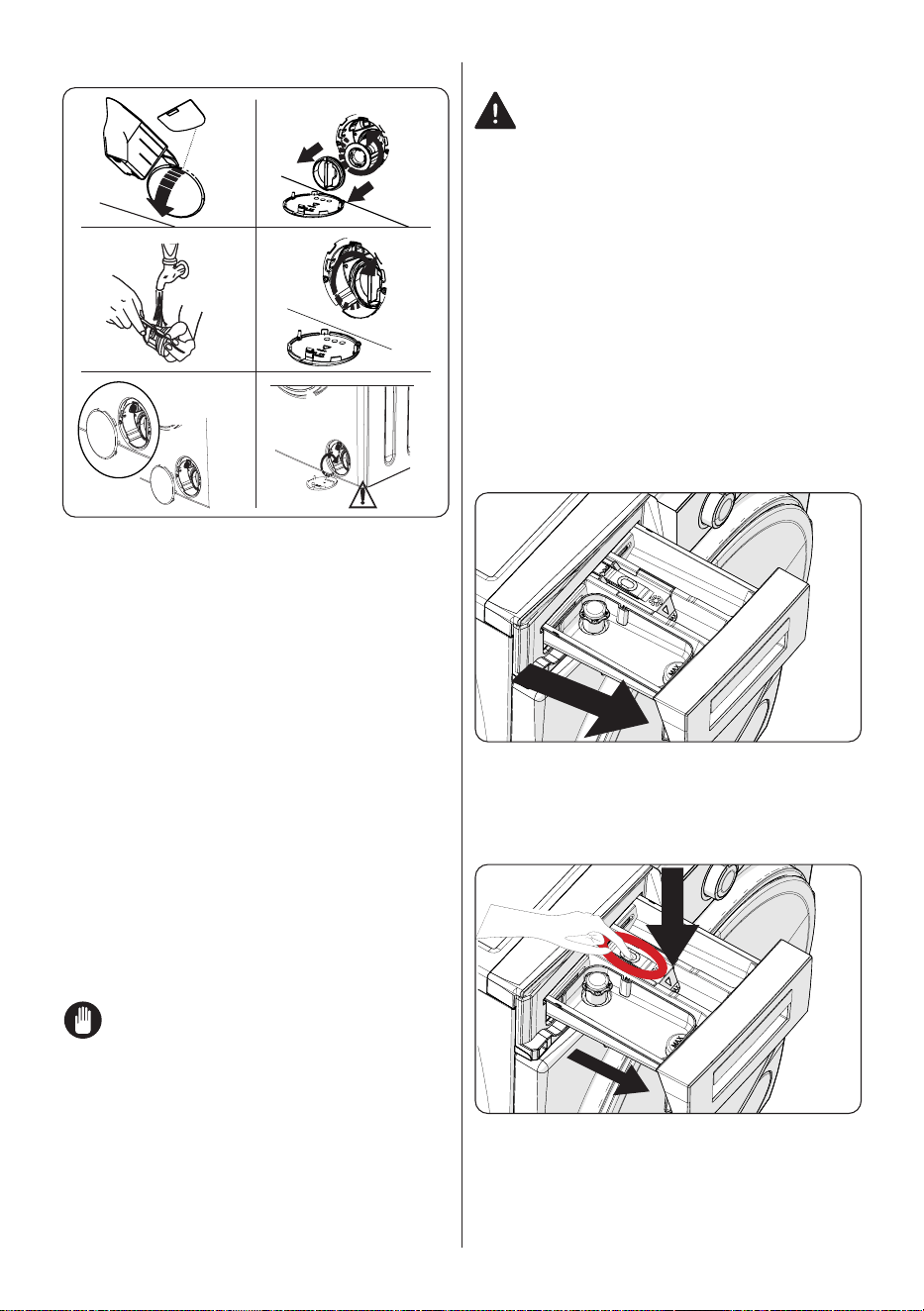
• Unscrew the water inlet hose(s) from
the Washing Machine.
• To remove the water inlet filter from the
water inlet valve, use a pair of long-
nosed pliers to gently pull on the plastic
bar in the filter.
• A second water inlet filter is located in
the tap end of the water inlet hose. To
remove the second water inlet filter, use
a pair of long-nosed pliers to gently pull
on the plastic bar in the filter.
• Clean the filter thoroughly with a soft
brush and wash with soapy water and
rinse thoroughly. Re-insert the filter by
gently pushing it back into place.
CAUTION: The filters at the
water inlet valve may become clogged
due to water quality or lack of required
maintenance and may break down.
This may cause a water leak. Any such
breakdowns are out of the scope of the
warranty.
EN - 27EN - 27
7.3 Pump Filter
1
3
5
2
4
6
The pump filter system in your Washing
Machine prolongs the life of the pump by
preventing lint from entering your machine.
We recommend that you clean the pump
filter every 2 months.
The pump filter is located behind the cover
on the front-lower right corner.
To clean the pump filter:
1. You may use the washing powder spade
(*) supplied with your machine or liquid
detergent level plate to open the pump
cover.
2. Lodge the end of the powder spade
or liquid detergent level plate in the
opening of the cover and gently press
backwards. The cover will open.
• Before opening the filter cover, place a
container under the filter cover to collect
any water left in the machine.
• Loosen the filter by turning anticlockwise
and remove by pulling. Wait for the
water to drain.
NOTE: Depending on the
amount of water inside the machine, you
may have to empty the water collection
container a few times.
3. Remove any foreign materials from the
filter with a soft brush.
4. After cleaning, re-fit the filter by inserting
it and turning clockwise.
5. When closing the pump cover, ensure
that the mountings inside the cover
meet the holes on the front panel side.
6. Close the filter cover.
WARNING: The water in the
pump may be hot, wait until it has cooled
down before carrying out any cleaning or
maintenance.
(*) Specifications may vary depending on
the machine purchased.
7.4 Detergent Drawer
The use of detergent may cause residual
build up in the detergent drawer over time.
We recommend that you remove the drawer
every 2 months to clean the accumulated
residue.
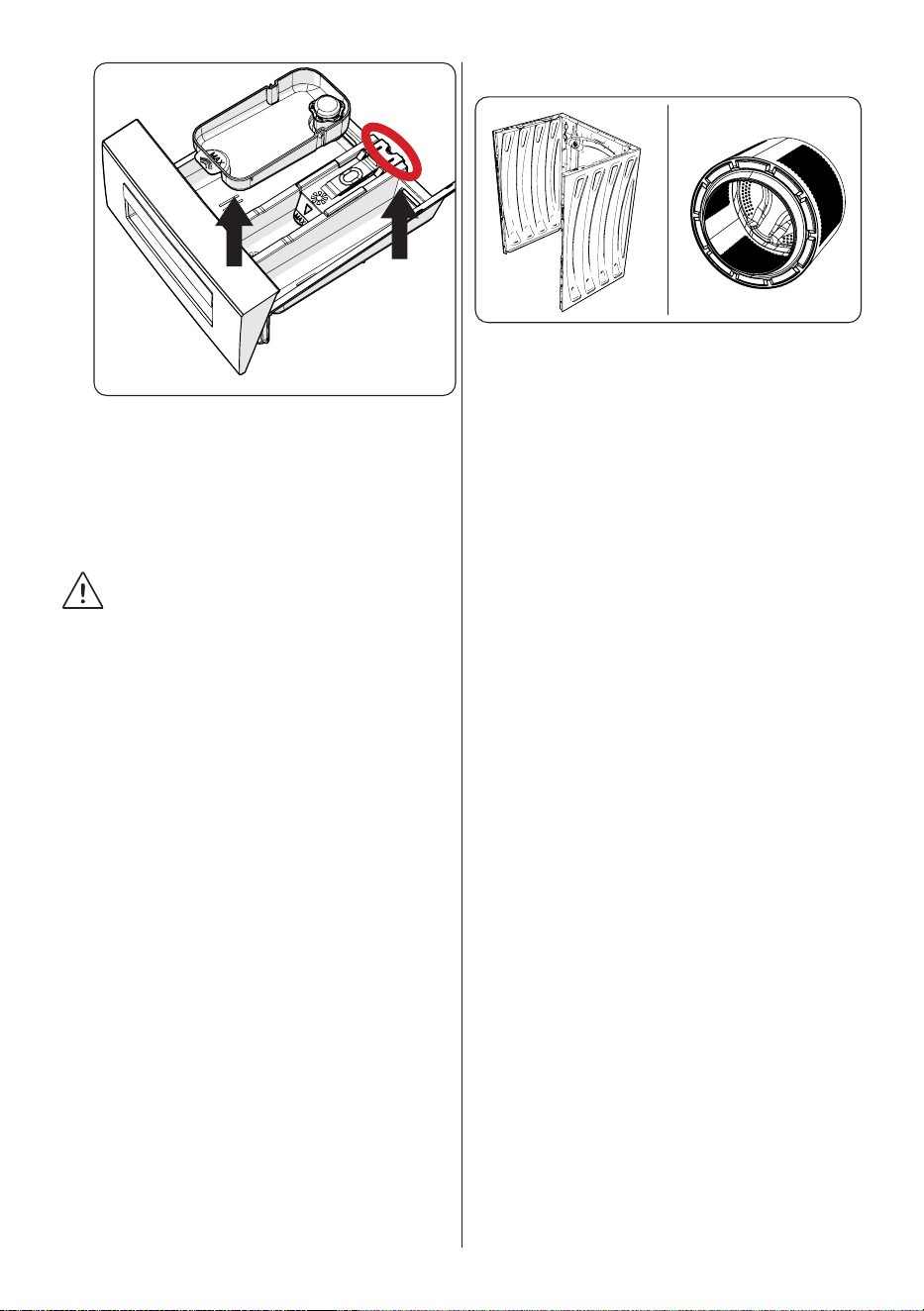
To remove the detergent drawer:
• Pull the drawer forwards until it is fully
extended.
• Press the region shown below inside
the detergent drawer you have pulled
all the way back, and continue pulling
and remove the detergent drawer from
its place
• Remove the detergent drawer and
disassemble the flush stopper. Clean
thoroughly to completely remove any
softener residue. Refit the flush stopper
after cleaning and check that it is seated
properly.
EN - 28EN - 28
•
• Rinse with a brush and lots of water.
• Collect the residues inside the detergent
drawer slot so that they don’t fall inside
your machine.
• Dry the detergent drawer with a towel or
dry cloth and place it back
Do not wash your detergent drawer
in a dishwasher.
Liquid detergent apparatus(*)
For the cleaning and maintenance of the
liquid level detergent apparatus, remove
the apparatus from its location as shown
in the picture below, and thoroughly clean
the remaining detergent residues. Replace
the apparatus. Make sure that no residual
material remains inside the siphon.
(*) Specifications may vary depending on
the machine purchased.
8. Body / Drum
1
2
1. Body
Use a mild, non-abrasive cleaning agent,
or soap and water, to clean the external
casing. Wipe dry with a soft cloth.
2. Drum
Do not leave metallic objects such as
needles, paper clips, coins etc. in your
machine. These objects lead to the
formation of rust stains in the drum. To
clean such rust stains, use a non-chlorine
cleaning agent and follow the instructions of
manufacturer of the cleaning agent. Never
use wire wool or similar hard objects for
cleaning rust stains.
EN - 29
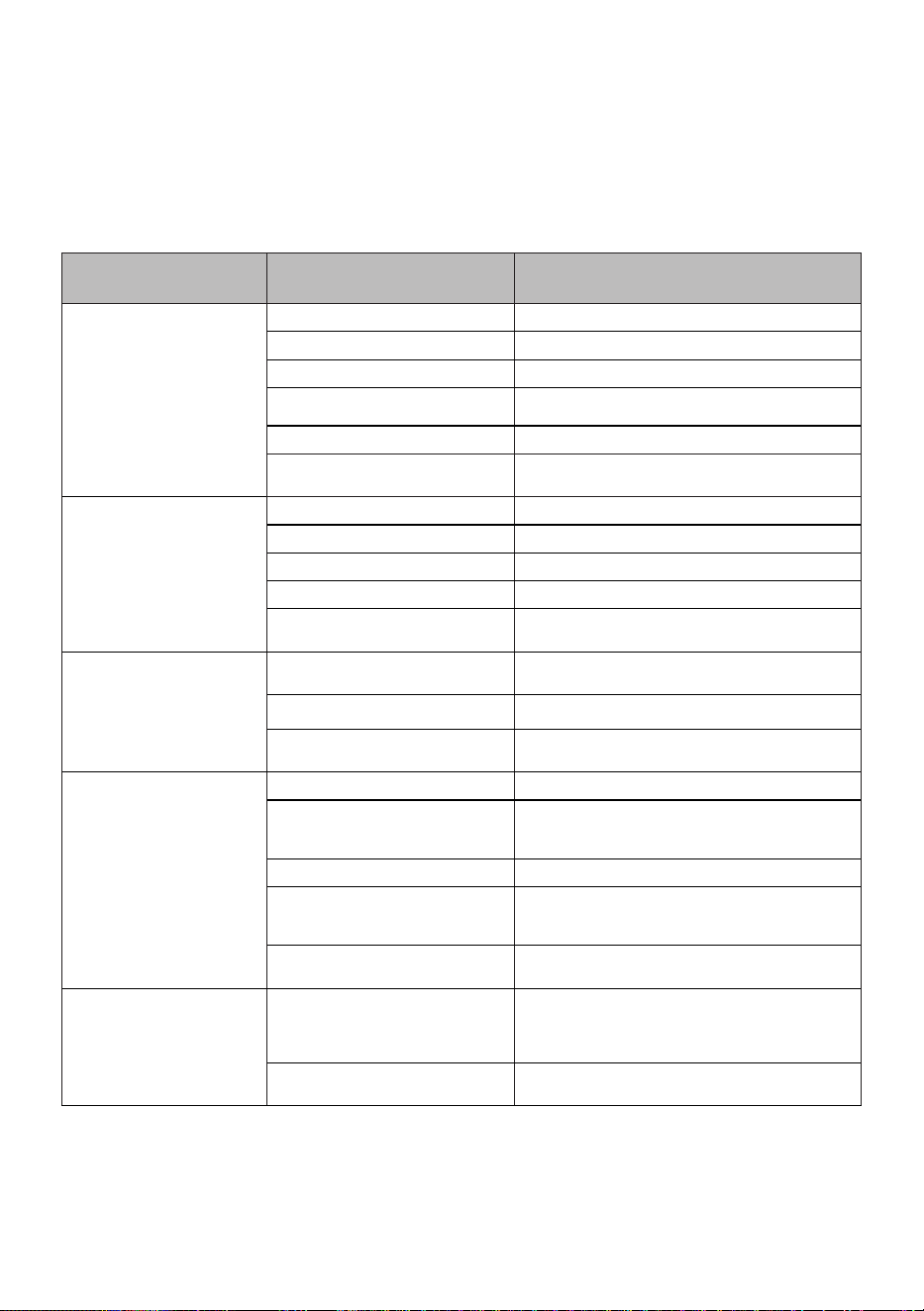
9. TROUBLESHOOTING
Repair of your machine should be carried out by an authorised service company.
If your machine requires repair or if you cannot solve an issue with the information
provided below, then you should:
• Unplug your machine from the mains power supply.
• Turn off the water supply.
FAULT POSSIBLE CAUSE TROUBLESHOOTING
Your machine does not start.
Machine not plugged in. Plug machine in.
Fuses are faulty. Replace the fuses.
No mains power supply. Check mains power.
Start/Pause button not pressed. Press the Start/Pause button.
Programme dial ‘stop’ position. Turn the programme dial to the desired position.
The machine door is not
completely closed.
Close the machine door.
Your machine does not
intake water.
Water tap is turned off. Turn tap on.
Water inlet hose may be twisted. Check water inlet hose and untwist.
Water inlet hose clogged. Clean water inlet hose filters. (*)
Inlet filter clogged. Clean the inlet filters. (*)
The machine door is not
completely closed.
Close the machine door.
Your machine does not
discharge water.
Drain hose clogged or twisted.
Check the drain hose, then either clean or
untwist.
Pump filter clogged. Clean the pump filter. (*)
Laundry is too tighly packed
together in the drum.
Spread your laundry in the machine evenly.
Your machine vibrates.
The feet have not been adjusted. Adjust the feet. (**)
Transit bolts fitted for
transportation have not been
removed.
Remove the transit bolts from the machine. (**)
Small load in the drum. This will not prevent operation of your machine.
Your machine is overloaded with
laundry or laundry is unevenly
spread.
Do not overload the drum. Spread laundry evenly
in the drum.
Your machine rests on a hard
surface.
Do not set up your Washing Machine on a hard
surface.
Excessive foam is formed in
the detergent drawer.
Excessive amount of detergent
used.
Press the Start/Pause button. To stop the foam,
dilute one tablespoon of softener into 1/2 litre of
water and pour into the detergent drawer. Press
the Start/Pause button after 5-10 mins.
Wrong detergent used.
Only use detergents produced for automatic
Washing Machines.
EN - 30
FAULT POSSIBLE CAUSE TROUBLESHOOTING
Unsatisfactory washing
result.
Your washing is too dirty for the
programme selected.
Use the information in the programme tables to
select the most appropriate programme.
Amount of detergent used
insufficient.
Use the amount of detergent as instructed on the
packaging.
There is too much laundry in your
machine.
Check that the maximum capacity for the
selected programme has not been exceeded.
Unsatisfactory washing
result.
Hard water.
Increase the amount of detergent following the
manufacturer’s instructions.
Your laundry is too tightly packed
together in the drum.
Check that your laundry is spread out.
As soon as the machine is
loaded with water, water
discharges.
The end of water drain hose is too
low for the machine.
Check that the drain hose is at a suitable height.
(**) .
No water appears in the
drum during washing.
No fault. Water is in the unseen
part of the drum.
. . . . . . . . . . . . . . . . . . . . .
Laundry has
detergent residue.
Non-dissolving particles of some
detergents may appear on your
laundry as white spots.
Perform an extra rinse, or clean your laundry with
a brush after it dries.
Grey spots appear on the
laundry.
There is untreated oil, cream or
ointment on your laundry.
Use the amount of detergent as instructed on the
packaging in the next wash.
The spin cycle does not take
place or takes place later
than expected.
No fault. The Unbalanced load
control system has been activated.
The Unbalanced load control system will try to
spread your laundry. The spinning cycle will begin
once your laundry is spread. Load the drum
evenly for the next wash.
(*) See the chapter regarding maintenance and cleaning of your machine.
(**) See the chapter regarding installation of your machine.
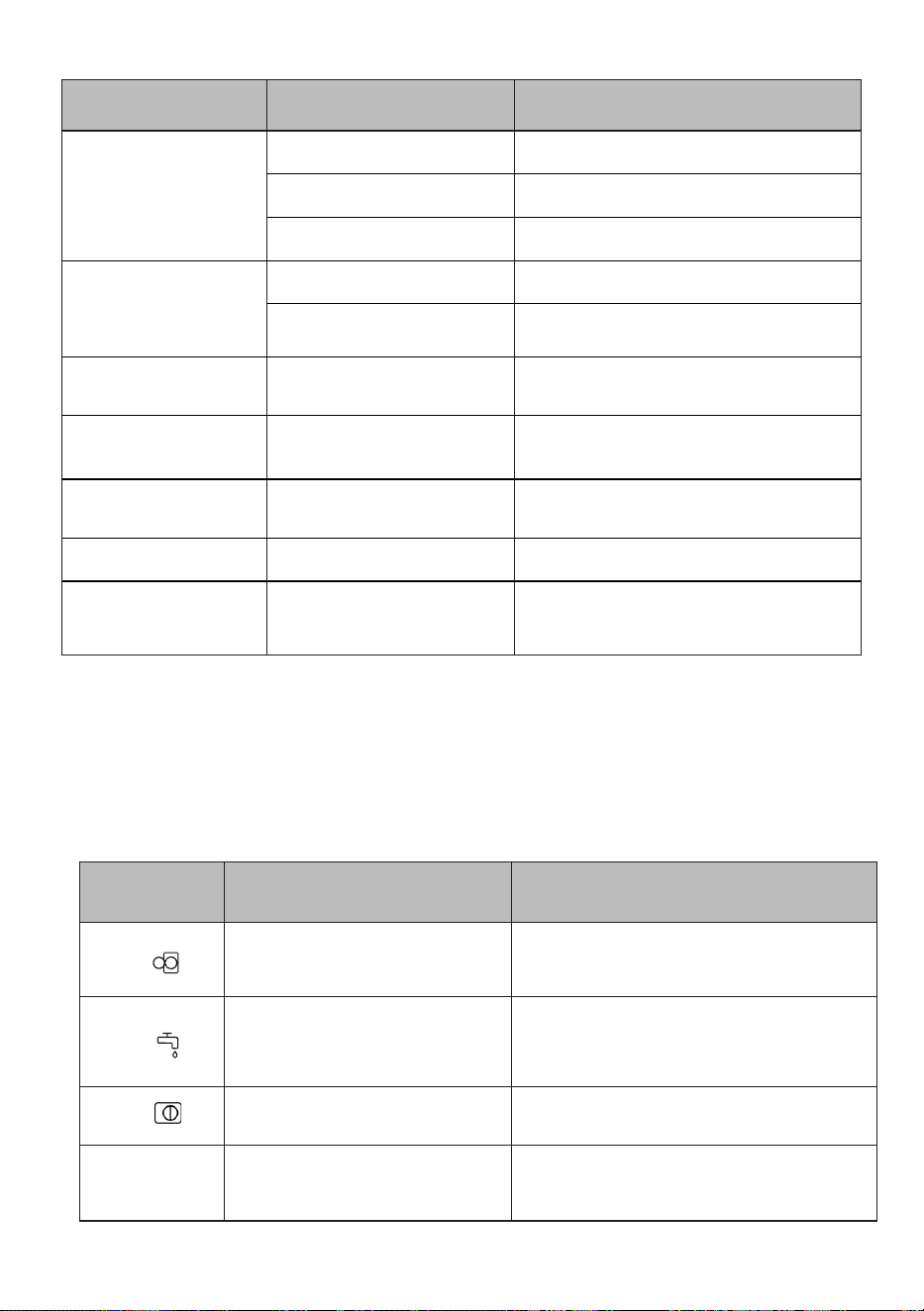
10. AUTOMATIC FAULT WARNINGS AND WHAT TO DO
Your Washing Machine is equipped with a built-in fault detection system, indicated by
a combination of flashing wash operation lights. The most common failure codes are
shown below.
TROUBLE CODE POSSIBLE FAULT WHAT TO DO
E01
The door of your machine is not shut
properly.
Shut the door properly until you hear a click. If
your machine persists to indicate fault, turn off
your machine, unplug it and contact the nearest
authorised service agent immediately.
E02
The water pressure or the water level
inside the machine may be low.
Check the tap is fully turned on. Mains water
may be cut-off. If the problem still continues, your
machine will stop after a while automatically. Unplug
the machine, turn off your tap and contact the
nearest authorised service agent.
E03
The pump is faulty or pump filter is
clogged or electrical connection of the
pump is faulty.
Clean the pump filter. If the problem persists,
contact the nearest authorised service agent. (*)
E04
Your machine has excessive amount of
water.
Your machine will discharge water by itself. Once
the water has drained, turn off your machine and
unplug it. Turn off the tap and contact the nearest
authorised service agent.
(*) See the chapter regarding maintenance and cleaning of your machine.

.................................................................................................................................................
.................................................................................................................................................
.................................................................................................................................................
.................................................................................................................................................
............................................................................................................................................. ...
.................................................................................................................................................
.................................................................................................................................................
.................................................................................................................................................
.................................................................................................................................................
.......................................................................................................................................... ......
.................................................................................................................................................
.................................................................................................................................................
.................................................................................................................................................
.................................................................................................................................................
....................................................................................................................................... .........
.................................................................................................................................................
.................................................................................................................................................
.................................................................................................................................................
.................................................................................................................................................
.................................................................................................................................... ............
.................................................................................................................................................
.................................................................................................................................................
.................................................................................................................................................
.................................................................................................................................................
................................................................................................................................. ...............
.................................................................................................................................................
.................................................................................................................................................
.................................................................................................................................................
.................................................................................................................................................
.............................................................................................................................. ..................
.................................................................................................................................................
.................................................................................................................................................
.................................................................................................................................................
.................................................................................................................................................
........................................................................................................................... .....................
.................................................................................................................................................
.................................................................................................................................................
.................................................................................................................................................
.................................................................................................................................................
........................................................................................................................ ........................
.................................................................................................................................................
.................................................................................................................................................
.................................................................................................................................................
.................................................................................................................................................
..................................................................................................................... ...........................
.................................................................................................................................................
.................................................................................................................................................
.................................................................................................................................................
.................................................................................................................................................
.................................................................................................................. ..............................
.................................................................................................................................................
.................................................................................................................................................
.................................................................................................................................................
.................................................................................................................................................
............................................................................................................... .................................
.................................................................................................................................................
.................................................................................................................................................
.................................................................................................................................................
.................................................................................................................................................
......................................................................................

.................................................................................................................................................
.................................................................................................................................................
.................................................................................................................................................
.................................................................................................................................................
............................................................................................................................................. ...
.................................................................................................................................................
.................................................................................................................................................
.................................................................................................................................................
.................................................................................................................................................
.......................................................................................................................................... ......
.................................................................................................................................................
.................................................................................................................................................
.................................................................................................................................................
.................................................................................................................................................
....................................................................................................................................... .........
.................................................................................................................................................
.................................................................................................................................................
.................................................................................................................................................
.................................................................................................................................................
.................................................................................................................................... ............
.................................................................................................................................................
.................................................................................................................................................
.................................................................................................................................................
.................................................................................................................................................
................................................................................................................................. ...............
.................................................................................................................................................
.................................................................................................................................................
.................................................................................................................................................
.................................................................................................................................................
.............................................................................................................................. ..................
.................................................................................................................................................
.................................................................................................................................................
.................................................................................................................................................
.................................................................................................................................................
........................................................................................................................... .....................
.................................................................................................................................................
.................................................................................................................................................
.................................................................................................................................................
.................................................................................................................................................
........................................................................................................................ ........................
.................................................................................................................................................
.................................................................................................................................................
.................................................................................................................................................
.................................................................................................................................................
..................................................................................................................... ...........................
.................................................................................................................................................
.................................................................................................................................................
.................................................................................................................................................
.................................................................................................................................................
.................................................................................................................. ..............................
.................................................................................................................................................
.................................................................................................................................................
.................................................................................................................................................
.................................................................................................................................................
............................................................................................................... .................................
.................................................................................................................................................
.................................................................................................................................................
.................................................................................................................................................
.................................................................................................................................................
......................................................................................

52395309
WWW.CORBERO.ES
Servicruz SL
Vidal i Ribes 8-10 08950 Esplugues de Llobregat
Barcelona
Telf. 911 08 08 08
The minimum period which must supply the spare parts
for the household washing machine is 10 years.

CERTIFICADO DE GARANTÍA
Imprescindible la presentación de la factura de compra acompañada del presente certificado de garantía.
Riesgos cubiertos.
Este aparato está garantizado contra cualquier defecto de funcionamiento, siempre que se destine a uso doméstico,
procediéndose a su reparación dentro del plazo de garantía y sólo por la red de SAT autorizados.
Nuestros electrodomésticos Corberó cuentan con la garantía legal del fabricante que cubre cualquier avería o defecto durante36
meses, desde su fecha factura de 1 de enero del 2022. En caso de que fuera necesario, nosotros nos ocupamos de cualquier posible
incidencia siempre que se deba a un componente defectuoso o fallo de fabricación.
Excepciones de garantía.
• Que la fecha del certificado no coincida con la fecha de venta de la factura original.
• Averías producidas por golpe, por caída o cualquier otra causa de fuerza mayor.
• Si el apa
rato ha sido manipulado por personal no autorizado.
• Las averías producidas o derivadas como consecuencia de un uso inadecuado, por defectos de instalación,
por introducir modificaciones en el aparato que alteren su funcionamiento.
• Puestas en marcha, mantenimiento, limpiezas, componentes sujetos a desgaste, lámparas, piezas estéticas,
oxidaciones, plásticos, gomas, carcasas y cristales.
“ESTAS EXCEPCIONES ANULAN LA GARANTÍA, SIENDO LA REPARACIÓN CON CARGO AL CLIENTE”
Periodo amparado en aparatos según ley de garantias en la venta de bienes de consumo Ley vigente es “RD 7/2021”
Horario de atención Lunes a Viernes de 9h00 a 19h00. Teléfono de contacto_ 911 08 08 08 Mail de contacto_ [email protected] web_ www.corbero.es
Dirección de Servicio técnico oficial_Vidal i Ribes 8-10 08950 Esplugues de Llobregat Barcelona
Sevicio Técnico Oficial: 911 08 08 08
Los hornos microondas (a excepción de los integrables) y los hornos sobremesa en el caso de cualquier incidencia de
funcionamiento, deben de llevarse al servicio técnico más próximo por parte del cliente. No se recojen ni reparan en el
domicilio.
•
Garantía termos eléctricos. Garantía de 3 años incluyendo los costes de desplazamiento y mano de obra que
correspondan de la reparación del producto, teniendo que tener un mantenimiento una vez cada 12 meses.
Especialmente si Ud. ha instalado un aparato a gas, tenga presente como titular de la instalación, la obligatoriedad de
realizar una revisión completa de los equipos, (según Real Decreto 238 / 2013, del 5 Abril. RITE. IT3, M. Lo termos
eléctricos y calderas que incluyen depósitos acumuladores de agua caliente, para que se aplique la prestación de la
Garantía, es obligatorio que el ánodo de magnesio esté operativo y que realice la función de protección
adecuadamente. Para ello es recomendable que el ánodo se revise bianualmente por el Servicio Oficial y sea renovado
cuando fuera necesario. Periodicidad que deberá ser anual en aquellas zonas con aguas críticas (contenido de CaCO3
superiores a 200mg/L, es decir a partir de 20ºfH de dureza). Depósitos sin el correcto estado del ánodo de protección, no
tienen la cobertura de la garantía. Independientemente del tipo de depósito o producto, todas las válvulas de
sobrepresión de calefacción o a.c.s., deberán ser canalizadas para evitar daños en Ia vivienda por descargas de agua. La
garantía del producto no asume los daños causados por Ia no canalización del agua derramada por esta válvula.
•

CERTIFICATE OF GUARANTEE
The presentation of the purchase invoice accompanied by this guarantee certificate is essential.
Covered Risks.
This appliance is guaranteed against any malfunction, provided that it is intended for domestic use, proceeding to its repair within
the warranty period and only by the authorized SAT network.
Our Corberó appliances have the manufacturer's legal warranty that covers any breakdown or defect for 36 months, from the
invoice date of January 1, 2022. If necessary, we take care of any possible incident whenever it is due to a defective component or
manufacturing fault. Warranty Exceptions
Warranty Exceptions
•
That the date of the certificate does not coincide with the date of sale of the original invoice.
•
Faults produced by blow, by fall or any other cause of force majeure.
•
If the device has been manipulated by unauthorized personnel.
•
Faults produced or derived as a consequence of improper use, installation defects, or modifications to the device that
alter its operation.
•
Start-up, maintenance, cleaning, components subject to wear, lamps, aesthetic parts,
oxidation, plastics, rubbers, housings and crystals.
“THESE EXCEPTIONS VOID THE WARRANTY, THE REPAIR BEING CHARGED TO THE CUSTOMER”
Period covered in devices according to the law of guarantees in the sale of consumer goods Current law is “RD 7/2021”
Hours of operation Monday to Friday from9h00 a 19h00. Telephone contact_ 911 08 08 08 Contact email_ [email protected] web_ www.corbero.es
Official Technical Service Address_Vidal i Ribes 8-10 08950 Esplugues de Llobregat Barcelona
Official Technical Service: 911 08 08 08
Microwave ovens (with the exception of built-in ones) and tabletop ovens in the event of any incident of
operation, they must be taken to the nearest technical service by the customer. They are not collected or repaired at
home.
•
Electric thermos guarantee. 3-year warranty including travel and labor costs that correspond to the repair of the
product, having to have maintenance once every 12 months. Especially if you have installed a gas appliance, keep in
mind as the owner of the installation, the obligation to carry out a complete review of the equipment, (according to
Royal Decree 238 / 2013, of April 5. RITE. IT3, M. Lo thermos electrical and boilers that include hot water storage tanks,
for the benefit of the Guarantee to apply, it is mandatory that the magnesium anode is operational and that it performs
the protection function adequately.For this, it is recommended that the anode be checked biannually by the Official
Service and is renewed when necessary Periodicity that must be annual in those areas with critical waters (CaCO3
content greater than 200mg/L, that is, from 20ºfH of hardness) Deposits without the correct state of the protection
anode are not covered by the warranty Regardless of the type of tank or product, all heating or DHW overpressure
valves must be channeled to avoid damage and n the house due to water discharges. The product warranty does not
cover damages caused by not channeling the water spilled by this valve.
•