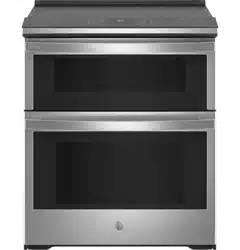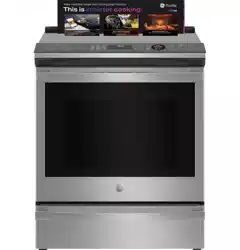

Write the model and serial
numbers here:
Model # _________________
Serial # _________________
You can find them on a label
behind the door or drawer.
ENGLISH / ESPAÑOL
OWNER’S MANUAL
RANGES
Electric Induction Front Control
49-2000990 Rev. 5 10-24
30" Induction Range
PHS930
PHS93E
GE is a trademark of the General Electric Company. Manufactured under trademark license.
SAFETY INFORMATION .......... 3
USING THE RANGE
Surface Units ........................... 8
Precision Cooking ...................... 9
Cookware for Induction Cooktop .........11
Oven Controls ..........................13
Cooking Options. . . . . . . . . . . . . . . . . . . . . . . .14
Settings ...............................14
Sabbath Mode ..........................16
Sabbath Mode - OU and CRC .............17
Oven Racks ............................18
Aluminum Foil and Oven Liners ...........18
Cookware ..............................18
Cooking Modes .........................19
Oven Probe ............................21
Cooking Guide ........................ 22
Air Fry Cooking Guide ..................23
CARE AND CLEANING
Cleaning the Range – Exterior ...........24
Cleaning the Range – Interior ........... 25
Cleaning the Glass Cooktop .............26
Oven Probe ........................... 27
Oven Light ............................ 28
Oven Door ............................29
Soft Close Drawer .....................29
TROUBLESHOOTING TIPS .......30
LIMITED WARRANTY ............34
ACCESSORIES .................... 35
CONSUMER SUPPORT ...........36

2 49-2000990 Rev. 5
THANK YOU FOR MAKING GE APPLIANCES A PART OF YOUR HOME.
Whether you grew up with GE Appliances, or this is your first, we’re happy to have you in the family.
We take pride in the craftsmanship, innovation and design that goes into every GE Appliances
product, and we think you will too. Among other things, registration of your appliance ensures that we
can deliver important product information and warranty details when you need them.
Register your GE appliance now online. Helpful websites and phone numbers are available in the
Consumer Support section of this Owner’s Manual. You may also mail in the pre-printed registration
card included in the packing material.
49-2000990 Rev. 5 3
READ AND SAVE THESE INSTRUCTIONS
IMPORTANT SAFETY INFORMATION
READ ALL INSTRUCTIONS BEFORE USING THE APPLIANCE
SAFETY INFORMATION
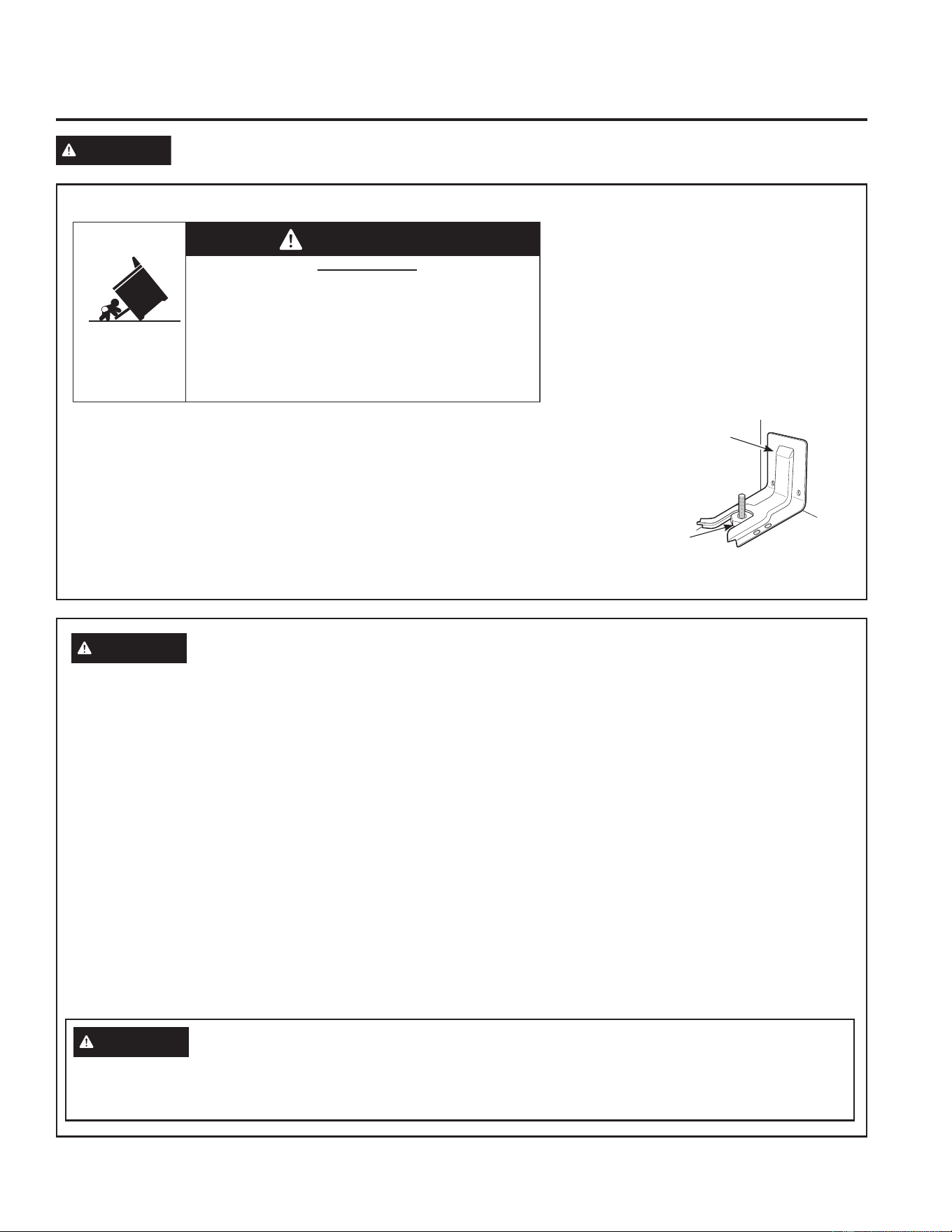
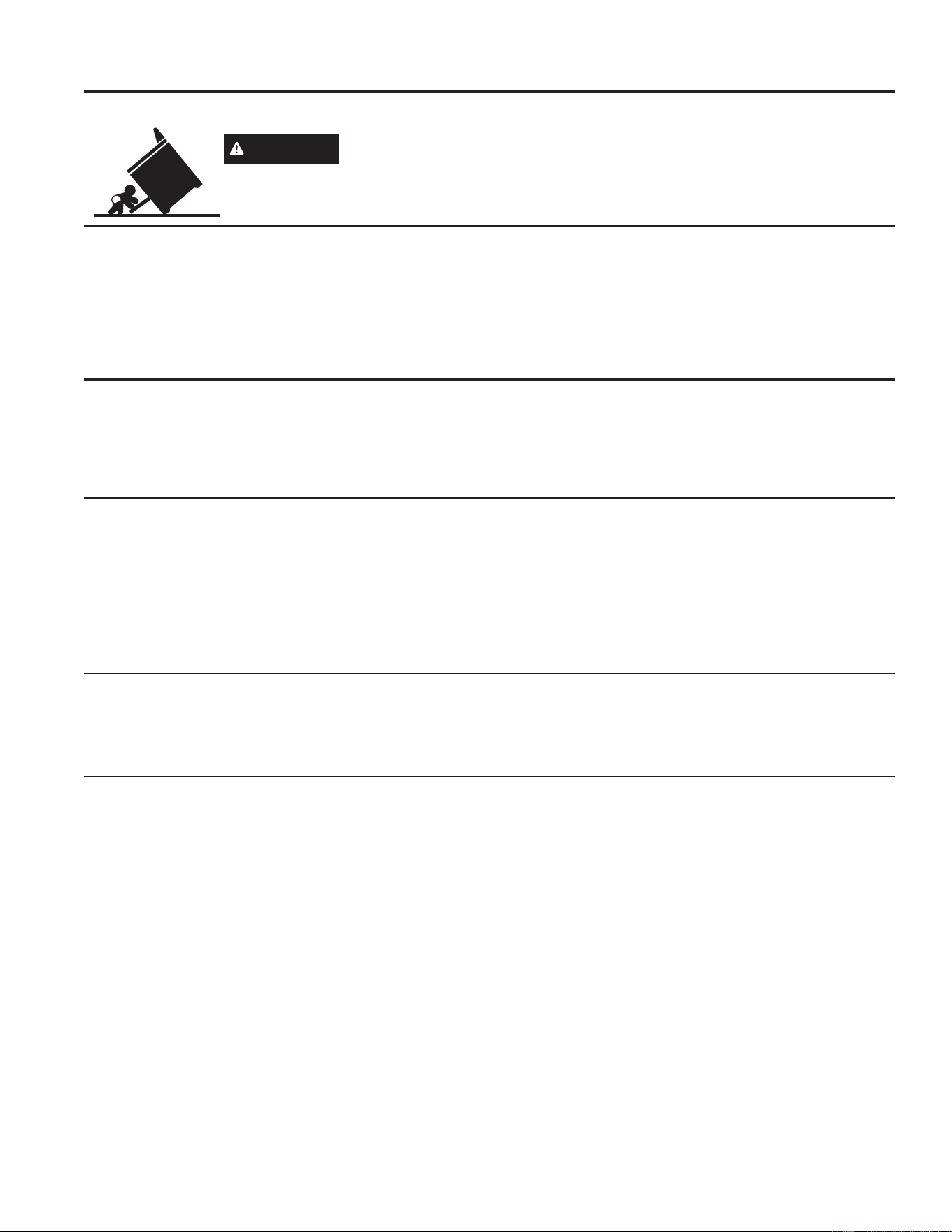
ANTI-TIP DEVICE
To reduce the risk of tipping the range,
the range must be secured by a properly
installed anti-tip bracket. See installation
instructions shipped with the bracket for
complete details before attempting to install.
For Free-Standing and Slide-In Ranges
To check if the bracket is installed and
engaged properly, look underneath the
range to see that the rear leveling leg is
engaged in the bracket. On some models, the storage drawer or kick panel
can be removed for easy inspection. If visual inspection is not possible,
slide the range forward, confirm the anti-tip bracket is securely attached to
the floor or wall, and slide the range back so the rear leveling leg is under
the anti-tip bracket.
If the range is pulled from the wall for any reason, always repeat this
procedure to verify the range is properly secured by the anti-tip bracket.
Never completely remove the leveling legs or the range will not be secured
to the anti-tip device properly.
WARNING
Read all safety instructions before using the product. Failure to follow these instructions may result
in fire, electrical shock, serious injury or death.
• A child or adult can tip the range and be killed.
• Install the anti-tip bracket to the wall or floor.
• Engage the range to the anti-tip bracket by sliding the
range back such that the foot is engaged.
• Re-engage the anti-tip bracket if the range is moved.
• Failure to do so can result in death or serious burns
to children or adults.
Tip-Over Hazard
WARNING
Anti-Tip
Bracket
Leveling Leg
Free-Standing and Slide-In Ranges
WARNING
GENERAL SAFETY INSTRUCTIONS
This unit has been tested and found to comply with the
limits for a class B digital device, pursuant to Part 18
of the FCC rules. These limits are designed to provide
reasonable protection against harmful interference in
a residential installation. This unit generates, uses and
can radiate radio frequency energy and, if not installed
and used in accordance with the instructions, may
cause harmful interference to radio communications.
However, there is no guarantee that interference
will not occur in a particular installation. If this unit
does cause harmful interference to radio or television
reception, which can be determined by turning the unit
off and on, the user is encouraged to try to correct the
interference by one or more of the following measures:
Ŷ 5HRULHQWRUUHORFDWHWKHUHFHLYLQJDQWHQQDH
Ŷ ,QFUHDVHWKHGLVWDQFHEHWZHHQWKHXQLWDQG
receiver.
Ŷ &RQQHFWWKHXQLWLQWRDQRXWOHWRUDFLUFXLWGLIIHUHQW
from that to which the receiver is connected.
Ŷ 8VHWKLVDSSOLDQFHRQO\IRULWVLQWHQGHGSXUSRVHDV
described in this Owner’s Manual.
Ŷ +DYH\RXUUDQJHLQVWDOOHGDQGSURSHUO\JURXQGHGE\
a qualified installer in accordance with the provided
installation instructions.
Ŷ $Q\DGMXVWPHQWDQGVHUYLFHVKRXOGEHSHUIRUPHG
only by a qualified installer or service technician.
Do not attempt to repair or replace any part of your
range unless it is specifically recommended in this
manual.
Ŷ %HIRUHSHUIRUPLQJDQ\VHUYLFHXQSOXJWKHUDQJH
or disconnect the power supply at the household
distribution panel by removing the fuse or switching
off the circuit breaker.
Ŷ 'RQRWOHDYHFKLOGUHQDORQHRUXQDWWHQGHGLQDQ
area where an appliance is in use. They should
never be allowed to climb, sit or stand on any part
of the appliance.
CAUTION
Persons with a pacemaker or similar medical device should exercise caution when using or
standing near an induction unit while it is in operation. The electromagnetic field may affect the working of the
pacemaker or similar medical device. It is advisable to consult your doctor or the pacemaker manufacturer
about your particular situation.
4 49-2000990 Rev. 5
WARNING
KEEP FLAMMABLE MATERIALS AWAY FROM THE RANGE
Failure to do so may result in fire or personal injury.
Ŷ 'RQRWVWRUHRUXVHIODPPDEOHPDWHULDOVLQDQRYHQ
or near the cooktop, including paper, plastic, pot
holders, linens, wall coverings, curtains, drapes and
gasoline or other flammable vapors and liquids.
Ŷ 1HYHUZHDUORRVHILWWLQJRUKDQJLQJJDUPHQWVZKLOH
using the appliance. These garments may ignite if
they contact hot surfaces causing severe burns.
Ŷ 'RQRWOHWFRRNLQJJUHDVHRURWKHUIODPPDEOH
materials accumulate in or near the range. Grease
in the oven or on the cooktop may ignite.
SAFETY INFORMATION
READ AND SAVE THESE INSTRUCTIONS
IMPORTANT SAFETY INFORMATION
READ ALL INSTRUCTIONS BEFORE USING THE APPLIANCE
WARNING
GENERAL SAFETY INSTRUCTIONS (Cont.)
Ŷ
CAUTION
Do not store items of interest to
children above a range or on the backguard of a
range—children climbing on the range to reach
items could be seriously injured.
Ŷ 8VHRQO\GU\SRWKROGHUV²PRLVWRUGDPSSRW
holders on hot surfaces may result in burns from
steam. Do not let pot holders touch hot surface
units or heating elements. Do not use a towel or
other bulky cloth in place of pot holders.
Ŷ 1HYHUXVH\RXUDSSOLDQFHIRUZDUPLQJRUKHDWLQJ
the room.
Ŷ %HVXUHDOOSDFNLQJPDWHULDOVDUHUHPRYHGIURPWKH
range before operating to prevent ignition of these
materials.
Ŷ 'RQRWXVHDQ\W\SHRIIRLORUOLQHUWRFRYHUWKH
oven bottom or anywhere in the oven, except as
described in this manual. Oven liners can trap heat
or melt, resulting in damage to the product and risk
of shock, smoke or fire.
Ŷ Do not use the oven if a heating element develops
a glowing spot during use or shows other signs of
damage. A glowing spot indicates the surface unit
may fail and present a potential burn, fire, or shock
hazard. Turn the heating element off immediately
and have it replaced by a qualified service
technician.
Ŷ 'RQRWWRXFKWKHVXUIDFHXQLWVWKHKHDWLQJHOHPHQWV
or the interior surface of the oven. These surfaces
may be hot enough to burn even though they are
dark in color. During and after use, do not touch,
or let clothing or other flammable materials contact
the surface units, areas nearby the surface units or
any interior area of the oven; allow sufficient time
for cooling first. Other surfaces of the appliance
may become hot enough to cause burns. Potentially
hot surfaces include the cooktop, areas facing the
cooktop, oven vent opening, surfaces near the
opening and crevices around the oven door.
Ŷ 'RQRWKHDWXQRSHQHGIRRGFRQWDLQHUV3UHVVXUH
could build up and the container could burst,
causing an injury.
Ŷ $YRLGVFUDWFKLQJRULPSDFWLQJJODVVGRRUVFRRNWRSV
or control panels. Doing so may lead to glass
breakage. Do not cook on a product with broken
glass. Shock, fire or cuts may occur. Contact a
qualified technician immediately.
Ŷ &RRNIRRGWKRURXJKO\WRKHOSSURWHFWDJDLQVW
foodborne illness. Minimum safe food temperature
recommendations can be found at IsItDoneYet.gov
and fsis.usda.gov8VHDIRRGWKHUPRPHWHUWRWDNH
food temperatures and check several locations.
Ŷ 'RQRWDOORZDQ\RQHWRFOLPEVWDQGRUKDQJRQWKH
oven door, drawer, or cooktop. They could damage
the range or tip it over, causing severe injury or
death.
Ŷ Remote Operation - This appliance is configurable
to allow remote operation at any time. Do not store
any flammable materials or temperature sensitive
items inside, on top or near surface units of the
appliance.
49-2000990 Rev. 5 5
SAFETY INFORMATION
READ AND SAVE THESE INSTRUCTIONS
IMPORTANT SAFETY INFORMATION
READ ALL INSTRUCTIONS BEFORE USING THE APPLIANCE
WARNING
IN THE EVENT OF A FIRE, TAKE THE FOLLOWING
STEPS TO PREVENT INJURY AND FIRE SPREADING
Ŷ 'RQRWXVHZDWHURQJUHDVHILUHV1HYHUSLFNXSD
flaming pan. Turn the controls off. Smother a flaming
pan on a surface unit by covering the pan completely
with a well-fitting lid, cookie sheet or flat tray. If
necessary, use a multi-purpose dry chemical or
foam-type fire extinguisher.
Ŷ ,IWKHUHLVDILUHLQWKHRYHQGXULQJEDNLQJVPRWKHU
the fire by closing the oven door and turning the
oven off or by using a multi-purpose dry chemical or
foam-type fire extinguisher.
Ŷ ,IWKHUHLVDILUHLQWKHRYHQGXULQJVHOIFOHDQWXUQ
the oven off and wait for the fire to go out. Do not
force the door open. Introduction of fresh air at self-
clean temperatures may lead to a burst of flame
from the oven. Failure to follow this instruction may
result in severe burns.
WARNING
COOKTOP SAFETY INSTRUCTIONS
Ŷ 1HYHUOHDYHWKHVXUIDFHXQLWVXQDWWHQGHG%RLORYHUV
cause smoking and greasy spillovers that may ignite.
Ŷ 1HYHUOHDYHRLOXQDWWHQGHGZKLOHIU\LQJ,IDOORZHG
to heat beyond its smoking point, oil may ignite
resulting in fire that may spread to surrounding
FDELQHWV8VHDGHHSIDWWKHUPRPHWHUZKHQHYHU
possible to monitor oil temperature.
Ŷ 7RDYRLGRLOVSLOORYHUDQGILUHXVHDPLQLPXP
amount of oil when shallow pan-frying and avoid
cooking frozen foods with excessive amounts of ice.
Ŷ 8VHSDQVWKDWILWWKHHOHPHQWVL]H7KHSDQPXVWEH
large enough for the element to detect the pan and
be able to deliver full power.
Ŷ 7RPLQLPL]HWKHSRVVLELOLW\RIEXUQVLJQLWLRQRI
flammable materials and spillage, the handle of a
container should be turned toward the center of the
range without extending over nearby surface units.
Ŷ :KHQSUHSDULQJIODPLQJIRRGVXQGHUDKRRGWXUQWKH
fan on.
Ŷ $YRLGVFUDWFKLQJWKHJODVVFRRNWRS7KHFRRNWRS
can be scratched with items such as knives, sharp
instruments, rings or other jewelry, and rivets on
clothing
Ŷ 8VHFHUDPLFFRRNWRSFOHDQHUDQGDQRQVFUDWFK
cleaning pad to clean the cooktop. Wait until the
cooktop cools and the indicator light goes out before
cleaning. A wet sponge or cloth on a hot surface can
cause steam burns. Some cleaners can produce
noxious fumes if applied to a hot surface.
NOTE: Sugar spills are an exception. They should
be scraped off while still hot using an oven mitt and a
scraper. See the Cleaning the glass cooktop section
for detailed instructions.
Ŷ 8VHFDUHZKHQWRXFKLQJWKHFRRNWRS7KHJODVV
surface of the cooktop will retain heat after the
controls have been turned off.
Ŷ 'RQRWFRRNRQDEURNHQFRRNWRS,IJODVVFRRNWRS
should break, cleaning solutions and spillovers
may penetrate the broken cooktop and create a
risk of electric shock. Contact a qualified technician
immediately.
Ŷ 'RQRWSODFHPHWDOOLFREMHFWVVXFKDVNQLYHVIRUNV
spoons and lids on the cooktop surface since they
can get hot.
CAUTION
The induction cooking elements may
appear to be cool while turned ON and after they have
been turned OFF. The glass surface may be HOT from
residual heat transferred from the cookware and burns
may occur.
WARNING
OVEN SAFETY INSTRUCTIONS
Ŷ .HHSRYHQYHQWXQREVWUXFWHG
Ŷ 6WDQGDZD\IURPWKHUDQJHZKHQRSHQLQJWKHRYHQ
door. Hot air or steam which escapes can cause
burns to hands, face and/or eyes.
Ŷ 3ODFHRYHQUDFNVLQGHVLUHGORFDWLRQZKLOHRYHQLV
cool. If rack must be moved while oven is hot, do not
let pot holder contact hot heating element in oven.
Ŷ 1HYHUSODFHFRRNLQJXWHQVLOVSL]]DRUEDNLQJVWRQHV
or any type of foil or liner on the oven floor. These
items can trap heat or melt, resulting in damage to
the product and risk of shock, smoke or fire.
Ŷ 'RQRWOHDYHLWHPVVXFKDVSDSHUFRRNLQJXWHQVLOV
or food in the oven when not in use. Items stored in
an oven can ignite.

6 49-2000990 Rev. 5
SAFETY INFORMATION
READ AND SAVE THESE INSTRUCTIONS
IMPORTANT SAFETY INFORMATION
READ ALL INSTRUCTIONS BEFORE USING THE APPLIANCE
Remote Enable Equipment
This device complies with part 15 of the FCC Rules.
Operation is subject to the following two conditions: (1)
This device may not cause harmful interference, and
(2) this device must accept any interference received,
including interference that may cause undesired operation.
The wireless communication equipment installed on this
range has been tested and found to comply with the
limits for a Class B digital device, pursuant to part 15 of
the FCC Rules. These limits are designed to:
(a) provide reasonable protection against harmful
interference in a residential installation. This equipment
generates, uses, and can radiate radio frequency energy
and, if not installed and used in accordance with the
instructions, may cause harmful interference to radio
communications. However, there is no guarantee that
interference will not occur in a particular installation. If
this equipment does cause harmful interference to radio
or television reception, which can be determined by
turning the equipment off and on, the user is encouraged
to try to correct the interference by one or more of the
following measures:
Ŷ5HRULHQWRUUHORFDWHWKHUHFHLYLQJDQWHQQD
Ŷ,QFUHDVHWKHVHSDUDWLRQEHWZHHQWKHHTXLSPHQWDQG
receiver.
Ŷ&RQQHFWWKHHTXLSPHQWLQWRDQRXWOHWRQDFLUFXLW
different from that to which the receiver is connected.
Ŷ&RQVXOWWKHGHDOHURUDQH[SHULHQFHGUDGLR79
technician for help.
(b) accept any interference received, including interference
that may cause undesired operation of the device.
Note that any changes or modifications to the wireless
communication device installed on this oven that are not
expressly approved by the manufacturer could void the
user’s authority to operate the equipment.
WARNING
SELF-CLEANING OVEN SAFETY INSTRUCTIONS
The self-cleaning feature operates the oven at temperatures high enough to burn away food soils in the oven.
Follow these instructions for safe operation.
Ŷ 'RQRWWRXFKRYHQVXUIDFHVGXULQJVHOIFOHDQ
RSHUDWLRQ.HHSFKLOGUHQDZD\IURPWKHRYHQGXULQJ
self-cleaning. Failure to follow these instructions
may cause burns.
Ŷ %HIRUHRSHUDWLQJWKHVHOIFOHDQF\FOHUHPRYHSDQV
shiny metal oven racks and other utensils from the
oven. Only enameled (not shiny) oven racks may be
left in the oven. Do not use self-clean to clean other
parts, such as drip pans or bowls.
Ŷ %HIRUHRSHUDWLQJWKHVHOIFOHDQF\FOHZLSHJUHDVH
and food soils from the oven. Excessive amount of
grease may ignite leading to smoke damage to your
home.
Ŷ ,IWKHVHOIFOHDQLQJPRGHPDOIXQFWLRQVWXUQWKH
oven off and disconnect the power supply. Have it
serviced by a qualified technician.
Ŷ 'RQRWFOHDQWKHGRRUJDVNHW7KHGRRUJDVNHWLV
essential for a good seal. Care should be taken not
to rub, damage or move the gasket.
Ŷ 'RQRWXVHDSURWHFWLYHFRDWLQJWROLQHWKHRYHQDQG
do not use commercial oven cleaner unless certified
for use in a self-cleaning oven.
49-2000990 Rev. 5 7
SAFETY INFORMATION
READ AND SAVE THESE INSTRUCTIONS
IMPORTANT SAFETY INFORMATION
READ ALL INSTRUCTIONS BEFORE USING THE APPLIANCE
How to Remove Protective Shipping Film and Packaging Tape
Carefully grasp a corner of the protective shipping film
with your fingers and slowly peel it from the appliance
surface. Do not use any sharp items to remove the film.
Remove all of the film before using the appliance for the
first time.
To assure no damage is done to the finish of the
product, the safest way to remove the adhesive from
packaging tape on new appliances is an application of
a household liquid dishwashing detergent. Apply with a
soft cloth and allow to soak.
NOTE: The adhesive must be removed from all parts. It
cannot be removed if it is baked on.
Consider recycling options for your appliance packaging
material.
Radio Frequency Interference
This unit has been tested and found to comply with the
limits for a class B digital device, pursuant to Part 18
of the FCC rules. These limits are designed to provide
reasonable protection against harmful interference in
a residential installation. This unit generates, uses and
can radiate radio frequency energy and, if not installed
and used in accordance with the instructions, may cause
harmful interference to radio communications. However,
there is no guarantee that interference will not occur in
a particular installation. If this unit does cause harmful
interference to radio or television reception, which can
be determined by turning the unit off and on, the user is
encouraged to try to correct the interference by one or
more of the following measures:
Ŷ 5HRULHQWRUUHORFDWHWKHUHFHLYLQJDQWHQQDH
Ŷ ,QFUHDVHWKHGLVWDQFHEHWZHHQWKHXQLWDQGUHFHLYHU
Ŷ &RQQHFWWKHXQLWLQWRDQRXWOHWRUDFLUFXLWGLIIHUHQW
from that to which the receiver is connected.
CAUTION
Persons with a pacemaker or
similar medical device should exercise caution when
using or standing near an induction unit while it is in
operation. The electromagnetic field may affect the
working of the pacemaker or similar medical device. It
is advisable to consult your doctor or the pacemaker
manufacturer about your particular situation.
Ŷ8VHWKLVDSSOLDQFHRQO\IRULWVLQWHQGHGSXUSRVHDV
described in this Owner’s Manual.
Ŷ%HVXUH\RXUDSSOLDQFHLVSURSHUO\LQVWDOOHGDQG
grounded by a qualified installer in accordance with the
provided installation instructions.
Ŷ'RQRWDWWHPSWWRUHSDLURUUHSODFHDQ\SDUWRI\RXU
range unless it is specifically recommended in this
manual. All other servicing should be transferred to a
qualified technician.
PROPER DISPOSAL OF YOUR APPLIANCE
Dispose of or recycle your appliance in accordance with Federal and Local Regulations. Contact your local
authorities for the environmentally safe disposal or recycling of your appliance.
8 49-2000990 Rev. 5
USING THE RANGE:6XUIDFH8QLWV
Surface Units
How Induction Surface Cooking Works
The magnetic fields induce a small current in the pan.
The pan acts as a resistor, which produces heat, much
like a radiant coil.
The cooking surface itself does not heat. Heat is
produced in the cooking pan, and cannot be generated
until a pan is placed on the cooking surface.
When the element is activated, the pan begins to heat
immediately and in turn heats the contents of the pan.
Magnetic induction cooking requires the use of cookware
made of ferrous metals—metals to which magnets will
stick, such as iron or steel.
8VHSDQVWKDWILWWKHHOHPHQWVL]H7KHSDQPXVWEHODUJH
enough for the element to detect the pan and be able to
deliver full power.
The cooktop will not operate if a very small steel or iron
utensil, such as a steel spatula, cooking spoon, knife
or other small utensil, is placed on the cooking surface
when the unit is turned on.
CAUTION
Ŷ 7KHLQGXFWLRQFRRNLQJHOHPHQWVPD\DSSHDUWREHFRRO
while turned ON and after they have been turned OFF.
The glass surface may be HOT from residual heat
transferred from the cookware and burns may occur.
Ŷ '2127728&++27&22.:$5(RU3$16GLUHFWO\
with hands. Always use mitts or pot holders to protect
hands from burns.
Ŷ '21276/,'(FRRNZDUHDFURVVWKHFRRNWRSVXUIDFH
Doing so may permanently damage the appearance of
the ceramic cooktop.
Operating the Cooktop Elements
WARNING
FIRE HAZARD: Never leave the
range unattended with the cooktop on medium or
high settings. Keep flammable items away from the
cooktop. Turn off all controls when done cooking.
Failure to follow these instructions can result in fire,
serious injury or death.
Before using the cooktop for the first time, clean it with
ceramic cooktop cleaner. This helps protect the top and
makes cleanup easier.
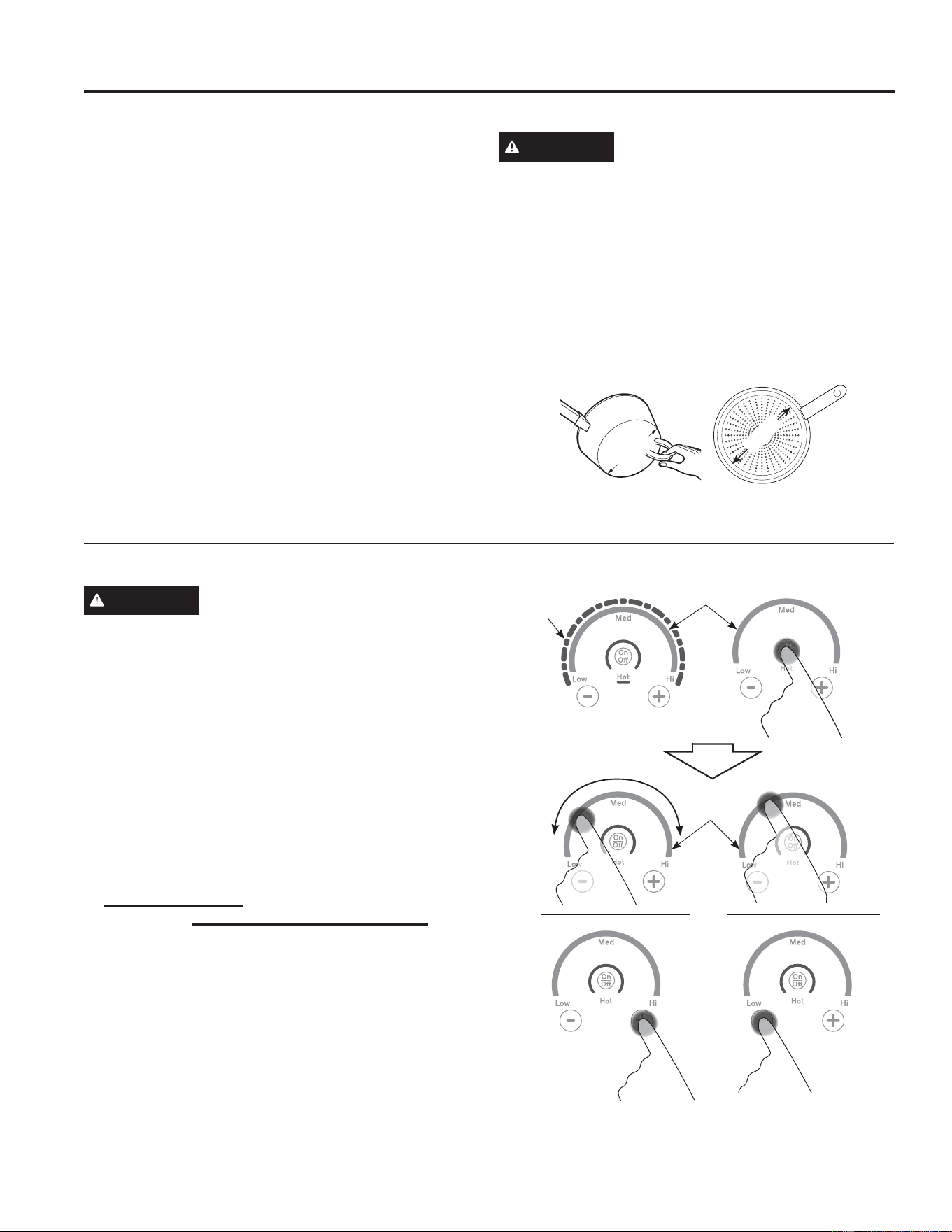
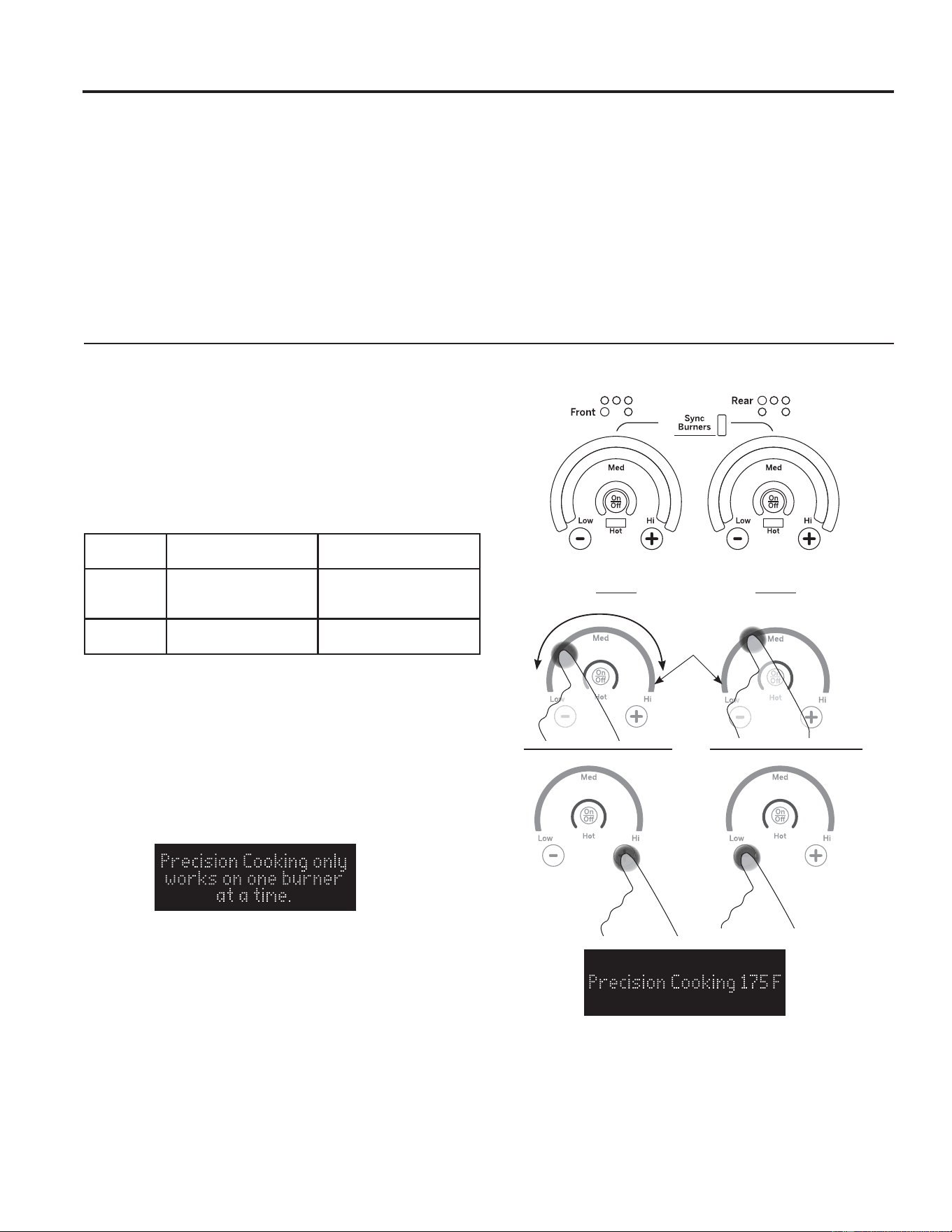
Turn element(s) On: Place your induction designed
cookware on the cooking surface. Touch and hold On/
Off pad about half a second. A chime can be heard with
each touch to any pad.
Power level can be selected in any of the following ways:
1. Swipe the gray arc (on the graphics) to the desired
power level. There is no sensor on the LEDs, or;
2. Touch Anywhere along the gray arc, or;
3. Touch + or - pads to adjust power level, or;
4. Shortcut to Hi: Immediately after turning unit on, touch
the + pad, or;
5. Shortcut to Low: Immediately after turning unit on,
touch the - pad.
8VHWKHPLQLPXPVL]HSDQIRUWKHHOHPHQW7KH
pan material is correct if a magnet sticks to the
bottom.
Min. Size
Min. Size
Gray Arc
Swipe Area
LED
Lights
Gray Arc
Swipe Area
OR
49-2000990 Rev. 5 9
USING THE RANGE:6XUIDFH8QLWV
Surface Units (Cont.)
Using the Warming Zone
WARNING
FOOD POISON HAZARD: Bacteria may grow in food at
temperatures below 140°F.
Ŷ Always start with hot food. Do not use warm setting to
heat cold food.
Ŷ Do not use warm setting for more than 2 hours.
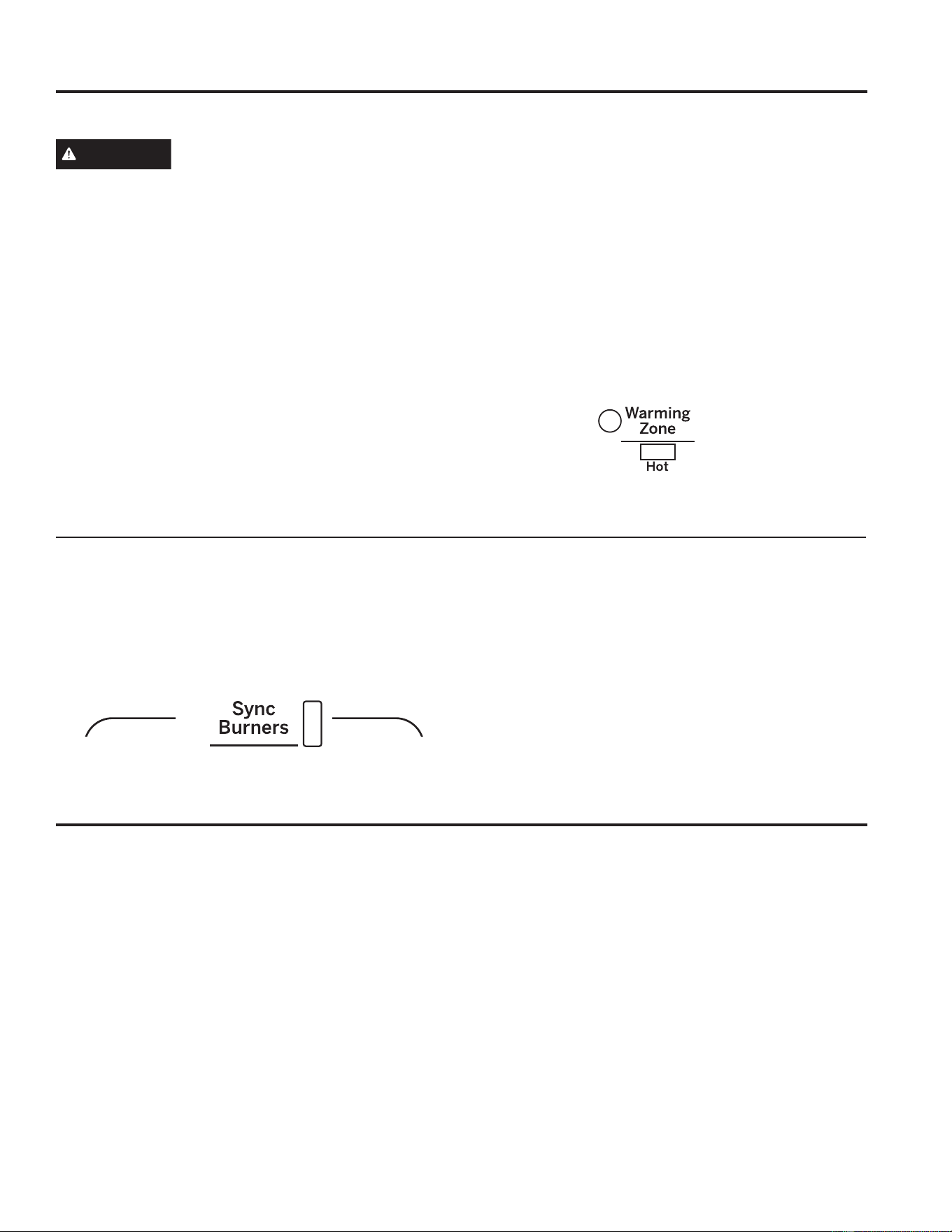
The WARMING ZONE, located in the back center of
the glass surface, will keep hot, cooked food at serving
temperature. Always start with hot food. Do not use to
heat cold food. Placing uncooked or cold food on the
WARMING ZONE could result in foodborne illness.
To use the WARMING ZONE:
Press the WARMING ZONE pad, select the desired level
(Low, Medium or High) using the LCD screen.
To turn off the WARMING ZONE:
Press the WARMING ZONE pad.
NOTE: Cancel/Off will NOT turn off the warming zone.
For best results, all foods on the WARMING ZONE
should be covered with a lid or aluminum foil. When
warming pastries or breads, the cover should be vented
to allow moisture to escape.
The initial temperature, type and amount of food, type of
pan, and the time held will affect the quality of the food.
Always use pot holders or oven mitts when removing
food from the WARMING ZONE, since cookware and
plates will be hot.
NOTE: The surface warmer will not glow red.
How To Synchronize Left Elements
To Turn On
Hold the Sync Burners pad for about half a second to
connect the two elements. Operate either element as
described in Operating the Cooktop Elements to adjust
power level.
To Turn Off
1. Touch the On/Off pad on either element to turn off
the Sync Burners.
or
2. Touch the Sync Burners to turn both elements off.
Precision Cooking
The Precision Cooking feature allows precise
temperature control for improved results. This feature
may be used with compatible Bluetooth paired cooking
devices on any burner. Only one burner may operate in
precision cook mode at a time.
Pairing a Bluetooth
®
Device
To pair a Bluetooth device, refer to Settings section.
For WiFi Connected Ranges
If the range is Wi-Fi connected, then the Precision
Cooktop temperature may be set from the SmartHQ
mobile app instead of the burner control. At any time,
the burner control may be used to turn Off or override
a temperature setting. See Settings - Wi-Fi & Remote
Enable
10 49-2000990 Rev. 5
Precision Cooking (Cont.)
Precision Cooking with Precision Probe or Hestan Cue® Cookware
1. Place cookware on desired induction element for
Precision Cooking.
2. Press Precision Cooking pad for the element you
wish to use.
3. Press On/Off pad.
4. Activate cookware according to the activation
instruction table.
5. Set temperature by swiping finger or using +/- keys
on the element control or you can control temperature
using the SmartHQ App on your smart phone or
tablet.
NOTE: Only one burner may run a Precision Cooking
mode at a time. If another Precision Cooking mode is
attempted, the burner in use for Precision Cooking will
flash and the following error will be displayed.
USING THE RANGE: Precision Cooking
Precision
Cooking
Precision
Cooking
Gray Arc
Swipe Area
OR
Supported
Devices How to Activate Control with this App
Hestan
Cue
®
cookware
Firmly double tap the
black plastic endcap
Hestan Cue
®
(by Hestan Smart Cooking)
Precision
Probe Press side button once SmartHQ
Use Precision Cooking with Compatible Bluetooth Precision Probe or Hestan Cue
®
Cookware
The range is able to communicate via Bluetooth with
smart accessories such as Hestan Cue
®
cookware or
Precision Probe. Each smart accessory must be paired
with the range to establish the Bluetooth connection.
To pair a Bluetooth device to the range, press the
Settings pad and select Bluetooth. Select Pair and
activate your device to initiate the device’s pairing mode.
Refer to the table below for device specific instructions.
Once paired, the Hestan Cue
®
cookware and Precision
probe becomes available as a Precision Cooking option
for any burner. Multiple smart accessories may be
paired. You will be prompted to choose one to activate
each time you use Precision cooking. (Precision cooking
is not available on the warming zone.) Only one burner
may run a Precision Cooking mode at a time.
49-2000990 Rev. 5 11
Cookware for Induction Cooktop
Suitable Cookware
8VHTXDOLW\FRRNZDUHZLWKKHDYLHUERWWRPVIRUEHWWHU
heat distribution and even cooking results. Choose
cookware made of magnetic stainless steel, enamel
coated cast iron, enameled steel or combinations of
these materials.
Some cookware is specifically identified by the
PDQXIDFWXUHUIRUXVHZLWKLQGXFWLRQFRRNWRSV8VHD
magnet to test if the cookware will work.
Flat-bottomed pans give best results. Pans with rims or
slight ridges can be used.
Round pans give best results. Pans with warped or
curved bottoms will not heat evenly.
For wok cooking, use a flat-bottomed wok. Do not use a
wok with a support ring.
NOTE: The warming zone is NOT an induction element
and will work with flat bottomed cookware that is NOT
ferrous.
Using the correct size cookware
The induction coils require a minimum pan size to
function properly. If a pan is removed from or not
centered on the induction coil for more than 30 seconds,
the power for that element will be shut off.
Cookware larger than the element ring may be used;
however, heat will only occur above the element.
)RUEHVWUHVXOWVWKHFRRNZDUHPXVWPDNH)8//FRQWDFW
with the glass surface.
Do not allow the bottom of the pan or cookware to touch
the surrounding metal cooktop trim.
For best performance, match the pan size to the element
VL]H8VLQJDVPDOOHUSRWRQDODUJHUEXUQHUZLOOJHQHUDWH
less power at any given setting.
Cookware “Noise”
Slight sounds may be produced by different types of
cookware. Heavier pans such as enameled cast iron
produce less sound than a lighter weight multi-ply
stainless steel pan. The size of the pan, and the amount
of contents, can also contribute to the sound level.
When using adjacent elements that are set at higher
power level settings, magnetic fields may interact and
produce a high pitch whistle. The sound will change
pitch as you change the power level of one burner.
These sounds can be reduced or eliminated by lowering
or raising the power level settings of one or both of the
elements. Pans that completely cover the element ring
will produce less sound.
A low “humming” sound is normal particularly on high
settings.
Sounds you may here: You may hear a slight “Buzz”
when cooking with Hi mode. This is normal. The sound
depends on the type of pot being used. Some pots will
“Buzz” louder depending on the material. A “Buzz” sound
may be heard if the pan contents are cold. As the pan
heats, the sound will decrease. If the power level is
reduced, the sound level will go down.
Power Control
If a surface unit is on power level H (high), for an
extended period of time or if multiple surface units are
on, there may be a slight reduction in power to the
surface unit. Water under pans may also cause the
controls to reduce the power delivered to the cookware.
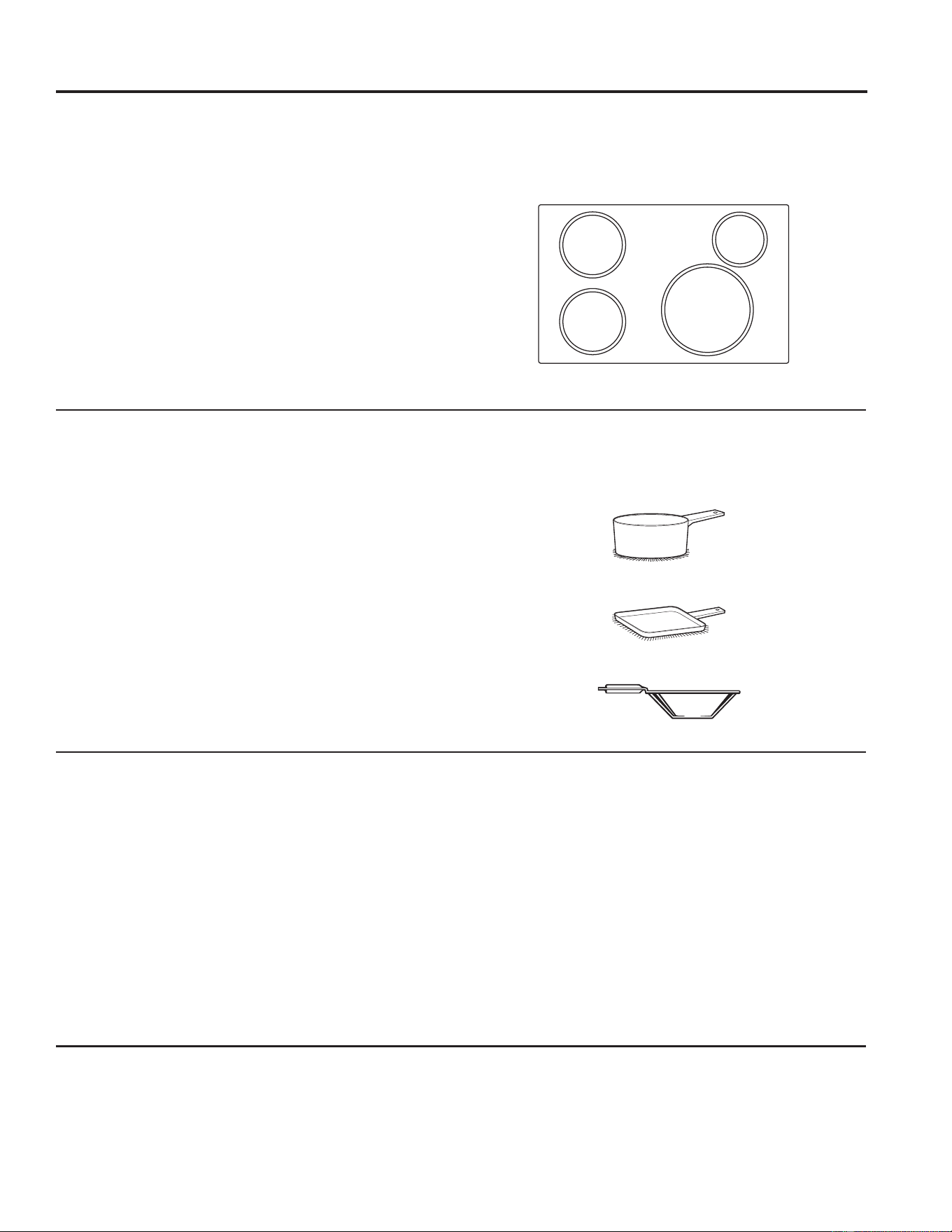
8VHDJULGGOH
8VHDIODWERWWRPHGZRN
8VHIODWERWWRPHGSDQV
8VHWKHPLQLPXPVL]HSDQVKRZQ
for each cooking element.
5” Min. Dia.
Pan Size
5” Min. Dia.
Pan Size
4-1/2”
Min. Dia.
Pan Size
7” Min. Dia.
Pan Size
USING THE RANGE: Cookware for Induction Cooktop
12 49-2000990 Rev. 5
Cookware for Induction Cooktop (Cont.)
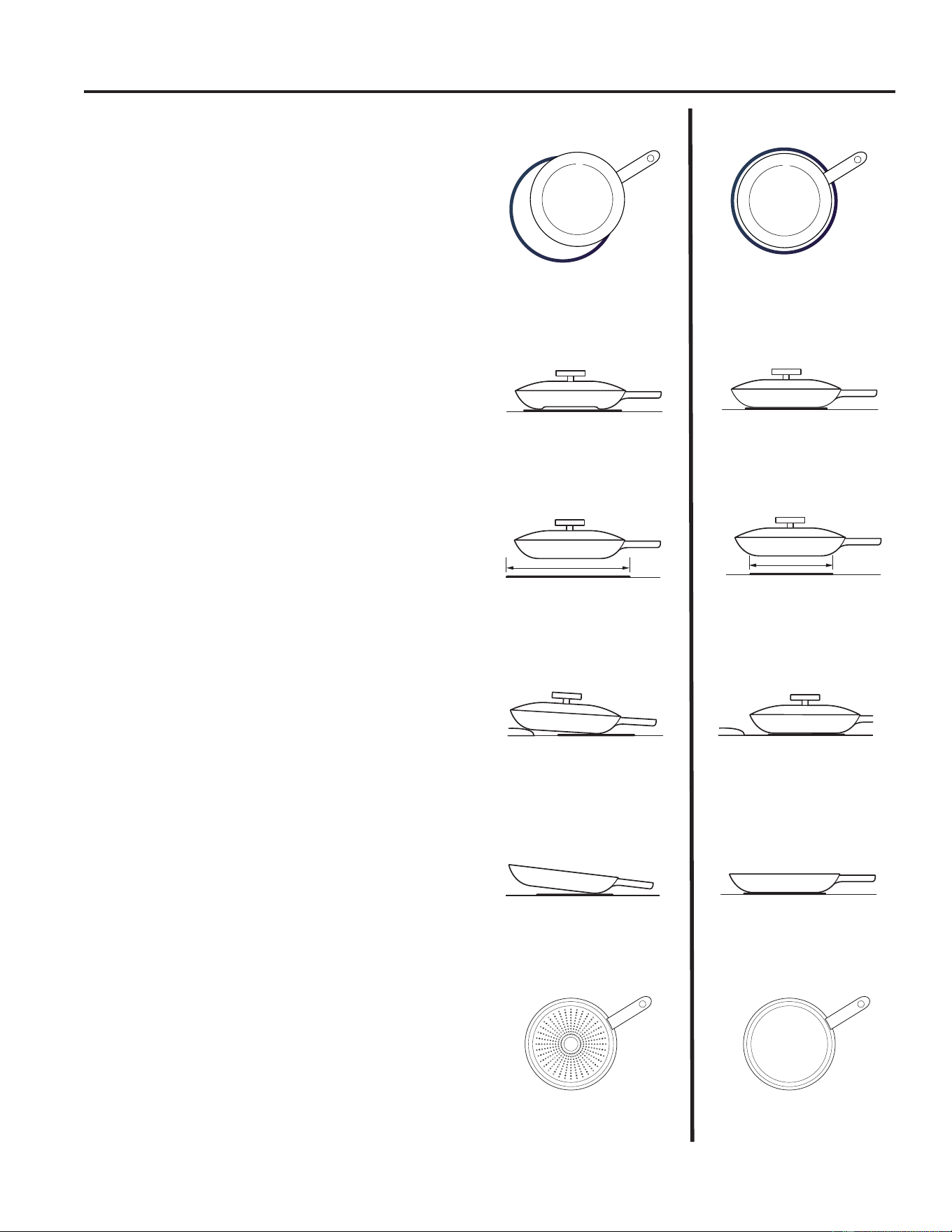
Cookware not centered on
cooking element surface.
Curved or warped pan bottoms
or sides.
Pan does not meet the minimum
size required for the cooking
element used.
Cookware centered correctly
on cooking element surface.
Flat pan bottom.
Pan size meets or exceeds the
recommended minimum size
for the cooking element used.
INCORRECT
CORRECT
Pan bottom rests on cooktop
trim or does not rest completely
on the cooktop surface.
Heavy handle tilts pan.
Pan is partially magnetic
on the bottom.
Pan is completely magnetic
on the bottom.
Pan bottom rests completely on
the cooktop surface.
Pan is properly balanced.
Cookware recommendations
The induction coils require a minimum pan size to
function properly. Cookware must fully contact the
surface of the cooking element.
8VHIODWERWWRPHGSDQVVL]HGWRILWWKHFRRNLQJHOHPHQW
and also to the amount of food being prepared.
Induction interface disks are NOT recommended.
USING THE RANGE: Cookware for Induction Cooktop
49-2000990 Rev. 5 13
USING THE RANGE: Oven Controls
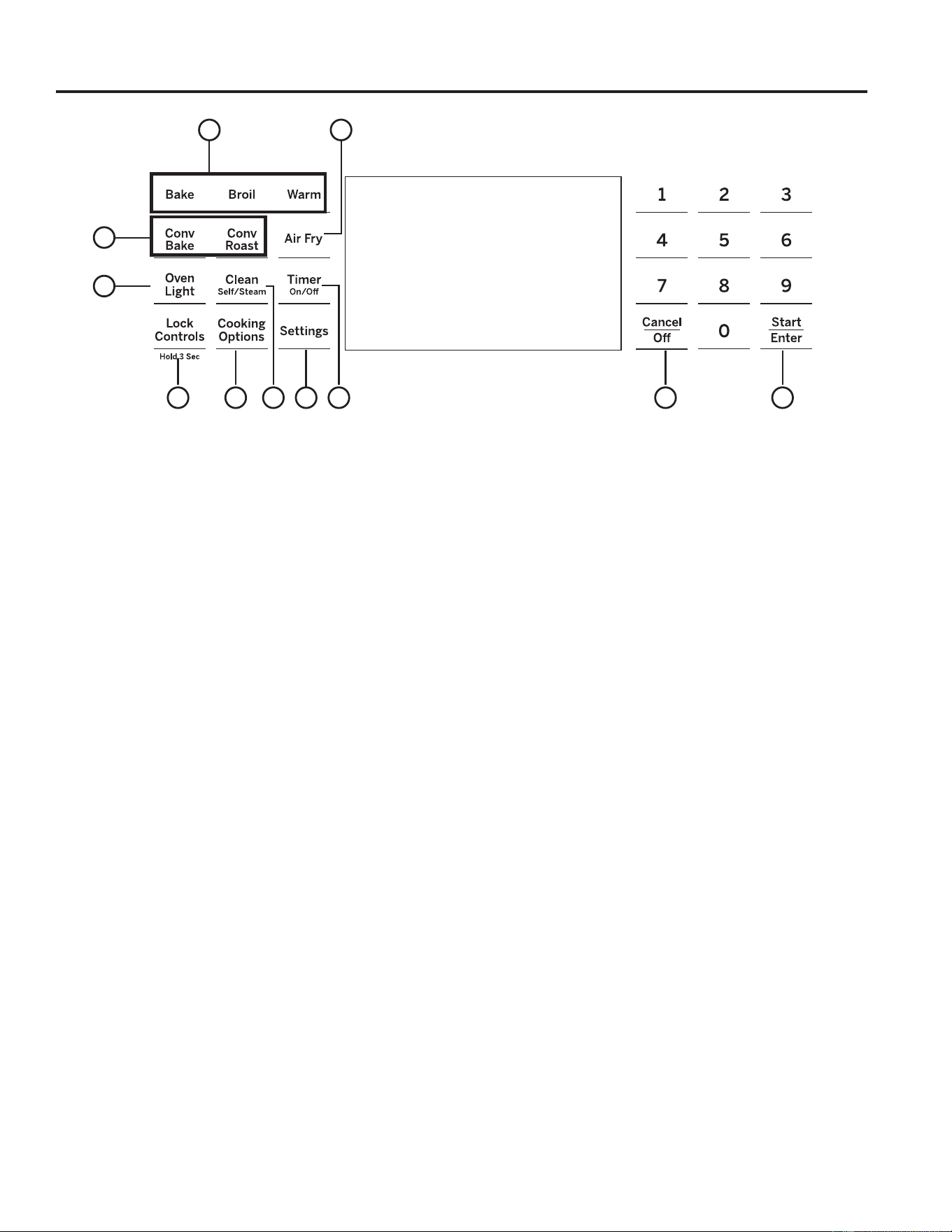
1. Convection Cooking Modes: Convection
cooking modes use increased air circulation to
improve performance. See the Cooking Modes
section for more information.
Convection bake is enabled on your oven. Use
WiFi Connect to enable the Convect Roast
feature.
2. Traditional Cooking Modes: Your oven
has the following traditional cooking modes: Bake,
Broil, and Warm. See the Cooking Modes section
for more information.
3. Clean: Your oven has two cleaning modes: Self
Clean and Steam Clean. See the Cleaning the
Oven section for important information about using
these modes.
4. Start/Enter: Must be pressed to start any
cooking, cleaning, or timed function. Also used to
start the Warming Zone on the cooktop.
5. Cancel/Off: Cancels ALL oven operations
except the clock and timer. Does NOT cancel the
Warming Zone on the cooktop.
6. Timer: Works as a countdown timer. Press the
Timer pad and number pads to program the time in
hours and minutes. Press the Start pad. The timer
countdown is complete. To turn the timer off press
the Timer pad.
7. Oven Light: Turns the oven light on or off.
8. Lock Controls: Locks out the control so that
pressing the pads does not activate the controls.
Press and hold the Lock Controls pad, for three
seconds to lock or unlock the control. Cancel/Off is
always active, even when the control is locked.
NOTE: Locking Controls will cancel any function
that is currently running.
9. Cooking Options and Settings: The
Options and Settings pads open up more detailed
menus in the display that allow access to additional
functions and cooking modes. For each you select
the function in the display using the associated
number pad. You can exit at any time by pressing
the Options or Settings pad again. See the
Settings, Options, and Cooking Modes Sections for
more details.
10. Air Fry: The Air Fry mode is designed to produce
foods with a crispier exterior than traditional oven
cooking. See the Oven Cooking Modes section for
more information.
Use WiFi Connect to enable the Air Fry feature.
Oven Controls
1
7
6354
9
8
2
9
10

14 49-2000990 Rev. 5
* Compatible Apple or Android devices and home WiFi network required.
Cooking Options
The cooking options pad opens up a menu of more cooking modes when the oven is off. It opens a menu with
additional features if a cooking mode is already in process. You can exit the menu at any time by pressing the Cooking
Options pad again.
You must first select a mode (bake, convection bake, convection roast) and then select Cooking Options to
get to the following functions.
Cook Time
Counts down cooking time and turns off the oven when
the cooking time is complete. Select a desired cooking
PRGH8VHWKHQXPEHUSDGVWRSURJUDPDEDNLQJ
temperature. Press the Cooking Options pad and
select Cook Time8VHWKHQXPEHUSDGWRSURJUDP
cook time in hours and minutes. Then press Start/Enter.
This can only be used with Bake, Convection Bake, and
Convection Roast.
Delay Time
'HOD\VZKHQWKHRYHQZLOOWXUQRQ8VHWKLVWRVHWD
time when you want the oven to start. Select a desired
FRRNLQJPRGH8VHWKHQXPEHUSDGWRSURJUDPDEDNLQJ
temperature. Press the Cooking Options pad and select
Delay Time8VHWKHQXPEHUSDGVWRSURJUDPWKHWLPHRI
day for the oven to turn on, and then press Start/Enter.
Delay Time is not available with all modes.
NOTE: When using the Delay Time feature, foods that
spoil easily – such as milk, eggs, fish, stuffing, poultry,
and port – should not be allowed to sit for more than
1 hour before or after cooking. Room temperature
promotes the growth of harmful bacteria. Be sure that the
oven light is off because heat from the bulb will speed
harmful bacteria growth.
Oven Probe
NOTE: Only accessible through traditional and
convection cooking modes.
Monitors internal food temperature and turns the oven
off when the food reaches the programmed temperature.
Insert the probe, press the desired cooking mode, and
program the probe temperature. See the Cooking Modes
Section for more information. The probe can only be used
with Bake, Convection Bake, and Convection Roast.
Settings
The Options and Settings pads open up more detailed menus in the display that allow access to additional
functions. For each you select the function in the display using the associated number pad. You can exit at
any time by pressing the Options or Settings pad again.
WiFi Connect/Remote Enable
Your oven is designed to provide you with two-way
communication between your appliance and smart device.
By using the WiFi Connect features, you will be able to
control essential oven operations such as temperature
settings, timers and cooking modes (such as Air Fry)
using your smartphone or tablet.*
Select Settings then Wifi - follow the instructions on your
oven display and phone app. It is necessary to turn on
WiFi before using Remote Enable on your oven.
Connecting your WiFi Connect Enabled Oven
What you will need
Your GE Appliances oven uses your existing home WiFi
network to communicate between the appliance and
your smart device. In order to setup your GE Appliances
oven, you will need to gather some information:
1. Each GE Appliances oven has a connected appliance
LQIRUPDWLRQODEHOWKDWLQFOXGHVDQ$SSOLDQFH83'
ID. This is an important detail that you will need to
connect to the appliance. The label is typically located
inside the door of the oven or drawer. On some
models it will also be accessible through the settings
menu on the control screen.
2. Have your smart phone or tablet ready with the ability
to access the internet and download apps.
3. You will need to know the password of your home
WiFi router. Have this password ready while you are
setting up your GE Appliances oven.
Connect your GE Appliances oven
1. On your smart phone or tablet visit
GEAppliances.com/connect to learn more about
connected appliance features and to download the
appropriate app.
2. Follow the app onscreen instructions to connect your
GE Appliances oven.
3. Once the process is complete, the connection light
located on your GE Appliances oven display will stay
on solid and the app will confirm you are connected.
Contains FCC: ZKJ-WCATA009
UPD ID: XX-XX-XX-XX-XX-XX
PT. NO. XXXXXXXXXXXX
Contains IC: 10229A-WCATA009
MAC ID: D8-28-C9-XXXXXXXX
Connected Appliance Information
Sample Label
USING THE RANGE: Cooking Options / Settings

49-2000990 Rev. 5 15
USING THE RANGE: Settings
Settings (Cont.)
WiFi Connect and Remote Enable (cont.)
4. If the connection light does not turn on or is blinking,
follow the instructions on the app to reconnect. If
issues continue, please call the Connected Call
Center 1.800.220.6899 and ask for assistance
regarding oven wireless connectivity.
To connect additional smart devices, repeat steps 1 and 2.
Note that any changes or modifications to the remote
enable device installed on this oven that are not
expressly approved by the manufacturer could void the
user’s authority to operate the equipment.
REMOTE STARTING YOUR OVEN
To be able to start the oven remotely once connected
to WiFi,
press Setting’s pad and select WiFi from the
PHQXRQWKH9)'VFUHHQ6HOHFW³7XUQ5HPRWH2Q´
IURPWKHPHQXRQWKH9)'VFUHHQDQG5HPRWH6HWWLQJ
is enabled. The icon will turn on.
The oven can now be
remotely started with a connected device. Opening an oven
door or turning off the oven will turn off the icon. The
icon must be lit to start the oven remotely. The icon is not
required to change the oven temperature while it is running,
set a timer or to turn the oven off from the phone app while
the icon shows it is Wifi Connected.
Remember to verify that the icon is lit if you wish to
start the oven remotely.
NOTE: Foods that spoil easily—such as milk, eggs, fish,
stuffings, poultry and pork—should not be allowed to
sit for more than 1 hour before or after cooking. Room
temperature promotes the growth of harmful bacteria. Be
sure that the oven light is off because heat from the bulb
will speed harmful bacteria growth.
Clock
This setting sets the oven clock time. Press the Settings
pad and select Clock. Select Set Clock and follow the
instructions to set the clock. This feature also specifies
how the time of day will be displayed. You can select a
standard 12-hour clock (12H), 24-hour military time display
(24H), or no clock displayed (Off). Press the Settings pad,
select Set Clock and select either 12/24 hr or On/Off.
Bluetooth
®
- Chef Connect
This is a pairing feature for use with other compatible
Chef Connect enabled products like an over-the-
range microwave oven or range hood. To pair those
products to the range Press the Settings pad and select
Bluetooth
®
. Select Pair and follow the corresponding
instructions included with the mating Chef Connect
enabled product. The range will cancel pairing mode
after two minutes if no mating device is detected. Select
Remove to confirm product is paired or to un-pair from
range. The Precision Cooking Probe can also be paired
using the Bluetooth
®
feature.
Auto Conv (Auto Conversion)
When using Convection Bake and Convection Roast
cooking, Auto Recipe Conversion will automatically
convert the regular baking temperatures entered to
convection bake cooking temperatures when turned on.
Note that this option does not convert convection bake
cooking times, it only converts temperatures. This feature
may be turned On or Off. Select Settings and Auto
Conversion, then follow the prompts to turn this feature
on or off.
Auto Off
This feature shuts the oven down after 12 hours of
continuous operation. It may be enabled or disabled.
Select Settings, More, and Auto Off to turn this feature
on or off.
Sound
You can adjust the volume and type of alert your appliance
uses. Select Settings, More, and Sound. Follow prompts
for making volume adjustments or for changing between
continuous and single alert tones. A continuous setting
will continue to sound a tone until a button on the control
is pressed. The oven tone volume can be adjusted. The
control will sound the oven tone at the new volume level
each time the sound level is changed.
F/C (Fahrenheit or Celsius)
The oven control is set to use Fahrenheit temperatures
(F), but you can change it to use Celsius temperatures
(C). Select Settings, More, and F/C to alter between
temperature scales displayed.
Adjust the Oven temperature
This feature allows the oven baking and convection
baking temperature to be adjusted up to 35ºF hotter
RUGRZQWR)FRROHU8VHWKLVIHDWXUHLI\RXEHOLHYH
your oven temperature is too hot or too cold and wish to
change it. This adjustment affects Bake and Convection
Bake modes. Does not change Proof or Cleaning modes.
Select Settings and Oven Adjust to add More Heat or
Less Heat and then press Save.
Oven Info
Select Settings, More, and Oven Info to turn this
feature on or off. This setting displays Model Number and
6RIWZDUH9HUVLRQ
16 49-2000990 Rev. 5
Sabbath Mode
The Sabbath mode feature complies with Jewish Sabbath requirements. Some of these standards that will be
noticed by the consumer include the disabling of tones, disabling of oven lights, and delays of about 30 seconds to
one minute on display changes. Only continuous baking or timed baking is allowed in the Sabbath mode. Cooking in
the Sabbath mode is a two-step process, first the Sabbath mode must be set and then the bake mode must be set.
Setting the Sabbath Mode
Press the Settings pad, select Sabbath, and select
Turn on. A single bracket “]” will appear in the display
indicating that the Sabbath mode is set. The clock will not
be displayed. Continuous bake or timed bake can now be
programmed.
Starting a Continuous Bake
1. Press the Bake pad. (For double ovens, this operates
the upper oven. If desiring to use Lower Oven, press
Lower Oven and then Bake.)
2. If the desired temperature is 350F, press Start/
Enter. If a different cooking temperature is desired,
use the 1 through 5 number pads to select a preset
cooking temperature, then press Start/Enter. Refer
to the graphic below to determine which pad sets the
desired cooking temperature.
After a delay, a second bracket “] [“ will appear in the
display indicating that the oven is baking.
Adjusting the Temperature
Press Bake (or press Lower Oven and then Bake for
lower oven in a double oven unit), use the 1 through
5 number pads to select a different preset cooking
temperature, and press Start/Enter.
Starting a Timed Bake
1. Press the Bake pad.
2. If the desired temperature is 350F, use the 6 through
0 number pads to select a cooking time. If a cooking
temperature other than 350F is desired, use the 1
through 5 number pads to select a preset cooking
temperature, then select the cooking time. Refer to
the graphic on this page to determine which pad sets
the desired cooking temperature and cooking time.
3. Press Start/Enter.
After a delay, a second bracket “] [“ will appear in the
display indicating that the oven is baking. When the cook
time expires, the display will change back to a single
bracket “]” indicating that the oven is no longer baking.
No tone will sound when the cook time is complete.
Exit the Sabbath Mode
Exiting the Sabbath mode should be done after the
Sabbath is over.
1. Press Cancel/Off to end any bake mode that may be
running.
2. Press and hold Settings pad until Sabbath Mode off
is displayed.
Sabbath Mode Power Outage Note
If a power outage occurs while the oven is in Sabbath
Mode, the unit will return to Sabbath Mode when power
LV UHVWRUHG KRZHYHU WKH RYHQ ZLOO UHWXUQ WR WKH Rႇ VWDWH
even if it was in the middle of a bake cycle when the
power outage occurred.
Temperature (°F)
Time (hours)
200
325
2.5h
250
400
3h
4h
300
2h
3.5h
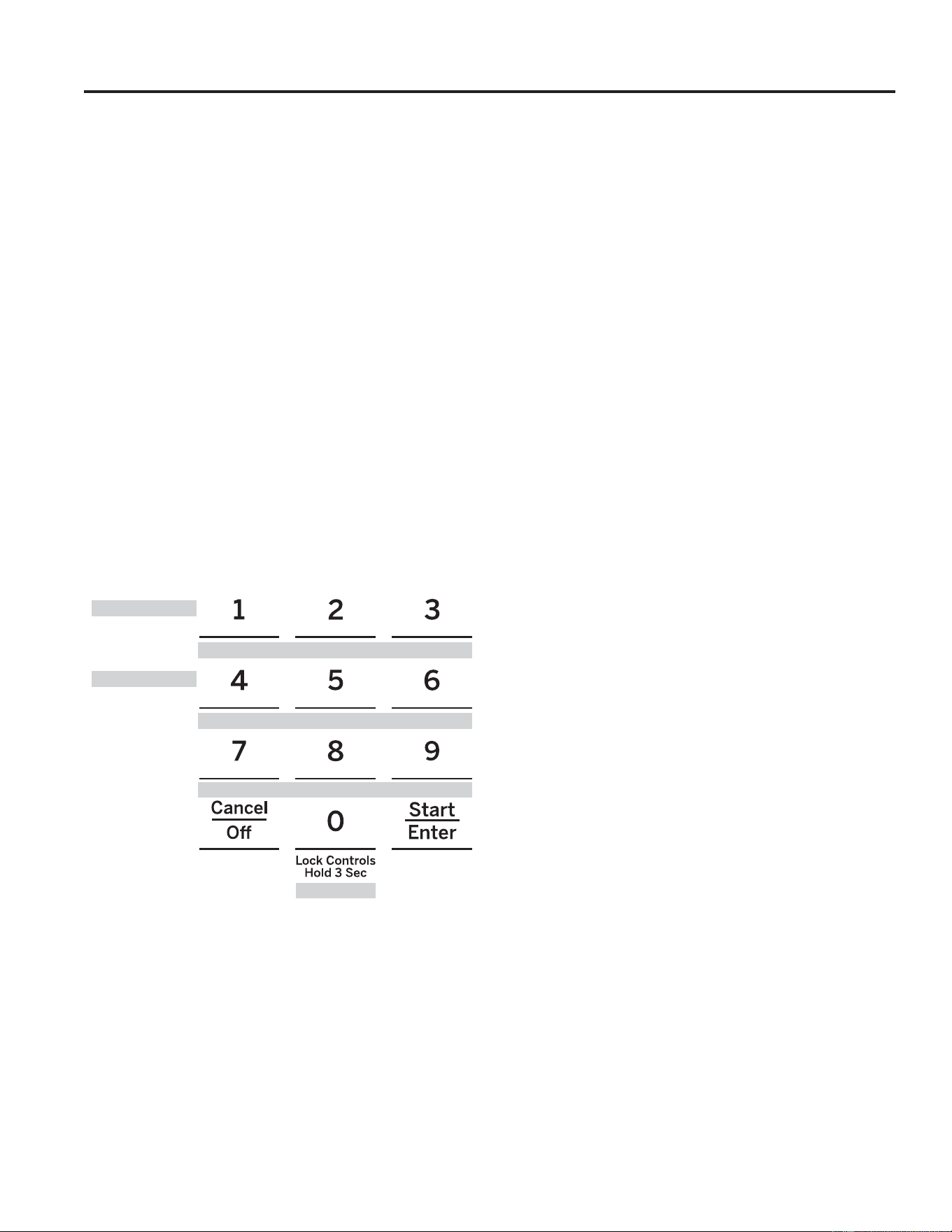
1 = 200° F, 2 = 250° F, 3 = 300° F, 4 = 325° F, 5 = 400° F
6 = 2 hours, 7 = 2.5 hours, 8 = 3 hours, 9 = 3.5 hours, 0 = 4 hours
USING THE RANGE: Cooking Options / Settings
49-2000990 Rev. 5 17
USING THE RANGE:6DEEDWK0RGH28DQG&5&
Sabbath Mode - OU and CRC
7KLVUDQJHRIIHUVDQ28DQG&5&6DEEDWKPRGHWKDW
FRPSOLHVZLWKVWDQGDUGVVHWIRUWKE\2UWKRGR[8QLRQWKH
Central Rabbinical Congress and Halacha Tech, and is
100% certified to the highest halacha standards. In order
WRHQDEOHWKH28DQG&5&6DEEDWKPRGHDVHSDUDWH
6KDEERV.HHSHUIRU2YHQVPXVWEHFRQQHFWHGWRWKH
UDQJH7KH6KDEERV.HHSHUFDQEHSXUFKDVHGIURP
zmantechnologies.com or geappliances.com. The
RQO\ZD\WRHQDEOHWKH28DQG&5&6DEEDWKPRGHLV
ZLWKWKHSXUFKDVHRIWKH6KDEERV.HHSHUIRU2YHQV
7KH6KDEERV.HHSHUFRQQHFWVWR\RXUUDQJHWR
automatically enable Shabbos compatible modes each
ZHHNDQGEHIRUHHYHU\KROLGD\8VLQJWZRPRGHV
Shabbos mode and Holiday mode, the Shabbos
.HHSHUDOORZVIRUGRRURSHQLQJVDQGFORVLQJVGLVDEOHV
most of the buttons on the appliance, and will adjust
temperatures automatically during Shabbos and Yom
Tov. The appropriate mode will automatically activate
based on the Jewish calendar date for your location.
Warming and baking features can be enabled when
accepted by the user up to four hours in advance of
Sabbath or holiday.
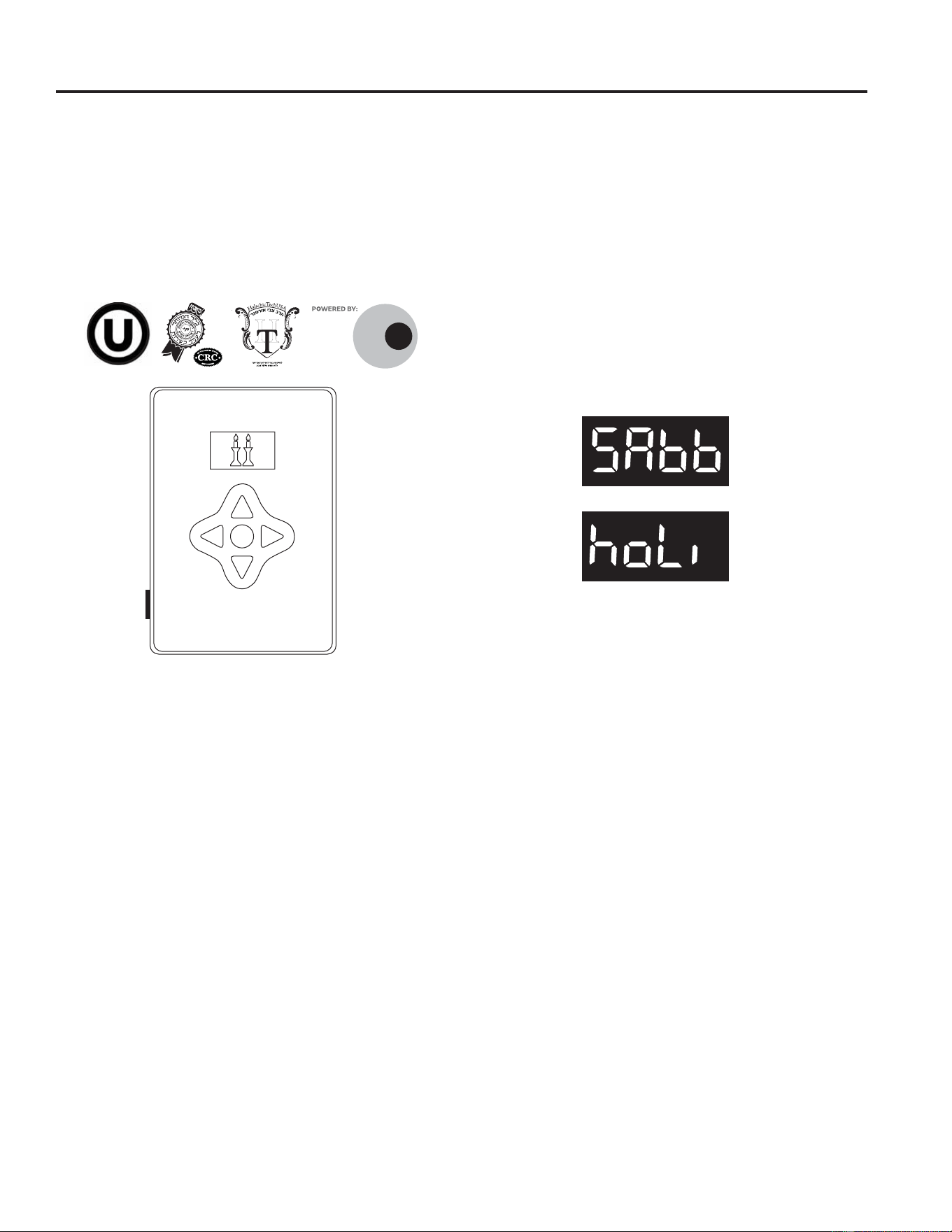
:KHQWKH6KDEERV.HHSHULVSURSHUO\FRQQHFWHGWR
the range, the control on the oven will display one of
the following messages while in use during Sabbath or
holiday:
ZMAN
TECH
NOLOGIES
¯¶·¯¬Ã²¹·º°¶¹¯Ã°´
6KDEERV.HHSHU
18 49-2000990 Rev. 5
USING THE RANGE: Oven Racks / Aluminum Foil and Oven Liners / Oven Cookware
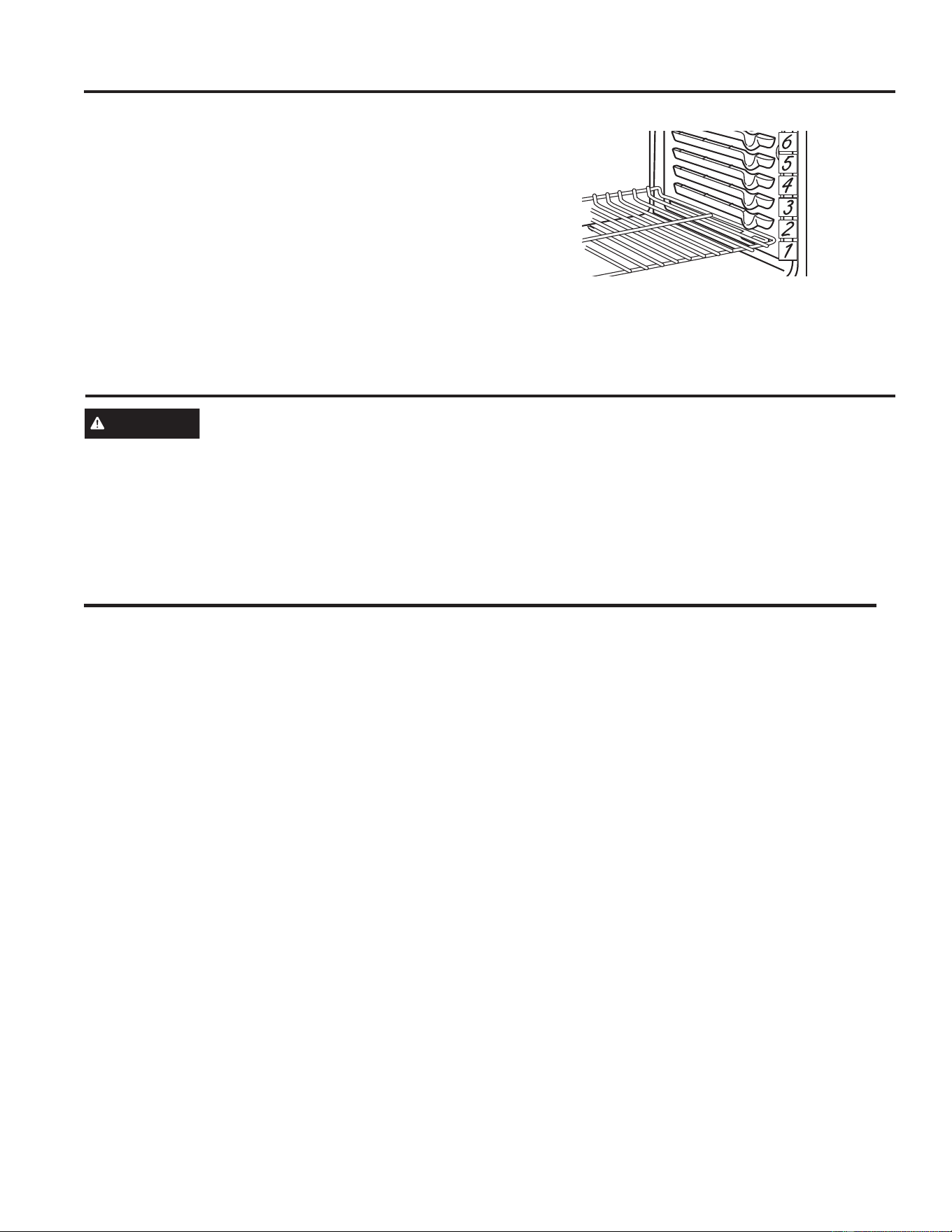
Recommended rack positions for various types of
foods are provided in the Cooking Guide. Adjusting
rack position is one way to impact cooking results. For
example, if you would prefer darker tops on cakes,
muffins, or cookies, try moving food one rack position
higher. If you find foods are too brown on top try moving
them down next time.
When baking with multiple pans and on multiple racks,
ensure there is at least 1½" between pans to allow
sufficient space for air to flow.
To avoid possible burns, place the racks in the desired
position before you turn the oven on.
Oven Racks
Oven Cookware
Cookware Guidelines
The material, finish, and size of cookware affect baking
performance.
Dark, coated and dull pans absorb heat more readily
than light, shiny pans. Pans that absorb heat more
readily can result in a browner, crisper, and thicker crust.
If using dark and coated cookware check food earlier
than minimum cook time. If undesirable results are
obtained with this type of cookware consider reducing
oven temperature by 25º F next time.
Shiny pans can produce more evenly cooked baked
goods such as cakes and cookies.
Glass and ceramic pans heat slowly but retain heat well.
These types of pans work well for dishes such as pies
and custards.
Air insulated pans heat slowly and can reduce bottom
browning.
.HHSFRRNZDUHFOHDQWRSURPRWHHYHQKHDWLQJ
Stoneware heats slowly and retains heat well. It is
recommended to preheat this type of cookware if
possible. Additional cook time may be required.
Cookware used in broil modes and air fry must be broil-
safe.
CAUTION
Do not use any type of foil or oven liner to cover the oven bottom. These items can trap heat
or melt, resulting in damage to the product and risk of shock, smoke or fire. Damage from improper use of
these items is not covered by the product warranty.
Foil may be used to catch spills by placing a sheet on a lower rack, several inches below the food. Do not use more
IRLOWKDQQHFHVVDU\DQGQHYHUHQWLUHO\FRYHUDQRYHQUDFNZLWKDOXPLQXPIRLO.HHSIRLODWOHDVW´IURPRYHQZDOOV
to prevent poor heat circulation.
Aluminum Foil and Oven Liners
The number of rack positions may vary by model.

49-2000990 Rev. 5 19
Cooking Modes
Your new oven has a variety of cooking modes to help you get the best results. These modes are described below.
Refer to the Cooking Guide section for rack position and other recommendations for specific modes and foods.
Baking and Roasting Modes
Select a mode for baking and roasting based on the
type and quantity of food you are preparing. When
preparing baked goods such as cakes, cookies, and
pastries always preheat the oven first. Follow recipe
recommendations for food placement. If no guidelines
are provided, center food in the oven.
Traditional Bake
The Bake mode is for baking and roasting. When
preparing baked goods such as cakes, cookies, and
pastries, always preheat the oven first. To use this mode
press the Bake pad, enter a temperature, and then press
Start.
Convection Bake
This mode uses air movement from the convection fan
to enhance cooking evenness. Your oven is equipped
with Auto Recipe Conversion, so it is not necessary to
adjust the temperature when using this mode. Always
preheat when using this mode. Baking time might be
slightly longer for multiple racks than what would be
expected for a single rack. To use this mode press the
Convection Bake pad, enter a temperature, and then
press Start.
Convection Roast
The Convection Roast mode is intended for roasting
whole cuts of meat on a single rack. This mode uses air
movement from the convection fan to improve browning
and reduce cooking time. Check food earlier than the
recipe suggested time when using this mode, or use the
probe (see the Probe section for more information). It is
not necessary to preheat when using this mode. To use
this mode press the Conv Roast pad, enter a temperature
with the number pads, and then press Start.
Use WiFi connect to enable this feature.
Air Fry
Air Fry is a special, no-preheat, cooking mode that is
designed to produce foods with a crispier exterior than
traditional oven cooking. The Air Fry mode is intended
for single rack cooking only. Select Air Fry, then input
the desired set temperature and press Start. The
temperature can be set between 300°F and 500°F.
Preheating is not recommended for this mode. Follow
traditional oven recipe or package guidelines for set
temperatures and cook times; adjust cook time to
achieve your desired crispness. Additional guidelines for
using this mode can be found in the Cooking Guide.
Use WiFi connect to enable this feature.
Broiling Modes
Always broil with the oven door/drawer closed. Monitor
IRRGFORVHO\ZKLOHEURLOLQJ8VHFDXWLRQZKHQEURLOLQJ
placing food close to the broil element or burner
increases smoking, spattering and the possibility of fats
igniting. It is not necessary to preheat when using the
Broil modes.
Broil Hi
The Broil Hi mode uses intense heat from the upper
HOHPHQWWRVHDUIRRGV8VH%URLO+LIRUWKLQQHUFXWV
of meat and/or when you would like to have a seared
surface and rare interior. To use this mode press the
Broil pad once and then press Start.
Broil Lo
The Broil Lo mode uses less intense heat from the upper
element to cook food thoroughly while also browning
WKHVXUIDFH8VH%URLO/RIRUWKLFNHUFXWVRIPHDWDQGRU
foods that you would like cooked all the way through. To
use this mode press the Broil pad twice and then press
Start.
Warm
Warm modes are designed to keep hot, cooked foods
hot. Cover foods that should remain moist and do
not cover foods that should be crisp. Preheating is
not required. Do not use warm to heat cold food. It is
recommended that food not be kept warm for more than
2 hours. To use this mode, press the Warm pad then
press Start. The control display will show the oven is set
to Bake at 170F.
Baked Goods
The Baked Goods mode is designed for cooking cakes,
breads, cookies, and similar foods on a single rack. This
mode is designed to provide lighter top browning and
better volume. Some foods may require slightly longer
cook times relative to when cooked in the traditional bake
mode. Press Options and select Baked Goods than
follow any display prompts to access this mode.
Use WiFi connect to enable this feature.
Proof
Proof mode maintains a warm environment for rising
yeast-leavened dough. If the oven is too warm, Proof
mode will not operate and the display will show "Oven
too hot for Proof". For best results, cover the dough
while proofing and check early to avoid over-proofing.
CAUTION
Do not use the Proof mode for warming
food or keeping food hot. The proofing oven temperature
is not hot enough to hold foods at safe temperatures.
USING THE RANGE: Cooking Modes

20 49-2000990 Rev. 5
Cooking Modes (Cont.)
Frozen Snacks
The Frozen Snacks modes are designed to cook frozen
foods such as potato nuggets, French fries, and similar
frozen snacks and appetizers. Most foods will cook
within package recommended time. Adjust cooking time
according to individual preferences.
8VH)UR]HQ6QDFNV6LQJOHZKHQFRRNLQJIUR]HQVQDFNV
on a single rack. This mode does not require preheating
the oven. Food should be placed in the oven before or
immediately upon starting this mode.
8VH)UR]HQ6QDFNV0XOWLZKHQFRRNLQJIUR]HQVQDFNV
on two racks simultaneously. This mode includes a
preheating cycle to prepare the oven for multi-rack
baking. Press Options and select Frozen then follow any
display prompts to access this mode.
Use WiFi connect to enable this feature.
Frozen Pizza
The Frozen Pizza modes are designed to cook
frozen pizzas. Most pizzas will cook within package
recommended times. Adjust cooking time according to
individual preferences.
8VH)UR]HQ3L]]D6LQJOHZKHQFRRNLQJRQDVLQJOHUDFN
This mode does not require preheating the oven. Food
should be placed in the oven before or immediately upon
starting this mode.
8VH)UR]HQ3L]]D0XOWLZKHQFRRNLQJRQWZRUDFNV
simultaneously. This mode includes a preheating cycle
to prepare the oven for multi-rack baking. Press Options
and select Frozen then follow any display prompts to
access this mode.
Use WiFi connect to enable this feature.
Pre-Heat
Proper preheating ensures that the oven is hot enough
to begin baking. Improper preheating (that is, cooking
in the oven that has not come up to set temperature)
can negatively affect cooking. Depending on the recipe
recommendations, the temperature of your foods when
they go into the oven may determine your final baking
time and baking results; if you put your food, such as
biscuits or breads, in during Pre-heat, they may over
brown on top or burn.
IMPORTANT: The more items to be heated in the oven
during preheat (this includes multiple racks, baking
stones, etc.) will affect the length of your pre-heat time.
Always begin baking after the pre-heat signal. The signal
will be a beep, indicaotr light or chime. This lets you
know your oven is at your needed baking temperature.
For best results, turn the oven On before you begin your
prep work.
USING THE RANGE: Cooking Modes

49-2000990 Rev. 5 21
USING THE RANGE: Oven Cooking Guide
Oven Probe
WARNING
Consuming undercooked food can result in foodborne illness. Use probe according to
the following instructions to ensure all portions of the food reach minimum safe cooking temperatures.
Recommendations for minimum safe food temperatures can be found at foodsafety.gov or IsItDoneYet.gov.
Internal food temperature is frequently used as an
indicator of doneness, especially for roasts and poultry.
The Probe mode monitors the internal food temperature
and turns the oven off when the internal food
temperature reaches the programmed temperature.
Always check the temperature at multiple locations in
the food with a food thermometer after cooking to ensure
that all portions of the food have reached the minimum
safe internal temperature for that food.
Proper Probe Placement
After preparing the meat and placing it on the cooking
pan follow these instructions for proper probe placement.
Ŷ ,QVHUWWKHSUREHLQWRWKHIRRGVRWKDWWKHWLSRIWKH
probe will rest in the center of the thickest part of
the food. For best performance the probe should
be fully inserted into the food. If the probe is not
located properly, it may not accurately measure the
temperature of the coolest portion of the food. Some
foods, particularly small items, are not well suited for
cooking with the probe due to their shape or size.
Ŷ 7KHSUREHVKRXOGQRWWRXFKERQHIDWRUJULVWOH
Ŷ )RUZKROHSRXOWU\LQVHUWWKHSUREHLQWRWKHWKLFNHVW
part of the breast.
Ŷ )RUERQHOHVVURDVWVLQVHUWWKHSUREHLQWRWKHFHQWHU
of the roast.
Ŷ )RUERQHLQKDPRUODPELQVHUWWKHSUREHLQWRWKH
center of the lowest large muscle or joint.
Ŷ )RUFDVVHUROHVRUGLVKHVVXFKDVPHDWORDILQVHUWWKH
probe into the center of the dish.
Ŷ )RUILVKLQVHUWWKHSUREHIURPMXVWDERYHWKHJLOOLQWR
the meatiest area, parallel to the backbone.
Probe Usage
The temperature probe can only be used with Bake,
Convection Bake, and Convection Roast.
To use the probe with preheating:
1. Select the desired cook mode (Bake, Convection
Bake, or Convection Roast) pad and enter the
desired cooking temperature with the number pads.
2. Insert the probe into the food (see Proper Probe
Placement).
3. Once the oven is preheated, place the food in the
oven and connect the probe to the probe outlet,
PDNLQJVXUHLWLVIXOO\LQVHUWHG8VHFDXWLRQWKHRYHQ
walls and probe outlet are hot.
4. When the probe is connected, the display will prompt
you to enter the desired food temperature. The
maximum internal food temperature that you can set
is 200° F.
To use the probe without preheating:
1. Insert the probe into the food (see Proper Probe
Placement).
2. Place the food in the oven and connect the probe into
the probe outlet in the oven.
3. Press the Cook Mode pad (Traditional Bake,
Convection Bake, or Convection Roast) and
enter the desired cooking temperature with the
number pads. Press Options and select Probe then
follow the display prompts to enter the desired food
temperature.
Probe Care Guidelines
Ŷ 8VHRISUREHVRWKHUWKDQWKHRQHSURYLGHGZLWKWKLV
product may result in damage to the probe outlet.
Ŷ 8VHWKHKDQGOHVRIWKHSUREHDQGSOXJZKHQLQVHUWLQJ
and removing them from the meat and outlet
Ŷ 7RDYRLGGDPDJLQJ\RXUSUREHGRQRWXVHWRQJVWR
pull on the cable when removing it.
Ŷ 7RDYRLGEUHDNLQJWKHSUREHPDNHVXUHIRRGLV
completely defrosted before inserting the probe.
Ŷ 7RSUHYHQWSRVVLEOHEXUQVGRQRWXQSOXJWKHSUREH
from the outlet until the oven has cooled.
Ŷ 1HYHUOHDYHWKHSUREHLQVLGHWKHRYHQGXULQJDVHOIRU
steam clean cycle.
Ŷ 'RQRWVWRUHWKHSUREHLQWKHRYHQ
22 49-2000990 Rev. 5
Oven Cooking Guide
FOOD TYPE
RECOMMENDED
MODE(S)
RECOMMENDED
RACK POSITION(S) ADDITIONAL SUGGESTIONS
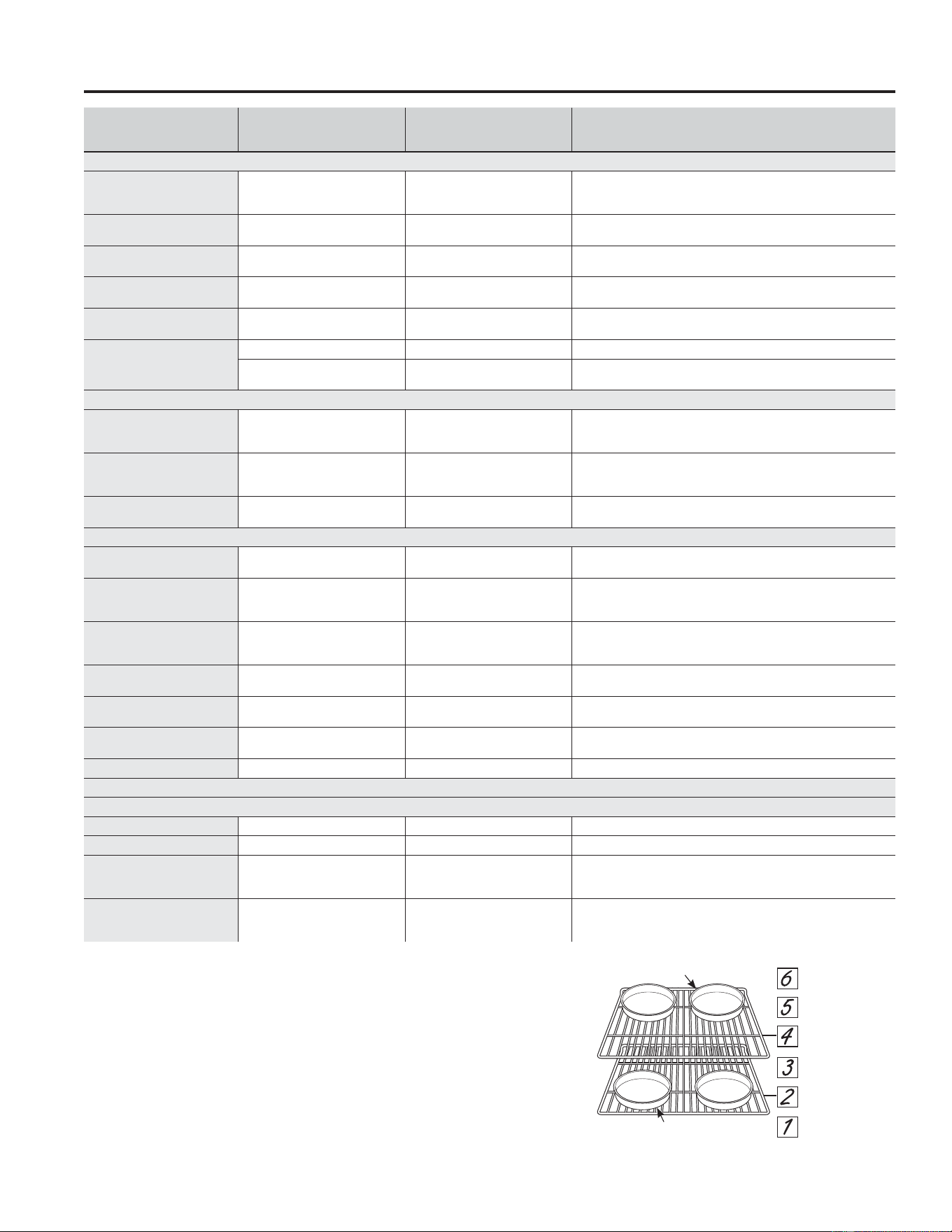
Baked Goods
Layer cakes, sheet cakes,
bundt cakes, muffins, quick
breads on a Single Rack
Bake
Bake Goods
3 8VHVKLQ\FRRNZDUH
Layer cakes* on Multiple
Racks
Bake
Convection Bake
2 and 4 8VHVKLQ\FRRNZDUH(QVXUHDGHTXDWHDLUIORZVHHLOOXVWUDWLRQEHORZ
Chiffon cakes (angel food)
Bake
Bake Goods
1 8VHVKLQ\FRRNZDUH
Cookies, biscuits, scones on
a Single Rack
Bake
Bake Goods
3 8VHVKLQ\FRRNZDUH
Cookies, biscuits, scones on
Multiple Racks
Convection Bake
2 and 4
2, 4, and 6
8VHVKLQ\FRRNZDUH(QVXUHDGHTXDWHDLUIORZ
Yeast Breads
Proof 2 or 3 Cover dough loosely.
Bake
Bake Goods
3
Beef & Pork
Hamburgers Broil High 6
8VHDEURLOSDQPRYHIRRGGRZQIRUPRUHGRQHQHVVOHVVVHDULQJ
Watch food closely when broiling. For best performance center food
below the broil heater.
Steaks & Chops Broil High 5 or 6
8VHDEURLOSDQPRYHIRRGGRZQIRUPRUHGRQHQHVVOHVVVHDULQJ
Watch food closely when broiling. For best performance center food
below the broil heater.
Roasts
Bake
Convection Roast
2 or 3 8VHDORZVLGHGSDQVXFKDVDEURLOSDQ3UHKHDWLQJLVQRWQHFHVVDU\
Poultry
Whole chicken
Bake
Convection Roast
2 or 3 8VHDORZVLGHGSDQVXFKDVDEURLOSDQ3UHKHDWLQJLVQRWQHFHVVDU\
Bone-in chicken breasts,
legs, thighs
Broil Low
Bake
3
If breaded or coated in sauce avoid Broil High modes. Broil skin side
down first. Watch food closely when broiling. For best performance
when broiling, center food below the broil heater.
Boneless chicken breasts
Broil Low
Bake
3
Move food down for more doneness/less searing and up for greater
searing/browning when broiling. For best performance when broiling,
center food below the broil heater.
Whole turkey
Bake
Convection Roast
1 8VHDORZVLGHGSDQVXFKDVDEURLOSDQ3UHKHDWLQJLVQRWQHFHVVDU\
Turkey Breast
Bake
Convection Roast
3 8VHDORZVLGHGSDQVXFKDVDEURLOSDQ3UHKHDWLQJLVQRWQHFHVVDU\
Fish Broil Low
6 (1/2 inch thick or less)
5 (>1/2 inch)
Watch food closely when broiling. For best performance center food
below the broil heater.
Casseroles Bake 3 or 4
Frozen Convenience Foods
Pizza on a Single Rack Frozen Pizza Single 3 Place food in oven prior to starting mode.
Pizza on Multiple Racks Frozen Pizza Multi 2 and 4 Stagger pizzas left to right, do not place directly over each other.
Potato products, chicken
nuggets, appetizers on a
Single Rack
Frozen Snacks Single 4 or 5
3ODFHIRRGLQRYHQSULRUWRVWDUWLQJPRGH8VHGDUNFRRNZDUHIR
UPRUH
browning/crisping; use shiny cookware for less browning.
Potato products, chicken
nuggets, appetizers on
Multiple Racks
Frozen Snacks Multi 2 and 4
8VHGDUNFRRNZDUHIRUPRUHEURZQLQJFULVSLQJXVHVKLQ\FRRNZDUH
for less browning.
*When baking four cake layers at a time use racks 2
and 4. Place the pans as shown so that one pan is not
directly above another.
Cook food thoroughly to help protect against food
borne illness. Minimum safe food temperature
recommendations for food safety can be found at
IsItDoneYet.gov. Make sure to use a food thermometer
to take food temperatures.
Rear Placement
Front Placement
Rack positions
USING THE RANGE: Oven Cooking Guide
49-2000990 Rev. 5 23
USING THE RANGE: Air Fry Cooking Guide
Air Fry Cooking Guide
Air Fry is a special, no-preheat, cooking mode that
is designed to produce foods with a crispier exterior
than traditional oven cooking. Select Air Fry, then
input the desired set temperature and press Start. The
temperature can be set between 300°F and 500°F.
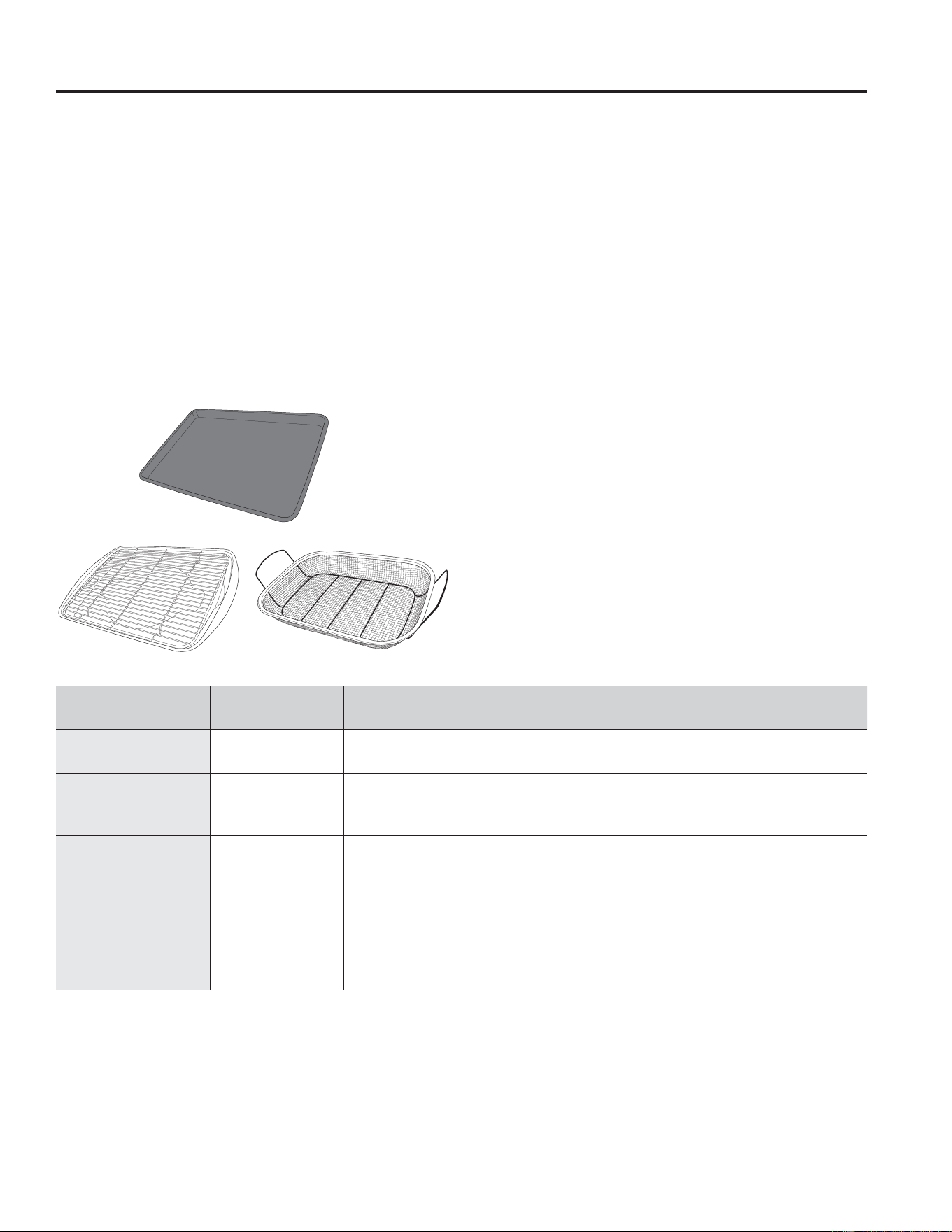
Air Fry Cookware Guidelines
• Only use broil safe cookware when using Air Fry mode.
• A dark sheet pan is recommended. A dark pan
promotes better browning and crisping.
• Oven baking baskets and baking grids can also be
used. A sheet pan should be placed on the rack below
the foods to catch any drippings when using a baking
basket.
General Tips for Air Fry Mode
• The Air Fry mode is designed for cooking on a single
rack.
• The Air Fry mode is designed to be used without
preheating.
5DFN SRVLWLRQ LV UHFRPPHQGHG IRU PRVW IRRGV 8VH
rack position 3 for thicker foods.
• Foods may cook faster than expected if the oven is
already hot when food is placed in the oven.
• When air frying foods with sauce, it is recommended to
apply the sauce at the end of cooking.
• If foods are browning too quickly, try a lower rack
position or lower oven set temperature.
• For packaged foods, use traditional oven cooking
instructions for set temperature and expected cook
time.
• It is not necessary to flip or stir food during cooking
• Arrange food in a single layer on the pan, do not
overload the pan.
• Always check internal food temperature to confirm
minimum safe temperatures have been reached.
Minimum safe food temperatures can be found on
packages and at IsItDoneYet.gov.
FOOD TYPE
RECOMMENDED
RACK POSITION(S)
RECOMMENDED
SET TEMPERATURES (F°)
RECOMMENDED
COOK TIME (MIN) NOTES
Fresh boneless fish or
poultry pieces, breaded such
as nuggets, tenders, fillets
4 375-400 15-30
8VHU ORZHU VHW WHPSHUDWXUHV IRU ODUJHU SLHFHV
8VH VKLQ\ FRRNZDUH
Fresh bone in
chicken wings
4 375-400 25-40
Salt wings or coat in a dry rub, if using sauce
apply after cooking or toward the end of cooking
Fresh bone in chicken
drumsticks or thighs
3 or 4 375-400 30-55 8VHU ORZHU VHW WHPSHUDWXUHV IRU ODUJHU SLHFHV
Fresh French fries,
thin (< ½ inch)
4 400-425 15-30
Parchment paper is recommended when
preparing fresh French fries. For crispier fries,
toss fries in corn starch or rice flour before
cooking.
Fresh French fries,
thick (> ½ inch)
3 or 4 375-400 20-35
Parchment paper is recommended when
preparing fresh French fries. For crispier fries,
toss fries in corn starch or rice flour before
cooking.
Frozen packaged
foods
3 or 4
(use rack position 3 for
thicker foods)
8VH WUDGLWLRQDO RYHQQRW $LU )U\ FRRNLQJ LQVWUXFWLRQV DV D JXLGHOLQH IRU VHW WHPSHUDWXUH DQG FRRN WLPH$GGLWLRQDO
cook time beyond recommended package time may be required for some foods. If oven is hot when starting, food
may cook faster than the minimum package time.
Primary recommended cookware
Alternate cookware options
24 49-2000990 Rev. 5
Cleaning the Range – Exterior
WARNING
If your range is removed for cleaning, servicing or any reason, be sure the
anti-tip device is reengaged properly when the range is replaced. Failure to
take this precaution could result in tipping of the range and can result in death
or serious burns to children or adults.
Be sure all controls are off and all surfaces are cool before cleaning any part of the range.
Control Lockout
If desired, the touch pads may be deactivated before
cleaning.
See Lock Controls in the Oven Controls section in this
manual.
Clean up splatters with a damp cloth.
You may also use a glass cleaner.
Remove heavier soil with warm, soapy water. Do not use
abrasives of any kind.
Reactivate the touch pads after cleaning.
Control Panel
It’s a good idea to wipe the control panel after each use.
Clean with mild soap and water or vinegar and water,
rinse with clean water and polish dry with a soft cloth.
Do not use abrasive cleansers, strong liquid cleansers,
plastic scouring pads or oven cleaners on the control
panel—they will damage the finish, including Black
Sainless Steel.
Oven Exterior
Do not use oven cleaners, abrasive cleansers, strong
liquid cleansers, steel wool, plastic scouring pads, or
cleaning powders on the exterior of the oven. Clean with
a mild soap and water or vinegar and water solution.
Rinse with clean water and dry with a soft cloth. When
cleaning surfaces, make sure that they are at room
temperature and not in direct sunlight.
If stain on the door vent trim is persistent, use a mild
abrasive cleaner and a sponge-scrubber for best results.
Spillage of marinades, fruit juices, tomato sauces and
basting liquids containing acids may cause discoloration
and should be wiped up immediately. Let hot surfaces
cool, then clean and rinse.
Painted Surfaces, Black Stainless Steel, and Fingerprint Resistant Stainless Steel
Painted surfaces include the sides of the range and the
door, top of control panel and the drawer front. Clean
these with soap and water or a vinegar and water solution.
Do not use commercial oven cleaners, cleaning
powders, steel wool or harsh abrasives on any painted
surface, including Black Stainless Steel.
Stainless Steel
Do not use a steel wool pad; it will scratch the surface.
To clean the stainless steel surface, use warm sudsy
water or a stainless steel cleaner or polish. Always wipe
the surface in the direction of the grain. Follow the cleaner
instructions for cleaning the stainless steel surface.
To inquire about purchasing cleaning products including
stainless steel appliance cleaner or polish, see the
Accessories and Consumer Support sections at the end
of this manual.
CARE AND CLEANING: Cleaning the Range – Exterior

49-2000990 Rev. 5 25
CARE AND CLEANING: Cleaning the Range – Interior
The interior of your new oven can be cleaned manually or by using Steam Clean or Self Clean modes.
Spillage of marinades, fruit juices, tomato sauces and basting liquids containing acids may cause discoloration and
should be wiped up immediately. Let hot surfaces cool, then clean and rinse.
Manual Cleaning
Do not use oven cleaners (unless certified for self-
cleaning oven), abrasive cleaners, strong liquid
cleansers, steel wool, scouring pads, or cleaning
powders on the interior of the oven. Clean with a mild
soap and water or vinegar and water solution. Rinse with
clean water and dry with a soft cloth. When cleaning
surfaces, make sure that they are at room temperature.
Cleaning the Range – Interior
Racks
All racks can be washed with warm, soapy water.
Enameled (not shiny) racks can be left in the cavity
during self clean.
Racks may be more difficult to slide, especially after
a self-clean. Put some vegetable oil on a soft cloth or
paper towel and rub onto the left and right edges.
NOTE: 8VLQJRWKHUFRRNLQJRLOVZLOOFDXVHDGLVFRORULQJ
or a rust like color residue on the racks and cavity sides.
To clean this residue, use a soap and water or a vinegar
and water solution. Rinse with clean water and dry with a
soft cloth.
Self Clean Mode
Read Self-Cleaning Oven Safety Instructions at the
beginning of this manual before using the Self Clean
Mode. Self Clean uses very high temperatures to clean
the oven interior. For a moderately soiled oven, run a
3 hour self-clean cycle. For a heavily soiled oven, run
a 5 hour self-clean cycle. Only self-clean (black) racks
and grates may remain in the oven during the self-clean
cycle. All other items, including nickel plated (silver) racks,
should be removed. If nickel plated (silver) racks are left
in the oven during a self-clean cycle, the racks will tarnish.
If either type of rack is left in the oven during a self-clean
cycle, the rack may become difficult to slide. See the
Oven Racks section for instructions on how to improve.
IMPORTANT: The health of some birds is extremely
sensitive to the fumes given off during the self-cleaning
cycle of any range. Move birds to another well-
ventilated room.
To use the Self Clean feature:
1. Start with the oven at room temperature.
2. Wipe excess grease and soils from the oven and
interior door.
3. Remove all items other than self-clean (black)
racks and grates, if desired. See Cleaning the
Cooktop to determine if your grates may be self-
cleaned and for important details regarding grate
placement.
4. Close the door.
5. Press the Clean pad, select Self Clean and then
press Start/Enter.
You can not open the door during the self-clean cycle.
The door will remain locked after the self-clean cycle until
the oven cools below the unlocking temperature. At the
end of the self-clean cycle, allow the oven to cool and
wipe any ash out of the oven.
To Stop a Self-Clean Cycle
Press the Cancel/Off pad. Wait until the oven has cooled
below the locking temperature to unlatch the door. You
will not be able to open the door right away unless the
oven has cooled below the locking temperature.
The surface units are automatically disabled during the
self-clean cycle. Make sure that all surface unit controls
are turned off at all times during the self-clean cycle.
Wait until the self-clean cycle is finished to set and use
the surface units.
Steam Clean Mode
The Steam Clean feature is for cleaning light soil from
your oven at a lower temperature than Self Clean.
To use the Steam Clean feature:
1. Start with the oven at room temperature.
2. Wipe excess grease and soils from the oven.
3. Pour one cup of water onto the bottom of the oven.
4. Close the door.
5. Press the Clean pad, select Steam Clean and
then press Start/Enter.
Do not open the door during the 30 minute steam clean
as this will decrease the steam clean performance. At
the end of the Steam Clean cycle, soak up the remaining
water, and wipe the moisture-softened soil from the oven
walls and door.
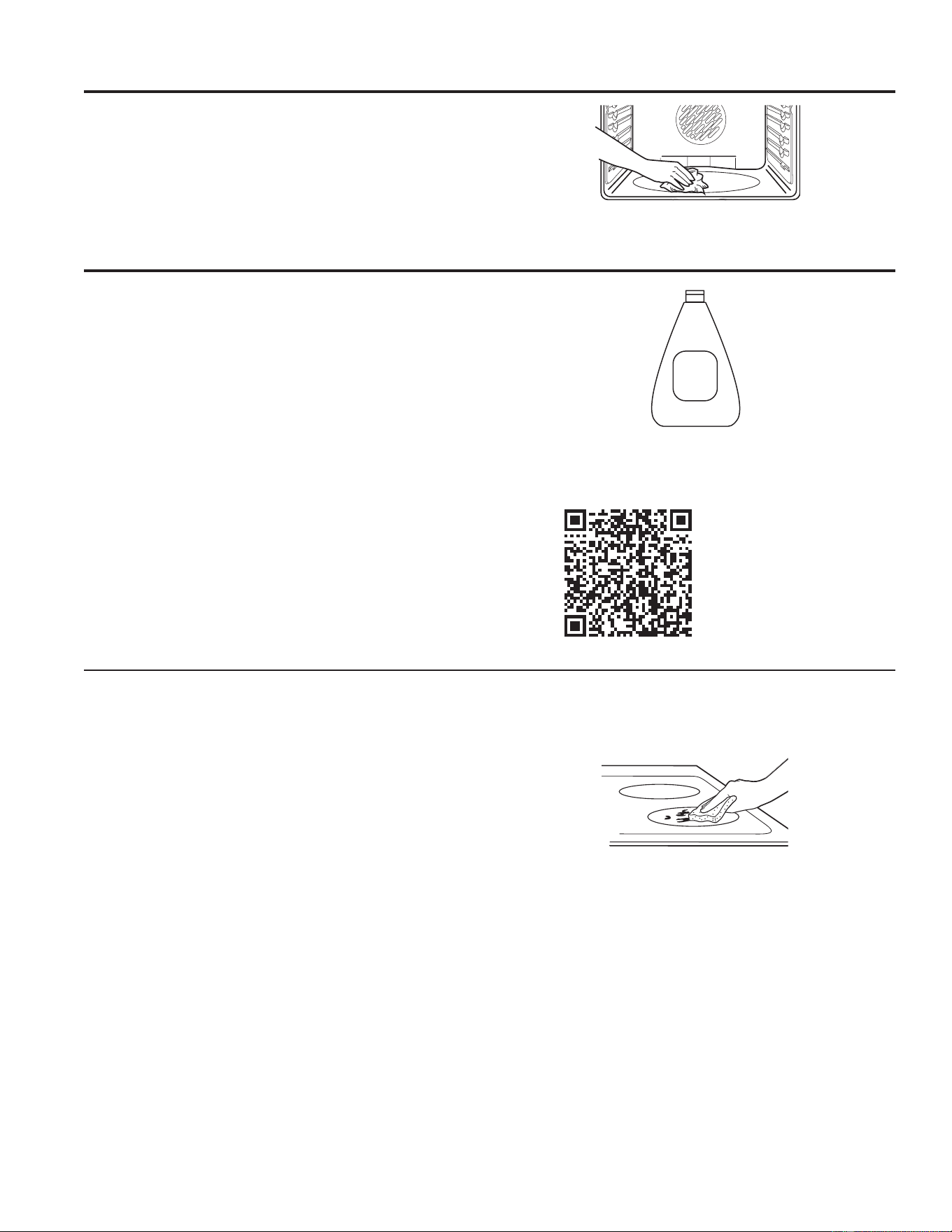
26 49-2000990 Rev. 5
To maintain and protect the surface of your glass cooktop,
follow these steps:
1. Before using the cooktop for the first time, clean it
with a ceramic cooktop cleaner. This helps protect the
top and makes cleanup easier.
2. Regular use of ceramic cooktop cleaner will help keep
the cooktop looking new.
3. Shake the cleaning cream well. Apply a few drops of
ceramic cooktop cleaner directly to the cooktop.
8VHDSDSHUWRZHORUQRQVFUDWFKFOHDQLQJSDGIRU
ceramic cooktops to clean the entire cooktop surface.
8VHDGU\FORWKRUSDSHUWRZHOWRUHPRYHDOOFOHDQLQJ
residue. No need to rinse..
NOTE: It is very important that you DO NOT heat the
cooktop until it has been cleaned thoroughly.
Cleaning the Glass Cooktop
Cleaning the Range – Interior (Cont.)
Oven Heating Elements
Do not clean the bake element or the broil element. Any
soil will burn off when the elements are heated.
The bake element is not exposed and is under the oven
floor. Clean the oven floor with warm, soapy water.
Wipe up heavy soil on the oven bottom.
Clean your cooktop after each
VSLOO8VHDFHUDPLFFRRNWRS
cleaner.
Ceramic
Cooktop
Cleaner
Burned-On Residue
NOTE: DAMAGE to your glass surface may occur if you
use scrub pads other than those recommended.
1. Allow the cooktop to cool.
2. Spread a few drops of ceramic cooktop cleaner on
the entire burned residue area.
8VLQJDQRQVFUDWFKFOHDQLQJSDGIRUFHUDPLF
cooktops, rub the residue area, applying pressure as
needed.
4. If any residue remains, repeat the steps listed above
as needed.
5. For additional protection, after all residue has been
removed, polish the entire surface with ceramic
cooktop cleaner and a paper towel.
8VHDQRQVFUDWFKFOHDQLQJSDGIRU
Ceramic Cooktops.
For cleaning videos and
instructions, scan the QR
code with your device.
CARE AND CLEANING: Cleaning the Range - Interior / Glass Cooktop
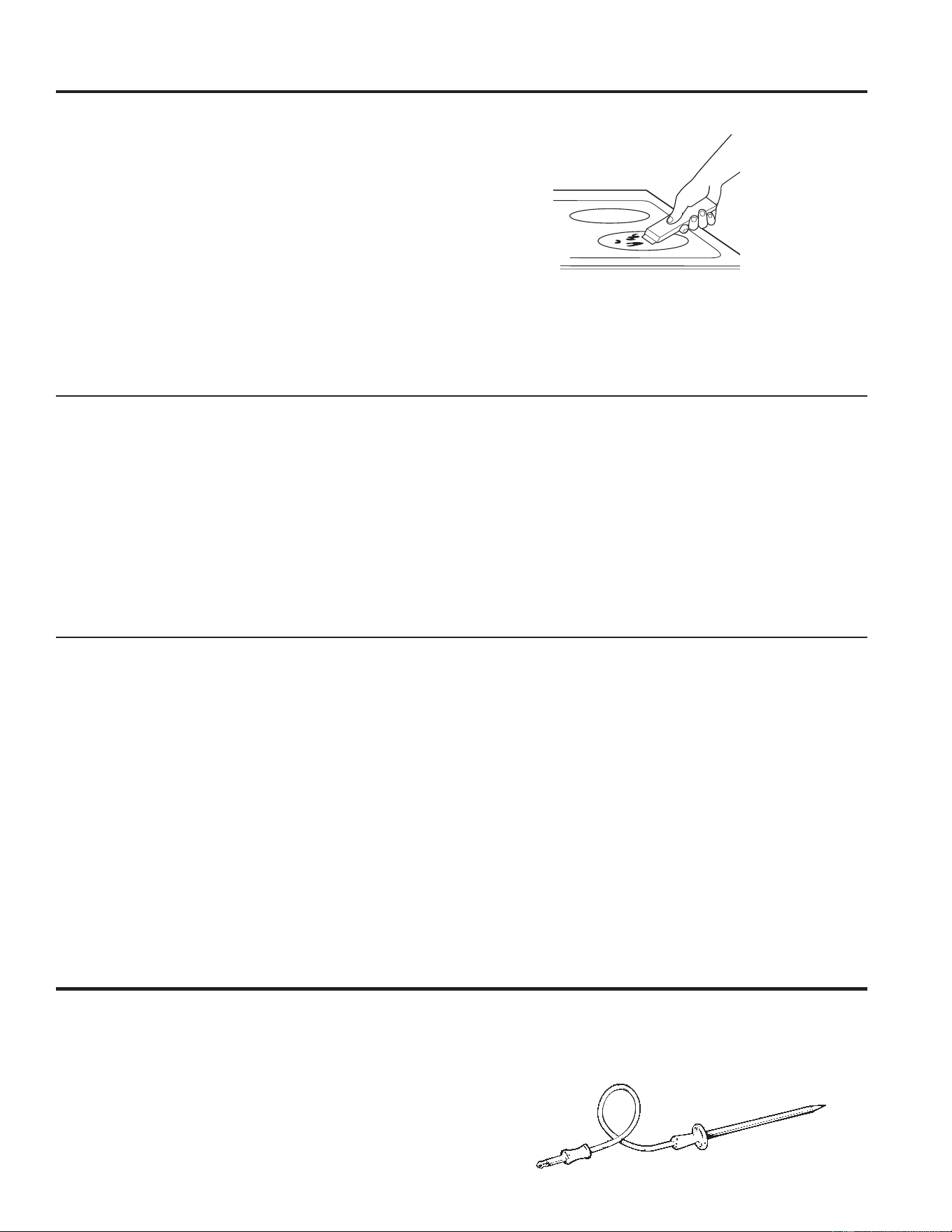
49-2000990 Rev. 5 27
CARE AND CLEANING: Cleaning the Glass Cooktop / Oven Probe
Metal Marks and Scratches
1. Be careful not to slide pots and pans across your
cooktop. It will leave metal markings on the cooktop
surface.
These marks are removable using the a ceramic
cooktop cleaner with a non-scratch cleaning pad for
ceramic cooktops.
2. If pots with a thin overlay of aluminum or copper
are allowed to boil dry, the overlay may leave black
discoloration on the cooktop.
This should be removed immediately before heating
again or the discoloration may be permanent.
NOTE: Carefully check the bottom of pans for roughness
that would scratch the cooktop.
3. Be careful not to place aluminum baking sheets or
aluminum frozen entrée containers on a hot cooktop
surface. It will leave shinny dots or markings on the
cooktop surface. These markings are permanent and
cannot be cleaned off.
Damage from Sugary Spills and Melted Plastic
Special care should be taken when removing hot substances to avoid permanent damage of the glass surface.
Sugary spillovers (such as jellies, fudge, candy, syrups) or melted plastics can cause pitting of the surface of your
cooktop (not covered by the warranty) unless the spill is removed while still hot. Special care should be taken when
removing hot substances.
Be sure to use a new, sharp razor scraper.
Do not use a dull or nicked blade.
1. Turn off all surface units. Remove hot pans.
2. Wearing an oven mitt:
D8VHDVLQJOHHGJHUD]RUEODGHVFUDSHUWRPRYH
the spill to a cool area on the cooktop.
b. Remove the spill with paper towels.
3. Any remaining spillover should be left until the surface
of the cooktop has cooled.
4. Don’t use the surface units again until all of the
residue has been completely removed.
NOTE: If pitting or indentation in the glass surface has
already occurred, the cooktop glass will have to be
replaced. In this case, service will be necessary.
Cleaning the Glass Cooktop (Cont.)
Heavy, Burned-On Residue
1. Allow the cooktop to cool.
8VHDVLQJOHHGJHUD]RUEODGHVFUDSHUDWDSSUR[LPDWHO\
a 45° angle against the glass surface and scrape the
soil. It will be necessary to apply pressure to the razor
scraper in order to remove the residue.
3. After scraping with the razor scraper, spread a few drops
of ceramic cooktop cleaner on the entire burned residue
DUHD8VHDQRQVFUDWFKFOHDQLQJSDGWRUHPRYHDQ\
remaining residue.
4. For additional protection, after all residue has been
removed, polish the entire surface with ceramic
cooktop cleaner and a paper towel.
The ceramic cooktop scraper and all recommended
supplies are available through our Parts Center. See the
Accessories and Consumer Support sections at the end
of this manual.
NOTE: Do not use a dull or nicked blade.
Oven Probe
The temperature probe may be cleaned with soap and
water or a soap-filled scouring pad. Cool the temperature
probe before cleaning. Scour stubborn spots with a soap-
filled scouring pad, rinse and dry.
To order additional temperature probes, see the
Accessories and Consumer Support sections at the end
of this manual.
Ŷ Do not immerse the temperature probe in water.
Ŷ Do not store the temperature probe in the oven.
Ŷ Do not leave the temperature probe inside the oven
during a self or steam clean cycle.
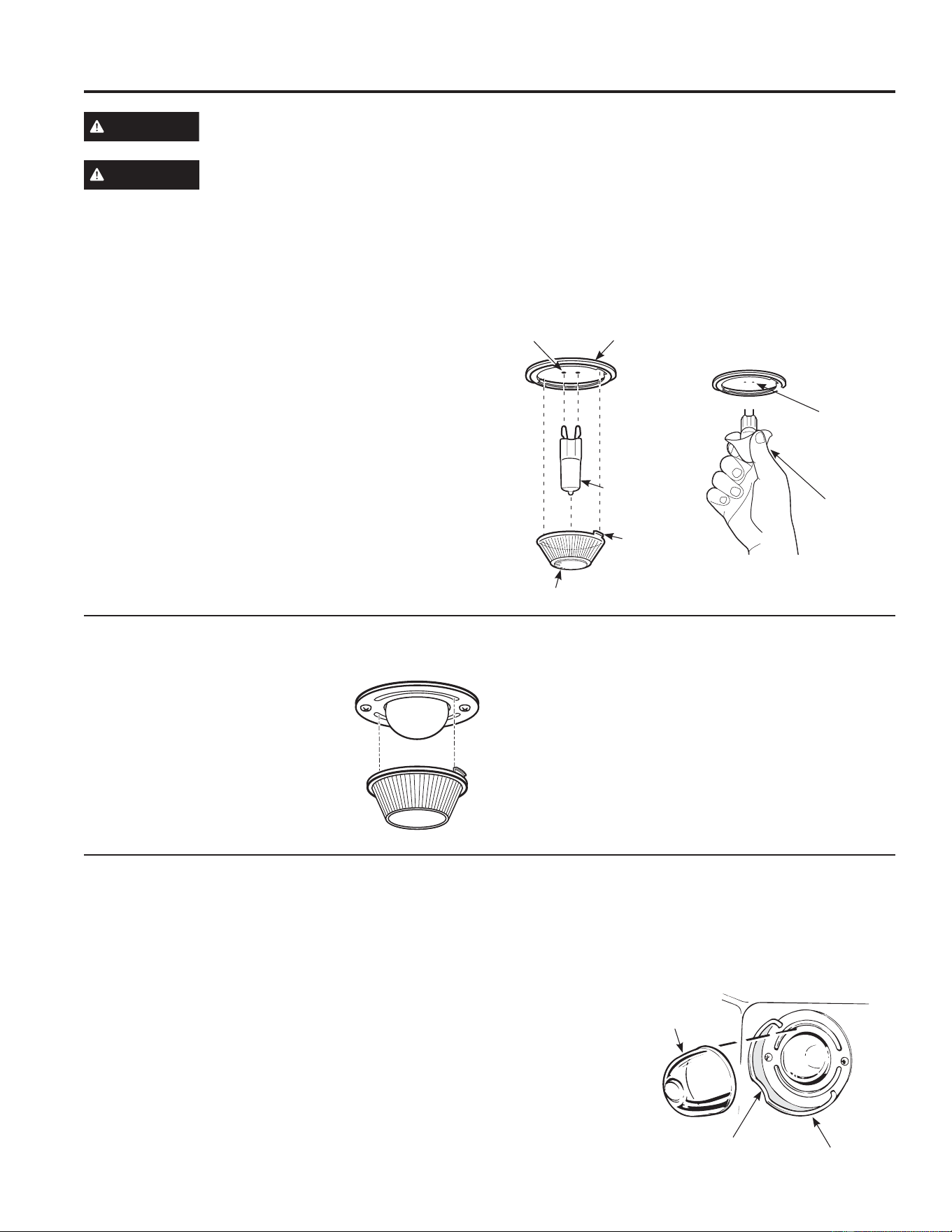
28 49-2000990 Rev. 5
Oven Light
WARNING
SHOCK OR BURN HAZARD: Before replacing oven light bulb, disconnect the electrical power to the
range at the main fuse or circuit breaker panel. Failure to do so may result in electric shock or burn.
CAUTION
BURN HAZARD: The glass cover and bulb should be removed when cool. Touching hot glass with
bare hands or a damp cloth can cause burns.
Oven Light Replacement (on some models)
To remove:
1. Turn the glass cover counterclockwise 1/4 turn until
the tabs of the glass cover clear the grooves of the
socket. Wearing latex gloves may offer a better grip.
8VLQJJORYHVRUDGU\FORWKUHPRYHWKHEXOEE\SXOOLQJ
it straight out.
To replace:
8VHDQHZYROWKDORJHQEXOEQRWWRH[FHHG
50 watts. Replace the bulb with the same type of bulb
that was removed. Be sure the replacement bulb is
rated 120 volts or 130 volts (NOT 12 volts).
8VLQJJORYHVRUDGU\FORWKUHPRYHWKHEXOEIURPLWV
packaging. Do not touch the bulb with bare fingers. Oil
from skin will damage the bulb and shorten its life.
3. Push the bulb straight into the receptacle all the way.
4. Place the tabs of the glass cover into the grooves of
the socket. Turn the glass cover clockwise 1/4 turn.
For improved lighting inside the oven, clean the glass
cover frequently using a wet cloth. This should be
done when the oven is completely cool.
5. Reconnect electrical power to the oven.
Oven Light Replacement (on some models)
To remove:
1. Turn the glass cover
counterclockwise 1/4 turn until the
tabs of the glass cover clear the
grooves of the socket. Wearing
latex gloves may offer a better grip.
2. Remove the bulb by turning it
counter-clockwise.
To replace:
1. Replace bulb with a new 40-watt appliance bulb.
Insert the bulb and turn it clockwise until it is tight.
2. Place the tabs of the glass cover into the grooves of
the socket. Turn the glass cover clockwise 1/4 turn.
For improved lighting inside the oven, clean the glass
cover frequently using a wet cloth. This should be
done when the oven is completely cool.
3. Reconnect electrical power to the oven.
G9 Bulb
Socket
Tab
Glass cover
Receptacle
8VHJORYHV
or cloth
Receptacle
Oven Light Replacement (on some models)
The oven light bulb is covered with a removable glass cover that is held in place with a bail-shaped wire. Remove
the oven door, if desired, to reach the cover easily. See the Lift-Off Oven Door section for detailed oven door
removal instructions.
Replacing the Light Bulb:
1. Disconnect electrical power to the range.
2. Hold the glass cover stable, so it doesn’t fall when
released.
3. Slide near the indent of the cover holder until the
cover is released. Do not remove any screws to
release the glass cover.
4. Replace bulb with a 40-watt household appliance
bulb. Do not touch hot bulb with hand or wet
cloth. Only remove bulb when it is cool.
5. Hold glass cover stable over new bulb.
6. Pull the wire cover holder near the indent until the
indent in the
wire cover
holder is located
in the indent of
the glass cover.
7. Connect
electrical power
to range.
Wire cover holder
Indent
Glass cover
(on self clean
model only)
CARE AND CLEANING: Oven Light
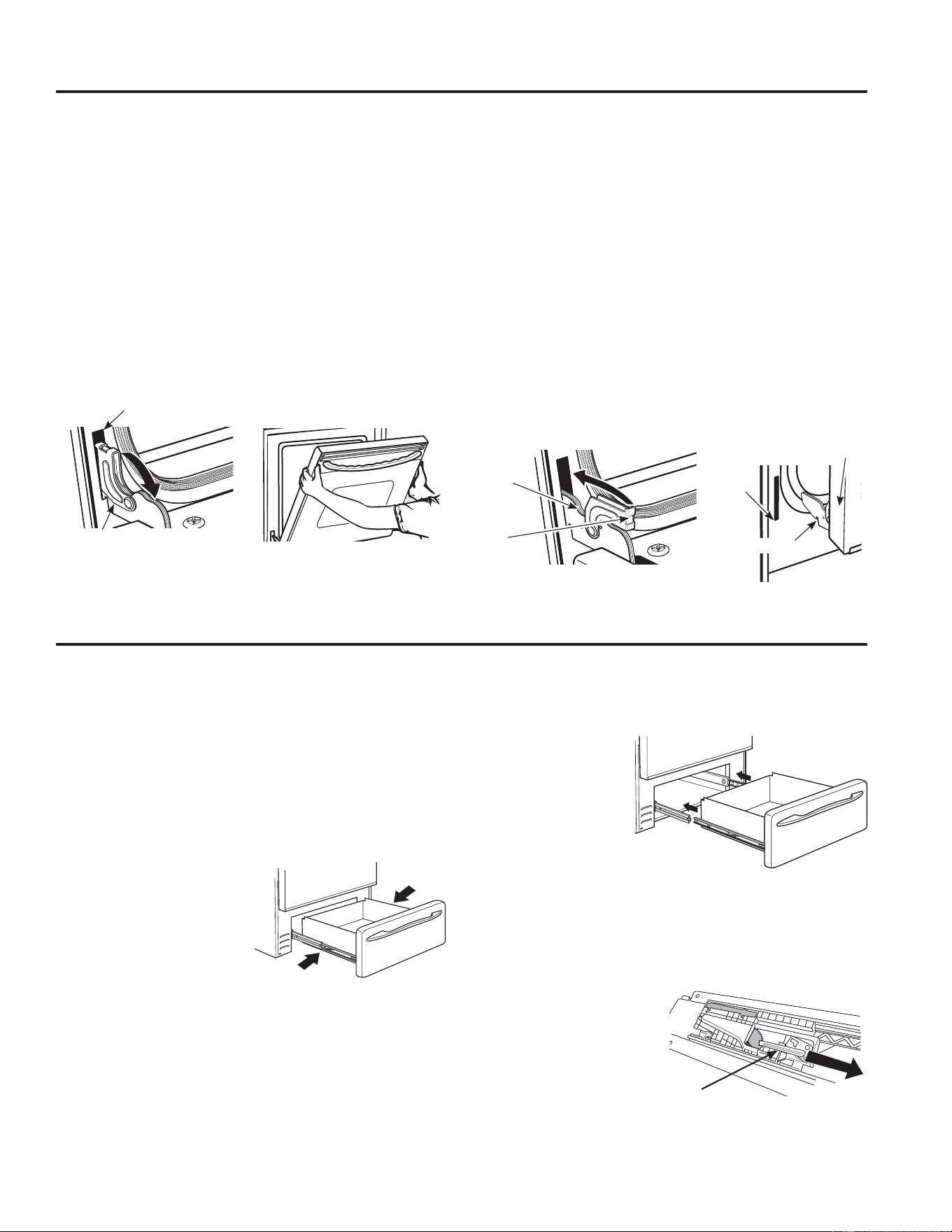
49-2000990 Rev. 5 29
CARE AND CLEANING: Oven Door / Soft Close Drawer
The door is very heavy. Be careful when removing and lifting the door.
Do not lift the door by the handle.
To remove the door:
1. Fully open the door.
2. Pull the hinge locks down toward the door frame, to
the unlocked position. A tool, such as a small flat-
blade screwdriver, may be required.
3. Firmly grasp both sides of the door at the top.
4. Close door to the door removal position. The door
should be open approximately 3" with no obstruction
above the door.
5. Lift door up and out until both hinge arms are clear of
the slots.
To replace the door:
1. Firmly grasp both sides of the door at the top.
2. Starting on the left side, with the door at the same
angle as the removal position, seat the indentation of
the hinge arm into the bottom edge of the hinge slot.
The notch in the hinge arm must be fully seated into
the bottom of the slot. Repeat for right side.
3. Fully open the door. If the door will not fully open, the
indentation is not seated correctly in the bottom edge
of the slot.
4. Push the hinge locks up against the front frame of the
oven cavity, to the locked position.
5. Close the oven door.
Removal position
Hinge lock
Slot
Pull hinge locks down to unlock
Push hinge locks up to lock
Hinge
lock
Hinge
arm
Indentation
Bottom
edge of
slot
Hinge arm
Oven Door
The storage drawer is a good place to store cookware
and bakeware. Do not store plastics or flammable
material in the drawer.
The storage drawer may be removed for cleaning under
the range. Clean the storage drawer with a damp cloth or
sponge. Never use harsh abrasives or scouring pads.
Your storage drawer has metal rails.
To remove the drawer:
1. Pull drawer straight out until it stops.
2. Press the left rail
release in and press
the right rail release in,
while pulling the drawer
forward and free.
To replace the drawer:
1. Place the left drawer rail around the inner left rail
guide and slide it in slightly to hook it.
2. Place the right
drawer rail around
the inner right rail
guide and slide it
in slightly to hook
it.
3. Slide the drawer
all the way in.
In rare cases, the soft close mechanism may become
uncoupled from the drawer. To reset the mechanism:
1. Remove the drawer.
2. Slide the catch pin forward, both sides as
applicable.
3. Reinstall the drawer.
Soft Close Drawer
Catch Pin
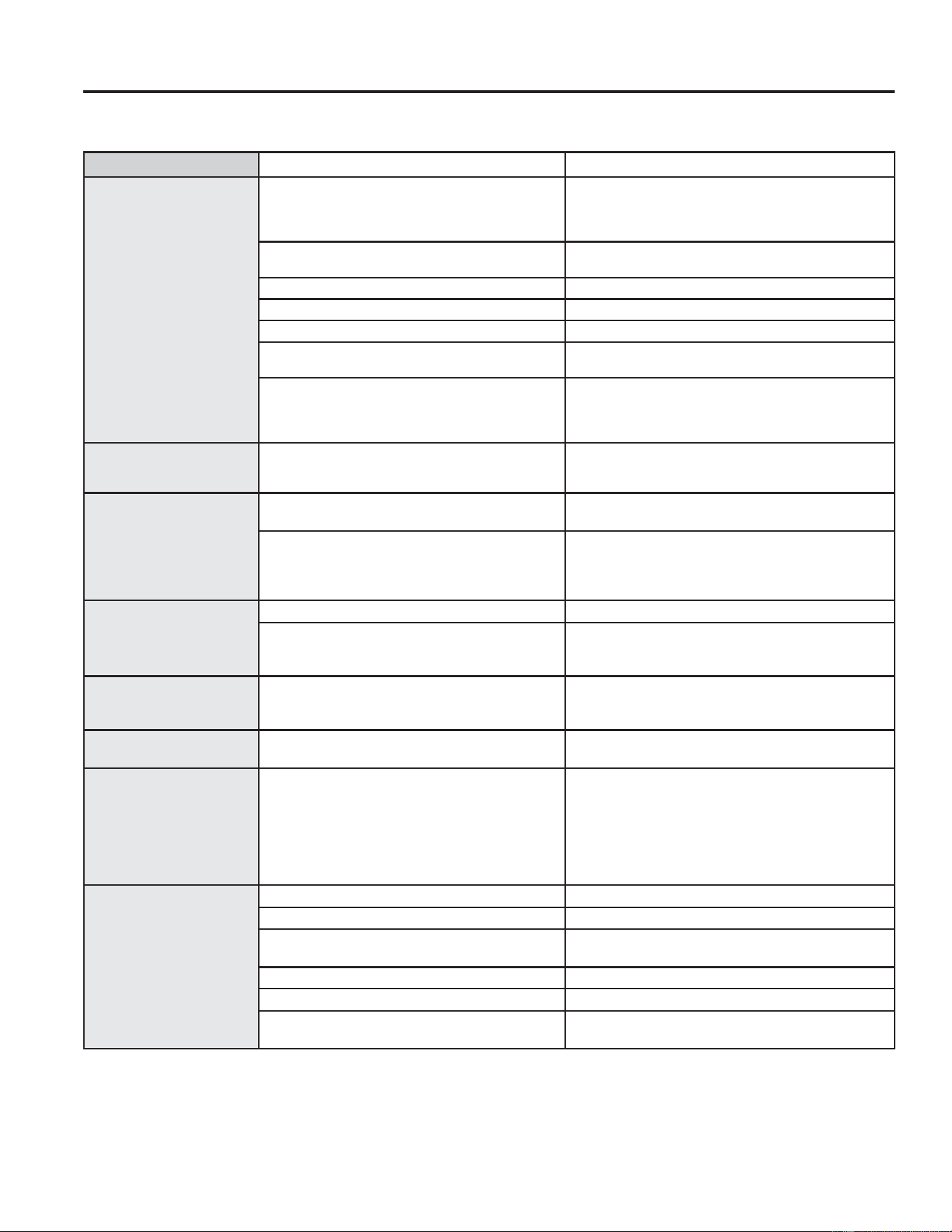
30 49-2000990 Rev. 5
Troubleshooting Tips ... Before you call for service
Problem Possible Cause What To Do
Surface units do not work
properly or flashing power
setting.
Improper cookware being used. :URQJSDQW\SH8VHDPDJQHWWRFKHFNWKDWFRRNZDUH
LVLQGXFWLRQFRPSDWLEOH8VHDIODWLQGXFWLRQFDSDEOHSDQ
that meets the minimum size for the element being used.
See the Pan size and shape section.
Pan is too small. Pan size is below the minimum size for the element. See
WKH3DQVL]HDQGVKDSHVHFWLRQ8VHVPDOOHUHOHPHQW
Pan not positioned correctly. Center the pan in the cooking zone.
Pan is not in full contact with glass surface. Pan must be flat.
In some areas, the power (voltage) may be low. Cover pan with a lid until desired heat is obtained.
A fuse in your home may be blown or the circuit
breaker tripped.
Replace the fuse or reset the circuit breaker.
Cooktop controls improperly set. Check to see that the control is set properly. The LEDs
should be illuminated at least partway around the grey
arc for that element. Press On then + or -9HULI\FRQWUROV
are clean and dry.
Surface unit setting
changed or turned off
unexpectedly.
High cooktop temperature. Allow the internal fan to cool the cooktop. Check if pan
boiled dry.
Scratches (may appear
as cracks) on cooktop
glass surface
Incorrect cleaning methods being used. Scratches are not removable. Tiny scratches will
become less visible in time as a result of cleaning.
Cookware with rough bottoms being used or coarse
particles (salt or sand) were between the cookware
and the surface of the cooktop. Cookware has been
slid across the cooktop surface.
To avoid scratches, use the recommended cleaning
procedures. Make sure bottoms of cookware are
clean before use, and use cookware with smooth
bottoms.
Areas of discoloration on
the cooktop
Food spillovers not cleaned before next use. See the Cleaning the glass cooktop section.
Hot surface on a model with a light-colored
cooktop.
This is normal. The surface may appear discolored
when it is hot. This is temporary and will disappear as
the glass cools.
Plastic melted to the
surface
Hot cooktop came into contact with plastic placed
on the hot cooktop.
See the Glass surface—potential for permanent
damage section in the Cleaning the glass cooktop
section.
Pitting (or indentation) of
the cooktop
Hot sugar mixture spilled on the cooktop. Call a qualified technician for replacement.
My new oven doesn't
cook like my old one. Is
something wrong with
the temperature settings?
Your new oven has a different cooking system
from your old oven and therefore may cook
differently than your old oven.
For the first few uses, follow your recipe times
and temperatures carefully. If you still think your
new oven is too hot or too cold, you can adjust the
temperature yourself to meet your specific cooking
preference. NOTE: This adjustment affects Bake,
and Convection Bake temperatures; it will not affect
Convection Roast, Broil or Clean.
Food does not bake
properly
Oven controls improperly set. See the Cooking Modes section.
Rack position is incorrect or rack is not level. See the Cooking Modes section and Cooking Guide.
Incorrect cookware or cookware of improper size
being used.
See the Cookware section.
The probe is plugged into the outlet in the oven. 8QSOXJDQGUHPRYHWKHSUREHIURPWKHRYHQ
Oven temperature needs adjustment. See the Special Features section.
Ingredient substitution Substituting ingredients can change the recipe
outcome.
Save time and money! Review the charts on the following pages first and you may not need to call for service.
Check out self-help videos and FAQ at GEAppliances.com/support.
TROUBLESHOOTING TIPS
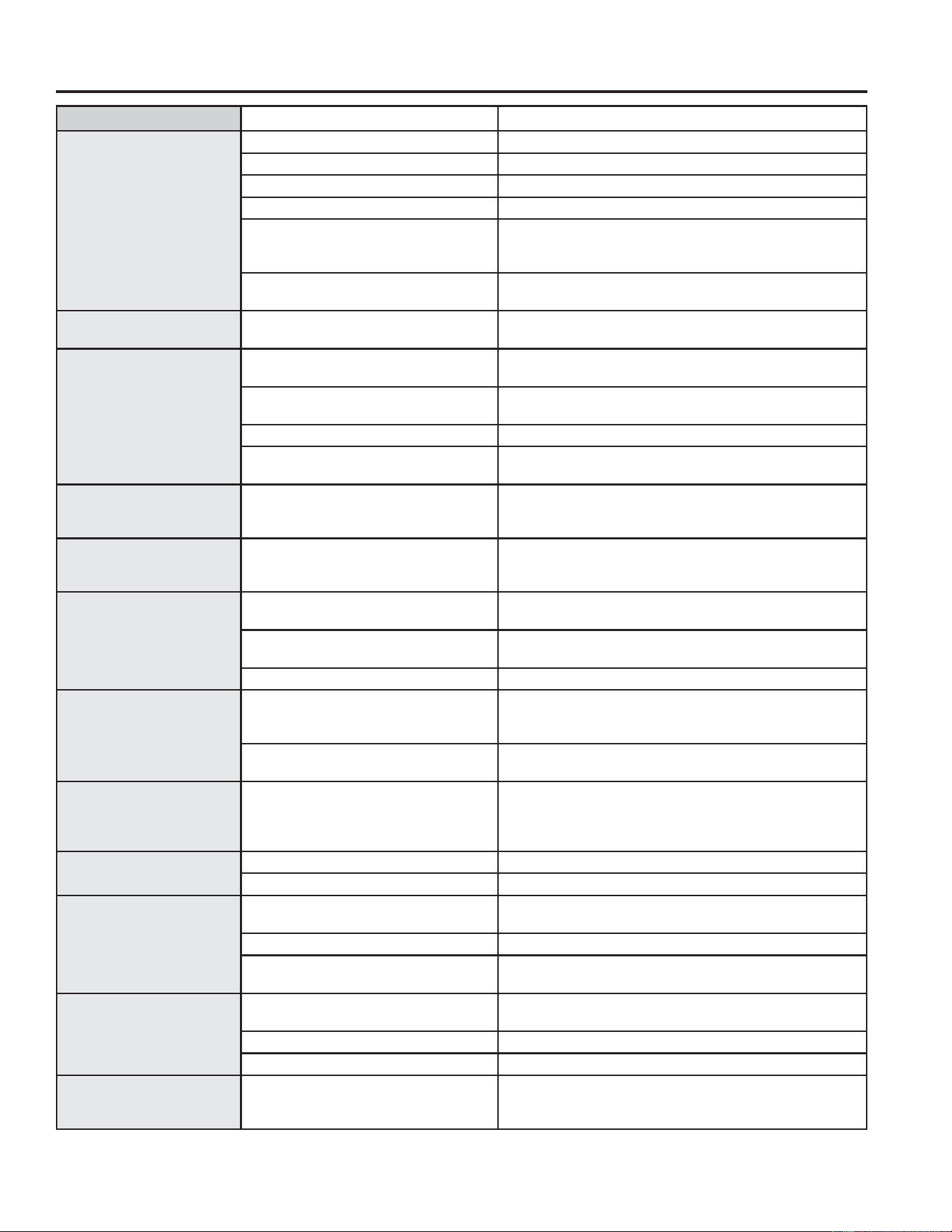
49-2000990 Rev. 5 31
TROUBLESHOOTING TIPS
Problem Possible Cause What To Do
Food does not broil
properly
Oven controls improperly set. Make sure you select the appropriate broil mode.
Improper rack position being used. See Cooking Guide for rack location suggestions.
Food being cooked in a hot pan. Make sure cookware is cool.
Cookware not suited for broiling. 8VHDSDQVSHFLILFDOO\GHVLJQHGIRUEURLOLQJ
Aluminum foil used on the broiling pan
and grid has not been fitted properly and
slit as recommended.
If using aluminum foil conform to pan slits.
In some areas the power (voltage) may
be low.
Preheat the broil element for 10 minutes.
Oven temperature too hot
or too cold
Oven temperature needs adjustment. See the Special Features section.
Oven does not work or
appears not to work
Plug on range is not completely inserted
in the electrical outlet.
Make sure electrical plug is plugged into a live, properly
grounded outlet.
A fuse in your home may be blown or the
circuit breaker tripped.
Replace the fuse or reset the circuit breaker.
Oven controls improperly set. 6HHWKH8VLQJWKH2YHQVHFWLRQ
Oven is in Sabbath Mode. 9HULI\WKDWWKHRYHQLVQRWLQ6DEEDWK0RGH6HHWKH
Special Features section.
“Crackling” or “popping”
sound
This is the sound of the metal heating
and cooling during both the cooking and
cleaning functions.
This is normal.
Why is my range making
a "clicking" noise when
using my oven?
Your range cycles the heating elements
by turning relays on and off to maintain
the oven temperature.
This is normal.
Clock and timer do not
work
A fuse in your home may be blown or the
circuit breaker tripped.
Replace the fuse or reset the circuit breaker.
Plug on range is not completely inserted
in the electrical outlet.
Make sure electrical plug is plugged into a live, properly
grounded outlet.
Oven controls improperly set. See the Oven Control section.
Storage drawer won’t
close
Power cord may be obstructing drawer in
the lower back of the range.
Reposition the drawer and power cord. See the Storage
Drawer Removal instructions in the Care and cleaning of the
range section.
Rear drawer support is on top of the
guide rail.
Reposition the drawer. See the Storage Drawer Removal
instructions in the Care and cleaning of the range section.
Oven door is crooked The door is out of position. Because the oven door is removable, it sometimes gets
out of position during installation. To straighten the door,
re-install the door. See the "Lift-Off Oven Door" instructions
in the "Care and Cleaning" section.
Oven light does not work Light bulb is loose or defective. Tighten or replace bulb.
Pad operating light is broken. Call for service.
Oven will not self-clean The temperature is too high to set a self-
clean operation.
Allow the oven to cool and reset the controls.
Oven controls improperly set. See the Cleaning the Oven section.
The probe is plugged into the outlet in
the oven.
Remove the probe from the oven.
Oven will not steam clean. Display flashes HOT. Allow the oven to cool to room temperature and reset the
controls.
Oven controls improperly set. 6HHWKH8VLQJ6WHDP&OHDQVHFWLRQ
Oven door is not closed. Make sure you close the door to start steam clean cycle.
Excessive smoking during
clean cycle
Excessive soil or grease. Press the Cancel/Off pad. Open the windows to rid the
room of smoke. Wait until the LOCKED light goes off. Wipe
up the excess soil and reset the clean cycle.
Troubleshooting Tips ... Before you call for service
32 49-2000990 Rev. 5
Problem Possible Cause What To Do
Excessive smoking during
broiling
Food too close to broil element. Lower the rack position of the food.
Oven door will not open
after a clean cycle
Oven too hot. Allow the oven to cool below locking temperature.
Oven not clean after a
clean cycle
Oven controls improperly set. See the Cleaning the Oven section.
Oven was heavily soiled. Clean up heavy spillovers before starting the clean cycle.
Heavily soiled ovens may need to self-clean again or for a
longer period of time.
"DOOR LOCKING" flashes
in the display
The self-clean cycle has been selected
but the door is not closed.
Close the oven door.
DOOR LOCKED is on
when you want to cook
The oven door is locked because the
temperature inside the oven has not
dropped below the locking temperature.
Press the Cancel/Off pad. Allow the oven to cool.
“F— and a number or
letter” flash in the display
You have a function error code. Press the Cancel/Off pad. Allow the oven to cool for one
hour. Put the oven back into operation.
If the function code repeats. Disconnect all power to the oven for at least 30 seconds and
then reconnect power. If the function error code repeats, call
for service.
Display goes blank A fuse in your home may be blown or
the circuit breaker tripped.
Replace the fuse or reset the circuit breaker.
The clock is turned off. See the Special features section.
Oven is in Sabbath Mode. 9HULI\WKDWWKHRYHQLVQRWLQ6DEEDWK0RGH6HHWKH6SHFLDO
Features section.
Oven or cooktop will not
stay set.
Function error. Disconnect all power for at least 30 seconds and then
reconnect power. If repeating, call for service.
Power outage, clock
flashes
Power outage or surge Reset the clock. If the oven was in use, you must reset it by
pressing the Cancel/Off pad, setting the clock and resetting
any cooking function.
“Burning” or “oily” odor
emitting from the vent
This is normal in a new oven and will
disappear in time.
To speed the process, set a self-clean cycle for a minimum of
3 hours. See the Cleaning the Oven section.
Strong odor An odor from the insulation around the
inside of the oven is normal for the first
few times the oven is used.
This is temporary and will go away after several uses or a
self-clean cycle.
Fan noise A convection fan may automatically turn
on and off.
This is normal. The fan is designed to operate intermittently to
maximize cooking evenness. The convection fan will operate
during preheat of the bake cycle. The fan will turn off after the
oven is heated to the set temperature. This is normal.
A cooling fan may automatically turn on
and off.
This is normal on some models. The cooling fan will turn
off and on to cool internal parts. It may run after the oven is
turned off.
My oven door glass
appears to be "tinted" or
have a "rainbow" color. Is
this defective?
No. The inner oven glass is coated with
a heat barrier to reflect the heat back
into the oven to prevent heat loss and
keep the outer door cool while baking.
7KLVLVQRUPDO8QGHUFHUWDLQOLJKWRUDQJOHV\RXPD\VHH
this tint or rainbow color.
Sometimes the oven takes
longer to preheat to the
same temperature
Cookware or food in oven. The cookware or food in the oven will cause the oven to take
longer to preheat. Remove items to reduce preheat time.
Number of racks in oven. Adding more racks to the oven will cause the oven to take
longer to preheat. Remove some racks.
Different cooking modes. The different cooking modes use different preheat methods
to heat the oven for the specific cooking mode. Some modes
will take longer than others (i.e. convection bake).
Display flashes Power failure. Reset the clock.
Troubleshooting Tips ... Before you call for service
TROUBLESHOOTING TIPS
49-2000990 Rev. 5 33
TROUBLESHOOTING TIPS
Troubleshooting Tips ... Before you call for service
Problem Possible Cause What To Do
Unable to set cook time or
delay time
You forgot to enter a cooking mode first. See the Options section
Oven racks are difficult to
slide
The shiny, silver-colored racks were
cleaned in a self-clean cycle.
Apply a small amount of vegetable oil to a paper towel and
wipe the edges of the oven racks with the paper towel. Do
not spray with Pam
®
or other lubricant sprays.
Drawer does not slide
smoothly or drags
The drawer is out of alignment. Fully extend the drawer and push it all the way in See the
Care and cleaning of the range section.
Drawer is over-loaded or load is
unbalanced.
Reduce weight. Redistribute drawer contents.
Steam from the vent When using the ovens, it is normal to see
steam coming out of the oven vents. As
the number of racks or amount of food
being cooked increases, the amount of
visible steam will increase.
This is normal.
Water remaining on oven
floor after Steam Clean
cycle
This is normal. Remove any remaining water with a dry cloth or sponge.
Display prompts for Probe
Temperature
This is reminding you to enter a probe
temperature after plugging in the probe.
Enter a probe temperature.
Oven will not work remotely Router issues, no wireless signal, etc. For assistance with oven wireless network connectivity, please
call 1-800-220-6899.
Oven is not connected.
Remote enable is off Turn remote enable on (see Special Features section of this
manual)
34 49-2000990 Rev. 5
Staple your receipt here. Proof of the original purchase
date is needed to obtain service under the warranty.
GEAppliances.com
All warranty service is provided by our Factory Service Centers, or an authorized Customer Care
®
technician. To schedule
service online, visit us at GEAppliances.com/service, or call GE Appliances at 800.GE.CARES (800.432.2737). Please
have your serial number and your model number available when calling for service.
Servicing your appliance may require the use of the onboard data port for diagnostics. This gives a GE Appliances factory
service technician the ability to quickly diagnose any issues with your appliance and helps GE Appliances improve its
products by providing GE Appliances with information on your appliance. If you do not want your appliance data to be
sent to GE Appliances, please advise your technician not to submit the data to GE Appliances at the time of service.
What GE Appliances will not cover:
Ŷ Service trips to your home to teach you how to use
the product.
Ŷ ,PSURSHULQVWDOODWLRQGHOLYHU\RUPDLQWHQDQFH
Ŷ )DLOXUHRIWKHSURGXFWLILWLVDEXVHGPLVXVHG
modified or used for other than the intended purpose
or used commercially.
Ŷ 'DPDJHWRWKHJODVVFRRNWRSFDXVHGE\XVHRI
cleaners other than the recommended cleaning
creams and pads.
Ŷ 'DPDJHWRWKHJODVVFRRNWRSFDXVHGE\KDUGHQHGVSLOOV
of sugary materials or melted plastic that are not cleaned
according to the directions in the Owner's Manual.
Ŷ 5HSODFHPHQWRIKRXVHIXVHVRUUHVHWWLQJRIFLUFXLW
breakers.
Ŷ 'DPDJHWRWKHSURGXFWFDXVHGE\DFFLGHQWILUH
floods or acts of God.
Ŷ 'DPDJHWRILQLVKVXFKDVVXUIDFHUXVWWDUQLVKRUVPDOO
blemishes not reported within 48 hours of delivery.
Ŷ ,QFLGHQWDORUFRQVHTXHQWLDOGDPDJHFDXVHGE\
possible defects with this appliance.
Ŷ 'DPDJHFDXVHGDIWHUGHOLYHU\
Ŷ 3URGXFWQRWDFFHVVLEOHWRSURYLGHUHTXLUHGVHUYLFH
Ŷ 6HUYLFHWRUHSDLURUUHSODFHOLJKWEXOEVH[FHSWIRU
LED lamps.
Ŷ (IIHFWLYH-DQXDU\FRVPHWLFGDPDJHWRWKH
glass cooktop such as, but not limited to, chips,
scratches, or baked on residue not reported within 90
days of installation.
Ŷ (IIHFWLYH-DQXDU\
damage to the glass cooktop
due to impact or misuse. See
example.
LIMITED WARRANTY
GE Appliances Electric Range Limited Warranty
EXCLUSION OF IMPLIED WARRANTIES
Your sole and exclusive remedy is product repair as provided in this Limited Warranty. Any implied warranties,
including the implied warranties of merchantability or fitness for a particular purpose, are limited to one year or
the shortest period allowed by law.
This limited warranty is extended to the original purchaser and any succeeding owner for products purchased for
KRPHXVHZLWKLQWKH86$,IWKHSURGXFWLVORFDWHGLQDQDUHDZKHUHVHUYLFHE\D*($SSOLDQFHV$XWKRUL]HG6HUYLFHU
is not available, you may be responsible for a trip charge or you may be required to bring the product to an Authorized
GE Appliances Service location for service. In Alaska, the limited warranty excludes the cost of shipping or service
calls to your home.
Some states do not allow the exclusion or limitation of incidental or consequential damages. This limited warranty
gives you specific legal rights, and you may also have other rights which vary from state to state. To know what your
legal rights are, consult your local or state consumer affairs office or your state’s Attorney General.
Warrantor: GE Appliances, a Haier company
/RXLVYLOOH.<
Extended Warranties: Purchase a GE Appliances extended warranty and learn about special discounts that are
available while your warranty is still in effect. You can purchase it online anytime at
GEAppliances.com/extended-warranty
or call 800.626.2224 during normal business hours. GE Appliances Service will still be there after your warranty expires.
For the period of GE Appliances will replace
One year
From the date
of the original
purchase
Any part of the range which fails due to a defect in materials or workmanship. During this
limited one-year warranty, GE Appliances will provide, free of charge, all labor and in-home
service to replace the defective part.

49-2000990 Rev. 5 35
ACCESSORIES
Looking For Something More?
GE Appliances offers a variety of accessories to
improve your cooking and maintenance experiences!
Refer to the Consumer Support page for phone numbers
and website information.
The following products and more are available:
Accessories
Accessories
Small Broiler Pan (8 ¾ ” x 1 ¼” x 13 ½ “)
Large Broiler Pan (12 ¾ ” x 1 ¼” x 16 ½ “)
XL Broiler Pan (17 ” x 1 ¼” x 19 1/4“)
Parts
Oven racks
Oven elements
Light bulbs
Cleaning Supplies
CitruShine™ Stainless Steel Wipes
Stainless Steel Appliance Cleaner
Non-scratch Cleaning Pads for Ceramic Cooktops
Ceramic Cooktop Cleaner
Ceramic Cooktop Scraper
.LW.LWLQFOXGHVFUHDPDQGFRRNWRSVFUDSHU
*The large broiler pan does not fit in 20”/24” ranges.
** The XL broiler pan does not fit in 24” wall ovens, 27” drop-ins or 20”/24” range.
NOTE: Go to GE Appliances website to view recommended cleaners.

36 49-2000990 Rev. 5
3ULQWHGLQWKH8QLWHG6WDWHV
Consumer Support
CONSUMER SUPPORT
GE Appliances Website
Have a question or need assistance with your appliance? Try the GE Appliances Website 24 hours a day, any day
of the year! You can also shop for more great GE Appliances products and take advantage of all our on-line support
VHUYLFHVGHVLJQHGIRU\RXUFRQYHQLHQFH,QWKH86GEAppliances.com
Register Your Appliance
Register your new appliance on-line at your convenience! Timely product registration will allow for enhanced
communication and prompt service under the terms of your warranty, should the need arise. You may also mail in
WKHSUHSULQWHGUHJLVWUDWLRQFDUGLQFOXGHGLQWKHSDFNLQJPDWHULDO,QWKH86GEAppliances.com/register
Schedule Service
Expert GE Appliances repair service is only one step away from your door. Get on-line and schedule your service at
\RXUFRQYHQLHQFHDQ\GD\RIWKH\HDU,QWKH86GEAppliances.com/service
or call 800.432.2737 during normal business hours.
Extended Warranties
Purchase a GE Appliances extended warranty and learn about special discounts that are available while your
warranty is still in effect. You can purchase it on-line anytime. GE Appliances Services will still be there after your
ZDUUDQW\H[SLUHV,QWKH86GEAppliances.com/extended-warranty
or call 800.626.2224 during normal business hours.
Remote Connectivity
For assistance with wireless network connectivity (for models with remote enable),
visit our website at GEAppliances.com/connect RUFDOOLQWKH86
Parts and Accessories
Individuals qualified to service their own appliances can have parts or accessories sent directly to their homes
9,6$0DVWHU&DUGDQG'LVFRYHUFDUGVDUHDFFHSWHG2UGHURQOLQHWRGD\KRXUVHYHU\GD\
,QWKH86GEApplianceparts.com or by phone at 877.959.8688 during normal business hours.
Instructions contained in this manual cover procedures to be performed by any user. Other servicing
generally should be referred to qualified service personnel. Caution must be exercised, since improper
servicing may cause unsafe operation.
Contact Us
If you are not satisfied with the service you receive from GE Appliances, contact us on our Website with all the
details including your phone number, or write to:
,QWKH86*HQHUDO0DQDJHU&XVWRPHU5HODWLRQV_*($SSOLDQFHV$SSOLDQFH3DUN_/RXLVYLOOH.<
GEAppliances.com/contact

MANUAL DEL
PROPIETARIO
Escriba los números de modelo y
de serie aquí:
Nº de Modelo ____________
Nº de Serie ______________
Los encontrará en una etiqueta
detrás de la puerta o del cajón.
ESTUFAS
Con Control Frontal Eléctrico por Inducción
Estufa por Inducción de 30”
PHS930
PHS93E
GE es una marca registrada de General Electric Company. Fabricado bajo licencia de marca.
49-2000990 Rev. 5 10-24
INFORMACIÓN DE SEGURIDAD ... 3
USO DE LA ESTUFA
Unidades de superficie ..................... 8
Cocción de Precisión ....................... 9
Utensilios de Estufa para Cocción
por Inducción ...........................11
Controles del Horno ........................13
Cooking Options (Opciones de Cocción) .....14
Settings (Configuraciones) ..................14
Modo Sabático ............................16
Modo Sabático - OU y CRC .................17
Estantes del Horno .........................18
Papel de Aluminio y Cobertores del Horno ....18
Utensilio del Horno ........................18
Modos de Cocción .........................19
Sonda del Horno ...........................21
Guía de Cocción del Horno ................. 22
Modo de Cocción para Freír con Aire. . . . . . . . 23
CUIDADO Y LIMPIEZA
Limpieza de la Estufa - Exterior ............24
Limpieza de la Estufa - Interior ............. 25
Limpieza de la Placa de Cocción de Vidrio . . . 26
Sonda del Horno .......................... 27
Luz del Horno ............................ 28
Puerta del Horno ......................... 29
Cajón con Cierre Suave .................... 29
CONSEJOS PARA LA
SOLUCIÓN DE PROBLEMAS ......30
GARANTÍA LIMITADA .............. 34
ACCESORIOS ........................ 35
SOPORTE PARA
EL CONSUMIDOR
................... 36

2 49-2000990 Rev. 5
GRACIAS POR HACER QUE GE APPLIANCES SEA PARTE DE SU HOGAR.
Ya sea que haya crecido usando GE Appliances, o que ésta es su primera vez, nos complace
tenerlo en la familia.
Sentimos orgullo por el nivel de arte, innovación y diseño de cada uno de los electrodomésticos de
GE Appliances, y creemos que usted también. Entre otras cosas, el registro de su electrodoméstico
asegura que podamos entregarle información importante del producto y detalles de la garantía
cuando los necesite.
Registre su electrodoméstico GE ahora a través de Internet. Sitios Web y números telefónicos útiles
están disponibles en la sección de Soporte para el Consumidor de este Manual del Propietario.
También puede enviar una carta en la tarjeta de inscripción preimpresa que se incluye con
el material embalado.
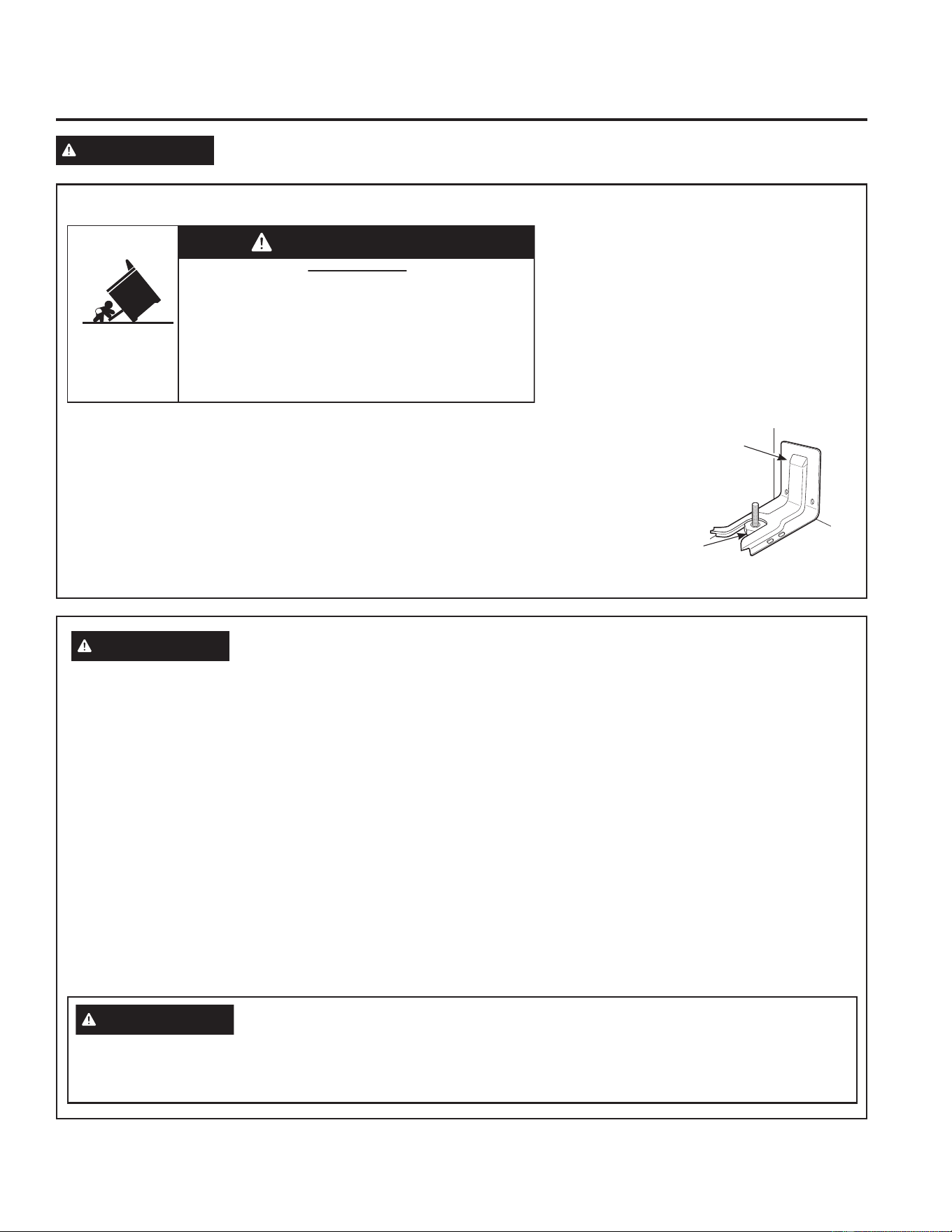
49-2000990 Rev. 5 3
LEA Y GUARDE ESTAS INSTRUCCIONES
INFORMACIÓN IMPORTANTE DE SEGURIDAD
LEA TODAS LAS INSTRUCCIONES ANTES DE USAR ESTE ELECTRODOMÉSTICO
INFORMACIÓN DE SEGURIDAD
ADVERTENCIA
Lea todas las instrucciones de seguridad antes de utilizar este producto. No seguir estas instrucciones
puede generar un incendio, una descarga eléctrica, lesiones corporales o la muerte.
DISPOSITIVO ANTI-VOLCADURAS
Para reducir el riesgo de volcar la estufa,
ésta debe sujetarse mediante un soporte anti-
volcaduras con una adecuada instalación. Ver
las instrucciones de instalación enviadas con el
soporte para obtener detalles completos antes
de iniciar la instalación.
Para Estufas Sin Apoyo y Deslizabless
Para controlar si el soporte es instalado y
ajustado de forma apropiada, mire que debajo
de la estufa la pata niveladora trasera esté
ajustada al soporte. En algunos modelos, el cajón de almacenamiento o el panel de protección se pueden retirar para una
fácil inspección. Si no es posible realizar una inspección visual, deslice la estufa hacia
adelante, confirme que el soporte anti-volcaduras esté ajustado de forma segura al
piso o la pared, y deslice la estufa hacia atrás de modo que la pata niveladora trasera
se encuentre debajo del soporte anti-volcaduras.
Si la estufa es expulsada de la pared por alguna razón, siempre repita este
procedimiento a fin de verificar que esté asegurado de forma correcta con un soporte
anti volcaduras.
Nunca quite las patas de nivelación por completo ya que la estufa no quedará bien
sujeta al dispositivo anti-volcaduras.
Soporte
Anti-Volcaduras
Pata
Niveladora
Estufas Sin Apoyo y Deslizables
• Un niño o adulto pueden volcar la estufa y morir.
• Instale el soporte anti-volcaduras sobre la pared o el piso.
•
Asegúrese la estufa al soporte anti-volcaduras deslizando
la unidad hacia atras de tal manera que la pata niveladora
sea enganchada.
• Vuelva a adherir el soporte anti-volcaduras si la estufa
se mueve de lugar.
• Si esto no se hace, se podrá producir la muerte o
quemaduras graves en niños o adultos.
Riesgo de Caída
ADVERTENCIA
ADVERTENCIA
INSTRUCCIONES GENERALES DE SEGURIDAD
Esta unidad ha sido probada y cumple con los límites
establecidos para un dispositivo digital de clase B, de
acuerdo con la Parte 18 de la Normativa de la FCC. Estos
límites han sido diseñados para ofrecer una protección
razonable contra interferencias perjudiciales en la
instalación residencial. Este equipo genera, usa y puede
emitir energía de radiofrecuencia y, si no se instala y
utiliza de acuerdo con las instrucciones, puede ocasionar
interferencias perjudiciales para las comunicaciones de
radio. Sin embargo, no se garantiza que no se presenten
interferencias en una instalación en particular. Si el equipo
provoca interferencias perjudiciales para la recepción de
radio o televisión, lo que puede comprobar encendiendo
y apagando el equipo, se aconseja al usuario que intente
corregir la interferencia con una o más de las siguientes
medidas:
Ŷ 5HRULHQWHRUHXELTXHODDQWHQDUHFHSWRUD
Ŷ $XPHQWHODGLVWDQFLDHQWUHODXQLGDG\HOUHFHSWRU
Ŷ &RQHFWHODXQLGDGDXQWRPDFRUULHQWHGHXQFLUFXLWR
diferente del tomacorriente al que se encuentra
conectado el receptor.
Ŷ 8VHHVWHHOHFWURGRPpVWLFRVyORSDUDVXSURSyVLWRRULJLQDO
como se describe en este Manual del Propietario.
Ŷ ROLFLWHTXHXQLQVWDODGRUFDOLILFDGRLQVWDOHVXHVWXID\TXH
esté adecuadamente conectada a tierra, de acuerdo con
las instrucciones de instalación provistas.
Ŷ &XDOTXLHUDMXVWH\WUDEDMRGHOVHUYLFLRWpFQLFRGHEHUiVHU
realizado únicamente por un instalador calificado o por
un técnico del servicio. No intente reparar o reemplazar
ninguna parte de la estufa, a menos que se recomiende
específicamente en este manual.
Ŷ $QWHVGHUHDOL]DUFXDOTXLHUFODVHGHUHSDUDFLyQ
desenchufe la estufa o desconecte el suministro eléctrico
desde el panel de distribución doméstico quitando el
fusible o desconectando el interruptor de circuitos.
Ŷ 1RGHMHDORVQLxRVVRORVpVWRVQRGHEHQTXHGDUVRORV
o sin atención en un área donde un aparato esté en uso.
Nunca debe permitirse que se suban, sienten o paren en
cualquier parte de este aparato.
PRECAUCIÓN
Aquellas personas que usen marcapasos o un dispositivo médico similar deberán tener cuidado
al usar o permanecer cerca de una unidad de inducción mientras ésta se encuentre en funcionamiento. El campo
electromagnético podrá afectar el trabajo del marcapasos o del dispositivo médico similar. Se recomienda consultar a su
médico o al fabricante del marcapasos sobre su situación específica.
4 49-2000990 Rev. 5
LEA Y GUARDE ESTAS INSTRUCCIONES
INFORMACIÓN DE SEGURIDAD
INFORMACIÓN IMPORTANTE DE SEGURIDAD
LEA TODAS LAS INSTRUCCIONES ANTES DE USAR ESTE ELECTRODOMÉSTICO
ADVERTENCIA
MANTENGA LOS MATERIALES INFLAMABLES ALEJADOS DE LA ESTUFA
Si esto no se cumple, se podrán sufrir lesiones personales graves o incendios.
Ŷ 1RDOPDFHQHRXWLOLFHPDWHULDOHVLQIODPDEOHVGHQWURGH
un horno o cerca de la estufa, tales como papel, plástico,
agarraderas, telas, recubrimientos de pared, cortinas y
gasolina u otros vapores y líquidos inflamables.
Ŷ 1XQFDXVHYHVWLPHQWDVKROJDGDVRDPSOLDVPLHQWUDV
utilice el aparato. Estas vestimentas pueden prenderse
fuego si entran en contacto con superficies calientes,
provocando quemaduras graves.
Ŷ 1RSHUPLWDTXHODJUDVDGHODFRFFLyQXRWURVPDWHULDOHV
inflamables se acumulen dentro de la estufa o en su
cercanía. La grasa dentro del horno o sobre la estufa
puede encenderse.
ADVERTENCIA
INSTRUCCIONES GENERALES DE SEGURIDAD (Cont.)
Ŷ
PRECAUCIÓN
No almacene elementos de
interés para niños sobre una estufa o en la protección
trasera de una estufa: los niños que se trepan a la estufa
para alcanzar elementos pueden resultar gravemente
heridos.
Ŷ 6yORXVHDJDUUDGHUDVVHFDVODVDJDUUDGHUDVK~PHGDV
o mojadas colocadas en superficies calientes pueden
provocar quemaduras de vapor. No permita que las
agarraderas entren en contacto con unidades de superficie
o los elementos calentadores calientes. No utilice toallas u
otras telas gruesas en lugar de una agarradera.
Ŷ 1XQFDXVHVXHOHFWURGRPpVWLFRSDUDFDOHQWDUODKDELWDFLyQ
Ŷ $VHJ~UHVHGHTXHWRGRVORVPDWHULDOHVGHHPEDODMHVHDQ
retirados de la estufa antes de su uso, a fin de evitar que
estos materiales se incendien.
Ŷ 1RXVHQLQJ~QWLSRGHSDSHOGHDOXPLQLRRUHYHVWLPLHQWR
para cubrir la parte inferior del horno o cualquier parte
del horno, excepto como se describe en este manual.
Los revestimientos para horno pueden atrapar el calor
o derretirse, ocasionando daños sobre el producto y el
riesgo de descarga, humo o incendio.
Ŷ 1RXVHHOKRUQRVLXQHOHPHQWRSDUDFDOHQWDUGHVDUUROOD
una mancha brillante durante el uso o muestra otros
VLJQRVGHGDxRV8QDPDQFKDEULOODQWHLQGLFDTXHOD
unidad de la superficie puede fallar y generar una posible
quemadura, incendio o descarga eléctrica. Apague el
elemento para calentar de inmediato y solicítele a un
técnico calificado del servicio que reemplace la misma
Ŷ 1RWRTXHODVXQLGDGHVGHVXSHUILFLHORVHOHPHQWRV
calentadores o la superficie interior del horno. Estas
superficies pueden estar lo suficientemente calientes para
quemar aún cuando tengan un color oscuro. Durante
y después del uso, no toque o deje que su vestimenta
u otros materiales inflamables entren en contacto con
unidades de superficie, áreas cercanas a las unidades
GHVXSHUILFLHRFXDOTXLHUiUHDLQWHULRUGHOKRUQRGHMH
pasar un tiempo prudencial para que se enfríen. Otras
superficies del aparato pueden calentarse lo suficiente
como para provocar quemaduras. Las superficies
potencialmente calientes incluyen la estufa, las áreas
orientadas hacia la estufa, la abertura de ventilación
del horno, las superficies cercanas a la abertura y las
hendiduras ubicadas alrededor de la puerta del horno.
Ŷ 1RFDOLHQWHUHFLSLHQWHVFHUUDGRVGHDOLPHQWRV3RGUtD
haber una acumulación de presión en el recipiente y éste
podría explotar, provocando lesiones.
Ŷ Trate de no rayar o golpear las puertas, estufas o
paneles de control de vidrio. Si lo hace podría romperse
el vidrio. No cocine si un producto tiene un vidrio roto.
Puede provocarse una descarga, un incendio o heridas.
Comuníquese con un técnico calificado de inmediato.
Ŷ &RFLQHODFRPLGDFRPSOHWDPHQWHSDUDHYLWDUTXHVH
produzcan enfermedades a partir de la comida. Podrá
encontrar recomendaciones sobre temperatura mínima
segura de la comida en IsItDoneYet.gov y en fsis.usda.
JRY8VHXQWHUPyPHWURSDUDODFRPLGDSDUDFDOFXODUVX
temperatura y realizar controles en diferentes áreas.
Ŷ 1RSHUPLWDTXHQDGLHVHWUHSHSDUHRFXHOJXHGHOD
puerta del horno, del cajón o la superficie de cocción. Se
podrá dañar la estufa o provocar su caída, ocasionando
lesiones graves o la muerte.
Ŷ Funcionamiento Remoto - Este electrodoméstico
permite su configuración para un funcionamiento remoto
en cualquier momento. No guarde ningún material
inflamable o ítems sensibles a la temperatura dentro,
sobre o cerca de las unidades de la superficie del
electrodoméstico.
49-2000990 Rev. 5 5
LEA Y GUARDE ESTAS INSTRUCCIONES
INFORMACIÓN DE SEGURIDAD
INFORMACIÓN IMPORTANTE DE SEGURIDAD
LEA TODAS LAS INSTRUCCIONES ANTES DE USAR ESTE ELECTRODOMÉSTICO
ADVERTENCIA
INSTRUCCIONES DE SEGURIDAD DEL HORNO
Ŷ 0DQWHQJDGHVREVWUXLGDODYHQWLODFLyQGHOKRUQR
Ŷ 0DQWpQJDVHDOHMDGRGHOKRUQRDODEULUODSXHUWDGHO
mismo. El aire caliente o el vapor que sale puede causar
quemaduras en las manos, rostro y/u ojos.
Ŷ &RORTXHORVHVWDQWHVGHOKRUQRHQODXELFDFLyQGHVHDGD
mientras éste se encuentra frío. Si es necesario mover
el estante mientras el horno está caliente, evite que
el mango de la olla tenga contacto con el elemento
calentador en el horno.
Ŷ 1XQFDFRORTXHORVXWHQVLOLRVGHHVWXIDSLHGUDVSDUD
pizza u horneado o cualquier otro tipo de aluminio o
cobertor en la base del horno. Estos ítems pueden
atrapar el calor o derretirse, ocasionando daños sobre el
producto y el riesgo de descargas, humo o incendios.
Ŷ 1RGHMHSURGXFWRVWDOHVFRPRSDSHOXWHQVLOLRVGHHVWXIDQL
comida en el horno cuando éste no se encuentre en uso.
Los artículos guardados en el horno se pueden incendiar.
ADVERTENCIA
EN CASO DE INCENDIO, SIGA LOS SIGUIENTES PASOS
PARA EVITAR LA PROPAGACIÓN DEL FUEGO
Ŷ 1RXWLOLFHDJXDHQLQFHQGLRVGHJUDVD1XQFDOHYDQWH
una sartén en llamas. Apague los controles. Apague
una sartén en llamas sobre una unidad de superficie
cubriendo la sartén por completo con una tapa que
ajuste bien, una plancha para galletas o una bandeja
SODQD8WLOLFHXQTXtPLFRVHFRPXOWLXVRRXQH[WLQWRUGH
incendios de espuma.
Ŷ 6LKD\XQLQFHQGLRHQHOKRUQRGXUDQWHHOKRUQHDGR
apáguelo cerrando la puerta del horno y apagando el
control o usando un químico seco multiuso o un extintor
de incendios de espuma.
Ŷ 6LKD\XQLQFHQGLRHQHOKRUQRGXUDQWHODDXWROLPSLH]D
apague el horno y espere a que el incendio se consuma.
No abra la puerta del horno a la fuerza. El ingreso de aire
fresco a temperaturas de auto-limpieza puede provocar
una explosión de llamas desde el horno. No seguir esta
instrucción puede provocar quemaduras graves.
ADVERTENCIA
INSTRUCCIONES DE SEGURIDAD DE LA ESTUFA
Ŷ 1XQFDGHMHODVXQLGDGHVGHVXSHUILFLHVLQDWHQFLyQ/RV
alimentos que hierven y se derraman pueden provocar
humo y derrames grasosos que pueden prenderse fuego.
Ŷ 1XQFDGHMHDFHLWHVLQDWHQFLyQPLHQWUDVIUtH6LVH
deja calentar más allá del punto de humeo, el aceite
puede encenderse, provocando un incendio que
SRGUtDSURSDJDUVHDORVJDELQHWHVFHUFDQRV8WLOLFHXQ
termómetro para grasa cuando sea posible para controlar
la temperatura del aceite.
Ŷ 3DUDHYLWDUHOGHUUDPHGHDFHLWH\XQLQFHQGLRXWLOLFHXQD
cantidad mínima de aceite cuando fría en sartenes poco
profundas y evite la cocción de alimentos congelados con
una cantidad excesiva de hielo.
Ŷ 6yORFLHUWRVWLSRVGHUHFLSLHQWHVGHYLGULRYLGULRFHUiPLFR
cerámica, u otros recipientes vidriados pueden utilizarse
VREUHODHVWXIDRWURVSXHGHQURPSHUVHGHELGRDOFDPELR
repentino de temperatura.
Ŷ 3DUDPLQLPL]DUODSRVLELOLGDGGHTXHPDGXUDVHO
encendido de materiales inflamables y los derrames, la
manija de los recipientes deben girarse hacia el centro
de la estufa sin extenderse sobre ninguna unidad de
superficie cercana.
Ŷ 6LIODPEHDDOLPHQWRVEDMRODFDPSDQDHQFLHQGDHO
ventilador.
Ŷ Evite rayar la estufa de vidrio. La estufa puede rayarse
con elementos tales como cuchillos, instrumentos filosos,
anillos u otras joyas, y remaches de la ropa.
Ŷ 8VHXQSURGXFWRGHOLPSLH]DSDUDVXSHUILFLHVGHFRFFLyQ
de cerámica y una almohadilla no abrasiva para limpiar
la superficie de cocción. Espere hasta que la superficie
de cocción se enfríe y que la luz indicadora se apague
DQWHVGHUHDOL]DUODOLPSLH]D8QDHVSRQMDRXQDWHOD
húmeda sobre una superficie caliente podrán ocasionar
quemaduras con vapor. Algunos productos de limpieza
pueden producir gases nocivos si se aplican sobre una
superficie caliente.
Ŷ Tenga cuidado al tocar la estufa. La superficie de vidrio
de la estufa retendrá calor después de que los controles
se hayan apagado.
Ŷ No cocine sobre una estufa rota. Si la estufa se rompe, las
soluciones de limpieza y los derrames pueden penetrar
en la estufa rota y crear un riesgo de descarga eléctrica.
Comuníquese con un técnico calificado de inmediato.
Ŷ 1RSHUPLWDTXHQDGLHVHWUHSHSDUHRFXHOJXHGHOD
puerta del horno, del cajón o la superficie de cocción. Se
podrá dañar la estufa o provocar su caída, ocasionando
lesiones graves o la muerte.
PRECAUCIÓN
Los elementos de cocción por
inducción podrán parecer estar fríos mientras estén en
ON (Encendido) y luego de estar en OFF (Apagado). La
superficie de vidrio podrá estar CALIENTE debido al calor
residual transferido desde el utensilio y se podrán producir
quemaduras.

6 49-2000990 Rev. 5
LEA Y GUARDE ESTAS INSTRUCCIONES
INFORMACIÓN DE SEGURIDAD
INFORMACIÓN IMPORTANTE DE SEGURIDAD
LEA TODAS LAS INSTRUCCIONES ANTES DE USAR ESTE ELECTRODOMÉSTICO
ADVERTENCIA
INSTRUCCIONES DE SEGURIDAD DEL HORNO CON LIMPIEZA
AUTOMÁTICA
La función de limpieza automática usa el horno en temperaturas lo suficientemente altas como para consumir la suciedad de
comida que haya dentro del horno. Para un funcionamiento seguro, siga estas instrucciones.
Ŷ 1RWRTXHODVVXSHUILFLHVGHOKRUQRGXUDQWHHOFLFORGH
limpieza automática. Mantenga a los niños alejados del
horno durante la limpieza automática. Si no se siguen
estas instrucciones, se podrán producir quemaduras.
Ŷ $QWHVGHXWLOL]DUHOFLFORGHOLPSLH]DDXWRPiWLFDUHWLUH
las ollas, estantes de metal brillante del horno y otros
utensilios que haya en el horno. Sólo se pueden dejar
dentro del horno los estantes para horno cubiertos de
porcelana. No use la función de limpieza automática
para limpiar otras partes, tales como ollas de goteo o
recipientes.
Ŷ $QWHVGHXWLOL]DUHOFLFORGHOLPSLH]DDXWRPiWLFDOLPSLH
ODJUDVD\UHVWRVGHFRPLGDTXHKD\DHQHOKRUQR8QD
cantidad excesiva de grasa se puede incendiar, lo cual
puede producir daños con humo en su hogar.
Ŷ 6LHOPRGRGHOLPSLH]DDXWRPiWLFDIXQFLRQDGHIRUPD
incorrecta, apague el horno y desconecte el suministro de
corriente. Solicite el servicio de un técnico calificado.
Ŷ 1ROLPSLHODMXQWDGHODSXHUWD/DMXQWDGHODSXHUWDHV
esencial para un buen sellado. Se debe tener cuidado de
no frotar, dañar ni mover la junta.
Ŷ 1RXVHOLPSLDGRUHVSDUDKRUQR1RVHGHEHUiXVDU
limpiadores comerciales para horno ni revestimientos de
protección para hornos de ningún tipo en o alrededor de
cualquier parte del horno.
Equipo de Acceso Remoto Instalado
Este dispositivo cumple con la Parte 15 de la Normativa de
la FCC. Su funcionamiento está sujeto a las dos condiciones
siguientes: (1) Este dispositivo no podrá ocasionar
interferencias nocivas, y (2) este dispositivo debe aceptar
cualquier interferencia recibida, incluyendo interferencias que
puedan ocasionar un funcionamiento no deseado.
El equipo de comunicación inalámbrica instalado en esta
estufa fue probado y cumple con los límites establecidos
para un dispositivo digital de Clase B, según la parte 15 de la
Normativa de la FCC. Estos límites fueron diseñados para:
(a) brindar una protección razonable contra interferencias
nocivas en una instalación residencial. Este equipo genera,
usa y puede emitir energía de radiofrecuencia y, si no se
instala y utiliza de acuerdo con las instrucciones, puede
ocasionar interferencias perjudiciales en las comunicaciones
de radio. Sin embargo, no se garantiza que no se presenten
interferencias en una instalación en particular. Si el equipo
provoca interferencias perjudiciales para la recepción de radio
o televisión, lo cual puede comprobar encendiendo y apagando
el equipo, se aconseja al usuario que intente corregir la
interferencia con una de las siguientes medidas:
Ŷ 5HRULHQWHRUHXELTXHODDQWHQDUHFHSWRUD
Ŷ $XPHQWHODVHSDUDFLyQHQWUHHOHTXLSR\HOUHFHSWRU
Ŷ &RQHFWHHOHTXLSRDXQWRPDFRUULHQWHGHXQFLUFXLWRGLIHUHQWH
del tomacorriente al que se encuentra conectado el receptor.
Ŷ 3DUDVROLFLWDUD\XGDFRQVXOWHFRQHOSURYHHGRUPLQRULVWDRD
un técnico experimentado de radio/ TV.
(b) tolerar cualquier interferencia recibida, incluyendo las
interferencias que puedan provocar un funcionamiento no
deseado del dispositivo.
Observe que todos los cambios o modificaciones sobre el
dispositivo de comunicación inalámbrico instalado en este horno
que no estén expresamente aprobados por el fabricante podrían
anular la autoridad del usuario para operar el equipamiento.
49-2000990 Rev. 5 7
LEA Y GUARDE ESTAS INSTRUCCIONES
INFORMACIÓN DE SEGURIDAD
INFORMACIÓN IMPORTANTE DE SEGURIDAD
LEA TODAS LAS INSTRUCCIONES ANTES DE USAR ESTE ELECTRODOMÉSTICO
Cómo Retirar la Película Protectora de Envío y la Cinta de Embalaje
Con cuidado tome un extremo de la película protectora
de envío con los dedos y lentamente retire la misma de la
superficie del electrodoméstico. No utilice ningún producto
filoso para retirar la película. Retire toda la película antes de
usar el electrodoméstico por primera vez.
Para asegurar que no haya daños sobre el acabado del
producto, la forma más segura de retirar el adhesivo de la cinta
de embalaje en electrodomésticos nuevos es aplicando un
detergente líquido hogareño para lavar platos. Aplique con una
tela suave y deje que se seque.
NOTA: El adhesivo deberá ser eliminado de todas las partes.
No se puede retirar si se hornea con éste dentro.
Tenga en cuenta las opciones de reciclaje del material de
embalaje de su electrodoméstico.
Interferencia de Frecuencias Radiales
Esta unidad se ha puesto a prueba y se ha determinado que
cumple con los límites de un dispositivo digital de clase B,
de conformidad con la Parte 18 de las normas de la FCC.
Estos límites están diseñados para brindar una protección
razonable contra interferencia dañina dentro de una instalación
residencial. Esta unidad genera, utiliza y puede irradiar energía
de frecuencia de radio y, si no se instala y usa de acuerdo con
las instrucciones, puede provocar una interferencia dañina a
las comunicaciones de radio. Sin embargo, no hay garantía de
que no haya interferencia en una instalación determinada. Si la
unidad provoca interferencia nociva a la recepción de radio y
televisión, lo que puede determinarse encendiendo y apagando
la unidad, el usuario puede corregir la interferencia a través de
una o más de las siguientes medidas:
Ŷ 5HRULHQWHRFDPELHODSRVLFLyQGHODVDQWHQDVUHFHSWRUDV
Ŷ ,QFUHPHQWHODGLVWDQFLDHQWUHODXQLGDG\HOUHFHSWRU
Ŷ &RQHFWHODXQLGDGDXQWRPDFRUULHQWHRXQFLUFXLWRGLIHUHQWH
del que está usando el receptor.
PRECAUCIÓN
Las personas que utilicen un
marcapasos o un dispositivo médico similar deben tener
cuidado cuando utilicen y se encuentren cerca de una
unidad por inducción. El campo electromagnético puede
afectar el funcionamiento del marcapasos o del dispositivo
médico similar. Es recomendable consultar a su médico o
al fabricante del marcapasos sobre su situación particular.
Ŷ8VHHVWHDSDUDWRVyORFRQHOREMHWLYRSDUDHOTXHIXHFUHDGR
como se describe en este Manual del Propietario.
Ŷ $VHJ~UHVHGHTXHXQWpFQLFRFDOLILFDGRUHDOLFHXQDFRUUHFWD
instalación y puesta a tierra del artefacto de acuerdo con las
instrucciones de instalación provistas.
Ŷ 1RLQWHQWHUHSDUDURFDPELDUQLQJXQDSLH]DGHVXHVWXID
a menos que esté específicamente recomendado en este
manual. Cualquier otro servicio debe realizarlo un técnico
calificado.
FORMA ADECUADA DE DESCARTAR SU ELECTRODOMÉSTICO
Descarte o recicle su electrodoméstico de acuerdo con las Regulaciones Federales y Locales. Comuníquese con las
autoridades locales para descartar o reciclar su electrodoméstico de forma ambientalmente segura.
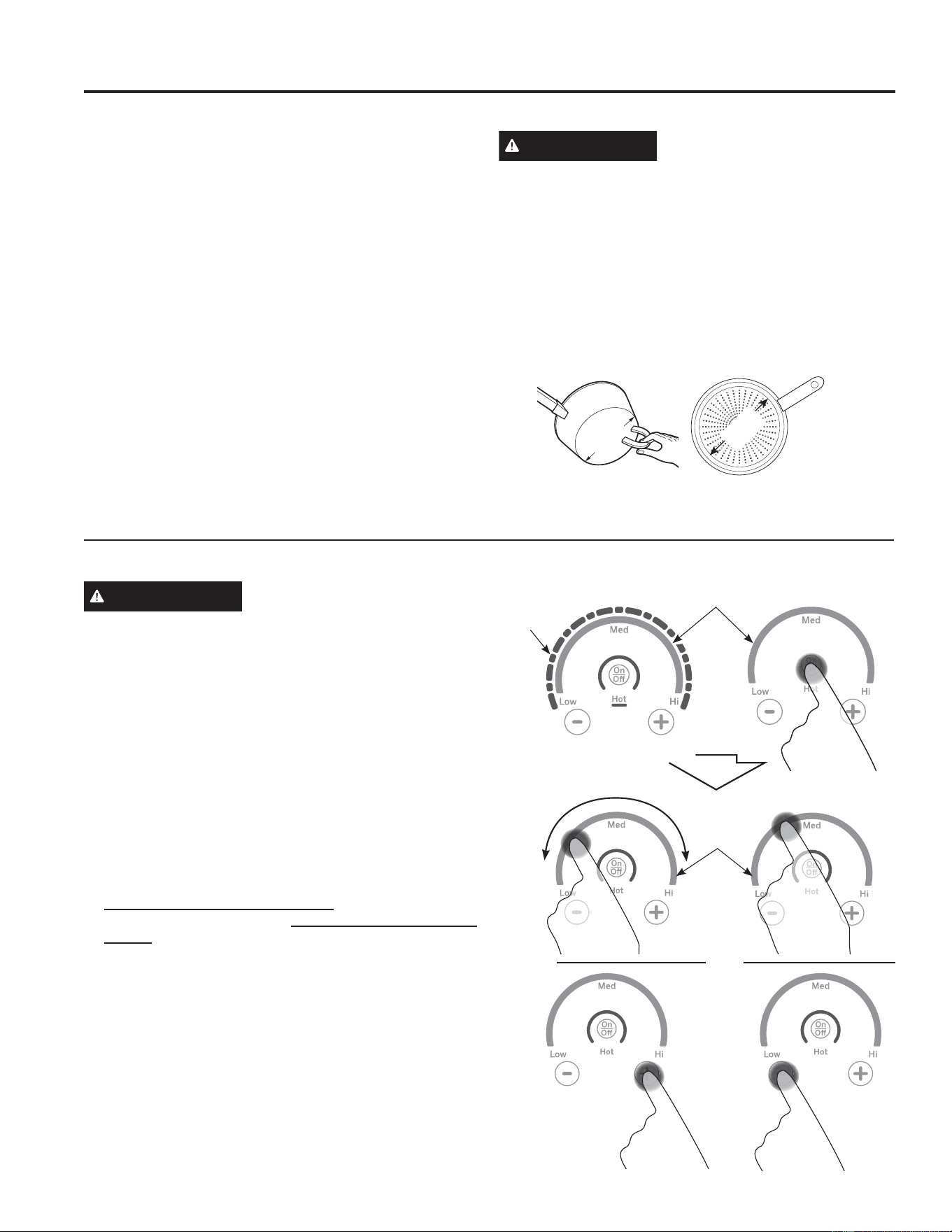
8 49-2000990 Rev. 5
Uso de los Elementos de la Superficie de Cocción
ADVERTENCIA
RIESGO DE INCENDIO: Nunca
pierda de vista la estufa cuando la estufa esté en las
configuraciones medio o alto. Mantenga los ítems inflamables
alejados de la estufa. Apague todos los controles cuando
finalice la cocción. Si no se siguen estas instrucciones se
podrá producir incendios, lesiones graves o la muerte.
Antes de usar la estufa por primera vez, límpiela con el
limpiador de estufas cerámicas. Esto ayuda a proteger la estufa
y hace la limpieza más sencilla.
Encienda el elemento(s): Coloque su utensilio diseñado
por inducción sobre la superficie de cocción. Mantenga
presionada la tecla On/Off (Encendido/ Apagado) durante
aproximadamente medio segundo. Se podrá escuchar un
repique cada vez que se presione una tecla.
El nivel de potencia puede ser seleccionado de cualquiera de
las siguientes formas:
1. Deslice su dedo sobre el arco gris (en los gráficos) hasta
el nivel de potencia deseado. No hay sensor en las luces
LEDR
2. Presione En Cualquier ParteGHODUFRJULVR
3. Presione las teclas + o –SDUDDMXVWDUHOQLYHOGHSRWHQFLDR
4. Atajo hasta Hi (Alto): inmediatamente luego de encender la
unidad, presione la tecla +R
5. Atajo hasta Low (Bajo): Inmediatamente luego de encender
la unidad, presione la tecla -.
USO DE LA ESTUFA:8QLGDGHVGHVXSHUILFLH
Unidades de superficie
Área de Paso
de Arcos
Grises
Luces
LED
Área de Paso de Arcos Grises
Cómo funciona la superficie de cocción por inducción
Los campos magnéticos inducen una pequeña cantidad de
corriente en la olla. Los elementos que se encuentran debajo
de la superficie de cocción producen un campo magnético que
genera calor sobre las ollas de metal ferroso que se encuentran
cerca.
La superficie de cocción misma no se calienta. El calor se
produce en el recipiente de cocción y no puede generarse
hasta que se coloque el recipiente en la superficie de cocción.
Cuando se activa el elemento, el recipiente comienza a
calentarse de inmediato y a su vez calienta el contenido del
recipiente.
La cocción por inducción magnética requiere el uso de
UHFLSLHQWHVGHFRFFLyQKHFKRVGHPHWDOHVIHUURVRVPHWDOHVD
los que se adhieren los imanes, como hierro o acero.
8WLOLFHUHFLSLHQWHVTXHVHDMXVWHQDOWDPDxRGHOHOHPHQWR/D
olla deberá ser lo suficientemente larga para que el elemento
detecte la olla y pueda generar la totalidad de su energía.
La superficie de cocción no funcionará si un pequeño utensilio
de metal o acero, tal como una espátula metálica, una cuchara
de estufa, un cuchillo u otro utensilio pequeño, es colocado
sobre la superficie de cocción cuando la unidad es encendida.
PRECAUCIÓN
Ŷ Los elementos de cocción por inducción pueden parecer
fríos cuando están encendidos (ON) y después de haber
sido apagados (OFF). La superficie de vidrio puede estar
CALIENTE debido a calor residual transferido del recipiente
de cocción y pueden provocarse quemaduras.
Ŷ 127248(5(&,3,(17(6'(&2&&,Ï1&$/,(17(6
directamente con sus manos. Siempre use guantes de estufa
o agarraderas para proteger las manos de quemaduras.
Ŷ 12'(6/,&(UHFLSLHQWHVGHFRFFLyQDWUDYpVGH
la superficie de la estufa. Hacerlo puede dañar
permanentemente la apariencia de la estufa de cerámica.
8WLOLFHHOUHFLSLHQWHGHWDPDxRPtQLPRSDUDHO
elemento. El material del recipiente de cocción es el
correcto si un imán puede pegarse a la base.
Tamaño
Mín.
Tamaño
Mín.
O
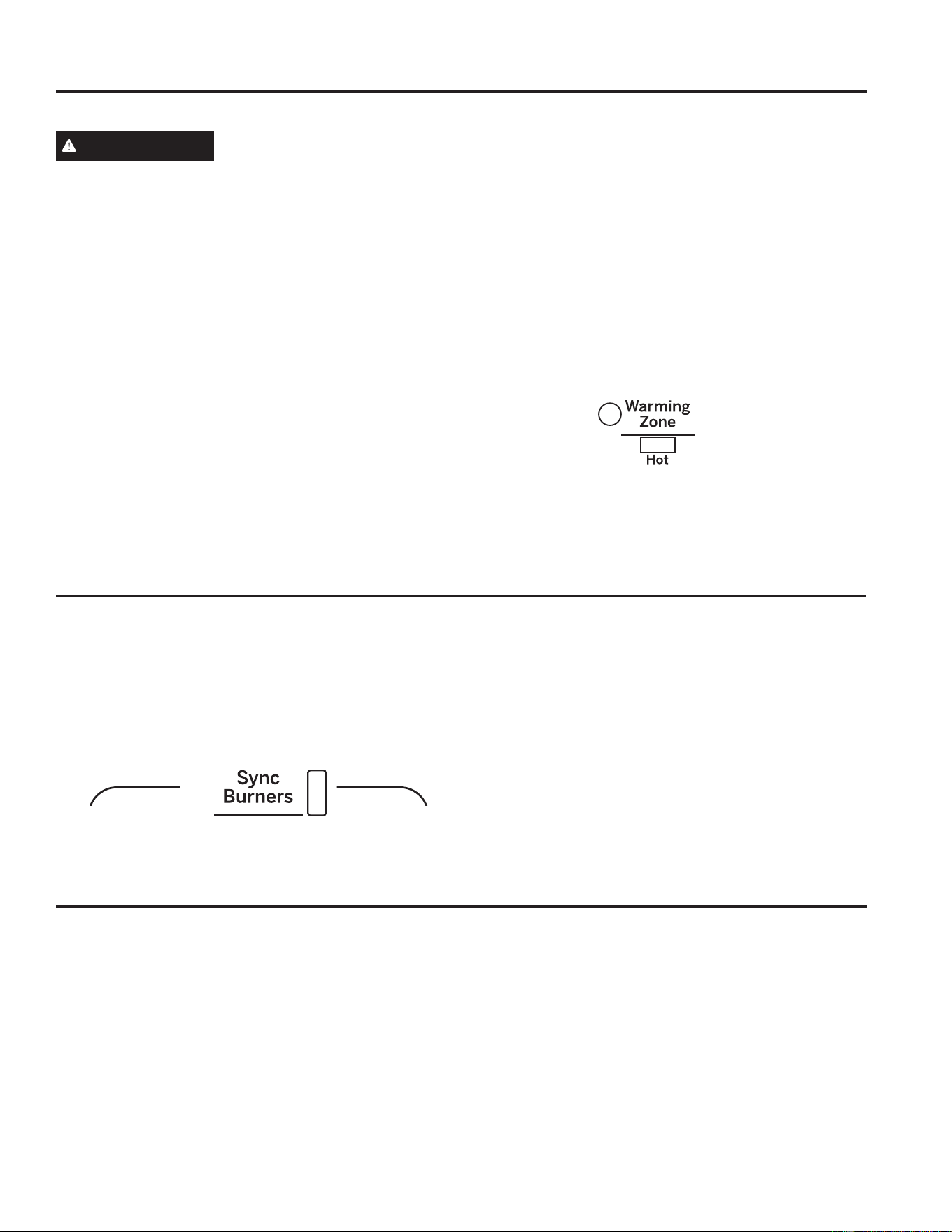
49-2000990 Rev. 5 9
USO DE LA ESTUFA:8QLGDGHVGHVXSHUILFLH
Unidades de superficie (Continúa)
Uso del Área para Calentar
ADVERTENCIA
RIESGO DE ENVENENAMIENTO CON COMIDA: Se pueden
desarrollar bacterias cuando la comida esté a una temperatura
inferior a los 140º.
Ŷ 6LHPSUHFRPLHQFHFRQFRPLGDFDOLHQWH1RXVHOD
configuración caliente para calentar comida fría.
Ŷ 1RXVHODFRQILJXUDFLyQFDOLHQWHGXUDQWHPiVGHKRUDV
WARMING ZONE (Área para Calentar), ubicada en la parte
central trasera de la superficie de vidrio, mantendrá la comida
caliente y cocida a la temperatura para servir. Siempre
comience con comida caliente. No use la función para calentar
comida fría. Colocar comida que no está cocinada o fría en
el WARMING ZONE (Área para Calentar) podría producir
enfermedades desarrolladas por bacterias en la comida.
Para usar la función WARMING ZONE (Área para Calentar):
Presione la tecla WARMING ZONE (Área para Calentar),
seleccione el nivel deseado (Bajo, Medio o Alto) usando la
pantalla LCD.
Para apagar la función WARMING ZONE
(Área para Calentar):
Presione la tecla WARMING ZONE (Área para Calentar).
NOTA: Cancel/Off (Cancelar/ Apagar) NO apagará la función
del área para calentar.
Para obtener mejores resultados, todas las comidas en el
WARMING ZONE (Área para Calentar) deberían estar
cubiertas por una tapa o papel de aluminio. Al calentar
pasteles o panes, la tapa se deberá ventilar para dejar que la
humedad salga.
La temperatura inicial, el tipo y la cantidad de comida, el tipo
de pan y el tiempo afectarán la calidad de la comida.
Siempre use las manijas de las ollas o guantes para horno al
retirar comida del WARMING ZONE (Área para Calentar) ya
que los utensilios y platos estarán calientes.
NOTA: El calentador superficial emitirá un brillo rojo.
Cómo Sincronizar los Elementos Izquierdos
Para Encender
Mantenga la tecla Sync Burners (Quemadores
Sincronizados) por aproximadamente medio segundo para
FRQHFWDUORVGRVHOHPHQWRV8WLOLFHFXDOTXLHUDGHHVWRV
HOHPHQWRVFRPRVHGHVFULEHHQ8VRGHORV(OHPHQWRVGHOD
Superficie de Cocción para ajustar el nivel de potencia.
Para Apagar
1. Presione la tecla On/ Off (Encender/ Apagar) de uno
de los elementos para apagar la función Sync Burners
(Quemadores Sincronizados).
o
2. Presione Sync Burners (Quemadores Sincronizados)
para apagar ambos elementos.
Cocción de Precisión
La función Precision Cooking (Cocción de Precisión) permite
un control de temperatura preciso para obtener mejores
resultados. Esta función se podrá usar con dispositivos de
cocción emparejados por Bluetooth en cualquiera de los
quemadores. Sólo un quemador podrá funcionar en el modo
de cocción de precisión por vez.
Emparejamiento de un Dispositivo con
Bluetooth
®
Para emparejar el dispositivo Bluetooth, consulte la sección de
Configuraciones en el Manual del Propietario.
Para Estufas Conectadas a WiFi
Si la estufa está conectada a Wi-Fi, entonces la temperatura
de la función Precision Cooktop (Superficie de Cocción de
3UHFLVLyQVHSRGUiFRQILJXUDUGHVGHODDSOLFDFLyQ6PDUW+4
mobile desde el control del quemador. En cualquier momento,
el control del quemador se podrá usar para apagar o anular
una configuración de temperatura. Consulte Configuraciones -
Wi-Fi y Acceso Remoto.
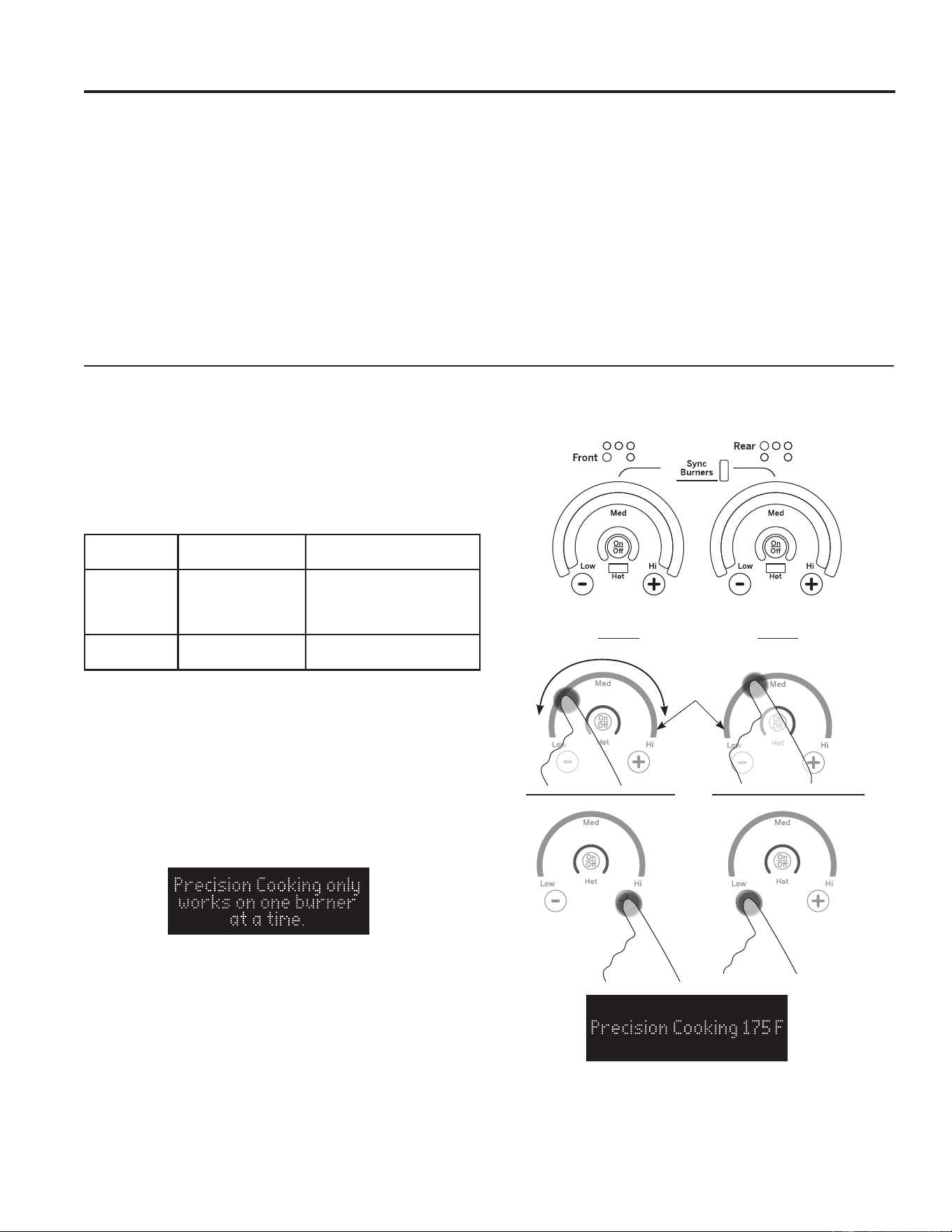
10 49-2000990 Rev. 5
Cocción de Precisión (Cont.)
Use la función Precision Cooking (Cocción de Precisión) con la Sonda de Precisión
Bluetooth Compatible o el Utensilio Hestan Cue
®
.
La estufa puede tener comunicación a través de Bluetooth con
accesorios inteligentes tales como el utensilio Hestan Cue®
o la Sonda de Precisión. Cada accesorio inteligente deberá
ser emparejado con la estufa, a fin de establecer la conexión
Bluetooth.
A fin de emparejar un dispositivo Bluetooth con la estufa,
presione la tecla Settings (Configuraciones) y seleccione
Bluetooth. Seleccione Pair (Emparejar) y active su dispositivo
para iniciar el modo de emparejamiento de dispositivos.
Consulte la siguiente tabla para acceder a instrucciones
específicas de cada dispositivo.
8QDYH]HPSDUHMDGRHOXWHQVLOLR+HVWDQ&XH\OD6RQGDGH
Precisión estarán disponibles como una opción de la función
Precision Cooking (Cocción de Precisión) para cualquier
quemador. Se podrán emparejar múltiples accesorios
inteligentes. Se le indicará que elija activar uno cada vez que
use Precision Cooking (Cocción de Precisión). (La Cocción
de Precisión no está disponible en el área de calentamiento).
Sólo un quemador podrá funcionar en un modo de Cocción de
Precisión por vez.
Use la función Precision Cooking (Cocción de Precisión) con la Sonda de Precisión o el
Utensilio Hestan Cue
®
.
1. El quemador se deberá apagar para comenzar.
2. Gire la perilla a la función Precision Cooking (Cocción de
Precisión) sobre el quemador que desee usar.
3. Active el utensilio de acuerdo con la tabla de instrucciones
de activación.
4. Gire la perilla en sentido horario hasta la temperatura
GHVHDGDGHOXWHQVLOLRRXVHODDSOLFDFLyQ6PDUW+4SDUD
configurar la temperatura, de acuerdo con las instrucciones
que figuran más arriba para la aplicación y el control local
NOTA: Sólo un quemador podrá funcionar en un modo de
Cocción de Precisión por vez. Si se intenta usar otro modo
de Cocción de Precisión, el quemador en el cual se esté
usando la Cocción de Precisión parpadeará, y se visualizará el
siguiente mensaje de error.
Dispositivos
Compatibles Cómo Activarlos
Control con esta
Aplicación
8WHQVLOLRVGH
estufa Heston
Cue
®
De manera firme,
presione dos veces
la tapa negra de
plástico del extremo
Hestan Cu
®
e (por Hestan
Smart Cooking)
Sonda
Paragon
Presione el botón
lateral una vez 6PDUW+4
Precision
Cooking
Precision
Cooking
Área de
Paso de
Arcos
Grises
O
USO DE LA ESTUFA: Cocción de Precisión
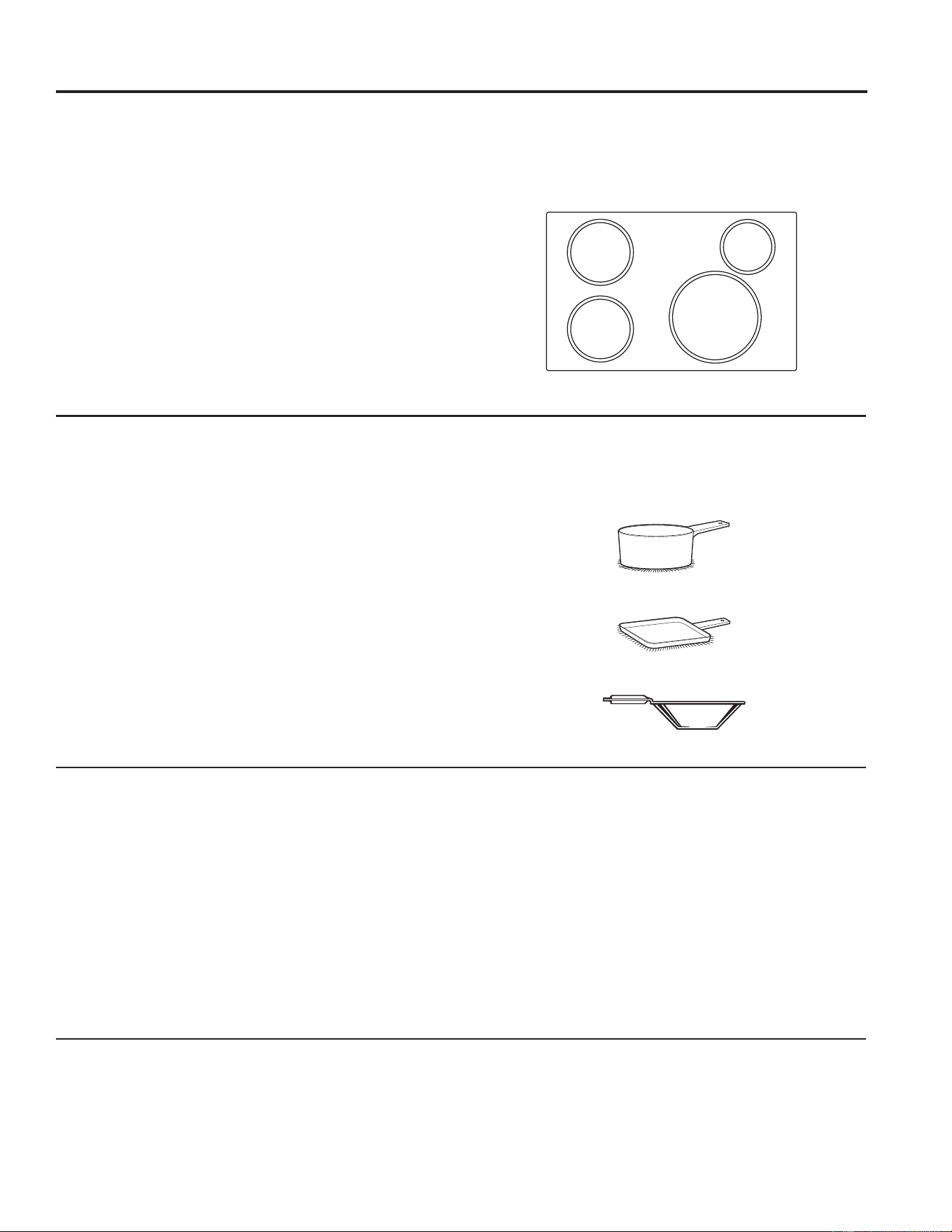
49-2000990 Rev. 5 11
Utensilios de Estufa para Cocción por Inducción
Recipientes de cocción adecuados
8WLOLFHUHFLSLHQWHVGHFRFFLyQGHFDOLGDGFRQEDVHVPiV
pesadas para lograr una mejor distribución del calor y resultados
de cocción uniforme. Elija recipientes de cocción hechos de
acero inoxidable magnético, hierro fundido esmaltado, acero
esmaltado y combinaciones de estos materiales.
Algunos recipientes de cocción están específicamente
identificados por el fabricante para utilizar con estufas de
LQGXFFLyQ8WLOLFHXQLPiQSDUDFRPSUREDUTXHHOUHFLSLHQWH
sea el adecuado.
Los recipientes de base plana dan los mejores resultados.
Pueden utilizarse recipientes con bordes o pequeños rebordes.
Los recipientes redondos dan los mejores resultados. Los
recipientes con bases torcidas o curvadas no calentarán de
manera uniforme.
Para cocinar con wok, utilice uno con base plana. No utilice un
wok con un anillo de soporte.
NOTA: El área para calentar NO es un elemento de
inducción y funcionará con utensilios con fondo plano
que NO sean ferrosos.
Cómo usar el tamaño correcto de recipiente
Las bobinas de inducción requieren un tamaño de olla mínimo
para funcionar de forma correcta.
Las ollas que no son
ferrosas o que son demasiado pequeñas no permitirán que
los elementos de inducción se enciendan, y el indicador ON
(Encender) para la ubicación de dicho elemento titilará durante
25 segundos y luego se apagará. Si una olla es retirada de o
no está centrada sobre la bobina de inducción durante más de
30 segundos, la energía de dicho elemento será apagada.
Pueden utilizarse recipientes de cocción más grandes que el
DQLOORGHOHOHPHQWRVLQHPEDUJRHOFDORUVHJHQHUDUiVyORSRU
encima del elemento.
Para mejores resultados, el recipiente debe hacer contacto
TOTAL con la superficie de vidrio.
No permita que la parte inferior del recipiente de cocción toque
los rebordes de metal que rodean la estufa.
Para un mejor desempeño, ajuste el tamaño del recipiente al
WDPDxRGHOHOHPHQWR8VDUXQDROODPiVSHTXHxDVREUHXQ
quemador más grande genera menos energía en cualquier
configuración.
“Ruidos” de los recipientes de cocción
Diferentes tipos de recipientes de cocción pueden producir
sonidos suaves. Los recipientes más pesados como los
de hierro fundido esmaltado producen menos ruido que
los recipientes más livianos de acero inoxidable de capas
múltiples. El tamaño del recipiente y la cantidad de contenidos
también pueden contribuir al nivel de sonido.
Al usar elementos adyacentes configurados en un nivel de
energía más alto, los campos magnéticos podrán interactuar y
producir un silbido en un tono alto. El sonido cambiará de tono
al cambiar el nivel de potencia de un quemador. Estos sonidos
se podrán reducir o eliminar reduciendo o incrementando las
configuraciones de los niveles de potencia de uno o ambos
elementos. Las ollas que cubren completamente el anillo del
elemento producirán menos sonido.
8Q³]XPELGR´EDMRUHVXOWDQRUPDOSDUWLFXODUPHQWHHQ
configuraciones altas.
Sonidos que podrá escuchar: es posible que escuche un
³=XPELGR´VXDYHDOFRFLQDUHQHOPRGR+L$OWR(VWRHV
normal. El sonido depende del tipo de cacerola que se use.
$OJXQDVFDFHURODV³=XPEDUiQ´PiVIXHUWHGHSHQGLHQGRGHO
WLSRGHPDWHULDO8QVRQLGRGH³=XPELGR´VHSRGUiHVFXFKDU
si los contenidos de la cacerola están fríos. A medida que
la cacerola se caliente, el sonido decrecerá. Si el nivel de
potencia es reducido, el nivel de sonido se reducirá.
Control de Energía
Si la unidad de una superficie se encuentra en el nivel de
energía H (Alta), durante un período de tiempo extenso o si
múltiples unidades de una superficie se encuentran encendidas,
es posible que haya una reducción de corriente en la unidad
superficial. El agua debajo de las ollas también hará que los
controles reduzcan la potencia recibida por el utensilio de estufa.
8WLOLFHXQDSODQFKD
8WLOLFHXQZRNGHEDVHSODQD
8WLOLFHUHFLSLHQWHVGHEDVHSODQD
8WLOLFHHOUHFLSLHQWHGHWDPDxRPtQLPR
ilustrado para cada elemento de cocción.
Recipiente
GH´
de diámetro
mínimo
Recipiente
GH´
de diámetro
mínimo
5HFLSLHQWHGH´
de diámetro
mínimo
Recipiente
GH´
de diámetro
mínimo
USO DE LA ESTUFA:8WHQVLOLRVGH(VWXIDSDUD&RFFLyQSRU,QGXFFLyQ
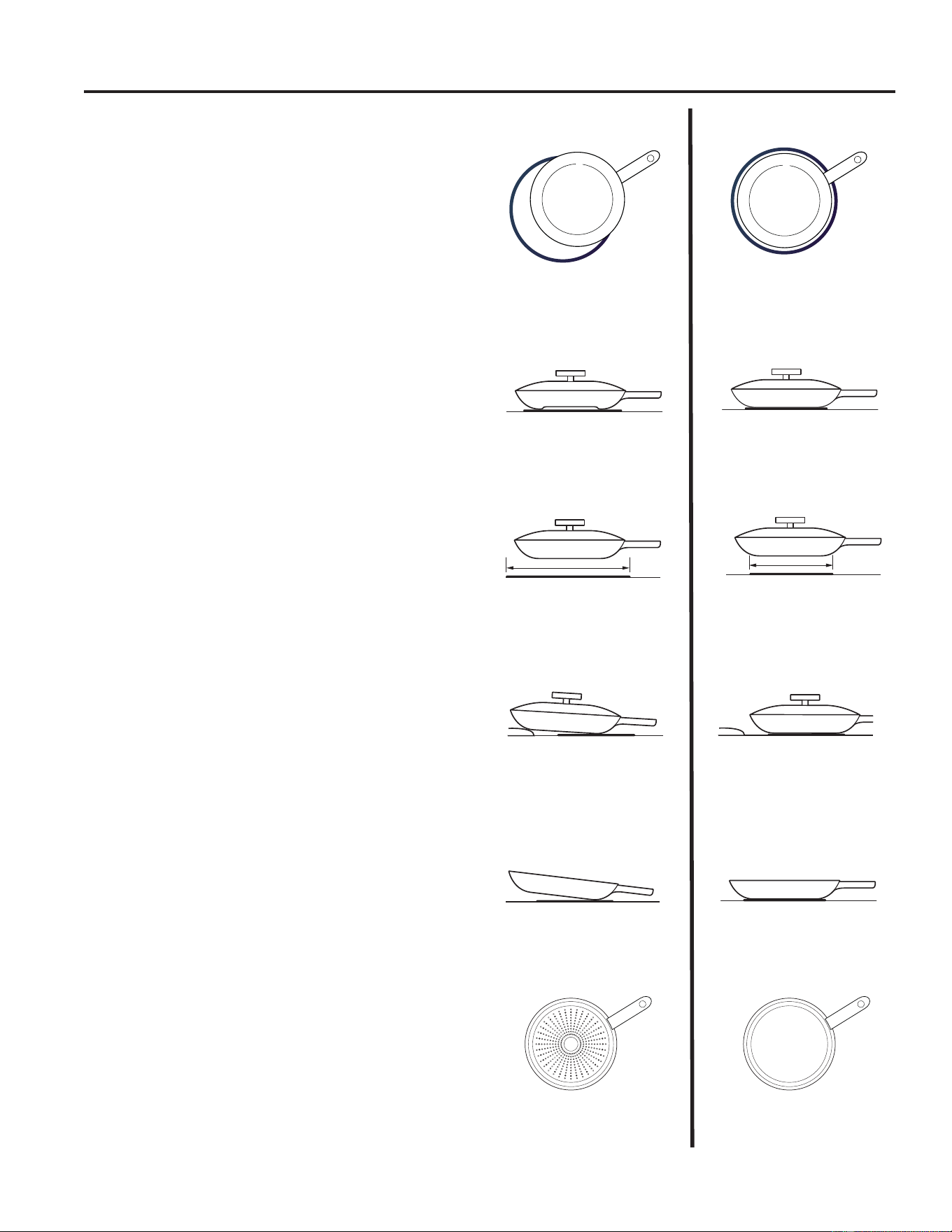
12 49-2000990 Rev. 5
El recipiente de cocción no está
centrado en la superficie del
elemento de cocción.
Bases o lados del recipiente de
cocción curvados o torcidos.
El recipiente no cumple con el
tamaño mínimo requerido para
el elemento de cocción utilizado.
El recipiente de cocción está
centrado correctamente en
la superficie del elemento de
cocción.
Base de recipiente plana.
El tamaño del elemento
cumple con el tamaño mínimo
recomendado, o lo supera, para
el elemento de cocción utilizado.
INCORRECTO
CORRECTO
La base del recipiente está
apoyada sobre un reborde de
la estufa o no se apoya por
completo sobre la superficie de
la estufa.
8QDPDQLMDSHVDGDLQFOLQDHO
recipiente.
La base del recipiente se
apoya completamente sobre la
superficie de la estufa.
El recipiente está bien
equilibrado.
La cacerola es parcialmente
magnética en su parte inferior.
La cacerola es completamente
magnética en su parte inferior.
Recomendaciones sobre recipientes
de cocción
Las bobinas de inducción requieren un tamaño de olla mínimo
para funcionar de forma correcta. Los recipientes deben hacen
contacto total sobre la superficie del elemento de cocción.
8WLOLFHUHFLSLHQWHVGHEDVHSODQDGHOWDPDxRDGHFXDGRSDUDHO
elemento de cocción y también adecuado para la cantidad de
alimentos que se están preparando.
NO se recomienda el uso de discos de interface de inducción.
Utensilios de Estufa para Cocción por Inducción (Cont.)
USO DE LA ESTUFA:8WHQVLOLRVGH(VWXIDSDUD&RFFLyQSRU,QGXFFLyQ
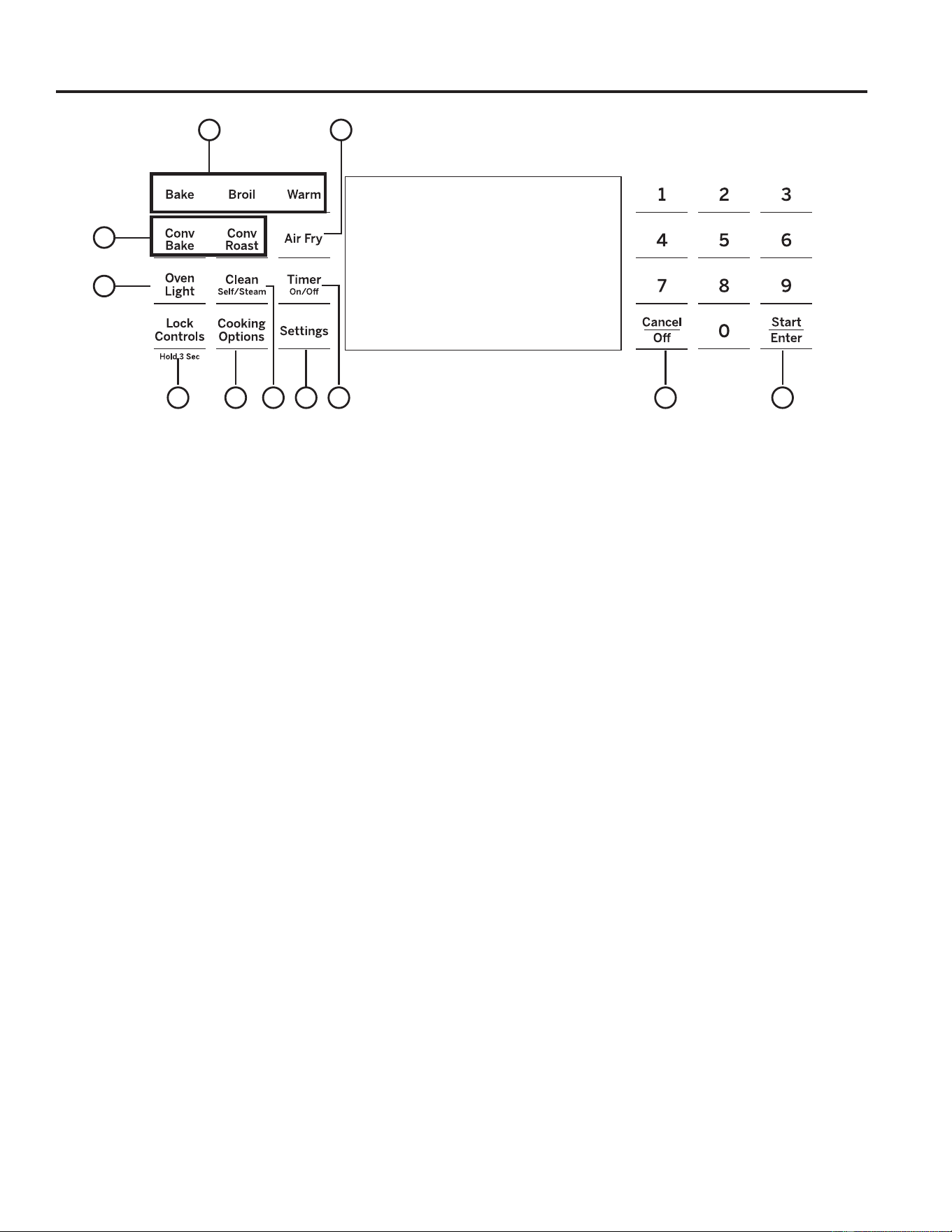
49-2000990 Rev. 5 13
Controles del Horno
1. Convection Cooking Modes (Modos de
Cocción por Convección): Los modos de
cocción por convección utilizan una circulación de aire
incrementada para mejorar el rendimiento. Para más
información, consulte la sección de Modos de Cocción.
Convection Bake (Hornear por Convección) está
activado en su horno. Use WiFi Connect (Conexión
WiFi) para activar la función Convect Roast (Dorar por
Convección).
2. Traditional Cooking Modes (Modos de
Cocción Tradicionales): Su horno cuenta con
los siguientes modos de cocción tradicionales: Bake
(Hornear), Broil (Asar), y Warm (Calentar). Para más
información, consulte la sección de Modos de Cocción.
3. Clean (Limpieza): El horno podrá contar con dos
modos de limpieza: Self Clean (Limpieza Automática)
y Steam Clean (Limpieza al Vapor). Para acceder a
información importante sobre el uso de estos modos,
consulte la sección de Limpieza del Horno.
4. Start/Enter (Iniciar/ Ingresar): Se deberá
presionar para comenzar cualquier función de cocción,
limpieza o por tiempo.
5. Cancel/Off (Cancelar/ Apagar): Cancelar
TODAS las operaciones del horno excepto el reloj y el
temporizador.
6. Timer (Temporizador): Funciona como un
temporizador con cuenta regresiva. Presione la tecla
Timer (Temporizador) y las teclas +/- para programar
el tiempo en horas y minutos. Presione la tecla Start
(Iniciar). La cuenta regresiva del temporizador se
completó. Para apagar el temporizador, presione la tecla
Timer (Temporizador).
7. Oven Light(s) (Luz(es) del Horno):
Enciende o apaga la luz(es) del horno.
8. Lock Controls (Controles de Bloqueo):
Bloquean el control de modo que al presionar las teclas
no se activen los controles. Mantenga presionada la Lock
Controls (Controles de Bloqueo) durante tres segundos
para bloquear o desbloquear el control. Cancel/Off
(Cancelar/ Apagar) siempre está activa, incluso cuando
el control está bloqueado.
NOTA: Locking Controls (Controles Bloqueados)
cancelará cualquier función que esté actualmente en
funcionamiento.
9. Cooking Options (Opciones de Cocción)
y Settings (Configuraciones): Las teclas
Options (Opciones) y Settings (Configuraciones) abren
menús más detallados en la pantalla, los cuales permiten
acceso a funciones adicionales y modos de cocción. Para
cada uno, seleccione la función en la pantalla a través
de la tecla numérica asociada. Puede salir en cualquier
momento presionando la tecla Options (Opciones) o
Settings (Configuraciones) nuevamente. Para más
detalles, consulte las secciones de Configuraciones,
Opciones y Modos de Cocción.
10. Air Fry: El modo Air Fry (Freír con Aire) fue diseñado
para producir comidas con un exterior más crocante que
en la cocción de horno tradicional. Para más información,
consulte la sección de Modos de Cocción en Horno.
Use WiFi Connect to enable the Air Fry feature.
1
7
6354
9
8
2
9
10
USO DE LA ESTUFA: Controles del Horno

14 49-2000990 Rev. 5
Cooking Options (Opciones de Cocción)
La tecla de opciones de cocción abre un menú con más modos de cocción cuando el horno está apagado. Abre un menu con
funciones adicionales si un modo de cocción ya está en proceso. Puede salir del menú en cualquier momento presionando la tecla
Cooking Options (Opciones de Cocción) nuevamente.
Primero deberá seleccionar un modo (hornear, hornear por convección, dorar por convección) y luego seleccionar
Cooking Options (Opciones de Cocción) para acceder a las siguientes funciones.
Cook Time (Tiempo de Cocción)
Cuenta el tiempo de cocción y apaga el horno cuando el
tiempo de cocción está completo. Seleccione un modo de
FRFFLyQGHVHDGR8VHODVWHFODVQXPpULFDVSDUDSURJUDPDUXQD
temperatura de horneado. Presione la tecla Cooking Options
(Opciones de Cocción) y seleccione Cook Time (Tiempo de
Cocción)8VHODWHFODQXPpULFDSDUDSURJUDPDUXQWLHPSR
de cocción en horas y minutos. Luego presione Start/Enter
(Iniciar/ Ingresar). Esto sólo puede ser usado con las funciones
Bake (Hornear), Convection Bake (Hornear por Convección) y
Convection Roast (Dorar por Convección).
Delay Time (Tiempo de Retraso)
*HQHUDXQUHWUDVRFXDQGRHOKRUQRHVHQFHQGLGR8VHHVWD
tecla para configurar el momento en que desee que el horno
VHLQLFLH6HOHFFLRQHXQPRGRGHFRFFLyQGHVHDGR8VHOD
tecla numérica para programar una temperatura de horneado.
Presione la tecla Cooking Options (Opciones de Cocción) y
seleccione Delay Time (Tiempo de Retraso)8VHODVWHFODV
numéricas para programar la hora del día en que desee que
el horno se encienda, y luego presione Start/Enter (Iniciar/
Ingresar). La función Delay (Retraso) no está disponible en
todos los modos.
NOTA: Al usar la función Delay Time (Tiempo de Retraso), las
comidas que se echan a perder rápidamente, tales como leche,
huevo, pescado, rellenos, ave y cerdo, no se deberán dejar
reposar por más de 1 hora antes y después de la cocción. La
temperatura ambiente estimula el desarrollo de bacterias nocivas.
Asegúrese de que la luz del horno esté apagada, ya que el calor
de la lámpara acelerará el crecimiento de bacterias nocivas.
Oven Probe (Sonda del Horno)
NOTA: Sólo accesible a través de los modos de cocción
tradicional y por convección.
Monitorea la temperatura interna de la comida y apaga el horno
cuando la comida alcanza la temperatura programada. Inserte
la sonda, presione el modo de cocción deseado, y programe
la temperatura de la sonda. Para más información, consulte la
sección de Modos de Cocción. La sonda sólo puede ser usada
con las funciones Bake (Hornear), Convection Bake (Hornear
por Convección) y Convection Roast (Dorar por Convección).
Settings (Configuraciones)
Las teclas Options (Opciones) y Settings (Configuraciones) abren menús más detallados en la pantalla, los cuales permiten
acceso a funciones adicionales. Para cada uno, seleccione la función en la pantalla a través de la tecla numérica asociada.
Puede salir en cualquier momento presionando la tecla Options (Opciones) o Settings (Configuraciones) nuevamente.
Conexión WiFi y Acceso Remoto
Su horno de está diseñado para brindarle una comunicación
recíproca entre su electrodoméstico y dispositivos inteligentes.
Mediante el uso de las funciones WiFi Connect, usted podrá
controlar funciones esenciales de su horno tales como las
configuraciones de temperatura, temporizadores y modos
de cocción (tales como Freír con Aire), utilizando su teléfono
inteligente o tableta*.
Seleccione las Settings (Configuraciones) y luego WiFi – siga
las instrucciones de la pantalla de su horno y de la aplicación
de su teléfono. Es necesario activar la función WiFi antes de
usar Remote Enable (Acceso Remoto) en su horno.
Conexión de su Horno con Opción de WiFi Connect
Qué necesitará
Su horno de GE Appliances utiliza su red de WiFi
hogareña existente para realizar la comunicación entre el
electrodoméstico y su dispositivo inteligente. A fin de configurar
su horno de GE Appliances, usted necesitará reunir cierta
información:
1. Cada horno de GE Appliances cuenta con una etiqueta
informativa del electrodoméstico conectado, que incluye
XQ,'GH83'GHO(OHFWURGRPpVWLFReVWHHVXQGHWDOOH
importante que necesitará para realizar la conexión al
electrodoméstico. La etiqueta está ubicada normalmente
dentro de la puerta del horno o en el cajón. En algunos
modelos, también estará accesible a través del menú de
configuraciones sobre la pantalla de control.
2. Su teléfono inteligente o tableta deben estar preparados
con la capacidad de acceder a Internet y descargar
aplicaciones.
8VWHGGHEHUiFRQRFHUODFRQWUDVHxDGHOHQUXWDGRU:L)LGH
su hogar. Tenga esta contraseña a mano al configurar el
horno de GE Appliances.
Conexión de su horno de GE Appliances
1. A través de su teléfono inteligente o tableta, visite
GEAppliances.com/connect para aprender más sobre las
funciones del electrodoméstico conectado y para descargar
la aplicación correspondiente.
2. Siga las instrucciones en pantalla de la aplicación para
conectar su horno de GE Appliances.
8QDYH]TXHHOSURFHVRVHKD\DFRPSOHWDGRODOX]
de conexión ubicada en la pantalla de su horno GE
Appliances, permanecerá en sólido y la aplicación
confirmará que usted está conectado.
Contains FCC: ZKJ-WCATA009
UPD ID: XX-XX-XX-XX-XX-XX
PT. NO. XXXXXXXXXXXX
Contains IC: 10229A-WCATA009
MAC ID: D8-28-C9-XXXXXXXX
Connected Appliance Information
Ejemplo de Etiqueta
* Se requiere el uso de dispositivos y de una red WiFi hogareña que sean compatibles con Apple o Android.
USO DE LA ESTUFA: Cooking Options (Opciones de Cocción) / Settings (Configuraciones)

49-2000990 Rev. 5 15
USO DE LA ESTUFA: Settings (Configuraciones)
Settings (Configuraciones) (Cont.)
Conexión WiFi y Acceso Remoto (cont.)
4. Si la luz de conexión no se enciende o está titilando, siga
las instrucciones en la aplicación para volver a realizar
la conexión. Si los problemas continúan, comuníquese al
Connected Call Center (Centro de Conexión de Llamadas)
al 1.800.220.6899 y solicite asistencia en relación a la
conectividad inalámbrica del horno.
Para conectar dispositivos inteligentes adicionales, repita los
pasos 1 y 2.
Observe que todos los cambios o modificaciones al dispositivo
de acceso remoto instalado en este horno que no están
expresamente aprobados por el fabricante podrían anular la
autoridad del usuario para operar el equipamiento.
INICIO DEL HORNO EN FORMA REMOTA
Para poder iniciar el horno en forma remota una vez
conectado a WiFi, presione la tecla Settings (Configuraciones)
y seleccione WiFi desde el menú sobre la pantalla VFD.
6HOHFFLRQH³7XUQ5HPRWH2Q´(QFHQGHU&RQWURO5HPRWR
desde el menú de la pantalla VFD y la función Remote
Setting (Configuración Remota) estará activada. El ícono
se encenderá. El horno puede ser iniciado ahora de forma
remota con un dispositivo conectado. Abrir una puerta del
horno o apagar el horno hará que se apague el ícono
. El ícono deberá estar iluminado para iniciar el horno de
forma remota. No se requiere el ícono para modificar la
temperatura del horno mientras esté funcionando, configurar
un temporizador o apagar el horno desde la aplicación del
teléfono mientras el ícono muestre que está Conectado a
WiFi.
Recuerde verificar que el ícono esté iluminado, si desea
iniciar el horno de forma remota.
NOTA: Las comidas que se echan a perder rápidamente,
tales como leche, huevos, pescado, rellenos, ave y cerdo, no
se deberán dejar reposar por más de 1 hora antes y después
de la cocción. La temperatura ambiente estimula el desarrollo
de bacterias nocivas. Asegúrese de que la luz del horno esté
apagada, ya que el calor de la lámpara acelerará el crecimiento
de bacterias nocivas.
Clock (Reloj)
Esta configuración ajusta el tiempo del reloj del horno. Presione
la tecla Settings (Configuraciones) y seleccione Clock
(Reloj). Seleccione Set Clock (Configurar Reloj) y siga las
instrucciones para configurar el reloj. Esta función también
especifica cómo se mostrará la hora del día. Puede seleccionar
el reloj con hora estándar de 12 horas (12 H), la hora militar
de 24 horas (24 H), o que no se exhiba ningún reloj (Off)
(Apagado). Presione la tecla Settings (Configuraciones),
seleccione Set Clock (Configurar Reloj) y seleccione la
opción 12/24 u On/Off (Encender/ Apagar).
Bluetooth
®
- Chef Connect
Se trata de una función de emparejamiento para uso con otros
productos compatibles con Chef Connect, tales como un
horno microondas para uso sobre la estufa o una campana de
estufa. A fin de emparejar estos productos a la estufa, presione
la tecla Settings (Configuraciones) y seleccione Bluetooth
®
.
Seleccione Pair (Emparejar) y siga las instrucciones
correspondientes incluidas con el producto de emparejamiento
permitido por Chef Connect. La estufa cancelará el modo de
emparejamiento luego de dos minutos, si no es detectado ningún
dispositivo para emparejar. Seleccione Remove (Retirar) para
confirmar que el producto está emparejado o para desemparejar
el mismo de su estufa. La Sonda de Cocción de Precisión
también puede ser emparejada usando la función Bluetooth
®
.
Auto Conv (Conversión Automática)
Al usar las opciones de cocción Convection Bake (Hornear
por Convección) o Convection Roast (Dorar por Convección),
Auto Recipe Conversion (Conversión de Receta Automática)
convertirá de forma automática las temperaturas de horneado
regular ingresadas a temperaturas de cocción de horneado
por convección cuando se active. Se debe observar que esta
opción no convierte los tiempos de cocción del horneado por
convección, sino sólo las temperaturas. Esta función podrá ser
encendida o apagada. Seleccione Settings (Configuraciones)
y Auto Conversion (Conversión Automática), y luego siga
las indicaciones para activar o desactivar esta función.
Auto Off (Apagado Automático)
Esta función apaga el horno luego de 12 horas de funcionamiento
continuo. Podrá estar activada o desactivada. Seleccione
Settings (Configuraciones), More (Más), y Auto Off (Apagado
Automática) para activar o desactivar esta función.
Sound (Sonido)
Podrá ajustar el volumen y el tipo de alerta que su dispositivo
utilice. Seleccione Settings (Configuraciones), More (Más),
y Sound (Sonido). Siga las instrucciones para realizar ajustes
de volumen o para cambiar entre tonos de alerta continuos o
VLPSOHV8QDFRQILJXUDFLyQFRQWLQXDVHJXLUiKDFLHQGRTXHXQ
tono suene hasta que un botón del control sea presionado. El
volumen del tono del horno podrá ser ajustado. El control hará
que el tono del horno suene en el nuevo nivel de volumen cada
vez que el nivel de sonido sea modificado.
F/C (Fahrenheit o Celsius)
El control del horno está configurado para su uso con
temperaturas Fahrenheit (F), pero puede ser modificado
a temperaturas Celsius (C). Seleccione Settings
(Configuraciones), More (Más), y F/C para alternar entre las
escalas de temperatura exhibidas.
Adjust the Oven temperature (Ajuste de la
Temperatura del Horno)
Esta función permite que la temperatura de horneado del horno
y de horneado por convección sean ajustadas hasta 35°F más
FDOLHQWHR)PiVIUtD8VHHVWDIXQFLyQVLFRQVLGHUDTXHOD
temperatura de su horno está demasiado caliente o demasiado
fría y desea modificarla. Este ajuste afecta los modos Bake
(Hornear) y Convection Bake (Hornear por Convección). No
modifica los modos Proof (Leudar) o Cleaning (Limpieza).
Seleccione Settings (Configuraciones) y Oven Adjust
(Ajuste del Horno) para agregar More Heat (Más Calor) o
Less Heat (Menos Calor) y luego presione Save (Guardar).
Oven Info (Información del Horno)
Seleccione Settings (Configuraciones), More (Más), y Oven
Info (Información del Horno) para activar o desactivar esta
función. Esta configuración muestra el Número de Modelo y la
Versión del Software.
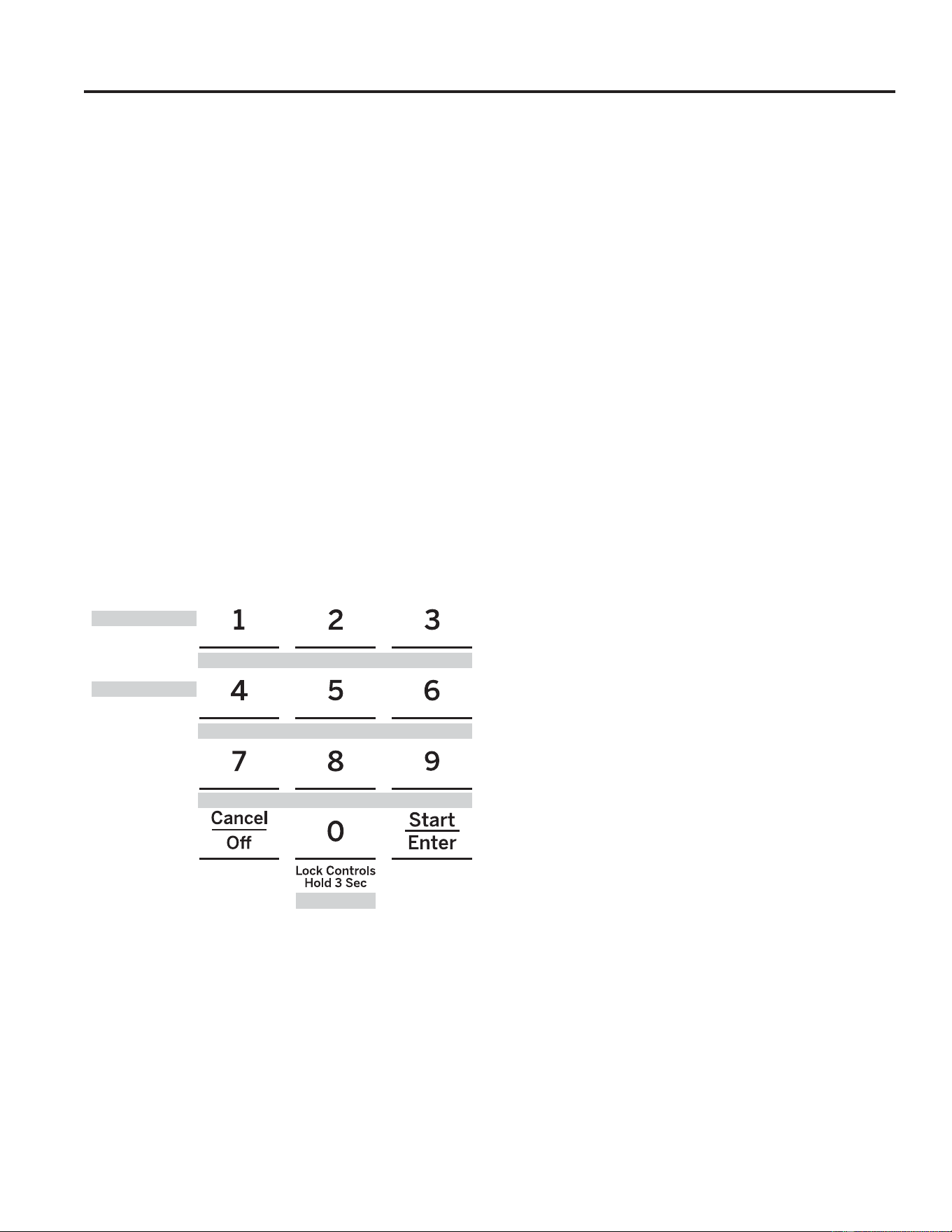
16 49-2000990 Rev. 5
Modo Sabático
La función de modo sabático cumple con los requisitos Sabáticos Judíos. Algunos de estos estándares que serán observados
por el consumidor incluyen la desactivación de los tonos, la desactivación de las luces del horno, y retrasos de aproximadamente
30 segundos a un minuto en relación a los cambios en la pantalla. Sólo el horneado continuo y el horneado por tiempo están
SHUPLWLGRV HQ HO PRGR VDEiWLFR /D FRFFLyQ HQ HO PRGR VDEiWLFR HV XQ SURFHVR GH GRV SDVRV SULPHUR HO PRGR VDEiWLFR GHEH VHU
configurado y luego el modo hornear debe ser configurado.
Configuración del Modo Sabático
Presione la tecla Settings (Configuraciones), seleccione
Sabbath (Sabático) y seleccione Turn On (Encender) 8Q VROR
FRUFKHWH ³@´ DSDUHFHUi HQ OD SDQWDOOD LQGLFDQGR TXH HO PRGR
sabático fue configurado. El reloj no aparecerá. El horneado
continuo o el horneado por tiempo no pueden ser configurados.
Inicio del Horneado Continuo
1. Presione la tecla Bake (Hornear). (Para hornos dobles,
permite utilizar el horno superior. Si se desea usar el Horno
Inferior, presione Lower Oven (Horno Inferior) y luego Bake
(Hornear).)
2. Si la temperatura deseada es 350ºF, presione Start/
Enter (Iniciar/ Ingresar). Si se desea una temperatura de
cocción diferente, use las teclas numéricas de 1 a 5 para
seleccionar una temperatura de cocción predeterminada,
y luego presione Start/Enter (Iniciar/ Ingresar). Consulte
el siguiente gráfico para determinar qué tecla configura la
temperatura de cocción deseada.
/XHJR GH XQD GHPRUD XQ VHJXQGR FRUFKHWH ³@ >³ DSDUHFHUi HQ
la pantalla, indicando que el horno está horneando.
Ajuste de Temperatura
Presione Bake (Hornear) (o presione Lower Oven (Horno
Inferior) y luego Bake (Hornear) para usar el horno inferior en
un unidad con horno doble), use las teclas numéricas de 1 a 5
para seleccionar una temperatura de cocción actual diferente, y
presione Start/Enter (Iniciar/ Ingresar).
Inicie un Horneado por Tiempo
1. Presione la tecla Bake (Hornear).
2. Si la temperatura deseada es de 350ºF, use las teclas
numéricas de 6 a 0 para seleccionar un tiempo de cocción.
Si se desea una temperatura de cocción diferente a 350ºF,
use las teclas numéricas de 1 a 5 para seleccionar una
temperatura de cocción predeterminada, y luego seleccione
el tiempo de cocción. Consulte el gráfico en esta página
para determinar qué tecla configura la temperatura de
cocción deseada y el tiempo de cocción.
3. Presione Start/Enter (Iniciar/ Ingresar).
/XHJR GH XQD GHPRUD XQ VHJXQGR FRUFKHWH ³@ >³ DSDUHFHUi HQ
la pantalla, indicando que el horno está horneando. Cuando el
tiempo de cocción finalice, la pantalla volverá a cambiar a un
VROR FRUFKHWH ³@´ LQGLFDQGR TXH HO KRUQR \D QR HVWi KRUQHDQGR
No sonará ningún tono cuando el tiempo de cocción se haya
completado.
Salir del Modo Sabático
Sólo se deberá salir del modo sabático una vez finalizado el
mismo.
1. Presione Cancel/Off (Cancelar/ Apagar) para finalizar
cualquier ciclo de horneado que pueda estar funcionando.
2. Mantenga presionada la tecla Settings (Configuraciones)
hasta que se muestre Sabbath Mode off (Modo Sabático
apagado).
Aviso de Corte de Corriente durante el
Modo Sabático
Si se produce un corte de corriente mientras el horno se
encuentra en Sabbath Mode (Modo Sabático), la unidad
regresará a Sabbath Mode (Modo Sabático) cuando el
VXPLQLVWUR VHD UHHVWDEOHFLGR VLQ HPEDUJR HO KRUQR UHJUHVDUi
al estado de apagado incluso cuando haya estado en un ciclo
de horneado en el momento del corte de corriente.
Temperatura (ºF)
Tiempo (horas)
200
325
2.5h
250
400
3h
4h
300
2h
3.5h
1 = 200°F, 2 = 250°F, 3 = 300°F, 4 = 325°F, 5 = 400°F
6 = 2 horas, 7 = 2.5 horas 8 = 3 horas, 9 = 3.5 horas, 0 = 4 horas
USO DE LA ESTUFA: Modo Sabático
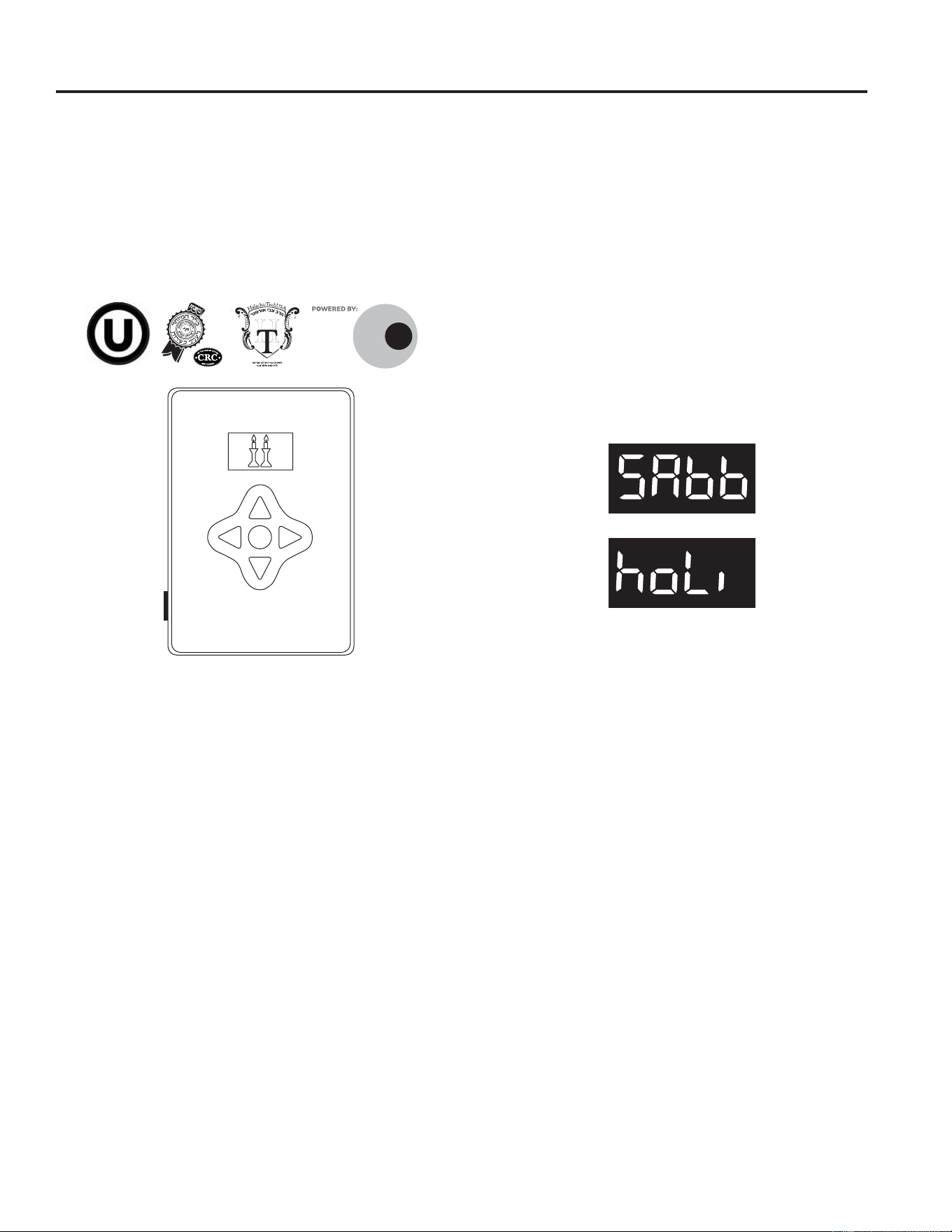
49-2000990 Rev. 5 17
USO DE LA COCINA: Modo Sabático28\&5&
Modo Sabático - OU y CRC
(VWDFRFLQDRIUHFHXQPRGR6DEEDWK6DEiWLFR28\&5&
que cumple con los estándares establecidos por Orthodox
8QLRQ8QLyQ2UWRGR[DHO&HQWUDO5DEELQLFDO&RQJUHVV
(Congreso Rabínico Central) y Halach Tech, y está 100%
certificada por los más altos estándares de Halacha. A fin de
DFWLYDUHOPRGR6DEEDWK6DEiWLFR28\&5&VHGHEHUi
conectar a la cocina un Conservador de Shabbos para Hornos
separado. El Conservador de Shabbos se podrá adquirir a
través de zmantechnologies.com o geappliances.com. La
~QLFDIRUPDGHDFWLYDUHOPRGR6DEEDWK6DEiWLFR28\&5&
y es adquiriendo el Conservador de Shabbos para Hornos.
El Conservador de Shabbos se conecta a su cocina para
activar de forma automática modos compatibles con Shabbos
FDGDVHPDQDRDQWHVGHFDGDIHULDGR8VDQGRGRVPRGRVHO
modo Shabbos y el Modo Holiday (Feriado), el Conservador
de Shabbos permitirá la apertura y cierre de puertas,
desactivará la mayoría de los botones del electrodoméstico,
y ajustará las temperaturas de forma automática durante
Shabbos y Yom Tov. El modo apropiado se activará de
forma automática en base a la fecha del calendario Judío de
acuerdo a su ubicación. Las funciones Warming (Calentar) y
Baking (Hornear) se podrán activar cuando el usuario acepte
con hasta cuatro horas de anticipación el uso de Sabbath
(Sabático) o Holiday (Feriado).
Cuando el Shabbos Keeper (Guardián de Shabat) esté
correctamente conectado a la cocina, el control del
horno exhibirá uno de los siguientes mensajes mientras
se encuentre en uso durante el Sabbath (Sabático) o
feriado:
ZMAN
TECH
NOLOGIES
¯¶·¯¬Ã²¹·º°¶¹¯Ã°´
Conservador de Shabbos
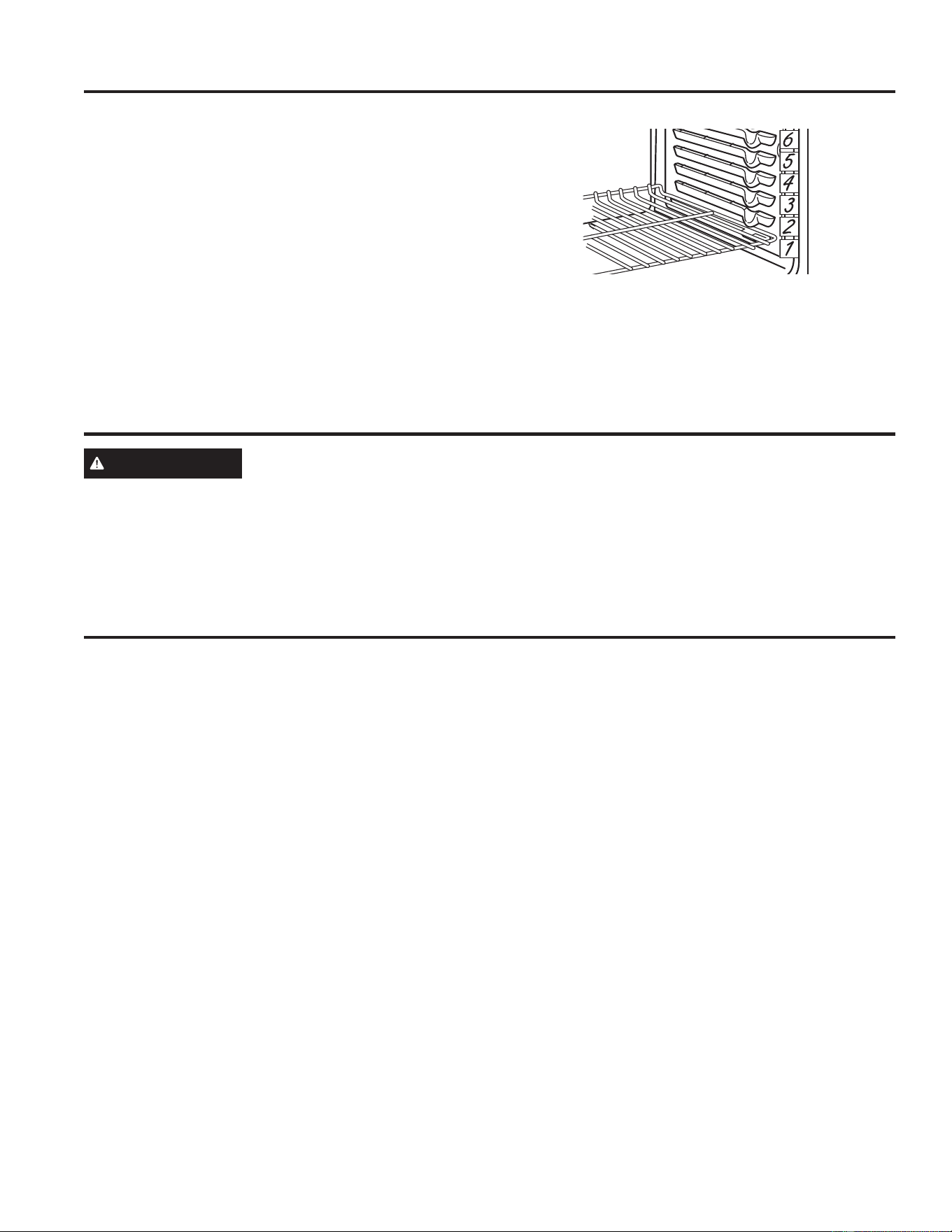
18 49-2000990 Rev. 5
USO DE LA ESTUFA:(VWDQWHVGHO+RUQR3DSHOGH$OXPLQLR\&REHUWRUHVGHO+RUQR8WHQVLOLRGHO+RUQR
El horno cuenta con seis posiciones de estantes. En la Guía
de Cocción, se brindan recomendaciones de posiciones de
los estantes para diferentes tipos de comidas. Se ajusta
un estante en una dirección para afectar los resultados de
cocción. Por ejemplo, si se prefieren partes superiores más
oscuras en tartas, panecillos o galletas, pruebe moviendo
la comida a un estante que se encuentre una posición más
arriba. Si encuentra que las comidas están demasiado doradas
en la parte superior, pruebe moviendo las mismas más abajo
la próxima vez.
Al hornear con múltiples ollas y en múltiples estantes,
DVHJ~UHVHGHTXHKD\DSRUORPHQRV´HQWUHODVROODVDILQ
de dejar suficiente espacio para que fluya el aire.
Para evitar posibles quemaduras, coloque los estantes en la
posición deseada antes de encender el horno.
Estantes del Horno
Utensilio del Horno
Pautas de Uso de Utensilios
El material, el acabado y el tamaño de los utensilios afectan el
horneado.
Las ollas oscuras, revestidas y opacas absorben el calor más
rápidamente que las ollas claras y brillantes. Al usar ollas
que absorben el calor más rápidamente, las comidas podrán
resultar más doradas, crocantes y con una capa más gruesa.
Si utiliza utensilios oscuros y revestidos, controle la comida
antes del tiempo mínimo de cocción. Si se obtienen resultados
no deseados con este tipo de utensilios, considere la posibilidad
de reducir la temperatura del horno en 25º F la próxima vez.
Las ollas brillantes pueden producir resultados de horneado
más parejos en tortas y galletas.
Las ollas de vidrio y cerámica calientan con lentitud, pero
retienen bien el calor.
Estos tipos de ollas funcionan bien con platos tales como
tartas y postres con natilla.
Las ollas con aislante de aire calientan lentamente y pueden
producir fondos dorados.
Mantenga los utensilios limpios para una cocción más pareja.
La cerámica calienta de forma lenta y retiene bien el calor. Si
es posible, se recomienda precalentar este tipo de utensilios.
Se podrá requerir tiempo de cocción adicional.
El utensilio usado en los modos para asar y freír con aire
deberá ser de uso seguro para asar.
PRECAUCIÓN
No use ningún tipo de aluminio o cobertor de horno para cubrir el fondo del horno. Estos ítems
pueden atrapar el calor o derretirse, ocasionando daños sobre el producto y el riesgo de descargas, humo o incendios.
Los daños por uso inadecuado de estos ítems no están cubiertos por la garantía del producto.
Se podrá usar aluminio para evitar derrames, colocando una hoja sobre un estante inferior varias pulgadas debajo de la comida.
No use más aluminio que el necesario y nunca cubra totalmente el estante de un horno con papel de aluminio. Mantenga el
DOXPLQLRDSRUORPHQRV´GHODVSDUHGHVGHOKRUQRSDUDHYLWDUXQDFLUFXODFLyQGHILFLHQWHGHOFDORU
Papel de Aluminio y Cobertores del Horno
La cantidad de posiciones de la bandeja
puede variar en relación al modelo.

49-2000990 Rev. 5 19
Modos de Cocción
Su horno posee una variedad de modos de cocción para que pueda obtener los mejores resultados. Estos modos se describen a
continuación. Para acceder a recomendaciones para comidas específicas, consulte la sección de la Guía de Cocción. Recuerde
que es posible que su nuevo horno funcione de manera diferente que aquel que está reemplazando.
Modos de Horneado y Dorado
Seleccione un modo para hornear y dorar basado en el tipo y
cantidad de comida que está preparando. Al preparar comidas
horneadas tales como tartas, galletas y masas, siempre
precaliente el horno primero. Siga las recomendaciones de
la receta sobre la colocación de la comida. Si no se brindan
pautas, centre la comida en el horno.
Horneado Tradicional
El modo de horneado es utilizado para hornear y dorar. Al
preparar comidas horneadas tales como tartas, galletas y
masas, siempre precaliente el horno primero. Para usar
este modo, presione la tecla Bake (Hornear), ingrese una
temperatura, y luego presione Start (Iniciar).
Hornear por Convección
Este modo usa el movimiento del aire desde el ventilador por
convección para lograr una cocción más pareja. El horno está
equipado con la función Auto Recipe Conversion (Conversión
GH5HFHWD$XWRPiWLFDGHPRGRTXHQRHVQHFHVDULR
ajustar la temperatura al usar este modo. Siempre realice el
precalentamiento al usar este modo. Es posible que el tiempo de
horneado sea un poco más prolongado con estantes múltiples, en
comparación con lo que se espera con un solo estante. Para usar
este modo, presione la tecla Convection Bake (Hornear por
Convección), ingrese una temperatura, y luego presione Start
(Iniciar).
Convection Roast (Dorar por Convección)
El modo Convection Roast (Dorado por Convección) está
pensado para dorar cortes enteros de carne en un solo
estante. Este modo usa el movimiento del aire desde el
ventilador por convección para mejorar el dorado y reducir el
tiempo de cocción. Controle la comida antes que el tiempo
sugerido en la receta al usar este modo, o use la sonda (para
más información, consulte la sección de la Sonda). No es
necesario realizar el precalentamiento al usar este modo.
Para usar este modo, presione la tecla Conv Roast (Dorar
por Convección), ingrese una temperatura con las teclas
numéricas, y luego presione Start (Iniciar).
Use WiFi Connect (Conexión WiFi) para activar esta función.
Fritura con Aire
Air Fry (Freír con Aire) es un modo de cocción especial
sin precalentamiento, que fue diseñado para producir
comidas que en su exterior queden más crocantes que en
la cocción en hornos tradicionales. El modo Air Fry (Freír
con Aire) fue diseñado para la cocción en un solo estante
únicamente. Seleccione Air Fry (Freír con Air) y luego ingrese
la configuración de temperatura deseada y presione Start
(Iniciar). La temperatura se podrá configurar entre 300°F y
500°F. No es necesario precalentar en este modo. Siga las
pautas de la receta tradicional para horno o del paquete en
UHODFLyQDORVDMXVWHVGHWHPSHUDWXUD\WLHPSRVGHFRFFLyQ
Modo para Asar
Siempre ase con la puerta del horno/cajón cerrados. Monitoree
ODFRPLGDGHFHUFDDODVDU7HQJDFXLGDGRDODVDUSRVLFLRQDU
la comida cerca del elemento para asar o del quemador
incrementa el nivel de humo, salpicaduras y la posibilidad
de que se incendien las grasas. No es necesario realizar el
precalentamiento al usar este modo.
Asar Alto
El modo Broil Hi (Asado Alto) usa calor intenso del elemento
VXSHULRUSDUDVRDVDUODVFRPLGDV8VHODIXQFLyQ%URLO+L
(Asado Alto) para cortes más delgados de carne y/o cuando
desee que la superficie quede más soasada y el interior más
jugoso. Para usar este modo, presione la tecla Broil (Asar)
una vez y luego presione Start (Iniciar).
Asar Bajo
El modo Broil Lo (Asar Bajo) usa menos calor intenso del
elemento superior para cocinar la comida completamente
PLHQWUDVWDPELpQVHGRUDODVXSHUILFLH8VHODIXQFLyQ%URLO/R
(Asado Bajo) para cortes de carne más gruesos y/o comidas
que desee que queden completamente cocinadas. Para usar
este modo, presione la tecla Broil (Asar) dos veces y luego
presione Start (Iniciar).
Calentar
Los modos calientes están diseñados para mantener calientes
las comidas cocinadas. Cubra las comidas que necesitan
mantener la humedad y no cubra aquellas comidas que deberían
quedar crocantes. No se requiere precalentar las mismas. No
use la función Warm (Calentar) para calentar comida fría. Se
recomienda, a fin de mantener la calidad de la comida, que
ésta no se mantenga caliente por más de dos horas. Para usar
este modo, presione la tecla Warm (Caliente) y luego presione
Start (Iniciar). La pantalla del control mostrará que el horno está
configurado en Bake (Hornear) en 170°F.
Baked Goods (Productos Horneados)
El modo Baked Goods (Productos Horneados) fue diseñado
para cocinar tortas, panes, galletas, y comidas similares
en un solo estante. Este modo fue diseñado para brindar
un dorado superior más leve y un mejor volumen. Algunas
comidas podrán requerir tiempos de cocción más prolongados
en relación a cuando se estufa en el modo de horneado
tradicional. Presione la tecla Options (Opciones) y seleccione
Baked Goods (Productos Horneados) y luego siga las
instrucciones en pantalla para acceder a este modo.
Use WiFi Connect (Conexión WiFi) para activar esta función.
Proof (Leudar)
El modo Proof (Leudar) mantiene un ambiente caliente para
leudar masa fermentada a base de levadura. Si el horno está
demasiado caliente, el modo Proof (Leudar) no funcionará y
ODSDQWDOODPRVWUDUi³+RUQRGHPDVLDGRFDOLHQWHSDUD/HXGDU´
Para obtener mejores resultados, cubra la masa mientras
realiza el leudado y haga un control a tiempo para evitar un
leudado excesivo.
PRECAUCIÓN
No use el modo Proof (Leudar) para
calentar comida o mantener la comida caliente. La temperatura
del horno al leudar no está lo suficientemente caliente como
para mantener comidas a temperaturas seguras.
USO DE LA ESTUFA: Modos de Cocción

20 49-2000990 Rev. 5
USO DE LA ESTUFA: Modos de Cocción
Modos de Cocción (Continúa)
Frozen Snacks (Refrigerios Congelados)
Los modos Frozen Snacks (Refrigerios Congelados) fueron
diseñados para cocinar comidas congeladas tales como
medallones de papa, papas fritas, y refrigerios congelados y
aperitivos similares. La mayoría de las comidas se cocinarán
dentro de los tiempos que aparecen recomendados en el
paquete. Ajuste el tiempo de cocción de acuerdo con sus
preferencias individuales.
8VHODIXQFLyQ)UR]HQ6QDFNV6LQJOH5HIULJHULRV&RQJHODGRV
en un Solo Estante) cuando cocine refrigerios en un solo
estante. Este modo no requiere el precalentamiento del
horno. La comida deberá ser colocada en el horno antes o
inmediatamente al iniciar el modo.
8VHODIXQFLyQ)UR]HQ6QDFNV0XOWL5HIULJHULRV&RQJHODGRV
en Múltiples Estantes) cuando cocine refrigerios congelados
en dos estantes simultáneamente. Este modo incluye un ciclo
de precalentamiento para preparar el horno para hornear en
múltiples estantes. Presione la tecla Options (Opciones) y
seleccione Frozen (Congelado), y luego siga las instrucciones
en pantalla para acceder a este modo.
Use WiFi Connect (Conexión WiFi) para activar esta función.
Frozen Pizza (Pizza Congelada)
Los modos de Frozen Pizza (Pizza Congelada) fueron
diseñados para cocinar pizzas congeladas. La mayoría de
las pizzas se cocinarán dentro de los tiempos que aparecen
recomendados en el paquete. Ajuste el tiempo de cocción de
acuerdo con sus preferencias individuales.
8VHODIXQFLyQ)UR]HQ3L]]D6LQJOH3L]]D&RQJHODGDHQXQ
Estante) cuando cocine en un solo estante. Este modo no
requiere el precalentamiento del horno. La comida deberá ser
colocada en el horno antes o inmediatamente al iniciar el modo.
8VHHOPRGR)UR]HQ3L]]D3L]]D&RQJHODGDDOFRFLQDUHQ
dos estantes de forma simultánea. Este modo incluye un ciclo
de precalentamiento para preparar el horno para hornear en
múltiples estantes. Presione la tecla Options (Opciones) y
seleccione Frozen (Congelado), y luego siga las instrucciones
en pantalla para acceder a este modo.
Use WiFi Connect (Conexión WiFi) para activar esta función.
Precalentamiento
8QSUHFDOHQWDPLHQWRDGHFXDGRDVHJXUDTXHHOKRUQRHVWp
suficientemente caliente como para comenzar a hornear.
8QSUHFDOHQWDPLHQWRLQDGHFXDGRHVGHFLUFRFLQDUFXDQGR
el horno aún no alcanzó la temperatura configurada) podrá
afectar la cocción de forma negativa. Dependiendo de las
recomendaciones de la receta, la temperatura de las comidas
al ingresar al horno podrán determinar el tiempo de horneado
ILQDO\ORVUHVXOWDGRVGHOPLVPRVLLQWURGXFHFRPLGDV
tales como galletas o panes durante la función Pre-heat
(Precalentamiento), se podrán dorar en exceso en su parte
superior o quemarse.
IMPORTANTE: Agregar mayor cantidad de ítems para calentar
en el horno durante el precalentamiento (esto incluye muchos
estantes, piedras de horneado, etc.) afectará la duración del
precalentamiento. Siempre comience a hornear luego de la
señal de precalentamiento. La señal será un pitido, una luz
indicadora o un sonido de campanada. Esto le permitirá saber
que el horno se encuentra en la temperatura de horneado
necesaria. Para obtener mejores resultados, encienda el horno
antes de comenzar con el trabajo de preparación.
49-2000990 Rev. 5 21
Sonda del Horno (en algunos modelos)
ADVERTENCIA
El consumo de comida semicruda puede hacer que se contraigan enfermedades producidas
por la comida. Use la sonda de acuerdo con las siguientes instrucciones, a fin de asegurar que todas las partes
de la comida alcancen temperaturas de cocción mínimamente seguras. Puede encontrar recomendaciones de
temperaturas de cocción mínimamente seguras en foodsafety.gov o en IsItDoneYet.gov.
La temperatura interna de la comida con frecuencia se usa
como indicador de que está lista, especialmente al dorar o
preparar carne de ave. El modo Probe (Sonda) monitorea la
temperatura interna de la comida y apaga el horno cuando
esta última alcanza la temperatura programada.
Controle siempre la temperatura en múltiples partes de la
comida, utilizando un termómetro de comidas luego de realizar
la cocción, a fin de asegurar que todas las partes de la misma
hayan alcanzado una temperatura interna mínimamente segura
en dicha comida.
Ubicación Correcta de la Sonda
Luego de preparar la comida y de colocarla en la olla, siga
estas instrucciones para una ubicación correcta de la sonda.
Ŷ ,QVHUWHODVRQGDHQODFRPLGDGHPRGRTXHODSXQWDGH
la sonda se apoye en el centro de la parte más gruesa de
la comida. Para un mejor rendimiento, la sonda debería
ser completamente insertada en la comida. Si la sonda
no es ubicada correctamente, es posible que no mida con
precisión la temperatura de la parte más fría de la comida.
Algunas comidas, particularmente las más pequeñas, no
son adecuadas para la cocción con el uso de una sonda,
debido a sus formas o tamaños.
Ŷ 1RGHEHUtDWRFDUHOKXHVRODJUDVDQLHOFDUWtODJR
Ŷ 3DUDFRFLQDUXQDYHHQWHUDLQVHUWHODVRQGDHQODSDUWH
más gruesa de la pechuga.
Ŷ 3DUDGRUDUVLQKXHVRVLQVHUWHODVRQGDHQHOFHQWURGHO
dorado.
Ŷ 3DUDFRFLQDUMDPyQRFRUGHURFRQKXHVRVLQVHUWHOD
sonda en el centro de la articulación o del músculo más
bajo y largo.
Ŷ 3DUDSUHSDrar cazuelas o platos tales como pastel de
carne, inserte la sonda en el centro del plato.
Ŷ 3DUDFRFLQDUSHVFDGRLQVHUWHODVRQGDMXVWRDUULEDGHOD
agalla en la zona más carnosa paralela a columna.
Uso de la Sonda
La sonda de temperatura sólo puede ser usada con las
funciones Bake (Hornear), Convection Bake (Hornear por
Convección) y Convection Roast (Dorar por Convección).
Para usar la sonda con precalentamiento:
1. Configure el modo de cocción deseado (Hornear, Hornear
por Convección, o Dorar por Convección) e ingrese la
temperatura de cocción deseada con las teclas numéricas.
2. Inserte la sonda en la comidaFRQVXOWHVREUHOD8ELFDFLyQ
Correcta de la Sonda).
8QDYH]TXHHOKRUQRIXHSUHFDOHQWDGRFRORTXHODFRPLGD
en el mismo y conecte la sonda en su correspondiente
tomacorriente, asegurándose de que esté completamente
insertada. Tenga cuidado, ya que las paredes del horno y
el tomacorriente de la sonda están calientes.
4. Cuando la sonda esté conectada, la pantalla le indicará
que ingrese la temperatura deseada para la comida. La
temperatura interna máxima de la comida que se puede
configurar es 200° F..
Para usar la sonda sin precalentamiento:
,QVHUWHODVRQGDHQODFRPLGDFRQVXOWHVREUHOD8ELFDFLyQ
Correcta de la Sonda).
2. Coloque la comida en el horno y conecte la sonda en su
correspondiente tomacorriente en el horno.
3. Presione la tecla del modo de cocción deseado
(Horneado Tradicional, Hornear por Convección, o
Dorar por Convección) e ingrese la temperatura de
cocción deseada con las teclas numéricas. Presione
Options (Opciones) y seleccione Probe (Sonda) y
luego siga las instrucciones en pantalla para ingresar la
temperatura deseada para la comida.
Pautas para el Cuidado de la Sonda
Ŷ 6LVHXVDXQDVRQGDTXHQRVHDODSURYLVWDFRQHVWH
producto, se podrán producir daños sobre la salida de la
sonda.
Ŷ 8VHODVPDQLMDVGHODVRQGDDOHQFKXIDU\GHVHQFKXIDUOD
misma, luego de insertar o de retirar la sonda de la carne o
del tomacorriente.
Ŷ 3DUDHYLWDUGDxRVVREUHODVRQGDQRXVHDJDUUDGHUDVSDUD
empujar el cable al retirarlo.
Ŷ 3DUDHYLWDUURPSHUODVRQGDDVHJ~UHVHGHTXHOD
comida haya sido completamente descongelada antes de
insertarla.
Ŷ 3DUDHYLWDUSRVLEOHVTXHPDGXUDVQRGHVHQFKXIHODVRQGD
del tomacorriente del horno hasta que este último se haya
enfriado.
Ŷ 1XQFDGHMHODVRQGDGHQWURGHOKRUQRGXUDQWHXQFLFORGH
limpieza automática o de limpieza con vapor.
Ŷ 1RJXDUGHODVRQGDGHQWURGHOKRUQR
USO DE LA ESTUFA: Sonda del Horno
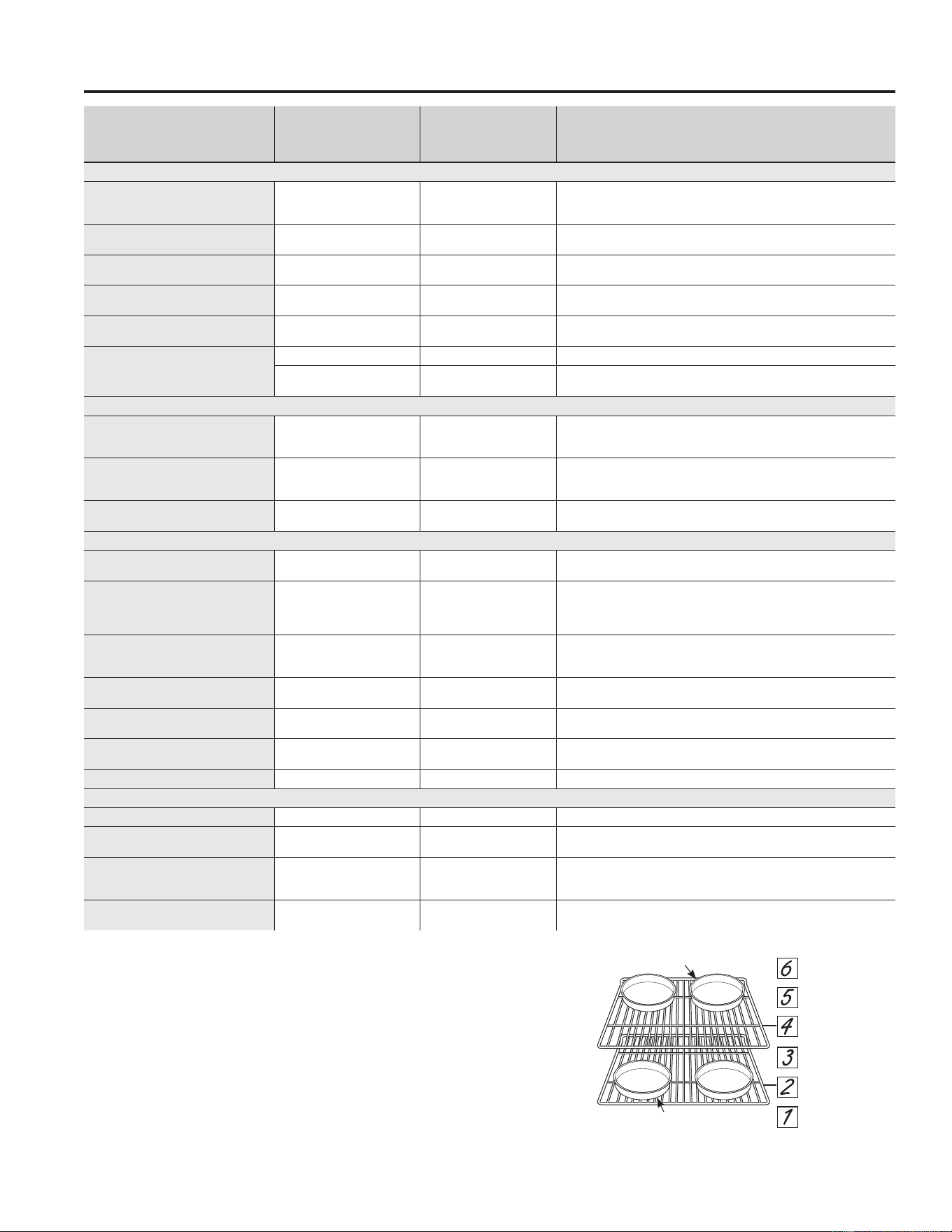
22 49-2000990 Rev. 5
USO DE LA ESTUFA: Guía de Cocción del Horno
Guía de Cocción del Horno
TIPO DE COMIDA
MODO(S)
RECOMENDADO(S)
POSICIÓN(ES)
DE ESTANTES
RECOMENDADA SUGERENCIAS ADICIONALES
Productos Horneados
Tortas con capas, tortas
rectangulares, roscas, panecillos, pan
rápido en un Solo Estante
Hornear
Productos Horneados
3 8VHXWHQVLOLRVEULOODQWHV
Tortas con capas* en Múltiples
Estantes
Hornear
Horneado por Convección
2 y 4
8VHXWHQVLOLRVEULOODQWHV$VHJ~UHVHGHTXHKD\DXQIOXMRGHDLUHDGHFXDGR
(Vea la ilustración).
Tortas de grasa (pastel de ángel)
Hornear
Productos Horneados
1 8VHXWHQVLOLRVEULOODQWHV
Galletas, galletitas, bizcochitos en un
Solo Estante
Hornear
Productos Horneados
3 8VHXWHQVLOLRVEULOODQWHV
Galletas, galletitas, bizcochitos en
Múltiples Estantes
Horneado por Convección
2 y 4
2, 4, y 6
8VHXWHQVLOLRVEULOODQWHV$VHJ~UHVHGHTXHKD\DXQIOXMRGHDLUHDGHFXDGR
Panes de Levadura
Leudar 2 o 3 Cubra la masa sin mucha rigidez.
Hornear
Productos Horneados
3
Bife y Cerdo
Hamburguesas Asar Alto 6
8VHODSDUWHSDUDDVDUPXHYDODFRPLGDPiVDEDMRSDUDTXHTXHGHPiV
preparada y menos soasada. Preste atención a la comida al asarla. Para un mejor
rendimiento, centre la comida debajo del elemento que emite calor para asar.
Bifes y Chuletas Asar Alto 5 o 6
8VHODSDUWHSDUDDVDUPXHYDODFRPLGDPiVDEDMRSDUDTXHTXHGHPiV
preparada y menos soasada. Preste atención a la comida al asarla. Para un mejor
rendimiento, centre la comida debajo del elemento que emite calor para asar.
Dorados
Hornear
Dorado por Convección
2 o 3
8VHXQDROODFKDWDWDOFRPRXQDROODSDUDDVDU
No se requiere precalentarla.
Ave
Pollo entero
Hornear
Dorado por Convección
2 o 3
8VHXQDROODFKDWDWDOFRPRXQDROODSDUDDVDU
No se requiere precalentarla.
Pechugas, patas, muslos con huesos
Asado Bajo
Hornear
3
Si se empanó o cubrió con salsa, evite los modos Broil High (Asar Alto).
Ase del lado de la piel hacia abajo primero. Preste atención a la comida
al asarla. Para un mejor rendimiento al asar, centre la comida debajo del
elemento que emite calor para asar.
Pechugas de pollo deshuesadas
Asado Bajo
Hornear
3
Mueva la comida más abajo para que quede más preparada y menos
soasada y más arriba para soasar/ dorar al asar. Para un mejor rendimiento
al asar, centre la comida debajo del elemento que emite calor para asar.
Pavo entero
Hornear
Dorado por Convección
1
8VHXQDROODFKDWDWDOFRPRXQDROODSDUDDVDU
No se requiere precalentarla.
Pechuga de Pavo
Hornear
Dorado por Convección
3
8VHXQDROODFKDWDWDOFRPRXQDROODSDUDDVDU
No se requiere precalentarla.
Pescado Asado Bajo
6 (mitad del grosor o menos)
5 (>1/2 pulgada)
Preste atención a la comida al asarla. Para un mejor rendimiento, centre la
comida debajo del elemento calentador para asar.
Cazuelas Hornear 3 o 4
Comidas Congeladas a Conveniencia
Pizza en un Estante Simple Pizza Congelada Simple 3 Coloque la comida en el horno antes de iniciar el modo.
Pizza en Estantes Múltiples Pizza Congelada Múltiple 2 y 4
Escalone las pizzas de izquierda a derecha, y no las coloque directamente
una sobre otra.
Productos con papa, patitas de pollo
fritas, aperitivos en un Solo Estante
Refrigerios Congelados
Simples
4 o 5
&RORTXHODFRPLGDHQHOKRUQRDQWHVGHLQLFLDUHOPRGR8VHXQXWHQVLOLR
RVFXURSDUDTXHTXHGHPiVGRUDGRFURFDQWHXVHXWHQVLOLRVEULOODQWHVSDUD
un menor dorado.
Productos con papa, patitas de pollo
fritas, aperitivos en Múltiples Estantes
Refrigerios Congelados
Múltiples
2 y 4
8VHXQXWHQVLOLRRVFXURSDUDTXHTXHGHPiVGRUDGRFURFDQWHXVH
utensilios brillantes para un menor dorado.
*Al hornear cuatro capas de torta a la vez, use los estantes 2 y
4. Coloque las ollas como se muestra, de modo que no quede
una olla encima de la otra.
Cocine la comida completamente para evitar que se produzcan
enfermedades a partir de la comida. Puede encontrar
recomendaciones sobre temperatura mínima para cocinar
de forma segura en IsItDoneYet.gov. Asegúrese de usar un
termómetro de comidas para medir la temperatura de las mismas.
8ELFDFLyQ7UDVHUD
8ELFDFLyQ)URQWDO
Posiciones de los Estantes
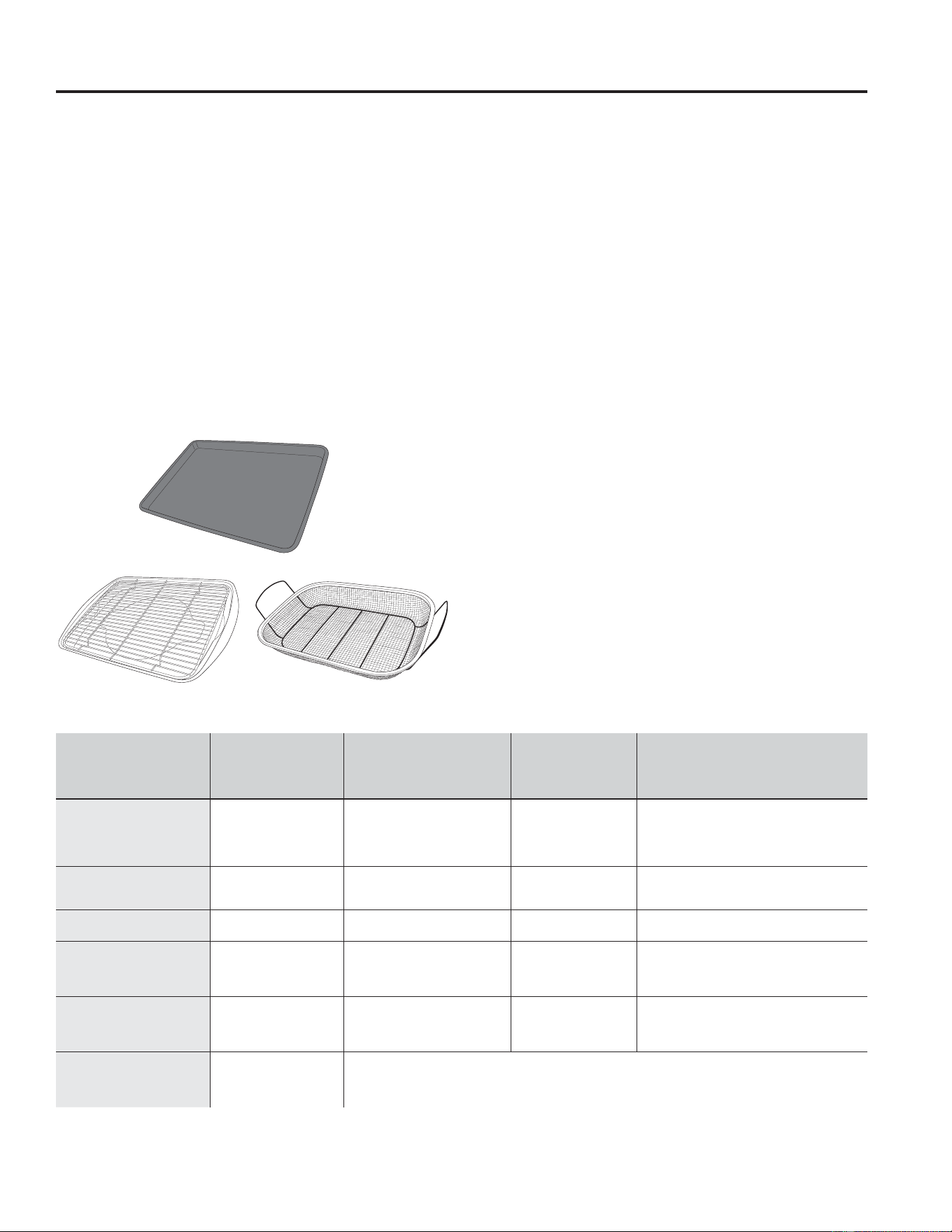
49-2000990 Rev. 5 23
Modo de Cocción para Freír con Aire
Air Fry (Freír con Aire) es un modo de cocción especial sin
precalentamiento, que fue diseñado para producir comidas
que en su exterior queden más crocantes que en la cocción
en hornos tradicionales. Seleccione Air Fry (Freír con Aire)
y luego ingrese la configuración de temperatura deseada y
presione Start (Iniciar). La temperatura se puede configurar
entre 300°F and 500°F.
Pautas del Utensilio para Freír con Aire
8WLOLFH XWHQVLOLRV GH XVR VHJXUR SDUD DVDU DO XWLOL]DU HO PRGR
Air Fry (Freír con Aire).
6H UHFRPLHQGD HO XVR GH XQD EDQGHMD GH OiPLQD RVFXUD 8QD
bandeja oscura promueve un mejor dorado y que la comida
quede más crocante.
• También se podrán usar canastas de horneado en el horno
y rejillas de horneado. Se deberá colocar una bandeja plana
sobre el estante debajo de las comidas, a fin de atrapar
cualquier goteo al usar la canasta de horneado.
Consejos Generales sobre el Modo para
Freír con Aire
• El modo Air Fry (Freír con Aire) fue diseñado para cocinar en
un solo estante.
• El modo Air Fry (Freír con Aire) fue diseñado para un uso sin
precalentamiento.
• Se recomienda la posición del estante 4 para la mayoría de
ODV FRPLGDV 8VH OD SRVLFLyQ GHO HVWDQWH SDUD FRPLGDV PiV
gruesas.
• Las comidas se podrán cocinar más rápido de lo esperado si
el horno ya está caliente cuando se coloca la comida en el
mismo.
• Al freír con aire comidas con salsa, se recomienda aplicar
esta última al final de la cocción.
• Si las comidas se doran demasiado rápido, intente colocar la
misma en un estante que se encuentre en un posición más
baja o en una configuración de temperatura de horno más
baja.
• En el caso de comidas empaquetadas, utilice las
instrucciones de cocción tradicionales para horno en relación
a la configuración de temperatura y tiempos de cocción
esperados.
• No es necesario voltear o revolver la comida durante la
cocción.
8ELTXH OD FRPLGD HQ XQD VROD FDSD VREUH OD EDQGHMD VLQ
sobrecargar la misma.
• Siempre controle la temperatura interior de la comida, a
fin de confirmar que se hayan alcanzado las temperaturas
mínimas seguras. Las temperaturas mínimas seguras
de la comida se podrán encontrar en los paquetes y en
IsItDoneYet.gov.
TIPO DE COMIDA
POSICIÓN(ES)
DE ESTANTES
RECOMENDADAS
CONFIGURACIÓN
DE TEMPERATURA
RECOMENDADA (°F)
TIEMPO DE
COCCIÓN
RECOMENDADO
(MÍN.) NOTAS
Trozos de pescado
fresco deshuesado o ave,
empanados en forma de
patitas, frituras crocantes,
filetes
4 375-400 15-30
8VH FRQILJXUDFLRQHV GH WHPSHUDWXUD PiV
EDMDV SDUD SLH]DV PiV JUDQGHV 8VH XWHQVLOLRV
brillantes.
Huesos frescos de alitas
de pollo
4 375-400 25-40
Sale las alitas o cubra las mismas con un roce
en seco si usará salsa luego de la cocción o
hacia el final de la cocción.
Huesos frescos de patas o
muslos de pollo
3 o 4 375-400 30-55
8VH FRQILJXUDFLRQHV GH WHPSHUDWXUD PiV EDMDV
para piezas más grandes.
Papas fritas frescas y
delgadas (< ½ pulgada)
4 400-425 15-30
Se recomienda el uso de papel para hornear al
preparar papas fritas frescas. Para frituras más
crocantes, mezcle las papas fritas con almidón
de maíz o harina de arroz antes de la cocción.
Papas fritas frescas y
delgadas (< ½ pulgada)
3 o 4 375-400 20-35
Se recomienda el uso de papel para hornear al
preparar papas fritas frescas. Para frituras más
crocantes, mezcle las papas fritas con almidón
de maíz o harina de arroz antes de la cocción.
Comidas envasadas
congeladas
3 o 4
(use la posición de estate
3 para comidas más
gruesas)
8VH ODV LQVWUXFFLRQHV GH FRFFLyQ SDUD KRUQR WUDGLFLRQDO QR SDUD )UHtU FRQ $LUH FRPR JXtD GH FRQILJXUDFLyQ GH
temperatura y tiempo de cocción. Con algunas comidas, se podrá requerir un tiempo de cocción adicional diferente
al tiempo recomendado en el paquete. Si el horno está caliente al iniciar la cocción, la comida se podrá cocinar
más rápido que el tiempo mínimo que figura en el paquete.
8WHQVLOLR SULQFLSDO UHFRPHQGDGR
Opciones de utensilios alternativos
USO DE LA ESTUFA: Modo de Cocción para Freír con Aire
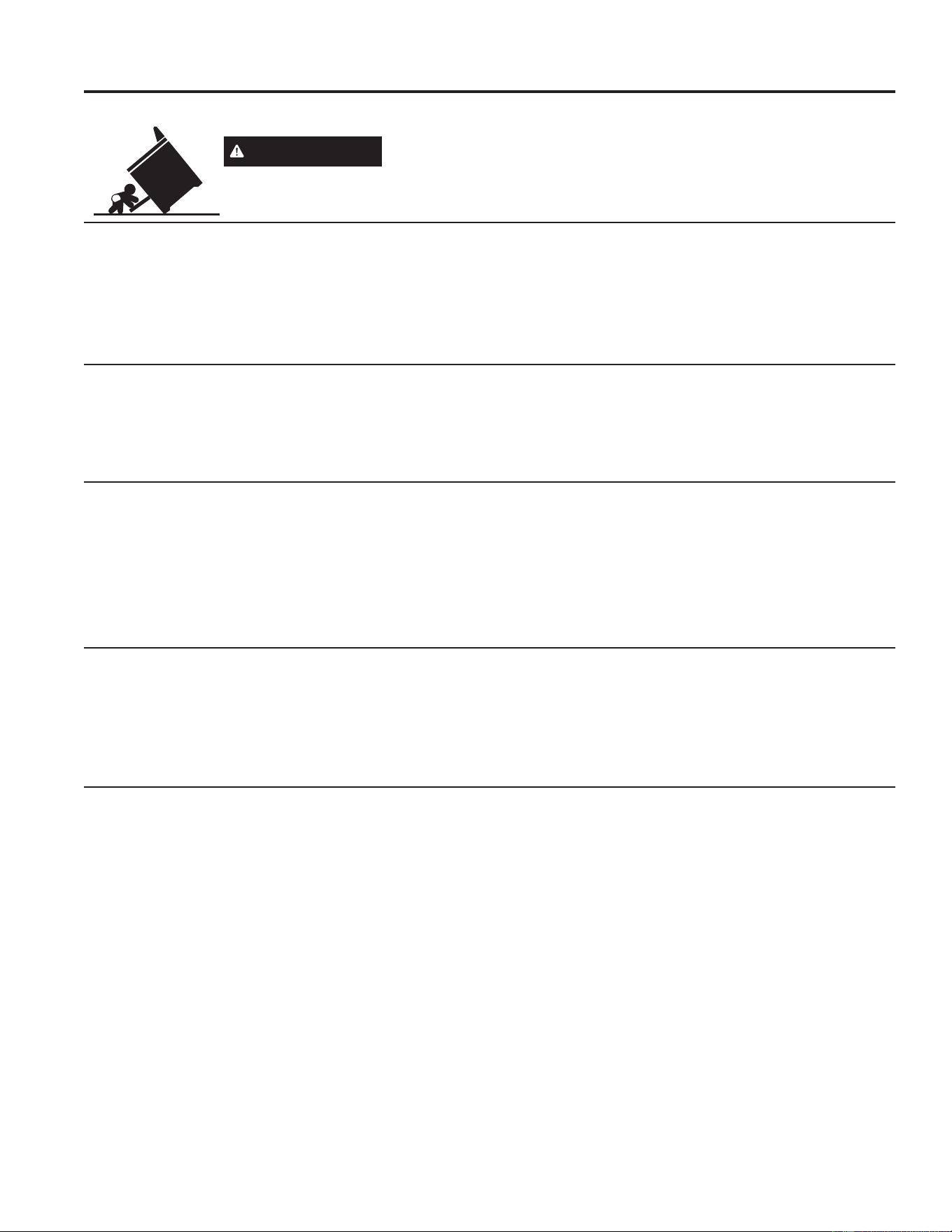
24 49-2000990 Rev. 5
CUIDADO Y LIMPIEZA: Limpieza de la Estufa - Exterior
Limpieza de la Estufa - Exterior
ADVERTENCIA
Si se quita la estufa para efectuar una limpieza, reparaciones o cualquier
otra razón, verifique que el dispositivo anti-volcaduras se coloque de manera
adecuada cuando vuelva a instalarse la estufa. Si no toma esta precaución, la
estufa puede volcarse y provocar lesiones.
Asegúrese de que todos los controles estén apagados y que las superficies estén frías antes de limpiar cualquier parte de la estufa.
Bloqueo del Control
Si así lo desea, puede desactivar los botones de toque antes
de la limpieza.
Consulte Lock Controls (Controles de Bloqueo) en la sección
Oven Controls (Controles del Horno) en este manual.
Limpie los derrames con un paño húmedo.
También puede utilizar un limpiador de vidrios.
4XLWHVXFLHGDGHVPiVUHEHOGHVFRQDJXDWLELDMDERQRVD1R
utilice abrasivos de ninguna clase.
Vuelva a activar los botones de toque después de la limpieza.
Panel de control
8QDEXHQDLGHDHVOLPSLDUHOSDQHOGHFRQWUROOXHJRGHFDGD
uso. Limpie con un jabón suave y agua o vinagre y agua,
enjuague con agua limpia y pula en seco con una tela suave.
No use limpiadores abrasivos, limpiadores líquidos fuertes,
almohadillas para fregar de plástico ni limpiadores de horno en
HOSDQHOGHFRQWUROGDxDUiQHODFDEDGRLQFOX\HQGRHO$FHUR
Inoxidable Negro.
Exterior del Horno
No use limpiadores de horno, limpiadores abrasivos,
limpiadores líquidos fuertes, estropajos de acero, almohadillas
para fregar de plástico, ni polvos limpiadores en el exterior
del horno. Limpie el mismo con agua y jabón o una solución
de vinagre y agua. Enjuague con agua limpia y seque con
una tela seca. Al limpiar supeficies, asegúrese de que estén
a temperatura ambiente y fuera del contacto con la luz
solar. Si las manchas en el borde de la ventana de la puerta
son persistentes, use un limpiador abrasivo suave o una
esponja con estropajo para obtener un mejor resultado. El
derrame de adobo, jugos de fruta, salsas de tomate y líquidos
para humedecer que contengan ácidos pueden ocasionar
descoloración y se deberán limpiar de inmediato. Deje que las
superficies calientes se enfríen, y luego limpie y enjuague.
Superficies pintadas, Acero Inoxidable Negro, y Acero Inoxidable Resistente
a Huellas Dactilares
Las superficies pintadas incluyen los lados de la estufa y la
puerta, la parte superior del panel de control y el frente del
cajón. Límpielas con jabón y agua o con una solución de
agua y vinagre.
No utilice limpiadores de horno comerciales, polvos limpiadores,
esponjillas de acero o abrasivos potentes sobre cualquier
superficie pintada, incluyendo el Acero Inoxidable Negro.
Superficies de Acero Inoxidable
1RXVHYLUXWDVGHDFHURpVWDVGDxDUiQODVXSHUILFLH
Para limpiar la superficie de acero inoxidable, use agua tibia
con jabón o un limpiador o pulidor para acero inoxidable.
Siempre limpie la superficie en la dirección del veteado. Siga
las instrucciones del limpiador para limpiar la superficie de
acero inoxidable.
Para realizar consultas sobre la adquisición de productos,
incluyendo limpiadores o pulidores para electrodomésticos
de acero inoxidable, consulte las secciones de Accesorios y
Soporte al Consumidor al final de este manual.

49-2000990 Rev. 5 25
El interior de su nuevo horno puede ser limpiado de forma manual o utilizando los modos Steam Clean (Limpieza con Vapor) o
Self Clean (Limpieza Automática).
El derrame de adobo, jugos de fruta, salsas de tomate y líquidos para humedecer que contengan ácidos pueden ocasionar
descoloración y se deberán limpiar de inmediato. Espere a que las superficies calientes se enfríen, y luego limpie y enjuague.
Limpieza Manual
No use limpiadores de horno (a menos que estén certificados
para hornos con limpieza automática), limpiadores abrasivos,
limpiadores líquidos fuertes, estropajos de acero, almohadillas
para fregar, ni polvos limpiadores en el interior del horno.
Limpie el mismo con agua y jabón o una solución de vinagre
y agua. Enjuague con agua limpia y seque con una tela seca.
Al limpiar supeficies, asegúrese de que estén a temperatura
ambiente y fuera del contacto con la luz solar.
Limpieza de la Estufa - Interior
Estantes
Todos los estantes se pueden lavar con agua caliente y jabón.
Los estantes esmaltados (no brillosos) se pueden dejar en la
cavidad durante el ciclo de limpieza automática.
Es posible que resulte más difícil deslizar los estantes,
especialmente luego de la limpieza automática. Coloque aceite
vegetal en una tela húmeda o toalla de papel y frote sobre los
extremos izquierdo y derecho.
NOTA: El uso de otros aceites de estufa provocará una
descoloración o un residuo de color similar al óxido en los
estantes y laterales de las cavidades. Para limpiar este
residuo, use agua y jabón o una solución de vinagre y agua.
Enjuague con agua limpia y seque con una tela seca.
Modo de Limpieza Automática
Lea las Instrucciones de Seguridad del Horno con Limpieza
Automática, en el comienzo de este manual, antes de usar
el modo Self Clean (Limpieza Automática). Este modo usa
temperaturas muy altas para limpiar el interior del horno. Para
un horno moderadamente sucio, use un ciclo de limpieza
automática de 3 horas. Sólo los estantes del horno de limpieza
automática (negros) y las rejillas podrán permanecer en el
horno durante el ciclo de limpieza automática. Todos los
demás ítems, incluyendo los estantes niquelados (plateados),
deberán ser retirados. Si los estantes niquelados (plateados)
se dejan dentro del horno durante un ciclo de limpieza
automática, los estantes sufrirán deslustre. Si cualquier tipo
de estante es dejado en el horno durante el ciclo de limpieza
automática, es posible que se vuelva difícil deslizar el estante.
Para acceder a instrucciones sobre cómo mejorar esto,
consulte la sección de Estantes del Horno.
IMPORTANTE: Las emanaciones producidas por el ciclo de
autolimpieza de cualquier horno afectan la salud de algunas
aves de manera notoria. Procure llevar sus aves a otra
habitación bien ventilada.
Para usar la función Self Clean (Limpieza Automática):
1. Comience con el horno a temperatura ambiente.
2. Limpie la grasa excesiva y las suciedades del horno y
del interior de la puerta.
3. Retire cualquier ítem que no sean los estantes y
rejillas de limpieza automática (negros), si lo desea.
Consulte sobre la Limpieza de la Superficie de Cocción
para determinar si sus rejillas pueden ser limpiadas
automáticamente y para detalles importantes en relación
a la colocación de las rejillas.
4. Cierre la puerta.
5. Presione la tecla Clean (Limpiar), seleccione Self
Clean (Limpieza Automática) y luego presione Start/
Enter (Iniciar/ Ingresar).
No podrá abrir la puerta durante el ciclo de limpieza automática.
La puerta permanecerá bloqueada luego del ciclo de limpieza
automática hasta que el horno se enfríe y se alcance la
temperatura de desbloqueo. Al finalizar el ciclo de limpieza
automática, deje que el horno se enfríe, destrabe la puerta, y
limpie cualquier ceniza que haya quedado en el horno.
Para Detener un Ciclo de Limpieza Automática
Presione la tecla Cancel/Off (Cancelar/ Apagar). Espere
hasta que el horno se haya enfriado por debajo de la
temperatura de bloqueo para destrabar la puerta. No podrá
abrir la puerta de inmediato, a menos que el horno se haya
enfriado por debajo de la temperatura de bloqueo.
Las unidades de superficie se desactivan automáticamente
durante el ciclo de auto-limpieza. Verifique que todos los
controles de unidades de superficie estén apagados en todo
momento durante el ciclo de auto-limpieza.
Espere hasta que termine el ciclo de auto-limpieza para
configurar y usar las unidades de superficie.
Modo de Limpieza con Vapor
La finalidad de la función Steam Clean (Limpieza con Vapor)
es usar agua para limpiar la suciedad leve de su horno en una
temperatura inferior a la de Self Clean (Limpieza Automática).
Para usar la función Steam Clean (Limpieza con Vapor):
1. Comience con el horno a temperatura ambiente.
2. Limpie la grasa excesiva y la suciedad del horno.
3. Vierta una taza de agua en la parte inferior del horno.
4. Cierre la puerta.
5. Presione la tecla Clean (Limpiar), seleccione Steam
Clean (Limpieza con Vapor) y luego presione Start/
Enter (Iniciar/ Ingresar).
No abra la puerta durante los 30 minutos de la limpieza con
vapor, ya que esto reducirá su rendimiento.
Al finalizar el
ciclo de Steam Clean (Limpieza con Vapor), absorba el agua
restante, y limpie la suciedad ablandada por la humedad de las
paredes y la puerta del horno.
CUIDADO Y LIMPIEZA: Limpieza de la Estufa - Interior
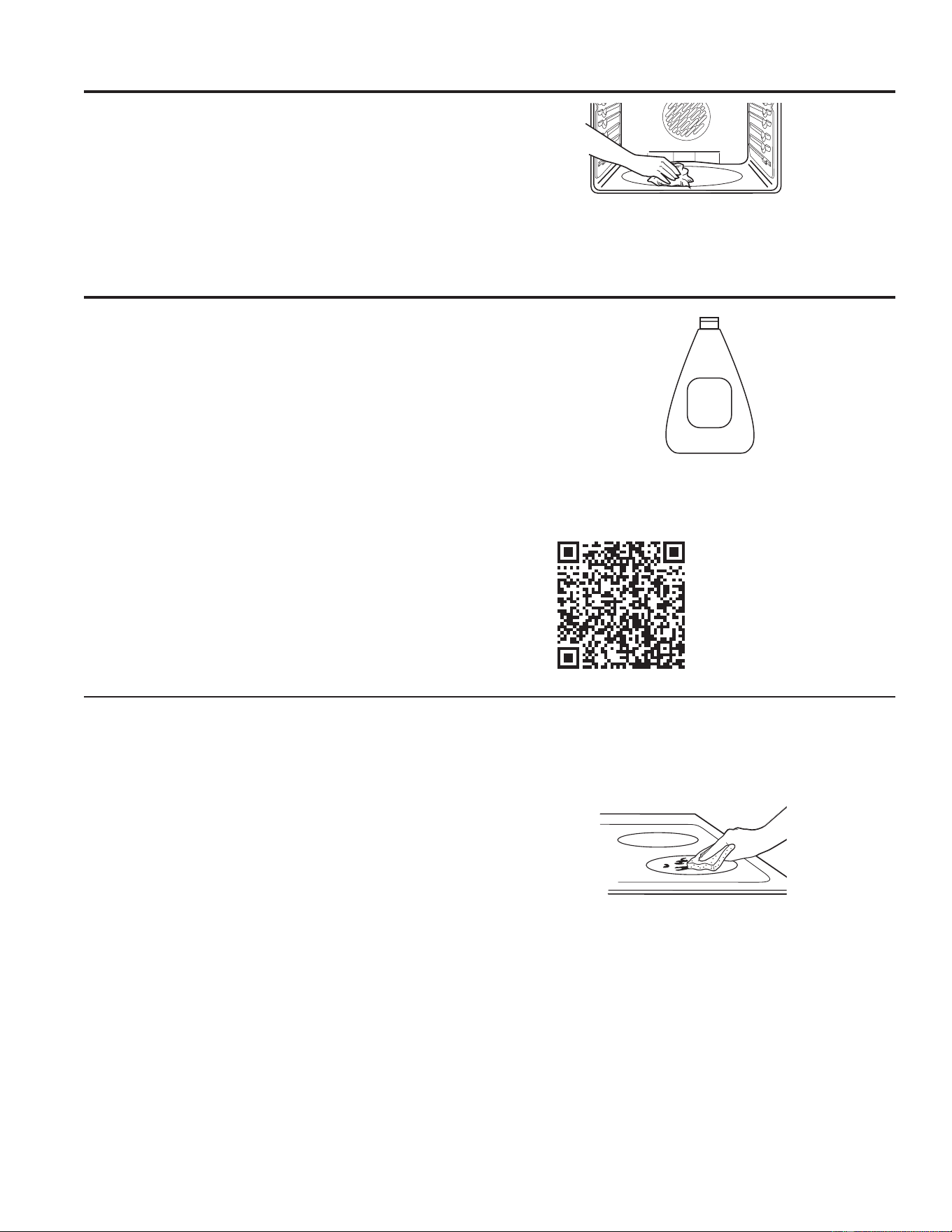
26 49-2000990 Rev. 5
CUIDADO Y LIMPIEZA: Limpieza de la Estufa - Interior / Placa de Cocción de Vidrio
Limpieza de la Placa de Cocción de Vidrio
Para mantener y proteger la superficie de su estufa de vidrio,
siga estos pasos:
1. Antes de usar la estufa por primera vez, límpiela con el
limpiador de estufas cerámicas. Esto ayuda a proteger la
estufa y hace la limpieza más sencilla.
2. El uso diario del limpiador de estufas cerámicas ayudará a
que la estufa quede como nueva.
3. Agite bien la crema de limpieza. Aplique unas gotas del
limpiador de estufas cerámicas directamente sobre la
estufa.
8WLOLFHXQDWRDOODGHSDSHORXQSDxRGHOLPSLH]DSDUD
estufas cerámicas para limpiar toda la superficie de la
estufa.
8VHXQSDxRVHFRRXQDWRDOODGHSDSHOSDUDTXLWDUORV
restos del limpiador. No hace falta enjuagar.
NOTA: Es muy importante que NO CALIENTE la estufa hasta
que la haya limpiado por completo.
Residuos pegados
NOTA: Se podrán producir DAÑOS sobre la superficie de
vidrio si utiliza estropajos que no sean los recomendados.
1. Deje enfriar la estufa.
2. Coloque unas gotas del limpiador de estufas cerámicas
sobre toda el área de residuos pegados.
8WLOL]DQGRXQSDxRGHOLPSLH]DSDUDVXSHUILFLHVGHFRFFLyQ
de cerámica, frote el área sucia aplicando presión según
sea necesario.
4. Si quedan restos, repita los pasos indicados con
anterioridad.
5. Para protección adicional, después de haber quitado todos
los restos, pula toda la superficie con limpiador de estufas
cerámicas y una toalla de papel.
8WLOLFHXQSDxRGHOLPSLH]DSDUDHVWXIDV
cerámicas.
Limpieza de la Estufa - Interior (Continúa)
Elementos calentadores del horno
No limpie los elementos para asar. Las suciedades se
quemarán cuando se calienten los elementos.
El elemento para hornear no está expuesto y se encuentra
debajo de la base del horno. Limpie la base del horno con
agua caliente y jabón.
Limpie con un paño los desechos rebeldes
acumulados en el piso del horno.
Limpie la estufa después
GHFDGDGHUUDPH8WLOLFHHO
limpiador de estufas cerámicas
Ceramic
Cooktop
Cleaner
Para acceder a videos de
limpieza e instrucciones,
HVFDQHHHOFyGLJR45
con su dispositivo.
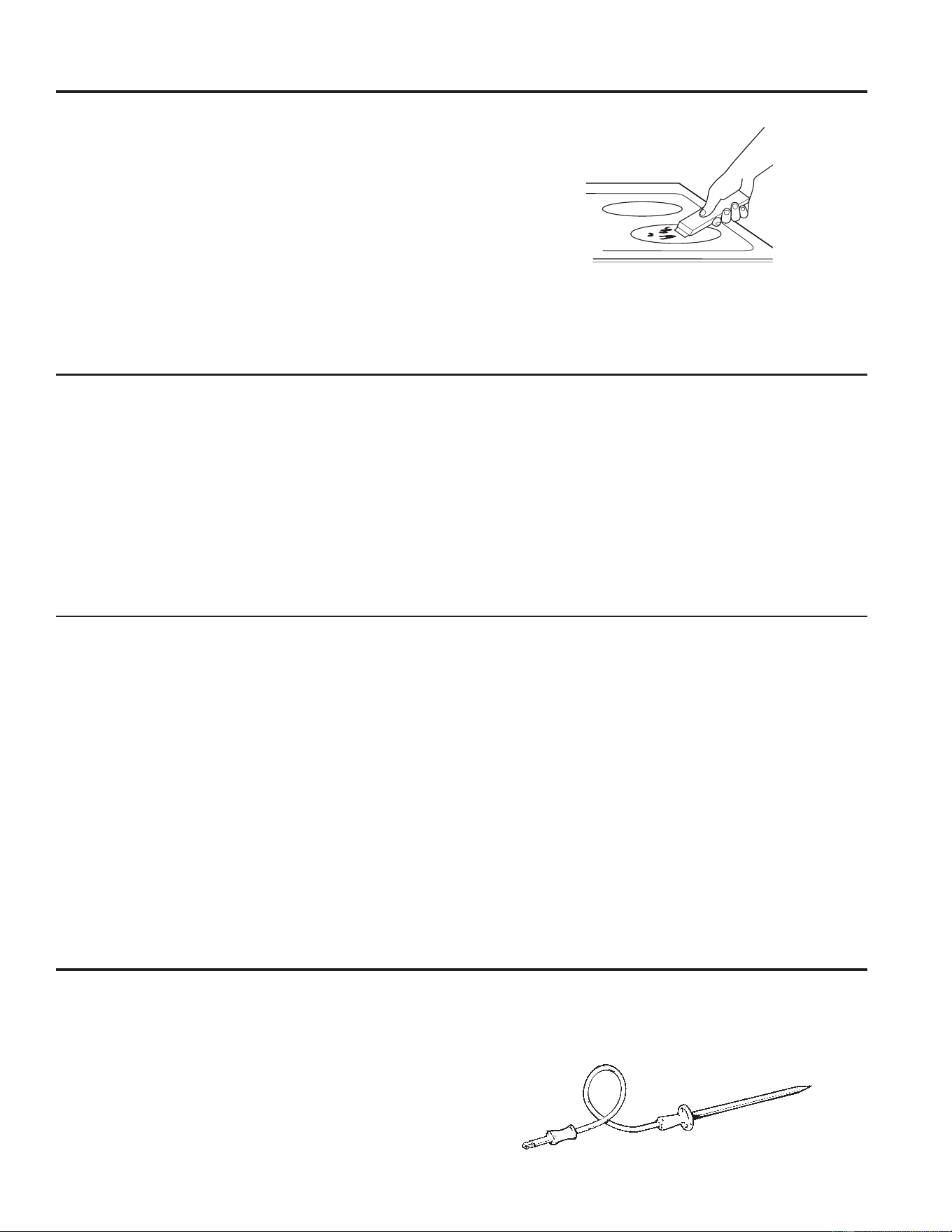
49-2000990 Rev. 5 27
Marcas de metal y rayones
1. Tenga cuidado de no deslizar ollas y sartenes a través de
su estufa. Dejará marcas de metal sobre la superficie de
la estufa.
Estas marcas pueden quitarse utilizando limpiador de
estufas cerámicas con el paño de limpieza para estufas
cerámicas.
2. Si se permite que ollas con una capa fina de aluminio
o cobre hiervan en seco, la capa puede dejar una
decoloración negra en la estufa.
Esto debe quitarse de inmediato antes de calentar de
nuevo o la decoloración puede llegar a ser permanente.
NOTA: Verifique con detenimiento que la base de las ollas no
sea áspera para no rayar la estufa.
3. Tenga cuidado de no colocar bandejas de horneado de
aluminio ni recipientes de platos principales congelados
de aluminio sobre una superficie caliente de la placa de
FRFFLyQeVWDVGHMDUiQSXQWRVEULOODQWHVRPDUFDVVREUHOD
superficie de cocción. Estas marcas son permanentes y no
se podrán eliminar.
Daños por derrames azucarados y plástico derretido
Se deberá tener especial cuidado al eliminar sustancias calientes, a fin de evitar daños permanentes sobre la superficie de
vidrio. Los derrames azucarados (como gelatinas, dulce, caramelo, jarabes) o plásticos derretidos pueden marcar la superficie
de la estufa (no cubierto por la garantía) a menos que el derrame se quite mientras está caliente. Debe tenerse mucho cuidado al
remover sustancias calientes.
Asegúrese de utilizar un raspador nuevo y afilado.
No utilice hojas desafiladas o dañadas.
$SDJXHWRGDVODVXQLGDGHVGHVXSHUILFLH4XLWHODVROODV
calientes.
8WLOL]DQGRXQJXDQWHGHHVWXID
D8VHXQUDVSDGRUGHILOR~QLFRSDUDGHVSOD]DUHO
derrame a un área fría de la estufa.
E4XLWHHOGHUUDPHFRQWRDOODVGHSDSHO
3. Cualquier derrame restante debe dejarse hasta que la
superficie de la estufa se haya enfriado.
4. No use las unidades de superficie de nuevo hasta que
todos los restos se hayan eliminado por completo.
NOTA: Si la superficie de vidrio ya ha sufrido marcas o
hendiduras, el vidrio de la estufa deberá cambiarse. En ese
caso, será necesaria la atención de un técnico.
Cómo limpiar la estufa de vidrio (Continúa)
Sonda del Horno
La sonda de temperatura se puede limpiar con agua y jabón
o con una almohadilla de estropajo llena de jabón. Enfríe
la sonda de temperatura antes de su limpieza. Fregue las
manchas difíciles con una almohadilla de estropajo llena de
jabón, enjuague y seque.
Para ordenar sondas de temperatura adicionales, consulte las
secciones de Accesorios y Soporte al Consumidor al final de
este manual.
Ŷ No sumerja la sonda de temperatura en agua.
Ŷ 1RJXDUGHODVRQGDGHWHPSHUDWXUDGHQWURGHOKRUQR
Ŷ 1XQFDGHMHODVRQGDGHWHPSHUDWXUDGHQWURGHOKRUQR
durante un ciclo de limpieza automática o de limpieza
con vapor.
Residuos pegados rebeldes
1. Deje enfriar la estufa.
8WLOLFHHOUDVSDGRUGHILOR~QLFRDXQiQJXORDSUR[LPDGR
de 45 degrees contra la superficie del vidrio y raspe la
suciedad. Puede ser necesario aplicar presión al raspador
para quitar la suciedad.
3. Después de utilizar el raspador, coloque unas gotas de
limpiador de estufas cerámicas sobre toda el área de
VXFLHGDGTXHPDGD8WLOLFHHOSDxRGHOLPSLH]DSDUDTXLWDU
la suciedad restante.
4. Para protección adicional, después de haber quitado todos
los restos, pula toda la superficie con limpiador de estufas
cerámicas y una toalla de papel.
La espátula para superficies de cocción de cerámica y todos los
elementos recomendados se encuentran disponibles a través de
nuestro Centro de Piezas. Consulte las secciones de Accesorios y
Soporte al Consumidor al final de este manual.
NOTA: No utilice hojas desafiladas o dañadas.
CUIDADO Y LIMPIEZA: Cómo limpiar la estufa de vidrio / Sonda del Horno
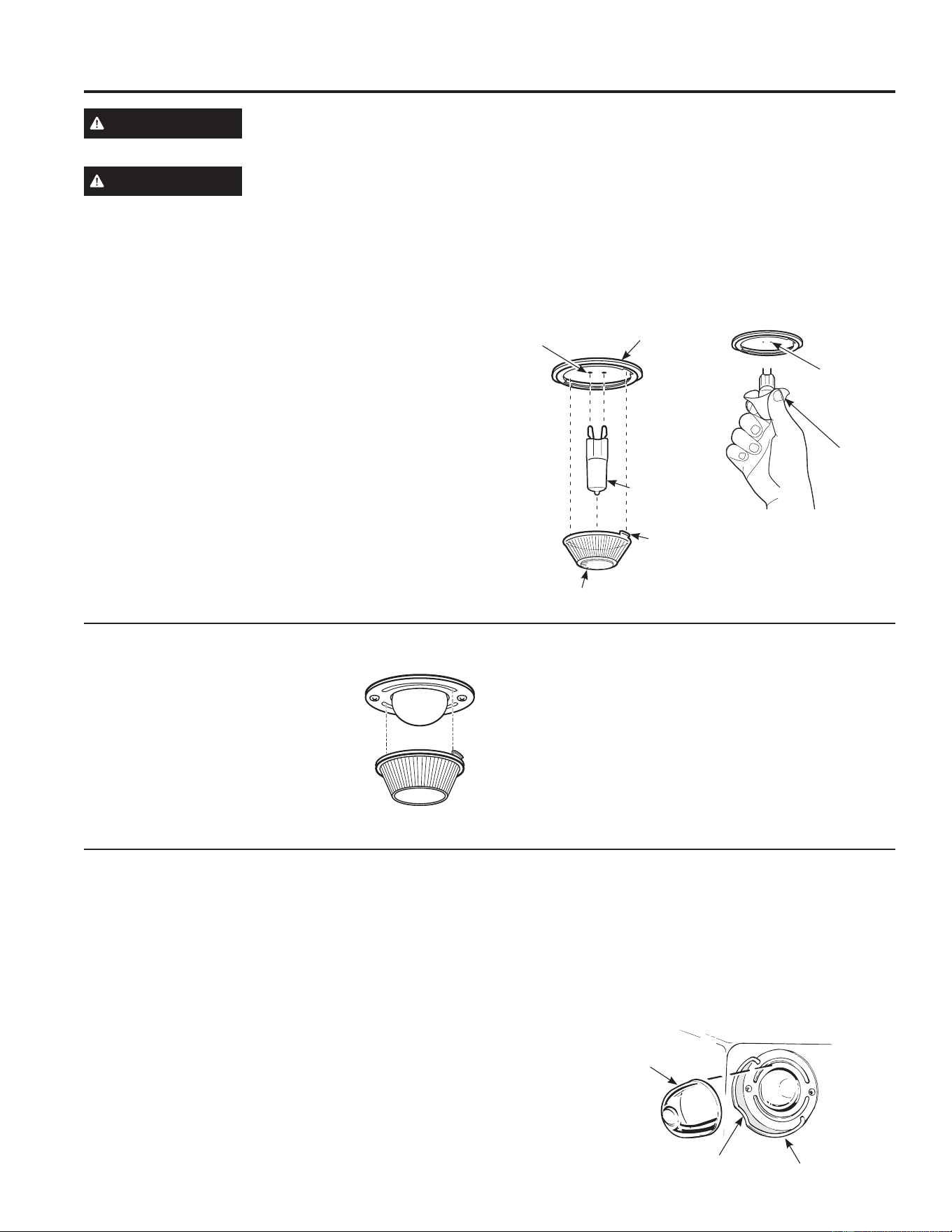
28 49-2000990 Rev. 5
Luz del Horno
ADVERTENCIA
PELIGRO DE DESCARGA ELÉCTRICA O QUEMADURAS: Antes de reemplazar la bombilla del
horno, desconecte la alimentación de energía al horno desde el panel principal de fusibles o del
interruptor de circuitos. No hacerlo puede provocar una descarga eléctrica o una quemadura.
PRECAUCIÓN
RIESGO DE INCENDIO: La tapa de vidrio y la lámpara de luz se deberán retirar cuando estén frías. Tocar
el vidrio caliente sin protección en las manos o con un trapo húmedo puede ocasionar quemaduras.
Reemplazo de la bombilla del horno (en algunos modelos)
Para retirar:
1. Gire la cubierta de vidrio en sentido contrario a las
manecillas del reloj 1/4 de vuelta hasta que las
lengüetas de la cubierta de vidrio liberen los surcos del
portalámparas. Colocarse guantes de látex puede brindar
un mejor agarre.
8WLOL]DQGRJXDQWHVRXQSDxRVHFRUHPXHYDODERPELOOD
jalándola en línea recta.
Para reemplazar:
8WLOLFHXQDQXHYDERPELOODKDOyJHQDGHYROWLRV
no exceda 50 vatios. Reemplace la lámpara de luz con
el mismo tipo de lámpara que se retiró. Asegúrese al
reemplazar la lámpara que sea de 120 volts o 130 volts
(NO de 12 volts).
8WLOL]DQGRJXDQWHVRXQSDxRVHFRUHPXHYDODERPELOODGH
su paquete. No toque la bombilla con los dedos desnudos.
El aceite para piel dañará la lámpara y acortará su tiempo
de duración.
3. Empuje la bombilla en línea recta dentro del receptáculo
hasta el tope.
4. Coloque las lengüetas de la cubierta de vidrio dentro de
los surcos del portalámparas. Gire la cubierta de vidrio en
sentido de las manecillas del reloj 1/4 de vuelta.
Para una mejor iluminación dentro del horno, limpie
frecuentemente la cubierta de vidrio utilizando un paño
húmedo. Esto debería hacerse cuando el horno está
completamente frío.
5. Conecte nuevamente el suministro eléctrico al horno.
Reemplazo de la bombilla del horno (en algunos modelos)
Para quitar la tapa:
1. Dé a la tapa de vidrio un cuarto de giro
en contra de las agujas del reloj hasta
que las lengüetas de la tapa de vidrio
limpien las ranuras de la ficha. Si usa
guantes de látex tendrá un mejor agarre.
2. Retire la lámpara girando la misma en
dirección contraria a las agujas del reloj.
Para volver a colocar la tapa:
1. Reemplace la lámpara por una para electrodoméstico de 40
watts. Inserte la lámpara y gire la misma en dirección de las
agujas del reloj, hasta que quede ajustada.
2. Coloque las lengüetas de la tapa de vidrio en las ranuras
de la ficha. Dé a la tapa de vidrio un cuarto de giro en
dirección de las agujas del reloj.
Para una mejor iluminación dentro del horno, limpie la tapa
del vidrio en forma frecuente utilizando una tela húmeda. Esto
se deberá hacer cuando el horno esté completamente frío.
3. Vuelva a conectar el cable de electricidad del horno.
Bombilla
de G9
Portalámpara
Lengüeta
Cubierta de vidrio
Receptáculo
8VHJXDQWHV
o un paño
Receptáculo
Reemplazo de la bombilla del horno (en algunos modelos)
La lámpara de luz del horno está cubierta por una tapa de vidrio extraíble que es sostenida por un cable que la cruza. Retire
la puerta del horno, si lo desea, para llegar a la tapa fácilmente. Retire la puerta del horno, si lo desea, para llegar a la tapa
fácilmente. Para acceder a instrucciones detalladas sobre el retiro de la puerta del horno, consulte la sección sobre Cómo Retirar
la Puerta del Horno.
Reemplazo de la Lámpara:
1. Desconecte el cable de electricidad a la estufa.
2. Mantenga estable la tapa de vidrio, de modo que no se
caiga al ser liberada.
3. Deslice la misma cerca del borde del suspensor de la tapa,
hasta que la tapa sea liberada. No retire ningún tornillo
para retirar la tapa de vidrio.
4. Reemplace la lámpara por una para electrodomésticos de
40 watts. No toque la lámpara caliente con la mano o una
tela húmeda. Sólo retire la lámpara cuando esté fría.
5. Mantenga la tapa de vidrio estable sobre la lámpara nueva.
6. Empuje el suspensor de la tapa del cable cerca del borde,
hasta que el borde del suspensor de la tapa del cable esté
ubicado en el borde de la tapa de vidrio.
7. Conecte la electricidad a la estufa.
Amplio suspensor de tapa
Borde
Tapa de vidrio (en modelos con
limpieza automática únicamente)
CUIDADO Y LIMPIEZA: Luz del Horno
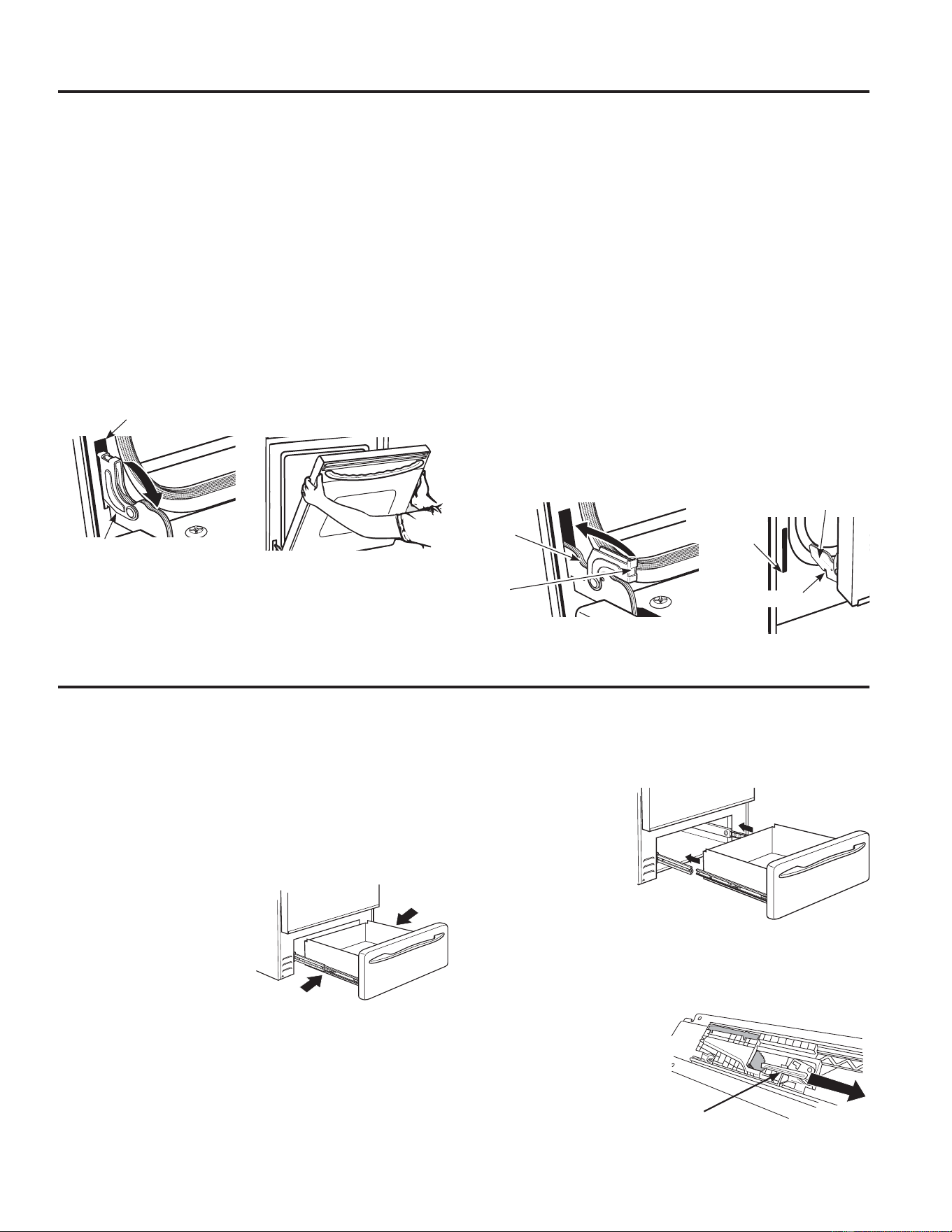
49-2000990 Rev. 5 29
La puerta es muy pesada. Tenga cuidado al retirar y levantar la puerta.
No levante la puerta usando la manija.
Para retirar la puerta:
1. Abra la puerta totalmente.
2. Empuje los bloqueos de la bisagra hacia abajo en
dirección a la estructura de la puerta, hasta la posición
desbloqueada. Es posible que necesite una herramienta tal
como un destornillador pequeño de punta plana.
3. Firmemente tome ambos lados de la puerta por la parte
superior.
4. Cierre la puerta hasta la posición de retiro de la misma.
/D SXHUWD GHEHUtD VHU DELHUWD DSUR[LPDGDPHQWH D ´ VLQ
obstrucción sobre la misma.
5. Levante la puerta hacia arriba y afuera, hasta que los
brazos de las bisagras queden fuera de las ranuras.
Para reemplazar la puerta:
1. Firmemente tome ambos lados de la puerta por la parte
superior.
2. Comenzando desde el lado izquierdo, con la puerta en el
mismo ángulo de la posición de retiro, apoye la hendidura
del brazo de la bisagra en el extremo inferior de la ranura
de la bisagra. La abertura en el brazo de la bisagra deberá
estar totalmente apoyada en la parte inferior de la ranura.
Repita el procedimiento del lado derecho.
3. Abra la puerta totalmente. Si la puerta no se abre
totalmente, la hendidura no está correctamente apoyada en
el extremo inferior de la ranura.
4. Empuje los bloqueos de la bisagra contra la estructura
frontal de la cavidad del horno, hasta la posición de
bloqueo.
5. Cierre la puerta del horno.
Puerta del Horno
Posición de retiro
Bloqueo de la bisagra
Ranura
Empuje los bloqueos de la
bisagra hacia abajo para
desbloquear
Extremo inferior de la ranura
Bloqueo
de la
bisagra
Brazo
de la
bisagra
Hendidura
Empuje el
bloqueo de la
bisagra hacia
arriba hasta
que quede
bloqueado
Brazo de la
bisagra
El cajón de almacenamiento es un buen lugar para guardar
utensilios de estufa y panadería. No guarde plásticos ni
materiales inflamables en el cajón.
El cajón de almacenamiento se podrá retirar para limpiar
debajo de la estufa. Limpie el cajón de almacenamiento con
una tela o esponja húmeda. Nunca use abrasivos duros ni
almohadillas para fregar.
Su cajón de almacenamiento cuenta con rieles metálicos.
Para retirar el cajón:
1. Empuje el cajón hacia
afuera hasta que se
detenga.
2. Presione el liberador del
riel izquierdo hacia adentro
y presione el derecho
hacia adentro, mientras
empuja el cajón hacia
adelante y lo libera.
Para reemplazar el cajón:
1. Coloque el riel del cajón izquierdo alrededor de la guía del
riel interior izquierdo y deslice el mismo lentamente para
engancharlo.
2. Coloque el riel
del cajón derecho
alrededor de la
guía del riel interior
derecho y deslice el
mismo lentamente
para engancharlo.
3. Deslice el cajón
totalmente hasta
adentro.
En algunos casos extraños, el mecanismo de cierre suave
podrá quedar desacoplado del cajón. Para reiniciar el
mecanismo:
1. Retire el cajón.
2. Deslice el
perno de agarre
hacia adelante,
sobre ambos
lados según
corresponda.
3. Vuelva a instalar el cajón.
Cajón con Cierre Suave
Perno de Agarre
CUIDADO Y LIMPIEZA: Puerta del Horno / Cajón con Cierre Suave
30 49-2000990 Rev. 5
CONSEJOS PARA LA SOLUCIÓN DE PROBLEMAS
Problema Causa Posible Qué Hacer
Las unidades de superficie no
funcionan bien o destella la
configuración de energía.
Se están utilizando recipientes de cocción
inadecuados.
5HFLSLHQWHLQFRUUHFWR8VHXQLPiQSDUDYHULILFDUTXHHOUHFLSLHQWHVHD
FRPSDWLEOHFRQODLQGXFFLyQ8VHXQUHFLSLHQWHSODQRFRQFDSDFLGDGGH
inducción que cumpla con el tamaño mínimo para el elemento que se
está usando. Ver la sección Tamaño y forma de los recipientes.
El recipiente es muy pequeño. El tamaño del recipiente es menor al tamaño mínimo para el elemento.
9HUODVHFFLyQ7DPDxR\IRUPDGHORVUHFLSLHQWHV8VHHOHOHPHQWRPiV
pequeño.
La bandeja no están en contacto completo con la
superficie de vidrio.
La bandeja debe ser plana.
En algunas regiones la energía (voltaje) puede ser
baja.
Cubra el recipiente con una tapa hasta obtener el calo deseado.
Es posible que un fusible de su hogar se haya
quemado o que el disyuntor se haya desconectado.
Reemplace el fusible o reinicie el disyuntor.
El recipiente no está bien colocado. El control de la
estufa está mal configurado.
Asegúrese de que el control esté correctamente configurado. Las luces
LED deberán estar iluminadas por lo menos en una intensidad media,
alrededor del arco gris para ese elemento. Presione ON (Encender) y
luego + o -. Verifique que los controles estén limpios y secos.
La configuración de la unidad
de superficie cambió o se
apagó de repente.
Temperatura elevada de la estufa. Ver la sección Superficie de vidrio: posibilidades de daño permanente
en la sección Cómo limpiar la estufa de vidrio.
Rayones (pueden parecer
como roturas) en la superficie
de vidrio de la estufa
Se están usando métodos de limpieza incorrectos. Los rayones no pueden removerse. Los rayones más pequeños se
volverán menos visibles como resultado de la limpieza.
Se están usando recipientes con bases ásperas
o hay partículas gruesas (sal o arena) entre el
recipiente y la superficie de la estufa. Se ha deslizado
un recipiente a través de la superficie de la estufa.
Para evitar rayones, use los procedimientos de limpieza recomendados.
Verifique que las bases de los recipientes estén limpias antes del uso, y
utilice recipientes con bases lisas.
Áreas de decoloración en la
estufa
No se limpiaron los derrames de alimentos antes del
uso siguiente.
Ver la sección Cómo limpiar la estufa de vidrio.
Superficie caliente en un modelo con una estufa de
color claro.
Esto es normal. La superficie puede parecer decolorada cuando está
caliente. Esto es temporal y desaparecerá a medida que se enfría el
vidrio.
Plástico derretido sobre la
superficie
La estufa caliente entró en contacto con plástico
colocado sobre la misma.
Ver la sección Superficie de vidrio: posibilidades de daño permanente
en la sección Cómo limpiar la estufa de vidrio.
Marcas (o hendiduras) en la
estufa
Se ha derramado una mezcla azucarada caliente en
la estufa.
Llame a un técnico calificado para el reemplazo.
Mi horno nuevo no estufa
como el anterior. ¿Hay
algún problema con
las configuraciones de
temperatura?
Su horno nuevo cuenta con un sistema de cocción
diferente con relación al anterior y, por lo tanto, es
posible que cocine de forma diferente.
En los primeros usos, use los tiempos y temperaturas de su receta
con cuidado. Si aún piensa que su horno nuevo estufa con demasiado
calor o demasiado frío, podrá ajustar el termostato usted mismo para
aplicar su preferencia de cocción específica. NOTA: Este ajuste afecta
las temperaturas de Bake (Hornear) y Convection Bake (Hornear por
&RQYHFFLyQQRDIHFWDUiODVIXQFLRQHV&RQYHFWLRQ5RDVW'RUDUSRU
Convección), Broil (Asar), o Clean (Limpiar).
La comida no se hornea de
forma apropiada
Controles del horno configurados de forma
incorrecta.
Consulte la sección Modos de Cocción.
La posición del estante es incorrecta o el estante no
está nivelado.
Consulte la sección Modos de Cocción y la Guía de Cocción.
8VRGHXQDFDFHURODLQFRUUHFWDRGHXQDFDFHURODGH
tamaño incorrecto.
&RQVXOWHODVHFFLyQ8WHQVLOLRV
La sonda está enchufada en la salida del horno. Desconecte y retire la sonda del horno.
La temperatura del horno debe ser ajustada. Consulte la sección Funciones Especiales.
Sustitución de ingredientes Sustituir ingredientes puede modificar el resultado de la receta.
¡Ahorre tiempo y dinero! Primero revise los cuadros que aparecen en las siguientes páginas y es posible que no necesite solicitar
UHSDUDFLRQHV$FFHGDDORVYLGHRVGHD\XGD\SUHJXQWDVIUHFXHQWHV)$4DWUDYpVGHGEAppliances.com/support
Consejos para la Solución de Problemas... Antes de solicitar el servicio técnico
49-2000990 Rev. 5 31
Problema Causa Posible Qué Hacer
La comida no asa de forma
apropiada
Controles del horno configurados de forma incorrecta. Asegúrese de seleccionar el modo correcto para asar.
Se usó una posición incorrecta del estante. Para acceder a sugerencias de ubicación de estantes, consulte la
Guía de Cocción.
Se cocinó comida en una olla caliente. Asegúrese de que el utensilio esté frío
8WHQVLOLRGHHVWXIDLQDGHFXDGRSDUDDVDU 8VHXQDROODHVSHFtILFDPHQWHGLVHxDGDSDUDDVDU
El papel de aluminio usado para la olla y la rejilla para asar no
se ajustó ni cortó de forma apropiada, según lo recomendado.
Si usará papel de aluminio, deberá usarse conforme con las
aberturas de la olla.
En algunas áreas, es posible que el nivel de corriente
(voltaje) sea bajo.
Precaliente el elemento para asar durante 10 minutos.
La temperatura del horno
es demasiado caliente o
demasiado fría
La temperatura del horno debe ser ajustada. Consulte la sección Funciones Especiales.
El horno no funciona o
parece no funcionar
El enchufe de la estufa no está introducido del todo en el
tomacorriente.
Verifique que el enchufe eléctrico esté conectado a un
tomacorriente con tensión y adecuada conexión a tierra.
Es posible que un fusible de su hogar se haya quemado o
que el disyuntor se haya desconectado.
Reemplace el fusible o reinicie el disyuntor.
Controles del horno configurados de forma incorrecta. &RQVXOWHODVHFFLyQGH8VRGHO+RUQR
El horno se encuentra en Sabbath Mode (Modo Sabático) Verifique que el horno no esté en Sabbath Mode (Modo Sabático).
Consulte la sección Funciones Especiales.
Sonido de “chisporroteo” o
“traqueo”
eVWHHVHOVRQLGRGHPHWDOFDOHQWiQGRVHRHQIULiQGRVH
durante las funciones de cocción y limpieza..
Esto es normal.
¿Por qué la estufa hace un
sonido de “clic” cuando uso
el horno?
Su estufa fue diseñada para mantener un control más
ajustado sobre la temperatura del horno.
Esto es normal.
El reloj y el temporizador no
funcionan
El fusible puede haberse quemado o el interruptor de
circuitos puede haber saltado.
Cambie el fusible o vuelva a configurar el interruptor de circuitos.
El enchufe de la estufa no está introducido del todo en el
tomacorriente.
Verifique que el enchufe eléctrico esté conectado a un
tomacorriente con tensión y adecuada conexión a tierra.
Los controles del horno están mal configurados. Ver la sección Cómo usar el temporizador de estufa.
El cajón de almacenamiento
no cierra
El cable de energía puede estar obstruyendo el cajón en la
parte trasera inferior de la estufa.
Cambie la ubicación del cajón y del cable de energía. Ver las
instrucciones de Remoción del cajón de almacenamiento en la
sección Cuidado y limpieza de la estufa.
El soporte de cajón trasero se encuentra sobre el riel de la
guía.
Vuelva a colocar el cajón. Ver las instrucciones de Remoción del
cajón de almacenamiento en la sección Cuidado y limpieza de la
estufa.
La puerta del horno
alineada.
La puerta no está bien Dado que la puerta del horno es desmontable, a veces está
torcida se desequilibra durante la instalación. Para alinear la
puerta, vuelva a instalar la misma. Consulte las instrucciones
VREUH³&yPR5HWLUDUOD3XHUWDGHO+RUQR´HQODVHFFLyQ³&XLGDGR
\/LPSLH]D´
La luz del horno no
funciona
La lámpara está floja o presenta defectos. Ajuste o reemplace la lámpara.
La luz de funcionamiento del interruptor está rota. Llame al servicio técnico.
El modo de limpieza
automática del horno no
funciona
La temperatura del horno es demasiado caliente como para
configurar la limpieza automática.
Espere a que el horno se enfríe y reinicie los controles.
Los controles del horno están configurados de forma incorrecta.
Consulte la sección de Limpieza del Horno.
La sonda está enchufada dentro de la boca de salida del
horno.
4XLWHODVRQGDGHOKRUQR
Exceso de humo durante un
ciclo de limpieza
Suciedad o grasa excesiva. Presione la tecla Cancel/Off (Cancelar/ Apagar) Abra las
ventanas para liberar el humo en la habitación. Espere hasta que
la luz de la función LOCKED (Bloqueado) desaparezca. Limpie el
exceso de suciedad y reinicie el ciclo de limpieza.
Consejos para la Solución de Problemas... Antes de solicitar el servicio técnico
CONSEJOS PARA LA SOLUCIÓN DE PROBLEMAS
32 49-2000990 Rev. 5
CONSEJOS PARA LA SOLUCIÓN DE PROBLEMAS
Problema Causa Posible Qué Hacer
Humo excesivo al asar La comida está demasiado cerca del elemento para asar. Baje la posición del estante con comida.
La puerta del horno no se
abrirá luego de un ciclo de
limpieza
El horno está demasiado caliente. Espere a que el horno se enfríe por debajo de la temperatura de
bloqueo.
El horno no limpia luego
de un ciclo de limpieza
Los controles del horno están configurados de forma incorrecta. Consulte la sección de Limpieza del Horno.
El horno estaba demasiado sucio. Limpie derrames excesivos antes de iniciar el ciclo de limpieza.
Es posible que, en hornos con mucha suciedad, sea necesario
usar la limpieza automática nuevamente o usarla durante un
período de tiempo más prolongado.
"TRABA DE LA PUERTA"
titila en la pantalla
El ciclo de limpieza automática fue seleccionado pero la puerta
no está cerrada.
Cierre la puerta del horno.
La luz de LOCKED DOOR
(Puerta Bloqueada) está
encendida cuando desea
estufar
La puerta del horno está bloqueada debido a que la
temperatura interior del horno no descendió por debajo de la
temperatura de bloqueo.
Presione la tecla Cancel/Off (Cancelar/ Apagar) Deje que el
horno se enfríe.
“F – y un número o letra”
titila en la pantalla
Tiene un código de error de función. Presione la tecla Cancel/Off (Cancelar/ Apagar) Permita que
el horno se enfríe durante una hora. Vuelva a poner el horno en
funcionamiento.
Si el código de función se repite. Desconecte totalmente la corriente de la estufa durante por lo
menos 30 minutos y vuelva a conectar la misma. Si el código de
error de función se repite, llame al servicio técnico.
La pantalla queda en
blanco
Es posible que un fusible de su hogar se haya quemado o que
el disyuntor se haya desconectado.
Reemplace el fusible o reinicie el disyuntor.
El reloj está apagado. Consulte la sección Funciones Especiales.
El horno se encuentra en Sabbath Mode (Modo Sabático).. Verifique que el horno no esté en Sabbath Mode (Modo Sabático).
Consulte la sección Funciones Especiales.
Corte de corriente, el reloj
titila
Corte o exceso de corriente Reinicie el reloj. Si el horno estuvo en uso, deberá reiniciar el
mismo presionando la tecla Cancel/ Off (Cancelar/ Apagar)
configurando el reloj y reiniciando cualquier función de cocción.
Olor a “quemado”
o “aceite” desde la
ventilación
Esto es normal en un horno nuevo y desaparecerá con el
tiempo.
Para acelerar el proceso, configure un ciclo de limpieza
automática por un mínimo de 3 horas. Consulte la sección de
Limpieza del Horno.
Olor fuerte 8QRORUHQODDLVODFLyQDOUHGHGRUGHOLQWHULRUGHOKRUQRHV
normal desde las primeras veces en que el horno es usado.
Esto es temporario y desaparecerá luego de varios usos o de un
ciclo de limpieza automática.
Se oye un ventilador 8QYHQWLODGRUGHFRQYHFFLyQSXHGHHQFHQGHUVH\DSDJDUVH
automáticamente.
Esto es normal. Para potenciar al máximo una cocción pareja, el
ventilador está diseñado para girar en ambas direcciones, con una
pausa entre ellas. El ventilador de convección funciona durante
el precalentamiento del ciclo de horneado. El ventilador se
apagará después de que el horno haya alcanzado la temperatura
configurada. Esto es normal.
8QYHQWLODGRUGHUHIULJHUDFLyQSXHGHHQFHQGHUVH\DSDJDUVH
automáticamente.
Esto es normal. Se encenderá y apagará un ventilador de
refrigeración para enfriar las piezas internas. Puede funcionar aún
después de que el horno se haya apagado.
La puerta de vidrio del
horno parece estar
“teñida” o tener un color
“arcoíris”. ¿Es esto un
defecto?
No. El vidrio del horno interno está cubierto con una barrera
de calor que refleja este último nuevamente hacia el horno, a
fin de evitar la pérdida de calor y de mantener fría la puerta
externa mientras se hornea.
Esto es normal. Bajo ciertas luces y ángulos, es posible que
visualice esta tinta o arcoíris.
A veces el horno tarda
más en precalentarse a la
misma temperatura
8WHQVLOLRRFRPLGDHQHOKRUQR El utensilio o la comida en el horno hará que éste tarde más en
precalentarse. Retire estos artículos para reducir el tiempo de
precalentamiento.
Número de estantes en el horno Agregar más estantes al horno hará que éste tarde más en
precalentarse. Retire algunos estantes.
Diferentes modos de cocción Los diferentes modos de cocción utilizan diferentes métodos de
precalentamiento para calentar el horno en un modo de cocción
específico. Algunos modos tardarán más que otros (tales como:
horneado por convección múltiple).
La pantalla destella Corte de energía. Reconfigure el reloj.
Consejos para la Solución de Problemas... Antes de solicitar el servicio técnico
49-2000990 Rev. 5 33
Problema Causa Posible Qué Hacer
No se puede configurar
el tiempo de cocción o el
tiempo de retraso
Olvidó ingresar un temperatura de horneado o un horario de
limpieza.
Consulte la sección de Opciones
Resulta difícil deslizar las
bandejas del horno
Las parrillas de color plateado brillante se limpiaron en un ciclo
de auto limpieza.
Aplique una pequeña cantidad de aceite vegetal en una toalla de
papel y frote los bordes de las bandejas del horno. No rocíe con
Pam
®
u otro lubricante en spray.
El cajón no se desliza bien
o hay que tirar de él
El cajón no está bien alineado. Extienda el cajón por completo y presiónelo hasta el fondo. Ver la
sección Cuidado y limpieza de la estufa.
El cajón está muy cargado o la carga no está equilibrada. Reduzca el peso. Redistribuya el contenido del cajón.
Emisión de vapor desde la
ventilación
Cuando se utilizan los hornos, es normal ver una emisión de
vapor de la ventilación del horno. A medida que el número de
bandejas o la cantidad de alimentos a cocinar se incrementa,
la cantidad de vapor visible se elevará.
Esto es normal.
Quedan restos de agua en
la puerta del horno luego
del ciclo Steam Cycle
(Limpieza al Vapor).
Esto es normal. Retire el agua restante con una esponja o tela seca.
La pantalla da
indicaciones sobre la
Temperatura de la Sonda
Esto le está recordando que debe ingresar una temperatura de
sonda luego de enchufar la misma.
Ingrese una temperatura de sonda.
El horno no funciona en
forma remota
Problemas en el enrutador, no hay señal inalámbrica, etc. Para solicitar asistencia con la conectividad de red inalámbrica,
comuníquese al 1-800-220-6899.
El horno no está conectado.
La función de control remoto activado está desactivada Active la función de control remoto activado (consulte la sección
de Funciones Especiales de este manual)
Consejos para la Solución de Problemas... Antes de solicitar el servicio técnico
CONSEJOS PARA LA SOLUCIÓN DE PROBLEMAS
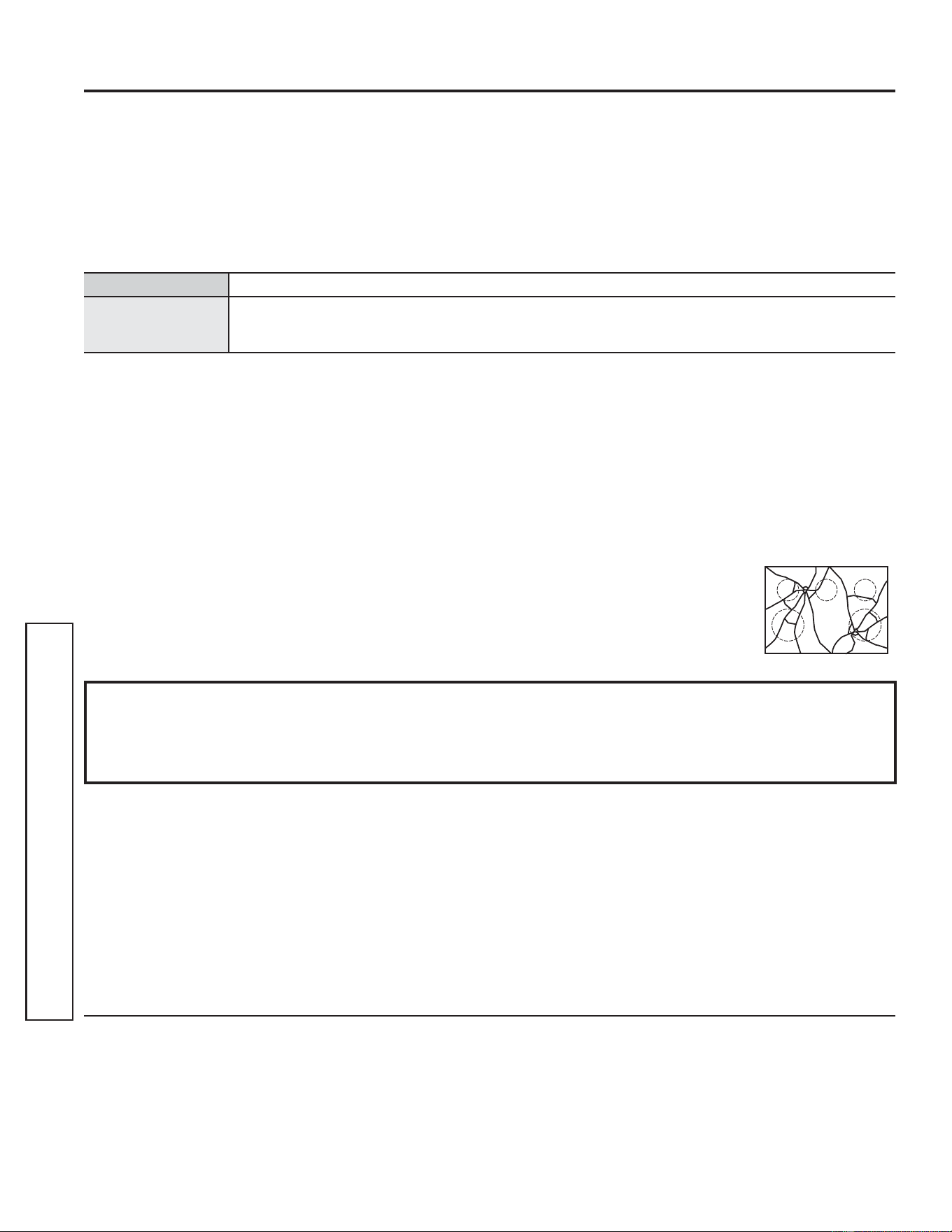
34 49-2000990 Rev. 5
Garantía Limitada de la Estufa Eléctrica de GE Appliances
GARANTÍA LIMITADA
Abroche su recibo aquí. Para acceder al servicio técnico de acuerdo con
la garantía deberá contar con la prueba de la fecha original de compra.
GEAppliances.com
Todo el servicio de garantía es provisto por nuestros Centros de Servicio de Fabricación, o un técnico autorizado de Customer
Care
®
. Para programar una visita del servicio técnico a través de Internet, visítenos en GEAppliances.com/service, o llame al 800.
GE.CARES (800.432.2737). Cuando llame para solicitar el servicio, tenga los números de serie y modelo disponibles.
Para realizar el servicio técnico de su electrodoméstico, se podrá requerir el uso de datos del puerto de abordaje para su diagnóstico.
Esto da al técnico del servicio de fábrica de GE Appliances la habilidad de diagnosticar de forma rápida cualquier problema con
su electrodoméstico, y de ayudar a GE Appliances a mejorar sus productos al brindarle a GE Appliances la información sobre su
electrodoméstico. Si no desea que los datos de su electrodoméstico sean enviados a GE Appliances, solicitamos que le indique a su
técnico no entregar los datos a GE Appliances en el momento del servicio.
Qué no cubrirá GE Appliances:
Ŷ Viajes del técnico del servicio a su hogar para enseñarle
sobre cómo usar el producto.
Ŷ ,QVWDODFLyQHQWUHJDRPDQWHQLPLHQWRLQDGHFXDGRV
Ŷ )DOODVGHOSURGXFWRHQFDVRGHDEXVRPDOXVRPRGLILFDFLyQ
o uso para propósitos diferentes al original o uso comercial.
Ŷ 'DxRVDODHVWXIDGHYLGULRSURYRFDGRVSRUHOXVRGH
limpiadores distintos de las cremas y paños recomendados.
Ŷ 'DxRVDODHVWXIDGHYLGULRSURYRFDGRVSRUGHUUDPHV
endurecidos de materiales azucarados o plástico derretido
que no se limpiaron de acuerdo con las instrucciones del
Manual del Propietario.
Ŷ 5HHPSOD]RGHIXVLEOHVGHODFDVDRUHLQLFLRGHGLV\XQWRUHV
Ŷ 'DxRVRFDVLRQDGRVVREUHHOSURGXFWRSRUDFFLGHQWH
incendio, inundaciones o catástrofes naturales.
Ŷ 'DxRVVREUHHODFDEDGRWDOHVFRPRy[LGRVREUHOD
superficie, deslustres o manchas pequeñas no informadas
dentro de las 48 horas luego de la entrega.
Ŷ 'DxRVLQFLGHQWDOHVRFRQVHFXHQWHVFDXVDGRVSRUSRVLEOHV
defectos sobre este producto.
Ŷ 'DxRFDXVDGRGHVSXpVGHODHQWUHJD
Ŷ 3URGXFWRQRDFFHVLEOHSDUDEULQGDUHOVHUYLFLRUHTXHULGR
Ŷ 6ROLFLWHHOVHUYLFLRWpFQLFRSDUDUHSDUDURUHHPSOD]DUODV
lámparas, excepto las lámparas LED.
Ŷ $SDUWLUGHHQHURGDxRVHVWpWLFRVVREUHODSODFDGH
cocción de vidrio tales como, pero sin limitarse a, astillas,
rayones, o residuos horneados que no se hayan reportado
dentro de los 90 días desde el momento de la instalación.
Ŷ $SDUWLUGHHQHURGDxRV
sobre la placa de cocción de vidrio
debido a impactos o uso inadecuado.
Vea el ejemplo.
EXCLUSIÓN DE GARANTÍAS IMPLÍCITAS
Su única y exclusiva alternativa es la reparación del producto, como se indica en la Garantía Limitada. Las
garantías implícitas, incluyendo garantías implícitas de comerciabilidad o conveniencia sobre un propósito
particular, se limitan a un año o al período más corto permitido por la ley.
Esta garantía limitada se extiende al comprador original y a cualquier propietario posterior de los productos
FRPSUDGRVSDUDXVRGRPpVWLFRGHQWURGH((88 Si el producto está en un área donde no se encuentra disponible
un Proveedor Autorizado del Servicio Técnico de GE Appliances, usted será responsable por el costo de un viaje o se
podrá requerir que traiga el producto a una ubicación del Servicio Técnico de GE Appliances autorizado para recibir el
servicio. En Alaska, la garantía limitada excluye el costo de envío o visitas de servicio a su domicilio. Algunos estados
no permiten la exclusión o limitación de daños fortuitos o consecuentes. Esta garantía limitada le otorga derechos
legales específicos, y usted también podría tener otros derechos que varían de estado a estado. Para conocer cuáles
son sus derechos legales, consulte a la oficina de asuntos del consumidor local o estatal o al Fiscal de su estado.
Garante: GE Appliances, a Haier company
Louisville, KY 40225
Garantías Extendidas: Adquiera una garantía extendida de GE Appliances y conozca los descuentos especiales que
están disponibles mientras su garantía aún está vigente. Puede acceder a la misma a través de Internet en cualquier
momento en
GEAppliances.com/extended-warranty
o llamando al 800.626.2224 durante el horario comercial. Los Servicios para los GE Appliances aún estarán
disponibles cuando su garantía caduque.
Por el Período de GE Appliances reemplazará
Un Año
Desde la fecha de la
compra original
Cualquier parte de la estufa que falle debido a un defecto en los materiales o la fabricación. Durante
esta garantía limitada de un año, GE Appliances también proveerá, sin costo, todo el trabajo y el
servicio en el hogar para reemplazar la parte que presente defectos.

49-2000990 Rev. 5 35
ACCESORIOS
¿Busca Algo Más?
¡GE Appliances ofrece una variedad de accesorios para
mejorar sus experiencias de cocción y mantenimiento!
Para acceder a números telefónicos e información de sitios
Web, consulte la página de Soporte para el Consumidor.
Estos y otros productos están disponibles:
Accesorios
Accesorios
2OODSDUD$VDU3HTXHxDô´[ó´[ò³
2OODSDUD$VDU*UDQGHô´[ó´[ò³
2OODSDUD$VDU([WUD*UDQGHô´[ó´[ò³
Piezas
Estantes del horno
Elementos del horno
Lámparas de luz
Sonda
Suministros de Limpieza
Limpiadores de Acero Inoxidable CitriShine™
Limpiador para Electrodomésticos de Acero Inoxidable
Almohadillas de Limpieza no Abrasivas para Superficies de Cocción de Cerámica
Limpiador para Superficies de Cocción de Cerámica
Espátula para Superficies de Cocción de Cerámica
Kit (el kit incluye crema y espátula para placa de cocción)
/DROODSDUDDVDUJUDQGHQRHQWUDHQHVWXIDVGH´´
/DROOD;/QRHQWUDHQKRUQRVGHSDUHGGH´HPSRWUDEOHVGH´RHVWXIDVGH´´
NOTAS: Vaya al sitio web de GE Appliances para ver los limpiadores recomendados.

36 49-2000990 Rev. 5
Soporte para el Consumidor
SOPORTE PARA EL CONSUMIDOR
Sitio Web de GE Appliances
¿Desea realizar una consulta o necesita ayuda con su electrodoméstico? ¡Intente a través del Sitio Web de GE Appliances las
KRUDVGHOGtDFXDOTXLHUGtDGHODxR8VWHGWDPELpQSXHGHFRPSUDUPiVHOHFWURGRPpVWLFRVPDUDYLOORVRVGH*($SSOLDQFHV\
aprovechar todos nuestros servicios de soporte a través de Internet, diseñados para su conveniencia.
(Q((88GEAppliances.com
Registre su Electrodoméstico
£5HJLVWUHVXHOHFWURGRPpVWLFRQXHYRDWUDYpVGH,QWHUQHWVHJ~QVXFRQYHQLHQFLD8QUHJLVWURSXQWXDOGHVXSURGXFWRSHUPLWLUi
una mejor comunicación y un servicio más puntual de acuerdo con los términos de su garantía, en caso de surgir la necesidad.
También puede enviar una carta en la tarjeta de inscripción preimpresa que se incluye con el material embalado.
(Q((88GEAppliances.com/register
Servicio Programado
El servicio de reparación de expertos de GE Appliances está a sólo un paso de su puerta. Conéctese a través de Internet y programe
VXVHUYLFLRDVXFRQYHQLHQFLDFXDOTXLHUGtDGHODxR(Q((88GEAppliances.com/service
o comuníquese al 800.432.2737 durante el horario de atención comercial.
Garantías Extendidas
Adquiera una garantía extendida de GE Appliances y conozca los descuentos especiales que están disponibles mientras su
garantía aún está vigente. La puede adquirir en cualquier momento a través de Internet. Los servicios de GE Appliances aún
estarán allí cuando su garantía caduque.
(Q((88GEAppliances.com/extended-warranty
o comuníquese al 800.626.2224 durante el horario de atención comercial.
Conectividad Remota
Para solicitar asistencia para la conectividad de red inalámbrica (para modelos con acceso remoto),
visite nuestro sitio web en GEAppliances.com/connect RFRPXQtTXHVHDOHQ((88
Piezas y Accesorios
Aquellos individuos calificados para realizar el servicio técnico de sus propios electrodomésticos podrán solicitar el envío de
piezas o accesorios directamente a sus hogares (se aceptan las tarjetas VISA, MasterCard y Discover). Ordene hoy a través de
,QWHUQHWGXUDQWHODVKRUDVWRGRVORVGtDV(Q((88GEApplianceparts.com o de forma telefónica al 877.959.8688 durante
el horario de atención comercial.
Las instrucciones que figuran en este manual cubren los procedimientos que serán realizados por cualquier usuario.
Otros servicios técnicos generalmente deben ser derivados a personal calificado del servicio. Se deberá tener cuidado,
ya que una reparación indebida podrá hacer que el funcionamiento no sea seguro.
Contáctenos
Si no se encuentra satisfecho con el servicio que recibió de GE Appliances, comuníquese con nosotros a través de nuestro sitio
Web con todos los detalles, incluyendo su número telefónico, o escriba a:
(Q((88*HQHUDO0DQDJHU&XVWRPHU5HODWLRQV_*($SSOLDQFHV$SSOLDQFH3DUN_/RXLVYLOOH.<
GEAppliances.com/contact