WJS-4000
User Guide
JUMP STARTER
Portable Jump Start & Power Supply
2
Welcome
Thank you for choosing a Whistler product. We are
dedicated to providing products that represent both
quality and value. Please read the User Guide carefully
before using this product. If you have additional questions,
please visit the FAQ page on our website at
www.whistlergroup.com
or call Toll Free (800) 531-0004 / Tel (479) 273-6012,
8am to 5pm CT, Monday through Friday
to speak to a Customer Service Representative
PRODUCT LAYOUT
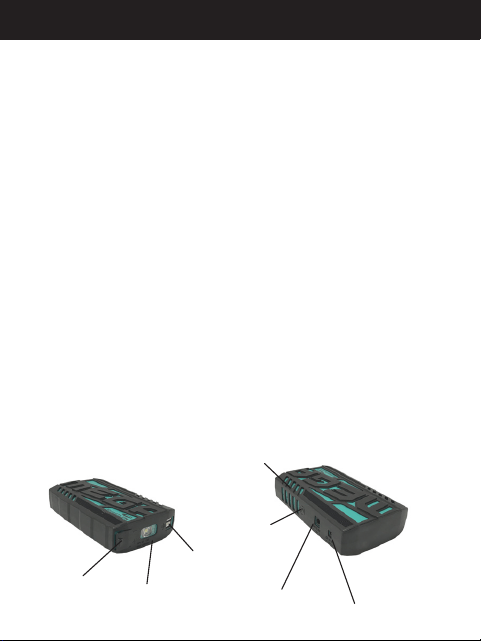
2.1A USB Output
12V DC OUT
HIGH CURRENT
Jump Start Port
LED Power
Indicator Lights
Power
Button
12V DC IN
Charging Port
Flashlight
Packing List
· Jump Starter
· Premium Protection Cables
· 12V DC Car Adapter
· Home AC Adapter
· Zipper Storage Case
· User Guide
· 4-in-1 USB cable
· 19.1V adapter cable
w/ 8 adapter tips
Feature Description
19.1 Output Jack

3
WARNINGS AND SAFETY GUIDELINES
Please read these safety instructions, operating
instructions, and warnings before charging or using the
jump starter.
Explosion Hazard - USE ONLY IN WELL VENTILATED
AREAS
The jump start cable clamps MUST be connected in correct
polarity ~ RED clamp to the battery Positive (+) and BLACK
clamp to the battery Negative (-) terminals, making sure
they have a good connection. A reverse polarity connection
(positive to negative) can cause damage to the jump starter
and/or create a sparking/explosion hazard.
Fire Hazard - Do not crush, puncture or damage the
jump starter
Never allow the jump start clamps to touch each other
or another common metal conductor. This could cause
damage to the unit and/or create a re hazard. Always
disconnect the jump start cables from the jump starter
after each use and store separately.
Burn Hazard - Keep away from children
Do not insert foreign objects into the jumper cables port/
jack, output ports, or the DC input jack. Do not expose this
product to water, rain, snow, (cont.)

4
condensation, or spray. Do not open the jump starter to
replace the internal battery. There are no user replaceable
parts inside the jump starter.
Additional Warnings
1. Keep the unit clear of re and water.
2. USE ONLY THE WHISTLER PREMIUM PROTECTION
CABLES. Use of other cables may result in damage to
the jump starter, re, personal injury and damage to
vehicle or property.
3. If at any time you witness the jump starter
starting to swell, smoke, or become hot to the
touch, DISCONNECT THE JUMP STARTER AND
DISCONTINUE USE IMMEDIATELY. Move the
jump starter to a safe place away from combustible
materials and safely observe it for approximately 15
minutes as a battery can still ignite after 10 minutes.
WARNINGS AND SAFETY GUIDELINES

5
CAUTION-PLEASE READ
Cautions
1. This jump starter is intended for use on a discharged,
but otherwise capable battery. It will not work on a
battery that has developed a shorted cell or become
damaged. If your vehicle cannot be jump started,
have the battery tested and/or replaced.
2. Before attempting to start 12V vehicle, please make
sure at least 3 LED lights are illuminated on the jump
starter when pressing the power button.
3. Always use the jump starter in a well ventilate area
and keep the jump starter away from children, re,
water, explosive gasses, and combustible materials.
4. DO NOT CRANK IGNITION FOR MORE THAN 3
SECONDS. Cranking for more than 3 seconds may
cause damage to the unit. If vehicle does not start,
wait 1 minute before trying again. The jump-start
feature is designed for short term operation only.
5. If the jump starter becomes warm to the touch during
use, disconnect the jump starter from the cables and
allow to cool before reattempting to start the vehicle.

6
6. When charging the jump starter, please place on
a hard surface and keep away from combustible
materials. Please don’t leave unattended while
charging.
If you have questions concerning the operation of your
Whistler product, or require service during or after the
warranty period, please call
Customer Service at
Toll Free (800)531-0004
Tel (479)273-6012
CAUTION-PLEASE READ

7
BATTERY PRECAUTIONS
1. Lithium Polymer batteries are volatile. Failure to
read and follow the use and operating instructions
may result in fire, personal injury and damage to
property if charged or used improperly. Li-Polymer
battery may explode and cause fire if misused or
defective. Please follow our jump starting instructions
exactly which are listed in the User Guide, label on
the jump starter and the information card included.
2. Never allow a metal tool to concurrently touch the
positive and negative cable ends or battery terminals.
3. Be sure someone is close enough to come to your aid
when working with batteries.
4. If you need to remove a vehicle battery, always
remove the negative terminal from the battery first.
Make sure all accessories are off so you don’t cause
an arc.
5. When working with lead-acid vehicle batteries, have
ample water, soap and baking soda on hand in case
of skin contact with battery acid.
6. The jump starter is supplied with an internal
rechargeable Li-Polymer battery.

8
This battery is self-contained and not consumer
replaceable. Battery must be disposed of properly when
it no longer holds a charge. Proper charging practices will
increase the life of the batteries.
For information on battery recycling, go to
www.call2recycle.org/locator, or contact them
toll free at 800-822-8837
(automated system) or
877-273-2925 for www.call2recycle.org
customer service.
BATTERY PRECAUTIONS
9
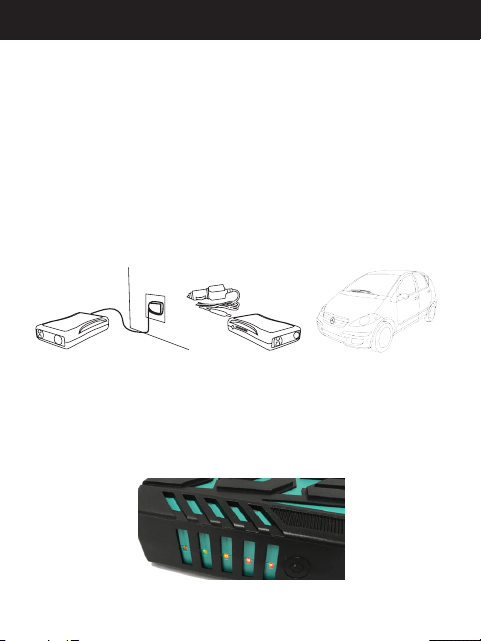
Charging the Jump Starter
Plug the home adaptor into a 100-240V AC outlet of the
proper plug type.
Connect the other end of the home adaptor to the 12V DC
IN Charging Port.
-or-
1. Plug the car adaptor into the socket of the vehicle
auxiliary power.
2. Connect the other end of the car adaptor to the 12V
DC IN Charging Port.
Indicator Lights
Press the power button to check the level of the jump
starter battery. Number of lights ON indicate percentage of
charge available.
(1=20%, 2=40%, 3=60%, 4=80%, 5=100%)
CHARGING

10
NOTES:
1. The jump starter should be charged before initial
use. Place on a hard surface and keep away
from combustible materials. Please don’t leave
unattended while charging.
2. A minimum of 3 indicator lights must be illuminated
before attempting to jump start a vehicle.
3. All 5 battery indicators will flash simultaneously and
provide an audible beep if the input charging voltage
is too low or too high. To properly charge this jump
starter with the Car Charger, the DC input voltage
should be 13.6 to 16 volts (Vehicle charging system
when vehicle engine is running).
4. Periodic charging every 3-4 months is recommended
when being stored for long periods of time.
5. When charging, the LED indicator lights will
sequentially flash. The percentage of charge
completed is indicated by the number of solid lights
as charging progresses. The jump starter is fully
charged when all lights are solid.
CHARGING
11
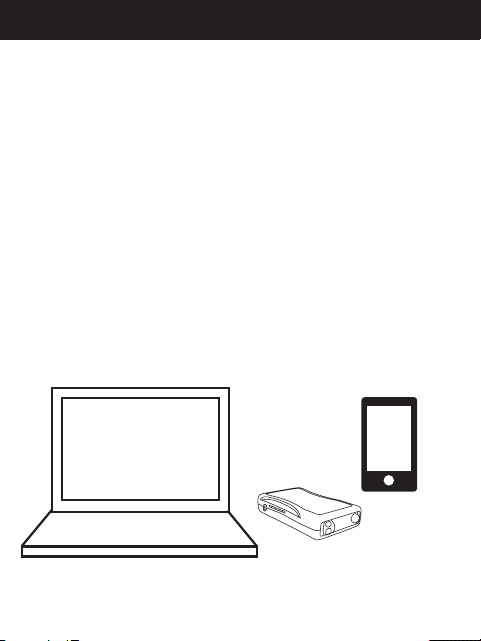
For Charging / Powering Devices Using Output Ports
1. Plug the charging cable of the device into the
appropriate output port of the jump starter.
2. Press the jump starter power button to initiate
charging/ power to the attached device.
CHARGING
6. If during charging the jump starter begins beeping
and stops charging IMMEDIATELY DISCONNECT
THE JUMP STARTER FROM POWER SUPPLY AND
DISCONTINUE USE. Refer to FAQs.

12
WARNING
Explosion Hazard - USE ONLY IN WELL VENTILATED
AREAS. The jump start cable clamps MUST be connected
in correct polarity ~ RED clamp to the battery Positive (+)
and BLACK clamp to the battery Negative (-) terminals,
making sure they have a good connection. A reverse
polarity connection (positive to negative) can cause
damage to this jump starter and/or create a sparking/
explosion hazard.
USE ONLY THE WHISTLER PREMIUM PROTECTION
CABLES. Use of other cables may result in damage to this
jump starter, fire, personal injury and damage to vehicle or
property.
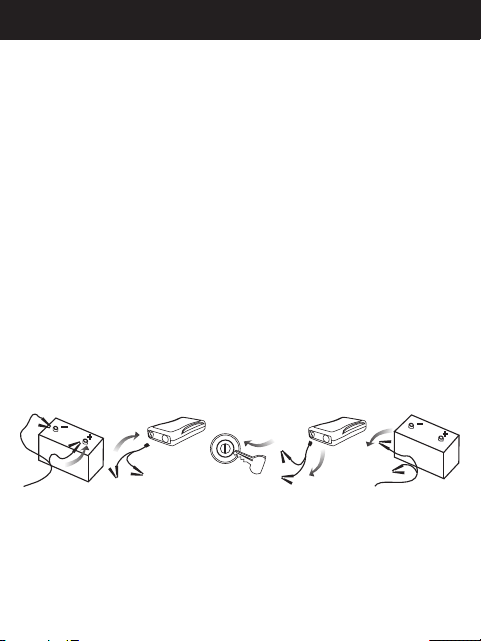
For Jump Starting 12V Vehicle
1. Before attempting to start a 12V vehicle, please make
sure at least 3 LED lights are illuminated on this jump
starter when pressing the power button.
2. Connect the Red clamp to the battery Positive (+)
and Black clamp to the battery Negative (-) terminals,
making sure they have a good connection.
WARNING: REVERSING THE CONNECTIONS MAY
RESULT IN DAMAGE TO THE JUMP STARTER, FIRE OR
PERSONAL INJURY.
JUMP STARTING
13
3. Insert the blue connector firmly into the jump start
port. (If below 32º F/0º C, please allow a few minutes
before starting the vehicle)
4. Start the vehicle.
CAUTION: DO NOT CRANK IGNITION FOR MORE THAN
3 SECONDS. If vehicle does not start, wait 1 minute before
trying again.
5. Once vehicle is started, unplug the blue connector
from the jump starter, then remove the battery
clamps.
JUMP STARTING
START
14
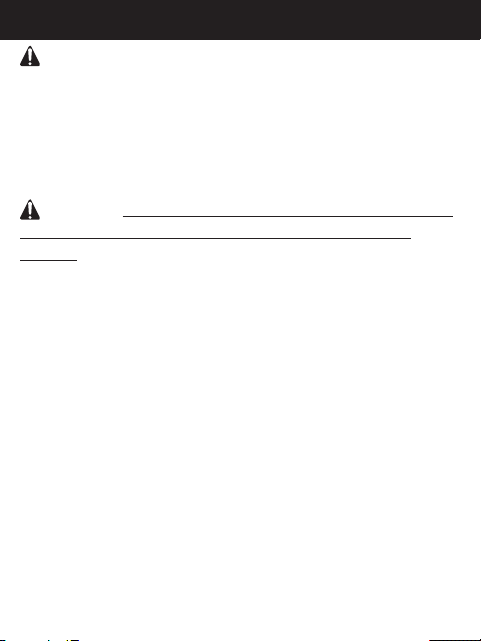
CAUTION: The jump start feature is designed for short
term operation only. Turn the ignition key for no more
than 3 seconds at a time. Operating the jump start feature
for more than 3 seconds may cause damage to the unit.
Allow the jump starter to cool down for at least 1 minute
after each jump start attempt.
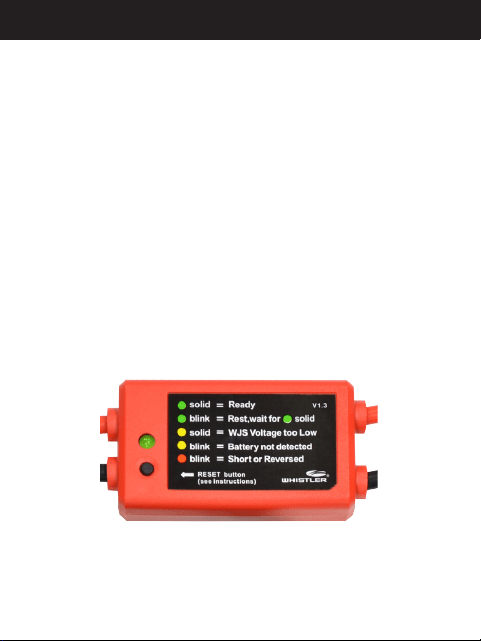
CAUTION: NEVER press the cable RESET button before
having the cables properly connected to the vehicle
battery. Failure to follow proper connection sequence
outlined in JUMP STARTING section of this manual MAY
RESULT IN DAMAGE TO THE JUMP STARTER, TO THE
VEHICLE, OR PERSONAL INJURY.
Always disconnect the jump start cables from the jump
starter after each use and store separately.
JUMP STARTING
15
The Premium Protection Cables provided have a built-in
feature that prevents cranking for more than 3 seconds
and will automatically enter a 60 second rest period
between cranking attempts (indicated by cable LED
blinking GREEN).
After 5 consecutive starting attempts, the Premium
Protection Cables must be reset by pressing the RESET
button before another starting attempt can be made. If
this jump starter becomes warm to the touch, disconnect
this jump starter from the cables and allow to cool before
reattempting to start the vehicle. Please refer to Premium
Protection Cables Operation for additional information.
JUMP STARTING

Jump Starter Premium Protection Cable Operation
LED Status Condition Description Action
GREEN solid
Jump starter voltage above 11V,
vehicle battery above low limit
threshold, and cable polarity correct.
NOTE: If no starting attempt is made
within 2 min. of connection to vehicle
battery: a) light will remain GREEN.
b) light will change to fast blinking
AMBER (see below). c) light will
change to solid AMBER (see below).
Vehicle may now attempt to be started.
GREEN blinking
Starting current detected for
maximum 3 seconds, then enters 60
second rest period, with no current
output allowed.
After 60 seconds, LED will indicate
status. NOTE: If no starting attempt
was made, cables detected a heavy
load from vehicle system indicating a
defective/damaged vehicle battery or
vehicle system issue which must be
resolved before using this jump starter.
Have vehicle battery tested and/or
replaced.
GREEN
fast
blinking
After 5 consecutive starting attempts
of 3 sec. cranking/60 sec. rest cycle,
no current output allowed.
Press RESET button to initiate another 5
starting attempt cycles.

Jump Starter Premium Protection Cable Operation (continued)
AMBER solid
Jump starter voltage is lower than
11V (3 bars or less on this jump
starter). No current output allowed
and RESET button disabled.
Fully charge this jump starter before
attempting to start vehicle.
AMBER
fast
blinking
Jump starter voltage is above 11V (3
bars or more on this jump starter),
vehicle battery not detected. No
current output allowed. NOTE:
Clamps are not connected to
vehicle battery or vehicle battery is
below low limit threshold.
Check for secure battery cable/clamp
connections to vehicle battery. If AMBER
light continues to fast blink, press RESET
button for vehicle battery “system check”.
NOTE: A vehicle battery below low limit
threshold may need to be recharged or
replaced.
AMBER /
GREEN
alternating
blinking
Indicates 3 second vehicle battery
“system check” in progress after
pressing RESET button when properly
connected to a vehicle battery.
After “system check”, LED will return with
system status conrmation. Refer to listed
LED Status for further actions.
RED
fast
blinking
Jump starter voltage is above 11V,
cables connected in reverse polarity
or vehicle battery short detected. No
current output allowed and RESET
button disabled.
Disconnect cables from this jump
starter and remove clamps from vehicle
battery. Connect clamps to vehicle
battery in correct polarity (positive-to-
positive/negative-to-negative) and then
reconnect cables to the jump starter to
reset. NOTE: Source of problem must be
resolved before reattempting to start
vehicle using this jump starter.
Jump Starter Premium Protection Cable Operation
LED Status Condition Description Action
GREEN solid
Jump starter voltage above 11V,
vehicle battery above low limit
threshold, and cable polarity correct.
NOTE: If no starting attempt is made
within 2 min. of connection to vehicle
battery: a) light will remain GREEN.
b) light will change to fast blinking
AMBER (see below). c) light will
change to solid AMBER (see below).
Vehicle may now attempt to be started.
GREEN blinking
Starting current detected for
maximum 3 seconds, then enters 60
second rest period, with no current
output allowed.
After 60 seconds, LED will indicate
status. NOTE: If no starting attempt
was made, cables detected a heavy
load from vehicle system indicating a
defective/damaged vehicle battery or
vehicle system issue which must be
resolved before using this jump starter.
Have vehicle battery tested and/or
replaced.
GREEN
fast
blinking
After 5 consecutive starting attempts
of 3 sec. cranking/60 sec. rest cycle,
no current output allowed.
Press RESET button to initiate another 5
starting attempt cycles.
18
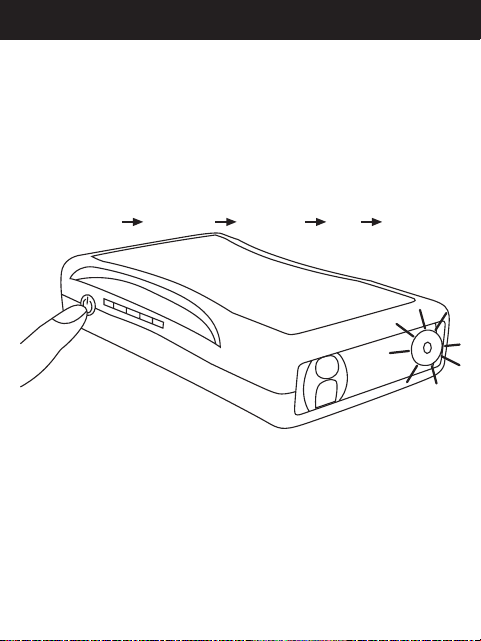
FLASHLIGHT FUNCTION
Flashlight LED Illumination
Press and hold the power button for 3 seconds to initiate
the flashlight. Once the flashlight is on, a press and release
of the power button will change to an alternate mode of
operation in the order listed below. To shut the flashlight
off, you must cycle thru the selections.
FLASHLIGHT BEACON STROBE SOS OFF

19
FREQUENTLY ASKED QUESTIONS
Q. What will this jump starter jump start?
A. This jump starter is for use on single battery 12V
systems like GARDEN TRACTORS, ATV’s, BOATS,
MOTORCYCLES and PASSENGER VEHICLES.
Q. How do I turn off the jump starter?
A. This jump starter will power off automatically when
no load or charging is detected
Q. How many times can this jump starter charge my
mobile phone?
A. Approximately 6 to 9 times depending on the
phone.
Q. How long will this jump starter take to fully charge
my mobile phone?
A. 1-2 hours depending on the phone.
Q. How many times can the fully charged jump starter
start my vehicle?
A. 10 times or more depending on the vehicle
Q. How long will this jump starter hold a charge?
A. Up to 1 year (refer to Charging Section in user
guide).

20
FREQUENTLY ASKED QUESTIONS
Q. Why does the jump starter stop charging and begin
beeping?
A. A problem was detected and has discontinued charging
as a safety precaution. Press and hold the power button
for 10-30 seconds to force the continuation of charging
and possibly correct the detected charging issue. After
pressing and holding the power button, disconnect
the charger from the wall and the jump starter to reset.
Reconnect charger to allow the unit to begin charging
normally – HOWEVER - if after this process the unit again
discontinues charging and begins to beep, IMMEDIATELY
DISCONNECT THIS JUMP STARTER FROM POWER SUPPLY
AND DISCONTINUE USE.
NOTE: Pressing and holding the power button will
cause the flashlight to turn ON which is normal. After
disconnecting charger, the flashlight may be turned OFF
before reconnecting.
Q. How do I dispose of this jump starter when it reaches
end of service life?
A. This jump starter contains a rechargeable Lithium
Polymer (LiPo) battery pack. This battery pack is self-
contained and is not replaceable. Refer to the Battery
Precautions section of this user guide for battery disposal
information.

21
SIZE: 160mm x 93mm x 39mm (6.3" x 3.8" x 1.7")
WEIGHT: 595 g (21 oz)
BATTERY CAPACITY: 44400 mWh
OUTPUT: 5V=2.1A; 12V=HIGH CURRENT; 19.1V=3.42A
INPUT: 14V 1A
FULL CHARGING TIME: 3-4 hours
STARTING CURRENT: 240A (< or = 3 seconds)
PEAK CURRENT: 480A (inrush current)
OPERATING TEMP (Charge): 0º~ 40º C (32º~ 104º F)
OPERATING TEMP (Discharge):
-20º~ 60º C (-4º~ 140º F)
STORAGE TEMP: -10º ~ 30º C (14º~ 86º F)
LIFETIME: >1000 Cycles depending on usage
SPECIFICATIONS
22
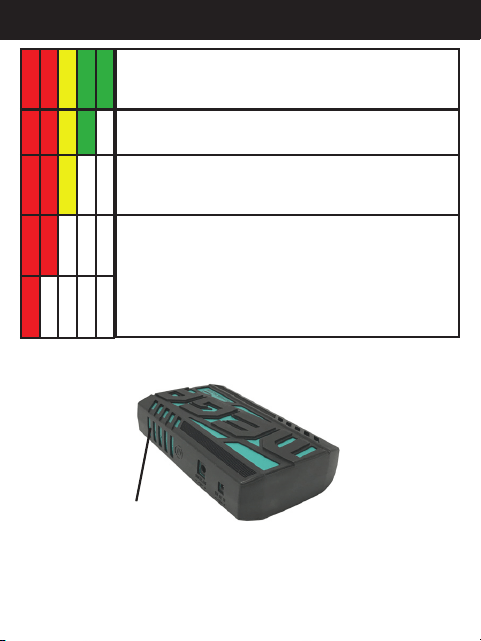
5 Bars = Fully charged ( 2 Red/1 Yellow/2 Green)
* Note when fully charged all lights do not turn
green
4 Bars = The Unit battery capacity remains good
for most intended uses.
3 Bars = The Unit battery capacity remaining may
not provide the necessary power for jump starting
a vehicle (refer to User Guide).
1 to 2 Bars = The Unit does not contain sucient
power to provide a jump start and should be
fully recharged before attempting to do so. The
remaining battery capacity is very low and has
limited capacity for charging a portable device
and the Unit should be fully recharged.
LED'S FUNCTIONS
LED Power
Indicator Lights

23
WARRANTY INFORMATION
Consumer Warranty
This Whistler product is warranted to the original
purchaser for a period of one (1) year from the date of
original purchase against all defects in materials and
workmanship, when purchased from an authorized
Whistler retailer. This limited warranty is void if the unit
is abused, misused, modified, installed improperly, or if
the housing and/or serial numbers have been removed.
There are no express warranties covering this product
other than those set forth in this warranty. All express or
implied warranties for this product are limited to one (1)
year. Whistler is not liable for damages arising from the
use, misuse, or operation of this product including but not
limited to loss of time, inconvenience, loss of use of your
product or property damage caused by your product or
its failure to work, or any other incidental or consequential
damages including personal injury.
DO NOT RETURN ITEM TO STORE WHERE PURCHASED.
For warranty information, contact
Whistler Customer Service
at Toll Free (800)531-0004 / Tel (479)273-6012
Representatives are available to answer your questions
Monday - Friday from 8:00 a.m. to 5:00 p.m. CT

24
WARRANTY INFORMATION
Service Under Warranty
During the warranty period, defective units will be repaired
or replaced (with the same or a comparable model), at
Whistler’s option, without charge to the purchaser when
returned prepaid, with dated proof of purchase to the
address below. Units returned without dated proof of
purchase will be considered out of warranty and therefore
are not covered by the described Limited Warranty.
(Refer to Service Out-of- Warranty section.)
Due to the specialized equipment necessary for testing
Whistler products, there are no authorized service centers
other than Whistler. When returning a unit for service
under warranty, please follow these instructions:
1. Ship the unit in the original carton or in a suitable
sturdy equivalent, fully insured, with return receipt
requested to:
Whistler Repair Dept.
1412 South 1st St.
Rogers, AR. 72756
Please allow 3 weeks turnaround time.

25
WARRANTY INFORMATION
IMPORTANT: Whistler will not assume responsibility for
loss or damage incurred in shipping. Therefore, please ship
your unit insured with return receipt requested. CODs will
not be accepted!
2. Include with your unit the following information,
clearly printed:
• Your name and physical street address for shipping
(no PO Boxes), a daytime telephone number, and
an email address (if applicable).
• A detailed description of the problem (e.g.,“device
will not power ON”).
• A copy of your dated proof of purchase or bill of
sale.
3. Be certain your unit is returned with its serial number.
Units without serial numbers are not covered under
warranty.
IMPORTANT: To validate that your unit is within the
warranty period, make sure you keep a copy of your dated
proof of purchase. For warranty verification purposes, a
copy of your dated store receipt must accompany any
Whistler product sent in for warranty work.

26
WARRANTY INFORMATION
Service Out-Of-Warranty
Units will be repaired at “out-of-warranty” service rates
when:
• The unit’s original warranty has expired.
• A dated proof of purchase is not supplied.
• The unit has been returned without its serial number.
• The unit has been misused, abused, modified,
installed improperly, or had its housing removed.
The minimum out of warranty service fee for your Whistler
jump starter is $60.00 (U.S.). If you require out of warranty
service, please return your unit as outlined in the section
“Service Under Warranty” along with a cashier’s check or
money order in the amount of $60.00. Payment may also
be made by MasterCard, VISA or American Express.
Personal checks are not accepted.
In the event repairs cannot be covered by the minimum
service fee, you will be contacted by a Whistler technical
service specialist who will outline options available to you.

27
WARRANTY INFORMATION
IMPORTANT: When returning your unit for service, be
certain to include a daytime telephone number and an
email address (if applicable).
Customer Service
If you have questions concerning the operation of your
Whistler product, or require service during or after the
warranty period, please call
Customer Service at
Toll Free (800)531-0004
Tel (479)273-6012
Representatives are available to answer your questions
Monday - Friday from 8:00 a.m. to 5:00 p.m. (CT) or visit the
FAQs at
www.whistlergroup.com

CORPORATE HEADQUARTERS
1716 SW Commerce Dr. Ste. 8
Bentonville, AR 72712
Toll Free (800) 531-0004
TEL (479) 273-6012
www.whistlergroup.com
CUSTOMER RETURN CENTER
1412 South 1st St.
Rogers, AR 72756
Email: info@whistlergroup.com
P/N 404008A
01A17 © 2017 The Whistler Group, Inc.