www.hellobaby.net.cn
service@hellobaby.net.cn
Ver: 1.1
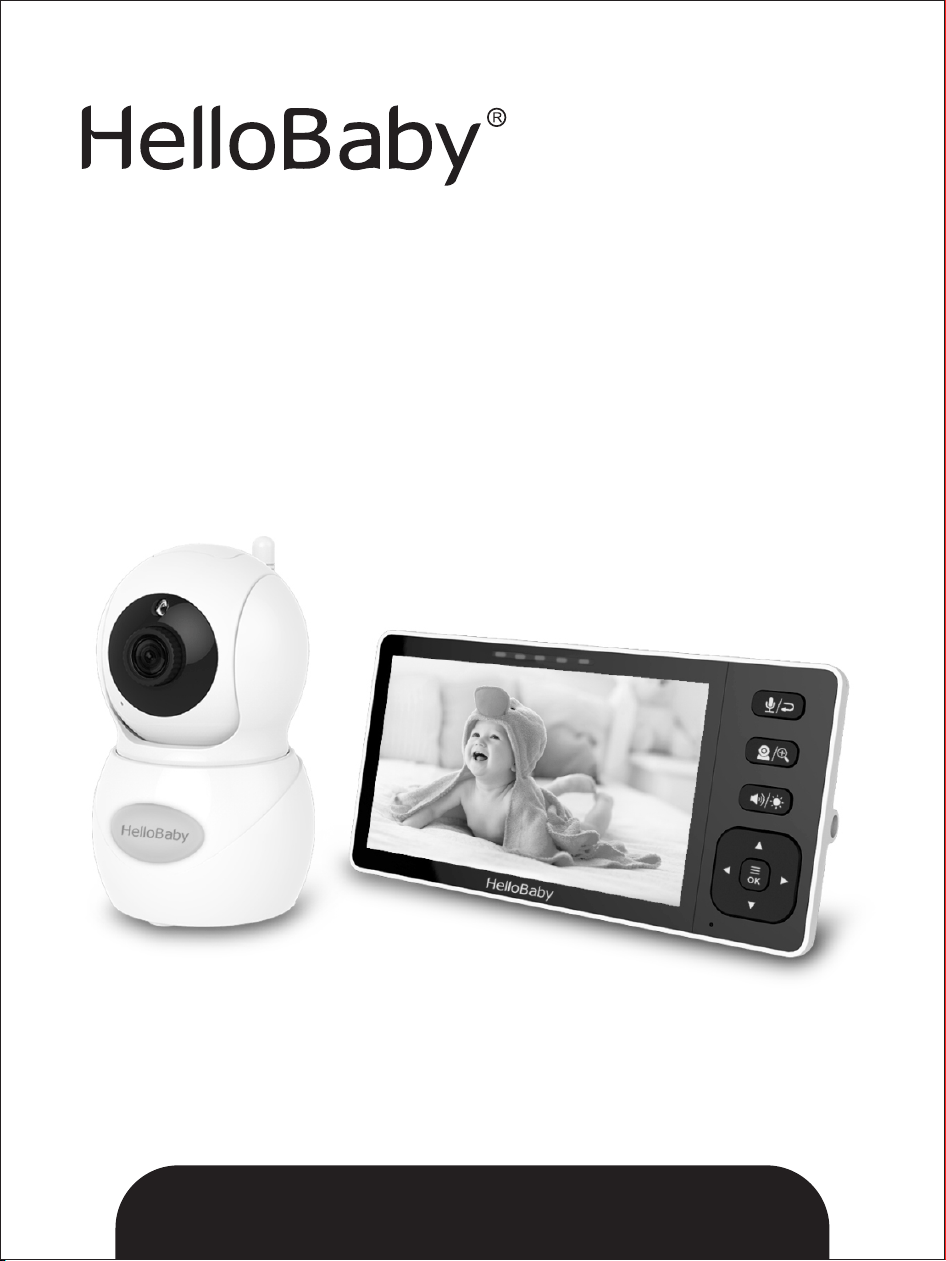
2.4GHz Digital Wireless Video Baby Monitor
User Manual
The pictures are for reference only, please subject to practicality.
Model: HB6081

Thank you for purchasing the HB6081 Baby Monitor. With our baby monitor, you could see
and hear your baby sleeping or playing in their room anytime.
Please retain your original dated sales receipt for your records. For warranty service of your
product, you will need to provide a copy of your dated sales receipt to confirm warranty
status. Registration is not required for warranty coverage.
PLEASE MAKE SURE THE FOLLOWING INCLUDED IN YOUR PACKAGE
Parent unit x 1 Camera unit x 1 Power adapter x 2
User manual x 1 Wall-mounting kit x 1
1. SAFETY INSTRUCTIOINS
Keep the device away from children.Caution:
Children have STRANGLED in cords. Keep this cord out of the reach ofStrangulation hazard:
children (more than 3ft (0.9m) away). Never use extension cords with AC Adapters. Only use
the AC Adapters provided.
This product contains small parts, please be careful when unpack and Choking hazard :
assemble the product.
All the safety and operating in structions should be read Read and keep to instructions:
before the video baby monitor is operated. This product cannot replace responsible adult
supervision.
The unit should not be exposed to rain, moisture, dripping or splashing. Water and moisture:
No objects filled with liquid should be placed on top of, or beside the product, such as a glass
or vase. This item should not be used near water.
Use the appliance if the cord or plug is damaged. If your baby monitor is not Do not:
operating properly or has suffered any damage, contact “service@hellobaby.net.cn” service
center to request inspection and repair of the appliance in order to avoid any possible risk.
Attempt to repair or adjust any of the electrical or mechanical functions of the unit. Do not:
Otherwise, the guarantee will be made void.
This baby monitor should not be used on a bed, sofa, rug or similar surface that Ventilation:
may block the ventilation openings, or be placed in an enclosed area such as a bookcase or
drawer that may impede air flow.
This unit should not be exposed to direct heat sources Keep away from sources of heat:
such as a candle, radiator, heat register, stove or other appliance that emits heat. The unit
should not be left in direct sunlight.
This unit should only be used with the AC power adapters included in this Power source:
package (rated 5V DC 1.2A).
This unit should be serviced by qualified personnel only when:Damage requiring service:
1. Objects have fallen or liquid has been spilled into the product.
2. The units have been exposed to rain.
3. The units do not appear to operate normally or exhibits a distinct change in performance .
4. The units have been dropped or the enclosure damaged .

2. WARRANTY TERMS
We offer one-year warranty from the original purchase date against defects in workmanship
and materials. If you have warranty or support issues, please contact our after-sales service
via email.
3. INSTALLATION GUIDELINES
* To use your parent unit and camera unit together, you have to establish a radio link
between them, and the range will be affected by environmental conditions.
* Any large metal object, like a refrigerator, a mirror, a filling cabinet, metallic doors or
reinforced concrete between the baby and parent unit may block the radio signal.
* The signal strength may also be reduced by other solid structures, like walls, or by radio
or electrical equipment, such as TV, computers, cordless or mobile phones, fluorescent
lights or dimmer switches.
* Use of other 2.4GHz product, such as wireless networks (Wi-Fi routers), Bluetooth
systems, or microwave ovens, may cause interference with this product, so keep the baby
monitor away at least 5ft (1.5m) from such products, or turn them off if they cause
interferences.
4. PLACEMENT OF THE BABY MONITOR
The camera can be placed on the desktop or mounted on the wall. Don't place baby monitor
on soft quilts or blankets or in the corners of cupboards, shelves, etc; Keep the baby monitor
away from heat sources such as radiators, chimneys, cookers and direct sunlight; Keep the
baby unit away from TV sets, microwave oven and radios. If interference occurs, move the
camera to elsewhere.
*Place the camera within6 feet (2 meters) of the area being monitored for optimum
performance.
5. GETTING STARTED
5.1 TURN ON THE BABY UNIT:
1. Insert the DC plug of the power adapter into the DC jack in the rear of the Baby Unit.
2. Insert the other end of the power adapter into a suitable electrical outlet.
3. Once the adapter is connected, the power LED will light up.
4. keep the baby unit plugging in.
.2 TURN ON THE PARENT UNIT: 5
1. Insert the DC plug of the power adapter into the DC jack in the side of the parent Unit.
2. Insert the other end of the power adapter into a suitable electrical outlet.
3. Press and hold the power key 3 seconds on the side of the parent unit.
4.Once parent unit is on, the power LED will light upand the image will display on the LCD.
Note: When the product is in use, the antenna needs to be pulled up, so that the signal is the
best.
5.3 INFRARED NIGHT VISION (AUTOMATIC)
The infrared night vision function allows the camera to pick up images in dark or low
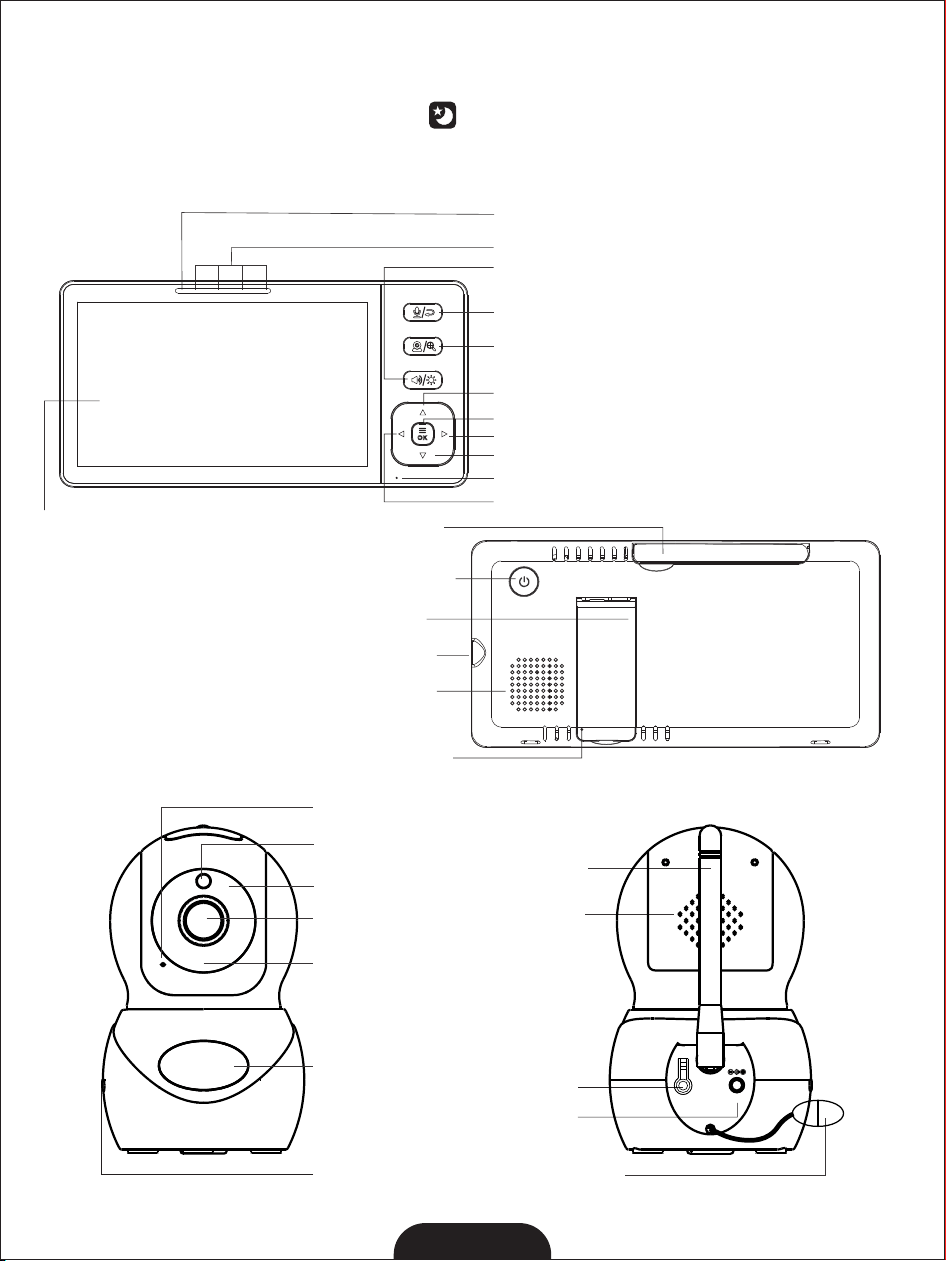
Power Key
Speaker
DC-Jack
Stand
Reset Key
Antenna
Charging LED / Power LED
Sound Level Indicator
5.5" 720P TFT LCD
Exit/Two Way Talk
Menu/OK
Zoom / Pan-Tilt
MIC
Right Key
Up Key
Down Key
Left Key
Volume/Brightness
Speaker
Pair key
DC-Jack
Temperature
Sensor
Antenna
ANT
DV 5V
PAIR
Lens
Light sensor
MIC
Infrared LEDs
Power LED
Night light
3
6.2 PARENT UNIT OVERVIEW:
light conditions. In this mode, only black and white images will be displayed on the
m The onitor,the optimum image lie in where baby unit is 6ft (2m) away from object.
camera is in night vision mode, the icon will be displayed on the top of screen.
6. PRODUCT OVERVIEW
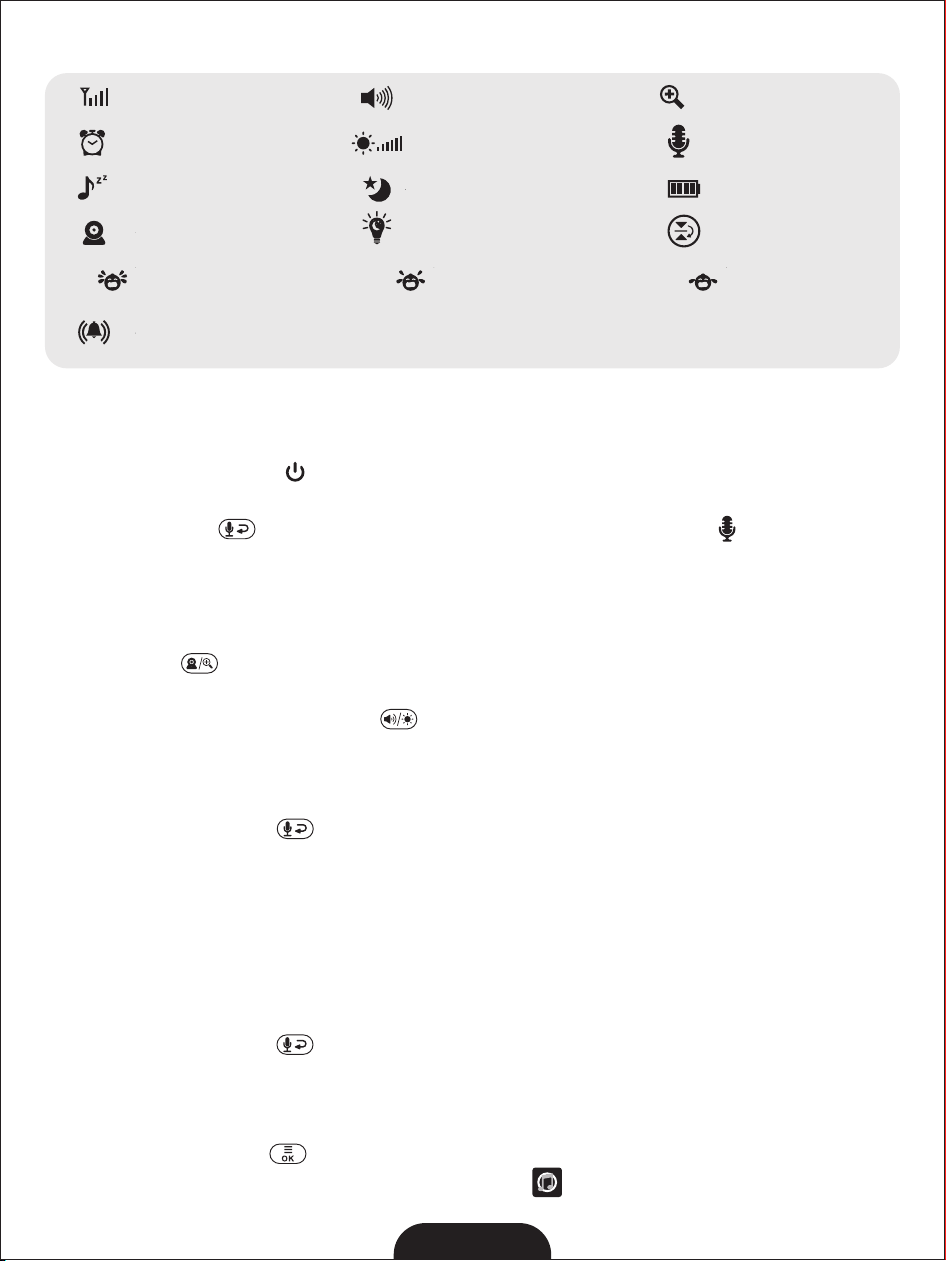
6.1 ICONS OVERVIEW:
4
7. KEY OPERATION
7.1 TURN ON/OFF
Press and hold the power key for 3 seconds to turn on/ off the Parent Unit.
7.2 TWO WAY TALK / EXIT KEY
Press and hold the key to enter two way talk mode. A microphone will be displayed
on the LCD screen. Release the key to stop.
Note: When you are in the two-way talk mode, the Parent Unit speaker is muted.
Also this key acts as exit function.
7.3 ZOOM
Press and hold key for 2S to operate zoom in / out.
7.4 VOLUME AND DISPLAY BRIGHTNESS ADJUSTMENT
1. Press the Volume and Brightness key, the volume and brightness icons will display on
the LCD screen.
2. Press the ◀/▶key to adjust the volume.
3. Press the ▲/▼ key to adjust the brightness.
4. Press the Return Key to exit.
The volume and brightness has 6 levels. The default level setting is level 4. Note:
7.5 REMOTE PAN/TILT (DIRECTION ARROW)
You can remote pan-tilt the camera.
1.Press any of direction arrow ◀/▶/▲/▼ key, the direction icons will display on the LCD
screen.
2.Press the ◀/▶keytopanthecamera.
3.Press the ▲/▼ key to tilt the camera.
4. Press the Return Key to exit.
8. MENU OPERATION
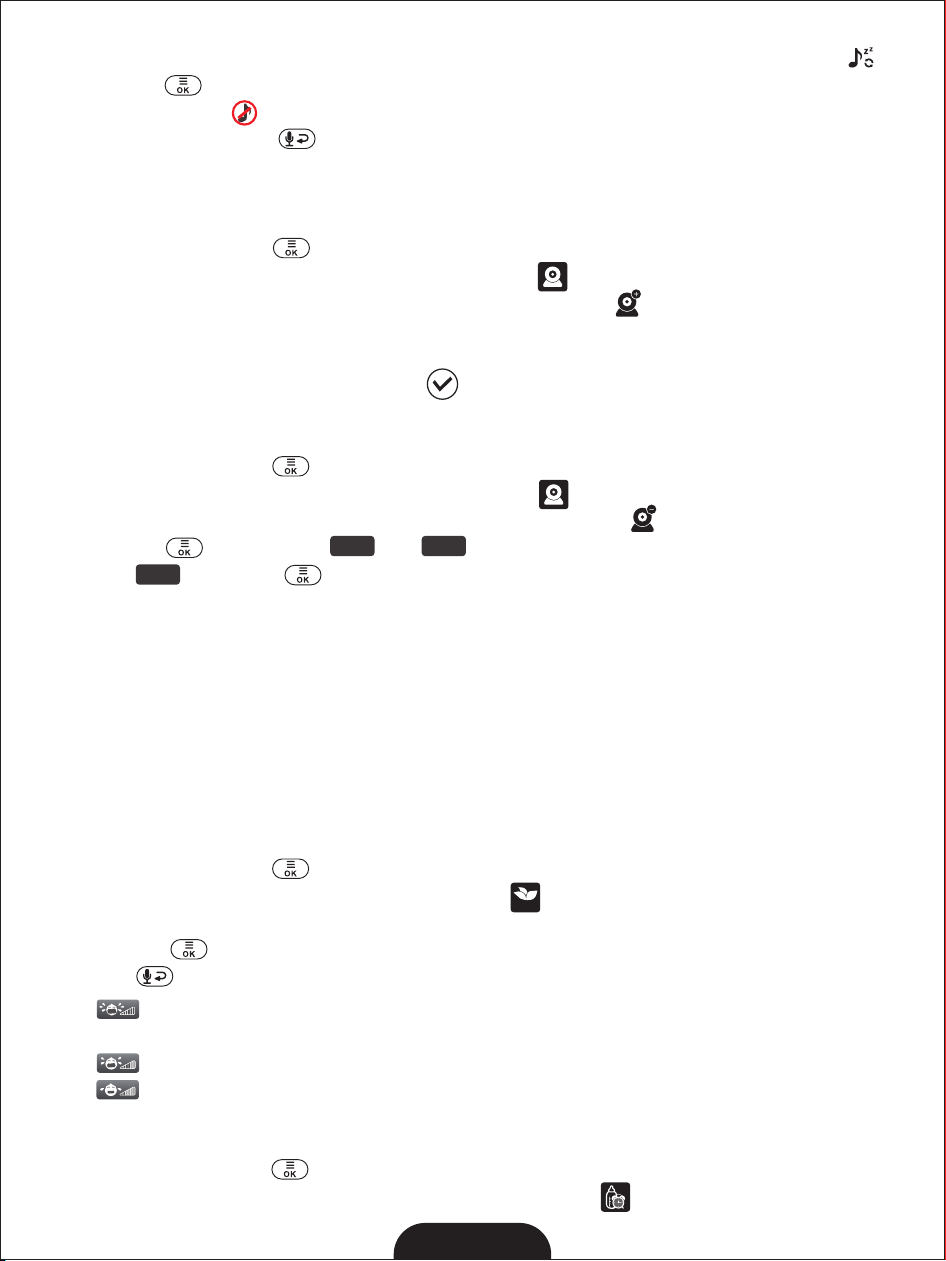
8.1 LULLABAY SETTING
You can soothe the baby to sleep by playing a gentle lullaby from the baby unit.
1. Press the MENU key and the menu will pop up.
2. Press the◀/▶/▲/▼ key until the lullaby icon is selected.
6.3 ICONS OVERVIEW:
--------
Signal Strength
Alarm
--------
Volume
--------
Zoom
--------
Two-Way Talk
--------
Lullaby
--------
Camera
--------
Battery Level
--------
Night Vision
--------
--------
Brightness
--------
--------
Display reverse
Night light
2
Lowsensitivity
level
------
ECO
Middlesensitivity
level
------
ECO
Highsensitivity
level
------
ECO
Alarm voulme
setting
--------
5
3. Press the◀/▶/▲/▼ key to select one of 8 available lullabies or loop playback .
4. Press the to confirm.
5. Select stop icon to stop.
6. Press the Return Key to exit.
The lullaby default setting is OFF.Note:
8.2 CAMERA
8.21 ADD CAMERA
1. Press the MENU key and the menu will pop up.
2. Press the◀/▶/▲/▼ key until the camera icon is selected.
3. Press the◀/▶/▲/▼ key until the camera adding icon is selected.
4. When the Pair sign is displayed 30 seconds countdown on the LCD screen, press PAIR
button on the back of the camera.
5. Once paired, SuccessfulpairingiconshowsontheLCDscreen.
6. If fails, repeat above steps.
8.22 DELETE CAMERA
1. Press the MENU key and the menu will pop up.
2. Press the◀/▶/▲/▼ key until the camera icon is selected.
3. Press the ◀/▶/▲/▼ key until the camera deleting icon is selected.
4. Press the key, the icon and the will appear.
5. Select and press key to delete the camera.
SPLIT-SCREEN FUNCTIO N
The baby moniter has Split-Screen feature. When 2 cameras are paired, the two different
imagines will be displayed on the monitor’s screen side by side at the same time. When 3 or
4 cameras are paired, all imagines will be displayed splitly on the screen in real-time.
8.3 ENERGY SAVING
This mode allows you to control the sound activation of your baby unit. If there is no sound
around the baby unit within 30 seconds, it will stop audio transmission and turn off the
screen of the parent unit. When the baby unit detects any sounds louder than the sensitivity
level, it will start transmitting the signal to the parent unit again and turn on the screen of the
parent unit. To change the ECO level, please follow the below instructions.
1. Press the MENU key and the menu will pop up.
2. Press the◀/▶/▲/▼ key until the ECO icon is selected.
3. Press the◀/▶key to select desired level.
4. Press the to confirm.
5. Presskeytoexit.
isLowsensitivitylevel, the baby have to make a lot of sound before the ECO Note:
function is activated;
is Middle sensitivity level.Note:
is High sensitivity level, the baby don't have to make a lot of sound before the ECO Note:
function is activated;
8.4 FEEDING TIME SETTING
1. Press the MENU key and the menu will pop up.
2. Press the◀/▶/▲/▼ key until the Feeding Time icon is selected.
YE S NO
YE S
ECO
6
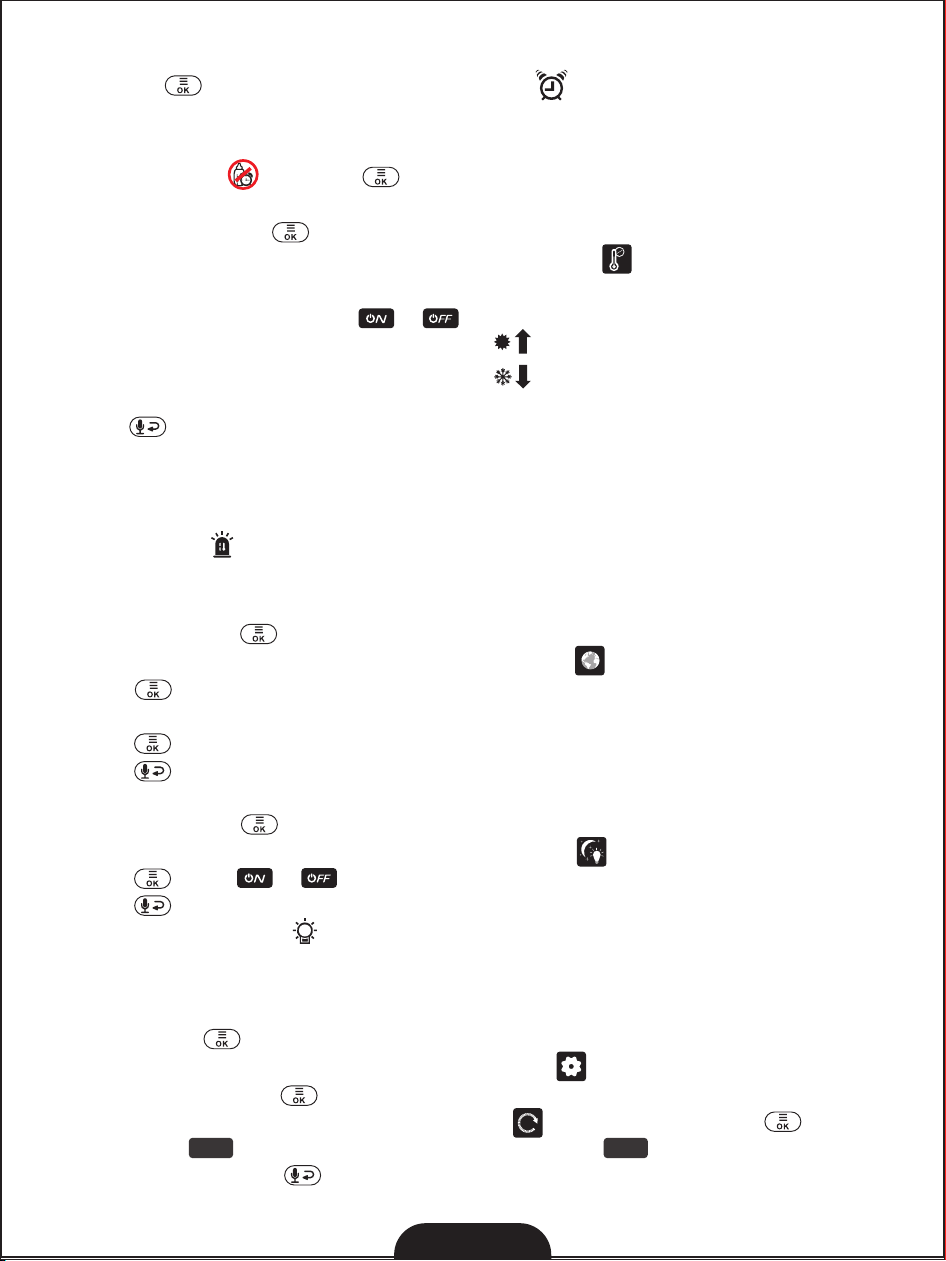
3. Press the◀/▶/▲/▼ key to select the feeding alarm time you need.
4. Press the to confirm. The Feeding Time icon shows on the LCD screen.
The minimum setting is 0.5 hours, and the maximum setting is 7 hours (9 levels).Note 1:
Note 2: The Feeding alarm default setting is OFF.
Select icon and press to cancel feeding alarm setting. Note 3:
8.5 TEMPERATURE SET TING
1. Press the MENU key and the menu will pop up.
2. Press the◀/▶/▲/▼ key until the thermometer icon is selected.
3. Press the▲/▼ key to select the Degrees Centigrade (℃) or Degrees Fahrenheit (°F).
4. Press the ▲/▼ key to select or for turning on/off alarm function.
5. Press ▲/▼ keys to adjust the Hi limit when(red)is selected.
6. Press ▲/▼ keys to adjust the Lo limit when(blue)is selected.
7. The corresponding temperature shows on the LCD screen.
8.Press keytoExit.
The detected temperature range is 0~50 ℃.Note:
The high temperature alarm default setting is 36 ℃,andthelowtemperature alarmNote:
defaultsettingis8℃.Whenthetemperaturegoesaboveorbelowthesettings,the
temperatureicon willdisplayonthescreen.Itwillalertuserbybeeps.Pressanykeyon
theparentunittostopbeepingandflashing.
8.6 LANGUAGE SETTING
1. Press the MENU key and the menu will pop up.
2. Press the◀/▶/▲/▼ keys until the language iconisselected.
3. Press key to enter into sub-menu, then press ◀/▶/▲/▼ key to select the
language you need.
4. Presskeytoconfirm.
5.Press keytoExit.
8.7 NIGHT LIGHT SETTING
1. Press the MENU key and the menu will pop up.
2. Press the◀/▶/▲/▼ keys until the language iconisselected.
3. Presskey to or the night light.
4.Press keytoExit.
: Press the night light key can also turn on or turn off the night light(Key on the side Note
of Baby Unit).
8.8 SETTINGS
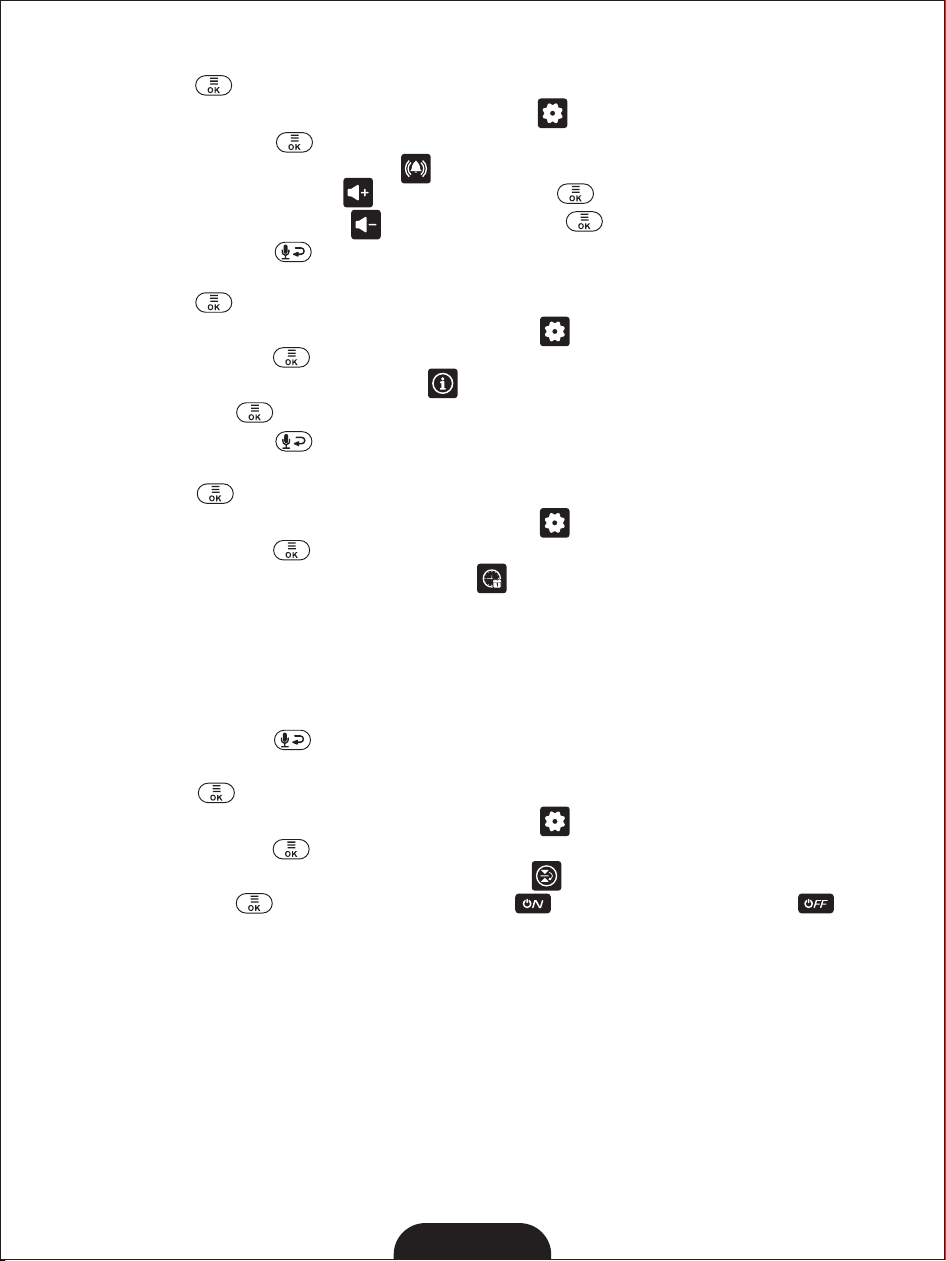
8.8.1 DEFAULT SETTINGS
1.Press MENU Key, the Main Menu will pop up.
2. Press the◀/▶/▲/▼ keyuntiltheSettings icon is selected.
3. Press the MENU Key . The sub-menu Settings will pop up.
4. Press◀/▶/▲/▼ toselectdefault settings , press the MANU key to enter.
5. Select icon to restore default setting; Select icon to cancel the default setting.
6. Press the Return Key one time to exit sub-menu , and two times exit main menu.
YE S NO
°F
°C
7
8.8.2 ALARM VOULME SETTING
1.Press MENU Key, the Main Menu will pop up.
2. Press the◀/▶/▲/▼ keyuntiltheSettingiconisselected.
3. Press the MENU Key . The sub-menu Settings will pop up.
4. Press◀/▶/▲/▼ toselect ALARM .
5. Select volume increase icon , press MANU key to incress the alarm volume.
6. Select volume decrease icon , press MANU key to decrease the alarm volume.
7. Press the Return Key one time to exit sub-menu, and two times exit main menu.
8.8.3 CONTACT
1.Press MENU Key, the Main Menu will pop up.
2. Press the◀/▶/▲/▼ keyuntiltheSettingiconisselected.
3. Press the MENU Key . The sub-menu Settings will pop up.
4. Press◀/▶/▲/▼ to select Contact .
5. Press MANU key . You can see our brand HelloBaby, our Email address and Website.
6. Press the Return Key one time to exit sub-menu, and two times exit main menu.
8.8.4 DATE/TIME SETTING
1.Press MENU Key, the Main Menu will pop up.
2. Press the◀/▶/▲/▼ keyuntiltheSettingiconisselected.
3. Press the MENU Key . The sub-menu Settings will pop up.
4. Press◀/▶/▲/▼ key until the time icon is selected .
5. Press◀/▶key to select Month, Day and Yearsetting; Press▲/▼ key to set your desired
month, date and year.
6. Press the◀/▶key to select the timing method 12H or 24H.
7. Press ◀/▶key to select Hour, Minute setting; Press▲/▼ key to set your desired hour
and Minute.
8. Press the Return Key one time to exit sub-menu, and two times exit main menu.
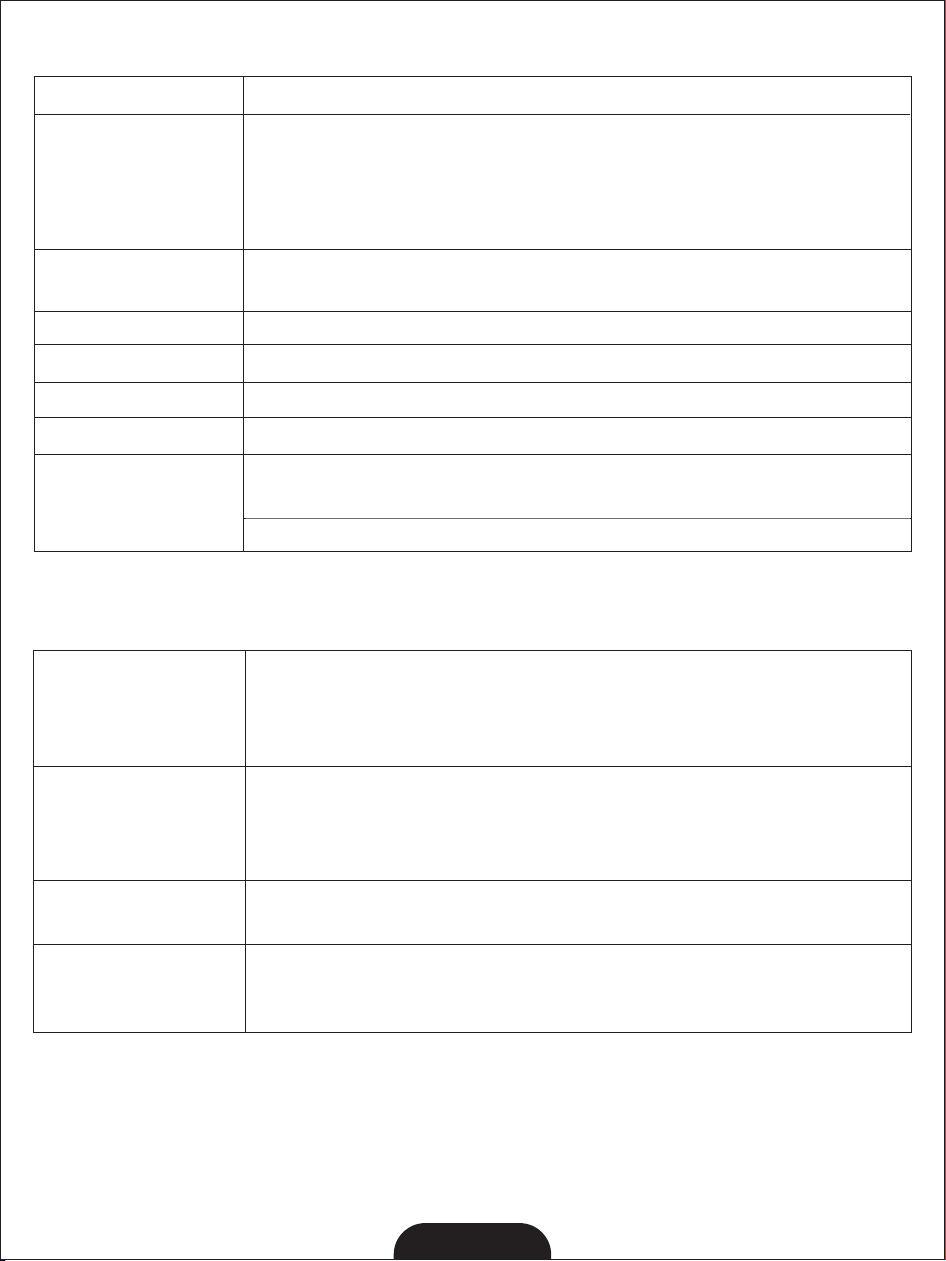
8.8.5 DISPLAY REVERSE
1.Press MENU Key, the Main Menu will pop up.
2. Press the◀/▶/▲/▼ keyuntiltheSettingiconisselected.
3. Press the MENU Key . The sub-menu Settings will pop up.
4. Press◀/▶/▲/▼ key to select Disply Reverse .
5. Press MANU key to open Display Reverse or close Display Reverse .
8
10. TROUBLE SHOOTING
9. TECHNICAL DATA
Operation
Environment
Battery (Parent Unit)
Operating time
Li-ion 3.7V 4000mAh (14.8Wh)
Up to 10 hours
RelativeHumidity:15%-85%
Maximum Power
<19dBm
Operation Temperature: +32F~+104F (0℃~40℃)
Battery Charging Temperature: +50F~+104F(10℃~40℃)
2412MHz-2462MHz
Frequency
Power Adapter
Parent Unit: Input: 100-240VAC 50/60Hz
Output: 5V DC 1.2A
Camera Unit: Input: 100-240VAC 50/60Hz
Output: 5V DC 1.2A
Up to 1000ft (300m) outdoor (line of sight)
Up to 165ft (50m) indoor
Operating Range
Display
5.5" 720P TFT LCD
Audio Feedback
(High Pitched Noise)
Interference or Poor
Reception
* Move the monitor close to the camera.
* The camera or monitor may be placed too close to many metal objects.
* Other electronic devices may be interfering with the signal.
* The battery power may be too low.
* The camera and monitor may be placed too closed.
* The volume on the monitor may be set too high.
Frozen Picture on
Screen
* Repower the baby unit (plug out the adapter, then plug it into the
socket again).
* Press the RESET key at the back of parent unit.
No reception on The
Monitor
* The power adapters may not be properly connected.
* Confirm that the camera and monitor are ON.
* Camera may be far away from the monitor.
* Camera and monitor may not be properly paired; follow PAIRING instructions.

11. MAINTENANCE
* Clean your baby monitor with a slightly damp or anti-static cloth.
* Never use cleaning agents or solvents.
12. DISPOSAL GUIDE FOR BATTERY AND PRODUCT
* Do not attempt to repair or adjust any of the electrical or mechanical functions of the
unit.
* Remember to dispose of the product in an environmentally responsible way.
* For proper collection and processing of these products, take them to the collection
points designated by local authorities. You can also contact the store where you
purchased the product.
Improper or incorrect use of batteries may cause corrosion or battery leakage, which
could cause personal injury or damage to property. Use only the types of the batteries
which are indicated in this manual.
CAUTION: Risk of Fire and Burns. Do Not Open, Crush, Heat Above 45 degree C or Incinerate.
Follow Manufacturer's Instructions.
- Disposal of a battery into fire or a hot oven, or mechanically crushing or cutting of a battery,
that can result in an explosion.
- Leaving a battery in an extremely high temperature surrounding environment that can
result in an explosion or the leakage of flammable liquid or gas.
- A battery subjected to extremely low air pressure that may result in an explosion or the
leakage of flammable liquid or gas.
- The battery shall not be exposed to excessive heat such as sunshine, fire or the like.
FCC& ISDE Statement
This device complies with Part 15 of the FCC Rules and with Industry Canada licence-exempt
RSS standard(s).Operation is subject to the following two conditions: (1)this device may not
cause harmful interference, and (2)this device must accept any interference received,
including interference that may cause undesired operation. Cet appareil est conforme à la
partie 15 des règles de la FCC et aux normes RSS exemptées de licence d’Industrie Canada. Le
fonctionnement est soumis aux deuxconditions suivantes : (1)cet appareil ne doit pas causer
d’interférences nuisibles, et (2)cet appareil doit accepter toute interférence reçue, y compris
les interferences pouvant entraîner un fonctionnement indés.
Changes or modifications to this unit not expressly approved by the party responsible
for compliance could void the user ’s authority to operate the equipment.
NOTE: This equipment has been tested and found to comply with the limits for a Class B
digital device, pursuant to Part 15 of the FCC Rules. These limits are designed to provide
reasonable protection against harmful interference in a residential installation. This
equipment generates, uses and can radiate radio frequency energy and, if not installed and
used in accordance with the instructions, may cause harmful interference to radio
communications. However, there is no guarantee that interference will not occur in a
particular installation. If this equipment does cause harmful interference to radio or
television reception, which can be determined by turning the equipment off and on, the user
9

is encouraged to try to correct the interference by one or more of the following measures:
-- Reorient or relocate the receiving antenna.
-- Increase the separation between the equipment and receiver.
-- Connect the equipment into an outlet on a circuit different from that to which the receiver
is connected.
-- Consult the dealer or an experienced radio/TV technician for help.
This device meets the exemption from the routine evaluation limits in section 2.5 of RSS 102
and compliance with RSS 102 RF exposure, users can obtain Canadian information on RF
exposure and compliance.
cet appareil est conforme à l'exemption des limites d'évaluation courante dans la section 2.5
du cnr - 102 et conformité avec rss 102 de l'exposition aux rf, les utilisateurs peuvent obtenir
des données canadiennes sur l'exposition aux champs rf et la conformité.
This equipment complies with Canada radiation exposure limits set forth for an uncontrolled
environment.
Cet équipement est conforme aux limites d'exposition aux rayonnements du Canada établies
pour un environnement non contrôlé.
Radiation Exposure Statement for camera
This equipment should be installed and operated with minimum distance 20cm between the
radiator & your body.
Cet équipement doit être installé et utilisé à une distance minimale de 20 cm entre le
radiateur et votre corps.
SAR Statement for Monitor
Specific Absorption Rate (SAR) information:
This Monitor meets the government's requirements for exposure to radio waves. The
guidelines are based on standards that were developed by independent scientific
organizations through periodic and thorough evaluation of scientific studies. The standards
include a substantial safety margin designed to assure the safety of all persons regardless of
age or health. ISED & FCC RF Exposure Information and Statement the SAR limit of
Canada(ISED & FCC) is 1.6 W/kg averaged over one gram of tissue. Device types: Monitor
has also been tested against this SAR limit. This device was tested for typical body-worn
operations with the back of the Monitor kept 0mm from the body. To maintain compliance
with ISED RF exposure requirements, use accessories that maintain an 0mm separation
distance between the user's body and the back of the Monitor . The use of belt clips, holsters
and similar accessories should not contain metallic components in its assembly. The use of
accessories that do not satisfy these requirements may not comply with ISED RF exposure
requirements, and should be avoided.
Informations sur le débit d'absorption spécifique (DAS):
Cette Moniteur répond aux exigences du gouvernement en matière d'exposition aux ondes
radio. Les lignes directrices sont basées sur des normes élaborées par des organisations
scientifiques indépendantes à travers une évaluation périodique et approfondie des études
scientifiques. Les normes comprennent une marge de sécurité substantielle conçue pour
assurer la sécurité de toutes les personnes, quel que soit leur âge ou leur état de santé.
Information et déclaration d'ISDE sur l'exposition aux RF la limite DAS du Canada (ISDE) est
10
de 1,6 W / kg en moyenne sur un gramme de tissu. Types d'appareils: la Moniteur a
également été testée par rapport à cette limite SAR. Cet appareil a été testé pour des
opérations typiques portées sur le corps avec le dos de la Moniteur gardé à 0 mm du corps.
Pour maintenir la conformité avec les exigences d'exposition RF d'ISDE, utilisez des
accessoires qui maintiennent une distance de séparation de 0 mm entre le corps de
l'utilisateur et l'arrière de la Moniteur. L'utilisation de clips de ceinture, d'étuis et
d'accessoires similaires ne doit pas contenir de composants métalliques dans son
assemblage. L'utilisation d'accessoires qui ne satisfont pas à ces exigences peut ne pas être
conforme aux exigences d'exposition aux RF d'ISDE et doit être évitée.
EU Declaration of Conformity (DOC)
Hereby, videotimes declares that the radio equipment type is in compliance with RED
Directive 2014/53/EU.
The full text of the EU declaration of conformity is available on the website:
www.hellobaby.net.cn
Model: HB6081
Responsible Party(US): Startline LLC
Add: 22 Hazelwood Drive, Jericho, NY 11753 Tel: 1-516-681-3729
Authorized UK Representative(UK): APEX CE SPECIALISTS LIMITED
Add: 89 Princess Street,M14HT,UK info@apex-ce.com
Shenzhen Videotimes Technology Co.,Ltd
Room 2106, Building 11, Tianan Yungu Phase II , Gangtou Community, Bantian Street,
Longgang District, Shenzhen, Guangdong, China
Product tested against EN62471
WARNING IR emitted from this product. Do not stare at operating lamp
Risk Group 1
11
Made in China
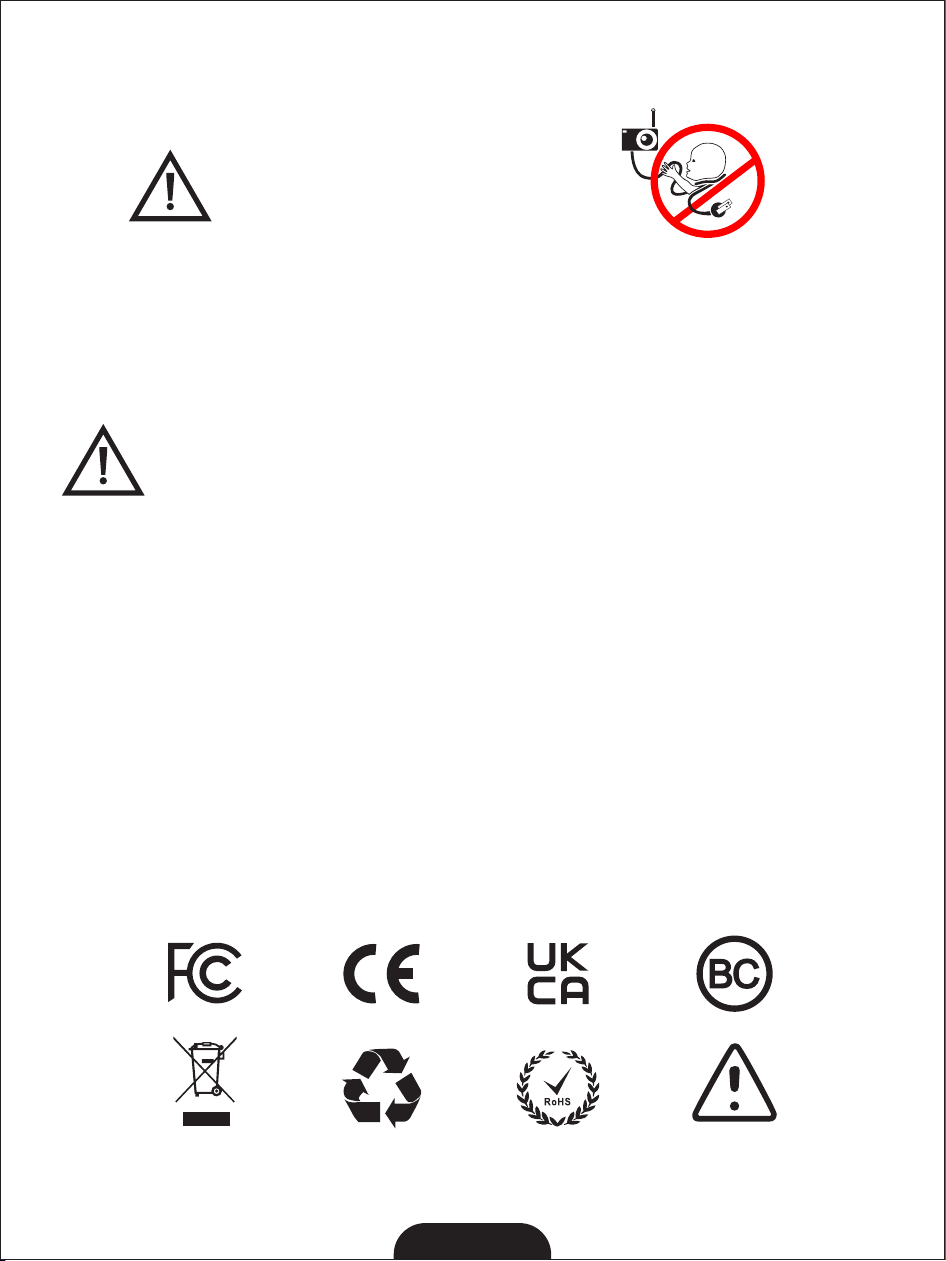
Strangulation Hazard: Children have STRANGLED
in cords. Keep this cord out of the reach of children
(more than 3 ft (0.9 m) away). Do not remove this tag.
WARNING
DANGER D’ÉTRANGLEMENT: Des enfants se sont
ÉTRANGLÉS avec des cordons électriques. Garde
le cordonélectrique hors de la portée des enfants(à
plus de 0.9m/3 pi du lit d’enfant). Ne pas enlever
cette étiquette.
AVERTISSEMENT
12