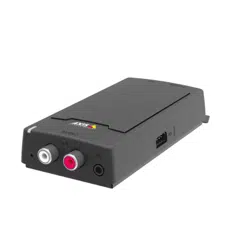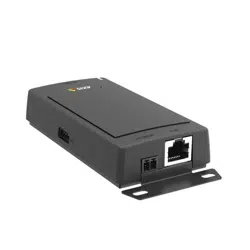


AXISC8033NetworkAudioBridge
Safetyinformation
Safetyinformation
Hazardlevels
DANGER
Indicatesahazardoussituationwhich,ifnotavoided,willresultindeathorseriousinjury.
WARNING
Indicatesahazardoussituationwhich,ifnotavoided,couldresultindeathorseriousinjury.
CAUTION
Indicatesahazardoussituationwhich,ifnotavoided,couldresultinminorormoderateinjury.
NO NO
NO
TICE TICE
TICE
Indicatesasituationwhich,ifnotavoided,couldresultindamagetoproperty.
Othermessagelevels
Important
Indicatessignicantinformationwhichisessentialfortheproducttofunctioncorrectly.
Note
Indicatesusefulinformationwhichhelpsingettingthemostoutoftheproduct.
2

AXISC8033NetworkAudioBridge
TableofContents
Safetyinformation..........................................2
Hazardlevels...................................................2
Othermessagelevels.............................................2
Productoverview...........................................4
ConnectorsandButtons..........................................4
LEDIndicators..................................................4
Howtoaccesstheproduct....................................6
Howtoaccesstheproductfromabrowser...........................6
Howtoaccesstheproductfromtheinternet.........................6
Howtosettherootpassword.....................................6
Howtosetuptheproduct....................................7
Howtoperformabasicsetup.....................................7
Audio.....................................................8
Overview......................................................8
Systemsettings.................................................9
Devicesettings.................................................9
Clips..........................................................10
Detectors..................................................12
AudioAlarmLevel...............................................12
Activity.......................................................12
VoiceoverIP(VoIP).........................................13
VoIPOverviewPage..............................................13
ConguretheSIPSettings........................................13
TheAccountSettingsPage........................................15
Aboutapplications..........................................19
Aboutapplicationlicenses........................................19
Howtouploadandstartanapplication.............................19
ApplicationConsiderations........................................19
AXISAudioPlayer...............................................20
Aboutevents...............................................21
Howtosetupactionrules........................................21
Howtoaddrecipients............................................22
Howtocreateschedules..........................................23
Howtosetuprecurrences........................................24
Aboutlanguages............................................25
Aboutsystemoptions........................................26
Security.......................................................26
Date&Time....................................................27
Network.......................................................28
Storage.......................................................32
Ports&Devices.................................................32
Maintenance...................................................33
Support.......................................................33
Advanced......................................................34
Howtoresettofactorydefaultsettings.............................34
Troubleshooting............................................35
Howtocheckthecurrentrmware.................................35
Howtoupgradethermware.....................................35
Symptoms,possiblecausesandremedialactions......................35
Specications..............................................37
3
AXISC8033NetworkAudioBridge
Productoverview
Productoverview
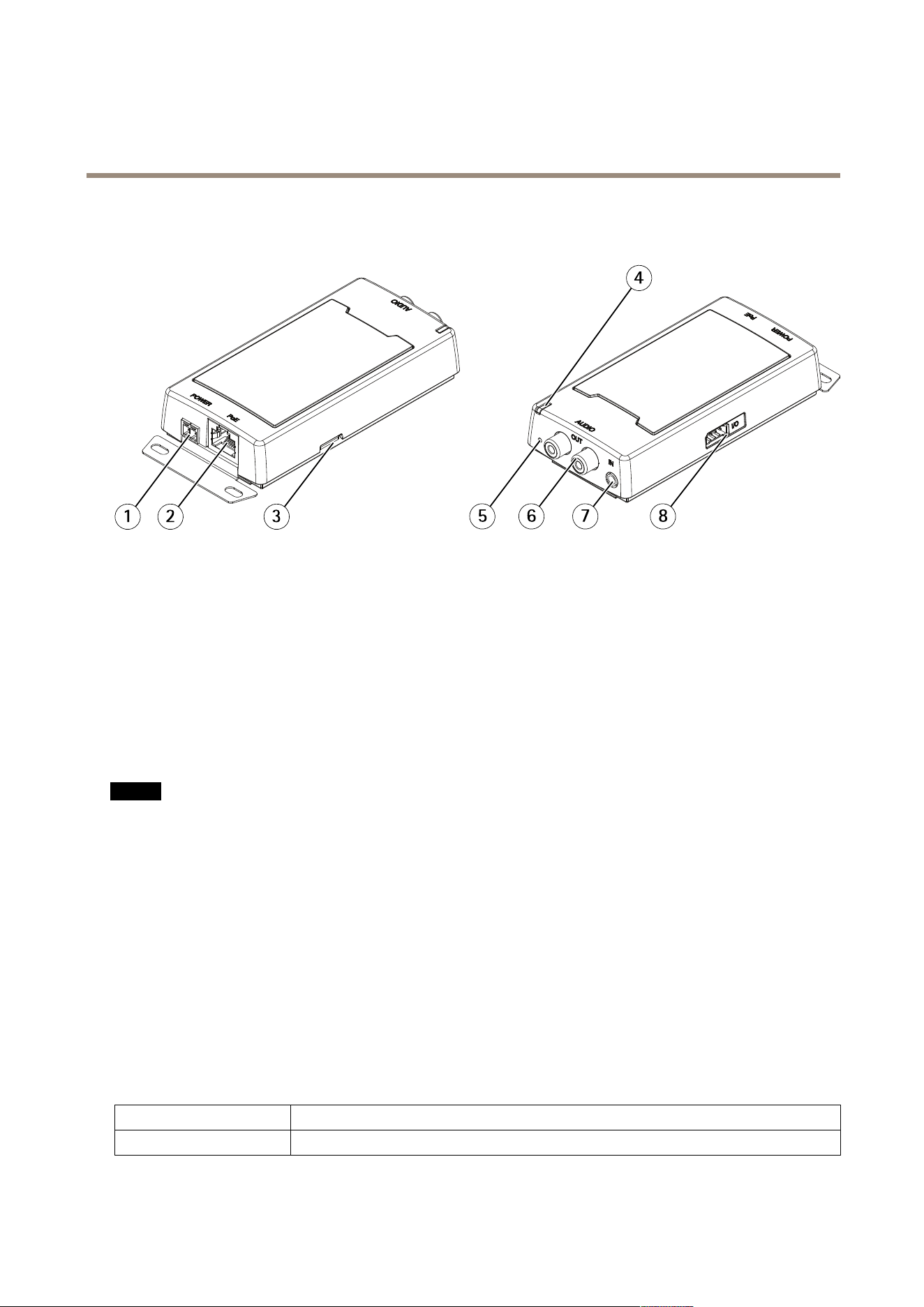
1
Powerconnector(DC)
2
Networkconnector
3
SDmemorycardslot
4
StatusLEDindicator
5
Controlbutton
6
RCAconnector
7
Audio-inconnector
8
I/Oconnector
ConnectorsandButtons
Networkconnector
NO NO
NO
TICE TICE
TICE
Theproductshallbeconnectedusingashieldednetworkcable(STP).Allcablesconnectingtheproducttothenetworkshall
beintendedfortheirspecicuse.Makesurethatthenetworkdevicesareinstalledinaccordancewiththemanufacturer’s
instructions.Forinformationaboutregulatoryrequirements,seetheInstallationGuideatwww.axis.com.
Controlbutton
Forlocationofthecontrolbutton,seeProductoverviewonpage4.
Thecontrolbuttonisusedfor:
•Resettingtheproducttofactorydefaultsettings.Seepage34.
•ConnectingtoanAXISVideoHostingSystemservice.Seepage29.Toconnect,pressandholdthebuttonforabout3
secondsuntiltheStatusLEDashesgreen.
•ConnectingtoAXISInternetDynamicDNSService.Seepage29.Toconnect,pressandholdthebuttonforabout3seconds.
LEDIndicators
StatusLED
Indication
UnlitUnlitfornormaloperation.
4

AXISC8033NetworkAudioBridge
Productoverview
GreenSteadygreenfornormaloperation.
Amber
Steadyduringstartupandwhenrestoringsettings.
Red
Slowashforfailedupgrade.
Red/GreenFlashesfastbetweenred/greenwhenidentifyinganaudiodeviceisselected.
5

AXISC8033NetworkAudioBridge
Howtoaccesstheproduct
Howtoaccesstheproduct
ToinstalltheAxisproduct,seetheInstallationGuidesuppliedwiththeproduct.
Howtoaccesstheproductfromabrowser
1.Startawebbrowser.
2.EntertheIPaddressorhostnameoftheAxisproductinthebrowser’saddresseld.
ToaccesstheproductfromaMaccomputer(OSX),gotoSafari,clickonBonjourandselecttheproductfromthe
drop-downlist.
Note
ToshowBonjourasabrowserbookmark,gotoSafari>Preferences.
3.Enteryourusernameandpassword.Ifthisisthersttimetheproductisaccessed,therootpasswordmustrstbe
congured.
Howtoaccesstheproductfromtheinternet
Onceconnected,youcanaccesstheproductonyourlocalnetwork(LAN).
Toaccesstheproductfromtheinternetyoumustcongureyournetworkroutertoallowincomingdatatrafctotheproduct.Todo
this,enabletheNAT-traversalfeature,whichwillattempttoautomaticallyconguretheroutertoallowaccesstotheproduct.
Thisisenabledfrom.
Formoreinformation,seeNATtraversal(portmapping)forIPv4onpage30.
ForTechnicalnotesonthisandothertopics,visittheAxisSupportwebatwww.axis.com/support
SeealsoAXISInternetDynamicDNSServiceatwww.axiscam.net
Howtosettherootpassword
ToaccesstheAxisproduct,youmustsetthepasswordforthedefaultadministratoruserroot.ThisisdoneintheCongureRoot
Passworddialog,whichopenswhentheproductisaccessedforthersttime.
Topreventnetworkeavesdropping,therootpasswordcanbesetviaanencryptedHTTPSconnection,whichrequiresanHTTPS
certicate.HTTPS(HypertextTransferProtocoloverSSL)isaprotocolusedtoencrypttrafcbetweenwebbrowsersandservers.The
HTTPScerticateensuresencryptedexchangeofinformation.SeeHTTPSonpage26.
Thedefaultadministratorusernamerootispermanentandcannotbedeleted.Ifthepasswordforrootislost,theproductmustbe
resettothefactorydefaultsettings.SeeHowtoresettofactorydefaultsettingsonpage34.
TosetthepasswordviaastandardHTTPconnection,enteritdirectlyinthedialog.
TosetthepasswordviaanencryptedHTTPSconnection,followthesesteps:
1.ClickUseHTTPS.
Atemporarycerticate(validforoneyear)iscreated,enablingencryptionofalltrafctoandfromtheproduct,andthe
passwordcannowbesetsecurely.
2.Enterapasswordandthenre-enterittoconrmthespelling.
3.ClickOK.Thepasswordhasnowbeencongured.
6

AXISC8033NetworkAudioBridge
Howtosetuptheproduct
Howtosetuptheproduct
TheAxisproductcanbeconguredbyuserswithadministratorrights.GotoSetup>BasicSetup>1Userstoadministerusers.
•Administratorshaveunrestrictedaccesstoallsettings.
Seealsotheonlinehelp
.
Howtoperformabasicsetup
BasicSetupprovidesshortcutstothesettingsthatshouldbemadebeforeusingtheAxisproduct:
1.Users.Seepage26.
2.TCP/IP.Seepage28.
3.Date&Time.Seepage27.
4.VoIPSettings.Seepage13.
7

AXISC8033NetworkAudioBridge
Audio
Audio
Theaudiosettingscanbeusedtoadjustaudioquality.Youcancongurethefollowing:
•Overview.SeeOverview.
•Systemsettings.Seepage9.
•Devicesettings.SeeDevicesettings.
•Clips.SeeClips.
Overview
Thispageprovidesanoverviewoftheleaderaudiodeviceandtheaudiodevicesaddedtothezone.
Connectseveralaudiodevicesintoazone,andmanagemusicplaylists,streams,announcements,schedulingandvolumesettings
fromasingleaudiodevice.
Logintotheaudiodevicethatyouwanttosetastheleaderinthezone,andconnectalltheotheraudiodevicesasfollowers.
Aboutannouncements
Inthescheduleitispossibletooverlapyourplaylistwithpre-recordedannouncements.Itisalsopossibletodoliveannouncements
whenplayingaplaylist,seeVoiceoverIP(VoIP).
Inbothcasesthemusicwillmuteduringtheannouncement.
Aboutstandalonemode
Thesesettingsareavailableinstandalonemode(noaudiodevicesareaddedintothezone).
Usetheslidertoincreaseordecreasethevolume.
Toidentifytheaudiobridge,clickonthetoneandtheLEDontheaudiobridgewillashfastbetweengreenandred.
Howtosetthevolumeforaudiodevicesinazone
GotoAudio>Overview.
Thesesettingsareavailablewhentheaudiodeviceisconnectedtoatleastonemoreaudiodevice.
1.UsethesliderSystemunderVolumetosetsystemvolumeformaxannouncementsoundlevel
2.SetvolumeinAxisAudioPlayerforthebackgroundmusicsoundlevel.
3.Ifneededusetheslidersbesidethefollowerstoadjustthebalancebetweenspeakersbydecreasingtheindividualvolume
forthelouderspeakersandrepeatstep1and2.
Howtoidentifyaudiodevicesinazone
GotoAudio>AudioOverview.
Identifyallaudiodevicesinthezone-Clicktheuppertoneandallspeakersthatareconnectedtothesystemwillplayasoundina
sequence.AlltypeofaudiodeviceswillalsoashitsLEDrepeatedlyingreenandred.
Identifyasingleaudiodeviceinthezone-Clickthetonebesideafollower.Aspeakerwillmakeasound.Alltypeofaudiodevices
willalsoashitsLEDrepeatedlyingreenandred.
8

AXISC8033NetworkAudioBridge
Audio
Systemsettings
Thispageprovidesoptionstosetupanetworkaudiodevicesystem.
Howtosetupanaudiodevicesystem(zone)
1.Logintotheaudiodevicethatyouwanttosetastheleaderinthezone.
2.GotoAudio>SystemSettings.
3.Renameyourleaderaudiodevice:
-Toedittheleaderaudiodevice,clickthepencil
-Setaudiodevicenameandenterusernameandpassword.
-Ifthesystemsincludesmorethan50audiodevices,changetoMulticast.
-SelectEnablebroadcastofanalogaudioinputtoenabletheaudiofromaconnectedanalogaudiosource
tobeplayed.
-ClickApply
4.Addaudiodevicestothezone:
-UnderAvailableaudiodevices,clicktheplussigntoaddaaudiodevicetothezone.Ifyourdeviceisnot
listed,clickAdddevicemanuallytoaddthedevice.
-Foreachaudiodevice:Setaudiodevicenameandenterusernameandpassword.
-ClickApply.
Devicesettings
TosetuptheAxisproduct,gotoAudio>DeviceSettings.
AudioModes
TheAxisproductsupportsthefollowingaudiomodes:
•Fullduplex–Simultaneoustwo-wayaudioallowingtheAxisproducttotransmitandreceiveaudioatthesametime.
Thereisnoechocancellation;iffeedbackloopsappear,trymovingthemicrophoneorthespeaker.
•Half-duplex–AudiocanbetransmittedtoandfromtheAxisproductbutonlyinonedirectionatatime.
•Simplex–Speakeronly-AudioistransmittedfromaclienttotheAxisproduct.Thisisthedefaultaudiomode.
•Simplex–Microphoneonly-AudiocapturedbytheproductmicrophoneistransmittedfromtheAxisproductto
oneormoreclients.
Tosettheaudiomode,gotoAudio>DeviceSettingsandselectthedesiredmodefromtheAudiomodedrop-downlist.
AudioInput
ConguretheaudioinputsettingsunderAudio>DeviceSettings.
Source:SelectMicrophonetouseanexternalmicrophoneorLinetouseaLineindevice,e.g.anaudiomixerformultiple
microphonesoramicrophonewithabuilt-inamplier,asaudiosource.
UsetheInputgaintocontrolthevolume(dBFullScale)oftheaudioinput.Ifthesoundistoolow,chooseahigherdB,toamplify
thesound.Ifthesoundistoohigh,choosealowerdB.TheLevelbargivesavisualrepresentationoftheaudiosignallevelindB
relativetothefull-scaleinputlevel.
9

AXISC8033NetworkAudioBridge
Audio
•Green–thesignalisatagoodlevel.
•Yellow–thesignalisbecomingdistorted.
•Red–thesignalisdistorted.
UsetheEncodingoptiontoselectdigitalaudioencodingformat.
•AACisusedforencodingonlyintheAxisproduct.Fordecoding,nolicenseisincludedintheAxisproduct.
•G71 1isanunlicensedstandardcodecthatisusefulwhenintegratingaudiointoaVoIPsystem
•G726isanunlicensedspeechcodecthatismostcommonlyusedwithinthesecurityindustry.
TheSampleratedenesthenumberoftimespersecondthesoundissampled.Ahighersampleratewillprovidebetteraudio
quality,butalsorequiresagreaterbandwidth.
SettherequiredBitratedependingontheselectedencoding.Ahigherbitratewillgivebetteraudioquality.Alowerbitrate
mayhavelatencyordelay,butwillrequirelessbandwidth.
Formoreinformationaboutthesesettings,pleaseseetheonlinehelp
.
AudioOutput
ConguretheaudiooutputsettingsunderAudio>DeviceSettings.
Outputgain-Movetheslidertoadjustthevolumeoftheaudiooutput.Tomutethesound,movetheslidertotheleftend
oftheslider.
Clips
AudioClipList
Audioclipscanbeplayedwhenaneventoccurs.AudioclipsarecreatedbyuploadingasoundletotheAxisproduct.Toadd,play,
download,modifyorremoveaudioclips,gotoAudio>AudioClips.Formoreinformationseetheonlinehelp
.
•Add–Toaddanaudioclip,clickAdd,selecttheUploadradiobuttonandclickBrowse.Navigatetothedesiredle
andclickUploadtouploadtheaudioclip.
-Thefollowingaudioformatsaresupported:.auG.71 1u-law,8-bit,mono(8,16kHz),
.wavPCM,16-bit,mono(8,16,32kHz)andMP3.
-Thetypicallesizeis10MB.
•Play–Toplayanaudioclip,selectanaudioclipintheAudioClipListandclickPlay.Audioclipscanonlybeplayedifthe
audiodeviceisnotstreamingaudioorplayinganotherclip.
•Stop–Tostopanaudioclip,selectitandclickStop.
•Download–Todownloadarecordingtoaharddriveornetworkdisk,selectitandclickDownload.
•Modify–Tochangethenameoftheaudioclip,selectitandclickModify.
•Remove–Toremoveanaudioclip,selectitandclickRemove.
ToconguretheAxisproducttoplayaudioclipswhenaneventoccurs,anactionrulemustbesetup.Formoreinformation,
seeAbouteventsonpage21.
CongureAudioClipLink
Tocreatealinktoaconguredaudioclip:
10

AXISC8033NetworkAudioBridge
Audio
1.Selectanaudioclipfromthelist.
2.Ifyouwanttoplayseveralclipswithsimilarlenamesinanrandomorder,replacepartsofthelenameintheaudio
clipeldwithanasterisk.Forexample:toplaytheaudioclipssound01.mp3andsound02.mp3writesound*in
theaudioclipeld.
3.Settheaudioclipcongurations.
4.Selectthecopyicontocopythelink.
11

AXISC8033NetworkAudioBridge
Detectors
Detectors
AudioAlarmLevel
EventtypesintheAxisproductcanbesettousethislevelasatrigger.Eachindividualeventtypecanbeconguredtotriggerifthe
soundlevelrisesabove,fallsbeloworpassesthesetvalue.
Thealarmlevelcanbesetintherange0-100,where0isthemostsensitiveand100theleastsensitive.
WhensettingthealarmlevelusetheActivityindicatorasaguide.Forbestdetection,placethelevelsothatthereisgreenbelowthe
barwithasmallamountofredabovethebar.
Activity
DetectedaudioisindicatedbycoloredpeaksintheActivityindicator.Aneventistriggeredwhendetectedaudiorisesabove,falls
beloworpassestheAudioAlarmLevelspecied,whichisrepresentedbythebar.
Note
AudiodetectionlevelmustbesetbeforecreatinganActionRulethattriggersonaudiodetection.
12

AXISC8033NetworkAudioBridge
VoiceoverIP(VoIP)
VoiceoverIP(VoIP)
VoiceoverIP(VoIP)isagroupoftechnologiesthatenablesvoicecommunicationandmultimediasessionsoverIPnetworks.Inthe
Axisproduct,VoIPisenabledthroughtheSessionInitiationProtocol(SIP)andDual-ToneMulti-Frequency(DTMF)signaling.
Toopentheproduct’sVoIPpages,gotoSetup>VoIP.
TheVoIPsettingsincludethefollowingpages:
•VoIPOverview.SeeVoIPOverviewPageonpage13.
•SIPSettings.SeeConguretheSIPSettingsonpage13.
•AccountSettings.SeeCreateorEditAccountsonpage15.
TheVoIPsettingscanbeconguredbyuserswithadministratorrights.
VoIPOverviewPage
TheVoIPOverviewpageshowsbasicinformationabouttheSIP,VoIPactionrules,andAccountSettings.
•SIPSettings–ShowsthebasicSessionInitiationProtocol(SIP)settings,andindicateswhetherSIPisenabledand
allowsincomingcallsornot.
Tochangethesettings,clickCongureorgotoVoIP>SIPSettings.Formoreinformation,seeConguretheSIPSettings
onpage13.
•AccountSettings–ShowsanoverviewoftheSIPaccountsettings.SeealsoTheAccountSettingsPageonpage15.
Tocreateanewaccount,testanaccount,orchangetheaccountsettings,clickCongureorgotoVoIP>Account
Settings.Formoreinformation,seeCreateorEditAccounts.
ConguretheSIPSettings
SessionInitiationProtocol(SIP)isatext-basedprotocol,similartoHTTPandSMTP,forinteractivecommunicationsessionsbetween
users.Thesessionscanincludevoiceandvideoelements.SeeAboutSIPAddressesonpage18.
BeforetheAxisproductcanbeusedtomakeandreceivecalls,youneedtoconguretheSIPsettings.ThisincludesenablingSIP,
conguringtheports,andsettingtherulesforNetworkAddressTranslation(NAT)traversal.
ToconguretheSIPsettings:
1.GotoSetup>VoIP>SIPSettings.
2.ClickStarttostarttheSIPSetupAssistant.Formoreinformation,seeSIPSetupAssistantonpage14.
Or:
1.GotoSetup>VoIP>SIPSettings.
2.SelectEnableSIP.
3.ToallowtheAxisproducttoreceivecalls,selectAllowincomingSIPcalls.
4.EntertheSIPportnumberandtheSIPTLSportnumber.Formoreinformation,seePortSettingsonpage14.
5.SelecttheprotocolsyouwanttoenableforNATtraversal.SeeNetworkAddressTranslation(NAT)Traversal(port
forwarding)onpage14.
6.CongurethevalueforRegistrationintervalandMaxcalldurationifneeded.
13

AXISC8033NetworkAudioBridge
VoiceoverIP(VoIP)
7.ClickSave.
NO NO
NO
TICE TICE
TICE
AllowingincomingcallsenablestheAXISproducttoacceptcallsfromanydeviceconnectedtothenetwork.Itis
recommendedtodisableincomingcallsforproductsthatareaccessiblefrompublicnetworksortheInternet.
Note
EvenifyouchoosetonotenableSIP,youcanconguretheSIPsettings.ButrememberthatwhenSIPisdisabled,you
cannotmakeorreceivecalls.
SIPSetupAssistant
TheSIPSetupAssistanthelpsyouwiththeSIPconguration.Aftercompletingallthestepsinthesetupassistant,theproductis
readytoperformbasicVoIPactions,suchasreceivingacall.EachtimeyounishtheSIPsetupassistant,newactionrulesand
DTMFruleswillbecreated.
PortSettings
•SIPport–EntertheportusedforSIPsessions.Thesignallingtrafcthroughthisportwillbenon-encrypted.Thedefault
portnumberis5060.
•SIPTLSport–EntertheportusedforSIPSsessionsandTLS-securedSIPsessions.Thesignallingtrafcthroughthisport
willbeencryptedusingTransportLayerSecurity(TLS).Thedefaultportnumberis5061.
•RTPstartport–EntertheportusedfortherstRTPmediastreaminaSIPcall.Thedefaultstartportformediatransport
is4000.SomerewallsmightblockRTPtrafconcertainportnumbers.Aportnumbermustbebetween1024and65535.
Note
IfthePBXchangestheportusedforSIPmessages,itispossibletoreceiveanoticationregardingthis.GotoVoIP>Account
SettingsandclickModify.SelecttheNetwork-tabandselectAllowportupdatemessagesthroughMWI.
NetworkAddressTranslation(NAT)Traversal(portforwarding)
UseNATtraversalwhentheAxisproductisconnectedtothenetworkbehindaNATrouterorrewalldevice.
WithoutSIP-specicportforwarding,usersofclientswithinthesameprivatenetworkwouldbeabletotalktoeachotherbut
usersofclientsindifferentnetworkswouldnot.
ThefollowingNATtraversalsettingsareavailable:
•STUN–SessionTraversalUtilitiesforNAT(STUN).
•TURN–TraversalUsingRelaysaroundNAT(TURN).
•ICE–InteractiveConnectivityEstablishment(ICE).
EachNATtraversalprotocolcanbeusedseparatelyorindifferentcombinationsdependingonthenetworkenvironment.
Note
Formoreinformationabouttheproduct’sgeneralNATtraversalsettings,seeNATtraversal(portmapping)forIPv4onpage30.
InteractiveConnectivityEstablishment(ICE)
InteractiveConnectivityEstablishment(ICE)enablestheproducttosendarequestthatincludesmultipleaddressestothereceiving
device.Initsresponse,thereceivingdevicealsoincludesmultipleaddresses.Throughaprocessofconnectivitychecks,alsocalled
handshakes,thechannelforcommunicationisestablished.
ICEincreasesthechancesofndingthemostefcientpathtosuccessfulcommunicationbetweenpeerdevices.Ifyoualsoenable
STUNandTURN,youimprovetheICEprotocol’schancesofndingthemostefcientpathtosuccessfulcommunication.
14

AXISC8033NetworkAudioBridge
VoiceoverIP(VoIP)
SessionTraversalUtilitiesforNAT(STUN)
SessionTraversalUtilitiesforNAT(STUN)isaclient-servernetworkprotocolthatenablestheproducttoaskaSTUNserveronthe
InternetforamappedpublicIPaddress.TheSTUNserverresponseincludesthisIPaddressandportsothattheclientcanusethem
initsSIPmessagestootherhostsandclients.
LikeTURN,STUNcanbeusedinfull-cone,address-restrictedcone,andport-restrictedconeNATsetups.STUNisfastbecauseit
islightweight.However,STUNdoesnotallowincomingmessagesfromsymmetricNATs,anditcannotcommunicatewithapeer
behindthesameNATdevice.
TraversalUsingRelaysaroundNAT(TURN)
TraversalUsingRelaysaroundNAT(TURN)isaclient-servernetworkprotocolthatenablestheproducttoaskaTURNserverfora
relayedIPaddress.TheTURNserverrespondswithitsIPaddressandportsothattheclientcanusetheminitsSIPmessages.
TURNisprimarilyusedinsymmetricNATsetups.LikeSTUN,TURNcanalsobeusedinfull-cone,address-restrictedcone,and
port-restrictedconeNATsetups.ButbecausetheIPaddressandportprovidedbytheTURNserverarethoseoftheTURNserver
itself,itworkslikearelaythatforwardsinformationtoandfromtheclient.ThismeansthatwhileTURNserversarereliable,
theysometimescauseabitoflatency.
TheAccountSettingsPage
TheAccountSettingspageallowsyoutosetupandmanageSIPaccounts.SeeCreateorEditAccountsonpage15.TheSIPaccounts
canbeveriedbyusingTestSIPCall.SeeMakeTestCallsonpage17.
TheAccountSettingspagealsoincludesanaccountlistthatshowsanoverviewoftheSIPaccountsettings,including:
•Name.SeealsoAccountInformationonpage16.
•SIPaddress.SeealsoAboutSIPAddressesonpage18.
•Transportmode.SeealsoTransportSettingsonpage17.
•Default.SeealsoAccountInformationonpage16.
•Registrationstatus.SeeRegistrationStatusonpage15.
RegistrationStatus
Theaccountstatusisindicatedwithdotsindifferentcolors.Formoredetailedinformationaboutanaccount’sstatus,hoverthe
mousepointeroverthestatusdotorselecttheaccountintheaccountlistandclickModify.
SIPdisabled–SIPisdisabled.
Accountnotregistered–TheSIPaccountisnotregisteredwithaPBX,ortheSIPaccountisapeer-to-peeraccount
whichdoesnotregisteritself.
Provisional–Theproductistryingtoregistertheaccount.
Redirection–Theaccountoraddressneedstoberedirected.
Successful–TheaccounthassuccessfullyregisteredwiththeSIPregistrar.
Failure–Thereisaproblemwiththeaccount,suchastheaccountcredentialsarewrong.
CreateorEditAccounts
TosetupaSIPaccount:
1.GotoSetup>VoIP>AccountSettings.
2.ClickAdd.
15

AXISC8033NetworkAudioBridge
VoiceoverIP(VoIP)
3.Entertheaccountdetails.
UndertheGeneraltab:
-SeeAccountInformationonpage16.
-SeeAccountCredentialsonpage16.
-SeeSIPServerSettingsonpage16.
UndertheNetworktab:
-SeeTransportSettingsonpage17.
-SeeProxySettingsonpage17.
4.ClickOK.
Toeditanaccount,selecttheaccountintheaccountlistandclickModify.
Toremoveanaccount,selecttheaccountintheaccountlistandclickRemove.
AccountInformation
•Name–Enteradescriptivename.Thiscanforexamplebearstandlastname,arole,oralocation.Thenameisusedas
analiasandisespeciallyusefulwhenseveralaccountshavethesameuserID.
•Defaultaccount–Selecttomakethisthedefaultaccount.Onlyoneaccountcanbethedefaultaccount.
Atstartup,thersttimetheproductisaccessedorafterareset,apeeraccountiscreatedautomaticallyandsettobethe
defaultaccount.Thispeeraccountcanonlyberemovedifatleastonemoreaccounthasbeenaddedtothelist.
ThedefaultaccountwillbeusedwhenmakingaVAPIX
®
ApplicationProgrammingInterface(API)callwithoutspecifying
whichSIPaccounttocallfrom.Formoreinformation,visitwww.axis.com/developer.
AccountCredentials
•UserID–UserIDistypicallytheextensionorphonenumberassignedtotheAxisproductattheSIPserver.Itisalso
possibletouseaSIPURIasaUserIDifrequiredbytheSIPserver.
•AuthenticationID–EntertheAuthenticaionIDusedforauthenticatingagainsttheSIPserver.Thisistypicallythe
sameastheUserID.
•Password–EnterthepasswordassociatedwiththeSIPaccountforauthenticatingagainsttheSIPserver.
•CallerID–ThenamethatispresentedtotherecipientofcallsfromthisAxisproduct.
TocreateanaccountthatisregisteredwithaPBXoraserviceprovider,entertheuserID,password,andtheregistraraddressor
domainname.SeeSIPServerSettingsbelow.IfyouonlyenterauserID,theaccountwillbeusedasapeer-to-peeraccount.
Note
UnlessthedevicesareconnectedtoNATswithSIP-specicportforwardingsuchasSTUNorTURN,theaccountwillonlybe
abletocommunicatewithdevicesthatareconnectedtothesameprivatenetwork.Formoreinformation,seeNetwork
AddressTranslation(NAT)Traversal(portforwarding)onpage14.
SIPServerSettings
•Domainname–Ifavailable,enterthepublicdomainname.ThedomainnamewillbeshownaspartoftheSIPaddress
whencallingotheraccounts.Formoreinformation,seeAboutSIPAddressesonpage18.
•Registraraddress–EntertheSIPserver’sregistraraddress.ThisistopointouttheSIPregistrarwithwhichtheaccount
shouldregisteritself.TheSIPregistraristhepartofthePBXthatkeepstrackofalltheextensions.
16

AXISC8033NetworkAudioBridge
VoiceoverIP(VoIP)
•SecondarySIPServer–TheAxisproductwilltrytoregisteronthesecondarySIPserverifregistrationontheprimarySIP
serverfails.
TransportSettings
•EnableSIPS–SelecttouseSecureSessionInitiationProtocol(SIPS).SIPSusestheTLStransportmodetoencrypttrafc.If
youenableSIPS,youcannotselectanyothertransportmodethanTLS.
•Transportmode–SelecttheSIPtransportmodefortheaccount:UDP,TCP,orTLS.Bydefault,TLSisusedwhenmedia
encryptionisactivated.
•Mediaencryption–Encryptsmedia(audioandvideo)inSIPcalls.
-SRTPBestEffort–Supportsbothencryptedandunencryptedmedia.Encryptionisalwaysusedifavailable.
SupportedcryptosuitesareAES_CM_128_HMAC_SHA1_80andAES_CM_128_HMAC_SHA1_32.
-SRTPMandatory–Supportsonlyencyptedmedia,thatis,SIPcallsareonlysetupiftheremote
partyoffersSRTPmediaencryption.SupportedcryptosuitesareAES_CM_128_HMAC_SHA1_80and
AES_CM_128_HMAC_SHA1_32.
Note
IfmorethanoneTLSpeer-to-peeraccountiscreatedandtheyareusingdifferentmediaencryption,thestrictestvalueis
appliedtoallofthem.Registeredaccountsarenotaffected.
•AllowportupdatemessagesthroughMWI–Messagewaitingindicator(MWI)notiestheuserofchangesinthe
portsettings.
ThedifferencebetweenSIPS(EnableSIPS)andSIPoverTLS(Transportmode–TLS)isthatSIPSensuresthateachmessagetransfer
isencrypted,whileTLSonlyensuresencryptionoftheSIPtrafctothenextnodeinthenetwork.
SIPoverUDPTransportmode–UDPisgenerallyfasterasthemessagewillbesentwithoutthehandshakesthatSIPS,SIPoverTLS,
andSIPoverTCPTransportmode–TCPoffer.
ProxySettings
ASIPproxymanagesregistrationandroutingrequestsfromcallingdevices.TheSIPproxycommunicateswiththeprivatebranch
exchange(PBX)inordertondaroutethatacallhastotaketoreachadevicethatissetinadifferentlocationorsite.
Address-EntertheSIPproxyserver'saddress.
Username-EnterausernamefortheSIPproxyserverifrequired.
Password-EnterapasswordfortheSIPproxyserverifrequired.
MakeTestCalls
TomakesurethatcallscanbemadefromtheAxisproduct,youcanmakeatestcall:
1.GotoVoIP>AccountSettings.
2.FromthelistontheAccountSettingspage,selecttheaccounttomakethetestcallfrom.
3.Inthetestcalleld,enteravalidSIPaddresstotheotherdevice.Usetheformatsip:<extension>@<domain>or
sips:<extension>@<domain>.Formoreinformationandexamples,seeAboutSIPAddressesonpage18.
4.ClickTestcall.Formoreinformation,seeTransportSettingsonpage17.
Thecallstatusisdisplayed.Formoreinformation,seeCallStatusonpage18.
5.Toendthecall,clickEndcall.
17

AXISC8033NetworkAudioBridge
VoiceoverIP(VoIP)
AboutSIPAddresses
SIPaddressesareusedtoidentifyuserswithinanetworkjustlikeyouwoulduseaphonenumberoranemailaddresstocontacta
friendorcolleague.
Likeemailaddresses,SIPaddressesareatypeofuniformresourceidentier(URI)thatincludetwouser-specicparts,auserIDor
extensionandadomainorIPaddress.Togetherwithaprexandthe@symbol,theymakeupauniqueaddress.Forexample,if
CaesarofancientRomehadbothanemailaddressandaSIPaddress,theywouldbemailto:[email protected]
andsip:[email protected]respectively.Forlocalpeer-to-peercallsonlytheIPaddressisrequired.Formore
examplesanddescriptions,seebelow.
SIPaddressesarealsoknownasSIPURIsor,insomecases,SIPnumbers.Formoreinformation,seethePBX’sandserviceprovider’s
instructions.
Example
sip:192.168.0.90
Description
sip:
PrexthattellsthesystemthataSIPsessionisbeingstarted.
sips:
PrexthattellsthesystemthataSIPSsessionisbeingstarted.
<extension>
TheuserIDorextensionoftherecipientofthecall.
Or,ifitisapeer-to-peercall,theIPaddressofthereceivingdevice.
@<domain>
Thedomainnameorregistraraddress(IPv4address)ofthereceivingdevice.
Important
TheAxisproduct’sVoIPfunctionalitydoesnotincludesupportforIPv6.
FormoreinformationaboutSIP,SIPS,andTLS,seePortSettingsonpage14andTransportSettingsonpage17.
Formoreinformationaboutregistraraddressesanddomains,seeAccountCredentialsonpage16.
CallStatus
Thecallstatusisindicatedwithdotsindifferentcolors.Moreinformationaboutthecallstatusisshownnexttothestatusdot.
Idle–Noactivecalls.
Terminated–Thecallwasdeniedorended,therewasnoanswer,ortheconnectionfailed.
Calling–Callingandwaitingforananswer.
Active–Thecallhasbeenansweredandisongoing.
18

AXISC8033NetworkAudioBridge
Aboutapplications
Aboutapplications
AXISCameraApplicationPlatform(ACAP)isanopenplatformthatenablesthirdpartiestodevelopanalyticsandotherapplications
forAxisproducts.Tondoutmoreaboutavailableapplications,downloads,trialsandlicenses,gotoaxis.com/applications
TondtheusermanualsforAxisapplications,gotoaxis.com
Note
•Itisrecommendedtorunoneapplicationatatime.
Aboutapplicationlicenses
Someapplicationsneedalicensetorun.Licensescanbeinstalledintwoways:
•Automaticinstallation—requiresaccesstotheInternet
•Manualinstallation—obtainthelicensekeyfromtheapplicationvendoranduploadthekeytotheAxisproduct
Torequestalicense,theAxisproductserialnumber(S/N)isrequired.Theserialnumbercanbefoundontheproductlabelandunder
SystemOptions>Support>SystemOverview.
Howtouploadandstartanapplication
Touploadandstartanapplication:
1.UnderUploadApplication,clickBrowse.LocatetheapplicationleandclickUploadPackage.
2.Installthelicense(ifapplicable).Forinstructions,seethedocumentationprovidedbytheapplicationvendor.
3.Starttheapplication.GotoApplications,selecttheapplicationinthelistofinstalledapplicationsandclickStart.
4.Conguretheapplication.Forinstructions,seethedocumentationprovidedbytheapplicationvendor.
Note
•Applicationscanbeuploadedbyproductadministrators.
•ApplicationsandlicensescanbeinstalledonmultipleproductsatthesametimeusingAXISCameraManagement,version
3.10andlater.
Togeneratealoglefortheapplication,gotoApplications.SelecttheapplicationandclickLog.
ApplicationConsiderations
Ifanapplicationisupgraded,applicationsettings,includingthelicense,willberemoved.Thelicensemustbereinstalledand
theapplicationrecongured.
IftheAxisproduct’srmwareisupgraded,uploadedapplicationsandtheirsettingswillremainunchanged,althoughthisisnot
guaranteedbyAxisCommunications.Notethattheapplicationmustbesupportedbythenewrmware.Forinformationabout
rmwareupgrades,seeHowtoupgradethermwareonpage35.
IftheAxisproductisrestarted,runningapplicationswillrestartautomatically.
IftheAxisproductisrestoredorresettofactorydefault,uploadedapplicationsandtheirsettingsareremoved.Forinformation
aboutrestoringtheAxisproduct,seeMaintenanceonpage33.Forinformationaboutfactorydefault,seeHowtoresettofactory
defaultsettingsonpage34.
19

AXISC8033NetworkAudioBridge
Aboutapplications
AXISAudioPlayer
TheapplicationAXISAudioPlayerisincludedinthisproduct.UseAXISAudioPlayertoadd,manageandschedulemusicplaylists,
streamsandprerecordedannouncements.
Howtoaddmusicandannouncementsinthelibrary
Draganddroporbrowsetoaddmusicinthelibrary.TheaudioleswillbestoredonaSDcard.
Youcaneitherplaydirectlyfromthelibraryorcreateplaylists.
HowtocreateplaylistsinAXISAudioPlayer
1.ClickontheplussignnexttoPlayliststoaddanewplaylist.
2.EnteranameandclickSave.
Youcannowdraganddropmusiclesandannouncementsfromthelibrarytoyourplaylist.
NO NO
NO
TICE TICE
TICE
WhendeletingalefromtheplaylistitwillstillbeInthelibrary,butifyoudeletealeinthelibraryitwillbedeleted
bothinthelibraryandtheplaylist.
HowtoaddstreamstoAXISAudioPlayer
1.ClickontheplussignnexttoStreams.
2.WritethenameofthestreamandtheURLtoyourMP3stream.
3.ClickSave.
HowtocreateascheduleinAXISAudioPlayer
1.GototheScheduletab.
2.Clickanddragtocreateaboxoverthetimeslotyouwanttoplayaplaylistorstream.Thetimeanddatesettings
onthelocaldeviceareusedforallscheduledactivities.
3.InNewEvent:
-Choosetoplayeitherdirectlyfromthelibraryortoplayaplaylistorstream.
-Clickonthetimeforstartorendifyouwanttochangethetime.
4.ClickSave.
Howtoscheduleannouncements
1.GototheScheduletab.
2.Click
.
3.Choosewhichannouncementtoplayandthetimetoplayit.
4.Theannouncementwillbemarkedintheschedulewith
.
20

AXISC8033NetworkAudioBridge
Aboutevents
Aboutevents
Theeventpagesallowyoutoconguretheproducttoperformactionswhendifferenteventsoccur.Forexample,theproductcan
playanaudioclipaccordingtoascheduleorwhenacallisreceived.Thesetofconditionsthatdeneshowandwhentheaction
istriggerediscalledanactionrule.
Howtosetupactionrules
Anactionruledenestheconditionsthatmustbemetfortheproducttoperformanaction,forexampleplayanaudiocliporsenda
noticationmessage.Ifmultipleconditionsaredened,allofthemmustbemettotriggertheaction.
Formoreinformationaboutavailabletriggersandactions,seeAbouttriggersonpage21andAboutactionsonpage22.
ThefollowingexampledescribeshowtosetupanactionruletoplayanaudiolewhentheAxisproductreceivesaninputsignal
fromavideomanagementsystem.
1.GotoEvents>ActionRulesandclickAdd.
2.SelectEnableruleandenteradescriptivenamefortherule.
3.SelectInputSignalfromtheTriggerdrop-downlist.
4.SelectVirtualInputsfromtheseconddrop-downlist.
5.Select1fromthethirddrop-downlist.
6.SelectYesintheActivelist.
7.Optionally,selectaScheduleandAdditionalconditions.Seebelow.
8.UnderActions,selectPlayAudioClipfromtheTypedrop-downlist.
9.SelectthedesiredaudiolefromthePlaydrop-downlist.
10.ClickOK.
Tousemorethanonetriggerfortheactionrule,selectAdditionalconditionsandclickAddtoaddadditionaltriggers.Whenusing
additionalconditions,allconditionsmustbemettotriggertheaction.
Topreventanactionfrombeingtriggeredrepeatedly,aWaitatleasttimecanbeset.Enterthetimeinhours,minutesandseconds,
duringwhichthetriggershouldbeignoredbeforetheactionrulecanbeactivatedagain.
Formoreinformation,seetheonlinehelp
.
Abouttriggers
Availableactionruletriggersandconditionsinclude:
•Applications–Useinstalledapplicationstotriggertherule.SeeAboutapplicationsonpage19.
•Detectors
•Call
-State–Triggersanactionrulewhenacallservicestatechangestoactive,calling,idleorringing.Thistrigger
can,forexample,beusedtoplayadialtonewhenacallisconnecting.
-StateChange–Triggersanactionrulewhenacallstatechanges.Thistriggercanforexample,beusedtoplaya
busytonewhenacallisbusy.
•Hardware
21

AXISC8033NetworkAudioBridge
Aboutevents
-Network–Triggersanactionrulewhenthenetworkconnectionislost.SelectYestotriggertheactionrulewhen
thenetworkconnectionislost.SelectNototriggertheactionrulewhenthenetworkconnectionisrestored.
•InputSignal
-DigitalInputPort–TriggersanactionrulewhenanI/Oportreceivesasignalfromaconnecteddevice.See.
-ManualTrigger–Triggerstheactionrulewhenthemanualtriggerisactivated.
-VirtualInputs–Triggersanactionrulewhenoneofthevirtualinputschangesstates.Itcanbeusedbyaclient
suchasanaccessmanagementsystem,throughtheVAPIX®applicationprogramminginterface,totrigger
actions.Virtualinputscan,forexample,beconnectedtobuttonsinthemanagementsystem'suserinterface.
•System
-SystemReady–Triggersanactionrulewhenthesystemisinstateready.Forexample,theAxisproductcan
detectthesystemstateandsendanoticationwhenthesystemhasstarted.
SelectYestotriggertheactionrulewhentheproductisinstateready.Notethattherulewillonlytriggerwhen
allnecessaryservices,suchastheeventsystem,hasstarted.
•Time
-Recurrence–Triggersanactionrulebymonitoringtherecurrencesthatyouhavecreated.Youcanusethis
triggertoinitiaterecurringactionssuchassendingnoticationseveryhour.Selectarecurrencepatternorcreate
anewone.Formoreinformationaboutsettinguparecurrencepattern,seeHowtosetuprecurrencesonpage24.
-UseSchedule–Triggersanactionruleaccordingtotheselectedschedule.SeeHowtocreateschedules
onpage23.
Aboutactions
Youcancongureseveralactions:
•MakeCall–MakeacalltoaspeciedSIPorVideoManagementSystem(VMS)recipient.
•AnswerCall–Answeranincomingcall.
•OutputPort–ActivateanI/Oporttocontrolanexternaldevice.
•PlayAudioClip–Playanaudioclipwhentheactionruleistriggered.FromthePlaydrop-downlist,selectanaudioclipto
playwhentheactionruleistriggered.ToaddnewaudioclipsgotoAudio>AudioClips.
•SendNotication–Sendanoticationmessagetoarecipient.
•SendSNMPTrap–SendanSNMPtrapmessagetotheoperator.MakesurethatSNMPisenabledandcongured
underSystemOptions>Network>SNMP.
•StatusLED–ThestatusLEDcanbesettoashforthedurationoftheactionruleorforasetnumberofseconds.The
statusLEDcanbeusedduringinstallationandcongurationtovisuallyvalidateifthetriggersettingsworkcorrectly.
TosetthestatusLEDashcolor,selectaLEDColorfromthedrop-downlist.
•StopAudioClip–StopplayingarecordedaudioclipwhentheActionruleistriggered.
Howtoaddrecipients
Theproductcansendmessagestonotifyrecipientsabouteventsandalarms.Butbeforetheproductcansendnoticationmessages,
youmustdeneoneormorerecipients.Forinformationaboutavailableoptions,seeAboutrecipienttypesonpage23.
Toaddarecipient:
1.GotoEvents>RecipientsandclickAdd.
22

AXISC8033NetworkAudioBridge
Aboutevents
2.Enteradescriptivename.
3.SelectarecipientType.
4.Entertheinformationneededfortherecipienttype.
5.ClickTesttotesttheconnectiontotherecipient.
6.ClickOK.
Aboutrecipienttypes
Thefollowingrecipienttypesareavailable:
•HTTP
•HTTPS
•Email
•TCP
•SIP
Howtosetupemailrecipients
Emailrecipientscanbeconguredbyselectingoneofthelistedemailproviders,orbyspecifyingtheSMTPserver,portand
authenticationusedby,forexample,acorporateemailserver.
Note
Someemailprovidershavesecurityltersthatpreventusersfromreceivingorviewinglargeattachments,fromreceiving
scheduledemailsandsimilar.Checktheemailprovider’ssecuritypolicytoavoiddeliveryproblemsandlockedemailaccounts.
Tosetupanemailrecipientusingoneofthelistedproviders:
1.GotoEvents>RecipientsandclickAdd.
2.EnteraNameandselectEmailfromtheTypelist.
3.EntertheemailaddressestosendemailstointheToeld.Usecommastoseparatemultipleaddresses.
4.SelecttheemailproviderfromtheProviderlist.
5.EntertheuserIDandpasswordfortheemailaccount.
6.ClickTesttosendatestemail.
Tosetupanemailrecipientusingforexampleacorporateemailserver,followtheinstructionsabovebutselectUserdenedas
Provider.EntertheemailaddresstoappearassenderintheFromeld.SelectAdvancedsettingsandspecifytheSMTPserver
address,portandauthenticationmethod.Optionally,selectUseencryptiontosendemailsoveranencryptedconnection.Theserver
certicatecanbevalidatedusingthecerticatesavailableintheAxisproduct.Forinformationonhowtouploadcerticates,see
Aboutcerticatesonpage27.
Howtocreateschedules
Tocreateanewschedule:
Tousethescheduleinanactionrule,selecttheschedulefromtheScheduledrop-downlistintheActionRuleSetuppage.
23

AXISC8033NetworkAudioBridge
Aboutevents
Howtosetuprecurrences
Recurrencesareusedtotriggeractionrulesrepeatedly,forexampleevery5minutesoreveryhour.
Tosetuparecurrence:
1.GotoEvents>RecurrencesandclickAdd.
2.Enteradescriptivenameandrecurrencepattern.
3.ClickOK.
Tousetherecurrenceinanactionrule,rstselectTimefromtheTriggerdrop-downlistintheActionRuleSetuppageandthen
selecttherecurrencefromtheseconddrop-downlist.
Tomodifyorremoverecurrences,selecttherecurrenceintheRecurrencesListandclickModifyorRemove.
24

AXISC8033NetworkAudioBridge
Aboutlanguages
Aboutlanguages
MultiplelanguagescanbeinstalledintheAxisproduct.Allwebpagesincludingtheonlinehelpwillbedisplayedintheselected
language.Toswitchlanguages,gotoSetup>Languagesandrstuploadthenewlanguagele.Browseandlocatetheleandclick
theUploadLanguagebutton.SelectthenewlanguagefromthelistandclickSave.
Note
•Resettingtheproducttofactorydefaultsettingswilleraseanyuploadedlanguagelesandresettheproductlanguageto
English.
•ClickingtheRestorebuttonontheMaintenancepagewillnotaffectthelanguage.
•Armwareupgradewillnotaffectthelanguageused.Howeverifyouhaveuploadedanewlanguagetotheproductand
laterupgradethermware,itmayhappenthatthetranslationnolongermatchestheproduct'swebpages.Inthiscase,
uploadanupdatedlanguagele.
•Alanguagealreadyinstalledintheproductwillbereplacedwhenacurrentoralaterversionofthelanguageleisuploaded.
25

AXISC8033NetworkAudioBridge
Aboutsystemoptions
Aboutsystemoptions
Security
Users
Theuserlistdisplaysauthorizedusersandusergroups(accesslevels):
•Administratorshaveunrestrictedaccesstoallsettings.Theadministratorcanadd,modifyandremoveotherusers.
Note
NotethatwhentheoptionEncrypted&unencryptedisselected,thewebserverwillencryptthepassword.Thisisthedefault
optionforanewunitoraunitresettofactorydefaultsettings.
UnderHTTP/RTSPPasswordSettings,selectthetypeofpasswordtoallow.Youmayneedtoallowunencryptedpasswordsifthereare
viewingclientsthatdonotsupportencryption,orifyouupgradedthermwareandexistingclientssupportencryptionbutneed
tologinagainandbeconguredtousethisfunctionality.
DeselecttheEnableBasicSetupoptiontohidetheBasicSetupmenu.BasicSetupprovidesquickaccesstosettingsthatshouldbe
madebeforeusingtheAxisproduct.
IPAddressFilter
IPaddresslteringisenabledonthepage.Onceenabled,thelistedIPaddressareallowedordeniedaccesstotheAxisproduct.
SelectAlloworDenyfromthelistandclickApplytoenableIPaddressltering.
Theadministratorcanaddupto256IPaddressentriestothelist(asingleentrycancontainmultipleIPaddresses).
HTTPS
HTTPS(HyperTextTransferProtocoloverSecureSocketLayer,orHTTPoverSSL)isawebprotocolprovidingencryptedbrowsing.
HTTPScanalsobeusedbyusersandclientstoverifythatthecorrectdeviceisbeingaccessed.Thesecuritylevelprovidedby
HTTPSisconsideredadequateformostcommercialexchanges.
TouseHTTPS,anHTTPScerticatemustrstbeinstalled.GotoSystemOptions>Security>Certicatestoinstallandmanage
certicates.SeeAboutcerticatesonpage27.
ToenableHTTPSontheAxisproduct:
1.GotoSystemOptions>Security>HTTPS
2.SelectanHTTPScerticatefromthelistofinstalledcerticates.
3.Optionally,clickCiphersandselecttheencryptionalgorithmstouseforSSL.
4.SettheHTTPSConnectionPolicyforthedifferentusergroups.
5.ClickSavetoenablethesettings.
ToaccesstheAxisproductviathedesiredprotocol,intheaddresseldinabrowser,enterhttps://fortheHTTPSprotocol
andhttp://fortheHTTPprotocol.
TheHTTPSportcanbechangedontheSystemOptions>Network>TCP/IP>Advancedpage.
IEEE802.1X
IEEE802.1Xisastandardforport-basedNetworkAdmissionControlprovidingsecureauthenticationofwiredandwirelessnetwork
devices.IEEE802.1XisbasedonEAP(ExtensibleAuthenticationProtocol).
26

AXISC8033NetworkAudioBridge
Aboutsystemoptions
ToaccessanetworkprotectedbyIEEE802.1X,devicesmustbeauthenticated.Theauthenticationisperformedbyanauthentication
server,typicallyaRADIUSserver,examplesofwhichareFreeRADIUSandMicrosoftInternetAuthenticationService.
InAxisimplementation,theAxisproductandtheauthenticationserveridentifythemselveswithdigitalcerticatesusingEAP-TLS
(ExtensibleAuthenticationProtocol-TransportLayerSecurity).ThecerticatesareprovidedbyaCerticationAuthority(CA).
Youneed:
•aCAcerticatetoauthenticatetheauthenticationserver.
•aCA-signedclientcerticatetoauthenticatetheAxisproduct.
Tocreateandinstallcerticates,gotoSystemOptions>Security>Certicates.SeeAboutcerticatesonpage27.
ToallowtheproducttoaccessanetworkprotectedbyIEEE802.1X:
1.GotoSystemOptions>Security>IEEE802.1X.
2.SelectaCACerticateandaClientCerticatefromthelistsofinstalledcerticates.
3.UnderSettings,selecttheEAPOLversionandprovidetheEAPidentityassociatedwiththeclientcerticate.
4.ChecktheboxtoenableIEEE802.1XandclickSave.
Note
Forauthenticationtoworkproperly,thedateandtimesettingsintheAxisproductshouldbesynchronizedwithanNTP
server.SeeDate&Timeonpage27.
Aboutcerticates
Note
•Iftheproductisresettofactorydefault,allcerticates,exceptpreinstalledCAcerticates,willbedeleted.
•Iftheproductisresettofactorydefault,allpreinstalledCAcerticatesthathavebeendeletedwillbereinstalled.
Howtocreateaself-signedcerticate
1.GotoSetup>SystemOptions>Security>Certicates.
2.ClickCreateself-signedcerticateandprovidetherequestedinformation.
HowtocreateandinstallaCA-signedcerticate
1.Createaself-signedcerticate,seeHowtocreateaself-signedcerticateonpage27.
2.GotoSetup>SystemOptions>Security>Certicates.
3.ClickCreatecerticatesigningrequestandprovidetherequestedinformation.
4.CopythePEM-formattedrequestandsendtotheCAofyourchoice.
5.Whenthesignedcerticateisreturned,clickInstallcerticateanduploadthecerticate.
HowtoinstalladditionalCAcerticates
1.GotoSetup>SystemOptions>Security>Certicates.
2.ClickInstallcerticateanduploadthecerticate.
Date&Time
TheAxisproduct’sdateandtimesettingsareconguredunderSystemOptions>Date&Time.
27

AXISC8033NetworkAudioBridge
Aboutsystemoptions
Tochangethedateandtimesettings,selectthepreferredTimemodeunderNewServerTime:
•Synchronizewithcomputertime–Setsdateandtimeaccordingtothecomputer’sclock.Withthisoption,dateand
timearesetonceandwillnotbeupdatedautomatically.
•SynchronizewithNTPServer–ObtainsdateandtimefromanNTPserver.Withthisoption,dateandtimesettingsare
updatedcontinuously.ForinformationonNTPsettings,seeNTPCongurationonpage30.
IfusingahostnamefortheNTPserver,aDNSservermustbecongured.SeeDNSCongurationonpage29.
•Setmanually–Allowsyoutomanuallysetdateandtime.
IfusinganNTPserver,selectyourTimezonefromthedrop-downlist.Ifrequired,checkAutomaticallyadjustfordaylightsaving
timechanges.
Network
BasicTCP/IPSettings
IPv4AddressConguration
Bydefault,theAxisproductissettouseIPv4(IPversion4)andtoobtaintheIPaddressautomaticallyviaDHCP.TheIPv4settingsare
conguredunderSystemOptions>Network>TCP/IP>Basic.
DHCP(DynamicHostCongurationProtocol)allowsnetworkadministratorstocentrallymanageandautomatetheassignmentof
IPaddresses.DHCPshouldonlybeenabledifusingdynamicIPaddressnotication,oriftheDHCPcanupdateaDNSserver.Itis
thenpossibletoaccesstheAxisproductbyname(hostname).
IfDHCPisenabledandtheproductcannotbeaccessed,runAXISIPUtilitytosearchthenetworkforconnectedAxisproducts,orreset
theproducttothefactorydefaultsettings(seepage34)andthenperformtheinstallationagain.
TouseastaticIPaddress,checkUsethefollowingIPaddressandspecifytheIPaddress,subnetmaskanddefaultrouter.
IPv6AddressConguration
IfIPv6(IPversion6)isenabled,theAxisproductwillreceiveanIPaddressaccordingtothecongurationinthenetworkrouter.
ToenableIPv6,gotoSystemOptions>Network>TCP/IP>Basic.OthersettingsforIPv6shouldbeconguredinthenetworkrouter.
ARP/Ping
Theproduct’sIPaddresscanbeassignedusingARPandPing.Forinstructions,seeAssignIPAddressUsingARP/Pingonpage28.
TheARP/Pingserviceisenabledbydefaultbutisautomaticallydisabledtwominutesaftertheproductisstarted,orassoonasanIP
addressisassigned.Tore-assignIPaddressusingARP/Ping,theproductmustberestartedtoenableARP/Pingforanadditional
twominutes.
Todisabletheservice,gotoandcleartheoptionEnableARP/PingsettingofIPaddress.
Pingingtheproductisstillpossiblewhentheserviceisdisabled.
AssignIPAddressUsingARP/Ping
Theproduct'sIPaddresscanbeassignedusingARP/Ping.Thecommandmustbeissuedwithin2minutesofconnectingpower.
1.AcquireafreestaticIPaddressonthesamenetworksegmentasthecomputer.
2.Locatetheserialnumber(S/N)ontheproductlabel.
3.Openacommandpromptandenterthefollowingcommands:
28

AXISC8033NetworkAudioBridge
Aboutsystemoptions
Linux/Unixsyntax
arp-s<IPaddress><serialnumber>temp
ping-s408<IPaddress>
Linux/Unixexample
arp-s192.168.0.12500:40:8c:18:10:00temp
ping-s408192.168.0.125
Windowssyntax(thismayrequirethatyourunthecommandpromptasanadministrator)
arp-s<IPaddress><serialnumber>
ping-l408-t<IPaddress>
Windowsexample(thismayrequirethatyourunthecommandpromptasanadministrator)
arp-s192.168.0.12500-40-8c-18-10-00
ping-l408-t192.168.0.125
4.ClosethecommandpromptwhentheproductrespondswithReplyfrom192.168.0.125:...orsimilar.
5.Openabrowserandtypehttp://<IPaddress>intheLocation/Addresseld.
Note
•ToopenacommandpromptinWindows,opentheStartmenuandtypecmdintheRun/Searcheld.
•TousetheARPcommandinWindows8/Windows7/WindowsVista,right-clickthecommandprompticonandselect
Runasadministrator.
•ToopenacommandpromptinMacOSX,opentheTerminalutilityfromApplication>Utilities.
AXISVideoHostingSystem(AVHS)
TheAVHSsettingsareconguredunderSystemOptions>Network>TCPIP>Basic.ThepossibilitytoconnecttoanAVHSservice
isenabledbydefault.Todisable,cleartheEnableAVHSbox.
Always-TheAxisproductwillconstantlyattempttoconnecttotheAVHSserviceovertheInternet.Onceregistered,theproductwill
stayconnectedtotheservice.Thisoptioncanbeusedwhentheproductisalreadyinstalledanditisnotconvenientorpossibleto
usetheone-clickinstallation.
AXISInternetDynamicDNSService
AXISInternetDynamicDNSServiceassignsahostnameforeasyaccesstotheproduct.Formoreinformation,seewww.axiscam.net
ToregistertheAxisproductwithAXISInternetDynamicDNSService,gotoSystemOptions>Network>TCP/IP>Basic.Under
Services,clicktheAXISInternetDynamicDNSServiceSettingsbutton(requiresaccesstotheInternet).Thedomainnamecurrently
registeredatAXISInternetDynamicDNSservicefortheproductcanatanytimeberemoved.
Note
AXISInternetDynamicDNSServicerequiresIPv4.
AdvancedTCP/IPSettings
DNSConguration
DNS(DomainNameService)providesthetranslationofhostnamestoIPaddresses.TheDNSsettingsareconguredunderSystem
Options>Network>TCP/IP>Advanced.
SelectObtainDNSserveraddressviaDHCPtousetheDNSsettingsprovidedbytheDHCPserver.
Tomakemanualsettings,selectUsethefollowingDNSserveraddressandspecifythefollowing:
29

AXISC8033NetworkAudioBridge
Aboutsystemoptions
Domainname-Enterthedomain(s)tosearchforthehostnameusedbytheAxisproduct.Multipledomainscanbeseparatedby
semicolons.Thehostnameisalwaystherstpartofafullyqualieddomainname,forexample,myserveristhehostnameinthe
fullyqualieddomainnamemyserver.mycompany.comwheremycompany.comisthedomainname.
Primary/SecondaryDNSserver-EntertheIPaddressesoftheprimaryandsecondaryDNSservers.ThesecondaryDNSserveris
optionalandwillbeusediftheprimaryisunavailable.
NTPConguration
NTP(NetworkTimeProtocol)isusedtosynchronizetheclocktimesofdevicesinanetwork.TheNTPsettingsareconguredunder
SystemOptions>Network>TCP/IP>Advanced.
SelectObtainNTPserveraddressviaDHCPtousetheNTPsettingsprovidedbytheDHCPserver.
Tomakemanualsettings,selectUsethefollowingNTPserveraddressandenterthehostnameorIPaddressoftheNTPserver.
HostNameConguration
TheAxisproductcanbeaccessedusingahostnameinsteadofanIPaddress.ThehostnameisusuallythesameastheassignedDNS
name.ThehostnameisconguredunderSystemOptions>Network>TCP/IP>Advanced.
SelectObtainhostnameviaIPv4DHCPtousehostnameprovidedbytheDHCPserverrunningonIPv4.
SelectUsethehostnametosetthehostnamemanually.
SelectEnabledynamicDNSupdatestodynamicallyupdatelocalDNSserverswhenevertheAxisproduct’sIPaddresschanges.
Formoreinformation,seetheonlinehelp
.
Link-LocalIPv4Address
Link-LocalAddressisenabledbydefaultandassignstheAxisproductanadditionalIPaddresswhichcanbeusedtoaccess
theproductfromotherhostsonthesamesegmentonthelocalnetwork.TheproductcanhaveaLink-LocalIPandastatic
orDHCP-suppliedIPaddressatthesametime.
ThisfunctioncanbedisabledunderSystemOptions>Network>TCP/IP>Advanced.
HTTP
TheHTTPportusedbytheAxisproductcanbechangedunderSystemOptions>Network>TCP/IP>Advanced.Inadditiontothe
defaultsetting,whichis80,anyportintherange1024–65535canbeused.
HTTPS
NATtraversal(portmapping)forIPv4
Anetworkrouterallowsdevicesonaprivatenetwork(LAN)toshareasingleconnectiontotheInternet.Thisisdonebyforwarding
networktrafcfromtheprivatenetworktothe“outside”,thatis,theInternet.Securityontheprivatenetwork(LAN)isincreased
sincemostroutersarepre-conguredtostopattemptstoaccesstheprivatenetwork(LAN)fromthepublicnetwork(Internet).
UseNATtraversalwhentheAxisproductislocatedonanintranet(LAN)andyouwishtomakeitavailablefromtheother(WAN)side
ofaNATrouter.WithNATtraversalproperlycongured,allHTTPtrafctoanexternalHTTPportintheNATrouterisforwardedto
theproduct.
NATtraversalisconguredunderSystemOptions>Network>TCP/IP>Advanced.
Note
•ForNATtraversaltowork,thismustbesupportedbytherouter.TheroutermustalsosupportUPnP
®
.
•Inthiscontext,routerreferstoanynetworkroutingdevicesuchasaNATrouter,Networkrouter,InternetGateway,
Broadbandrouter,Broadbandsharingdevice,orasoftwaresuchasarewall.
30

AXISC8033NetworkAudioBridge
Aboutsystemoptions
Enable/Disable-Whenenabled,theAxisproductattemptstocongureportmappinginaNATrouteronyournetwork,using
UPnP.NotethatUPnPmustbeenabledintheproduct(see).
UsemanuallyselectedNATrouter-SelectthisoptiontomanuallyselectaNATrouterandentertheIPaddressfortherouterin
theeld.Ifnorouterisspecied,theproductautomaticallysearchesforNATroutersonyournetwork.Ifmorethanonerouteris
found,thedefaultrouterisselected.
AlternativeHTTPport-SelectthisoptiontomanuallydeneanexternalHTTPport.Enteraportintherange1024–65535.Ifthe
porteldisemptyorcontainsthedefaultsetting,whichis0,aportnumberisautomaticallyselectedwhenenablingNATtraversal.
Note
•AnalternativeHTTPportcanbeusedorbeactiveevenifNATtraversalisdisabled.ThisisusefulifyourNATrouterdoesnot
supportUPnPandyouneedtomanuallycongureportforwardingintheNATrouter.
•Ifyouattempttomanuallyenteraportthatisalreadyinuse,anotheravailableportisautomaticallyselected.
•Whentheportisselectedautomaticallyitisdisplayedinthiseld.Tochangethis,enteranewportnumberandclickSave.
FTP
TheFTPserverrunningintheAxisproductenablesuploadofnewrmware,userapplications,etc.TheFTPservercanbedisabled
underSystemOptions>Network>TCP/IP>Advanced.
RTSP
TheRTSPserverrunningintheAxisproductallowsaconnectingclienttostartanaudiostreamfromtheAxisproduct.TheRTSPport
numbercanbechangedunderSystemOptions>Network>TCP/IP>Advanced.Thedefaultportis554.
Note
AudiostreamswillnotbeavailableiftheRTSPserverisdisabled.
SOCKS
SOCKSisanetworkingproxyprotocol.TheAxisproductcanbeconguredtouseaSOCKSservertoreachnetworksontheother
sideofarewallorproxyserver.ThisfunctionalityisusefuliftheAxisproductislocatedonalocalnetworkbehindarewall,and
notications,uploads,alarms,etcneedtobesenttoadestinationoutsidethelocalnetwork(forexampletheInternet).
SOCKSisconguredunderSystemOptions>Network>SOCKS.Formoreinformation,seetheonlinehelp
.
QoS(QualityofService)
QoS(QualityofService)guaranteesacertainlevelofaspeciedresourcetoselectedtrafconanetwork.AQoS-awarenetwork
prioritizesnetworktrafcandprovidesagreaternetworkreliabilitybycontrollingtheamountofbandwidthanapplicationmayuse.
SNMP
TheSimpleNetworkManagementProtocol(SNMP)allowsremotemanagementofnetworkdevices.AnSNMPcommunityisthe
groupofdevicesandmanagementstationrunningSNMP.Communitynamesareusedtoidentifygroups.
ToenableandcongureSNMPintheAxisproduct,gototheSystemOptions>Network>SNMPpage.
Dependingonthelevelofsecurityrequired,selecttheversiononSNMPtouse.
TrapsareusedbytheAxisproducttosendmessagestoamanagementsystemonimportanteventsandstatuschanges.CheckEnable
trapsandentertheIPaddresswherethetrapmessageshouldbesentandtheTrapcommunitythatshouldreceivethemessage.
Note
IfHTTPSisenabled,SNMPv1andSNMPv2cshouldbedisabled.
31

AXISC8033NetworkAudioBridge
Aboutsystemoptions
TrapsforSNMPv1/v2areusedbytheAxisproducttosendmessagestoamanagementsystemonimportanteventsandstatus
changes.CheckEnabletrapsandentertheIPaddresswherethetrapmessageshouldbesentandtheTrapcommunitythat
shouldreceivethemessage.
Thefollowingtrapsareavailable:
•Coldstart
•Warmstart
•Linkup
•Authenticationfailed
SNMPv3providesencryptionandsecurepasswords.TousetrapswithSNMPv3,anSNMPv3managementapplicationisrequired.
TouseSNMPv3,HTTPSmustbeenabled,seeHTTPSonpage26.ToenableSNMPv3,checktheboxandprovidetheinitialuser
password.
Note
Theinitialpasswordcanonlybesetonce.Ifthepasswordislost,theAxisproductmustberesettofactorydefault,seeHow
toresettofactorydefaultsettingsonpage34.
UPnP
TheAxisproductincludessupportforUPnP
®
.UPnPisenabledbydefaultandtheproductisautomaticallydetectedbyoperating
systemsandclientsthatsupportthisprotocol.
UPnPcanbedisabledunderSystemOptions>Network>UPnP.
Bonjour
TheAxisproductincludessupportforBonjour.Bonjourisenabledbydefaultandtheproductisautomaticallydetectedbyoperating
systemsandclientsthatsupportthisprotocol.
BonjourcanbedisabledunderSystemOptions>Network>Bonjour.
Storage
Youcanrecordandstoreyourvideoseitheronanetworkstorage,suchasaNAS(network-attachedstorage)oronanonboardstorage.
Ports&Devices
I/OPorts
TheAxisproductprovidestwocongurableinputandoutputportsforconnectionofexternaldevices.
ToconguretheI/Oports,gotoSystemOptions>Ports&Devices>I/OPorts.Eachportcanfunctionasinputoroutput:
•InputasOpencircuit–Theinputbecomesactivewhenthecircuitisgroundedby.Itremainsinactiveaslongasits
normalstateequalsitscurrentstatus.
•InputasGroundedcircuit–Theinputbecomesactivewhenthecircuitisopened.
•OutputasOpencircuit–Theoutputportisinanon-conductivestatewhenitscurrentstatusisopencircuit.Thecurrent
statusofanoutputportcanbechangedby,forexample,anactionrule.
•OutputasGroundedcircuit–Theoutputportisinaconductivestatewhenitscurrentstatusisgroundedcircuit.
32

AXISC8033NetworkAudioBridge
Aboutsystemoptions
LEDSettings
TheStatusLEDcanbeconguredtobeunlitduringnormaloperation.Tocongure,gotoSetup>SystemOptions>Ports&
Devices>LED.
TheavailableoptionsfortheStatusIndicatorLEDare:
•Normal:ThestatusLEDshowssteadygreenduringnormaloperation.Thisisthedefaultsetting.
•Off:ThestatusLEDisoffduringnormaloperation.ThiscanbeusefulinmakingtheAxisproductlessnoticeable.
PortStatus
Maintenance
TheAxisproductprovidesseveralmaintenancefunctions.TheseareavailableunderSystemOptions>Maintenance.
ClickRestarttoperformacorrectrestartiftheAxisproductisnotbehavingasexpected.Thiswillnotaffectanyofthecurrent
settings.
Note
ArestartclearsallentriesintheServerReport.
ClickRestoretoresetmostsettingstothefactorydefaultvalues.Thefollowingsettingsarenotaffected:
•thebootprotocol(DHCPorstatic)
•thestaticIPaddress
•thedefaultrouter
•thesubnetmask
•thesystemtime
ClickDefaulttoresetallsettings,includingtheIPaddress,tothefactorydefaultvalues.Thisbuttonshouldbeusedwithcaution.The
Axisproductcanalsoberesettofactorydefaultusingthecontrolbutton,seeHowtoresettofactorydefaultsettingsonpage34.
Forinformationaboutrmwareupgrade,seeHowtoupgradethermwareonpage35.
Support
SupportOverview
Thepageprovidesinformationontroubleshootingandcontactinformation,shouldyourequiretechnicalassistance.
SeealsoTroubleshootingonpage35.
SystemOverview
Logs&Reports
Thepagegenerateslogsandreportsusefulforsystemanalysisandtroubleshooting.IfcontactingAxisSupport,pleaseprovidea
serverreportwithyourquery.
SystemLog-Providesinformationaboutsystemevents.
AccessLog-Listsallfailedattemptstoaccesstheproduct.Theaccesslogcanalsobeconguredtolistallconnectionstothe
product(seebelow).
33

AXISC8033NetworkAudioBridge
Aboutsystemoptions
ViewServerReport-Providesinformationabouttheproductstatusinapop-upwindow.Theaccesslogisautomaticallyincluded
intheserverreport.
DownloadServerReport-Createsa.ziplethatcontainsacompleteserverreporttextleinUTF–8format.SelecttheInclude
snapshotfromLiveViewoptiontoincludeasnapshotoftheproduct’sLiveView.The.zipleshouldalwaysbeincludedwhen
contactingsupport.
ParameterList-Showstheproduct'sparametersandtheircurrentsettings.Thismayproveusefulwhentroubleshootingor
whencontactingAxisSupport.
ConnectionList-Listsallclientsthatarecurrentlyaccessingmediastreams.
CrashReport-Generatesanarchivewithdebugginginformation.Thereporttakesseveralminutestogenerate.
Advanced
Scripting
Scriptingallowsexperienceduserstocustomizeandusetheirownscripts.
NO NO
NO
TICE TICE
TICE
ImproperusemaycauseunexpectedbehaviorandlossofcontactwiththeAxisproduct.
Axisstronglyrecommendsthatyoudonotusethisfunctionunlessyouunderstandtheconsequences.AxisSupportdoesnotprovide
assistanceforproblemswithcustomizedscripts.
ToopentheScriptEditor,gotoSystemOptions>Advanced>Scripting.Ifascriptcausesproblems,resettheproducttoits
factorydefaultsettings,seepage34.
Formoreinformation,seewww.axis.com/developer
PlainCong
PlainCongisforadvanceduserswithexperienceofAxisproductconguration.Mostparameterscanbesetandmodiedfrom
thispage.
ToopenPlainCong,gotoSystemOptions>Advanced>PlainCong.AxisSupportdoesnotprovideassistancewiththisfeature.
Howtoresettofactorydefaultsettings
Important
Resettofactorydefaultshouldbeusedwithcaution.Aresettofactorydefaultresetsallsettings,includingtheIPaddress,to
thefactorydefaultvalues.
Toresettheproducttothefactorydefaultsettings:
1.Disconnectpowerfromtheproduct.
2.Pressandholdthecontrolbuttonwhilereconnectingpower.SeeProductoverview.
3.Keepthecontrolbuttonpressedfor10secondsuntilthestatusLEDindicatorturnsamberforthesecondtime.
4.Releasethecontrolbutton.TheprocessiscompletewhenthestatusLEDindicatorturnsgreen.Theproducthasbeenreset
tothefactorydefaultsettings.IfnoDHCPserverisavailableonthenetwork,thedefaultIPaddressis192.168.0.90
5.Usetheinstallationandmanagementsoftwaretools,assignanIPaddress,setthepassword,andaccesstheproduct.
34

AXISC8033NetworkAudioBridge
Troubleshooting
Troubleshooting
Howtocheckthecurrentrmware
Firmwareissoftwarethatdeterminesthefunctionalityofnetworkdevices.Oneofyourrstactionswhentroubleshootingaproblem
shouldbetocheckthecurrentrmwareversion.Thelatestversionmaycontainacorrectionthatxesyourparticularproblem.The
currentrmwareversionintheAxisproductisdisplayedinthepageSetup>BasicSetupandinSetup>About.
Howtoupgradethermware
Important
•Yourdealerreservestherighttochargeforanyrepairattributabletofaultyupgradebytheuser.
•Preconguredandcustomizedsettingsaresavedwhenthermwareisupgraded(providingthefeaturesareavailableinthe
newrmware)althoughthisisnotguaranteedbyAxisCommunicationsAB.
Note
•WhenyouupgradetheAxisproductwiththelatestrmware,theproductreceivesthelatestfunctionalityavailable.Always
readtheupgradeinstructionsandreleasenotesavailablewitheachnewreleasebeforeupgradingthermware.
Symptoms,possiblecausesandremedialactions
Problemsupgradingthermware
Firmwareupgradefailure
Ifthermwareupgradefails,theproductreloadsthepreviousrmware.Checkthermware
leandtryagain.
ProblemssettingtheIPaddress
WhenusingARP/Ping
Theproductislocatedona
differentsubnet
IftheIPaddressintendedfortheproductandtheIPaddressofthecomputerusedtoaccessthe
productarelocatedondifferentsubnets,youwillnotbeabletosettheIPaddress.Contactyour
networkadministratortoobtainanIPaddress.
TheIPaddressisbeingused
byanotherdevice
DisconnecttheAxisproductfromthenetwork.RunthePingcommand(inaCommand/DOS
window,typepingandtheIPaddressoftheproduct):
•Ifyoureceive:Replyfrom<IPaddress>:bytes=32;time=10...
thismeansthattheIPaddressmayalreadybeinusebyanotherdeviceonthenetwork.
ObtainanewIPaddressfromthenetworkadministratorandreinstalltheproduct.
•Ifyoureceive:Requesttimedout,thismeansthattheIPaddressisavailable
forusewiththeAxisproduct.Checkallcablingandreinstalltheproduct.
PossibleIPaddressconict
withanotherdeviceonthe
samesubnet
ThestaticIPaddressintheAxisproductisusedbeforetheDHCPserversetsadynamicaddress.
ThismeansthatifthesamedefaultstaticIPaddressisalsousedbyanotherdevice,theremay
beproblemsaccessingtheproduct.
Theproductcannotbeaccessedfromabrowser
Cannotlogin
WhenHTTPSisenabled,ensurethatthecorrectprotocol(HTTPorHTTPS)isusedwhenattempting
tologin.Youmayneedtomanuallytypehttporhttpsinthebrowser’saddresseld.
Ifthepasswordfortheuserrootislost,theproductmustberesettothefactorydefaultsettings.
SeeHowtoresettofactorydefaultsettingsonpage34.
TheIPaddresshasbeen
changedbyDHCP
35

AXISC8033NetworkAudioBridge
Troubleshooting
Theproductisaccessiblelocallybutnotexternally
RoutercongurationTocongureyourroutertoallowincomingdatatrafctotheAxisproduct,enabletheNAT-traversal
featurewhichwillattempttoautomaticallyconguretheroutertoallowaccesstotheAxis
product,seeNATtraversal(portmapping)forIPv4onpage30.TheroutermustsupportUPnP
®
.
Firewallprotection
ChecktheInternetrewallwithyournetworkadministrator.
Defaultroutersrequired
36

AXISC8033NetworkAudioBridge
Specifications
Specifications
Tondthelatestversionoftheproduct’sdatasheet,gototheproductpageonaxis.comandlocateSupport&Documentation.
37

UserManualVer.M1.11
AXISC8033NetworkAudioBridgeDate:September2017
©AxisCommunicationsAB,2017
PartNo.1760758