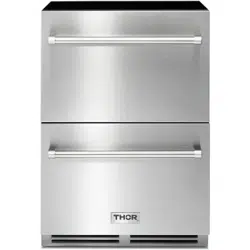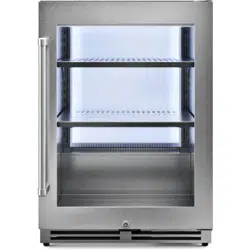
24 INCH SINGLE ZONE BEVERAGE CENTER
TBR24U
USE & CARE MANUAL
COOK
LIKE
A
GOD

thorkitchen.com
#COOKLIKEAGOD
USE AND CARE MANUAL
24 INCH SINGLE ZONE
BEVERAGE CENTER
TBR24U

Thank you for choosing THOR KITCHEN. This appliance has been manufactured by Thor International,
4651 E Airport Drive, Ontario, CA 91761. This manual contains all the information you will need to
install / use the appliance correctly and safely. Please read all the instructions prior using the appliance,
and keep this manual in a secure place for future reference. Do not remove the attached adhesive
identification label containing code, model number, manufacturer and other information from the
appliance. This label will be used by the THOR KITCHEN authorized service representative in the event
that your appliance needs servicing.

1
TABLE OF CONTENTS
IMPORTANT SAFETY INFORMATION. . . . . . . . . . . . . . . . . . . . . . . . . . . . . . . . . . . . . . . . . . . . . . . . . . . . . . . . . 2
1.1 Appliance safety . . . . . . . . . . . . . . . . . . . . . . . . . . . . . . . . . . . . . . . . . . . . . . . . . . . . . . . . . . . . . . . . . . . . . . 2
1.2 Information for proper disposal. . . . . . . . . . . . . . . . . . . . . . . . . . . . . . . . . . . . . . . . . . . . . . . . . . . . . . . . . . 3
1.3 Explanation of symbols . . . . . . . . . . . . . . . . . . . . . . . . . . . . . . . . . . . . . . . . . . . . . . . . . . . . . . . . . . . . . . . . 4
1.4 Signal symbol/word definitions . . . . . . . . . . . . . . . . . . . . . . . . . . . . . . . . . . . . . . . . . . . . . . . . . . . . . . . . . . 4
INTENDED USE . . . . . . . . . . . . . . . . . . . . . . . . . . . . . . . . . . . . . . . . . . . . . . . . . . . . . . . . . . . . . . . . . . . . . . . . . . 4
APPLIANCE DESCRIPTION. . . . . . . . . . . . . . . . . . . . . . . . . . . . . . . . . . . . . . . . . . . . . . . . . . . . . . . . . . . . . . . . . 5
3.1 Overview . . . . . . . . . . . . . . . . . . . . . . . . . . . . . . . . . . . . . . . . . . . . . . . . . . . . . . . . . . . . . . . . . . . . . . . . . . . . 5
3.2 Control panel description. . . . . . . . . . . . . . . . . . . . . . . . . . . . . . . . . . . . . . . . . . . . . . . . . . . . . . . . . . . . . . . 5
3.3 Display indicators . . . . . . . . . . . . . . . . . . . . . . . . . . . . . . . . . . . . . . . . . . . . . . . . . . . . . . . . . . . . . . . . . . . . . 6
BEFORE FIRST USE . . . . . . . . . . . . . . . . . . . . . . . . . . . . . . . . . . . . . . . . . . . . . . . . . . . . . . . . . . . . . . . . . . . . . . . 6
4.1 Tools needed . . . . . . . . . . . . . . . . . . . . . . . . . . . . . . . . . . . . . . . . . . . . . . . . . . . . . . . . . . . . . . . . . . . . . . . . . 7
4.2 Location requirements . . . . . . . . . . . . . . . . . . . . . . . . . . . . . . . . . . . . . . . . . . . . . . . . . . . . . . . . . . . . . . . . . 7
4.3 Leveling the appliance . . . . . . . . . . . . . . . . . . . . . . . . . . . . . . . . . . . . . . . . . . . . . . . . . . . . . . . . . . . . . . . . . 7
4.4 Cleaning. . . . . . . . . . . . . . . . . . . . . . . . . . . . . . . . . . . . . . . . . . . . . . . . . . . . . . . . . . . . . . . . . . . . . . . . . . . . . 8
INSTALLATION . . . . . . . . . . . . . . . . . . . . . . . . . . . . . . . . . . . . . . . . . . . . . . . . . . . . . . . . . . . . . . . . . . . . . . . . . . . 8
5.1 Installing the door handle . . . . . . . . . . . . . . . . . . . . . . . . . . . . . . . . . . . . . . . . . . . . . . . . . . . . . . . . . . . . . . 8
5.2 Built-in installation. . . . . . . . . . . . . . . . . . . . . . . . . . . . . . . . . . . . . . . . . . . . . . . . . . . . . . . . . . . . . . . . . . . . 8
5.3 Installing the floor mounted anti-tip brackets . . . . . . . . . . . . . . . . . . . . . . . . . . . . . . . . . . . . . . . . . . . . . . 9
USE . . . . . . . . . . . . . . . . . . . . . . . . . . . . . . . . . . . . . . . . . . . . . . . . . . . . . . . . . . . . . . . . . . . . . . . . . . . . . . . . . . . 10
6.1 Switching on and off . . . . . . . . . . . . . . . . . . . . . . . . . . . . . . . . . . . . . . . . . . . . . . . . . . . . . . . . . . . . . . . . . . 10
6.2 Arranging and placing beverages . . . . . . . . . . . . . . . . . . . . . . . . . . . . . . . . . . . . . . . . . . . . . . . . . . . . . . . 10
6.3 Adjusting controls and settings . . . . . . . . . . . . . . . . . . . . . . . . . . . . . . . . . . . . . . . . . . . . . . . . . . . . . . . . . 11
6.4 Alarms and error codes . . . . . . . . . . . . . . . . . . . . . . . . . . . . . . . . . . . . . . . . . . . . . . . . . . . . . . . . . . . . . . . 12
6.5 Beverage storage tips. . . . . . . . . . . . . . . . . . . . . . . . . . . . . . . . . . . . . . . . . . . . . . . . . . . . . . . . . . . . . . . . . 13
CLEANING. . . . . . . . . . . . . . . . . . . . . . . . . . . . . . . . . . . . . . . . . . . . . . . . . . . . . . . . . . . . . . . . . . . . . . . . . . . . . . 13
MAINTENANCE . . . . . . . . . . . . . . . . . . . . . . . . . . . . . . . . . . . . . . . . . . . . . . . . . . . . . . . . . . . . . . . . . . . . . . . . . 14
TRANSPORTATION. . . . . . . . . . . . . . . . . . . . . . . . . . . . . . . . . . . . . . . . . . . . . . . . . . . . . . . . . . . . . . . . . . . . . . . 15
DISPOSAL . . . . . . . . . . . . . . . . . . . . . . . . . . . . . . . . . . . . . . . . . . . . . . . . . . . . . . . . . . . . . . . . . . . . . . . . . . . . . . 15
FREQUENTLY ASKED QUESTIONS. . . . . . . . . . . . . . . . . . . . . . . . . . . . . . . . . . . . . . . . . . . . . . . . . . . . . . . . . . 16
PRODUCT SPECIFICATIONS . . . . . . . . . . . . . . . . . . . . . . . . . . . . . . . . . . . . . . . . . . . . . . . . . . . . . . . . . . . . . . . 17
WARRANTY. . . . . . . . . . . . . . . . . . . . . . . . . . . . . . . . . . . . . . . . . . . . . . . . . . . . . . . . . . . . . . . . . . . . . . . . . . . . . 17
2
IMPORTANT SAFETY INFORMATION
1.1 Appliance safety
When using electrical appliances, basic safety precautions should always be followed to reduce the risk
of fire, electric shock, injury and/or death including the following:
WARNING
Keep ventilation openings, in the appliance enclosure or in the built-in structure, clear
of obstruction.
WARNING
Do not use mechanical devices or other means to accelerate the defrosting process,
other than those recommended by the manufacturer.
WARNING
When positioning the appliance, ensure the supply cord is not trapped or damaged.
WARNING
Do not locate multiple portable socket outlets or portable power supplies at the rear of
the appliance.
WARNING
Do not use electrical appliances inside the food storage compartments of the appliance,
unless they are of the type recommended by the manufacturer.
•
This appliance is not intended for use by persons (including children) with reduced physical, sensory
or mental capabilities, or lack of experience and knowledge, unless they have been given supervision
or instruction concerning use of the appliance by a person responsible for their safety.
•
Children should be supervised to ensure that they do not play with the appliance.
•
If the supply cord is damaged, it must be replaced by the manufacturer, its service agent or similarly
qualified persons in order to avoid a hazard.
•
The appliance must be plugged into its own dedicated 115 Volt, 60 Hz, 15 Amp, AC only electrical
socket outlet. The supply cord of the appliance is equipped with a three prong grounding plug for
your protection against electrical shock hazards. It must be plugged directly into a properly grounded
three prong socket outlet. The socket outlet must be installed in accordance with local codes
and ordinances. Consult a qualified electrician. Avoid connecting the appliance to a Ground Fault
Interrupter (GFI) circuit. Do not use an extension cord or adapter plug.
•
Allow disconnection of the appliance from the supply after installation. The disconnection may be
achieved by having the plug accessible or by incorporating a switch in the fixed wiring in accordance
with the wiring rules.
•
Never unplug the appliance by pulling on the power cord. Always grip the plug firmly, and pull straight
out from the socket outlet to prevent damaging the power cord.
•
Unplug the appliance before cleaning to avoid electrical shock.
•
Performance may be affected if the voltage varies by 10% or more. Operating the appliance with
insufficient power can damage the compressor. Such damage is not covered under your warranty.
•
Do not plug the appliance into an electrical socket outlet controlled by a wall switch or pull cord to
prevent the appliance from being turned off accidentally.
3
IMPORTANT SAFETY INFORMATION
•
Do not store explosive substances such as aerosol cans with a flammable propellant in the appliance.
The fumes can create a fire hazard or explosion.
•
Use two or more people to move and install the appliance. Failure to do so can result in back or other
injury.
•
This appliance is intended to be used in household and similar applications such as
- staff kitchen areas in shops, offices and other working environments;
- farm houses and by clients in hotels, motels and other residential type environments;
- bed and breakfast type environments;
- catering and similar non-retail applications.
•
The maximum weight capacity for each shelf is 55 lbs (25 kg).
•
The built-in LED of this appliance is not replaceable by the user. When the LED reaches its end of life,
continue to use the appliance as normal.
•
Never clean refrigerator parts with flammable fluids. The fumes can create a fire hazard.
•
Do not store fresh milk or other fresh dairy products in this appliance.
•
The flammable refrigerant isobutene (R600a) is contained within the refrigerant circuit of the
appliance, a natural gas with a high level of environmental compatibility, which is nevertheless
flammable. During transportation and installation of the appliance, ensure that none of the
components of the refrigerant circuit becomes damaged.
1.2 Information for proper disposal
WARNING
Risk of child entrapment. Before you throw away your old appliance:
•
Take off the doors.
•
Leave the shelves in place so that children may not easily climb inside.
WARNING
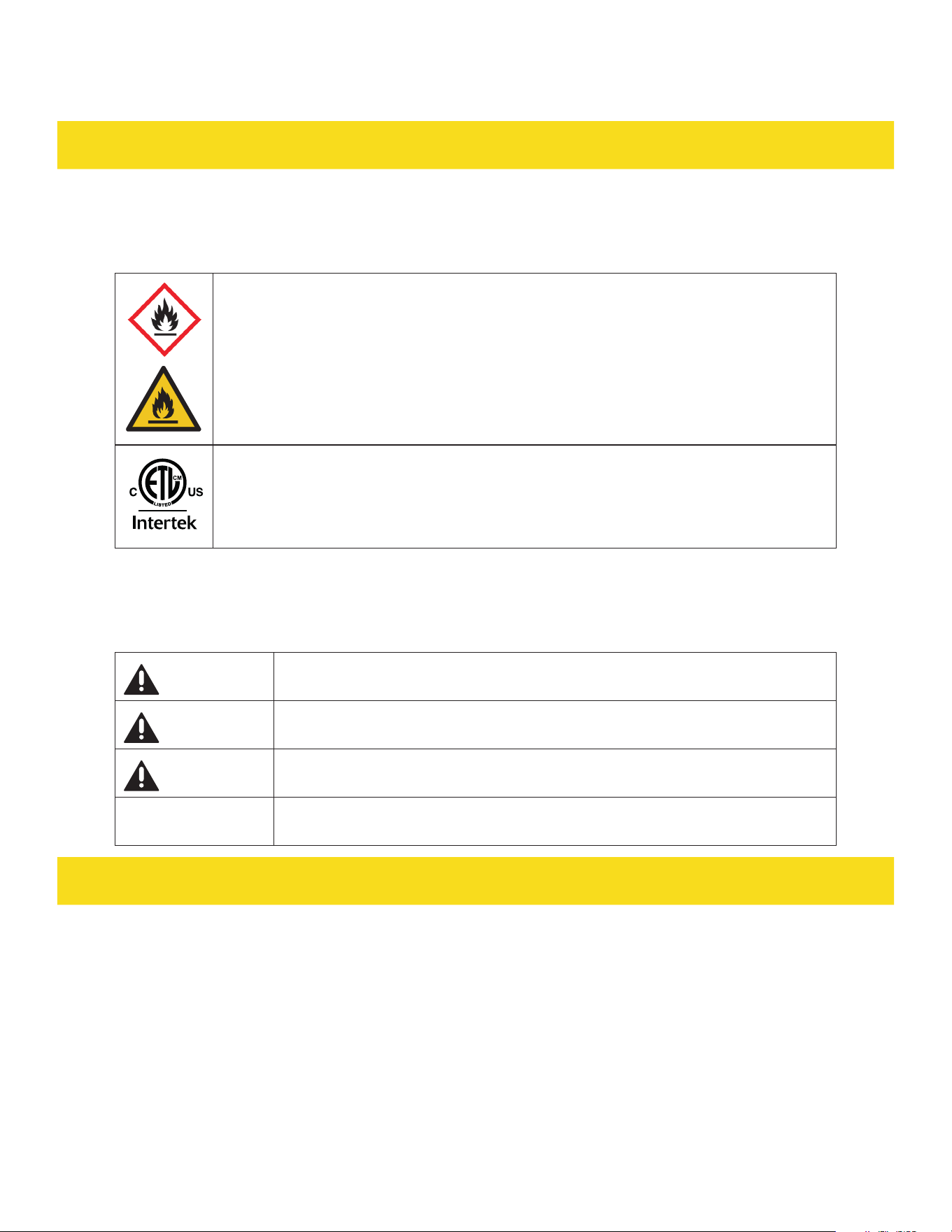
Risk of fire! Flammable materials. This appliance uses refrigerant R-600a
and must be disposed of by a qualified service technician with knowledge
of appropriate gas reclamation methods.
4
IMPORTANT SAFETY INFORMATION
1.3 Explanation of symbols
The following symbols are used in this user manual, on the appliance, or on the packaging.
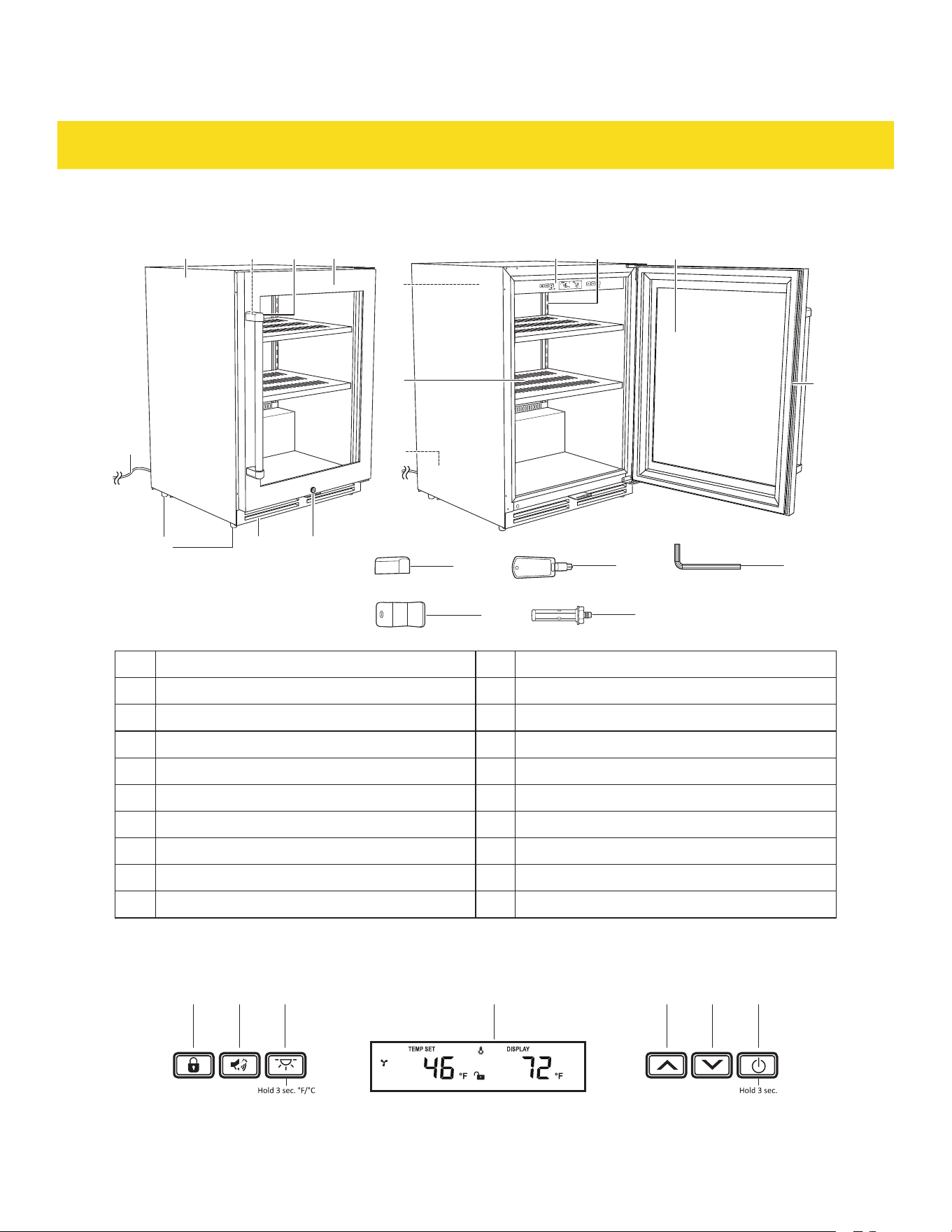
WARNING! Risk of fire/flammable materials.
5001053
CONFORMS TO UL STD.507
CERTIFIED TO
CSA STD.C22.2#113
The ETL Listed Mark is proof that the appliance has been independently tested and
meets the applicable published standard.
1.4 Signal symbol/word definitions
The following symbols are used in this user manual.
DANGER
Indicates a potentially hazardous situation which, if not avoided, will result in
death or serious injury.
WARNING
Indicates a potentially hazardous situation which, if not avoided, could result in
death or serious injury.
CAUTION
Indicates a potentially hazardous situation which, if not avoided, may result in
minor or moderate injury.
NOTICE
Indicates installation, operation or maintenance information which is important
but not hazard-related.
INTENDED USE
•
This appliance is intended for storing and chilling up to 154 shelf-stable beverage cans and bottles
inside a kitchen, pantry, basement, garage and similar spaces.
•
This appliance is designed for built-in or freestanding installation.
•
This appliance is not intended for storing food or biological substances.
•
For household and residential use only.
5
APPLIANCE DESCRIPTION
3.1 Overview
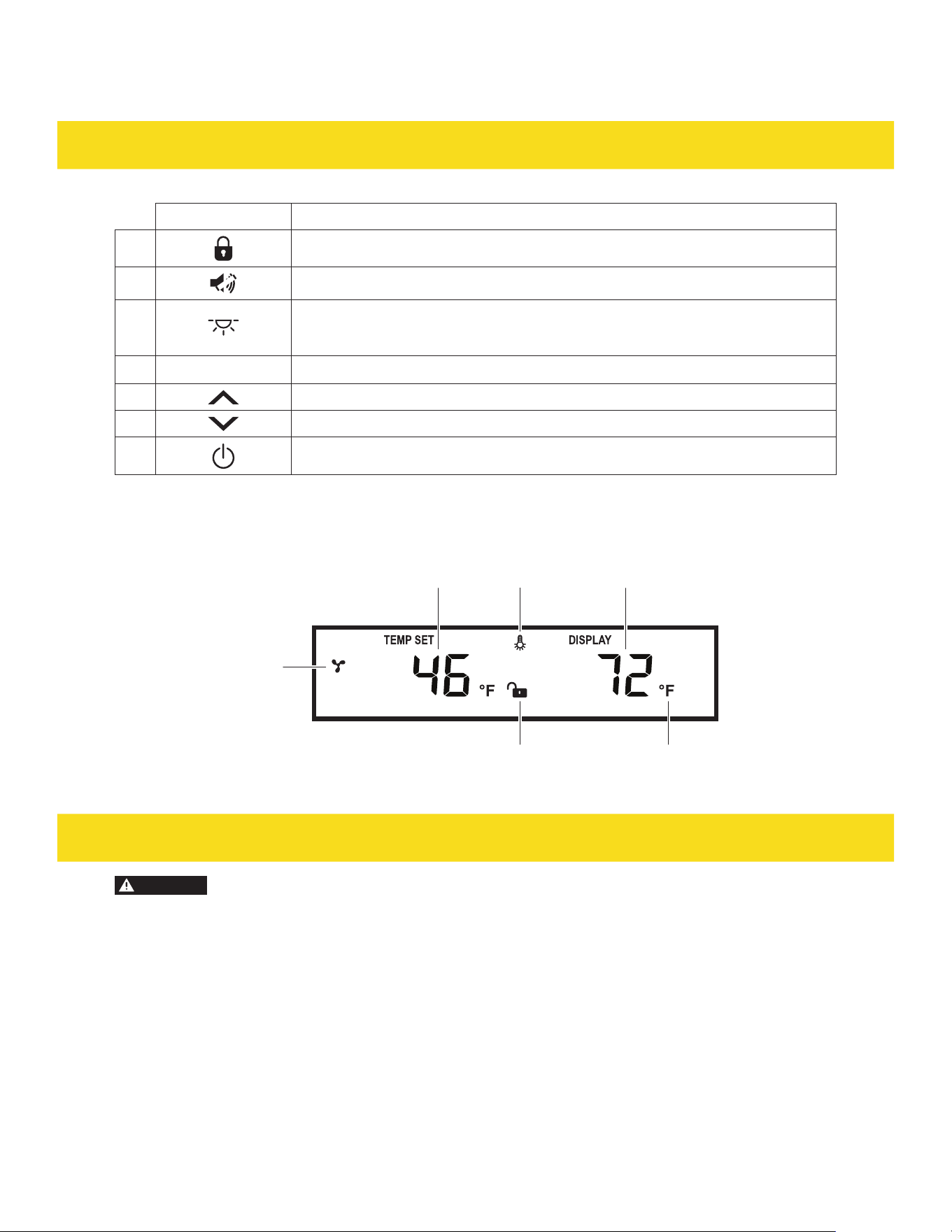
1 2 43 9
56
11
14
15
12
8
7
10
13
16
17 18
19
20
1
Housing
11
Glass panel
2
Door pins
12
Door gasket
3
Door handle
13
Anti-tip bracket slots
4
Door
14
Shelves
5
Lock
15
Interior light
6
Ventilation opening
16
End caps x 2
7
Leveling feet
17
Door keys x 2
8
Supply cord with plug
18
Hex key
9
Control panel
19
Anti-tip brackets x 2
10
Shelf brackets
20
Stud anchors x 2
3.2 Control panel description
A B C D E F G
6
APPLIANCE DESCRIPTION
Button/Part Description
A
Lock/unlock control panel buttons
B
Mute/unmute door and temperature alarms and button sounds
C
Switch light on/off
Change temperature unit (°F/°C)
D
Display
E
Increase temperature
F
Decrease temperature
G
Switch appliance on/off
3.3 Display indicators
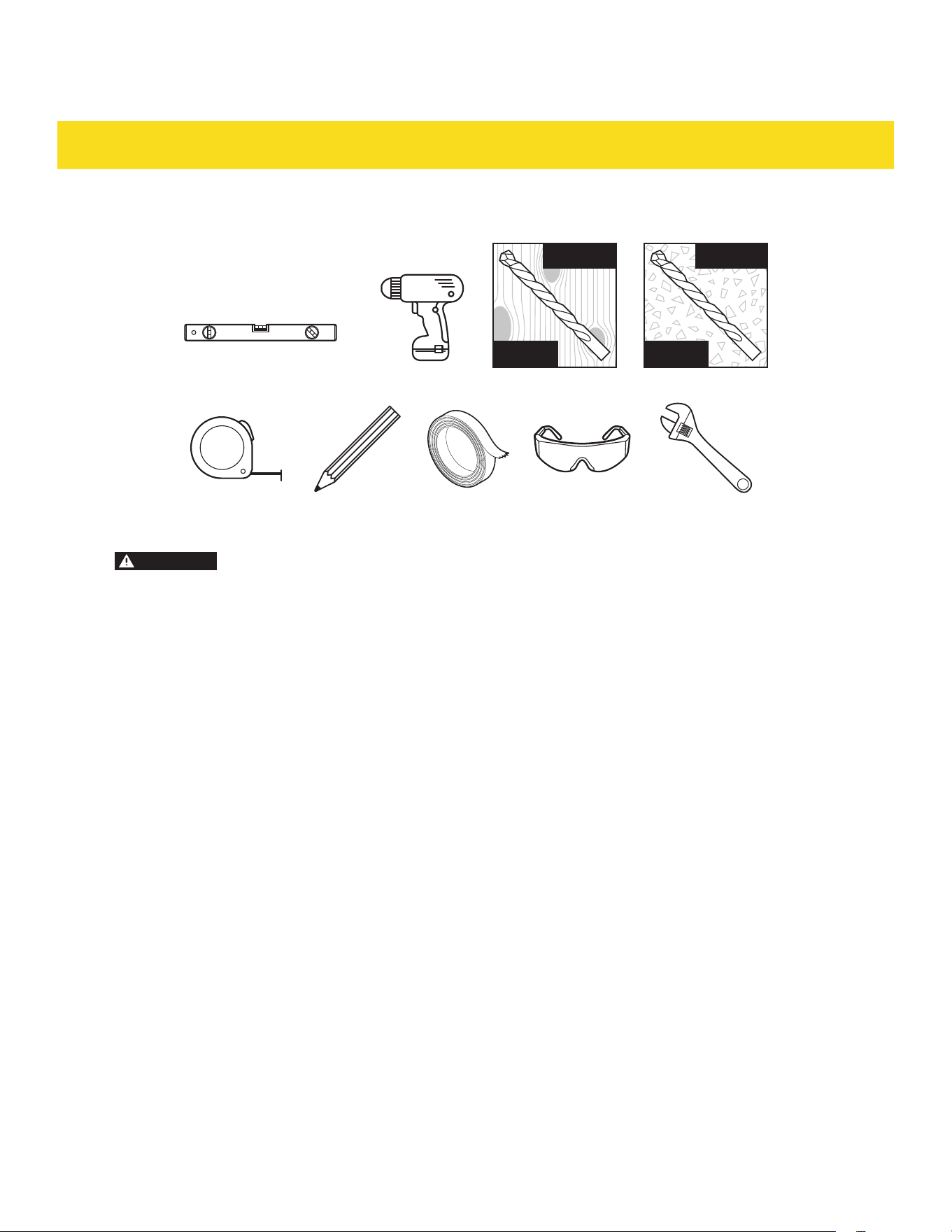
Fan
indicator
Set
temperature
Actual
temperature
Light
indicator
Temperature
unit
Lock/
unlock
indicator
BEFORE FIRST USE
DANGER
Risk of suffocation! Keep all packaging materials away from children and pets. These
materials pose a threat of suffocation.
•
Remove and dispose of all packaging materials.
•
Check the appliance for any damage or broken parts.
•
Check that all components are included.
•
Let the appliance stand upright for at least 24 hours to allow the refrigerant to settle after transport.
•
Let the appliance reach the set temperature before placing any beverages inside.
7
BEFORE FIRST USE
4.1 Tools needed
3/8"
Ø9.5 mm
3/8"
Ø9.5 mm
4.2 Location requirements
WARNING
Risk of fire!
•
Do not block the ventilation opening (6). Insufficient ventilation could cause the
appliance to overheat and cause fire. Leaked refrigerant may cause fire and explosion.
•
Accumulated dust on the plug may cause fire. Choose a location that prevents dust
accumulation or allows access for cleaning the plug.
•
The appliance should be installed near a grounded, non-GFCI, electrical socket outlet. Do not use an
extension cord or an adapter plug.
•
Place the appliance on a level, strong enough floor that can support a fully loaded appliance. On
carpet or vinyl flooring, it is recommended to place a plastic mat underneath.
•
Place the appliance out of direct sunlight and away from heat sources such as the dishwasher or
range.
•
Do not install the appliance in a poorly insulated or heated area to avoid affecting cooling performance
or creating external condensation on the appliance.
•
Leave at least 2 in (5 cm) of space behind the appliance and at least 0.8 in (2 cm) from the sides and
top of the appliance for adequate air flow. Make sure there is enough space at the front to allow the
door to fully open.
•
Keep the appliance away from hazardous or combustible substances.
4.3 Leveling the appliance
The appliance must rest firmly on a level surface in order to function properly. If the appliance is not
leveled, the door (4) may be misaligned when installed. This can lead to cooling and moisture issues if the
door (4) does not completely close.
1. Place a carpenter's level on top of the appliance to check if it needs leveling.
2. Turn the leveling feet (7) clockwise to lower the appliance or counter-clockwise to raise the appliance
until the carpenter's level shows the appliance is level.
8
BEFORE FIRST USE
4.4 Cleaning
1. Wipe the interior surfaces and shelves (14) with lukewarm water and a soft, clean cloth.
2. Wipe dry with a soft, clean cloth.
INSTALLATION
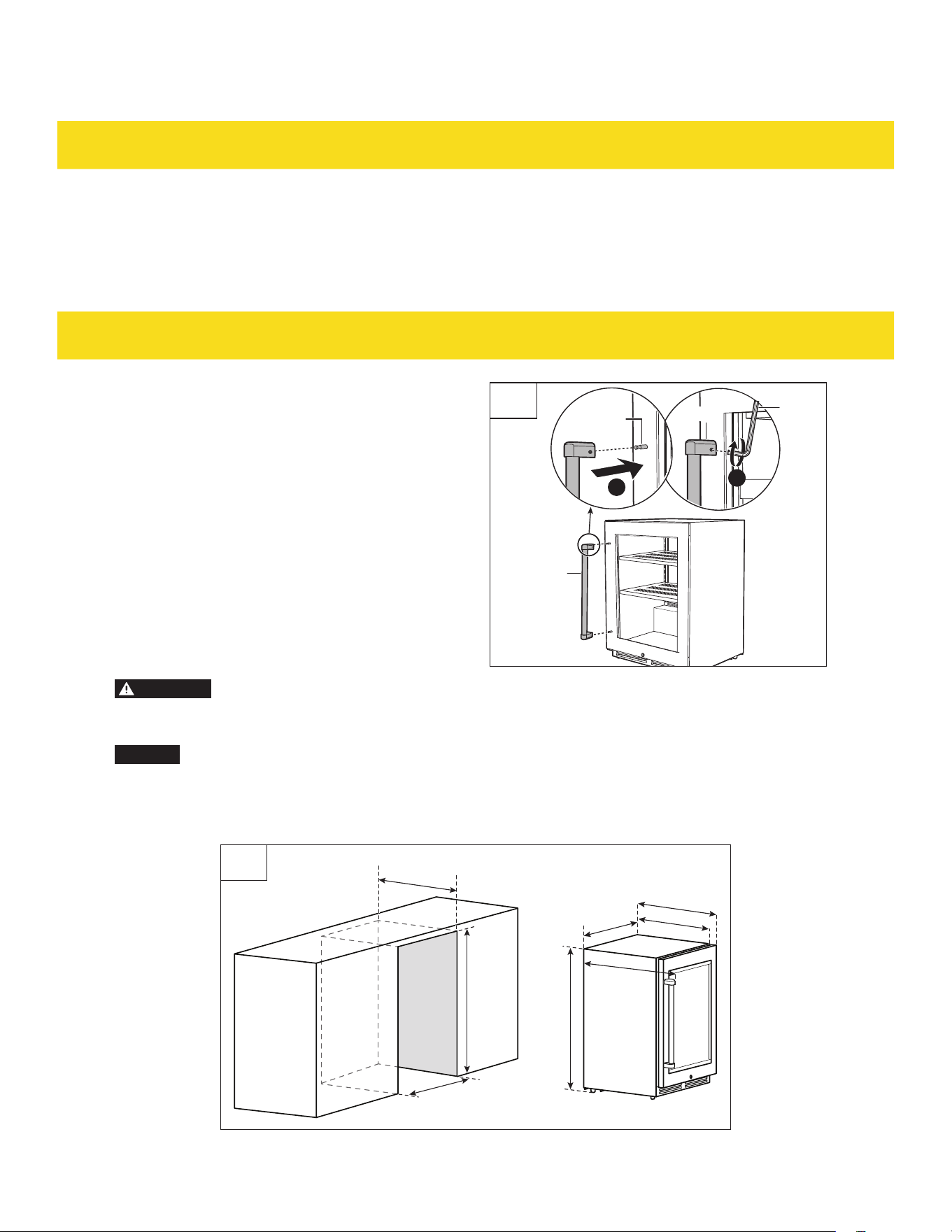
5.1 Installing the door handle
1. Attach the end caps (16) to both ends of the door
handle (3).
2. Place the assembled door handle (3) onto the door
pins (2) (Fig. 1).
3. Tighten the pre-installed screws inside the end
caps (16) with the hex key (18) (Fig. 1). Do not
overtighten the screws.
5.2 Built-in installation
CAUTION
Risk of injury! Keep fingers out of the "pinch point" areas. Clearances between the
door (4) and housing (1) are necessarily small. Be careful closing door (4) when children
are in the area.
NOTICE
Adjust the leveling feet (7) as needed before placing the appliance in a recessed location (see
chapter "Leveling the appliance"). The leveling feet adjustment range is 0 - 0.4” (0 - 1 cm).
Make sure the installation area has adequate space for the appliance (Fig. 2).
24 7/16 in
(62 cm)
24 in
(61 cm)
34 5/8 in
(88 cm)
23 7/16 in
(59.6 cm)
34 1/4 in
(87 cm)
23 9/16 in
(59.6 cm)
2
25 15/16 in
(65.8 cm)
21 7/16 in
(54.5 cm)
1
1
2
3
2
16
18
9
INSTALLATION
5.3 Installing the floor mounted anti-tip brackets
CAUTION
Risk of injury! Wear appropriate protective gear to avoid injury.
CAUTION
Risk of property damage! Make sure there are no gas pipes, water pipes, or electrical
wires underneath the floor.
NOTICE
•
For installation on tiled floors: for porcelain tiles, use a carbide-tipped drill bit; for natural
stone, use a diamond-tipped drill bit.
•
To prevent natural stone surfaces from overheating during drilling, drip some water on top
of the mounting hole location.
•
Place masking tape around the surrounding surface to prevent scratching the area if the
drill bit slips.
•
Drill at a slow speed to avoid cracking the tile.
•
For wood and concrete flooring, use a standard drill bit.
•
If in doubt about floor installation, contact a qualified professional.
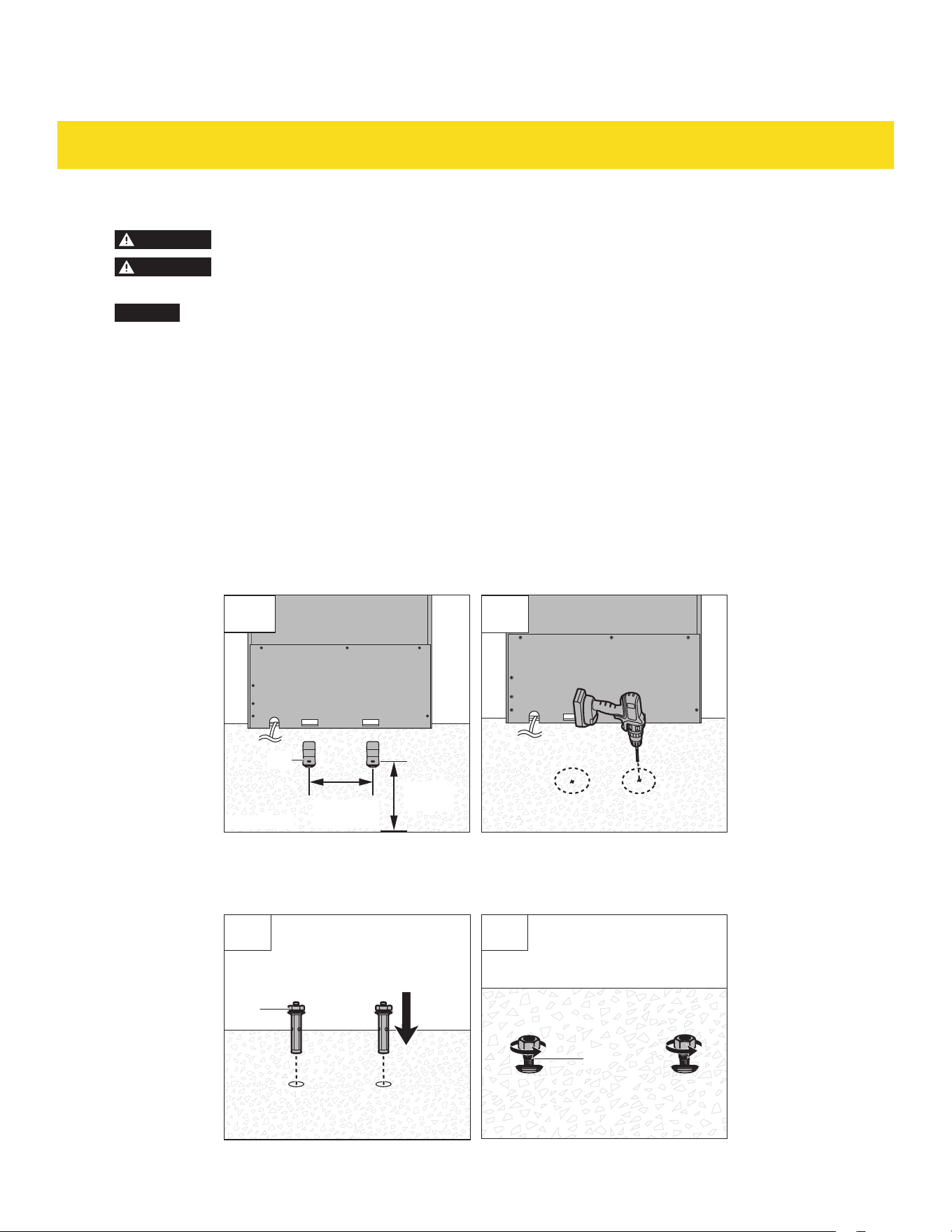
1. Position the anti-tip brackets (19) 6” (15.2 cm) apart on the floor. Mark the location of the mounting
holes on the floor (Fig. 3). Make sure there is at least 2 in (5 cm) of space behind the appliance.
2. Drill two mounting holes over the marked locations 1 7/16” (3.7 cm)
deep using a 3/8” (9.5 mm) drill
bit (Fig. 4).
4
3
6”
(15.2 cm)
Rear wall
>2”
>(5 cm)
19
3. Insert the stud anchors (20) inside the holes (Fig. 5).
4. Remove the nuts from the stud anchors (20) (Fig. 6).
5
20
20
6
10
INSTALLATION
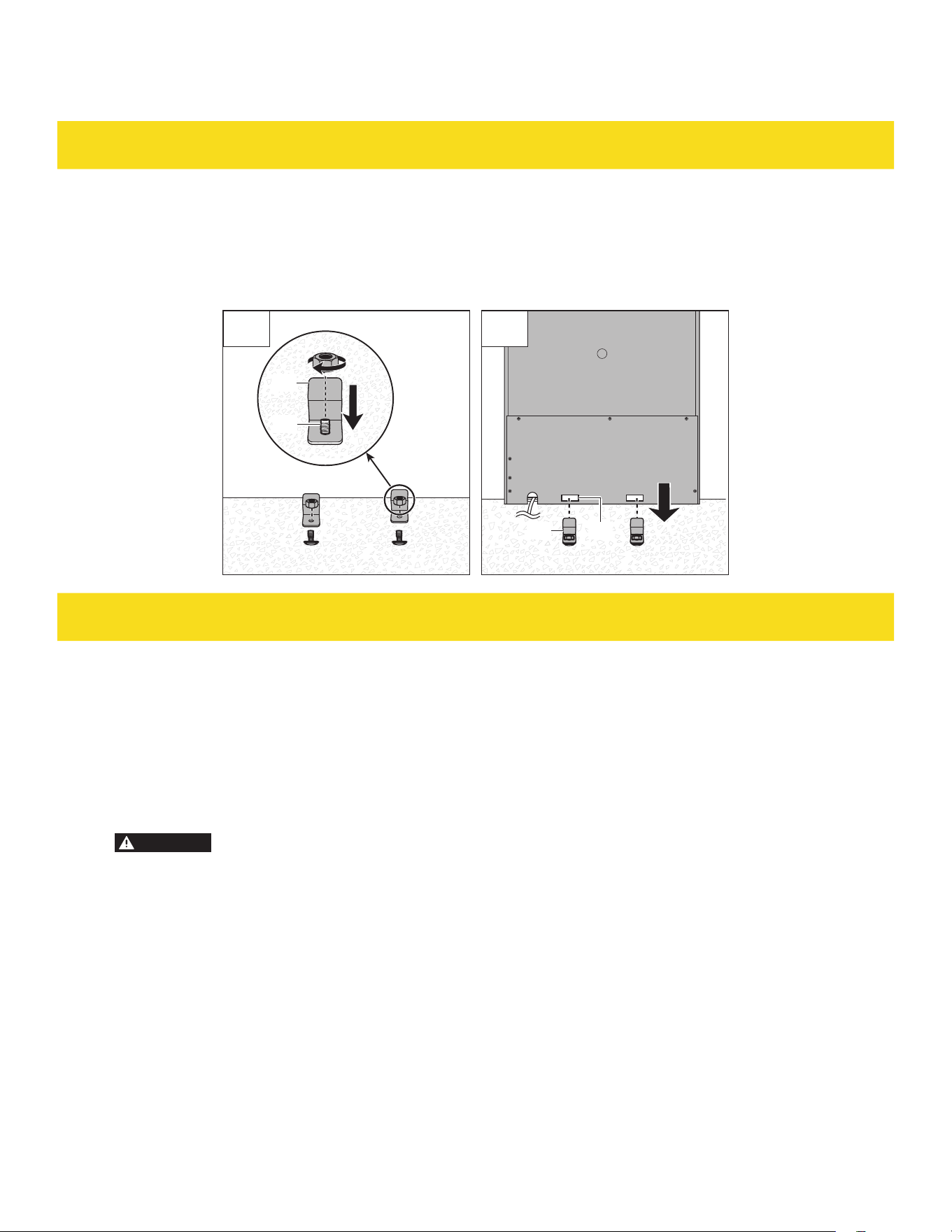
5. Place the anti-tip brackets (19) on the stud anchors (20), then refit and tighten the nuts onto the stud
anchors (20) (Fig. 7).
6. Slide the appliance toward the anti-tip brackets (19) so that the brackets insert and lock completely
into the anti-tip bracket slots (13) (Fig. 8).
7
19
20
8
19
13
USE
6.1 Switching on and off
1. Connect the plug (8) to a suitable socket outlet. The appliance switches on automatically and the
display (D) lights up.
2. The display (D) shows the default temperature setting, +34 °F (+7 °C).
6.2 Arranging and placing beverages
CAUTION
Risk of damage or injury! Remove beverages from the shelves (14) before rearranging the
shelf layout.
•
Place beverages evenly across and throughout the top and bottom of the housing (1). Do not overload
the shelves (14).
•
Do not let the beverages touch the back of the housing (1) to allow adequate air circulation.
•
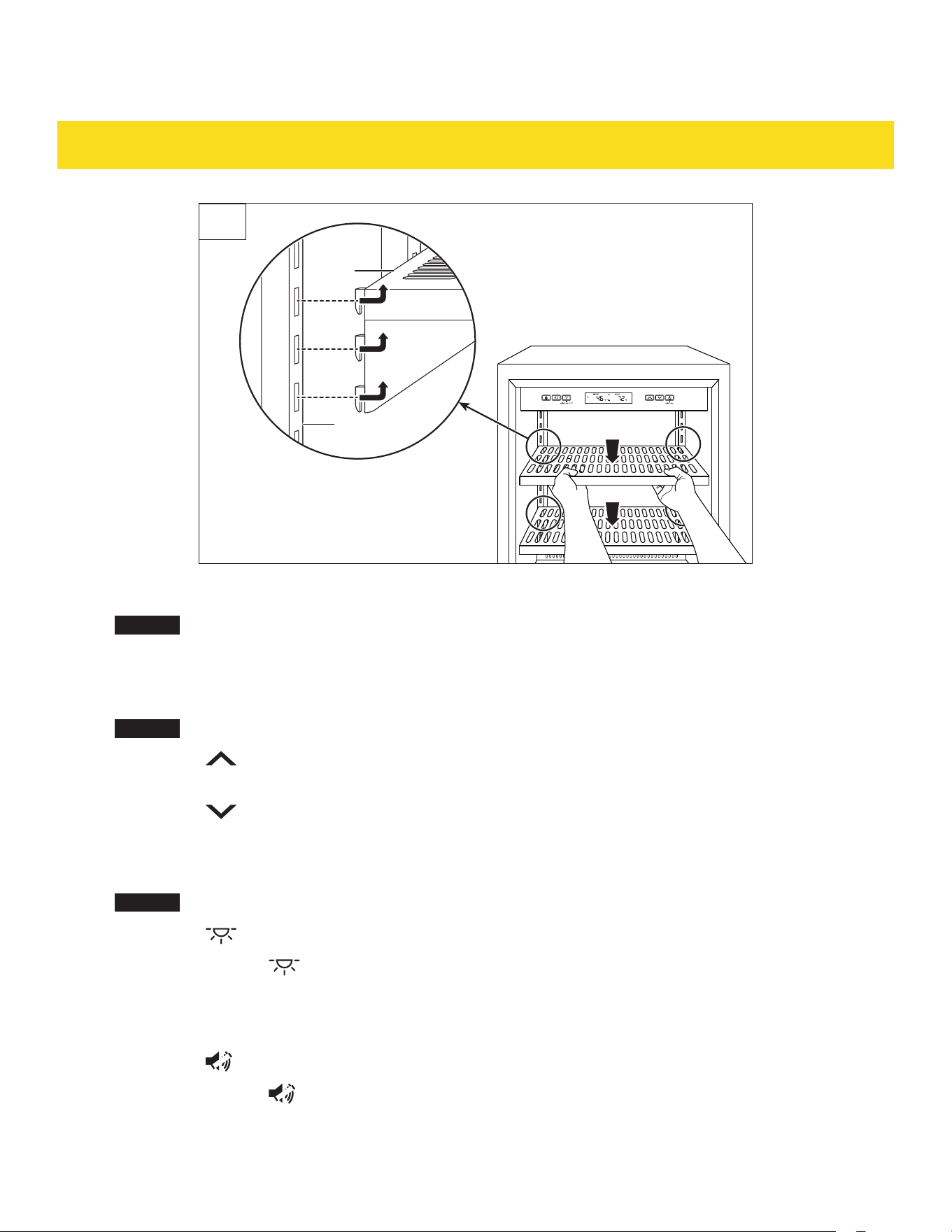
Remove a shelf (14) to create extra space for oversized or oddly shaped cans or bottles, or for vertical
storage (Fig. 9). To refit a shelf (14), align it inside the holes of the shelf brackets (10), then push down
until the shelf (14) fits securely.
•
The actual capacity depends on the size, shape and layout of the cans or bottles.
11
USE
9
10
14
6.3 Adjusting controls and settings
NOTICE
The appliance's internal memory stores the last used settings. If the appliance is switched off
or loses power, the previous settings appear on the display (D) when the appliance is switched
back on.
Temperature
NOTICE
The temperature setting ranges from +34 °F (+1 °C) to +46 °F (+7 °C).
•
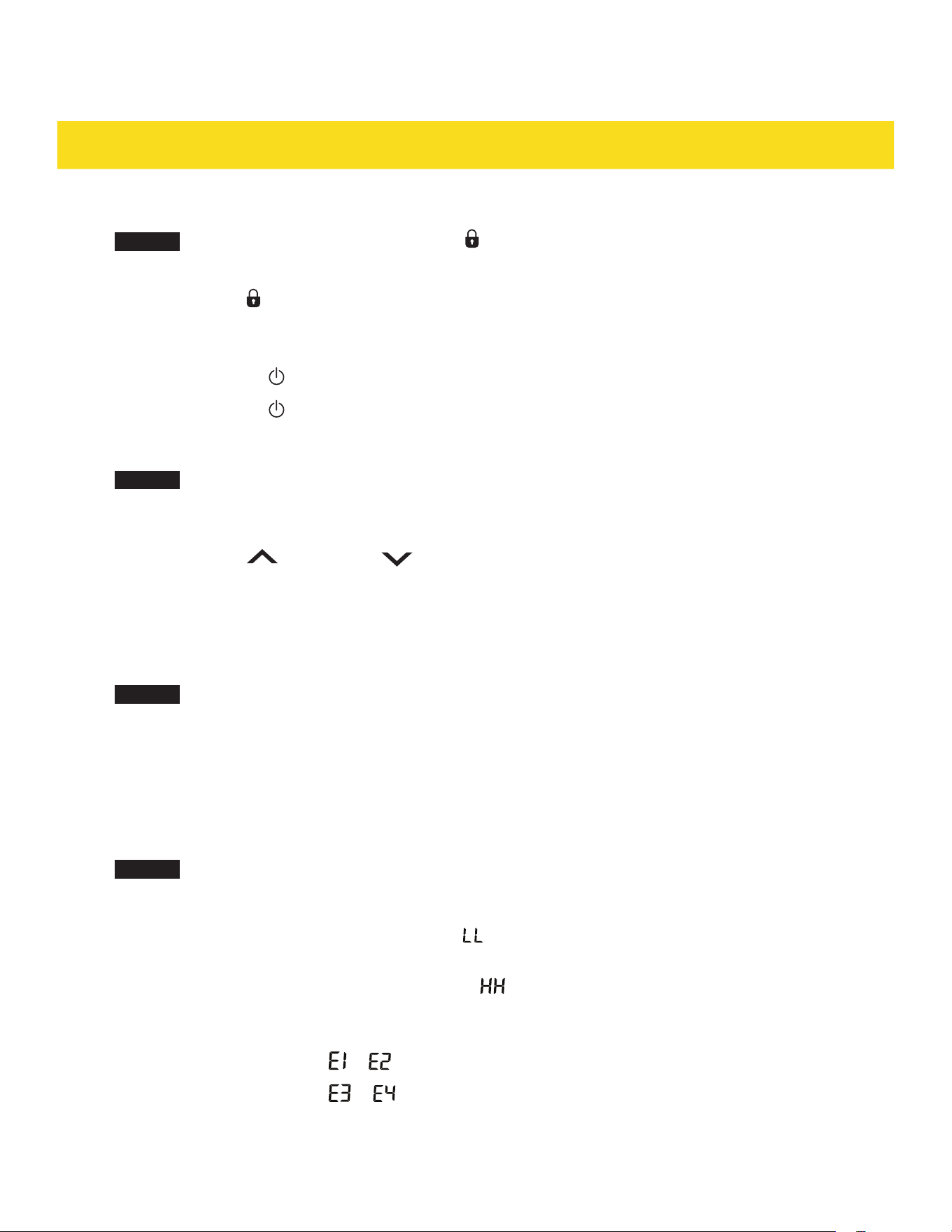
Press the button (E) to increase the temperature by +1 °F/+1 °C. The set value blinks for
5 seconds.
•
Press the button (F) to decrease the temperature by +1 °F/+1 °C. The set value blinks for
5 seconds.
Interior light
NOTICE
If the interior light (15) is switched on, it stays on until it is manually switched off.
•
Press the button (C) once to switch the interior light (15) on or off.
•
Press and hold the button (C) for 3 seconds to toggle the temperature unit between Fahrenheit
and Celsius.
Mute and unmute alarms and sounds
•
Press the button (B) once to mute the door alarm and temperature alarm.
•
Press and hold the button (B) for 3 seconds to mute the control panel buttons' sound.
12
USE
Lock/unlock
NOTICE
The control panel buttons (except for the
button (A)) lock automatically after 1 minute if no
buttons are pressed on the control panel (9).
Press and hold the
button (A) for 3 seconds to lock or unlock the control panel buttons.
Power
•
Press and hold the button (G) for 1 second to switch the appliance on.
•
Press and hold the button (G) for 3 seconds to switch the appliance off.
Demo mode
NOTICE
•
Demo mode is for display purposes only. The compressor, fan and door alarm do not work in
demo mode.
•
The LED light remains on while the door (4) is closed.
Press and hold the
button (E) and button (F) at the same time for 3 seconds to turn on demo
mode.
6.4 Alarms and error codes
Door alarm
NOTICE
•
The compressor and fan stop running if the door (4) is open for more than 1 minute. They
resume once the door (4) is closed.
•
If the door alarm is muted, the display (D) keeps flashing to signal that the door (4) is open.
•
An alarm sounds when the door (4) is open for more than 1 minute. The display (D) flashes.
•
Close the door (4) to silence the alarm. The display (D) stops flashing.
Temperature alarms
NOTICE
If the temperature alarm is muted, the display (D) keeps flashing to signal that the temperature
has changed beyond the set temperature.
•
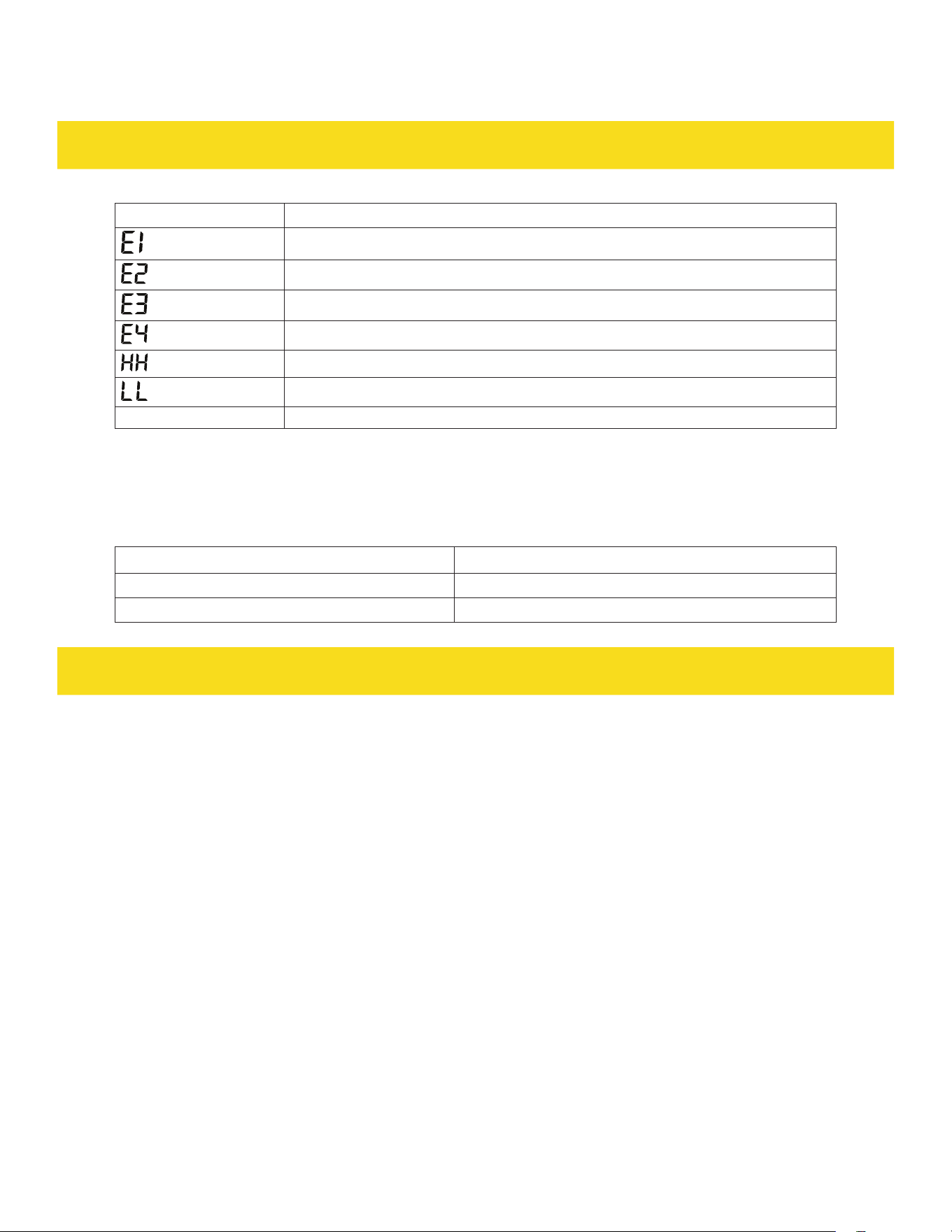
If the temperature inside the housing (1) is +39 °F (+4 °C) lower than the set temperature for over
1 hour, an alarm sounds. The display (D) shows and flashes.
•
If the temperature inside the housing (1) is +39 °F (+4 °C) higher than the set temperature for over
24 hours, an alarm sounds. The display (D) shows and flashes.
Error code guide
•
When the display (D) shows or , the compressor, fan and defrosting system shut down.
•
When the display (D) shows or , the compressor and fans shut down for 5 minutes, then
resume immediately after.
13
USE
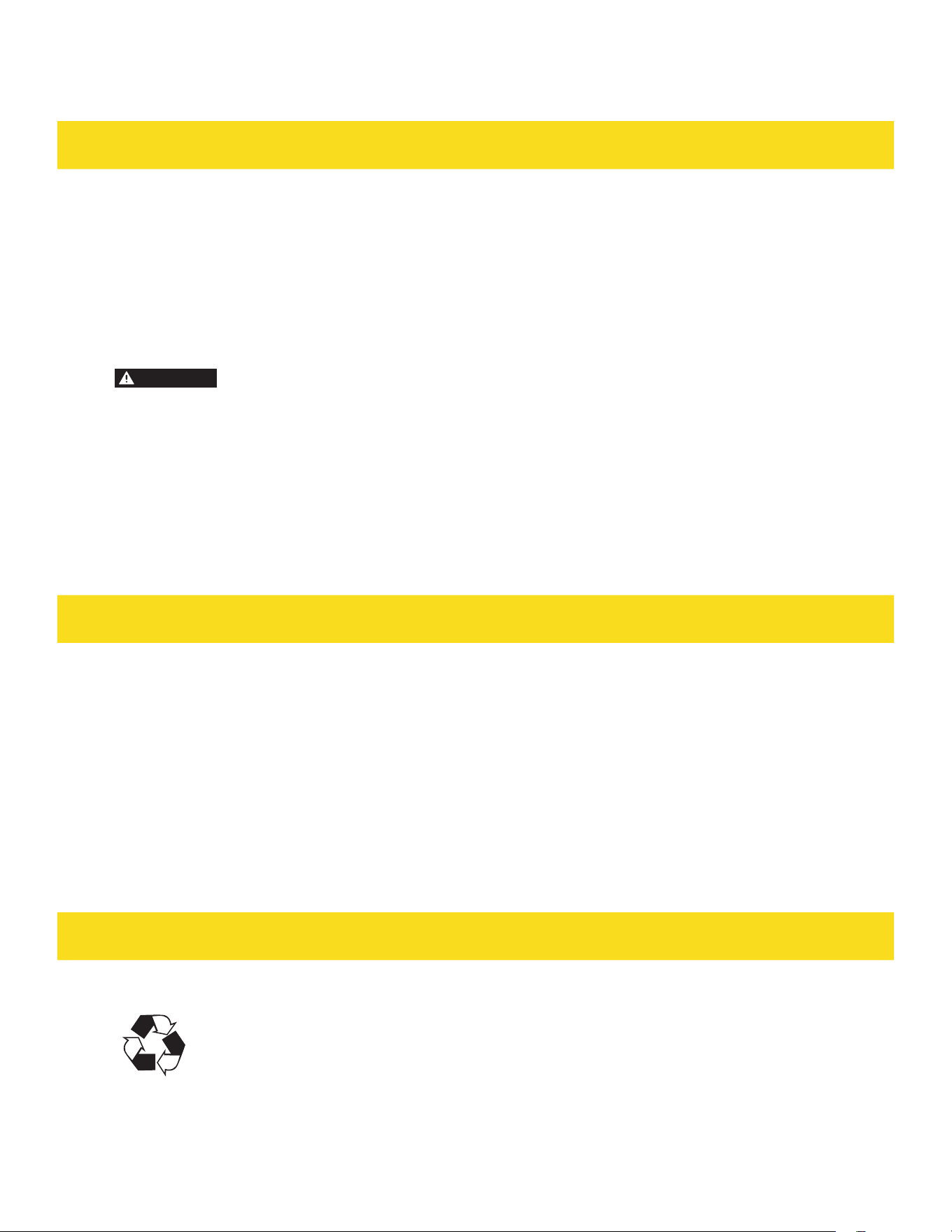
Code Error
Internal temperature sensor has a broken circuit
Internal temperature sensor short-circuited
Defrosting sensor has a broken circuit
Defrosting sensor short-circuited
High temperature alarm
Low temperature alarm
Display flashes Door open alarm
6.5 Beverage storage tips
•
Set the appropriate temperature if only one type of beverage is stored.
•
For storing a variety of beverages, the recommended temperature is +40 °F (+5 °C).
Beverage Storage temperature range
Soft drinks, shelf-stable juices, sports drinks +38 °F to +42 °F (+3 °C to +6 °C)
Beer +38 °F to +46 °F (+3 °C to +7 °C)
CLEANING
•
Switch the appliance off and disconnect the plug (8) from the socket outlet.
•
Wipe away any dust from the exterior of the appliance with a soft, dry cloth.
•
Remove all items and the shelves (14) from the appliance.
•
Wipe away any condensation with a soft, absorbent cloth.
•
Never use corrosive detergents, wire brushes, abrasive scourers, or metal/sharp utensils to clean the
appliance.
Stainless steel surfaces
•
Use a cleaner intended for stainless steel as needed to keep the stainless steel surfaces free from
dust, fingerprints and other residue. Follow the manufacturer's instructions for best results.
•
Alternatively, use undiluted white vinegar to clean stainless steel surfaces.
- Spray the vinegar onto the surface
- Wipe with a soft microfiber cloth, following the grain of the stainless steel surface. Do not wipe in a
circular motion.
- Dampen a clean microfiber cloth with distilled or filtered water. Wipe away any vinegar residue
from the surface.
- Wipe the surfaces dry with a soft, clean microfiber cloth.

14
CLEANING
Glass panel
•
Use a cleaner intended for glass as needed to keep the glass panel (11) free from dust, fingerprints
and other residue. Follow the manufacturer's instructions for best results.
•
Avoid applying the glass cleaner on the surrounding stainless steel surface.
Interior surfaces
1. Prepare a cleaning solution of 2 tablespoons of baking soda and 1 quart (0.95 l) of water.
2. Wipe the interior surfaces with the prepared cleaning solution and a soft, clean cloth.
3. Wipe remaining residue with a soft cloth and clean water. Wipe dry with a soft, clean cloth.
4. Wipe the control panel (9) with a soft cloth and clean water. Wipe dry with a soft, clean cloth.
Shelves
•
Remove all items and the shelves (14) from the appliance.
•
Use a cleaner intended for stainless steel as needed to keep the shelves (14) free from dust,
fingerprints and other residue. Follow the manufacturer's instructions for best results.
•
Alternatively, use undiluted white vinegar to clean the shelves (14).
- Spray the vinegar onto the surface
- Wipe with a soft microfiber cloth, following the grain of the stainless steel surface. Do not wipe in a
circular motion.
- Dampen a clean microfiber cloth with distilled or filtered water.
- Wipe away any vinegar residue from the shelves.
- Wipe the shelves (14) dry with a soft, clean microfiber cloth before refitting them onto the shelf
brackets (10).
Door gasket
Wipe the door gasket (12) when visibly dusty or dirty with a soft, damp cloth.
MAINTENANCE
For any servicing other than mentioned in this user manual, contact a qualified service technician for
repairs and maintenance.
Defrosting
•
The appliance defrosts automatically.
•
The compressor stops temporarily while the fans circulate air around the coils to melt the ice.
15
MAINTENANCE
Power failure
•
In case of power failure, avoid opening the door (4) to maintain a consistent temperature until the
power is restored.
•
If the plug (8) is disconnected or if the appliance is switched off, wait at least 5 minutes before
switching the appliance on again. This avoids damaging the compressor.
Vacation and periods of absence
WARNING
Risk of child entrapment. If leaving the door (4) open, make sure children cannot climb
inside the appliance and become entrapped.
If leaving the appliance unused for several months:
•
Switch the appliance off and disconnect the plug (8) from the socket outlet.
•
Remove all items and the shelves (14) from the appliance.
•
Clean the appliance (see chapter "CLEANING").
•
Prop the door (4) slightly open to prevent odor and mold.
TRANSPORTATION
If moving or transporting the appliance:
•
Switch the appliance off and disconnect the plug (8) from the socket outlet.
•
Remove beverages and clean the appliance (see chapter "CLEANING").
•
Tape the shelves (14) securely in place inside the appliance to prevent damage.
•
Tape the door (4) closed.
•
Wrap the appliance with a protective cover, such as a blanket or bubble wrap.
•
During transport, secure the appliance in an upright position so it does not slide or tip over.
DISPOSAL
•
Dispose of the appliance according to local regulations.
•
This appliance contains refrigerants and gases in the insulation. These must be removed
and recycled by a qualified service technician.
•
Make sure that the refrigerant tubing is not damaged prior to disposal.
16
FREQUENTLY ASKED QUESTIONS
Problem Solution
The appliance does not
switch on.
•
Check if the plug (8) is properly connected to the socket outlet.
•
Check if the socket outlet is operational.
The appliance is not cold
enough.
•
Adjust the set temperature lower.
•
Reduce the amount of beverages inside the appliance.
•
Open the door (4) only when necessary.
•
Make sure the door (4) closes completely.
•
Clean the door gasket (12).
Interior light (15) does not
work.
•
Check if the plug (8) is properly connected to the socket outlet.
•
Press the button (C) to switch the interior light (15) on.
•
The circuit breaker may be tripped or there is a blown fuse.
The compressor and fan
switch on and off frequently.
•
The ambient temperature may be higher than normal. If possible,
adjust the ambient temperature.
•
Reduce the amount of beverages inside the appliance.
•
Open the door (4) only when necessary.
•
Make sure the door (4) closes completely.
•
Clean the door gasket (12).
The appliance makes
unusual noise.
•
Make sure the appliance is on stable and level ground. Adjust the
leveling feet (7) if necessary.
•
Move the appliance to make sure it does not touch surrounding
objects or walls.
•
Gurgling noises are a result of refrigerant flowing through the
refrigerant system. This is normal.
Condensation builds up
inside and outside the
appliance and door (4).
•
The ambient temperature may be higher than normal. If possible,
adjust the ambient temperature.
•
Open the door (4) only when necessary.
•
Make sure the door (4) closes completely.
17
PRODUCT SPECIFICATIONS
Rated voltage 115 V AC, 60 Hz
Rated power 100 W, 2.8 A
Protection class I
Cooling temperature range +34 °F to +46 °F (+1 °C to +7°C)
Maximum capacity 5.3 ft
3
(150 L), 154 standard beverage cans
Refrigerant type R-600a, 1.2 oz (33 g)
Foaming agent Cyclopentane (C
5
H
10
)
Cooling system Compressor cooling
Climate type SN
IP rating IPX4
Net weight 124 lbs (56.25 kg)
Dimensions (W x D x H) 23 7/16 x 23 7/16 x 34 1/4” (59.6 x 59.5 x 87 cm)
WARRANTY
Warranty&Service
This appliance has been manufactured by Thor International, 4651 E Airport Drive, California 91761
For Customer Service, please call (877) 288 - 8099
For the most up to date warranty and service policy, please refer to our website
WWW.THORKITCHEN.COM/WARRANTY-REGISTRATION
For in-warranty service requests, please visit our website at
WWW.THORKITCHEN.COM/SERVICE
Please Note: You must provide proof of purchase or installation date for any in-warranty service requests
thorkitchen.com
#COOKLIKEAGOD
WARRANTY NEED PARTS?
WELCOME
TO THE CLUB
You chose THOR Kitchen to enhance your culinary journey and
we’re stoked to have you in the club. Think of it as a secret society
of really savvy people, such as yourself, choosing professional
power and performance at an affordable price.
Register your product by following the steps below.
01
02
Scan the QR code or visit
thorkitchen.com/warranty
Input your product info
and select register
You’re done.
Let’s get cookin’.
03
WARRANTY REGISTRATION