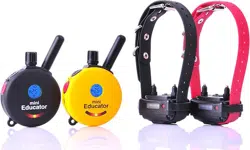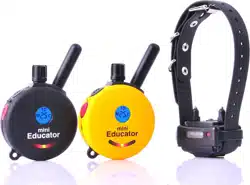

300/302
Owner's Manual
Welcome to the World of
E-Collar Technologies, Inc.
“Happiness is a Well
Behaved Dog”
May 2015
Printed in the USA
1-855-326-5527 or sales@ecollar
Welcome to the World of E-Collar Technologies, Inc.Welcome to the World of E-Collar Technologies, Inc.
Remote Education Collar
300 Series E-Collar
Thank you for purchasing the 300 or 302 Remote Education Collar from
E-Collar Technologies, Inc. We have made every attempt to provide you
with the most technologically advanced product using the most stringent
quality and manufacturing standards.
We are confident you will be pleased with the results you will attain with
your e-collar. Please remember you will get better results with the use of
lower stimulation combined with consistent training techniques.
The use of high levels of stimulation should only be used as a last resort
and in life-threatening situations. Visit our youtube channel for training
videos and "Like" our Facebook page to network with fellow e-collar
users.
Good luck with your training and please feel free to contact us should you
have any questions.
300/302 Owner’s Manual
TABLE OF CONTENTS
02
- Important Notice
- Characteristics
- Package Contents
- Device Operation
- Charging the Batteries
- Turning Your E-Collar ON/OFF
- Correctly Fitting the Collar
- The LCD Display Description
- Button Functions
- How to Find the Proper Stimulation Level
- Lock/Unlock the Stimulation Level
- How to Set the Boost
- Lost Transmitter Mode
- Replace/Add A Collar Receiver
03
04
05
06
07
08
09
10
11
13
14
15
16
17
Two Dog 302 Specifics
- 302 LCD Description
- 302 Button Functions
- How to Lock/Unlock the Stimulation Level
- 302 Boost Level Setup
18
19
21
22
- Testing your E-Collar
- Replacing the Contact Points
- Training Tips
- Troubleshooting
- Two Year Warranty
- Accessories
- Safety and General Information
23
24
25
26
27
28
30
...................................
....................................
..................................
...................................
...............................
.........................
...........................
.
..........................
...................................
.................
.......................
................................
...............................
........................
................................
..........................
......................................
...................................
.................................
......................................
........................
................................
...............................
................
...............................

Important Notice
300/302 Owner’s Manual
03
The range of the 300/302 may vary according to terrain, weather
conditions, foliage, and power lines as well as radio transmissions from
other devices.
Caution
This product is intended to be used on DOGS ONLY.
E-Collar Technologies, Inc. is not responsible for any misuse of this
product including damages from dog bites and lost items. Seek an
evaluation by professional trainer before use on aggressive dogs. It
is not uncommon for aggressive dogs to associate the stimulation
with the handler and take action against the handler. Sometimes
dogs put under e-collar pressure during a fight can exhibit
redirected aggression and become more aggressive.
The use of high levels of stimulation should only be used as a last
resort and in life-threatening situations.
To prevent giving stimulation to your dog by accident,
keep the stimulation level below 5 while not in use.

04
300/302 Owner’s Manual
CHARACTERISTICS
•
•
•
•
•
•
•
•
•
•
•
Range : ½ Mile
Three Stimulation Modes Supported
(Momentary, Continuous, and Combo Mode)
Tapping Sensation or Tone/Stimulation (Pavlovian Conditioning)
Quick Charge Li-Polymer Batteries
Convenient Intensity Dial for Quick Adjustment
Stimulation Levels Adjustable from 0 to 100
Collar Receiver Light for locating your dog at night
Lock and Set Stimulation Safety Feature
Stimulation Boosting Mode provides instant control when
normal stimulation is ignored - great for emergency situations.
User Adjustable Boosting Levels from 1 to 60 Levels
Completely Waterproof
•
Convertible from 1-Dog 300 to 2-Dog 302
Tapping Sensation: Alternative to Stimulation
(gives vibration similar to a Cell Phone)
Tone Stimulation : After 1.2 seconds of tone, the collar will send
stimulation as long as button is pressed (up to 10 seconds),
leads to “Pavlovian Conditioning” whereby the dog responds to
the tone.
300/302 Owner’s Manual
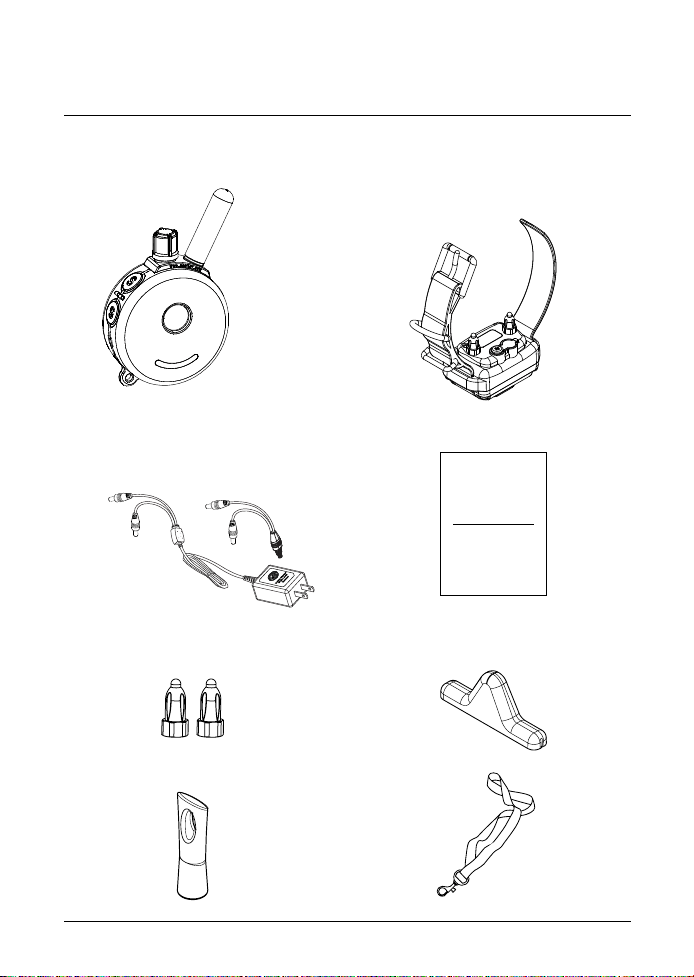
Package CONTENTS
05
•
Collar Receiver with Strap
(302 Package includes 2
Receivers and straps)
•
Lanyard
•
Test Light
•
Contact Point Tool
•
Extra Contact Points 3/4"
•
Battery Charger
(302 package contains
splitter cable)
•
Transmitter
•
Owner’s Manual
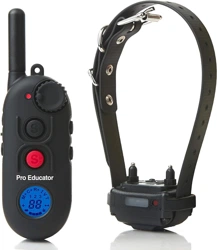
300/302
Owner's Manual
Welcome to the World of
E-Collar Technologies, Inc.
300/302 Owner’s Manual
06
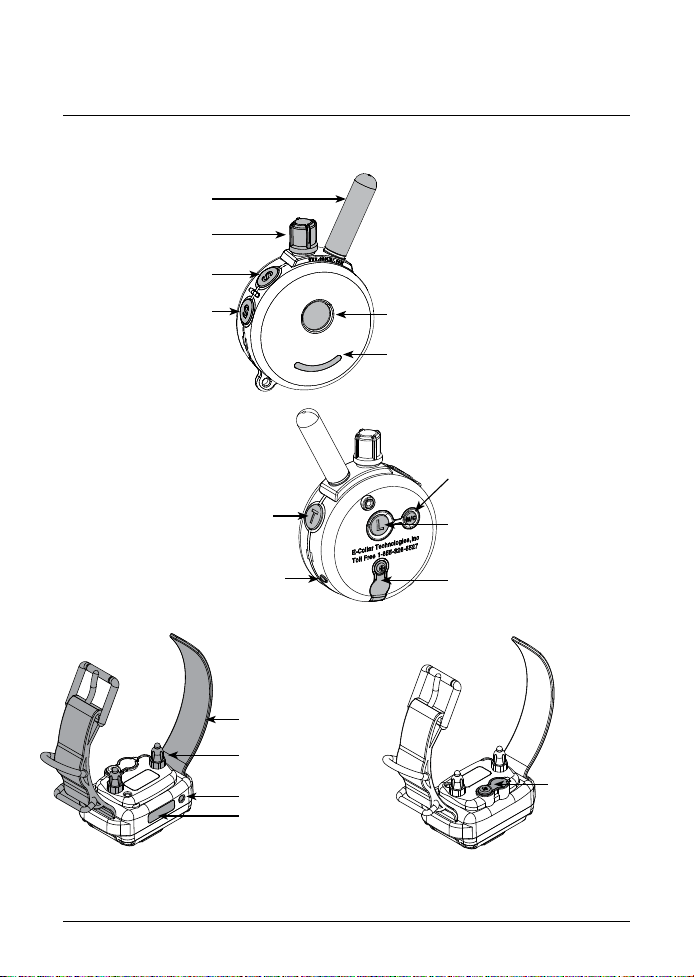
DEVICE OPERATION
Battery Charging
Receptacle and
Rubber Cover
Collar Strap
5/8” Contact Points
Battery Indicator Light
and Tracking Light
On/Off Magnetic Red Dot
Tapping Sensation
or Tone/Stimulation Button
On/Off Magnetic Red Dot
Light and On/Off Button
Battery Charging Receptacle
and Rubber Cover
Momentary / Continuous
Mode Button
Antenna
Stimulation Level Dial
& Lock/Unlock Knob
Stimulation Button (Black)
Stimulation Button (Red)
Battery Indicator Light
(LED Window)
LCD Display
300/302 Owner’s Manual
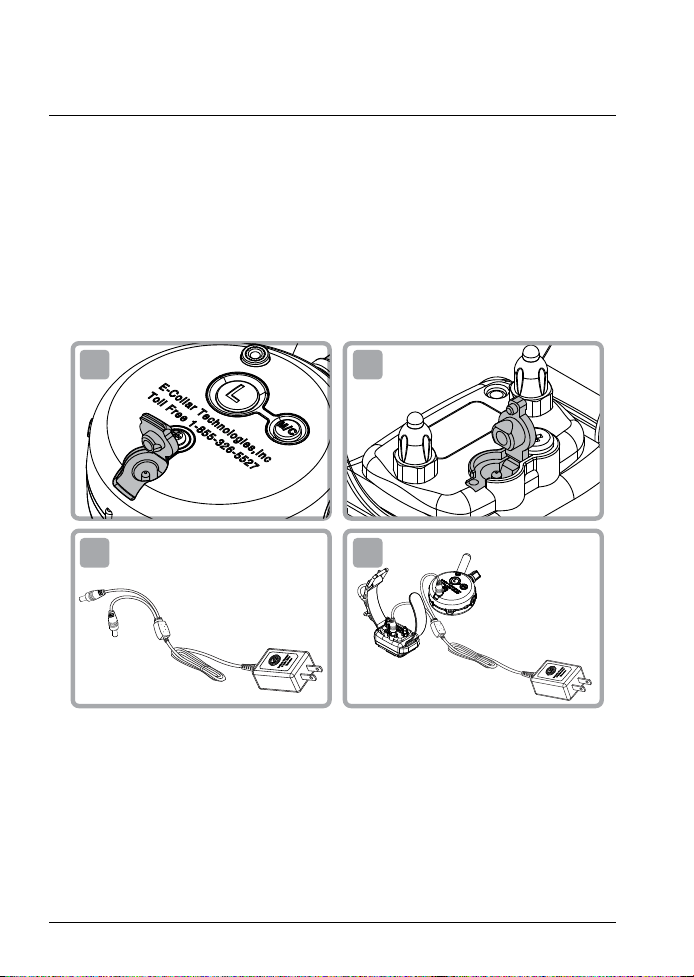
CHARGING THE BATTERIES
07
Transmitter Battery Charging
Receptacle and Rubber Cover
Collar Receiver Battery Charging
Receptacle and Rubber Cover
•
The indicator light will turn solid red during charge cycles and
turn green if it is fully charged. (approximately 2 hours)
Indicator Light is blinking “Green” under normal operation.
solid “Red” when stimulation is applied.
blinking “Red” when recharging is required.
Do not allow the batteries to get hot or be fully discharged,
store at room temperature and 50% capacity charge.
1 2
3 4
Special Not About Battery Care:
Your e-collar is outfitted with Li Polymer batteries which requires specific
care to assure longevity. It is best not to let the battery be fully discharged
and if it does recharge immediately or irreversible damage may occur.
Keep the units away from extreme heat and cold temperatures.
TURNING YOUR E-COLLAR ON/OFF
300/302 Owner’s Manual
08
•
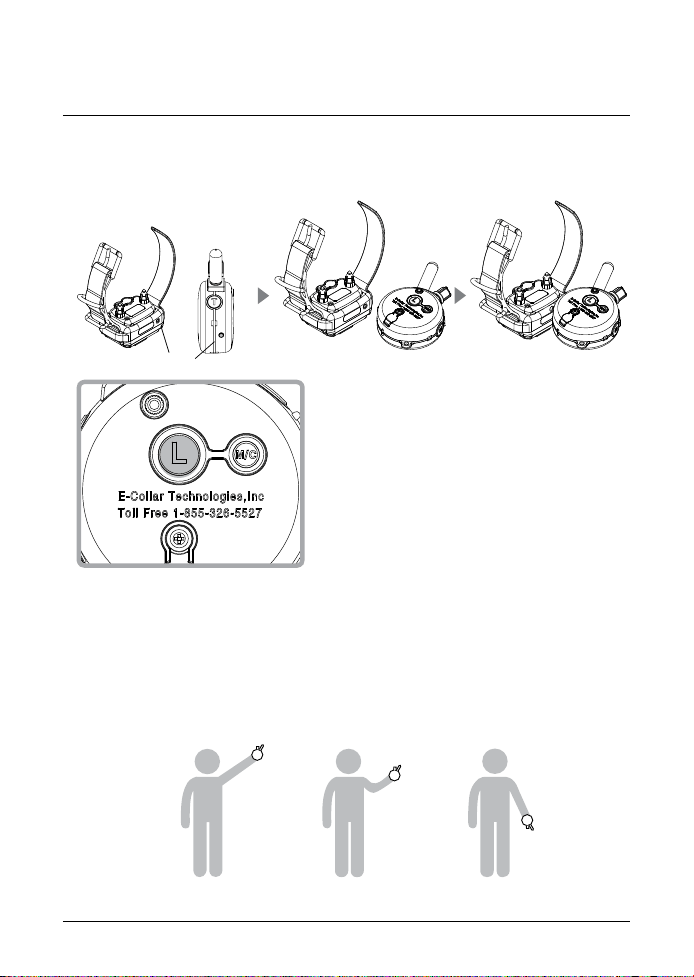
To turn the Collar Receiver On or Off :
Place the small red dot on the Transmitter against the small red
dot on the Collar Receiver.
To turn the Transmitter On or Off :
Press the “L” button for more than 2
seconds.
If the Transmitter is turned on, a
short press of the "L" button will
activate the tracking light of the
collar receiver. Press and hold for 2
seconds to turn Transmitter off.
•
To obtain the maximum range hold the transmitter like the torch on the
Statue of Liberty. Keep the antenna away from your body or fingers at
all times, touching the antenna will greatly reduce the range.
•
Holding the Transmitter
[ Long Range ] [ Medium Range ] [ Short Range ]
Red Dots
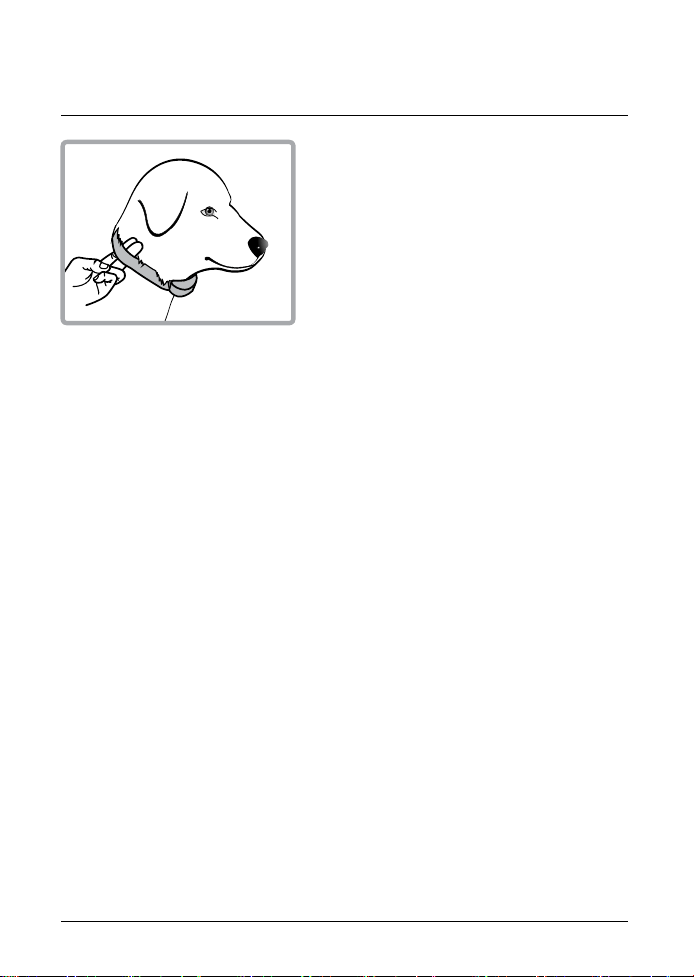
The collar should be adjusted to allow
the “contact points” to have direct
contact with the skin. You should be
able to fit a couple of fingers between
the collar strap and your dog's skin.
Too tight poses the risk of skin irritation
and discomfort. Too loose and the contact points will not be able to
administer the stimulation reliably and can cause skin irritation due to
chafing. Short hair breeds may need the 3/8" microprobes offered as
an accessory item, contact customer service for details. The optimal
position for the collar receiver is on either side of the dog’s windpipe.
If the factory installed 5/8” contact points are not making good contact
due to thick fur, see page 24 for changing contact point.
IMPORTANT NOTICE
To prevent the occurrence of skin irritations the Collar Receiver should
never be worn for more than 12 hours per day. Should your dog
experience skin irritations from over exposure to the contact points
remove the collar receiver unit immediately and stop using your
e-collar until all skin irritations are completely healed. Antibiotic
ointment will aid in the healing process. Some dog breeds have extra
thick fur or extra short fur that requires special contact points. Please
contact our customer service or visit www.ecollar.com for more
information.
300/302 Owner’s Manual
CORRECTLY FITTING THE COLLAR
09
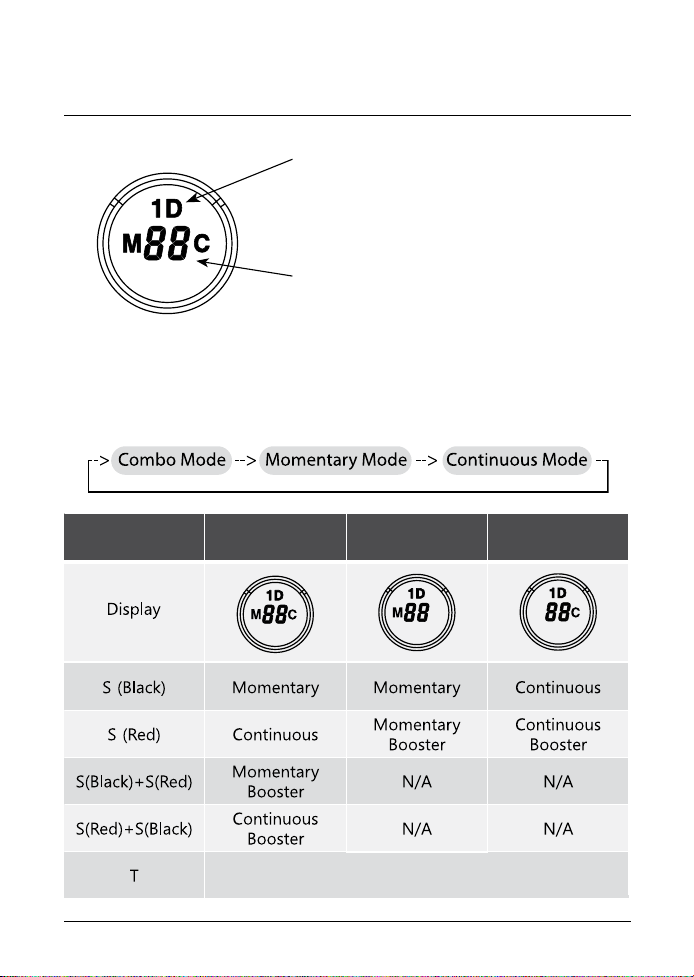
THE LCD DISPLAY DESCRIPTION
300/302 Owner’s Manual
10
Flashing “1D” indicates the stimulation is
ready for adjustment.
Solid “1D” indicates stimulation is “Locked”
Displays the Stimulation Level :
“0” means no stimulation and “HI” means
the highest stimulation level(100 )
Momentary / Continuous Button "M/C"- M/C Button on the backside of
the transmitter allows the user to easily switch between the three
stimulation modes. Function of stimulation button changes by mode.
Stimulation
Button
Momentary
Mode
Continuous
Mode
Combo Mode
Tapping Sensation or Tone/Stimulation

BUTTON FUNCTIONS
300/302 Owner’s Manual
11
Stimulation Button S (Black)
- Sends momentary or continuous stimulation to the collar receiver
based on the state of Momentary/Continuous Mode.
Stimulation Button S (Red)
- Sends momentary or continuous boosted stimulation.
- If stimulation level is 10, boosted stimulation sends [10 + boost level ]
- The default value of the boosted level is 5, it can be adjusted to any
value between 1 and 60. Smaller and more sensitive breeds should
use levels 1 through 20, larger more stubborn breeds may need
more of a boost, maximum boost is 60.
Momentary Stimulation
Sends a single pulse of stimulation at the set level when you press the
stimulation button.
Continuous Stimulation
Sends pulses of stimulation for as long as the button is pressed,
timing out after 10 seconds (this is a safety feature designed to
prevent accidental over-stimulation of your dog). The stimulation can
be increased or decreased while the button is being pressed.
Tapping Sensation
Vibration specifically designed to distract your dog, great for deaf
dogs and stimulation sensitive dogs.
Tone/Stimulation (Pavlovian Stimulation)
After 1.2 seconds of tone, the collar will send continuous stimulation
for as long as the button is pressed. Release before 1.2 seconds for
tone only.

300/302 Owner’s Manual
BUTTON FUNCTIONS
12
Boosting Stimulation in Combo Mode
Momentary Boosting is accomplished by first sending a momentary
stimulation pulse “S (Black)” to the dog and then pressing “S (Red)”
button without releasing “S (Black)” button. (PLEASE PRACTICE)
Continuous Boosting is accomplished by first administering continu-
ous stimulation “S (Red)” to the dog and then pressing the “S (Black)”
button without releasing the "S (Red)" button.
Tapping Sensation (Vibration) or Tone/Stimulation “T”
Sends Tapping Sensation or Tone/Stimulation to the collar receiver.
(Default setting is tapping sensation).
To toggle between tapping sensation and tone stimulation, press “L” and “T”
buttons simultaneously when the intensity level is “0”.
- Single beep and “A” icon indicates 1.2 S of Tone followed by Stimulation setting.
- Double beeps and “T” icon indicates Tapping Sensation (Vibration).
Light Button "L" (ON/OFF Center Button on Back)
When pressed less than an 1/2 second, it will turn on the night tracking
light, pressing it again the light will enter the solid mode and pressing
one more time turns the light off.
Flashing -> Solid -> OFF
Great for locating your dog after dark. (PLEASE PRACTICE)
Tapping Sensation
Pavlovian Tone/Stimulation
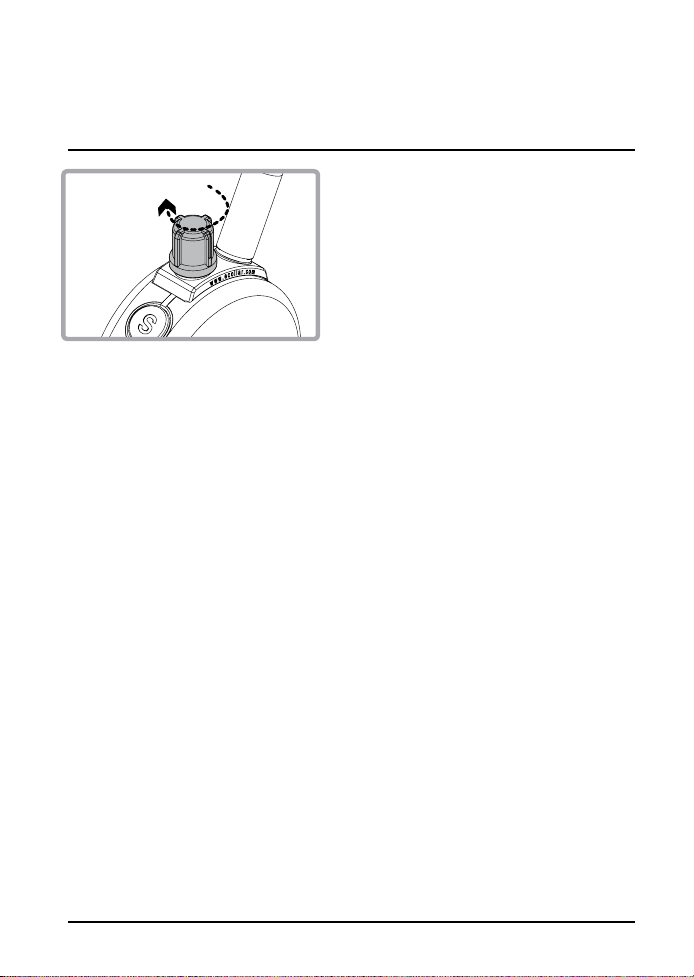
13
HOW TO FIND THE PROPER
STIMULATION LEVEL
Rotating clockwise increases the
stimulation level, and rotating
counter-clockwise lowers the
stimulation level.
It is highly recommended that the user practices changing levels and
modes before putting the collar receiver on a dog.
Setting the correct stimulation level for your dog is very important. To
set your “conditioning” stimulation level, correctly put the collar
receiver on your dog (see page 9 for instructions). Let him/her get
used to the collar receiver for a couple of hours.
While watching your dog, turn the level to “0” and press the
continuous stimulation button. Slowly turn the stimulation up at a rate of
approximately 2-3 levels per second. When your dog first perceives the
stimulation, usually between 5 and 20, release the button. This is your
“conditioning” stimulation level. You may need to increase the
“conditioning” level a few levels to get your dog to respond at first,
some dogs are more stubborn and need more stimulation. The boosted
level is typically 5 to 20 levels higher than the “conditioning” level.
300/302 Owner’s Manual
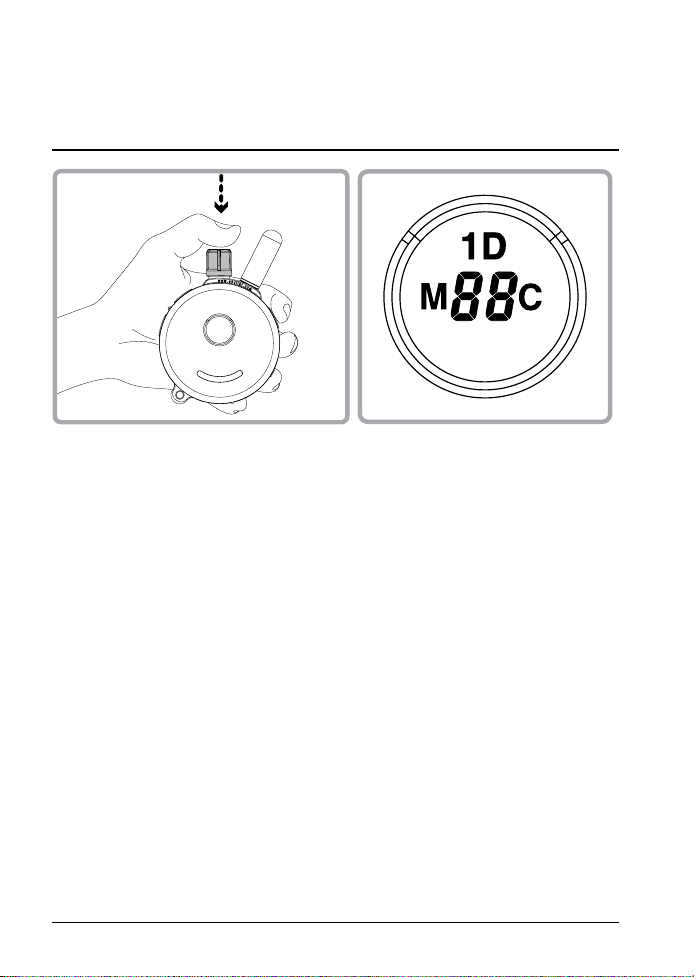
300/302 Owner’s Manual
14
LOCK/UNLOCK THE
STIMULATION LEVEL
How to Lock/Unlock the Stimulation Level
Set the desired stimulation level and then push down on the top of the
stimulation dial until you see “1D” light up on the top portion of the LCD
display. Flashing "1D" indicates unlocked stimulation and Solid "1D"
indicates locked stimulation.
If the stimulation level doesn’t change when you rotate the stimulation
knob, you have successfully locked the stimulation level.
To unlock the stimulation level simply press the stimulation knob again
and hold it for 1 second until the "1D" icon flashes.

300/302 Owner’s Manual
15
HOW TO SET THE BOOST
Boosted Stimulation adds the set boost level to the stimulation level,
great for those situations when your dog doesn't respond to the
working level. Determining the Boosted stimulation level is a little
more difficult than stimulation level setting due to the wide
differences in temperaments and stimulation tolerance among the
many breeds of dogs. On average, it is normally 5 to 20 levels higher
than the “Conditioning” level. It is important to have it set high
enough to get the desired response from your dog.
1. Change the mode to Momentary Mode.
(Press M/C button until “M” is displayed)
2. Change the intensity level to “0”.
3. Press S(Black) button for more than 5 seconds.
4. The intensity level will change from "0" to a flashing "1".
5. Rotate the dial to the desired boost level (1 to 60).
6. Press S(Black) button again to save and exit the boost level
changing mode.
"Instructional Videos available on our Youtube Channel"
300/302 Owner’s Manual
16
LOST TRANSMITTER MODE
Light and
On/Off Button
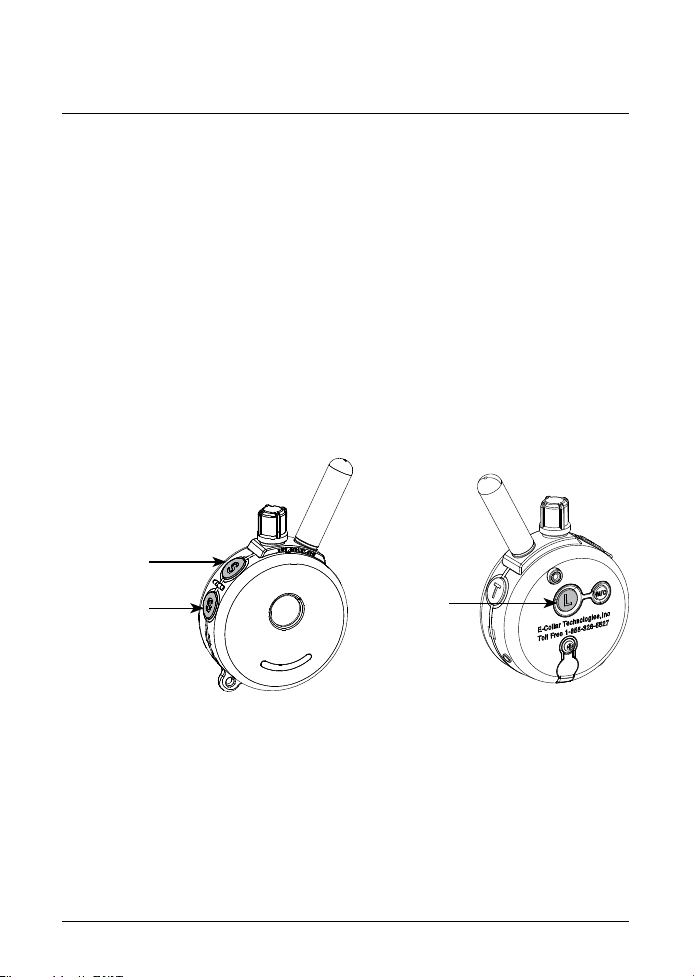
Turn off the lost transmitter beeper by simply turning the transmitter off
and back on.
Your 300/302 transmitter allows the user to turn on a 6 hour timer. After
6 hours the transmitter will begin beeping providing the ability to locate
the transmitter in tall grass.
Lost transmitter mode is activated by pressing the light (L) button and
then simultaneously pressing the stimulation button (Black "S") when the
intensity level is set to zero. Three short beeps will sound confirming the
activation of the locator timer.
Lost transmitter mode is turned off by turning your transmitter off and
back on again.
Stimulation
Booster
Button(Red)
Stimulation
Button (Black)

300/302 Owner’s Manual
17
REPLACE/ADD A COLLAR
Occassionally, it is necessary to pair/sync a transmitter to a collar
receiver, the following procedure will accomplish this:
1. Turn on the Transmitter
2. Turn intensity dial to “0”
3. Make sure the collar eceiver is turned off.
4. Put the Red Dot on Transmitter against the Red Dot on collar receiver for
more than 5 seconds until the green light changes from solid to a
rapidly flashing green light.
5. While the indicator light on collar receiver is rapidly blinking press the
Black S Button first followed by the Red S Button simultaneously for more
than 2 seconds or until you hear the confirmation sound from the collar
receiver.
HOW TO CHANGE THE TRANSMITTER TO A 2 DOG TRANSMITTER
The button functions will change. The changes are described on pages 18
through 22. You can change the transmitter back to the 300 one dog
system at any time.
1. Turn on the Transmitter.
2. Press the Red "S" followed by the Black "S" followed by the "T" Button
simultaneously for more than 2 seconds until you hear the confirmation beeps.
3. Repeat step 2 to return back to a 1 dog system.
ADD/REPLACE COLLAR FOR SECOND DOG
1. Turn on the Transmitter
2. Turn intensity dial to “0”
3. Make sure Receiver is turned off.
4. Place the Red Dot on the Transmitter against the Red Dot on Collar
Receiver for more than 5 seconds until the solid green light begins to
flash rapidly.
5. While the indicator light on the receiver is blinking rapidly, press the Red
"S" Button and then the Black "S" Button simultaneously for more than 2
seconds until you hear the confirmation sound from Transmitter.
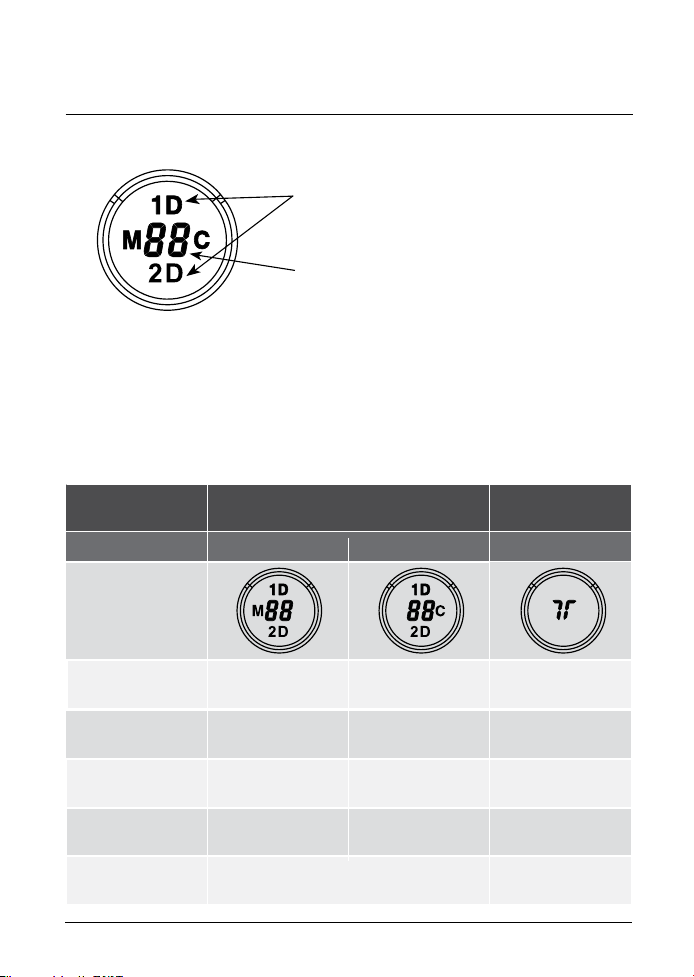
Flashing 1D and 2D icons indicates the
stimulation is ready for adjustment.
Solid indicates stimulation locked.
Displays the Stimulation Level : “0”
means no stimulation and “HI” means
the highest stimulation level(100)
Momentary / Continuous Button "M/C"- M/C Button on the backside of
the transmitter allows the user to easily switch between two stimulation
modes either momentary or continuous.
300/302 Owner’s Manual
302 LCD DESCRIPTION
18
Button Stimulation (1D or 2D)
TS(Vibration)
or Tone Stimulation
M/C Button Momentary Mode Continuous Mode N/A
Display
S (Black) Dog 1 Momentary Dog 1 Continuous
Dog 1 TS (Vib)
or Tone Stimulation
S(Black) + S(Red)
S (Black)+ S(Red)
Dog 1 Momentary
Booster
Dog 1 Continuous
Booster
N/A
Dog 2 Momentary
Booster
Dog 2 Continuous
Booster
N/A
N/A
S (Red) Dog 2 Momentary Dog 2 Continuous
L
"L" in Dog 1 set mode will control Dog 1 light
"L" in Dog 2 set mode will control Dog 2 light
Dog 2 TS (Vib)
or Tone Stimulation

Mode Button "T”
Mode button allows the user to change modes as shown in the diagram
Tapping Sensation or
Tone/Stimulation
Dog 2 Set Mode
Tapping Sensation or
Tone/Stimulation
Dog 1 Set Mode
To toggle between tapping sensation and pavlovian tone/stimulation
press “L” and “T” buttons simultaneously for 2 seconds when the
intensity level is “0”.
- Single beep and “A” icon indicates pavlovian tone/stimulation
- Two beeps and “T” icon indicates tapping sensation.
302 BUTTON FUCTIONS
300/302 Owner’s Manual
19
1 Dog Set Mode - LCD display shows 1D
2 Dog Set Mode - LCD display shows 2D
Tapping Sensation or Tone Stimulation - LCD display a "T"
Tapping Sensation or Tone/Pavlovian Stimulation “T”
Light Button(On Back) “L”
When the "L" button is pressed, “L” will be displayed.
If you press L while in Dog 1 Mode, Dog 1's Light will activate.
If you press L while in Dog 2 Mode, Dog 2's Light will activate.
Tracking Light will Cycle: Flashing -> Solid -> OFF when L is pressed.

300/302 Owner’s Manual
20
302 BUTTON FUCTIONS
Boosting Stimulation
To boost Dog 1, press the “S" (Black) button followed by the “S" (Red)
button boosted stimulation will be applied until you release both
buttons.
To boost Dog 2, press the “S" (Red) button followed by the “S" (Black)
Momentary Stimulation
Sends a single pulse of stimulation at the set level when you press
the stimulation button.
Continuous Stimulation
Sends continuous pulses as long as the stimulation button is pressed,
timing out after 10 seconds (this is a safety feature designed to
prevent accidental over-stimulation of your dog). You may change the
stimulation level while the button is depressed if it is not locked.
Tapping Sensation
Vibration specifically designed to distract your dog.
Tone followed by Stimulation (Pavlovian Conditioning)
After 1.2 seconds of tone, the collar will administer continuous
stimulation for as long as the button is pressed (up to 10 seconds).
Release before 1.2 seconds for tone only.
300/302 Owner’s Manual
21
HOW TO LOCK/UNLOCK THE
STIMULATION LEVEL
How to Lock/Unlock the Stimulation Level
See page 13 for help finding the proper stimulation level.
You can lock each dog to a different level.
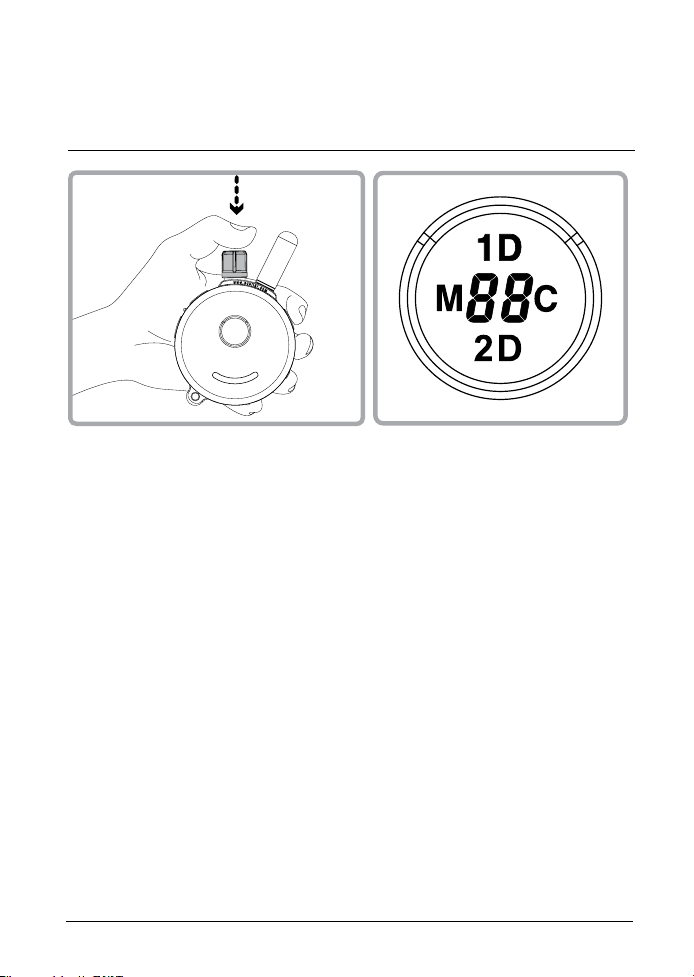
In 1D Mode, if you see 1D icon is blinking (unlocked)
Set the desired stimulation level and then push down the stimulation
dial for1 second until the 1D icon stops flashing.
In 2D Mode, if you see 2D icon is blinking (unlocked)
Set the desired stimulation level and then push down the stimulation
dial until you see 2D icon stops flashing.
If the stimulation level doesn’t change when you rotate the stimulation
knob, you have successfully locked the stimulation level.
To unlock the stimulation level simply press the stimulation knob
again at 1D/2D mode and it will unlock the stimulation level.

300/302 Owner’s Manual
22
302 BOOST LEVEL SETUP
If stimulation level is 10, boosted stimulation sends [10 + boost level ]
The default value of the boosted level is 5, it can be adjusted to any
value between 1 and 60.
Determining the Boosted stimulation level is a little more difficult than
stimulation level setting due to the wide differences in temperaments
and stimulation tolerance among the many breeds of dogs. On
average, it is normally 5 to 20 levels higher than the “Conditioning”
level.
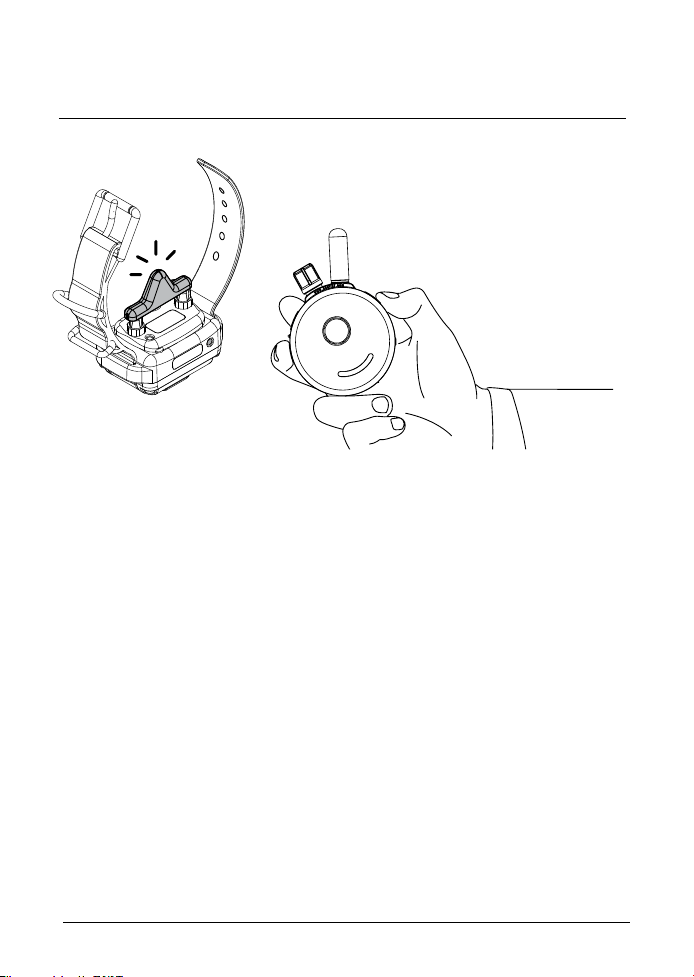
How to Setup Boost Level for Dog 1 (Black Collar Dog)
1. Change the mode to Momentary Mode
(Press M/C button until “M” is displayed)
2. Change the intensity level to “0”
3. Press S(Black) button for more than 5 seconds
4. The intensity level will change 0 to 1 and start to blink.
5. Rotate the dial to change the boost level (up to 60).
6. Press S(Black) button again to save and exit from
Boost Level Change Mode. If any other button is pressed or is idle
for 20 sec, Boost Level Change Mode will be cancelled.
If you want to change boost level for Dog 2 (Red Collar Dog),
Press S(Red) instead of black on step #3, and #6
300/302 Owner’s Manual
23
TESTING YOUR E-COLLAR
If you need to check your unit, hold the test light against the contact
points on the collar receiver. This test will let you know that the collar
receiver is generating the proper sensation to the dog, it should
brighten in a smooth fashion as the dial is turned up.
Some people find it easier to hold the collar receiver in the palm of
their hand and slowly turn the stimulation up using the continuous
mode, typical humans feel it between 8 and 25 depending on the
dryness of their hands.
Feel free to contact us if you have need help, 1-855-326-5527.
300/302 Owner’s Manual
24
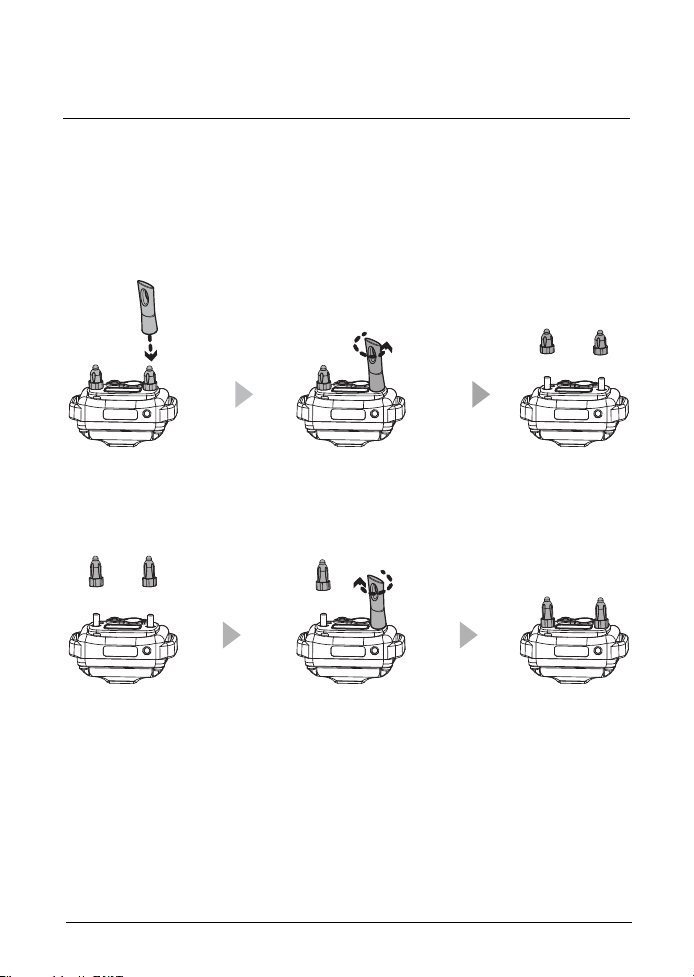
REPLACING THE CONTACT POINTS
1. Loosen both contact points by rotating the contact point
counter-clockwise using the contact point tool.
2. Install the 3/4” contact points onto the bolt and tighten the contact
points by rotating them clockwise with the contact point tool.
* For short haired breeds such as boxers, dachshund, pit bulls, etc, and
thick fur breeds please visit our website or contact us to inquire about
special contact points for your dog.
The standard 5/8” contact points are used for most dogs. Thicker fur
breeds require the longer 3/4” contact points. Replace the 5/8” contact
points by following the instructions below using the enclosed contact
point tool.

300/302 Owner’s Manual
TRAINING TIP
25
Good Luck with your training from your friends at
E-Collar Technologies
IMPORTANT TRAINING TIPS
E-Collars can be used to reinforce commands your dog already
knows or as a learning sensation when paired with leash pressure. It
is not a replacement for basic leash obedience training, but a tool to
allow you to better communicate with your dog. For best results, use
the least amount of stimulation required to get the attention of your dog.
A calm and consistent approach to training will always produce better
long term results. It is highly recommended that aggressive dogs be
taken to a professional trainer for evaluation before e-collar use. There
are many different e-collar training techniques recommended by a
variety of professional trainers. We believe you, the owner of the dog,
can best determine the most successful technique for your dog. We
recommend first time users to emerse themselves in learning about
the proper techniques or seek a professional e-collar trainer.
The technique used in the initial introduction of the e-collar is very
important to the success of e-collar training. Search E-Collar
Technologies on youtube and subscribe to our channel, new training
videos are posted weekly. Also "Like" and subscribe to our Facebook
page to receive more training advice and connect with other e-collar
users.
CONTACT US FOR EXPERT HELP WITH YOUR E-COLLAR
300/302 Owner’s Manual
26
TROUBLESHOOTING
A
A
A
My Receiver / Transmitter is not turning on
Make sure the collar receiver is fully charged. Collar receiver light
should turn green when the battery is connected to the charger.
My Receiver is not responding
Check Receiver’s indicator light is blinking green and Transmitter LCD
is on. Check to make sure the collar receiver’s indicator light is red
when the stimulation button is pressed.
Try pairing/syncing the transmitter to the receiver. (Page 17)
The receiver doesn't seem to provide stimulation to the dog
Remove Contact points from Receiver. Connect Test Light to the
receiver and test for stimulation. If the test light is blinking, receiver is
providing stimulation.
Max range of device has been decreased
Check Transmitter’s battery condition. Working range decreases
when the battery level is low.
Keep your fingers from touching the antenna. See the bottom of
page 8 for the proper technique to maximize range.
You cannot change the stimulation level for of the remote
Make sure 1D or 2D on transmitter LCD is blinking. If 1D or 2D icons are
solid, you cannot change stimulation. You can unlock the stimulation
at any time by pressing the stimulation knob fo 2 seconds.
A
A
A

27
TWO YEAR WARRANTY
300/302 Owner’s Manual
To register your 300/302 product, please log onto our website at
www.ecollar.com, click on the warranty registration link and fill out the
required information. Please register your product within 30 days of
your purchase. If you do not have access to a computer, please call
our toll free number of 1-855-326-5527 and one of our customer
service representatives will register your product for you. In the event
the product is not properly registered proof of purchase is not required
to obtain warranty, we will estimate your purchase date by the serial
number. Misuse, improper maintenance, lost units are not covered by
this warranty. Your complete satisfaction is our only concern.
The 300/302 mini Educator you have is our most recent design, it is
different from the previous 300TS and 302TS, so please let us know that
you have the new mini Educator design when communicating with us.
"Making Bad Dogs Good
and Good Dogs Better!"
300/302 Owner’s Manual
28
ACCESSORIES
•
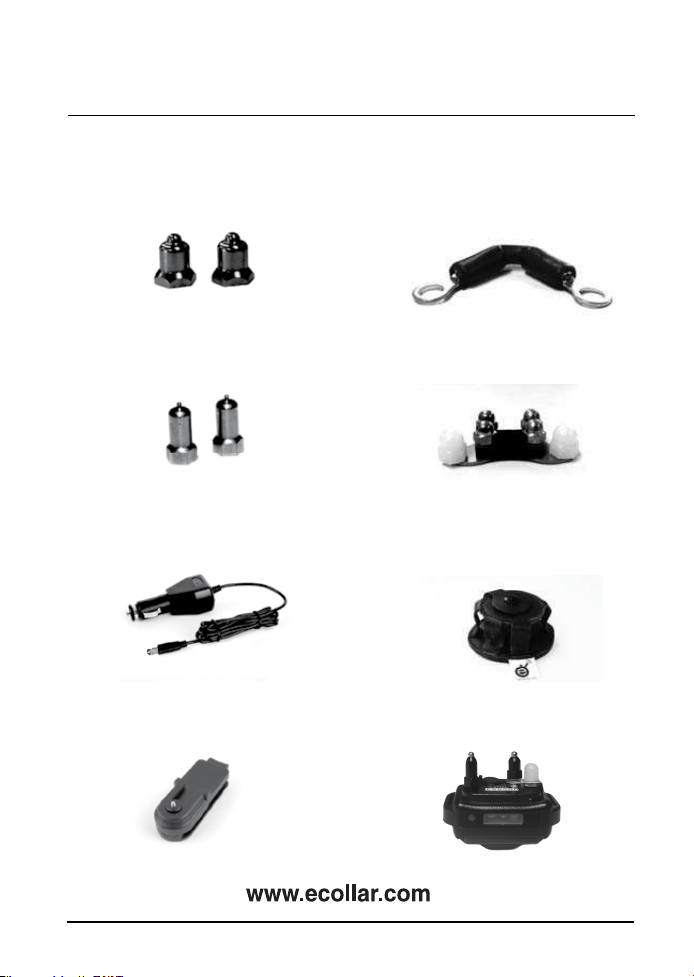
Micro-Probes Contact Points
•
Car Charger
•
Thick-Hair Contact Points
•
Belt Clip
•
50% Stimulation Reducer
•
Short Probe Comfort Adapter
•
Leather Belt Holster
(specify Right or Left hand)
•
Small Dog Adapter
300/302 Owner’s Manual
29
ACCESSORIES
•
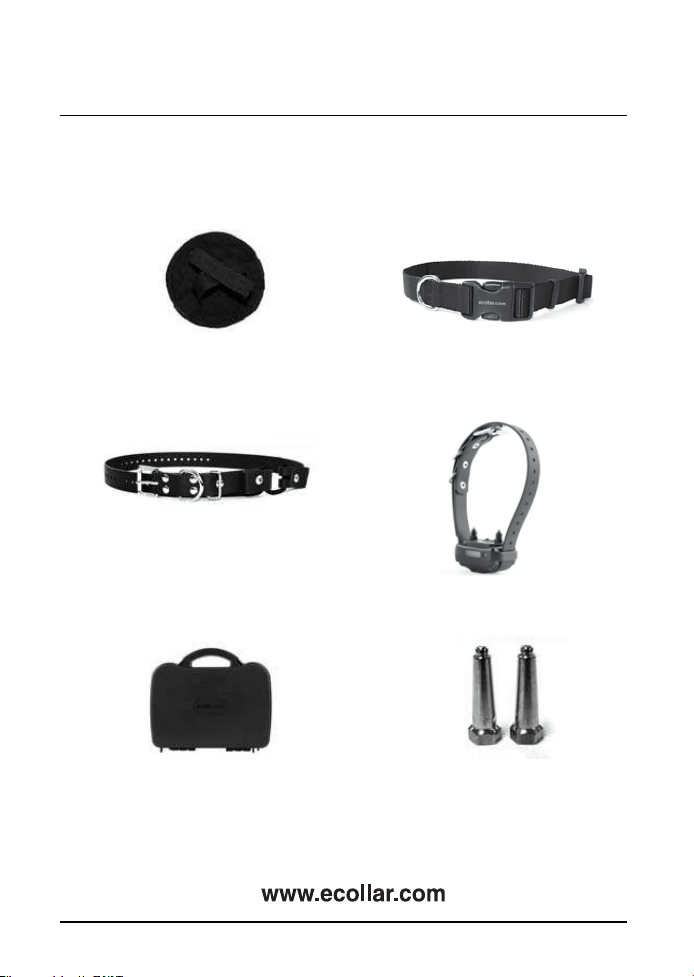
Sew-On Holster
•
Deluxe Hard Carry Case
•
3/4” Bungee Collar
(24” or 30” length)
•
1” MAX Probes
•
3/4” Quick Snap Nylon Collar
(black or red)
•
Dummy Collar
(specify Nylon or Biothane strap)

SAFETY AND GENERAL INFORMATION
•
•
•
1.
2.
The 300/302 Education Collar complies with all National and
International Standards and Guidelines for human exposure to radio
frequency electromagnetic energy.
Nearly all electronic devices are susceptible to electromagnetic
interference (EMI) if inadequately shielded or designed without
precautions to EMI.
300/302 e-collar transmitters manufactured by E-Collar Technolo-
gies, Inc. comply with Article 15 of the FCC rules and operate under
Part 95 of FCC regulations. CE approved for use in Europe.
IMPORTANT NOTICE
To avoid Electromagnetic Interference and/or compatibility conflicts,
please turn off your transmitter and collar receiver in any facility
where posted notices instruct you to do so. Never use your
equipment in close proximity of a Hospital or Health Care Facility or
enter the facility without turning off both units.
An FCC license is not needed to operate 300/302 remote e-collar
transmitters. However, any change or modification made to the
transmitter, including the supplied antenna, without the expressed
written approval of E-Collar Technologies, Inc. could void your
authority to operate.
300/302 Owner’s Manual
30

300/302 Owner’s Manual
TRAINING NOTES

300/302 Owner’s Manual
TRAINING NOTES
Copyright 2015 E-Collar Technologies, Inc.
All Rights Reserved.