�. 开关机:
➀ 按键一次,即可开机;接入设备,自动开机;
➁ 双击按键,即可关机;若��秒无设备接入,自动关机;
使用说明
使用环境温度:�°C至��°C非热带地区
储存环境:�°C至��°C
使用环境包装清单
温馨提示
1. Power on/off:
① Press the button once to turn it on. Connect device to have it automatically
turn on.
② Double-click the button to turn it off. If no device is connected in 30s, the
product will automatically turn off.
Instructions
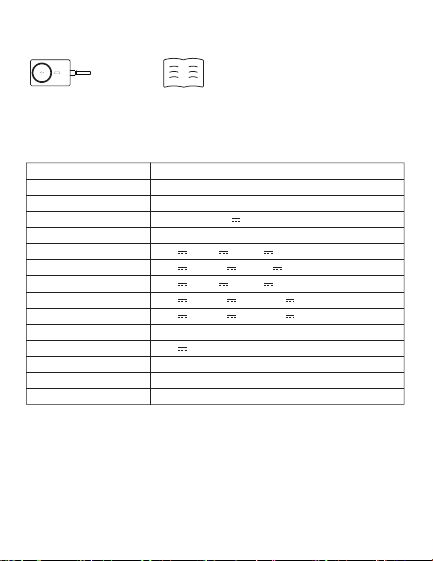
Packing list
�.
�.
�.
�.
�.
�.
�.
�.
�.
��.
��.
��.
��.
第一次使用本产品请将电量完全充满。
本产品充电完成后,请及时拔掉充电线,避免损耗。
为保证产品的正常使用,请务必使用正确的线材和配件。
严禁摔打、撞击、拆卸或尝试自行修复此产品。
请勿将移动电源放置在潮湿处及用水浸泡此产品。
严禁将此产品放置在热源易燃处。
请勿将此产品遗放在汽车中,阳光照射的高温会导致此产品损坏。
请将移动电源放置在儿童无法拿取的地方,避免儿童不当使用。
勿将任何异物摄入产品USB/Type-c输入输出端口孔位,以免造成短路或
损坏
为避免长时间搁置损耗使用寿命,请至少每四个月对移动电源充一次完
整的电。
如出现电池膨胀,漏液,变形等异常时,请停止使用。
请勿自行拆机,不正确操作会导致本产品寿命减低或损坏,因此带来的影
响不属于保修责任或厂家责任,敬请谅解。
避免使用超出本产品输出电流的充电器或负载。
�.����.������.�������
使用说明书
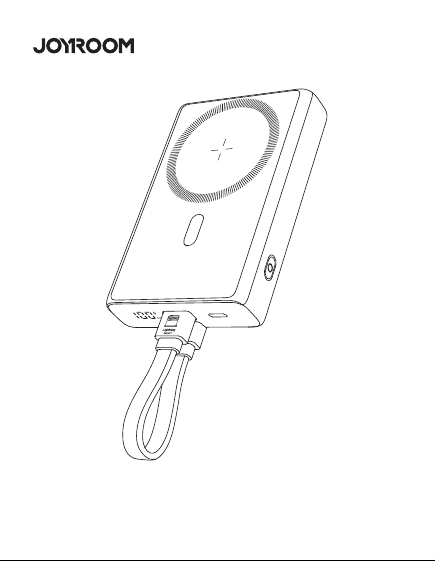
JR-PBM�� ��W磁吸支架无线充自带Type-C to Lightning线移动电源
User Manual
JR-PBM01 Portable Wireless Charger
本产品是一款能为手机,平板,电子书阅读器等产品提供有线充电或无线充电的移
动电源。PD��W快充,支持PD�.�、QC�.�、AFC等快充等协议;强力磁吸,一贴即
充;自带Type-C to Lightning线,支持iP/安卓设备充电,以及自充电;自带支架,
充电同时可轻松观影追剧;内置智能数显,剩余电量和无线充电状态清晰可见;本
产品内置智能芯片,具有过充、过放、过压、温度保护等多种安全保护电路。
This power bank can provide wired charging or wireless charging function for
mobile phones,tablets,book readers and other products.PD20W fast
charging,supports multiple fast charging protocols such as PD3.0, QC3.0,
AFC;Snap and charge ,the strong magnetic force can achieve wireless
charging function;It is designed with Type-C to Lightning cable and
Detachable cable supports charging iP/Android devices&recharging itself;The
built-in kickstand makes it easier for you to watch movies while charging your
phone;Its built-in digital display shows battery level & wireless charging status
in real time. The product has a built-in smart chip with a variety of safety
protections such as over-charge, over-discharge, over-voltage and
over-temperature protection, etc.
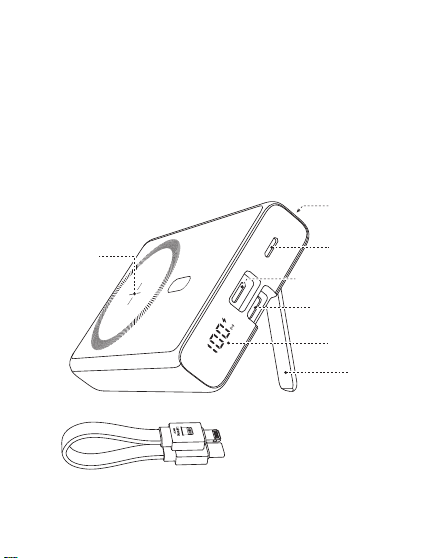
① and ② are both two-way fast charging ports. It is recommended to use the
special built-in cable of JOYROOM. The built-in cable lightning head ① is
inserted into the ① interface position of the power bank, and Type-C head ②
is inserted into the ② interface position of the power bank.
Magnetic Wireless
charging area
Lightning2 IN
Power button
Kickstand
Type-C to Lightning
charging cable
产品介绍
Product introduction
规格参数
JR-PBM��
聚合物锂电池
�����mAh �.��V(��.�Wh)
����mAh (�V �.�A)
≥��%
�V �A,�V �A,��V �.�A
�V �.�A,�V �A,��V �.�A
�V �A,�V �A,��V �.�A
�V �.�A,�V �.��A,��V �.��A
�V �.�A,�V �.��A,��V �.��A
�W,�.�W,��W,��W(Max)
�V �.�A(Max)
���*��*��.�mm
PC+ABS防火料
���g
型号
电芯类型
电池容量
额定容量
转换效率
Type-C输入
Lightning�输入
Lightning�输入
Type-C输出
Lightning�输出
无线充输出
多口输出
产品尺寸
材质
净重
Specification
JR-PBM01
Lithium Polymer Battery
10000mAh 3.85V(38.5Wh)
5800mAh (5V 2.4A)
≥75%
5V 3A,9V 2A,12V 1.5A
5V 2.4A,9V 2A,12V 1.5A
5V 2A,9V 2A,12V 1.5A
5V 2.4A,9V 2.22A,12V 1.67A
5V 2.4A,9V 2.22A,12V 1.67A
5W, 7.5W, 10W, 15W(Max)
5V 2.4A (Max)
103*68*20.5mm
PC+ABS fireproof material
216g
Model
Battery
Capacity
Rated Capacity
Conversion Efficiency
Type-C Input
Lightning1 Input
Lightning2 Input
Type-C Output
Lightning1 Output
Wireless Output
Multi-port Output
Size
Material
Net weight
移动电源X� 说明书&保修卡X�
Power bank x1 User Manual/ Warranty Card x1
② Type-C IN/OUT
Digital display
① Lightning1 IN/OUT
产品保修卡
生产批号:
姓名: 电话:
地址:
型号:
购买日期:
用户:
购买商号:
铅 汞
镉 六价铬
多溴联苯 多溴二苯醚
部件名称
O:表示该有害物质在该部件所有均质材料中的含量均在GB/T 26572 标准
规定的限量要求以下。
X:表示该有害物质至少在该部件的某一均质材料中的含量超出GB/T
26572规定的限量要求,且目前业界没有成熟的替代方案,符合欧盟RoHS
指令环保要求。
PCB板
电芯
(Pb) (Hg) (Cd) (Cr(VI)) (PBB) (PBDE)
产品中有害物质的名称及含量
有毒有害物质或元素
本表格依据SJ/T11364的规定编制
售后服务条例:
1、咨询服务:用户在使用产品前,请仔细阅读本产品的使用说明书。
2、包换服务:包换期内(自购机之日起七日内),正常使用出现了非人为故障,请保持产品,配件和
包装的完整(若外观不损坏、做保修处理)经检查确认故障后,可选择换货或维修,用户可到当地
授权经销商处联系并处理。
3、保修服务:保修期内,正常使用出现的非人为故障,均可享受免费保修服务(主机一年内免费
保 修 ,若 人 为 损 坏 ,做 收 费 维 修 处 理 ) 。
4、收费维修服务:产品自购机之日起一年到三年内,出现故障可收费维修,用户需支付维修所产
生的元器件费、运输费及人工费。
5、以下情况不在三包范围内,本公司提供有偿服务
① 超过三包期限。
② 涂改三包凭证,或序列号与产品本身不符。
③ 意外因素或人为导致的产品损坏(如:未按便用说明书操作、维护或保管、安装错误造成的故
障 ,接 入 不 合 适 的 电 源 、进 水 、掉 坏 等 ) 。
④ 无效三包凭证和有效发票(能证明产品确属服务期内者除外)。
⑤ 因不可抗拒如地震、火灾、水灾、雷击等导致的产品故障或损坏
⑥ 未经本公司许可,自拆卸、修理或改装。
请遵守安全说明,否则会导致
起火、触电、损坏或其他伤害
QC
PASSED
警告
�. 查看电量时:
按键一次,可查看电源剩余电量。
�. 本产品充电:
使用自带的Type-C to Lightning线,插入本移动电源对应端口,电量显示数字
开始跳动,表示正在为本产品充电,充满电后数字停止跳动,持续显示
“���%”。
�. 有线充输出说明:
使用充电线连接本电源对应输出端口,电源将自动开启输出,个别手机因兼容
性问题,需要按键开启电源输出功能。
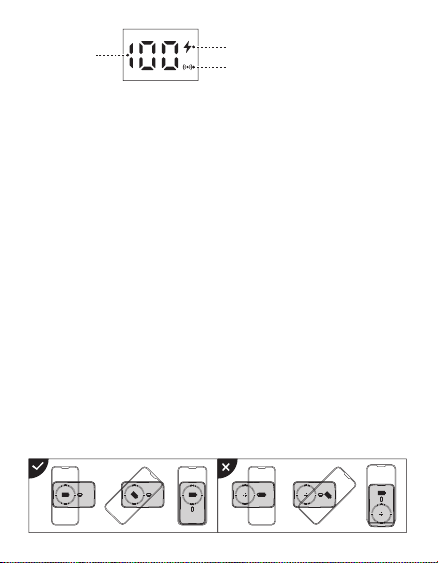
�. 无线充输出说明:
本产品具有自动唤醒无线充电功能,放上手机自动开启充电,个别手机因兼容
性问题,需要按键开启电源输出功能;无线充电手机需放置在本产品无线充电
区域(如图所示)进行无线充。本无线充电距离为�mm内,如进行无线充电
时距离超过�mm则无法进行无线充电,请调整手机无线充电距离在无线充电
范围内。
2. Viewing the battery power:
Press the button once to power it on, you can check the remaining power
capacity.
3. Recharge the power bank:
Use the built-in Type-C to Lightning cable to recharge the power bank; or
connect an external Type-C cable to the corresponding port of the power bank
to recharge it. When the digital display shows current power, which changes
with the recharging process, it means the power bank is being recharged.
When it is fully recharged, the display will stop at "100%".
4. Wired charging operation:
Connect the charging cable to the corresponding output port of the power
bank,and it will start to output automatically.Due to compatibility
issues,certain smart phones need to press power button to turn on the power
output function.
5. Wireless charging operation:
The power bank comes with an auto-wake function for wireless charging.When
it detects any phone placed on,it will automatically start charging.Due to
compatibility issues,certain smart phones need to press power button to turn
on the power output function.The wireless charging mobile phone should be
placed in the wireless charging area of the product(as shown in the picture)
for wireless charging.The wireless charging distance is within 5mm.If the
distance exceeds 5mm,the wireless charging can not function.Please adjust
the wireless charging distance within the wireless charging range.
Battery level
Fast charging icon
Wireless charging icon
Using environment
Using ambient temperature: 0℃ to 35℃, non-tropical area
Storage ambient temperature: 0℃ to 40℃
Please fully charge the power bank when using it for the first time.
Please pull out the charging cable in time after fully charged to avoid
energy loss.
Please use suitable cables and accessories to make the power bank
function normally.
Do not drop, impact, disassemble the product or try to repair it by
yourself.
Do not store the product in a wet place or immerse it in water.
Do not expose or store the product near a heat source or flammable
materials.
Do not leave this product in the car. The high temperature of sunlight
will damage the product.
Please keep it out of the reach of children to avoid improper use.
Do not put any foreign object into the USB/Type-C input/output ports of
the product to avoid short circuit or damage.
Please charge the power bank fully at least once every four months to
prolong its service life.
Please stop using the product in case of swelling, leakage, deformation
of battery and other abnormalities.
Do not disassemble the product by yourself. Any shortened service life or
damage caused by improper use or storage of the product by customer
will not be borne by our company.
Avoid using chargers with excessive output current or load.
1.
2.
3.
4.
5.
6.
7.
8.
9.
10.
11.
12.
13.
Warm reminders
Warranty Card
No.:
Date of purchase:
Customer:
Dealer:
Batch number:
Name: Telephone:
Address:
After-sale service regulations:
1. Consulting service: Please read the User Manual carefully before using the
product and keep it for future use.
2. Replacement service: The company undertakes that if there is product
failure within 7 days from the date of purchase that is not caused by human
error, the customer can choose between replacement and repair freely (if
the appearance is in good condition, it will be repaired) provided that the
product, its accessories and packaging are complete and in good condition.
The customer can ask the local authorized dealer to deal with it.
3. Warranty service: In case of product failure within the warranty period
that is not caused by human error, free warranty service will be provided
within one year. In case of product failure caused by human error, we will
charge for relevant repairing.
4. Charged repairing service: In case of product failure within one to three
years from the date of purchase, charged repairing service will be provided.
Users need to pay for the components, transportation and labor costs.
5. Warranty exceptions (you need to pay for relevant service):
➀ Expired the warranty period;
➁ There’s alteration on the Warranty Card, or the serial number is
inconsistent with the product itself;
➂ Product damage caused by accidents or human error (e.g.: customer fails
to use, maintain and store the product according to the User Manual;
incorrect installation, improper power supply, water intrusion, etc.)
➃ Failure to provide Warranty Card and valid invoice (except that you can
prove that the product is within the warranty period).
➄ Product damage caused by force majeure, such as earthquake, fire
disaster, flood, thunderstroke, etc.
➅ Product damage caused by disassembling, repairing or refitting the
product without authorization.
Please follow the above safety
instructions, otherwise it will cause fire,
electric shock, damage or other injuries
Warning
�����mAh
磁吸无线充区域
数显屏
➁ Type-C 输入/输出
开关按键
支架
Type-C to Lightning 充电线
➀➁均是双向快充接口,建议使用机乐堂专用自带线,自带线lightning头
➀插入设备的➀接口位置,Type-C头➁插入设备的➁接口位置
➀ Lightning�
输入/输出
➀
➁
Lightning�输入
➀
➁
电量
快充图标
无线充充电图标
QC
PASSED
3.1101.619780.0000000
原材料 机乐堂 JR-PBM01 20W磁吸支架无线充自带线移动电源10000mAh 说明书 V1.0
尺寸:70x90mm
材质:128g铜版纸+正反单色印刷+风琴折
�. 开关机:
➀ 按键一次,即可开机;接入设备,自动开机;
➁ 双击按键,即可关机;若��秒无设备接入,自动关机;
使用说明
使用环境温度:�°C至��°C非热带地区
储存环境:�°C至��°C
使用环境包装清单
温馨提示
1. Power on/off:
① Press the button once to turn it on. Connect device to have it automatically
turn on.
② Double-click the button to turn it off. If no device is connected in 30s, the
product will automatically turn off.
Instructions
Packing list
�.
�.
�.
�.
�.
�.
�.
�.
�.
��.
��.
��.
��.
第一次使用本产品请将电量完全充满。
本产品充电完成后,请及时拔掉充电线,避免损耗。
为保证产品的正常使用,请务必使用正确的线材和配件。
严禁摔打、撞击、拆卸或尝试自行修复此产品。
请勿将移动电源放置在潮湿处及用水浸泡此产品。
严禁将此产品放置在热源易燃处。
请勿将此产品遗放在汽车中,阳光照射的高温会导致此产品损坏。
请将移动电源放置在儿童无法拿取的地方,避免儿童不当使用。
勿将任何异物摄入产品USB/Type-c输入输出端口孔位,以免造成短路或
损坏
为避免长时间搁置损耗使用寿命,请至少每四个月对移动电源充一次完
整的电。
如出现电池膨胀,漏液,变形等异常时,请停止使用。
请勿自行拆机,不正确操作会导致本产品寿命减低或损坏,因此带来的影
响不属于保修责任或厂家责任,敬请谅解。
避免使用超出本产品输出电流的充电器或负载。
�.����.������.�������
使用说明书
JR-PBM�� ��W磁吸支架无线充自带Type-C to Lightning线移动电源
User Manual
JR-PBM01 Portable Wireless Charger
本产品是一款能为手机,平板,电子书阅读器等产品提供有线充电或无线充电的移
动电源。PD��W快充,支持PD�.�、QC�.�、AFC等快充等协议;强力磁吸,一贴即
充;自带Type-C to Lightning线,支持iP/安卓设备充电,以及自充电;自带支架,
充电同时可轻松观影追剧;内置智能数显,剩余电量和无线充电状态清晰可见;本
产品内置智能芯片,具有过充、过放、过压、温度保护等多种安全保护电路。
This power bank can provide wired charging or wireless charging function for
mobile phones,tablets,book readers and other products.PD20W fast
charging,supports multiple fast charging protocols such as PD3.0, QC3.0,
AFC;Snap and charge ,the strong magnetic force can achieve wireless
charging function;It is designed with Type-C to Lightning cable and
Detachable cable supports charging iP/Android devices&recharging itself;The
built-in kickstand makes it easier for you to watch movies while charging your
phone;Its built-in digital display shows battery level & wireless charging status
in real time. The product has a built-in smart chip with a variety of safety
protections such as over-charge, over-discharge, over-voltage and
over-temperature protection, etc.
① and ② are both two-way fast charging ports. It is recommended to use the
special built-in cable of JOYROOM. The built-in cable lightning head ① is
inserted into the ① interface position of the power bank, and Type-C head ②
is inserted into the ② interface position of the power bank.
Magnetic Wireless
charging area
Lightning2 IN
Power button
Kickstand
Type-C to Lightning
charging cable
产品介绍
Product introduction
规格参数
JR-PBM��
聚合物锂电池
�����mAh �.��V(��.�Wh)
����mAh (�V �.�A)
≥��%
�V �A,�V �A,��V �.�A
�V �.�A,�V �A,��V �.�A
�V �A,�V �A,��V �.�A
�V �.�A,�V �.��A,��V �.��A
�V �.�A,�V �.��A,��V �.��A
�W,�.�W,��W,��W(Max)
�V �.�A(Max)
���*��*��.�mm
PC+ABS防火料
���g
型号
电芯类型
电池容量
额定容量
转换效率
Type-C输入
Lightning�输入
Lightning�输入
Type-C输出
Lightning�输出
无线充输出
多口输出
产品尺寸
材质
净重
Specification
JR-PBM01
Lithium Polymer Battery
10000mAh 3.85V(38.5Wh)
5800mAh (5V 2.4A)
≥75%
5V 3A,9V 2A,12V 1.5A
5V 2.4A,9V 2A,12V 1.5A
5V 2A,9V 2A,12V 1.5A
5V 2.4A,9V 2.22A,12V 1.67A
5V 2.4A,9V 2.22A,12V 1.67A
5W, 7.5W, 10W, 15W(Max)
5V 2.4A (Max)
103*68*20.5mm
PC+ABS fireproof material
216g
Model
Battery
Capacity
Rated Capacity
Conversion Efficiency
Type-C Input
Lightning1 Input
Lightning2 Input
Type-C Output
Lightning1 Output
Wireless Output
Multi-port Output
Size
Material
Net weight
移动电源X� 说明书&保修卡X�
Power bank x1 User Manual/ Warranty Card x1
② Type-C IN/OUT
Digital display
① Lightning1 IN/OUT
产品保修卡
生产批号:
姓名: 电话:
地址:
型号:
购买日期:
用户:
购买商号:
铅 汞
镉 六价铬
多溴联苯 多溴二苯醚
部件名称
O:表示该有害物质在该部件所有均质材料中的含量均在GB/T 26572 标准
规定的限量要求以下。
X:表示该有害物质至少在该部件的某一均质材料中的含量超出GB/T
26572规定的限量要求,且目前业界没有成熟的替代方案,符合欧盟RoHS
指令环保要求。
PCB板
电芯
(Pb) (Hg) (Cd) (Cr(VI)) (PBB) (PBDE)
产品中有害物质的名称及含量
有毒有害物质或元素
本表格依据SJ/T11364的规定编制
售后服务条例:
1、咨询服务:用户在使用产品前,请仔细阅读本产品的使用说明书。
2、包换服务:包换期内(自购机之日起七日内),正常使用出现了非人为故障,请保持产品,配件和
包装的完整(若外观不损坏、做保修处理)经检查确认故障后,可选择换货或维修,用户可到当地
授权经销商处联系并处理。
3、保修服务:保修期内,正常使用出现的非人为故障,均可享受免费保修服务(主机一年内免费
保 修 ,若 人 为 损 坏 ,做 收 费 维 修 处 理 ) 。
4、收费维修服务:产品自购机之日起一年到三年内,出现故障可收费维修,用户需支付维修所产
生的元器件费、运输费及人工费。
5、以下情况不在三包范围内,本公司提供有偿服务
① 超过三包期限。
② 涂改三包凭证,或序列号与产品本身不符。
③ 意外因素或人为导致的产品损坏(如:未按便用说明书操作、维护或保管、安装错误造成的故
障 ,接 入 不 合 适 的 电 源 、进 水 、掉 坏 等 ) 。
④ 无效三包凭证和有效发票(能证明产品确属服务期内者除外)。
⑤ 因不可抗拒如地震、火灾、水灾、雷击等导致的产品故障或损坏
⑥ 未经本公司许可,自拆卸、修理或改装。
请遵守安全说明,否则会导致
起火、触电、损坏或其他伤害
QC
PASSED
警告
�. 查看电量时:
按键一次,可查看电源剩余电量。
�. 本产品充电:
使用自带的Type-C to Lightning线,插入本移动电源对应端口,电量显示数字
开始跳动,表示正在为本产品充电,充满电后数字停止跳动,持续显示
“���%”。
�. 有线充输出说明:
使用充电线连接本电源对应输出端口,电源将自动开启输出,个别手机因兼容
性问题,需要按键开启电源输出功能。
�. 无线充输出说明:
本产品具有自动唤醒无线充电功能,放上手机自动开启充电,个别手机因兼容
性问题,需要按键开启电源输出功能;无线充电手机需放置在本产品无线充电
区域(如图所示)进行无线充。本无线充电距离为�mm内,如进行无线充电
时距离超过�mm则无法进行无线充电,请调整手机无线充电距离在无线充电
范围内。
2. Viewing the battery power:
Press the button once to power it on, you can check the remaining power
capacity.
3. Recharge the power bank:
Use the built-in Type-C to Lightning cable to recharge the power bank; or
connect an external Type-C cable to the corresponding port of the power bank
to recharge it. When the digital display shows current power, which changes
with the recharging process, it means the power bank is being recharged.
When it is fully recharged, the display will stop at "100%".
4. Wired charging operation:
Connect the charging cable to the corresponding output port of the power
bank,and it will start to output automatically.Due to compatibility
issues,certain smart phones need to press power button to turn on the power
output function.
5. Wireless charging operation:
The power bank comes with an auto-wake function for wireless charging.When
it detects any phone placed on,it will automatically start charging.Due to
compatibility issues,certain smart phones need to press power button to turn
on the power output function.The wireless charging mobile phone should be
placed in the wireless charging area of the product(as shown in the picture)
for wireless charging.The wireless charging distance is within 5mm.If the
distance exceeds 5mm,the wireless charging can not function.Please adjust
the wireless charging distance within the wireless charging range.
Battery level
Fast charging icon
Wireless charging icon
Using environment
Using ambient temperature: 0℃ to 35℃, non-tropical area
Storage ambient temperature: 0℃ to 40℃
Please fully charge the power bank when using it for the first time.
Please pull out the charging cable in time after fully charged to avoid
energy loss.
Please use suitable cables and accessories to make the power bank
function normally.
Do not drop, impact, disassemble the product or try to repair it by
yourself.
Do not store the product in a wet place or immerse it in water.
Do not expose or store the product near a heat source or flammable
materials.
Do not leave this product in the car. The high temperature of sunlight
will damage the product.
Please keep it out of the reach of children to avoid improper use.
Do not put any foreign object into the USB/Type-C input/output ports of
the product to avoid short circuit or damage.
Please charge the power bank fully at least once every four months to
prolong its service life.
Please stop using the product in case of swelling, leakage, deformation
of battery and other abnormalities.
Do not disassemble the product by yourself. Any shortened service life or
damage caused by improper use or storage of the product by customer
will not be borne by our company.
Avoid using chargers with excessive output current or load.
1.
2.
3.
4.
5.
6.
7.
8.
9.
10.
11.
12.
13.
Warm reminders
Warranty Card
No.:
Date of purchase:
Customer:
Dealer:
Batch number:
Name: Telephone:
Address:
After-sale service regulations:
1. Consulting service: Please read the User Manual carefully before using the
product and keep it for future use.
2. Replacement service: The company undertakes that if there is product
failure within 7 days from the date of purchase that is not caused by human
error, the customer can choose between replacement and repair freely (if
the appearance is in good condition, it will be repaired) provided that the
product, its accessories and packaging are complete and in good condition.
The customer can ask the local authorized dealer to deal with it.
3. Warranty service: In case of product failure within the warranty period
that is not caused by human error, free warranty service will be provided
within one year. In case of product failure caused by human error, we will
charge for relevant repairing.
4. Charged repairing service: In case of product failure within one to three
years from the date of purchase, charged repairing service will be provided.
Users need to pay for the components, transportation and labor costs.
5. Warranty exceptions (you need to pay for relevant service):
➀ Expired the warranty period;
➁ There’s alteration on the Warranty Card, or the serial number is
inconsistent with the product itself;
➂ Product damage caused by accidents or human error (e.g.: customer fails
to use, maintain and store the product according to the User Manual;
incorrect installation, improper power supply, water intrusion, etc.)
➃ Failure to provide Warranty Card and valid invoice (except that you can
prove that the product is within the warranty period).
➄ Product damage caused by force majeure, such as earthquake, fire
disaster, flood, thunderstroke, etc.
➅ Product damage caused by disassembling, repairing or refitting the
product without authorization.
Please follow the above safety
instructions, otherwise it will cause fire,
electric shock, damage or other injuries
Warning
�����mAh
磁吸无线充区域
数显屏
➁ Type-C 输入/输出
开关按键
支架
Type-C to Lightning 充电线
➀➁均是双向快充接口,建议使用机乐堂专用自带线,自带线lightning头
➀插入设备的➀接口位置,Type-C头➁插入设备的➁接口位置
➀ Lightning�
输入/输出
➀
➁
Lightning�输入
➀
➁
电量
快充图标
无线充充电图标
QC
PASSED
3.1101.619780.0000000
原材料 机乐堂 JR-PBM01 20W磁吸支架无线充自带线移动电源10000mAh 说明书 V1.0
尺寸:70x90mm
材质:128g铜版纸+正反单色印刷+风琴折
�. 开关机:
➀ 按键一次,即可开机;接入设备,自动开机;
➁ 双击按键,即可关机;若��秒无设备接入,自动关机;
使用说明
使用环境温度:�°C至��°C非热带地区
储存环境:�°C至��°C
使用环境包装清单
温馨提示
1. Power on/off:
① Press the button once to turn it on. Connect device to have it automatically
turn on.
② Double-click the button to turn it off. If no device is connected in 30s, the
product will automatically turn off.
Instructions
Packing list
�.
�.
�.
�.
�.
�.
�.
�.
�.
��.
��.
��.
��.
第一次使用本产品请将电量完全充满。
本产品充电完成后,请及时拔掉充电线,避免损耗。
为保证产品的正常使用,请务必使用正确的线材和配件。
严禁摔打、撞击、拆卸或尝试自行修复此产品。
请勿将移动电源放置在潮湿处及用水浸泡此产品。
严禁将此产品放置在热源易燃处。
请勿将此产品遗放在汽车中,阳光照射的高温会导致此产品损坏。
请将移动电源放置在儿童无法拿取的地方,避免儿童不当使用。
勿将任何异物摄入产品USB/Type-c输入输出端口孔位,以免造成短路或
损坏
为避免长时间搁置损耗使用寿命,请至少每四个月对移动电源充一次完
整的电。
如出现电池膨胀,漏液,变形等异常时,请停止使用。
请勿自行拆机,不正确操作会导致本产品寿命减低或损坏,因此带来的影
响不属于保修责任或厂家责任,敬请谅解。
避免使用超出本产品输出电流的充电器或负载。
�.����.������.�������
使用说明书
JR-PBM�� ��W磁吸支架无线充自带Type-C to Lightning线移动电源
User Manual
JR-PBM01 Portable Wireless Charger
本产品是一款能为手机,平板,电子书阅读器等产品提供有线充电或无线充电的移
动电源。PD��W快充,支持PD�.�、QC�.�、AFC等快充等协议;强力磁吸,一贴即
充;自带Type-C to Lightning线,支持iP/安卓设备充电,以及自充电;自带支架,
充电同时可轻松观影追剧;内置智能数显,剩余电量和无线充电状态清晰可见;本
产品内置智能芯片,具有过充、过放、过压、温度保护等多种安全保护电路。
This power bank can provide wired charging or wireless charging function for
mobile phones,tablets,book readers and other products.PD20W fast
charging,supports multiple fast charging protocols such as PD3.0, QC3.0,
AFC;Snap and charge ,the strong magnetic force can achieve wireless
charging function;It is designed with Type-C to Lightning cable and
Detachable cable supports charging iP/Android devices&recharging itself;The
built-in kickstand makes it easier for you to watch movies while charging your
phone;Its built-in digital display shows battery level & wireless charging status
in real time. The product has a built-in smart chip with a variety of safety
protections such as over-charge, over-discharge, over-voltage and
over-temperature protection, etc.
① and ② are both two-way fast charging ports. It is recommended to use the
special built-in cable of JOYROOM. The built-in cable lightning head ① is
inserted into the ① interface position of the power bank, and Type-C head ②
is inserted into the ② interface position of the power bank.
Magnetic Wireless
charging area
Lightning2 IN
Power button
Kickstand
Type-C to Lightning
charging cable
产品介绍
Product introduction
规格参数
JR-PBM��
聚合物锂电池
�����mAh �.��V(��.�Wh)
����mAh (�V �.�A)
≥��%
�V �A,�V �A,��V �.�A
�V �.�A,�V �A,��V �.�A
�V �A,�V �A,��V �.�A
�V �.�A,�V �.��A,��V �.��A
�V �.�A,�V �.��A,��V �.��A
�W,�.�W,��W,��W(Max)
�V �.�A(Max)
���*��*��.�mm
PC+ABS防火料
���g
型号
电芯类型
电池容量
额定容量
转换效率
Type-C输入
Lightning�输入
Lightning�输入
Type-C输出
Lightning�输出
无线充输出
多口输出
产品尺寸
材质
净重
Specification
JR-PBM01
Lithium Polymer Battery
10000mAh 3.85V(38.5Wh)
5800mAh (5V 2.4A)
≥75%
5V 3A,9V 2A,12V 1.5A
5V 2.4A,9V 2A,12V 1.5A
5V 2A,9V 2A,12V 1.5A
5V 2.4A,9V 2.22A,12V 1.67A
5V 2.4A,9V 2.22A,12V 1.67A
5W, 7.5W, 10W, 15W(Max)
5V 2.4A (Max)
103*68*20.5mm
PC+ABS fireproof material
216g
Model
Battery
Capacity
Rated Capacity
Conversion Efficiency
Type-C Input
Lightning1 Input
Lightning2 Input
Type-C Output
Lightning1 Output
Wireless Output
Multi-port Output
Size
Material
Net weight
移动电源X� 说明书&保修卡X�
Power bank x1 User Manual/ Warranty Card x1
② Type-C IN/OUT
Digital display
① Lightning1 IN/OUT
产品保修卡
生产批号:
姓名: 电话:
地址:
型号:
购买日期:
用户:
购买商号:
铅 汞
镉 六价铬
多溴联苯 多溴二苯醚
部件名称
O:表示该有害物质在该部件所有均质材料中的含量均在GB/T 26572 标准
规定的限量要求以下。
X:表示该有害物质至少在该部件的某一均质材料中的含量超出GB/T
26572规定的限量要求,且目前业界没有成熟的替代方案,符合欧盟RoHS
指令环保要求。
PCB板
电芯
(Pb) (Hg) (Cd) (Cr(VI)) (PBB) (PBDE)
产品中有害物质的名称及含量
有毒有害物质或元素
本表格依据SJ/T11364的规定编制
售后服务条例:
1、咨询服务:用户在使用产品前,请仔细阅读本产品的使用说明书。
2、包换服务:包换期内(自购机之日起七日内),正常使用出现了非人为故障,请保持产品,配件和
包装的完整(若外观不损坏、做保修处理)经检查确认故障后,可选择换货或维修,用户可到当地
授权经销商处联系并处理。
3、保修服务:保修期内,正常使用出现的非人为故障,均可享受免费保修服务(主机一年内免费
保 修 ,若 人 为 损 坏 ,做 收 费 维 修 处 理 ) 。
4、收费维修服务:产品自购机之日起一年到三年内,出现故障可收费维修,用户需支付维修所产
生的元器件费、运输费及人工费。
5、以下情况不在三包范围内,本公司提供有偿服务
① 超过三包期限。
② 涂改三包凭证,或序列号与产品本身不符。
③ 意外因素或人为导致的产品损坏(如:未按便用说明书操作、维护或保管、安装错误造成的故
障 ,接 入 不 合 适 的 电 源 、进 水 、掉 坏 等 ) 。
④ 无效三包凭证和有效发票(能证明产品确属服务期内者除外)。
⑤ 因不可抗拒如地震、火灾、水灾、雷击等导致的产品故障或损坏
⑥ 未经本公司许可,自拆卸、修理或改装。
请遵守安全说明,否则会导致
起火、触电、损坏或其他伤害
QC
PASSED
警告
�. 查看电量时:
按键一次,可查看电源剩余电量。
�. 本产品充电:
使用自带的Type-C to Lightning线,插入本移动电源对应端口,电量显示数字
开始跳动,表示正在为本产品充电,充满电后数字停止跳动,持续显示
“���%”。
�. 有线充输出说明:
使用充电线连接本电源对应输出端口,电源将自动开启输出,个别手机因兼容
性问题,需要按键开启电源输出功能。
�. 无线充输出说明:
本产品具有自动唤醒无线充电功能,放上手机自动开启充电,个别手机因兼容
性问题,需要按键开启电源输出功能;无线充电手机需放置在本产品无线充电
区域(如图所示)进行无线充。本无线充电距离为�mm内,如进行无线充电
时距离超过�mm则无法进行无线充电,请调整手机无线充电距离在无线充电
范围内。
2. Viewing the battery power:
Press the button once to power it on, you can check the remaining power
capacity.
3. Recharge the power bank:
Use the built-in Type-C to Lightning cable to recharge the power bank; or
connect an external Type-C cable to the corresponding port of the power bank
to recharge it. When the digital display shows current power, which changes
with the recharging process, it means the power bank is being recharged.
When it is fully recharged, the display will stop at "100%".
4. Wired charging operation:
Connect the charging cable to the corresponding output port of the power
bank,and it will start to output automatically.Due to compatibility
issues,certain smart phones need to press power button to turn on the power
output function.
5. Wireless charging operation:
The power bank comes with an auto-wake function for wireless charging.When
it detects any phone placed on,it will automatically start charging.Due to
compatibility issues,certain smart phones need to press power button to turn
on the power output function.The wireless charging mobile phone should be
placed in the wireless charging area of the product(as shown in the picture)
for wireless charging.The wireless charging distance is within 5mm.If the
distance exceeds 5mm,the wireless charging can not function.Please adjust
the wireless charging distance within the wireless charging range.
Battery level
Fast charging icon
Wireless charging icon
Using environment
Using ambient temperature: 0℃ to 35℃, non-tropical area
Storage ambient temperature: 0℃ to 40℃
Please fully charge the power bank when using it for the first time.
Please pull out the charging cable in time after fully charged to avoid
energy loss.
Please use suitable cables and accessories to make the power bank
function normally.
Do not drop, impact, disassemble the product or try to repair it by
yourself.
Do not store the product in a wet place or immerse it in water.
Do not expose or store the product near a heat source or flammable
materials.
Do not leave this product in the car. The high temperature of sunlight
will damage the product.
Please keep it out of the reach of children to avoid improper use.
Do not put any foreign object into the USB/Type-C input/output ports of
the product to avoid short circuit or damage.
Please charge the power bank fully at least once every four months to
prolong its service life.
Please stop using the product in case of swelling, leakage, deformation
of battery and other abnormalities.
Do not disassemble the product by yourself. Any shortened service life or
damage caused by improper use or storage of the product by customer
will not be borne by our company.
Avoid using chargers with excessive output current or load.
1.
2.
3.
4.
5.
6.
7.
8.
9.
10.
11.
12.
13.
Warm reminders
Warranty Card
No.:
Date of purchase:
Customer:
Dealer:
Batch number:
Name: Telephone:
Address:
After-sale service regulations:
1. Consulting service: Please read the User Manual carefully before using the
product and keep it for future use.
2. Replacement service: The company undertakes that if there is product
failure within 7 days from the date of purchase that is not caused by human
error, the customer can choose between replacement and repair freely (if
the appearance is in good condition, it will be repaired) provided that the
product, its accessories and packaging are complete and in good condition.
The customer can ask the local authorized dealer to deal with it.
3. Warranty service: In case of product failure within the warranty period
that is not caused by human error, free warranty service will be provided
within one year. In case of product failure caused by human error, we will
charge for relevant repairing.
4. Charged repairing service: In case of product failure within one to three
years from the date of purchase, charged repairing service will be provided.
Users need to pay for the components, transportation and labor costs.
5. Warranty exceptions (you need to pay for relevant service):
➀ Expired the warranty period;
➁ There’s alteration on the Warranty Card, or the serial number is
inconsistent with the product itself;
➂ Product damage caused by accidents or human error (e.g.: customer fails
to use, maintain and store the product according to the User Manual;
incorrect installation, improper power supply, water intrusion, etc.)
➃ Failure to provide Warranty Card and valid invoice (except that you can
prove that the product is within the warranty period).
➄ Product damage caused by force majeure, such as earthquake, fire
disaster, flood, thunderstroke, etc.
➅ Product damage caused by disassembling, repairing or refitting the
product without authorization.
Please follow the above safety
instructions, otherwise it will cause fire,
electric shock, damage or other injuries
Warning
�����mAh
磁吸无线充区域
数显屏
➁ Type-C 输入/输出
开关按键
支架
Type-C to Lightning 充电线
➀➁均是双向快充接口,建议使用机乐堂专用自带线,自带线lightning头
➀插入设备的➀接口位置,Type-C头➁插入设备的➁接口位置
➀ Lightning�
输入/输出
➀
➁
Lightning�输入
➀
➁
电量
快充图标
无线充充电图标
QC
PASSED
3.1101.619780.0000000
原材料 机乐堂 JR-PBM01 20W磁吸支架无线充自带线移动电源10000mAh 说明书 V1.0
尺寸:70x90mm
材质:128g铜版纸+正反单色印刷+风琴折
�. 开关机:
➀ 按键一次,即可开机;接入设备,自动开机;
➁ 双击按键,即可关机;若��秒无设备接入,自动关机;
使用说明
使用环境温度:�°C至��°C非热带地区
储存环境:�°C至��°C
使用环境包装清单
温馨提示
1. Power on/off:
① Press the button once to turn it on. Connect device to have it automatically
turn on.
② Double-click the button to turn it off. If no device is connected in 30s, the
product will automatically turn off.
Instructions
Packing list
�.
�.
�.
�.
�.
�.
�.
�.
�.
��.
��.
��.
��.
第一次使用本产品请将电量完全充满。
本产品充电完成后,请及时拔掉充电线,避免损耗。
为保证产品的正常使用,请务必使用正确的线材和配件。
严禁摔打、撞击、拆卸或尝试自行修复此产品。
请勿将移动电源放置在潮湿处及用水浸泡此产品。
严禁将此产品放置在热源易燃处。
请勿将此产品遗放在汽车中,阳光照射的高温会导致此产品损坏。
请将移动电源放置在儿童无法拿取的地方,避免儿童不当使用。
勿将任何异物摄入产品USB/Type-c输入输出端口孔位,以免造成短路或
损坏
为避免长时间搁置损耗使用寿命,请至少每四个月对移动电源充一次完
整的电。
如出现电池膨胀,漏液,变形等异常时,请停止使用。
请勿自行拆机,不正确操作会导致本产品寿命减低或损坏,因此带来的影
响不属于保修责任或厂家责任,敬请谅解。
避免使用超出本产品输出电流的充电器或负载。
�.����.������.�������
使用说明书
JR-PBM�� ��W磁吸支架无线充自带Type-C to Lightning线移动电源
User Manual
JR-PBM01 Portable Wireless Charger
本产品是一款能为手机,平板,电子书阅读器等产品提供有线充电或无线充电的移
动电源。PD��W快充,支持PD�.�、QC�.�、AFC等快充等协议;强力磁吸,一贴即
充;自带Type-C to Lightning线,支持iP/安卓设备充电,以及自充电;自带支架,
充电同时可轻松观影追剧;内置智能数显,剩余电量和无线充电状态清晰可见;本
产品内置智能芯片,具有过充、过放、过压、温度保护等多种安全保护电路。
This power bank can provide wired charging or wireless charging function for
mobile phones,tablets,book readers and other products.PD20W fast
charging,supports multiple fast charging protocols such as PD3.0, QC3.0,
AFC;Snap and charge ,the strong magnetic force can achieve wireless
charging function;It is designed with Type-C to Lightning cable and
Detachable cable supports charging iP/Android devices&recharging itself;The
built-in kickstand makes it easier for you to watch movies while charging your
phone;Its built-in digital display shows battery level & wireless charging status
in real time. The product has a built-in smart chip with a variety of safety
protections such as over-charge, over-discharge, over-voltage and
over-temperature protection, etc.
① and ② are both two-way fast charging ports. It is recommended to use the
special built-in cable of JOYROOM. The built-in cable lightning head ① is
inserted into the ① interface position of the power bank, and Type-C head ②
is inserted into the ② interface position of the power bank.
Magnetic Wireless
charging area
Lightning2 IN
Power button
Kickstand
Type-C to Lightning
charging cable
产品介绍
Product introduction
规格参数
JR-PBM��
聚合物锂电池
�����mAh �.��V(��.�Wh)
����mAh (�V �.�A)
≥��%
�V �A,�V �A,��V �.�A
�V �.�A,�V �A,��V �.�A
�V �A,�V �A,��V �.�A
�V �.�A,�V �.��A,��V �.��A
�V �.�A,�V �.��A,��V �.��A
�W,�.�W,��W,��W(Max)
�V �.�A(Max)
���*��*��.�mm
PC+ABS防火料
���g
型号
电芯类型
电池容量
额定容量
转换效率
Type-C输入
Lightning�输入
Lightning�输入
Type-C输出
Lightning�输出
无线充输出
多口输出
产品尺寸
材质
净重
Specification
JR-PBM01
Lithium Polymer Battery
10000mAh 3.85V(38.5Wh)
5800mAh (5V 2.4A)
≥75%
5V 3A,9V 2A,12V 1.5A
5V 2.4A,9V 2A,12V 1.5A
5V 2A,9V 2A,12V 1.5A
5V 2.4A,9V 2.22A,12V 1.67A
5V 2.4A,9V 2.22A,12V 1.67A
5W, 7.5W, 10W, 15W(Max)
5V 2.4A (Max)
103*68*20.5mm
PC+ABS fireproof material
216g
Model
Battery
Capacity
Rated Capacity
Conversion Efficiency
Type-C Input
Lightning1 Input
Lightning2 Input
Type-C Output
Lightning1 Output
Wireless Output
Multi-port Output
Size
Material
Net weight
移动电源X� 说明书&保修卡X�
Power bank x1 User Manual/ Warranty Card x1
② Type-C IN/OUT
Digital display
① Lightning1 IN/OUT
产品保修卡
生产批号:
姓名: 电话:
地址:
型号:
购买日期:
用户:
购买商号:
铅 汞
镉 六价铬
多溴联苯 多溴二苯醚
部件名称
O:表示该有害物质在该部件所有均质材料中的含量均在GB/T 26572 标准
规定的限量要求以下。
X:表示该有害物质至少在该部件的某一均质材料中的含量超出GB/T
26572规定的限量要求,且目前业界没有成熟的替代方案,符合欧盟RoHS
指令环保要求。
PCB板
电芯
(Pb) (Hg) (Cd) (Cr(VI)) (PBB) (PBDE)
产品中有害物质的名称及含量
有毒有害物质或元素
本表格依据SJ/T11364的规定编制
售后服务条例:
1、咨询服务:用户在使用产品前,请仔细阅读本产品的使用说明书。
2、包换服务:包换期内(自购机之日起七日内),正常使用出现了非人为故障,请保持产品,配件和
包装的完整(若外观不损坏、做保修处理)经检查确认故障后,可选择换货或维修,用户可到当地
授权经销商处联系并处理。
3、保修服务:保修期内,正常使用出现的非人为故障,均可享受免费保修服务(主机一年内免费
保 修 ,若 人 为 损 坏 ,做 收 费 维 修 处 理 ) 。
4、收费维修服务:产品自购机之日起一年到三年内,出现故障可收费维修,用户需支付维修所产
生的元器件费、运输费及人工费。
5、以下情况不在三包范围内,本公司提供有偿服务
① 超过三包期限。
② 涂改三包凭证,或序列号与产品本身不符。
③ 意外因素或人为导致的产品损坏(如:未按便用说明书操作、维护或保管、安装错误造成的故
障 ,接 入 不 合 适 的 电 源 、进 水 、掉 坏 等 ) 。
④ 无效三包凭证和有效发票(能证明产品确属服务期内者除外)。
⑤ 因不可抗拒如地震、火灾、水灾、雷击等导致的产品故障或损坏
⑥ 未经本公司许可,自拆卸、修理或改装。
请遵守安全说明,否则会导致
起火、触电、损坏或其他伤害
QC
PASSED
警告
�. 查看电量时:
按键一次,可查看电源剩余电量。
�. 本产品充电:
使用自带的Type-C to Lightning线,插入本移动电源对应端口,电量显示数字
开始跳动,表示正在为本产品充电,充满电后数字停止跳动,持续显示
“���%”。
�. 有线充输出说明:
使用充电线连接本电源对应输出端口,电源将自动开启输出,个别手机因兼容
性问题,需要按键开启电源输出功能。
�. 无线充输出说明:
本产品具有自动唤醒无线充电功能,放上手机自动开启充电,个别手机因兼容
性问题,需要按键开启电源输出功能;无线充电手机需放置在本产品无线充电
区域(如图所示)进行无线充。本无线充电距离为�mm内,如进行无线充电
时距离超过�mm则无法进行无线充电,请调整手机无线充电距离在无线充电
范围内。
2. Viewing the battery power:
Press the button once to power it on, you can check the remaining power
capacity.
3. Recharge the power bank:
Use the built-in Type-C to Lightning cable to recharge the power bank; or
connect an external Type-C cable to the corresponding port of the power bank
to recharge it. When the digital display shows current power, which changes
with the recharging process, it means the power bank is being recharged.
When it is fully recharged, the display will stop at "100%".
4. Wired charging operation:
Connect the charging cable to the corresponding output port of the power
bank,and it will start to output automatically.Due to compatibility
issues,certain smart phones need to press power button to turn on the power
output function.
5. Wireless charging operation:
The power bank comes with an auto-wake function for wireless charging.When
it detects any phone placed on,it will automatically start charging.Due to
compatibility issues,certain smart phones need to press power button to turn
on the power output function.The wireless charging mobile phone should be
placed in the wireless charging area of the product(as shown in the picture)
for wireless charging.The wireless charging distance is within 5mm.If the
distance exceeds 5mm,the wireless charging can not function.Please adjust
the wireless charging distance within the wireless charging range.
Battery level
Fast charging icon
Wireless charging icon
Using environment
Using ambient temperature: 0℃ to 35℃, non-tropical area
Storage ambient temperature: 0℃ to 40℃
Please fully charge the power bank when using it for the first time.
Please pull out the charging cable in time after fully charged to avoid
energy loss.
Please use suitable cables and accessories to make the power bank
function normally.
Do not drop, impact, disassemble the product or try to repair it by
yourself.
Do not store the product in a wet place or immerse it in water.
Do not expose or store the product near a heat source or flammable
materials.
Do not leave this product in the car. The high temperature of sunlight
will damage the product.
Please keep it out of the reach of children to avoid improper use.
Do not put any foreign object into the USB/Type-C input/output ports of
the product to avoid short circuit or damage.
Please charge the power bank fully at least once every four months to
prolong its service life.
Please stop using the product in case of swelling, leakage, deformation
of battery and other abnormalities.
Do not disassemble the product by yourself. Any shortened service life or
damage caused by improper use or storage of the product by customer
will not be borne by our company.
Avoid using chargers with excessive output current or load.
1.
2.
3.
4.
5.
6.
7.
8.
9.
10.
11.
12.
13.
Warm reminders
Warranty Card
No.:
Date of purchase:
Customer:
Dealer:
Batch number:
Name: Telephone:
Address:
After-sale service regulations:
1. Consulting service: Please read the User Manual carefully before using the
product and keep it for future use.
2. Replacement service: The company undertakes that if there is product
failure within 7 days from the date of purchase that is not caused by human
error, the customer can choose between replacement and repair freely (if
the appearance is in good condition, it will be repaired) provided that the
product, its accessories and packaging are complete and in good condition.
The customer can ask the local authorized dealer to deal with it.
3. Warranty service: In case of product failure within the warranty period
that is not caused by human error, free warranty service will be provided
within one year. In case of product failure caused by human error, we will
charge for relevant repairing.
4. Charged repairing service: In case of product failure within one to three
years from the date of purchase, charged repairing service will be provided.
Users need to pay for the components, transportation and labor costs.
5. Warranty exceptions (you need to pay for relevant service):
➀ Expired the warranty period;
➁ There’s alteration on the Warranty Card, or the serial number is
inconsistent with the product itself;
➂ Product damage caused by accidents or human error (e.g.: customer fails
to use, maintain and store the product according to the User Manual;
incorrect installation, improper power supply, water intrusion, etc.)
➃ Failure to provide Warranty Card and valid invoice (except that you can
prove that the product is within the warranty period).
➄ Product damage caused by force majeure, such as earthquake, fire
disaster, flood, thunderstroke, etc.
➅ Product damage caused by disassembling, repairing or refitting the
product without authorization.
Please follow the above safety
instructions, otherwise it will cause fire,
electric shock, damage or other injuries
Warning
�����mAh
磁吸无线充区域
数显屏
➁ Type-C 输入/输出
开关按键
支架
Type-C to Lightning 充电线
➀➁均是双向快充接口,建议使用机乐堂专用自带线,自带线lightning头
➀插入设备的➀接口位置,Type-C头➁插入设备的➁接口位置
➀ Lightning�
输入/输出
➀
➁
Lightning�输入
➀
➁
电量
快充图标
无线充充电图标
QC
PASSED
3.1101.619780.0000000
原材料 机乐堂 JR-PBM01 20W磁吸支架无线充自带线移动电源10000mAh 说明书 V1.0
尺寸:70x90mm
材质:128g铜版纸+正反单色印刷+风琴折

�. 开关机:
➀ 按键一次,即可开机;接入设备,自动开机;
➁ 双击按键,即可关机;若��秒无设备接入,自动关机;
使用说明
使用环境温度:�°C至��°C非热带地区
储存环境:�°C至��°C
使用环境包装清单
温馨提示
1. Power on/off:
① Press the button once to turn it on. Connect device to have it automatically
turn on.
② Double-click the button to turn it off. If no device is connected in 30s, the
product will automatically turn off.
Instructions
Packing list
�.
�.
�.
�.
�.
�.
�.
�.
�.
��.
��.
��.
��.
第一次使用本产品请将电量完全充满。
本产品充电完成后,请及时拔掉充电线,避免损耗。
为保证产品的正常使用,请务必使用正确的线材和配件。
严禁摔打、撞击、拆卸或尝试自行修复此产品。
请勿将移动电源放置在潮湿处及用水浸泡此产品。
严禁将此产品放置在热源易燃处。
请勿将此产品遗放在汽车中,阳光照射的高温会导致此产品损坏。
请将移动电源放置在儿童无法拿取的地方,避免儿童不当使用。
勿将任何异物摄入产品USB/Type-c输入输出端口孔位,以免造成短路或
损坏
为避免长时间搁置损耗使用寿命,请至少每四个月对移动电源充一次完
整的电。
如出现电池膨胀,漏液,变形等异常时,请停止使用。
请勿自行拆机,不正确操作会导致本产品寿命减低或损坏,因此带来的影
响不属于保修责任或厂家责任,敬请谅解。
避免使用超出本产品输出电流的充电器或负载。
�.����.������.�������
使用说明书
JR-PBM�� ��W磁吸支架无线充自带Type-C to Lightning线移动电源
User Manual
JR-PBM01 Portable Wireless Charger
本产品是一款能为手机,平板,电子书阅读器等产品提供有线充电或无线充电的移
动电源。PD��W快充,支持PD�.�、QC�.�、AFC等快充等协议;强力磁吸,一贴即
充;自带Type-C to Lightning线,支持iP/安卓设备充电,以及自充电;自带支架,
充电同时可轻松观影追剧;内置智能数显,剩余电量和无线充电状态清晰可见;本
产品内置智能芯片,具有过充、过放、过压、温度保护等多种安全保护电路。
This power bank can provide wired charging or wireless charging function for
mobile phones,tablets,book readers and other products.PD20W fast
charging,supports multiple fast charging protocols such as PD3.0, QC3.0,
AFC;Snap and charge ,the strong magnetic force can achieve wireless
charging function;It is designed with Type-C to Lightning cable and
Detachable cable supports charging iP/Android devices&recharging itself;The
built-in kickstand makes it easier for you to watch movies while charging your
phone;Its built-in digital display shows battery level & wireless charging status
in real time. The product has a built-in smart chip with a variety of safety
protections such as over-charge, over-discharge, over-voltage and
over-temperature protection, etc.
① and ② are both two-way fast charging ports. It is recommended to use the
special built-in cable of JOYROOM. The built-in cable lightning head ① is
inserted into the ① interface position of the power bank, and Type-C head ②
is inserted into the ② interface position of the power bank.
Magnetic Wireless
charging area
Lightning2 IN
Power button
Kickstand
Type-C to Lightning
charging cable
产品介绍
Product introduction
规格参数
JR-PBM��
聚合物锂电池
�����mAh �.��V(��.�Wh)
����mAh (�V �.�A)
≥��%
�V �A,�V �A,��V �.�A
�V �.�A,�V �A,��V �.�A
�V �A,�V �A,��V �.�A
�V �.�A,�V �.��A,��V �.��A
�V �.�A,�V �.��A,��V �.��A
�W,�.�W,��W,��W(Max)
�V �.�A(Max)
���*��*��.�mm
PC+ABS防火料
���g
型号
电芯类型
电池容量
额定容量
转换效率
Type-C输入
Lightning�输入
Lightning�输入
Type-C输出
Lightning�输出
无线充输出
多口输出
产品尺寸
材质
净重
Specification
JR-PBM01
Lithium Polymer Battery
10000mAh 3.85V(38.5Wh)
5800mAh (5V 2.4A)
≥75%
5V 3A,9V 2A,12V 1.5A
5V 2.4A,9V 2A,12V 1.5A
5V 2A,9V 2A,12V 1.5A
5V 2.4A,9V 2.22A,12V 1.67A
5V 2.4A,9V 2.22A,12V 1.67A
5W, 7.5W, 10W, 15W(Max)
5V 2.4A (Max)
103*68*20.5mm
PC+ABS fireproof material
216g
Model
Battery
Capacity
Rated Capacity
Conversion Efficiency
Type-C Input
Lightning1 Input
Lightning2 Input
Type-C Output
Lightning1 Output
Wireless Output
Multi-port Output
Size
Material
Net weight
移动电源X� 说明书&保修卡X�
Power bank x1 User Manual/ Warranty Card x1
② Type-C IN/OUT
Digital display
① Lightning1 IN/OUT
产品保修卡
生产批号:
姓名: 电话:
地址:
型号:
购买日期:
用户:
购买商号:
铅 汞
镉 六价铬
多溴联苯 多溴二苯醚
部件名称
O:表示该有害物质在该部件所有均质材料中的含量均在GB/T 26572 标准
规定的限量要求以下。
X:表示该有害物质至少在该部件的某一均质材料中的含量超出GB/T
26572规定的限量要求,且目前业界没有成熟的替代方案,符合欧盟RoHS
指令环保要求。
PCB板
电芯
(Pb) (Hg) (Cd) (Cr(VI)) (PBB) (PBDE)
产品中有害物质的名称及含量
有毒有害物质或元素
本表格依据SJ/T11364的规定编制
售后服务条例:
1、咨询服务:用户在使用产品前,请仔细阅读本产品的使用说明书。
2、包换服务:包换期内(自购机之日起七日内),正常使用出现了非人为故障,请保持产品,配件和
包装的完整(若外观不损坏、做保修处理)经检查确认故障后,可选择换货或维修,用户可到当地
授权经销商处联系并处理。
3、保修服务:保修期内,正常使用出现的非人为故障,均可享受免费保修服务(主机一年内免费
保 修 ,若 人 为 损 坏 ,做 收 费 维 修 处 理 ) 。
4、收费维修服务:产品自购机之日起一年到三年内,出现故障可收费维修,用户需支付维修所产
生的元器件费、运输费及人工费。
5、以下情况不在三包范围内,本公司提供有偿服务
① 超过三包期限。
② 涂改三包凭证,或序列号与产品本身不符。
③ 意外因素或人为导致的产品损坏(如:未按便用说明书操作、维护或保管、安装错误造成的故
障 ,接 入 不 合 适 的 电 源 、进 水 、掉 坏 等 ) 。
④ 无效三包凭证和有效发票(能证明产品确属服务期内者除外)。
⑤ 因不可抗拒如地震、火灾、水灾、雷击等导致的产品故障或损坏
⑥ 未经本公司许可,自拆卸、修理或改装。
请遵守安全说明,否则会导致
起火、触电、损坏或其他伤害
QC
PASSED
警告
�. 查看电量时:
按键一次,可查看电源剩余电量。
�. 本产品充电:
使用自带的Type-C to Lightning线,插入本移动电源对应端口,电量显示数字
开始跳动,表示正在为本产品充电,充满电后数字停止跳动,持续显示
“���%”。
�. 有线充输出说明:
使用充电线连接本电源对应输出端口,电源将自动开启输出,个别手机因兼容
性问题,需要按键开启电源输出功能。
�. 无线充输出说明:
本产品具有自动唤醒无线充电功能,放上手机自动开启充电,个别手机因兼容
性问题,需要按键开启电源输出功能;无线充电手机需放置在本产品无线充电
区域(如图所示)进行无线充。本无线充电距离为�mm内,如进行无线充电
时距离超过�mm则无法进行无线充电,请调整手机无线充电距离在无线充电
范围内。
2. Viewing the battery power:
Press the button once to power it on, you can check the remaining power
capacity.
3. Recharge the power bank:
Use the built-in Type-C to Lightning cable to recharge the power bank; or
connect an external Type-C cable to the corresponding port of the power bank
to recharge it. When the digital display shows current power, which changes
with the recharging process, it means the power bank is being recharged.
When it is fully recharged, the display will stop at "100%".
4. Wired charging operation:
Connect the charging cable to the corresponding output port of the power
bank,and it will start to output automatically.Due to compatibility
issues,certain smart phones need to press power button to turn on the power
output function.
5. Wireless charging operation:
The power bank comes with an auto-wake function for wireless charging.When
it detects any phone placed on,it will automatically start charging.Due to
compatibility issues,certain smart phones need to press power button to turn
on the power output function.The wireless charging mobile phone should be
placed in the wireless charging area of the product(as shown in the picture)
for wireless charging.The wireless charging distance is within 5mm.If the
distance exceeds 5mm,the wireless charging can not function.Please adjust
the wireless charging distance within the wireless charging range.
Battery level
Fast charging icon
Wireless charging icon
Using environment
Using ambient temperature: 0℃ to 35℃, non-tropical area
Storage ambient temperature: 0℃ to 40℃
Please fully charge the power bank when using it for the first time.
Please pull out the charging cable in time after fully charged to avoid
energy loss.
Please use suitable cables and accessories to make the power bank
function normally.
Do not drop, impact, disassemble the product or try to repair it by
yourself.
Do not store the product in a wet place or immerse it in water.
Do not expose or store the product near a heat source or flammable
materials.
Do not leave this product in the car. The high temperature of sunlight
will damage the product.
Please keep it out of the reach of children to avoid improper use.
Do not put any foreign object into the USB/Type-C input/output ports of
the product to avoid short circuit or damage.
Please charge the power bank fully at least once every four months to
prolong its service life.
Please stop using the product in case of swelling, leakage, deformation
of battery and other abnormalities.
Do not disassemble the product by yourself. Any shortened service life or
damage caused by improper use or storage of the product by customer
will not be borne by our company.
Avoid using chargers with excessive output current or load.
1.
2.
3.
4.
5.
6.
7.
8.
9.
10.
11.
12.
13.
Warm reminders
Warranty Card
No.:
Date of purchase:
Customer:
Dealer:
Batch number:
Name: Telephone:
Address:
After-sale service regulations:
1. Consulting service: Please read the User Manual carefully before using the
product and keep it for future use.
2. Replacement service: The company undertakes that if there is product
failure within 7 days from the date of purchase that is not caused by human
error, the customer can choose between replacement and repair freely (if
the appearance is in good condition, it will be repaired) provided that the
product, its accessories and packaging are complete and in good condition.
The customer can ask the local authorized dealer to deal with it.
3. Warranty service: In case of product failure within the warranty period
that is not caused by human error, free warranty service will be provided
within one year. In case of product failure caused by human error, we will
charge for relevant repairing.
4. Charged repairing service: In case of product failure within one to three
years from the date of purchase, charged repairing service will be provided.
Users need to pay for the components, transportation and labor costs.
5. Warranty exceptions (you need to pay for relevant service):
➀ Expired the warranty period;
➁ There’s alteration on the Warranty Card, or the serial number is
inconsistent with the product itself;
➂ Product damage caused by accidents or human error (e.g.: customer fails
to use, maintain and store the product according to the User Manual;
incorrect installation, improper power supply, water intrusion, etc.)
➃ Failure to provide Warranty Card and valid invoice (except that you can
prove that the product is within the warranty period).
➄ Product damage caused by force majeure, such as earthquake, fire
disaster, flood, thunderstroke, etc.
➅ Product damage caused by disassembling, repairing or refitting the
product without authorization.
Please follow the above safety
instructions, otherwise it will cause fire,
electric shock, damage or other injuries
Warning
�����mAh
磁吸无线充区域
数显屏
➁ Type-C 输入/输出
开关按键
支架
Type-C to Lightning 充电线
➀➁均是双向快充接口,建议使用机乐堂专用自带线,自带线lightning头
➀插入设备的➀接口位置,Type-C头➁插入设备的➁接口位置
➀ Lightning�
输入/输出
➀
➁
Lightning�输入
➀
➁
电量
快充图标
无线充充电图标
QC
PASSED
3.1101.619780.0000000
原材料 机乐堂 JR-PBM01 20W磁吸支架无线充自带线移动电源10000mAh 说明书 V1.0
尺寸:70x90mm
材质:128g铜版纸+正反单色印刷+风琴折

�. 开关机:
➀ 按键一次,即可开机;接入设备,自动开机;
➁ 双击按键,即可关机;若��秒无设备接入,自动关机;
使用说明
使用环境温度:�°C至��°C非热带地区
储存环境:�°C至��°C
使用环境包装清单
温馨提示
1. Power on/off:
① Press the button once to turn it on. Connect device to have it automatically
turn on.
② Double-click the button to turn it off. If no device is connected in 30s, the
product will automatically turn off.
Instructions
Packing list
�.
�.
�.
�.
�.
�.
�.
�.
�.
��.
��.
��.
��.
第一次使用本产品请将电量完全充满。
本产品充电完成后,请及时拔掉充电线,避免损耗。
为保证产品的正常使用,请务必使用正确的线材和配件。
严禁摔打、撞击、拆卸或尝试自行修复此产品。
请勿将移动电源放置在潮湿处及用水浸泡此产品。
严禁将此产品放置在热源易燃处。
请勿将此产品遗放在汽车中,阳光照射的高温会导致此产品损坏。
请将移动电源放置在儿童无法拿取的地方,避免儿童不当使用。
勿将任何异物摄入产品USB/Type-c输入输出端口孔位,以免造成短路或
损坏
为避免长时间搁置损耗使用寿命,请至少每四个月对移动电源充一次完
整的电。
如出现电池膨胀,漏液,变形等异常时,请停止使用。
请勿自行拆机,不正确操作会导致本产品寿命减低或损坏,因此带来的影
响不属于保修责任或厂家责任,敬请谅解。
避免使用超出本产品输出电流的充电器或负载。
�.����.������.�������
使用说明书
JR-PBM�� ��W磁吸支架无线充自带Type-C to Lightning线移动电源
User Manual
JR-PBM01 Portable Wireless Charger
本产品是一款能为手机,平板,电子书阅读器等产品提供有线充电或无线充电的移
动电源。PD��W快充,支持PD�.�、QC�.�、AFC等快充等协议;强力磁吸,一贴即
充;自带Type-C to Lightning线,支持iP/安卓设备充电,以及自充电;自带支架,
充电同时可轻松观影追剧;内置智能数显,剩余电量和无线充电状态清晰可见;本
产品内置智能芯片,具有过充、过放、过压、温度保护等多种安全保护电路。
This power bank can provide wired charging or wireless charging function for
mobile phones,tablets,book readers and other products.PD20W fast
charging,supports multiple fast charging protocols such as PD3.0, QC3.0,
AFC;Snap and charge ,the strong magnetic force can achieve wireless
charging function;It is designed with Type-C to Lightning cable and
Detachable cable supports charging iP/Android devices&recharging itself;The
built-in kickstand makes it easier for you to watch movies while charging your
phone;Its built-in digital display shows battery level & wireless charging status
in real time. The product has a built-in smart chip with a variety of safety
protections such as over-charge, over-discharge, over-voltage and
over-temperature protection, etc.
① and ② are both two-way fast charging ports. It is recommended to use the
special built-in cable of JOYROOM. The built-in cable lightning head ① is
inserted into the ① interface position of the power bank, and Type-C head ②
is inserted into the ② interface position of the power bank.
Magnetic Wireless
charging area
Lightning2 IN
Power button
Kickstand
Type-C to Lightning
charging cable
产品介绍
Product introduction
规格参数
JR-PBM��
聚合物锂电池
�����mAh �.��V(��.�Wh)
����mAh (�V �.�A)
≥��%
�V �A,�V �A,��V �.�A
�V �.�A,�V �A,��V �.�A
�V �A,�V �A,��V �.�A
�V �.�A,�V �.��A,��V �.��A
�V �.�A,�V �.��A,��V �.��A
�W,�.�W,��W,��W(Max)
�V �.�A(Max)
���*��*��.�mm
PC+ABS防火料
���g
型号
电芯类型
电池容量
额定容量
转换效率
Type-C输入
Lightning�输入
Lightning�输入
Type-C输出
Lightning�输出
无线充输出
多口输出
产品尺寸
材质
净重
Specification
JR-PBM01
Lithium Polymer Battery
10000mAh 3.85V(38.5Wh)
5800mAh (5V 2.4A)
≥75%
5V 3A,9V 2A,12V 1.5A
5V 2.4A,9V 2A,12V 1.5A
5V 2A,9V 2A,12V 1.5A
5V 2.4A,9V 2.22A,12V 1.67A
5V 2.4A,9V 2.22A,12V 1.67A
5W, 7.5W, 10W, 15W(Max)
5V 2.4A (Max)
103*68*20.5mm
PC+ABS fireproof material
216g
Model
Battery
Capacity
Rated Capacity
Conversion Efficiency
Type-C Input
Lightning1 Input
Lightning2 Input
Type-C Output
Lightning1 Output
Wireless Output
Multi-port Output
Size
Material
Net weight
移动电源X� 说明书&保修卡X�
Power bank x1 User Manual/ Warranty Card x1
② Type-C IN/OUT
Digital display
① Lightning1 IN/OUT
产品保修卡
生产批号:
姓名: 电话:
地址:
型号:
购买日期:
用户:
购买商号:
铅 汞
镉 六价铬
多溴联苯 多溴二苯醚
部件名称
O:表示该有害物质在该部件所有均质材料中的含量均在GB/T 26572 标准
规定的限量要求以下。
X:表示该有害物质至少在该部件的某一均质材料中的含量超出GB/T
26572规定的限量要求,且目前业界没有成熟的替代方案,符合欧盟RoHS
指令环保要求。
PCB板
电芯
(Pb) (Hg) (Cd) (Cr(VI)) (PBB) (PBDE)
产品中有害物质的名称及含量
有毒有害物质或元素
本表格依据SJ/T11364的规定编制
售后服务条例:
1、咨询服务:用户在使用产品前,请仔细阅读本产品的使用说明书。
2、包换服务:包换期内(自购机之日起七日内),正常使用出现了非人为故障,请保持产品,配件和
包装的完整(若外观不损坏、做保修处理)经检查确认故障后,可选择换货或维修,用户可到当地
授权经销商处联系并处理。
3、保修服务:保修期内,正常使用出现的非人为故障,均可享受免费保修服务(主机一年内免费
保 修 ,若 人 为 损 坏 ,做 收 费 维 修 处 理 ) 。
4、收费维修服务:产品自购机之日起一年到三年内,出现故障可收费维修,用户需支付维修所产
生的元器件费、运输费及人工费。
5、以下情况不在三包范围内,本公司提供有偿服务
① 超过三包期限。
② 涂改三包凭证,或序列号与产品本身不符。
③ 意外因素或人为导致的产品损坏(如:未按便用说明书操作、维护或保管、安装错误造成的故
障 ,接 入 不 合 适 的 电 源 、进 水 、掉 坏 等 ) 。
④ 无效三包凭证和有效发票(能证明产品确属服务期内者除外)。
⑤ 因不可抗拒如地震、火灾、水灾、雷击等导致的产品故障或损坏
⑥ 未经本公司许可,自拆卸、修理或改装。
请遵守安全说明,否则会导致
起火、触电、损坏或其他伤害
QC
PASSED
警告
�. 查看电量时:
按键一次,可查看电源剩余电量。
�. 本产品充电:
使用自带的Type-C to Lightning线,插入本移动电源对应端口,电量显示数字
开始跳动,表示正在为本产品充电,充满电后数字停止跳动,持续显示
“���%”。
�. 有线充输出说明:
使用充电线连接本电源对应输出端口,电源将自动开启输出,个别手机因兼容
性问题,需要按键开启电源输出功能。
�. 无线充输出说明:
本产品具有自动唤醒无线充电功能,放上手机自动开启充电,个别手机因兼容
性问题,需要按键开启电源输出功能;无线充电手机需放置在本产品无线充电
区域(如图所示)进行无线充。本无线充电距离为�mm内,如进行无线充电
时距离超过�mm则无法进行无线充电,请调整手机无线充电距离在无线充电
范围内。
2. Viewing the battery power:
Press the button once to power it on, you can check the remaining power
capacity.
3. Recharge the power bank:
Use the built-in Type-C to Lightning cable to recharge the power bank; or
connect an external Type-C cable to the corresponding port of the power bank
to recharge it. When the digital display shows current power, which changes
with the recharging process, it means the power bank is being recharged.
When it is fully recharged, the display will stop at "100%".
4. Wired charging operation:
Connect the charging cable to the corresponding output port of the power
bank,and it will start to output automatically.Due to compatibility
issues,certain smart phones need to press power button to turn on the power
output function.
5. Wireless charging operation:
The power bank comes with an auto-wake function for wireless charging.When
it detects any phone placed on,it will automatically start charging.Due to
compatibility issues,certain smart phones need to press power button to turn
on the power output function.The wireless charging mobile phone should be
placed in the wireless charging area of the product(as shown in the picture)
for wireless charging.The wireless charging distance is within 5mm.If the
distance exceeds 5mm,the wireless charging can not function.Please adjust
the wireless charging distance within the wireless charging range.
Battery level
Fast charging icon
Wireless charging icon
Using environment
Using ambient temperature: 0℃ to 35℃, non-tropical area
Storage ambient temperature: 0℃ to 40℃
Please fully charge the power bank when using it for the first time.
Please pull out the charging cable in time after fully charged to avoid
energy loss.
Please use suitable cables and accessories to make the power bank
function normally.
Do not drop, impact, disassemble the product or try to repair it by
yourself.
Do not store the product in a wet place or immerse it in water.
Do not expose or store the product near a heat source or flammable
materials.
Do not leave this product in the car. The high temperature of sunlight
will damage the product.
Please keep it out of the reach of children to avoid improper use.
Do not put any foreign object into the USB/Type-C input/output ports of
the product to avoid short circuit or damage.
Please charge the power bank fully at least once every four months to
prolong its service life.
Please stop using the product in case of swelling, leakage, deformation
of battery and other abnormalities.
Do not disassemble the product by yourself. Any shortened service life or
damage caused by improper use or storage of the product by customer
will not be borne by our company.
Avoid using chargers with excessive output current or load.
1.
2.
3.
4.
5.
6.
7.
8.
9.
10.
11.
12.
13.
Warm reminders
Warranty Card
No.:
Date of purchase:
Customer:
Dealer:
Batch number:
Name: Telephone:
Address:
After-sale service regulations:
1. Consulting service: Please read the User Manual carefully before using the
product and keep it for future use.
2. Replacement service: The company undertakes that if there is product
failure within 7 days from the date of purchase that is not caused by human
error, the customer can choose between replacement and repair freely (if
the appearance is in good condition, it will be repaired) provided that the
product, its accessories and packaging are complete and in good condition.
The customer can ask the local authorized dealer to deal with it.
3. Warranty service: In case of product failure within the warranty period
that is not caused by human error, free warranty service will be provided
within one year. In case of product failure caused by human error, we will
charge for relevant repairing.
4. Charged repairing service: In case of product failure within one to three
years from the date of purchase, charged repairing service will be provided.
Users need to pay for the components, transportation and labor costs.
5. Warranty exceptions (you need to pay for relevant service):
➀ Expired the warranty period;
➁ There’s alteration on the Warranty Card, or the serial number is
inconsistent with the product itself;
➂ Product damage caused by accidents or human error (e.g.: customer fails
to use, maintain and store the product according to the User Manual;
incorrect installation, improper power supply, water intrusion, etc.)
➃ Failure to provide Warranty Card and valid invoice (except that you can
prove that the product is within the warranty period).
➄ Product damage caused by force majeure, such as earthquake, fire
disaster, flood, thunderstroke, etc.
➅ Product damage caused by disassembling, repairing or refitting the
product without authorization.
Please follow the above safety
instructions, otherwise it will cause fire,
electric shock, damage or other injuries
Warning
�����mAh
磁吸无线充区域
数显屏
➁ Type-C 输入/输出
开关按键
支架
Type-C to Lightning 充电线
➀➁均是双向快充接口,建议使用机乐堂专用自带线,自带线lightning头
➀插入设备的➀接口位置,Type-C头➁插入设备的➁接口位置
➀ Lightning�
输入/输出
➀
➁
Lightning�输入
➀
➁
电量
快充图标
无线充充电图标
QC
PASSED
3.1101.619780.0000000
原材料 机乐堂 JR-PBM01 20W磁吸支架无线充自带线移动电源10000mAh 说明书 V1.0
尺寸:70x90mm
材质:128g铜版纸+正反单色印刷+风琴折
�. 开关机:
➀ 按键一次,即可开机;接入设备,自动开机;
➁ 双击按键,即可关机;若��秒无设备接入,自动关机;
使用说明
使用环境温度:�°C至��°C非热带地区
储存环境:�°C至��°C
使用环境包装清单
温馨提示
1. Power on/off:
① Press the button once to turn it on. Connect device to have it automatically
turn on.
② Double-click the button to turn it off. If no device is connected in 30s, the
product will automatically turn off.
Instructions
Packing list
�.
�.
�.
�.
�.
�.
�.
�.
�.
��.
��.
��.
��.
第一次使用本产品请将电量完全充满。
本产品充电完成后,请及时拔掉充电线,避免损耗。
为保证产品的正常使用,请务必使用正确的线材和配件。
严禁摔打、撞击、拆卸或尝试自行修复此产品。
请勿将移动电源放置在潮湿处及用水浸泡此产品。
严禁将此产品放置在热源易燃处。
请勿将此产品遗放在汽车中,阳光照射的高温会导致此产品损坏。
请将移动电源放置在儿童无法拿取的地方,避免儿童不当使用。
勿将任何异物摄入产品USB/Type-c输入输出端口孔位,以免造成短路或
损坏
为避免长时间搁置损耗使用寿命,请至少每四个月对移动电源充一次完
整的电。
如出现电池膨胀,漏液,变形等异常时,请停止使用。
请勿自行拆机,不正确操作会导致本产品寿命减低或损坏,因此带来的影
响不属于保修责任或厂家责任,敬请谅解。
避免使用超出本产品输出电流的充电器或负载。
�.����.������.�������
使用说明书
JR-PBM�� ��W磁吸支架无线充自带Type-C to Lightning线移动电源
User Manual
JR-PBM01 Portable Wireless Charger
本产品是一款能为手机,平板,电子书阅读器等产品提供有线充电或无线充电的移
动电源。PD��W快充,支持PD�.�、QC�.�、AFC等快充等协议;强力磁吸,一贴即
充;自带Type-C to Lightning线,支持iP/安卓设备充电,以及自充电;自带支架,
充电同时可轻松观影追剧;内置智能数显,剩余电量和无线充电状态清晰可见;本
产品内置智能芯片,具有过充、过放、过压、温度保护等多种安全保护电路。
This power bank can provide wired charging or wireless charging function for
mobile phones,tablets,book readers and other products.PD20W fast
charging,supports multiple fast charging protocols such as PD3.0, QC3.0,
AFC;Snap and charge ,the strong magnetic force can achieve wireless
charging function;It is designed with Type-C to Lightning cable and
Detachable cable supports charging iP/Android devices&recharging itself;The
built-in kickstand makes it easier for you to watch movies while charging your
phone;Its built-in digital display shows battery level & wireless charging status
in real time. The product has a built-in smart chip with a variety of safety
protections such as over-charge, over-discharge, over-voltage and
over-temperature protection, etc.
① and ② are both two-way fast charging ports. It is recommended to use the
special built-in cable of JOYROOM. The built-in cable lightning head ① is
inserted into the ① interface position of the power bank, and Type-C head ②
is inserted into the ② interface position of the power bank.
Magnetic Wireless
charging area
Lightning2 IN
Power button
Kickstand
Type-C to Lightning
charging cable
产品介绍
Product introduction
规格参数
JR-PBM��
聚合物锂电池
�����mAh �.��V(��.�Wh)
����mAh (�V �.�A)
≥��%
�V �A,�V �A,��V �.�A
�V �.�A,�V �A,��V �.�A
�V �A,�V �A,��V �.�A
�V �.�A,�V �.��A,��V �.��A
�V �.�A,�V �.��A,��V �.��A
�W,�.�W,��W,��W(Max)
�V �.�A(Max)
���*��*��.�mm
PC+ABS防火料
���g
型号
电芯类型
电池容量
额定容量
转换效率
Type-C输入
Lightning�输入
Lightning�输入
Type-C输出
Lightning�输出
无线充输出
多口输出
产品尺寸
材质
净重
Specification
JR-PBM01
Lithium Polymer Battery
10000mAh 3.85V(38.5Wh)
5800mAh (5V 2.4A)
≥75%
5V 3A,9V 2A,12V 1.5A
5V 2.4A,9V 2A,12V 1.5A
5V 2A,9V 2A,12V 1.5A
5V 2.4A,9V 2.22A,12V 1.67A
5V 2.4A,9V 2.22A,12V 1.67A
5W, 7.5W, 10W, 15W(Max)
5V 2.4A (Max)
103*68*20.5mm
PC+ABS fireproof material
216g
Model
Battery
Capacity
Rated Capacity
Conversion Efficiency
Type-C Input
Lightning1 Input
Lightning2 Input
Type-C Output
Lightning1 Output
Wireless Output
Multi-port Output
Size
Material
Net weight
移动电源X� 说明书&保修卡X�
Power bank x1 User Manual/ Warranty Card x1
② Type-C IN/OUT
Digital display
① Lightning1 IN/OUT
产品保修卡
生产批号:
姓名: 电话:
地址:
型号:
购买日期:
用户:
购买商号:
铅 汞
镉 六价铬
多溴联苯 多溴二苯醚
部件名称
O:表示该有害物质在该部件所有均质材料中的含量均在GB/T 26572 标准
规定的限量要求以下。
X:表示该有害物质至少在该部件的某一均质材料中的含量超出GB/T
26572规定的限量要求,且目前业界没有成熟的替代方案,符合欧盟RoHS
指令环保要求。
PCB板
电芯
(Pb) (Hg) (Cd) (Cr(VI)) (PBB) (PBDE)
产品中有害物质的名称及含量
有毒有害物质或元素
本表格依据SJ/T11364的规定编制
售后服务条例:
1、咨询服务:用户在使用产品前,请仔细阅读本产品的使用说明书。
2、包换服务:包换期内(自购机之日起七日内),正常使用出现了非人为故障,请保持产品,配件和
包装的完整(若外观不损坏、做保修处理)经检查确认故障后,可选择换货或维修,用户可到当地
授权经销商处联系并处理。
3、保修服务:保修期内,正常使用出现的非人为故障,均可享受免费保修服务(主机一年内免费
保 修 ,若 人 为 损 坏 ,做 收 费 维 修 处 理 ) 。
4、收费维修服务:产品自购机之日起一年到三年内,出现故障可收费维修,用户需支付维修所产
生的元器件费、运输费及人工费。
5、以下情况不在三包范围内,本公司提供有偿服务
① 超过三包期限。
② 涂改三包凭证,或序列号与产品本身不符。
③ 意外因素或人为导致的产品损坏(如:未按便用说明书操作、维护或保管、安装错误造成的故
障 ,接 入 不 合 适 的 电 源 、进 水 、掉 坏 等 ) 。
④ 无效三包凭证和有效发票(能证明产品确属服务期内者除外)。
⑤ 因不可抗拒如地震、火灾、水灾、雷击等导致的产品故障或损坏
⑥ 未经本公司许可,自拆卸、修理或改装。
请遵守安全说明,否则会导致
起火、触电、损坏或其他伤害
QC
PASSED
警告
�. 查看电量时:
按键一次,可查看电源剩余电量。
�. 本产品充电:
使用自带的Type-C to Lightning线,插入本移动电源对应端口,电量显示数字
开始跳动,表示正在为本产品充电,充满电后数字停止跳动,持续显示
“���%”。
�. 有线充输出说明:
使用充电线连接本电源对应输出端口,电源将自动开启输出,个别手机因兼容
性问题,需要按键开启电源输出功能。
�. 无线充输出说明:
本产品具有自动唤醒无线充电功能,放上手机自动开启充电,个别手机因兼容
性问题,需要按键开启电源输出功能;无线充电手机需放置在本产品无线充电
区域(如图所示)进行无线充。本无线充电距离为�mm内,如进行无线充电
时距离超过�mm则无法进行无线充电,请调整手机无线充电距离在无线充电
范围内。
2. Viewing the battery power:
Press the button once to power it on, you can check the remaining power
capacity.
3. Recharge the power bank:
Use the built-in Type-C to Lightning cable to recharge the power bank; or
connect an external Type-C cable to the corresponding port of the power bank
to recharge it. When the digital display shows current power, which changes
with the recharging process, it means the power bank is being recharged.
When it is fully recharged, the display will stop at "100%".
4. Wired charging operation:
Connect the charging cable to the corresponding output port of the power
bank,and it will start to output automatically.Due to compatibility
issues,certain smart phones need to press power button to turn on the power
output function.
5. Wireless charging operation:
The power bank comes with an auto-wake function for wireless charging.When
it detects any phone placed on,it will automatically start charging.Due to
compatibility issues,certain smart phones need to press power button to turn
on the power output function.The wireless charging mobile phone should be
placed in the wireless charging area of the product(as shown in the picture)
for wireless charging.The wireless charging distance is within 5mm.If the
distance exceeds 5mm,the wireless charging can not function.Please adjust
the wireless charging distance within the wireless charging range.
Battery level
Fast charging icon
Wireless charging icon
Using environment
Using ambient temperature: 0℃ to 35℃, non-tropical area
Storage ambient temperature: 0℃ to 40℃
Please fully charge the power bank when using it for the first time.
Please pull out the charging cable in time after fully charged to avoid
energy loss.
Please use suitable cables and accessories to make the power bank
function normally.
Do not drop, impact, disassemble the product or try to repair it by
yourself.
Do not store the product in a wet place or immerse it in water.
Do not expose or store the product near a heat source or flammable
materials.
Do not leave this product in the car. The high temperature of sunlight
will damage the product.
Please keep it out of the reach of children to avoid improper use.
Do not put any foreign object into the USB/Type-C input/output ports of
the product to avoid short circuit or damage.
Please charge the power bank fully at least once every four months to
prolong its service life.
Please stop using the product in case of swelling, leakage, deformation
of battery and other abnormalities.
Do not disassemble the product by yourself. Any shortened service life or
damage caused by improper use or storage of the product by customer
will not be borne by our company.
Avoid using chargers with excessive output current or load.
1.
2.
3.
4.
5.
6.
7.
8.
9.
10.
11.
12.
13.
Warm reminders
Warranty Card
No.:
Date of purchase:
Customer:
Dealer:
Batch number:
Name: Telephone:
Address:
After-sale service regulations:
1. Consulting service: Please read the User Manual carefully before using the
product and keep it for future use.
2. Replacement service: The company undertakes that if there is product
failure within 7 days from the date of purchase that is not caused by human
error, the customer can choose between replacement and repair freely (if
the appearance is in good condition, it will be repaired) provided that the
product, its accessories and packaging are complete and in good condition.
The customer can ask the local authorized dealer to deal with it.
3. Warranty service: In case of product failure within the warranty period
that is not caused by human error, free warranty service will be provided
within one year. In case of product failure caused by human error, we will
charge for relevant repairing.
4. Charged repairing service: In case of product failure within one to three
years from the date of purchase, charged repairing service will be provided.
Users need to pay for the components, transportation and labor costs.
5. Warranty exceptions (you need to pay for relevant service):
➀ Expired the warranty period;
➁ There’s alteration on the Warranty Card, or the serial number is
inconsistent with the product itself;
➂ Product damage caused by accidents or human error (e.g.: customer fails
to use, maintain and store the product according to the User Manual;
incorrect installation, improper power supply, water intrusion, etc.)
➃ Failure to provide Warranty Card and valid invoice (except that you can
prove that the product is within the warranty period).
➄ Product damage caused by force majeure, such as earthquake, fire
disaster, flood, thunderstroke, etc.
➅ Product damage caused by disassembling, repairing or refitting the
product without authorization.
Please follow the above safety
instructions, otherwise it will cause fire,
electric shock, damage or other injuries
Warning
�����mAh
磁吸无线充区域
数显屏
➁ Type-C 输入/输出
开关按键
支架
Type-C to Lightning 充电线
➀➁均是双向快充接口,建议使用机乐堂专用自带线,自带线lightning头
➀插入设备的➀接口位置,Type-C头➁插入设备的➁接口位置
➀ Lightning�
输入/输出
➀
➁
Lightning�输入
➀
➁
电量
快充图标
无线充充电图标
QC
PASSED
3.1101.619780.0000000
原材料 机乐堂 JR-PBM01 20W磁吸支架无线充自带线移动电源10000mAh 说明书 V1.0
尺寸:70x90mm
材质:128g铜版纸+正反单色印刷+风琴折
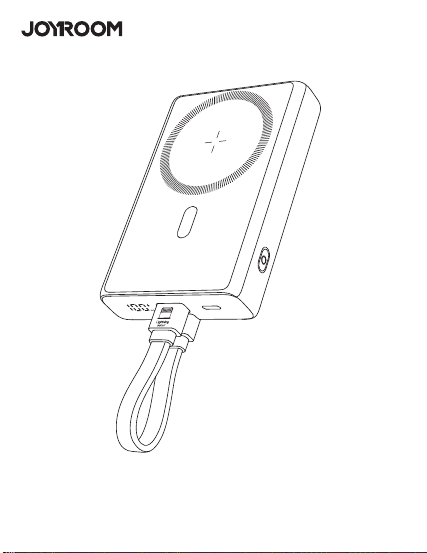
�. 开关机:
➀ 按键一次,即可开机;接入设备,自动开机;
➁ 双击按键,即可关机;若��秒无设备接入,自动关机;
使用说明
使用环境温度:�°C至��°C非热带地区
储存环境:�°C至��°C
使用环境包装清单
温馨提示
1. Power on/off:
① Press the button once to turn it on. Connect device to have it automatically
turn on.
② Double-click the button to turn it off. If no device is connected in 30s, the
product will automatically turn off.
Instructions
Packing list
�.
�.
�.
�.
�.
�.
�.
�.
�.
��.
��.
��.
��.
第一次使用本产品请将电量完全充满。
本产品充电完成后,请及时拔掉充电线,避免损耗。
为保证产品的正常使用,请务必使用正确的线材和配件。
严禁摔打、撞击、拆卸或尝试自行修复此产品。
请勿将移动电源放置在潮湿处及用水浸泡此产品。
严禁将此产品放置在热源易燃处。
请勿将此产品遗放在汽车中,阳光照射的高温会导致此产品损坏。
请将移动电源放置在儿童无法拿取的地方,避免儿童不当使用。
勿将任何异物摄入产品USB/Type-c输入输出端口孔位,以免造成短路或
损坏
为避免长时间搁置损耗使用寿命,请至少每四个月对移动电源充一次完
整的电。
如出现电池膨胀,漏液,变形等异常时,请停止使用。
请勿自行拆机,不正确操作会导致本产品寿命减低或损坏,因此带来的影
响不属于保修责任或厂家责任,敬请谅解。
避免使用超出本产品输出电流的充电器或负载。
�.����.������.�������
使用说明书
JR-PBM�� ��W磁吸支架无线充自带Type-C to Lightning线移动电源
User Manual
JR-PBM01 Portable Wireless Charger
本产品是一款能为手机,平板,电子书阅读器等产品提供有线充电或无线充电的移
动电源。PD��W快充,支持PD�.�、QC�.�、AFC等快充等协议;强力磁吸,一贴即
充;自带Type-C to Lightning线,支持iP/安卓设备充电,以及自充电;自带支架,
充电同时可轻松观影追剧;内置智能数显,剩余电量和无线充电状态清晰可见;本
产品内置智能芯片,具有过充、过放、过压、温度保护等多种安全保护电路。
This power bank can provide wired charging or wireless charging function for
mobile phones,tablets,book readers and other products.PD20W fast
charging,supports multiple fast charging protocols such as PD3.0, QC3.0,
AFC;Snap and charge ,the strong magnetic force can achieve wireless
charging function;It is designed with Type-C to Lightning cable and
Detachable cable supports charging iP/Android devices&recharging itself;The
built-in kickstand makes it easier for you to watch movies while charging your
phone;Its built-in digital display shows battery level & wireless charging status
in real time. The product has a built-in smart chip with a variety of safety
protections such as over-charge, over-discharge, over-voltage and
over-temperature protection, etc.
① and ② are both two-way fast charging ports. It is recommended to use the
special built-in cable of JOYROOM. The built-in cable lightning head ① is
inserted into the ① interface position of the power bank, and Type-C head ②
is inserted into the ② interface position of the power bank.
Magnetic Wireless
charging area
Lightning2 IN
Power button
Kickstand
Type-C to Lightning
charging cable
产品介绍
Product introduction
规格参数
JR-PBM��
聚合物锂电池
�����mAh �.��V(��.�Wh)
����mAh (�V �.�A)
≥��%
�V �A,�V �A,��V �.�A
�V �.�A,�V �A,��V �.�A
�V �A,�V �A,��V �.�A
�V �.�A,�V �.��A,��V �.��A
�V �.�A,�V �.��A,��V �.��A
�W,�.�W,��W,��W(Max)
�V �.�A(Max)
���*��*��.�mm
PC+ABS防火料
���g
型号
电芯类型
电池容量
额定容量
转换效率
Type-C输入
Lightning�输入
Lightning�输入
Type-C输出
Lightning�输出
无线充输出
多口输出
产品尺寸
材质
净重
Specification
JR-PBM01
Lithium Polymer Battery
10000mAh 3.85V(38.5Wh)
5800mAh (5V 2.4A)
≥75%
5V 3A,9V 2A,12V 1.5A
5V 2.4A,9V 2A,12V 1.5A
5V 2A,9V 2A,12V 1.5A
5V 2.4A,9V 2.22A,12V 1.67A
5V 2.4A,9V 2.22A,12V 1.67A
5W, 7.5W, 10W, 15W(Max)
5V 2.4A (Max)
103*68*20.5mm
PC+ABS fireproof material
216g
Model
Battery
Capacity
Rated Capacity
Conversion Efficiency
Type-C Input
Lightning1 Input
Lightning2 Input
Type-C Output
Lightning1 Output
Wireless Output
Multi-port Output
Size
Material
Net weight
移动电源X� 说明书&保修卡X�
Power bank x1 User Manual/ Warranty Card x1
② Type-C IN/OUT
Digital display
① Lightning1 IN/OUT
产品保修卡
生产批号:
姓名: 电话:
地址:
型号:
购买日期:
用户:
购买商号:
铅 汞
镉 六价铬
多溴联苯 多溴二苯醚
部件名称
O:表示该有害物质在该部件所有均质材料中的含量均在GB/T 26572 标准
规定的限量要求以下。
X:表示该有害物质至少在该部件的某一均质材料中的含量超出GB/T
26572规定的限量要求,且目前业界没有成熟的替代方案,符合欧盟RoHS
指令环保要求。
PCB板
电芯
(Pb) (Hg) (Cd) (Cr(VI)) (PBB) (PBDE)
产品中有害物质的名称及含量
有毒有害物质或元素
本表格依据SJ/T11364的规定编制
售后服务条例:
1、咨询服务:用户在使用产品前,请仔细阅读本产品的使用说明书。
2、包换服务:包换期内(自购机之日起七日内),正常使用出现了非人为故障,请保持产品,配件和
包装的完整(若外观不损坏、做保修处理)经检查确认故障后,可选择换货或维修,用户可到当地
授权经销商处联系并处理。
3、保修服务:保修期内,正常使用出现的非人为故障,均可享受免费保修服务(主机一年内免费
保 修 ,若 人 为 损 坏 ,做 收 费 维 修 处 理 ) 。
4、收费维修服务:产品自购机之日起一年到三年内,出现故障可收费维修,用户需支付维修所产
生的元器件费、运输费及人工费。
5、以下情况不在三包范围内,本公司提供有偿服务
① 超过三包期限。
② 涂改三包凭证,或序列号与产品本身不符。
③ 意外因素或人为导致的产品损坏(如:未按便用说明书操作、维护或保管、安装错误造成的故
障 ,接 入 不 合 适 的 电 源 、进 水 、掉 坏 等 ) 。
④ 无效三包凭证和有效发票(能证明产品确属服务期内者除外)。
⑤ 因不可抗拒如地震、火灾、水灾、雷击等导致的产品故障或损坏
⑥ 未经本公司许可,自拆卸、修理或改装。
请遵守安全说明,否则会导致
起火、触电、损坏或其他伤害
QC
PASSED
警告
�. 查看电量时:
按键一次,可查看电源剩余电量。
�. 本产品充电:
使用自带的Type-C to Lightning线,插入本移动电源对应端口,电量显示数字
开始跳动,表示正在为本产品充电,充满电后数字停止跳动,持续显示
“���%”。
�. 有线充输出说明:
使用充电线连接本电源对应输出端口,电源将自动开启输出,个别手机因兼容
性问题,需要按键开启电源输出功能。
�. 无线充输出说明:
本产品具有自动唤醒无线充电功能,放上手机自动开启充电,个别手机因兼容
性问题,需要按键开启电源输出功能;无线充电手机需放置在本产品无线充电
区域(如图所示)进行无线充。本无线充电距离为�mm内,如进行无线充电
时距离超过�mm则无法进行无线充电,请调整手机无线充电距离在无线充电
范围内。
2. Viewing the battery power:
Press the button once to power it on, you can check the remaining power
capacity.
3. Recharge the power bank:
Use the built-in Type-C to Lightning cable to recharge the power bank; or
connect an external Type-C cable to the corresponding port of the power bank
to recharge it. When the digital display shows current power, which changes
with the recharging process, it means the power bank is being recharged.
When it is fully recharged, the display will stop at "100%".
4. Wired charging operation:
Connect the charging cable to the corresponding output port of the power
bank,and it will start to output automatically.Due to compatibility
issues,certain smart phones need to press power button to turn on the power
output function.
5. Wireless charging operation:
The power bank comes with an auto-wake function for wireless charging.When
it detects any phone placed on,it will automatically start charging.Due to
compatibility issues,certain smart phones need to press power button to turn
on the power output function.The wireless charging mobile phone should be
placed in the wireless charging area of the product(as shown in the picture)
for wireless charging.The wireless charging distance is within 5mm.If the
distance exceeds 5mm,the wireless charging can not function.Please adjust
the wireless charging distance within the wireless charging range.
Battery level
Fast charging icon
Wireless charging icon
Using environment
Using ambient temperature: 0℃ to 35℃, non-tropical area
Storage ambient temperature: 0℃ to 40℃
Please fully charge the power bank when using it for the first time.
Please pull out the charging cable in time after fully charged to avoid
energy loss.
Please use suitable cables and accessories to make the power bank
function normally.
Do not drop, impact, disassemble the product or try to repair it by
yourself.
Do not store the product in a wet place or immerse it in water.
Do not expose or store the product near a heat source or flammable
materials.
Do not leave this product in the car. The high temperature of sunlight
will damage the product.
Please keep it out of the reach of children to avoid improper use.
Do not put any foreign object into the USB/Type-C input/output ports of
the product to avoid short circuit or damage.
Please charge the power bank fully at least once every four months to
prolong its service life.
Please stop using the product in case of swelling, leakage, deformation
of battery and other abnormalities.
Do not disassemble the product by yourself. Any shortened service life or
damage caused by improper use or storage of the product by customer
will not be borne by our company.
Avoid using chargers with excessive output current or load.
1.
2.
3.
4.
5.
6.
7.
8.
9.
10.
11.
12.
13.
Warm reminders
Warranty Card
No.:
Date of purchase:
Customer:
Dealer:
Batch number:
Name: Telephone:
Address:
After-sale service regulations:
1. Consulting service: Please read the User Manual carefully before using the
product and keep it for future use.
2. Replacement service: The company undertakes that if there is product
failure within 7 days from the date of purchase that is not caused by human
error, the customer can choose between replacement and repair freely (if
the appearance is in good condition, it will be repaired) provided that the
product, its accessories and packaging are complete and in good condition.
The customer can ask the local authorized dealer to deal with it.
3. Warranty service: In case of product failure within the warranty period
that is not caused by human error, free warranty service will be provided
within one year. In case of product failure caused by human error, we will
charge for relevant repairing.
4. Charged repairing service: In case of product failure within one to three
years from the date of purchase, charged repairing service will be provided.
Users need to pay for the components, transportation and labor costs.
5. Warranty exceptions (you need to pay for relevant service):
➀ Expired the warranty period;
➁ There’s alteration on the Warranty Card, or the serial number is
inconsistent with the product itself;
➂ Product damage caused by accidents or human error (e.g.: customer fails
to use, maintain and store the product according to the User Manual;
incorrect installation, improper power supply, water intrusion, etc.)
➃ Failure to provide Warranty Card and valid invoice (except that you can
prove that the product is within the warranty period).
➄ Product damage caused by force majeure, such as earthquake, fire
disaster, flood, thunderstroke, etc.
➅ Product damage caused by disassembling, repairing or refitting the
product without authorization.
Please follow the above safety
instructions, otherwise it will cause fire,
electric shock, damage or other injuries
Warning
�����mAh
磁吸无线充区域
数显屏
➁ Type-C 输入/输出
开关按键
支架
Type-C to Lightning 充电线
➀➁均是双向快充接口,建议使用机乐堂专用自带线,自带线lightning头
➀插入设备的➀接口位置,Type-C头➁插入设备的➁接口位置
➀ Lightning�
输入/输出
➀
➁
Lightning�输入
➀
➁
电量
快充图标
无线充充电图标
QC
PASSED
3.1101.619780.0000000
原材料 机乐堂 JR-PBM01 20W磁吸支架无线充自带线移动电源10000mAh 说明书 V1.0
尺寸:70x90mm
材质:128g铜版纸+正反单色印刷+风琴折
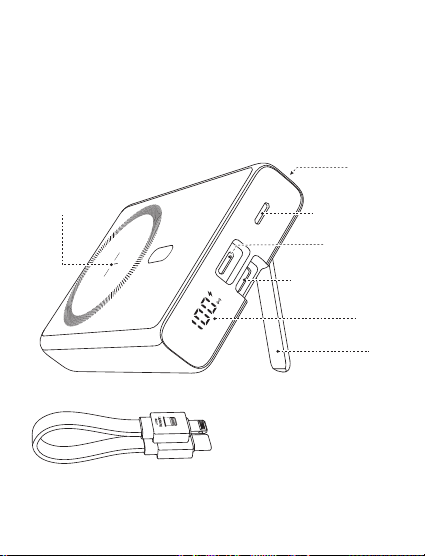
�. 开关机:
➀ 按键一次,即可开机;接入设备,自动开机;
➁ 双击按键,即可关机;若��秒无设备接入,自动关机;
使用说明
使用环境温度:�°C至��°C非热带地区
储存环境:�°C至��°C
使用环境包装清单
温馨提示
1. Power on/off:
① Press the button once to turn it on. Connect device to have it automatically
turn on.
② Double-click the button to turn it off. If no device is connected in 30s, the
product will automatically turn off.
Instructions
Packing list
�.
�.
�.
�.
�.
�.
�.
�.
�.
��.
��.
��.
��.
第一次使用本产品请将电量完全充满。
本产品充电完成后,请及时拔掉充电线,避免损耗。
为保证产品的正常使用,请务必使用正确的线材和配件。
严禁摔打、撞击、拆卸或尝试自行修复此产品。
请勿将移动电源放置在潮湿处及用水浸泡此产品。
严禁将此产品放置在热源易燃处。
请勿将此产品遗放在汽车中,阳光照射的高温会导致此产品损坏。
请将移动电源放置在儿童无法拿取的地方,避免儿童不当使用。
勿将任何异物摄入产品USB/Type-c输入输出端口孔位,以免造成短路或
损坏
为避免长时间搁置损耗使用寿命,请至少每四个月对移动电源充一次完
整的电。
如出现电池膨胀,漏液,变形等异常时,请停止使用。
请勿自行拆机,不正确操作会导致本产品寿命减低或损坏,因此带来的影
响不属于保修责任或厂家责任,敬请谅解。
避免使用超出本产品输出电流的充电器或负载。
�.����.������.�������
使用说明书
JR-PBM�� ��W磁吸支架无线充自带Type-C to Lightning线移动电源
User Manual
JR-PBM01 Portable Wireless Charger
本产品是一款能为手机,平板,电子书阅读器等产品提供有线充电或无线充电的移
动电源。PD��W快充,支持PD�.�、QC�.�、AFC等快充等协议;强力磁吸,一贴即
充;自带Type-C to Lightning线,支持iP/安卓设备充电,以及自充电;自带支架,
充电同时可轻松观影追剧;内置智能数显,剩余电量和无线充电状态清晰可见;本
产品内置智能芯片,具有过充、过放、过压、温度保护等多种安全保护电路。
This power bank can provide wired charging or wireless charging function for
mobile phones,tablets,book readers and other products.PD20W fast
charging,supports multiple fast charging protocols such as PD3.0, QC3.0,
AFC;Snap and charge ,the strong magnetic force can achieve wireless
charging function;It is designed with Type-C to Lightning cable and
Detachable cable supports charging iP/Android devices&recharging itself;The
built-in kickstand makes it easier for you to watch movies while charging your
phone;Its built-in digital display shows battery level & wireless charging status
in real time. The product has a built-in smart chip with a variety of safety
protections such as over-charge, over-discharge, over-voltage and
over-temperature protection, etc.
① and ② are both two-way fast charging ports. It is recommended to use the
special built-in cable of JOYROOM. The built-in cable lightning head ① is
inserted into the ① interface position of the power bank, and Type-C head ②
is inserted into the ② interface position of the power bank.
Magnetic Wireless
charging area
Lightning2 IN
Power button
Kickstand
Type-C to Lightning
charging cable
产品介绍
Product introduction
规格参数
JR-PBM��
聚合物锂电池
�����mAh �.��V(��.�Wh)
����mAh (�V �.�A)
≥��%
�V �A,�V �A,��V �.�A
�V �.�A,�V �A,��V �.�A
�V �A,�V �A,��V �.�A
�V �.�A,�V �.��A,��V �.��A
�V �.�A,�V �.��A,��V �.��A
�W,�.�W,��W,��W(Max)
�V �.�A(Max)
���*��*��.�mm
PC+ABS防火料
���g
型号
电芯类型
电池容量
额定容量
转换效率
Type-C输入
Lightning�输入
Lightning�输入
Type-C输出
Lightning�输出
无线充输出
多口输出
产品尺寸
材质
净重
Specification
JR-PBM01
Lithium Polymer Battery
10000mAh 3.85V(38.5Wh)
5800mAh (5V 2.4A)
≥75%
5V 3A,9V 2A,12V 1.5A
5V 2.4A,9V 2A,12V 1.5A
5V 2A,9V 2A,12V 1.5A
5V 2.4A,9V 2.22A,12V 1.67A
5V 2.4A,9V 2.22A,12V 1.67A
5W, 7.5W, 10W, 15W(Max)
5V 2.4A (Max)
103*68*20.5mm
PC+ABS fireproof material
216g
Model
Battery
Capacity
Rated Capacity
Conversion Efficiency
Type-C Input
Lightning1 Input
Lightning2 Input
Type-C Output
Lightning1 Output
Wireless Output
Multi-port Output
Size
Material
Net weight
移动电源X� 说明书&保修卡X�
Power bank x1 User Manual/ Warranty Card x1
② Type-C IN/OUT
Digital display
① Lightning1 IN/OUT
产品保修卡
生产批号:
姓名: 电话:
地址:
型号:
购买日期:
用户:
购买商号:
铅 汞
镉 六价铬
多溴联苯 多溴二苯醚
部件名称
O:表示该有害物质在该部件所有均质材料中的含量均在GB/T 26572 标准
规定的限量要求以下。
X:表示该有害物质至少在该部件的某一均质材料中的含量超出GB/T
26572规定的限量要求,且目前业界没有成熟的替代方案,符合欧盟RoHS
指令环保要求。
PCB板
电芯
(Pb) (Hg) (Cd) (Cr(VI)) (PBB) (PBDE)
产品中有害物质的名称及含量
有毒有害物质或元素
本表格依据SJ/T11364的规定编制
售后服务条例:
1、咨询服务:用户在使用产品前,请仔细阅读本产品的使用说明书。
2、包换服务:包换期内(自购机之日起七日内),正常使用出现了非人为故障,请保持产品,配件和
包装的完整(若外观不损坏、做保修处理)经检查确认故障后,可选择换货或维修,用户可到当地
授权经销商处联系并处理。
3、保修服务:保修期内,正常使用出现的非人为故障,均可享受免费保修服务(主机一年内免费
保 修 ,若 人 为 损 坏 ,做 收 费 维 修 处 理 ) 。
4、收费维修服务:产品自购机之日起一年到三年内,出现故障可收费维修,用户需支付维修所产
生的元器件费、运输费及人工费。
5、以下情况不在三包范围内,本公司提供有偿服务
① 超过三包期限。
② 涂改三包凭证,或序列号与产品本身不符。
③ 意外因素或人为导致的产品损坏(如:未按便用说明书操作、维护或保管、安装错误造成的故
障 ,接 入 不 合 适 的 电 源 、进 水 、掉 坏 等 ) 。
④ 无效三包凭证和有效发票(能证明产品确属服务期内者除外)。
⑤ 因不可抗拒如地震、火灾、水灾、雷击等导致的产品故障或损坏
⑥ 未经本公司许可,自拆卸、修理或改装。
请遵守安全说明,否则会导致
起火、触电、损坏或其他伤害
QC
PASSED
警告
�. 查看电量时:
按键一次,可查看电源剩余电量。
�. 本产品充电:
使用自带的Type-C to Lightning线,插入本移动电源对应端口,电量显示数字
开始跳动,表示正在为本产品充电,充满电后数字停止跳动,持续显示
“���%”。
�. 有线充输出说明:
使用充电线连接本电源对应输出端口,电源将自动开启输出,个别手机因兼容
性问题,需要按键开启电源输出功能。
�. 无线充输出说明:
本产品具有自动唤醒无线充电功能,放上手机自动开启充电,个别手机因兼容
性问题,需要按键开启电源输出功能;无线充电手机需放置在本产品无线充电
区域(如图所示)进行无线充。本无线充电距离为�mm内,如进行无线充电
时距离超过�mm则无法进行无线充电,请调整手机无线充电距离在无线充电
范围内。
2. Viewing the battery power:
Press the button once to power it on, you can check the remaining power
capacity.
3. Recharge the power bank:
Use the built-in Type-C to Lightning cable to recharge the power bank; or
connect an external Type-C cable to the corresponding port of the power bank
to recharge it. When the digital display shows current power, which changes
with the recharging process, it means the power bank is being recharged.
When it is fully recharged, the display will stop at "100%".
4. Wired charging operation:
Connect the charging cable to the corresponding output port of the power
bank,and it will start to output automatically.Due to compatibility
issues,certain smart phones need to press power button to turn on the power
output function.
5. Wireless charging operation:
The power bank comes with an auto-wake function for wireless charging.When
it detects any phone placed on,it will automatically start charging.Due to
compatibility issues,certain smart phones need to press power button to turn
on the power output function.The wireless charging mobile phone should be
placed in the wireless charging area of the product(as shown in the picture)
for wireless charging.The wireless charging distance is within 5mm.If the
distance exceeds 5mm,the wireless charging can not function.Please adjust
the wireless charging distance within the wireless charging range.
Battery level
Fast charging icon
Wireless charging icon
Using environment
Using ambient temperature: 0℃ to 35℃, non-tropical area
Storage ambient temperature: 0℃ to 40℃
Please fully charge the power bank when using it for the first time.
Please pull out the charging cable in time after fully charged to avoid
energy loss.
Please use suitable cables and accessories to make the power bank
function normally.
Do not drop, impact, disassemble the product or try to repair it by
yourself.
Do not store the product in a wet place or immerse it in water.
Do not expose or store the product near a heat source or flammable
materials.
Do not leave this product in the car. The high temperature of sunlight
will damage the product.
Please keep it out of the reach of children to avoid improper use.
Do not put any foreign object into the USB/Type-C input/output ports of
the product to avoid short circuit or damage.
Please charge the power bank fully at least once every four months to
prolong its service life.
Please stop using the product in case of swelling, leakage, deformation
of battery and other abnormalities.
Do not disassemble the product by yourself. Any shortened service life or
damage caused by improper use or storage of the product by customer
will not be borne by our company.
Avoid using chargers with excessive output current or load.
1.
2.
3.
4.
5.
6.
7.
8.
9.
10.
11.
12.
13.
Warm reminders
Warranty Card
No.:
Date of purchase:
Customer:
Dealer:
Batch number:
Name: Telephone:
Address:
After-sale service regulations:
1. Consulting service: Please read the User Manual carefully before using the
product and keep it for future use.
2. Replacement service: The company undertakes that if there is product
failure within 7 days from the date of purchase that is not caused by human
error, the customer can choose between replacement and repair freely (if
the appearance is in good condition, it will be repaired) provided that the
product, its accessories and packaging are complete and in good condition.
The customer can ask the local authorized dealer to deal with it.
3. Warranty service: In case of product failure within the warranty period
that is not caused by human error, free warranty service will be provided
within one year. In case of product failure caused by human error, we will
charge for relevant repairing.
4. Charged repairing service: In case of product failure within one to three
years from the date of purchase, charged repairing service will be provided.
Users need to pay for the components, transportation and labor costs.
5. Warranty exceptions (you need to pay for relevant service):
➀ Expired the warranty period;
➁ There’s alteration on the Warranty Card, or the serial number is
inconsistent with the product itself;
➂ Product damage caused by accidents or human error (e.g.: customer fails
to use, maintain and store the product according to the User Manual;
incorrect installation, improper power supply, water intrusion, etc.)
➃ Failure to provide Warranty Card and valid invoice (except that you can
prove that the product is within the warranty period).
➄ Product damage caused by force majeure, such as earthquake, fire
disaster, flood, thunderstroke, etc.
➅ Product damage caused by disassembling, repairing or refitting the
product without authorization.
Please follow the above safety
instructions, otherwise it will cause fire,
electric shock, damage or other injuries
Warning
�����mAh
磁吸无线充区域
数显屏
➁ Type-C 输入/输出
开关按键
支架
Type-C to Lightning 充电线
➀➁均是双向快充接口,建议使用机乐堂专用自带线,自带线lightning头
➀插入设备的➀接口位置,Type-C头➁插入设备的➁接口位置
➀ Lightning�
输入/输出
➀
➁
Lightning�输入
➀
➁
电量
快充图标
无线充充电图标
QC
PASSED
3.1101.619780.0000000
原材料 机乐堂 JR-PBM01 20W磁吸支架无线充自带线移动电源10000mAh 说明书 V1.0
尺寸:70x90mm
材质:128g铜版纸+正反单色印刷+风琴折
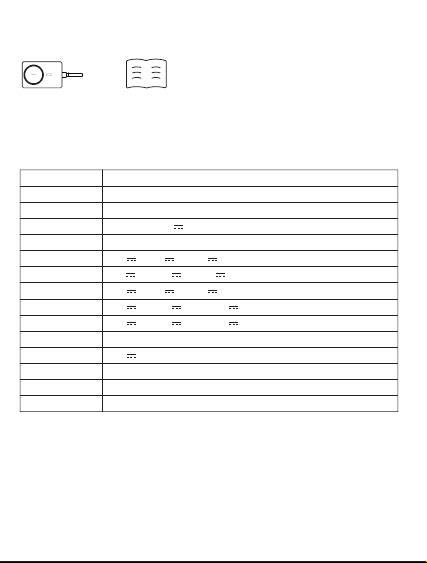
�. 开关机:
➀ 按键一次,即可开机;接入设备,自动开机;
➁ 双击按键,即可关机;若��秒无设备接入,自动关机;
使用说明
使用环境温度:�°C至��°C非热带地区
储存环境:�°C至��°C
使用环境包装清单
温馨提示
1. Power on/off:
① Press the button once to turn it on. Connect device to have it automatically
turn on.
② Double-click the button to turn it off. If no device is connected in 30s, the
product will automatically turn off.
Instructions
Packing list
�.
�.
�.
�.
�.
�.
�.
�.
�.
��.
��.
��.
��.
第一次使用本产品请将电量完全充满。
本产品充电完成后,请及时拔掉充电线,避免损耗。
为保证产品的正常使用,请务必使用正确的线材和配件。
严禁摔打、撞击、拆卸或尝试自行修复此产品。
请勿将移动电源放置在潮湿处及用水浸泡此产品。
严禁将此产品放置在热源易燃处。
请勿将此产品遗放在汽车中,阳光照射的高温会导致此产品损坏。
请将移动电源放置在儿童无法拿取的地方,避免儿童不当使用。
勿将任何异物摄入产品USB/Type-c输入输出端口孔位,以免造成短路或
损坏
为避免长时间搁置损耗使用寿命,请至少每四个月对移动电源充一次完
整的电。
如出现电池膨胀,漏液,变形等异常时,请停止使用。
请勿自行拆机,不正确操作会导致本产品寿命减低或损坏,因此带来的影
响不属于保修责任或厂家责任,敬请谅解。
避免使用超出本产品输出电流的充电器或负载。
�.����.������.�������
使用说明书
JR-PBM�� ��W磁吸支架无线充自带Type-C to Lightning线移动电源
User Manual
JR-PBM01 Portable Wireless Charger
本产品是一款能为手机,平板,电子书阅读器等产品提供有线充电或无线充电的移
动电源。PD��W快充,支持PD�.�、QC�.�、AFC等快充等协议;强力磁吸,一贴即
充;自带Type-C to Lightning线,支持iP/安卓设备充电,以及自充电;自带支架,
充电同时可轻松观影追剧;内置智能数显,剩余电量和无线充电状态清晰可见;本
产品内置智能芯片,具有过充、过放、过压、温度保护等多种安全保护电路。
This power bank can provide wired charging or wireless charging function for
mobile phones,tablets,book readers and other products.PD20W fast
charging,supports multiple fast charging protocols such as PD3.0, QC3.0,
AFC;Snap and charge ,the strong magnetic force can achieve wireless
charging function;It is designed with Type-C to Lightning cable and
Detachable cable supports charging iP/Android devices&recharging itself;The
built-in kickstand makes it easier for you to watch movies while charging your
phone;Its built-in digital display shows battery level & wireless charging status
in real time. The product has a built-in smart chip with a variety of safety
protections such as over-charge, over-discharge, over-voltage and
over-temperature protection, etc.
① and ② are both two-way fast charging ports. It is recommended to use the
special built-in cable of JOYROOM. The built-in cable lightning head ① is
inserted into the ① interface position of the power bank, and Type-C head ②
is inserted into the ② interface position of the power bank.
Magnetic Wireless
charging area
Lightning2 IN
Power button
Kickstand
Type-C to Lightning
charging cable
产品介绍
Product introduction
规格参数
JR-PBM��
聚合物锂电池
�����mAh �.��V(��.�Wh)
����mAh (�V �.�A)
≥��%
�V �A,�V �A,��V �.�A
�V �.�A,�V �A,��V �.�A
�V �A,�V �A,��V �.�A
�V �.�A,�V �.��A,��V �.��A
�V �.�A,�V �.��A,��V �.��A
�W,�.�W,��W,��W(Max)
�V �.�A(Max)
���*��*��.�mm
PC+ABS防火料
���g
型号
电芯类型
电池容量
额定容量
转换效率
Type-C输入
Lightning�输入
Lightning�输入
Type-C输出
Lightning�输出
无线充输出
多口输出
产品尺寸
材质
净重
Specification
JR-PBM01
Lithium Polymer Battery
10000mAh 3.85V(38.5Wh)
5800mAh (5V 2.4A)
≥75%
5V 3A,9V 2A,12V 1.5A
5V 2.4A,9V 2A,12V 1.5A
5V 2A,9V 2A,12V 1.5A
5V 2.4A,9V 2.22A,12V 1.67A
5V 2.4A,9V 2.22A,12V 1.67A
5W, 7.5W, 10W, 15W(Max)
5V 2.4A (Max)
103*68*20.5mm
PC+ABS fireproof material
216g
Model
Battery
Capacity
Rated Capacity
Conversion Efficiency
Type-C Input
Lightning1 Input
Lightning2 Input
Type-C Output
Lightning1 Output
Wireless Output
Multi-port Output
Size
Material
Net weight
移动电源X� 说明书&保修卡X�
Power bank x1 User Manual/ Warranty Card x1
② Type-C IN/OUT
Digital display
① Lightning1 IN/OUT
产品保修卡
生产批号:
姓名: 电话:
地址:
型号:
购买日期:
用户:
购买商号:
铅 汞
镉 六价铬
多溴联苯 多溴二苯醚
部件名称
O:表示该有害物质在该部件所有均质材料中的含量均在GB/T 26572 标准
规定的限量要求以下。
X:表示该有害物质至少在该部件的某一均质材料中的含量超出GB/T
26572规定的限量要求,且目前业界没有成熟的替代方案,符合欧盟RoHS
指令环保要求。
PCB板
电芯
(Pb) (Hg) (Cd) (Cr(VI)) (PBB) (PBDE)
产品中有害物质的名称及含量
有毒有害物质或元素
本表格依据SJ/T11364的规定编制
售后服务条例:
1、咨询服务:用户在使用产品前,请仔细阅读本产品的使用说明书。
2、包换服务:包换期内(自购机之日起七日内),正常使用出现了非人为故障,请保持产品,配件和
包装的完整(若外观不损坏、做保修处理)经检查确认故障后,可选择换货或维修,用户可到当地
授权经销商处联系并处理。
3、保修服务:保修期内,正常使用出现的非人为故障,均可享受免费保修服务(主机一年内免费
保 修 ,若 人 为 损 坏 ,做 收 费 维 修 处 理 ) 。
4、收费维修服务:产品自购机之日起一年到三年内,出现故障可收费维修,用户需支付维修所产
生的元器件费、运输费及人工费。
5、以下情况不在三包范围内,本公司提供有偿服务
① 超过三包期限。
② 涂改三包凭证,或序列号与产品本身不符。
③ 意外因素或人为导致的产品损坏(如:未按便用说明书操作、维护或保管、安装错误造成的故
障 ,接 入 不 合 适 的 电 源 、进 水 、掉 坏 等 ) 。
④ 无效三包凭证和有效发票(能证明产品确属服务期内者除外)。
⑤ 因不可抗拒如地震、火灾、水灾、雷击等导致的产品故障或损坏
⑥ 未经本公司许可,自拆卸、修理或改装。
请遵守安全说明,否则会导致
起火、触电、损坏或其他伤害
QC
PASSED
警告
�. 查看电量时:
按键一次,可查看电源剩余电量。
�. 本产品充电:
使用自带的Type-C to Lightning线,插入本移动电源对应端口,电量显示数字
开始跳动,表示正在为本产品充电,充满电后数字停止跳动,持续显示
“���%”。
�. 有线充输出说明:
使用充电线连接本电源对应输出端口,电源将自动开启输出,个别手机因兼容
性问题,需要按键开启电源输出功能。
�. 无线充输出说明:
本产品具有自动唤醒无线充电功能,放上手机自动开启充电,个别手机因兼容
性问题,需要按键开启电源输出功能;无线充电手机需放置在本产品无线充电
区域(如图所示)进行无线充。本无线充电距离为�mm内,如进行无线充电
时距离超过�mm则无法进行无线充电,请调整手机无线充电距离在无线充电
范围内。
2. Viewing the battery power:
Press the button once to power it on, you can check the remaining power
capacity.
3. Recharge the power bank:
Use the built-in Type-C to Lightning cable to recharge the power bank; or
connect an external Type-C cable to the corresponding port of the power bank
to recharge it. When the digital display shows current power, which changes
with the recharging process, it means the power bank is being recharged.
When it is fully recharged, the display will stop at "100%".
4. Wired charging operation:
Connect the charging cable to the corresponding output port of the power
bank,and it will start to output automatically.Due to compatibility
issues,certain smart phones need to press power button to turn on the power
output function.
5. Wireless charging operation:
The power bank comes with an auto-wake function for wireless charging.When
it detects any phone placed on,it will automatically start charging.Due to
compatibility issues,certain smart phones need to press power button to turn
on the power output function.The wireless charging mobile phone should be
placed in the wireless charging area of the product(as shown in the picture)
for wireless charging.The wireless charging distance is within 5mm.If the
distance exceeds 5mm,the wireless charging can not function.Please adjust
the wireless charging distance within the wireless charging range.
Battery level
Fast charging icon
Wireless charging icon
Using environment
Using ambient temperature: 0℃ to 35℃, non-tropical area
Storage ambient temperature: 0℃ to 40℃
Please fully charge the power bank when using it for the first time.
Please pull out the charging cable in time after fully charged to avoid
energy loss.
Please use suitable cables and accessories to make the power bank
function normally.
Do not drop, impact, disassemble the product or try to repair it by
yourself.
Do not store the product in a wet place or immerse it in water.
Do not expose or store the product near a heat source or flammable
materials.
Do not leave this product in the car. The high temperature of sunlight
will damage the product.
Please keep it out of the reach of children to avoid improper use.
Do not put any foreign object into the USB/Type-C input/output ports of
the product to avoid short circuit or damage.
Please charge the power bank fully at least once every four months to
prolong its service life.
Please stop using the product in case of swelling, leakage, deformation
of battery and other abnormalities.
Do not disassemble the product by yourself. Any shortened service life or
damage caused by improper use or storage of the product by customer
will not be borne by our company.
Avoid using chargers with excessive output current or load.
1.
2.
3.
4.
5.
6.
7.
8.
9.
10.
11.
12.
13.
Warm reminders
Warranty Card
No.:
Date of purchase:
Customer:
Dealer:
Batch number:
Name: Telephone:
Address:
After-sale service regulations:
1. Consulting service: Please read the User Manual carefully before using the
product and keep it for future use.
2. Replacement service: The company undertakes that if there is product
failure within 7 days from the date of purchase that is not caused by human
error, the customer can choose between replacement and repair freely (if
the appearance is in good condition, it will be repaired) provided that the
product, its accessories and packaging are complete and in good condition.
The customer can ask the local authorized dealer to deal with it.
3. Warranty service: In case of product failure within the warranty period
that is not caused by human error, free warranty service will be provided
within one year. In case of product failure caused by human error, we will
charge for relevant repairing.
4. Charged repairing service: In case of product failure within one to three
years from the date of purchase, charged repairing service will be provided.
Users need to pay for the components, transportation and labor costs.
5. Warranty exceptions (you need to pay for relevant service):
➀ Expired the warranty period;
➁ There’s alteration on the Warranty Card, or the serial number is
inconsistent with the product itself;
➂ Product damage caused by accidents or human error (e.g.: customer fails
to use, maintain and store the product according to the User Manual;
incorrect installation, improper power supply, water intrusion, etc.)
➃ Failure to provide Warranty Card and valid invoice (except that you can
prove that the product is within the warranty period).
➄ Product damage caused by force majeure, such as earthquake, fire
disaster, flood, thunderstroke, etc.
➅ Product damage caused by disassembling, repairing or refitting the
product without authorization.
Please follow the above safety
instructions, otherwise it will cause fire,
electric shock, damage or other injuries
Warning
�����mAh
磁吸无线充区域
数显屏
➁ Type-C 输入/输出
开关按键
支架
Type-C to Lightning 充电线
➀➁均是双向快充接口,建议使用机乐堂专用自带线,自带线lightning头
➀插入设备的➀接口位置,Type-C头➁插入设备的➁接口位置
➀ Lightning�
输入/输出
➀
➁
Lightning�输入
➀
➁
电量
快充图标
无线充充电图标
QC
PASSED
3.1101.619780.0000000
原材料 机乐堂 JR-PBM01 20W磁吸支架无线充自带线移动电源10000mAh 说明书 V1.0
尺寸:70x90mm
材质:128g铜版纸+正反单色印刷+风琴折
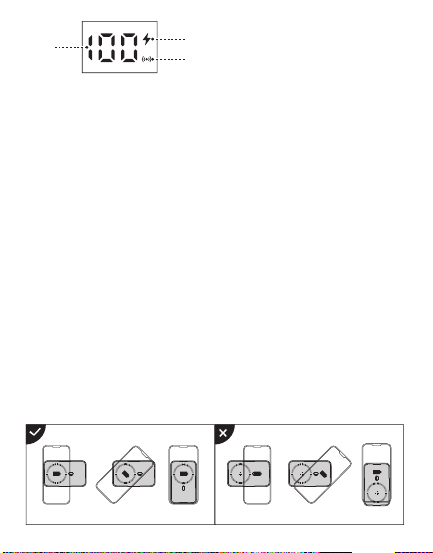
�. 开关机:
➀ 按键一次,即可开机;接入设备,自动开机;
➁ 双击按键,即可关机;若��秒无设备接入,自动关机;
使用说明
使用环境温度:�°C至��°C非热带地区
储存环境:�°C至��°C
使用环境包装清单
温馨提示
1. Power on/off:
① Press the button once to turn it on. Connect device to have it automatically
turn on.
② Double-click the button to turn it off. If no device is connected in 30s, the
product will automatically turn off.
Instructions
Packing list
�.
�.
�.
�.
�.
�.
�.
�.
�.
��.
��.
��.
��.
第一次使用本产品请将电量完全充满。
本产品充电完成后,请及时拔掉充电线,避免损耗。
为保证产品的正常使用,请务必使用正确的线材和配件。
严禁摔打、撞击、拆卸或尝试自行修复此产品。
请勿将移动电源放置在潮湿处及用水浸泡此产品。
严禁将此产品放置在热源易燃处。
请勿将此产品遗放在汽车中,阳光照射的高温会导致此产品损坏。
请将移动电源放置在儿童无法拿取的地方,避免儿童不当使用。
勿将任何异物摄入产品USB/Type-c输入输出端口孔位,以免造成短路或
损坏
为避免长时间搁置损耗使用寿命,请至少每四个月对移动电源充一次完
整的电。
如出现电池膨胀,漏液,变形等异常时,请停止使用。
请勿自行拆机,不正确操作会导致本产品寿命减低或损坏,因此带来的影
响不属于保修责任或厂家责任,敬请谅解。
避免使用超出本产品输出电流的充电器或负载。
�.����.������.�������
使用说明书
JR-PBM�� ��W磁吸支架无线充自带Type-C to Lightning线移动电源
User Manual
JR-PBM01 Portable Wireless Charger
本产品是一款能为手机,平板,电子书阅读器等产品提供有线充电或无线充电的移
动电源。PD��W快充,支持PD�.�、QC�.�、AFC等快充等协议;强力磁吸,一贴即
充;自带Type-C to Lightning线,支持iP/安卓设备充电,以及自充电;自带支架,
充电同时可轻松观影追剧;内置智能数显,剩余电量和无线充电状态清晰可见;本
产品内置智能芯片,具有过充、过放、过压、温度保护等多种安全保护电路。
This power bank can provide wired charging or wireless charging function for
mobile phones,tablets,book readers and other products.PD20W fast
charging,supports multiple fast charging protocols such as PD3.0, QC3.0,
AFC;Snap and charge ,the strong magnetic force can achieve wireless
charging function;It is designed with Type-C to Lightning cable and
Detachable cable supports charging iP/Android devices&recharging itself;The
built-in kickstand makes it easier for you to watch movies while charging your
phone;Its built-in digital display shows battery level & wireless charging status
in real time. The product has a built-in smart chip with a variety of safety
protections such as over-charge, over-discharge, over-voltage and
over-temperature protection, etc.
① and ② are both two-way fast charging ports. It is recommended to use the
special built-in cable of JOYROOM. The built-in cable lightning head ① is
inserted into the ① interface position of the power bank, and Type-C head ②
is inserted into the ② interface position of the power bank.
Magnetic Wireless
charging area
Lightning2 IN
Power button
Kickstand
Type-C to Lightning
charging cable
产品介绍
Product introduction
规格参数
JR-PBM��
聚合物锂电池
�����mAh �.��V(��.�Wh)
����mAh (�V �.�A)
≥��%
�V �A,�V �A,��V �.�A
�V �.�A,�V �A,��V �.�A
�V �A,�V �A,��V �.�A
�V �.�A,�V �.��A,��V �.��A
�V �.�A,�V �.��A,��V �.��A
�W,�.�W,��W,��W(Max)
�V �.�A(Max)
���*��*��.�mm
PC+ABS防火料
���g
型号
电芯类型
电池容量
额定容量
转换效率
Type-C输入
Lightning�输入
Lightning�输入
Type-C输出
Lightning�输出
无线充输出
多口输出
产品尺寸
材质
净重
Specification
JR-PBM01
Lithium Polymer Battery
10000mAh 3.85V(38.5Wh)
5800mAh (5V 2.4A)
≥75%
5V 3A,9V 2A,12V 1.5A
5V 2.4A,9V 2A,12V 1.5A
5V 2A,9V 2A,12V 1.5A
5V 2.4A,9V 2.22A,12V 1.67A
5V 2.4A,9V 2.22A,12V 1.67A
5W, 7.5W, 10W, 15W(Max)
5V 2.4A (Max)
103*68*20.5mm
PC+ABS fireproof material
216g
Model
Battery
Capacity
Rated Capacity
Conversion Efficiency
Type-C Input
Lightning1 Input
Lightning2 Input
Type-C Output
Lightning1 Output
Wireless Output
Multi-port Output
Size
Material
Net weight
移动电源X� 说明书&保修卡X�
Power bank x1 User Manual/ Warranty Card x1
② Type-C IN/OUT
Digital display
① Lightning1 IN/OUT
产品保修卡
生产批号:
姓名: 电话:
地址:
型号:
购买日期:
用户:
购买商号:
铅 汞
镉 六价铬
多溴联苯 多溴二苯醚
部件名称
O:表示该有害物质在该部件所有均质材料中的含量均在GB/T 26572 标准
规定的限量要求以下。
X:表示该有害物质至少在该部件的某一均质材料中的含量超出GB/T
26572规定的限量要求,且目前业界没有成熟的替代方案,符合欧盟RoHS
指令环保要求。
PCB板
电芯
(Pb) (Hg) (Cd) (Cr(VI)) (PBB) (PBDE)
产品中有害物质的名称及含量
有毒有害物质或元素
本表格依据SJ/T11364的规定编制
售后服务条例:
1、咨询服务:用户在使用产品前,请仔细阅读本产品的使用说明书。
2、包换服务:包换期内(自购机之日起七日内),正常使用出现了非人为故障,请保持产品,配件和
包装的完整(若外观不损坏、做保修处理)经检查确认故障后,可选择换货或维修,用户可到当地
授权经销商处联系并处理。
3、保修服务:保修期内,正常使用出现的非人为故障,均可享受免费保修服务(主机一年内免费
保 修 ,若 人 为 损 坏 ,做 收 费 维 修 处 理 ) 。
4、收费维修服务:产品自购机之日起一年到三年内,出现故障可收费维修,用户需支付维修所产
生的元器件费、运输费及人工费。
5、以下情况不在三包范围内,本公司提供有偿服务
① 超过三包期限。
② 涂改三包凭证,或序列号与产品本身不符。
③ 意外因素或人为导致的产品损坏(如:未按便用说明书操作、维护或保管、安装错误造成的故
障 ,接 入 不 合 适 的 电 源 、进 水 、掉 坏 等 ) 。
④ 无效三包凭证和有效发票(能证明产品确属服务期内者除外)。
⑤ 因不可抗拒如地震、火灾、水灾、雷击等导致的产品故障或损坏
⑥ 未经本公司许可,自拆卸、修理或改装。
请遵守安全说明,否则会导致
起火、触电、损坏或其他伤害
QC
PASSED
警告
�. 查看电量时:
按键一次,可查看电源剩余电量。
�. 本产品充电:
使用自带的Type-C to Lightning线,插入本移动电源对应端口,电量显示数字
开始跳动,表示正在为本产品充电,充满电后数字停止跳动,持续显示
“���%”。
�. 有线充输出说明:
使用充电线连接本电源对应输出端口,电源将自动开启输出,个别手机因兼容
性问题,需要按键开启电源输出功能。
�. 无线充输出说明:
本产品具有自动唤醒无线充电功能,放上手机自动开启充电,个别手机因兼容
性问题,需要按键开启电源输出功能;无线充电手机需放置在本产品无线充电
区域(如图所示)进行无线充。本无线充电距离为�mm内,如进行无线充电
时距离超过�mm则无法进行无线充电,请调整手机无线充电距离在无线充电
范围内。
2. Viewing the battery power:
Press the button once to power it on, you can check the remaining power
capacity.
3. Recharge the power bank:
Use the built-in Type-C to Lightning cable to recharge the power bank; or
connect an external Type-C cable to the corresponding port of the power bank
to recharge it. When the digital display shows current power, which changes
with the recharging process, it means the power bank is being recharged.
When it is fully recharged, the display will stop at "100%".
4. Wired charging operation:
Connect the charging cable to the corresponding output port of the power
bank,and it will start to output automatically.Due to compatibility
issues,certain smart phones need to press power button to turn on the power
output function.
5. Wireless charging operation:
The power bank comes with an auto-wake function for wireless charging.When
it detects any phone placed on,it will automatically start charging.Due to
compatibility issues,certain smart phones need to press power button to turn
on the power output function.The wireless charging mobile phone should be
placed in the wireless charging area of the product(as shown in the picture)
for wireless charging.The wireless charging distance is within 5mm.If the
distance exceeds 5mm,the wireless charging can not function.Please adjust
the wireless charging distance within the wireless charging range.
Battery level
Fast charging icon
Wireless charging icon
Using environment
Using ambient temperature: 0℃ to 35℃, non-tropical area
Storage ambient temperature: 0℃ to 40℃
Please fully charge the power bank when using it for the first time.
Please pull out the charging cable in time after fully charged to avoid
energy loss.
Please use suitable cables and accessories to make the power bank
function normally.
Do not drop, impact, disassemble the product or try to repair it by
yourself.
Do not store the product in a wet place or immerse it in water.
Do not expose or store the product near a heat source or flammable
materials.
Do not leave this product in the car. The high temperature of sunlight
will damage the product.
Please keep it out of the reach of children to avoid improper use.
Do not put any foreign object into the USB/Type-C input/output ports of
the product to avoid short circuit or damage.
Please charge the power bank fully at least once every four months to
prolong its service life.
Please stop using the product in case of swelling, leakage, deformation
of battery and other abnormalities.
Do not disassemble the product by yourself. Any shortened service life or
damage caused by improper use or storage of the product by customer
will not be borne by our company.
Avoid using chargers with excessive output current or load.
1.
2.
3.
4.
5.
6.
7.
8.
9.
10.
11.
12.
13.
Warm reminders
Warranty Card
No.:
Date of purchase:
Customer:
Dealer:
Batch number:
Name: Telephone:
Address:
After-sale service regulations:
1. Consulting service: Please read the User Manual carefully before using the
product and keep it for future use.
2. Replacement service: The company undertakes that if there is product
failure within 7 days from the date of purchase that is not caused by human
error, the customer can choose between replacement and repair freely (if
the appearance is in good condition, it will be repaired) provided that the
product, its accessories and packaging are complete and in good condition.
The customer can ask the local authorized dealer to deal with it.
3. Warranty service: In case of product failure within the warranty period
that is not caused by human error, free warranty service will be provided
within one year. In case of product failure caused by human error, we will
charge for relevant repairing.
4. Charged repairing service: In case of product failure within one to three
years from the date of purchase, charged repairing service will be provided.
Users need to pay for the components, transportation and labor costs.
5. Warranty exceptions (you need to pay for relevant service):
➀ Expired the warranty period;
➁ There’s alteration on the Warranty Card, or the serial number is
inconsistent with the product itself;
➂ Product damage caused by accidents or human error (e.g.: customer fails
to use, maintain and store the product according to the User Manual;
incorrect installation, improper power supply, water intrusion, etc.)
➃ Failure to provide Warranty Card and valid invoice (except that you can
prove that the product is within the warranty period).
➄ Product damage caused by force majeure, such as earthquake, fire
disaster, flood, thunderstroke, etc.
➅ Product damage caused by disassembling, repairing or refitting the
product without authorization.
Please follow the above safety
instructions, otherwise it will cause fire,
electric shock, damage or other injuries
Warning
�����mAh
磁吸无线充区域
数显屏
➁ Type-C 输入/输出
开关按键
支架
Type-C to Lightning 充电线
➀➁均是双向快充接口,建议使用机乐堂专用自带线,自带线lightning头
➀插入设备的➀接口位置,Type-C头➁插入设备的➁接口位置
➀ Lightning�
输入/输出
➀
➁
Lightning�输入
➀
➁
电量
快充图标
无线充充电图标
QC
PASSED
3.1101.619780.0000000
原材料 机乐堂 JR-PBM01 20W磁吸支架无线充自带线移动电源10000mAh 说明书 V1.0
尺寸:70x90mm
材质:128g铜版纸+正反单色印刷+风琴折

�. 开关机:
➀ 按键一次,即可开机;接入设备,自动开机;
➁ 双击按键,即可关机;若��秒无设备接入,自动关机;
使用说明
使用环境温度:�°C至��°C非热带地区
储存环境:�°C至��°C
使用环境包装清单
温馨提示
1. Power on/off:
① Press the button once to turn it on. Connect device to have it automatically
turn on.
② Double-click the button to turn it off. If no device is connected in 30s, the
product will automatically turn off.
Instructions
Packing list
�.
�.
�.
�.
�.
�.
�.
�.
�.
��.
��.
��.
��.
第一次使用本产品请将电量完全充满。
本产品充电完成后,请及时拔掉充电线,避免损耗。
为保证产品的正常使用,请务必使用正确的线材和配件。
严禁摔打、撞击、拆卸或尝试自行修复此产品。
请勿将移动电源放置在潮湿处及用水浸泡此产品。
严禁将此产品放置在热源易燃处。
请勿将此产品遗放在汽车中,阳光照射的高温会导致此产品损坏。
请将移动电源放置在儿童无法拿取的地方,避免儿童不当使用。
勿将任何异物摄入产品USB/Type-c输入输出端口孔位,以免造成短路或
损坏
为避免长时间搁置损耗使用寿命,请至少每四个月对移动电源充一次完
整的电。
如出现电池膨胀,漏液,变形等异常时,请停止使用。
请勿自行拆机,不正确操作会导致本产品寿命减低或损坏,因此带来的影
响不属于保修责任或厂家责任,敬请谅解。
避免使用超出本产品输出电流的充电器或负载。
�.����.������.�������
使用说明书
JR-PBM�� ��W磁吸支架无线充自带Type-C to Lightning线移动电源
User Manual
JR-PBM01 Portable Wireless Charger
本产品是一款能为手机,平板,电子书阅读器等产品提供有线充电或无线充电的移
动电源。PD��W快充,支持PD�.�、QC�.�、AFC等快充等协议;强力磁吸,一贴即
充;自带Type-C to Lightning线,支持iP/安卓设备充电,以及自充电;自带支架,
充电同时可轻松观影追剧;内置智能数显,剩余电量和无线充电状态清晰可见;本
产品内置智能芯片,具有过充、过放、过压、温度保护等多种安全保护电路。
This power bank can provide wired charging or wireless charging function for
mobile phones,tablets,book readers and other products.PD20W fast
charging,supports multiple fast charging protocols such as PD3.0, QC3.0,
AFC;Snap and charge ,the strong magnetic force can achieve wireless
charging function;It is designed with Type-C to Lightning cable and
Detachable cable supports charging iP/Android devices&recharging itself;The
built-in kickstand makes it easier for you to watch movies while charging your
phone;Its built-in digital display shows battery level & wireless charging status
in real time. The product has a built-in smart chip with a variety of safety
protections such as over-charge, over-discharge, over-voltage and
over-temperature protection, etc.
① and ② are both two-way fast charging ports. It is recommended to use the
special built-in cable of JOYROOM. The built-in cable lightning head ① is
inserted into the ① interface position of the power bank, and Type-C head ②
is inserted into the ② interface position of the power bank.
Magnetic Wireless
charging area
Lightning2 IN
Power button
Kickstand
Type-C to Lightning
charging cable
产品介绍
Product introduction
规格参数
JR-PBM��
聚合物锂电池
�����mAh �.��V(��.�Wh)
����mAh (�V �.�A)
≥��%
�V �A,�V �A,��V �.�A
�V �.�A,�V �A,��V �.�A
�V �A,�V �A,��V �.�A
�V �.�A,�V �.��A,��V �.��A
�V �.�A,�V �.��A,��V �.��A
�W,�.�W,��W,��W(Max)
�V �.�A(Max)
���*��*��.�mm
PC+ABS防火料
���g
型号
电芯类型
电池容量
额定容量
转换效率
Type-C输入
Lightning�输入
Lightning�输入
Type-C输出
Lightning�输出
无线充输出
多口输出
产品尺寸
材质
净重
Specification
JR-PBM01
Lithium Polymer Battery
10000mAh 3.85V(38.5Wh)
5800mAh (5V 2.4A)
≥75%
5V 3A,9V 2A,12V 1.5A
5V 2.4A,9V 2A,12V 1.5A
5V 2A,9V 2A,12V 1.5A
5V 2.4A,9V 2.22A,12V 1.67A
5V 2.4A,9V 2.22A,12V 1.67A
5W, 7.5W, 10W, 15W(Max)
5V 2.4A (Max)
103*68*20.5mm
PC+ABS fireproof material
216g
Model
Battery
Capacity
Rated Capacity
Conversion Efficiency
Type-C Input
Lightning1 Input
Lightning2 Input
Type-C Output
Lightning1 Output
Wireless Output
Multi-port Output
Size
Material
Net weight
移动电源X� 说明书&保修卡X�
Power bank x1 User Manual/ Warranty Card x1
② Type-C IN/OUT
Digital display
① Lightning1 IN/OUT
产品保修卡
生产批号:
姓名: 电话:
地址:
型号:
购买日期:
用户:
购买商号:
铅 汞
镉 六价铬
多溴联苯 多溴二苯醚
部件名称
O:表示该有害物质在该部件所有均质材料中的含量均在GB/T 26572 标准
规定的限量要求以下。
X:表示该有害物质至少在该部件的某一均质材料中的含量超出GB/T
26572规定的限量要求,且目前业界没有成熟的替代方案,符合欧盟RoHS
指令环保要求。
PCB板
电芯
(Pb) (Hg) (Cd) (Cr(VI)) (PBB) (PBDE)
产品中有害物质的名称及含量
有毒有害物质或元素
本表格依据SJ/T11364的规定编制
售后服务条例:
1、咨询服务:用户在使用产品前,请仔细阅读本产品的使用说明书。
2、包换服务:包换期内(自购机之日起七日内),正常使用出现了非人为故障,请保持产品,配件和
包装的完整(若外观不损坏、做保修处理)经检查确认故障后,可选择换货或维修,用户可到当地
授权经销商处联系并处理。
3、保修服务:保修期内,正常使用出现的非人为故障,均可享受免费保修服务(主机一年内免费
保 修 ,若 人 为 损 坏 ,做 收 费 维 修 处 理 ) 。
4、收费维修服务:产品自购机之日起一年到三年内,出现故障可收费维修,用户需支付维修所产
生的元器件费、运输费及人工费。
5、以下情况不在三包范围内,本公司提供有偿服务
① 超过三包期限。
② 涂改三包凭证,或序列号与产品本身不符。
③ 意外因素或人为导致的产品损坏(如:未按便用说明书操作、维护或保管、安装错误造成的故
障 ,接 入 不 合 适 的 电 源 、进 水 、掉 坏 等 ) 。
④ 无效三包凭证和有效发票(能证明产品确属服务期内者除外)。
⑤ 因不可抗拒如地震、火灾、水灾、雷击等导致的产品故障或损坏
⑥ 未经本公司许可,自拆卸、修理或改装。
请遵守安全说明,否则会导致
起火、触电、损坏或其他伤害
QC
PASSED
警告
�. 查看电量时:
按键一次,可查看电源剩余电量。
�. 本产品充电:
使用自带的Type-C to Lightning线,插入本移动电源对应端口,电量显示数字
开始跳动,表示正在为本产品充电,充满电后数字停止跳动,持续显示
“���%”。
�. 有线充输出说明:
使用充电线连接本电源对应输出端口,电源将自动开启输出,个别手机因兼容
性问题,需要按键开启电源输出功能。
�. 无线充输出说明:
本产品具有自动唤醒无线充电功能,放上手机自动开启充电,个别手机因兼容
性问题,需要按键开启电源输出功能;无线充电手机需放置在本产品无线充电
区域(如图所示)进行无线充。本无线充电距离为�mm内,如进行无线充电
时距离超过�mm则无法进行无线充电,请调整手机无线充电距离在无线充电
范围内。
2. Viewing the battery power:
Press the button once to power it on, you can check the remaining power
capacity.
3. Recharge the power bank:
Use the built-in Type-C to Lightning cable to recharge the power bank; or
connect an external Type-C cable to the corresponding port of the power bank
to recharge it. When the digital display shows current power, which changes
with the recharging process, it means the power bank is being recharged.
When it is fully recharged, the display will stop at "100%".
4. Wired charging operation:
Connect the charging cable to the corresponding output port of the power
bank,and it will start to output automatically.Due to compatibility
issues,certain smart phones need to press power button to turn on the power
output function.
5. Wireless charging operation:
The power bank comes with an auto-wake function for wireless charging.When
it detects any phone placed on,it will automatically start charging.Due to
compatibility issues,certain smart phones need to press power button to turn
on the power output function.The wireless charging mobile phone should be
placed in the wireless charging area of the product(as shown in the picture)
for wireless charging.The wireless charging distance is within 5mm.If the
distance exceeds 5mm,the wireless charging can not function.Please adjust
the wireless charging distance within the wireless charging range.
Battery level
Fast charging icon
Wireless charging icon
Using environment
Using ambient temperature: 0℃ to 35℃, non-tropical area
Storage ambient temperature: 0℃ to 40℃
Please fully charge the power bank when using it for the first time.
Please pull out the charging cable in time after fully charged to avoid
energy loss.
Please use suitable cables and accessories to make the power bank
function normally.
Do not drop, impact, disassemble the product or try to repair it by
yourself.
Do not store the product in a wet place or immerse it in water.
Do not expose or store the product near a heat source or flammable
materials.
Do not leave this product in the car. The high temperature of sunlight
will damage the product.
Please keep it out of the reach of children to avoid improper use.
Do not put any foreign object into the USB/Type-C input/output ports of
the product to avoid short circuit or damage.
Please charge the power bank fully at least once every four months to
prolong its service life.
Please stop using the product in case of swelling, leakage, deformation
of battery and other abnormalities.
Do not disassemble the product by yourself. Any shortened service life or
damage caused by improper use or storage of the product by customer
will not be borne by our company.
Avoid using chargers with excessive output current or load.
1.
2.
3.
4.
5.
6.
7.
8.
9.
10.
11.
12.
13.
Warm reminders
Warranty Card
No.:
Date of purchase:
Customer:
Dealer:
Batch number:
Name: Telephone:
Address:
After-sale service regulations:
1. Consulting service: Please read the User Manual carefully before using the
product and keep it for future use.
2. Replacement service: The company undertakes that if there is product
failure within 7 days from the date of purchase that is not caused by human
error, the customer can choose between replacement and repair freely (if
the appearance is in good condition, it will be repaired) provided that the
product, its accessories and packaging are complete and in good condition.
The customer can ask the local authorized dealer to deal with it.
3. Warranty service: In case of product failure within the warranty period
that is not caused by human error, free warranty service will be provided
within one year. In case of product failure caused by human error, we will
charge for relevant repairing.
4. Charged repairing service: In case of product failure within one to three
years from the date of purchase, charged repairing service will be provided.
Users need to pay for the components, transportation and labor costs.
5. Warranty exceptions (you need to pay for relevant service):
➀ Expired the warranty period;
➁ There’s alteration on the Warranty Card, or the serial number is
inconsistent with the product itself;
➂ Product damage caused by accidents or human error (e.g.: customer fails
to use, maintain and store the product according to the User Manual;
incorrect installation, improper power supply, water intrusion, etc.)
➃ Failure to provide Warranty Card and valid invoice (except that you can
prove that the product is within the warranty period).
➄ Product damage caused by force majeure, such as earthquake, fire
disaster, flood, thunderstroke, etc.
➅ Product damage caused by disassembling, repairing or refitting the
product without authorization.
Please follow the above safety
instructions, otherwise it will cause fire,
electric shock, damage or other injuries
Warning
�����mAh
磁吸无线充区域
数显屏
➁ Type-C 输入/输出
开关按键
支架
Type-C to Lightning 充电线
➀➁均是双向快充接口,建议使用机乐堂专用自带线,自带线lightning头
➀插入设备的➀接口位置,Type-C头➁插入设备的➁接口位置
➀ Lightning�
输入/输出
➀
➁
Lightning�输入
➀
➁
电量
快充图标
无线充充电图标
QC
PASSED
3.1101.619780.0000000
原材料 机乐堂 JR-PBM01 20W磁吸支架无线充自带线移动电源10000mAh 说明书 V1.0
尺寸:70x90mm
材质:128g铜版纸+正反单色印刷+风琴折
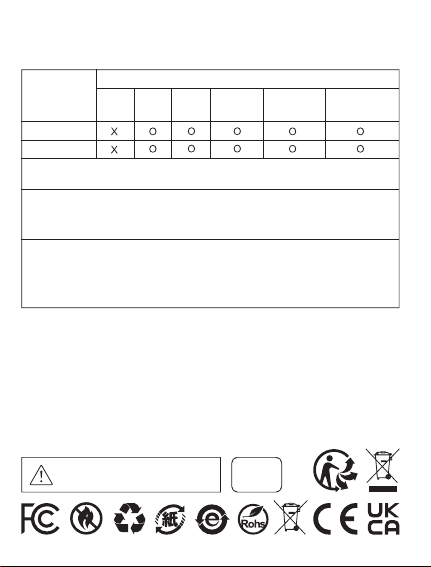
�. 开关机:
➀ 按键一次,即可开机;接入设备,自动开机;
➁ 双击按键,即可关机;若��秒无设备接入,自动关机;
使用说明
使用环境温度:�°C至��°C非热带地区
储存环境:�°C至��°C
使用环境包装清单
温馨提示
1. Power on/off:
① Press the button once to turn it on. Connect device to have it automatically
turn on.
② Double-click the button to turn it off. If no device is connected in 30s, the
product will automatically turn off.
Instructions
Packing list
�.
�.
�.
�.
�.
�.
�.
�.
�.
��.
��.
��.
��.
第一次使用本产品请将电量完全充满。
本产品充电完成后,请及时拔掉充电线,避免损耗。
为保证产品的正常使用,请务必使用正确的线材和配件。
严禁摔打、撞击、拆卸或尝试自行修复此产品。
请勿将移动电源放置在潮湿处及用水浸泡此产品。
严禁将此产品放置在热源易燃处。
请勿将此产品遗放在汽车中,阳光照射的高温会导致此产品损坏。
请将移动电源放置在儿童无法拿取的地方,避免儿童不当使用。
勿将任何异物摄入产品USB/Type-c输入输出端口孔位,以免造成短路或
损坏
为避免长时间搁置损耗使用寿命,请至少每四个月对移动电源充一次完
整的电。
如出现电池膨胀,漏液,变形等异常时,请停止使用。
请勿自行拆机,不正确操作会导致本产品寿命减低或损坏,因此带来的影
响不属于保修责任或厂家责任,敬请谅解。
避免使用超出本产品输出电流的充电器或负载。
�.����.������.�������
使用说明书
JR-PBM�� ��W磁吸支架无线充自带Type-C to Lightning线移动电源
User Manual
JR-PBM01 Portable Wireless Charger
本产品是一款能为手机,平板,电子书阅读器等产品提供有线充电或无线充电的移
动电源。PD��W快充,支持PD�.�、QC�.�、AFC等快充等协议;强力磁吸,一贴即
充;自带Type-C to Lightning线,支持iP/安卓设备充电,以及自充电;自带支架,
充电同时可轻松观影追剧;内置智能数显,剩余电量和无线充电状态清晰可见;本
产品内置智能芯片,具有过充、过放、过压、温度保护等多种安全保护电路。
This power bank can provide wired charging or wireless charging function for
mobile phones,tablets,book readers and other products.PD20W fast
charging,supports multiple fast charging protocols such as PD3.0, QC3.0,
AFC;Snap and charge ,the strong magnetic force can achieve wireless
charging function;It is designed with Type-C to Lightning cable and
Detachable cable supports charging iP/Android devices&recharging itself;The
built-in kickstand makes it easier for you to watch movies while charging your
phone;Its built-in digital display shows battery level & wireless charging status
in real time. The product has a built-in smart chip with a variety of safety
protections such as over-charge, over-discharge, over-voltage and
over-temperature protection, etc.
① and ② are both two-way fast charging ports. It is recommended to use the
special built-in cable of JOYROOM. The built-in cable lightning head ① is
inserted into the ① interface position of the power bank, and Type-C head ②
is inserted into the ② interface position of the power bank.
Magnetic Wireless
charging area
Lightning2 IN
Power button
Kickstand
Type-C to Lightning
charging cable
产品介绍
Product introduction
规格参数
JR-PBM��
聚合物锂电池
�����mAh �.��V(��.�Wh)
����mAh (�V �.�A)
≥��%
�V �A,�V �A,��V �.�A
�V �.�A,�V �A,��V �.�A
�V �A,�V �A,��V �.�A
�V �.�A,�V �.��A,��V �.��A
�V �.�A,�V �.��A,��V �.��A
�W,�.�W,��W,��W(Max)
�V �.�A(Max)
���*��*��.�mm
PC+ABS防火料
���g
型号
电芯类型
电池容量
额定容量
转换效率
Type-C输入
Lightning�输入
Lightning�输入
Type-C输出
Lightning�输出
无线充输出
多口输出
产品尺寸
材质
净重
Specification
JR-PBM01
Lithium Polymer Battery
10000mAh 3.85V(38.5Wh)
5800mAh (5V 2.4A)
≥75%
5V 3A,9V 2A,12V 1.5A
5V 2.4A,9V 2A,12V 1.5A
5V 2A,9V 2A,12V 1.5A
5V 2.4A,9V 2.22A,12V 1.67A
5V 2.4A,9V 2.22A,12V 1.67A
5W, 7.5W, 10W, 15W(Max)
5V 2.4A (Max)
103*68*20.5mm
PC+ABS fireproof material
216g
Model
Battery
Capacity
Rated Capacity
Conversion Efficiency
Type-C Input
Lightning1 Input
Lightning2 Input
Type-C Output
Lightning1 Output
Wireless Output
Multi-port Output
Size
Material
Net weight
移动电源X� 说明书&保修卡X�
Power bank x1 User Manual/ Warranty Card x1
② Type-C IN/OUT
Digital display
① Lightning1 IN/OUT
产品保修卡
生产批号:
姓名: 电话:
地址:
型号:
购买日期:
用户:
购买商号:
铅 汞
镉 六价铬
多溴联苯 多溴二苯醚
部件名称
O:表示该有害物质在该部件所有均质材料中的含量均在GB/T 26572 标准
规定的限量要求以下。
X:表示该有害物质至少在该部件的某一均质材料中的含量超出GB/T
26572规定的限量要求,且目前业界没有成熟的替代方案,符合欧盟RoHS
指令环保要求。
PCB板
电芯
(Pb) (Hg) (Cd) (Cr(VI)) (PBB) (PBDE)
产品中有害物质的名称及含量
有毒有害物质或元素
本表格依据SJ/T11364的规定编制
售后服务条例:
1、咨询服务:用户在使用产品前,请仔细阅读本产品的使用说明书。
2、包换服务:包换期内(自购机之日起七日内),正常使用出现了非人为故障,请保持产品,配件和
包装的完整(若外观不损坏、做保修处理)经检查确认故障后,可选择换货或维修,用户可到当地
授权经销商处联系并处理。
3、保修服务:保修期内,正常使用出现的非人为故障,均可享受免费保修服务(主机一年内免费
保 修 ,若 人 为 损 坏 ,做 收 费 维 修 处 理 ) 。
4、收费维修服务:产品自购机之日起一年到三年内,出现故障可收费维修,用户需支付维修所产
生的元器件费、运输费及人工费。
5、以下情况不在三包范围内,本公司提供有偿服务
① 超过三包期限。
② 涂改三包凭证,或序列号与产品本身不符。
③ 意外因素或人为导致的产品损坏(如:未按便用说明书操作、维护或保管、安装错误造成的故
障 ,接 入 不 合 适 的 电 源 、进 水 、掉 坏 等 ) 。
④ 无效三包凭证和有效发票(能证明产品确属服务期内者除外)。
⑤ 因不可抗拒如地震、火灾、水灾、雷击等导致的产品故障或损坏
⑥ 未经本公司许可,自拆卸、修理或改装。
请遵守安全说明,否则会导致
起火、触电、损坏或其他伤害
QC
PASSED
警告
�. 查看电量时:
按键一次,可查看电源剩余电量。
�. 本产品充电:
使用自带的Type-C to Lightning线,插入本移动电源对应端口,电量显示数字
开始跳动,表示正在为本产品充电,充满电后数字停止跳动,持续显示
“���%”。
�. 有线充输出说明:
使用充电线连接本电源对应输出端口,电源将自动开启输出,个别手机因兼容
性问题,需要按键开启电源输出功能。
�. 无线充输出说明:
本产品具有自动唤醒无线充电功能,放上手机自动开启充电,个别手机因兼容
性问题,需要按键开启电源输出功能;无线充电手机需放置在本产品无线充电
区域(如图所示)进行无线充。本无线充电距离为�mm内,如进行无线充电
时距离超过�mm则无法进行无线充电,请调整手机无线充电距离在无线充电
范围内。
2. Viewing the battery power:
Press the button once to power it on, you can check the remaining power
capacity.
3. Recharge the power bank:
Use the built-in Type-C to Lightning cable to recharge the power bank; or
connect an external Type-C cable to the corresponding port of the power bank
to recharge it. When the digital display shows current power, which changes
with the recharging process, it means the power bank is being recharged.
When it is fully recharged, the display will stop at "100%".
4. Wired charging operation:
Connect the charging cable to the corresponding output port of the power
bank,and it will start to output automatically.Due to compatibility
issues,certain smart phones need to press power button to turn on the power
output function.
5. Wireless charging operation:
The power bank comes with an auto-wake function for wireless charging.When
it detects any phone placed on,it will automatically start charging.Due to
compatibility issues,certain smart phones need to press power button to turn
on the power output function.The wireless charging mobile phone should be
placed in the wireless charging area of the product(as shown in the picture)
for wireless charging.The wireless charging distance is within 5mm.If the
distance exceeds 5mm,the wireless charging can not function.Please adjust
the wireless charging distance within the wireless charging range.
Battery level
Fast charging icon
Wireless charging icon
Using environment
Using ambient temperature: 0℃ to 35℃, non-tropical area
Storage ambient temperature: 0℃ to 40℃
Please fully charge the power bank when using it for the first time.
Please pull out the charging cable in time after fully charged to avoid
energy loss.
Please use suitable cables and accessories to make the power bank
function normally.
Do not drop, impact, disassemble the product or try to repair it by
yourself.
Do not store the product in a wet place or immerse it in water.
Do not expose or store the product near a heat source or flammable
materials.
Do not leave this product in the car. The high temperature of sunlight
will damage the product.
Please keep it out of the reach of children to avoid improper use.
Do not put any foreign object into the USB/Type-C input/output ports of
the product to avoid short circuit or damage.
Please charge the power bank fully at least once every four months to
prolong its service life.
Please stop using the product in case of swelling, leakage, deformation
of battery and other abnormalities.
Do not disassemble the product by yourself. Any shortened service life or
damage caused by improper use or storage of the product by customer
will not be borne by our company.
Avoid using chargers with excessive output current or load.
1.
2.
3.
4.
5.
6.
7.
8.
9.
10.
11.
12.
13.
Warm reminders
Warranty Card
No.:
Date of purchase:
Customer:
Dealer:
Batch number:
Name: Telephone:
Address:
After-sale service regulations:
1. Consulting service: Please read the User Manual carefully before using the
product and keep it for future use.
2. Replacement service: The company undertakes that if there is product
failure within 7 days from the date of purchase that is not caused by human
error, the customer can choose between replacement and repair freely (if
the appearance is in good condition, it will be repaired) provided that the
product, its accessories and packaging are complete and in good condition.
The customer can ask the local authorized dealer to deal with it.
3. Warranty service: In case of product failure within the warranty period
that is not caused by human error, free warranty service will be provided
within one year. In case of product failure caused by human error, we will
charge for relevant repairing.
4. Charged repairing service: In case of product failure within one to three
years from the date of purchase, charged repairing service will be provided.
Users need to pay for the components, transportation and labor costs.
5. Warranty exceptions (you need to pay for relevant service):
➀ Expired the warranty period;
➁ There’s alteration on the Warranty Card, or the serial number is
inconsistent with the product itself;
➂ Product damage caused by accidents or human error (e.g.: customer fails
to use, maintain and store the product according to the User Manual;
incorrect installation, improper power supply, water intrusion, etc.)
➃ Failure to provide Warranty Card and valid invoice (except that you can
prove that the product is within the warranty period).
➄ Product damage caused by force majeure, such as earthquake, fire
disaster, flood, thunderstroke, etc.
➅ Product damage caused by disassembling, repairing or refitting the
product without authorization.
Please follow the above safety
instructions, otherwise it will cause fire,
electric shock, damage or other injuries
Warning
�����mAh
磁吸无线充区域
数显屏
➁ Type-C 输入/输出
开关按键
支架
Type-C to Lightning 充电线
➀➁均是双向快充接口,建议使用机乐堂专用自带线,自带线lightning头
➀插入设备的➀接口位置,Type-C头➁插入设备的➁接口位置
➀ Lightning�
输入/输出
➀
➁
Lightning�输入
➀
➁
电量
快充图标
无线充充电图标
QC
PASSED
3.1101.619780.0000000
原材料 机乐堂 JR-PBM01 20W磁吸支架无线充自带线移动电源10000mAh 说明书 V1.0
尺寸:70x90mm
材质:128g铜版纸+正反单色印刷+风琴折
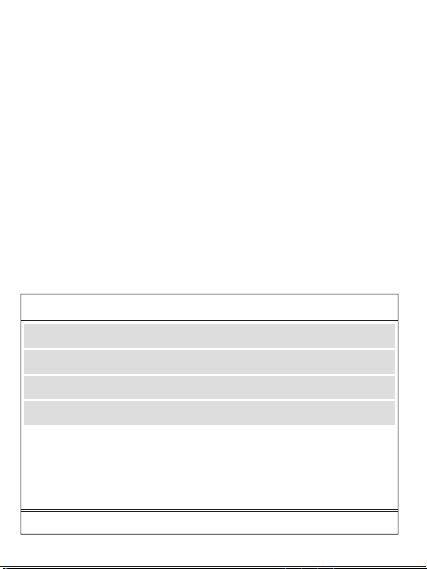
�. 开关机:
➀ 按键一次,即可开机;接入设备,自动开机;
➁ 双击按键,即可关机;若��秒无设备接入,自动关机;
使用说明
使用环境温度:�°C至��°C非热带地区
储存环境:�°C至��°C
使用环境包装清单
温馨提示
1. Power on/off:
① Press the button once to turn it on. Connect device to have it automatically
turn on.
② Double-click the button to turn it off. If no device is connected in 30s, the
product will automatically turn off.
Instructions
Packing list
�.
�.
�.
�.
�.
�.
�.
�.
�.
��.
��.
��.
��.
第一次使用本产品请将电量完全充满。
本产品充电完成后,请及时拔掉充电线,避免损耗。
为保证产品的正常使用,请务必使用正确的线材和配件。
严禁摔打、撞击、拆卸或尝试自行修复此产品。
请勿将移动电源放置在潮湿处及用水浸泡此产品。
严禁将此产品放置在热源易燃处。
请勿将此产品遗放在汽车中,阳光照射的高温会导致此产品损坏。
请将移动电源放置在儿童无法拿取的地方,避免儿童不当使用。
勿将任何异物摄入产品USB/Type-c输入输出端口孔位,以免造成短路或
损坏
为避免长时间搁置损耗使用寿命,请至少每四个月对移动电源充一次完
整的电。
如出现电池膨胀,漏液,变形等异常时,请停止使用。
请勿自行拆机,不正确操作会导致本产品寿命减低或损坏,因此带来的影
响不属于保修责任或厂家责任,敬请谅解。
避免使用超出本产品输出电流的充电器或负载。
�.����.������.�������
使用说明书
JR-PBM�� ��W磁吸支架无线充自带Type-C to Lightning线移动电源
User Manual
JR-PBM01 Portable Wireless Charger
本产品是一款能为手机,平板,电子书阅读器等产品提供有线充电或无线充电的移
动电源。PD��W快充,支持PD�.�、QC�.�、AFC等快充等协议;强力磁吸,一贴即
充;自带Type-C to Lightning线,支持iP/安卓设备充电,以及自充电;自带支架,
充电同时可轻松观影追剧;内置智能数显,剩余电量和无线充电状态清晰可见;本
产品内置智能芯片,具有过充、过放、过压、温度保护等多种安全保护电路。
This power bank can provide wired charging or wireless charging function for
mobile phones,tablets,book readers and other products.PD20W fast
charging,supports multiple fast charging protocols such as PD3.0, QC3.0,
AFC;Snap and charge ,the strong magnetic force can achieve wireless
charging function;It is designed with Type-C to Lightning cable and
Detachable cable supports charging iP/Android devices&recharging itself;The
built-in kickstand makes it easier for you to watch movies while charging your
phone;Its built-in digital display shows battery level & wireless charging status
in real time. The product has a built-in smart chip with a variety of safety
protections such as over-charge, over-discharge, over-voltage and
over-temperature protection, etc.
① and ② are both two-way fast charging ports. It is recommended to use the
special built-in cable of JOYROOM. The built-in cable lightning head ① is
inserted into the ① interface position of the power bank, and Type-C head ②
is inserted into the ② interface position of the power bank.
Magnetic Wireless
charging area
Lightning2 IN
Power button
Kickstand
Type-C to Lightning
charging cable
产品介绍
Product introduction
规格参数
JR-PBM��
聚合物锂电池
�����mAh �.��V(��.�Wh)
����mAh (�V �.�A)
≥��%
�V �A,�V �A,��V �.�A
�V �.�A,�V �A,��V �.�A
�V �A,�V �A,��V �.�A
�V �.�A,�V �.��A,��V �.��A
�V �.�A,�V �.��A,��V �.��A
�W,�.�W,��W,��W(Max)
�V �.�A(Max)
���*��*��.�mm
PC+ABS防火料
���g
型号
电芯类型
电池容量
额定容量
转换效率
Type-C输入
Lightning�输入
Lightning�输入
Type-C输出
Lightning�输出
无线充输出
多口输出
产品尺寸
材质
净重
Specification
JR-PBM01
Lithium Polymer Battery
10000mAh 3.85V(38.5Wh)
5800mAh (5V 2.4A)
≥75%
5V 3A,9V 2A,12V 1.5A
5V 2.4A,9V 2A,12V 1.5A
5V 2A,9V 2A,12V 1.5A
5V 2.4A,9V 2.22A,12V 1.67A
5V 2.4A,9V 2.22A,12V 1.67A
5W, 7.5W, 10W, 15W(Max)
5V 2.4A (Max)
103*68*20.5mm
PC+ABS fireproof material
216g
Model
Battery
Capacity
Rated Capacity
Conversion Efficiency
Type-C Input
Lightning1 Input
Lightning2 Input
Type-C Output
Lightning1 Output
Wireless Output
Multi-port Output
Size
Material
Net weight
移动电源X� 说明书&保修卡X�
Power bank x1 User Manual/ Warranty Card x1
② Type-C IN/OUT
Digital display
① Lightning1 IN/OUT
产品保修卡
生产批号:
姓名: 电话:
地址:
型号:
购买日期:
用户:
购买商号:
铅 汞
镉 六价铬
多溴联苯 多溴二苯醚
部件名称
O:表示该有害物质在该部件所有均质材料中的含量均在GB/T 26572 标准
规定的限量要求以下。
X:表示该有害物质至少在该部件的某一均质材料中的含量超出GB/T
26572规定的限量要求,且目前业界没有成熟的替代方案,符合欧盟RoHS
指令环保要求。
PCB板
电芯
(Pb) (Hg) (Cd) (Cr(VI)) (PBB) (PBDE)
产品中有害物质的名称及含量
有毒有害物质或元素
本表格依据SJ/T11364的规定编制
售后服务条例:
1、咨询服务:用户在使用产品前,请仔细阅读本产品的使用说明书。
2、包换服务:包换期内(自购机之日起七日内),正常使用出现了非人为故障,请保持产品,配件和
包装的完整(若外观不损坏、做保修处理)经检查确认故障后,可选择换货或维修,用户可到当地
授权经销商处联系并处理。
3、保修服务:保修期内,正常使用出现的非人为故障,均可享受免费保修服务(主机一年内免费
保 修 ,若 人 为 损 坏 ,做 收 费 维 修 处 理 ) 。
4、收费维修服务:产品自购机之日起一年到三年内,出现故障可收费维修,用户需支付维修所产
生的元器件费、运输费及人工费。
5、以下情况不在三包范围内,本公司提供有偿服务
① 超过三包期限。
② 涂改三包凭证,或序列号与产品本身不符。
③ 意外因素或人为导致的产品损坏(如:未按便用说明书操作、维护或保管、安装错误造成的故
障 ,接 入 不 合 适 的 电 源 、进 水 、掉 坏 等 ) 。
④ 无效三包凭证和有效发票(能证明产品确属服务期内者除外)。
⑤ 因不可抗拒如地震、火灾、水灾、雷击等导致的产品故障或损坏
⑥ 未经本公司许可,自拆卸、修理或改装。
请遵守安全说明,否则会导致
起火、触电、损坏或其他伤害
QC
PASSED
警告
�. 查看电量时:
按键一次,可查看电源剩余电量。
�. 本产品充电:
使用自带的Type-C to Lightning线,插入本移动电源对应端口,电量显示数字
开始跳动,表示正在为本产品充电,充满电后数字停止跳动,持续显示
“���%”。
�. 有线充输出说明:
使用充电线连接本电源对应输出端口,电源将自动开启输出,个别手机因兼容
性问题,需要按键开启电源输出功能。
�. 无线充输出说明:
本产品具有自动唤醒无线充电功能,放上手机自动开启充电,个别手机因兼容
性问题,需要按键开启电源输出功能;无线充电手机需放置在本产品无线充电
区域(如图所示)进行无线充。本无线充电距离为�mm内,如进行无线充电
时距离超过�mm则无法进行无线充电,请调整手机无线充电距离在无线充电
范围内。
2. Viewing the battery power:
Press the button once to power it on, you can check the remaining power
capacity.
3. Recharge the power bank:
Use the built-in Type-C to Lightning cable to recharge the power bank; or
connect an external Type-C cable to the corresponding port of the power bank
to recharge it. When the digital display shows current power, which changes
with the recharging process, it means the power bank is being recharged.
When it is fully recharged, the display will stop at "100%".
4. Wired charging operation:
Connect the charging cable to the corresponding output port of the power
bank,and it will start to output automatically.Due to compatibility
issues,certain smart phones need to press power button to turn on the power
output function.
5. Wireless charging operation:
The power bank comes with an auto-wake function for wireless charging.When
it detects any phone placed on,it will automatically start charging.Due to
compatibility issues,certain smart phones need to press power button to turn
on the power output function.The wireless charging mobile phone should be
placed in the wireless charging area of the product(as shown in the picture)
for wireless charging.The wireless charging distance is within 5mm.If the
distance exceeds 5mm,the wireless charging can not function.Please adjust
the wireless charging distance within the wireless charging range.
Battery level
Fast charging icon
Wireless charging icon
Using environment
Using ambient temperature: 0℃ to 35℃, non-tropical area
Storage ambient temperature: 0℃ to 40℃
Please fully charge the power bank when using it for the first time.
Please pull out the charging cable in time after fully charged to avoid
energy loss.
Please use suitable cables and accessories to make the power bank
function normally.
Do not drop, impact, disassemble the product or try to repair it by
yourself.
Do not store the product in a wet place or immerse it in water.
Do not expose or store the product near a heat source or flammable
materials.
Do not leave this product in the car. The high temperature of sunlight
will damage the product.
Please keep it out of the reach of children to avoid improper use.
Do not put any foreign object into the USB/Type-C input/output ports of
the product to avoid short circuit or damage.
Please charge the power bank fully at least once every four months to
prolong its service life.
Please stop using the product in case of swelling, leakage, deformation
of battery and other abnormalities.
Do not disassemble the product by yourself. Any shortened service life or
damage caused by improper use or storage of the product by customer
will not be borne by our company.
Avoid using chargers with excessive output current or load.
1.
2.
3.
4.
5.
6.
7.
8.
9.
10.
11.
12.
13.
Warm reminders
Warranty Card
No.:
Date of purchase:
Customer:
Dealer:
Batch number:
Name: Telephone:
Address:
After-sale service regulations:
1. Consulting service: Please read the User Manual carefully before using the
product and keep it for future use.
2. Replacement service: The company undertakes that if there is product
failure within 7 days from the date of purchase that is not caused by human
error, the customer can choose between replacement and repair freely (if
the appearance is in good condition, it will be repaired) provided that the
product, its accessories and packaging are complete and in good condition.
The customer can ask the local authorized dealer to deal with it.
3. Warranty service: In case of product failure within the warranty period
that is not caused by human error, free warranty service will be provided
within one year. In case of product failure caused by human error, we will
charge for relevant repairing.
4. Charged repairing service: In case of product failure within one to three
years from the date of purchase, charged repairing service will be provided.
Users need to pay for the components, transportation and labor costs.
5. Warranty exceptions (you need to pay for relevant service):
➀ Expired the warranty period;
➁ There’s alteration on the Warranty Card, or the serial number is
inconsistent with the product itself;
➂ Product damage caused by accidents or human error (e.g.: customer fails
to use, maintain and store the product according to the User Manual;
incorrect installation, improper power supply, water intrusion, etc.)
➃ Failure to provide Warranty Card and valid invoice (except that you can
prove that the product is within the warranty period).
➄ Product damage caused by force majeure, such as earthquake, fire
disaster, flood, thunderstroke, etc.
➅ Product damage caused by disassembling, repairing or refitting the
product without authorization.
Please follow the above safety
instructions, otherwise it will cause fire,
electric shock, damage or other injuries
Warning
�����mAh
磁吸无线充区域
数显屏
➁ Type-C 输入/输出
开关按键
支架
Type-C to Lightning 充电线
➀➁均是双向快充接口,建议使用机乐堂专用自带线,自带线lightning头
➀插入设备的➀接口位置,Type-C头➁插入设备的➁接口位置
➀ Lightning�
输入/输出
➀
➁
Lightning�输入
➀
➁
电量
快充图标
无线充充电图标
QC
PASSED
3.1101.619780.0000000
原材料 机乐堂 JR-PBM01 20W磁吸支架无线充自带线移动电源10000mAh 说明书 V1.0
尺寸:70x90mm
材质:128g铜版纸+正反单色印刷+风琴折