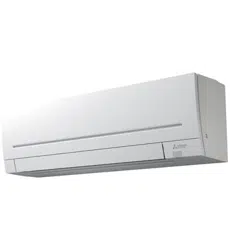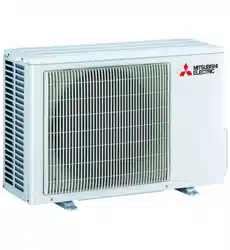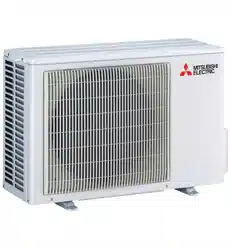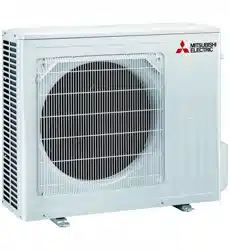
SPLIT-TYPE AIR CONDITIONERS
English
OPERATING INSTRUCTIONS
For user
• To use this unit correctly and safely, be sure to read these operating
instructions before use.
MSZ-AS90VGD
INDOOR UNIT
JG79Y723H02.indd 1 2020/10/26 14:05:41
En-1
● OPERATING INSTRUCTIONS ●
WARNING
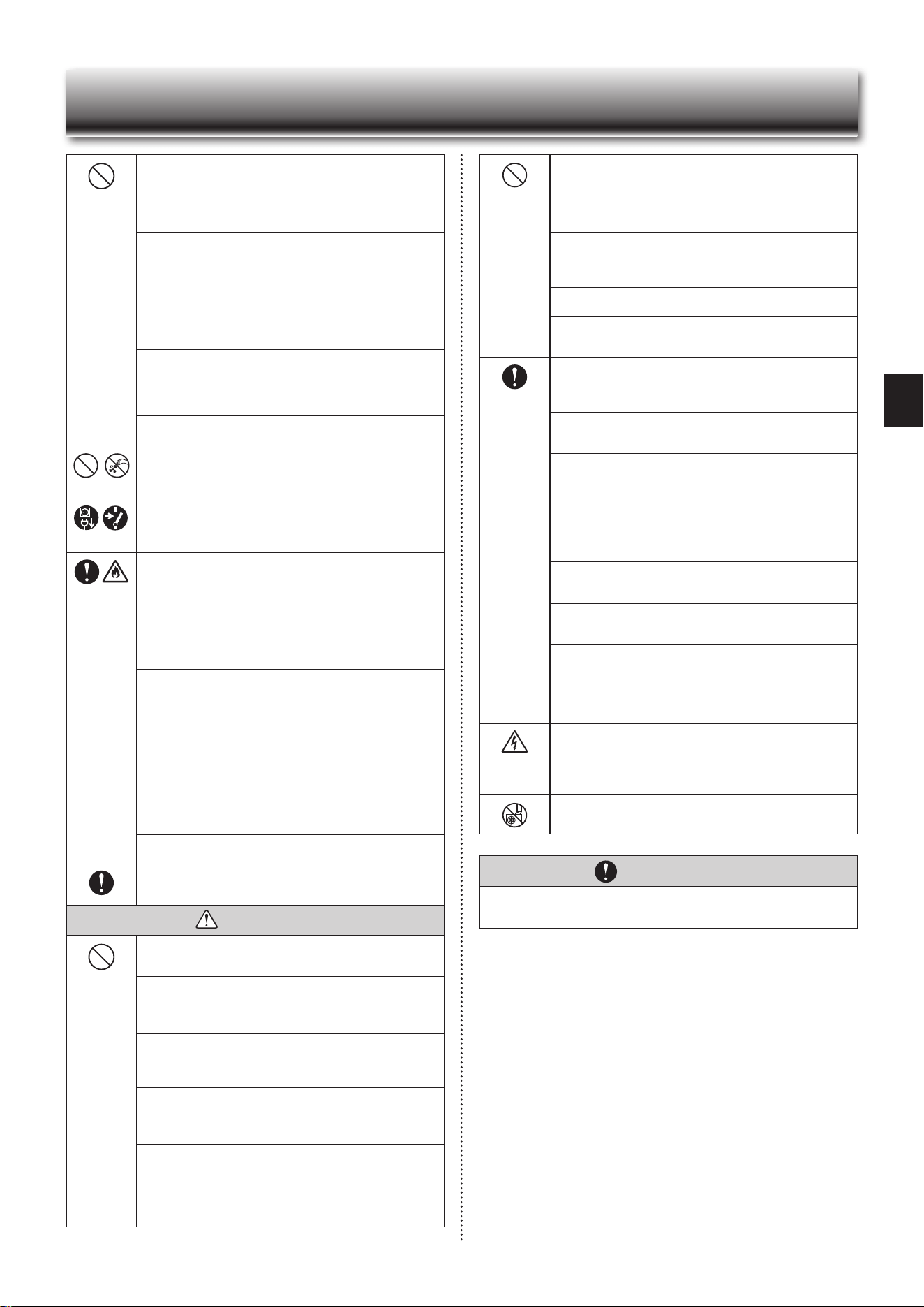
Do not connect the power cord to an intermediate point, use an
extension cord, or connect multiple devices to a single AC outlet.
• Thismaycauseoverheating,re,orelectricshock.
Make sure the power plug is free of dirt and insert it securely into
the outlet.
• Adirtyplugmaycausereorelectricshock.
Do not bundle, pull, damage, or modify the power cord, and do not
apply heat or place heavy objects on it.
• Thismaycausereorelectricshock.
• Sincerotatingpartsandpartswhichcouldcauseanelectricshockareused
in this product, be sure to read these “Safety Precautions” before use.
• Since the cautionary items shown here are important for safety, be sure to
observe them.
• Afterreadingthismanual,keepittogetherwiththeinstallationmanualina
handy place for easy reference.
• Besuretoreceiveaguaranteecardfromyourdealerandcheckthatthe
purchased date and shop name, etc. are entered correctly.
Marks and their meanings
WARNING :
Incorrect handling could cause serious hazard, such as
death, serious injury, etc. with a high probability.
CAUTION :
Incorrect handling could cause serious hazard depending
on the conditions.
Do not turn the breaker OFF/ON or disconnect/connect the power
plug during operation.
• Thismaycreatesparks,whichcancausere.
• AftertheindoorunitisswitchedOFFwiththeremotecontroller,make
suretoturnthebreakerOFFordisconnectthepowerplug.
Do not expose your body directly to cool air for a prolonged length
of time.
• This could be detrimental to your health.
Meanings of symbols used in this manual
: Be sure not to do.
: Be sure to follow the instruction.
: Neverinsertyourngerorstick,etc.
: Never step onto the indoor/outdoor unit and do not put anything on
them.
: Dangerofelectricshock.Becareful.
: Be sure to disconnect the power supply plug from the power outlet.
: Be sure to shut off the power.
: Riskofre.
SAFETY PRECAUTIONS
CONTENTS
Meanings of symbols displayed on indoor unit and/or outdoor unit
WARNING
(Riskofre)
Thisunitusesaammablerefrigerant.
Ifrefrigerantleaksandcomesincontactwithreorheatingpart,itwillcreateharmfulgasandthereisriskofre.
Read the OPERATING INSTRUCTIONS carefully before operation.
Service personnel are required to carefully read the OPERATING INSTRUCTIONS and INSTALLATION MANUAL before operation.
FurtherinformationisavailableintheOPERATINGINSTRUCTIONS,INSTALLATIONMANUAL,andthelike.
■ SAFETY PRECAUTIONS 1
■ NAME OF EACH P
ART
4
■ PREP
ARATION BEFORE OPERATION
5
■ SELECTING OPERA
TION MODES
6
■ F
AN SPEED AND AIRFLOW DIRECTION ADJUSTMENT
7
■ LONG OPERATION 8
■ POWERFUL
OPERATION
8
■ I-SA
VE OPERATION
8
■ ECONO COOL
OPERATION
9
■ NIGHT
MODE OPERATION
9
■ TIMEROPERATION(ON/OFFTIMER) 10
■ EMERGENCY
OPERATION 10
■ AUT
ORESTART
FUNCTION 10
■ WEEKL
Y TIMER OPERATION
1
1
■ DEMAND RESPONSE
AND INDOOR UNIT OPERATION
12
■ CLEANING 13
■ WHEN YOU THINK THA
T TROUBLE HAS OCCURRED
14
■ WHEN
THE AIR CONDITIONER IS NOT GOING TO BE USED FOR A LONG TIME
15
■ INST
ALLATION PLACE AND ELECTRICAL WORK
15
■ SPECIFICA
TIONS 15
JG79Y723H02.indd 1 2020/10/26 14:05:41
En-2En-2
The unit should not be installed, relocated, disassembled, altered,
or repaired by the user.
• Animproperlyhandledairconditionermaycausere,electricshock,
injury,orwaterleakage,etc.Consultyourdealer.
• If the power supply cord is damaged, it must be replaced by the manu-
facturer or its service agent in order to avoid a hazard.
When installing, relocating, or servicing the unit, make sure that
no substance other than the specied refrigerant (R32) enters the
refrigerant circuit.
• Any presence of foreign substance such as air can cause abnormal
pressure rise and may result in explosion or injury.
• Theuseofanyrefrigerantotherthanthatspeciedforthesystemwill
causemechanicalfailure,systemmalfunction,orunitbreakdown.Inthe
worst case, this could lead to a serious impediment to securing product
safety.
This appliance is not intended for use by persons (including children)
with reduced physical, sensory or mental capabilities, or lack of ex-
perience and knowledge, unless they have been given supervision or
instruction concerning use of the appliance by a person responsible
for their safety.
Children should be supervised to ensure that they do not play with
the appliance.
Do not insert your nger, a stick, or other objects into the air inlet
or outlet.
• This may cause injury, since the fan inside rotates at high speeds during
operation.
In case of an abnormal condition (such as a burning smell), stop the
air conditioner and disconnect the power plug or turn the breaker OFF.
• A continued operation in the abnormal state may cause a malfunction,
re,orelectricshock.Inthiscase,consultyourdealer.
When the air conditioner does not cool or heat, there is a possibility of
refrigerant leakage. If any refrigerant leakage is found, stop operations
and ventilate the room well and consult your dealer immediately. If a
repair involves recharging the unit with refrigerant, ask the service
technician for details.
• The refrigerant used in the air conditioner is not harmful. Normally, it
doesnotleak.However,ifrefrigerantleaksandcomesincontactwith
reorheatingpartofsuchafanheater,keroseneheater,orcooking
stove,itwillcreateharmfulgasandthereisriskofre.
The user should never attempt to wash the inside of the indoor unit.
Should the inside of the unit require cleaning, contact your dealer.
• Unsuitable detergent may cause damage to plastic material inside
theunit,whichmayresultinwaterleakage.Shoulddetergentcomein
contact with electrical parts or the motor, it will result in a malfunction,
smoke,orre.
• The appliance shall be stored in a room without continuously operating
ignitionsources(forexample:openames,anoperatinggasappliance
oranoperatingelectricheater).
• Be aware that refrigerants may not contain an odour.
• Do not use means to accelerate the defrosting process or to clean the
appliance, other than those recommended by the manufacturer.
• Do not pierce or burn.
The indoor unit must be installed in rooms which exceed the oor
space specied. Please consult your dealer.
This appliance is intended to be used by expert or trained users in
shops, in light industry and on farms, or for commercial use by lay
persons.
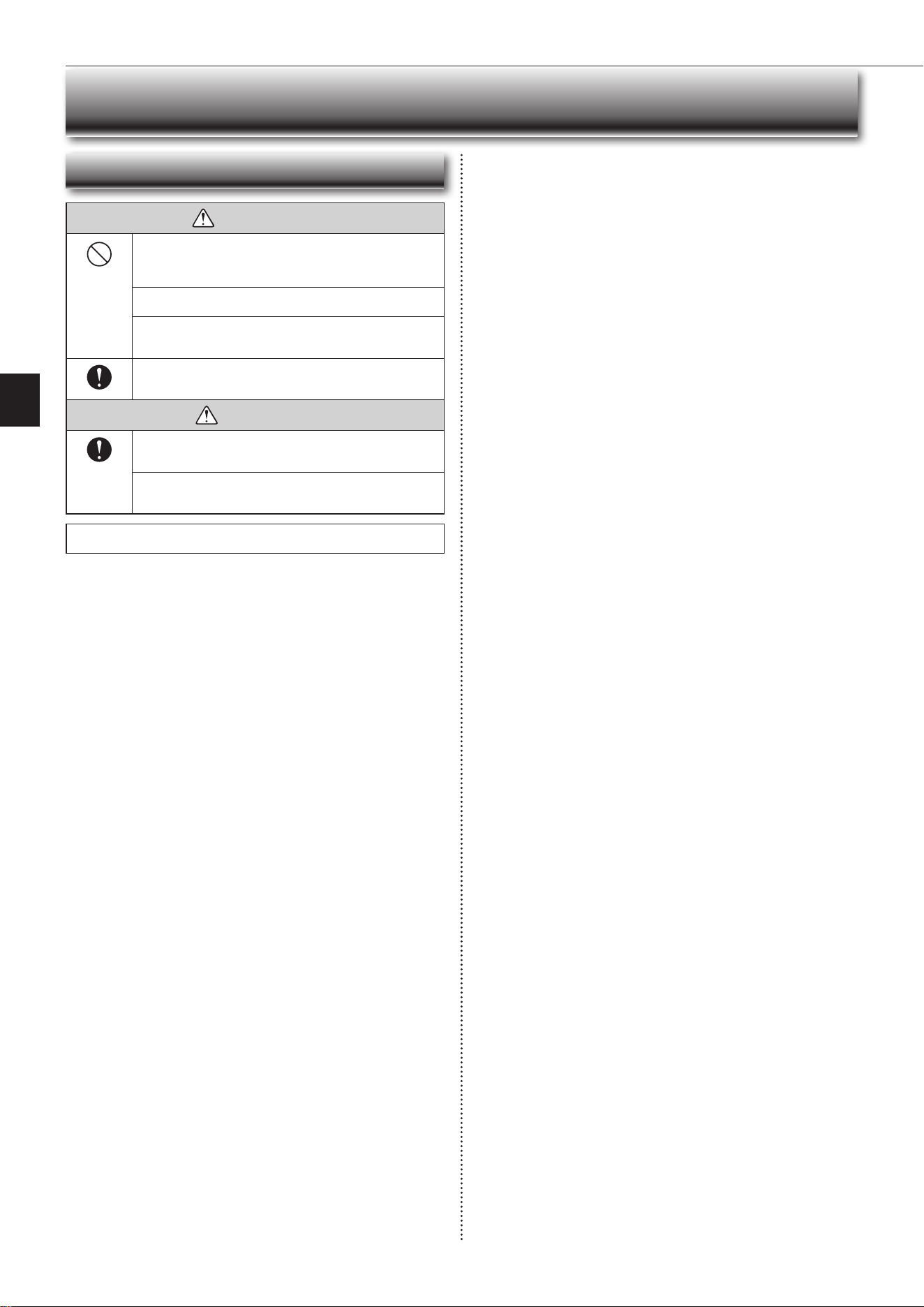
CAUTION
Do not touch the air inlet or the aluminum ns of the indoor/outdoor
unit.
• This may cause injury.
Do not use insecticides or ammable sprays on the unit.
• Thismaycauseareordeformationoftheunit.
Do not expose pets or houseplants to direct airow.
• This may cause injury to the pets or plants.
Do not place other electric appliances or furniture under the indoor/
outdoor unit.
• Water may drip down from the unit, which may cause damage or
malfunction.
Do not leave the unit on a damaged installation stand.
• The unit may fall and cause injury.
Do not step on an unstable bench to operate or clean the unit.
• This may cause injury if you fall down.
Do not pull the power cord.
• Thismaycauseaportionofthecorewiretobreak,whichmaycause
overheatingorre.
Do not charge or disassemble the batteries, and do not throw them
into a re.
•
Thismaycausethebatteriestoleak,orcauseareorexplosion.
SAFETY PRECAUTIONS
Do not operate the unit for more than 4 hours at high humidity (80%
RH or more) and/or with windows or outside door left open.
• This may cause the water condensation in the air conditioner, which
may drip down, wetting or damaging the furniture.
• The water condensation in the air conditioner may contribute to growth
of fungi, such as mold.
Do not use the unit for special purposes, such as storing food,
raising animals, growing plants, or preserving precision devices
or art objects.
• This may cause deterioration of quality, or harm to animals and plants.
Do not expose combustion appliances to direct airow.
• This may cause incomplete combustion.
Never put batteries in your mouth for any reason to avoid accidental
ingestion.
• Batteryingestionmaycausechokingand/orpoisoning.
Before cleaning the unit, switch it OFF and disconnect the power plug
or turn the breaker OFF.
• This may cause injury, since the fan inside rotates at high speeds during
operation.
When the unit will be unused for a long time, disconnect the power
plug or turn the breaker OFF.
• Theunitmayaccumulatedirt,whichmaycauseoverheatingorre.
Replace all batteries of the remote controller with new ones of the
same type.
• Using an old battery together with a new one may cause overheating,
leakage,orexplosion.
If the battery uid comes in contact with your skin or clothes, wash
them thoroughly with clean water.
•
Ifthebatteryuidcomesincontactwithyoureyes,washthemthoroughly
withcleanwaterandimmediatelyseekmedicalattention.
Ensure that the area is well-ventilated when the unit is operated
together with a combustion appliance.
• Inadequate ventilation may cause oxygen starvation.
Turn the breaker OFF when you hear thunder and there is a possibility
of a lightning strike.
• Theunitmaybedamagediflightningstrikes.
After the air conditioner is used for several seasons, perform inspec-
tion and maintenance in addition to normal cleaning.
• Dirt or dust in the unit may create an unpleasant odor, contribute to
growth of fungi, such as mold, or clog the drain passage, and cause
watertoleakfromtheindoorunit.Consultyourdealerforinspection
andmaintenance,whichrequirespecializedknowledgeandskills.
Do not operate switches with wet hands.
• Thismaycauseelectricshock.
Do not clean the air conditioner with water or place an object that
contains water, such as a ower vase, on it.
• Thismaycausereorelectricshock.
Do not step on or place any object on the outdoor unit.
• This may cause injury if you or the object falls down.
IMPORTANT
Dirty lters cause condensation in the air conditioner which will contribute to the
growth of fungi such as mold. It is therefore recommended to clean air lters every
2 weeks.
JG79Y723H02.indd 2 2020/10/26 14:05:41
En-3
● OPERATING INSTRUCTIONS ●
SAFETY PRECAUTIONS
WARNING
Consult your dealer for installing the air conditioner.
• It should not be installed by the user since installation requires specialized
knowledgeandskills.Animproperlyinstalledairconditionermaycause
waterleakage,re,orelectricshock.
Provide a dedicated power supply for the air conditioner.
• Anon-dedicatedpowersupplymaycauseoverheatingorre.
Do not install the unit where ammable gas could leak.
• Ifgasleaksandaccumulatesaroundtheoutdoorunit,itmaycausean
explosion.
Earth the unit correctly.
• Do not connect the earth wire to a gas pipe, water pipe, lightning rod, or
atelephoneearthwire.Improperearthingmaycauseelectricshock.
CAUTION
Install an earth leakage breaker depending on the installation location
of the air conditioner (such as highly humid areas).
• Ifanearthleakagebreakerisnotinstalled,itmaycauseelectricshock.
Ensure that the drain water is properly drained.
• If the drain passage is improper, water may drip down from the indoor/
outdoor unit, wetting and damaging the furniture.
In case of an abnormal condition
Immediately stop operating the air conditioner and consult your dealer.
For installation
JG79Y723H02.indd 3 2020/10/26 14:05:42
En-4
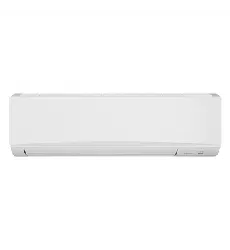
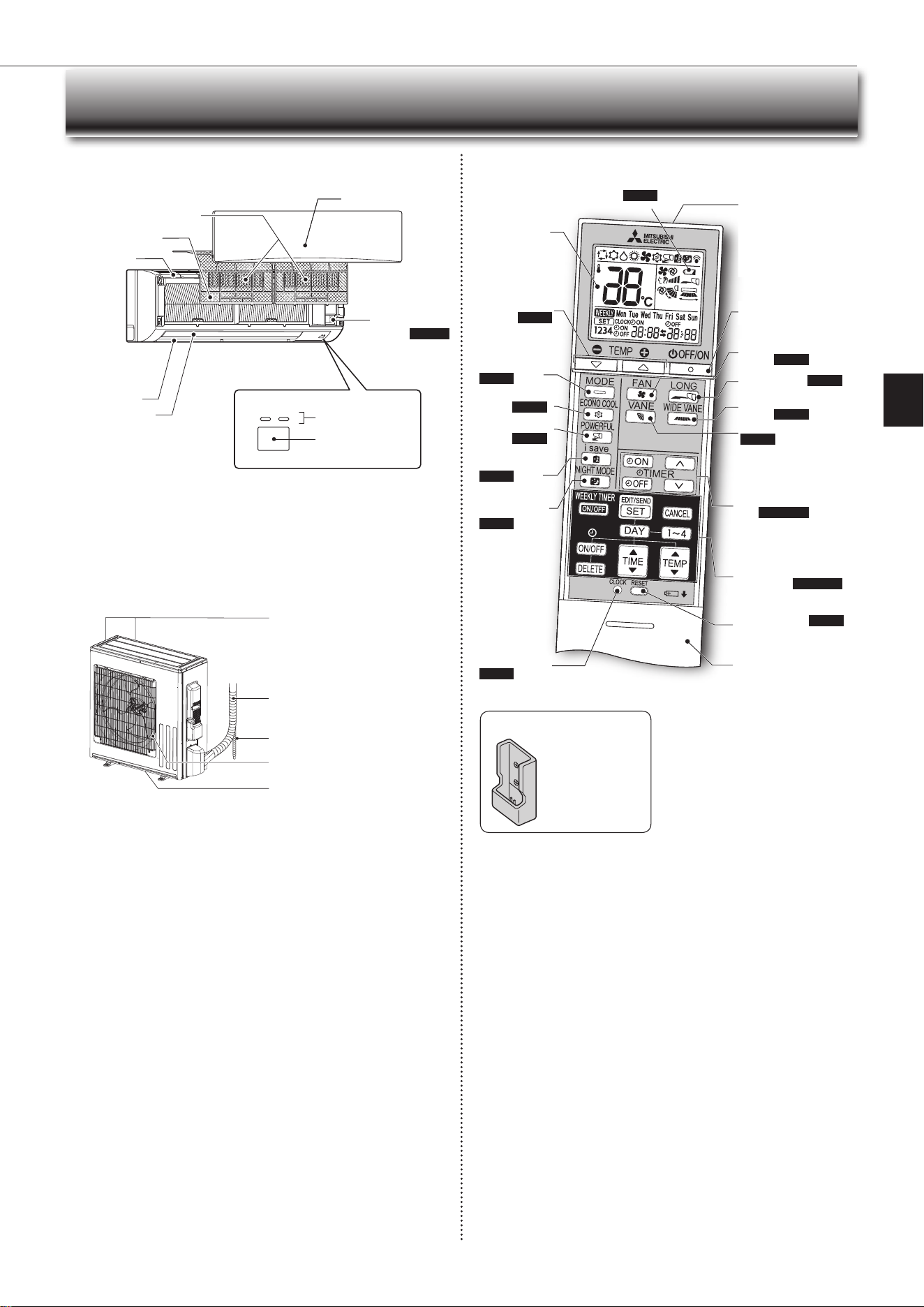
NAME OF EACH PART
Indoor unit Remote controller
Signal transmitting
section
Distance of signal :
About 6 m
Beep(s)is(are)heardfrom
the indoor unit when the
signal is received.
Operation dis-
play section
OFF/ON(stop/operate)
button
Temperature
buttons
Page 6
Operation
select button
Page 6
ECONO COOL
button
Page 9
POWER FUL
button
Page 8
FAN speed control
button
Page 7
VANE control button
Page 7
TIME, TIMER set but-
tons
Page5,10
forward button
backwardbutton
CLOCK button
Page 5
RESET button Page 5
Lid
Slide the lid down
to open the remote
controller. Slide it down
further to get to the
weeklytimerbuttons.
Only use the remote controller provided
with the unit.
Do not use other remote controllers.
If 2 or more indoor units are installed in
proximity to one another, an indoor unit
that is not intended to be operated may
respond to the remote controller.
i-save button
Page 8
TIME, WEEKLY TIMER
set buttons
Page 5, 11
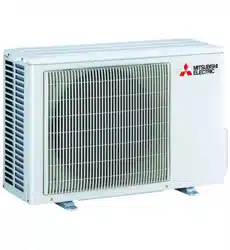
Outdoor unit
WIDE VANE
button
Page 7
LONG button Page 8
NIGHT MODE
button
Page 9
Battery replacement indicator Page 5
Remote controller holder
• Install the remote
controller holder in a
place where the signal
can be received by the
indoor unit.
• When the remote
controller is not used,
place it in this holder.
Operation indicator
lamp
Remote control
receiving section
Emergency
operation
switch
Page10
Horizontal vane
Air outlet
Airlter
(Antimoldlter)
Air inlet
Front panel
Aircleaninglter
(Anti-AllergyEnzymeFilter)
Outdoor units may be different in appearance.
Airinlet(backandside)
Refrigerant piping
Drainage hose
Air outlet
Drain outlet
JG79Y723H02.indd 4 2020/10/26 14:05:42
En-5
● OPERATING INSTRUCTIONS ●
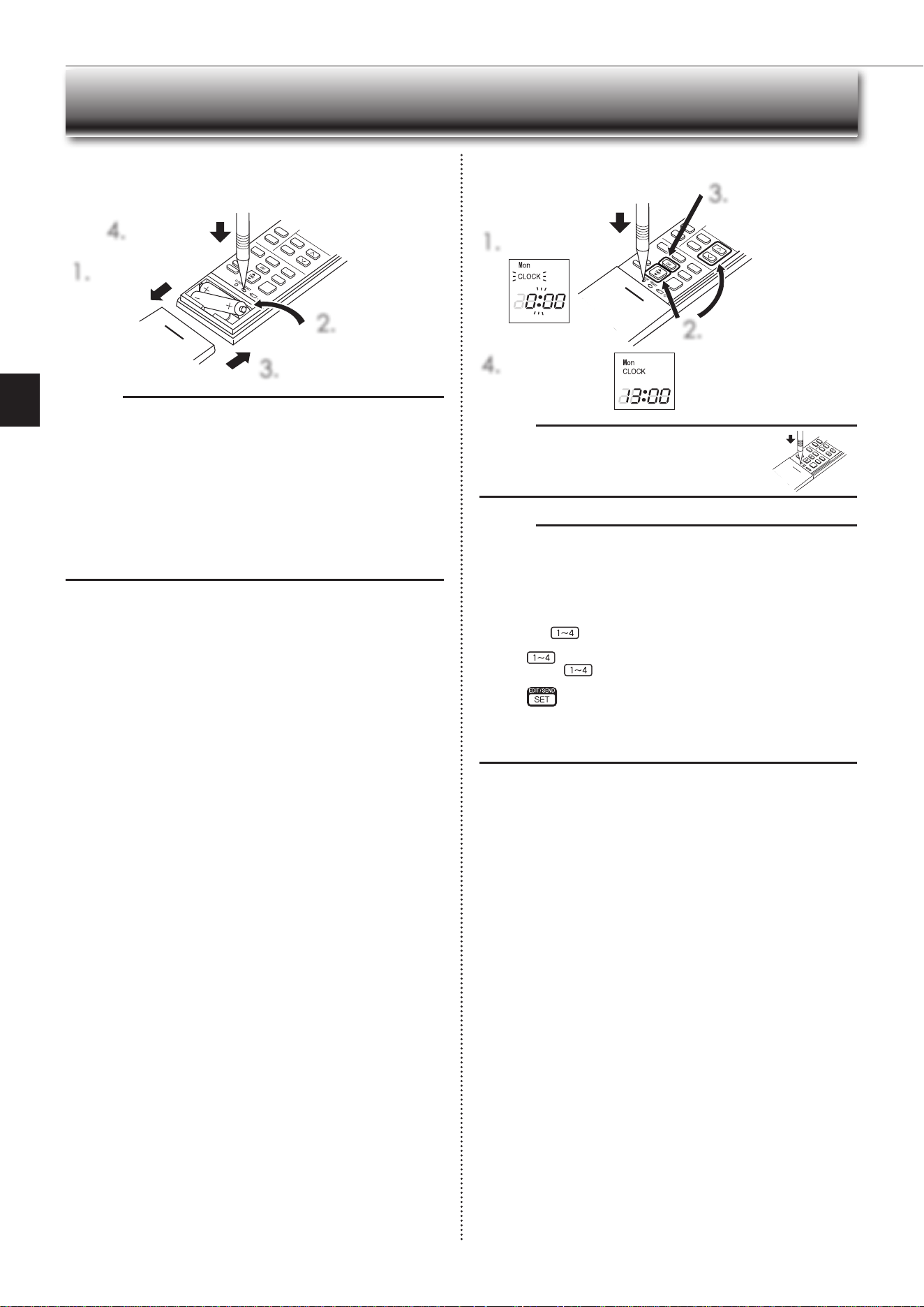
Before operation: Insert the power supply plug into the power outlet and/or
turnthebreakeron.
Installing the remote controller batteries
1.
Remove the front lid.
2.
Insert the negative
poleofAAAalkaline
batteriesrst.
3.
Install the front lid.
4.
Press RESET.
Setting current time
1.
Press CLOCK.
4.
Press CLOCK again.
2.
Press either the TIME button
or the TIMER buttons to set
the time.
Eachpresschangestheclock
1minuteforward/backward(10
minuteswhenpressedlonger).
3.
Press the DAY button
to set the day.
PREPARATION BEFORE OPERATION
Note:
• Makesurethepolarityofthebatteriesiscorrect.
• Donotusemanganesebatteriesandleakingbatteries.Theremotecontroller
could malfunction.
• Do not use rechargeable batteries.
• The battery replacement indicator lights up when the battery is running low.
In about 7 days after the indicator starts lights up, the remote controller stops
working.
• Replace all batteries with new ones of the same type.
• Batteries can be used for approximately 1 year. However, batteries with ex-
pired shelf lives last shorter.
• Press RESET gently using a thin instrument.
If the RESET button is not pressed, the remote controller may not operate
correctly.
Note:
• Press CLOCK gently using a thin instrument.
Note:
How to set remote controller exclusively for a particular indoor unit
A maximum of 4 indoor units with wireless remote controllers can be used in
a room.
To operate the indoor units individually with each remote controller, assign a
number to each remote controller according to the number of the indoor unit.
This setting can be set only when all the following conditions are met:
• The remote controller is powered OFF.
(1)Holddown
button on the remote controller for 2 seconds to enter the
pairing mode.
(2)Press
button again and assign a number to each remote controller.
Each press of
buttonadvancesthenumberinthefollowingorder:1→
2→3→4.
(3)Press
button to complete the pairing setting.
AfteryouturnthebreakerON,theremotecontrollerthatrstsendsasignal
to an indoor unit will be regarded as the remote controller for the indoor unit.
Once they are set, the indoor unit will only receive the signal from the as-
signed remote controller afterwards.
JG79Y723H02.indd 5 2020/10/26 14:05:42
En-6
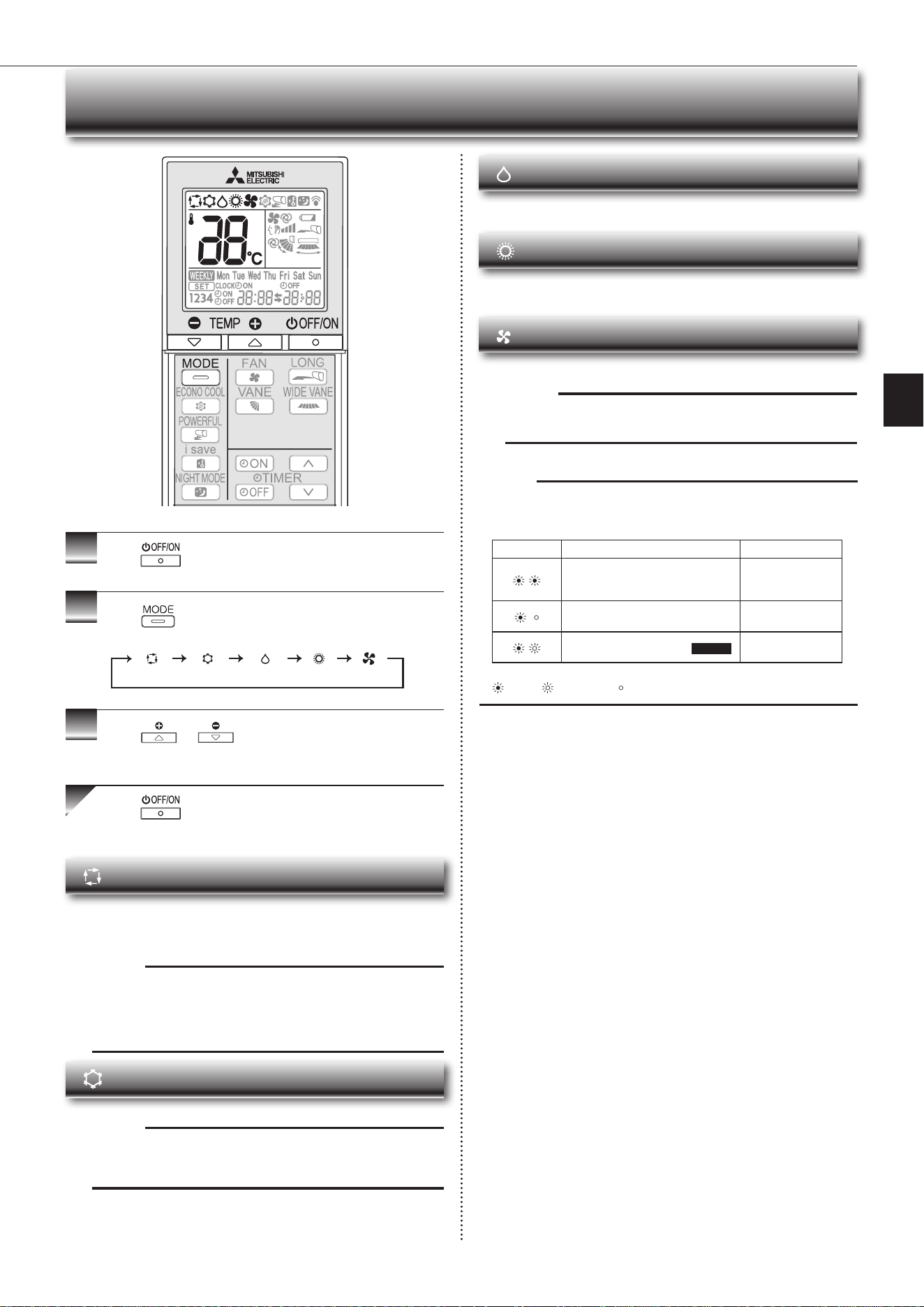
AUTO mode (Auto change over)
The unit selects the operation mode according to the difference between the
room temperature and the set temperature. During AUTO mode, the unit
changesmode(COOL↔HEAT)whentheroomtemperatureisabout2°C
away from the set temperature for more than 15 minutes.
Note:
Auto Mode is not recommended if this indoor unit is connected to a MXZ
type outdoor unit. When several indoor units are operated simultaneously,
the unit may not be able to switch operation mode between COOL and
HEAT. In this case, the indoor unit becomes standby mode (Refer to table
ofOperationindicatorlamp).
COOL mode
Enjoy cool air at your desired temperature.
Note:
Do not operate COOL mode at very low outside temperatures (less than
-10°C).Watercondensedintheunitmaydripandwetordamagefurni-
ture, etc.
Note:
Operation indicator lamp
The operation indicator lamp shows the operation state of the unit.
Indication Operation state Room temperature
The unit is operating to reach the set
temperature
About2°Cor more
away from set tem-
perature
The room temperature is approach-
ing the set temperature
About1to2°Cfrom
set temperature
Demand Response mode Page 12 —
Lit Blinking Not lit
1
Press
to start the operation.
2
Press to select operation mode. Each press
changes mode in the following order:
3
Press or to set the temperature.
Eachpressraisesorlowersthetemperatureby1°C.
Press to stop the operation.
S
ELECTING OPERATION MODES
(AUTO) (COOL) (DRY) (HEAT) (FAN)
DRY mode
Dehumidify your room. The room may be cooled slightly.
Temperature cannot be set during DRY mode.
HEAT mode
Enjoy warm air at your desired temperature.
FAN mode
Circulate the air in your room.
Note:
After COOL/DRY mode operation, it is recommended to operate in the
FAN mode to dry inside the indoor unit.
JG79Y723H02.indd 6 2020/10/26 14:05:43
En-7
● OPERATING INSTRUCTIONS ●
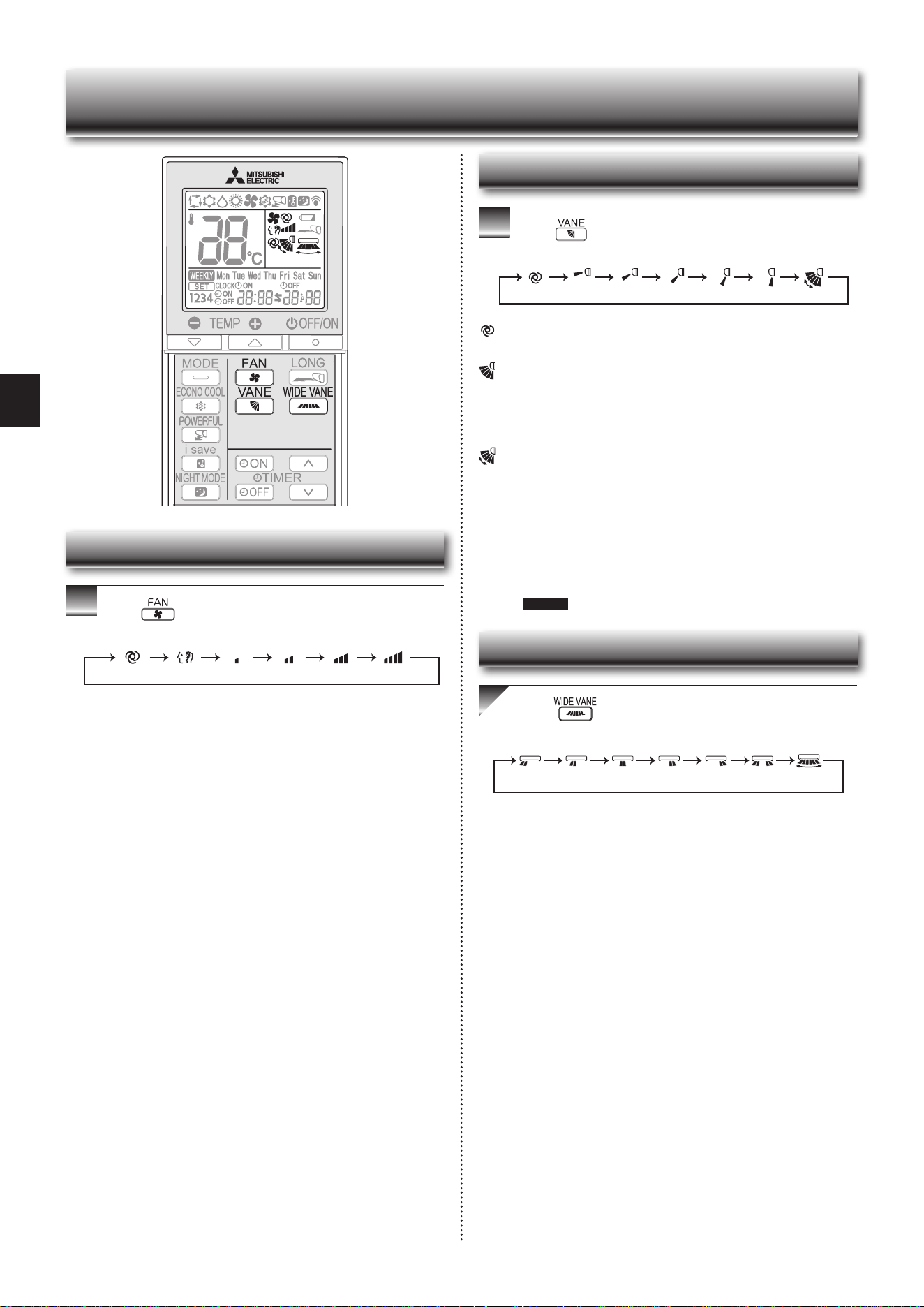
Press to select fan speed. Each press changes
fan speed in the following order:
• Two short beeps are heard from the indoor unit when set to AUTO.
•Usehigherfanspeedtocool/heattheroomquicker.Itisrecommended
to lower the fan speed once the room is cool/warm.
• Use lower fan speed for quiet operation.
(AUTO) (Quiet) (Low) (Med.) (High) (SuperHigh)
Press toselectairowdirection.Eachpress
changesairowdirectioninthefollowingorder:
(AUTO) .........Thevaneissettothemostefcientairowdirection.COOL/
DRY/FAN: horizontal position. HEAT: downward position.
(Manual) .......For efficient air conditioning, select the upper position for
COOL/DRY, and the lower position for HEAT. If the lower
position is selected during COOL/DRY, the vane automatically
movestotheupwardpositionafter0.5to1hourtoprevent
any condensation from dripping.
(Swing) .........The vane moves up and down intermittently.
• Two short beeps are heard from the indoor unit when set to AUTO.
• Always use the remote controller when changing the direction of air-
flow. Moving the horizontal vanes with your hands causes them to mal-
function.
• Whenthebreakeristurnedon,thehorizontalvanes’positionwillbe
reset in about a minute, then the operation will start. The same is true
in the emergency cooling operation.
• When the horizontal vanes seem to be in an abnormal position, see
page 13 .
(AUTO) (1) (2) (3) (4) (5) (SWING)
FAN SPEED AND AIRFLOW DIRECTION ADJUSTMENT
Press toselectairowdirection.Eachpress
changesairowdirectioninthefollowingorder:
(
SWING
)
Left-right Airflow direction
Fan speed
Up-down Airflow direction
JG79Y723H02.indd 7 2020/10/26 14:05:43
En-8
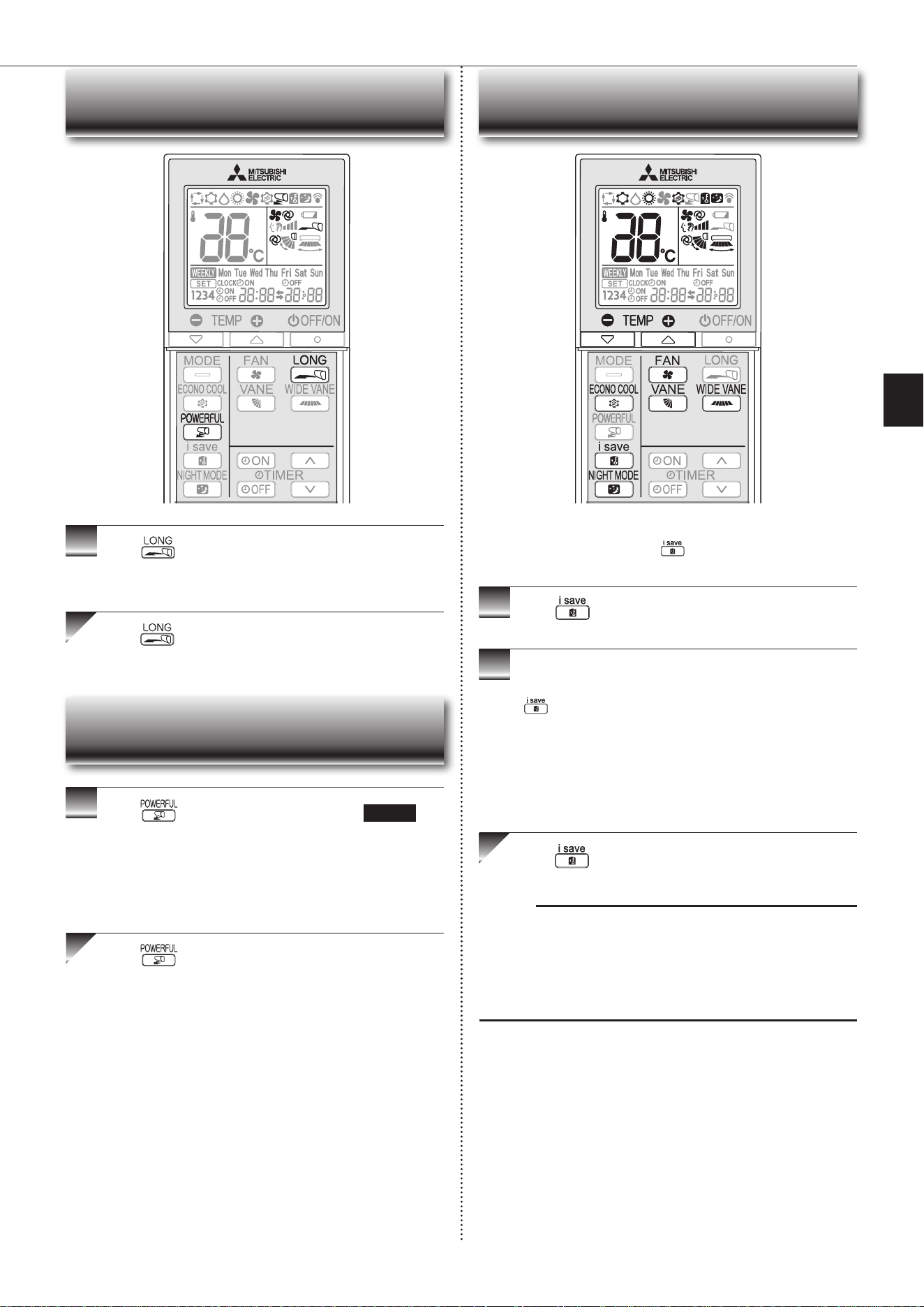
I-SAVE OPERATION
1
Press during COOL, ECONO COOL, NIGHT
MODE, or HEAT mode to select i-save mode.
2
Setthetemperature,fanspeed,andairowdirection.
• The same setting is selected from the next time by simply pressing
.
• Two settings can be saved. (One for COOL/ECONO COOL, one for
HEAT)
• Select the appropriate temperature, fan speed, and airflow direction
according to your room.
• Normally, the minimum temperature setting in HEAT mode is 16°C.
However, during i-save operation only, the minimum temperature set-
tingis10°C.
Press again to cancel i-save operation.
• i-save operation also is cancelled when the MODE button is pressed.
Note:
Example of use:
1. Low energy mode
Setthetemperature2°Cto3°CwarmerinCOOLandcoolerinHEATmode.
This setting is suitable for unoccupied room, and while you are sleeping.
2. Saving frequently used settings
Save your preferred setting for COOL/ECONO COOL and HEAT. This ena-
bles you to select your preferred setting with a single push of the button.
Asimpliedsetbackfunctionenablestorecallthepreferred(preset)
setting with a single push of the button. Press the button again
andyoucangobacktotheprevioussettinginaninstance.
LONG OPERATION
Press to start LONG operation.
• Fan speed increases and the horizontal vane moves to the position for
LONG mode.
• Air reaches to longer distance.
Press again to cancel LONG operation.
• LONG operation is cancelled when the OFF/ON, VANE, or ECONO
COOL button is pressed.
Press
during COOL or HEAT mode Page 6 to
start POWERFUL operation.
Fan speed : Exclusive speed for POWERFUL mode
Horizontal vane : Set position, or downward airflow position during
AUTO setting
• Temperature cannot be set during POWERFUL operation.
Press again to cancel POWERFUL operation.
• POWERFUL operation also is cancelled automatically in 15 min-
utes, or when the OFF/ON, FAN, ECONO COOL, or i-save button is
pressed.
POWERFUL OPERATION
JG79Y723H02.indd 8 2020/10/26 14:05:44
En-9
● OPERATING INSTRUCTIONS ●
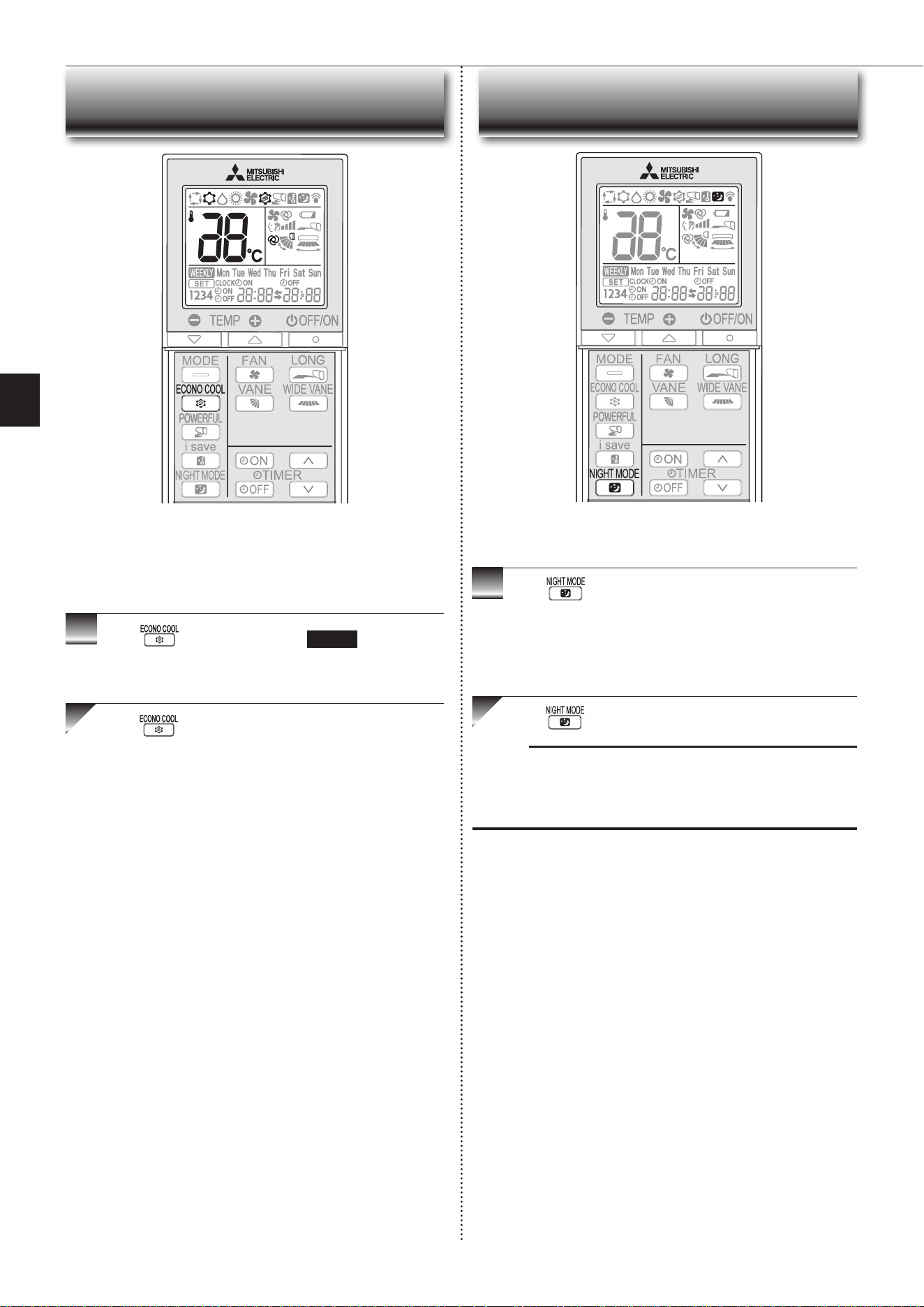
ECONO COOL OPERATION
Press during COOL mode page 6 to start
ECONO COOL operation.
The unit performs swing operation vertically in various cycles according to the
temperature airflow.
Press again to cancel ECONO COOL operation.
• ECONO COOL operation is also cancelled when the VANE button is
pressed.
Swingairow(changeofairow)makesyoufeelcoolerthanstation-
aryairow.
Thesettemperatureandtheairowdirectionareautomaticallychanged
by the microprocessor. It is possible to perform cooling operation with
keepingcomfort.Asaresultenergycanbesaved.
NIGHT MODE OPERATION
Press during operation to activate NIGHT MODE.
• The operation indicator lamp dims.
• The beep sound will be disabled except that emitted when the operation
is started or stopped.
• Noise level of the outdoor unit will be lower than that mentioned in
SPECIFICATIONS.
Press again to cancel NIGHT MODE.
Note:
• The cooling/heating capacity may drop.
• Noise level of the outdoor unit may not change after start-up of the unit, during
the protection operation, or depending on other operating conditions.
• The fan speed of the indoor unit will not change.
•
The operation indicator lamp will be hard to be seen in a bright room.
NIGHT MODE changes the brightness of the operation indicator,
disables the beep sound and limits the noise level of the outdoor unit.
JG79Y723H02.indd 9 2020/10/26 14:05:44
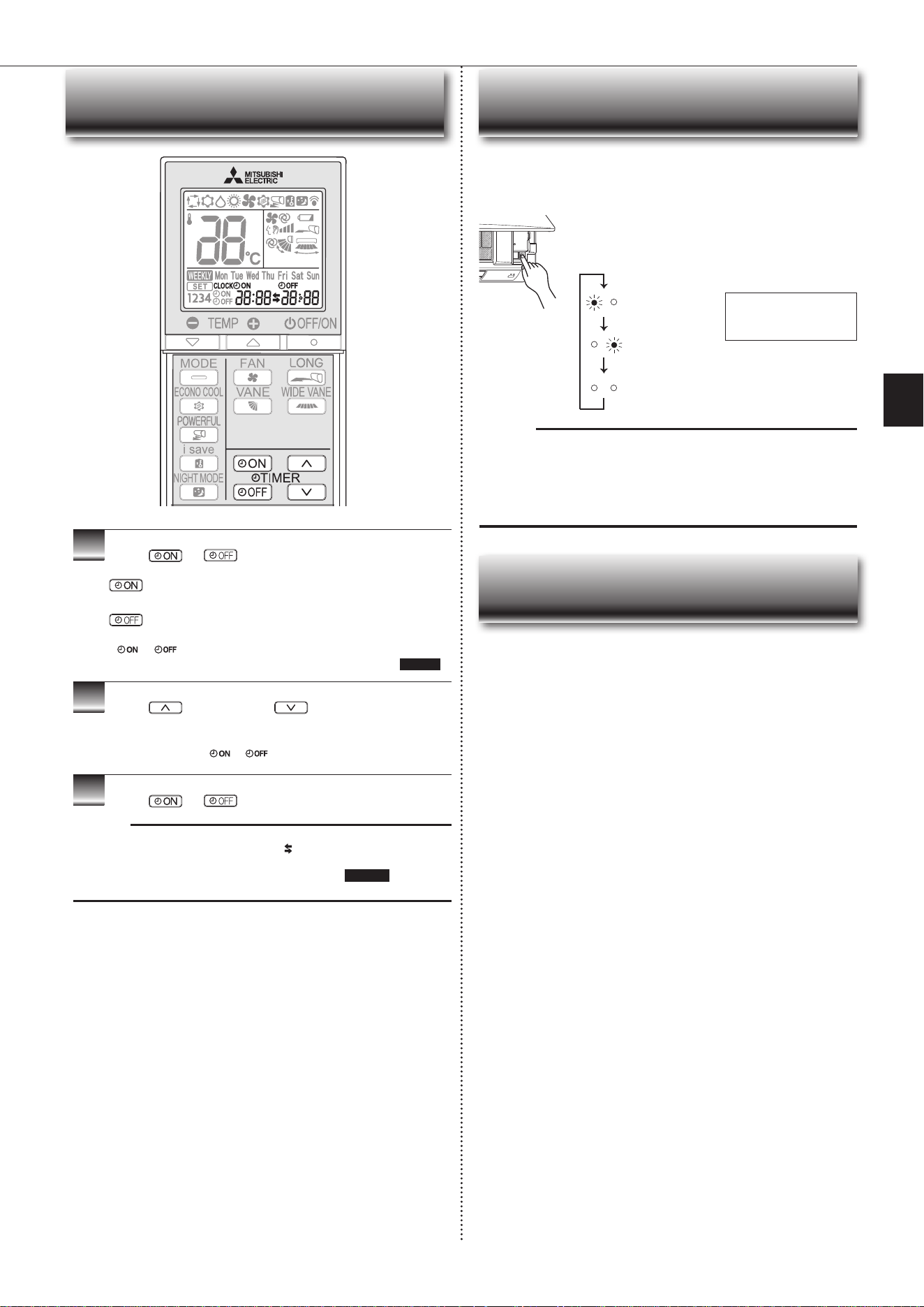
En-10
1
Press or during operation to set the timer.
(ONtimer): TheunitturnsONatthesettime.
(OFFtimer): TheunitturnsOFFatthesettime.
* or blinks.
*
Make sure that the current time and day are set correctly.
Page 5
2
Press (forward)and (backward)tosetthe
time of timer.
Eachpresschangesthesettime10minutesforward/backward.
• Set the timer while
or isblinking.
3
Press
or
again to cancel timer.
Note:
• ON and OFF timers can be set together. markindicatestheorderoftimer
operations.
• If power failure occurs while ON/OFF timer is set, see page10 “Auto restart
function”.
TIMER OPERATION (ON/OFF TIMER)
When the remote controller cannot be used...
Emergency operation can be activated by pressing the emergency operation
switch(E.O.SW)ontheindoorunit.
Each time the E.O.SW is pressed, the operation changes in
the following order:
If a power failure occurs or the main power is turned off during operation, “Auto
restart function” automatically starts operation in the same mode as the one set
with the remote controller just before the shutoff of the main power. When timer is
set, timer setting is cancelled and the unit starts operation when power is resumed.
If you do not want to use this function, please consult the service repre-
sentative because the setting of the unit needs to be changed.
Note:
• Therst30minutesofoperationistestrun.Temperaturecontroldoesnot
work,andfanspeedissettoHigh.
• In the emergency heating operation, the fan speed gradually rises to blow out
warm air.
• In the emergency cooling operation, the horizontal vanes’ position will be
reset in about a minute, then the operation will start.
EMERGENCY OPERATION
AUTO RESTART FUNCTION
Operation indicator lamp
Settemperature:24°C
Fan speed : Medium
Horizontal vane : Auto
Emergency COOL
Emergency HEAT
Stop
JG79Y723H02.indd 10 2020/10/26 14:05:45
En-11
● OPERATING INSTRUCTIONS ●
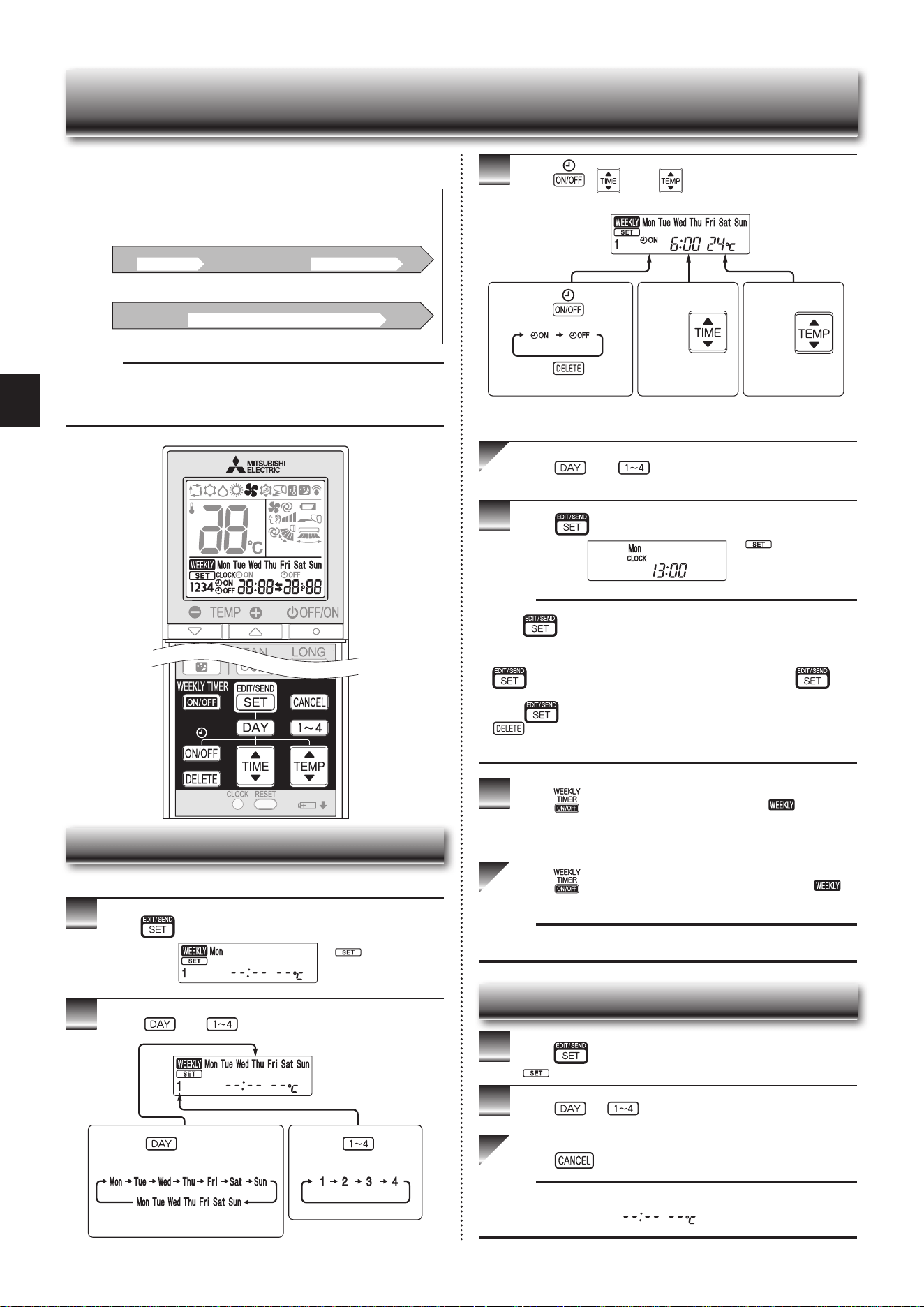
WEEKLY TIMER OPERATION
• Amaximumof4ONorOFFtimerscanbesetforindividualdaysoftheweek.
• Amaximumof28ONorOFFtimerscanbesetforaweek.
Setting the weekly timer
* Makesurethatthecurrenttimeanddayaresetcorrectly.
1
Press toentertheweeklytimersettingmode.
2
Press and to select setting day and number.
3
Press , , and to set ON/OFF, time, and
temperature.
Press and to continue setting the timer for
other days and/or numbers.
4
Press tocompleteandtransmittheweeklytimer
setting.
Note:
• Press totransmitthesettinginformationofweeklytimertotheindoor
unit. Point the remote controller toward the indoor unit for 3 seconds.
• Whensettingthetimerformorethanonedayoftheweekoronenumber,
does not have to be pressed per each setting. Press once
afterallthesettingsarecomplete.Alltheweeklytimersettingswillbesaved.
• Press
to enter the weekly timer setting mode, andpress and hold
for 5 seconds to erase all weekly timer settings. Point the remote
controller toward the indoor unit.
5
Press toturntheweeklytimerON.( lights.)
* WhentheweeklytimerisON,thedayoftheweekwhosetimersetting
is complete, will light.
Press againtoturntheweeklytimerOFF.(
goesout.)
Note:
ThesavedsettingswillnotbeclearedwhentheweeklytimeristurnedOFF.
Checking weekly timer setting
1
Press toentertheweeklytimersettingmode.
* blinks.
2
Press or to view the setting of the particular
day or number.
Press toexittheweeklytimersetting.
Note:
Whenalldaysoftheweekareselectedtoviewthesettingsandadifferent set-
ting is included among them,
will be displayed.
*
whichwasblink-
ing goes out, and the
current time will be
displayed.
*
blinks.
Note:
ThesimpleON/OFFtimersettingisavailablewhiletheweeklytimerison.In
thiscase,theON/OFFtimerhaspriorityovertheweeklytimer;theweeklytimer
operation will start again after the simple ON/OFF timer is complete.
E.g. : Runs at 24°C from waking up to leaving home, and runs at 27°C from
getting home to going to bed on weekdays.
Runs at 27°C from waking up late to going bed early on weekends.
Setting1 Setting2 Setting3 Setting4
Setting1 Setting2
6:00 8:30 17:30 22:00
8:00 21:00
24°C 27°C
ON OFF ON OFF
ON OFF
Mon
Fri
~
Sat
Sun
~
27°C
Pressing selects the day of
theweektobeset.
Pressing selects
the setting number.
* All days can be selected.
E.g. : [Mon Tue ... Sun]
and [1] are selected.
E.g.: [ON],[6:00]
and[24°C]are
selected.
Pressing
selects
ON/OFF timer.
Pressing
deletes
timer setting.
Pressing
adjusts the time.
Pressing
adjusts the tem-
perature.
* Holddownthebuttontochangethetimequickly.
JG79Y723H02.indd 11 2020/10/26 14:05:46
En-12
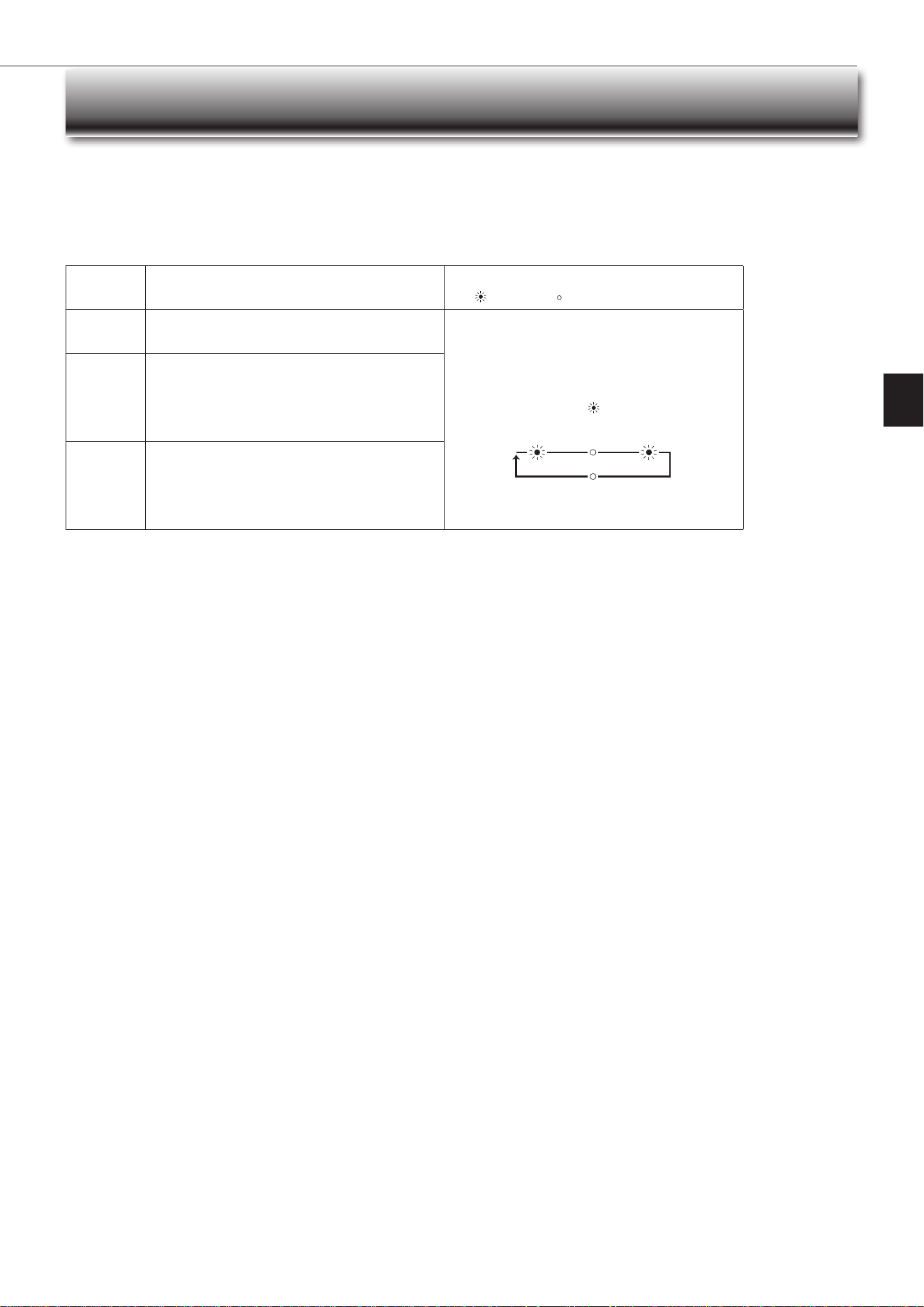
Demand response
This unit has demand response capability which is compliant with AS/NZS 4755.3.1.
Toactivatethisfunction,youneedtomakeacontractwithremoteagentssuchaselectricsupplycompany,thenthisunitshouldbeconnectedtoDemandresponseenabling
devise(DRED).Forfurtherinformation,consultyourdealer.
Demandresponserepresentstheautomatedalterationofanelectricalproduct’snormalmodeofoperationinresponsetoaninitiatingsignaloriginatingfromordened
by a remote agent.
Thisunitsupports3DemandResponseModes(DRMs).
DRM Description of operation in this mode
Operation indicator lamp
Lit Not lit
DRM 1
Compressor off
The air conditioner does not perform cooling or heating opera-
tion during the demand response event.
Left lamp is lit.
Rightlampblinks.
2.5 sec 2.5 sec0.5 sec
2.5 sec
DRM 2
The air conditioner continues to perform cooling or heating
operation during the demand response event, but the elec-
trical energy consumed by the air conditioner in a half hour
period is not more than 50% of the total electrical energy
that would be consumed if operating at the rated capacity in
a half hour period.
DRM 3
The air conditioner continues to perform cooling or heating
operation during the demand response event, but the elec-
trical energy consumed by the air conditioner in a half hour
period is not more than 75% of the total electrical energy
that would be consumed if operating at the rated capacity in
a half hour period.
Note:
• DRM is automatically activated or released according to the signals from DRED.
DRM cannot be invalidated or changed manually.
•YoumightfeelthisunitdoesnotsufcientlyperformcoolingorheatingoperationduringDRM.
• Operation settings can be changed as usual with the remote controller during DRM.
However, you might not feel cool or warm enough as DRM is prioritized.
DEMAND RESPONSE AND INDOOR UNIT OPERATION
JG79Y723H02.indd 12 2020/10/26 14:05:46
En-13
● OPERATING INSTRUCTIONS ●
Instructions:
CLEANING
• Switchoffthepowersupplyorturnoffthebreakerbeforecleaning.
• Be careful not to touch the metal parts with your hands.
• Do not use benzine, thinner, polishing powder, or insecticide.
• Use only diluted neutral detergents.
• Donotuseascrubbingbrush,ahardsponge,orthelike.
• Donotsoakorrinsethehorizontalvane.
• Donotusewaterhotterthan50°C.
• Donotexposepartstodirectsunlight,heat,orretodry.
• Donotapplyexcessiveforceonthefanasitmaycausecracksorbreakage.
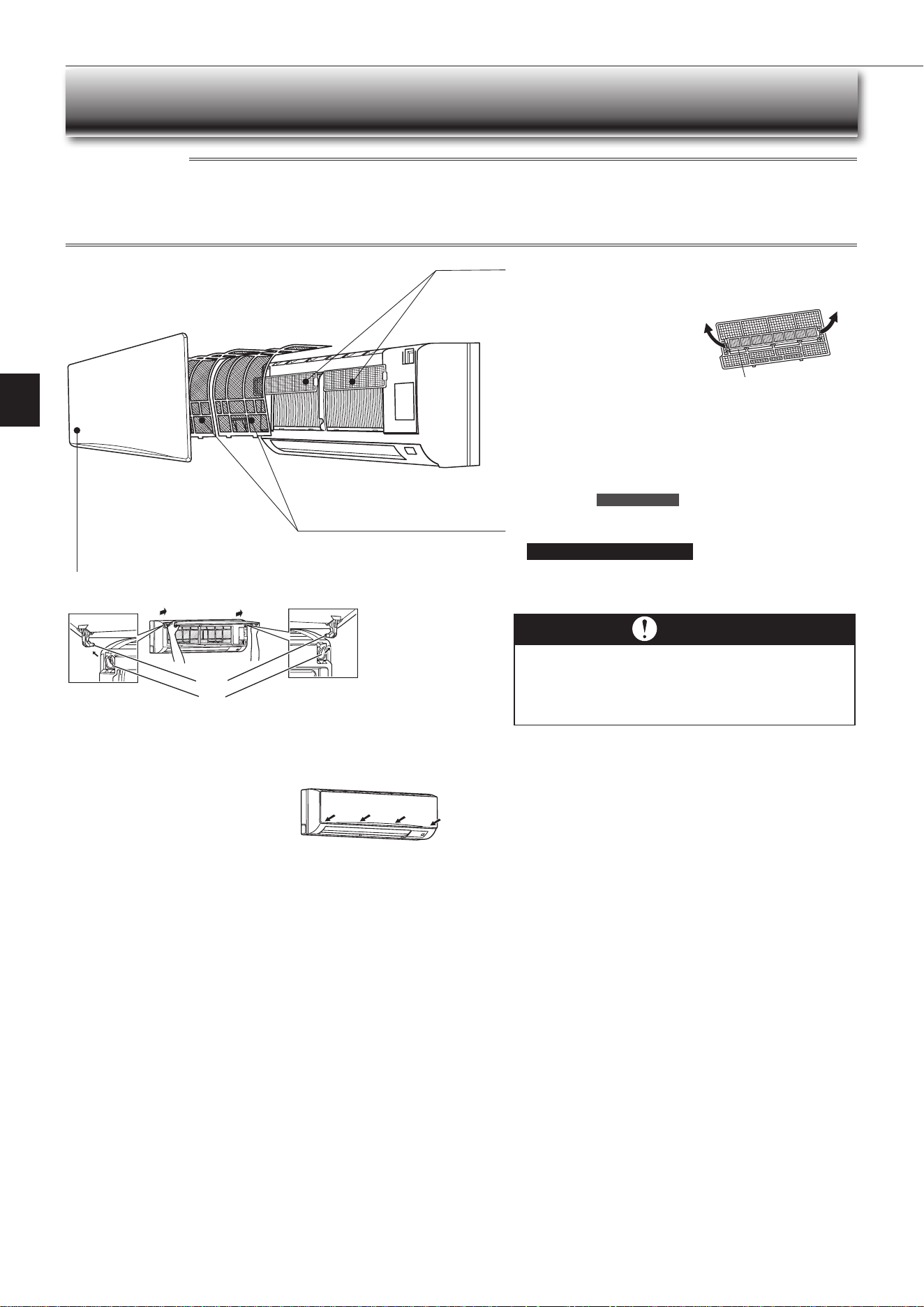
Air cleaning lter
(Anti-Allergy Enzyme Filter)
Back side of air lter
Clean every 3 months:
• Remove dirt by a vacuum cleaner.
• Putitbacktoitsoriginalposition,andinstallalltabsoftheairlter.
When dirt cannot be removed by vacuum cleaning:
• Soakthelteranditsframeinlukewarmwaterbeforerinsingit.
(Dilutedmilddetergentscanbeusedwhendirtcannotberemoved.)
•
Afterwashingwithwater,dryitwellinshade.Installalltabsoftheairlter.
Every year:
• Replaceitwithanewaircleaninglterforbestperformance.
• Parts Number MAC-1415FT-E
Air lter (Anti-Mold lter)
• Clean every 2 weeks
• Remove dirt by a vacuum cleaner, or rinse with water.
• After washing with water, dry it well in shade.
Important
• Clean the lters regularly for best performance and to
reduce power consumption.
• Dirty lters cause condensation in the air conditioner
which will contribute to the growth of fungi such as
mold. It is therefore recommended to clean air lters
every 2 weeks.
Front panel
1.Liftthefrontpaneluntila“click”isheard.
2. Hold the hinges and pull to remove as shown in the above illustration.
• Wipe with a soft dry cloth or rinse it with water.
• Donotsoakitinwaterformorethantwohours.
• Dry it well in shade.
3. Install the panel by following the removal
procedure in reverse. Close the front panel
securely and press the positions indicated by
the arrows.
Hole
Hinge
Pulltoremovefromtheairlter.
JG79Y723H02.indd 13 2020/10/26 14:05:46
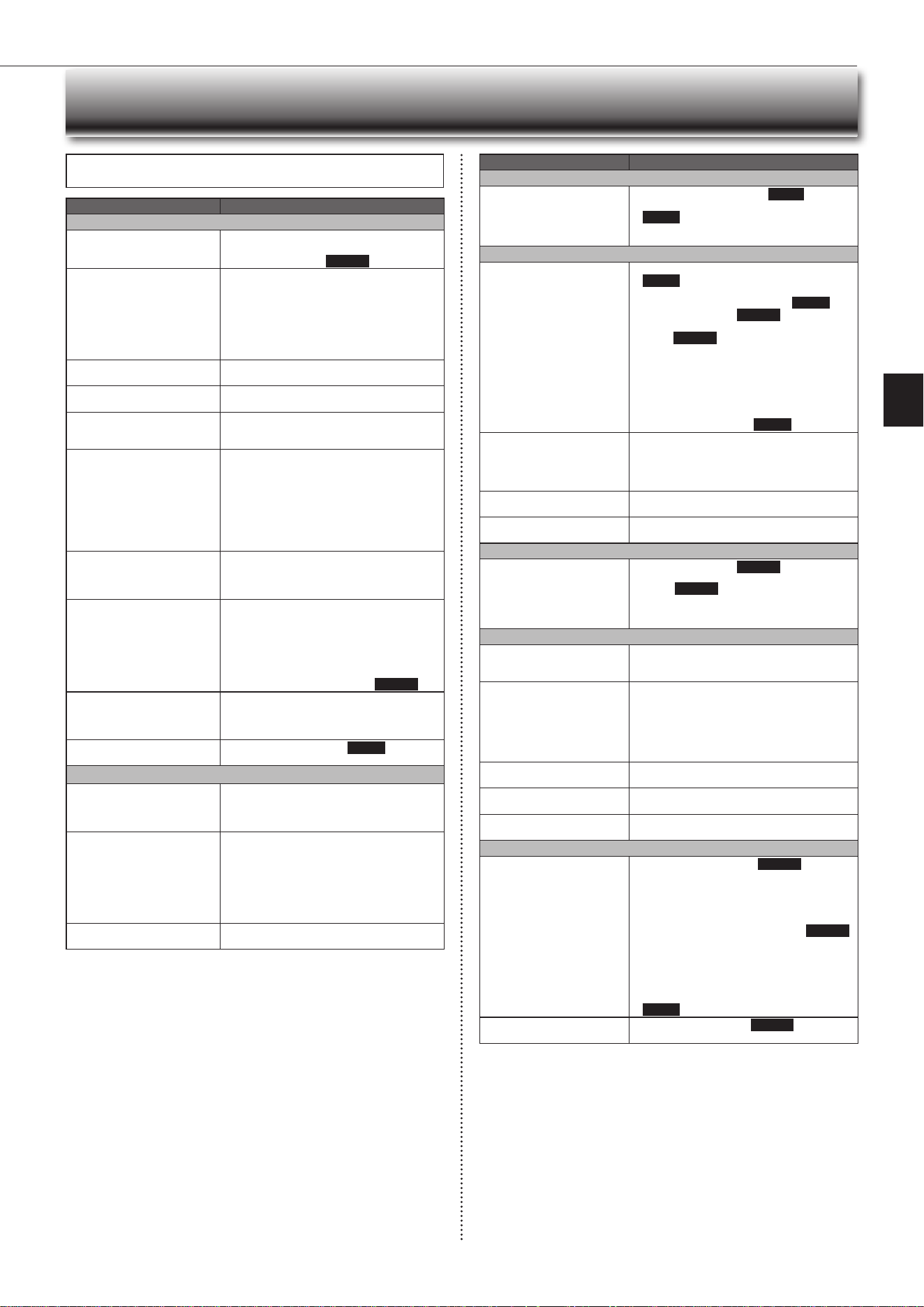
En-14
Even if these items are checked, when the unit does not recover from the
trouble, stop using the air conditioner and consult your dealer.
Symptom Explanation & Check points
Indoor Unit
The unit cannot be operated. • Isthebreakerturnedon?
• Isthepowersupplyplugconnected?
• IstheONtimerset?Page10
The horizontal vane does not
move.
• Are the horizontal vane and the vertical vane
installedcorrectly?
• Isthefanguarddeformed?
• Whenthebreakeristurnedon,thehorizontal
vanes’positionwillberesetinaboutaminute.
After the reset has completed, the normal hori-
zontalvanes’operationresumes.Thesameis
true in the emergency cooling operation.
The unit cannot be operated for
about 3 minutes when restarted.
• This protects the unit according to instructions
from the microprocessor. Please wait.
Mist is discharged from the air
outlet of the indoor unit.
•
The cool air from the unit rapidly cools moisture
in the air inside the room, and it turns into mist.
The swing operation of the HORI-
ZONTAL VANE is suspended for a
while, then restarted.
• This is for the swing operation of the HORIZON-
TAL VANE to be performed normally.
Theairowdirectionchanges
during operation.
The direction of the horizontal
vane cannot be adjusted with
the remote controller.
• When the unit is operated in COOL or DRY
mode, if the operation continues with air blow-
ingdownfor0.5to1hour,thedirectionofthe
airowisautomaticallysettoupwardposition
to prevent water from condensing and dripping.
• In the heating operation, if the airow tem-
perature is too low or when defrosting is being
done, the horizontal vane is automatically set
to horizontal position.
The operation stops for about
10minutesintheheating
operation.
• Outdoor unit is in defrost.
Since this is completed in max. 10 minutes,
please wait. (When the outside temperature is
toolowandhumidityistoohigh,frostisformed.)
The unit starts operation by
itself when the main power is
turnedon,buthasn’treceived
sign from the remote controller.
• These models are equipped with an auto
restart function. When the main power is
turned off without stopping the unit with the
remote controller and is turned on again, the
unit starts operation automatically in the same
mode as the one set with the remote control-
ler just before the shutoff of the main power.
Refer to “Auto restart function”. Page10
The indoor unit discolors over
time.
• Althoughplasticturnsyellowduetotheinuence
of some factors such as ultraviolet light and
temperature, this has no effect on the product
functions.
The operation indicator lamp is
dim. The unit does not beep.
• IstheNIGHTmodeset? Page 9
Outdoor Unit
The fan of the outdoor unit does
not rotate even though the com-
pressor is running. Even if the
fan starts to rotate, it stops soon.
• When the outside temperature is low during
cooling operation, the fan operates intermittently
tomaintainsufcientcoolingcapacity.
Waterleaksfromtheoutdoor
unit.
• During COOL and DRY operations, pipe or pipe
connecting sections are cooled and this causes
water to condense.
• In the heating operation, water condensed on
the heat exchanger drips down.
• In the heating operation, the defrosting operation
makesiceformingontheoutdoorunitmeltand
drip down.
Whitesmokeisdischargedfrom
the outdoor unit.
• In the heating operation, vapor generated by the
defrostingoperationlookslikewhitesmoke.
Symptom Explanation & Check points
Remote controller
The display on the remote
controller does not appear or it
is dim. The indoor unit does not
respond to the remote control
signal.
• Arethebatteriesexhausted? Page 5
• Is the polarity (+, -) of the batteries correct?
Page 5
• Are any buttons on the remote controller of other
electricappliancesbeingpressed?
Does not cool or heat
The room cannot be cooled or
heatedsufciently.
• Isthetemperaturesettingappropriate?
Page 6
• Is the fan setting appropriate? Please change
fan speed to High or Super High. Page 7
• Aretheltersclean? Page 13
•
Is the fan or heat exchanger of the indoor unit
clean?
Page 13
• Arethereanyobstaclesblockingtheairinletor
outletoftheindoororoutdoorunit?
• Isawindowordooropen?
• It may take a certain time to reach the setting
temperature or may not reach that depending on
the size of the room, the ambient temperature,
andthelike.
• IstheNIGHTmodeset? Page 9
The room cannot be cooled
sufciently.
• Whenaventilationfanoragascookerisused
in a room, the cooling load increases, resulting
inaninsufcientcoolingeffect.
• When the outside temperature is high, the cooling
effectmaynotbesufcient.
The room cannot be heated
sufciently.
• When the outside temperature is low, the heating
effectmaynotbesufcient.
Air does not blow out soon in
the heating operation.
• Please wait as the unit is preparing to blow out
warm air.
Airow
The air from the indoor unit
smells strange.
• Aretheltersclean? Page 13
• Is the fan or heat exchanger of the indoor unit
clean? Page 13
• The unit may suck in an odor adhering to the
wall, carpet, furniture, cloth, etc. and blow it out
with the air.
Sound
Crackingsoundisheard. • This sound is generated by the expansion/con-
traction of the front panel, etc. due to change in
temperature.
“Burbling” sound is heard. • This sound is heard when the outside air is
absorbed from the drain hose by turning on the
rangehoodortheventilationfan,makingwater
owinginthedrainhosetospoutout.
This sound is also heard when the outside air
blows into the drain hose in case the outside
wind is strong.
Mechanical sound is heard
from the indoor unit.
• This is the switching sound in turning on/off the
fan or the compressor.
Thesoundofwaterowingis
heard.
• This is the sound of refrigerant or condensed
waterowingintheunit.
Hissing sound is sometimes
heard.
• This is the sound when the ow of refrigerant
inside the unit is changed.
Timer
Weeklytimerdoesnotoperate
according to settings.
• IstheON/OFFtimerset?Page10
• Transmit the setting information of the weekly
timer to the indoor unit again. When the infor-
mation is successfully received, a long beep will
sound from the indoor unit. If information fails to
be received, 3 short beeps will be heard. Ensure
information is successfully received. Page 11
• When a power failure occurs and the main power
turns off, the indoor unit built-in clock will be
incorrect.Asaresult,theweeklytimermaynot
worknormally.
Be sure to place the remote controller where
the signal can be received by the indoor unit.
Page 5
The unit starts/stops the opera-
tion by itself.
• Istheweeklytimerset? Page 11
WHEN YOU THINK THAT TROUBLE HAS OCCURRED
JG79Y723H02.indd 14 2020/10/26 14:05:46
En-15
● OPERATING INSTRUCTIONS ●
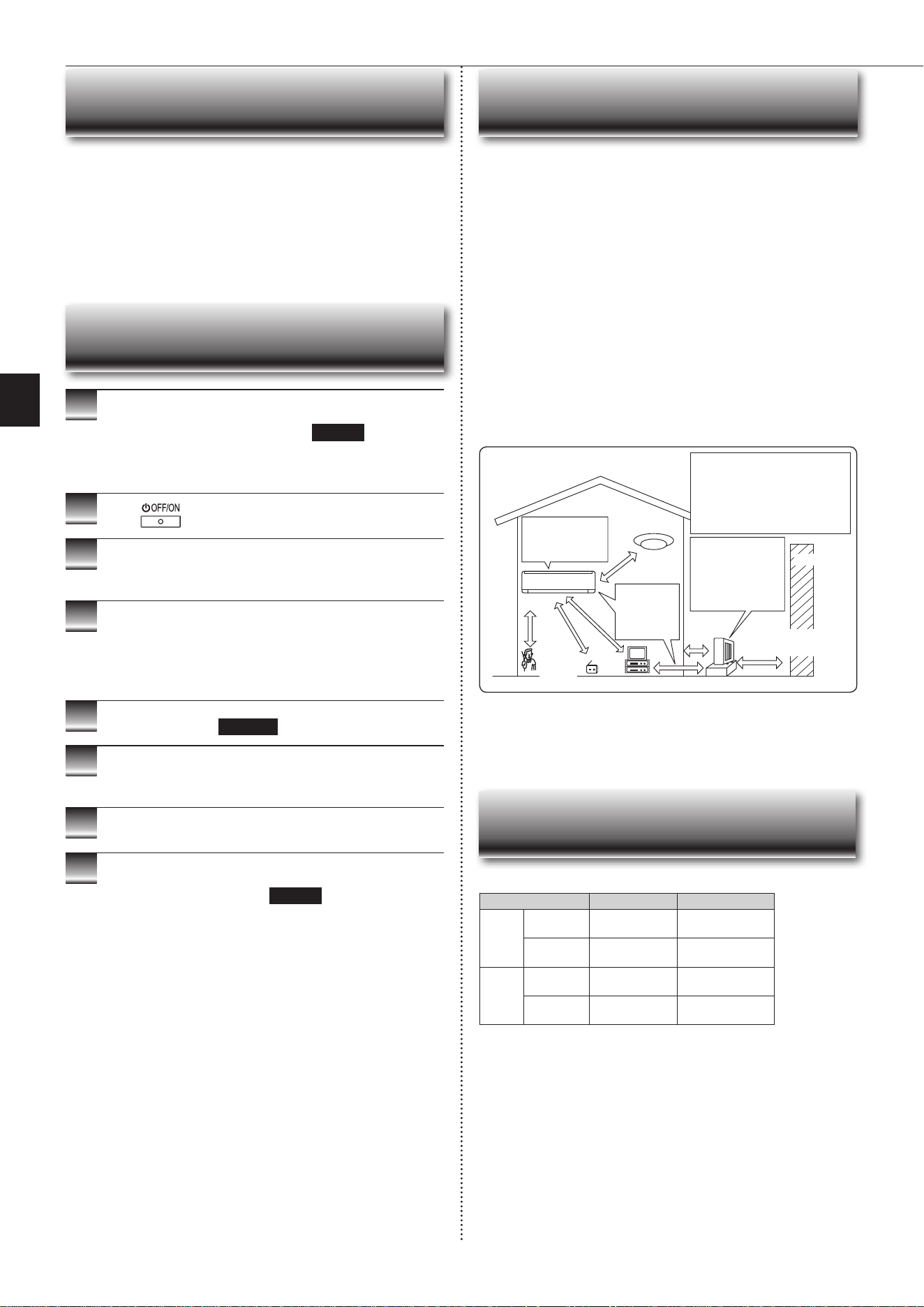
Installation place
Avoid installing the air conditioner in the following places.
• Where there is much machine oil.
• Salty places such as the seaside.
• Wheresuldegasisgeneratedsuchashotspring,sewage,wastewater.
• Whereoilissplashedorwheretheareaislledwithoilysmoke(suchascook-
ing areas and factories, in which the properties of plastic could be changed
anddamaged).
• Where there is high-frequency or wireless equipment.
• Wheretheairfromtheoutdoorunitairoutletisblocked.
• Where the operation sound or air from the outdoor unit bothers the house next
door.
• The mounting height of indoor unit 1.8 m to 2.3 m is recommended. If it is
impossible, please consult your dealer.
• Donotoperatetheairconditionerduringinteriorconstructionandnishing
work,orwhilewaxingtheoor.Beforeoperatingtheairconditioner,ventilate
theroomwellaftersuchworkisperformed.Otherwise,itmaycausevolatile
elementstoadhereinsidetheairconditioner,resultinginwaterleakageor
scattering of dew.
• This equipment should be installed and operated with a minimum distance of
20cmbetweenthedeviceandtheuserorbystanders.
Electrical work
• Provide an exclusive circuit for the power supply of the air conditioner.
• Besuretoobservethebreakercapacity.
If you have any questions, consult your dealer.
INSTALLATION PLACE AND
ELECTRICAL WORK
1
Operate by COOL mode with the highest temperature
set or FAN mode for 3 to 4 hours. Page 6
• This dries the inside of the unit.
• Moisture in the air conditioner contributes to favorable conditions for
growth of fungi, such as mold.
2
Press
to stop the operation.
3
Turnoffthebreakerand/ordisconnectthepowersup-
ply plug.
4
Remove all batteries from the remote controller.
When using the air conditioner again:
1
Cleantheairlter. Page 13
2
Checkthattheairinletandoutletoftheindoorand
outdoorunitsarenotblocked.
3
Checkthattheearthisconnectedcorrectly.
4
Refer to the “PREPARATION BEFORE OPERATION”,
and follow the instructions. Page 5
WHEN THE AIR CONDITIONER IS NOT
GOING TO BE USED FOR A LONG TIME
To prevent the effects
ofauorescentlamp,
keepasfarapartas
possible.
wall, etc.
Inverter-type
uorescentlamp
Keep a space
to prevent
the picture
distortion or
the noise.
1 m
or
more
Radio
100
mmor
more
TV
Cordless
phone or
Portable
phone
3 m or more
1 m
or more
The installation location of the outdoor
unit should be at least 3 m away from
the antennas for TV sets, radios, etc. In
areaswherethereceptionisweak,pro-
vide greater space between the outdoor
unit and the antenna of the affected
device if operation of the air conditioner
interferes with radio or TV reception.
500mmormore
For the optimum ef-
ciency
andtoextend
the life time of using,
the outdoor unit
should be installed in
a well-ventilated dry
place.
In the following cases, stop using the air conditioner and consult your dealer.
• Whenwaterleaksordripsfromtheindoorunit.
• Whentheoperationindicatorlampblinks.
• Whenthebreakertripsfrequently.
• The remote control signal is not received in a room where an electronic ON/
OFFtypeuorescentlamp(inverter-typeuorescentlamp,etc.)isused.
• Operation of the air conditioner interferes with radio or TV reception. An ampli-
ermayberequiredfortheaffecteddevice.
• When an abnormal sound is heard.
• Whenanyrefrigerantleakageisfound.
WHEN
YOU THINK THAT
TROUBLE HAS OCCURRED
SPECIFICATIONS
Indoor Outdoor
Cooling
Upper limit
32°CDB
23°CWB
46°CDB
—
Lower limit
21°CDB
15°CWB
-10°CDB
—
Heating
Upper limit
27°CDB
—
24°CDB
18°CWB
Lower limit
20°CDB
—
-15°CDB
-16°CWB
Guaranteed operating range
DB : Dry Bulb
WB : Wet Bulb
JG79Y723H02.indd 15 2020/10/26 14:05:46

JG79Y723H02.indd 16 2020/10/26 14:05:46

JG79Y723H02.indd 17 2020/10/26 14:05:46

JG79Y723H02.indd 18 2020/10/26 14:05:46
HEADOFFICE:TOKYOBUILDING,2-7-3,MARUNOUCHI,CHIYODA-KU,TOKYO100-8310,JAPAN
JG79Y723H02
JG79Y723H02.indd 19 2020/10/26 14:05:46