User Manual Watch
Product Overview
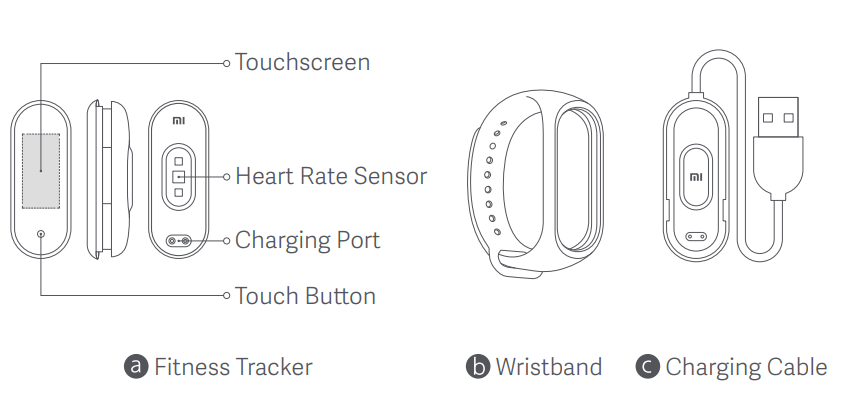
Installation
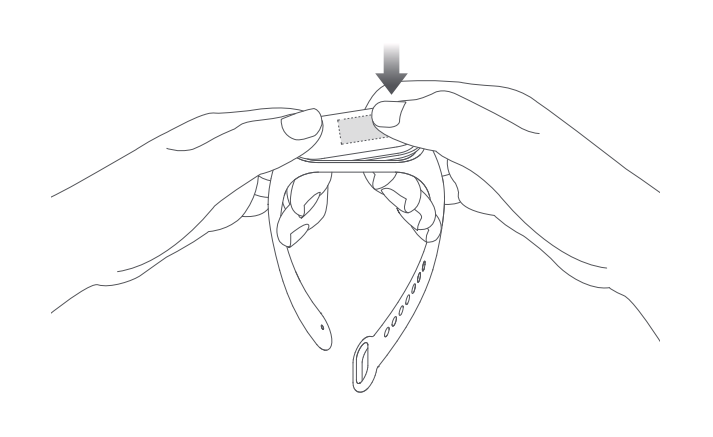
- Insert one end of the fitness tracker into the slot from the front of the wristband.
- Press down on the other end with your thumb to push the fitness tracker completely into the slot.
Wearing
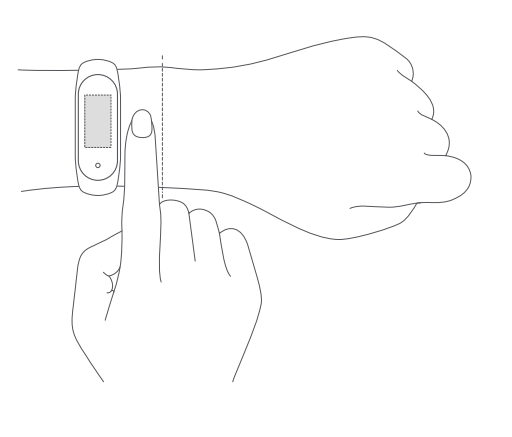
- Comfortably tighten the band around your wrist, about 1 finger width away from your wrist bone.
- Note: Wearing the wristband too loosely may impact the data collection by the heart rate sensor.
Connecting
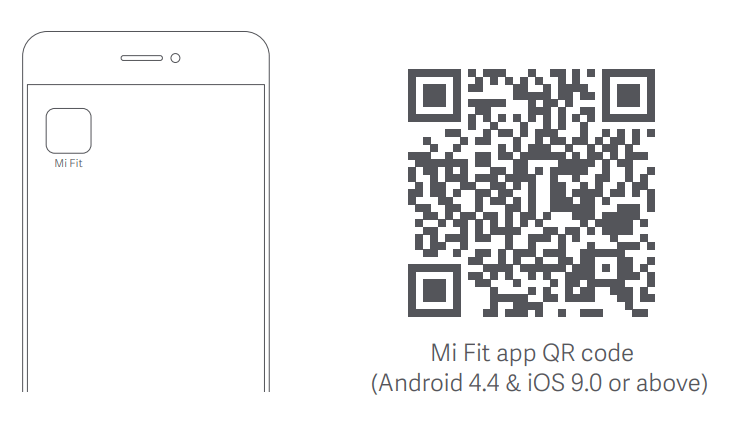
1. Scan the QR code to download and install the latest version of the Mi Fit app, or search for it in Google Play, App Store, or other third-party app stores.
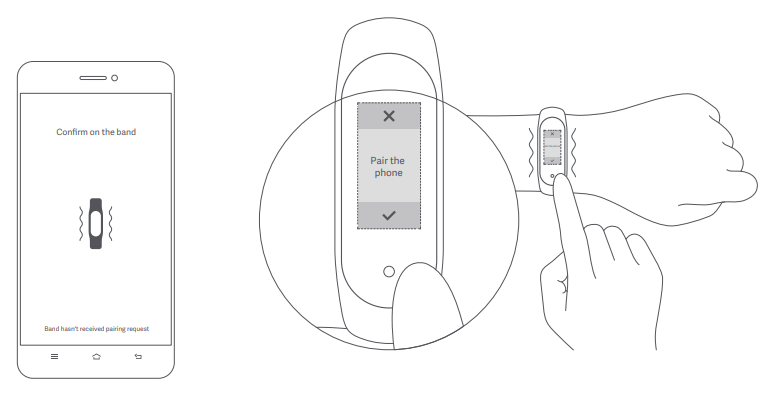
2. Open the Mi Fit app, log in to your account, and then follow the instructions to connect and pair the band with your device. When your band starts to vibrate and the Bluetooth pairing notification appears on the screen, touch the button to complete the pairing with your device.
Note: Make sure the Bluetooth is enabled on your phone. Hold close your phone to the band during the pairing process.
Usage
- After successfully pairing with your device, the band will start tracking and analyzing your daily activities and sleeping habits.
- Touch the button to light up the screen. Then, you can swipe up or down to access many features including browsing your activity data, and measuring your heart rate.
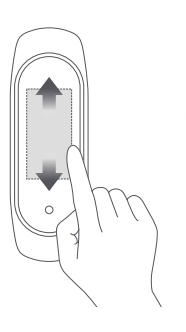 : Swipe up/down to switch between functions
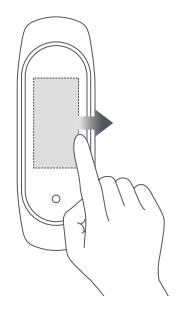 : Swipe right to return to the previous page
Disassembly
- Remove the band from your wrist, hold on to each end and pull on the wristband until you see a small gap between the fitness tracker and the wristband. Use your finger to pop the fitness tracker out of its slot from the front side of the wristband.
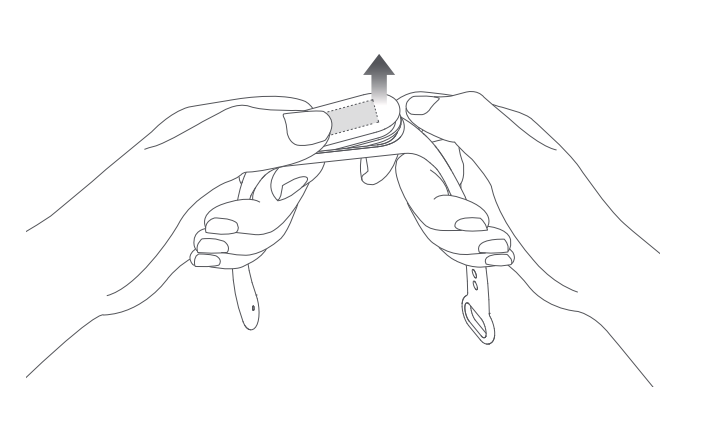
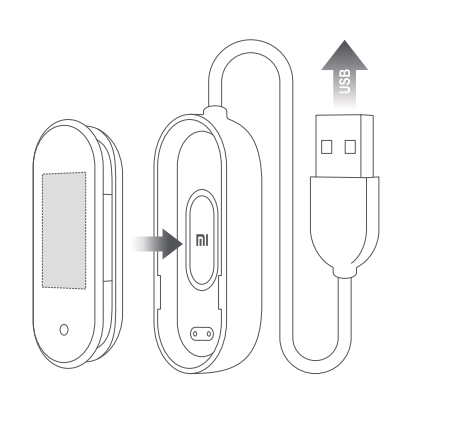
Charging
- Recharge your band immediately when the battery level is low.
Precautions
- When using the band to measure your heart rate, please keep your wrist still.
- Mi Smart Band 4 has a water resistance rating of 5 ATM. It can be worn in the shower, swimming pool, or while swimming near the shore. It cannot be used, however, in a sauna or while scuba diving.
- The function of the touch button and touchscreen are not accessible during underwater. When your band comes in contact with water, use a soft cloth to wipe away excess water from its surface before using it.
- During daily use, avoid wearing the band too tightly and try to keep its contact area dry. Please clean the wristband regularly with water. Please stop using the product immediately and seek medical assistance if the contact area on your skin shows signs of redness or swelling
Specifications
- Name: Mi Smart Band 4
- Model: XMSH07HM
- Fitness Tracker Net Weight: 10.6 g
- Fitness Tracker Dimensions: 46.8 x 17.8 x 12.6 mm
- Wristband Material: Thermoplastic elastomer (TPE)
- Clasp Material: Aluminum alloy
- Adjustable Length: 155–216 mm
- Compatible with: Android 4.4/iOS 9.0 or above
- Battery Capacity: 135 mAh
- Battery Type: Lithium polymer battery
- Input Voltage: DC 5.0 V
- Input Current: 250 mA Max.
- IP Rating: 5 ATM
- Frequency: 2402–2480
- Mhz Max. Output: 0 dBm
- Operating Temperature: -10°C to 50°C
- Wireless Connectivity: Bluetooth 5.0 BLE
Question & answer
1. How do I fix my Mi Band?
Quick fixes
- Ensure that your Mi Band is charged or is connected to its charger during the pairing and syncing process.
- Restart your phone's Bluetooth radio if your app can't see your Mi Band.
- Are you still having issues with pairing and syncing? Try restarting both the Mi Band and your phone.
2. Is Xiaomi Mi Band accurate?
- The accuracy and precision of the MB4 is reasonable and can be used to monitor the average of step count and heart rate in free-living conditions
3. How do I know if my Mi Band charger is working?
- Before we start the troubleshooting process, you should be aware of how to know if the band is charging or not. If the Mi Band is on, then you will see the charging symbol on your Mi Band as soon as you plug it in.
4. Can I use Mi Band without phone?
- Yes you can use fitness band without smart phones. All fitness band can be used without smart phones, you will get all your work out details like heart rate, calories burnt, distance covered and other details on your fitness band itself. However you won't receive them on your smart phone.
5. Does Mi Band Track GPS?
- The Xiaomi Smart Band 7 Pro is a fitness tracker with smartwatch aspirations. That means a larger screen, and swappable straps. There's also built-in GPS, which is an upgrade over the standard non-Pro version
6. Can Mi Band track distance?
- 2.3.
- Xiaomi Mi Smart band 4.0: is a wristband that detects steps and heart rate for daily activity. The device measures 47 × 21.6 × 10.8 mm and weighs 22.1 g. It integrates a 3-D accelerometer and a 3-D gyroscope to detect steps and estimated distance covered, and a photoelectric sensor to detect heart rate.
7. Can I charge my Mi Band with fast charger?
- Wide Compatibility Compatible with Xiaomi Mi Band 6/ Mi Band 5 Fitness Tracker. Please Note: Please do not use fast charging adapter. If you connect it to the adapter, the electric current must not exceed 1A and the Voltage does not exceed 5V.
8. Can I charge Mi Band with laptop?
- You can find the charger inside the box with a USB on one side and a port with two gold plated connectors for the Core to be plugged in. Place the core into that space gently. then plug the USB side to any USB port on your PC or Laptop. Now I recommend charging your Mi Band 2 when you get the low battery warning.
9. Can I charge Mi Band with any charger?
- It is a 50 cm cable terminated on one side with a universal USB connector, which allows you to charge the band using any device equipped with a USB port. Thanks to that it up you to decide which power source you will use, it can be a powerbank, laptop or mains charger.
10. How do I know if my Mi Band is original?
- 20-digit number under the banderole is security code of your product. Every Xiaomi product such as Xiaomi Phone, Mi Powerbank, Mi Watch, Mi Band, Mi Pro Scooter has a this bandrole and 20-digit security code. In this way, its authenticity of Xiaomi product can be confirmed, and any forgery is prevented.
11. Is MI band 4 worth buying?
- Verdict. The Mi Smart Band 4 is another solid product in the Mi Band lineup. We loved its display, comfort, and workout tracking accuracy. The Mi Fit app is still quite good, and the ability to set custom vibration patterns for notifications is a godsend
12. Is Mi Band sweat proof?
- The texture is refined and the silicone nature means it remains suitable for use in sporting situations. The silicone material is not only soft and skin-friendly, but also sweat-proof.
13. Can Mi Band 4 receive calls?
- If you wish to receive calls and app alerts on your Mi Band 4, here's what you need to know. Select 'App alerts' on Mi Fit app and turn it on from the list. Once this is done, select the apps you wish to get alerts for. Turn on 'Incoming call' on Mi Fit app to view and reject incoming calls on Mi Band 4
14. Can Mi Band Track swimming?
- 50 meter water resistance Automatic swimming style recognitionThe 5 ATM waterproof rating* means that you can wear Mi Smart Band 6 in swimming pools or surfing on the beach. When swimming, choose between five different swimming styles for more accurate tracking.
15. Can Mi Band measure body fat?
- However, weight doesn't tell you everything. That's why the Xiaomi Mi Body Composition Scale 2 displays 13 different body metrics including your BMI, body fat percentage, muscle mass, water percentage, basal metabolic rate, visceral fat, bone mass and protein percentage.