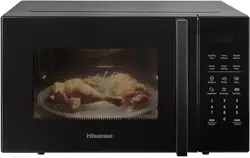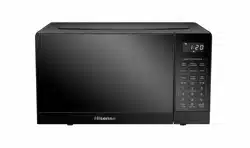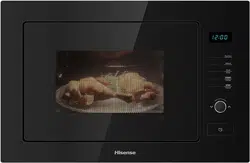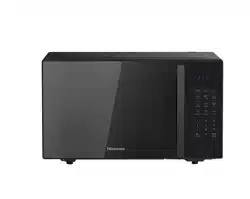
User and Installation Manua l
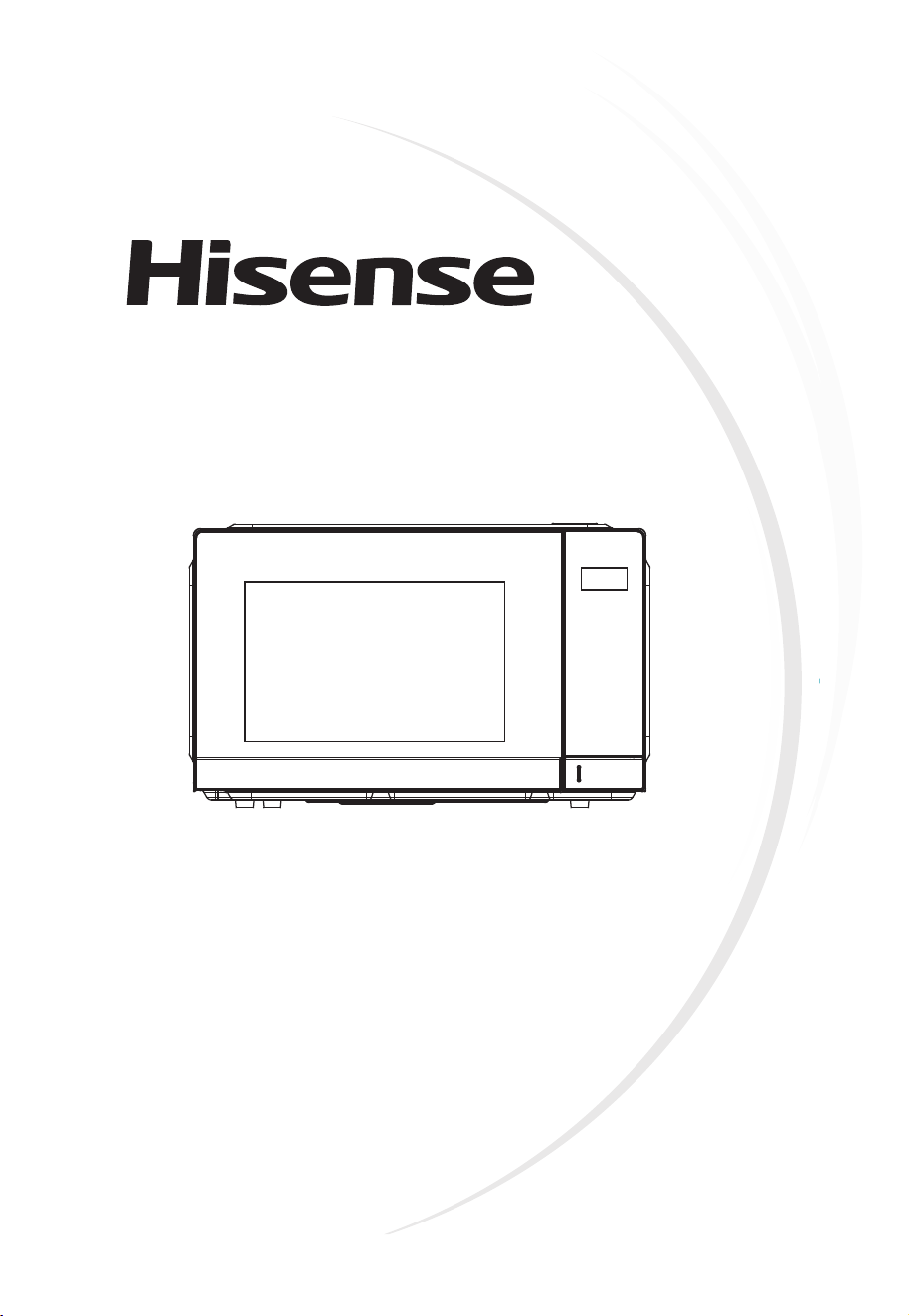
Microwave Oven
Model: HMAS2509BP
HMAS2509WP
Before installing or using the appliance, please read
the manual carefully, and keep it for future reference.


Table of Contents
PRECAUTIONS TO AVOID POSSIBLE EXPOSURE TO EXCESSIVE
MICROWAVE ENERGY
................................................................................
4
IMPORTANT SAFETY INSTRUCTIONS
.......................................................
5
CLEANING INSTRUCTIONS
.........................................................................
8
SETTING UP YOUR OVEN
...........................................................................
10
CONTROL PANEL
.........................................................................................
12
OPERATION INSTRUCTIONS
......................................................................
13
UTENSILS GUIDELINE
................................................................................
22
COOKING TIPS
.............................................................................................
23
MAINTENANCE INSTRUCTIONS
.................................................................
24

Product Specification
PRECAUTIONS TO AVOID POSSIBLE
EXPOSURE TO EXCESSIVE MICROWAVE
ENERGY
Model Number
HMAS2509BP HMAS2509WP
Rate Voltage
220-240V~ 50Hz
Power Consumption (Microwave)
1440W
Rated Microwave Power Output
900W
Operating Frequency
2450MHz
Oven Capacity
25L
(a) Do not attempt to operate this oven with the door open sinc e
open door operation can result in harmful exposure to
microwave energy.
It is important not to defeat or tamper with the safety interlocks.
(b) Do not place any object between the oven front face and the
door or allows soil or cleaner residue to accumulate on sealing
surfaces.
(c) Do not operate the oven if it is damaged. It is particularly
important that the oven door cl ose properly and that there is no
damage to the:
(1) DOOR (bent)
(2) HINGES AND LATCHES (broken or loosened)
(3) DOOR SEALS AND SEALING SURFACES
(d) The oven should not be adjust ed or repaired by anyone except
properly qualified service personnel.
4

WARNING: If the door or door seals are damaged, the oven
must not be operated until it has been repaired by a trained
person.
WARNING: It is hazardous for anyone other than a trained
person to carry out any service or repair operation, which
involves the removal of any cover, which gives protection
against exposure to microwave energy. WARNING: Liquids
or other food must not be heated in sealed containers since
they are liable to explode.
1. Only use utensils that are suitable for use in microwave
ovens.
2. Metallic containers for food and beverages are not allowed
during microwave cooking.
3. When heating food in plastic or paper containers, keep
an eye on the oven due to the possibility of ignition.
4. The microwave oven is intended for heating food and
beverages. Drying of food or clothing and heating of
warming pads, slippers, sponges, damp cloth and similar
may lead to risk of injury, ignition or fire.
5. If smoke is observed, switch off or unplug the appliance
and keep the door closed in order to stifle any flames
microwave heating of beverages can result in delayed
eruptive boiling, therefore care has to be taken when
handling the container.
6. The contents of feeding bottles and baby food jars are to
be stirred or shaken and the temperature is to be checked
before consumption, in order to avoid burns.
IMPORTANT SAFETY INSTRUCTIONS
5
7. Eggs
in their shell and whole hard-boiled eggs shall not
be heated in microwave ovens since they may explode,
even after microwave heating has ended.
8. Failure to maintain the oven in a clean condition could
lead to deterioration of the surface that could adversely
affect the life of the appliance and possibly result in a
hazardous situation.
9. The appliance must not be placed in a cabinet.
10. Care should be taken not to displace the turntable when
removing containers from the appliance.
11. The appliance shall not be cleaned with a steam cleaner.
12. The appliance must not be installed equal or higher than
900 mm above the floor. Minimum height of free space
necessary above the top surface of the oven: 100mm.
Warning: When the appliance is operated in the combination
mode, children should only use the oven under adult
supervision due to the temperatures generated.
CAUTION: HOT SURFACE
6

13. If
the supply cord is damaged, it must be replaced by the
manufacturer or its service agent or a similarly qualified
person in order to avoid a hazard.
14. This appliance can be used by children aged from 8
years and above and persons with reduced physical,
sensory or mental capabilities or lack of experience and
knowledge if they have been given supervision or
instruction concerning use of the appliance in a safe way
and understand the hazards involved.
15. Children shall not play with the appliance.
16. Cleaning and user maintenance shall not be made by
children without supervision.
17. Do not directly put the glass plate into cold water after
use. It needs to place the glass plate for at least 20
minutes, and then put it into the water to avoid cracking.
18. Group 2 Class B appliance
Group 2 ISM equipment: group 2 contains all ISM
equipment in which radio-frequency energy is
intentionally generated and/or used in the form of
electromagnetic radiation for the treatment of material,
and EDM and arc welding equipment.
Class B equipment is equipment suitable for use in
domestic establishments and in establishments directly
connected to a low voltage power supply network which
supplies buildings used for domestic purposes.
19. This product internal light source LED light on<60lm.
20. After plug in or the appliance end the work, the product
automatically falls into standby mode.
7

MICROWAVE OVEN CARE
The oven should be cleaned regularly and any food deposits
removed.
a. Remove the power cord from the wall outlet before cleaning.
After cooling products. Don't immerse the appliance in water
or other fluids when cleaning.
b. Failure to maintain the oven in a clean condition could lead to
deterioration of the surface that could adversely affect the life
of the appliance and possibly result in a hazardous situation.
c. Never use hard detergent, gasoline, abrasive powder or
metal brush to clean any part of the appliance.
d. Do not remove the waveguide cover.
e. When the microwave oven has been used for a long time,
there may be some strange odors exist in oven, following 3
methods can get rid of them:
1) Place several lemon slices in a cup, then heat with high
micro power for 2-3 min.
2) Place a cup of red tea in oven, then heat with high micro
power.
3) Put some orange peel into oven, and then heat them with
high micro power for 1 minute.
f. When the product is not used, it should be placed in dry and
ventilated areas as well as possible.
CLEANING INSTRUCTIONS
8

Details how to clean surfaces in contact with food:
After use wipe the waveguide cover with a damp cloth, followed
by dry cloth to remove any food splashes and grease. Built -up
grease may overheat and begin to cause smoke or catch fire.
TIPS F
OR CLEANING
Details for cleaning door seals, cavity and adjacent parts:
Exterior:
Wipe the enclosure with a dampened soft cloth
Door:
Using a dampened soft cloth, wipe clean the door and window
Wipe the door seals and adjacent parts to remove any spill or
spatter
Wipe the control panel with a slightly dampened soft cloth
Interior walls:
Wipe clean the interior surfaces with a dampened soft cloth
Wipe clean the waveguide cover to remove any food splashed
Turntable / Rotation ring / Rotation axis:
Wash with mild soap water
Rinse with clean water and allow drying thoroughly
9
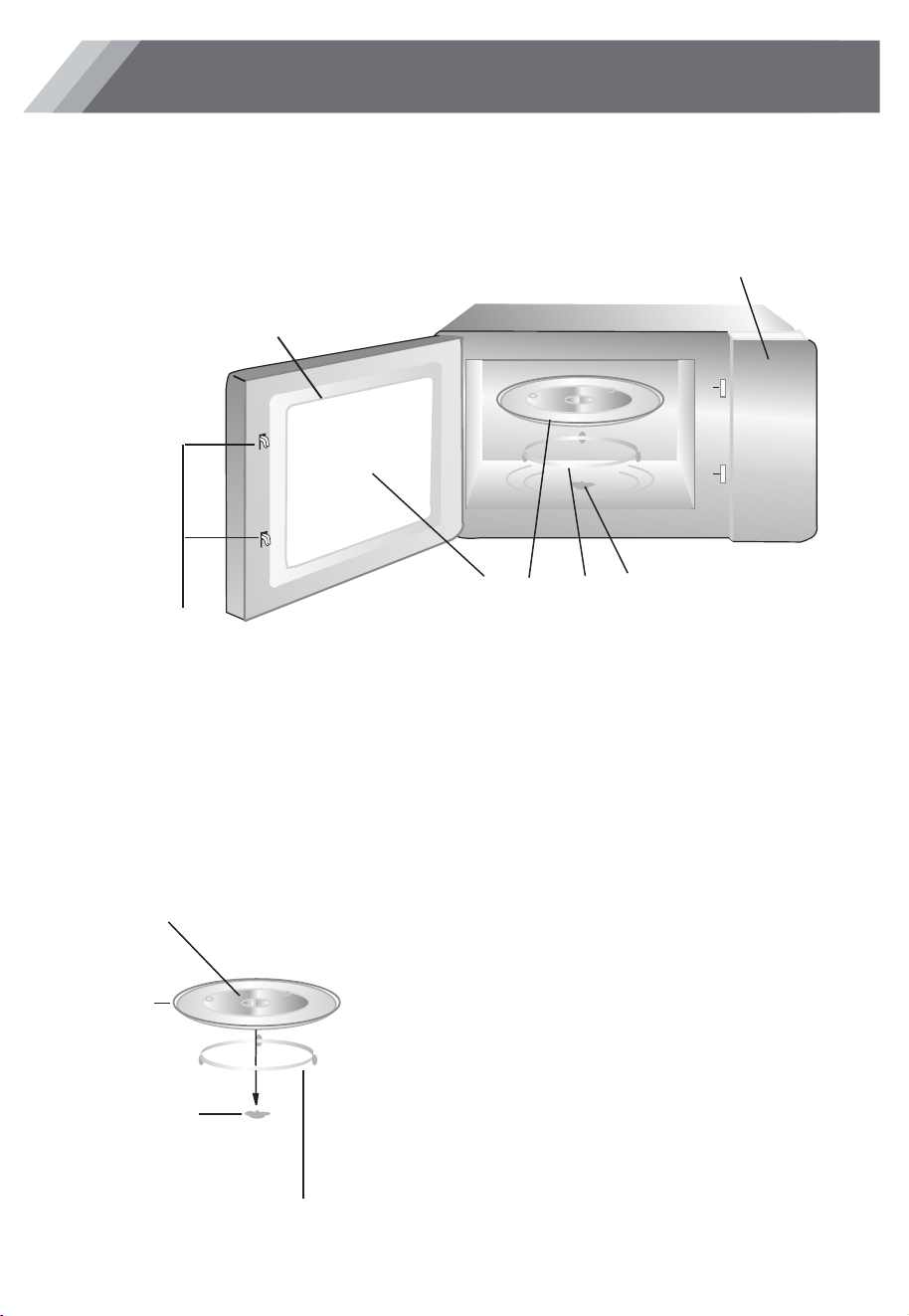
F
G
A
C B
E
D
Names of Oven Parts and Accessories
Remove the oven and all materials from the carton and oven cavity.
Your oven comes with the following accessories:
Glass tray 1
Turntable ring assembly 1
Instruction Manual 1
Hub (underside)
Glass tray
Turntable ring assembly
a. Never place the
glass tray
upside down. The glass
tray should never be restricted.
b. Both
glass tray
and
turntable ring assembly
must
always be used during cooking.
c. All food and containers of food are always placed
on the
glass tray
for cooking.
d. If
glass tray
or
turntable ring assembly
cracks or
breaks, contact your nearest authorized service
center.
Turntable Installation
Turntable shaft
A) Control panel
B) Turntable shaft
C) Turntable ring assembly
D) Glass tray
E) Observation window
F) Door assembly
G) Safety interlock system
SETTING UP YOUR OVEN
10
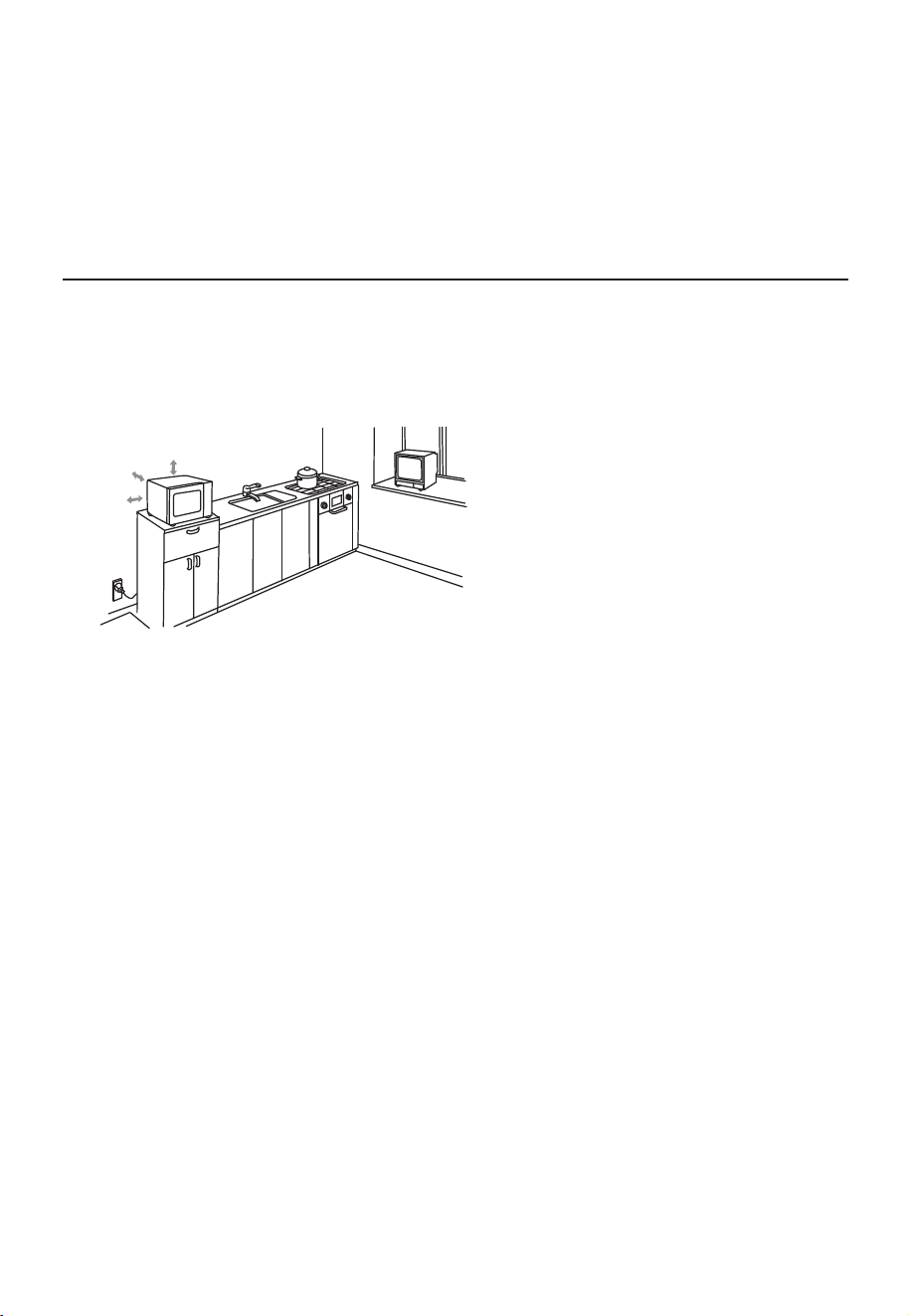
Installation
A minimum clearance of 3.0 inches
inches (30cm) above the oven.
(2) Do not remove the legs from the
bottom of the oven.
(3) Blocking the intake and/or outlet openings
can damage the oven.
(4) Place the oven as far away from
radios and TV as possible.
Operation of microwave oven may
cause interference to your radio or TV
reception.
2. Plug your oven into a standard household
outlet. Be sure the voltage and the
frequency is the same as the voltage
and the frequency on the rating label.
WARNING: Do not install oven over a
range cooktop or other heat-producing
appliance. If installed near or over a heat
source, the oven could be damaged and
the warranty would be void.
3.0 inch(7.5cm)
3.0 inch(7.5cm)
12 inch(30cm)
Remove all packing material and accessories.
Examine the oven for any damage such as
dents or broken door. Do not install if oven is
damaged.
Countertop Installation
Cabinet: Remove any protective film found
on the microwave oven cabinet surface.
Do not remove the light brown Mica cover
that is attached to the oven cavity to
protect the magnetron.
1. Select a level surface that provide
enough open space for the intake
and/or outlet vents.
(7.5cm) is required between the oven a nd
any adjacent walls.
(1) Leave a minimum clearance of 12
11
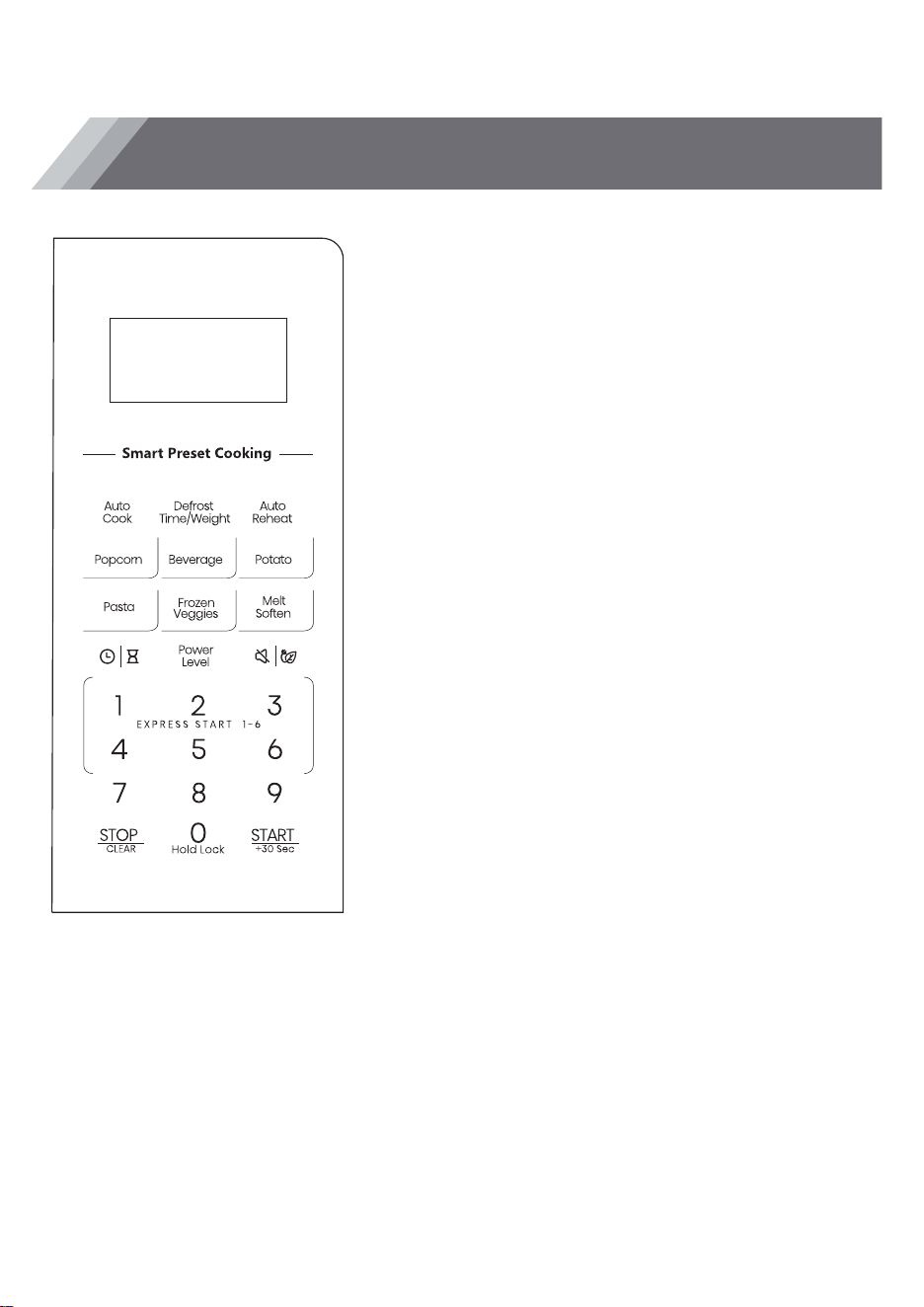
Control Panel
Auto Cook
Use to set the automatic cook programs (See Page 18).
TIME / WEIGHT DEFORST
Press once to set defrost program based on time (See Page14).
Press twice to set defrost program based on weight (See Page
15).
Auto REHEAT
Use to set the automatic reheat programs (See Page 17).
Quick Preset Cooking Menu
Use those preset menu to cook food automatically without
entering power level or time.
Melt/Soften
Used to Melt/Soften different food (See Page 19).
CLOCK /TIMER
Press and hold to set the clock time (See Page 17).
Press to set the timer function (See Page 17).
Power Level
Use to microwave food with selected power level(See Page 13).
Mute/ECO
Use to activate Mute and ECO function
1-6 Number Pad
Press to directly start the microwave oven to cook corresponding
time
STOP/CANCEL
Press to clear all previous settings before cooking
starts.
Press once to pause current cooking program or
press twice to cancel the program.
LOCK
Press and hold to set child lock (See Page 21).
+30 SEC
Press to add time during the cooking program (See Page 21).
12

1. FIRST TIME USE
If you are using your microwave oven for the first time, please be
sure to:
Clean the glass turntable with hot water, a small amount of
dishwashing liquid and a nonabrasive cleaning pad.
Do not immerse the body of the unit in water.
When you plug in the unit, the display will show “1:00".
During cooking, if press STOP/CANCEL once or open the door,
the program will be paused. Press the dial to resume cooking, but
if you press STOP/CANCEL twice, the program will be canceled.
When the cooking completes, the screen will display “End” with
sound every two minutes until you press STOP/CANCEL or open
the door.
1. POWER LEVEL
There are ten microwave power levels, 100P, 90P, 80P, 70P, 60P,
50P, 40P, 30P, 20P and 10P, respectively. Press the “POWER
LEVEL” button to enter microwave power mode selection. Press
the number buttons to set the microwave power, press the
"START/+30s" button to confirm microwave power and enter
cooking time setting. Then, press the number buttons to set the
cooking time, the maximum time that can be input is 99:99. After
entering the cooking time, press “START/+30s” button to start
work. An buzzing sound to notify completion of the operation.
OPERATION INSTRUCTIONS
13
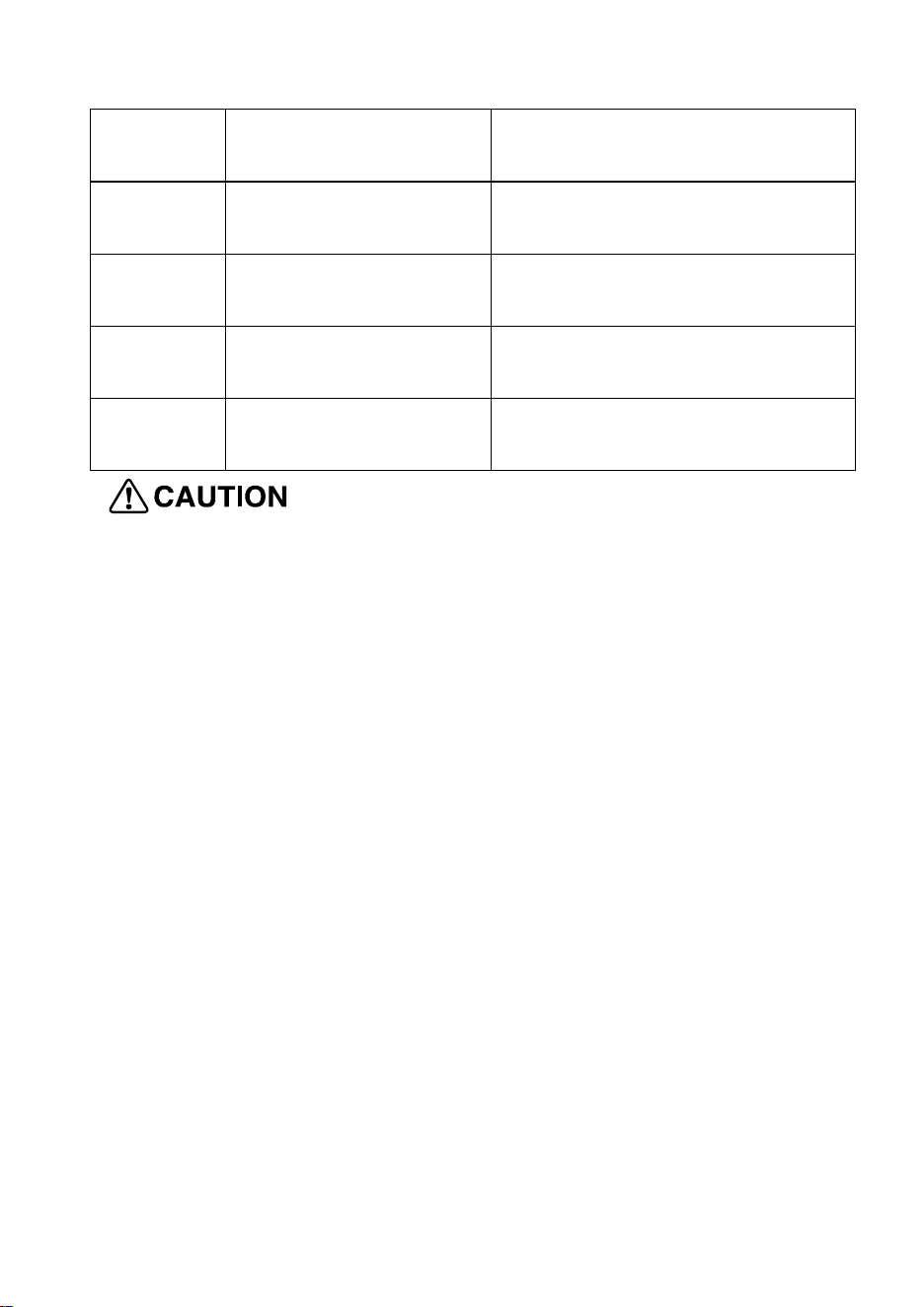
HIGH
100% and 90%
power output
(
Applicable for quick and
thorough cooking)
M.High
80% and 70%
power output
(A
pplicable for medium
express cooking)
Med
60% and 50%
power output
(
Applicable for steaming
food)
M.Low
40% and 30%
power output
(
Applicable for defrosting
food)
LOW
20% and 10%
power output
(
Applicable for keeping
warm)
a. The max time which can be set is 99 minutes and 99
seconds.
b. Never use the grill rack during microwave cooking.
c. Never operate the oven empty.
d. At the maximum microwave power, the oven will
automatically lower the power after a certain time of cooking
to lengthen the service life.
e. If you turn the food during operation, press the START/+30s
button once and the preset cooking procedure will continue.
f. If you intend to remove the food before the preset time, you
must press STOP button once to clear the preset procedure
to avoid unintended operation of next time use.
2. DEFROST
There are four defrost mode, defrost by time, dEF1, dEF2 and
dEF3, respectively. Press “Defrost” button to select defrosting
by time, dEF1, dEF2 and dEF3. After selecting to defrost by
time and press the number buttons to input the defrosting time.
14
The maximum time that can input is 99:99. Or after selecting
dEF1, dEF2, or dEF3 for defrosting, press the number buttons
to set the defrosting weight within the range of 100-1500g. After
entering the cooking weight or time, press the “START/+30s”
button start to work. An buzzing sound to notify completion of
the operation. The dEF1, dEF2 and dEF3 defrost modes will
have a beeping sound to prompt the food to be turned over
during defrosting.
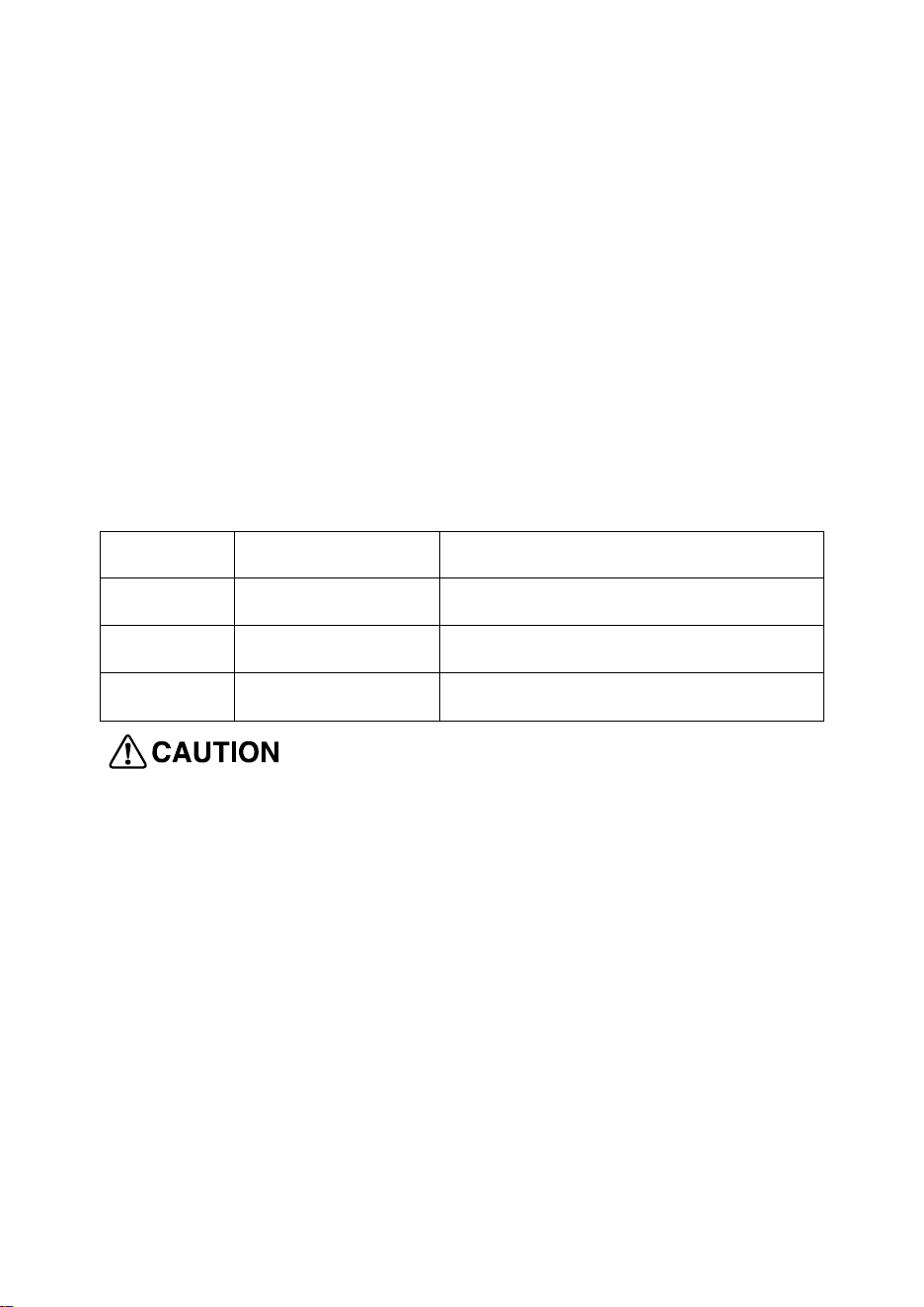
Below is some food defrosting time advice:
Code Food Maximum Weight
dEF1 Meat 100-1500g
dEF2 Poultry 100-1500g
dEF3 Seafood 100-1500g
a. It is necessary to turn over the food during operation to
obtain uniform effect.
b. Usually defrosting will need longer time than that of cooking
the food.
c. If the food can be cut by knife, the defrosting process can be
considered completed.
d. Microwave penetrates around 4cm into most food
e. Defrosted food should be consumed as soon as possible, it
is not advised to put back to fridge and freeze again.
15
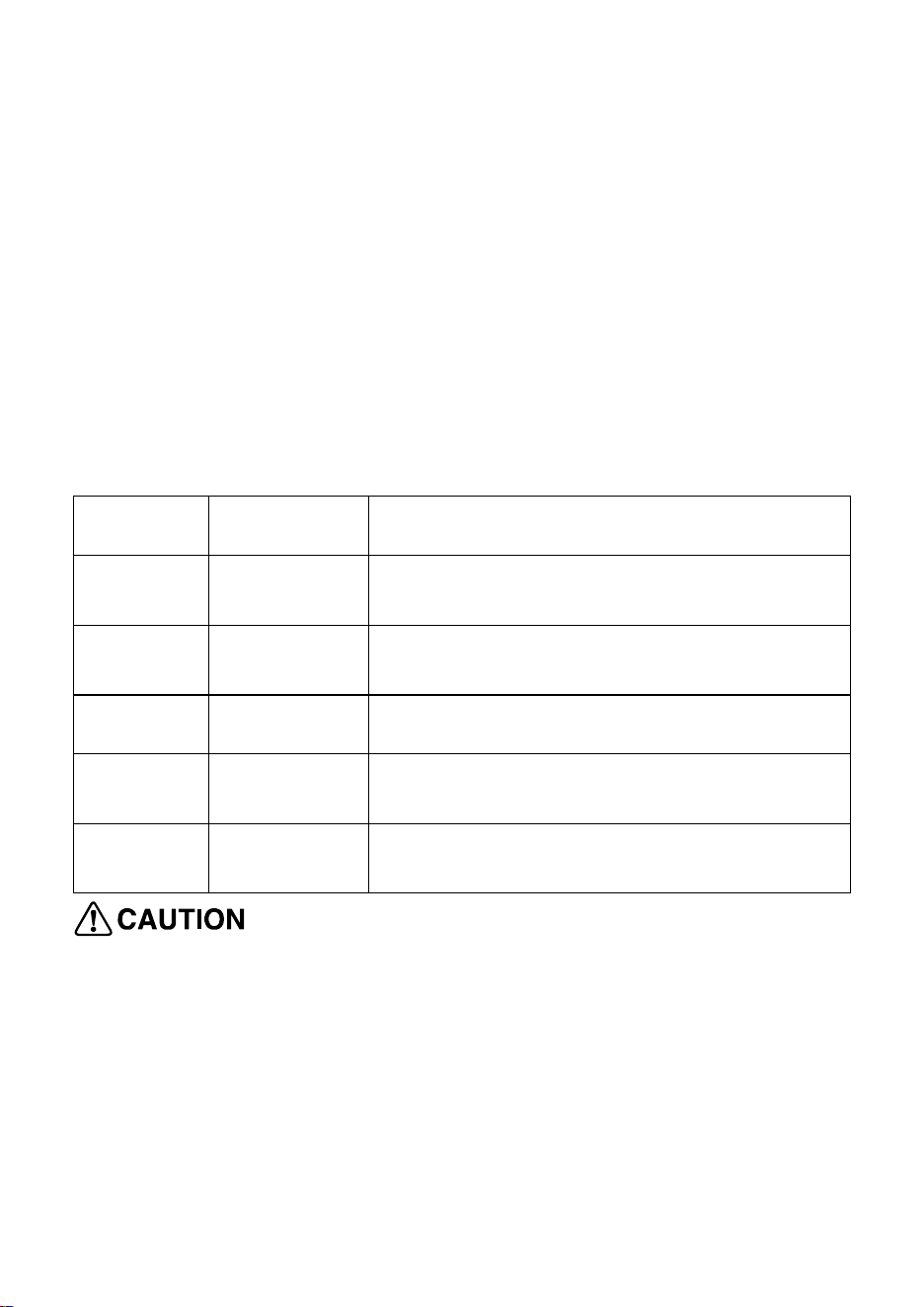
3. Preset Menu
There are five automatic menus, potato, pasta, popcorn, frozen
vegetable and beverage respectively. Select the desired menu.
Press the corresponding button which to be selected continuously
to select the desired food weight, and the display shows the
corresponding weight. After selecting the cooking weight, press
“START/+30s” button to start work. An buzzing sound to notify
completion of the operation.
Display Food Weight Range
A.1 Potato
The optional weights are 250g, 500g and
750g.
A.2 Pasta
The optional weights
are 50g, 100g and
150g.
A.3 Popcorn The optional weight is 100g.
A.4
Frozen
Vegetable
The optional weights are 200g, 400g and
600g.
A.5 Beverage
The optional weights are 1 cup, 2 cups or
3 cups, each one about 250ml.
a. The temperature of food before cooking would be 20-25℃.
Higher or lower temperature of the food before cooking would
require increase or decrease of cooking time.
b. The temperature, weight and shape of food will largely
influence the cooking effect. If any deviation has been found to
the factor noted on above menu, you can adjust the cooking
time for best result.
16

4. CLOCK/TIMER
4.1 CLOCK (24-hour clock)
In standby mode, press and hold down this button to enter the
setting interface, and press this button to select 24-hour or 12
hour clock. Press the "START/+30s" button again to confirm the
clock system and enter the clock setting. Press the 0 ~ 9 number
buttons to input the time. Press the "START/+30s" button to
confirm the set time and exit the clock setting mode.
4.2 TIMER
In standby mode, press this button to enter the setting interface,
and the countdown function icon and "0:00" will be displayed on
the display screen. Press the number buttons to input the time,
and the maximum time that can input is 99:99. After setting the
time, press the "START/+30s" button to begins the countdown. An
buzzing sound to notify completion of the countdown.
5. AUTO REHEAT
Reheat function is mainly to facilitate users to heat food according
to the weight of food, there are a total of 6 menus. Press this
button to select the desired menu, and the display screen will
display the corresponding menu number. Press the "START/+30s"
button to confirm the menu and proceed to the next step of
component selection. Press “AUTO Reheat” button continuously,
select the appropriate weight of food, the corresponding portion
17
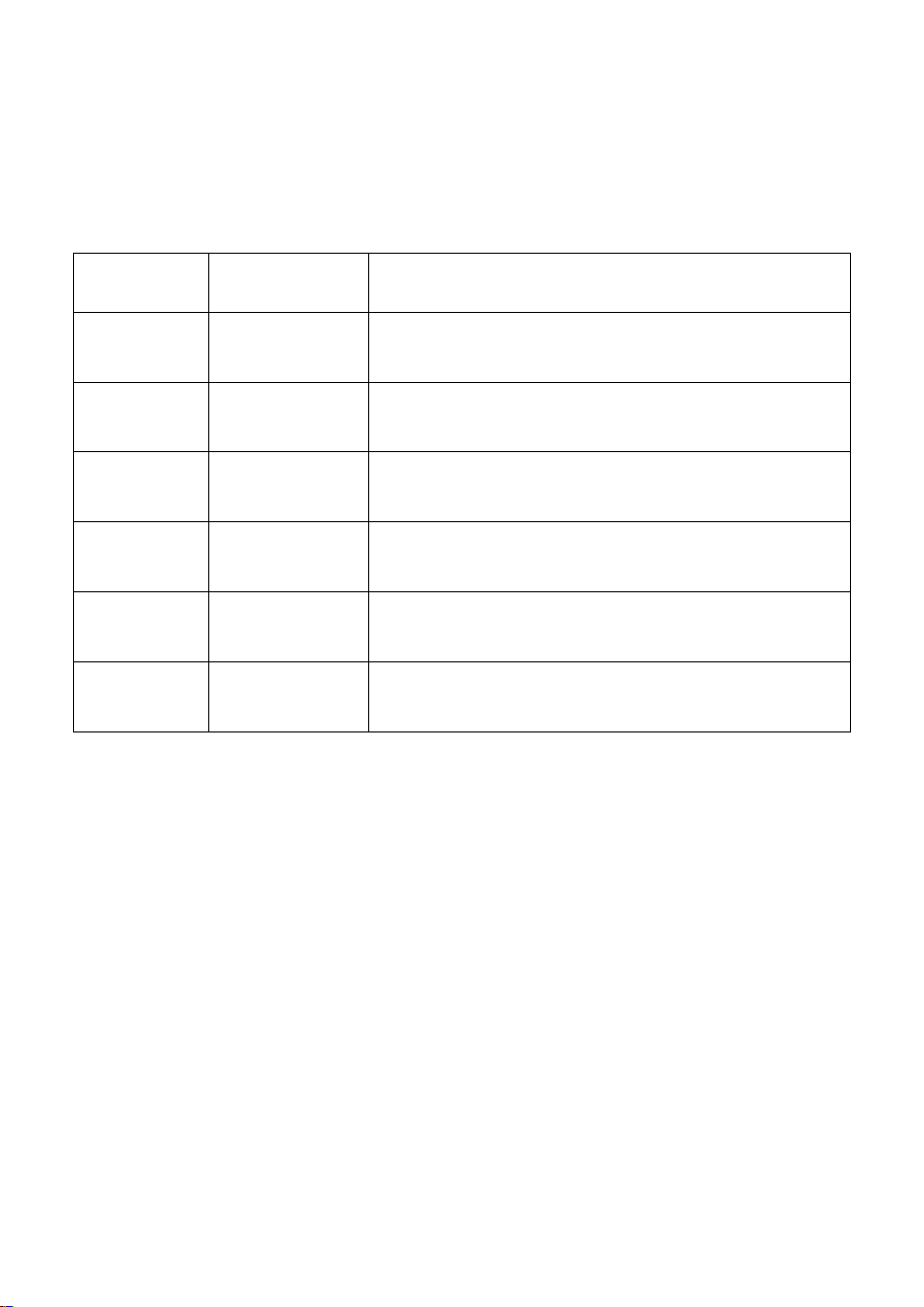
size is displayed on the display screen. After select the weight,
press “START/+30s” button to start work, an buzzing sound to
notify completion of the operation.
Display Food Weight Range
AH-1 Bread
The optional weights are 50g, 100g, 150g
and 200g.
AH-2 Pizza
The optional weights are 200g, 300g,
400g and 500g.
AH-3 Rice
The optional weight are 1 bowl, 2 bowls
portions and 3 bowls.
AH-4 Currires
The optional weights are 200g, 300g,
400g and 500g.
AH-5 Soup
The optional weight are 1 bowl, 2 bowls
and 3 bowls.
AH-6 Casserole
The optional weight are 1 bowl, 2 bowls
and 3 bowls.
6. AUTO COOK
There are a total of 9 menus, and the specific operation steps are
as follows:
Press this button to select the desired menu, and the display
screen will display the corresponding menu. Press the
"START/+30s" button again to confirm the menu and proceed to
the next step of component selection. Press this button
continuously to select the portion size of the food, and the
corresponding portion size will be displayed on the display screen.
18
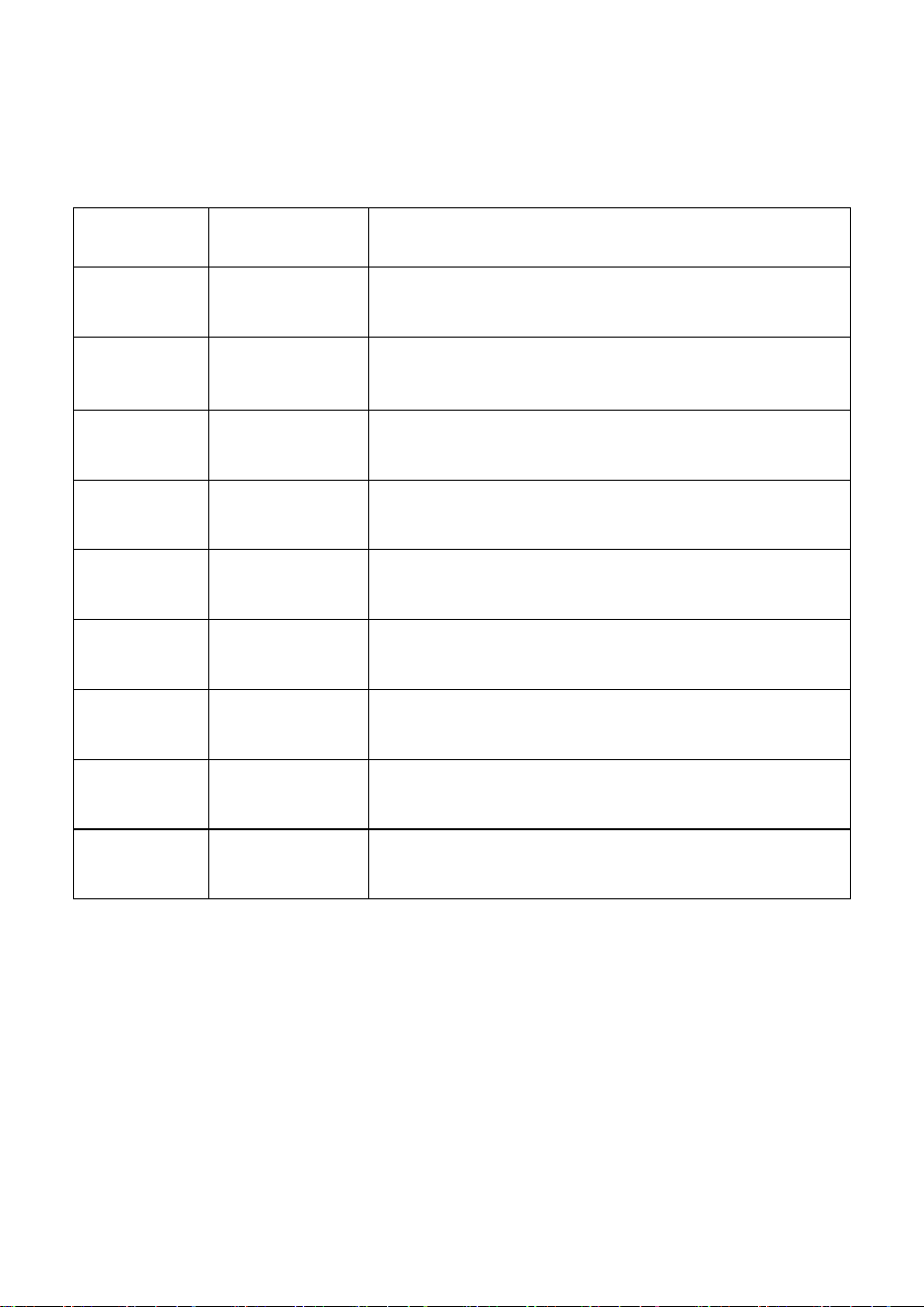
After select the weight, press “START/+30s” button to start work,
an buzzing sound to notify completion of the operation.
Display Food Weight Range
AC-1 Meat Pie
The optional weight are 1 pcs, 2 pcs and
3 pcs.
AC-2
Frozen
Entrée
The optional weights are 200g, 300g,
400g and 500g.
AC-3 Risotto
The optional weights are 100g, 200g,
300g and 400g.
AC-4
Instant
Noodle
The optional weight are 1 pcs, and 2 pcs.
AC-5 Porridge
The optional weights are 50g, 100g and
150g.
AC-6 legumes
The optional weights are 100g, 200g,
300g and 400g.
AC-7
Beef
Lasagne
The optional weight is 1 portion.
AC-8 Fish Filet
The optional weights are 200g, 300g,
400g and 500g.
AC-9 QUINOA
The optional weights are 50g, 100g, 150g
and 200g.
7. MELT/SOFTEN
Press this button to select the desired menu, and the display
screen will display the corresponding menu. Press the
"START/+30s" button again to confirm the menu and proceed to
the next step of component selection. Press this button
continuously to select the portion size of the food, and the
19
corresponding portion size will be displayed on the display screen.
After select the weight, press “START/+30s” button to start work,
an buzzing sound to notify completion of the operation.
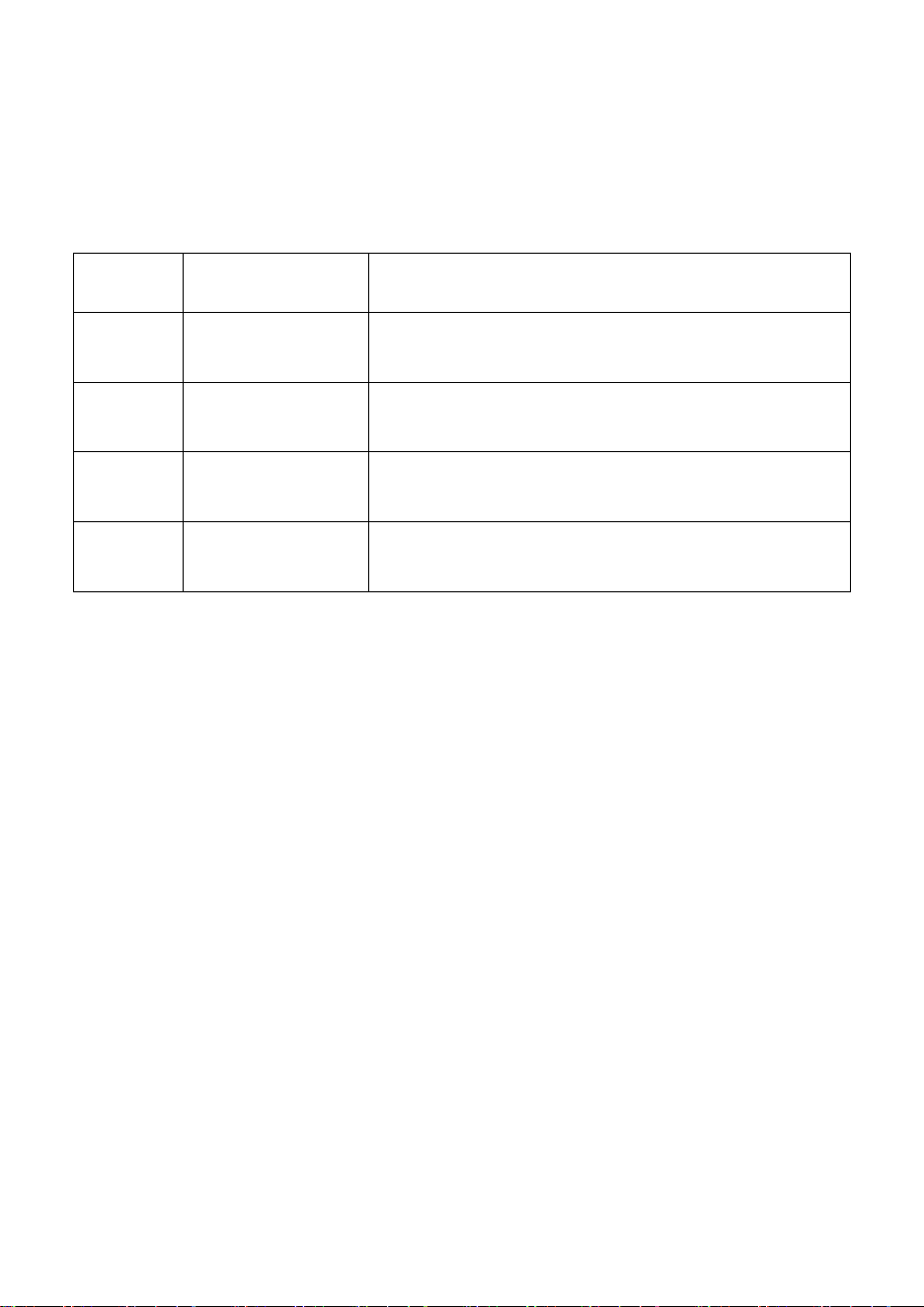
Display Food Weight Range
So-1 Chocolate
The optional weights are 100g, 200g,
300g and 400g.
So-2 Butter
The optional weights are 100g, 200g,
300g and 400g.
So-3 Cream Cheese
The optional weights are 100g, 200g,
300g and 400g.
So-4 Ice cream
The optional weights are 100g, 200g,
300g and 400g.
20
8. MUTE/ECO
8.1 MUTE
Press this button in standby mode to enter the sound on/off
selection and display the corresponding on or off information. After
selecting the sound to turn on or off, automatically exit selection
after 3 seconds, and the buzzer sound will be turned on or off
according to the corresponding settings.
8.2 ECO
In standby mode, press and hold down the button to enter ECO
mode, and the display screen will shut down. In ECO mode, press
any key, the display screen will light up. If not operated for 30
seconds, the display screen will automatically turn off. Long press
the button to turn off ECO mode, and the screen will display
normally.

21
9. EXPRESS START
9.1 1-6 NUMBER PAD
In standby mode, you can directly press the 1~6 number buttons
to start the microwave. The working time is 1~6 minutes, that is,
press 1 to work for 1 minute, press 2 to work for 2 minutes, and so
on.
9.2 STRAT/+30SEC
In standby mode, after the food is put in and the door is closed,
press the "START/+30s" button to quickly start the microwave.
The default working time is 30 seconds. In the process of working,
press the "START/+30s" button once for 30 seconds. An buzzing
sound to notify completion of the operation.
10. STOP/CANCEL
In the process of cooking settings, can press “STOP” button to
cancel the settings and return to standby state. In the process of
microwave oven working, can press “STOP” button to pause. In
the standby state, can press “STOP” button again to cancel the
function and return to standby state.
11. CHILD LOCK FUNCTION
Use this feature to lock the control panel when you are cleaning or
so that children cannot use the oven unsupervised. All the buttons
are rendered inoperable in this mode.
1) Set lock: Hold 0 button about 3 seconds.
2) Cancel lock: Hold 0 button about 3 seconds.
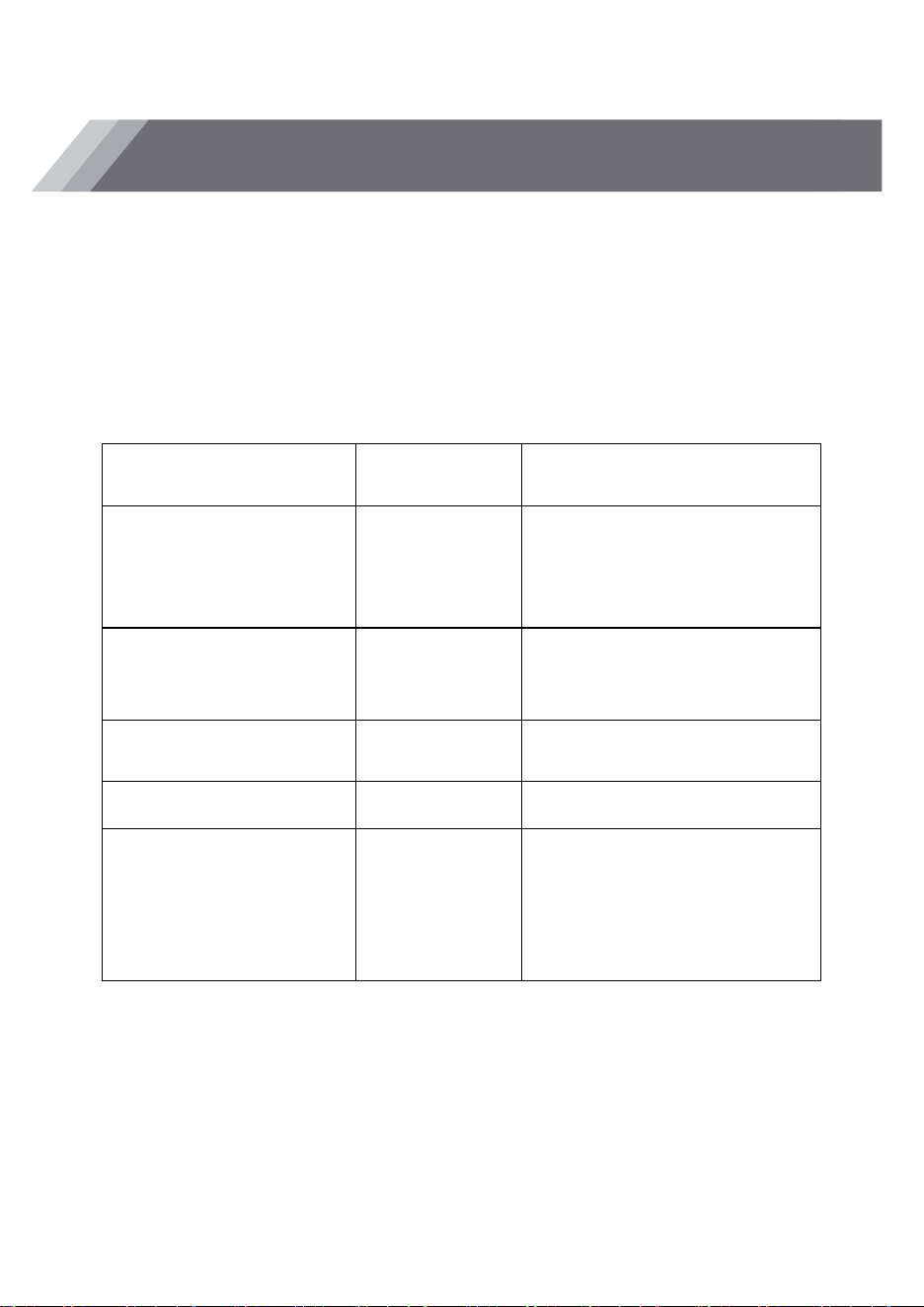
It is strongly recommended to use the containers which are
suitable and safe for microwave cooking. Generally speaking, the
containers which are made of heat-resistant ceramic, glass or
plastic are suitable for microwave cooking. Never use the metal
containers for microwave cooking and combination cooking as
spark is likely to occur. You can take the reference of below table.
Material
of container
Microwave Notes
Heat-resistant
ceramic
Yes
Never use the
ceramics which are
decorated with metal
rim or glazed
Heat-resistant
plastic
Yes
Can not be used for
long time microwave
cooking
Heat-resistant
glass
Yes
Grill rack No
Plastic film
Yes
It should not be used
when cooking meat or
chops as the
over-temperature may
do damage to the film
UTENSILS GUIDELINE
22

The following factors may affect the cooking result:
Food arrangement
Place thicker areas towards outside of dish, the thinner part
towards the centre and spread it evenly. Do not overlap if
possible.
Cooking time length
Start cooking with a short time setting, evaluate it after it times out
and extend it according to the actual need. Over cooking may
result in smoke and burns.
Cooking food evenly
Food such as chicken, hamburger or steak should be turned once
during cooking.
Depending on the type of food, if applicable, stir it from outside to
centre of dish once or twice during cooking
Allow standing time
After cooking times out, leave the food in the oven for an
adequate length of time, this allows it to complete its cooking cycle
and cooling it down in a gradual manner
Whether the food is done
Color and hardness of food help to determine if it is done, these
include:
- Steam coming out from all parts of food, not just the edge
- Joints of poultry can be moved easily
- Pork or poultry shows no signs of blood
- Fish is opaque and can be sliced easily with a fork
Browning dish
When using a browning dish or self-heating container, always
place a heat-resistant insulator such as a porcelain plate under it
to prevent damage to the turntable and rotating ring.
COOKING TIPS
23

Microwave safe plastic wrap
When cooking food with high fat content, do not allow the plastic
wrap come into contact with food as it may melt
Microwave safe plastic cookware
Some microwave safe plastic cookware might not be suitable for
cooking foods with high fat and sugar content. Also, the
preheating time specified in the dish instruction manual must not
be exceeded
SERVICING
Please check the following before calling for services.
1. Place one cup of water (approx.150ml) in a glass measure in
the oven and close the door securely. Oven lamp should go off if
the door is closed properly. Let the oven work for 1 min.
2. Does the oven lamp light?
3. Does the cooling fan work?
(Put your hand over the rear ventilation openings.)
4. Does the turntable rotate?
(The turntable can rotate clockwise or counter clockwise. This is
quite normal.)
5. Is the water inside the oven hot?
If “NO” is the answer to any of the above questions, please check
your wall socket and the fuse in your meter box.
If both the wall socket and the fuse are functioning properly,
CONTACT YOUR NEAREST SERVICE CENTER APPROVED.
SERVICING SAFEGUARDS
Caution: MICROWAVE RADIATION
1. The high voltage capacitor remains charge after disconnection;
short the negative terminal of H. V capacitor to the oven chassis
MAINTENANCE INSTRUCTIONS
24
(use a screwdriver) to discharge before touching.
2. During servicing below listed parts are liable to be removed and
give access to potentials above 250V to earth.
● Magnetron
● High voltage transformer
● High voltage capacitor
● High voltage diode
● High voltage fuse
3. The following conditions may cause undue microwave exposure
during servicing.
Improper fitting of magnetron;
Improper matching of door interlock, door hinge and door;
Improper fitting of switch support;
Door, door seal or enclosure has been damaged.
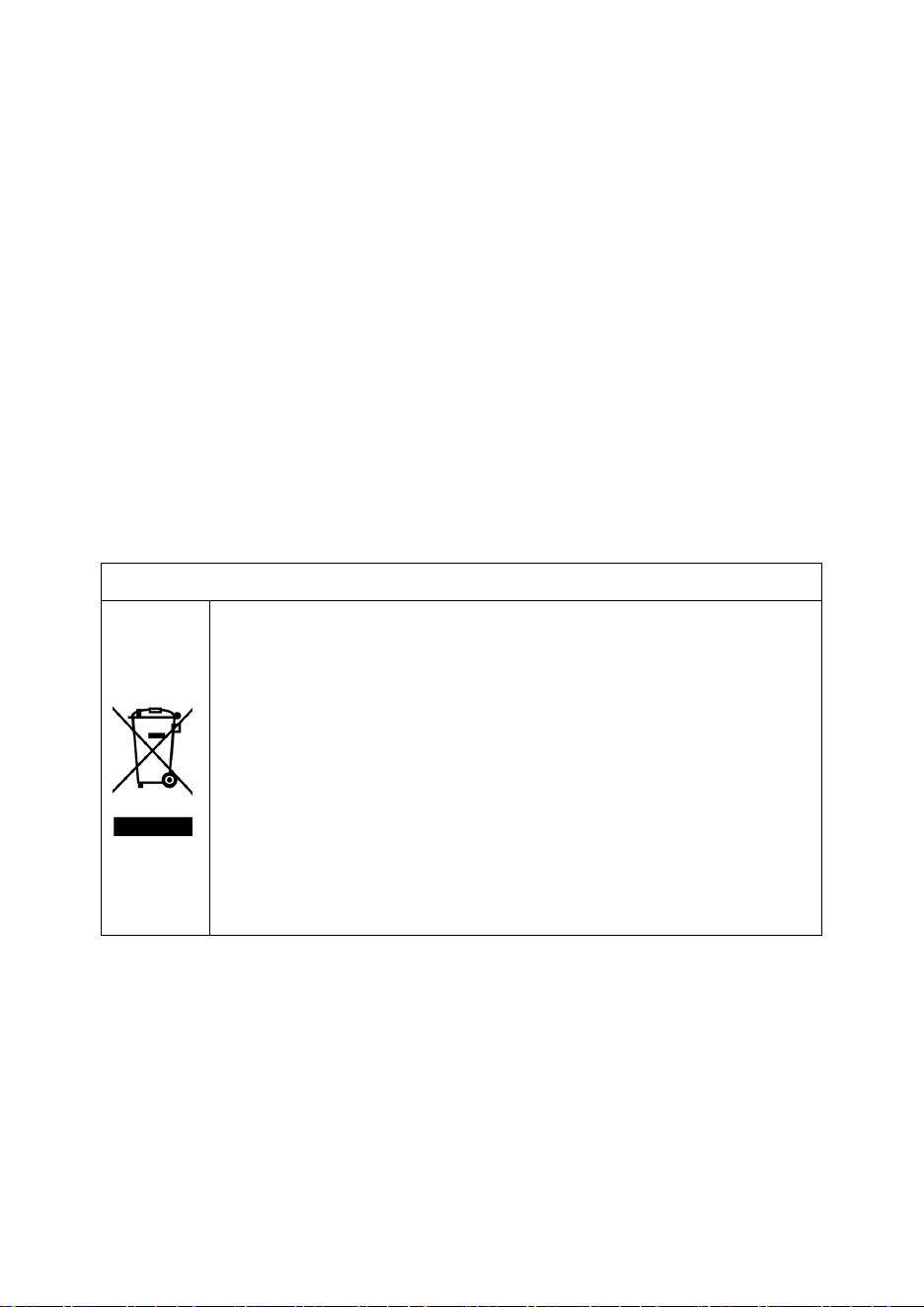
Correct Disposal of this product
This marking indicates that this product should not
be disposed with other household wastes
throughout the EU. T
o prevent possible harm to
the environment or human health from
uncontrolled waste disposal, recycle it responsibly
to promote the sustainable reuse of material
resources. To return your used device, please use
the return and collection systems or contact the
retailer where the product was purchased. They
can take this product for environmental safe
recycling.
25