

RIG 300 Series
User Guide

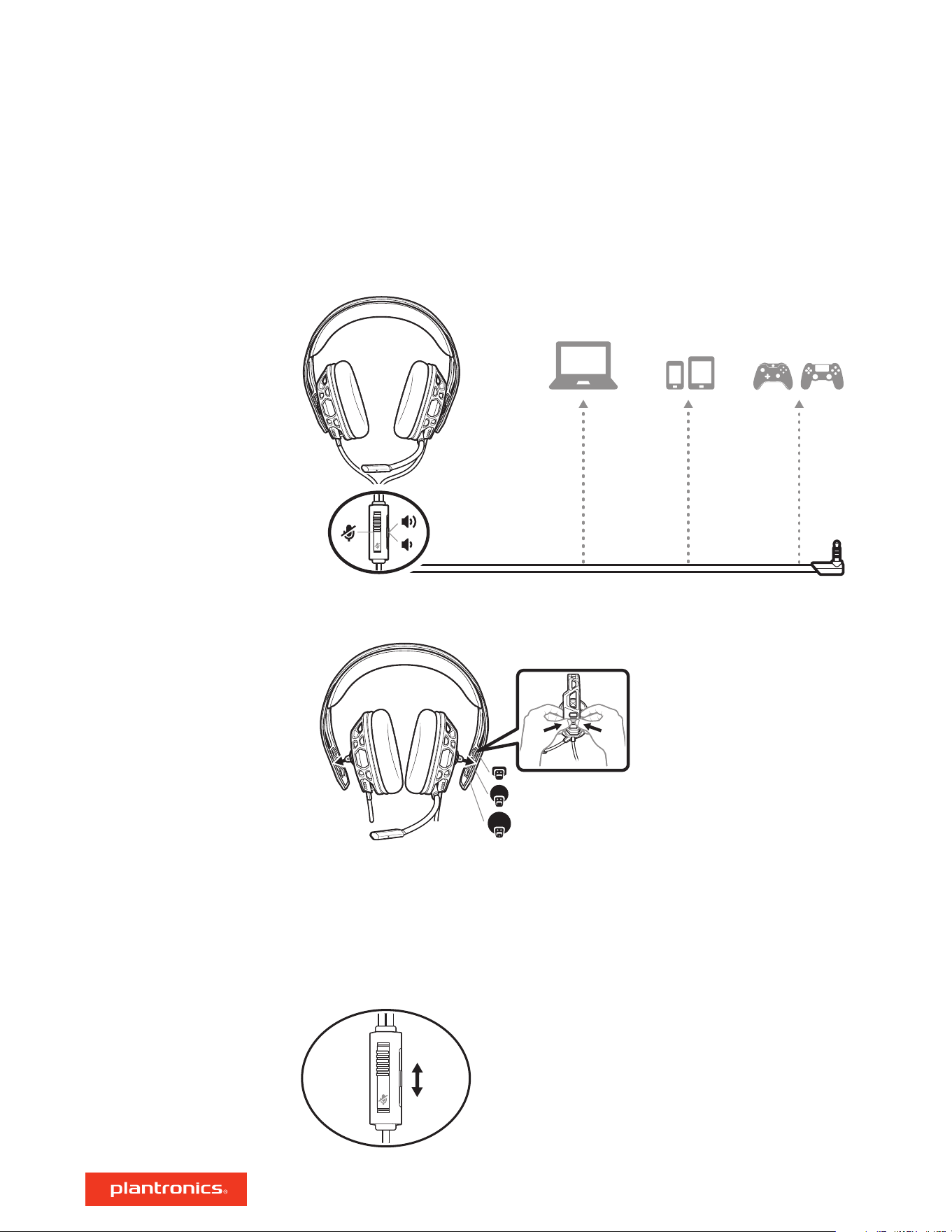
Your headset components easily snap into the headset frame to configure the best fit and sound.
1 Follow the diagram to put your headset together.
2 The headband adjusts to three sizes (small, medium, large) by moving the earcups. To remove an
earcup, press the earcup to detach it from the headband.
Please read the safety guide for important safety, charging, battery and regulatory information
before using your new headset.
To adjust system volume, check your console's user guide.
To adjust the volume, slide the volume control.
Setup and basics
Assemble headset
Be safe
System volume
Volume
3

To mute your headset, slide the mute switch to reveal the red color.
Mute
4

Support
NEED MORE HELP?
plantronics.com/support
Plantronics, Inc.
Plantronics B.V.
345 Encinal Street
Santa Cruz, CA 95060
United States
Scorpius 171
2132 LR Hoofddorp
Netherlands
©
2018 Plantronics, Inc. All trademarks are the property of their respective owners.
Patents pending.
212342-06 (02.18)