
1
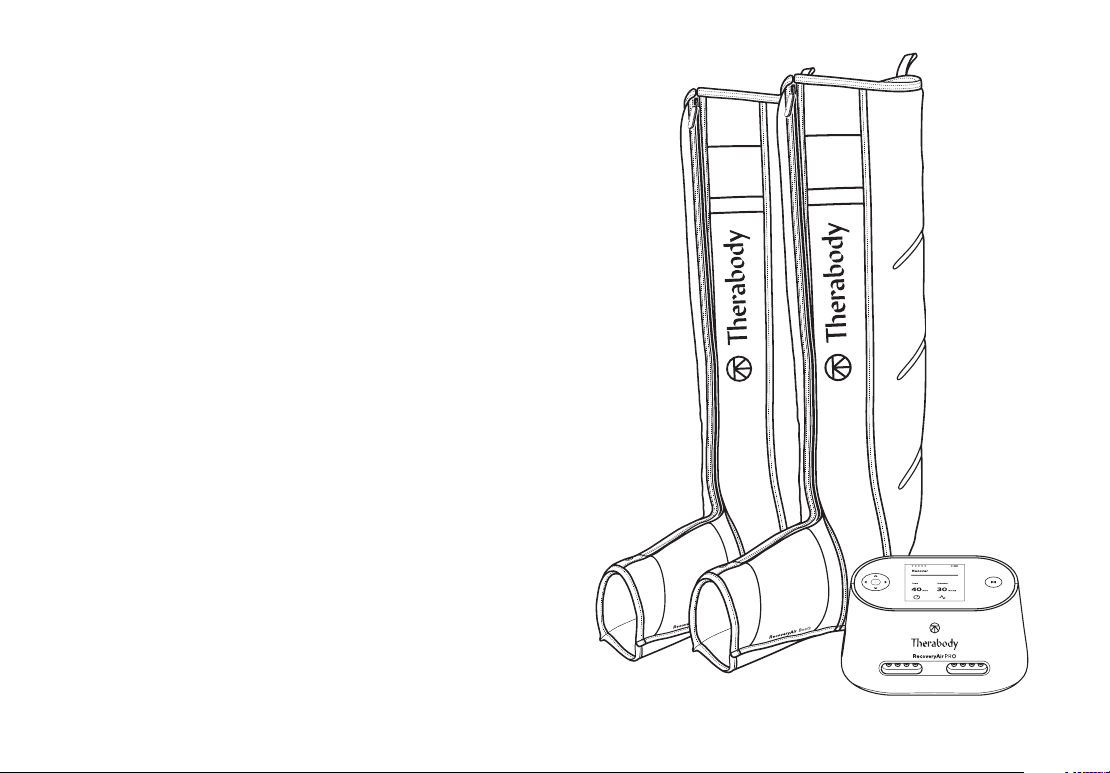
RecoveryAir PRO
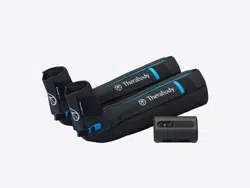
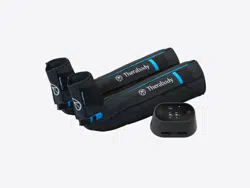
Your RecoveryAir PRO pneumatic compression
system comes with a pump, a pair of compression
boots, a blocker plug, a DC power adapter, and a
carrying pouch for both the pump and boots.
Fully customizable pneumatic compression system.
See Warnings on pg. 16 for
important safety instructions.

2
Getting started
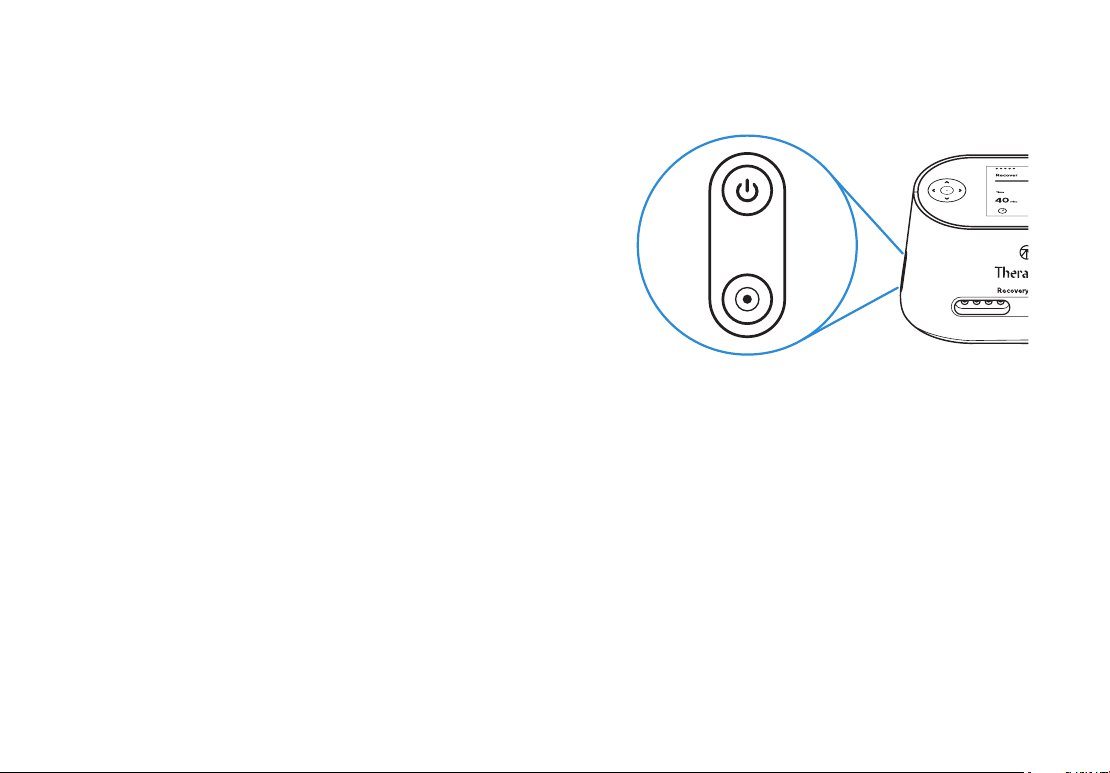
1. To turn on the RecoveryAir PRO pump, press and hold the power button.
2. To get started, put your boots on first before attaching them to the pump. This allows you to get
into the most comfortable position and avoid any disruption in the air flow connection.
3. Next, plug in the connector from the boots into the pump. Make sure you hear a “click” so that
you know the RecoveryAir PRO is fully connected, is plugged in, and there is a proper seal.
4. Once connected and comfortable, you are ready to customize your treatment.
Customizing your treatment
1. To turn on the RecoveryAir PRO pump, press and hold the power button.
2. Customize your treatment from the pump interface.
3. Using the left & right arrows in the 4-way button, scroll through the 5 preset treatment
options: Recover, Warm-up, Isolation, Interval, and PRO Mode (Custom).
4. Once you have chosen your desired treatment preset, use the up & down arrows in the
4-way button to adjust the pressure setting.
5. To create a custom routine, simply press the select button until a new screen appears.
6. Then, use your select and arrow buttons to navigate the options such as Pressure, Time,
Hold, Release, and Gradient, creating a fully personalized routine.
7. Once you have selected the treatment options that are right for you, push play, relax, and
you’ll be on your way to recovery in no time. You can also share your routines with other
RecoveryAir users easily through the Therabody app.
3
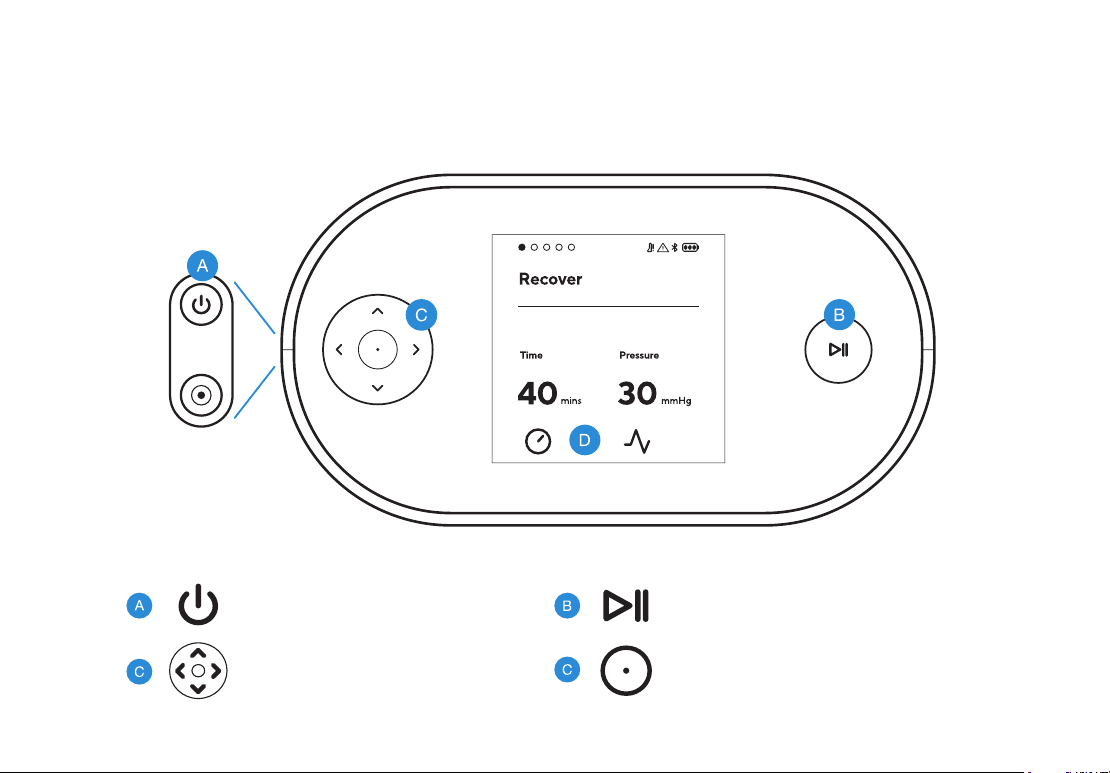
Feature Callouts
Buttons
4-way Buttons Select Button
Power Button
Start/Pause/Stop Button
4
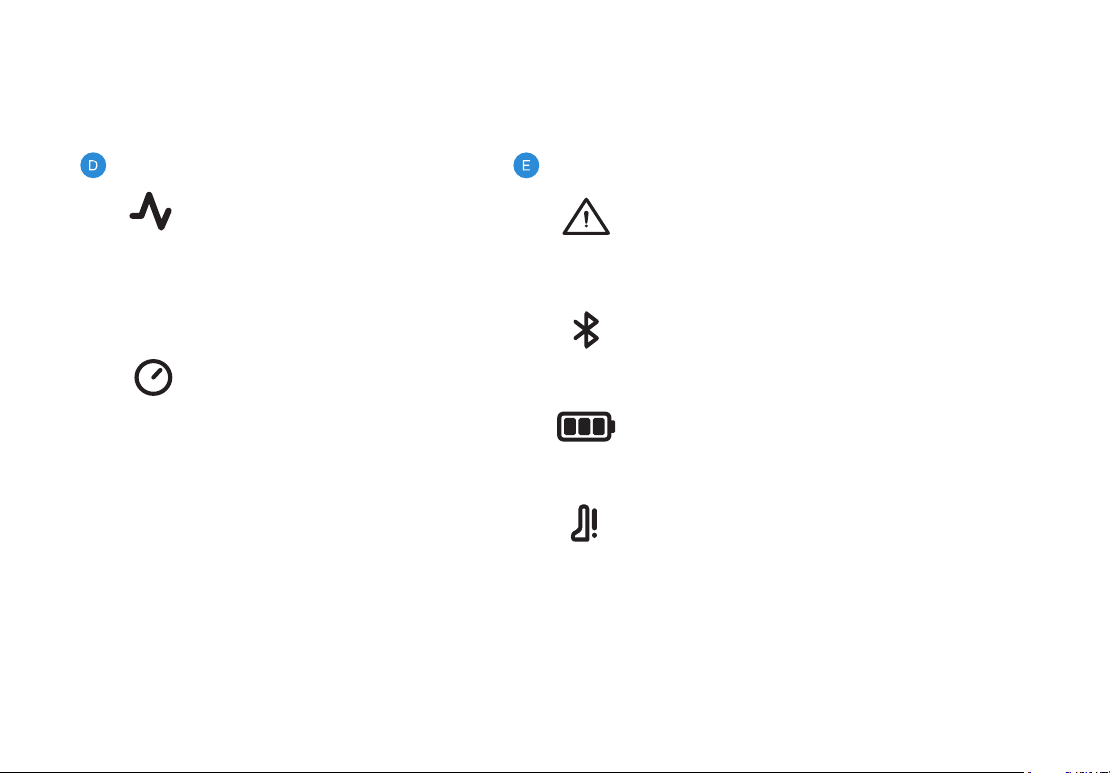
Indicators
Bluetooth Indicator
Indicator turns ON only when connected to the App
Battery Indicator
3 LED lights to indicate battery life
Air loss/Leakage Indicator
Warning Indicator
Indicator lights up solid ON or blinking when a
device malfunction is detected
Time Setting
10min-90min in steps of 5min
or continuous.
Pressure Setting
Adjustable Pressure Range
(20-100 mmHg) in increments of
5 mmHg. Adjustable pressure
changes in increments of 1 mmHg
while in Gradient Setting.
Settings (Adjustable Range)

5
RecoverAir PRO Programs
About negative gradient for all programs:
The RecoveryAir PRO’s unique true negative gradient of pressure sequentially travels up
the limb from the foot toward the heart in four internal overlapping chambers. The spiraling
overlap of chambers safely maximizes circulation.
• The pressure can be the same in two consecutive chambers, but the pump won’t
allow a back chamber to have a higher pressure than a front chamber.
• The minimum pressure level of each chamber is 20 mmHg.
Recover and Warm-Up preset programs
• The Recover program is the perfect go-to when experiencing fatigue, tension, or
soreness brought on by your everyday activities or post workout.
• The Warm-Up program is recommended for use before a workout.
• The only difference between the two programs is the default pressure level and
treatment time.
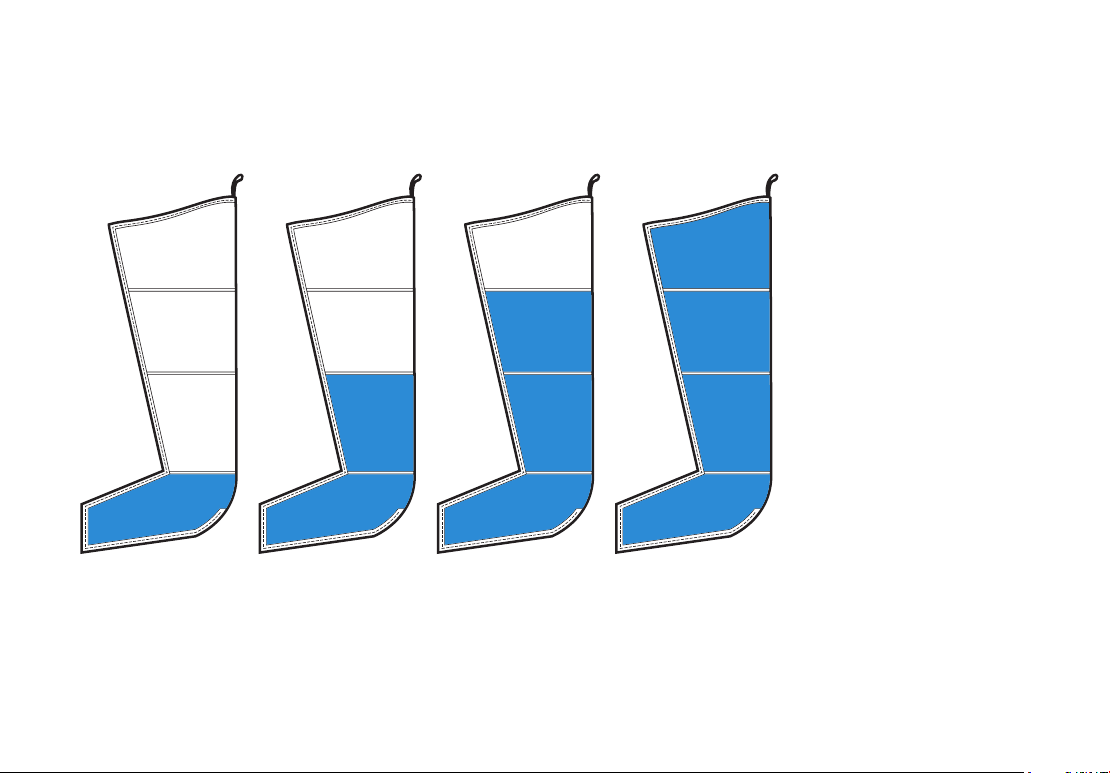
Sequential inflation cycle
Both the Recovery and Warm-Up preset programs use the Sequential inflation cycle.
• A directional massage is applied, starting at the base of the treated area, and
progresses upwards towards the torso and then releases. (see Figure 1)
• Starting with Chamber 1, once the inflating chamber has reached its preset pressure
level, the pressure level for that chamber is held and the next chamber begins inflating.
6
Chamber 4
Chamber 3
Chamber 2
Chamber 1
Figure 1 - Sequential Cycle Mode

7
Isolation preset program
The Isolation program is recommended when need-
ing to treat a specific, isolated area of your choosing.
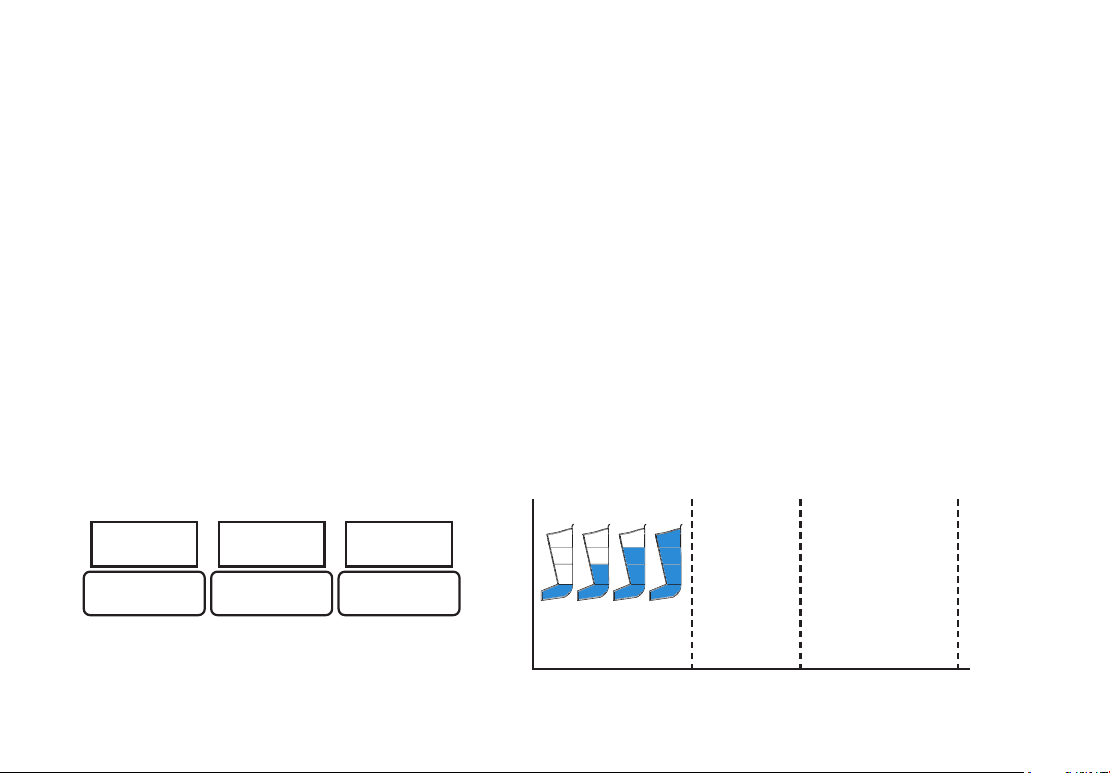
Isolation inflation cycle (ISO)
The Isolation program provides targeted
compression to a selected zone.
• A directional massage is applied to a smaller,
isolated area.
• Inflation starts with the front chamber.
• The next chamber starts to inflate after a few
seconds.
• Until both chambers reach the set pressure
and deflate at the same time, the cycle will start
again after a short pause (see Figure 2).
Isolated Areas:
• Full Distal Zone – Chamber 1, 2, & 3
• Distal Zone – Chamber 1 & 2
• Mid Zone – Chamber 2 & 3
• Proximal Zone – Chamber 3 & 4
• Full Proximal Zone – Chamber 2,3, & 4
RecoverAir PRO Programs
Figure 2 - ISO Cycle Mode
Distal
Mid
Proximal
8
Interval preset program
The Interval program allows for a cycle to turn on and then off in a sequential selected
amount of time.
• A directional massage is applied with a sequential cycle, and alternates between intervals of
being under treatment (Time On) and no treatment (Time Off).
• Start by selecting the Time On (in minutes), the Time Off (in minutes), and the total Interval
program time (in hours).
• The treatment begins with the selected Time On, and after this treatment is completed, the
pump pauses for the selected amount of Time Off, and then back to the selected Time On.
• This Time On/Time Off interval continues automatically until the total treatment time is
completed (up to 8 hours).
Total Time
Time On Time Off Time On
Sequential Cycle
Treatment
Sequential Cycle
Treatment
No Treatment . . .
Time On Time O Total (hrs)
10 — 90 min
(5min per step)
10 — 90 min
(5min per step)
1 — 8 hours
(1hr per step)
Figure 1 - Sequential Cycle Mode

9
PRO Mode (Custom)
The PRO Mode allows you to create a fully customized program that’s unique to you.
• You can use the Pretreatment program or you can choose from four inflation cycles:
Sequential, Isolation, Wave, or Flow.
• During your treatment, you can change the treatment parameters, but you can’t change
the selected inflation cycle and can’t turn the pre-selected program ON/OFF.
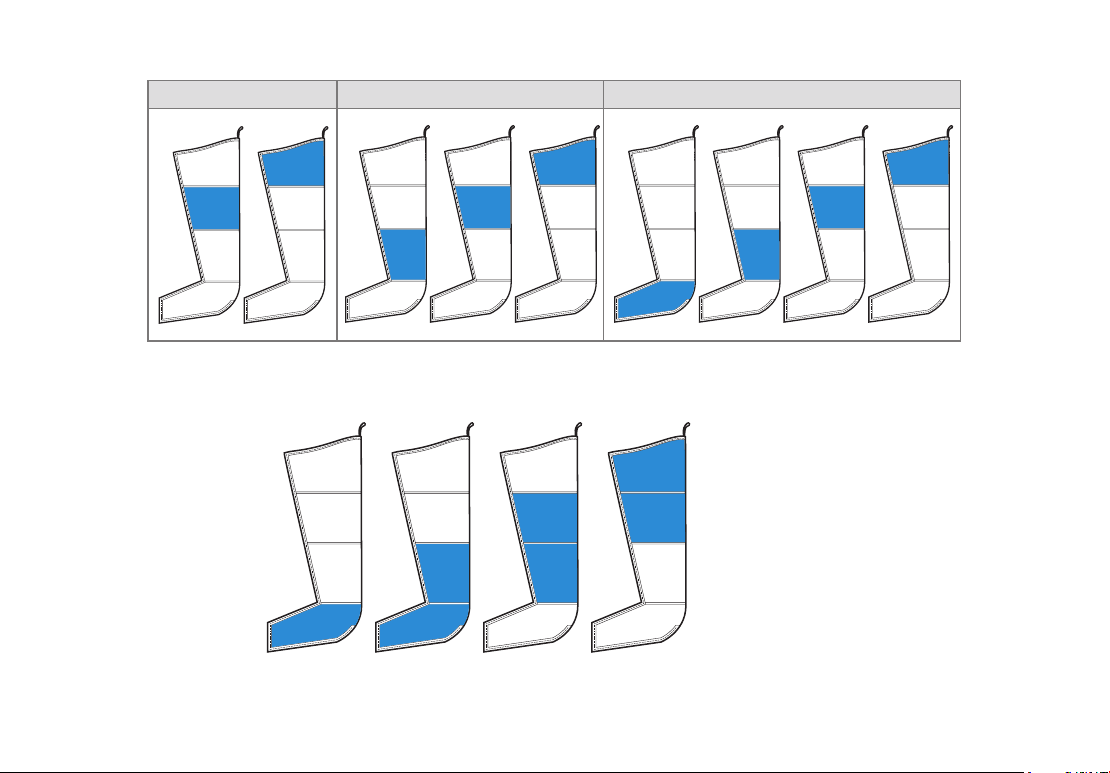
Pretreatment (See Figure 3)
• Pretreatment treats the proximal areas first.
• A specific pattern is applied, and the duration varies according to garment size (5–12
minutes) with a preselected pressure of 30 mmHg in all chambers that cannot be changed.
• Sequence 1 is carried out six times.
• Sequence 2 and Sequence 3 are carried out only once.
Sequential inflation cycle (see page 5)
Isolation inflation cycle (see page 7)
Wave inflation cycle
• The Wave inflation cycle starts at the base of the limb, over the foot.
• As one chamber inflates, the previous chamber starts deflating, so at any one time a small
area is being compressed.
• For example: When chamber 2 is full, then chamber 1 starts to deflate, while chamber 3
starts to inflate, so for a moment, there are 2 chambers reaching the target pressure at the
same time. (See Figure 4)
10
Chamber 4
Chamber 3
Chamber 2
Chamber 1
Sequence 1 Sequence 2 Sequence 3
Figure 4 - Wave Cycle Mode
Figure 3 - Pretreatment Sequences
11
Chamber 1 Chamber 2 Chamber 3 Chamber 4
Progress
Sequence Sequence
Progress
Sequence Sequence
Progress
Sequence Sequence
Progress
SequenceSequence
PRO Mode (Custom)
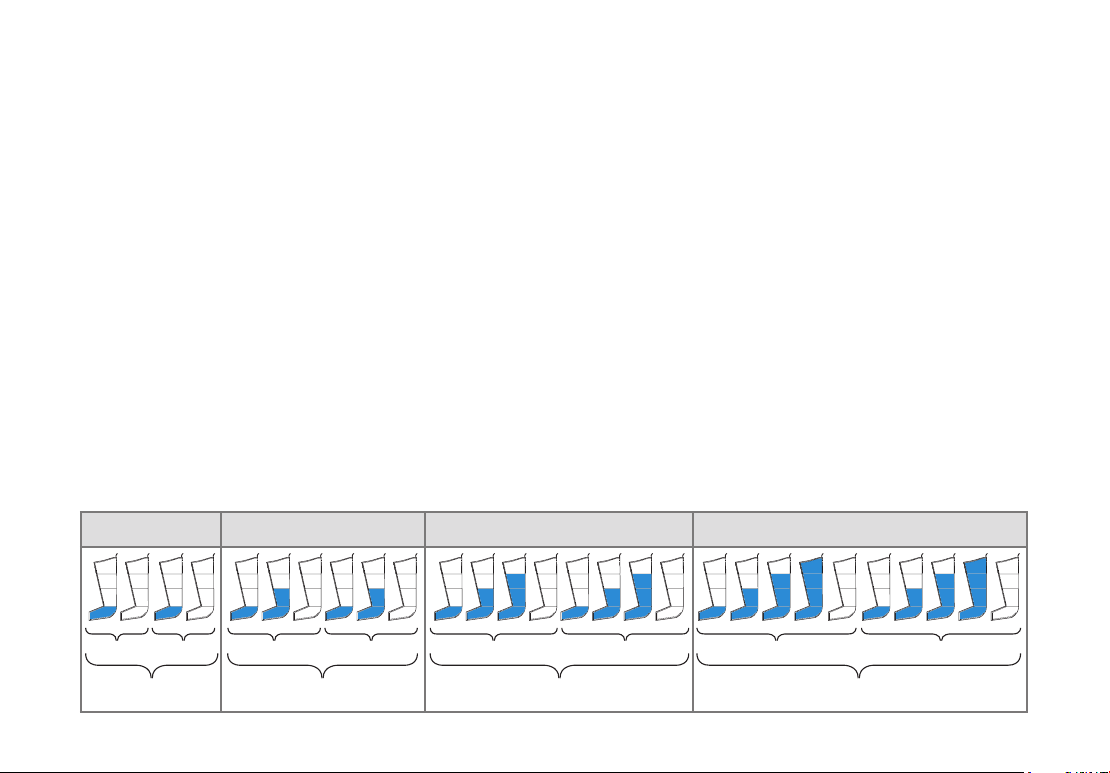
Flow inflation cycle
• Four sequences exist within the Flow inflation cycle. Each sequence is determined by the
last chamber inflated.
• The Flow inflation cycle has an associated Frequency parameter, which determines the
number of sequences within the cycle.
• You can set the Frequency to be between 1 and 8.
• The default Frequency setting is 2.
Examples
• Frequency 1
Each chamber inflation sequence happens once before continuing to next chamber sequence
• Frequency 2
Each chamber inflation sequence repeats twice before continuing to next chamber sequence
• Frequency 8
Each chamber inflation sequence repeats eight times before moving to the next chamber inflation

12
Superior, hygienic design
The RecoveryAir PRO compression boots have non-porous medical grade material that
helps prevent bacteria buildup and provides a resistant surface. Our internal overlapping
chambers provide a smooth surface to clean, which means no wiping under chamber flaps
where bacteria can build up. This also means no smells.
How to Clean
Here are simple steps to cleaning your RecoveryAir PRO compression boots:
1. Unzip the boots completely and lay them on a flat surface.
2. Take a disinfectant wipe or spray, and gently clean the inside of the boots. Avoid any oil based
cleaning product.
3. Once you have cleaned your garment, make sure to fully dry the surface by hanging them up
or wiping them down.
4. We also recommend you wipe down the exterior of the pump to reduce surface contaminants.
What it is and why it’s important:
We use medical-grade material covering the internal chamber to help reduce the potential for
microbial growth and moisture retention. Whether you are an individual, or a clinic, our boots
are designed to help limit the potential for bacterial transmission.
13
Charging the RecoveryAir PRO
1. After turning off the pump, plug the
power adapter into the charging port of the
RecoveryAir PRO pump.
2. You can continue to use the RecoveryAir
PRO while charging.
3. Charging is complete when all 3 LED lights
of the LED battery indicator are lit.
Traveling with your RecoveryAir PRO Compression System
When traveling with your RecoveryAir PRO Compression System, we recommend:
• ● Roll the hose tightly and slide it into the foot section of your garment. It is important to
keep the hose from creasing to protect the hose’s integrity and its ability to properly
distribute airflow.
• ● Once you secure the hose, simply fold your garment to fit into your travel bag or carry-
on luggage.
• Secure your pump in the provided carrying pouch.
14
Lock & unlock feature:
Factory reset
1. To lock or unlock the pump, press and hold the select and up arrow at the same time.
2. You will then see a padlock icon appear on the main screen.
You can perform a factory reset to change all customized programs back to the original default
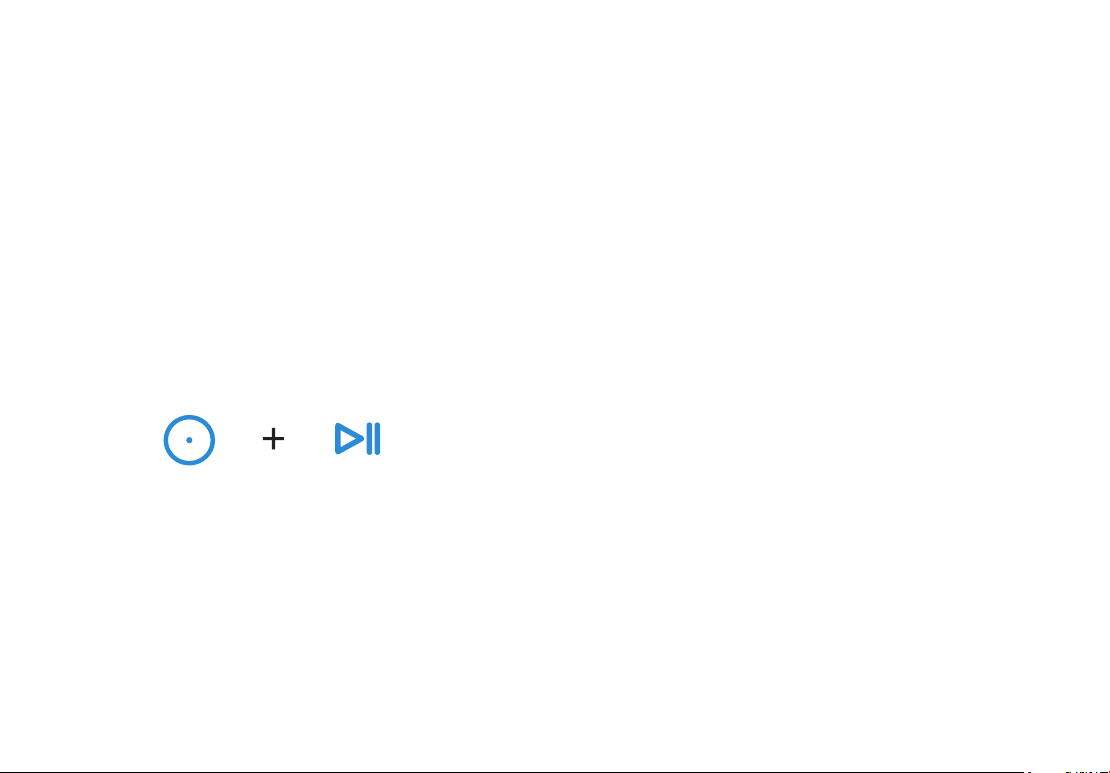
setting by following this easy step:
1. Press and hold the select and play/stop buttons.
Select Button Start/Pause/
Stop Button
15
Smart Features
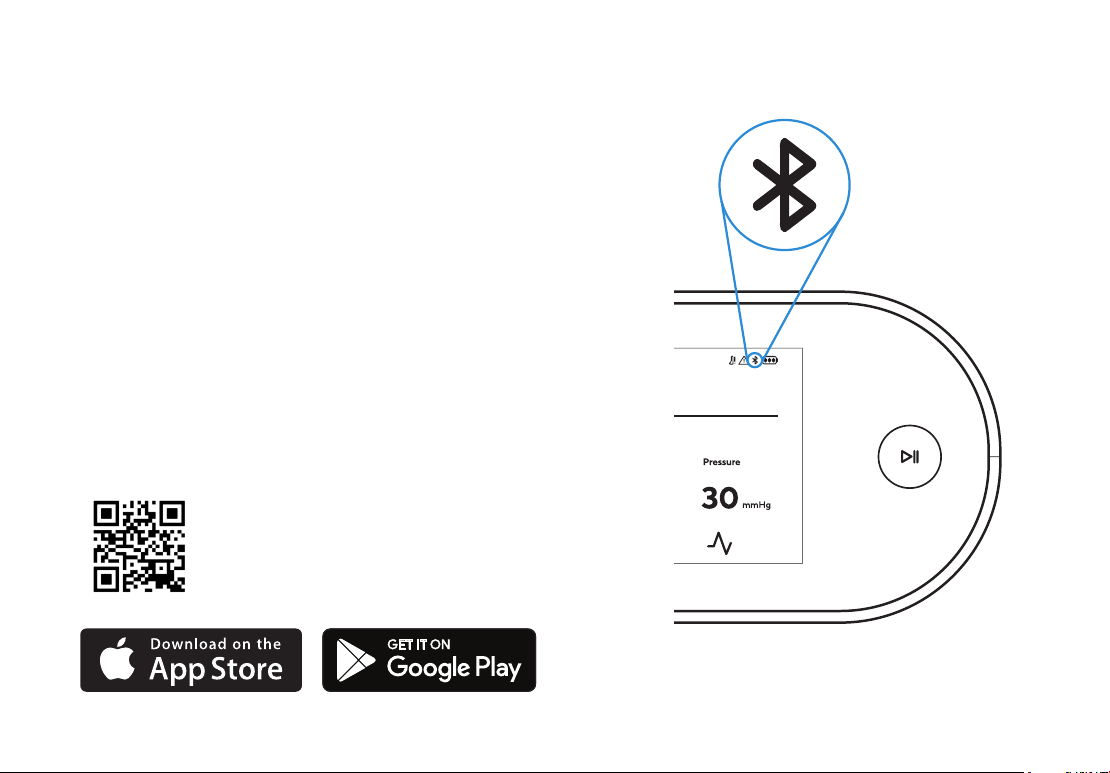
The RecoveryAir PRO also connects to the Therabody app
via Bluetooth, giving you total control of your RecoveryAir
PRO session from the convenience of your smartphone.
Not only can you easily access options like individual
chamber pressure, but you can create and share custom
routines with your friends, clients, or patients directly
from the app via text message or email.
Scan the QR code
to get started.

16
Important Safety Information
Read all instructions before using the RecoveryAir PRO Compression System for the first time.
Warning
• This system is intended for use by people in good health. This system is not recommended for people who have heart
problems, or vascular problems, have a condition requiring the use of any medical device, or have any condition that
may affect their normal well-being.
• If you are, or may be, pregnant, consult with your physician before use.
• Do not use this system over insensitive or numb areas, or in the presence of poor circulation. Do not use if you have
been diagnosed with blood clots, deep vein thrombosis or phlebitis. This system should not be used over swollen or
inflamed areas or skin eruptions. Do not use in the presence of unexplained calf pain.
• Consult your physician prior to use.
Safety Warnings and Precautions
Warning:
• Explosion Hazard: Do not use the RecoveryAir PRO Compression System in the presence of flammable gases, including
flammable anesthetics.
• Electric Shock Hazard: Do not allow liquid to enter any part of the RecoveryAir PRO Compression System pump. Do not
immerse in water or liquid. To clean, follow instructions found on page 13.
• Electric Shock Hazard: To prevent electric shock, do not open the pump. Do not attempt to service the pump yourself. All
repairs should be performed only by Therabody trained and authorized service personnel. Service by unauthorized personnel
will void any warranty.
• Stop using the system if there is any change in RecoveryAir PRO Compression System’s performance.
• Do not modify any part of the RecoveryAir PRO Compression System.
• The RecoveryAir pneumatic compression system includes small parts that could cause choking in children. Keep away from
children and pets.
• Do not inflate the garment without wearing it over the intended body area or with open zippers. Doing so can damage the
garment.
• Do not apply excessive force to the garment straps. Do not use the straps for any purpose other than intended by the
manufacturer. Use of excessive force and/or misuse shall void the manufacturer’s warranty.
• Do not stand or walk while wearing the garment.
• Disconnect the pump from the electrical outlet before cleaning and let it dry completely before reconnecting it to the
electrical outlet.

17
Caution
• Do not operate the RecoveryAir PRO Compression System while operating a vehicle.
• Do not store or transport the RecoveryAir PRO Compression System beyond the specified temperature, humidity,
and atmospheric pressure range.
• Do not use the RecoveryAir PRO Compression System beyond the specified temperature range: 10 to 30°C (50 to 86°F).
• Do not use the RecoveryAir PRO Compression System beyond the specified humidity range: 30%rH–75%rH,
non-condensing.
• Only use the RecoveryAir PRO Compression System up to 3000m above mean sea level.
• To prevent any damage to the RecoveryAir PRO Compression System, keep it away from dust, lint, and dirt. Keep
away from sources of heat or moisture.
• ●To prevent any damage to equipment, use only accessories, detachable parts, and materials described in this
User Manual.
• While in use, place the pump on a horizontal firm surface only. Do not place the pump on a bed, blanket, mattress,
pillow, or soft furniture. Do not cover the pump.
• The equipment is to be installed and put into service according to the EMC information provided in Chapter 11 -
EMC Manufacturer Declarations.
• Portable and mobile RF communication equipment might affect the equipment.
• For indoor use only.
• Use only the DC power adapter provided with the pump.
• The massage sensation should be pleasant and comfortable. If you experience pain or discomfort during or after the
massage or if there is onset of bruising or irritation during or after the massage, discontinue use and consult your physician.
• Do not hand or machine wash. Surface wipe only.
• Do not allow liquid to get into the air inlets.
• Do not use bleach.
• Do not dry clean.
• Do not wring, iron, tumble, or force heat dry.
18
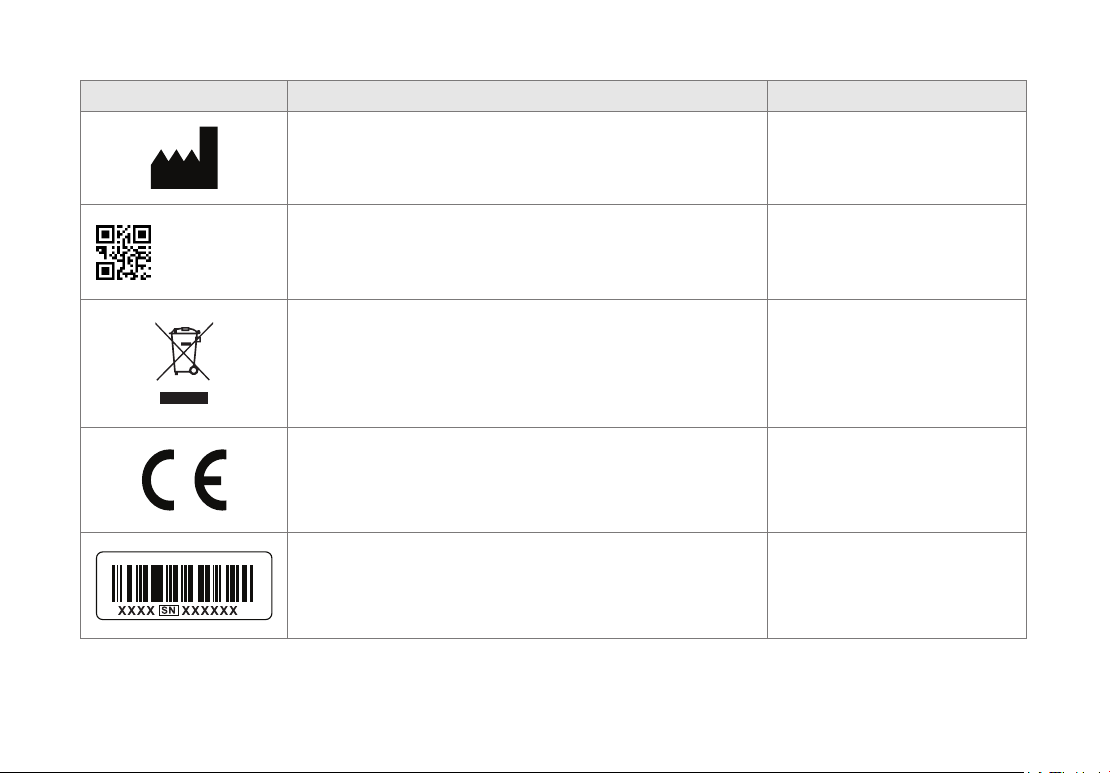
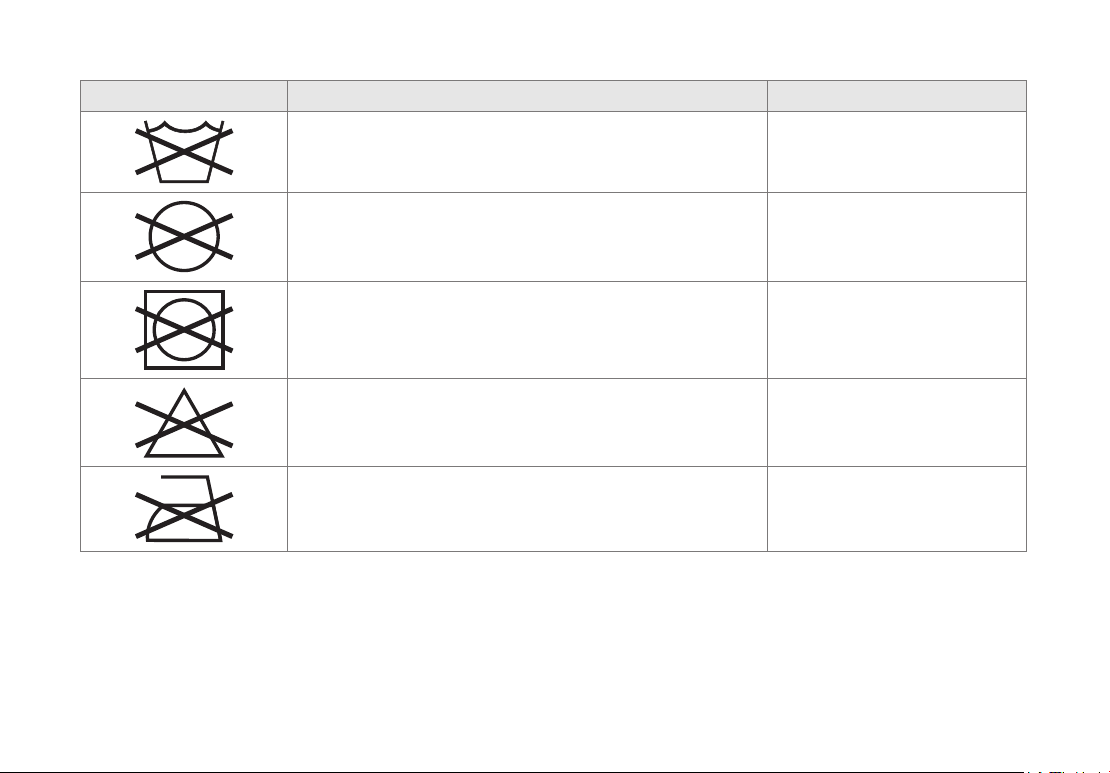
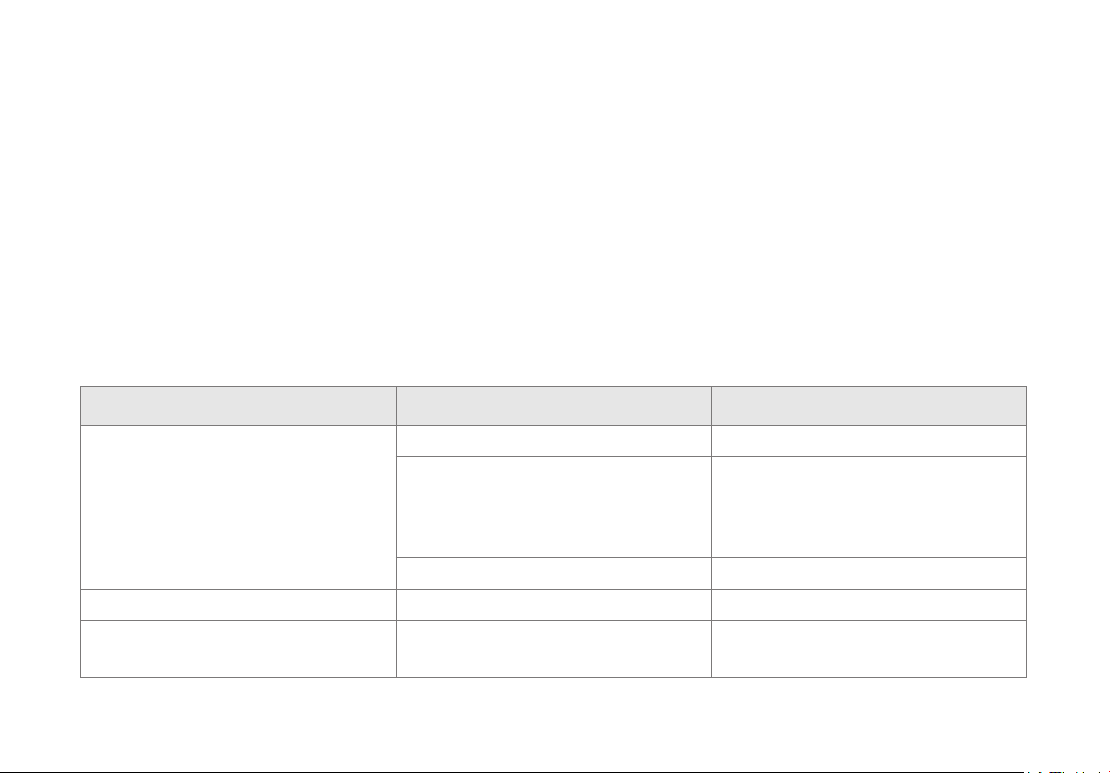
Labels
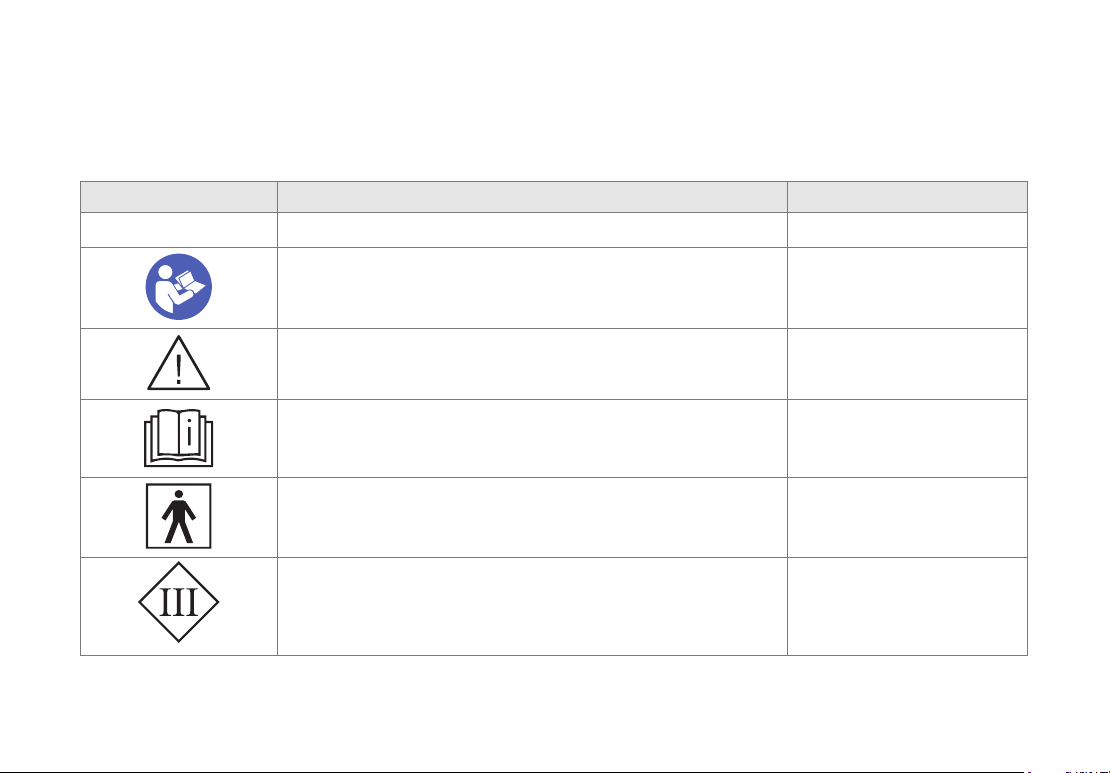
The following labels and symbols appear on the pump, garments and/or packaging.
Label Description Location
IP 22
Degree of protection against ingress of water On console base
Read instructions before use On console base
Read instructions before use (for China only) On console base
Read instructions before use On garment label
Level of protection type BF applied part On garment label
Class III equipment
Equipment relying on limitation of voltage to extra-
low-voltage (ELV) values as provision for basic
protection and with no provision for fault protection.
On console base
19
Label Description Location
Therabody, Inc.
6100 Wilshire Blvd. Suite 200 Los Angeles,
CA 90048
On garment label and
console base.
UDI :
(01)
00810036057400
(10)
(21)
2143
00001
Unique Device Identication (UDI)
On garment label and
package, and garment
bag and package
Separate collection for waste electrical and
electronic equipment
Note: For more information about disposal of
equipment, its parts and accessories, please
contact your local distributor.
On console base
In accordance with Directive 2014/35/EU
electrical equipment designed for use within
certain voltage limits, and Directive 2014/30/
EU electromagnetic compatibility
On console
Serial number of the console On console base
20
Label Description Location
Do not wash On garment tag
Do not dry-clean On garment tag
Do not tumble dry On garment tag
Do not bleach On garment tag
Do not iron On garment tag
21
Indications for Use
RecoveryAir is indicated for the temporary relief of minor muscle aches and pains, and for the temporary
increase in circulation to the treated areas in people who are in good health. RecoveryAir simulates kneading
and stroking of tissues by using an inflatable garment.
Note
• The pump is “multi-voltage” and can be used for travel.
• An appropriate socket adapter must be used in countries with incompatible wall outlets.
• Use only RecoveryAir garments with the RecoveryAir pump.
• When immediate garment deflation is necessary, disconnect the garment hose bundle from the pump to
immediately deflate the air pressure in the garment.
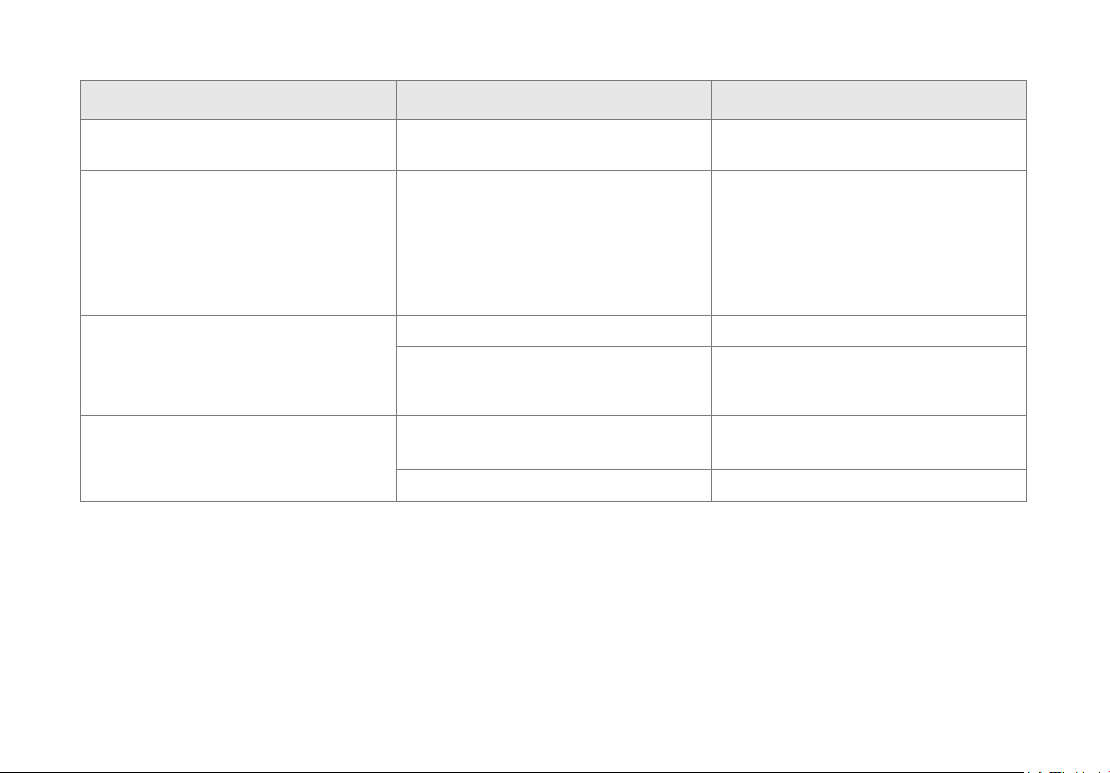
Troubleshooting
Note Possible Cause Action
The pump is not working.
No electricity Inspect the electrical wall outlet.
DC power adapter Verify that the DC power adapter
cable is connected to the DC adapter
socket on the console, and the DC
power adapter is connected to the
100-240 Volt wall outlet.
DC power adapter cable Examine the cable for any defects.
The Status Indicator is On in yellow Malfunction Contact Therabody.
The pump starts working and stops
immediately.
The air cannot move through the
garment hose.
Examine hoses for kinks, twists and
folds.
22
Note Possible Cause Action
One garment inflates but the second
one does not.
The second garment does not receive
air.
Examine its hoses for kinks, twists and
folds.
The pump stops working, the Status
Indicator turns On in yellow.
Hose is not connected properly to
garment or pump, or prong plug is
not inserted into unused air outlet.
Examine and fasten all air connections.
When treating only one limb, always
plug the unused air outlet with the
prong plug provided with the pump.
If all air connections are OK and the
problem persists, contact Therabody.
The pump works at a very low
pressure, regardless of the pressure
set by the user.
Defective garment Replace garment and check again.
Internal malfunction Contact Therabody.
An irregular noise.
Pump transferring vibrations to a
surface
Make sure the pump is standing even-
ly on all four of its bumpers.
Internal malfunction Contact Therabody.
Warranty
For full warranty information, please visit www.therabody.com/warranty. To request a copy of the warranty by mail, you
may send a request to the following address:
Therabody - WarrantyAttn: Customer Service
6100 Wilshire Blvd.,
Los Angeles, CA 90048
Please note, this is not a return address or a retail location. No products or packages will be accepted at this location.
23
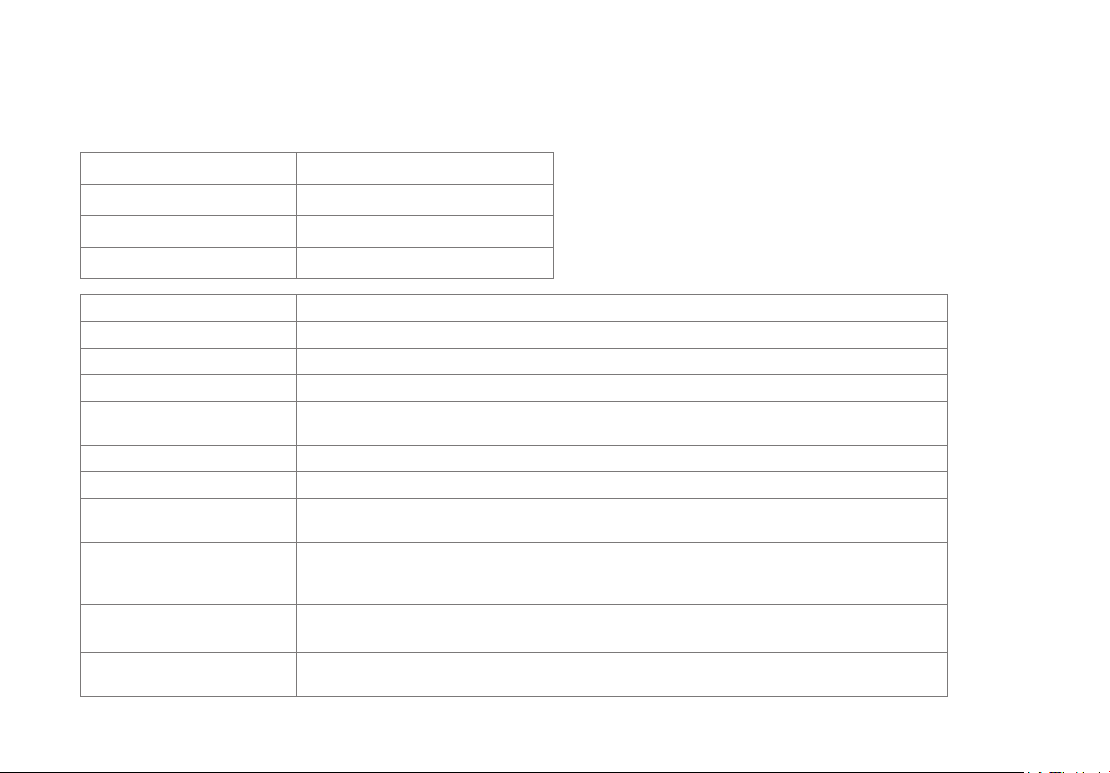
Bluetooth Wireless Technology Information
Bluetooth Compliance Version 4.2 low energy
Operating Frequency 2.402–2.480 GHz
Output Power 0 dBm
Operating Range 3-meter radius (line of sight)
Network Topology Star - bus
Operation Slave
Antenna Type Integrated chip type antenna
Modulation Type Adaptive Frequency Hopping
Data Rate Over the air: 1 Mbit/second
Application throughput: 0.27 Mbit/s
Data Latency 6 ms
Data Integrity Adaptive Frequency Hopping
Robustness 24-bit CRC (cyclic redundancy check)
32-bit message integrity check
Quality of
Service
This device uses Bluetooth smart technology for wireless communication, which
allows for reliable communication in electrically noisy environments.
If connection is lost, the device will automatically reconnect in a few seconds.
Bluetooth Profiles
Supported
GAP, GATT, SM, L2CAP and Integrated Public Profiles
Authentication and
Encryption
Supported
24
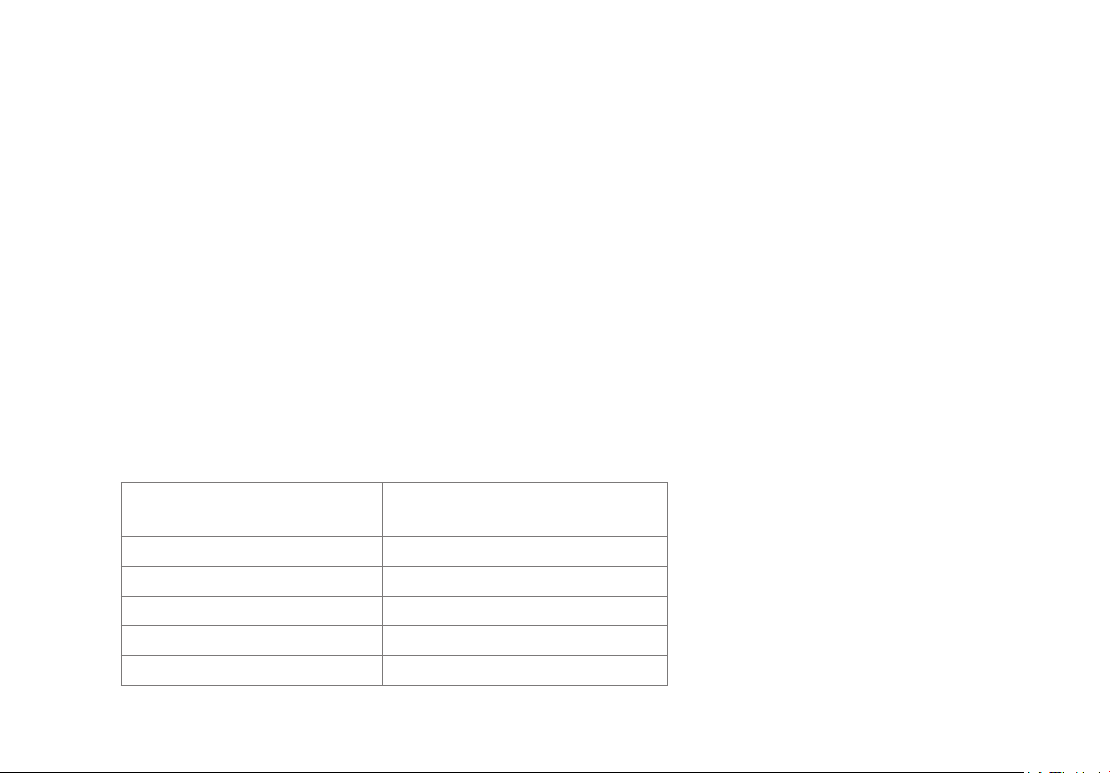
Rated Maximum Output
Power of Transmitter (W)
Separation Distance* according
to Frequency of Transmitter (m)
0.01 0.23
0.1 0.73
1 2.3
10 7.3
100 23
EMC Manufacturer Declarations
Electromagnetic Compatibility (EMC) Statement for Home Healthcare Environment
The RecoveryAir PRO system has been evaluated to international standard IEC 60601- 1-2 “General requirements for
basic safety and essential performance - Collateral standard: Electromagnetic compatibility - Requirements
and tests”.
The Medical Electrical Equipment needs special precautions regarding EMC and needs to be installed and put into
service according to the EMC information provided here within the accompanying documents.
Portable and mobile RF communication can affect the Medical Electrical Equipment. See below recommended
separation distances between portable and mobile RF communication equipment and the RecoveryAir PRO system.
Wireless communications equipment such as wireless home network devices, mobile phones, cordless telephones
and their base stations, walkie-talkies can affect this equipment and should be kept at least a distance d = 3.3 m away
from the system.
*Note: The distance calculated from 800 MHz to 2.5 GHz
25
Caution: Basic Safety and Essential Performance
• This system should not be used adjacent to or stacked with other equipment and that if adjacent or stacked use is
necessary, this system should be observed to verify normal operation in the configuration in which it will be used.
• The essential performance of the RecoveryAir PRO system as evaluated in IEC 60601- 1-2 includes treatment com-
pleting cycle, presentation on the display is not interfered, and treatment parameters are not changed unintentionally.
• The following, but not limited to, are unacceptable risks that are not allowed: malfunction, non-operation when
operation is required, unwanted operation when no operation is required, deviation from normal operation that poses
unacceptable risk to operator or user, component failure, change in programmable parameter(s), change in operation
mode, reset to factory defaults, and false positive or false negative alarm.
• Do not apply the device near any devices with Electromagnetic Interference (EMI), such as cell phones, Magnetic
Resonance Imaging (MRI), computerized axial tomography (CT), diathermy, Radio
Frequency Identification (RFID), etc. or MR environment. EMI, RF devices or MR environments
may affect the normal function of the device or would cause user injury.
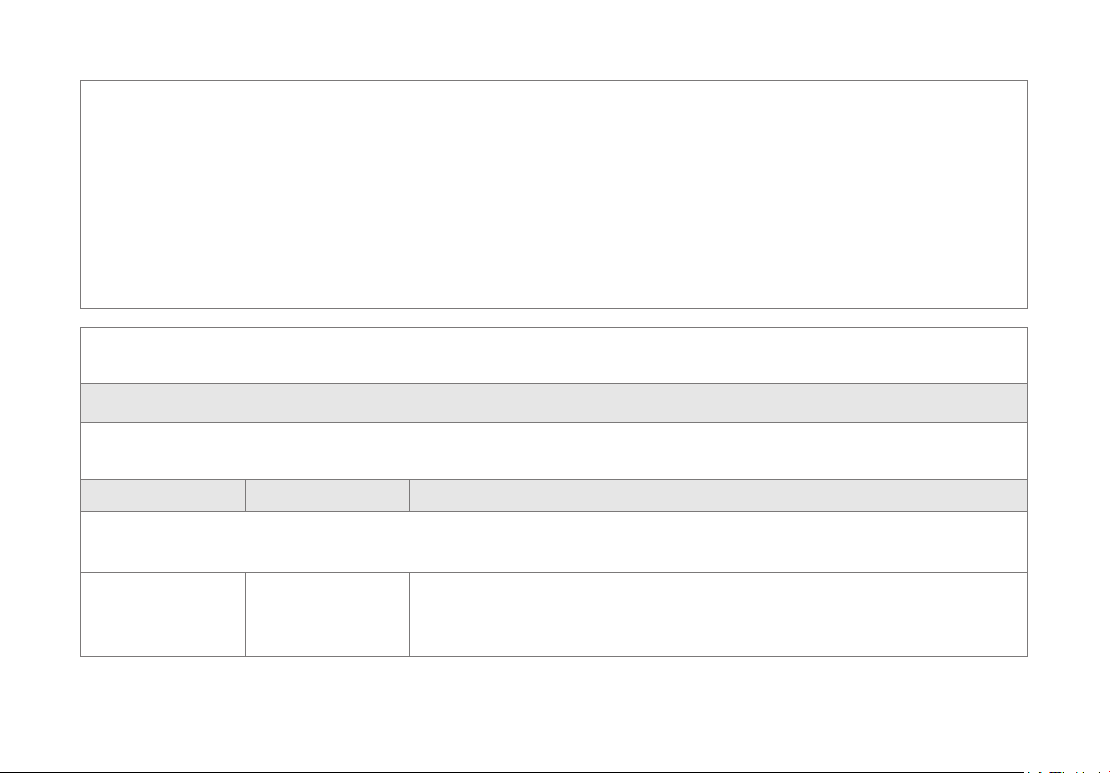
Guidance and Manufacturer’s Declaration – Electromagnetic Emission
The RecoveryAir PRO device is intended for use in the electromagnetic environment specified below.
The customer or the user of the device should assure that it is used in such an environment .
Emission Test Compliance Electromagnetic Environment – Guidance
The device uses RF energy only for its internal function. Therefore, its RF emissions are very low and are not likely to
cause any interference in nearby electronic equipment.
IEC 61000-3-3 Class B The device is suitable for use in all establishments, including domestic
establishments and those directly connected to the public low-voltage power
supply network that supplies buildings used for domestic purposes.
26
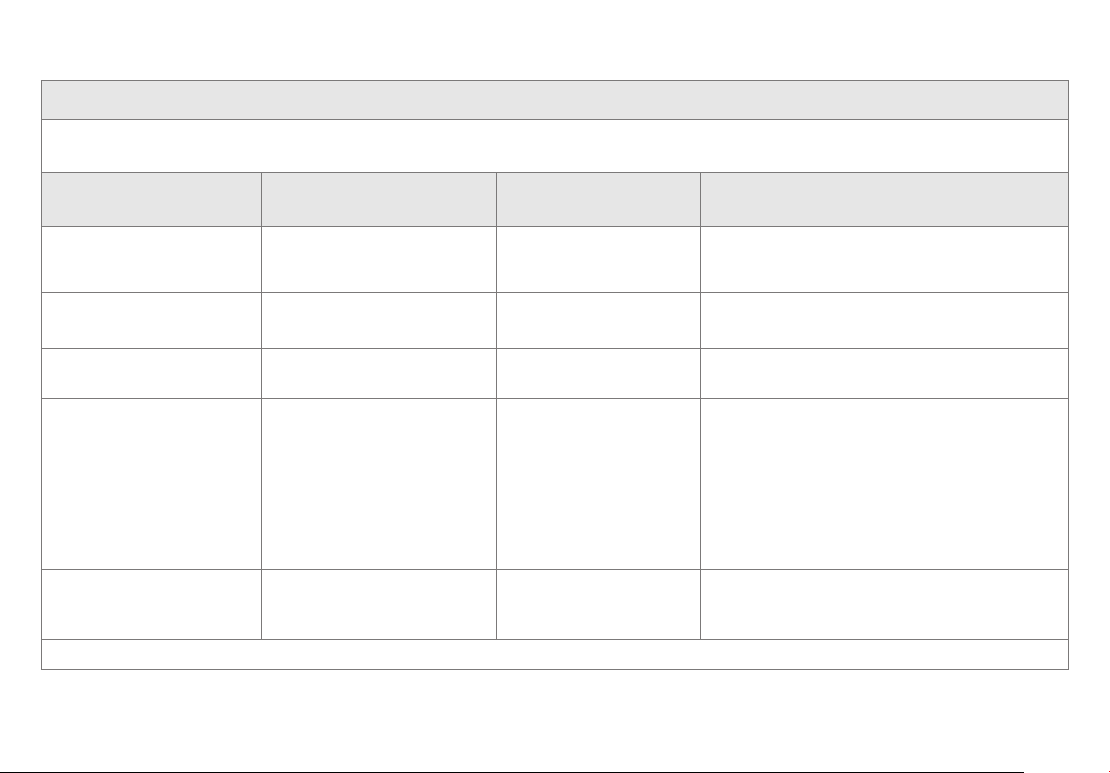
Guidance and Manufacturer’s Declaration – Electromagnetic Immunity
The RecoveryAir PRO device is intended for use in the electromagnetic environment specified below.
The customer or the user of the device should assure that it is used in such an environment.
Immunity Test IEC 60601
Test Level
Compliance Level Electromagnetic
Environment - Guidance
Electrostatic discharge
(ESD) IEC 61000-4-2
2, 4, 6, 8 kV contact
2, 4, 8, 15 kV air
2, 4, 6, 8 kV contact
2, 4, 8, 15 kV air
Floors should be wood, concrete or ceramic tile.
If floors are covered with synthetic material, the
relative humidity should be at least 30%
Electrical fast transient/burst
IEC 61000-4-4
±2 kV for power supply lines
±1 kV for input/output lines
±2 kV for
power supply lines
Mains power quality should be that of a typical
commercial or hospital environment.
Surge
IEC 61000-4-5
±1 kV line(s) to line(s)
±2 kV line(s) to earth
±1 kV line(s) to line(s)
±2 kV line(s) to earth
Mains power quality should be that of a typical
commercial or hospital environment.
Voltage dips, short
interruptions and voltage
variations on power supply
input lines
IEC 61000-4- 11
<5% UT(>95% dip in Ut) for
0.5 cycles
40% Ut (60% dip in Ut)
for 5 cycles
70% Ut (30% dip in Ut)
for 25 cycles
<5% Ut (>95% dip in Ut)
for 5 sec
<5% UT(>95% dip in Ut)
for 0.5 cycles
40% Ut (60% dip in Ut)
for 5 cycles
70% Ut (30% dip in Ut)
for 25 cycles
<5% Ut (>95% dip in Ut)
for 5 sec
Mains power quality should be that of a typical
commercial or hospital environment. If the user
of the device requires continued operation
during power mains interruptions, it is
recommended that the device be powered from
an uninterruptible power supply or a battery
Power frequency
(50Hz/60Hz) magnetic
field IEC 61000-4-8
30 A/m 30 A/m Power frequency magnetic fields should be at
levels characteristic of a typical location in a
typical commercial or hospital environment.
Note: UT is the AC mains voltage prior to application of the test level.
27
Guidance and Manufacturer’s Declaration – Electromagnetic Immunity
The RecoveryAir PRO device is intended for use in the electromagnetic environment specified below.
The customer or the user of the device should assure that it is used in such an environment.
Immunity
Test
IEC 60601
Test Level
Compliance
Level
Electromagnetic
Environment - Guidance
Conducted
Immunity
61000-4-6
3 Vrms/m
for
0.15MHz to 80MHz
6 Vrms/m
for ISM & amateur
radio band.
3 Vrms/m
for
0.15MHz to 80MHz
6 Vrms/m for
ISM & amateur
radio band.
Portable and mobile RF communication equipment should be used no closer to
any part of the device, including cables, than the recommended separation dis-
tance calculated from the equation applicable to the frequency of the transmitter.
Recommended separation distance
= 1 . 2
= 1 . 2 80 MHz to 800MHz
= 2 . 3 800 MHz to 2.7 GHz
Where P is the maximum output power rating of the transmitter in Watts (W)
according to the transmitter manufacturer and d is the recommended separation
distance in meters (m). Field strengths from fixed RF transmitters, as determined
by an electromagnetic site survey(a) should be less than the compliance level in
each frequency range(b) . Interference may occur in the vicinity of equipment
marked with the following symbol:
Radiated
Immunity
61000-4-3
10 V/m
80MHz to 2.7GHz
10 V/m
Note 1: At 80 MHz and 800 MHz, the higher frequency range applies.
Note 2: These guidelines may not apply in all situations. Electromagnetic propagation is affected by absorption and reflection from
structures, objects and people.
(a). Field strengths from fixed transmitters, such as base stations for radio (cellular/cordless) telephones and land mobile radios, amateur
radio, AM and FM radio broadcast and TV broadcast cannot be predicted theoretically with accuracy. To assess the electromagnetic envi-
ronment due to fixed RF transmitters, an electromagnetic site survey should be considered. If the measured field strength in the location
in which the device is used exceeds the applicable RF compliance level above, the device should be observed to verify normal operation.
If abnormal performance is observed, additional measures may be necessary, such as re-orienting or relocating the device.
(b). Over the frequency range 150 kHz to 80 MHz, field strengths should be less than 3 V/m.
28
Recommended Separation Distances between Portable and
Mobile RF Communication Equipment and the Device
The RecoveryAir PRO device is intended for use in an electromagnetic environment in which radiated RF disturbances
are controlled. The customer or the user of the device can help prevent electromagnetic interference by maintaining
a minimum distance between portable and mobile RF communication equipment (transmitters) and the device as
recommended below, according to the maximum output power of the communications equipment.
Rated Maximum Output
Power of Transmitter (W)
Separation Distance According to Frequency of
Transmitter (m)
150 kHz to
80 MHz
80 MHz to
800 MHz
800 MHz to
2.7 GHz
0.01 0.12 0.12 0.23
0.1 0.38 0.38 0.73
1 1.2 1.2 2.3
10 3.8 3.8 7.3
100 12 12 23
For transmitters rated at a maximum output power not listed above, the recommended separation distance in meters (m) can
be estimated using the equation applicable to the frequency of the transmitter, where P is the maximum output power rating of
the transmitter in Watt (W) according to the transmitter manufacturer.
Note 1: At 80 MHz and 800 MHz, the separation distance for the higher frequency range applies.
Note 2: These guidelines may not apply in all situations. Electromagnetic propagation is affected by absorption and reflection
from structures, objects and people.

29
Reporting adverse events to FDA
MedWatch is the Food and Drug Administration’s (FDA) program for reporting serious reactions, product quality problems,
therapeutic inequivalence/failure, and product use errors with human medical products, including drugs, biologic products,
medical devices, dietary supplements, infant formula, and cosmetics.
If you think you or someone in your family has experienced a serious reaction to a medical product, you are encouraged to take
the reporting form to your doctor. Your health care provider can provide clinical information based on your medical record that
can help the FDA evaluate your report. However, we understand that for a variety of reasons, you may not wish to have the form
filled out by your healthcare provider, or your health care provider may choose not to complete the form. Your health care
provider is not required to report to the FDA. In these situations, you may complete the Online Reporting Form yourself.
You will receive an acknowledgement from the FDA when your report is received. Reports are reviewed by FDA staff. You will be
personally contacted only if we need additional information.
Submitting adverse event reports to FDA
Use one of the methods below to submit voluntary adverse event reports to the FDA:
1. Report Online at: www.accessdata.fda.gov/scripts/medwatch/index.cfm?action=reporting.home
2. Consumer Reporting Form FDA 3500B. Follow the instructions on the form to either fax or mail it in for submission.
For help filling out the form, see MedWatchLearn. The form is available at:
www.fda.gov/downloads/aboutFDA/reportsmanualsforms/forms/ucm349464.pdf
3. Call FDA at 1-800-FDA-1088 to report by telephone.
4. Reporting Form FDA 3500 commonly used by health professionals. The form is available at
www.fda.gov/downloads/aboutFDA/reportmanualsforms/forms/ucm163919.pdf
Storage environment:
• The pump can be transported or stored for short periods of time within:
- Temperature range of -4 - 158°F (-20- 70°C)
- Humidity range of 10-93% RH non-condensing
- Atmospheric pressure range of 190 - 1060hPa
• Allow the pump to reach a reasonable room temperature of 50 - 86°F (10 - 30°C) before operating.
• When the system has been stored in extreme temperature conditions of -20°C (-4°F) or 70°C (158°F) between uses, wait
for two (2) hours before using again.

30
FCC compliance statement
This device complies with Part 15 of the FCC Rules. Operation is subject to the following two conditions:
(1) this device may not cause harmful interference, and (2) this device must accept any interference received, including
interference that may cause undesired operation. Changes or modifications not expressly approved by the party
responsible for compliance could void the user’s authority to operate the equipment.
This equipment has been tested and found to comply with the limits for a Class B digital device, pursuant to Part 15 of the FCC
Rules. These limits are designed to provide reasonable protection against harmful interference in a residential installation.
This equipment generates, uses and can radiate radio frequency energy and, if not installed and used in accordance with the
instructions, may cause harmful interference to radio communications. However, there is no guarantee that interference will
not occur in a particular installation.
If this equipment does cause harmful interference to radio or television reception, which can be determined by turning the
equipment off and on, the user is encouraged to try to correct the interference by one or more of the following measures:
• Reorient or relocate the receiving antenna.
• Increase the separation between the equipment and receiver.
• Connect the equipment into an outlet on a circuit different from that to which the receiver is connected.
• Consult the dealer or an experienced radio/TV technician for help.
Radiation Exposure statement
This equipment complies with FCC/IC RSS-102 radiation exposure limits set forth for an uncontrolled environment.
Born in Los Angeles, CA.
Designed for everybody.
@Therabody
VN