Visit Our Website
SCAN ME
PyleUSA.com
USER GUIDE
Questions or Comments?
We are here to help!
Phone: 1.718.535.1800
PyleUSA.com/ContactUs

www.PyleUSA.com
2
www.PyleUSA.com
3
READ ALL INSTRUCTIONS CAREFULLY BEFORE USING THIS PRODUCT.
RETAIN THIS OWNER’S MANUAL FOR FUTURE REFERENCE.
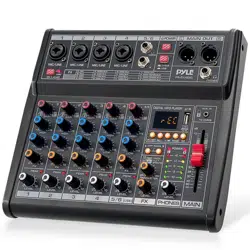
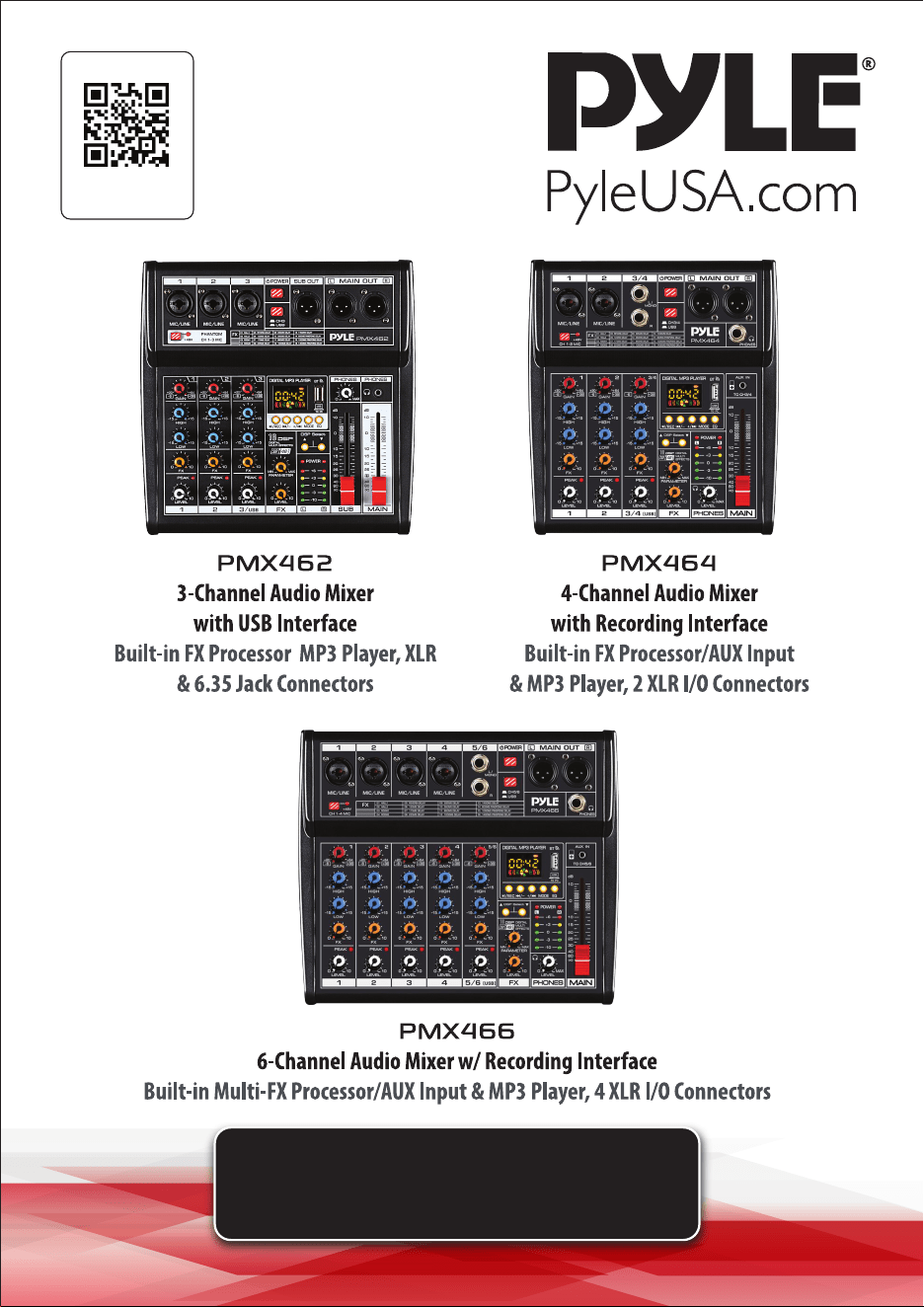
PMX462
3-Channel Audio Mixer with USB Interface
Built-in FX Processor MP3 Player, XLR & 6.35 Jack Connectors
Features:
• Rugged, Metal Chassis & Exquisite Panel on 2 Sides
• Preset 16 Digital Eects
• Built-in SUB Output, EQ Control for MP3 Player
• Can Choose 6 Kinds of Sound Eects Normal/ Rock/ POP/ Classical/ Jazz/
Country)
• Flexible Connectivity for a Variety of External Devices
• Ultra-Low Noise Design with High Headroom
• Integrated Sound Card for Computer Recording Support
• USB Interface: Connect to Mac / PC
• Smooth Rotary-Style Faders for Mic/USB/Line/Master Controls
• Extremely Musical 2-Band EQ & Pan, on Each Channel
• Combo Microphone Jack Connector – XLR and 6.35 Jack
• Voice Echo Eect/Delay Features
• Audio Signal CLIP LED Indicator Lights
• Input Selection / Control Buttons
• Independent Channel + MASTER Volume Controls
• Independent Channel Balance/High + Low-Frequency Adjustment
• Universal Digital Audio File Compatibility
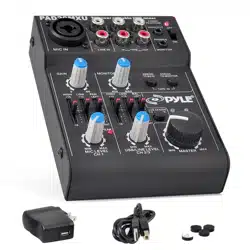
What’s in the Box:
• Mixer Interface
• USB Cable
• Wall Adapter
Technical Specs:
• Power Supply: DC 5V/1A
• Phantom Power: +48V
• Frequency Range: 20Hz-20KHZ±1dB+4dBμ@1KHZv
• T.H.D.: ≤0.5%@+4dBμ (22HZ-22KHZ)
• EQ Range: Bass ±15dB/80Hz, High ±15dB/12kHz
• USB Interface: SB 2.0, Windows 98SE+, macOS
• Power Supply: USB, DC 5V/1A
• Dimensions (L x W x H): 9.06’’ x 9.06’’ x 2.17’’ -inches
PMX464
4-Channel Audio Mixer w/ Recording Interface
Built-in FX Processor/AUX Input & MP3 Player, 2 XLR I/O Connectors
Features:
• Preset 16 Digital Eects
• Built-in SUB Output, EQ Control for MP3 Player
• Can Choose 6 Kinds of Sound Eects Normal/ Rock/ POP/ Classical/ Jazz/
Country)
• Flexible Connectivity for a Variety of External Devices
• Ultra-Low Noise Design with High Headroom
• Integrated Sound Card for Computer Recording Support
• USB Interface: Connect to Mac / PC
• Smooth Rotary-Style Faders for Mic/USB/Line/Master Controls
• Extremely Musical 2-Band EQ & Pan, on Each Channel
• Combo Microphone Jack Connector – XLR and 6.35 Jack
• 2 XLR+6.35 JACK (L/R) Stereo Input and Output Connectors
• Voice Echo Eect/Delay Features
• Audio Signal CLIP LED Indicator Lights
• Input Selection / Control Buttons
• Independent Channel + MASTER Volume Controls
• Independent Channel Balance/High + Low-Frequency Adjustment
• Universal Digital Audio File Compatibility
What’s in the Box:
• Mixer Interface
• USB Cable
• Wall Adapter
Technical Specs:
• Power Supply: DC 5V/1A
• Phantom Power: +48V
• Frequency Range: 20Hz-20KHZ±1dB+4dBμ@1KHZ
• T.H.D.: ≤0.5%@+4dBμ (22HZ-22KHZ)
• EQ Range: Bass ±15dB/80Hz, High ±15dB/12kHz
• USB Interface: SB 2.0, Windows 98SE+, macOS
• Power Supply: USB, DC 5V/1A
• Dimensions (L x W x H): 9.06’’ x 9.06’’ x 2.17’’ -inches
California Prop 65 Warning
WARNING:
This product may expose you to chemicals, which is known to
the state of California to cause cancer, birth defects and other
reproductive harm. Do not ingest.
For more info go to: www.P65warnings.ca.gov

www.PyleUSA.com
2
www.PyleUSA.com
3
READ ALL INSTRUCTIONS CAREFULLY BEFORE USING THIS PRODUCT.
RETAIN THIS OWNER’S MANUAL FOR FUTURE REFERENCE.
PMX462
3-Channel Audio Mixer with USB Interface
Built-in FX Processor MP3 Player, XLR & 6.35 Jack Connectors
Features:
• Rugged, Metal Chassis & Exquisite Panel on 2 Sides
• Preset 16 Digital Eects
• Built-in SUB Output, EQ Control for MP3 Player
• Can Choose 6 Kinds of Sound Eects Normal/ Rock/ POP/ Classical/ Jazz/
Country)
• Flexible Connectivity for a Variety of External Devices
• Ultra-Low Noise Design with High Headroom
• Integrated Sound Card for Computer Recording Support
• USB Interface: Connect to Mac / PC
• Smooth Rotary-Style Faders for Mic/USB/Line/Master Controls
• Extremely Musical 2-Band EQ & Pan, on Each Channel
• Combo Microphone Jack Connector – XLR and 6.35 Jack
• Voice Echo Eect/Delay Features
• Audio Signal CLIP LED Indicator Lights
• Input Selection / Control Buttons
• Independent Channel + MASTER Volume Controls
• Independent Channel Balance/High + Low-Frequency Adjustment
• Universal Digital Audio File Compatibility
What’s in the Box:
• Mixer Interface
• USB Cable
• Wall Adapter
Technical Specs:
• Power Supply: DC 5V/1A
• Phantom Power: +48V
• Frequency Range: 20Hz-20KHZ±1dB+4dBμ@1KHZv
• T.H.D.: ≤0.5%@+4dBμ (22HZ-22KHZ)
• EQ Range: Bass ±15dB/80Hz, High ±15dB/12kHz
• USB Interface: SB 2.0, Windows 98SE+, macOS
• Power Supply: USB, DC 5V/1A
• Dimensions (L x W x H): 9.06’’ x 9.06’’ x 2.17’’ -inches
PMX464
4-Channel Audio Mixer w/ Recording Interface
Built-in FX Processor/AUX Input & MP3 Player, 2 XLR I/O Connectors
Features:
• Preset 16 Digital Eects
• Built-in SUB Output, EQ Control for MP3 Player
• Can Choose 6 Kinds of Sound Eects Normal/ Rock/ POP/ Classical/ Jazz/
Country)
• Flexible Connectivity for a Variety of External Devices
• Ultra-Low Noise Design with High Headroom
• Integrated Sound Card for Computer Recording Support
• USB Interface: Connect to Mac / PC
• Smooth Rotary-Style Faders for Mic/USB/Line/Master Controls
• Extremely Musical 2-Band EQ & Pan, on Each Channel
• Combo Microphone Jack Connector – XLR and 6.35 Jack
• 2 XLR+6.35 JACK (L/R) Stereo Input and Output Connectors
• Voice Echo Eect/Delay Features
• Audio Signal CLIP LED Indicator Lights
• Input Selection / Control Buttons
• Independent Channel + MASTER Volume Controls
• Independent Channel Balance/High + Low-Frequency Adjustment
• Universal Digital Audio File Compatibility
What’s in the Box:
• Mixer Interface
• USB Cable
• Wall Adapter
Technical Specs:
• Power Supply: DC 5V/1A
• Phantom Power: +48V
• Frequency Range: 20Hz-20KHZ±1dB+4dBμ@1KHZ
• T.H.D.: ≤0.5%@+4dBμ (22HZ-22KHZ)
• EQ Range: Bass ±15dB/80Hz, High ±15dB/12kHz
• USB Interface: SB 2.0, Windows 98SE+, macOS
• Power Supply: USB, DC 5V/1A
• Dimensions (L x W x H): 9.06’’ x 9.06’’ x 2.17’’ -inches
California Prop 65 Warning
WARNING:
This product may expose you to chemicals, which is known to
the state of California to cause cancer, birth defects and other
reproductive harm. Do not ingest.
For more info go to: www.P65warnings.ca.gov

www.PyleUSA.com
4
www.PyleUSA.com
5
PMX466
6-Channel Audio Mixer w/ Recording Interface
Built-in Multi-FX Processor/AUX Input & MP3 Player, 4 XLR I/O Connectors
Features:
• Rugged, Metal Chassis & Exquisite Panel on 2 Sides
• Preset 16 Digital Eects
• Built-in SUB Output, EQ Control for MP3 Player
• Can Choose 6 Kinds of Sound Eects Normal/ Rock/ POP/ Classical/ Jazz/
Country)
• Flexible Connectivity for a Variety of External Devices
• Ultra-Low Noise Design with High Headroom
• Integrated Sound Card for Computer Recording Support
• USB Interface: Connect to Mac / PC
• Smooth Rotary-Style Faders for Mic/USB/Line/Master Controls
• Extremely Musical 2-Band EQ & Pan, on Each Channel
• Combo Microphone Jack Connector – XLR and 6.35 Jack
• 4 XLR+6.35 JACK (L/R) Stereo Input and Output Connectors
• Voice Echo Eect/Delay Features
• Audio Signal CLIP LED Indicator Lights
• Input Selection / Control Buttons
• Independent Channel + MASTER Volume Controls
• Independent Channel Balance/High + Low-Frequency Adjustment
• Universal Digital Audio File Compatibility
What’s in the Box:
• Mixer Interface
• USB Cable
• Wall Adapter
Technical Specs:
• Power Supply: DC 5V/1A
• Phantom Power: +48V
• Frequency Range: 20Hz-20KHZ±1dB+4dBμ@1KHZ
• T.H.D.: ≤0.5%@+4dBμ (22HZ-22KHZ)
• EQ Range: Bass ±15dB/80Hz, High ±15dB/12kHz
• USB Interface: SB 2.0, Windows 98SE+, macOS
• Power Supply: USB, DC 5V/1A
• Dimensions (L x W x H): 11.22’’ x 9.06’’ x 2.17’’ -inches
For the best results and satisfaction with your new unit, please read this
manual thoroughly and retain it for future reference.
ATTENTION
To avoid the possibility of malfunction, product damage, data loss, or harm
to other property, please follow the points below.
OPERATION AND MAINTENANCE
• Do not use the device near a TV, radio, stereo equipment, mobile phone, or
other electronic devices. Doing so may cause noise interference.
• To prevent panel discoloration, unstable operation, or internal damage, do not
expose the device to excessive dust, vibration, or extreme temperatures
(e.g., direct sunlight, near a heater, or inside a car during the day).
• Do not place vinyl, plastic, or rubber objects on the device, as they may
discolor the panel.
• When cleaning the device, use a dry, soft cloth. Avoid using paint thinners,
solvents, cleaning uids, or chemically treated wiping cloths.
• Rapid or drastic temperature changes may cause condensation inside the
device. For example, moving the device between locations or turning an air
conditioner on or o can create condensation. If condensation occurs, leave
the device o for several hours to dry completely before use.
• Avoid setting all controls to their maximum. Depending on the connected
devices, this may cause feedback or damage the speakers.
• When powering on your audio system, always turn on the power amplier last
to prevent speaker damage. When turning the system o, turn o the power
amplier rst for the same reason.
PRECAUTIONS WHEN USING THE USB 2.0 AND 5V DC TERMINALS
When connecting the USB 2.0 terminal to a computer, follow these precau-
tions to avoid crashes, malfunctions, or data loss:
• Use a USB 2.0 cable (USB 3.0 cables are incompatible).
• Disable any power-saving modes (e.g., suspend, sleep, standby) on the
computer before connecting to the USB terminal.
• If the computer or mixer crashes, restart the application software or computer
operating system, or disconnect and reconnect the mixer before powering it
on again.

www.PyleUSA.com
4
www.PyleUSA.com
5
PMX466
6-Channel Audio Mixer w/ Recording Interface
Built-in Multi-FX Processor/AUX Input & MP3 Player, 4 XLR I/O Connectors
Features:
• Rugged, Metal Chassis & Exquisite Panel on 2 Sides
• Preset 16 Digital Eects
• Built-in SUB Output, EQ Control for MP3 Player
• Can Choose 6 Kinds of Sound Eects Normal/ Rock/ POP/ Classical/ Jazz/
Country)
• Flexible Connectivity for a Variety of External Devices
• Ultra-Low Noise Design with High Headroom
• Integrated Sound Card for Computer Recording Support
• USB Interface: Connect to Mac / PC
• Smooth Rotary-Style Faders for Mic/USB/Line/Master Controls
• Extremely Musical 2-Band EQ & Pan, on Each Channel
• Combo Microphone Jack Connector – XLR and 6.35 Jack
• 4 XLR+6.35 JACK (L/R) Stereo Input and Output Connectors
• Voice Echo Eect/Delay Features
• Audio Signal CLIP LED Indicator Lights
• Input Selection / Control Buttons
• Independent Channel + MASTER Volume Controls
• Independent Channel Balance/High + Low-Frequency Adjustment
• Universal Digital Audio File Compatibility
What’s in the Box:
• Mixer Interface
• USB Cable
• Wall Adapter
Technical Specs:
• Power Supply: DC 5V/1A
• Phantom Power: +48V
• Frequency Range: 20Hz-20KHZ±1dB+4dBμ@1KHZ
• T.H.D.: ≤0.5%@+4dBμ (22HZ-22KHZ)
• EQ Range: Bass ±15dB/80Hz, High ±15dB/12kHz
• USB Interface: SB 2.0, Windows 98SE+, macOS
• Power Supply: USB, DC 5V/1A
• Dimensions (L x W x H): 11.22’’ x 9.06’’ x 2.17’’ -inches
For the best results and satisfaction with your new unit, please read this
manual thoroughly and retain it for future reference.
ATTENTION
To avoid the possibility of malfunction, product damage, data loss, or harm
to other property, please follow the points below.
OPERATION AND MAINTENANCE
• Do not use the device near a TV, radio, stereo equipment, mobile phone, or
other electronic devices. Doing so may cause noise interference.
• To prevent panel discoloration, unstable operation, or internal damage, do not
expose the device to excessive dust, vibration, or extreme temperatures
(e.g., direct sunlight, near a heater, or inside a car during the day).
• Do not place vinyl, plastic, or rubber objects on the device, as they may
discolor the panel.
• When cleaning the device, use a dry, soft cloth. Avoid using paint thinners,
solvents, cleaning uids, or chemically treated wiping cloths.
• Rapid or drastic temperature changes may cause condensation inside the
device. For example, moving the device between locations or turning an air
conditioner on or o can create condensation. If condensation occurs, leave
the device o for several hours to dry completely before use.
• Avoid setting all controls to their maximum. Depending on the connected
devices, this may cause feedback or damage the speakers.
• When powering on your audio system, always turn on the power amplier last
to prevent speaker damage. When turning the system o, turn o the power
amplier rst for the same reason.
PRECAUTIONS WHEN USING THE USB 2.0 AND 5V DC TERMINALS
When connecting the USB 2.0 terminal to a computer, follow these precau-
tions to avoid crashes, malfunctions, or data loss:
• Use a USB 2.0 cable (USB 3.0 cables are incompatible).
• Disable any power-saving modes (e.g., suspend, sleep, standby) on the
computer before connecting to the USB terminal.
• If the computer or mixer crashes, restart the application software or computer
operating system, or disconnect and reconnect the mixer before powering it
on again.
www.PyleUSA.com
6
www.PyleUSA.com
7
PMX462 3 CHANNEL MIXER
PMX464 4 CHANNEL MIXER
PMX466 CHANNEL MIXER
CHANNEL INPUT AND OUTPUT
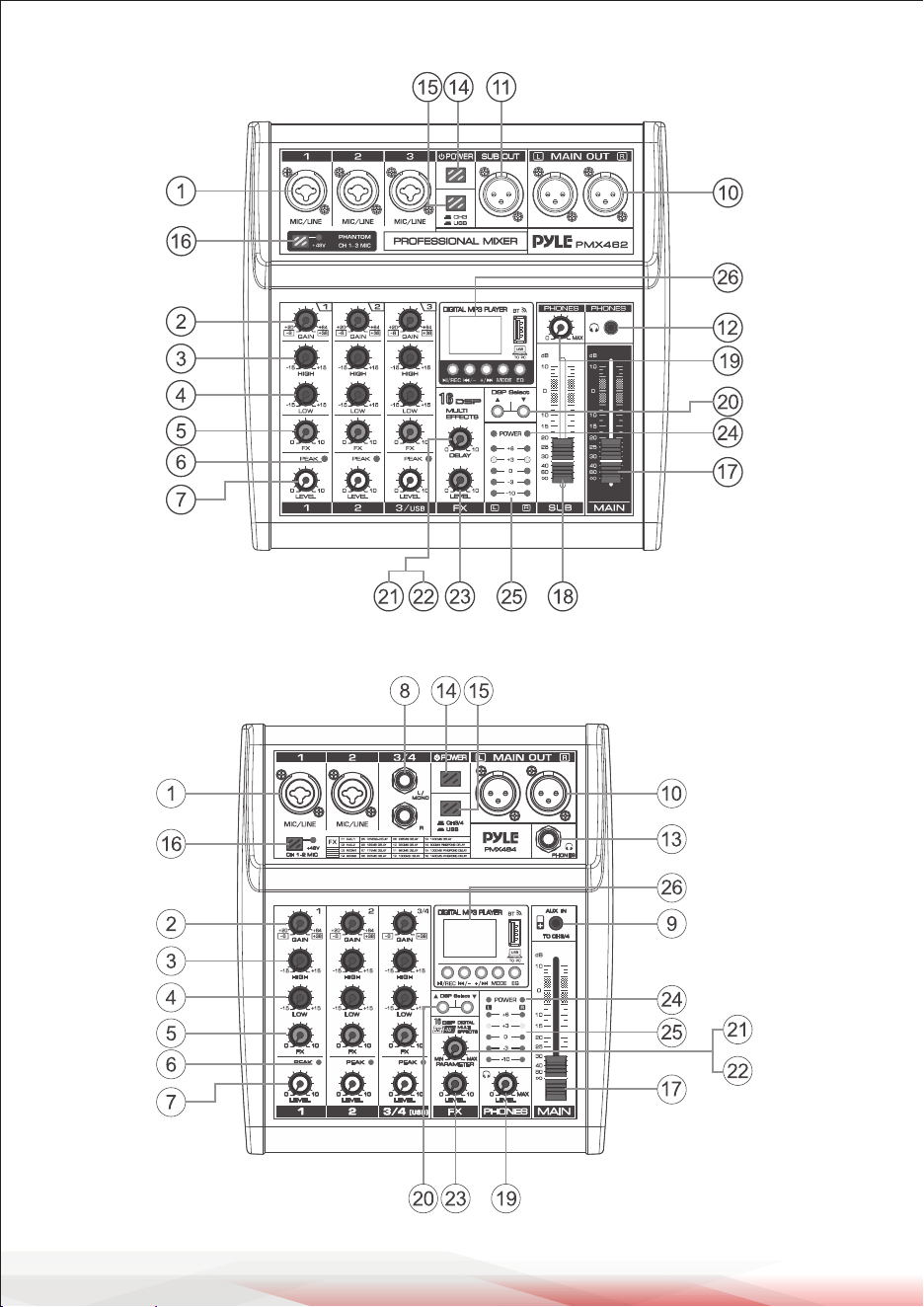
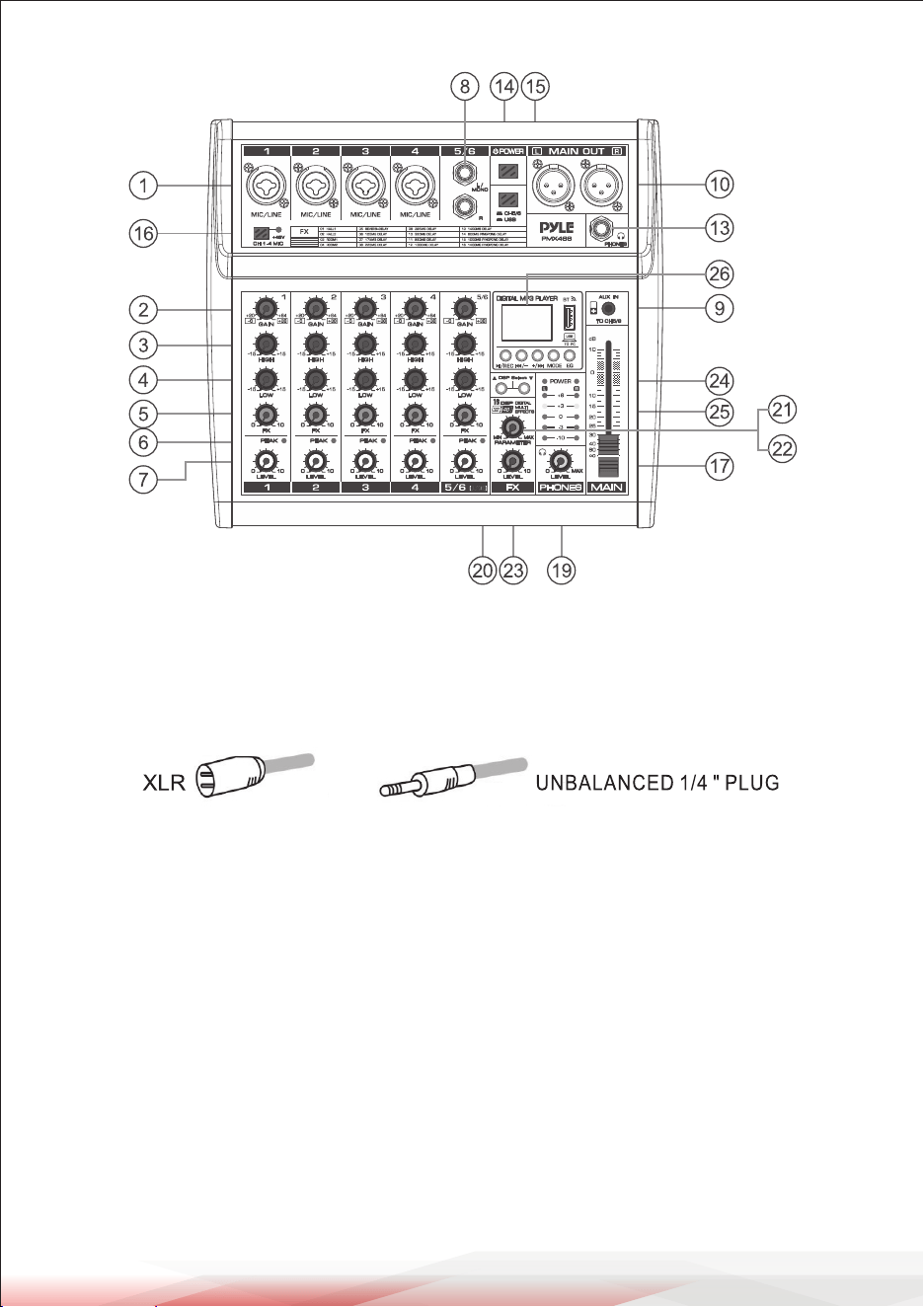
1. [MIC/LINE] Mono input for connecting microphones, musical instruments, or
audio devices (e.g., CD players). Supports XLR and unbalanced 1/4" plugs.
2. [GAIN] Controller: Adjusts the basic volume of each channel. If the [PEAK] LED
indicator ashes, reduce the volume by turning this control counterclockwise.
3. [HIGH] Controller: Adjusts treble tones by enhancing or attenuating up to
±15 dB at 12 kHz.
4. [LOW] Controller: Adjusts bass tones by enhancing or attenuating up to
±15 dB at 80 Hz.
5. [FX] Controller: Adjusts the signal level sent to the reverb line. For stereo
channels, mixes L and R signals before sending them to the reverb line.
6. [PEAK] LED Indicator: Flashes when input or equalized signal volume is too
high. Reduce the volume using the [GAIN] controller.
7. [LEVEL] Controller: Balances the volume of each channel.
www.PyleUSA.com
6
www.PyleUSA.com
7
PMX462 3 CHANNEL MIXER
PMX464 4 CHANNEL MIXER
PMX466 CHANNEL MIXER
CHANNEL INPUT AND OUTPUT
1. [MIC/LINE] Mono input for connecting microphones, musical instruments, or
audio devices (e.g., CD players). Supports XLR and unbalanced 1/4" plugs.
2. [GAIN] Controller: Adjusts the basic volume of each channel. If the [PEAK] LED
indicator ashes, reduce the volume by turning this control counterclockwise.
3. [HIGH] Controller: Adjusts treble tones by enhancing or attenuating up to
±15 dB at 12 kHz.
4. [LOW] Controller: Adjusts bass tones by enhancing or attenuating up to
±15 dB at 80 Hz.
5. [FX] Controller: Adjusts the signal level sent to the reverb line. For stereo
channels, mixes L and R signals before sending them to the reverb line.
6. [PEAK] LED Indicator: Flashes when input or equalized signal volume is too
high. Reduce the volume using the [GAIN] controller.
7. [LEVEL] Controller: Balances the volume of each channel.

B. Button Functions
• [ /SET]: Press once to pause playback. Press again to resume.
• [ /-]: Short press to play the previous track.
Press and hold to reduce volume.
• [ /+]: Short press to play the next track.
Press and hold to increase volume.
• [MODE]: Switches between USB, REC, and Bluetooth modes.
C. USB Recording
• Press "MODE" to select REC.
• Press [ /REC] to start recording. The LED screen shows recording time.
• Press [ /REC] again to pause recording.
D. Computer Sound Card
When connected via USB cable, the mixer enters PC playback mode
automatically. Wait for driver installation upon rst connection.
E. EQ Control
Choose from six sound eects: Normal, Rock, Pop, Classic, Jazz, and Country.
BUILT-IN DSP
You can assign one of 16 eect programs to your mix.
The eects list is as follows:
www.PyleUSA.com
8
www.PyleUSA.com
9
8. [STEREO INPUT] Jacks: Connect to line-level devices (e.g., electric keyboards)
via 6.35 mm plugs. When only the L (MONO) jack is connected, the mixer
outputs the same mono signal to both L and R outputs.
9. [AUX IN] 3.5 mm jack: Auxiliary input for external devices.
10. [MAIN OUT] Output: Connect to an active speaker or amplier.
11. [SUB OUT] Sends audio signals to the SUB output for monitoring or recording.
12-13. [PHONES] Jacks: Support 3.5 mm or 6.35 mm stereo headphone plugs.
14. [POWER] Button: Powers the mixer on or o.
15. [CH/USB] Switch: Selects the input signal from either "channel" or "USB."
16. [+48V PHANTOM POWER] Button/LED: When enabled, provides DC +48V
phantom power to XLR plugs on mono MIC inputs. Necessary for condenser
microphones requiring phantom power.
17. [MAIN LEVEL] Fader: Adjusts the overall volume output from the
[MAIN OUT].
18. [SUB] Fader: Controls the SUB output volume.
19. [PHONES LEVEL] Controller: Adjusts headphone volume.
20. [DSP Select]: Assigns one of 16 eect programs (e.g., Hall, Room, Reverb) to
the mix.
21. [DELAY] Controller: Adjusts the depth of the reverb eect.
22. [PARAMETER CONTROL IN ADDING DIGITAL EFFECTS]: Fine-tunes eect
depth, speed, etc.
23. [FX] Controller: Adjusts the volume of the eect.
24. [POWER INDICATOR]: Lights up when the mixer is powered on.
25. [LEVEL INDICATORS]: Displays signal levels from [MAIN OUT]. Lower the
volume using the [LEVEL] controller if the [PEAK] indicator shows red.
MP3 FUNCTION INTRODUCTION
A. Wireless Bluetooth Connection
• Press the "MODE" button to select Bluetooth mode.
The BT icon will ash on the display.
• Open Bluetooth settings on your device to pair.
A sound prompt conrms successful pairing.
B. Button Functions
• [ /SET]: Press once to pause playback. Press again to resume.
• [ /-]: Short press to play the previous track.
Press and hold to reduce volume.
• [ /+]: Short press to play the next track.
Press and hold to increase volume.
• [MODE]: Switches between USB, REC, and Bluetooth modes.
C. USB Recording
• Press "MODE" to select REC.
• Press [ /REC] to start recording. The LED screen shows recording time.
• Press [ /REC] again to pause recording.
D. Computer Sound Card
When connected via USB cable, the mixer enters PC playback mode
automatically. Wait for driver installation upon rst connection.
E. EQ Control
Choose from six sound eects: Normal, Rock, Pop, Classic, Jazz, and Country.
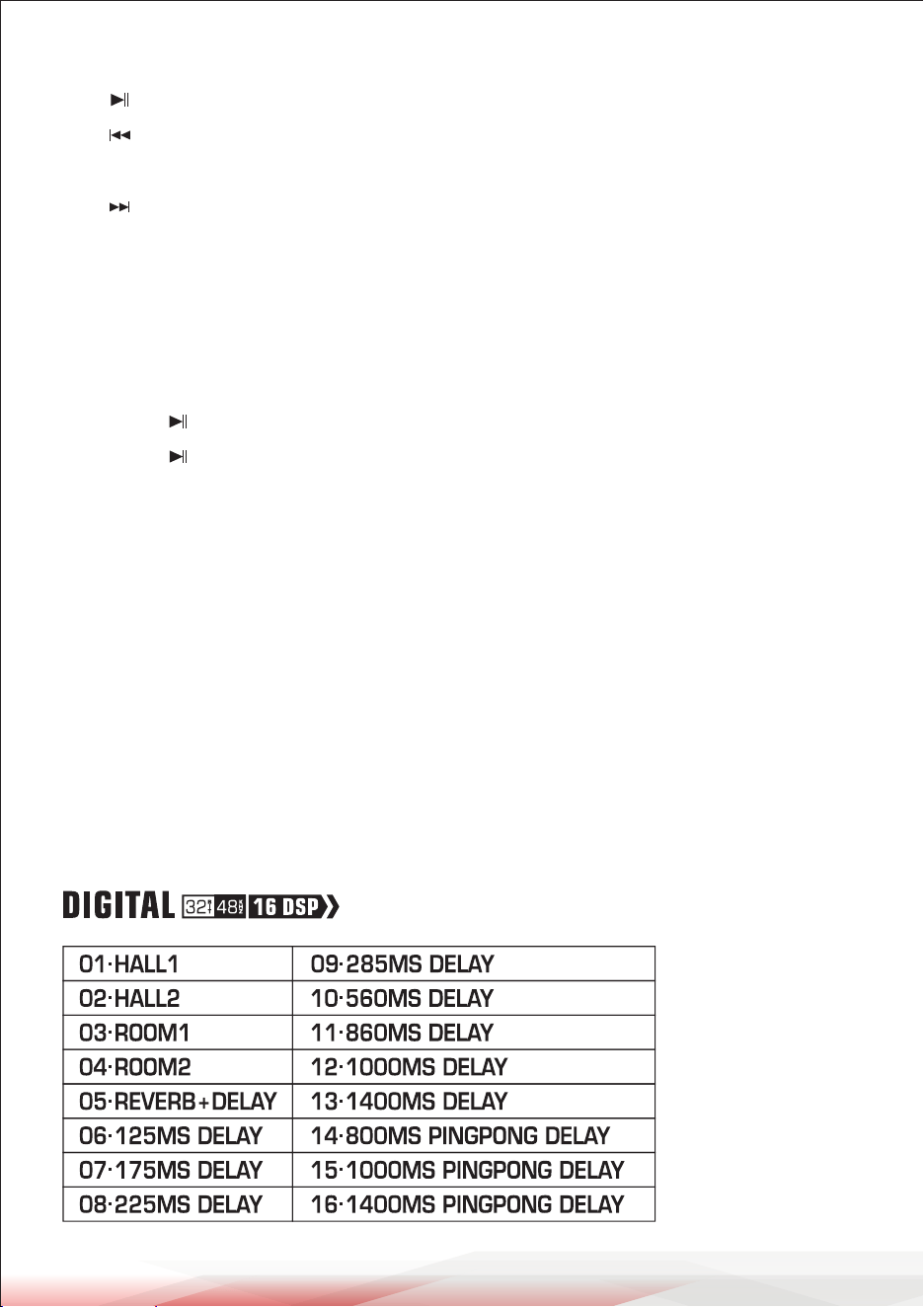
BUILT-IN DSP
You can assign one of 16 eect programs to your mix.
The eects list is as follows:
www.PyleUSA.com
8
www.PyleUSA.com
9
8. [STEREO INPUT] Jacks: Connect to line-level devices (e.g., electric keyboards)
via 6.35 mm plugs. When only the L (MONO) jack is connected, the mixer
outputs the same mono signal to both L and R outputs.
9. [AUX IN] 3.5 mm jack: Auxiliary input for external devices.
10. [MAIN OUT] Output: Connect to an active speaker or amplier.
11. [SUB OUT] Sends audio signals to the SUB output for monitoring or recording.
12-13. [PHONES] Jacks: Support 3.5 mm or 6.35 mm stereo headphone plugs.
14. [POWER] Button: Powers the mixer on or o.
15. [CH/USB] Switch: Selects the input signal from either "channel" or "USB."
16. [+48V PHANTOM POWER] Button/LED: When enabled, provides DC +48V
phantom power to XLR plugs on mono MIC inputs. Necessary for condenser
microphones requiring phantom power.
17. [MAIN LEVEL] Fader: Adjusts the overall volume output from the
[MAIN OUT].
18. [SUB] Fader: Controls the SUB output volume.
19. [PHONES LEVEL] Controller: Adjusts headphone volume.
20. [DSP Select]: Assigns one of 16 eect programs (e.g., Hall, Room, Reverb) to
the mix.
21. [DELAY] Controller: Adjusts the depth of the reverb eect.
22. [PARAMETER CONTROL IN ADDING DIGITAL EFFECTS]: Fine-tunes eect
depth, speed, etc.
23. [FX] Controller: Adjusts the volume of the eect.
24. [POWER INDICATOR]: Lights up when the mixer is powered on.
25. [LEVEL INDICATORS]: Displays signal levels from [MAIN OUT]. Lower the
volume using the [LEVEL] controller if the [PEAK] indicator shows red.
MP3 FUNCTION INTRODUCTION
A. Wireless Bluetooth Connection
• Press the "MODE" button to select Bluetooth mode.
The BT icon will ash on the display.
• Open Bluetooth settings on your device to pair.
A sound prompt conrms successful pairing.
www.PyleUSA.com
10
www.PyleUSA.com
11
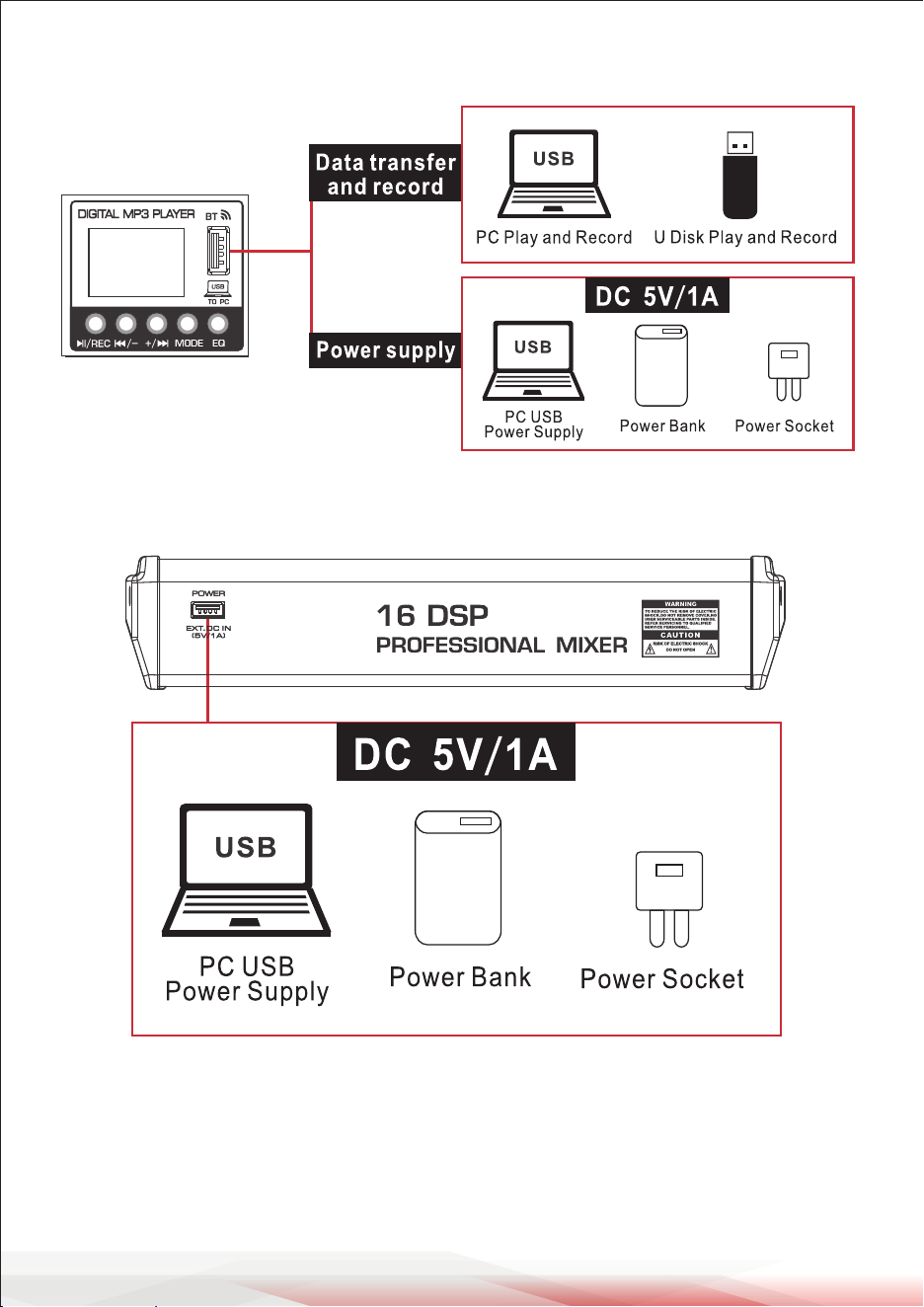
USB FOR DATA TRANSFER AND RECORD, AND POWER SUPPLY
USB FOR POWER SUPPLY ONLY
Use the following specications:
• Output voltage: 4.8 V to 5.2 V
• Output current: 1A or higher
FCC INFORMATION
WARNING:
Changes or modications not expressly approved by the party responsible
for compliance could void the user’s authority to operate the equipment.
NOTE:
This equipment has been tested and found to comply with the limits for a Class
B digital device, pursuant to Part 15 of the FCC Rules. These limits are designed to
provide reasonable protection against harmful interference in a residential
installation. This unit generates, uses, and can radiate radio frequency energy,
and if not installed and used in accordance with the instructions, may cause
harmful interference to radio communications. However, there is no guarantee
that interference will not occur in a particular installation. If this equipment
does cause harmful interference to radio or television reception, which can be
determined by turning the equipment o and on, the user is encouraged to try
and correct the interference by one or more of the following measures:
• Reorient or relocate the receiving antenna.
• Increase the separation between the equipment and receiver.
• Connect the equipment to an outlet on a circuit dierent from that to which
the receiver is connected.
• Consult the dealer or an experienced radio/TV technician for help.
This device complies with Part 15 of the FCC Rules. Operation is subject to
the following two conditions:
1. This device may not cause harmful interference.
2. This device must accept any interference received, including interference that
may cause undesired operation.
Register Product
Thank you for choosing PyleUSA. By registering your product,
you ensure that you receive the full benets of our exclusive
warranty and personalized customer support. Complete the
form to access expert support and to keep your PyleUSA
purchase in perfect condition.
Start Here
Model Number:
PMX462
PyleUSA.com/pages/register

www.PyleUSA.com
10
www.PyleUSA.com
11
USB FOR DATA TRANSFER AND RECORD, AND POWER SUPPLY
USB FOR POWER SUPPLY ONLY
Use the following specications:
• Output voltage: 4.8 V to 5.2 V
• Output current: 1A or higher
FCC INFORMATION
WARNING:
Changes or modications not expressly approved by the party responsible
for compliance could void the user’s authority to operate the equipment.
NOTE:
This equipment has been tested and found to comply with the limits for a Class
B digital device, pursuant to Part 15 of the FCC Rules. These limits are designed to
provide reasonable protection against harmful interference in a residential
installation. This unit generates, uses, and can radiate radio frequency energy,
and if not installed and used in accordance with the instructions, may cause
harmful interference to radio communications. However, there is no guarantee
that interference will not occur in a particular installation. If this equipment
does cause harmful interference to radio or television reception, which can be
determined by turning the equipment o and on, the user is encouraged to try
and correct the interference by one or more of the following measures:
• Reorient or relocate the receiving antenna.
• Increase the separation between the equipment and receiver.
• Connect the equipment to an outlet on a circuit dierent from that to which
the receiver is connected.
• Consult the dealer or an experienced radio/TV technician for help.
This device complies with Part 15 of the FCC Rules. Operation is subject to
the following two conditions:
1. This device may not cause harmful interference.
2. This device must accept any interference received, including interference that
may cause undesired operation.
Register Product
Thank you for choosing PyleUSA. By registering your product,
you ensure that you receive the full benets of our exclusive
warranty and personalized customer support. Complete the
form to access expert support and to keep your PyleUSA
purchase in perfect condition.
Start Here
Model Number:
PMX462
PyleUSA.com/pages/register

Visit Our Website
SCAN ME
PyleUSA.com
USER GUIDE
Questions or Comments?
We are here to help!
Phone: 1.718.535.1800
PyleUSA.com/ContactUs