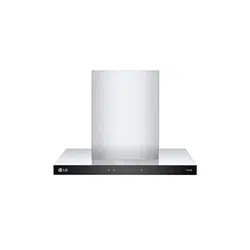
OWNER'S MANUAL
RANGE HOOD
Before beginning installation, read these instructions
carefully. This will simplify installation and ensure that the
product is installed correctly and safely. Leave these
instructions near the product after installation for future
reference.
ENGLISH
BWH607T3S BWH907T3S
MFL71950204
Rev.00_022624
www.lg.com
Copyright © 2024 LG Electronics Inc. All Rights Reserved.

TABLE OF CONTENTS
This manual may contain images or
content that may be different from the
model you purchased.
This manual is subject to revision by the
manufacturer.
SAFETY INSTRUCTIONS
READ ALL INSTRUCTIONS BEFORE USE...........................................................3
WARNING............................................................................................................3
CAUTION .............................................................................................................8
INSTALLATION
Product Overview...............................................................................................9
Installation ........................................................................................................10
OPERATION
Using the Appliance.........................................................................................14
SMART FUNCTIONS
LG ThinQ Application.......................................................................................15
MAINTENANCE
Cleaning and Replacing...................................................................................17
TROUBLESHOOTING
Before Calling for Service................................................................................19
3
SAFETY INSTRUCTIONS
ENGLISH
SAFETY INSTRUCTIONS
READ ALL INSTRUCTIONS BEFORE USE
The following safety guidelines are intended to prevent unforeseen
risks or damage from unsafe or incorrect operation of the appliance.
The guidelines are separated into ‘
WARNING
’ and ‘
CAUTION
’ as
described below.
Safety Messages
WARNING
WARNING
• To reduce the risk of explosion, fire, death, electric shock, injury or
scalding to persons when using this product, follow basic
precautions, including the following:
Installation
• This appliance is to be properly installed and earthed only by a
suitably qualified person.
• Follow the local laws applicable for external air evacuation.
This symbol is displayed to indicate matters and operations
that can cause risk. Read the part with this symbol carefully
and follow the instructions in order to avoid risk.
WARNING
This indicates that the failure to follow the instructions can
cause serious injury or death.
CAUTION
This indicates that the failure to follow the instructions can
cause the minor injury or damage to the product.

4
SAFETY INSTRUCTIONS
• The manufacturer will not be held liable for any damages resulting
from incorrect or improper installation.
• The minimum safety distance between the cooker top and the range
hood is 650 mm.
• The minimum distance between the supporting surface for the
cooking vessels on the hob and the lowest part of the range hood.
This distance shall be at least 65 cm. If the instructions for installation
specify a greater distance, this has to be taken into account. The
distance of 65 cm can be reduced for : non-combustible parts of
range hoods, except grease filters, and parts operating at safety
extra low voltage, provided these parts do not give access to live
parts if deformed.
• If the instructions for installation for the gas hob specify a greater
distance specified above, this has to be taken into account.
Regulations concerning the discharge of air have to be fulfilled.
• Check that the mains voltage corresponds to that indicated on the
rating plate fixed to the inside of the range hood.
• Check that the domestic power supply guarantees adequate
earthing.
• Connect the range hood to the exhaust flue through a pipe of
minimum diameter 150 mm. The route of the flue must be as short as
possible.
• Do not connect the range hood to exhaust ducts carrying combustion
flumes (boilers, fireplaces, etc.).
• If the range hood is used in conjunction with non-electrical
appliances (e.g. gas burning appliances), a sufficient degree of
aeration must be guaranteed in the room in order to prevent the
backflow of exhaust gas. The kitchen must have an opening
communicating directly with the open air in order to guarantee the
entry of clean air. When the range hood is used in conjunction with
appliances supplied with energy other than electric, the negative
pressure in the room must not exceed 0.04 mbar to prevent fumes
being drawn back into the room by the range hood.

5
SAFETY INSTRUCTIONS
ENGLISH
• Children may put packaging material over their heads or wrap
themselves up in it and suffocate. Keep packaging material away
from children. Do not let children play with packaging material.
• Children may breathe in or swallow small parts, causing them to
suffocate. Keep small parts away from children. Do not let children
play with small parts.
• The air must not be discharged into a flue that is used for exhausting
fumes from appliances burning gas or other fuels.
• Range hoods and other cooking fume extractors may adversely affect
the safe operation of appliances burning gas or other fuels (including
those in other rooms) due to back flow of combustion gases. These
gases can potentially result in carbon monoxide poisoning. After
installation of a range hood or other cooking fume extractor, the
operation of flued gas appliances should be tested by a competent
person to ensure that back flow of combustion gases does not occur.
• Do not install the range hood near a heat producing appliance for
solid fuel (e.g.wood or coal) unless a closed, nonremovable cover is
available. There must be no flying sparks.
• Observe 'INSTALLATION' when installing the appliance.
Operation
• The range hood has been designed exclusively for domestic use to
eliminate kitchen smells.
• Never use the range hood for purposes other than for which it has
been designed. The range hood is for home use only, not suitable for
barbecue, roast shop and other commercial purposes.
• Never subject the hood to any naked flames that might
unintentionally occur from foods being cooked on the hob below it or
at any other time.
• Adjust any gas burner flame onto the bottom of the pan only, making
sure that it does not engulf the sides.
• Deep fryers must be continuously monitored during use: overheated
oil can burst into flames.

6
SAFETY INSTRUCTIONS
• Do not apply any flame to the range hood; risk of fire. Grease deposits
in the grease filter may catch fire. Never work with naked flames close
to the appliance (e.g. flambéing).
• This appliance can be used by children aged from 8 years and above
and persons with reduced physical, sensory or mental capabilities or
lack of experience and knowledge if they have been given supervision
or instruction concerning use of the appliance in a safe way and
understand the hazards involved.
• Children should be supervised to ensure that they do not play with
the appliance.
• There shall be adequate ventilation of the room when the range hood
is used at the same time as appliances burning gas or other fuels.
• Accessible parts may become hot when used with cooking
appliances. Never touch hot parts. Keep children at a safe distance.
• Hot oil and fat can ignite very quickly. Never leave hot fat or oil
unattended. Never use water to put out burning oil or fat. Switch off
the hotplate. Extinguish flames carefully using a lid, fire blanket or
something similar.
• When gas burners are in operation without any cookware placed on
them, they can build up a lot of heat. A range hood installed above the
cooker may become damaged or catch fire. Only operate the gas
burners with cookware on them.
• Operating several gas burners at the same time gives rise to a great
deal of heat. A range hood installed above the cooker may become
damaged or catch fire. Never operate two gas burners
simultaneously on the highest flame for longer than 15 minutes. One
large burner of more than 5 kW (wok) is equivalent to the power of
two gas burners.
• Components inside the appliance may have sharp edges. Wear
protective gloves when cleaning the filters and never disassemble the
appliance for maintenance or repairs.
• Items placed on the appliance may fall down. Do not place any
objects on the appliance.

7
SAFETY INSTRUCTIONS
ENGLISH
• The light emitted by LED lights is very dazzling, and can damage the
eyes (risk group 1). Do not look directly into the switched on LED
lights for longer than 100 seconds.
• Plug the power cord to a suitable and matching voltage socket outlet
with earthing continuity terminal. appliance has been designed to
operate from a mains grid power supply.
• Use the unit according to the instructions to avoid any fire hazard.
• Never operate the appliance without a grease filter.
Maintenance
• Do not repair or replace any part of the appliance unless specifically
recommended in the manual. All other servicing should be done by a
qualified technician.
• Cleaning and user maintenance shall not be made by children
without supervision.
• There is a fire risk if cleaning is not carried out in accordance with the
instructions.
• Switch off or unplug the appliance from the mains supply before
carrying out any maintenance work.
• Clean and/or replace the filters after the specified time period (to
avoid a fire).
• Fatty deposits in the grease filter may catch fire. Regularly clean the
grease filter.
• Prior to any maintenance, cleaning operation, ensure the power is cut
off. Penetrating moisture may cause an electric shock. Do not use wet
sponge cloths or flammable liquid cleaning solutions.
• If the supply cord is damaged, it must be replaced by the
manufacturer, service agent or similarly qualified person in order to
avoid a hazard. The replaced power cord should be provided by
manufacturer or seller.
• If the plug or cord is damaged, contact an LG Electronics Customer
Information Centre.
8
SAFETY INSTRUCTIONS
CAUTION
CAUTION
• To reduce the risk of injury to persons, malfunction, or damage to the
product or property when using the appliance, follow basic safety
precautions, including the following:
Maintenance
• Do not use corrosive detergents or flammable liquids or solvents for
cleaning. The proper function of the unit is conditioned by the
regularity of the maintenance.
• If a malfunction or fault has occurred with the appliance, contact an
LG Electronics Customer Information Centre.
• The grease filters may become damaged if they are squeezed. Do not
squeeze the grease filters.
9
INSTALLATION
ENGLISH
INSTALLATION
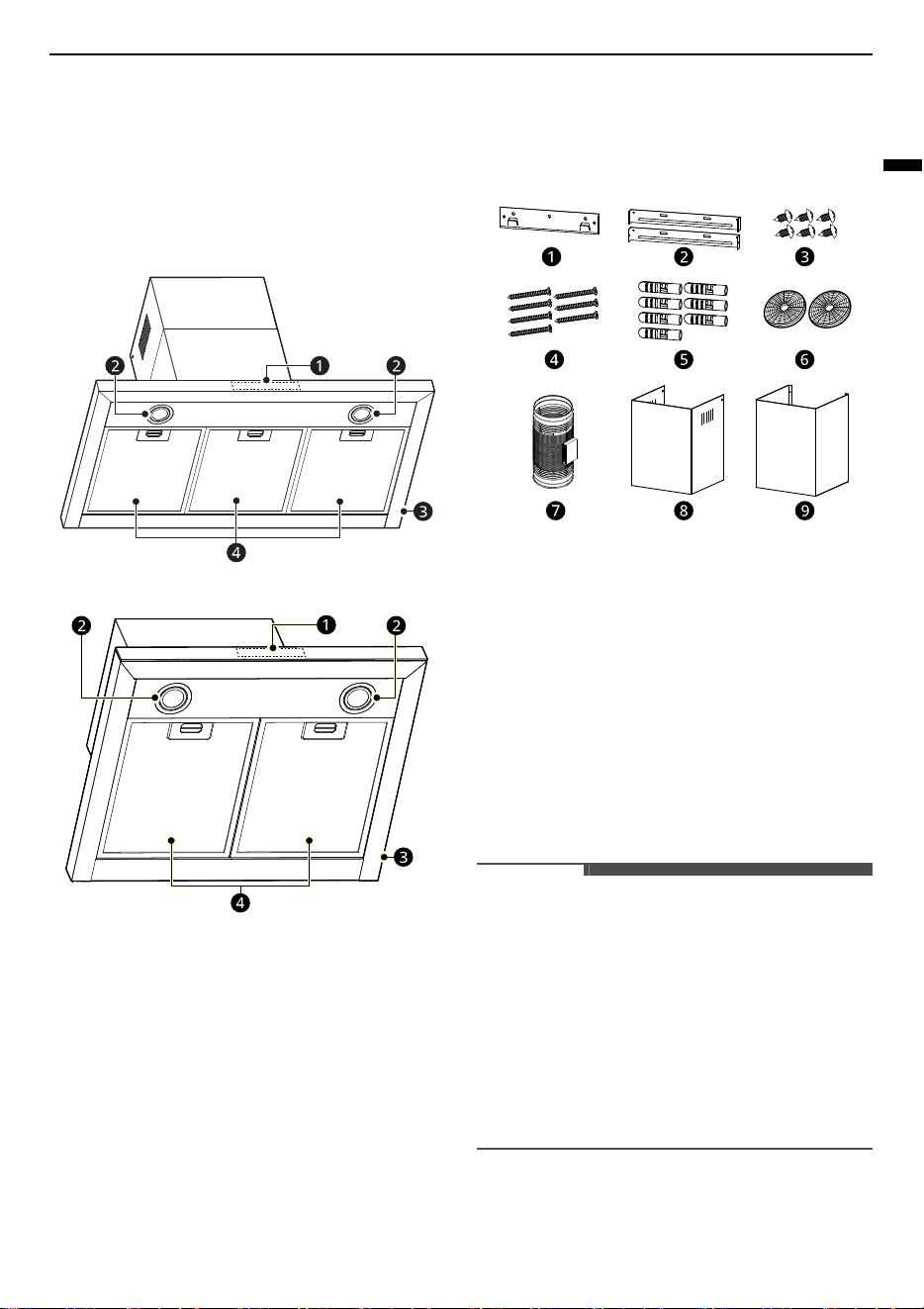
Product Overview
Parts
BWH907T3S
BWH607T3S
a
Control Panel
b
Light
c
Hood Body
d
Grease Filter
Accessories
a
Hood Fixing Bracket (1 ea)
b
Chimney Fixing Brackets (2 ea)
c
Screws (Φ4.2 mm x 9.5 mm, 6 ea)
d
Screws (Φ5 mm x 50 mm, 7 ea)
e
Wall Plugs (7 ea)
f
Activated Charcoal Filters (2 ea)
g
Exhaust Pipe with Tape (1 ea)
h
Upper Decorative Chimney (1 ea)
i
Lower Decorative Chimney (1 ea)
NOTE
• Always wear work gloves for all installation and
maintenance operations.
• Wall plugs are provided to secure the hood to
most types of walls/ceilings. However, a
qualified technician must verify suitability of the
materials in accordance with the type of wall/
ceiling. The wall/ceiling must be strong enough
to take the weight of the hood. Do not tile, grout
or silicone this appliance to the wall. Surface
mounting only.
10
INSTALLATION
Scope of Delivery
After unpacking all parts and accessories, check for
any damage in transit upon completion of the
delivery.
Specifications
The parameters are tested under conditions of 230
V 50 Hz when the voltage is 220-240 V~ 50/60 Hz
and without activated charcoal filters.
Installation
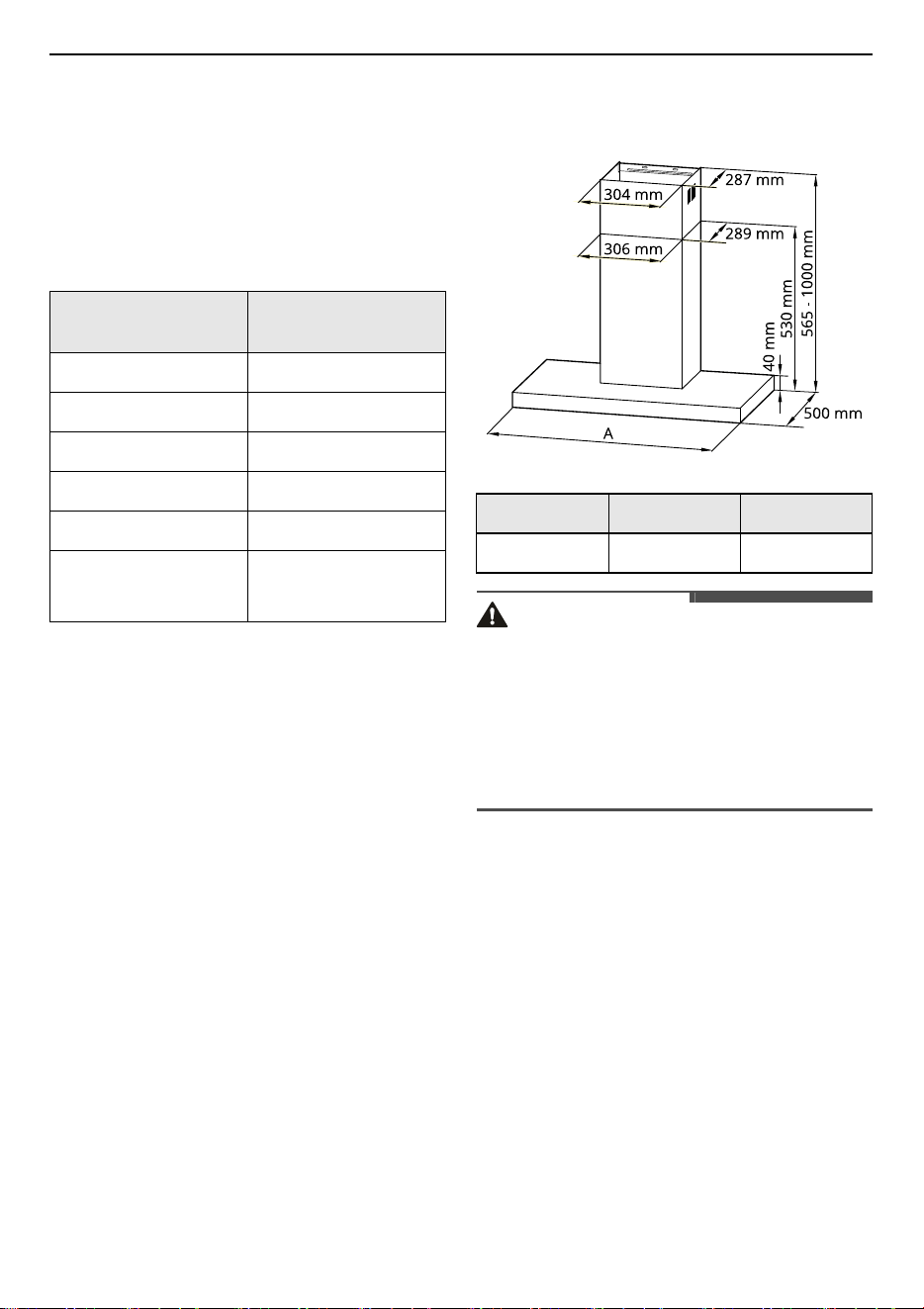
Dimensions and Clearances
• Make sure the appliance is placed horizontally to
avoid grease collection at one end.
• After installation, make sure that the power plug
is accessible and can be pulled out if necessary.
• The appliance should be placed 650-750 mm up
from the highest point of the Cooktop's surface
for safety and effective operation.
• There must be adequate ventilation of the room
when the appliance is working.
WARNING
• The air must not be discharged into a flue that is
used for exhausting fumes from appliances
burning gas or other fuels.
• Do not install the range hood near a heat
producing appliance for solid fuel (e.g. wood or
coal) unless a closed, nonremovable cover is
available. There must be no flying sparks.
Model
BWH607T3S
BWH907T3S
Voltage 220 - 240 V ~ 50/60 Hz
Rated Power 253 W
Lighting Power 2 x 1.5 W
Motor Power 250 W
Diameter of Air Tube 150 mm
Air Flow
600 m
3
/h (High), 830
m
3
/h (Booster)
Model BWH607T3S BWH907T3S
A 598 mm 898 mm
11
INSTALLATION
ENGLISH
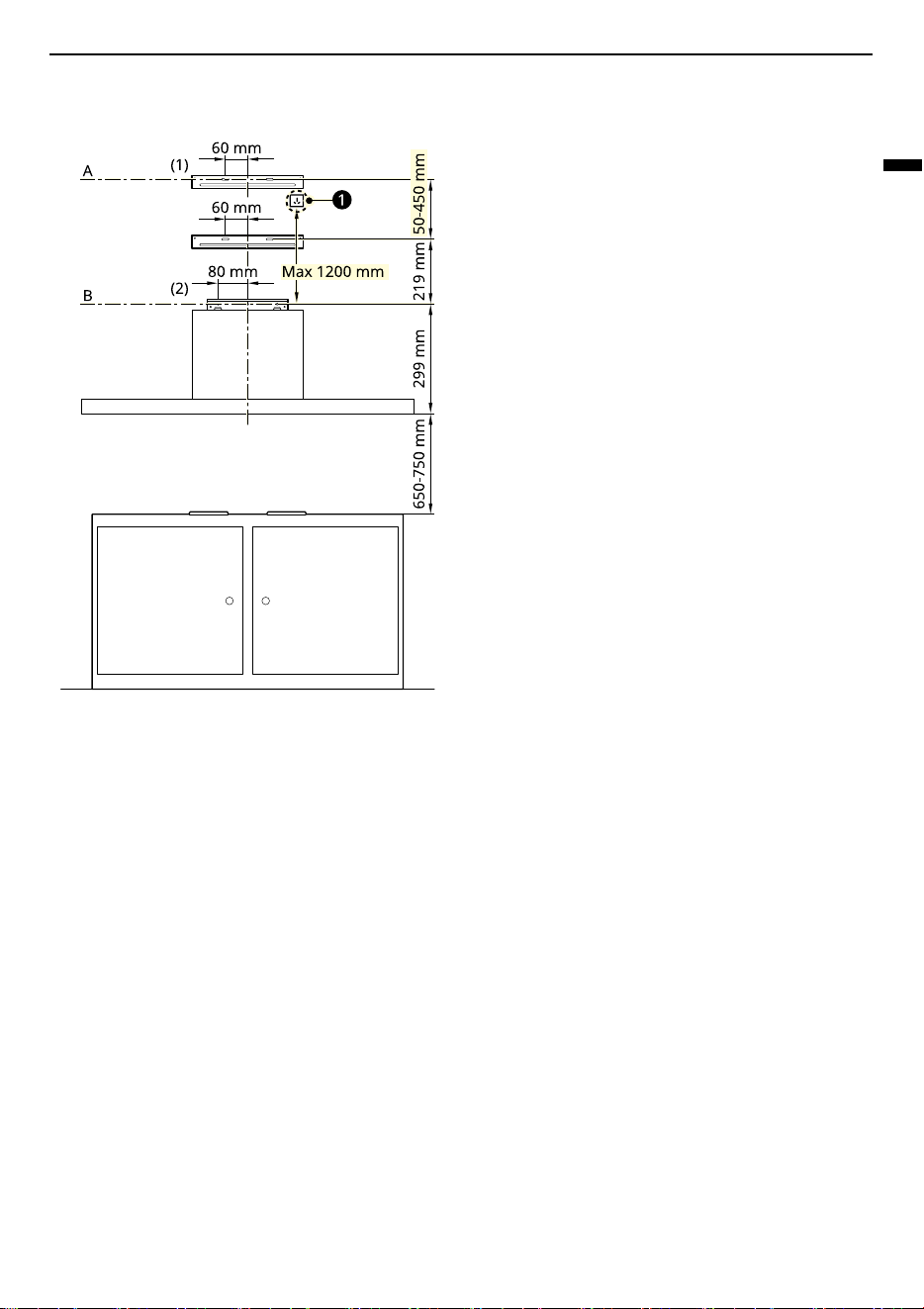
Wall Drilling and Bracket Fixing
a
Power Socket
As a first step, proceed with the previous
drawings:
1
Make sure that there are no electrical lines,
water lines or other utilities in the drilling area
before drilling.
2
A vertical line up to the ceiling or up to the
upper limit, at the center of the area in which
the range hood is to be fitted.
3
A horizontal line A at 1218 - 1718 mm above the
cooker top.
4
A horizontal line B at a minimum 949 mm
above the cooker top.
Mark points:
1
Mark a point (1) on the horizontal line A, 60 mm
to the right of the vertical reference line.
2
Repeat this operation on the other
side,checking that the two marks are leveled.
3
Mark a point (2) on the horizontal line B, 80 mm
to the right of the vertical reference line.
4
Repeat this operation on the other side and on
the vertical reference line, checking that the
three marks are leveled.
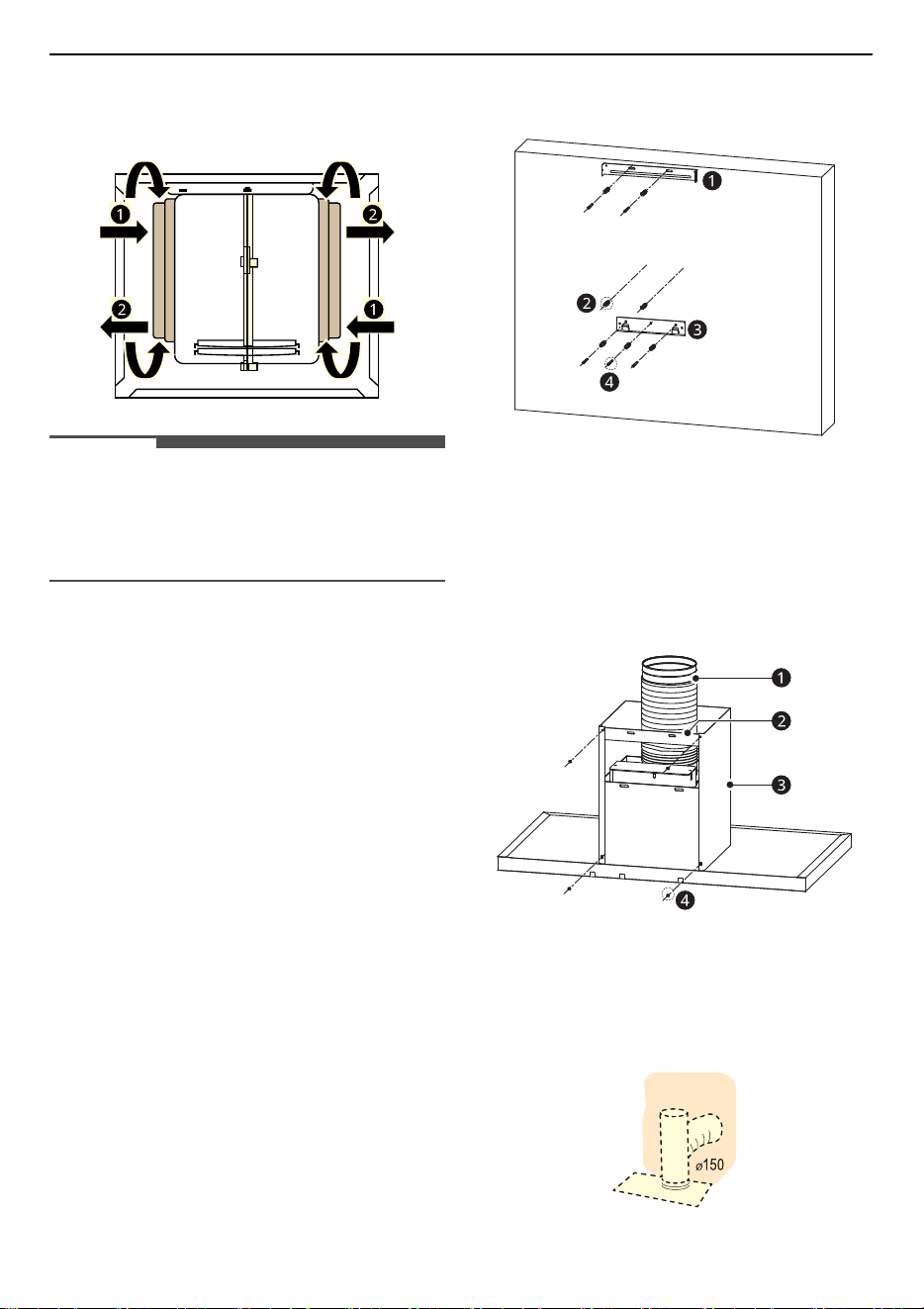
Fix the wall plug:
1
Drill at the marked points (1) (2), using a Φ10
mm drill bit. Before drilling, ensure that there
are no water, gas or electrical pipes or wires in
the wall anywhere near the areas to be drilled
2
Insert the wall plugs into the holes (1) (2).
Choose the working mode
The range hood can be operated in recirculation or
extraction-air mode. Extraction-air mode, the air is
discharged out of the house by a pipe.
Recirculation mode, the air is purified and
discharged into the house through two rows of
holes on the adjustable decorative chimney.
For recirculation mode, assembled activated
charcoal filters on each side as cover to both the
shield grids of the motor impeller, then turn
12
INSTALLATION
clockwise
a
. For the disassembly, turn counter-
clockwise
b
.
NOTE
• For recirculation mode, without the exhaust
pipe, install activated charcoal filters. When
activated charcoal filters attached, the suction
power will be lowered.
Installing the Appliance
1
Remove the protective film from the decorative
chimney and hood body.
2
Remove all metal grease filters using the
handles provided. See MAINTENANCE chapter.
3
Fix the hood fixing bracket
c
at mark point (2)
and the chimney fixing bracket
a
at mark
point (1) with the wall plugs
b
and screws
d
to
the wall. Install 2 wall plugs
b
on the wall for
step 6.
b
Wall Plugs (7 ea)
d
Screws (Φ5 mm x 50 mm, 5 ea)
4
Fix the exhaust pipe (only for extraction-air
mode)
a
and lower decorative chimney
c
on
the main body, connect the chimney fixing
bracket
b
and lower decorative chimney.
d
Screws (Φ4.2 mm x 9.5 mm, 4 ea)
Fix the exhaust pipe in position using tapes.
When installing the ducted version, connect
the appliance to the chimney using either a
flexible or rigid pipe Φ150 mm, the choice of
which is left to the installer.
13
INSTALLATION
ENGLISH
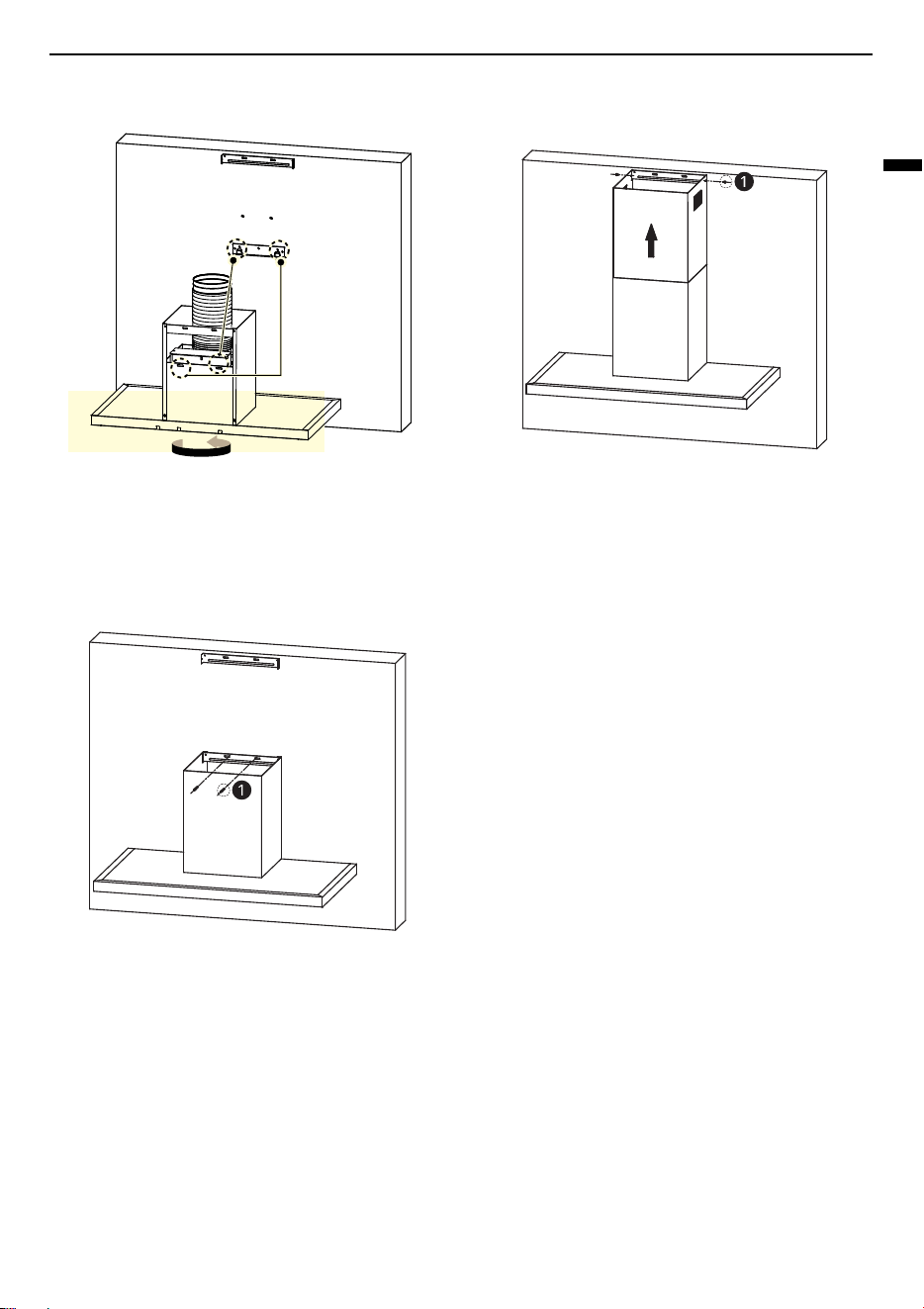
5
Hang the appliance on the hood fixing bracket.
6
After connecting the exhaust pipe securely, fix
the chimney fixing bracket with 2 screws
a
with prepared wall plugs to prevent the
appliance from accidentally sliding off the
hood fixing bracket.
a
Screws (Φ5 mm x 50 mm, 2 ea)
7
Connect the power cord.
8
Fit the upper decorative chimney with the
outlet grill at the top.
a
Screws (Φ4.2 mm x 9.5 mm, 2 ea)
14
OPERATION
OPERATION
Using the Appliance
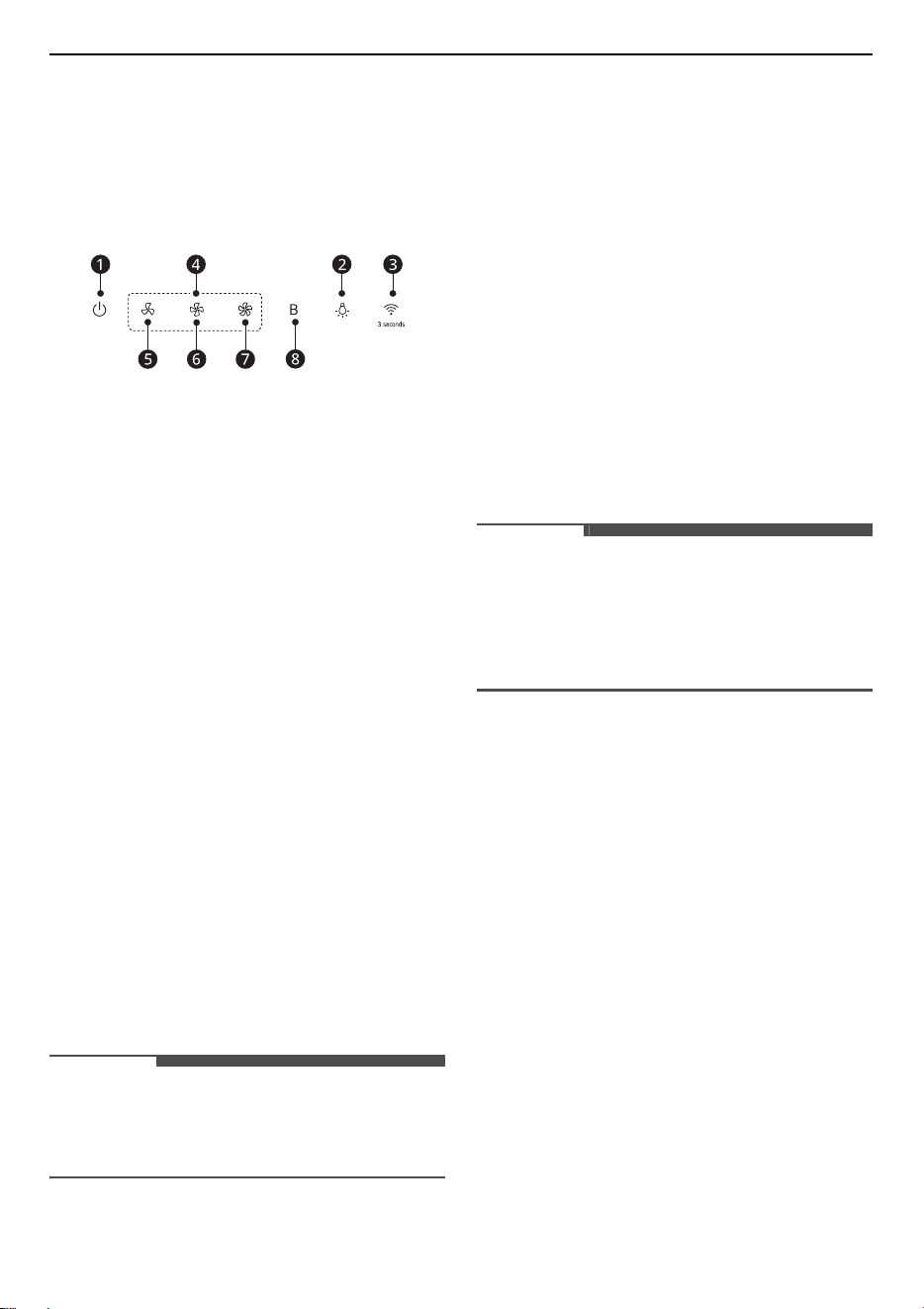
Control Panel
a
Power
• When you press the
Power
button, the appliance
will turn on. At this time, a beep sound will be
heard, the motor will run at low speed and the
Power
button,
Low Speed
e
button and lamp
LEDs will be on (power-on state). If you turn off
the power while using the product, the appliance
operates at the speed mode it was using when
its next turned on.
b
Light
• The
Light
button independently controls the
lights free from the effect of other buttons.
• When you press this button once, a beep sound
will be heard, the lights and the
Light
button LED
will be on.
• When you press this button again, a beep sound
will be heard, the lights and the
Light
button LED
will be off.
c
Wi-Fi
Connection
• Press the
Wi-Fi
connection button 3 seconds.
Wi-
Fi
LED wii be flashing.
• When product connected with smartphone,
Wi-
Fi
LED will be stopped flashing. Follow the
instructions in the
LG ThinQ
application on your
smartphone for using the
Wi-Fi
function.
NOTE
•
Wi-Fi
will not work with any connection
problems or any faults, malfunctions, or errors
caused by network connection.
d
Speed Selection
Depending on the effect of each button, the
appliance will operate in one of three modes: low
speed mode, middle speed mode, and high speed
mode.
•
e
Low Speed
•
f
Middle Speed
•
g
High Speed
h
Boost
This appliance has a booster function (boost speed
mode). To activate the booster, press
Boost
button
while the appliance is in use and it will increase
speed for 7 minutes, the boost speed will
automatically revert to high speed after running
for 7 minutes.
NOTE
• We recommend that you switch on the appliance
for a few minutes before you start cooking, and
then leave it running for approximately 8
minutes afterwards to ensure that all possible
odours are extracted or minimized.
15
SMART FUNCTIONS
ENGLISH
SMART FUNCTIONS
LG ThinQ Application
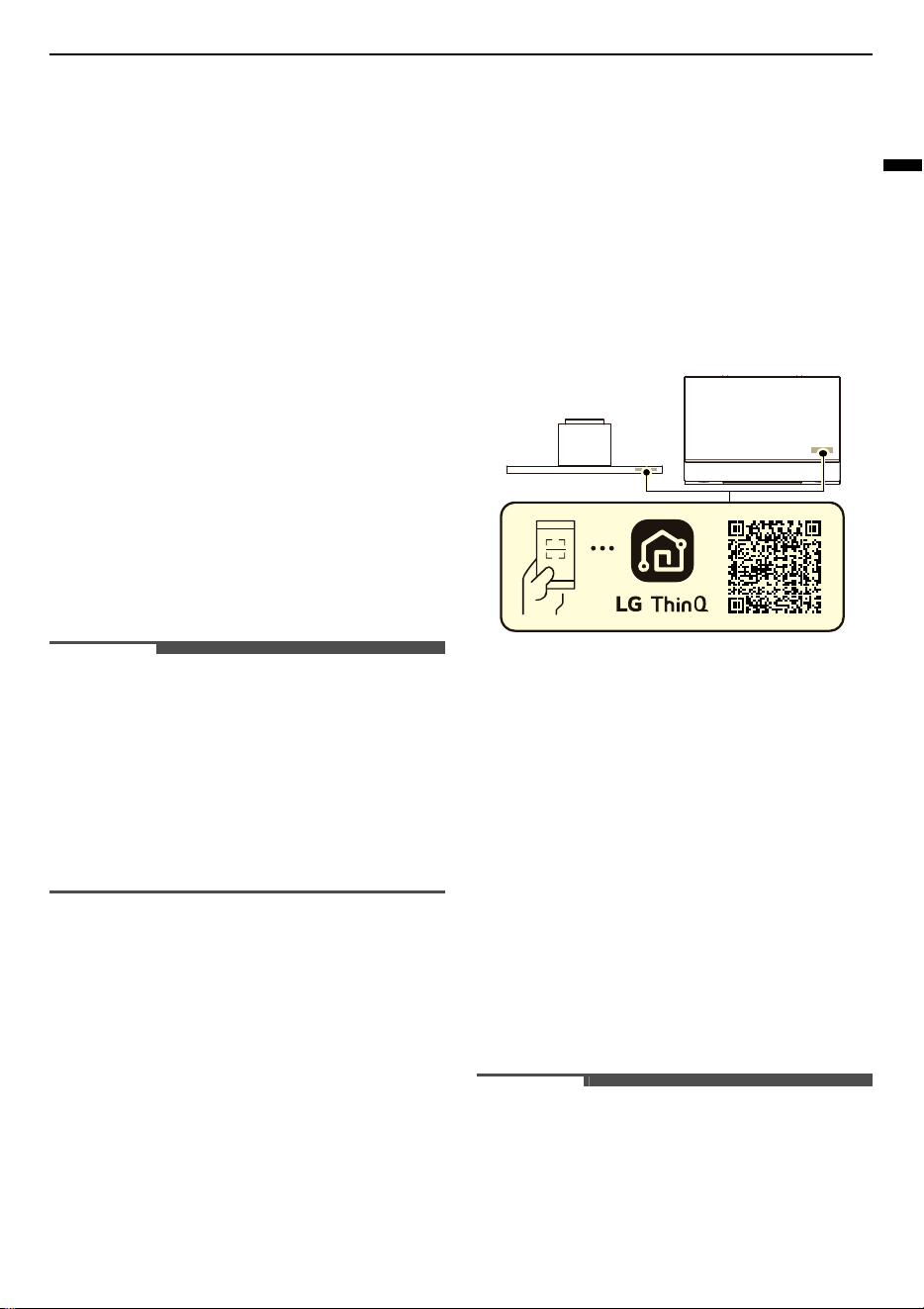
This feature is only available on models with Wi-Fi.
The
LG ThinQ
application allows you to
communicate with the appliance using a
smartphone.
LG ThinQ Application Features
Communicate with the appliance from a
smartphone using the convenient smart features.
Induction pairing
Allows you to choose which range hood to work
with your induction.
Monitoring
This function helps you check the operation status
of the product, speed mode.
Remote control
This function helps you control the speed mode.
NOTE
• If you change your wireless router, Internet
service provider, or password, delete the
registered appliance from the
LG ThinQ
application and register it again.
• The application is subject to change for
appliance improvement purposes without notice
to users.
• Functions may vary by model.
Installing LG ThinQ Application
and Connecting an LG
Appliance
Models with QR Code
Scan the QR code attached to the product using the
camera or a QR code reader application on your
smartphone.
Models without QR Code
1
Search for and install the
LG ThinQ
application
from the Google Play Store or Apple App Store
on a smartphone.
2
Run the
LG ThinQ
application and sign in with
your existing account or create an LG account
to sign in.
3
Touch the add (
~
) button on the
LG ThinQ
application to connect your LG appliance.
Follow the instructions in the application to
complete the process.
NOTE
• To verify the Wi-Fi connection, check that the Wi-
Fi indicator on the control panel is lit.
• The appliance supports 2.4 GHz Wi-Fi networks
only. To check your network frequency, contact
your Internet service provider or refer to your
wireless router manual.

16
SMART FUNCTIONS
NOTE
•
LG ThinQ
is not responsible for any network
connection problems or any faults,
malfunctions, or errors caused by network
connection.
• The surrounding wireless environment can
make the wireless network service run slowly.
• If the distance between the appliance and the
wireless router is too far, the signal strength
becomes weak. It may take a long time to
connect or installation may fail.
• If the appliance is having trouble connecting to
the Wi-Fi network, it may be too far from the
router. Purchase a Wi-Fi repeater (range
extender) to improve the Wi-Fi signal strength.
• The network connection may not work properly
depending on the Internet service provider.
• The Wi-Fi connection may not connect or may be
interrupted because of the home network
environment.
• The appliance cannot be connected due to
problems with the wireless signal transmission.
Unplug the appliance and wait about a minute
before trying again.
• If the firewall on your wireless router is enabled,
disable the firewall or add an exception to it.
• The wireless network name (SSID) should be a
combination of English letters and numbers. (Do
not use special characters.)
• Smartphone user interface (UI) may vary
depending on the mobile operating system (OS)
and the manufacturer.
• If the security protocol of the router is set to
WEP
, you may fail to set up the network. Please
change it to other security protocols (
WPA2
is
recommended) and connect the product again.
• To disable the Wi-Fi function, press and hold the
Wi-Fi
connection button for 3 seconds. The Wi-Fi
indicator will be turned off.
• To reconnect the appliance or add another user,
press and hold the
Wi-Fi
connection button for 3
seconds to temporarily turn it off. Run the
LG
ThinQ
application and follow the instructions in
the application to connect the appliance.
RF Radiation Exposure
Statement
This equipment shall be installed and used at a
minimum distance of 20 cm from the human body.
Open Source Software Notice
Information
To obtain the source code that is contained in this
product, under GPL, LGPL, MPL, and other open
source licenses that have the obligation to disclose
source code, and to access all referred license
terms, copyright notices and other relevant
documents, please visit https://
opensource.lge.com.
LG Electronics will also provide open source code to
you on CD-ROM for a charge covering the cost of
performing such distribution (such as the cost of
media, shipping, and handling) upon email request
to opensou[email protected]m.
This offer is valid to anyone in receipt of this
information for a period of three years after our
last shipment of this product.
17
MAINTENANCE
ENGLISH
MAINTENANCE
Cleaning and Replacing
WARNING
• Switch off or unplug the appliance from the
mains supply before carrying out any
maintenance work.
• Make sure that the appliance is shut off before
cleaning.
CAUTION
• Falling grease filters may damage the hob
below. Grip below the grease filter with one
hand and make sure they are properly secured
when refitted.
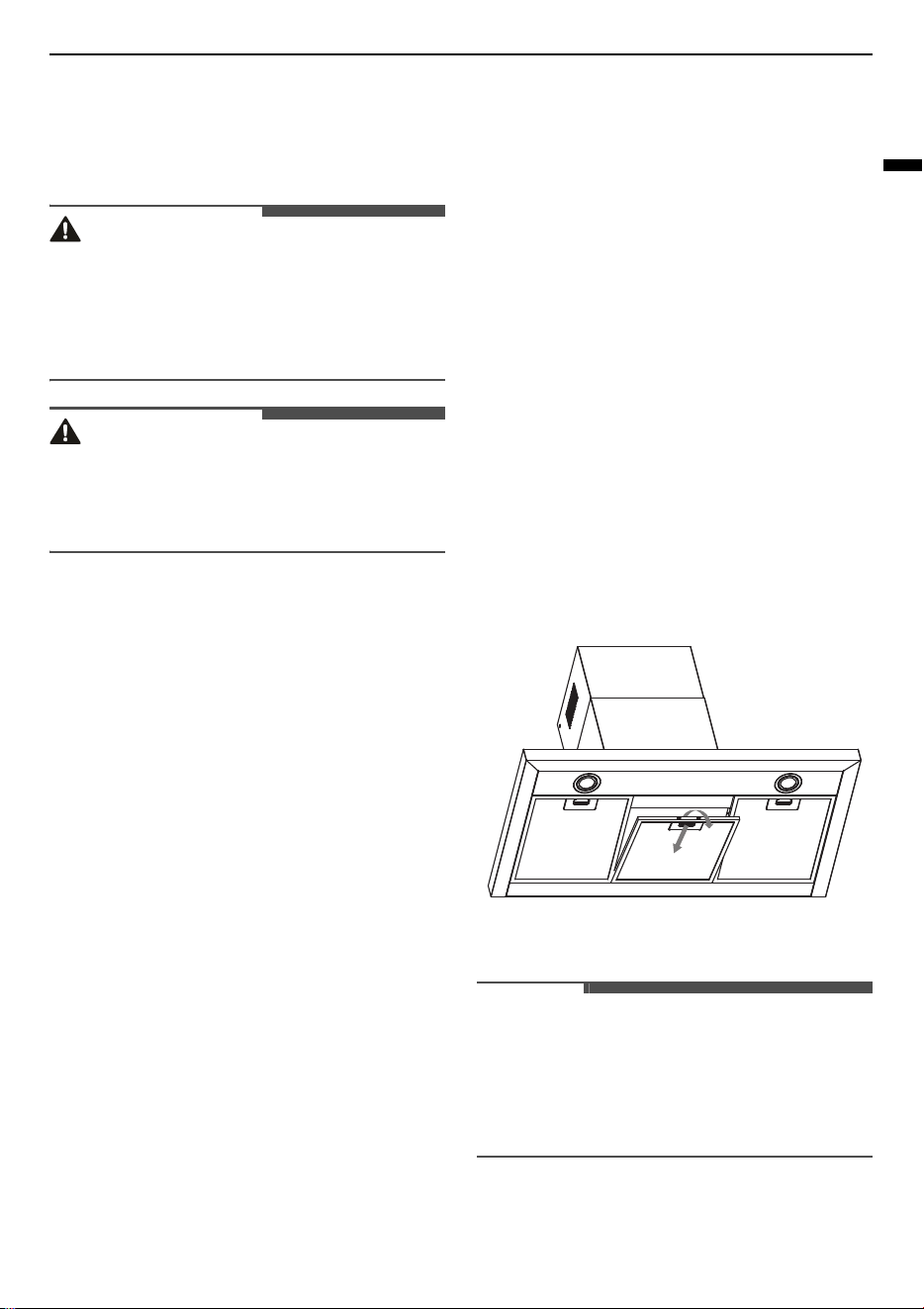
Cleaning
Cleaning the appliance
1
Observe the instructions of the cleaning agent
manufacturer.
2
Clean stainless steel surfaces in the direction of
the finish using a sponge cloth and hot soapy
water. To protect the main body from corrosive
of the long time accumulation of dirt, the range
hood should be cleaned with hot water with
noncorrosive detergent every two months.
3
Dry with a soft cloth.
4
Apply a thin layer of the stainless steel cleaning
product to stainless steel surfaces using a soft
cloth.
Cleaning Grease Filters in the
Dishwasher
1
Remove all grease filters.
2
Put the grease filters into a dishwasher with
suitable dishwasher detergent and set the
temperature below 60 degrees. The filters
must be cleaned every 2 months of operation,
or more frequently for particularly heavy
usage, and can be washed in a dishwasher.
3
Do not use abrasive detergent as it will damage
the filters and their finish.
4
Allow the grease filters to drain and dry
thoroughly in the shade after washing for 24
hours before fitting again.
5
Refit the grease filters only after they are dry.
Failing to do so could damage the extraction
motor when the appliance is turned on.
The pictures in this manual are for reference
only and may vary depending on the model.
NOTE
• Steam cleaner is not to be used.
• When cleaning the grease filter in the dish-
washer, light discolouration may occur. This
discolouration has no effect on the performance
of the grease filters.
18
MAINTENANCE
Cleaning Grease Filters manually
1
Observe the instructions of the cleaning agent
manufacturer.
2
Soak the grease filter in hot soapy water.
3
Use a soft brush to clean the grease filters.
4
Rinse the grease filters thoroughly.
5
Allow the grease filters to drain and dry
thoroughly in the shade for 24 hours before
refitting. Failure to do so can damage the
extraction motor when the appliance is turned
on.
6
Fitting the grease filters.
Cleaning the Control Panel
1
Observe the instructions of the cleaning agent
manufacturer.
2
Clean using a damp sponge cloth and warm
soapy water.
3
Dry with a soft cloth.
Replacing
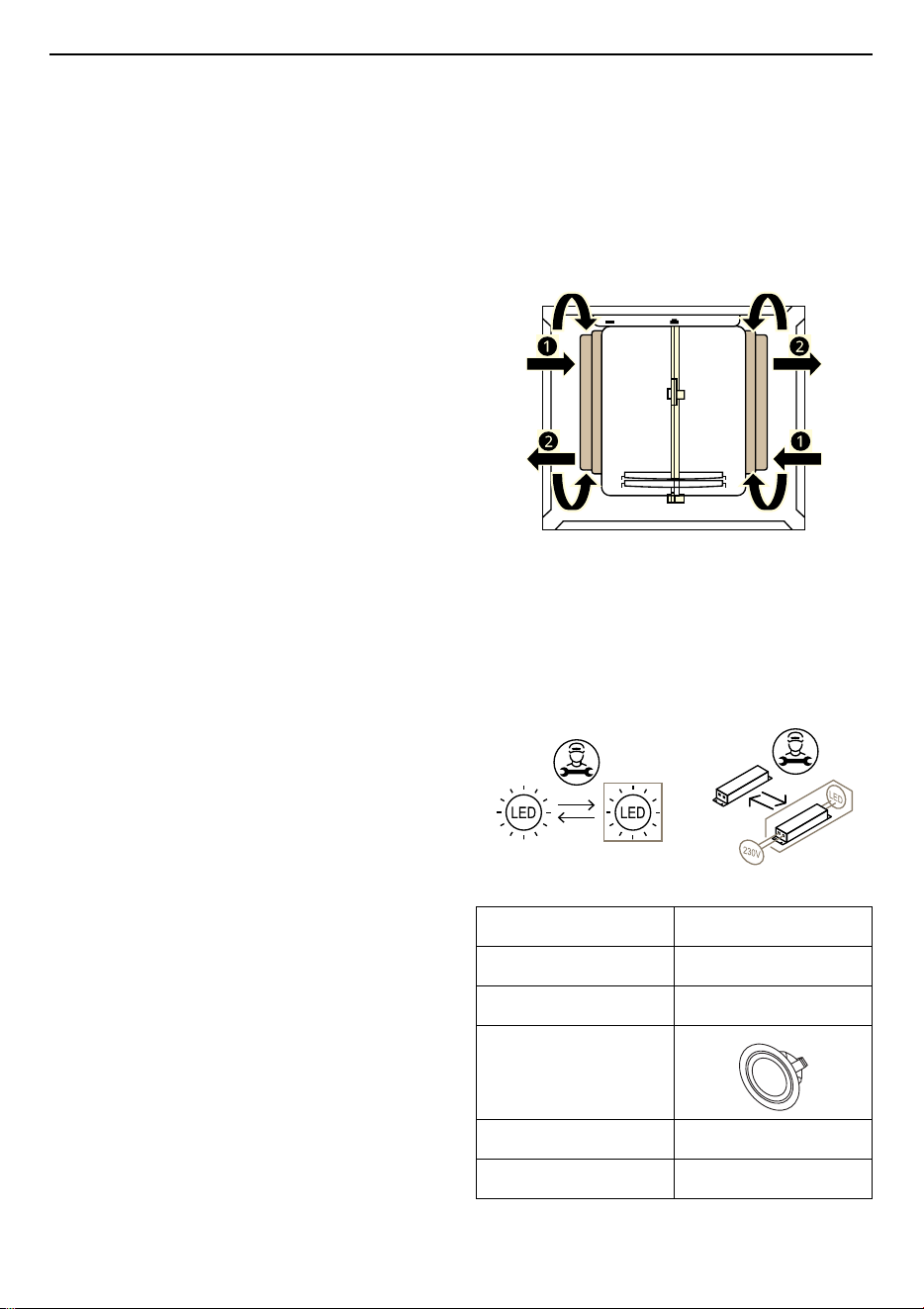
Replacing the Activated Charcoal
Filter (Recirculation Version)
These filters are not washable and cannot be
regenerated, and must be replaced approximately
every 4 months of operation, or more frequently
with heavy usage.
1
Remove the grease filters.
2
Remove the saturated activated charcoal filter.
For the disassembly, turn counter-clockwise
b
.
3
Fit the new activated charcoal filters, apply one
on each side as cover to both the shield grids of
the motor impeller, then turn clockwise
a
.
Replacing the Light
LED light
Call for service. Repairs should be performed by a
licensed technician only. Improper repair may
result in considerable danger to you and others.
Round/Diameter 70 mm
Max. Power 1.5 W
Voltage DC 12 V
Picture
Lamp Cap -
ILCOS D code DSR-1.5-S-70
19
TROUBLESHOOTING
ENGLISH
TROUBLESHOOTING
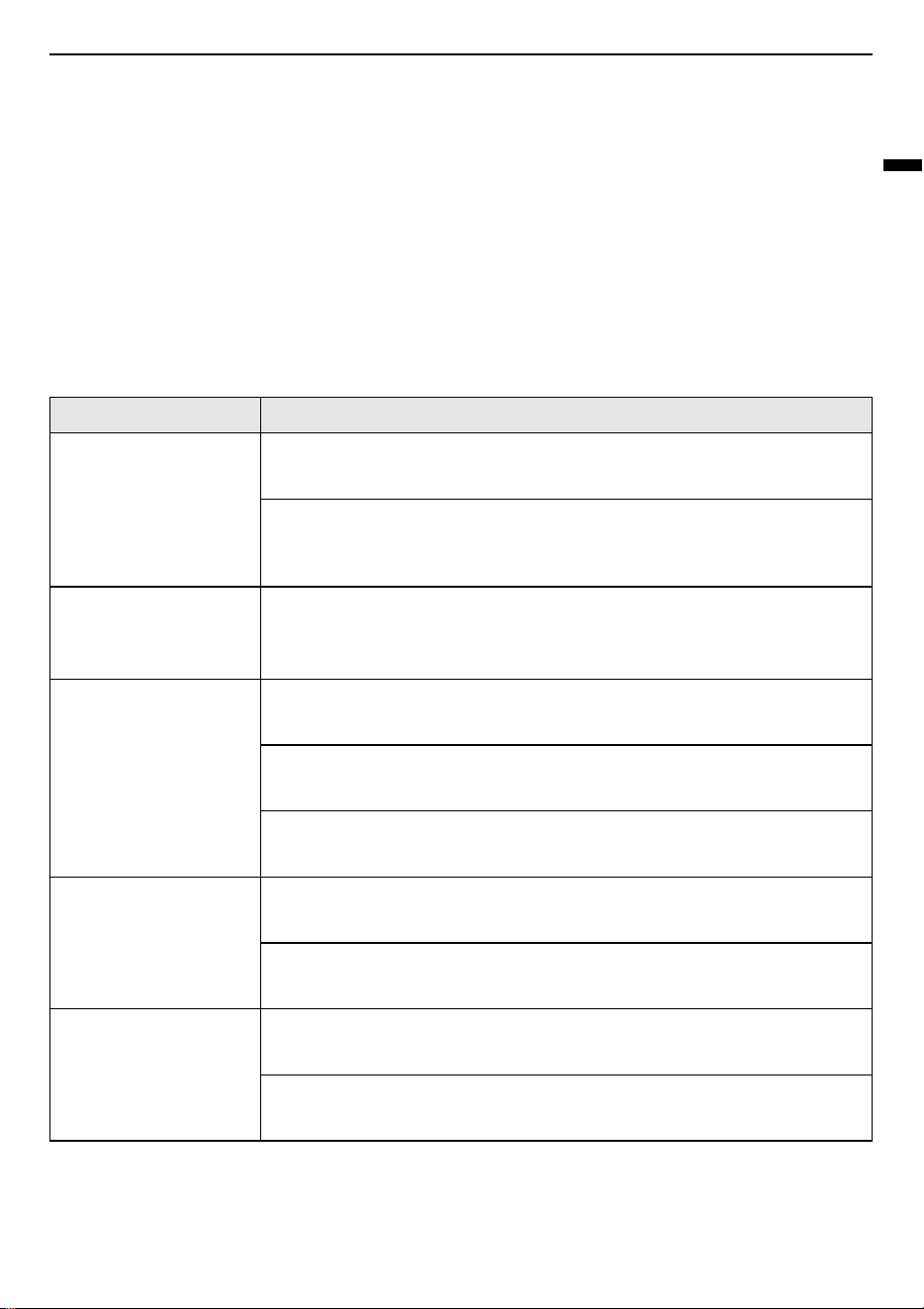
Before Calling for Service
Repairs should be performed by a licensed technician only. Improper repair may result in considerable
danger to you and others. However, some minor problems can be resolved as in the table below:
If a problem is not solved, please contact an LG Electronics Customer Information Centre.
Parts and Features
The manufacturer will decline all responsibility if the recommendations and instructions regarding
installation, maintenance and use are not observed and respected when using the appliance.
Symptoms Possible Cause & Solution
Light on, but motor
does not work
The motor is blocked.
• Call for service.
The internal wiring of motor is cut off/disconnected. An unpleasant
smell may be produced.
• Call for service.
Both light and motor
do not work
Apart from the possibilities mentioned above, check the following:
Light is damaged.
• Call for service.
Vibration The motor, if damaged, can cause vibration.
• Call for service.
The motor is not tightly fastened.
• Call for service.
The appliance is not securely fixed.
• Fixed the appliance securely.
Insufficient suction The distance between the appliance and the cooker top is too great.
• Readjust the distance.
Too much ventilation from open doors or windows.
• Close some doors / windows.
The appliance is not
level
The fixing screws are not tight enough.
• Tighten the fixing screws and ensure that the appliance is horizontal.
The hanging screws are not tight enough.
• Tighten the hanging screws and ensure that the appliance is horizontal.
20
TROUBLESHOOTING
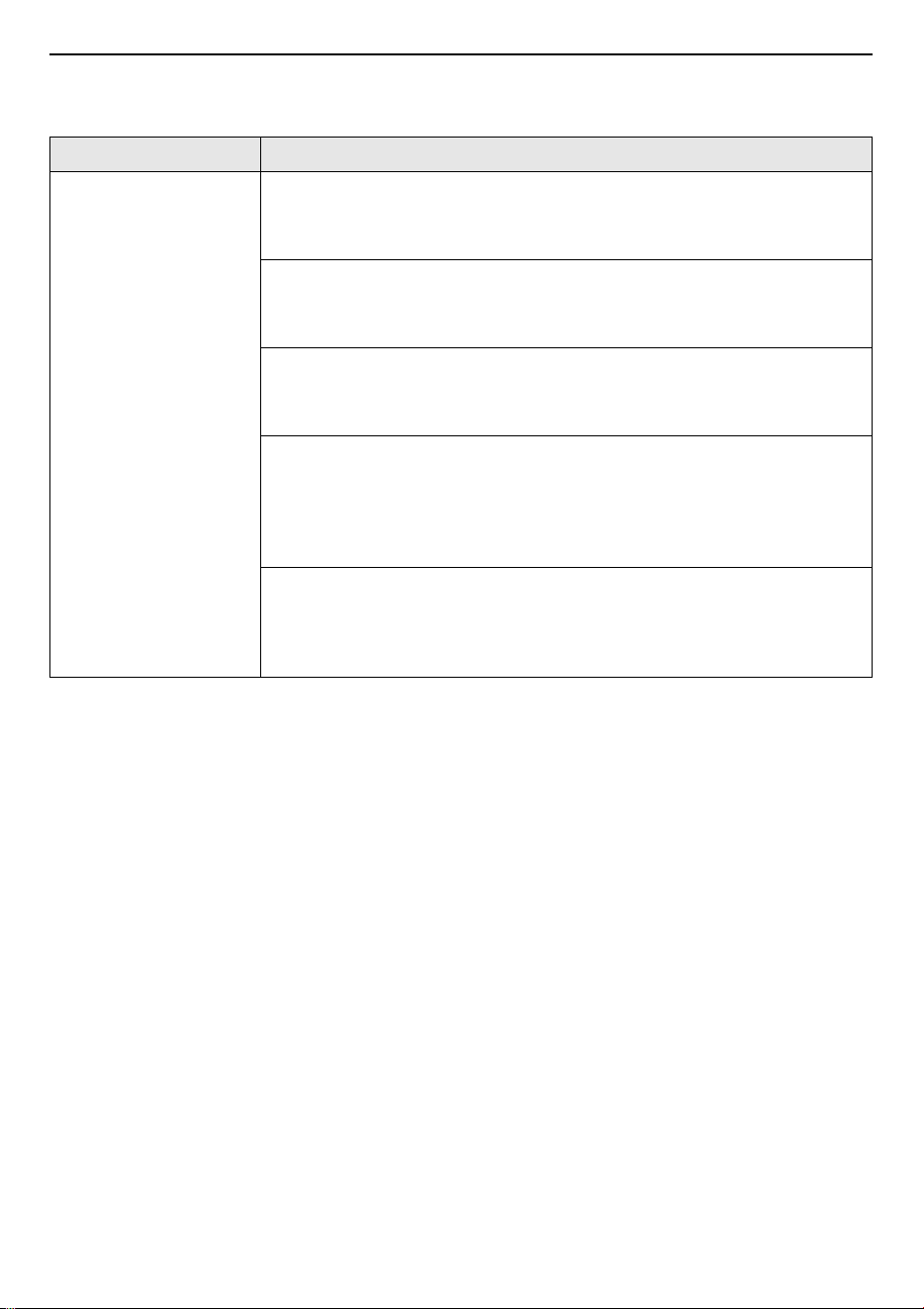
Wi-Fi
Symptoms Possible Cause & Solution
Your home appliance
and smartphone are
not connected to the
Wi-Fi network.
The password for the Wi-Fi that you are trying to connect to is incorrect.
• Find the Wi-Fi network connected to your smartphone and remove it, then
register your appliance on
LG ThinQ
.
Mobile data for your smartphone is turned on.
• Turn off the
Mobile data
of your smartphone and register the appliance
using the Wi-Fi network.
The wireless network name (SSID) is set incorrectly.
• The wireless network name (SSID) should be a combination of English
letters and numbers. (Do not use special characters.)
The router frequency is not 2.4 GHz.
• Only a 2.4 GHz router frequency is supported. Set the wireless router to 2.4
GHz and connect the appliance to the wireless router. To check the router
frequency, check with your Internet service provider or the router
manufacturer.
The distance between the appliance and the router is too far.
• If the distance between the appliance and the router is too far, the signal
may be weak and the connection may not be configured correctly. Move
the location of the router so that it is closer to the appliance.
Memo
Memo
Memo