OWNER'S MANUAL
FRIDGE & FREEZER
Before beginning installation, read these instructions
carefully. This will simplify installation and ensure that the
product is installed correctly and safely. Leave these
instructions near the product after installation for future
reference.
ENGLISH
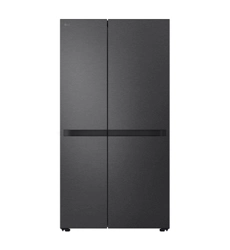
GS-B599PL / GS-B599MBL
MFL72093732
Rev.00_071724
www.lg.com
Copyright © 2024 LG Electronics. All Rights Reserved
global_main.book.book Page 1 Wednesday, July 17, 2024 8:28 AM
TABLE OF CONTENTS
This manual may contain images or
content that may be different from the
model you purchased.
This manual is subject to revision by the
manufacturer.
SAFETY INSTRUCTIONS
READ ALL INSTRUCTIONS BEFORE USE...........................................................3
WARNING............................................................................................................3
CAUTION .............................................................................................................9
INSTALLATION
Before Installation ...........................................................................................11
Removing the Fridge and Freezer Door........................................................11
Levelling and Door Alignment........................................................................13
Turning on the Power......................................................................................14
Moving the Appliance for Relocation ............................................................15
OPERATION
Before Use ........................................................................................................16
Product Features..............................................................................................18
Control Panel ....................................................................................................20
Door in Door.....................................................................................................21
Drawer...............................................................................................................22
Shelf ...................................................................................................................22
Icemaker ...........................................................................................................23
Door Basket ......................................................................................................24
SMART FUNCTIONS
LG ThinQ Application.......................................................................................25
Smart Diagnosis ...............................................................................................25
MAINTENANCE
Cleaning ............................................................................................................26
Deodorizer ........................................................................................................27
TROUBLESHOOTING
Before Calling for Service................................................................................28
global_main.book.book Page 2 Wednesday, July 17, 2024 8:28 AM
3
SAFETY INSTRUCTIONS
ENGLISH
SAFETY INSTRUCTIONS
READ ALL INSTRUCTIONS BEFORE USE
The following safety guidelines are intended to prevent unforeseen
risks or damage from unsafe or incorrect operation of the appliance.
The guidelines are separated into
‘WARNING’
and
‘CAUTION’
as
described below.
Safety Messages
WARNING
WARNING
To reduce the risk of explosion, fire, death, electric shock, injury or
scalding to persons when using this product, follow basic precautions,
including the following:
Technical Safety
• This appliance is not intended for use by persons (including children)
with reduced physical, sensory or mental capabilities, or lack of
experience and knowledge, unless they have been given supervision
or instruction concerning use of the appliance by a person
This symbol is displayed to indicate matters and operations
that can cause risk. Read the part with this symbol carefully
and follow the instructions in order to avoid risk.
WARNING
This indicates that the failure to follow the instructions can
cause serious injury or death.
CAUTION
This indicates that the failure to follow the instructions can
cause the minor injury or damage to the product.
global_main.book.book Page 3 Wednesday, July 17, 2024 8:28 AM
4
SAFETY INSTRUCTIONS
responsible for their safety. Children should be supervised to ensure
that they do not play with the appliance.
• Do not damage the refrigerant circuit.
• Do not use mechanical devices or other means to accelerate the
defrosting process.
• Keep ventilation openings, in the appliance enclosure or in the built-
in structure, clear of obstruction.
• Do not use electrical appliances inside the food storage
compartments of the appliance, unless they are of the type
recommended by the manufacturer.
• The refrigerant and insulation blowing gas used in the appliance
require special disposal procedures. Consult with service agent or a
similarly qualified person before disposing of them.
• This appliance is intended to be used in household and similar
applications only. It should not be used for commercial, or catering
purposes, or in any mobile application such as a caravan or boat.
• This appliance is not for use in portable or mobile installations, such
as marine or RV uses, where it will be in motion while operating.
• Do not store explosive substances such as aerosol cans with a
flammable propellant in this appliance.
•
• This appliance contains a small amount of isobutane refrigerant
(R600a), but it is also combustible. When transporting and installing
the appliance, care should be taken to ensure that no parts of the
refrigerating circuit are damaged.
• When positioning the appliance, ensure the supply cord is not
trapped or damaged.
• If the power cord is damaged or the hole of the outlet socket is loose,
it must be replaced. Do not use the power cord and contact an
authorized service centre in order to avoid a hazard.
This symbol alerts you to flammable materials that can
ignite and cause a fire if you do not take care.
global_main.book.book Page 4 Wednesday, July 17, 2024 8:28 AM
5
SAFETY INSTRUCTIONS
ENGLISH
• Do not locate multiple portable socket-outlets or portable power
supplies at the rear of the appliance.
• Disconnect the power cord before cleaning the appliance interior or
exterior.
• Securely plug the power plug in the outlet socket after completely
removing any moisture and dust.
• Never unplug the appliance by pulling on the power cable. Always
grip the power plug firmly and pull straight out from the outlet
socket.
• Do not spray water or inflammable substances (toothpaste, alcohol,
thinner, benzene, flammable liquid, abrasive, etc.) over the interior or
exterior of the appliance to clean it.
• Do not clean the appliance with brushes, cloths or sponges with
rough surfaces or which are made of metallic material.
• Only qualified service personnel from LG Electronics service centre
should disassemble, repair, or modify the appliance. Contact an LG
Electronics customer information centre if you move and install the
appliance in a different location.
• Do not use a hair drier to dry the inside of the appliance or place a
candle inside to remove the odours.
• Do not tilt the appliance to pull or push it when transporting.
• Make sure not to get a body part such as a hand or foot stuck while
moving the appliance.
• Consult with a service agent or a similarly qualified person about the
recovery of refrigerant and recycling of components on disposal of
the refrigerating appliance.
Risk of Fire and Flammable Materials
• If a leak is detected, avoid any naked flames or potential sources of
ignition and air the room in which the appliance is standing for
several minutes. In order to avoid the creation of a flammable gas air
mixture if a leak in the refrigerating circuit occurs, the size of the
room in which the appliance is used should correspond to the
global_main.book.book Page 5 Wednesday, July 17, 2024 8:28 AM
6
SAFETY INSTRUCTIONS
amount of refrigerant used. The room must be 1 m² in size for every
8 g of R600a refrigerant inside the appliance.
• Refrigerant leaking out of the pipes could ignite or cause an
explosion.
• The amount of refrigerant in your particular appliance is shown on
the identification plate inside the appliance.
Installation
• This appliance should only be transported by two or more people
holding the appliance securely.
• Install the appliance on a firm and level floor.
• Do not install the appliance in a damp and dusty place. Do not install
or store the appliance in any outdoor area, or any area that is subject
to weathering conditions such as direct sunlight, wind, rain, or
temperatures below freezing.
• Do not place the appliance in direct sunlight or expose it to the heat
from heating appliances such as stoves or heaters.
• Be careful not to expose the rear of the appliance when installing.
• Install the appliance in a place where it is easy to unplug the power
plug of the appliance.
• In the event that a door needs to be removed to pass the unit through
a doorway, be careful not to let the appliance door fall during
assembly or disassembly.
• Be careful not to pinch, crush, or damage the power cable during
assembly or disassembly of the appliance door.
• Be careful not to point the power plug up or let the appliance lean
against the power plug.
• Do not connect a plug adapter or other accessories to the power
plug.
• Do not modify or extend the power cable.
• Ensure that the outlet socket is properly grounded, and that the earth
pin on the power cord is not damaged or removed from the power
global_main.book.book Page 6 Wednesday, July 17, 2024 8:28 AM
7
SAFETY INSTRUCTIONS
ENGLISH
plug. For more details on grounding, inquire at an LG Electronics
customer information centre.
• This appliance is equipped with a power cord having an equipment-
grounding conductor and a grounding power plug. The power plug
must be plugged into an appropriate outlet socket that is installed
and grounded in accordance with all local codes and ordinances.
• Never start up an appliance showing any signs of damage. If in doubt,
consult your dealer.
• Dispose of all packaging materials (such as plastic bags and
styrofoam) away from children. The packaging materials can cause
suffocation.
• Do not plug the appliance into multiple outlet sockets, power boards,
or an extension power cable.
• Do not use an extension cord or double adapter.
Operation
• Do not use the appliance for any purpose (storage of medical or
experimental materials or temperature strict medicines) other than
any domestic household food storage use.
• If water penetrates electrical parts of the appliance, disconnect
power plug and contact an LG Electronics customer information
centre.
• Unplug the power plug during a severe lightening or thunderstorm
or when not in use for a long period of time.
• Do not touch the power plug or the appliance controls with wet
hands.
• Do not bend the power cable excessively or place a heavy object on it.
• Immediately unplug the power plug and contact an LG Electronics
customer information centre if you detect a strange sound, odour, or
smoke coming from the appliance.
• Do not place hands or metallic objects inside the area emitting the
cold air, covers or heat releasing grille on the back.
• Do not apply excessive force or impact to the back cover of the
appliance.
global_main.book.book Page 7 Wednesday, July 17, 2024 8:28 AM
8
SAFETY INSTRUCTIONS
• Be careful of nearby children when you open or close the appliance
door. The door may bump the child and cause injury.
• Avoid the danger of children getting trapped inside the appliance. A
child trapped inside the appliance can cause suffocation.
• Do not put animals, such as pets into the appliance.
• Do not place heavy or fragile objects, containers filled with liquid,
combustible substances, flammable objects (such as candles, lamps,
etc.), or heating devices (such as stoves, heaters, etc.) on the
appliance.
• Do not place any electronic appliance (such as heater and mobile
phone) inside the appliance.
• If there is a gas leakage (isobutane, propane, natural gas, etc.), do not
touch the appliance or power plug and ventilate the area
immediately. This appliance uses a refrigerant gas (isobutane,
R600a). Although it uses a small amount of the gas, it is still
combustible gas. Gas leakage during appliance transport, installation
or operation can cause fire, explosion or injury if sparks are caused.
• Do not use or store flammable or combustible substances (ether,
benzene, alcohol, chemical, LPG, combustible spray, insecticide, air
freshener, cosmetics, etc.) near the appliance.
• This appliance incorporates an earth connection for functional
purposes.
• Connect to potable water supply only (only for models with dispenser
function needing plumbed connection).
- If connected to a water supply, connect to a potable water supply
only.
• Fill with potable water only.
- If using an icemaker or water tank, make sure to fill it with potable
water only.
Disposal
• When discarding the appliance, remove the door gasket while leaving
the shelves and baskets in place and keep children away from the
appliance.
global_main.book.book Page 8 Wednesday, July 17, 2024 8:28 AM
9
SAFETY INSTRUCTIONS
ENGLISH
CAUTION
CAUTION
To reduce the risk of minor injury to persons, malfunction, or damage
to the product or property when using this product, follow basic
precautions, including the following:
Installation
• After unpacking, check the appliance for any damage that may have
occurred during transit.
• Wait for at least 3 to 4 hours in order to ensure the refrigerant circuit
is fully efficient.
• Move the appliance carefully on sensitive floors to avoid damage to
the floor.
Operation
• This appliance must only be used with a town power supply. Solar
inverters and generator power supplies could cause disruption to
performance and potentially damage the electronics.
• Do not touch frozen food or the metal parts in the freezer
compartment with wet or damp hands. It may cause frostbite.
• Do not place glass containers, bottles or cans (especially those
containing carbonated drinks) in the freezer compartment, shelves or
ice bucket that will be exposed to temperatures below freezing.
• The tempered glass on the front side of the appliance door or the
shelves can be damaged by an impact. If it is broken, do not touch it
with hands.
• Do not hang from the appliance doors, door baskets, storage
compartments or shelves, or climb up into the appliance.
• Do not store an excessive amount of water bottles or containers in
the door baskets.
• Do not open or close the appliance door with excessive force.
global_main.book.book Page 9 Wednesday, July 17, 2024 8:28 AM
10
SAFETY INSTRUCTIONS
• If the hinge of the appliance door is damaged or operates
improperly, stop using the appliance and contact an authorized
service centre.
• Prevent animals from nibbling on the power cable or water hose.
• Never eat frozen foods immediately after they have been taken out of
the freezer compartment.
• Make sure not to get a hand or foot stuck upon opening or closing the
appliance door or door in door.
Maintenance
• This appliance is equipped with maintenance-free LED interior light.
Do not remove cover or LED lamp in any attempt to repair or change
it. Contact an LG Electronics customer information centre.
• Do not clean glass shelves or covers with warm water when they are
cold. They may shatter if exposed to sudden temperature changes.
• Do not insert the shelves upside down. The shelves may fall.
• To remove frost from the appliance, contact an LG Electronics
customer information centre.
• Dispose of the ice inside the ice bucket in the freezer compartment
during an extended power outage.
global_main.book.book Page 10 Wednesday, July 17, 2024 8:28 AM
11
INSTALLATION
ENGLISH
INSTALLATION
Before Installation
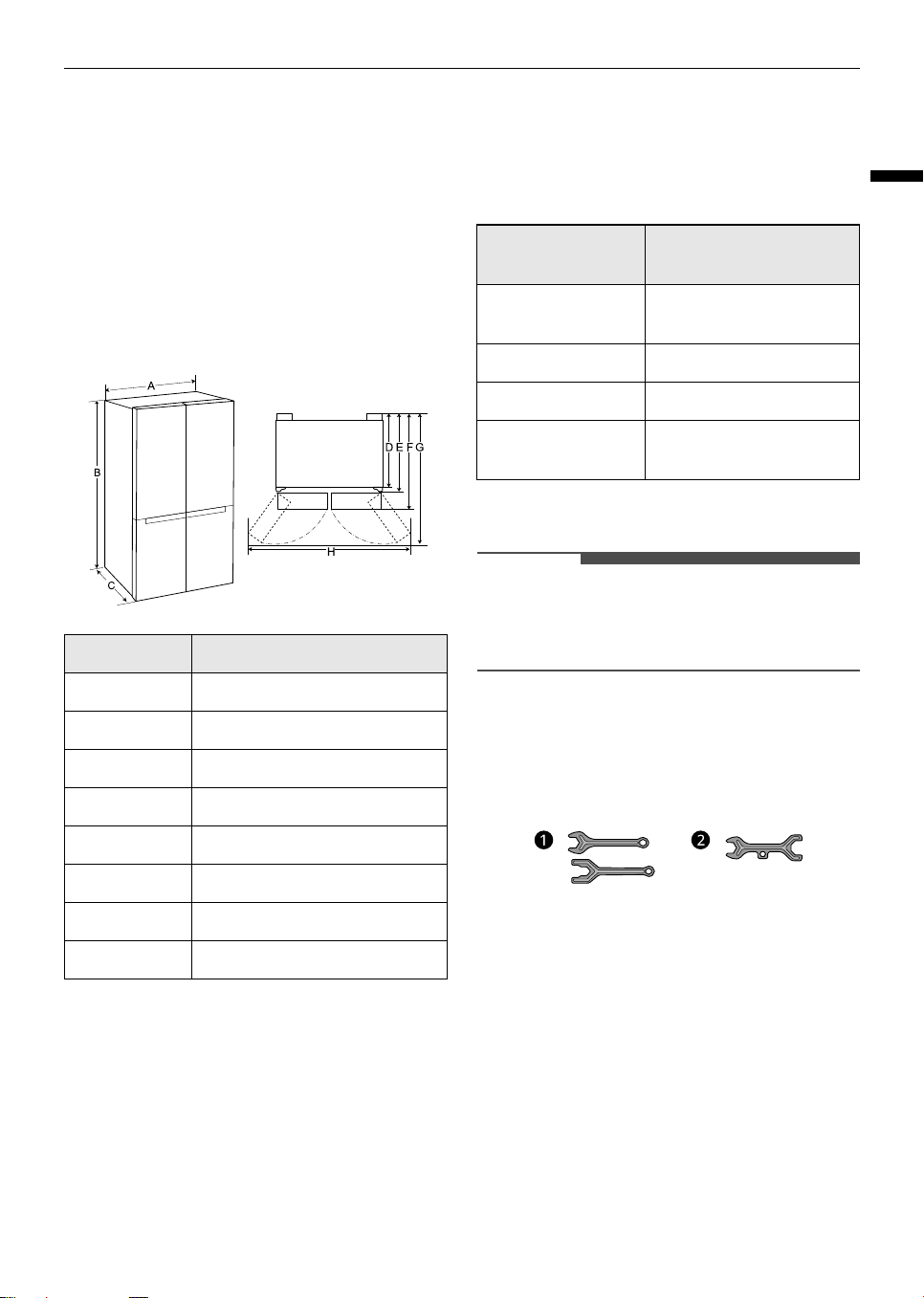
Dimensions and Clearances
Too small of a distance from adjacent items may
result in the degradation of freezing capability and
increased electricity costs. Allow over 50 mm of
clearance between the back of the appliance and
the wall when installing the appliance.
Ambient Temperature
• The appliance is designed to operate within a
limited range of ambient temperatures,
depending on the climate zone.
• The internal temperatures could be affected by
the location of the appliance, the ambient
temperature, the frequency of door opening and
so on.
• The climate class can be found on the rating
label.
* Australia, India, Kenya
** Argentina
NOTE
• The appliances rated from SN to T are intended
to be used at an ambient temperature between
10 ºC and 43 ºC.
Accessories
*1 This feature is only available on some models.
a
Spanner A
*1
b
Spanner B
*1
Removing the Fridge and
Freezer Door
If your entrance door is too narrow for the
appliance to pass through, remove the appliance
doors and pass the appliance laterally.
- Size (mm)
A913
B1790
C735
D620
E691
F735
G1180
H1635
Climate Class
Ambient Temperature
Range ºC
SN (Extended
Temperate)
+10 - +32
N (Temperate) +16 - +32
ST (Subtropical) +16 - +38 / +18 - +38**
T (Tropical) +10 - +43* / +16 - +43 /
+18 - +43**
global_main.book.book Page 11 Wednesday, July 17, 2024 8:28 AM
12
INSTALLATION
WARNING
• Disconnect the power cord, house fuse or circuit
breaker before installing, removing the doors, or
cleaning the appliance. Failure to follow these
instructions may result in death, fire or electric
shock.
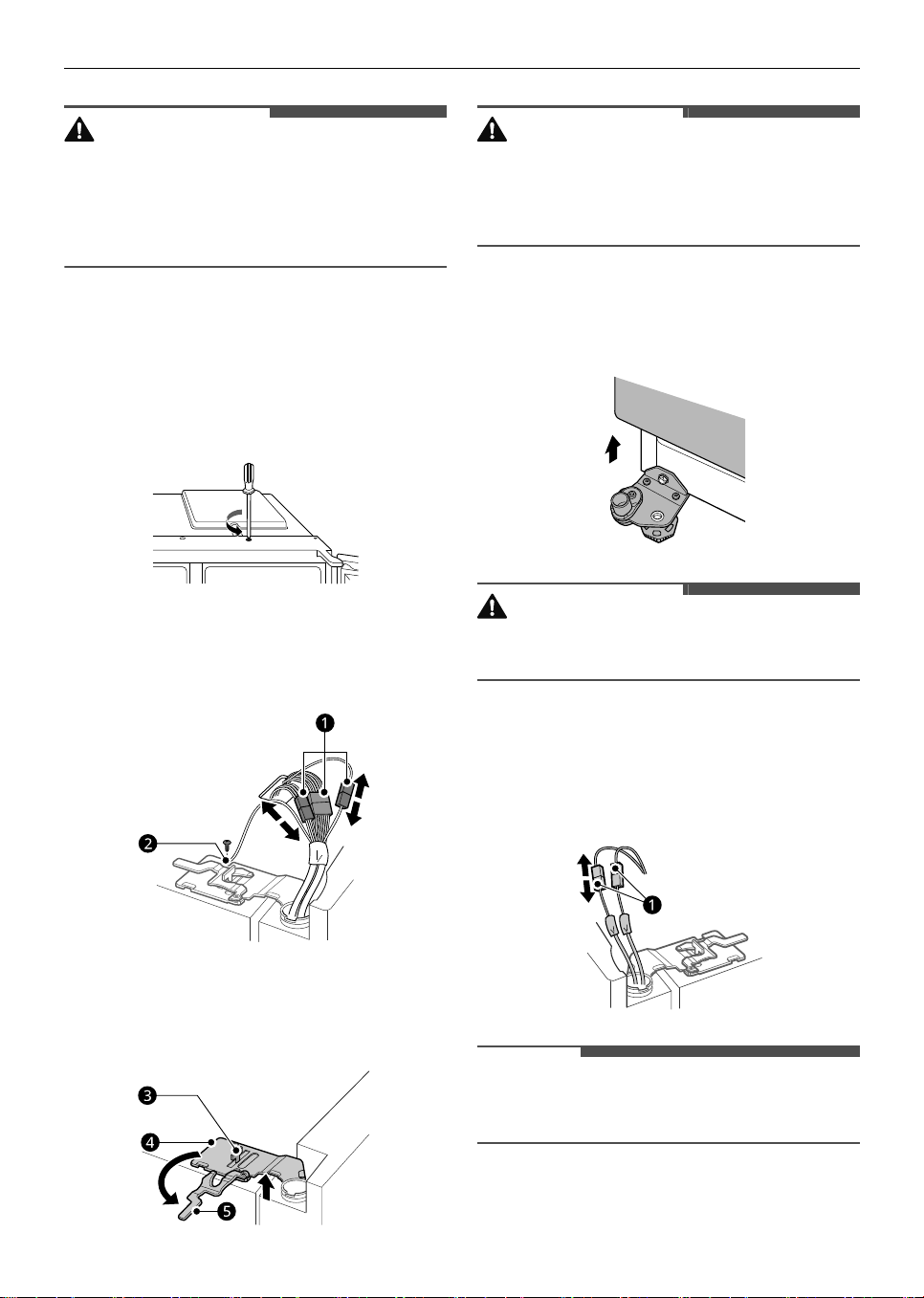
Removing the Freezer Door
1
Remove the screw from the hinge cover at the
top of the appliance. Lift the hook, located at
the bottom of the front side of the cover, with
a flat-head screwdriver.
2
Disconnect all wire harnesses
a
. Unscrew the
ground wire
b
.
3
Rotate the hinge lever
e
counterclockwise. Lift
the top hinge
d
free of the hinge lever latch
c
.
CAUTION
• When lifting the hinge free of the latch, be
careful that the door does not fall forward. It is
recommended that two or more people carry
out the door removal and refitting.
4
Lift the freezer door until it is free of the
bottom hinge assembly.
CAUTION
• Place the door on a non-scratching surface with
the inner side facing up.
Removing the Fridge Door
1
Disconnect all wire harnesses
a
.
NOTE
• The number of wire harnesses may vary
depending on the model.
global_main.book.book Page 12 Wednesday, July 17, 2024 8:28 AM
13
INSTALLATION
ENGLISH
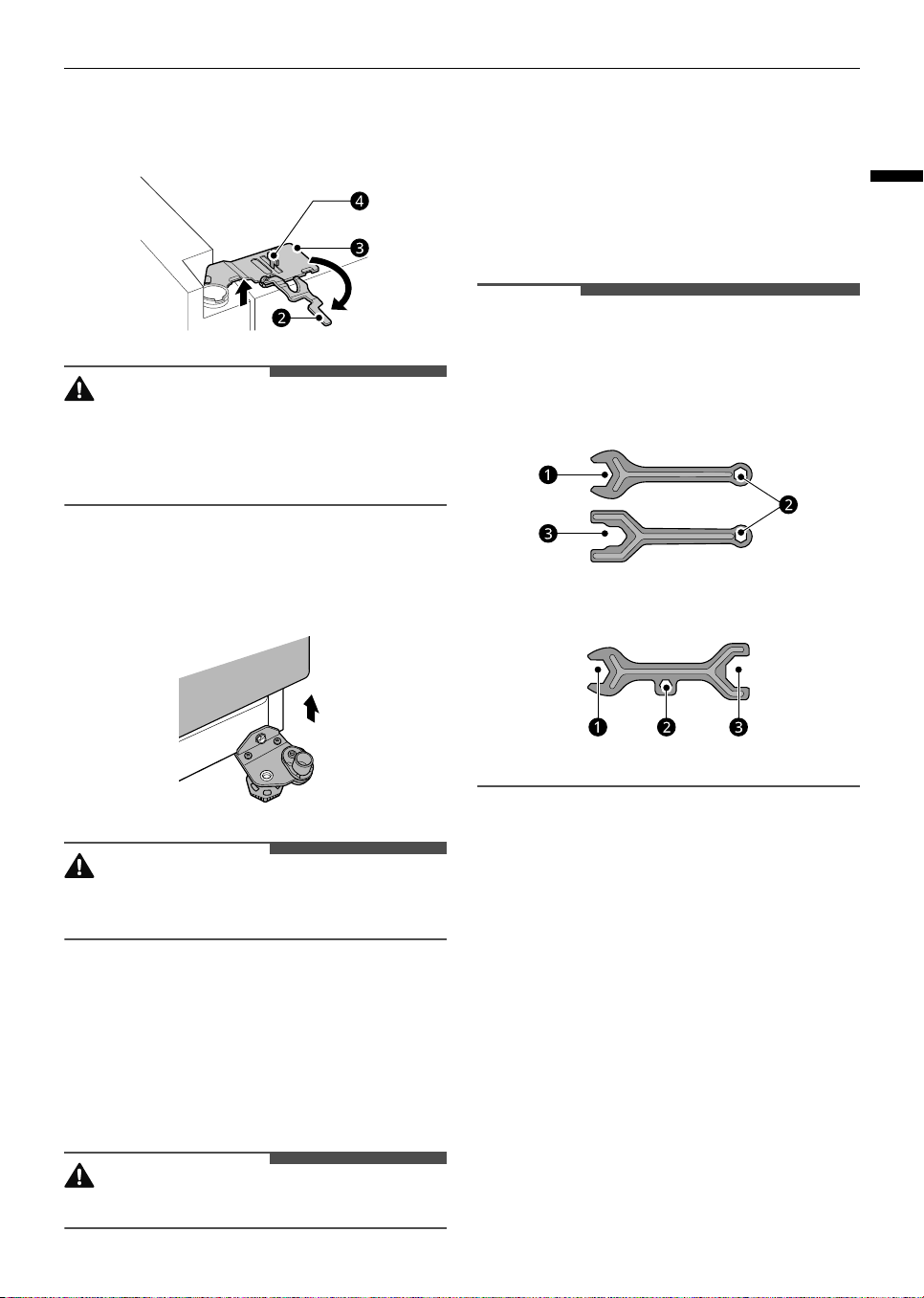
2
Rotate the hinge lever
b
clockwise. Lift the top
hinge
c
free of the hinge lever latch
d
.
CAUTION
• When lifting the hinge free of the hinge lever
latch, be careful that the door does not fall
forward. It is recommended that two or more
people carry out the door removal and refitting.
3
Lift the fridge door until it is free of the bottom
hinge assembly.
CAUTION
• Place the door on a non-scratching surface with
the inner side facing up.
Refitting the Fridge and Freezer
Door
Refit the doors in the reverse sequence of their
removal once the appliance has been passed
through all access doors.
CAUTION
• Install the fridge door first.
Levelling and Door
Alignment
Before Beginning
When the appliance doors appear to be uneven,
follow the instructions below to align the doors.
NOTE
• The spanner may differ depending on the model.
You will be provided with either spanner type A
or B.
- Spanner Type A
- Spanner Type B
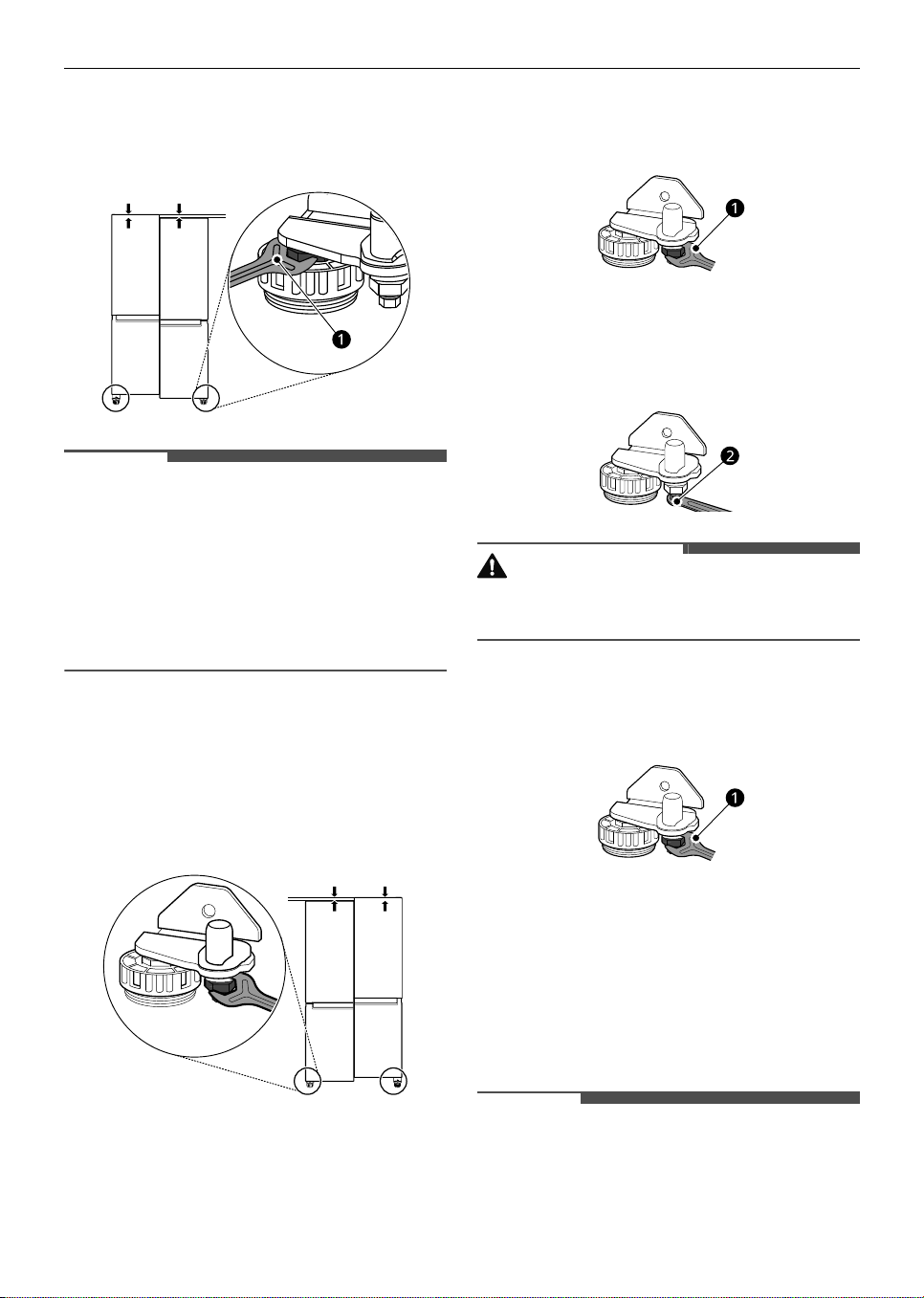
Levelling the Appliance
The appliance has two front levelling legs. Adjust
the legs to alter the tilt from front to back or side to
side. If the appliance seems unsteady, or the doors
do not close easily, adjust the appliance’s tilt using
the instructions below.
global_main.book.book Page 13 Wednesday, July 17, 2024 8:28 AM
14
INSTALLATION
Use the spanner
a
to adjust the height by turning
the levelling leg to the left to raise it or to the right
to lower it.
NOTE
• Leveling the doors may not be possible when the
floor is not leveled, or is of weak or poor
construction.
• The refrigerator is heavy and should be installed
on a rigid and solid surface.
• Some timber flooring may cause levelling
difficulties if it flexes excessively.
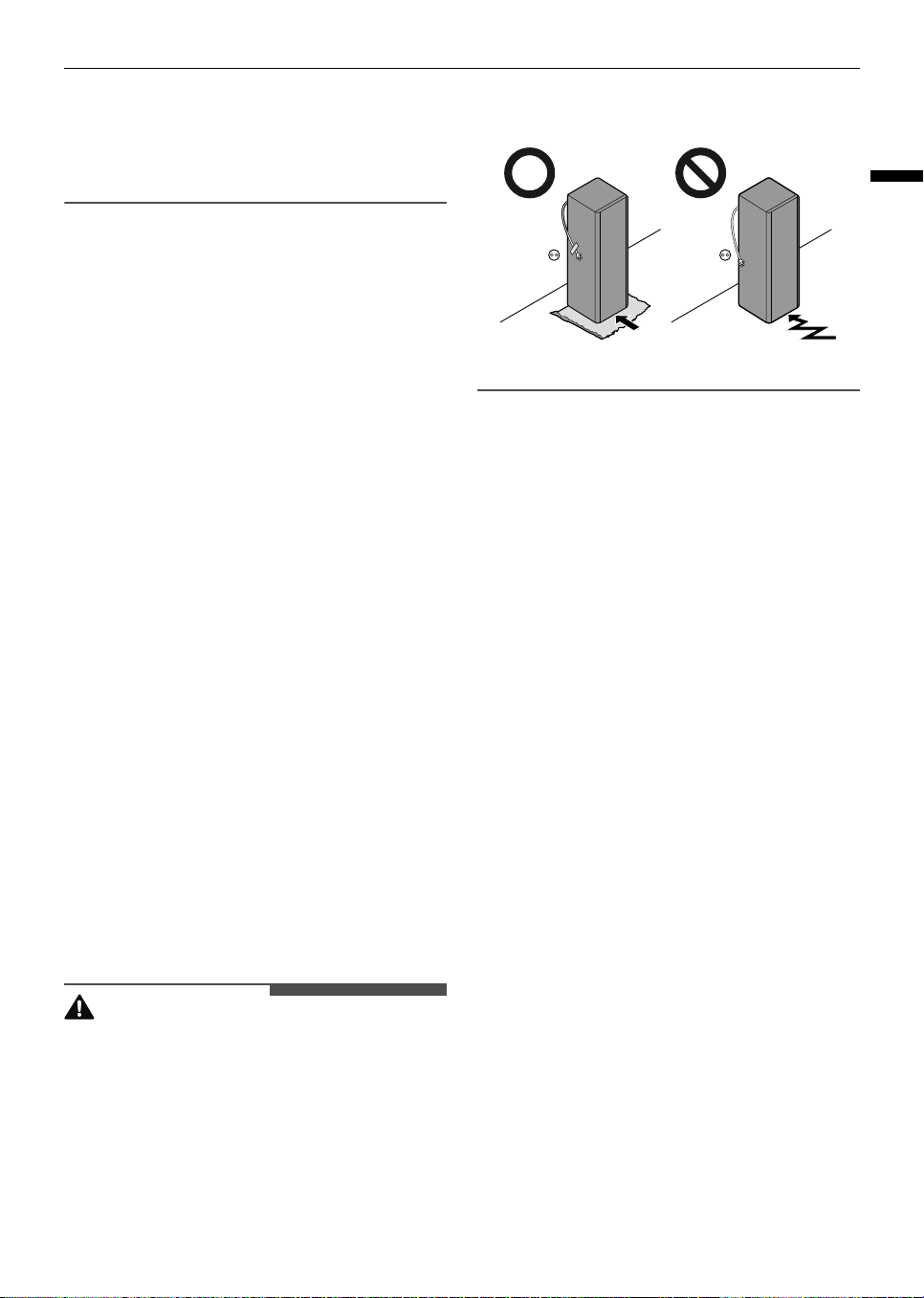
Door Alignment for Freezer and
Fridge Door
If the door of the appliance is not level, adjust the
difference in the height of appliance door.
1
Open the door and use the spanner
a
to
loosen the keeper nut by turning it to the left.
2
Use the spanner
b
to adjust the height by
turning the adjustment hinge pin to the left or
to the right.
CAUTION
• Do not adjust the height of the appliance door
more than 3 mm.
3
Use the spanner
a
to fasten the keeper nut by
turning it to the right.
Turning on the Power
Connecting the Appliance
To turn on the appliance, connect the power plug
into the outlet socket. Do not double up with other
appliances on the same outlet.
NOTE
• After connecting the power supply cord (or plug)
to the outlet, wait 3 or 4 hours before you put
food into the appliance. If you add food before
global_main.book.book Page 14 Wednesday, July 17, 2024 8:28 AM
15
INSTALLATION
ENGLISH
the appliance has cooled completely, your food
may spoil.
• To turn off the appliance, disconnect the power
plug from the outlet socket.
Moving the Appliance for
Relocation
Moving the Appliance
1
Remove all food from inside the appliance.
2
Fix the power plug.
• Models with a power plug hook:
Pull the power plug out, insert and fix it into
the power plug hook at the rear or on top of
the appliance.
• Models without a power plug hook:
Pull the power plug out and fix the power
supply cable with a tape to the side of the
appliance where the power socket is located
at the installation site.
3
Tape parts such as shelves and the door handle
to prevent from falling off while moving the
appliance.
4
Move the appliance with more than two people
carefully. When transporting the appliance
over a long distance, keep the appliance
upright.
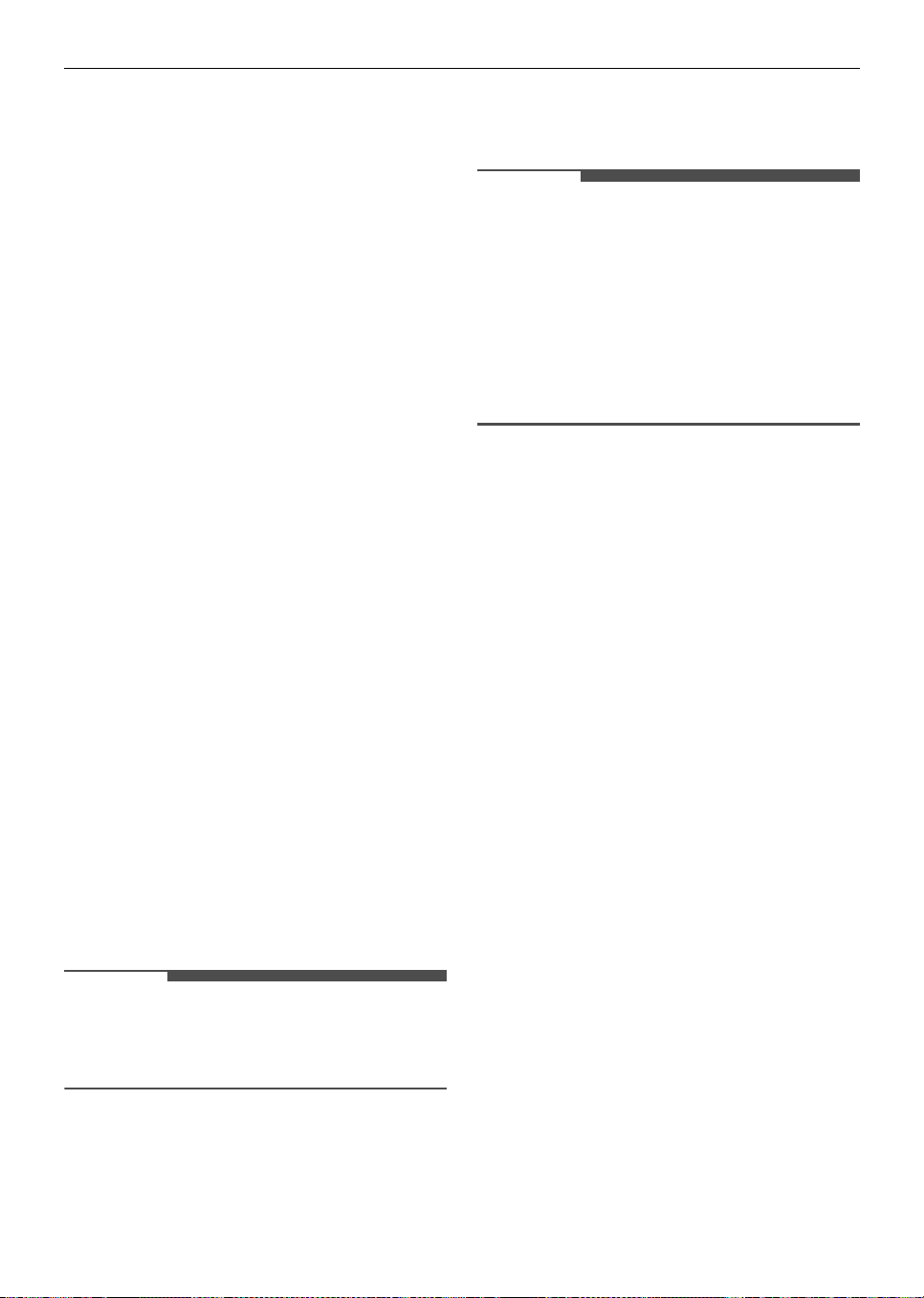
CAUTION
• Move the appliance carefully on sensitive floors
to avoid damage to the floor.
- Use cardboard, floor mat or carpet to prevent
scratches on the floor when installing or
moving the appliance.
- Do not move the appliance in zigzags.
5
After installing the appliance, connect the
power plug into a mains outlet socket and
switch it on.
global_main.book.book Page 15 Wednesday, July 17, 2024 8:28 AM
16
OPERATION
OPERATION
Before Use
Notes for Operation
• Users should keep in mind that frost can form if
the door is not closed completely or if the
humidity is high during the summer.
• Ensure there is sufficient space between food
stored on the shelf or door basket to allow the
door to close completely.
• Opening the door for long periods can cause a
significant increase of the temperature in the
compartments of the appliance.
• If the refrigerating appliance is left empty for
long periods, switch off, defrost, clean, dry, and
leave the door open to prevent mould
developing within the appliance.
• Note that a temperature rise after defrosting has
a permissible range in the appliance
specifications. If you wish to minimise the impact
on the food storage due to a temperature rise,
seal or wrap the stored food in several layers.
• You can remove fridge/freezer drawers, water
tank
*1
, or ice bucket
*1
to create more space
inside the appliance if you desire.
*1 This feature is only available on some models.
Door Open Alarm
This feature is only available on some models.
The alarm sounds if the door is left open or not
completely closed.
NOTE
• Contact the LG Electronics customer information
centre if the alarm sound continues even after
closing all doors.
Failure Detection
The appliance can automatically detect problems
during the operation.
NOTE
• If a problem is detected, the appliance may not
operate and an error code is displayed even
when any button is pressed.
• If an error code is indicated on the display, do
not turn off the power. Immediately contact the
LG Electronics customer information centre and
report the error code. If you turn off the power,
the repair technician from the our information
centre may have difficulty finding the problem.
Suggestion for Energy Saving
• For the most efficient use of energy, keep all
inner parts (e.g. door baskets, drawers and
shelves) on their original location. Altering their
positions may result in less efficient energy
consumption or performance.
• Ensure there is sufficient space between stored
foods. This allows cold air to be circulated evenly
and lowers electricity bills.
• Store hot food only after it has cooled in order to
prevent dew or frost.
• When storing food in the freezer compartment,
set the freezer temperature lower than the
temperature indicated on the food.
• Do not set the temperature of the appliance
lower than needed.
• Do not put food near the temperature sensor of
the fridge compartment. Keep a distance of at
least 3 cm from the sensor.
Storing Foods Effectively
• Food may freeze or spoil if stored at the wrong
temperature. Set the refrigerator to the correct
temperature for the food being stored.
• Store frozen food or refrigerated food inside
sealed containers.
• Check the expiration date and label (storage
instructions) before storing food in the
appliance.
global_main.book.book Page 16 Wednesday, July 17, 2024 8:28 AM
17
OPERATION
ENGLISH
• Do not store food for a long period of time if it
spoils easily at a low temperature.
• Do not place unfrozen food in direct contact with
food that is already frozen. It could be necessary
to reduce the quantity to be frozen if freezing
every day is anticipated.
• Place the refrigerated food or frozen food in
each fridge or freezer compartment
immediately after purchasing.
• Store raw meat and fish in suitable containers in
the refrigerator, so that it is not in contact with or
drip onto other food.
• Refrigerated foods and other food items can be
stored on top of the vegetable drawer.
• Avoid refreezing any food which has been
completely thawed. Freezing any food which has
been completely thawed again will lower its taste
and nutrition.
• Do not overfill the appliance. Cold air can not
circulate properly if the appliance is overfilled.
• Cool hot food before storing. If too much hot
food is placed inside, the internal temperature of
the appliance can increase and negatively affect
other foods stored in the appliance.
• If you set an excessively low temperature for
food, it may become frozen. Do not set a
temperature lower than the required
temperature for the food to be stored correctly.
• If there are chill compartments in the appliance,
do not store vegetables and fruits with higher
moisture content in the chill compartments as
they may freeze due to the lower temperature.
• In the event of a blackout, call the electricity
company and ask how long it is going to last.
- You should avoid door openings while the
power is off.
- When the power supply gets back to normal,
check the condition of the food.
Maximum Freezing Capacity
• For maximum freezing capacity, set the freezer
temperature to the coldest temperature setting.
•
Express Freeze
function will allow the freezer to
reach its maximum freezing capacity. This
generally takes up to 24 hours and automatically
switches off.
•
Express Freeze
must be switched on for 7 hours
before fresh products are placed in the freezer
compartment.
• To freeze food items quickly, store the food on
the left side of the top shelf. If you need to store
more food, store it on the shelves in order
starting from the top shelf. Food items will freeze
most quickly in the zone.
• To get better air circulation, insert all inner parts
like baskets, drawers, and shelves.
Freezing the Maximum Amount
of Food
If large quantities of food are to be stored, all the
freezer drawers should be taken out of the
appliance and the food should be stacked directly
on the freezer shelves in the freezer compartment.
CAUTION
• To remove the drawers, first remove the food
from drawers and then pull out the drawers
carefully. Not doing so could cause injury or
damage to the drawers.
NOTE
• The shape of each drawer may be different,
insert in the right position.
global_main.book.book Page 17 Wednesday, July 17, 2024 8:28 AM
18
OPERATION
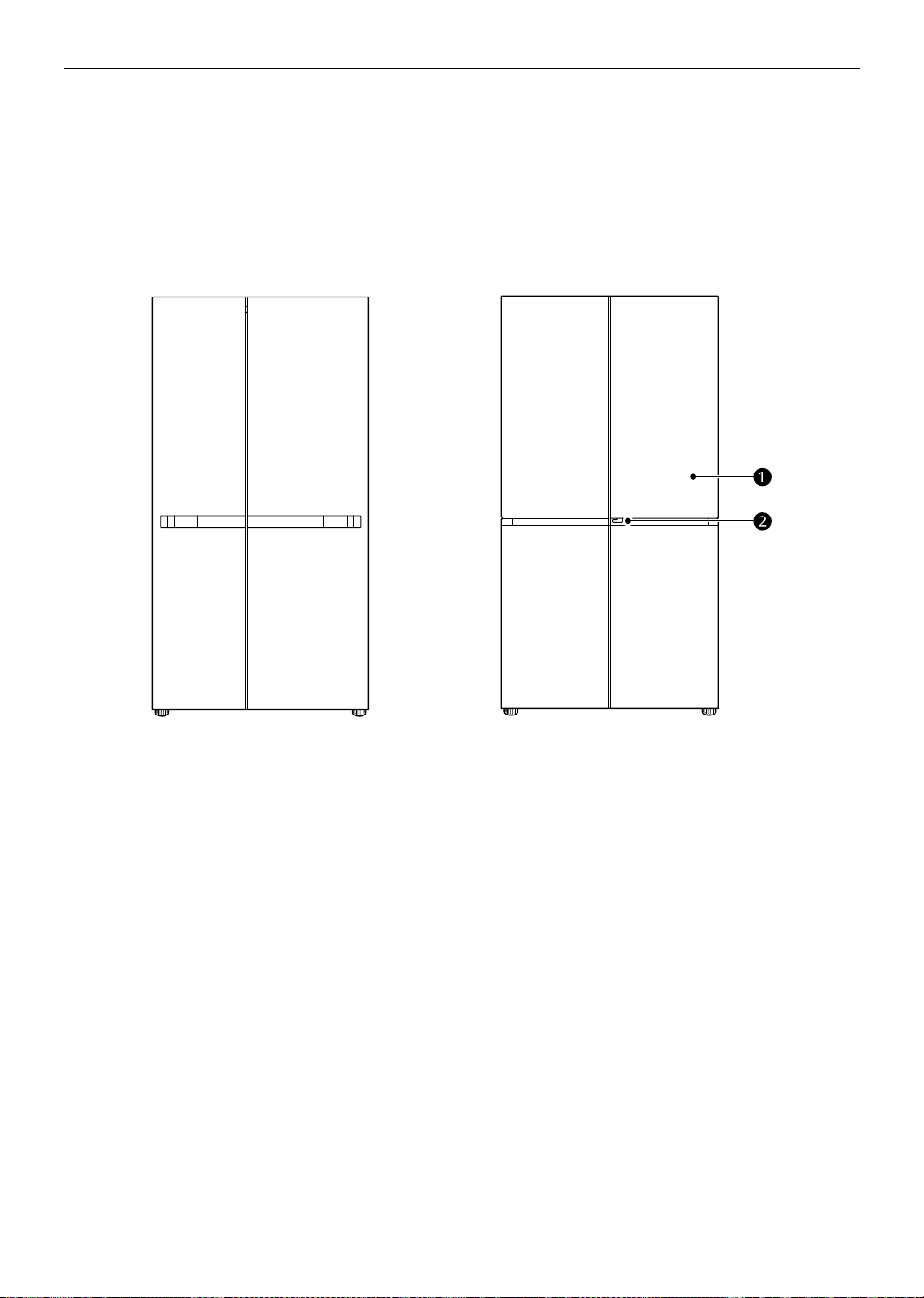
Product Features
The appearance or components of the appliance may differ from model to model.
Exterior
*1 This feature is only available on some models.
a
Door in Door
*1
This is a convenient storage area for frequently-used items that require easy access.
b
Door in Door Lever
*1
Opens Door-in-Door.
global_main.book.book Page 18 Wednesday, July 17, 2024 8:28 AM
19
OPERATION
ENGLISH
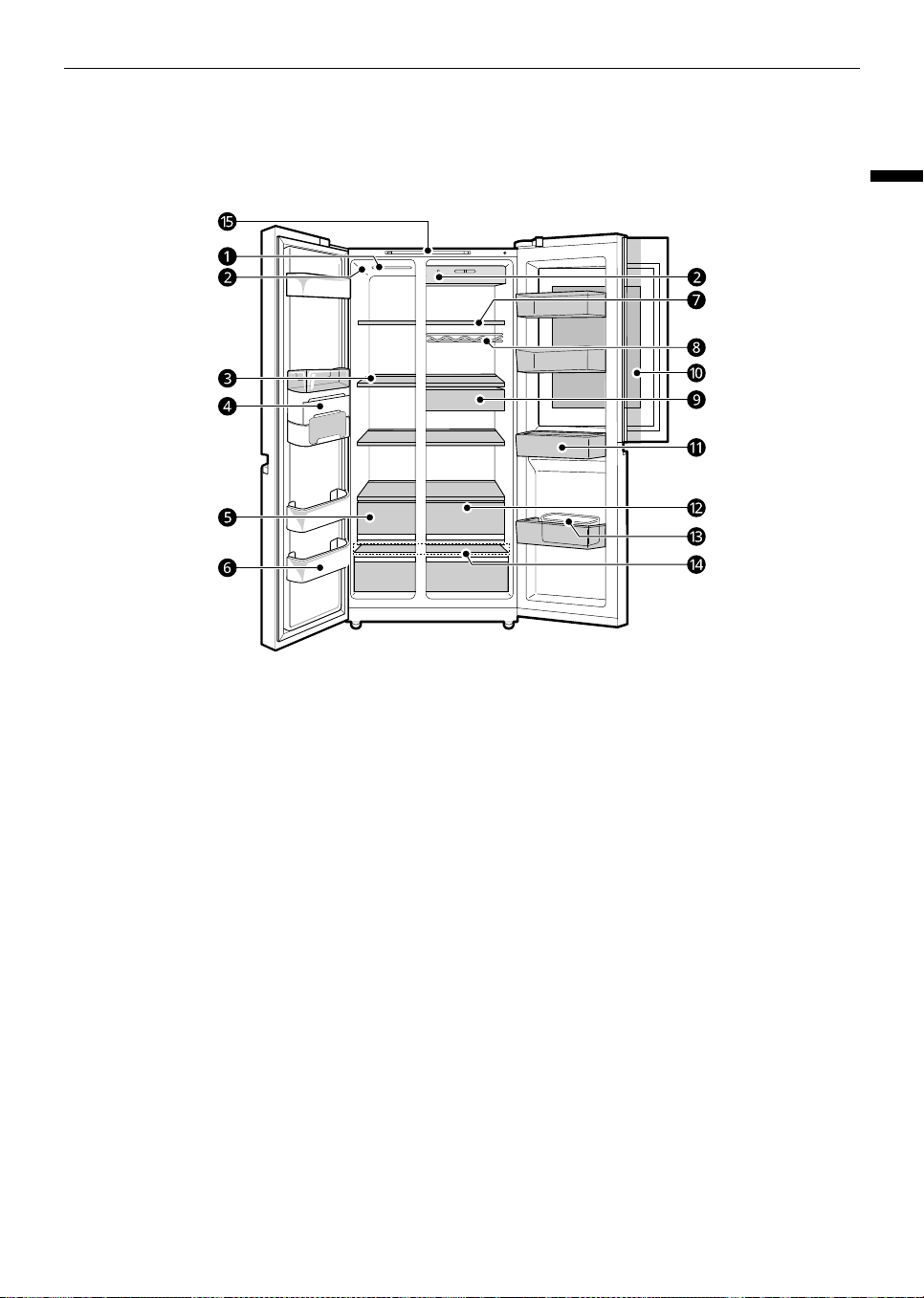
Interior
*1 This feature is only available on some models.
a
LED Lamp
The LED lamps inside the appliance light up when you open the door.
b
Temperature Sensor
*1
This sensor senses the temperature of the fridge compartment.
• Maintain the distance between the sensor and food to accurately sense the temperature.
c
Freezer Shelf
Stores frozen food such as meat, fish, and ice cream.
d
Icemaker
*1
This is where ice is manually produced and stored.
e
Freezer Drawer
*1
Stores frozen food for longer storage.
f
Freezer Door Basket
Stores small packages of frozen food. Do not store ice cream or food which will be stored for a long
period of time.
g
Fridge Shelf
Stores refrigerated foods and fresh foods.
• Stores the foods with higher moisture content at the front of the shelf.
• The shelf height can be adjusted by inserting the shelf in another groove of different height.
global_main.book.book Page 19 Wednesday, July 17, 2024 8:28 AM
20
OPERATION
h
Bottle Rack
*1
Stores containers and tall bottles using the bottle rack.
CAUTION
• Do not store short bottles or containers. The items may fall and cause an injury or appliance damage.
i
Snack Drawer
*1
Stores commonly used food items such as beverages and snacks.
j
Door in Door Compartment
*1
A convenient storage area for frequently-used items that require easy access.
k
Fridge Door Basket
Stores small packages of refrigerated foods, drinks and sauce containers.
l
Fridge Drawer
Stores fruits and vegetables to keep fresh for as long as possible.
m
Egg Box
*1
Stores eggs.
• Do not use it as the ice bin or place it on the shelf on top of the fridge or the vegetable drawer.
n
Bottom Drawer Cover
This is the bottom drawer cover.
CAUTION
• Do not store any items at the front of the bottom shelf. The items may fall and cause an injury or
appliance damage.
o
Control Panel
Sets the fridge temperature and freezer temperature.
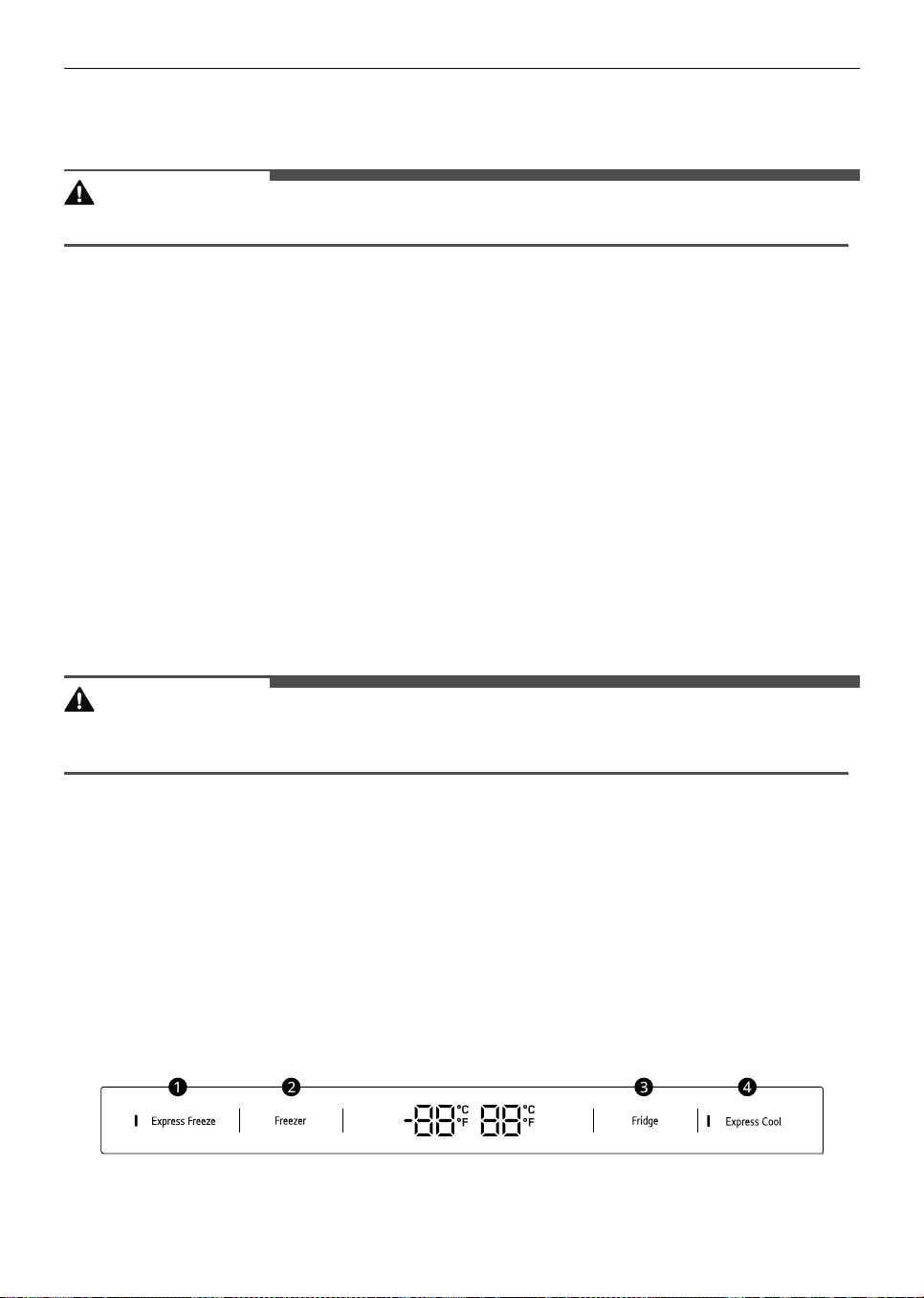
Control Panel
The actual control panel may differ from model to model.
Control Panel and Functions
*1 This feature is only available on some models.
a
Express Freeze
This function can quickly freeze a large amount of ice or frozen foods.
global_main.book.book Page 20 Wednesday, July 17, 2024 8:28 AM
21
OPERATION
ENGLISH
• Press the
Express Freeze
button to activate the function for 24 hours. The function automatically
shuts off after 24 hours.
• This function is enabled and disabled in turn each time you press the button.
• This function automatically terminates after a specific period has passed.
b
Freezer
Press this button repeatedly to select a desired temperature between -23 ℃ and -15 ℃.
• The default freezer temperature is -18 ℃.
c
Fridge
Press this button repeatedly to select a desired temperature between 1 ℃ and 7 ℃.
• The default fridge temperature is 3 ℃.
NOTE
• The actual inner temperature varies depending on the food status, as the indicated setting temperature
is a target temperature, not actual temperature within the appliance.
d
Express Cool
This function can quickly cool a large amount of foods such as vegetable, fruit and so on.
• This function is enabled and disabled in turn each time you press the button.
• This function automatically terminates after a specific period has passed.
NOTE
• The displayed temperature is the target temperature, and not the actual temperature inside the
appliance.
• The actual temperature inside the appliance depends on the following factors: room temperature, the
amount of food and how often the doors are opened, where the appliance is. Set the temperatures by
considering these factors.
• If there is any finger or skin contacts to the control panel while cleaning it, the button function may
operate.
• This appliance incorporates an earth connection for functional purposes only.
Door in Door
This feature is only available on some models.
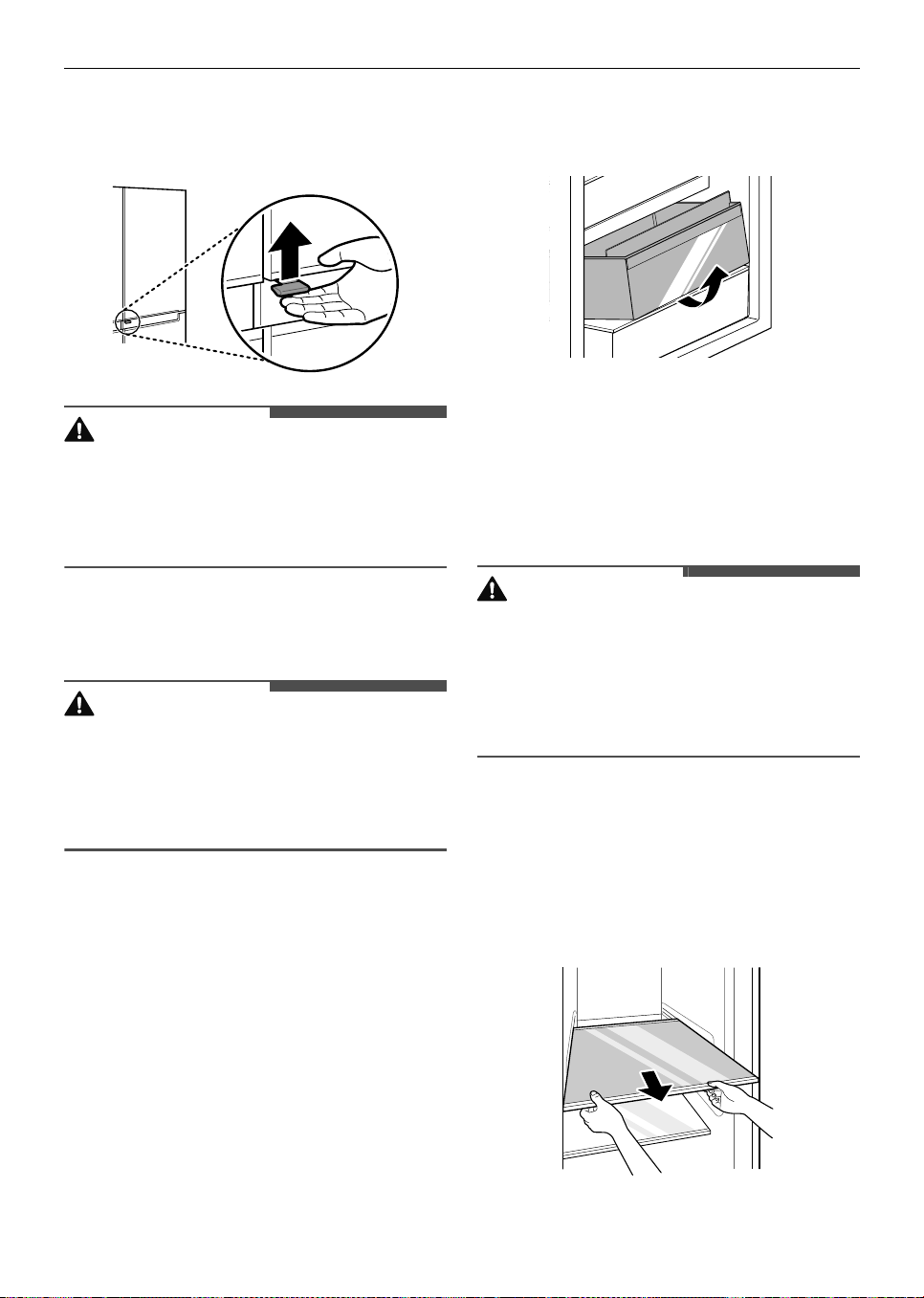
Using the Door in Door
Pull the lever at the bottom of the door upwards
until the door in door opens.
global_main.book.book Page 21 Wednesday, July 17, 2024 8:28 AM
22
OPERATION
There is plenty of storage space inside the door in
door and its surrounding baskets, allowing you to
store food in an organized manner.
CAUTION
• Do not open the door of the appliance with the
door in door open, or do not open the door in
door while the door of the appliance is open. The
door in door may be struck by the edge of the
appliance and damaged.
Drawer
CAUTION
• Always empty the drawers before removing
them, and use both hands when removing and
refitting them.
• Make sure that the fridge doors are fully open
before removing and refitting the drawers.
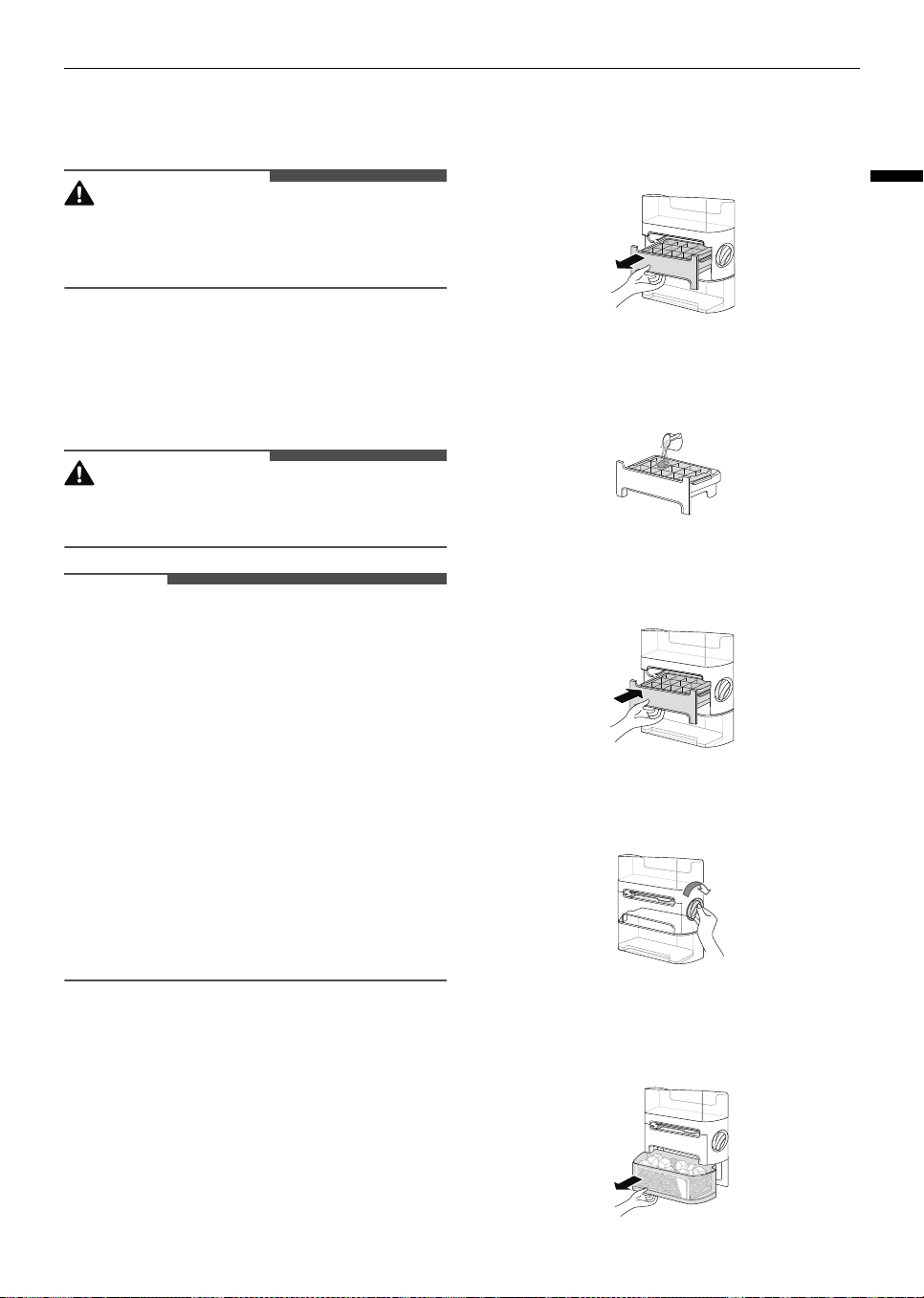
Removing/Refitting Drawers
1
Remove the contents of the drawer. Hold the
handle of the vegetable drawer and gently pull
it out.
2
Lift the vegetable drawer up and remove it by
pulling it out.
3
Refit the drawer in the reverse order of the
removal process.
Shelf
CAUTION
• Glass shelves are heavy. Use special care when
removing them.
• Do not clean glass shelves with warm water
while they are cold. Shelves may break if
exposed to sudden temperature changes or
impact.
Removing/Refitting the Shelf
1
Tilt up the front of the shelf and then lift the
shelf straight up.
2
Pull the shelf out.
global_main.book.book Page 22 Wednesday, July 17, 2024 8:28 AM
23
OPERATION
ENGLISH
3
Mount the shelves in the reverse order of the
removal process.
CAUTION
• Make sure that shelves are level from one side to
the other. Failure to do so may result in the shelf
falling or food spilling.
Icemaker
Before Using the Icemaker
WARNING
• Fill with potable water only into icemaker or
dispenser water tank.
NOTE
• The icemaker produces ice normally once
approximately 48 hours have passed after the
appliance is initially installed.
• If half-frozen ice is put into the ice storage bin, it
will cause the exiting ice cubes to lump together.
It takes about 4 hours at - 20 °C for ice
production.
• If the freezer door is frequently opened, warm
air enters the freezer compartment. It may take
a longer time to freeze ice.
• Be careful not to twist the ice maker with force
since it can break.
• Do not freeze the ice in the ice storage bin. This
could break it and cause appliance damage or
injury.
Using the Icemaker
*1 This feature is only available on some models.
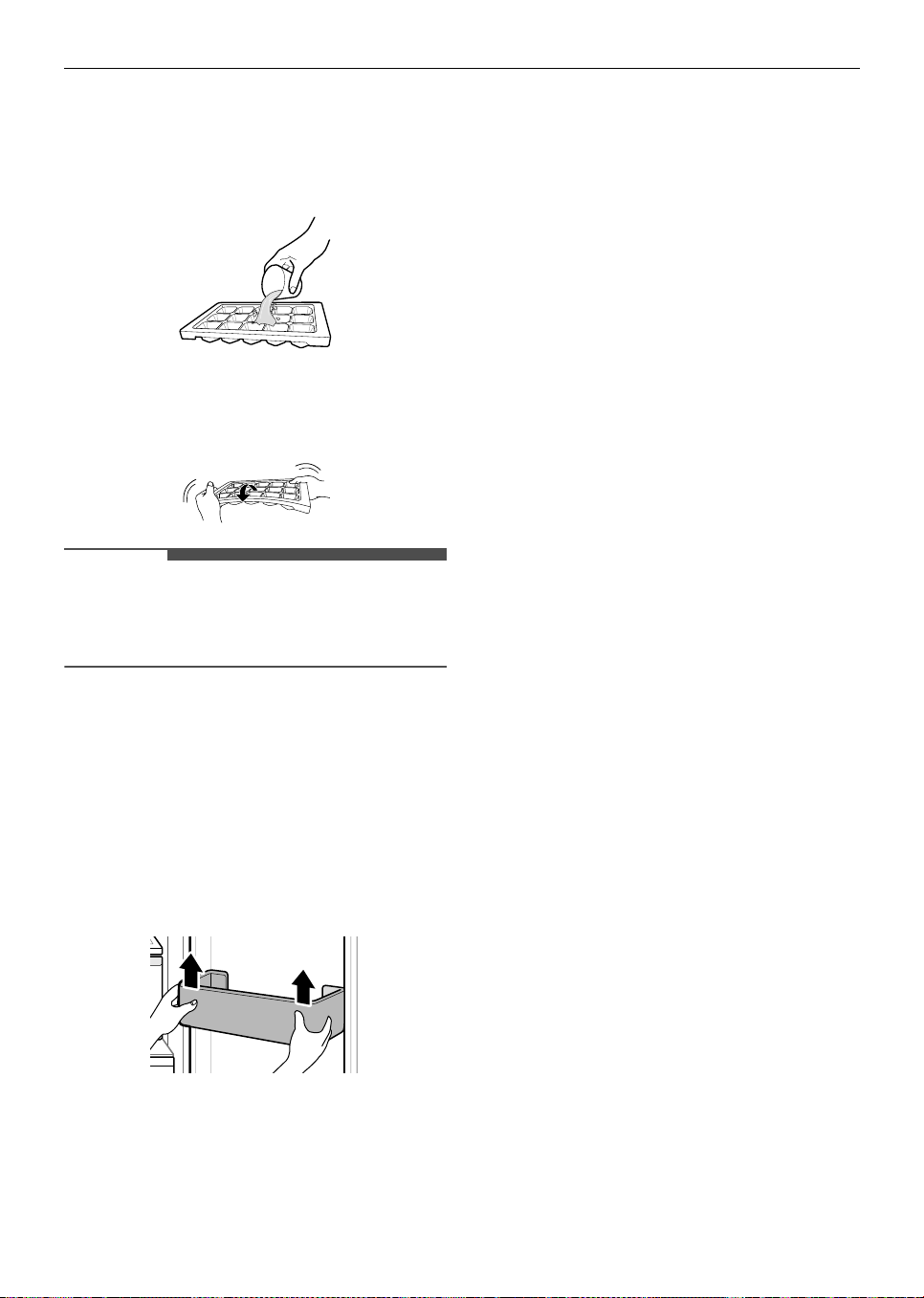
Icemaker Type A
*1
1
Hold the handle of ice tray and pull it out.
2
Fill the ice tray with potable water up to the
water line.
3
Place the ice tray back in position carefully.
4
Rotate the icemaker handle clockwise.
5
To use the ice, lift the ice storage bin slightly to
remove it.
global_main.book.book Page 23 Wednesday, July 17, 2024 8:28 AM
24
OPERATION
Icemaker Type B
*1
1
Fill the ice tray with potable water and place it
in the freezer compartment.
2
After the water is frozen, hold the ice tray at its
ends and twist gently.
NOTE
• You can remove the icemaker or ice storage bin
to create more space inside the freezer if you do
not use it.
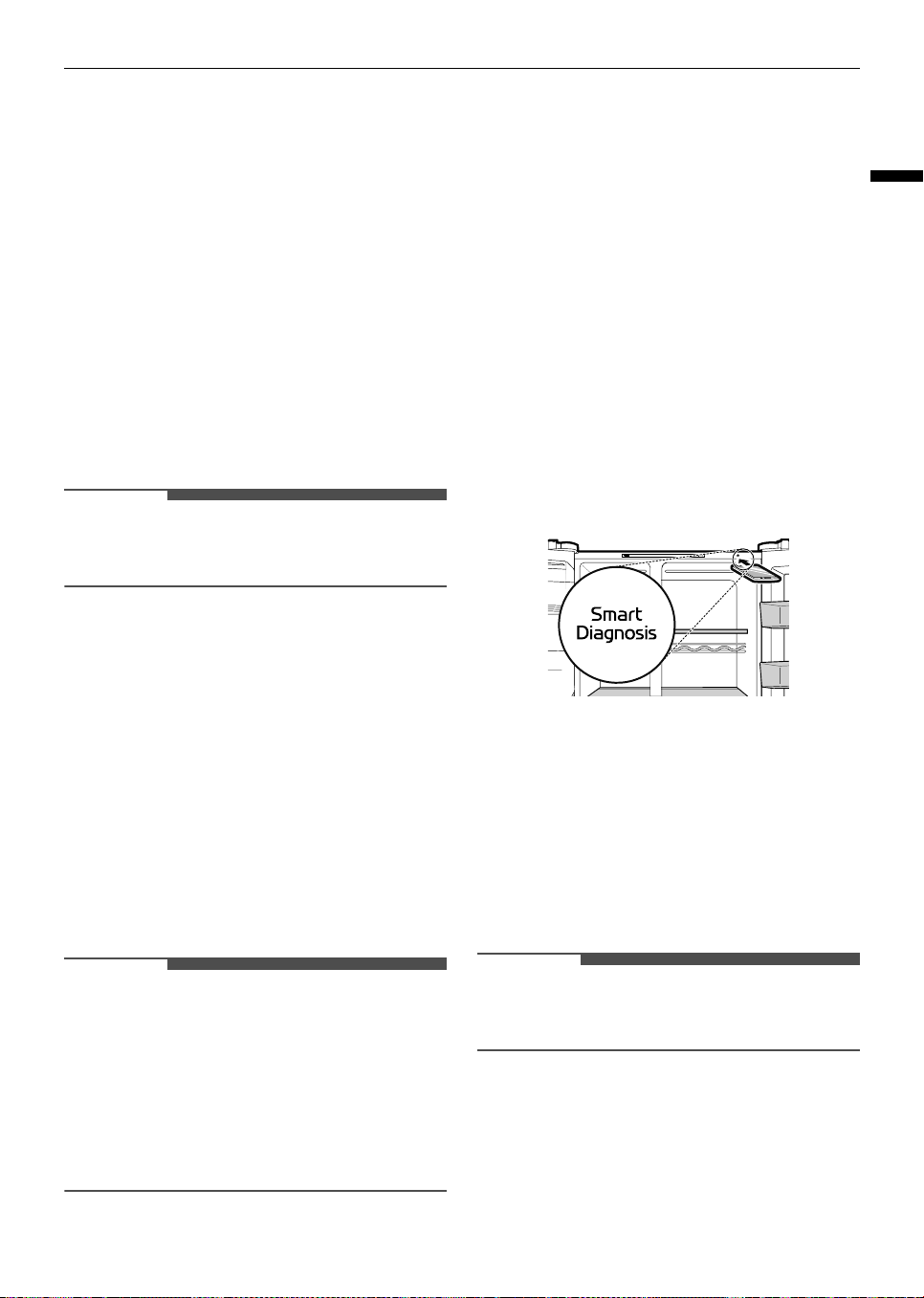
Door Basket
Removing/Refitting the Door
Basket
1
Hold both edges of the basket and remove it by
lifting it upward.
2
Refit the door baskets in the reverse order of
the removal process.
global_main.book.book Page 24 Wednesday, July 17, 2024 8:28 AM
25
SMART FUNCTIONS
ENGLISH
SMART FUNCTIONS
LG ThinQ Application
The
LG ThinQ
application allows you to
communicate with the appliance using a
smartphone.
LG ThinQ Application Feature
*1 This feature is only available on some models.
Smart Diagnosis
*1
If you experience a problem while using the
appliance, this smart diagnosis feature will help
you diagnose the problem.
NOTE
• The application is subject to change for product
improvement purposes without notice to users.
Installing the LG ThinQ
Application
Search for the
LG ThinQ
application from the
Google Play Store or Apple App Store on a
smartphone. Follow instructions to download and
install the application.
Smart Diagnosis
Use this feature to help you diagnose and solve
problems with your appliance.
NOTE
• For reasons not attributable to LGE’s negligence,
the service may not operate due to external
factors such as, but not limited to, Wi-Fi
unavailability, Wi-Fi disconnection, local app
store policy, or app unavailability.
• The feature may be subject to change without
prior notice and may have a different form
depending on where you are located.
Using Audible Diagnosis to
Diagnose Issues
Follow the instructions below to use the audible
diagnosis method.
• Launch the
LG ThinQ
application and select the
Smart Diagnosis
feature in the menu. Follow
the instructions for audible diagnosis provided
in the
LG ThinQ
application.
1
Open all the doors of the fridge.
2
Hold the phone on the upper right speaker
hole.
3
Press and hold the
Express Freeze
button for
three seconds or longer while holding your
phone to the speaker until the data transfer is
complete.
4
After the data transfer is complete, the
diagnosis will be displayed in the application.
NOTE
• For best results, do not move the phone while
the tones are being transmitted.
global_main.book.book Page 25 Wednesday, July 17, 2024 8:28 AM
26
MAINTENANCE
MAINTENANCE
Cleaning
General Cleaning Tips
• Performing manual defrosting, maintenance or
cleaning of the appliance while food is stored in
the freezer can raise the temperature of the food
and reduce its storage life.
• Regularly clean any surfaces that can come in
contact with food.
• When cleaning the inside or outside of the
appliance, do not wipe it with a rough brush,
toothpaste, or flammable materials. Do not use
cleaning agents containing flammable
substances. This may cause discolouration or
damage to the appliance.
- Flammable substances: alcohol (ethanol,
methanol, isopropyl alcohol, isobutyl alcohol,
etc.), thinner, bleach, benzene, flammable
liquid, abrasive, etc.
• After cleaning, check if the power cable is
damaged.
Cleaning the Exterior
• The outside air vents and rear lower cover
should be cleaned periodically to remove dust
build up. Failure to do so could cause the
appliance to lose its cooling ability and cause the
compressor to overheat and malfunction
resulting in food loss.
• When cleaning the side vents and rear lower
cover by vacuuming, then the power cord must
be unplugged from the outlet to avoid any static
discharge that can damage the electronics or
cause an electric shock. Regular cleaning of the
rear and side ventilation covers is also necessary
to maintain reliable and economical operation of
the unit.
• Failure to keep the air vents on the exterior of
the appliance clean can also cause overheating,
appliance damage or property damage if the
defrosted water cannot evaporate from the rear
drain pan.
• For the appliance exterior, use a clean sponge or
soft cloth and a mild detergent in warm water.
Do not use abrasive or harsh cleaners. Dry
thoroughly with a soft dedicated cloth. Do not
use contaminated cloths when cleaning the
stainless steel doors. Always use a dedicated
cloth and wipe in the same direction as the grain.
This helps reduce surface staining and
tarnishing.
Cleaning the Interior
• When removing a shelf or drawer from inside
the appliance, remove all stored foods from the
shelf or drawer to prevent injury or damage to
the appliance. Otherwise, injury may occur due
to the weight of stored foods.
• Detach the shelves and drawers and clean them
with water, and then dry them sufficiently,
before replacing them.
• Regularly wipe the door gaskets with a wet soft
towel.
• Door basket spills and stains should be cleaned
as they can compromise storage ability of the
basket and could even be damaged.
• Never clean the shelves or containers in the
dishwasher. The parts may become deformed
due to the heat.
• The automatic defrosting system in the
appliance ensures that the compartment
remains free of ice buildup under normal
operating conditions. Users do not need to
defrost it manually.
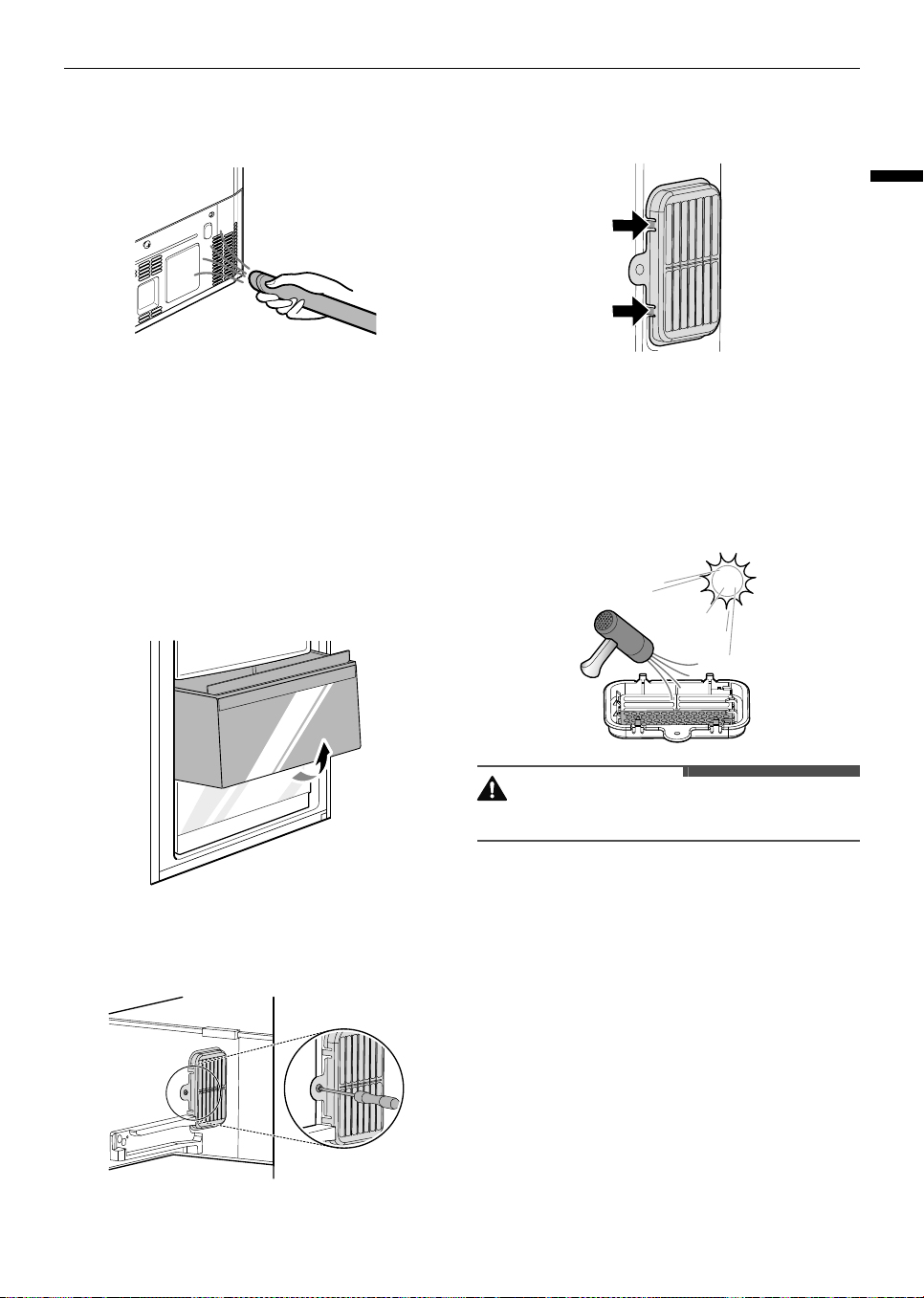
Cleaning the Condenser Cover
Use a vacuum cleaner with a brush to clean the
condenser cover and vents. Do not remove the
panel covering the condenser coil area.
We strongly recommend that this be done every 12
months to maintain operating efficiency. Failing to
global_main.book.book Page 26 Wednesday, July 17, 2024 8:28 AM
27
MAINTENANCE
ENGLISH
do so could cause loss of cooling, higher energy
usage and compressor overheating.
Deodorizer
Reusing the Deodorizer
You can re-use the deodorizer by removing odors
from the deodorizer.
1
Pull out the upper fridge drawer.
2
Unscrew the screw on the deodorizer.
3
Press on the hooks on the deodorizer and
remove it.
4
Dry the deodorizer using a hair dryer or leave it
in the sunlight to dry.
• A natural palm wood powder is used for the
deodorizer to increase deodorizing
performance. Even if it falls off, it is not
harmful. Wipe it off with a towel or cloth.
CAUTION
• Do not wash the deodorizer with water.
global_main.book.book Page 27 Wednesday, July 17, 2024 8:28 AM
28
TROUBLESHOOTING
TROUBLESHOOTING
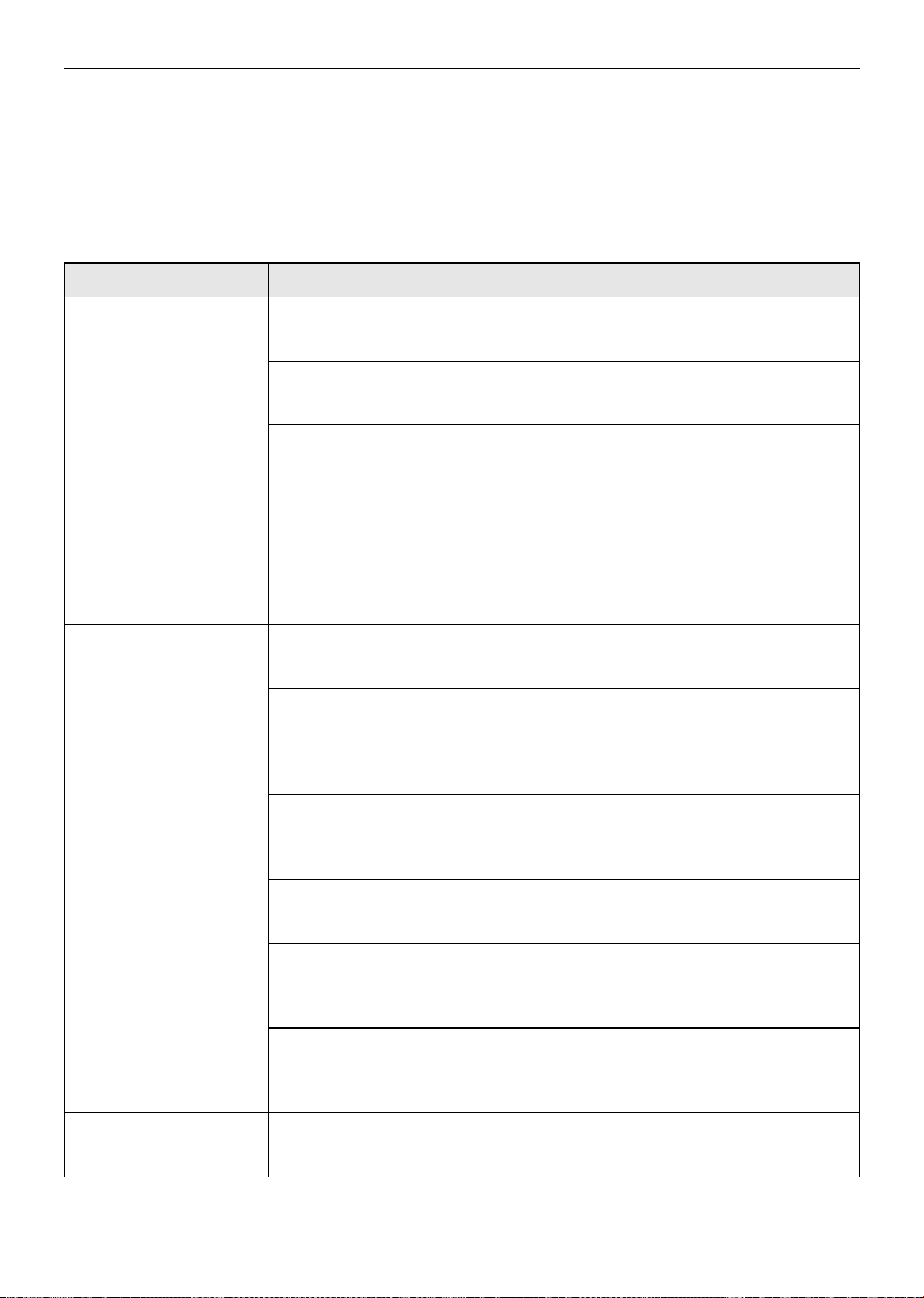
Before Calling for Service
Cooling
Symptoms Possible Cause & Solution
There is no
refrigeration or
freezing.
Is there a power interruption?
• Check the power of other appliances.
Appliance is unplugged.
• Plug the power plug in the outlet properly.
A fuse in your home may be blown or the circuit breaker tripped. Or the
appliance is connected to a GFCI (Ground Fault Circuit Interrupter)
outlet, and the outlet's circuit breaker has tripped.
• Check the main electrical box and replace the fuse or reset the circuit
breaker. Do not increase fuse capacity. If the problem is a circuit overload,
have it corrected by a qualified electrician.
• Reset the circuit breaker on the GFCI. If the problem persists, contact an
electrician.
There is poor
refrigeration or
freezing.
Is the fridge or freezer temperature set to its warmest setting?
• Set the fridge or freezer temperature to a colder setting.
Is the appliance in direct sunlight, or is it near a heat generating object
such as cooking oven or heater?
• Check the installation area and reinstall it away from heat generating
objects.
Did you store hot food without cooling it first?
• Cool the hot food first before putting it in the fridge or freezer
compartment.
Did you put in too much food?
• Maintain an appropriate space between food.
Are the appliance doors completely closed?
• Completely close the door and make sure that stored food is not
obstructing in the door.
Is there enough space around the appliance?
• Adjust the installation position to make enough space around the
appliance.
The appliance contains
a bad smell.
Is the fridge or freezer temperature set to its warmest setting?
• Set the fridge or freezer temperature to a colder setting.
global_main.book.book Page 28 Wednesday, July 17, 2024 8:28 AM
29
TROUBLESHOOTING
ENGLISH
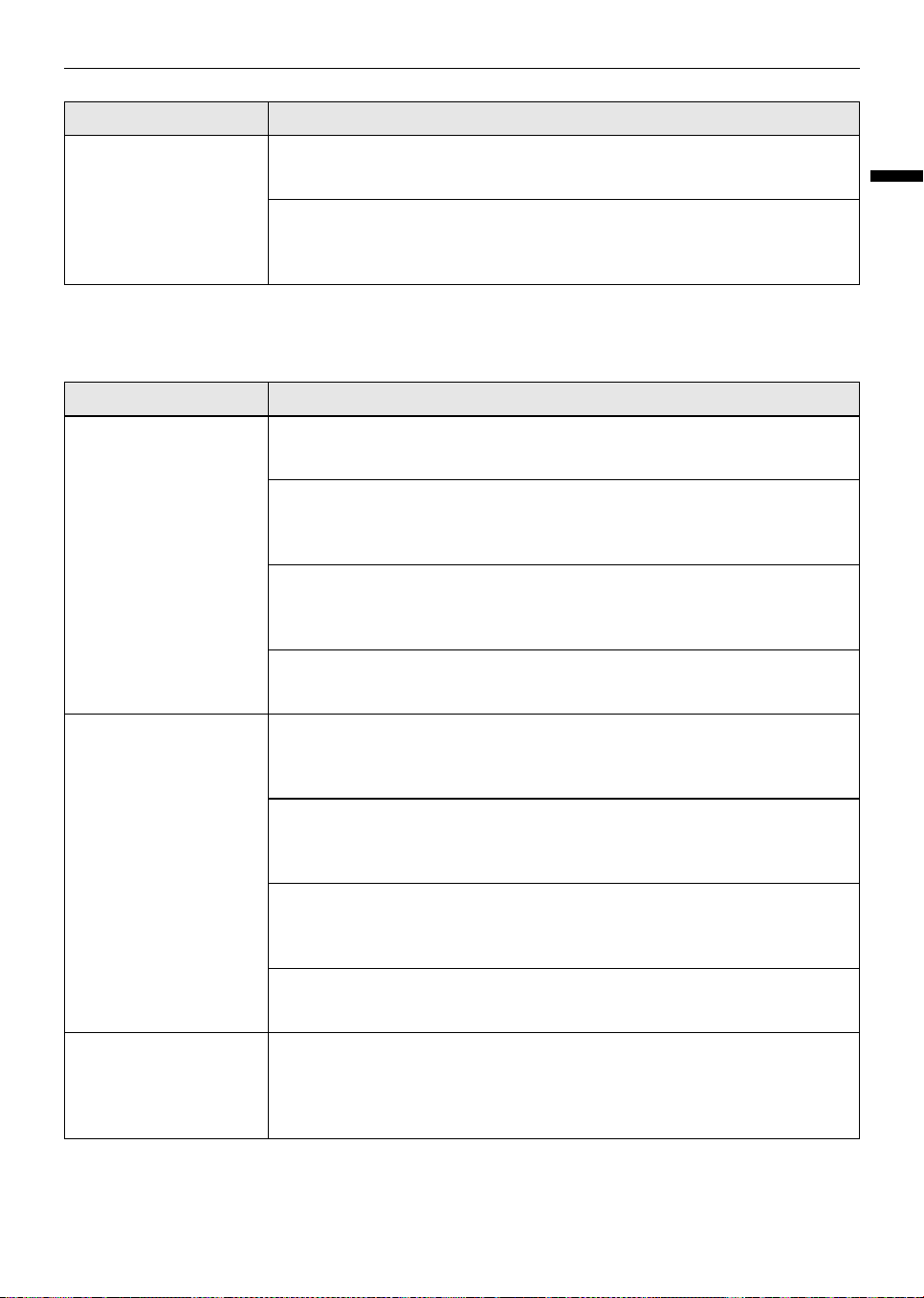
Condensation & Frost
The appliance contains
a bad smell.
Did you put in food with a strong smell?
• Store foods with strong smells in sealed containers.
Vegetables or fruit may have spoiled in the drawer.
• Throw away rotten vegetables and clean the vegetable drawer. Do not
store vegetables too long in the vegetable drawer.
Symptoms Possible Cause & Solution
There is condensation
inside the appliance or
on the bottom of the
vegetable drawer
cover.
Did you store hot food without cooling it first?
• Cool the hot food first before putting it inside the fridge or freezer.
Did you leave the appliance door open?
• Although the condensation will disappear soon after you close the
appliance door, you can wipe it with a dry cloth.
Do you open and close the appliance door too frequently?
• Condensation can form due to the temperature difference from the
outside. Wipe out the dampness with a dry cloth.
Did you put warm or moist food inside without sealing it in a container?
• Store food in a covered or sealed container.
Frost has formed in the
freezer compartment.
Doors may not be closed properly.
• Check if the food item inside the appliance is blocking the door and make
sure that the door is tightly closed.
Did you store hot food without cooling it first?
• Cool the hot food first before putting it in the fridge or freezer
compartment.
Is the air entry or exit of the freezer compartment blocked?
• Make sure that air entry or exit is not blocked so that the air can circulate
inside.
Is the freezer compartment overfilled?
• Maintain an appropriate space between items.
Frost or condensation
has formed inside or
outside the appliance.
Did you open and close the appliance door frequently or is the appliance
door improperly closed?
• Frosts or condensation can form if the outside air penetrates inside the
appliance.
Symptoms Possible Cause & Solution
global_main.book.book Page 29 Wednesday, July 17, 2024 8:28 AM
30
TROUBLESHOOTING
Parts & Features
Frost or condensation
has formed inside or
outside the appliance.
Is the installation environment humid?
• Condensation can appear on the exterior of the appliance if the installation
area is too humid or on a humid day such as a rainy day. Wipe off any
moisture with a dry cloth.
The side or front of the
appliance is warm.
There are anti condensation pipes fitted to these areas of the appliance
to reduce condensation forming from around the door area.
• The heat releasing pipe to prevent condensation is installed on the front
and side of the appliance. You may feel it particularly hot right after the
appliance is installed or during the summer. You can be assured that this
is not a problem and is quite normal.
There is water inside or
outside of the
appliance.
Is there water leakage around the appliance?
• Check if the water has leaked from a sink or another place.
Is there water on the bottom of the appliance?
• Check if the water is from the thawed frozen food or a broken or dropped
container.
Symptoms Possible Cause & Solution
The appliance door is
not closed tightly.
Is the appliance leaning forward?
• Adjust the front feet to raise the front side slightly.
Were the shelves properly assembled?
• Refit the shelves if needed.
Did you close the door with excessive force?
• If you apply too much force or speed when closing the door, it may remain
briefly open before closing. Make sure that you do not slam the door
closed. Close the door gently.
It is difficult to open
the appliance door.
Did you open the door right after you closed it?
• If you try to open the appliance door within one minute after you closed it,
you may have difficulties because of the pressure inside the appliance. Try
to open the appliance door again in a few minutes so that the internal
pressure stabilizes.
The inside lamp in the
appliance does not
turn on.
Lamp failure
• Close the door and re-open. If the lamp does not turn on, please contact
the LG Electronics customer information centre. Do not attempt removal
of the lamp.
Symptoms Possible Cause & Solution
global_main.book.book Page 30 Wednesday, July 17, 2024 8:28 AM
31
TROUBLESHOOTING
ENGLISH
Noises
Symptoms Possible Cause & Solution
The appliance is noisy
and generates
abnormal sounds.
Is the appliance installed on a weak floor or improperly levelled?
• Install the appliance on a solid and flat area.
Does the rear of the appliance touch the wall?
• Adjust the installation position to allow enough clearance around the
appliance.
Are objects scattered behind the appliance?
• Remove the scattered objects from behind the appliance.
Is there an object on top of the appliance?
• Remove the object on top of the appliance.
Clicking noises The defrost control will click when the automatic defrost cycle begins
and ends. The thermostat control (or appliance control on some models)
will also click when cycling on and off.
• Normal Operation
Rattling noises Rattling noises may come from the flow of appliance, the water line on
the back of the unit (for plumbed models only), or items stored around
the appliance.
• Normal Operation
Appliance is not resting evenly on the floor.
• Floor is weak or uneven or levelling legs need to be adjusted. See the Door
Alignment section.
Appliance with a compressor was moved while operating.
• Normal operation. If the compressor does not stop rattling after three
minutes, turn the power to the appliance off and then on again.
Whooshing noises Evaporator fan motor is circulating air through the fridge and freezer
compartments.
• Normal Operation
Air is being forced over the condenser by the condenser fan.
• Normal Operation
Gurgling noises Appliance flowing through the cooling system.
• Normal Operation
Popping noises Contraction and expansion of the inside walls due to changes in
temperature.
• Normal Operation
global_main.book.book Page 31 Wednesday, July 17, 2024 8:28 AM
32
TROUBLESHOOTING
Vibrating If the side or back of the appliance is touching a cabinet or wall, some of
the normal vibrations may make an audible sound.
• To eliminate the noise, make sure that the sides and back do not make any
contact with any wall or cabinet.
Buzzing sound from
the water tank. (Non
plumbed models only)
You may hear valve a buzzing sound from the water tank if the icemaker
is on and the water tank is empty.
• Fill the water tank or turn the icemaker off.
Symptoms Possible Cause & Solution
global_main.book.book Page 32 Wednesday, July 17, 2024 8:28 AM
Memo
global_main.book.book Page 33 Wednesday, July 17, 2024 8:28 AM
Memo
global_main.book.book Page 34 Wednesday, July 17, 2024 8:28 AM
Memo
global_main.book.book Page 35 Wednesday, July 17, 2024 8:28 AM
global_main.book.book Page 33 Wednesday, July 17, 2024 8:28 AM