

September 2012
© 2012 Fluke Corporation. All rights reserved. Specifications are subject to change without notice.
All product names are trademarks of their respective companies.
2700G Series
Reference Pressure Gauge
Users Manual
1.888.610.7664 sales@GlobalTestSupply.com
Fluke-Direct.com

LIMITED WARRANTY AND LIMITATION OF LIABILITY
Each Fluke product is warranted to be free from defects in material and workmanship under normal use and service. The warranty period is
one year and begins on the date of shipment. Parts, product repairs, and services are warranted for 90 days. This warranty extends only to
the original buyer or end-user customer of a Fluke authorized reseller, and does not apply to fuses, disposable batteries, or to any product
which, in Fluke's opinion, has been misused, altered, neglected, contaminated, or damaged by accident or abnormal conditions of operation
or handling. Fluke warrants that software will operate substantially in accordance with its functional specifications for 90 days and that it has
been properly recorded on non-defective media. Fluke does not warrant that software will be error free or operate without interruption.
Fluke authorized resellers shall extend this warranty on new and unused products to end-user customers only but have no authority to
extend a greater or different warranty on behalf of Fluke. Warranty support is available only if product is purchased through a Fluke
authorized sales outlet or Buyer has paid the applicable international price. Fluke reserves the right to invoice Buyer for importation costs of
repair/replacement parts when product purchased in one country is submitted for repair in another country.
Fluke's warranty obligation is limited, at Fluke's option, to refund of the purchase price, free of charge repair, or replacement of a defective
product which is returned to a Fluke authorized service center within the warranty period.
uke assumes no risk
for damage in transit. Following warranty repair, the product will be returned to Buyer, transportation prepaid (FOB Destination). If Fluke
determines that failure was caused by neglect, misuse, contamination, alteration, accident, or abnormal condition of operation or handling,
including overvoltage failures caused by use outside the product’s specified rating, or normal wear and tear of mechanical components,
Fluke will provide an estimate of repair costs and obtain authorization before commencing the work. Following repair, the product will be
returned to the Buyer transportation prepaid and the Buyer will be billed for the repair and return transportation charges (FOB Shipping
Point).
THIS WARRANTY IS BUYER'S SOLE AND EXCLUSIVE REMEDY AND IS IN LIEU OF ALL OTHER WARRANTIES, EXPRESS OR
IMPLIED, INCLUDING BUT NOT LIMITED TO ANY IMPLIED WARRANTY OF MERCHANTABILITY OR FITNESS FOR A PARTICULAR
PURPOSE. FLUKE SHALL NOT BE LIABLE FOR ANY SPECIAL, INDIRECT, INCIDENTAL, OR CONSEQUENTIAL DAMAGES OR
LOSSES, INCLUDING LOSS OF DATA, ARISING FROM ANY CAUSE OR THEORY.
Since some countries or states do not allow limitation of the term of an implied warranty, or exclusion or limitation of incidental or
consequential damages, the limitations and exclusions of this warranty may not apply to every buyer. If any provision of this Warranty is held
invalid or unenforceable by a court or other decision-maker of competent jurisdiction, such holding will not affect the validity or enforceability
of any other provision.
11/99
1.888.610.7664 sales@GlobalTestSupply.com
Fluke-Direct.com

i
Table of Contents
Title Page
Introduction .................................................................................................................... 1
How to Contact Fluke Calibration ................................................................................... 1
Standard Equipment....................................................................................................... 2
Safety Information .......................................................................................................... 2
Special Conditions for Safe Use ................................................................................ 3
Symbols ..................................................................................................................... 4
Display and Buttons ....................................................................................................... 5
Operation ....................................................................................................................... 6
How to Setup the Product .......................................................................................... 6
Engineering Units ................................................................................................. 6
Set Auto Off .......................................................................................................... 7
Show Battery Voltage ........................................................................................... 7
Display Actual Temperature ................................................................................. 7
Set Damping ......................................................................................................... 7
1.888.610.7664 sales@GlobalTestSupply.com
Fluke-Direct.com

2700G Series
Users Manual
ii
Set Sample Rate .................................................................................................. 7
Set Tare ............................................................................................................... 7
Function Lock ....................................................................................................... 8
Supervisory Mode ..................................................................................................... 8
Available Pressure Ranges ....................................................................................... 8
How to Set a Custom Engineering Unit or Scale....................................................... 9
Battery Life .................................................................................................................... 9
Maintenance .................................................................................................................. 9
How to Clean the Product ......................................................................................... 9
How to Change the Batteries .................................................................................... 10
Accessories ................................................................................................................... 11
USB Interface Cable ................................................................................................. 11
Power Module ........................................................................................................... 11
Serial Interface Instructions ........................................................................................... 13
Initiating Communication ........................................................................................... 13
List of Commands ..................................................................................................... 13
Parameter Units ............................................................................................................. 14
Error Codes ................................................................................................................... 15
Units Conversion ........................................................................................................... 16
Specifications ................................................................................................................ 18
Accuracy ................................................................................................................... 18
Media Compatibility ................................................................................................... 18
Environmental ........................................................................................................... 18
Mechanical Specifications ......................................................................................... 19
Available Pressure Ranges ....................................................................................... 20
1.888.610.7664 sales@GlobalTestSupply.com
Fluke-Direct.com

iii
List of Tables
Table Title Page
1. Symbols ................................................................................................................................. 4
2. Display and Buttons .............................................................................................................. 5
3. Units Conversion ................................................................................................................... 16
1.888.610.7664 sales@GlobalTestSupply.com
Fluke-Direct.com

v
List of Figures
Figure Title Page
1. The Product ........................................................................................................................... 5
2. Change the Batteries ............................................................................................................. 10
3. USB Power Module and Universal Connectors ..................................................................... 12
1.888.610.7664 sales@GlobalTestSupply.com
Fluke-Direct.com

1
Introduction
The 2700G Series Reference Pressure Gauges (the
Product) are high-accuracy digital pressure test gauges.
Accurate to 0.02 % FS, the Product can be used as a
calibration reference, or in applications where high-
accuracy pressure measurement is required.
The Product features user-configurable functions that
include:
• Sampling rate
• Tare
• Damping
• Auto off
• Min Max
When the Product is configured, you can lock its settings
and use password protection to prevent configuration
changes. See the “Supervisory Mode” section.
1.888.610.7664 sales@GlobalTestSupply.com
Fluke-Direct.com

2700G Series
Users Manual
2
Standard Equipment
The Product ships with:
• Protective Cover (installed)
• Three AA Alkaline Batteries (installed)
• Safety Information (printed)
• Report of Calibration
• Manuals CD-ROM with translated Users Manuals
• USB Cable
• USB Power Adapter
• NPT to ¼ BSP Male Adapter
• NPT to M20 x 1.5 Male Adapter
Safety Information
A Warning identifies conditions and procedures that are
dangerous to the user. A Caution identifies conditions
and procedures that can cause damage to the Product or
the equipment under test.
XWWarning
To prevent injury, only assemble and operate
high-pressure systems if you know the
correct safety procedures. High-pressure
liquids and gases are hazardous and the
energy from them can be released without
warning.
To prevent possible electrical shock, fire, or
personal injury:
• Read all safety Information before you
use the Product.
• Use the Product only as specified, or the
protection supplied by the Product can
be compromised.
• Do not use the Product around explosive
gas, vapor, or in damp or wet
environments.
• Do not use and disable the Product if it
is damaged.
• Remove the batteries if the Product is
not used for an extended period of time,
or if stored in temperatures above 50 °C.
If the batteries are not removed, battery
leakage can damage the Product.
1.888.610.7664 sales@GlobalTestSupply.com
Fluke-Direct.com

Reference Pressure Gauge
Safety Information
3
• Replace the batteries when the low
battery indicator shows to prevent
incorrect measurements.
• The battery door must be closed and
locked before you operate the Product.
WCaution
To prevent possible damage to Product or to
equipment under test:
• The display reads “OL” when the
pressure source is above the Product
range limit. The pressure source must
immediately be removed.
• Do not apply more than the maximum
torque specified. Maximum torque
specified is 20 Nm = 15 ft-lb.
Special Conditions for Safe Use
Misuse
If the Product is exposed to overpressure or sudden
physical shock (such as being dropped) examine it for
damage that can cause a safety issue. If necessary, send
the Product for examination to Fluke. Refer to the How to
Contact Fluke Calibration section.
WWarning
To prevent possible fire, or personal injury:
• Do not use the Product with flammable
substances.
• The Product is intended for installation
only in locations with protection against
the entry of solid unwanted objects or
water that can compromise safety.
1.888.610.7664 sales@GlobalTestSupply.com
Fluke-Direct.com

2700G Series
Users Manual
4
Symbols
Symbols used on the Product and in this manual are in Table 1.
Table 1. Symbols
Symbol Meaning Symbol Meaning
W
Risk of danger. Important information. See
manual.
P Conforms to European Union directives.
X Hazardous voltage. Risk of electrical shock. )
Conforms to relevant North American Safety
Standards.
Conforms to relevant Australian standards. ~
This product complies with the WEEE
Directive (2002/96/EC) marking
requirements. The affixed label indicates that
you must not discard this electrical/electronic
product in domestic household waste.
Product Category: With reference to the
equipment types in the WEEE Directive
Annex I, this product is classed as category 9
"Monitoring and Control Instrumentation”
product. Do not dispose of this product as
unsorted municipal waste. Go to Fluke’s
website for recycling information.
1.888.610.7664 sales@GlobalTestSupply.com
Fluke-Direct.com
Reference Pressure Gauge
Display and Buttons
5
Display and Buttons
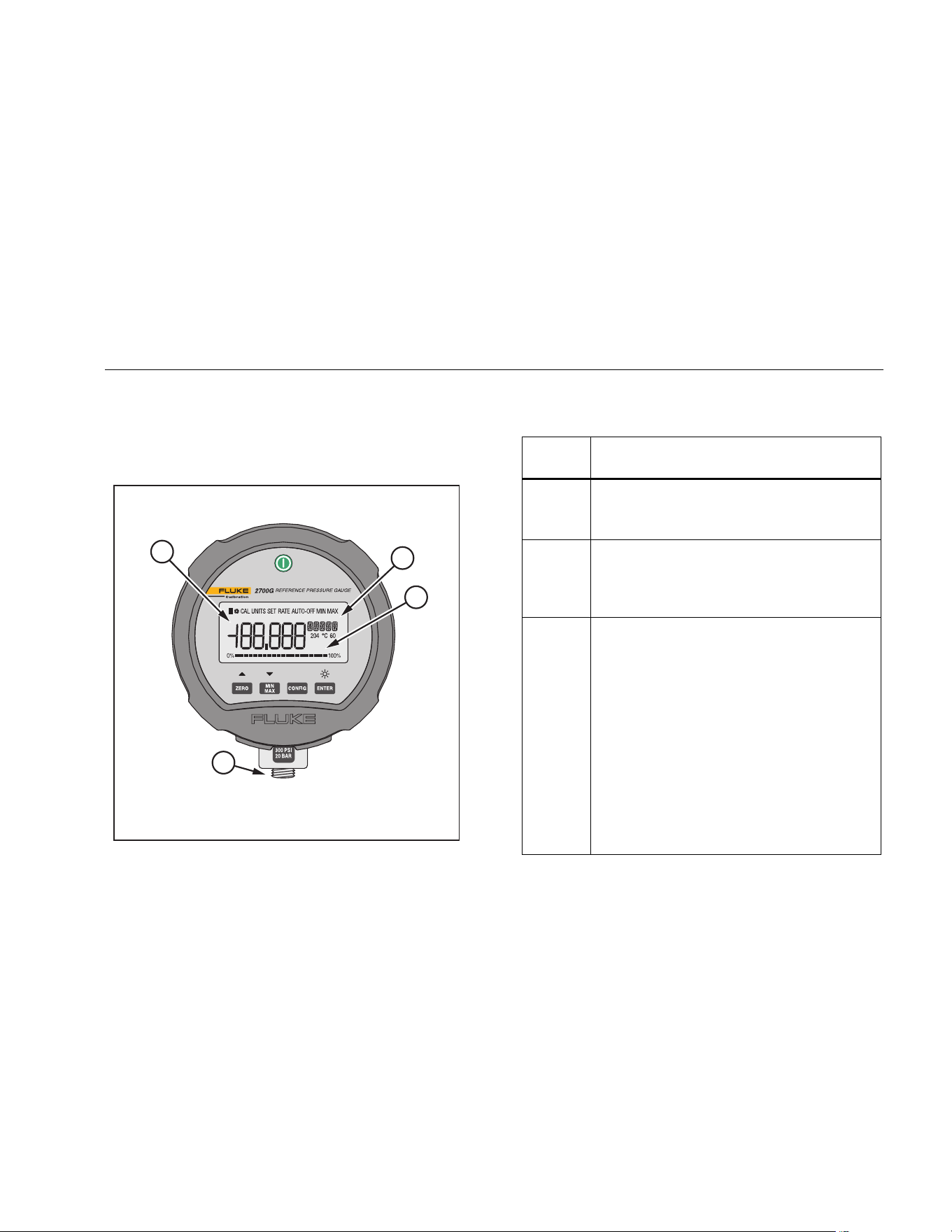
The Display and Buttons are shown in Figure 1. The
Buttons are in Table 2.
3
1
2
4
gsn001.eps
Figure 1. The Product
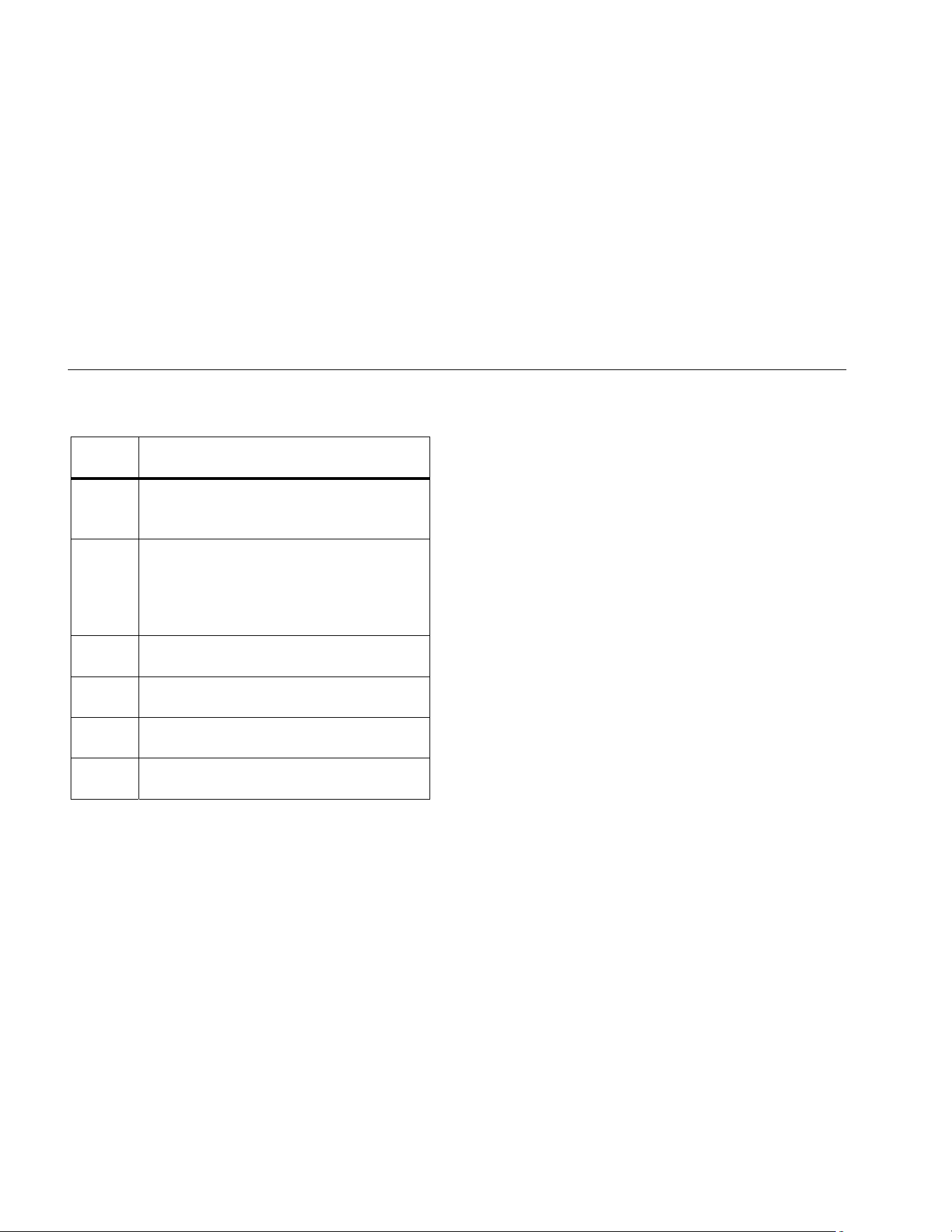
Table 2. Display and Buttons
Item Function
Push to turn on the Product. Push again to
turn off the Product.
Zeros the display. In Configure Mode, push
the button to move forward through the
menus.
MIN MAX records minimum and maximum
pressure values and saves them to
memory. Push to show maximum
(MAX) indication. Push again to show
minimum (MIN) indication. After 2 seconds,
the gauge goes back to live operation.
To clear the MIN MAX memory values,
push and hold for 2 seconds until CLr
is shown.
In Configure Mode, push () to move
backward through the menus.
1.888.610.7664 sales@GlobalTestSupply.com
Fluke-Direct.com
2700G Series
Users Manual
6
Table 2. Display and Buttons (cont.)
Item Function
Push to go to setup and configuration
menus.
Push to make a selection. When the
Product is not in Configuration mode, push
to turn on the backlight. Push again to turn
off the backlight.
NPT Connector
Pressure Display
Engineering Units
Bargraph
Operation
The subsequent sections tell you how to operate the
Product. Push to turn on the Product.
The analog bar graph at the bottom of the display shows
the applied-pressure level relative to the full range of the
gauge.
Note
If you record a Tare value, the pressure shown
is not the actual pressure applied.
How to Setup the Product
Before you use the product, it is necessary to configure it
for your application. Push to go to the Setup menu.
Each time is pushed, the display goes to the
subsequent function. Push or to change the
parameter value. When a parameter is set, push to
exit the configuration menu or to move to the next
parameter.
Engineering Units
The Product’s default engineering unit shows psi. To
change this, push and to move through the
standard engineering units plus one custom unit/scale.
When the necessary unit shows, push or .
Pressure now shows in the chosen engineering units.
See the Specifications section for a list of available
1.888.610.7664 sales@GlobalTestSupply.com
Fluke-Direct.com

Reference Pressure Gauge
Operation
7
engineering units. See the Supervisory Mode section for
instructions to set up custom units.
Set Auto Off
Auto Off can be set in 1 minute increments from 1 to 30
minutes or you can turn off the function for continuous
Product operation. The Product is configured for 30
minutes. Push and to set the necessary interval.
The “off” position is at the low end of the selections, less
than 1 minute.
Show Battery Voltage
Actual battery voltage and a percent-of-life bargraph
show the battery charge. No adjustments are made in this
parameter.
Display Actual Temperature
The Product is temperature compensated This parameter
shows the temperature measured by the internal sensor.
Push or to show degrees F or C.
Set Damping
Selections are “on” and “off” . Damping smooths
readings from pulsating pressure sources.
Set Sample Rate
This function finds how many times pressure is sampled
and the display is updated. Selections are 0.5, 1, 3, and
10 samples/second. Note that 10/second gives the fastest
response time.
Set Tare
Use this function to set a constant offset value that is then
subtracted from the measured pressure. For example, if a
tare is set at 30 psi, and the measured pressure is 37 psi,
7 psi is shown.
A pressure of 27 psi is shown as -3 psi.
Push and to set the tare value. The value is in
relation to the engineering units and resolution selected
for display. Tare value can be set to the maximum range
of the gauge.
For safety, the bar graph always shows the actual
pressure in relation to the full range of the gauge
regardless of the tare position. This is done to make sure
that with a “0” reading pressure is being applied to the
gauge.
1.888.610.7664 sales@GlobalTestSupply.com
Fluke-Direct.com

2700G Series
Users Manual
8
Function Lock
When set, access to each of the settable parameters
above can be turned “off” to prevent unauthorized
configuration changes. This is done with password
protection in Supervisory Mode. Push to access
Supervisory Mode or to go back to normal operation.
Supervisory Mode
If necessary, each user-configurable parameter can be
edited when you receive the Product. Some parameters
are locked and must be unlocked to configure them. Use
Supervisory mode to do this.
When you are in the Configure menu, and FUnC LOCK is
shown, it means that there are locked parameters.
To disable function lock:
1. Push . 0 PWRD is then shown.
2. The password “101” is required to unlock
Supervisory mode. Push to put in the password
entry. Hold or down to move faster through the
selections by a factor of 10. When you stop the
counter, push and again to move forward or
backward by a factor of 1. The password is factory
set and cannot be changed.
3. Push .
From this point each parameter can be locked or
unlocked. Push and to select UnLOC or LOC for
each parameter. To move to the subsequent parameter,
push .
You can access, lock, or unlock these functions:
• Zero function (enable/disable)
• Set pressure units (enable/disable)
• Auto shutdown adjustment (enable/disable)
• Damping settings (enable/disable)
• Sample rate setting (enable/disable)
• Tare setting (enable/disable)
• Custom engineering units (set scale factor)
When a function is locked, it cannot be accessed or
changed from its current condition until you go to
Supervisory Mode and unlock it.
Available Pressure Ranges
Available pressure ranges are shown in the Specifications
section.
1.888.610.7664 sales@GlobalTestSupply.com
Fluke-Direct.com

Reference Pressure Gauge
Battery Life
9
How to Set a Custom Engineering Unit or Scale
The last menu selection in Supervisory Mode is
SET FACTR. You can set a multiplier factor from 0.001 to
100 to make a custom scale. The set factor is multiplied
by the psi measured and the result is shown.
Example: 40 psi is the equivalent of 1000 lbs of product in
a tank. It is necessary to show the product weight with a
100 psi gauge. If you set a factor of 25, 40 psi pressure
shows as 1000 (40 x 25). The engineering unit shown is
Cust (custom).
Battery Life
Battery life is approximately 75 hours of operation with
the backlight off. When the battery voltage is low, the low-
battery icon () shows on the top left of the display. To
replace the batteries, see the How to Change the
Batteries section.
Maintenance
How to Clean the Product
Clean the Product with a soft cloth dampened with water
or water and weak soap.
WCaution
To prevent possible damage to the Product,
do not use solvents or abrasive cleansers.
WCaution
For safe operation and maintenance of the
product:
• Repair the Product before use if the
battery leaks.
• Remove batteries to prevent battery
leakage and damage to the Product if it
is not used for an extended period.
• Be sure that the battery polarity is
correct to prevent battery leakage.
• Have an approved technician repair the
Product.
1.888.610.7664 sales@GlobalTestSupply.com
Fluke-Direct.com
2700G Series
Users Manual
10
How to Change the Batteries
XWWarning
To prevent possible electrical shock, fire, or
personal injury, have an approved technician
repair the Product.
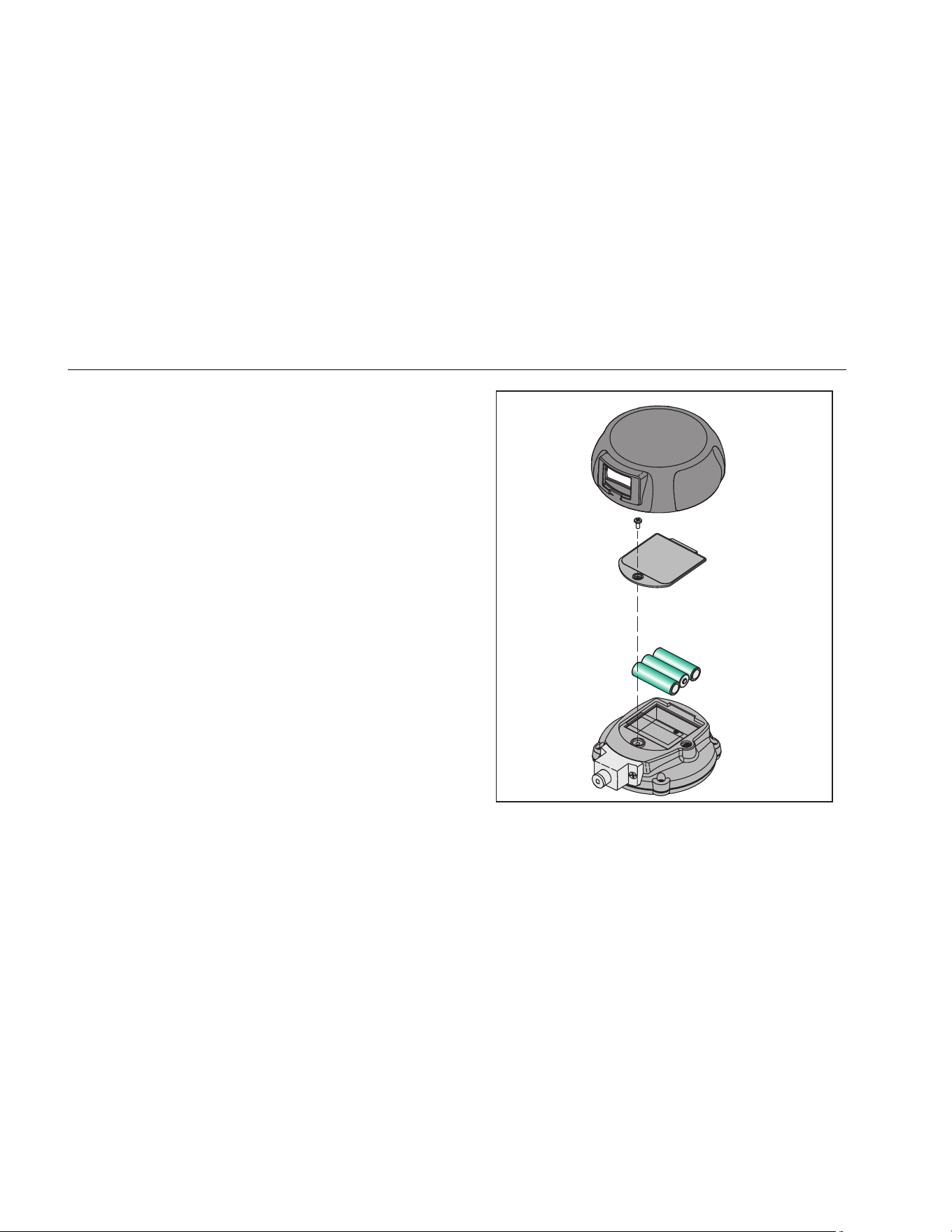
To change the batteries, see Figure 2:
1. Pull off the Product cover.
2. Use a Phillips screwdriver to loosen the captive
screw on the battery door.
3. Remove the battery door.
4. Replace the three AA batteries.
5. Install the battery door again.
6. Tighten the captive screw on the battery door.
7. Return the Product to its Holster.
gsn002.eps
Figure 2. Change the Batteries
1.888.610.7664 sales@GlobalTestSupply.com
Fluke-Direct.com

Reference Pressure Gauge
Accessories
11
Accessories
USB Interface Cable
The Product includes an USB interface cable. The input
jack is on the back of the Product. You can use serial
communication to configure and calibrate the Product and
move measurement data from the Product to a PC. For
specifications on the interface, see the Specifications
section.
Power Module
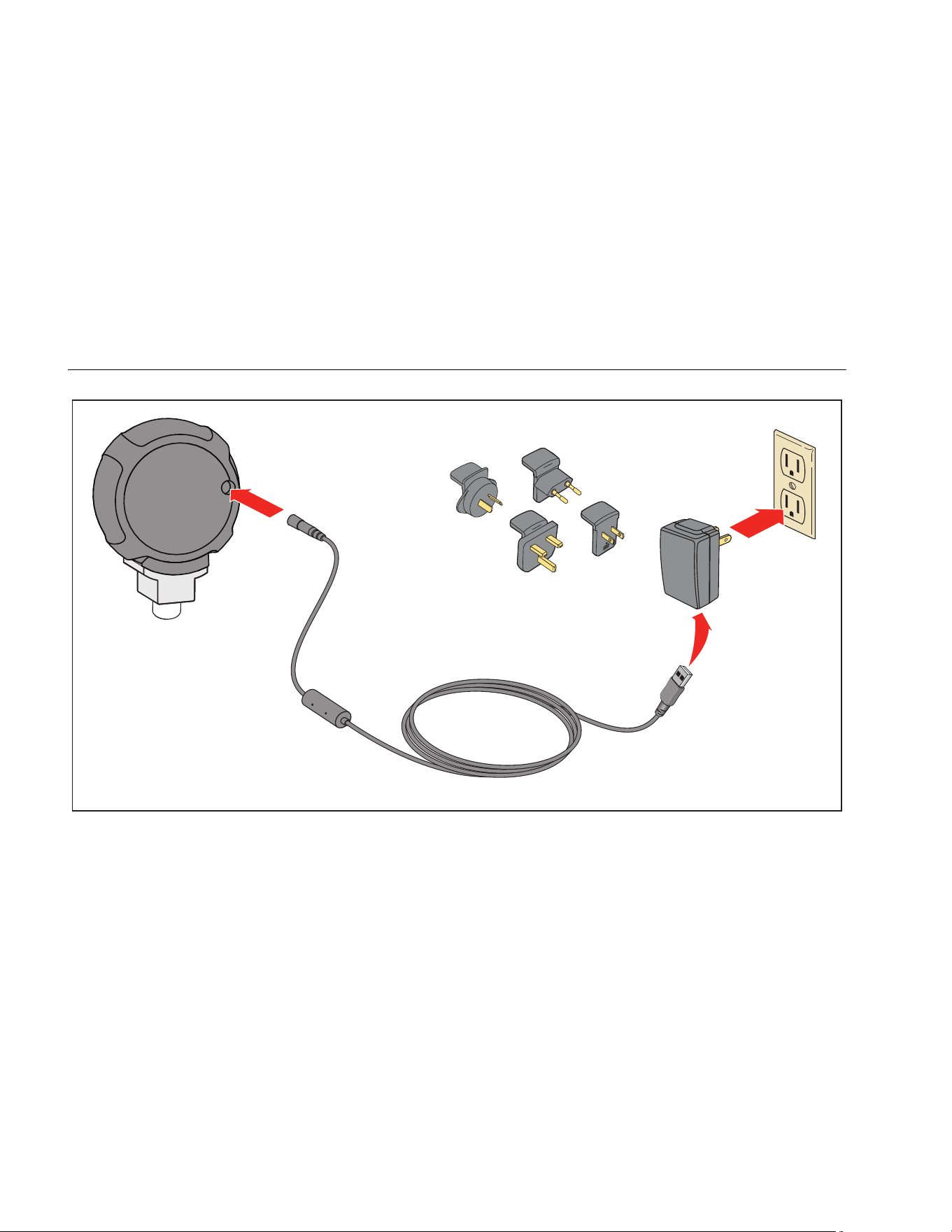
The Product includes a USB power module. See Figure 3.
1.888.610.7664 sales@GlobalTestSupply.com
Fluke-Direct.com
2700G Series
Users Manual
12
gsn003.eps
Figure 3. USB Power Module and Universal Connectors
1.888.610.7664 sales@GlobalTestSupply.com
Fluke-Direct.com

Reference Pressure Gauge
Serial Interface Instructions
13
Serial Interface Instructions
The subsequent sections tell you how to set up the
Product for serial communication.
Initiating Communication
Terminal communication can be setup with terminal
communication Software on a PC. The terminal must be
set as follows:
• Bits per second: 9600
• Data bits: 8
• Parity: None
• Stop bits: 1
• Flow control: None
• Local echo on
List of Commands
Use the subsequent list of commands to communicate
with the Gauge:
*CLS Clears the error queue
FAULT? Returns an error code from the
error queue
*IDN? Identification query. Returns the
manufacturer, model number, and
firmware revision level of the
Calibrator.
TARE Tares the offset pressure of the
reading on the calibrator
TARE? Returns the current tare value
PRES_UNIT? Returns the pressure unit for the
upper display
PRES_UNIT Sets the pressure unit for the
display
ZERO_MEAS Zeros pressure of the calibrator
ZERO_MEAS? Returns the current zero offset
value
MINMAX_RST Resets the minimum and
maximum recorded values
1.888.610.7664 sales@GlobalTestSupply.com
Fluke-Direct.com

2700G Series
Users Manual
14
MIN? Returns the minimum recorded
value
MAX? Returns the maximum recorded
value
TEMP? Returns temperature in the chosen
units
CAL_STORE Stores calibration data.
CUST_MULT? Sets the multiplier for the custom
unit type
STREAM_OFF Turns off streaming data
STREAM_ON Turns on streaming data
VAL? Returns the measured pressure
value in selected units
TEMP_UNIT Used to set temperature unit
TEMP_UNIT? Returns temperature unit
Parameter Units
The subsequent list of units is used with the Product:
psi Pressure in pounds per
square inch
bar Pressure in bars
mBar Pressure in millibars
kg/cm2 Pressure in kilograms per
centimeter squared
inH2O4C Pressure in inches of water at 4 °C
inH2O20C Pressure in inches of water at
20 °C
inH2O60F Pressure in inches of water at
60 °F
mH2O4C Pressure in meters of water at 4 °C
mH2O20C Pressure in meters of water at
20 °C
cmH2O4C Pressure in centimeters of water at
4 °C
cmH2O0C Pressure in centimeters of water at
20 °C
ftH2O4C Pressure in feet of water at 4 °C
ftH2O20C Pressure in feet of water at 20 °C
1.888.610.7664 sales@GlobalTestSupply.com
Fluke-Direct.com

Reference Pressure Gauge
Error Codes
15
ftH2O60F Pressure in feet of water at 60 °F
iNHg0C Pressure in inches of mercury at
0 °C
mmHg0C Pressure in millimeters of mercury
at 0 °C
kpal Pressure in kilopascals
Far Temperature in Fahrenheit
Cel Temperature in Celsius
mSW Pressure in meters of SeaWater
ftSW Pressure in feet of SeaWater
MPA Pressure in MegaPascal
torr Pressure in Torr (mmHG0C)
Error Codes
The gauge uses the subsequent error codes:
101 A non-numeric entry was received
where it should be a numeric entry
102 Too many significant digits entered
103 Invalid units or parameter value
received
105 Entry is above the upper limit of
the allowable range
106 Entry is below the lower limit of the
allowable range
108 A required command parameter
was missing
109 An invalid pressure unit was
received
117 An unknown command was
received
120 The serial input buffer overflowed
121 Too many entries in the command
line
122 Pressure module not connected
1.888.610.7664 sales@GlobalTestSupply.com
Fluke-Direct.com
2700G Series
Users Manual
16
Units Conversion
See Table 3 for units and their conversion factors.
Table 3. Units Conversion
Unit Name Conversion Factor (from kPa) Conversion Factor (to kPa)
psi 0.14503773773 6.894759
bar 0.01 100
MPa 0.001 1000
kgf/cm2 0.010197162130 98.06652
inH2O @ 4 °C 4.014742 0.249082
inH2O @ 20 °C 4.021845 0.248642
inH2O @ 60 °F 4.0185886 0.248844
ftH2O @ 4 °C 0.33456183 2.988984
ftH2O @ 20 °C 0.33515375 2.983705
ftH2O @ 60 °F 0.33488238 2.986123
1.888.610.7664 sales@GlobalTestSupply.com
Fluke-Direct.com

Reference Pressure Gauge
Units Conversion
17
Table 3. Units Conversion (cont.)
Unit Name Conversion Factor (from kPa) Conversion Factor (to kPa)
cmH2O @ 4 °C 10.19744 0.09806383
cmH2O @ 20 °C 10.21549 0.09789056
mH2O @ 4 °C 0.1019744 9.806383
mH2O @ 20 °C 0.1021549 9.789056
kPa 1 1
mbar 10 0.1
inHg @ 0 °C 0.2952998 3.386387
mmHg @ 0 °C 7.500618 0.133322
Torr 7.500618 0.133322
ftSW @ 0 °C 0.325408 3.073062
mSW 0.09918444 10.08222
1.888.610.7664 sales@GlobalTestSupply.com
Fluke-Direct.com

2700G Series
Users Manual
18
Specifications
Accuracy
Positive Pressure ............................................................................ ±0.02 % FS
Vacuum .......................................................................................... ±0.05 % FS
Temperature Compensation ........................................................... 18 °C to 28 °C (65 °F to 82 °F) to rated accuracy
Note: For temperatures from 0 °C to 18 °C and 28 °C to 50 °C, add .003 % FS/°C
Media Compatibility
15, 30 psi ........................................................................................ any clean dry non-corrosive gas
100, 300, 500, 1000 psi .................................................................. any liquids or gases compatible with 316 stainless steel
Above 1000 psi ............................................................................... any non-flammable, non-toxic, non-explosive,
non-oxidizing liquid or gas compatible with 316
stainless steel.
Environmental
Operating Temperature .................................................................. 0 °C to 50 °C (32 °F to 122 °F)
Storage .......................................................................................... -20 °C to +70 °C (-4 °F to +158 °F)
Humidity ......................................................................................... 10 % to 90 % RH Non-condensing
Altitude ............................................................................................ 2000 meters (6561.68 ft.)
Pollution Degree ............................................................................ 2
Agency Approvals ........................................................................... P, , )
1.888.610.7664 sales@GlobalTestSupply.com
Fluke-Direct.com

Reference Pressure Gauge
Specifications
19
Mechanical Specifications
Dimensions .................................................................................... (11.4 x 12.7) cm, depth = 3.7 cm
(4.5 x 5) in, depth = 1.5 in
(Without Protective Cover)
Pressure
Connection ............................................................................. ¼ in NPT Male
Housing .................................................................................. Cast ZNAL
Display ............................................................................................ 5-1/2 Digits, 16.53 mm (0.65 in) high
20-Segment bar graph, 0 to 100 %
Power
Battery ................................................................................... three size AA alkaline batteries
Battery Life ............................................................................ 75 hours typical without backlight
1.888.610.7664 sales@GlobalTestSupply.com
Fluke-Direct.com

2700G Series
Users Manual
20
Available Pressure Ranges
Model
Number
2030-
BG100K
2030-
BG200K
2030-
BG700K
2030-
BG2M
2030-
BG3.5M
2030-
BG7M
2030-
G20M
2030-
G35M
2030-
G70M
Pressure
Range (psi)
15 30 100 300 500 1000 3000 5000 10000
Pressure
Range
(MPa)
0.1 0.2 0.7 2 3.5 7 20 35 70
Vacuum
Range (psi)
-15 -15 -12 -12 -12 -12 0 0 0
Vacuum
Range (kPa)
-100 -100 -80 -80 -80 -80 0 0 0
Burst
Pressure
(psi)
45 90 1000 2000 2000 10000 10000 10000 15000
Burst
Pressure
(MPa)
0.3 0.6 7 14 14 70 70 70 100
Proof
Pressure
(psi)
30 60 200 600 1000 2000 6000 8000 13000
Proof
Pressure
(MPa)
0.2 0.4 1.4 4 7 14 40 55 90
1.888.610.7664 sales@GlobalTestSupply.com
Fluke-Direct.com