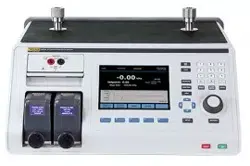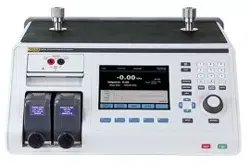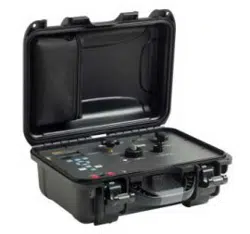

PN 4222409
February 2013
© 2013 Fluke Corporation. All rights reserved. Specifications are subject to change without notice.
All product names are trademarks of their respective companies.
3130
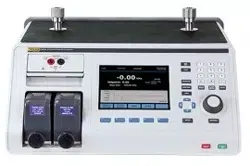
Portable Pressure Calibrator
Users Manual
1.888.610.7664 sales@GlobalTestSupply.com
Fluke-Direct.com

LIMITED WARRANTY AND LIMITATION OF LIABILITY
Each Fluke product is warranted to be free from defects in material and workmanship under normal use and
service. The warranty period is one year and begins on the date of shipment. Parts, product repairs, and
services are warranted for 90 days. This warranty extends only to the original buyer or end-user customer of
a Fluke authorized reseller, and does not apply to fuses, disposable batteries, or to any product which, in
Fluke's opinion, has been misused, altered, neglected, contaminated, or damaged by accident or abnormal
conditions of operation or handling. Fluke warrants that software will operate substantially in accordance
with its functional specifications for 90 days and that it has been properly recorded on non-defective media.
Fluke does not warrant that software will be error free or operate without interruption.
Fluke authorized resellers shall extend this warranty on new and unused products to end-user customers
only but have no authority to extend a greater or different warranty on behalf of Fluke. Warranty support is
available only if product is purchased through a Fluke authorized sales outlet or Buyer has paid the
applicable international price. Fluke reserves the right to invoice Buyer for importation costs of
repair/replacement parts when product purchased in one country is submitted for repair in another country.
Fluke's warranty obligation is limited, at Fluke's option, to refund of the purchase price, free of charge repair,
or replacement of a defective product which is returned to a Fluke authorized service center within the
warranty period.
To obtain warranty service, contact your nearest Fluke authorized service center to obtain return
authorization information, then send the product to that service center, with a description of the difficulty,
postage and insurance prepaid (FOB Destination). Fluke assumes no risk for damage in transit. Following
warranty repair, the product will be returned to Buyer, transportation prepaid (FOB Destination). If Fluke
determines that failure was caused by neglect, misuse, contamination, alteration, accident, or abnormal
condition of operation or handling, including overvoltage failures caused by use outside the product’s
specified rating, or normal wear and tear of mechanical components, Fluke will provide an estimate of repair
costs and obtain authorization before commencing the work. Following repair, the product will be returned to
the Buyer transportation prepaid and the Buyer will be billed for the repair and return transportation charges
(FOB Shipping Point).
THIS WARRANTY IS BUYER'S SOLE AND EXCLUSIVE REMEDY AND IS IN LIEU OF ALL OTHER
WARRANTIES, EXPRESS OR IMPLIED, INCLUDING BUT NOT LIMITED TO ANY IMPLIED WARRANTY
OF MERCHANTABILITY OR FITNESS FOR A PARTICULAR PURPOSE. FLUKE SHALL NOT BE LIABLE
FOR ANY SPECIAL, INDIRECT, INCIDENTAL, OR CONSEQUENTIAL DAMAGES OR LOSSES,
INCLUDING LOSS OF DATA, ARISING FROM ANY CAUSE OR THEORY.
Since some countries or states do not allow limitation of the term of an implied warranty, or exclusion or
limitation of incidental or consequential damages, the limitations and exclusions of this warranty may not
apply to every buyer. If any provision of this Warranty is held invalid or unenforceable by a court or other
decision-maker of competent jurisdiction, such holding will not affect the validity or enforceability of any other
provision.
1.888.610.7664 sales@GlobalTestSupply.com
Fluke-Direct.com

i
Table of Contents
Title Page
Introduction ........................................................................................................ 1
How to Contact Fluke Calibration ..................................................................... 2
Safety Information ............................................................................................. 2
Standard Equipment ........................................................................................... 3
Features .............................................................................................................. 4
Buttons ........................................................................................................... 4
Display ........................................................................................................... 5
Calibrator Interface ........................................................................................ 6
Typical Connections ...................................................................................... 7
Power Options .................................................................................................... 9
Product Startup .................................................................................................. 9
Product Menus ................................................................................................... 9
Top-Level Menu ............................................................................................ 11
Main Menu .................................................................................................... 11
Display Configuration Menu ......................................................................... 12
Zero Function ..................................................................................................... 13
Internal Sensor and Pressure Module (non-absolute) .................................... 13
Absolute Pressure .......................................................................................... 13
Other Menu Controlled Functions ..................................................................... 14
Contrast Main Menu ...................................................................................... 14
Lock or Unlock the Display Configuration ................................................... 14
Save and Recall Menu Setups ....................................................................... 15
Automatic Shutdown ..................................................................................... 15
Activate and Deactivate a Display ................................................................. 16
Damping ........................................................................................................ 16
HART Resistor .............................................................................................. 16
Pump Limits .................................................................................................. 16
Initial Setup and Basic Pressure Generation ...................................................... 17
Pressure Measurement ....................................................................................... 17
Media Compatibility ...................................................................................... 18
External Modules ........................................................................................... 18
Measure and Source Current (4… 20 mA) .................................................... 18
Measure Voltage ............................................................................................ 20
Pressure Switch Test ...................................................................................... 21
Calibrate Transmitters ................................................................................... 23
Use the mA Measurement Function .......................................................... 23
1.888.610.7664 sales@GlobalTestSupply.com
Fluke-Direct.com

3130
Users Manual
ii
Calibrate a Pressure-to-Current Transmitter ............................................. 24
Calibrate a Pressure-to-Voltage Transmitter ............................................. 25
%-Error Function ...................................................................................... 26
Storage Capability .............................................................................................. 29
Remote Operation .............................................................................................. 29
Set Up the RS-232 Port for Remote Control ................................................. 30
Change from Remote to Local Operation ...................................................... 31
Command Use ............................................................................................... 31
Character Processing ..................................................................................... 32
Response Data Types .................................................................................... 32
Calibrator Status ............................................................................................ 33
Error Queue ............................................................................................... 33
Input Buffer ............................................................................................... 33
Remote Commands and Error Codes ............................................................ 33
Enter Commands ........................................................................................... 36
Common Commands ................................................................................. 36
Calibrator Commands ............................................................................... 37
Maintenance ....................................................................................................... 43
User-Replaceable Parts and Accessories ........................................................... 43
Specifications ..................................................................................................... 44
Electrical Specification .................................................................................. 44
Pressure ......................................................................................................... 44
Accuracy ........................................................................................................ 44
Loop Power ................................................................................................... 44
Mechanical Specification .............................................................................. 44
Environmental ............................................................................................... 44
Standards and Agency Approval ................................................................... 45
Power ............................................................................................................. 45
1.888.610.7664 sales@GlobalTestSupply.com
Fluke-Direct.com

iii
List of Tables
Table Title Page
1. Symbols .................................................................................................................. 3
2. Mode Concurrency ................................................................................................. 13
3. Common Commands .............................................................................................. 33
4. Product Commands ................................................................................................ 34
5. Parameter Units ...................................................................................................... 35
6. Error Codes ............................................................................................................ 36
7. Replaceable Parts ................................................................................................... 43
1.888.610.7664 sales@GlobalTestSupply.com
Fluke-Direct.com

v
List of Figures
Figure Title Page
1. Buttons ................................................................................................................... 4
2. Display ................................................................................................................... 5
3. Controls .................................................................................................................. 6
4. External Pressure Supply ....................................................................................... 7
5. Pressure Supply with Internal Pump ...................................................................... 8
6. Pressure Measurement ........................................................................................... 8
7. Menu Map .............................................................................................................. 10
8. Top-Level Menu ..................................................................................................... 11
9. Main Menu ............................................................................................................. 12
10. Display Configuration Menu .................................................................................. 12
11. Absolute Pressure ................................................................................................... 13
12. Contrast Menu ........................................................................................................ 14
13. Display Configuration Menu .................................................................................. 14
14. Setups Menu ........................................................................................................... 15
15. Auto Shutdown Menu ............................................................................................ 15
16. Active Display Menu ............................................................................................. 16
17. Pressure Module ..................................................................................................... 18
18. Measure and Sourcing Current ............................................................................... 19
19. Measure Voltage .................................................................................................... 20
20. Switch Test Connections ........................................................................................ 21
21. Switch Test Screen ................................................................................................. 21
22. Switch Test Screen (Open) ..................................................................................... 22
23. Opened Switch Reading ......................................................................................... 22
24. Switch Test and Deadband Results ........................................................................ 23
25. Passive and Active Screens .................................................................................... 23
26. Calibrate a Pressure-to-Current Transmitter .......................................................... 24
27. Calibrate a Pressure-to-Voltage Transmitter .......................................................... 25
28. Connections with a Pressure Transmitter with % Error Function .......................... 26
29. Port Setting Screen ................................................................................................. 27
30. Loop Power Screen ................................................................................................ 27
31. Set Unit Screen ....................................................................................................... 27
32. Setting the Upper Limit .......................................................................................... 28
33. % ERROR Screen .................................................................................................. 28
34. Saved Upper and Lower Limits ............................................................................. 28
35. Remote Operation .................................................................................................. 29
1.888.610.7664 sales@GlobalTestSupply.com
Fluke-Direct.com

1
Introduction
The Fluke 3130 (the Product) is a portable pressure calibrator that can use two methods
to source pressure:
• An internal, electronic pump that has a range of -12 psi to 300 psi (-0.8 bar to 20 bar)
• An external connection that lets you use externally-sourced, clean, dry air to regulate
pressures to a maximum of 300 psi
Product features include:
• A built-in needle valve for metering in pressure
• Variable volume for small pressure changes
• An internal pressure sensor
• Measurement of 0 V dc to 30 V dc and 0 mA to 24 mA from a unit under test (UUT).
• Sourcing current of 0 mA to 24 mA to a UUT also available
• A 24 V dc loop power supply that uses dedicated front panel jacks. For voltage
transmitters, a dedicated 24 V dc loop power supply is available in volts measure
mode. mA loop power is supplied from the left-most jacks.
• An internal, high-capacity NiMH battery
• A universal power supply (90 V ac to 250 V ac) that can charge the battery pack
while it powers the Product
• Pressure measurement with the internal pressure sensor or with a Fluke 700 Series
external pressure module
• The Product can show pressure units in these different values:
• psi
• MPa
• kPa
• inHg 0°C
• mmHg 0°C
• kg/cm
2
• mmH
2
O 4°C
• mH2O20°C
• inH
2
O 4°C
• inH
2
O 60°C
• cmH
2
O 4°C
• cmH
2
O 20°C
• bar
• mbar
1.888.610.7664 sales@GlobalTestSupply.com
Fluke-Direct.com

3130
Users Manual
2
Safety Information
A Warning identifies conditions and procedures that are dangerous to the user. A
Caution identifies conditions and procedures that can cause damage to the Product or the
equipment under test.
Warnings
To prevent possible electrical shock, fire, or personal injury:
• Read all safety Information before you use the Product.
• Use the Product only as specified, or the protection
supplied by the Product can be compromised.
• Do not use the Product around explosive gas, vapor, or in
damp or wet environments.
• Do not use and disable the Product if it is damaged.
• Only assemble and operate high-pressure systems if you
know the correct safety procedures. High-pressure liquids
and gases are hazardous and the energy from them can be
released without warning.
For safe operation and maintenance of the Product:
• Use only Fluke approved power adapters to charge the
battery. See the “User-Replaceable Parts and Accessories”
section.
1.888.610.7664 sales@GlobalTestSupply.com
Fluke-Direct.com
Portable Pressure Calibrator
Standard Equipment
3
Symbols used on the Product and in this manual are in Table 1.
Table 1. Symbols
Symbol Meaning Symbol Meaning
Risk of danger. Important
information. See manual.
Conforms to European Union
directives.
Pressure Battery
Hazardous voltage. Risk of electrical
shock.
This product complies with the
WEEE Directive (2002/96/EC)
marking requirements. The
affixed label indicates that you
must not discard this
electrical/electronic product in
domestic household waste.
Product Category: With
reference to the equipment types
in the WEEE Directive Annex I,
this product is classed as
category 9 "Monitoring and
Control Instrumentation” product.
Do not dispose of this product as
unsorted municipal waste. Go to
Fluke’s website for recycling
information.
Standard Equipment
Items included with the Product are in the list below. If the Product is damaged or
something is missing, immediately contact Fluke Calibration. See the “How to Contact
Fluke Calibration” section.
• Printed 3130 Safety Information
• 3130 Manual CD-ROM with multilingual users manuals
• Six 1/8 inch NPT quick connectors for calibration hoses
• Two 3 foot sections of 1/8 inch O.D. hose
• One 1/8 inch NPT female on 1/4 inch NPT female fitting
• One 1/8 inch NPT female on 1/4 inch BSP female fitting
• Thread seal tape
• Test cables (two red, two black)
• Universal power supply
• Traceable calibration certificate
1.888.610.7664 sales@GlobalTestSupply.com
Fluke-Direct.com
3130
Users Manual
4
Features
Product features and user interface information is in the subsequent sections.
Buttons
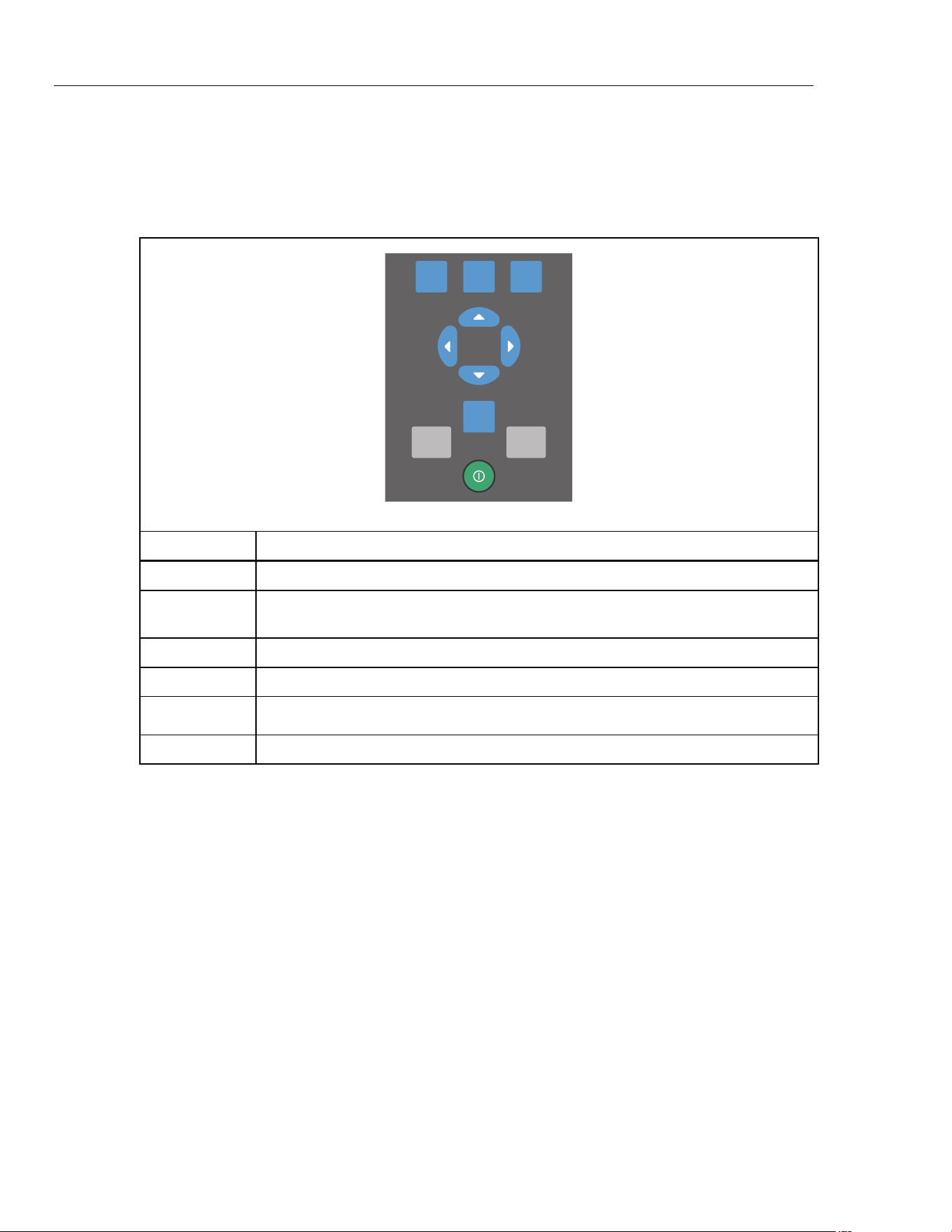
The Product buttons are on the left-side of the Product face and are shown in Figure 1.
F1 F2 F3
HOME
ZERO PUMP
hbb005.eps
Button Description
Push to turn on the Product.
, ,
Softkeys to configure the Product and move through the Product menus. The button
function changes in relation to the navigation menu.
Push to zero pressure measurements.
Push to start the electric pump.
, , ,
Push to control mA source/sim and to set pump and % error limits.
Push to go to the Product main screen.
Figure 1. Buttons
1.888.610.7664 sales@GlobalTestSupply.com
Fluke-Direct.com
Portable Pressure Calibrator
Features
5
Display
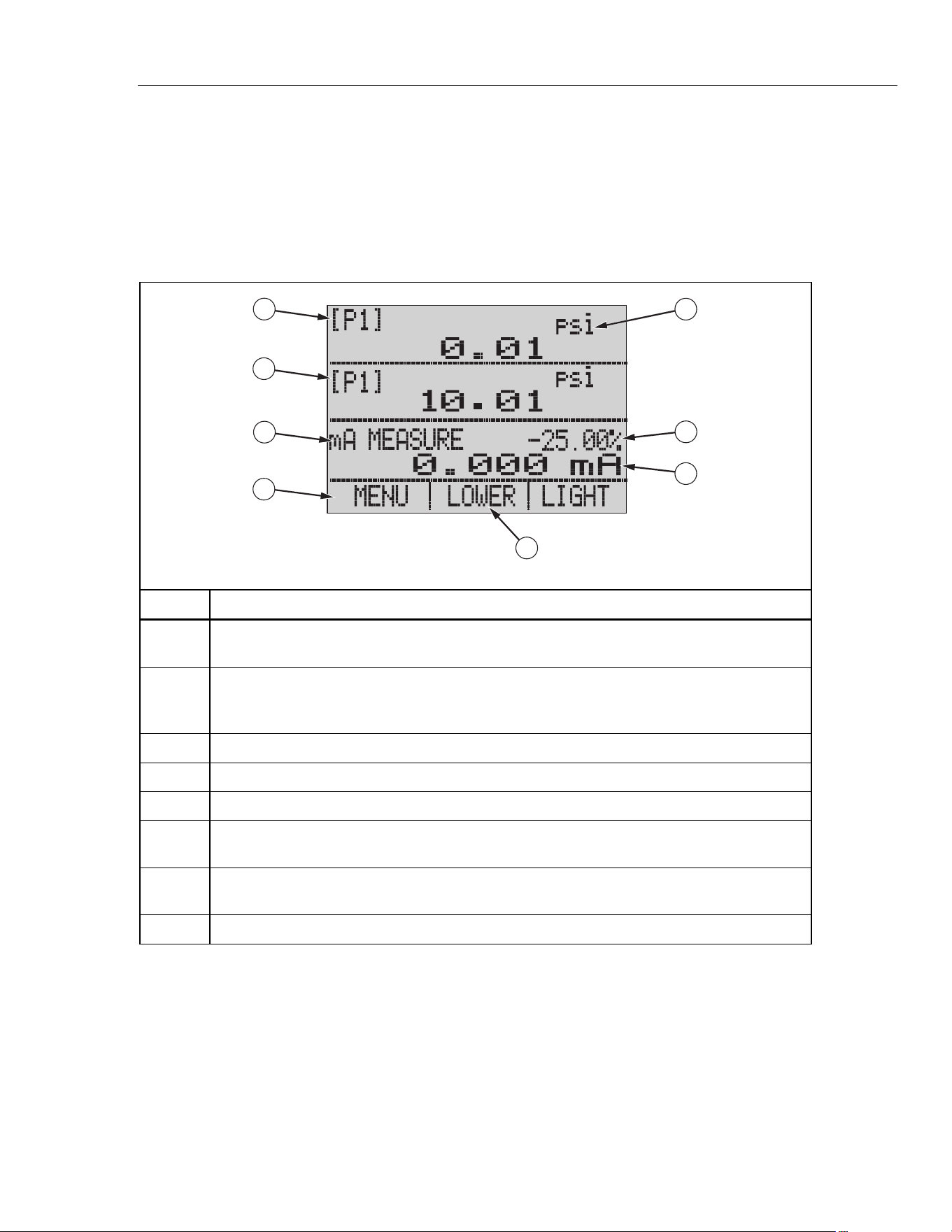
The display can be made up of a maximum of three process measurement sections plus the
menu bar which is always at the bottom of the display. The sections of the display are
referred to by the Product and in this manual as UPPER, MIDDLE, LOWER, and menu bar.
Push the softkeys that correspond to items shown on the menu bar to move through the
Product menus. The arrow keys change values for some menu steps. See “Product Menus”.
The Display sections are shown in Figure 2.
2
1
3
4
5
6
7
8
hbb008.eps
Item Description
Menu Bar- Access the Product menus and parameters from the menu bar. See the “Product
Menus” section.
Active Display- On the main menu, the middle of the menu bar shows the active display. In
this image, the LOWER display is active. This section of the menu bar can also say UPPER
and MIDDLE. This depends on which section is active.
UPPER display section
MIDDLE display section
LOWER display section
Pressure Units- Pressure units are shown in this section of the display. Select from 14
pressure units.
Span Indicator- Percentage of the 4 mA to 20 mA span when the mA or mA loop functions
that are used show in this section of the display.
Primary Parameter- Shows the current measured parameter.
Figure 2. Display
1.888.610.7664 sales@GlobalTestSupply.com
Fluke-Direct.com
3130
Users Manual
6
Calibrator Interface
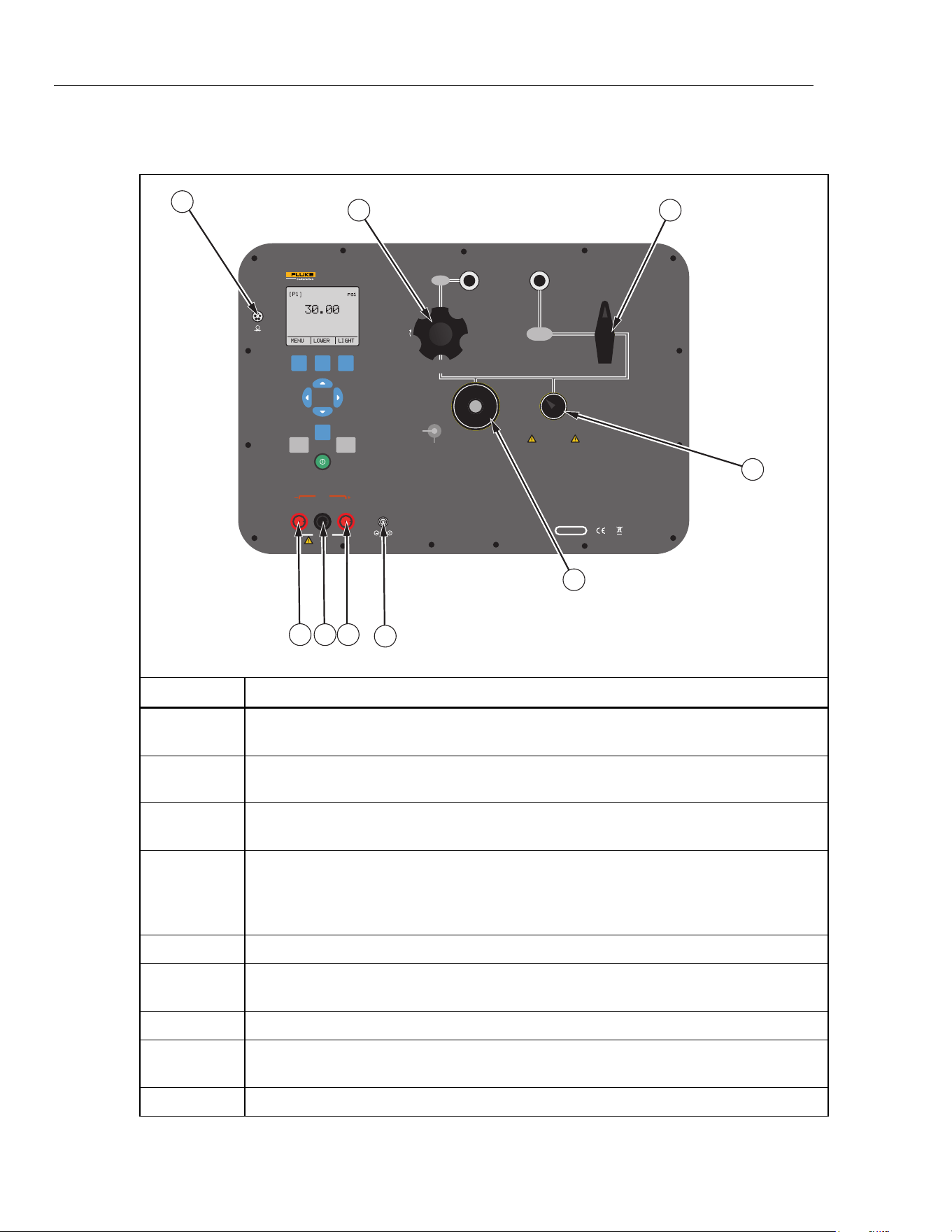
The pressure controls are shown in Figure 3.
V mA
SWITCH TEST
COM
EXTERNAL
PRESSURE MODULE
24 V DC
30 V MAX
LOOP
PORTABLE PRESSURE CALIBRATOR
3130
FLUKE CORPORATION
EVERETT, WA USA
www.flukecal.com
CHARGE
16 V DC
5.6 A
SERIAL NO.
VENT LINE BEFORE MAKING SELECTION
CAUTION
OUTPUT
ISOLATION
VALVE
-12 PSI TO 300 PSI
(-8 kPa TO 2 MPa)
AIR SUPPLY
330 PSI MAX
(2.3 MPa)
PRESSURE
CLOSED
VACUUM
PUMP
FINE
ADJUSTMENT
VENT
SUPPLY
METERING VALVE
FINE
ADJUSTMENT
VENT
FILTER
PRESSURE
SENSOR
CLOSE VALVE BEFORE
OPERATING PUMP
F1 F2 F3
HOME
ZERO PUMP
3
21
4
9
5
6
78
hbb006.eps
Item Description
Supply metering valve. Use the supply metering valve to regulate the incoming air supply.
See the “Typical Connections” section for more.
Isolation valve. This valve isolates the right-most port and pressure sensor from the
Vent/Fine adjust, pump, and Supply Metering Valve.
Pump Pressure/Vacuum. In the + position, the pump operates from 0 psi to 300 psi. In
the - position, the pump runs in vacuum mode, which is 0 psi to -12 psi.
Fine adjust/vent. Use the small silver knob of this valve to bleed off the pressure in a
controlled manner. If left open, it will vent all pressure off safely. The outer-most knob
(black) is a vernier control that varies the volume which finely reduces or increases the
pressure.
Power Adapter input.
24 V power for voltage transmitters. This jack only powered when in Voltage Measure
mode.
Common Jack.
Input Jacks. Use the input jacks for volts and milliamp functions. See the “Measure and
Source Current (4… 20 mA)” and “Measure Voltage” sections. Also used for switch test.
External pressure module connection. See the “External Modules” section.
Figure 3. Controls
1.888.610.7664 sales@GlobalTestSupply.com
Fluke-Direct.com
Portable Pressure Calibrator
Features
7
Typical Connections
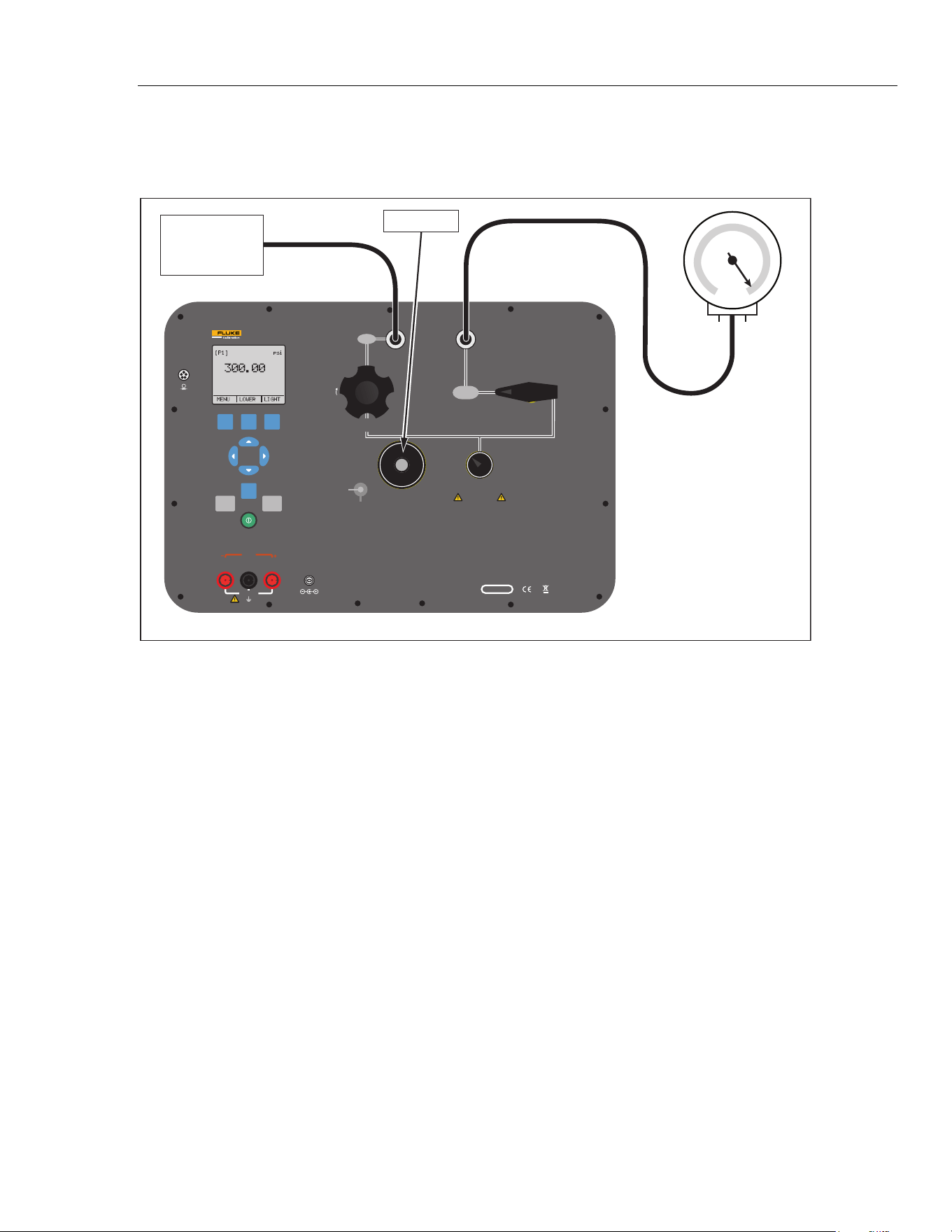
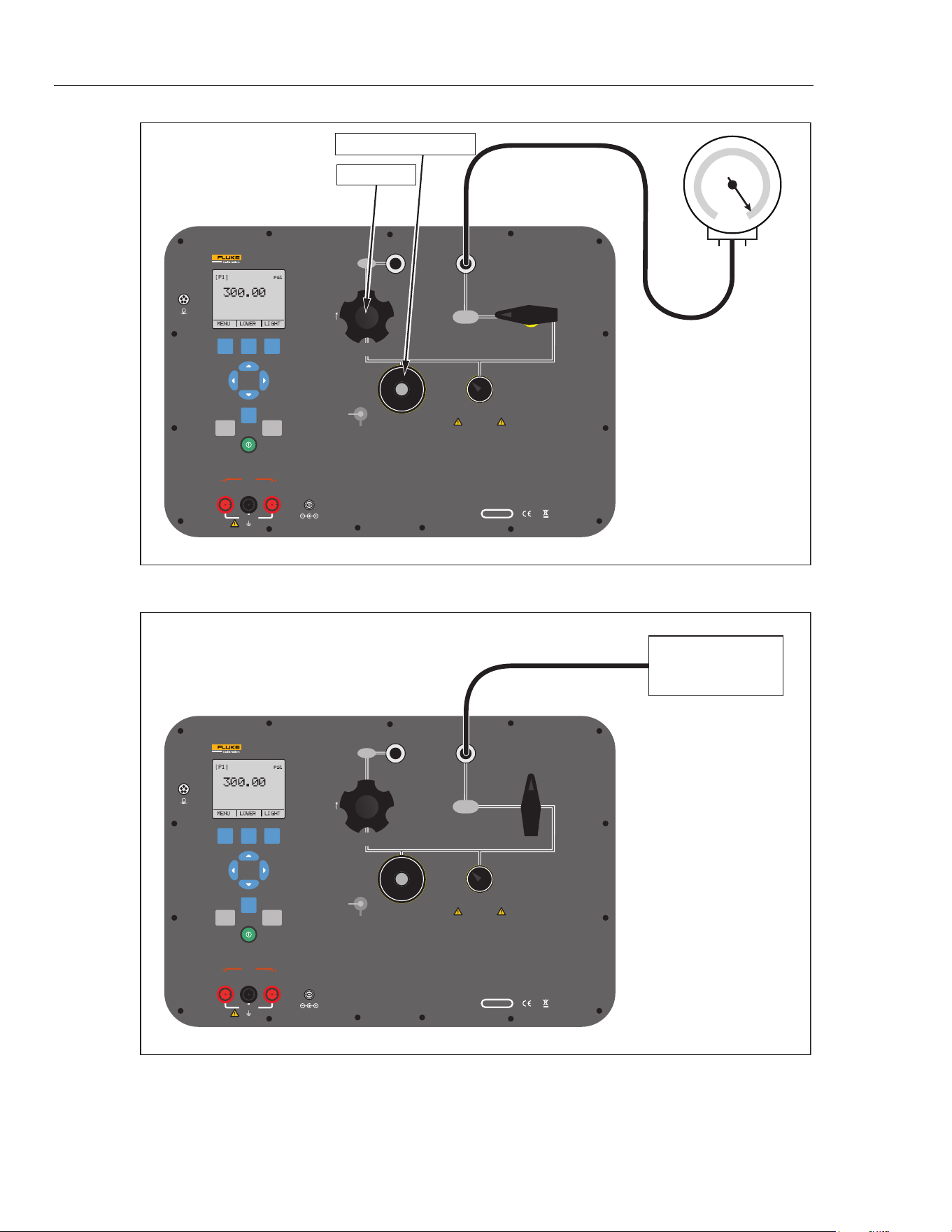
Typical connections of the pressure controls, connection port, and electrical inputs are
shown in Figures 4, 5, and 6.
V mA
SWITCH TEST
COM
EXTERNAL
PRESSURE MODULE
24 V DC
30 V MAX
LOOP
PORTABLE PRESSURE CALIBRATOR
3130
FLUKE CORPORATION
EVERETT, WA USA
www.flukecal.com
CHARGE
16 V DC
5.6 A
SERIAL NO.
VENT LINE BEFORE MAKING SELECTION
CAUTION
OUTPUT
ISOLATION
VALVE
-12 PSI TO 300 PSI
(-8 kPa TO 2 MPa)
AIR SUPPLY
330 PSI MAX
(2.3 MPa)
PRESSURE
CLOSED
VACUUM
PUMP
FINE
ADJUSTMENT
VENT
SUPPLY
METERING VALVE
FINE
ADJUSTMENT
VENT
FILTER
PRESSURE
SENSOR
CLOSE VALVE BEFORE
OPERATING PUMP
F1 F2 F3
HOME
ZERO PUMP
0 psi to 300 psi
Air Supply
Fully Closed
hbb002.eps
Figure 4. External Pressure Supply
1.888.610.7664 sales@GlobalTestSupply.com
Fluke-Direct.com
3130
Users Manual
8
V mA
SWITCH TEST
COM
EXTERNAL
PRESSURE MODULE
24 V DC
30 V MAX
LOOP
PORTABLE PRESSURE CALIBRATOR
3130
FLUKE CORPORATION
EVERETT, WA USA
www.flukecal.com
CHARGE
16 V DC
5.6 A
SERIAL NO.
VENT LINE BEFORE MAKING SELECTION
CAUTION
OUTPUT
ISOLATION
VALVE
-12 PSI TO 300 PSI
(-8 kPa TO 2 MPa)
AIR SUPPLY
330 PSI MAX
(2.3 MPa)
PRESSURE
CLOSED
VACUUM
PUMP
FINE
ADJUSTMENT
VENT
SUPPLY
METERING VALVE
FINE
ADJUSTMENT
VENT
FILTER
PRESSURE
SENSOR
CLOSE VALVE BEFORE
OPERATING PUMP
F1 F2 F3
HOME
ZERO PUMP
Closed Silver Vent Knob
Fully Closed
hbb003.eps
Figure 5. Pressure Supply with Internal Pump
V mA
SWITCH TEST
COM
EXTERNAL
PRESSURE MODULE
24 V DC
30 V MAX
LOOP
PORTABLE PRESSURE CALIBRATOR
3130
FLUKE CORPORATION
EVERETT, WA USA
www.flukecal.com
CHARGE
16 V DC
5.6 A
SERIAL NO.
VENT LINE BEFORE MAKING SELECTION
CAUTION
OUTPUT
ISOLATION
VALVE
-12 PSI TO 300 PSI
(-8 kPa TO 2 MPa)
AIR SUPPLY
330 PSI MAX
(2.3 MPa)
PRESSURE
CLOSED
VACUUM
PUMP
FINE
ADJUSTMENT
VENT
SUPPLY
METERING VALVE
FINE
ADJUSTMENT
VENT
FILTER
PRESSURE
SENSOR
CLOSE VALVE BEFORE
OPERATING PUMP
F1 F2 F3
HOME
ZERO PUMP
-12 psi to 300 psi
Pressure Source
hbb004.eps
Figure 6. Pressure Measurement
1.888.610.7664 sales@GlobalTestSupply.com
Fluke-Direct.com

Portable Pressure Calibrator
Power Options
9
Power Options
The Product can be powered with the internal, high-capacity NiMH battery and/or the
universal power supply (90 V ac to 250 V ac) that charges the battery pack. The universal
power supply can power the Product at the same time it charges the battery pack. A fully-
discharged battery can take a maximum of 14 hours to recharge. When the Product is first
received, plug it into the universal power supply for that period to ensure the Product is
fully charged.
Product Startup
When you turn on the Product, it goes through a short self-test. The display shows the
current firmware version, auto-shutdown status, and the range of the internal pressure
sensor. The Product also shows the warning “ FOR USE WITH DRY GAS ONLY”.
A minimum 5-minute warm-up is necessary to get the rated accuracy of the Product. If
there are large changes in ambient temperature, a longer warm-up is necessary.
Pressure ranges must be zeroed each time the Product is started. See the “Zero Function”
section for instructions to zero the pressure sensor displays.
Product Menus
The menu bar at the bottom of the display is controlled with the softkeys or arrow keys,
this depends on which menu is in use. Use the menu bar to navigate the Product menus.
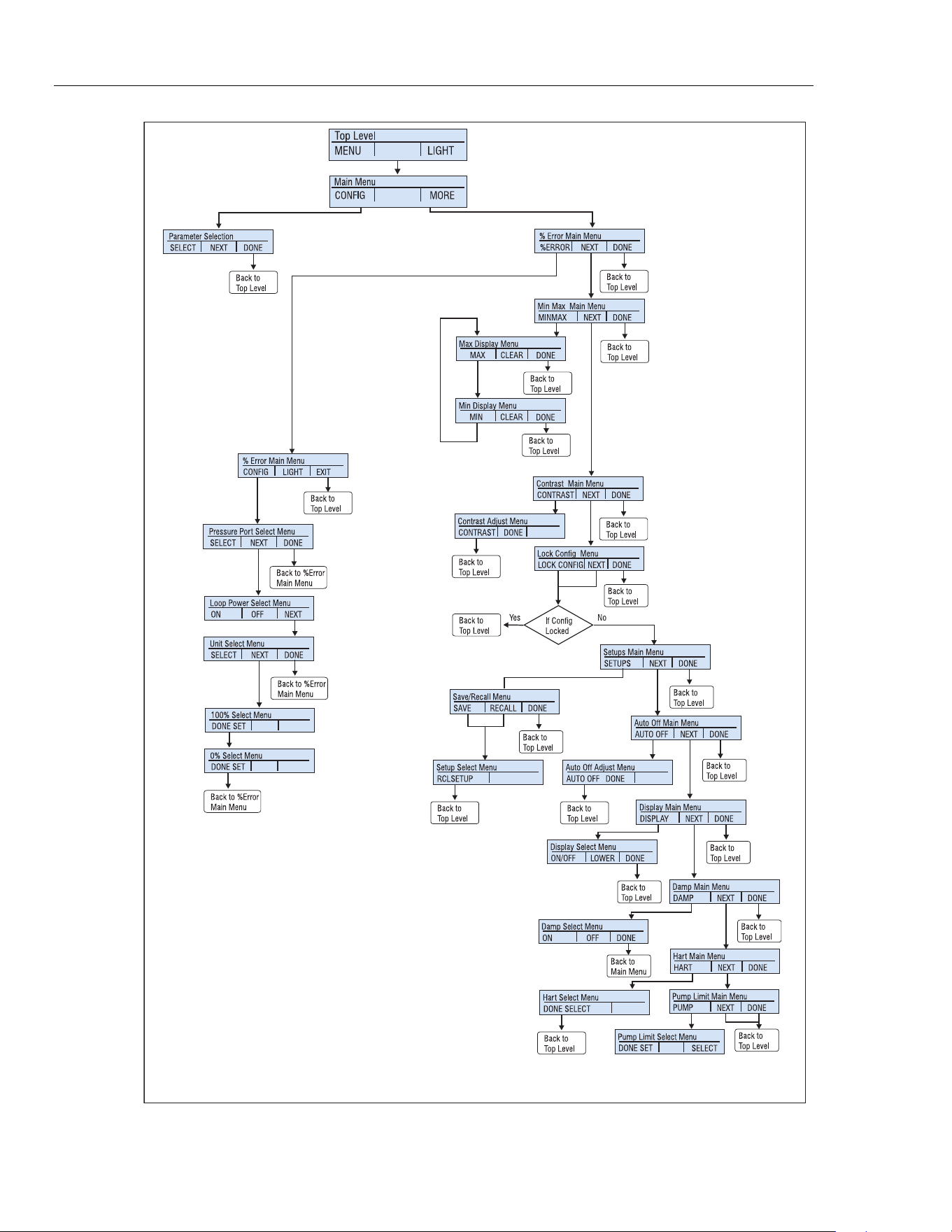
The menus are explained in the subsequent sections. A menu map is shown in Figure 7.
1.888.610.7664 sales@GlobalTestSupply.com
Fluke-Direct.com
3130
Users Manual
10
Active
Display
Active
Display
hbb001.eps
Figure 7. Menu Map
1.888.610.7664 sales@GlobalTestSupply.com
Fluke-Direct.com
Portable Pressure Calibrator
Product Menus
11
Top-Level Menu
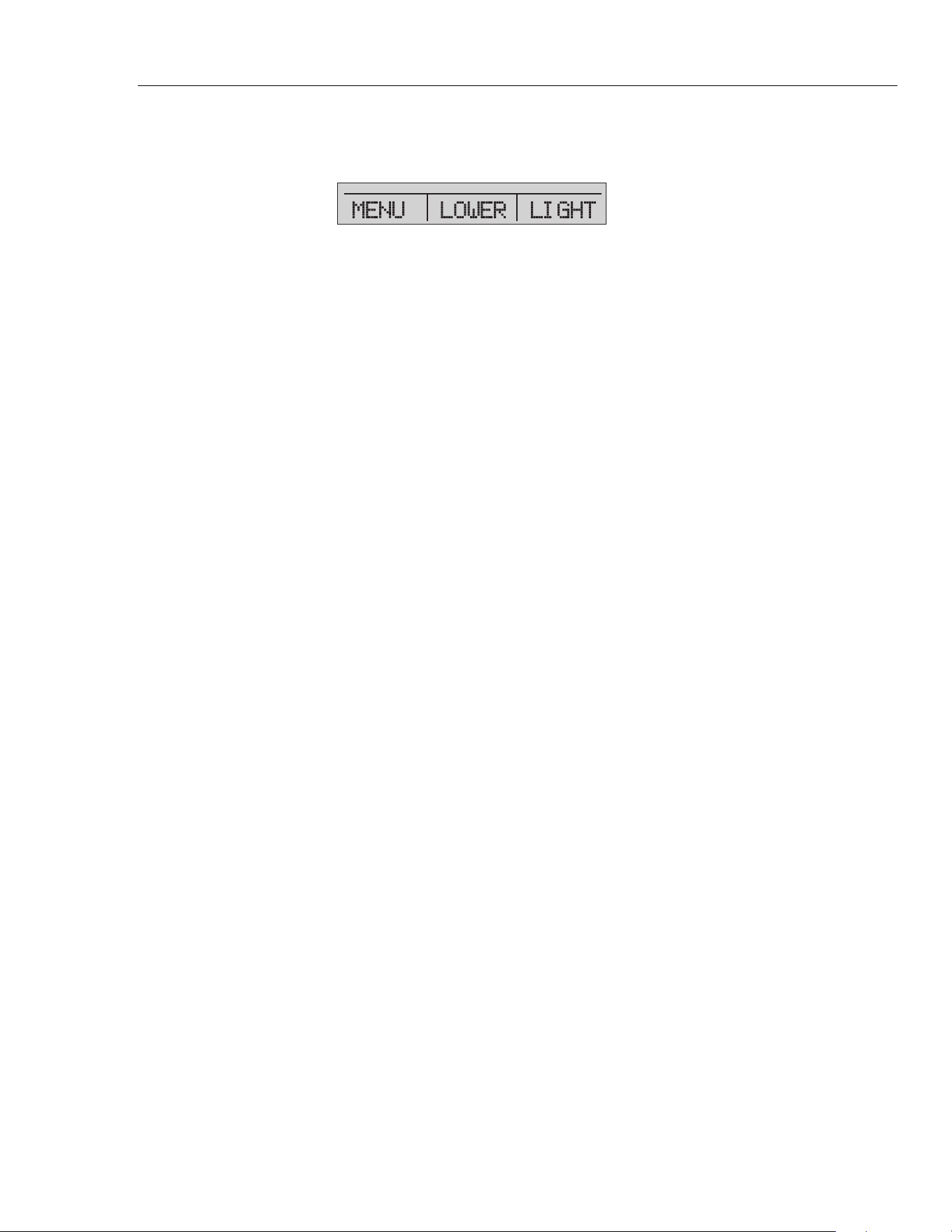
The top-level menu is shown in Figure 8. It has three levels.
hbb009.eps
Figure 8. Top-Level Menu
• MENU- Push the MENU softkey to get to the main menu. See the “Main Menu”
section.
• [Active Display]- The active display is shown in the middle field on the top-level
and main menu. In Figure 8 the active display is the LOWER display. This menu
item lets you assign the ZERO key to one of the three display sections. Push the
softkey that corresponds to the display named on the menu bar to change the active
display. If the chosen display is a pressure range, then the ZERO key becomes active.
• LIGHT- The Product has a backlight for low-light situations. To turn on or turn off
the backlight, push the LIGHT softkey on the main menu. The backlight cannot be
controlled by the serial interface.
Main Menu
To go to the main menu, push the MENU softkey from the top-level menu. From the
main menu, the submenus can be accessed. The main menus are:
• Config- Display Configuration menu
• % Error Main Menu
• MinMax Menu
• Contrast Main Menu
• Lock Config Menu
• Setups Main Menu
• Save/Recall Menu
• Auto Off Main Menu
• Setups Main Menu
• Display Main Menu
• Damp Main Menu
• HART Main Menu
• Pump Limit Main Menu
Some of these menus are broken up into more submenus.
1.888.610.7664 sales@GlobalTestSupply.com
Fluke-Direct.com
3130
Users Manual
12
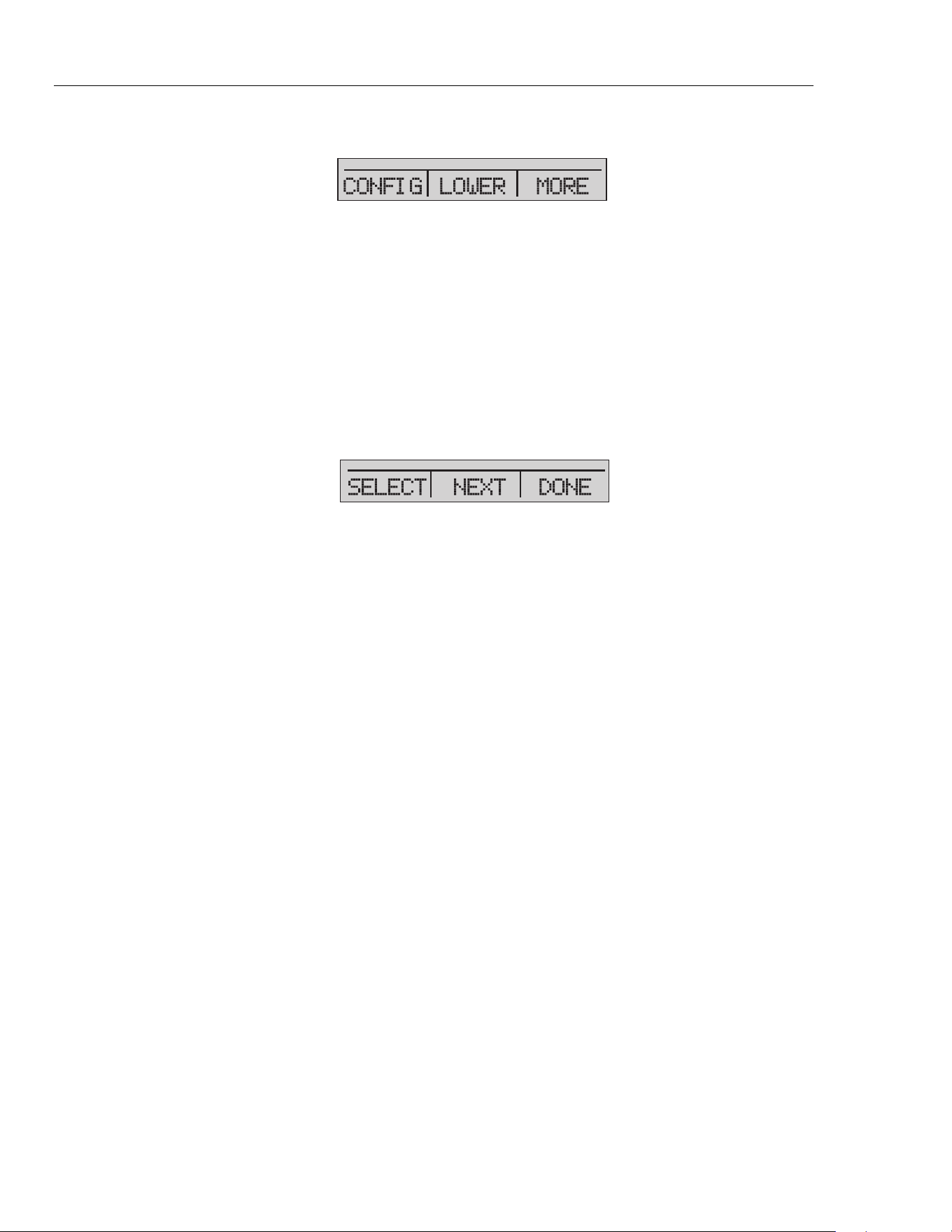
The main menu is shown in Figure 7 and has three levels.
hbb010.eps
Figure 9. Main Menu
• CONFIG (Configuration) - Push to access the config menu. Push again to go
to the Display Configuration menu. This will let you change the parameters for each
display section. See the Parameter Selection portion of the Figure 7.
• [Active Display] - See the “Top-Level Menu” section.
• MORE- Push to access the % Error Main Menu.
Display Configuration Menu
Use the display configuration menu to set the parameters of the active display. Push the
SELECT softkey to move through this menu. See Figure 13.
hbb011.eps
Figure 10. Display Configuration Menu
The first parameter is Mode. Since voltage, current, and switch test modes all use the
same jacks, two of these functions cannot be used at the same time. What can be selected
depends on what is already selected in another display.
Push the NEXT softkey to change the second parameter. Pressure can be read in 14
different engineering units. Only Pressure mode has a second parameter.
These modes are available with a single display:
• P[1] = Pressure internal sensor
• [EXT] = Pressure with external pressure module
• P[1] ST = Switch Test with internal sensor
• [EXT] ST = Switch Test with external pressure module
Note
mA functions are only available on the lower section of the display.
• mA Measure = Milliamps measure.
• mA Source = Milliamps source.
• SIM-2W = Milliamps simulate using an external supply from the UUT.
• VOLTS = Voltage Measure.
• mA MEAS/24v
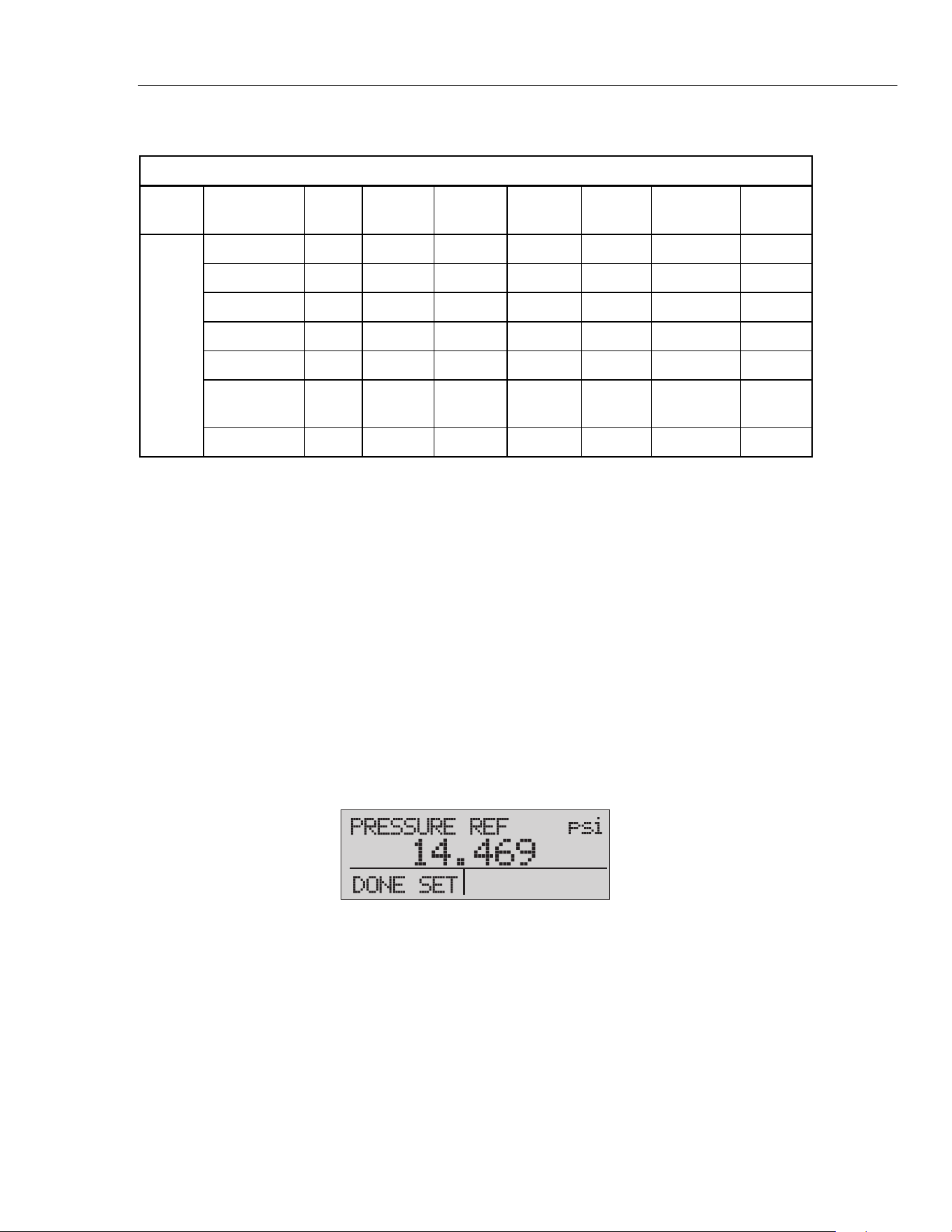
Table 2 shows which functions are available concurrently.
An X in a column indicates that the mode in the active display is not available for
selection if the mode in that row is in use in a different display.
Use the MORE option on the main menu to access other menu functions.
1.888.610.7664 sales@GlobalTestSupply.com
Fluke-Direct.com
Portable Pressure Calibrator
Zero Function
13
Table 2. Mode Concurrency
Active Display
P[1] [EXT] P[1]ST [EXT]ST mA
mA
MEAS/24V
Volts
Other
Displays
P[1] x x x x x x x
[EXT] x x x x x x x
P[1]ST x x
[EXT]ST x x
mA x x x
mA
MEAS/24V
x x x
Volts x x x
Zero Function
When is pushed, the Product zeros its active display if a pressure mode is selected,
and the pressure is within the zero limit. The zero limits are within 10 % of the full-scale
range of the selected sensor. If the display shows “OL,” the zero function will not
operate. is only used for pressure.
Internal Sensor and Pressure Module (non-absolute)
When a sensor or pressure module is selected on the active display and is pushed, the
Product subtracts the current reading from the output. The zero limits are within 10 % of
the full-scale range of the selected sensor. If the display shows “OL,” the zero function
will not operate.
Absolute Pressure
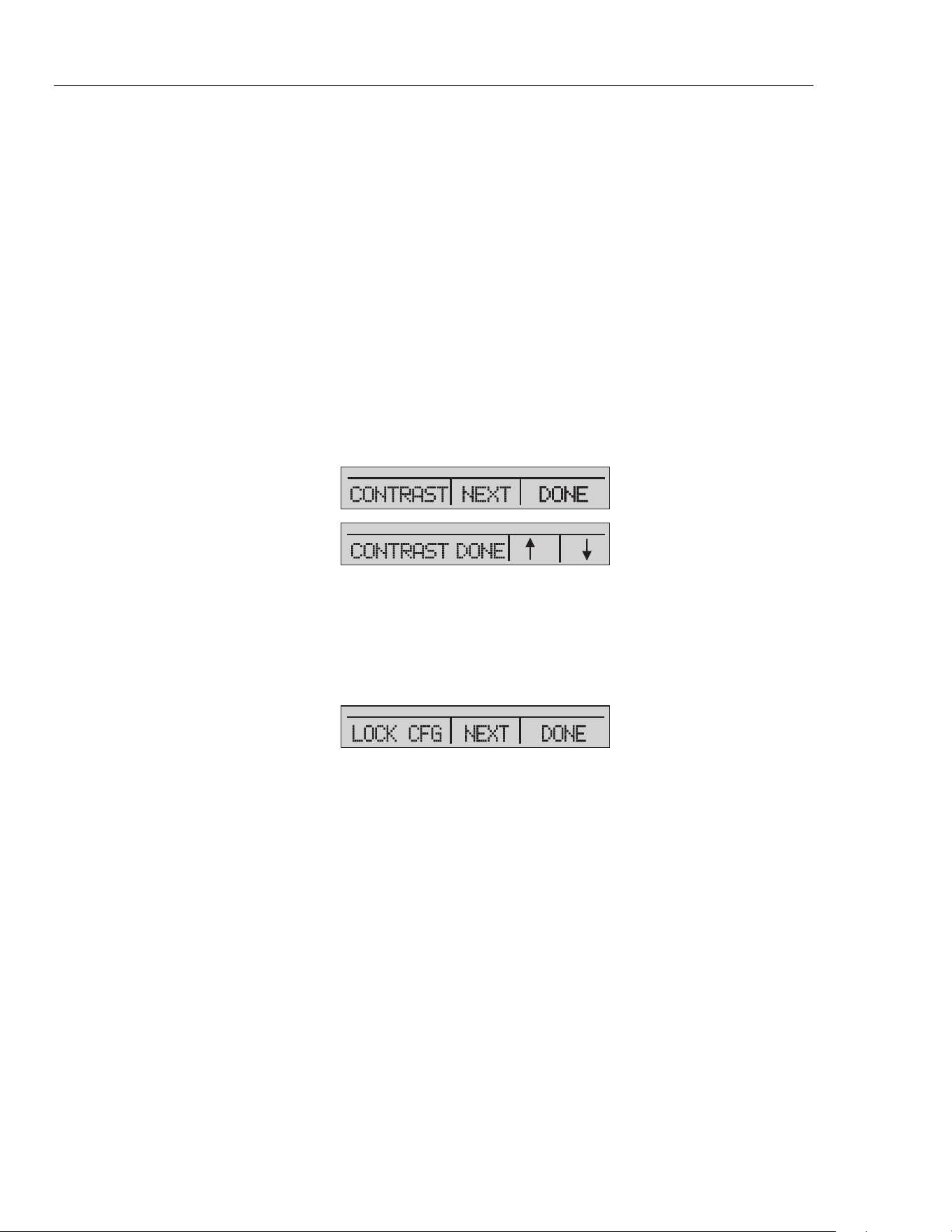
When an absolute pressure range is selected on the active display and is pushed, the
Product prompts you to enter the barometric reference pressure. Record the barometric
reference pressure with the arrow buttons. While you do this procedure, make sure the
sensor port is open (vented) to the atmosphere. See Figure 11.
hbb012.eps
Figure 11. Absolute Pressure
1.888.610.7664 sales@GlobalTestSupply.com
Fluke-Direct.com
3130
Users Manual
14
Other Menu Controlled Functions
There are many submenus below the main menu. These can be accessed through the
MORE option of the main menu. A submenu contains three options. The first option is
unique to the function. The second and third options are always the same. The NEXT
option leads to the subsequent menu. The DONE option goes home. For the last menu,
the NEXT option goes home. See Figure 7 for the menu structure.
In this manual, if a submenu has subsequent menus below it, it is referred to as
{function} main menu. As an example, the display contrast submenu will be called the
Contrast main menu.
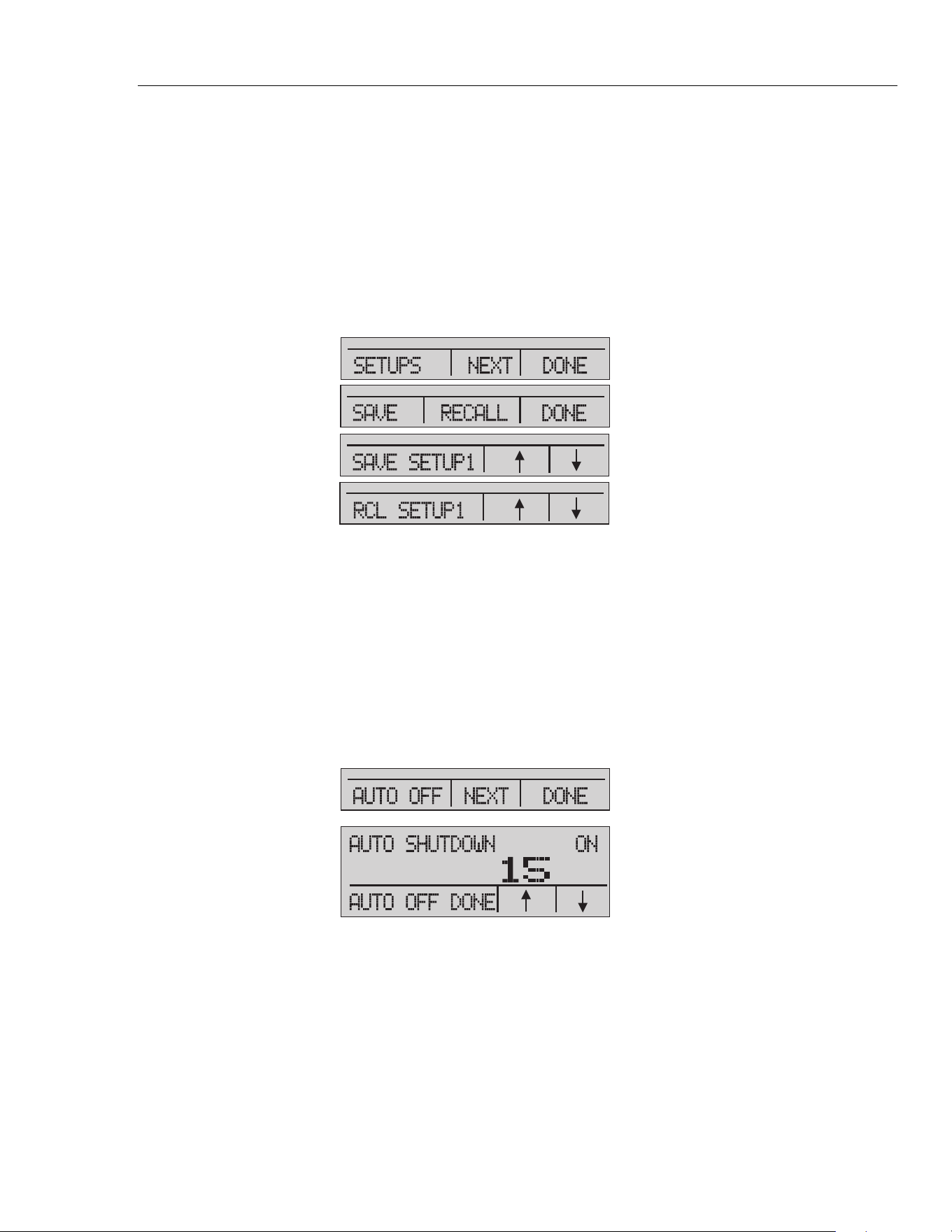
Contrast Main Menu
To set the contrast, go through the menu list until CONTRAST is shown. Push the
CONTRAST softkey to access the Contrast Adjustment menu.
Push the up arrow or down arrow softkey to change the display to the necessary contrast
level. When completed, push the CONTRAST DONE softkey to go home. See
Figure 12.
hbb013.eps
Figure 12. Contrast Menu
Lock or Unlock the Display Configuration
To lock or unlock the display configuration settings, go through the menu list until
LOCK CFG is shown. Push the LOCK CFG or UNLOCK CFG softkeys from the
Configuration Lock menu. See Figure 13.
hbb014.eps
Figure 13. Display Configuration Menu
When the LOCK CFG option is used, the menu goes home and the CONFIG option on
the main menu shows that it is locked. All menus are now locked except for Min Max,
Contrast Adjustment, and Configuration Lock. When the UNLOCK CFG option is used,
the configuration is unlocked and the menu goes to the next sub menu.
1.888.610.7664 sales@GlobalTestSupply.com
Fluke-Direct.com
Portable Pressure Calibrator
Other Menu Controlled Functions
15
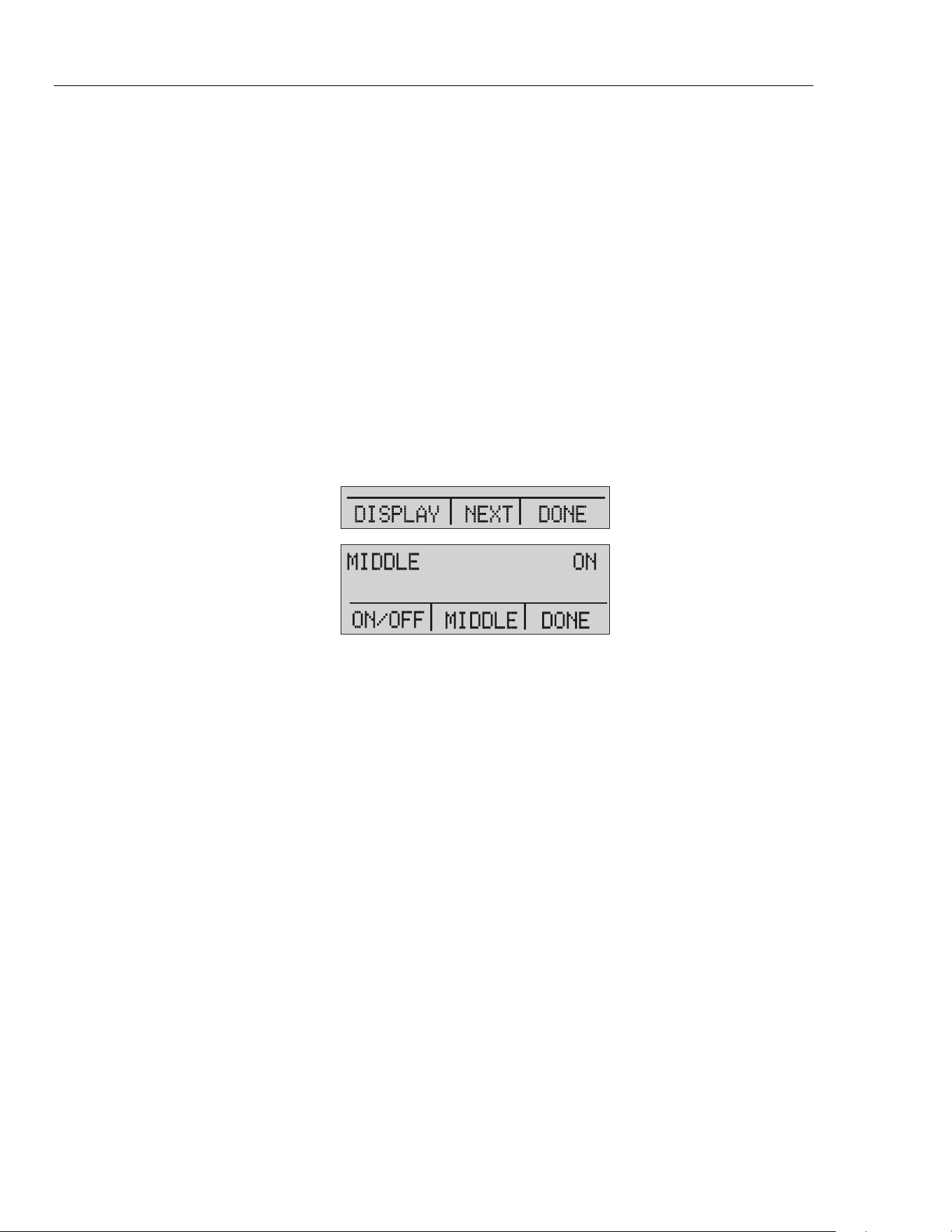
Save and Recall Menu Setups
The current Product setup is saved for recall at the next power up. Five different setups
can be saved for later use. To access these setups, go through the menu list until SETUPS
is shown. Push the SETUPS softkey from the Setups Main menu. Push the RECALL
softkey to recall a setup or the SAVE softkey to save a setup. Push the DONE softkey to
do nothing and go to the home menu.
If SAVE or RECALL is selected, push the arrow keys to select the setup location. Then
push the SAVE softkey to store the current setup into the selected location. You can also
push the RECALL softkey to recall the setup stored in the selected location. The display
menu will go to home. See Figure 14.
hbb015.eps
Figure 14. Setups Menu
Automatic Shutdown
The Product can be set to turn off after a preprogrammed time interval, 0 minutes to 30
minutes. To set the automatic shutdown, go through the menu list until AUTO OFF is
shown. Select the AUTO OFF option on the Auto Shutdown main menu
Push the arrow softkeys to choose the number of minutes the Product functions. Or push
the down arrow softkey until OFF is shown to disable the automatic shutdown. When
you have made the selection, push the AUTO OFF DONE softkey to set the selection.
The Product menu will go to the home menu. The auto shutdown timer is reset when a
button is pushed. See Figure 15.
hbb016.eps
Figure 15. Auto Shutdown Menu
1.888.610.7664 sales@GlobalTestSupply.com
Fluke-Direct.com
3130
Users Manual
16
Activate and Deactivate a Display
Use the DISPLAY menu to select which display to use. The ON/OFF option turns the
selected display on or off. The selected display and current on/off state are shown in the
lower display. See Figure 16.
To choose which displays are active:
1. Go through the menu list until DISPLAY is shown.
2. Push the DISPLAY softkey to access the Display Activation menu.
3. Push the UPPER, MIDDLE, or LOWER softkey to make your selection.
4. Push the ON/OFF softkey to the change the display state.
5. Push the DONE softkey to save the changes and go to the home screen.
When a display is deactivated, its configuration is saved. When the display is activated,
its configuration is verified against the configurations of the other currently-active
displays. If the configurations are in conflict, the recalled-display configuration is
changed to prevent the conflict. If all three displays are deactivated, the lower display
will turn on automatically.
hbb017.eps
Figure 16. Active Display Menu
Damping
Damping can be turned ON or OFF with the DAMP menu selection. Go through the
menu list until DAMP is shown. Select ON or OFF. When damping is ON, the Product
shows a running average indication of ten measurements. The Product makes
approximately three readings per second.
HART Resistor
An internal 250 HART resistor can be enabled when the Product is used in the mA
Measure-24V mode. This lets a HART communicator be connected across the mA
terminals and makes it unnecessary to add an external resistor.
Note
When the HART resistor is on, the maximum load-driving capacity is
750
.
Go through the menu list until HART is shown. Use the arrow softkeys to select ON or
OFF.
Pump Limits
To prevent overpressure of sensitive devices the maximum pressure (pump limit) can be
set. Go through the menu list until PUMP is shown. When in this mode, use SELECT
and the arrow buttons to change the pump limit. Push the DONE SET softkey to save the
selection and go to the main menu. This limit can be set to 10 % above full scale.
1.888.610.7664 sales@GlobalTestSupply.com
Fluke-Direct.com

Portable Pressure Calibrator
Initial Setup and Basic Pressure Generation
17
Initial Setup and Basic Pressure Generation
The Product has a special low-volume calibration hose for faster pressure generation and
quick pressure stabilization. "Quick-fit" hose connectors and different adapters are
included. It is recommended that this hose is used to get the best results. After the fittings
are installed and the Product is connected to the UUT (unit under test), the Product is
ready for use.
To configure the Product for the appropriate application:
1. Set the pressure/vacuum selection knob to the necessary function (+ for pressure
and - for vacuum).
2. Close the vent knob.
3. Close the supply metering valve.
4. Push and hold and see the pressure rise (or vacuum generation) until you reach
the necessary pressure.
5. Release when the necessary pressure is reached.
Note
The motor speed starts slow while the pressure is low <15 psi (1 bar) for
better control at low pressures.
6. The fine pressure adjustment lets you set the correct pressure.
7. To decrease or bleed off all pressure, slowly turn the vent knob counter clockwise to
the open position. When the valve is slowly opened, there is a slow decrease of
pressure. Open the valve more to vent the pressure.
Pressure Measurement
To measure pressure:
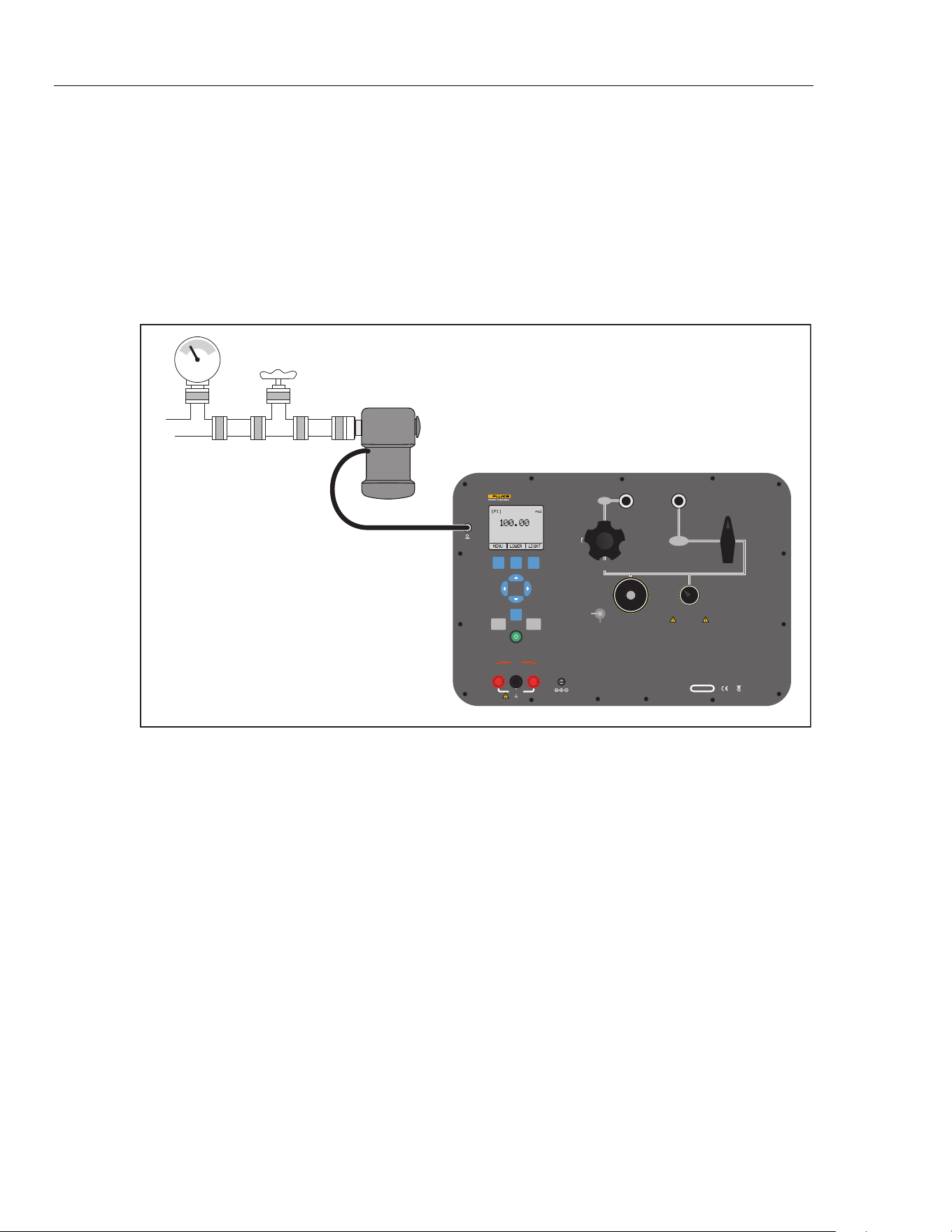
1. Connect the Product with the correct adapter.
2. Select the pressure parameter for the display used.
3. The Product has an internal sensor and optional external sensors are available. Select
a sensor that is correct for the pressure range and accuracy.
Warning
To prevent injury, only assemble and operate high-pressure
systems if you know the correct safety procedures. High-
pressure liquids and gases are hazardous and the energy from
them can be released without warning.
For a better understanding with respect to overpressure and burst pressure, follow the
specifications and these operation instructions. See the “Specifications” section. The
Product display will show "OL" when an inappropriate pressure is applied. When "OL"
is shown on a pressure display, immediately decrease the pressure to prevent damage or
possible physical injury. "OL" is shown if the pressure exceeds the nominal range by
110 %. Push to zero the pressure sensor after it is vented to atmospheric pressure.
1.888.610.7664 sales@GlobalTestSupply.com
Fluke-Direct.com
3130
Users Manual
18
Media Compatibility
The Product is only to be used with clean, dry gases.
External Modules
The Product has a digital interface to support the Fluke 700P series of pressure modules.
These modules are available for different ranges that include gauge, vacuum, differential,
and absolute pressure. The modules work in conjunction with the Product. Connect them
to the interface and select [EXT] (external sensor). Since the interface between the
Product and the module is digital, the accuracy and display resolution depends on the
module. See Figure 17.
V mA
SWITCH TEST
COM
EXTERNAL
PRESSURE MODULE
24 V DC
30 V MAX
LOOP
PORTABLE PRESSURE CALIBRATOR
3130
FLUKE CORPORATION
EVERETT, WA USA
www.flukecal.com
CHARGE
16 V DC
5.6 A
SERIAL NO.
VENT LINE BEFORE MAKING SELECTION
CAUTION
OUTPUT
ISOLATION
VALV E
-12 PSI TO 300 PSI
(-8 kPa TO 2 MPa)
AIR SUPPLY
330 PSI MAX
(2.3 MPa)
PRESSURE
CLOSED
VACUUM
PUMP
FINE
ADJUSTMENT
VENT
SUPPLY
METERING VALVE
FINE
ADJUSTMENT
VENT
FILTER
PRESSURE
SENSOR
CLOSE VALVE BEFORE
OPERATING PUMP
F1 F2 F3
HOME
ZERO PUMP
Pressure
Module
Valve
hbb007.eps
Figure 17. Pressure Module
Measure and Source Current (4… 20 mA)
To measure and source current:
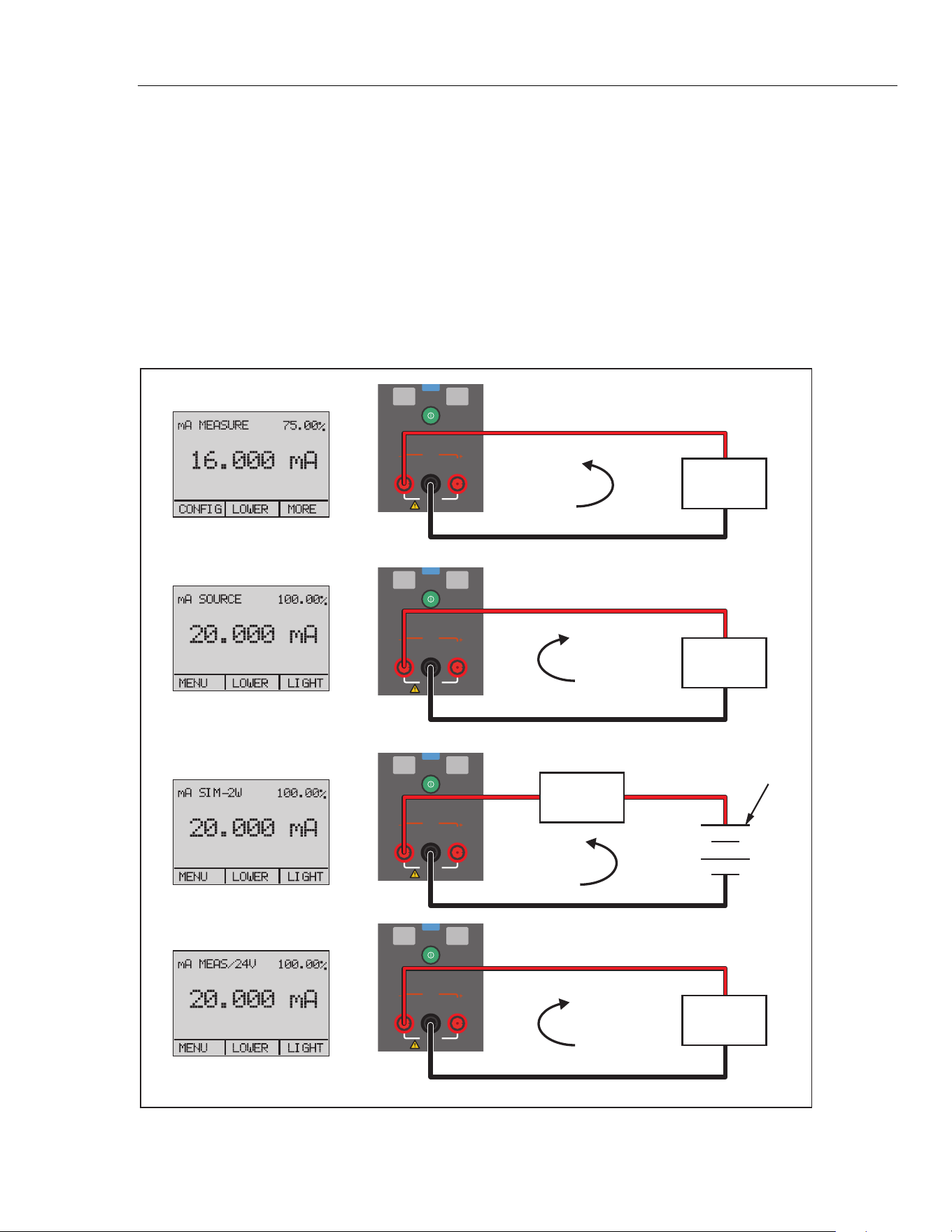
1. To measure current, use the input terminals on the front of the Product. Select the mA
function on the lower display. Current is measured in mA and a percentage of the
measuring range. The measuring range on the Product is set to 0 % at 4 mA and
100 % at 20 mA. See Figure 18 for connections.
Example:
If the current measured is shown as 75 %, then the value is 16 mA.
Note
The display shows "OL" when the measured current exceeds the nominal
range of current measurement (24 mA).
1.888.610.7664 sales@GlobalTestSupply.com
Fluke-Direct.com
Portable Pressure Calibrator
Pressure Measurement
19
2. The same connections are used for the current source. Select mA-Source or mA
Sim-2W from the configuration display.
3. This selection can only be made in the lower display. Also, in source mode, the
Product generates 0... 24 mA that uses its own internal 24 V supply, whereas in
simulation mode the Product acts as a 2-wire transmitter and an external 24 V supply
is necessary.
4. Push the arrow key to start the output mode and then use the arrow keys to adjust the
mA output. The function keys can also be used to control the output in 25 % steps (4,
8, 12, 16, 20 mA) or 0 % (4 mA) and 100 % (20 mA). See Figure 18.
5. While in the mA output mode, if the loop is broken or the resistance burden is
exceeded, the Product will flash "OL".
V mA
SWITCH TEST
COM
24 V DC
30 V MAX
LOOP
ZERO PUMP
V mA
SWITCH TEST
COM
24 V DC
30 V MAX
LOOP
ZERO PUMP
V mA
SWITCH TEST
COM
24 V DC
30 V MAX
LOOP
ZERO PUMP
V mA
SWITCH TEST
COM
24 V DC
30 V MAX
LOOP
ZERO PUMP
4...20 mA
4...20 mA
4...20 mA
Power
Supply
+
–
+
–
DC 24 V
4...20 mA
UUT
UUT
UUT
UUT
hbb018.eps
Figure 18. Measure and Sourcing Current
1.888.610.7664 sales@GlobalTestSupply.com
Fluke-Direct.com
3130
Users Manual
20
Measure Voltage
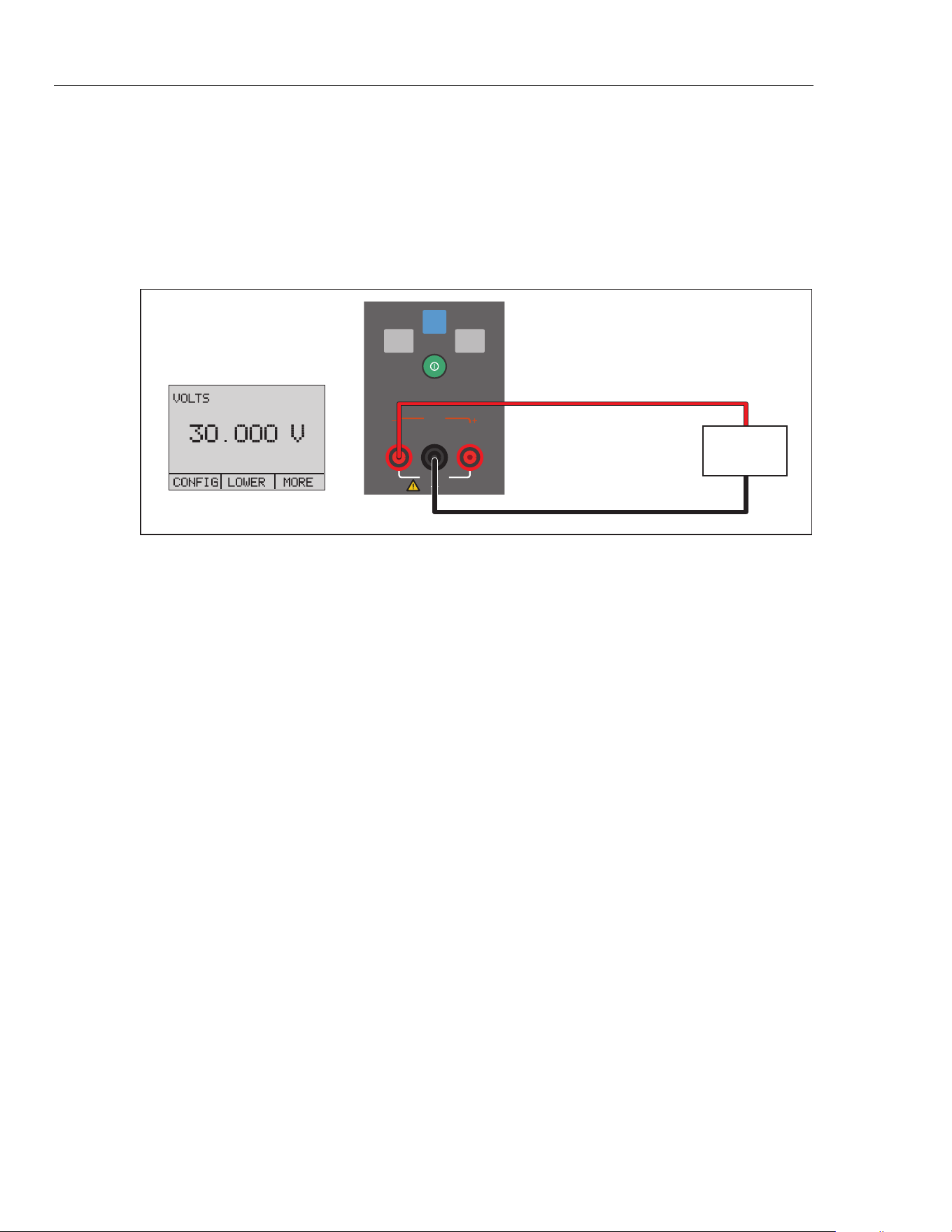
To measure voltage, use the connections on the front of the Product. Select the VOLTS
function on one of the displays. The Product can measure to a maximum of 30 V dc. See
Figure 19.
Note
The display shows "OL" when the measured voltage is larger than the
nominal range of voltage measurement (30 V).
V mA
SWITCH TEST
COM
24 V DC
30 V MAX
LOOP
HOME
ZERO PUMP
30 V dc Maximum
Test Item
hbb019.eps
Figure 19. Measure Voltage
1.888.610.7664 sales@GlobalTestSupply.com
Fluke-Direct.com
Portable Pressure Calibrator
Pressure Measurement
21
Pressure Switch Test
To do a pressure switch test:
1. Set the upper display to [P1] ST, all other displays are switched off.
Note
The pressure switch test can be done with these functions: [P1] ST or EXT
ST.
2. Connect the Product to the pressure switch with the switch terminals. The polarity of
the terminals is not important. See Figure 20.
V mA
SWITCH TEST
COM
EXTERNAL
PRESSURE MODULE
24 V DC
30 V MAX
LOOP
PORTABLE PRESSURE CALIBRATOR
3130
FLUKE CORPORATION
EVERETT, WA USA
www.flukecal.com
CHARGE
16 V DC
5.6 A
SERIAL NO.
VENT LINE BEFORE MAKING SELECTION
CAUTION
OUTPUT
ISOLATION
VALV E
-12 PSI TO 300 PSI
(-8 kPa TO 2 MPa)
AIR SUPPLY
330 PSI MAX
(2.3 MPa)
PRESSURE
CLOSED
VACUUM
PUMP
FINE
ADJUSTMENT
VENT
SUPPLY
METERING VALVE
FINE
ADJUSTMENT
VENT
FILTER
PRESSURE
SENSOR
CLOSE VALVE BEFORE
OPERATING PUMP
F1 F2 F3
HOME
ZERO PUMP
Fully Closed
Use low volume
hose if possible
Pressure
Switch
hbb020.eps
Figure 20. Switch Test Connections
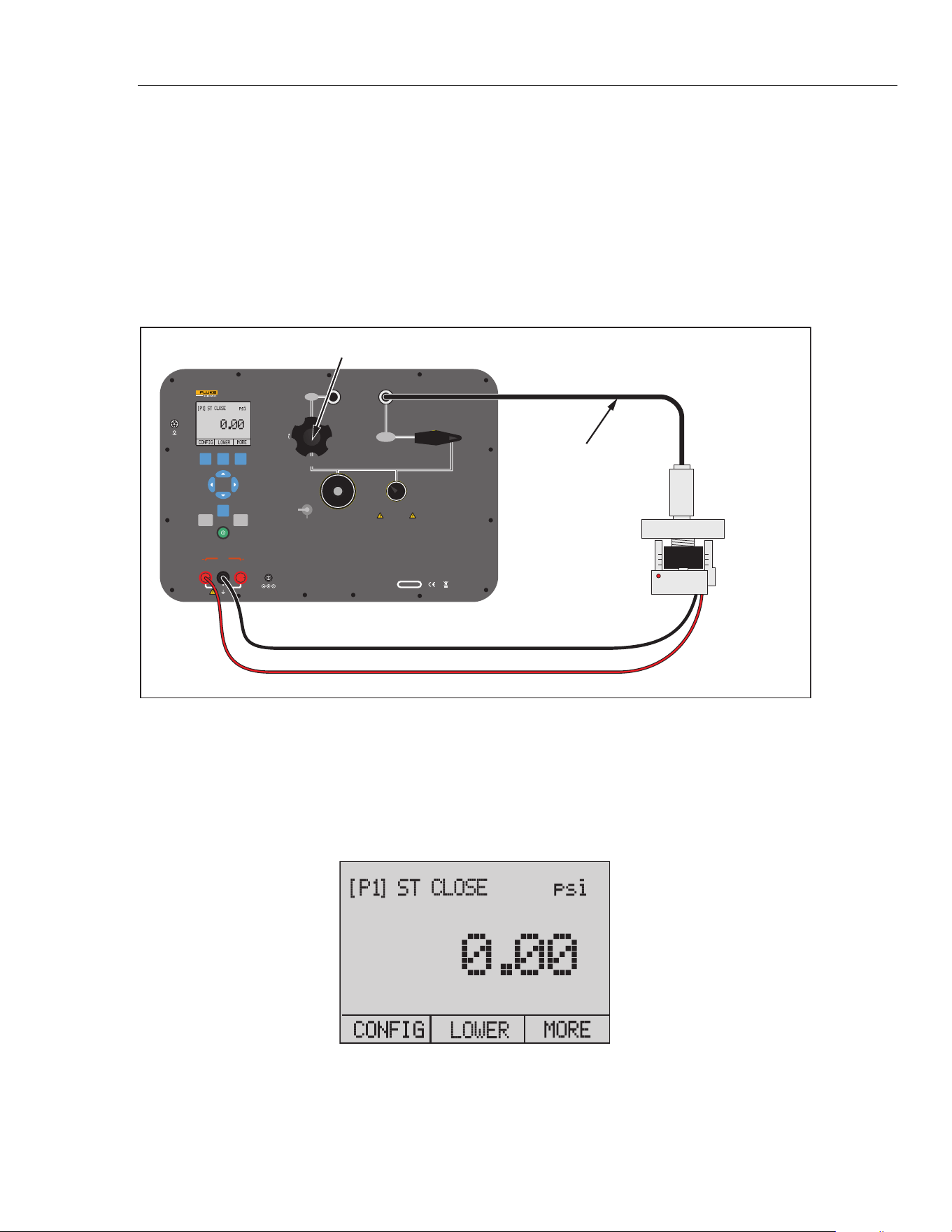
3. Connect the Output of the Product to the pressure switch.
4. Open the vent button on the pump and zero the Product.
5. Close the vent after you reset the Product.
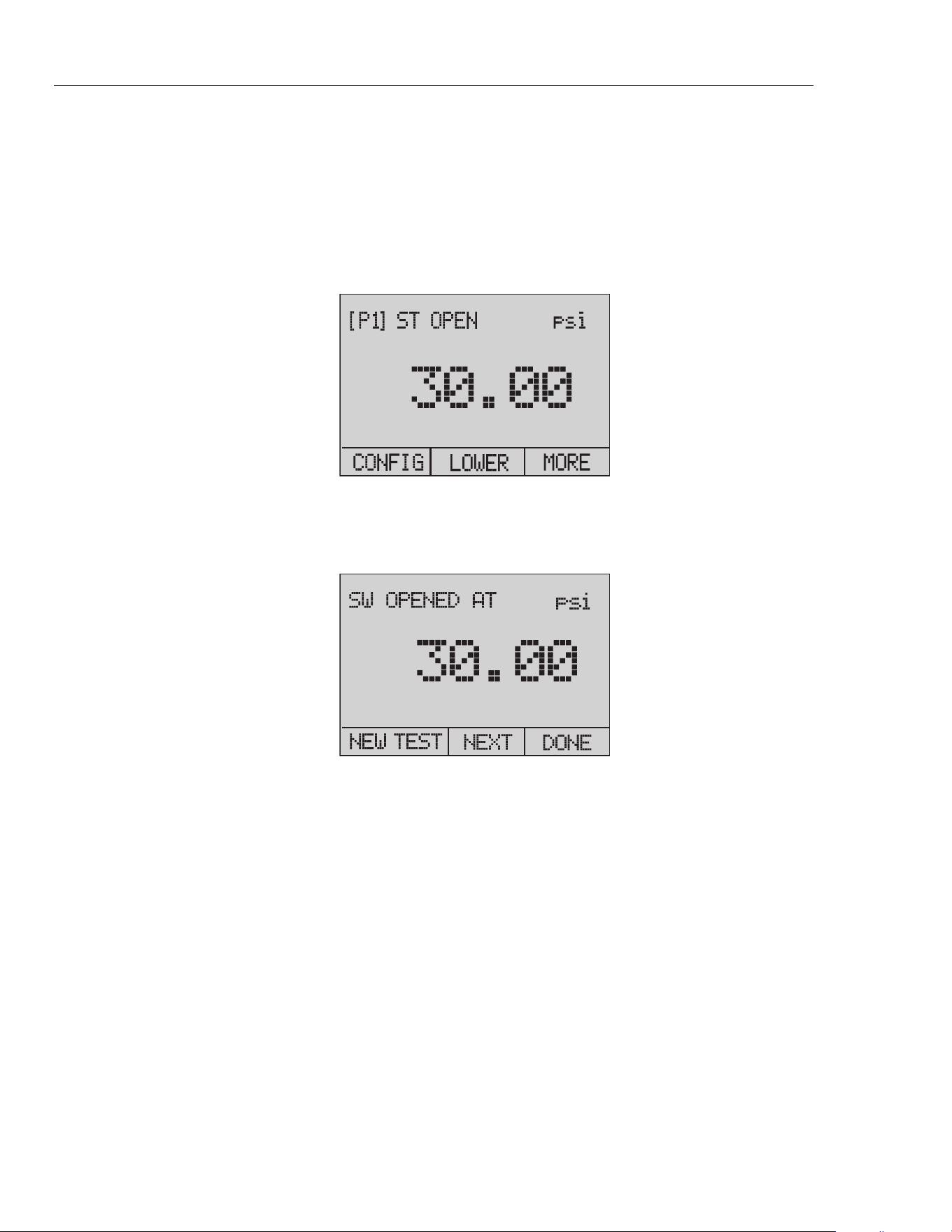
The top of the display shows "CLOSE". See Figure 22.
hbb021.eps
Figure 21. Switch Test Screen
1.888.610.7664 sales@GlobalTestSupply.com
Fluke-Direct.com
3130
Users Manual
22
6. Apply pressure with the pump slowly until the switch opens.
Note
In the switch test mode, the display-update rate is increased to help capture
changes to pressure inputs. Even with this enhanced sample rate, the UUT
should be charged slowly with pressure to ensure accurate readings.
7. After the switch is open, "OPEN" will be shown. Bleed the pump slowly until the
pressure switch closes. See Figure 22.
hbb022.eps
Figure 22. Switch Test Screen (Open)
8. The top display now shows "SW OPENED AT" and gives you the pressure at which
the switch opened. See Figure 23.
hbb023.eps
Figure 23. Opened Switch Reading
1.888.610.7664 sales@GlobalTestSupply.com
Fluke-Direct.com
Portable Pressure Calibrator
Pressure Measurement
23
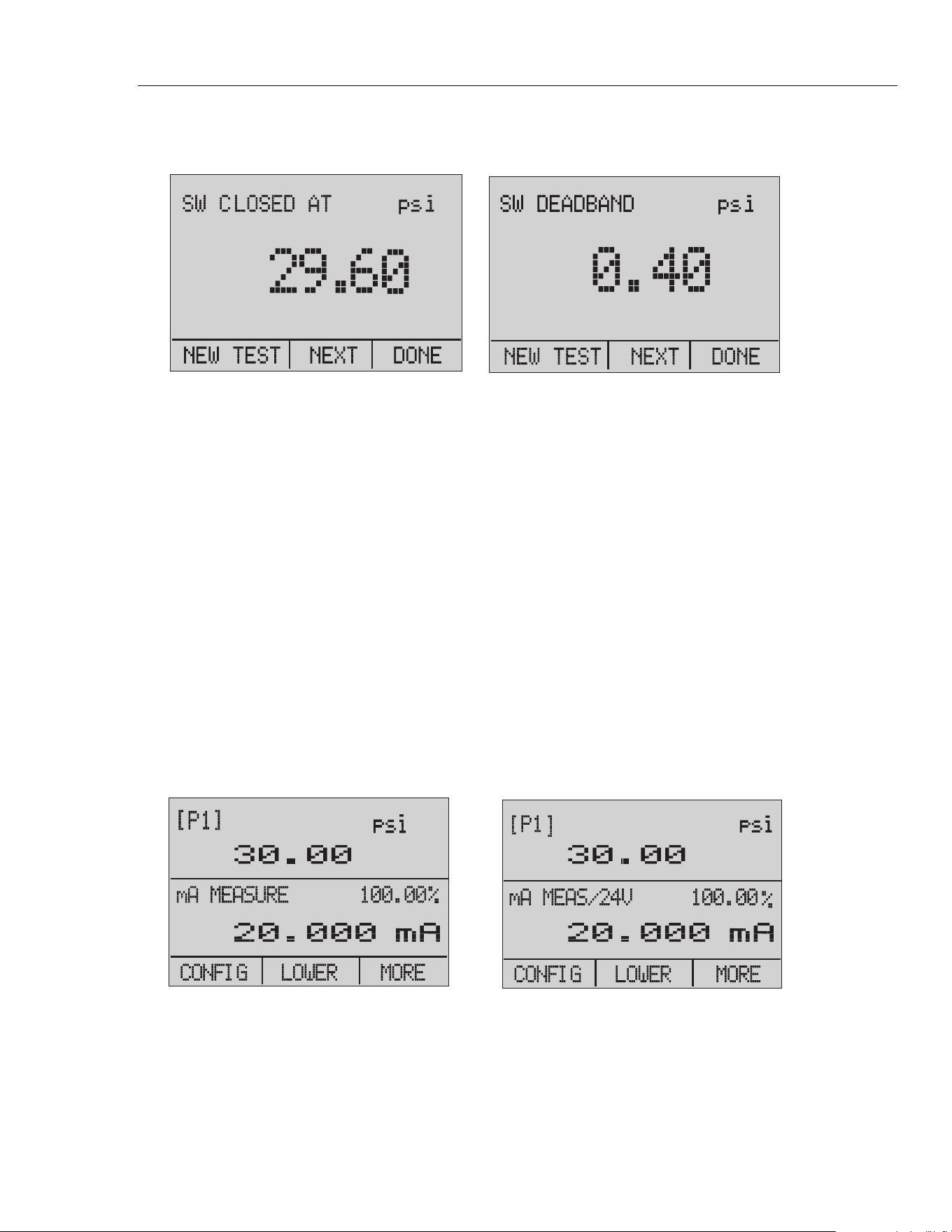
9. Select the "NEXT" option to show the pressure at which the switch closed and the
deadband. See Figure 24.
hbb024.eps
Figure 24. Switch Test and Deadband Results
10. Select the "NEW TEST" option to clear the data and do another test.
11. Select the "DONE" option to complete the test and go to the standard pressure
setting.
Example:
[P1] ST will return to [P1].
This example uses a normally closed switch. The basic procedure is effectively the
same for a normally open switch. The display reads "OPEN" instead of "CLOSE".
Calibrate Transmitters
Use the mA Measurement Function
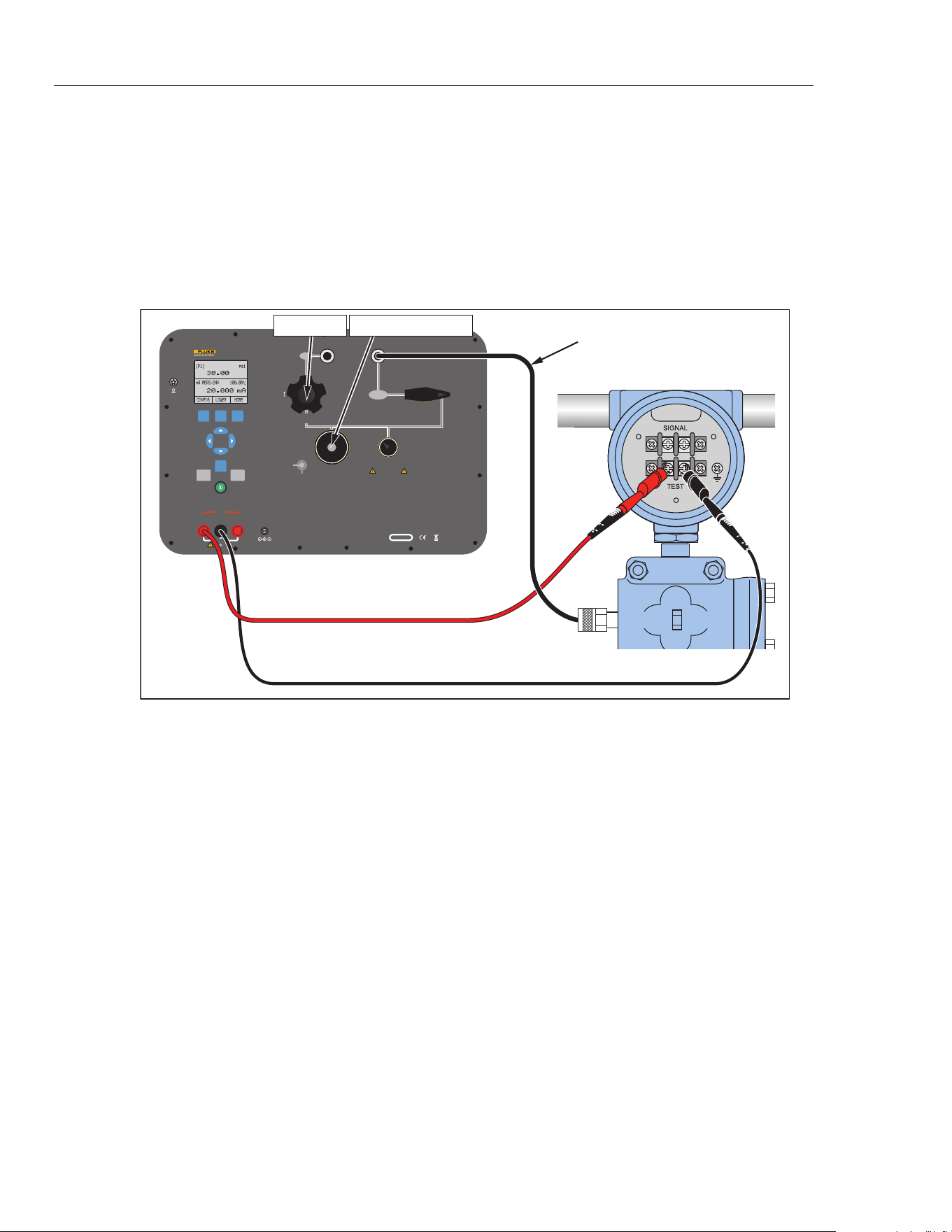
The mA function lets you read the 4... 20 mA output from the UUT. This can be done in
two ways:
1. Passively – the UUT generates 4... 20 mA directly. This can be read on the Product.
2. Actively – the Product supplies a loop power of 24 V dc to the UUT to power the
device while it reads the 4... 20 mA signal. See Figure 25.
Passive Active
hbb025.eps
Figure 25. Passive and Active Screens
1.888.610.7664 sales@GlobalTestSupply.com
Fluke-Direct.com
3130
Users Manual
24
Calibrate a Pressure-to-Current Transmitter
To calibrate a pressure-to-current transmitter (P/I):
1. Connect the Product pump to the transmitter.
2. Apply pressure from the pump.
3. Measure the current output of the transmitter.
4. Make sure that the read value is correct. If it is not correct, the transmitter must be
adjusted. See Figure 26.
V mA
SWITCH TEST
COM
EXTERNAL
PRESSURE MODULE
24 V DC
30 V MAX
LOOP
PORTABLE PRESSURE CALIBRATOR
3130
FLUKE CORPORATION
EVERETT, WA USA
www.flukecal.com
CHARGE
16 V DC
5.6 A
SERIAL NO.
VENT LINE BEFORE MAKING SELECTION
CAUTION
OUTPUT
ISOLATION
VALV E
-12 PSI TO 300 PSI
(-8 kPa TO 2 MPa)
AIR SUPPLY
330 PSI MAX
(2.3 MPa)
PRESSURE
CLOSED
VACUUM
PUMP
FINE
ADJUSTMENT
VENT
SUPPLY
METERING VALVE
FINE
ADJUSTMENT
VENT
FILTER
PRESSURE
SENSOR
CLOSE VALVE BEFORE
OPERATING PUMP
F1 F2 F3
HOME
ZERO PUMP
Fully Closed
Close silver vent knob
+
–
Use low volume
hose if possible
hbb026.eps
Figure 26. Calibrate a Pressure-to-Current Transmitter
1.888.610.7664 sales@GlobalTestSupply.com
Fluke-Direct.com
Portable Pressure Calibrator
Pressure Measurement
25
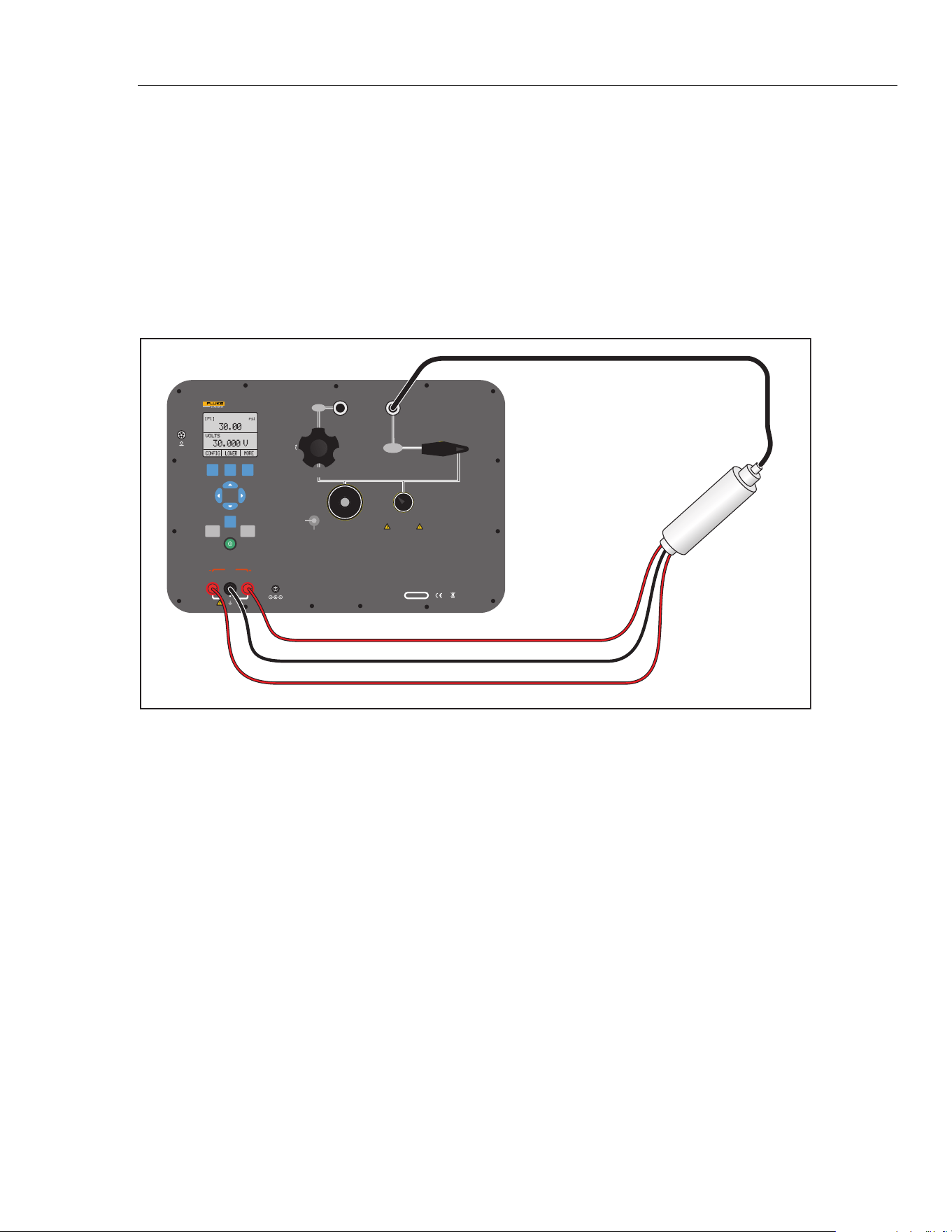
Calibrate a Pressure-to-Voltage Transmitter
To calibrate a pressure-to-voltage transmitter (P/V):
1. Connect the Product pump to the transmitter.
2. Apply pressure from the pump.
3. Connect the 24 V to the transmitter.
4. Measure the voltage output of the transmitter.
5. Make sure that the read value is correct. If it is not correct, the transmitter must be
adjusted. See Figure 27 for connections.
V mA
SWITCH TEST
COM
EXTERNAL
PRESSURE MODULE
24 V DC
30 V MAX
LOOP
PORTABLE PRESSURE CALIBRATOR
3130
FLUKE CORPORATION
EVERETT, WA USA
www.flukecal.com
CHARGE
16 V DC
5.6 A
SERIAL NO.
VENT LINE BEFORE MAKING SELECTION
CAUTION
OUTPUT
ISOLATION
VALV E
-12 PSI TO 300 PSI
(-8 kPa TO 2 MPa)
AIR SUPPLY
330 PSI MAX
(2.3 MPa)
PRESSURE
CLOSED
VACUUM
PUMP
FINE
ADJUSTMENT
VENT
SUPPLY
METERING VALVE
FINE
ADJUSTMENT
VENT
FILTER
PRESSURE
SENSOR
CLOSE VALVE BEFORE
OPERATING PUMP
F1 F2 F3
HOME
ZERO PUMP
Signal Output
Common
+24 V Power
Pressure
Transmitter
hbb035.eps
Figure 27. Calibrate a Pressure-to-Voltage Transmitter
1.888.610.7664 sales@GlobalTestSupply.com
Fluke-Direct.com
3130
Users Manual
26
%-Error Function
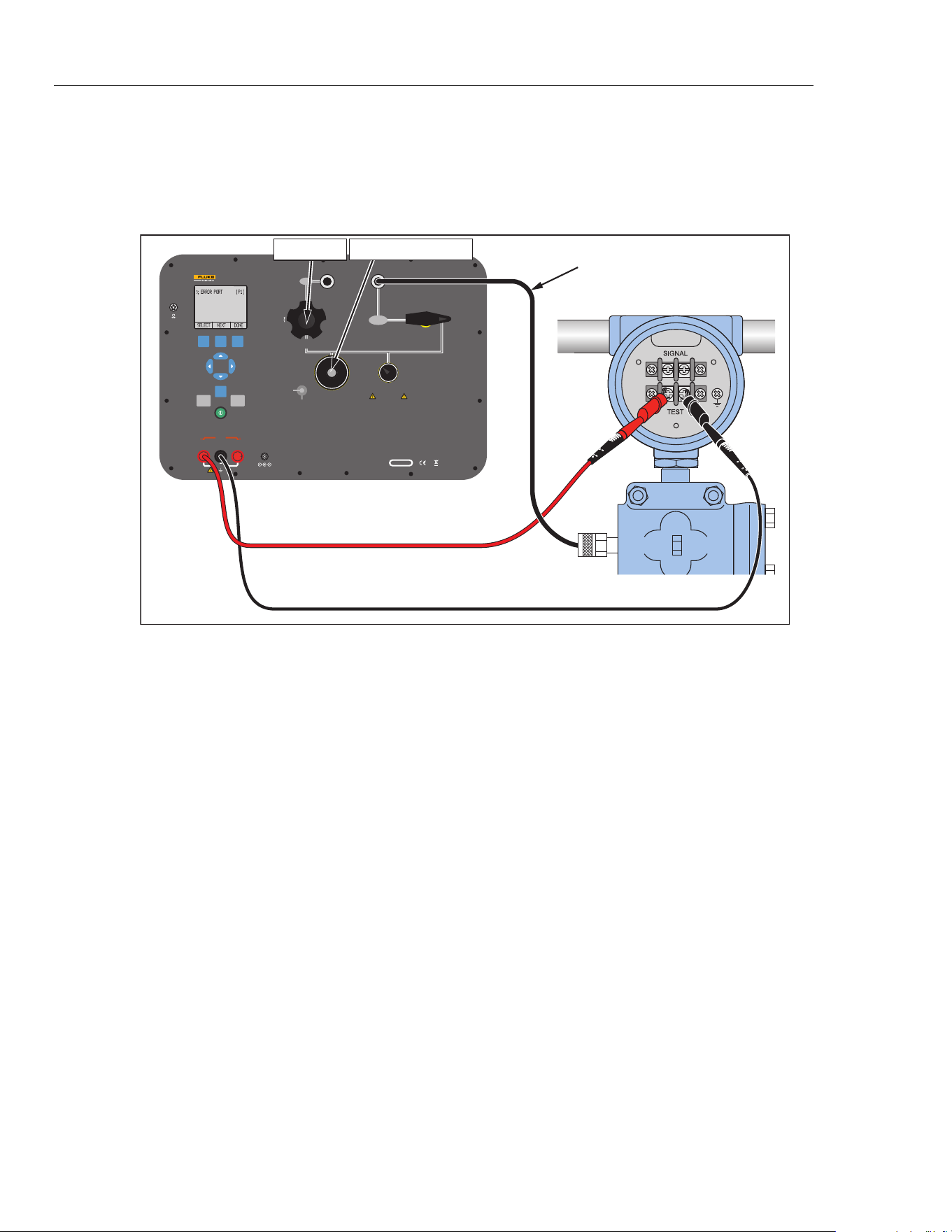
The Product has a special function which can calculate the error in the pressure value
from the mA value as a percentage of the 4 ... 20 mA loop span. The %-Error mode uses
all three screens and has a special menu structure. It shows pressure, mA and %-Error
simultaneously. See Figure 28.
V mA
SWITCH TEST
COM
EXTERNAL
PRESSURE MODULE
24 V DC
30 V MAX
LOOP
PORTABLE PRESSURE CALIBRATOR
3130
FLUKE CORPORATION
EVERETT, WA USA
www.flukecal.com
CHARGE
16 V DC
5.6 A
SERIAL NO.
VENT LINE BEFORE MAKING SELECTION
CAUTION
OUTPUT
ISOLATION
VALV E
-12 PSI TO 300 PSI
(-8 kPa TO 2 MPa)
AIR SUPPLY
330 PSI MAX
(2.3 MPa)
PRESSURE
CLOSED
VACUUM
PUMP
FINE
ADJUSTMENT
VENT
SUPPLY
METERING VALVE
FINE
ADJUSTMENT
VENT
FILTER
PRESSURE
SENSOR
CLOSE VALVE BEFORE
OPERATING PUMP
F1 F2 F3
HOME
ZERO PUMP
Fully Closed
Close silver vent knob
+
–
Use low volume
hose if possible
hbb027.eps
Figure 28. Connections with a Pressure Transmitter with % Error Function
Example:
If a pressure transmitter under test has a full-scale range of 2 bar and gives a 4 ... 20 mA
output signal, you can program in a 0 ... 2 bar pressure span into the Product. The Product
will then calculate and show the deviation or %-Error value from the 4 ... 20 mA output.
This makes manual calculations unnecessary.
To use the "%-ERROR" function:
1. Once the Product is turned on, push to start the "MORE" menu option. Then Push
to start the "%-ERROR" option.
2. Push to select the "CONFIG" option.
1.888.610.7664 sales@GlobalTestSupply.com
Fluke-Direct.com
Portable Pressure Calibrator
Pressure Measurement
27
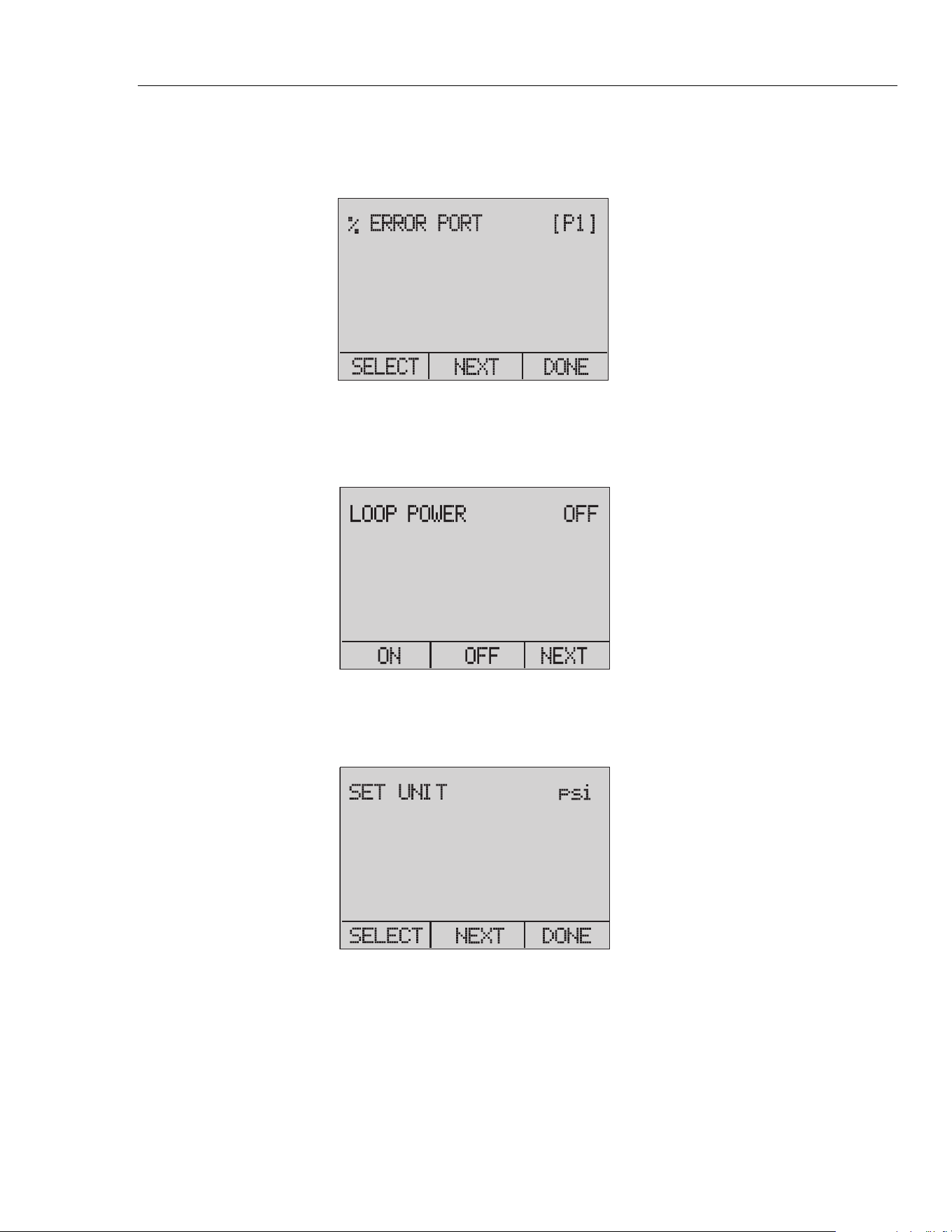
3. The first option is the port setting. Use the "SELECT" option to scroll through the
choice of ports (pressure connections). When this is done, select the "NEXT" option.
See Figure 29.
hbb028.eps
Figure 29. Port Setting Screen
4. "LOOP POWER" can be toggled on or off. Select "NEXT" when done. See
Figure 30.
hbb029.eps
Figure 30. Loop Power Screen
5. Use "SELECT" to scroll through the "UNIT" options, and select "NEXT" to move
on. See Figure 31.
hbb030.eps
Figure 31. Set Unit Screen
1.888.610.7664 sales@GlobalTestSupply.com
Fluke-Direct.com
3130
Users Manual
28
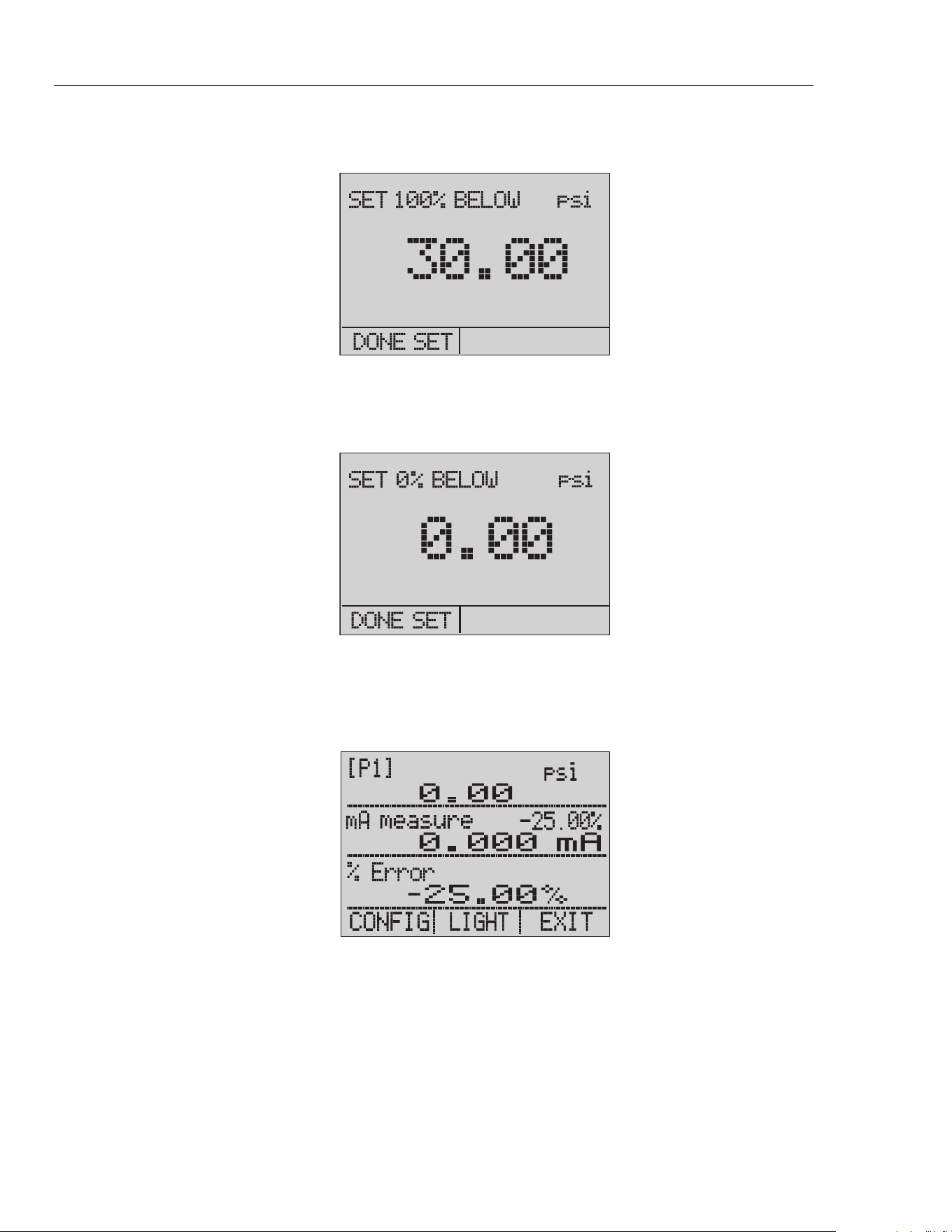
6. Use the arrow keys to set the upper limit of the measurement range. Select DONE
SET when finished. See Figure 32.
hbb031.eps
Figure 32. Setting the Upper Limit
7. Use the arrow keys to set lower limit of the measurement range, and select DONE
SET when finished. The "%-ERROR" mode will be ready to use. See Figure 33.
hbb032.eps
Figure 33. % ERROR Screen
The lower and upper limit of the measuring range is saved in non-volatile memory
until they are changed by the user for the internal sensors and the external pressure
modules. See Figure 34.
hbb033.eps
Figure 34. Saved Upper and Lower Limits
1.888.610.7664 sales@GlobalTestSupply.com
Fluke-Direct.com
Portable Pressure Calibrator
Storage Capability
29
Storage Capability
The Product has a min/max feature to capture the minimum and maximum values of a
shown parameter.
The min/max function can be accessed by going through the menu options until the
MINMAX menu choice is shown. Push the MINMAX softkey to see the min/max values
that are stored in the min/max registers. These readings are live so that the new min/max
values are recorded while in this mode.
To reset the min/max registers, push the CLEAR softkey. These registers are also cleared
at power-up or when the configuration is changed.
Remote Operation
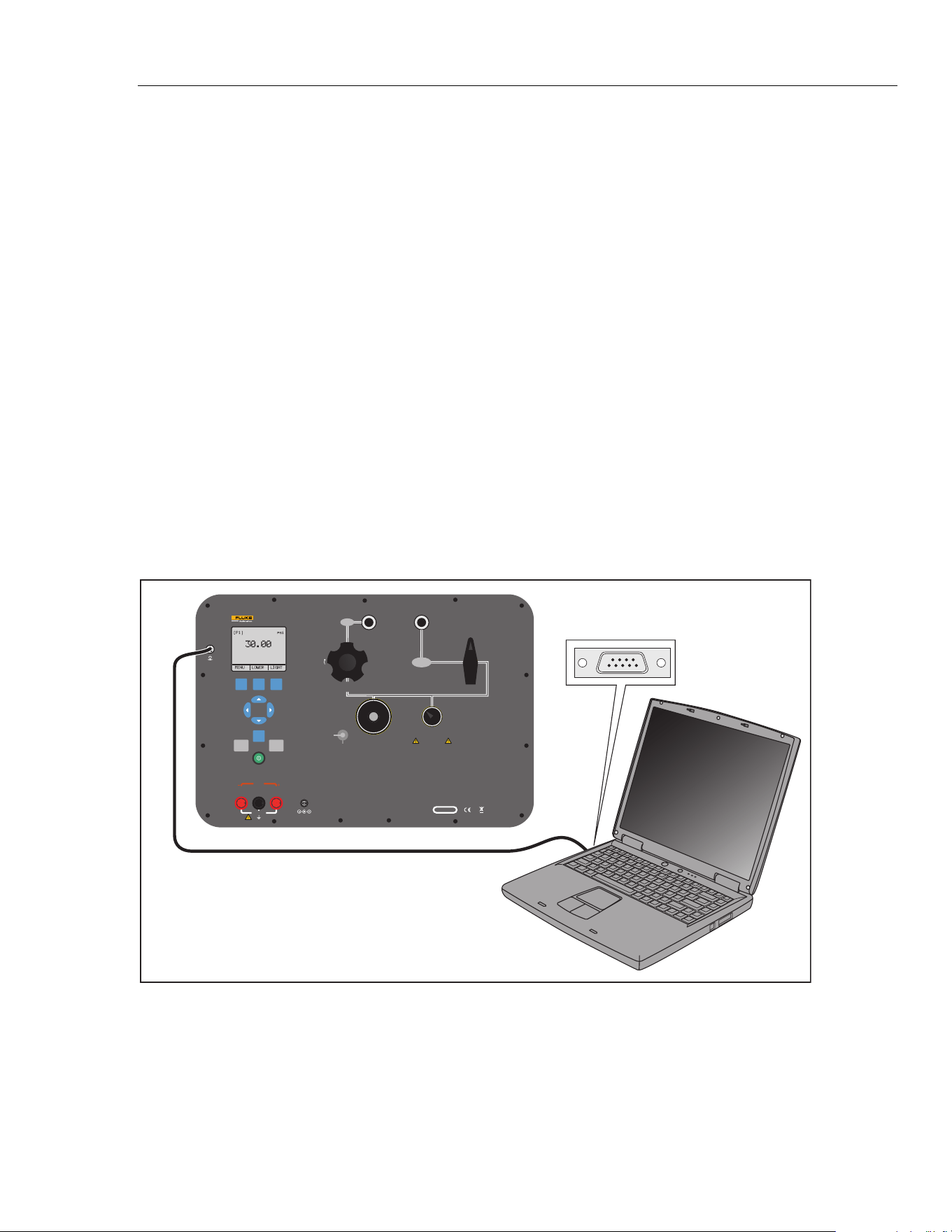
The Product can be remotely controlled with a PC terminal, or by a computer program
that runs the Product in an automated system. An RS-232 serial port connection is used
for remote operation.
Note
To use the remote control option, a custom RS-232 cable must be
purchased. See the “How to Contact Fluke Calibration” section.
With this connection, you can write programs on the PC. Use Windows languages like
Visual Basic to operate the Product, or use a Windows terminal like Hyper Terminal, for
single commands. A typical RS-232 remote configuration is shown in Figure 35.
V mA
SWITCH TEST
COM
EXTERNAL
PRESSURE MODULE
24 V DC
30 V MAX
LOOP
PORTABLE PRESSURE CALIBRATOR
3130
FLUKE CORPORATION
EVERETT, WA USA
www.flukecal.com
CHARGE
16 V DC
5.6 A
SERIAL NO.
VENT LINE BEFORE MAKING SELECTION
CAUTION
OUTPUT
ISOLATION
VALV E
-12 PSI TO 300 PSI
(-8 kPa TO 2 MPa)
AIR SUPPLY
330 PSI MAX
(2.3 MPa)
PRESSURE
CLOSED
VACUUM
PUMP
FINE
ADJUSTMENT
VENT
SUPPLY
METERING VALVE
FINE
ADJUSTMENT
VENT
FILTER
PRESSURE
SENSOR
CLOSE VALVE BEFORE
OPERATING PUMP
F1 F2 F3
HOME
ZERO PUMP
COM Port
hbb034.eps
Figure 35. Remote Operation
1.888.610.7664 sales@GlobalTestSupply.com
Fluke-Direct.com

3130
Users Manual
30
Set Up the RS-232 Port for Remote Control
Note
The RS-232 connection cable must be less than 15 m unless the load
capacitance measured at connection points is less than 2500 pF.
Serial parameter values:
1. 9600 baud
2. 8 data bits
3. 1 stop bit
4. no parity
5. Xon/Xoff
6. EOL (End of Line) character or CR (Carriage Return) or both
An RS-232 cable is used for RS-232 communications from the Product to a
computer. If the computer only has USB ports, a USB to RS-232 converter will be
necessary. To connect the Product to a computer, attach the LEMO connector end
of the cable to the pressure module port on the right side of the Product. Then
connect the DB-9 connector to the RS-232 port on the computer. The Product
must be off before you make the connection.
To set up remote operation of the Product with Windows Hyper Terminal, connect the
Product to a COM port on the PC. See Figure 35.
Do the subsequent procedure:
1. Start Hyper Terminal (located on your computer in Accessories/Communications of
the Windows Start menu).
2. Select New Connection.
3. For Name enter “Fluke 3130”.
4. Select the serial port that the Product is connected to.
5. Enter the above information for port settings.
6. Select ASCII setup from File/Properties/Settings and mark these choices:
1. Echo typed characters locally
2. Wrap lines that exceed terminal width
7. Select Ok.
8. To see if the port functions, enter *IDN?. This command shows information on the
Product.
1.888.610.7664 sales@GlobalTestSupply.com
Fluke-Direct.com

Portable Pressure Calibrator
Remote Operation
31
Change from Remote to Local Operation
The Product uses three modes of operation:
• Local
• Remote
• Remote with Lockout
Local mode is the default mode. Commands can be entered with the buttons on the
Product or with a computer. In Remote mode, the buttons are disabled and commands can
only be entered with a computer. Select [GO TO LOCAL] from the menu on the
Product display to restore button operation. In Remote with Lockout mode, the buttons
cannot be used.
To switch modes:
1. To start Remote mode, enter the serial command “REMOTE” at the computer
terminal.
2. To start Remote with Lockout mode, enter “REMOTE LOCKOUT” in either order.
3. To go back to Local Operation mode, enter “LOCAL” at the terminal. This
command also turns off LOCKOUT if it is on. For more information on commands,
see the “Remote Commands” section.
Command Use
The Product can be controlled by commands and queries. All commands can be entered
with upper or lower case. See the Remote Commands section for all available commands.
The commands are divided into these categories:
Calibrator Commands
Only the Product uses these commands.
For example:
VAL?
This command requests the values shown on the Product display.
Common Commands
Standard commands used by most devices. These commands always start with an
“*”.
For example:
*IDN?
This command tells the Product to show its identification.
Query Commands
Commands that request information and always end with a “?”.
For example:
FUNC?
This command shows the current modes of the Product displays.
1.888.610.7664 sales@GlobalTestSupply.com
Fluke-Direct.com

3130
Users Manual
32
Compound Commands
Commands that have more than one command on one line.
For example:
PRES_UNIT LOWER, PSI;PRES_UNIT?
This command sets the pressure unit to PSI on the lower display and queries the
Product to verify. In this case, it will show the pressure units of all three displays:
BAR,BAR,PSI
Character Processing
The data entered into the Product is processed as follows:
• ASCII characters are discarded if their decimal equivalent is less than 32 (space),
except 10 (LF) and 13 (CR):
• Data is taken as 7-bit ASCII.
• The most significant data bit is ignored.
• Upper or lower case is acceptable.
Response Data Types
The data shown by the Product can be divided into these types:
Integer
For most computers and controllers they are decimal numbers ranging from -32768
to 32768.
For example:
FAULT?
Could show 110
Refer to the Error Codes table (Table 8) for more information on error codes.
Floating
Floating numbers can have a maximum of 15 significant figures and exponents.
For example:
VAL?
Shows 5.830000E01,PSI,0.000000E00,PSI,0.000000E+00,A
Character Response Data (CRD)
Data shown as keywords.
For example:
PRES_UNIT?
Shows BAR,BAR,PSI
Indefinite ASCII (IAD)
Any ASCII characters followed by a terminator. For example:
*IDN?
Shows Fluke, 3130, 1234567, 1.00 (1234567 is the serial number)
1.888.610.7664 sales@GlobalTestSupply.com
Fluke-Direct.com
Portable Pressure Calibrator
Remote Operation
33
Calibrator Status
Error Queue
If an error occurs from invalid input or buffer overflow, its error code is sent to the error
queue. The error code can be read from the queue with the command FAULT?. The error
queue holds 15 error codes. When it is empty, FAULT? shows 0. The error queue is
cleared when power is reset or when the clear command *CLS is entered.
Input Buffer
The calibrator stores all received data in the input buffer. The buffer holds 250 characters
and they are processed on a first in, first out basis.
Remote Commands and Error Codes
This section shows and describes all of the remote commands that are accepted by the
Product.
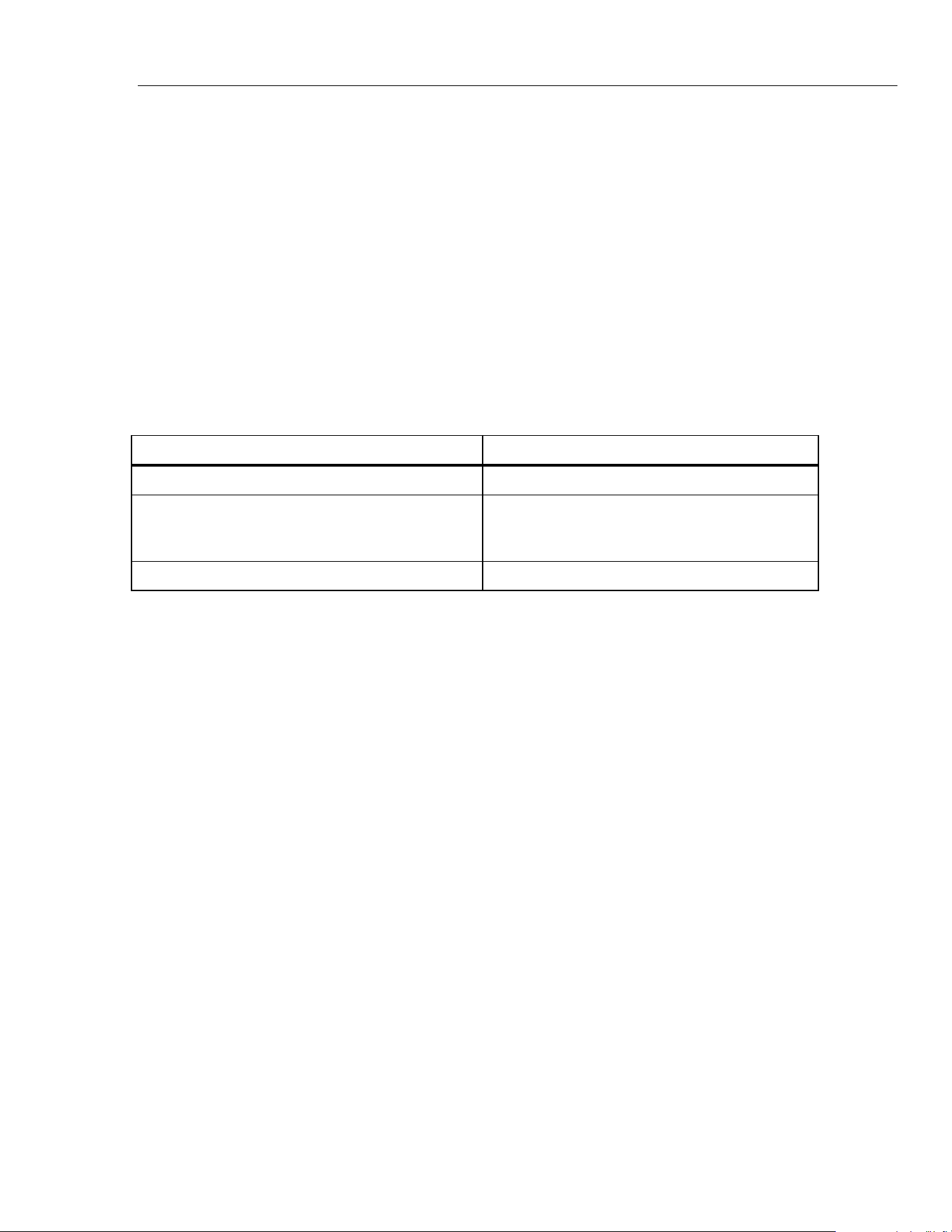
Table 3. Common Commands
Command Description
*CLS (Clear status.) Clears the error queue.
*IDN? Identification query. Shows the manufacturer,
model number, and firmware revision level of the
Product.
*RST Resets the Product to the power up state.
1.888.610.7664 sales@GlobalTestSupply.com
Fluke-Direct.com
3130
Users Manual
34
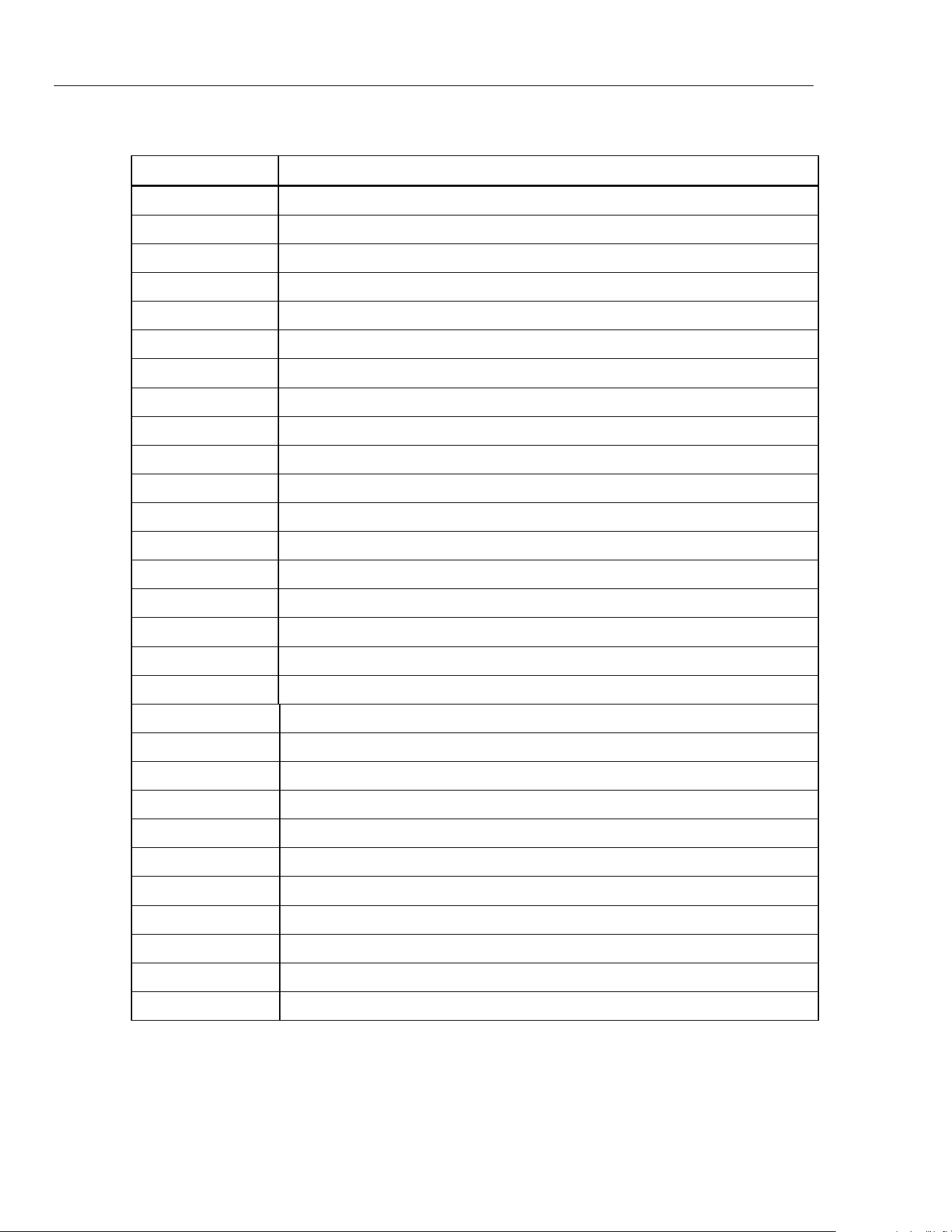
Table 4. Product Commands
Command Description
DAMP Turns on or off Damp
DAMP? Show if DAMP is on/off
DISPLAY Turns on or off the displays specified in the command
DISPLAY? Shows which displays are on/off
ERROR_LOOP Turns on or off loop power in percent error mode
ERROR_LOOP? Shows the current state of loop power in error mode
ERROR_MODE Turns on or off percent error mode
ERROR_MODE? Shows if percent error mode is on or off
ERROR_PORT Set the pressure port for percent error mode
ERROR_PORT? Shows the pressure port for percent error mode
FAULT? Shows the most recent error code
FUNC Sets the display mode as specified in the command
FUNC? Shows the current mode of the upper, middle, and lower display
HART_ON Turns on the HART resistor
HART_OFF Turns off the HART resistor
HART? Shows the current state of the HART resistor.
HI_ERR Sets the 100 % of span limit for percent error mode
HI_ERR? Shows the 100 % of span limit for percent error mode
IO_STATE Set the Product mA state
IO_STATE? Shows the Product mA state
LOCAL Shows user to manual operation of the Product
LOCKOUT Locks out the keypad of the Product in remote operation
LO_ERR Sets the 0 % of span limit for percent error mode
LO_ERR Shows the 0 % of span limit for percent error mode
MOTOR_ON Turns on the motor
MOTOR_OFF Turns off the motor
MOTOR? Shows the current state of the HART resistor
OUT Set the Product to output the requested current
OUT? Shows the value of the current being simulated
1.888.610.7664 sales@GlobalTestSupply.com
Fluke-Direct.com
Portable Pressure Calibrator
Remote Operation
35
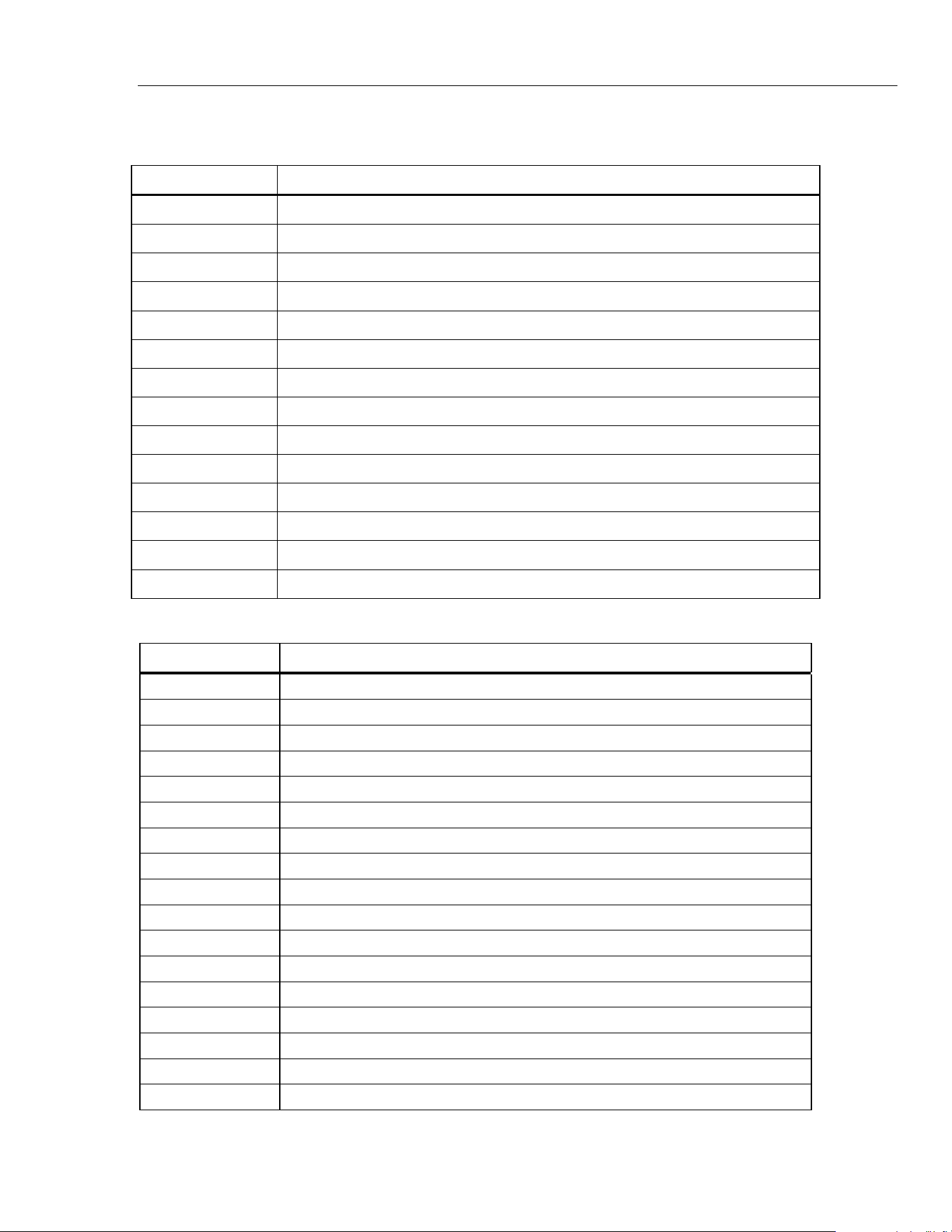
Table 4. Product Commands (cont.)
Command Description
PRES_UNIT Set the pressure unit for the indicated display
PRES_UNIT? Shows the pressure from the indicated display
PUMP_LIMIT Sets the approximate value at which the pump will turn off
PUMP_LIMIT? Shows the approximate value at which the pump will turn off
REMOTE Puts the Product in remote mode
SIM Set the Product to simulate the requested current
SIM? Shows the value of the current being simulated
ST_CLOSE? Shows pressure value at which the switch closed
ST_DEAD? Shows pressure value of the deadband of the switch
ST_OPEN? Shows pressure value at which the switch opened
ST_START Starts a switch test
VAL? Shows the measured values
ZERO_MEAS Zeros the pressure module
ZERO_MEAS? Shows the zero offset of the pressure module
Table 5. Parameter Units
Units Meaning
DCI Current function
DCV Voltage measure function
EXT External pressure measurement function
LOWER Designates Lower display
MA Milliamps of current
MEASURE Measure state
MEAS_LOOP Measure with loop power state
MIDDLE Designates Middle display
PCT_ERR Percent Error
PERCENT Percent
P1 P1 pressure measurement function
ST_P1 Switch test mode with P1
ST_EXT Switch test mode with external module
SOURCE Source state
SIM Simulate state
UPPER Designates Upper display
V Voltage
1.888.610.7664 sales@GlobalTestSupply.com
Fluke-Direct.com
3130
Users Manual
36
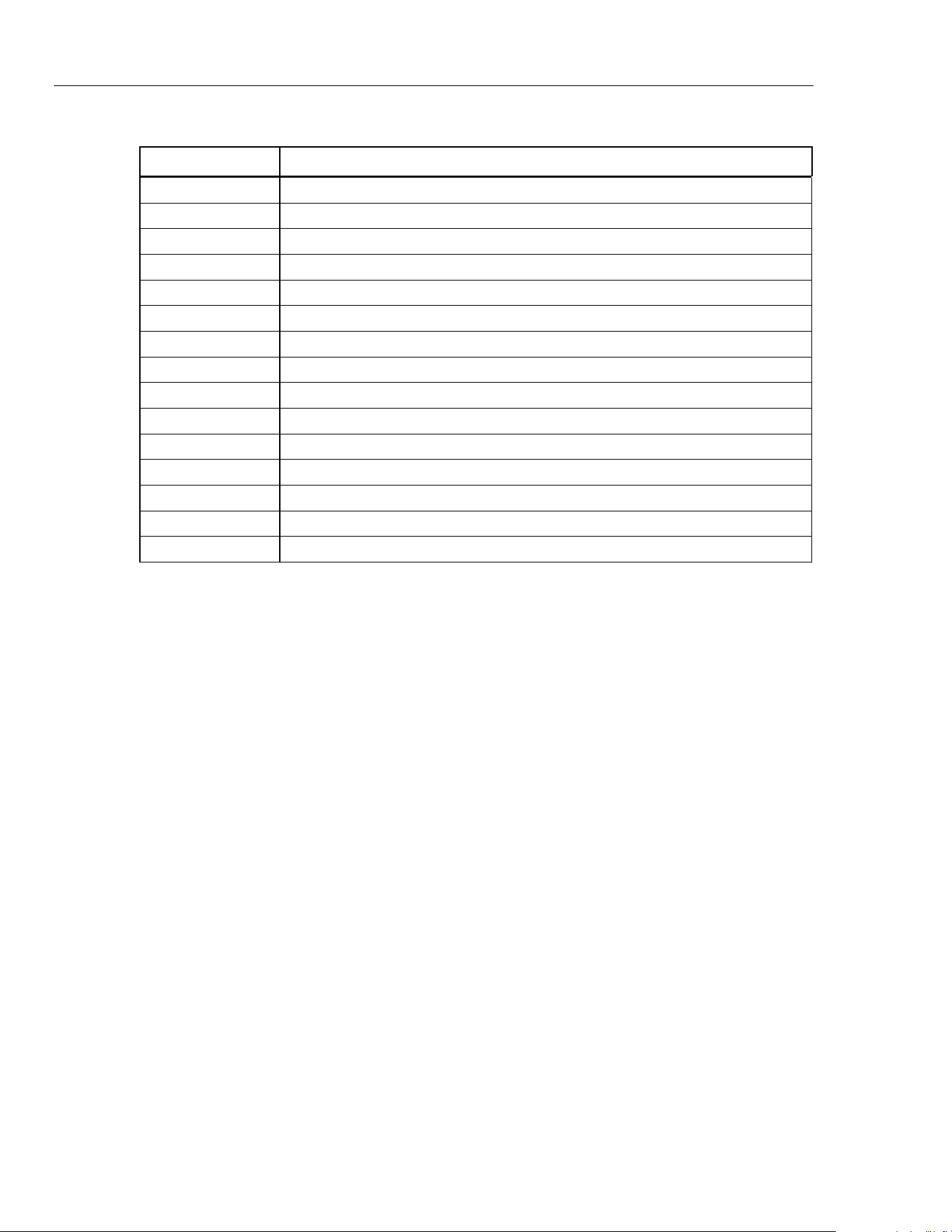
Table 6. Error Codes
Error Number Error Description
100 A non-numeric entry was received where it should be a numeric entry
101 Too many digits entered
102 Invalid units or parameter value received
103 Entry is above the upper limit of the allowable range
104 Entry is below the lower limit of the allowable range
105 A required command parameter was missing
106 An invalid command parameter was received
107 Pressure not selected
108 Invalid sensor type
109 Pressure module not connected
110 An unknown command was received
111 Bad Parameter received
112 The serial input buffer overflowed
113 Too many entries in the command line
114 The serial output buffer overflowed
Enter Commands
Commands for the Product can be entered in upper or lower case. There is a minimum of
one space necessary between the command and parameter. All other spaces are optional.
Most of the commands for the Product are sequential. Any overlapped commands will be
shown as such. This section describes each of the commands and their general use, which
will include any parameters that can be entered with the command as well as what the
output of the command is.
Common Commands
*CLS
Clears the error queue. Also ends all pending operations. When you write programs, use
this command before each procedure to prevent buffer overflow.
*IDN?
Shows the manufacturer, model number, and firmware revision of the Product.
For example:
*IDN?
Shows Fluke, 3130 0, 1.00
1.888.610.7664 sales@GlobalTestSupply.com
Fluke-Direct.com

Portable Pressure Calibrator
Remote Operation
37
Calibrator Commands
DAMP
Turns on or off the dampening function.
For example:
If you send DAMP ON, this will turn the dampening function on.
DAMP?
Shows the current state of the dampening function.
For example:
If you send DAMP?, this will show ON if the dampening function is on.
DISPLAY
Turns on or off the indicated display.
For example:
If you send DISPLAY LOWER, ON, this will turn on the lower display.
DISPLAY?
Shows the current state of the each of the displays.
For example:
If you send DISPLAY?, it will show ON, ON, ON if the all the displays are on.
FAULT?
Shows the error code number of an error that has occurred. The command can be entered
if the previous command did not do what it was meant to do.
For example, if a value for current output is entered that is larger than the supported
range (0-24 mA), FAULT? shows:
103 which is the code number for an entry over range.
Refer to Table 6 for more information about error code numbers.
ERROR _LOOP
Turns on or off loop power in percent error mode.
For example:
To set loop power on, send ERROR_LOOP ON.
1.888.610.7664 sales@GlobalTestSupply.com
Fluke-Direct.com

3130
Users Manual
38
ERROR _LOOP?
Shows the current state of loop power in percent error mode.
For example:
If you send ERROR_LOOP?, it will show ON if loop power is on in error mode.
ERROR_ MODE
Turns on or off percent error mode.
For example:
To turn on percent error mode, send ERROR_MODE ON.
ERROR _ MODE?
Shows the current state of percent error mode.
For example:
If you send ERROR_MODE?, it will show ON if the Product is in percent error mode.
ERROR_ PORT
Sets the pressure port for percent error.
For example:
To set the pressure port for percent error to [P1] send ERROR_ PORT P1.
ERROR _ PORT?
Shows the current pressure port for percent error mode.
For example:
If you send ERROR _PORT?, it will show P1 if the pressure port in percent error is [P1].
FUNC
Sets the display indicated in argument 1 to the function indicated in argument 2.
For example:
To set the lower display to pressure mode, send FUNC LOWER,[P1].
FUNC?
Shows the current mode of all displays. For example if the Product is set to [P2] ST on
the upper display, [P1] on the middle, and [P1] on the lower, FUNC? shows:
ST_P2,P1,[P1]
1.888.610.7664 sales@GlobalTestSupply.com
Fluke-Direct.com

Portable Pressure Calibrator
Remote Operation
39
HART_ON
Turns on the Hart resistor.
HART_OFF
Turns off the Hart resistor.
HART?
Shows the state of the Hart resistor.
For example:
If the Hart resistor was on, HART? shows ON.
HI_ERR
Sets the 100 % point for the percent error mode calculation in the current engineering
units.
For example:
To set the 100 % point to 100 psi, send HI_ERR 100.
HI_ERR?
Shows the 100 % point for the percent error mode calculation.
For example:
If the 100 % point is set to 100 psi, HI_ERR? shows 1.000000E+02, PSI .
IO_STATE
Sets the input/output/simulate state of the mA function of the Product. This does not put
the Product into mA if it is not in it already.
For example:
If the Product is in mA simulate modem sending IO_STATE MEASURE would put it
into measure mode.
IO_STATE?
Shows the input/output/simulate state of the mA function of the Product.
For example:
If the Product was in mA simulate mode, IO_STATE? shows SIM.
1.888.610.7664 sales@GlobalTestSupply.com
Fluke-Direct.com

3130
Users Manual
40
LOCAL
Returns the Product to local operation if it was in remote mode. The command also clears
LOCKOUT if the Product was in lockout mode.
LOCKOUT
Sending this command sets the lockout state, when the unit is in REMOTE or goes to
remote, it stops use of the keypad completely. The lockout state can only be cleared by
sending the LOCAL command.
LO_ERR
Sets the 0 % point for the percent error mode calculation in the current engineering units.
For example:
To set the 0 % point to 20 psi, send LO_ERR 20.
LO_ERR?
Shows the 0 % point for the percent error mode calculation.
For example:
If the 0 % point is set to 20 psi, LO_ERR? shows 2.000000E+01, PSI .
MOTOR_ON
Turns on the motor.
MOTOR_OFF
Turns off the motor.
MOTOR?
Shows the state of the motor.
For example:
If the motor was on, MOTOR? shows ON.
1.888.610.7664 sales@GlobalTestSupply.com
Fluke-Direct.com

Portable Pressure Calibrator
Remote Operation
41
OUT
This command also switches the Product into mA output mode. A number and a unit
must be entered after the command.
For example:
OUT 5 MA sets the current output at 5 mA.
OUT?
Shows the output of the Product.
Using the above example, OUT? shows: 5.000000E-03, A.
PRES_UNIT
Used to set the pressure unit for the indicated display.
For example:
To set the pressure unit to psi on the lower display, send PRES_UNIT LOWER, PSI.
PRES_UNIT?
Shows the pressure unit used when measuring pressure for each of the three displays.
PUMP_LIMIT
Sets the approximate pressure in psi at which the pump will turn off.
For example:
PUMP_LIMIT 50 sets the approximate value that the pump will shut off at to 50 psi.
PUMP_LIMIT?
Shows the pump limit. Using the above example, PUMP_LIMIT? Shows:
50.000
REMOTE
Puts the Product into remote mode. From the remote mode the user can still use the
keypad to get back to local mode unless the command LOCKOUT was entered before
REMOTE. Then the keypad is completely locked out, and the user has to send the
LOCAL command to go to local operation.
1.888.610.7664 sales@GlobalTestSupply.com
Fluke-Direct.com

3130
Users Manual
42
SIM
Sets the output for current simulation. This command also switches the Product into mA
simulation mode. A number and a unit must be entered after the command.
For example:
SIM 5 MA sets the current simulation at 5 mA
SIM?
Shows the output of the current simulation. With the example above, the output would be:
5.000000E-03, A
ST_START
Starts a switch test.
ST_CLOSE?
Shows the pressure that the switch closed at in the current pressure units.
ST_OPEN?
Shows the pressure that the switch opened at in the current pressure units.
ST_DEAD?
Shows deadband of the switch in the current pressure units.
VAL?
Shows the value of measurement on a maximum of three displays. For example, if the
upper display shows pressure at 0.00 bar on P1, the middle display shows pressure at
0 psi on P1, and the lower display shows 0 mA, then VAL? will return:
0.000000E+00,BAR,0.000000E+00,PSI,0.000000E+00,A
ZERO_MEAS
Zeroes the attached pressure module. Enter the zeroing value in PSI after the command
when zeroing an absolute pressure module.
ZERO_MEAS?
Shows the zero offset or the reference value for absolute pressure modules.
1.888.610.7664 sales@GlobalTestSupply.com
Fluke-Direct.com
Portable Pressure Calibrator
Maintenance
43
Maintenance
Warning
For safe operation and maintenance of the Product:
• Use only Fluke approved power adapters to charge the
battery.
To prevent possible electrical shock, fire, or personal injury:
• Use only specified replacement parts.
• Have an approved technician repair the Product.
Clean the Product and pressure modules with a soft cloth dampened with water or water
and mild soap.
Caution
To prevent possible damage to the Product, do not use
solvents or abrasive cleansers.
User-Replaceable Parts and Accessories
Table 7 lists the Fluke part number of each user-replaceable part or accessory for the
Product.
Table 7. Replaceable Parts
Item Description Fluke Part Number
Test cables (1x red, 1x black), 48 in, stackable 3971218
16 V 5.06 A ac adapter/charger 4312648
Filter Pack and end plates 4296874
1.888.610.7664 sales@GlobalTestSupply.com
Fluke-Direct.com
3130
Users Manual
44
Specifications
Specifications are valid for one year unless otherwise noted.
Electrical Specification
Measurement Inputs Range Accuracy
mA 0 mA to 24.000 mA 0.015 % of reading ±0.002 mA
Volts 0 mA to 30.000 V dc 0.015 % of reading ±0.002 V
Outputs Range
mA 4 mA to 24.00 mA
Volts 24 V dc
[1]
[1] Available in mA or V measurement mode
Pressure
Pressure ............................................................ -12 to 300.00 psi
mA .................................................................... 0 to 24.000 mA
Volts ................................................................. 0 to 30.000 V dc
Engineering Units ............................................ psi, bar, mbar, kPa, MPa, kgcm
2
, mmH
2
O
@ 4 °C, mmH
2
O @ 20 °C, cmH
2
O @
4 °C, cmH
2
O @ 20 °C, inH
2
O @ 4 °C,
inH
2
O @ 20 °C, inH
2
O @ 60 °F, mmHg
@ 0 °C, inHg @ 0 °C
Accuracy
Pressure ........................................................... 1 year: 0.025 % of reading ±0.01 % FS
mA .................................................................... ±0.015 % of reading ±0.002 mA
Volts ................................................................ ±0.015 % of reading ±0.002 V
Temperature Effect (all functions) .................. No effect on accuracy on all functions
from 15 °C to 35 °C
Add ±0.002 % F.S. /°C for temps outside
of 15 °C to 35 °C
Loop Power
24 V .................................................................. 23 V to 28 V
Mechanical Specification
Size (H X W X L) ............................................. (387 x 305 x 178) mm, (15.3 x 12.0 x 7.0) in
Weight ............................................................ ~7.0 kg (15.5 lb)
Environmental
Operating Temperature ..................................... -10 °C to +50 °C (14 °F to 122 °F)
Storage ............................................................. -20 °C to +55 °C (-4 °F to +131 °F)
Humidity .......................................................... 10 % to 95 % RH Non-condensing
Altitude ............................................................. 2000 meters, limited by ac adapter
1.888.610.7664 sales@GlobalTestSupply.com
Fluke-Direct.com

Portable Pressure Calibrator
Specifications
45
Media Compatibility ......................................... Any clean, dry, non-corrosive gas
Standards and Agency Approval
Safety ................................................................ IEC 61010-1, 30V Max, Pollution
Degree 2
Electromagnetic Environment .......................... IEC 61326-1: Basic/Portable
Ingress Protection ............................................. IP67 (Case closed), IP40 (Case open)
Vibration ........................................................... MIL-PRF-28800F (Class 3-Random)
Power
Power Requirements ......................................... 16 V dc (Universal AC Adapter/Charger
supplied) Internal 3800 mAhr advanced
NiMH pack
Battery life (fully-charged) ............................... Approximately 50 hours (Only
measurement or with external pressure
supply)
125 pump cycles to 20 bar
300 pump cycles to 10 bar
1,000 pump cycles to 2 bar
1.888.610.7664 sales@GlobalTestSupply.com
Fluke-Direct.com