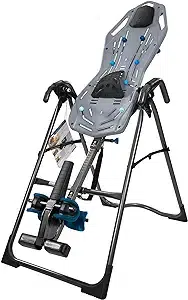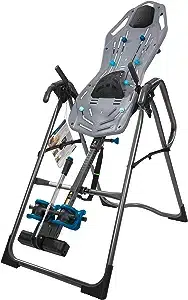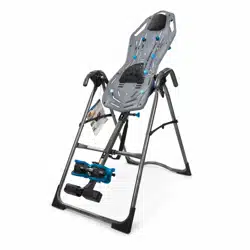
FitSpine X
TM
Series
Assembly Instructions
Models X1, X2, X3
YEAR
5
W
A
R
R
A
N
T
Y
FULL
NEW!
Follow along with
your smartphone
to make assembly
even easier!
For gravity-assisted stretching and decompression
To download and print the Teeter
FitSpine X
™
instructions, visit the
Product Manuals page at teeter.com.
* Specifications may vary from this image and are
subject to change without notice.
The X1 is shown here. Your actual model may vary.
EN
founder & innovator
I created Teeter so people could
live healthier, more active lives.
Owner’s Manual (attached to the equipment)
Important Safety Instructions .........................1
User Settings .........................................2
Prepare to Invert ...................................3 – 4
Inverting ...........................................4 – 5
Storage & Maintenance............................... 5
Get the Most out of Your Teeter ......................6
Assembly Instructions
Important Safety Instructions .........................1
Parts for Assembly.................................... 2
Understanding Your Inversion Table .................3
Safety Warning Labels & Product Specifications.....4
Before Beginning Assembly.......................... 5
Assembly Steps...................................6 – 12
Misassembly Check...................................13
Before Inverting ..................................... 14
Warranty Terms & Registration .......................15
Congratulations on your purchase of a Teeter FitSpine X
™
Series Inversion Table! For the best experience, it is critical that you follow
the assembly instructions, read and fully understand the Owner’s Manual attached to the equipment, and review the Getting
Started Video Portal at teeter.com/videos prior to using your new Teeter Inversion Table.
Teeter Decompression Devices are 510(k) registered with the FDA and are multiple user, reusable medical devices for home use,
intended to provide traction to the spine while stretching the para-spinal muscle and soft tissues. The devices provide non-powered
traction and are meant for use by adults.
Teeter Decompression Devices are indicated for the following conditions: back pain, muscle tension, degenerative disc disease,
spinal degenerative joint disease, spinal stenosis, herniated disc, spinal curvature due to tight muscles, sciatica, muscle spasm, and
facet syndrome.
For step-by-step, 3D interactive instructions, download BILT (a FREE mobile app) to your smartphone to follow along.
See Page 5 for instructions on how to download BILT.
To register your product warranty, go to teeter.com/Support/Warranty-Registration
If you have any questions concerning assembly or if any parts are missing, DO NOT RETURN THE ITEM TO THE STORE
OR CONTACT THE RETAILER. Our dedicated product service experts can help! Contact Teeter Customer Service
at 800.847.0143, or via online forms or Live Chat at teeter.com.
Get more from your inversion sessions with TeeterLink
®
, the FREE app that lets you usage and
pain levels, get reminders and customized guidance, access support, and more! Scan the code or
search TeeterLink
®
in your app store to get started!
TeeterLink
®
Get

SAVE THESE INSTRUCTIONS
WARNING
!
IMPORTANT SAFETY INSTRUCTIONS
READ ALL INSTRUCTIONS BEFORE USING THE INVERSION TABLE
BEFORE YOU BEGIN: Review all steps before beginning assembly and read all precautions before using the inversion table.
Carefully adhere to the Assembly Instructions and Owner’s Manual to help ensure safety and product integrity.
FAILURE TO FOLLOW INSTRUCTIONS AND WARNINGS COULD RESULT IN SERIOUS INJURY OR DEATH.
To reduce the risk of injury:
• Read and understand all the instructions, review all other accompanying documents, and inspect the equipment before using the
inversion table. It is your responsibility to familiarize yourself with the proper use of this equipment and the inherent risks of inversion
if these instructions are not followed, such as falling on your head or neck, pinching, entrapment, equipment failure, or aggravating a
pre-existing medical condition. It is the responsibility of the owner to ensure that all users of the product are fully informed about the
proper use of the equipment and all safety precautions.
• DO NOT use until approved by a licensed physician. Inversion is contraindicated in any medical or health condition that may be
made more severe by an elevation of blood pressure, intracranial pressure or mechanical stress of the inverted position, or that may
impact your ability to operate the equipment. This may include injury or illness, but also the side effects of any drug or supplement
(prescribed or over-the-counter). Specific conditions may include, but not be limited to:
· Any condition, neurological or otherwise, which results in unexplained tingling, weakness or neuropathy, seizure, sleep disorder,
lightheadedness, dizziness, disorientation, or fatigue, or impacts strength, mobility, alertness, or cognitive ability;
· Any brain condition, such as trauma, history of intracranial bleed, history or risk of TIA or stroke, or severe headaches;
· Any condition of the heart or circulatory system, such as high blood pressure, hypertension, increased risk of stroke, or use of
anticoagulants (including high doses of aspirin);
· Any bone, skeletal or spinal cord condition or injury, such as significant spinal curvature, acutely swollen joints, osteoporosis,
fractures, dislocations, medullary pins or surgically implanted orthopedic supports;
· Any eye, ear, nasal or balance condition, such as trauma, history of retinal detachment, glaucoma, optic hypertension, chronic
sinusitis, middle or inner ear disease, motion sickness, or vertigo;
· Any digestive or internal condition, such as severe acid reflux, hiatal or other hernia, gallbladder or kidney disease;
· Any condition for which exercise is specifically directed, limited or prohibited by a physician, such as pregnancy, obesity,
or recent surgery.
• ALWAYS be certain the Ankle Lock System is properly adjusted and fully engaged, and that your ankles are secure before using
the equipment. HEAR, FEEL, SEE and TEST that the Ankle Lock System is snug, close-fitting and secure EVERY TIME you use the
equipment.
• ALWAYS wear securely tied lace-up shoes with a flat sole, such as a normal tennis-style shoe.
• DO NOT wear any footwear that could interfere with securing the Ankle Lock System, such as shoes with thick soles, boots, high-tops
or any shoe that extends above the anklebone.
• DO NOT use the inversion table until it is adjusted properly for your height and body weight. Improper settings can cause rapid
inversion or make returning upright difficult. New users, and users who are physically or mentally compromised, will require the
assistance of a spotter. Make sure the equipment is set to your unique user settings prior to each use.
• DO NOT sit up or raise head to return upright. Instead, bend knees and slide your body to the foot-end of the inversion table to
change weight distribution. If locked out in full inversion, follow the instructions for releasing from the locked position before
returning upright.
• DO NOT continue using the equipment if you feel pain or become light-headed or dizzy while inverting. Immediately return to the
upright position for recovery and eventual dismount.
• DO NOT use if you are over 6 ft 6 in (198 cm) or over 300 lbs. (136 kg). Structural failure could occur or head/neck may impact the
floor during inversion.
• DO NOT allow children to use this machine. Keep children, bystanders, and pets away from machine while in use. The inversion table
is not intended for use by persons with reduced physical, sensory or mental capabilities, unless they are given supervision and
instruction concerning use of the machine by a person responsible for their safety.
• DO NOT store the inversion table upright if children are present. Fold and lay the table on the floor. DO NOT store outdoors.
• DO NOT use aggressive movements, or use weights, elastic bands, any other exercise or stretching device or non-Teeter
®
attachments while on the inversion table. Use the inversion table only for its intended use as described in this manual.
• DO NOT drop or insert any object into any opening. Keep body parts, hair, loose clothing and jewelry clear of all moving parts.
• DO NOT use in any commercial, rental or institutional setting. This product is intended for indoor, home-use only.
• DO NOT operate equipment while under the influence of drugs, alcohol, or medication that may cause drowsiness or disorientation.
• ALWAYS inspect the equipment prior to use. Make sure all fasteners are secure.
• ALWAYS replace defective components immediately and/or keep the equipment out of use until repair.
• ALWAYS position equipment on a level surface and away from water or ledges that could lead to accidental immersion or falls.
• Refer to additional warning notices posted on the equipment. If a product label or Owner’s Manual should become lost, damaged or
illegible, contact Customer Service for replacement.
1
E61520 (X2, X3)
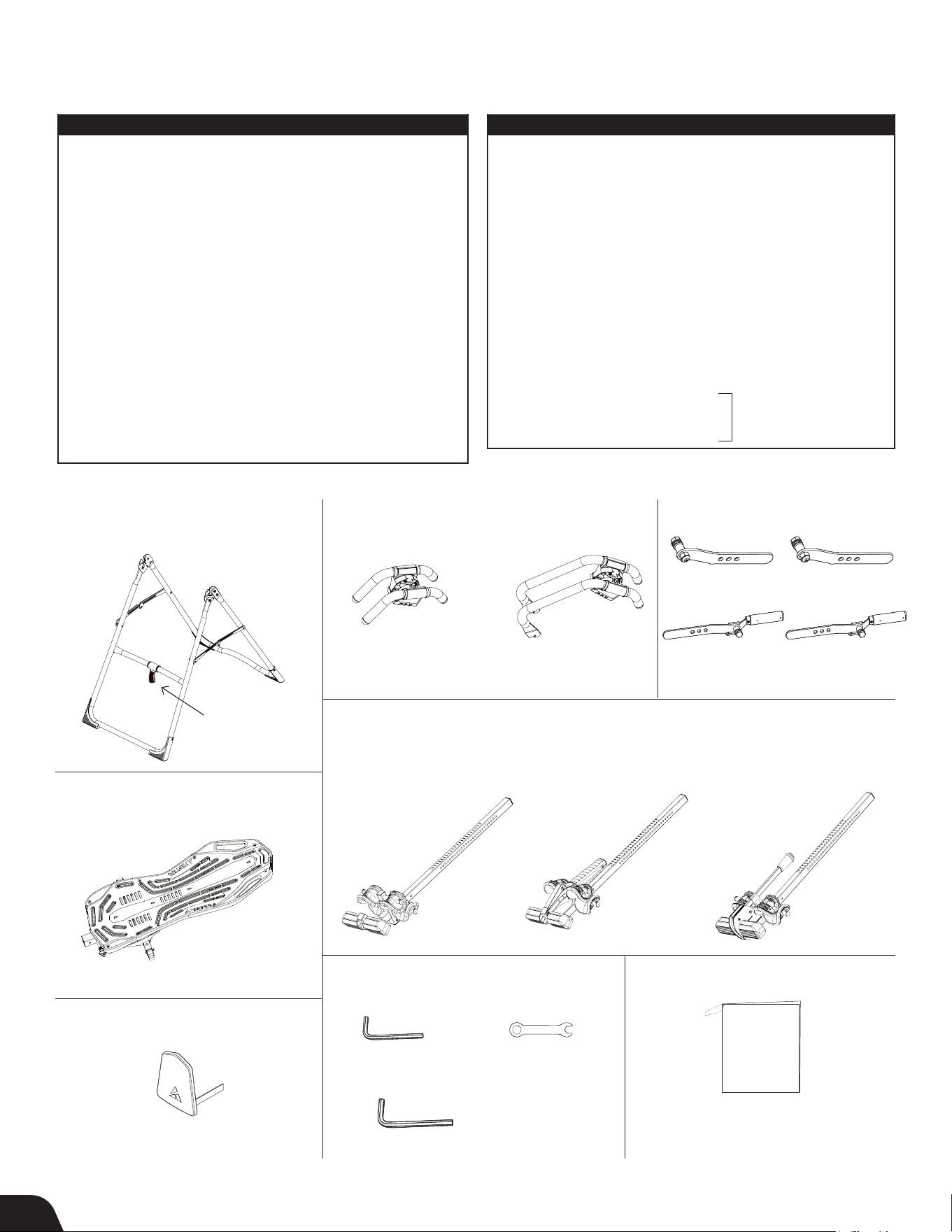
Parts for Assembly
Parts vary by model (noted) and are not shown to scale. Hardware drawings located on the insert inside each Hardware Kit.
Stretch-and-Grip
™
A-Frame
Base Assembly
with pre-assembled Angle Tether
E61100
F51007 (X1)
F51008 (X2, X3)
T-Pin
Ankle Lock System
(X1 Model Only)
FitSpine
™
Table Bed Assembly
Use with Table Bed Hardware Kit (HK1010)
EX1300
E61500 (X1)
F51064B (X1)
EX1800
ITEM NO. ITEM NAME
Stretch-and-Grip
™
A-Frame Base Assembly
E61100 A-Frame
F51007 Angle Tether
(X1) pre-assembled to A-Frame
F51008
EZ Angle Tether
(X2, X3) pre-assembled to
A-Frame
Handle Assembly
E61500 Stretch Assist
™
Handles (2) (X1)
E61520 Stretch Max
™
Handles (2) (X2, X3)
HK1008
Handle Assembly Hardware Kit
Roller Hinge Assembly
F51064B Roller Hinges (2) (X1)
TR1003B Roller Hinges w/ Traction Handles (2) (X2, X3)
FitSpine
™
Table Bed Assembly
EX1300 FitSpine
™
Table Bed
HK1010 FitSpine
™
Table Bed Hardware Kit
Handle Assembly
Use with Handle Assembly
Hardware Kit (HK1008)
Roller Hinge Assembly
Optional Head Pillow
Tools Provided for Assembly
IA1149
5mm Allen Wrench
EZ-Reach
™
Ankle Lock System
(X2 Model Only)
EX1630
F51088
Open-Ended Wrench
Deluxe EZ-Reach
™
Ankle Lock System
(X3 Model Only)
EX1620
ITEM NO. ITEM NAME
Main Shaft Assembly
EX1600 with T-Pin Ankle Lock System (X1)
EX1630 with EZ-Reach
™
Ankle Lock System (X2)
EX1620 with Deluxe EZ-Reach™ Ankle Lock System (X3)
Optional Accessories
EX1800 Head Pillow
Tools Provided for Assembly
IA1149 5mm Allen Wrench (1)
EP1128A 6mm Allen Wrench (1)
F51088 Open-Ended Wrench (1)
Product Support
X1130 Owner’s Manual (X1)
X1230 Owner’s Manual (X2)
X1330 Owner’s Manual (X3)
TR1003B (X2, X3)
EX1600
Product Support
X1130 (X1)
X1230 (X2)
X1330 (X3)
Owner’s Manual
Pre-assembled
to A-frame
REV.
DESCRIPTION
REV.DATE
APP.DATE
APPROVED
STL-20150420-說明書 2015/4/20
C
A
B
D
E
6
5
4
3
2
9
8
7
C
A
B
D
E
F
G
H
1
2
3
4
5
6
7
8
9
F
G
H
REV.
DESCRIPTION
REV.DATE
APP.DATE
APPROVED
STL-20150420-說明書 2015/4/20
C
A
B
D
E
6
5
4
3
2
9
8
7
C
A
B
D
E
F
G
H
1
2
3
4
5
6
7
8
9
F
G
H
2
EP1128A
6mm Allen Wrench
Main Shaft Assembly
Located on
back of table
bed.
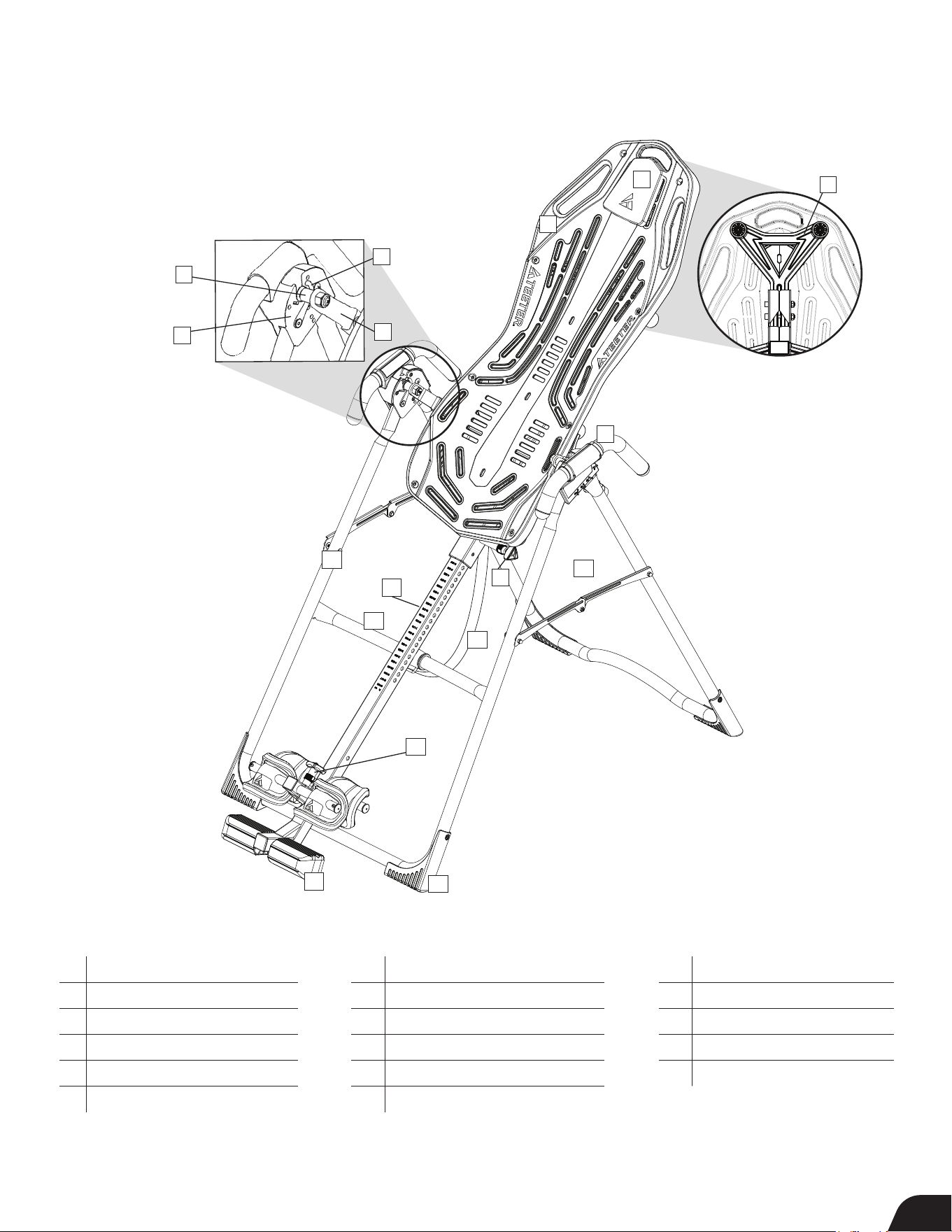
Identifying Parts and Components
Understanding Your Inversion Table
Before reading further, study the drawing below to familiarize yourself with the
important components of your Teeter Inversion Table.
1 Head Pillow
2 Upper Support Arms
3 FitSpine
™
Table Bed
4 Pivot Pins
5 Hinge Plates
6 Self-Locking Hooks
7 3-Hole Roller Hinges
8 Handles
9 Height-Selector Locking Pin
10 Spreader Arms
11 Angle Tether
12 Crossbar
1
9
10
8
13
11
15
16
17
4
5
6
7
14
12
13 A-Frame
14 Main Shaft
15 Ankle Lock System
16 Ankle Comfort Dial
™
17 Non-Skid Stability Feet
The X1 is shown here.
Your actual model may vary.
3
3
2
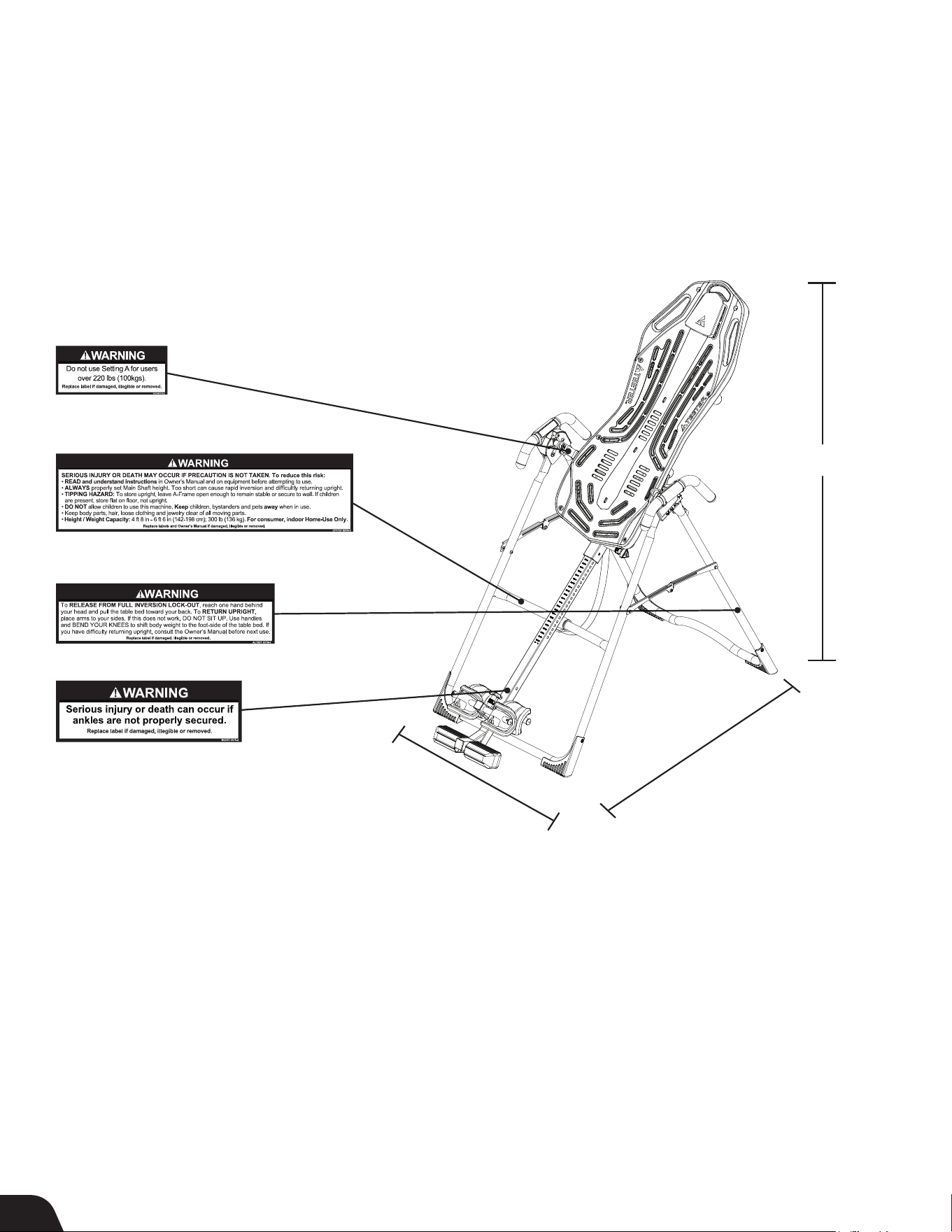
Safety Warning Labels & Product Specifications
Important: Please review all labels and supporting materials before using your inversion table.
This drawing indicates the locations of the warning labels found on your product. If a label is missing, illegible or is removed,
contact Teeter Customer Service to request a complimentary replacement label.
Note: Image and labels below not shown at actual size.
Assembled Non-Use Dimensions: 58.0 (L) x 28.8 (W) x 60.5 in (H) (147.3 x 73.2 x 153.7 cm)
Maximum In-Use Dimensions: 81.0 (L) x 28.8 (W) x 86.5 in (H) (205.7 x 73.2 x 219.7 cm)
Storage Dimensions: 20.0 (L) x 28.8 (W) x 66.0 in (H) (50.8 x 73.2 x 167.6 cm)
Weight
(approx.): X1: 59.3 lb (26.9 kg)
X2: 64.4 lb (29.2 kg)
X3: 65.8 lb (29.8 kg)
28.8 in (73.2 cm)
60.5 in (153.7 cm)
58.0 in (147.3 cm)
The X1 is shown here.
Your actual model may vary.
4
Before Beginning Assembly
For step-by-step, 3D interactive instructions, download BILT (a FREE mobile app) to your
smartphone to follow along. Simply download the BILT app by scanning the QR code below
and then search for your model (Teeter X1, X2, X3) within the BILT app to get started!
Making Assembly Even Easier with
Unpack and Prepare Your Workspace
• If possible, assemble the equipment at or near the space in which you intend to use it to avoid moving it later.
• Unpack all parts and support materials. Set aside packing materials and clear your work area.
• Locate the Hardware Kits packaged with the manuals. They are labeled to correspond with the assembly process.
• The Getting Started Video Portal at teeter.com/videos provides step-by-step instruction on how to assemble your product.
You may find it helpful to follow along with the videos by watching them on either your phone, tablet, or computer.
The videos include important use instructions such as:
• Assembly - Follow step-by-step instruction on how to assemble your Teeter
• User Settings - Personalize your inversion experience by adjusting four customizable settings.
• How to Invert - Learn how to test your balance and rotation control, and how to properly invert and return upright.
• Dismounting - Learn how to properly dismount your Teeter according to your specific model.
• Storage & Maintenance - When not in use, store your Teeter easily and compactly.
• Dismounting - Learn how to properly dismount your Teeter according to your specific model.
• Accessories - Learn more about the accessories available for your Teeter.
5
• BONUS Healthy Back and Body Routines*
Get guided instruction on stretches and exercises you can do on your own to help strengthen
your back and gain flexibility. Access this exclusive bonus content at teeter.com/videos with
the password: healthyback.
*Not available in French or Spanish.
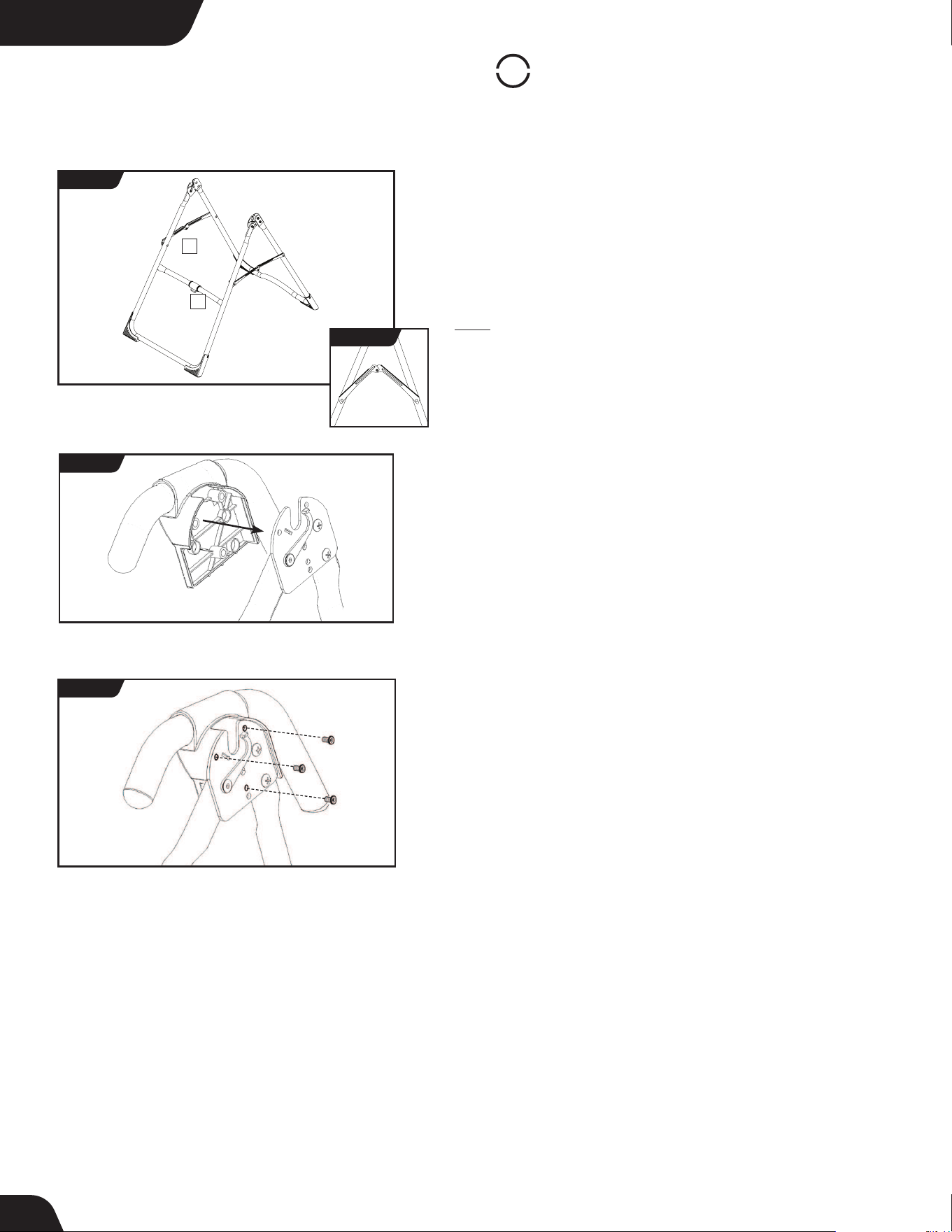
STEP 1
Assemble A-Frame Base & Stretch Assist Handles
(X1 Models)
• On a level surface, position the A-Frame so that it is standing upright
and the Stability Feet are on the ground.
• Gently push down on the Spreader Arms to ensure they are fully open
and in the “locked” position (Figure 1).
• Look for temporary circular assembly assistance labels on the
A-Frame. RIGHT, LEFT, FRONT, and REAR indicate your position while
using the equipment, not facing it. These labels can be removed easily
upon completion of assembly.
• Locate the Handle Assembly Hardware Kit (HK1008).
• Determine the left or right handles, marked with an embossed L / R
on the inside of the black plastic part of each handle.
• Align the black plastic part of the corresponding handle (left / right)
over the outside edge of the Hinge Plate on the A-Frame (Figure 2).
• Insert and loosely hand-tighten three of the Allen Head Screws
through the Hinge Plate into the handle (Figure 3).
• Repeat with other handle. Tighten all fasteners with the
5mm Allen Wrench provided, being careful not to over-tighten.
• Proceed to Page 8 for Step 2.
1 - Spreader Arms 2 - Crossbar
LEFT
RIGHT
FIGURE 1
1
2
REAR
FRONT
For X1 Models
FIGURE 2
FIGURE 3
LOCKED
FIGURE 1a
UNLOCKED
6
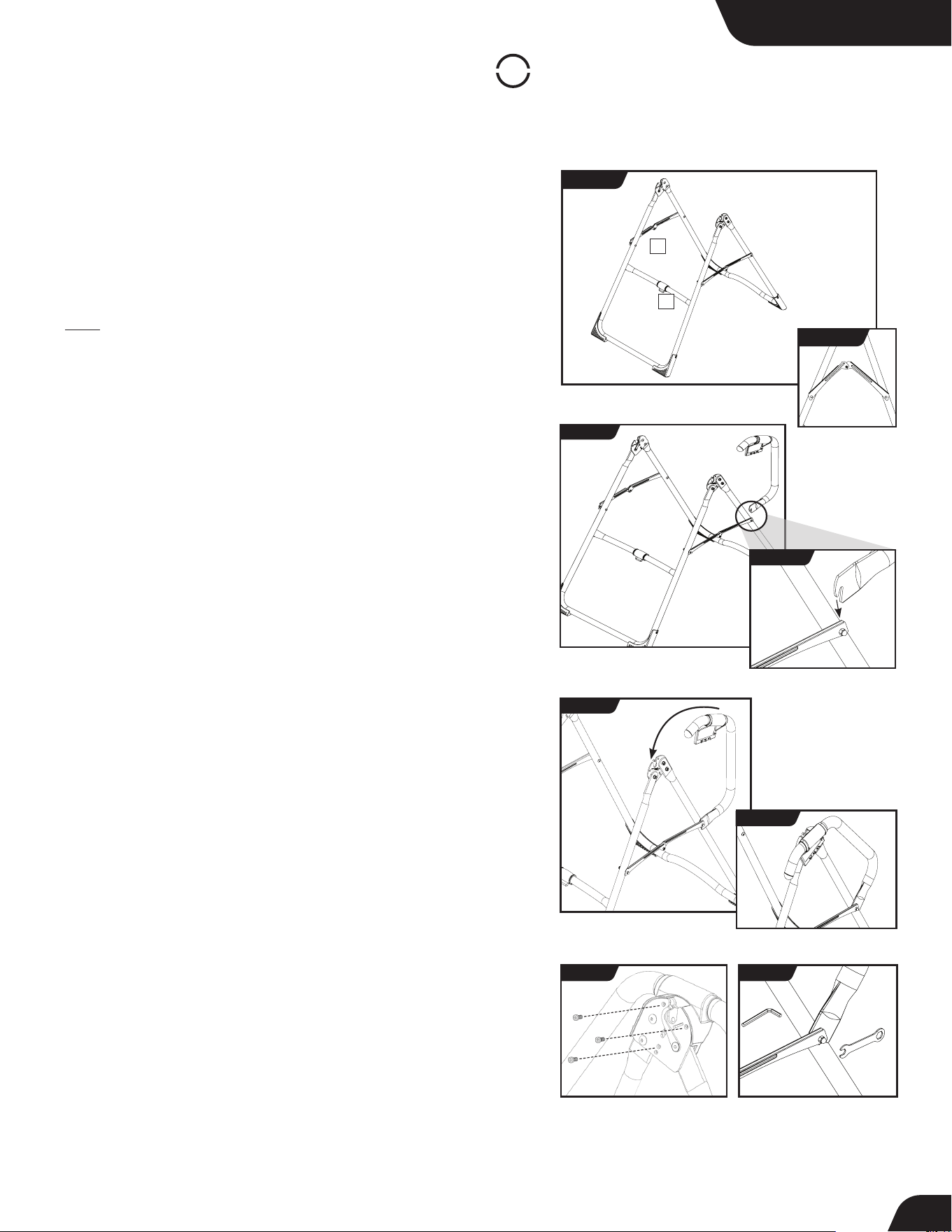
STEP 1
Assemble A-Frame Base & Stretch Max Handles
(X2 or X3 Models)
• On a level surface, position the A-Frame so that it is standing upright
and the Stability Feet are on the ground.
• Gently push down on the Spreader Arms to ensure they are fully open
and in the “locked” position (Figure 4).
• Look for temporary circular assembly assistance labels on the
A-Frame. RIGHT, LEFT, FRONT, and REAR indicate your position while
using the equipment, not facing it. These labels can be removed easily
upon completion of assembly.
• Locate the Handle Assembly Hardware Kit (HK1008).
• Determine the left or right handles, marked with an embossed L / R
on the inside of the black plastic part of each handle.
• Position the lower handle portion of the corresponding handle
(left / right) at the rear junction of the A-frame leg and Spreader
Arm (Figure 5 & 5a). The Lower Handle Bolt with Spacer has been
assembled loosely so that you will be able to seat the U-shaped
portion of the lower handle over the Spacer in between the
Spreader Arm and the A-frame leg. Do not tighten the bolt yet.
• Keeping the lower handle portion seated onto the Spacer, align the
upper handle portion’s black plastic part over the outside edge of the
Hinge Plate on the A-Frame (Figure 6 & 6a).
• Insert and loosely hand-tighten three of the Allen Head Screws
through the Hinge Plate into the handle (Figure 7).
• Now tighten the Lower Handle Bolt using the 5mm Allen Wrench
and Open Wrench provided, ensuring that it is fully secured but not
over-tightened (Figure 8).
• Finally, tighten the Allen Head Screws for the upper handle using
the 5mm Allen Wrench provided.
• Repeat these steps on the other handle.
FIGURE 5a
For X2 & X3 Models
FIGURE 5
FIGURE 6
FIGURE 6a
FIGURE 7 FIGURE 8
1 - Spreader Arms 2 - Crossbar
LEFT
RIGHT
FIGURE 4
1
2
REAR
FRONT
LOCKED
FIGURE 4a
UNLOCKED
7
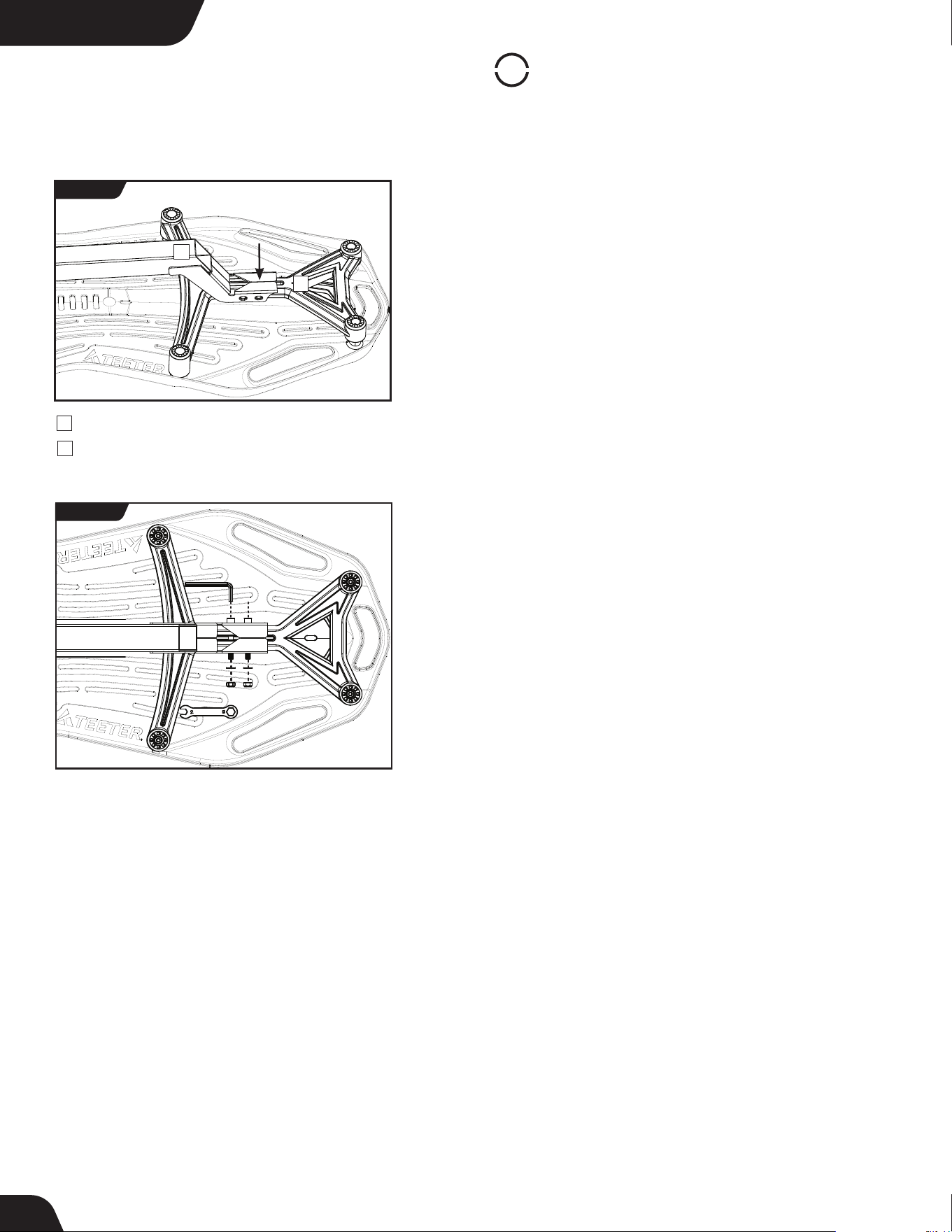
For All Models
STEP
2
Assemble Table Bed
• Locate the Table Bed Assembly Hardware Kit (HK1010).
• Place the Table Bed face down on the floor and push down on the
Support Beam, so the two holes align evenly with the holes at the
base of the Upper Support Arms (Figure 9). You may have to exert
extra pressure to ensure that the Support Beam slides over the
rubber spacers.
• Insert the two Bolts into the open holes (Figure 10).
• Thread a Washer and Nut onto each Bolt and hand-tighten.
• Using the 6mm Allen Wrench to steady the bolts, tighten the Nuts
onto the Bolts with the 10/13mm Open-Ended Wrench.
FIGURE 9
FIGURE 10
1
2
1
Support Beam
2
Upper Support Arms
8
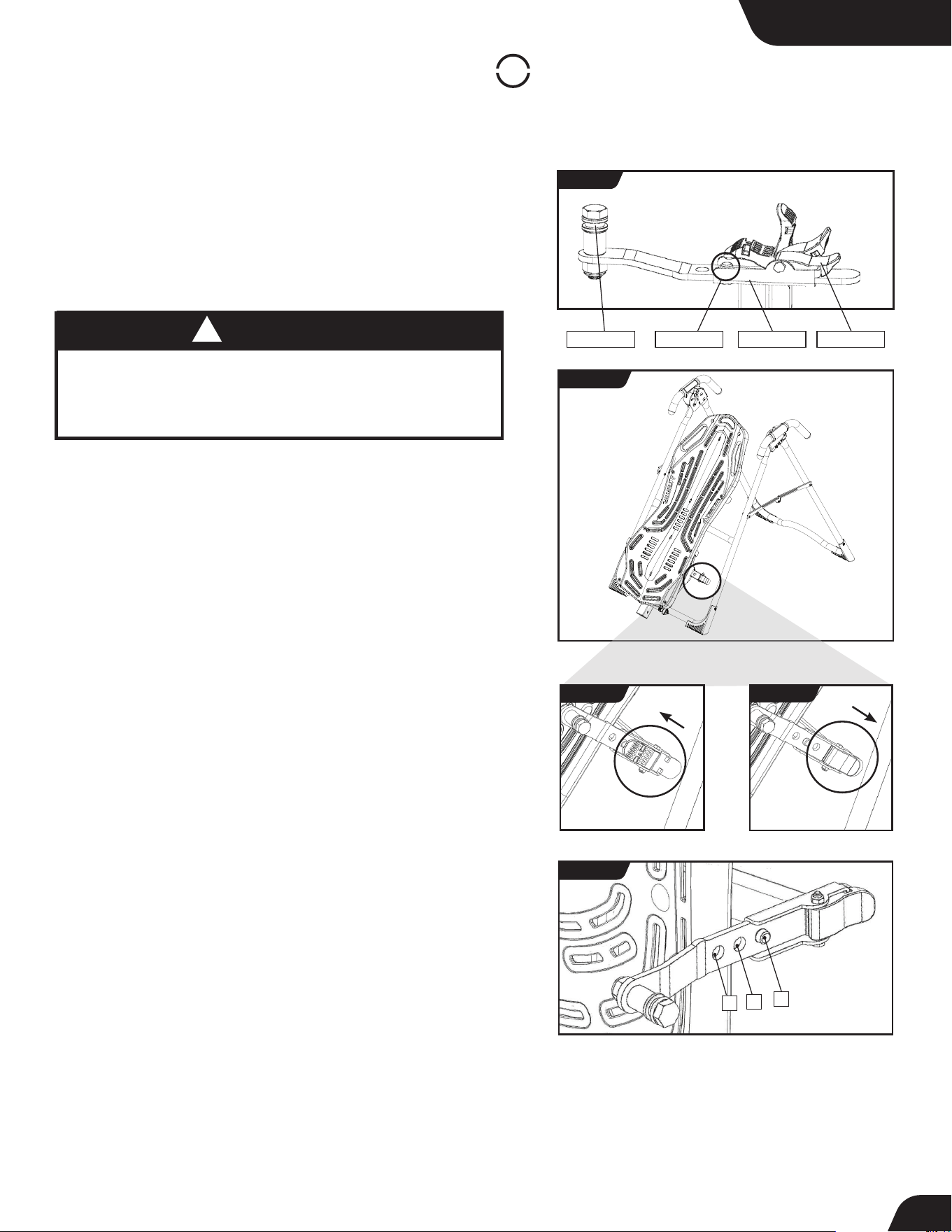
UNLOCKED
Bracket Pin
Cam Lock
Pivot Pin
Bracket
C
B
A
STEP
3
Assemble Roller Hinges to Table Bed
UNLOCK
LOCK
LOCKED
NEVER disassemble the Roller Hinge Pivot Pin.
ALWAYS insert the 3-Hole Roller Hinge (with the Pivot Pin on top
and facing out) in the same direction as the arrow label located
inside of the Cam Lock for proper assembly.
WARNING
!
NOTE: Some models come with Traction Handles pre-assembled to
the Roller Hinges. The assembly instructions detailed below still apply.
• For ease of assembly, rest the Table Bed against the Crossbar
(Figure 12) at the front of the A-Frame.
• On one side of the Table Bed, lift and hold the Cam Lock up all
the way to unlock (Figure 13).
• In your other hand, hold one Roller Hinge near the Pivot Pin.
With the Pivot Pin facing out (away from the Table Bed), slide the
bottom of the Roller Hinge between the Cam Lock and th
e Bracket
in the same direction as the arrow label located inside of the Cam Lock.
TIP: Make sure that the Cam Lock is completely open when inserting
the Roller Hinge, otherwise assembly will be more difficult.
• Engage one of the holes in the Roller Hinge over the Bracket Pin.
Figure 13 shows the Roller Hinge installed correctly, with the
Bracket Pin engaged in Setting C.
NOTE: Refer to the Owner’s Manual for an explanation of the hole
settings. If you are unsure, use Setting C to start.
• Push down on the Cam Lock (Figure 14) to lock it and secure the
Roller Hinge.
• Repeat on other side. Make sure the Roller Hinges are in the
same hole setting on both sides.
The X1 is shown here. Your actual model may vary.
FIGURE 11
FIGURE 13
FIGURE 12
FIGURE 14
FIGURE 15
• Familiarize yourself with the 3-Hole Roller Hinge and Cam Lock
terms (Figure 11).
9
For All Models
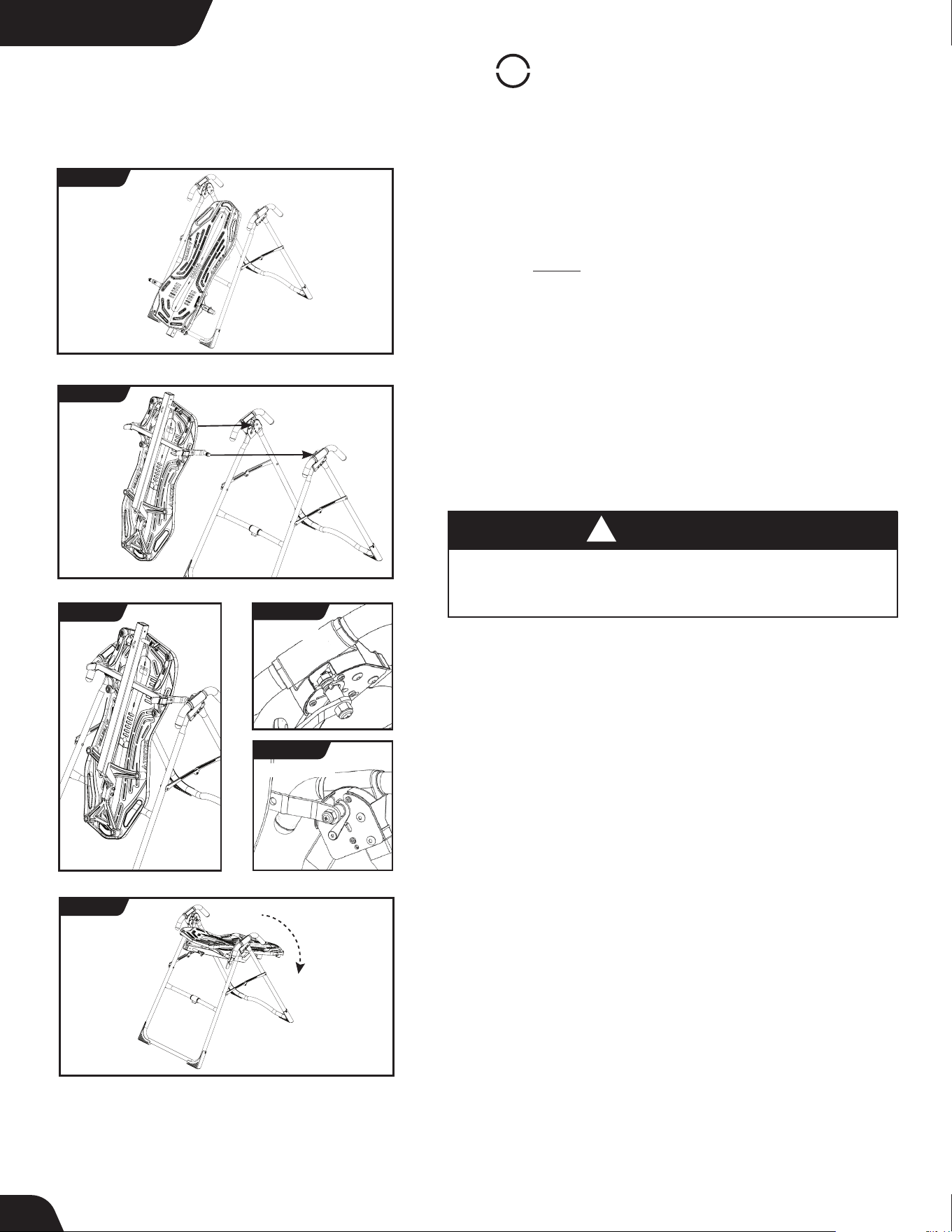
• Face the front of the A-Frame where the Crossbar is located (Figure 16).
• Grasp both Roller Hinges, right above the Cam Lock, and lift the
Table Bed. Allow the top of the Table Bed to rotate toward the floor,
so that the back of the Table Bed is now facing you and the top of the
Table Bed is in front of the Crossbar (Figure 17).
• Lower each Roller Hinge Pivot Pin into the A-Frame hinge plates, one
side at a time (Figure 16). The Self-Locking Hooks will open to allow the
Pivot Pin into the Hinge Plate slot, then automatically snap closed
over the Pivot Pin.
TIP: You may need to push outward on the Hinge Plate in order for
the second Pivot Pin to lock in place.
• Make sure that each Pivot Pin is seated at the base of the slot in the
Hinge Plates, and that the Self-Locking Hooks have closed over both
Pivot Pins (Figures 18a & 18b).
Failure of the Self-Locking Hooks to close over both Roller Hinge
Pivot Pins is an indication of improper assembly and if not corrected
could result in serious injury or death!
WARNING
!
STEP
4
Assemble Table Bed to A-Frame
• Rotate the Table Bed into the use position (Figure 19). Ensure that
it rotates smoothly. See also Image A on Page 13 to ensure
correct assembly.
TOP VIEW
INSIDE VIEW
FRONT
REAR
FIGURE 18
FIGURE 19
FIGURE 18b
FIGURE 18a
FIGURE 16
FIGURE 17
The X1 is shown here. Your actual model may vary.
10
For All ModelsFor All ModelsFor All ModelsFor All Models
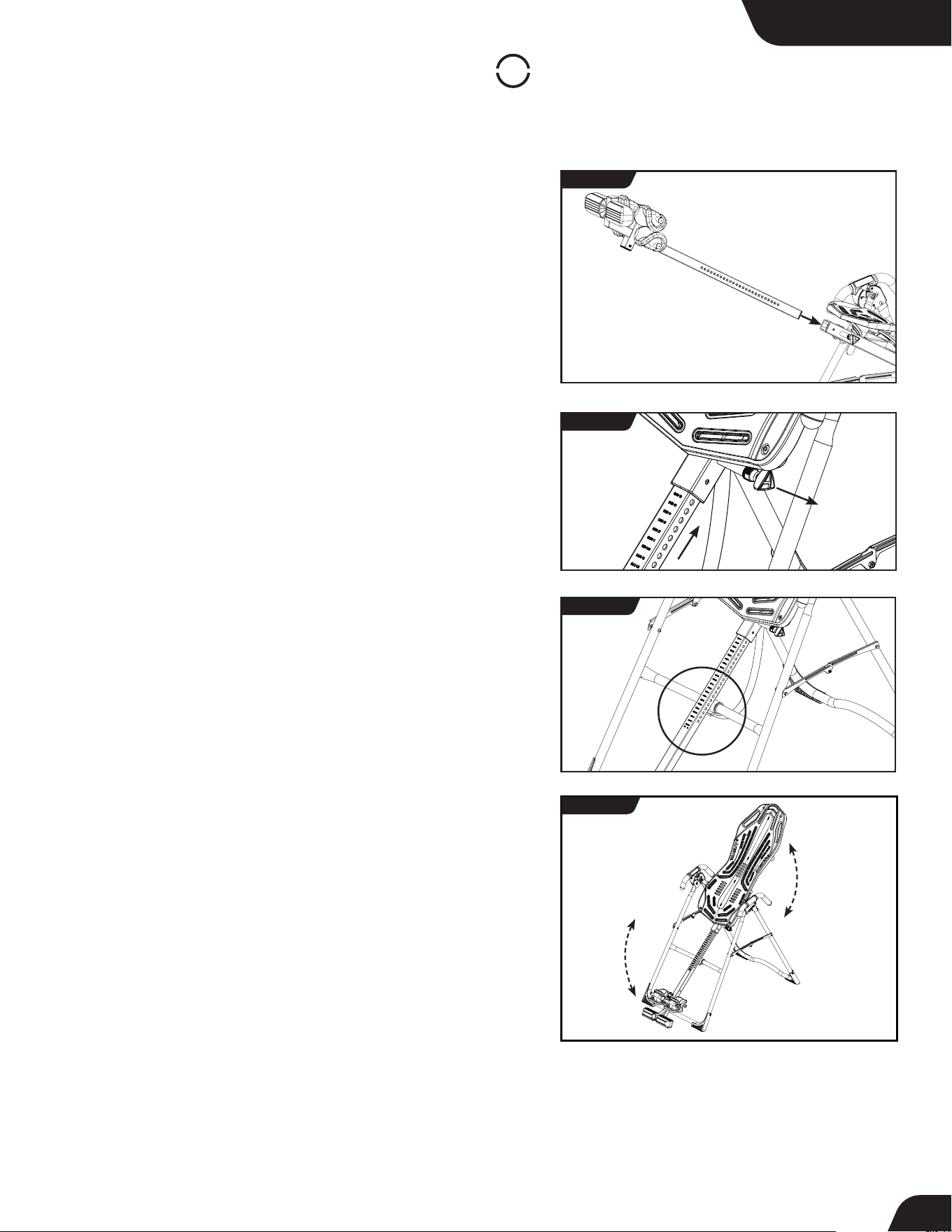
• Your model’s Main Shaft may differ from what is shown in the
figures, however the assembly instructions remain the same.
• Facing the front of the A-Frame, hold the Main Shaft in your left hand
with the height markings facing up. Slide the end of the Main Shaft
into the Main Shaft Housing (Figure 20), located at the base of the
Table Bed.
• With your right hand, pull out the Height-Selector Locking Pin
(Figure 19) to allow the Main Shaft to slide in further and release
in the desired height setting. Refer to the Owner’s Manual for more
information on selecting your height setting.
• The Main Shaft MUST REST against the Crossbar bumper on the
A-Frame (Figure 22).
IMPORTANT: The Crossbar prevents the Table Bed from rotating
forward when the user steps on the Ankle Comfort Dial. If the
Main Shaft does not rest on the Crossbar bumper as shown in
Figure 22, then the Table Bed has been assembled backwards
onto the A-Frame.
This MUST BE CORRECTED before use. See also Image B on Page 13
to ensure correct assembly.
• Test the inversion table by hand for smooth and steady rotation
(Figure 23) and ensure that all fasteners are secure.
STEP
5
Assemble Main Shaft to Table Bed
For All Models
FIGURE 20
FIGURE 21
The X1 is shown here. Your actual model may vary.
FIGURE 22
FIGURE 23
11
STEP
6
Attach Angle Tether & Head Pillow
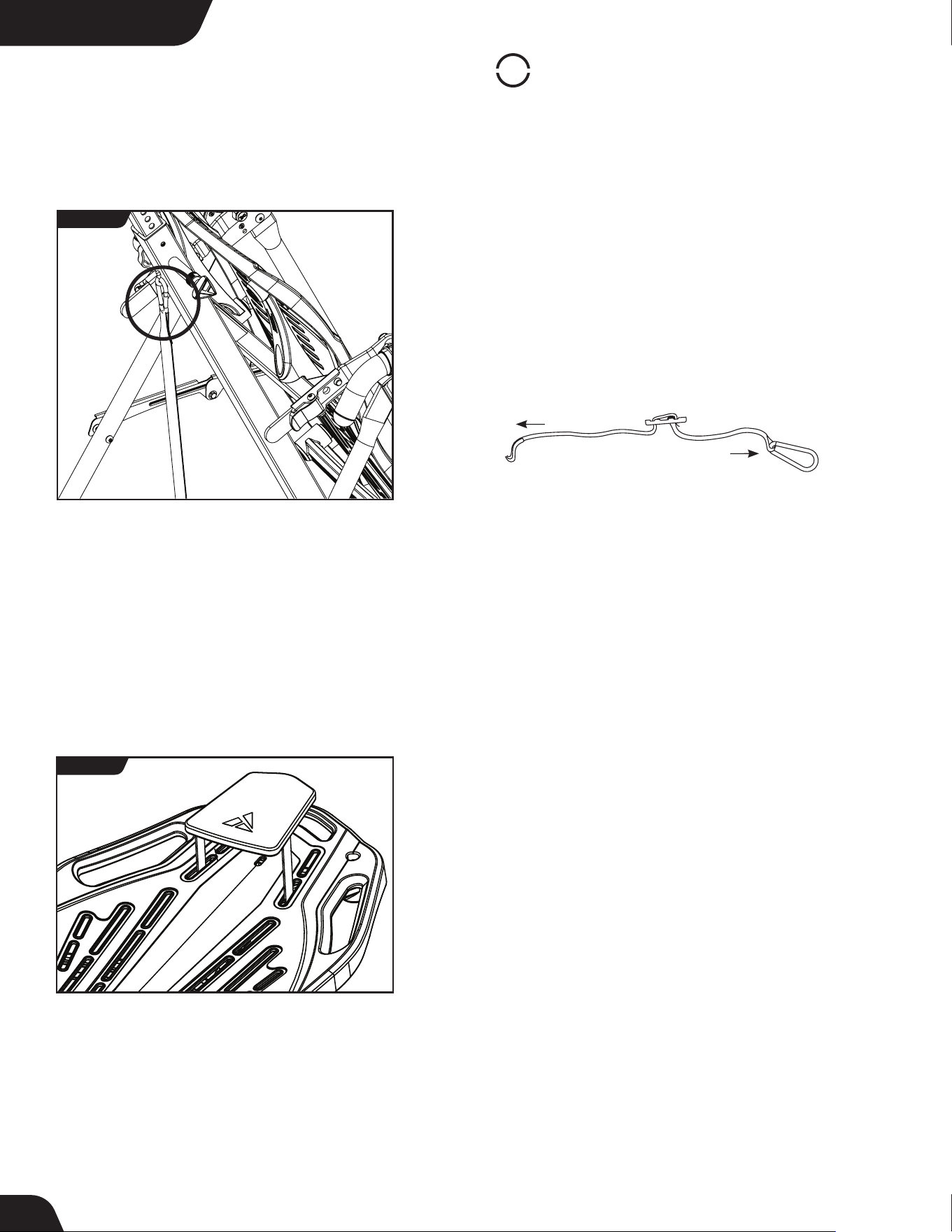
Attach Angle Tether
• The tether will come pre-assembled to the A-Frame.
• Unfold the adjustable tether and clip it to the U-Bar on the
underside of the Table Bed (Figure 24).
• Slide the buckle to lengthen or shorten the strap depending on
your desired maximum angle of inversion.
Attach Head Pillow
Attach the Head Pillow by securing the Velcro Straps through the
specified holes in the Table Bed (Figure 25), which allow the pillow
to shift with the user when in use. You may also customize the
position depending on your preference.
LENGTHEN
SHORTEN
For All Models
FIGURE 24
The X1 is shown here. Your actual model may vary.
EZ-Angle Tether Accessory
Some models may come with the EZ-Angle Tether, embroidered
with color-coded angle markers at 20° (GREEN), 40° (ORANGE),
or 60° (RED). Simply slide the buckle so its center aligns with your
desired color setting.
FIGURE 25
12
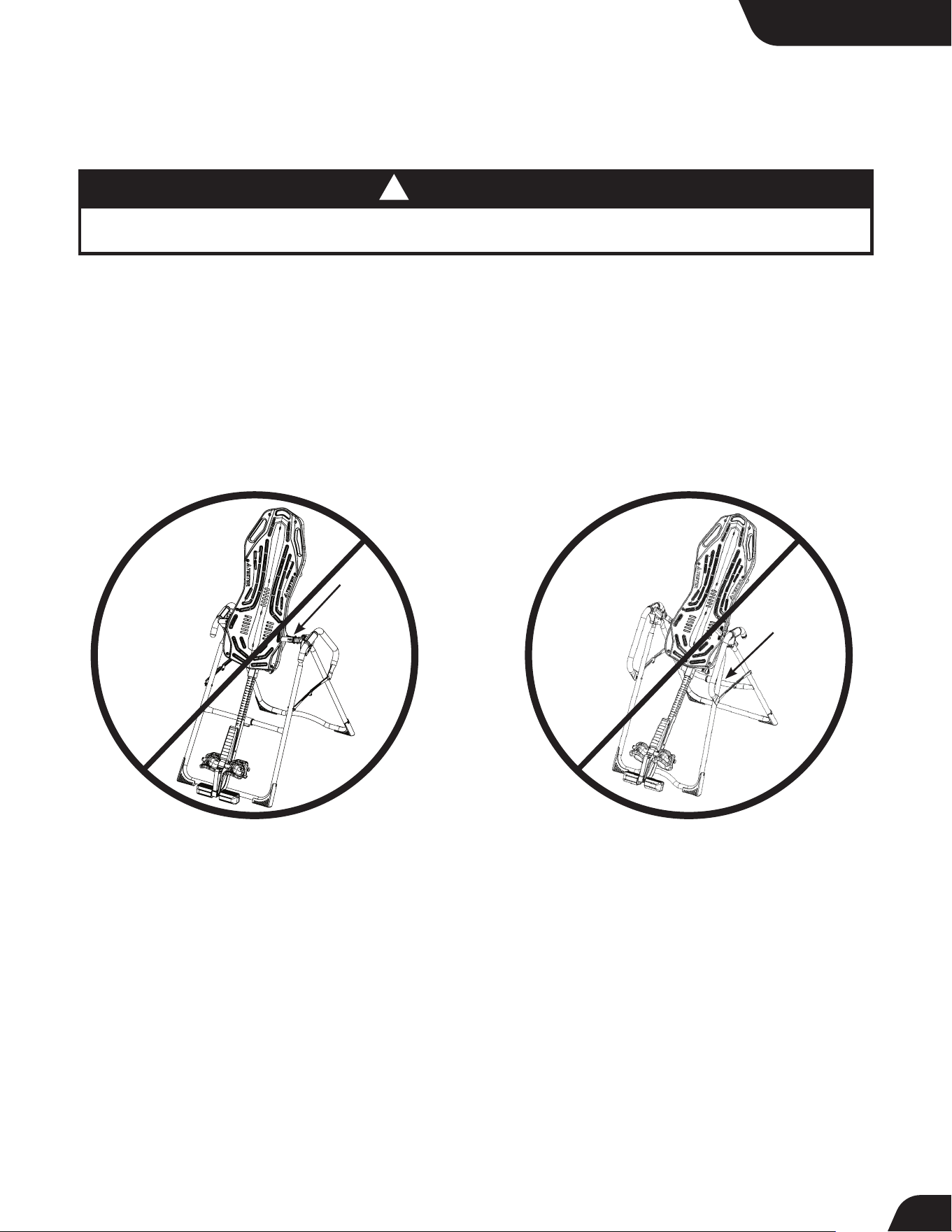
Image B
Go back to Step 4 for instruction.
Demonstrates that the Table Bed has been
assembled into the A-Frame backwards so the
Main Shaft is not resting on the Crossbar and must be corrected.
Image A
Go back to Step 3 for instruction.
Demonstrates that the Roller Hinges have been
assembled upside down into the Table Bed
and must be corrected.
Misassembly Check
If your Teeter Inversion Table looks like either of these images, your inversion table has
been misassembled and is unfit for use. Improper assembly could result in serious injury or death!
WARNING
!
For All Models
The X2 is shown here. Your actual model may vary.
13
Before Inverting
Ensure Owner’s Manual is Attached
The Owner’s Manual contains important information on how to use
your Teeter Inversion Table, including how to personalize the user
settings, properly secure and release the Ankle Lock System, and test
and adjust the rotation control.
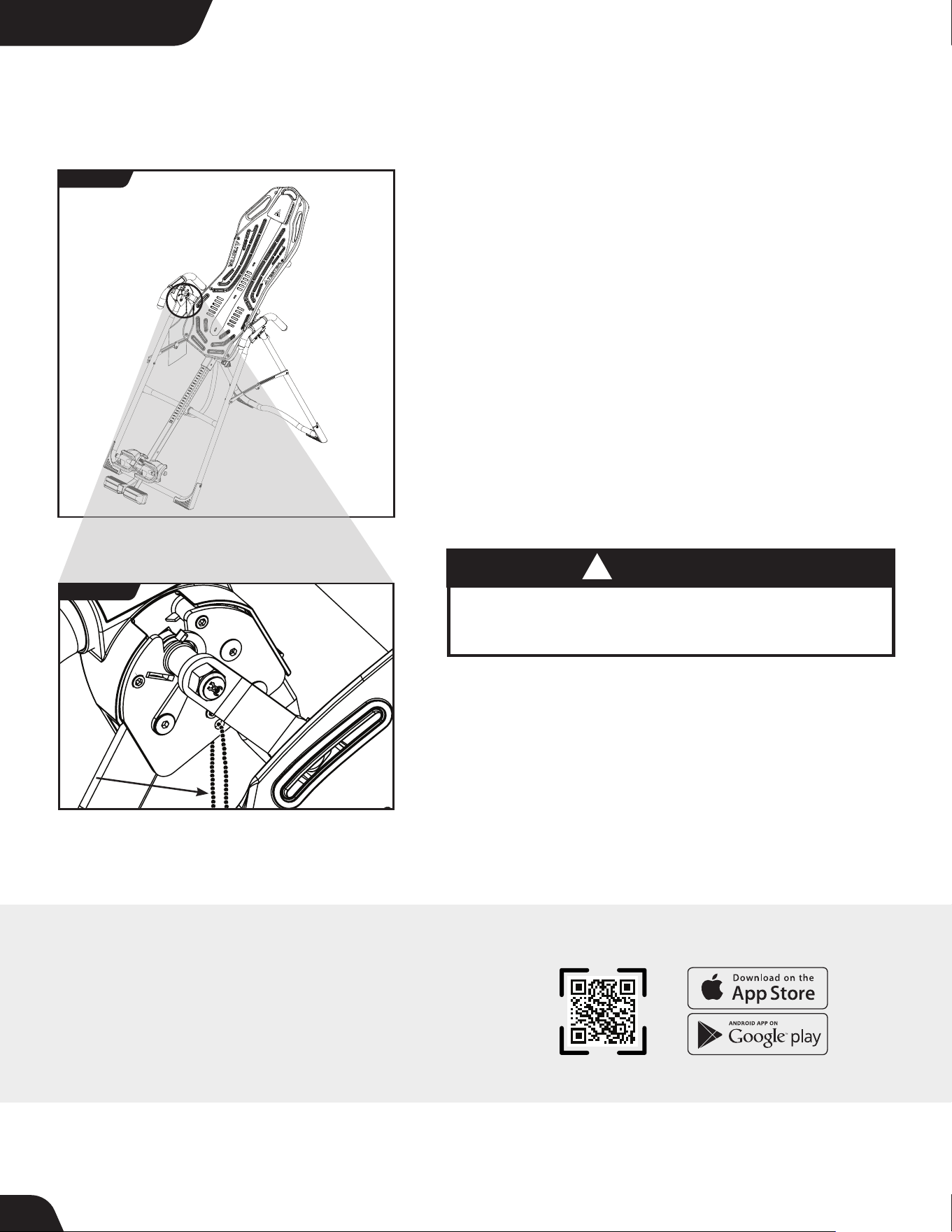
• If not already attached, thread the provided metal chain through
the pre-punched hole in the upper corner of the Owner’s Manual.
• Secure the chain to the A-Frame through the designated hole in the
Hinge Plate (Figure 26 & 26a). Allow the Owner’s Manual to hang freely
on the outside of the A-Frame Spreader Arms so it doesn’t interfere
with the rotation of the Table Bed.
IMPORTANT: Once attached to the A-Frame, DO NOT remove the
Owner’s Manual. It should remain permanently attached to your
inversion table to serve as a reference for all users in regards to proper
adjustment and use of the equipment.
WARNING
!
Watch the Getting Started Videos
The Getting Started Video Portal is a helpful supplement to the
Owner’s Manual, with easy-to-follow instructions on user settings,
how to invert, storage and maintenance, and even stretching and
exercises you can do with your Teeter. Just go to teeter.com/videos
to access them now!
Read the Owner’s Manual thoroughly before using your
Teeter Inversion Table. Improper settings could result
in serious injury or death!
For All Models
FIGURE 26a
FIGURE 26
The X1 is shown here. Your actual model may vary.
14
Download TeeterLink
®
Get more from your inversion sessions by downloading the TeeterLink
®
app to your phone to track usage and pain levels, get reminders and
customized guidance, access support, and more! Scan the code or
search TeeterLink
®
in your app store to get started!
HOW TO SUBMIT YOUR REGISTRATION:
Step 1
Fill out this information for your own records.
Step 2
Go online to teeter.com to register your warranty.
Handling and transportation costs related to product warranty service only are covered by this warranty. This warranty does
not cover damage resulting from improper handling, assembly, or installation, repairs made by others, accident, misuse,
or abuse. Under no circumstances shall Teeter, or any other party involved in the sale of this product, have any liability for
incidental or consequential damage arising from breach of an express or implied warranty on any Teeter product.
EXCEPT AS SET FORTH ABOVE, NO WARRANTY IS GIVEN WITH RESPECT TO ANY TEETER PRODUCT, AND ALL
EXPRESS WARRANTIES ARE DISCLAIMED. This warranty shall be governed by the laws of the State of Washington, USA.
To the extent this warranty is found not to be enforceable, it shall be deemed revised to the extent necessary to make it
enforceable. Any controversy or claim arising out of or relating to this warranty, its interpretation, or any alleged breach
thereof, which cannot be amicably settled between Teeter and the owner within sixty (60) days of written notice by the
aggrieved party to the other, shall be finally settled by arbitration submitted to three (3) arbitrators selected from the
panels of the arbitrators of the American Arbitration Association located closest to Teeter’s principal place of business.
Some states do not allow the exclusion of incidental or consequential damage from a warranty, so the above limitation or
exclusion may not apply to you. Some states do not allow limitations on how long an implied warranty lasts, so the above
limitation may not apply to you. This warranty gives you specific legal rights, and you may also have other rights which may
vary from state to state. This warranty is completely transferable to any and all future owners of this product, provided no
alterations have been made to the product.
PLEASE RETAIN THIS FOR YOUR RECORDS
Date of Purchase
Product & Model
Dealer Name
Serial No.
YEAR
5
W
A
R
R
A
N
T
Y
FULL
During the period starting with the day of retail purchase and continuing for five (5) years,
Teeter extends to the owner a repair and replacement warranty against manufacturing defects
in materials, workmanship, fabrics and padding. Teeter will repair or replace any such defect
and will pay the costs of all parts, labor and transportation. If a repair or replacement is not
commercially practical or cannot timely be made, then Teeter will, at the original Purchaser’s
option, replace with a comparable product or refund the purchase price.
FULL 5 YEAR WARRANTY
If you are unable to go online, you can request a warranty card to be mailed to you by calling Customer Service at 800-847-
0143.
Please DO NOT mail this to Teeter.
15
The Teeter warranty set forth below and on Teeter.com applies to the Inversion Table only. Accessories may come with their
own terms. This warranty applies to US and Canadian customers only. For international customers, please consult your
local distributor for warranty information which will vary depending on country.


U.S. and Foreign Patents Apply. Teeter and Teeter logo are registered trademarks of Teeter. Specifications subject to change without notice.
© COPYRIGHT 2019 Teeter. International Law Prohibits Any Copying. X1040C 0119-0
Teeter Decompression Devices are multiple user, reusable devices for home use, intended to provide traction to the spine while stretching the para-spinal muscles and soft tissues.
The devices provide non-powered traction and are meant for use by adults.
Use of the Teeter Decompression Devices is indicated for the following conditions: back pain, muscle tension, degenerative disc disease, spinal degenerative joint disease, spinal stenosis,
herniated disc, spinal curvature due to tight muscles, sciatica, muscle spasm, and facet syndrome.
Medical Device Safety Service
GmbH
Schiffgraben 41
30175 Hannover
Germany
Tel. +49 511 62628630
EC
REP
Any modification to this device will void the UL Listing.
This product is Listed by
Underwriters Laboratories Inc.
Representative samples of this
product have been evaluated
by UL and meet applicable
safety standards.
If you have any trouble assembling the equipment, or questions
about its use, please contact customer service.
International: Teeter International, Ltd.
Gor-Ray House
758 Great Cambridge Rd
Enfield
Middlesex EN1 3GN
United Kingdom
teeterintl.com | info@teeterintl.com
USA: 800-847-0143 or info@teeter.com
International: info@teeterintl.com
USA: Teeter
9713 233rd Avenue East
Bonney Lake, WA 98391
Toll Free: 800-847-0143
Fax: 800-847-0188
teeter.com | info@teeter.com
P2
™
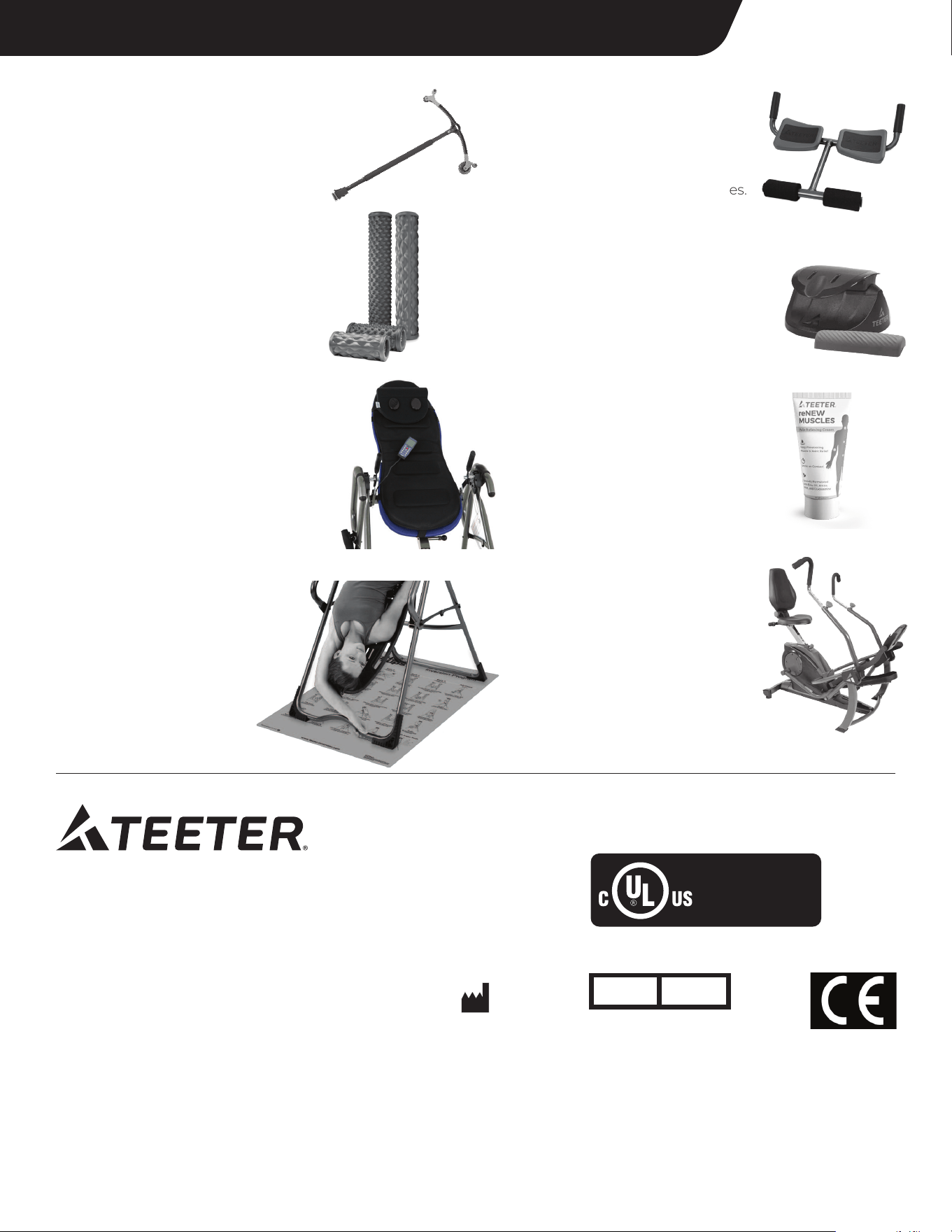
Back Stretcher
Apply gentle, user-controlled
traction to allow the lower back
to decompress, reduce nerve
pressure, and relax tense muscles.
reNEW
™
Muscles Pain
Relieving Cream
Deeply penetrates sore and aching
muscles on contact. Specially
formulated with emu oil, arnica,
MSM, and glucosamine.
Better Back
™
Foam Rollers
Prepare the body for movement,
accelerate recovery, minimize
muscular imbalances, and improve
overall flexibility with the Teeter
collection of textured Foam Rollers.
Neck Relax & Restore Duo
™
Provides support of the upper
neck/cervical spine for
self-administered suboccipital
release, a technique to reduce tension
in the supporting muscles.
Find These Great Products and More at teeter.com!
T3
™
Massager
Countless options for self-massage,
trigger point therapy, and myofascial
release to resolve tension and pain
gently and naturally.
Better Back
™
Vibration Cushion
Transform your Teeter Inversion Table to
help revive tired, sore muscles. Features
10 vibrating massage motors, neck
support with light-heat technology, and
LCD remote control.
Inversion Program Mat
Enhance your inversion experience
with 24 illustrated stretches and
exercises right at your fingertips.
Provides non-skid protection for
hard floors. 36” x 60”.
FreeStep
™
Recumbent Cross Trainer
Zero-impact cardio and strength!
The ONLY home-use machine with
patented smooth-stride technology
found in high-end seated
physiotherapy steppers.
Use promo code SAVETODAY for 10% off at checkout*