TM
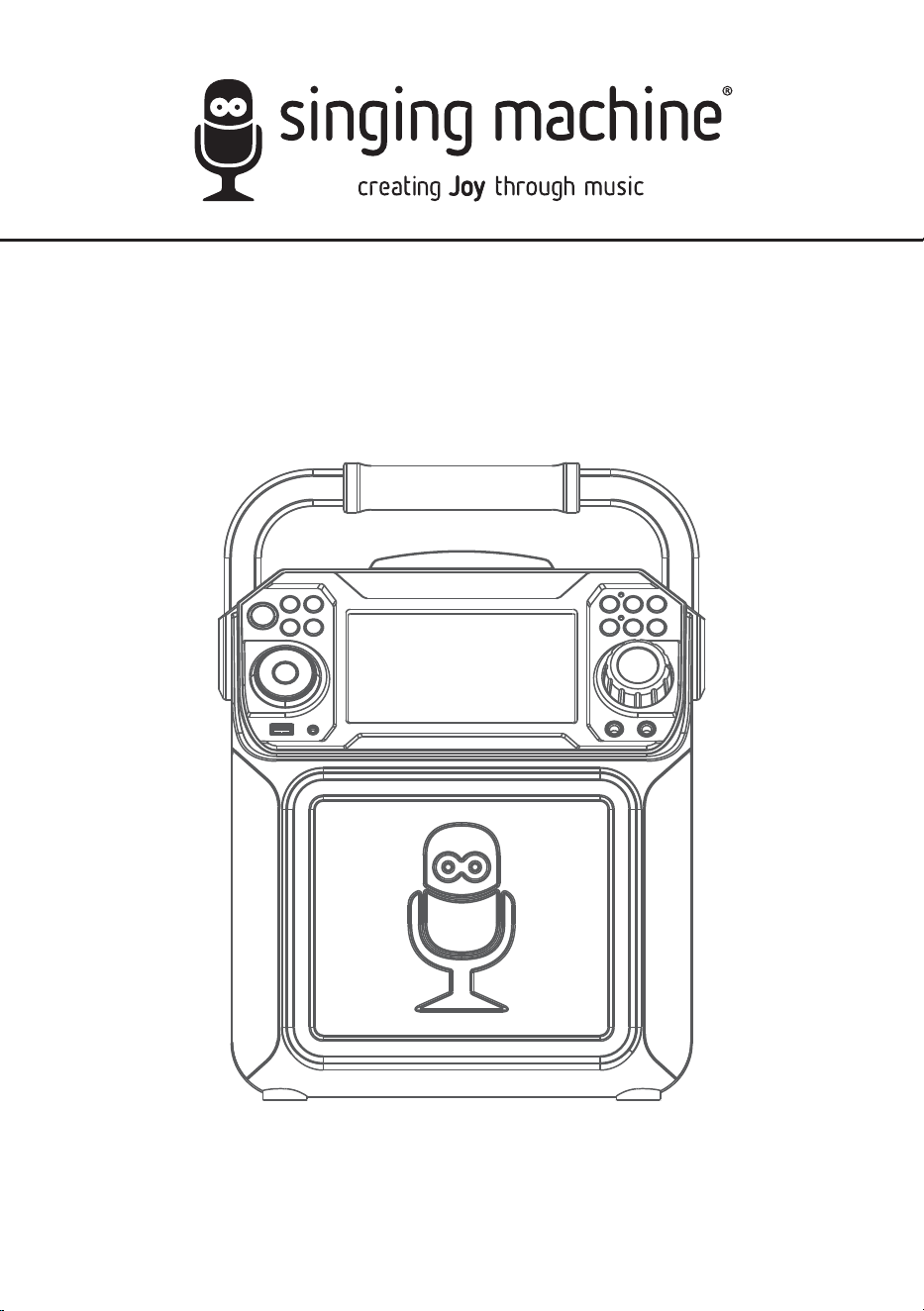
STVG782BK/STVG782W
INSTRUCTION MANUAL/MANUAL DE INSTRUCCIONES
/MODE D’EMPLOI
www.singingmachine.com
The Singing Machine® is a registered trademark of The Singing Machine Co., Inc.
The Singing Machine® es marca registrada de The Singing Machine Co., Inc.
The Singing Machine® est une marque déposée de The Singing Machine Co., Inc.
— E1 —
Warnings
Important Safety Information
1. Read these Instructions.
2. Keep these Instructions.
3. Heed all Warnings.
4. Follow all Instructions.
5. Do not use this apparatus near water.
6. Clean only with a dry cloth.
7. Do not block any of the ventilation openings. Install in
accordance with the Manufacturer’s instructions.
8. Do not install near any heat sources such as radiators, heat
registers, stoves, or other apparatus (including amplifiers) that
produce heat.
9. Do not defeat the safety purpose of the polarized or grounding-
type plug. A polarized plug has two blades with one wider than
the other. A grounding type plug has two blades and a third
grounding prong. The wide blade or the third prong are provided
for your safety. When the provided plug does not fit into your
outlet, consult an electrician for replacement of the obsolete
outlet.
10. Protect the power cord from being walked on or pinched
particularly at plugs, convenience receptacles, and the point
where they exit from the apparatus.
11. Only use attachments/accessories specified by the
manufacturer.
12. Use only with a cart, stand, tripod, bracket,
or table specified by the manufacturer, or
sold with the apparatus. When a cart is
used, use caution when moving the cart/
apparatus combination to avoid injury
from tip-over.
13. Unplug this apparatus during lightning
storms or when unused for long periods of
time.
14. Refer all servicing to qualified service personnel. Servicing is
required when the apparatus has been damaged in any way,
such as power-supply cord or plug is damaged, liquid has been
spilled or objects have fallen into the apparatus, the apparatus
has been exposed to rain or moisture, does not operate
normally, or has been dropped.
15. WARNING: To reduce the risk of fire or electric shock, do not
expose this apparatus to rain or moisture. Do not place objects
filled with water, such as a vase, on the apparatus.
16. The AC mains plug is used as the power disconnect device
and it should remain readily accessible and operable during
intended use. In order to completely disconnect the apparatus
from power, the mains plug should be completely removed
from the AC outlet socket.
17. CAUTION: To reduce the risk of fire or explosion, do not expose
batteries to excessive heat such as sunshine, fire or other
heat sources.
CAUTION: TO REDUCE THE RISK OF ELECTRIC SHOCK, DO NOT
REMOVE COVER (OR BACK). NO USER-SERVICEABLE PARTS
INSIDE. REFER SERVICING TO QUALIFIED SERVICE PERSONNEL.
The Caution marking is located on the bottom panel.
DANGEROUS VOLTAGE: The lightning flash with arrowhead
symbol within an equilateral triangle is intended to alert the
user to the presence of uninsulated dangerous voltage within
the product’s enclosure that may be of sufficient magnitude to
constitute a risk of electric shock to persons.
WARNING: TO PREVENT FIRE OR SHOCK HAZARD, DO NOT EXPOSE
THIS UNIT TO RAIN OR MOISTURE.
ATTENTION: The exclamation point within an equilateral
triangle is intended to alert the user to the presence of
important operating and maintenance (servicing) instructions
in the literature accompanying this product.
FCC WARNING: This equipment may generate or use radio frequency
energy. Changes or modifications to this equipment may cause harmful
interference unless the modifications are expressly approved in the
instruction manual. The user could lose the authority to operate this
equipment if an unauthorized change or modification is made.
This device complies with part 15 of the FCC Rules. Operation is subject
to the following two conditions: (1) This device may not cause harmful
interference, and (2) this device must accept any interference received,
including interference that may cause undesired operation.
INDUSTRY CANADA NOTICE:
This device complies with Industry Canada Iicense-exempt RSS standard(s).
Operation is subject to the following two conditions:
1. This device may not cause interference, and
2. This device must accept any interference, including interference that
may cause undesired operation of the device.
DRIPPING WARNING: This product shall not be exposed to dripping or
splashing, and no objects filled with liquids, such as vases, shall be placed
on the product.
VENTILATION WARNING: The normal ventilation of the product shall not be
impeded for intended use.
THIS PRODUCT COMPLIES WITH DHHS RULES 21 CFR CHAPTER 1,
SUBCHAPTER J APPLICABLE AT DATE OF MANUFACTURED.
Warnings:
• This CD player employs a laser light beam. Only a qualified service person
should remove the cover or attempt to service this device, due to
possible eye injury.
• The use of controls, adjustments, or procedures other than those
specified herein might result in hazardous radiation exposure.
• The apparatus shall be used in an open area.
CAUTION!
Invisible laser radiation when open and interlocks defeated. Avoid exposure
to beam.
NOTE: This equipment has been tested and found to comply with the
limits for a Class B digital device, pursuant to part 15 of the FCC Rules.
These limits are designed to provide reasonable protection against harmful
interference in a residential installation. This equipment generates, uses
and can radiate radio frequency energy and, if not installed and used in
accordance with the instructions, may cause harmful interference to radio
communications. However, there is no guarantee that interference will
not occur in a particular installation. If this equipment does cause harmful
interference to radio or television reception, which can be determined by
turning the equipment off and on, the user is encouraged to try to correct
the interference by one or more of the following measures:
• Reorient or relocate the receiving antenna.
• Increase the separation between the equipment and receiver.
• Connect the equipment into an outlet on a circuit different from that to
which the receiver is connected.
• Consult the dealer or an experienced radio/TV technician for help.
• The rating information is located at the bottom of the unit.
CAN ICES-3(B)/NMB-3(B)
CAUTION
RISK OF ELECTRIC SHOCK
DO NOT OPEN
— E2 —
Included
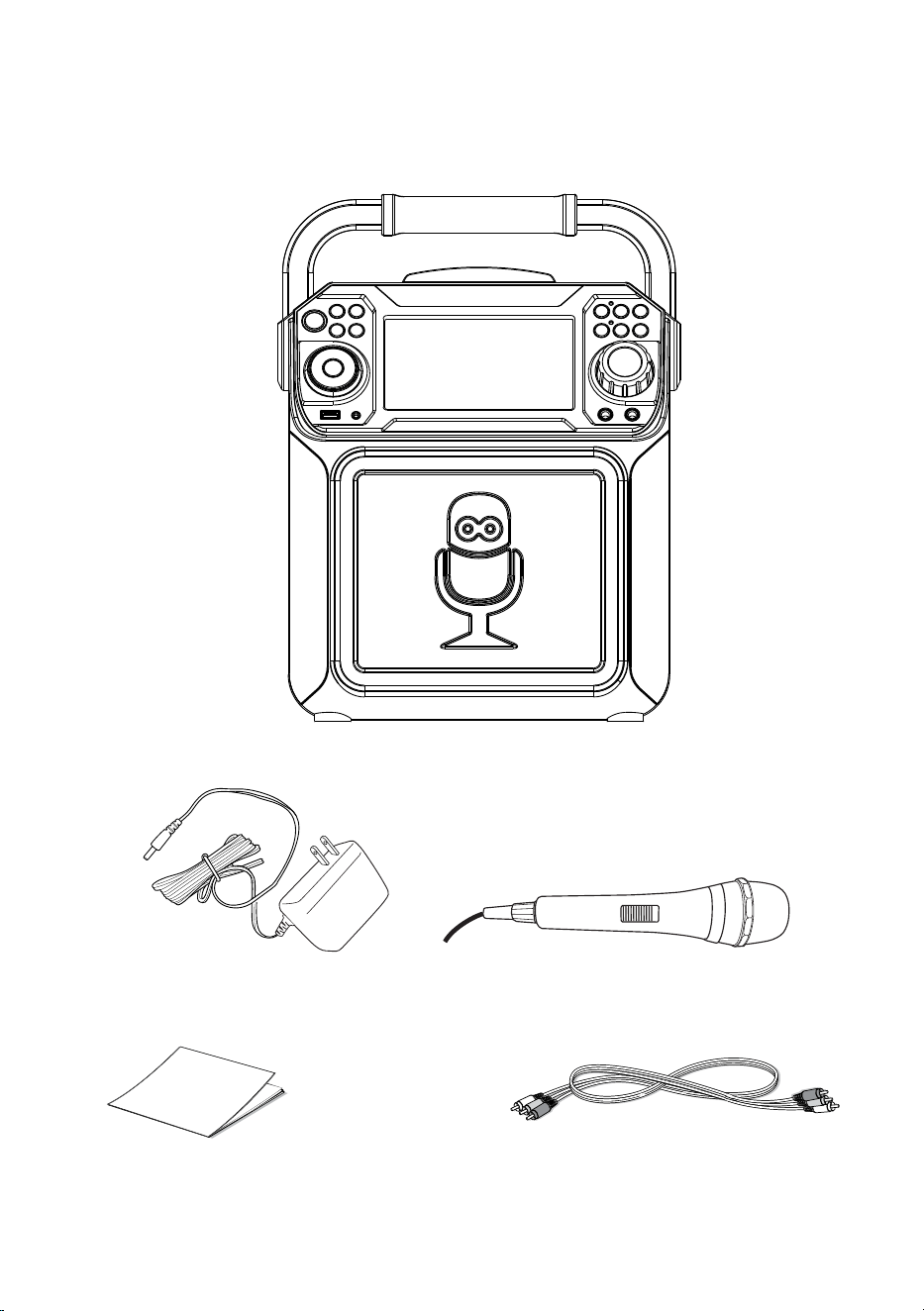
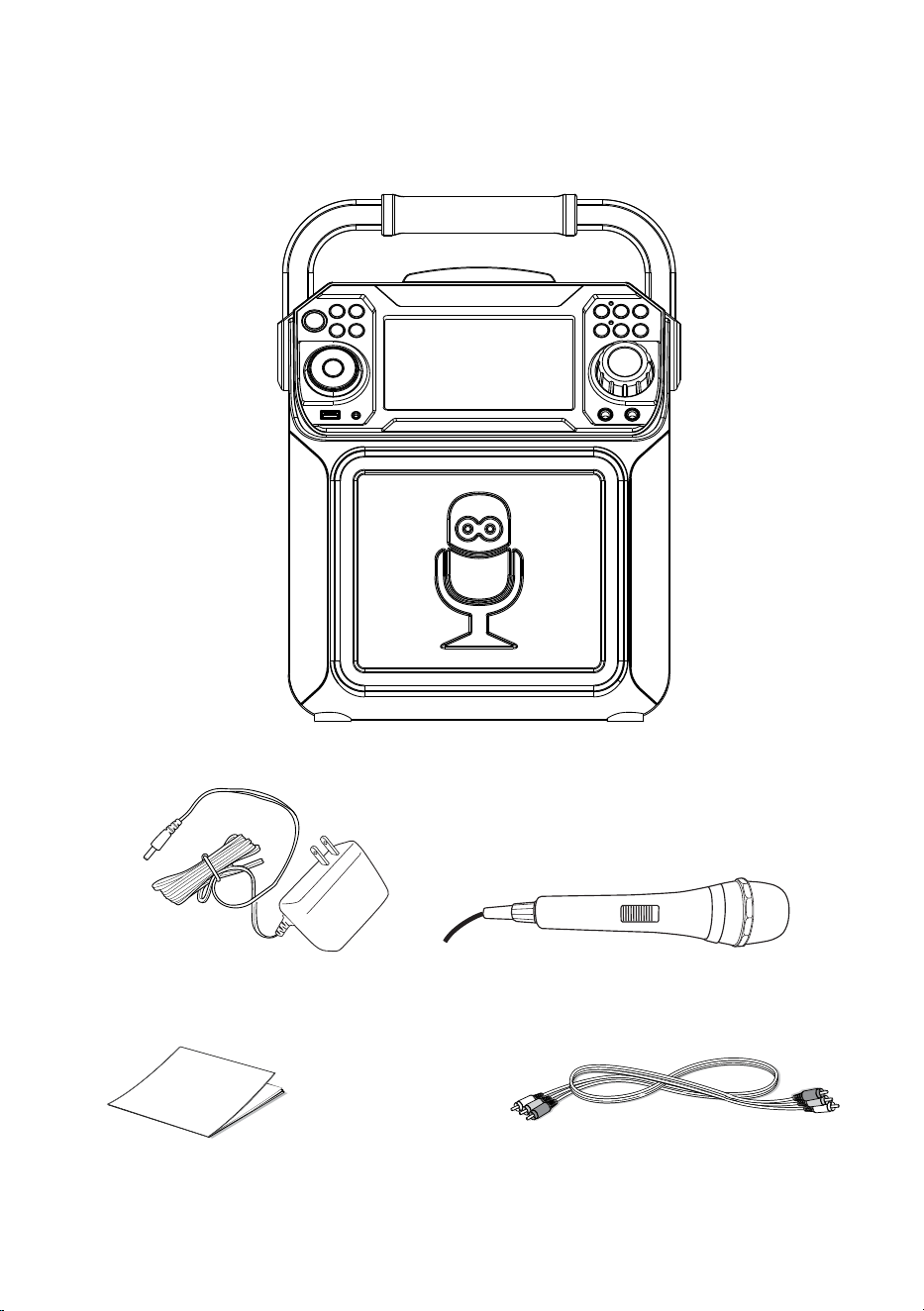
Please make sure that the following items are included.
Wired Microphone
Main Unit
Audio/Video Cables
AC Adapter
Manual
— E3 —
Location of Controls (Top/Front)
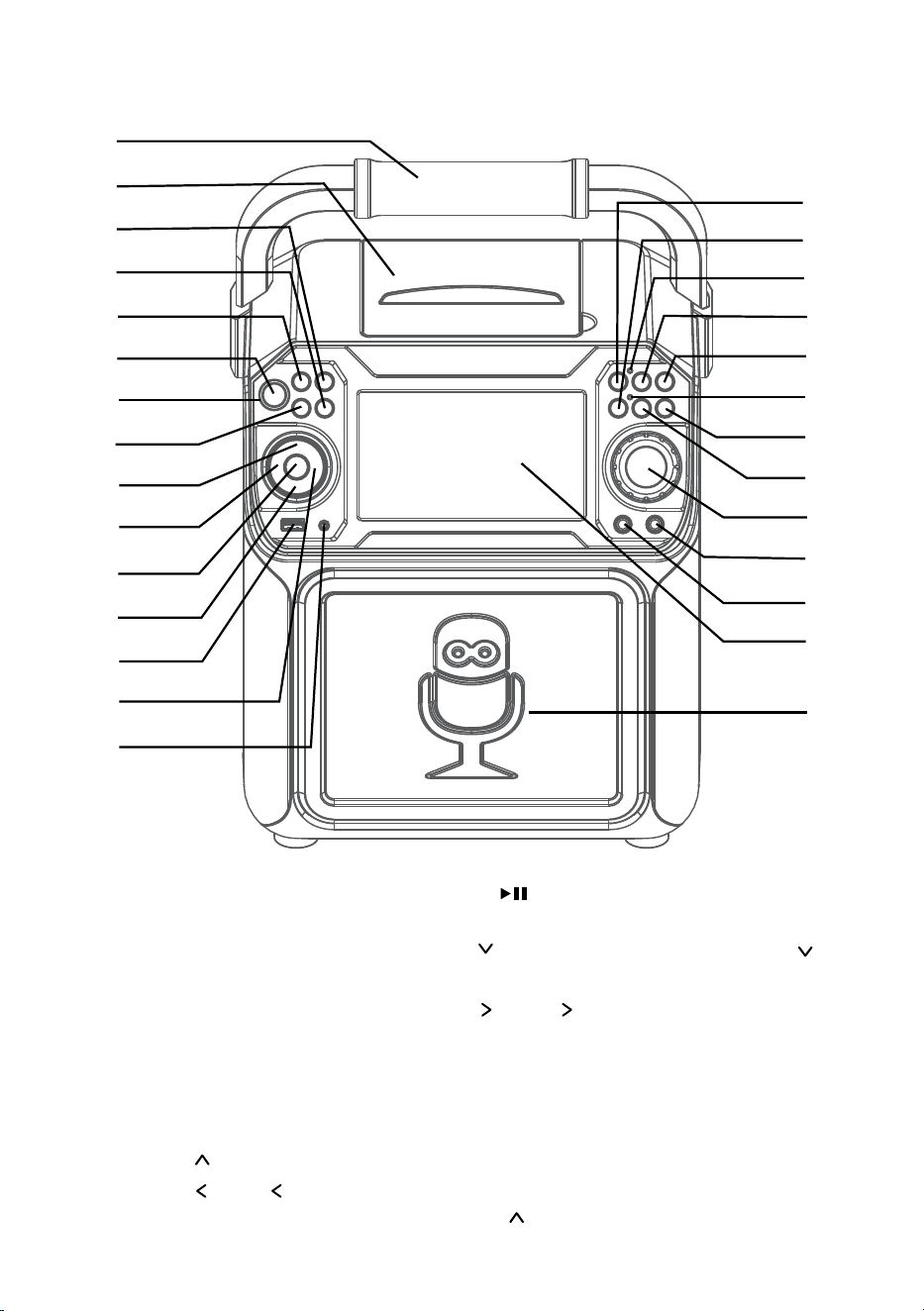
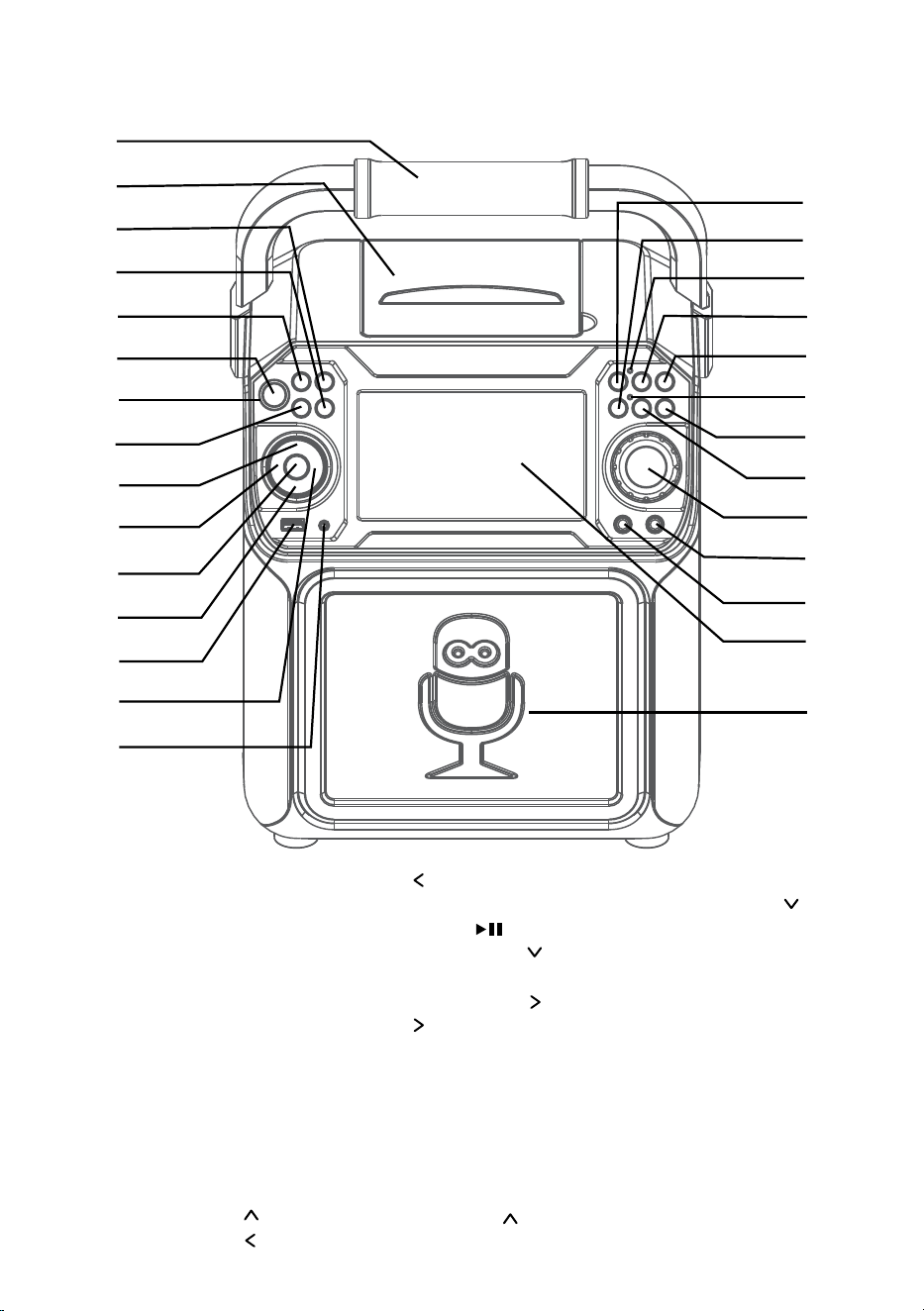
1. Handle
2. CD Compartment
3. LIGHT Button
4. REPEAT/PROG Button
5. FUNCTION Button
6. ON/OFF Button
7. Power indicator
8. MONITOR ON/OFF
Button
9. Navigation Button
10. Navigation /Skip
Button
11. PLAY/PAUSE
Button
12. Navigation Button
13. USB Port
14. Navigation /Skip
Button
15. AUX IN Jack
16. RECORD Button
17. Bluetooth button
18. Record indicator
19. VOICE EFFECT Button
20. MIC VOLUME
Button
21. Bluetooth indicator
22. MIC VOLUME
Button
23. A.V.C. (Auto Voice
Control) button
24. MASTER VOLUME
Control
25. MIC 2 Jack
26. MIC 1 Jack
27. Screen
28. Speaker
u
v
w
x
y
U
V
W
X
at
ak
al
am
an
ao
ap
aq
ar
as
bt
bk
bl
bm
bn
bo
bp
bq
br
— E4 —
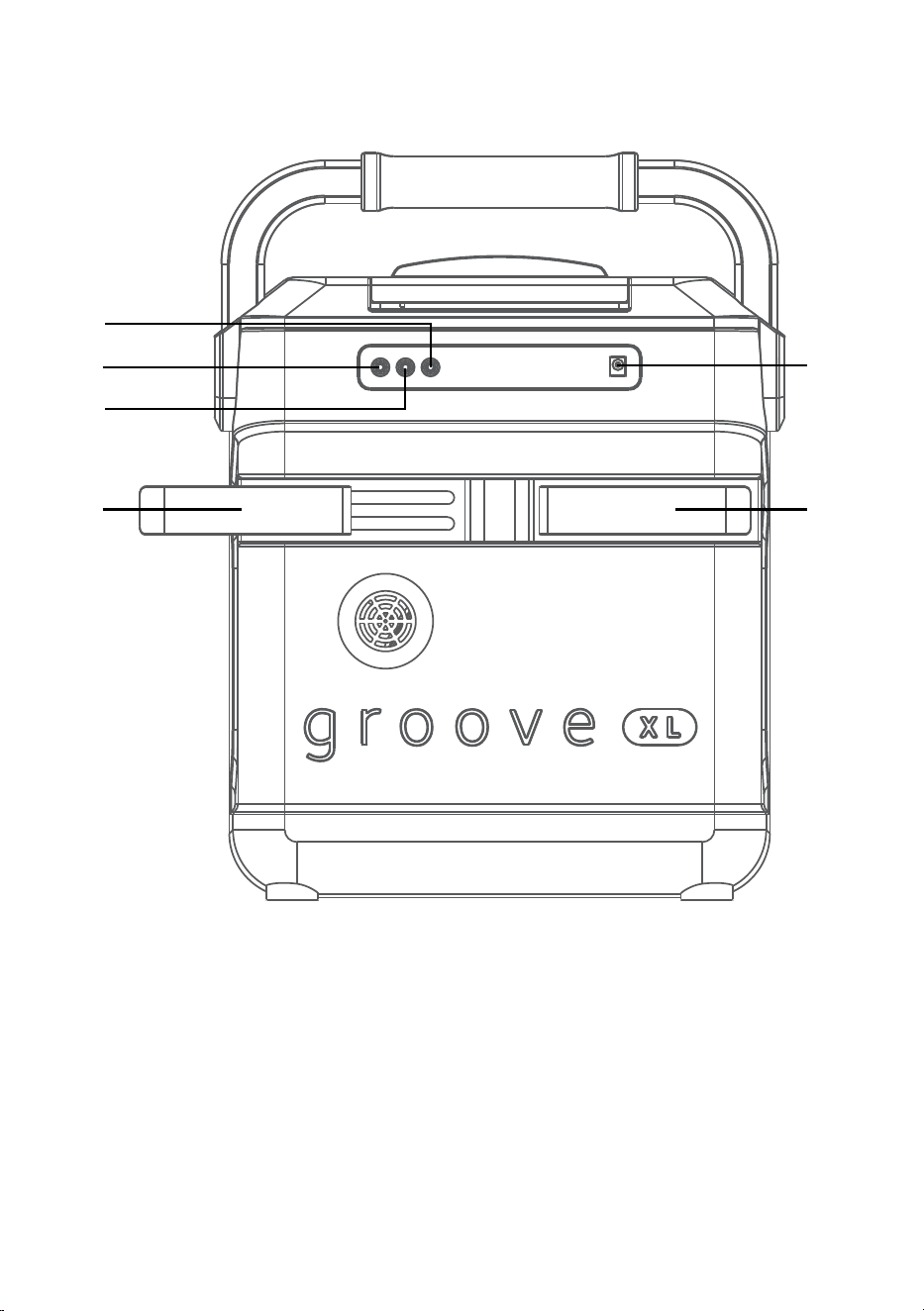
Location of Controls (Rear)
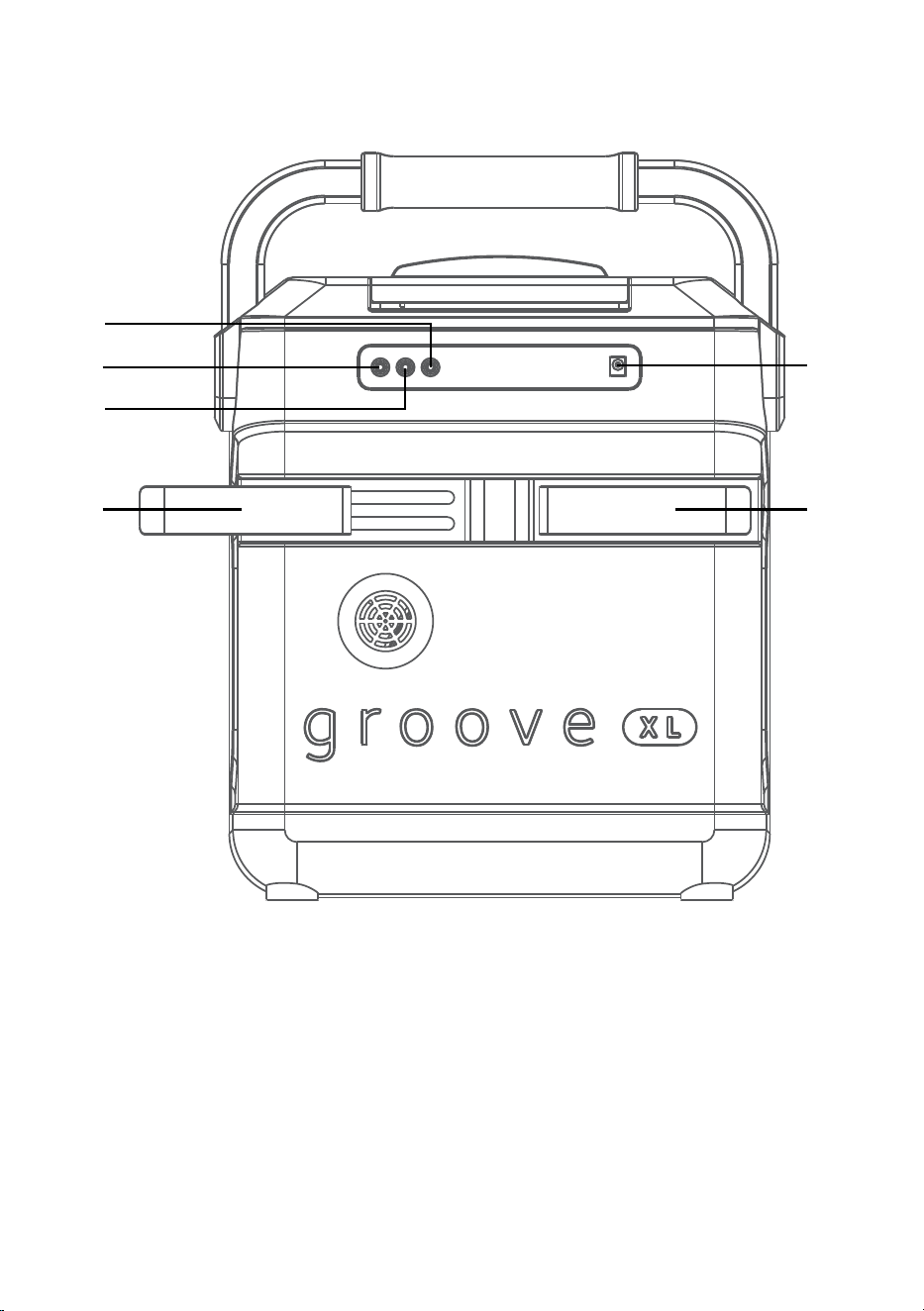
1. AUDIO OUT Left Jack
2. VIDEO OUT Jack
3. AUDIO OUT Right Jack
4. Extendable MIC holders
5. DC IN Jack
u
v
x x
y
w
— E5 —
Connection
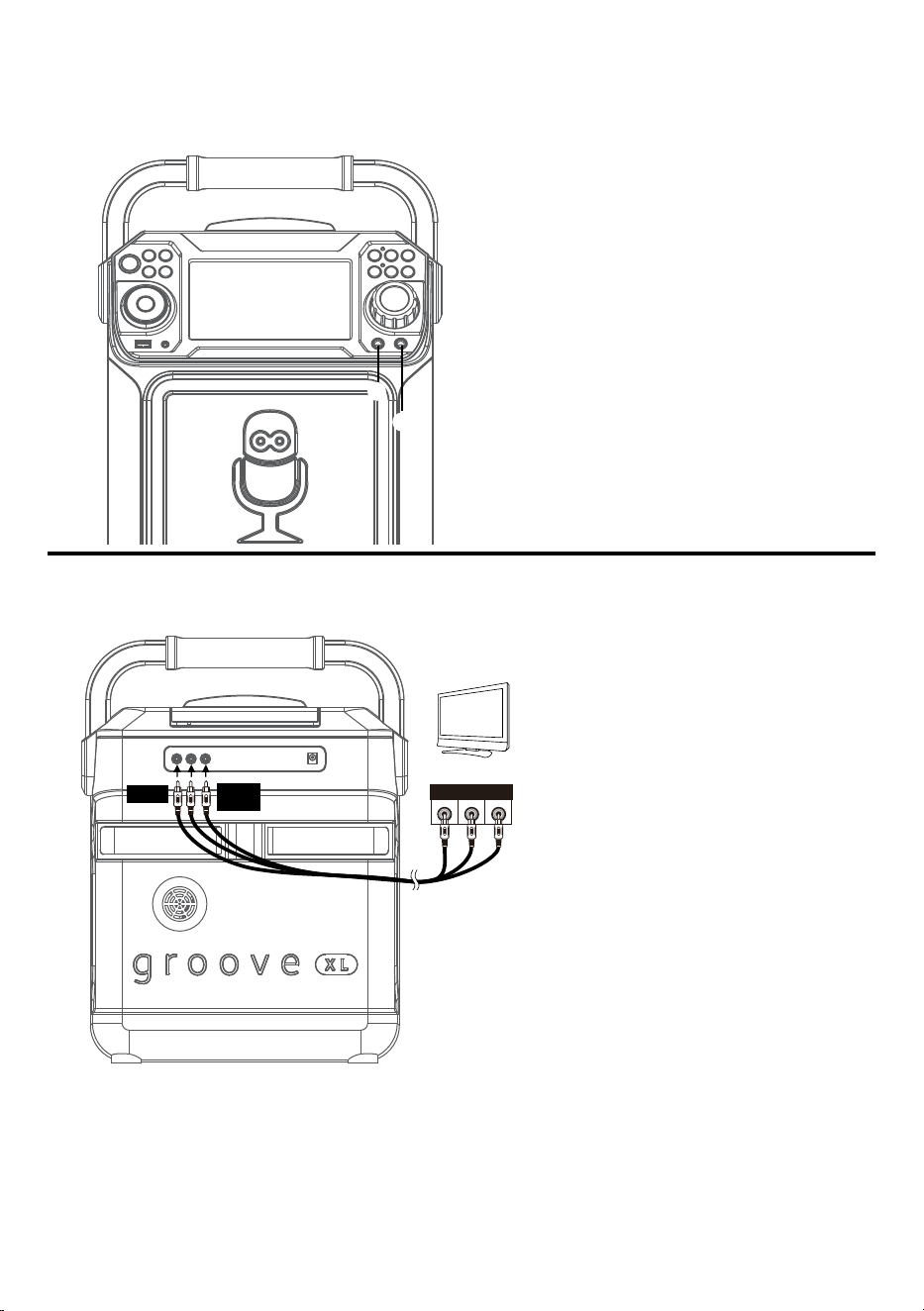
Connecting the Microphone(s)
Microphones:
Connect a microphone into Mic jack 1
u
as well as Mic jack 2
v
(when desired).
Note: Do not drop or tap the Mic as
damage to the Mic or speakers may occur.
Do not twirl the microphone cord as it will
cause damage to the encased wiring.
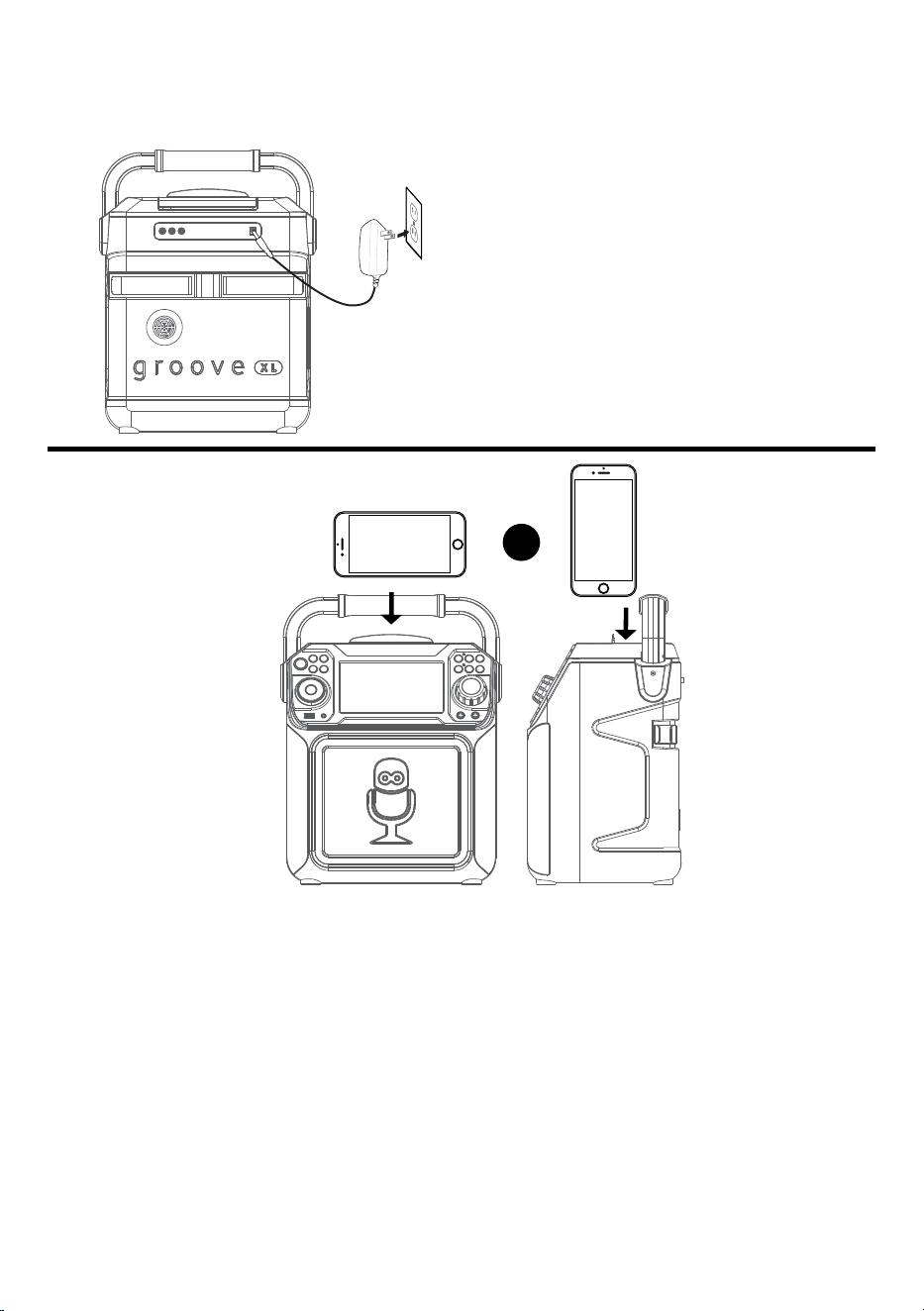
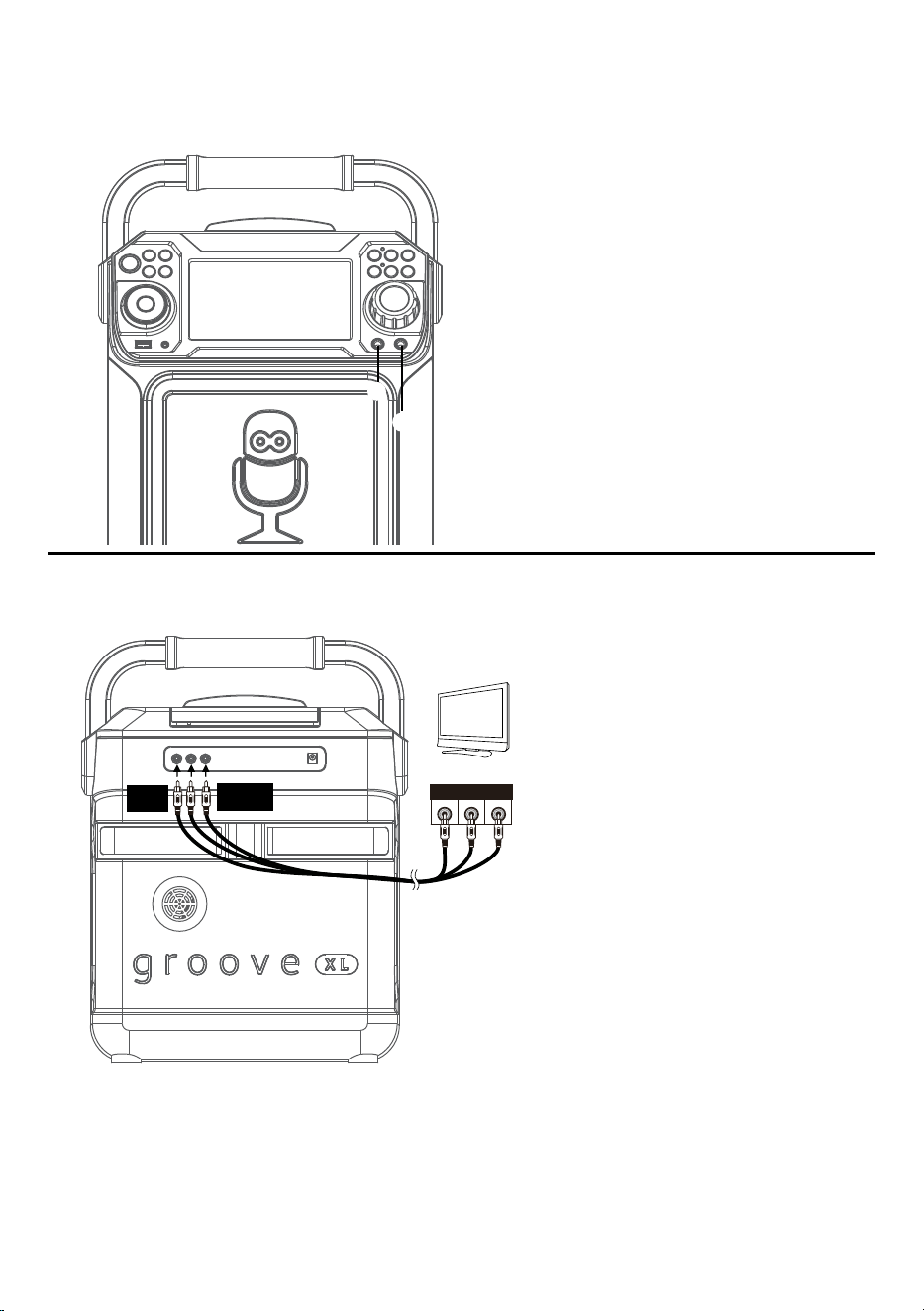
Connecting the Unit to a TV
VIDEO
INPUT
AUDIO
INPUT
R L
RCA cables
VIDEO OUT
(yellow)
AUDIO OUT
(white - L
red - R)
REAR VIEW OF TV
To output the video, lyrics and
audio to your TV, perform the
following steps:
Connect the RCA video cable
(Yellow) to the VIDEO OUT jack
and the audio cables (White
and Red) to the AUDIO OUT
jacks located on the back of the
Singing Machine.
Connect the opposite end of
the RCA video cable (Yellow) to
the VIDEO IN jack and the audio
cables (White and Red) to the
AUDIO IN on your TV.
Notes:
• This unit can be used with or without a TV.
• Also refer to the TV’s User Guide.
• To see the lyrics on the screen, you must use a CD+G disc or MP3+G files.
• Audio/Video cables are included.
u
v
— E6 —
Connection
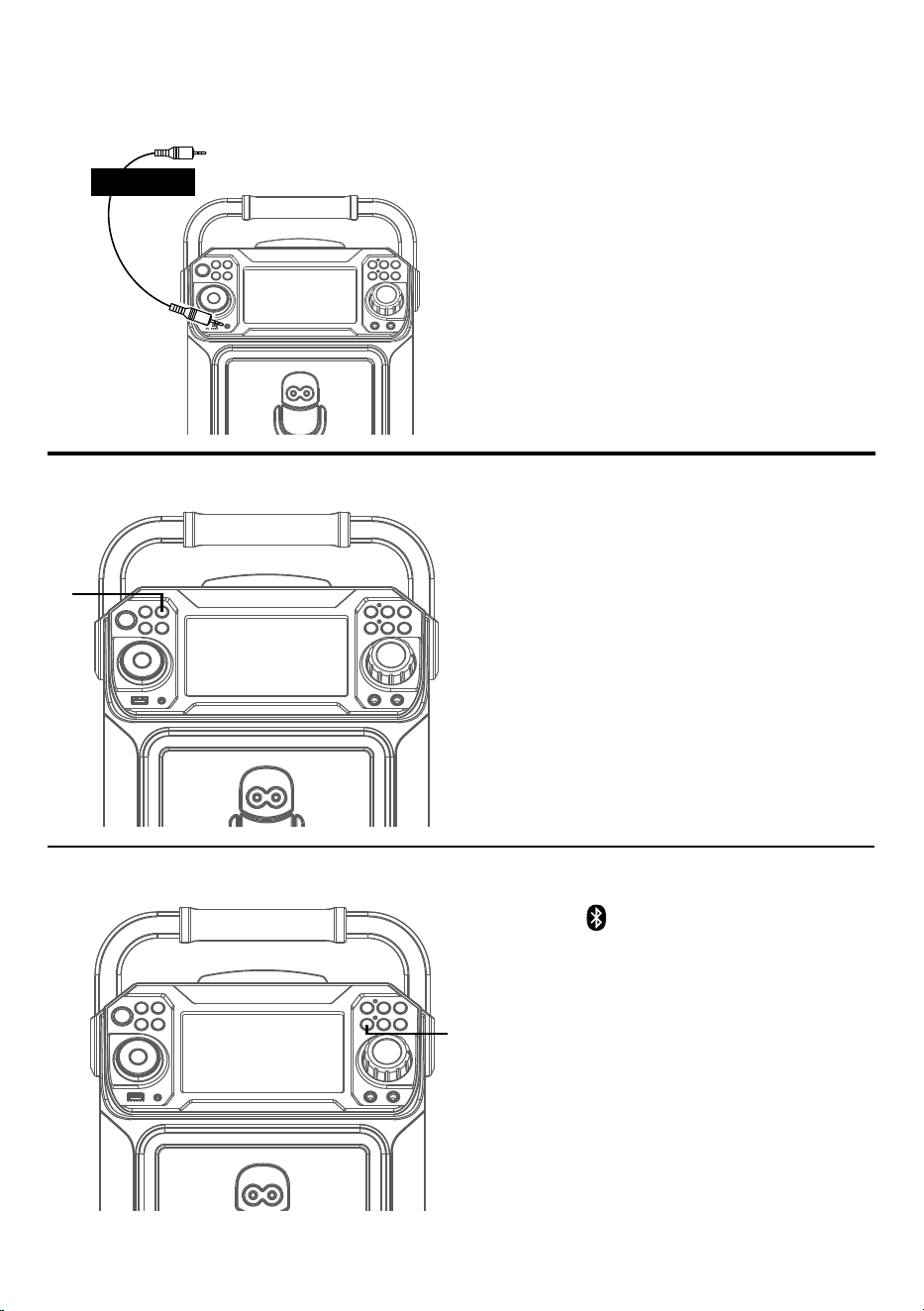
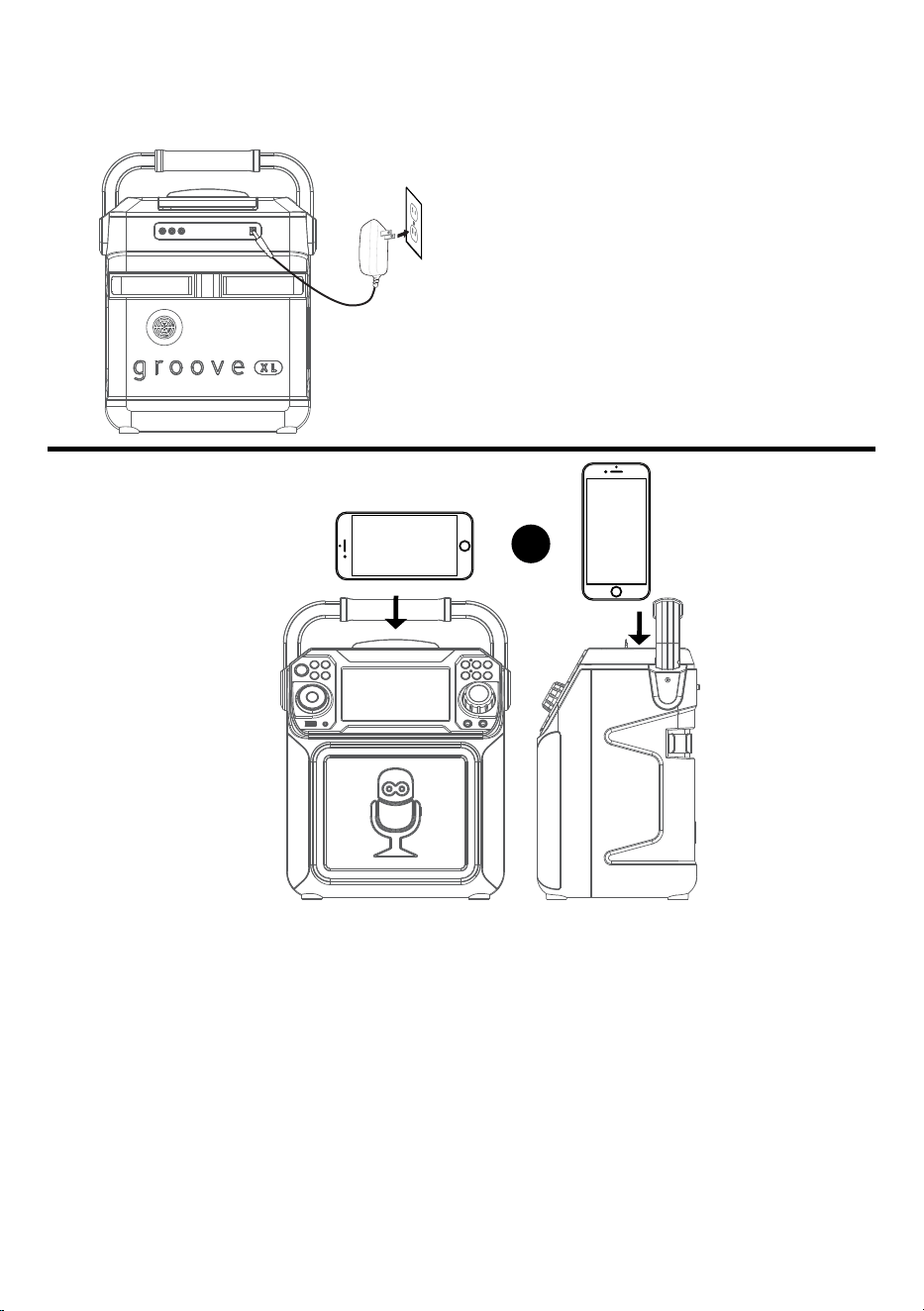
Connecting to AC Power
Cradle
Insert the small end of the AC adapter
into the DC IN jack on the rear of the unit.
Insert the other end (with the 2 blades)
into a conveniently located AC outlet
having 120V AC, 60Hz.
Note: Make all connections before
connecting to AC power.
OR
— E7 —
Connection
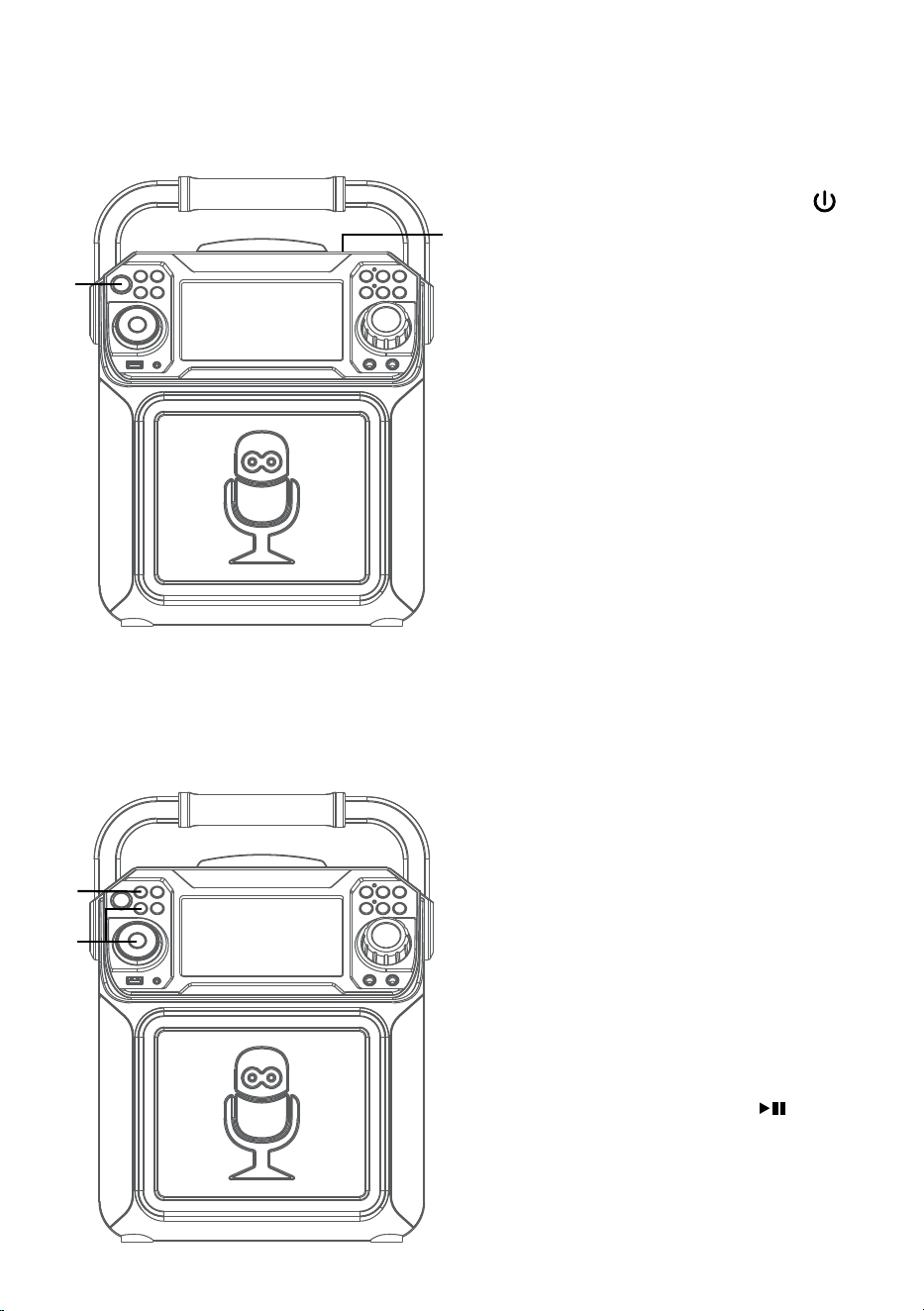
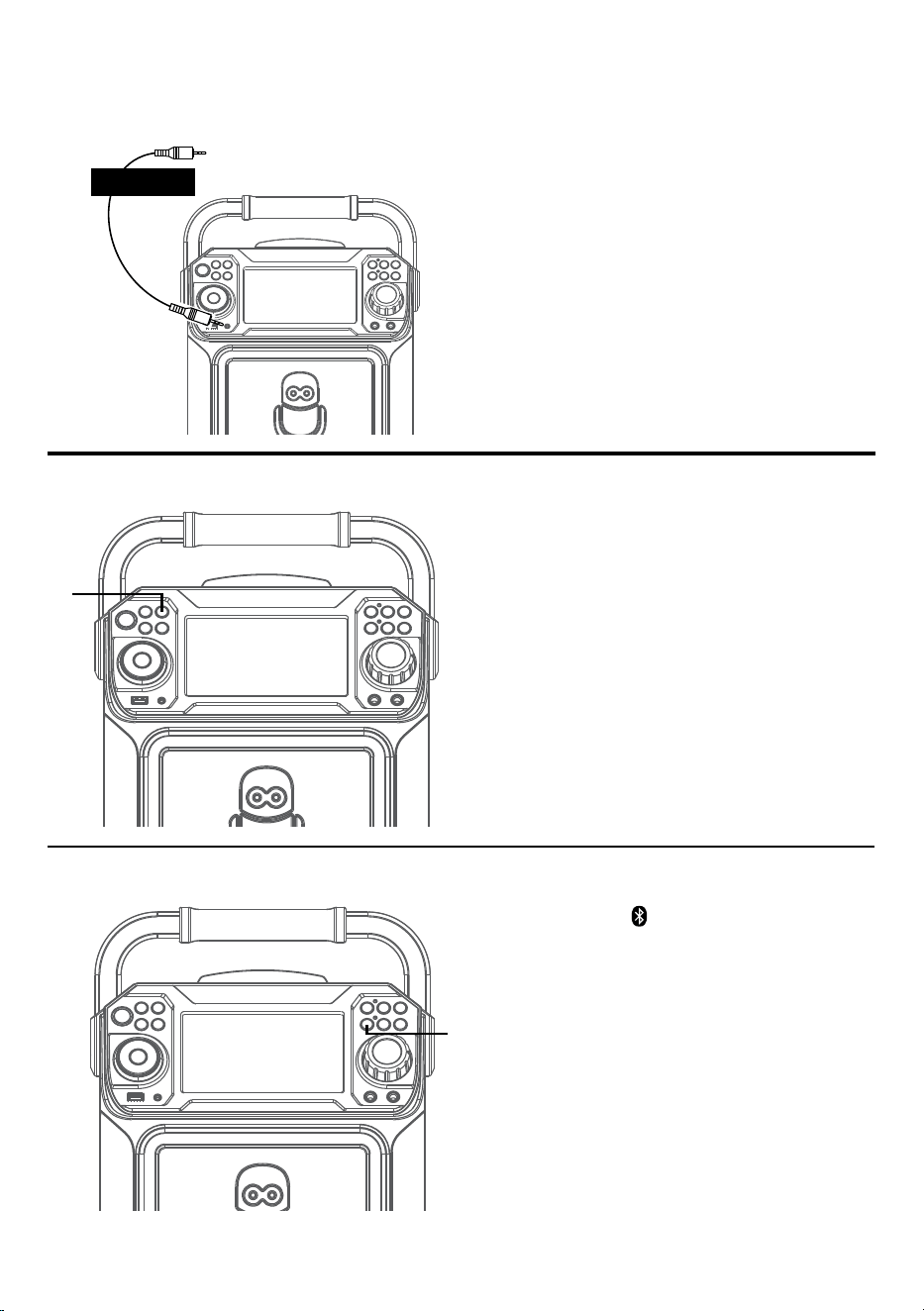
Connecting to Aux In Jack
Connect an external device by using an
appropriate cable (3.5mm audio cable not
included) as shown.
Note: See page E19 to select and use the
Aux In function.
To External Unit
AUDIO OUTPUT
/ HEADPHONE JACK
Bluetooth Mode
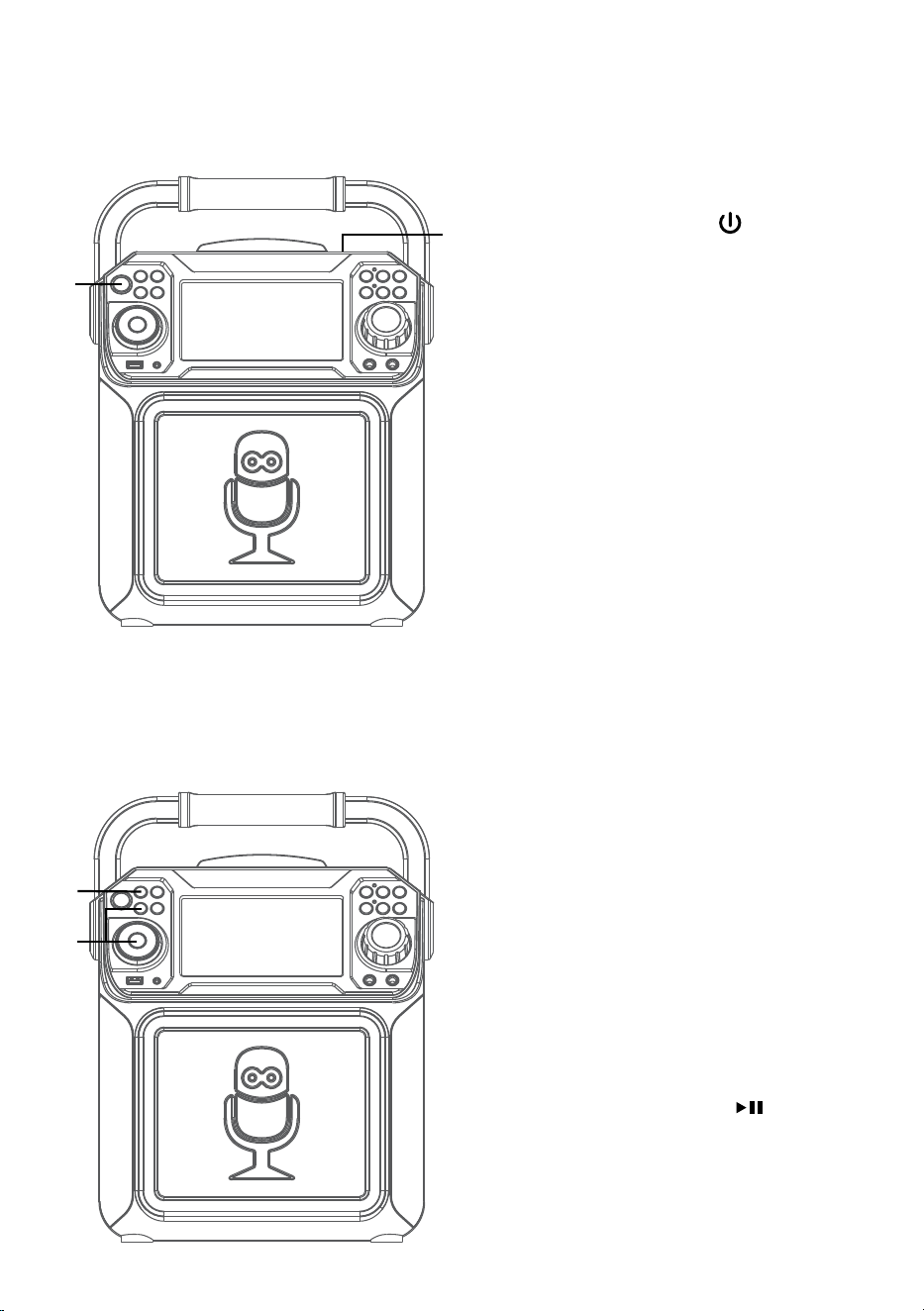
Press the button to easily set the
machine into pairing mode.
u
Disco Lights
When the unit is turned on, the Light
mode 1 is automatically activated. The
lights will light up and will synchronize
with sound when you speak or sing into
the microphone.
Press the LIGHT button for Light mode 2
which will display the light show but will
not respond to the microphone. Press the
LIGHT button once again to turn off the
Lights.
u
— E8 —
Operation
Playing a CD
1
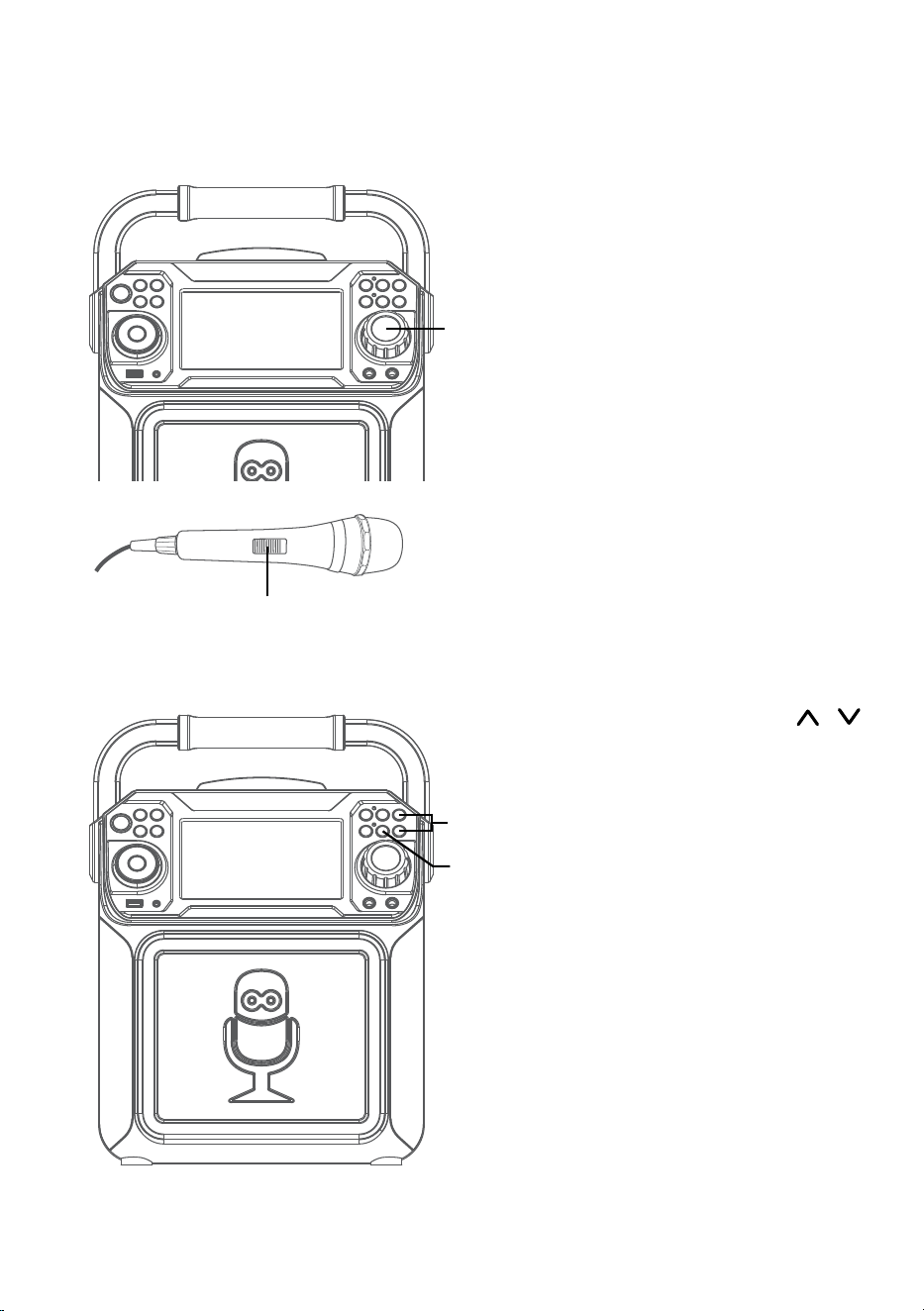
Connect the unit as described
previously. Press the ON/OFF
button to turn the unit on. The power
indicator will light solid.
2
Lift open the CD door and insert a
CD (with standard or MP3+G files)
or a CD+G by gently pressing it on
the center spindle. Then close the CD
door.
Notes:
• What is a CD+G?
A CD+G (CD+Graphics) is the
standard format for most karaoke
discs that will display the words on the
screen.
• What is an MP3+G?
MP3+G is the newest format for
karaoke music utilizing the MP3’s
small file size. It will display the words
on the screen. See page 19 to order
and download MP3+G files.
• Never place anything other than a
CD in the compartment, as foreign
objects can damage the unit.
• If no disc is inserted, “NO DISC” will
appear on the screen.
• If connected to a TV or other audio
source, adjust the volume of the TV
using its own volume control.
3
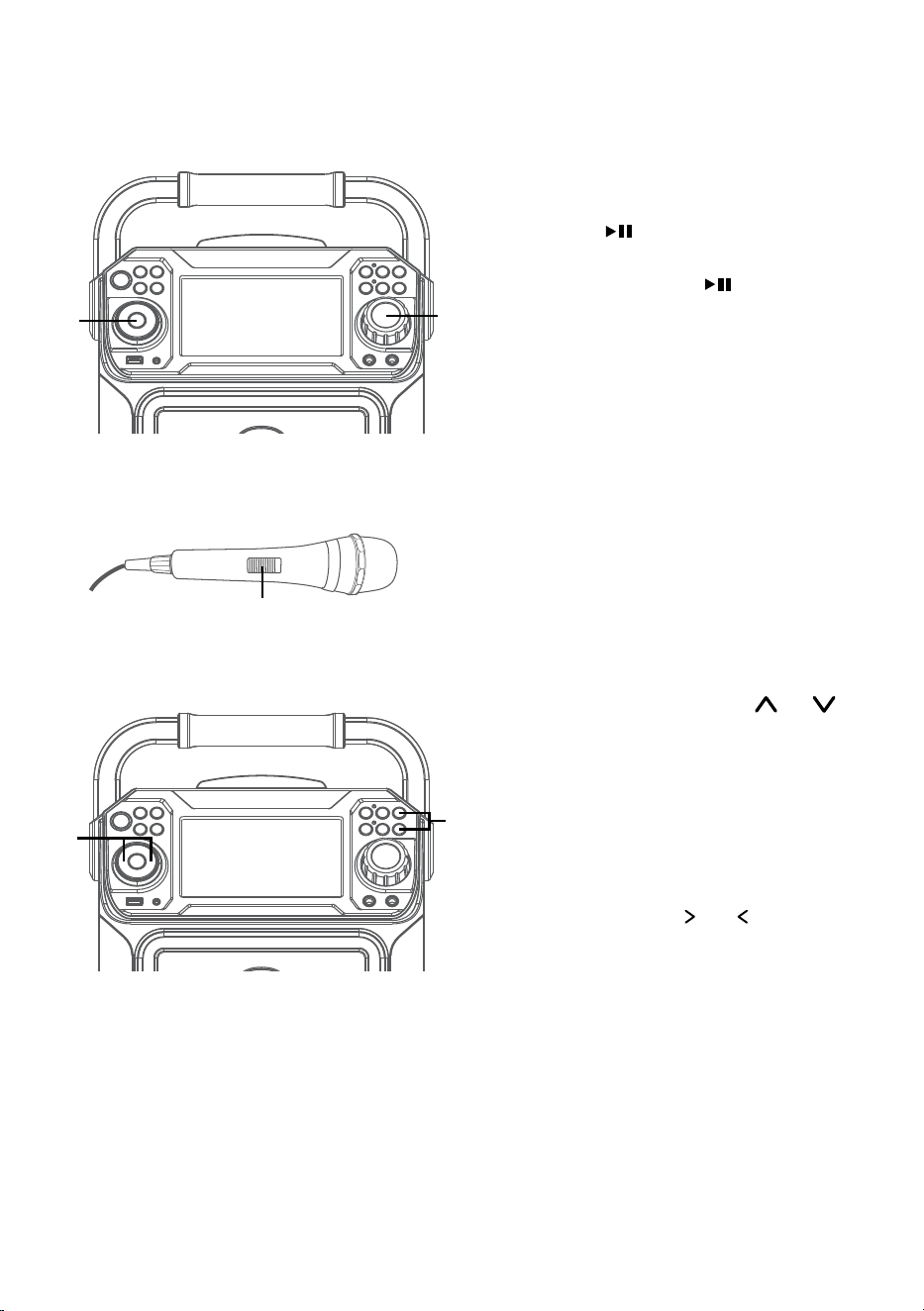
Repeatedly press the FUNCTION
button to select the CDG/CD mode;
“READ” will appear when searching
the disc and then the total number of
tracks will appear.
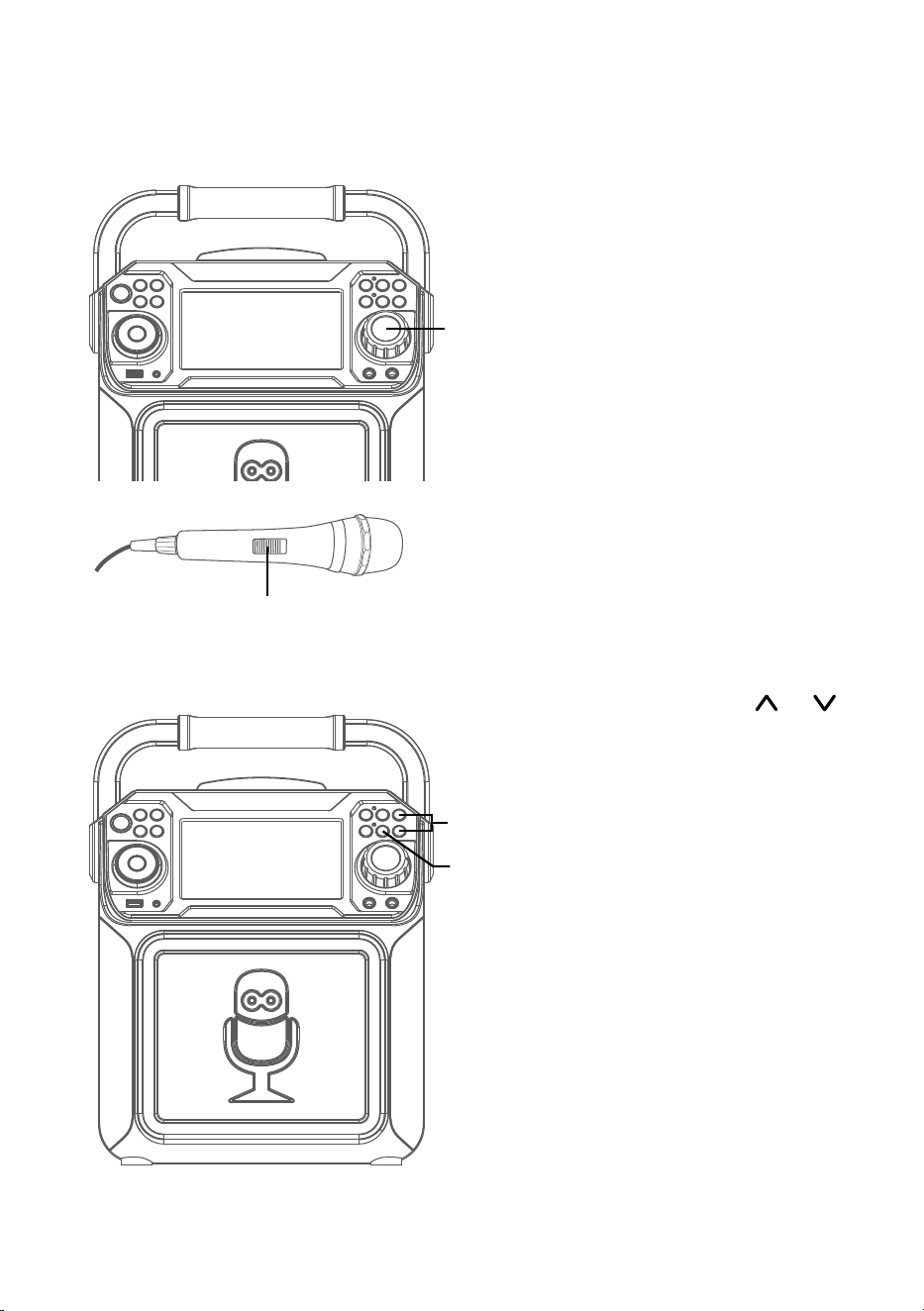
4
Press the PLAY/PAUSE button
to start playback. You can view the
image and lyrics on the screen, if
listening to a CD+G file. Press the
MONITOR button to turn off the
screen.
u
w
x
v
— E9 —
Operation
Playing a CD (Continued)
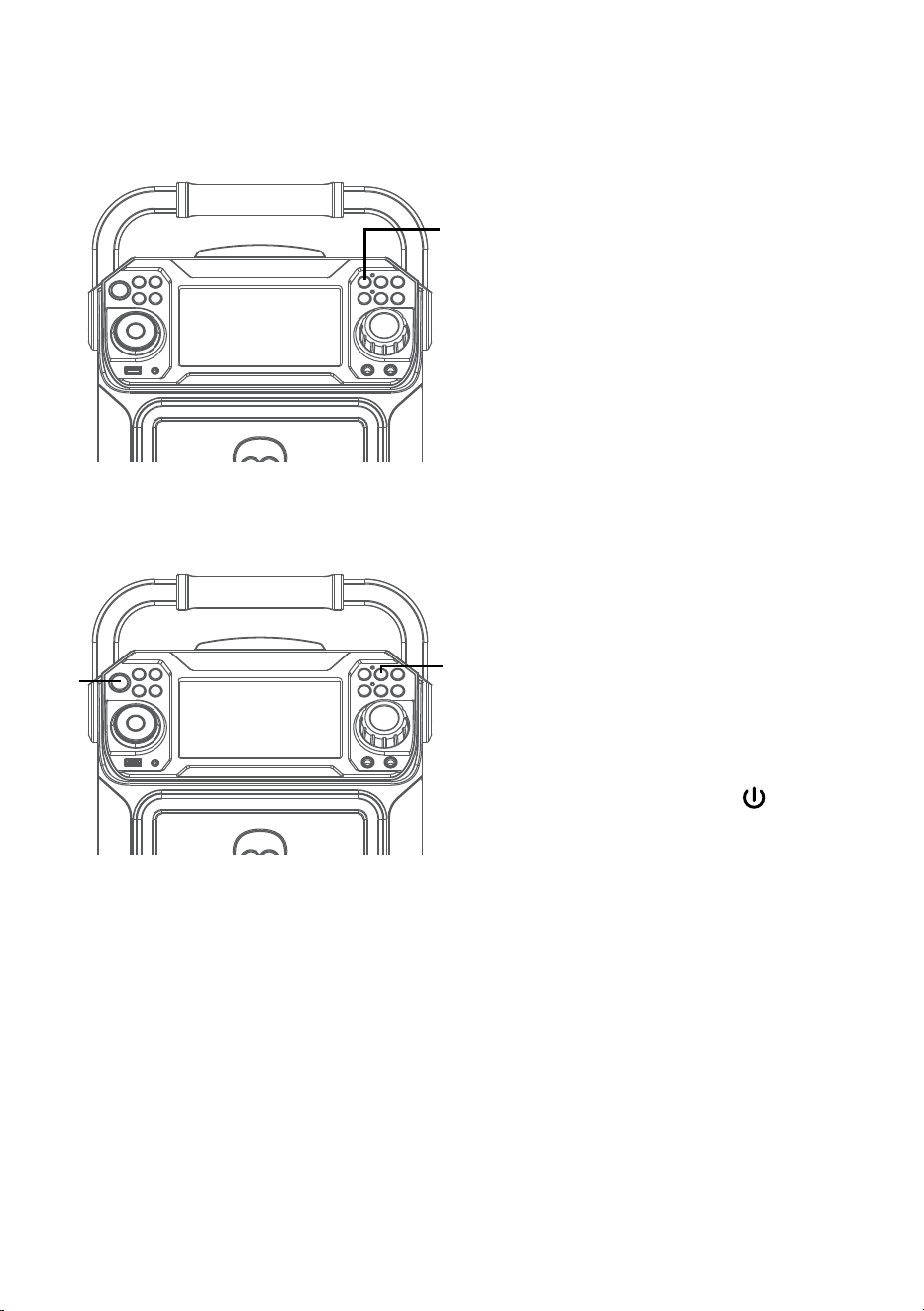
5
Adjust the volume to a comfortable
level using the MASTER VOLUME
control.
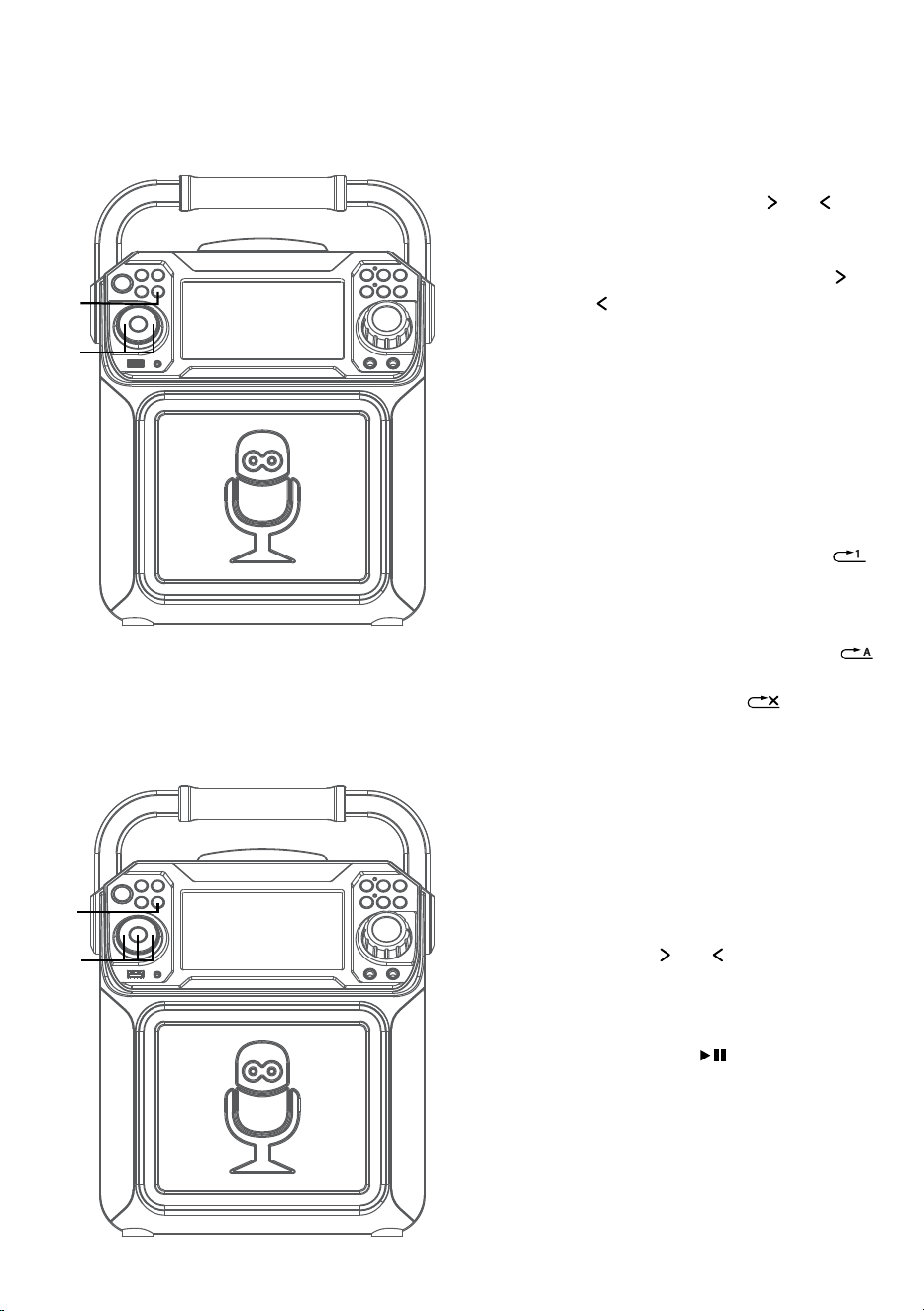
6
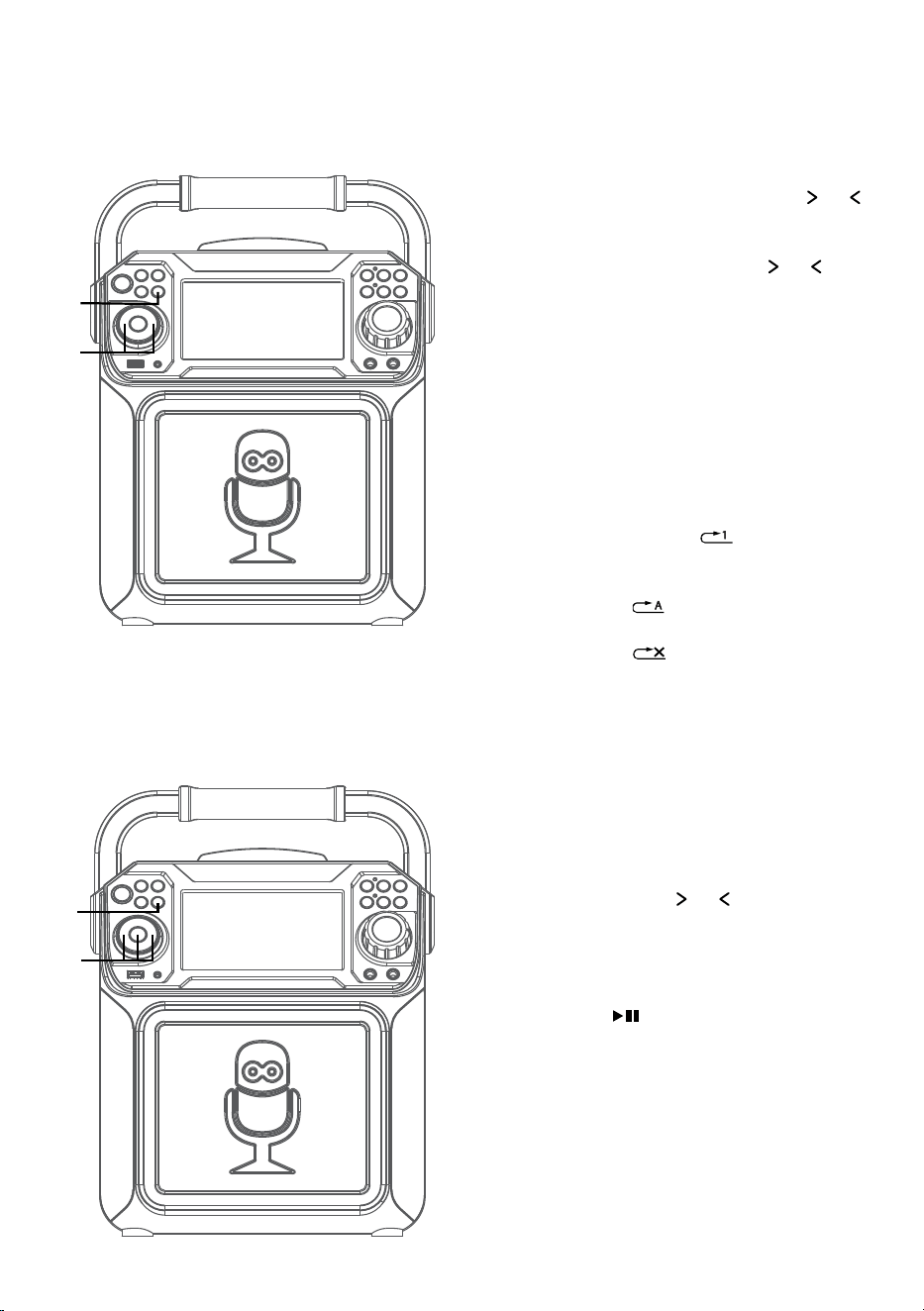
Connect microphone(s) and slide the
ON/OFF switch on the microphone
to the ON position.
7
Pressing MIC VOLUME or
button to adjust the mic volume
as desired. Increase this control
will increase the volume of both
microphones.
8
AUTO VOICE CONTROL can be
activated by pressing the A.V.C.
(AUTO VOICE CONTROL) button.
The vocals on a multiplex recording
will be muted as soon as the singer
begins singing into the microphone.
When the singer stops singing, the
recorded vocals on the multiplex
recording will resume to normal.
Note: This is only for files recorded with
this multiplex feature.
U
y
V
W
— E10 —
Operation
Playing a CD (Continued)
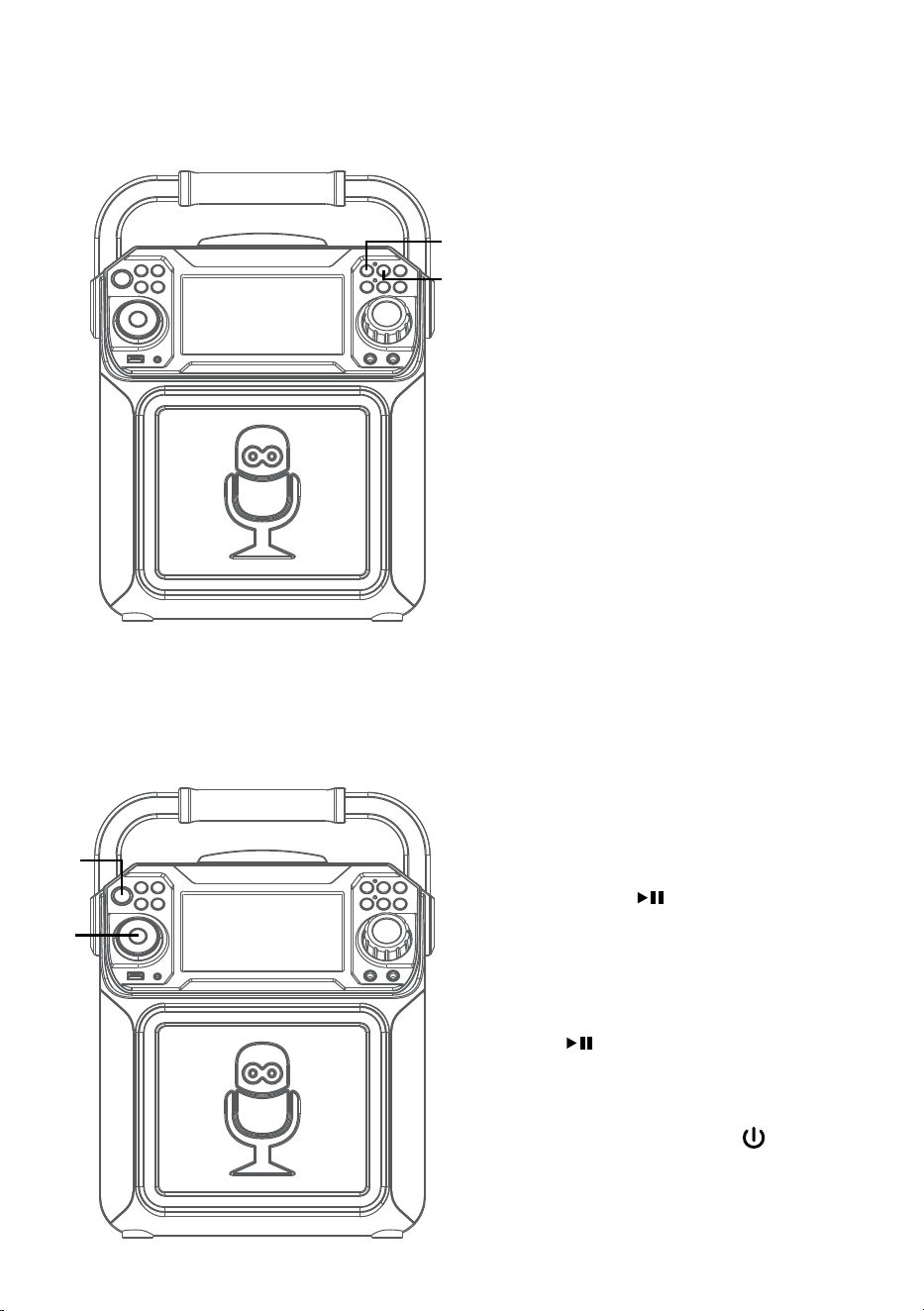
9
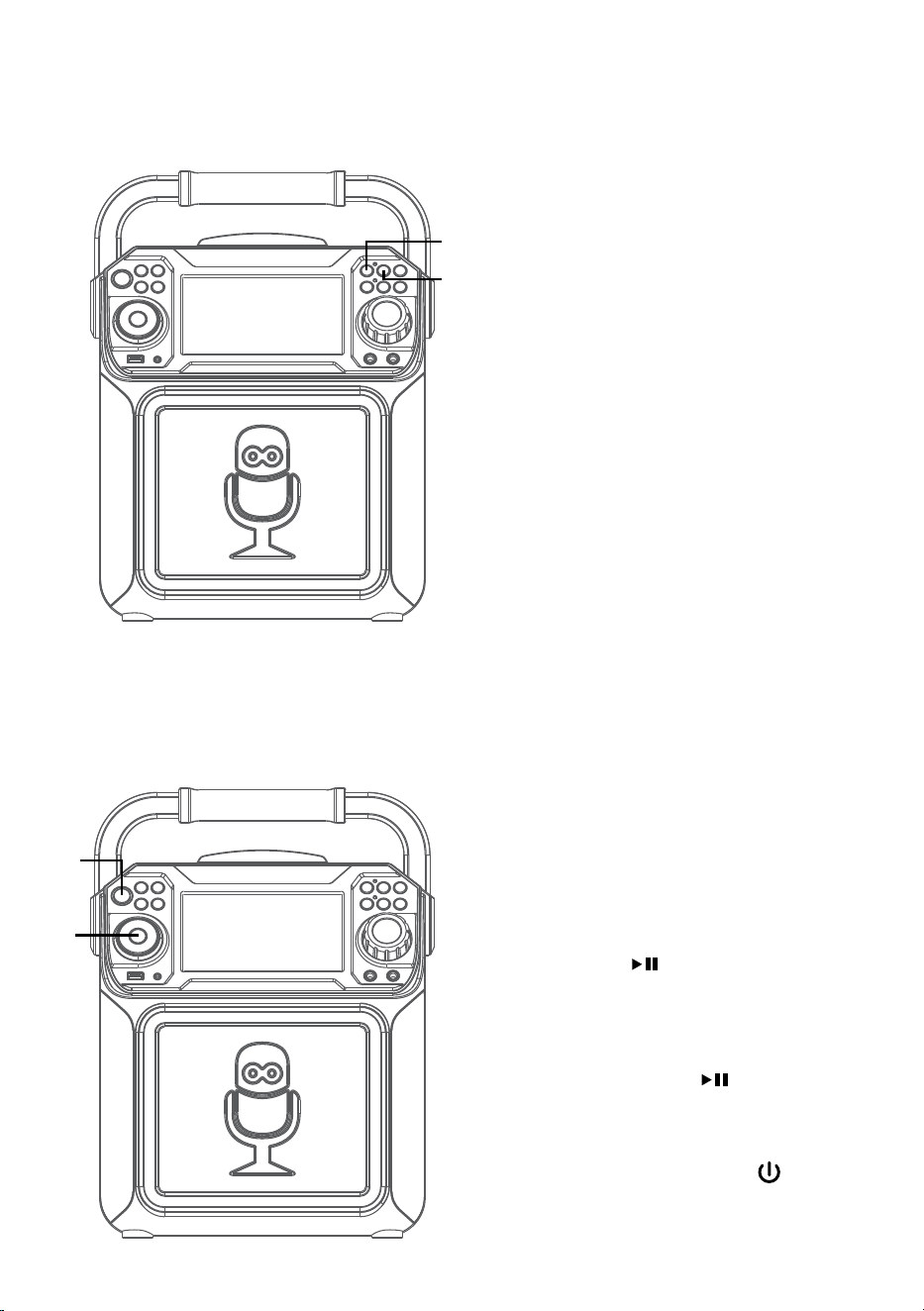
SKIP: Advance or go back one
track by pressing the or
buttons.
SEARCH: When playing any
audio CD, press and hold the
or button. The CD will search
at high speed in the forward or
backward direction. Normal play
will continue when you release
the button.
Note: SEARCH function only works with
CD not CD+G discs.
10
REPEAT: To repeat the current
track, press the REPEAT/PROG
button once during playback,
will appear in the display and the
current track will be repeated. To
repeat all tracks, press the
REPEAT/PROG button again,
will appear. Press again to cancel
the Repeat feature; will
appear.
11
PROGRAM: You can program
up to 20 tracks for playback in
any desired order. While in Stop
mode, press the REPEAT/PROG
button; PROG SET 00:XX (xx is
the total tracks) will appear in
the display. Select the first track
using the or buttons, then
press the REPEAT/PROG button.
Repeat to set up to 20 tracks into
memory. When done, press the
PLAY/PAUSE button to start
playback.
Notes:
• Press and hold the REPEAT/PROG
button to stop and clear the program.
• If more than 20 tracks are attempted
to be programmed, “FUL” will appear in
the display.
ak
ak
at
X
— E11 —
Operation
Playing a CD (Continued)
12
RECORDING YOUR SINGING:
Insert a USB drive first, then
press the REC button; the song
will start over and recording will
begin. The recording indicator
will light solid. REC with track
progress in percentage will
appear at the top left of the
screen. When done recording,
press the REC button again to
stop recording. The recording
indicator will turn off.
See “
Playing Songs from the
USB”
to play back your recorded
files saved in the USB flash drive.
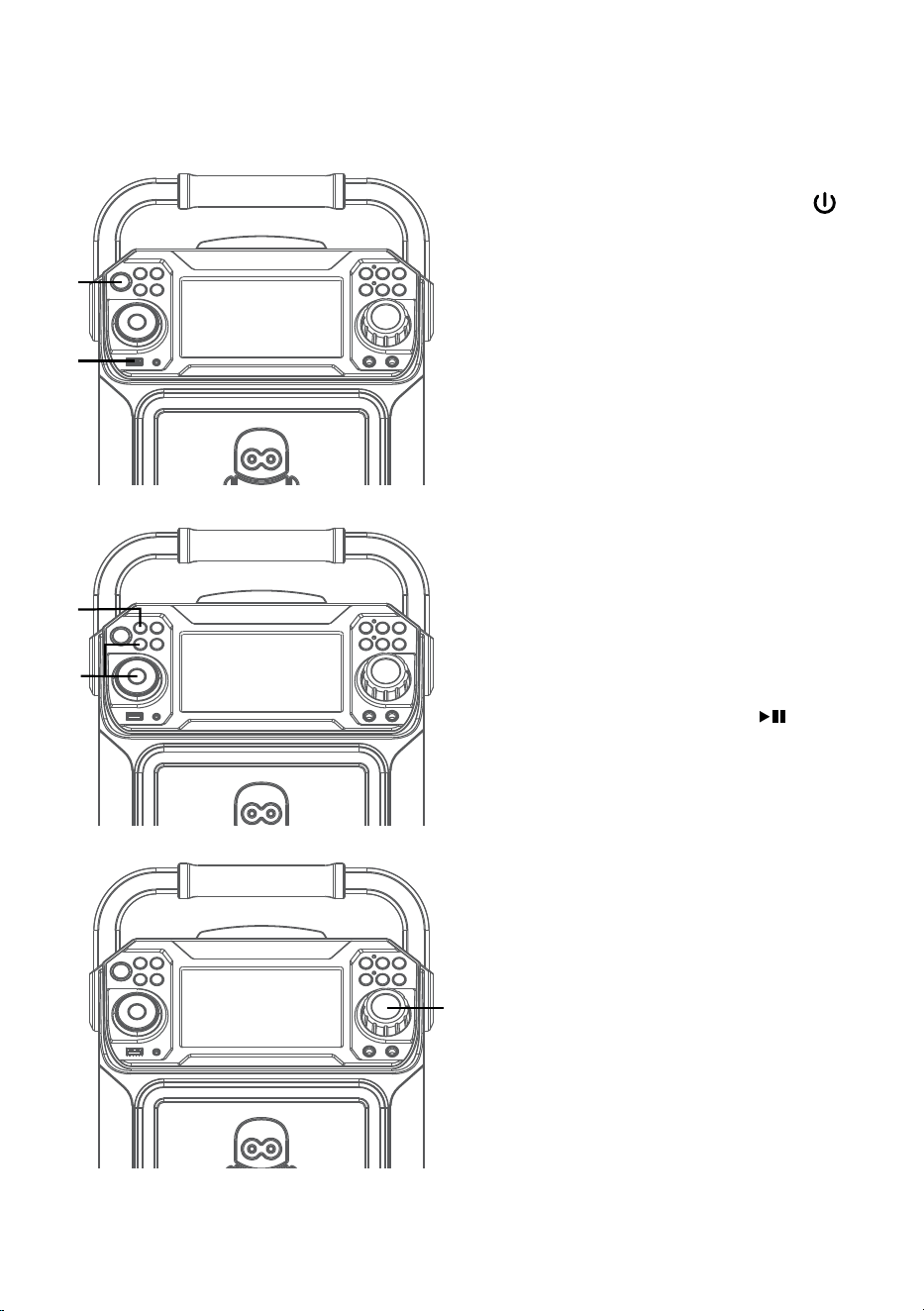
13
SOUND EFFECT: Repeatedly
press the VOICE EFFECT
buttons to select from ECHO,
FEMALE, MALE, CHIPMUNK,
ROBOT or RADIO vocal effects.
Select NONE to sing without any
voice effect.
14
PAUSE: During playback, if
you wish to pause the disc
momentarily, press the PLAY/
PAUSE button. Press again to
resume normal playback.
15
Press and hold the PLAY/PAUSE
button to stop playback.
16
Press the ON/OFF button
to turn the unit off. The power
indicator will off.
an
ao
ap
al
am
— E12 —
Operation
Playing Songs from the USB
1
Connect the unit as described
previously. Press the ON/OFF
button to turn the unit on. The power
indicator will light solid.
2
Insert a USB flash drive into the USB
port on the unit so it faces upward.
Make sure to download music from
the Karaoke store.
3
Repeatedly press the FUNCTION
button to select the USB mode;
“READ USB” will appear when
searching the drive and then the total
number of files will appear.
4
Press the PLAY/PAUSE button
to start playback. You can view the
image and lyrics on the screen, if
listening to a CD+G file. Press the
MONITOR button to turn off the
screen.
Note: On the screen, folders that contain
recordings and songs appear to the left
and the list of tracks from a selected
folder will appear to the right. To navigate
these folders see “Skip” section.
5
Adjust the volume to a comfortable
level using the MASTER VOLUME
control.
Note: If connected to a TV or other audio
source, adjust the volume of the TV using
its own volume control.
u
w
x
v
y
— E13 —
Operation
Playing Songs from the USB (Continued)
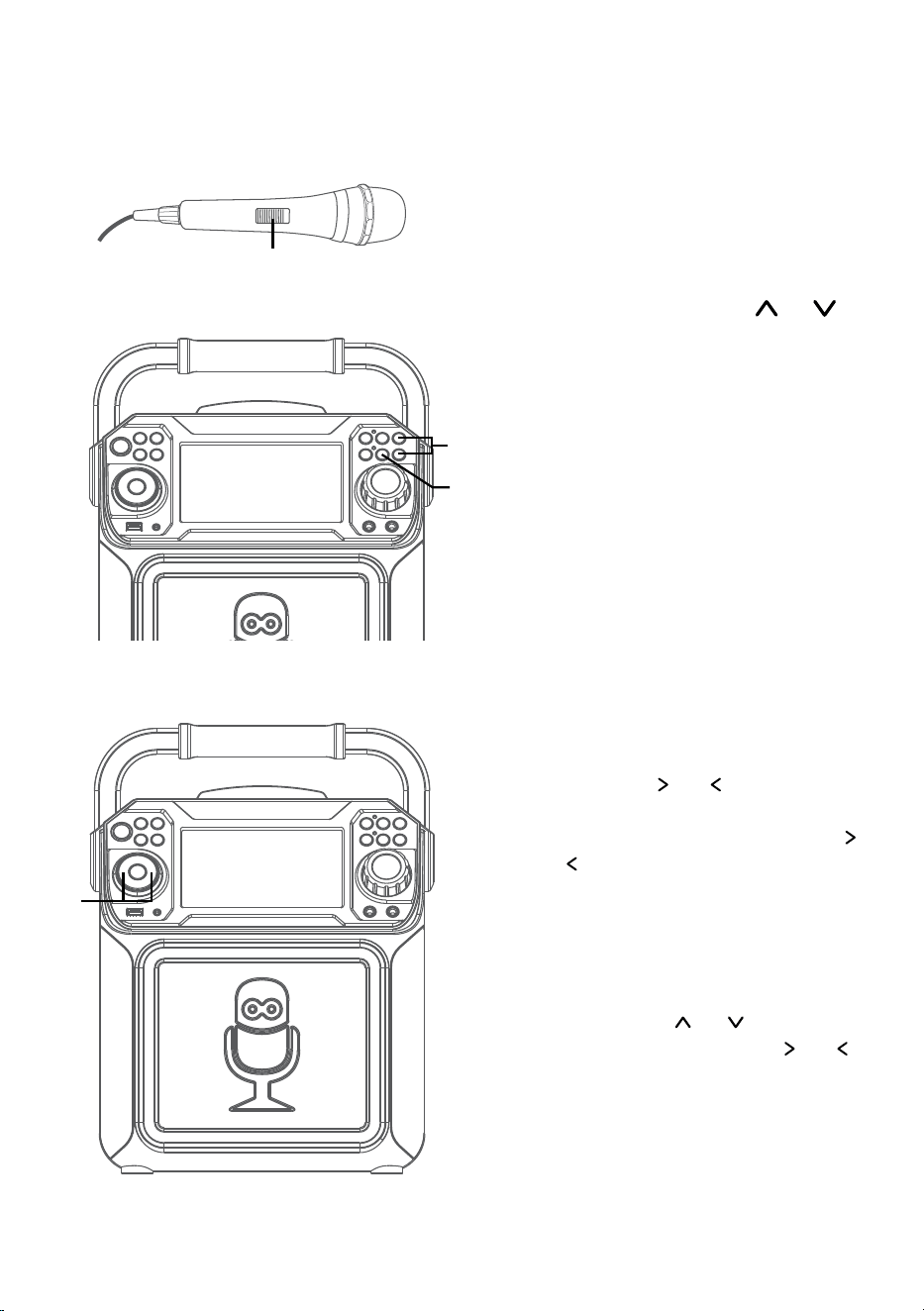
6
Connect microphone(s) and slide the
ON/OFF switch on the microphone
to the ON position.
7
Pressing MIC VOLUME or
button to adjust the mic volume
as desired. Increase this control
will increase the volume of both
microphones.
8
AUTO VOICE CONTROL can be
activated by pressing the A.V.C.
(AUTO VOICE CONTROL) button.
The vocals on a multiplex recording
will be muted as soon as the singer
begins singing into the microphone.
When the singer stops singing, the
vocals are automatically unmuted.
Note: This is only for files recorded with
this multiplex feature.
9
SKIP: Advance or go back one file by
pressing the or buttons.
SEARCH: When playing any audio
from the USB, press and hold the
or buttons. The USB will search
at high speed in the forward or
backward direction. Normal play
will continue when you release the
button.
During Stop mode you can also select
a file using the or buttons to
scroll up/down and/or the or
buttons to scroll right/left. Recorded
music will be in the folder labeled,
REC.
U
X
V
W
— E14 —
Operation
Playing Songs from the USB (Continued)
10
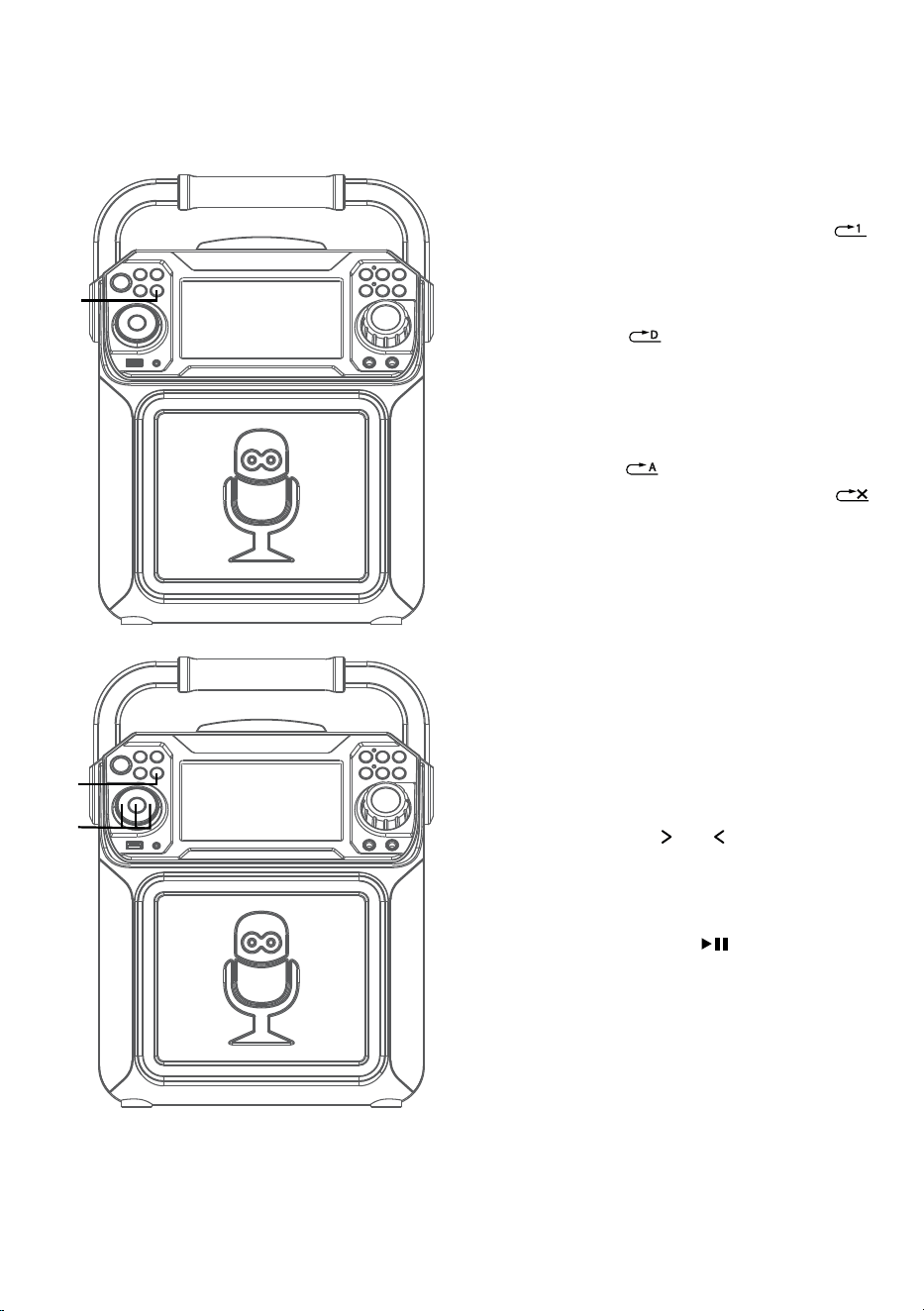
REPEAT: To repeat the current
track, press the REPEAT/PROG
button once during playback,
will appear in the display and the
current track will be repeated.
Press the REPEAT/PROG button
twice, will appear and all
MP3 tracks inside the current
folder will be repeated
continuously. To repeat all tracks,
press the REPEAT/PROG button
again, will appear. Press again
to cancel the Repeat feature;
will appear.
11
PROGRAM: You can program
up to 20 tracks for playback in
any desired order. While in Stop
mode, press the REPEAT/PROG
button; PROG SET 00:XX (xx is
the total tracks) will appear in
the display. Select the first track
using the
or buttons, then
press the REPEAT/PROG button.
Repeat to set up to 20 tracks into
memory. When done, press the
PLAY/PAUSE button to start
playback.
Notes:
• Press and hold the REPEAT/PROG
button to stop and clear the program.
• If more than 20 tracks are attempted
to be programmed, “FUL” will appear in
the display.
ak
ak
at
— E15 —
Operation
Playing Songs from the USB (Continued)
12
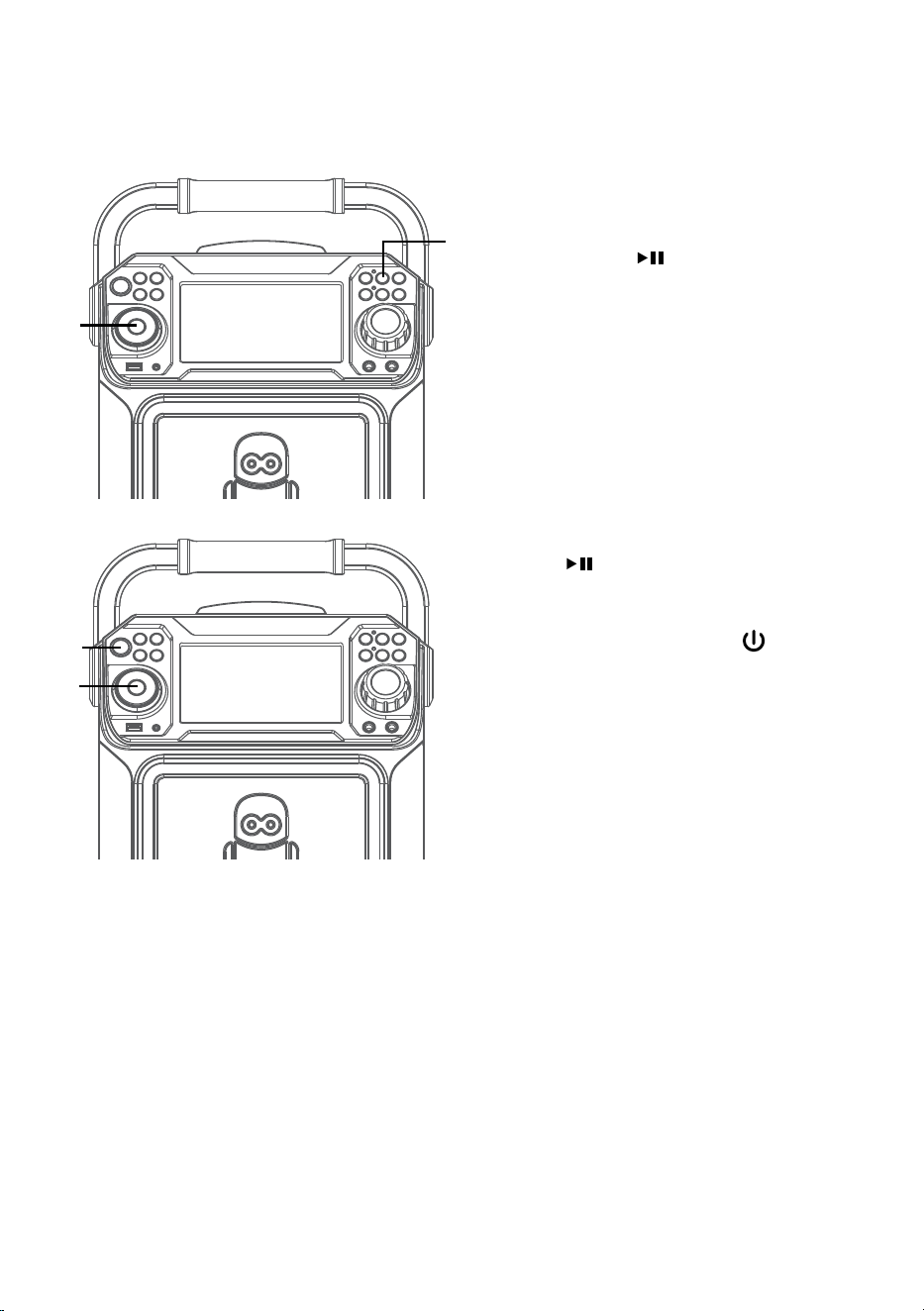
PAUSE: During playback, if
you wish to pause the music
momentarily, press the PLAY/
PAUSE button. Press again to
resume normal playback.
13
SOUND EFFECT: Repeatedly
press the VOICE EFFECT or
buttons to select from ECHO,
FEMALE, MALE, CHIPMUNK,
ROBOT or RADIO vocal effects.
Select NONE to sing without any
voice effect.
14
Press and hold the PLAY/PAUSE
button to stop playback
15
Press the ON/OFF button
to turn the unit off. The power
indicator will off
ao
al
an
am
— E16 —
Operation
Using a Bluetooth Device
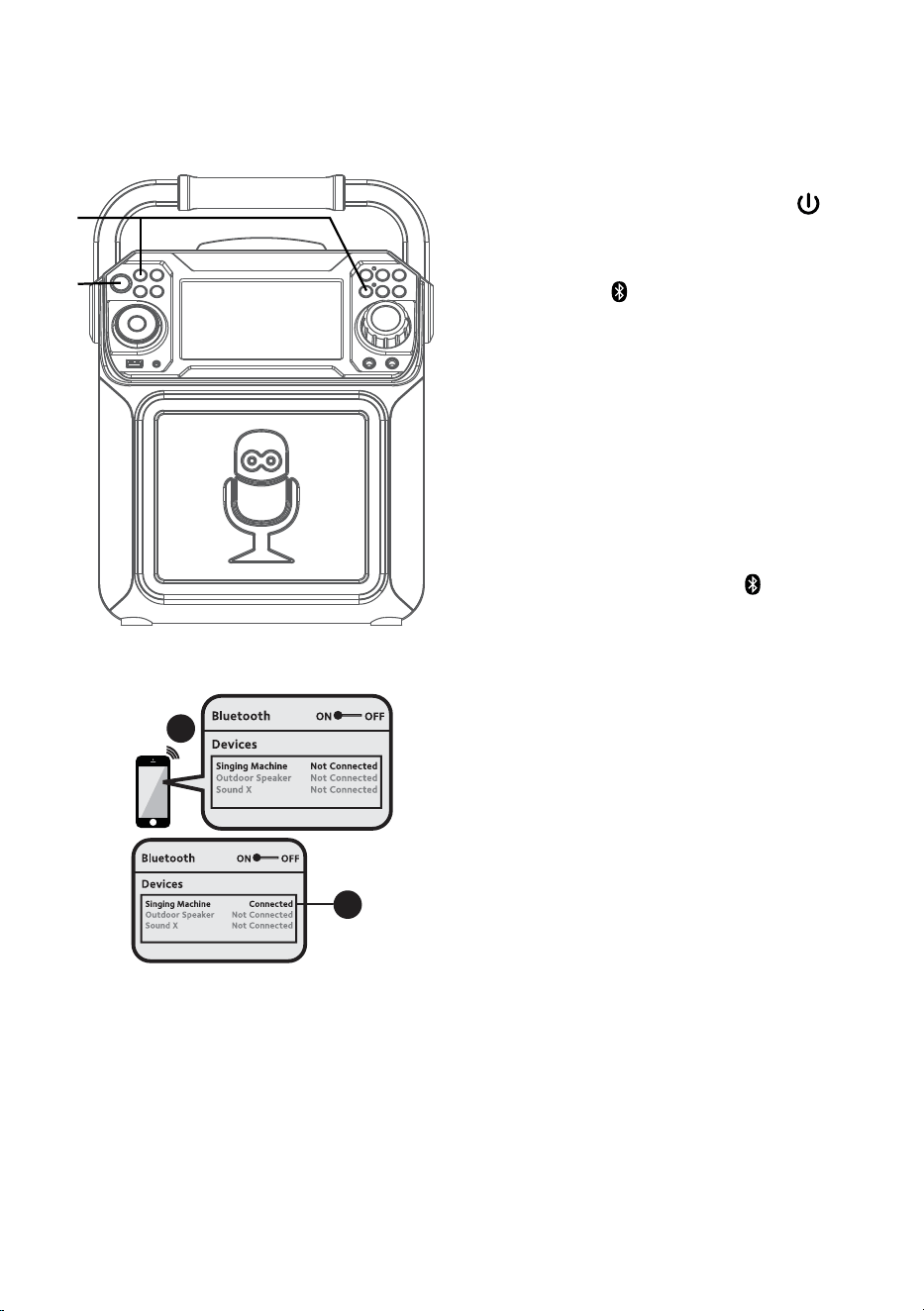
1
Connect the unit as described
previously. Press the ON/OFF
button to turn the unit on. The power
indicator will light solid.
2
Press the button or repeatedly press
the FUNCTION button to select the
Bluetooth; “BLUETOOTH” will appear
on the screen. The screen will show
your Bluetooth device is ready to
connect with a notification sound. If
there is a previously paired Bluetooth
device nearby, the unit will connect
to it automatically with a successful
pairing sound. If no previously paired
devices are present, connect as shown
in the next step.
Note: You can also press the button to
disconnect any paired devices in order to
pair another device.
3
Turn on your device’s Bluetooth option
in settings to search for a discoverable
device with a Bluetooth signal. Select
“Singing Machine” from the device
results on the Bluetooth menu.
Note: Also refer to the user manual of your
Bluetooth device for detailed instructions.
4
The screen will show that your
Bluetooth device is connected
successfully followed by a paired
sound.
Notes:
• If your Bluetooth prompts you for a
passcode during the pairing process,
please enter “0000” to connect.
• On some Bluetooth devices, once pairing
is complete, select your Bluetooth device
as “Use as Audio Device” or similar.
• If connection is lost after successful
pairing, check to make sure the distance
between speaker and Bluetooth-enabled
device does not exceed 30 feet/10
meters.
Please connect your Music Device
Your Music Device is connected
3
4
Please connect your Music Device
Your Music Device is connected
u
v
— E17 —
Operation
Using a Bluetooth Device (Continued)
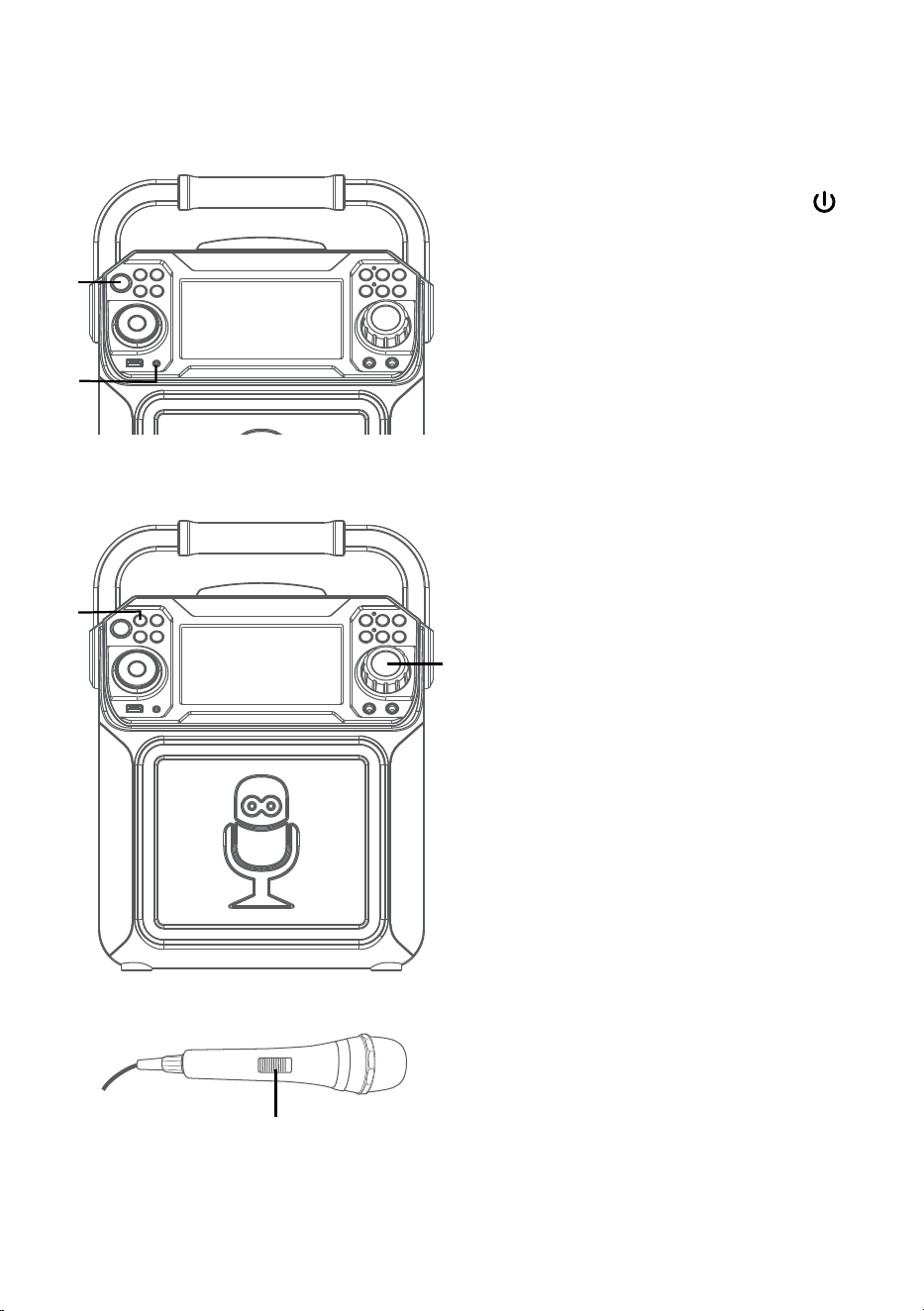
5
To control your Bluetooth device
from this unit, press the PLAY/
PAUSE button to start playback
(music app must be open). Press
the PLAY/PAUSE button during
playback to pause the song.
6
Adjust the volume to a comfortable
level using the MASTER VOLUME
control on this unit as well as
the volume on your Bluetooth
device.
7
Connect microphone(s) and slide the
ON/OFF switch on the microphone
to the ON position.
8
Pressing MIC VOLUME or
button to adjust the mic volume
as desired. Increase this control
will increase the volume of both
microphones.
9
SKIP: Advance or go back one track
by pressing the or buttons.
y
W
X
U
V
— E18 —
Operation
Using a Bluetooth Device (Continued)
10
RECORDING YOUR SINGING:
Insert a USB drive first, then
press the REC button; the song
will start over and recording will
begin. The recording indicator
will light solid. REC with track
progress in percentage will
appear at the top left of the
screen. When done recording,
press the REC button again to
stop recording. The recording
indicator will turn off.
See “
Playing Songs from the
USB”
to play back your recorded
files saved in the USB flash drive.
11
SOUND EFFECT: Repeatedly
press the VOICE EFFECT
buttons to select from ECHO,
FEMALE, MALE, CHIPMUNK,
ROBOT or RADIO vocal effects.
Select NONE to sing without any
voice effect.
12
Press the ON/OFF button
to turn the unit off. The power
indicator will off.
ak
at
al
— E19 —
Operation
Using the AUX IN Jack
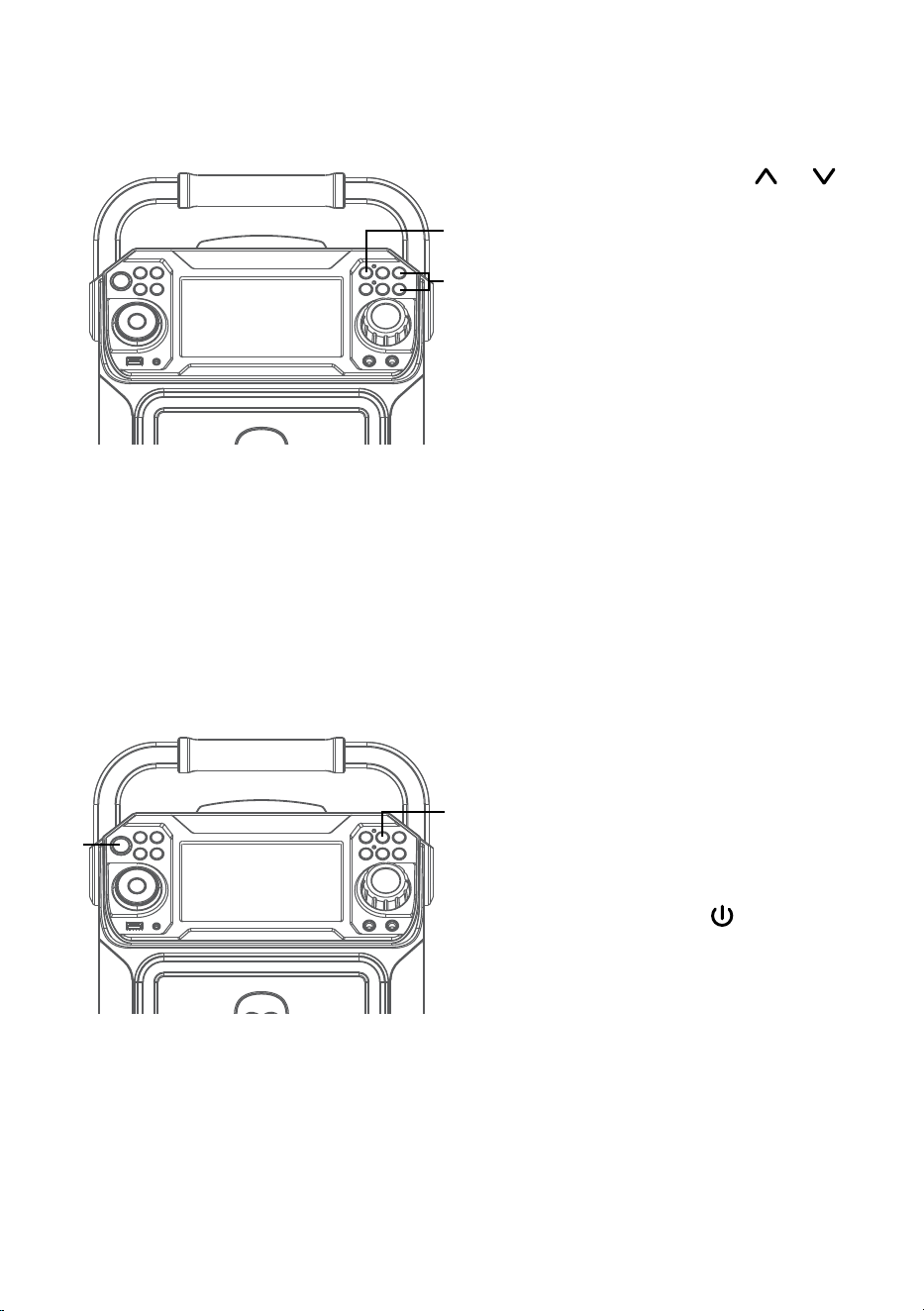
1
Connect the unit as described
previously. Press the ON/OFF
button to turn the unit on. The power
indicator will light solid.
2
Connect the external unit to the
AUX IN Jack on the front of this unit.
Connecting an external unit will allow
the audio to be played through your
Singing Machine.
Notes:
• It is highly recommended to set the
volume on the auxiliary unit to 1/3 or
lower to avoid distortion.
• Skipping files/tracks is not possible on
this unit when using an external device.
3
Repeatedly press the FUNCTION
button to select the Line In; “LINE IN”
will appear on the screen.
4
Adjust the volume using the MASTER
VOLUME control on this unit or your
external device’s volume control.
5
Connect microphone(s) and slide the
ON/OFF switch on the microphone
to the ON position.
u
w
v
x
y
— E20 —
Operation
Using the AUX IN Jack (Continued)
6
Pressing MIC VOLUME or
button to adjust the mic volume
as desired. Increase this control
will increase the volume of both
microphones.
7
RECORDING YOUR SINGING:
Insert a USB drive first, then press
the REC button; the song will
start over and recording will begin.
The recording indicator will light
solid. REC with track progress in
percentage will appear at the top left
of the screen. When done recording,
press the REC button again to stop
recording. The recording indicator
will turn off.
See “
Playing Songs from the USB”
to
play back your recorded files saved in
the USB flash drive.
8
SOUND EFFECT: Repeatedly press
the VOICE EFFECT buttons to
select from ECHO, FEMALE, MALE,
CHIPMUNK, ROBOT or RADIO vocal
effects. Select NONE to sing without
any voice effect.
9
Press the ON/OFF button to turn
the unit off. The power indicator will
off.
X
V
U
W
— E21 —
Operation
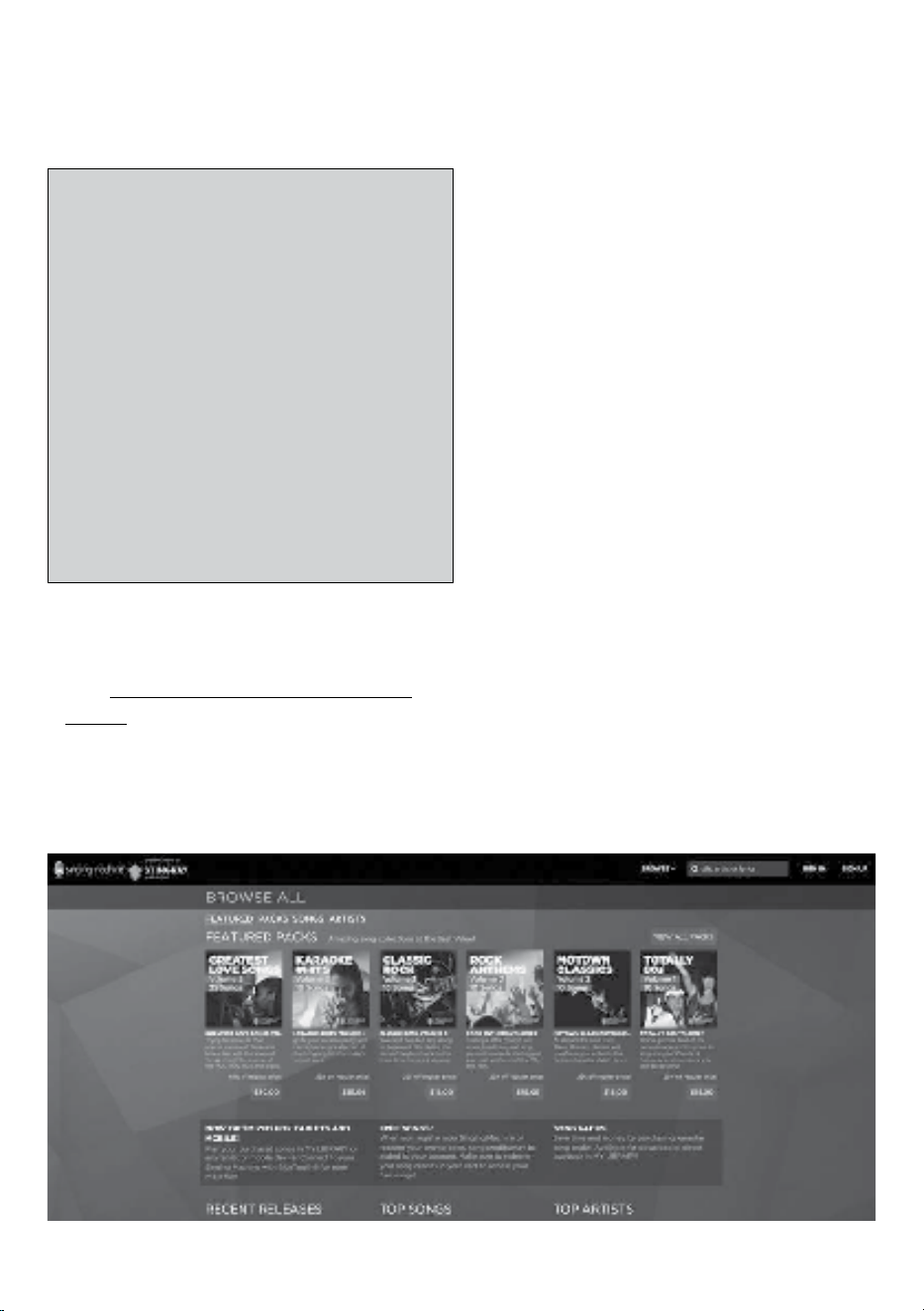
To purchase and download karaoke music,
please visit http://store.singingmachine.
com to access over 13,000+ of your
favorite karaoke songs. You will need a USB
flash drive (not included) to transfer the
downloads to this unit.
Follow these easy steps:
1
Go to http://store.singingmachine.com
using your internet browser, and then
register.
2
Select and purchase your favorite
karaoke music from the Singing
Machine Download Store.
3
Download your selected purchase(s)
from the Singing Machine Digital
Locker to your USB flash drive.
4
Insert the USB flash drive as shown on
page E12 and enjoy!
Where to Download MP3+G Files
FAQ
• Where can I get additional help with the
file formats?
Visit http://singingmachine.com/smc-
music/ to get additional resources about
the right type of FILE FORMAT for your
system.
Helpful Hints:
The .mp3 and .cdg files are delivered for download in
a single, compressed MP3+G.zip file. The MP3+G file
cannot be played as a .zip file on a USB flash drive.
To play karaoke songs using a USB flash drive, the
MP3+G .zip file must be unzipped as follows:
• Connect a USB flash drive to your computer.
• Download the MP3+G file from your Digital
Locker and save the .zip* file to a folder on your
computer.
• Double click the .zip file to open the .zip (you
will see the .mp3 and .cdg files).
• Drag and drop the .mp3 and .cdg files to the
USB flash drive.
• Remove (eject) the USB flash drive from your
computer.
Turn on the Singing Machine and connect the USB
flash drive.
Note: Your downloaded songs can also be burned to a blank CDR/CDRW.

— E22 —
Troubleshooting Guide
Should this unit exhibit a problem, check the following before seeking service:
No Power
• Power is not on; press the ON/OFF button to turn power on.
• Confirm that the AC adapter is connected securely to the back of the unit.
• Connect the unit to a different outlet.
No Sound – General
• Master Volume is set to minimum; raise volume.
• Correct Function was not selected; select using the FUNCTION button.
• If using an external device, raise the volume.
.
No Sound – If connected to a TV
• Volume on the TV is muted or too low.
• Correct source (usually AV) was not selected on the TV’s menu.
No sound from the microphone
• Make sure the microphone is firmly connected to the MIC 1 or MIC 2 jack.
• Make sure the mic’s ON/OFF switch is set to the ON position.
• Make sure the MIC VOLUME control is not set too low.
• MASTER VOLUME control is set to minimum; raise volume.
File(s) on USB jack not playing
• The file is corrupted; replace the file.
• The file is not in a format this unit will play.
• The connected USB device is not supported by the product.
The Bluetooth device cannot be paired or connected with the unit
• Ensure any other Bluetooth devices are turned off to avoid accidental pairing.
• You have not activated the Bluetooth function of your device; see page E16 or refer to
the Bluetooth device user’s manual.
• The system is not in pairing mode; press the button to restart pairing.
The Music is not available on the unit after successfully connecting the Bluetooth
• Ensure your Bluetooth device can support the A2DP Bluetooth profile.
• The volume on the external Bluetooth device is set too low or muted; raise as desired.
The unit will not record
• No USB device inserted, or USB device is full. Move all recordings to your computer to
make room.

— E23 —
Specifications
AUDIO
Output Power ............................................................................................................... 15 Watts (RMS)
Output Impedance ........................................................................................................................4 Ohms
CD SECTION
Frequency Response..................................................................................................... 100Hz - 20kHz
Signal-to-Noise Ratio ................................................................................................... 50dB (A-WTD)
Number of Programs ..........................................................20 Step Random Access Programming
BLUETOOTH
Bluetooth Version ...............................................................................................................................V4.2
Working Distance ..........................................Up to 30 feet/10 meters measured in open space
USB
Format ................................................................................................................................................FAT32
Maximum Compatibility ..................................................................................................................32GB
GENERAL
Power ...........................................................................................................DC12V 2A Positive Center
Dimensions - Main Unit ............................. 13.0 x 9.1 x 17.04 inches (33.0 x 23.0 x 43.1cm)
Weight - Main Unit ....................................................................................................... 8.7Lbs (4.0kgs)
Microphone ....................... -74 dB 600 Ohms impedance with 6.3 mm Dynamic Microphone
Aux In ..........................................................................................................................3.5mm Stereo Jack
Specifications are subject to change without notice.
The Bluetooth® word mark and logos are registered trademarks owned by Bluetooth SIG,
Inc. and any use of such marks and logos by The Singing Machine Company, Inc. is under
license. Other trademarks and trade names are those of their respective owners.
— S1 —
Advertencias
Información importante sobre seguridad
1. Lea estas instrucciones.
2. Conserve estas instrucciones.
3. Preste atención a todas las advertencias.
4. Siga todas las instrucciones.
5. No utilice este artefacto cerca del agua.
6. Límpielo únicamente con un paño seco.
7. No obstruya las aberturas para ventilación. Instálelo de acuerdo
con las instrucciones del fabricante.
8. No instale cerca de fuentes de calor, como radiadores, rejillas de
calefacción, estufas u otros aparatos (incluso amplificadores)
que produzcan calor.
9. No desafíe el fin de seguridad del enchufe polarizado o de
conexión a tierra. Un enchufe polarizado tiene dos clavijas y una
es más ancha que la otra. El enchufe de conexión a tierra tiene
dos clavijas, y una tercera punta a tierra. La clavija ancha o la
tercera punta se suministran para su seguridad. Si el enchufe
suministrado no coincide con su tomacorriente, consulte con un
electricista para reemplazar el tomacorriente obsoleto.
10. Evite pisar o apretar el cable de alimentación, especialmente en
los enchufes, tomacorrientes y en el punto por donde salen del
artefacto.
11. Utilice sólo los complementos y accesorios especificados por el
fabricante.
12. Utilice la unidad sólo con el carro, soporte, trípode, repisa o
mesa recomendados por el fabricante, o que se vendan junto
con el producto. Cuando se utiliza un carro, tenga cuidado
cuando mueva el carro y artefacto junto
a para evitar lesiones producidas por la
caída del producto.
13. Desenchufe este artefacto durante las
tormentas eléctricas o cuando no se lo
utilice durante períodos prolongados.
14. Derive todas las reparaciones al personal
de reparaciones calificado. Es necesario
reparar el artefacto cuando se encuentra
dañado; por ejemplo, cuando el cable de suministro de energía
o el enchufe están dañados, cuando se derrama líquido sobre la
unidad o caen objetos dentro del mismo, cuando el producto ha
estado expuesto a la lluvia o a la humedad, cuando no funciona
con normalidad o cuando se ha caído.
15. ADVERTENCIA: Para reducir el riesgo de incendio o descarga
eléctrica, no exponga este artefacto a la lluvia o la humedad. No
coloque objetos llenos de agua, como jarrones, sobre el aparato.
16. El enchufe de conexión de CA se utiliza como dispositivo de
desconexión eléctrica y deberá estar siempre accesible y en
funcionamiento durante el uso previsto. Para desconectar
completamente el aparato de la electricidad, el enchufe de
conexión deberá quitarse por completo del tomacorriente de
CA.
17. PRECAUCIÓN: Para reducir el riesgo de incendio o explosión
no exponga las baterías al calor excesivo, como al rayo del sol,
fuego u otras fuentes de calor.
ADVERTENCIA SOBRE
EL CARRO PORTÁTIL
(símbolo provisto por RETAC)
PRECAUCIÓN: PARA REDUCIR EL RIESGO DE DESCARGAS ELÉCTRICAS,
NO QUITE LA CUBIERTA (NI LA TAPA POSTERIOR) NO HAY PIEZAS
REPARABLES POR EL USUARIO DENTRO. DERIVE LAS REPARACIONES A
PERSONAL DE SERVICIO CALIFICADO.
Las marcas de Precaución se ubican en el panel inferior.
TENSIÓN PELIGROSA: La luz intermitente con símbolo de
flecha dentro de un triángulo pretende alertar al usuario de la
presencia de tensión peligrosa no aislada, dentro del paquete
del producto, que puede ser de magnitud suficiente para
constituir un riesgo de descarga eléctrica para las personas.
ADVERTENCIA: PARA EVITAR INCENDIOS O PELIGROS DE DESCARGA,
NO EXPONGA ESTA UNIDAD A LA LLUVIA O HUMEDAD.
ATENCIÓN: El signo de exclamación dentro de un triángulo
pretende alertar al usuario de la presencia de instrucciones
importantes de operación y mantenimiento (reparaciones) en
el material que acompaña a este producto.
AVISO DE LA FCC: Este equipo puede generar o usar energía de radio
frecuencia. Los cambios o modificaciones realizados en el aparato pueden
provocar interferencia perjudicial, a menos que dichas modificaciones
estén autorizadas en el manual de instrucciones. El usuario puede perder
toda autoridad para operar el equipo si realiza cambios o modificaciones
sin autorización.
Este aparato cumple con la parte 15 de las Normas de la FCC. El
funcionamiento está sujeto a las dos condiciones que figuran a
continuación: (1) Es probable que no cause interferencia perjudicial y (2)
deberá aceptar cualquier interferencia recibida, incluyendo la interferencia
que pueda llegar a causar un funcionamiento indeseado.
ADVERTENCIA DE GOTEO: Este producto no se podrá exponer a goteo
o salpicaduras, y no se colocará ningún objeto lleno con líquidos, como
jarrones, encima del producto.
ADVERTENCIA DE VENTILACIÓN: La ventilación normal del producto no se
bloqueará si se le da el uso previsto.
ESTE PRODUCTO CUMPLE CON LAS NORMAS DHHS 21 CFR, CAPÍTULO 1,
SUBCAPÍTULO J, APLICABLES A LA FECHA DE FABRICACIÓN.
Advertencias:
• Este reproductor de CD utiliza un haz de luz láser. Solo la persona de
reparaciones calificada es quien puede retirar la cubierta y reparar este
dispositivo debido a posibles lesiones en la vista.
• El uso de controles, ajustes o la realización de procedimientos que no sean
los especificados en el presente pueden producir exposición a radiación
peligrosa.
• El artefacto deberá utilizarse en un espacio abierto.
PRECAUCIÓN!
Si la caja se abre o el dispositivo de seguridad se destruye, puede producirse
la emisión invisible de radiación láser. Evite la exposición al haz de luz.
NOTA: Este equipo fue probado y se concluyó que cumple con los límites
establecidos para los dispositivos digitales Clase B, de acuerdo con el
Apartado 15 de las normas de la FCC. Estos límites fueron pensados para
proporcionar protección razonable ante la interferencia perjudicial en una
instalación residencial. Este equipo genera, usa y puede emitir energía
de radio frecuencia y, si no se lo instala y utiliza de conformidad con las
instrucciones, puede causar interferencia perjudicial a las comunicaciones
radiales. No obstante, no existe ninguna garantía de que no se produzca
interferencia en una instalación en particular. Si este equipo provoca
interferencia perjudicial a la recepción de radio o televisión, lo cual puede
determinarse apagando y encendiendo el equipo, el usuario puede intentar
corregir la interferencia de alguna/s de las siguientes maneras:
• Reoriente la antena receptora o ubíquela en otro lugar.
• Aumente la distancia entre el equipo y el receptor.
• Conecte el equipo a un tomacorriente de un circuito distinto al que está
conectado el receptor.
• Consulte al distribuidor o a un técnico experimentado de radio y
televisión para que lo asesore.
• La información de calificación se encuentra en la parte de abajo de la
unidad.
CAN ICES-3(B)/NMB-3(B)
PRECAUCIÓN
RIESGO DE DESCARGA ELÉCTRICA
NO ABRIR
— S2 —
Se incluyen
Asegúrese de que estén incluidos los siguientes elementos.
Micrófono con cable
Unidad principal
Cables de Audio/Video
Adaptador de CA
Manual
— S3 —
Ubicación de controles (Superior/delantero)
1. Manija
2. Compartimiento del CD
3. Botón LUZ (LIGHT)
4. Botón REPETIR/PROGRAMAR
(REPEAT/PROG)
5. Botón de FUNCIÓN
(FUNCTION)
6. Botón de ENCENDIDO/
APAGADO (ON/OFF)
7. Indicador de encendido
(Power)
8. Botón de ENCENDIDO/
APAGADO del MONITOR
(ON/OFF)
9. Botón de navegación
10. Botón de navegación
/
Saltar (Skip)
11. Botón REPRODUCIR/PAUSAR
(PLAY/PAUSE)
12. Botón de navegación
13. Puerto USB
14. Botón de navegación
/
Saltar
(Skip)
15. Conector de entrada auxiliar
(AUX IN)
16. Botón GRABAR (RECORD)
17. Botón Bluetooth
18. Indicador de grabación
19. Botón EFECTO DE VOZ
(VOICE EFFECT)
20. Botón VOLUMEN
DEL
MICRÓFONO (MIC VOLUME)
21. Indicador de Bluetooth
22. Botón VOLUMEN
DEL
MICRÓFONO (MIC VOLUME)
23. Botón A.V.C. (Control de voz
automático)
24. Control de VOLUMEN
PRINCIPAL (MASTER
VOLUME)
25. Entrada para MICRÓFONO 2
(MIC 2)
26. Entrada para MICRÓFONO 1
(MIC 1)
27. Pantalla
28. Altavoz
u
v
w
x
y
U
V
W
X
at
ak
al
am
an
ao
ap
aq
ar
as
bt
bk
bl
bm
bn
bo
bp
bq
br
— S4 —
Ubicación de los controles (reverso)
1. SALIDA DE AUDIO (L)
2. SALIDA DE VIDEO
3. SALIDA DE AUDIO (R)
4. Porta micrófonos extensibles
5. Conector de ENTRADA DE CC
u
v
x x
y
w
— S5 —
Conexión
Conexión de la Microphono(s)
Micrófonos:
Inserte el enchufe de un micrófono en la
entrada para micrófono
u
y el otro enchufe de
micrófono en la entrada para micrófono
v
(si
lo desea).
Nota: No arroje o dé golpecitos al micrófono,
puede dañar el micrófono o los parlantes. No
gire el micrófono por el cable porque causará
daños en el cableado revestido.
Conexión de la unidad a un televisor
ENTRADA
DE VIDEO
SALIDA DE
AUDIO
R L
Cable de video RCA
SALIDA DE
VIDEO
(Amarillo)
SALIDA DE AUDIO
(Blanco-L
rojo-R)
Parte posterior del
televisor externo
Para que se reproduzca el video, las
letras y el audio en su televisor, siga
los siguientes pasos:
Conecte el cable de video RCA
(amarillo) a la SALIDA DE VIDEO
(VIDEO OUT) y los cables de audio
(blanco y rojo) a las SALIDAS DE
AUDIO (AUDIO OUT)
ubicadas en la parte trasera de la
Singing Machine.
Conecte el otro extremo del cable de
video RCA (amarillo) a la ENTRADA
DE VIDEO (VIDEO IN) y los cables de
audio (blanco y rojo) a la ENTRADA
DE AUDIO (AUDIO IN) de su televisor.
Notas:
• Esta unidad se puede usar con o sin televisor.
• También consulte la Guía de usuario del televisor.
• Para ver las letras de canciones en la pantalla, debe usar un disco CD+G O MP3.
• Se incluyen los cables de audio y video.
u
v
— S6 —
Conexión
Conexión a alimentación de corriente alterna
BASE
Introduzca el extremo pequeño del adaptador
de CA en el conector de entrada de CC
ubicado en la parte trasera de esta unidad.
Introduzca el otro extremo (con 2 clavijas)
en un tomacorriente con CA, correctamente
ubicado, y que posea 120V de CA, 60Hz.
Nota: Haga todas las conexiones antes de
enchufar a la alimentación de CA.
O
— S7 —
Conexión
Conexión a ENTRADA DE AUX
Conecte su dispositivo externo utilizando un
cable adecuado (no se incluye el cable de audio
de 3,5mm) como se muestra.
Nota: Consulte la página S19 para seleccionar
y utilizar la función de entrada de Aux.
A unidad externa
SALIDA DE AUDIO
/AURICULARES
Modo Bluetooth
Oprima el botón para configurar fácilmente
la máquina en modo de emparejamiento.
u
Luces de disco
Cuando la unidad está encendida, el modo de
Luz (Light) 1 se activa automáticamente. Las
luces se encenderán y se sincronizarán con el
sonido cuando hable o cante por el micrófono.
Presione el botón LUZ (LIGHT) para
seleccionar el modo de luz 2 que mostrará
las luces pero no responderá al micrófono.
Presione el botón LUZ (LIGHT) otra vez para
apagar las luces.
u
— S8 —
Funcionamiento
Reproducción de un CD
1
Conecte la unidad como se describió
previamente. Oprima el botón de
Encendido/Apagado
(ON/OFF)
para encender la unidad. El indicador de
Encendido (Power) se iluminará y quedará
encendido.
2
Abra el compartimiento de CD e
introduzca un CD (Con archivos estándar
o MP3+G) un CD+G presionándolo
cuidadosamente en el husillo central.
Cierre la tapa del CD.
Notas:
• ¿Qué es un CD+G?
Un CD+G (CD+ Graphics), es el formato
estándar para la mayoría de los discos
de karaoke que mostrarán las letras de
canciones en pantalla.
• ¿Qué es un MP3+G?
MP3+G es el formato más nuevo para
música Karaoke usando el tamaño de archivo
pequeño de MP3. Mostrará las letras de
canciones en la pantalla. Consulte la página
S19 para comprar y descargar archivos
MP3+G.
• Nunca coloque nada que no sea un CD en el
compartimiento, como por ejemplo objetos
extraños que puedan dañar la unidad.
• Si no introdujo un disco, “NO DISC” aparecerá
en la pantalla de LCD.
• Si se conecta a un televisor u otra fuente de
audio, ajuste el volumen del televisor con su
propio control de volumen.
3
Presione varias veces el botón FUNCIÓN
(FUNCTION) para seleccionar el modo
CDG/CD; aparecerá “LEER” (READ)
cuando busque el disco y después
aparecerá la cantidad total de pistas.
4
Oprima el botón Reproducir/Pausar /
ACEPTAR
(Play/Pause /ENTER)
para comenzar la reproducción. Puede
visualizar la imagen y letra de canciones
en la pantalla si escucha un archivo CD+G.
Oprima el botón de MONITOR para
apagar la pantalla.
u
w
x
v
— S9 —
Funcionamiento
Reproducción de un CD (Continuó)
5
Ajuste el volumen a un nivel conveniente,
usando el control de VOLUMEN
PRINCIPAL (MASTER VOLUME).
6
Conecte el/los micrófono/s. Ubique el
interruptor de ENCENDIDO/APAGADO
(ON/OFF) del Micrófono en la posición
de ENCENDIDO (ON).
7
Oprima el botón de VOLUMEN DEL
MICRÓFONO (MIC VOLUME)
o
para ajustar el volumen del micrófono
según desee. Al aumentar el nivel de este
control se incrementará el volumen de los
dos micrófonos.
8
Puede activarse el control de VOZ
AUTOMÁTICO (AUTO VOICE
CONTROL) oprimiendo el botón
ENCENDIDO/APAGADO (ON/OFF)
del control de voz automático. Las voces
presentes en una grabación multiplex se
silencian apenas el cantante comienza
a cantar en el micrófono. Cuando el
cantante deje de cantar, las voces
grabadas en la grabación multiplex
volverán a la normalidad.
Nota: Esto sucede solamente con los archivos
grabados con esta función multiplex.
U
y
V
W
— S10 —
Funcionamiento
Reproducción de un CD (Continuó)
9
SALTO: Avance o retroceda una pista
presionando los botones Salto
o .
BÚSQUEDA: Cuando reproduzca
cualquier CD de audio, oprima y
mantenga oprimido Salto
o .
El CD buscará a alta velocidad en
dirección hacia adelante o hacia atrás.
La reproducción normal continuará
cuando suelte el botón.
Nota: La función BÚSQUEDA funciona
solamente con CD, no con discos CD+G.
10
FUNCIÓN REPETIR: Para repetir la
pista actual, oprima una vez
PROGRAMAR/REPETIR (PROGRAM/
REPEAT) durante la reproducción, en la
pantalla aparecerá
y se repetirá la
pista actual. Para repetir todas las
pistas, oprima nuevamente el botón T;
aparecerá
. Oprima otra vez para
cancelar la función Repetir (Repeat);
aparecerá
.
11
FUNCIÓN PROGRAMAR: Puede
programar hasta 20 pistas para
reproducir en cualquier orden deseado.
En el modo Detener, oprima el botón
PROGRAMAR/REPETIR (PROGRAM/
REPEAT); en la pantalla aparecerá
AJUSTAR PROG (PROG SET) 00:XX
(xx es la cantidad total de las pistas).
Seleccione la primera pista con los
botones Salto
o luego presione
PROGRAMAR/REPETIR (PROGRAM/
REPEAT). Repita hasta agregar un
máximo de 20 pistas a la memoria. Al
finalizar, presione el botón Reproducir/
Pausar
(Play/Pause) para
comenzar la reproducción.
Notas:
• Oprima y mantenga presionado el botón
REPETIR/PROGRAMAR (REPEAT/PROG)
para detener y eliminar el programa.
• Si se intenta programar más de 20 pistas,
aparecerá “FUL” en la pantalla.
ak
ak
at
X
— S11 —
Funcionamiento
Reproducción de un CD (Continuó)
12
CÓMO GRABAR LO QUE CANTA:
Introduzca primero un dispositivo
USB, luego presione el botón
GRABAR (REC); la canción
comenzará de nuevo y se iniciará la
grabación. El indicador de grabación
se iluminará y quedará encendido.
En la parte superior izquierda de
la pantalla aparecerá REC con el
progreso de la pista en forma de
porcentaje. Cuando finalice de
grabar, oprima nuevamente el botón
GRABAR (REC) para detener la
grabación. El indicador de grabación
se apagará.
Consulte “Reproducir canciones
desde el USB” para reproducir sus
archivos grabados guardados en el
dispositivo flash USB.
13
EFECTO DE SONIDO:
Repetidamente oprima los
botones EFECTOS DE VOZ (VOICE
EFFECTS) para seleccionar entre los
efectos vocales ECO, FEMENINO,
MASCULINO, ARDILLA, ROBOT o
RADIO.
Seleccione NINGUNO (NONE) para
cantar sin efectos de voz.
14
PAUSAR (PAUSE): Durante la
reproducción si desea pausar
momentáneamente el disco oprima
el botón Reproducir/ Pausar (Play/
Pause)
. Oprima nuevamente
para reanudar la reproducción normal.
15
Presione y mantenga presionado
el botón REPRODUCIR/PAUSAR
(PLAY/PAUSE)
para detener la
reproducción.
16
Oprima el botón ENCENDIDO/
APAGADO (ON/OFF)
para
apagar la unidad. El indicador de
Encendido (Power) se apagará.
an
ao
ap
al
am
— S12 —
Funcionamiento
Reproducir canciones desde el USB
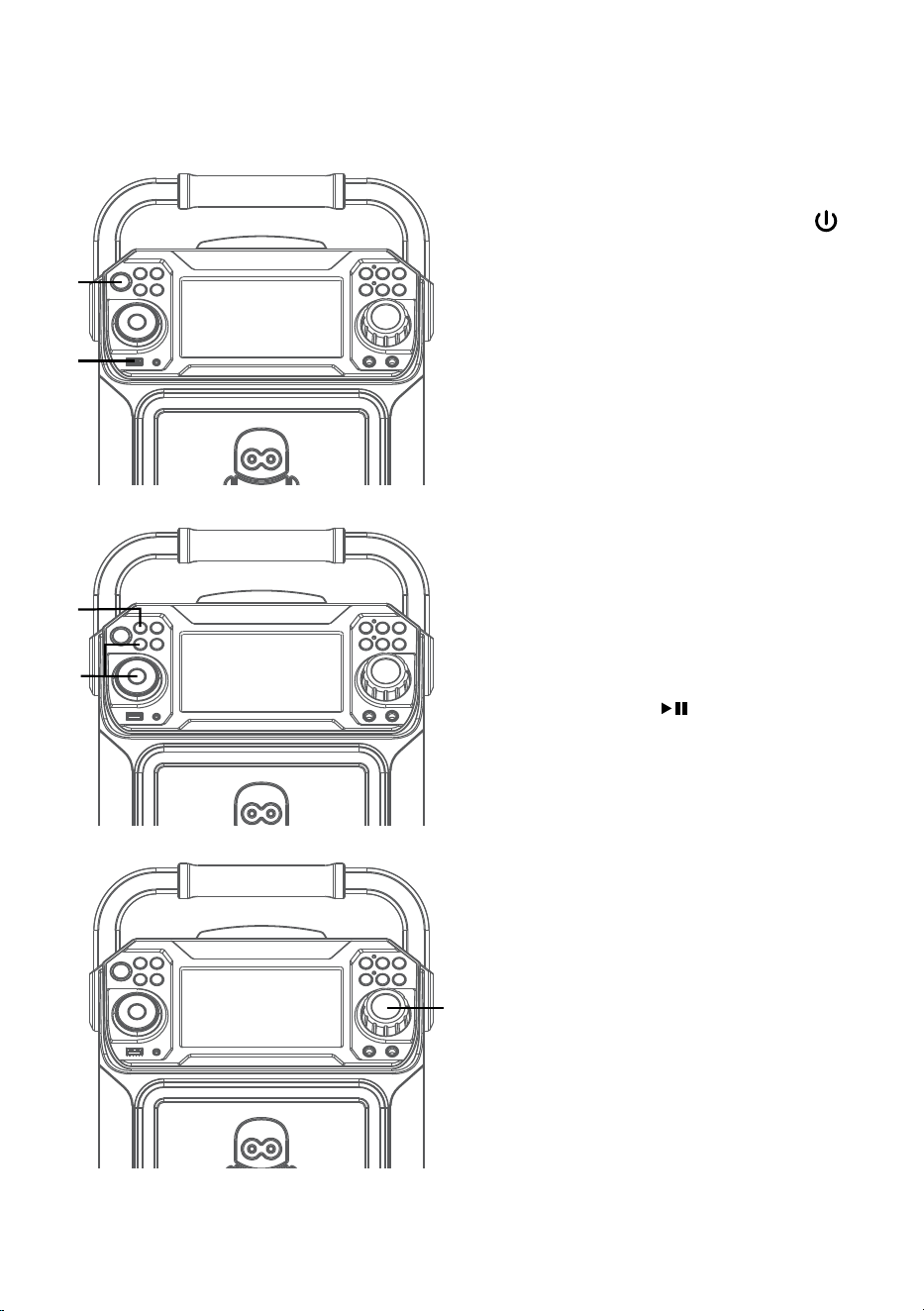
1
Conecte la unidad como se describió
previamente. Oprima el botón de
Encendido/Apagado (ON/OFF)
para encender la unidad. El indicador de
Encendido (Power) se iluminará y quedará
encendido.
2
Introduzca un dispositivo flash USB en el
puerto USB de la unidad de forma tal que
esté hacia arriba. Asegúrese de descargar
música de la tienda de karaoke.
3
Presione varias veces el botón FUNCIÓN
(FUNCTION) para seleccionar el modo
USB; aparecerá “LEER USB” (READ USB)
cuando busque el dispositivo y después
aparecerá la cantidad total de archivos..
4
Presione el botón Reproducir/Pausar
(Play/ Pause)
para comenzar la
reproducción. Puede visualizar la imagen
y letra de canciones en la pantalla si
escucha un archivo CD+G. Oprima
el botón de MONITOR para apagar la
pantalla.
Nota: En la pantalla, las carpetas que
contienen las grabaciones y las canciones
aparecen a la izquierda y la lista de pistas de
una carpeta seleccionada aparece a la derecha.
Para navegar por estas carpetas consulte
sección “Salto”.
5
Ajuste el volumen a un nivel conveniente,
usando el control de VOLUMEN
PRINCIPAL (MASTER VOLUME).
Nota: Si se conecta a un televisor u otra
fuente de audio, ajuste el volumen del televisor
con su propio control de volumen.
u
w
x
v
y
— S13 —
Funcionamiento
Reproducir canciones desde el USB (Continuó)
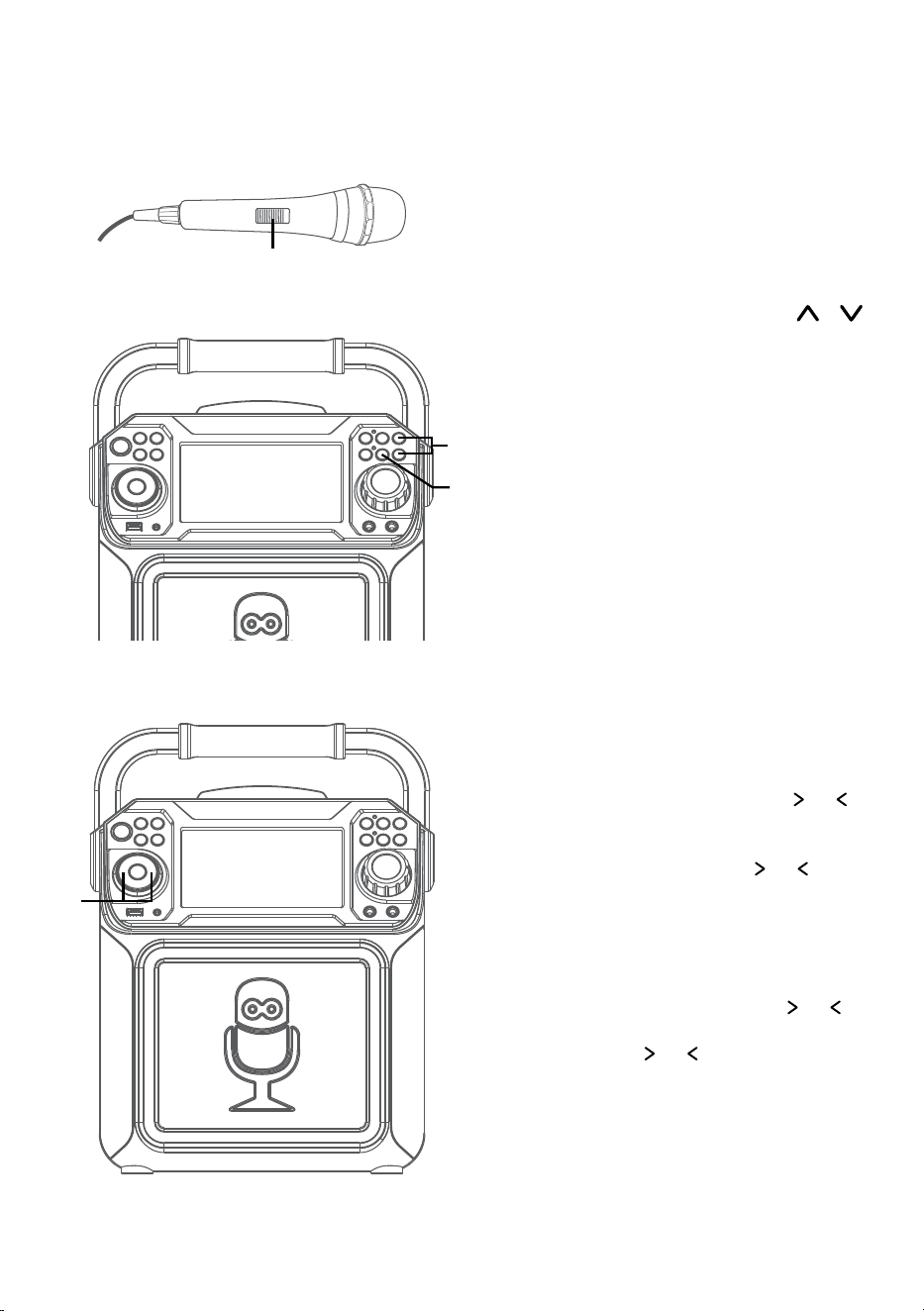
6
Conecte el/los micrófono/s. Ubique el
interruptor de ENCENDIDO/APAGADO
(ON/OFF) del Micrófono en la posición
de ENCENDIDO (ON).
7
prima el botón VOLUMEN DEL
MICRÓFONO (MIC VOLUME)
o
para ajustar el volumen del micrófono
según desee. Al aumentar el nivel de este
control se incrementará el volumen de los
dos micrófonos.
8
Puede activarse el control de VOZ
AUTOMÁTICO (AUTO VOICE
CONTROL) oprimiendo el botón
ENCENDIDO/APAGADO (ON/OFF)
del control de voz automático. Las voces
presentes en una grabación multiplex se
silencian apenas el cantante comienza
a cantar en el micrófono. Cuando el
cantante deje de cantar, las voces
grabadas en la grabación multiplex
volverán a la normalidad.
Nota: Esto sucede solamente con los archivos
grabados con esta función multiplex.
9
SALTO: Avance o retroceda un archivo
presionando los botones Salto
o .
BÚSQUEDA: Cuando reproduzca
cualquier audio del dispositivo USB,
mantenga oprimido Salto
o <. El
puerto USB buscará a alta velocidad en
dirección hacia adelante o hacia atrás. La
reproducción normal continuará cuando
suelte el botón. Durante el modo Detener
(Stop), también puede seleccionar un
archivo con los botones Salto
o
para navegar hacia arriba o hacia abajo y
los botones
o para deslizarse hacia
la izquierda o derecha. La música grabada
estará en la carpeta con la etiqueta REC.
U
X
V
W
— S14 —
Funcionamiento
Reproducir canciones desde el USB (Continuó)
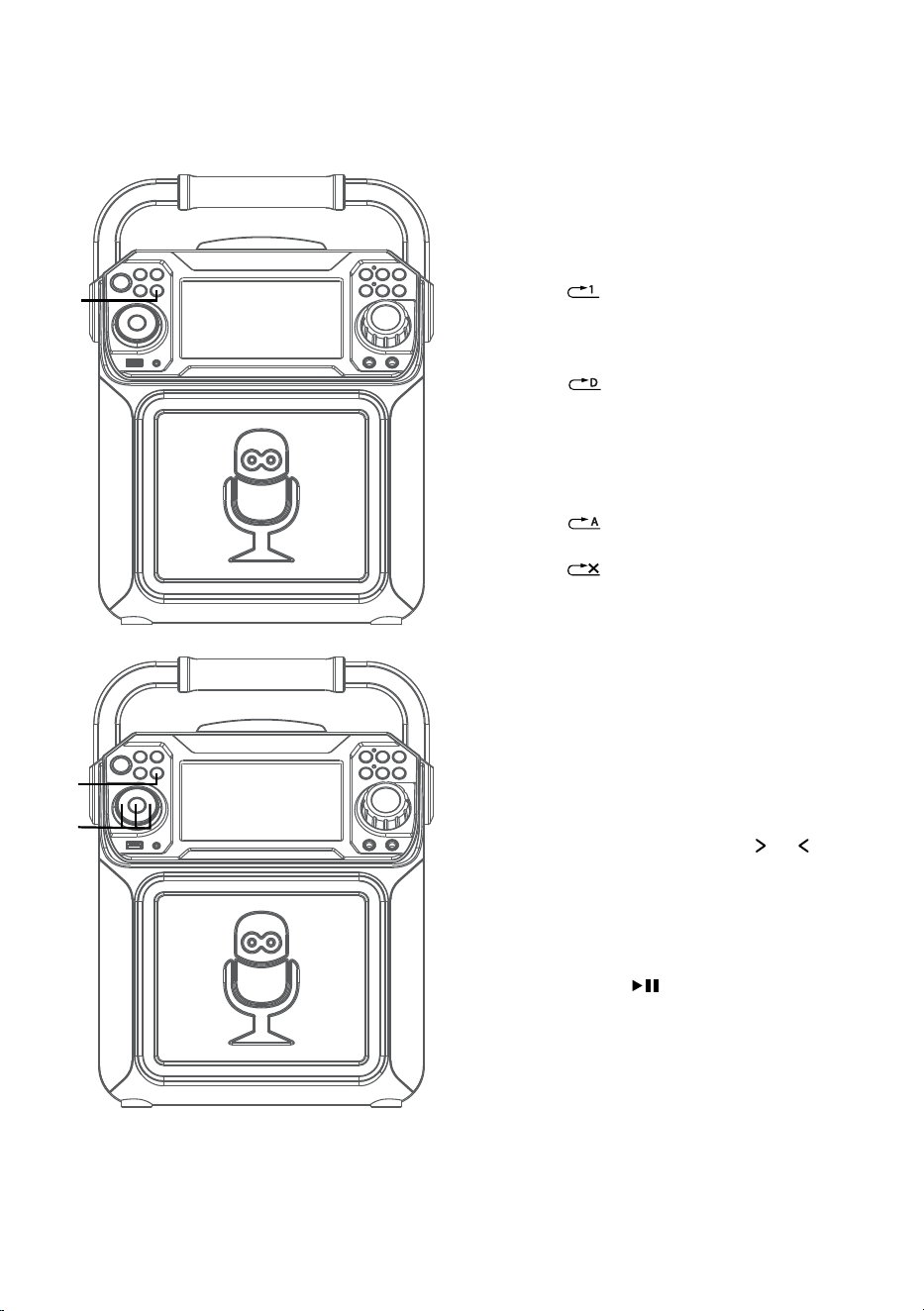
10
FUNCIÓN REPETIR: Para repetir la
pista actual, oprima una vez
PROGRAMAR/REPETIR
(PROGRAM/REPEAT) durante la
reproducción; en la pantalla aparecerá
y se repetirá la pista actual.
Oprima dos veces el botón
PROGRAMAR/REPETIR
(PROGRAM/REPEAT); aparecerá
y se repetirán de forma
continua todas las pistas MP3 dentro
de la carpeta actual. Para repetir
todas las pistas, oprima nuevamente
PROGRAMAR/REPETIR
(PROGRAM/REPEAT); aparecerá
Oprima otra vez para cancelar la
función Repetir (Repeat); aparecerá
.
11
FUNCIÓN PROGRAMAR: Puede
programar hasta 20 pistas para
reproducir en cualquier orden
deseado. En el modo Detener, oprima
el botón PROGRAMAR/REPETIR
(PROGRAM/REPEAT); en la pantalla
aparecerá AJUSTAR PROG (PROG
SET) 00:XX (xx es la cantidad total de
las pistas). Seleccione la primera pista
con los botones Salto
o , luego
presione PROGRAMAR/REPETIR
(PROGRAM/REPEAT). Repita hasta
agregar un máximo de 20 pistas a
la memoria. Al finalizar, presione el
botón Reproducir/Pausar (Play/
Pause)
para comenzar la
reproducción.
Notas:
• Oprima y mantenga presionado el botón
REPETIR/PROGRAMAR (REPEAT/PROG)
para detener y eliminar el programa.
• Si se intenta programar más de 20 pistas,
aparecerá “FUL” en la pantalla.
ak
ak
at
— S15 —
Funcionamiento
Reproducir canciones desde el USB (Continuó)
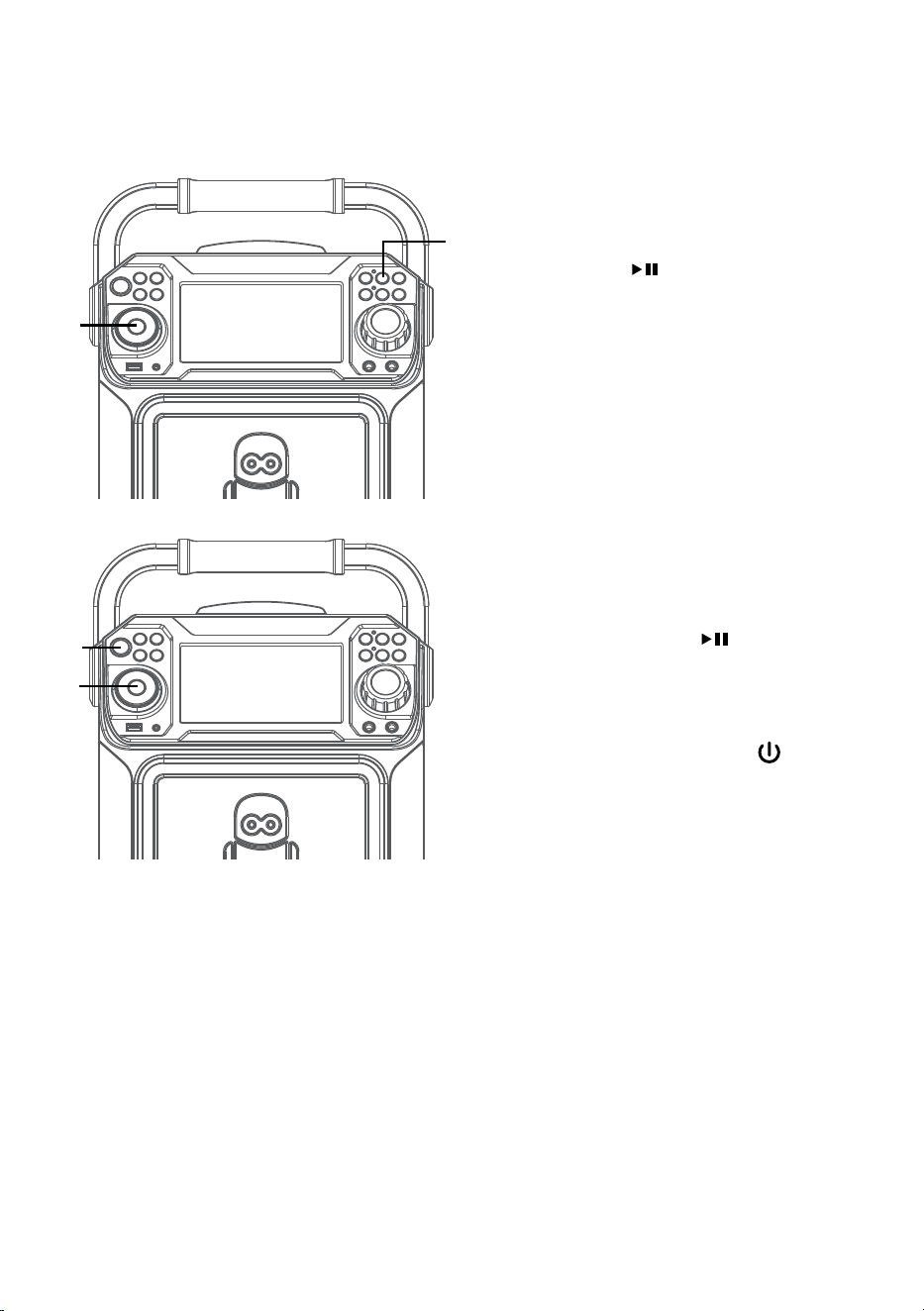
12
PAUSAR (PAUSE): Durante la
reproducción si desea pausar
momentáneamente el disco oprima
el botón Reproducir/ Pausar (Play/
Pause)
. Oprima nuevamente
para reanudar la reproducción normal.
13
EFECTO DE SONIDO: Repetidamente
oprima los botones EFECTOS
DE VOZ (VOICE EFFECTS) para
seleccionar entre los efectos vocales
ECO, FEMENINO, MASCULINO,
ARDILLA, ROBOT o RADIO.
Seleccione NINGUNO (NONE) para
cantar sin efectos de voz.
14
Presione y mantenga presionado
el botón REPRODUCIR/PAUSAR
(PLAY/PAUSE)
para detener la
reproducción.
15
Oprima el botón ENCENDIDO/
APAGADO (ON/OFF)
para
apagar la unidad. El indicador de
Encendido (Power) se apagará.
ao
al
an
am
— S16 —
Funcionamiento
Utilizar un dispositivo Bluetooth
1
Conecte la unidad como se describió
previamente. Oprima el botón de
Encendido/Apagado (ON/OFF)
para encender la unidad. El indicador de
Encendido (Power) se iluminará y quedará
encendido.
2
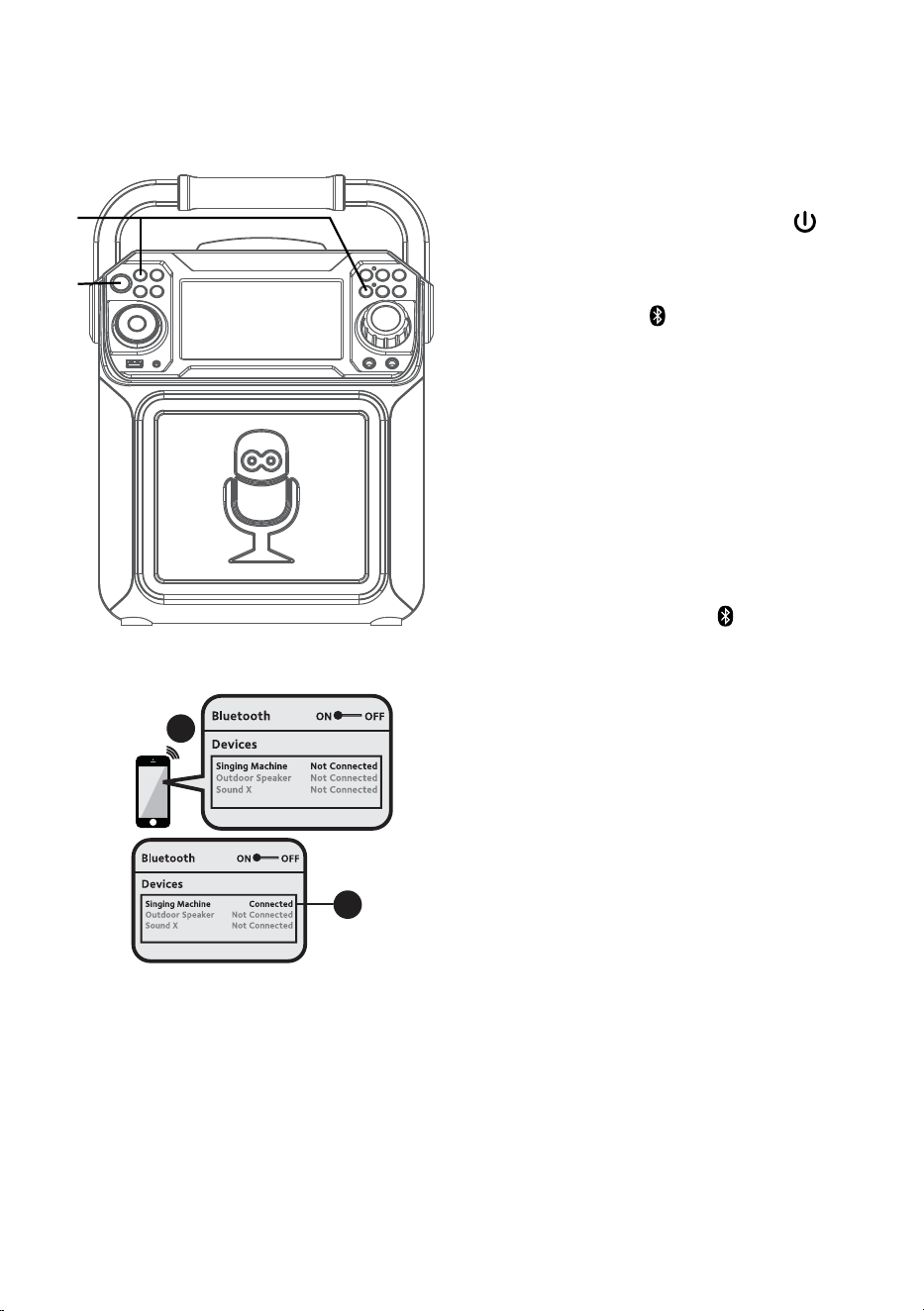
Oprima el botón o varias veces FUNCIÓN
(FUNCTION) para seleccionar Bluetooth;
“BLUETOOTH” aparecerá en la pantalla
La pantalla mostrará que su dispositivo
con Bluetooth está listo para conectarse
mediante un sonido de notificación.
Si hay un dispositivo previamente
emparejado cerca, la unidad se conectará
con él automáticamente con un sonido
de emparejamiento exitoso. Si no hay
dispositivos previamente emparejados
presentes, realice la conexión como se
muestra en el siguiente paso.
Nota: También puede oprimir
para
desconectar los dispositivos emparejados y
emparejar uno nuevo.
3
Encienda la opción Bluetooth en su
dispositivo, desde el menú de configuración
para buscar un dispositivo reconocible
con señal Bluetooth. Seleccione “Singing
Machine” en los resultados del dispositivo en
el menú de Bluetooth.
Nota: También consulte el manual de usuario
de su dispositivo con Bluetooth para más
instrucciones.
4
La pantalla mostrará que su dispositivo con
Bluetooth está exitosamente conectado
seguido de un sonido de emparejamiento.
Notas:
• Si su dispositivo con Bluetooth le pide un
código durante el proceso de emparejamiento,
ingrese “0000” para conectarse.
• En algunos dispositivos con Bluetooth, una
vez finalizado el emparejamiento, elija su
dispositivo con Bluetooth como “Usar como
dispositivo de audio” o similar.
• Si la conexión se pierde luego de un
emparejamiento exitoso, verifique que la
distancia entre el altavoz y el dispositivo con
Bluetooth no supera los 30 pies/10 metros.
Please connect your Music Device
Your Music Device is connected
3
4
Please connect your Music Device
Your Music Device is connected
u
v
— S17 —
Funcionamiento
Utilizar un dispositivo Bluetooth (Continuó)
5
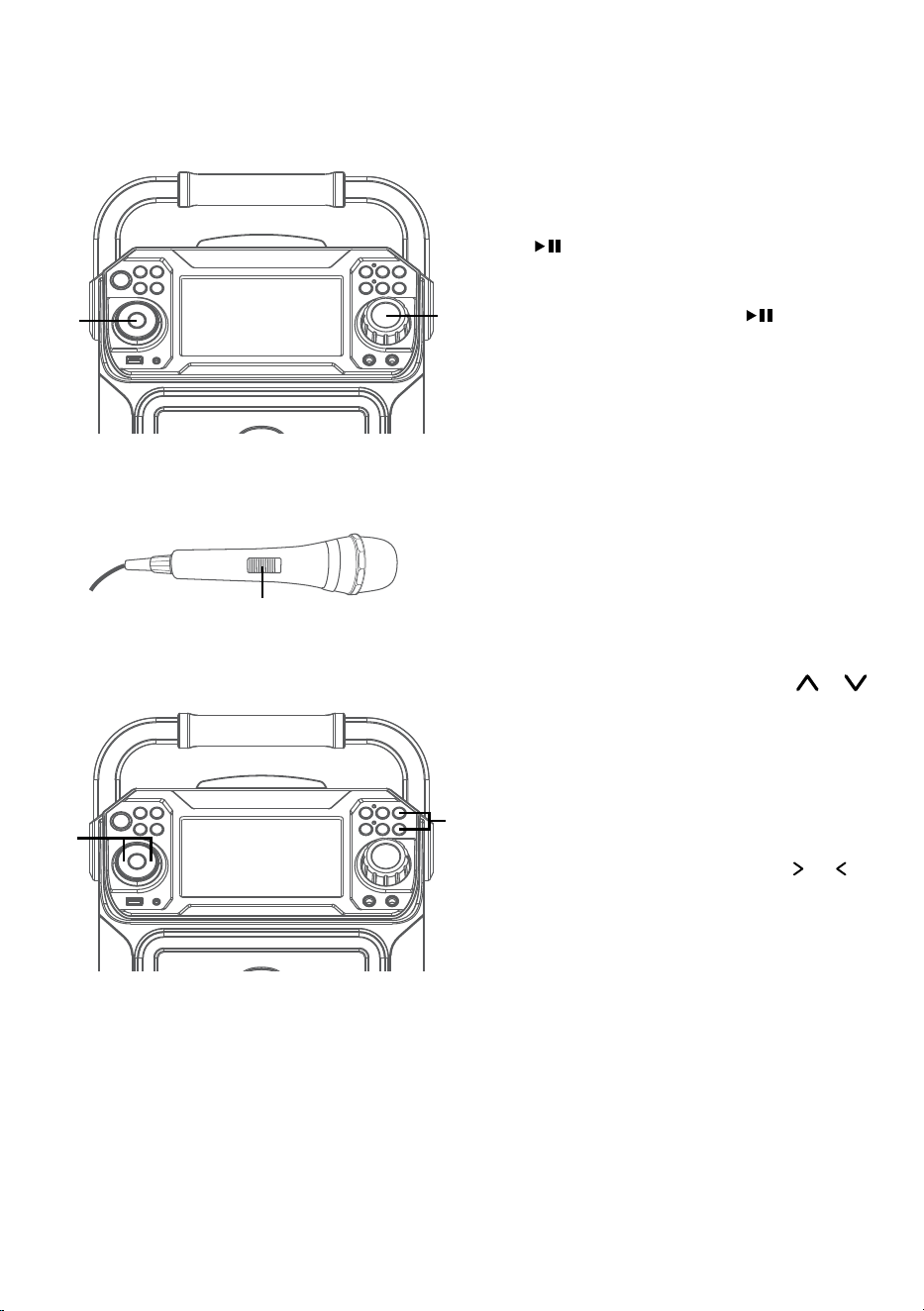
Para controlar su dispositivo con
Bluetooth desde esta unidad, oprima
REPRODUCIR/PAUSAR (PLAY/PAUSE)
para comenzar la reproducción
(la aplicación de música debe estar
abierta). Presione REPRODUCIR/
PAUSAR (PLAY/PAUSE)
durante la
reproducción para pausar la canción.
6
Ajuste el volumen a un nivel conveniente,
usando el control de VOLUMEN
PRINCIPAL (MASTER VOLUME).
7
Conecte el/los micrófono/s. Ubique el
interruptor de ENCENDIDO/APAGADO
(ON/OFF) del Micrófono en la posición
de ENCENDIDO (ON).
8
Oprima el botón VOLUMEN DEL
MICRÓFONO (MIC VOLUME)
o
para ajustar el volumen del micrófono
según desee. Al aumentar el nivel de este
control se incrementará el volumen de los
dos micrófonos.
9
SALTO: Avance o retroceda un archivo
presionando los botones Salto
o .
y
W
X
U
V
— S18 —
Funcionamiento
Utilizar un dispositivo Bluetooth (Continuó )
10
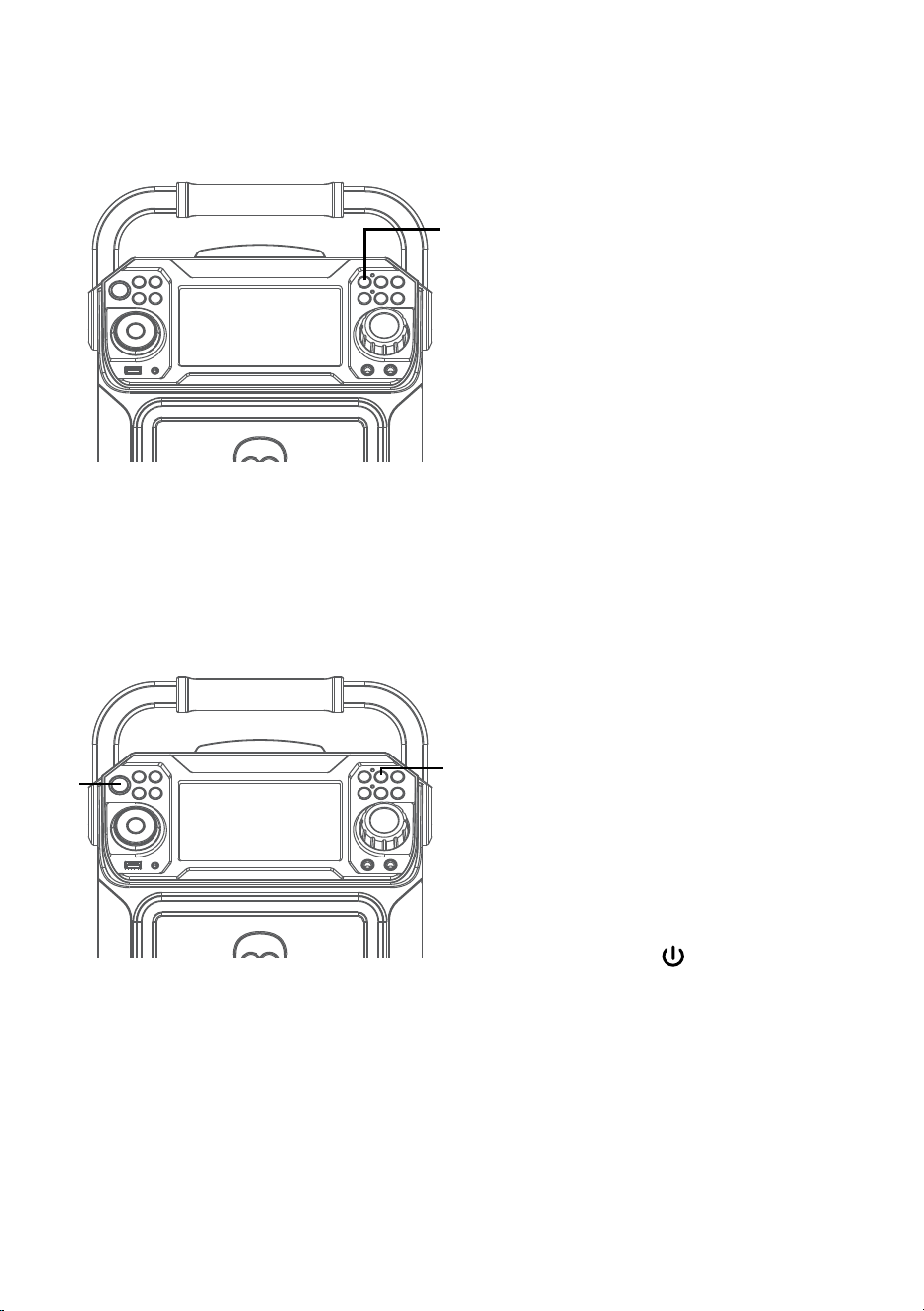
CÓMO GRABAR LO QUE
CANTA: Introduzca primero un
dispositivo USB, luego presione el
botón GRABAR (REC); la canción
comenzará de nuevo y se iniciará la
grabación. El indicador de grabación
se iluminará y quedará encendido.
En la parte superior izquierda de
la pantalla aparecerá REC con el
progreso de la pista en forma de
porcentaje. Cuando finalice de
grabar, oprima nuevamente el botón
GRABAR (REC) para detener la
grabación. El indicador de grabación
se apagará.
Consulte “Reproducir canciones
desde el USB” para reproducir sus
archivos grabados guardados en el
dispositivo flash USB.
11
EFECTO DE SONIDO:
Repetidamente oprima los botones
EFECTOS DE VOZ (VOICE
EFFECTS) para seleccionar entre los
efectos vocales ECO, FEMENINO,
MASCULINO, ARDILLA, ROBOT o
RADIO.
Seleccione NINGUNO (NONE) para
cantar sin efectos de voz.
12
Oprima ENCENDIDO/APAGADO
(ON/OFF)
para apagar la unidad.
El indicador de Encendido (Power) se
apagará.
ak
at
al
— S19 —
Funcionamiento
Uso del conector de ENTRADA de Aux
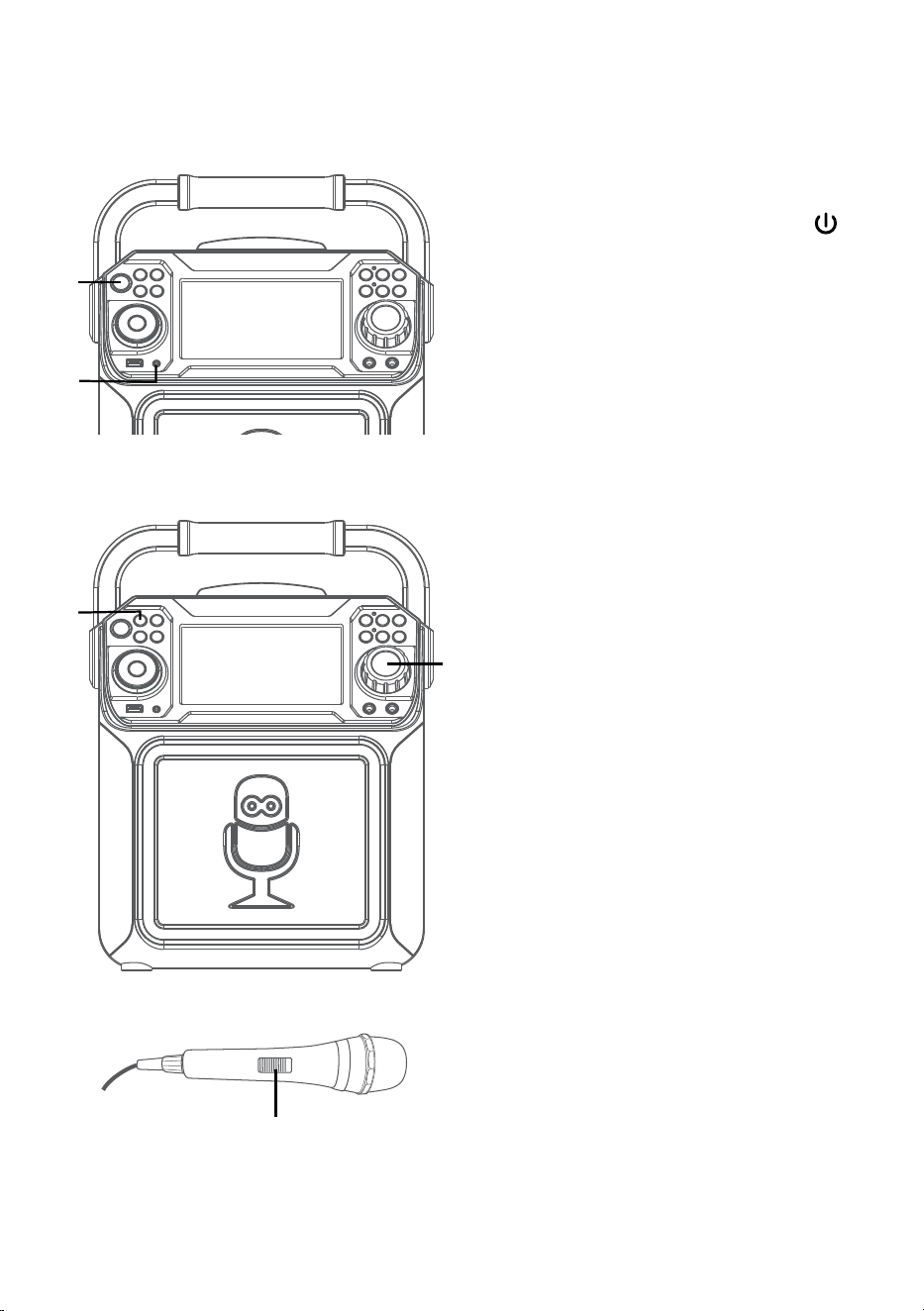
1
Conecte la unidad como se describió
previamente. Oprima el botón de
Encendido/Apagado (ON/OFF)
para encender la unidad. El indicador de
Encendido (Power) se iluminará y quedará
encendido.
2
Conecte la unidad externa al conector de
ENTRADA DE AUX en la parte de adelante
de esta unidad. Conectar una unidad
externa permitirá reproducir audio a
través de su Singing Machine.
Notas:
• Se recomienda que configure el volumen en
la unidad auxiliar a 1/3 o menos para evitar
distorsiones.
• No es posible saltar archivos o pistas cuando
se usa un dispositivo externo.
3
Oprima varias veces FUNCIÓN
(FUNCTION) para seleccionar el modo
de Entrada de línea; “ENTRADA DE LÍNEA”
(“LINE IN”) aparecerá en la pantalla.
4
Ajuste el volumen con el control de
VOLUMEN PRINCIPAL (MASTER
VOLUME) de esta unidad o con el control
de volumen del dispositivo externo.
5
Conecte el/los micrófono/s. Ubique el
interruptor de ENCENDIDO/APAGADO
(ON/OFF) del Micrófono en la posición
de ENCENDIDO (ON).
u
w
v
x
y
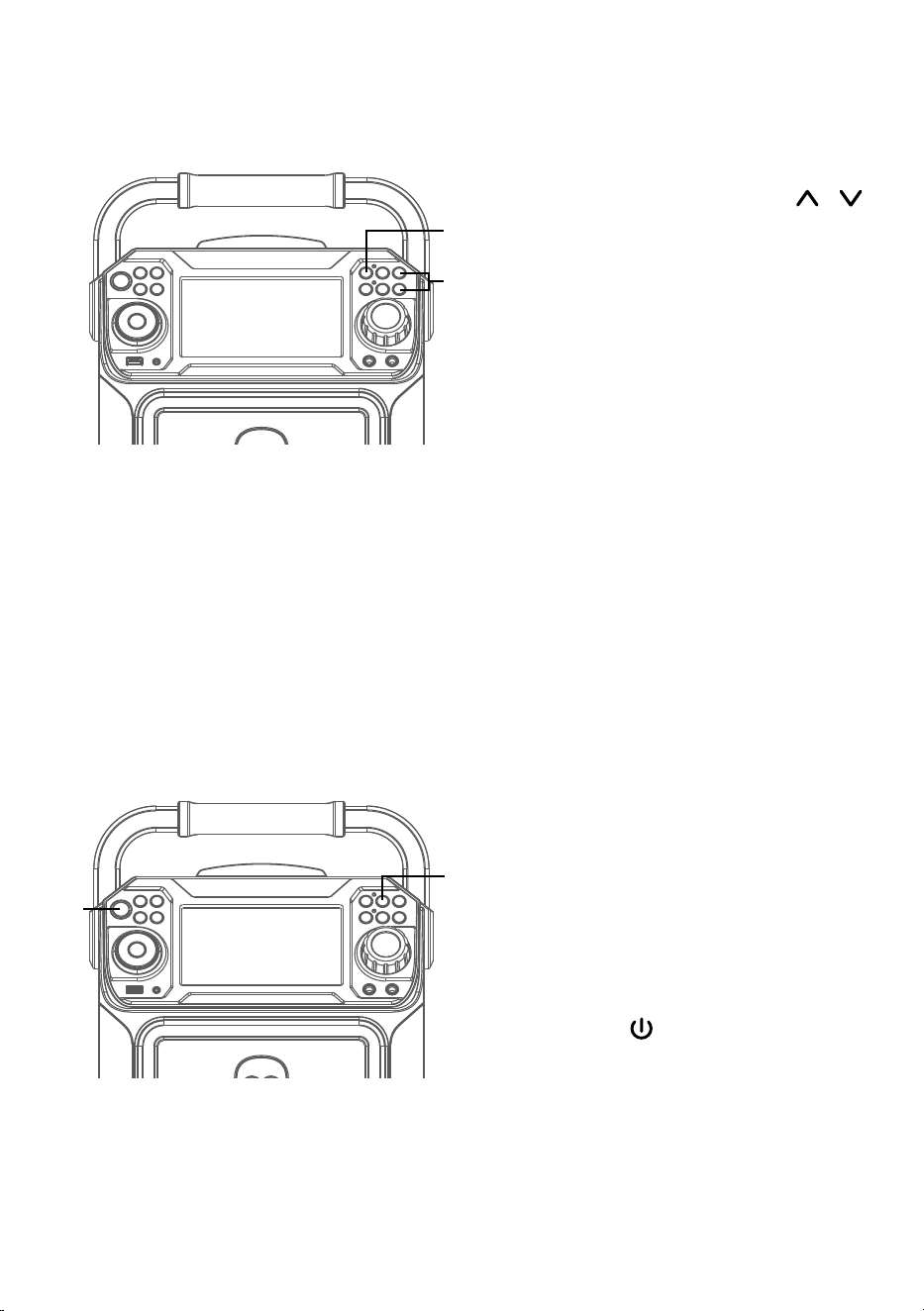
— S20 —
Funcionamiento
Uso del conector de ENTRADA de Aux (Continuó )
6
Oprima el botón VOLUMEN DEL
MICRÓFONO (MIC VOLUME)
o
para ajustar el volumen del micrófono
según desee. Al aumentar el nivel de este
control se incrementará el volumen de los
dos micrófonos.
7
CÓMO GRABAR LO QUE CANTA:
Introduzca primero un dispositivo
USB, luego presione el botón GRABAR
(REC); la canción comenzará de
nuevo y se iniciará la grabación. El
indicador de grabación se iluminará y
quedará encendido. En la parte superior
izquierda de la pantalla aparecerá REC
con el progreso de la pista en forma de
porcentaje. Cuando finalice de grabar,
oprima nuevamente el botón GRABAR
(REC) para detener la grabación. El
indicador de grabación se apagará.
Consulte “Reproducir canciones desde
el USB” para reproducir sus archivos
grabados guardados en el dispositivo flash
USB.
8
EFECTO DE SONIDO: Repetidamente
oprima los botones EFECTOS DE VOZ
(VOICE EFFECTS) para seleccionar entre
los efectos vocales ECO, FEMENINO,
MASCULINO, ARDILLA, ROBOT o RADIO.
Seleccione NINGUNO (NONE) para
cantar sin efectos de voz.
9
Oprima ENCENDIDO/APAGADO
(ON/OFF)
para apagar la unidad.
El indicador de Encendido (Power) se
apagará.
X
V
U
W
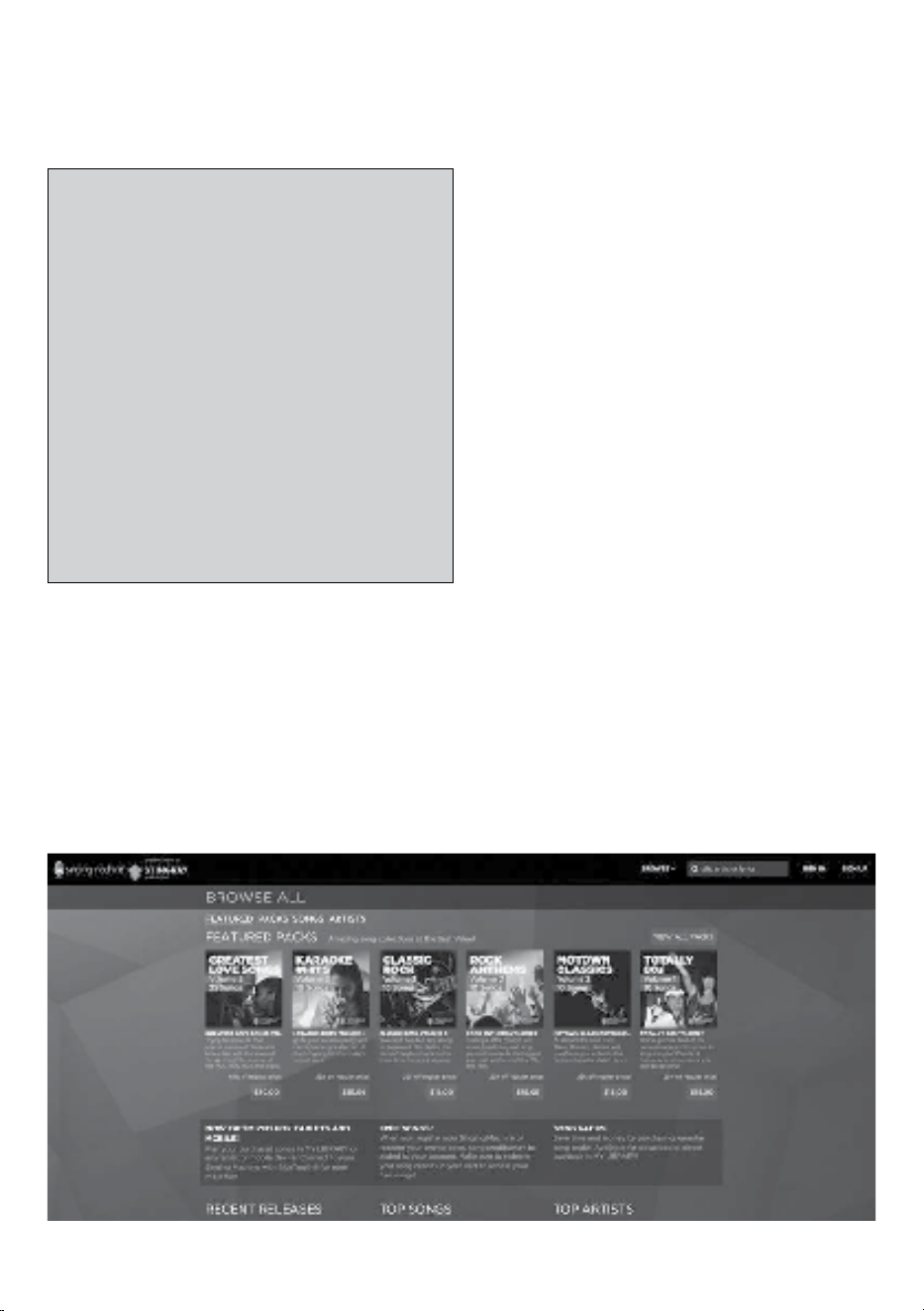
— S21 —
Funcionamiento
Para adquirir y descargar música de Karaoke
visite http://store.singingmachine.com y acceda
a más de 13,000 de sus canciones favoritas
para karaoke. Necesitará un dispositivo flash USB
(no incluido) para transferir las descargas a esta
unidad.
Siga estos sencillos pasos:
1
Ingrese en http://store.singingmachine.com
con su navegador de Internet y regístrese.
2
Seleccione y adquiera su música de karaoke
favorita de la Tienda de descargas de
Singing Machine.
3
Descargue su compra seleccionada del
Singing Machine Digital Locker a su
dispositivo flash USB.
4
Introduzca el dispositivo flash USB como se
muestra en la página S12 y ¡disfrute!
Dónde descargar archivos MP3+G
PREGUNTAS FRECUENTES
¿Dónde puedo obtener ayuda adicional con
los formatos de archivo?
Visite http://singingmachine.com/smcmusic/
para recibir recursos adicionales sobre el tipo
correcto de FORMATO DE ARCHIVO para su
sistema.
Recomendaciones útiles:
Los archivos .mp3 y .cdg. se entregan para descargarse
en un único archivo, comprimido MP3 +G.zip. El archivo
MP3+G no se puede reproducir como un archivo .zip en
un dispositivo flash USB. Para reproducir canciones de
karaoke utilizando un dispositivo flash USB, el archivo
MP3+G.zip se debe descomprimir de la siguiente manera:
• Conecte un dispositivo flash USB a su computadora
• Descargue el archivo MP3+G de su casillero digital
y guarde el archivo .zip* en una carpeta en su
computadora.
• Haga doble clic en el archivo .zip para abrirlo
(visualizará los archivos .mp3 y .cdg).
• Arrastre los archivos .mp3 y .cdg al dispositivo flash
USB.
• Quite (expulse) el dispositivo flash USB de su
computadora.
Encienda el Singing Machine y conecte el dispositivo flash
USB.
Nota: Sus canciones descargadas también se pueden grabar en un CDR/CDRW.

— S22 —
Guía de Resolución de Problemas
Si esta unidad presentara un problema, lea el siguiente cuadro antes de llamar al servicio técnico:
No hay energía
• La unidad no está encendida; oprima el botón ENCENDIDO/ EN ESPERA (ON/OFF) para
encenderla.
• Verifique que el adaptador de CA esté conectado de forma segura en la parte trasera de la unidad.
• Conecte la unidad a otro tomacorriente.
No hay sonido (General)
• Volumen principal (Master Volume) está en mínimo: suba el volumen.
• No se seleccionó la Función correcta, seleccione con el botón FUNCIÓN (FUNTION).
• Si utiliza un dispositivo externo, suba el volumen.
.
No hay sonido – si está conectado a un televisor
• El volumen del televisor está silenciado o demasiado bajo.
• No se seleccionó la fuente correcta (generalmente AV) en el menú del televisor.
No hay sonido desde el micrófono
• Asegúrese de que está firmemente conectado a la entrada para el MICRÓFONO 1 o 2.
• Asegúrese de que el interruptor de ENCENDIDO/APAGADO (ON/OFF) del micrófono se
encuentre en la posición ENCENDIDO (ON).
• Asegúrese de que el control de VOLUMEN DEL MICRÓFONO (MIC VOLUME) no esté en su
configuración más baja.
• El VOLUMEN PRINCIPAL (MASTER VOLUME) está fijado en mínimo: suba el volumen.
No se reproducen los archivos en la entrada de USB
• El archivo está dañado; reemplácelo.
• El archivo no está en un formato que esta unidad pueda reproducir.
• El producto no admite el dispositivo de USB conectado.
El dispositivo Bluetooth no se puede configurar o conectar con la unidad
• Asegúrese de que los otros dispositivos con Bluetooth estén apagados para evitar el
emparejamiento accidental.
• No ha activado la función Bluetooth de su dispositivo; ver la página S16 o consultar el manual de
usuario del dispositivo Bluetooth.
• La unidad no está en modo de emparejamiento; presione el botón
para reiniciar el
emparejamiento.
La reproducción de la música no está disponible en la unidad luego de conectar de manera
exitosa el Bluetooth
• Asegúrese de que su dispositivo Bluetooth es compatible con el perfil Bluetooth A2DP.
• El volumen del dispositivo externo con Bluetooth está bajo o en silencio; súbalo según lo deseado.
La unidad no graba
• No se introdujo dispositivo USB o el dispositivo USB está lleno. Mueva todas las grabaciones a su
computadora para hacer espacio.

— S23 —
Especificaciones
AUDIO
Potencia De Salida ........................................................................................................................... 15 Watts (Rms)
Impedancia De Salida .................................................................................................................................... 4 Ohms
REPRODUCTOR DE CD
Respuesta De Frecuencia ............................................................................................................... 100Hz - 20kHz
Proporción De Señal Y Ruido ........................................................................................................................... 50Db
Number of Programs ............................................................ Programación de acceso aleatorio de 20 pasos
BLUETOOTH
Version Bluetooth ................................................................................................................................................. V4.2
Distancia De Trabajo ................................................................ Hasta 10 Metros Medidos En Espacio Abierto
USB
Formato ..................................................................................................................................................................FAT32
Compatibilidad máxima.......................................................................................................................................32GB
GENERAL
Energía ........................................................................................................................... DC12V 2A Positive Center
Dimensiones - Unidad principal ........................................ 13.0 x 9.1 x 17.04 in. (33.0 x 23.0 x 43.1cm)
Peso - Unidad principa ....................................................................................................................8.7Lbs (4.0kgs)
Micrófono .......................................... Impedancia con micrófono dinámico -74 db 600 Ohm con 6.3 mm
Entrada auxiliar (Aux In) ..........................................................................................conector estéreo de 3,5mm
Las Especificaciones Están Sujetas A Cambios Sin Previo Aviso.
El nombre de la marca Bluetooth® y los logotipos son marcas registradas propiedad de Bluetooth SIG,
Inc., y todo uso que The Singing Machine Company haga de dichas marcas es en virtud de una licencia.
Otras marcas registradas y comerciales pertenecen a sus respectivos titulares.
— F1 —
Mises en Garde
Renseignements Importants de Sécurité
1. Lisez ces instructions.
2. Conservez ces instructions.
3. Respectez toutes les mises en garde.
4. Suivez toutes les consignes.
5. N’utilisez pas cet appareil à proximité de l’eau.
6. Nettoyez l’appareil uniquement avec un chiffon sec.
7. Ne bloquez pas les ouvertures d’aération. Installez
conformément selon les consignes du fabricant.
8. N’installez pas à proximité de sources de chaleur telles que les
radiateurs, registres d’air chaud, cuisinières, ou autres appareils
(notamment des amplificateurs) produisant de la chaleur.
9. Ne nuisez pas à la fonction de sécurité de la fiche polarisée ou
de mise à la terre. Une fiche polarisée est dotée de deux broches
dont l’une est plus large que l’autre. Une fiche de mise à la terre
est dotée de deux broches et d’une troisième broche de mise à
la terre. La broche la plus large ou la troisième broche est conçue
pour votre sécurité. Lorsque la broche fournie ne convient pas
à la prise, consultez un électricien afin de remplacer la prise
désuète.
10. Protégez le cordon d’alimentation afin que personne ne marche
dessus ou le pince, particulièrement au niveau des broches, de
la prise et du point où ils sortent de l’appareil.
11. Utilisez seulement les accessoires spécifiés par le fabricant.
12. Utilisez seulement avec un chariot, une sellette, un trépied, un
support ou une table. Lorsqu’un chariot
est utilisé, prenez garde de ne pas
déplacer la combinaison chariot/appareil
pour éviter toute blessure causée par un
renversement.
13. Débranchez cet appareil durant un orage
ou lorsqu’il n’est pas utilisé pendant de
longues périodes.
14. Confiez toutes les réparations à un
technicien compétent. La réparation s’avère nécessaire
lorsque l’appareil a été endommagé, par exemple, si le cordon
d’alimentation ou la fiche a été endommagé, du liquide a été
renversé ou des objets sont tombés dans l’appareil, ou si
l’appareil a été exposé à la pluie ou à l’humidité, ne fonctionne
pas normalement, ou a été échappé.
15. AVERTISSEMENT : Pour réduire le risque d’électrocution, évitez
d’exposer l’appareil à la pluie ou à l’humidité. Ne déposez pas
d’objets remplis d’eau, tels qu’un vase, sur l’appareil.
16. La fiche de secteur c.a. est utilisée pour débrancher l’appareil
et doit être facilement accessible et utilisable durant l’usage
prévu. Afin de couper complètement l’alimentation de l’appareil,
la fiche de secteur doit être complètement débranchée de la
prise c.a.
17. MISE EN GARDE : Afin de réduire le risque d’incendie ou
d’explosion, n’exposez pas les piles à une source de chaleur
excessive telle que le soleil, le feu ou autre.
AVERTISSEMENT RELATIF
AU CHARIOT PORTATIF
(Symbol fourni par RETAC)
MISE EN GARDE: AFIN DE RÉDUIRE LE RISQUE D’ÉLECTROCUTION, NE PAS
RETIRER LE COUVERCLE (OU LE DOS DU BOÎTIER). AUCUNE PIÈCE POUVANT
ÊTRE RÉPARÉE PAR L’UTILISATEUR NE SE TROUVE À L’INTÉRIEUR. POUR
TOUTE RÉPARATION, CONTACTER UN TECHNICIEN COMPÉTENT.
La mention Mise en garde se trouve sur le panneau inférieur.
TENSION DANGEREUSE: Le symbole de l’éclair dans un
triangle équilatéral a pour but d’avertir l’utilisateur du danger
présenté par des pièces non isolées à l’intérieur de l’appareil,
dont la tension est suffisante pour provoquer des décharges
électriques dangereuses.
AVERTISSEMENT: AFIN D’ENRAYER TOUT RISQUE D’ÉLECTROCUTION OU
D’INCENDIE, NE PAS EXPOSER CET APPAREIL À LA PLUIE OU À L’HUMIDITÉ.
ATTENTION: Le point d’exclamation à l’intérieur d’un
triangle équilatéral a pour but d’avertir l’utilisateur de la
présence de consignes importantes sur le fonctionnement et
l’entretien (réparation) de l’appareil dans la documentation
accompagnant ce produit.
MISE EN GARDE DE LA FCC: Cet appareil peut générer ou utiliser
des fréquences radio. Les modifications ou changements peuvent
causer des interférences nuisibles, à moins que ces modifications ne
soient approuvées expressément dans ce mode d’emploi. L’utilisateur
pourrait perdre l’autorité de faire fonctionner cet équipement en cas de
modification non autorisée.
Cet appareil répond aux exigences de l’alinéa 15 des règlementations FCC.
Son utilisation est soumise aux deux conditions suivantes : 1) Cet appareil
ne peut pas causer d’interférence nuisible et 2), Cet appareil doit accepter
toute interférence reçue, incluant les interférences qui pourraient affecter
son fonctionnement.
REMARQUE: Suite aux tests effectués, il est établi que cet appareil
numérique de Classe B répond aux exigences de l’alinéa 15 des
réglementations FCC. Ces normes sont élaborées pour vous protéger
contre toute interférence nuisible en installation résidentielle. Cet appareil
génère, utilise et peut émettre des fréquences radio. Par conséquent, s’il
n’est pas installé et utilisé en suivant les instructions, il peut causer des
interférences nuisibles aux communications radio. Cependant, aucune
garantie n’est donnée concernant la possibilité d’interférence avec une
installation spécifique. Si une interférence se produisait en réception radio
et/ou de télédiffusion, lors de l’activation et la désactivation de l’appareil,
nous vous recommandons:
• Réorientez ou déplacez l’antenne de réception.
• Éloignez l’appareil du récepteur.
• Branchez l’appareil à une prise de courant différente de celle utilisée par
le récepteur.
• En cas de problème, contactez le vendeur ou un technicien spécialisé en
réception radio/TV.
• L’information est située en dessous de la machine.
INDUSTRY CANADA NOTICE:
Cet appareil est conforme avec Industrie Canada exempts de licence
standard RSS (s). Son fonctionnement est soumis aux deux conditions
suivantes:
1. Cet appareil ne doit pas provoquer d’interférences.
2. Cet appareil doit accepter toute interférence, y compris celles pouvant
causer un mauvais fonctionnement de l’appareil
AVERTISSEMENT D’ÉGOUTTEMENT: Ce produit ne doit pas être exposé à
l’égouttement ni aux éclaboussures et aucun objet rempli de liquide, tel qu’un
vase, ne doit être placé sur le produit.
AVERTISSEMENT D’AÉRATION: L’aération normale du produit ne doit pas
être entravée pour l’usage prévu.
CE PRODUIT EST CONFORME AUX RÉGLEMENTATIONS DHHS 21 CFR
CHAPITRE 1, SOUS-CHAPITRE J APPLICABLES À LA DATE DE FABRICATION.
Mise en garde :
• Ce lecteur de CD est muni d’un faisceau de lumière au laser. Seul un
technicien qualifié devrait retirer le couvercle et tenter toute réparation
ou entretien sur cet appareil afin d’éviter tout risque de blessure aux
yeux.
• L’utilisation de commandes, de réglages ou de procédures autre que ceux
spécifiés dans le présent document peut causer un risque d’exposition
aux radiations.
• Cet appareil doit être utilisé dans un endroit aéré.
ATTENTION!
Vous risquez d’être exposé à un rayonnement laser dangereux et invisible
en ouvrant ce produit et en désactivant ou rendant inopérant le dispositif de
verrouillage. Évitez toute exposition directe au faisceau.
CAN ICES-3(B)/NMB-3(B)
Mises en Garde
RISQUE DE CHOC ÉLECTRIQUE
NE PAS OUVRIR
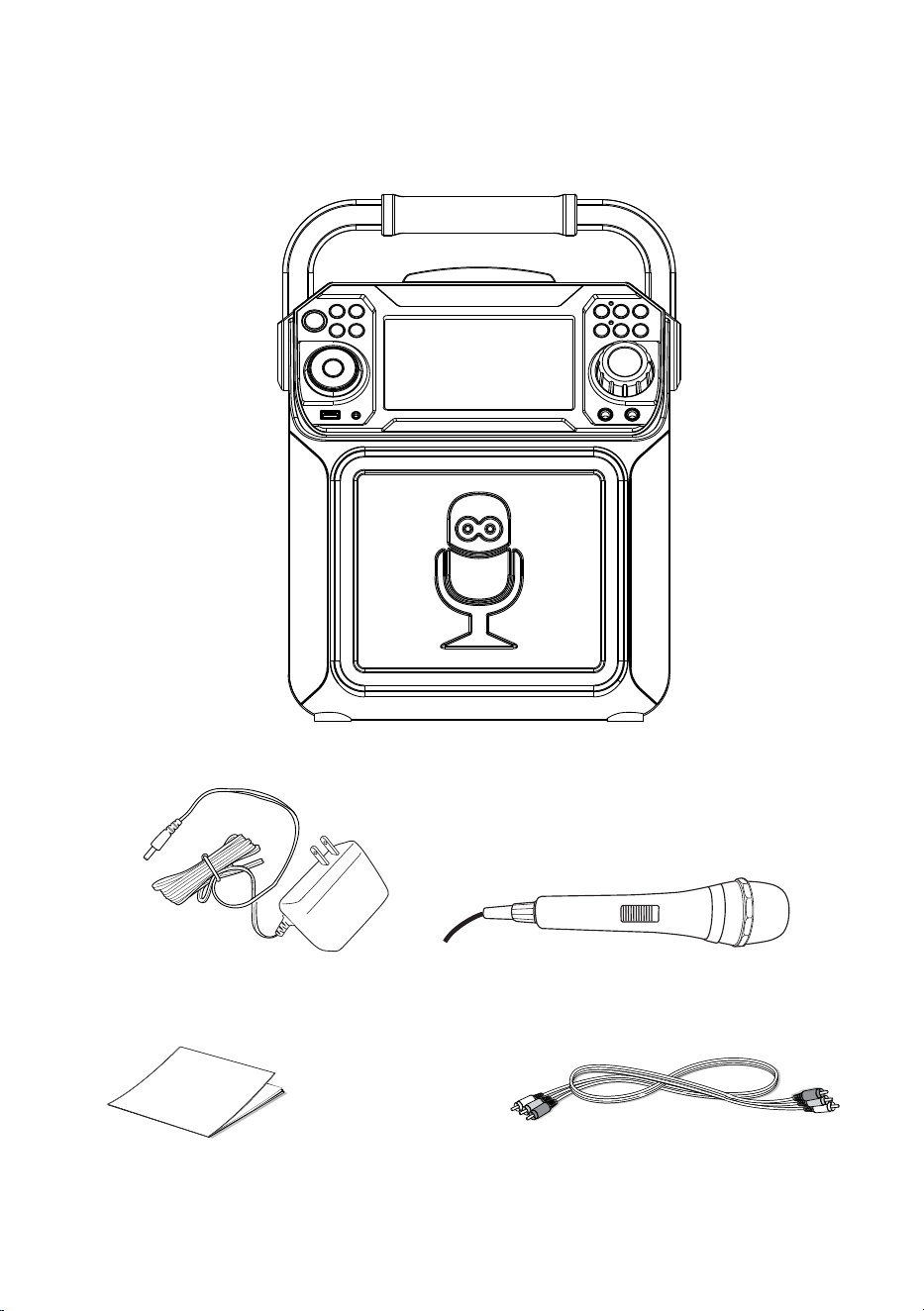
— F2 —
Contenu
Vérifiez si tous les articles suivants sont compris.
Microphone avec cable
Unité principale
Câble Audio/Vidéo
Adaptateur CA
Mode D’Emploi
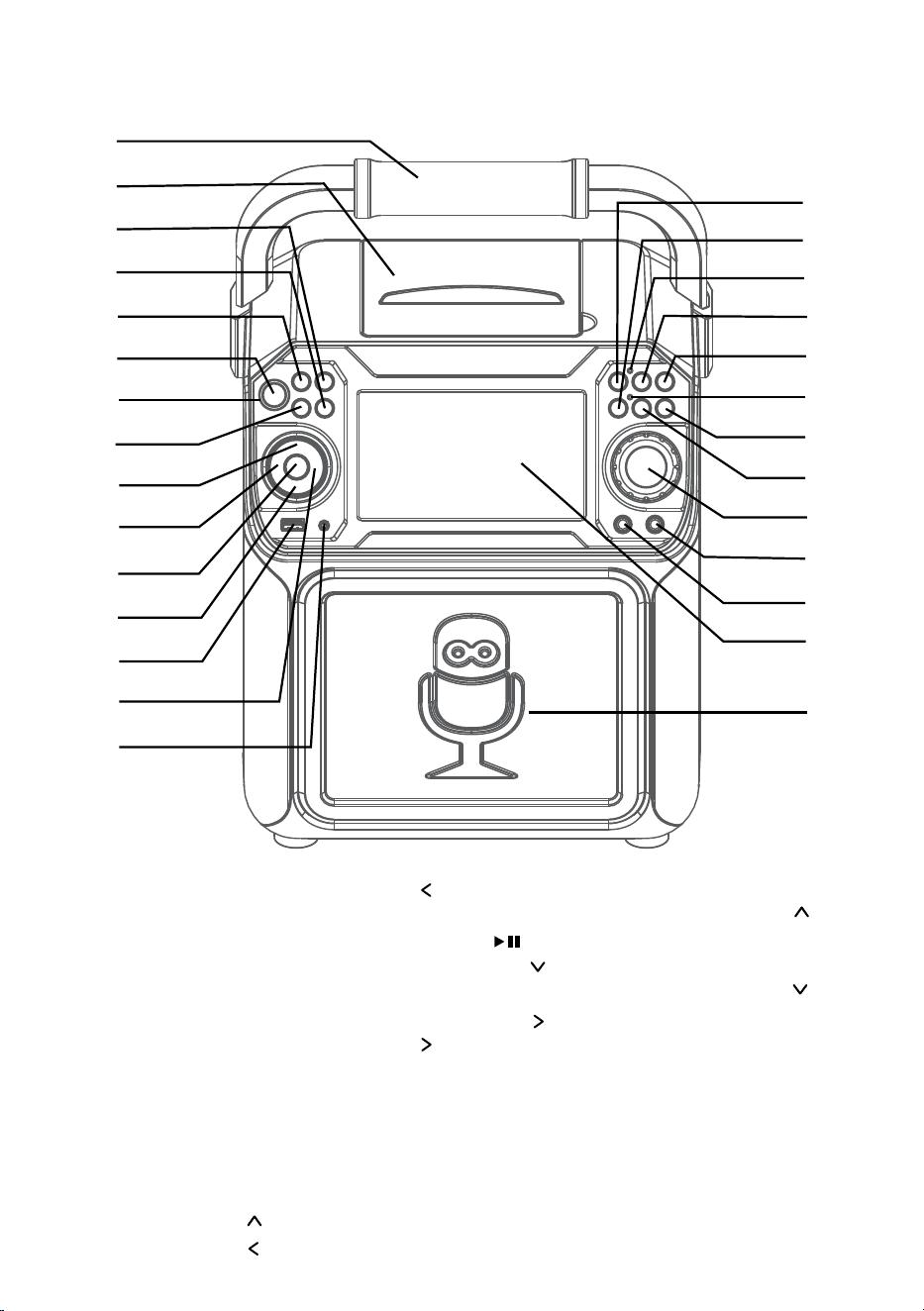
— F3 —
Emplacement des commandes (dessus/devant)
1. Poignée
2. Compartiment de CD
3. Touche LUMIÈRE (LIGHT)
4. Touche RÉPÉTER/PROG
(REPEAT/PROG)
5. Touche FONCTION
(FUNCTION)
6. Touche MARCHE/ARRÊT
(ON/OFF)
7. Témoin d’alimentation
8. Touche MONITEUR
MARCHE/ARRÊT (ON/
OFF)
9. Touche Navigation
10. Touche Navigation /
Saut
11. Touche LECTURE/PAUSE
(PLAY/PAUSE)
12. Touche Navigation
13. Port USB
14. Touche Navigation
/
Saut
15. Prise d’entrée AUX IN
16. Touche ENREGISTREMENT
(RECORD)
17. Touche Bluetooth
18. Témoin Enregistrement
19. Touche EFFET VOCAL
(VOICE EFFECT)
20. Touche VOLUME MICRO
(MIC VOLUME)
21. Témoin Bluetooth
22. Touche VOLUME MICRO
(MIC VOLUME)
23. Touche Contrôle
automatique de la voix
(Auto Voice Control)
24. Commande VOLUME
PRINCIPAL (MASTER
VOLUME)
25. Prise MIC 2
26. Prise MIC 1
27. Écran
28. Haut-parleur
u
v
w
x
y
U
V
W
X
at
ak
al
am
an
ao
ap
aq
ar
as
bt
bk
bl
bm
bn
bo
bp
bq
br
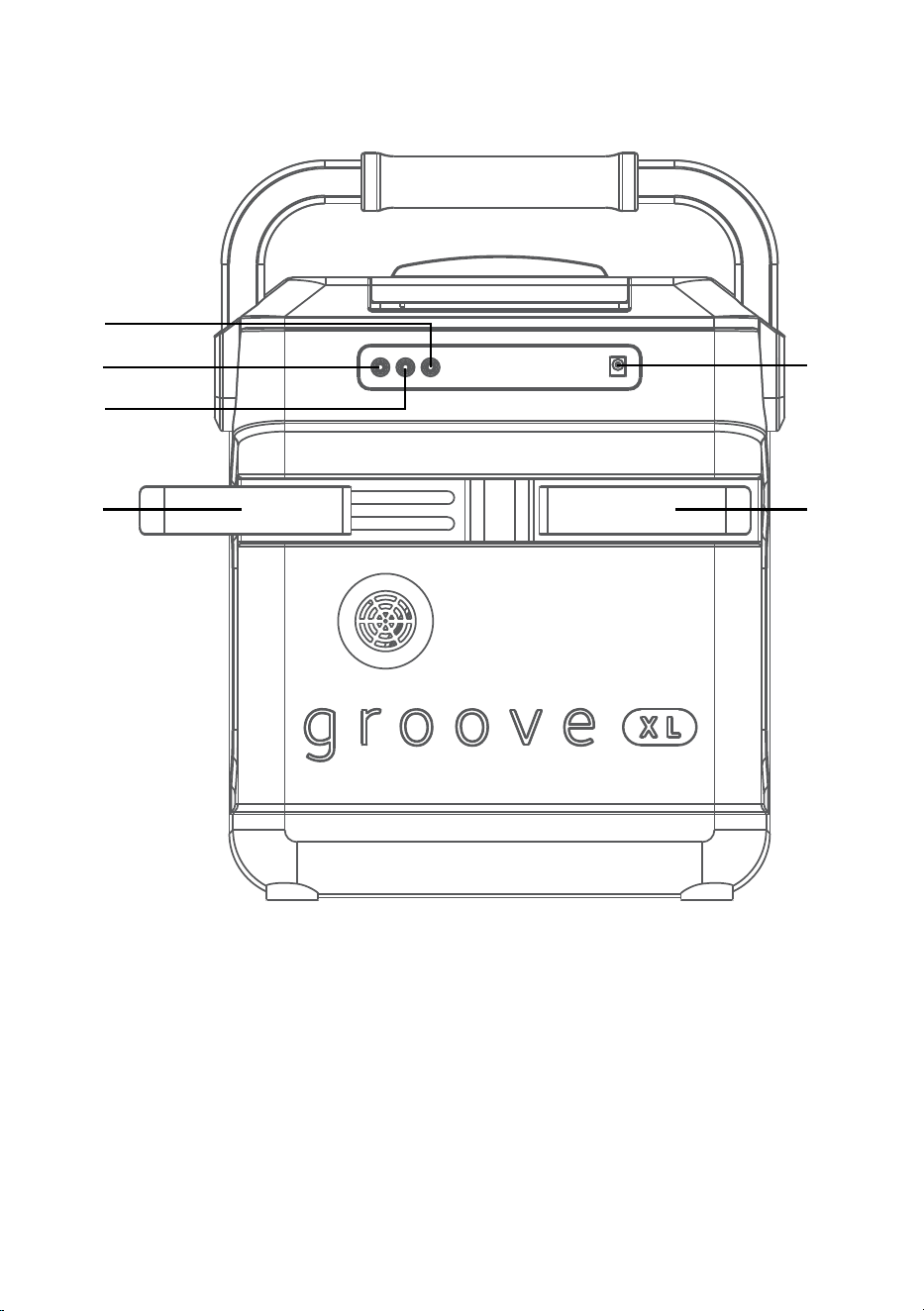
— F4 —
Emplacement des commandes (arrière)
1. Prise AUDIO OUT (gauche)
2. Prise VIDÉO OUT
3. Prise AUDIO OUT (droit)
4. Supports de micro extensibles
5. Prise DC IN
u
v
x x
y
w
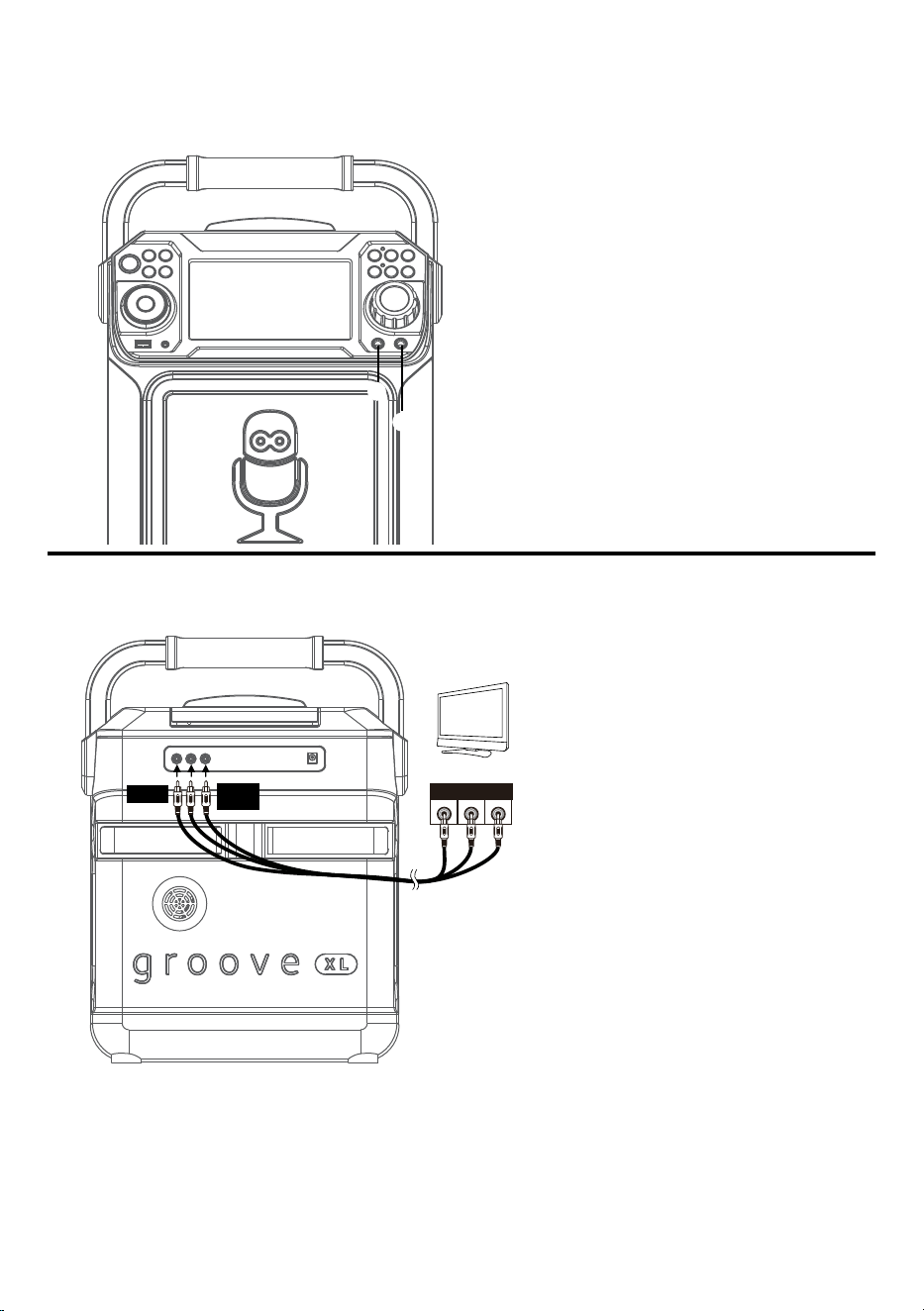
— F5 —
Branchement
Connexion des microphones
Microphones:
Connectez le microphone à une prise MIC 1
u
et à une prise MIC 2
v
(lorsque souhaité) Situé
sur le côté de l’appareil.
Remarque: Ne pas échapper le microphone
car cela peut causer des dommages ainsi
qu’aux haut-parleurs. Ne pas faire virevolter
le microphone par la cordon car cela peut
endommager le câblage encastré.
Connexion de l’unité à un téléviseur
ENTRÉ E
VIDÉ O
ENTRÉ E
AUDIO
R L
Câble RCA
VIDÉO OUT
(jaune)
AUDIO OUT
(blanc- L
rouge- R)
Arrière du téléviseur externe
Pour sortir des données vidéo, des
paroles de chansons et le son de
votre téléviseur, veuillez suivre les
étapes suivantes:
Connectez le câble vidéo RCA (jaune)
à la prise VIDÉO OUT et les câbles
audio (blanc et rouge) aux prises
AUDIO OUT situés à l’arrière du
Singing Machine.
Connectez l’autre extrémité du câble
vidéo RCA (jaune) à la prise VIDÉO IN
et les câbles audio (blanc et rouge)
aux prises AUDIO IN situés sur votre
téléviseur.
Remarques:
• Cet appareil peut être utilisé avec ou sans un téléviseur.
• Référez-vous également au guide de l’utilisateur de votre téléviseur.
• Pour voir les paroles sur l’écran, vous devez utiliser un disque CD + G ou fichiers MP3 +G.
• Les câbles audio/vidéo sont inclus.
u
v
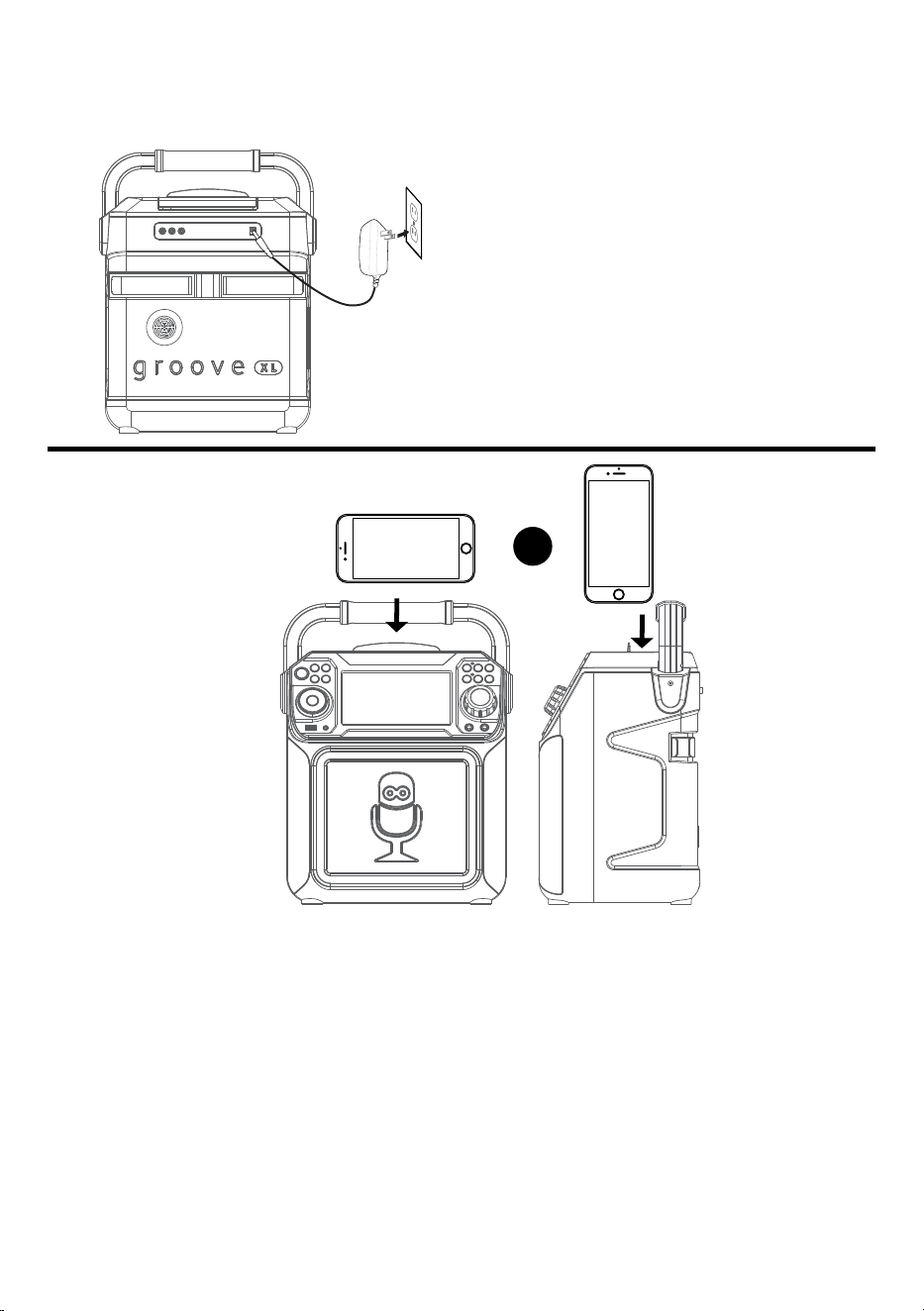
— F6 —
Branchement
Raccordement à l’alimentation CA
SUPPORT
Connectez la petite extrémité de l’adaptateur
CA à la Prise DC IN située à l’arrière de
l’appareil. Connectez l’autre extrémité (avec
les 2 lames) à une prise de courant CA (120V
CA, 60 Hz) située à proximité.
Remarque: Effectuer toutes les connexions
avant de brancher le cordon d’alimentation.
Ou
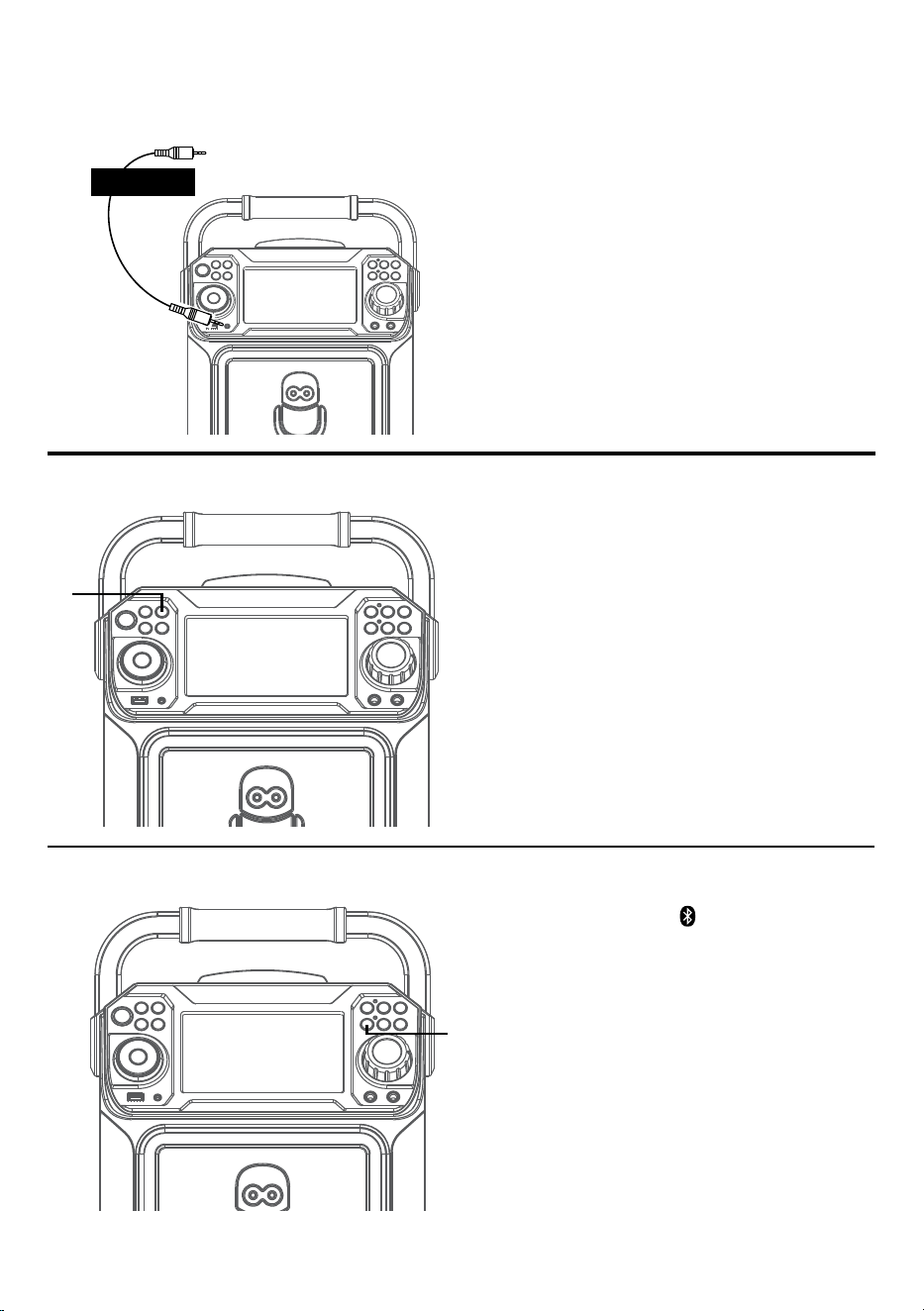
— F7 —
Branchement
Connexion à une prise AUX
Raccordez simplement votre appareil externe
en utilisant un câble audio approprié (câble
audio 3,5 mm non inclus) tel qu’illustré.
Remarque:
Voir la page F19 pour sélectionner et utiliser la
fonction AUX.
à un appareil externe
AUDIO OUT/
PRISE CASQUE
Mode Bluetooth
Appuyez sur la touche pour régler
facilement l’appareil en mode de jumelage.
u
Lumières Disco
Lorsque l’appareil est mis en marche, le mode
Lumière 1 est automatiquement activé. Les
lumières s’allument et sont synchronisées avec
le son lorsque vous parlez ou chantez dans le
microphone.
Appuyez sur la touche LUMIÈRE pour le mode
Lumière 2, qui affiche le spectacle de lumière,
mais ne répond pas au microphone. Appuyez
de nouveau sur la touche LUMIÈRE pour
éteindre les lumières.
u
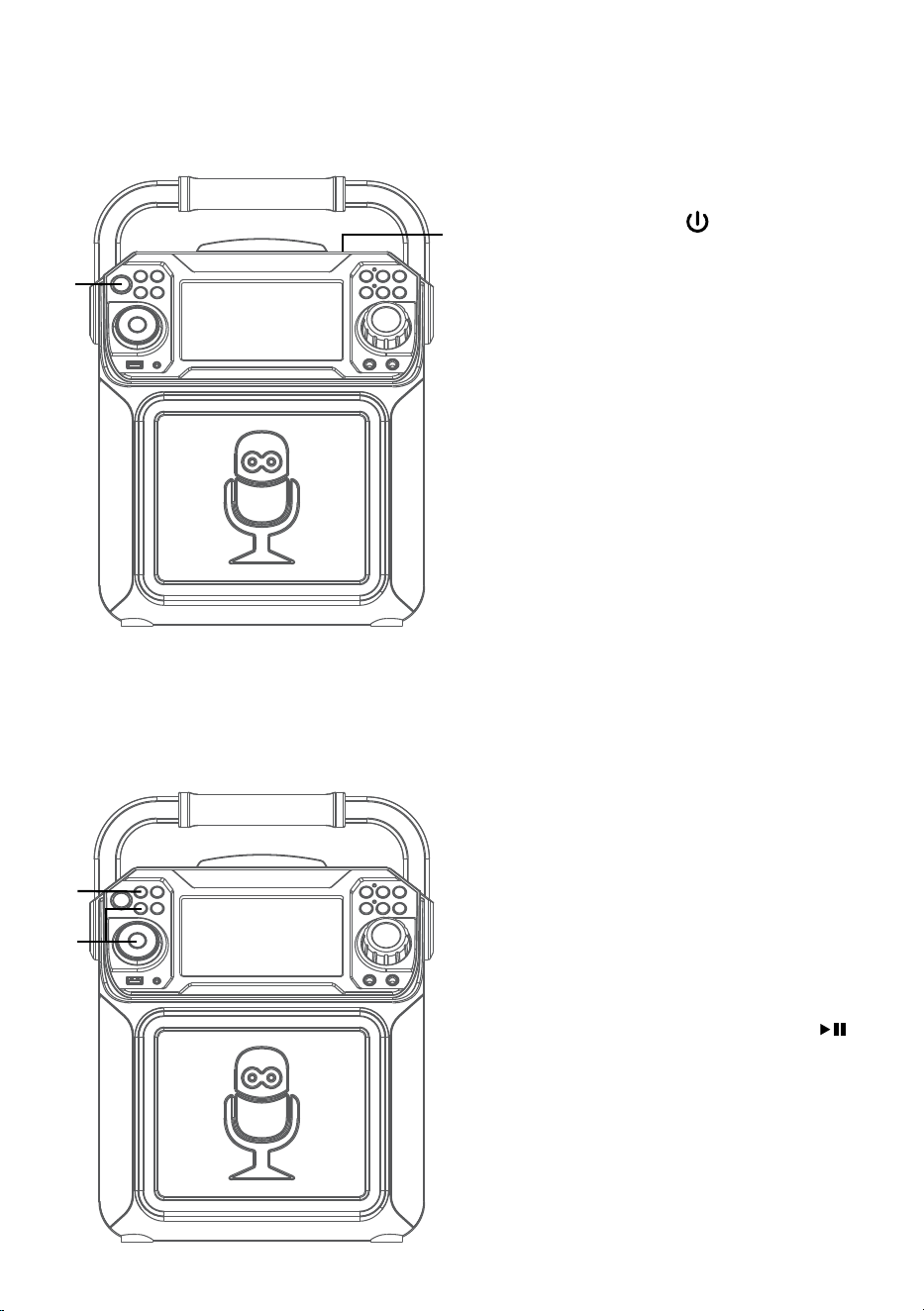
— F8 —
Utilisation
Lecture d’un CD
1
Raccordez l’appareil de la manière décrite
précédemment.Appuyez sur la touche
MARCHE/ARRÊT
pour allumer
l’appareil. Le témoin d’alimentation
s’allumera.
2
Soulevez la porte de CD et insérez un
CD (fichiers standards ou MP3+G) ou un
CD+G en appuyant doucement sur l’axe
central. Fermez ensuite la porte du CD.
Remarques :
• Qu’est-ce que le CD+G?
A CD+G (CD graphiques) est le format
standard pour la plupart des disques de
karaoké qui affichent les paroles à l’écran.
• Qu’est-ce qu’un MP3+G?
Le fichier MP3+G est un nouveau format
de fichier de musique karaoké utilisant des
fichiers MP3 de petite taille. Il affichera
les paroles à l’écran. Voir la page F19 pour
commander et télécharger des fichiers
MP3+G.
• Ne placer aucun objet autre qu’un CD dans
le compartiment car les objets étrangers
peuvent endommager l’appareil.
• Si aucun disque n’est inséré, la mention «
AUCUN DISQUE » s’affiche à l’écran.
• Si connecté à un téléviseur ou à une autre
source audio, réglez le volume du téléviseur
en utilisant sa propre commande de volume.
3
Appuyez plusieurs fois sur la touche
FONCTION (FUNCTION) pour
sélectionner le mode CDG/CD; la
mention « LIRE » (READ) s’affiche lors de
la recherche sur le disque et ensuite, le
nombre de pistes s’affichera.
4
Appuyez sur la touche Lire/Pause
pour débuter la lecture. Lors de l’écoute
d’un fichier CD+G, appuyez sur la touche
MONITEUR MARCHE/ARRÊT pour
afficher l’image et les paroles à l’écran.
u
w
x
v
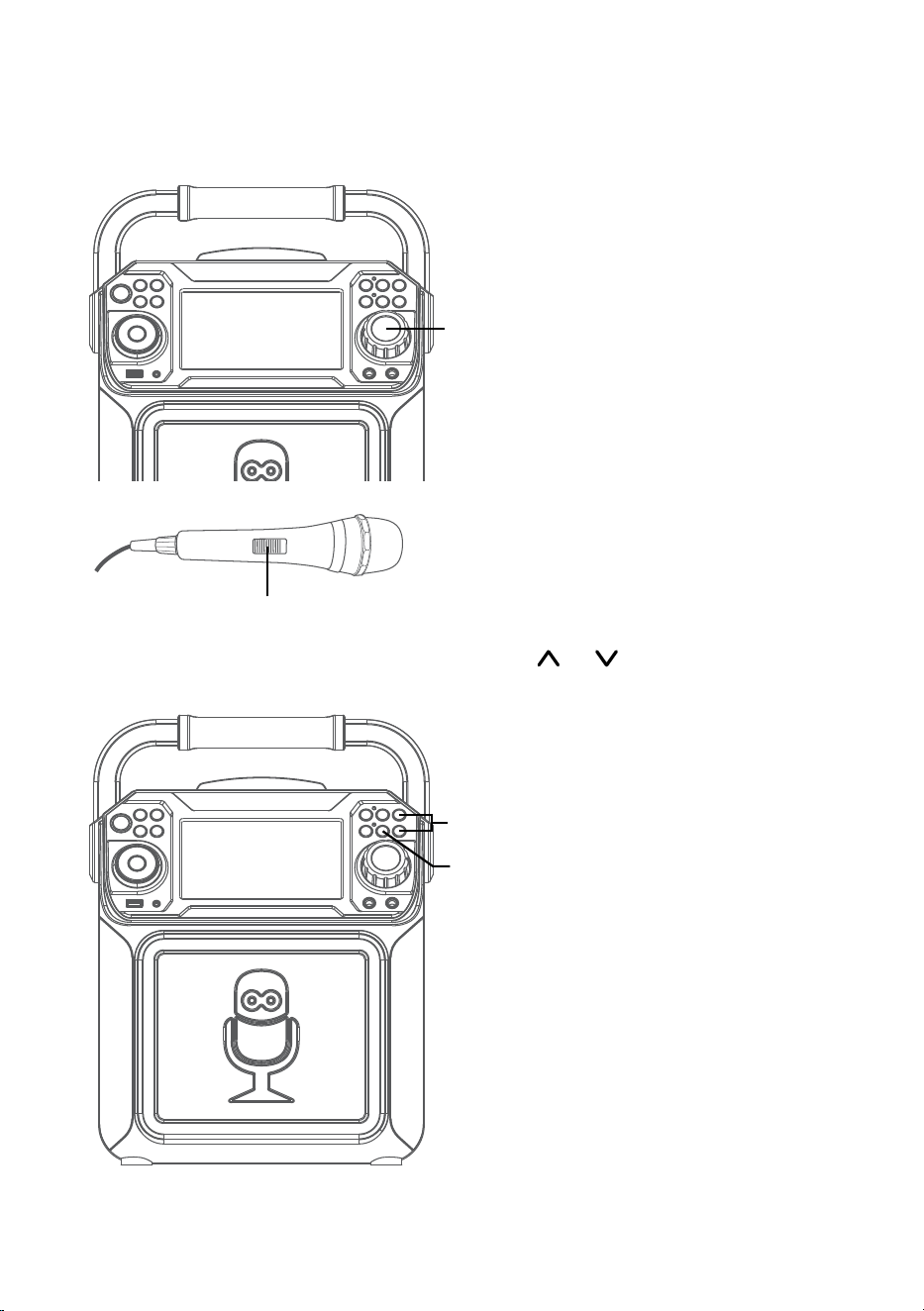
— F9 —
Utilisation
Lecture d’un CD (suite)
5
Ajustez le volume à un niveau confortable
en utilisant la commande de VOLUME
PRINCIPAL (MASTER VOLUME).
6
Connectez le ou les micro(s), puis glissez
l’interrupteur MARCHE/ARRÊT (ON/
OFF) à la position MARCHE.
7
Appuyez sur la touche VOLUME MICRO
ou pour régler le volume du micro
au niveau souhaité. Le fait de monter ce
réglage augmente le volume des deux
microphones.
8
L’option CONTRÔLE AUTOMATIQUE DE
LA VOIX peut être activé en appuyant
la touche MARCHE/ARRÊT Contrôle
de voix automatique (Auto Voice
Control). Les chants de l’enregistrement
multiplex sont coupés dès que vous
commencez à chanter dans le micro.
Lorsque le chanteur arrête de chanter,
les voix enregistrés sur l’enregistrement
multiplex se nivelleront en mode normal.
Remarque: Ceci est seulement pour les
fichiers enregistrés avec l’option multiplex.
U
y
V
W
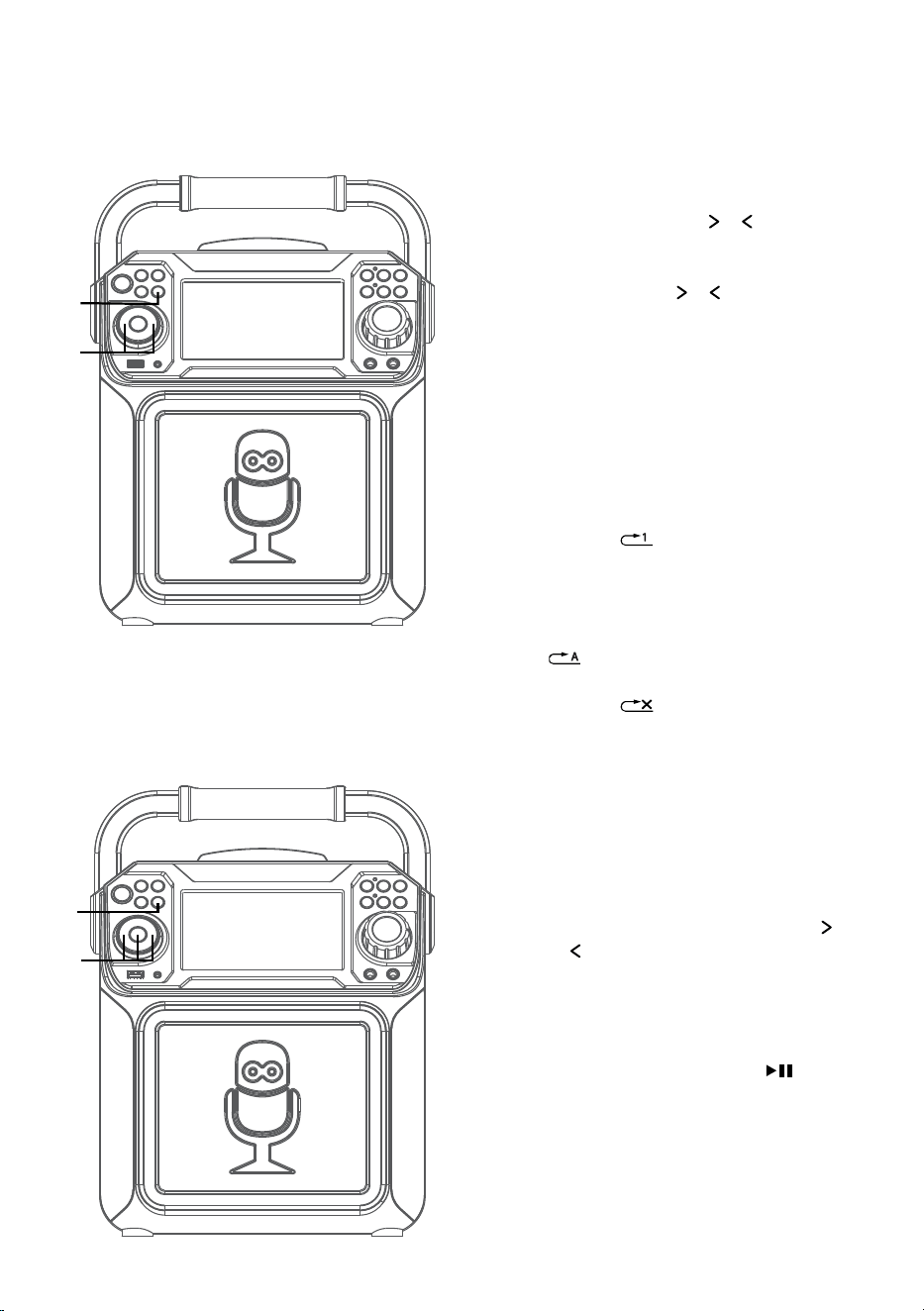
— F10 —
Utilisation
Lecture d’un CD (suite)
9
PASSER: Avancer ou retourner d’une
piste à l’autre en appuyant sur les
touches de Passer
o .
RECHERCHE: Lors de la lecture de
tout CD audio, appuyez et maintenez la
touche Passer
o . Le CD recherche
dans les directions avancé ou de recul à
une haute vitesse. La lecture normale se
poursuit lorsque vous relâchez la touche.
Remarque: La fonction RECHERCHE n’est
compatible qu’avec les disques CD et non les
disques CD+G.
10
RÉPÉTER: Au cours de la lecture,
appuyez sur la touche PROGRAMME/
RÉPÉTER (PROGRAM/REPEAT), le
symbole
s’affiche à l’écran et la
piste courante est répétée. Pour répéter
toutes les pistes, appuyez sur la touche
PROGRAMME/RÉPÉTER (PROGRAM/
REPEAT) un autre fois et le symbole
s’affiche à l’écran. Appuyez de
nouveau pour répéter la fonctionnalité, le
symbole
s’affiche à l’écran.
11
PROGRAMME: Vous pouvez
programmer jusqu’à 20 pistes pour
la lecture dans tout ordre souhaité.
En mode arrêt, appuyez sur la touche
PROGRAMME/RÉPÉTER (PROGRAM/
REPEAT);PROG SET 00:XX (xx est
le nombre total de pistes) s’affiche
à l’écran. Sélectionnez la première
piste à partir des touches Passer
o , appuyez ensuite sur la touche
PROGRAMME/RÉPÉTER (PROGRAM/
REPEAT). Répétez pour programmer
un maximum de 20 pistes, si nécessaire.
Lorsque terminé, appuyez sur la
touche Lire (Play)/Pause
pour
commencer la lecture.
Remarques:
• Maintenez enfoncée la touche RÉPÉTER/PROG
pour arrêter et supprimer le programme.
• Si vous tentez de programmer plus de 20
pistes, « FUL » apparaîtra sur l’afficheur.
ak
ak
at
X
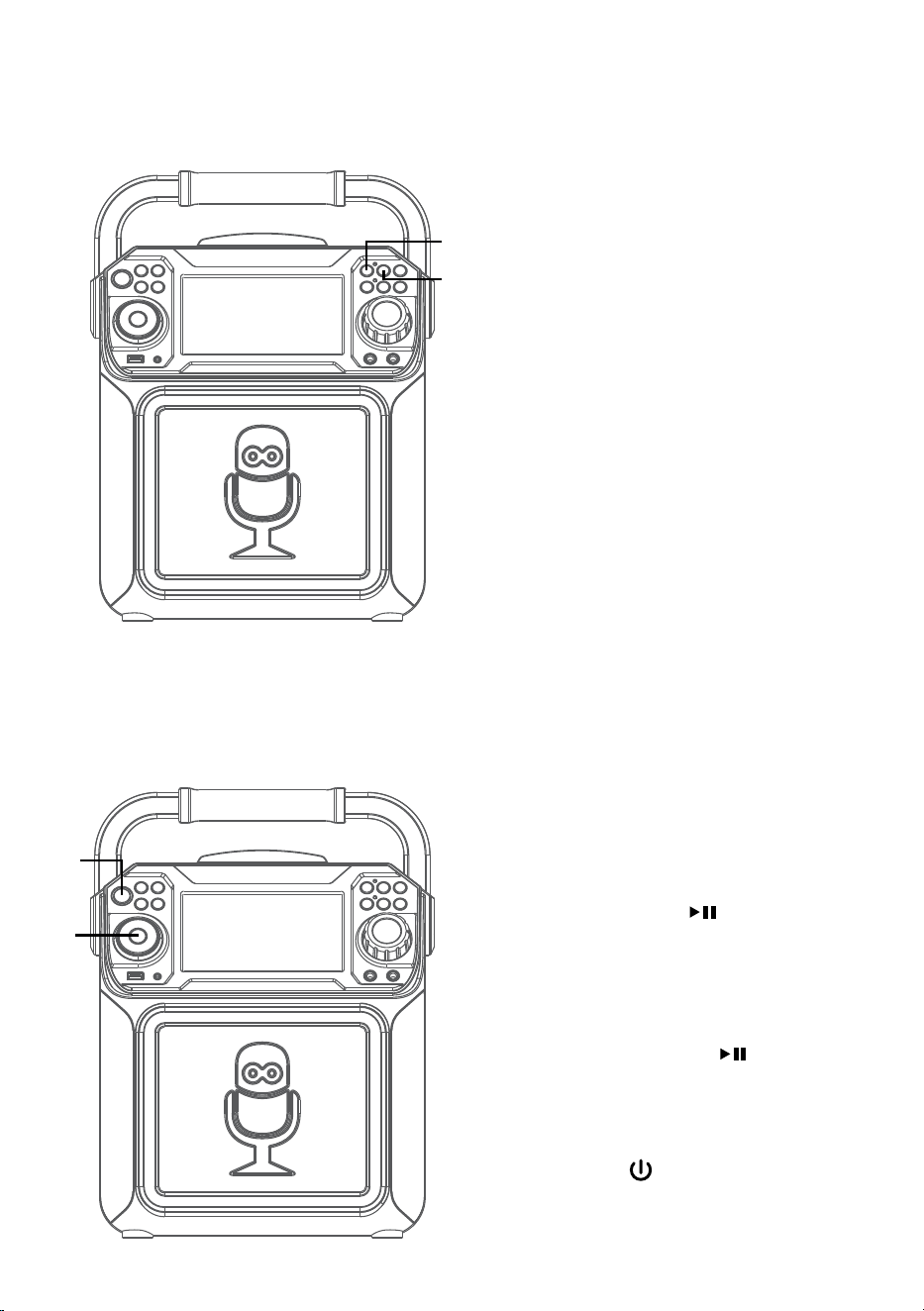
— F11 —
Utilisation
Lecture d’un CD (suite)
12
ENREGISTREMENT DE VOS
CHANTS:
Insérez d’abord une clé USB,
puis appuyez sur la touche
ENREGISTREMENT; la chanson
commencera et l’enregistrement
débutera. Le témoin d’enregistrement
s’allumera. ENREGISTREMENT
(REC) avec progression de la piste
en pourcentage s’affichera dans le
coin supérieur gauche de l’écran.
Pour arrêter l’enregistrement,
appuyez de nouveau sur la touche
ENREGISTREMENT. Le témoin
d’enregistrement s’éteindra.
Consultez « Lecture de chansons à
partir de la clé USB » pour lire vos
fichiers enregistrés sur la clé USB.
13
EFFET SONORE: Appuyez plusieurs
fois sur les touches EFFET VOCAL
pour sélectionner l’effet vocal ÉCHO,
FEMME, HOMME, CHIPMUNK,
ROBOT ou RADIO.
Sélectionnez AUCUN (NONE) pour
chanter sans aucun effet vocal.
14
PAUSE: Durant la lecture, si
vous désirez arrêter le disque
momentanément, appuyez Lire
(Play)/Pause
. Appuyez à
nouveau pour reprendre la lecture
normale.
15
Maintenez enfoncée la touche
LECTURE/PAUSE
pour arrêter la
lecture.
16
Appuyez sur la touche MARCHE/
ARRÊT
pour éteindre l’appareil. Le
témoin d’alimentation s’éteindra.
an
ao
ap
al
am
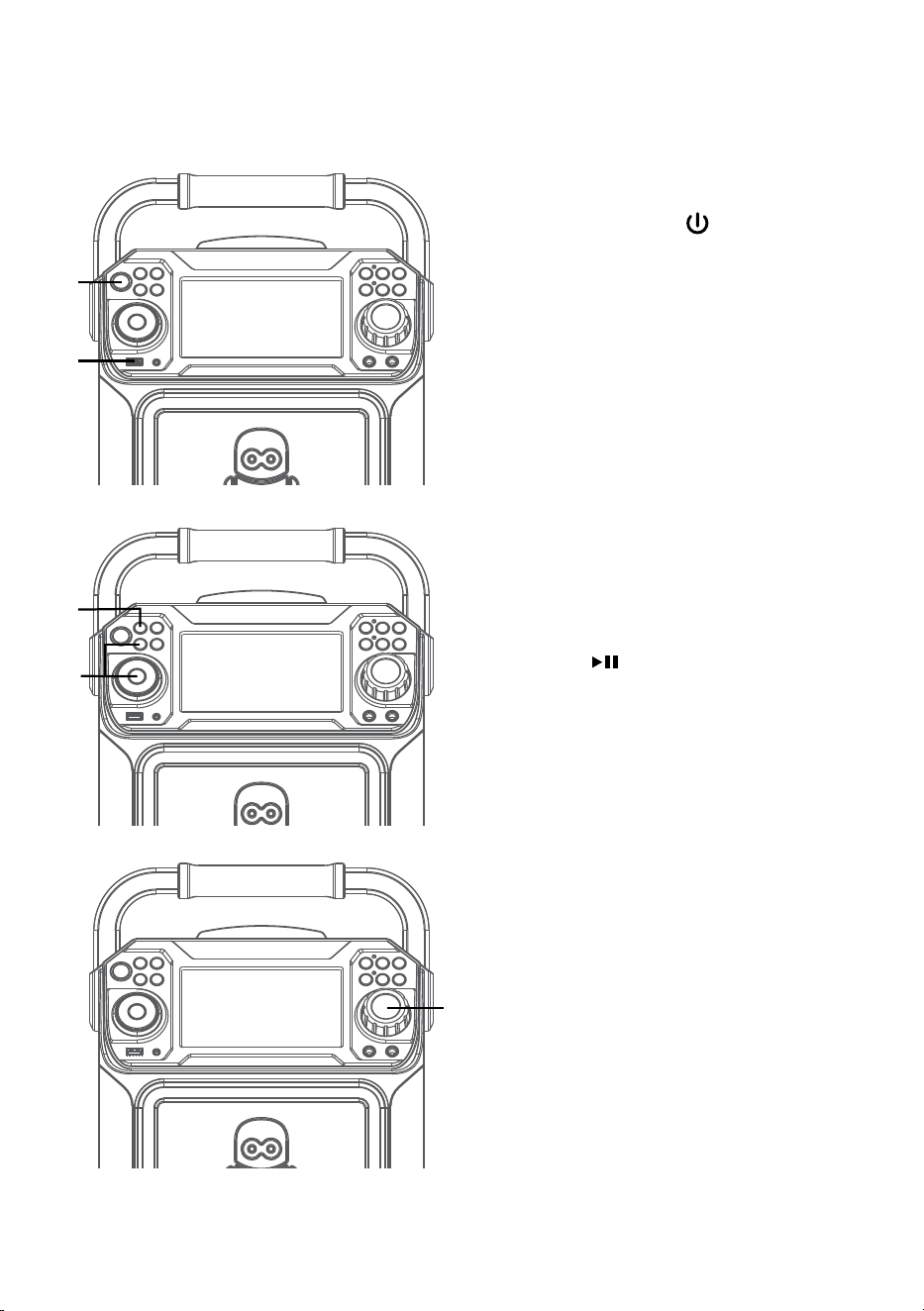
— F12 —
Utilisation
Lecture de chansons à partir de la clé USB
1
Raccordez l’appareil de la manière décrite
précédemment.Appuyez sur la touche
MARCHE/ARRÊT
pour allumer
l’appareil. Le témoin d’alimentation
s’allumera.
2
Insérez une clé USB dans le port USB
de l’appareil, face vers le haut. Assurez-
vous de télécharer de la musique de la
boutique Karaoké.
3
Appuyez plusieurs fois sur la touche
FONCTION (FUNCTION) pour
sélectionner le mode USB; la mention «
LIRE USB » (READ USB) s’affiche lors de
la recherche sur le disque et ensuite, le
nombre de pistes s’affichera.
4
Appuyez sur la touche Lire (Play)/
Pause
pour débuter la lecture. Vous
pouvez afficher l’image et les paroles à
l’écran lors de l’écoute d’un fichier CD+G.
Appuyez sur la touche MONITEUR pour
éteindre l’écran.
Remarque: À l’écran, les dossiers contenant
des enregistrements et des chansons
s’affichent à gauche et la liste des pièces du
dossier sélectionné s’affiche à droite. Pour
naviguer parmi ces dossiers, voir la page F13,
la section “PASSER”.
5
Ajustez le volume à un niveau confortable
en utilisant la commande de VOLUME
PRINCIPAL (MASTER VOLUME).
Remarque: Si connecté à un téléviseur ou à
une autre source audio, réglez le volume du
téléviseur en utilisant sa propre commande de
volume.
u
w
x
v
y
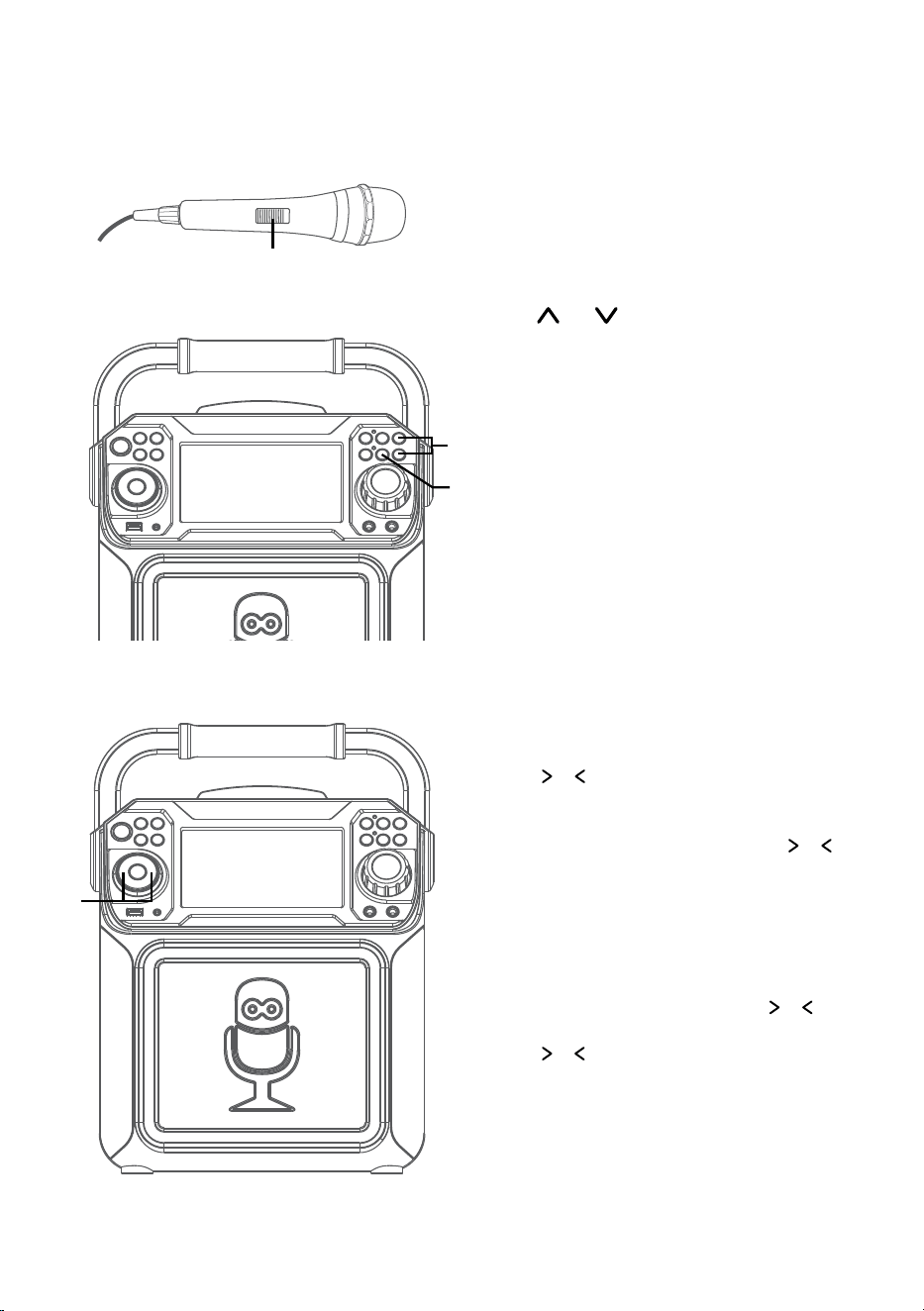
— F13 —
Utilisation
Lecture de chansons à partir de la clé USB (suite)
6
Connectez le ou les micro(s), puis glissez
l’interrupteur MARCHE/ARRÊT (ON/
OFF) à la position MARCHE.
7
Appuyez sur la touche VOLUME MICRO
ou pour régler le volume du micro
au niveau souhaité. Le fait de monter ce
réglage augmente le volume des deux
microphones.
8
L’option CONTRÔLE AUTOMATIQUE DE
LA VOIX peut être activé en appuyant
la touche MARCHE/ARRÊT Contrôle
de voix automatique (Auto Voice
Control). Les chants de l’enregistrement
multiplex sont coupés dès que vous
commencez à chanter dans le micro.
Lorsque le chanteur arrête de chanter,
les voix enregistrés sur l’enregistrement
multiplex se nivelleront en mode normal.
Remarque: Ceci est seulement pour les
fichiers enregistrés avec l’option multiplex.
9
PASSER: Avancer ou retourner d’une
piste à l’autre en appuyant sur les Passer
o .
RECHERCHE: Lors de la lecture de tout
CD audio sur votre clé USB, appuyez et
maintenez les touches Passer
o .
Le clé USB recherche dans les directions
avancé ou de recul à une haute vitesse. La
lecture normale se poursuit lorsque vous
relâchez la touche.
Au cours du mode Arrêt (Stop), vous
pouvez également sélectionner un fichier
à partir des touches Passer
o pour
faire défiler en haut/bas et/ou les touches
y pour faire défiler à gauche/droite.
La musique enregistrée sera dans le
dossier ENR (REC).
U
X
V
W
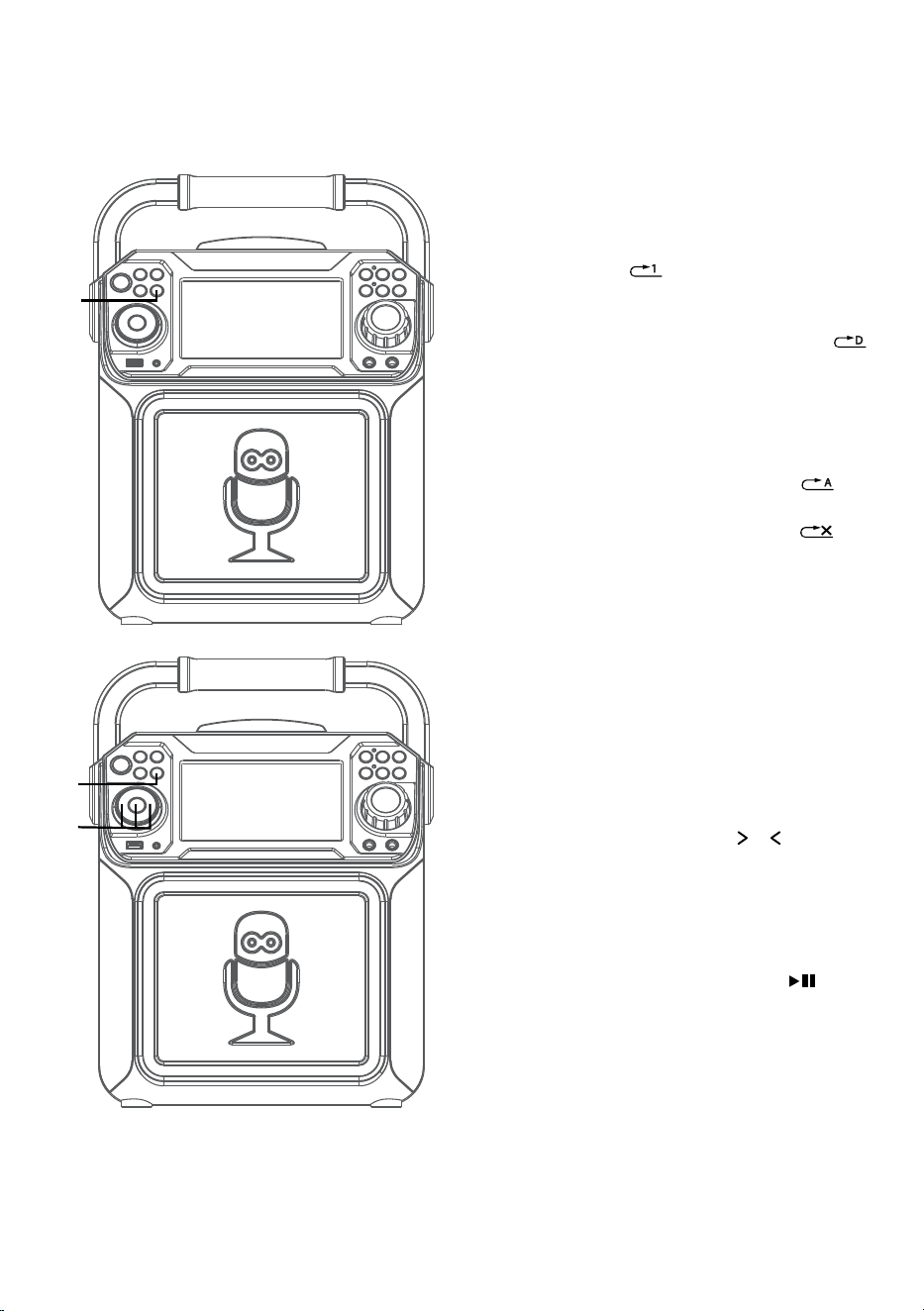
— F14 —
Utilisation
Lecture de chansons à partir de la clé USB (suite)
10
RÉPÉTER (REPEAT): Pour répéter la
piste actuelle, appuyez sur la touche
RÉPÉTER/PROGRAMME (REPEAT/
PROGRAM) une fois au cours de la
lecture,
s’affiche à l’écran et la
piste courante sera répétée. Appuyez
sur la touche RÉPÉTER/PROGRAMME
(REPEAT/PROGRAM) deux fois,
s’affichera et toutes les pistes MP3 à
l’intérieur du dossier se répéteront en
continu. Pour répéter toutes les pistes,
appuyez sur la touche RÉPÉTER/
PROGRAMME (REPEAT/
PROGRAM) un autre fois et,
)
s’affiche à l’écran. Appuyez de nouveau
pour répéter la fonctionnalité,
s’affiche à l’écran.
11
PROGRAMMATION: Vous pouvez
programmer jusqu’à 20 pistes
pour la lecture dans tout ordre
souhaité. En mode arrêt, appuyez
sur la touche PROGRAMME/
RÉPÉTER (PROGRAM/REPEAT);
PROG SET 00:XX (xx est le nombre
total de pistes) s’affiche à l’écran.
Sélectionnez la première piste à partir
des touches Passer
o , appuyez
ensuite sur la touche PROGRAMME/
RÉPÉTER (PROGRAM/REPEAT).
Répétez pour programmer un
maximum de 20 pistes, si nécessaire.
Lorsque terminé, appuyez sur la
touche Lire (Play)/Pause
pour
commencer la lecture.
Remarques:
• Maintenez enfoncée la touche RÉPÉTER/
PROG pour arrêter et supprimer le
programme.
• Si vous tentez de programmer plus de 20
pistes, « FUL » apparaîtra sur l’afficheur.
.
ak
ak
at
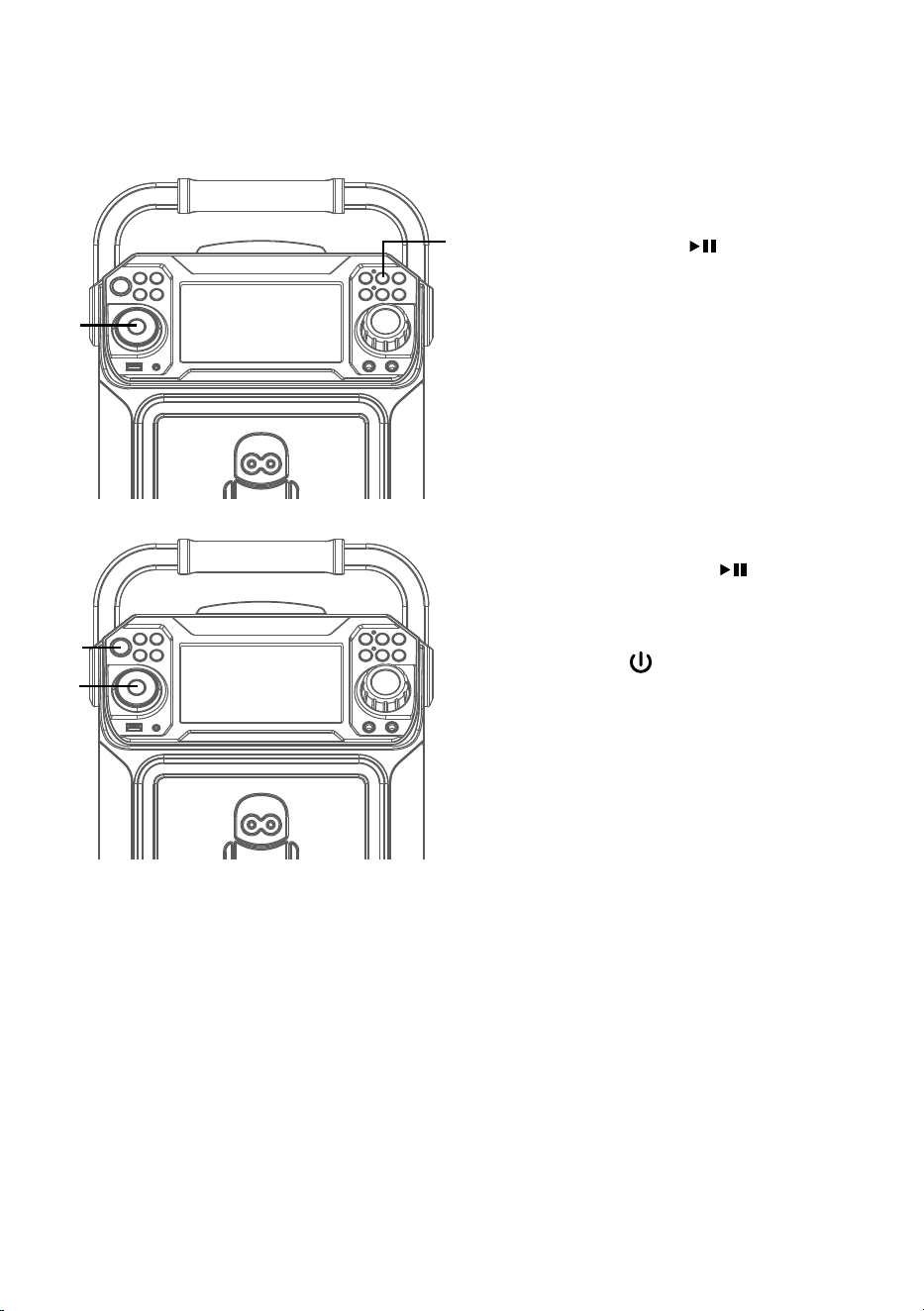
— F15 —
Utilisation
Lecture de chansons à partir de la clé USB (suite)
12
PAUSE: Durant la lecture, si
vous désirez arrêter le disque
momentanément, appuyez Lire
(Play)/Pause
/ENTRÉE.
Appuyez à nouveau pour reprendre la
lecture normale.
13
EFFET SONORE: Appuyez plusieurs
fois sur les touches EFFET VOCAL
pour sélectionner l’effet vocal ÉCHO,
FEMME, HOMME, CHIPMUNK,
ROBOT ou RADIO.
Sélectionnez AUCUN (NONE) pour
chanter sans aucun effet vocal.
14
Maintenez enfoncée la touche
LECTURE/PAUSE
pour arrêter la
lecture.
15
Appuyez sur la touche MARCHE/
ARRÊT
pour éteindre l’appareil. Le
témoin d’alimentation s’éteindra.
ao
al
an
am
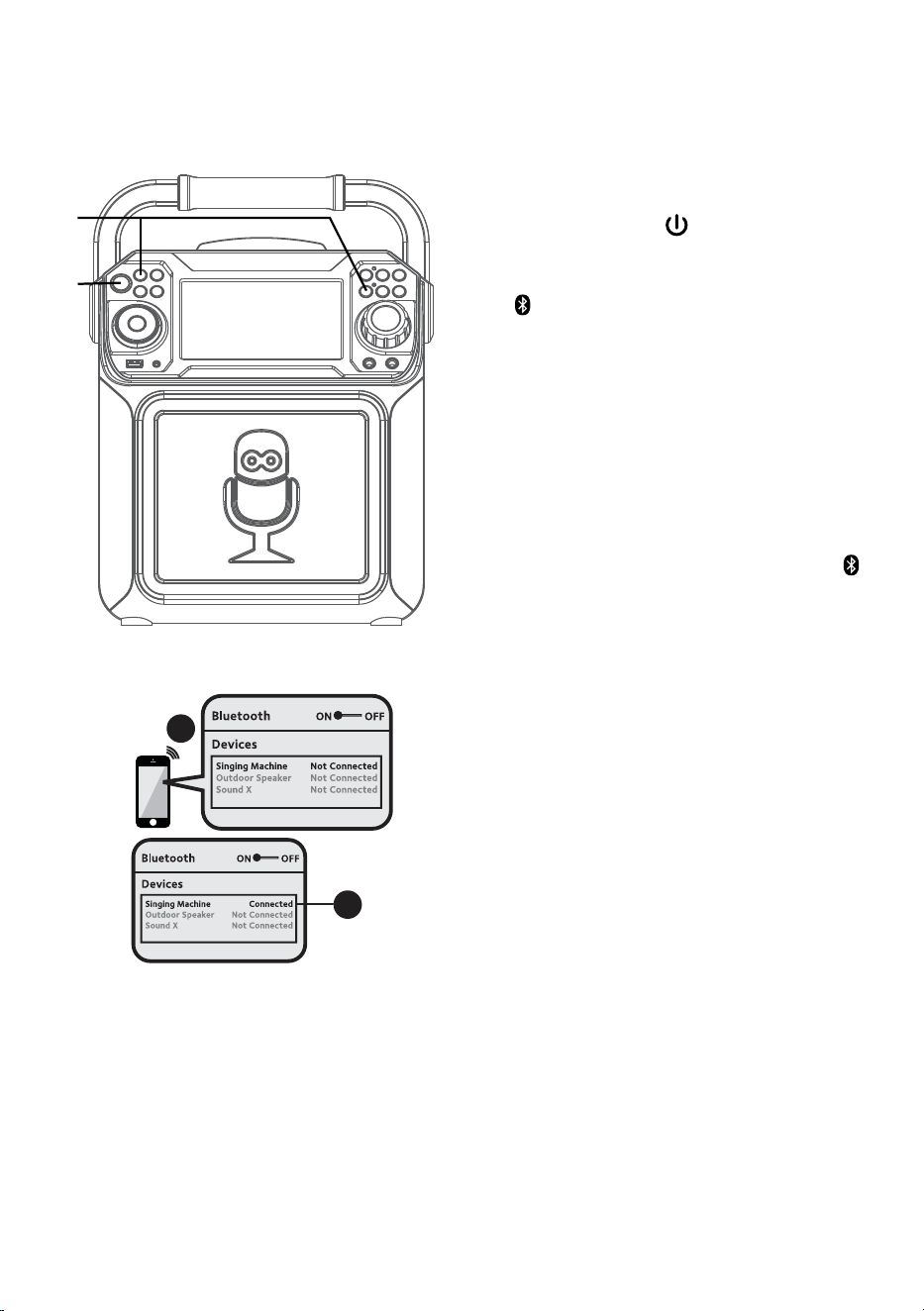
— F16 —
Utilisation
Utilisation d’un appareil Bluetooth
1
Raccordez l’appareil de la manière décrite
précédemment. Appuyez sur la touche
MARCHE/ARRÊT
pour allumer l’appareil.
Le témoin d’alimentation s’allumera.
2
Appuyez plusieurs fois sur la touche
ou FONCTION (FUNCTION) pour
sélectionner l’option Bluetooth; la mention :
« BLUETOOTH » s’affiche à l’écran. L’écran
affiche que votre dispositif Bluetooth est
prêt à être connecté par une notification
sonore. S’il y a un dispositif Bluetooth jumelé
précédemment, l’appareil se connectera
automatiquement avec une notification
sonore de jumelage. S’il n’y a eu aucun
jumelage précédemment, connectez-vous
tel qu’indiqué à la prochaine étape.
Remarque: Vous pouvez également appuyer
pour déconnecter tout appareil jumelé afin de le
jumeler à un autre appareil.
3
Activez l’option Bluetooth dans les
paramètres de votre appareil pour
rechercher un dispositif détectable avec
un signal Bluetooth. Sélectionnez “Singing
Machine” à partir des résultats dans le
menu Bluetooth.
Remarque: Veuillez vous reporter au manuel
d’utilisation de votre appareil Bluetooth pour
obtenir des instructions détaillées.
4
L’écran affiche que votre dispositif
Bluetooth est connecté par une notification
sonore.
Remarques:
• Si votre dispositif Bluetooth vous demande
d’inscrire un mot de passe au cours du
processus de jumelage, veuillez inscrire “0000”
pour vous connecter.
• Sur certains dispositifs Bluetooth, lorsque le
jumelage est terminé, vous devez sélectionner
l’appareil à l’aide de l’option « Utiliser
comme périphérique audio » ou d’une option
semblable.
• Si la connexion est perdue après un jumelage
réussi, assurez-vous que la distance entre
les haut-parleurs et le dispositif Bluetooth
n’excède pas 30 pi/10 mètres.
Please connect your Music Device
Your Music Device is connected
3
4
Please connect your Music Device
Your Music Device is connected
u
v
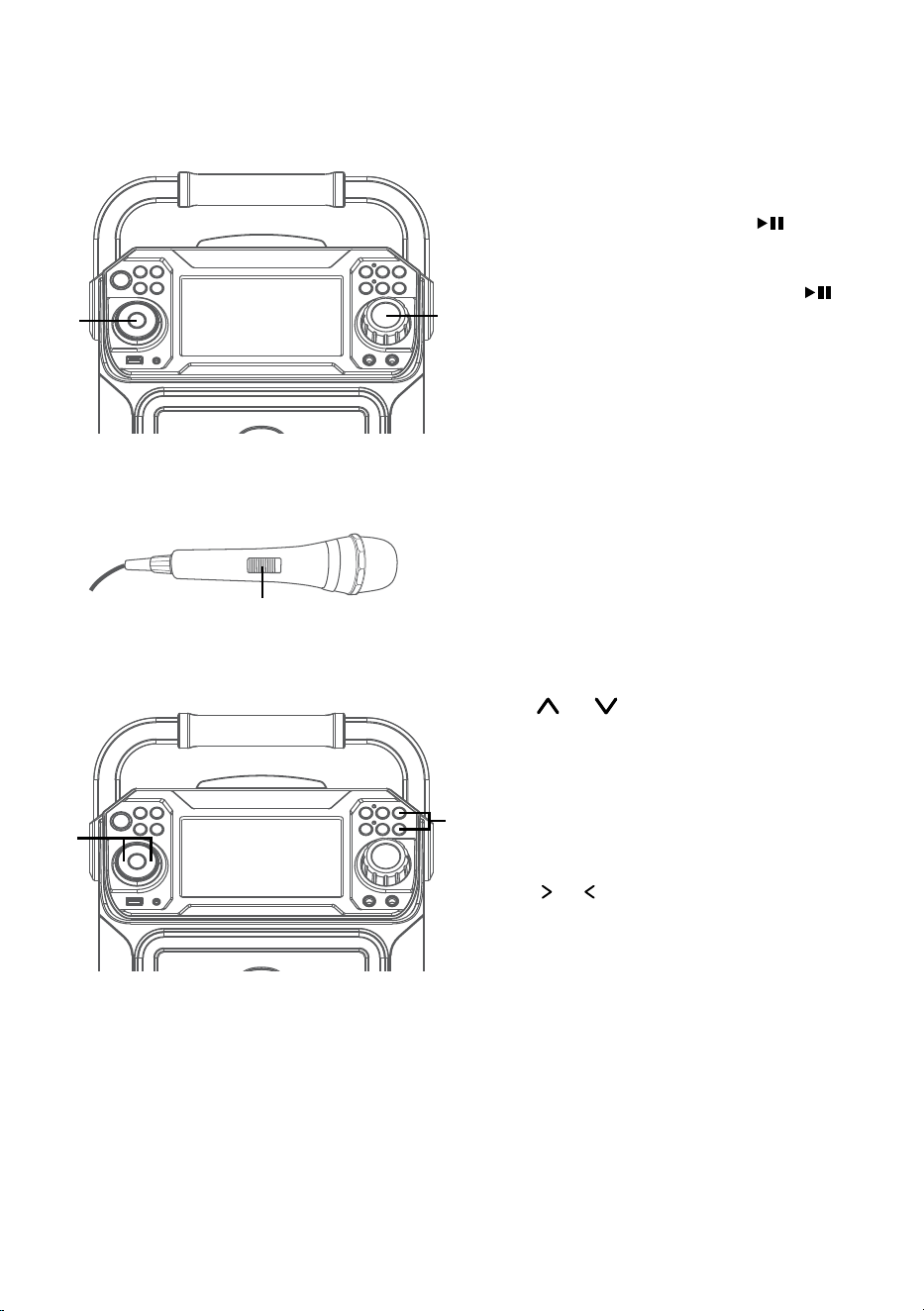
— F17 —
Utilisation
Utilisation d’un appareil Bluetooth (suite)
5
Pour contrôler le dispositif Bluetooth
à partir de cet appareil, appuyez sur la
touche Lire (Play)/Pause
/ENTRÉE
pour débuter la lecture (l’application de
musique doit être allumée). Appuyez
sur la touche Lire (Play)/Pause
/ENTRÉE au cours de la lecture pour
interrompre la chanson.
6
Ajustez le volume à un niveau confortable
en utilisant la commande du VOLUME
PRINCIPAL (MASTER VOLUME) sur cet
appareil ou le volume sur votre dispositif
Bluetooth.
7
Connectez le ou les micro(s), puis glissez
l’interrupteur MARCHE/ARRÊT (ON/
OFF) à la position MARCHE.
8
Appuyez sur la touche VOLUME MICRO
ou pour régler le volume du micro
au niveau souhaité. Le fait de monter ce
réglage augmente le volume des deux
microphones.
9
PASSER: Avancer ou retourner d’une
piste à l’autre en appuyant sur les Passer
o .
y
W
X
U
V
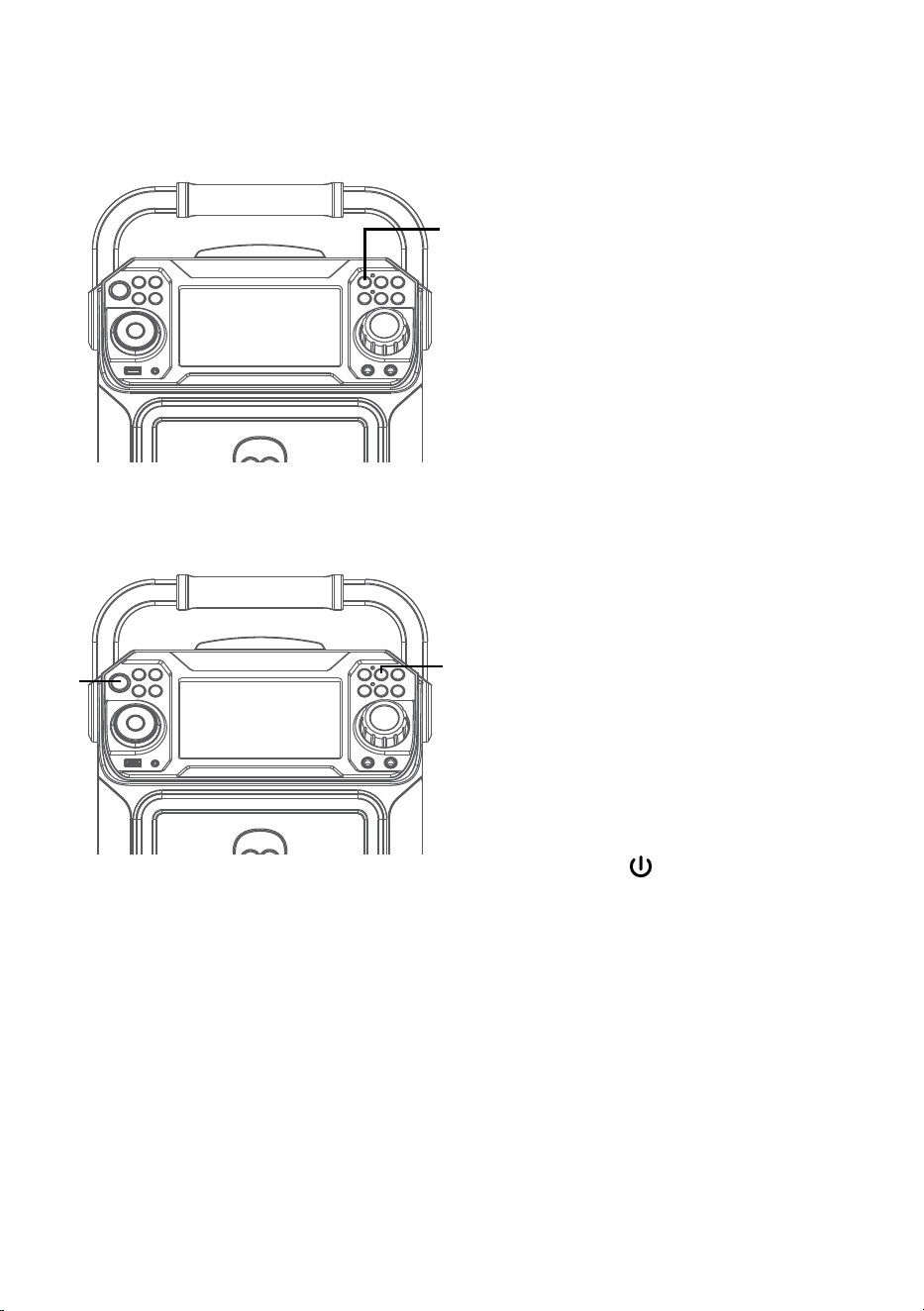
— F18 —
Utilisation
Utilisation d’un appareil Bluetooth (suite)
10
ENREGISTREMENT DE VOS
CHANTS: Insérez d’abord une
clé USB, puis appuyez sur la
touche ENREGISTREMENT;
la chanson commencera et
l’enregistrement débutera.
Le témoin d’enregistrement
s’allumera. ENREGISTREMENT
(REC) avec progression de la piste
en pourcentage s’affichera dans le
coin supérieur gauche de l’écran.
Pour arrêter l’enregistrement,
appuyez de nouveau sur la touche
ENREGISTREMENT. Le témoin
d’enregistrement s’éteindra.
Consultez « Lecture de chansons à
partir de la clé USB » pour lire vos
fichiers enregistrés sur la clé USB.
11
EFFET SONOR: Appuyez plusieurs
fois sur les touches EFFET VOCAL
pour sélectionner l’effet vocal ÉCHO,
FEMME, HOMME, CHIPMUNK,
ROBOT ou RADIO.
Sélectionnez AUCUN pour chanter
sans aucun effet vocal.
12
Appuyez sur la touche MARCHE/
ARRÊT
pour éteindre l’appareil. Le
témoin d’alimentation s’éteindra.
ak
at
al
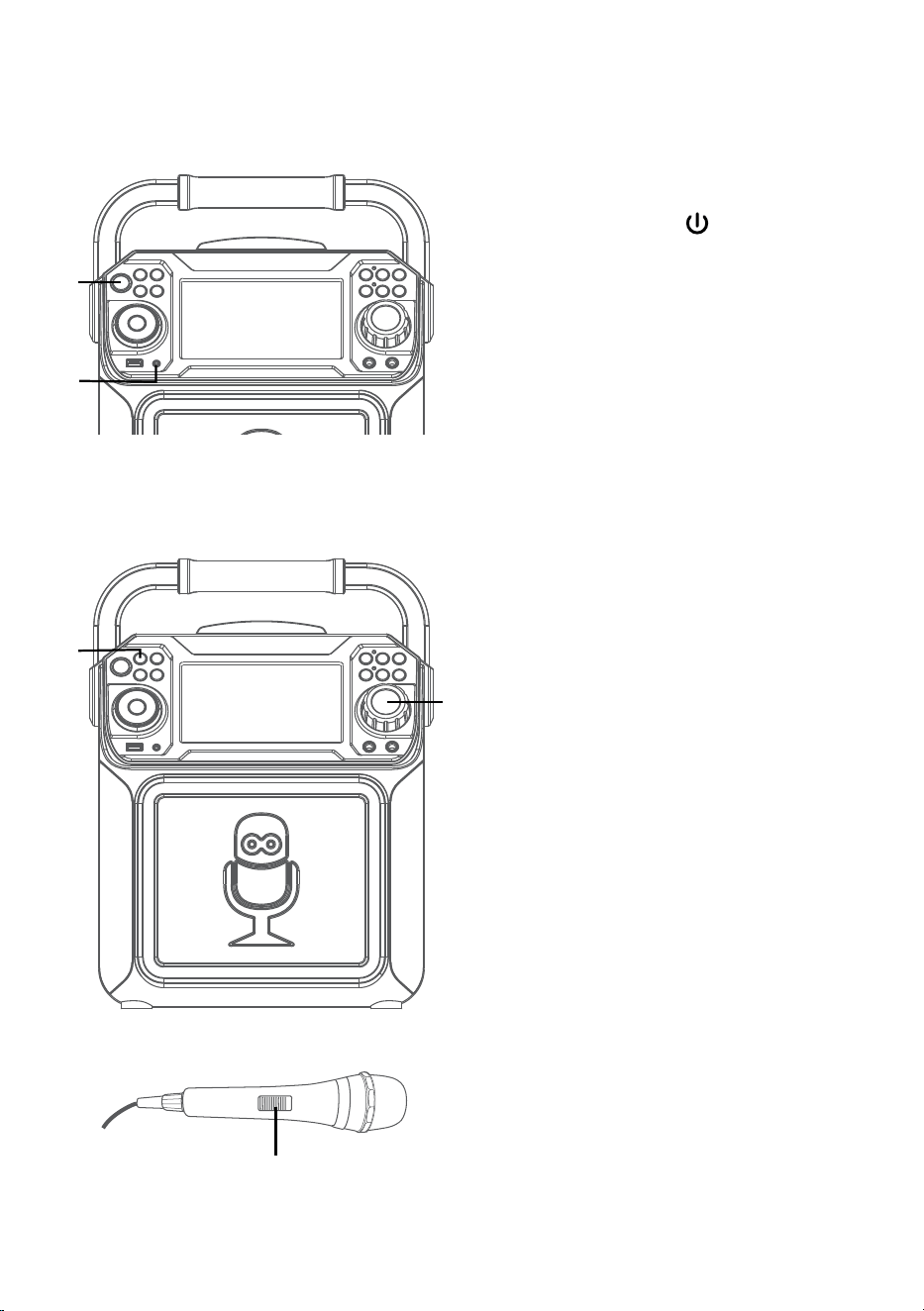
— F19 —
Utilisation
En utilisant l’entrée LINE IN
1
Raccordez l’appareil de la manière décrite
précédemment.Appuyez sur la touche
MARCHE/ARRÊT
pour allumer
l’appareil. Le témoin d’alimentation
s’allumera.
2
Connectez l’appareil externe à la prise
LINE IN située à l’avant de cet appareil.
La connexion avec l’appareil externe
permettra au son audio d’être en lecture
sur le Singing Machine.
Remarques:
• Il est fortement recommandé de régler
le volume de l’appareil auxiliaire à 1/3
du niveau ou plus bas pour éviter toute
distorsion.
• Il n’est pas possible de passer des fichiers/
pistes lorsque vous utiliser un appareil
externe.
3
Appuyez sur la touche FONCTION
(FUNCTION) pour sélectionner le mode
LINE IN; la mention “LINE IN” s’affichera à
l’écran.
4
Réglez le volume en utilisant la
commande de volume principal
(MASTER VOLUME) de cet appareil ou
à partir de la commande de volume de
votre dispositif externe.
5
Connectez le ou les micro(s), puis glissez
l’interrupteur MARCHE/ARRÊT (ON/
OFF) à la position MARCHE.
u
w
v
x
y
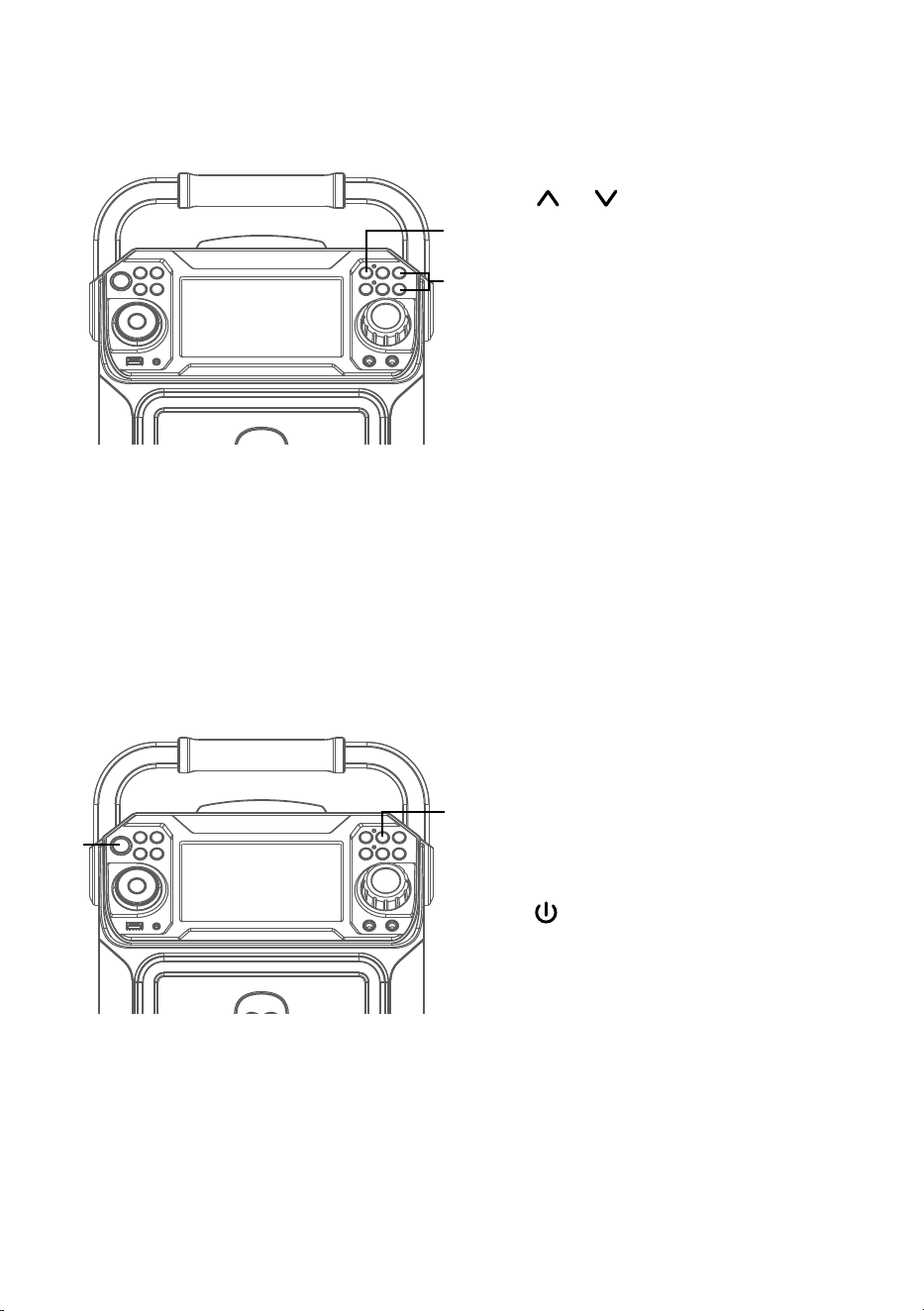
— F20 —
Utilisation
En utilisant l’entrée LINE IN (suite)
6
Appuyez sur la touche VOLUME MICRO
ou pour régler le volume du micro
au niveau souhaité. Le fait de monter ce
réglage augmente le volume des deux
microphones.
7
ENREGISTREMENT DE VOS CHANTS:
Insérez d’abord une clé USB, puis appuyez
sur la touche ENREGISTREMENT; la
chanson commencera et l’enregistrement
débutera. Le témoin d’enregistrement
s’allumera. ENREGISTREMENT (REC) avec
progression de la piste en pourcentage
s’affichera dans le coin supérieur gauche
de l’écran. Pour arrêter l’enregistrement,
appuyez de nouveau sur la touche
ENREGISTREMENT. Le témoin
d’enregistrement s’éteindra.
Consultez « Lecture de chansons à partir
de la clé USB » pour lire vos fichiers
enregistrés sur la clé USB.
8
EFFET SONORE: Appuyez plusieurs
fois sur les touches EFFET VOCAL pour
sélectionner l’effet vocal ÉCHO, FEMME,
HOMME, CHIPMUNK, ROBOT ou RADIO.
Sélectionnez AUCUN pour chanter sans
aucun effet vocal.
9
Appuyez sur la touche MARCHE/ARRÊT
pour éteindre l’appareil. Le témoin
d’alimentation s’éteindra.
X
V
U
W
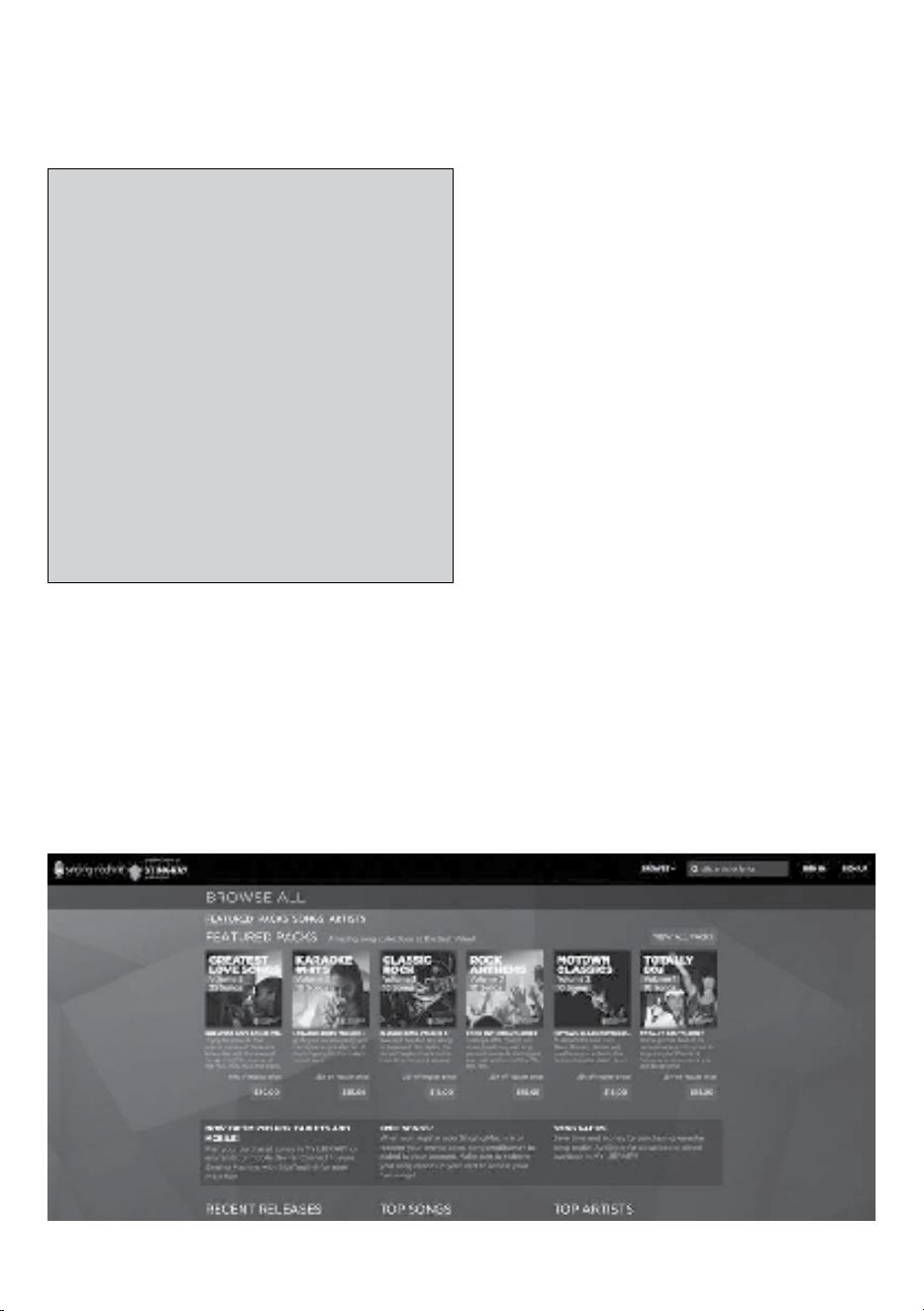
— F21 —
Utilisation
Pour acheter ou télécharger des chansons de
karaoké, veuillez s’il vous plaît, visiter le http://
store.singingmachine.com pour accéder à plus de
13 000+ de vos chansons de karaoké favorites.
Vous aurez besoin d’un disque USB flash (non
inclus) pour transférer les téléchargements vers
l’unité.Veuillez suivre les étapes simples:
1
Rendez-vous au site http://store.
singingmachine.com à partir de votre
navigateur Internet et ensuite, enregistrez-
vous.
2
Sélectionnez et achetez vos chansons de
karaoké préférées à partir de la boutique
Singing Machine Download.
3
Téléchargez vos achats sélectionnés à
partir du casier Singing Machine Digital
vers disque USB flash.
4
Insérez le lecteur USB flash comme
démontré à la page F12 et amusez-vous!
Où télécharger des fichiers MP3+G
FAQ
• Où puis-je obtenir de l’aide supplémentaire
concernant les formats de fichiers?
Visitez http://singingmachine.com/smcmusic/
pour obtenir des ressources supplémentaires
sur le type adéquat de FORMAT DE FICHIER
pour votre système.
Conseils pratiques:
Les fichiers .mp3 et .cdg sont fournis en
téléchargement dans un seul fichier .zip MP3+G
compressé. Il n’est pas possible d’effectuer la lecture
du fichier MP3+G en tant que fichier .zip sur une
mémoire flash USB. Pour effectuer la lecture de
chansons de karaoké à l’aide d’une mémoire flash USB,
le fichier .zip MP3+G doit être décompressé comme
suit:
• Connectez une mémoire flash USB à votre
ordinateur
• Téléchargez le fichier MP3+G à partir de votre
section numérique Digital Locker et enregistrez le
fichier.zip* dans un dossier de votre ordinateur
• Double-cliquez sur le fichier .zip pour l’ouvrir
(vous pourrez voir les fichiers .mp3 et .cdg)
• Faites glisser les fichiers .mp3 et .cdg vers la
mémoire flash USB
• Retirez (éjectez) la mémoire flash USB de votre
ordinateur.
Allumez le karaoké Singing Machine et connectez la
mémoire flash USB.
Remarque: Vos chansons téléchargées peuvent aussi être gravées sur un disque compact (CDR-
CDRW).

— F22 —
Guide de dépannage
En cas de problème avec cet appareil, vérifiez les points suivants avant de le faire réparer:
Aucune alimentation
• L’appareil n’est pas sous tension; appuyez sur la touche MARCHE/VEILLE (ON\OFF)
pour allumer l’appareil.
• Assurez-vous que l’adaptateur AC est bien connecté à l’arrière de l’appareil.
• Connectez l’appareil à un autre périphérique.
Aucun son - général
• Le volume principal est réglé au minimum : augmenter le volume.
• La bonne fonction n’a pas été sélectionnée; sélectionnez à partir de la touche FONCTION
(FUNCTION)
.
• Si vous utilisez un dispositif externe, augmenter le volume.
Aucun son - si connecté à votre téléviseur
• Le volume du téléviseur est en mode silence ou trop faible.
• La source appropriée (habituellement AV) n’est pas sélectionnée dans le menu du
téléviseur.
Aucun son provenant du microphone
• Assurez-vous que le microphone est connecté fermement à la prise MIC 1 ou MIC 2.
• Assurez-vous que le commutateur MARCHE/ARRÊT (ON\OFF) du microphone soit en
position MARCHE.
• Assurez-vous que le niveau du MIC VOLUME n’est pas trop faible.
• Le volume principal est réglé au minimum : augmenter le volume.
• Augmentez le contrôle Écho au-dessus du milieu.
Les fichiers sur la clé USB ne s’ouvrent pas
• Le fichier est corrompu; remplacez le fichier.
• Le fichier n’est pas dans un format de lecture compatible.
• Le dispositif USB n’est pas compatible à l’appareil.
L’appareil Bluetooth ne peut pas être jumelé ou connecté avec l’appareil
• Ensure any other Bluetooth devices are turned off to avoid accidental pairing.
• Vous n’avez pas activé la fonction Bluetooth de votre appareil; consultez la page 16 ou reportez-
vous au mode d’emploi de l’appareil Bluetooth.
• Le système n’est pas en mode de jumelage : appuyez sur la touche
pour redémarrer le jumelage.
La lecture musicale n’est pas disponible sur l’appareil après l’établissement de la connexion
Bluetooth
• Assurez-vous que l’appareil Bluetooth est compatible avec le profil Bluetooth A2DP.
• Le volume du dispositif externe Bluetooth est en mode silence ou trop faible; augmenter le volume.
L’appareil n’enregistre pas
• Aucune clé USB n’est inséré, ou l’appareil USB est complet. Transférez tous les enregistrements sur
votre ordinateur pour créer de l’espace.

— F23 —
Caractéristiques techniques
AUDIO
Alimentation de sortie ....................................................................................................................15 Watts (RMS)
Impédance de sortie ........................................................................................................................................4 Ohms
SECTION DU LECTEUR DE CD
Réponse en fréquence ................................................................................................................... 100Hz - 20kHz
Ratio du signal-bruit ........................................................................................................................50dB (A-WTD)
Nombre de programmes ..................................................... 20 étapes de programmation d’accès aléatoires
BLUETOOTH
Bluetooth Version ................................................................................................................................................. V4.2
Distance de travail .................................................. jusqu’à 30 pieds/10 mètres mesuré en espace ouvert
USB
Format ....................................................................................................................................................................FAT32
Compatibilité maximale ......................................................................................................................................32GB
GÉNÉRALITÉS
Alimentation ................................................................................................................... DC12V 2A Positive Center
Dimensions - appareil principal Unit ..........................13,0 x 9,1 x 17,04 inches (33,0 x 23,0 x 43,1cm)
Poids - appareil principal ................................................................................................................ 8,7Lbs (4,0kgs)
Microphone ................................-74 dB 600 Ohms impédance avec microphone dynamique de 6,3 mm
Aux In ........................................................................................................................................... 3,5mm prise stéréo
Caractéristiques sujettes à modifications sans préavis.
Le mot et le logo Bluetooth® sont des marques déposées de Bluetooth SIG, Inc. Leur utilisation par
The Singing Machine Company est soumise à une licence. Toutes les autres marques sont la propriété
de leurs détenteurs respectifs.

Visit Our Website: www.singingmachine.com
Visite Nuestra Pagina de Internet: www.singingmachine.com
Visitez notre site Web : www.singingmachine.com
The Singing Machine Company, Inc.
4060 E Jurupa Street, Unit B
Ontario, CA 91761-1413 USA
Copyright © 2018 All Rights Reserved.
Derechos de autor © 2018 Todos los derechos reservados.
Droit d’auteur© 2018 - Tous droits réservés.
PRINTED IN CHINA
IMPRESO EN CHINA
Imprimé en Chine
782-1805-ESF01-US