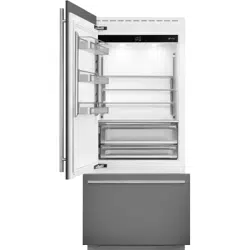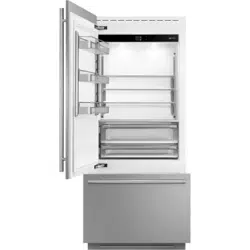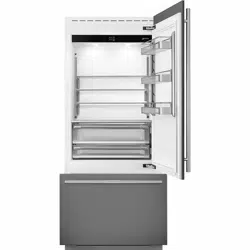
Fridge
User manual
Frigoríco
Manual de usuario
Réfrigérateur
Mode d’emploi
2
www.smeg.com
3
www.smeg.com
EN
CONTENTS
1.
IMPORTANT SAFETY AND ENVIRONMENTAL INFORMATION 6
1.1. Caring for the environment ........................................................................................................................................8
1.2. Cleaning, sanitising and maintaining the ice dispenser ...................................................................................... 8
1.3. Information for regulatory authorities .....................................................................................................................8
1.4. To save energy ...............................................................................................................................................................9
2. INSTALLATION 10
2.1. Installation ...................................................................................................................................................................... 10
2.2. Connection to the water system ............................................................................................................................... 10
2.3. Connection to the electrical power supply .............................................................................................................11
2.4. Refrigerant .....................................................................................................................................................................11
3. BEFORE STARTING 12
3.1. To know your fridge well ............................................................................................................................................. 12
3.2. Manufacturer’s liability .................................................................................................................................................12
3.3. Technical support ......................................................................................................................................................... 12
3.4. Product plate .................................................................................................................................................................12
3.5. General description ......................................................................................................................................................13
3.6. Electronic Control ......................................................................................................................................................... 14
3.7. Main control panel ........................................................................................................................................................14
4. SWITCHING THE APPLIANCE ON 15
4.1. Turningonando ........................................................................................................................................................ 15
5. COMPARTMENT TEMPERATURE SETTING 18
5.1. How to adjust the compartment temperature....................................................................................................... 18
5.2. Information and malfunction messages on the display ...................................................................................... 19
6. FUNCTIONS AND SETTINGS 20
6.1. Functions ........................................................................................................................................................................ 20
6.2. Settings ........................................................................................................................................................................... 26
7. LAYOUT 31
7.1. Positioning, adjusting and internal drawers removal ...........................................................................................31
8. ACTIVATING AND USING THE ICE MAKER 32
8.1. Activating and using the Ice Maker .......................................................................................................................... 32
8.2. Internalwaterlter ....................................................................................................................................................... 33
8.3. ExternalwaterlterforfreezercolumnIceMaker .............................................................................................. 33
9. LIGHTING 34
9.1. Compartment
lighting ............................................................................................................................................................ 34
10. CONSERVATION OF FOOD 34
10.1. General directions ........................................................................................................................................................ 34
10.2. How to maintain good food quality ......................................................................................................................... 35
10.3. Tips for food storage ....................................................................................................................................................36
11. CARE AND CLEANING 39
11.1. Care and Cleaning ........................................................................................................................................................39
11.2. Internal cleaning ........................................................................................................................................................... 39
11.3.Cleaningoftheventilationgrill,lterandcondenser .......................................................................................... 40
11.4. Lower condenser ..........................................................................................................................................................40
12. TROUBLESHOOTING GUIDE 41
1.1. Troubleshooting Guide ................................................................................................................................................ 41
1.2. Malfunction messages appearing on the display..................................................................................................43
WARNING
IMPORTANT SAFETY INSTRUCTIONS
This manual contains operational instructions for the users of the appliance.
Keep this manual in an easily accessible place for future reference.
Improper installation, adjustment, alteration, service or maintenance can
cause property damage, injury, or death.
Read the installation, operating, and maintenance instructions thoroughly
before installing or servicing this equipment.
To reduce risk of re, electric shock, or injury to persons when using your applian-
ce, follow basic precautions, including the following:
> Children should be supervised to ensure that they do not play with the appliance.
> This appliance is not intended for use by persons (including children) with reduced
physical, sensory or lack of experience and knowledge unless they have been given
supervision or instruction concerning use of the appliance by a person responsible for
their safety.
>
This appliance is designed to refrigerate beverages and foods and is intended for domestic use.
> This appliance is intended to be used in household and similar applications such as: sta
kitchen areas in shops, oces, and other working environments; farm houses and by
clients in hotels, motels, and other residential-type environments; bed and breakfast-
type environments; and catering and similar non-retail applications.
> Do NOT use an extension cord or adapter.
> Plug into a grounded 3 prong outlet.
> Do not remove ground prong.
> If available, ice make kit can be added to some models. See serial tag inside the food
compartment of appliance for ice maker kit model information.
> A qualied service technician must connect ice maker (if available) and the appliance to
the water supply system (if the appliance has water load included).
> If present, clean the ice bucket or drawer regularly but using only drinking water.
> The appliance should be supplied only with drinkable water (if is --- a water connection).
WARNING
In the event of a power failure, do not attempt to operate this
appliance.
WARNING
Keep the appliance area free and clear from combustibles or
ammable materials and vapors.
WARNING
Keep ventilation openings, in the appliance enclosure or in the
built-in structure, clear of obstruction. Do not obstruct the air
intake or exhaust openings of the appliance.
WARNING
Do not store explosive substances such as aerosol cans with a
ammable propellant in this appliance.
WARNING
Do not use electrical appliances inside the food storage com-
partments of the appliance, unless they are of the type recom-
mended by the manufacturer.
W
This is the safety alert symbol. This symbol alerts you to potential hazards that can kill or
hurt you and others. All safety messages will follow the safety alert symbol and either the
word “DANGER” or “WARNING.”
These
words mean:
WARNING
You can be killed or seriously injured if you don’t follow instructions.
DANGER
You can be killed or seriously injured if you don't immediately follow
instructions.
All safety messages will tell you what the potential hazard is, tell you how to reduce the chance
of injury, and tell you what can happen if the instructions are not followed.
SAVE THESE INSTRUCTIONS!
IMPORTANT SAFETY INSTRUCTIONS FOR MAINTENANCE
AND CARE
DANGER
Risk of re or explosion due to puncture of refrigerant tubing; fol-
low handling instructions carefully. Flammable refrigerant used.
WARNING
To b
e repaired only by trained service personnel.
Use only manufacturer-authorized service parts, Do not use replacement parts that
have not been recommended by the manufacturer (e.g, parts made at home using a
3D printer). If power supply cord is damaged, it must be replaced by the manufac-
turer, its service agent, or a similarly qualied person in order to avoid a hazard.
Any repair equipment used must be designed for ammable refrigerants. Follow all
manufacturer repair instructions. Use nonammable cleaner.
WARNING
Do not puncture refrigerant tubing, do not damage the refrige-
rant circuit.
WARNING
Do not use mechanical devices or other means to accelerate
the defrosting process, other than those recommended by the
manufacturer.
TIP OVER HAZARD
WARNING
Refrigerator is top heavy and tips easily when not completely
installed; to avoid a hazard due to instability of the appliance, it
must be xed in accordance with the instructions (see instruction manual provided).
Keep doors taped closed until refrigerator is completely installed.
Use two or more people to move and install refrigerator.
Failure to do can result in death or serius injury.
IMPORTANT SAFETY INSTRUCTIONS FOR PROPER DISPOSAL
OF YOUR OLD REFRIGERATOR
WARNING
Suocation Hazard
Remove doors or lid from your old appliance.
Failure to do so can result in death or brain damage.
WARNING
Risk of child entrapment.
Before you throw away your old refrigerator or freezer:
> Take o the doors.
> Leave the shelves in place so that children may not easily climb inside.
> IMPORTANT: Child entrapment and suocation are not problems of the past. Junked or
abandoned refrigerators are still dangerous, even if they will sit for "just a few days."
If you are getting rid of your old refrigerator, please follow these instructions to help
prevent accidents.
Important information to know about disposal of refrigerants:
Dispose of refrigerator in accordance with federal and local regulations. Refrigerants
must be evacuated by a licensed. EPA-certied refrigerant technician in accordance with
established procedures.
6
www.smeg.com
1. IMPORTANTSAFETYANDENVIRONMENTALINFORMATION
1.1. For your safety
> If this appliance is replacing an existing ap-
pliance which must be removed or disposed of,
make sure that it does not become a dangerous
trap for children.
> This appliance is designed to refrigerate bev-
erages and foods and is intended for domestic
use.
> This appliance is for refrigeration and conser-
vation of fresh and frozen foods in the home.
Any other use is considered inappropriate.
> This appliance is not designed to operate with
external timers or with remote-control systems.
> The appliance must be installed by following
the instructions in the Installation Guide, par-
ticular care should be taken not to obstruct the
vent openings of the appliance and of the
built-in units.
> The appliance features a concentrated light-
ing system with LED lamps. Do not stare at these
lamps when they are on, as this could damage
your vision.
This warning is also included on the label at-
tached to the inside of the refrigerator door.
> When the freezer is operating, do not touch
the interior stainless steel surfaces with wet or
damp hands, as skin may stick to the very cold
surfaces.
> Do not use any type of electrical equipment in-
side the appliance.
> Whenpositioningtheshelves,donotplacen-
gers in the shelf slide guides.
> Do not position containers of ammable liq-
uids near the appliance.
> Never attempttoextinguishaame/rewith
water: unplug the appliance from the outlet and
covertheamewithareproofblanket.
> Do not position containers of ammable liq-
uids near the appliance.
> Completely switch o the appliance and un-
plug the power supply cable during cleaning op-
erations. If the plug is not easily reached, it is a
good idea toturnothecircuitbreakerthatcor-
responds to the outlet which the unit is plugged
into.
> Packaging materials can be dangerous for
children: do not allow children to play with plastic
bags,plasticlmorpolystyrene.
> Anyrepairsmustbeperformedbyaqualied
service technician.
> This appliance is not intended for use by per-
sons (including children) with reduced physi-
cal, sensory or mental capabilities or lack of
experience and knowledge unless they have
been given supervision or instruction concern-
ing the use of the appliance by a person respon-
sible for their safety. Children should be super-
vised to ensure that they do not play with the
appliance.
> Do not damage the appliance’s refrigerant cir-
cuit tubing.
> Do not store explosive substances, such as
aerosolcanswithaammablepropellant,inside
this appliance.
> The amount of refrigerant gas contained in
yourapplianceis indicated onthe identication
plate located inside the appliance. If the power
cord of this appliance is damaged, it must be re-
placed by the manufacturer, customer service or
asimilarlyqualiedperson.
> Improper installations and repairs may put the
user at considerable risk.
> Repairsmustbecarriedoutbytheauthorized
customer service.
> Only original spare parts from the manufac-
turer can be used. Only with the use of these
components does the manufacturer guarantee
that the safety requirements of the product are
complied with.
> Repairs may be performed by the manufac-
turer,authorizedcustomerserviceorasimilarly
qualiedpersononly.
> Plug the appliance into a grounded 3-poles
outlet.
> Do not remove the ground pole.
> Do not use an adapter.
> Do not use an extension cord.
> Disconnect power to all units before servicing.
> If the POWER CORD is damaged, it must be
replacedbythemanufacturer,anauthorizedser-
vicecentreorasimilarqualiedpersoninorder
toavoidanyhazards.
> Children must be supervised to make sure
they do not play with the appliance.
> Do not modify this appliance.
> Do not insert pointed metal objects (kitchen
utensils or tools) into the slots in the appliance.
> Donottouch(especiallywithwethands)frozen
products or put them in your mouth directly.
> Do notstoreammable, explosiveor volatile
substances inside the appliance.
> Do not store explosive substances, such as
spraybottleswithammablepropellants,inthe
appliance.
> Bottles containing beverages with a high al-
cohol content must be tightly closed and stored
vertically.
7
www.smeg.com
EN
> Organic compounds, acids and essential oils
can corrode the seals and plastic surfaces if left
in contact with them for extended periods.
> Do not pull on the cable to unplug the appliance.
1.2. In daily use
> Cleaning and maintenance meant to be per-
formed by the user must not be carried out by
unsupervised children.
> Never defrost or clean the appliance with a
steam cleaner! The steam may penetrate electri-
cal parts and cause a short-circuit. Risk of electric
shock!
> Do not use pointed or sharp-edged imple-
ments to remove frost or layers of ice. You could
damage the refrigerant tubes.
> Leaking refrigerant may cause eye injuries or
ignite.
> Do not misuse the plinth, pull-out drawers,
doors, etc. as a point of support or as a support.
> Take care that no objects get stuck in the
doors.
> Before cleaning the appliance, pull out the
power cord plug or turn o the safety switch.
Do not pull out the power cord plug by tugging
on the power cord.
> Store high-percentage alcohol tightly closed
and standing up.
> Keep plastic parts and the door seal free of oil
and grease. Otherwise, parts and door seal will
become porous.
> Never cover or block the appliance’s ventila-
tion openings.
> Do not damage the cooling circuit (if it can be
accessed).
> Do not use electrical appliances inside the ap-
pliance.
> In the event of damage to the cooling circuit,
avoid the use of open ames and ventilate the
area properly.
> Do not use the appliance or parts of it in any
wayotherthanthosespeciedinthismanual.
> Keeping the door open for long periods can
cause the temperature in the appliance compart-
ments to rise considerably.
> Perform cleaning of surfaces that may come
into contact with food and accessible drainage
systems regularly.
> Storerawmeatandshinsuitablecontainers
in the refrigerator, so that it does not come into
contact with other food or drip onto it.
> If the appliance is left empty for long periods
oftime,switchito,defrostit,cleanit,dryitand
leave the door open to prevent the development
of mold inside.
> Never place sharp metal objects such as
knives, forks, spoons and lids on the appliance
during use.
> Do not use abrasive or corrosive cleaning
agents (e.g. scouring powders, stain removers
or metallic scouring pads and sponges) on glass
parts.
> Do not sit on the appliance.
> Do not sit or lean on the door or on any open
drawers.
> Do not put pressure on the door or handle to
move the appliance.
> Do not use electrical appliances (e.g. hair dry-
ers) or sprays for defrosting which may ruin the
plastic parts.
> Do not use the appliance to cool rooms for any
reason.
> Always unplug the appliance in the event of
a malfunction or when performing cleaning or
maintenance.
> Do not keep liquids in tins or glass containers
inthefreezer.
> Do not place heavy objects on top of the
appliance.
8
www.smeg.com
1.IMPORTANTSAFETYANDENVIRONMENTALINFORMATION
Symbols used in the Guide:
Note
Tips for the correct use of the appliance
Important
Directions to avoid appliance damage
Warning
Directions to prevent injury
1.1. Caring for the environment
This appliance must be disposed of separately
from other waste at the end of its service life. Refer
to local laws and regulations.
This appliance does not contain substances in
quantitiessucienttobeconsideredhazardous to
health and the environment.
Make sure you dispose properly of all packing ma-
terials and refer to local laws and regulations.
Electric voltage | Electrocution hazard
Disconnect the mains power supply.
Unplug the appliance.
> The appliance must not be disposed of with ur-
ban waste. Contact local waste disposal centres
about how to dispose of recyclable waste.
> Prior to disposal, cut the power supply cord
and remove the door and/or drawers.
> During disposal, avoid damage to the refrig-
eration circuit.
> Neither the refrigeration circuit nor the insula-
tion contain substances that are damaging to the
ozonelayer
> Our appliances are packaged in non-polluting
and recyclable materials.
> Deliver the packing materials to the appropri-
ate recycling centre.
Plastic packaging | Choking hazard
Do not leave the packaging or any part of
it unattended.
Do not let children play with plastic bags.
1.2. Cleaning, sanitising and
maintaining the ice dispenser
Failure to follow the instructions regarding sanitising
can compromise the hygienic safety of the water dis-
pensed.
> Whenusingtheapplianceforthersttimeandeve-
rytimethelterischanged,itisrecommendedtolet
thewaterowinthecircuitusingthe“Circuitmanual
cleaning”function(seechapter8)Manuallterclean-
ing (optional, BMI and FZI models only) on page 25).
> Reposition the removable water dispenser
(if present), ensuring your hands are hygienically clean.
> Clean the ice bucket or drawer regularly using
only drinking water.
> Theltermustbechangedwhenindicatedon
the control panel or when the ice/water dispenser
has not been used for more than 30 days.
> Any work on the appliance must be carried out
byaqualiedtechnicianortheAfter-salesService.
Warning
To avoid contamination of food, please
respect the following instructions:
> Opening the door for long periods can
cause a signicant increase in temperature
inside the appliance compartments.
> Perform regular cleaning of surfaces that
may come in contact with food and of acces-
sible drainage systems.
> Storerawmeatandshinsuitablecontain-
ers in the refrigerator, so that it does not come
into contact with other food or drip onto it.
> Two-star frozen-food compartments are
suitablefor storing pre-frozenfood, storing
or making ice cream and making ice cubes.
> One-, two- and three-star compartments
arenotsuitableforthefreezingoffreshfood.
> If the refrigerator is left empty for a long pe-
riod,switchito,defrost,cleananddryit,and
leave the door open to prevent mold developing
within the appliance.
1.3. Information for regulatory
authorities
> Ventilation requirements, dimensions and
minimum space from the rear wall are provided
inthe“Installation”chapterofthismanual.
> Contact the manufacturer for additional
information.
9
www.smeg.com
EN
1.4. To save energy
> Correct use of the appliance, correct packag-
ing of foodstus, a constant temperature and
food hygiene all have eects on the quality of
storage.
> Keep the number of times that the doors are
opened and the length of time they remain open
to a minimum to avoid excessive warming.
> Clean the condenser periodically to prevent the
appliance from losing eciency (see page 40).
> Defrost frozen food in the refrigerator com-
partment in order to make use of the cold stored
inthefrozenfoods.
10
www.smeg.com
2. INSTALLATION
2.1. Installation
Make sure that installation is performed correctly, ad-
heringtoalloftheinstructionsinthespecicinstalla-
tion guide provided with the appliance.
Warning
If any model has water connections, make
them before connecting the machine to
the electrical system.
> The appliance must be connected to ground in
compliance with local electrical code.
> Position the appliance with the aid of a second
person.
> Never use the open door to lever the appli-
ance into position.
> Avoid exerting too much pressure on the door
when open.
> The appliance must not be installed near heat
sources. If this is not possible, suitable insulation
must be used.
> The appliance must not be exposed to direct
sunlight.
> Do not use the appliance outdoors.
> Installation and servicing should be carried
out by qualied personnel in compliance with
current standards.
> Ensure that an a licensed electrician performs
the electrical connection.
> If the power supply cable is damaged, to avoid
any danger, contact
an authorized servicer im-
mediately and they will replace it, so as to prevent
any risk.
> Always put on the necessary Personal Pro-
tective Equipment (PPE) before performing any
work on the appliance (installation, maintenance,
positioning or handling).
> Before performing any operation involving the
appliance,switcho the circuit breaker.
> If installed near another refrigerator, refer to
the installation guide.
> Do not try to repair the appliance yourself con-
tactanauthorizedservicer.
> Do not install/use the appliance outdoors.
> WARNING: Make sure that the power sup-
ply cable does not become caught or damaged
when positioning the appliance.
> To prevent instability of the appliance, install
and secure it correctly as indicated in the instruc-
tions provided in this manual.
> This device can be used up to a maximum
height of 6000 feet/2000 meters above sea level.
2.2. Connection to the water
system
Models equipped with an Ice Maker require a connec-
tion to the domestic water supply system.
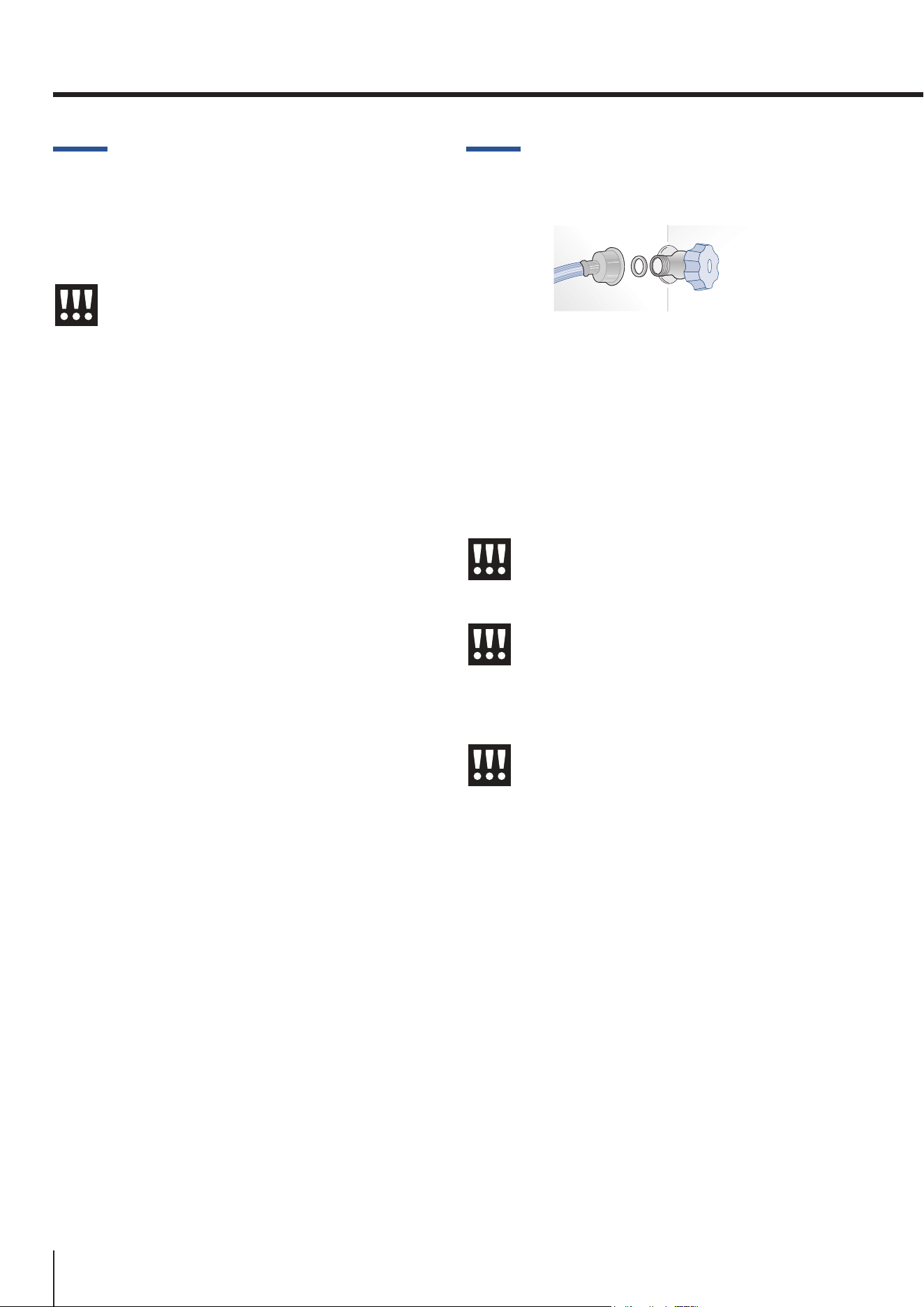
It must be carried out using only the supplied new
water inlet hose with ¾” thread (do not use or reuse
previously used tubing).
The system pressure must be between 0.05 MPa and
0.5 MPa (between 0.5 bar and 5 bar).
Any pressure outside of this range may cause the wa-
ter system to malfunction or leak.
Important
Do not use extension cords and/or multi-
ple adapters for connection.
Warning
Make sure that installation is performed
correctly and in accordance with all of
theinstructionsinthespecicinstallation
manual provided with the appliance.
Warning
Do not attempt to use a locally-sourced
threaded garden hose adapter or braided
supply line. It will strip the threads on the
appliance’s water connection solenoid.
11
www.smeg.com
EN
2.3. Connection to the electrical
power supply
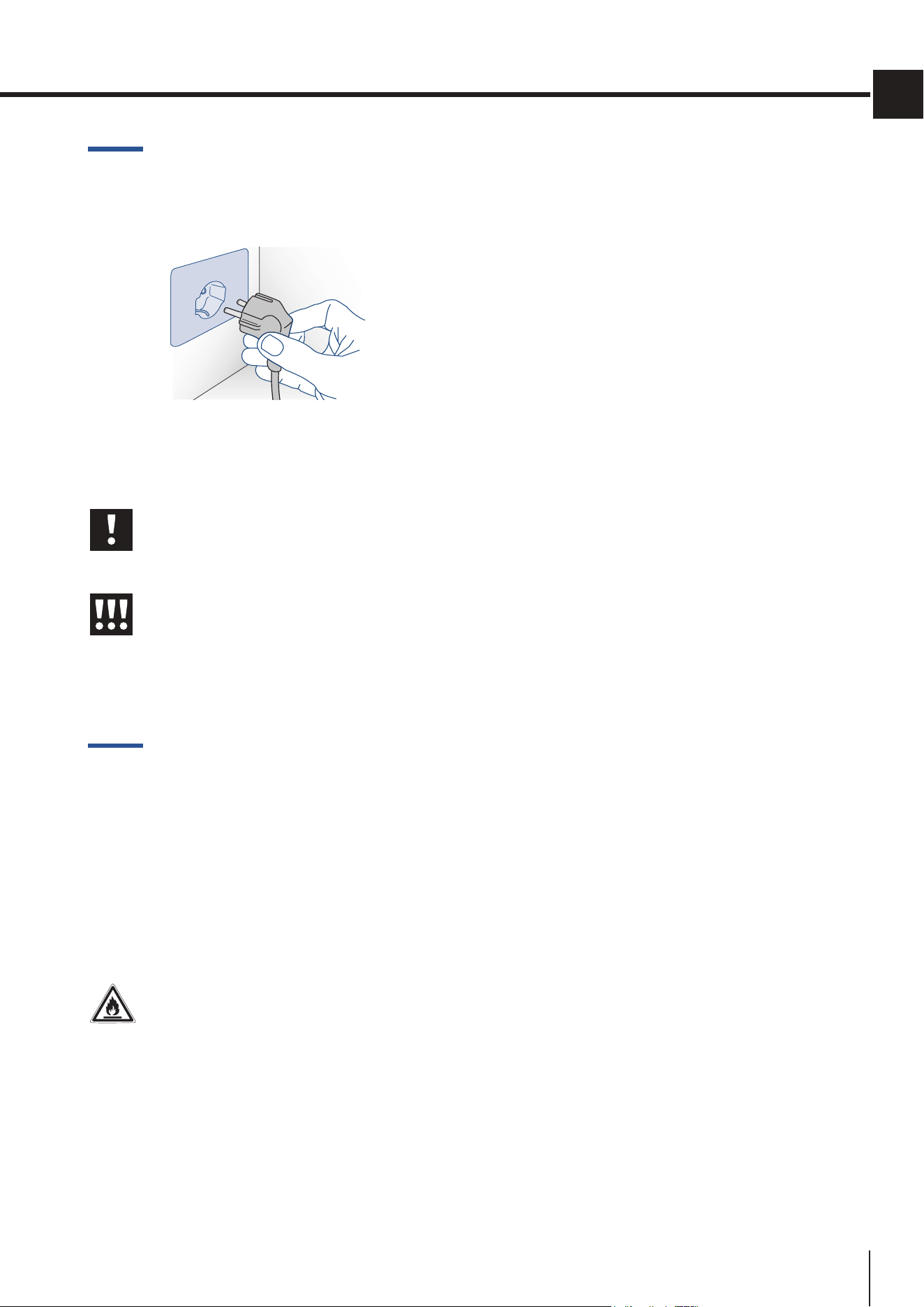
The appliance is equipped with a Schuko t ype 16A
plug. It must be connected to the electrical mains by
means of a corresponding Schuko socket.
Important
Do not use extension cords and/or multi-
ple adapters for connection.
Warning
If energy is supplied through an alterna-
tive energy power source (solar, geother-
mal, etc...) or if home automation systems
are installed, it is necessary to install the
Alternative Energy Kit to integrate the
unit into the power grid.
2.4. Refrigerant
The refrigerant isobutane (R600a) is contained within
the refrigerant circuit of the appliance, a natural gas
with a high level of environmental compatibility, which
isneverthelessammable.
> If the refrigerant circuit should become dam-
aged,makesurethatnoamesandsparksde-
velop in the room. Thoroughly ventilate the room
in which the appliance is situated.
ISO 7010 W021
Warning
Firehazard/Flammablematerials.
Use special care during transportation,
installation and/or cleaning so as to avoid
damaging the refrigeration circuit.
1351
RBMU36RX
2 781680 30207 0012
00
1
2
3
115
60
R600a
213
1336mzz
NO
SKS360TST6IU
Via Leonardo da Vinci 4,
42016, Guastalla (RE), Italy
SMEG S.p.A
12
www.smeg.com
3. BEFORESTARTING
3.1. To know your fridge well
Congratulations on purchasing your new refrig-
erator! From now on you can use our innovative
storage system, which will allow you to store all of
your food in the best possible way.
This manual will answer most of your questions
about the product’s features.
3.2. Manufacturer’s liability
The manufacturer declines all liability for damage to
persons or property caused by:
> usesoftheapplianceotherthanthosespecied;
> failure to comply with the instructions in the
usermanual;
> tamperingwithanypartoftheappliance;
> use of non-original spare parts.
3.3. Technical support
> In the event of appliance failure, contact tech-
nical support and have the repair carried out by
authorizedserviceronly.
> Make sure you have the model and serial num-
The product plate is positioned on the side
opposite door opening.
beronhand(locatedontheidenticationplate).
> Use only original spare parts.
> Do not try to repair the appliance yourself or
without the assistance of
anauthorizedservicer;
this has safety repercussions and may void the
warranty.
> Detailed information on the duration of the
warranty and the warranty conditions in each
country can be found from our customer service,
your dealer or on our website.
> If you need further information, do not hesitate
to contact the Technical Assistance Centre.
Important
Before calling, make a note of the appli-
ance’s serial number located inside the
refrigerator compartment on the side op-
posite the door opening.
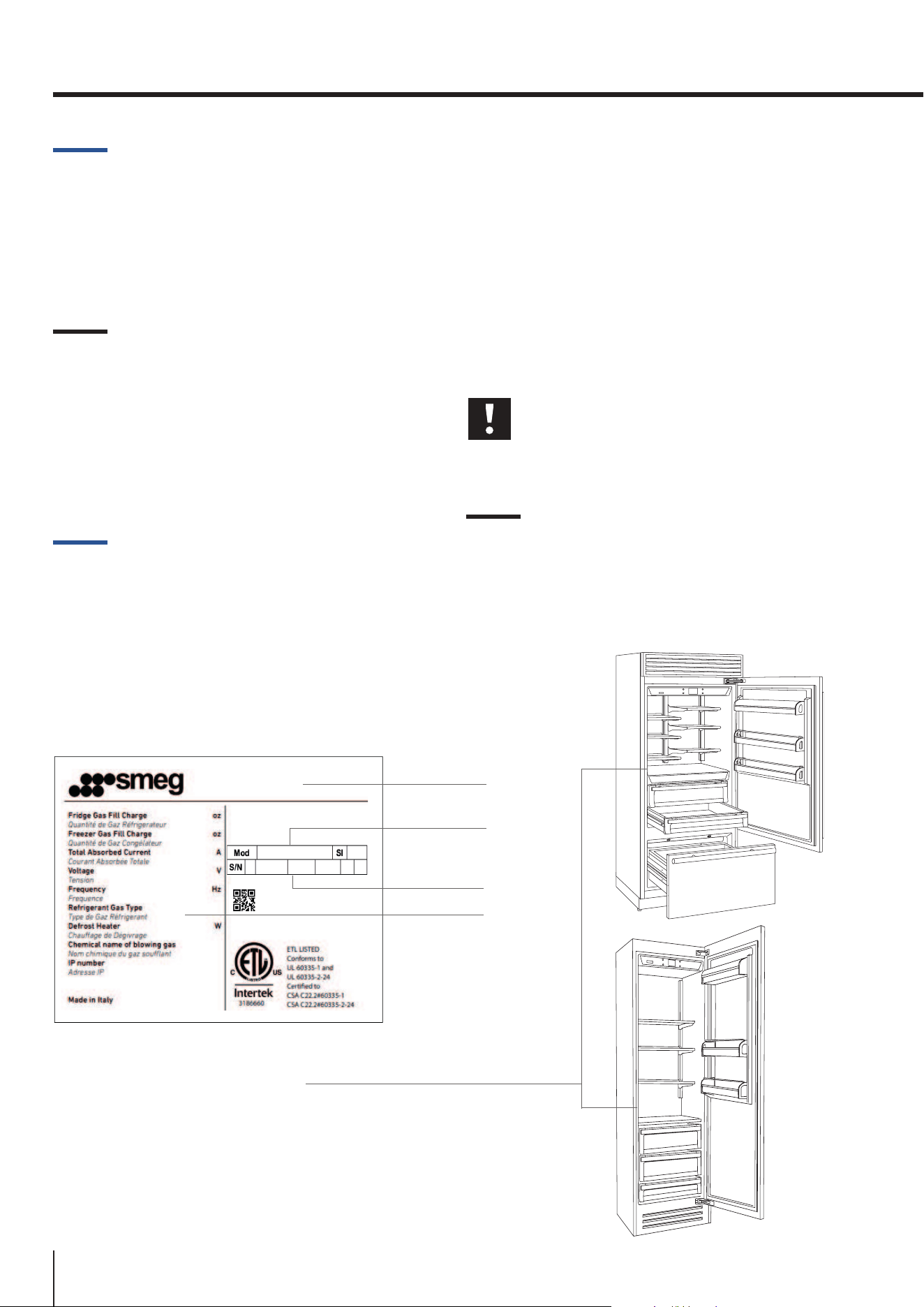
3.4. Product plate
The product plate shows the technical data, the
serial number and the model. The product plate
must never be removed or damaged.
Model
Manufacturer
Serial Number
Features
13
www.smeg.com
EN
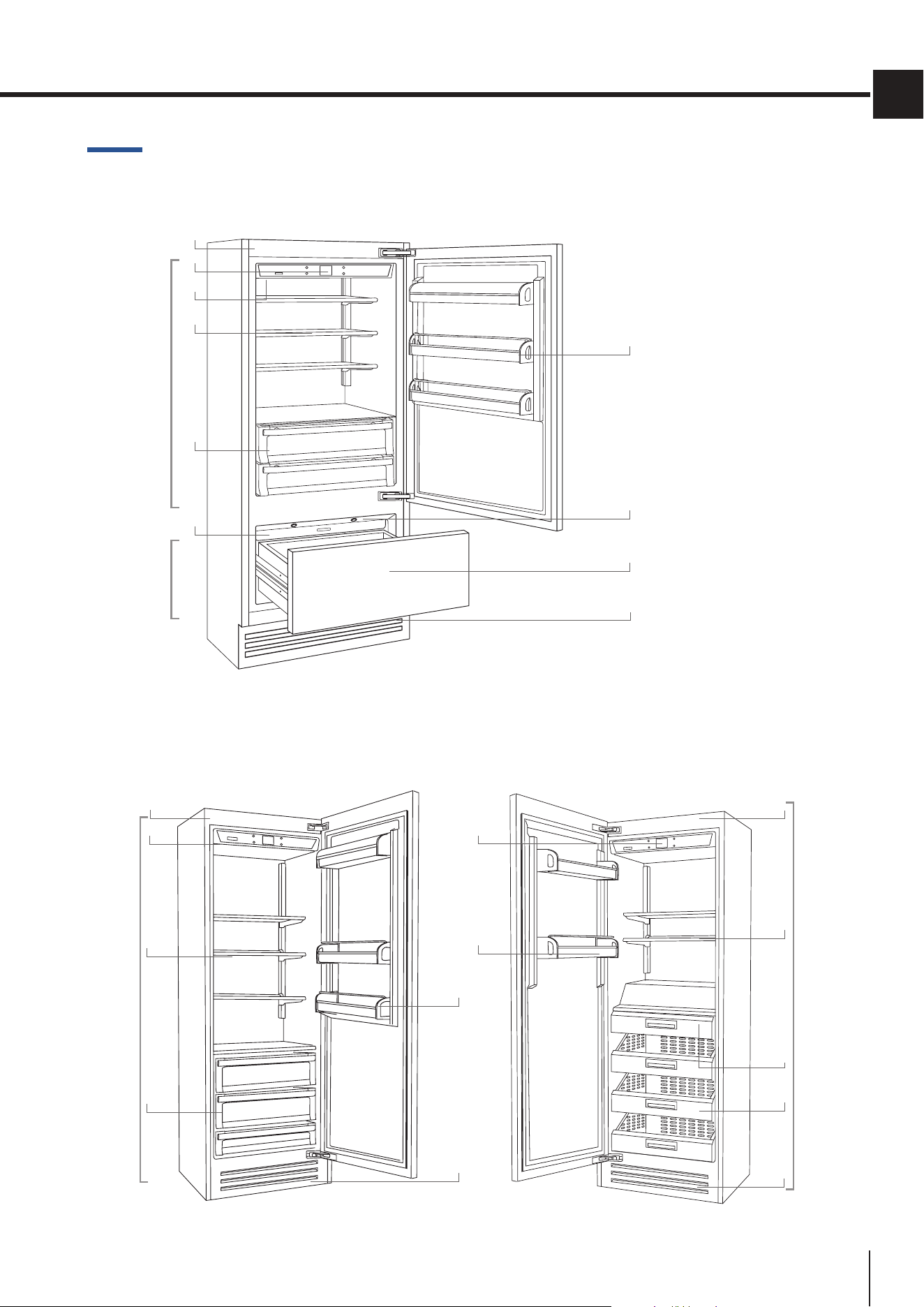
3.5. General description
1) Stainless steel body.
2) Interactive control panel.
3) Water Filter.
4) Shelf positioning system.
5) Fridge compartment
drawers.
6) Ice maker container (*).
7) Door shelves.
8)
LEDlightsforthefreezer
compartment drawer.
9)
Freezercompartment
drawer convertible into
fridge or Fresco com-
partment(Multizone
function).
10) Removable grill
(condenser).
11) Freezercompartment
drawers.
FRI models FZI models
Fridge
8/2°C
(46/35°F)
Freezer
-15/-22°C
(+5/-7°F)
1
4
6
5
BMI models
10
2
3
7
9
8
1
4
5
10
10
2
7
1
2
7
4
11
6
Fridge
+8/+2°C
(46/35°F)
Multizone
-15/-22°C
(+5/-7°F)
14
www.smeg.com
3.6. Electronic Control
The innovative electronic control system maintains a constant temperature in the three compart-
ments and displays it on the control panel. It also allows user interaction making it possible to
personalizesettingsofthevariousfunctionsandtoreceivesoundand/orvisualmessagesshould
any malfunction occur in the appliance.
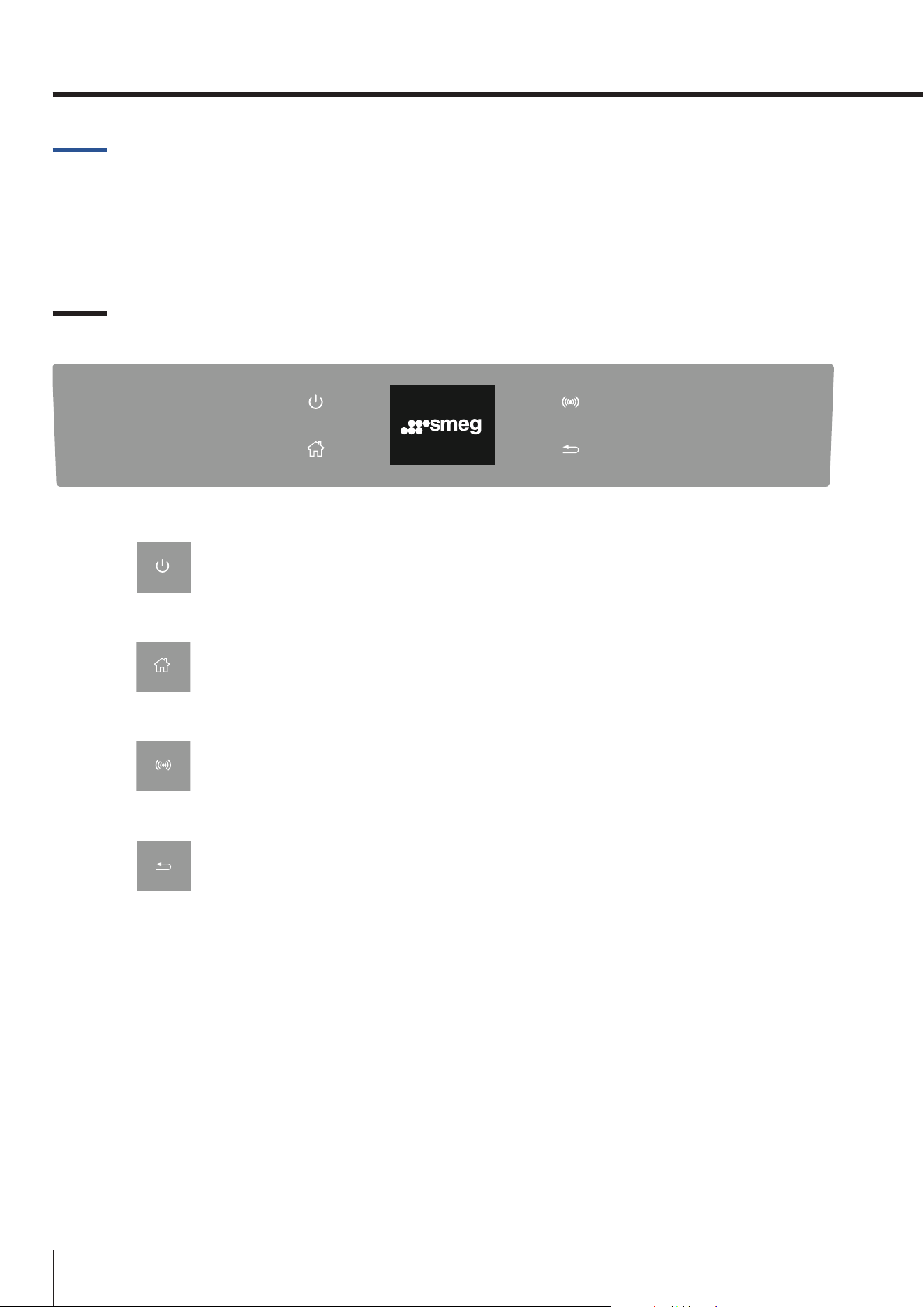
3.7. Main control panel
Turning On/Off
Touchtheicontoturntheunitonoro.
Home
Touch the Home icon to go back to the home screen.
Alarm
Touch the icon to view the alarm tone functions and to deactivate them.
Back
Touch the arrow icon to go back to the previous screen.
3. BEFORESTARTING
15
www.smeg.com
EN
4. SWITCHINGTHEAPPLIANCEON
4.1. Turning on and off
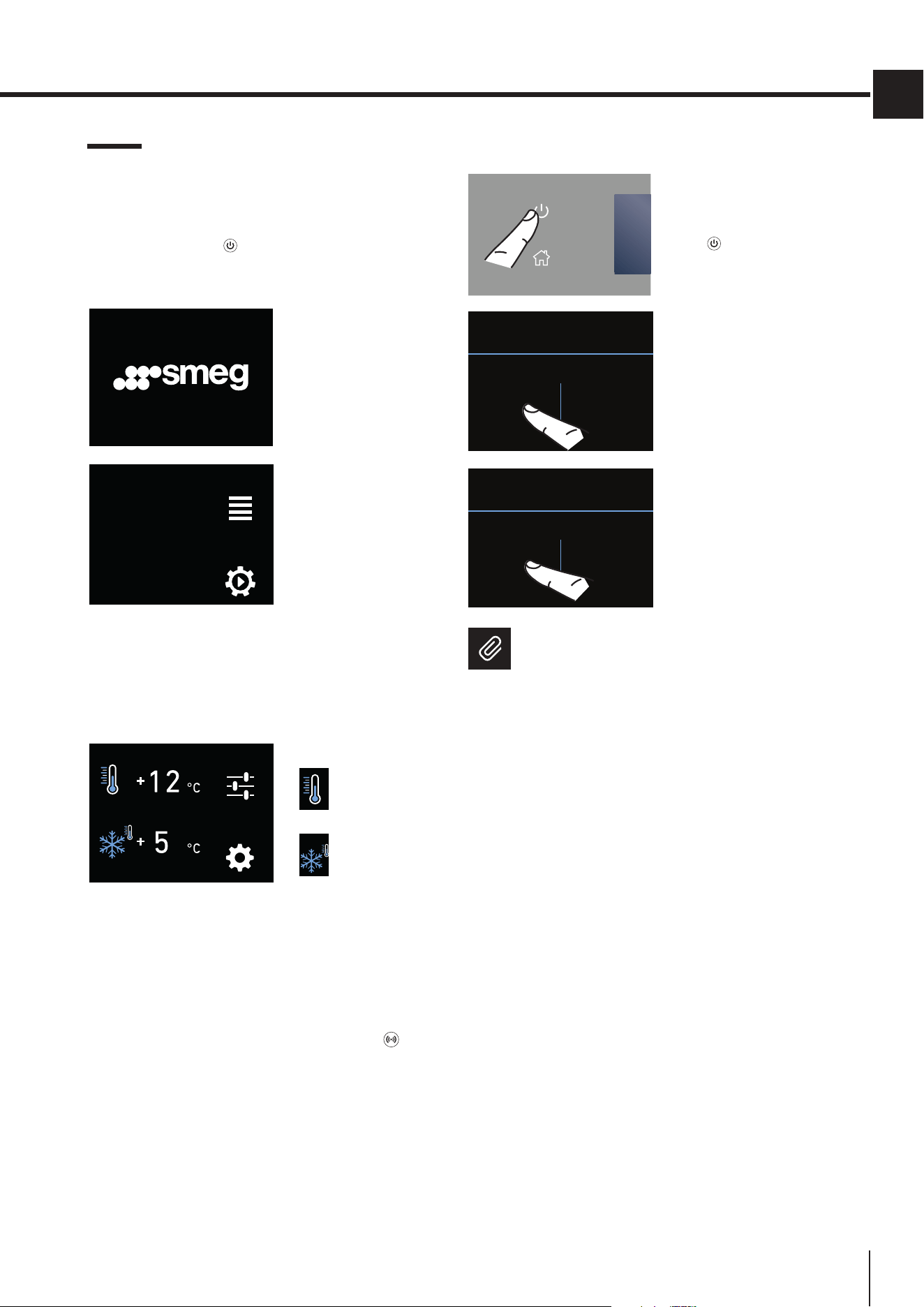
First startup
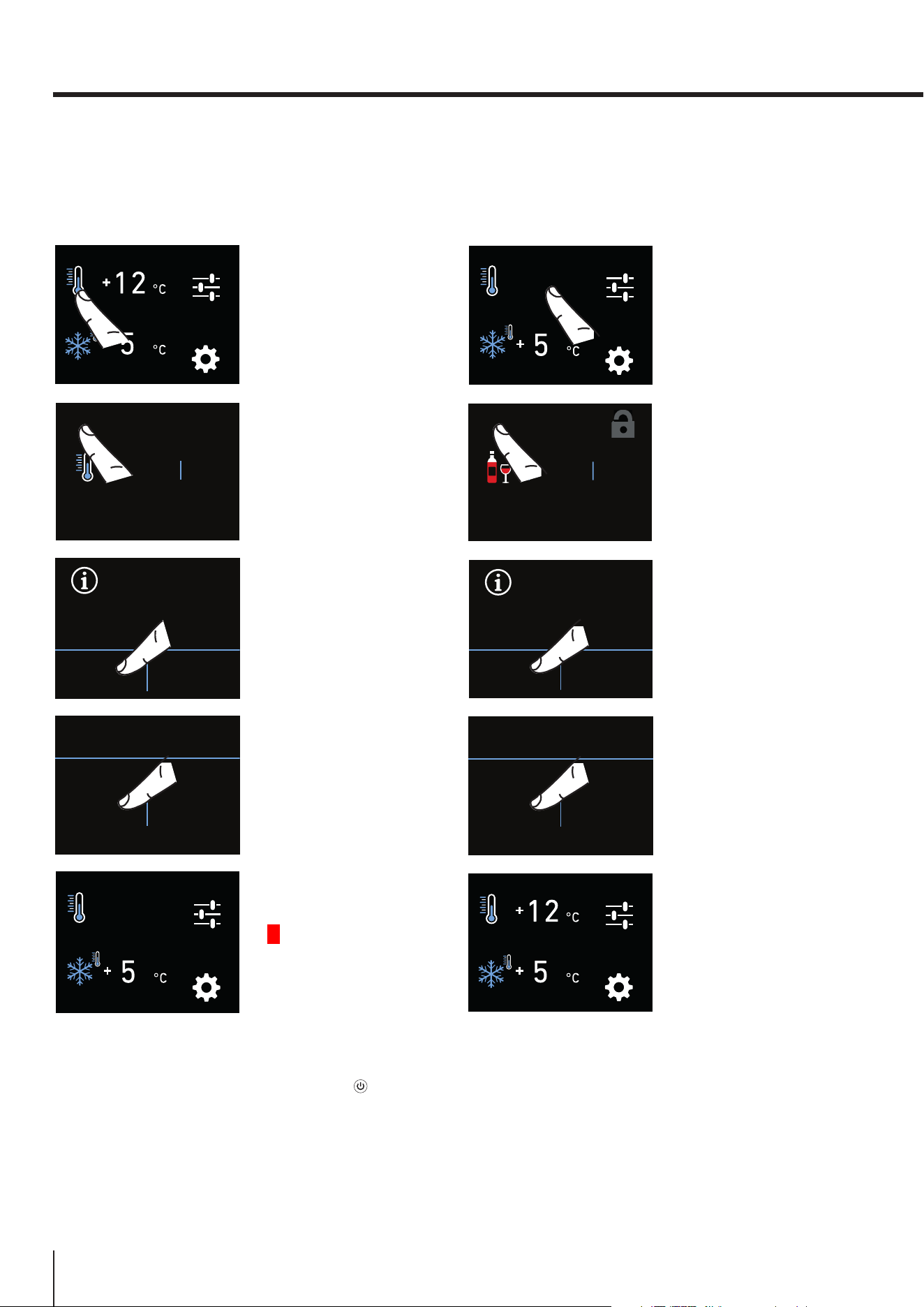
Touch the ON/OFF button. The display shows the
following launch screens:
1) Smeg Logo
FUNCTIONS
SETTINGS
INITIAL TEST...
2) Initial test
(lasts 3 minutes).
3) The display shows the main screen with the ambi-
ent temperature measured from the appliance inside
the compartments. Automatically the unit start to
cool down until reaching the set temperatures.
FUNCTIONS
SETTINGS
4)
Home screen (*).
fridge
compartment
[+5°C (+41°F)]
Multizone
compartment
[-18°C (0°F)]
TheMultizonecompartmentissetatthefac-
torytofreezermode [-18°C (0°F)].
Whentheapplianceisrstswitchedon,itisrecom-
mended to wait at least 12 hours before placing any
food inside the unit. During this time, deactivate any
error messages by touching the ALARM button.
Switching off the appliance
1) Touch the ON/OFF
key toswitcho.
PROCEED WITH THE
SHUTDOWN?
YES NO
2) Conrmthe
shutdown touching
the YES icon.
DO YOU WISH TO PROCEED?
YES NO
3) Conrmthe
shutdown again
touching the YES
icon.
Note
Whentheunitisotherearenowarning
lights to show that the appliance is plugged
into a socket.
16
www.smeg.com
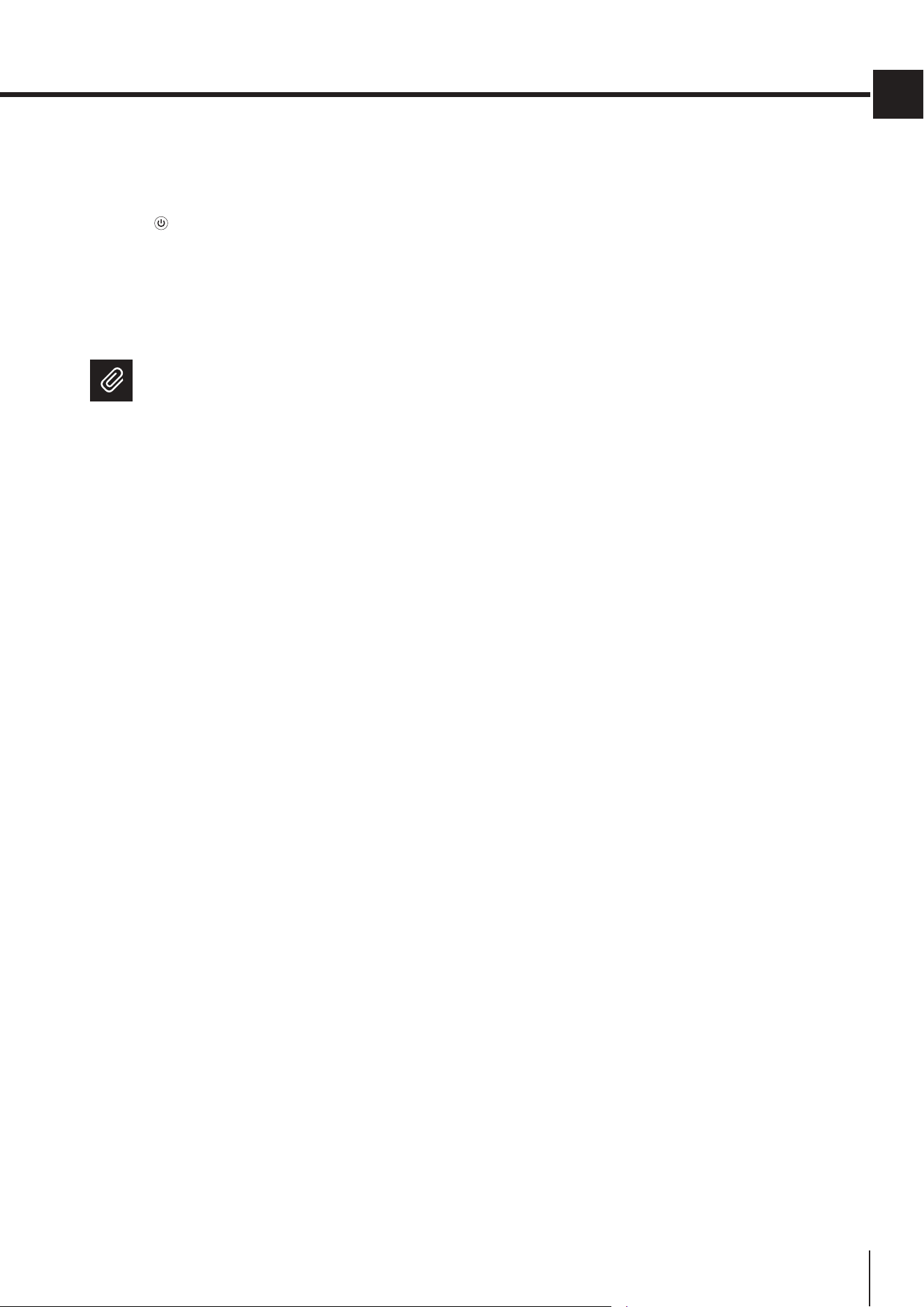
Switching off the fridge only
Thefridgecompartmentcanbeswitchedoindividu-
ally, whereas the Multizone drawer can’t be turned
ounlesstheentireunitisswitchedo.
FUNCTIONS
SETTINGS
1) HOME screen.
Toturnothe
fridge compartment
or the Fresco
compartment, touch
the corresponding
icon.
+10
+11
+12
+9
+8
OK
°C
OFF
2) Touch the OFF
icon.
DO YOU WANT TO
DEACTIVATE
THE COMPARTMENT?
YES NO
3) Conrmthe
shutdown touching
the YES icon.
DO YOU WISH TO PROCEED?
YES NO
4) Conrmthe
shutdown again
touching the YES
icon.
FUNCTIONS
OFF
SETTINGS
5) On the home
screen, the OFF
icon appears,
indicating that the
fridge compartment
iso.
Turning the appliance back on
To turn the unit back on, press the ON/OFF button.
The display will turn on and the start screen and the
home screen will be shown, once again displaying the
temperature measured inside the fridge compart-
ments. The fridge will start cooling until it reaches the
set temperatures.
Switching the compartments back on
If the Fridge compartment and the Fresco com-
partment must be switched back on, follow this
procedure:
FUNCTIONS
OFF
SETTINGS
1) Home screen.
Toturnbackonano
compartment, touch
the OFF icon next
to it.
+10
+11
+12
+9
+8
OK
°C
ON
2) Touch the ON icon.
DO YOU WANT TO
ACTIVATE
THE COMPARTMENT?
YES NO
3) Conrmthe
turning on by
touching the YES
icon.
DO YOU WISH TO PROCEED?
YES NO
4) Conrmthe
turning on again by
touching the YES
icon.
FUNCTIONS
SETTINGS
5) The fridge
compartment
switches back on and
the HOME screen is
displayed.
4. SWITCHINGTHEAPPLIANCEON
17
www.smeg.com
EN
Switching off for long periods
During long periods of absence it is recommended
that you switch o the appliance by pressing the
ON/OFF button and disconnecting the electrical
plug or the breaker controlling the socket.
Empty the refrigerator completely, clean and dry it
and leave the doors and drawers partially open to
prevent unpleasant odours.
Note
If at rst startup another message
appears instead of the word Smeg,
itmeansthattheappliancehasalready
startedthecoolingprocess.
During the rst startup, it will not be
possibletousetheMenutomodifythe
factory settings until the preset tem-
perature hasbeenreached. Itis how-
everpossibletosetthetimeanddate
immediately;theseparametersarere-
quiredtoactivatesome ofthe special
functions.
18
www.smeg.com
5. COMPARTMENTTEMPERATURESETTING
5.1. How to adjust the
compartment temperature
Each model has been carefully tested before leaving
the factory and is adjusted in such a way to ensure
high performance and low consumption.
Usually, it is not necessary to modify the settings.
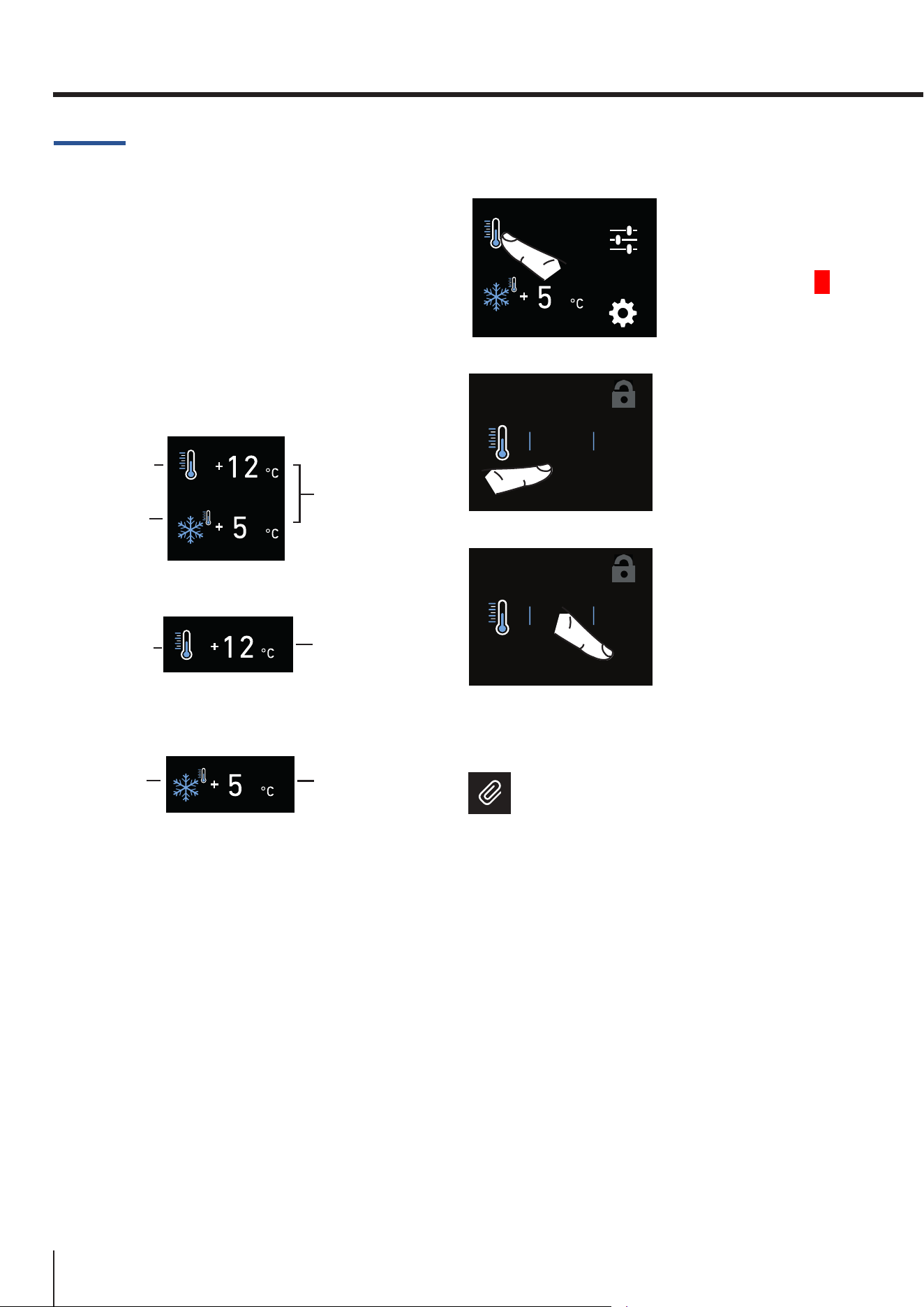
FUNCTIONS
Refrigeration
Compartment
Refrigeration
Compartment
Freezer
compartment
(Multizone)
Freezer
compartment
(Multizone)
Preset
temperatures
Preset
temperature
Preset
temperature
BMI model
FRI model
FZI model
How it looks to the home screen in the various models:
Modifying the compartment
temperatures
FUNCTIONS
OFF
SETTINGS
1) Home screen.
Touch the fridge
compartment icon
for example.
+10
+11
+12
+9
+8
OK
°C
ON
2) Scroll the values up
or down to select the
desired temperature
(in the case of the
fridge compartment,
the temperature can
be set from +2°C
(35.6°F) to +8°C (46°F)
+10
+11
+12
+9
+8
OK
°C
ON
3) Touch the OK
icontoconrm
the selected
temperature.
The same procedure is required to set the tem-
perature in the Multizone compartment, from
-15°C (5°F) to -22°C (-8°F).
Note
The displayed temperature may vary
slightly with respect to the set tempera-
ture if the doors are continuously opened
or if large quantities at ambient tempera-
ture are inserted.
It takes 6 to 12 hours to reach the selected
temperature.
19
www.smeg.com
EN
5.2. Information and malfunction
messages on the display
A built-in control sys-
tem provides infor-
mation using warning
lightsortextnotica-
tions, shown on the
display.
The voiced notica-
tion that accompanies some of the warning
noticationscanbeturnedobytouchingthe
ALARM button on the main control panel.
Youcanndthelistoftheanomaliesattheend
ofthismanual(seeparagraph“Troubleshooting
Guide” page 41).
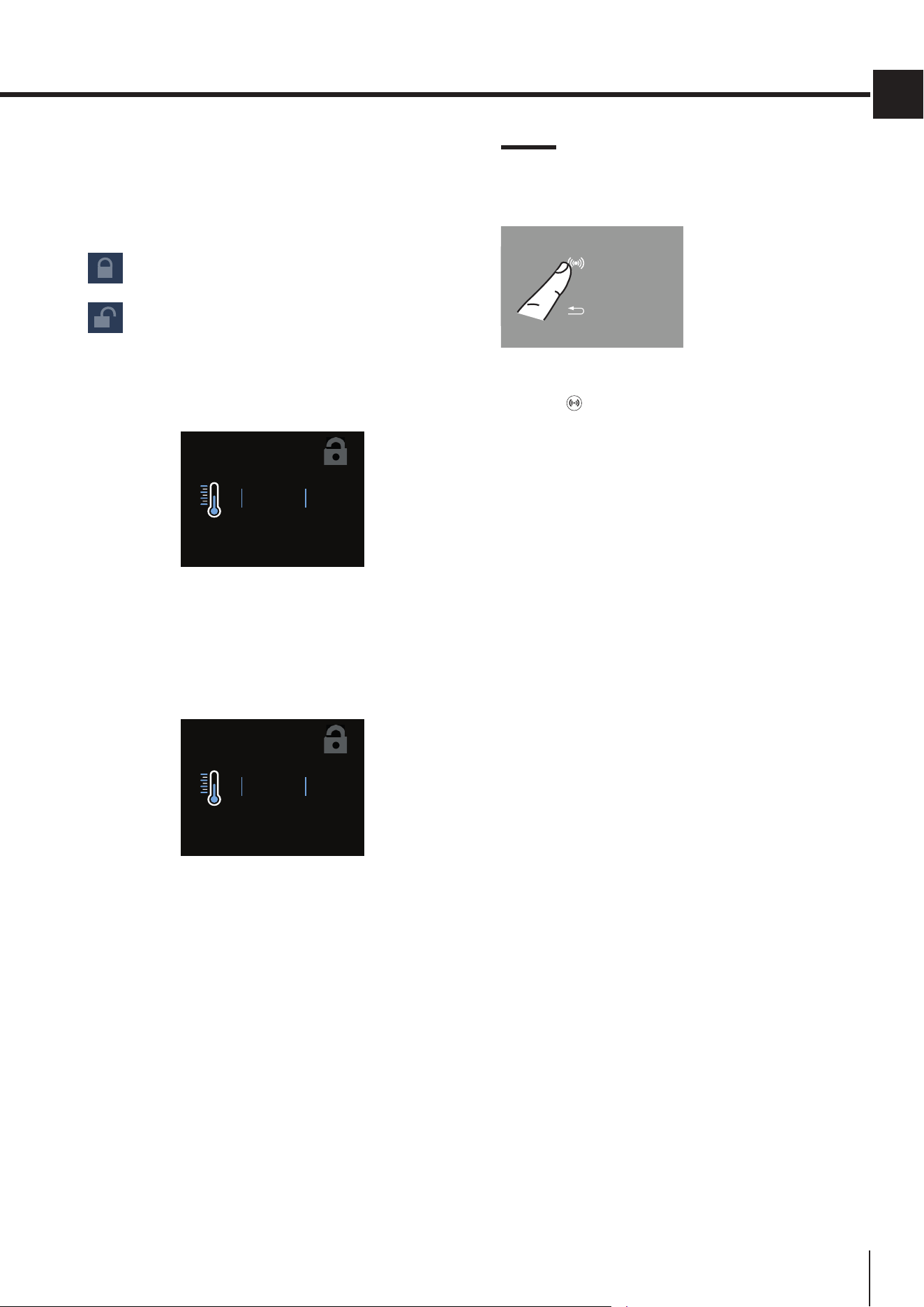
Padlock icon
The padlock icon shows up when the temperatures
are set up.
The padlock:
open means that you can modify the
compartment temperatures.
closed means that you cannot modify
the compartment temperatures.
Usually an open yellow padlock is displayed; in this
caseyoucanscrollupordownwithangeronthe
display, select the desired temperature and press OK
toconrm.
+10
+11
+12
+9
+8
OK
°C
ON
The padlock will instead be closed if the user has
activated some functions (described in paragraph
“6.FUNCTIONSANDSETTINGS”onpage20);inthis
situation, the user will no longer be able to change the
temperatures of the compartments until the function
is completed or if it is disabled manually.
+10
+11
+12
+9
+8
OK
°C
OFF
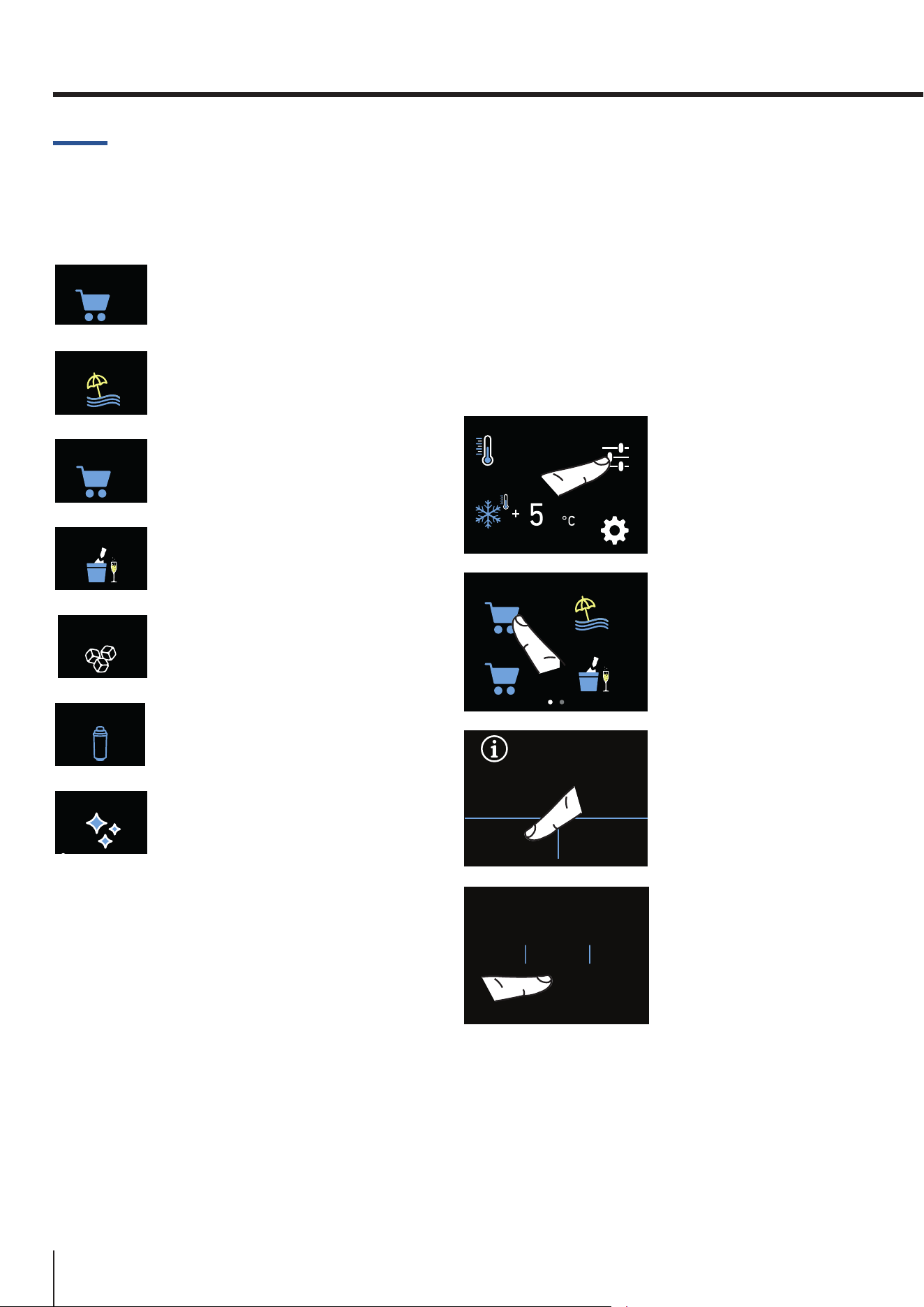
20
www.smeg.com
6. FUNCTIONSANDSETTINGS
6.1. Functions
You can tailor the operation of your unit to
suitthedierentwaysinwhichyoumight
want to use it.
FRIDGE
SHOPPING
1) Fridge shopping
(Freezershoppingon
FZI models).
HOLIDAY
2) Holiday.
MULTIZONE
SHOPPING
3) Multizoneshopping.
BOTTLE COOLER
4) Bottle Cooler
(not on FRI models).
ICE
MAKER
5) Ice Maker.
WATER FILTER
6) Water Filter
(optional, not on FRI models).
CIRCUIT CLEANING
8) Circuit cleaning.
1) Fridge shopping (Freezer shopping on
FZI models)
This feature lowers the refrigerator tempera-
ture to +2°C (35.6°F) for 24 hours, allowing a
more rapid cooling of the food that has just
been placed inside. At the end of the 24 hours,
the function deactivates automatically, and the
previously set temperature is restored.
It is possible to programme timed activation of
this function. After a prolonged interruption of
the electrical power, it is necessary to reacti-
vate the function.
FUNCTIONS
OFF
SETTINGS
A) Home screen.
Touch the
FUNCTIONS icon.
FRIDGE
SHOPPING
MULTIZONE
SHOPPING
BOTTLE COOLER
HOLIDAY
B) Touch the FRIDGE
SHOPPING icon.
FRIDGE SHOPPING
MODE
YES NO
C) Touch the YES
button to activate the
function.
9HOUR
10
11
8
7
OK
D) Scroll up or down
to set the desired
time (in hours) and
then press OK.
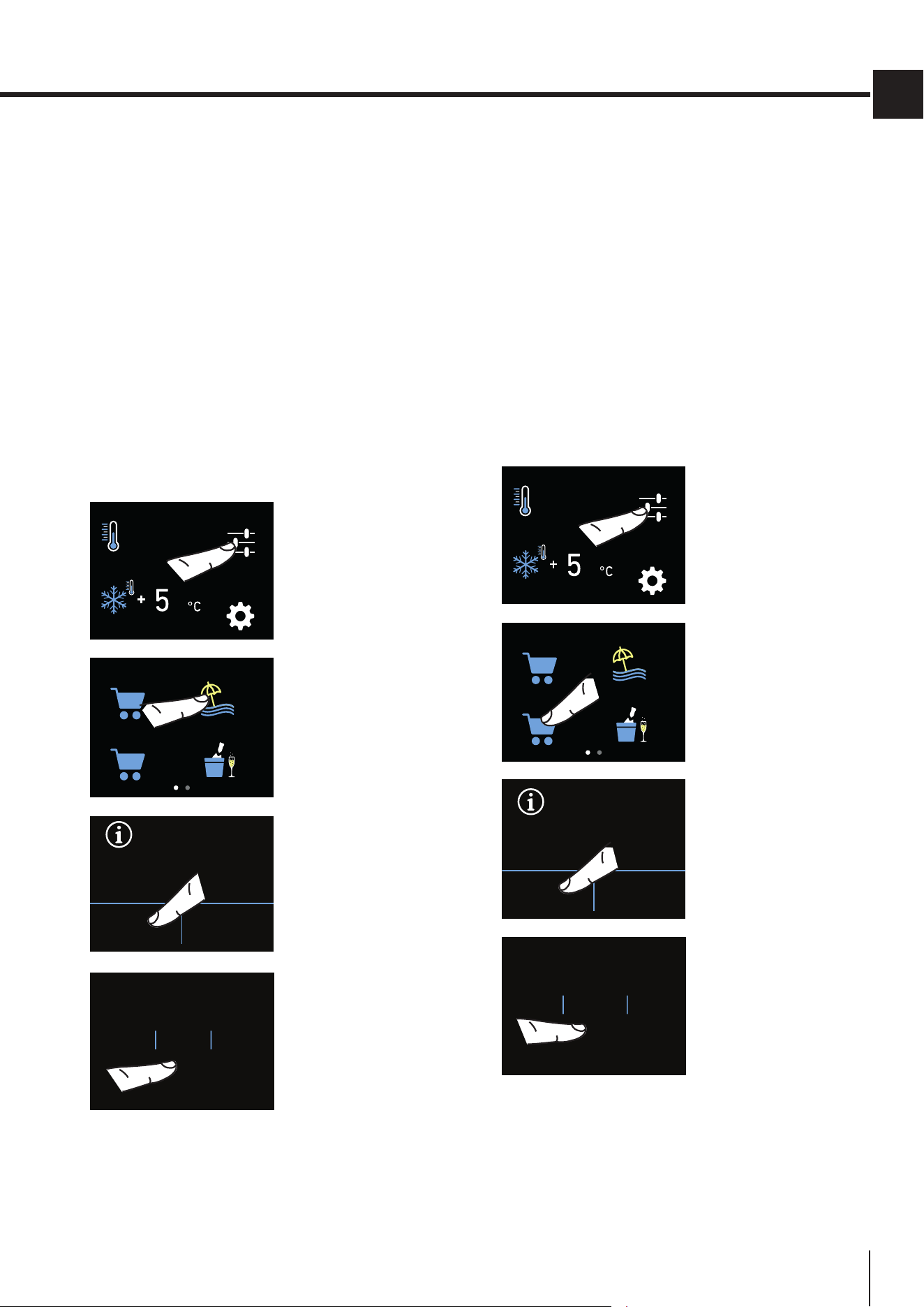
21
www.smeg.com
EN
3) Multizone shopping (not on FRI models)
This function must be activated at least 24 hours
before inserting room temperature items into
thefreezerorseveralhoursbeforeputtinginto
thefreezerpreviouslyfrozenitemsthathave
been subjected to a slight temperature rise.
This function is automatically deactivated
when the programmed time period is up.
It is possible to programme timed activation of
this function.
After a prolonged interruption of the electrical
power, it is necessary to reactivate the func-
tion. It is possible to program the function
with a delay of 1 to 24 hours.
FUNCTIONS
OFF
SETTINGS
A) Home screen.
Touch the
FUNCTIONS icon.
FRIDGE
SHOPPING
MULTIZONE
SHOPPING
BOTTLE COOLER
HOLIDAY
B) Touch the
MULTIZONE
SHOPPING icon.
MULTIZONE SHOPPING
MODE
YES NO
C) Touch the YES
button to activate the
function.
9HOUR
10
11
8
7
OK
D) Scroll up or down
to set the desired
time (in hours) and
then press OK.
2) Holiday
This function (recommended in the event of an
extended absence, since it allows for consid-
erable energy savings) brings the Multizone
compartment temperature to - 18°C (46.4°F) if
thecompartmentissettoFreezermode,and
to +14°C (57.2°F) if the compartment is set to
Fridge mode.
It is possible to program the duration, or it can
be manually deactivated upon re-entry after a
period of absence. This function remains active
even if, during the period of absence, there is
an extended interruption of electrical power.
It is possible to programme a period from 1 to
90 days.
FUNCTIONS
OFF
SETTINGS
A) Home screen.
Touch the
FUNCTIONS icon.
FRIDGE
SHOPPING
MULTIZONE
SHOPPING
BOTTLE COOLER
HOLIDAY
B) Touch the
HOLIDAY icon.
HOLIDAY
MODE
ON OFF
C) Touch the ON
button to activate the
function.
10
11
12
9
8
OK
DAY
D) Scroll to set the
desired time (in days)
and then press OK.
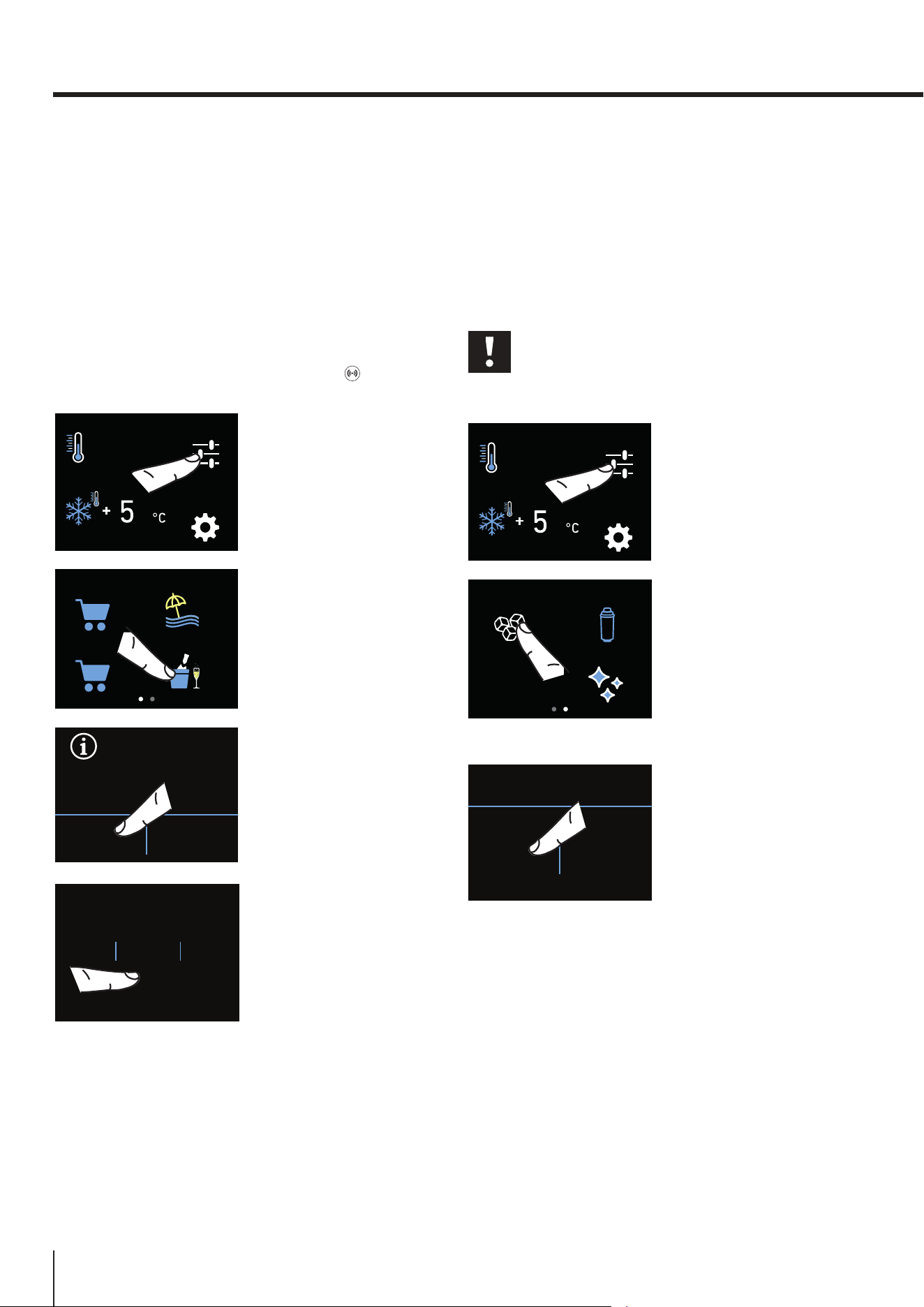
22
www.smeg.com
4) Bottle Cooler (bottle cooling) (not on
FRI models)
This function can be activated when it is nec-
essary to cool o beverages quickly by plac-
ing them inside the freezer compartment.
It is possible to select a duration of 1 to 45 min-
utes. A signal will sound to notify you when
the optimal temperature has been reached.
After removing the beverages, deactivate the
sound signal by pressing the ALARM button.
FUNCTIONS
OFF
SETTINGS
A) Home screen.
Touch the
FUNCTIONS icon.
FRIDGE
SHOPPING
MULTIZONE
SHOPPING
BOTTLE COOLER
HOLIDAY
B) Touch the BOTTLE
COOLER icon.
BOTTLE COOLER
MODE
ON OFF
C) Touch the ON
button to activate the
function.
37MIN
38
39
36
35
OK
D) Scroll to set the
desired time
(in minutes) and
press OK.
5) Activating/Deactivating the Ice maker
Before activating the Ice Maker for the rst
time,makesurethatthewaterltercartridge
has been installed, and perform an initial
washing of the hydraulic circuit (see chapter
8) Manual lter cleaning (optional, BMI and FZI
models only) on page 25). After a few min-
utes the Ice Maker can be activated.
Important
Do not activate the Ice Maker unless
the appliance is connected to the water
mains.
FUNCTIONS
OFF
SETTINGS
A) Home screen.
Touch the
FUNCTIONS icon.
ICE
MAKER
WATER FILTER
CIRCUIT CLEANING
B) Scroll right twice
and then touch the
ICE MAKER icon.
ICE MAKER
ON OFF
C) Touch the ON
button to activate
the function, touch
the OFF button
to deactivate the
function (for instance
if it is necessary
to disconnect the
appliance from the
water mains).
6.FUNCTIONSANDSETTINGS
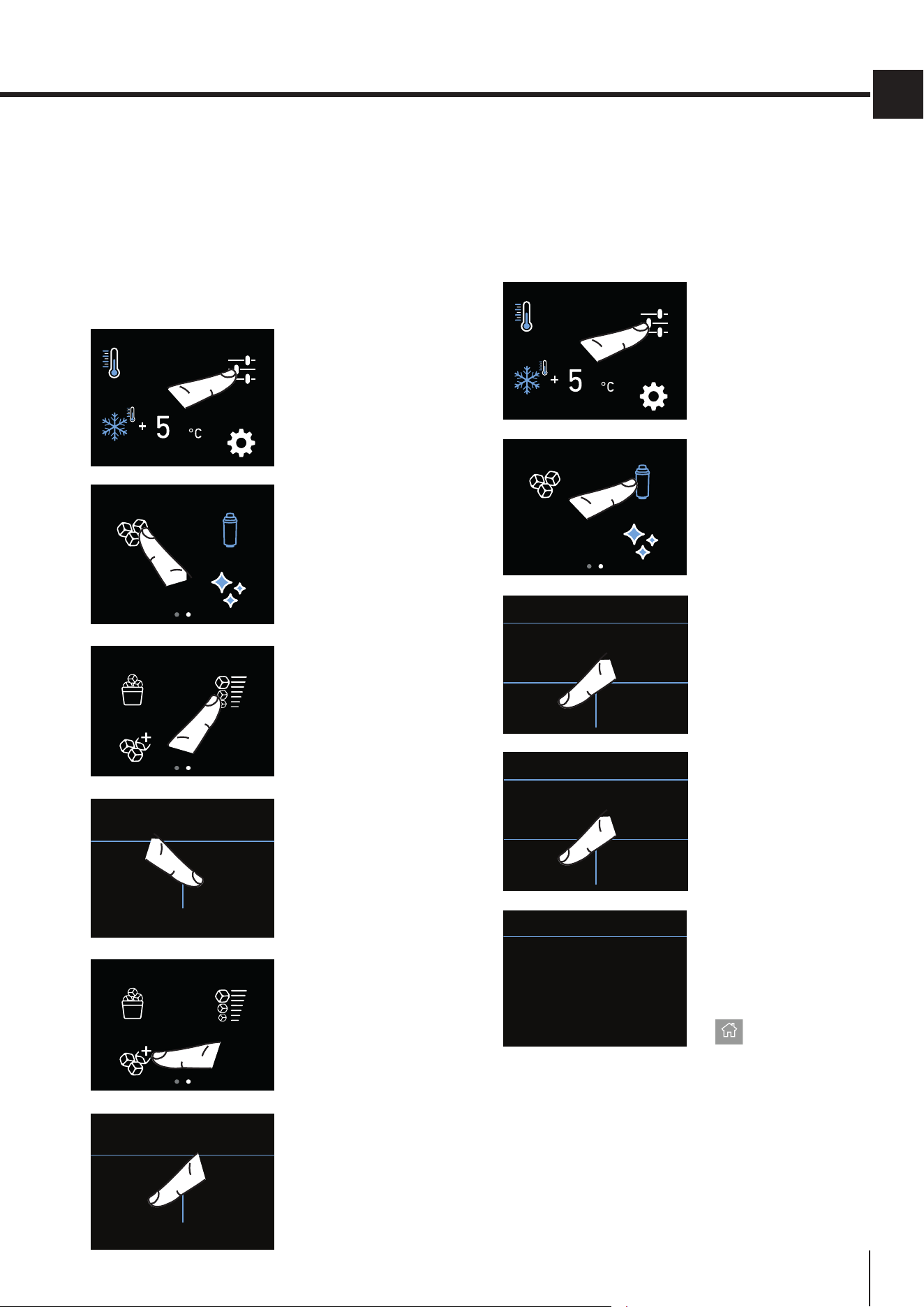
23
www.smeg.com
EN
Setting the ice cubes size and Super Ice
function
The ICE MAKER function allows to select the size
of the ice cubes, choosing between large (base set-
ting) or medium, and activate the SUPER ICE func-
tion, which increases the quantity of produced ice.
The SUPER ICE function deactivates automatically af-
ter 24 hours.
FUNCTIONS
OFF
SETTINGS
A) Home screen.
Touch the
FUNCTIONS icon.
ICE
MAKER
WATER FILTER
CIRCUIT CLEANING
B) Scroll right twice
and then touch the
ICE MAKER icon.
ICE MAKER
ON/OFF
SIZE
SUPER ICE
C) Touch the ice
cube SIZE icon.
CUBE SIZE
MEDIUM LARGE
D) Select the
desiredicecubesize
(MEDIUM or LARGE).
ICE MAKER
ON/OFF
SIZE
SUPER ICE
E) To increase the
quantity of ice
produced (up to
1.5 kg of ice a day),
touch the SUPER ICE
icon.
ICE MAKER
ON OFF
F) Conrmthe
function touching
the ON button.
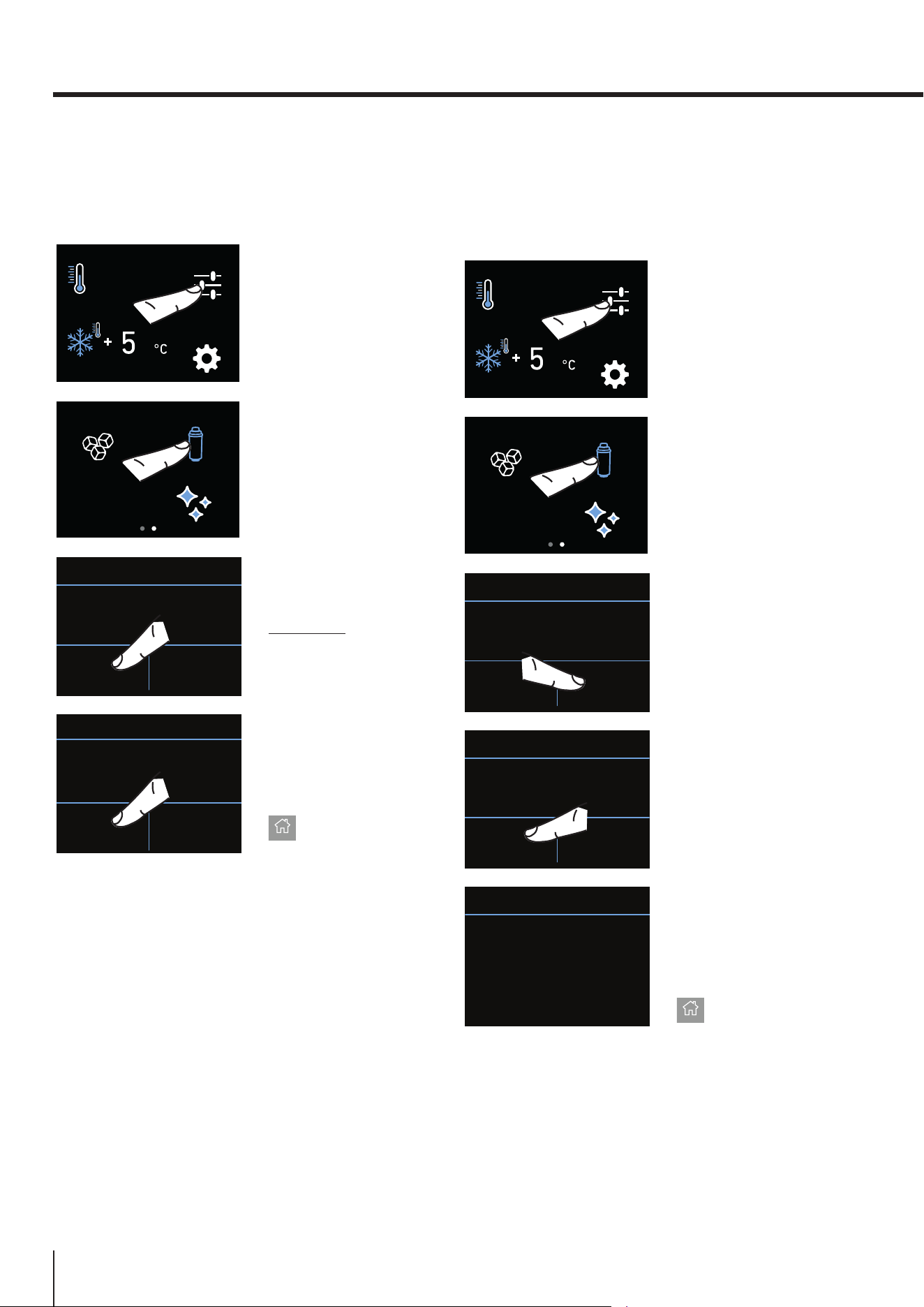
6) Water lter - activation (optional, BMI
and FZI models only)
The water lter is essential for purifying the
water used to make ice, to clean the circuit.
The display allows viewing the time left before
thelterneedstobereplaced.
FUNCTIONS
OFF
SETTINGS
A) Home screen.
Touch the
FUNCTIONS icon.
ICE
MAKER
WATER FILTER
CIRCUIT CLEANING
B) Scroll right twice
and then touch the
WATER FILTER icon.
DO YOU WISH TO PROCEED?
YES NO
WATER FILTER
C) Conrmthe
function touching
the YES icon.
ENABLE WARNING?
YES NO
WATER FILTER
D) Conrmthe
function again
touching the YES
icon.
This way you will be
warned when the
lterneedstobe
changed.
NEXT WARNING
DAYS MISSING...
120
WATER FILTER
E) Here are
indicated the days
left before the due
dateforthelter
replacement.
Touch the HOME
screen.
24
www.smeg.com
6a) Water lter - deactivation (optional,
BMI and FZI models only)
To deactivate a lter-reminder countdown,
follow these steps:
FUNCTIONS
OFF
SETTINGS
A) Home screen.
Touch the
FUNCTIONS icon.
ICE
MAKER
WATER FILTER
CIRCUIT CLEANING
B) Scroll right twice
and then touch the
WATER FILTER icon.
NEXT WARNING
DAYS MISSING...
365
OFF RESET
WATER FILTER
C) Press OFF to
deactivate the water
lterreminder.
DISABLE WARNING?
YES NO
WATER FILTER
D) Conrmthe
function again
touching the YES
icon.
Touch the HOME
screen.
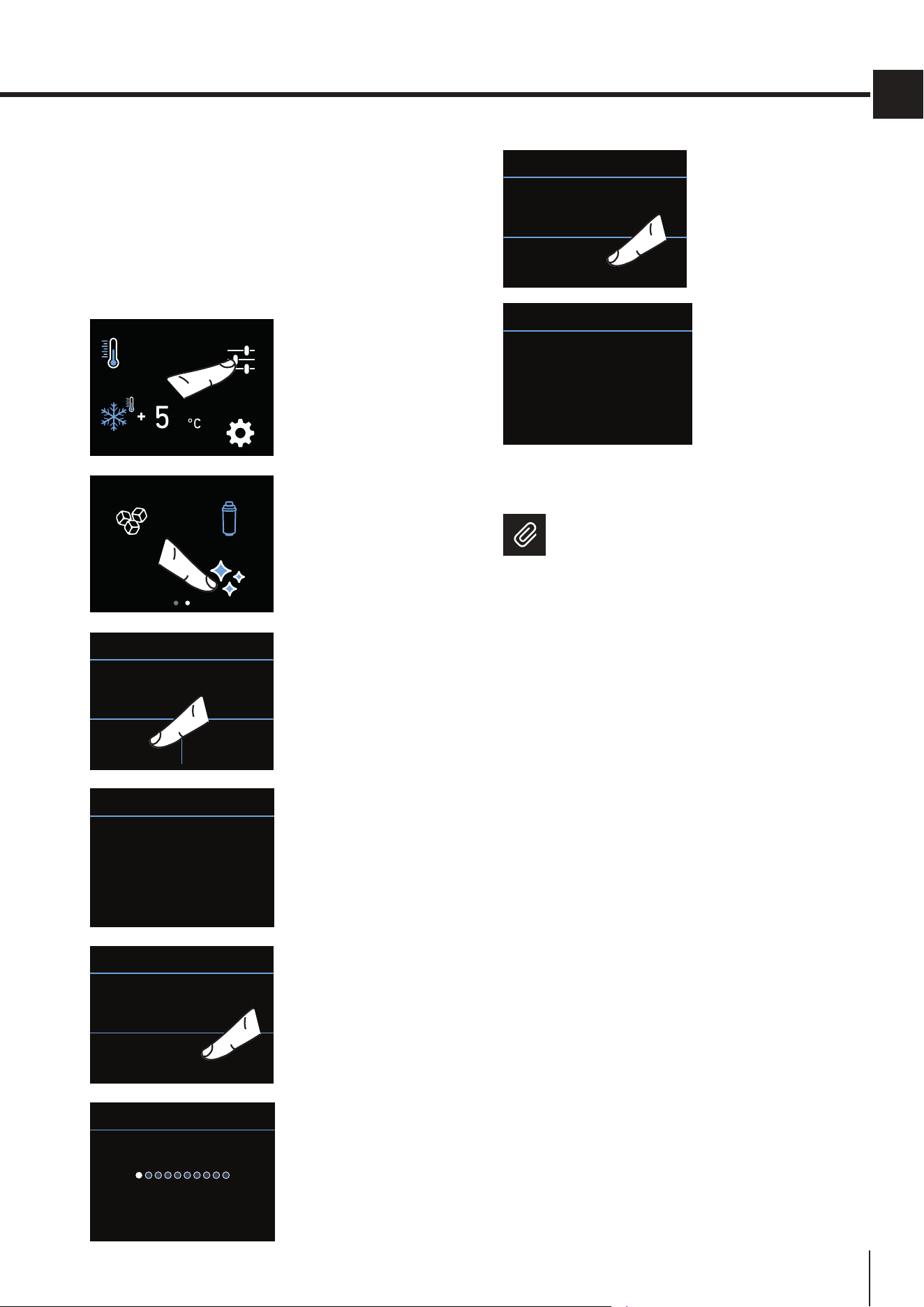
6a) Reset Filter
The Reset Filter function resets to zero the
timeleftbeforethelterneedstobereplaced.
Themetermustberesettozeroeachtimethe
cartridge is replaced.
FUNCTIONS
OFF
SETTINGS
A) Home screen.
Touch the
FUNCTIONS icon.
ICE
MAKER
WATER FILTER
CIRCUIT CLEANING
B) Scroll right twice
and then touch the
WATER FILTER icon.
NEXT WARNING
DAYS MISSING...
365
OFF RESET
WATER FILTER
C) Press RESET.
RESET WARNING
EXPIRY?
YES NO
WATER FILTER
D) Touch the YES
button to proceed.
NEXT WARNING
DAYS MISSING...
120
WATER FILTER
E) Here are
indicated the days
left before the due
dateforthelter
replacement.
Touch the HOME
screen.
6.FUNCTIONSANDSETTINGS
25
www.smeg.com
EN
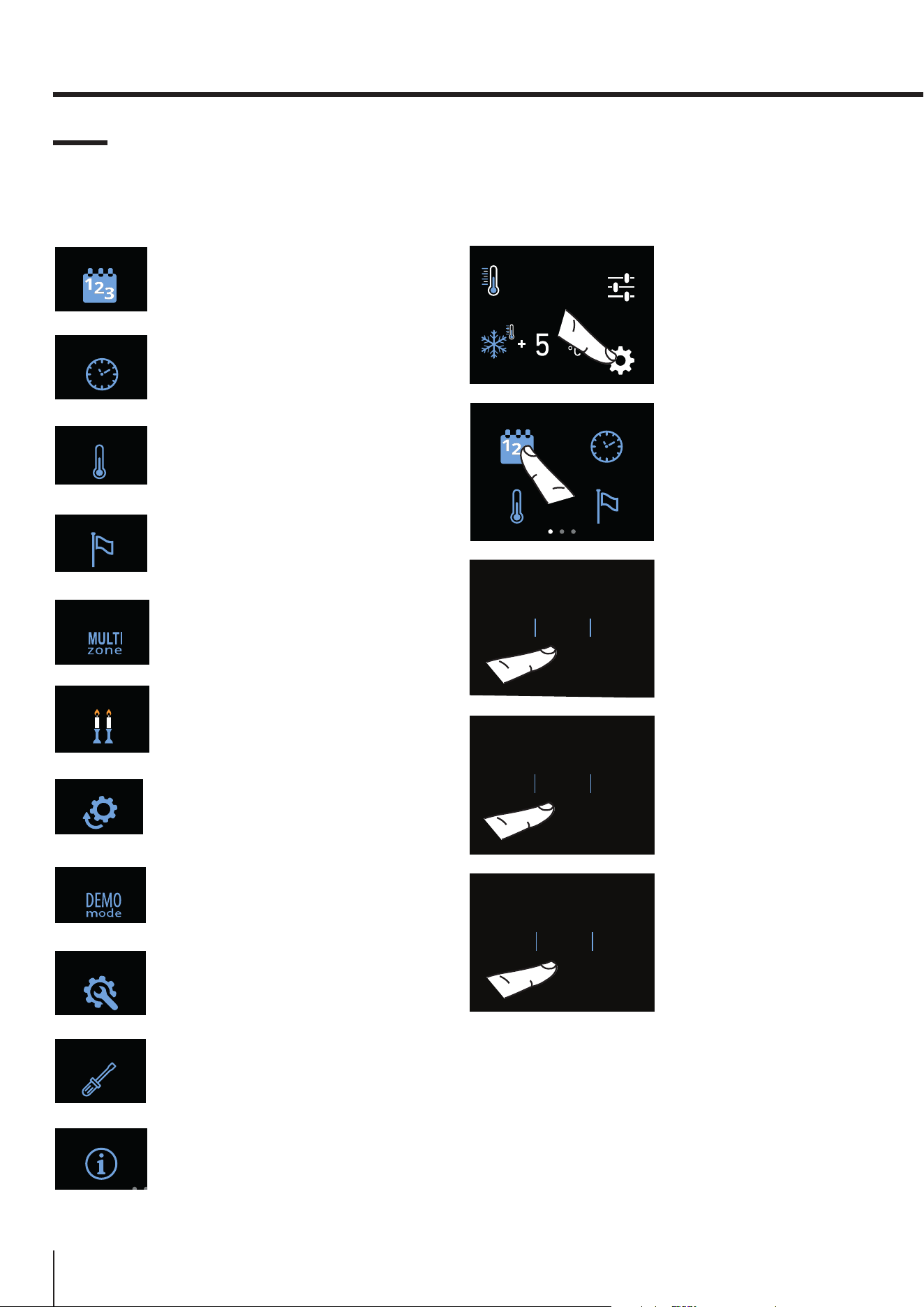
8) Manual lter cleaning (optional, BMI
and FZI models only)
Ificeproductionhasbeenswitchedoorre-
mained unused for a long period, it is recom-
mended that you run the Manual Cleaning
function.
Beforeproceeding,itisimportanttoturno
the Ice Maker.
FUNCTIONS
OFF
SETTINGS
A) Home screen.
Touch the
FUNCTIONS icon.
ICE
MAKER
WATER FILTER
CIRCUIT CLEANING
B) Scroll right twice
and then touch the
STEAM CLEANING |
CIRCUIT CLEANING
icon.
YES NO
MANUAL CLEANING
C) Touch the YES
icontoconrmthe
cleaning.
WAIT...
MANUAL CLEANING
C) Wait...
ENTER
MANUAL CLEANING
WASHING START
D) Touch the ENTER
icon to start the
washing.
CLEANING RUNNING
MANUAL CLEANING
E) Washing in
progress
OK
END OF WASHING
EMPTY BOWL
F) When the
washing is complete,
press OK and empty
the bowl.
WAIT...
CLEANING COMPLETED
G) Wait for a few
seconds to return
to the main menu
screen
Repeat the cleaning until the water in the ice
compartment tray is clean.
Position the ice tray or a suitable bowl for
collecting any water correctly beneath
the Ice Maker and then close the drawer.
When the process is complete, clean the
ice tray.
Bypass lter
Thebuilt-inltrationsystemcanbebypassed
when the home water system provides water
of excellent quality.
Simplyremovethewaterlterfromtheadapter
and the system will automatically bypass the
cartridge.
26
www.smeg.com
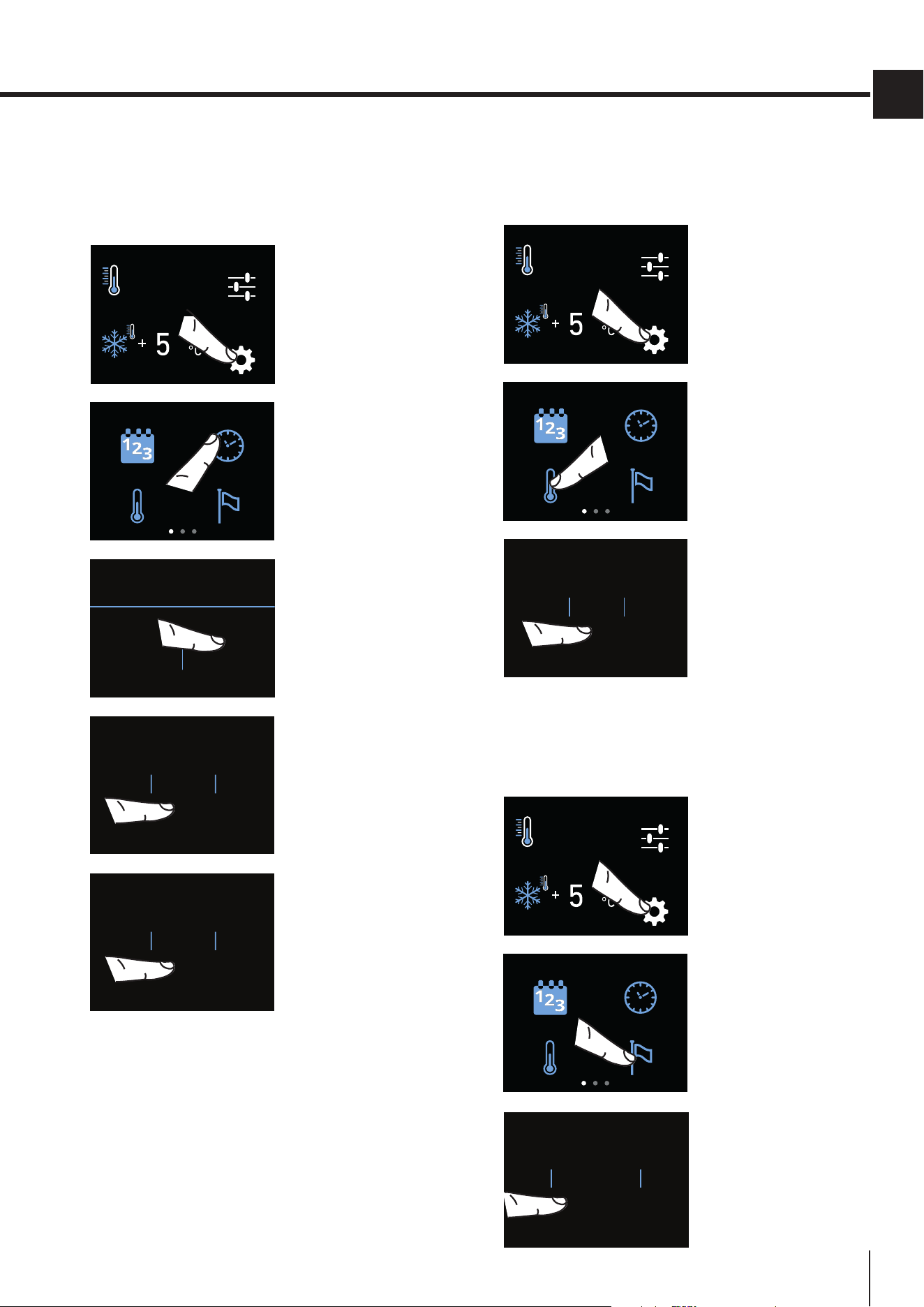
6.2. Settings
Itispossibletocustomizethesettingsofyourappli-
ancetoadaptittoyourdierentrequirements.
DATE
1) Date.
TIME
2) Time.
°C / °F
3) Degrees Celsius and
Fahrenheit.
LANGUAGE
4) Language.
MULTI ZONE
5) Multizone.
SABBATH
5) Sabbath.
RESET
6) Reset.
DEMO MODE
7) Demo Mode.
MAINTENANCE
8) Maintenance.
SERVICE
9) Service.
INFO SYSTEM
10) InfoSystem.
1) Date
The display will show the date in the format
(day:month:year).
You can modify the settings by touching the display.
FUNCTIONS
OFF
SETTINGS
A) Home screen.
Touch the SETTINGS
icon.
DATE
°C / °F
TIME
LANGUAGE
B) Touch the DATE
icon.
10
11
12
9
8
OK
DAY
C) Scroll up or down
to select the desired
day and touch OK.
10
11
12
9
8
OK
MONTH
D) Scroll up or down
to select the desired
month and touch OK.
10
11
12
9
8
OK
YEAR
E) Scroll up or down
to select the desired
year and touch OK.
6.FUNCTIONSANDSETTINGS
27
www.smeg.com
EN
2) Time
The display shows the hours and minutes in the for-
mat hh:mm. This function allows you to select a 12 or
24 hr. clock mode.
FUNCTIONS
OFF
SETTINGS
A) Home screen.
Touch the icon
SETTINGS.
DATE
°C / °F
TIME
LANGUAGE
B) Touch the TIME
icon.
TIME?
12 24
C) Select the mode
in which you want to
see the time: 12 or
24 hr.
9HOUR
10
11
8
7
OK
D) Scroll up or down
to select the hour
and touch OK.
37MIN
38
39
36
35
OK
E) Scroll to select the
minutes and touch
OK.
3) Set °C/°F
Thisfunctionallowsvisualizingthetemperatureinde-
grees Centigrade (default) or Fahrenheit.
FUNCTIONS
OFF
SETTINGS
A) Home screen.
Touch the icon
SETTINGS.
DATE
°C / °F
TIME
LANGUAGE
B) Touch the °C/°F
icon.
°C
°F
OK
C) Scroll up or
down to select
the degrees,
Centigrades or
Fahrenheit, and
press OK.
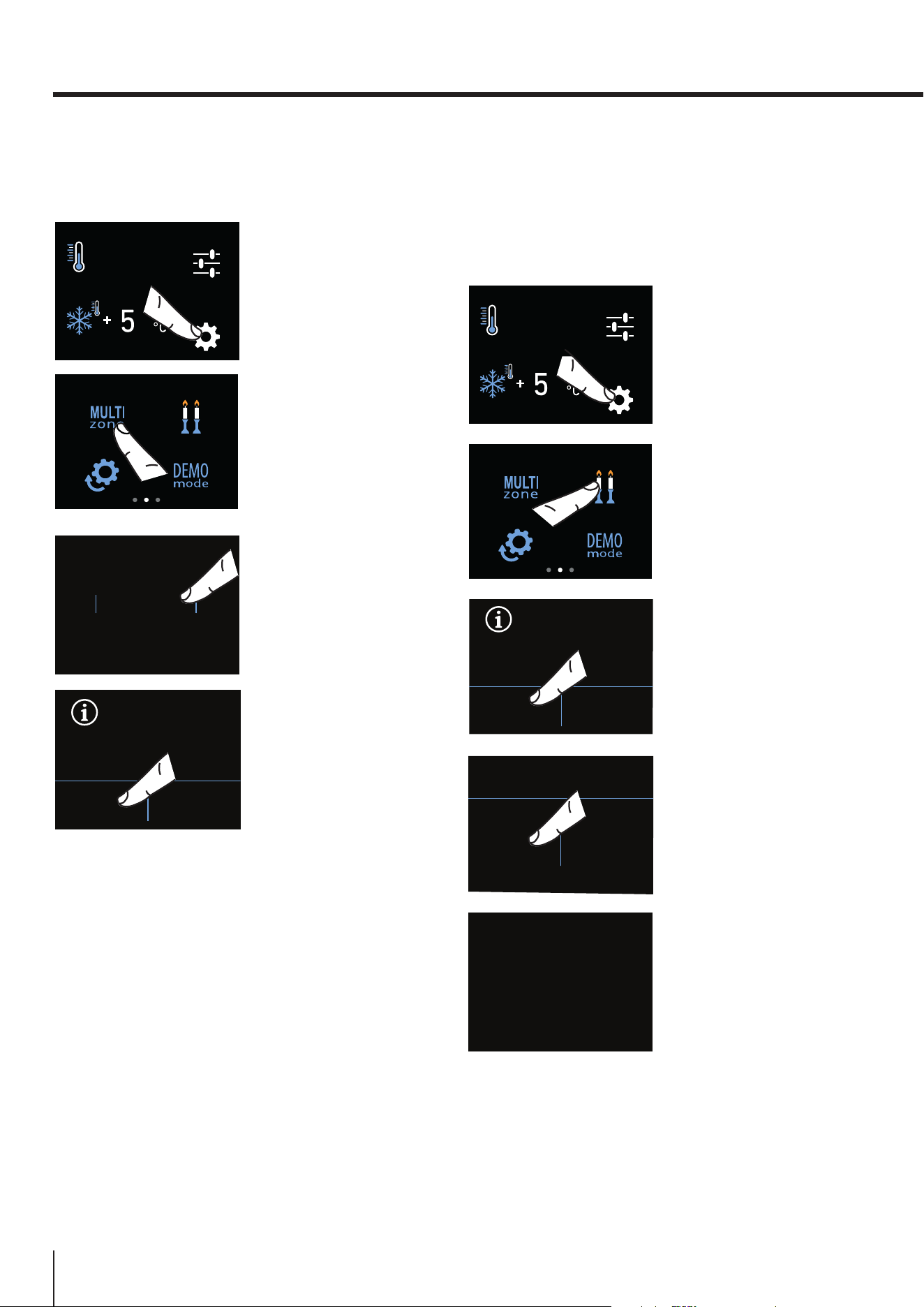
4) Language
To set the language of the appliance, simply follow
the procedure.
FUNCTIONS
OFF
SETTINGS
A) Home screen.
Touch the SETTINGS
icon.
DATE
°C / °F
TIME
LANGUAGE
B) Touch the
LANGUAGE icon.
FRANÇAIS
DEUTSCH
ESPAÑOL
ENGLISH
ITALIANO
OK
C) Scroll up or down
to select the desired
language and press
OK.
28
www.smeg.com
5) Multizone
Thefreezerdrawercan,ifrequired,beconverted
to refrigeration or Fresco operating mode.
FUNCTIONS
OFF
SETTINGS
A) Home screen.
Touch the SETTINGS
icon.
SABBATHMULTI ZONE
DEMO MODE
RESET
B) Scroll twice
right and touch the
MULTIZONE button.
Life Plus 0°C
FREEZER
FRIDGE
OK
C) Scroll up/down,
select one of the
three functions
and press OK.
DO YOU WANT TO
ACTIVATE
Life Plus 0°C
MODE?
YES NO
D) Touch YES
toconrmthe
function.
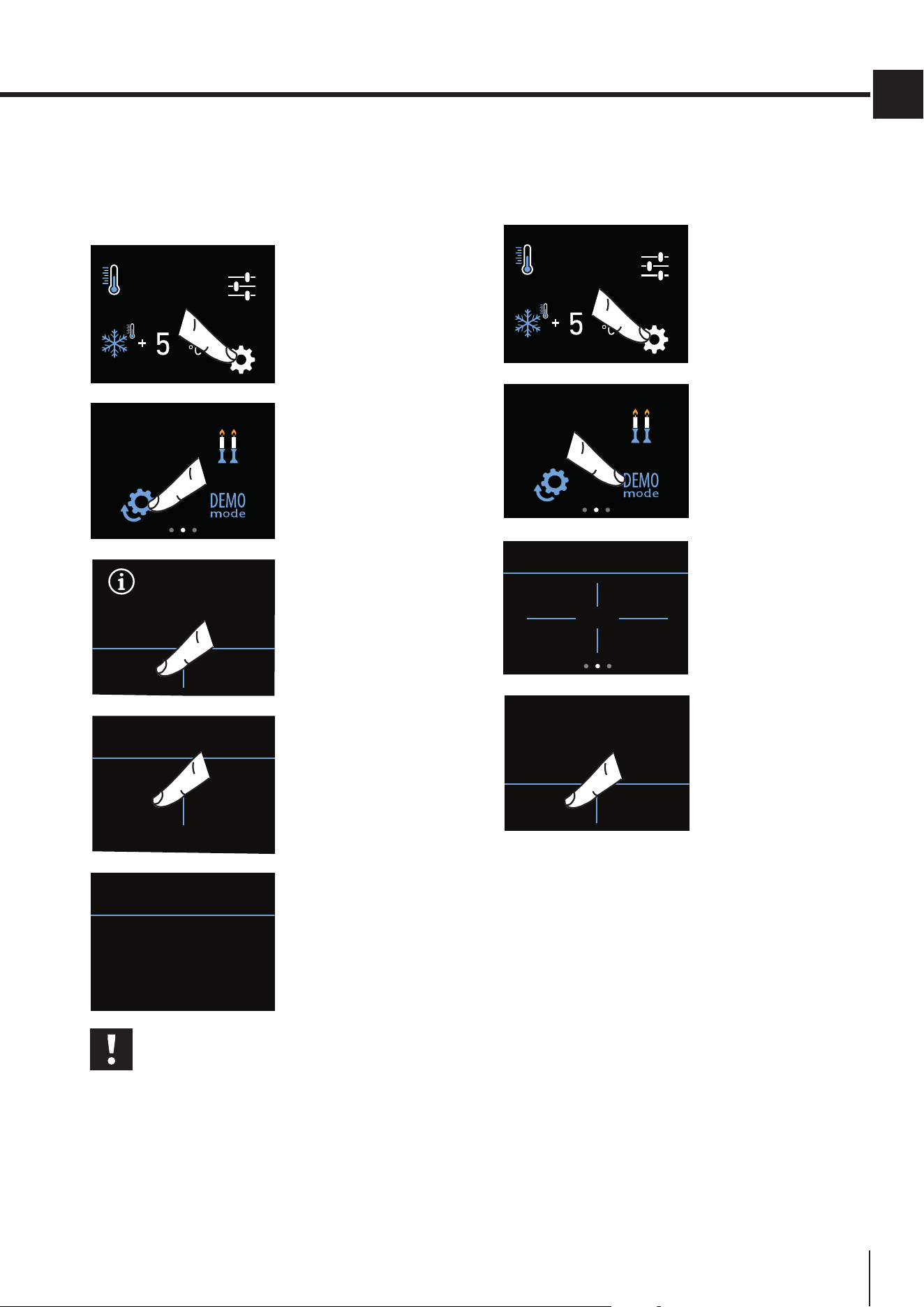
5) Sabbath Mode (Optional)
The function makes it possible to comply to certain
religious observances requiring that the operation of
theapplianceisnotaectedbytheopeningorclos-
ing of the doors (the thermostatic control, the inner
lighting and the ice maker are deactivated).
FUNCTIONS
OFF
SETTINGS
A) Home screen.
Touch the SETTINGS
icon.
SABBATHMULTI ZONE
DEMO MODE
RESET
B) Scroll right twice
and touch the
SABBATH icon.
SABBATH
MODE
ON OFF
C) Touch the ON
button to activate the
function.
DO YOU WISH TO PROCEED?
YES NO
C) Touch the YES
button again to
activate the function.
SABBATH MODE
E) The appliance will
work according to
thisconguration.
6.FUNCTIONSANDSETTINGS
29
www.smeg.com
EN
6) Reset
It gives the possibility to restore the base settings
that were set in the factory, cancelling all the changes
that has been made from there onward.
FUNCTIONS
OFF
SETTINGS
A) Home screen.
Touch the icon
SETTINGS.
SABBATH
DEMO MODE
RESET
B) Scroll right twice
and select the RESET
icon.
DO YOU WANT TO
RESET THE
FACTORY DATA?
YES NO
C) Touch the YES
button to reset.
RESET
YES NO
D) Touch the YES
button.
RESET
RESET CARRIED OUT
E) The reset has
been performed. The
appliance factory
settings have been
restored.
Important
If you restore the default settings
(“Reset”),youwillhavetoresetthefunc-
tionoftheMultizonedrawertofridgeor
Fresco mode, if one of those two settings
had been selected before the reset.
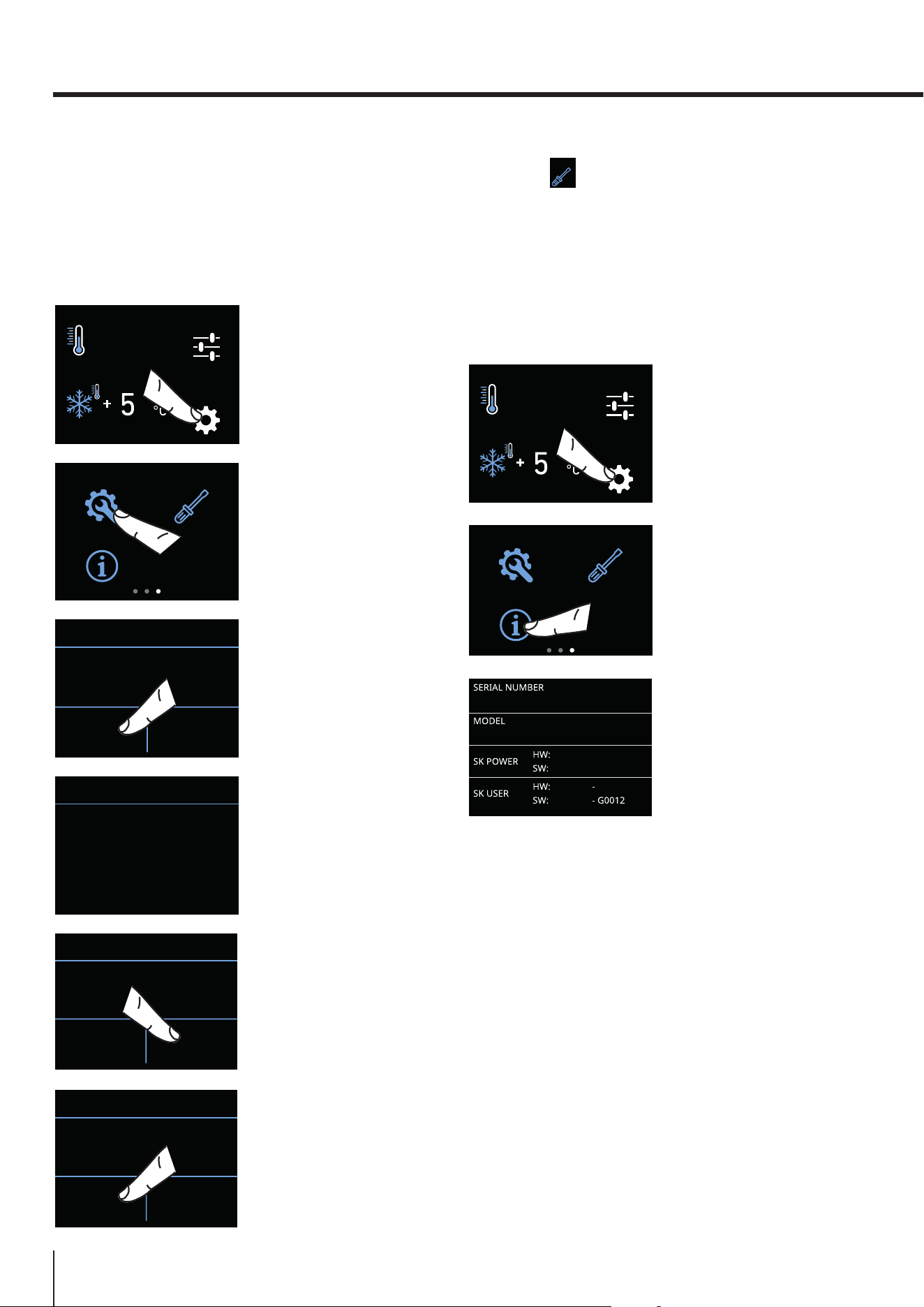
7) Demo Mode
It is possible to simulate the functioning of the fridge,
for showroom display or for fairs.
FUNCTIONS
OFF
SETTINGS
A) Home screen.
Touch the icon
SETTINGS.
SABBATH
DEMO MODE
RESET
B) Scroll right twice
and select the
DEMO MODE icon.
DEMO MODE
1
3
2
4
C) Enter the
PASSWORD required
for activation,
which must be
requested from the
Manufacturer.
Default password:
1-2-3-4
DEMO MODE
ON OFF
D) Touch the ON or
the OFF button.
30
www.smeg.com
8) Scheduled maintenance
In order for the unit to operate correctly, the ventila-
tiongrill,lterandcondensermustbecleanedregu-
larly (see the instructions in this booklet on page 40.
The recurring cleaning every 12 months is reminded
by an acoustic and optical signal on the display.
FUNCTIONS
OFF
SETTINGS
A) Home screen.
Touch the SETTINGS
icon.
MAINTENANCE
INFO SYSTEM
SERVICE
B) Scroll right three
times and touch the
MAINTENANCE
icon.
YES NO
CONDENSER CLEANING
ENABLE WARNING?
C) To enable it, touch
the YES icon.
CONDENSER CLEANING
NEXT WARNING.
DAYS MISSING...
365
D) The display shows
the time left until the
next cleaning.
OFF RESET
CONDENSER CLEANING
NEXT WARNING.
DAYS MISSING...
365
E) However, if you
want to reset the
previously set
warning, touch the
RESET icon.
YES NO
CONDENSER CLEANING
DISABLE WARNING?
F) The alert can be
disabled and the
time left before the
next cleaning can be
viewed by touching
the YES button.
6.FUNCTIONSANDSETTINGS
9) Service
The Service
SERVICE
function is reserved for the Manufac-
turer’s Customer Service.
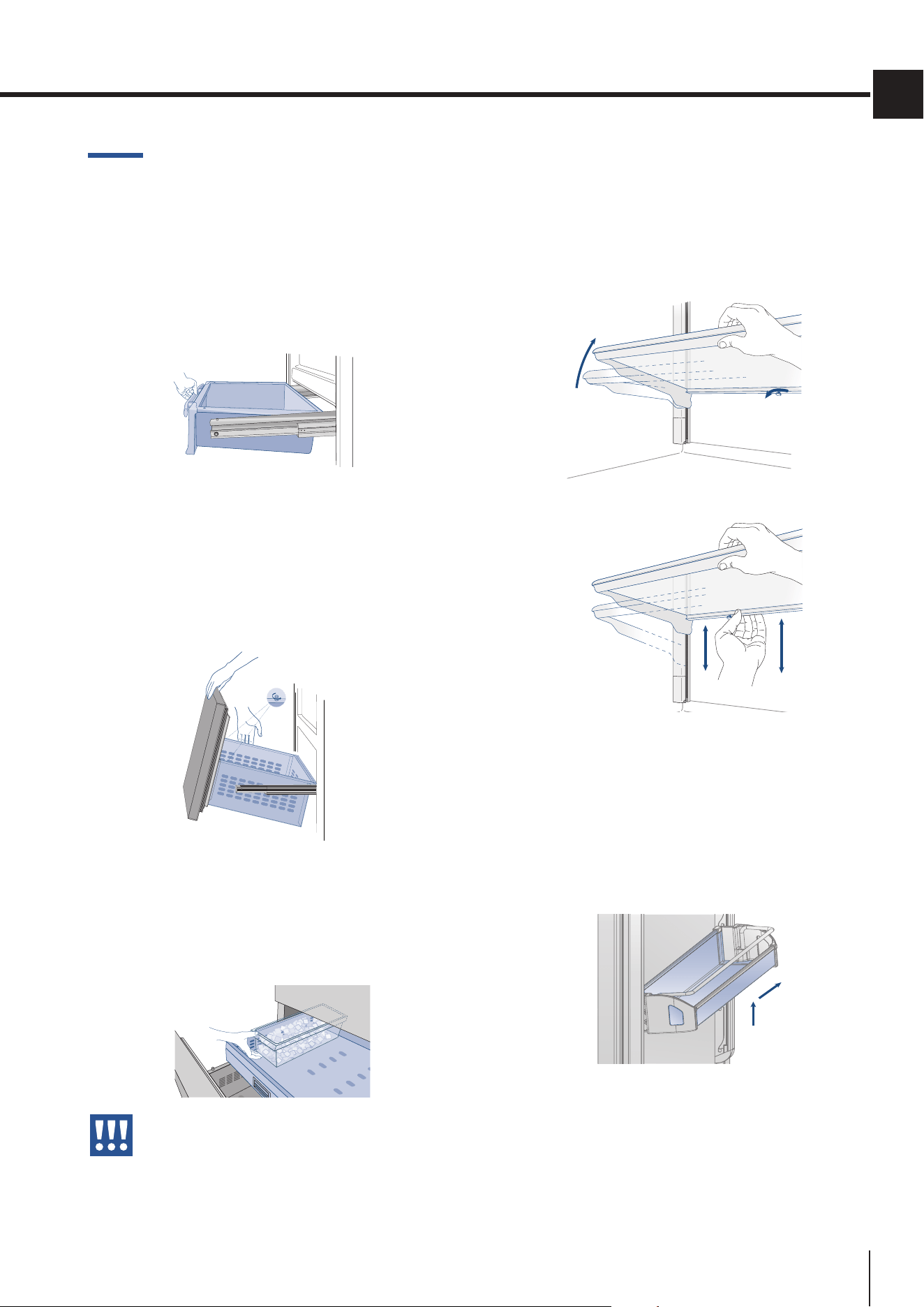
10) Info System
The Info System function displays the product data,
such as the software code, the serial number and the
appliance factory codes.
FUNCTIONS
OFF
SETTINGS
A) Home screen.
Touch the icon
SETTINGS.
MAINTENANCE
INFO SYSTEM
SERVICE
B) Touch the INFO
SYSTEM icon.
C) Information about
the appliance is
displayed.
31
www.smeg.com
EN
7. LAYOUT
7.1. Positioning, adjusting and
internal drawers removal
Refrigerator Drawer
Itispositionedontheslides;toremovethedraw-
er, take it out completely and unscrew the two side
thumbscrews, lift it and take it out.
Multizone drawer | BMI models
TheupperMultizonedrawercanberemovedus-
ing the same method used for the Fresco draw-
er, after unscrewing the two side thumbscrews.
When replacing the drawers, make certain
the back of the drawers engage under the
clips on the slide guides.
Ice Tray
The ice bucket is located in the upper drawer of the
freezercompartment(onsomemodelsitisxedwith
locking panels). After removal, make sure to reposi-
tion it correctly.
Careful, do not place hands or ngers
near the Ice Maker when it is in operation.
Internal glass shelves
The shelves are sliding and can be easily re-posi-
tioned by the user as follows:
> release the locking knob by turning it anti-
clockwise
> lift the front of the shelf and tilt it slightly.
> to remove a shelf,youmustrstslideitupand
then take it out.
Door shelves | models
The door shelves can be easily removed for
cleaning.
> Grasp the sides of the door shelves and push
them upwards to release them from their seats,
then pull them outwards.
> Retthemworkinginthereverseorder.
1
2
32
www.smeg.com
8. ACTIVATINGANDUSINGTHEICEMAKER
With the SUPER ICE function, it is possible to in-
crease the quantity of ice produced in 24 hours
(up to 1.5 kg (3.0 lbs.) a day), while with the CUBE
SIZEfunctionyoucanselectthesizeofthecubes
produced (see also chapter "Setting the ice cubes
sizeandSuperIcefunction"onpage23).
Any problems encountered
Does the ice give off an unusual smell?
Ice is a porous material which can absorb odours
from its surrounding environment. Ice cubes which
have been in the ice cube container for a long time
may absorb odours, stick together and slowly be-
come smaller.
We recommend that old ice cubes not be used.
Other means of preventing odours:
> The ice cube container should be cleaned occa-
sionally with warm water. Make sure that you switch
otheicemakerbeforeclearingthecontainer.Rinse
it out and wipe it dry.
> Checkthecontentsofthefreezerforspoiledorout-
of-date food. All odorous foods should be wrapped
thoroughly or stored in airtight containers to prevent
the odours from accumulating.
> Thewaterlterhastobereplacedperiodically.
> In some cases the quality of the water connection
in the house should be checked.
Operating noises
> Hum: the refrigerator unit is running. The fan in
the air recirculation system is running.
> Bubbling, humming or gurgling noises: refrigerant
isowingthroughthetubes.
> Clicking: motor is switching on or o. Solenoid
valve on the water connection is opening/closing.
> Rumbling: ice cubes are falling into the ice cube
container.
The appliance is powered by two inde-
pendent compressors. It is therefore nor-
mal to always have one of the two com-
pressors in operation.
Warning
Do not place any bottles or food in the
ice cube container for rapid cooling.
The ice maker may become blocked and
be damaged.
8.1. Activating and using the
Ice Maker
ICE
MAKER
Notes
>
If the ice is not used frequently is ad-
visable to empty the ice bin once every
8-10 days. If the ice is not frequently used,
the older cubes can become opaque, will
haveastrangeavourandbecomesmaller.
> The Ice maker automatically switches
o if the Holiday function is activated.
> When the Ice maker is started for the
rst time, do not use the rst ice pro-
duced(disposeoftherstbucketofice).
>Iftheappliancehasbeenswitchedo
for a month or more, it is recommended to
performawaterandltercleaningcycle.
> The Ice maker only produces ice if the
MultizonecompartmentissettoFreezer
mode.
Warning
The Ice Maker will continue to operate
even if the ice bin is not in position.
Activating/Deactivating the Ice maker
To activate the Ice maker after the installation of
the appliance, see chapter 5) Activating/Deac-
tivating the Ice maker on page 22. If the ap-
pliance is operating without being connected to
the water system, make sure that the Ice maker
is deactivated.
Productivity and cubes size
Once the Ice maker has been activated, it will take
between 12 and 24 hours to have the automatic
production of ice. Ice will be produced until the
bowl is full, once the maximum allowed level is
reached, production will stop automatically.
The production is 10 cubes about every two
hours (for a total of 10 cycles over 24 hours).
The yield depends on the temperature set in the
freezer,theambienttemperatureandhowfrequently
the door is opened.
33
www.smeg.com
EN
8.2. Internal water lter
What it is for
Theinternalwaterlterensuressuperbquality
andpuricationofthe waterusedforthepro-
ductionoficecubes;itslteringdurationisupto
3,000 litres (792,6 gal) and for a maximum time
of 12 months.
Filter
replacement
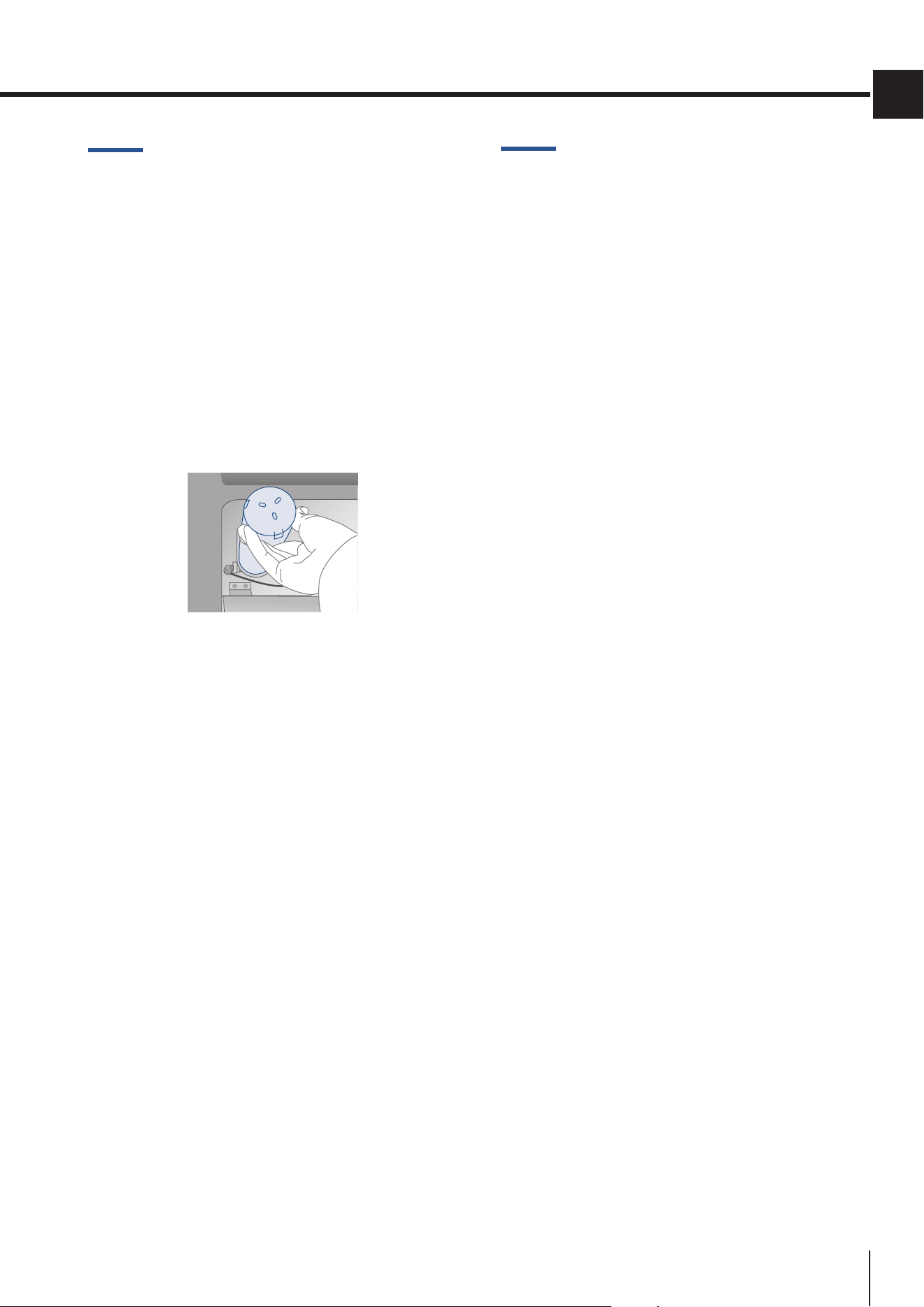
Thelteris locatedinsidethe refrigeratorcompart-
ment, above the top glass panel.
Before changing the lter, deactivate the Ice maker
temporarily (see chapter 5) Activating/Deactivating
the Ice maker on page 22).
Pull both levers on the front of the glass to release
the locking mechanism and pull the glass down, then
carefullyrotatetheltercartridgeaquarterofaturn
counterclockwise until it is released from its seat (it
is normal for a small amount of water to come out).
Remove the cap from the new cartridge and insert it
in its housing by gently rotating it clockwise for one
quarter rotation until it locks into place, without forc-
ing it.
After replacing the lter
> clean the circuit following the instructions in
chapter 8) Manual lter cleaning (optional, BMI
and FZI modelsonly)onpage25;
> remove the water from the ice container and
dry it.
8.3. External water lter for freezer
column Ice Maker
Freezer columns equipped with automatic ice-
makersincludeanexternallymountedwaterl-
ter kit.
Thewaterltermanifoldandwaterlineconnec-
tions must be installed in conjunction with the
fridge as the waterline connecting the back of
the appliance to the lter kit must be in place
before installing the unit.
Thelterkitshouldbeinstalledinanaccessible
location (such as an adjacent cabinet or under
it) to allow for the water lter cartridge to be
changed annually.
Filter activation/deactivation
Seechapter6)Waterlter-activation(optional, BMI
and FZI models only) on page 24.
IfyouchooseNOTtousethewaterlter(forin-
stance because the appliance is connected to
an alreadyltered water source) then we sug-
gest you disable the warning to avoid receiving
reminderstochangethelter(that you are not
using).
For further details on how to access this func-
tion setting, follow the instructions in chapter
6a)Waterlter-deactivation(optional, BMI and
FZI models only) on page 24).
Aftereveryannualreplacementofthewaterl-
ter cartridge, it is necessary to reset the count
ofthequantityoflteredwaterandofthetime
elapsed since the last replacement following
the instructions in chapter 6a) Reset Filter on
page 24.
BMI
FZI
FRI
34
www.smeg.com
9. LIGHTING
9.1. Compartment
lighting
10.CONSERVATIONOFFOOD
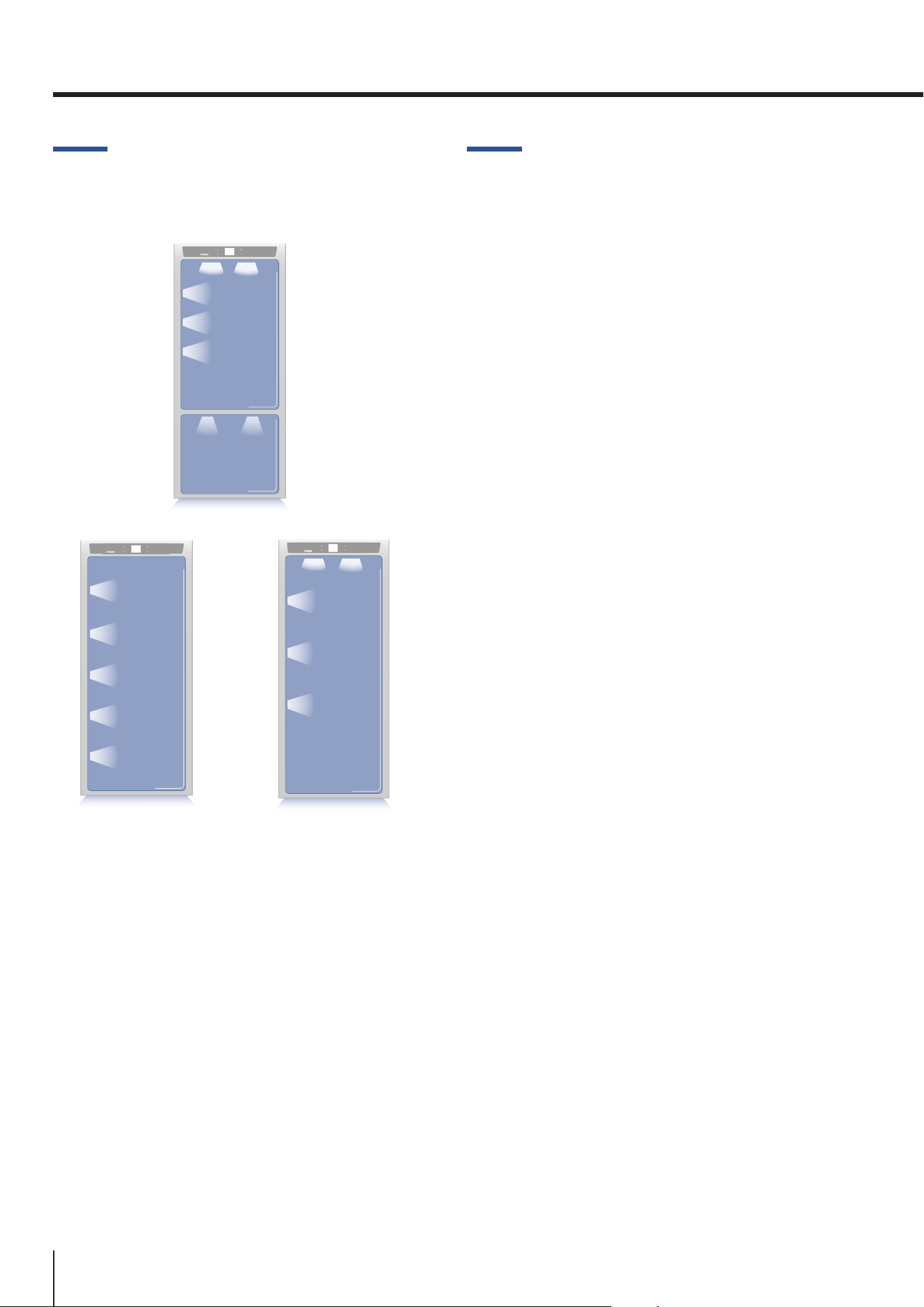
To provide optimum interior lighting, LED strips il-
luminate the refrigerator compartment from the top
andsetsofLEDlightsdirectlyilluminatedierentar-
eas of the refrigerator compartment, of the Crisper-
Frescodrawersandthefreezerdrawer.
In case of malfunction and/or wearing out of the
lighting system, the repair should be carried out by
a qualied Service technician of the manufacturer.
10.1. General directions
Your appliance is designed to ensure constant accu-
rate temperatures and appropriate humidity levels in
all compartments. In addition, the double refrigera-
tionensuresthatfrozenfoodsandicedonotabsorb
the odour of fresh foods and that the humidity in the
refrigeratordoesnotfreeze,resultinginfrostbuild-
up. Nevertheless, to properly preserve all of your
foods, it is not enough to have an excellent refrigera-
tor. It is also necessary to know the rules of correct
cold food storage.
Do bear in mind that all foods will inevitably change
their characteristics with the passage of time.
This change begins long before the food is consumed,
since foods contain micro-organisms which multiply
and can cause deterioration.
This process occurs more rapidly in the case of im-
proper handling and of incorrect storage tempera-
tures and humidity levels.
We therefore recommended that you follow the in-
structions provided below which will allow you to use
yourrefrigerator/freezerinthesafestandmosteec-
tive manner, to keep your foods in the best possible
way for as long as possible.
Bear in mind that the Crisper-Fresco area is the area
for preserving the most delicate fresh foods, since it
ensuresconstantaveragetemperaturenearfreezing.
Periodically check that all foods are in a proper state
of preservation. It is usually quite clear when a food
item has deteriorated, due to mold, an unsavoury
odour and an unpleasant aspect.
Nevertheless, there are cases in which these condi-
tions are not so evident.
If you believe that a food item has been kept for an
excessive period of time and may have deteriorated,
do not consume this item or even taste it, even if it still
seems to be well preserved, since the bacteria that
cause deterioration in food can also cause poisoning
and illness. When in doubt, throw the food away.
When a high level of humidity is present
either in the environment or in the
foods placed in the Fresco drawers,
the bottom of the Fresco compart-
ment might be covered with some wa-
ter or ice (if the temperature is set be-
tween 0°C (32°F) and -2°C (28°F). Such
condition is normal and it is due to
the high humidity levels of the Fresco
compartment; high humidity together
with low temperatures is what guarantees a
longer preservation of foods.
Such condition is normal and it is due
to the high humidity levels of the Fresco
compartment; high humidity together
with low temperatures is what guaran-
tees a longer preservation of foods.
If the layer of ice is thicker, it might be
necessarytoshutotheFresco compart-
ment for one day in order to melt it.
Warning
After a prolonged interruption of elec-
trical power, once the electrical power is
reactivated, an audible signal will indicate
if the temperature has raised above nor-
mal levels. In addition to this the display
will show for one minute the highest tem-
perature detected inside the compart-
ments, to allow the user to decide how to
better use the food items.
35
www.smeg.com
EN
10.2. How to maintain good food
quality
When buying groceries
Always take the following precautions:
> Place packages containing raw meat, sh or
poultry in containers suitable for food storage.
> Buymeat,poultryandshlast.Donotleave
your groceries in a warm car after shopping.
> Keep a freezer bag in your car and use it in
case of very high temperatures or long trips.
> Check the production and expiry dates on
foods to make sure they are fresh.
> Buy fresh food in quantities that you can con-
sume in 1-2 days.
> Leave hot foods at room temperature for
at least two hours before placing them in the
refrigerator.
When placing foods in
Check the refrigeration temperature of the various
compartments on the control panel:
> Follow the recommendations regarding stor-
age times and temperatures indicated in the
tables below.
> Keeprawmeat,shandpoultryseparatefrom
other foods and avoid any possible drippings.
> When placing in the refrigerator your meat,
sh or poultry, leave these in their original
packaging, unless the packaging is ripped or
punctured.
> Repeated handling could introduce bacteria
into these foods.
> Tokeepfoodinthefreezeritisagoodideato
usefreezercontainers.
> Label and date the packages.
> Be careful to correctly position the food items
on the shelves in a way that does not obstruct the
cold air circulation vents inside the compartment.
Models with Fridge compartment and
Freezer compartment
Fridge
compartment
Freezer
compartment
> Fridgecompartment
adjustablefrom+2°Cto+8°C
(from35°Fto46°F)
> Freezercompartment
adjustablefrom-22°Cto-15°C
(from-7°Fto5°F)
36
www.smeg.com
Freezer compartment: storage
> Food must be stored in closed containers or
properly packaged and must not emit or absorb
odours and humidity.
> Follow the recommendations regarding stor-
age times and temperatures given in the table
below.
10.3. Tips for food storage
Temperatures
The appliance working temperatures are set at the
recommended degrees of +5°C (+41°F) for the refrig-
erator, 0°C (32°F) for Fresco drawers and -18°C (0°F )
forthefreezer.
Food arrangement
Refrigerator compartment door
> Keep eggs, butter, cheese etc. in the upper
and central parts.
> Keep drinks, bottles, cans etc. in the lower
part.
Refrigerator compartment
> Keep preserves, wine, biscuits etc. in the up-
per part.
> Keep dairy products, pre-prepared foods, pas-
tries, fruit juices, beer, etc. in the central part.
upper part
> Keep fresh fruit, tropical food, vegetables,
carrots, potatoes, onions...
fruit juices, beer etc. in the central part
> Keep meats, cold cuts etc...
Freezer compartment: freezing
We recommend you use the rear part of the upper
basketforrapidfreezingofproductswiththefollow-
ing indications:
> Use small packs and if possible already cold.
> Thequantityoffreshfoodthatcanbefrozen
at the same time is described on the characteris-
tic plate positioned in the cell.
> Usespecialfreezingbags,aluminiumfoil,food
gradepolyethylenelmandfreezingcontainers.
> Do not use paper bags, cellophane bags not
forfooduse,shoppingbagsorbagsforfreezing
that have already been used.
> Preventfrozenfoodcomingintocontactwith
freshfoodtobefrozen.
10.CONSERVATIONOFFOOD
37
www.smeg.com
EN
FRESH FOODS
CONSERVATION AREA
TIME
Raw meats
Large cuts
Refrigerator - Fresco Compartment
4 days
Steaks, poultry and wild game
Refrigerator - Fresco Compartment
3 days
Ground meat
Refrigerator - Fresco Compartment
1-2 days
Carpaccio
Refrigerator - Fresco Compartment
Immediately
Cooked meat
Boiled and roasted meats
Refrigerator Compartment
2 days
Meat-based sauces
Refrigerator Compartment
6 days
Fish
Rawandcookedsh
Refrigerator - Fresco Compartment
2 days
Other
Soups and broths
Refrigerator Compartment
2 days
Pasta
Refrigerator Compartment
2 days
Opened cold cuts
Refrigerator - Fresco Compartment
3 days
Fresh cheeses
Refrigerator - Fresco Compartment
2-3 days
Well protected aged cheeses
Refrigerator Compartment
Several months
Eggs (fresh and unwashed)
Refrigerator Compartment
2 weeks
Opened containers
Refrigerator Compartment
2-3 days
Raw vegetables (in perforated bags)
Refrigerator - Fresco Compartment
1 week
FROZEN FOODS CONSERVATION AREA TIME
Beef, veal, lamb and goat
FreezerCompartment (steaks)
6-12 months
Beef, veal, lamb and goat
FreezerCompartment
(Meat with bone in)
4-6 months
Ground beef FreezerCompartment
1-2 months
Pork FreezerCompartment (Without bone)
4-6 months
Pork FreezerCompartment (With bone)
2-3 months
Ground pork FreezerCompartment
1-2 months
Meat leftovers FreezerCompartment
2-3 months
38
www.smeg.com
FROZEN FOODS CONSERVATION AREA TIME
Whole chicken and turkey FreezerCompartment
8-12 months
Goose, duck and pheasant FreezerCompartment
4-8 months
Fish FreezerCompartment
1-2 months
Crustaceans FreezerCompartment
2-3 months
Cooked foods FreezerCompartment
1-2 months
Vegetables FreezerCompartment
8-12 months
Fruit FreezerCompartment
6-12 months
Desserts and cakes FreezerCompartment
2-3 months
10.CONSERVATIONOFFOOD
39
www.smeg.com
EN
11.CAREANDCLEANING
11.1. Care and Cleaning
To clean parts and surfaces made of steel, use a mi-
crobreclothandthespongeprovidedinthekitwith
the appliance.
Always use the cloth and sponge in the direction of
thesteel’ssatinnish.
Every now and then, to polish the steel, wipe with a
slightlydampmicrobrecloth.
Do not use the sponge on aluminium parts, such
as the handles and the edging on the glass shelves.
Take special care to keep the ventilation openings in
the appliance or in the cabinet that houses it free of
obstructions.
Note
Scrupulously follow the detailed instruc-
tions that can be found in the kit pro-
vided and never use abrasive or metallic
products which could scratch and perma-
nentlydamagethesatinnishingonthe
appliance.
Before performing any sort of cleaning,
disconnect the appliance from the elec-
trical power supply. Make sure you do not
damage the refrigerant circuit in any way.
Warning!
The use of chlorine-based cleaning prod-
ucts or other products that contain chlo-
rine should be avoided (bleach, hypochlo-
rite, etc.).
11.2. Internal cleaning
Clean the interior of the appliance and its remov-
able parts by cleaning them with a solution of
lukewarm water mixed with a small amount of
dishwashing detergent.
Rinse and dry right away.
Do not use mechanical devices or other methods
to speed up defrosting.
Warning!
The use of chlorine-based clean-
ing products or other products that
contain chlorine should be avoided
(bleach,hypochlorite,etc.).
Warning!
Do not use water on the electrical
parts,lightsorcontrolpanel.
Do not bring cold glass parts into contact
with hot water.
Do not wash any parts of the refrigerator
in a dishwashing machine since this could
damage or irreparably deform the parts.
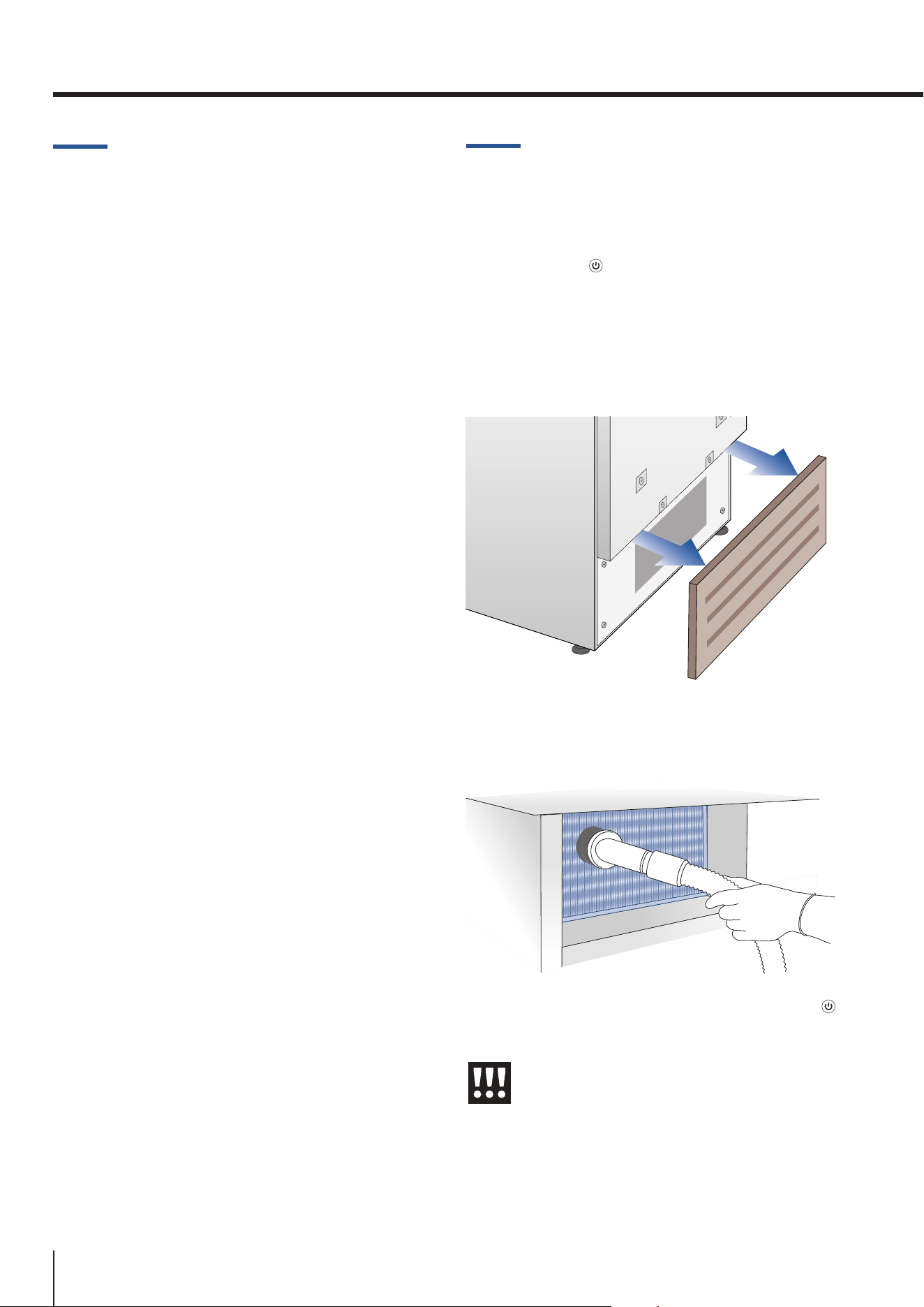
40
www.smeg.com
11.CAREANDCLEANING
11.3. Cleaning of the ventilation
grill, lter and condenser
In order for the unit to operate correctly, the ven-
tilation grill, lter and condenser must becleaned
periodically.
A reminder for this periodic cleaning, to be per-
formed every 6 months, is provided through sound
alerts and a notication shown on the display.
To activate or deactivate this warning signal and dis-
play the time left to the next cleaning, see chapter
“8)Scheduledmaintenance”onpage30).
The condenser is behind the bottom front ventila-
tion grid.
To clean it use a vacuum cleaner with a soft brush
attachment at maximum power, sweeping it along
the vent slits.
Intheeventofsignicantdustbuildup,theventila-
tion grill can be removed to allow a more thorough
cleaningofthelter.
After cleaning the condenser, touch the RESET icon
in order to reactivate the warning signal in 6 months.
If you do not want the warning cleaning signal of
the condenser any more, touch the OFF icon (see
chapter “8) Scheduled maintenance” on page 30).
11.4. Lower condenser
To clean the condenser, follow these instructions:
> Switch o the appliance by pressing the
ON/OFF button on the main control panel for
approx 3 seconds.
> Wait approx. 30 minutes, until the con-
denser cools down to ambient temperature.
> Remove the removable grille under the door.
> Clean the condenser thoroughly from all dust
deposits as showninthegure,takingcarenot
to damage it.
> Restart the appliance acting on the ON/OFF
button again for about 3 seconds.
Warning!
Theedgesofthecondenseraresharp,
thereforeusesuitableprotectionfor
yourhandsand armswhencleaning
thecondenser.
41
www.smeg.com
EN
1.1. Troubleshooting Guide
If you notice any malfunctioning of your appli-
ance, use this guide before calling for service.
This guide can help you to solve the problem on
your own or could provide important information
that you can convey to the Service technician in
ordertoensurerapidandeectiverepair.
Display message and audible alarms
A malfunction is usually indicated on the display.
The problems that cannot be solved by the user
are signalled through a malfunction code. Keep
in mind, however, that these may appear in mes-
sages or alarms under particular conditions of
use or during start-up. In such an event, deacti-
vate the sound alert by pressing the ALARM
button, leave the appliance running and open the
doors as infrequently as possible for 10-12 hours.
The refrigerator or the freezer does not
work
Is the appliance connected to the electrical pow-
er supply?
Is electrical power being supplied from the elec-
trical socket?
Is the ON/OFF button activated?
Is the unit in DEMO mode? If you suspect your
appliance is in DEMO mode, please contact your
point of purchase for assistance with disabling
this feature (see also page 29)
The refrigerator or the freezer is warmer
than usual
Does the display show a malfunction code?
Is the temperature adjusted correctly?
Were the doors or drawers open for a long pe-
riod of time?
Were large quantities of food recently placed in-
side?
Is the unit in DEMO mode? If you suspect your
appliance is in DEMO mode, please contact your
point of purchase for assistance with disabling
this feature (see also page 29)
The appliance remains in function for a
long time period
Bear in mind that during very hot weather and
with very high temperatures in the room it is nor-
mal for the compressor to remain on for extend-
ed periods of time.
Were the doors or drawers open for a long pe-
riod of time?
Were large quantities of food recently placed in-
side? Check that the doors are closed and that
the food or containers do not obstruct the per-
fect closure of the door.
Are one or more of the compartments in
SHOPPING mode? (see page 20)
If you hear strange noises
It is normal to hear noise from the fans or com-
pressors during the defrost phase. Noise could
be more marked depending on the position of
the appliance and the surrounding environment.
Condensation inside and outside of the
refrigerator
If the climate is very humid, the formation of con-
densation is normal. Opening the door or draw-
ers for extended periods of time can contribute
to the formation of condensation.
In any case, make sure that the doors are always
fully closed.
Ice or frost build up inside the
refrigerator or freezer
Did you leave the doors open for a long period
of time?
Are the doors closing completely? If the doors do
not fully close, contact your installer.
Unpleasant odours inside the
refrigerator
Clean the appliance thoroughly according to the
instructions. Hermetically cover all of the food.
Do not store food for extended periods of time.
The doors are dicult to open
The appliance was designed to permit hermetic
closure. When the door is closed, a vacuum con-
dition can be created: in such an event, it is nec-
essary to wait a few seconds until the pressure
balances before opening the door.
The appliance is cooling but lights and
display are not working
Check to see if the appliance was accidentally put
into SABBATH mode (see page 28).
12.TROUBLESHOOTINGGUIDE
42
www.smeg.com
The Ice Maker does not work
Make sure that the Ice Maker is on (
ICE MAKER
icon).
To turn it on, see chapter 5) Activating/Deactivat-
ing the Ice maker.
Make sure that the appliance is connected to the
water supply.
Ifthelterhasnotbeenreplacedforalongtime,
thewaterowmaybelimited.
The Ice Maker does not produce
sucient amounts of ice
On average, the production is about 10 cubes
every two hours (for a total of 10 cycles over
24 hours).
The ice cubes freeze into one block
If the ice is not used frequently, it is possible that
blocks of ice may form. It is recommended that
you remove the block of ice cubes and then let
theIceMakerlltheicetrayagain.
The ice has an unusual avour or colour
WhentheIcemakerisstartedforthersttime,
donotusethersticeproduced(disposeofthe
rstbucketofice)
Iftherefrigeratorwasswitchedoformorethan
one month or if the cartridge was not changed
for more than six months, it could be necessary
toreplacetheltercartridge.
Contact a plumber or a water treatment expert
to make sure that the problem is not due to the
water supply.
If the unit you purchased was used as a
showroom model, it may be in a special
energy-saving mode called Demo Mode,
in which the appliance appears to be
operating (lights work and false tem-
peratures are displayed) but no cooling
actually takes place. If you suspect your
appliance is in Demo mode, please con-
tact your point of purchase for assis-
tance with disabling this feature (see also
page 29)
12.TROUBLESHOOTINGGUIDE
43
www.smeg.com
EN
1.2. Malfunction messages appearing on the display
> In the event of a malfunction, touch the ALARM button and the display will show the fault mes-
sage with its error code (see following table).
> The message will be shown for 3 seconds, then it will go back to the HOME screen.
> To block the message on the screen, press the INFO button on the display. The message will re-
main on the screen for 30 seconds, then it will go back to the HOME screen.
> Intheeventthatthereismorethanoneerrormessage,thedisplaywillshowthedierentfault
messages in chronological order.
Display message
Malfunction description
Power Failure!!
Extended interruption of electrical power
The appliance starts up again automatically and indicates the highest recorded
temperatures. Press the ALARM button to deactivate the sound alarm
Upper unit open
Fridge door open
This message appears when the door has been open for a few minutes.
Lower unit open
Freezer door open
This message appears when the door has been open for a few minutes.
Replacelter
Replace lter cartridge
messageappearswhenonly30%ofltercapacityisleft
Upper unit too warm
Fridge too warm
See Troubleshooting Guide
Upper unit too cold
Fridge too cold
wait for 12 hours: if the malfunction persists, call Customer Service for advice.
Lower unit too warm
Freezer too warm
See Troubleshooting Guide
Lower unit too cold
Freezer too cold
wait for 12 hours: if the malfunction persists, call Customer Service for advice.
Error Code...
Functional problems
Contact Technical Service. Check the conditions of use (high food loads, frequent
door opening). Press the ALARM button to deactivate the sound alarm.
Check condenser
Check Condenser
Every6monthsthedisplayshowsthemessage“CHECK COND.”, clean the con-
denser and press and hold the ENTER button for 5 seconds to reset.