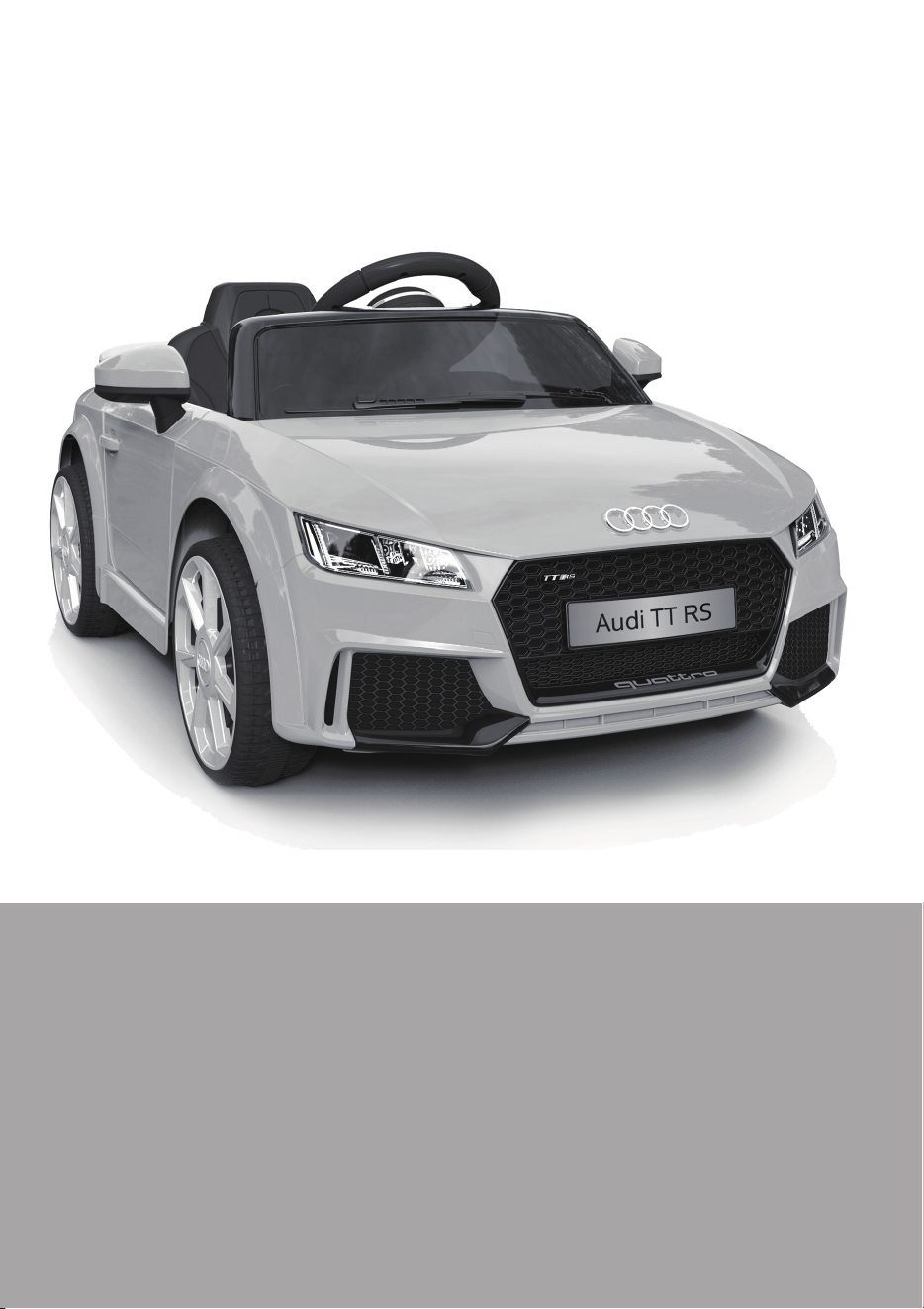
AUDI TT RS Roadster
BATTERY-POWERED RIDE-ON
Owner’s Manual
with Assembly Instructions
Styles and colo(u)rs may vary.
Made in China.
The owner’s manual contains important safety information as well as assembly, use and
maintenance instructions.
The Ride-on Car must be assembled by an adult who has read and understands the
instructions in this manual.
Keep the package away from children and dispose of properly before use.
Keep this manual for future reference.

On the purchase of your new AUDI Ride-On.
This ride-on car will provide your child with many miles of riding of
enjoyment. To help assure you and your rider a safe ride we ask you to
please read this manual carefully, and keep it for future reference.
Follow the recommendations in this manual, they are designed to improve
the safety and operation of your ride-on car and it’s rider.
Battery
Charger
6V4 AH*1 6V7Ah*1 or 6V10 *1
6V500mA or 6V1000mA
6V4Ah*2 or 6V7Ah*2
12V500MA or 12V1000mA
Suitable age:
Load Capacity:
Speed:
Size of car:
Power way:
Charge time:
37~96 Months
Under 30 kgs
1WD: 2.5 km/h 2WD:2.5~5 km/h
103 x 62 x 43.5 CM
Charging type
8 ~ 12 hours
About Your New Ride-On │ 1
VER: SMS-JE1198(TT RS)-EN-190223
Audi TT RS Roadster Electric Ride-on manufactured by Zhejiang Jiajia
Ride-on Co.,Ltd. (Xincang Industrial Zone, Xincang Town, Pinghu City,
Zhejiang Province, China). Trademarks, design patents and copyrights
are used with the approval of owner AUDI AG.
1
2
3
4
5
6
7
8
9
10
11
12
13
14
15
16
17
18
19
20
21
22
23
24
25
26
27
1
1
1
3
3
10
1
4
4
4
1
1
2
1
1
1
1
2
1
1
1
1
1
1
1
1
1
2
2
2
2
2
8
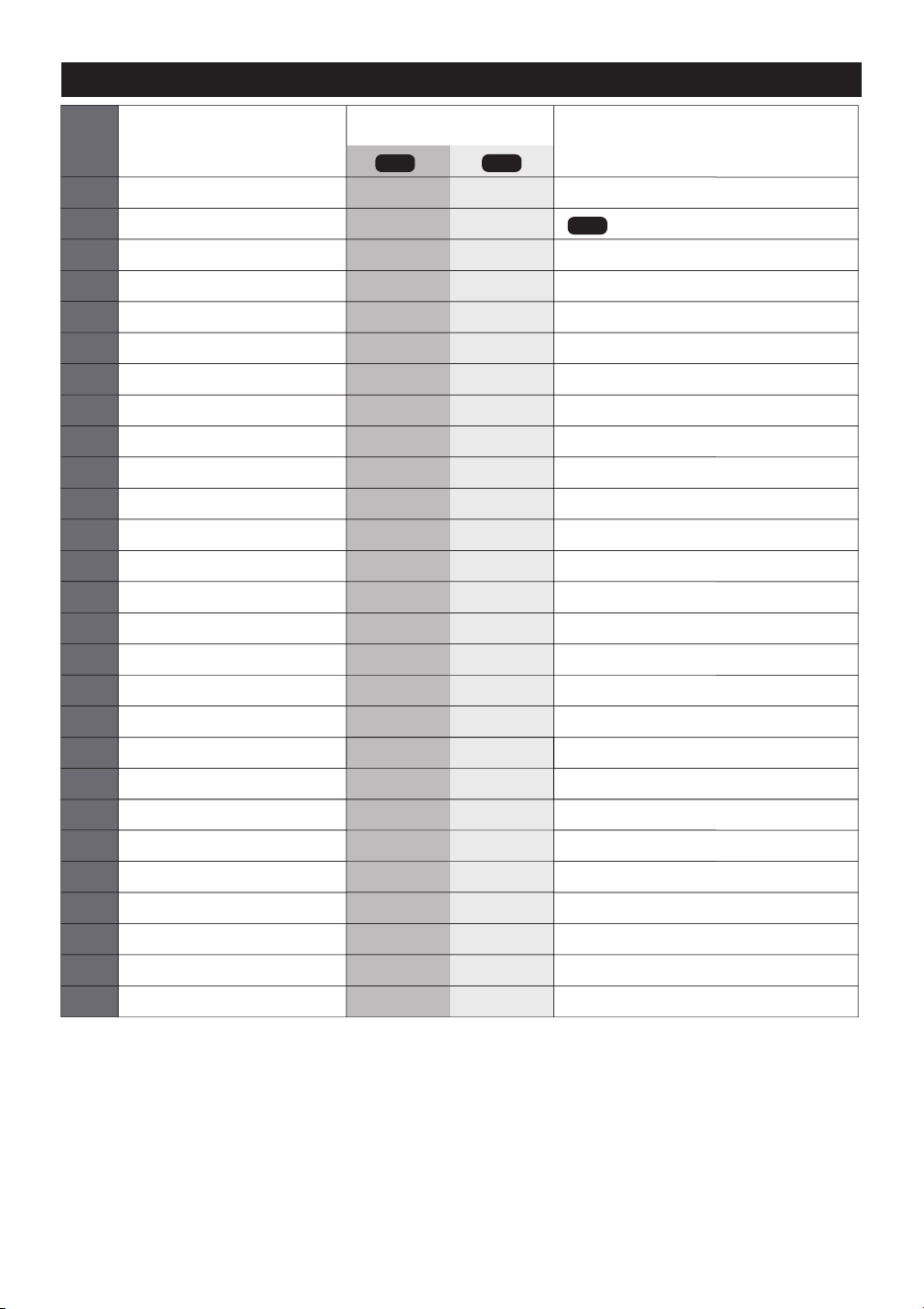
PART
NO.
REMARKS
PART NAME
Q’ty (pcs)
Vehicle body
Gear box
Driving wheel
Normal wheel
Bushing
Ø10 washer
Motor hood
Ø4x12 flat head screw
Lock nut
Hubcap
Steering column
Windshield
Mirror
Steering Wheel
M5x35 machine screw
Ø5 nut
Seat
M5x16 machine screw
Seat rest
Rear spolier
Snap ring
Charger
Spanner
Remote controller
Ø5 nut
R/C driver
M5x22 machine screw
Placed on the steering wheel
Placed on the steering wheel
Left and right
One labeled “L”, and the other one labeled “R”
1WD
2WD
2WD
Parts List │ 2
IF EQUIPPED, for R/C type only
IF EQUIPPED, for R/C type only
IF EQUIPPED, for R/C type only
15
16
22
23
24
13
14
1
7
3
2
5
6
6
9
10
6
9
10
20
19
17
18
4
8
12
11
21
6
26
25
27
6
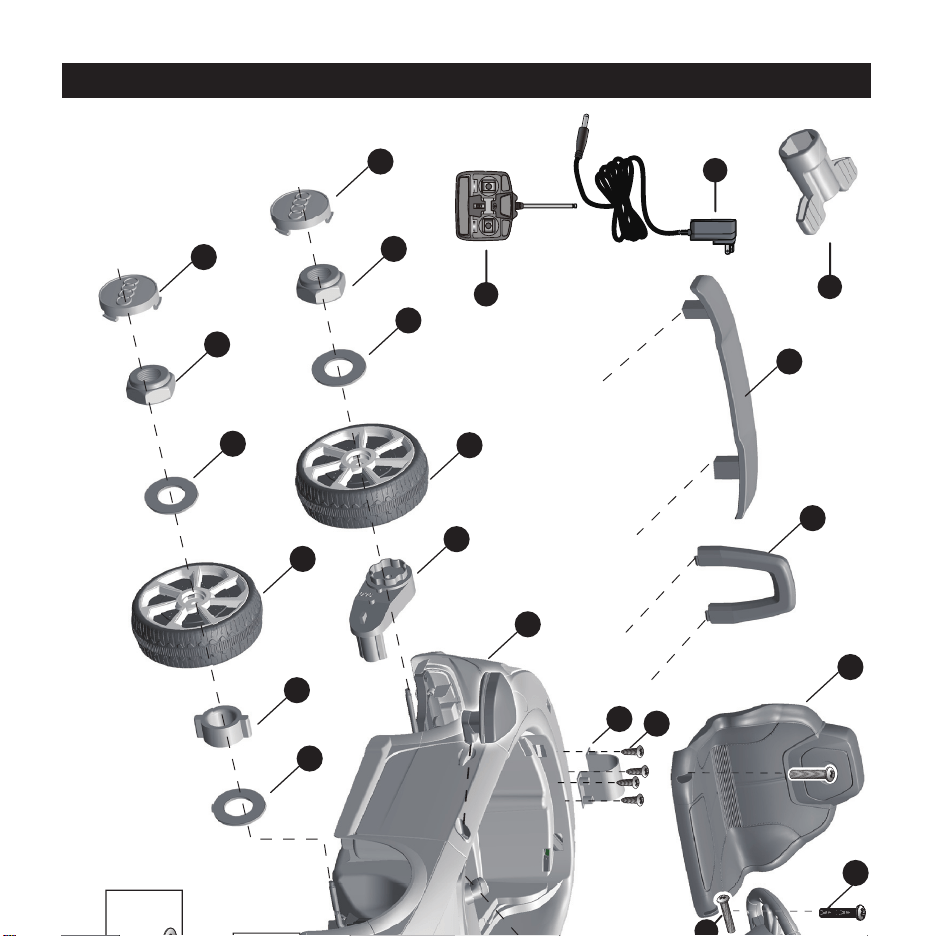
Parts Diagram │ 3
HINT: Some parts shown are assembled on both sides of vehicle
CONTROLLER STYLES MAY VERY
R/C Type
Normal Type
Before Assembly │ 4
• Make sure that the power switch is turned “OFF” before assembling the ride-
on.
• Before first time use, charge the battery for at least 4 to 6 hours.
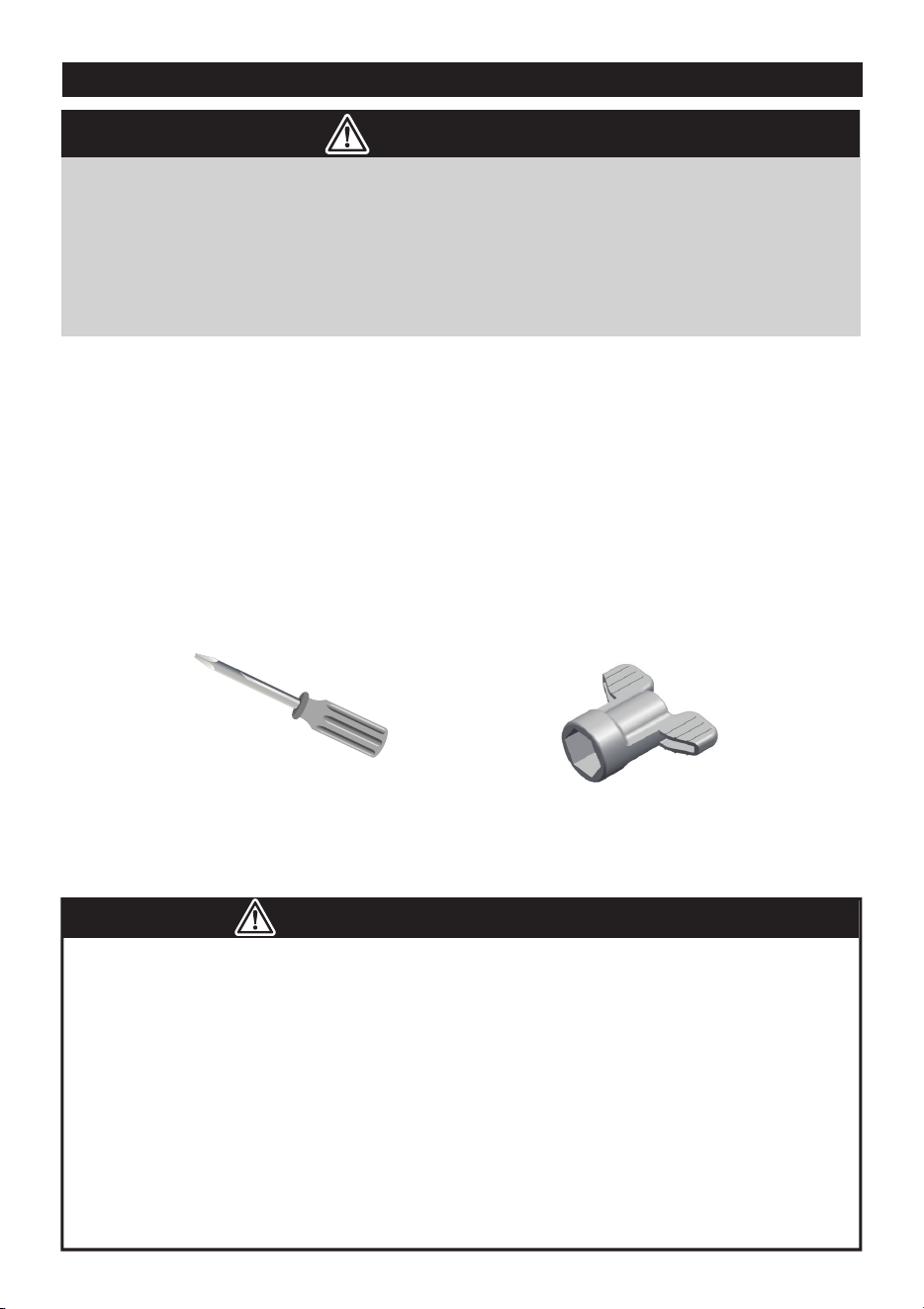
• Assembly tools required:
WARNING!
Screwdriver
(not included)
Spanner
● Non-rechargeable batteries are not to be recharged.
● Rechargeable batteries are to be removed from the toy before being charged.
● Rechargeable batteries are only to be charged under adult supervision.
● Different types of batteries or new and used batteries are not to be mixed.
● Batteries are to be inserted with the correct polarity.
● Exhausted batteries are to be removed from the toy.
● The supply terminals are not to be short-circuited.
BATTERY INFORMATION
• CHOKING HAZARD - Small parts. Not suitable for children under 36 months.
The product contains small parts, keep children away when assembling.
• ADULT ASSEMBLY REQUIRED.
• Always remove protective material and poly bags and dispose before assembly.
2
3
4
10
7
6
5
1
8
9
10
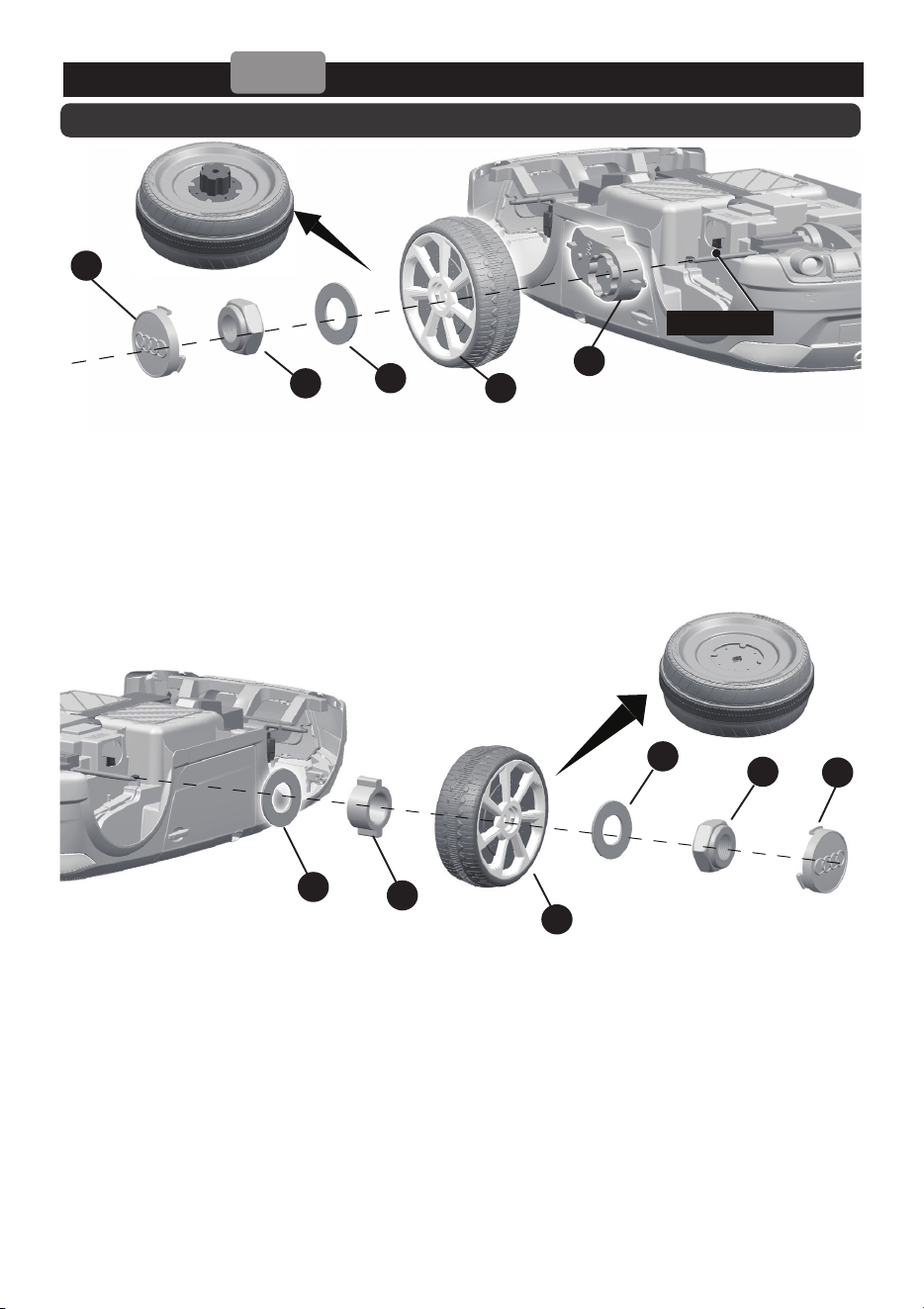
Attach the Rear Wheels │ 5
Driving Wheel
Normal Wheel
1WD
Rear axle
Rear Bottom View
● Turn the vehicle body downside up.
● Remove all the parts from the rear axle.
1. Slide the gear box onto the rear axle (Left Side). Keep the motor and the connector on
the gear box through the larger hole on the rear vehicle and out where the battery sits.
2. Slide the driving wheel onto the rear axle. And keep the driving wheel match with the
gear box.
3. Slide the Ø10 Washer onto the rear axle.
4. Tighten a Lock nut to the end of the rear axle with a spanner.
5. Slide the Ø10 Washer onto the rear axle (Right Side).
6. Insert the bush into the hole in the center of the normal wheel.
7. Slide the Normal wheel onto the rear axle.
8. Slide the Ø10 Washer onto the rear axle.
9. Tighten a Lock nut to the end of the rear axle with a spanner. HINT: An extra
spanner has been provided to hold the Lock Nut on the other side of the rear
alxe while tightening the Lock Nut on the other side.
10. Fit the hubcaps to the wheel.
HINT: If your vehicle is Two Wheels Driving Type, see the next page please.
2
3
4
10
1
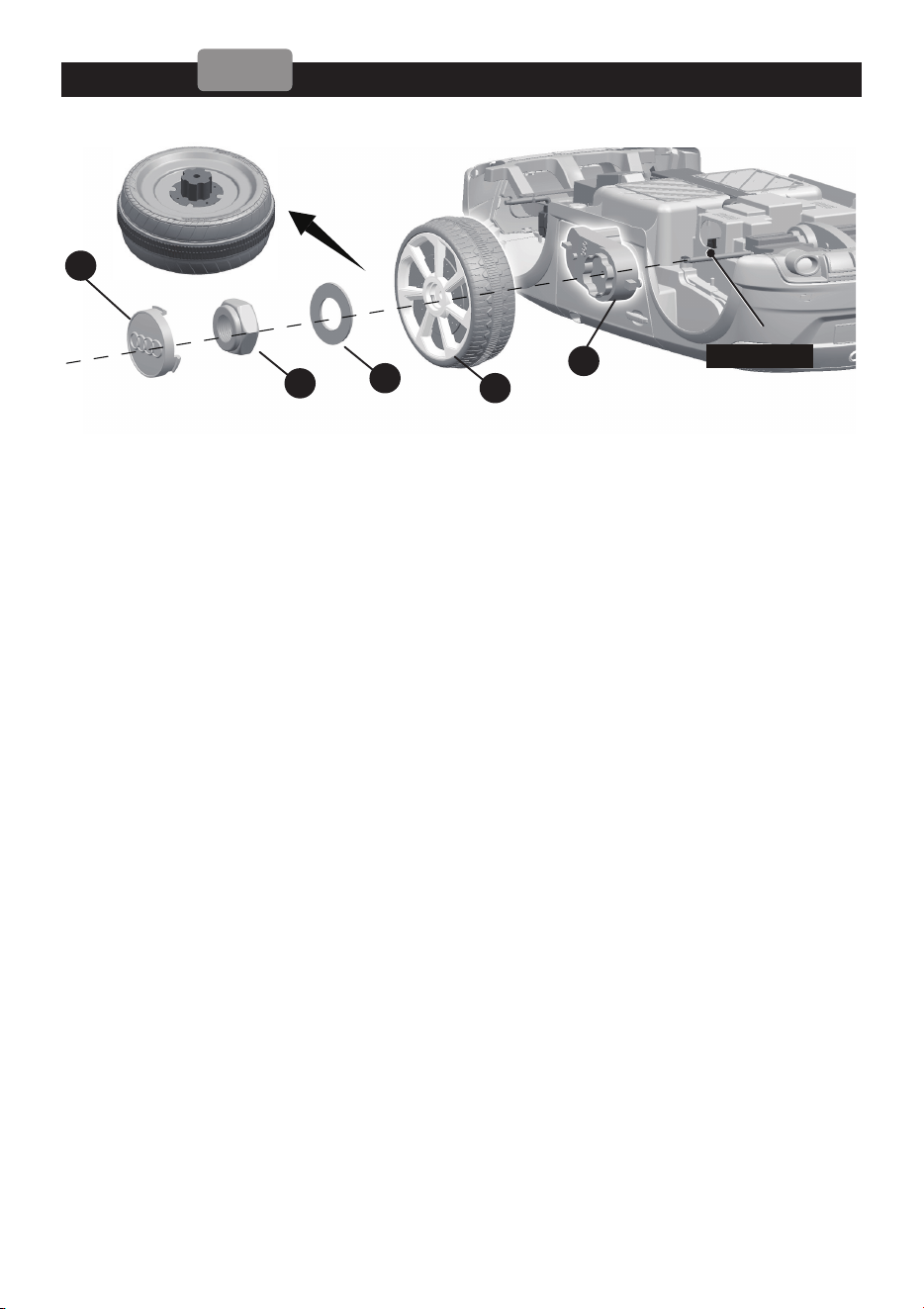
Attach the Rear Wheels │ 6
2WD
Driving Wheel
Rear axle
Rear Bottom View
● Turn the vehicle body downside up.
● Remove all the parts from the rear axle.
1. Slide the gear box onto the rear axle. “R” labeled gear box should be fit to the
“R” side of vehicle body; “L” labeled gear box should be fit to “L” side of vehicle
body. Keep the motor and the connector on the gear box through the larger
hole on the rear vehicle and out where the battery sits.
2. Slide the driving wheel onto the rear axle. And keep the driving wheel match
with the gear box.
3. Slide the Ø10 Washer onto the rear axle.
4. Tighten a Lock nut to the end of the rear axle with a spanner.
● Repeat the above procedure to assemble the other driving wheel.
● HINT: An extra spanner has been provided to hold the Lock Nut on the
other side of the rear alxe while tightening the Lock Nut on the other side.
5. Fit the hubcaps to the wheels.
1
2
3
4
5
6
Front axle
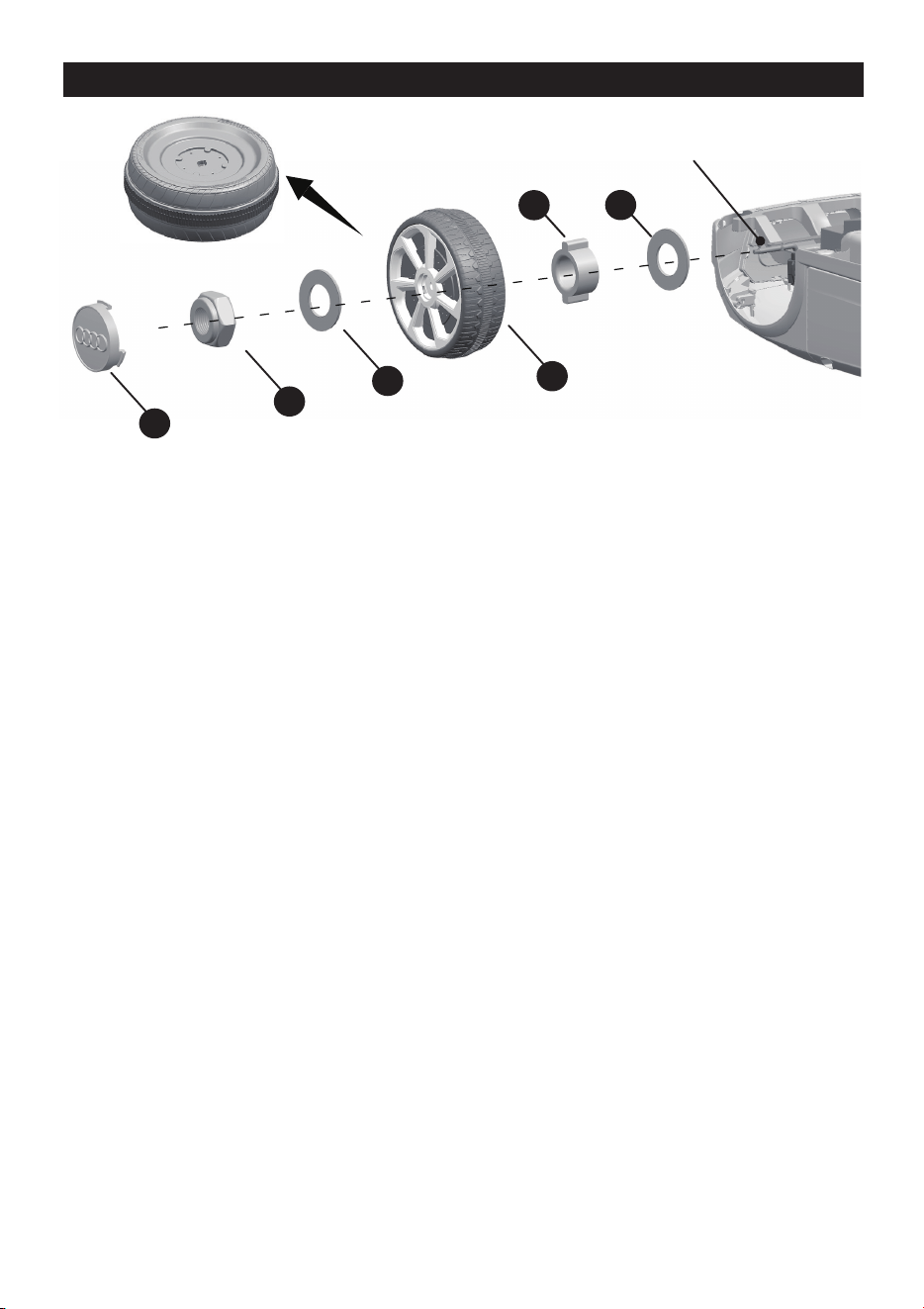
Attach the Front Wheels │ 7
Normal Wheel
Front Bottom View
Remove all the parts from the front axle.
1. Slide a Ø10 washer onto the front axle.
2. Slide a bush into the hole in the center of the normal wheel.
3. Slide the normal wheel onto the rear axle. And keep the normal wheel match
with the bush.
4. Slide a Ø10 washer onto the front axle.
5. Tighten a Lock nut to the end of the front axle with a spanner.
6. “Snap” the hubcap to the wheel.
Repeat the above procedure to assemble the other front wheel.
1
2
2
4
5
3
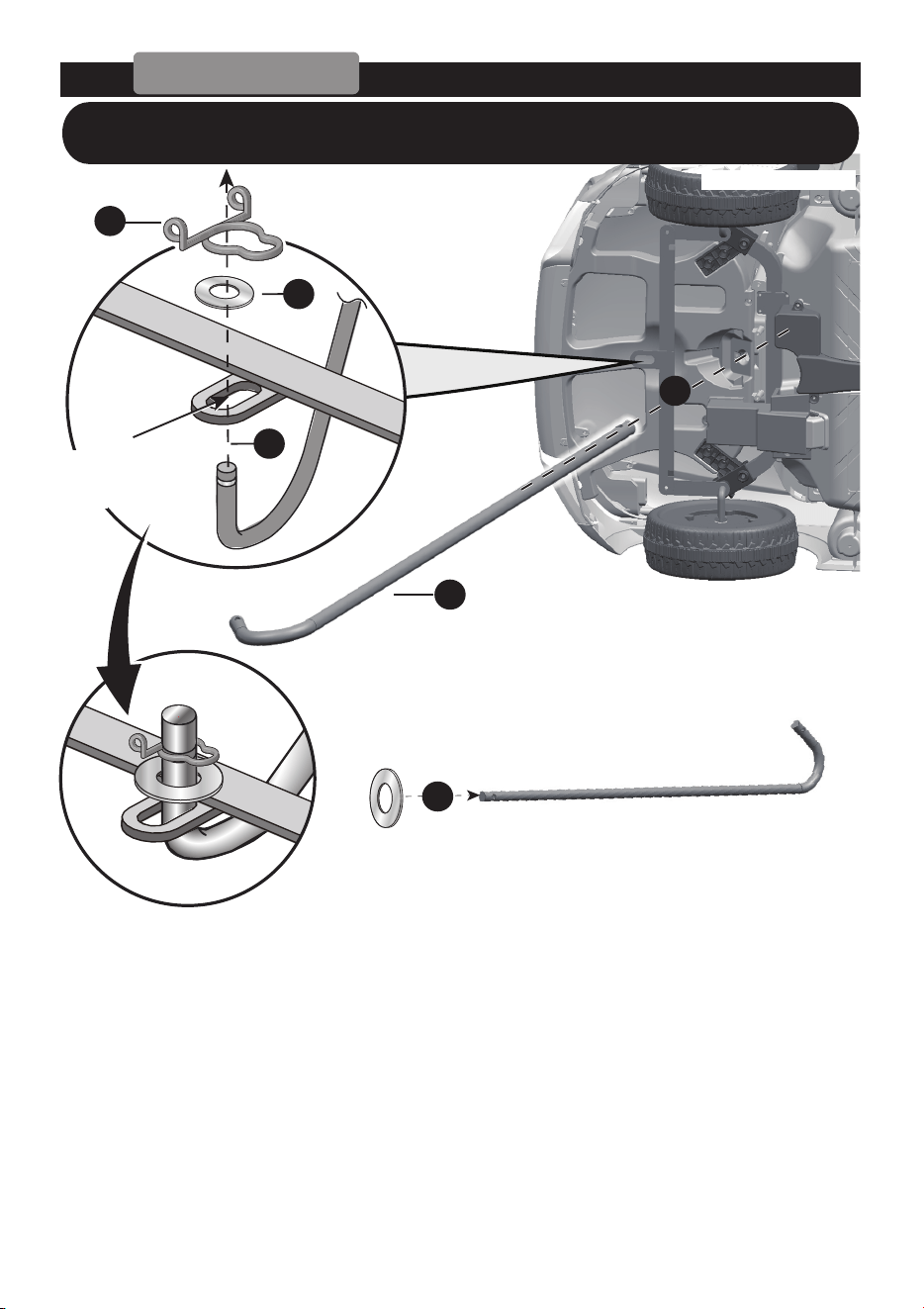
Attach the Steering Column │ 8
Normal type
Hole on the
front axle linkage
Front bottom view
● Turn the vehicle body on its side.
1. Slide a
Ø10 washer onto the steering column from the straight end.
2. Insert the straight end of steering column up through the hole on the front of
vehicle body from bottom side, and out through the hole on the dash.
3. Insert the bent end of steering column through the hole on the front axle
linkage.
4. Fit a
Ø10 washer onto the bent end of the steering column.
5. Slide a snap ring into the grooved on the bent end of the steering column.
HINT: If your vehicle equipped with the Remote Control
Function, see the next page please.
1
2
5
6
4
2
3
1
3
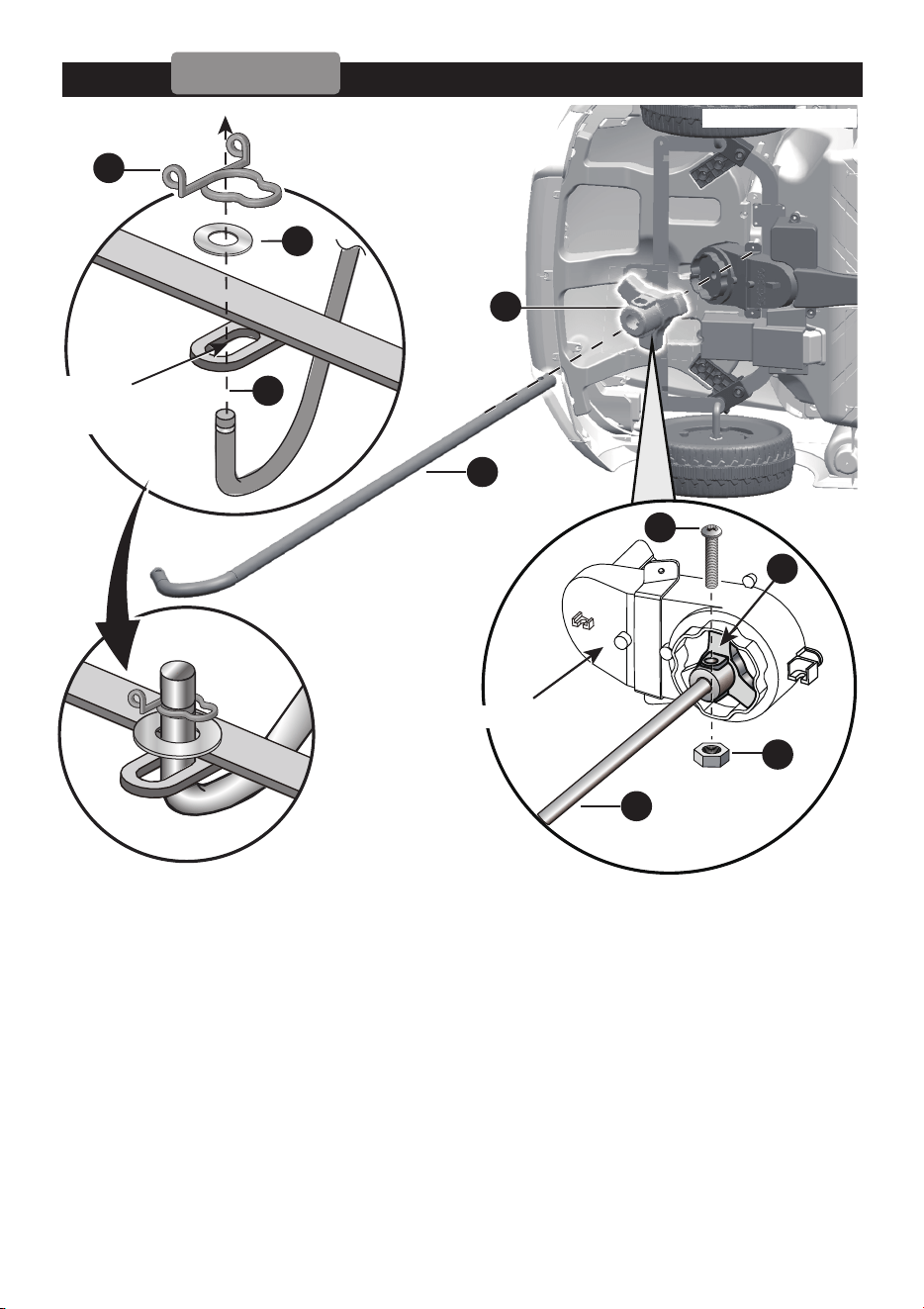
Attach the Steering Column │ 9
R/C type
Hole on the
front axle linkage
Front bottom view
● Turn the vehicle body on its side. Remove the M5x22 machine screw and Ø5 nut
from the R/C driver with a screwdriver.
1. Attach the R/C driver to the steering gear box, and make it match up with
steering gear box.
2. Insert the straight end of steering column up through the hole on the R/C driver,
the hole on the steering gear box from the bottom side, and out through the hole
on the dash.
3. Line up the holes on the R/C driver and the hole on the steering column,
tighten a M5x22 machine screw and
Ø5 nut back in the same location with a
screwdriver.
4. Insert the bent end of steering column through the hole on the front axle
linkage.
5. Fit a Ø10 washer to the bent end of the steering column.
6. Slide a snap ring into the grooved on the bent end of the steering column.
Steering Gear Box
24
1
6
3
5
7
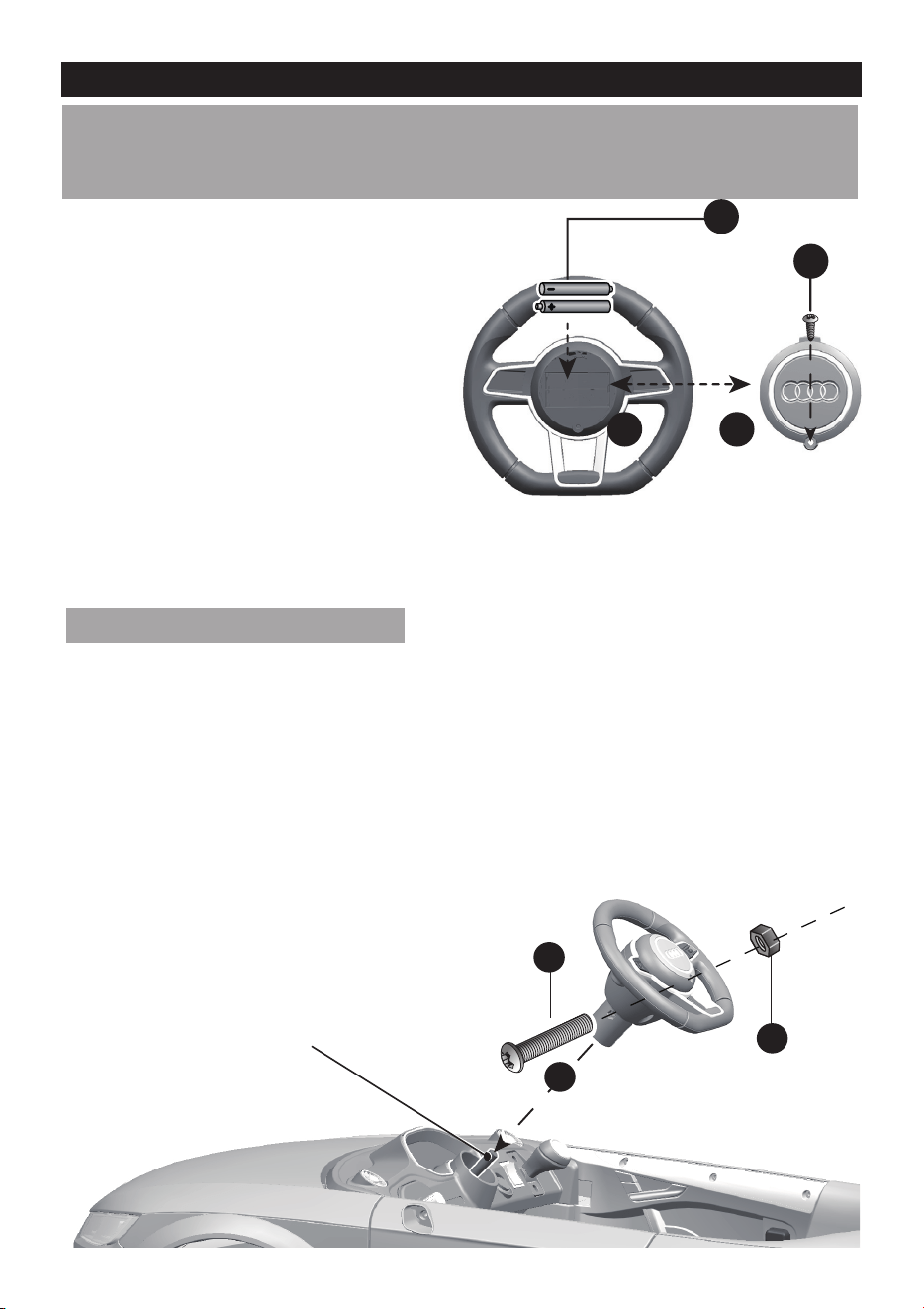
Attach the Steering Wheel │ 10
End of Steering column
● Turn the vehicle body over.
● Remove the M5x35 machine screw and Ø5 nut from the steering wheel.
5. Place the steering wheel over the steering column, protruding from the
middle of the steering wheel base.
6. Align the holes on each side of steering wheel with the holes at the end of
the steering column.
7. Fasten a nut on the opposite end of the screw to secure the steering wheel
to the steering column.
1. With a screwdriver remove the
screw on the battery cover
located in the center of the
steering wheel.
2. Remove the battery cover from
the top of the battery
compartment.
3. Insert two AA batteries in their
correct polarities.
4. Place the battery cover over
the battery compartment and
fasten with the screw you
removed in step one.
Attache the Steering Wheel
HINT: If the steering wheel of your vehicle equipped with the sound function,
please follow the steps 1~4 to add the batteries (Not Included), and refer to
the battery information on page 4.
2
1
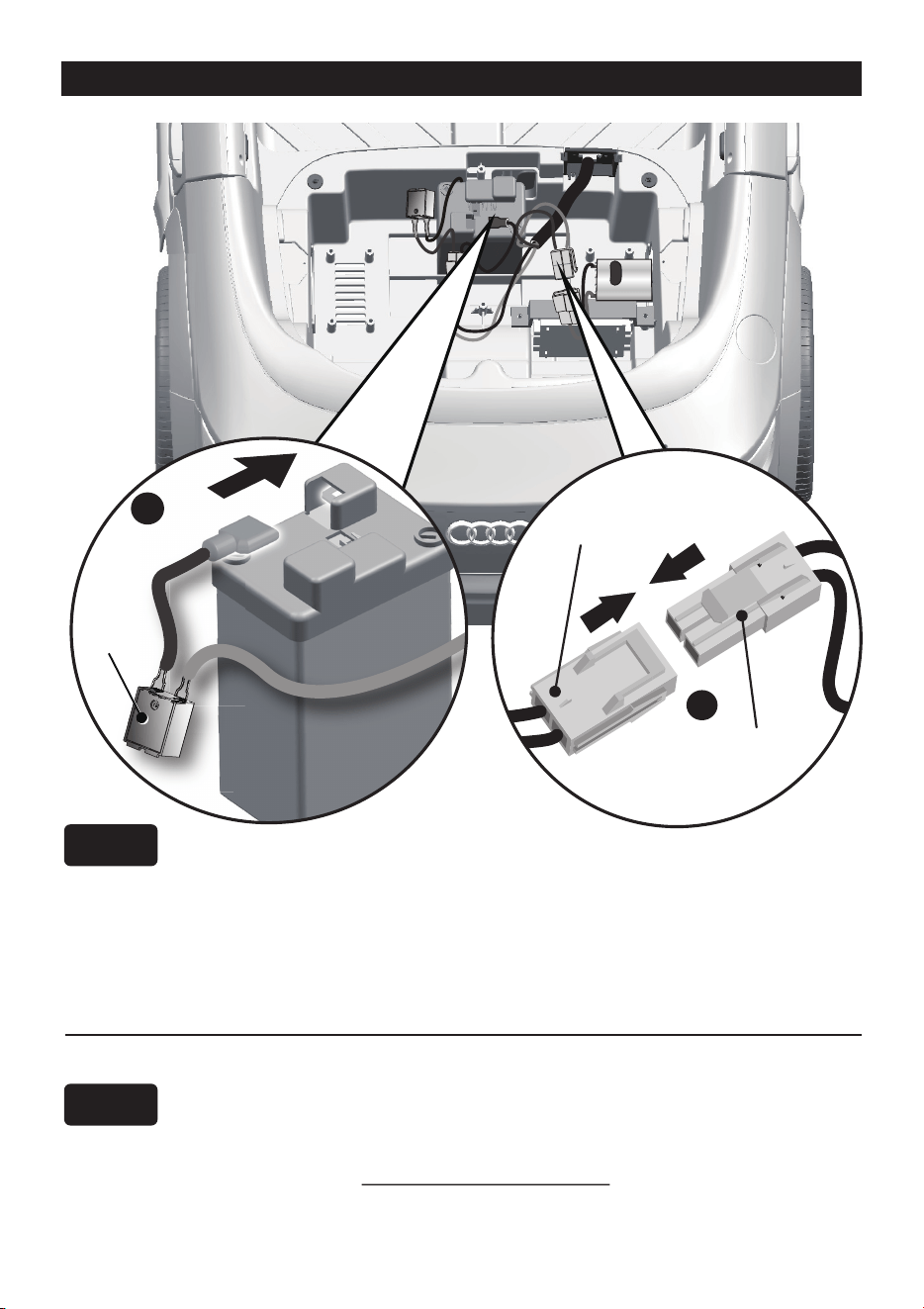
Connect the Power Supply │ 11
1WD
1. Plug the Vehicle Connector into the Motor Connector on
body as shown above.
2. Plug the Red fuse connector into the terminal on battery.
1. Plug the Vehicle Connector into the Motor Connector on
body as shown above. Repeat for the other side.
2. Plug the Red fuse connector into the terminal on battery.
Rear Top View
Vehicle
connector
Motor
connector
Fuse
box
Battery
1WD
2WD
1
2
x4
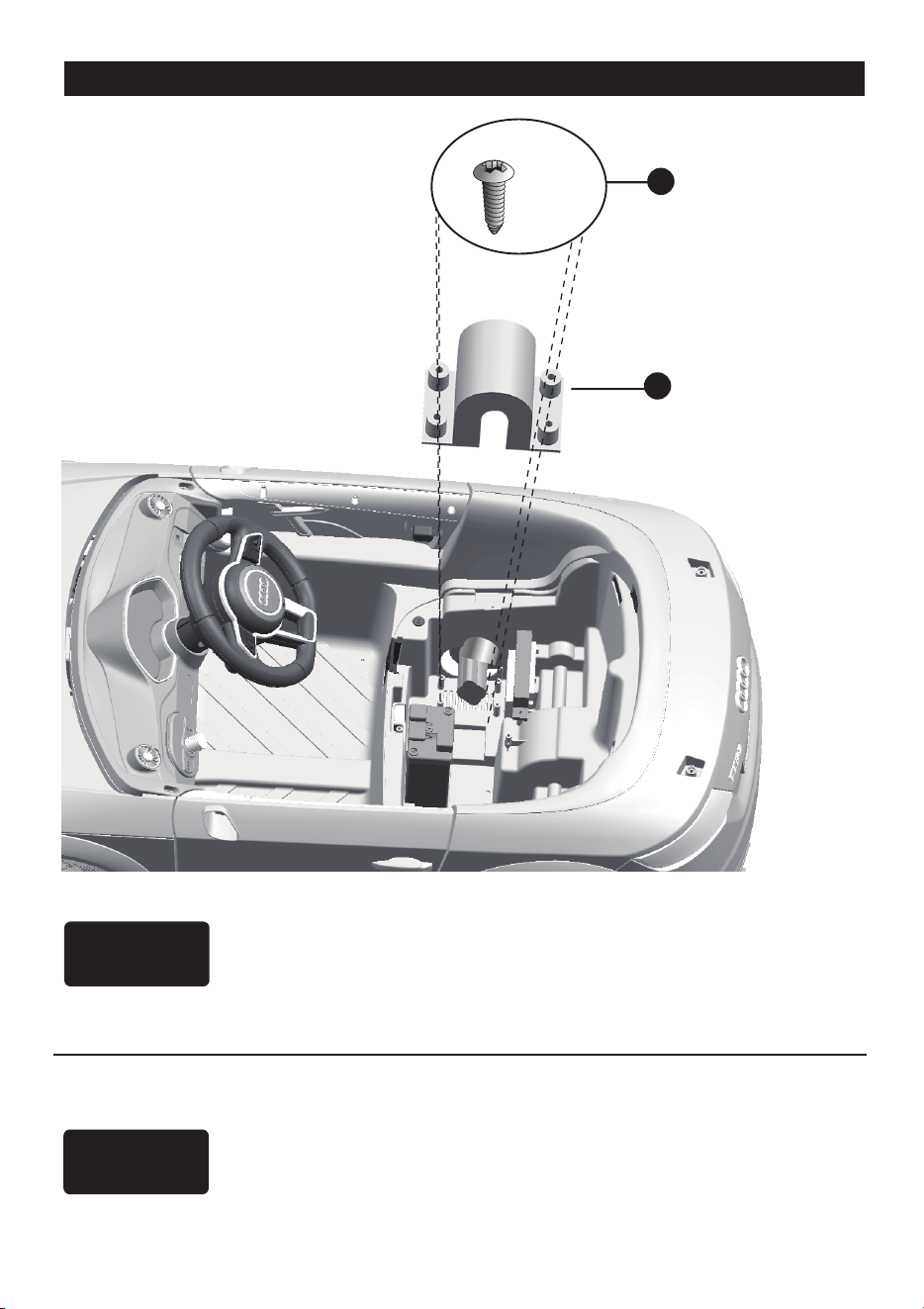
Attach the Motor Hood │ 12
1WD
2WD
1. Fit the motor hood on the motor.
2. Tighten four Ø4x12 flat head screws to secure it.
1. Fit the motor hood on the motor.
2. Tighten four Ø4x12 flat head screws to secure it.
Repeat the above steps for the other Motor hood.
x2
2
3
1
1
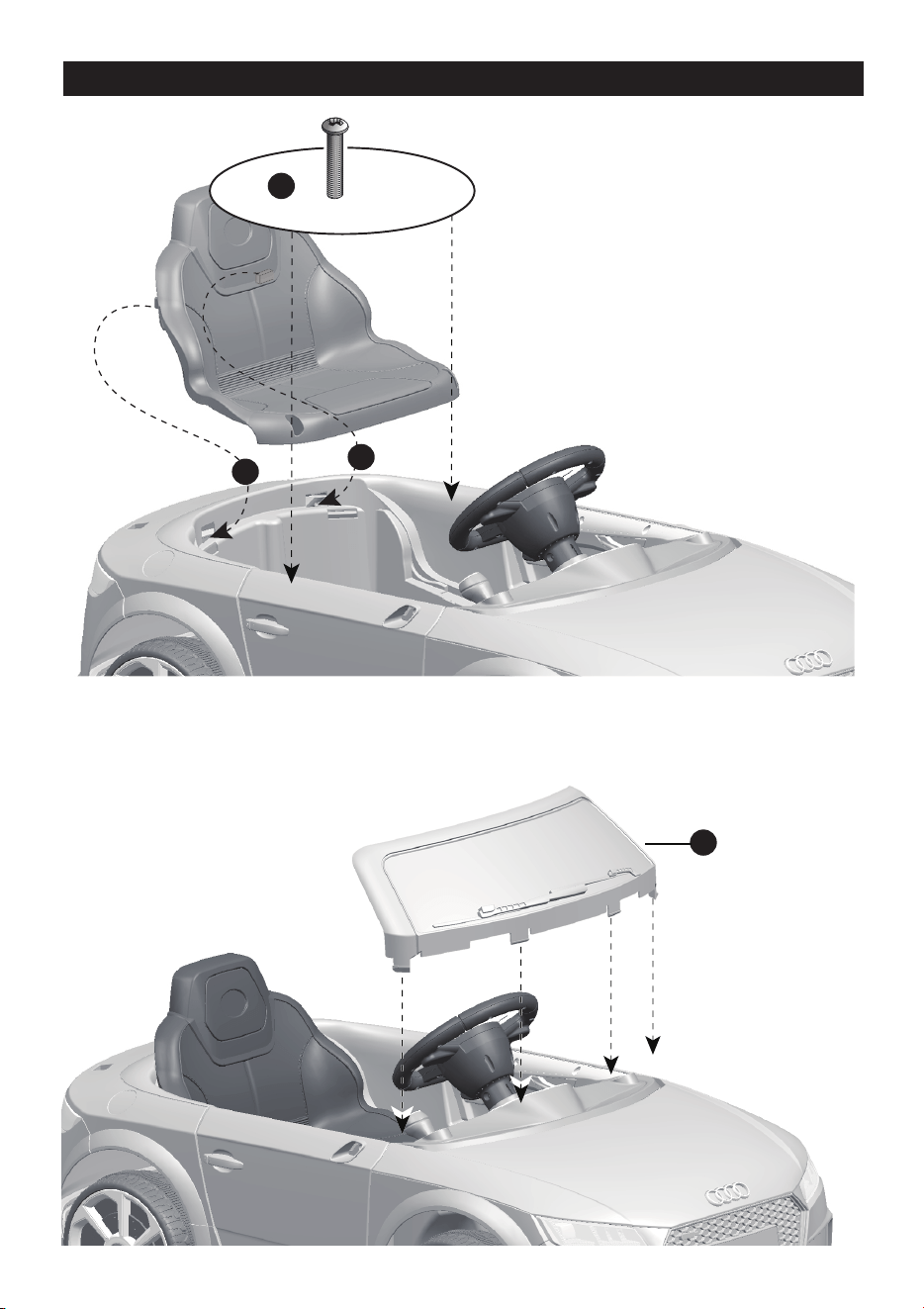
Attach the Seat & Windshield │ 13
1. Fit the tabs on the back of seat into
the slots on the rear vehicle.
2. Tighten two M5x16 machine
screws to secure it with a
screwdriver.
3. Fit the tabs on the windshiled into
the slots on the front vehicle, and
push until you hear it “click” into
place.
1
2
3
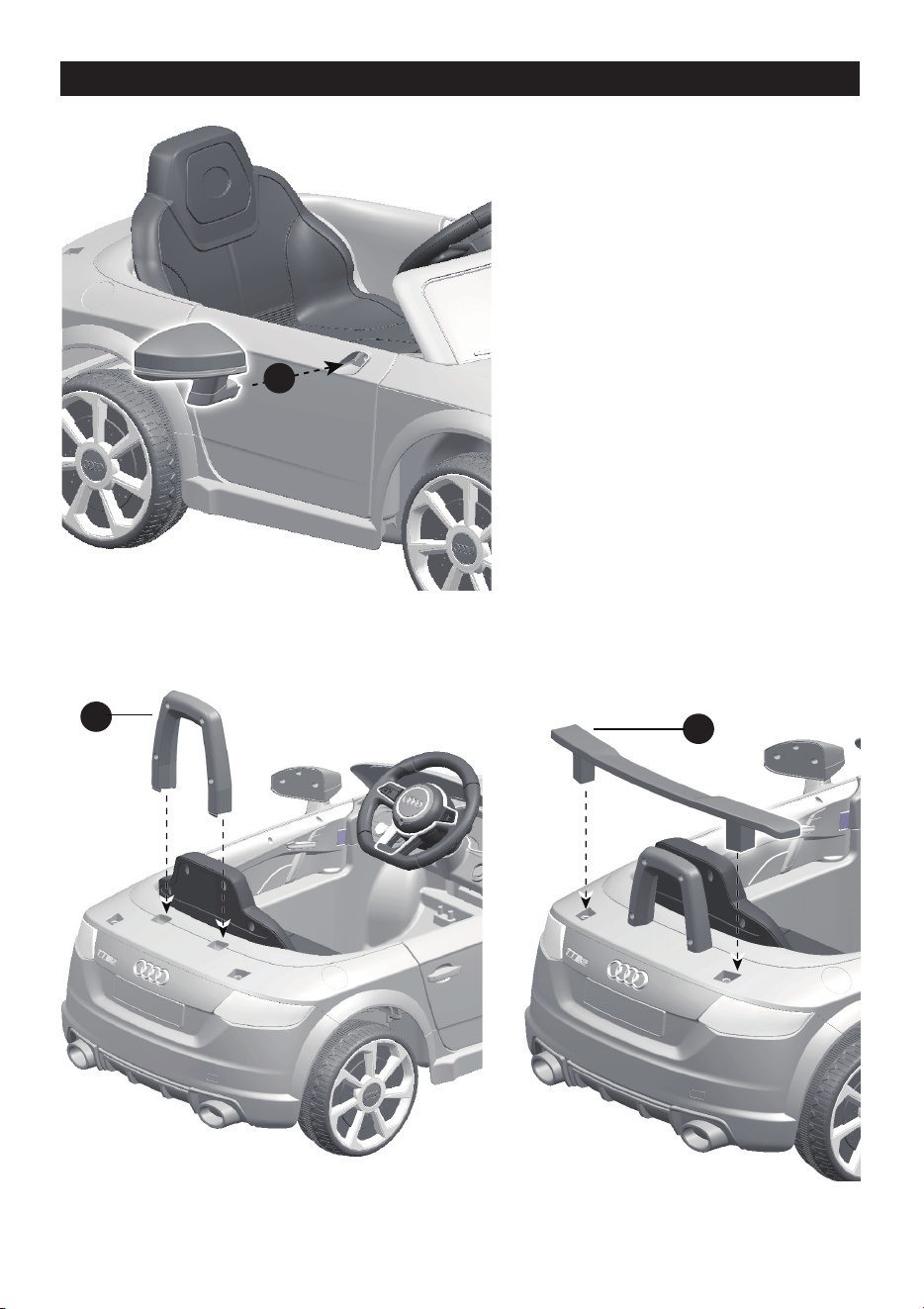
Attach the Mirrors, Seat Rest & Rear Spolier │ 14
1. Fit the tabs on the mirror into the
hole on the vehicle side, push
until you hear “click” into place.
Repeat for the other side.
2. Fit the seat rest to the rear
vehicle.
3. Fit the rear spolier to the rear
vehicle.
PREVENT INJURIES AND DEATHS:
• NEVER LEAVE CHILD UNATTENDED. DIRECT ADULT SUPERVISION IS
REQUIRED. Always keep child in view when child is in vehicle.
• This toy should be used with caution since skill is required to avoid falls or
collisions causing injury to the user or third parties.
• Protective equipment should be worn.
• Never use in roadways, near cars, on or near steep inclines or steps,
swimming pools or other bodies of water.
• Always wear shoes.
• Always sit on the seat.
• Not to be used in traffic.
• This toy is unsuitable for children under 36 months due to its maximum
speed; Maximum user weight is 30 kgs.
• This toy has no brake.
Rules for Safe Riding
• This vehicle has adjustable play seat belts. Please instruct children how to tie the
safety belt before using, guarantee the security.
• Keep Children within Safe Riding Areas:
- Never use in roadway, near motor vehicles, on lawn space, on or near steep
inclines or steps, swimming pools or other bodies of water;
• Use the toy only on flat surfaces. Such as inside your house, garden or
playground.
• Never use in the dark. A child could encounter unexpected obstacles and have
an accident. Operate the vehicle only in the daytime or a well-lit area.
• It is prohibited to change the circuit or add other electric parts
• Inspect wires and connections of the vehicle periodically.
• Do not let any child touch the wheels or be near them when the car is moving .
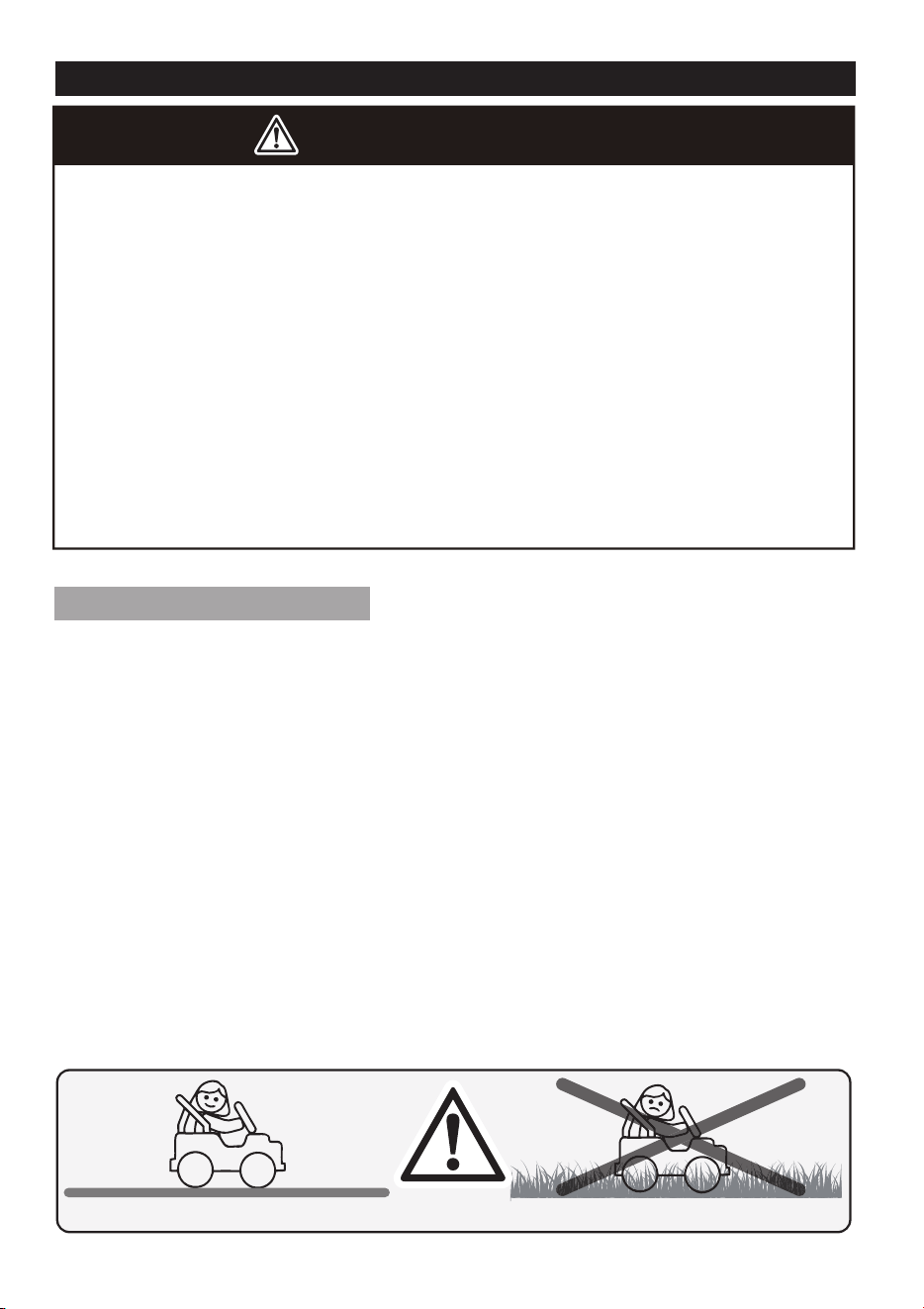
WARNING!
Use the vehicle on generally level ground ONLY!
DO NOT Use the vehicle on Lawn space!
Safety │ 15
3
5
2
1
7
6
4
8
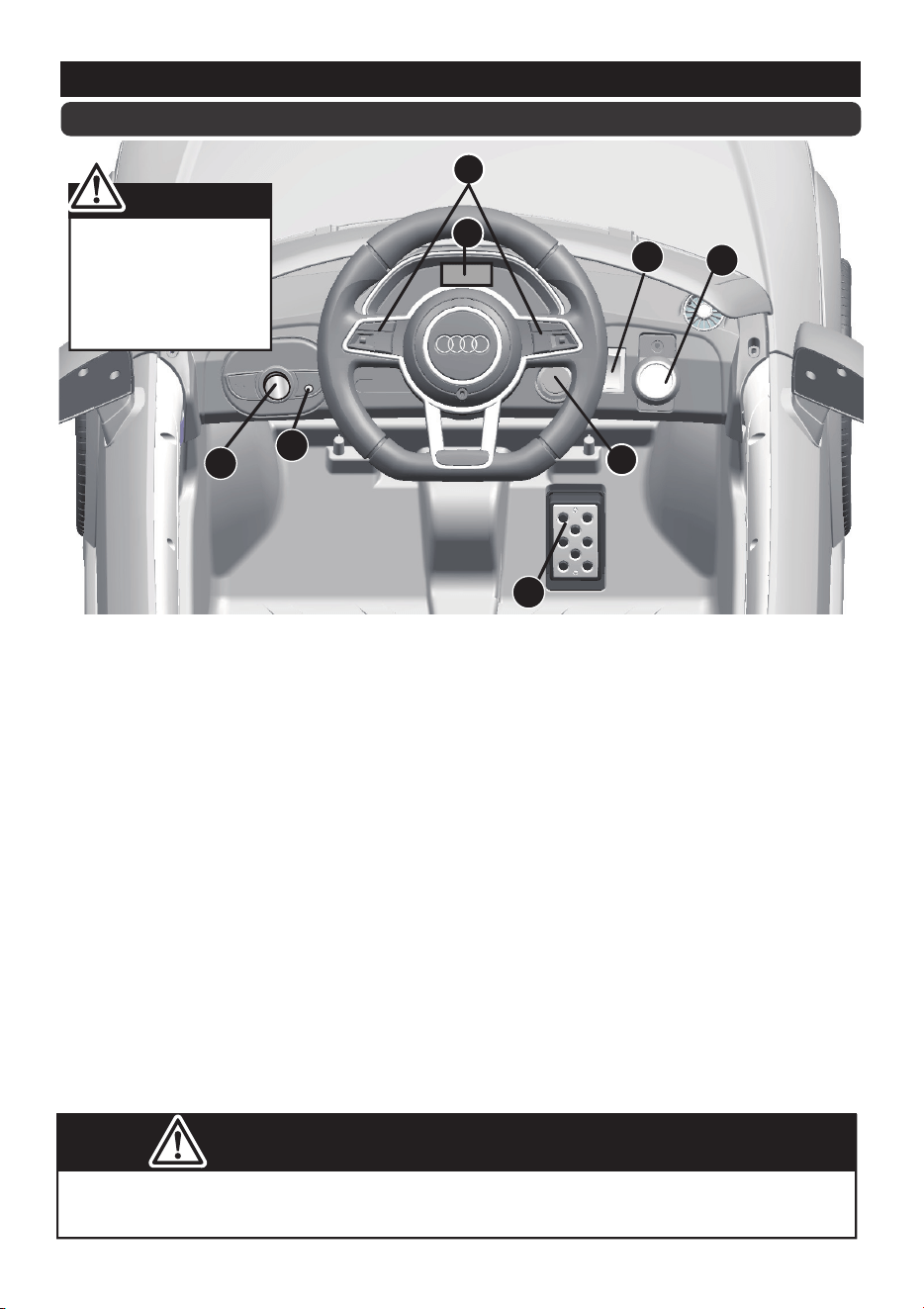
Make sure your child knows how to steer, how to start and stop the vehicle and knows
the rules for safe driving. The vehicle can be driven at a maximum of 2.5~5 km/h.
ADVANCED USE - High speed Drive
1. Power Switch: Turns the vehicle on and off.
2. Forward/reverse switch: Changes the direction that vehicle moves from forward to
reverse.
● To move the car forward, rock the switch to “forward” position.
● To move the car backward, rock the switch to “reverse” position.
3. Sounds buttons (IF EQUIPPED): Press for sounds playing.
4. Volume knob (IF EQUIPPED): Turn the knob clockwise to increase the volume; Turn
the knob counterclockwise to decrease the volume.
5. Foot pedal: Applies power (speed) to the vehicle.
● To move the car, press the pedal down.
● To brake or slow down, release pressure from the pedal.
6. Auxiliary input (IF EQUIPPED): Allow the audio from your portable music player or
phone to be played through the vehicle speakers.
7. Digital voltmeter (IF EQUIPPED): See <Charging>, page 20.
8. High/Low speed switch (IF EQUIPPED): The switch operates the vehicle to move
forward in low or high speed.
Use Your Ride-on │ 16
Always stop vehicle
when changing the
speed or direction to
avoid damage the
gears and motor.
Your vehicle may be equipped with the MP3 player, see the next page please!
IMPORTANT
ABC
TF
MP3
USB
v+ v-
B
G
H
I
C
A
DEF
Use the MP3 Player (IF EQUIPPED) │ 17
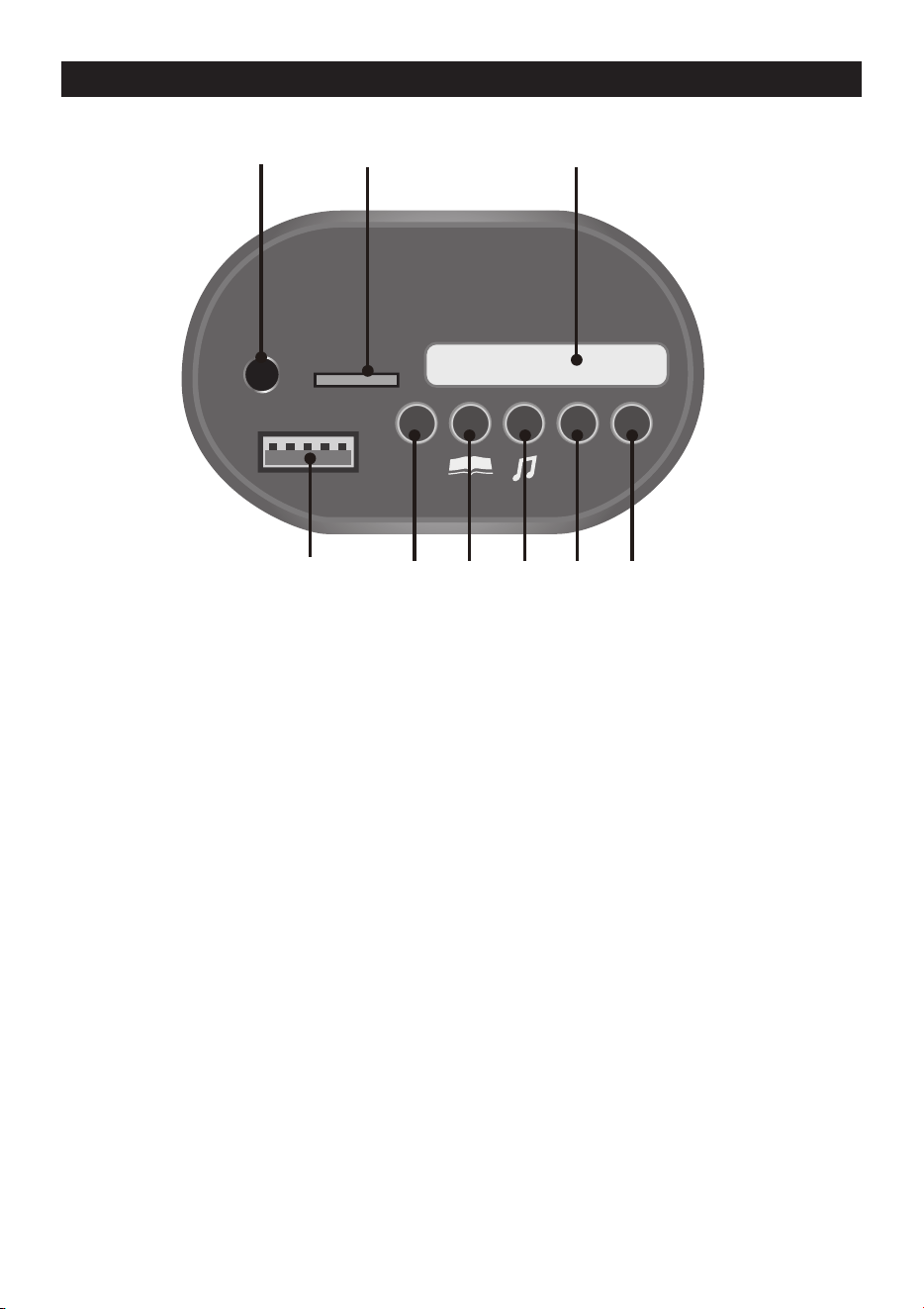
A. Digital voltmeter: Check the power remaining of your battery, refer to page 22.
B. English learning mode
C. Storytelling mode
D. Nursery rhyme singing mode
E. Increase volume
F. Decrease volume
G. TF (Micro SD) card slot: Allow the audio from your TF card to be played
through the vehicle speakers. MP3 format ONLY.
H. MP3 audio input (AUX input): Allow the audio from your portable music player
or phone to be played through the vehicle speakers. MP3 format ONLY.
I. USB interface: Allow the audio from your portable device to be played through
the vehicle speakers. MP3 format ONLY.
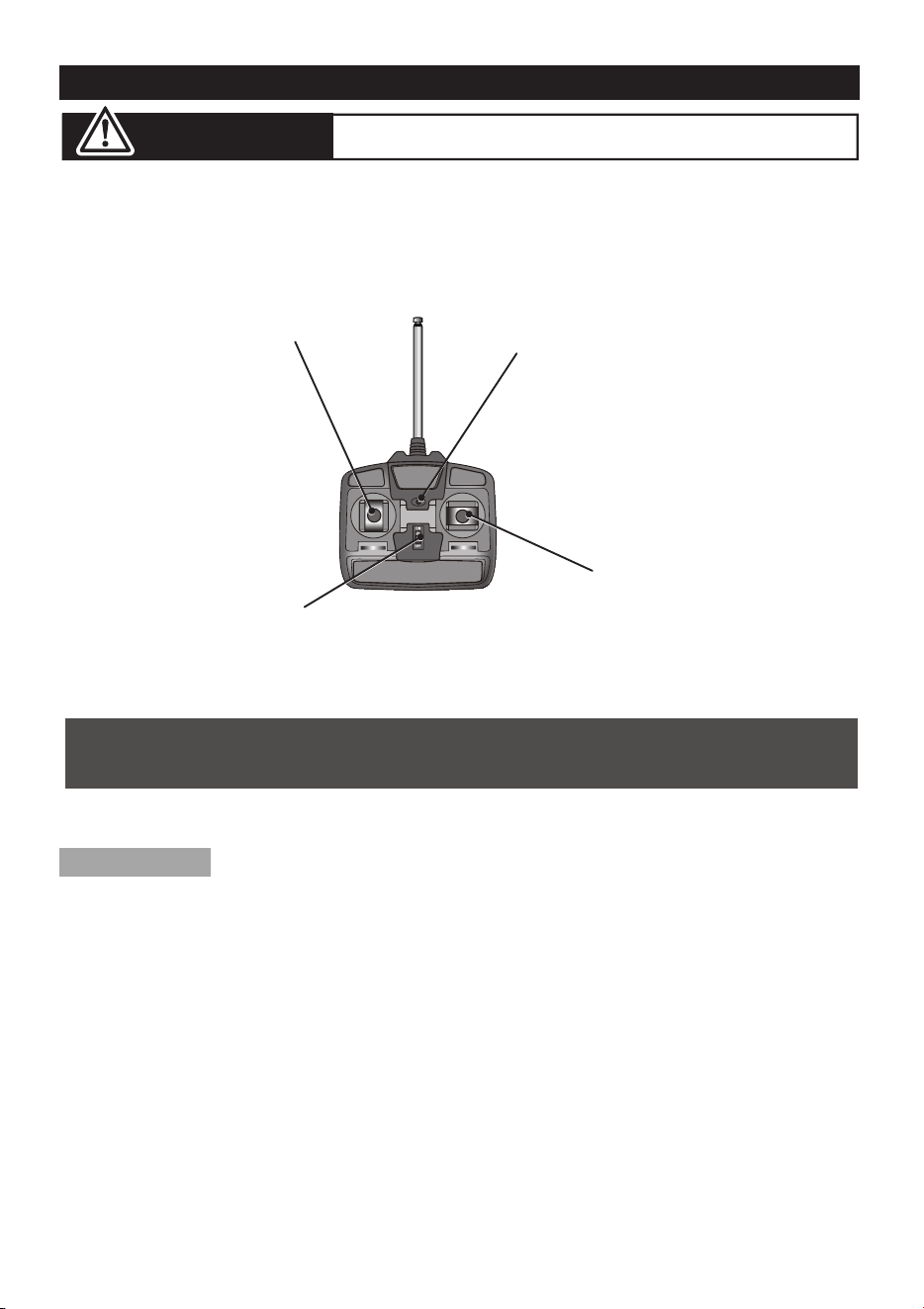
ASSEMBLY
1. Insert the antenna into the controller by tweak the antenna clockwisely;
2. Lift the battery compartment door on the back of the controller and
insert two AA(LR6) batteries.
NOTE: Batteries not included.
Refer to the battery information on page 4.
ON-OFF SWITCH
INDICATOR LIGHT
RIGHT JOYSTICK
LEFT JOYSTICK
Use the Normal Remote Controller (IF EQUIPPED) │ 18
ADULT OPERATING REQUIRED!
WARNING:
The remote control has precedence over foot pedal operation.
(The foot pedal won’t work while you operate the Remote Controller)
Your vehicle may be equipped with a 2.4G REMOTE
CONTROLLER, see the next page please.
This remote controller may with function of firt priority
Use the 2.4G Remote Controller (IF EQUIPPED) │ 19
ADULT OPERATING REQUIRED!
WARNING:
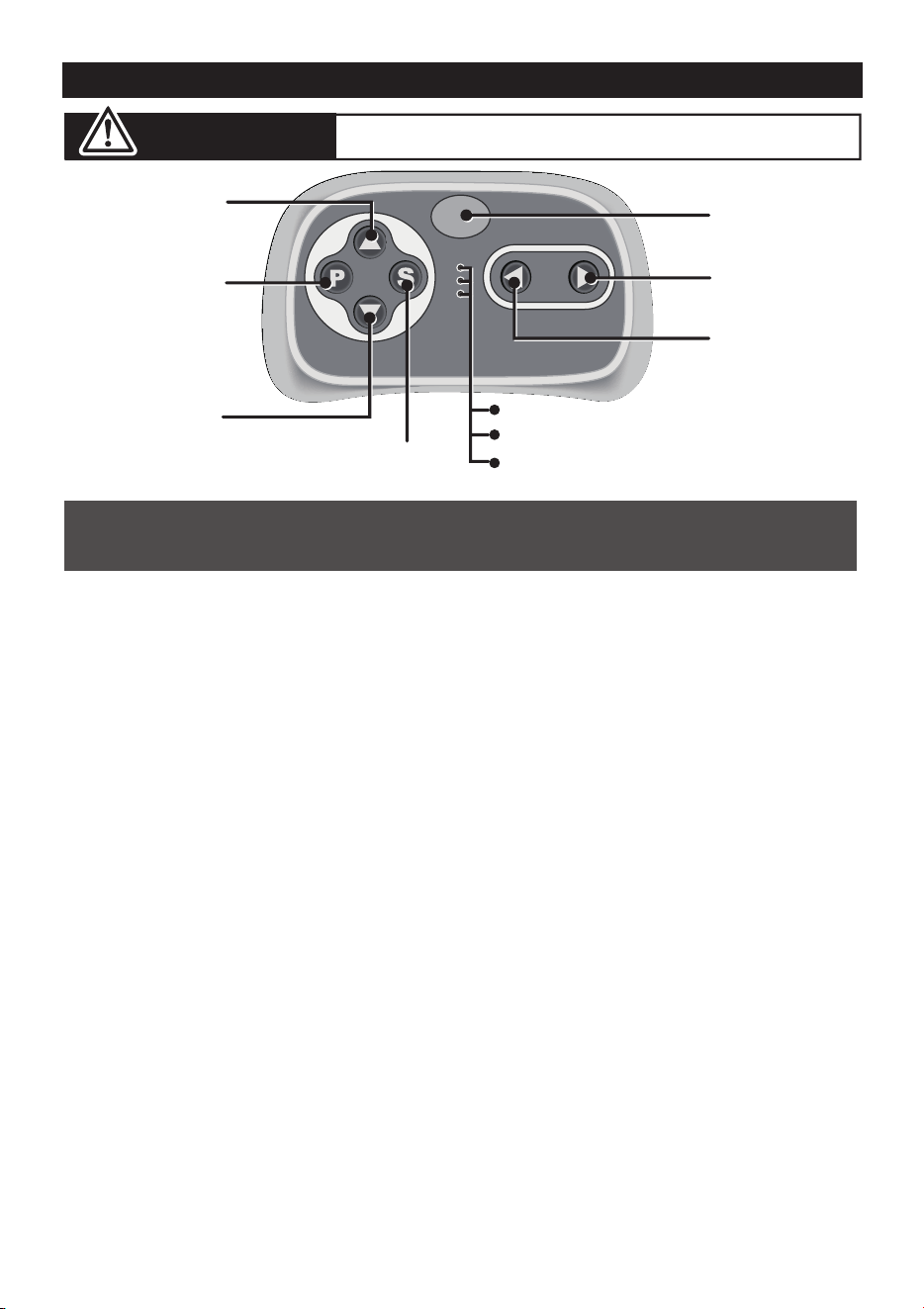
1. Connection button (build connection)
Long press the Connection button for 2-4 seconds first, then turn on the power
button located on the vehicle dashboard console, when the low speed indicator
goes from flashes into long bright, means the connection successful. If the
low speed indicator only flashes, means the connection failed. Replace the
batteries and repeat the steps above.
2. Brake button
Press the button to stop the vehicle, press it again to release the brake.
3. Speed select button
The switch operates the vehicle to move in low, normal or high speed.
HINT: The vehicle is designed to operate in low speed only in reverse.
• Leave the remote controller idling for about 10 seconds, it will shut down
automatically.
• Repeat step 1 when you replace the batteries of the remote controller.
Connection
button
Forward button
Left turning
button
Right turning
button
Brake button
Speed select button
High speed indicator
Normal speed indicator
Low speed indicator
INSERT THE BATTERIES
Lift the battery compartment door on the back of the controller and insert
two AAA(LR03) batteries.
NOTE: Batteries not included.
Refer to the battery information on page 4.
NOTE:
The remote control has precedence over foot pedal operation.
(The foot pedal won’t work while you operate the Remote Controller)
Reverse button
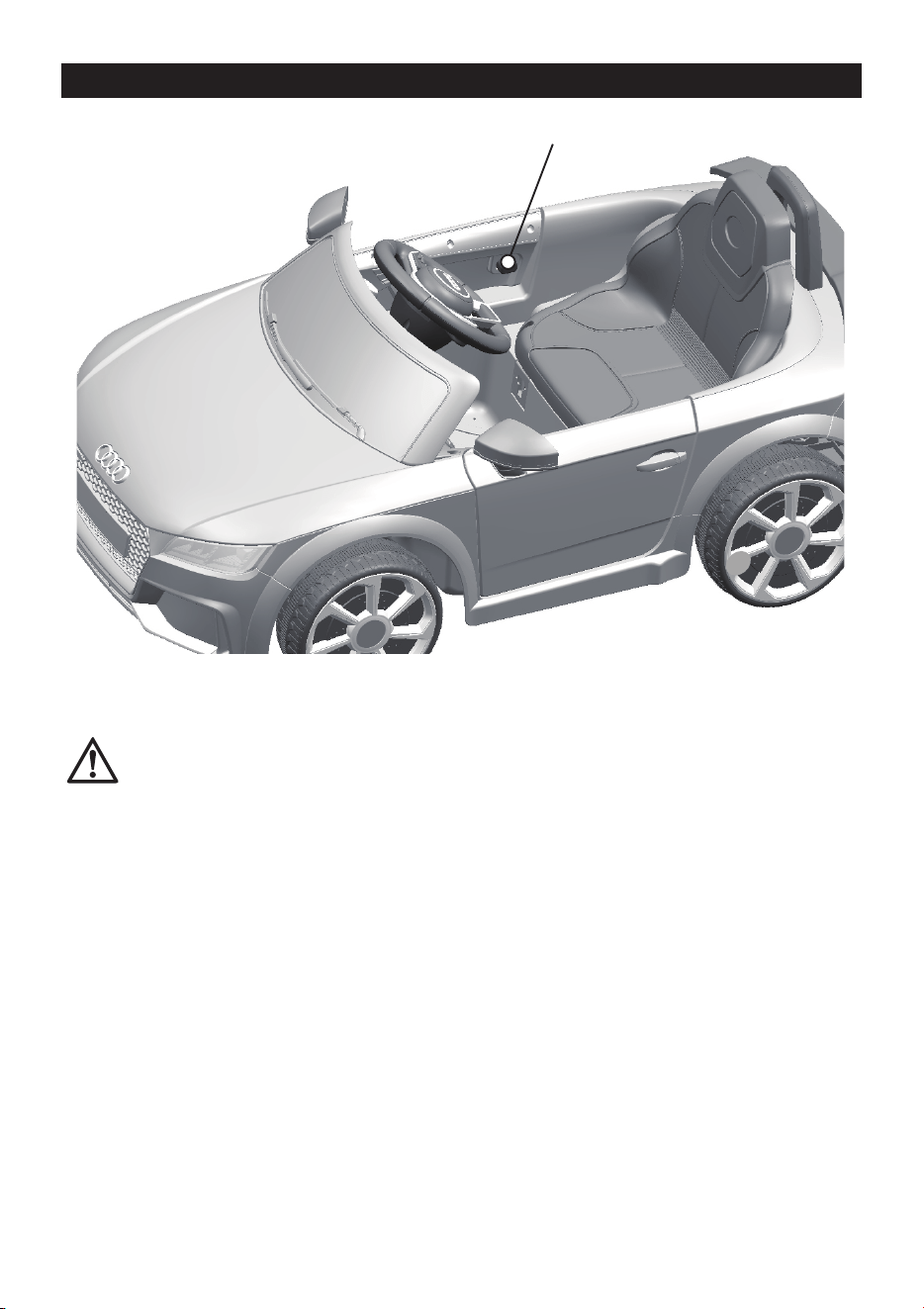
Use the Door Lock │ 20
Door inside
Door Lock
NOTE:
Please close the door and ensure the lock snap into place when
riding for safety consideration.

ONLY AN ADULT CAN CHARGE AND RECHARGE THE BATTERY!
• PREVENT FIRE AND ELECTRIC SHOCK:
- Use the only rechargeable battery and charger supplied with your vehicle. NEVER substitute the battery
or the charger with another brand. Using another battery or charger may cause a fire or explosion.
- Do not use the battery or charger for any other product. Overheating, fire or explosion could occur.
- NEVER modify the electric circuit system. Tampering with the electric system may cause a shock, fire or
explosion or may permanently damage the system.
- Do not allow direct contact between battery terminals. Fire or explosion can occur.
- Do not allow any type of liquid on the battery or its components.
- Explosive gasses are created during charging. Do not charge near heat or flammable materials. Charge
the battery in a well-ventilated area ONLY.
- NEVER pick up the battery by the wires or charger. Damage can occur to the battery and may cause a
fire. Pick up the battery by the case ONLY.
- Charge the battery in a dry area ONLY.
• Battery posts, terminals and related accessories contain lead and lead compounds, chemicals
known to cause cancer and reproductive harm. Wash hands after handling.
• Do not open the battery. Battery contains lead acid and other materials that are toxic and
corrosive.
• Do not open the charger. Exposed wiring and circuitry inside case may cause electric shock.
• Only adults may handle or charge the battery. NEVER allow child to handle or charge the
battery. Battery is heavy and contains lead acid (electrolyte).
• Do not drop the battery. Permanent damage to the battery could occur or cause serious injury.
• Before charging the battery, check for wear or damage to the battery, charger, its supply cord
and the connectors. DO NOT charge the battery if any damage to parts has occurred.
• Do not allow the battery to drain completely. Recharge the battery after each use or once a
month if not used regularly.
• Do not charge battery upside down.
• Always secure the battery with the bracket. Battery can fall out and injure a child if vehicle tips
over.
WARNING!
• The POWER SWITCH must be turned in OFF position when charging.
• Before the first use, you should charge the battery for 4-6 hours. Do not recharge
the battery for more than 10 hours to avoid overheating the charger.
• When the vehicle begins to run slowly, recharge the battery.
• After each use or once a month minimum recharge time as 8 to 12 hours, less
than 20 hours at most.
Charging │ 21
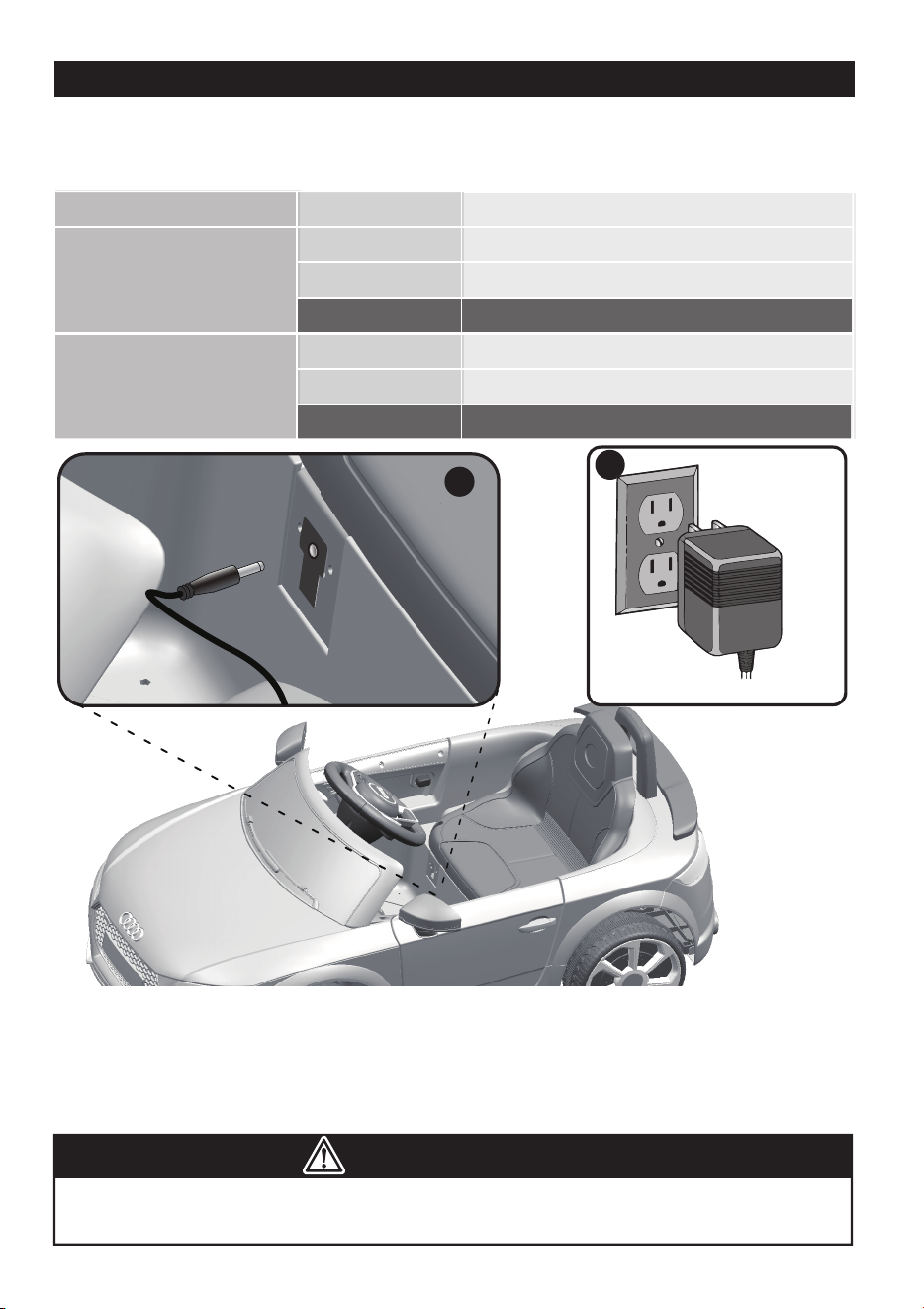
6V4Ahx2, 6V7Ahx2,
6v10Ahx2,12V7Ahx1,
12V10Ah x1
≥ 13.2
13.1~12.6
≤ 12.5
2
1
6V4Ahx1, 6V7Ahx1
6V10Ahx1
≥ 6.6
6.5~6.3
≤ 6.2
• If your ride-on with a Digital voltmeter(IF EQUIPPED), the magnitude of voltage
will tell you how much power is remaining in the battery when you must
recharge the battery. Make sure the vehicle is stop!
BATTERY
MAGNITUDE OF VOLTAGE
BATTERY STATE
The battery is full.
The vehicle can work normally.
STOP operating the vehicle, the battery needs to be charge.
1. Plug the charger port into the input socket. (the socket is below the seat)
2. Plug the charger plug into a wall outlet. The battery will begin charging.
WARNING!
This product with Charging Protection: when charging, all functions will be cut
off! Only an adult can charge and recharge the battery!
The battery is full.
The vehicle can work normally.
The battery needs to be charge.
Charging │ 22

The battery features a thermal fuse with a rest fuse that will automatically trip and cut all
power to the vehicle if the motor, electric system or battery is overloaded. The fuse will
reset and power will be restored after the unit is turned OFF for 20 seconds and then turned
ON again. If the thermal fuse trips repeatedly during normal use, the vehicle may need
repair. Contact your distributor please.
To avoid losing power, follow these guidelines:
● Do not overload the vehicle.
● Do not tow anything behind the vehicle.
● Do not drive up steep slopes.
● Do not drive into fixed objects, which may cause the wheels to spin, causing the motor to
overheat.
● Do not drive in very hot weather, components may overheat.
● Do not allow water or other liquids to come in contact with the battery or other electric
components.
● Do not tamper with the electric system. Doing so may create a short, causing the fuse to
trip.
Battery Replacement and Disposal
The battery will eventually lose the ability to hold a charge. Depending on the amount of
use, and varying conditions, the battery should operate for one to three years. Follow these
steps to replace and dispose the battery:
1. Remove the car seat.
2. Disconnect the battery connectors.
3. Remove the battery bracket.
4. Remove the battery cover.
5. Carefully lift the battery.
● Depending on the condition of the battery (i.e.: leakage) you may want to wear
protective gloves before removal.
● Do not lift the battery by its connectors or cables.
6. Place the dead battery in a plastic bag.
Important! Recycle the dead battery responsibly. The battery contains lead acid
(electrolyte) and must be disposed of properly and legally. It is illegal in most areas to
incinerate lead acid batteries or dispose of them in landfills. Take it to a federal or
state-approved lead acid battery recycler, such as local automotive battery retailer.
Do not throw the battery away with your regular household waste!
7. Replace the battery and reconnect the connectors.
8. Replace the metal battery bracket.
9. Replace the seat.
Battery Replacement & Fuse │ 23
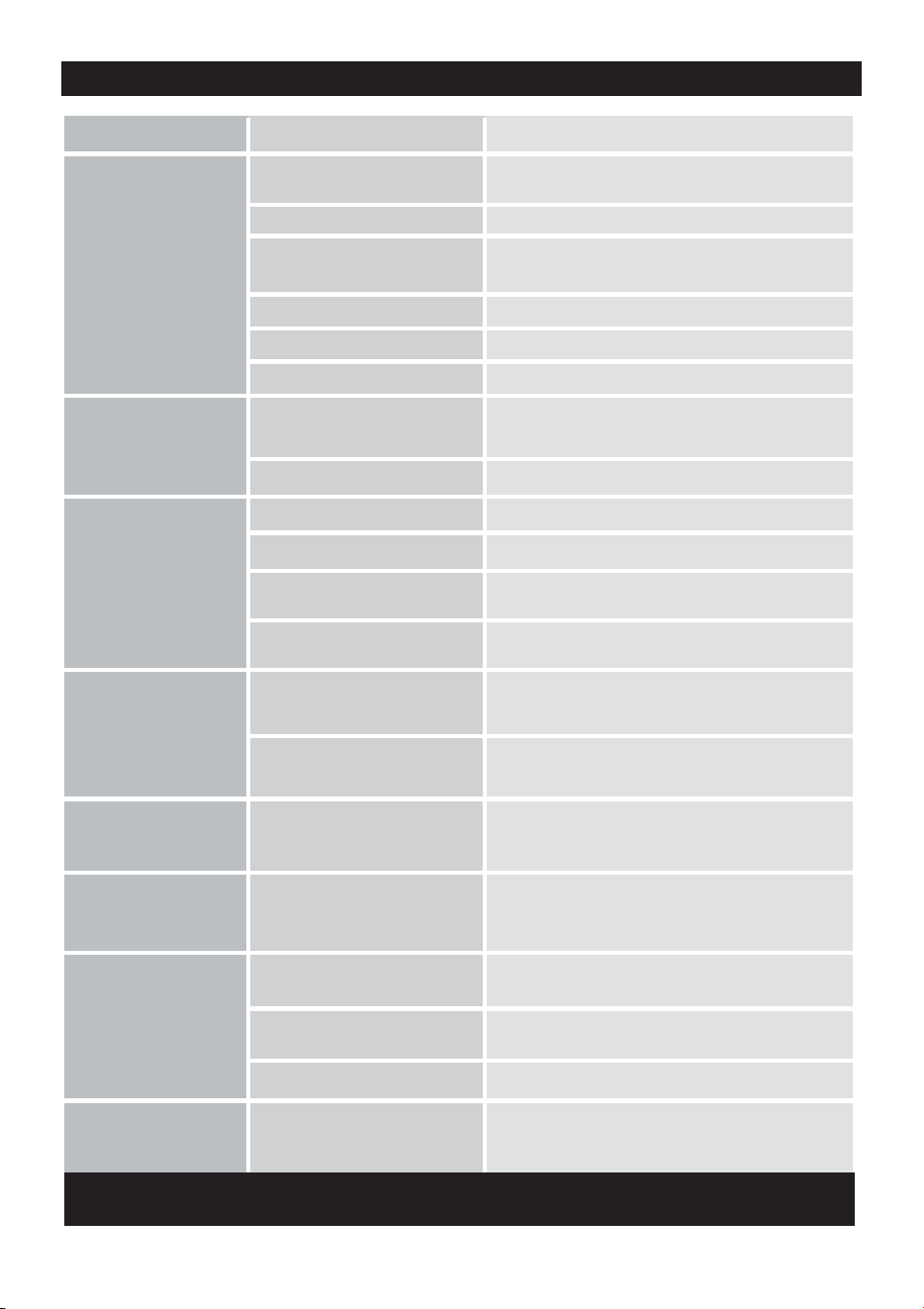
.
Problem Possible Cause Solution
Vehicle does not run
Vehicle does not run
very long
Vehicle runs sluggishly
Vehicle needs a push
to go forward
Difficult shifting from
forward to reverse or
vice-versa
Loud grinding or clicking
noises coming from
motor or gear box
Battery low on power
Thermal fuse has tripped
Battery connector or wires
are loose
Battery is dead
Electrical system is damaged
Motor is damaged
Battery is under charged
Battery is old
Battery is old
Vehicle is overload
Vehicle is being used in harsh
conditions
Poor contact of wires or
connectors
“Dead Spot” on motor
Motor or gears are damaged
Battery low on power
Recharge battery.
Reset fuse, see <Fuse>
Check that the battery connectors are firmly plugged
into each other. If wires are loose around the motor
contact your distributor please.
Check that the battery connectors are firmly plugged
into each other. If wires are loose around the motor,
contact your distributor please.
A dead spot means the electric power is not being
delivered to the terminal connection and the vehicle
needs repair. Contact your distributor please.
Attempting to shift while the
vehicle is motion
Completely stop the vehicle and shift, see <Use Your
Ride-On>
Check that the battery connectors are firmly plugged
into each other when recharging
Replace battery, contact your distributor please.
Replace battery, contact your distributor please.
Replace battery, contact your distributor please.
Reduce weight on vehicle. Maximum user weight is
30 kgs.
Avoid using vehicle in harsh conditions ,see <Safety>.
Recharge battery, contact your distributor please.
Contact your distributor please.
Contact your distributor please.
Contact your distributor please.
Contact your distributor please.
Battery will not
recharge
Charger feels warm
when recharging
Battery connector or adapter
connector is loose
Charger not plugged in
Charger is not working
This is normal and not a
cause for concern
Check that the battery connectors are firmly plugged
into each other.
Check that the battery charger is plugged into a
working wall outlet.
Completely read through this manual and the troubleshooting guide table before calling. If you
still need help resolving the problem Contact your distributor please.
Troubleshooting Guide │ 24

• It is parents' responsibility to check main parts of the toy before using, Must
regularly examine for potential hazard, such as the battery, charge,cable or
cord, plug, screws are fastening enclosure of other parts and that in the event
of such damage, the toy must not be used until that damage had been properly
removed.
• Make sure the plastic parts of the vehicle are not cracked or broken.
• Occasionally use a lightweight oil to lubricate moving parts such as wheels.
• Park the vehicle indoors or cover it with a tarp to protect it from wet weather.
• Keep the vehicle away from sources of heat, such as stoves and heaters.
Plastic parts may melt.
• Recharge the battery after each use. Only an adult can handle the battery.
Recharge the battery at least once a month when the vehicle Raider is not
being used.
• Do not wash the vehicle with a hose. Do not wash the vehicle with soap and
water. Do not drive the vehicle in rainy or snowy weather. Water will damage
the motor, electric system and battery.
• Clean the vehicle with a soft, dry cloth. To restore shine to plastic parts, use a
non-wax furniture polish. Do not use car wax. Do not use abrasive cleaners.
• Do not drive the vehicle in loose dirt, sand or fine gravel which could damage
the moving parts, motors or the electric system.
• When not using, all the electrical source should be turn off. Turn off the power
switch and disconnect the battery connection.
Maintaining │ 25

Our products are suitable for
ASTM F963; GB6675; EN71 and EN62115 standard.