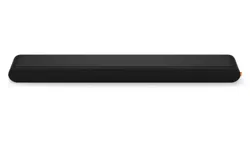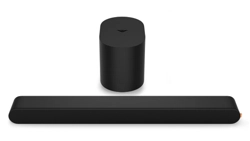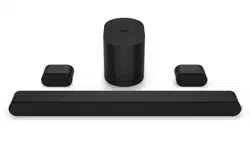
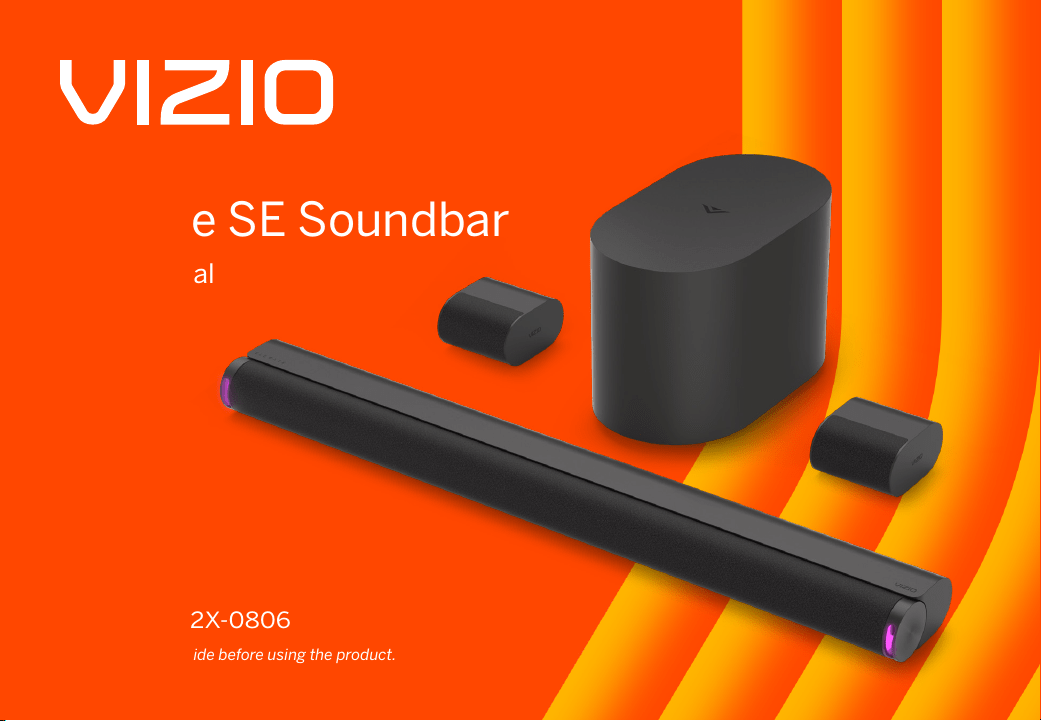
Elevate SE Soundbar
User Manual
Model:
SL512X-0806
Please read this guide before using the product.

Accessibility
Contact VIZIO for accessibility support at:
Email: accessibility@vizio.com
Phone: 1-877-698-4746
Binding Arbitration Agreement and Class Action Waiver
This purchase is subject to full VIZIO Terms and Conditions, including Binding Arbitration Agreement and
Class Action Waiver, which may be viewed at vizio.com/en/terms/terms-of-service.
By using this device, you accept those Terms and Conditions.
You have the right to opt out of the Binding Arbitration Agreement and Class Action Waiver within 60 calendar
days of your purchase. Please refer to the Limited Warranty section of this User Manual or view the full VIZIO
Terms and Conditions for opt-out instructions.

iii
IMPORTANT SAFETY INSTRUCTIONS
Your Unit is designed and manufactured to operate within dened design limits, and misuse may result in electric shock or re. To prevent your Unit from being damaged, the
following rules should be observed for its installation, use, and maintenance. Please read the following safety instructions before operating your Unit. Keep these instructions
in a safe place for future reference.
• Heed all warnings. Follow all instructions.
• Do not use this Unit near water.
• Clean only with a dry cloth.
• Do not block any ventilation openings. Install in accordance with the manufacturer’s instructions.
• Do not install near any heat sources such as radiators, heat registers, stoves, or other Unit (including ampliers) that produce heat.
• Do not defeat the safety purpose of the polarized or grounding-type plug. A polarized plug has two blades with one wider than the other. A grounding type plug has two
blades and a third grounding prong. The wide blade or the third prong are provided for your safety. If the provided plug does not t into your outlet, consult an electrician
for replacement of the obsolete outlet.
• Protect the power cord from being walked on or pinched particularly at the ends where the plug is located, near convenience receptacles, or where they exit from the Unit.
• Only use attachments/accessories specied by the manufacturer.
• Use only with the stand, tripod, or bracket specied by the manufacturer, or sold with the Unit. When a cart is used, use caution when moving the cart/Unit
combination to avoid injury from tip-over.
• When using the QuickFit mounting feature, the attached VIZIO device shall not exceed 25 pounds in weight.
• Unplug this Unit during lightning storms or when unused for long periods of time.
• Refer all servicing to qualied service personnel. Servicing is required when the Unit has been damaged in any way, such as when the power supply cord or plug is
damaged, liquid has been spilled or objects have fallen into the Unit, the Unit has been exposed to rain or moisture, does not operate normally, or has been dropped.
• To reduce the risk of electric shock or component damage, switch o the power before connecting other components to your Unit.
• Unplug the power cord before cleaning your Unit. A damp cloth is sucient for cleaning. Do not use a liquid or a spray cleaner on your Unit. Do not use abrasive cleaners.
• Always use the accessories recommended by the manufacturer to ensure compatibility.
• When moving your Unit from an area of low temperature to an area of high temperature, condensation may form in the housing. Wait before turning on your Unit to avoid
causing re, electric shock, or component damage.
• Slots and openings in the back and bottom of the Unit are provided for ventilation. To ensure reliable operation of your Unit and to protect it from overheating, be sure
these openings are not blocked or covered. Do not place your Unit in a bookcase or cabinet unless proper ventilation is provided.
• Never push any object into the slots and openings on your Unit. Do not place any objects on the top of your Unit. Doing so could short circuit parts causing a re or
electric shock. Never spill liquids on your Unit.
• Do not block the subwoofer ports. Allow for 1-2 inches of space around all sides for ventilation.
• WARNING: Exposure to loud sounds can damage your hearing causing hearing loss and tinnitus (ringing or buzzing in the ears). With continued exposure to loud noises,
ears may become accustomed to the sound level, which may result in permanent damage to hearing without any noticeable discomfort.
• When connected to a power outlet, power is always owing into your Unit. To totally disconnect power, unplug the power cord.
• Do not overload power strips and extension cords. Overloading can result in re or electric shock.
• The wall socket should be located near your Unit and be easily accessible.
• Keep your Unit away from moisture. Do not expose your Unit to rain or moisture. If water penetrates into your Unit, unplug the power cord and contact your dealer.
Continuous use in this case may result in re or electric shock.
IMPORTANT SAFETY INSTRUCTIONS
• Do not use your Unit if any abnormality occurs. If any smoke or odor becomes apparent, unplug the power cord and contact your dealer immediately. Do not try to repair
your Unit yourself.
• Avoid using dropped or damaged appliances. If your Unit is dropped and the housing is damaged, the internal components may function abnormally. Unplug the power
cord immediately and contact your dealer for repair. Continued use of your Unit may cause re or electric shock.
• Do not install your Unit in an area with heavy dust or high humidity. Operating your Unit in environments with heavy dust or high humidity may cause re or electric shock.
• Ensure that the power cord and any other cables are unplugged before moving your Unit.
• When unplugging your Unit, hold the power plug, not the cord. Pulling on the power cord may damage the wires inside the cord and cause re or electric shock. When your
Unit will not be used for an extended period of time, unplug the power cord.
• To reduce risk of electric shock, do not touch the connector with wet hands.
• Read and follow all warnings printed on the Unit.
• WARNING: This equipment is not waterproof. To prevent a re or shock hazard, do not place any container lled with liquid near the equipment (such as a vase or ower
pot) or expose it to dripping, splashing, rain, or moisture.
• If the main wall plug or the appliance coupler is disconnected, the disconnected device will remain readily operable upon reconnection to an appropriate power source.
• No open ames, such as lighted candles, should be placed on the Unit.
• The ventilation should not be impeded by covering the ventilation openings with items,such as newspapers, table-cloths, curtains, etc.
• The equipment shall be used at maximum 35 degree C ambient temperature.
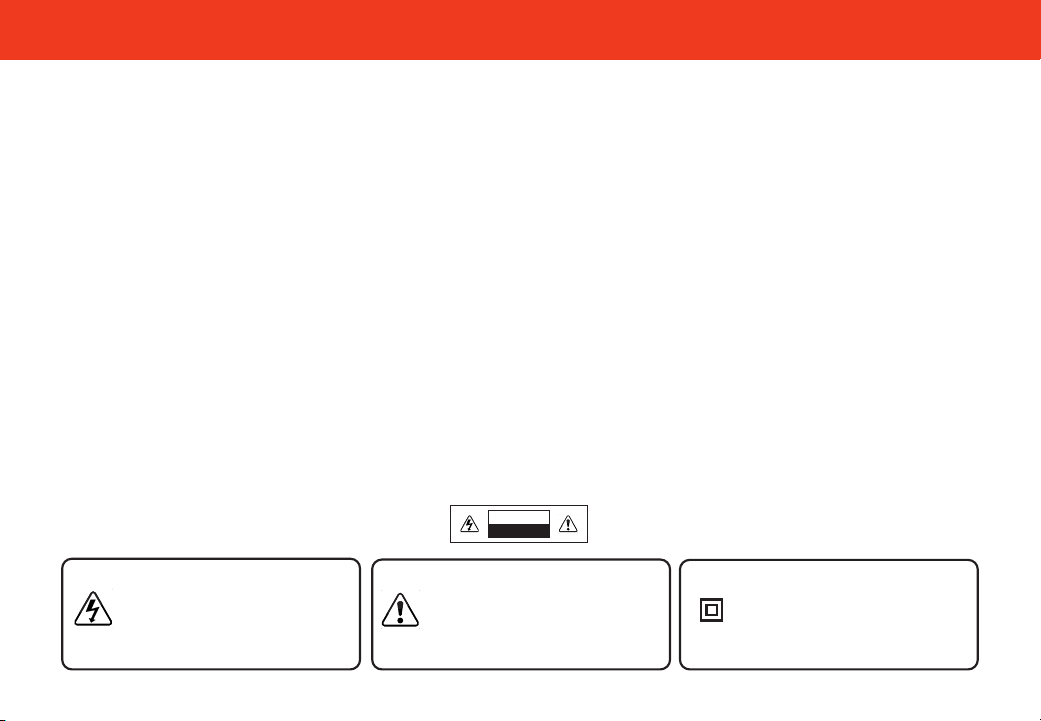
WARNING: To reduce the risk of re or electric shock, do not expose this Unit to rain or moisture.
CAUTION
RISK OF ELECTRIC
SHOCK DO NOT OPEN
The lighting ash with arrowhead symbol
within an equilateral triangle is intended to
alert the user to the presence of not isolated
dangerous voltage within the appliance that
may be sucient magnitude to constitute a
risk of shock to persons.
The exclamation point within an equilateral
triangle is intended to alert the user to
the presence of important operating and
servicing instructions in the literature
accompanying the appliance.
Warning: This equipment is a Class II or
double insulated electrical appliance. It
has been designed in such a way that it
does not require a safety connection to
electrical earth.

v
TABLE OF CONTENTS
Package Contents ...................................................................................................................................... 1
Controls & Connections ............................................................................................................................2
First-time Setup ......................................................................................................................................... 6
Proper Placement ......................................................................................................................................10
Controlling Your Soundbar ........................................................................................................................ 12
VIZIO App ...................................................................................................................................................13
Bluetooth Pairing for App Control ............................................................................................................ 14
Bluetooth Pairing for Streaming Audio .................................................................................................... 15
Bluetooth Pairing for Streaming Audio (continued) ............................................................................... 16
Unpairing or Disconnecting Your Soundbar ............................................................................................17
Using Bluetooth Input Mode ..................................................................................................................... 18
Using the Physical Buttons ....................................................................................................................... 19
Pairing the Subwoofer ............................................................................................................................... 20
QuickFit Mounting .....................................................................................................................................21
Wall Mounting ............................................................................................................................................22
Product Registration and Support ...........................................................................................................25
Help & Troubleshooting ............................................................................................................................. 26
Limited Warranty .......................................................................................................................................27
Legal & Compliance ...................................................................................................................................30
Specications ............................................................................................................................................31
1
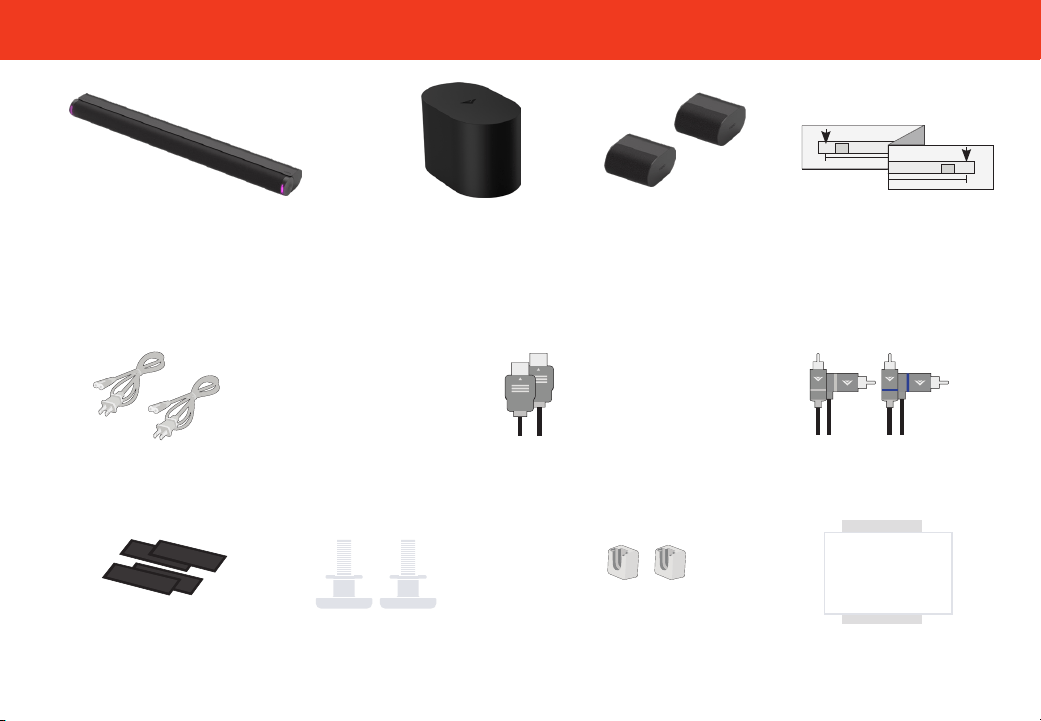
Package Contents
VIZIO
Soundbar
2 x Surround
Speakers
Wireless Subwoofer
2 x Power Cables
HDMI® Cable
2 x Surround Speaker
Audio Cables
4 x Cable Ties
2 x Wall
Mount Brackets
& screws
(Surround Speakers)
Wall Mount Template
Optical
Standard
RCA
RCA To 3
5mm
HDMI
Satellite
Cable
Optical
Standard
RCA
RCA To 3
5mm
HDMI
Satellite
Cable
SETUP
SETUP
Quick Setup Guide
& Safety and Legal Sheet
2 x QuickFit Screws
2
Controls & Connections
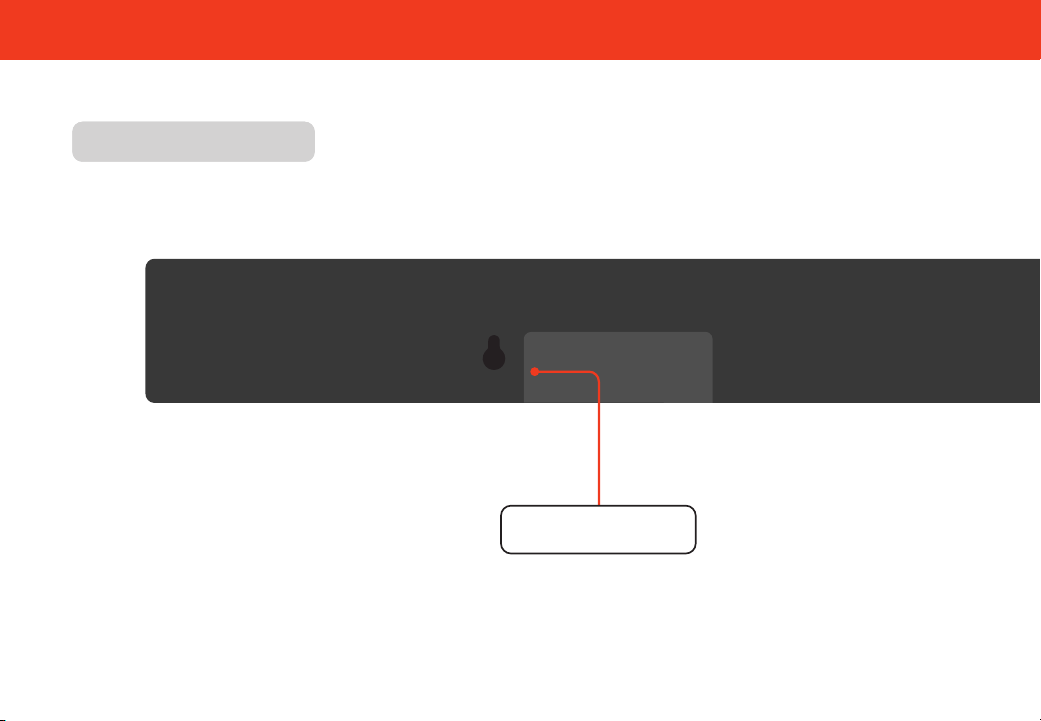
Back of SoundbarBack of Soundbar
Power In
3
Controls & Connections
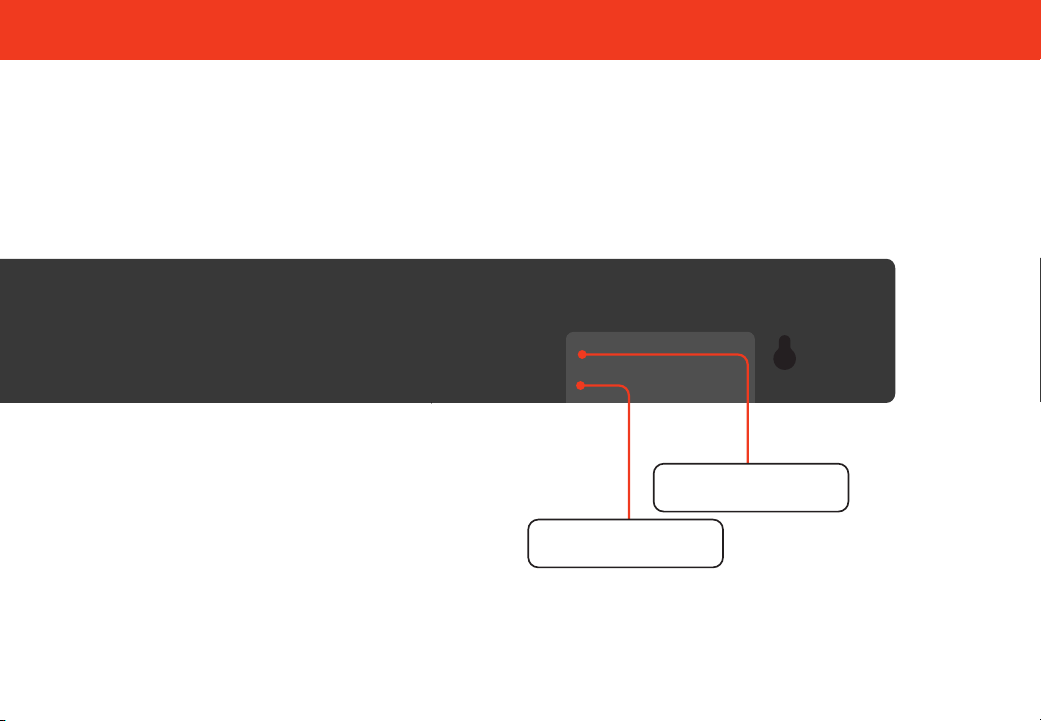
*
Supports .WAV and .MP3 le format playback only.
HDMI (eARC)
USB
*
In
4
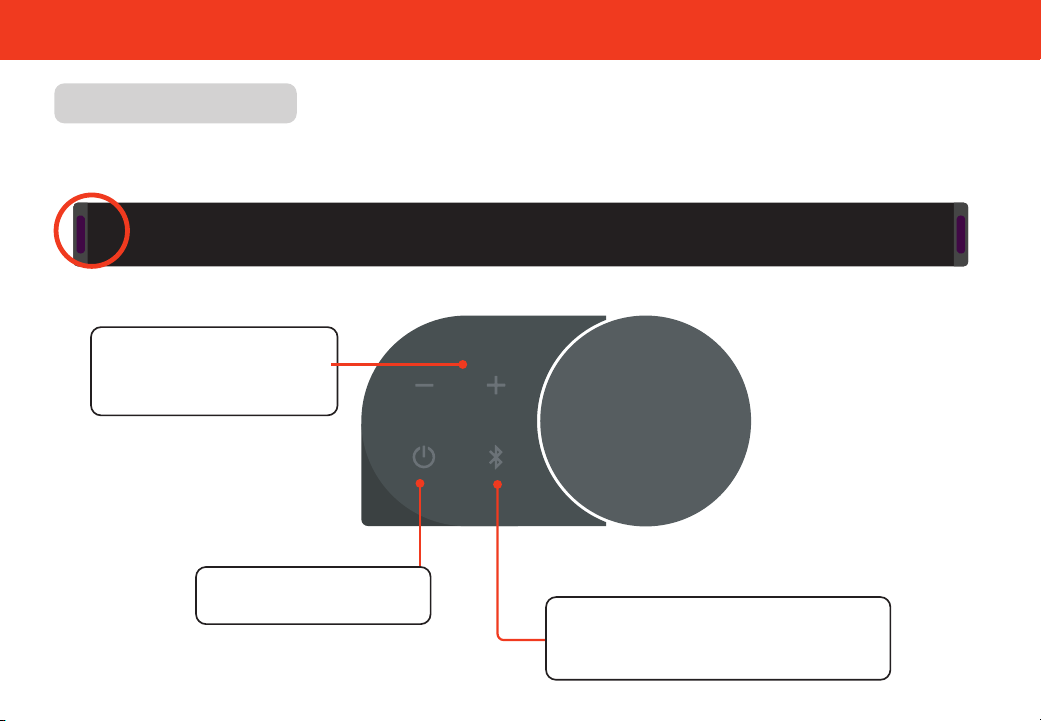
Controls & Connections
Side of Soundbar
Volume
Increase or decrease the
loudness of the audio.
Bluetooth® Input
See Bluetooth Pairing sections for more
information
Power
Press to turn on or o.
Buttons+ Located on the side of Soundbar
5
Controls & Connections
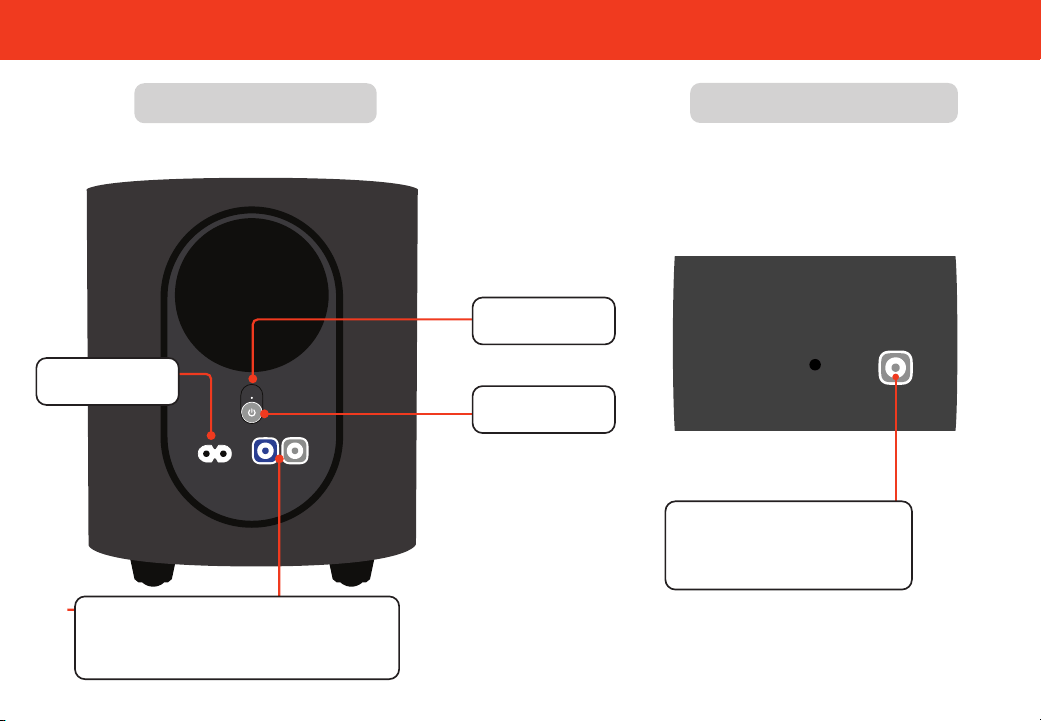
Back of Subwoofer
Back of Surround Speaker
Surround Speaker Port
Connects to subwoofer
Power Button
LED Indicator
Power Port
Surround Speaker Ports
Connects to surround speakers
Left: blue cable / Right: gray cable
6
First-time Setup
1
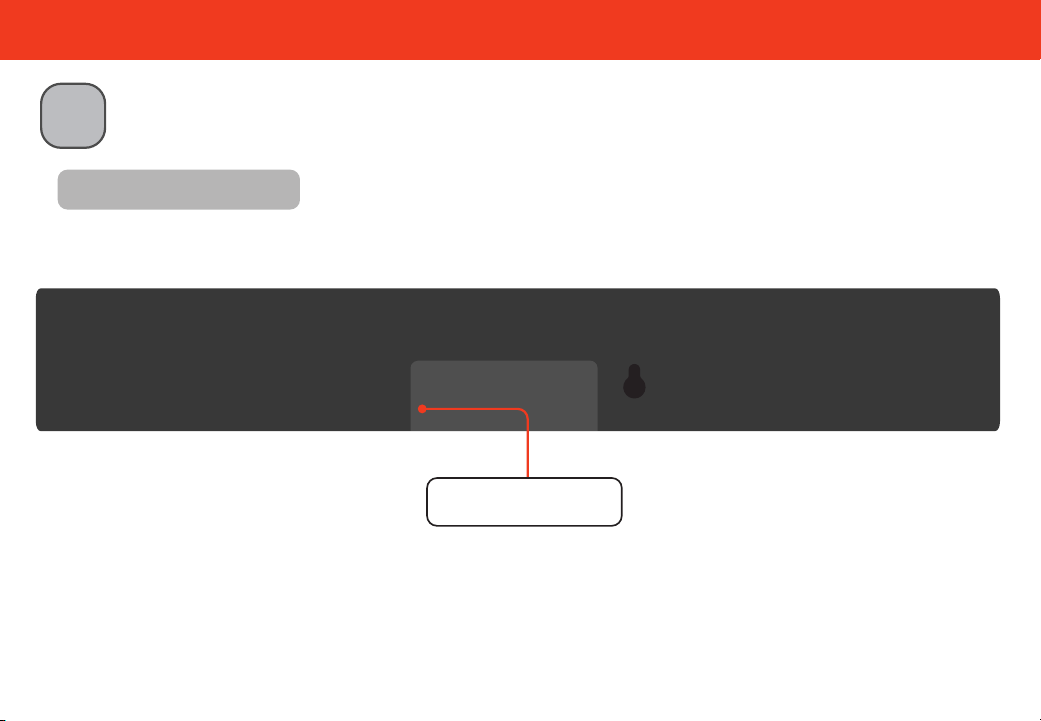
Connect the soundbar to the HDMI ARC or eARC port on your TV with the
included HDMI cable.
Back of Soundbar
HDMI (eARC)
(to TV)
7
2
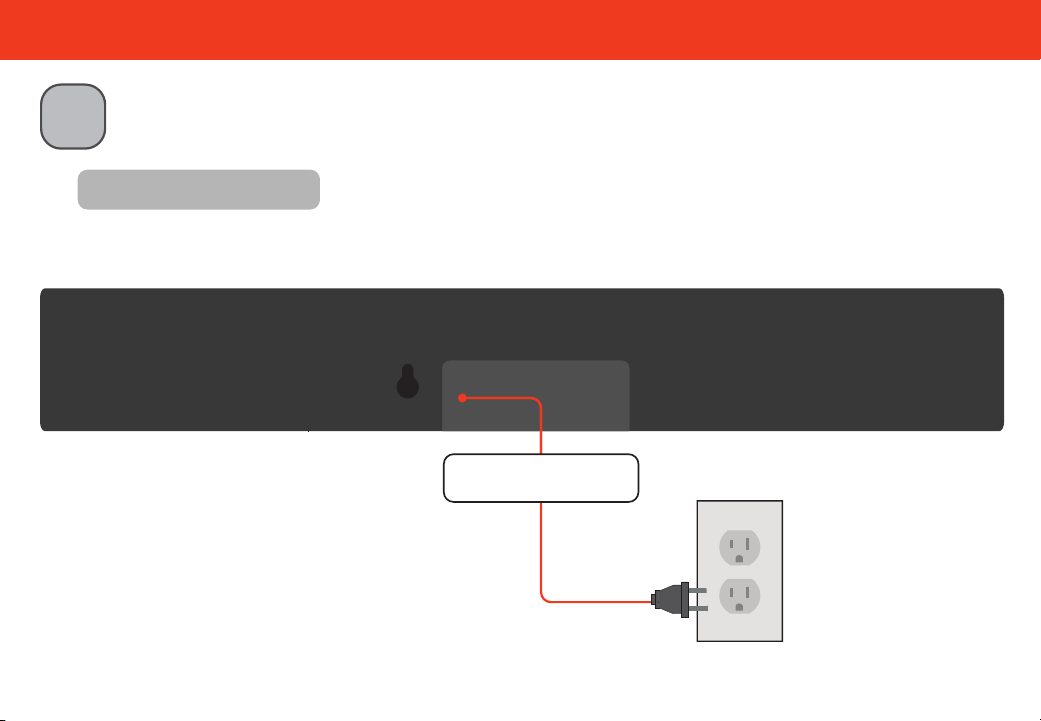
Connect the power cable to the soundbar AC IN as shown.
Plug the power cable into a working electrical outlet.
First-time Setup
HOME THEATER DISPLAY | QUICK START GUIDE
Installation Guide | Models:
Back of Soundbar
Power In
8
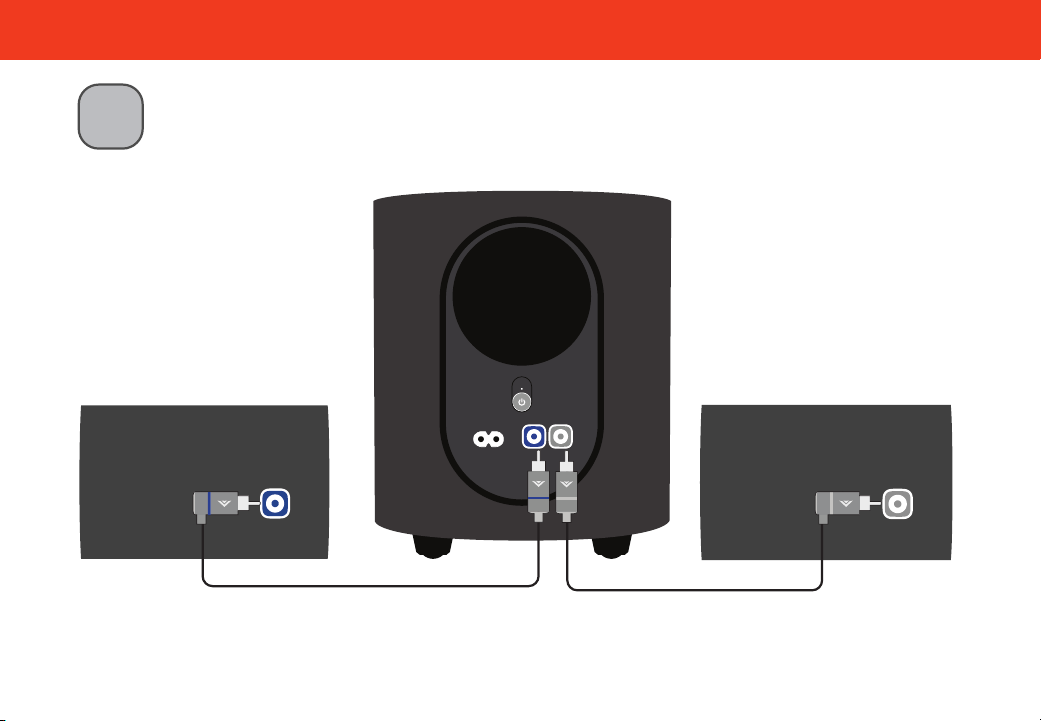
Connect the surround speakers to the subwoofer using the included surround speaker
audio cables. Cable ties are included to wrap unused cable length.
3
Match the color-coded speaker cable to the matching speaker port color.
Blue is for left surround and grey is for right surround.
First-time Setup
9
First-time Setup
HOME THEATER DISPLAY | QUICK START GUIDE
Installation Guide | Models:
5
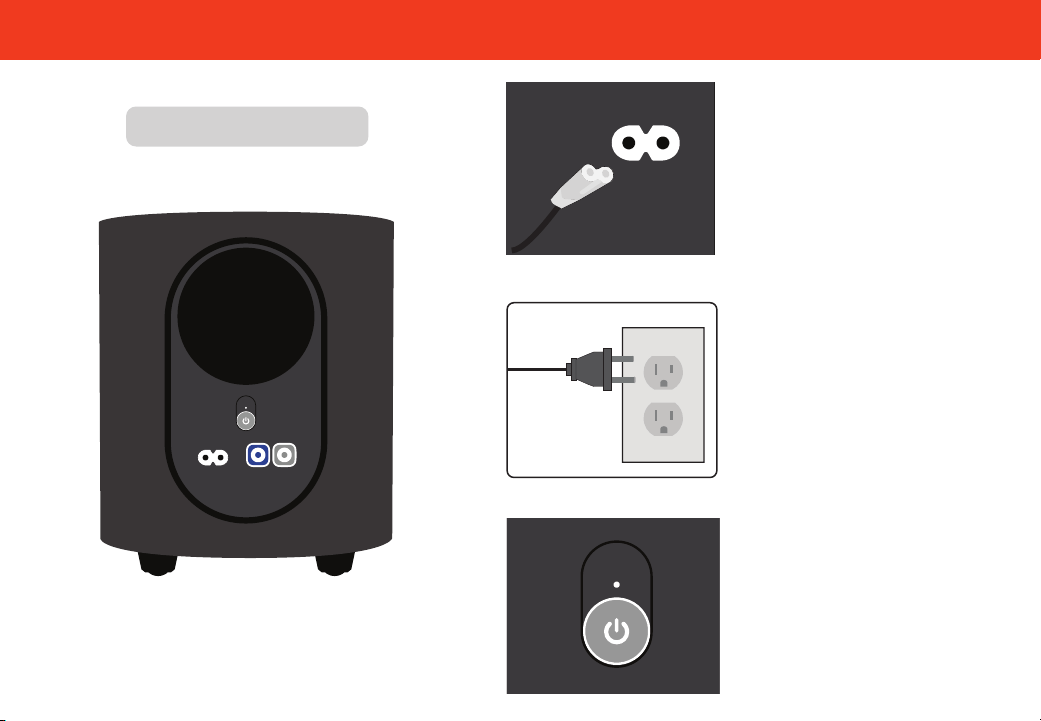
Plug the power cable into a
working electrical outlet.
Connect the power cable to
the subwoofer.
4
The subwoofer should
automatically power on and
link to the soundbar when
plugged in. The LED will glow
to solid to confirm.
6
Back of Subwoofer
10
Proper Placement
Position the soundbar (A), subwoofer (B), and surround speakers (C) as shown in the image below.
This soundbar comes with two QuickFit mounting screws, allowing you to attach the soundbar to select
VIZIO TVs. For more information, visit www.vizio.com/quickt.
Note: Do not block the subwoofer port.
C
L
R
B
A
11
Proper Placement —Front Surround Mode
In rooms where ideal placement of the surround sound speakers is not practical, you can also place
the soundbar (A), subwoofer (B), and surround sound speakers (R & L) as shown below.
Front Surround Mode will utilize DTS Virtual:X to produce a virtual surround sound experience.
A
L
R
B
Note: Do not block the subwoofer port.
12
Controlling Your Soundbar
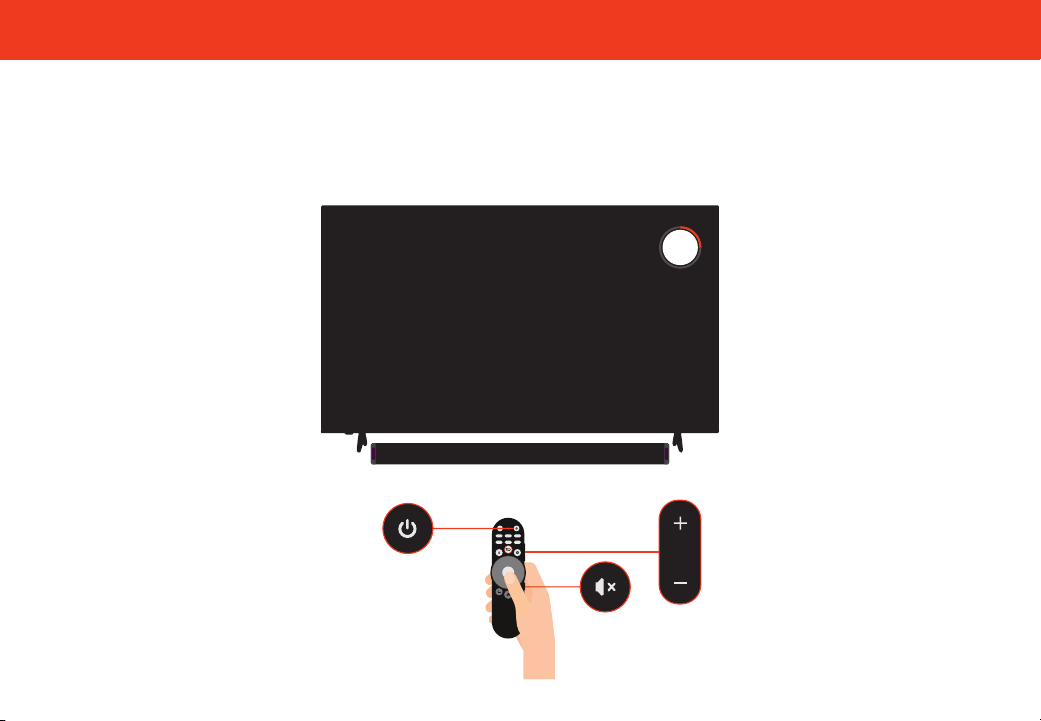
Use your existing TV remote to power on your TV; your soundbar will automatically wake up.
Use your TV remote to adjust the volume and to mute and unmute.
INPUT
30Soundbar Volume

13
VIZIO App
Take control with the VIZIO App
The VIZIO app and a VIZIO Account are required for control of soundbar
functionality, settings, and to receive system updates. Scan to download.
1. Download the VIZIO app and create a VIZIO Account. Activate Bluetooth on your phone while standing next to your
soundbar.
2. Open the VIZIO app to pair and connect to the Soundbar. Select your device from the list of discovered devices
(VIZIO Elevate). The app automatically recognizes your soundbar for the rst hour after installation.
3. After one hour, press and hold the Bluetooth button on your soundbar. Release after 5 seconds to initiate the pairing
process for up to 3 minutes.
4. Once paired and connected, adjust audio levels like bass, treble, height, and ClearDialog.
Home Audio. Elevated.
Experience the ultimate in surround sound. Elevate SE features adaptive height speakers that automatically rotate up
when Dolby Atmos® and DTS:X® content is detected, reecting sound o the ceiling for a thrilling cinematic experience.
You can customize the height speaker position and color of the LED lights on the Elevate SE soundbar through the VIZIO
app.
14
Bluetooth Pairing for App Control
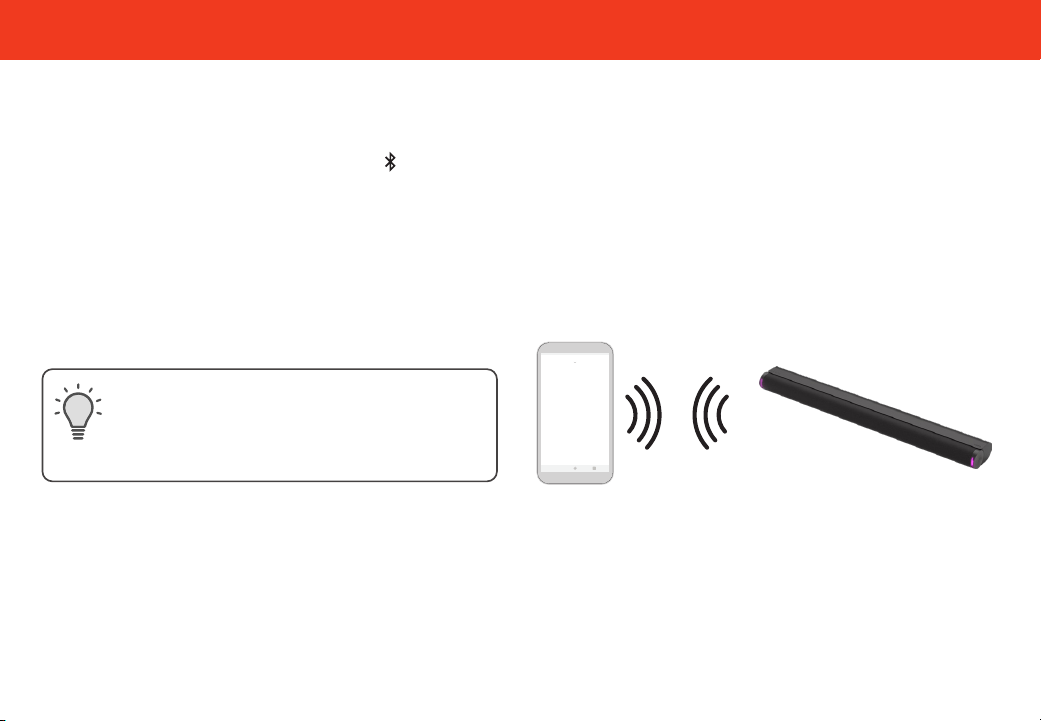
To pair the soundbar with the VIZIO app after the first-time setup or to pair an additional Smart Phone
1. Download the VIZIO app and open the app on the device that you wish to pair to the soundbar.
2. Press and hold the Bluetooth Button ( ) on the soundbar for at least 5 seconds, then release. This will put the
soundbar into pairing mode for 3 minutes. You will see the LED blinking slowly in blue when it is in this state.
3. In the VIZIO app, select your device from the list of discovered devices (VIZIO Elevate)
4. Now you are connected and can control the soundbar via the VIZIO app while the app is open and you are within
range.
Only one paired device can control the soundbar
at a time. To switch which device has the active
controls, close the app on the device you’re not
using and open the app on the device that you
want to use.
VIZIO App
15
Bluetooth Pairing for Streaming Audio
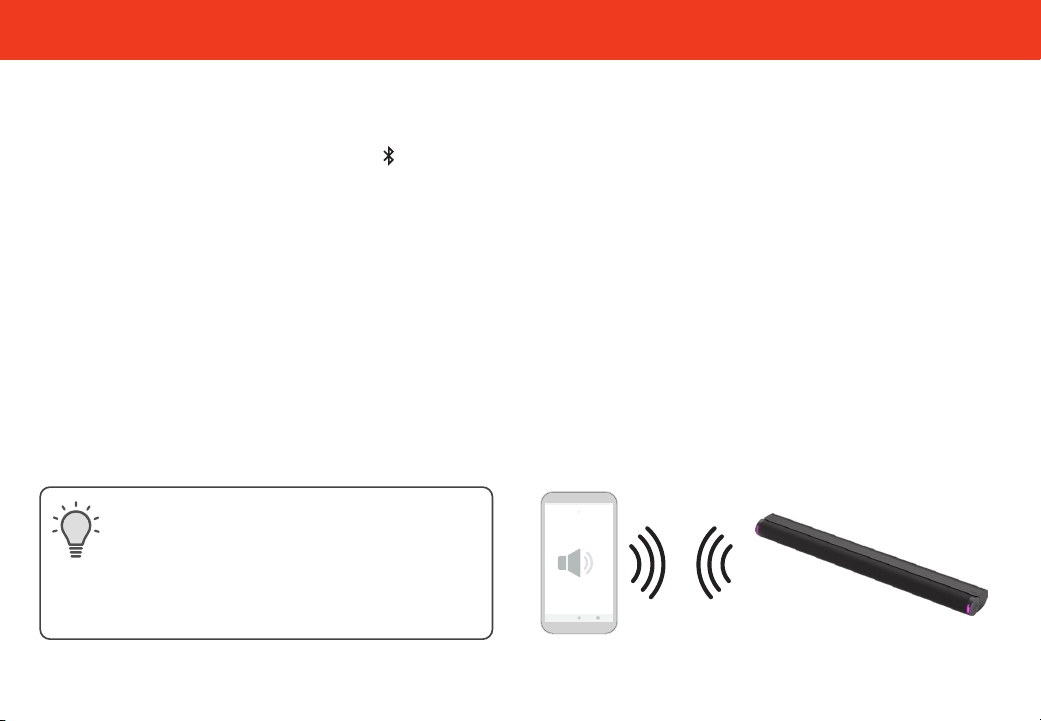
To pair the soundbar with a Bluetooth device for streaming music, you can use either of the two methods:
From the soundbar button panel:
1. Press and hold the Bluetooth button ( ) on the soundbar for 2 seconds, then release.
2. The soundbar will switch to Bluetooth input and begin pairing mode. You will see the Blue LED blinking
rapidly and a tone will play twice.
3. Search for the soundbar (VIZIO Elevate) using your Bluetooth device in its mobile device settings and
select to pair.
4. Once successfully paired, the Blue LED will stop blinking and a confirmation tone will be heard from the
soundbar.
5. Now you can play audio from your Bluetooth device while it is in range and your soundbar is in Bluetooth
Input.
Only one paired device can stream to the
soundbar at a time. To switch which device is
streaming, disconnect the streaming device
from the soundbar in your Device Settings (see
Unpairing or Disconnecting Your Soundbar on the
next page) and connect the device you want to
stream from.
16
Bluetooth Pairing for Streaming Audio (continued)
From the VIZIO app:
1. In the VIZIO app for the soundbar, on the EQ Modes tab, press the Bluetooth button.
2. A prompt will appear asking if you want to switch to Bluetooth input or pair a device. Select “Pair Music.”
3. The soundbar will switch to Bluetooth input and begin pairing mode. You will see the Blue LED on the
soundbar blinking rapidly and a tone will play twice.
4. Search for the soundbar (VIZIO Elevate) using your Bluetooth device in its mobile device settings and
select to pair.
5. Once successfully paired, the Blue LED will stop blinking and a confirmation tone will be heard from the
soundbar.
6. Now you can play audio from your Bluetooth device while it is in range and your soundbar is in Bluetooth
Input.
Only one paired device can stream music to the soundbar at a time. To connect a new device, you must initiate
pairing mode for music streaming again.
17
Unpairing or Disconnecting Your Soundbar
Unpairing the Soundbar from your VIZIO app:
1. Press the name of your soundbar at the top of the VIZIO app Screen
2. Under “Paired Devices” you will see the name of your soundbar. Press the Information button to open up
the device info screen.
3. Scroll down and select “Unpair Device.”
4. The VIZIO app will ask for confirmation. Press “Yes.” Your device will be unpaired from the soundbar.
For iOS users, an extra step is required to fully unpair your iPhone from the soundbar. After going through the
above steps, navigate to Bluetooth on your mobile device settings, then press the information button and press
unpair from the “VIZIO app.”
18
Using Bluetooth Input Mode
1. Your soundbar supports music streaming from devices with Bluetooth capability.
(Device compatibility will vary, see your device’s documentation for more information.)
2. If the input is changed back to Bluetooth, the most recently connected Bluetooth device will reconnect
automatically.
3. If the soundbar input is changed, the Bluetooth device will disconnect.
Reduce the volume levels on your device and
on the soundbar before pressing Play. High
volume levels can damage your hearing.
Your soundbar is not equipped with a
microphone, so it cannot operate as a
hands-free device for a smartphone.
A Bluetooth signal has a range of up to 30 feet. Keep in mind that Bluetooth is a compressed audio
format, so streamed music may lose some integrity when compared to a wired connection. Try the following if
your sound quality is less than optimal:
• If you hear any break-up or you are disconnected while streaming music from your device, move the source
device closer to the soundbar.
• Be sure that there are no solid obstructions in the line-of-sight between the soundbar and the source device.
• Other wireless devices can affect Bluetooth range, including wireless security cameras, wireless video
baby monitors, cordless phones, and microwave ovens. Turning off or moving these devices may improve
Bluetooth range.
Maximizing Signal
19
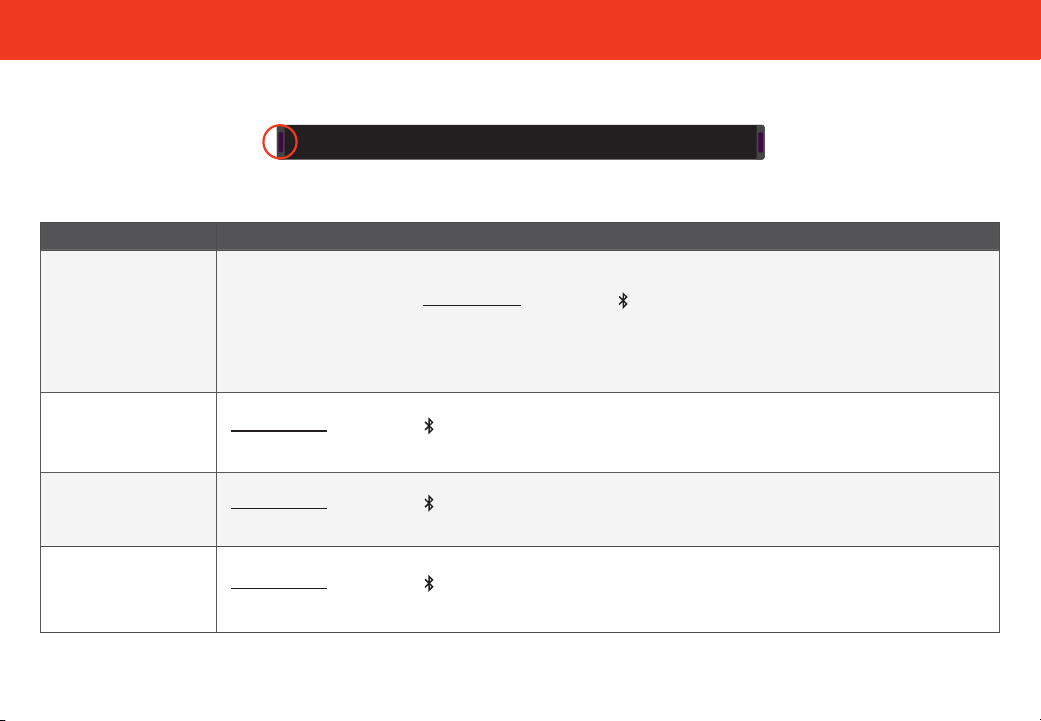
Using the Physical Buttons
There are functions that are triggered by different button combinations on the soundbar.
Function Description
Factory
Reset
Reset the soundbar to the factory default settings.
To perform a Factory Reset,
Press and Hold the Bluetooth ( ) and Volume Down (—) buttons for 5 seconds.
Notes:
• This will erase all settings and preferences that you have set.
• The subwoofer will remain paired, but the VIZIO app will need to be repaired.
Speaker Test
Press and hold the Bluetooth ( ) and Volume Up (+) buttons for 5 seconds.
This function is also available within the VIZIO app.
Bluetooth Classic
Pairing Mode
(Music Streaming)
Press and hold the Bluetooth ( ) button for 2 seconds.
This function is also available within the VIZIO app.
Bluetooth Low
Energy (BLE) Pairing
Mode
(VIZIO App)
Press and hold the Bluetooth ( ) button for at least 5 seconds.
This function is also available within the VIZIO app.
Buttons are located here.
20
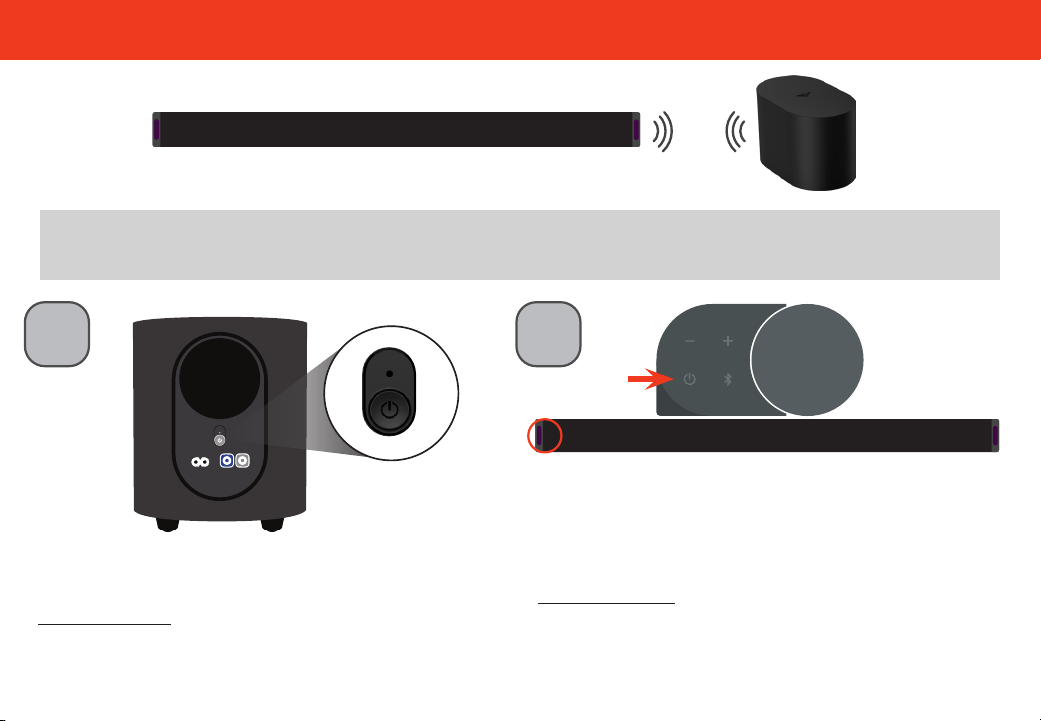
Pairing the Subwoofer
1
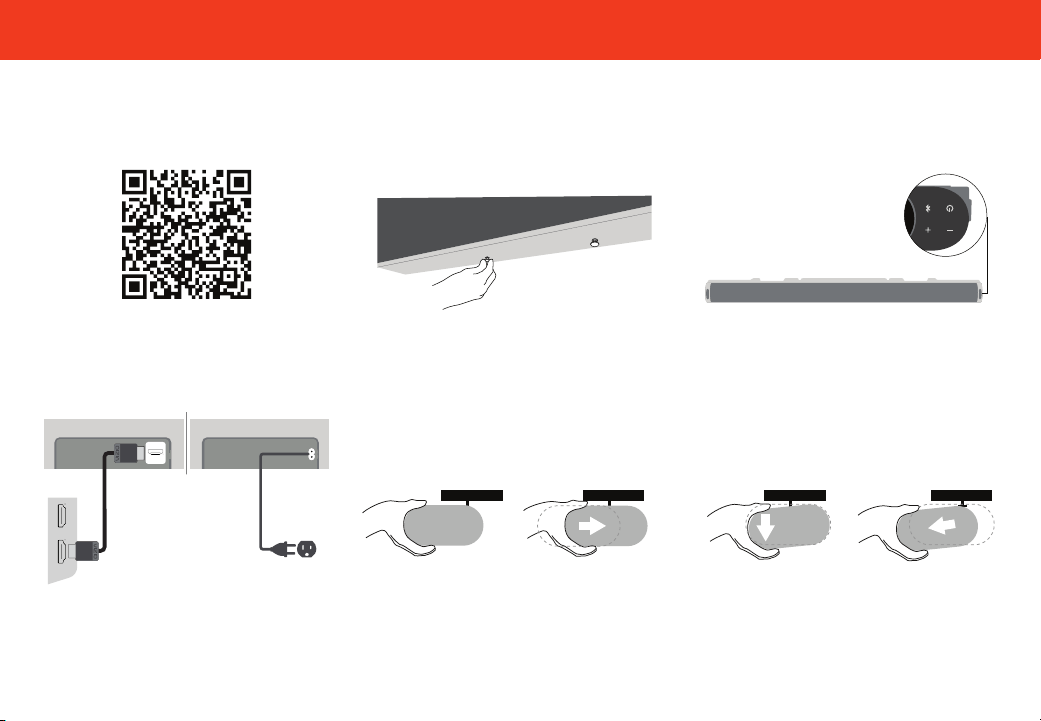
First, confirm that the power LED is illuminated.
Press and hold the ON/OFF button on the back of
the subwoofer for 5 seconds. The LED on the back
of the subwoofer will blink white.
2
Press and hold the Power button on the side of the
soundbar for 5 seconds. The LED indicator on the
front will flash white until paired. Once paired, the
LED will flash green, then turn solid white.
Back of subwoofer
SurroundsAC IN
The subwoofer has already been paired with the soundbar by VIZIO. However, the subwoofer may need to
be re-paired to the soundbar if there is no sound coming from the subwoofer.
Button Located on the side of Soundbar
21
QuickFit Mounting
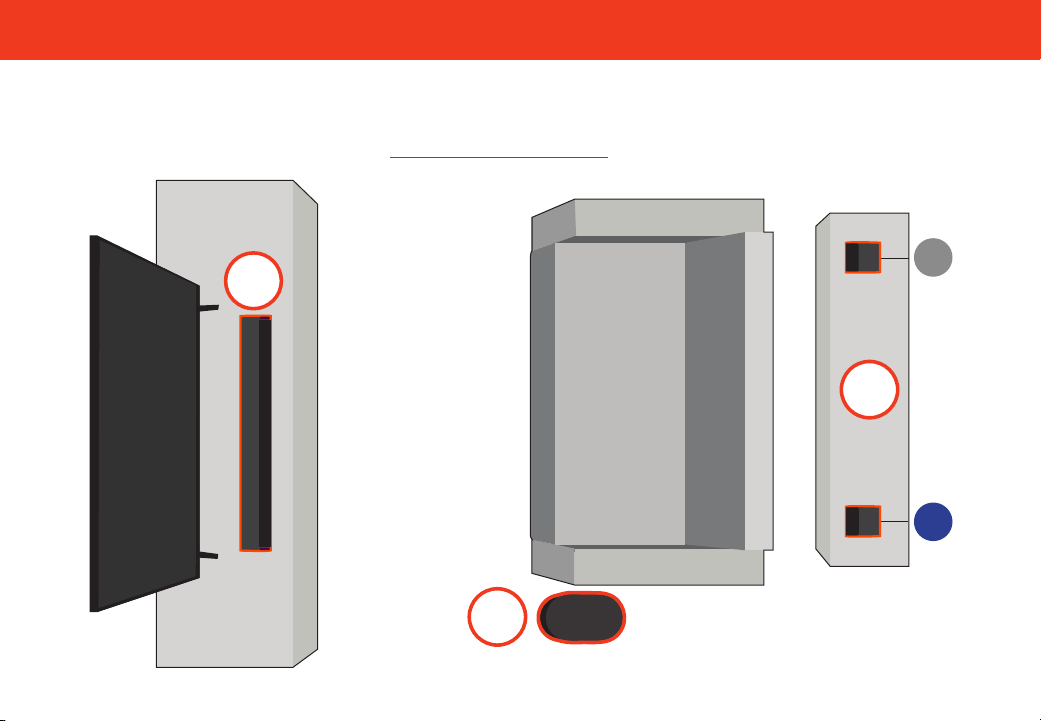
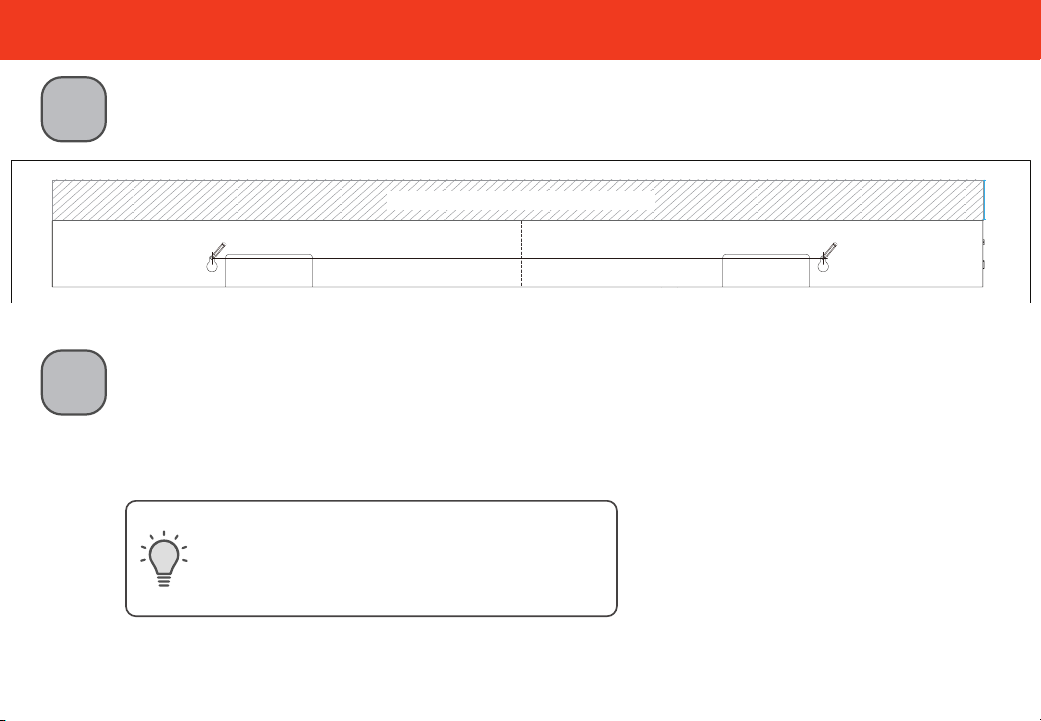
Your soundbar may be attached directly to the bottom of QuickFit compatible VIZIO TVs. For additional
information and VIZIO TV compatibility, visit www.vizio.com/quickfit.
When using the QuickFit mounting feature, the attached VIZIO device shall not exceed 25 pounds in weight.
To detatch your soundbar
To detatch the soundbar, hold it from the front
and tilt down, then pull it away from your TV.
Before you begin
Before you begin, scan the QR code above to
learn more about setting up your QuickFit
compatible device, including installation
guidelines and important safety information.
1
Locate the thumb screws inside the included
accessory bag and screw them into the
bottom of your QuickFit compatible VIZIO TV.
3
Plug the power cable into a nearby wall outlet
and connect the soundbar to the HDMI eARC
port on your QuickFit compatible VIZIO TV.
TO TV
HDMI
(eARC)
eARC
TV
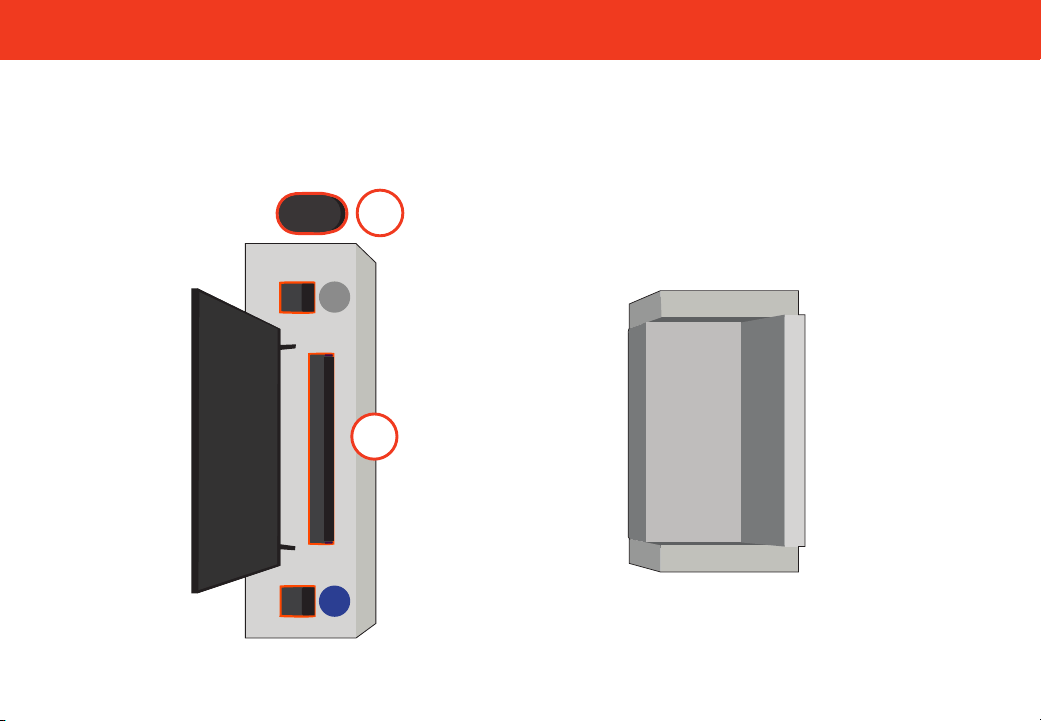
4
Align the soundbar with the thumb screws
inserted into your TV as illustrated in step 2.
Push the soundbar in until it locks in place.
2
Rotate the soundbar so that it is upside down
with the button panel on the right side as
pictured above.
22
Wall Mounting
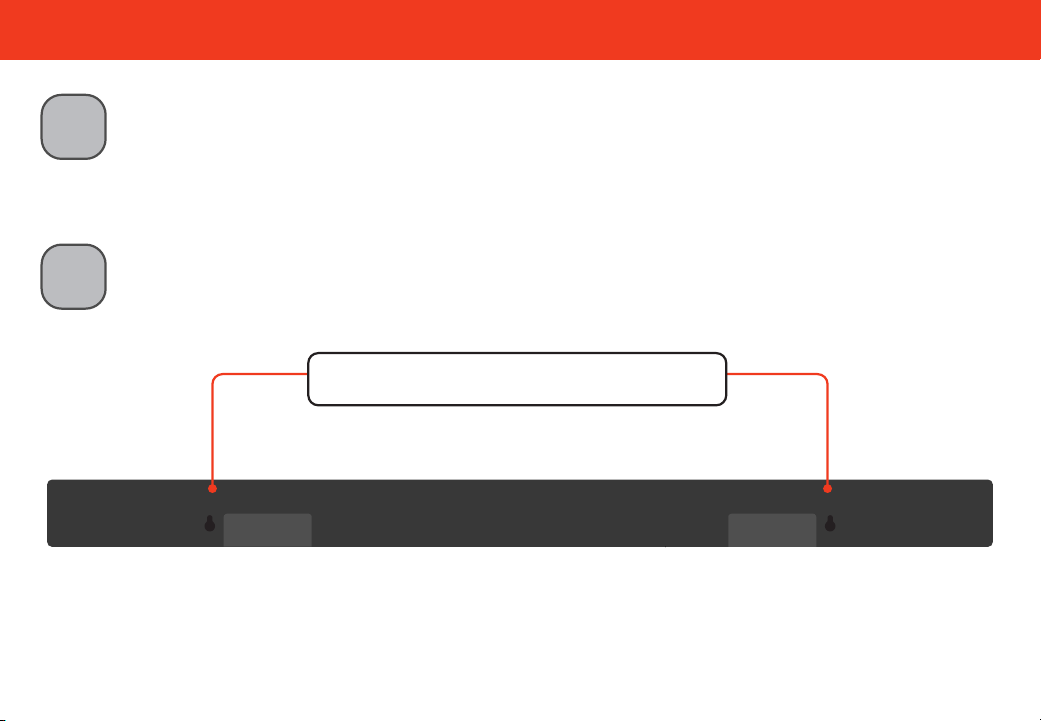
Place the included Wall Mounting Template against the wall under your TV.
Mark the two bracket holes using a pencil.
1
2
Install the screws to the wall. Be sure your screws are attached to wood studs, drywall
anchors (for drywall), or concrete anchors (for brick/concrete walls).
Suggested screw size:
4.5mm diameter
25 mm minimum length
Screws for wall mounting are not included.
Use the screw type and length noted above and
on the Wall Mounting Template and appropriate
to your home’s construction. If in doubt, consult a
professional installer.
Do not use any of the included screws for the wall mount installation. These are not intended for mounting.
Refer to the "Wall Mounting" section in the User Manual for additional information. See reverse side for QuickFit compatible VIZIO TVs.
Wall Mounting Template
Leave this space between the soundbar and your TV.
Mark Here Mark Here
23
Wall Mounting
3
Insert one end of the provided HDMI cable to the HDMI eARC port on your soundbar. Attach
the other end to your TV’s ARC/eARC port. Plug your soundbar into a working power outlet.
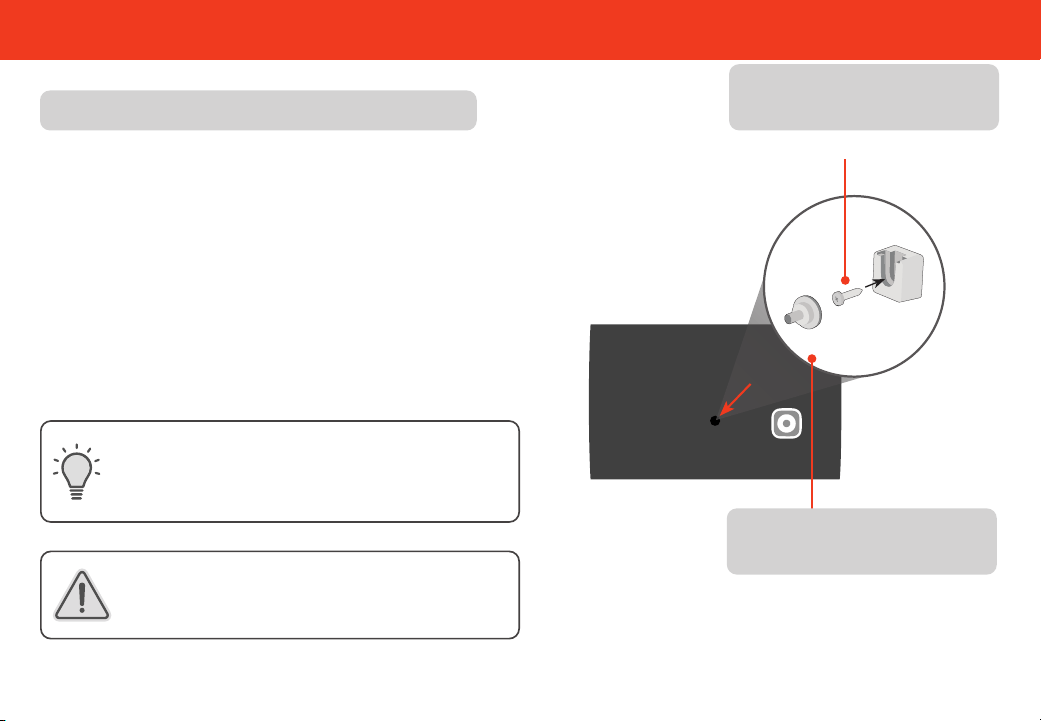
4
Slide the soundbar’s wall mount slots over the installed screws.
Wall Mount Slots
24
* Do not use any of the included screws for the wall mount installation. These are not intended for mounting.
Wall Mounting
If you are unfamiliar with power tools or the layout of
electrical wiring in the walls of your home, consult a
professional installer.
Be sure your screws are attached to wood studs,
drywall anchors (for drywall), or concrete anchors
(for brick/concrete walls).
Wall mounting hardware is not included.
Wall Mounting the Surround Speakers
To wall mount the surround speakers:
1. Attach the wall mount screw to the back of the surround
speaker.
2. Secure the wall mount bracket to the wall.
(Bracket screw is not included.)
3. Slide the speaker on to the wall bracket. Ensure the wall
mount screw is secured within the bracket grooves.
Suggested screw size: 3.5 mm diameter,
1.63" minimum length
Bracket Screw
*
(Not included with soundbar)
Screw size: M4 x 8L
Wall-mount Screw
(Included with soundbar)
25
Product Registration and Support
Get helpful tips and register your soundbar.
Scan with your phone camera or QR reader.
Customized Support
Get assistance quickly with your information on hand.
Updates and Enhancements
Stay up-to-date with important product updates and notications.
News and Oers
Take advantage of the latest news and special oers from VIZIO.
More questions? Find answers at:
SUPPORT.VIZIO.COM

26
Help & Troubleshooting
There is no power.
• Press the POWER button on the TV remote control or on the side of your soundbar.
• Ensure the power cord is securely connected.
• Plug a different device into the electrical outlet to verify that the outlet is working correctly.
There is no sound.
• Increase the volume. Press VOLUME UP on the TV remote or on the side of your soundbar.
• Press MUTE on the TV remote to ensure the soundbar is not muted.
• Your TV may be set to variable audio output. Confirm that the audio output setting is set to FIXED or STANDARD,
not VARIABLE. Consult your TV’s user manual for more detailed information.
• If using Bluetooth, ensure that the volume on your source device is turned up and that the device is not muted.
I hear buzzing or
humming.
• Ensure all cables and wires are securely connected.
• Connect a different source device (TV, Blu-ray player, etc) to see if the buzzing persists. If it does not, the problem
may be with the original device.

27
Limited Warranty
UNITED STATES
By using this VIZIO product, you accept all VIZIO Terms and Conditions, including all the Terms of Warranty, BINDING ARBITRATION AGREEMENT, and
Class Action Waiver. If you do not agree to the terms of this warranty, do not use the VIZIO product and, within thirty (30) days of the date of purchase, return it for a
refund to the authorized retailer where you purchased it. You have the right to opt out of the Arbitration Agreement and Class Action Waiver within 60 calendar
days of your purchase. Please refer to the full section “Binding Arbitration Agreement; Class Action Waiver” below for more details and instructions for opt-out. Full
Terms and Conditions may be viewed at vizio.com/en/terms/terms-of-service.
How Long This Warranty Lasts
For non-commercial use, VIZIO warrants the product on the terms set forth below for one (1) year from the date of original purchase. For commercial use, VIZIO warrants
this product on the terms set forth below for ninety (90) days from the date of original purchase.
What This Warranty Covers
VIZIO warrants the product against defects in materials and workmanship when the product is used normally in accordance with VIZIO’s user guides and manuals.
Except where restricted by law, this warranty applies only to the original purchaser of a new product. The purchase must have been made from an authorized retailer in
the United States (including Puerto Rico). The product must also be located in the country where it was purchased at the time of warranty service.
How to Get Service
Before obtaining warranty service, you may visit www.vizio.com for additional help and troubleshooting. To obtain warranty service, contact VIZIO Customer Support by
going to support.vizio.com and selecting Contact Us. You can also call Customer Support (US): 855-209-4106.
Your Obligations Before Service
You must obtain pre-authorization before sending your product to a VIZIO service center. You may be required to supply a purchase receipt (or copy) to show that the
product is within the warranty period.
When you return a product to a VIZIO service center, you must ship the product in its original packaging or in packaging that aords an equal degree of protection. VIZIO
Technical Support will provide instructions for packing and shipping the product to the VIZIO service center.
ALL USER DATA AND DOWNLOADED APPLICATIONS STORED ON A PRODUCT WILL BE DELETED IN THE COURSE OF SOME IN-HOME AND ALL SHIP-IN WARRANTY
SERVICE. If this occurs, your product will be restored to its original state. You will be responsible for restoring all applicable user data and downloaded applications.
Recovery and reinstallation of user data and downloaded applications is not covered under this warranty. In order to protect your personal information, VIZIO
recommends that you always clear all personal information from the product before it is serviced, regardless of the servicer.
VIZIO’s Responsibilities
If VIZIO determines that a product is covered by this warranty, VIZIO will (at its option) repair or replace it, or refund the purchase price to you. There will be no charge for
parts or labor during the warranty period. Replacement parts may be new or recertied at VIZIO’s option and sole discretion. Replacement parts and VIZIO’s labor are
warranted for the remaining portion of the original warranty or for ninety (90) days from warranty service, whichever is longer.
Types of Service
Products must be sent to a VIZIO service center to obtain warranty service. VIZIO is not responsible for transportation costs to the service center, but VIZIO will cover
return shipping to the customer.

28
What This Warranty Does Not Cover
This warranty does not cover: (a) cosmetic damage; (b) normal wear and tear; (c) improper operation; (d) improper voltage supply or power surges; (e) signal issues;
(f) damage from shipping; (g) acts of God; (h) customer misuse, modications or adjustments; (i) installation, set-up, or repairs attempted by anyone other than by
a VIZIO authorized service center; (j) products with unreadable or removed serial numbers; (k) products requiring routine maintenance; or (l) products sold “AS IS”,
“CLEARANCE”, “FACTORY RECERTIFIED”, or by a non-authorized reseller.
What to Do If You Are Not Satised With Service
If you feel VIZIO has not met its obligations under this warranty, you may attempt to resolve the issue informally with VIZIO. If you are unable to resolve the issue
informally and wish to le a formal claim against VIZIO, and if you are a resident of the United States, you must submit your claim to binding arbitration according to the
procedures described below, unless an exception applies. Submitting a claim to binding arbitration means that you do not have the right to have your claim heard by a
judge or jury. Instead your claim will be heard by a neutral arbitrator.
Binding Arbitration Agreement; Class Action Waiver (U.S. Residents Only)
UNLESS YOU HAVE BROUGHT AN ELIGIBLE CLAIM IN SMALL CLAIMS COURT OR HAVE OPTED OUT AS DESCRIBED BELOW, ANY CONTROVERSY OR CLAIM
RELATING IN ANY WAY TO YOUR VIZIO PRODUCT, INCLUDING ANY CONTROVERSY OR CLAIM ARISING OUT OF OR RELATING TO THIS WARRANTY, A BREACH
OF THIS WARRANTY, OR THE VIZIO PRODUCT’S SALE, CONDITION OR PERFORMANCE, WILL BE SETTLED BY BINDING ARBITRATION ADMINISTERED BY
THE AMERICAN ARBITRATION ASSOCIATION AND CONDUCTED BY A SINGLE ARBITRATOR APPOINTED BY THE AMERICAN ARBITRATION ASSOCIATION, IN
ACCORDANCE WITH ITS COMMERCIAL ARBITRATION RULES AND ITS SUPPLEMENTARY PROCEDURES FOR CONSUMER-RELATED DISPUTES. You may learn more
about the American Arbitration Association and its rules for arbitration by visiting www.adr.org or by calling 800-778-7879. Since this warranty concerns a transaction
in interstate or international commerce, the Federal Arbitration Act will apply.
The ling fees to begin and carry out arbitration will be shared between you and VIZIO, but in no event will your fees ever exceed the amount allowable by the American
Arbitration Association, at which point VIZIO will cover all additional administrative fees and expenses. VIZIO waives its right to recover attorneys’ fees in connection with
any arbitration under this warranty. If you are the prevailing party in an arbitration to which the Supplementary Procedures for Consumer-Related Disputes applies, then
you are entitled to recover attorneys’ fees as the arbitrator may determine.
The dispute will be governed by the laws of the state or territory in which you resided at the time of your purchase (if in the United States). The place of arbitration
will be Irvine, California, or your county of residence (if in the United States). The arbitrator will have no authority to award punitive or other damages not measured
by the prevailing party’s actual damages, except as may be required by statute. The arbitrator will not award consequential damages, and any award will be limited
to monetary damages and will include no equitable relief, injunction, or direction to any party other than the direction to pay a monetary amount. Judgment on the
award rendered by the arbitrator will be binding and nal, except for any right of appeal provided by the Federal Arbitration Act, and may be entered in any court having
jurisdiction. Except as may be required by law, neither you nor VIZIO nor an arbitrator may disclose the existence, content, or results of any arbitration under this
warranty without the prior written consent of you and VIZIO.
ANY DISPUTE, WHETHER IN ARBITRATION, IN COURT, OR OTHERWISE, WILL BE CONDUCTED SOLELY ON AN INDIVIDUAL BASIS. VIZIO AND YOU AGREE THAT NO
PARTY WILL HAVE THE RIGHT OR AUTHORITY FOR ANY DISPUTE TO BE ARBITRATED AS A CLASS ACTION, A PRIVATE ATTORNEY GENERAL ACTION, OR IN ANY
OTHER PROCEEDING IN WHICH EITHER PARTY ACTS OR PROPOSES TO ACT IN A REPRESENTATIVE CAPACITY.
NO ARBITRATION OR PROCEEDING WILL BE JOINED, CONSOLIDATED, OR COMBINED WITH ANOTHER ARBITRATION OR PROCEEDING WITHOUT THE PRIOR
WRITTEN CONSENT OF ALL PARTIES TO ANY SUCH ARBITRATION OR PROCEEDING.
Limited Warranty

29
Opt-Out Instructions
IF YOU DO NOT WISH TO BE BOUND BY THE BINDING ARBITRATION AGREEMENT AND CLASS ACTION WAIVER, THEN: (1) you must notify VIZIO in writing within sixty
(60) days of the date that you purchased the product; (2) your written notication must be mailed to VIZIO at 39 Tesla, Irvine, CA 92618, Attn: Legal Department; and
(3) your written notication must include (a) your name, (b) your address, (c) the date you purchased the product, and (d) a clear statement that you wish to opt out of
the binding arbitration agreement and class action waiver.
In addition, you may pursue a claim in small claims court in your county of residence (if in the United States) or in Orange County, California. In such case the provisions
of the section titled “Binding Arbitration Agreement; Class Action Waiver (U.S. Residents)” will not apply.
Exclusions and Limitations
TO THE GREATEST EXTENT PERMITTED BY APPLICABLE LAW, THERE ARE NO EXPRESS WARRANTIES OTHER THAN THOSE DESCRIBED ABOVE. ANY IMPLIED
WARRANTIES, INCLUDING ANY IMPLIED WARRANTY OF MERCHANTABILITY AND FITNESS FOR A PARTICULAR PURPOSE, WILL BE LIMITED IN DURATION TO THE
WARRANTY PERIOD SET FORTH ABOVE. SOME STATES AND PROVINCES DO NOT ALLOW LIMITATIONS ON HOW LONG AN IMPLIED WARRANTY LASTS, SO THE
ABOVE LIMITATION MAY NOT APPLY TO YOU.
VIZIO WILL NOT BE RESPONSIBLE FOR LOSS OF USE, LOSS OF INFORMATION OR DATA, COMMERCIAL LOSS, LOST REVENUE OR LOST PROFITS, OR OTHER
INDIRECT, SPECIAL, INCIDENTAL OR CONSEQUENTIAL DAMAGES, EVEN IF VIZIO HAS BEEN ADVISED OF THE POSSIBILITY OF SUCH DAMAGES, AND EVEN
IF THE REMEDY FAILS OF ITS ESSENTIAL PURPOSE. SOME STATES AND PROVINCES DO NOT ALLOW THE EXCLUSION OR LIMITATION OF INCIDENTAL OR
CONSEQUENTIAL DAMAGES, SO THE ABOVE LIMITATION OR EXCLUSION MAY NOT APPLY TO YOU.
IN LIEU OF ANY OTHER REMEDY FOR ANY AND ALL LOSSES AND DAMAGES RESULTING FROM ANY CAUSE WHATSOEVER (INCLUDING VIZIO’S NEGLIGENCE,
ALLEGED DAMAGE, OR DEFECTIVE GOODS, NO MATTER WHETHER SUCH DEFECTS ARE DISCOVERABLE OR LATENT), VIZIO MAY, AT ITS SOLE AND EXCLUSIVE
OPTION AND IN ITS DISCRETION, REPAIR OR REPLACE YOUR PRODUCT, OR REFUND ITS PURCHASE PRICE. AS NOTED, SOME STATES AND PROVINCES DO NOT
ALLOW THE EXCLUSION OR LIMITATION OF INCIDENTAL OR CONSEQUENTIAL DAMAGES, SO THE ABOVE LIMITATION OR EXCLUSION MAY NOT APPLY TO YOU.
How the Law Applies
This warranty gives you specic legal rights, and you may also have other rights, which vary from state to state and province to province. This warranty applies to the
greatest extent permitted by applicable law.
General
No employee or agent of VIZIO may modify this warranty. If any term of this warranty, other than the class action waiver, is found to be unenforceable, that term will
be severed from this warranty and all other terms will remain in eect. If the class action waiver is found to be unenforceable, then the entire section titled “Binding
Arbitration Agreement; Class Action Waiver (U.S. Residents Only)” will not apply. This warranty applies to the maximum extent not prohibited by law.
Changes to Warranty
This warranty may change without notice, but any change will not aect your original warranty. Check www.vizio.com for the most current version.
Limited Warranty

30
Legal & Compliance
FCC Class B Radio Interference Statement
NOTE: This equipment has been tested and found to comply with the limits for a Class B digital device, pursuant to Part 15 of the FCC Rules. These limits are designed to
provide reasonable protection against harmful interference in a residential installation. This equipment generates, uses and can radiate radio frequency energy, and if not
installed and used in accordance with the instructions, may cause harmful interference to radio communications. However, there is no guarantee that interference will not
occur in a particular installation. If this equipment does cause harmful interference to radio or television reception, which can be determined by turning the equipment o and
on, the user is encouraged to try to correct the interference by one or more of the following measures:
1. Reorient or relocate the receiving antenna.
2. Increase the separation between the equipment and receiver.
3. Connect the equipment into an outlet on a circuit dierent from that to which the receiver is connected.
4. Consult the dealer or an experienced radio/TV technician for help.
This device complies with Part 15 of the FCC Rules. Operation is subject to the following two conditions: (1) this device may not cause harmful interference, and (2) this device
must accept any interference received, including interference that may cause undesired operation.
Notice:
1. Any Changes or modications not expressly approved by the party responsible for compliance could void the user’s authority to operate the equipment.
2. Shielded interface cables and AC power cord, if any, must be used in order to comply with the emission limits.
3. The manufacturer is not responsible for any radio or TV interference caused by unauthorized modication to this equipment. It is the responsibilities of the user to correct such
interference.
FCC RF Radiation Exposure Statement
1. This transmitter must not be co-located or operating in conjunction with any other antenna or transmitter.
2. This equipment complies with FCC radiation exposure limits set forth for an uncontrolled environment. This equipment should be installed and operated with minimum
distance 20cm between the radiator & your body.
Product Recycling
The disposal and recycling of consumer electronic products may be regulated by your state. Always properly dispose of your VIZIO products in accordance with local laws
and regulations. VIZIO supports the proper recycling of our products. For information on how to properly recycle your VIZIO products and to learn more about consumer
electronics recycling laws, please go to http://vizio.com/environment or call (844) 254-8087.
Software Licenses
All software is provided subject to software license agreements and you agree that you will be bound by such license agreements in addition to other applicable terms of use. By using
the VIZIO products, you agree to the VIZIO Terms of Service and Privacy Policy. The VIZIO Terms of Use and Privacy Policy may be updated from time to time and are available to view at
vizio.com/terms and vizio.com/privacy, respectively.
Export Regulations
Customer acknowledges that the VIZIO products, which include technology and software, are subject to customs and export control laws in the United States (“US”). The products may
also be subject to the customs and export control laws and regulations of the country in which the products are manufactured and/or received.
© 2024 VIZIO, Inc. All Rights Reserved.
This User Manual may not be copied in whole or in part without the written permission of VIZIO, Inc. VIZIO, Inc. has made reasonable eorts to ensure the accuracy of the information
provided herein. All product specications, functionality, features, congurations, performance, design and other product information described herein are subject to change without
notice. VIZIO, Inc. is not responsible for typographical, technical, or descriptive errors. To review the most updated version of this User Manual and the associated Quick Start Setup
guide, go to vizio.com.
VIZIO, the VIZIO logo, the V logo, and other terms and phrases are trademarks or registered trademarks of VIZIO, Inc.

31
Specications
Soundbar:
Left/Right Speakers: 1.66” x 2.77” (42.3 x 70.3 mm) Full Range Drivers
Center Speaker: 1.66” x 2.77” (42.3 x 70.3 mm) Full Range Driver
Left/Right Height Speakers: 1.66” x 2.77” (42.7 x 70.3) Full Range Drivers
Surround Speakers: One 1.66” x 2.77” (42.3 x 70.3 mm) Full Range Drivers for each speaker
Subwoofer: One 6" (152.4 mm) Driver
Connections:
HDMI (eARC)
Bluetooth
USB (Supports .WAV and .MP3 format only)
Sound Pressure Level
*
(System): 103 dB SPL
Frequency Response (System): 45Hz - 16kHz
Voltage: 100-240Vac, 50/60Hz
Compliances:
TUVus/FCC Class B/CEC
*
Sound pressure level measured using pink noise at 1 meter, c-weighted.
Legal & Compliance

32
Legal & Compliance
For DTS patents, see http://patents.dts.com. Manufactured under license from DTS, Inc. or DTS Licensing Limited.
DTS, DTS:X, Virtual:X, and the DTS:X logo are registered trademarks or trademarks of DTS, Inc. in the United States
and other countries. © 2021 DTS, Inc. ALL RIGHTS RESERVED.
The terms HDMI, HDMI High-Denition Multimedia Interface, HDMI Trade dress and the HDMI Logos are trademarks or
registered trademarks of HDMI Licensing Administrator, Inc.
®
The Bluetooth
®
word mark and logos are registered trademarks owned by Bluetooth SIG, Inc. and any use of such
marks by VIZIO Inc. is under license. Other trademarks and trade names are those of their respective owners.
Dolby, Dolby Atmos, and the double-D symbol are registered trademarks of Dolby Laboratories Licensing
Corporation. Manufactured under license from Dolby Laboratories. Condential unpublished works.
Copyright © 2012-2024 Dolby Laboratories. All rights reserved.
DTS:X
®
Cinema Quality
Immersive Audio
DTS
®
Virtual:X
™
Virtualized 3D Sound
DTS
®
Virtual:X
™
Virtualized 3D Sound
DTS-HD
®
High Denition Audio

33
© 2024 VIZIO INC. ALL RIGHTS RESERVED.
240801