5022647-0B
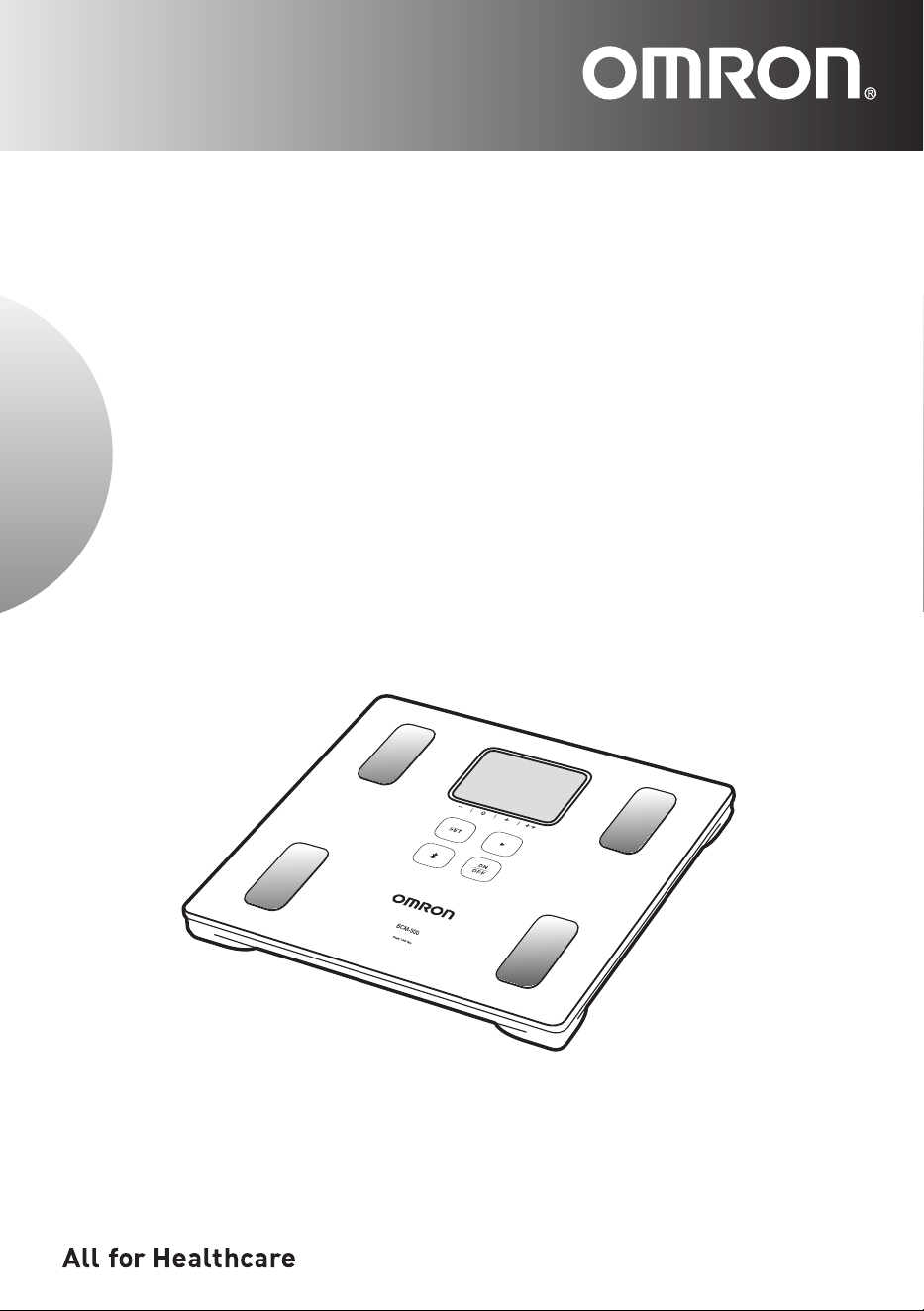
Body Composition Monitor
and Scale with Bluetooth
®
Model
BCM-500
INSTRUCTION MANUAL

1
Table of Contents
Introduction ........................................................................................................... 2
Important Safety Information
.............................................................................. 3
Before Using Your Monitor
.................................................................................. 5
1. Know Your Monitor ......................................................................................................... 5
2. Insert and Replace the Batteries .................................................................................... 6
3. Pair Your Monitor with Your Smart Device .....................................................................7
4.
Set the Measurement Unit, Date and Time .......................................................................... 8
5. Set-up Your Personal Data ............................................................................................9
Operating Instructions ....................................................................................... 10
6. How to Take a Measurement Accurately ...................................................................... 10
6.1 Correct posture during the measurement ..............................................................10
6.2 Proper storage for “0 lb correction”
........................................................................ 11
6.3 How to implement the “0 lb correction”
.................................................................. 11
7. Taking a Measurement .................................................................................................11
8. View Your Measurement Results on Your Smart Device .............................................13
9. Select Your User ID and Take a Measurement ............................................................14
10. Guest Mode (Unrecorded Mode) .................................................................................15
11. Measure Weight Only ..................................................................................................16
12. Change or Delete Your Personal Data ......................................................................... 17
13.
Delete the Communication Setting ....................................................................................... 18
Care and Maintenance ....................................................................................... 18
14.
Maintenance and Storage ................................................................................................18
15.
Troubleshooting .................................................................................................................. 19
16.Specications ............................................................................................................... 22
17. FCC Statement ............................................................................................................24
18. Limited Warranty ..........................................................................................................25
19. Guidance and Manufacturer’s Declaration ...................................................................26
Information on Body Composition ................................................................... 27
20. Information on Body Composition ................................................................................ 27
21. Measurement Results Interpretation Diagrams ..........................................................29

2
Introduction
Introduction
Thank you for purchasing the OMRON Body Composition Monitor and Scale with Bluetooth
®
.
This monitor is intended for measuring and displaying the following body composition parameters.
- Body Weight - Body Fat (in %)
- Visceral Fat (up to 30 levels) - Skeletal Muscle (in %)
- Resting Metabolism (in kcal) - BMI (Body Mass Index)
This monitor is intended to be operated by adults who can understand this instruction manual. It is not
for professional use in hospitals or other medical facilities, it is intended for home use only.
Safety Instructions
This instruction manual provides you with important information about the OMRON BCM-500. To
ensure the safe and proper use of this monitor, READ and UNDERSTAND all of these instructions. If
you do not understand these instructions or have any questions, contact 1-800-634-4350 before
attempting to use this monitor. For specic information about your own body composition
related conditions, consult with your physician.
Intended Use
The OMRON BCM-500 is intended to be used to calculate and display the estimated value of body fat
percentage, skeletal muscle percentage, resting metabolism, BMI and visceral fat levels using the BI
(Bioelectrical Impedance) Method and indicates the BMI (Body Mass Index).
The BCM-500 is intended to be used by healthy individuals in the age range of 18 to 80 years for
the skeletal muscle percentage, resting metabolism and visceral fat level. The age range for body fat
percentage is intended to be used by healthy individuals between the age of 10 to 80 years.
Receiving and Inspection
Remove this monitor and other components from the packaging and inspect for damage. If this monitor
or any other components are damaged, DO NOT USE and contact 1-800-634-4350.
Symbols Glossary
For symbol information, visit: OmronHealthcare.com/symbols-glossary
Contraindications
• DONOTusethisdeviceifyouhaveacardiacpacemaker,implanteddebrillatororother
implanted metallic or electronic device. Such use could cause these devices to malfunction
causing serious health risks or death to users.
3
Important Safety Information
Important Safety Information
Read the Important Safety Information in this instruction manual before using this monitor.
Follow this instruction manual thoroughly for your safety.
Keepforfuturereference.Forspecicinformationaboutyourownbodycompositionconditions,
CONSULT WITH YOUR PHYSICIAN.
Warning
Indicates a potentially hazardous situation which, if not avoided, could
result in death or serious injury.
• Keep this monitor out of the reach of infants, toddlers and children.
• Pregnant women should not use this device.
•
DONOTusethismonitoronslipperysurfaces,suchasawetoor.
• Consult with your physician or healthcare provider before beginning a weight reduction or exercise
program.
• DO NOT jump or bounce on this monitor. Doing so may cause you to fall or slip, resulting in serious
injury.
• DO NOT step on the edges or display area of this monitor because you may lose your balance and
fall, resulting in serious injury.
• ALWAYS stand on this monitor bare-footed. Standing on this monitor wearing socks may cause you
to slip and injure yourself.
• DO NOT use this monitor when your body and / or feet are wet, such as after taking a bath or
shower.
• Persons with disabilities or persons who are physically frail should be assisted by another person
when using this monitor or use a handrail, a walker, or other support device to prevent falling when
stepping on and off the monitor.
• DO NOT use this monitor with a cardiac pacemaker or other implanted medical device.
Battery Usage
• Shouldbatteryuidleakandcontactyoureyes,skinorclothing,immediatelyrinsewithplentyof
clean water. Immediately contact your physician in case of eye or skin contact.
Data Transmission
• This product emits radio frequencies (RF) in the 2.4 GHz band. Do not use this product in locations
where RF is restricted, such as on an aircraft or in hospitals.
Note: For further information on potential restrictions refer to documentation on the Bluetooth usage by
the FCC.
Caution
Indicates a potentially hazardous situation which, if not avoided, may
result in minor or moderate injury to the user orpatient or damage to the
equipment or other property.
•
DONOTattempttodisassemble,modifyorrepairthismonitor.Changesormodicationsnot
approved by Omron Healthcare will void the user warranty.
• DO NOT step on the edges or display area of the measurement platform because the display unit
may be damaged
.
• DO NOT submerge this monitor or any of the components in water.
• Avoid excessive impact, vibration and strong shock to this monitor.

4
• DONOTplacethismonitoronacushionedoorsurfacesuchasacarpetormat.Acorrect
measurement may not be possible.
• DO NOT use this monitor for any purposes other than described in this manual.
• When this monitor will be used by several people, wipe the monitor with a damp cloth moistened
with mild detergent after using it. Then, wipe it dry.
• Ensure that this monitor has acclimated to room temperature before taking a measurement. Taking
a measurement after an extreme temperature change could lead to an inaccurate reading. OMRON
recommends waiting for approximately 2 hours for the monitor to warm up or cool down when the
monitorisusedinanenvironmentwithinthetemperaturespeciedasoperatingconditionsafteritis
stored either at the maximum or at the minimum storage temperature. For additional information of
operating and storage/transport temperature, refer to
Section 16.
Battery Usage
• ONLYuseAAAalkalinebatteriesspeciedforusewiththismonitor.DONOTuseothertypesof
batteries. DO NOT use new and used batteries together. Replace all four batteries at the same time.
• DO NOT use different types of batteries together.
• Dispose of the device, batteries, components and optional accessories according to applicable local
regulations. Unlawful disposal may cause environmental pollution.
•
DONOTexposethebatteriestoamesorre.
• Remove the batteries if this monitor will not be used for three months or more.
• DO NOT insert the batteries with the polarities in the wrong direction.
Data Transmission
• During measurement, make sure that no mobile phone or any other electrical devices that emit
electromagneticeldsiswithin12inches(30cm)ofthismonitor.Thismayresultinincorrect
operation of the monitor and/or cause an inaccurate reading.
• Do not replace the battery while your measurement result is being transferred to your smart device.
This may result in the incorrect operation of your monitor and failure to transfer your measurement
result.
• Do not place integrated circuit cards, magnets, metal objects, or other devices that emit
electromagneticeldsnearthismonitorwhileyourmeasurementresultisbeingtransferredtoyour
smart device. This may result in the incorrect operation of your unit and failure to transfer your
measurement result.
Note
Incorrect Measurement
Incorrect measurement might occur to the following users:
Elderly people (over 81 years old) / People with a fever / Body builders or highly trained athletes /
Patients undergoing dialysis / Patients with osteoporosis who have very low bone density / People
with swelling.
• Because the body composition such as body water might greatly deviate from the average value.
5
Before using your monitor
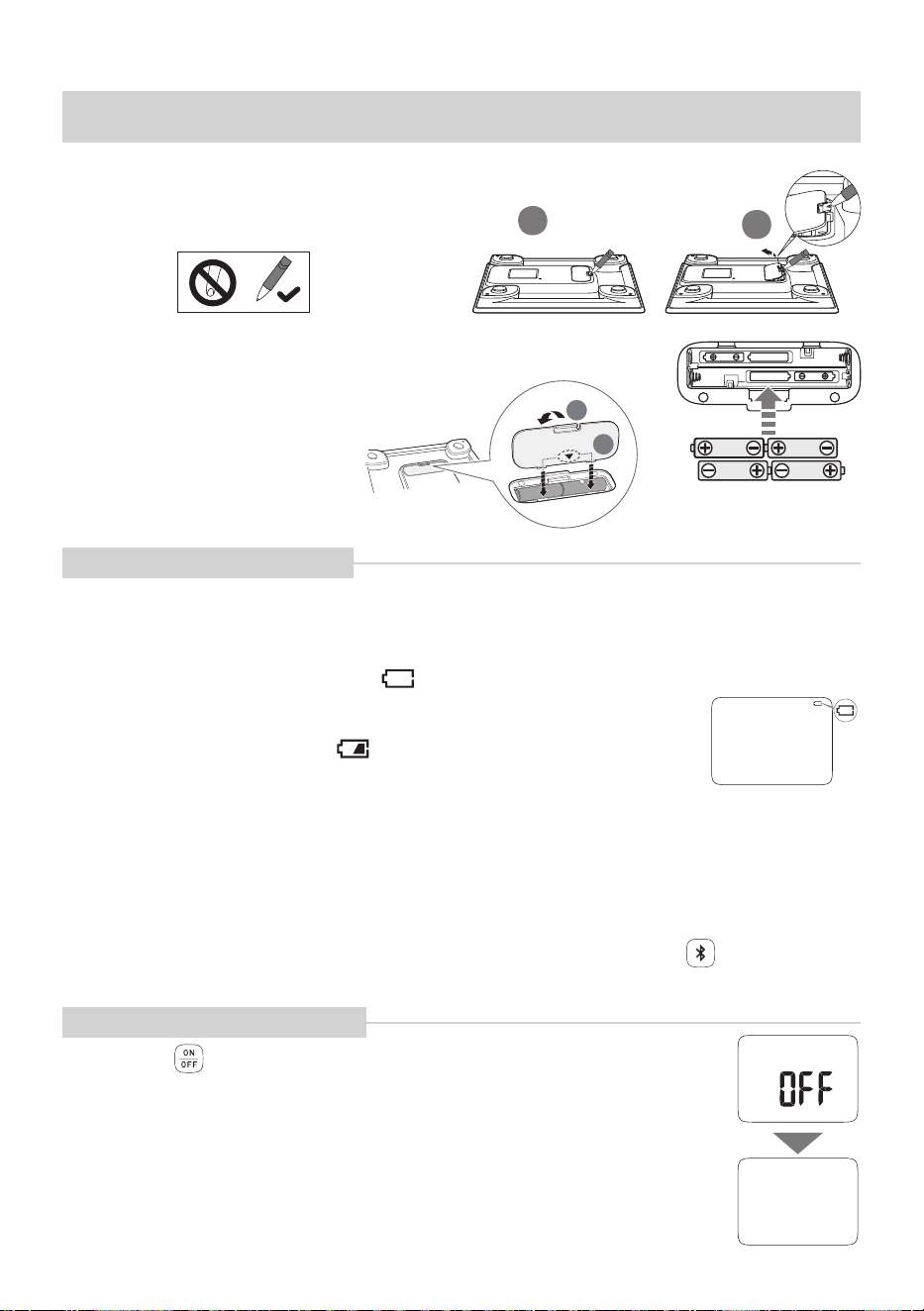
1. Know Your Monitor
Foot Electrodes
Foot Electrodes
Display
1
4
3
3
2
4
3
2
1
SET Button
• Pressthisbuttontosetorconrmthedata.
Advance Button
• Press this button to advance.
• Press and hold this button to advance rapidly during setting the date, time
and height.
Bluetooth Button
• Press this button to transfer the data manually.
• Press this button (2 seconds or longer) to pair your monitor with your smart
device.
※
This button is also usable when the power is off.
ON/OFF Button
• Press this button to turn on the power.
• Press this button (2 seconds or longer) to turn off the power.
Display
Battery Symbol
(low/depleted)
Weight Symbol
Lights when only measuring the body weight.
SYNC Symbol
Bluetooth Symbol
User ID Symbol
Lights when user
ID is displayed.
Body Fat Percentage,
Visceral Fat Level,
Skeletal Muscle Percentage,
BMI Classification
Indicator
Date, Birth Date Symbol
Gender, Height Symbol
Time Symbol
Contents
• Body Composition Monitor and Scale with Bluetooth
®
• 4 AAA alkaline batteries (LR03)
• Instruction Manual • Quick Start Guide
Monitor
6
Before using your monitor
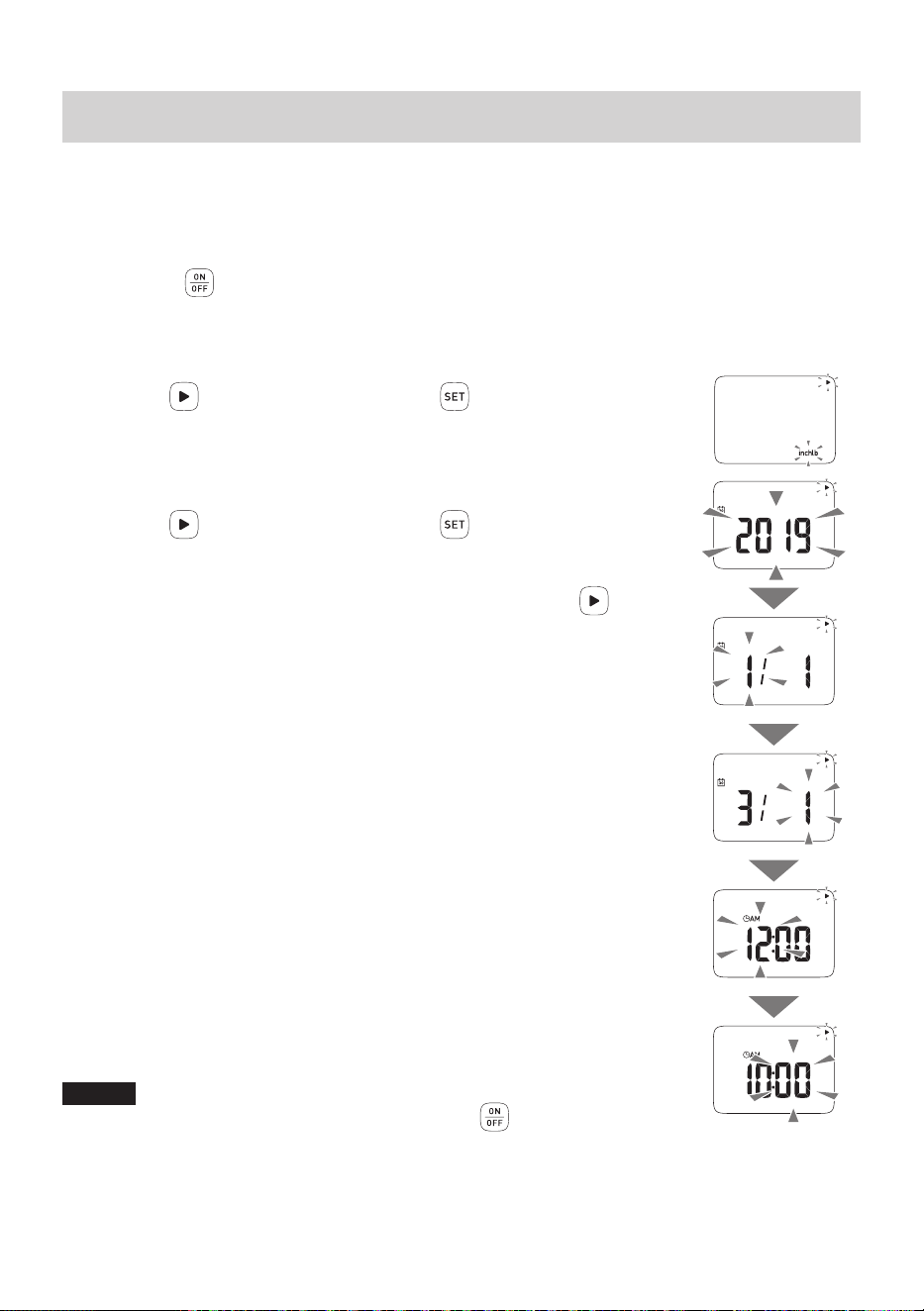
2. Insert and Replace the Batteries
1.
Open the battery cover on the back of your monitor.
A hard object like a pen can be used.
2.
Install the batteries in correct polarity as marked inside the
battery compartment.
3.
Close the battery cover.
Battery Life and Replacement
■ Approximately 6 months (When AAA alkaline batteries are used for four measurements, four
data transfers and four persons a day at a room temperature of 73.4 °F (23 °C)).
• The supplied batteries are for trial use only, they may have a shorter life.
■ When the depleted battery symbol appears on the display, replace all
four batteries with new ones.
• Replace all four batteries with new ones (same type) at the same time.
• When the low battery symbol
blinks, it is recommended to replace the
batteries with new ones.
■ Replace the batteries after turning off the power.
• Personal data stored in this monitor are retained even if the batteries are removed.
• Disposal of used batteries should be carried out in accordance with the local regulations for the
disposal of batteries.
■ When the batteries are replaced, you will need to reset the measurement unit, date and time.
(Refer to
Section 4.)
• If you have already paired with the “OMRON HeartAdvisor” app, press the
button to
communicate with this app, then the date and time will be set automatically.
About the Power OFF Function
■ Press the button (2 seconds or longer) to turn off the power.
■ The power automatically turns off in the following conditions.
• 10 seconds after “Err” is displayed.
• This monitor is not used for 1 minute when “0.0 lb” is displayed.
• This monitor is not used for 3 minutes.
1
2
2
1
Depleted Battery
symbol

7
Before using your monitor
3. Pair Your Monitor with Your Smart
Device
1.
Turn on the Bluetooth on your smart device.
2.
Download and install the “OMRON HeartAdvisor” app onto your smart device.
Search the “OMRON HeartAdvisor” app from “App Store” or “Google Play”.
If you already have the “OMRON HeartAdvisor” app and have created your account, open the app
and add your new monitor.
3.
Open the app on your smart device and follow the instructions.
NOTES
• Each account set-up in the OMRON HeartAdvisor manages data for one unique user.
• OMRON HeartAdvisor is the only app that we recommend to use with your OMRON body
composition monitor and scale.
8
Before using your monitor
4.
Set the Measurement Unit, Date and Time
Settingthemeasurementunit,dateandtimeisnecessarybeforetakingameasurementfortherst
time or after replacing the batteries.
• The date and time will be automatically set when paired with your smart device. To set manually,
follow the instructions below.
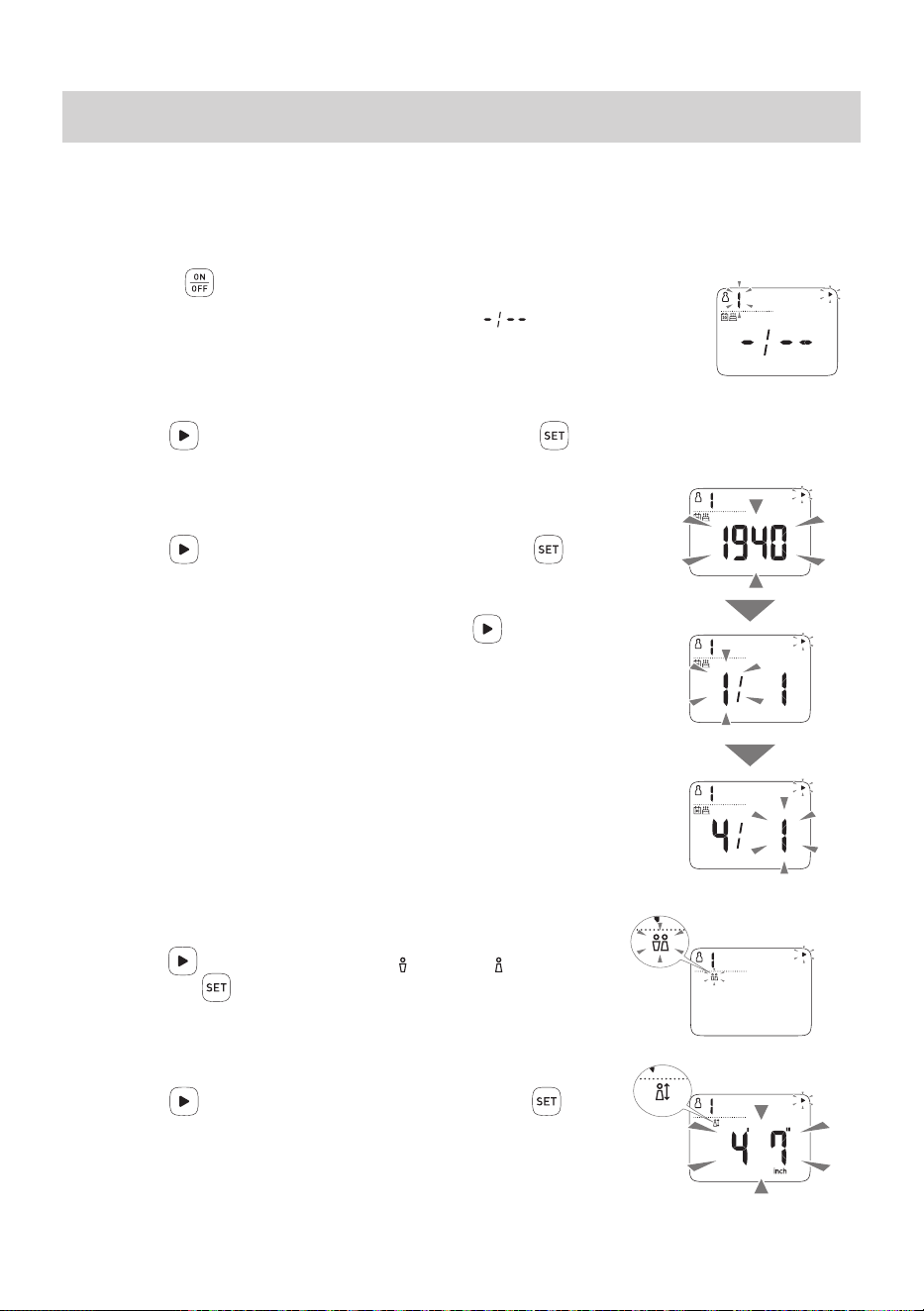
1.
Press the button to turn on the power.
“inchlb” blinks on the display.
2.
Set the measurement unit.
Press the button to adjust and press the buttontoconrm.
• The default measurement unit is “lb & inch”.
• You can set the measurement unit to “st-lb & inch” or “kg & cm”.
3.
Set the date and time on your monitor.
Press the button to adjust and press the buttontoconrm.
• Setting range of year: 2019 to 2045.
• Time is a 12-hour clock.
• While setting the year, date, hour and minute, hold down the
button to
advance rapidly in increments of 10.
After all the settings for the measurement unit, year, month, day, hour and
minute are displayed in that sequence, the power automatically turns off.
NOTES
• If any mistake is made during the setting, press the
button (2 seconds or
longer) to turn off the power and start from “Step 1” again.
• If, when setting-up the measurement unit, date and time, this monitor is not used for 3 minutes, the
power will automatically turn off. If this happens, the information entered during set-up will not have
been saved. Please proceed again to set-up measurement unit, date and time again.
• To modify the measurement unit, date or time, remove the batteries and wait for at least 20 seconds.
Then insert the batteries and reset again.
Year
Month
Day
9
Before using your monitor
5. Set-up Your Personal Data
For body composition measurement, it is necessary to set-up your personal data (birth date, gender,
height). The monitor can store this personal data for up to 4 persons.
• The personal data can be obtained from “OMRON HeartAdvisor” app once the app is paired with
your monitor.
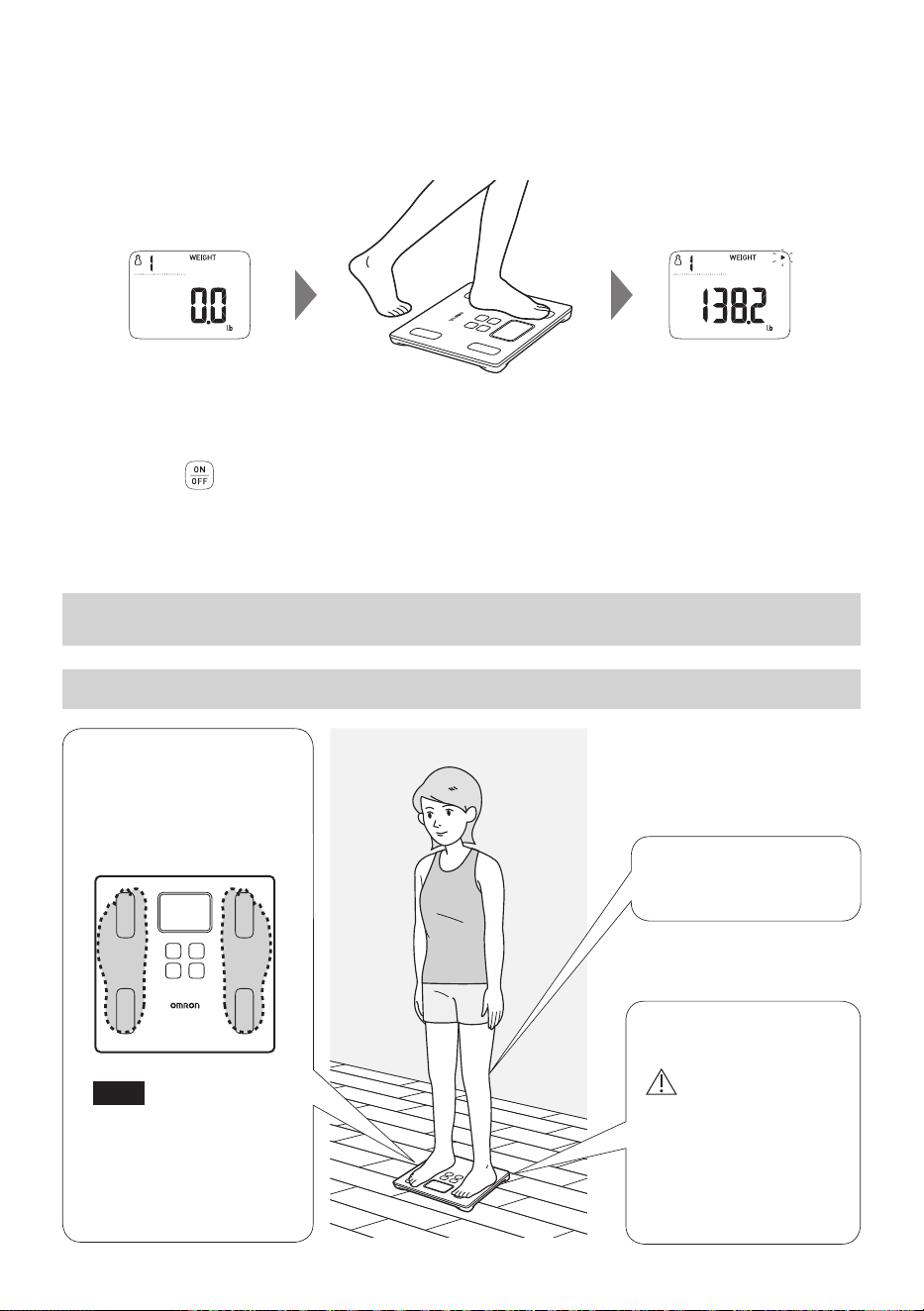
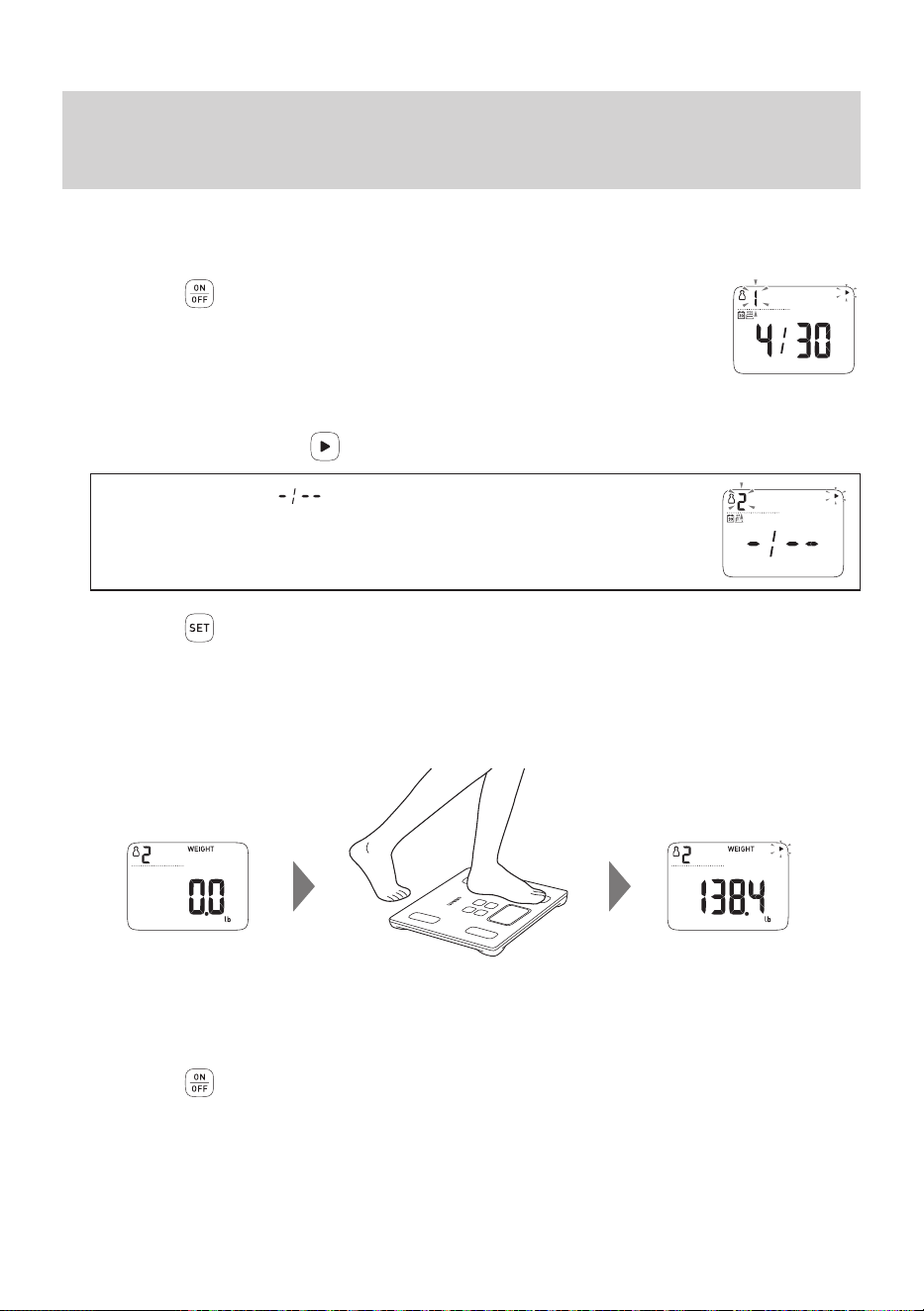
1.
Press the button to turn on the power.
The power turns on. User ID “1” blinks. Birth date ( ) is displayed.
2.
Select and conrm your user ID.
Press the button to select your user ID and press the buttontoconrm.
3.
Set your birth date.
Press the button to set your birth date and press the button to
conrm.
• Setting range of year:1900 to 2045.
• While setting the year and date, hold down the
button to advance
rapidly in increments of 10.
4.
Set your gender.
Press the button to set your gender (MALE) or (FEMALE)
and press the
buttontoconrm.
5.
Set your height.
Press the button to adjust your height and press the button
toconrm.
• Press continuously to rapidly advance in increments of 1 inch
(or 10 cm).
•
Afterallthesettingsaredisplayedforyourconrmation,“0.0lb”
appears on the display.
Year
Month
Day
10
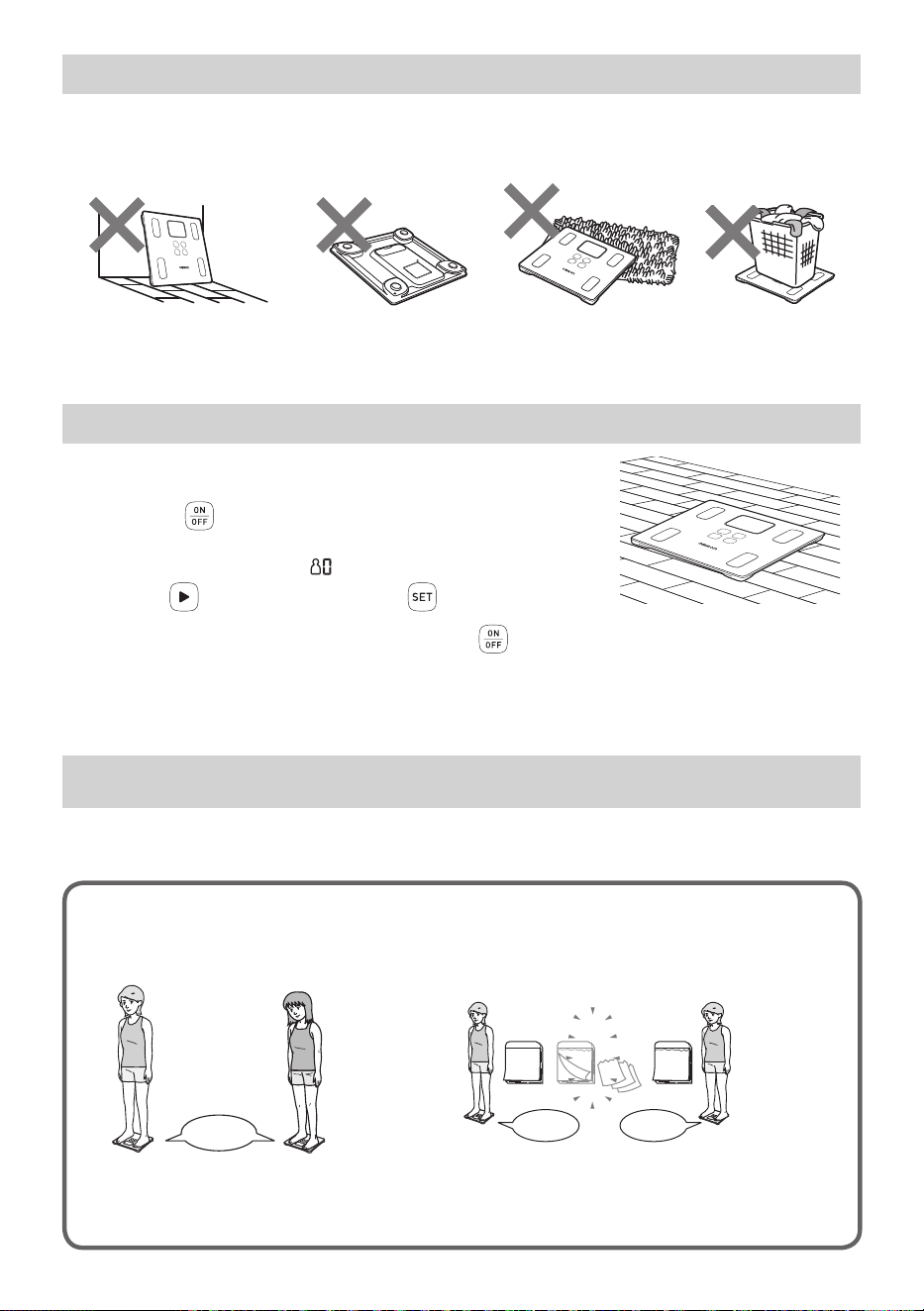
6.
Step onto your monitor to take a measurement when “0.0 lb” is displayed.
The data of body weight and body composition are recorded in your monitor to support automatic
recognition.
After a while, the measurement results are indicated as follows.
7.
Step off your monitor after the measurement results are displayed.
Your measurement is now complete.
8.
Press the button (2 seconds or longer) to turn off the power.
To add a new user, start from the “Step 1”.
Operating instructions
6. How to Take a Measurement Accurately
6.1 Correct posture during the measurement
Take a measurement on
ahard,leveloor.
Caution
• DO NOT place the
monitor on a cushioned
oorsurfacesuchasa
carpet or mat. A correct
measurement may not
be possible.
Step onto your monitor
with your bare feet.
Place the arches of
your feet onto the
center of the monitor.
Note
• Stepping onto your
monitor with socks or
footwear on will result
in an inaccurate
measurement.
Do not bend your knees
during measurement.
11
6.2 Proper storage for “0 lb correction”
This monitor regularly recalibrates automatically when it is not in use.
• If your monitor is placed as shown below and the recalibration function does not work, implement the
“0 lb correction” before taking measurement. (Refer to
Section 6.3.)
The unit is leaning against the
wall or other objects
The unit is placed upside
down
The unit is placed on an
object
An object is placed on
the unit
The unit is leaning against the
wall or other objects
The unit is placed upside
down
The unit is placed on an
object
An object is placed on
the unit
The unit is leaning against the
wall or other objects
The unit is placed upside
down
The unit is placed on an
object
An object is placed on
the unit
The unit is leaning against the
wall or other objects
The unit is placed upside
down
The unit is placed on an
object
An object is placed on
the unit
Your monitor is leaning
against the wall or other
objects
Your monitor is placed
upside down
Your monitor is placed
on an object
An object is placed
on your monitor
6.3 How to implement the “0 lb correction”
1.
Place your monitor on a hard, level oor.
2.
Press the button to turn on the power.
3.
Select your user ID or “ ”.
Press the button and then press the buttontoconrm.
4.
When the “0.0 lb” is displayed, press the button (2 seconds or longer) to turn
off the power.
This completes the “0 lb correction”. Wait for 5 seconds, and then take a measurement.
Operating instructions
7. Taking a Measurement
When you step onto your monitor, it will be powered on to recognize your user ID automatically and
start the measurement.
Wrong user ID may be displayed in the following cases.
• Users of similar body type and body weight
are measured.
• Your body weight has changed since last
measurement.
A 137.2 lb
no 1
B 138.2 lb
21
16
30
・・・
30 days later
C 136.6 lb
C 147.6 lb
no 1 no 3
If inaccurate recognition continues, manually select your user ID to take a measurement. (Refer
to Section 9.)
• The measurement results of another user has been set-up.
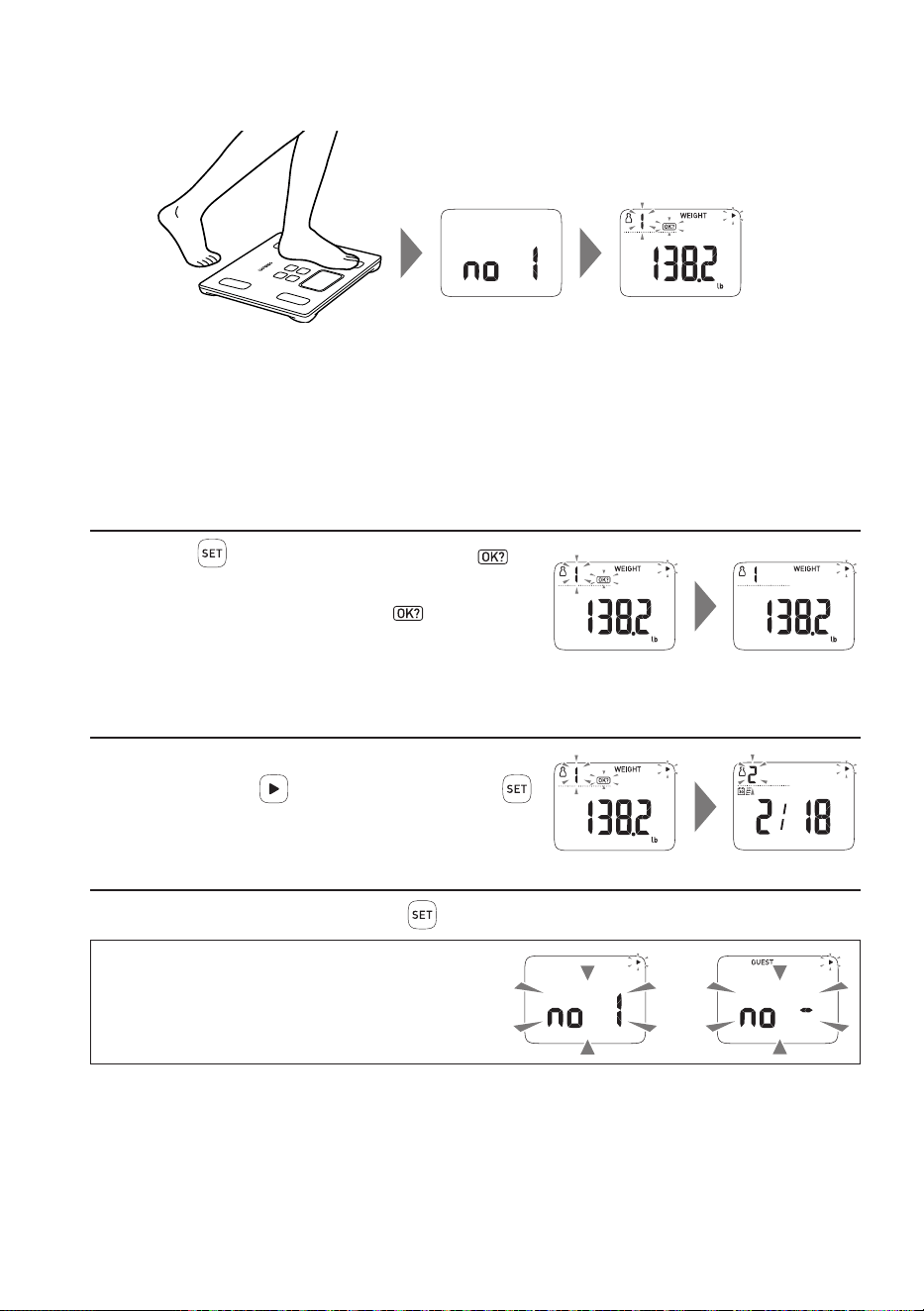
12
1.
Take a measurement when your monitor is off.
When you step onto your monitor, your monitor automatically turns on.
2.
When user ID and measurement results are displayed, the measurement is
complete.
Step off your monitor.
3.
Conrm your user ID.
■
If your user ID is correct…
Press the buttontoconrmyouruserID.
disappears.
Even if you turn the power off with
blinking,
the results are recorded on the monitor as the
measurement value linked to the displayed user ID.
■
If your user ID is incorrect…
Before the power turns off, select your user ID
manually with the
button, and then press the
button to conrm.
■
If you conrmed your user ID incorrectly…
Before the power turns off, press the button so that you can select your user ID again.
If “no 1” to “no 4” blinks on the display, or
GUEST is displayed, your personal data has
not been set-up in your monitor.
Set-up your personal data.
You can use Guest Mode as well.
or
13
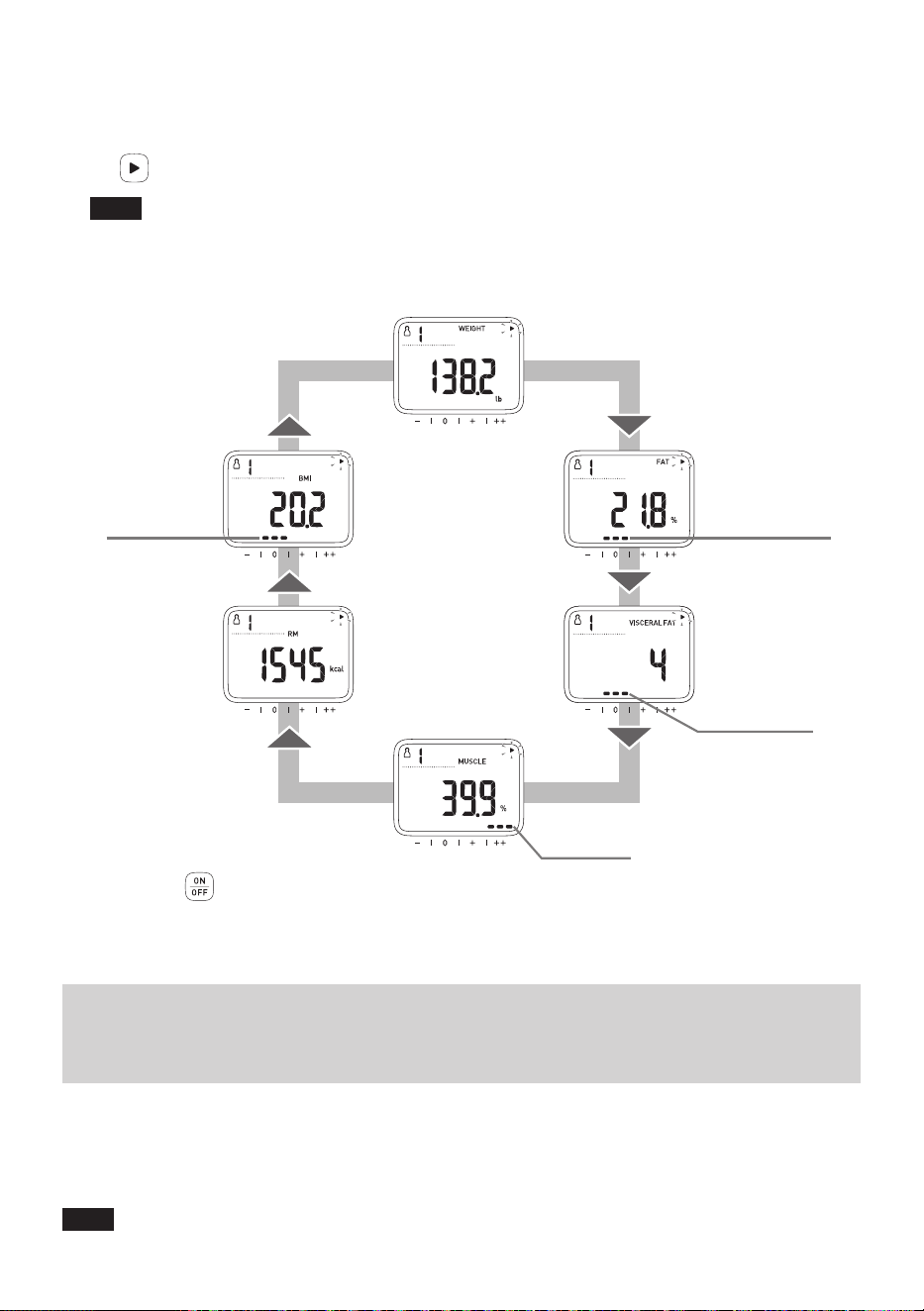
4.
Check the measurement results.
Your results will automatically rotate in the order shown below.
OnceyouconrmyouruserID,youcanswitchittoameasurementresultyouwanttoviewwith
the button.
Note
•
Theclassicationindicatorcanbeusedasaguidetohelpunderstandyourmeasurementresults
for Body Fat Percentage, Visceral Fat Level, Skeletal Muscle Percentage and BMI.
• To better understand your measurement results, refer to the information and diagrams in
Section 20 and 21.
WEIGHT
SKELETAL
MUSCLE
PERCENTAGE
Skeletal Muscle
Percentage
Classification
BMI
RESTING
METABOLISM
BODY FAT
PERCENTAGE
Body Fat Percentage
Classification
VISCERAL
FAT LEVEL
BMI Classification
Visceral Fat Level
Classification
5.
Press the button (2 seconds or longer) to turn off the power.
The power turns off if your monitor is not used for 3 minutes
.
Operating instructions
8. View Your Measurement Results on
Your Smart Device
Follow the instructions from the “OMRON HeartAdvisor” app to view your
measurement results.
Thenyoucanconrmthevariationofyourweightandbodycompositionparametersonyoursmart
device.
Note
• The “OMRON HeartAdvisor” app must be installed on your smart device. (Refer to
Section 3.)
14
Operating instructions
9. Select Your User ID and Take a
Measurement
If your user ID is not recognized automatically, you can select your user ID manually and take the
measurement as follows.
1.
Press the button to turn on the power.
The power turns on. User ID “1” blinks.
2.
Select your user ID.
Select your user ID with the button.
When the birth date ( ) is displayed, your personal data has not been
set-up in your user ID.
Set-up your personal data. (Refer to
Section 5.)
3.
Press the button to conrm your user ID.
“0.0 lb” is displayed.
4.
Take a measurement when “0.0 lb” is displayed.
Step onto your monitor.
5.
Check your measurement results.
Your results will automatically rotate on the display.
6.
Press the button (2 seconds or longer) to turn off the power.
The power turns off if your monitor is not used for 3 minutes.
15
Operating instructions
10. Guest Mode (Unrecorded Mode)
When this mode is used, your measurement results will not be recorded.
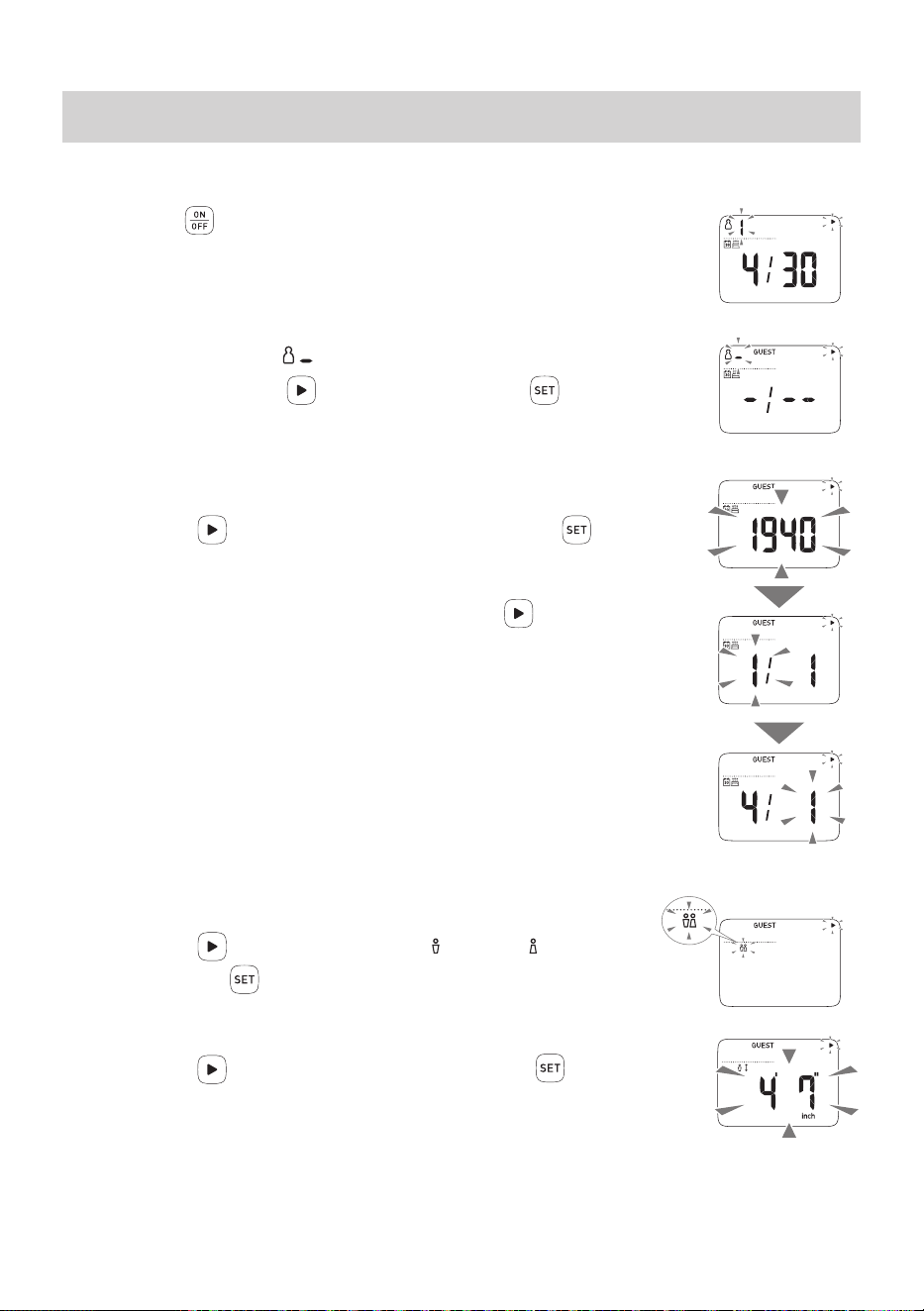
1.
Press the button to turn on the power.
The power turns on. User ID “1” blinks.
2.
Select and conrm “ ”.
Select “GUEST” with the button, and then press the buttontoconrm.
3.
Enter personal data.
3.1 Set your birth date
Press the
button to set your birth date and press the button to
conrm.
• Setting range of year: 1900 to 2045.
• While setting the year and date, hold down the
button to advance
rapidly in increments of 10.
3.2 Set your gender
Press the
button to set your gender (MALE) or (FEMALE)
and press the
buttontoconrm.
3.3 Set your height
Press the
button to set your height and press the buttontoconrm.
• Press continuously to rapidly advance in increments of 1 inch (10 cm).
Afterallthesettingsaredisplayedforyourconrmation,“0.0lb”appearson
the display.
The power turns off if your monitor is not used for 1 minute after “0.0 lb” is displayed.
Year
Month
Day
16
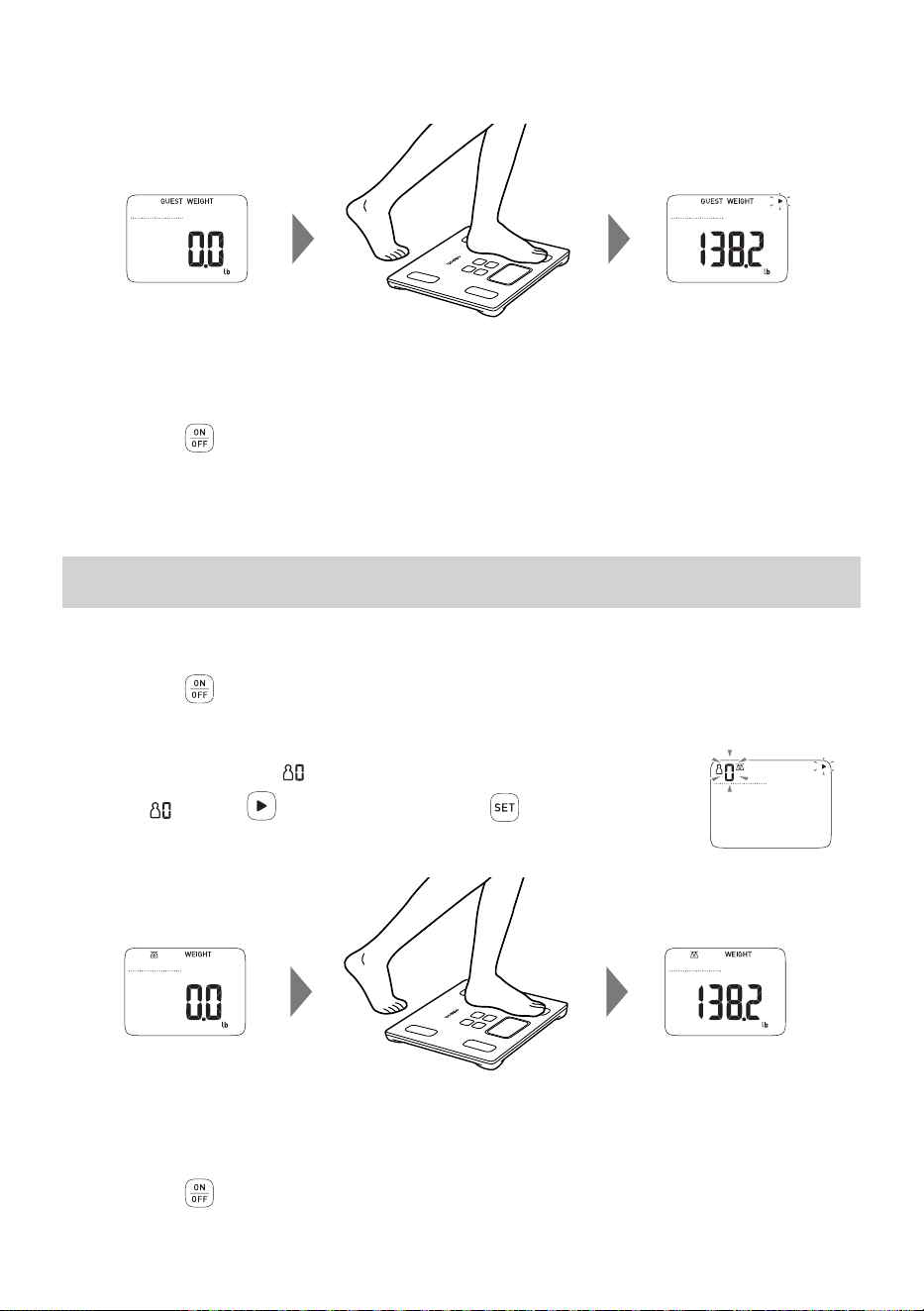
4.
Start Measurement when “0.0 lb” is displayed.
Step onto your monitor.
5.
Check your measurement results.
Your results will automatically rotate on the display.
6.
Press the button (2 seconds or longer) to turn off the power.
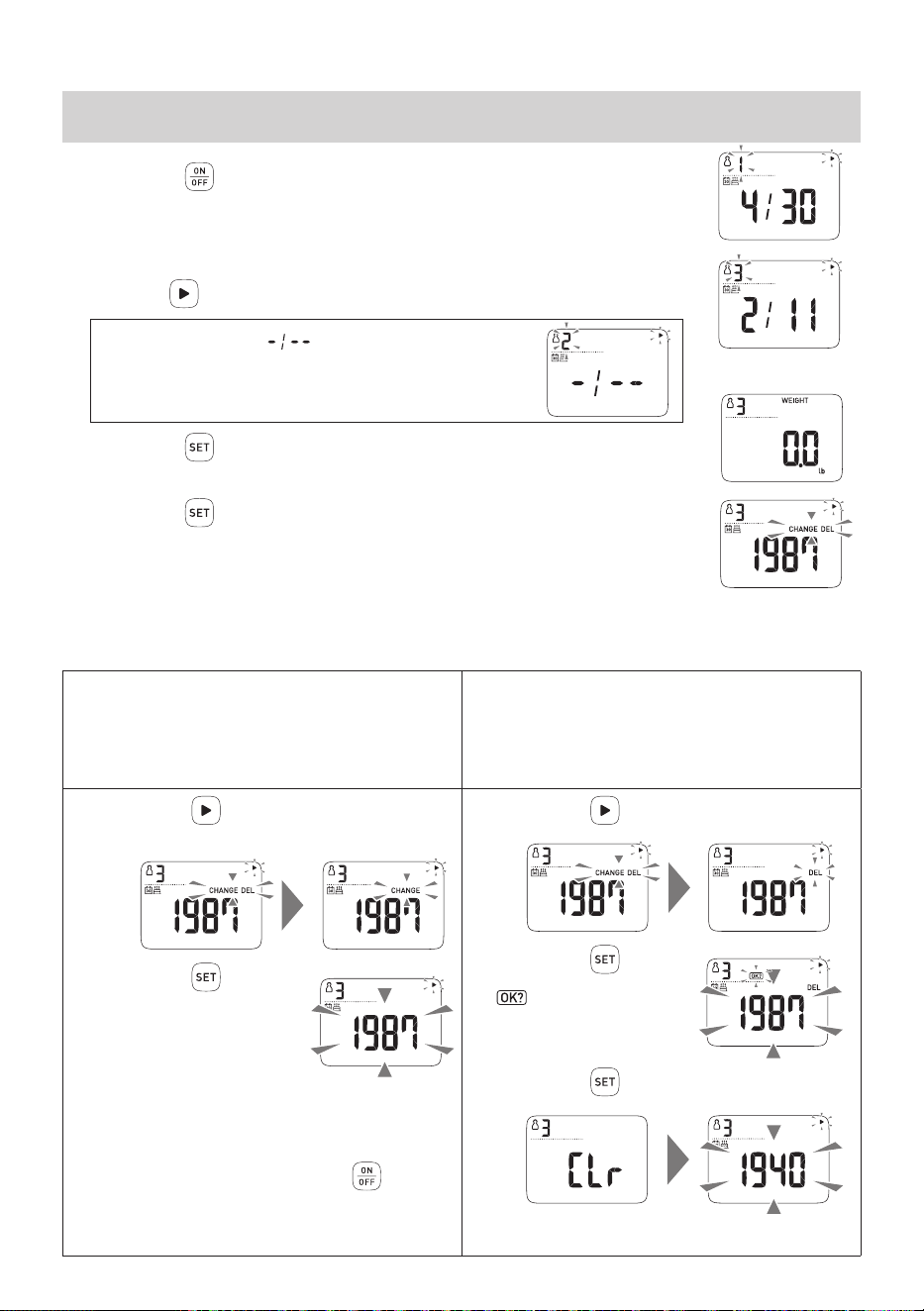
The power turns off if your monitor is not used for 3 minutes.
Operating instructions
11. Measure Weight Only
When this mode is used, your measurement result will not be recorded.
1.
Press the button to turn on the power.
The power turns on. User ID “1” blinks.
2.
Select and conrm “ ”.
Select “ ” with the button, and then press the buttontoconrm.
3.
When the “0.0 lb” is displayed, step onto your monitor.
4.
Check your measurement result.
Your weight is displayed and blinks to indicate that measurement is complete.
5.
Press the button (2 seconds or longer) to turn off the power.
The power turns off if your monitor is not used for 3 minutes.
17
Operating instructions
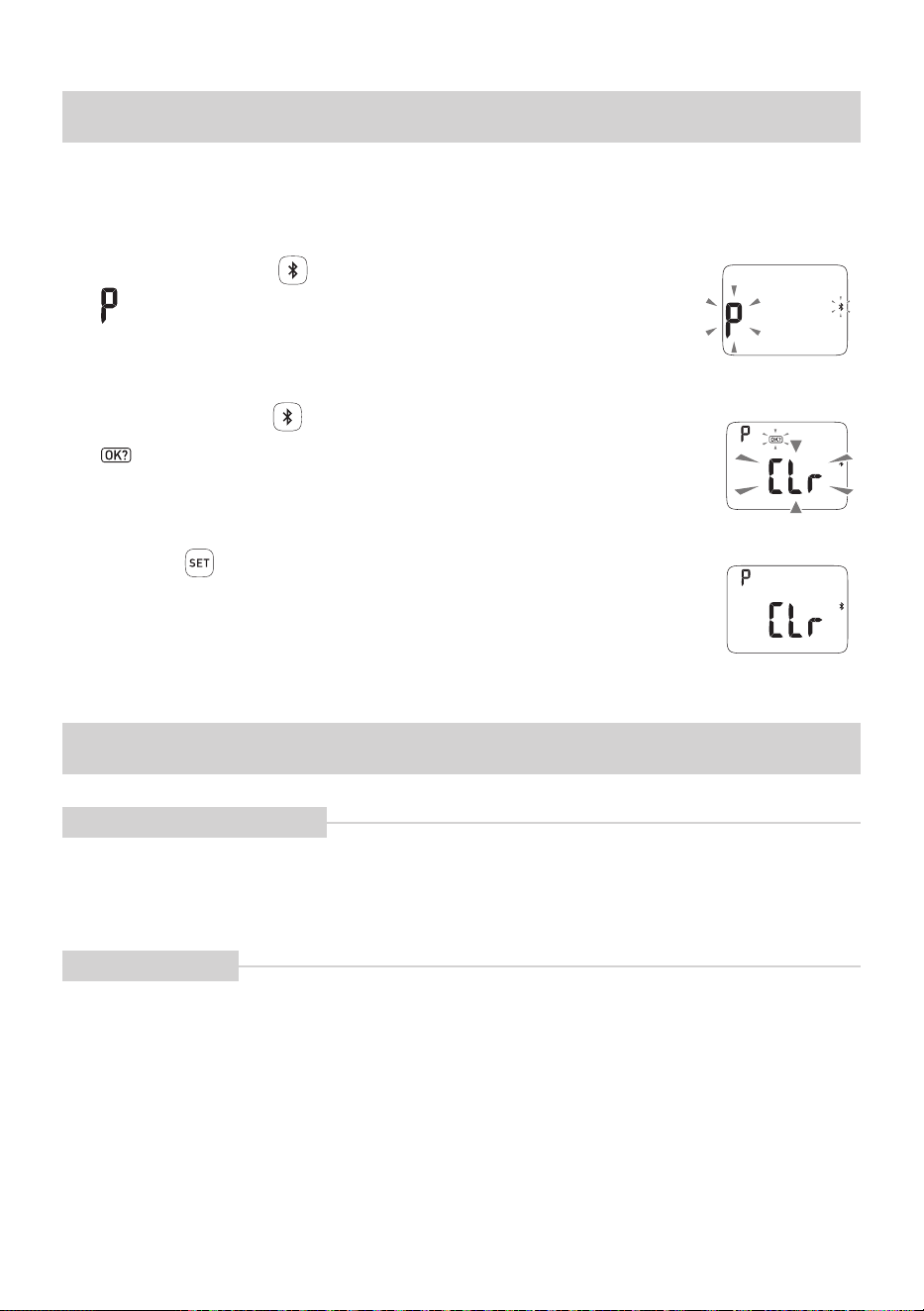
12. Change or Delete Your Personal Data
1.
Press the button to turn on the power.
The power turns on. User ID “1” blinks.
2.
Select your user ID.
Press the
button to select the user ID.
When the birth date ( ) is displayed,
Your personal data is not set-up in your user ID.
Set-up your personal data. (Refer to
Section 5.)
3.
Press the button to conrm your user ID.
“0.0 lb” is displayed.
4.
Press the button.
“CHANGE” and “DEL” blink.
5.
Select “CHANGE” or “DELETE” the personal data.
• Even if the personal data is changed, the measurement results will not be changed or deleted. When using the user
ID which has been used by another person, delete their personal data and then set-up the personal data again.
Change your personal data
(The measurement results won’t be deleted)
Delete your personal data
Note:these steps will only delete your data from the
monitor. To delete your data from the app, follow
instructions provided in the “support” section of the app.
(The measurement results will also be deleted)
1.
Press the button to select
“CHANGE”
2.
Press the button
The year blinks.
3.
Change “birth date”, “gender” and
“height” with reference to Step 3 –
Step 5 of
Section 5.
• To stop any change, press the
button (2
seconds or longer) to turn off the power.
• The untransferred measurement results will
not be changed.
1.
Press the button to select “DEL”
2.
Press the button
blinks.
3.
Press the button again
18
Operating instructions
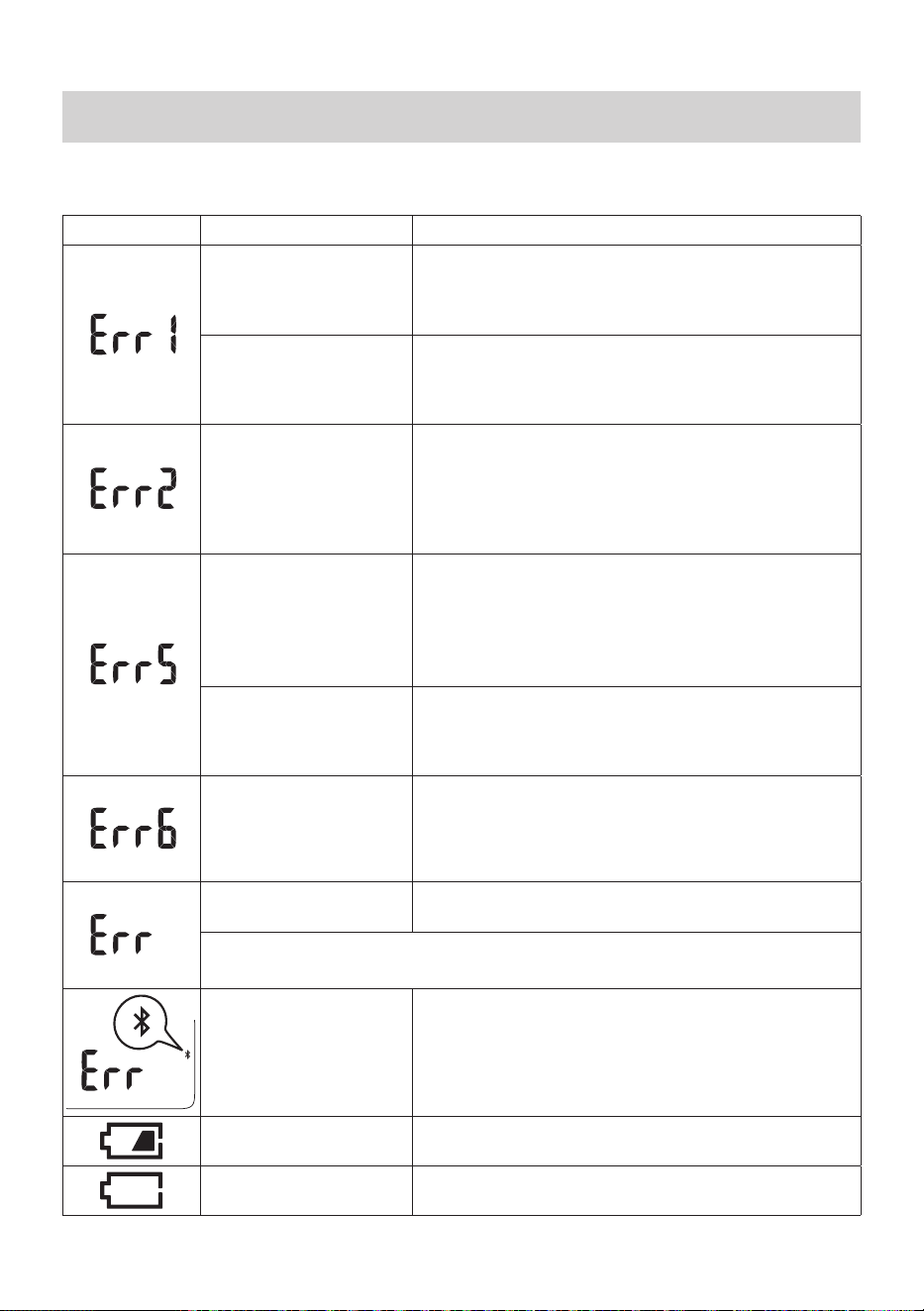
13.
Delete the Communication Setting
If you want to stop the use of the “OMRON HeartAdvisor” app or delete the communication settings
from your smart device, please operate as follows. All the communication settings recorded in your
monitor will be deleted.
1.
Press and hold the button more than 2 seconds.
“ ” and the Bluetooth symbol blink.
2.
Press and hold the button more than 2 seconds again.
“ ” and “CLr” blink.
3.
Press the button to conrm.
The power turns off if your monitor is not used for 10 seconds after “CLr” is
displayed.
Care and maintenance
14.
Maintenance and Storage
How to Clean your Monitor
• Before use, wipe your monitor with a soft dry cloth. If necessary, use a cloth moistened with water or
detergent and squeeze it well before wiping your monitor, then wipe off with a dry cloth.
• Do not use benzene or thinner, or other volatile solvents to clean your monitor.
• Do not wash your monitor with water.
Care and Storage
• Do not store your monitor in the following conditions:
- Humidity, where moisture or water may get into your monitor
- High temperatures, direct sunlight or dusty places
- Places with the risk of sudden shocks or vibrations
- In places where chemicals are stored or where corrosive gas is present
• Do not carry out repairs of any kind by yourself. This product is calibrated at the time of manufacture.
If at any time you question the accuracy of measurements, please contact your authorized OMRON
distributor.
19
Care and maintenance
15.
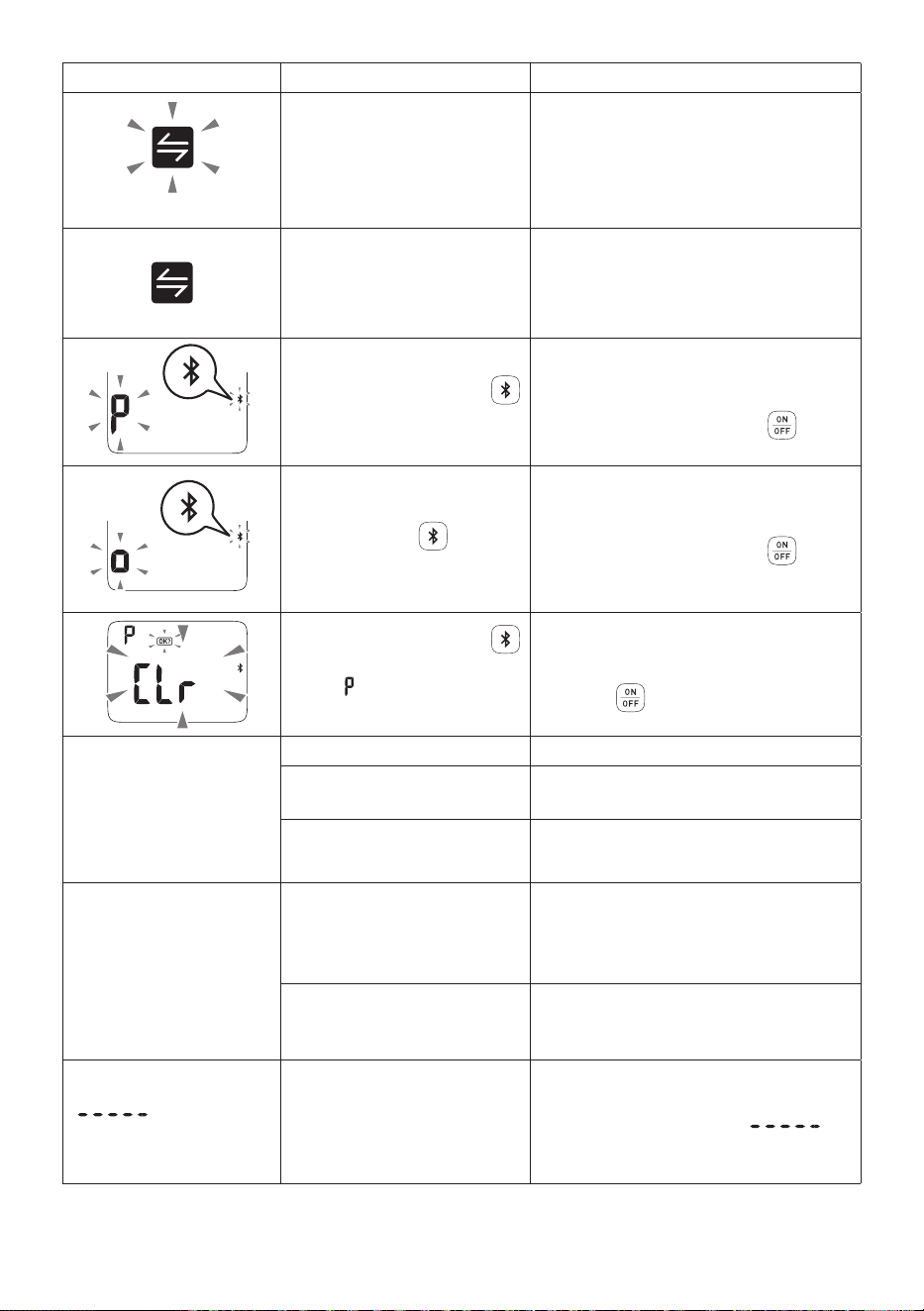
Troubleshooting
Ifanyofthebelowproblemsoccurduringthemeasurement,rstcheckthatnootherelectricaldevice
is within 12 inches (30 cm). If the problem persists, refer to the table below.
Error Display Cause Correction
You stepped off the
monitor during a
measurement of body
composition.
Do not step off the monitor until the measurement of
body composition is completed. (Refer to Section 6.)
The soles of your feet are
notinrmcontactwith
the electrodes.
Make sure that you are standing on the monitor
correctlybyplacingthesolesofyourfeetrmlyonto
the electrodes when taking a measurement. (Refer to
Section 6.)
The posture for
measurement is incorrect,
the soles of your feet are
notinrmcontactwiththe
electrodes or the soles of
your feet were dry.
Stand with your knees and back straight. Keep your feet
rmlyplacedontheelectrodesanddonotmoveyour
feet when taking a measurement. (Refer to Section 6.)
Slightly moisten the soles of your feet with a wet towel
and try again.
After setting the date and
time, the monitor was
touched or used before
the display automatically
turned OFF.
Remove and then re-insert the battery. Restart the
monitor starting from “Pair Your Monitor with Your Smart
Device”. (Refer to
Section 3.)
•
When the date and time are displayed, please leave
the monitor unattended until the power turns off
automatically.
Device error.
Remove and then re-insert the battery. Once this
is complete, please restart the monitor. If this error
continues to display, contact customer service.
Communication failure.
Turn off the power and try to communicate again. If this
error is displayed again, contact customer service.
You moved during a
measurement.
Stand still during a measurement.
Your body weight was out of the measurable range.
Communication failure.
Conrmthedisplayofyoursmartdevice,andfollowthe
instructions in “OMRON HeartAdvisor” app. Refer to
“Help” from “OMRON HeartAdvisor” app.
Batteries are low.
Recommend to replace the batteries with new ones
ahead of time. (Refer to Section 2.)
Batteries are depleted. Replace the batteries. (Refer to Section 2.)
20
Problem Cause Correction
blinks
24-29 sets of measurements
results have been stored.
Transfer the measurement results to
“OMRON HeartAdvisor” app, then the
symbol will disappear.
30 sets of measurements
results have been stored.
If the number exceeds 30, the oldest
results are deleted.Transfer the
measurement results to “OMRON
HeartAdvisor” app, then the symbol will
disappear.
You pressed and held the
button more than 2 seconds.
This is displayed when you pair your
monitor with your smart device. Follow
the instructions on the “OMRON
HeartAdvisor” app. Press the
button
(2 seconds or longer) to stop the pairing.
You pressed the button.
This is displayed when the data is
transferred to your smart device.
Follow the instructions on the “OMRON
HeartAdvisor” app. Press the
button (2 seconds or longer) to stop the
transmission.
You pressed and held the
button more than 2 seconds
when “
” and the Bluetooth
symbol were blinking.
This is displayed when you delete
the communication setting. (Refer to
Section 13.)
Press the
button (2 seconds or
longer) to stop the operation.
Even if you turn on
the power, nothing is
displayed.
Even if you step onto
the monitor, nothing is
displayed.
No batteries are inserted. Insert the batteries.
The batteries are inserted in
the wrong direction.
Insert the batteries in the correct
direction.
The batteries are worn out. Replace all four batteries with new ones.
After replacing the
batteries, nothing
is displayed when
stepping onto the
monitor.
You didn’t set the
measurement unit, date
and time after replacing the
batteries.
Set the measurement unit, date and
time. (Refer to
Section 4.)
Your body weight is too low to
automatically turn on the unit.
(Less than 26.4lb.)
Select user ID before taking a
measurement.
“
” is displayed
for some results.
The set-up data or body
composition values were out
of the measurable range.
Check whether the settings of birth date,
gender, and height are correct. Even if
these settings are correct, “
”
is displayed if they are out of the
displayable or supported age range.
21
Problem Cause Correction
Your measurement
result is higher or lower
than the actual value.
Your result varies widely
for each measurement.
Your posture is wrong during
a measurement.
Take a measurement with a correct
posture.
You take a measurement on
acarpetorcushionedoor
surface,oranunevenoor.
Ensure the monitor is correctly placed
onahard,leveloor.
Your body and the soles of
your feet are cold, impairing
blood circulation.
Warm your body to get blood circulation
back to normal before taking a
measurement.
The foot electrodes are very
cold.
Leave the monitor in a warm room for a
while before taking a measurement.
The soles of your feet are dry.
Slightly moisten soles of your feet with a
wet towel before taking a measurement.
The “0 lb correction” was not
implemented correctly.
Implement the “0 lb correction”.
(Refer to
Section 6.3.)
The incorrect user ID
is displayed when you
step onto the monitor.
Your body weight has
changed notably since your
last measurement.
Select user ID before taking a
measurement. (Refer to
Section 9.)
Your body type is similar to
another set-up person.
The measurement results of
another user has been set-up.
You want to measure the
body composition, but
only the body weight is
displayed.
User ID or GUEST is not
selected. (User ID or GUEST
is not displayed.)
Select user ID or GUEST before taking a
measurement.
A button does not
respond.
You pressed a button when
you stood on the monitor.
Step off the monitor, and then press a
button.
The button is wet.
Wipe off the water or stain before taking
a measurement.
You pressed two or more
buttons simultaneously.
Press one button at a time.
Even if you do nothing,
the power turns off.
Refer to “About the Power OFF Function”. (Refer to
Section 2.)
Failure to send data. Refer to “Help” in “OMRON HeartAdvisor” app.
If the above corrections are not effective, contact us at 1-800-634-4350.
22
Care and maintenance
16. Specications
Product Name OMRON Body Composition Monitor and Scale with Bluetooth
®
Model # BCM-500
REF
HBF-222T-Z
Display* Body Weight: 4.4 to 330.0 lb with an increment of 0.2 lb
(0 st 4.4 lb to 23 st 8.0 lb with an increment of 0.2 lb)
(2.0 to 150.0 kg with an increment of 0.1 kg)
Body Fat
percentage:
5.0 to 60.0% with an increment of 0.1%
Skeletal Muscle
percentage:
5.0 to 50.0% with an increment of 0.1%
BMI: 7.0 to 90.0 with an increment of 0.1
Resting Metabolism: 385 to 3999 kcal with an increment of 1 kcal
Visceral Fat Level: 30 levels with an increment of 1 level
Body fat percentage, Skeletal muscle percentage and BMI classication:
– (Low) / 0 (Normal) / + (High) / ++ (Very High) 4 levels
Visceral fat level classication:
0 (Normal) / + (High) / ++ (Very High) 3 levels
* The age range for the Body Fat percentage and Body fat percentage
classicationis10to80yearsold.
* The age range for the Skeletal Muscle percentage, Skeletal Muscle
percentageclassication,VisceralFatlevel,VisceralFatlevelclassication
and Resting Metabolism is 18 to 80 years old.
Transmission Protocol
Bluetooth
®
low energy technology
Wireless
communication
Frequency range:
Modulation:
Effective radiated power:
2.4 GHz (2400 - 2483.5 MHz)
GFSK
<20 dBm
Setting Items* The following information can be stored for up to 4 persons.
Measurement unit lb&inch / st-lb&inch / kg&cm
Birth date January 1st, 1900 to December 31st, 2045
Gender Male / Female
Height 3' 4" to 6' 6 1/2" with an increment of 1/4"
(100.0 to 199.5 cm with an increment of 0.5 cm)
* When the height of a person is less than 3' 4" or more than 6' 6 1/2":
BMI and body composition measurement results are for reference.
Weight Accuracy 4.4 lb to 88.2 lb: ± 0.88 lb
(4.4 lb to 6 st 4.2 lb: ± 0.88 lb)
(2.0 kg to 40.0 kg: ± 0.4 kg)
88.2 lb to 330.0 lb: ± 1%
(6 st 4.2 lb to 23 st 8.0 lb: ± 1%)
(40.0 kg to 150.0 kg: ± 1%)
Accuracy (S.E.E.) Body Fat percentage: 3.5%
Skeletal Muscle percentage: 3.5%
Visceral Fat Level: 3 levels
Durable Period 5 years
23
IP Classication IP21*
*IPclassicationisdegreesofprotectionprovidedbyenclosuresin
accordance with IEC 60529. This device is protected against solid foreign
objectsof12.5mmdiameterandgreatersuchasanger.Thisdeviceis
protected against vertically falling water drops which may cause issues
during a normal operation.
Power Supply 4 AAA alkaline batteries (LR03)
Battery Life Approximately 6 months (When AAA alkaline batteries are used in four
measurements, four data transfers and four persons a day at a room
temperature of 73.4 °F (23 °C))
Operating Temperature/
Humidity/Air Pressure
+41°F to +104°F (+5°C to +40°C), 30 to 85% RH (no-condensing),
860 - 1060 hPa
Storage and Transport
Temperature/
Humidity/Air Pressure
–4°F to +140°F (–20°C to +60°C), 10 to 95% RH (no-condensing),
860 - 1060 hPa
Weight Approximately 3 5/9 lb (including batteries)
External Dimensions Approximately 11.2"(W)×1.1"(H)×11"(D)
Contents Body Composition Monitor and Scale with Bluetooth
®
,
4 AAA alkaline batteries (LR03),
Quick Start Guide, Instruction Manual
Note
•
Subjecttotechnicalmodicationwithoutpriornotice.
This Product operates in the unlicensed ISM band at 2.4GHz. In the event this
Product is used near other wireless devices including microwave and wireless
LAN, which operate same frequency band of this Product, there is a possibility that
interference occurs between this Product and such other devices. If such interference
occurs, please stop the operation of other devices or relocate this Product before
using this Product or do not use this Product around the other wireless devices.
The Bluetooth
®
word mark and logos are registered trademarks owned by
Bluetooth SIG, Inc. and any use of such marks by OMRON HEALTHCARE
Co., Ltd. is under license. Other trademarks and trade names are those of their
respective owners.
Apple and the Apple logo, are trademarks of Apple Inc., registered in the U.S. and other countries and
regions. App Store and App Store logo are service marks of Apple Inc.
The Google Play logo is a trademark of Google LLC.
* S.E.E: standard error of estimation

24
Care and maintenance
17. FCC Statement
FCC CAUTION
Changesormodicationsnotexpresslyapprovedbythepartyresponsiblefor
compliance could void the user's authority to operate the equipment.
This device complies with part 15 of the FCC Rules. Operation is subject to the
following two conditions: (1) This device may not cause harmful interference,
and (2) this device must accept any interference received, including
interference that may cause undesired operation.
Note
•Thisequipmenthasbeentestedandfoundtocomplywiththelimitsfora
Class B digital device, pursuant to part 15 of the FCC Rules. These limits
are designed to provide reasonable protection against harmful interference
in a residential installation. This equipment generates, uses and can radiate
radio frequency energy and, if not installed and used in accordance with
the instructions, may cause harmful interference to radio communications.
However, there is no guarantee that interference will not occur in a particular
installation. If this equipment does cause harmful interference to radio or
television reception, which can be determined by turning the equipment off
and on, the user is encouraged to try to correct the interference by one or
more of the following measures:
•Reorientorrelocatethereceivingantenna.
•Increasetheseparationbetweentheequipmentandreceiver.
•Connecttheequipmentintoanoutletonacircuitdifferentfromthattowhich
the receiver is connected.
•Consultthedealeroranexperiencedradio/TVtechnicianforhelp.
This transmitter must not be co-located or operated in conjunction with any
other antenna or transmitter.
This equipment complies with FCC radiation exposure limits set forth for an
uncontrolled environment and meets the FCC radio frequency (RF) Exposure
Guidelines. This equipment has very low levels of RF energy that are deemed
tocomplywithouttestingofspecicabsorptionratio(SAR).

25
Care and maintenance
18. Limited Warranty
Your BCM-500 Body Composition Monitor and Scale with Bluetooth
®
,
excluding the batteries, is warranted to be free from defects in materials and
workmanship appearing within 1 year from the date of purchase, when used in
accordance with the instructions provided with the monitor. The above warranty
extends only to the original retail purchaser.
We will, at our option, replace without charge any monitor covered by the
above warranty. Replacement is our only responsibility and your only remedy
under the above warranty.
To obtain warranty service contact Customer Service by calling 1-800-634-4350
for the address of the inspection center and the return shipping and handling
fee.
Enclose the original printed receipt. Include a letter, with your name, address,
phonenumber,anddescriptionofthespecicproblem.
Pack the product carefully to prevent damage in transit. Because of possible
loss in transit, we recommend insuring the product with return receipt
requested.
THE FOREGOING IS THE SOLE WARRANTY PROVIDED BY OMRON IN
CONNECTION WITH THIS PRODUCT, AND OMRON HEREBY DISCLAIMS
ANY OTHER WARRANTIES, EXPRESS OR IMPLIED, INCLUDING IMPLIED
WARRANTIES OF MERCHANTABILITY AND FITNESS FOR A PARTICULAR
PURPOSE. IMPLIED WARRANTIES AND OTHER TERMS THAT MAY BE
IMPOSED BY LAW, IF ANY, ARE LIMITED IN DURATION TO THE PERIOD
OF THE ABOVE EXPRESS WARRANTY.
OMRON SHALL NOT BE LIABLE FOR LOSS OF USE OR ANY OTHER
SPECIAL, INCIDENTAL, CONSEQUENTIAL OR INDIRECT COSTS,
EXPENSES OR DAMAGES.
Thiswarrantyprovidesyouwithspeciclegalrights,andyoumayhaveother
rights that vary by jurisdiction. Because of special local requirements, some of
the above limitations and exclusions may not apply to you.
FOR CUSTOMER SERVICE
Visit our web site at: OmronHealthcare.com
Call toll free:
1-800-634-4350
26
Care and maintenance
19. Guidance and Manufacturer’s
Declaration
OMRON Battery-operated Body Composition Monitor and Scale with Bluetooth
®
Information for Accompanying Documents in the Scope of IEC60601-1-2:2014
Important information regarding Electro Magnetic Compatibility (EMC)
BCM-500 manufactured by OMRON HEALTHCARE Co., Ltd. conforms to IEC60601-1-2:2014
Electro Magnetic Compatibility (EMC) standard. Further documentation in accordance with this
EMC standard is available at OmronHealthcare.com/emc. Refer to the EMC information for
BCM-500 on the website.
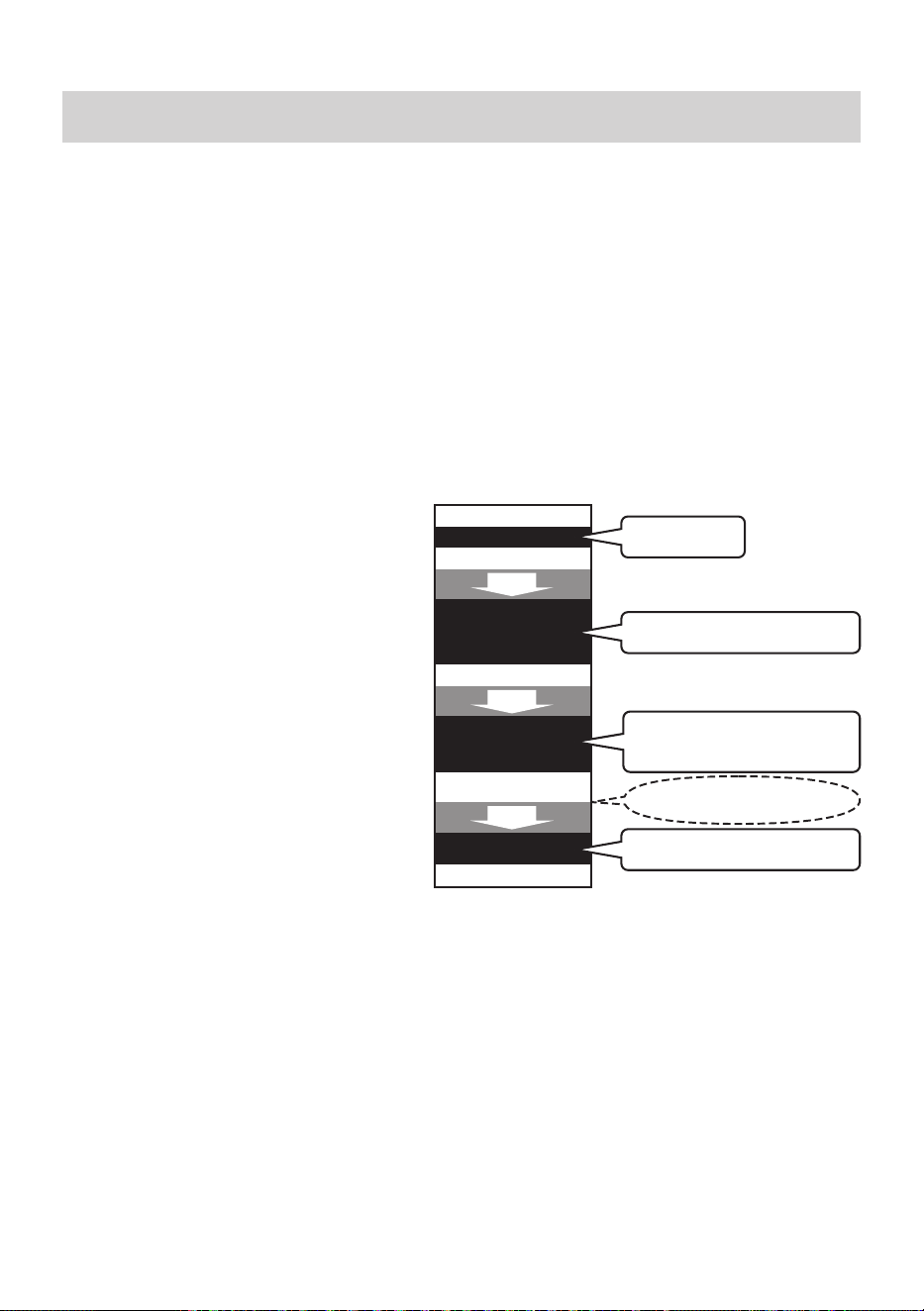
27
Information on body composition
20. Information on Body Composition
Principle of body composition calculation
Body fat has low electric conductivity
The BCM-500 measures the body fat percentage by the Bioelectrical Impedance (BI) method.
Muscles, blood vessels and bones are body tissues with a high water content that conducts electricity
easily. Body fat is tissue that has little electric conductivity. The BCM-500 sends an extremely weak
electrical current of 50 kHz and less than 500
µ
A through your body to determine the amount of fat
tissue. This weak electrical current is not felt while operating the BCM-500.
In order for the scale to determine your body composition, it uses the electrical impedance, along with
your height, weight, age and gender information to generate results based on OMRON’s data of body
composition.
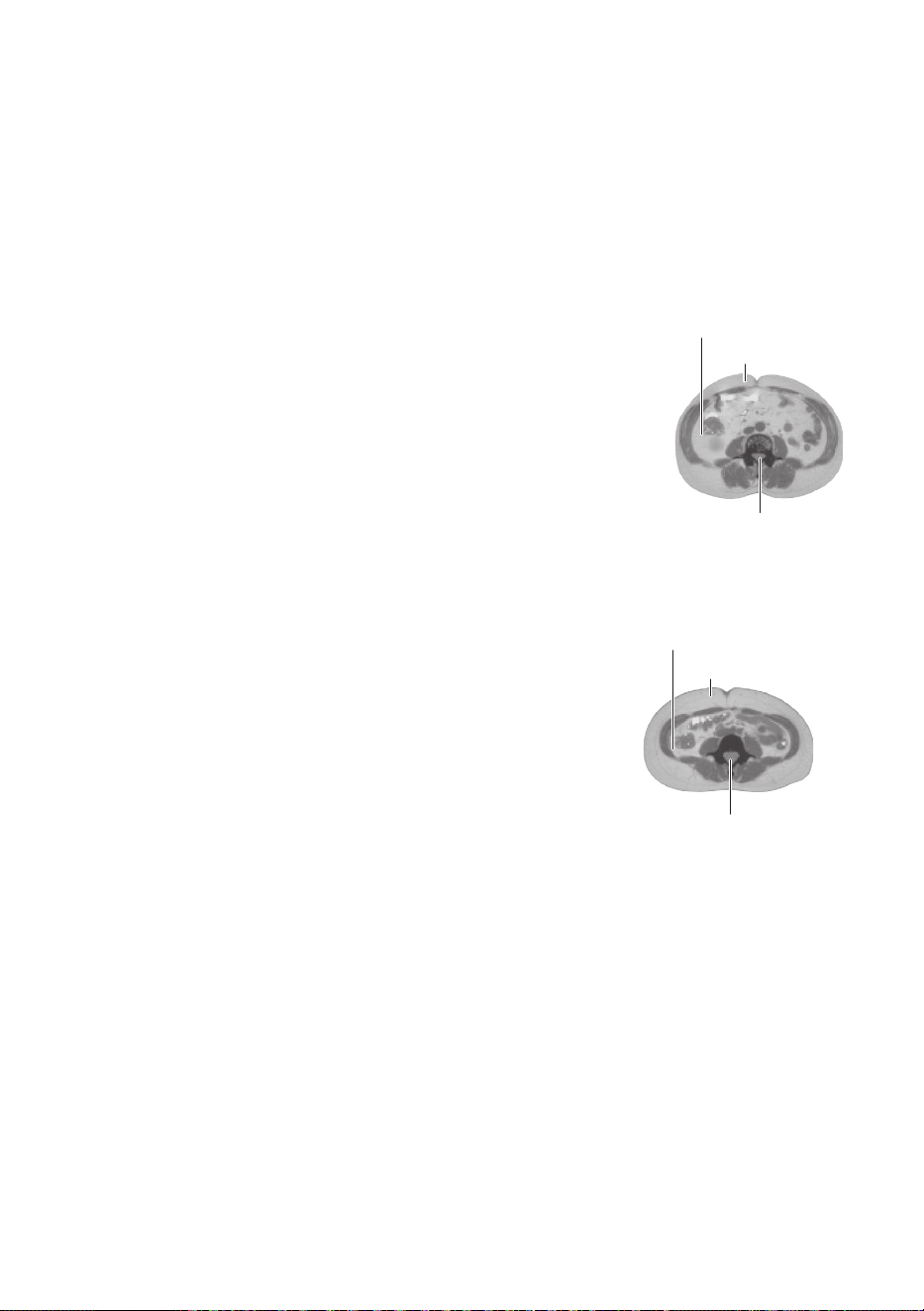
Recommended measurement times
Understanding the normal changes in
your body fat percentage can help you in
preventing or reducing obesity. Being aware
of the times when the body fat percentages
shift within your own daily schedule will assist
you in obtaining an accurate trending of
your body fat. It is recommended to use this
monitor in the same environment and daily
circumstances. (See chart)
Avoid taking measurements under the following conditions:
- Immediately after vigorous exercise, after a bath or sauna.
- After drinking alcohol or a large amount of water, after a meal (about 2 hours).
If a measurement is taken under these physical conditions, the calculated body composition may differ
signicantlyfromtheactualonebecausethewatercontentinthebodyischanging.
What is BMI (Body Mass Index)?
BMI uses the following simple formula to indicate the ratio between weight and height of a person.
BMI = weight (lb) / height (inches) / height (inches) × 703
The OMRON BCM-500 uses the height information stored in your user ID or when entering information
intheGuestModetocalculateyourBMIclassication.
If the fat level revealed by BMI is higher than the international standard, there is an increased
likelihood of common diseases. However, not all types of fat can be revealed by BMI.
Daily activities
Waking up
Breakfast
Lunch
Taking a bath or
eating dinner
Going to bed
2 hours
2 hours
2 hours
Recommended time
Recommended time
Recommended time
Recommended time
Before going to bed and about 2
hours or more after dinner or bath
Before lunch and about 2 hours
or more after breakfast
After waking up
In the afternoon about 2 hours
or more after lunch and before
taking a bath or eating dinner
Avoid measurement immediately
after eating or bathing.
28
What is Body Fat Percentage?
Body fat percentage refers to the amount of body fat mass in regards to the total body weight
expressed as a percentage.
Body fat percentage (%) = {Body fat mass (lb) / Body weight (lb)} × 100
The BCM-500 uses the BI method to estimate your body fat percentage.
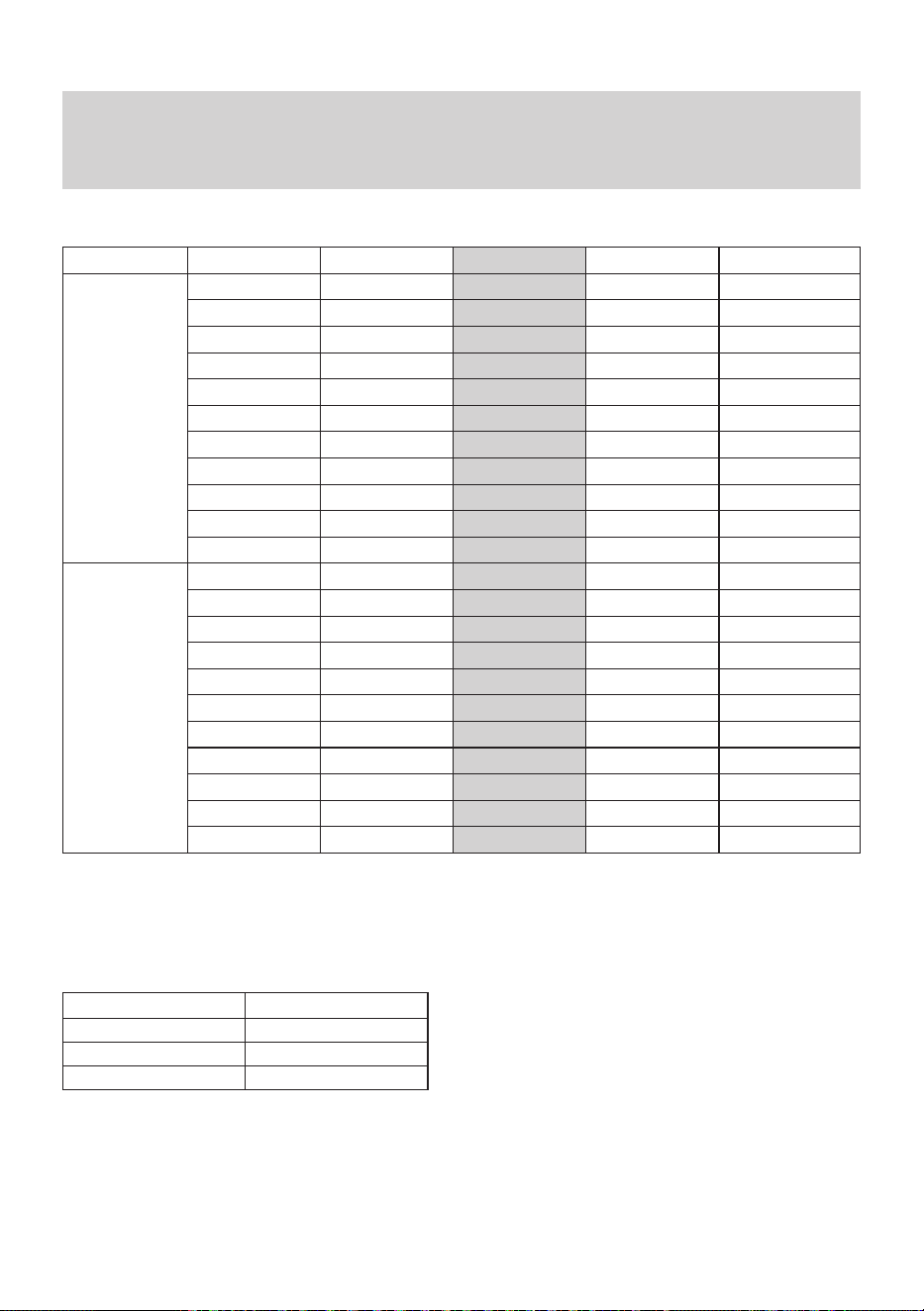
Dependingonwherethefatisdistributedinthebody,itisclassiedasvisceralfatorsubcutaneous
fat.
What is Visceral Fat Level?
Visceral fat = fat surrounding internal organs
Too much visceral fat is thought to be closely linked to increased levels
of fat in the bloodstream, which can lead to common diseases such as
hyperlipidemia and diabetes, which impairs the ability of insulin to transfer
energy from the bloodstream and using it in cells. In order to prevent or
improve conditions of common diseases, it is important to try and reduce
visceral fat levels to an acceptable level. People with high visceral fat
levels tend to have large stomachs. However, this is not always the case
and high visceral fat levels can lead to metabolic obesity. Metabolic
obesity (visceral obesity with normal weight) represents fat levels that are
higher than average, even if a person’s weight is at or below the standard
for their height.
What is Subcutaneous Fat?
Subcutaneous fat = fat below the skin
Subcutaneous fat not only accumulates around the stomach but also
around the upper arms, hips and thighs, and can cause a distortion of
the body’s proportions. Although not directly linked to increased risk
of disease, it is thought to increase pressure on the heart and other
complications. Subcutaneous fat is not displayed in this monitor, but is
included in the body fat percentage.
What is Skeletal Muscle?
Muscle is divided into two types, muscle in internal organs, such as the heart, and skeletal muscle
attached to bones that is used to move the body. Skeletal muscle can be increased through exercise
and other activity. Increasing the ratio of skeletal muscle means that body can burn energy more
easily, which means that it is less likely to turn to fat, and makes it easier to lead an energetic lifestyle.
What is Resting Metabolism?
Regardless of your activity level, a minimum level of caloric intake is required to sustain the body’s
everyday functions. Known as the resting metabolism, this indicates how many calories you need to
ingest in order to provide enough energy for your body to function.
Visceral Fat
Subcutaneous Fat
Spine
Sample Visceral Fat
(MRI image)
Visceral Fat
Subcutaneous Fat
Spine
Sample Subcutaneous Fat
(MRI image)
29
Information on body composition
21. Measurement Results Interpretation
Diagrams
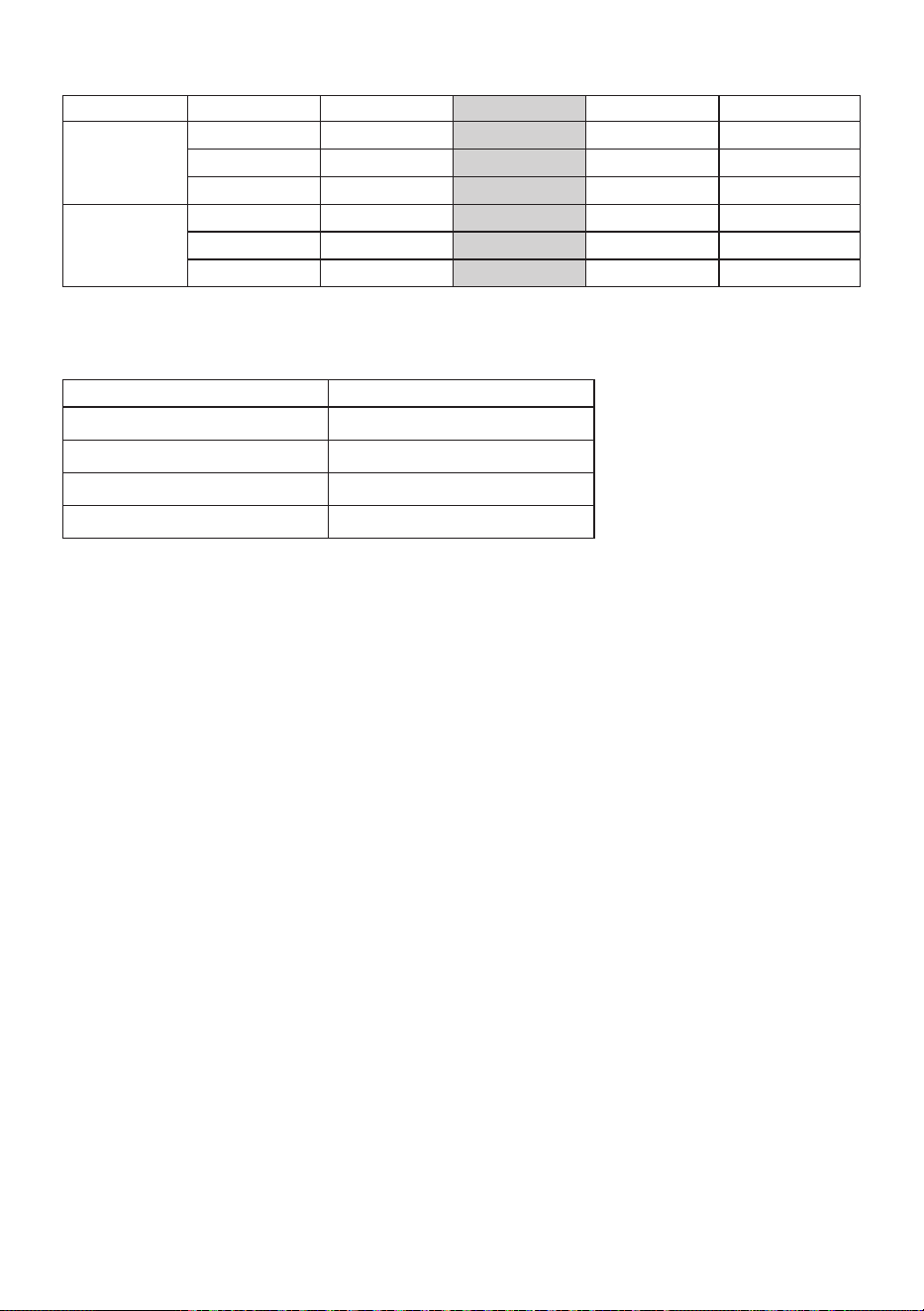
Interpreting the Body Fat Percentage Result
Age -(Low) 0(Normal) +(High) ++(Very High)
Female
10 < 16.1% 16.1 - 32.2% 32.3 - 35.2%
≧
35.3%
11 < 16.3% 16.3 - 33.1% 33.2 - 36.0%
≧
36.1%
12 < 16.4% 16.4 - 33.5% 33.6 - 36.3%
≧
36.4%
13 < 16.4% 16.4 - 33.8% 33.9 - 36.5%
≧
36.6%
14 < 16.3% 16.3 - 34.0% 34.1 - 36.7%
≧
36.8%
15 < 16.1% 16.1 - 34.2% 34.3 - 36.9%
≧
37.0%
16 < 15.8% 15.8 - 34.5% 34.6 - 37.1%
≧
37.2%
17 < 15.4% 15.4 - 34.7% 34.8 - 37.3%
≧
37.4%
18 - 39 < 21.0% 21.0 - 32.9% 33.0 - 38.9%
≧
39.0%
40 - 59 < 23.0% 23.0 - 33.9% 34.0 - 39.9%
≧
40.0%
60 - 80 < 24.0% 24.0 - 35.9% 36.0 - 41.9%
≧
42.0%
Male
10 < 12.8% 12.8 - 27.9% 28.0 - 31.8%
≧
31.9%
11 < 12.6% 12.6 - 28.5% 28.6 - 32.6%
≧
32.7%
12 < 12.3% 12.3 - 28.2% 28.3 - 32.4%
≧
32.5%
13 < 11.6% 11.6 - 27.5% 27.6 - 31.3%
≧
31.4%
14 < 11.1% 11.1 - 26.4% 26.5 - 30.0%
≧
30.1%
15 < 10.8% 10.8 - 25.4% 25.5 - 28.7%
≧
28.8%
16 < 10.4% 10.4 - 24.7% 24.8 - 27.7%
≧
27.8%
17 < 10.1% 10.1 - 24.2% 24.3 - 26.8%
≧
26.9%
18 - 39 < 8.0% 8.0 - 19.9% 20.0 - 24.9%
≧
25.0%
40 - 59 < 11.0% 11.0 - 21.9% 22.0 - 27.9%
≧
28.0%
60 - 80
< 13.0% 13.0 - 24.9% 25.0 - 29.9%
≧
30.0%
ClassiedbyOMRONHEALTHCARECo.,ltd.basedonthepapersbelow.
• HD McCarthy et al, in the International Journal of Obesity, Vol. 30, 2006.
• Gallagher et al., American Journal of Clinical Nutrition, Vol. 72, Sept. 2000
Interpreting the Visceral Fat Level Result
Visceral Fat Level Level Classication
1 - 9 0 (Normal)
10 - 14 + (High)
15 - 30 ++ (Very High)
ClassiedbasedonOMRONHEALTHCARECo.,Ltd.studydata.
30
Interpreting the Skeletal Muscle Percentage Result
Age -(Low) 0(Normal) +(High) ++(Very High)
Female
18 - 39 < 24.3% 24.3 - 30.3% 30.4 - 35.3% ≧ 35.4%
40 - 59 < 24.1% 24.1 - 30.1% 30.2 - 35.1% ≧ 35.2%
60 - 80 < 23.9% 23.9 - 29.9% 30.0 - 34.9% ≧ 35.0%
Male
18 - 39 < 33.3% 33.3 - 39.3% 39.4 - 44.0% ≧ 44.1%
40 - 59 < 33.1% 33.1 - 39.1% 39.2 - 43.8% ≧ 43.9%
60 - 80 < 32.9% 32.9 - 38.9% 39.0 - 43.6% ≧ 43.7%
ClassiedbasedonOMRONHEALTHCARECo.,Ltd.studydata.
Interpreting the BMI Result
BMI BMI (Designation by the WHO)
< 18.5 - (Underweight)
18.5 - 24.9 0 (Normal)
25 - 29.9 + (Overweight)
≧ 30 ++ (Obese)
Source: Values for obesity judgment proposed by WHO, the World Health Organization.

OMRON HEALTHCARE Co., Ltd.
53, Kunotsubo, Terado-cho, Muko, Kyoto, 617-0002 JAPAN
Distributed by:
OMRON HEALTHCARE, INC.
1925 West Field Court, Lake Forest, IL 60045 U.S.A.
OmronHealthcare.com
© 2019 OMRON HEALTHCARE, INC.
Made in China