© 2021 AAMP Global. All rights reserved. PAC is a Power Brand of AAMP Global.
PAC-audio.com
Pacific Accessory Corporation
Page 1
Rev: 2
Date:020922
Advanced Amplier Interface
for Select Ford Vehicles
AP4-FD31
The AP4-FD31 provides a 6-channel pre-amp output for use with aftermarket audio equipment. Using the digital
A2B audio data in conjunction with CAN data, the AP4-FD31 delivers a variable 5v RMS pre-amp output with fading,
balance, equalization, and level control capabilities. The module also retains audio from other vehicle features such
as factory navigation prompts, safety chimes, Bluetooth and voice activation. A data bus controlled remote amplier
turn on wire is also provided by the AP4-FD31. The module also provides a variable 2-channel ber optic digital audio
output (TOSLINK).
Introduction and Features
Important Notes
1. This interface is only compatible in vehicles equipped with an A2B data bus controlled premium sound system. To verify
compatibility, look for a B&O badge on the door speakers or dash speakers.
2. The AP4 interface installs at the factory amplier location. Included T-Harness installs behind radio to access factory
speaker wiring not available at factory amplier.
3. The factory amplier will be disconnected and will no longer power the vehicle speakers. An aftermarket amplier must be
added to power the vehicle's speakers. For example, you cannot only add a subwoofer, as the factory speakers that were
connected to the factory amplier will no longer function.
4. On most Ford models, some of the vehicle speakers will be connected to the radio module in addition to the external
amplier. These speakers will also stop working when the factory amplier is disconnected and will need to be powered by
an aftermarket amplier. See Speaker Connections on Page 3 for vehicle specic speaker information.
5. The chime volume and minimum volume levels are set to 50% by default. If this level is adequate, no additional adjustment
is required. Please refer to the Setup and Conguration section on page 9 for more details.
6. The level control knob must be connected in order to manually adjust the chime volume and minimum volume settings.
7. The remote output is rated at 2A of current. If more current is needed, an external relay must be used.
8. Channels 5 and 6 are non-fading outputs. The output level of channels 5 and 6 can be controlled using the supplied level
control knob.
9. No adjustments can be made manually using the programming button, or the factory SWC, when the module is connected
to a PC.
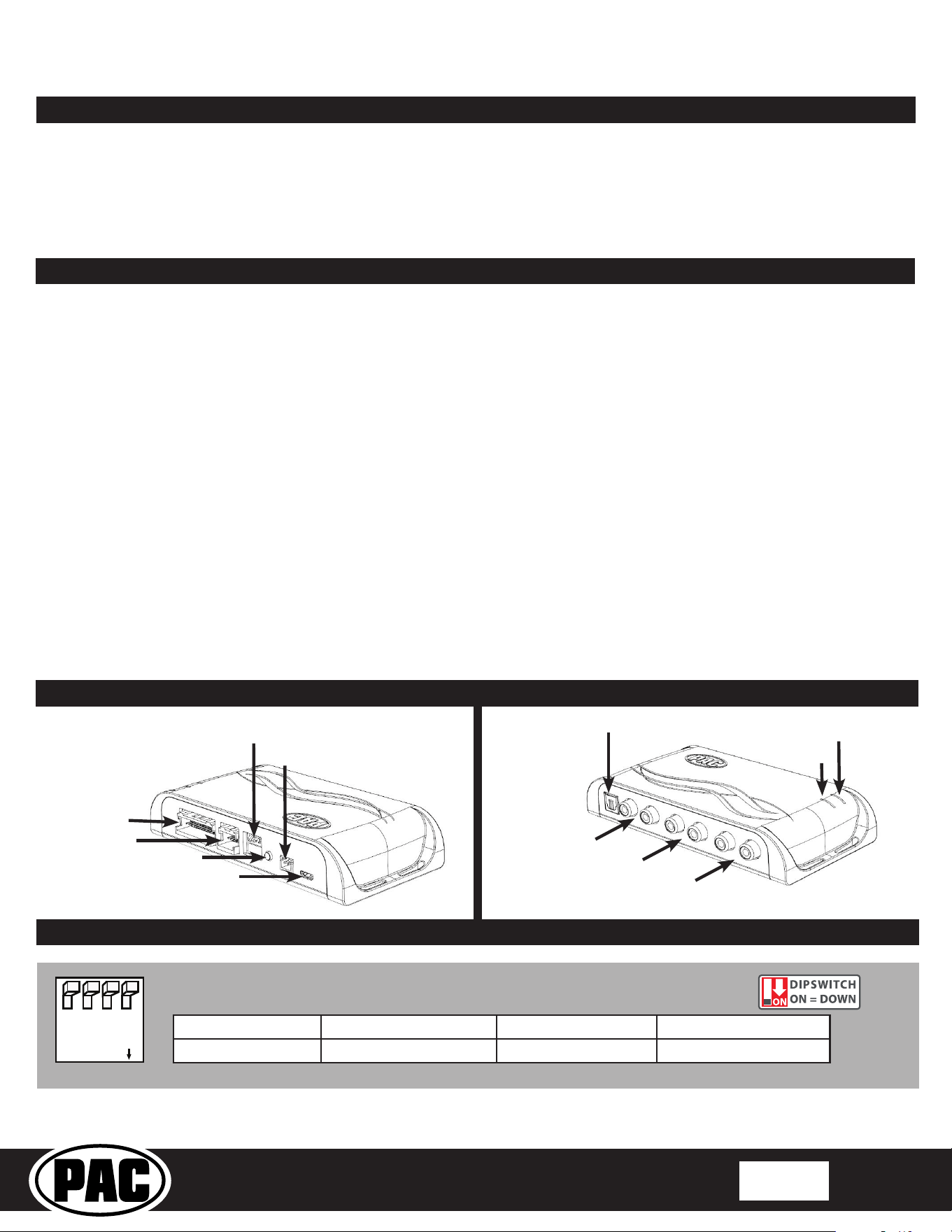
Module Layout
LED 1
Interface Connector 1
Expansion Port
TOSLINK Output
Programming Button
Feature Select
DIP switches
Front Output
Ch. 1(L) and 2(R)
Non-Fading Level Control
Knob Connection
USB Connection
Rear Output
Ch. 3(L) and 4(R)
SUB (Non-Fading)
Ch. 5 and 6
LED 2
DIP
1 2 3 4
ON
Two Channel Mode 5v / 4v Preout Not Used Vehicle Select
1 2 3 4
Set DIP switches to the ON position to activate the corresponding features.
Set DIP switches to the OFF position for any features that are not desired.
© 2021 AAMP Global. All rights reserved. PAC is a Power Brand of AAMP Global.
PAC-audio.com
Pacific Accessory Corporation
Page 2
Rev: 2
Date:020922
Advanced Amplier Interface
for Select Ford Vehicles
AP4-FD31
Installation
1. Access the factory amplier (Audio Digital Sound Processing Module). Amplier locations are listed starting on
Page 3.
2. Disconnect the 20-pin, 8-pin and A2B USB connectors from the amplier. The amplier can be removed or left in
the vehicle.
3. Plug the 20-pin, 8-pin and A2B USB cables into the matching connectors on the AmpPRO (AP4FD31HAR)
harness.
4. Before connecting the interface, set any feature DIP switches that apply to the install:
a. DIP switch 1 is used for two channel mode. In this mode, all outputs will be non-fading and all chimes are diverted
through channels 1 & 2 and TOSLINK.
b. Set DIP switch 2 on (down) to lower the RCA output voltage to 4v. Leave DIP switch 2 o (up) to keep the RCA
output voltage at 5v. See troubleshooting section on Page 11 for more details.
c. DIP switch 3 is not used and should remain o (up).
d. Set DIP switch 4 to on (down) position if installing interface in a Mach-E. For all other vehicle models, DIP switch
4 should be o (up).
5. Connect the AmpPRO harness to the AmpPRO Interface Connector 1.
6. Connect the level control knob cable to the interface.
7. Connect the signal cables (RCA/TOSLINK) and remote input from the aftermarket amplier.
NOTE! The aftermarket amplier must have a very solid ground and the amplier power/ground
connections should be made before connecting the RCA's or Remote Turn On to the AP4-FD31!
On aluminum framed vehicles, it is recommended to ground directly to the battery.
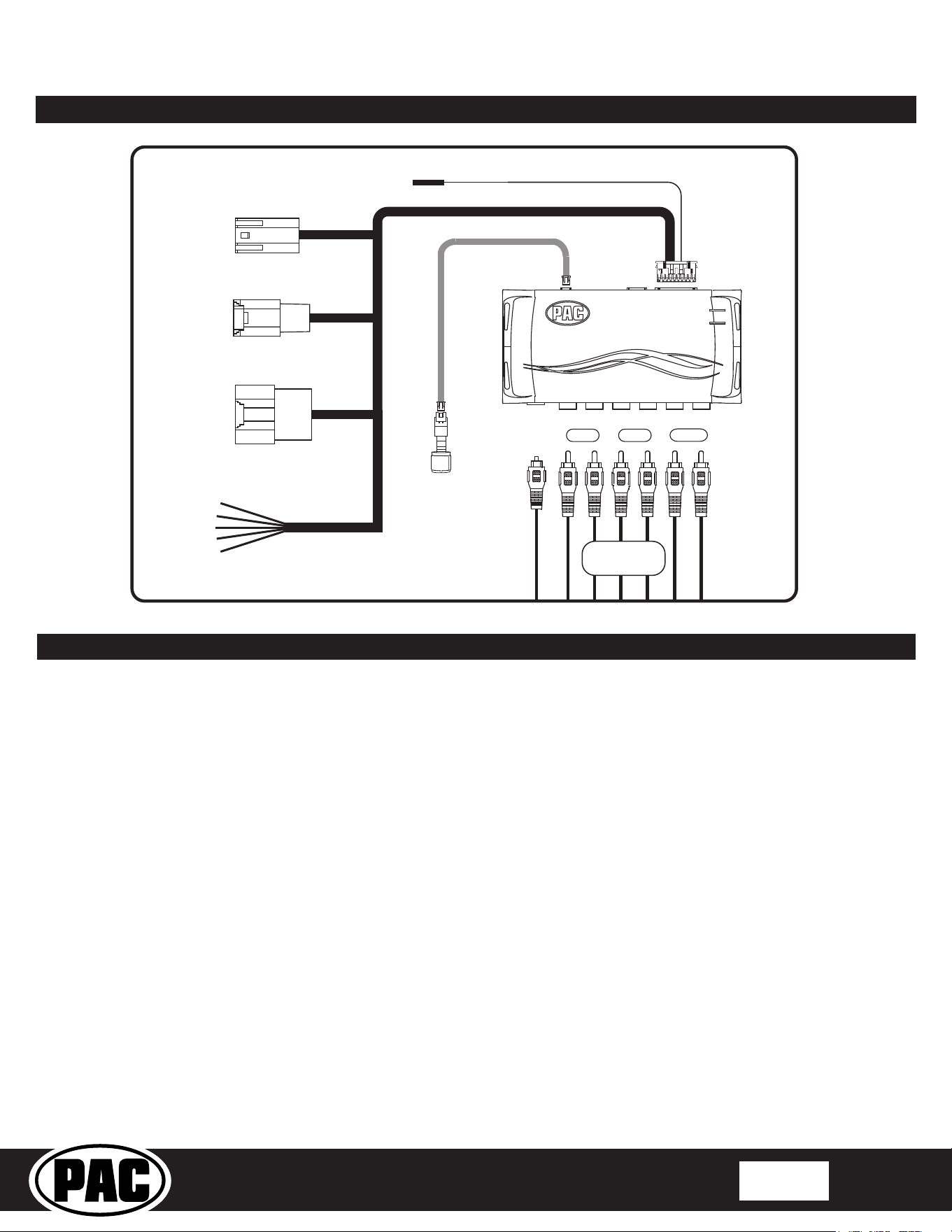
Wiring Connection Chart
Front
1/L
2/R
4/R
5 6
3/L
Remote Amp Turn On +
2A Max Output
Rear
Sub
TOSLINK
20-pin
Amplifier
8-pin
Amplifier
A²B USB
Amplifier
To Vehicle Amplifier Harness
Speaker
Leads
1-10
Non-Fading
Level Control
Knob
To Aftermarket
Amplifier
AP4FD31HAR
© 2021 AAMP Global. All rights reserved. PAC is a Power Brand of AAMP Global.
PAC-audio.com
Pacific Accessory Corporation
Page 3
Rev: 2
Date:020922
Advanced Amplier Interface
for Select Ford Vehicles
AP4-FD31
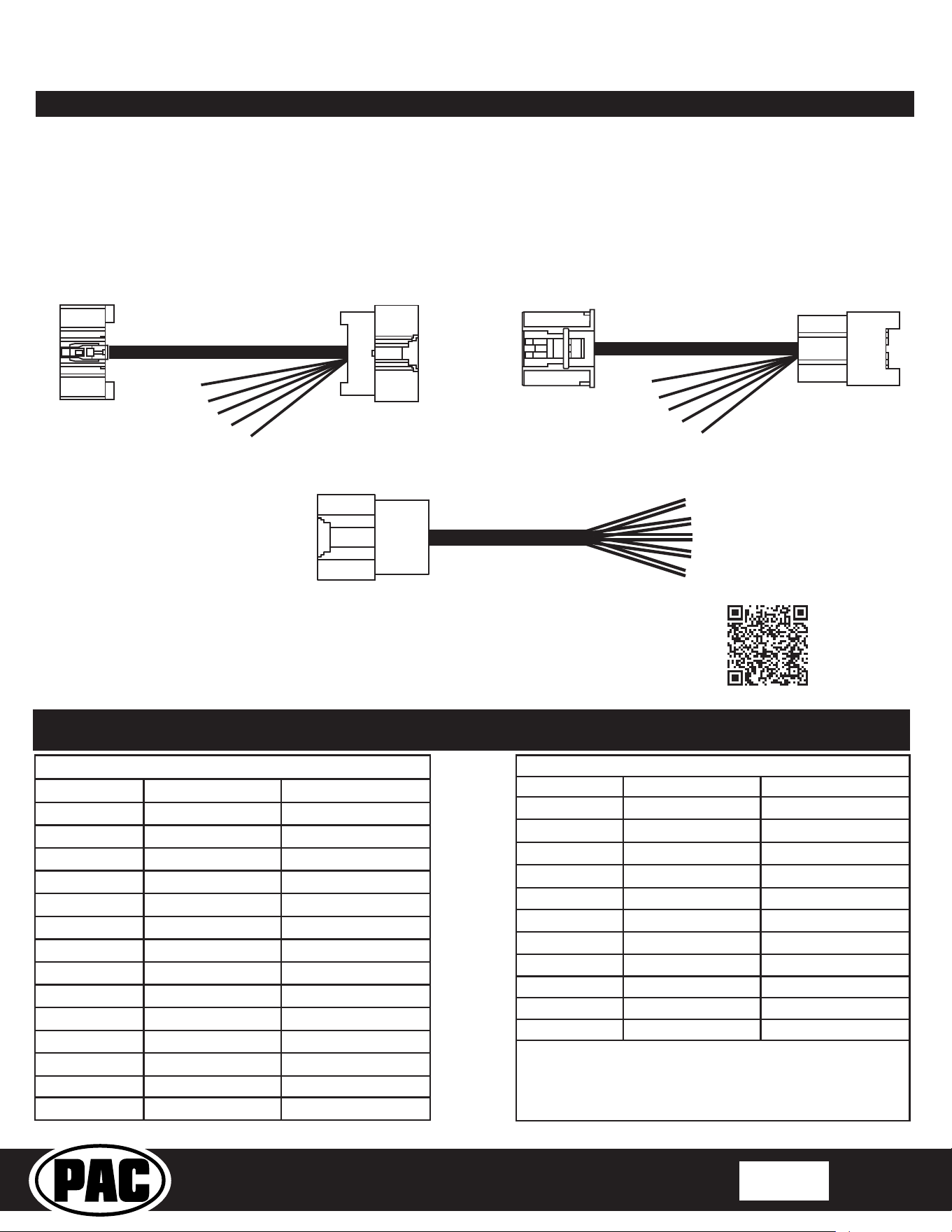
Speaker Connections
If using the factory speaker wires to connect to the aftermarket amplier, they will be located in two locations, at the 20-pin
plug at the Digital Sound Processing Module (Amplier) and either a 32-pin or 24-pin plug at the Audio Control Module (Radio).
Adapter plugs are provided for all speaker wire connections.
Because the factory speaker wire pin locations, colors and plug style vary from model to model, reference the charts below
and use a tone generator for speaker locations and polarity. Please note that most vehicles will not follow the "standard"
speaker wire colors and polarity. For example the right front positive speaker lead may connect to the left rear negative
(GRN/BLK) lead on the adapter plug.
APH-FD22
24-PIN RADIO
SPEAKER HARNESS
APH-FD03
32-PIN RADIO
SPEAKER HARNESS
APHFD31HAR
20-PIN AMPLIFIER
SPEAKER HARNESS
TO RADIO
TO RADIO
TO VEHICLE
HARNESS
SPEAKER
LEADS
SPEAKER
LEADS
SPEAKER
LEADS
TO VEHICLE
HARNESS
TO VEHICLE
AMPLIFIER
HARNESS
OR
For additional vehicle applications and the latest speaker wiring
information, visit the AP4-FD31 product page on PACaudio.com
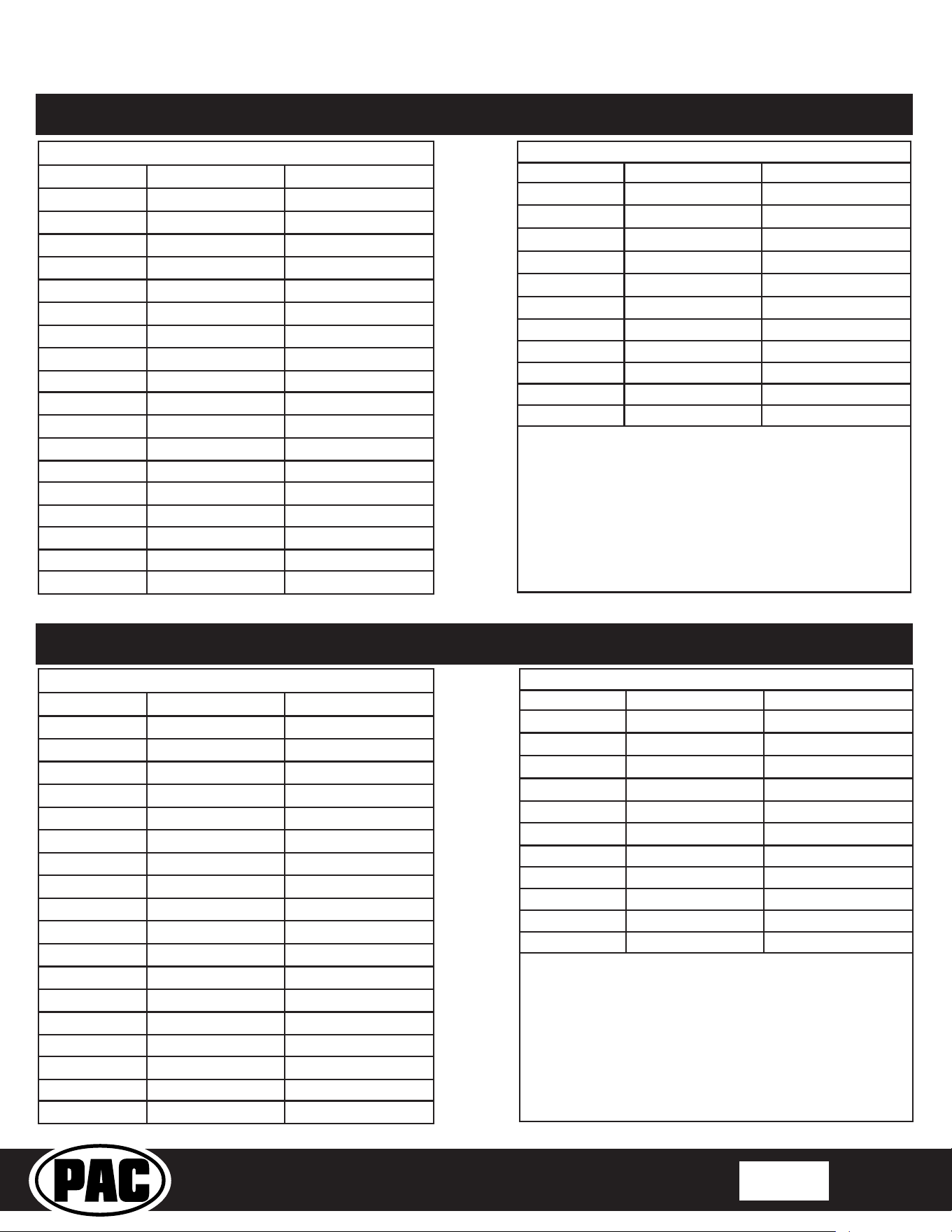
20 Pin Plug at AMPLIFIER (DSP) (AP4FD31HAR)
LEADS PAC COLOR POSITION/POLARITY
Speaker 1
WHT
LF KICK / +
Speaker 1 WHT/BLK
LF KICK / –
Speaker 2 GRY
RF KICK / +
Speaker 2 GRY/BLK
RF KICK / –
Speaker 3 GRN
LF DASH / +
Speaker 3 GRN/BLK
LF DASH / –
Speaker 4 VIO
RF DASH / +
Speaker 4 VIO/BLK
RF DASH / –
Speaker 5 RED
SUB2 / +
Speaker 5 RED/BLK
SUB2 / –
Speaker 6 BLU
SUB1 / +
Speaker 6 BLU/BLK
SUB1 / –
Speaker 7 BRN
Speaker 7 BRN/BLK
32 Pin Plug at RADIO (ACM) (APH-FD03)
LEADS PAC COLOR POSITION/POLARITY
Speaker 1 WHT
LR POD / +
Speaker 1 WHT/BLK
LR POD / –
Speaker 2 GRY
CENTER / +
Speaker 2 GRY/BLK
CENTER / –
Speaker 3 GRN
Speaker 3 GRN/BLK
Speaker 4 VIO
RR POD / +
Speaker 4 VIO/BLK
RR POD / –
Speaker 5 ORG
Speaker 5 ORG/BLK
NOTES:
Ford Bronco (10 Speaker) 2021 | Amplier Location: RH cargo area behind trim panel
© 2021 AAMP Global. All rights reserved. PAC is a Power Brand of AAMP Global.
PAC-audio.com
Pacific Accessory Corporation
Page 4
Rev: 2
Date:020922
Advanced Amplier Interface
for Select Ford Vehicles
AP4-FD31
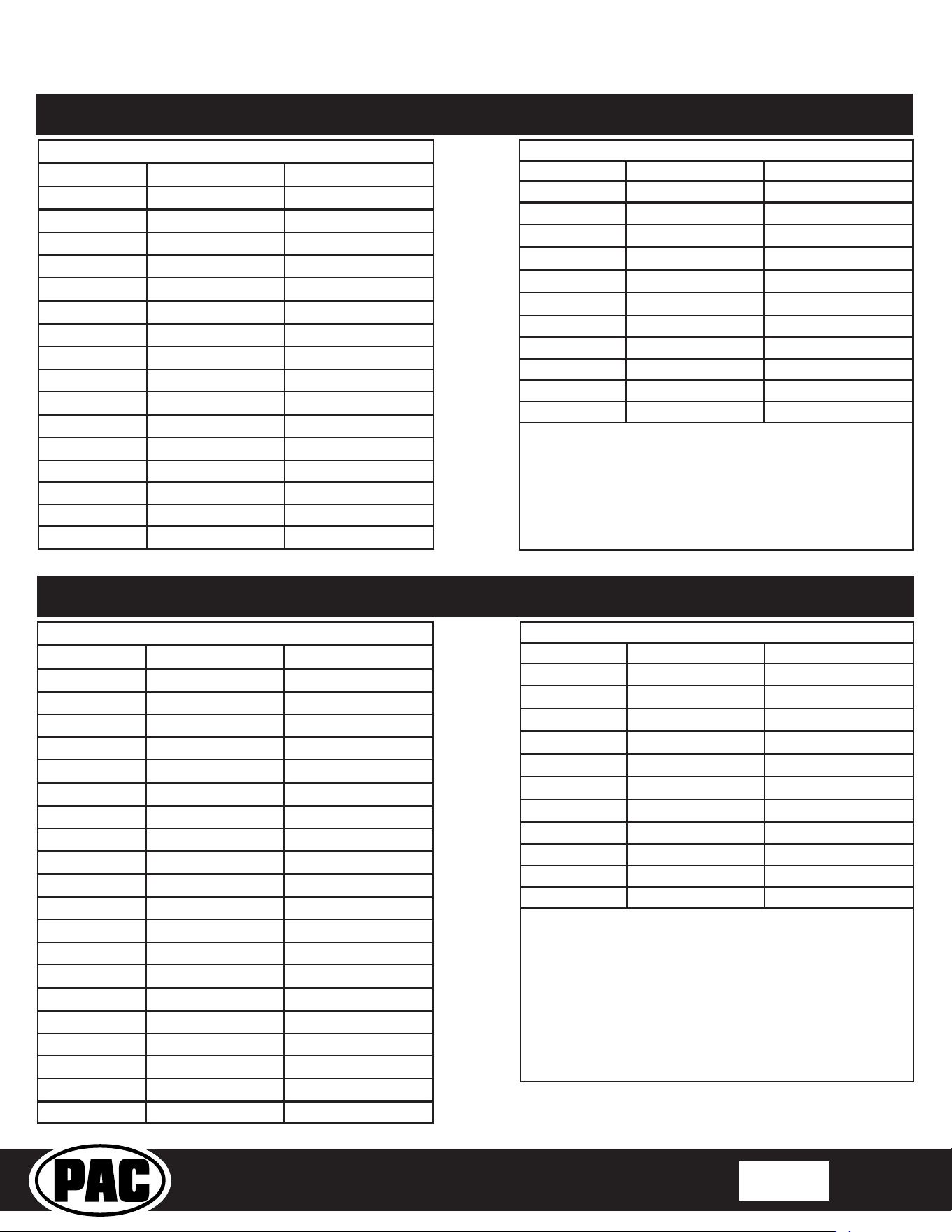
20 Pin Plug at AMPLIFIER (DSP) (AP4FD31HAR)
LEADS PAC COLOR POSITION/POLARITY
Speaker 1 WHT
LF DOOR / +
Speaker 1 WHT/BLK
LF DOOR / –
Speaker 2 GRY
RF DOOR / +
Speaker 2 GRY/BLK
RF DOOR / –
Speaker 3 GRN
LR DOOR / +
Speaker 3 GRN/BLK
LR DOOR / –
Speaker 4 VIO
RR DOOR / +
Speaker 4 VIO/BLK
RR DOOR / –
Speaker 5 RED
Speaker 5 RED/BLK
Speaker 6 BLU
SUB1 / +
Speaker 6 BLU/BLK
SUB1 / –
Speaker 7 BRN
Speaker 7 BRN/BLK
Speaker 8 WHT/BLU
Speaker 8 WHT/RED
Speaker 9 LT GRN
Speaker 9 LT GRN/BLK
Ford Bronco Sport (10 Speaker) 2021 | Amplier Location: LH cargo area behind trim panel
32 Pin Plug at RADIO (ACM) (APH-FD03)
LEADS PAC COLOR POSITION/POLARITY
Speaker 1 WHT
CENTER / +
Speaker 1 WHT/BLK
CENTER / –
Speaker 2 GRY
LH DASH / –
Speaker 2 GRY/BLK
LH DASH / +
Speaker 3 GRN
RH DASH / –
Speaker 3 GRN/BLK
RH DASH / +
Speaker 4 VIO
Speaker 4 VIO/BLK
Speaker 5 ORG
Speaker 5 ORG/BLK
NOTES:
20 Pin Plug at AMPLIFIER (DSP) (AP4FD31HAR)
LEADS PAC COLOR POSITION/POLARITY
Speaker 1 WHT
LF DOOR / +
Speaker 1 WHT/BLK
LF DOOR / –
Speaker 2 GRY
RF DOOR / +
Speaker 2 GRY/BLK
RF DOOR / –
Speaker 3 GRN
LR DOOR / +
Speaker 3 GRN/BLK
LR DOOR / –
Speaker 4 VIO
RR DOOR / +
Speaker 4 VIO/BLK
RR DOOR / –
Speaker 5 RED
SUB2 / +
Speaker 5 RED/BLK
SUB2 / –
Speaker 6 BLU
SUB1 / +
Speaker 6 BLU/BLK
SUB1 / –
Speaker 7 BRN
CENTER / +
Speaker 7 BRN/BLK
CENTER / –
Speaker 8 WHT/BLU
Speaker 8 WHT/RED
Speaker 9 LT GRN
Speaker 9 LT GRN/BLK
24 Pin Plug at RADIO (ACM) (APH-FD22)
LEADS PAC COLOR POSITION/POLARITY
Speaker 1 WHT
LF TWEET / +
Speaker 1 WHT/BLK
LF TWEET / –
Speaker 2 GRY
RF TWEET / +
Speaker 2 GRY/BLK
RF TWEET / –
Speaker 3 GRN
Speaker 3 GRN/BLK
Speaker 4 VIO
Speaker 4 VIO/BLK
Speaker 5 ORG
Speaker 5 ORG/BLK
NOTES:
Ford F-150 (8 Speaker) 2018-2020 | Amplier Location: Behind LH rear seat back
© 2021 AAMP Global. All rights reserved. PAC is a Power Brand of AAMP Global.
PAC-audio.com
Pacific Accessory Corporation
Page 5
Rev: 2
Date:020922
Advanced Amplier Interface
for Select Ford Vehicles
AP4-FD31
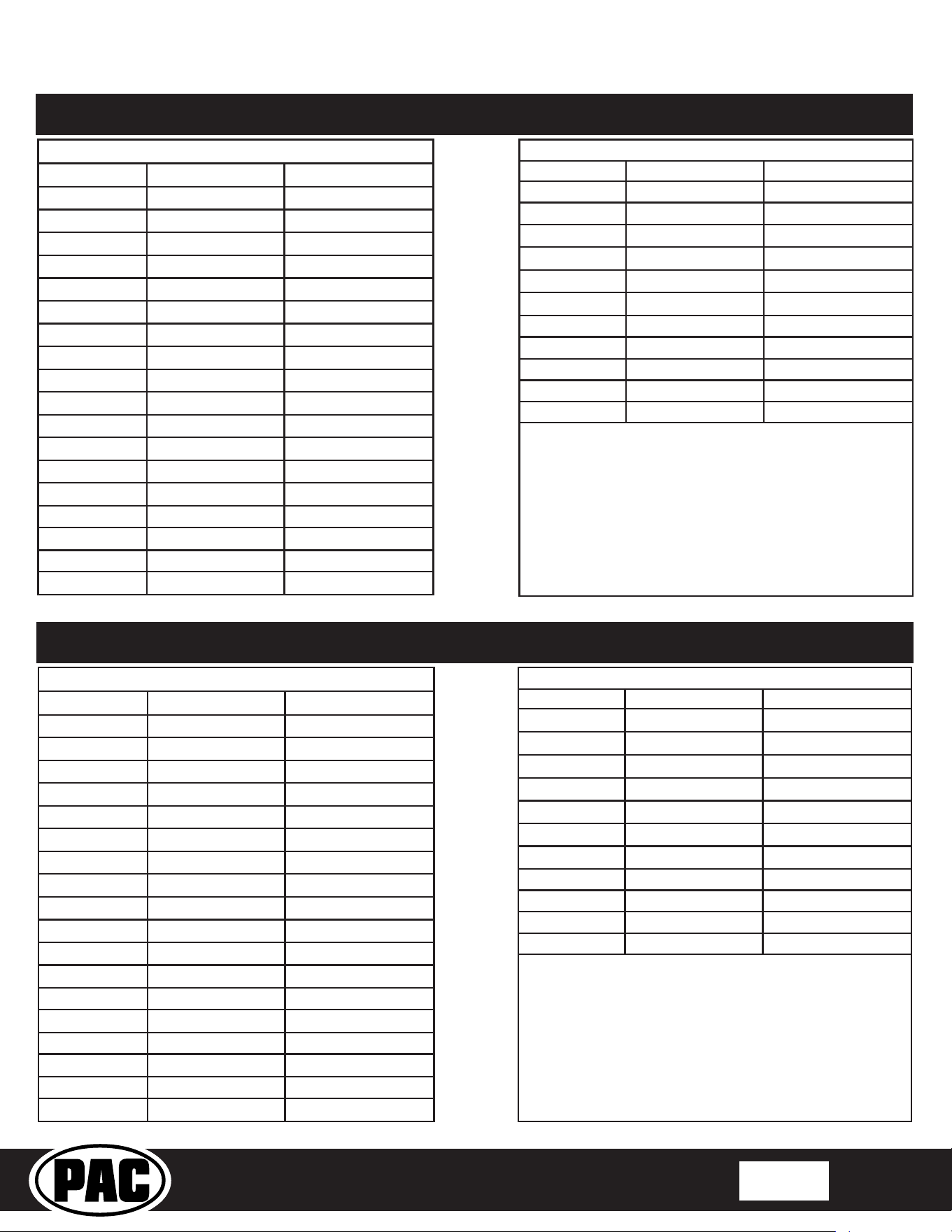
20 Pin Plug at AMPLIFIER (DSP) (AP4FD31HAR)
LEADS PAC COLOR POSITION/POLARITY
Speaker 1 WHT
LF DOOR / +
Speaker 1 WHT/BLK
LF DOOR / –
Speaker 2 GRY
RF DOOR / +
Speaker 2 GRY/BLK
RF DOOR / –
Speaker 3 GRN
LR DOOR / +
Speaker 3 GRN/BLK
LR DOOR / –
Speaker 4 VIO
RR DOOR / +
Speaker 4 VIO/BLK
RR DOOR / –
Speaker 5 RED
CENTER / +
Speaker 5 RED/BLK
CENTER / –
Speaker 6 BLU
SUB1 / +
Speaker 6 BLU/BLK
SUB1 / –
Speaker 7 BRN
Speaker 7 BRN/BLK
Speaker 8 WHT/BLU
Speaker 8 WHT/RED
32 Pin Plug at RADIO (ACM) (APH-FD03)
LEADS PAC COLOR POSITION/POLARITY
Speaker 1 WHT
Speaker 1 WHT/BLK
Speaker 2 GRY
LF PILLAR / +
Speaker 2 GRY/BLK
LF PILLAR / –
Speaker 3 GRN
RF PILLAR / +
Speaker 3 GRN/BLK
RF PILLAR / –
Speaker 4 VIO
Speaker 4 VIO/BLK
Speaker 5 ORG
Speaker 5 ORG/BLK
NOTES:
Ford F-150 (8 Speaker) 2021-2022 | Amplier Location: Behind LH rear seat back
20 Pin Plug at AMPLIFIER (DSP) (AP4FD31HAR)
LEADS PAC COLOR POSITION/POLARITY
Speaker 1 WHT
LF DOOR / +
Speaker 1 WHT/BLK
LF DOOR / –
Speaker 2 GRY
LH DASH / +
Speaker 2 GRY/BLK
LH DASH / –
Speaker 3 GRN
LF OVERHEAD / +
Speaker 3 GRN/BLK
LF OVERHEAD / –
Speaker 4 VIO
LH HEADREST / +
Speaker 4 VIO/BLK
LH HEADREST / –
Speaker 5 RED
RF OVERHEAD / +
Speaker 5 RED/BLK
RF OVERHEAD / –
Speaker 6 BLU
SUB1 / +
Speaker 6 BLU/BLK
SUB1 / –
Speaker 7 BRN
RF DOOR / +
Speaker 7 BRN/BLK
RF DOOR / –
Speaker 8 WHT/BLU
RH DASH / –
Speaker 8 WHT/RED
RH DASH / +
Speaker 9 LT GRN
CENTER / +
Speaker 9 LT GRN/BLK
CENTER / –
Speaker 10 ORG
RH HEADREST / +
Speaker 10 ORG/BLK
RH HEADREST / –
32 Pin Plug at RADIO (ACM) (APH-FD03)
LEADS PAC COLOR POSITION/POLARITY
Speaker 1 WHT
LR DOOR / +
Speaker 1 WHT/BLK
LR DOOR / –
Speaker 2 GRY
LF PILLAR / +
Speaker 2 GRY/BLK
LF PILLAR / –
Speaker 3 GRN
RF PILLAR / +
Speaker 3 GRN/BLK
RF PILLAR / –
Speaker 4 VIO
RR DOOR / +
Speaker 4 VIO/BLK
RR DOOR / –
Speaker 5 ORG
Speaker 5 ORG/BLK
Ford F-150 (18 Speaker) 2021-2022 | Amplier Location: Behind LH rear seat back
NOTES:
© 2021 AAMP Global. All rights reserved. PAC is a Power Brand of AAMP Global.
PAC-audio.com
Pacific Accessory Corporation
Page 6
Rev: 2
Date:020922
Advanced Amplier Interface
for Select Ford Vehicles
AP4-FD31
20 Pin Plug at AMPLIFIER (DSP) (AP4FD31HAR)
LEADS PAC COLOR POSITION/POLARITY
Speaker 1
WHT
LF DOOR / +
Speaker 1 WHT/BLK
LF DOOR / –
Speaker 2 GRY
RF DOOR / +
Speaker 2 GRY/BLK
RF DOOR / –
Speaker 3 GRN
LR DOOR / +
Speaker 3
GRN/BLK
LR DOOR / –
Speaker 4 VIO
RR DOOR / +
Speaker 4 VIO/BLK
RR DOOR / –
Speaker 5 RED
SUB2 / +
Speaker 5 RED/BLK
SUB2 / –
Speaker 6 BLU
SUB1 / +
Speaker 6 BLU/BLK
SUB1 / –
Speaker 7 BRN
Speaker 7 BRN/BLK
Speaker 8 WHT/BLU
Speaker 8 WHT/RED
Speaker 9 LT GRN
Speaker 9 LT GRN/BLK
32 Pin Plug at RADIO (ACM) (APH-FD03)
LEADS PAC COLOR POSITION/POLARITY
Speaker 1 WHT
CENTER / +
Speaker 1 WHT/BLK
CENTER / –
Speaker 2 GRY
LH DASH / +
Speaker 2 GRY/BLK
LH DASH / –
Speaker 3 GRN
LH DASH / +
Speaker 3 GRN/BLK
RH DASH / –
Speaker 4 VIO
Speaker 4 VIO/BLK
Speaker 5 ORG
Speaker 5 ORG/BLK
NOTES: Dip switch #4 must be ON
Ford Mach-E 2021 | Amplier Location: RH cargo area behind trim panel
20 Pin Plug at AMPLIFIER (DSP) (AP4FD31HAR)
LEADS PAC COLOR POSITION/POLARITY
Speaker 1 WHT
LF DOOR / +
Speaker 1 WHT/BLK
LF DOOR / –
Speaker 2 GRY
RF DOOR / +
Speaker 2 GRY/BLK
RF DOOR / –
Speaker 3 GRN
LR DOOR / +
Speaker 3 GRN/BLK
LR DOOR / –
Speaker 4 VIO
RR DOOR / +
Speaker 4 VIO/BLK
RR DOOR / –
Speaker 5 RED
SUB2 / +
Speaker 5 RED/BLK
SUB2 / –
Speaker 6 BLU
SUB1 / +
Speaker 6 BLU/BLK
SUB1 / –
Speaker 7 BRN
CENTER / +
Speaker 7 BRN/BLK
CENTER / –
Speaker 8 WHT/BLU
Speaker 8 WHT/RED
Speaker 9 LT GRN
Speaker 9 LT GRN/BLK
32 Pin Plug at RADIO (ACM) (APH-FD03)
LEADS PAC COLOR POSITION/POLARITY
Speaker 1 WHT
Speaker 1 WHT/BLK
Speaker 2 GRY
LF TWEET / +
Speaker 2 GRY/BLK
LF TWEET / –
Speaker 3 GRN
RF TWEET / +
Speaker 3 GRN/BLK
RF TWEET / –
Speaker 4 VIO
Speaker 4 VIO/BLK
Speaker 5 ORG
Speaker 5 ORG/BLK
NOTES:
Ford F-250/350/450 (10 Speaker) 2020 & Up | Amplier Location: Behind LH rear seat back

© 2021 AAMP Global. All rights reserved. PAC is a Power Brand of AAMP Global.
PAC-audio.com
Pacific Accessory Corporation
Page 7
Rev: 2
Date:020922
Advanced Amplier Interface
for Select Ford Vehicles
AP4-FD31
Setup and Conguration
1. Once all connections have been made and all factory harnesses are reconnected, close all the doors, lock the car using the
factory keyfob, and let the vehicle sit for 10 minutes with the keyfob out of range. This will ensure that the vehicle data-bus
goes to sleep and the AmpPRO will function as intended.
2. Turn the ignition on. LED 1 on the interface will turn on and the +12v remote output will turn on.
3. Set the amp gain(s) to the desired level. We recommend using an oscilliscope and test tones to set the amp gain(s). Please
refer to the MECP Advanced study guide if you are unfamiliar with this process.
4. Check volume, balance, fade and EQ settings.
5. If you would like to adjust the chime volume or minimum volume, do so using one of the methods outlined below. If you are
happy with the default levels, no adjustments are necessary.
Manually Setting the Chime Volume
You can manually set the level of the factory chime using either the programming button on the side of the interface, or the
factory SWC. If you would like to set the chime volume using the PC app please proceed to the AmpPRO App section.
PLEASE NOTE: Level control knob must be connected to module for either of the following methods.
Setting the chime volume using the programming button
1. Start with the level control knob turned all the way down (counter-clockwise), the vehicle running and the driver's door closed.
2. Press the programming button on the side of the interface.
3. LED 1 will turn green and there will be three beeps.
4. Open the driver's door and the chimes will begin continuously sounding for seven seconds.
5. Turn the level control knob clockwise until the desired chime level is reached.
6. You can now either press the programming button twice or wait ten seconds to exit the settings.
Setting the chime volume using the factory SWC
1. Start with the level control knob turned all the way down, the vehicle running and the driver's door closed.
2. Press and hold the track down button on the factory SWC for approximately ten seconds. PLEASE NOTE: The radio will
respond to the SWC commands during this process, this is normal and has no eect on the AP4 operation.
3. LED 1 will turn green and there will be three beeps.
4. Open the driver's door and the chimes will begin continuously sounding for seven seconds.
5. Turn the level control knob clockwise until the desired chime level is reached.
6. You can now either press the programming button twice or wait ten seconds to exit the settings.
Manually Setting the Minimum Volume
If the minimum volume of the radio (factory radio volume level 1) is too loud, you can manually set the level of the minimum
volume using either the programming button on the side of the interface or the factory SWC. If you would like to set the
minimum volume using the AmpPRO app, please proceed to the AmpPRO App section.
Setting the minimum volume using the programming button
1. Start with the level control knob turned all the way down (counter-clockwise).
2. Set the amp gains to the desired level.
3. Set the volume on the factory radio to 1.
4. Press the programming button on the side of the interface twice.
5. LED 1 will turn amber and there will be two beeps.
6. Turn the level control knob clockwise until the desired minimum volume level is reached.
7. You can now either press the programming button once or wait ten seconds to exit the settings.
Setting the minimum volume using the factory SWC
1. Start with the level control knob turned all the way down (counter-clockwise).
2. Set the amp gains to the desired level.
3. Set the volume on the factory radio to 1.
4. Press and hold the track up button on the factory SWC for approximately ten seconds. PLEASE NOTE: The radio will
respond to the SWC commands during this process, this is normal and has no eect on the AP4 operation.
5. LED 1 will turn amber and there will be two beeps.
6. Turn the level control knob clockwise until the desired minimum volume level is reached.
7. You can now either press the programming button once or wait ten seconds to exit the settings.
© 2021 AAMP Global. All rights reserved. PAC is a Power Brand of AAMP Global.
PAC-audio.com
Pacific Accessory Corporation
Page 8
Rev: 2
Date:020922
Advanced Amplier Interface
for Select Ford Vehicles
AP4-FD31
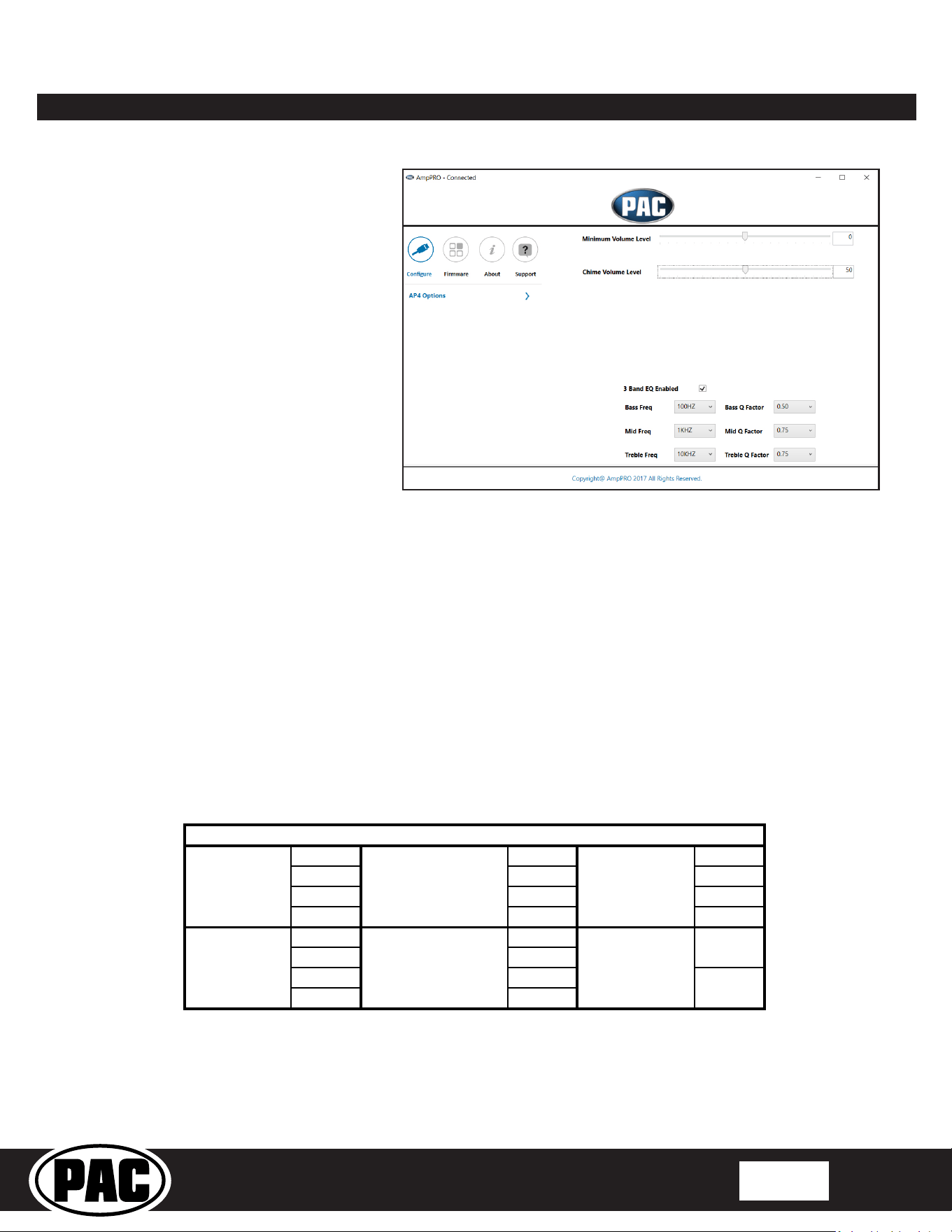
Use of the AmpPRO App allows
you to do the following:
• Congure User Interface Options such
as:
• Minimum Volume Level
• Chime Volume Level
• Enable / Disable factory EQ
• Bass / Mid / Treble boost frequencies
and Q factor
• Update Product Firmware
• Read Firmware / Hardware Versions
You can download the Amp PRO app at :
http://aampglobal.com/appdownloads
AmpPRO App
PLEASE NOTE: These settings can be adjusted with the module installed in the vehicle, or on the bench. However, it is
recommended to make the adjustments with the module installed, and the factory radio on, so that the changes can be
heard.
Minimum Volume Level - This allows you to set the minimum volume level of the factory radio (factory radio volume level 1).
Chime Volume Level - This allows you to set the volume of the AP4 chimes (ie: park sensors).
3 Band EQ Enabled - This allows you to enable / disable the 3 band factory EQ.
Bass / Mid / Treble Freq / Q Factor - This allows you to set the center frequency that will be adjusted when setting the 3 band
factory EQ, as well as the Q Factor for each frequency. The Q Factor determines how many of the adjacent frequencies will be
60HZ 500HZ 7.5KHZ
80HZ 1KHZ 10KHZ
100HZ 1.5KHZ 12.5KHZ
120HZ 2.5KHZ 15KHZ
0.50 0.75
1.00 1.00
1.50 1.25
2.00 1.50
Bass Frequency Mid Frequency Treble Frequency
Available Frequencies and Q Factors
Bass Q Factor Mid Q Factor Treble Q Factor
0.75
1.25
© 2021 AAMP Global. All rights reserved. PAC is a Power Brand of AAMP Global.
PAC-audio.com
Pacific Accessory Corporation
Page 9
Rev: 2
Date:020922
Advanced Amplier Interface
for Select Ford Vehicles
AP4-FD31
Firmware Updates
The AmpPRO app will also allow you to update the interface with new rmware as it becomes available. Please visit
www.pac-audio.com or contact our tech support department to see if there is a rmware update for your interface.
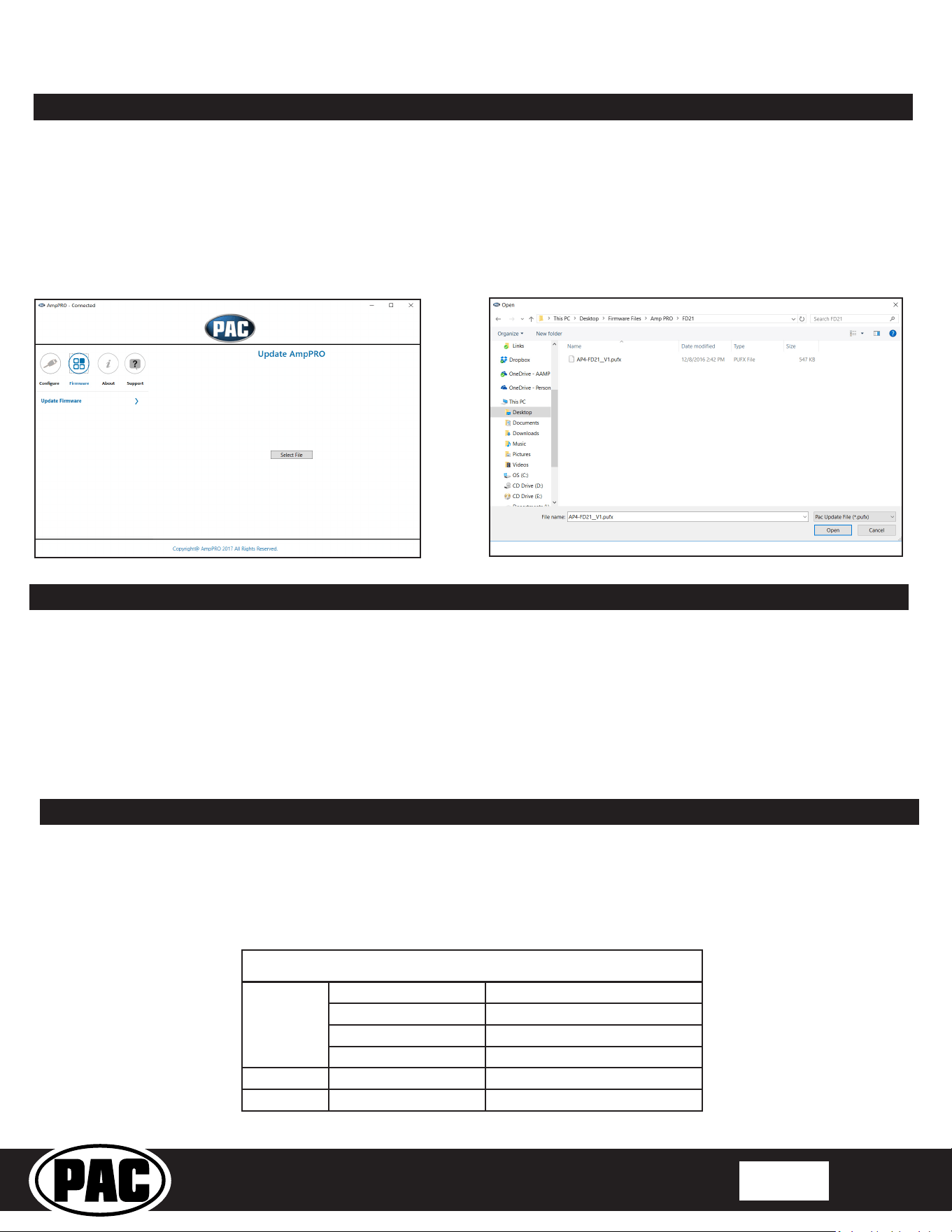
Connect the interface to your PC and select "Firmware", then “Update Firmware”. Now select “Select File”. Finally, browse to the
place where you saved the le and select it. This will begin the updating process. Once nished, disconnect the interface from
the PC and resume normal operation.
Restoring Factory Settings
You can restore the interface to factory default settings by pressing and holding the programming button on the side of the
module until the status LEDs start blinking red. Once the LEDs start blinking red, release the button.
This reset will restore the following settings to their factory defaults:
• Chime volume level
• Minimum volume level
• Enable / Disable factory EQ
• Factory EQ frequency
• Factory EQ Q factor
AmpPRO App (cont)
Troubleshooting
1. No audio - Check to see if LED 1 is illuminated. If not, cycle the ignition o and back on.
2. Hiss at high amp gain - Set feature DIP switch 2 to the on (down) position to lower the output voltage of the AP4 to 4v. If you
still hear the hiss, lower your amp gains until the hiss is gone.
3. Low volume setting on radio is too loud - Set minimum volume using process outlined in Setup and Conguration, or using
the AmpPRO application.
LED Legend
LED 1
Action/Color During Normal Operation
Solid Red Module Active
Solid Amber Minimum Volume Adjustment Mode
Rapid Blink Any Color DSP Activity
LED 2 Blinking Amber USB Connection Detected
Both LEDs Alternate Blinking Red Performing Memory Reset

© 2021 AAMP Global. All rights reserved. PAC is a Power Brand of AAMP Global.
PAC-audio.com
Pacific Accessory Corporation
Page 10
Rev: 2
Date:020922
Advanced Amplier Interface
for Select Ford Vehicles
AP4-FD31
Warranty
Technical Support
Email: support@PAC-audio.com
Phone: 727-592-5991
Chat: PAC-Audio.com
LIMITED WARRANTY
The quality controls used to manufacture PAC products are designed to ensure your complete satisfaction.
This warranty applies only to the original owner of PAC products purchased from an authorized PAC dealer. It covers PAC
products that, upon inspection by authorized PAC personnel, are found to have failed in normal use due to defects in material or
workmanship. This warranty does not cover installation expenses.
Attempting to service or modify our products, or operate them outside their recommended usage will render this WARRANTY
VOID.
Unless prescribed by law, PAC is not liable for any personal injury, property damage and/or incidental or consequential
damages (including water damage) resulting from product malfunctions, defects and/or misuse. PAC is also not liable for any
products that are altered or improperly installed.
WARRANTY PERIOD AND PROCESS
Within the rst 12 months from date of purchase, subject to the conditions above, PAC will repair or replace product at its sole
discretion if it is found to be defective in material or workmanship. Product must be returned to an authorized PAC dealer with
PROOF OF PURCHASE.