1
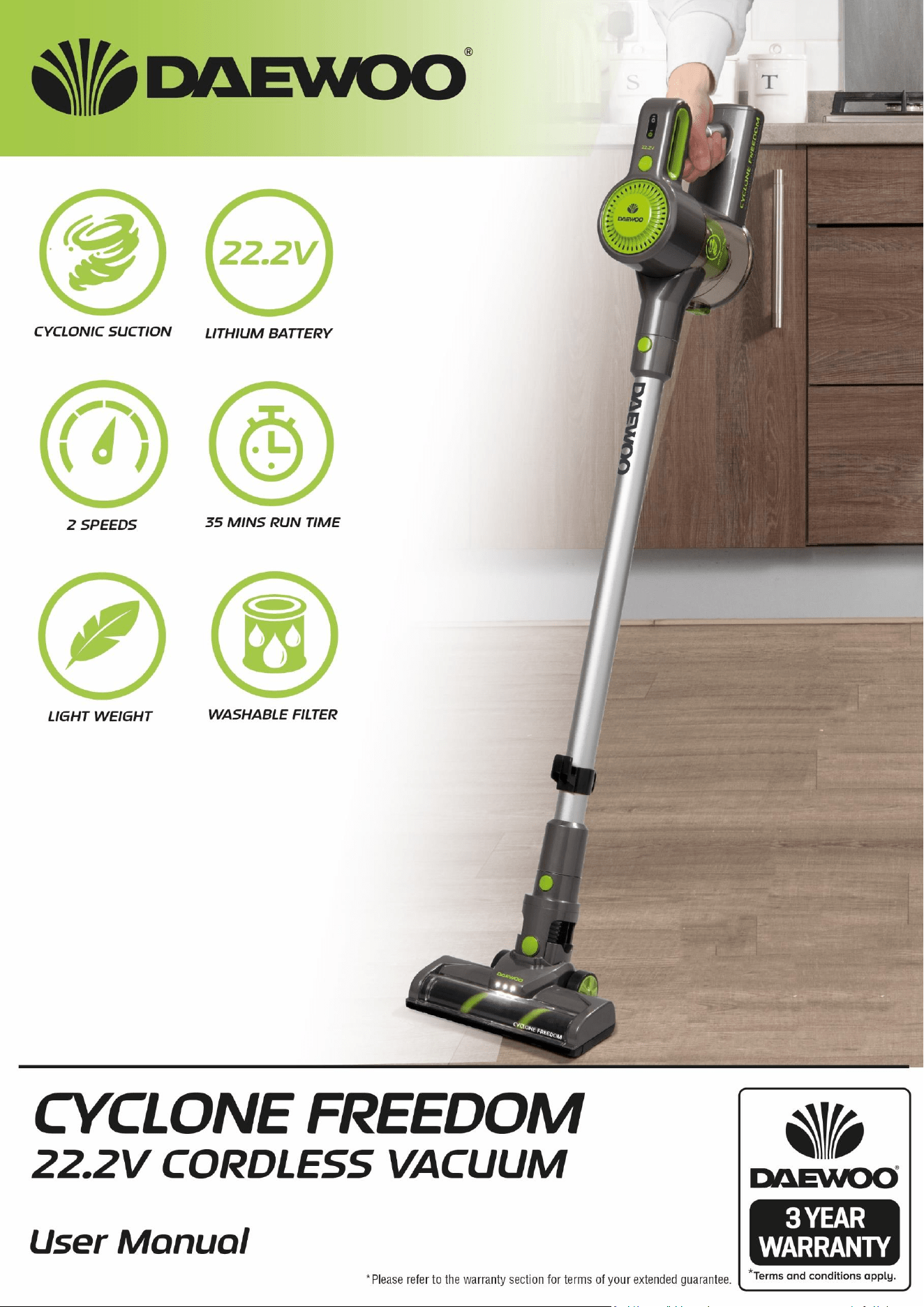
Cyclone Freedom 22.2V Cordless Vacuum
Cleaner
FLR00010
User Manual
IMPORTANT – RETAIN THESE INSTRUCTIONS FOR FUTURE REFERENCE

2
Cyclone Freedom 22.2V Cordless Vacuum
Cleaner
FLR00010
User Manual
IMPORTANT – RETAIN THESE INSTRUCTIONS FOR FUTURE REFERENCE
READING AND STORING THE USER MANUAL
Before using this product, please read through this manual
carefully paying particular attention to the safety instructions.
Failure to do so may result in personal injury or damage to the
product.
Carefully save this instruction manual for future reference. Ensure the
user manual is included when passing the product on to any third
parties.
IMPORTANT SAFETY INSTRUCTIONS FOR PROPER USE
When using electrical appliances, basic safety precautions should always
be followed.
Only use the product as described in this user manual. Any other use is
considered improper and may result in damage to property or persons.
The manufacturer or vendor cannot be held liable for damages or injury
incurred through improper or incorrect use.
• Read and familiarise yourself with all operating instructions before
using this Vacuum Cleaner.
• Before plugging your unit into the mains, visually check that the unit is
intact and has not suffered any transit damage.
• Check that the voltage indicated on the data plate corresponds with
that of the local network before connecting the appliance to the mains
power supply.
• This appliance can be used by persons with reduced physical, sensory
or mental capabilities or lack of experience and knowledge if they have
been given supervision or instruction concerning use of the appliance
in a safe way and understand the hazards involved.
• Children shall not play with the appliance.
• Keep the appliance and its cord out of reach of children less than 8
years when it is energised or cooling down.
• DO NOT immerse the appliance or its cord in water or any other liquids.
• DO NOT leave the appliance unattended during use.
• DO NOT leave the appliance unattended whilst connected to the mains
supply.
• DO NOT use this appliance outdoors.
• It is imperative to unplug the power cord after the appliance has been
used, before it is cleaned and whilst being repaired.
• Repairs to electrical appliances should only be performed qualified
personnel. Improper repairs may place user at serious risk.
• DO NOT operate this appliance with a damaged plug or cord, after a

3
Cyclone Freedom 22.2V Cordless Vacuum
Cleaner
FLR00010
User Manual
IMPORTANT – RETAIN THESE INSTRUCTIONS FOR FUTURE REFERENCE
malfunction or after being dropped or damaged in any way.
• Regular, periodic checks should be carried out on the mains cable to
• ensure no damage is evident. Should there be any signs of damage the
appliance should not be used.
• If the power cable is damaged, it should only be replaced by the
manufacturer or a suitable qualified after-sales-service in order to
avoid a hazard
• DO NOT allow the mains cable to hang over sharp edges or come in
contact with hot surfaces.
• Allow the unit to cool before storage.
• Before cleaning, disconnect the appliance from the mains supply and
allow to cool.
• This appliance is intended for household use only and should not be
used for industrial purposes.
• DO NOT use any accessories or attachments with this appliance other
than those supplied or recommended by supplier.
• DO NOT use this appliance for anything other than its intended use.
• DO NOT push objects into any openings as damage to the appliance
and/or electric shock may occur.
• Unplug after each use. Grasp the plug, not the cord.
• DO NOT pull or carry the Vacuum Cleaner by the electrical cord, use the
handle provided.
• Ensure fingers and other objects are never placed in any part of the
vacuum cleaner. Clothing or hair may become trapped if the vacuum is
used improperly.
• Keep hair, loose clothing, jewellery, fingers and all parts of the body
away from openings and moving parts.
• Keep all air vents clear and free of dust, lint, hair and anything else that
may reduce airflow.
• Avoid directing the appliance towards naked flames as the air
discharged may extinguish gas fires or pilot lights and may disturb
ashes in open fires.
• DO NOT Vacuum water or any other liquids with this vacuum.
• DO NOT Vacuum hot ashes or lit cigarettes, etc.
• Never use the appliance without the filter in place.
• Do not use the Vacuum with no Dust Tank attached.
• DO NOT vacuum any large or broken objects such as glass.
• DO NOT vacuum anything that is burning or smoking such as cigarettes,
matches or hot ashes.
4
Cyclone Freedom 22.2V Cordless Vacuum
Cleaner
FLR00010
User Manual
IMPORTANT – RETAIN THESE INSTRUCTIONS FOR FUTURE REFERENCE
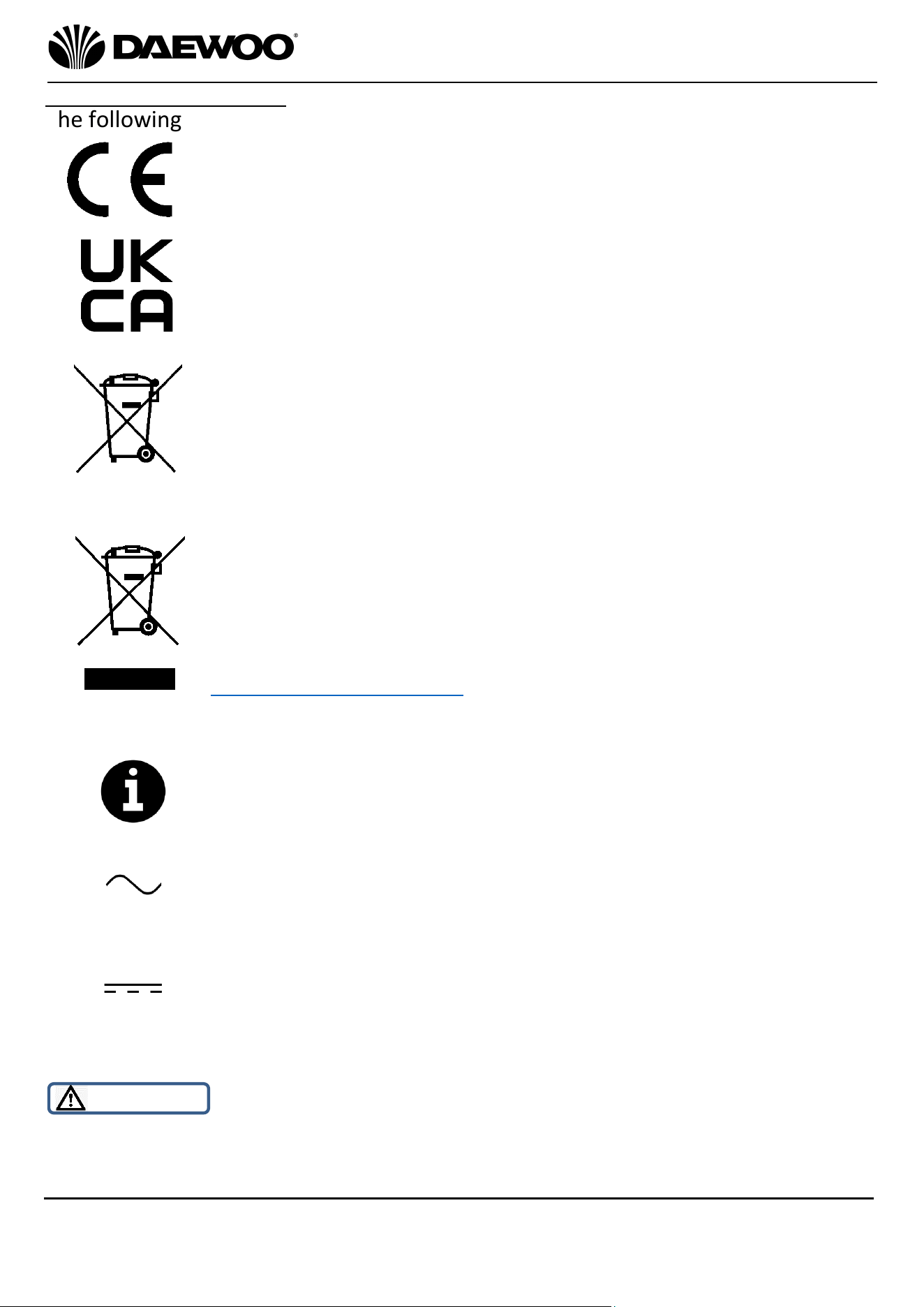
Explanation of Symbols
The following warning symbols or words are used in this instruction manual:
Products labelled with this symbol conform to applicable
provisions of the European Economic Area.
Products labelled with UK Conformity Assessment identifies
products conforming to UK statutory requirements.
This symbol means batteries and rechargeable batteries may
not be disposed of with household waste!
As the end user you are required by law to bring all batteries
and rechargeable batteries to a collection point run by the Local
Authority or to a retailer, so that they can be disposed of in an
environmentally friendly manner.
You should now recycle your waste electrical goods and in doing
so help the environment. This symbol means waste electrical
products at the end of their useful life should not be disposed of
with normal household waste and not sent to landfill. Please
ensure it is taken to a suitable facility for disposal. Check with
your Local Authority or retailer for recycling advice or Visit
www.recycle-more.co.uk, click on “bank locator” and enter your
postcode to find out your nearest recycling site.
This symbol provides useful additional information on the
use of this product.
This symbol indicates that the supply uses an alternating current
mains supply.
This symbol identifies voltage and the current rating for direct
current.
WARNING!
This designates a hazard with moderate risk, which may result
in severe injury or damage to the product if not adhered to.
5
Cyclone Freedom 22.2V Cordless Vacuum
Cleaner
FLR00010
User Manual
IMPORTANT – RETAIN THESE INSTRUCTIONS FOR FUTURE REFERENCE
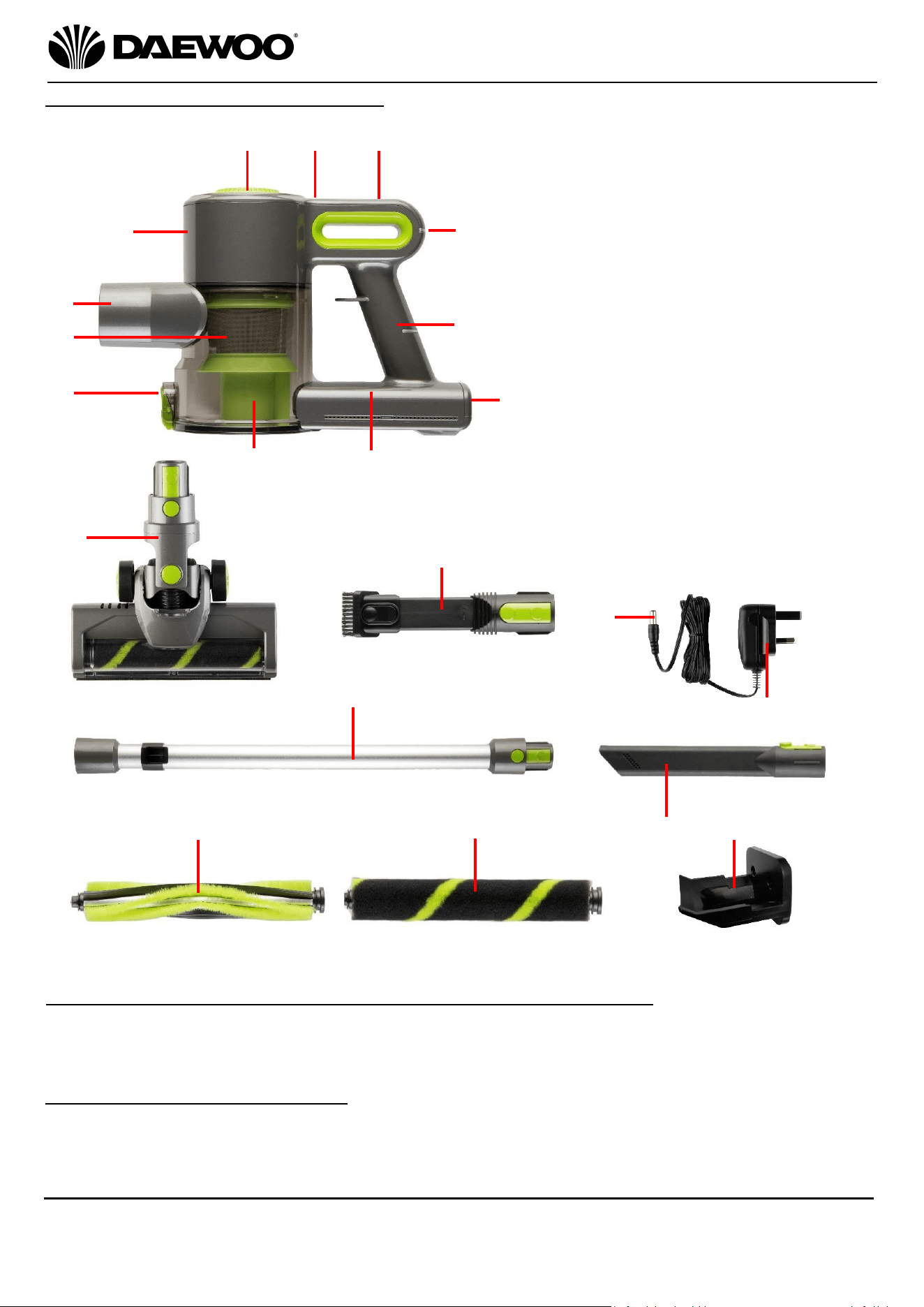
Description of Parts & Accesories
Before the first time you use your Cordless Vacuum Cleaner
Please read these operating instructions thoroughly and keep them in a safe
place for future reference.
Remove all packing materials and discard responsibly.
Charging the internal Battery
Before use, please ensure that the internal rechargeable battery is fully charged
as follows:
10
1. Air/Dust Inlet
2. Conical Hepa & Cyclonic Filters
3. Dust Release Catch
4. Dust Compartment
5. Charging/Battery Indicators
6. Charging Socket
7. Handle
8. On/Off/Power Button
9. Min/Max Power Indicator
10. Air Outlet Filter Door Release
Button
11. Air Outlet Filter Door
12. Motor Housing
13. Motorise Floor Tool
14. Crevice & Upholstery Tool
15. Small Power Plug
16. Mains Charger
17. Aluminium Tube
18. Carpet Brush
19. Hard Floor Brush
20. Long Reach Crevice Tool
21. Wall Bracket (with Screws & Plugs)
1
2
3
4
6
7
11
13
14
15
18
17
16
9
19
20
8
12
5
21
6
Cyclone Freedom 22.2V Cordless Vacuum
Cleaner
FLR00010
User Manual
IMPORTANT – RETAIN THESE INSTRUCTIONS FOR FUTURE REFERENCE
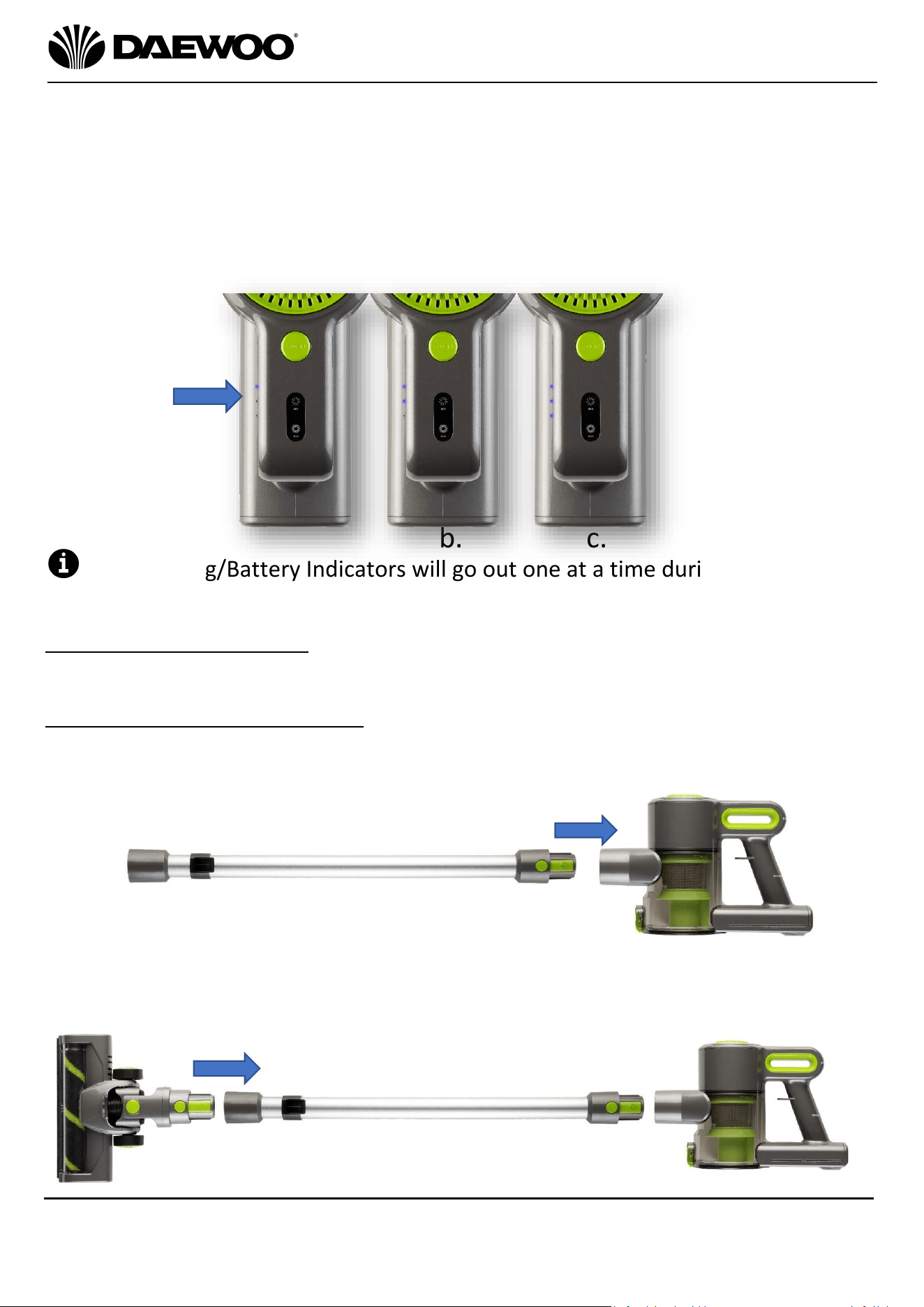
1. Insert the Small Power Plug (15) of the Mains Charger (16) into the Charging
Socket (6).
2. Plug the Mains Charger (16) into the nearest mains socket.
3. The Charging/Battery Indicators (5) will light in the sequence as in a, b, c below
to show the internal battery is charging.
4. Once the battery is fully charged (after approximately 5 hours), the
Charging/Battery Indicators (5) will all light as in ‘c’ below showing that the
internal battery is fully charged and the Mains Charger (16) can be removed.
The Charging/Battery Indicators will go out one at a time during use, when
none of the indicators are illuminated the internal battery will need recharging.
Attaching the Accessories
CAUTION Ensure that the vacuum cleaner is not connected to the mains charger
before use.
Fitting the Motorised Floor Tool
1. Push the Aluminium Tube (17) onto the Air/Dust Inlet (1) until it clicks home
as shown below:
2. Push the Motorised Floor Tool (13) onto the other end of the Aluminium
Tube (17) again until it clicks home.
b.
c.
5
a.
7
Cyclone Freedom 22.2V Cordless Vacuum
Cleaner
FLR00010
User Manual
IMPORTANT – RETAIN THESE INSTRUCTIONS FOR FUTURE REFERENCE
Using Your Cordless Vacuum Cleaner
The Motorised Floor Tool (13)
3
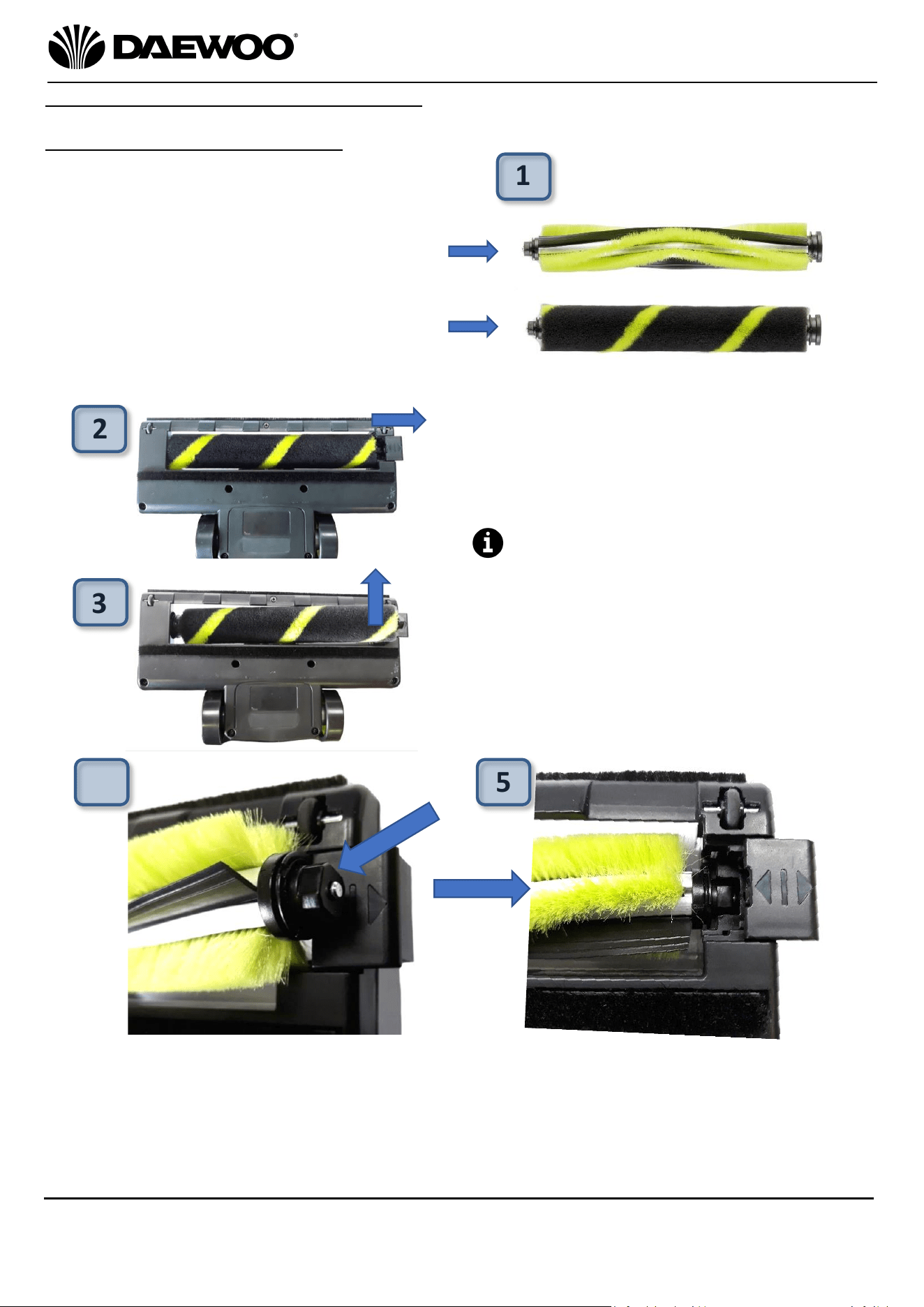
1. Before using the Motorised Floor Tool
(13) the first choose the appropriate
brush type for the floor type being
cleaned:
Select the Carpet Brush (18) for
vacuum cleaning carpets, rugs, etc.
Select the Hard Floor Brush (19) for
cleaning vinyl, laminate, tiled floors,
etc.
1
2. To change the brush type, slide the
brush retaining catch (a) right on the
underside of the Motorised Floor
Tool (13) as shown left.
The Hard Floor Brush (19) is
currently fitted in this example.
3. Lift out the Hard Floor Brush (19)
from the Motorised Floor Tool (13)
as shown in (b) left.
2
a
.
b.
4. Whilst installing the Carpet Brush (18), ensure that the squared end (c.) of the
brush is towards the retaining catch and is positioned as shown above left.
5. Once in place, slide back the brush retaining catch and insert the Carpet Floor
Brush (18) into the Motorised Floor Tool (13) as shown above right (d.).
c.
d.
4
5
8
Cyclone Freedom 22.2V Cordless Vacuum
Cleaner
FLR00010
User Manual
IMPORTANT – RETAIN THESE INSTRUCTIONS FOR FUTURE REFERENCE
Using Your Cordless Vacuum Cleaner
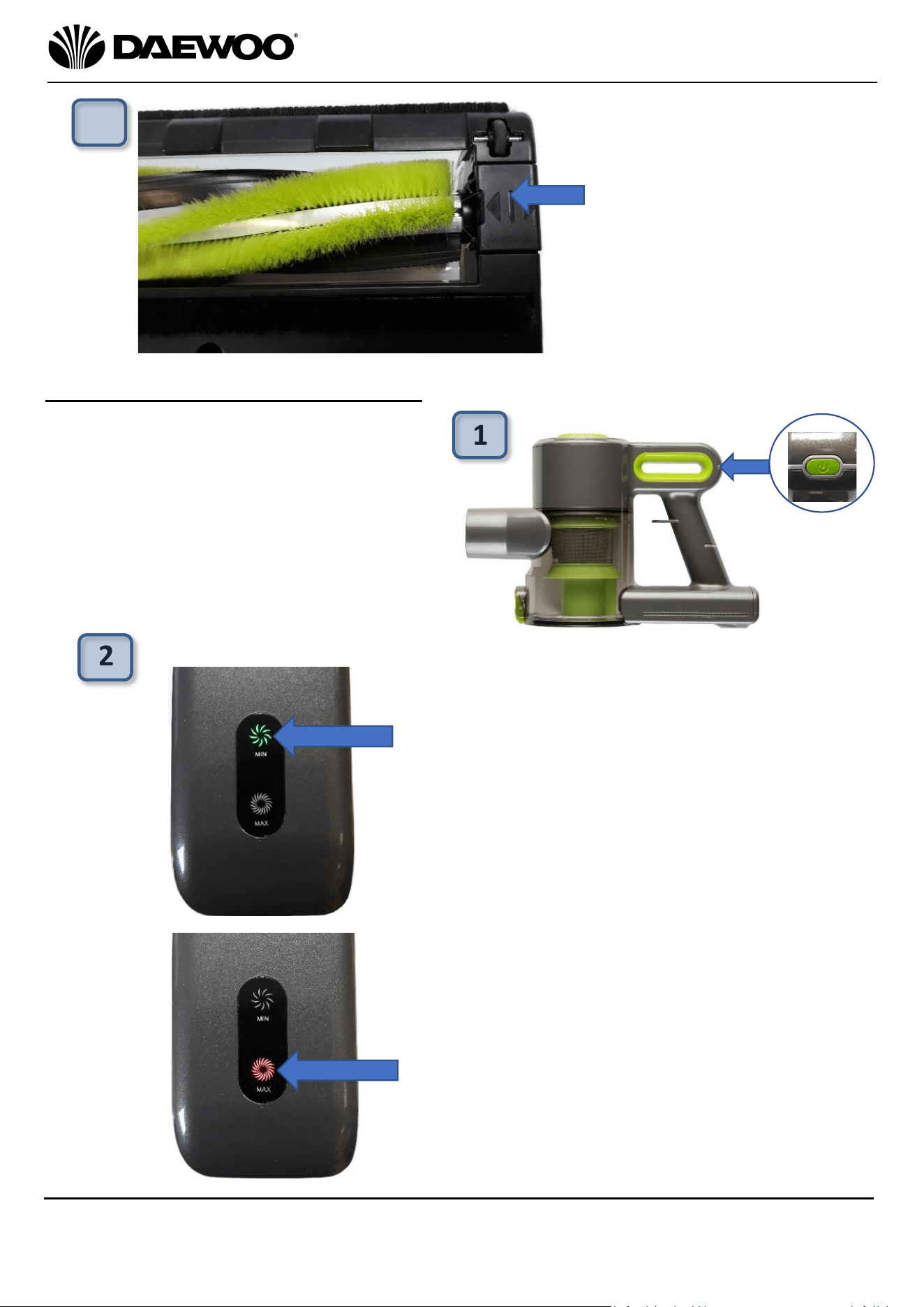
1. Grasp the vacuum cleaner firmly by
the Handle (7) and press the
On/Off/Power Button (8 – arrowed
right) to power up the cleaner.
1
6. Finally, push the brush
retaining clip left to hold
the brush in place as
shown arrowed left.
The vacuum is now ready
to clean carpeted floors.
6
2. During use, press the On/Off/Power
Button (8) to select between minimum
or maximum suction power as follows:
a. The First press of the On/Off/Power
Button (8) - the power level will be at
minimum, the Min/Max Power
Indicator (9 - arrowed left) will
illuminate green.
b. A second press of the On/Off/Power
Button (8) will select the maximum
power setting, the Min/Max Power
Indicator (9 - arrowed left) will
illuminate red.
c. A third press of the On/Off/Power
Button (8) will switch the vacuum off.
2
a
.
b.
9
Cyclone Freedom 22.2V Cordless Vacuum
Cleaner
FLR00010
User Manual
IMPORTANT – RETAIN THESE INSTRUCTIONS FOR FUTURE REFERENCE
Using the Crevice & Upholstery Tool (14)
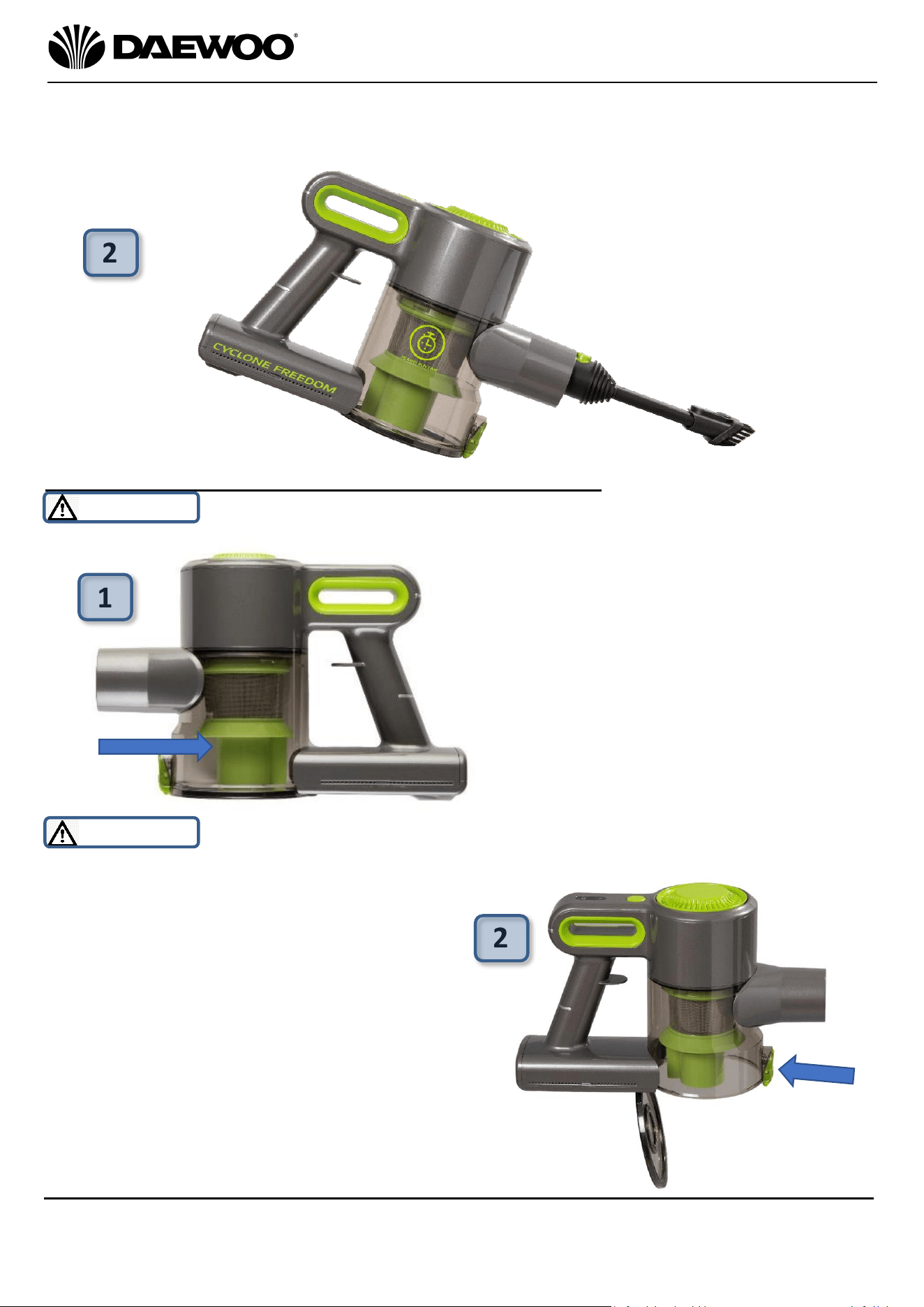
1. Attach the Crevice Tool & Upholstery Tool (14) onto the Aluminium Tube (17)
to clean carpet edges and hard to get at areas:
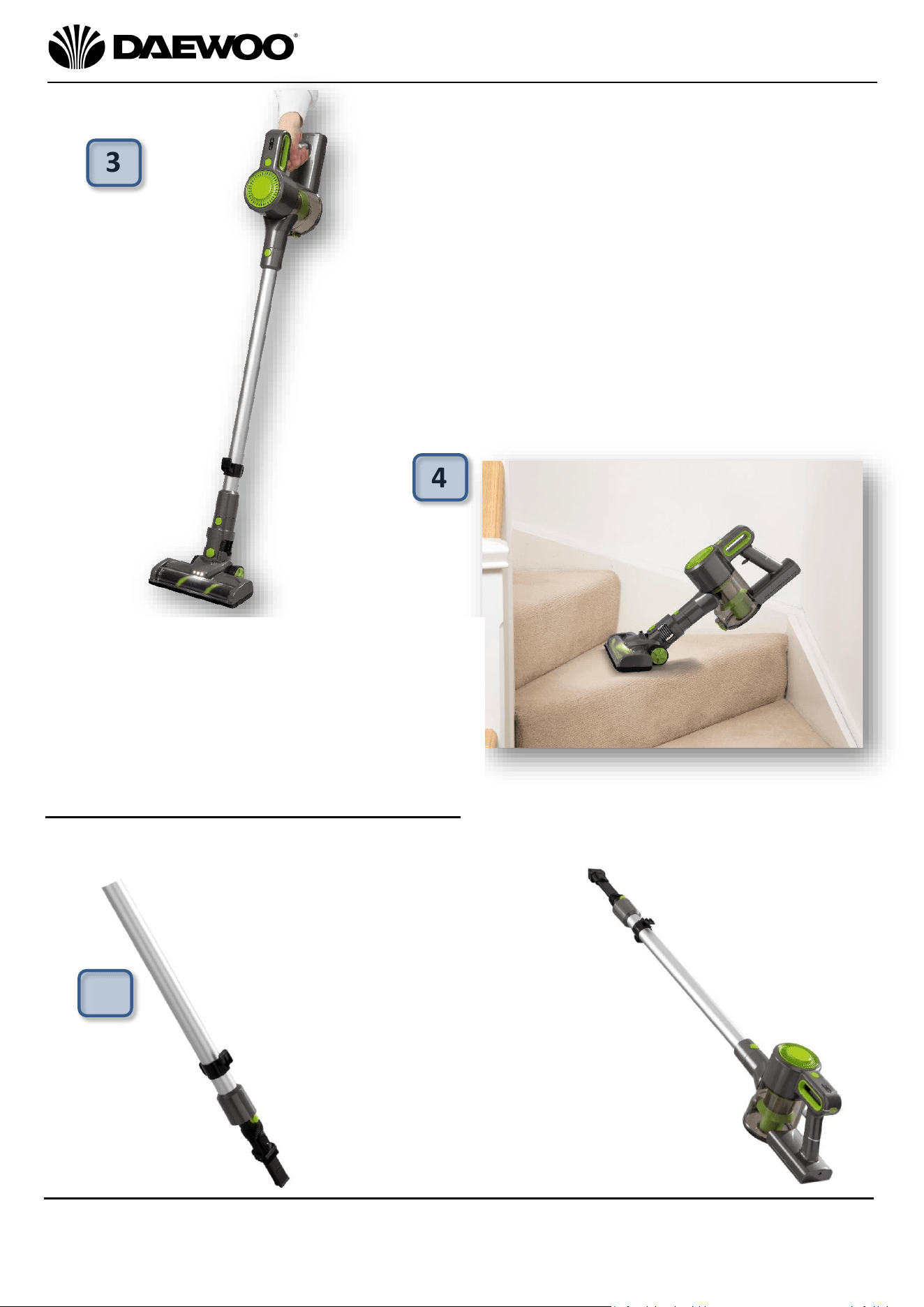
3. Place your foot gently on the Motorised
Floor Tool (13) and pull the cleaner back by
the Handle (7) and start vacuum cleaning.
3
4. If the Aluminium Tube (17) is not
required, the Motorised Floor Tool (13)
can be attached directly as shown right
for cleaning hard to get at areas such as
stairs, car seats, etc.
Left: Slide the brush back on
the tool to reveal the crevice
tool to clean carpet edges,
etc. Alternatively use the
Long Reach Crevice Tool
(20).
Right: Pull the brush down on the
Crevice Tool & Upholstery Tool
(14) to clean curtains, upholstery,
etc.
4
1
10
Cyclone Freedom 22.2V Cordless Vacuum
Cleaner
FLR00010
User Manual
IMPORTANT – RETAIN THESE INSTRUCTIONS FOR FUTURE REFERENCE
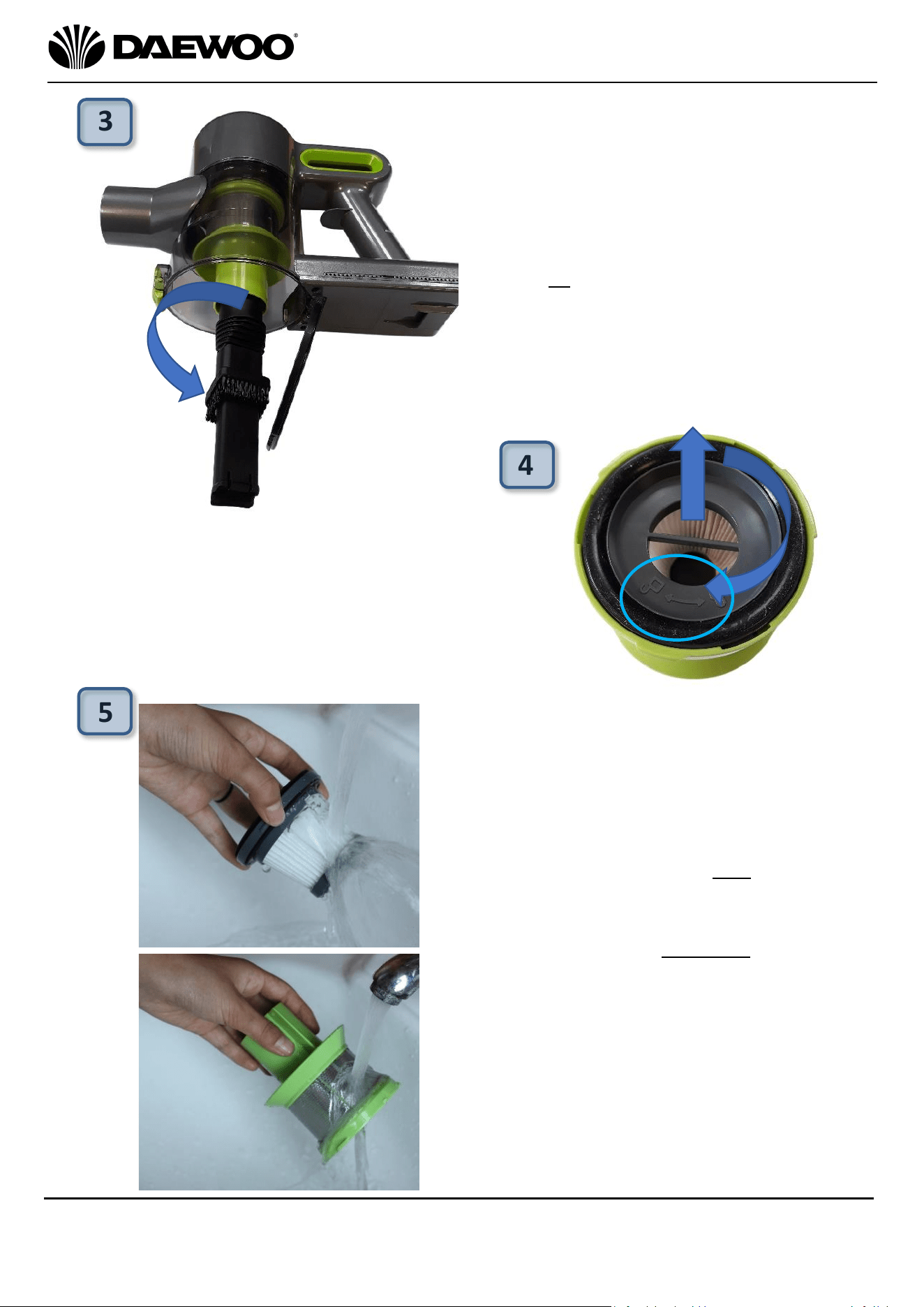
2. To empty the cleaner, hold the Dust
Compartment (4) over a dust bin and press
the Dust Release Catch (3) (arrowed right)
and the base of the dust compartment will
swing open and allow the collected dust to
fall out into the dust bin.
1. Once the Dust compartment (4)
fills to the level shown arrowed
left, it will need emptying and the
filters cleaned.
2. If the Aluminium Tube (17) is not required, attach the Crevice Tool &
Upholstery Tool (14) directly to the cleaner, this useful for cleaning soft
furnishings, car seats, stairs, etc.:
Emptying and Cleaning Your Cordless Vacuum Cleaner
WARNING! Always disconnect the cleaner from the mains charger before
cleaning.
WARNING! DO NOT continue to use your vacuum cleaner above the
Maximum Fill level shown arrowed above as permanent damage may occur to the
appliance.
1
2
2
11
Cyclone Freedom 22.2V Cordless Vacuum
Cleaner
FLR00010
User Manual
IMPORTANT – RETAIN THESE INSTRUCTIONS FOR FUTURE REFERENCE
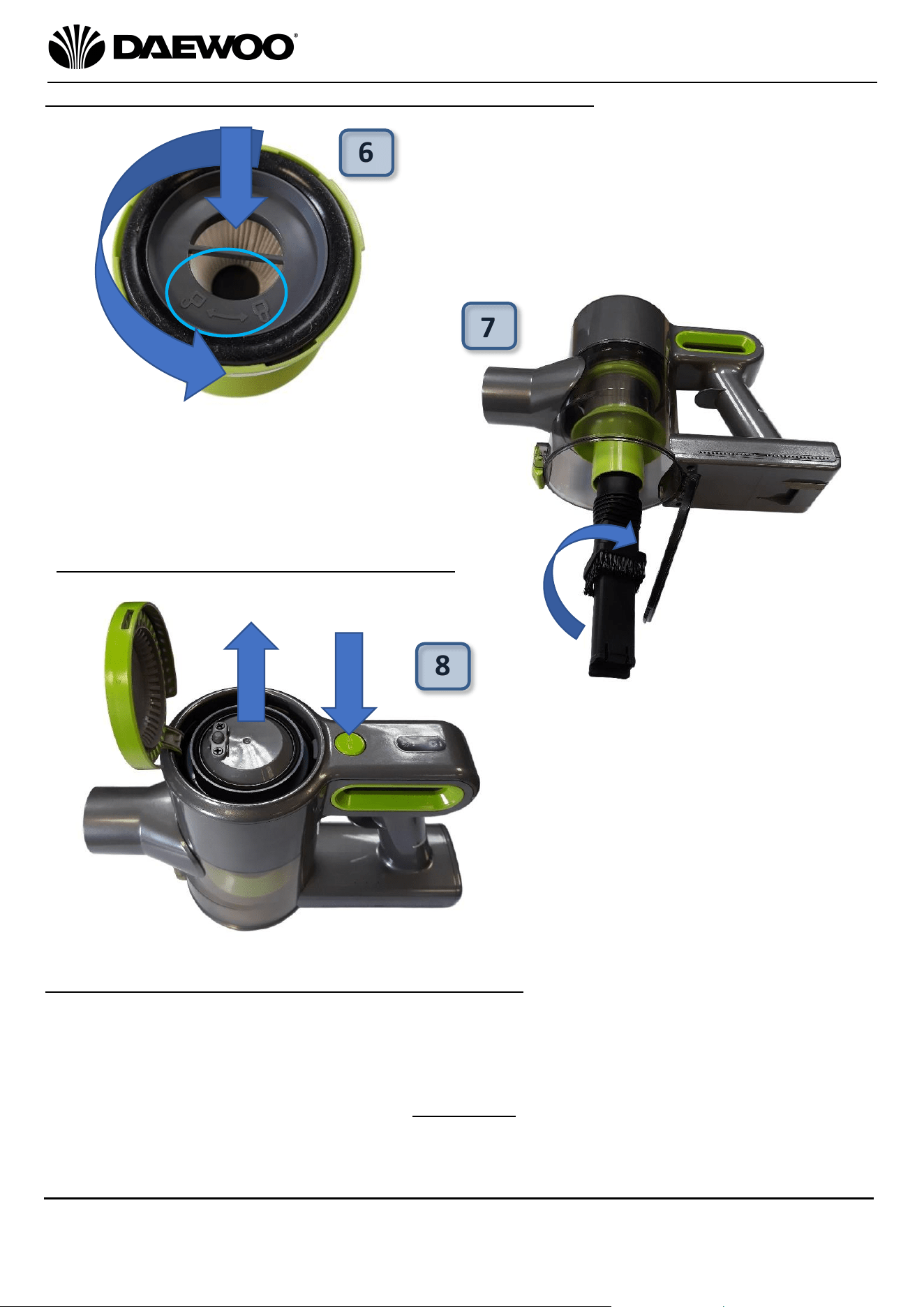
3. After emptying the Dust
Compartment (4), insert the top of
the Crevice and Upholstery Tool
(14) or the Long Reach Crevice
Tool (20) into the base of the filter
assembly as shown left and rotate
anticlockwise to remove the
Conical Hepa & Cyclonic Filters (2).
4. Twist the Conical Hepa filter clockwise in
the and the direction of the ‘UNLOCK’
symbol as shown circled right and remove
it from the Cyclonic filter.
5. Wash the Conical Hepa and
Cyclonic Filters (2) in warm running
water until clean. Allow the filters to
dry thoroughly for 24 hours before
reuse.
4
3
5
12
Cyclone Freedom 22.2V Cordless Vacuum
Cleaner
FLR00010
User Manual
IMPORTANT – RETAIN THESE INSTRUCTIONS FOR FUTURE REFERENCE
6. Replace the Conical Hepa Filter (2)
inside the Cyclonic Filter, rotate the
filter anticlockwise towards the
‘LOCK’ position as shown circled left.
7. Replace Conical Hepa & Cyclonic Filters
(2) into the vacuum rotating clockwise
as shown right.
8. Press the Air Outlet Filter Door
Release Button (10) to open the Air
Outlet Filter Door (11). Remove the
air outlet filter and wash in warm
running water until clean. Allow the
filter to dry thoroughly for 24 hours
before reuse.
Replace the filter and push the Air
Outlet Filter Door (11) closed.
Replacing the Filters in Your Cordless Vacuum Cleaner
Cleaning and Replacing the Outlet Filter
Care and Use of your Cordless Vacuum Cleaner
• Always disconnect the cleaner from the mains charger before cleaning.
• Clean outside of the cleaner with a clean damp cloth. Never clean with harsh or
abrasive cleaners.
• Do not submerge the cleaner or its charger in water or any other liquids.
• Empty the Dust Compartment (4) as soon as it has reached maximum capacity
(see above).*
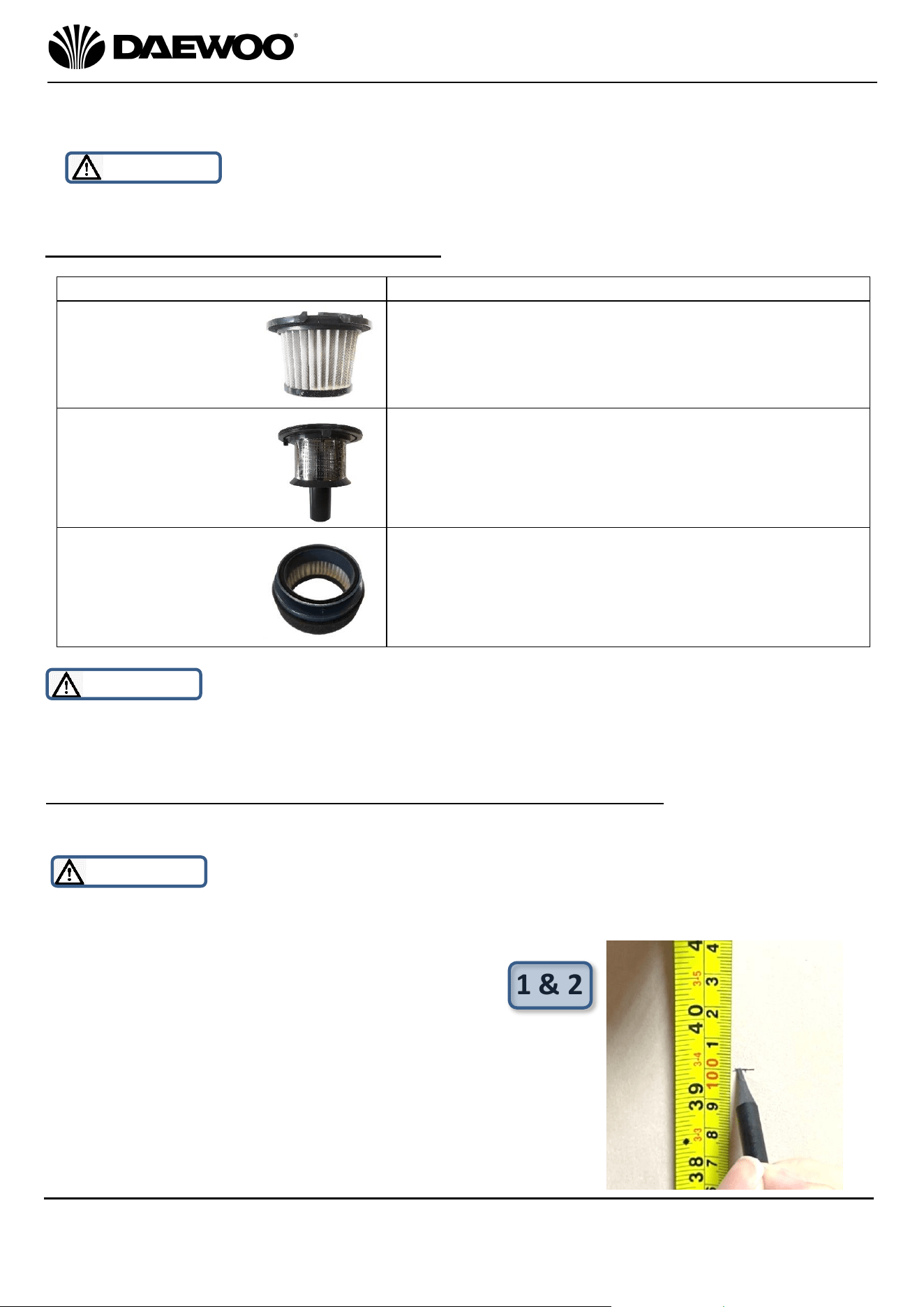
• Wash the Conical Hepa, Cyclonic Filters (2) and the Air Outlet Filter (11)
regularly – see table below.
6
7
8
13
Cyclone Freedom 22.2V Cordless Vacuum
Cleaner
FLR00010
User Manual
IMPORTANT – RETAIN THESE INSTRUCTIONS FOR FUTURE REFERENCE
• Allow the filters to thoroughly dry out for 24 hours before reassembly and
reuse.
* WARNING! DO NOT continue to use your vacuum cleaner once the Dust
Compartment (4) is full as permanent damage may occur to the appliance.
Recommended filter cleaning intervals
Filter Type
Recommended cleaning period
WARNING! Ensure the filters are cleaned periodically according to the table
above, failure to clean the filters regularly will severely impair the performance
and permanent damage may occur to the appliance.
Fitting the Wall Bracket for Storage of your Vacuum Cleaner
Fit the Wall Bracket (21) to the wall using supplied Wall Plugs and Screws (or
alternative appropriate fixings for the wall) as follows:
WARNING! Be careful whilst drilling the holes, care must be taken not to
damage concealed cables and pipes in the wall. If in doubt obtain the services of a
qualified tradesman to fit the wall bracket.
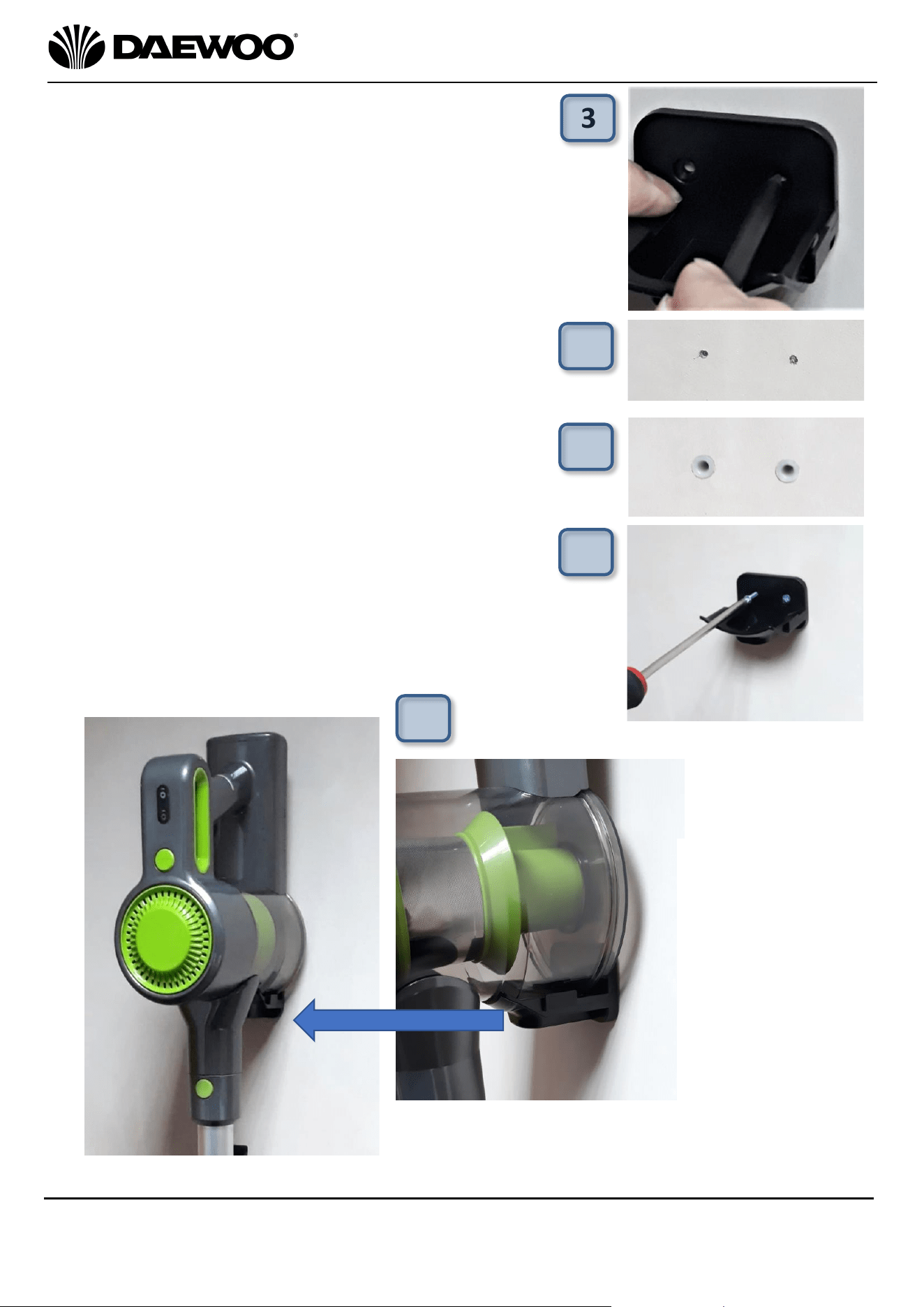
1. Choose a suitable position to mount your
vacuum cleaner on the wall.
2. Measure 1 metre above the floor and mark the
wall with a pencil as shown right.
1 & 2
• Shake
out
debris
when
you
empty
the dust
container
•
Rinse
under
war
m
water
once
a
month
• Allow to dry thoroughly for 24 hours before reuse.
• Shake
out
debris
once
a
month
•
Rinse
under
war
m
water
once
a month.
• Allow to dry thoroughly for 24 hours before reuse.
Conical Hepa Filter
Cyclonic Filter
Air Outlet Filter
• Shake
out
debris
once
a
month
•
Remove the sponge filter from around the Hepa
filter and rinse
under
war
m
water
once
every
3-6
months
• Allow to dry thoroughly for 24 hours before reuse.
14
Cyclone Freedom 22.2V Cordless Vacuum
Cleaner
FLR00010
User Manual
IMPORTANT – RETAIN THESE INSTRUCTIONS FOR FUTURE REFERENCE
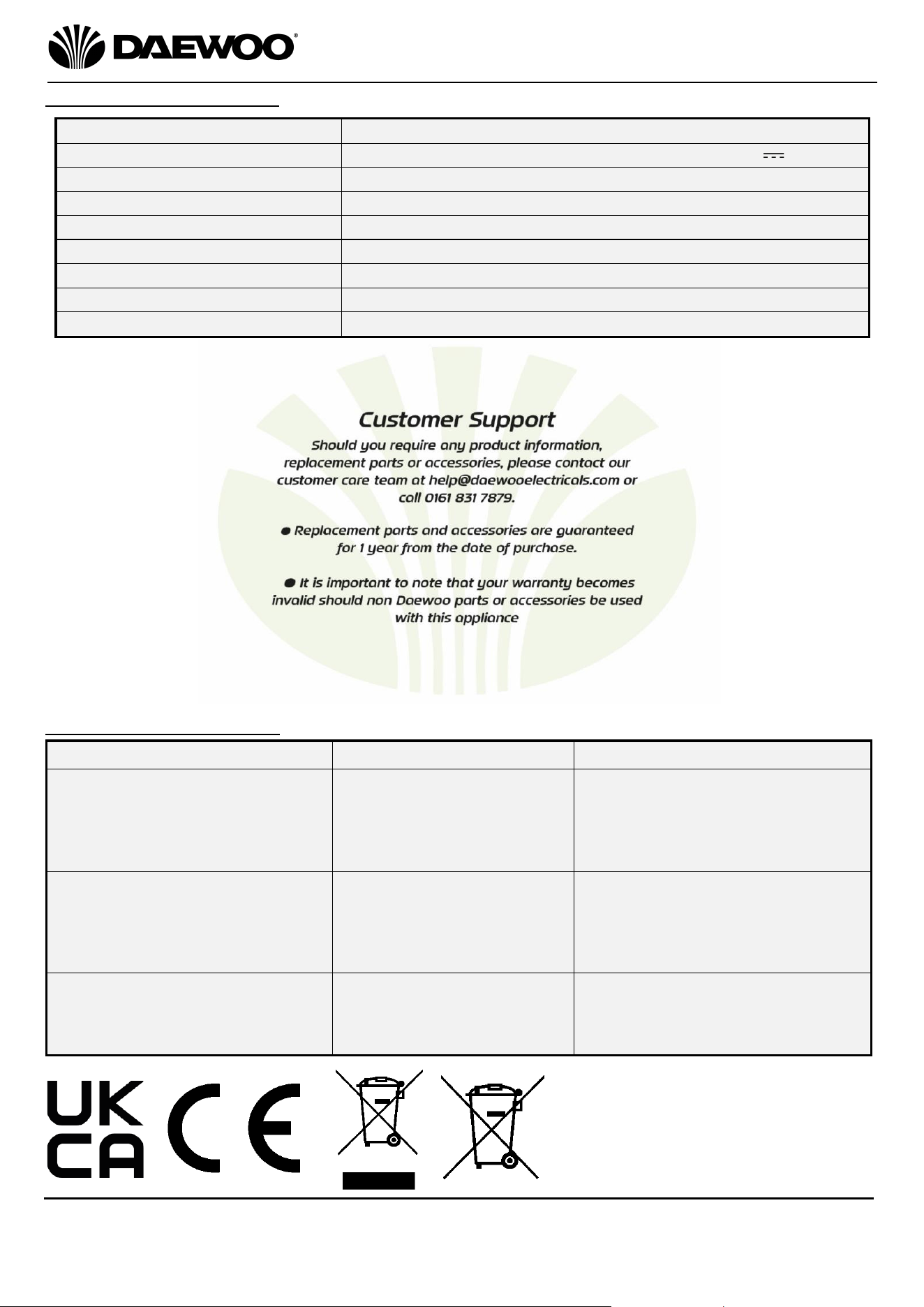
3. Hold the Wall Bracket level on the wall in
line with the 1 metre mark made and mark
the position of the two screw holes through
the Wall Bracket using a pencil as shown.
4. Remove the Wall Bracket and using the
marks, drill holes in the wall using a suitable
6mm masonry drill bit (not supplied).
5. After drilling the holes, push the two supplied
Wall Plugs into the holes as shown right:
6. Screw the Wall Bracket to the wall using the
supplied screws:
7. Hang your Vacuum cleaner on the Wall
Bracket as shown below:
Left: Close up
showing how
the vacuum
cleaner
mounts onto
the Wall
Bracket
3
4
5
6
7
15
Cyclone Freedom 22.2V Cordless Vacuum
Cleaner
FLR00010
User Manual
IMPORTANT – RETAIN THESE INSTRUCTIONS FOR FUTURE REFERENCE
Technical Specification
Troubleshooting Guide
Problem
Possible Cause
Possible Solution
Unit fails to turn on.
Internal battery not
charged.
The charger is not
plugged into the mains
socket.
Charge the internal battery.
Ensure the charger is fully
inserted into the socket and
the socket is switched on.
Low suction or poor pick-up.
Dust Compartment is
full.
Filters are clogged.
Low Power Selected
Empty the cylinder.
Check and clean the filters.
Press the Min/Max Power
Button (8)
The vacuum is making a
“hissing” sound.
The airflow is restricted
Empty the Dust Compartment.
Check and clean the filters.
Clear any blockages if
necessary.
Model Number
FLR00010
Mains Charger
Input: AC 100-240V ~ 50/60Hz Output: 27V DC 500mA
Rated Power
150W
Battery
22.2V 2200mAh Li-Ion (6 cells)
Unpacked Weight (approx.)
2.2 Kgs
Dimensions (approx.)
210mm (l) x 128mm (w) x 290mm (h)
Vacuum (max)
8-11kpa
Noise Level (approx.)
72dB
Dust Compartment Capacity
0.8L

16
Cyclone Freedom 22.2V Cordless Vacuum
Cleaner
FLR00010
User Manual
IMPORTANT – RETAIN THESE INSTRUCTIONS FOR FUTURE REFERENCE
WARRANTY
Thank you for purchasing your Daewoo Vacuum.
As part of our commitment to quality, we are offering you an extra 2 years warranty in
addition to your 1 year guarantee
Your Daewoo vacuum product is guaranteed for 1 year from the date of original purchase,
with proof of purchase or receipt. If any defect should occur due to faulty workmanship or
material, your faulty vacuum should be returned to the place of purchase, replacement or refund is
at the discretion of the retailer.
The guarantee is subject to the following provisions:
•
The product must be correctly installed and operated in accordance with the
requirements contained in the instruction manual.
•
The product must be used solely for domestic purposes.
•
It does not cover general wear and tear, damage, misuse or any consumable parts.
•
The guarantee will be rendered invalid if the product is re-sold or has been damaged through
inexpert repair.
•
The guarantee is only valid within the UK and Eire.
Your standard 1 year guarantee will only be extended to the maximum available for your
individual product upon registration. (Note: products must be registered individually and
covers the main body and housing). If you do not register your product within 28 days of the
original purchase date, your product will only be guaranteed for 1 year.
To validate your extended 2 year warranty*please register your purchase online within 28
days of the original purchase date by registering at
www.daewoowarrantyregistration.com/warranty-registration
*Your extended warranty is only valid with proof of purchase receipt and subject to the
conditions outlined above.
Daewoo® is a registered trademark.
Produced and imported under licence by ESG Ltd
Manchester M3 1JS www.esgltd.com